#shaders
2 messages · Page 4 of 1
 lapis trail
Are there any alternatives to Cubed's Fade effect? I dunno if transparency is still buggy on it
 humble frost
I'm seeing these thin black lines when using some shaders that I have created with Amplify. The lines are usually quite small and are only visible at certain viewing angles. This seems to be happening on multiple models with a couple of different shaders of mine but I can't find what part of the shaders are causing this. Any ideas?
 fresh remnant
If anyone has any time for a shader question that probably might take a medium length of time let me know although i think it is an easy one
 steep swift
I can't say without seeing the question. I will promise to take a look if it's something I know how to do and can be done in a vr safe way
fresh remnant
I'd like to get a shader to replace the blue trim on the coat and outline the tie
id have to make something by itself but idk what or how to do that
you can't have shaders on certain parts of mats right? shaders always cover the whole mat?
@humble frost it looks like your texture mapping wrap around doesnt reach all the way around the head so your seeing a transparent line maybe idk too much about that but its a theory
@steep swift
My theory is id have to go into blender, add a thin model line and make material mapping for it right? but idk how to do that, any youtube links or 1 on 1 help would be great.
steep swift
If you're familiar with things like spec/metallic maps and other maps like sss in XSToon that act as a mask for various shader features you could use a similar trick to do multiple features in a single shader
There are some considerations though. It's probably better performance to split things into separate materials for certain types of effects. For example, if you desire an outline on parts of your avatar that could be better as a separate material...unless you want to do some tricky blending between the tie and other parts
One other very underused technique is using something called vertex colors. They are super easy to add in blender and also super easy to access in a shader
These can be used in a vertex or geometry shader to conditionally enable shader features on an avatar when sampling a texture isn't feasible. So you could use vertex colors for things like sampling an outline color and outline width on a per vertex basis
(side note: extra 4-dimensional UV streams are even less used and let you have even more data here but it's hard to import so let's stick to vertex colors)
Vertex colors are natively supported in blender and every 3d software so don't be afraid of them. Then what you do for example is go to your favorite outline shader and in the outline or geometry function or wherever it uses _OutlineWidth just multiply that with v.color.r for example to use red color channel as outline width
Anything not painted red will have no outline
steep swift
As an additional optimization you can do if (v.color.r == 0) return; in a geom shader or if (v.color.r==0) v.vertex=float4(1,1,1,1) in a vertex shader to avoid rendering the outline completely if width is 0 and save some performance in that case
(You're asking me and you're asking in #shaders so sorry if I ramble about the theory)
fresh remnant
Thanks for all the info too actually! Sorry
steep swift
Anyway if you're hoping for a prepackaged solution I can't recommend anything. It's not too hard to edit a shader to add it if that's what you want
fresh remnant
I'll understand it one day
steep swift
If you want simple and no need to edit shaders, just split off parts of your avatar into separate materials
You can have up to 4 materials and still be excellent
steep swift
Blender, select your tie in faces mode using your favorite selection tools and press p key and By Selection
fresh remnant
crap your on mobile
steep swift
Wait no you need to add a new material and assign your selection to it derp
Yeah sorry I'm a bit slow
fresh remnant
nah i was hoping to get into a voice chat i know typing is tiring
fresh remnant
think anyone could help me with hat
that
trying to replicate this on another avatar
steep swift
I would split off to separate materials and customize each one
fresh remnant
never mind figured it out
 grave hatch
How do some shaders (like GPU particles) know the position of another object (like the hand)? I know they use cameras or something so would it just be like having the render texture set as the color of another object that is set to the worldPos?
 past pewter
yeah there's a quad on the hand that has a camera pointing at it, the quad has a material that writes out the position in colored pixels, you can then read the camera texture in your other shaders
 somber widget
that's only going to work for local or friends though
past pewter
but you need those to store stuff between frames, like particle positions
so it's gonna use cameras anyway, unless you have a stateless effect, then just attach the mesh to the armature and read the objectposition in your shader
somber widget
yeah, you'd only get one bone with that though. maybe you could do some weird tricks with a geometry shader where one vertex is mapped to a different bone than the others....
past pewter
lol yeah that would work, or visemes and read the verts
somber widget
huh, how would shape keys be useful here? I thought those were processed on the CPU, or at least prior to the vertex shader
past pewter
what would you need more bones for?
somber widget
How do some shaders (like GPU particles) know the position of another object (like the hand)?
I was assuming the shader wasn't just an effect parented in the hand's coordinate space, because that would be too easy 😃
which then implies multiple bones are involved
past pewter
I mention shapekeys because people have made custom visemes reading verts back in the same way you would read verts painted to different bones
somber widget
just to inject data?
past pewter
all of the gpu particles just use a fingertip or wrist position
no to have shader animations follow the lip sync visemes
somber widget
ah
past pewter
but yeah, you can get the position and rotation of one bone and do all of those effects
and they usually have cameras and quads attached to the hand, that are hidden from non-ortho cameras so they're invisible to the player
you can store a lot of data from your avatar too but it's a lot more work https://www.youtube.com/watch?v=S4n-FOkpPrQ

 tired token
Can't believe Merlin releases MMD videos now.
steep swift
By the way you can use a tri with one vert painted to each of 3 bones or even better a quad painted to 4 bones (may require an editor script), and you will be able to also get information about the root bone (object position). It's not perfect but 4 or 5 points of reference in a geometry shader lets you potentially do some interesting effects without having to write data to the screen
somber widget
huh, does the geometry shader get the full quad?
and, can you rely on the order in which the vertices will be presented to the geom shader, or do you need to use vertex colors or something to identify which is which?
steep swift
I haven't tested ingame, but unity supports quad geometry shaders provided the Mesh object is set to quads (again probably requires an editor script to and maybe changing the vertex stream....importing an fbx isn't going to do this for you)
Yes the order is consistent
I always use editor scripts to generate these meshes in unity... can't say for imported meshes
I have some poorly documented sample scripts and shaders that use this...i made a way to target two objects one from each hand and draw something between them affected by my head orientation, all from a triangle
 faint fulcrum
After recent tests with geom shader input: setting type to point will not get you all of model vertices, need to use triangle (havent tested lines), adjancy info is also not supported
As for order, theres SV_VertexID and SV_PrimitiveID semantics
grave hatch
@past pewter I see thanks as for storing stuff between frames that's just another camera reading from the other render texture right?
@steep swift I haven't messed with geometry shaders much, but I'd assume you're talking about the input array is there an order to which vertex is which?
past pewter
yezzur, exactly
past pewter
hey does anyone where to find a good water shader?
steep swift
Check the prefab doc pinned in #world-development . There are a few choices there depending on what you want.
 vocal wadi
Can anyone explain, just shortly, how particles and players are able to interact with shaders? They're deterministic, so it puzzles me a bit
steep swift
Can you explain a little more? You asking about stuff like interactive water? (like the SilVR system used in the Mountain Spring world)
steep swift
So the principles involved are simple: the effects are done by using an orthographic camera with a very small near and far clip plane to capture the slice of objects touching the water surface. Then, some shaders are used to simulate physics and the water is rendered using that computed water essentially as a normal map. If you visit the mountain spring and jump off the edge or use playspace mover to go below the world, you can see the debug texture
vocal wadi
Oh, cool! I've seen something below the map but I couldn't get a good look at it
steep swift
Check out SilVR 2.0 from the prefabs doc in #world-development and he has a good youtube tutorial explaining everything:
https://www.youtube.com/watch?v=v1TcVK46ToQ

Sound was a little quiet in the last version so here's the reuploaded one that's a little louder. So I've decided to finally release my personal water shader...
Oh, and while you are there, check out his newest videos from this week. this is just cool: https://www.youtube.com/watch?v=SsVAgtVUmnI

Just a preview for one of the upcoming advanced features for the SilVR Water Rig 3.0. Once I get everything polished up I'll record a tutorial. Recently a fe...
 glad ridge
anysites with some cool shaders? besides substance share, most the shaders there wont work i unity for some reason
 split girder
If they're created for the correct export, they should work
split girder
Oh, you're supposed to add those smart materials to substance painter
Create a new project to export to Unity PBR, bake the maps, use those materials on the object and then export to unity
Then you'll be able to use them
 wary junco

I can never figure out what the freaking logic is behind shaders with this kind of lighting
is that a quaternion?
 lucid cedar
No, that's
The default shader inspector shows XYZW for all vectors, even if Z/W are unused.
For directions they generally use euler so don't worry
lucid cedar
Noenoe has that too
W is literally ignored
I just realized I can probably reuse the W as intensity, oof
wary junco
i tried assuming it was X Y Z only, but i was doing a unit direction, didn't think of euler angles
 marble ibex
any free shader that can disable backface culling?
 velvet sorrel
This is such a common problem. I should post my Standard with a cull mode toggle.
tired token
But does it correctly invert the normals @velvet sorrel?
velvet sorrel
No.
 shadow trench
tired token
shadow trench
tired token
Nope
past pewter
same drawcalls, no culling
Cull Back Don’t render polygons facing away from the viewer (default).
Cull Front Don’t render polygons facing towards the viewer. Used for turning objects inside-out.
Cull Off Disables culling - all faces are drawn. Used for special effects.
 echo portal
Just saw the mesh particles video, thats insanely cool. How would one go about doing that with the gpu particles following your body mesh?
tired token
@echo portal Doing it the way that video does requires cameras and a lot of shader programming experience & the know how of motion vectors.
echo portal
Ah, thanks for the explanation! Its a bit far over my head for now haha
tired token
No worries
 buoyant ivy
Yo, Im trying to use stencil shaders and a screenspace fog shader at the same time for my new map, is there a way to set it up so the stencil mask dont remove the fog behind it.
 lethal rock
For light direction, W is an internal unity variable, I’ll be removing that field from my editor soon
grave hatch
Try adding a fallback on the stencil mask like
Fallback "Diffuse"
@buoyant ivy
buoyant ivy
Hmm
grave hatch
after the subshader so after line 54
assuming the fog uses the depth buffer
lucid cedar
Wouldn't that do the opposite?
grave hatch
hmm maybe you're right, possibly do it for the shader that's getting hidden with the stencil instead?
not entirely sure why but doing that seems to make it stuff write to the depth buffer if it's not doing so
echo portal
so i have this cool space shader, but it only renders on the outside of a sphere. Everywhere i look people say flip the normals of the sphere with a script, but scripts don't work in vrchat.
i'd like to make a cool space effect inside a sphere
grave hatch
In blender you can make a sphere and invert the normals there or you can open the code and add
Cull Front
under the tags
@buoyant ivy you can also try putting the fallback on the shader for the hidden geometry instead of the stencil, other than that does the fog work if there's no stencil?
echo portal
where would i put cull front, in the shader's code? That seems relatively simple and efficient
grave hatch
under the tags brackets so something like
Tag{ [whatever goes here] }
Cull Front
or
Tag{ [whatever]
}
Cull Front
this one doesn't have tag, would i be able to just put it within subshader section? sorry if i'm asking a lot of questions
It worked!
Thank you so much c:
grave hatch
np, forget if it matters where it is in the subshader, but that's just where I put it
 subtle timber
Hey, by any chance does anyone here know how to make an avatar emit a "glow"? I wasn't sure if this was a shader thing or a particle thing.
I've messed around a little with emission, but am having trouble figuring out how to make the glow "come off of" the mesh (ex. a glowing halo with the glow radiating off of it)
lucid cedar
@subtle timber the effect you're talking about happens automatically in maps with bloom
It's quite hard to pull off without bloom in the map
subtle timber
I see--thank you for explaining!!
 sacred crag
How to apply bloom to a map then?
tired token
You ask the map creator to add Post Processing Stack V2
https://gitlab.com/s-ilent/SCSS/wikis/Other/Post-Processing

GitLab
A surface shader for Unity based off Cubed's Flat Lit Toon shader
 halcyon kernel
Whats the best shader to use to get good effects
Please message me directly or tag me
steep swift
What is your render queue set to? One of the things different in vrchat is Vrchat resets your render queue to From Shader on upload so you must have the queue specified in the shader
It is set as geometry in the shader file too?
Also are you testing with similar lighting settings in vrchat and unity (ambient/directional/baked gi/spot or point)
 true bolt
anyone around that's good enough with shaders who can help me make my shader not look like a damn flash bang in worlds that have bloom?
past pewter
@true bolt either saturate(color); so the output color channels stay between 0-1 or clamp(color, 0.0, 1.5); to have it never exceed a certain emissive color maximum (1.5 in this case)
 crystal wadi
@velvet sorrel ?? i am getting a odd effect at the edge of a water mesh going into the terrain , any idea what this is
this is the silent Clear water shader
ah wave strength to 0 it goes away
velvet sorrel
Yeah, must be the normal map strength
crystal wadi
yup realized i need different normal maps from ocean type to slower bay waves
other note had some small z fights only visible on far distance
 teal finch
hey, is there anyone with cubed shaders? im following along with tupper's tutorial and im not really getting a outline
its looks fine, but im also not able to see the back of certain meshes
lucid cedar
Is that the only reason you need outlines?
teal finch
mmm i think a outline would make my character look a bit better
in general
but i really do need the back of meshes to be visible
lucid cedar
Well if you only need the backside visible, the "Lite" shaders in Cubed's have a double-sided version of the shader, or a double-sided selection mode altogether.
If you want outlines, set the outline mode to tinted and increase the width until you see them.
You may have to delete and re-import Cubed's from Github since the non-lite version can have issues sometimes
teal finch
ok i think i figured out whats going on
i made my model from scratch
and i mean from scratch scratch
there is a little text box above the settings in the inspector of my materials for cubed shaders
it says, and i qoute:
"normal mapped shader without a normal map. consider using a non-normal mapped shader for preformance."
does that mean i need to go back into blender and get a normal map?
(i even downloaded version .21 of cubed shaders, and im not seeing the same screen tupper gets)
lucid cedar
You don't need a normal map, especially not for Cubed's. And that message shouldn't be appearing with Cubed's. Can you show a screenshot of what your material inspector looks like?
I am almost positive that you have a compile error somewhere in your project and that the material inspector isn't working properly. @teal finch
teal finch
hey, i downloaded everything and redid all the importing
and when io brought my avatar in, i did not get a materials folder...
am i supposed to create one in this new version of unity?
some how i fixed it
 celest heath
anyone know where i can find a basic water shader that doesn't lag like heck?
or require me to tear apart my world and put a "land" shader on the terrain
steep swift
Most water shaders don't lag unless they are raymarched or interactive. Silent's is kind of the standard one people use these days
lucid cedar
I like Synlogic's water shader too
steep swift
#world-development pins has a link to the prefab database half a page fown
 astral plover
any good distortion shaders? Trying to make gas like particles
lucid cedar
Is there a way to check whether the current reflection probe is an actual reflection probe, or the skybox?
I'm trying to make my reflections similar to Standard, which apparently has Unlit reflections (which makes sense if the probes are done correctly). However, if there are no reflection probes and I'm reflecting the sky, then I want the reflection intensity to dim based on the light color/intensity.
tired token
AFAIK There's not.
lucid cedar
Damn
Guess I'll just have to make my reflections unlit then, like Standard does
Normally that's fine, breaks in the Box though. I don't go there anyway
Rero Standard dims the reflections based on ambient color, but that is incorrect in darker scenes, makes the reflections darker than they should be
tired token
I wonder if there's a race condition in all the probe variables for just skybox stuff
 fluid hamlet
someone maybe knows what water shader is used here ?
planning on recreating this world map from a mobile game
tired token
Is that an MMD video?
fluid hamlet
no , vr scene from a mobile gacha game
tired token
I clearly didn't read. Sorry!
fluid hamlet
thats ok
 cedar zephyr
Anyone ever seen this error with a shader? Parse error: syntax error, unexpected TVAL_ID, expecting TOK_SETTEXTURE or '}'
lucid cedar
It means you have an invalid syntax
Like an extra parenthesis or mismatched brackets {}
cedar zephyr
oof, maybe this is a little out of my league then. Found this shader and really wanted to get it to work again aha. Guess that sinks the idea since i see no brackets and don't understand shader coding enough
    Name "FORWARD"
            Tags { "IGNOREPROJECTOR" = "true" "LIGHTMODE" = "FORWARDBASE" "QUEUE" = "Overlay+1" "RenderType" = "Overlay" "SHADOWSUPPORT" = "true" }
            ZTest Always
            Cull Off
            GpuProgramID 35328
            Program "vp"
                SubProgram "d3d11 "
                    Keywords { "DIRECTIONAL" }
                    "!!DX11VertexSM40
This is the code in question if anyone knows
program "vp" is where the error is
tired token
Nice compiled shader you've got there
steep swift
🤔 found you say?
tired token
Big 🤔
lucid cedar
That's what I suspected too but
Apparently Program is valid syntax
Oh nvm you're right, this one is already compiled. That would be your issue if that's the case.
cedar zephyr
Tf is a compiled shader lol. Out of the loop here
lucid cedar
Where did you get the shader from if I may ask?
tired token
Ooh now you're gonna have to DM one of us the link
steep swift
Deviant doesn't usually have unity packages and shaders
tired token
👀
steep swift
This is quite unusual
cedar zephyr
Idk mang.
Point is, i wanted to get it working. If its compiled
Sounds liek a dead end
Lol think i just found the shaders origin.
I typed in the name and it came up with someones shader collection, its called Benders screen darken
lucid cedar
Highly unlikely that you would find such a thing on Deviantart. Bender's shaders are freely available on his Github
cedar zephyr
Well, guess i got a 1 in a million then
tired token
I was gonna at them but I can't see them
lucid cedar
Or you're not being entirely honest with where you actually got the shader :^)
I don't think Bender is in this Discord or they have mentions off
tired token
After typing the entire name I found em
cedar zephyr
You 2 seemed to know a thing about shaders tho, maybe you could help me in this game of guess that shader?
Theres a shader here, that i've been dying to find

No idea what its called
cedar zephyr
I figured it out. Its Poiyomi master shader with blending and emission
2 texture blending
lethal rock
Hope it’s not the old version
lethal rock
Yikes, actually it might be a good idea to make a script that can clear keywords from materials, I built the function into my shader editor but only targeted keywords
 halcyon kestrel
@tired token made one that works very well but has yet to release it. Cough
cough cough
Man, must have developed a cold.
lethal rock
You need a tissue xiexie?
halcyon kestrel
Potentially
 spice perch
Is this the part where we summon Rea since they've gone all-in on the sneezing on people train?
lethal rock
yikes, this is why I carry tissues
halcyon kestrel
Yeah I'll take a tissue, cough scruffy pls cough
 acoustic oak
Lmao, uhh those are usually just the default vrchat panosphere. There's no special "hentai" shader.
steep swift
Or Noenoe overlay shader. You can also choose to put normal images on it.
acoustic oak
That too
tired token
Mkay
 brisk bronze
I want to dissolve this hoodie for an animation but whenever I try it just turns white.
I would like to have the hoodie mesh go completely transparent when the dissolve is complete but I can't figure out how.
fluid hamlet
https://gist.github.com/nukeop/1d2e54bed93ca7e5a67794e45a402541 this might help
Gist
Dissolve shader for Unity. GitHub Gist: instantly share code, notes, and snippets.
brisk bronze
Maybe I'm not using it right but it gives the same effect @fluid hamlet

 brisk bronze
@fluid hamlet Well I'm using it with another shader
I want to dissolve the mesh and another shader at the same time
I'll try that later when I get some time though, maybe that was the issue.
fluid hamlet
yea ..you cannot really use one shader having the texture visible and the other have the dissolve (it just layers on top of each other)
 silk hamlet
did your shader have it setup to have cutout?
 livid prawn
Hi guys! I heve clock and timer shader like https://github.com/y23586/vrchat-time-shaders?fbclid=IwAR39SvL6Mu5XLodp8SpjRDywp4JBPzFsFOnnuJlxlChtVobZ8sRK1kzqGlo. My task is to make such a timer that it considers the time spent in the world, but so that it does not reset after 24 hours. that is, change the format with hh:mm:ss to hh:hh:hh:mm:ss. What and where i should do that changes? who can explain logic of shaders

GitHub
Utility shaders to implement time-related stuffs in VRChat - y23586/vrchat-time-shaders
past pewter
how in the frickity fuckity frack do i do those crazy LSD effects some avatars have.
i have been searching on google for over 4 weeks and i have not found a thing
steep swift
If you're talking about screenspace effects stuff that cover the whole screen, those are discouraged as they can be hard on VR players so that's probably why you don't find much discussion on how to make them.
If you're talking about stuff that goes on the avatars like shading, fancy coloring, panoramas or starry effects and such things we can maybe help with that
past pewter
well in that case, i'll keep looking elsewher
steep swift
Please do be mindful of vr players if you do effects
past pewter
i'm not meaning TOO crazy
just like
shaking screen
and rainbows
not a GPU crasher
steep swift
Rainbows shooting out can be done with particle trails
Screen shaking even subtle is one of the worst things for vr. It might not make you nauseous but there are a lot of people in vr and not all of them are as tolerant as you
past pewter
even though most of my friends are on desktop and i avoid public worlds all the time, i'm gonna take that into account and go fuck myself
 low marten
Hey, does anyone know how I get the VRChat/Panosphere shader to work in the mirror please?
low marten
Nvm, it works now after a re-build lol.
 tulip sequoia
I wanted help on something that I know a lot of people aren't really fans of (mostly because it puts something in peoples faces) But I wanted to know if there was a way for me to get that going. I'm not the kind of person to abuse that I only use it with friends as a gag
tired token
🤔
 royal forge
is it possible to create a see-through shader that is only visible inside a certain mesh of an avatar like a box or small building?
lucid cedar
Yes, stencils should be able to accomplish this effect
So you can only see the object when looking through another specific object
royal forge
Sort of, yeah
I'll see if I can give stencils a go. thx!
hrmmm
that's close to what I'm aiming to do, though in a way I guess I'm trying to accomplish more of the titan effect from titanfall
so you would see outside the titan from the inside, but no one can see you from the outside.
tired token
You can make the mesh one sided.
Or cameras.
Or can stencils be one sided?
royal forge
Cameras might seem the best approach after giving it a test, since there's a couple of meshes above the other that it'll need to see through. Though with cameras it doesn't seem to like custom shapes for render textures, so I'm not sure how to go about with that.
past pewter
use stencils, they're one sided
write a stencil value on the inside of the mesh and check for it in the other material
royal forge
alright, I'll see if I can give that a try
past pewter
you need to do the reverse so edit the top shader to this:
            Ref 1
            Comp Equal
            Pass keep
}```to only see it 'through' the other mesh
royal forge
hrm. I gave that a try but the shader is coming up as pink. Not sure if that's normal as I know that materials show pink if it's missing something. Idk
 near flax
that means it couldn't compile, check your error log
royal forge
ahhhh
Log says ```Parse error: syntax error, unexpected $end, expecting TOK_FALSE or TVAL_STRING
Shader is not supported on this GPU (none of subshaders/fallbacks are suitable)```
wait nvm
I think I'm missing a bracket lol
Apparently I was missing "Diffuse" after Fallback lol
lucid cedar
Be careful with Fallbacks and stencils
Even if the object is hidden by stencil, another pass or subshader in the "fallback" may still write depth and mess things up.
echo portal
How would i learn to edit shaders? There is a shader i like but there is multiple problems with it, renders in 2 places for vr, renders on top of things etc
also looking for a good rainbow shader
steep swift
@echo portal that is probably a buggy version of Cubed's Flat Lit Toon shader. Please updated to the latest version at https://github.com/cubedparadox/Cubeds-Unity-Shaders/releases and for best reliability use the Lite version with no outlines
For some fun effects you can try Poiyomi's Toon Shader (not the one named master shader)
Learning to edit shaders is hard. You will want to start with small edits. If you're not too familiar with programming (especially C/C++) you might want to give a graphical node editor like Shader Forge or Amplify a try. They are actually very powerful.

GitHub
A compilation of custom shaders for Unity3D. Contribute to cubedparadox/Cubeds-Unity-Shaders development by creating an account on GitHub.
lucid cedar
Weird rendering in the right eye can also happen on other shaders, it happens on poiyomi randomly. It's a compilation bug that is usually solved by deleting and reimporting
echo portal
Thanks lyuma, it's not specifically cubed's shader. I usually use poiyomi's toon shader as it has a lot of useful settings like lighting and emissions, transparency, and cull mode.
I do know programming but shaders are a whole other level of complexity, i'll try shader forge and amplify out first
tired token
@echo portal if you right click poiyomi's folder and hit reimport that'll fix the double eye stuff
echo portal
Thanks so much, you guys in shader chat are always super quick with replies 😃
 mint grove
Does anyone know what shader is used to make avatars smaller when sitting on chairs?
near flax
i don't think a shader is usually used for that, i believe the chair animates the armature size of the person sitting in it
 vivid furnace
i have a model that has detailed clothing and weapons. right now i am using cub shader for skin what should i use for the clothing?
lucid cedar
I'm working on a shader that currently uses zero keywords. I'd like to put the metallic stuff in a shader_feature, which would save me 2-3 texture samples if metallic is unused. Can I safely use the _METALLICGLOSSMAP keyword that Standard also uses?
I want to avoid breaking the metallic stuff if the keyword limit is reached, and I figured that Standard would be common enough that the keyword would already be defined.
steep swift
that seems completely unnecessary btw...you are always free to use any keyword present in standard, though preferably for a similar use case that standard uses it for
lucid cedar
Yeah, this is pretty much exactly the same use case
steep swift
the keyword pool is by name, so if two different shaders use the same keyword name it will share an entry in the keyword pool
so using Standard keywords is a perfectly fine idea
lucid cedar
Alright, sweet. Thanks
steep swift
especially ones like _ALPHATEST_ON or _ALPHABLEND_ON
those are actually used for example to provide proper blending mode for fallback shaders
 naive solstice
Heyas peeps, i've been wondering if it would be possible for a shader to pixelate a section of a texture via something like a b&w mask, i've seen many shaders that pixelate the entire material they're on, but that's not what i'm looking for specifically
lucid cedar
Yeah, you could do that
near flax
yeah literally just apply the effect if the mask color is white
past pewter
anyone know how to get particals that shoot a beam?
echo portal
A model exists that can shoot a gun and when it collides with a player, it does a sound and screen effect that only that person can see. I'd like to do something similar but you shoot a heart and it does a rose overlay on the sides of your screen.
fluid hamlet
@past pewter you could add a trail on a particle system
past pewter
thank you
vivid furnace
what is the best shader for clothing that uses normal maps? because it doesn't really show normal maps
with cub
steep swift
To start with, see if you can get things working with Standard shader? If yes, I'll highly recommend XSToon. It's a toon shader with a standard compatible lighting model and even more features.
vivid furnace
i never use standard bececuase it always look soo dark then i put in an emission and i don't recall how that turned out
steep swift
Don't use emission. If you look too dark with standard that's a problem with the lighting in your test world
XSToon will look the same but that's the correct lighting
vivid furnace
it's because most worlds in vrchat is not good lighting
lucid cedar
A lot of worlds have good lighting tbh
Standard looks dark in Unity because the default lighting is as un-flattering as it can be
lethal rock
vrchat is only as good as the worlds you join
 brazen belfry
Anyone know a good shader for a Venom/Symbiote Spider-Man avatar to get that sort of wet/shiny visual effect?
lucid cedar
Standard Specular with white specular
echo portal
is it possible to add a mirror to your avatar using camera from the vrcsdk
 stuck cliff
@echo portal render texture + camera, cameras only works for people in friend list
 red sorrel
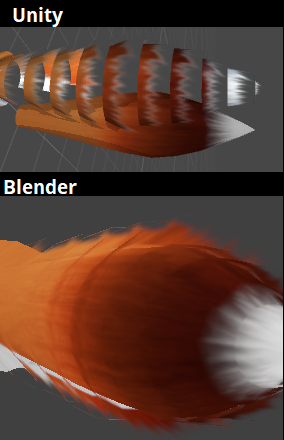
Hi, I'm wondering if anyone knows of a good shader for handling alpha in unity. I'm trying to get the same results I got in blender into unity in this picture without the white edges.
I've looked around on the asset store and messed with what shaders I hope could accomplish this but kept getting dead ends. https://imgur.com/fZd96Fz
 steep swift
@red sorrel give an alpha to coverage shader a try
XSToon has a CutoutA2C shader
Alpha to coverage can work miracles. You can also try dithered
faint fulcrum
Just make sure the actual texture transitions to same color instead of white as it can get worse at distance due to mipmaps
near flax
it's important to note that alpha to coverage will appear differently on different graphics settings
so something that might look good for one person can look like hot garbage to the next
red sorrel
Okay, I will try out that shader, thank you both for the info and help.
past pewter
i have a question out of curiosity. so if im using the poiyumi toon shader and want to have a pulsing emission on multiple materials, can i make an emission map of the atlased textures after i atlas in blender or would i have to make an individual emission map for the separate materials?
fluid hamlet
@past pewter you could take the atlased texture and open it in gimp or photoshop put a new layer on top of it make you emission on that layer where you want the emissions to be , delete the original layer and save as a new transparent png ,use that as the emission image in poiyumi
past pewter
ok ill try it out
fluid hamlet
at least if it for a glowing tattoo or something it should work
tired token
Well if you want tattoos to look good you'll want high quality.
If you have any gradients they'll get destroyed.
velvet sorrel
Or you can use the second UV channel to put things in smarter places
faint fulcrum
Thats all up to shader on how to use them. Its just more data that you can get to use
wary junco
I always seem to get mixed answers for what is good or bad. What is the best shader to use for basic flat shaded, solid-medium-grey ramp lit avatars?
lucid cedar
You're getting mixed answers because there simply isn't a "best". It depends entirely on preference.
Have you tried Noenoe? @wary junco
There are shaders that fit your criteria but I can't call any of them the "best".
People have oddly specific preferences for toon shaders. Mine is Noenoe
wary junco
I use noenoe but people keep telling me it’s bad
lucid cedar
It's not bad at all IMO.
wary junco
I use noenoe except for some blended alpha bits that I couldn’t see to get to fall back properly with noenoe (they kept falling back to no alpha)
steep swift
One thing noenoe does is it applies to cutout to everything and might run on the transparent queue for some cases where opaque or alphatest would work fine
The consequence of running on transparent is you don't cast or receive shadows
lucid cedar
Does opaque also run on the transparent queue? Lemme check
wary junco
I think it does
lucid cedar
Actually I seem to cast shadows just fine.
I sent you a friend request, I need to send a link to you
steep swift
I think noenoe has some suboptimal settings. I would suggest editing the shader and change the "Queue"="Transparent" to "Queue"="Geometry" or AlphaTest
I forget which one had this issue, might be wrong
lucid cedar
Noenoe Toon Transparent runs on the transparent render queue
Sometimes people use the transparent version for their entire avatar since it also handles opaque objects pretty well
steep swift
Noenoe definitely does some stuff with transparency in an unconventional way (doesn't mean wrong, it makes it actually easier to make transparent effects)
lucid cedar
It has ZWrite on its transparency
steep swift
Yeah because it is transparent but with zwrite on
I kind of think of toon shaders as different points on a "realism" scale where you have completely flat lit like cubed on one end and Standard on the other.
Anyway the other one you can try that has a similar feel to noenoe is poiyomi's toon shader. Beyond that on the realism scale is silent's shader.
(I've seen some really beautiful flat lit yet soft shadowy effects in MMD videos. I've only seen things approaching that look in vrchat a handful of times but I really love it)
lucid cedar
Oh yeah, I actually imagined the same sliding scale lol
With Standard on one end and Unlit Texture on the other
steep swift
Haha unlit texture isn't fair. At least all the toon shaders react to lighting
lucid cedar
Yeah I guess. I was imagining the scale to be something between physically plausible and "entirely artistically defined"
steep swift
True. I met someone who baked lighting and shadows on their avatar
lucid cedar
I like Poiyomi a lot, although I don't use it much myself. You can abuse rimlights for some really pretty looking skin.
Especially when coupled with a skin-colored toon ramp
steep swift
I used to do that in XSToon
wary junco
Can anyone explain what fake billboard lighting checkbox does on noenoe?
lucid cedar
I generally avoid using it. Basically, it "billboards" the light direction so it's always facing you
If you set the light angle to XYZ (0, 1, 1), that means the fake light will always shine down diagonally on the front, facing you. So when you face the model's back instead, suddenly it looks like the light shines down on their back.
If you're using my edits it should not be used unless you also have "override world light dir" checked (although the editor warns you)
And generally I don't like using it
vocal wadi
Is flat lit toon always 100% lit?
near flax
i don't think so iirc
velvet sorrel
My shader is the best, according to my unbiased opinion
 brittle falcon
i do like you water shader. got to find a good foam texture for it though
tired token
Totally unbiased opinion. 😏
past pewter
has anyone got a shader that allows you to input multiple textures then apply a random one each load of the material instance?
like, to have a particle select a random texture each emission of it
faint fulcrum
Having cutout shader in geometry queue instead of alphatest is unneeded deoptimisation
lucid cedar
How exactly does the alphatest queue work?
And wouldn't this also require removing the "Fallback"?
tired token
Unity has docs on AlphaTest but from what I can remember, it's to be before transparent but latest geometry.
Like sorting wise
 lucid cedar
Yeah, that part makes sense, but why does it give a performance benefit?
tired token
oops that's a legacy thing, thanks unity
AlphaTest - alpha tested geometry uses this queue. It’s a separate queue from Geometry one since it’s more efficient to render alpha-tested objects after all solid ones are drawn.
Also down the page:
Queues up to 2500 (“Geometry+500”) are consided “opaque” and optimize the drawing order of the objects for best performance. Higher rendering queues are considered for “transparent objects” and sort objects by distance, starting rendering from the furthest ones and ending with the closest ones.
faint fulcrum
The thing about alphatest being separate from geometry even though its sorted the same is early-Z optimization, which is valid up to first draw that can alter depth data (via discard or direct depth write)
https://www.khronos.org/opengl/wiki/Early_Fragment_Test
 dim steppe
I got a shader to make everything black and I set the render queue so that I can see my avatar but not anything else, and it works in the editor but when I upload it to vrchat I can't see anything
anyone know why?
faint fulcrum
Render queue needs to be set in the shader source. The one specified(overridden) in material is ignored ingame
dim steppe
Ohh that's it then, thanks!
dim steppe
so things were working fine but then I noticed that people's bodyparts would kind of disappear when they got farther away. I asked someone else and he said I should put ZTest to On instead of Always but that just resulted in the shader not rendering over the word objects
idk if that was explained well enough
past pewter
does anyone know why a grabpass shader smears the image/screen? as if you go outside the Gmod Skybox?
grave hatch
set the render queue to transparent
past pewter
when still smears the screen, but nothing in the foreground/inside the sphere or when viewing from the outside, I'm also trying to use it as a Postprocessing shader and not a surface shader
grave hatch
Change it in the shader code not in the inspector
past pewter
oof, im dumb and forgot what "render que" acually was
grave hatch
you can also change it to be overlay if you want
past pewter
thank you! uwu
red sorrel
Okay, I tried using the XSToon shader and sadly it just wasn't rendering the results I wanted it to after constant fiddling with the settings and adjusting my textures.
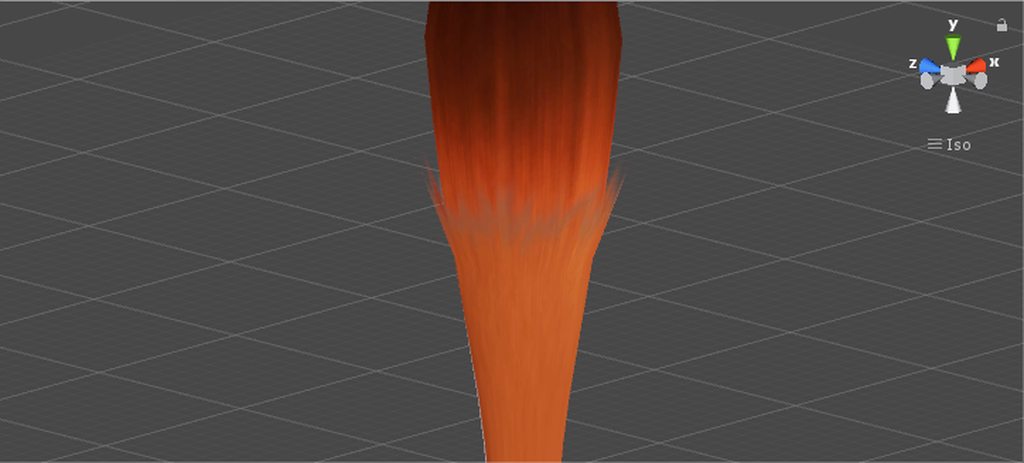
Searching around I saw a model of Hideo Kojima with hair textures having soft edges. Thinking I finally found a solution to my headache I saw the shader that was used is completely shadeless so going into any world would make the model really stand out in not a good way if the world is dark.
While I do like the result but it being shadeless is a deal breaker. Probably just going to try a different method completely for my models. Still I appreciate the help and info you guys gave me.
https://imgur.com/a/m9bR8nV
 livid prawn
Anyone can help me to make shader with timer, witch can allow starttimer/stoptimer/resettimer functions by triggers
velvet sorrel
@red sorrel Try mine. It's not finished but it should hold up fairly well
https://cdn.discordapp.com/attachments/521089076552794134/547402626291990538/SilentHairTest.unitypackage
That's for Standard shading, my Cel Shader has it's own implementation
fresh remnant
would anyone be willing to help me out in a voice call for a blender and shader question. I need to Separate a material into two parts so I can have to different shaders on a simple model I can explain better in the call as I will video share
probably 10 mins of your time
just DM me I would appreciate it
past pewter
I need a glow shader???????
Or like, one that reflects it
Idk why discord lagged so bad it cut out almost my entire sentence.
Okay, but like, you know how some particle effects / models have a glow?? And its not self illum i guess, but some kind of lighting??? Or is it self-illumination
crystal wadi
@past pewter add emissive material any shader it will glow
past pewter
Thank you!!
dim steppe
Does anyone have a shader for making the world black but not the players or particles?
brittle falcon
couldnt you jest texure the world black?
lucid cedar
Without cameras this is probably an impossible task, as you cannot differentiate between players and the world.
They're on the same render queues as well
faint fulcrum
Yup, for that effect other animators just stencil and/or bump up render queues of their own avatar and particle shaders
 azure basin
can anyone dm me some good glowing color shaders
past pewter
@sly fjord https://gitlab.com/s-ilent/SCSS
GitLab
A surface shader for Unity based off Cubed's Flat Lit Toon shader
past pewter
also
question:
is it possible to make a shader that causes the texture to change if viewed from a certain angle
so that the texture differs if the avatar is viewed from the back
steep swift
Yes, it's possible. you can use a dot product (normaize(center eye camera position - object position), object forward vector)*.5+.5 and smoothstep and use that as an argument for lerp against two textures.
I mean if X is possible the answer is probably yes. I don't know if any off the shelf shader does this. If you know code play around with the lerp function and some basic vector math. If you don't try playing around with a shader graph editor and try some normalize, dot and lerp to get the effect you want
Here's some example code I did in my avatar to change a shirt to black (multiply albedo by 0) when you get close or look from the front. I put a noise texture in the _OutlineMask.
#ifdef USING_STEREO_MATRICES
    float3 cameraPos = 0.5 * (unity_StereoWorldSpaceCameraPos[0] +  unity_StereoWorldSpaceCameraPos[1]);
#else
    float3 cameraPos = _WorldSpaceCameraPos;
#endif
    float3 objectPos = mul(unity_ObjectToWorld, float4(0,0,0,1)).xyz;
    float3 objectForward = mul((float3x3)unity_ObjectToWorld, float3(0,0,1)).xyz;
    float objDistance = dot(cameraPos - objectPos, objectForward);

    float dissolveAmount = saturate(-.5 - objDistance + sin(_Time.g / 3) * .2 + (i.worldPos.y - objectPos.y) * .5);
    float dissolvenoise = tex2D(_OutlineMask, fmod(TRANSFORM_TEX(t.albedoUV, _OutlineMask) + 0.01 * _Time.g, 1.0)).r;
    float node_9140 = (((dissolveAmount)*1.302+-0.652)+dissolvenoise.r);
    o.albedo.rgb *= saturate(5 * (node_9140 - 0.4));
You can tell I have no idea what I was doing, basically playing around with numbers until I liked it.
@past pewter
wary junco
how can i set up a shader so that my irises always render in front of the whites of my eyes, but also don't render in front of absolutely everything else in the world
or my skin or sides of my face etc
steep swift
Is there a reason not to move the polygons forward for irises
 meager beacon
Any trick to removing this effect from a panorama?
lucid cedar
@meager beacon set wrap mode to clamp
And you may have to disable mipmapping too
I think mipmapping wouldn't make sense on a skybox
past pewter
you can only disable mipmapping by editing the shader, unity why?
faint fulcrum
But disabling mipmaps right in the import settings is enough
past pewter
yeah, but mipmapping skyboxes?
faint fulcrum
So they scale down properly for low resolution targets? (like reflection probes, small window sizes)
velvet sorrel
That won't work actually
Panoramas will break if you give them a clamped texture because the UVs they use are totally wacky
That's a bug with the panorama shader, but I've yet to see a fix
faint fulcrum
theres also 6-sided skybox where there are more edges to get seams on
so depends on type used (not relevant to the question above though)
meager beacon
@lucid cedar Setting the (texture?)'s wrap mode to clamp makes the pano just blank
Like it's at a really weird offset
basically
lucid cedar
That's probably the thing Silent mentioned
You could try setting the wrap mode to Mirror? I heard that fixes it for some.
meager beacon
Line still appears for mirror, and mirror once
And clamp, for that matter actually.
This is the texture's wrap mode, right?
lucid cedar
Yeah
meager beacon
What about mipmapping? (This is on a panorama, not skybox)
Ah that did it actually. Disabling mip maps
velvet sorrel
Really?
If that's the case I can make a fixed version of the shader that ignores them
wary junco
are there any toon ramp shaders that can receive world shadows?
or how would i mod one to receive the shadows?
lethal rock
mine does but its not exactly public
wary junco
I'm more interested in the lines of code to add to the shader.
not really something that deserves being secret :S
lethal rock
most things just use float attenuation = LIGHT_ATTENUATION(i); where i is your fragment input structure and thats the combined attenuation for shadows and point lights, and you can just access the toon ramp using that multiplied by whatever value you're already using to reference a toon ramp, you could also use SHADOW_ATTENUATION(i) to get just the attenuation from the shadow map which is useful if you calculate your own lighting for point and spot lights
velvet sorrel
@wary junco Try mine
GitLab
A surface shader for Unity based off Cubed's Flat Lit Toon shader
It supports all forms of lighting!
It'll even gracefully handle point lights and non-important point lights!
And it'll work in worlds that have realtime shadows and light probes
wary junco
Thank you!!
wary junco
Those shaders come in as magenta, "failed to open source file: 'SCSS_UnityGI.cginc'
@velvet sorrel
steep swift
Can I ask how you imported it? It should have that file in the same folder as the SCSS .shader files
velvet sorrel
Oh, crap
steep swift
If you want the last stable version, you download v1.3 from the tags (dropdown that says master). But silent's been doing a ton of work on the lighting model in the past several weeks so might be worth trying the new version
velvet sorrel
Fixed it! Please try again @wary junco
steep swift
Get with the latest meta my friend 😉
steep swift
It's not really cubed at this point, just the name
steep swift
I mean probably started that way but it's evolved a ton in the last year and cubed hasn't changed at all aside from a couple bug fixes
velvet sorrel
Yeah, I tried putting mine against where I forked from and, umm, WinMerge couldn't even find where to start 👀
past pewter
and.. im not going to reshade my worlds.. not even my new one lol
._.
Maybe the new one after the new one I will.
steep swift
Worlds should use Standard unless you have a very good reason
past pewter
I just like how it looks mhm
steep swift
Most toon shaders aren't designed for use in worlds. Also lighting will be baked so you won't even be making use of the toon shading mostly
If your world doesn't look good with standard you should consider fixing that instead: use a nicer skybox, and add more spread out baked lighting, bake your lights.
past pewter
but I do that lol; I just like using Cubed Shader
steep swift
Shaders like silent or XSToon which have accurate lighting models should look somewhat like standard, just with toony shading. So make sure it can look good with standard first
Cubed and noenoe and poiyomi work around a lot of lighting defects in worlds. As a result they look better if used naively but will not react to lighting in the right way
steep swift
Again for a world, design for standard, bake your lighting. Then and only then you can choose a special toon Shader if you really need the toony look . If you do things right, your world will look better with standard
past pewter
gonna take a hour or two to fully bake
steep swift
Or make sure to test your world with standard avatars at least and make sure those look decent
steep swift
Cool
past pewter
I just need to figure out how to texture Grey spots
That grey house over there ._.
Actually ** I know how to color it. It's just annoying how you gotta do it.
You select all the Grey then you color it.. then you gotta make sure you didn't overlap the colors
velvet sorrel
Here's another example of my shader!
halcyon kestrel
@velvet sorrel finally advertising herself. Very nice to see.
past pewter
I like Silent Shader
It superior to Cubed Shader Master
I was talking about how I was not going to use it on all my Avatars .. but I think I should use them on old Avatars that I like the most; but for newer ones; they all must be using this shader
You made me beautiful with this Shader
Even the Sword is beautiful
with color lol
past pewter
ay does anyone here wanna make money for making a shader for me? i just need a shader that has a dark rim shading, like how rim lighting works but with the color black for a shadow effect and an outline to top it off.
crystal wadi
did you try github > https://github.com/search?q=outline+shader

GitHub
GitHub is where people build software. More than 31 million people use GitHub to discover, fork, and contribute to over 100 million projects.
past pewter
i have, im trying to get a shader like the jojo characters have
steep swift
@past pewter Do you have a picture /concept art of what you're going for? I bet one of the toon shaders (poiyomi or XSToon for example) already have a way to do what you want... Probably not exactly what you need, but I have a "drop shadow" shader to make a sort of shadow behind the character: can be scaled and offset to one side by messing with x y and z values in the properties. For reference, I use it to make a cartoony 2d shadow behind my 2d avatars : https://github.com/lyuma/LyumaShader
 past pewter
the shadow has to be completely black, im trying to get something like this but with black instead of white
the glow should be black instead of white, thats all i really want. i use shader forge and for the life of me and cant figure it out
steep swift
Yes, most shaders will let you set rim lighting color for example choose black. I know XSToon at least used to have that. What shader are you trying to use and have you played with others?
steep swift
Ok so you're writing a shader, and a bug in your rim color implementation isn't doing what you want? Can you show the relevant code?
Probably you're simply adding the rim light. One idea is to multiply with the rim color
past pewter
im using shader forge, im not sure how the code part works
this is what the nodes look like
velvet sorrel
So that's what you got going into your fresnel node, but how are you applying the result from it?
You'll want to multiply the diffuse or lighting by the result of fresnel
However...
If you multiply the result of fresnel by a colour, and the colour is black, that's going to produce black. Because the result of a typical fresnel calculation is a white rim. So instead, you should have something more line
Fresnel > Saturate > One Minus
Then multiply your colour by that
If you don't care about having a unique shader, you could also just use my shader with a multiply matcap. Then you can just get a black outline matcap and tweak it to get the effect you want.
past pewter
i used a matcap and it doesnt get the effect im looking for, but ill try what you suggested above, please hold
past pewter
i cant get it to work on my end, it just never works
if anyone knows a shader that can have a black rim light please link it because im at a loss right now
velvet sorrel
Can you post an example of what you want?
past pewter
sure, it exists on a world so i know it can be done, let me pull open vrchat quick
it keeps shaded without light sources too, but its just a gradient to a black color with a rim shade effect
if i had looked in my headset it would be easier to get a pic of how it shades, but thats the best i could get
another shot if it helps
https://i.gyazo.com/d8c7baed6db4309a39663796ec228193.mp4 figured this would be the easiest way to show it, had to use my brain for a second
humble frost
Plug a white colour into a negate node then use that to multiply with your fresnel @past pewter
 fiery field
so it would be a rim but black instead of white i think
past pewter
the negate makes it black but then this weird other color comes with it too
fiery field
look cool for me
past pewter
it looks cool but its not the effect i want, but i think i might have a solution
past pewter
ive almost got it, just needs to pull forward a bit more. its just weird because the value i set for that isnt actually doing anything to help anymore
past pewter
using a matcap i can make it look like this but the black color isnt completely black, and the matcap gets buggy at certain angles
past pewter
i got it to a point i like, mixed the slight black rim light with a matcap and it looks just how i want it to, thanks for the advice along the way! ill release this after a couple days and occasional fixes
lucid cedar
Currently I have a shader that does not receive shadows. Is it possible to prevent the shader from casting shadows on itself?
But still cast shadows on everything else and receive shadows from other meshes too
tired token
Nope.
I think you're best off not casting shadows but still receiving them
Means you won't look funny in covered areas.
lucid cedar
Ah, I see. Thanks
I'm getting weird uh
Actually here's a video
The shadows flicker and they look just a little off. This is with self-shadowing
It flickers a lot when zooming
Ignore the error at the bottom, I already fixed that.
In my VertexOutput struct I have LIGHTING_COORDS(5,6) defined
In the vertex shader I do TRANSFER_VERTEX_TO_FRAGMENT(o)
And in the fragment shader I do UNITY_LIGHT_ATTENUATION(attenuation, i, i.posWorld.xyz);
It used to be float attenuation = LIGHT_ATTENUATION(i) / SHADOW_ATTENUATION(i); instead, but that seemed to make me not receive shadows at all.
In addition to that being deprecated I think
I kinda wanna fix this because it probably also happens when other geometry casts shadows on me
Yeah there seems to be some z-fighting or flickering going on. No idea how to fix that
 restive mural
Does anyone know how to modify Neitri's triplanar shader to work with particles? I've tried my hand at modifying the code several times now and I'm still at a loss.
lucid cedar
Generally you need custom vertex streams for the particle's center
And then use that instead of the "origin pos"
 fleet nebula
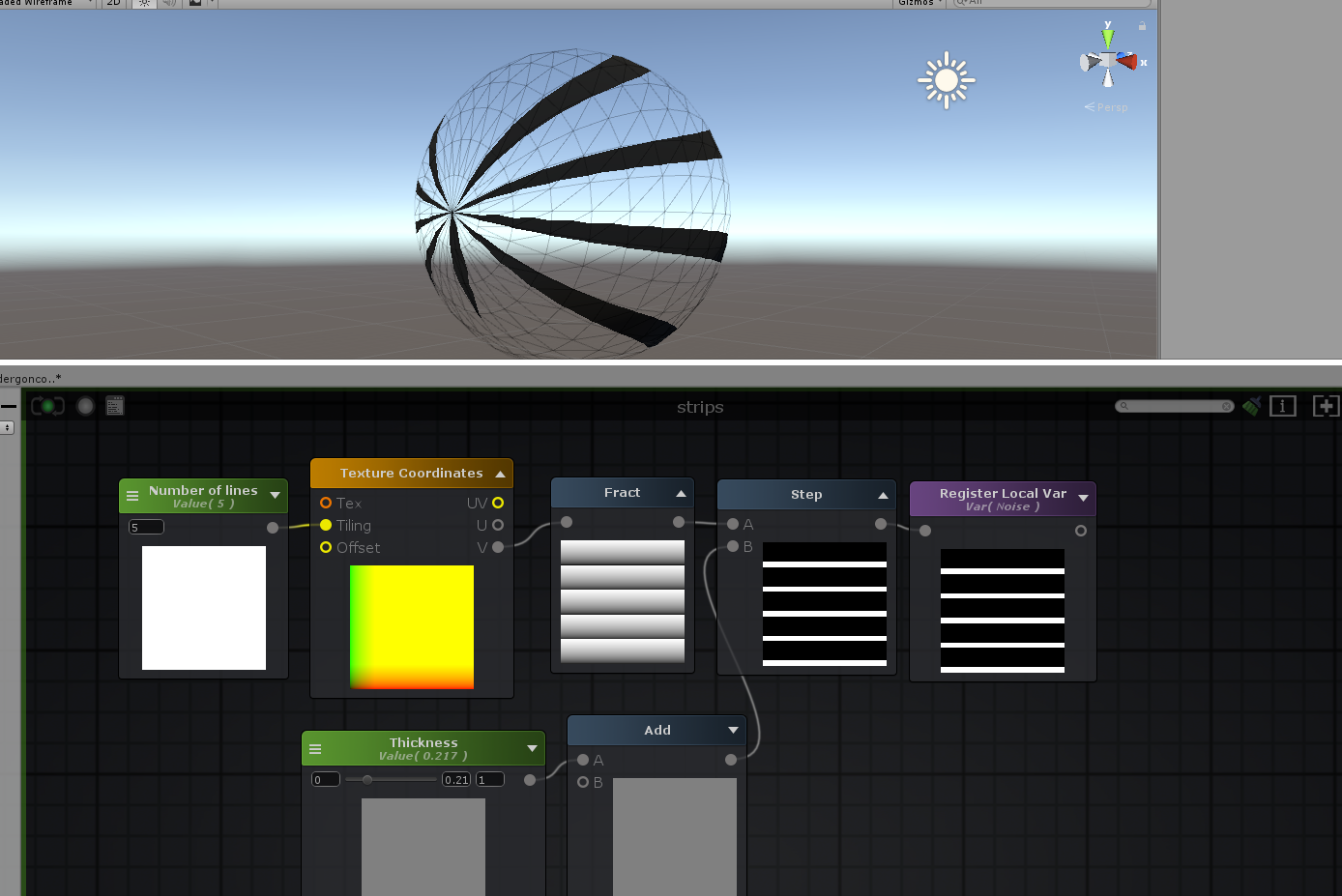
using amplify shader editor is there a way to tile with out texture coords?
grave hatch
the flickering is due to the light settings not because of the shader @lucid cedar
lucid cedar
Should probably have tested with standard too lol
steep swift
@fleet nebula you want something that tiles just based on the world position? A raymarched shader will do that nicely, as well an overlay/panosphere style shader. But if you want it to nicely conform to the surface of an object, I would look into triplanar mapping
fleet nebula
im making a shader and im trying to fix this https://i.imgur.com/ayG3PQL.png?1 but the only thing that works the way i wanted it to is this https://i.imgur.com/RJWMn1O.png?1 but when i do that i lose my tiling
 tired token
@lucid cedar You should try the model with standard, the flicker should still be there, it's just a Unity thing.
restive mural
How would I go about rotating a texture based on particle rotation? I've got the custom vertex stream for particle rotation all set up. Now I just need help figuring out how to rotate the texture using that value.
velvet sorrel
You could try using the commonly thrown about rot2D function
 				float sinA = sin(angle);
 				float cosA = cos(angle);
 				return float2(v.x * cosA - v.y * sinA, v.y * cosA + v.x * sinA);
}```Then you would pass your UVs to it
 stiff berry
shift your uvs to the -1 to 1 range before rotating and then shift them back to 0 to 1 after so that it rotates about the center of the texture
past pewter
@velvet sorrel this one only has one sine in it 😋 ``` #define rot2(a) float2x2(cos(a+float4(0.,33.,11.,0.)))
@restive mural usage position.xy = mul(rot2(angle), position.xy);
stiff berry
i like the math behind that one more too
past pewter
the phase shift trick is elegant
 brittle plinth
I’m having issues with arrays. I’m trying to fill in an array with a set of variables, but I’m getting an “unknown identifier” error when I try to input the variables.
I can’t put the code in
faint fulcrum
enclose code in ```
The bot just detected caps
brittle plinth
sampler2D diffs[6];
sampler2D norms[6];

colors[] = {_Armor1C, _Armor2C, _Cloth1C, _Cloth2C, _Suit1C, _Suit2C};

diffs[] = {_Armor1D, _Armor2D, _Cloth1D, _Cloth2D, _Suit1D, _Suit2D};

norms[] = {_Armor1N, _Armor2N, _Cloth1N, _Cloth2N, _Suit1N, _Suit2N};

scales[] = {_Armor1D_ST, _Armor2D_ST, _Cloth1D_ST, _Cloth2D_ST, _Suit1D_ST, _Suit2D_ST}; ```I get an error at colors[] = ...
Full code here, error at line 84: https://github.com/TiredHobgoblin/destiny-unity-shader/blob/TiredHobgoblin-patch-1/Single-mesh gearstack.shader

GitHub
The same shader use day by Bungie’s gear viewer for Destiny, but translated from the original GLSL to a Unity ShaderLab shader. - TiredHobgoblin/destiny-unity-shader
grave hatch
I think for arrays you'd need to either initialize them at the same line you define them, or initialize each index individually
 fair prawn
yeah
either do fixed4 colors[6] = {_Armor1C, _Armor2C, _Cloth1C, _Cloth2C, _Suit1C, _Suit2C};
or assign each index individually
brittle plinth
Arrays can’t be initialized at the same line with variables.
I’ll try assigning individually
brittle plinth
Finally got a chance to test; it doesnt seem to work.
Self-correction: the error is "unrecognized identifier," not "unknown identifier." not sure if that makes a difference
brittle plinth
Figured it out. I needed to initialize the arrays inside the fragment shader, rather than in between the vertex and fragment.
 vale hemlock
(sigh) I want to make a slime girl shader, but the more I think about it, the more I realize it's just going to lag everyone too much, and I don't want to be a jerk.
steep swift
just because an effect feels complicated does not mean it's laggy @vale hemlock
Slime shader would have two parts: transparency / shininess / subsurface type effect to make it lighter if it's in a thinner part
The second part is the grabpass to provide refraction
 undone halo
I mean, done right a slime girl wouldn't be that bad. I have a slime bird with dynamic bones and a shader that makes it look jello like and it isn't laggy
steep swift
the grabpass is the only thing here that could be considered laggy, but it's one for the whole avatar, and many people do grabpass in the avatar. if the effect warants it and it looks way cooler it might be worth paying the price of one grabpass, IMHO
and a good refraction effect is worth it IMHO
lucid cedar
If people could agree on a refraction grabpass name that would save a lot of headaches
I stick to reusing alloy's glass grab texture name ever since more of my friends started using Alloy
brittle plinth
So, I have another issue:
color = tex2D(array[index], i.uv);
gives me the error "sampler array index must be a literal expression"
brittle plinth
in fragment shader
steep swift
If in a loop you may be able to add [unroll] above the loop to force an unroll
But yeah you can't use non constant variables to index an array of samplers
All samplers must be known when the program is compiled. You can use if statements possibly
brittle plinth
like this?
else if (index=1) {color = tex2D(texture2, i.uv);}
else if (index=2) {color = tex2D(texture3, i.uv);}```NO!!!! Please review your basic c syntax!
else if (1==index) {color = tex2D(texture2, i.uv);}
else if (2==index) {color = tex2D(texture3, i.uv);}```Note the two equals signs. One equals sign will do something you totally don't expect
Also you earlier had it as an array. How did you even declare it to work as a property as an areay
brittle plinth
What do you mean?
steep swift
Never mind. It should work the way you have it, probably the most straightforward way
As long as you fix the ==
brittle plinth
Ok. Thanks!
steep swift
Put the number on the left side of the == also helps you catch errors
brittle plinth
Ok
 drowsy field
that syntex will still solve the tex2d lookups in all the ifs, as tex2d functions need to solve ddx & ddy derivatives and its a sequence lock.
you would need to switch to the alternative texture looks ups and solve the ddx/y early to gain performance.
velvet sorrel
@vale hemlock I know someone who did that effect with my shader, they made a slime using the subsurface scattering and some matcaps
near flax
constants on the left is such a cursed convention smh
 vale vector
Anyone know what this shader is? I really like it and would want to use it on my avatar
vale hemlock
Hmm? That's probably this. Or a variant. https://vrcat.club/threads/sneps-cyber-shader-v2.66/

VRCat: Community-Run VRChat Forums
Hello~
A lot of people have asked me in the past for my circuit-looking shader, and today I decided to upgrade it a bit with some extra features.
The...
lucid cedar
Could be poiyomi toon too, it has scrolling emission like that
 reef vapor
Anyone know what this shader is or how to make it?
crystal wadi
um looks a little dark
brittle plinth
Looks like an emmissive material. Should be included in the standard shader.
reef vapor
Sorry I was in a rush and didn't get to explain. It changes based on movement like its bigger on the inside or a window to space. For example if he moved to the side the shader would shift and look different.
grave hatch
you mean like the space effect?
it's a cubemap and I think one of noenoe's shaders lets you use those
brittle plinth
https://docs.unity3d.com/Manual/SL-VertexFragmentShaderExamples.html
Check out the ‘tri-planar texturing’ section
grave hatch
that's not tri-planar
lucid cedar
This is just a panosphere right?
Or maybe a cubemap
I think cubemaps look better
Noenoe Overlay Shader can do both perfectly well
Although it has a weird stereo eye depth thing
 thin imp
@vale hemlock poiyomi master shader
lucid cedar
Poiyomi master should not be used anymore as it uses too many keywords
Is likely to break yourself and other people's shaders
crystal wadi
ah
brisk bronze
I'm looking for a shader that can go from a black gradient back to the original texture
past pewter
@reef vapor space birbs are an unlit noenoe with the milky way skybox cubemap from the unity store

Free Milky Way skybox.
Texture size : 8192px x 4096px converted into 4096 cubemap.
If you are interested in space exploration check my other projects :
Solar System
International Space Station(Interior)
Mars Rover
Mars Lander
Realistic Planet Earth
Sun Surface S...
 reef vapor
Thank you so much!
 distant wagon
Anyone have a toon shader with a color mask functionality that lets you tweak the colors based on the RGB channels of a mask?
tired token
That sounds real custom, I wonder if UTS2 has that?
distant wagon
I don't believe so, unfortunately
lucid cedar
Tweak "the" colors?
You mean tint the diffuse based on an RGB mask?
Wouldn't it be easier and better to just directly recolor the texture instead?
@distant wagon
distant wagon
Something like this, yeah
It's a lot more time consuming to directly recolor though
lucid cedar
You would probably want to put something like that together yourself in Amplify
Because that's a workflow not many people will be willing to support
You could probably set up some interesting Blender system (maybe with Cycles?) to do just that, then you can also directly bake a working diffuse texture from there
distant wagon
Yeah I've heard of people doing the bake method
I'll keep prodding at it with Amplify, ty
past pewter
is there a way to change the shaders its a mask
somber widget
why not just stick your mask on as an additional layer on the texture with an appropriate blend mode?
 tardy bane
Does Cubed's shaders work with the unity update?
If not, what other shader pack should I go for
past pewter
cubed lite works with the latest version, I also recommend silents https://vrcat.club/threads/silents-cel-shading-shader.84/ and xiexe's https://vrcat.club/threads/xiexes-toon-shader-v2-0-updated-3-11-2019-xstoon-the-rewrite.1878/

VRCat: Community-Run VRChat Forums
Hi everyone! Presenting...
[IMG]
(Sorry, couldn't resist.)
This is an almost totally rewritten version of Cubed's Flat Lit Toon shader, allowing more...

VRCat: Community-Run VRChat Forums
Hiya!
I've been working hard over the course of the past 7 months or so to bring the best custom lighting/toon shader experience possible to VRChat....
steep swift
If you do choose cubed, Make sure to get latest version from github. But it's not the best choice, and you should use the Lite version with no outlines. Cubed non lite is broken in multiple ways unless you know enough to properly assign render queued and handle safety systrm fallback
somber widget
other popular options include arktoon (https://github.com/synqark/Arktoon-Shaders/releases) and unity-chan toon shader (https://github.com/unity3d-jp/UnityChanToonShaderVer2_Project/releases english manual at https://github.com/unity3d-jp/UnityChanToonShaderVer2_Project/blob/master/Manual/UTS2_Manual_en.md)
GitHub
UnityChanToonShaderVer2 Project / v.2.0.7 Release. Contribute to unity3d-jp/UnityChanToonShaderVer2_Project development by creating an account on GitHub.
past pewter
only use the latest version of Arktoon, the older one floating around has keyword issues causing problems ingame
somber widget
yep
tardy bane
thanks for the heads up
somber widget
the new one has a handy feature to purge excess keywords
lucid cedar
The non-lite Cubed's also gets ghostly outlines quite often
0.2 width outlines that only show up on the ForwardAdd pass
Apparently older keywords stay on materials, so the custom editor I've been working on recently now purges keywords automatically
past pewter
a simple tool for Unity to strip unwanted keywords https://github.com/ScruffyRules/ScruffyShaderKeywordsUtility
GitHub
A Unity3D tool to remove potentially unused shader keywords from VRChat Avatars! - ScruffyRules/ScruffyShaderKeywordsUtility
tardy bane
I just wanna say I love all of you
past pewter
❤
wary junco
Looking for a ramp shader that can receive shadows but is also texture Transparency (not cutout) any shader like that?
steep swift
Are AlphaToCoverage or Dither acceptible for this?
XSToon provides an A2C Cutout shader which does this, should run fine on the Geometry queue
The problem is your Shadowcaster pass will not run on any queues above 2500 (defined as transparent queues)
only AlphaTest or Geomtery queues or lower (up to queue 2500) will get a shadowcaster (generate depth texture, cast or recieve shadows)
so AlphaToMask (Alpha to coverage / A2C), dithering or cutout are the only reasonable things you can do
note that A2C will have a solid shadow for partially transparent areas due to limitations of the camera depth texture and how shadow casting works
you could kind of kludge it by rendering transparently on the geometry queue. However, there is no way to force this to happen before the skybox render, so you will get that lovely effect you may have seen where something glows and fades to white when it goes over the skybox
wary junco
Well, it's for glasses that are solid around the edges and fade to transperent in the center. they light up bright when there's world shadows since they don't get shaded
standard shader works well enough as a stand-in except it doesn't receive shadows
steep swift
the frame/edges should possibly be split off the glasses and put onto your avatar mesh/material so they get proper shadowing
my suggestion here would be live with them being bright in heavily shadowed areas. maybe try to keep the diffuse dark so it won't be too glowy looking
the problem with A2C is it can be completely opaque for some users who do not support MSAA (DesktopLow quality setting, some cheap GPUs) and it can also be done using dithering even on GPUs that support it such as AMD users.
and so you have to ask yourself if you are ok with dithered glasses. dithering works well for fuzzier stuff like hair or even clothing but I'm not sure if it looks ok on glasses
wary junco
Where can I get A2C?
steep swift
A2C is included with XSToon 2.0
XSToon does something to be even smarter and does a bit of dithering togeter with AlphaToMask on to get a smoother ramp
but you can add it to any shader simply by adding AlphaToMask on into the ForwardBase and ForwardAdd Pass { blocks
AlphaToMask on
 vestal hare
does anyone know how to fix the transparent shaders issue when you open the avatar tab ?
steep swift
Switch to another ava and switch back
The bug is all materials on your avatar get put on the highest render queue, which causes shadows to no longer work (you may be much brighter) and transparency effects are broken. Other people still see you fine.
We need a canny for this
past pewter
Anyone got an opaque colour-glitch shader for objects, not screen stuff?
a bit like Sprites/Glitch but for stuff that isnt sprites,
I've been attempting to alter Sprites/Glitch for it but I suck with shadercode
steep swift
You can apply screen effects to objects by using stencils. Otherwise my guess would be some sort of vertex effect or moving uvs around (sort of that hologram effect), but the main problem with general objects is you only have information about the vertex or polygon you are drawing so you can't trivially shift a texture to the side or something.
past pewter
Sprites/Glitch works almost perfectly, but it also shows itself through itself, so if the object is a sphere, you see both sides of the sphere :/
steep swift
You might be able to fix that specific issue by changing Cull Off to Cull Back in the shader
If that's the only issue
@past pewter
past pewter
ill try that, thanks!
 light shoal
how can you make a shader only be seen with in an area
and connot be seen wjen looking away
steep swift
Shaders normally a material to a surface of some 3d object, and if you use UnityObjectToClipPos(v.vertex) to determine the final clip space position, and don't turn off z buffer testing it should apply just to the object you put it on
vale hemlock
Alright, enough messing around. I'll try to learn shader code myself. Time to bust open Notepad again after a long time.
 jovial moss
hello, I've been trying to use rendertextures to pass external information into a shader but I am having troubles. Despite the cameras being set to HDR and the texture properties in the shader having hdr enabled, it is still clamping the values at 1,1,1
anyone know what might be the problem?
steep swift
Your render texture format must be RGBA_HALF (16 bit half precision per channel) not RGBA32 (32 bits total = 8 bit fixed point per channel)
@jovial moss
past pewter
Anyone know what shader is used on the windows in Nomic's Airbnb?
lucid cedar
Do you have screenshots or a video?
tired token
It's a texture sheet animation that distorts what's behind it based on a normal map.
or something of the like.
past pewter
Not the perfect screenshot but It's like a rain effect on the window
 blissful verge
its from the asset store pack that the scene is from
Archviz furnature pack
cant remember wut number
past pewter
thank you!
past pewter
Hey guys. I Currently am making a Shader with the tool "Amplify Shader Editor" The thing is im creating my own custom lighting. In Unity everything works fine. But as soon as I select the Avatar ingame in VRChat it seems to recieve absolutely no light. Does someone know what you need to do. To get the light in VRChat? One addition is that in the menu the Avatar is shown perfectly fine.
Ingame
in the menu
lucid cedar
The shader does not seem to handle baked lighting, only realtime
faint fulcrum
Most (properly optimised) worlds have purely baked lighting with most of illumination coming from ambient and lightprobes.
When making the lighting yourself you need to test with different scenarios if you want the shader to be lit 'properly' in different worlds (realtime only, lightprobes only, solid ambient, gradient ambient modes and etc)
past pewter
I actually already thought about that. the thing is i have no idea how to recieve backed lighting in "amplify shader editor"
brittle plinth
So, I have this detail texture for my avatar, but I'm not sure what it's for. Unity recolors it if I set it as a normal map, and it's not a diffuse. Any ideas?
tired token
@brittle plinth where did it come from exactly?
Looks like a normal map but different colours
brittle plinth
Model ripped from Destiny. The model has normal maps that are colored normally, so I’m pretty sure it’s not that.
tired token
1 2?
brittle plinth
1
tired token
Hmm, I can't really find any info on D1 stuff
grave hatch
Might just be a texture for a specific effect
tired token
Does it look the same to the provided Normal map?
brittle plinth
Nope. The normal maps are all primarily blue, just like any other normal map.
brittle plinth
Not really
I suppose it could be normals for a leather material
But that’s the only place I can think of it would fit in.
tired token
There's some scratch marks at the bottom of the texture so try and link that to a diffuse
grave hatch
Distortion or flowmap maybe?
tired token
I'd love to mess around with that texture but I'm on mobile atm. :<
crystal wadi
ummm i think we would need to see the defuse texture also < also does it have alpha in it ? it could be a layered texture H, O AO ....
brittle plinth
looking at the Polycount wiki, it seems to either be a flowmap or DuDv
Maybe it's for distorting the reflections or specular highlights.
lethal rock
@past pewter I’ve not actually used amplify but if there’s an indirect lighting or shadesh9 node try plugging it in
velvet sorrel
For this, Amplify gives you the Indirect Diffuse Light node, which pulls from the light probes
vale hemlock
Almost done! Now... to make a nice refraction and maybe some animated waves. Making shaders is lots of fun!
past pewter
@brittle plinth it's probably a DXT1 dds file you can convert to a proper normal map with tools like this http://wiki.tesnexus.com/index.php/DDS_texture_tools
past pewter
@mellow sigil TY i will look into the Indirect Diffuse Light Node
brittle plinth
I figured out what my texture is: it’s a normal map.
Apparently the gear viewer loads all textures for a model, even ones that don’t get used.
The gear viewer uses the same coordinate system as Unity, but the Destiny engine doesn’t.
So textures that get used in the gear viewer are in Unity’s normal map format, while ones that don’t are still in Destiny’s format.
 scenic nest
I have problem with imported assets
whenever I import 3d models the materials are not adjustable and in most cases broken because I'm importing models designed for blender cycles rendering
anyone knows how I could make them adjustable?
brittle plinth
Or create a new material and place that on the mesh.
scenic nest
how do I do that?
scenic nest
it opened a file explorer
brittle plinth
In that case, it might be easier to create a new material
Assets > create > material
scenic nest
I created one but it won't let me drag it onto the mesh
brittle plinth
Try dragging it onto the object in the tree view
brittle plinth
No problem
past pewter
Here how it looks like:
The problem is I dont know how to get light intensity out of the "indirect Diffuse Light" Node
@mellow sigil So i played around with the node and came up to the point where i got the shading work completely. The thing is im only stuck at getting the light color and multiplying it with the texture so that a softer light makes the texture appear to be softer too. Currently its always at 100% or 100% + shading.
 dull fern
how do you put cubed shaders onto an avatar
past pewter
@mellow sigil one thing you do not see in the screenshot are the min and max old values in the remap. The min old value is 0.51 while the max old value is 0.5 this cuts the edge of the shadow to a sharp edge.
But I’m still stuck on getting purely the intensity from the node
yes the one i send is currently only for indirect
but why do you put an direction value into a normal?
Well put in the world normal node
this gives you correct shadows
and with the nodes I put above you get a sharp edge too
Can you tell me something about the "Toon Ramp" you use?
@mellow sigil
well Im only stuck at lightcolor of indirect light
Im like trying my best get the color out of the indirect node without a shadow added to it
Do you have an idea how we can get the highest color value from the Arrays?
Basicly
What we have in our node is an amount of color for our entire surface area
Well an alpha value messured from black to white.
But we would need the highest White value in this surface area.
Well same here
But its just logic
The circle you see in the preview has many colors
We need the brightest one of these colors
Or is there an different node for that?
Well
What I'm trying to do is get the color of the Light itself
Without a shadow
The Light Color node does not pick up Colors from indirect light
In my logic yes
Well yes.
But Also im missing the math for that.
I mean i can write a costum node. But I don't know how perfomant that would be to go through every color each frame to compare which is the brightest point
To remove the color and get a correct Alpha value (0-1)
Or well 0-255
if you remove it this will happen:
past pewter
@mellow sigil I've optimised the shit I've done above with this. Achives the same but way simpler:
The B alue in Step Antialising is variable as much shadow as you want
I have it at 0.3
past pewter
If you find anything tell me as I’m working on it too @mellow sigil
vale hemlock
...It's done! The custom shader I made is fully complete! I just hope I didn't put too many features into it by accident.
Time to back it up so I don't lose it!
steep swift
Nice . What does your shader do differently/any cool features?
vale hemlock
It's basically a slime/water girl shader.
Now I have to go adjust all my avatars to use it well.
steep swift
Oh cool! I actually saw some sort of slime avatar on booth the other day using a custom shader.
past pewter
someone knows why ALL my shaders are broken in VRchat now that i made?
what it looks like now:
https://cdn.discordapp.com/attachments/451738970712440832/571648267356733451/unknown.png

what it looked like before
haven't played since like a month so idk when they broke. all of them are unlit
faint fulcrum
My guess would be keyword limit reached in project
past pewter
keyword limit?
steep swift
some shaders use keywords. materials can also use them especilly if you switch through lots of shaders
past pewter
Since when is a keyword limit a thing
reupload fixed it
it's still wired how that can happen...sometimes shaders break on maps and they turn white...i really wish the old unity back...never had any issues there
lucid cedar
@past pewter this is a keyword issue and has nothing to do with the "old" Unity.
A game restart generally fixes it
Which shader is it?
past pewter
a shader i made
idk i never had issues in the old unity with it
nop reupload fixed it
not restarting the game
crystal wadi
humm trying to figure out what why almost every water water shader same that it gets a bright area on far distance .. trying to find a way to blend a large water area with a night sky
turned off all post process, camera's and other items in scene still cant figure out what this is
lucid cedar
If it uses a grabpass and blur that could be related
crystal wadi
dont think so tested with many water shaders
just loaded a blank material standard shader on the distance water mesh
ok but the view angle changes it gets bright
so perhaps its the mesh ?
wary junco
Unity is changing the color of part of my texture by 1 pixel value. this is visible even in the texture preview. Red channel is F8 in everything except unity, but comes in as F7 in Unity. does anyone have a clue why? it's creating color seams
steep swift
Do you have sRGB checked in the import settings? could it be a bias (rounding) error?
wary junco
Well I use the same shade of magenta on two different textures, yet it rounds one down and not the other texture, making a SLIGHT color seam where the two materials meet
steep swift
Testing with unlit shader?
wary junco
testing now
steep swift
Are the import settings the same on both materials? Any crunch or texture compression enabled? Texture compression is enabled by default and might also change slightly depending on if there is an alpha channel
wary junco
Comes in correctly on unlit
Settings are fine except non-power of two is greyed out on one of them due to already being power of two
other is set to None
 steep swift
If unlit looks normal, which shader shows the problem?
wary junco
Pretty much any other shader. Standard, Cubed, NoeNoe
steep swift
Are the normals pointing the same way at the seam?
wary junco
Possibly not
however, even when previewing the texture on the editor, not on the model, it shows the wrong color value
steep swift
Oh so they are affected by lighting... can you make sure the Anchor Override in the lighting section is set to the same object
If not, each mesh will use its center position to decide on lighting which might be different. If you have them as multiple materials on one mesh this is not an issue
If it's a lit shader, the colors will be affected by lighting right?
wary junco
Sec, setting anchors
but (depending on monitor) the face texture edge is visible as a slightly different shade of pink
it's the same mesh so i don't think it's the achor
but i set it to hips
astral plover
Inexperienced with shaders. Is there an easy way to make it so that other parts of my model are not visible through a transparent shader but things behind it are visible? Trying to hide my teeth inside of a hologram shader
stiff berry
look into stencils
astral plover
I don't think a Stencil is what I'm after. I'm trying to hide parts of the mesh that are inside of my other mesh, while still showing the background behind it. My Teeth inside my mouth are visible through my lips and I want to hide them, while still retaining overall transparency. If that makes any more sense
stiff berry
if they are different materials you should be able to do that, though maybe a screenshot would explain in more detail
astral plover
They aren't. I atlased it all together. Single Mesh, Single material

Basically I just want to be able to see through the whole thing but without seeing my hand behind my head for example
this is the Shader I'm using
past pewter
change ``` SubShader
{
Tags { "Queue"="Transparent" "RenderType"="Transparent" }
Blend SrcAlpha OneMinusSrcAlpha
LOD 100
ColorMask RGB
Cull Off
Pass``` but I'm not sure that's what you mean
 past pewter
ehhh, okay sorry, it only changed it to doublesided rendering, the red is probably the rim color you set
best way is stencils and two materials the skin writes a stencil value, and the teeth check for the value and reject those pixels
faint fulcrum
Theres also Zwrite method but that may not give the intended look (like actual holograms being volumetric)
'Transparent shader with depth writes' section in https://docs.unity3d.com/Manual/SL-CullAndDepth.html
 modest smelt
I'd like to create a character that utilizes a water shader, making them appear to be made of water. I've tried a few from my Google searches, but they don't seem to give the result I'm looking for. I know that plenty of VRChat worlds have some nice water in them, but I'm looking for one that would work well on an Avatar.
What's your recommendation for the best shader for the job?
stiff berry
you'd probably have to make your own cause water shaders are mostly designed to be just on a plane
this looks adaptable to a nice water like look https://www.shadertoy.com/view/XsdXRX

you can change mu_a to get different colors like this https://www.shadertoy.com/view/3tf3DM


won't look very good in a map without reflection probes though 🤷
 nova pecan
How do i change a shader that is sticking to a camera ... to a surface shader ?
like. its following my view but i want it to be sticking on it like a window
lucid cedar
Nice avatar, wonder where you got it from 🤔
nova pecan
i replicated it myself
lucid cedar
Ohh, I see
Anyway, that's unrelated
That might be harder than you think
It might be taking some screen coords right now
nova pecan
its not yours