#avatar-optimization
1 messages · Page 64 of 1
 open kestrel
can i send this to someone to help me optomize it?
or some kind of quest optimizing thing
 buoyant holly
https://github.com/e63uozicmujivxmyshivi9ao/cats-blender-plugin/wiki/Bake I suppose you could try this function in cats

GitHub
:smiley_cat: A tool designed to shorten steps needed to import and optimize models into VRChat. Compatible models are: MMD, XNALara, Mixamo, DAZ/Poser, Blender Rigify, Sims 2, Motion Builder, 3DS M...
open kestrel
in cats?
i just got blender a bit ago but i dont know how to properly import the avatar
buoyant holly
open kestrel
in cats?
it's a common blender plugin that folks use for doing Avatar related maintenance
buoyant holly
somewhat as toon shading has a differentiating style then what the unity standard Shader or blender would be out putting
 acoustic latch
Should somewhat, if your normals are wrong it would make smooth shading in Blender look off and would probably have the same issue in Unity unless you have it calculate normals?
 heady smelt
open kestrel
can i send this to someone to help me optomize it?
heady smelt
open kestrel
can i send this to someone to help me optomize it?
I had massive problems with the rigging for the same model, ended up just messaging ghostly on telegram. I'd recommend that or just joining the discord, shark model got a lot of rigging issues.
I ended up using one of the other prefabs in the model pack because the first SFW one didn't work, seems like you
you're using the alt one but might have the same issues.
 mossy stump
I finally have the chance to work with a fully rigged face again.
Nearly 100 bones for just the facial rigging.
I'm wondering what best practice is to do in this case.
Just animate the face bones in Unity to make my facial expressions, or generate shape keys using the bones and then dissolving them all to nothing.
I'd be creating a pretty large set of shape keys through this though since I like having variety.
I understand that in the past everyone continued to say shape keys are best, but there has been a tide against shape keys for everything, particularly when it comes to props and toggles. I am now unsure how the community stands today.
Funny reference
 buoyant holly
shape keys for facial expressions are less trouble as they're not like constantly toggled on

 ruby isle
mossy stump
I finally have the chance to work with a fully rigged face again.
Nearly 100 bon...
ruby isle
mossy stump
I finally have the chance to work with a fully rigged face again.
Nearly 100 bon...
Shape Keys would be more performant than those bones
 thorny jasper
I see some tutorials going from VRoid models to VRchat. Does this generally result in piss poor performance models or is what VRoid generates considered light?
acoustic latch
thorny jasper
I see some tutorials going from VRoid models to VRchat. Does this generally resu...
Depends on how you do it, if you go with using the Unity VRM import stuff, less optimized and likely labeled Poor or Very Poor. If you do the work in blender, you can optimize before moving to Unity.
buoyant holly
there's some optimizations you can do in VRoid as it has a built-in material combiner and and a button for deleting completely transparent triangles
thorny jasper
Alright, thank you. The tutorial I'm following along with is PHIA's "all Blender fixes and more" tutorial from 3 months ago so I'll keep going and see where that lands me
I'm just cautious about adding yet another "Very Poor" performing avy to the mix y'know
 radiant shadow
Very poor can be all over the place tho, some are okeyish , then there's that , well my pc gonna explode if i see that (5000+ materials)
buoyant holly
thorny jasper
Alright, thank you. The tutorial I'm following along with is PHIA's "all Blender...
then you should be fine then if you don't go too crazy on the dynamic bones
thorny jasper
Ok so the PHIA tutorial didn't mention anything about combining the various textures into one but I'm going to assume that's really important
buoyant holly
yes that's definitely quite important as less materials the better for performance
 jovial grail
You can try the cats bake feature in blender that should do it all for your with potentially good results
both in reducing material count and optionally other stuff
thorny jasper
Yeah I baked it into 1 material and literally everything was perfect
 echo geyser
Why do I feel like a god after getting a Legacy avatar from 3 skinned meshes to 1 and 1 material with all the detail textures all with it atlased?
buoyant holly
because you did a good job of optimizing
echo geyser
The AFK avatar was giving me trouble with optimization, now I know that paint.net has my back.
 onyx harness
You’ve done better than 99% of creators.
echo geyser
I only wear Legacy avatars, I don't wanna just make the quest ports of them and have them not be more optimized than the original, except for Nikei, he gets his materials on PC
I really do care for the old game, why not make it better
 knotty saddle
If I have a Quest avatar with everything reduced to 1 material and a compressed file size under 0.5 MB, is it okay to have the one texture used be 2k instead of 1k as recommended? Or is there another important reason to avoid it?
heady smelt
knotty saddle
If I have a Quest avatar with everything reduced to 1 material and a compressed ...
Yeah its okay to go higher res if its an all-in-one atlas
knotty saddle
Thanks!
echo geyser
In my case atlas makes it super low res so I just bump it up to 4k and compress a teeny bit and its at 1-3mb
buoyant holly
you have a screenshot of the atlas so if I can see if there's anything unusual with it
ruby isle
Remember that Crunch Compression will uncompress the file to memory though, so even if the compression is 1mb, it could uncompress to 10s of MB
echo geyser
I know, I've read the documentation, at least it keeps it a bit under while uncompressed which is all I need.
echo geyser
Do you need help or you were just saying?
 verbal bough
echo geyser
Do you need help or you were just saying?
verbal bough
echo geyser
Do you need help or you were just saying?
Nah I was just saying
heady smelt
For fallback models, can I simply just upload them as fallback and then use that fallback model while using any avatar I have in my library?
heady smelt
heady smelt
For fallback models, can I simply just upload them as fallback and then use tha...
Yeah if you upload the avatar for fallback. You have to tick a certain box for that whilist uploading for Quest. If its greyed out, it means it doesn't meet the performance rank standards, yknow your excelent, good, medium, poor, very poor. I believe you need excellent/good for Quest fallbacks
heady smelt
Yup
 bright willow
Who pinged me?
buoyant holly
a bot
 undone musk
what about me?
echo geyser
echo geyser
I only wear Legacy avatars, I don't wanna just make the quest ports of them and ...
but... I could also play god and put all normal maps into an atlas
and get PC NIkei into 1 material while looking normal 
optimize the teeth to go into 17k polygons, so much
 steady spoke
undone musk
what about me?
steady spoke
undone musk
what about me?
same as olbed, a bot, in a nutshell, he @ 'ed all users on the server, not @ everyone
 vocal zephyr
how much materials is max before avatar move from medium to poor?
buoyant holly

and here's the quest limits https://i.gyazo.com/8dcb18d7b597f6548c9cbaff7c1753c3.png
 vocal zephyr
if i opmtimized every thing but materials would it still be count as poor avatar?
vocal zephyr
i guess i can try mess with dynamic bones reduce alot of em
buoyant holly
https://github.com/Naraenda/NarasUnityTools/blob/main/dbc_tutorial.md apparently there's a method you can use using constraints to use a lot less dynamic bones
GitHub
Random tools for Unity to aid in avatar optimization and creation for VRChat. - NarasUnityTools/dbc_tutorial.md at main · Naraenda/NarasUnityTools
echo geyser
I had trouble wiith normal maps but nikei is one material and normal mapped as of now
heady smelt
any good tools to lower polygons on vroid models
heady smelt
blender ig
 queen junco
echo geyser
In my case atlas makes it super low res so I just bump it up to 4k and compress ...
queen junco
echo geyser
In my case atlas makes it super low res so I just bump it up to 4k and compress ...
Where do you compress it? That’s a huge compression rate lol
Normally 4K images are up at 20-30 mb
buoyant holly
heady smelt
any good tools to lower polygons on vroid models
vroid Studio itself has some triangle reduction tools
and it also has a checkbox to delete any fully transparent triangles so you can make all the body under the clothing transparent and it'll delete those triangles when it exports
heady smelt
allright
buoyant holly
question are you trying for a quest build or just be more optimized in general
echo geyser
queen junco
Where do you compress it? That’s a huge compression rate lol
With Crunch Compression, Low Quality, 100
Got nikei from 11mb to 5, his actual size is like 16mb
And I notice 0 artifacts on pc, on quest for my world i see more artifacts with same conpression rate so idk about avatars
radiant shadow
How big is that texture, cause i can do 2k way lower then that, with high quality
0.5mb for 2k
quest fallback size >
 echo geyser
I was typing on my phone and forgot to send it
I use atlases and when I import it looks to like shit
radiant shadow
This is 1 mat/atlas 2k , with 0 compression it goes from 0.5mb to 0.3 (but tad blocky then)
av is 9k poly tho
echo geyser
I have normal maps to worry about on some, removing them for quest though
ruby isle
radiant shadow
How big is that texture, cause i can do 2k way lower then that, with high qualit...
4k is a lot more data than 2k
It's actually 4x as much data
buoyant holly
this is not related to Avatar optimization in the slightest
 nocturne coyote
i'd like to convert a vroid model to be optimal for quest is that possible?
heady smelt
nocturne coyote
i'd like to convert a vroid model to be optimal for quest is that possible?
Defintely possible yeah. You can optimize it traditional ways or while exporting your VRM, change the export settings to minimize Tris/Polys under 20k total and minimize material slots too
Im not sure exactly how to do that w the new VRoid with new UI but it should be generally where it used to be
nocturne coyote
heady smelt
Defintely possible yeah. You can optimize it traditional ways or while exportin...
what does the model have to be for it to be quest? like the bones and stuff
heady smelt
nocturne coyote
what does the model have to be for it to be quest? like the bones and stuff
VRChat has documentation online that outlines the exact metrics for each Performance Rank on Quest and PC
VRChat
The Avatar Performance Ranking System allows you to see how much a user's avatar is affecting performance via analysis of the components on that user's avatar. You can also use it on yourself to see how performant your avatar is. This system is provided to inform users what is likely the most perfor...
buoyant holly
https://www.youtube.com/watch?v=OA733GlRwF8 this video is showing the old UI but it helps show some strategies for dealing with the transparencies for the quest version

Wanna learn how to make an avatar for VR Chat using VRoid Studio that works decent on both PC and Quest?
0:00 General info
2:12 Fixing eye issues
4:13 Fixing face issues
6:04 Exporting
 dense bramble

what's the best way to reduce polygon count? I want everyone to be able to see my avatar, currently very poor performance..
 nova hornet
dense bramble
what's the best way to reduce polygon count? I want everyone to be able to see m...
nova hornet
dense bramble
what's the best way to reduce polygon count? I want everyone to be able to see m...
Separate the shoes from the main avatar and mesh with the decimation modifer there are 3 different options and you can use a mix of them if you add multiple modifiers you could also try using "Instant Meshes" but then you'd have to bake the texture to it as it doesn't redo the UV
buoyant holly
Edge Loop dissolving would probably result in cleaner topology than using decimate
dense bramble
buoyant holly
Edge Loop dissolving would probably result in cleaner topology than using decima...
How's that work?
decimate isnt doing anything
buoyant holly

#b3d #blender #secrets #tutorial
Visit the Blender Secrets website: https://www.blendersecrets.org/book
e-Book bundle (20% Discount) : https://gumroad.com/l/IxofeY
nova hornet
Also this will go over some stuff

Polygonal Mind
Learn to adapt your VRChat avatar for Quest by reducing textures and polycount, along other tricks like rigging, materials and face expressions.
dense bramble
I think the hair at 119k vertices is probably my biggest killer rn
the hair is 119k/141k of these vertices
nova hornet
This also goes over disolving edge loops

Making optimized Quest models is hard. But it doesn't have to be! With recently updated polygon limits and fallback avatars, it's a better time than ever to create something that represents you to Quest users! Hopefully this tutorial will help you out!
0:00 - Intro
1:27 - Blender
5:49 - Unity
7:09 - Closing
CATS Blender Plugin: https://github....
buoyant holly
dense bramble
the hair is 119k/141k of these vertices
yes that's completely unreasonable size of your hair
dense bramble
I dont wanna lose the detail though.. :/
buoyant holly
if you do it properly you're not going to notice the difference
nova hornet
I bet it doesn't have enough detail to justify that
buoyant holly
would you mind sharing a screenshot of the wireframe of your hair
nova hornet
Btw I'd recommend setting the status bar settings to have these
so you can see the polycount etc in blender easier
 dense bramble
 nova hornet
Mainly "Scene Statisics" I think(?)
dense bramble
yeah I have that on
nova hornet
Doesn't look like it
dense bramble
top left corner
buoyant holly
out of curiosity where did you get the hair
dense bramble
deviantart
nova hornet
You should be able to see something like this in the bottom right
 buoyant holly
that would explain why it has too much
dense bramble
nova hornet
You should be able to see something like this in the bottom right
im on 2.9
buoyant holly
you could probably dissolve a lot of loop off of that and not notice any difference
buoyant holly
dense bramble
oh goddd...you have to manually select them?
yeah that might be a little tedious
maybe first make a duplicate of the hair and see if decimate works okay
dense bramble
decimate or degenerate..?
buoyant holly
decimate
nova hornet
dense bramble
im on 2.9
I'm on 2.93.6 make sure it's check marked
dense bramble
ok turned it on
buoyant holly
actually now that I think about it a good thing to start with before you do anything would be merge by distance to make sure you don't have unnecessary duplicate triangles https://i.gyazo.com/e5f88dc4cb65b06596ecde6138e6f84e.png
 buoyant holly
that's still a bit unnecessarily heavy but not completely stupid now
buoyant holly
I suppose you could try merge distance on the rest of your mesh
nova hornet
Hey, I remember having a script for unity that would show filesize of an avatar after uploading but I'm not finding it now
Any ideas?
buoyant holly

GitHub
Unity Editor extension for making VRChat worlds. Contribute to oneVR/VRWorldToolkit development by creating an account on GitHub.
https://github.com/Thryrallo/VRCAvatarTools and this tool tells you how much vram your avatar takes up
GitHub
Contribute to Thryrallo/VRCAvatarTools development by creating an account on GitHub.
dense bramble
before decimate

after..oof

merge by distance* not decimate
uv maps went "aight imma head out"
buoyant holly
perhaps use a smaller merge distance
dense bramble
it does that even at .00001
buoyant holly
I guess see what happens if you add a zero at the end?
buoyant holly
it doesn't look like the uvs are messed up to me it looks more like the normals are kind of goofed up
and out of curiosity how much triangles does the rest of the Avatar have if you take out the hair
dense bramble
 buoyant holly
okay that's good to know
dense bramble
19,559 without the hair
buoyant holly
wonder if I might be easier to find more optimized hair?
buoyant holly
yeah folks do focus on female Avatar quite a bit
maybe we should see what happens with the hair if we decimate instead of merge by distance
and perhaps not for this Avatar but next time I might suggest https://vroid.com/en/studio as it's a lot easier to manage hair in that software

3D Modeling, for Everyone! VRoid Studio is an application to create 3D models of humanoid avatars (characters).Create original characters on this intuitive and highly Adaptable Software. Easy to use for everyone!
dense bramble
mesh > clean up > decimate
it wont let me increase the ratio
oh it goes backwards..
BRUHHH

thats even worse 😭
buoyant holly
okay that's very weird with the hair
buoyant holly
yeah I quite like that software as you can handle a whole Anime Avatar with just it
dense bramble
buoyant holly
yeah I quite like that software as you can handle a whole Anime Avatar with just...
Can quest users see models that have dynamic bones? and what's the best way to combine materials/textures without having to UV map?
buoyant holly
the quest cannot run Dynamic bones

Have any questions ask away
In this video I will be going over how to install addons like cats/material combiner then going over how to make a atlas for your avatar.
blender 2.91.2
LINKS:
blender https://www.blender.org/download/
cats-blender-plugin https://github.com/GiveMeAllYourCats/cats-blender-plugin
material-combiner-addon http...
dense bramble
Ooofff..
so can I not use dynamic bones if I want quest ppl to see it...?
or can i make a question version that just doesnt have them
@ me if u respond pls
buoyant holly
dense bramble
or can i make a question version that just doesnt have them
yes as the quests loads a completely different model than the PC version
so you can upload for the quest version a even more optimized version of your avatar with like features missing like no Dynamic bones
buoyant holly
dense bramble
can they see poiyomi?
no
basically the quest is a cellphone so there's a lot of stuff it can't do
dense bramble
im so glad i have an index 😭
just sucks for my friends
Can I export only the hair from vroid?
buoyant holly
but if you know what you're doing you can probably make an avatar that doesn't look too terrible for the quest users
buoyant holly
dense bramble
Can I export only the hair from vroid?
yes
dense bramble

this is the most male looking one there is
id like something kinda how I have now
buoyant holly
it has built-in editing tools to modify the hair
dense bramble
oooh
buoyant holly
you can make like a completely custom hairdo from scratch if you want
dense bramble
ill pass, im a noob 😂
buoyant holly
honestly I might suggest doing your next Avatar entirely in vroid as it gives you more control compared to grabbing MMD models

✧・゚:* A anime male messy hair! :・゚✧ ✧ I think I have another hair like this, If this be well received I upload too! Enjoy 。・::・゚★,。・::・゚☆ 。・::・゚★,。・::・゚☆ ✧ You can NOT giveaway, resell, alter/edit the textures or claim texture as your own, sell/giveaway models that use this texture and use
@dense bramble maybe this hair might be a better match
dense bramble
looks perfect ty
buoyant holly
yeah and there's built-in sliders that control how much geometry the hair uses
dense bramble
oooh
buoyant holly
and I might suggest for learning the software to try to like replicate the look of the mmd avatar
as it's a lot easier to change out stuff if it's a Vroid
like if you just want a different shirt you just click on a different shirt instead of having to mess around with weight painting and rigging
dense bramble
interesting..
oh..
I like being able to use the stuff on deviantart and cough OTHER VRC ASSET SITES
buoyant holly
yeah but a lot of those assets end up breaking somebody's terms of service which could put your account at risk of banning
especially from the cough place
dense bramble
somebody as in..vrc or the person that made them?
buoyant holly
by breaking the terms of service of the creator of the model you break vrchat storms a service
dense bramble
bruh
buoyant holly
because you are uploading content you don't have the proper rights for
dense bramble
they shouldnt upload it to the public if u arent allowed to use it
but ig common sense aint so common anymore
buoyant holly
when they uploaded it they were expecting it to be used in MMD as vrchat wasn't invented yet
dense bramble
F in the chat
buoyant holly
Vroid has none of those licensing issues
dense bramble
vroid is just like..a super super super basic thing tho like, i wanna have shirts with band names etc
buoyant holly
Nothing is Stopping You from putting those logos on shirts
Vroid has a full-featured texture editor
buoyant holly
it exports vrm
dense bramble
can you import vrm with cats?
buoyant holly
yes
buoyant holly
yeah it's a heck of a lot easier to optimize as well vroid
dense bramble
@buoyant hollyHow do you even import custom preset hair?
its in the folder and all but like..
buoyant holly
I'm not quite sure as I haven't tried that before
dense bramble
oh
buoyant holly
sorry for making a suggestion before try it myself
dense bramble
no no its ok
buoyant holly

I will probably stick to hair presets since they are the easiest for me. (I literally only did 3 this time but it's better than nothing I think.) Hair shine and hair movement is already fixed as well. Model not included. Since presets aren't supported for the stable version yet(?), all you have
in the meanwhile I suppose you could try importing these viroid files

VRoid公式キャラクター『AvatarSample_C』です。 https://hub.vroid.com/characters/1248981995540129234/models/8640547963669442173 Vroid Studioの正式版1.0でサンプルがついていなかった(廃止されてしまった)ので、旧バージョンからコンバートしてダウンロードできるようにしました。 利用条件は公式に準じます。 当方はVRoid Studio及びリリース元pixv様とは何の関係もございません。 問題があっても自己対応でお願いします。 【使い方】
as that would get you hair
sorry if it's a little clumsy at the moment there is a major version change recently
dense bramble
buoyant holly
sorry if it's a little clumsy at the moment there is a major version change rece...
Can't import presets into vroid v1
buoyant holly
oh dear
 slow cosmos
Hello. Need some help. Not sure if this is the right channel. I'm trying to use the texture atlas tool in CATS for Blender and it says its not installed, but when I try to install it, the webpage is not found. What should I do?
buoyant holly
Have any questions ask away
In this video I will be going over how to install addons like cats/material combiner then going over how to make a atlas for your avatar.
blender 2.91.2
LINKS:
blender https://www.blender.org/download/
cats-blender-plugin https://github.com/GiveMeAllYourCats/cats-blender-plugin
material-combiner-addon http...
slow cosmos
Thanks. 😄
slow cosmos
One more quick question. Now that I have the material atlas in Unity, what do I do with it?
buoyant holly
applied to the version of your avatar that's been atlas
slow cosmos
How do you apply it? I can't just drag it over like a texture, it just covers the body. Do I make a material with it?
buoyant holly
yes you need to make a material and did you export the version of the Avatar that's been that atlas
slow cosmos
Yes
buoyant holly
cool
slow cosmos
So, I was going to say, I found the video about atlases, but it only told me what it was and not how to use it.
I have the material with the atlas texture.
buoyant holly
you apply that material to the avatar
slow cosmos
I did, but it just covers the avatar like a tiled texture, everything is out of place. Is there a specific shader type/
?
buoyant holly
are you sure you exported the version The Avatar with the atlas
could I see a screenshot of your material settings
slow cosmos
In CATS, I just hit export model, gave it a file name and hit 'export fbx'.
buoyant holly
does the atlas texture display correctly on your avatar in blender
slow cosmos
it appears to, but I don't know if I'm looking at the atlas or the imported textures.
buoyant holly
would you mind calling me on Discord so you can screen share so I can check
slow cosmos
Sure.
heady smelt
Anyone got a working avatar material combiner?
Blender 2.93.1
I just want something that will automatically atlas my avis
Also is vrcat.club a dead site now or is it just down temporarily?
 lone tiger
It is down since a week or so.
 dim slate


 buoyant holly
dense bramble
https://i.gyazo.com/525472207a1a54874eb7c38e1dcef450.png
buoyant holly
dense bramble
https://i.gyazo.com/525472207a1a54874eb7c38e1dcef450.png
you need to enable mesh read/write on the fbx import settings
lone tiger
Alternatively use autofixes above that. If you don't see any then you need to update your VRCSDK.
jovial grail
It kinda annoys me how they made it just display that number and no custom message for that specific value
Generating confusion and wasting our time answering this question 100 times a day
 last ginkgo
dense bramble
uhhhhhhh excuse me wot
last ginkgo
dense bramble
uhhhhhhh excuse me wot
Yes what rain wolf said make sure to turn on read and write in the model settings in the inspector
In unity
ruby isle
jovial grail
It kinda annoys me how they made it just display that number and no custom messa...
It wasn't hand picked, the number displayed is the max value that a single integer can hold: https://docs.microsoft.com/en-us/cpp/cpp/integer-limits?view=msvc-170

Learn more about: Integer Limits
It uses the max because they can't use the minimum or else it'd throw off the performance rank even more (you could then have millions of actual polys but it'd display as excellent for 0 or negative polys) and without the ability to grab the actual poly count they have to use something
jovial grail
ruby isle
It uses the max because they can't use the minimum or else it'd throw off the pe...
I know that but like you could just check if it's the max value and display a different message
 rough whale
anyone know how to make a avatar go from very poor to good? the creator of the avatar im trying to optimize sent me their base model files for me to optimize it for specific reasons, but idk anything about optimization lol
on the other hand it'll take them a while for them to even work on it
jovial grail
depends on why it's very poor
 calm spade
What are the stats showing in the SDK window ?
ruby isle
rough whale
anyone know how to make a avatar go from very poor to good? the creator of the a...
Sounds like they should send it to someone else who actually knows about optimization
rough whale
Instead of saying that, there’s a point of this channel
ruby isle
What I mean is, this channel isn't about teaching you everything about optimization. It is for tips on it. If you know nothing about it, I'd honestly suggest you to hand it off to someone who does, or look up some tutorials which will teach you a lot of the basics for it
 gray night
does anyone here do simple commissions? i have the link to the avatar i want i just want the colors changed
 fervent light
Does anyone know why my quest compatible avatar doesn't show for my friend on quest 2 even though they have shown my avatar? They just see my fallback
verbal bough
Hello comrade weebs
 scarlet cape

 languid quartz
huh, one of the release notes for that looks interesting.
Use multithread to improve physics simulation performance.
 blissful quiver
languid quartz
huh, one of the release notes for that looks interesting.
> Use multithread to i...
blissful quiver
languid quartz
huh, one of the release notes for that looks interesting.
> Use multithread to i...
Isn't this kinda the big reason bones are so heavy? This could mean a lot
Also would the blend weight prameter make is so that avatar components with bones won't, say, drag behind while walking?
 proper grail
Dragging when walking and moving is controlled by inert
Dragging when rotating is partially controlled by stiffness, as colliders will still bend a fully stiffened bone chain
blissful quiver
Hmm okie
 elfin inlet
It's a cool update but with vrchat set to update to their own system its prolly too late to matter
 cloud kraken
did anyone try uploading an avatar with the updated Dynamic Bones already?
causing any problems?
buoyant holly
that wouldn't necessarily do anything immediately as when you upload the Avatar you're not actually uploading your instance of dynamic bones it is referencing like the copy of dynamic bones in your vrchat install so vrchat would need to update first
onyx harness
elfin inlet
It's a cool update but with vrchat set to update to their own system its prolly ...
I feel like it depends on if the vrc team is updating the second half of the UI or the physics bones next. We could still be months upon months away from the vrc system so this update could be very welcome till then.
Plus dynamic bones is used a lot outside of vrchat so it’ll be good for all those developers/creators too
radiant shadow
Need those new permissions for the physbones ( i guess) and thats not comming for awhile, you dont want everyone to be allowed to touch em
 glacial flint
@visual oar do you know to to fix my avatar keeps sticking her tongue out and bandaids appear and disappear on her cheeks. In VRchat using quest
 static rampart
languid quartz
huh, one of the release notes for that looks interesting.
> Use multithread to i...
static rampart
languid quartz
huh, one of the release notes for that looks interesting.
> Use multithread to i...
But does this function work in VRChat too? Will the DBs be optimized in game too if we import this version 1.3.0?
buoyant holly

 unreal plover
onyx harness
I feel like it depends on if the vrc team is updating the second half of the UI ...
unreal plover
onyx harness
I feel like it depends on if the vrc team is updating the second half of the UI ...
take your bets

 cosmic plover
buoyant holly
cosmic plover
buoyant holly
Don't they just need the thing in the assets for dynamic bones to work?
Why not just update the asset and push update?
heady smelt
cosmic plover
Don't they just need the thing in the assets for dynamic bones to work?
Why not ...
could speculate they uhh didn't code it great in the first place but what do I know yknow
 forest hollow
Does anyone know where the default animations are stored and if they can be edited in Unity? Or more specifically, I want the timings for the Thumb's Up animation.
Like in this window:

Well not timings, the coordinate positions rather
This is possibly an sdk2 thing hmm
lone tiger
forest hollow
Does anyone know where the default animations are stored and if they can be edit...
Assets\VRCSDK\Examples3\Animation\ProxyAnim\
forest hollow
Ah thanks!
 dense olive
Hello, everyone. I want to know whether it will help if I make animations to disable certain unused dynamic bones while changing dress. For example, when I am wearing dress1, I could disable DB of dress2. Surely I know the best way is to upload avatar with different dress separately, I just want to know whether it helps to disable DB in game.
lone tiger
It helps, since dynamic bone limiter theoretically takes into account that you enable/disable scripts.
dense olive
Thank you a lot! I get it
 lyric void
In blender when you combine the atlas, has anyone run into an issue where it's combining textures from a different model? I'm working on my second avatar and when trying to export the atlas it seems to use the textures from the first avatar I made instead of combining the textures from the one I'm working on now
Can confirm, it is using the textures from the previous avatar I worked on. Anyone know why this is happening plz @ me
nova hornet
Hey, where is the stats button in unity 2019 for play mode?
Edit: NVM am blind it's in game not scene
nova hornet
lyric void
Can confirm, it is using the textures from the previous avatar I worked on. Anyo...
Try renaming the old atlas so when it makes a new one you can tell which is which idk
 cunning hemlock
Throwing this out there, this is a pretty amazing tool for decimating directly in Unity (and there is a sale now so its half-price too)
https://assetstore.unity.com/packages/tools/utilities/poly-few-mesh-simplifier-and-auto-lod-generator-160139
It keeps blend shapes and everything, and the decimated meshes is saved as separate mesh assets so pretty easy to switch back and forth with the original.

Use the Poly Few | Mesh Simplifier and Auto LOD Generator from Brain Fail Productions on your next project. Find this utility tool & more on the Unity Asset Store.
calm spade
@normal nova Any plan on letting people adjust the uv island margin for the bake ? Is it 16 currently ?
 marble rain
is the new Dynamic bones version working with Vrchat?
buoyant holly
nope and they don't plan on updating it because it would be waste of time because it would be replaced anyway with physics bones
marble rain
nvm i just saw it
heady smelt
is there any specific reason not to have textures that are relatively much longer or taller? I have ended up atlasing my textures in a way where it ended up being like 2048x5120
This is so I dont waste space if I tried to keep it square yk
or does unity still render it like a 5120x5120? It wouldn't right?
heady smelt
Can anybody help me with creating a Texture Atlas?
I need to know if Valve Material Files are compatible with shotariya's Material Combiner.
Because every time I try to create the Atlas it doesn't seem to work properly.
 odd mortar
I was wondering why my computer froze for a solid minute while I remeshed my knife. And then I entered edit mode...
 heady smelt
at least you didnt crash lol
acoustic latch
heady smelt
Can anybody help me with creating a Texture Atlas?
I need to know if Valve Mate...
no, you need to convert the VTF to tga and then set the standard shader in blender to use the correct texture files, pretty sure any proper tutorial for converting from source to blender cover textures as well as the model
heady smelt
ok, I'll look into that. Thanks a lot
odd mortar
heady smelt
at least you didnt crash lol
Oh no I absolutely did. As soon as I tried to press any of the buttons in blender my fans turned into jet engines and I had to force shut down my pc.
heady smelt
fck remesh sometimes
odd mortar
I'm currently looking for a better alternative. Cause that shit just aint gonna work
heady smelt
i tried using instant remedh becuase its free but my model had random faces gone when it was in the tool
normals were fine and everything I even imported the obj (also tried ply) back into blender to make sure everything is fine first then rexport
the good ones are paid so
 normal nova
calm spade
<@!196839584263438336> Any plan on letting people adjust the uv island margin fo...
normal nova
calm spade
<@!196839584263438336> Any plan on letting people adjust the uv island margin fo...
It's currently scaled based on your output resolution. Why, what do you need?
calm spade
Just wanted less space wasted overall since a ton of singular islands were created, that plus the margin inbetween them all it basically ate the whole uvmap
Ended up doing an entire manual bake so it's not needed for this model anymore but could be useful overall
normal nova
Generally speaking you should try to have as few islands as possible if you're worried about uv utilization, that's what I added the 'manual' unwrap mode for
calm spade
Worked on this for the past few days, managed to be under 15k and 2 mats

Relied on Marmoset heavily though

 jovial grail
horny
nova hornet
cunning hemlock
Throwing this out there, this is a pretty amazing tool for decimating directly i...

download https://github.com/HhotateA/AvatarModifyTools/releases/tag/v1 # にゃんにゃんメッシュエディター(MeshModifyTool)  VRChat用アバターの着せ替えなどを想定した,UnityのEditorで簡単なメッシュ変形ができるツールです. ## 導入方法,使用手順 1. あらかじめアバターアップロード用プロジェクトのバックアップを取っておく. 2. MeshModifyTool.unitypackageをUnityProjectにインポートする. 3.
 clear heron
So I’m semi new to world creation, I don’t do it much… but isn’t the standard shader really heavily unoptimized? Is there a way to optimize it? Or a shader that looks similar and more optimized?
 crisp ermine
clear heron
So I’m semi new to world creation, I don’t do it much… but isn’t the standard sh...
crisp ermine
clear heron
So I’m semi new to world creation, I don’t do it much… but isn’t the standard sh...
Best to ask #world-optimization
clear heron
crisp ermine
Best to ask <#415412644682661908>
I thought I clicked that, sorry ><
crisp ermine
No worries!
 lavish nexus
Having a hard time atlasing this texture-less model. It always turns out white. What gives?!

I'm guessing it has to do with the "toon bdsf" shader
Nevermind. It was the Toon bdsf. It looks like the CATS tool has a hard time atlasing meshes with that particular shader
lone tiger
Yeah, it seems to work well only with Principled BSDF
 keen mural
Hey does anyone know why my sdk building menu is blank?
ruby isle
keen mural
Hey does anyone know why my sdk building menu is blank?
This usually means something on your avatar is broken, such as the animator or animation layers
keen mural
ruby isle
This usually means something on your avatar is broken, such as the animator or a...
I do not have any animations. how would i fix this?

 untold lance
I purchased an avatar with VRMSDK3 compliant settings, and uploading to VRCHAT and operation are perfectly fine, but I have to convert it to VRM format (licensed) before using it for distribution on Luppet. It will not be.
When I output with UniVRM, the data of the avatar rig is broken. Do you know a good solution here?
ruby isle
keen mural
I do not have any animations. how would i fix this?
Check the console for errors
keen mural
How?
 late carbon
uh?


 shadow elbow
Can someone help me with a small avatar bug that can be fixed in unity? In a vrm file.
 loud delta
rindo plz
 lone tiger
loud delta
rindo plz
lone tiger
loud delta
rindo plz
Yes... she is so goddamn cute, but even her naked body with long hair mesh is almost 60k tris.😭
heady smelt
loud delta
rindo plz
U want dat optimized bro?
loud delta
The new golf outfit added even more meshes and materials and dynamic bones
heady smelt
Bruh how is it legal to sell it in that state
cant they just find someone to optimize the public model before sales
loud delta
heady smelt
U want dat optimized bro?
No, I managed to get her down to poor by removing outfits and decimating
loud delta
What's that
heady smelt
Its when you can turn a model with horrible topo and remake it basically in quads
there are automatic tools
and manual tools
loud delta
it took me an hour to find edit mode in blender
another hour to press n for the addons menu
heady smelt
uhh maybe retopo isnt for you then yet heh
surprised you got it down to poor w/o knowing much
loud delta
heady smelt
Bruh how is it legal to sell it in that state
Because Rindo is the main character of VRChat
heady smelt
if you want to start learning optimization you can learn optimizing material slots via texture atlasing, you should learn the manual way, CATS automatic is shite for beginners to suffer with
loud delta
heady smelt
surprised you got it down to poor w/o knowing much
I clicked recalculate normals and entire portions of clothing are flipped. oh well
heady smelt
is that bad or good
loud delta
heady smelt
if you want to start learning optimization you can learn optimizing material slo...
yeah, the mat atlas tool never works for me, and the renaming of bones means i have to rescript the avatar in unity, so no.
loud delta
heady smelt
is that bad or good
she has invisible underwear
loud delta
i wish, i only found the "show face orientation" button days later
heady smelt
its a fun button
lone tiger
Even though I will do something in Blender with my own Rindo, she will stay Very poor. I just can't get rid of these 26 particle systems and 16 audio sources.
I still have my good rated Eyo.😌
heady smelt
u can always seperate her into 2 diff uploads
half the fun but twice the performance * terms and conditions apply
lone tiger
26 particle systems are extensions for facial expressions, while 16 audio sources are voice lines.
ruby isle
heady smelt
Its when you can turn a model with horrible topo and remake it basically in quad...
You know you can just convert tris to quads in blender
heady smelt
ruby isle
You know you can just convert tris to quads in blender
i forgpt abt that feature but wouldnt the loops be winding around all sorts of places they shouldnt?
ruby isle
heady smelt
i forgpt abt that feature but wouldnt the loops be winding around all sorts of p...
If the topology started off as quads anyways, not at all
unreal plover
Blender's tris to quads is pretty unreliable
 sick pelican
Hey i've got a question, which method is the most optimized for toggles?
Invisible material, Separate mesh that can be enabled or disabled, or single avatar mesh and the toggle objects have a blendshape to hide them inside the body in a tiny size or something (like the glasses you always see on mmd models)
Or perhaps there is another method I don't know of that's even better than these?
unreal plover
sick pelican
Hey i've got a question, which method is the most optimized for toggles?
Invisib...
Depends on multiple things:
- For non-skinned low vert objects (300 verts/900 vertex attributes) it's best to have them share the same material which allows unity to dynamically batch them. (Does not get reflected in VRChat's performance ranking)
- For clothing that can be atlassed into the rest of the avatar, a shader based approach is best (cutout masking/s-ilent's SCSS shader), since you'll be on the minimum material slots anyway.
- Alternately, you can use bones for small props and scale them to 0 when not needed. It's annoying to setup for clothes tho.
- Small skinned props are okay with shapekeys, but shapekeys add to filesize (grows with: numbers of vertices * number of shapekeys).
Probably best to read more here:
https://gitlab.com/s-ilent/SCSS/-/wikis/Manual/Inventory-System#how-does-a-shader-based-system-compare-to-other-methods

GitLab
A surface shader for Unity providing cel-shading. (Forward rendering only)
buoyant holly
the downside with this Shader approach is your avatar might look pretty goofy to folks who have shaders disabled
unreal plover
That's why you gotta make your avatar very poor on purpose and use a fallback with only one outfit 😏
buoyant holly
I would note that shaped Keys also have performance implications in addition to file size "Shapekeys
Each active shapekey makes a mesh a lot more expensive to render, regardless of how many verts it affects, and the more active shapekeys, the slower the skinning process gets.
Surprisingly, this gets much slower than you'd think. Tests showed framerates getting crushed with high-poly meshes using a single shapekey, and the costs increased dramatically as more keys were active. This is not ideal if all those extra polygons are just there to be hidden.
Also, even if you use a shapekey to shrink your clothes, the armature movement will still move it and cause it to spike out. Not ideal!" from the article you linked
 fresh crown
Question: in theory, how bad would it be to have an avatar with 4-5 different materials? I'm in love with the idea of using color sliders from vrchat's 3.0 avatar SDK for my avatar's eyes, hair, and clothes... but that would require at least 4 materials to do (base body atlas + hair + eyes + clothes). 5 materials total if I want to add some props and atlas em
I've seen some avatars running around with 11+ so I think I might be okay? But is it detrimental to the community enough that I should scrap the idea altogether?
buoyant holly
question are you talkin PC or a a quest Avatar
fresh crown
definitely PC, I know on Quest you're supposed to have 1 lmao
buoyant holly
I think that would be okay as I would put you at medium rank Avatar but maybe see if there's an option in your Shader to use some texture masks to section off the different parts to be colored differently so it could use less materials but it wouldn't be the end of the world if you have to use 5 just might recommend making a second version of the Avatar with no color slider feature for parties
fresh crown
ah wait hang on I'm stupid, there's a way to do texture masks to section things off when using unity shaders?
buoyant holly
that would entirely depend on the Shader
fresh crown
I'm completely open to using whatever shader has that ability if you know of any. I got it in my head that I had to have a different material for anything that needed to be recolored
buoyant holly
I don't use a whole lot of custom Shader so I wouldn't know which ones to recommend
https://github.com/poiyomi/PoiyomiToonShader I suppose you could try this one as it has a bajillion customization features

GitHub
A feature rich toon shader for unity and VR Chat. Contribute to poiyomi/PoiyomiToonShader development by creating an account on GitHub.
fresh crown
yeah, poiyomi was the one I wanted to use. Brought my 2mat atlas avatar into unity and when i saw all the cool things the shader could do, i knew I wanted to use at least a few of the features on my avatar
buoyant holly
then yeah definitely go poke around in the Shader to see if you can use texture masking to handle the colors
loud delta
does turning off the mesh with a toggle also turn off any dynamic bones, or should those also be turned off
proper grail
Unless the dynamic bone script is on the mesh thats being toggled, gonna need to turn that off too
loud delta
proper grail
Unless the dynamic bone script is on the mesh thats being toggled, gonna need to...
Can the dynamic bone component be anywhere?
acoustic latch
The script can be anywhere, you just have to set the bone for it
knotty saddle
buoyant holly
I would note that shaped Keys also have performance implications in addition to ...
This is interesting, I wasn't aware of this. So if you're on quest where the shader option is not viable, constraints are disabled, and you can't afford to have separate meshes to hide anyway - is there a better solution than shapekeys? Does it have to do with the workaround involving the generation of un-normalized bone weights that the article mentions? Or is the answer simply "don't use toggles on quest"?
buoyant holly
don't use toggles on Quest would probably be simpler and more efficient
but if you must have some toggling for like props go with like scaling bones
knotty saddle
That's definitely a bummer, but I guess it's one of those instances where it's good to know that the performance ranking doesn't tell the whole truth.
buoyant holly
it is a little bit hard to robot figure out a performance rank stuff for blend shapes
as that's not something where you can just count the number of them and have a rough performance number
like as an example having facial expressions be blend shapes is less bad as they're not on constantly whereas trying to do body shape modifications with blendshapes would have them on constantly
so if your avatar does come with body shape blendshapes you could apply the shape in blender so it's on by default and then just eliminate that blendshape on a second copy of the avatar for more performance
but like I totally get why I like Avatar Distributors would go with body blank shapes that you can modify in game as not everyone can go into blender to apply those permanently
knotty saddle
So for the blendshapes that you do use, is it actually more efficient to have them be their own collective separate second skinned mesh so that the body's vertices aren't included, or is the extra draw call always worse? Or is it just a case by case basis that requires testing?
buoyant holly
performance-wise it's better to eat the second draw call as that's a lot less vertices being transformed every second with the blendshapes
knotty saddle
Good to know, thanks! I really appreciate the info.
buoyant holly
".. except when you're using shapekeys!
There is an exception here! Calculating shape keys can be expensive, especially on avatars with more (>32,000) polygons or when running on lower-spec hardware (Quest). If all your shape keys are on your face, it can be beneficial to split your face mesh from your body mesh, and delete all shape keys from your body mesh. This can be a more advanced technique. Because you have more meshes, it may negatively affect your Avatar Performance Rank, but in reality you'll be slightly more optimized. Remember, the Perf Rank system isn't perfect-- it is just a surface-level recommendation system." vrchat notes from their optimization page
VRChat
Do you want your avatar to be efficient and be loved by everyone because of all the frames you're saving them? Follow these tips and you should be good! Any recommended numbers or limits in this document are subject to change at any time. Although some of the descriptions provided below are not prec...
knotty saddle
Aye, aye, another instance where it pays to know the limitations of the performance metrics - must have missed that part when I was first reading the tips (or I was just too inexperienced to understand the meaning, haha).
proper grail
I asked very nicely for this button to be added to cats to automatically separate faces with shape key movement and those without, very useful for optimization and debugging.

(thank you again!)
CATS Blender plugin
buoyant holly
yeah that is very helpful
 surreal fractal
How do I--- I think it said I had too many polygons or something
Yeah how do I lessen polygons
buoyant holly
would you mind taking a screenshot of the message so I could see how many triangles
 gritty nebula
did you make it a humanoid rig in unity?
surreal fractal
Also I downed the scale on the model to be within bounding box and I have no idea if that means it's gonna be dumb tiny
No I rigged it in Blender and fixed it with CATS
surreal fractal
Bruh so I fixed that
Now it's just
"ur upper arms hue hue"
"aren't specified"
Everything is rigged tho but it says it's nOT
I can't put it in T-pose to "map it"
proper grail
Fixed it with cats? that button renames a lot of bones, youd need to re-set up the fbx as if it was a new model. From the beginning.
surreal fractal
I think the mapping thing is the T-pose but I legit can't put it as a UNITY T pose without a wonk
 unreal plover
surreal fractal
I think the mapping thing is the T-pose but I legit can't put it as a UNITY T po...
unreal plover
surreal fractal
I think the mapping thing is the T-pose but I legit can't put it as a UNITY T po...
Your bones aren't mapped properly
Go to the FBX and configure rig, make sure arms/leg/feet/hands are mapped properly
surreal fractal
They are I fixed it
There's just one thing that's wrong with the model
One middle finger bone went poof
lone tiger
Also that hierarchy doesn't look correctly at all.
Way too many bones between hips and head
surreal fractal
lone tiger
Also that hierarchy doesn't look correctly at all.
How does this heirarchy look?
 surreal fractal
lone tiger
Also that hierarchy doesn't look correctly at all.
surreal fractal
lone tiger
Also that hierarchy doesn't look correctly at all.
That was the one CATS gave me that I scrapped
Re-parented everything by hand to get a new hierarch
heady smelt


Anyone would be able to make this quest compatible ?
Im planning to buy the file but its not quest compatible
There is public ones that do exist for quest but I want to own it cause it keeps being taken down
surreal fractal
You should be able to put it in Unity and use the VRchat plugin to see if there's anything that can be done to optimize it
If not you can port it into blender and use the Decimate and gently reduce the number of polyons :)
And then port it back into Unity
 untold quartz
surreal fractal
untold quartz
surreal fractal
I ran out of things to delete in order to get the decimation down without it looking cruddy

like 0.8 will give me what I need to qualify for PC without it looking bad
but in order to get down to Quest regulations, it's 10,000 faces, which means I have to go down to 0.28 decimation and it would look HORRID, I even had to remove his holster to get closer and it's still bad 😆
calm spade
Shoes probably don't need that much given how little they deform
10000 for Good rating
surreal fractal
well i deleted the foot inside
calm spade
You can try Cats addon Quest bake, sometimes it works out
But manual will always give the best result
surreal fractal
is it possible to add decimation on only the shoes 😅
calm spade
Use the decimate function in edit mode
surreal fractal
yeah i have te modifier on in edit mode
calm spade
No, the actual decimate function, not the modifier, you use it through the search bar
surreal fractal
i'll look into it when I get back up :o it's mainly the face it was badly deforming with the lip and eyes
calm spade
yeah decimating an entire model like that is asking for troubles
surreal fractal
so just to like know ahead of time,
I look up the Decimate function in the search bar, and then what?
Do I select the feet vertices and use the function to decimate just the shoes?
calm spade
Yep !
surreal fractal
One final thing I have to ask ahead of time tho
The Avatar Desc-- it's never centered really
Like I'll put it on the bridge of those and it just oop out to the distance
And the model is centered in blender at the origin and even at the origin in unity, maybe even a slight miscalculation was magnified when I scaled down? I don't know if that could explain it
I hope the Decimate thing on the shoes work cause I hated having to remove that holster but I already saved so I'm not jumping through hoops to get it back 😆
calm spade
Not sure about your view position issue, screenshots would help
unreal plover
surreal fractal
I ran out of things to delete in order to get the decimation down without it loo...
It's easier to retopologize and then bake normals/textures with this tris density
surreal fractal
calm spade
Not sure about your view position issue, screenshots would help
I'll do it when I get home 😬 I didn't get to sleep cause grammie was in pain so I had to driiiive all the way there so I won't get to the computer until later
surreal fractal
calm spade
Not sure about your view position issue, screenshots would help
I have this photo tho

It's like my view thingy is the side of his head
I'm never looking from his nose I'm always looking from his ear?
calm spade
Seems like the model isn't centered
surreal fractal
okay i'm on blender ow but I don't see where to find the decimate function, i just see tutorials to find the modifier
is this it?
 calm spade
it's the search menu, probably F3 for you
surreal fractal
it gave me the same thing that i found
surreal fractal
yes i did a bit back and forth with decimate on hands and shoes an ear lobes
then did of bit of smoothing
should i center him base upon the midpoint of his model? or should i center him based on where the center of his head is? I noticed his head is like a couple microns off from his feet
heck i see some misplaced neck weights on our right when he crawls
 neat moon
surreal fractal
neat moon
surreal fractal
Unrelated, but he looks like a fable character
surreal fractal
Here's my guess: he was very big when I exporter him from blender and then I downsized him in unity. Any off-center difference perhaps got magnified when I downsized him so I'm gonna try to make him the same size in blender and unity
Other than that the only issue for him on Quest is "unsupported shader 'standard' "
calm spade
Also i can see from your blender screenshot that your model transforms aren't applied
which explains the offset you're seeing in unity
Ctrl + A > All Transforms
surreal fractal
this explains why I didn't see a change no matter how many times I tried to move my model around to fix the offset then? Haha
calm spade
ye
 foggy anchor
hey im new to like making avatar so if some1 could lend me a hand tht would be great
calm spade
You should probably say what you need help with 
 autumn furnace
surreal fractal
this explains why I didn't see a change no matter how many times I tried to move...
autumn furnace
surreal fractal
this explains why I didn't see a change no matter how many times I tried to move...
Click on your main avi in the heirachy on Unity and take a screenshot
autumn furnace
surreal fractal
should i center him base upon the midpoint of his model? or should i center him ...
When you place your avatar into Unity, it's position should always be 0, 0, 0. You don't center it based on anything. Then in the vrc_descriptor you will click "Edit" and move the grey ball to the center of your characters viewpoint, with a tiny smidge sticking out, then hit "Return"

 autumn furnace
surreal fractal
Here's my guess: he was very big when I exporter him from blender and then I dow...
autumn furnace
surreal fractal
Here's my guess: he was very big when I exporter him from blender and then I dow...
If you want uniform size/scaling from Unity and Blender, when you export from blender make sure to change the export settings to "FBX Units Scale" and "Z Forward" then disable "Add Leaf Bones" in the Armature. Makes it much easier for editing later
 surreal fractal
autumn furnace
When you place your avatar into Unity, it's position should always be 0, 0, 0. Y...
surreal fractal
autumn furnace
When you place your avatar into Unity, it's position should always be 0, 0, 0. Y...
I meant when centering him in blender
autumn furnace
Centering in blender doesn't matter
At least it's never mattered to me
So long as everything is rigged and lined up correctly you should be fine when exporting it to Unity
surreal fractal
heck im still looking out of his right ear
surreal fractal
either way, moving on, how do i fix this standard thing cause some of the tutorials aren't working for me 😅
 radiant shadow
ctrl+d , on the material to extract it, then change it to mobile shader
plonk it on material slot/drop it on avatar
 surreal fractal
:O i can't believe it was that easy omg
literally all that's left is why the view isn't centered
surreal fractal
okay i don't have the video but these are the issues I have left:
view isn't centered, looking out of ear
my hands and head look huge on VR and i donno why
when i tilt my head to a normal elevation, my character is on their tippy toes, do I need to adjust my in-game height through the settings? it's only when i look slightly down that he's flat-footed
my arms, when i have my hands in front of me, are like clipping inside my body by like A LOT
 unreal plaza
surreal fractal
okay i don't have the video but these are the issues I have left:
view isn't ce...
unreal plaza
surreal fractal
okay i don't have the video but these are the issues I have left:
view isn't ce...
have you tried moving the viewport so that its between the eyes and all that
 ivory fulcrum
what exactly does this mean? im sorry if this isnt the right channel

im trying to fix the very poor rating so it works for more people
proper grail
avatar has stuff way off to the side, its these but note that vrc will auto generate one and if yours is smaller than the generated one itll be replaced

just a physically big avatar
proper grail
gonna be stuck at very poor until smaller, atleast .8 or .79 scale
ivory fulcrum
the scale is at five lmao
proper grail
current scale * .8 it is!
ivory fulcrum
okay
is the "very poor" rating going to be an issue
i dont know how many people have low end
Saw a absolutely giant avatar one time and it seems like the whole server saw it
acoustic latch
very poor is an issue for quest, as you cannot have it always show very poor. PC not so much as people can force show all very poor
but may not always
ivory fulcrum
this is not too big
 buoyant holly
question how tall are you wanting the avatar as a normal human is like 2 Unity cubes tall
buoyant holly
okay then carry on
proper grail
just a tiiiny bit smaller
ivory fulcrum
yeah i set it to 3.9
instead of 4
originally 5
if thats not too hard to understand, in terms of scale. default is 1
is poor okay? not optimal but will that run on quest
buoyant holly
depends on the rest of the avatar
ivory fulcrum
this is the whole thing

i should have posted this long ago
one shader keyword by the way
and there is nothing labeled as lowerarm or upperarm
radiant shadow
That just means you have several bones in the arms and is not the one it expect to be first (can still work fine) , easy to sort in unity with 1 click (requires a script for unity , or you can do it manually in blender/unpacking in unity <wouldnt)

 buoyant holly
ivory fulcrum
this is the whole thing
buoyant holly
ivory fulcrum
this is the whole thing
you would definitely want to combine those materials if you don't want to be very poor on Quest
 trim widget
I'm currently making an avatar for the quest 2 but every template I've found has around 15,000 polygons minimum, and the requirements for quest is i think 7000, does anyone know I way to lower that or will it happen automatically when I run it through the vrc sdk in unity
 sick timber
trim widget
I'm currently making an avatar for the quest 2 but every template I've found has...
sick timber
trim widget
I'm currently making an avatar for the quest 2 but every template I've found has...
The max limit to be able to be shown by default on Quest is 20k tris. You can lower it in blender by dissolving edge loops, or decimating (although the second is not recommended as it can screw up topology and shapekeys)
You can upload more than that, but people will have to manually show your avatar
trim widget
I'm currently using vroid to design it
sick timber
You'll probably need to take it through blender in that case regardless
trim widget
There's a converter to move it straight into unity
sick timber
If you're going to do that, still make sure that you export it with one material and optimised settings
trim widget
From vroid?
trim widget
It allows you to go down to 2 materials
 sick timber
trim widget
It allows you to go down to 2 materials
sick timber
trim widget
It allows you to go down to 2 materials
That's also fine
trim widget
Its alot to learn to create an avatar with no prior experience
 drowsy imp
if i add a point light following an avatar, would that cause any lag problems or any problems in general?
calm spade
Realtime lights have a very high cost to performance yes
drowsy imp
what if i switch to mixed?
calm spade
Mixed and Baked would still be realtime in this case, since they can't be baked on your avatar
drowsy imp
aw, ok
calm spade
You can change the layers and disable shadows to help a lot with the peformance cost, but it'll still take you down to the very poor rank
drowsy imp
the avatar rank would be very poor anyway since it has like 90k polygons, i was just wondering if a point light would make a huge difference with performance, or just a slight difference
calm spade
Noticeable difference, but people can also disable it for themselves in their settings so 
drowsy imp
oh, ok, ty :3
sick pelican
Is 5 Meshes and 5 Materials acceptable for an avatar? I separated the hair, head and body because of blendshapes, and the other 2 meshes are each an entire outfit with a manually atlased texture, where I can toggle one specific part of the outfit off for each using an alpha mask. Is there any way I could further optimize while still being able to create toggles without some complex alpha mask system with like 20 variants of a material?
buoyant holly
question PC or Quest Avatar
sick pelican
PC avatar
buoyant holly
that would be a good rank Avatar
sick pelican
oh wow really?
buoyant holly
 sick pelican
ah it does have over 70k polys tho, in total at least
buoyant holly
VRChat
The Avatar Performance Ranking System allows you to see how much a user's avatar is affecting performance via analysis of the components on that user's avatar. You can also use it on yourself to see how performant your avatar is. This system is provided to inform users what is likely the most perfor...
sick pelican
I tried my best to remove unnecassary hidden body parts and such but it's still at 83k
buoyant holly
sick pelican
ah it does have over 70k polys tho, in total at least
so it would be considered very poor
sick pelican
Besides the poly count is it good though?
buoyant holly
any single item being very poor enough to have the Avatar be very poor
heady smelt
Teach em how to edge loop dissolve Rainbow!
buoyant holly
#b3d #blender #secrets #tutorial
Visit the Blender Secrets website: https://www.blendersecrets.org/book
e-Book bundle (20% Discount) : https://gumroad.com/l/IxofeY
sick pelican
Oh wow yeah I didn't think of that, that could be a less destructive way than decimation to lower poly count, thanks
buoyant holly
dissolving Edge Loops makes much less of a mess
sick pelican
The only issue i'm having is that this particular outfit I put on the avatar isn't allowing blender to recognize edgeloops cuz it's triangulated and the topology is a mess
buoyant holly
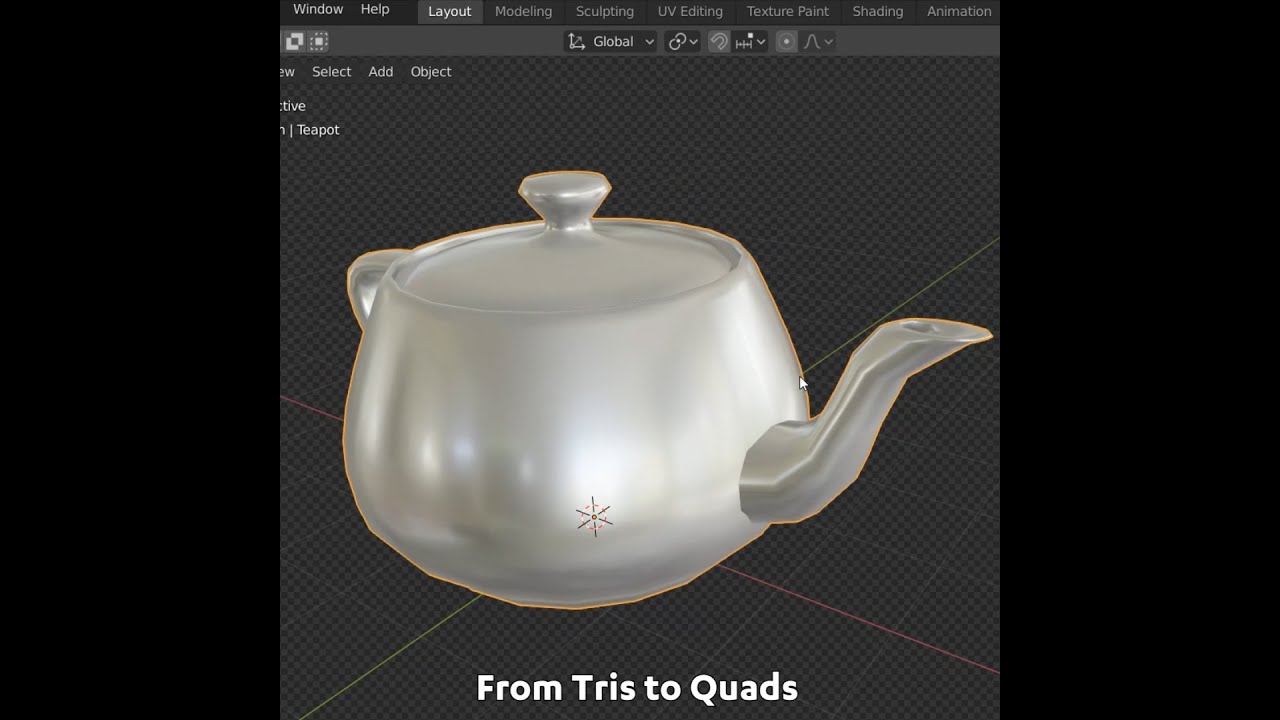
#b3d #blender #secrets #tutorial
Visit my website: https://www.blendersecrets.org/book
e-Book bundle (20% Discount) : https://gumroad.com/l/IxofeY
sick pelican
Thanks!
buoyant holly
So hopefully that'll help
sick pelican
It does, thanks
buoyant holly
maybe after you're done you can go to try Edge loop dissolving on like a single outfit configuration and make a quest version of the avatar and a custom fall back
 south whale
lmao WHAT! I never knew how to do that!!! I’ve been out here STRUGGLING lol
buoyant holly
now you know
heady smelt
the more yknow
the more you know you dont know
then the more you try to know what you dont know till you know it
and then by that time its been years
south whale
I make relatively complex constraint rigs and I feel like I know MUCH less about computers now than when I started :p
 sick tapir
much knowledge
heady smelt
i dont even know WHAT constraint rig is
south whale
I make 4legged avatars that do what you do, without paying ninety bucks for final IK
Really I’d rather link my AnyTaurs but they got a super weird linkname I can’t remember, but I can easily remember this one. x) Also they are very optimized so I am on-topic!!
sick tapir
is "anytaur" referring to centaur-like creatures that aren't necessarily half-horse?
south whale

Gumroad
Fullbody demo video is up... I had hip tracker problems for a second while on my back, and then worse ones while trying to get on all fours at the end... that's my tracking squirreling out, not any failure of the rig. My playspace has significant limitations ;_; But, haha, yeah--people have asked, so, no, I am not going around on all fours! THAT...
sick tapir
ah
south whale
It’s a free base
south whale
You can make any taur or quad with it if you have basic Blender skills, I did all the Unity work for you
well almost all
The gryphon models were just what I had on hand, so I made a demo double gryphontaur out of them. I am very hopeful the Dynamics update will allow me to simplify some things
heady smelt
south whale
I make 4legged avatars that do what you do, without paying ninety bucks for fina...
thats really cool especially for commissioning avatars like that, so your client doesnt need to buy that expensive asset
buoyant holly
south whale
I make 4legged avatars that do what you do, without paying ninety bucks for fina...
nice
sick pelican
Hey anyone got any idea why in Blender the model with everything unhidden and selected says it totals at about 68k tris, but in unity with no meshes added the SDK says it's 71k polys?
proper grail
quads and ngons get converted to tris by default
 sage flame
Okay quick question cuz I’m a psychopath.
Is there a way to add that high prescription glasses warp to a surface in blender?
heady smelt
proper grail
quads and ngons get converted to tris by default
HOW many ngons do they have?!?!?
heady smelt
sage flame
Okay quick question cuz I’m a psychopath.
Is there a way to add that high prescr...
maybe with IOR
its like light distortion or something idk but its related
Index of Reflection
or refraction hm
heady smelt
both in combination >>>> OP
surreal fractal
aight help me here
issue: view is off-centered

it looks centered in unity,

it looks centered in blender:

what is going on
proper grail
looks like the hips and head bone are not y=0 in blender, and in unity the bones were edited after being set humanoid. Set back to generic, apply, and back to humanoid to fix lil animation issues caused by that
nova hornet
Hey, how do I tell VRChat what shaders to fallback to? (When safety settings have shaders off)
I assumed it would fallback to Mobile Toon lit since it's using Poiyomi but seemingly it doesn't
 random juniper
buoyant holly
https://www.youtube.com/watch?v=iKDWW10IJoo
random juniper
buoyant holly
https://www.youtube.com/watch?v=iKDWW10IJoo
good tutorial, but he's been missing a few other faces, sometimes if you see those single triangle faces, you can use edge loop
cosmic plover
random juniper
good tutorial, but he's been missing a few other faces, sometimes if you see tho...
Triangles stop edge flow
dense olive
Hello, everyone. I want to know whether there is a performance difference between parenting a sunglass to neck bone or using parent constraint. Would be grateful if anyone could help me.
onyx harness
the parent constraint would add the tiniest insignificant hit to performance, so either way is fine.
dense olive
Thank you
ruby isle
dense olive
Hello, everyone. I want to know whether there is a performance difference betwee...
Constraints take up a tiny bit of extra performance. But the biggest difference is that constraints update a little slower in mirrors. So I'd recommend parenting it directly to avoid that
onyx harness
ruby isle
Constraints take up a tiny bit of extra performance. But the biggest difference ...
Wasn't the delay drastically reduced?
I haven't had any issues with it
dense olive
Thank you. How about adding armature modifier to a mesh in Blender? For example, if I have an armature and body and a sunglass. The first way is to parenting sunglass directly to neck bone of current avatar, the second way is to add armature modifier, weight paint, export fbx, set avatar, etc. Second way is extremely tedious, but I want to know whether there is any performance difference
ruby isle
onyx harness
Wasn't the delay drastically reduced?
I haven't had any issues with it
Not sure, I haven't used constraints since that update
onyx harness
ruby isle
Not sure, I haven't used constraints since that update
I made an old avatar where you could see all the hair including the fringe (which is excessively annoying) but I never built on it as the hair would be dragged behind almost torn from the head. It doesn't have that issue anymore so it looks like constraints are a lot better if not completely fixed.
ruby isle
onyx harness
I made an old avatar where you could see all the hair including the fringe (whic...
Most likely. They changed the execution order of them so it seems they work much better than before
onyx harness
dense olive
Thank you. How about adding armature modifier to a mesh in Blender? For example,...
parenting sunglass directly to neck bone
I feel like this would create issues when doing anything but looking straight. Is there any reason it's on the neck?
dense olive
Well, I definitely will parent it directly to head bone. I just give an example casually to make the question clearer
 steady flint
Hey friends! Hoping you can help -
After I used the Material Combiner I exported, did the Unity bit, and pushed up to VRChat. It worked (yay!) but had some pretty bad clipping.
I went to go edit it but all the materials being combined made that incredibly difficult. (And I’m past the point of ctrl+z) is there anyway to undo the material combiner? Or do I just need to save an ‘uncombined’ version in the future?
heady smelt
steady flint
Hey friends! Hoping you can help -
After I used the Material Combiner I exporte...
your kinda fricked
should always make backups for every big change
also i dont trust mat combiner to do it because it ususally does it poorly
manual atlasing is slower but you get immensely better results and you actually know where everything goes
steady flint
Good to know. This was my first avatar so pretty low stakes. Thanks for the response!
heady smelt
np
 keen pendant
so I have an entire character using 1 texture, and they have some toggleable sunglasses that I want some transparency on. Is it better to use a low-res mask and just use 1 material with transparency or better to make a separate material for the small transparent part in terms of performance?
my instinct is 1 material with a mask for less draw calls. but I guess im curious if all the other parts of the model, despite being 100% opaque are still a "transparent material" and if it has to constantly check for that engine side or not idk
proper grail
You right, transparency is per pixel performance loss so it really just matters how much of a transparent (alpha+ztest iirc) mesh is on screen. Having most of your mesh be opaque or cutout would be better here
keen pendant
proper grail
You right, transparency is per pixel performance loss so it really just matters ...
so since I cant use cutout for a partial transparency itd just be better to use another material for just the glasses if I understand correct? 🙂
Im also pretty in-experienced on draw calls. would it be better to use the same texture in both materials, where the glasses are just a tiny % and the rest of the texture is "wasted" for the 2nd material but re-using the same texture or would the glasses be better off on their own tiny separate texture
acoustic latch
Unless those lenses are colored, it is better to just remove the mesh with a 3d model program so there is just nothing there
buoyant holly
acoustic latch
Unless those lenses are colored, it is better to just remove the mesh with a 3d ...
a quest build would require you to do that anyway
acoustic latch
That too
buoyant holly
and quest build reasons probably better for it to be just one texture for everything so that you're not having to generate 2 materials on Quest
keen pendant
lenses are colored but you've all given me some pros and cons

maybe transparent glasses arent worth the extra cost :9 maybe just leave them opaque
buoyant holly
probably not going to be the end of the worlds to use two materials on a PC Avatar as that would still put you on an excellent rank as far as materials
and question how would you be toggling the glasses
because if it's a mesh toggle you're already having 2 draw calls
keen pendant
was going to try the scaling joint method
acoustic latch
if the glasses are their own bone, you can shrink the bone, but you should also be able to just disable and enable the bone
keen pendant
oh you can just disable too? cool
acoustic latch
should be able to, I did that for a mask and glasses on a vroid avatar like a year ago
You can/should only do that for static meshes, not anything that would deform, like shirts and other clothes
proper grail
unity does reuse exact same textures used bunches of times, dont worry about if one material doesnt use most of a well used overall texture
buoyant holly
still less vram than the glass has a separate texture
ruby isle
proper grail
unity does reuse exact same textures used bunches of times, dont worry about if ...
There's barely any of the exact same textures on avatars though. TDA bases use the same texture for face and body, but there's like 5 million revisions to them
buoyant holly
then that's not a properly optimized Avatar TDA
proper grail
im thinkin slvr think i meant between different custom avatars, on the same avatar between materials
ruby isle
They're all the same textures, but with tiny changes. different nail color, different eyes, different coloring, etc
ruby isle
proper grail
im thinkin slvr think i meant between different custom avatars, on the same avat...
Oh wait did you mean on one single avatar?
 minor sapphire
I don't speak japanese but do you guys think this means I need to put the texture manually for the model?
 heady smelt
there are image to text machienes online
you can put that text you get into google translate for something rough
minor sapphire
heady smelt
you can put that text you get into google translate for something rough
oh wow this one helped thank u so much
heady smelt
np
minor sapphire
heady smelt
np
do you happen to know how will I apply the textures?
or is it automatically applied?
 crystal bolt
Hello! So I've been having this issue a lot recently. When I import my PNGs into Unity, two of the three work, but one of them, (The main body atlas) doesn't show a thumbnail, or allow me to change the import settings. Does anyone know what's been going on? I'd love to know!

The emission file works, strangely
 frigid plume
How do I combine textures other than using cat cause that is not working
heady smelt
frigid plume
How do I combine textures other than using cat cause that is not working
you can do it the MANUAL way!!! its so much more reliable and better since your doing it yourself
let me find a guide that seems good
frigid plume
figured it out ||delete the entire fucking project and start over again yay blander||
heady smelt
mayb u should save dum dum
 exotic zodiac
How do you create cool memey avatars on oculus quest 2 if u don’t have a pc or computer
buoyant holly
you can't really create any avatars without some sort of computer
 raven sandal
nova hornet
raven sandal
nova hornet
Hey, is it possible to make fallback avatars for other people like putting a fallback avatar in a world that people can then use as a fallback avatar?
calm spade
Fallbacks are added through the SDK
heady smelt
Hey anybody able to help me convert my VR Chat character to a VRM?
I am very dumb and blond and cant even figure out how to install unity correctly...
ruby isle
heady smelt
Hey anybody able to help me convert my VR Chat character to a VRM?
I am very dum...

I also stream on Twitch: https://www.twitch.tv/fofamit
This video is brought to you by Private Internet Access: https://www.privateinternetaccess.com/pages/buy-vpn/fofamit
UniVRM:
https://github.com/vrm-c/UniVRM
Unity:
https://store.unity.com/download?ref
--My Desktop VTuber Set up--
What I use and recommend currently for Desktop Vtubing~
L...
sick pelican
Does using parent constraints for say a sword, negatively impact performance vs using 2 duplicate objects that toggle on and off, or is it about the same
calm spade
sick pelican
Does using parent constraints for say a sword, negatively impact performance vs ...
They're both very minimal, but for the sake of fitting within the vrchat perf limits, i'd suggest constraints
sick pelican
Thanks, found out about constraints the other day and it just seems so much more versatile
 jovial tartan
crystal bolt
Hello! So I've been having this issue a lot recently. When I import my PNGs into...
jovial tartan
crystal bolt
Hello! So I've been having this issue a lot recently. When I import my PNGs into...
I encountered the same thing with my animations files
If you open the .meta file associated with the file with a notpad program
You can find something at the top called hideflags
If it is 1
It should be changed to 0
And should work
 versed canopy
hello there, i have a weird issue... my proportions of my avatar fit almost exactly my body - with one exception - the arms. If i T-pose and apply the calibration they are more like a VIV insteald of T. So i thought - ok they are too long and shortened the upper and lower arm bone of my avatar... i tried to shorten it a lot... like up to non humane proportions. Unity still shows me the avatar like it, but as soon as i am in VRC the arms are normal again and do the VIV again after calibration. Has anyone a idea what that could be?
 unkempt bay
Hey everyone, just having a small issue at the moment, since I kinda wanna go back to playing vrchat, I want to try and fix an issue I had with the avatar I made like 4 months ago but never really used because the issue is that it only is usable on pc and I can't use it on quest, just wanted to know if anyone knows how to import my avatar on quest because not being able to use it on quest is pretty annoying to be honest
 high kiln
you need android support for unity to upload on quest
than you will see if avatar is ready or not
unkempt bay
Well when i did the avatar i remember opening the control panel and uploading it on android or something
Oh, nevermind, it says that it doesn't have android support, do you know how i can make it android compatible?
high kiln
https://unity3d.com/unity/whats-new/2019.4.31 click android support

Unity
Unity is the ultimate game development platform. Use Unity to build high-quality 3D and 2D games, deploy them across mobile, desktop, VR/AR, consoles or the Web, and connect with loyal and enthusiastic players and customers.
unkempt bay
alright i'm installing it right now, i hope it works because i don't really want to remake the whole avatar again lmao
still saying it doesn't have android support, i also think it might be affected by the errors i have, probably gonna have to redo the whole avatar i think
 unkempt bay
Yeah there are way too many errors, too many polygons, wrong shaders and such, i don't remember if i did but i probably forgot to optimize it by putting it into blender and all when i made it
 dry tinsel
Holy shit that's trippy
Another person I know on a Kill La Kill server is using that profile picture
 hearty marsh
Wait, I know vrc hates multiple meshes
but if the face and body have two separate materials anyway
isn't better to split them apart so face shape keys aren't attached to the whole mesh
am pretty sure thats the case
calm spade
Yep
heady smelt
its because shapekeys go brrrr on performance more on meshs with more geometry
so sometimes it is better to seperate the head from the body mesh
but if the mesh before seperation is i dunno like less than 20k then i think you shouldnt seperate it? something like that
hearty marsh
I'm also wondering what the impact of hidden meshes are
do they affect performance while hidden and just stay in memory until re-enabled
or is there always calculations behind the scenes
calm spade
They have a cost once enabled
hearty marsh
Oh okay, so if I'm hanging out with friends and have 20+ hidden outfits, I'm not destroying them, thats good to know, haha
buoyant holly
question Do they still take up vram is the have their own texture that separate from the rest of the model
hearty marsh
I just assumed all textures got loaded into vram on avatar load, even if they weren't being used
I have no idea though, I just try to keep my file sizes as low as I can either way
ruby isle
buoyant holly
question Do they still take up vram is the have their own texture that separate...
Yes all textures get loaded into VRAM once you avatar loads, regardless of if anything is disabled
heady smelt
does the vram have some kinda like que system where say, if it had a texture that it loaded and is no longer in use that it will eventually stop loading in vram when enough new content gets loaded?
ruby isle
heady smelt
does the vram have some kinda like que system where say, if it had a texture tha...
Textures will always stay into VRAM until your entire avatar is unloaded (You switch avatars, leave the world, etc.)
heady smelt
bruh
there has to be a more efficient WAYY
maybe at least keep it in normal memory until its properly active on the avatar?
is that how that works?
ruby isle
heady smelt
maybe at least keep it in normal memory until its properly active on the avatar?
Then it'd have to reload it when you toggle your mesh, which would cause a lag to load it into VRAM
buoyant holly
ruby isle
Yes all textures get loaded into VRAM once you avatar loads, regardless of if an...
so you are putting extra strain on the People by having 20 outfit on one Avatar
heady smelt
maybe the short studder is worth it if we arent loading in alot of uneccessary stuff
ruby isle
When VRAM is full, it starts dumping stuff to normal RAM, which is commonly a cause for stuttering and crashes
heady smelt
so it can afford it maybe without lag because its not being overloaded
ruby isle
Or you could just compress your textures so you don't need as lot of vram
ruby isle
AAA games nowadays still barely hit 8GB of VRAM on max. A game like VRC should barely need 4GB but nobody optimizes textures and therefore you hit 8GB super fast
buoyant holly
and I suppose this vram factoid illustrate why the vrchat ranking system counts everything as if it's on constant
heady smelt
Is there a way to get real numbers say if you walked into a public lobby and see vram useage, from textures on active meshs compared to not active ones
ruby isle
heady smelt
its more efficient if you do it the other way
It's less efficient to do it the other way. It would cause so many stutters to have to load stuff from RAM to VRAM. Imagine having to load a model with 64 textures from RAM
ruby isle
heady smelt
Is there a way to get real numbers say if you walked into a public lobby and see...
Many overlays like XSOverlay and OVRToolkit can display your VRAM usage
heady smelt
yea but can it tell what the vram is being used on ingame tho
ruby isle
Mine sits around 7.4gb, which is max for me (8gb card)
The entirety of usage is towards the game unless you're using Discord and Hardware Accel is on (which it barely takes up much at all)
heady smelt
Discord hogs my CPU
ruby isle
Do you have Hardware Accel on?
heady smelt
it doesnt change on or off
also if I run my mouse down my server lists i get extreme cpu spikes
its not as bad now since i left some servers but im only in like 20
ruby isle
That will fix if Hardware Accel is on. If it's off, it uses your CPU to process animations, video and audio decoding for calls, and a few other things
ruby isle
Possibly
heady smelt
I have a laptop with integrated and dedicated
heady smelt
yes a mobile gtx 1650
buoyant holly
so one outfit if I'm going to a big crowd event because of vram usage
ruby isle
Go to your NVIDIA control panel, "Manage 3D Settings", Program Settings tab, and select Discord and set the CUDA - GPUs to the dedicated one you have. Apply and enable Hardware accel an reset discord
heady smelt
nup doesnt do anything and i selected the Use advanced 3D image settings option
control R'ed discord and taskmger ended it and back
i have experiences with nvidia control panel doing nothing
ruby isle
Positive you selected the right discord exe?
heady smelt
ill go to the file explorer location to make sure
i dont have the other versions of discord enabled
ruby isle
I've never had the control panel not work
heady smelt
CUDA-GPUs entry is set to ALL but when i go to dropdown I only see my Nvidia 1650
ruby isle
Select it
heady smelt

yup
weird thing is in Taskmgr, the GPU engine field for Discord swaps to GPU 1 (dedicated) every once in a while for a few seconds then goes back
ruby isle
Try also setting the OpenGL GPU setting
heady smelt
i thought of that and also made it nvidia but i didnt restart yet
one second
oml discord is so stubborn
the file directories of these are all in C:\Users\steve\AppData\Local\Discord\app-1.0.9003 and I tell nvidida to do stuff to the Discord.exe in there

maybe I need to do it to Update.exe
ruby isle
I'm not sure if it works exactly as I only have a single desktop GPU
heady smelt
im about to disable my integrated driver and see what happens
ruby isle
Also Oculus 🤮
heady smelt
it is a curse but i must use their client with their headsets
or lose 3 fps with steamvr
ruby isle
It doesn't look like you can spare if 44% is 3gb of your ram
heady smelt
yknow i dont know where the frick its getting the percentage because I have 32GB sys ram
like its NOT right or its not showing me something
heady smelt
i dont know where most of that is going bro
 heady smelt
this dont add up and it only get smaller quicker down the row

 modest hare
32gb ram stick luckyy lmao
heady smelt
i wish I got x2 16GB
modest hare
Yea but i didn’t even know that existed i might have to get 2 of them 😩
heady smelt
im psure its supposed to be better because it has twice the channels to go through
not twice as better but still better
modest hare
Yes 2 is definitely better than one
high kiln
dont show your gmail
heady smelt
i could care less
high kiln
well ok if you say so.
modest hare
😬
heady smelt
hax me i dare u

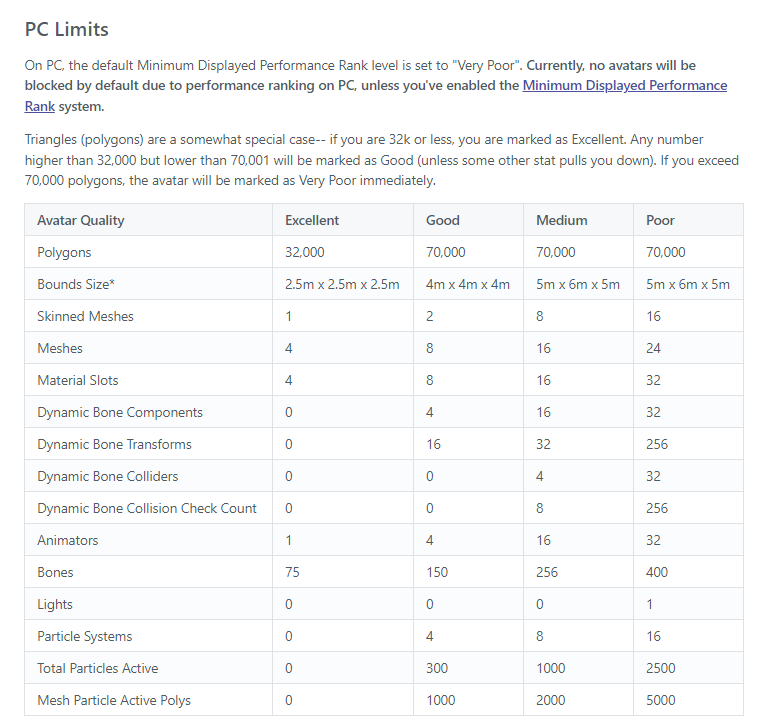
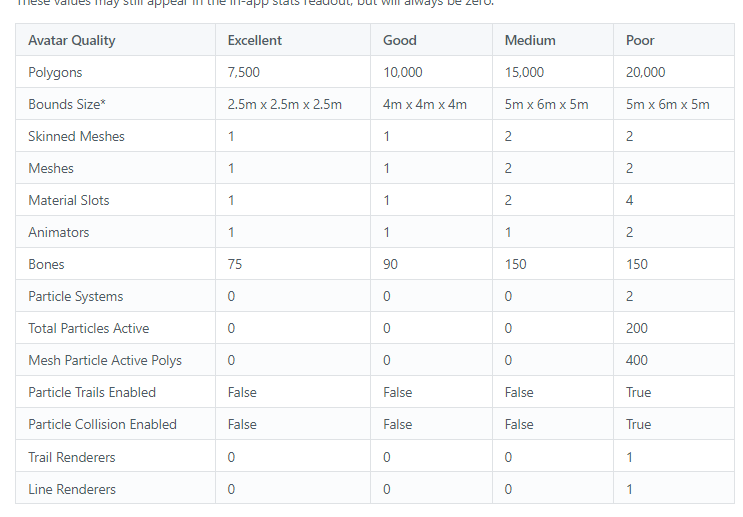
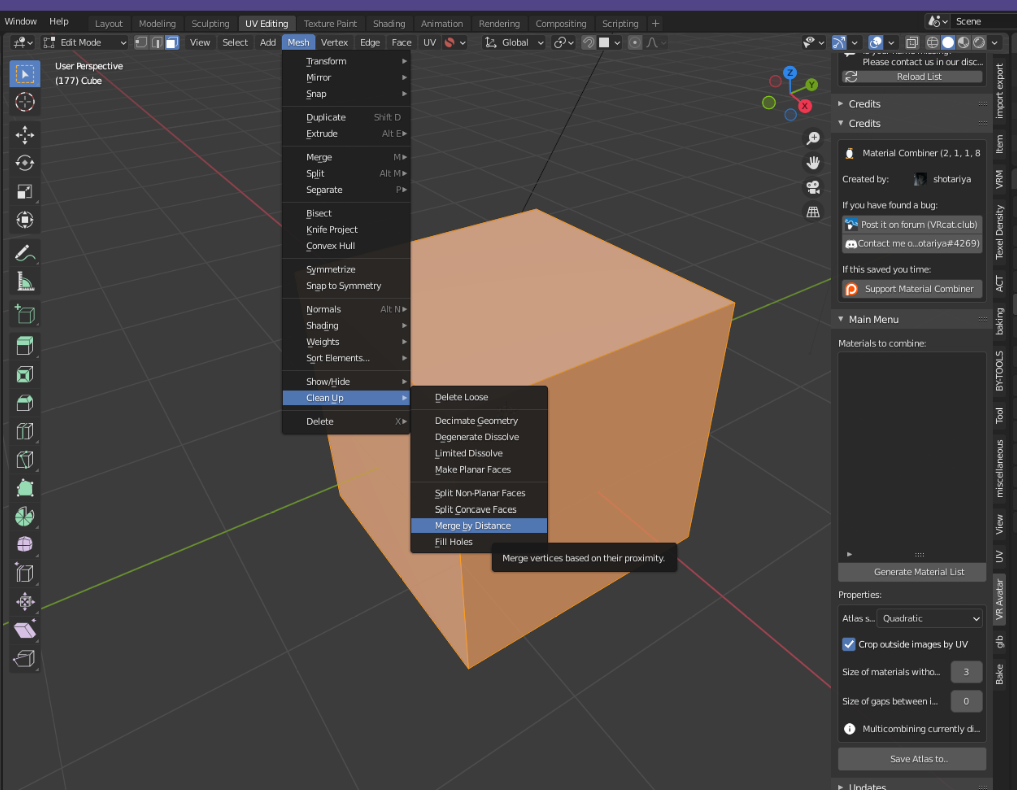
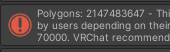
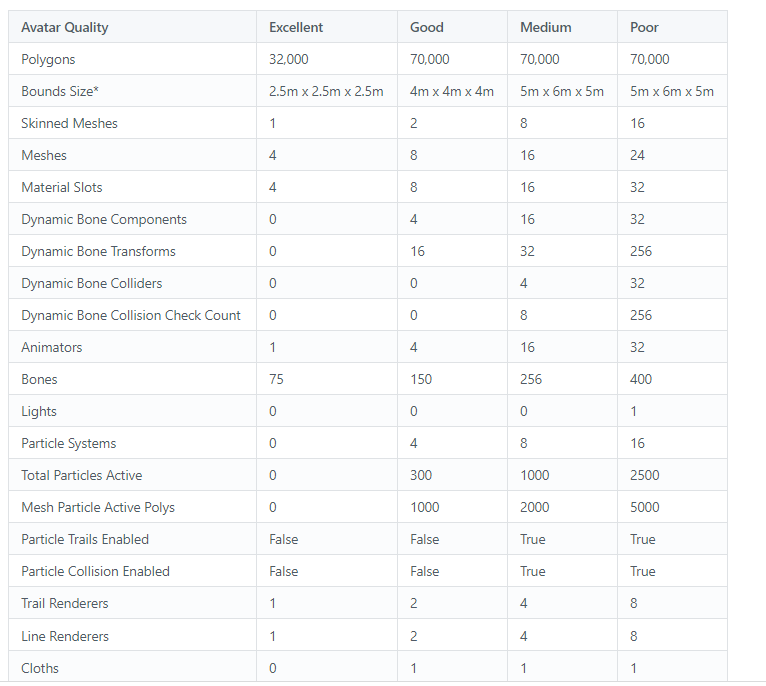 heady smelt
but seriously does anyone have a clue where half my memory is getting eaten up from
its concerning
heady smelt
does windows take like 20% of your memory to itself or something
high kiln
yup
heady smelt
fun
high kiln
just running and background tasks
heady smelt
that is nearly 7GB so that is it
heady smelt
yea its hogging in my browser
heady smelt
im fine where I am now so im just saving in general
i dont plan on doing much server hosting so im gud
ruby isle
My windows takes like 2-3gb of my 16
 left valley
im kind of lost on what to do to get my avatar down to good at least
ive got 53k tris and its telling me its still very poor
all other stats are excellent/good
nevermind ive got it
ehe
 coarse ice
heady smelt
i dont know where most of that is going bro
coarse ice
heady smelt
i dont know where most of that is going bro
You gotta do some house cleaning
heady smelt
coarse ice
You gotta do some house cleaning
room service 🥺
ruby isle
There should be an Autofix next to that message. If not, update your SDK. The raw fix for this though is to check "Mesh Read/Write" in the FBX settings in Unity
Then you can just enable the Mesh Read/Write in the FBX settings. Click the FBX in Unity and in the Inspector you should see the option
Ah perfect
 lunar light
Alright, I’m going to attempt getting my model to go lower than 20k
Right now it’s a little above 42k
It’ll be a challenge for sure
Btw, should I focus on how many faces my model has or how many tris?
buoyant holly
tris as that's what the vrchat SDK counts
buoyant holly
yes because the graphics card deals with triangles quads are just a modeling convenience
 frozen imp
Is there any good way to decimate without losing shape keys?
or not have them go wild
 lunar light
Welp, I decimated it down to 18,489. That is the medium rank for quest, right?

Turns out the hair I chose had almost 13,000 tris
I decimated that and suddenly it went under 20k
lunar light
Well, nevermind. I needed to go below 15,000, which meant I had to switch out certain textures to make them look somewhat decent
Ugh, this is so annoying
proper grail
Welcome to intro to making game ready models, part 1 of 43
calm spade
frozen imp
or not have them go wild
Cats bake addon
frozen imp
Unfortunately for some reason CATs isn't detecting my model anymore. Its a VRM model that I imported with CATs and did modifications to (no armature mods) and now the tool doesn't recognize it as a Cats compatible model.
calm spade
If it has an armature and a mesh assigned to it, it should 
 short glen
so i have a model made and everything in unity, but it has too many polygons, how can I reduce the polygon count? I've tried exporting it to blender to no avail.
any advice is welcome
acoustic latch
short glen
so i have a model made and everything in unity, but it has too many polygons, ho...
How many is too many polygons. Are you over the a limit for a rank you want, or is it the very large number that doesn't even come close to matching what blender reports
short glen
i can't even get the file into blender
acoustic latch
That didn't answer either of my questions though.
You are on the right track of using Blender to lower the polygons, but what reason do you need to
short glen
i need to reduce it from ~39000 to <20000. Blender doesn't report anything because I haven't been able to move the file
acoustic latch
Rarely do you get an avatar without a FBX file. Have you checked your files after importing into Unity for a model?
short glen
hold on, where/how would I find the fbx file?
acoustic latch
in Unity you can right click inside of the Project view, which is usually at the bottom, and then click the Explore Here text to open the folder in Windows. That will have your assets and should be in the folder with the model
short glen
would it be under assets?
and, sans the project name, what would it be called? .meshes, .materials, .textures, etc.
proper grail
.fbx
short glen
but what folder?
buoyant holly
that's going to be entirely up to the Avatar maker where the fbx is going to be
short glen
vroid?
buoyant holly
you could also click on the mesh renderer of the Avatar in the inspector and it should jump to where the fbx is located
short glen
that just brings me to .asset and .meta files
buoyant holly
that's a bit concerning that your avatar is not a fbx did you grab it off of some dodgy website
short glen
i used vroid
short glen
yes
buoyant holly
basically you'd want to do your modifications in vroid and then re-import
as it has sliders to reduce polygon count and a checkbox to delete completely transparent triangles so if you make all the stuff under the clothing transparent it'll remove the triangles
short glen
buoyant holly
as it has sliders to reduce polygon count and a checkbox to delete completely t...
where?
buoyant holly
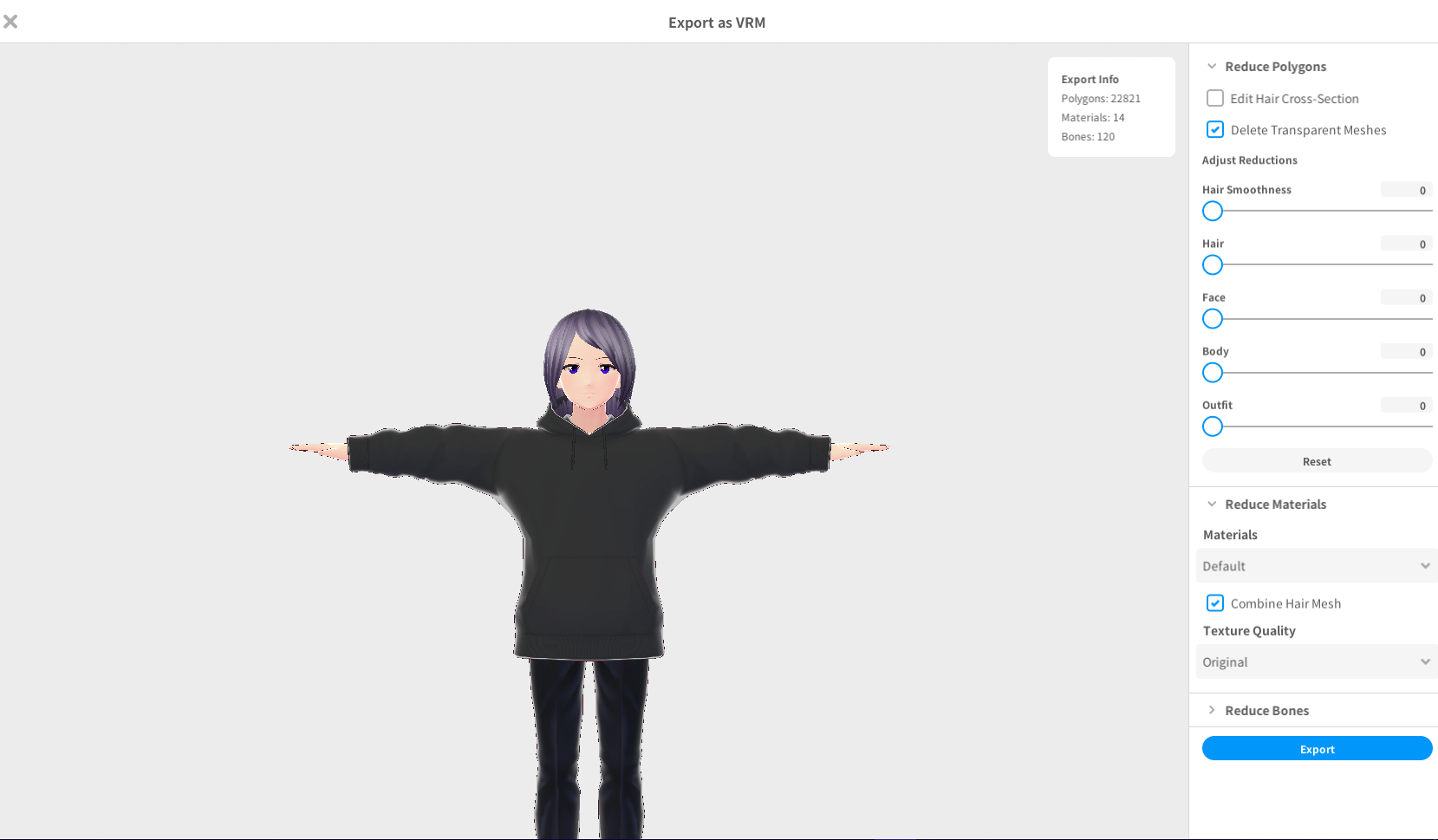
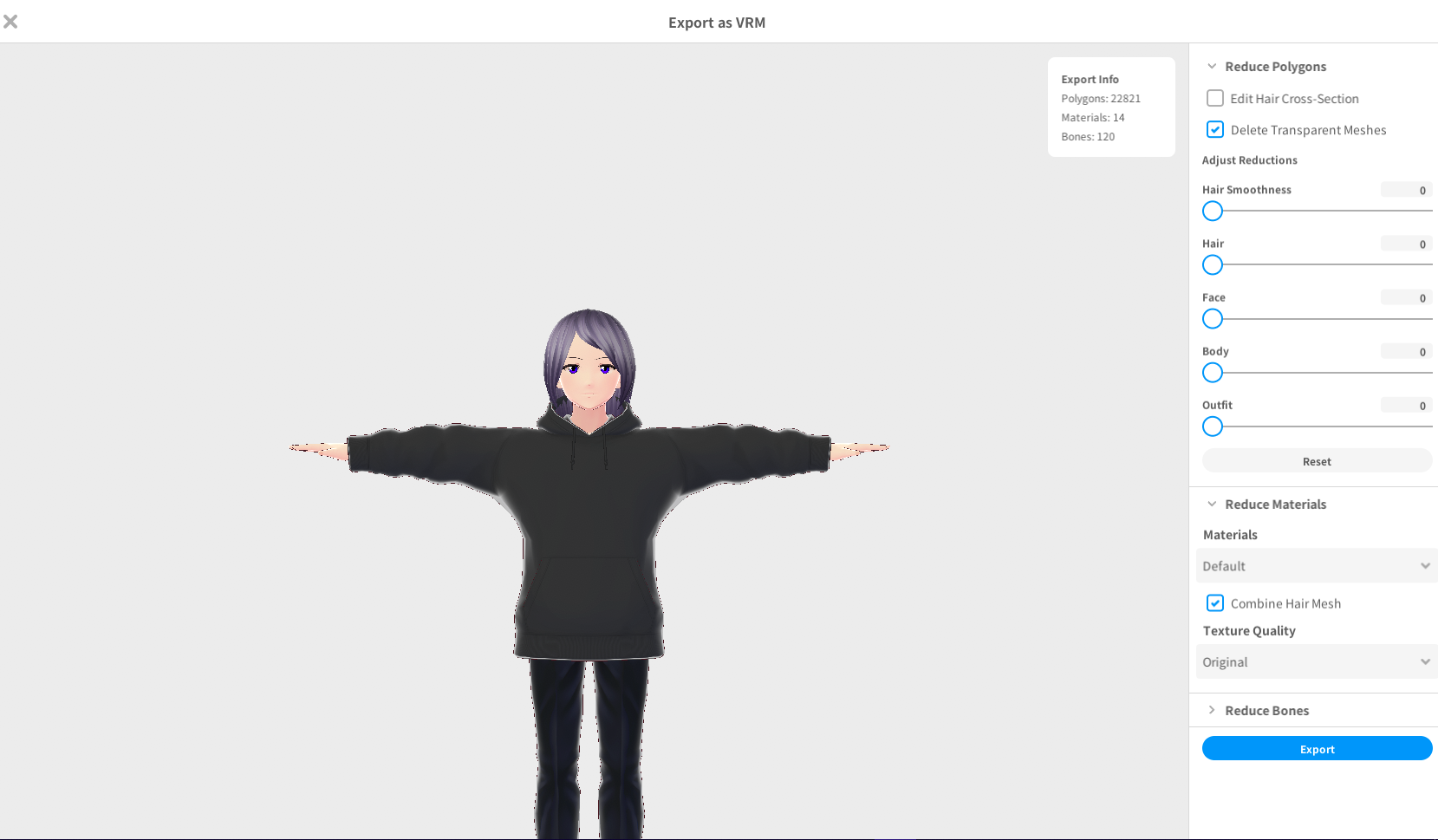 short glen
thanks
 urban maple
Can somebody help me? Im trying to install "Cats Blender Plugin" but my file says "cats-blender-plugin-master" not "cats-blender-plugin" and when I select the zip file to add the add-on it doesnt show "3D View: Cats Blender plugin"
I wasnt sure which channel to ask this in but since that add-on has to do with avatar optimization I asked here
modest hare
urban maple
Can somebody help me? Im trying to install "Cats Blender Plugin" but my file say...
Did you enable the plugin
Wow very late response sorry about that
urban maple
Somebody helped me fix it now
echo geyser
buoyant holly
https://i.gyazo.com/4d6b565d5a299944d3555f23b57edafb.png
buff
 thorny spindle
so if I heard things correctly, in order for a model to work at all on the oculus systems you need to keep the polygons under 5,000 correct?
thorny spindle
yeah for a quest. so you could technically make a 19k model and it would work on the quest?
thanks for responding
radiant shadow
most would never see you unless you are lower , have to click/show
thorny spindle
the less optimal safety settings im assuming
calm spade
Correct
thorny spindle
awesome! I'm not making anything super complex so im fine sticking to 5k. just wanted to verify before getting the model set up
crystal bolt
Hello! So I've been getting this issue when I try to export an Atlas. Does anyone know what's been happening?

 wanton oyster
I haven’t seen anything about this online and i’m not sure where to put this but i use vrchat on my pc because i have no headset. I can’t make my avatar taller.. is there a way how? I don’t see anything in the options.
acoustic latch
wanton oyster
I haven’t seen anything about this online and i’m not sure where to put this but...
You can only make your avatar taller by changing it's scale in Unity to be taller. If you are trying to make an avatar in the game taller that you didn't upload, you cannot change its height, and this is the same for VR as well.
heady smelt
When I try to upload my avatar and worlds as well as cross compatible for some reason it doesn't work at all?
It gives me the blueprint errors with avatars although so far i tried everything I could and making a new project as well. Is it due to the sdk messing up or something? Or did they just set hard limits lower for quest?
Even if my avatar meets minimum requirements it still does the same problem when uploading cross compatible. I'd appreciate any help greatly.
ruby isle
heady smelt
When I try to upload my avatar and worlds as well as cross compatible for some r...
It's possible it's an error with the server files. If that's the case you need to clear the blueprint ID and reupload with a new ID
You should also be making sure the Blueprint IDs are the exact same when doing the cross-compatible upload
You need to manually enter the ID for the second cross-compatible upload for them to be matching
unreal plover
WIP on my in-unity avatar optimizer
buoyant holly
very cool to have more Avatar optimizers and definitely a good demonstration
 quasi creek
naisu