#avatar-optimization
1 messages · Page 57 of 1
 urban fable
Nevermind, it support .vrm
I'm gonna make it
My computer is dying
Hm, I should blender only the .vrm right?
@buoyant holly Sorry for the ping but, "bake" is mentioned, but where can I download it ? o0
Trying to find it but, i'm maybe blind?
 buoyant holly
GitHub
:smiley_cat: A tool designed to shorten steps needed to import and optimize models into VRChat. Compatible models are: MMD, XNALara, Mixamo, DAZ/Poser, Blender Rigify, Sims 2, Motion Builder, 3DS M...
urban fable
You are gonna kill me man but
I have the cats things, here:
But not the "bake" things, like the link you dropped to me
 normal nova
You need to be on the dev version for that
(until the release which is like... this week, some time)
@urban fable
There's a button that grabs the dev version in... I think the settings
urban fable
Oh, thanks !
Yeah ok, It's not gonna be easy :DDD
Why cant just thing work like, wow xD
normal nova
weird
https://github.com/GiveMeAllYourCats/cats-blender-plugin/tree/development < if you go to 'Code' -> 'Download Zip' it's the same thing, just have to install it and make sure it doesn't conflict with the existing one

GitHub
:smiley_cat: A tool designed to shorten steps needed to import and optimize models into VRChat. Compatible models are: MMD, XNALara, Mixamo, DAZ/Poser, Blender Rigify, Sims 2, Motion Builder, 3DS M...
urban fable
OK IT WORK
Hm
unless
Ok nvm found it, how great is google today
Mayber, after 7 hours of tryharding, everything will work
Same problem with eyes, why is life so sad :(, oh wait, he said that I have to cut them before, hm, but how
buoyant holly
Blender is Free and Open Source Software
Download: https://blender.org/download
Support core Blender development - https://fund.blender.org
--
This tutorial is part of the Blender Fundamentals series, produced by Dillon Gu.
Find more free tutorials on: https://blender.org/tutorials
Follow Blender on social media:
- Twitter: https://twitter.c...
urban fable
Thanks !
Oh my, i'm gonna become a 3d engineer soon
But uh
I have to cut those things?
normal nova
Yeah. So, in 2d, you can draw like, the actual shape of the eyelashes you want. Then you knife project them from that view, and blender uses it to 'cut' the underlying peices, making them actual geometry
then you just delete the bits you no longer want
urban fable
Uh
I understand what you are explaining but, hm
I need to remove those things right?
But wont be my character without eyeleashes? xD
urban fable
(I'm sorry, i'm totally new with those things ><)
normal nova
Say I have this plane (like your eyelashes) and this little line I've scribbled (protip, select a vert and ctrl+rightclick to extrude it instantly, so you can draw stuff quick)
Once you've got that, you can click the line, then shift-click the plane, switch to Edit mode and use Knife Project
Result, projecting from above
Then you just delete the bit you don't want
make sure they're different objects tho
And I think in blender, as long as the alpha channel is hooked up, you'll need to set Alpha Mode (in object properties) to Clip to see it properly
like this
lmk if I've lost you x3
urban fable
HHHHHHM
my brain is melting
There is like one thing I dont understand
My eyeslashes are black, because of the transparency, right?
So, if i like cut the transparency (Which i dont know how to recognize 0o), what will happen to the face of my avatar?
(if you dont have time its ok, guess i'm just give up at this point Damn)
normal nova
uhhh, you'll probably wanna separate the eyelash peices into a second object first, cut them, then join them back (select eyelashes, then body, Ctrl+J)
I'm re-baking versions of my avatar which means pressing a button and waiting, I got time x3
normal nova
urban fable
probably scroll up a bit? Should jsut be called 'settings'
Right above the two MMD thingies
urban fable
Uh cant get far than this
normal nova
uhhh
urban fable
normal nova
I'm re-baking versions of my avatar which means pressing a button and waiting, I...
Thanks, hope i'm not too much bothering you ><
urban fable
normal nova
uhhh, you'll probably wanna separate the eyelash peices into a second object fir...
Uh, I'll try
normal nova
urban fable
Uh cant get far than this
well that's... new to me. Try selecting other materials?
urban fable
Uh, material ?
normal nova
Those're vertex groups in the vertices panel, I mean in the material panel (the little red ball)
urban fable
yeah, found those
normal nova
Any settings for those? I wonder if it's a weird import thing
urban fable
normal nova
Idk if that'd make a difference but worth a shot?
normal nova
mh, idk then
urban fable
Yeah its w.e, it's 6:18AM here
Need to sleep
Thanks for your help @normal nova
( @buoyant holly and also @loud frost, sorry for being a nooby :( )
Have a great day !
normal nova
Yeah, sorry it was a struggle x3 if it's any consolation, uploading a quest version of any kind will be better than a robot
 toxic igloo
anyone have a go to guide / video for atlasing? I have some stuff I wanna use for VR but it's just wayyyy too many materials.
 sick timber
toxic igloo
anyone have a go to guide / video for atlasing? I have some stuff I wanna use fo...
sick timber
toxic igloo
anyone have a go to guide / video for atlasing? I have some stuff I wanna use fo...
Use the cats blender plug-in, it has an auto-atlaser
 calm spade

This tutorial will teach you how to use the Material Combiner and Cat's for Atlasing. It will also go over in Unity creating a color mask for specific areas of the texture.
https://www.twitch.tv/kareeda
https://www.patreon.com/Kareeda
https://twitter.com/TheKareeda
Join My Community Discord @ http://discord.vrealchat.com/
don't use the same shader as in the video though, very outdated
toxic igloo
ty!
 hardy bolt
Anyone able to explain why this has suddenly snuck into my avatar build even tho im not useing anything standard unity assets ?
 woven fable
Is 150fps alone on home world a good optimization?
(i was in front of a mirror to add that on top)
 unkempt fog
How to check avatar file size without upload
unkempt fog
woven fable
Is 150fps alone on home world a good optimization?
beautiful
 heady smelt
what are some good quest compatible shaders ?
unkempt fog
@heady smelt XSToon, Silent's shaders, poiyomi's toon, UTS2
You should use it for your avatar.
heady smelt
is poiyomi toon quest compatible ? @unkempt fog
unkempt fog
Oculus quest can use only VRChat/mobile shader
VRChat
This page will describe various limits in place for the Oculus Quest version of VRChat. These limitations are in place in the interest of performance, user safety, and discouraging malicious behavior. Find more information about limited components on our Quest Content Optimization page.Although the ...
heady smelt
ahh okay i will use VRChat/Mobile/Toon Lit then i guess
thank you
so this should be good with that shader?
@unkempt fog
unkempt fog
perfect
heady smelt
alrightyy thank you
woven fable
how does the distance to object in dynamic bone affect the performance
hold on. can you use animation to change the dynamic bone value?
 sweet mason
no
sweet mason
you can turn it off/on
sweet mason
no
woven fable
you can add properties but it breaks down
dammit
i wanted to alter dynamic bone depending on the speed
if i move quickly i wanted my tail to stay close behind me
but when i am stationary i wanted to be able to push my tails with my hands
and make them stay where i pushe them to
sweet mason
turn off your collider when over x velocity
woven fable
not that way
stiffness 0
but when i move with stiffness 0 i get a effect of snake tail
that is not what i desire
so stiffness must be .1
but when i stand still i want to push my tail a bit away and have it stay
or move the tail up and down making it still stay
that require stifness 0
 languid quartz
Unless something was changed recently I don't think those dynamic bone values can be changed at runtime in VRChat.
woven fable
they can't saddly
although there seem to be some preparation to allow life chang in the script it self
since properties can be pulled and implemented
but the script does not update the setting life during the game
it just loads in what is.... hold on
they can be changed!!
There is a way!
languid quartz
In Unity or VRChat?
languid quartz
Oh, yeah you can. But I recall it not working in VRChat, that's why I mentioned unless something was changed recently.
woven fable
so i am gonna compile it and test it in unity
if it works
i found a way to get dynamic bones to change value in game
alright i will test it and send feed back as soon as i can
languid quartz
aight
woven fable
damm
it doesn't
the animation seem not to be active
wait
nvm
my sdk is old
that's why it is broken
i feel dumb
languid quartz
🤔
 tribal ruin
woven fable
they can't saddly
tribal ruin
woven fable
they can't saddly
You can however animate the dynamic bone script on and off
So if you have multiple dynamic bone components that effect the same chain of bones, with different settings, you can toggle between them
woven fable
is there a way to adjust the hight of name plates
i get a constant issue where my name plate is way higher then i want it to be
 fading onyx
How hard would it be to optimize an avatar with 250k polygons? 🤔
 loud frost
depends if its rigged, or textured... orrr if you don't mind it becoming tris instead of quads
calm spade
Depends on what the polys are on
fading onyx
Mhm
loud frost
theres multiple blender plugins that can optimize it
fading onyx
Would it be possible to bring it down to quest compatible level without completely destroying the look of it

calm spade
That may be asking a lot
loud frost
theres a paid plugin that CAN do that
calm spade
look would go down
loud frost
but 1. its paid and 2. you'd have to rig it again
calm spade
don't use paid plugins when cats is free
loud frost
not quite worth it
calm spade

Mentioned before but, my 'instantly produce an optimized Quest avatar' changes for the CATS blender plugin now are in the dev version if you wanna try them out! May have some issues w/ blender 2.9x, still testing

 Twitter
·
Twitter
·


if it has toggles, it'll most likely need to be redone for quest regardless
fading onyx
Mhm
loud frost
its ok for the poly count to be a little higher if you have proper 3.0 toggles that toggle the mesh renderer itself
fading onyx
Rough
loud frost
as then you're not adding any lag
calm spade
Mobile platform 
 harsh silo
Does model fbx file size affect performance? it has a 50k poly count and 7 materials but the size of the file increased after i exported it
it does not have alot of bones or unused bones either
 solid smelt
Bloated file size can be caused by corrupted blendshapes so you can check them for that. Otherwise, file size doesn't really effect performance, but will cause a greater hitch when loaded in and take longer to load.
harsh silo
hmm ok
 jovial grail
some shaders can also increase file size
 amber hemlock
fading onyx
Would it be possible to bring it down to quest compatible level without complete...
amber hemlock
fading onyx
Would it be possible to bring it down to quest compatible level without complete...
You can usually drop a model down to about a fourth of tris without visually differing too much. Even more if it was already way more complex than it needed to be.
However you’ll need to actually optimize it yourself, instead of just decimating it, if you want good results
And if the model was already super optimized and still over the quest limits there’s not much you can do
normal nova
calm spade
https://twitter.com/feilen/status/1332437394260312065
If the toggles are just different shape keys, the bake changes preserve shape keys now
https://github.com/GiveMeAllYourCats/cats-blender-plugin/wiki/Bake < here's a more detailed overview of the bake thingything, it's in the dev version of cats for now
GitHub
:smiley_cat: A tool designed to shorten steps needed to import and optimize models into VRChat. Compatible models are: MMD, XNALara, Mixamo, DAZ/Poser, Blender Rigify, Sims 2, Motion Builder, 3DS M...
calm spade
normal nova
https://github.com/GiveMeAllYourCats/cats-blender-plugin/wiki/Bake < here's a mo...
normal nova
https://raw.githubusercontent.com/wiki/GiveMeAllYourCats/cats-blender-plugin/images/bake-scene.png some results of baking my obscenely complicated node setup @34k polys down to 5k polys, one material, one mesh
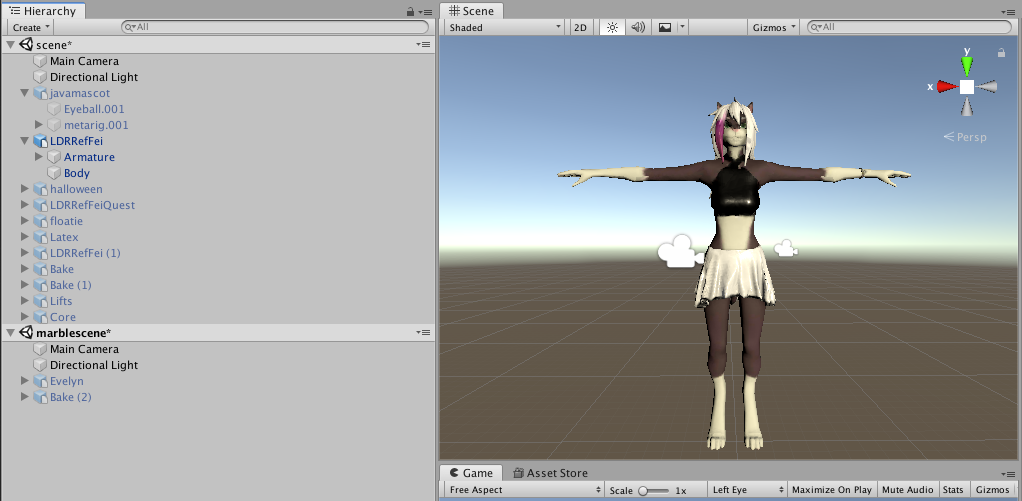
Note: it also has presets for making Desktop avatars, and works with any PBR shader (standard, rero, etc) or anything that uses subsets of it (toon shaders)
 uncut apex
... okay so how exactly do i make an avatar both pc and quest compatible? Ive made a low poly model for quest, uploaded it, then copied its ID and pasted it into the pc versions pipeline manager. It says on vr chat that its compatible for both, but all quest users I've met say they cant see it. is there something i'm missing??? The only thing I can think of is i have 2 separate models in the same project because I needed to copy and paste the lipsync and stuff onto the low-poly model. maybe having 2 conflict in some way? idk
 leaden hamlet
what do they say when they cant see it? does it show one of the default avatars with the avatar thumbnail on the chest. or does it say perf blocked on the chest. if its the second one then your avatar is very poor and will be blocked by default.
sweet mason

 elder plover
Ensure you have Android Build Support enabled
if you're certain you do, make a copy of the project, then open up the vrc sdk window, and you should see an option for Switch Build Target to Android
https://i.imgur.com/2ZWzriB.png
click that and give it a few minutes, then resolve any issues - in my case, that'd be shaders
build and upload it, and it should be available for quest

or, actually, ignore me, because I didn't pay attention to what you've done >_>
amber hemlock
uncut apex
... okay so how exactly do i make an avatar both pc and quest compatible? Ive ma...
What was it rated when you uploaded it for quest?
Also on the avatar selection screen in game, is both the green and blue circles lit up?
 vital pier
also quest can't have avatars over 10MB in download size, adding less props for quest is recommended and removing assets in unity that are not being used for the quest version like shaders in the asset folder
jovial grail
why would they be packed with the avatar if they're unused
leaden hamlet
yeah they shouldnt be packed
afaik the only things that get packed are everything immediately connected to the model that the descriptor is on. and its dependencies.
worlds include everything in the hierarchy. (although im not 100% sure about that one)
jovial grail
it builds a bundle
basically just create a prefab out of your avatar and right click export it
should basically be that except scripts
uncut apex
amber hemlock
What was it rated when you uploaded it for quest?
It is excellent quality
amber hemlock
uncut apex
It is excellent quality
Interesting. The only other possibility is that it’s over the 10mb limit so it will never be rendered. For whatever reason the rating system ignores file size
uncut apex
amber hemlock
Interesting. The only other possibility is that it’s over the 10mb limit so it w...
Hm, alright I’ll check the file size and see if that’s the problem
amber hemlock
If it is, textures are usually the issue pushing it over. Or lack of legacy blend shapes
uncut apex
How can I fix that? Like how can I make the textures optimized or whatever
normal nova
Generally for textures, just make sure they're all 1024x1024
Or if you don't wanna change the texture size, enable crunch compression on them
Unity has built-in scaling if you change the 'max image size' slider
 iron patio
any tutorials out there for optimizing pc avatars to quest out there?
that go into decimation, atlasing, shape key preservation, script removal, dynamic bone removal, fbx import and export and preserve prefab etc
calm spade
half the things you listed take place of two different softwares
Mentioned before but, my 'instantly produce an optimized Quest avatar' changes for the CATS blender plugin now are in the dev version if you wanna try them out! May have some issues w/ blender 2.9x, still testing
Twitter
·
Try this for the first part
the other part you can do manually or use Pumkin's tool
iron patio
cool thanks
iron patio
why does my prefab have textures nicely applied but my fbx doesn't
uncut apex
does just the quest version of an avatar need to be below 10mb or does the pc version have to be as well
jovial grail
just the quest
amber hemlock
iron patio
why does my prefab have textures nicely applied but my fbx doesn't
Your fbx did not have the materials applied and the prefab variant added them. Avoid this because the original blank materials are still being downloaded
normal nova
hm, that's a point actually
My script exports a model with a single material applied, but expects you to create a new material before uploading (cause the fbx import doesn't get all passes)
Probably just wanna have an empty material slot instead? So the materials don't get packed in
Or.. suppose I could just disable the material export option :v
Yep, that did it
Currently my model on Desktop only takes up 8MB download size, but it could always be smaller...
amber hemlock
Disabling Material import is the same as remapping them in my experience
Both avoid packing in useless materials
I just go overkill, I remap them and then also disable import when done, which for some reason keeps the FBX as defaulting to my custom materials even when dragging in a new instance of the FBX
(And makes the thumbnail image on the FBX look nice)
normal nova
Yeah, avoiding having it on export in the first place would also solve that (and not rely on user interaction) so I'll do that for the bake panel
Can you think of anything else that tends to get packed in that's not generally used?
(since with the bake panel it'll apply to anything that comes out of it, it's worth getting it right)
normal nova
@amber hemlock I'm not sure if that's something that's been fixed, but turning off import materials (and I definitely had a default material attached) had no impact on the file size
normal nova
 snow geode
Decimation 🤢
snow geode
Decimation 🤢
Never optimizing/making a quest version 🤢
Optimizing cause it's just a single button press now 
(though yeah, if you have the time/skills, making a quest version manually and hand-indexing your materials will be generally higher quality, I'm just trying to get it as close as possible)
 tender latch
not sure if this is the right place but whats Cats? like can somebody give me a run down of what it does and if i should get it?
nvm i think i got it
well wait how exactly do you add the plugin in
 misty star
you can google how to install a blender addon 😏
tender latch
it shows as a folder and i gotta choose between some things inside
misty star
Unity question here:
Say you have two material slots because you want to use a sprite mask on an area when clothes are turned on. Is that counting as two materials when you have both slots occupied by the same material or does it act as normal? I don't want to accidentally create a monster that's using 5x as many draw calls as it needs to
normal nova
If they're the same material why would you need two slots?
 gritty niche
ok so i am trying to optimize my avatar's horns to follow the head when i use a dance, and I found a code but i need help understanding it
calm spade
A code ?
gritty niche
yeah a computer code aka a script
jovial grail
can't use scripts in vrchat
gritty niche
oh
jovial grail
why aren't your horns attached to the head
gritty niche
they are they just wont stay attached when I play an animations like they just float
calm spade
What the fuck
gritty niche
I know right!? its only when the animation is playing they break of and float
calm spade
The whole thing is fucked up
Why do you have three armatures
Why do you have three meshes named Body
gritty niche
....
calm spade
Why do you have multiple horns
gritty niche
ok so the horns are actually two different horns with different armatures and bodies
calm spade
Well, remove everything that came with the horns then
gritty niche
Why? (im not kinding Im seriously wondering why)
like you want me to remove the horns horns or the armatures and their bodies
gritty niche
how do I wait....
calm spade
Remove the armatures and the body meshes they came with first
gritty niche
the horns disappear when the armatures get removed though
calm spade
Then drop the two horn meshes inside the head bone of the first armature at the top
gritty niche
-3- thats the actual model
jovial grail
take it back to blender
calm spade
Unity can only do so much
gritty niche
yeah but blender is wierd
jovial grail
won't be able to get a good result in unity
your other meshes are attached to your hip bone
gritty niche
wait your saying to put the horns on the hip bone?
calm spade
Yeah idk who made that but it's pretty much a frankenstein mess
Don't expect anything to work
jovial grail
no, they're attached to it by default if they aren't attached to anything else
but you can't properly attach stuff in unity, unless you know what you're doing
and even then it's unlikely to work well
jovial grail
take it to blender, attaching stuff like that isn't hard
gritty niche
how though
gritty niche
what file does blender use
calm spade
Fbx
jovial grail
follow a tutorial, any recent one should do
gritty niche
tnx
 sudden zodiac
tender latch
it shows as a folder and i gotta choose between some things inside
sudden zodiac
tender latch
it shows as a folder and i gotta choose between some things inside
Your browser probably automatically extracted the zip file that you downloaded. You need to keep it as a zip and install that zip in Blender
gritty niche
Anyone know how to combine mesh?
amber hemlock
In blender it’s control J
In unity there’s a paid plugin to do it.. but just do it in blender it’s free
gritty niche
@amber hemlock i dont need that any more :P also you can just put the meshes not connected to something in the thing they would make most sense and they would follow you
amber hemlock
Like I said that is unoptimized
normal nova
https://github.com/GiveMeAllYourCats/cats-blender-plugin/releases/tag/0.18.0 it's readyyyyyyyyy
GitHub
Added Bake Panel!
This is a non-destructive way to produce an optimized variant of (almost) any avatar!
Full credit goes to feilen! Thanks so much for this awesome feature <3
Check out the wiki...
Don't have a quest model? Model isn't optimized on desktop?
- load your model up in blender
- click 'autodetect'
- click 'bake'
Now you do!
normal nova
Note that having your models quest-ready is probably gonna be a big deal in a week (christmas), cause of the inevitable influx of new Quest users
heady smelt
when i add a picture to make it a texture it turns it into a paper file
when i add a picture to make it a texture it turns it into a paper file
how do i fix this
jovial grail
what's the file format
woven fable
Is there any downside or issue if i put 100 animations in my avatar.
As in 3.0 custom expression animaitions
jovial grail
Only file size, i'd imagine
Since they aren't all playing at the same time there should be no issue
heady smelt
hey i am stuck on my avatar creation and dont know how to continue can someone help me? would stream where i am how far i am and what i am doing i am currently trying to learn it
 supple reef
Is there anyway for your particles to be destroyed on contact with a wall without your performance going into medium?
 swift ibex
so im having trouble uploading my model and i know nothing about unity
my man is dark, and i think hes a bit too big
 slender hare
Look in the top right. In the Transform box it says under scale "100 - 100 - 100"
That means your avatar is scaled up 100 times in all dimensions.
Try changing it to 1 - 1 - 1
swift ibex
ok so ive been doing some shuffling about and now im here
slender hare
But from what I see there's a lot more problems with it that I'm not proficient enough to fully help you with. Have you tried following a youtube tutorial?
Particularly the shader error message, its a quest specific thing and I dont have a quest. 😦
swift ibex
i have but this is quite literally my first time using unity
her is my current predicament
slender hare
I know the feeling. I've been pulling my hair out over this stuff for the past week. 😄
swift ibex
everything is good except the bones
which it has all the bones but they arent specified
slender hare
I think you forgot to generate the rig VRChat needs.
swift ibex
thing is im sure this has bones
slender hare
In your toon link folder, click on the grey image of toon link.
That should be your model.
And the window on the left should show 4 tabs, one of them being "rig".
swift ibex
ok
slender hare
Can you click on "configure"?
swift ibex
yes
swift ibex
slender hare
That is actually looking good.
slender hare
Have you been in that menu already?
swift ibex
no
slender hare
Click on "done" and see if the bone error is still there.
Because that rig looks fine.
swift ibex
yeah its still there
slender hare
O_o But the bones its asking for are right there. Otherwise that puppet would show red parts.
swift ibex
it might be the animator im using?
slender hare
Might.
swift ibex
slender hare
The only difference I see in my animator box it says "cull update transforms" next to culling mode. But i have no idea what that does to be honest.
slender hare
That goes beyond my experience unfortunately. 😦
swift ibex
oof
slender hare
I've been mostly following tutorials so far. Thats why im confused that it would give you bone errors when the bone mapping shows all green.
swift ibex
ill have to start watching tutorials then
slender hare
Sorry I cant help more. Im still figuring all this stuff out myself. 😄
 vast wyvern
idk if this comes into avatar optimization or not, but i would like to ask to the ones that could know how to fix this messy Nanachi hair. i have tried a lot and i just keep breaking it little by little and i have spend 2 days trying to fix that old model :c
vast wyvern
@calm spade it is a Nanachi hair, from the very old 2017-2018 model (not Lexicon V4), and as you can see it is just a mess of polygons, overlaped faces, vertex everywhere
it is a really messy avatar and i have so many feelings to it, that's why im trying to fix it u . u
vast wyvern
@calm spade yeah, but as you can see in the first picture it is a full mess of polygons u w u, do you know how to fix it properly?
calm spade
try pressing L on one of the vertices and delete the selection
vast wyvern
doesn't do anything :c
calm spade
Can you show what's left after doing that ?
vast wyvern
do you have free time? im really noob so i think i could screenshare
calm spade
Not at the moment sorry, but basically you just have to find the copy of the mesh, and remove it
 worthy fjord
calm spade
worthy fjord
calm spade
Is it 100mb in vrchat or unity ?
supple reef
So there's really no way to have particle collision without the performance going up to Medium?
 runic ingot
Anyone knows how to delete what I want to delete the area in Blender? I try to find some tutorial but no one teach that
jovial grail
look at how to select stuff
amber hemlock
vast wyvern
<@!97980768323633152> it is a Nanachi hair, from the very old 2017-2018 model (n...
Just so you know... that’s a hat. It’s a beast’s head and a mane, he’s wearing it as a hat.
vast wyvern
amber hemlock
Just so you know... that’s a hat. It’s a beast’s head and a mane, he’s wearing i...
the thing is trying to discuss about something? xD
not everyone have seeing the anime, neither reading the manga nor watched the movie.
it is easier to explain to most of the people that "it is hair" to reference to it.
using for more than 2 years that old model and the amount of people referencing to it as hair agree with me.
but yeah, you are right, but aporting that kind of info doesn't help me trying to fix what im asking int his channel.
amber hemlock
Lol sorry
swift ibex
you have to install the androidplayer plugin
you should be able to find it in buildsettings under edit
 worthy delta
alr thanks
worthy delta
ok but like
im literally using the shaders in the mobile pack
someone please explain
normal nova
I think lightmapped might be the exception?
worthy delta
well either its the overall performance: very poor
or the lightmapped that wont let me publish it
normal nova
It's usually the shader, I think you can publish with very poor
normal nova
What're you trying to use it for? Like, unlit everything?
worthy delta
wait thats what lightmapped does
normal nova
From what I remember yeah
worthy delta
o h
normal nova
What're you trying to do?
worthy delta
just trying to make an avatar i made for pc work on my quest
normal nova
ah, just do Standard Lite or Diffuse then
worthy delta
alr thanks
normal nova
Uhh, restart unity I think? I think I've seen that before but I can't remember what I did about it
normal nova
hm
oh, apparently that occurs if something else earlier in the build failed. Is anything else wrong?
worthy delta
NOT REALLY
not really*
oops
this is the console after i restarted unity
and pressed build and publish
calm spade
Unpack the prefab and remove the scripts ?
normal nova
Yeah probably need to remove the missing script refences. If i had to guess, it's for dynamic bones
(which aren't on quest anyway)
 wooden glacier
I know the standard most people use is .fbx but ive seen a few models as .avatar, is there a known way how to change the model from .fbx to .avatar?
 torpid lagoon
how many meshes do you have?
if you don't know already, even if two meshes share the same material it still counts as two material slots instead of one
jovial grail
but if they share a material you might as well join the meshes
amber hemlock
Make sure you aren’t using “Keep Quads” in unity. This will double your material count.
It also doesn’t work, VRChat will triangulate anyway.
It’s ok to import quads, just don’t check “keep quads” when inspecting the fbx
If that’s not the issue, make sure the material count number in unity is not in bold (overwritten) - if it is, right click the bold number and pick revert
Bold values are set by unity and no not coming from the file
 agile hound
wait wrong channel oops
jovial grail
right
jovial grail
merry christmas!
i don't think you can avoid that
each renderer will have at least one material
because keep in mind you're counting material slots not materials
 verbal surge
How do I get rid of the free space in my atlas textures? (Repost due to image missing a layer)
calm spade
Manually move the UVs and textures
verbal surge
I'll try that, thanks 🙂
 floral mica
is the new bake feature in cats still worse than doing it manually?
like does it still make you use 4k textures in unity or its blurry, cause i know the normal cats atlas did that
torpid lagoon
its always going to be worse than doing it manually, thats the tradeoff for automatic tools
im currently toying with it rn and having okay results, there's something up with my model that isn't playing nice with the decimation. im probably going to have to settle on poor (on quest) for now, just because going any lower than 10k makes the avatar unusuable right now
floral mica
does it do the thing cats atlas did where 70% of the atlas is just transparent?
torpid lagoon
yeah if you use the reprojection method
i created the uv myself using the smart uv function instead
for some reason cat's atlas function just has huge island margins
heres my result from the baking function though, left is about ~17k and the right is 9999 which is barely enough to get into the poor ranking on quest
i couldnt include the normal maps because the face got decimated so much it gave it more artifacts than it was helping anywhere else. there is a 0.25 ao applied though which works really well
also the shoelaces are supposed to be there, but i keep forgetting to fix the normals on them. the hair is also isn't subdivided on the quest version too, which shaves off like ~1k tris
normal nova
So unfortunately, when baking we have to rely on blender's built-in island packing, which considers all islands squares
If you buy UVPackMaster2 Pro though, the bake function utilizes it for super packed maps
like so
It's $30 tho
torpid lagoon
normal nova
So unfortunately, when baking we have to rely on blender's built-in island packi...
what other features does uvpackmaster2 have? i don't know how to optimize blender's built-in smart uv to increase the size of the face for example over everything else
because right now, the face is taking up so little uv space and the legs is like 30% of it lol
normal nova
Well, bake does that for you
torpid lagoon
it didn't have a (noticeable) effect for me unfortunately D: even when i made sure my bone was named correctly
but im also interested in doing it outside of cats too
normal nova
odd, probably another bug
As part of the script, it:
- averages all islands based on how large they are (blender function)
- selects all geometry belonging to the face/head/etc
- scales it up in UV space by whatever factor (which causes it to break away as new islands where neccesary)
- re-packs everything using Blender's built in UV pack function
then if uvp2 is installed, runs the pack function 10x
torpid lagoon
hmm it might be because my hair is also tied to the head vertex group, it might be eating up the space
i really have to look at the cats uv again to see though, right now im sticking to the uv i generated
i should probably get to filing all these small bugs i found through the github though 😄 theres just little things ive found
normal nova
quite possibly, my hair does that too
(which is still okay imo)
yeah, please do :3
torpid lagoon
and im looking at some of this stuff, i might be able to even write a couple of prs
normal nova
That would be a big help
torpid lagoon
one of the small ones is finding the head and eye bones, it's case sensitive for some reason
but its just like three functions, so i'll do it 😄
normal nova
oh
            if prioritize_face and "Head" in arm_copy.data.bones:
                selected_group_names = ["Head"]
                selected_group_names.extend([bone.name for bone in arm_copy.data.bones["Head"].children_recursive])
cough
torpid lagoon
even worse, its duplicated here:
                if armature is None or "Head" not in armature.data.bones:
                    row = col.row(align=True)
                    row.separator()
row.label(text=t('BakePanel.noheadfound'), icon="INFO")```never even crossed my mind x3
normal nova
Well, that's expected
The UI matches the behaviour, which is a good thing, but both should be corrected :P
one thing, we sample normals 128x when doing world-bake, then when re-baking to tangent we also sample 128x, which causes veeery slight color variation vs just sampling 1x the second time
But when I switch the second sampling to 1x it's more prone to artifacts, so I think it'll have to stay as-is for now
torpid lagoon
ahh hmm
normal nova
may be an option later
I intend to add an 'option level' enum from basic to advanced that exposes all that stuff
torpid lagoon
oooh that would be very nice
by the way how can i add the addon to blender without causing a mess :-p i only worked with single file blender addons
i dont think i can point it to just the folder, i think i tried that already
nvm i can just symlink in there
 fleet wharf
How do you guys are able to keep the file size under 10mb? On my project, the texture of my normal map is twice that size... am i missing something? I'm using .png but going to .jpeg totally destroy the quality because of the compression. And i can't go under 2k texture without everything looking super pixelized. How do you guys do?
normal nova
Stick with PNG, unity turns it to GPU textures when uploading
And... yeah, 1k textures are important for Quest
torpid lagoon
okay pr submitted 😄
 finite basin
Guys, what’s the polygon limit for VRChat avatars? I’m seeing some say 10k, some 20k, and other people say as high as 80k. Is there any official consensus?
heady smelt
10k for Quest, 70k for PC
 next iris
what's the easiest way to remove bones from a model?
next iris
thank you8
finite basin
Thanks @heady smelt
 plucky vapor
Hey anyone who knows anything about avatar optimization for blender to make a avatar cross platform without breaking their face and eyes key maps thing
buoyant holly
GitHub
:smiley_cat: A tool designed to shorten steps needed to import and optimize models into VRChat. Compatible models are: MMD, XNALara, Mixamo, DAZ/Poser, Blender Rigify, Sims 2, Motion Builder, 3DS M...
plucky vapor
I already have cats
Only thing is idk how to use the bake thing I’m trying to find away not to break shape keys
buoyant holly
link I posted has documentation on how that works
plucky vapor
I have the plug-in for cats and ik what poly count I need rain it doing it is my issue every time I’ve done it the shape keys break
plucky vapor
Now I’m trying to figure out how to put the material on the fbx
buoyant holly
Are you using the baking function or the blender decimate
and there's a button in the baking panel for the quest polygone count
normal nova
@plucky vapor cats decimation preserves shape keys as of 0.18
plucky vapor
normal nova
<@!634520206387052565> cats decimation preserves shape keys as of 0.18
Last time I used decimation I failed to preserve shape keys because when the model was uploaded the lip sync was turned off
 autumn nimbus
help
 pearl ingot
any reason an optimized avatar of mine, 3mb in size, takes insanely long to export into Unity as opposed to my 7mb avatar?
as well as taking up to 5-10 minutes just to apply the humanoid rig, applying materials, etc...
jovial grail
autumn nimbus
help
remove the vrm components from your avatar, maybe the autofix button can help?
 radiant shadow
Eh theres alot of things wrong there, you converted a vroid in unity and its a mess after, always vroid>blender>unity , your pelvis is all sort of wrong
 mossy cedar
i managed to upload the pc version of the avatar, i've switched build mode to android to upload it with the same avatar id now the upload thing won twork
it just gets stuck on that
then it goes back to normal and brings up the community labs screen
is it broken or something
 forest fable
disable future proofing in settings
mossy cedar
now it's saying no android support
alr
i click build & publish for android and it just shows a loading bar and refreshes the SDK, i cant get it to be supported for android
forest fable
that just means the current avatar uploaded doesnt have an android version, as your upload failed
just republish it after disabling future proofing
mossy cedar
alr, i'll switch to windows, republish without future proofing, go back to android and upload with the same ID
forest fable
you dont need to republish for windows
mossy cedar
oh.
i've just deleted the normal one i uploaded to upload this one
aaaaaand it doesnt work
i give up
alright i've been trying this for an hour, i give up on this shit
what the FUCK
i uploaded it with android now it's saying it's not supported for quest
i'm done with this shit
fuck this
heady smelt
bruh, you gotta wait for the info to be updated in the editor. VRC isn't to be blamed, when you've uploaded the Quest version it may take a while.
and not to mention that their server was having problems today
 lapis parcel
If an avatar I’m making has about 100k polygons, is that going to make me and other people lag out a lot?
heady smelt
not really but you will classified as a "very poor" performance avatar
lapis parcel
As long as the performance is still high then I should be okay
calm spade
yell, it's a lot for an avatar
 modest garnet
 desert halo
@lapis parcel as long as you don't put an intentionally laggy shader on it there's no way it would lag anyone
 open mist
Could someone send that rig hierarchy chart please
jovial grail
it's pinned in #avatar-rigging
open mist
oh
 coarse valley
is there any way I can combine this material into a single large texture? As it stands now the whole thing is a single feather texture shared among the 22 feathers
calm spade
What would you need to combine ?
coarse valley
I want to display an animation across the whole tail, but i cant do that because this is the texture for the whole material
I was wondering if instead of a single small texture shared among the whole tail, it could be one large texture to make animating easier
I know thats the literal opposite of optimization but i wasnt sure if i should ask here or 3d modeling
calm spade
Can't you just duplicate the feather into your texture ?
 normal tangle
Is there anyone here that could help me out with texture atlasing in blender? I have imported a character from vroid but something about the shader is causing the atlas to be black when baking and I can't figure it out.
 golden steppe
So I was thinking to optimizing my avatar when I noticed that whenever I’m in Vrchat my avatar stands on the end of their toes, I thought maybe making them taller would fix it, however I’m not too sure if that would make it harder to optimize. Anyone who knows if that’s true or weather I should do that or not? Thanks.
 dreamy hearth
My avatar says I have a whopping 86 material slots, but in actuality I have less. Why is this happening?
amber hemlock
coarse valley
is there any way I can combine this material into a single large texture? As it ...
Second UV layer, make camera flat front angle, project UV from view, then bake diffuse from first UV to the second UV. However, repeating the UV space like it currently is is far more optimized. So this process would be unoptimizing it.
solid smelt
Multiple meshes means multiple draw calls. You should join meshes that do not need to be separate to avoid the draw calls
 cursive elm
am asking how bad is it
its because of quest
if you wanna have animated texture you need to separate it in blender
solid smelt
Decently bad? Especially on quest. The details on performance ranking for VRC should give you a ballpark on what is expected for each platform. Optimization is usually death by a thousand cuts so one "bad" thing is hard to measure directly.
 cerulean holly
@golden steppe You could un assign toe bones in Unity, it won't stand on its toes then
golden steppe
Ok thanks
amber hemlock
cursive elm
am asking how bad is it
It makes a separate draw call. A draw call is scanning every pixel of the screen to paint something on it. When a model is all one mesh, it can do every material in a single pass. Otherwise it has to do multiple passes for a single frame... and you only have so much time to finish up the passes or the frame won’t be done in time and you get a dropped frame. Which lowers framerate.
This is especially bad in VR as vsych is always on - so if you miss a frame you are waiting around for the next one
Meaning you can be the cause of halving a framerate very easily
golden steppe
Yo I switched the lighting in unity for my avatar to toon lit and around the eyes and eyebrows there are these black squares! Any fix?
amber hemlock
It sounds like you need a shader that supports transparency
 livid storm
Genuine question; a lot of game models when it comes down to hair normally have a ton of different materials which need to be layered in a specific order in a Fade style to look proper. Sometimes they're double sided, sometimes they're two different materials for each face.
Is it possible to optimize this without ruining the render order or cause Z-Fighting if you z-write? Or is this just something you can't optimize without losing out on hair quality? (Normally the alpha gets messed up leaving weird transparent parts or gaps)
amber hemlock
You could do it all on one material with custom masks and conditional z writes but the usual method is to separate single and double sided into separate materials, as well as those that need partial transparency and those that can be solid/cutout.
In general, any shader that draws partial transparency will not (and should not) z-write
Although if you want to do things like eyes in back of but drawn over top of hair you’ll want a shader that manually lets you control stencil layers
Ideally you want to Z write as much of your model as possible, since that lets everything else have correct depth information for drawing the transparent bits
livid storm
I did try combing the back faces together and front faces into two materials with z write intent originally but it caused some weird issues where the alpha should be rendering on top of what used to be other materials at certain angles
amber hemlock
When all else fails make sure all of your transparent bits are the same material, since most shaders will handle it all in one pass
Which means you won’t have issues like z fighting
If you have a model that needs both partial (blended) transparency that needs to be single sided and partial transparency that needs to be double sided ... consider using single sided for everything and duplicating and reversing the triangles where doublesided is needed in blender
That gets them to one material and will avoid alpha glitches
Then all the triangles that don’t need the transparency at all or can be cutout.. make a second material and use a cutout shader instead
Referencing the same texture
Sorry if I suck at explaining things but yeah you can avoid pretty much all alpha glitches, at least with yourself
livid storm
No problem, I appreciate the help. The model in question does need to use partial transparency for both the back and front faces since the developers decided to opt out of using a singular double sided material for two separate ones that handle the front and back respectively. The materials used to be all separate meshes which handled render order but since I combined them I've been trying to figure out workarounds to help with the render order as having...way more materials than I should kinda sucks.
I'll try out what you suggested
golden steppe
Thanks guys
heady smelt
calm spade
Can't you just duplicate the feather into your texture ?
Better than that would be 1x feather and 1x the hair strand and then just tile this texture.
 lilac zealot
is it a good practice to disable and enable DB components with animations to only use those who are necessary?
lilac zealot
well it seems obvious so let me rephrase: I have an avatar with several outfits with their own skirt and bones, but it's too much work to weight all of the outfits individually into a common set of skirt bones, so is a good practice, as a workaround, to disable and enable individual DB components with toggle animations so this way people don't lag out?
 proper grail
dynamic bones still do the lag when the mesh they affect is disabled yes
jovial grail
but if the components are disabled they shouldn't
verbal surge
Does it make any difference if the texture itself isn't quadratic? (e.g. 1024x2048)
snow geode
I don't think that matters at all
It shouldn't break anything, and it will save space
 upper yacht
Unity will by default make all textures the nearest to the power of 2
And, as for mattering... It does, but, not a whooole lot.
heady smelt
lilac zealot
well it seems obvious so let me rephrase: I have an avatar with several outfits ...
Yes also it would eliminate the uncessary calculations of non-visible dynamic bones.
heady smelt
verbal surge
Does it make any difference if the texture itself isn't quadratic? (e.g. 1024x20...
It should not as long as your UV map is correctly set.
verbal surge
heady smelt
It should not as long as your UV map is correctly set.
ty
heady smelt
i mean think of it this way, when you generate an atlas texture, usually the UV maps are properly configured right? then why cant u do the same somehow?
lilac zealot
heady smelt
Yes also it would eliminate the uncessary calculations of non-visible dynamic bo...
okay thanks!
 restive harbor
I need something added to my avatar
And I don't know how to do it so can someone do it for me
heady smelt
restive harbor
And I don't know how to do it so can someone do it for me
yes sir, depends what you want to be added. DM me the details and I will see what I can do for you.
coarse valley
I have a few meshes that are layered exactly on top of each other (transparent stockings covering a leg) is there a way for me to give them priority or something? They randomly swap between which one is visible in unity
heady smelt
That is known as Z fighting @coarse valley
sick timber
Not really a solution other than making the stockings slightly bigger.
heady smelt
sick timber
Not really a solution other than making the stockings slightly bigger.
thats a plausible workaround or they can just draw the parts that overlaps onto the other texture
runic ingot
Can anyone teach me how to sculpt working in 2.9? I saw the tutorials but i click the left click it doesn't work
coarse valley
i thought Shrinkwrap Modifier was my savior but it just made it worse lol
 chrome stag
runic ingot
chrome stag
runic ingot
Is that possible export prefab to fbx ,and blender can use? I search some tools but blender cannot open
jovial grail
coarse valley
i thought Shrinkwrap Modifier was my savior but it just made it worse lol
shrinkwrap has a slider to add distance
 fringe wigeon
why do i get this
calm spade
Because you use shaders with lots of keywords
 zenith plaza
Would be different though if vrchat didn't force all the variants to compile
Well used keywords are great for better performance
Once poiyomi 7 goes public though there's gonna be virtually no keywords anymore because of the shader optimizer that's run before uploading
That generates a new optimized shader file based on the settings you have set on the material so keywords aren't needed for the final material anymore
calm spade
2019 🙏
coarse valley
yeah i fiddled with shrink wrap but it butchered weight painting. Ill just copy the body weight paints to the clothes
proper grail
Use both! Shrink wrap the clothes to the mesh and apply it as a shapekey. With the shrinkwrap shapekey active move the clothes verts around where youd like them to move with the mesh than data transfer! If the verts line up with the mesh use nearest vertex data otherwise use nearest face interp. Than delete the shrinkwrap shapekey. done!
uncut apex
How can I combine materials to make one? I am trying to optimize an avatar for quest but I have too many materials and it’s making it poor quality
 worthy otter
uncut apex
How can I combine materials to make one? I am trying to optimize an avatar for q...
worthy otter
uncut apex
How can I combine materials to make one? I am trying to optimize an avatar for q...
you have to atlas the textures, you can use cats in blender to do it or you can do it manually
 solemn condor
What has a larger negative impact on performance... fewer materials with very large textures or more materials with smaller textures? I have several parts with 4k textures. I can atlas them to reduce material slots but the atlases will use 8k textures then. (I know I could drop the resolution of the textures in Photoshop, but I'm interested in the answer to this question assuming no image downsizing)
coarse valley
more materials
texture size only impacts avatar size to download and how much vram the client computer needs
and memory bandwidth but i dont think anyone playing vrchat is gonna have that gimped by some wolfboy avatars
runic ingot
What if I don’t combine the materials? Because I can’t customize the shader 1 by 1
coarse valley
well if its just 1 avatar its not an issue. the problem is when multiple people have like 20 mats on them then it adds up to like 200 in a public world
and if youre using a shader like poiyomi then you can have the clothes, skin, and facial effects be their own atlas then use photshop to black out the parts of the textures you dont want affected by special effects
runic ingot
Thanks the info , sounds that combine the mats is a good choice for everyone in public world
solemn condor
runic ingot
What if I don’t combine the materials? Because I can’t customize the shader 1 by...
You can use masks/maps to accomplish the same thing with atlased textures in a lot of cases. Poiyomi has Matcap 1 and Matcap 2, Specular 1 and Specular 2 for example. So you could create a simple black/white mask to apply Matcap 1 and Specular 1 to one of the atlased textures and Matcap 2 and Specular 2 to another.
solemn condor
coarse valley
more materials
Thanks 🙂
runic ingot
solemn condor
You can use masks/maps to accomplish the same thing with atlased textures in a l...
I would try this when I combine the mats
runic ingot
By the way ,where can i find my mats ? i combine the png but atlas doesn't create a mat ?
No mat i can't modify fbx shader
languid quartz
They should get embedded onto the avatar.
runic ingot
I go to find thanks
languid quartz
Also, In unity you should extract the materials.
 granite crypt
So I'm kind of new to vrchat, how bad is it to use an avatar that is labeled "original: poor"?
coarse valley
not that bad
 tiny whale
that moment when your avatar is like 10.5 MB and therefore unable to upload to quest...
 orchid pendant
rip
tiny whale
i fixed it but i mean, come on
 heady talon
Any idea how to reduce this number more? Been trying to solve this all day and I feel like my avatar is so bare bones now that theres nothing else I can merge or decimate. Should I just delete the face and put a mask on it or something?
solemn condor
heady talon
Any idea how to reduce this number more? Been trying to solve this all day and I...
Have you tried using the new smart decimate function in CATS on the entire avatar, with the target set to 10k tris? It does a surprisingly good job of preserving detail where needed for an automatic tool.
heady talon
I have yea. It ruins the face which is why im wondering if I should just delete the whole thing.
sweet mason
If you hit the 10 mb on a quest avatar. That bad news. The only reason you should come near is almost none
normal nova
@heady talon your hair looks super complex. Decimation works better for hair if you boolean union all of it together first
buoyant holly
is that because it removes all of the unneeded bits of hair at the intersections
 glad beacon
would this be the right place for CATS questions?
if so, ive been having some issues with combining RGB materials into an atlas
combining them between objects doesnt work, but that may just be a limitation of the tool
I've tried merging the materials through combine similar and atlas on a single object, and it either removes all mats on the mesh or merges them all into one solid one
heady smelt
@glad beacon i can help u.
glad beacon
oh?
heady talon
Ill see if me changing the hair is going to help
heady talon
2 days and 1 night of continuous work and now its finally under 10 k. Gonna publish it and see what it looks like. Worst case scenario its ruined thanks to the amount of stuff its missing but ill figure that out at some point. 😄 I figured out how to save the face btw but if im ever going to get it to 5 k im going to cry. I have no idea how some people are able to make their mmd models to look good when mine looks so bare boned now and worst of all mine is on poor...
heady smelt
HELLO i need help with the avatar polygons in unity i want to reduce them in unity but i dont know how i tried many methods but im still stuck with this problem
heady talon
heady smelt
HELLO i need help with the avatar polygons in unity i want to reduce them in uni...
Use Blender?
heady smelt
ik but i already build my avatar in unity and i dont know how i can export it back to blender
 tardy moss
heady talon
2 days and 1 night of continuous work and now its finally under 10 k. Gonna publ...
tardy moss
heady talon
2 days and 1 night of continuous work and now its finally under 10 k. Gonna publ...
you gotta remember quest is just a cellphone with a headset embedded, it's never gonna be able to look as good as in pc
tardy moss
(but yea it's true that some things can look surprisingly a lot better than you would expect)
heady talon
tardy moss
you gotta remember quest is just a cellphone with a headset embedded, it's never...
i am aware. it just makes no sense that others are able to make cool mmd avatars for quest even with the 10k poly count
tiny whale
does changing the mesh compression affect the overall appearance of an avatar? like, at all?
proper grail
Mesh compression deletes verts based on angle, it should not be used on skinned meshes at all
heady talon
normal nova
You really should aim for 5k-7.5k
Ill get there eventually. Currently its on 9305 so thats something. Its interesting how much ive learnt simply by being the messenger between two people.
heady talon
normal nova
So people can see you by default
I assumed people can see you if your avatar is better than very poor? Is that not the case?
normal nova
Actually I can't remember which end of the range matters
heady talon
normal nova
Actually I can't remember which end of the range matters
The sdk says that very poor avatars are blocked by default but the user is able to unblock them. It doesnt say anything about poor though.
snow geode
I believe it's only medium avatars and above that are shown
I think I read it in a doc
Plus it's the lowest you can go on pc too, (before users can auto hide with safety) so it makes sense.
heady talon
snow geode
I believe it's only medium avatars and above that are shown
Well in that case I really need to figure out what to get rid of.
snow geode
Edge dissolve
Do you have a picture of that avatar in wireframe? Or with a wireframe overlay
heady talon
snow geode
Do you have a picture of that avatar in wireframe? Or with a wireframe overlay
What part of it would you like to see?
snow geode
Just a picture from the front
heady talon
snow geode
You can try decimating it more?
heady talon
True
snow geode
Do you have the original model?
heady talon
But I dunno. Kinda at a point now that its only the joints and face that are not bare bones...
snow geode
If is the original not decimated like that
heady talon
I mean since its an mmd its not that difficult to remake. Sure about 3 days worth of work would go to waste but 🤷♀️
snow geode
If you had the original you could easily edge dissolve and have better looking results with more control
heady talon
Tell me more about this edge dissolve thing.
snow geode
You select an edge, press X and dissolve edges
heady talon
Im seriously just learning from bits and pieces of info that I hear as im a messenger between two people. Everything else is just trial and error.
heady talon
What are the odds that this is literally what I was wondering how to do like 15 minutes ago when I saw I had some edges I didnt like but when deleting them it deletes the entire face.
snow geode
You select the edges, then just disolve them, it will kinda merge them into their neighbors
The texture will be unaffected, the shape will be almost the same
heady talon
Like this? Then I just need to move the remaining lines straight?
snow geode
Not gonna work with a model like that
heady talon
Why not? 🙃
snow geode
It will probably break
snow geode
It's decimated like that, very unpredictable
Again it's best to dissolve the original
Or just accept the low ranking
heady talon
That means its a challenge that im going to overcome 🙃 Im most likely going to do what you told me to do but im not turning down this challenge that I now set myself. XD Gonna save this as the experimental version and redo everything I did so far.
normal nova
You can probably get away with auto-decimation if you're just trying to make a quest port. Perfect is the enemy of good, etc
 tropic narwhal
How hard is it to optimize a pc avatar for quest usage?
I have no experience in 3D modeling software and I wanted to know if i would be able to follow a guide on it, or if I should find someone who has experience with avatars and ask them if they can do it
heady talon
tropic narwhal
How hard is it to optimize a pc avatar for quest usage?
I have no experience in ...
I can tell you that ive spent a bit over 3 days so far on this and I have barely taken any breaks. Im literally doing this while listening to my school stuff in the background. 😛
Had a few headaches aswell so youre going to need a lot of thinking power XD
Since you mentioned that you have no experience on this id recommend first learning how to do stuff with the pc avatars and then after learning the basics you could try to do the quest thing but seriously the poly limit is killing me so if youre easily stressed DONT DO THIS.
heady talon
normal nova
You can probably get away with auto-decimation if you're just trying to make a q...
I mean its fine the way it is right now and im actually proud of myself for being able to make it poor from very poor but I kinda want to try to get it to medium just because. It already serves its purpose since I have some quest friends and finally theyre able to see me as me but I still want to push myself to try to do better.
heady talon
snow geode
Again it's best to dissolve the original
If I understood correct you want me to do this the upper left way instead of the lower right way. Wouldnt that still end up leaving more polygons than the way im doing it with the experimental version? I basically did the whole body with my way first and that got rid of around 300 polys so im wondering how the cleaner way is going to reduce them more. Do I decimate the upper left one after doing the edge dissolve to reduce the amount?
normal nova
@heady talon basically, blenders decimate function does a selective edge collapse, so it'll pick the edges which affect the shape the least
So starting off with the original gives it more flexibility
coarse valley
is there a faster way for me to combine faces like these as a batch instead of manually going through all of them and pressing F?
calm spade
Tris to Quads
coarse valley
thx
snow geode
heady talon
If I understood correct you want me to do this the upper left way instead of the...
Edge dissolve as much as possible, try dissolving the knees and elbows a bit, 3 loops is like the minimum for a decent bend, dissolve areas that don't bend or give needed roundness to the model. You probably have a lot of edges you can dissolve on the head, so do that too, try dissolving even more of the back and sides of the head since you stare at people's faces, not the back of their head that's hidden underneath hair. You should be able to dissolve your way down to 7.5k, the minimum auto shown rank or more without needing decimation
 boreal escarp
If i found a model ingame and saved it but i want to do some optimizations to it. is there any way to take it out of the game into an obj or some other type of file to work on it?
languid quartz
boreal escarp
If i found a model ingame and saved it but i want to do some optimizations to it...
Other than asking the creator of it for the files, No. At least not without breaking ToS
boreal escarp
languid quartz
Other than asking the creator of it for the files, No. At least not without brea...
i thought as much dang. thanks for the response though!
is there a way to find the original creator just from the model info
languid quartz
There should be a option to show avatar author but this is only visible if you click on somebody else who is using the avatar
If you're using the avatar there is no option to show this iirc
runic ingot
What if I change the scene ‘s lighting of blender and export Fbx in unity ? Would more bright ?
uncut apex
im trying to upload a quest avatar, but when i open it in vrchat, its crushed into the ground. This has happened to 2 different avatars ive tried to upload. Any solutions?
jovial grail
runic ingot
What if I change the scene ‘s lighting of blender and export Fbx in unity ? Wou...
no, it's all unity
runic ingot
jovial grail
no, it's all unity
except shader , change the scene environment lighting would effective in VRC?
jovial grail
light depends on the world
so it's only shader settings that can change how bright it is
there's a few other things that can cause it to look wrong like bad normals, but I don't know much about that
runic ingot
jovial grail
there's a few other things that can cause it to look wrong like bad normals, but...
Enough , I give up some world cuz i can't do the mask to add the shader makes avatar always have light
jovial grail
you should ask in the discord of the shader
 nova hornet
Hey how do I give a model it's emission texture in blender? I want to bake it while keeping emissions
calm spade
Drop the emission texture in the emission slot
oh in blender
You'd have to create a texture node and plug it into emission
nova hornet
Alright I'm gonna hope it's simple enough I can just figure it out even though I've barely messed with nodes
Thanks
Think I found a simpler option
Use Principled BSDF
calm spade
that's the default shader yeah
nova hornet
I feel I can see why, it seems like a good shader
 analog seal
First time using CATS plugin, Texture Atlas isn't going so well... combines my 8 materials down to one but doesn't appear to be wrapped properly:
If I click "Save Atlas to.." that's what it immediately does.
calm spade
check your uvs before hand
analog seal
Unfortunately I'm a total Blender newbie. I know there is a UV Editing tab, but unsure what I'm checking for in Blender?
I appear to have UVs
analog seal
I think I know the actual issue... when I click "Save Atlas to.." it doesn't give me a save dialog. It should do that right?
heady smelt
Does anyone have any male hair for avatar?
nova hornet
@heady smelt wrong channel
heady smelt
Which channel then
nova hornet
I'd go with any of the ones under general
Is it possible to use Nara's Dynamic bone tool with avatar 3 avatars?
Also yeah OhGeezCmon it should give a save dialog
calm spade
analog seal
I think I know the actual issue... when I click "Save Atlas to.." it doesn't giv...
Once you've chosen the path to the save it shouldn't ask you again i think
nova hornet
It asks me every time
analog seal
Yeah I think it's broken in 2.83+ or something
I'm actually in the process of manually atlassing right now
This is a fun lesson, and slow as hell! 🙂
@nova hornet What version of blender + CATS are you using?
 fiery mural
analog seal
First time using CATS plugin, Texture Atlas isn't going so well... combines my 8...
fiery mural
analog seal
First time using CATS plugin, Texture Atlas isn't going so well... combines my 8...
I'm having the same issue; I'm new to this too
analog seal
@fiery mural Trying to follow this tutorial but it's going slowly... https://www.youtube.com/watch?v=MH7Xdol5erw

Continuing the guide to baking we are baking out lots of textures from multiple objects onto one texture map, sometimes known as a texture atlas.
Say thanks: http://paypal.me/grantabbitt
My website http://www.gabbitt.co.uk
Discord server https://discord.gg/Y5QaDnT
Facebook: https://www.facebook.com/gabbittmedia/
Twitter: https://twitter.com/g...
Having issues
analog seal
Figured out 2 textures... I can help you out if you need it
 covert gulch
analog seal
Figured out 2 textures... I can help you out if you need it
covert gulch
analog seal
Figured out 2 textures... I can help you out if you need it
I'd love the solution you found, because I'm using newest version of Blender as well and it wouldn't show me the save Atlas dialogue even once.
analog seal
@covert gulch same boat, I never was able to figure out the issue, I suspect that material add-on for CATS is broken in 2.8 and up but my model was a gltf format so only 2.8+ can import.
I ended up doing it manually and got the results that I needed.
Use that video above as a tutorial and it'll work. In my case I only had one object (I'd already combined the meshes) but the approach is the same.
Let me know if you have specific issues and I can try and walk you through them
I was able to rebake both diffuse (albedo) and normal map textures, and got my 8 material slots down to 2
covert gulch
Thank you!
 mystic creek
Hey guys. I am trying to make a custom avatar which I intend to use on my Oculus Quest 2. (Don’t worry, I already know how to get the avatar from my PC to my Quest 2) this is my first time making an avatar though. I am using a software called Vroid studio to make the avatar cuz I dont know how to use blender. But I was just wanting to ask, can anyone tell me any ways that I can optimise the avatar to perform “decently” on the the quest 2?
analog seal
@mystic creek 1. If you model has multiple meshes, reduce them down to 1 mesh. 2. Decimate that mesh so it has less than 10,000 triangles for Quest (30k for PC). 3. Atlas all of your textures into one texture, re-wrap UVs and rebake textures. Reduce materials to less than 4 (1 ideally if you're using 1 Atlas). 4. Learn how to do all of this stuff in Blender, the CATS plugin makes it very easy. YouTube tutorials is your friend
mystic creek
analog seal
<@!607522487353475072> 1. If you model has multiple meshes, reduce them down to ...
Thank you
analog seal
Sure thing! I linked a YouTube video above on how to Atlas a texture + rewrap and rebake textures. Make sure to bake Diffuse in one go, then in the second go do Normal map (if you want it to have depth to the textures)
nova hornet
I can try sure
@minor thunder
Anyhow
I'm trying to optimize an older avatar in blender and whenever I hit bake after a few seconds it just crashes, any ideas?
 minor thunder
Im sorry I dont know jack shit about optimizing and already got someone to do it. Thanks anyway!
nova hornet
It's fine, glad you got it optimized!
 half locust
Hey, possibly silly question. The sdk mentions to combine multiple skinned mesh renderers for performance, but I'm not finding any resources that explain that process. They are all the same material so thats not an issue. Can someone point me to some documetation that explains how to do this?
nova hornet
CATS -> Merge Meshes
half locust
Is there a way to do it in unity?
nova hornet
Not afaik
half locust
alright, thanks
nova hornet
Also since most of the time when I see separate meshes it's for togglable stuff
If you don't know how to toggle stuff if it's all one mesh
you can do so in 3.0 via blendshapes or depending on what it is material changes!
half locust
yeah, I bought a package and its for different clothes/outfits. It currently works but I wanted to increase the performace rating by combining meshes. Thanks for your help
sweet mason
Only real reason to have a poor rating avatar would because of particle, dynamic bone etc. If set poor and up not be display. Your avatar can still be seen. The game is pretty generous of how much material /skin/mesh/bone you can have to be rated medium.
 hasty sinew
 silent steeple
I published a model and it has like white shading on it how do i fix it
 languid sluice
i am so lost
jovial grail
click the fbx you imported and in the inspector > materials > extract
or just create new materials and drag them on
 nimble ingot
Hey, do rotation constraints contribute to lag, and if so, how badly? I wanna do an animation where I scale my avatars hands up for a giant punch, but you can't scale humanoid bones, as far as I'm aware. I could make a fake hand skeleton, assign that to humanoid rig and instead have rotation constraints for each bone, but that would be at least 30 for both hands and each knuckle. I figured I should ask here before going through all that effort
upper yacht
Every constraint, adds 3 transform rotation get (per source), 3 transform rotation set (one per axis) every update and before any gets or sets to see if it's frozen. Which means every constraint has 3 gets (per source), 3 sets, 4 ifs. And then you have multiple arithmetic functions to get the correct interpolation. And... for a...
TL;DR: They do contribute to lag, but, very little. They're not even measurable normally in Unity's profiler unless you do something extreme. Since they're under the minimum threshold due to being a very light weighted system. And the fact that they're in the jobs system, which means they're multithreaded, it's great. But, like anything else "Don't overdo it"
heady smelt
don't make 300 constraints basically
upper yacht
300 would be a lot, but, it was more like. Maybe have a max of 40 on your avatar.
nimble ingot
Hm, so, in practical terms, the hand mirroring constraints are realistic enough an option if I have no other choices then? I mean, I'd prefer not to have this kinda complexity in the use case, but if It's my only option, I may explore it.
Thanks for the insight.
upper yacht
It's very doable. Just, exclude everything non-essential from the dummybones
As in, like, if you don't need to scale the chest, don't have a dummy bone. etc, unless you want that kind of design.
forest fable
why not scale up your hands with a blendshape instead? no idea how well it would deform with bone movements with the shapekey active though
nimble ingot
Yeah, I only duplicated the hands and fingers, tested it in-game and it feels indistinguishable from just regular finger tracking.
Also, I tried blendshapes first, but those don't scale bones, only the mesh. So it was fine when my hands were open, but any finger flexing turned them into spaghetti
vast wyvern
can someone help me about why when i do atlasing some textures just turn white? (atlasing with cats)
heady smelt
vast wyvern
can someone help me about why when i do atlasing some textures just turn white? ...
same
vast wyvern
heady smelt
same
; w ; i keep needing some help with this u w u
 grave bloom
I require assistance.
I'm trying to upload an avatar for quest, it's fairly balanced, doesn't have many assets, etc. It says it's 54MB.. I don't know what to do. I've tried re-modeling the avatar in blender, but that didn't help. Could someone give me some tips on how to optimize this?
 cerulean estuary
grave bloom
I require assistance.
I'm trying to upload an avatar for quest, it's fairly bala...
cerulean estuary
grave bloom
I require assistance.
I'm trying to upload an avatar for quest, it's fairly bala...
Avatar size almost completely comes down to textures most of the time. Try reducing the resolution on your textures. If you have more than one material, atlasing will help reduce size as well. Could also be sound clips
Another thing is Crunch Compression. However that only affects download size and not rendered size (fast downloads, but still eats memory/vram)
calm spade
grave bloom
I require assistance.
I'm trying to upload an avatar for quest, it's fairly bala...
Make sure you enable legacy blendshape
your sdk is most likely too old and doesn't tell you about it
calm spade
You create an image, add your textures on it, then you merge your materials and move the UVs around
plenty video tutorials on youtube
vast wyvern
i don't know why i can't get it done, im doing something wrong, and tupper one is too old and in the beginning when he ask to enable the uv stuff on addons doesn't work, i have tried with another 2 videos and i can't idk why TT.TT
calm spade
there's a lot more recent ones than tupper's
 candid onyx
Can someone help me with an issue im having? Im trying to optimize this model, it is made of six different meshes and obviously doesnt need to be... So i use CATS and try to just click the "fix model button" and...
this happens....
the origin is also in the center when it should be in the feet, i know that one.
 steady grove
@candid onyx personally, I would just conjoin the meshes manually; you can do this by selecting all the meshes you want to join (with the mesh you desire to be a parent last), and then press CTRL + J.
candid onyx
Then i get material issues.
steady grove
However, before doing so I advise checking to make sure that all UV Maps are named the same
candid onyx
yeah thats the problem...
steady grove
Then before conjoining, rename them all to the same thing
steady grove
np
 pearl spade
Ah hello, I assume this is the right place for this sort of help?
So recently obtained a model from a modeler, it came out great but there is a mystery we cannot seem to solve. There is some sort of line/gap in the hair that can be seen at a certain angle (Easier to see at further distances)
Anyone have any ideas of what could be causing this? Modeler is unsure of what is causing this either. They checked UV maps and other stuff but they are also stumped. (Unless they overlooked something!)
https://cdn.discordapp.com/attachments/772935990141911060/793741764271800360/unknown.png
(In VR chat - looking at mirror. )
https://cdn.discordapp.com/attachments/772935990141911060/796545289267576832/unknown.png
(up close)
Other things to note: Apparently this effect shows up in blender but it's a lot more subtle.
It seems like this effect is more agitated in Unity/Vrchat specifically.
Things the modeler checked:
UV mapping appears to be fine on their end.
Overlaping vertices? They also checked that however it looks fine. Nothing seems to be overlapping
Entirely unsure what seems to causing this. Otherwise the avatar is 100% functional and lovely but this one thing is a mystery that we are stumped on. Any ideas or what exactly could this mean or something that is overlooked? They mentioned nothing about that particular area looks odd.


It's a super perplexing mystery. Any advice/help would be much appreciated!
sweet mason
vertex not merge and you have a gap or your texture don't have enough margin
having the aniso level more then 4 on your texture help on stiff angle
 pearl spade
They mentioned they checked the UV and can't really find anything off https://cdn.discordapp.com/attachments/772935990141911060/796543740831203328/unknown.png

 sweet mason
what about the front part of the hair
below the top part
that part look fine but the corner is kind of too near a skin island
the issue is probably on that part
you usually want a good amount of bleeding around your island
pearl spade
I sees! I'll pass the info along and see what they say
 arctic flame
To how much should I set my Bone Reduction? :<
 wet schooner
@ruby isle any tips on compensating for the lack of transparency on quest?
 ruby isle
Depends on how your texture looks
Most of the time you can just take the transparent texture and combine it onto the flat texture in paint.net or photoshop
wet schooner
The transparent material is only for a small part of the model, but it kind of happens to occlude all the facial features..
ruby isle
Is it the facial expressions that typical anime characters have?
wet schooner
worse, it's a glass visor
oh cool the blink blend-shape is enough to get the eyes to disappear completely
if I go over 100
ruby isle
VRChat doesn't take over 100 values for blendshapes
ruby isle
But if you use Blink + Blink Happy (Assuming you have that as a seperate one like most models do) that might work
wet schooner
Will VRC not accept that value if set through an animation?
ruby isle
Nope. VRC clamps blendshapes to 100 max
wet schooner
unfortunate
wet schooner
I'd like to support Quest
Since I see a decent number of quest users who can't see my avatar cuz not compiled for quest
ruby isle
Well you might have to ditch the visor on the quest version
wet schooner
That's gonna be.. interesting, to say the least
ruby isle
The quest version doesn't have to be identical to the PC version. You can delete stuff and it still would work fine
As long as the armature is the exact same between versions
wet schooner
Only issue with using the blink blend shape for what I'm doing is that the automatic blink might interfere
Might need to override the additive layer
ruby isle
You really should create your own blendshape for it
wet schooner
also this is why removing the visor probably isn't the best solution
cuz the visor glass covers most of the face
ruby isle
Oh that could probably be changed to a solid texture
If the eyes are under the visor then you could just go into blender and delete the glass part
It won't make a big difference
wet schooner
Yeah the eyes and all that are beneath the glass
the glass goes a decent depth so it'd look pretty weird but I mean, without transparency its not like I've got many options
ruby isle
Without changing major geometry there's not much you can do
I'd recommend just removing the glass
wet schooner
Yeah, other solutions would involve a lot of texture editing
But that's a problem for later
the problem for now is dealing with the eye meshes
And I've come up with a decent solution of just using a blend shape that slips them beneath the back surface
ruby isle
That's the right way to do it
wet schooner
Well, time to test in game
hopefully the merging meshes didn't break everything horrendously
But idk how feasible it will be to get this working on quest
Considering it's currently using 4 mat slots (3 if no glass), and also it's 57k polys
okay in my attempt to optimize I broke a couple things
wet schooner
Everything seems to be playing nice, which is good
Trying to get under that poly count for quest is gonna probs be the hardest part
I'll have to rebake everything with the decimated model
wet schooner
and you're supposed to use 1k textures too, aren't you?
ruby isle
It's preferred
Try to use as little of resources as possible
I believe my Quest avatar is a 2k crunched atlas
1k actually*
Mine is less than 1mb as well in download size
Remember that quest is essentially a smartphone so it has very little RAM to work with
wet schooner
Yeah it's less powerful than my phone iirc
which I suppose makes sense when my phone costs 3x the quest lol
trying to send an image of the baked mesh maps but discord angy about the image
Does.. does it think the image is NSFW?
ruby isle
Is it too large?
wet schooner
I have nitro, so I doubt that
that one worked
discord be weird
actually wow it's about 6300 tris
substance painter is a godsend
wet schooner
Depends on how custom you want it to be. You can download free models and modify textures, or you could learn to sculpt and rig your own models. This is a model I purchased and I've done some optimizations to.
You can compliment Lux for the super high detail original sculpt. Though the latest image I sent isnt high poly at all, in fact it's about 12% the poly count of the low poly version i use on PC and probably like.. 1% of the full poly model. It has false detail from mesh map baking.
There's a variety of tools, some free and others not
Blender is free and good for modeling and rigging
It takes more than that. You've gotta make sure it has a proper rig, and then the model has to be imported to unity and configure it for VRChat
Also textures
Textures can be tough depending on the complexity of the avatar and the program you use to make them.
VRChat
The VRChat documentation can answer most VRChat related questions, and you can find plenty of tutorials for making avatars on YouTube. Just make sure they're for Avatar 3.0 since it's not preferable to make new content with SDK2
jovial grail
you need to install the android module thing into unity
i think you can do that in unity hub
heady smelt
Whats it called @jovial grail
 heady smelt
Ty
wet schooner
Also probably best practice to do your Quest avatars in a separate project
 uncut bear