#avatar-optimization
1 messages · Page 47 of 1
 solid smelt
@heady smelt baked animations for an audio reactive blendshapes system. Script would record into an animation but like synergiance said it takes up a ton of space. Tossed a couple of 50mb ones on an avatar and there you go. Another time was uncompressed texture sheets for playing videos by particles.
Kinda hurts to turn a 1 minute mp4 from 3mb to 4 separate 8192x8192 uncompressed pngs
 gleaming yacht
Those avatars with huge textures/amounts of textures cause a hitch when they load AFAIK.
 amber hemlock
I get atlases down I just do an initial atlas to find all the textures that loop UV’s and fix them then reatlas and it will be considerably smaller
Because for atlasing you need to bake in things like shader offsets and repeats
 surreal topaz
Ultimate VFX prefabs have huge textures usually
4k textures for spritesheets with little or no compression applied
 hoary juniper
I would prefer that we be shown the file size for the avatar at upload time first
 bronze remnant
What file extension is the best for textures when working on avatar materials? DDS? PNG? or another one?
 calm spade
.tga .png .jpg
surreal topaz
Avoid DDS as Unity doesn't handle those well. Colors look wrong and there is a severe lack of import settings
Unity handles regular images such as PNG's the best. It will import them in the right format.
bronze remnant
Well, i don't use the DTX5 Interpolated alpha anymore since I noticed the compression on textures. I use the A8R8G8B8 instead which is DDS as well and you don't loose details due to compression and the file size is reasonable. Also, I do believe A8R8G8B8 has a higher RGBA range than DXT5.
Here a comparison between DXT5 and A8R8G8B8 :
BELOW is a DXT5 preview before exportation to DDS :
The image underneath is an A8R8G8B8 preview before exportation. ⏬
A8R8G8B8 (below), as you can see there is less loss and perhaps allows more precise exportation.
 heady smelt
It will let me upload and it goes in game but I am stuick in the loading avatar for like 30 minutes
 marsh trail
Unity's had quite some issues in the past regarding DDS textures (hopefuly better by now) but does it actually support A8R8G8B8?
I know the most common DXT variants are supported (DXT 1,3 and 5 whereas DXT 2 and 4 are barely mentioned for the most part and BC 6,7 are far too new to consider)
@bronze remnant
bronze remnant
Yes it does supports A8R8G8B8
Unity does NOT supports .DDS2 filetypes (which are usually found as "oddly cant open this dds file"
Actually, A8R8G8B8 is the compression I now use instead of DXT5.
marsh trail
Any noticeable improvements with ARGB compression?
In terms of color per example
bronze remnant
i think it supports more colors, the loss is a lot lesser (about no loss)
marsh trail
How's the filesize difference seem to fair?
Compared to dxt5 that is
I know dxt3'd give a relatively close value, whereas dxt1 being the lightest of the bunch, with a possible single bit alpha
Mostly referred to as DXT1A
hoary juniper
I would not directly use DDS files with Unity. It's better to provide it source files and let it compress them itself
marsh trail
DDS does allow for more accurate mipmapping iirc, as it can be user-set rather than automated
marsh trail
The only drawback i've had is a loss of coloration, in terms of loading it's far faster and lighter
bronze remnant
For this file which is gonna be the example :
A8R8G8B8 :
DXT5 : (Higher compression and bigger loss (so less accurate details))
marsh trail
Yep, that's a steep filesize increment
bronze remnant
Of course
marsh trail
I think A8R8G8B8 is actually uncompressed
bronze remnant
Compare that to a PNG file now :
marsh trail
Lemme look it up real quick
bronze remnant
The thing is : DDS is pre-computed whereas PNG are not so there is a performance impact.
bronze remnant
Rly?
marsh trail
In terms of filesize
bronze remnant
DXT1 is bigger than png
hoary juniper
@bronze remnant Compare against BC7
marsh trail
BC7 should be larger
hoary juniper
That texture is sRGB, of course
Anyway, you don't need fine control over mipmaps unless you're doing something specific
marsh trail
Oh also, don't generate mips, how large is dxt1 in said case? :o
hoary juniper
Always generate mipmaps!
bronze remnant
dxt1 is 687kb with mipmaps
hoary juniper
You're causing problems if you don't
marsh trail
I'm asking them to check the filesize
hoary juniper
And don't use the size of the PNG to compare. Unity has it's own internal texture compressor
bronze remnant
DXT1 Opaque Alpha 1bit No mipmaps : 512.1KB
DXT1 Opaque Alpha 1bit With mimaps : 682.8KB
marsh trail
Sounds 'bout right
marsh trail
Also, the filesize to that extent doesn't matter silent, i was simply curious about the size output, DDS's are made to be read straight away regardless (if i recall correctly) and said miniscule sizes are, well, miniscule, it's which loads in faster than in terms of download
bronze remnant
But tbh I stick with DDS files because they are precomputed so I don't have to worry about dumping a raw PNG file which needs to be interpreted by GPU. (yes some games do lag if u use png format rather than dds).
PNG : Portable Network Graphics
DDS : Direct Draw Surface
marsh trail
They are actively used in games for a reason
bronze remnant
their compression ratio
marsh trail
I mean DDS's
marsh trail
But that aswell aye
bronze remnant
dont put jpeg files for textures. Horrible idea, this file extension is OLDDDDDDDDD.
marsh trail
Don't put jpg on anything that needs to be viewed in any sort of detail
bronze remnant
now i understand why consoles uses compressed files such as BSTM, and so on.
marsh trail
There's also targa (tga), fairly used to an extent
I think unity supports tga aswell actually
But TGA is pretty massive as it's uncompressed
Apparently it does deal better with alpha than PNG does, so there's that i suppose
hoary juniper
Hold up
You're working on some misconceptions
It's true PNGs are not optimised for real time use...
Unity does not use them.
Unity handles all this for you.
Unity has it's own texture format akin to BCTEX or DDS;
This is what all your textures are converted to when you load them in. This takes effect when the scene is built.
@bronze remnant
bronze remnant
Ok, please make one damn sentence instead of 10 lines.
hoary juniper
It's more readable this way.
bronze remnant
meh
i always prefer to use A8R8G8B8 files and then let Unity compress it if it wants to.
Thats it.
hoary juniper
That's not how it works. If you give Unity DDS files, it won't compress them.
marsh trail
DDS files can't be compressed by unity iirc
hoary juniper
It will assume you need the file to stay exactly the same, because why else would you use a DDS file when it compresses all the textures for you?
marsh trail
TGA's can be compressed apparently
bronze remnant
Why would you compress when you work on something?
Compress it when your done and ready to upload
hoary juniper
That's exactly what Unity does
bronze remnant
Yes
i follow that too
make my own textures, decompress them, work on materials, apply them, when im done, unity automatically compress those.
Job done
marsh trail
I'm confused, i think we're all on different books here
hoary juniper
Note that DDS is a container format. It stores a set of common block compression formats. Unity has to convert PNG/TGA/JPGs into a format the GPU supports to load them, and it uses those same common formats (which are well supported on PC GPUs). When you convert a texture to DDS, though, Unity will assume you've done the compression already.
bronze remnant
Yes because DDS files have been computed by your GPU. I already said that multiple times.
hoary juniper
I don't think you understand...
bronze remnant
Oh common, I have been modding stuff for various games for multiple years.
Don't tell me to use PNG rather than DDS.
No, PNGs are good for high quality pictures. JPEG are fine if its for an average picture.
hoary juniper
Also @marsh trail BC5/6/7 have been out for about 10 years now, they're pretty widely used
bronze remnant
TGA and DDS are good for textures.
hoary juniper
Listen here, you're not working with modding tools, you're working with a game engine
marsh trail
Wait really?
Damn i've been reading some old docs then
bronze remnant
I know
hoary juniper
Clearly you do not
bronze remnant
In modding you either have : SDK or game engine
Then tell me what GIANTS EDITOR is then (used forFarming SImulator)
Practically a game engine. (almost)
hoary juniper
In modding, the container format matters because that's what the runtime expects
bronze remnant
Correct. But also that content relies on the game engine.
hoary juniper
The Unity Editor is not a runtime!
bronze remnant
Um.
Well.
Kind of
Just like if you told me : Windows is not an OS.
Well what is it then?
hoary juniper
You're confusing things... I guess the terminology is a bit bad. Unity's editor is an SDK, and "the engine", but it's also what controls the asset import pipeline, and if you don't believe me you can read the Unity manual.
bronze remnant
Clearly your ignoring I am autistic, I also have good knownledge in computers.
hoary juniper
I have nothing to say to that.
bronze remnant
Unity Engine is a Software Development Platform.
An SDK is a tool or bundle of tools put in place to help development of content. Aka : Software development kit.
hoary juniper
Can I advise you to do some more research?
bronze remnant
Can I ask you : where does your knownledge for these things come from ?
hoary juniper
Like 15 years of experience
bronze remnant
For me : From personal experience in modding, messing around with game engines, modding tools, documentations.
I have been modding games since I am 13 years old. Now I am 23 years old.
Now back to topic, if you want to hold this discussion, please continue in DMs with me.
hoary juniper
No, I don't. I'm not the one who raised the question of experience here in the first place... I'm just saying I don't think you've read the Unity documentation very well because it explains all this succinctly.
bronze remnant
I did, and I re-read from time to time.
hoary juniper
And if you start telling people to use DDS files it would be a net negative for the community, so I'm trying to advise you before you make this mistake
marsh trail
Huh... i always called it a Source Dedicated Kit, the more you know
bronze remnant
Why is it bad to use DDS files that are already computed by the GPU rather than PNGs that needs to be computed FIRST.
That is if you mess it up. Of course, if you mess up a dds file it won't render properly.
Yes I did created the metallic texture by hand because it was not existing originally.
 hybrid raptor
The whole design philosophy of Unity is that you can just give it your uncompressed source assets and it will invisibly optimise it for you. Doing it yourself just isn't needed.
hoary juniper
Well, my message was too long and the bot ate it
bronze remnant
True thing, work with raw quality content and let the damn ENGINE compress it for you.
Would you rather work at this point with GIF files ?
hoary juniper
Thanks. So you'll stop using DDS now?
Listen here, you fool, Unity compresses them for you.
bronze remnant
I won't.
Hey you are the one being aggressive to me because I don't use the same file format as you. What is the problem?
hoary juniper
Hehehe
bronze remnant
Now I would politely ask you to apologise to me because I did not do anything wrong here except explaining my point.
hoary juniper
Please accept my sincere apology.
bronze remnant
If you are being as sincere as you are willing to behave, I would accept the apologies.
hoary juniper
I think the misunderstanding here is that you're misinterpreting what I mean by "Unity will do it for you"
bronze remnant
No, I understand that it will do it for you.
hoary juniper
When you load a PNG into Unity, it will go and, behind the scenes, convert it into a DDS
bronze remnant
But why do u want to compress it and then unity compresses it again for u?
No, it remains a png file.
lmao where did u see that?
hybrid raptor
PNG is a lossless format, hence why it works as a source asset.
hoary juniper
That's what the Library folder is for.
bronze remnant
Please some developpers explain @hoary juniper how things truely work.
hybrid raptor
I've contributed to an engine similar to Unity called Godot, including writing some of the image loaders, and we use kind of same system as Unity where we pretty just want developers to put their lossless source textures in formats like PNG into the folder, and behind the scenes, the engine automatically generates optimised versions of the images for target GPUs, this includes targeting formats optimised for mobile GPUs too. In both that and Unity, there is no practical benefit to using a pre-GPU optimised format like DDS since the engine handles it all for you. The difference between something like this and modding an existing game is you're going in and replacing the already compressed source assets, whereas these engines are designed for automated deployment from source assets.
bronze remnant
True, but you somewhat save time and have control over the quality of the file you are exporting if you do this before importing it into the engine. Whereas if you just drag and drop, you don't have control over the file, just how the engine should interpret it.
hybrid raptor
The import setting allow you to control stuff like that.
bronze remnant
How the file is manipulated. No quality control whatsoever.
It allows you to set Antialiasing level and what it is used for.
Talking about "DDS renders badly" :
That is due to the world lighting SETTINGS.
Now let me go to another world where it is brighter.
hybrid raptor
There's a box in the import settings for compression quality.
marsh trail
This might be of use i guess https://docs.unity3d.com/Manual/class-TextureImporterOverride.html
 bronze remnant
I usually set it to none.
Now :
Tell me my render is fucked up. It relies on the world's light settings.
marsh trail
That's ARGB(8's between) encoding i suppose?
bronze remnant
Yes
hoary juniper
I can't really see what you're showing off there
bronze remnant
This is the scene in Unity. I do seperate characthers in individual scenes so i can work on them individually.
If I wanted to bake lightmap, I would simply transfer this to another scene with presets.
hoary juniper
You don't have a directional light in your scene
marsh trail
Yeah, i recall having coloration issues between DXT1/3/5
bronze remnant
Nope.
No directional light because IT can fuckup lighting on avatars.
If done wrong.
Now with Directional light :
hoary juniper
Okay, I really don't get how this relates to texture compression anymore
bronze remnant
Just to dismantle the myth : DDS dont render well
They do, just set them up properly.
hoary juniper
I can't see anything in those tiny pictures.
Well, it's not a myth either... Unity provides better mipmaps filtering options and even higher quality resampling. It also lets you use BC7 for higher quality.
marsh trail
I think the baseline is that dawn wants control over the compression whilst still being load-friendly by using a DDS format, A8R8G8B8 seemingly larger but not exhibiting coloration issues, this turned into somewhat of an argument disputing both sides, as far as i can tell both cases seem plausible, only difference being possibly automation vs manual setup which could entail either quality and loadtime improvements or the complete opposite, i don't want to take any sides here as both of you seem relatively informed on the topic
hoary juniper
But you can also set your textures to uncompressed in Unity.
Which is ARGB8
It's also a massive file size
 bronze remnant
MASSIVE?!
hoary juniper
Here, go and tell me I'm low quality
hoary juniper
1/8th of my VRAM
hoary juniper
Umm, no.
hoary juniper
For ONE avatar?
hoary juniper
And because they're DDS files Unity won't compress them!
hoary juniper
And how big is the vrca?
hoary juniper
That's the file your avatar is saved to when you go to upload it
marsh trail
Well this is certainly the most active i've seen this channel be in quite sometime atleast
bronze remnant
No, that was the most immature and useless I ever got @heady smelt
hoary juniper
I actually can't tell you because I'm not at my PC, but a tool like Everything will show you
That's the actual size of the built assets for the VRC client. That's what people will download.
marsh trail
Do VRCA's tend to be smaller than a packaged unity file?
If both contain the same contents that is
bronze remnant
Where are vrca?
hoary juniper
They are the same.
marsh trail
Figured as much
VRCA are supposedly made when you upload an avatar, or perhaps even worlds, can't recall, although i thought they got deleted after sending?
bronze remnant
I think your "VRCA"s are actually prefabs.
hoary juniper
No.
bronze remnant
Then where can I find them on my disk?
hoary juniper
Use Everything from Void Tools to find it
bronze remnant
For windows or Unity?
hoary juniper
Windows
marsh trail
They're essentially unity assets, like your usual asset0.res or whatever they're usually called for unity games
hoary juniper
It's an amazing search application
hoary juniper
Nope! But it could be smaller.
hoary juniper
What resolution are your textures?
bronze remnant
If u opened the unitypackage file u would have the files
hoary juniper
I'm currently unable to do that
bronze remnant
lul
marsh trail
Are you on mobile silent?
hoary juniper
Yeah.
bronze remnant
yes he is
bronze remnant
BodyWing : 256x512
Body : 1024x1024
Earring : 256x256
Eye : 256x256
Face : 512x512
Hair : 512x512
Tiara : 128x128
Each of those are the same resolution for the NORMALs and METALLICs.
hoary juniper
This is actually just a tip, but go through the files again.
There's higher resolution versions.
bronze remnant
The body is the biggest because of the following :
hoary juniper
Which matters more than some tiny texture compression blocks
bronze remnant
YEs i made it png to render it on discord
Well when things are packed like above, i feel like it does matter
hoary juniper
If you use BC7 you won't see any at all
bronze remnant
wat
marsh trail
Oh btw dawn, you can copy the selection from within PDN and paste it fullscale on discord, although alpha is null&void so those do need to be exported first sadly
bronze remnant
PDN copy n paste = jpg
bronze remnant
ik im not noob
marsh trail
Just providin' intel, i don't know what you don't know afterall
bronze remnant
dw
 rocky zephyr
i tried using youtube videos but none of them help me with applying shaders, can anyone help?
 sweet mason
drag the shader ball on the model
 woeful stag
do spotlights on avatars still cause performance issues?
i want to have a flashlight on my avatar
 shut sequoia
yep
surreal topaz
When used sparingly and only on a gesture, it's not too bad
It adds roughly 1 drawcall to anything you shine it on, or more if you have shadows enabled.
@woeful stag
 novel grove
@calm spade ah, i though you both are kinda same
calm spade
Please ping chat mods for this next time, but thanks
 quick narwhal
This guy needs all of your help.
Im thinking do to the object not having transforms, it causes zero impact on us performance wise. Which is strange.
Is that a thing?
 pine flame
It still has an impact but it’s far cheaper than using mesh skinning
 pure bridge
so i gave up on trying to auto atlas a particular model because it just. didnt. work. for some reason shrug
and now it seems that the UVs for the face are a lot smaller than they clearly appear to be
and im not exactly sure how to fix it
pure bridge
bump cuz i've tried googling this issue to no avail
little bit frustrating
im not even sure why it wont bake the textures right - what happens is that usually the hair or a few more things get baked onto the image and then the rest just kind of dont follow through
thats why i had to give up on manually atlasing the poor thing
also you just reminded me that im gulity of not going through and massivley reducing the dyn bone count on an avatar for a friend >n<
so now i gotta do that
surreal topaz
Did you ever ask for help on your manual atlasing issue?
I always recommend manual atlasing instead
Problem with manual atlasing is that sometimes stuff isn't included in the second UV map or otherwise refuses to bake
Usually happens if you try to start the atlas process but then alter the model afterwards by adding new stuff for example
Or if your mesh is split apart and you start it on one mesh, then try to join the meshes in the middle of the process
Usually this is fixable by deleting the TextureAtlas group under the "Texture Atlas" header
@pure bridge
And then remaking it
And then doing StartManualUnwrap and FinishManualUnwrap too
surreal topaz
I have a tutorial on the process, I will end up redoing that tutorial soon because I made an addon that makes the UV resizing part a breeze.
Just click a button and all your UV's are scaled to the texture size
pure bridge
ooo
 karmic condor
Hopefully you reported those avatars
shut sequoia
Try via email
They actually look at those
Give world name and if you want the world ID from the website.
amber hemlock
I’m trying to think of the most optimized way of disabling the system blink via gesture
Or anything that ends up looking like I did (mesh swap)
 cloud meteor
@heady smelt those stats can be props or animations inside the avatar you should not judge the avatar just for the stats cause some people use inventory system to swap costumes or props and that over the new system looks like a nuclear bomb in vrchat its not like everything was showing all the time at the same time that shark avatar its not even harmful same goes to dynamic bones if your clone for animations has bones and dynamic bose too all those will be in the same stats even if you swap the actives ones.
surreal topaz
Collision checks are definitely egregious there though
And collisions/dynbones are rarely toggled
What I'm interested in
How is that thing getting 0 colliders but 6500 collision checks? What the fuck?
That's definitely a bug (again!)
That should be impossible
shut sequoia
"not even harmful" 6k collissions isn't harmful?
surreal topaz
It's ridiculously large lmao
Friendly reminder that they now allow this stuff in public worlds
And they have allowed it for months
shut sequoia
friendly reminder we have tools to prevent it now as well :3
shut sequoia
and the DB limiter
cloud meteor
@heady smelt ofc also if you set 1000 in the collider count even if you dont put anything there will count the colissions
surreal topaz
I still don't get why they've been so lazy with the DB limiter
If you turn the limiter on, why do their dynamic bones still count towards performance ranks?
shut sequoia
because it's probably more complicated than "clicky box boom it works" lol
surreal topaz
More transforms than bones means they put a dynamic bone component on every bone in the chain
shut sequoia
:3 that's what i do
surreal topaz
That's also wrong and wasteful
shut sequoia
and i only have like 190
surreal topaz
Can use curves for the same effect, you're literally wasting CPU cycles like that
shut sequoia
which is a lot but, but it's not what i use in publcis so /shrug
surreal topaz
I hear that excuse a lot lol
But every time I see them ingame they are using it in publics
Or in friends+
shut sequoia
roast em 
surreal topaz
In the same way I could duplicate my entire mesh and flip all the normals, but I'm informed enough to know that I should be using a double-sided shader instead
"I'm not using it in public" would be a poor excuse for that too
cloud meteor
the fun fact its that everyone know how to make look avatar nice with a few transforms but no one like the show people how to do it and then blame then for use the basic set up (for the few tutorials on the wild outdated)
surreal topaz
Now that polys are unlimited, the jump from Good to Very Poor makes even less sense.
@cloud meteor Kareeda has a really nice tutorial
Also, colliders don't look nice, they look awful most of the time.
Unless you use so many of them that you end up with thousands of checks like this guy here.
 shut sequoia
which focuses on both optimization and settings
two videos in fact, one from january one from november
cloud meteor
this picture say collision bone 0 and blaming that has 6k colissions
shut sequoia
as well as hair weight painted it looks like, so no, there's plenty of guides. people are just lazy
We're at a point where there's MASSIVE amounts of information on avatar creation and optimization, so the only excuse now is laziness
a year ago when it was like "yeah just slap the script on and it works" sure, but now there's no reason not to fix your s hit
surreal topaz
When I first joined there was a lack of tutorials on that for sure
The best people could come up with was "use cats to merge 50% of your bone rows"
Which can look ugly in some cases but is a good starting point for a lot of skirts I've worked with
Truth be told, I optimized a Yuyuko avatar down from 140 to 50 transforms, and now the skirt actually looks better.
Unfortunately I got cucked by the public world guidelines.
First they imposed public world guidelines and made me optimize.
Then they made the performance ranks and the dynamic bone limiter not match these public limits.
And then they removed the limits from public worlds?!
¯_(ツ)_/¯
I had to redo my Marisa to unfuck the "merged" dynamic bones
If 2k collision checks are fine for public again, then surely my 60 transforms are also fine.
cloud meteor
truth to be told , you cant have some kind of realistic and good looking avatar with some dynamic bones cause you will be at the most medium ignoring avatars with skirts and just for the dynamic 1 collider = medium instantly
surreal topaz
The collision checks are way too strict
Dynamic bone limits in general are too strict and too wide.
33 dynamic bones is put in the same category as 255.
9 collisions is the same as 255
That's simply bullshit
Someone can have 28 times more dynamic bone collisions than me and still be in the same rank
cloud meteor
exactly @surreal topaz
surreal topaz
The funny thing is
Dynamic bones in "poor" rank don't lag me. Materials in "poor" rank do.
Dynamic bone starts lagging me once they reach very poor levels or so
cloud meteor
that avatar has exaclty i was talking about inventory system ( the animator count) it count everything at the same time
surreal topaz
Actually physics colliders do exist and they can incur serious performance issues
If you bring 20 sphere colliders to the vore world, it gets really laggy because you're inside a mesh collider.
Can collide with the world
cloud meteor
clones of the same avatar
surreal topaz
And implicitly, colliders are also rigidbodies.
They're hidden, but any collider object will always have a hidden "static" rigidbody on it.
Still penalized too heavily though.
surreal topaz
Because emotes are limited to 1 minute
@heady smelt
I don't think that's how it works
But that's still very tedious
Also you can move if you need to if you put it on a gesture
I can think of model replacement gestures that still make sense when moving.
I have one on a pogo stick
Does it matter? The polys and materials alone will bring the avatar into Very Poor. There's no more incentive to optimize after that.
If I'm very poor because I'm a few polys over the limit, why would I bother optimizing anything else?
I wouldn't blame people for ignoring other areas because of that.
There's no incentive for them to optimize it further.
cloud meteor
i like to be in public world and see people animations and never had issue with bottleneck, the only problem was the extreme ram usage of vrchat
surreal topaz
People auto block them, the ones that don't, well, don't.
Like, I have a directional light on my avatar that's needed for some shader effects on a gesture. Why would I bother turning it off by default now?
Technically I care, but there's nothing that makes me care.
I'm only being punished for having it to begin with.
There's no reason for me to go through any extra trouble and optimize it.
They can just block my avatar, problem solved
cloud meteor
the main problem its why you will do it, if you're being punished even if its inactive.
surreal topaz
The new performance system adds so much noise that you're guaranteed to auto-block anything interesting if you auto-block poor or very poor.
It's an absolutely shit addition
cloud meteor
i was creating an avatar with 3 costumes 1 with a swimswuit 1 with pants and 1 with a dress the inventory system can toggle on and off the dynamic when you swap the costume works the same with colliders the avatar was under 7 materials with all the costumes with 14X bones(skirt) and was very nice but with the new sistem i can even use it or people will block me of flag me as crasher or im killing their performance cause they THINK that everything its active at the same time.
do you have full body?
let me explian cause you dont know
you have the main body that 1 material 1 for gesture cause transparency
if you use another costume thats another atlas and goes the same with transparency
if you have 3 meshes you will only see 1 and those materials at the same time body gesture costume
but the new sistem count everything and from 3 materials you jump to 7
even if the other are disabled
surreal topaz
@heady smelt it's pretty easy to have better performance because you're blocking a large portion of avatars lol
cloud meteor
.> are you even reading what you type
surreal topaz
The game itself is quite unoptimized
Game performance got so much worse after I joined
And it's not just me
And it's not just the user content either
Apparently instances with a fuckload of people were perfectly fine before, now it's a lagfest because the game itself has become so laggy and bloated.
And they're still trying to shove it onto the users.
cloud meteor
they blame avatars everytime even if youre alone with some friends with OPTIMIZED avatars
surreal topaz
And to make matters worse public worlds can now have whatever kind of unoptimized shit
They'll just tell you "just block it lmao"
cloud meteor
that can be anything in that world BRO
 candid sedge
cloud meteor
in the video even if youre not looking at him it lags you
candid sedge
?
surreal topaz
Yeah but on the other hand there's a lot of stuff that can potentially lag you.
Even a Good model can be insanely laggy.
Remember how the cats copy protection causes insane lag when coupled with setting the normals to calculate in the FBX import settings?
That sorta shit
Kinda scares me
cloud meteor
do you even know thats ambient occlusion? occlusion culling (my bad :V)
surreal topaz
I now profile all of my models
What's ambient occlusion?
Most words don't have AO because it looks awful, you may be confused with occlusion culling. Or in this case, frustum culling. AKA not rendering stuff outside of your camera view
cloud meteor
my bad
surreal topaz
He means OC
cloud meteor
worng definition
surreal topaz
Maybe the mesh bounds are fuckhuge and the mesh isn't un-rendering when he looks away.
Ah
candid sedge
Btw is the cats atlas forgot creator name 4k?
surreal topaz
What do you mean?
Also the laggy model there is a public one nabutso, lmao
Most of the laggy avatars could be avoided with the optimization bot that used to run.
This entire performance system could have been avoided with proper moderation. Instead they just let it all rot.
You can't profile ingame
surreal topaz
Yeah the optimization bot has been gone ever since Labs.
candid sedge
O fk
surreal topaz
Well VRC is too lazy to put any infrastructure on the upload recipient side
So you can't profile there either
No thanks
I only play good games
cloud meteor
@heady smelt remember to block everyone that talk with nice gray robots have a fun play
surreal topaz
It's 2 AM, sorry. Even if I wanted to, I wouldn't be able to talk.
And markers have been broken so that ain't happening either.
cloud meteor
I'm GOOD enough for you? https://cdn.discordapp.com/attachments/522334098920833025/592159035772633098/unknown.png T-T

with neko mimi and tail on inventory >.>
 lament garden
So i've made my first texture atlas and it seems to apply to my model in blender just fine, but when i bring it into unity it seems as if the texture atlas is being applied to loose parts of the model individually? Has anyone had this problem before?
wait i think i might have figured it out
candid sedge
good now?
heady smelt
What is the Max Mesh for "Excellent" and "Good"
So there are 7 Gestures on the Avatar I make -- So I will have 10 Meshes
amber hemlock
Excellent is 32K or under. Good is 70K or under. One extra vert, 70001, drops from good to very poor
amber hemlock
Well it was originally under 40K some is medium and under 55k some is poor but they changed them to good to not discourage people from optimizing the other categories
So now sudden drop off at 70K
 zealous spire
question: Does "GPU instancing" mean that if the material is reused on a different mesh, it's not counted twice?
 minor wren
if it uses the same light and reflection probes, and maybe if it's a non skinned mesh (not sure), then they can be rendered with the same draw call(s)
there might be other restrictions too
if by counted you mean vrc's stats then it doesn't matter if you have instancing enabled or not
zealous spire
🤷 welp... i guess there will never be any cool props or emotes on quest avatars then. too bad so sad!!
unless i litterally store the mesh as a single point inside the hand so it can "appear" in the hand of the quest user. as a blend shape.
sweet mason
Only option
 patent vault
Can someone give me advice?
The trickiest thing for me when making (simple) avatars is managing the textures
Some models comes with like 25 textures and most of the time I don't even know what the textures are or if everything is needed (names of textures does not make sense)
I don't want to put all the textures in just 1 texture atlas, I would prefer to split everything up in 3 or 4 parts
I'm a beginner at using Blender, what is the easiest way of figuring out what texture goes where so I can split it up as I like?
I only use Cats to make the atlas cuz thats the simple way
anyone got a tutorial that can help me?
 velvet spoke
@patent vault You can select parts of your mesh by material which allows you to find out what material has which texture and belongs to what part on the model
for that, hop into edit mode, open the materials panel and click "select" when you have a material selected
then go to the textures tab and you find the filepath that belongs to the material and the texture.
patent vault
@velvet spoke Thankyou that helps me so much! Is it safe to change the names of the textures? should I do it in blender?
velvet spoke
The best way is to change the name of the texture outside of blender, then click the little folder icon on the texture tab to reassign the texture with its new name
here
@patent vault
patent vault
@velvet spoke I tried it! but its didnit change the name in Blender, can I also just rename the texture in blender so it matches what is says in my folder?
velvet spoke
Yes
one sec
Click on those and rename whatever u want
doesnt need a file extension
ignore the blue one
@patent vault
patent vault
Thankyou for the help @velvet spoke I think I'm able to organize the textures now!
velvet spoke
no worries
 opal pecan
If I'm doing a manual atlas using blender's texture bake tools, is there a way to easily handle atlasing multiple maps (albedo, normal, etc) without having to futz with each input material each time I bake?
amber hemlock
Yeah I’m pretty sure skinned mesh renderers never get instanced, just as a rule. Since they can always be in a different pose? (I’m not sure if that’s the actual reason but I keep hearing they are never batched)
surreal topaz
Yeah that's the reason
@opal pecan not that I know of unfortunately :/
I'm in the process of making an addon to handle that stuff
opal pecan
@surreal topaz ah, cool, are you doing one with manual uv remapping support?
for questification it's important to have control over how big things are, and to do things like taking advantage of symmetry, etc
surreal topaz
Yeah, it's more a set of utilities for the manual atlasing process
I intend to leave some steps up to the user manually
Currently it has a button to resize UV's based on their absolute texture size, so a 2048x2048 texture will end up scaled to take up a quarter of the UV map on a 4096x4096 atlas (0.5x on each axis)
opal pecan
handy
 jagged plinth
Yeah I dont think I have that many polygons :/
2147483647
wow
...Especially when blender thinks otherwise
jagged plinth
Just tested it in Mixed Reality on a GTX970 using the 3D viewer, the uncompressed model of this runs perfectly
Shouldnt have any issues with tri count smh
 wide breach
how do i fix this? https://puu.sh/DOtJw/ff4d72664c.png
 jagged plinth
Shrink the bounding box, I think
wide breach
how do i do that?
jagged plinth
Something in the inspector
wide breach
hmm, cant seem to find anyhting here with that
jagged plinth
I think it's right here
wide breach
i got it working, thank you @jagged plinth
jagged plinth
np :)
 safe swift
adjusting your bounding box won't help you, check your blendshapes, something stretches it across universe.. you'll have lighting issues if you adjust bounding box manually
amber hemlock
close project and re-open. the polygon counter isn't updating live
@jagged plinth
if that doesn't work, import the fbx as a new filename
jagged plinth
Tried with a different, higher-poly model. Poly count the same. I'll try that :)
Well it's not really a different model, it's a backup from before I dissolved it
jagged plinth
@amber hemlock Just tried that, same problem shows up :/
amber hemlock
Darn. I had the same issue this morning. Deleting fbx and reimporting it from blender directoy into the project directory fixed it, although that would ruin any components you've set up in your scene
It appears that the SDK is caching the vert count and not updating
jagged plinth
I haven't set up much, I'll try that
Hold up
What if I deleted the Examples folder in the SDK
Nah that didnt do it
Your method didnt work either ;-;
If anyone knows how to fix this please tell me ;-;
These are the same model btw
;-;
 modern lagoon
I'm curious to see what'll happen in VRChat if you manage to upload it
Maybe Unity is just calculating it wrong for whatever reason
Since 2147483647 is the max value for a 32 bit integer
shut sequoia
Yeah actually just try and upload it , or is there no option to?
jagged plinth
I'm not yet allowed :/
amber hemlock
the SDK is saying it has way more verts tris than it really does
so it's greying out the upload button
i had this bug this morning but deleting the fbx from the project and adding a fresh one (with a different name) fixed it
if the model isn't SUPER personal, you can try sending it to me and i'll see if my unity bugs out as well, I won't keep the model up to you if you want that
Oh! Make sure there's not an unapplied decimator modifier on the object
check the wrench menu in blender?
 visual tinsel
I wanna see what Unity says the mesh is
amber hemlock
he posted this above https://cdn.discordapp.com/attachments/512468176202891264/596172999250673664/unknown.png
 visual tinsel
I said Unity
jagged plinth
Im gonna upload the model to gdrive. In the meantime, I'll hit the big Build button and use it in a personal world.
amber hemlock
could you screencap your full build menu window?
visual tinsel
Looks really big ngl
surreal topaz
I think the SDK reports read/write disabled as "int max" for some reason
visual tinsel
Wait mobile got me tripping
amber hemlock
oh, yeah it's probably got read/write disabled
Rokk for the win
@jagged plinth make sure this is checked on your FBX in unity https://i.imgur.com/5znTaf9.png
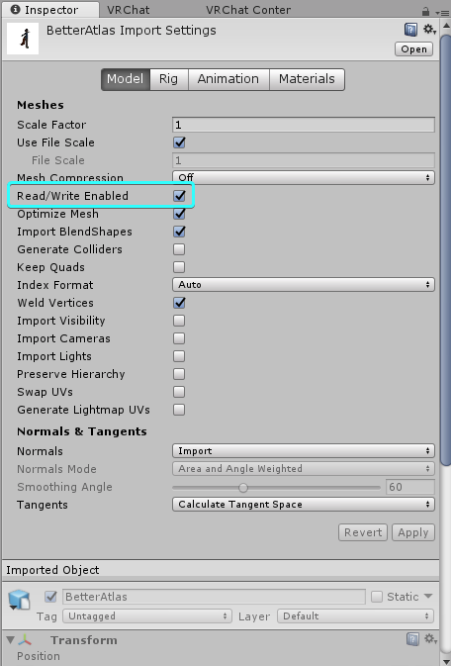
it's required
visual tinsel
that's off by default though, right? At least on my fbx it is
amber hemlock
Rokk for the win
jagged plinth
amber hemlock
now keep in mind you don't have it set to humanoid so it's a static model until you change it to humanoid and bind the bones
oh and the warning at the bottom says you are using the wrong version of unity, so it's not going to work at all
might wanna update to 28
visual tinsel
Might be 5.6, you never know!
surreal topaz
Yeah it is on by default
jagged plinth
It was off for some reason :/
surreal topaz
If it's turned off you may have mistakenly turned it off or you got a premade avatar
Usually from that site
jagged plinth
I actually took my avatar from a gmod file, then converted it to a .qc file, ran it through blender, then put it in unity
It was originally found in a Wii game 😂
amber hemlock
I honestly have to give the devs credit this SDK feels pretty darn polished and for how many things can go wrong
surreal topaz
@amber hemlock the SDK ain't polished lol
Future proofing is still on by default even though it can often crash Unity, and it also makes it easier to steal your model
Having the pipeline manager component expanded lags unity like crazy
You need to click on settings like 3-4 times for it to log you in again
SDK still doesn't have a built-in "test on desktop" checkbox
It constantly messes with the ordering of your XR API's in Unity so you have to jump into the player settings every time you wanna preview something in VR in play mode.
They made an attempt to fix dynamic bone counting with newer (read: legal) versions of dynamic bone, I haven't checked if the fix was successful
If a build error occurs but not a compile error, the SDK doesn't tell you this and you're left with a vague error.
Preview camera is still white in some worlds for some reason
SDK crashes if you customize a VRC_Trigger's "random" weights and accidentally go over 1
It still can't auto-detect visemes, you have to fill each one in yourself. And it also still can't do a few basic automated fixes like remapping your model's upper chest
If read/write is disabled on a mesh, the SDK reports 2 billion polygons rather than saying "read/write is disabled on X mesh"
And not really related to the SDK itself, but world builders still can't use the built-in terrain shaders with baked lights. Terrain and grass goes black if you do that. Although that might not be VRC's fault, who knows.
Also, you can't actually test any of the VRC triggers in Unity, you have to do it ingame. Multi-client testing is still broken in several ways.
heady smelt
^^^^^^^^^^^^^^
amber hemlock
I guess I’m super easy to impress
safe swift
yes
 mossy solar
don't forget having the pipeline manager expanded causes unity to lag to hell
oh wait it already was said XD
pine flame
Yeah what’s up with that
heady smelt
I think I found the solution to optimizing my RS avatars
Look at her and notice
she is wearing literally.. 1000 polygons on her body
however, with the new shading system they have, you can't see it; also in 2009 they added textures to their characters
But basically, all they used was "Noise Map" it's a 64x64 texture
But what is unique about this is the fact it utilizes 3 colors only.
4*
A desaturated Dark blue Grey, a desaturated blue Grey, a desaturated yellow, a desaturated Cyan.
Just look at the Noise Map texture; 4 materials could be found on her armor. The solution is to create one texture which maps the entire armor; with the same noise map but colored in the selected main set of colors.
Note that I am talking about the "dots" on the armor; this can be seen on 2009 npcs during the HD update event.
Where textures were added to Low-Poly; instead of just the environment.
For instance, the Rune Minotaur; it has 3 types*; Dots, lines, V shapes.
woeful stag
do custom emotes affect avatar performance?
 hollow briar
Considering most custom emotes are extra meshs or particles, yes.
If you're going for max performance, you would remove those.
Unless you mean blink and visemes, them I'm not sure how shapekeys in a model affect it, if even at all.
woeful stag
what if the custom emote is just animating/moving the avatar
hollow briar
Probably not, since that's what you're doing in the first place in-game. Just moving bones.
 graceful vine
It would still impact the performance rating depending on how you did it
marsh trail
It would increase the avatar filesize, in it of itself impacting performance (to a ridiculously negligible degree unless you make something beyond reason but since we're going there) the more complex the animation the heavier it is, even if only the humanoid bones are animated.
Anything on the avatar added in as an extra will be counted by the performance ranking system, even if disabled, which i still find ridiculous as they should not be weighted along with performance and should be instead treated as separate informational entities that would only be weighted when active as inactive items are known to produce a near negligible performance impact, obviously the same concept as animations apply onto extra things, if you have alot of them, the filesize builds up and inherently takes longer to load.
candid sedge
Wow thats a wall
marsh trail
Yeah, i tend to avoid segmenting things whilst on mobile, oddly enough
amber hemlock
Emotes themselves don’t effect performance. By anything hidden on your avatar is still counted as always being there.
Otherwise the only thing they add to is download size
 umbral veldt
i got this weird problem that parts of my avatars body clip trough the clothes
any way to fix that?
it looks fine in blender but weird in unity
 woeful ember
looks like you need to remove hidden geometry
umbral veldt
where can i do so?
woeful ember
in edit mode
surreal topaz
Just remove the skin that's under the pants
umbral veldt
i uh
i am a very green beginner
in which programm would i have to remove the skin?
woeful ember
blender
umbral veldt
thank you, i will try to figure that out
heady smelt
So this is how this Avatar was made. The real question is.. why make that white thing the Avatar when you could use use a "Bone" outline skin lol
 vast sonnet
so noticed with the new sdk that having even just one lightsource instantly drops the avatars performance to poor even if every other category is green, lets say i wanted to have a torch emit light, is there any alternative? or am i just stuck with that poor rating?
marsh trail
You're stuck with it, if you want to emit light atleast
 split hound
Couple super pro tips since I keep seeing this happen for people
when you're trying to optimize via decimation it's best to do so on each mesh individually after splitting by materials after removing your shape keys mesh and hiding them.
Many things can handle more decimation than others (pant legs, shoes, some hair, objects)
when decimating, set your viewport in blender to "solid"
or wireframe, so you can actually see how the mesh is getting changed by the action you're taking
and finally, and this is one that most people don't know:
in the top right of the 3d view in blender there's a little plus button
behind that is this option:
turn it on. Keep making sure it's turned on. This will not only show you when normals (faces) get flipped around during decimation, but Quest avatars CANNOT be double sided
so this will make sure that your avatar doesn't end up like this: https://media.discordapp.net/attachments/390929309965090826/597982248381317120/2.png?width=1120&height=630

when you bring it into unity. (pic from avatars-mmd)
You CAN get almost any avatar down around 6k poly without scuffing the face, I promise
and you can most certainly get anything to 20k
ANYTHING, and still have it look and move correctly, almost indistinguishably from the high resolution one
heady smelt
So apparently dynamic bones have a huge performance impact. Is there any way to have dynamic bones and not turn everyone's pc into a toaster?
 thorn ginkgo
Try to use as few dynamic bones as you can get away with and avoid colliders as much as possible. If you want colliders, try and limit them to only one or two bones rather than a bunch. I personally try to merge long chains of bones into a handful and avoid hair/clothing that would need those to look good.
heady smelt
well so much for my 4ft long hair with 8 bones per strand lol
jk jk, but thanks, that helps a lot
amber hemlock
Also remove doubles before decimating or you will make tears where your seams weren’t fused together
split hound
yus!
amber hemlock
Don’t don’t remove doubles on things that are intersecting or they will stitch
split hound
I've had some luck with unsubdivide as well with things that were more obviously made with blender subdivisions and sculpting but that comes from years of pattern recognition in 3d, lol
amber hemlock
Boolean modifier is also real nice for removing internal intersecting geometry
split hound
modifiers are honestly amazing. If you search youtube for "non destructive blender" you'll see some incredible stuff
reminds me of generative scripted modeling, but without the pain
amber hemlock
Lots of (non-dynamic) mmd hair can be heavily optimized because many of the strands are inside each other and all those parts can be removed via union mode of Boolean modifier
split hound
that's true. There needs to be a "kill everything that isn't manifold surface normal geometry" button that actually works, lol
then I would like working with primitives again instead of pulling verts and edges along planes like it's 2006.
amber hemlock
Well there is select -> non manifold
That tends to be my workflow these days. Volumeize everything making all the parts air tight, then Boolean everything together then a small bit of decimation to get rid of all the new tiny triangles
I’ve been getting things down to quest level that way
Getting rid of non-manifold stuff lets you decimate more without making a mess
split hound
that's pretty much where I've been going too
but that can also cause things to implode, depends on the model lol
all my best stuff is entirely self made anyway though
just wish I had more time for more full-scratch models
 pine veldt
I'm trying to make a particle effect I've switch to mesh in the bottom section I want my gun to shoot giant bullets, but either the particle or mesh is to small or to big, because I can't see it how do you change the size of it?
 velvet otter
kept hitting the material limits
only just found out its becouse i used state machines made out of cubes
which take up a texture spot.
ffs now i gotta redo 3 state machines
surreal topaz
I like how it affects your rank even though it isn't enabled
Optimization is almost entirely meaningless for ranks now, unless you just outright remove it all from your avatar.
heady smelt
You can never make a Excellent Optimized Avatar; because... "Dynamic Bones", "Music/Sounds" these elements take away that right
solid smelt
There are avatars that don't warrent dynamic bones or sounds. Those are the ones you aim for excellent on.
heady smelt
But you want to entertain >;c
And have cool flowing capes
This is what "Good" Optimized avatars with dynamics bones look like lol
Now I have to make the "Calvary" version of them lol
amber hemlock
You can also just use an empty instead of a cube - no materials
 amber ridge
Adeon I would love to see a tutorial on how that works
The manifolding and breaking it down
marsh trail
Empties are generally used to set things up, such as animating something via an animator, but not wanting to set the animator on the part they're located (especially when the only thing you can attach said animator to in the current location is the root of the armature)
So generally you could do
Hips
|
|>Spine > Animator
       |> Object Affected By Animator
But ideally you'd want
Hips
|
|>Spine
        |>Empty Game Object > Animator
                  |> Object Affected By Animator
This of course is for additional objects, if you were to affect the rig itself then you couldn't just start reparenting things for them to work, you'd have to use the first case
 blazing sphinx
halp
 crisp roost
help, blender made my dynamic bones gigantic by over 1000x size, any help fixing this?
i was just trying to edit the 3d model of an existing avatar and this happened
marsh trail
@crisp roost decrease the radius
crisp roost
I don't know what the original radius was and it seems normal so i have no clue what's going on
It looks perfectly normal in blender but messes up when unity loads it
marsh trail
Dynamic bones are not present in blender, these are just the interaction radius for dynamic bones, if they were to collide with anything, they don't affect anything other than that
crisp roost
how do i fix the interaction radius in unity then
 karmic condor
Take the radius, type /100 to divide it by 100
crisp roost
so i fixed the radius of the bones, but VRC is still thinking the bounding box is gigantic for some reason
i've tried rebooting unity to no avail
marsh trail
Do you have a pen of some sorts on the model?
crisp roost
no pens.
karmic condor
Maybe messed up shapekeys?
crisp roost
how do i fix those
crisp roost
i dont even know what a shapekey is
karmic condor
It’s done in blender
marsh trail
Shapekeys are certain things on a model that deform the mesh in some way, from point A to point B
They're what make up visemes, moving certain points of the mesh to make the mouth move
crisp roost
I edited a fbx file with proper shapekeys as the original version has a proper bounding box
but somehow blender screwed it up?
marsh trail
Normally it's more likely user-error by attempting to attach objects onto the model or moving/removing mesh parts
crisp roost
ahhh so how do i locate shapekeys
i think i know the offending shapekey but i dont know where to find it
marsh trail
crisp roost
I found the shapekey responsible for the offending zap, so it should be fixed hopefully
nope still says its too big
imma see if breaking the prefab works
surreal topaz
Don't do that
There might be another shape key that makes the body bounding box too big
Manually make it smaller or fix the shape keys
crisp roost
hmmm do you know how i can find what shapekey is making it too big
there's a bajillion of them
also it's getting bigger in all axes so idk if its even due to shapekeys
also all shapekeys are at minimum
surreal topaz
Try them all individually until you see one that makes something fly very far off or one that makes the model explode.
crisp roost
all of them make the model explode
somehow i broke all of them
imma try redoing the avatar
surreal topaz
Did you delete any vertices at any point?
Because if you do that, you will probably end up breaking all the shape keys.
The only way to fix it is to separate the face from the rest of the model, delete the shape keys on the non-face, then merge it back and hope for the best.
Or redo it.
crisp roost
drat.
wait, is there any way i can do something like preserve all the vertices while flattening them?
surreal topaz
Well you can perform shape propagate on the parts of the mesh that aren't the face
To make them unaffected by shape keys
But that's literally the same thing that I mentioned earlier
If the face is fucked it's fucked either way
@crisp roost
 compact dragon
Hey can anyone help me out? I did some bone merging in blender, brought the bones down to 27 from 87, but when I bring it into unity, it says that my total bone count is up to 51. Can anyone tell me why?
calm spade
most likely leaf bones ?
compact dragon
Leaf bone? Im afraid I dont follow
heady smelt
Oops
sweet mason
Some time armature have bone at the end of a chaine but they do nothing by themself so delete them there en .end in the name I think
 heady smelt
Just a question: How do i Optimize my avatar's Material Slots because Atlas-ing doesn't work for me in blender
marsh trail
The best way to optimize the material slots is literally by atlasing the textures, drawcall batching doesn't work with avatars as far as i'm aware either
surreal topaz
@heady smelt Use blender 2.79
And if it's "not working" then maybe you should start there
 verbal surge
Is there a way to crop texutres in Blender without messing up the UV?
I'm trying to generate a texture atlas, but it creates a large amount of unused transparent space, which makes the entire texture look blurry.
I've tried cropping the textures in an editor, but that messesup the UV map
marsh trail
@verbal surge that transparent area is there to pad out the resolution, so that it fits within unity's constraints (in which it works best for compressing and other internal ways it manages textures)
64x64/128x128/256x256/512x512/1024x1024/2048x2048/4096x4096 and so on, you could manually atlas it if you'd prefer to have more control over how everything is layed out
verbal surge
But the texture is barely over 2048!
marsh trail
That's the gist of it, if it's not exactly in said range it won't work the same way (values with both might be plausible such as 256x2048)
If it was bellow 2048 you could just have it padded to that value, whereas anything above 2048 must be padded to 4096
verbal surge
I forgot to mention: It pads it to 8192x8192 instead of 4096
marsh trail
That's a bit on the absurd side of resolutions then
verbal surge
Yeah...
I also have a 2048x2048 texture that I only need a small part of. (Removed some parts of the model)
marsh trail
God i remember the atlas tool having settings.... i wonder where they are...
verbal surge
That one isn't an atlas; it's just a normal texture.
marsh trail
I mean i know that, i just recall the tool itself having some settings
Unless i'm miss-remembering
verbal surge
My settings are:
Image size: Power of 2
Compress combines image: checked
marsh trail
The padding is added by the power of 2 setting
Unsure why you're getting such a massive texture atlas from it though
marsh trail
If i recall correctly, unity does not compress textures properly if they're not a power of 2, i'm not certain of it at the moment, but i recall reading something along those lines
Power of 2 being the resolutions i mentioned before
verbal surge
I think I encountered that issue before.
But I think I fixed it.
It seems to be working. Thanks again for the help! 😃
marsh trail
No worries
 hexed oriole
anyone know why my avatar that is 32000polys is all of a sudden 300000
I cant upload it now, even though I've been uploading it for the past 30min or so
I just moved a particle over to the front of a gun I'm adding rn
hexed oriole
o no
Ya its complaing about me updateing it
i didnt think it would be a big deal
I;ll upadate it and see if it fixes it
compact dragon
Can anyone help me get a good performance for this model im working on? I have seen models have dynamic bones and not have poor or medium rating, but it is saying I have 27 simulated dynamic bones. Anyone have any input on this?
pure bridge
close to breaching into poor, usually reccomend 16-20 or so
what are you trying to animate? send pics of your entire avatar, not just a description
you may be able to pull some weighting fuckery to get around it
compact dragon
It is the bottom of a coat, I wanted it to flow a little more naturally, 27 is about as low as I can get it, following the guide that was uploaded. Apologies if its a little hard to see, the model is a little dark to begin with.
https://gyazo.com/b4037b921806b4be79690832e65c5916
https://gyazo.com/b4037b921806b4be79690832e65c5916


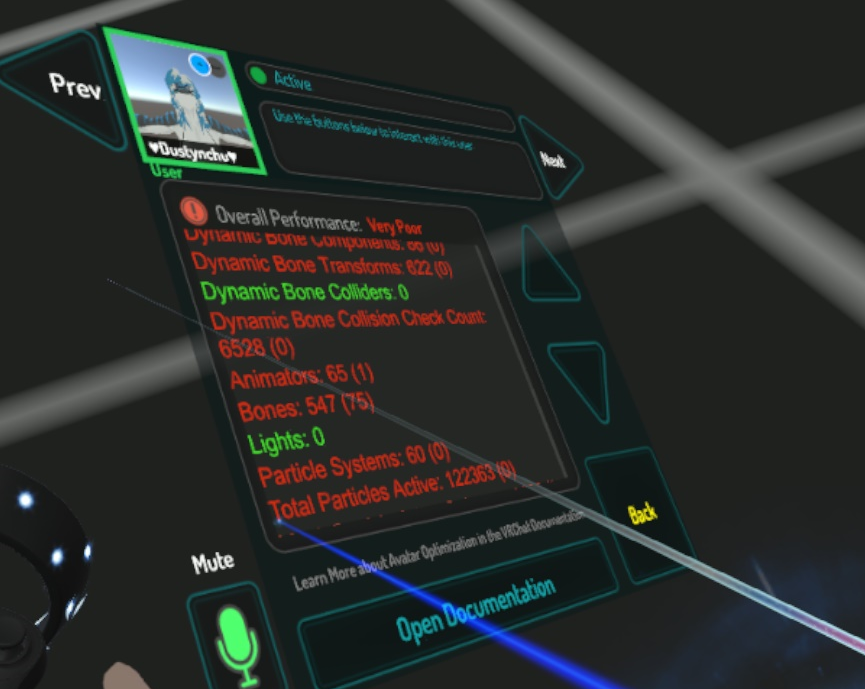


 pure bridge
thats an interesting rig for the coat...
pure bridge
change the parenting of the bottom half coat bones so that they dont share it with the top
should cute dynb in half and only animate bottom half in the process
compact dragon
Alright, ill go ahead and do that.
 surreal bone
I want to combine textures/materials in Unity, is there a way to?
marsh trail
There're paid plugins out there for it, but i have no idea if any of them work, or even well for that matter
surreal bone
I'm trying to do it in Unity, but if I can't then I'll migrate to Blender for it
Everything's all set out the way I want it, I don't wan't to re-do it all just to merge materials but so be it.
pure bridge
just do it in blender
amber hemlock
Is there a downsize of using non-square power of two atlases? I squeezed everything into the top half of my 4096 x 4096, so I cropped it to 4096 x 2048, but will that mess up mipmaps?
Basically is there a downsize to using textures that aren’t square (but are still powers of two)
surreal topaz
@amber hemlock nope, no downside AFAIK.
Very old hardware had some issues with that, but that hardware literally can't run VRC
If you crop it make sure to adjust the UV's too of course
amber hemlock
Yeah I was lazy and fixed it in the shader
surreal topaz
Same end result so it wouldn't matter too much
I always try to fix it in the mesh itself though
Not all shaders have tiling/offset support although they should
amber hemlock
I guess removing them is ever so microscopically more optimized
surreal topaz
Not really @amber hemlock
Well barely
Using tiling/offset or not as end user makes no difference
And not putting it in your shader saves maybe 1 instruction
Unity has a macro for it
pure bridge
semi-related question, at what point is texture size a cancer on performance for an avatar?
say that i had an avatar that used 4 different textures (4 materials). should i draw the line at 2k? 4k? 8k?
i never really go above 2k but just wanna make sure
surreal topaz
Avoid going above 4k. This is mostly about RAM usage.
pure bridge
ahhh. i see
surreal topaz
4k sorry
pure bridge
makes sense
surreal topaz
I usually have one 4k texture
May I ask why you have 4 different textures? Is that for normal maps?
Using 1 texture for 4 materials is better than 4 textures for 4 materials
pure bridge
for normal maps, ramps, subsurf scattering
pure bridge
i use the same atlas, but i just crop out the bits that are being used on different materials
pure bridge
or is there a better way of going about it?
surreal topaz
If you have the same atlas you should reuse the same textures if you can
pure bridge
i never really asked until now
surreal topaz
For example, I usually atlas everything onto the same texture
And I then have an opaque material and a transparent material that both use the same atlas texture
The exact same one
amber hemlock
My atlases always end up 4K by 2K
visual tinsel
Sub surface can be like 50% res and it'll look the same
surreal topaz
I don't recommend crunching or downsizing normal maps
Not sure what subsurface looks like at all
Mask textures I can usually make 128x128 and crunched, they become several kilobytes at most
visual tinsel
Black white thickness
amber hemlock
My quest avatars are usually 2K by 1K
visual tinsel
Docs say 1k or bust tho
surreal topaz
I rarely make anything for Quest, the times where I have, I did stuff like a 130 tris Miku which already had a 16x16 texture
pure bridge
i dont get it since im a bit of a dumby wumby. say that i wanted to have a different color ramp for my skin, clothes, and hair. that's 3 different mats, hhow would i go about making them use the exact same image instead of cropping out 3 different ones from the same texture atlas?
surreal topaz
Alright, so first you atlas it in blender and end up with 1 material
You then make a new material and assign it the same texture as the first material. You select the faces that need to be on a different material, and you assign them to the new material.
Repeat until desired result is achieved.
amber hemlock
They say total texture size should be under 5mb and 2K by 1k is under that
surreal topaz
Out of curiosity, which shader do you use? @pure bridge
surreal topaz
Ah
I think poiyomi either has or will have a feature very soon that allows multiple toon ramps on the same material.
pure bridge
yesss.
surreal topaz
I'm using personal edits of Noenoe that can do it too
amber hemlock
2K by 2K is too big for quest recommendations though
pure bridge
thhx
visual tinsel
@surreal topaz is it public? I wanna see how you do it
amber hemlock
Well if you crunch it it’s small enough but that only effects download size to my knowledge
It gets expanded anyway
safe swift
Scruffy how can you not know about RokkRokk shader 😦
pure bridge
in fact, imma test thhis out rn
cuz apparently poiyomi's got an update two days ago ubu
visual tinsel
@safe swift I know about it, I was more curious about the multi ramp
surreal topaz
Not sure if I can make the code any cleaner
I could but then it would be 4 samples instead of 1
 rapid kestrel
Question, is it better to use cloth components or dynamic bones for clothing?
cloud meteor
For optimization none xD
rapid kestrel
lol I dont have a counter for that
amber hemlock
I use Rokk’s NoeNoeExtended for all my avatars
 magic locust
@rapid kestrel Depends on how many bones that would be affected for dynamic bones versus how many verts for cloth
 fading terrace
Should I use the blender decimate modifer to lower the polycount or manually retopologize using something like retopoflow. the avatar has 113k polygons and I want to drop it to like 25- 35k.
magic locust
Retopoflow, decimation destroys the edgeflow and makes it deform worse
 unreal vortex
short question, does a "unclosed" mesh have any performance impacts or is it only a "visual taste" problem?
amber hemlock
I got from 260K to 7.5k with tris-to-quads + unsubdivide
But you’ll need some manual cleanup after each unsubdivide. Knowing how to clean up scuffed UV’s due to un-subdivide is necessary
The bonus is vertex order is maintained so shape keys are conserved
I also de-select non-manifold verts and don’t unsubdivide them which conserve edge details
 cerulean holly
@unreal vortex it will perform the same as fully closed mesh but you may see gaps between meshes from certain angles and it will be more difficult to weight paint.
surreal topaz
@unreal vortex what do you mean "unclosed"?
There was this bullshit rumor flying around on /r/VRChat where someone claimed that polys will lag less if you also model the inside of the mesh
That's false
unreal vortex
as example. if i remove the selected faces, could this lead to visual artefacts?
it is covered by this piece
cerulean holly
Aren't these faces covered by the cap? If so they won't be visible at all and you may just delete them to save a few tris
unreal vortex
thats the plan ^^


Original (upper left): 27.024 polygone, optimized one: 10.881 polygone
and i am trying to get it under 5k or even less
amber hemlock
There’s probably a better way to do this but I turn on X-ray, select everything, turn off x Ray, then deselect everything from like 600 different camera angles until I see no more orange anywhere, then delete selected
I do that last though right before export and I don’t save it
So basically I delete stuff that can’t be seen from almost any angle
 sudden zodiac
@amber hemlock That's a pretty great idea 😯
 dusty falcon
HOLY FUCK
i need to fucking optimize this death egg
uh
i imported it and i don't see it
nvm, changed it to an fbx
there we go
 still perch
Dont advertise your messages/questions you posted somewhere in other channels @pine veldt
and especially not in multiple other channels
pine veldt
ok its just so many channels im not sure which to use
still perch
your issue is correct in #animation
but dont go around other channels and say you need help over in channel x. 
If you dont get a response in a day or so you can try reposting the question in #avatars-2-general but till then wait and see if someone responds 
pine veldt
cool:)
heady smelt
does anyone have the unity files for this model so i can customize her please DM ME ASAP
pure bridge
you've asked this question three times already
the owner of the avatar is probably th3 only one who has it
do you have their username? you should be asking them and not the rest of us
if not, then literally nobody can help you
@heady smelt
 gleaming pebble
My character model is too big and is it possible to reduce the size of the model without removing the elements? (I'm new)
 stable edge
How does my avatar look?
graceful vine
Unique.
 distant forge
Hey, thought you all would find this interesting: so I successfully just made a skirt from one ("skirt parent") bone in the avatar center (skirt was gradient weight painted to it) and two dynamic bone Inside colliders.
Basically added one inside collider on each leg, used Height setting to extend it from the waist to the knee, then put an X Offset like .05 on each leg collider to put it in the middle, and a Z offset to move it forward helped for me like 0.1 radius 0.04.
Set an incredibly high stiffness. The net result is the skirt tends to stay within the leg area while still bouncing around and moving with your hips. Only glitch is if you sit cross legged in full body, it seems to invert. Might be solvable with one huge outside collider for the torso to keep it facing down
surreal topaz
That is an interesting approach
marsh trail
You can disable dynamic bones and enable them aswell via a gesture, i'd assume some sort of roundabout way could be found to fix said issue, but i doubt it'll be consistent at the time
amber hemlock
Sadly walk animations can no longer have non-humanoid or non-rotation properties
Well they can but only you see them
So disabling dynamic bones while walking is no longer an option
marsh trail
Welp that sucks
Another thing to add to the bucket of stuff that worked and was nice to have but got broken for no good reason
amber hemlock
Yeah they broke my skateboard too >[
marsh trail
Atleast my dance stage chair still works... that's good atleast...
surreal topaz
Lol
minor wren
I was thinking about the one bone skirt too, but decided to just keep my 5 bone version. that already won't clip and it moves more naturally. (but it only works with shorter skirts that don't reach below the knee)
surreal topaz
Yeah that's a bit of an issue with a lot of weight paint or "2 bone!!111" methods like the one Bananers posted
They always take the easy way out by getting a super short skirt
Have yet to see something for over the knee skirts but I'll try out Lyuma's suggestion
minor wren
for over knee it's really difficult to make a good looking solution
good thing I prefer short skirts (hence the name)
 pulsar pebble
quick question, does my avater have 3 skinned mesh renderers becuase a prop i made has an armature? 2 guns that i toggle between and can be animated if i choose to(break action revolver)
karmic condor
if your prop has a armature than it most likely is a skinned mesh. You can force it to a standard mesh by replacing the skinned mesh component with a mesh rendered and mesh filter component. Your call though.
 dense crane
So how do i set up pretty much anything?
pure bridge
@dense crane the two tools you will always be returning to are blender and unity
blender 2.79 is the one you want
and you also want Unity LTS 2017.4.28f1
you can find the link to download that version in the vrc website after logging into your account and going to the downloads tab
do not update unity past that version, only ever do that if we get an announcement from devs
anyway, you can download the vrc sdk from the same site which is also required, and import that into a fresh unity project.