#avatar-optimization
1 messages · Page 38 of 1
 ancient crystal
 amber hemlock
I’d expect the gradient to start only after the head of the bone an fade to 100% at the hair tip
No awkward rotation
 marsh trail
If the bone were to pivot from the hairs' "root" then it'd be believable but i can't seem to find any plausible way of doing such except using another bone
If it's pivoting from the bone it's connected to it makes even less sense as that pivot point is too far away to be consistent with a "natural" movement, bending and stretching would definitively happen unless the user used very conservative values
Regardless of it being weighted to the entire hairs' tail or just the portion below its influence area, that should be the case, so i can't help but feel curious of how it actually works
amber hemlock
Doted outlines are parented but unconnected bones. The bone rotates from its own head
So basically the top half of the hair will not bend
I think it would look fine, it’s tied together and wouldn’t move like crazy at the top
marsh trail
It wouldn't move at all at the top if that's the case then, so they have leaf bones parented to it i assume?
Since you need atleast 2 bones in a chain for DB to function
amber hemlock
No leaf bones needed, that’s what end length parameter is for.
marsh trail
Ah so they're using them fake db bones to generate it
amber hemlock
End length makes the dynamics act like there is an extra bone that does not exist
Which as far as I understand is less intensive than actually having said bone exist
The rank system doesn’t penalize you for it at least
marsh trail
I mean it's not actually deforming anymore of the mesh but still acts exactly like a normal transform afaik
Perhaps those got overlooked somehow... hmm
In any case, if that is indeed what happened then i'm a tad disapointed, it is completely functional in that manner but not so useful for any of my setups that use the exact same transform count (accounting endlenght as a transform here)
Hopefuly there is a bit more depth into it, but if not, oh well
Thanks for your input though, completely forgot about endlenght
 surreal topaz
It's not actually more performant to use end length vs. an actual extra bone @amber hemlock
The system just can't find a bone there
But it is more performant in terms of not having extra game objects or more stuff to skin
amber hemlock
I guess it’s just skirting the system then. Hope the limits were set with that in mind
No reason to knowingly penalize yourself
Like using idle animations instead of a second animator. Def not any less laggy but the system likes it more
ancient crystal
well yea what end length does is
it removes 1 db transform
bc at an end length of 0 it doesnt do anything to the ending bone
at an end length > 0 it rotates the bone with a simulated mass
marsh trail
I mean, the end lenght is still simulated however, that's why i'm wondering if it's actually doing the exact same thing a transform would do, without any sort of skinning involved
You can still have a model without any mesh deforms that has dynamic bones applied and the same impact is felt overall unless your model is really detailed, and if such is the case and end length does indeed account in performance much like a unskinned DB bone, then there's kinda no point
You'd just be essentially handicapping yourself under the presumption that it'd be more performance-friendly, if that is indeed the case
surreal topaz
@marsh trail with end length, internally the script will do the exact same thing as with extra transforms
Dynamic bone makes a "particle" for each affected transform, simulates these "particles", then moves the transforms to the location of each particle.
End length/end offset makes one extra particle at the end of each chain, in the direction you choose
If you exported with leaf bones/end bones then you should not use end length
marsh trail
I mean i understand that, i was just stating that if end length works the same way as extra transforms then there's little to no use for them unless you don't have leaf bones and use less than 2 bones
 tired badger
@distant forge Yea it's a gradient i smooth out after merging everything correctly.
 rotund flume
So... i have no clue why my legs are doing this. I have another avatar with the same bone layout and he's fine
somebody has got to have an answer
ancient crystal
shape keys
ancient crystal
: )
apparently if u undo when editing a shapekey it does some weird stuff
idk y
u can easily fix it
just press shape propogate on legs at basis shape key
it replaces all shape key data for legs
mesh -> vertices -> shape propogate
i think
also make sure ur not missing any blend shapes
cuz sometimes if a shapekey has no weight at all on anything its gonna be removed
rotund flume
so i had to move the legs to compensate for enforce t-pose, because enforcing sometimes move your head upwards and it messes up the little view dot for the avatar descriptor
i just selected the lower half of the body and blended the basis shape key to revert the tris back to their original position for each key
rotund flume
it shows as red in unity
rotund flume
well i was desperate and i had no clue how to fix it
 rotund flume
ancient crystal
rotund flume
ancient crystal
 rotund flume
thank you. i was getting kind of emotional because i worked for days on this model
ancient crystal
ignore the weight painting issues i didnt finish fixing that
as long as the bones are correctly named
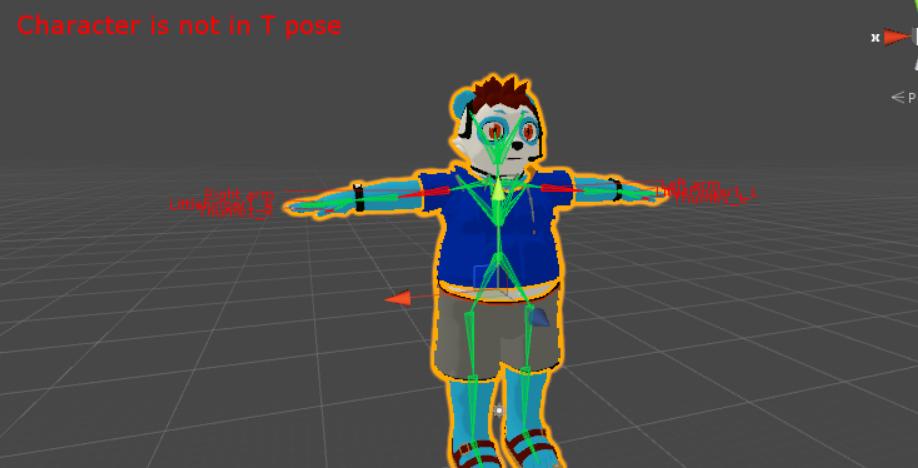
and the character is posed correctly
all animations should work right
regardless of 'character is not in tpose'
 heady smelt
is there anyway to check what the materials are that are on the material count for an avatar? I can only count 7 on mine but vrchat reads it as 10
also, do default materials/particles count towards the material count?
 patent leaf
Particles count for mine
 distant forge
Yes. What really counts are total number of material slots not unique materials. Default materials still use up a slot
heady smelt
ah, ok ok... does anyone know how to find what these materials are as well? VRChat says I have 10 materials but can only count 7. Do trails using the same material as the main particle class as another particle? E.g. https://cdn.discordapp.com/attachments/215967274161537025/533093773467582464/unknown.png this is classed as 2 rather than 1

 candid sedge
Same material being applied multiple times will add to it
heady smelt
does having the field empty (none) count 2 towards the material count?
I just heard that it does from a friend
candid sedge
Sorry not sure
distant forge
That is w because you are using particle trails. It actually takes effort to render trails on your particles. Don't use trail if you don't want the second material
heady smelt
oh my word it does
not having anything in the trail still counts, how do I turn off the trail?
like, how do I remove it from the material count?
https://cdn.discordapp.com/attachments/523745933037404161/533096103772422146/unknown.png I did this and it is counting as 2
 distant forge
I think you should be able to turn off the trails module. Might be a checkbox outside the renderer section
 distant forge
Oh. Then it really shouldn't be counting that. Maybe that is a bug with the material counting system then...
heady smelt
I assume the avatar won't be allowed for public even with this bug right?
distant forge
But I don't use particles much. Anyone else have experience or ideas?
10 materials is allowed I believe. Check the limits
heady smelt
yeah, its 10
so I am closing the avatar stats and opening it and the material count changes between 10 and 4 now, is this a bug or is something weird going on? I know I have 6 unique materials on the avatar and only 2 visible at a time, 11 total material slots on the entirety of the model including (none) materials
distant forge
Ingame? The stats for your own avatar are counted based on what is currently active
Stats for others and the grades however are based on what is enabled on upload not animated stuff
heady smelt
ok, ok
Pumkin's avatar tools is reading the avatar as having 5 unique materials and 5 used materials slots. In general my avatar -should- be okay for a public world right?
 distant forge
Even 10 is ok. But that seems pretty well optimized so I think you are ok. At some point just call it good enough and pray to 
heady smelt
haha, ok ok
 safe swift
you're fine even with 15 materials, but u don't need more than 10 active by default like ever http://prntscr.com/m5o0dm

 sage zenith
Hello, my avatar has weirdly rotated hips in full body tracking and i have no idea how to fix it. I tried moving hip bone in different positions which didn't help at all  Any help is appreciated
safe swift
@sage zenith set all bone rolls to 0 (edit mode, select all > alt+R) and put a bend in the knees
amber hemlock
Which way should the tail of ankle bones point? mine are always pointing below the model
 grim kiln
You can use space after marking all bones in edit mode and write clear bone roll i think it was called, it zeroes out the bone roll automatically on the selected bones
Tails should point always in the direction of the body mesh, except the hip bone that is a bit strange
amber hemlock
Do double sided shaders make an avatar twice as heavy to draw? Like, should i disable the culling inside my model so it's not solid on the inside?
It helps with filling in seams but i don't know how important it is
grim kiln
It will render both sides yes, so if you can set the materials and mesh to use only front face then it is a bit better
amber hemlock
i wonder if it would be worth creating a second material slot just to remove culling on most of the avatar except one part
or if it's more optimized to just have no culling on the whole avatar with one less material
ancient crystal
depends on how the object is made prob
backface culling really only optimizes if an object doesnt have z writing or it has a lot of backward facing polys that dont need to be rendered
imo if its still excellent or good rating if u add other material sure if not then idk try it
rotund flume
no matter what I do, my feet dont touch the ground when moving
@ancient crystal do you have anymore insight like yesterday?
ancient crystal
typically for digitgrade i don't use that anyways
i put the ankle bone on the "ankle" and toe bone on the paw
also make sure the character is at <_,0,_> location
and that feet touch ground in blender
idk if that setup i said does something with animations
but its great with IK
rotund flume
should i align the toe bone with the red line?
toe and foot bone?
my other avatars dont do this, and they have a more harsh angle for the foot bone
ancient crystal
yea again u can also use other bone setup might look nicer
and where the bones are/point typically don't matter
but if the character has any height change it might mess up the footplanting
like in unity
scaling shouldnt cause problems tho
rotund flume
everything is set to 0,0,0 except for scaling
ancient crystal
it might also be the way the leg bends
and u also did not apply the full body tracking fix
so expect hip and leg IK issues
rotund flume
my other avatar's legs are this bent and they work properly
ancient crystal
again u didnt apply the fix
rotund flume
what are you talking about?
ancient crystal
also u should typically try to keep the legs as straight as possible
the full body tracking fix in CATS
rotund flume
i dont use full body
ancient crystal
it doesnt matter
it fixes hip rotations also
hence the warning of "hip rotation from leg is not 180°" or something
and it warns about ik problems
rotund flume
what button in cats?
ancient crystal
i just told u
 vague hearth
near the fix model there's a gear icon button where you can check Apply fullbody fix
ancient crystal
no not that
do not do that
if the model is already fixed that is a terrible idea
theres literally a button thats says
fix fullbody tracking
under more options
rotund flume
rotund flume
vague hearth
try also not map toe bones in unity configure and Pose>Reset, Pose>Enforce T-Pose
or map toes and check their rotation maybe somehow they goes down that do a space between the ground
also not sure that something do but check your mesh origin in blender, or just select the mesh change to edit mode select everything with hitting A and then Shift+S>Cursor to Center and Ctrl+Alt+Shift+C>Origin to 3D cursor
re:"everything is set to 0,0,0 except for scaling" - looks like position and rotation properties in unity doesn't do something if there's no root object that has avatar descriptor, and only scaling applies to the model (just a random information) )
rotund flume
so just simply testing in unity, he lifts off the ground a bit when i test the walking anim
i think its an in unity issue before uploading
@ancient crystal sorry to bother you so much, but its kind of frustrating to work on a model for a week and be halted by an unknown circumstance
like his hovering off the ground is just a consistent 2 inches, it doesnt change
rotund flume
no cigar
rotund flume
after 8 hours of tedious editing, me neither
heady smelt
@rotund flume If you have access to the walking animation you can open it to see the keyframes & adjust the hip bone's location manually to lower it however much needed
Or click on the animation and fix the position Y on the Inspection window
That may be easier
safe swift
@buoyant shale http://prntscr.com/m660fg

 buoyant shale
Where can i find this? i dont know where this is
safe swift
blender, have your bones and mesh above the geren line + set origin point to center
 golden locust
 sweet mason
Unlit texture from unity is affected by light for his brightness?
If yes why using cube or other if you dont put shadow outline
vague hearth
@sweet mason unlit shader is not work with a light
buoyant shale
Hot to fix? Materials are buggy.
buoyant shale
how do i ''Recalculate'' ? Wheres the button
ancient crystal
in CATS or the mesh -> normals section of edit mode
buoyant shale
Thank you ive been working on this character for 2 hours and i thought its lost
 fresh vault
Not sure if this is the right place for this but does anyone know how to get rid of the white of a translucent part of a outfit?
Like this?
amber hemlock
@rotund flume Go in unity bone config screen
are your feet on the origin, or floating?
rotund flume
On the ground
I make all my models in blender, and one of my models with working IK foot placing is MASSIVE when I import the fbx into unity before rescaling it, and the one with the floating feet is ALOT smaller. Would the size of the model in blender be affecting it? (Probably not but I’m at a loss)
vague hearth
@fresh vault in blender's material properties enable Transparent and put inside Alpha property to 0, then in texture properties in Influence tab enable Alpha and keep it 100, this things will work just for blender, if you want to make it transparent in unity then you need to use a shader that allow cutout
ancient crystal
u should also
separate the transparent parts (i.e. hanging fur) from the original material
because u typically don't want to render non-transparent stuff with transparent shaders
surreal topaz
I'm in the middle of atlasing and decided to add a bit of geometry after the initial creation of the texture atlas group
Now this new geometry won't bake, even though it's part of the same mesh and shows up on the UV Map
Any ideas?
Alright I fixed it, I had to separate the geometry into a new mesh and start the texture atlasing process on it again, then merge it back
Super inconsistent but ok
 eternal grove
why is this not auto deleted on upload
marsh trail
Das some infinite bounds right there
 karmic condor
That’s worth reporting
 mossy solar
people are so effing lazy to merge materials and atlas...
marsh trail
Bounds're possibly a mistake, unsure about the skinned meshes, dbs' are well, dbs', mat count gives me flashbacks, but one thing worth reporting for is defo the polycount, das a bypass right there
Actually... skinned meshes might be due to old unity limitations to an extent, using a modified old sdk most likely...
marsh trail
Even then, 9 sounds ridiculous
mossy solar
it's just pure laziness
eternal grove
or lack of knowledge
marsh trail
I'm lazy, that just looks ^ or purely intentional
mossy solar
it's so simple to merge meshes and atlas your model these days
marsh trail
Mhm, it might be an old one though, probably not, but i still got one from back in 2017 fully functional to this day, way before atlasing turned "mainstream" per se
mossy solar
magnanix had a thing for griping about people with materials out the wazoo
which is why I run around with 1 material
sweet mason
I feel so superior with my perfect tag compare to those filthy poor
marsh trail
Eh
mossy solar
I have a "VRChat Approved Avatar"
2 mesh renderers like 70 bones no dynamic bones 1 material no custom animations
0 skinned mesh renderers
marsh trail
All you need is a triangle afterall
mossy solar
oh wait 8 polygons too
karmic condor
I got so spoiled with having to setup only one or two shaders.
marsh trail
Might wanna decimate that
mossy solar
now my main avatar I use is poor only because of DB
heady smelt
db are the worst though 😄
mossy solar
not as long as we have monstrousities with craptons of skinned mesh renderers and 30+ materials
heady smelt
don't blame others, everybody knows dyunamic bones are bad and bottleneck
mossy solar
I have only like 19 collision calls on mine
heady smelt
that's way too much
karmic condor
Avatars with more materials than the pug 👀💦
marsh trail
Skinned Meshes
heady smelt
the best thing about avatar ratings is that you can still do whatever you want
marsh trail
2db vs 2smeshes who impacts more?
mossy solar
only thing I'
marsh trail
It's true that the system currently only states a certain "standard" but does not enforce it, but as they themselves stated, may change in the future
mossy solar
m gonna say is...at one of mag's readings we had people with quite a few dynamic bones come and sure we had 45 fps cause it's gonna happen
but then two 50 material monstrousities came and tanked our fps
marsh trail
What currently is considered a treshhold may soon turn into pre-requisits, i can already see a system like the safety one that applies those
heady smelt
I wish everybody just made one excellent one to wear when it gets busy
mossy solar
I have one
marsh trail
I got quite a few
heady smelt
yeah but in general
marsh trail
I recall a world with 32 people all with cube avatars, it still lagged ta hell and back
mossy solar
yeah game's gonna still lag unless the world is hyper optimized
 shut sequoia
My normal avatar is Poor, but the one I use for Publics and large rooms is on Medium
I imagine if we ever do get weighting in the rank system a lot of avatars should see an upward shift, with a few going down
mossy solar
I might get bumped to medium since I'm excellent across the board aside from animators due to toggles
marsh trail
Also the world was really simple, no way it could've been a major deterrent, however, everything as a whole did affect it, and something tells me the IK had a major role in it
mossy solar
the IK system is the biggest source of lag
but the servers couldn't handle the new IK
shut sequoia
Yeah, they mentioned in an announcement they had to rollback due to the IK.
karmic condor
I wonder if it will ever account for objects toggled off
marsh trail
It went sideways and got worse instead
mossy solar
that's a good question
marsh trail
Most likely
mossy solar
because that hidden stuff increases the file size
marsh trail
And if such is indeed done, toggle props are gonna eat dirt
shut sequoia
Yeah, I really don't get why it broke the hell out of the game, but my guess is a lot changed besides "Hey we fixed the IK" as far as network stuff goes, but the only thing they rolled back was the IK itself, leaving all the other changes intact
Yeah, it not detecting toggled objects is a bug
For people with avatars like that though, it's extremely simple to have one for "showing off" and a regular one for hanging out that doesn't have all the extra hidden objects.
heady smelt
I hope that becomes more of a thing
shut sequoia
Finish all your mats, DB, descriptor, etc, then before you start adding the extra stuff, duplicate the model.
marsh trail
Literally just drag the model out and copy the descriptor
mossy solar
I compress the hell out of the hidden stuff on my avatars
marsh trail
Have a stretched out triangle as a knife or sword
Tenouttaten
Particle effects are gonna look bloody horrid if they detect disabled entities tho, especially for those really talented vfx animators
In terms of statistics that is
amber hemlock
I’m still not % sure why an avatar NEEDS more than one skinned mesh render. Even if it’s for a prop, just make it a different material that swaps to transparent.
And if it’s weighted entirely to one bone, change it to a static mesh render instead
karmic condor
I believe the cloth component requires a separate skinned mesh
amber hemlock
cloth can be just a normal mesh render, no skinned needed
Cloth needs no bones, it discards them actually as far as I am aware.
Mesh props with a single bone will be imported into unity as a skinned mesh render and many people don’t know they can be changed to a regular mesh render and moved to their bone with no visual change just a free optimization
Only if there’s just one bone or multiple and you aren’t going to pose it though
marsh trail
I think i've read somewhere that skinned mesh renderers are heavier on the CPU and regular mesh renderers are heavier on the GPU, not entirely sure of the validity of such, need to find some documentation in regards to such
amber hemlock
Static mesh renders are just outright less work. They draw the mesh without regard to an armature. It’s a straight optimization.
 sudden jewel
@marsh trail The only difference between the two is that a skinning call is passed along with Skinned Meshes, which means that the GPU has to deform the mesh per the weighting and etc. This is why it is a good idea to merge bones you don't use for anything into their parents, because otherwise the skinning call has to take into account bone rotations/translations that will never occur.
 fleet steppe
Isn't there overdraw for more than one material on one mesh? The material keeps drawing nothing over the parts of the mesh it's on that it doesn't cover?
ancient crystal
are lights w/o shadows really that bad
cuz it said maximum is 1
2 made it very poor
also with regular mesh
it easier 2 instance them / gpu instance them
bc they are the same object not deformed (other than by transforms)
so i.e. having 5 different rock
less performant than 5 of the same rock
marsh trail
I wish there was far more documentation on alot of things when it comes to performance, seeing quite a few results in terms of weither the GPU or the CPU is being used for skinning, both of which can be used from what i've read, think i've read that the CPU is used as per standard on Windows, i wish i had a more indepth knowledge of the inner workings of unity but finding literally ANYTHING regarding such seems to be hellish to say the very least, saw a really old reply that stated that GPU Skinning was unity PRO only aswell, but again, preeetty old reply
 pine coral
Okay, so all the ones that show up as orange here, show up as yellow ingame
pine coral
@coral compass I'm currently checking all the avatars that are listed as orange, going to send a picture because they show up as yellow ingame
shut sequoia
The color doesn't coorelate to the ranking system
Are the numbers themselves correct?
pine coral
shut sequoia
8 skinned meshes...
pine coral
Still the performance is medium
shut sequoia
Doesn't matter, you still can't publish them unless they meet the requirements
ancient crystal
where that report come from
pine coral
Orange = MUST
Yellow = SUGGESTED
shut sequoia
Yes. Fix he orange ones.
pine coral
THEY ARE NOT ORANGE
ancient crystal
is there like some api that generate it given the world
pine coral
They are getting misinformation from these
shut sequoia
The colors on your spreadsheet do not correlate to the colors for the ranking system
ancient crystal
how 2 get one of those for a world
pine coral
Why do they not match up?
shut sequoia
Ignore the colors. Ignore them. Pretend they don't exist. The numbers are what matters.
Just ignore the colors. These colors were used before the ranking system came into place publically.
pine coral
The colors are what matters, I legit can't go back and fix most of these avatars
shut sequoia
Just fix the avatars that are marked orange on the sheet.
pine coral
If it's orange on the spreadsheet, then it should be red ingame
not yellow
even the ones that are yellow on the spreadsheet are yellow ingame
shut sequoia
Stop thinking about colors
The solution is simple. If the avatar ON THE SHEET says it needs to be fixed, fix it.
and also you're wrong. 8 skinned meshes is Medium ingame.
But again, ignore the colors and just fix what they tell you to fix.
pine coral
I already removed 2 that were over 10 meshes which is what will cause the avatar to have a red label ingame
shut sequoia
The color ingame does not matter
karmic condor
Mic speaks the truth
shut sequoia
What matters is the sheet. Nothing else.
pine coral
Then why is it misleading?
shut sequoia
It's not.
You're just not understanding the difference.
The solution is to fix the ones they tell you to fix on the sheet
pine coral
I'm furious with this, months of working on a world gone to waste, especially with months trying to get it back to being public
pine coral
This was before that stupid system was made
shut sequoia
The system isn't stupid, it's actually very good.
pine coral
I switched over to a new laptop and most of the avatars I can't fix
shut sequoia
Well, the public avatar world system at least.
karmic condor
I would also like to know why you need that many skinned meshes.
pine coral
I didn't know at the time, this was months before they started doing that
shut sequoia
Yeah, that's usually what happens to a lot of people.
pine coral
and mainly because if I joined meshes, sometimes they would distort
shut sequoia
Not much you can do now. If you can't fix the avatars, you can't publish the world
These requirements have been pretty public for a long time now, not much to say there.
pine coral
Question, why do you think Nintendo would need 8 meshes?
shut sequoia
I couldn't tell you honestly
karmic condor
They probably didn't, that's often a byproduct of ripping
pine coral
Exactly, a PC is more powerful than a Nintendo product
shut sequoia
That's not how optimization works.
karmic condor
I don't understand, exactly what?
shut sequoia
They're trying for the false equivalency route.
karmic condor
ah
pine coral
I'm legit about to breakdown crying because of this misleading BS
shut sequoia
It's not misleading
pine coral
It is
karmic condor
Its pretty strait forward
pine coral
Of course it is, the spreadsheet doesn't apply which causes people who are unaware to be confused
shut sequoia
Doesn't apply? Yes it does!
You don't understand. You're wrong. Period.
The spreadsheet is the thing that matters, the avatar's ranking does not matter
pine coral
THEN WHY DO WE HAVE COLORS INGAME IN THE FIRST PLACE
karmic condor
The requirements for public avatars is listed with the requirements for worlds
shut sequoia
Did you read the patch notes or the page on the website about how it works
ancient crystal
Avatars on pedestals are expected to be "reasonably optimized". Check out our Avatar Optimization Docs for more details, and see below for a table of the limits for pedestals.. This applies to all worlds, not just avatar worlds. If any avatars in your world exceed the limits given there, your world may be denied.
 timber blaze
^
Want to make your world public? You've come to the right place. There's a few things you should take into consideration before filling out the form and pressing the Submit button. Make sure you read all of this! Failure to do so may result in your world being denied, and ...
**Make sure you read all of this!** Failure to do so may result in your world being denied, and ...
shut sequoia
https://puu.sh/CwoeI/ea4f41b3d1.png it's even in the channel. A very, very clear guide.
 pine coral
I'm heated, upset, confused, and desperate at this point
This was the only world I was passionate for months before they started getting strict about avatars; I'll be forced to delete 22 avatars just to make the world public and no one who enjoyed the world wants that
amber hemlock
There is really, really no reason to have more than one skinned mesh render.
shut sequoia
It's unfortunate, but we kind of needed those rules. worlds were getting out of hand.
amber hemlock
Any example anyone's given me was just a result of poor optimization and not knowing 1.) How to fuse skinned mesh renders or 2.) had skinned mesh renders that could have been static mesh renders
pine coral
Sometimes joining meshes distorts a model, genius
shut sequoia
Did you look for help on how to fix it, genius?
amber hemlock
You didn't join them correctly, then
ancient crystal
^
timber blaze
there's no reason why joining should distort anything
ancient crystal
i havent had that problem before even with manual joining
pine coral
I've been trying to fix it for months, damn it!
timber blaze
merging doubles maybe
shut sequoia
But did you ask for help?
timber blaze
but not joining
amber hemlock
Nintega, I don't mean to sound harsh or mean, it's just a result of how I'm being spoken to right now. If you would like help, I will gladly fix the model for you and not keep it after returning it.
ancient crystal
also u rlly shouldnt need 6+ skinned meshes active at the same time at all
unless ur like using prop clothing
but still overkill
pine coral
I have, but no one wants to, mainly because of the 95% of people on VRchat only caring about small tweaks on an existing anime character
ancient crystal
the problem is not with people caring its just with people not lagging
pine coral
I ask and ask, and they just say, Why are you a Mario character, pfft
ancient crystal
or causing others 2 lag by all using unoptimized avatars like those ig
the most skinned meshes i have i think is like 8 or 9
but not all active at the same time
different outfits
shut sequoia
Looking through your posts just to be sure, you've never asked for help on how to fix your avatars, you just argue against the optimization system so you have no one but yourself to blame for the situation you're in
 amber hemlock
Check your IM's, Nintega, I'll help if you want.
pine coral
Once 10 meshes are reached, that's when it says performance is poor in VRchat
sudden jewel
Hopping in here to state that joining meshes does not affect vertex positions. At all. It is purely structural.
shut sequoia
I keep telling you to ignore the rank ingame, that doesn't correlate to the public world requirements
ancient crystal
yea and the fact that its separate instead of joined also has something to do with render times prob
shut sequoia
You can be very poor and still be more optimized than an excellent avatar and you can be excellent and be more unoptimized t han a very poor avatar
ancient crystal
but i think the main problem is bc
like bc its on a pedestal it has more strict requirement
sudden jewel
If you still have the model, fixing it in Blender is a two button affair-- one button, if you have Cats.
ancient crystal
even tho technically u can pass avatars around with cloning still
shut sequoia
They mentioned not having them which is unfortunate, laptop failure or something.
shut sequoia
IGNORE THE COLORS
pine coral
I LIKE COLORS THOUGH
shut sequoia
lol
ancient crystal
u mean the colors of the objects
sudden jewel
Public Avatar Pedestals are judged to a different standard than the Avatar Perf UI
ancient crystal
shouldnt those apply to public avatars also then
just public avatars in general to avoid this issue
sudden jewel
Not really, no. Avatar worlds are a special case because they are by far where people go to put on avatars.
ancient crystal
cuz those can be cloned now so
shut sequoia
They're not checked the same way either. The world scanner works a lot better most of the time than the one we have ingame
pine coral
They should just remove the rankings from ingame, honestly; I actually followed the spreadsheet before they added it in. BTW, sorry for the rants; I get to level 60 quickly
sudden jewel
I considered adjusting the limits to match, say, "Medium", but that's a bit confusing since it only looks at Skinned Mesh count, material count, DB transforms, and DB collider component counts.
shut sequoia
Yeah I was wondering why the max for publics didn't seem to match up with the rank settings we got
sudden jewel
The in-game rankings have been obscenely helpful for users to start to understand optimization and why it is important.
amber hemlock
The rules for public worlds existed before the ranking system so they're different by necessity
sudden jewel
It isn't the end-all-be-all "this is a perfect system", but it gets people curious and wanting to min-max their avatar's performance, which I'm all for
shut sequoia
Yeah since the initial shock wore off I've definitely had to argue with fewer people about it than before the system 
 shut sequoia

amber hemlock
I don't know much about optimization so I can't speak for if the rules are "fair" or "accurate", but, from my perspective, they're super lenient.
pine coral
Tupper, you may need to fix the system ingame however, for it does not match up with the spreadsheet; I was so blocked when I saw the list that I got angry
sudden jewel
It is not meant to match.
amber hemlock
Fuse your model down, texture atlas, don't go ballistic with DBs = instant good avatar
pine coral
Then what's its meaning?
sudden jewel
I don't know what you're asking me.
shut sequoia
They're wondering why Orange and Yellow are used on the sheet and on the rank system
Which I can understand being confused about I guess.
sudden jewel
They're completely separate systems.
shut sequoia
just swap colors forehead 
sudden jewel
Public Avatar Worlds have their own gates they must pass. The Avatar World scanning system was implemented before the in-app Performance UI.
shut sequoia
yellow with white text and orange with pink text
sudden jewel
They aren't really related.
pine coral
Listen, all I'm saying is that if a model as 10 or more meshes ingame, then it shows up to be poor, how come it doesn't do that after 3 meshes?
sudden jewel
Avatar worlds are subject to more strict standards because anyone can come along to a stationary, always-available avatar pedestal. They are higher availability than, say, cloning an avatar.
Therefore, the limits are more strict.
If you want to develop avatars for the application, you are held to a higher standard than someone making an avatar for themselves (or as a cloneable avatar).
pine coral
Yeah, but most of these were before the system was even a thing, and sadly I can't go back an update most of them, it takes hours upon day upon weeks and upon months
sudden jewel
That's unfortunate, but all worlds that are updating are subject to this, not just yours. The rest of the worlds have adapted either by fixing their avatars, redoing the avatars they failed to back up, or removing them from the world.
pine coral
Mainly because I rip each one manually and use several different tools before even importing them into Blender then Unity
I guess this gives me the advantage of adding new NPCs and minigames if I remove some of these avatars
sudden jewel
I'd also suggest considering this a lesson in keeping backups of your project. Very important!
shut sequoia
when will old 5.6 worlds with like 2k collisions and stuff get taken down 
sudden jewel
Whenever they decide to update.
shut sequoia
Ouch that's painful ;-;
sudden jewel
Alternately, report the worlds for avatar performance issues. That button exists for a reason.
pine coral
I also got another suggestion for an update, is there any way you can make it so video players play all the time because they tend to not work or people end up breaking them by spamming buttons
sudden jewel
I personally keep a local backup of all my projects, rsynced nightly, to an external HD. I also use Backblaze to do cloud backup of my entire PC.
That sounds more like a bugfix than an update 🤔
pine coral
I have stuff on my other laptop but it's so slow
sudden jewel
Wait.. so you have access to the old models, but its just "slow"?
pine coral
It's a must for a bugfix
sudden jewel
It'd probably take you less than an hour or two to get the models off your old PC and move them over.
pine coral
I wouldn't say that; I didn't save .blend for some
sudden jewel
... I hate to say it, but that's your fault haha
You could try importing the FBXs back in.
pine coral
About that, the root bones tend to not work or a model may get distorted upon doing that
shut sequoia
is getting the future proofed stuff badstuff™ ?
sudden jewel
not really
pine coral
It's happened many times with Mario Party characters
marsh trail
It'll either break horribly or be perfectly fine, importing fbx's is a gamble
sudden jewel
Just not a publicly-documented method, and it is not officially supported or sanctioned
pine coral
If there were a thing added in the next SDK to allow mesh joining, that would be really beneficial
sudden jewel
It is one button press in Blender. D:
shut sequoia
Wait can't you just join in Blender?
marsh trail
I think there might be a utility for that somewhere...
timber blaze
that shouldn't be hard to do, unity has a built in function for mesh combining
sudden jewel
In fact Cats yells at you if you don't do it now.
pine coral
The rig is the problem when putting them back in, this is coming from a guy who works a ton with Mario Party models
Having a mesh joiner in Unity would be so helpful; I really think more people would be relieved if that was added in
sudden jewel
Potentially, but for now, it is one button press in Blender.
pine coral
Will you consider it at least?
marsh trail
I mean, not every rig is supported by CATS, especially self-designed ones, but it can be used for alot of other things
sudden jewel
Me? I mean, sure, I wouldn't mind it, but I'm not the one writing code or deciding what gets worked on
timber blaze
Unity Forum
Link to public repository: https://bitbucket.org/sirgru/meshcombinewizard .
What does it do?
Running the wizard will combine all the meshes on the...
pine coral
Who does?
sudden jewel
Other people on the VRChat Team?
pine coral
ah
sudden jewel
From RedMage's link and from this Unity answers page: https://answers.unity.com/questions/764334/how-to-combine-multiple-meshes-into-a-single-mesh.html

Unity is the ultimate game development platform. Use Unity to build high-quality 3D and 2D games, deploy them across mobile, desktop, VR/AR, consoles or the Web, and connect with loyal and enthusiastic players and customers.
it seems you can probably write your own editor script to do it.
But... that's a lot more effort than just importing it back into Blender and joining meshes IMO. The rig might look odd on FBX re-import but should still work mostly fine.
Unfortunately RedMage's link apparently splits meshes on materials, which is not ideal
marsh trail
I do think CATS supports metarig, unless you're using a completely different rig type, hell i've had luck with a blenrig setup
pine coral
pine coral
The arm's supposed to go forward, but it distorted, this is what I'm trying to tell you
sudden jewel
... Does it even have a rig?
pine coral
It does
marsh trail
Yep broken
sudden jewel
It'd probably be easier just to get your raw files and redo the avatar.
marsh trail
FBX's are a gamble when reimporting
pine coral
yep
pine coral
Thankfully I can probably fix a few, but thank the Lord I can fix Bowser Jr and Mario
4 avatar skins to take away from 22 needing a fix
marsh trail
Think unity also screws with the fbx file... i think i've heard about that back in like early 2018 or something...
Try opening an fbx imported into unity and then try importing a plain exported fbx, i may be completely wrong but i recall something of the sorts...
marsh trail
I love it when my 0roll T-Posed models with appropriate bends show up red in the config panel
Why do you do this to me unity
amber hemlock
reopening the fbx is fine for me i just use cats fix every time. ive gone between blender and unity countless times on my most personal avatar.
no issues
marsh trail
You're either extremely lucky, or CATS fixes it right up
amber hemlock
the shape keys scramble i just do eyetracking set up again
orders them right again
its not even a mmd model
marsh trail
I remember doin' that for a model in the past, no luck haha
Shapekey order was appropriate, basis was defined, and i got spazzing eyes with openin' n' closin' mouth on move
One of those mysteries i guess
Completely redid both visemes and eyetracking btw
I've had instances of meshes being deformed, misplaced bones, and so on so forth, so either CATS improved on that department or i'm plain unlucky at times
amber hemlock
one thing i did though is rename my bones to things cats can fix easily
marsh trail
Yeah, that is the standard when you want it workin' just right, i still tend to prefer manually setting up rigs myself personally
Things like blenrig or source models is where i tend to use it most, as it turns both into actually visible and understandable bones
amber hemlock
oh my model wasn't ripped though i guess that makes a difference
i just happened to use unity/mmd's humanoid structure so i named the bones accordingly
marsh trail
I don't see how that would make a difference, also blenrig is a rigger for posing in blender, not a ripping type
Tbh, neither is SMD for source models, as those can be given out by creators at times to generate a MDL, although that is preeetty unusual, but feasible
But this is already flooding the optimization channel so let's just leave it at that
pine coral
Hey guys; I'd like to thank you for putting up with me, usually a group would just ban me but you guys really did care about the situation; I was a jerk for ranting
So far I was able to fix 6/22 of the avatars
heady smelt
@marsh trail Do BlendRigs come with Ik & FK handles for the legs and arms or is it just the bone setup?
 shut lodge
I'm not sure where to ask this but, I've been watching tutorials and getting no where. So I have this model and it has textures I would like to add that will give it a 'moving mouth' to simulate talking. I understand how visemes work for the most part, but implementing the textures into the model has proven to give me such a headache as I tried my hand at UV mapping, unwrapping just the mouth area to encompass the different textures. Does anyone have a solution or advice?
timber blaze
what people usually do for that is have a mesh like a plane for each expression and move that in front of the face with the viseme shape keys
shut lodge
thats what I saw in a tutorial...however, the creation of the plane was not explained and that is where I am having issues :/
timber blaze
what do you mean, just add a plane lol
shut lodge
I have just started using blender today, so forgive my stupidity but how do I do that? (^_^;)
nvm...I'm just blind
vague hearth
@shut lodge another way is duplicate existed faces by selecting them and pressing Shift+D then RMB
ancient crystal
yea just copy it and then move the texture
u can also do something cool called 2D shaping
basically u put vertices where the mouth is kinda outlined when open
then u make a shape key that closes that mouth
and set that as basis
so now u have a open mouth that u can deform 2 whatever shape u want
its what i used for my JobBot bc his eyes and mouth were interchangable texture atlases
but i converted them to actual verts and shapes for way more realistic blinking and visemes
shut lodge
I don't know if its due to sleepiness, the headache there from, or what, but I feel like this is going over my head
ancient crystal
basically
instead of swapping textures
u can model the vertices of the model
to follow the shape of the mouth
i.e. u can make faces that follow the "lips"
and faces that are the inside of the mouth
so u can deform the mouth properly
by moving them around
so u could close the mouth and make diff mouth shapes
etc
the mouth mesh would look like the bottom

as opposed to the top
the top is the texture atlas with planes
bottom is open mouth texture that can be deformed
 gilded sapphire
plane visemes.. if remember correctly a friend tried it.. and he discovered the viseme use only 10% of the blendshape.. (u know the blendshape bar) so u need to put really close to the mouth area and rinse and repeat till u get what u want
shut lodge
I feel the more its explained to me, the less I understand T-T I'm just going to quit while I'm ahead for tonight, I need sleep.
 pearl pilot
Quick help cause I am a newb to uploading avatar's.
It's just sitting on "creating a new avatar for like the past 5 minutes. Is there a window I am waiting for ooorrr is that it?
surreal topaz
@pearl pilot you're paused
This is not an optimization question btw
Try unpausing
If it keeps pausing, go to console and untick error pause
heady smelt
No, it's just a sneaky thing that some people don't realize
surreal topaz
It's what happens when you have an SDK that relies on play mode to upload anything
heady smelt
I wasn't aware it could be paused until it happened to someone else
surreal topaz
The SDK should detect this and warn people
And on that note the SDK should stop screaming out errors all the time, if erroring out was not literally the default situation, this would not be an issue
SDK code is buggy
Pipeline manager script lags Unity like crazy until you collapse it
It's not even needed so I keep it collapsed now
heady smelt
A lot of good info
surreal topaz
It's the reason why changing the avatar descriptor view position is so laggy
And why Unity in general lags with just a single avatar or world
marsh trail
@heady smelt standard rig after applying the CATS fix, handles are removed afterwards, slight weight painting may be require if some parts stick in place
heady smelt
Long ago I tried creating my own rig but ended up with problems with the Feet
Was curious about BlendRig since it could be easier than trying to do it myself next time
vague hearth
for me that more easier to rig in Maya 🤔
heady smelt
I did enjoy rigging in Maya more
 worthy jewel
Hi everybody, I just want to ask a question about shaders. I have the cubed shaders and the poiyomi, I just want to know which shader is better for optimization and what is the difference between those two. I've always used the cubed shaders but I've seen more avatars with the poiyomi and I'm wondering what's better (or not) with this one.
surreal topaz
@worthy jewel one thing about poiyomi, make sure you're using Poiyomi Toon. Not poiyomi master.
Other than that, there is basically no optimization difference between the two. Use whichever one you like best.
In my opinion, Cubed's is pretty "basic" so I recommend moving on to other shaders whenever you feel like it.
Poiyomi Master had some optimization issues, hence the creation of Poiyomi Slim and Poiyomi Toon. Slim is decent but Toon is better IMO.
You can also try out Noenoe shaders, there's a few toon shaders in there. Xiexe's XSToon exists but is not very user-friendly and can give unpredictable results
worthy jewel
Oh I see, thanks for the explanation ^^ I understand it better. I just have the poiyomi master, I'll take the poiyomi toon and the noenoe like you suggested. I prefer to try all sorts of shaders ^^ Thank you again !
surreal topaz
Yeah, poiyomi master can cause some serious issues but poiyomi toon should be fine. I always stick to Noenoe
ancient crystal
xiexes ftw
surreal topaz
Both shaders have customizable toon ramps which can give a much softer toon shading effect
Cubed's is pretty much always a "toon boolean", which means a part is either shadowed or it isn't. You can adjust the intensity but that's about it.
ancient crystal
ye but xiexes got specular and reflections and etc
surreal topaz
Actually Xiexe's has toon ramps too
ancient crystal
more advanced shader but also ui a bit cleaner imo than noenoe
surreal topaz
I just don't like Xiexe's because it is user-unfriendly, unpredictable and can randomly look too dark
ancient crystal
noenoe just kinda jumble up everythig
surreal topaz
Yeah, Noenoe has no custom editor script
They're pretty difficult to make imo
Noenoe Overlay and Advanced kinda overwhelm you at first but Toon is relatively simple
ancient crystal
but noenoe also have transparency shader
which xiexes not have..?
and xiexes not hav outline but i not use
surreal topaz
Xiexe's has Cutout and Transparent options, but they are hidden behind a "generator" in your tools menu. That's part of the user-unfriendliness I talked about.
Same with the outlines.
ancient crystal
i like xiexes better imo bc of the lighting
i have hybrid ramp that mixes standard and toon shading
so looks like anime but has depth
surreal topaz
Oh, cool
ancient crystal
and got good specular efects
surreal topaz
I'm working on my own PBR shader that will hopefully accomplish something similar, but I think mine will lean more towards standard than a toon shader
ancient crystal
mine have toon-y shadows and shading but has smoother ramping
so not as hard as typical toon

 visual tinsel
@surreal topaz Can you note on the unpredictable part of XSToon?
surreal topaz
Unexpectedly dark in some worlds, most notably my own. Standard and every other toon shader looks fine in there. It seems to be taking some sort of magical "scene ambience level" rather than using the light probes directly.
It also doesn't seem to have any shadowing at all unless there's a realtime light
Whereas Noenoe and some others can substitute their own
ancient crystal
some worlds have the opposite effect
like the box
where standard and etc are dark whereas others are fine
surreal topaz
You can put an avatar with Cubed's, Noenoe, XSToon, SCSS and poiyomi next to each other
And the one with XSToon will just be a lot darker than the rest
amber hemlock
NoeNoe Toon is oddly darker than expected as well
Only sometimes
Honestly looking around for a replacement that isn’t
 gleaming yacht
You should put standard next to it also. Is XSToon also darker than standard? If not, then all the others are brighter than expected. Not the other way around.
amber hemlock
I think I expect flat shading to be slightly brighter than ambient to “look right” in my head
gleaming yacht
Maybe, but if the world is tuned and lit in Unity/With Standard shaders in the whole environment, and the goal is to look like you are part of the world and not pasted on top, then XSToon is probably doing it well.
But it's all a matter of taste. Also, you should tune your textures for the shader you use.
Not the other way around
amber hemlock
Oh yeah I get that, but NoeNoe is absolutely unexpectedly dark. Or it could just be lots of baked lighting. I just know other shaders (probably cubed) look “better” in direct comparison
gleaming yacht
Have you done a test where you put pure white and or 50% grey on each shader to compare side by side? I guess that would be a neutral way to compare them and see.
Anyway, just ways to think about it. Lots of factors go into picking a shader I guess. I'm just mentioning a few more.
surreal topaz
@gleaming yacht Standard looks pretty fine. Mix of light and dark depending on the light direction. XSToon seems to be as dark as the dark portion of standard, except all over the model.
gleaming yacht
ah I see
surreal topaz
@amber hemlock Noenoe always looks fine for me, make sure you're not using the Transparent shader on opaque stuff if you can help it
gleaming yacht
I'd be curious to see the 50% grey test
In both baked (just light probes) and a single directional light
surreal topaz
Oh, that's a good point. I'll try that once this bake finishes
gleaming yacht
That seems like it would make a good image to share around
surreal topaz
Also off topic maybe, but sorry for those weird comments about your world I made a few months back, I was wrong about it. @gleaming yacht
gleaming yacht
Yeah, it's ok. There is a lot to learn about Unity and all the things that interact with each other. I appreciate it.
amber hemlock
XSToon sounds like it’s doing nothing more than ambient light, then.
distant forge
What shadow ramp are you testing with in XSToon. I've had XSToon be unexpectedly bright in cases
surreal topaz
A custom one that's just light gray to slightly darker gray
The gradient editor is really nice
amber hemlock
Do you mean ramp?
Oh I see it’s an editor
Now that I think about it it’s probably just NoeNoe’s default ramp texture being on the darker side. IIRC Flat Lit Toon does not have a ramp property. Unless I am blind.
surreal topaz
Flat Lit Toon doesn't have its own ramp property but functions similarly to Noenoe's "toon boolean" default
You can change the toon ramp's intensity or the toon ramp itself, as well as the overall saturation and intensity of the model
If you're gonna use toon boolean, I feel like Cubed's does a better job of it though.
The main drawback of Noenoe is that it ignores the actual light direction of a world (in case it has realtime or mixed lights)
sweet mason
that would be a good thing since light in world are most of the time not really good
surreal topaz
Well usually if there's a realtime directional light it makes sense to use it as input for the light direction
I wish Noenoe's was a fallback and not hard-set, is all
I might be able to change it if I knew how to read out light positions, but then I also somehow need to think up an efficient way to switch between the fallback or the real light.
If statements seem like not a great idea in fragment shaders
 opal pecan
Switch between two identical meshes with different materials then maybe
 inland epoch
Owo
distant forge
@surreal topaz if statements are only bad if different gpu threads need to take different paths. Branching on uniform data such as light positions shiuld be perfectly ok
distant forge
Same for every pixel and vertex
Properties, stuff declared as uniform, pretty much any constant included from Unity headers
distant forge
Uniform is the default storage class https://docs.microsoft.com/en-us/windows/desktop/direct3dhlsl/dx-graphics-hlsl-variable-syntax
" Mark a variable whose data is constant throughout the execution of a shader (such as a material color in a vertex shader); global variables are considered uniform by default."

Use the following syntax rules to declare HLSL variables.
surreal topaz
I see, thanks
distant forge
Most things you use for lighting, camera positions, projection, properties are all uniform
surreal topaz
I'll see if I can modify Noenoe to accept a light direction from nearby realtime lights then, thanks
Or make something similar myself
distant forge
Would be nice, that's one of the things that always bothered me about noenoe style though it generally looks good
fleet steppe
I'm still mad that I have to wear my glasses in my headset, but also very impressed that there's more going on in there than two eye-sized lcd monitors
Shit, I should get some protective lenses or something, shouldn't I?
amber hemlock
I would absolutely be careful with making sure your glasses do not physically contact the lenses, glass will scratch glass
fleet steppe
Too late...
distant forge
Do you put a thin plastic sheet or dot between the two? Like a phone screen protector
marsh trail
This looks pretty neat for people that wear glasses
https://www.youtube.com/watch?v=rdspwMoDo5o
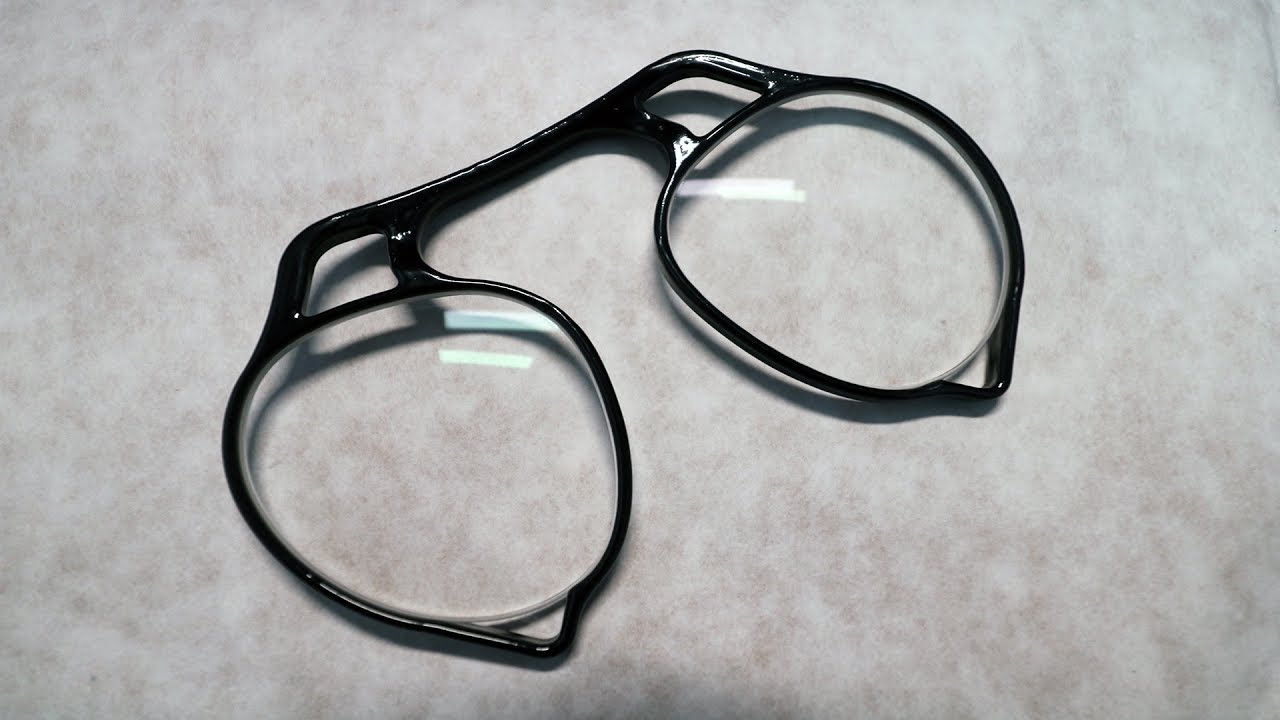
These custom VR glasses combine VR labs lenses with a 3D printed frame. This combo works great in the Oculus Rift and I would totally recommend it for those ...
It'll probably end up being a tad pricey, but it definitively looks like a great alternative to wearing glasses on the rift
marsh trail
Well if it's truly as good as it looks i'll probably go for a rift since my vision is relatively nearsighted (more than the average joe) and both me eyes have a different range
 surreal egret
has anyone Textured Xenoverse models here before
Im trying to texture the head with the head texture i setup but it wont cover the hair and some other areas of the head
Looks like this texture
the hair parts are at the top middle but for some reason they wont go where theyre supposed to, im not familiar with exactly how this works
the UV Map didnt define the hair properly or something
marsh trail
Ehh, have you tried selecting the hair in edit mode to see where it's at in the UVMap?
 austere drift
No
heady smelt
See that many people get this kind of view on the Cats Atlas Generator:
Im geting this
What to do ?, Yea im a noob at this
Anyone now a good tutorial, throw it at me.
surreal topaz
@heady smelt have you tried clicking "generate material list"?
Oh wait I see
The top screenshot is before you generate a material list
Just click the save button
heady smelt
No the top picture is what people usualy see
the second is what i get
@surreal topaz
heady smelt
I dont get the "Create Atlas button"
heady smelt
Did, and evrything turned pink on me
Got no idea if its the same, First time ever doing this so.
 vague hearth
@heady smelt if that pink on unity you have or shader error or not assigned materials
and create atlas button got renamed into save to
tired badger
New 50min long Youtube on Bone Weights and Merging with Dynamic settings included! Will add timestamps soon. https://youtu.be/I7sAPfGrHns

This Tutorial will show you how to merge bones effectively and bone weight to help with the new Ranking system. It will let dresses move with fully body and ...
 versed nest

 calm spade
shut sequoia
calm spade
shut sequoia

tired badger
@calm spade Feel free to Pin my Decimation Tutorial from last week too 😄 https://www.youtube.com/watch?v=rP4KboALEHE

This Tutorial will show you how to decimate Avatars down to the new poly/tri limit for VRchat. I will most liking make a more advanced tutorial doing things ...
tired badger
I plan on at least 1 a week.
No problem. I want to see better and better avatars over the course of the year and it's all I can do.
heady smelt
Right after i klick and save the Atlas this happens.
Have tryed the: FILE --> EXTERNAL DATA --> FIND MISSING FILE.
Does not work
shut sequoia
have you tried just assigning the texture to the material
heady smelt
I just followed a tutorial. Explain what to do

VERY IMPORTANT: VRChat just put out a patch on 12/20/2018 which removes the 20,000 poly limit and upped it to 70,000! This is a perfect poly limit as well, s...
😐
safe swift
@heady smelt if textures are gibberish names, then u need to before extraction in winrar ctrL+E > Japanese
and then extract
safe swift
are they png/jpg format?
also try using the matcombiner tab that's on the left, and not the tab from cats addon
im using the one on left and it works perfectly fine
vague hearth
@heady smelt combine via matcombiner panel by pressing Continue, and uncheck Compression and create
if you doesn't have right permissions compression tool not able to overwrite existed file and i think that file just erase
shut sequoia
they can't just reassign the texture?
heady smelt
@vague hearth Hmm, guess it worked
safe swift
@vague hearth when update with button to disable adding diffuse for all m aterials
vague hearth
@safe swift i need a time to feel myself free again, to start spending half of a day on this tool again :d
safe swift
❤
vague hearth
@safe swift maybe one day i'll look into blender's raw pixels data and try atlasing via blender without extra libraries. if that still work after blender 2.5
 tropic skiff
Does a hidden mesh in my avatar affect the game fps as well?
safe swift
😮
surreal topaz
@tropic skiff if the object or the mesh renderer component is disabled, then no
tropic skiff
if I untick this box, it will be fine :D? @surreal topaz 😊
surreal topaz
Yes
heady smelt
Other than performance does leaving the Toe bones on an avatar when I don't plan to link it harm anything?
marsh trail
You can end up tiptoeing at random when looking up/down depending on your height, but other than that, not much
You can leave the toe bones in though, as long as they're not assigned to the toes in the rig config you're good
heady smelt
Thank you for the info
shut lodge
After many long hours of confusion and starting fresh, I've made a UVmap for the various mouth shapes needed for this model, but from here, I am in need of a direction to figure out how to finish this up. Can anyone help?
 grave crystal
you want a mesh to wrap to each "mouth" shape. You then move them forward and backward with blend shapes to be visible or hidden in the model (I highly recommend SMALL movements to hide/reveal or it'll look really weird)
...wait why are you in optimization with this. This belongs in #3d-modeling or #avatar-rigging
shut lodge
Because I dont have permissions to post images in those channels?
grave crystal
post a LINK to an image. Don't just dump a question in an unrelated channel >.>
I still think they should just enable image embeds, or disable them here to prevent this
shut lodge
sorry, thanks for the help anyways (^_^;)
ancient crystal
i personally would just reshape the open mouth panel to make more intricate mouths
sweet mason
life hard
 brazen flame
and no warnings i might add
surreal topaz
Nice
sweet mason
why not show your avatar then
ancient crystal
irish
heady smelt
People act like getting a "Good" rating is impossible so getting the worst rating possible is justified.
marsh trail
It's not impossible, just need to have alot of compromises in your original avatar idea to accommodate with the currently stated "standards", which alot of people are not very fond of doing, as the slightest shift into a category automatically drops you in it
karmic condor
There are also some easy fixes such as deleting unused bones and combining materials to get under those limits
grim kiln
People are "dumb" so they don't want to do it with 1 character so that they can be in big groups without screwing all other players there, as they don't render themselves that much it does not matter for them unless they are in a mirror.
its a few hours of work for getting your character down to that limit, if its already made its all about combining the bones weights and small tweaks
You can just gradually work your way down the road
surreal topaz
Some limits are a little dumb, particle systems with disabled emission are also counted and they are counted HARD.
You can't have more than 6k total polys on a mesh particle system without being ranked very poor, but somehow 70k poly skinned mesh renderers are "Good".
marsh trail
Bounding box issues regarding markers also drop you right into the mud
surreal topaz
Yes
grim kiln
someone need to make a new marker system.
surreal topaz
Bounds calculation is broken anyway right now
Well snail marker is the best solution we have. The other solution is to gate snail behind a gesture so you need to use both hands to write.
marsh trail
Cloth can't have... what was it... 1000 tris?
grim kiln
i think you could just make it through transparent particles
and colour when you write
you dont need it to be too long lifetime
marsh trail
The thing about the markers is that they were set to a extremely far location in the map, so that you wouldn't constantly be drawing, that itself causes the bounding issue
grim kiln
when you release the button it goes to transparent and the spawn distance for the particle is very low.
and trail it between them
surreal topaz
Well, particles would work like Noenoe world pens kinda
Good looking trails on that are very hard, if not impossible
grim kiln
i think i could make one
surreal topaz
You can't have trails between two particles I think
You'd need them to be in motion
But doing it Noenoe world pen style and making it look good would put you back at very poor again because your max particles has to be 1000 or lower
marsh trail
And ye need quite a few particles to keep it consistent
surreal topaz
Particle trails are instant medium, but you can have a trail renderer while retaining excellent. ????
Two while remaining good
Particle collision puts you at medium even if the collision quality is lower, giving no incentive to optimize those either
marsh trail
Dynamic Bone = Bad -> Alternatively Cloth = 201 tris
grim kiln
ugh, time to barricade myself, ship is moving all over the place now...
marsh trail
I wish there was actually an alternative to DB, one that functioned far better in terms of both performance and possibly appearance, anybody got any ideas on such?
Nothing whitelisted of course, just curious about it
grim kiln
There has been a few takes but none is actually better or worse, as physic simulation is what it is
surreal topaz
The VRM plugin for Unity apparently does it pretty well
If they whitelisted that they would also take over the asian market in an instant, seems like a no-brainer
But
¯_(ツ)_/¯
grim kiln
VRM may have other issues in VRChat though, not that i know but who knows.
marsh trail
Well we won't ever know untill somebody tries it afterall
Also somethin' for y'all for your own projects, nothing like DB as it seems to not affect bones, but it can be used for your own little projects here and there if ye got any https://assetstore.unity.com/packages/tools/physics/bullet-physics-for-unity-62991
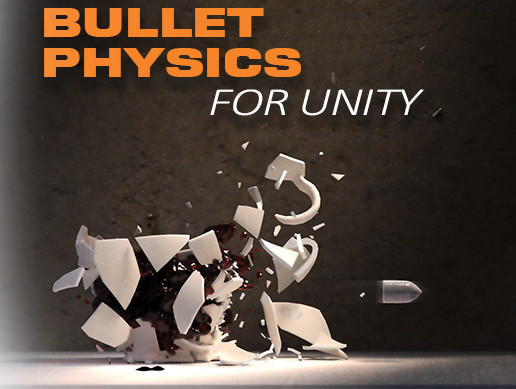
The high performance open source Bullet Physics library now available within Unity. Wanting more flexibility than I could get using PhysX, I started this Unity port of the open source BulletSharp project. Bullet Physics is compiled as a native plugin and accessed from unity s...
And it's completely free
amber hemlock
Medium is very reasonable without visual sacrifice, but you will need to know how texture atlas and bone merge. Not texture atlasing is inexcusable at this point, but bone merging does not have a nice Cats assist like everything else and requires an understanding of vert groups so it’s understandable if people resist it, blender can be scary.
amber hemlock
Guess I’ve been doing it manually for nothing.
heady smelt
I've barely started experimenting with CATs and that is a veeery useful feature even for custom models

 jovial grail
Where is your viewpoint
jovial grail

 hidden halo
it wont let me put the view point lower
in unity
can u dm me how do i go lower? cuz i have to sleep rn
so ill check tommorow
also when i spawn i fall trough the ground in a loop
like 10 time
jovial grail
Ask tomorrow, there might be other issues too
hidden halo
Ok
In the thing i had 2 warnings wich was something not that important cuz it only affect full body tracking and the other one was about lower arm rotation but am not on vr so. And the The over all quality or whatever is excellent
jovial grail
If you do stuff right with cats there should be no warnings
Just the fact that there are any warnings means something either hasn't been done right or the model itself has some issues that need fixing
hidden halo
yeah but how do i make lower arm first child of upper arm?
surreal topaz
You have a bone hierarchy like
hidden halo
idk anything in that stuff ;-;
ancient crystal
change the ordering of parenting drag one over the other
literally that simple
https://i.gyazo.com/1454e1273774c59ba8dbe65553ceadd4



 hidden halo
Yeah ik that... But that doesnt tell me which i have to change
jovial grail
Whatever is set to the lower arm slot in the avatar
ancient crystal
^^^^^
jovial grail
The rig where you set it to humanoid
hidden halo
Its named forearm
ancient crystal
yeah but how do i make lower arm first child of upper arm?
Parent Child 1 Child 2 Child 3...
surreal topaz
Then post more screenshots. Check both arms. Check the hands too.
hidden halo
so why does it give me that warning
Oh
Ok
Ill do tommorow
Also saw that the max size is 5.0, 6.0, 5.0 so that means huge af avatar have been made with a modded sdk right?
And ik that it isnt allowed
surreal topaz
Not necessarily, it could have been enabled later with an animation, or the mesh bounds still fall within the 5,6,5 limit.
But more importantly, avatar bounds calculation is completely busted right now
ancient crystal
it doesnt take much to bypass errors so it might as well be that
 jovial sentinel
hi can i get some help what and i doing wrong i had a new pc so i had redo my thing and well its not not let me do last step?
i been try to make work all day i even remade 2x thing i did some thing i forgot but still nope
karmic condor
remove the mesh colliders
jovial sentinel
how
karmic condor
np
amber hemlock
If my avatar contains disabled game objects that are not set up to ever be enabled in any way, will they be excluded from the build, or would it be a smaller file if i deleted them before upload?
i have no idea how smart unity engine is at building
marsh trail
Supposedly they'd still exist
Don't think unity takes in account weither or not an animation enables a gameobject but more so if it exists to begin with
safe swift
ye, they should still exist there
grave crystal
Can confirm they are not excluded from the build. If they are there they are included.
Removing unused things reduces file size as well, generally a good idea to remove something unused.
Or store it outside the avatar if you may use it later. Anything outside the avatar in the scene is not included.
 unique torrent
Hi there, I got a problem making visemes work in VRChat. I've created them in Blender, assigned them in Unity and removed the jaw bone. But when I talk the mouth doesn't open.
Can anyone please help me on that one? Not sure if this is the wrong section for it.
surreal topaz
@unique torrent did you assign a shape key in every slot?
unique torrent
Yes I did.
surreal topaz
In the avatar descriptor
Do you have any custom standing anims or custom sitting anims?
Like custom animation overrides (Gestures, Emotes)
unique torrent
I've removed them, set them to None
surreal topaz
Can you post screenshots of your avatar descriptor component?
As well as a screenshot of the relevant shape keys on your Body mesh
unique torrent
surreal topaz
Hmm, that all looks fine
Remember that if any gesture or emote override touches a viseme blend shape it'll break the lipsync
So try reuploading this and see if it works. If not, post screenshots of the Body mesh too
Since you seem to have "tongue out" in th
unique torrent
That was just a test, I've also tried with reassigning the correct one.
surreal topaz
Ah I see
 slim sable
hey can anyone help me with making an avatar i have no idea what im doing but if someone can do it for me for free i would appreciate it
 digital ferry
Hi, I got one problem. I'm trying to merge some bones of a character's coat, but they are missing in the list (refresh button does nothing). Only five of them seems to be working, the rest no.
A screenshot showing the problem. The list shows bone parenti (fail), but its the same as bone merging list
ancient crystal
?
instead of doing that
try to select them in layers
i.e. put the view front-facing in ortho
then select every odd layer
then press merge weights to parents above
digital ferry
Sorry, I don't understand how can I do what are you explaining
ancient crystal
press numpad 5
until everything looks flat
press numpad 1
use b to select specific layers in the bones
and press Merge Weights [To Parent]
 weary dew
I'm trying to upload an avatar and every time the feet are a couple of inches into the ground, anyone knows how to fix it?
marsh trail
Go into your rig configuration and lift your model up by the hips a bit, or re-align it in your 3d program of choice re-aligning the origin with it
weary dew
Thanks, I'll try that when I get home
unique torrent
Is it true that I need to bind finger bones in unity that the head spins with the backflip emote for example?
Currently the head stays in place where I am looking at.
safe swift
yes, you need 3 fingers on each hand - thumb, index and middle, dont need be weightpainted @unique torrent
unique torrent
Thank you very much!
unique torrent
@safe swift does that also count for the feet? When I move in VR the feet aren't moving, only when I run.
unique torrent
Do I need all 3 bones on each finger? Or is one enough?
safe swift
1 per finger
unique torrent
Still doesn't seem to work properly. They aren't weight painted as you said @safe swift.
safe swift
thumb, index and middle
unique torrent
Aaah I messed up that one.
Oh my god! You're my hero @safe swift, it worked perfectly!
Thank you so much!
amber hemlock
I have no idea why the finger requirement is there it seems very arbitrary
surreal topaz
Maybe some weird IK thing