#avatar-optimization
1 messages · Page 29 of 1
 amber hemlock
 sudden zodiac
Well those can't collide with anything
 surreal topaz
@amber hemlock leg colliders and hand colliders makes 4 already
amber hemlock
But to be fair I am not emotionally invested in this I don’t wear girls ¯_(ツ)_/¯
surreal topaz
Having one in your chest so the back hair doesn't clip through is another
Even on male models there's a lot of stuff you might need colliders for
I just put out a prefab that uses dynamic bone colliders to orient one game object towards another
sudden zodiac
Oh wait, you don't need colliders in the receiving bones, right?
surreal topaz
No
surreal topaz
You put the collider component on your hands for example, and then assign your hands in the "colliders" section of your dynamic bone component
sudden zodiac
Ok, then forget my boob complaint :D it's been too long
 shut sequoia
Hotox in serious need of anime boob touching
amber hemlock
You can increase a dynbone’s radius to catch more collider
No need for more collider
That way a single sized collider can effect different bones in different amounts
shut sequoia
I think they mean one per hand so you can do both
or touch other people's "ears" with both hands
 finite coral
my big need for colliders is funneling and creating resting places to hold laying bones. Everything slipping off the pill colliders is more collider parts for countering.
surreal topaz
That's why we need plane colliders tbh.
That would work pretty well for stopping back hair from clipping through your body for example
Right now it's just spheres sliding off of other spheres or capsules and it's just a mess.
amber hemlock
With a big enough sphere, you can approximate a plane. X)
surreal topaz
I tried the funnel system, but other than being laggy, it also made the bones slip through the colliders sometimes.
Oh yeah, I've seen people do that for ground collision.
finite coral
a challenge space has been colliders on the shoulders, to let gravity hair roll forward or back. For me works best with one bone on each shoulder, now im trying for a t-bar thats just a little wider to make the slipping stubbern
i had a skirt with a relatively fat pill colliders cover between the thighs and the space between the legs, it handled moving legs well around all the center skirt bones and prevented slip clipping. Now to be optimal, before becoming a weight painting genius, im trying to keep it one low and fat hip collider in that space.
 agile gust
your never going to stop the clipping though and its just a waste of performance trying to stop it.
finite coral
the clipping stops by buffering a wider radi between the bone point spheres and colliders. It needs that gap to help counter the past frame solution that pushed the bone to dangerously close to the collider
 tough warren
if you were really smart about weighting you could rig your entire skirt to one bone chain going down between your legs
but then it wouldn't work with colliders
i think best option for skirts if you want to avoid clipping is just limit the range of movement to an ammount that keeps it from clipping
 heady smelt
@surreal topaz how2atlas
surreal topaz
@heady smelt https://www.youtube.com/watch?v=h01fZH1eu0k
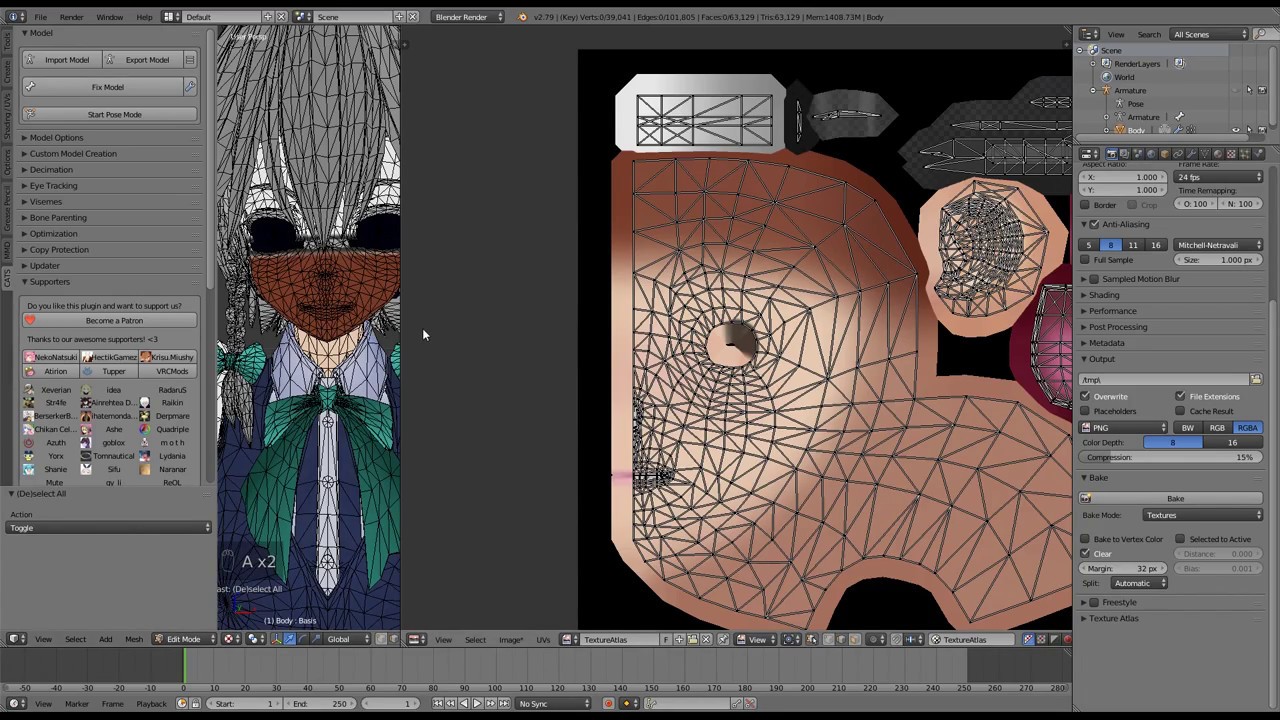
This is a relatively short video on manual texture atlasing in Blender, for use in VRChat. This video assumes basic knowledge of how to port a model into VRC...
I prefer manual, but the new automatic atlas tool does a great job most of the time.
heady smelt
I missed the old atlas tool. The newer one is weird and gives me issues for most models lmao
 safe swift
what..? old atlas tool is complete garbage and u can't edit textures afterwards
only issues that u can get is having textures as dds or tga's, which you convert to pngs and done
surreal topaz
The old automatic atlasing was pretty bad
safe swift
blender atlas is shit compared to shotas tool imo
surreal topaz
Pretty sure it wasn't initially meant for atlasing
It's just a "smart" UV unwrapping tool
Which Cats first lets unwrap the model, and then it triggers a texture bake
 distant forge
I think it handled some bad input models better though specifically because it's done as a bake (though i agree the output atlas was garbage). For example I think it worked in the situation where a material applied a color tint and also handled (albeit poorly, resolution-wise) repeating UVs (outside the range 0-1). shotariya requires UVs to be within 0-1
safe swift
most UV bound issues are solved by moving uv verts inside, which doesn't break anything rly, but some textures are stretched uv verts though, but that's quite rare from what I've seen
taking 30 secs to move uv verts is better than having an extra 1k texture that covers 1% of the texture
distant forge
I guess a repeating pattern can be fixed by adding more polys and having each poly go from 0-1 UV instead of having a single massive poly go from 0-16 UV
surreal topaz
The auto atlasing tool can already automatically fix UV's that are not in bounds
distant forge
so it's just the lazy mmd creators
surreal topaz
But if the bounds are larger than 1, then it can't
safe swift
it fixes UV's by adding extra texture, which u don't rly want
surreal topaz
Taking advantage of repeating UV's is not necessarily a bad thing
tough warren
@distant forge that's actually a real thing that people do for mobile games
 polar bolt
Hmm, any other(less known?) downsides to non-normalized UVs outside of atlassing? (Like a less know thing as fragment discarding disabling early-z optimisations)
surreal topaz
I'm not sure what happens when the texture is set to clamp rather than repeat
polar bolt
those texels will have clamped uvs - will show the border pixels for the rest of the face
(tile texture and set that to see youself)
Useful for preventing avatar atlas borders bleeding on mipmaps or preventing seams on 6-faced skyboxes! (usually seen on noses when face texture is at border or generally high contrast borders)
 wheat narwhal
if I add more dancers in one avatar will it also count in the dynmic bone?
surreal topaz
Yes
For public world purposes at least
Performance-wise it will only matter when they're active. My advice is don't do it
wheat narwhal
ok
wut if only one dancers are showing but not the main avatar?
and both two are the same avatar
surreal topaz
The bot counts all dynamic bones, including disabled ones.
wheat narwhal
so if I disable all the dynamic bone of the dancers then it will be ok?
surreal topaz
If you remove the dynamic bone components, yes.
wheat narwhal
ok thx
 marsh trail
If it's for a public world every dynamic bone weither disabled or not will be accounted for, for any other avatars in relation to performance hits, only if they're enabled will such have an effect, so any disabled ones will be near null and void
wheat narwhal
how about adding emote and gesture?
marsh trail
What do you mean?
marsh trail
Is this going to be an avatar that will be in an avatar world?
wheat narwhal
yep
marsh trail
Then any dynamic bones will be accounted for
wheat narwhal
oh damn
marsh trail
Emotes and Gestures don't have anything to do with it
wheat narwhal
then wuts the point to make gestures 
surreal topaz
...
marsh trail
Trigger animations, objects etc
surreal topaz
You can use emotes and gestures
There is a limit to how many dynamic bones are on your avatar
wheat narwhal
just count on every single avatar?
marsh trail
Each and every single one in the world, not all of them as a whole
surreal topaz
I think it's 50 transforms per avatar
wheat narwhal
seperate avatar(just like emote and gesture) also count together?
marsh trail
Yes, anything part of the same avatar will count towards the limit, no matter what you do
heady smelt
not really, but good luck
wheat narwhal
then wut is the point of making face gesture
marsh trail
What
heady smelt
dynbone =/= face gesture
marsh trail
Faces use shapekeys, not dynamic bones
wheat narwhal
so if I remove the dynmic bone of the gesture avatar then its ok
heady smelt
yes
wheat narwhal
will it affect the physics bone?
marsh trail
What do you mean with physics bone...?
marsh trail
If you remove it, it doesn't exist, so the system won't count it
if you disabled it, the system will still count it and it will only work when enabled
wheat narwhal
so if I remove it in gestures then I cant see my dnmic bone moving again?
even if I add it in main avatar?
marsh trail
That's not what i said...
Gestures don't matter
Emotes don't matter
If the dynamic bone script exists in the avatar any bones it interacts with will be counted, so removing that is what i meant by removing it
wheat narwhal

ok it takes a bit more time for me to understand but thank you anyways xD
not quite good at english xD
marsh trail
That's alright
wheat narwhal
I will just add dynimc bones on the main avatars but not oter gesture and emote avatar
 misty crane
Hey, do you guys join your meshes together when exporting to unity?
 candid sedge
b4 with cntl j or cats
 calm spade
@misty crane Yes, please do !
candid sedge
only take them apart when working on them in blender to make it a bit faster or not to break the shape keys but always put back together
misty crane
alright, thanks
surreal topaz
@amber hemlock that's exactly what it does. I think it doesn't make much difference
It reduces the total amount of game objects, but makes it so you can only animate humanoid properties and nothing else.
 sudden jewel
It doesn't really provide any kind of useful improvements AFAIK. You can leave it unchecked so you can keep your rig for attachments and etc.
 cursive matrix
https://youtu.be/n-oZa4Fb12U?t=1605
If you are curious what optimize game objects actually does, watch this talk starting at the linked time

This talk from Unity's Enterprise Support team focuses on real-world performance problems, analyzes their causes and discusses possible solutions to common p...
@amber hemlock
the cost of having a lot of transforms was apparently reduced in 5.6, but he still talks about multithreading benefits from using that optimize option.
really it can't do much harm unless you find out you actually do need your left index finger bone for something later on
I think your time would probably be spent better optimizing things like material count and dynamic bone counts though
amber hemlock
Yeah I'm already down to 1 material and 0 dynbones heh 😄 ...
Just gotta... get that tri count down. to sane levels
 safe kayak
Whats the best and quickeat way to decimate a avatar? In unity or blender
I had the casual link model from deviant art but it came to roughly 115000 polygons
XD
 sweet mason
just use another model or something else omg.
safe kayak
One avatar i want but it might have high polygons is delsin rowe from infamous second son
 azure berry
or seperate its meshes in blender find any hidden meshes and delete them, and then decimate
safe kayak
I did have a tool for decimating avatars but i reinstalled my pc
So i got the personal files just not the app
:/
I got to redownload it later tonight
 smoky lantern
Yeah, there's a joke about game rips being low poly... if you get rid of all the invisible meshes they come with. I have a model from Dissidia NT that's over 100k after removing all the nonessential meshes. 😂
shut sequoia
some of the normal maps game models come with 🤤
surreal topaz
Nintendo models in particular are always very low poly
Models for the Switch have excellent normal maps too
 silent slate
I have a nice result anyway with my model
but i tried to use eye tracking (from cat options) but seem to add nothing
surreal topaz
You need a specific bone hierarchy and setup to use eye tracking
The hierarchy in Unity has to be named exactly Armature->Hips->Spine->Chest->Neck->Head->LeftEye/RightEye. You need to have eye bones assigned in the humanoid rig configuration. You must have a mesh called "Body", and this mesh must have at least 4 shape keys.
@silent slate
heady smelt
no it's not
sudden jewel
Of course not, someone spent their time writing it 😛
surreal topaz
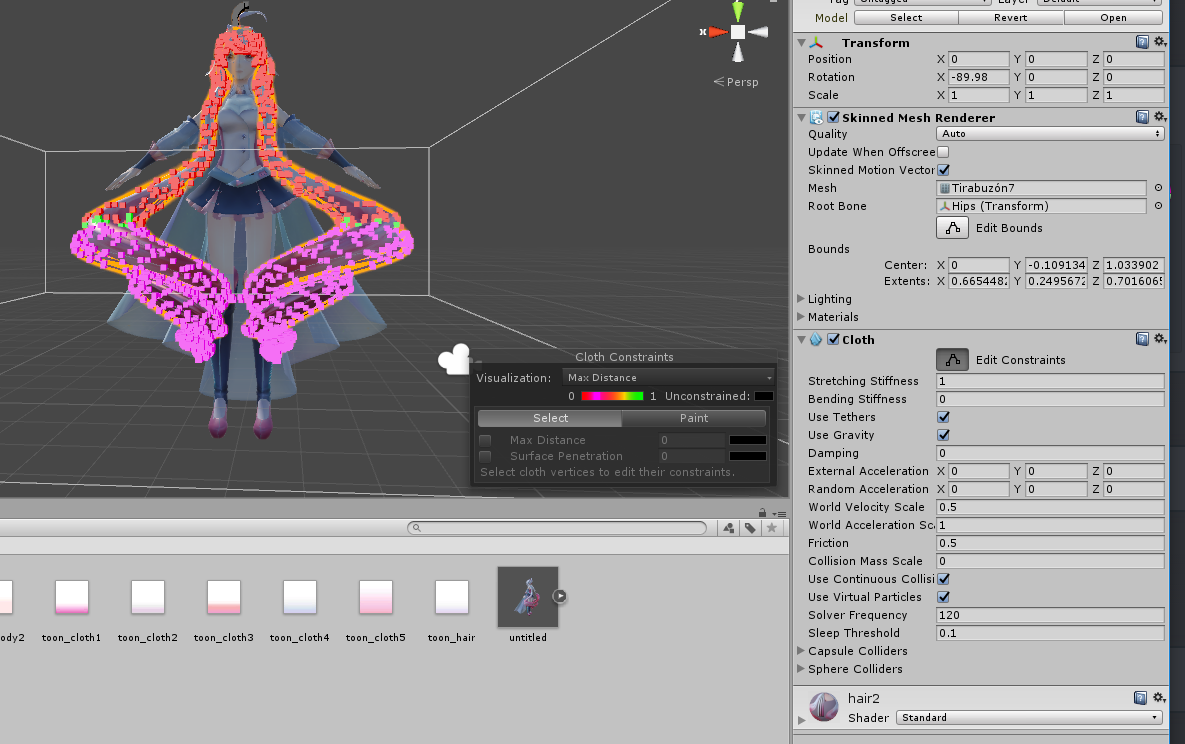
Cloth is wonky for hair
sudden jewel
Do not use cloth for hair 
surreal topaz
There's quite a few good free assets though
sudden jewel
very very bad idea
surreal topaz
Dynamic bone is just not one of those free assets
It's been worth the money for me so far.
silent slate
 sudden jewel
There is no way to physics-animate that hair and have it work in an optimized way.
sudden jewel
You would have to buy DB. The cost is on the Store page. However ,with hair that long, you probably have a TON of bones.
surreal topaz
No current way to animate that hair cheaply
silent slate
not convenient
sudden jewel
I would really strongly encourage looking at our optimization docs (pinned in here) for techniques on how to lower bone count.
sudden jewel
Optimization isn't convenient for you, but its convenient for the CPU cycles of everyone thats in the same room as you
otherwise they'll probably just block your avatar 🤔
surreal topaz
With smart bone placement you can get that hair working nicely with very few bones tbh
sudden jewel
Rokk is probably right, it'll take some finagling and maybe some creative solutions
I prefer my lazy solution of "don't use DB"
🙃
heady smelt
just buy a better PC 🤷
surreal topaz
That's also an option, but that would make some of my avatars look quite a bit worse
surreal topaz
It's something I did on some of my public avatars though
Yes
Oh yeah, you're right. Dynamic Bone is on sale right now.
Muscle Animation Editor too, which is an addon I can heavily recommend for overriding finger gestures or making idle poses.
sudden jewel
Yeah, MAE is probably the asset I got the most out of
that and Bakery, but that's for worlds
(Bakery is so good)
surreal topaz
I'd probably use bakery if I made proper worlds lol
Enlighten does the job well enough for my simple worlds
sudden jewel
making worlds is pretty fun tbh, I'm just bad with creating my own assets so I tend to troll around and smash stuff together
surreal topaz
Same
 karmic condor
I got bakery on sale and I have yet to use it properly. Just haven’t invested the time to learn it yet.
silent slate
uff about eyes i dont know which damn eye where is
or the name
is all in japanese
i have also to remove the jaw right?
silent slate
nope was from mmd

Update: arrangement of some bones, more bones and arrangement of the bones names. DL: bowlroll.net/file/89222 Pass: vocaloidmaikayoistyle ~~~~~~~~~~~~ ♪■MAIKA YoiSty...
sudden jewel
Did you use Cats to set it up for VRChat?
silent slate
yeah used cat
sudden jewel
You didn't translate shapekeys/bones/etc?
Please tell me you at least merged meshes and created an atlas. D:
You are in the optimization channel, after all.
sudden jewel
I'm personally more concerned with material/mesh/DB count than polygon count
silent slate
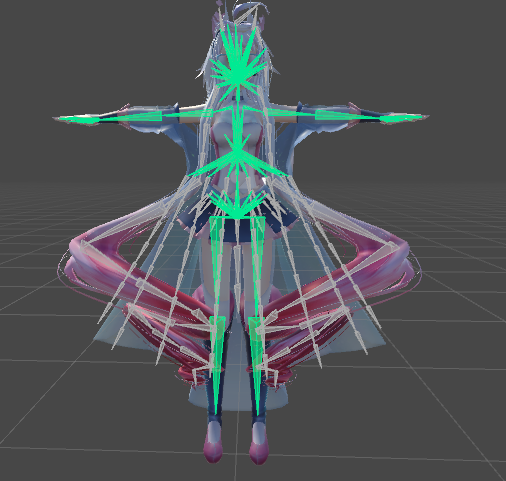
i just noticed the hairs got bones
 jovial grail
That's usually the case
MMD comes with rigid bodies so everything wiggles around in it
silent slate
 karmic condor
Looks like you will want to merge some bones
silent slate
the head ones?
jovial grail
Everything that you don't want to use dynamic bones on can be merged
But you should probably make a new save before merging bones because you can't revert it in case you change your mind later
In blender
All the hair bones can be merged to head if you don't need DBs
jovial grail
In cats there's a merge bones (or mix weights, I forgot) button that deletes merges the selected bone into the parent, so you just select the hair bones and mix them and it will move the weights to the head bone because that's what they're connected to
Most mmd models come with glasses and cat ears. They're usually "activated" through blendshapes, which you can mess around with in the skinned mesh renderer, but some of them blendshapes change the texture I guess. I don't think unity supports that so the cat ears are visible without the blendshape being active
Just delete all you don't need in blender
You can activate the blendshapes in animations and stuff

 heady smelt
POG
 verbal bobcat

heady smelt

verbal bobcat
nice name @heady smelt
heady smelt
thanks @verbal bobcat
 golden nova
i have problem in sdk unity
@calm spade @sudden jewel @heady smelt
sudden jewel
Please don't ping admins for non-emergency issues. #rules 23.
If you require support with the Unity SDK, please check out #vrchat-support 's section on the SDK.
@golden nova
 pine flame
I’m not ratting anyone out in particular but it still seems there’s “knowledge” being spread out there that “sacrificing performance” is an ok choice to make of the entire population who play this game, an example of this today being that people should subdivide their dynamic cloth meshes to increase polycount
agile gust
well it depends. cloth is usually used by more experienced makers of models who will have optimised the avatar massively and even with cloth is 9/10 times vastly more performance friendly than 99% of the generic models you see people using.
surreal topaz
Cloth has to be used very carefully
Because it will lag people's games if you have too many polys, and that limit is reached very quickly
agile gust
oh for sure no doubt
safe swift
good notes for cloth is to change solver frequency to 10 instead of 120, also so it doesn't get stuck - use 0.09~ when painting ones that are not at 0
remove tethers and gravity, use -y external acceleration from -3 to -7~, and world velocity scale/acceleration 0.1 - 0.2~
 distant forge
Ooh Yuumi those tips all look really useful! I've been more interested in cloth again after seeing how bad the performance of dynbone is.
surreal topaz
Cloth isn't too great either, I think you have to stay below 8000 polys for it not to insta lag people
distant forge
Of course like hundreds of polys
 velvet spoke
Cloth is literally worse on most avis ngl
heady smelt
5k*
velvet spoke
But as rokk said, if you use it carefully its a nice tool
safe swift
http://prntscr.com/lqsvlw top is 0 rest are 0.09

and with solver frequency at 10 instead of 120 it doesn't look any different
also this way the cloth doesn't fly up and get stuck behind colliders
surreal topaz
Yeah, but you really don't want to approach the point where you start dropping @heady smelt
Like, if a single avatar makes you drop frames it's incredibly over the limit already
heady smelt
don't go above 1k and everyone will be fine
surreal topaz
Yep
 empty pier
Even 1k is probably too much, when it comes to performance you really need to think about whether whatever you're doing will perform well if everyone in the instance did it too.
safe swift
suggested vert count by vrc is 200, is it rlly that bad if it goes above 500?
heady smelt
if there is 20 people yeah
but it's going to lag anyway with 20 epople in the same room
empty pier
Just because it's going to lag anyways is not an excuse to make it lag more.
agile gust
to be fair you could have 20 of the default afk avatar and 99% of worlds would still lag and end of day its better than most people's who dont realise how bad dynamic bones and colliders are either and so just dynamic bone on their hair and skirt of like 300 bones with 50 colliders cause they dont want it to "clip"
safe swift
or when ppl do commissions and the avatar is made of colliders https://cdn.discordapp.com/attachments/459913635989553169/519500891682897930/unknown.png
 empty pier
@agile gust Other people's ignorance is not an excuse.
agile gust
didnt say it was
empty pier
Some people might have taken it that way.
heady smelt
why so many collider tho ?
 stray river
because they creator doesn't know what optimization is apparently
heady smelt
or doesnt care
distant forge
(Re. Cloth) 500 verts is still less overhead than the recommended 50 dynbones / up to 2 dyn colliders in my testing, so I wouldn't say to avoid it if it allows you to do away with dynbones
safe swift
i personally will never use dynamic bones for skirt, unless it's layered, but even then I'll try to make it 1 layer and go with cloth
stray river
Best option for skirts is to make 2 custom dynamic bones parented to the leg bones. Weight paint each side of the skirt to these bones and you should have a jiggly, never-clipping skirt at the cost of 2 DYN BONES. More people need to hear this tbh
heady smelt
ONLY ping tupper in an emergency like.. real deal what he suggested.. like my map for example being that im on the sdk and suffering waiting for the live release
then its an issue! 😄
safe swift
cloth looks million times better, and I try to keep it at 200-500 limit for skirt, especially if you're in fbt
how do people even manage this? http://prntscr.com/lqtw2t

it just seems like complete headache
candid sedge
that feels like a lot of work getting it that bad
shut sequoia
i've never even seen a model with that many materials
candid sedge
how long would it even take to make something like that
sweet mason
its mmd. so to have the more realistic physic it need a lots of collider and bone that s why
shut sequoia
I mean that's one option
agile gust
thaat isnt bones though Franada that is materials
bones could understand cause of how MMD makes use of them but materials its like wtf did they seperate everything as its own material
 vestal haven
They're all masochists purposely doing it so this chat could bash them and get high.
heady smelt
Is specular supposed to cause bloom effects in some worlds
 visual tinsel
I believe so, if the threshold is low enough.
heady smelt
Zzzzzz
Disable the realtime box?? Would that fix the weird flashing
On standard specular
visual tinsel
Wait, why not just use normal standard?
surreal topaz
If you get blinding flashes, it's probably not just because of the specular
It might be weird geometry
visual tinsel
MVP VIP, do you know what NaN looks like?
polar bolt
Scruffy, funnily, I had flickering problem originating from UV and had to clamp them in fragment shader, nointerpolate did not help
silent slate
somesone can tell me how add animated-track eyes with a imported model in blender? (using cat)
i got this
i have to configure other stuff here?
shut sequoia
I usually change the Blink Left to Wink 2 and then Right to Wink 2 Right
then hit create
silent slate
how?
surreal topaz
Yes, just hit All
silent slate
woah is pretty cool
much better
is still a ice
maybe eyes bones are not correct?
ah i have to move the bars
XD
and how i remove the bunny ears bone?
visual tinsel
@polar bolt what in the heckin, that's super weird.
polar bolt
Yup, random dots triggering bloom at extreme angles. Was multiplying the result color with pow(1-saturate(i.uv.y), 3). Slapped saturate to clamp and make it barely noticeable
silent slate
ok i have another issue now with that mmd model
basically if i export like this it will have all parts merged (only 2 parts)
and i can't work on these
instead using multipart model, it will break the eye stuff and thing
heady smelt
you mean that you have 2 meshes in unity ?
heady smelt
is there a reason why you don't merge into only 1 ?
heady smelt
then you need to merge everything and only separate the cape
silent slate
is possible to do it with atlas?
heady smelt
the "normal" mesh should be called "Body" if you want eye tracking to work
yes
merge everything
go into edit mode on the mesh, select the cape > p > separate by selection
silent slate
so i create the atlas first right?
silent slate
how i go into edit mode on mesh?
heady smelt
press tab or use the menu at the bottom left
silent slate
yeah that is for bone edit
heady smelt
also for mesh
silent slate
silent slate
under vertex groups?
heady smelt

Blender beginner tutorial showing you how to use the edit mode to change the shape of any object. We'll use it to create the donut icing :) Watch Part 2: htt...
 tired badger
In your guys opinion what optimization Tutorial would be best made next for the recent changes?
heady smelt
well, what do we currently have ?
Bone reduction
mesh reduction
atlasing
Decimation
Anything else i probably forgot ?
karmic condor
compressing textures maybe.
I made one on optimizing audio not too long ago.
heady smelt
compressing in unity or something else entirely ?
tired badger
Sadly I dunno if i recommend compressing textures anymore as every unity version uses a different compression library meaning things aren't backwards compatible. Which sucks cause i used crunch compression a ton.
karmic condor
worlds tend to need things more separated so it's really easy to have file size bloated by them.
There are more options than just crunch compression, but yes that is a big pita.
heady smelt
a video about crunch compression is a bit overkill ? isnt it just one option to tick and choose how much to compress ?
karmic condor
pretty much, it is really overkill. it would be better left in a video covering everything.
heady smelt
well, we can always ask to add crunch compression in the official documentation
karmic condor
unless it goes into advanced settings.
heady smelt
just put a warning about backward compatibility
tired badger
Well if i made it a video about Atlasing correctly, UV mapping wasted textures to reduce atlas size and then crunch compression etc.
That would make more sends
sense*
tired badger
like some models come with "Here is a 256x256 solid color"
and you find 5 of those in the model...
i just UV map those... weld the verts onto that same color in another texture already in use.
karmic condor
I should probably learn how crossfade audio in audacity so I can teach how to make short but good audio loops.
I use reaper for all that, but audacity is way more popular.
heady smelt
those "texture" which is only one solid color
can't you make them just one pixel big on the whole atlas ?
karmic condor
technically yes
but the atlas has to be the same size to the power of two resolution it will render at or it doesn't render properly
better to make it slightly bigger
I have tried and it almost never works for me.
amber hemlock
I would really appreciate a tutorial on UV packing to make textures smaller . I’m already atlases but the auto atlas has a ton of empty space
surreal topaz
Manual atlasing gives you very fine grained control over that
I think that's your only option besides the auto atlas
karmic condor
Auto atlas is doomed when you try to atlas a avatar with two body textures, 5 face textures, and etc all 1k textures or larger
surreal topaz
Yeah, those damn TDA body textures are like 2k a piece
And then the original author wants to add a tattoo to just one side of the arm so they make an entirely new body texture
amber hemlock
My final atlas is like 4K by 4K but mostly unused pixels
I know how to slide islands around but I don’t know how to make it move that part of the texture
It just messes up the model
surreal topaz
I don't think you can actually do that unless you're manually atlasing and then rebaking
amber hemlock
I need the pixels to move too not just the islands
That’s what I mean I guess
When I click bake everything turns white
surreal topaz
Blender internal or cycles while rendering?
I think you also need a second UV map to properly bake
With the camera icon ticked on the first one
amber hemlock
Yeah I’ll probably read up a tutorial I’ve been sort of just tripping my way around blender optimization so far
 lean kindle
yeah you need a second UV map, the camera being on there basically tells blender to render that on the currently selected UV map when you bake
 summer jacinth
There's a tool I found that compresses PNGs with minimal quality loss.
This is an external tool that simply lowers filesize for textures, it's not something done within unity.
velvet spoke
Just crunch compress your textures in unity on import
surreal topaz
Compressing the PNG itself won't do anything
It gets converted to various DDS formats no matter what the source is, in which case crunch is your best bet
summer jacinth
Hm. I see.
surreal topaz
Manually converting it to DDS yourself would be the best option, but for some reason that makes the textures very washed out. Annoying.
summer jacinth
I know a plugin for Paint.NET that allows exporting in the formats unity uses (the built in dds format saver doesn't support a lot of the important formats) and it exports them really nicely.
I was using it for No Man's Sky because a mod that had redone a texture for the icon used in Carbon left a lot of noise behind almost like jpeg compression noise, so I manually recreated the image and exported it with that plugin. The quality was very high. Let me go track it down real quick.
 worn lantern
Wait
summer jacinth
According to the author of the plugin, "This plugin only adds support for the new formats introduced with DirectX 10."
velvet spoke
Png to dds
worn lantern
Oh
summer jacinth
This is a plugin for an image editor so you can convert, yes.
worn lantern
Well then there's nothing that can be done for what I want then
worn lantern
Make a DDS texture exported from a game not look crunchy
velvet spoke
For high Quality
surreal topaz
@summer jacinth I've been using that plugin
But that's exactly the thing I was talking about
summer jacinth
This can import DDS and export PNG if you want.
That's what I did to rip DDS files too.
worn lantern
I mean I have a tool for that already
surreal topaz
I can get a 20 MB atlas down to 1.5 MB by manually turning it into DXT1, but
worn lantern
I was just wondering if it'll remove crunch or not
summer jacinth
I'm uncertain. Can you DM me the file?
worn lantern
DDS in Unity looks super washed out yea
velvet spoke
Rokk, what settings do you use for crunch, i had like 2-3 times where filesize didnt change at all
After crunching
worn lantern
It's like if you left it in the washer too long
Take the Braixen in Zarniwoop's avatar dungeon for example
summer jacinth
Yeah with this plugin I've been able to export DDS files from images I created in the editor without any quality loss all while retaining a very small filesize.
worn lantern
He used DDS instead of PNG
surreal topaz
@velvet spoke quality 100
worn lantern
And it looks super washed bc of it
velvet spoke
Not a cubemap
surreal topaz
Oh yeah, and crunch doesn't have much effect (or at all) if you leave compression at high quality
Set to medium or lower
summer jacinth
Send me that file, Eevee. I'll see what I can do with that plugin to convert it to PNG.
summer jacinth
I'll send two images for the quality I was able to retain. This is a 64x image and I left the DDS on maximum compression. Here's the image I created in the editor:
And the exported DDS, note the minimal quality loss.
This file is 4.1KB
marsh trail
Not sure if DXT1A is compatible in unity, unless you mean a different DDS compression
sudden jewel
Please don't do this, it makes my robots angry. 
 fierce swan
I would imagine that would be annoying
sudden jewel
I can only sit and watch the fleet recurse for so long before they start throwing fits.
fierce swan
R.I.P time 😦
shut sequoia
"Sorry Aniki" damn
What's the "Please remove commissions advertisement." about? Are they not allowed at all, or are they not supposed to display prices?
karmic condor
What I want to know is how people are getting so many skinned mesh renderers?
worn lantern
When it gets into the high numbers, like 37 or w/e
That's when I start to get worried
Like at that point you either have a very poorly made MMD model, a game rip
Or you separated them on purpose
karmic condor
Lots of questions
None of the answers make me feel good
Anyway, at least this is being curated now
 vague hearth
@karmic condor disabled meshes doesn't count on upload
animations can change enabled state 🤔
 visual scroll
what's actual cloth limitations for public avatars?
it says "do not apply it to meshes that have greater than 200 or so vertices" in optimization tips, but is it actual vertices, not faces?
distant forge
cloth works on vertices, so that's why it's written that way. Cloth for small numbers of vertices (I would say anything in the hundreds range) is a mile better than most dynamic bone setups perf wise.
 arctic vortex
Is there a list of what makes your avatar optimized? I'm just learning how to make avatars bot not sure what makes it optimized. I know about the poly limit and dynamic bones but what else?
I know there is a way to make one texture for an entire model but forgot the term for it. It makes it so you don't have a bunch of materials.
 hollow cave
Do you want your avatar to be efficient and be loved by everyone because of all the frames you're saving them? Follow these tips and you should be good! Any recommended numbers or limits in this document are subject to change at any time. Although some of the descriptions pr...
jovial grail
There's a bunch of stuff that you can optimize. Material count is one. You want to combine your materials into one big atlas and have one material for it, unless you need to use different shaders then you can split it into a few atlases per shader.
Bone count is another, you want to merge all bones that you don't need to make dynamic and don't bend your mesh into parent bones (like hair bones into head if you don't want to make hair dynamic)
You're aiming to reduce draw calls, and each different material and each different mesh is a separate draw call. You also want to reduce the amount of heavy calculations your cpu needs to do every frame, like dynamic bones and expensive shaders
velvet spoke
@visual scroll Actual verts, as those are the ones that you configure in the cloth component.
visual scroll
i got that after Lyuma's answer, but is 200 exact limit for avatars in public worlds? most of my skirts around 300-400
also i wonder if count of colliders matter
velvet spoke
it says keep them at 200 so having double the amount will most likely get you declined.
visual scroll
i mean its a tips not actual rules tho
surreal topaz
Cloth polys don't seem to have a hard rule just yet
Or maybe they do and I just don't know
I haven't seen a world get denied or even warned for high poly cloth
Optimization is easy enough in theory. There's only a few things to worry about
And all of those things are covered by the optimization guide
shut sequoia
I don't think it's rules, i haven't seen a world declined because their cloth was over 200
arctic vortex
Thanks for the help!
surreal topaz
That works pretty well if the skirt doesn't have too many bones
That works well on those types of skirts, but unfortunately not very well on longer dresses for example
Depending on how they work
safe swift
i don't believe they check for cloth poly count, unless it's super high (but even then I doubt so), and I can tell you for sure that having cloth with more than 200 doesn't get u denied or even mentioned about it
amber hemlock
“Please do not nest unoptimized avatars inside multiple levels of portals.” Tupper you should have your bots detect this and report it as the reason for failure to pass. I have a feeling this is going to be a common thing people try to do.
surreal topaz
I'm pretty sure this isn't an issue considering the bot seems to already check portals
It's not really an issue as long as the avatars inside the portals are optimized too, right?
amber hemlock
Yeah they are just trying to hide them hoping the bots only check so deep
worn lantern
I can imagine 50 portals and then WOOPS is hiding at the end
surreal topaz
Hahaha
amber hemlock
What if we make like a giant circle like 90’s internet web rings
amber hemlock
Pre-google only way to get discovered
 austere torrent
Where can I get Dynamic Bones? I'm sick of using Cloth
austere torrent
Ooh okay
sudden jewel
@amber hemlock I'm building functionality that will automatically crawl and stop at a certain depth (and ignore duplicates).
However if you have an avatar world that does that even with depth 1, you'll probably fail because that's sneaky and not what avatar worlds are for.
shut sequoia
The program is actually just a bunch of little TupBots going world to world and playing dressup with the avatars while grading them along the way.
candid sedge
amazing
sudden jewel
essentially accurate
surreal topaz
It's like when you go to a public avatar world and just start judging people's avatars
shut sequoia
they're like people who go into comic shops, complain and judge the comics, then dont buy anything
surreal topaz
Uh oh. Did the avatar performance check bot even run today and yesterday?
I'm seeing way too many avatar worlds with literally no comments, no comments about passing perf checks either.
shut sequoia
i dont really see a reason to say it passed, being publicized is evidence enough of that. maybe whoever jsut stopped listing it
the eyes had 3 per eye layered on on top of the other, what is this....
 amber otter
Seems like a cool bot. What happens if the avatars have to be spawned in via a trigger in the world of some sort? Can the bot still find em
heady smelt
the bot probably just looks at the hierarchy, it doesn't really walk around
amber otter
Yeah was just wondering if it can find them still tho if portals can skew it I figured using triggers could be as bad or worse
heady smelt
it's not too hard to have the bot check for that too though
heady smelt
Hey, I never used weightpaint before, any help....? Where should I start to weightpaint the ears, also how much has to be used (how much has to be sprayed on the same spot)
candid sedge
it basically just applies to verts and the color of the weight paint determines how much control a vertex group has over that vert compared to another vertex group (groups parent to bones with same name so Head and Head pair need caps and all) starting from purple no linked vertex group to bone blue<green<yellow<orange<red but mostly you will just use 100% or red
so for that you would just make a bone for the left and right ear and paint the whole ear to that bone all red or do two bones and half the ear for each one
@heady smelt

so something like that is normal depending on what you want
heady smelt
Thank You @candid sedge 
 dark storm
the blur brush is fun to get a nice gradient if you need it
heady smelt
@candid sedge Oh and I got a another problem. For some reason my mouth starts moving when I walk, or look down and up. Also weight paint issue? Or is it a problem with the shape keys?
heady smelt
Or is it a problem with the shape keys?
candid sedge
mind moving to the channel i linked?
heady smelt
@heady smelt pmed you
sudden jewel
@surreal topaz World reviews are done in two passes. Robot pass, human pass.
Hence why we include clauses that state that if a world is marked as public, that isn't the final call until the world is actually public.
for the case of "a human has reviewed this, but a bot hasn't looked yet"
 atomic lava
Yo. I have an heavy issue with my avatar. As it uses multiple meshes, for animations, the clothing layer bugs out sometimes and lets my character go "nude" for a split second in some viewing directions (Without the clothing for a split second) I even alread put "update when offscreen on"
is there anything else i have to do?
candid sedge
might just wanna remove the "newd" part of the mesh anyways
atomic lava
it is my dude, still, it seems like its half nude
http://puu.sh/CedLj/9808dee9e6.jpg In unity, it doesnt go invisible, but in vrchat ,everyone tells me it does

its annoying, i rly wanna fix it >w>
sweet mason
why its a separed mesh to begin with
this what happen when you have multiple mesh sometime on ceeten angle view by the player
surreal topaz
@atomic lava update while offscreen might be forced off for good reason. Merge your meshes...
Do a material swap if you must
surreal topaz
Only in mirrors, locally
distant forge
Only reason to have them separate in this case is cloth. I see you have a disabled cloth component but I think cloth can mess with the bounds even with update offscreen unchecked
atomic lava
mh ok, ill delete the cloth element and try to reupload, ty
if i merge the meshes together, id have to redo all the dynamic bones and stuff again >w>
shut sequoia
yeah
this is a useful tool

GitHub
A tool to speed up setting up VRChat avatars in Unity - rurre/PumkinsAvatarTools
distant forge
Try unchecking update while offscreen and manually make the bounds the same or bigger than your body to make sure the clothes are always visible when the body is visible.
Another thing to watch out when using separate meshes is don't use anything other than opaque or cutout shaders. For transparent/fade, the render order is not well defined due to the fallback system. There were some...interesting consequences for some of my old avatars (using fade/transparent) after the safety system was released.
 thorn lichen
anyone know how to set automatic weights for a mesh? I have breast bones and a breast mesh and I'm trying to have it automatically do the weights based on distance to the specific bone
Go in pose mode and select the bone that you want to weight paint.
Then select your mesh and switch into Weight paint mode.
Press W and then you choose "assign automatic from bones"
found it
misty crane
can someone tell me the best export settings for .FBX with animations?
sweet mason
its should export normally whatever you do. no ?
misty crane
it should, but apparently not with animations made in blender
heady smelt
is the cats blender tool atlas broken?
its telling me the material combiner isnt installed
shut sequoia
is the material combiner installed? lol
heady smelt
ahh you gotta run blender in admin mode to use the third party addon
heady smelt
I have one avatar i texture atlas a while back which is the one i use at parties @heady smelt
vague hearth
@heady smelt there is an update for material combiner, you need to run blender as administrator before the installation to make everything work, and you need to update cats from the last version to the development to make it work in cats too
if you want to use old version of the material combiner you can download it there https://github.com/Grim-es/material-combiner-addon/releases/tag/1.1.6.3 this version will also not popup in cats, so use Shotariya panel on the left side

GitHub
Blender addon for material combining, uv bounds fixing - Grim-es/material-combiner-addon
heady smelt
Thx @vague hearth i actually installed the combiner after noticing you had to be in admin mode and it worked but thx for this, its super useful
vague hearth
@heady smelt 😉
i'm trying to find a solution to run it without admin rights, this thing is needed to proper install image library, in old version i do it integrated but because of this usually some formats like .dds and .tga start to not work
heady smelt
Im so bad with pc, its all new to me i just got my gaming pc this year, while i was working on the avatar last night i asked my friend how do i run a program in administrator and he just laughed for about 5 min  @vague hearth
atomic lava
@distant forge thx, ill try that out uwu
 dense crow
These avatar limits for public worlds are really getting to me. I have no idea how to keep my avatar looking the way i want without removing materials and ruining the look of her. Im not even at the part about seeing how limited she is gonna be with Dynamic bones
surreal topaz
@dense crow what are you having issues with exactly?
Do you need more than 10 different shaders on your avatar at all times?
Because textures can always be combined, whether through manual atlasing or using shotariya's automatic material combiner.
You only need a separate material if you need a separate shader or a different shader setting. And even then there are probably workarounds. Standard for example has metallic maps, that allow you to define different smoothness and metallic levels on different areas of the same material.
dense crow
Im not really sure how to explain it. I took my materials that used the same shader settings but were on different parts of the body, and put them into one material. I do however still have materials that i would like to add to different parts of the body that don't use the same shader at all. I want to add a crown to my avatars head and goggles but the crown needs one material and the goggles need two. I don't see a way im alowed to add props to my avatar because they need materials too
@surreal topaz im not aware of Shotariya's material combiner. I am already trying to edit textures for the face. In blender I split my avatars face in a lot of ways. I like to have two different eyes, two different tattoos on the face, even change the white areas behind the eyes to picture or different colors. https://gyazo.com/91b3b5fb9eca9f32888f79e9dbcc27aa

Thats just an example of what I could/would want to do.
surreal topaz
Alright, but you can still combine all that into a single atlas.
@dense crow
This is a relatively short video on manual texture atlasing in Blender, for use in VRChat. This video assumes basic knowledge of how to port a model into VRC...
Or use shotariya's material combiner, Cats supports it (optimization tab), but the current Cats version has issues with the latest version of material combiner.
heady smelt
Dab
Cloth colliders dont count right
Only dynamic bones colliders
@surreal topaz
 heady holly
CATS atlas no work 
Installed meterial combiner and restarted and still nothing.
material*
 rugged tundra
if i removed skinned mesh renderers from extra parts on models added in unity, would the parts still move around with the mesh/bone it's parented to on a separate model?
sudden jewel
@heady smelt Cloth colliders "Don't count" because they're normal Unity physics colliders. But still, be careful with cloth. It is just as bad/worse than DB if set up wrong.
I imagine the robots will start paying attention to cloth if it becomes a problem 
heady smelt
i miss the days when you would summon people to public never have i ever and ban them in front of people
or when ron went to public box and banned people
@heady smelt if u need help just hmu
heady holly
Well now people would target the moderator that did it. So they stay hidden
visual tinsel
They get targeted regardless
 sage haven
https://gyazo.com/1f1fba4ef9ec9e8fc0704ba59b5ea16e im trying to keep the eyes separate from the rest of the material but when i go to atlas it. It says that there are no materials selected? I need them separate so I can make them emissive in unity.
 distant forge
Looks to me like it's already atlased. In the gif, you're trying to atlas only a single material? What is your goal exactly?
If you want to merge into one texture but keep the materials separate, I suggest you create a vertex group, select everything on material eyes (click select on the materials tag) and assign it to your group. Then you can atlas all your materials into one. Then add a new material, go to edit mode, select your vertex group and assign it to that new material again.
sage haven
My goal is to make the separate portion emissive in unity.
Oh it was already atlased as you said thankyou :^)
wheat narwhal
if I put a private avatar into a public world will it also count the dynamic bones and stuff?
 still perch
why would you want to do that 
sweet mason
You could always upload a cube and put an avatar descriptor on it and uplad the world and transfer the descriptor on another avatar after. But the reviewer might be supcisius
I done that on my bowsette n64 world so i can add avatar wihout re upload the world and wait for the aproval process
 primal dawn
yo guys, i have a question: so i want to add gunshots to my avatar and i used the rigidbody and fixed joints method so the gunshots would be simulated in the world and not local, i think i might've worked but now i ended up with the projectile looping, i checked the particle system and the animation itself and none had looping selected, could it be that the animation itself needs additional seconds to it for one gunshot to traverse a long enough distance?
sweet mason
Make the animation longer idk like 3 min or something
primal dawn
alright i will try that
primal dawn
i dont that helped out
cause now it takes too long to switch between gestures on one hand
(and im still not sure if the looping is gone)
sweet mason
At this point i dont really know.
But this case is not really optimisation
Maybe adk in animation
primal dawn
ah well, i might ask later, i feel my brain withering from this shit, thanks either way
heady smelt
I made a 4 material avatar
sweet mason
Burn in hell satan
 dense niche
A lot of my avatars are just 2 material
amber hemlock
I could get down to 1 material if I stopped being lazy and learned to UV pack
No wait I need a shader that can be blended and cutout at the same time on different parts of the texture on the same material
Don’t think that’s possible
 bronze lily
That's definitely possible. Cutout isn't actually a blend mode. Its the command clip() or discard() in a shader. You can have an alpha blended shader that accepts a cutout mask that tells the shader what parts to cutout instead of basing on the alpha channel as in the standard shader's cutout mode.
amber hemlock
So I guess that would bump my texture count to 2 anyway
Not really saving file size
bronze lily
Also, I wouldn't fret too much about reducing the number of materials on your avatar if you've only got two. Draw calls aren't that huge on the CPU compared to other things you can put on avatars. The problem starts to become serious when you get 8 or more materials.
amber hemlock
Yeah most of my avatars use two materials because I always need cutout for one thing and blended for another that’s the only reason i separate them
Don’t know shader code
karmic condor
Just get it down as low as possible.
 wide breach
how do i lock an item in place so it can move but not fall useing dynamic bones?
I added a santa hat and added bones but it just slides off my charaters head?
would i need a fixed joint?
bronze lily
You need to make the dynamic bone settings stiffer so it behaves more like a spring.
wide breach
like this? http://puu.sh/Cf9nr/ae81201c8b.png
 karmic condor
how many bones does the hat have?
wide breach
4
karmic condor
make the bone that affects bottom of the hat unaffected.
wide breach
this is whats happening http://puu.sh/Cf9wm/69c230fc0a.png

rolls from my head and slids off
theres like this bone down here that i dont understand >.>
http://puu.sh/Cf9Es/10c0cd7493.png
 surreal topaz
Almost all of my avatars are 2 materials
Transparency on a single material seems to be an unsolved problem
Turning ZWrite on is necessary so it doesn't look like a horror, but ZWrite can sometimes have transparent parts erase the opaque parts behind it.
bronze lily
Well, the Zwrite thing isn't an issue if you render above most geometry (like at alphatest). Then you'll only cut out transparent stuff. Depending on what the object is and what parts of it are transparent, that may not be a problem.
surreal topaz
But what I mean is
@bronze lily the model is actually erasing parts of itself
Changing the render queue to alphatest or even 3000 didn't help
Like, if I turn on my blush, the blush will then proceed to erase my face behind it
The blush renders fine, but my face is gone
This only seems to happen sometimes, it might be a vertex order issue or something
Can happen after splitting and then merging meshes, happens in Blender too sometimes
bronze lily
Oh, yeah. If you have overlapping geometry that'll cut itself out. You could go into blender and re-arrange the vertex order so the blush renders after everything else (verticies get rendered sequentially by the order they are defined in the mesh).
surreal topaz
That's what I figured. I settled on having an opaque and a transparent material for most of my models in the end. That means two materials, but they both share the same atlas texture
Well within acceptable limits still
amber hemlock
I always get mixed answers. I have 2 materials with two different textures. Is it advantageous to texture atlas them to a single texture even though I will still need them as separate materials? (Blended/Cutout parts)
Won’t reduce draw Calls anyway right
I ask because the blended texture is much smaller
And I obsess over this because I do this for every avatar I make so I want to do it right
@surreal topaz i experience the same. I make as many tris set to no blended shader because even when solid I see random z fighting or layering issues with other content so I try to keep it to only the tris that actually use transparent pixels
 storm ingot
@amber hemlock I would only atlas if you have more then 8+ materials as less just seems unnecessary to go through that process
distant forge
I disagree. Also most of the time atlasing has no loss of quality (unless you have very different material properties), and will make it easier to import shaders because you have fewer materials to work with.
shut sequoia
Yeah it's made work a bit easier for me and has helped me "standardize" how i do them
heady smelt
Agreed
shut sequoia
as far as simple avatars go, I just have one material for cloth, one for skin, one for the eyes and nails, and one for hair
and anything special i can usually just do with mapping
sudden jewel
You can usually get by with 2-3 materials if you really need fade/transparency
Minimizing to 1 sometimes isn't possible if you want to have things like eye highlights, blush/emote blendshapes that are common in MMDs, etc. You have to use a fade/transparency shader on those bits (I strongly suggest Xiexe's)
That being said, that isn't an excuse to have like 20 materials >_>
safe swift
going above 10 is not needed absolute most of the time, generally is fine with 2-5 active materials
also i saw there is a poly count now for public avatars, does it make that white value now is an official thing? or something to be announced for every1?
karmic condor
Gentle reminder that you don't need to separate parts you want to glow. You can duplicate you atlas and make black what you don't want to glow, this is used as your emission map.
safe swift
transparency still is needed, unless you are fine with cutout blush
marsh trail
You can also use any image editing program with layer capability to align normal maps or other maps to the texture atlas which should apply properly aswell, discarding the need for multiple shaders on those cases
(Completely free examples of such are PaintDotNet and GIMP)
Keep in mind i'm talking about aligning them to the atlas, not apply it onto it, essentially making a normal map atlas (or again, any other map)
 shrewd haven
Quick question about the world avatar material limit. Lets say you have 11 material slots, but like 5 unique materials total. That would still be over the 10 materials limit correct?
safe swift
if you have 15, then it's alright, but at 16 turns red and you have to fix
shrewd haven
Thats for total material slots correct?
safe swift
active materials that are on by default
shrewd haven
Okay thanks!
surreal topaz
Material counts have weird limits
I think 10 is the limit but you can go slightly over with some avatars
surreal topaz
You only need a separate material if you need a different shader or different shader settings
"Textures" is not a good excuse for having so many materials since you can texture atlas
still perch
Without separate shades there is no excuse unless you have excessive counts that you need to spread across multiple high rez atlases that you for what ever reason can't shrink
shrewd haven
Yeah I agree. Different shader settings/a shader to add some spice is usually what makes me have a few. Was just wondering about the limits exactly though. The atlas covers most of the base when I do an avatar.
At least now when I do them. Currently in the process of reoptimizing old ones.
surreal topaz
If you're using the same shader across different materials, there might be options that require fewer materials
Standard has metallic maps for example
 verbal orchid
If I try to atlas, CATS gives me an error. An standard shader is bad
safe swift
@verbal orchid post pic of error
 sudden zodiac
@verbal orchid Looks like an old cats version
verbal orchid
It's not entirely up to date, but is that it? On other models it works. This model is just weird
sudden zodiac
Well probably. What version are you using?
verbal orchid
It wants me to update to 0.11.2, so probably the one before it
 plush star
Anyone knows whats this error message?
https://ibb.co/xJvnG6B

i installed the lastest update of the material combiner
i cant enable the material combiner
NVM ive fixed it
heady smelt
@sudden zodiac why cats doesnt auto reset bone rolls and auto t pose
t pose is better for FBT than A pose
safe swift
cats does reset bone rolls..
sudden zodiac
@heady smelt and you can set the tpose easily yourself. But I didn't know that tpose is better for fbt
 wheat aurora
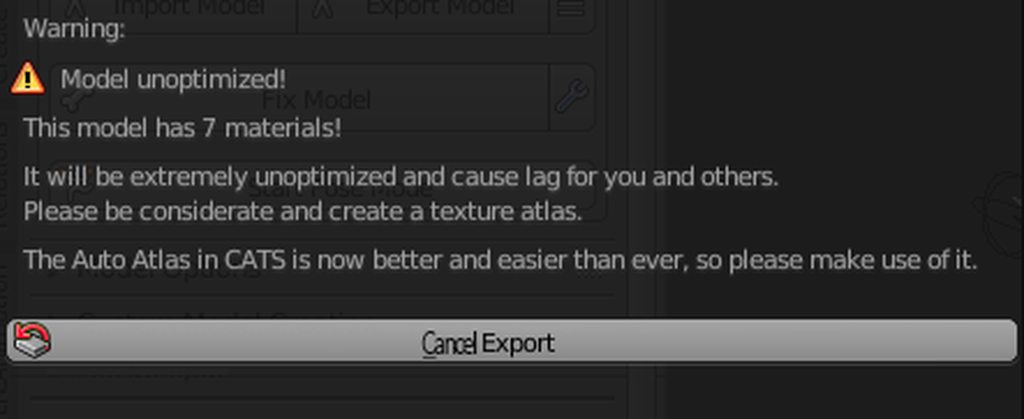
Hotox, your plugin told me 7 materials is extremely unoptimized 
It's not 1, but 7 is not that extreme either
sudden zodiac
Yeah, I should add some variation to the text 😅 currently it just always says extremely unoptimized when it shows that message
heady smelt
Pls add a button to hide those things @sudden zodiac
worn lantern
But why
sudden zodiac
No
worn lantern
People need to be told their avatar is unoptomized
sudden zodiac
It's just another button press to skip it and you really should optimize
worn lantern
If you could just hide that prompt altogether, who knows how many materials you or other people would unknowingly have
First world problems: "I have to click ANOTHER button?"
shut sequoia
Yeah, it's helped me a few times when i forgot to atlas 2 things
worn lantern
I needa learn how to atlas
Only problem is that I'll still have upwards of like 4 materials loaded on my main avatar if I choose to atlas, one being the whole body, and 3 being my eyes, because 2D blinking and all that.
Open eyes, mid-blink and a full blink
shut sequoia
generate material list, click materials yo uwant atlas, atlased, atlas them :0
safe swift
you should be able to atlas 2d visemes and blink, then use offset in texture for them to work
nvm, that doesn't work for visemes, but works for faces and custom blink
shut sequoia
https://puu.sh/CfWp3/8b63fde728.png someone else had this issue but didnt say how they fixed it. anyone know what's wrong?
 safe swift
@shut sequoia something with uvmap i think
distant forge
check you are not in edit mode
jovial grail
Which it looks like he is based on the wireframe
shut sequoia
ah, it was the edit mode thing oof
:0 what do you mean by UV Maps though? the whole thing is UV mapped isnt it
surreal topaz
Yeah, nvm
If you're using vertex colors or just have solid colors assigned to every material, you might not have UV maps which could also cause errors
shut sequoia
Oh that's true, yeah. I've had that issue before but figured it out
 halcyon vessel

EDIT: If you are using an MMD model please read below! In this video I will show you how to make your 2D eyes/mouth type avatar have a blinking animation and...
2d viseme
 sly skiff
Now I'm glad I didn't commission anything. Hope the update hasn't broken anything x.x
 spring oyster
@surreal topaz Oh my blinking is done with material swaps, since planes hopping over my face would look super off with the shader I use.
It's the price I have to pay if I want to make something like that look clean
surreal topaz
Oh, fair enough
wheat aurora
My atlasing and texturing went so far that I have more materials for the eyes than for the body 
shut sequoia
Yeah, that's how a few of my extras ended up. One for clothes, one for skin, and then one for my rings, one for nails, and one for eyes, then one for my sclera
shut sequoia
_> why'd I have a notification here
vague hearth
@shut sequoia coz of me 😉
shut sequoia

wide breach
is unity suposed to be useing this much prossesing? http://puu.sh/CgkMQ/a2934f30ac.png

useing like 80% of my cpu
wide breach
its loaded and everything but it feels like its useing too much
pegginmg my cpu so hard http://puu.sh/CgkQt/e8481eeaec.png
 marsh trail
I can't remember the last time i checked how much it was hogging but it really couldn't have been that much...
I guess it also vastly depends on the scene, does it use that much on a brand new project?
wide breach
nope
marsh trail
Then it's probably due to everything in the project, unfortunately i'd advise on using fewer things on a per-project basis if it's affecting your performance immensely, unless you can bear through it
 marsh trail
There may be a memory leak somewhere though... honestly i'm unsure but those values seem too vast for just that, unless you've got tons of things crammed into each
shrewd haven
With materials that are just a solid color in blender and not a "texture", if I go to atlas them how will that turn out? will it work?
It does infact work. They're just like 4x4 pixel squares on the atlas so you can't see them unless you zoom in.
worn lantern
@shrewd haven If you know UV Mapping there's something you can do
Create a texture that's like 16x16 and just UVMap a specific part to the color you want.
So one corner for is, for example, pink, another is yellow, another teal, and one is black
 vapid bronze
What if you don't know
worn lantern
Then learn. Easy 👏
vapid bronze
Dunno where to start with that UV mapping thing
worn lantern
I'm not implying btw that I know how to UVMap skillfully
vapid bronze
It's like a math equation with no formula
vapid bronze
When you YouTube search UV map there's a dude messing with an anvil
worn lantern
I meant official guides on Blender
Imean the hardest part to start is finding the menu for the first time
worn lantern
ahk
shrewd haven
Thanks though!
shrewd haven
There's a big gap in the Atlas anyway due to the amount of materials in it so they fit in snuggly.
shrewd haven
4096x4096 which compared to running 15ish sep materials its gucci
worn lantern
U u u u u
Funnily enough actually I took a VRChat logo model and got it from 2 materials to one by just making it UVmapped to a 2x1 pixel image
One black pixel and one white pixel
shrewd haven
Oh wow, could defs see small pixel images for basic colour avatars.
worn lantern
Yea that's what I mean
If that's what you were going for anyway, might as well do something like that
shrewd haven
Nah I wasn't, proper textures, just 3 little hair ties were single colours.
worn lantern
Oh so that's all it was
I defaulted to an entire model doing something like that.
Insert Neptlude's framedoll models here
shrewd haven
I never considered using UV mapping for another way to optimize like this though so thanks for bringing it up.
worn lantern
Or as their Deviantart was last time I checked, Xenosnake
Ay no problem
I like how much I get on people about optimization yet my main avatar is 12 materials, 14 if you count the two extra materials for 2D blinking textures. @shrewd haven
shrewd haven
Haha, well as long as you know its unopt, and avoid big publics or stuff its fine.
I know my personal ones are around 10-15
All my world ones will be like 2-5 mostly.
shrewd haven
Yeah I keep telling myself that, so one day I shall.
shrewd haven
My public ones are first priority though at the moment.
worn lantern
Yeye I understand
Also the reason mine is so many materials
Well, Pokemon Trainer parts, whether it be from X and Y or Sun and Moon
Every clothing piece is a separate texture
And model
And they're all strung together
shrewd haven
Oh yeah I get that, got a friend with one similar.
worn lantern
So the shoes, socks/legs, pants, shirt, face, hair, bag, optional hat, optional eyewear, and the Z Ring. Face being two materials
Wait now that I say that how did my...
Where in the world did my 12th material come from excuse me?
OHWAIT NVM
The 12th material is the Island Challenge amulet on the bag
Lmao
Yea major optimization needed
 sturdy socket
Ha ha!
http://imgur.com/a/pzyYll9
 spring oyster
exTREMELEY
sudden zodiac
I will add some variation to this text soon 😅
@sturdy socket Why does that screenshot say Cancel Export xD
sturdy socket
¯_(ツ)_/¯
wheat aurora

sturdy socket
Why you asking me?
surreal topaz
Scuffed GUI or photoshopped
heady holly
7 materials is fine.
 verbal jungle
Optimizing materials isn't hard. Literally no reason to have more than you can count on one hand or fewer.
 placid dew
I was wandering if anyone here could help me with this problem I ran into which is weird. My model is all ready to go and looks normal, but when I click the show build content button and move the camera to get a better avatar pic the model is half way in the ground and the avatar descriptor is in the normal spot (which makes it nowhere near the head)
 placid dew
Yes
 vale bone
If so, you probably failed in doing your animation, I mean the animations succeded but you did not create a puppet to make your base avatar safe
I don't know if there's a work-around for that other than recreating your avatar again, but this is due to the fact that during your animation you did not create a puppet to apply the animation on
try to follow a youtube video describing how to do that it's pretty easy and will prevent such problems :/
placid dew
Oh ok, thanks for the help!
vale bone
no problem ^^
surreal topaz
@placid dew this is why you should animate on a duplicate
Alt+click your armature to expand the entire armature at once
Select every bone, but do not select game objects you added yourself, only the bones
Then in the transform component, click the gear icon and click "revert to prefab"
 exotic whale
Also remove the animation controller from the main model. That's why unity puts the model in that pose to begin with. Animating on a duplicate prevents adding the controller to your model and putting it in the pose.
sweet mason
Yeah try to avoid to put animation on the main bone(for ik). Dont really work
 gilded sapphire
hello is there a link where I can know what recommended settings for avatar vrchat wants
vale bone
Do you want your avatar to be efficient and be loved by everyone because of all the frames you're saving them? Follow these tips and you should be good! Any recommended numbers or limits in this document are subject to change at any time. Although some of the descriptions pr...
I think that's what you're looking for
vale bone
np ^^
gilded sapphire
also question about emission... does shader emission count as lagging people?
like just the texture make it into a separate n have it in the emission tex slot..
its not like particles right?
vale bone
I have no idea sorry
gilded sapphire
kk
candid sedge
you can do it all in one matterial i think with emission maps? this is 2nd hand info
i dont do those
surreal topaz
@gilded sapphire emission doesn't count for anything and doesn't lag
Emission maps are easy and you should definitely prefer them over separate materials
shut sequoia
oooh that's fun
verbal jungle
Emission maps are excellent.
 short cave
Whats everyones best way to manage public and private avatars? Like i have a avatars thats public but i also have a private version that is the same model but has my social on the back. Typical you just duplicate the avatar and use a different pipeline and hide the other. But is there a better and more streamline way because i feel like it keeps both models in each export.
jovial grail
I don't think so
short cave
does vrchat upload 2 avatars in the same upload if i just hide the other and is that a performance issue?
karmic condor
I use google sheets
jovial grail
Everything you hide is still there under the same object when you upload I think, but it shouldn't cause any performance differences. Though if you're not gonna do anything with it you might as well split it into 2 avatars
 vernal pumice
@wheat aurora I approve of that profile pic
wheat aurora
You found me all the way up in the chat and went out of your way to ping me and say it

But thank you 
vernal pumice
I stumbled upon it when I opened the server
So why not, my brain figured
Because you have good taste in waifu's and you should know
 empty iris
I believe this goes here. I have a texture (png) that shows up as transparent in my image viewer. However, when I assign that texture to its material in Blender, details show up that otherwise seem invisible. I tried creating an atlas using GIMP but the "invisible" textures don't save properly or are imported incorrectly and show up as solid black when I try to use that texture in Blender. Does anyone have any ideas as to what's going on or what I should look up to solve this?
lean kindle
no crunch compression will reduce filesize, it will still use the same ammount of VRAM
it's just used to reduce filesize
 mossy solar
so no point in me worrying about cruching it since I already compress my atlases
lean kindle
it will revert back to the original file if you want to revert changes
if you don't care about filesize yeah, but it'll just reduce it further and it takes like 2 seconds
there is no noticeable loss of quality from it
mossy solar
yeah there is
safe swift
not really..
mossy solar
but then again I have eyes for that kind of stuffs
safe swift
if you use High, then there's almost no quality loss
lean kindle
I dunno how you've been doing it but I have never seen any sort of quality loss
safe swift
I've been using crunch compression for months and months
 woeful crescent
heady smelt
woeful crescent
heady smelt
Skip, uncheck show at startup
 mild hinge
@woeful crescent no. That update wont work with the sdk
 jagged vigil
i can't change shaders, wat
hollow cave
https://i.imgur.com/rfCMoVa.png
Also you're in the wrong channel, bud
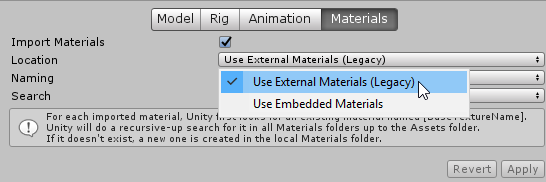 surreal topaz
You can also just click "extract materials"
worn lantern
Didn't know that was a thing. Extract Materials, anyway. I knew about what Zarni is showing off
 paper elm
When i try to lower poly's with mantis lod editor like when i put the quality on 15 % and move to a diffrent object it changes back to 100 again
why doesnt it save?
hollow cave
I'm unsure if it's even supposed to work with VRchat. Though I can almost guarantee if you use blender or any 3D program of your choice to decimate the results would be better.
 wary relic
Are you legit trying to justify your avatars to me 😂
worn lantern
@velvet spoke
velvet spoke
11 =/= 2 innit
hollow cave
Please don't continue this in here.
worn lantern
Imean yea they did do a nice job at that level
And I didn't want to start an argument in here, I just saw that and it did look good, so I pinged Sai
paper elm
When i try to upload a avatar it says exporting unity package and then just stops
paper elm
 rare mantle
@jagged vigil omg i have the same problem, no matter which avatar I add. HELP PPL
velvet spoke
@rare mantle select your avatar in the asset viewer, click materials in the inspector, change it to legacy.
Also wrong Channel.
 harsh ether
@paper elm it means that there is no avatar for that blueprint id
it will default to making a new avatar
its normal
distant forge
Can you check that you have the correct meshes selected and that you are in object mode. You can try joining them manually first maybe?
sudden zodiac
@sage haven Old versions cause errors. Update your cats
 soft trellis
ok. need some help and need to know if anyone here has an avatar controller for a 4 legged creature
this beast is what I'm working with
safe swift
http://prntscr.com/lvasej http://prntscr.com/lvary1 I love these people 👌

 paper elm
@harsh ether so what do i do now
heady smelt
anyone know how to fix this
Wrong channel
which channel
it wont let me upload images
marsh trail
Copy the URL of the image you just posted and paste it in the channel
sweet mason
I mostly only use only mobile asset. So most of them have multiple face texture. what should be better. switch the material. switch mesh or shape key


 vague hearth
@sage haven reinstall from github page / change to development version (or try to edit the code from if get_active().mode != new_mode and bpy.ops.object.mode_set.poll(): to if get_active() and get_active().mode != new_mode and bpy.ops.object.mode_set.poll(): 🤔
sage haven
i figured it out!