#avatar-optimization
1 messages · Page 28 of 1
 wide breach
 sudden jewel
Part of why we recommend it in our optimization docs 😉
Between Xiexe, Cubed's, Noe's, and Standard, you have a pretty wide selection of things
 wheat aurora
Can't get xiexe to work for some reason
Use noenoe for pretty much everything
 karmic condor
What problem are you having?
wheat aurora
Pretty sure it's something with z write, I dunno
Makes me look inside out and transparent
karmic condor
It’s set to transparent, you either generate it as opaque or you switch it to opaque in another shader then switch to xiexe
There is a xiexe shader generator in the toolbar
wheat aurora
Then again, I wanted to use xiexe cause of live shadows but I found a version of noenoe that has that sooo
Oh i know
I'm good with noenoe now
karmic condor
Ok, well you got your intended result so awesome 👍
wheat aurora
:+1:
sudden jewel
Friendly PSA that I'm sure the people in here already know: don't do this! 😃
 candid sedge

wheat aurora
Enable custom emotes here please, I can't portray my emotions without them 
1.5 damn thousand transforms

 jovial grail
I'm at a loss as well
How am I supposed to express my emotions without all the custom thinking emotes
🤔
wheat aurora
Out of all channels
This is the one where we get to laugh at enormous dbone and material counts
I need this
sudden jewel
if its for the purpose of the wide range of  required to comprehend these counts, i'm totally for that
External emojis enabled for this channel
jovial grail



 wheat aurora
83 mats highest
On a an avatar
Like, come on
I spent an entire day optimizing a bike model from 81 to 11 materials, still too bad 
They are gonna have fun
 heady smelt

how do you even get 1500 transform
the biggest unoptimized model i found got like 250 bones that can be used for dyn bone
 distant forge
Maybe they stuck 5 copies of their avatar inside their ragdoll and abused dynbone to ragdoll them as inefficiently as possible
heady smelt


perfected infinite bones of the gods
I can't think of any scenario but lyuma's ragdolling the whole avatar for some reason
sudden jewel
I was curious to see what was going on so I loaded it up and boosted the DynBone radius a bit so they're more visible.
In situations like this... just... don't use DynamicBones. D:
Just don't
please
 my eyesss
 jovial grail
What's going on with those ears
heady smelt
good to have an animation like that
must be enjoyable to watch at 5 fps
 sturdy socket
7 colliders /ear 
sudden jewel
With all the bones enabled, DynBones was eating over 15ms/frame
(to hit 90FPS, all rendering/updates must be done within ~11ms)
jovial grail
I wonder if dynamic bones themselves could be optimized/replaced with something better performing
I haven't really looked at the code too much but I don't think it was intended to be good for VR
At the very least the update rate is probably too high in most cases
Compute shaders can apparently be used for similar effects on the gpu
heady smelt
no idea how that would work, but apparently it would be better if the GPU took care of dyn bone instead of the CPU
jovial grail
A lot of things would be better on the gpu
Because unity likes the cpu too much
One of the reasons particles hit performance so hard, when you can have a million gpu particles and not drop any frames
 main horizon
My god.
 distant forge
I wish cloth could be controlled a bit better (and didn't crash so readily), e.g. with elasticity and damping: I still wonder if a dynbone-like system can be done more efficiently as cloth. For simple meshes cloth is way better performance (and way less cpu spikes/random framerate jumps).
jovial grail
I'd try my hand at an alternative but I can't into the maths to save my life
Something made with vr in mind is surely to run better for everyone
 sudden zodiac
@sudden jewel Just wondering, in the optimization guide it says max 3 skinned mesh renderers but in the rejected world message it says max 2. What is correct now?
heady smelt
static mesh
not skinned
they recommend 1 skinned mesh - maximum of 2
and maximum of 3 static mesh
sudden jewel
I noticed that earlier Hotox and corrected it.
DynBones is inherently not an easily parallelizable task. You can't just slap anything on the GPU and expect it to run faster. DB itself (as in, the code for it) isn't all that well written
@wheat aurora We have tools that allow us to load up avatars and view them for various purposes, primarily used for moderation and testing
other tools too 😃
wheat aurora
Okay buddy
heady smelt
is there a reason why vrchat doesnt have his own, more optimized, dyn bone script ?
wheat aurora
One month
sudden zodiac
@heady smelt On the website it says 3 skinned mesh renderers.
sudden jewel
Time, basically @heady smelt
heady smelt
so it would be a thing in the future ?
sudden zodiac
@sudden jewel so is 3 or 2 correct?
sudden zodiac
👌
sudden jewel
honestly if you're already optimizing, you should go for one 🤔
Probably Svel, given infinite time we can work on everything 😛
but tasks have priorities, and there's lots of things going on for VRChat
heady smelt

sudden zodiac
Sure, but I'm adjusting the mesh warning in cats to the new max amount which I wasn't sure of
sudden zodiac
I'm holding on :D
jovial grail
I know you can't offload everything to the gpu and expect it to work well, but cpu seems like a more valuable resource considering that it feels like unity is always bottlenecked by the cpu
sudden jewel
to be specific, VRChat is bottlenecked by the CPU usually
not always the case with Unity games
distant forge
give us access to compute shaders and maybe we will figure something out 😉
jovial grail
And dynamic bones uses comic sans in the thumbnail on the asset store, which I'm pretty sure is unironic. Can you really trust that 
sudden jewel
that requires C# scripting access in the current version of unity (and 2017 AFAIK), and that isn't happening
and deffo not on avatars 
heady smelt

jovial grail
From what I've seen only recently have they started offloading more stuff to the gpu
Like particles
And by recently I mean unity 2018
sudden jewel
you also have to keep in mind that most GPUs except for high-end ones have their hands full pushing pixels to VR headsets
if we load up stuff on the GPU, then we start stepping on framerate on mid-range GPUs
jovial grail
Hum, I guess that's true
sudden jewel
the fact of the matter is that the operation that DB does is pretty expensive, no matter where you stick it
there's some things that we might be able to do, but again, requires time
it'll come eventually. until then, best approach is minimizing DB usage
even IF we get a magical DB patch that optimizes it, the other issue is that users will use that as an excuse to balloon DB usage
which.. brings us back to square one 😛
jovial grail
Speaking of that, why isn't there an option to disable db in the safety menu? It seems like the most obvious solution if it's such a big issue
There is no way this hasn't been considered, so I'm curious why hasn't it come through
jovial grail
I see
sudden jewel
because DB isn't a safety issue
it is a performance issue 😃
you could wiggle and semantic to say that low FPS causes potential safety issues, but it doesn't really matter, we'd want to manage perf separately from safety
trust basically has nothing to do with how performant i'd expect someone's avatar to be
jovial grail
technically... you could essentially kill everyone with too many db
Flashback to the time when someone would join that one night house map everyone would hang out at and instantly lag everyone down to 5 fps at most with very floppy avatars
sudden jewel
using that argument, you can extend every performance issue to safety
candid sedge
Ya i see that 2
sudden jewel
it balloons too quickly
jovial grail
Doesn't safety imply crashers too tho
candid sedge
On that note when will be see changes to non public avatars even if not on the level of worlds
jovial grail
Because shaders and particles are in the menu
Which I'm assuming is for that very reason
sudden jewel
Safety specifically was designed to prevent people from spamming you with huge particle systems (ignoring perf hit) and full screen shaders
it just so happened that it closed out a lot of crasher methods if you keep them blocked
candid sedge
Or do you just report people like that because im not sure if its even i intentional
sudden jewel
a nice bonus
jovial grail
Makes sense
candid sedge
Oo you can thanks
heady smelt
pretty hard to report if i can't access my menu 
need to always use the panic mode for that shit
sudden jewel
yeah, exactly
heady smelt
so annoying
you need to block everyone just because of one prick
jovial grail
Considering you can disable those things by default, it discourages making malicious content quite a bit
sudden jewel
safety mode, figure out who's doing it (go to a custom mode where shaders are blocked for everyone except friends), find the guy with the huge sphere/cube attached, report them
Safety isn't perfect, and isn't done (pretty much nothing is done in VRChat, to be fair)
jovial grail
If only safety mode didn't reset your custom settings but instead used a preset
heady smelt
yeah that would be good
sudden jewel
yep, we mentioned that when we released it
jovial grail
Ah well, it still works fairly well, despite the custom settings resetting
sudden jewel
i pretty much live on my custom setting of "everything on for friends, everyone else has everything off except voice, avatar, custom animations"
heady smelt
some shaders work simply by being into your view, so if you put that shader on a sphere that is almost invisible, it can hide your UI
and you can't find who is making them
sudden jewel
if someone has an avatar i wanna see shaders/particles/sounds for but i don't want to friend them, i show their avatar
yeah, it isn't perfect, and shaders are a hard problem to solve
 worn bramble
https://cdn.discordapp.com/attachments/507116863805849600/515360060772450304/unknown.png
How the gravity in unity work ? I need to give gravity to the ears they are not supposed to be stand like this !
 sudden jewel
you can't analyze them at runtime
heady smelt
you use dynamic bones with gravity or force, UMIT
sudden jewel
@worn bramble this channel is for optimization, you might want to check #avatars-2-general . That being said, you'd use DynBones and set gravity/force, but be careful, its wonky
heady smelt
dunno why you ask that in the optimization channel tho
also good luck, as Tupper said, gravity/force is hard to get right
sudden jewel
and if you do use DynBones... don't use a lot of them 
heady smelt
it's more of an hassle than anything
worn bramble
Sry im not good in english ^^'
heady smelt
good night Tupper, thanks for all the info
jovial grail

wheat aurora
Yep
 fast furnace
How do I lower poly count on unity
karmic condor
Not possible in unity, has to be done in another software
For example blender, it’s called decimate in blender
fast furnace
because in the tutorial is says this
"The avatar has 31286 polygons, you will have to push the max polygon limit"
karmic condor
That would require breaking terms of service
fast furnace
oof ok then
karmic condor
Lowering poly count can be tedious, but on a <32k poly avatar it shouldn’t be too bad.
 still perch
actually depends
fast furnace
I only have the unity file so I can't lower it then
still perch
sometimes its harder to get models that already are rather optimised (lower poly numbers) to 20k then high ones that are completely unoptimized
karmic condor
Unity file will contain the model file
still perch
^look it up in your assets folder
fast furnace
I will just find a new model. It is fine
karmic condor
Ok, well if you need a guide to navigating unity I wrote this a bit ago and it covers a lot of troubleshooting http://vrchat.wikidot.com/tutorial:avatars:unity-upload-tutorial#toc3
Hopefully it can help you if you get stuck somewhere
fast furnace
Ok thanks
Also I have a problem with one of the models I am uploading
It is all pink
karmic condor
That’s a missing shader, that guide I posted will show how to reassign a shader
karmic condor
This stuff is really confusing so I try to help when I can.
 marsh trail
Decimation in unity is possible and preserves shapekeys but the method is hit&miss in terms of quality
 unkempt notch
why on earth is it telling me that i cant upload models because i need to play more of the game
i have 3 hours put into the game
i just want my own model
sudden zodiac
Until you get the notification which can take more than 20h
unkempt notch
so i gotta play 20+ hours of VRChat!?!?!?
 heady holly
Go play a different game then 👏
unkempt notch
no
heady holly
Then quit complaining.
It's not like you would know how to properly upload an avatar until over 20 hours anyways.
sudden zodiac
Well you don't learn how to upload by playing the game
unkempt notch
if my computer wasn't being a total shit sack, i would be playing a lot out of this game
 sweet mason
buy a new one and talk in another channel
wheat aurora
Just get a new one 
sweet mason
black Friday you know
unkempt notch
im broke m8
heady smelt
AH can someone help me?
still perch
have you checked your rig settings? 
 vague hearth
@heady smelt disable>enable model/click Configure unparent chest > click Configure parent chest
sudden jewel
@heady smelt Wrong channel, you're looking for #avatars-2-general 😃 But it looks like your bone assignment is all messed up. Check rigging config as the others have recommended
heady smelt
@sudden jewel i managed to get it fixed with some help from a friend, thanks though as always!
heady smelt
i deleted the model and imported it back again, seemed to fix it
 finite coral
For db optimization, well i havent been able to find time to take on the difficult art of reweight cloth bones into smooth 1-2 chains at this time, i have taken to alternatives, for example adding exclusions to tip bones; or more cleverly controlling the falloff distance and animating a shut down of the entire db system. Currently the fall off distance (distance to object) for DB is set to 10 from upload to avatar loadin instead of allowing smaller values by the end user, thankfully this value can be animated and changed, which is something i have done. My typical values are been 3-7. The problem with this system is others must have my animations enable to load the optimized values.
Following this i have used the prop toggle tool VRCInventorySystem Xiexe and friends created to toggle the entire dynamic bone system on and off, which again means others need to see me and the toggle animation. I might be reversing the toggle depending how i can work it into a casual gesture.
 surreal topaz
@finite coral pretty sure the distance to object property is enforced by the game
Dunno if animations can even override it
finite coral
@surreal topaz easy enough to confirm as i have, you need a spotter through as its players camera to the player model that is measured (no mirror can be measured personally). The animation needs seconds go as per solving some syncing issues.
and above note is for the distance falloff value, not this disable toggle vid
 modern basalt
I have a problem, when I fix the model, the bone that's normally used for creating another bone and parenting it to the dress is on the knee instead of the top of the leg
and when I parent this one with the left of the dress, the legs just don't move
I actually already imported the model in vrchat btw, months ago, and I'm just resuming the same model that I used to optimise it
 solar urchin
it's seems like u're in pose mode,try Alt R or Alt G,and see if the bones go back were is suppose to be
modern basalt
well, I know, that was the point
but the thing is
the legs aren't moving with the dress
solar urchin
try selecting the bones(in the dress) on the left side,and try to directly parent them to the left leg,and see if that works or not.
 tender sundial
that.... is a lot of bones........
heady smelt
😉
 copper vault
is there any way to decimate only a part of a model, without deleting the shape keys in blender?
wheat aurora
separate the part as new mesh and apply the modifier to it
select all verticies, press P - separate by selection
surreal topaz
Tupper's tutorial also covers this
You separate the meshes and decimate everything that isn't the face
copper vault
ok ... thanks for your advice, I'll take a look
surreal topaz
Lmao
Just had some guy in the Pug tell me
"Don't atlas your avatars, use PBR shaders and you won't have to atlas, it's more optimized that way"
heady smelt

still perch

 fading rapids
That's not.. that's not how any of this works. 
 slow socket
It doesn't
He's just throwing together random technical jargon to sound knowledgeable
 smoky lantern
It'd be nice to see more PBR in VRC though. ;-;
 fading leaf
I'm honestly curious on their way of thinking.
copper vault
raytracing in vrc 😂
 cosmic scaffold
just make it grneric and humanoid again
sudden jewel
You can do PBR right now in VRC, just use Standard and Standard (Specular Setup)

Unity Technologies Blog
Throughout the development of Unity 5, we’ve used our Viking Village project internally as a testing ground for shading and lighting workflows.
If you’re ...
standard shader is actually really good, but it doesn't work well for toon/anime avatars
surreal topaz
Noenoe also has a PBR shader but it doesn't have quite the same features as Standard
It has some other neat stuff in it though
Stick to standard if you need a PBR shader honestly
Learn how to use metallic maps
sudden jewel
yeah, standard is really underutilized in VRC tbh
surreal topaz
And the default scene lighting in Unity is pretty bad, Standard looks better ingame
Especially in worlds that have proper lighting and reflection probes
 cold kernel
i use it on anything with a normal map/specular map/metallic map
surreal topaz
Well it's not "bad"
sudden jewel
the key is also being in a world that has proper setup for lighting/light probes/reflection maps
surreal topaz
Just not super flattering
cold kernel
using cubed shaders when there's a readily available specular map for that specific detail texture is a waste
surreal topaz
Pretty much all it takes for a world to support Standard properly is to have reflection probes and some form of proper lighting
surreal topaz
Proper lighting usually includes light probes too, especially if the lights are baked
sudden jewel
if the Unity Asset Store sale is still going on, pick up Bakery @cold kernel
if you've got a recent nVidia card it cuts down render time by a huge amount
a bake that used to take me 10 minutes now takes ~1.5
cold kernel
Oh no I got something better
Because it uses realtime lighting with postprocessing on the reference camera
miss me with that baked shit
=w=
sudden jewel
make sure it works well in VR, a lot of the postprocessing stack v1 stuff doesn't work well with single pass stereo
surreal topaz
I stick to this guideline https://gitlab.com/s-ilent/SCSS/wikis/Other/Post-Processing

GitLab
A surface shader for Unity based off Cubed's Flat Lit Toon shader
A guide on post processing in VRC
sudden jewel
your tradeoff for realtime is also multiplicative costs on avatar materials
so if someone has a badly optimized avatar, you pay for it
a lot
cold kernel
It's limited to 10 people and it's also private, for now.
10 people won't destroy your frames
Granted that isn't their intenbt
intent
I bought some assets used for the scene
Beyond that I've set and animated most of it
 wheat narwhal
Really hate that avatar dynamic bone limited...
All of my avatars are more than that limit and I need to redo it all
Even the materials have limit...
wheat narwhal
but it's useless if somebody share the whole unitypackage to public
surreal topaz
Yeah but that's not the point. This vastly reduces the sheer volume of unoptimized stuff out there
Since all the users who don't know anything about avatar uploading will now be using optimized avatars
I haven't dropped below 45 FPS the last few days at all
Feels good
 shut sequoia
Well, unoptimized avatars contribute to lag
and fixing materials is, literally, the easiest thing about optimization.
surreal topaz
Materials are definitely the easiest and least lossy thing to fix
You can fix those without affecting the model's quality at all
Dynamic bone is harder, but somehow redoing the bones improved some of my models.
shut sequoia
the "it's useless if you share the unity package" logic is dumb, you're basically saying they should never try and prevent anything bad from happening because someone will find a workaround.
heady smelt
also i don't see the problem with materials
you are allowed 10 materials
(which is already too much for a public avatar)
you will never need more than 10 materials
shut sequoia
that's a possible 10 different shaders, all with their own settings, maps, etc
surreal topaz
One of my public avatars had 11 materials but I lost the files
The 11th material was a hidden blush material so I manually set the material slot count to 10
Optimized
wheat narwhal
Him I should find some tutorial some time
shut sequoia
I will admit the extra work I have to do sometimes is a bit annoying, and I can't see to figure out a decent fix to materials that share a texture in blender
surreal topaz
Tupper published an optimizing dynbones tutorial
shut sequoia

This Tutorial will show you how to Merge extract bones that aren't needed for VRchat as well as Textures into an Atlas to reduce draw calls. If everyone did ...
surreal topaz
What do you mean fix materials that share a texture?
shut sequoia
Whenever I merge them in blender they completely mess up their colors, it seems like they merge settings or something
surreal topaz
That's odd. Is it an XPS model?
shut sequoia
and i've heard ignoring it and going into unity anyway fixes it, but it doesn't for what I've tried
Nah, just an MMD
https://puu.sh/C2Z3I/5a47cac078.mp4 Here's a video of the issue, it's got shitty quality audio because i didn't set my compression settings right so just mute it ahead of time
heady smelt
try to manually atlas
shut sequoia
yeah i was gonna do that, but this was mainly a test model to try some things out, so I never planned on uploading it
next time i run into the issue or wanna test stuff out though I will
smoky lantern
🤔
smoky lantern
Materials because it's not a toon shaded model.
I can get it under 10, but that's the best I can give you.
Mostly a combination of experiments.
heady smelt
pretty sure you can get down to 2 materials.
smoky lantern
If I don't want her affected by light in any sort of a good way, of course I could.
heady smelt
wait, i know that model
you can easily get as low as one material and still make light work properly
smoky lantern
As a toon shaded model, atlasing is fine.
still perch
atlasing is always fine
a texture atlas does not mean you cant use it with multiple materials
smoky lantern
Not with models that have metallics. Not on any shader that wouldn't be too CPU intensive anyway. So many masks.
I don't like the idea that VRC is nothing but Toony MMDs. Can I atlas her? Yeah. One texture isn't one material. She needs multiple materials.
We were just talking about PBRs.
You need multiple materials.
My skin won't be as shiny as my metallics.
My hair won't be as shiny as either.
still perch
it's fine but not 13
still perch
and then there remains the 186k polygons 
smoky lantern
13 is pretty great for a model like her. I can get her under 10 though. I know.
The's literally the minimum meshes she can be and the max that I'm allowed though.
still perch
the max you are allowed is 20k triangles 
smoky lantern
I didn't see poly count on that doc. 😏
still perch
Because the SDK tells you allready
heady smelt

candid sedge
uwu
smoky lantern
Alriiight. Touche.
shut sequoia
(it's also the lowest issue on the tiers of bad avatars)
smoky lantern
She's my highest model anyway. And she won't be public. I was just gauging.
distant forge
We could use some tutorials on atlasing materials with different pbr settings. It is possible to create texture maps to cover each atlased material (and if set to nearest, these maps could just be a few pixels big if the final atlas ends up as a power of 2 to eliminate rounding error). Right now many tutorials focus on materials with just a diffuse texture.
smoky lantern
Shotariya's Material Combiner does a texture stitching thing and, if you're patient enough, you can just manually place your normal maps over the abledo atlas to make the normal atlas. It's not the best way of doing it, and it'd be nice if there were tools for it, but it's worked. Probably works for specular textures too. I haven't had to atlas normal maps or specular maps in blender before.
It'd be nice.
distant forge
At least it's now possible to fix things manually after atlasing
 safe swift
^ this is why i wasn't atlasing before shotas tool
 mossy solar
every material you have is like rendering another avatar...
smoky lantern
Not accurate. If you've been watching the avatar world request list, the model above is more optimal than 90‰ of models roaming VRC. Most people were 3 times worse than my Duo. And that's a very generous generalization.
She's still fairly optimized in comparison given what she is and how she's supposed to look.
And every world uploaded with placeholder pedestals is just getting around these pushes for optimization anyway. A few avatar worlds on the New list were full of terribly optimized avatars still.
shut sequoia
are there any tutorials on mapping at all? that would definitely help with people worried about emissions and whatnot but who stil lwant to atlas
smoky lantern
Also, there's still noticeable quality loss with that tool over doing it manually, but it will make it easier for the layman to play nice.
shut sequoia
i see a lot of people that still have a separete for their eyes
"every material you ahve is like rendering another avatar" wha
smoky lantern
Emission is much easier than making a new atlas.
Just use GIMP to select everything in the atlas you want to have emission, invert the selection (map sure there's an alpha channel) then delete it.
Easy emission texture.
shut sequoia
yeah i dont know many people who know how to make one is all
karmic condor
I could make something later this week, could be helpful for those who just don't know how emission works.
 visual scroll
is there fast way to transfer weight from one bone to anoter?
currently im using weight mix modifer but its rly slow
safe swift
@visual scroll edit mode, select one then shift select other, ctrl+P > keep offset then in cats "merge weight"
also you can reparent rest with shift+R (repeat last action)
jovial grail
You can select one vertex group and click the select button on it in edit mode then select the group you want to move it to and click assign
Or reparent and merge as yuumi said
safe swift
reparent is quick with shift+R
then select all of the onesu want to transfer then click merge
visual scroll
Thanks, Yuumi, that works rly fast.
Pumkin, im not sure whats about vertex groups since i want to mix it smoothly and when you click assign it makes all selected vertexes with same wight
surreal topaz
PBR with atlases is possible but requires a bit of manual metallic map work
jovial grail
I see, well, I usually use vertex groups to transfer some weights from one bone to another
But if you don't need the bones then mixing is the way to go
visual scroll
how to deal with end bones? simply exclude them from dynamic bones?
visual scroll
well i did not know we can export without em 😅, thank you
surreal topaz
@smoky lantern what kind of quality loss is there with material combiner?
It should be lossless if the generated texture is a power of two
Or if you manually set it to ToLarger
smoky lantern
@surreal topaz It left artifacts in some places. Most easily noticeable was the hands. Doing the atlasing manually didn't have the issue.
It's mainly around where they have the blend or gradients in the texture, because that's where it'd be easiest to see.
Again though, I'm looking for things like that. It's still a great tool for a quicker workflow.
Just prefer manually doing it still.
surreal topaz
Yeah same, I always do it manually. Gives me better results, power of two textures, and a bit more control
Otherwise I end up with the entire 2048x2048 body texture even though only 10% of it is used
The few times I used the tool it worked fine for me though
visual scroll
@half prism thats what i used before they adviced me better way to do it with ctrl+p/shift+r
 amber hemlock
As long as the UV’s stay far from the edges of the texture the material combined is lossless. If they are close to edges you get some bleed on unity’s mipmaps. You can always disable mipmaps which reduces the bleed to a few single-pixel artifacts from occasional rounding errors
This is all due to material combiner not creating margins
Other then problems with Seam bleed on mipmaps, material combined is lossless
Typically you can just open up the atlas in photoshop and loop textures near the bleed zones
Mipmaps in VR seem kind of pointless. Things are too fuzzy at distance for it to matter
 sullen vector
My avatar is unoptimized please send help
sullen vector
ffs it's not my fault ok i bought it.
 fierce monolith

 fringe basin
Eh, who really cares about unoptimizatjon unless you’re putting it in a world tbh
 fringe basin
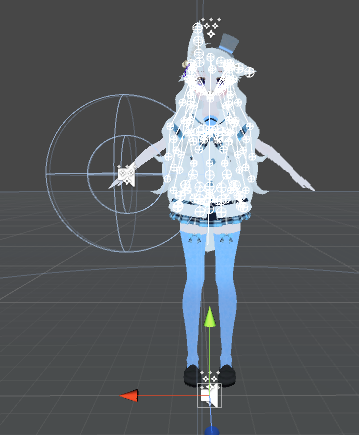
Holy collider
sullen vector


 fringe basin
Oh dear
fierce monolith
Why are you doing this 
fringe basin
Reported deported
sullen vector
deported lmfao
fringe basin
You’re paying for the wall now
smoky lantern
Not even good colliders.
fringe basin
Oh we know
fierce monolith
Niyah mfw a person where complaining about lag about my ONE collider for the hair i have
sullen vector
ikr ? i didn't do any dynamic bones on it, ez money
sullen vector
back in the time i had a script to count these but i don't anymore
smoky lantern
Also, the artifacts were on the middle finger as an example. I doubt there was an edge there.
fringe basin
If dynamic bones affect your performance, it might be time for an upgraded toaster tbh
sullen vector
box lag free / animations heaven best maps
heady smelt
that^s not how it work scopz
also low effort troll isnt gonna work here
step up your game
fierce monolith
The collider is picking up the hair so it's laying down on the ground so that might cause some lagg 
fringe basin
No u
smoky lantern
Niyah, get Pumkin's tool.
sullen vector
should be pinned here
sullen vector
damn the doc is actually filled with a bunch of good informations.
fringe basin
I barely have any completely optimized avatars
sullen vector
The only optimized one i do are comissions usually
fringe basin
The parameters are pretty tight
sullen vector
could not care less about my own since i just do a bunch of body swap etc
smoky lantern
Balance your optimization imo.
VR is about immersion. Over optimization breaks immersion with loss of quality. Of course, the same cooould be said about performance.
I guess.
 fierce monolith
https://gyazo.com/87efbbf401511603209969bfe1bbed74
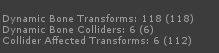
is this how you drop frames for others Niyah
 sullen vector
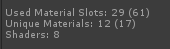
I guess the numbers in () are actually the total ?
fierce monolith
Pls tell me im doing it right
fringe basin
Not nearly enough bones in the hair
sullen vector
 fierce monolith
Fuck
sullen vector
sullen vector
ikr ?
jovial grail
Yeah, brackets are total, outside of brackets are currently enabled
fringe basin
Tbh I only lag from particles when they get around 500k
fierce monolith
what tool was that niyah 
jovial grail

fringe basin
Particle limiter op though
sullen vector
Pumkin's avatar tools

GitHub
A tool to speed up setting up VRChat avatars in Unity - rurre/PumkinsAvatarTools
there
fierce monolith
Thanks bae
sullen vector
 fierce monolith
Yoink
sullen vector
when you use poiyomi on everything except particles 👌
 fair comet

fringe basin
Poiyomi is too much work for me, I commend you for that
I’m a “slap some cubed” on it kind of guy
smoky lantern
Silent's edited Cubed is pretty nice too.
sullen vector
Well poiyomi is smh unoptimized because of how unity work tho
smoky lantern
Kamakura be best toon shader if someone would fix its ambient lighting please.
sullen vector
I just love the flexibility without becoming a complex shit poiyomi offer
and poiyomi is best boi 👌
 sullen vector
Kamakura was nice last time i used it
till i did go to nier automata flowers world
and lose my eyes
smoky lantern
Find some good friends that just so happen to write shaders. My friend's shader is my favorite PBR for any lighting or reflection setting.
 polar bolt
Like the flexibility of poiyomis but outline being unlit and done in different pass kills it for me
sullen vector
open source shader tho, if anyone feel like editing it, they're up for it
smoky lantern
He made it specifically for VRC.
fringe basin
Put on some of laptops convection, crank it all the way up, then go to Nier automata flowers
smoky lantern
Matcaps are bae.
polar bolt
I ran through the code, too much of a mess to merge the passes (and i end up editing shaders for my needs either way)
fringe basin
How to blind your friends 101
sullen vector
eheh
me use matcaps for my ice & bracelet
👀
matcaps indeed bae
the edit viewpoint is blessed and vrcsdk should work like that holy shit @jovial grail
love u.
fringe basin
When people insta-block you because you have some colorful shader on your avatar and people think you’re a crasher though feelsbadman
smoky lantern
The copy function is my favorite.
jovial grail

smoky lantern
If I go back to blender to fix a bone issue and have to start back at FBX from there, copying all the stuff I added to the original FBX saves sooo much time.
jovial grail
That was kinda the point of it. My friends would usually just not bother fixing things if they weren't significant if it meant they have to go back into blender
Now there's no excuse 
smoky lantern
Now if you added support for Final IK components.. 😏
Can't multi edit thooose.
Aaaaa
jovial grail
I will add support for more stuff when I have some free time to work on it
jovial grail
I have a bunch of futures planned, if I can figure out how to get everything working
smoky lantern
I'm used to doing everything manually anyway, but I use your tool. It's great.
jovial grail
I want to make a tool for making thumbnails for when you upload your avatar
smoky lantern
I wish VRCcam was accurate.
jovial grail
Thanks! Be sure to report stuff on the github page if it doesn't work right or not as expected
smoky lantern
That window isn't always what is uploaded.
jovial grail
I wrote a wiki for what everything does because there are some obscure features
smoky lantern
Oh.
jovial grail
I'm pretty sure the vrccam can be replaced anyway
I made a script a long time ago that would center the camera on the uploaded avatar's face
It also had a setting where it would copy the settings from the main camera
So you could set it up before clicking upload if you wanted to
smoky lantern
It just zooms out from whatever you have in the upload image window and I can't figure out the amount it does it. So I end up with some default unity skybox borders on my upload images sometimes.
And have to reupload to correct it.
jovial grail
Yeah, I hate that
But I've changed my skybox so I don't get that as much
Will need to do some testing and see what the distance is and how it gets cropped
Then if everything goes well there should be features for setting poses and animations, as well as backgrounds or outright replacing the camera with an image
jovial grail
Mhm, now that it at least works
Because dynamic bones missing or being outdated caused some issues
smoky lantern
There was another tool that copied just dynamic bones, but only if the scripts were in the armature rather than the root. I'm glad your tool just looks at the whole model.
jovial grail
It compares the whole hierarchy
smoky lantern
Ahhh.
jovial grail
And goes through every every object
Then searches for a child with the same name on the parent with the same name, on the receiving avatar
smoky lantern
So as long as names are the same and the bones are where they should be.
jovial grail
So in theory everything goes as long as the names and paths are the same
smoky lantern
Yeah.
jovial grail
The order of children doesn't matter, but the parent and name does
And I just found out that dynamic bones fail to copy over if you have invalid objects (that have been deleted) in your colliders list. Will fix that next update
smoky lantern
Oh. So if I needed to reorder my arms or legs to account for the twist warning the sdk throws up, it wouldn't stop working.
jovial grail
As long as it's the same path to the parent in the hierarchy
And as long as you don't have bones with the same name on the same parent, but blender wouldn't allow that anyway
smoky lantern
So if I don't have the empty game object I put a collider component on in the model's hierarchy beforehand, it'd not copy anything at all?
jovial grail
I mean, if you parent the armature to an empty game object then no, it won't copy anything
Order of children doesn't matter because it searches for the name through the list of children on the parent object
smoky lantern
I mean, an empty with a collider that I make a child of the wrist. If I forgot to readd that empty before hitting copy, it'd break?
jovial grail
It wouldn't copy the collider, currently game objects don't get created if missing
But I'll add an option for that soon
smoky lantern
I guess I was confused about invalid object comment.
jovial grail
I was referring to dynamic bone colliders
jovial grail
You can put them into the list on the dynamic bone component, but if you delete the collider the list will say None (Dynamic Bone Collider)
smoky lantern
So I could animate it without it trying to affect the IK.
jovial grail
If it tries to copy an invalid collider it doesn't work, basically
But I've fixed that now
smoky lantern
I wasted your time then. 😂
jovial grail
It's fine
polar bolt
Latest SDK update should have fixed the VRCCam FOV differences?
https://vrchat.canny.io/bug-reports/p/vrccam-does-not-display-accurate-preview-image
still perch
yes
smoky lantern
I don't always update to the most recent SDK because it gets broken sometimes. Until a month ago I was using one from several months back because I knew for sure it worked and nothing would break. I can try it though.
 lost stirrup
does atlasing via cats not work with some file types and what is the best file type to save textures as (before/after atlasing?)
safe swift
@lost stirrup it gives out error if you have tga or dds files
i personally use SageThumbs to convert them to pngs, rightclick > convert = ez

 upbeat lava
How might I fix my avatars hand gestures? The tips of the fingers and thumbs curl outwards in an awkward position while in-game. I know how to remake the animations for them, however, this will take way too long., is there a faster way to do so? Like a custom override controller that someone has premade?
 bold violet
there's actually one in the vrcsdk examples, maybe it helps you
also the default hand gestures exist as a set
smoky lantern
@upbeat lava As long as you're sure it isn't a bone issue. A lot of xps models have awkwardly rotated bones on the last joint of their fingers.
Can't remember if it was before or after Fix Model though. It's one of the reasons why I'm careful about clicking that button unless I'm sure it'll help more than hassle.
sudden zodiac
@smoky lantern The rotation and scale of bones in blender are completely irrelevant. Only the head, eyes and hips rotation are important as they have to point straight up (or the hips down if the fbt fix is active)
 sharp spire
so is Lip-Sync part of Opti or Rigging?
surreal topaz
Just put your questions in #avatars-2-general
smoky lantern
@sudden zodiac I've had to manually correct finger bones because of a similar issue to the person I was replying too. Their rotation does matter. I wouldn't mention it if I hadn't dealt with it.
More than one or two models and not just myself. Enough to know.
sudden zodiac
@smoky lantern This might only be an issue if you don't uncheck Add Leaf Bones in the export menu I guess.
But I really doubt that rotating the bone in Blender helped in any way. But if you mean bone roll, yes that will mess with fingers in Unity
smoky lantern
It's definitely a problem when exporting. But things in blender affect it. The fingers look fine in blender then bad in unity.
And I usually used Cats export because lazy. Less clicking.
candid sedge
ya i was lazy as well one day hehe
surreal topaz
They sometimes just point up or down and have to be manually forced into place in the rigging tab
smoky lantern
I'm not crazy. \o/
surreal topaz
The best way to fix it is moving the tips of the finger bones
Only the fingertips have that issue for some reason
 pine flame
Probably that’s where an end bone is placed on export
surreal topaz
Happens with end bones off
pine flame
Don’t know then
sudden zodiac
@surreal topaz When this happens the next time, instead of rotating them in Unity, try rotating them in Blender to fix them. I want to know the result
sudden zodiac
It does?
surreal topaz
It was a while back but that's how I fixed it.
Notably, the finger bones on the model were fine, but the fingertips were pointing straight up. The others were pointing in the right direction. That may be related.
sudden zodiac
I remember doing that too but it did nothing
surreal topaz
Perhaps Unity's automatic importer does some assumptions
sudden zodiac
Are we talking about importing it as new or replacing the fbx? Maybe that has an effect as well
I always imported the fbx as new
surreal topaz
I replaced the FBX then
And set the animation type of the model to generic, then back to humanoid again
jovial grail
or missing materials
safe swift
missing materials are gray, missing shader = purple, purple = blender missing texture
jovial grail
It's usually purple for me if I rename the materials I've been using and drag the fbx in again
Unless new ones get created, but that doesn't always seem to happen
marsh trail
Reimporting the model via the right click menu in unity (explorer section) should provide any missing materials afaik
And for the love of god if your project is really large avoid hitting reimport all, otherwise you'll be waiting for a looong time
sweet mason
Is there a difference in game between a model with only tris vs quads ?
jovial grail
Quads get split into tris anyway
polar bolt
There is a "Preserve quads" on model imports, but i think it's best to keep that off. I've only needed that for very specific case of tessellation.
still perch
if you want to optimize for tris tho, then that is not the best option
surreal topaz
If vertex skinning is why high poly meshes are bad, why is there a tris limit but no vertex limit?
mossy solar
high poly meshes are bad because past 65kish it gets split into another mesh due to limitations in unity
surreal topaz
Yeah but that doesn't explain why the limit is 20k
High poly meshes incur a higher performance cost, although this cost isn't very high tbh
This limitation is gone in 2017 btw
mossy solar
that's the recommended ammount of polys unity themselves recommend
the poly limit is gone officially?
surreal topaz
No
First of all, the docs say that 1.5-4k polys is ideal. Second, the poly limit is 20k enforced in the SDK
It seems arbitrary
The 65535 tris and vertices limit is gone in 2017 when you do something to the import settings
polar bolt
Plus GPU skinning is being used...
surreal topaz
@polar bolt hol up
Does that mean we can use instancing on skinned mesh renderers now?
polar bolt
Dunno, havent tried
Its been on for a while, cant dig up the page which was impying that, but the changelog confirms it even better https://docs.vrchat.com/docs/vrchat-201841p3
smoky lantern
Woah What. Those are big deals.
 fleet sentinel
I have an error in unity whenever I go to click on build & publish it gives an error that I have to stay longer in vrchat but I stayed 10 hours and it keeps appearing I'm going to send the printscreen of the image https://prnt.sc/k7nnyw

 limber vale
if u havent reached the required trust rank @fleet sentinel if u havent received the ingame notification /email than u cant upload
 empty pier
@surreal topaz No, instancing is not supported on skinned meshes.
smoky lantern
oof
shut sequoia
Super late , but if they cared even remotely about tris, no world would be public. They see the count when they scan for performance.
smoky lantern
It's why I just kind of shrugged.
I'm tame. It's not like I'm taking the Adam prefab off the Unity store and trying to make it an avatar or anything.
 bitter kelp
is anyone having this kind of error when translating shape keys?
 calm spade
Translating japanese ?
bitter kelp
yes
 slim idol
apparently their API got updated and it broke CATs
slim idol
I got the same error with Fix and translation
calm spade
In that case, join the cats plugin discord to be updated on the situation
@bitter kelp
calm spade
God damn bot
bitter kelp
Whip it
calm spade
basically it's dicord . gg / FBaFd4
bitter kelp
got it, thanks :3
heady smelt
Google broke CATS. 😦
calm spade
They just released an update that fixes it
heady smelt
How do I fix this. It looks normal in unity but when I upload it to VRC you looks like this and same for every normal VRC animation I play in unity?
mossy solar
your root bones got flipped
distant forge
Does it show a warning in the sdk build panel about the orientation? I've been able to fix this by editing the hips bone orientation in blender while keeping the child bones in their original place (not using pose but just editing the armature directly). Make sure to use a new fbx or reimport to fix the transformations on upload
 versed nest
Is there a way to see the filesize of an uploaded avatar yet?
distant forge
I think it stores a copy of your most recent upload in your windows temp directory, called like customAvatar something.vrca
Other than that, Easiest way is load into your home world then switch to your new avatar. Should create a new file in your Windows Library in your cache
!cleancache
 arctic siloBOT
You can clean cache by deleting everything within C:\Users\%Username%\AppData\LocalLow\VRChat\vrchat apart from output_log.txt and config.json if you have them
versed nest
ah okie, thank you 
surreal topaz
@heady smelt go to humanoid rig configuration, pose->reset and pose->enforce t-pose
heady smelt
Can anyone explain to me why i'm getting this error... i can't upload any avatars...
surreal topaz
@heady smelt get out of the beta API in settings
heady smelt
it does not let me get into a settings
surreal topaz
This is also not an optimization question
heady smelt
people ask the most random questions here
surreal topaz
"Oh I can upload screenshots here, let's dump my questions in here"
"Wait this channel won't let me upload images? What is imgur?"
wheat aurora

heady smelt
take it easy guys😑
heady smelt
@distant forge @surreal topaz Thank you, you guys for the help. I had to import it into blender and rotate the hip bone and configure the rig in unity again.
amber hemlock
It’s ok just ask your question here but add “but do it efficiently” to make it sound like optimization.
heady smelt
ShittyLifeProTips
 coral jetty
anybody know how to solve this problem?
calm spade
Describing your issue might help
coral jetty
I can't delete anything because it would cause a problem with the model itself, and look at the faces and tris
100,000
calm spade
What tutorial for optimization are you following ?
coral jetty
I was trying to follow Sir Vown's tutorial
calm spade
What you should start with first is decimation, select a part of your model, go into edit mode, press space and type decimate
Don't decimate hands or face
You then reduce the geometry as much as you want, it's about keeping the looks while also reducing the tri count
coral jetty
thanks
coral jetty
so far, i've had no luck, I could only get to 90,000
calm spade
That seems unlikely
If there's anything under the dress, you can delete it
decimating by half should retain most of the geometry too
Getting that under 20k is doable
coral jetty
I lost a lot doing that though
calm spade
It's a complicated model, so that's normal
karmic condor
Yes its very time consuming though. Give me a second
In cats separate the mesh
right click to manually click parts you want to decimate
calm spade
It looked already separated in his screenshot
Not sure how it ended up with that result if it was done part by part
karmic condor
click the triangle thing to bring up this menu. Delete any shape keys.
calm spade
Also did you make sure to check under the dress ? @coral jetty
coral jetty
I undid it, I was using the quick decimate feature
karmic condor
Ok, well the last step is to click the wrench and then add the decimate modifier. Click apply when you are happy with the results.
coral jetty
I'll give it a shot!
karmic condor
fingers crossed.
coral jetty
I'm trying to get the legs removed, but all of the skin is on one object.
calm spade
Gotta delete the vertices in edit mode
you can hide the skirt by clicking on the little eye icon on the top right
 acoustic fossil
still perch
acoustic fossil
still perch
Ich highly recommend planar not collapse as modifier
calm spade
@coral jetty In edit mode, after selecting the mesh, you can delete vertices
coral jetty
DeviantArt
DeviantArt is the world's largest online social community for artists and art enthusiasts, allowing people to connect through the creation and sharing of art.
be more specific
I'm trying to understand as much as I can, and it still sounds like Greek because it's not working.
 velvet spoke
decimation is one of the hardest optimization techniques with the lowest performance improvement.
youre gonna have to spend quite a lot of time on it
wheat aurora
cough
heady smelt
Someone wanna finish my base and optimize my hair
Ill give you 5 million mesos on ms2 east
Lol
Well
Mainly hair
But i need to rotate the fingers bones in edit mode
Zz
calm spade
If you're willing to pay someone for it, check out the VRCtraders discord in. #community-servers-old
safe swift
sorry buddy we accept only vbucks here
pine flame
Oof
mossy solar
and most of us don't play that dumpster fire
still perch
this is the optimization channel.
this would normally go to the normal one.
 noble crow
oh sorry
karmic condor
If you atlas it you can combine material
wheat narwhal
even the materais with different img?
karmic condor
Yes it combines the images into 1
wheat narwhal
ok thx
karmic condor
Good luck
 visual tinsel
Remember to separate the transparent materials!
karmic condor
^
wheat narwhal
ok thx
vague hearth

GitHub
Blender addon for material combining, uv bounds fixing - Grim-es/material-combiner-addon
wheat narwhal
ok thx
 upbeat lark
So i have no idea why but my character model's eyes like to fall in on themselves when i go ingame, in unity it looks fine, but in game its not. Maybe because i lowered the poly count its doing this, i have no idea
sweet mason
did the eye tracking in blinder work as intended ?
and am confuse if this should be in rigging or here because of the dissemination maybe create the problem
upbeat lark
The eyes move and work alright, but i do think it is because of the decrease in polys. It was over 30000 polys, and i had to decrease it to 20000, and i didnt want to use a modded sdk because thats wrong
Man i really do hate the poly count thing
shut sequoia
i usually try not to decimate the face
upbeat lark
I had no choice, the face wasnt a seperate enitiy
shut sequoia
You should be able to split the head so you can decimate everything else
Select mesh, go to edit mode, hit that button, press B and drag over the head
that'll select the whole head
then press P and hit Selection
upbeat lark
What is that in? Blender?
shut sequoia
yeah
upbeat lark
How can i use a unity package in blender?
shut sequoia
ahh, that i don't know
im guessing a unity package would have https://puu.sh/Cavyx/2ef9584da2.png

something like that?
upbeat lark
yep
shut sequoia
that's your FBX. You can import that FBX into Blender with CATs
not sure how reliable it is since ive never tried, but it is an option
upbeat lark
Though without textures for some reason
shut sequoia
then from there it's all Blender, then export it again and drag it into the that area
possibly renaming it to something else so you don't overwrite it
when you import an FBX into Blender it looks all weird til you hit Fix Model
 upbeat lark
That is gonna mean the body is gonna be even more decreased in poly. Gah why didnt the author do it instead of saying get a illegal sdk
shut sequoia
actually, maybe don't do that LOL
sometiems it doesnt work apparently. i did it for another model and it as fine but tihs one doesnt seem to like it
shut sequoia
yeah, not sure why either since it's only one lol
I open the .blend in Blender, it's 1. I import the FBX, it's 2
upbeat lark
Anyone know if they are gonna increase the poly amount?
upbeat lark
I do hope the fix it, theres alot of good models that are only just a little bit over the poly limit. Like even something exactly on the limit isnt allowed
sweet mason
why its named kuuga 🤔
shut sequoia
because that's the characters name
 warped marlin
 random plinth
Would anyone be willing to fix a model for full body tracking for me? I can send the file.
calm spade
If you're willing to pay someone for their work/time, you can join the VRCTraders discord in #community-servers-old
surreal topaz
Fixing a model for FBT is pretty easy tbh
If your model is compatible with Cats, just hit fix model with full body fix enabled. Otherwise do this manually https://vrcat.club/threads/comprehensive-full-body-tracking-rig-setup-tutorial.1382/

VRCat: Community-Run VRChat Forums
EDIT: As of 2018/04/02, Cat's Blender Plugin now includes this process automatically with version 0.7.0. Go check it out!
Heyo~
So I've been using a...
 crystal rose
Hello, I am currently attempting to create shape keys for a model and there seems to be a problem where there are a lot of individual bones for the lips that I can't manipulate very much. Anyone willing to help me?
candid sedge
mmm i think its in the bones or armature tab you can set type to stick
prob help with seeing what you are doing
 crystal rose
Still seems to be moving very little, here's what I'm working with.
Any ideas/tips?
calm spade
Did you try using Cats model fix before ?
crystal rose
As in the "Fix Model" button?
calm spade
yes
crystal rose
Yep, already did that
calm spade
And you still have that many useless bones in the body ?
crystal rose
Yep.
visual tinsel
They're not useless, they're for visemes that use bones.
calm spade
In the body they're useless, and visemes on 2D shouldn't require bones
Also too many bones for the hair and face
All this can be done manually
crystal rose
Are there any useful tutorials or something you can point my way?
calm spade
Yep, check the pinned items
crystal rose
All I see are 3 pins on this channel
calm spade
The first video explains how to get rid of useless bones afaik
visual tinsel
Probably because we're in #avatar-optimization
candid sedge
most likely painted so you might have to transfer weights
crystal rose
I finally got it figured out, thanks for all the suggestions!
candid sedge
nice!
heady smelt
does anyone know how to make a beat visualizer (like a beat distortion field that sends out a distortion shader wave)?
surreal topaz
This does not appear to be an optimization question, try #animation
heady smelt
i have no idea what im doing and i really need help
oh
thought it would be under optimization...
sorry im new to this discord
candid sedge
are you on phone?
heady smelt
pc
candid sedge
look at top if you are on pc
not sure on phone but they can say what channels are for
might help with all the channels on this discord
heady smelt
thank you
candid sedge
#animation < these can be clicked take you to the channel
heady smelt
magical text lol
heady smelt
this isnt an optimization question
candid sedge
Link them thro a website or post in another discord and copy link
 shell maple
um that seems unnecessarily complicated but sure


 jolly zephyr
What causes lag?
My friend has a 500k poly Avatar but it doesn't lag more than one of my other friends 20k avatar
shut sequoia
Excessive Colliders, Excessive Dynamic Bones, Excessive Materials
It's not all about the one avatar. I don't hear much talk about people looking into polycount lag, but I'm guessing a room full of 500k ones wouldn't run very well
calm spade
Do you want your avatar to be efficient and be loved by everyone because of all the frames you're saving them? Follow these tips and you should be good! Any recommended numbers or limits in this document are subject to change at any time. Although some of the descriptions pr...
shut sequoia
It's a bit like recycling and "going green" stuff. It's pointless unless everyone works together since the whole is the problem, not just a few avatars in a friends room.
candid sedge
well thats oddly a great way to say it
other than that one person who drops you 20 fps
shut sequoia
Is there any documentation on what makes a shader lag? I've seen some that are seemingly normal on an avatar, but dip my FPS by like 20+
upbeat lark
I really want the midoriya model to not lose any polys. Gahhh why havent they increase the poly amount yet and just decreased the material amount, or bone amount
shut sequoia
For personal avatars, there is no material, bone, or collider limit.
upbeat lark
I know, but the poly limit really hurts
shut sequoia
I don't think it'll look bad at all if you do the decimation in the right spots
upbeat lark
It hurts the textures enough. it stretches them in some places which looks weird
candid sedge
only problem you might have is not breaking some shape keys but thats just a bit of extra work
jolly zephyr
One of my friends has -2mil poly avatar
shut sequoia
it also doesn't hurt desktop users as much as it hurts vr users
 tough warren
i have an avatar that was originally 1.6 million triangles and i decimated it down to 19k
the trick is to remove doubles before you decimate
shut sequoia
also search for like...buttons
buttons, pins, little tiny things. I've deleted some teeny tiny buttons that were like 30k total because they were speheres
 summer jacinth
One option I recommend if you want to retain detail in some parts is to make some arbitrary vertex groups then do a decimation on the groups.
tough warren
there are so many little things like that where it should really just be a billboard texture but it isn't
summer jacinth
That way you can exclude stuff that high detail is absolutely required on.
tough warren
i find it's best to decimate the crap out of the feet first since nobody really looks at your feet very often
stuff like the torso hands and face have most of the important detail
smoky lantern
Subjective. I have friends that will always notice some fully formed toes. Or some models with actual ribcages, hip bones, collar bones, etc. A few geometry wrinkles in the right places on clothing. People will notice those things. There are times when geometry beats out a normal/specular map easily. Decimation is the easiest way to lose quality with the least return on performance. But if it keeps your meshes 3 or less, do it. Focus on learning to atlas or do proper shader work. Time is much better spent in those areas.
heady smelt
someone please tell me how to enable dashboard
in steam
without a controller
because the update disabled my left controller buttons
not an optimization question
smoky lantern
I would try a different channel so people looking for that sort of question could see it and help you.
Sure, but you should still have a good high end.
visual tinsel
Useless information for current day VRC.
smoky lantern
Otherwise saying "it won't split meshes" equates to millions of polies per avatar.
I think an absolute high end for a model should be 250k. That's awfully generous.
Not true.
Oooh
Yes.
xD
heady smelt
i've seen 250k
smoky lantern
I have androids that reach 320.
heady smelt
120k being the pubes.
smoky lantern
I don't use those.
visual tinsel
I'd like to point out rips of game models, they're usually not that high poly.
smoky lantern
The highest I have is 180-something-k. But I intentionally picked nice hair with almost no bones.
And atlased her quite a bit.
Mine has an inside. D;
It's her whole appeal.
So it adds up.
Her skin is split so you can always see her internals.
xD
So she'd just be a shell.
She has hair physics and a bone per breast because she is a female robot. 🤔
 tall plover
I think the extra enforcement of getting people to optimize avatars has gone a bit too extreme.
People were getting in trouble for having just over 2 colliders for example.
pine flame
Also it’s highly encouraged to follow these guidelines since everything adds up with many people in a world
surreal topaz
@tall plover it's not really "trouble"
I think the max is now 2 colliders anyway
It's just the world can't be public if it isn't optimized. I think the limits need some tweaking.
55 bones is too many, but 50 bones with 2 colliders is fine. Even though the latter is roughly three times the performance cost.
Since a lot of my models are public, I end up having my personal ones optimized too
heady smelt
it isnt apparently
it's 50 dyn bone max
no matter if there is a collider assigned or not
surreal topaz
Yes
It's just 50 dynamic bone transforms max, and 2 colliders max
Colliders don't increase the number of affected transforms, but they do add a bit of processing time to every transform that responds to a collider.
That's why I believe the max should be something like 100 transforms instead, but every transform counts as +1 for every collider it responds to.
This would also incentivize optimizing colliders. You could make it so only the front rows of the skirt are affected by your leg colliders, for example.
Or you can still use 3 dynamic bone colliders if they all affect a very small amount of bones. Ear colliders come to mind.
amber hemlock
While I don’t know this as a fact I am fairly sure the impact from a dynamic bone collider is pretty binary. As in, it exists or it does not. The impact of a dynamic bone collider effecting only one bone is enough to justify the limit of 2. So saying “but it only effects a few bones” does not really mean anything in terms of performance.
I guess what I’m trying to say the big lag is the dyn bone collider existing at all. Extra transforms it effects is just a drop in the bucket at that point. The only real way to optimize is to delete the collider.
For skirts you can fake a lot with standard animations
sudden zodiac
I think that Rokks solution would be really good, to have a max score of 100 and each collider multiplicates the score. So you could have 100 dyn bones and no collider, or 25 dyn bones with 4 colliders. Correct me if I'm wrong but in theory this should be equal performance wise.