Your goal is to reduce as many draw calls as possible, putting objects together into one thing is good only if they all use the same material (Aka atlas'd textures on a single material), you can do this further by merging multiple objects via either static batching (Only if they share same material) or instancing (If they share same material AND mesh)
#world-optimization
1 messages · Page 25 of 1
 hybrid ridge
If textures are above 2k, might be worth reducing to make easier on quest (Their V-Ram is much more expensive)
 river kelp
Thanks for taking the time to explain this, screenshoting so I can apply this!
 split wadi
The object pooler makes it so each object doesn't need their own object sync behavior right?
 twilit atlas
no, the object pool only manages whether an object is enabled
 viscid hatch
@hearty ore Murder 1 remake?
 hearty ore
 viscid hatch
I remember playing it and it was so much better, seeya
 unkempt summit
So i mentioned reducing the voice radius based on player count so I could lighten up processing. Yeah it obviously worked, but the side effect is it makes the world much more lonelier since the talkative people tend to gather in one spot, that other areas became quiet. It was overall a bad effect for events, since I used to keep voice radius high so it sounds lively.
so I instead changed it so you would hear up to 20 people no matter where you are. It would prioritise players in the same area as you, and then add in random people from other areas until there are 20. I think it became a nice compromise where processing is slightly lighter due to the capped people talking, and still being able to keep voice radius high.
Wish it was a standard functionality tho, haha
 teal swallow
Hey guys, I was wondering what was the best approach when choosing textures, what is the recomended resolution for quest compatility ? Thanks :)
 obtuse bear
atlas 2048x2048 with compression
 tawdry harness
uuuh
not sure if this question should be here or in world development but
after adding prefabs for an audio player, url link etc
i now have 107 errors and cannot test load the world
is there any fast way to remoive them?

or any way at all?
obtuse bear
tawdry harness
after adding prefabs for an audio player, url link etc
udon sharp installed?
 obtuse bear
If something does not work correctly, you will have to reinstall everything that depends on it.
Or look for objects where there are empty script fields and add them manually.
 valid ferry
Hay is there something I need to turn on for my custom world to be working
 near isle
Anybody here a techy nerd and can help me troubleshoot a problem in my world?
I've had tons of people say that when looking toward a certain area in my world that they have unstable framerates, so much so that even though their fps will stay consistent at like 30 or 45 fps, that they have really bad screen tearing and it looks bad, and i experience it as well. i'm not sure whats going on, as this part of the world doesnt have too much going on in it aside from a few bamboo trees and a campfire.
to hopefully "fix" it, i included a button near spawn that turns off all particle effects (there are a few in the world, but not intensive at all,) and turns off all the bamboo trees (i found that turning them off gives a significant increase in performance, which i'm looking into).
However, even with these things toggles off, and the fps getting better with them, players are still complaining about this one area. I genuinely have no idea what it is

when players look this direction, they see really weird screen tearing and inconsistent frames to the frame counter

there is nothing over that direction other than some empty terrain that goes on for a bit, but there is also terrain that stretches every other direction as well so that doesnt add up
my current theorys are
- perhaps when particles are toggled off, there is some kind of bug where they keep trying to load and make people lag?
- maybe the pool table that is nearby is causing some strange issue? though, even when it is toggled off, the issue was still present
- maybe the bamboo is just too clustered over there, even when turned off it has some performance impact?
I really dont know what to do, and i'm really tired of people constantly complaining about it
If you'd like to check out the world, it is this one
I'm currently working on an update to reduce the amount of bamboo in the scene by half, i'm hoping that will help
 untold apex
use cyanemu to test your world in engine, and open up the unity profiler
that should give you some indication of what's chewing up your fps
near isle
i was looking at the profiler on its own but didnt see anything that looked significant, though its hard to read so i'm not sure, but i'll install cyanemu and see whats up
not sure how to use that though
untold apex
if your bamboo has a lot of transparency or a huge polygon count that could do it transparency really fucks things up if there's a lot of it stacking up
near isle
well it does use cutout double sided, the poly count isnt very high at all i dont think
untold apex
if your bamboo objects are identical (except for the transforms) make sure you're using gpu instancing on the material
near isle
i'd love to use unity standard on it like the rest of the world but standard doesnt have double sided
and i dont know any alternative
untold apex
don't use double sided materials
near isle
yeah gpu instancing is enabled
untold apex
double up your leaf geometry and reverse the duplicate side
near isle
that would actually be more optimized?
untold apex
yes
near isle
i had heard there was little difference heck
i can try that if i get it into blender i suppose
untold apex
i dunno that it's gonna fix your problem but in general you should avoid double sided materials
near isle
hmmm
welp lemme try this cyan thing
yeah i'm not sure whats up lol
i can try that bamboo mesh thing
near isle
alright so i did that and changed shader over to standard now, did a frame profiler at the same spot and it went from like 244 draw calls down to 201 for that one area, so that seems like a pretty good improvement, plus it looks better than the old shader i was using too
I'll upload once i fix some stuff and see if the weird tearing issue is gone
 quasi jewel
I have an area light that is causing a little lag can any one help . at least I think its the light
its an SDK2 world btw 😛
twilit atlas
baked lighting should cause no lag, its performance impact is very low
near isle
untold apex
i dunno that it's gonna fix your problem but in general you should avoid double ...
After some light testing tonight it seems to have fixed the problem. Nobody reported weird tearing and I personally checked the built in steam performance overlay and it was a good 20-30% lower frame times which is a good improvement
Thanks for the suggestion!
 versed lake
does someone have a solution for that it drives me mad.

 torn crypt
versed lake
does someone have a solution for that it drives me mad.
torn crypt
versed lake
does someone have a solution for that it drives me mad.
Check Edit > Project Settings > Audio and see what your spatializer plugin is set to. I think the SDK defaults it to Oculus'
versed lake
there is non neither on pc nor in the quest project.
and there is neither to choose

and i already tried to install the Oculus tool but it destroys VRC SDK
 solemn tapir
I mean, just clear them, ⚠️ aren't really a worry and won't prevent you from building. If you can't build, the issue most likely is somewhere else.
versed lake
i can build without problem but seeing the ⚠️ counter to explode is Anoying af
solemn tapir
There is a clear button, you can also uncheck the ⚠️ option in the top right corner so you don't see them anymore. Those types of warnings mean nothing
Only need to have the red stop sign errors shown, nothing else really matters
versed lake
sadly thats not true i use alot of Udon and udon script errors also pop up in the ⚠️ and i'm not able to See those when it nonstop filled with that
solemn tapir
versed lake
sadly thats not true i use alot of Udon and udon script errors also pop up in th...
It is true. Anytime you build or enter play mode, you will always see info and yellow triangle warnings regardless of if there is any actual issue with anything. Only the red stop sign errors actually matter
There are three buttons in the top right of your console, you can hide the info and yellow triangle options, so you console will only ever show you the errors that matter and not waste your time with stuff that is purely generated during the build/play process.
versed lake
yes but if i don't see the Udon error i would only realize that one isnt workin ingame on testing.
solemn tapir
versed lake
yes but if i don't see the Udon error i would only realize that one isnt workin ...
Any UDON errors that come up as Yellow triangles mean nothing
 warped wagon
dose anyone know how to reduce clipping planes for players?
 rose wolf
warped wagon
dose anyone know how to reduce clipping planes for players?
rose wolf
warped wagon
dose anyone know how to reduce clipping planes for players?
set main cam to reference cam in your scene descriptor (usually named VRCWorld) and change clipping planes via the main camera
 sour seal
So I recently got back into VRC the other day, and decided I wanted to finish my world I started three years ago. The weird thing? It now runs at like 2 fps, when previously, years ago it ran without issues
The world has two issues. It has one broken teleporter that for some reason I could not fix
And two, it now runs at 2 fps for some strange reason, when previously, it did not
It's a 1:1 recreation of twilight town from KH 2, with every single map included
I'm uploading it if anyone wants to see why the heck it runs like garbage in latest update
:/
twilit atlas
sour seal
It's a 1:1 recreation of twilight town from KH 2, with every single map included
if the world is big, you may into high setpass and batching calls, the game window with stats enabled can give you a brief insight here
to run around in the world you should try cyanlaser's cyanemu
you may need baked lighting, occlusion culling, or less materials by combining textures, but it's hard to guess
 hearty moss
I need some help.
So I have an empty that holds all the rooms in a multi-level world.
The empty has an animator that has sequential transitions between each of the rooms, with animations activating the preceding, current, and next rooms.
As someone goes into a room, a trigger activates, causing a predefined integer (labeled in the udon behavior) to activate, allowing the animator to move to the next activation set.
The Udon Graph is a "OnPlayerTriggerEnter" connected to a "SetInteger" with public variables for the big animator, and the integer.
The name used for the "SetInteger" is the same as the integer parameter being edited in the animator.
Unfortunately, live scene triggers by manually changing the parameter in the animator fails to move the sequence along, and I don't know why. Can anyone help?
Also, the transitions between each activation set have no transition time, and do not have exit time.
This is mostly to increase framerate and reduce lag. When there's only 3 rooms active at a time, the framerate is significantly better, but the triggers aren't working, nor is the integer changing...
obtuse bear
hearty moss
I need some help.
So I have an empty that holds all the rooms in a multi-level w...

If this is done to optimize rendering. then it makes no sense when turning off the rooms. Camera setup, LOD and occlusion is much more efficient.
And how to do animations with transitions correctly, you can read in the documentation there.
 agile steppe
Does anyone have problems with Opening the "Build" Tab in the VRChat SDK window when trying to upload a world?
When I navigate through the Scene, Assets or GameObjects in the Scene, Unity is reacting fast without any laggs or slowdown.
But when opening the Builder-Tab in the VRChat SDK Window, Unity slows down almost to a hold (loads 3min + until the Tab opened). Unable to to anything in Unity while the tab is opened.
Trying to switch to another tab or closing the window, it again slows down almost to a hold.
Hitting the Upload Button doesn't do much.
The Console doesn't show any errors.
Unity Version: 2019.4.31f1 || SDK Version: VRCSDK3-WORLD-2021.11.24.16.19_Public
here it shows my provlem
 quartz shard
i got an question i got alot grass in my map like 19k or so all like object one by one i thinking that occlusion gona save me from over kill and should work normali but is that so or i over killing my map thay get batchet but stil is that ok?

 versed lichen
agile steppe
Does anyone have problems with Opening the "Build" Tab in the VRChat SDK window...
versed lichen
agile steppe
Does anyone have problems with Opening the "Build" Tab in the VRChat SDK window...
How many single objects does your scene have ? It may get stuck trying to load them
versed lichen
quartz shard
i got an question i got alot grass in my map like 19k or so all like object one ...
There's nothing overkill on that image, as long as you're not breaking batching, you'll be fine
agile steppe
versed lichen
How many single objects does your scene have ? It may get stuck trying to load t...
uh.... yea that may be the reason.
I have two bigger FBX Files with a lot of separate meshes.
versed lichen
If you merge them in blender, I think you'll be fine then
 stable sierra
Hi All! Hoping someone here can help. If i'm making club for vrchat what would be an acceptable amount of draw batches?
versed lichen
stable sierra
Hi All! Hoping someone here can help. If i'm making club for vrchat what would b...
Aiming for below 300 at all times is good practice
 pallid gale
so probably a good idea to merge non tiling textures together so that more stuff can be batched together
quartz shard
i dont know if batcheng is so good if you got alot of object i am looking around and with out occlusion i got 70 fps or lower but thay all batchet i woundering why maybe alot object ar in if you got like 25k object of the same material
and its one terrain stil got 3 more evry terrain got 2000X2000 xD
stable sierra
Thanks for the help @versed lichen @pallid gale @quartz shard really appreciate it!
quartz shard
am not done eny think i only asket samthink
 open jewel
Is there any way to improve performance when physics are involved in worlds? I noticed the Timing options under project settings seems to have little effect, and I have a world using the pool table prefab that causes considerable lag on Quest (even with manual mesh optimization and shader replacement, just looking at it drops frames by 15 according to VRChat).
Screen lags out when actually in play if you're watching. And the room itself is a very modest small box with some textures and baked lighting.
(OVR Metrics concurs that it's only getting about 25FPS looking at the thing).
solemn tapir
open jewel
Is there any way to improve performance when physics are involved in worlds? I n...
Pool table has always performed like ass on quest. Put it on an area trigger so it doesn't lag the whole world, rather only lags when they use it.
open jewel
solemn tapir
Pool table has always performed like ass on quest. Put it on an area trigger so ...
My world is not much bigger than the table.
It's basically a box with the pooltable.
rose wolf
i would use an older varient of the pool table that uses 2d physics, that was always performant on wuest
once fsp or xeixe took over, the extra network and physics logic got higher and higher
solemn tapir
Eh, I'd personally avoid Harry's stuff for obvious reasons but whatever works if you don't care. Most quest users seem fine paying a performance cost but ymmv
rose wolf
many quest users complain a bout it
solemn tapir
I've not heard that from my world but fair
rose wolf
at the end of the day, itd probs be super performant to use a crt and sync floats to do the physics more inside the graphics rather than recalculating aggressively
open jewel
solemn tapir
I've not heard that from my world but fair
What world is it?
rose wolf
solemn tapir
I've not heard that from my world but fair
well youre also not wrong. quest users are technically more used to it. but if theyve experienced actual 8ball stuff or did 8ball on pc, the most common response is “why is my display not moving”
open jewel
I did notice a change to the pool table in many worlds that caused my frames to absolutely TANK when pool is in play.
Like, even solo, when the balls are moving I drop to about 5FPS.
In a box with baked lights and the pooltable, nothing else. (Well, except proximity mirrors, but they don't render near the table.)
rose wolf
at some point, i need to finish my physics prefabs and revamp the 8ball table a little bit, add some AI maybe if i have spare time
open jewel
I'm wondering if using Update instead of Fixed Update would be better?
Granted, that'd reduce physics accuracy when performance tanks. But it's Quest. The physics causing the performance to take isn't much different.
rose wolf
for physics like 8ball, no, dont, youd have to compensate with extrapolation and recalling, at thay point, raymarch the balls with 2 rendertextures/cams to capture data since that will be on update as well
if you need to update slower, you can do an if counter
open jewel
I tried updating the timing value in project settings but I don't think VRChat takes that into account.
I'm fine with 30FPS physics. Or even 15FPS if it works.
rose wolf
but then networking is also involved, fsps 8ball table was a flagship for UNU (udon networking update)
open jewel
rose wolf
15?
If it works. Basically, idea is "run physics calculations at the lowest possible speed that lets stuff still work."
IDK what that number is, but certainly the current number just hurts.
rose wolf
hmmmmm, that gives me a weird idea, what if the inertia is precalculated before you hit the ball, that way, when you move at best 1 second interval (thays worse case scenario), then you could keep a stable physics sim in theory
but then the other balls would.... hmm
honestly, if the pool table was still doing 2d graphing calculator logic, itd be at a betyer place imo
open jewel
Do sphere colliders use more resources than cubes?
rose wolf
but it doesnt matter, if it works on pc, and thats the goal, then no ones going to fix it for quest unless you were harry
rose wolf
open jewel
Do sphere colliders use more resources than cubes?
no
if i recall, spheres are like 1 calculation, where as cubes have to be made and calculated
open jewel
rose wolf
but it doesnt matter, if it works on pc, and thats the goal, then no ones going ...
Yeah Im getting the impression that a lot of people see the Quest as "more limited" anyways, so they just give up on optimizing.
Which yeah, it's more limited. But it's not a Galaxy phone strapped to your face, even if it does run android.
rose wolf
actually, using a rendertexture for the pool table might be a really good idea
open jewel
How hard would it be to convert it to 2D physics?
For someone with very scant knowledge of Udon.
rose wolf
ummmm, from fsp’s repo, probably super hard, i rarely use that version anymore
rose wolf
open jewel
For someone with very scant knowledge of Udon.
oh then no, dont attempt it then
i would recommend trying to make pong in udonsharp first, or in shader
open jewel
rose wolf
ummmm, from fsp’s repo, probably super hard, i rarely use that version anymore
Curious, but you mentioned an older version, but someone said not to use it "for reasons".
Is the older creator divisive? Or is their stuff just out of date?
rose wolf
oh ye, rumors and other weird stuff about the original creator, crazy lad, but heavy and fragile drinker
open jewel
Oof.
rose wolf
open jewel
Is the older creator divisive? Or is their stuff just out of date?
it kind of it? well, the rules for how to set it up is very unique since its custom physics and no one liked that, and theres a whole list of lore for the 8ball table and its drama
idk how fsp has been keeping it up, same with metaphira
i had a link to the last harry 8ball prefab but its somewhere i cant check without discord crashing on my phone
open jewel
I think I get the concept of using 2D physics. It's basically calculating a circle instead of a whole sphere, yes? And only in 2DoF (X,Y/X,Z/Y,Z), yes?
So like if you drew two circles on paper and determined how one would move if it hit the other one.
rose wolf
basically
open jewel
Which works for pool if you don't care about making the ball move off the table, or other things like that, yes?
If you only care about its direction in 2 degrees.
rose wolf
it would help on performance. but this was one of the issues that forced the original table to stay at y=0
open jewel
rose wolf
it would help on performance. but this was one of the issues that forced the ori...
Why is that?
rose wolf
open jewel
If you only care about its direction in 2 degrees.
this also goves more room for accuracy on quest since you only get 4-8 decimals
pallid gale
open jewel
Why is that?
I'm guessing from the way Unity handles 2D physics calculations?
rose wolf
open jewel
Why is that?
I don’t know exactly or remember if i did know but my best assumption was it did doubles and such and synced it on the x,z plane manually
you wluld have to add the Y axis to the balls and table to allow you to move the entire asset away of y=0
cus its not pivoting from the parent its in for some reason
open jewel
Like, if it's doing 2D physics calculations, why would it care about an un-used direction? Are physics not in local space (to their parent object)?
Or was it some oddity with the way it was created?
rose wolf
its world space
i think the way they had fo do it forced them to do it world space
local space physics is actually really scary, ive crashed my self many times messing with it now that im thinking about it lol
i was trying to make potato head and sometimes the parenting and local scaling would get so out wack that youd instantly get the unity error window in game lol
open jewel
Hm. If I didn't care for accuracy, it doesn't sound too hard to do on my own. At least on the physics side. The udon side I'd be clueless, lmao. Udon itself kinda makes sense to me, but the way it handles certain things leaves me head scratching.
Though it sounds like unity physics can be a bit... strange.
Then again so is unity light baking.
Unity is a strange one.
The 2D physics thing very much makes sense in my head conceptually.
rose wolf
id recommend using udon for physics, relying on rigid bodies is really hard to do in multiplayer space
open jewel
So does udon have its own physics calculation system, separate from Unity?
rose wolf
no, its basically csharp scripting
open jewel
I mean I used to play around with C# and I know Swift which is syntactically not too dissimilar.
rose wolf
thats why i was also like “what if we used a rendertexture and shader” since thats basically C and would be more gpu based
youd still need udon to sync stuff
open jewel
rose wolf
id recommend using udon for physics, relying on rigid bodies is really hard to d...
I just meant what do you mean by this?
Are you saying "use Udon to sync the balls, instead of relying on the physics calculations to be 1:1 on both ends"?
As that'd be a given (to me).
Even FixedUpdate will reduce calculation speed if the performance drops low enough.
rose wolf
rigid body inertia tranfer, ownership issues, object phase thru, discrete or other rigid body issues are very common
rose wolf
open jewel
Even FixedUpdate will reduce calculation speed if the performance drops low enou...
thags what the original pool table did
it would only sync when turn starts and turn ends
open jewel
Ah so it didn't sync while the ball moved, only after a turn ended.
Basically Rollback, lmao.
open jewel
rose wolf
thags what the original pool table did
What I meant was Unity's physics engine has a built in timescale (for Fixed Updates) for if performance drops. By default it's .333 seconds.
rose wolf
but at the end of the day, physics is hard, the best i can say is “youll always want to be in control of your physics at all time”
well, then lateupdate i guess should be used for that kind of set up
open jewel
TBH "rollback" style physics would be preferable. You don't need it to be perfect as long as it syncs up each turn. Being turn based makes that easier.
open jewel
Couldn't you just sync whoever's turn it is?
rose wolf
open jewel
Couldn't you just sync whoever's turn it is?
ownership, yep
open jewel
So P1's turn uses P1's data, P2's turn P2's etc.
rose wolf
i feel like fsps table does the same thing, but ifk
rose wolf
open jewel
So P1's turn uses P1's data, P2's turn P2's etc.
yep
so its almost always locally calculated anyway
open jewel
rose wolf
i feel like fsps table does the same thing, but ifk

This is in the fixed update for it.
You might be able to understand it better than I.
rose wolf
it will always sync to the owner/player who just went, so whatever they see is what will happen, if p2 sees no balls go in, but the turn ends and suddenly theres 3 balls in, something wrong is happening
give me like, a minute to dl image lol, im in a tunnel, im surprize i havent spammed messages from lag
open jewel
Though I notice in FSPs they adjust the Y value so it sounds like their physics are just as jank in that regard lol.
rose wolf
open jewel
Though I notice in FSPs they adjust the Y value so it sounds like their physics ...
thats what id assume theyd do
also, they use walkthrough layer or default/whatever instead of their own custom layer for their own physics
theyre mixing with other layers, like how render queue on all materials are set to 2000, and they basically all render at once and youd get lag, that might be the same scenario, but this change was made so world creators didnt have to do it on their own cus, no one knows what layers are most of the time
that could be another lag factor
like, go to edit or file on the top left corner of unity, therell be a pereference or project settings button, one of those will open a window with “physics” as a tab on the left, that will show all the layers and what layers are allowed to interact with eachother
open jewel
rose wolf
like, go to edit or file on the top left corner of unity, therell be a pereferen...
Yeah that's in project settings -> physics.
Unity recommends customizing this for performance reasons, but I have a suspicion that this does nothing i worlds since the VRChat client itself likely dictates this.
Though I was tempted to try adjusting it anyways, see what happens.
The pool table is so bad on performance just looking at it drops frames.
And according to the profiler, it's CPU, not GPU.
So even sitting still it seems to be running the physics on everything.
rose wolf
open jewel
Unity recommends customizing this for performance reasons, but I have a suspicio...
it works in game. i worked on a collab world that got to layer 30
open jewel
rose wolf
it works in game. i worked on a collab world that got to layer 30
So changes made in physics settings, saying which layers can interact with which, are reflected?
rose wolf
open jewel
So even sitting still it seems to be running the physics on everything.
weird, is there a void start in the table? icr
rose wolf
open jewel
So changes made in physics settings, saying which layers can interact with which...
right, except for mirrorreflect, player, and some of the higher layers
but yes, theyre reflected and can be changed as long as its a layer that doesnt alter a vrc mechanic
open jewel
rose wolf
right, except for mirrorreflect, player, and some of the higher layers
Hmmm. Makes me wonder if the SDK is just noting dev's settings, and the client sets those at runtime in code on world init, then.
Kinda like animation layers being downmixed on avatars.
rose wolf
sdk forces you to make vrc layers bfore letting you even upload
you can check by making new project
open jewel
rose wolf
sdk forces you to make vrc layers bfore letting you even upload
That I'm aware of.
Wasn't saying that it doesn't acknowledge the layers. Just that the client isn't straight up overriding certain settings the "Unity way".
open jewel
rose wolf
weird, is there a void start in the table? icr
Yes. A pretty big one too. With line breaks and brackets, it's around 180 lines. So I'd say, 100 lines of actual code, conservatively?
A lot of void start seems to just be initializing the laundry list of variables though.
rose wolf
its overriding some stuff, id assume itd have to but ig you can check right now. ive never tested pass pickup layer
or did anything that required me to mess with those lauers for physics
open jewel
rose wolf
its overriding some stuff, id assume itd have to but ig you can check right now....
Ye. But I imagine it's doing so via custom routine.
Otherwise you'd be able to override VRC layers.
rose wolf
open jewel
A lot of void start seems to just be initializing the laundry list of variables ...
ok, is there anything in their that might be starting the calculations or unlocking the fixedupdate to do an aggressive amount of checks?
rose wolf
open jewel
Otherwise you'd be able to override VRC layers.
right
open jewel
rose wolf
right
I didn't notice a change in performance either when adjusting physics timing settings which is why I assume this. It seems VRC has a set physics timing which can't be changed (unless U# lets you?)
rose wolf
you can do an if counter
open jewel
rose wolf
ok, is there anything in their that might be starting the calculations or unlock...
Nope. Just sets a bunch of variables then exits
I'm thinking it might be the UI layers too? Unity's performance optimization post mentions splitting objects up into multiple canvases and dos-n-donts of UI in Unity.
rose wolf
hmm, id make a button script that sends an event to the main pool table script. add a bool to the pool table script that will be used to basically turn off fixedupdate, add a function that is the same event name that the button states that switches the bool and see if its something in the fixed update
open jewel
open jewel
I'm thinking it might be the UI layers too? Unity's performance optimization pos...
As well as saying to deactivate the canvases and not their parent game objects.
rose wolf
open jewel
I'm thinking it might be the UI layers too? Unity's performance optimization pos...
like panel and batch logic. that would make sence
open jewel
There are a lot of parts to the UI, and it does look like they just toggle the parents.
rose wolf
theres something else that optimizes ui in 2019 but i can’t remember
it was something really random about ui draw calls and passes for some reason
open jewel
They also use grid layouts and everything is under one panel object, 2 other things Unity says not to do for performance.
They only recommend grid layout for dynamic content.
And suggest breaking everything into separate panels and canvases
rose wolf
theyre at least using a toggle group?
i wonder if they did that for fear of the ui crashing on start
open jewel
And the FSP table has it all under a single panel, uses grid layouts, AND disables the parent object and not the UI panel.
rose wolf
cus I know 🤥 the latest pool table doesnt like being disabled on start
open jewel
 rose wolf
but i still think the focus should be cpu rn
open jewel
Like they break a handful of things in the UI section.
rose wolf
the fsp unitypack should come with different ui tables
open jewel
rose wolf
but i still think the focus should be cpu rn
If framerate drops from 45 to 20 on "stock" settings (i.e. Quest hasn't been set to high performance via ADB), fixing that alone could help performance.
rose wolf
maybe you can try the seperated physics layer idea as well
open jewel
Though would UI layout be done via GPU or CPU?
open jewel
rose wolf
the fsp unitypack should come with different ui tables
It has different tables but I didn't see any alt UI options.
rose wolf
open jewel
Though would UI layout be done via GPU or CPU?
ummmm, use mesh ui, use manual line renders, gpu physics raycast maybe
i feel like some of the stuff in the newer pool table uis are a bit extra
but, id try to make sure nothing transparent, could make a button that hides the ui since its most likely render view anyway
 rose wolf
was about to copy and paste that
open jewel
So it redraws everything any time the UI changes.
rose wolf
and float point accuracy might hurt too
rose wolf
open jewel
So it redraws everything any time the UI changes.
yes, no gpu instancy
open jewel
Which would explain why FPS tanks when you look at it. Constantly redrawing the UI.
Im starting to think it's less a physics issue and more the UI lmao.
Since it's a semi-transparent single canvas UI with layout grids.
All things Unity says not to do, if it can be helped.
The physics engine might moreso be a catalyst than the actual culprit?
I wish there was an easy way to toggle the pool table as game started without the UI.
If so I could disable the UI elements and deploy the world with the game started for the first player. See if that changes anything and by how much.
rose wolf
open jewel
I wish there was an easy way to toggle the pool table as game started without th...
thats what it used to do
rose wolf
open jewel
If so I could disable the UI elements and deploy the world with the game started...
try making a toggle for the ui and test it out on and off
open jewel
rose wolf
try making a toggle for the ui and test it out on and off
Im going to upload a build with the UI elements completely disabled and see what happens lol.
I'll at least know if it's the UI, that way.
If it still tanks, then I'll know it is something else.
rose wolf
cross fingers thats it, less work
open jewel
UI would be a somewhat easy fix; just separate everything out, make things opaque, etc.
Make sure their everything is still linked to Udon, bada boom, good to go.
If it's just the existence of the physics of everything, or worse, then that is harder to fix.
Side note: Is there a reason the Upload UI is in low res and that the thumbnails are compressed to heck'n'back? Avatar SDK isn't like that.
rose wolf
idk, i usually see the game window as a small res, maybe you set your aspect ratio
open jewel
rose wolf
idk, i usually see the game window as a small res, maybe you set your aspect rat...
It's in free aspect ratio by default. Setting the ratio makes it worse.
I have to "zoom in" to see it.
Also, update: It's 50:50 the UI.
Frames only drop to 60FPS from the 72 when Quest is "maxed out" via adb (high-top foveation, 1024 texture limit, and max level CPU/GPU).
Before it'd hit 45 with these settings.
So, a 17% drop in framerate just looking at the thing is attributable to the table itself.
rose wolf
so ui is actually a big factor, who knew
open jewel
But that also means where it'd previously go from 45 - 50 to around 20 - 25 (at best 30), optimistically to pessimistically, that's anywhere between a 30% - 60% drop in framerate.
So UI rendering has a bigger hit, baseline.
At best its less than the table, at about 13% drop in frames from UI, but realistically, it's roughly a 28% hit? Guesstimated?
Not quite double the table, but enough to be noticeable.
Which, if UI is laid out in CPU that makes a ton of sense.
(And also could explain the abundance of "f*** it, let's use a blank white cube as a button" if it was causing stuff to lag.)
rose wolf
the original table was only a few buttons too so I guess 🤔 thatd make it have a ui advantage
but thats still a big jump
open jewel
I mean by default the main UI has a button, a menu, a credits panel, and if you so choose, a log panel.
In game, the menu is hidden but there is a score panel.
And they are all semi-transparent (translucent) material.
rose wolf
score panal should be a quad tho?
open jewel
rose wolf
score panal should be a quad tho?
It's a UI canvas with a panel for the BG and a bunch of textmeshes.

Side question, @rose wolf: would setting the event camera for the canvas to my reference camera be a good idea, or bad?

Unity seems to say not to set it to the main camera (which Im sure VRC does), but IDK how it'd effect input by creating a specific "event" camera pointed at it.
open jewel
rose wolf
use main cam as reference cam
Unity says it's for the opposite.
Screen-space - Overlay doesn't take a UI cam, and they explicitly warn that it wont work in VR.
But their docs say it'll make a bunch of unnecessary calls when set to the main cam.
open jewel
So for the UI, Ima:
- Make the menu opaque;
- Make child canvases;
- Change default material to something lower than 3000 (2450 seems to work);
- Disable the info and score panels;
- Change calls to setActive to GetComponent<Canvas>.enabled;
- Disable layout grids.
And hope this all improves performance.
open jewel
Blegh of course U# is hanging Unity.
Does U# usually cause Unity crashes, or is my poor mac worse off than I thought?
open jewel
It's usually after recompiling scripts if it loses focus.
It'll hang unity and 50/50 it crashes.
I think my mac is just dying though. Even with an eGPU...
open jewel
rose wolf
idk, i usually see the game window as a small res, maybe you set your aspect rat...

This is what I mean BTW
Avatar SDK is not like this.
rose wolf
no clue, might be normal, never had it that big b4
open jewel
When I set it to 2x zoom it is all pixelated. And my thumbnail looks like trash on the in game loading screen.
@rose wolf so you can only edit physics on custom layers. If you try changing any of the default layer interactions in physics settings the SDK complains about a missing collision matrix and won't build.
rose wolf
makes sence, try it out?
open jewel
Im not sure what id try out, lol. I'd have to edit the physics of the table, and it'd not save me anything performance wise i'd think.
open jewel
I did mess with physics settings more though. Trying a different broadphase type, and contact generation, as well as a lower solver iteration.
open jewel
rose wolf
like when hitting a ball
Im having to rebuild. I tried moving the UI to interactive layer and it broke it lmao
Either that or setting the menu active by default broke it.
(I deleted the activate button)
On the brightside the framerate was still a solid 60 looking at it.
OK so it was the U# the menu isn't "active" even with the game object on,
Threw the power button back in to be safe. Let's see if it works.
🤞
Fudge. I may have broken the table in deleting unwanted UIs
rose wolf
crrl Z?
open jewel
Im on mac so it'd be "command" :P
I forgot to readd the link to the power button lmao
Luckily I made multiple prefab variations to keep track of changes :P
Hmm. By all accounts the modded table should activate. But... it doesn't. I reset the scripts AND compared the enable button to the working prefab.
Unless the SDK is doing that "not uploading the world file" thing again.
rose wolf
thats a common issue on macs.
open jewel
But why?
What is going on that the SDK just... forgets the world file?
And how do you fix it beyond recreating the project file?
open jewel
rose wolf
or try reuploading on a new ID
Bleugh.
Trying reimport all. No console errors (besides an Udon VM crash) so hopefully Im ok this time.
Gonna give up soon though since im getting drowsy
God the SDK is so jank. Feels like it's held together with bubblegum and ducttape.
Oddly the Avatar SDK is fine in comparison.
Also the API "update" never works and times out lol
I wonder if because mac or because my mac is failing?
rose wolf
avatar 3.0 is much more refined and finished in comparison as its just parameters and animations
soooooo, i think it might be the mac cus youre not alone on that issue
open jewel
rose wolf
soooooo, i think it might be the mac cus youre not alone on that issue
=3=
I bet you the Unity API Updater timing out and the uploads being randomly blank are related.
Why VRC won't update their own SDK in advance is beyond me.
rose wolf
they dont natively support mac
open jewel
I mean their documentation talks about the "Scripts need to be updated" warning too.
And Unity plugins shouldn't be platform specific if they're native Unity plugins.
It's not that the API doesn't work on Mac it's that the VRCSDK uses APIs that are no longer supported by Unity as of 2019.
It's almost as if SDK3 is just SDK2 with Udon duct-taped on.
Weird that the API updater hangs on Mac tho.
open jewel
rose wolf
sdk 3 is much different compared to sdk2
I meant moreso version wise. That error message suggests there's some Unity 2018 APIs being called that were removed in 2019.
open jewel
rose wolf
did uploading on a different world id work?
It's still reimporting.
Importing U# causes the project to severely hang, as does importing bulk assets.
I wish worlds were as simple as animators and simple triggers.
Let me use a blend tree for a button and call it a day, lol
open jewel
Yeah. That's kinda important, lol.
Animators can only do so much, and some of it is a bit jank itself (clothes toggles).
rose wolf
udon is still kind of in dev, its just finished enough to call sdk2 absolete
open jewel
I've seen some great stuff done in udon... and some not so great stuff.
Putt Putt seems pretty efficient.
Pool? Not so much.
rose wolf
well putt putt had aaaaa lot of time and effort dedicated, where as the pool table was like.... lucky, like you shouldve been here when it appeared
like if i ever had something like 8ball happen to any of my assets, id be extremely mad kind of deal lol
open jewel
Really? I only know of, like, 2 proper putt putt worlds on Quest, one being superior functionally but much harder course design wise. The pool table is everywhere (including one of the putt putt worlds).
open jewel
rose wolf
like if i ever had something like 8ball happen to any of my assets, id be extrem...
Oh?
rose wolf
and im pretty chill
open jewel
So far from what Ive gathered the OG creator was maybe not a good person and the community elected to fork it? But some design decisions were pretty inefficient, resource wise?
(Rendering glyphs takes forever oh my gawd).
If i had the time and resources Id just rip the Wii Play pool table and make my own using 2D physics and "rollback", lmao. But I don't have that kinda energy (today).
rose wolf
there was a lot that happened, technically there was a person before harry thats technically the original that i can’t remember the name of
rose wolf
open jewel
If i had the time and resources Id just rip the Wii Play pool table and make my ...
make bowling or something else at that point, pool table is way to popular to just recreate
but anyway, after harrys thing, about 4 branches so far were made, and a 5th that is privately worked on for the realistic physics possible
open jewel
rose wolf
make bowling or something else at that point, pool table is way to popular to ju...
I want to make proper Wii Sports Club bowling (not that weird broke one currently up), but billiards was supposed to be my easy "dip my toe in the water to learn the basics" world.
In that regard it is working, but I did NOT realize how unoptimized the pool table became.
rose wolf
oh ye no, 8ball is like, advanced quantum calculus to start with as a learning example lol
open jewel
open jewel
I want to make proper Wii Sports Club bowling (not that weird broke one currentl...
"Simple box with a pool table and one baked light. Easy, right?"
rose wolf
i do like, well, id look for collision based unity prefabs, not just udon. like for pong for csharp and see how that works. see how it does collision, and go from there
oh, i found the original 8ball link
open jewel
I played with bowling physics in AltSpace so I got some basics. (Only problem with altspace was how user generated props worked, lmao).
Ahhhh good ol internet archive
Some real gems there
rose wolf
ye, you got mre
open jewel
I wasn't even using MRE
it was more like, user generated objects could interact with each-other, but physics caused weird things with world physics.
So, like, bowling pins would fall through the world sometimes when knocked over, and you also couldn't script, so they would have to be reset by hand.
open jewel
rose wolf
(put big box collider under?)
Problem was that the pins were generated individually, and the issue was with object colliders clipping the ground mesh collider in ALVR due to physics causing weird behavior.
So a collider beneath the pins made no difference. They still clipped, lol.
ALVR in itself is like jank Microsoft VRChat, so eh lol
I cant be a goat in ASVR either. :|
Is there a better way to generate font meshes in Unity?
This is taking forever even on the eGPU.

I started, like, 10 minutes ago.
(Technically restarted, after forcing Unity to use my eGPU to see if that would speed it up).
 violet forum
anyone kno anything about a thirdparty occluder that works better than the default unity occlusion culling
pallid gale
you wouldn't be abl e to use it because no runtime c-sharp code in vrchat
open jewel
violet forum
anyone kno anything about a thirdparty occluder that works better than the defau...
Have you tried occlusion zones and baking occlusion for static objects?
violet forum
open jewel
Have you tried occlusion zones and baking occlusion for static objects?
nothing to fancy with my setups. any tutorials for it?
open jewel
violet forum
nothing to fancy with my setups. any tutorials for it?

GitLab
A surface shader for Unity providing cel-shading. (Forward rendering only)
Occlusion areas: reduces size of occlusion data by only baking inside the area.
Static Occluder: Object that may appear in front of other objects (Large objects/furniture/terrain/structures)
Static Occludee: Object that can be obscured by other objects (small objects/furniture/etc.)
Baking occlusion is for static objects. E.G. things that don't move. Similar to lightbaking!
violet forum
thank u! ill give this a try
open jewel
I didn't know about it till just yesterday myself, but it's very useful information! From the sounds of it. dynamic occlusion should only be used on interactive objects or objects which move.
(Just as with lightmapping, you don't want to lightmap an interactive object!)
Also note occlusion only effects visuals; if your object is doing any kind of calculations or processing (physics n such), disabling it when not in view would be optimal.
 dusty ermine
I’m making a vrchat world and I converted it from pc to quest, but on quest, some of the textures are clipping through each other and shaking. I’m very new to making worlds, what can I do to make this stop happening?
dusty ermine
I’m going to bed now so please ping me if you have an answer
Thanks in advance
solemn tapir
dusty ermine
I’m making a vrchat world and I converted it from pc to quest, but on quest, som...
Two main things.
1: your world is too far from 0:0:0. You should always try and keep your geometry as close to the zero point of the world as possible. The further you go from zero, the more you'll induce float point errors. The distance the quest can handle before things fall apart is much shorter than PC.
2: your near and far clip on your reference camera is set too wide. If you have a large world, and set an increased far clip, this alone can induce float point errors. The quest needs to have a fairly narrow clip plane range. You can hide the far clip by adding fog, as fog is very cheap and will make the far clip less aggressive visually.
It's most likely one or both of those.
dusty ermine
solemn tapir
Two main things.
1: your world is too far from 0:0:0. You should always try an...
In that case I’ll add some volumetric fog tomorrow and move everything closer to 0:0:0, I do have a pretty large world so that would make sense
Thanks
pallid gale
hopefully that goes okay moving everything closer to 0:0:0
open jewel
So THAT'S why textures do that weird glitch thing from a distance. I'd never thought of that.
But it makes complete sense.
dusty ermine
Yeah before I got pcvr I noticed that in large worlds like test pilots it would glitch as I went farther from spawn and now I know why
 jade pond
So I'm new to world building and I've built a super small world that's on 33 MB, but people still lag and lose frames like crazy in it, am I missing some steps beyond texture compression, baking occlusion and lighting, etc?
versed lichen
Do you use mesh colliders ?
versed lichen
If they're put on high polygon meshes, absolutely
versed lichen

pallid gale
yeah basically try to replace everything with box colliders and you can use multiple box colliders on a mesh if you need a little bit more of a complicated shape like a chair or a doorway
 civic rapids
hello
i have been trying to create my first map, i made a test using i asset i had from a previous project

im havign soem weird jittering and frame drops when i look at trees
also trees have some kind of weird aura aroud them
any suggestions?
no looking at trees i ge 45+ fps
droping to 20 when they are in close view
pallid gale
do the trees have lods setup and maybe something is weird with the Shader you using that makes the outline
pallid gale
then it might be rendering lots of stuff on the screen at once if it's rendering those trees at full fidelity
civic rapids
im a total noob on this thing
i have rly limited unity experience
but shouldnt LOD kinda make it lighter?
my tree objects have soem LOD
pallid gale
good to know it has LOD
not sure if it would solve it but probably good to look into occlusion culling so you're not rendering as much https://docs.unity3d.com/2019.4/Documentation/Manual/OcclusionCulling.html
civic rapids
i think it maybe the wind thing
pallid gale
yeah I suppose that wouldn't hurt to turn it off for Diagnostic purposes
civic rapids
kk
twilit atlas
that's a lot
depends on the world
200 can quite much for a small world (one room)
i would aim for about 100 in most visible segments
also consider setpass calls
open worlds with worse culling will end up with often a lot more batches and setpasses
open jewel
 void cipher
How could I optimize it?
void cipher
How could I optimize it?
Well, have you baked culling data?
void cipher
Nope. I've never optimized on the game engine level before.
open jewel
void cipher
Nope. I've never optimized on the game engine level before.
GitLab
A surface shader for Unity providing cel-shading. (Forward rendering only)
That should go over the basics.
The gists are:
Occlusion areas: Set areas where Unity generates occlusion data; — Anything outside them are not baked. (This cuts down on occlusion file size.)
Static Occluder: Static objects which may obscure other objects (Walls, floors, large furniture)
Static Occludee: Static objects which may be obscured (furniture, props, misc. objects). — Some objects will be both!
Baking occlusion from the occlusion tab/window, once your occluders and occludees are configured, will give unity better knowledge on how to occlude parts of you world.
—
You could also in theory set up "zones" to disable game objects for each room entirely, locally, based on some kind of collision trigger system (I.E. when player is near "door a" enable "room a" object; when player enters "hallway" outside of "door a" disable "room a" object).
Though exactly how would be a bit beyond my knowledge.
All this would at least help with reducing draws on things that are not needed at the moment.
There may be more pertinent things you could do.
I just know good culling is a basic first step.
pallid gale
like putting your non tiling textures on a texture Atlas so more stuff to be combined together
like in normal video games everything is individual textures because the asset can be arranged in many different levels and be loaded in and out but on vrchat you pretty much have everything only in one configuration and like everything loaded as far as the vram
open jewel
@rose wolf figured out why they moved to 3D physics on the pool table. Unity 2D physics use XY coordinate spave but for a pool table you'd be using XZ coordinates in 3D space. Apparently this is much to the chagrin of many people too (especially for 3D games with navigation or top-down aspects).
All the results Ive found so far about using Unity 2D Physics with XZ coordinates say "why would you? It's only 30% more efficient. Just use 3D" (which in the case of VRChat & Quest, 30% is the difference between buttery smooth and a potato, lmao).
Forgive me if pinging is rude. Just thought you might find further observations of my madness in getting a quest efficient pool setup going interesting.
Looks like if I want to use 2D physics ima have to:
- Translate the force/momentum between 3D objects and a separate 2d counterpart.
or
- Just don't. :\
 shrewd harbor
Anyone with experience with MeshBaker? Google-fu has been failing me, and I've spent more time than I care to admit trying to get it to work. The actual mesh baking works just fine, but the atlas'd texture just tiles on everything instead of applying the way it should.

 gentle gust
maybe wrong UV?
i bake my textures directly with blender, works fine for me, just dont forget to change the UV later to the correct one
shrewd harbor
It's definitely something UV related, but I've had no luck fixing it... Mesh Baker is /supposed/ to do this as part of the baking process, just no idea
I have other optimization tools that bake the mesh without atlasing, but it doesn't seem to change the GPU/CPU frametime at all (or it'll make it worse)
gentle gust
i never even heard of meshbaker before tbh, i just do everything in blender directly
might be worth checking out
does meshbaker create a seperate UV on the object or does it modify the existing one?
shrewd harbor
I need to get into working with Blender, but I'm not there yet. That being said, it'd solve so many issues I'm having working in Unity directly
It should be creating a new, separete UV
gentle gust
cuz you could try the swap UVs function in the mesh import settings
 shrewd harbor
No bueno, I think I might just be boned for my existing worlds. I'll need to bite the bullet and commit to learning blender properly if I want to get my GPU frametime down
gentle gust
yea, might be your best shot
i learned most of blender stuff within a few weeks tho
its not too bad
shrewd harbor
That's not too bad
And it's not like my existing worlds are unplayable, but they're only good for 90 FPS with a handful of people in them
gentle gust
when you test with others, it highly depends on their avatars as well
shrewd harbor
True
jade pond
Ok so compressed textures, baked lighting and occlusion, replaced all mesh colliders with box colliders, world is 33 mb. People are STILL dying in my world. And it’s not just frame rate. Some people are getting crashed. Can someone pls tell me what I’m missing here?
It’s a simple world with a hot tub and a bar. It’s the tiniest world ever. Yet ppl keep dying in it
versed lichen
Show the game tab with Stats enabled ?
jade pond
versed lichen
Show the game tab with Stats enabled ?
How do I do that?
versed lichen
By clicking the game tab next to the scene tab, and the Stats button on the top right corner of that window
jade pond
 versed lichen
That is pretty heavy yeah
jade pond
versed lichen
That is pretty heavy yeah
What specifically is heavy that needs to be changed?
versed lichen
The high batch count could indicate that you have a lot of separate objects, not batching or dynamically instanced, which should maybe be merged together depending on their purpose, and that something in your scene is making it even more expensive like a realtime light or a depth buffer
jade pond
versed lichen
The high batch count could indicate that you have a lot of separate objects, not...
So separate meshes and objects is a problem? Most everything in my world is a separate 3d model I imported in. Is there any easy way to combine these meshes without Blender, cuz Idk how to use that yet
Or is it as simple as dragging and dropping different objects into each other in my scene Hierarchy?
versed lichen
That would either require exporting to blender or relying on an asset from the unity store like this one https://assetstore.unity.com/packages/tools/modeling/mesh-combine-studio-2-101956

Get the Mesh Combine Studio 2 package from Nathaniel Doldersum and speed up your game development process. Find this & other Modeling options on the Unity Asset Store.
jade pond
versed lichen
That would either require exporting to blender or relying on an asset from the u...
Ok so I bought that tool, and first step it says to 'disable static batching', any idea where I do that?
versed lichen
top right corner of any object inspector tab
jade pond
versed lichen
top right corner of any object inspector tab
Ok, any idea what amount of batching would be stable for a vrchat world? I currently just got it down to 498
pallid gale
glad you were able to cut it in half
versed lichen
For a 30mb world it shouldn't go over 100 tbh
pallid gale
question does that tool do texture combining or would that need to be done beforehand
jade pond
pallid gale
question does that tool do texture combining or would that need to be done befor...
Not sure. When I run Cyan Emu the batches seem to range between 70-200. Is that a sustainable level?
pallid gale
have you set up occlusion culling for them after combining
jade pond
pallid gale
have you set up occlusion culling for them after combining
Yes I did
pallid gale
cool
jade pond
Regardless I realize that there's probably a lot more to do, but should I see a significant betterment of stability in the world now that I've gotten batches down from 950 to 300?
pallid gale
yeah that would probably help
jade pond
Ok coolness
versed lichen
70-200 is alright
jade pond
I'm noticing that the beer dispensers prefab makes the batches go up in game
pallid gale
yes because it's generating more stuff
jade pond
Ok I see, that's interesting. It's significant tho, like 100 more batches
pallid gale
oh dear
maybe disable that while you're figuring out what to optimize so that you can more easily find the hotspots of too many batches of static stuff?
 amber cairn
so i'm making one last world before i go back to college, the world is almost done except the world is 100Mb!!! it doesn't have a lot of texture or items but its still humongous. Is there a way for me to atlas my textures in unity? i want the world to be 45mb or less
pallid gale
https://github.com/oneVR/VRWorldToolkit this has a tool that lets you apply crunch compression to all of your textures on the map and tell you what's taking up file size

GitHub
Unity Editor extension for making VRChat worlds. Contribute to oneVR/VRWorldToolkit development by creating an account on GitHub.
amber cairn
pallid gale
https://github.com/oneVR/VRWorldToolkit this has a tool that lets you apply crun...
Thanks!
amber cairn
pallid gale
https://github.com/oneVR/VRWorldToolkit this has a tool that lets you apply crun...
its down to 25Mb thanks to you
pallid gale
awesome
twilit atlas
pallid gale
question does that tool do texture combining or would that need to be done befor...
the tool combines meshes with same materials but it does not create combined materials
 quartz brook
Some question, if I want to make a 3D Text on wall, Should I use Mapping (bump map) only or just model it right away?
I feel it is already too much tris even I had adjusted a lot in blender (2000 tris)
quartz brook
expect a possible use in Quest, btw
twilit atlas
2k tris is nothing
quartz brook
I mean, something like this using 1.4K tris
 twilit atlas
well, it depends what you intend to do with it, 1.4k is really not gonna be the bottleneck of the scene
quartz brook
Just a meeting space that can use with quest
I expect no games, no big udon effects
twilit atlas
i mostly meant, is this a 3d font effect?
gentle gust
why not use tmp?
twilit atlas
textmeshpro
quartz brook
noted
twilit atlas
it's pretty much a good way to construct texts within unity using fonts

 north sparrow
Are video players much of a hit to performance in a world? Like would it genuinely be worth making a toggle for it for optimization reasons in a world if I only have 2?
untold apex
yes. the docs even strongly recommend you don't have more than one video player
north sparrow
I didn't see anything in the docs about more than one video player being bad, just that you would have to account for syncing issues for late joiners.
Wasn't sure if there were any performance related issues to multiple video players like lag and such since I didn't see anything about that in the docs.
solemn tapir
Yes. You shouldn't have more than one playing video player. You can have multiple, but having more than one running can impact performance. It's best to just have those on area triggers anyways as there's no reason to run logic when nobody is around. If you have one player for background music and one for global watching, you can set it up to locally disable your background music player while the global player is in use by people.
north sparrow
I gotcha. What I'm doing is essentially just mirroring the main display up to the second floor area. There aren't any video controls up top as the top video player is playing the exact same thing/synced up with the downstairs TV that has the controls and settings. They're also set up with occlusion culling so that they are not rendered if they aren't being seen, but the sound from the TV is global and always playing even if it is occluded.
Is having it just as a secondary display with no actual logic or controls occurring with the second TV going to cause performance issues, or should the way I have them set up be fine?
solemn tapir
A single player can have as many screens as you want assuming you're reusing the material/render texture. You'll still want to disable those extra screens with area triggers or some form of culling though so people aren't rendering additional screens which cause additional draw calls, but you won't have extra overhead from running multiple screens outside of draw calls.
Main issues with multiple players is multiple running logic, and multiple hits to bandwidth among a few other things. A single player with multiple screens won't have these issues.
north sparrow
Awesome! That's what I was hoping to hear and it sounds like I have it set up correctly for optimal performance then! I appreciate the help!
jade pond
Ok so I've used the MeshCombineStudio and now all my static items are in a singular mesh, but my batches are still at 299. Any idea how to get that lower?
pallid gale
if you have multiple materials on your object it's going to take up however many materials it is in draw calls
and also literally all static items together makes it to where you can't do any occlusion culling
jade pond
I'm noticing when I toggle the QvPen system off it takes 70 batches off the world? Is it supposed to be that large?
I have pens and beer dispensers, and when I turn them off I get 95 batches. Why are they so big?
solemn tapir
Each pen is two materials + the material for the actual line renderer. Your beer dispenser is probably also multiple materials.
And yea, merging everything inside of unity may not be the best idea. You can no longer cull items individually and you can't adjust the compression of the meshes anymore. Also can't really batch things because it's all one massive mesh.
jade pond
Is there a way to make them more optimized?
solemn tapir
Reduce the material count rendered at any given time
pallid gale

GitHub
Contribute to z3y/vertex-color-pens development by creating an account on GitHub.
apparently these use a heck of a lot less materials
solemn tapir
I mean, i personally just reduced the pens to a single material slot in blender so there is a single material covering all the pens that can use GPU instancing. Also didn't need every pen so use less. Change the pen ink material so it's not a ton of different colors but rather a select few or the same pen ink for all pens.
Thing is, if you just download and mash in random prefabs without customization you're gonna have a bad time. This is how people end up with 20+ different fonts being used and a ton of different materials, uncompressed textures, etc etc. Lol
pallid gale
yeah that would also work was just suggesting that alternative prefab has that's less work to grab a different prefab
but yeah definitely good to know how to optimize prefabs
 cinder tusk
Is there a general step by step guide anyway for finding performance hogs in your world? I'm trying to go through the Unity profiling tools but its hard to work out what information is important
And what is 'too many' of any one particular thing
pallid gale
draw calls are good spot to check as having less of those are good
cinder tusk
Yes, but how many is too many? X)
Like, apparently I have... 484 Batches, 296 SetPass Calls?
pallid gale
there's different factors that affect that like if you're targeting pc-only or if you wanted to be cross-compatible
cinder tusk
PC Only for this one
But I've tested it on my high-end system and its... struggles
but I'm unsure of cause
It seems fine in local mode
err.. desktop
But in headset, its 'okay'. Turn on a mirror or take out the camera or worse, both. And goodnight
pallid gale
yes as both of those basically render everything again
pallid gale
https://www.youtube.com/watch?v=zUALbgztU5Y if it helps it's also common practice to have two mirrors that you can toggle one of them being the high-quality mirror that renders everything and a lower-quality one that only renders the avatars

In this tutorial I will show you how to add a high-quality and low-quality mirror with toggles to your VRChat world with the new VRChat SDK3 and the Udon programming system!
Timestamps:
- Intro 00:00
- Set up scene and mirrors 01:16
- Add mirror toggles 02:24
- Programming with Udon 03:20
- Interaction text 05:27
- Test in VRChat 05:52
🌸 3D Mo...
and it also helps if your mirrors aren't like pointed in a direction that has it rendering lots of stuff
out of curiosity what kind of map are you trying to make
and question are you using baked lighting @cinder tusk
cinder tusk
This is base performance of the world without mirrors.
Yes, all lighting is baked, though I do have a dynamic sun light because I want shadows from that.
pallid gale
okay just figured I'd check have you done any occlusion culling
GitLab
A surface shader for Unity providing cel-shading. (Forward rendering only)
cinder tusk
Yup, also done that, hold up, I may have found on material being unusually expensive
pallid gale
what kind of material is it
I suppose you could try changing that Shader to a cheaper one to see if it helps
quasi jewel
I'm having major lag on PC. The odd thing g is that it was working fine yesterday and all I did was move a few things.
 edgy wyvern
https://gyazo.com/d416dbc402b058b229e9308f0692c03d
I can't upload my world, i keep clicking upload and it just... doesn't

the world works perfectly fine when testing it
twilit atlas
check console for errors

 misty olive
I have a question about how Unity groups static objects with the same materials , how exactly does Unity recognize that it is the same object? Because I'm building my scene in Blender instead of Unity, would those objects still be optimized in the same way?
 agile hawk
Static batching works on material level. So it'll always batch the same material together as long as the meshes fulfill the requirements and the shader is set to batch. You find info with this on https://docs.unity3d.com/2021.2/Documentation/Manual/static-batching.html
If you're wondering about GPU instancing, it works on mesh level and it needs to be the same mesh file with the same material.
(I.e; GPU instancing "copies" and Static Batching groups)
misty olive
@agile hawk
Bringing things in on the same material will help with static batching. If the scene is one (completely unpacked) object coming from one mesh file (.FBX), does it also allow for GPU instancing?
twilit atlas
gpu instancing is very limited in tris count
static batching can break easily, different lightmaps or different reflection probes for example
misty olive
There are some nice things about building in blender, but it's not worth it if that means sacrificing the end result with optimization. So I was wondering about that.
twilit atlas
the frame debugger will give you insight
misty olive
Thanks 💙
edgy wyvern
edgy wyvern
I haven't gotten an answer
misty olive
@edgy wyvern I don't know what it is specifically, but could it be a component that is trying to reference an object and its empty?
untold apex
that's typically what causes the error. a component is looking for something to be dragged into a slot, and there's nothing there.
 static junco
Managed to upload my first world the other day. I'm still new to VRChat to make it public, but hey at least it works. That said, I do see that it is fairly bloated in terms of download size for what I have going on in it. Anyone know of any general guides to help reduce world file sizes and the like?
versed lichen
static junco
Managed to upload my first world the other day. I'm still new to VRChat to make ...

GitHub
Unity Editor extension for making VRChat worlds. Contribute to oneVR/VRWorldToolkit development by creating an account on GitHub.
north sparrow
Can normal maps be atlased onto a canvas of normal maps to optimize multiple items into one material? Or does that mess up their functionality?
pallid gale
perfectly fine to put normal maps on a Atlas as long as it has the same layout as your color Atlas
edgy wyvern
misty olive
<@!622806381250084880> I don't know what it is specifically, but could it be a ...
oh
how could i find it
 onyx portal
Do i need to optimize for quest if I only intend to use PCVR and not the standalone quest? Sorry if this sounds like a dumb question. I don't currently have a quest but will get on in the near future
pallid gale
will you be using that quest in future Standalone or hooked up to a gaming PC
north sparrow
pallid gale
perfectly fine to put normal maps on a Atlas as long as it has the same layout ...
awesome thank ya!
pallid gale
and yeah definitely a good idea to put you're non tiling texture items into a atlas so it uses less draw calls
edgy wyvern
edgy wyvern
how could i find it
this is the problem. i don't have any of these

how do i get this stuff???????
misty olive
pallid gale
will you be using that quest in future Standalone or hooked up to a gaming PC
From what they are saying it looks like they are getting a quest headset, but only intend to use it for PCVR
misty olive
edgy wyvern
how could i find it
I just realized what it could be, maybe when you delete textures to materials it gets confused.
edgy wyvern
misty olive
I just realized what it could be, maybe when you delete textures to materials it...
oh
how do i fix it then
 onyx portal
pallid gale
will you be using that quest in future Standalone or hooked up to a gaming PC
onyx portal
pallid gale
will you be using that quest in future Standalone or hooked up to a gaming PC
my gaming pc
pallid gale
onyx portal
my gaming pc
then it's optional to worry about Quest optimization
north sparrow
pallid gale
and yeah definitely a good idea to put you're non tiling texture items into a at...
Yeppers. I have 15 fish with AI on them wandering around in a fish tank (actually 28 total, but they are using GPU instancing so the repeats aren't more calls) and they all have separate textures/normal maps. I wanted to tweak the scripts for the AI to get them to move well before I optimized them so I wasn't optimizing in vein haha. Ended up getting them working, so now I'm going to tile them on a canvas so I can get all of the fish to be one draw call.
I have no idea how unoptimized rigid bodies are, but there is definitely a notable performance hit with the fish. Hoping most of that is from the additional draw calls and not the rigid bodies.
That's honestly something I'd like to know. Does anyone know how much a performance impact rigid bodies are in a world?
They are being used to control the physics of fish wandering around in an aquarium and I was wondering how scalable that would be if the fish were optimized to one drawcall because they share a material. What would be a feasible limit to how many fish you could have before really affecting performance?
 desert widget
hey, I cant seem to be able to upload my avatar world for PC but i can for quest, can someone help me? Do I have to optimize it and how, is this the right chat to ask this question?
 lilac saddle
I've set up occlusion volumes around my world and am using the default occlusion baking settings; however, objects in view still continue to flicker. What are some of the potential causes of this?
solemn tapir
lilac saddle
I've set up occlusion volumes around my world and am using the default occlusion...
The default settings are most likely not sufficient for most VRChat content. Especially when considering the size of most avatars. You may want to bake with smaller values, or use Editor Only objects as your only Occluders so that your actual world meshes aren't set to be occluder. Also ensure that you're manually setting objects to be either an occludee or an occluder, don't just check the "static" box and call it a day. Many objects shouldn't be set as occluders and many objects shouldn't be set as occludees, manually setting which is which will lead to better results and often smaller file size impact. That all said, using Editor Only objects as your only occluders tends to lead to the best results as you can place these objects further away from your actual meshes (such as inbetween walls) which allows for better settings and smaller file size from not needing to use smaller values.
lilac saddle
is there quest optimized pens actually? I figured that since it uses animtrails it would be performance hungry by design but I might be wrong? 👁️
 blissful wasp
Hey, I recently "updated" one of my worlds to use color based lighting instead of skybox/point/directional lights
And on Quest it looks fine in the mirror but everything else isn't lit up at all
Do I need to update it to 2019 or?
pallid gale
yeah probably stuff would work better on 2019 Unity but I don't know if that would solve your problem
gentle gust
blissful wasp
Hey, I recently "updated" one of my worlds to use color based lighting instead o...
baked lights o real time lighs?
also what mirror layers are active?
blissful wasp
gentle gust
baked lights o real time lighs?
Neither
 void leaf
Hi sorry I’m new
Im trying to upload a world but Im wondering if I make it for pc then does it make it not visible for quest users ?
Im not understanding
rose wolf
void leaf
Im not understanding
youll upload it twice, once on the pc build in unity, and once on the android version of unity
 soft zodiac
my world has barely anything in it and it's crashing my quest when i even try to join it meanwhile a lot more rich and demanding worlds exist and they never crash my quest whatsoever, does someone know what am i even doing wrong that's causing quest to struggle so badly loading my world?
its just a simple room with an avatar display
and the only laggy thing in it is the mirrors but they're off all the time and they perform as good as any other typical world, nothing wrong with them
theres also 3 lamps which don't lag either
so i don't understand how people make huge worlds that don't lag but here i am with my little world literally destroying the quest
on pc and quest it works no problem, it's always smooth and doesn't lag
but the quest has some serious issues joining that world and it just crashes when i get in the world or when im at the loading screen before even the thumbnail appears
(please ping once someone responds since i want to know when someone responds)

 earnest scroll
I did all the optimizing methods and only 10mb dropped
solemn tapir
earnest scroll
https://cdn.discordapp.com/attachments/937099205753843723/938764887205765200/unk...
Quest is limited to 100mb. You need to reduce the file size of your world. Things that can take up space are
Uncompressed Textures (Use Crunch)
too much audio
Too small of values for Occlusion Culling
Too many things batching
uncompressed FBXs or meshes
Too high of poly of meshes
Multiple font files
Too high of settings for Baked lighting
among other things. Basically, too much stuff and that stuff isn't compressed.
earnest scroll
dude i got this error when i was making pc world not quest world

Im use this sdk
earnest scroll
solemn tapir
Quest is limited to 100mb. You need to reduce the file size of your world. Thing...
Even if I don't make a world for the quest, I have compressed the files as much as I can, but nothing has changed, it still says over 100 mb. I don't have any intention of making a quest world. I get this error when making a normal pc world.
solemn tapir
earnest scroll
Even if I don't make a world for the quest, I have compressed the files as much ...
That error is only shown when you are attempting to upload a world with your build target set to Android. Post a screenshot of your entire Unity Editor.
earnest scroll
Sure
earnest scroll
solemn tapir
That error is only shown when you are attempting to upload a world with your bui...

 acoustic bay
Mostly curious on this one, is it better to have more separate meshes for view culling? or to have most things combined
 frigid iron
acoustic bay
Mostly curious on this one, is it better to have more separate meshes for view c...
frigid iron
acoustic bay
Mostly curious on this one, is it better to have more separate meshes for view c...
You’ll gain more from having bigger meshes be split up, if you have a 5m wall and your only looking at 1m of it, it’ll still render the 5m wall, if you split it up into 2 or 5 sections, it’ll only have to render the 2.5m or 1m section your looking at
quartz brook
Noob stuff
Is there solution that some avatars can see through the walls?
Robo ver.2 did have that glitch, most model don’t
obtuse bear
On the avatar descriptor, put the camera not near the eyes, but a little further from the face.
But there will be some problems with the avatar.
obtuse bear
Half of the players with mods for which any world settings are useless. I wouldn't waste time on this.
And so, thick walls and occlusion can help.
quartz brook
I know the mod issue, but since my world is not public (mostly invite+/invite) so that's not a big issue,
But I can't make thick wall due to already modeled and textured in blender, just found the issue in teting
obtuse bear
https://docs.unity3d.com/Manual/OcclusionCulling.html Well then, at least make an occlusion. Well, and it's good for performance.
quartz brook
So wonder if it is possible to restrict the voice chat in the specified area of room? (which mean only people there can hear it)
obtuse bear
https://github.com/Guribo/UdonAudioTools But I have not tested how it works I will not say. People say it works.

GitHub
Tools/Components for UDON (VRChat) based worlds. Includes private channels, reverb, auto player range adjustment... for players as well as speed of sound, sonic booms, doppler, occlusion, reverb......
quartz brook
Thanks!
quartz brook
Still not solved, I know probably too thin but most avatars won't go through
Robo 2.0 can see through however

The wall is 0.15m btw
untold apex
is the issue that some avatars can stick their head through the wall? you could try using larger colliders to prevent this, though it's going to be hard to find an amount of padding that would work for any avatar
pallid gale
GitLab
A surface shader for Unity providing cel-shading. (Forward rendering only)
quartz brook
Nvm, I will just use udon or else block too large avatars in
 timid oak
I have a problem with the world I made, when the number of players increases, the frame rate drops a lot. It wouldn't be the same in other worlds, and I don't know what caused it.
I used occlusion culling, light probes, reflection probes, etc. optimizations, and only had one sun as a hybrid light source, baked the lighting.
The number of frames is about 70 when single player, 50 frames when two players, and about 40 when three players.
twilit atlas
do you cast player shadows? any udon components?
timid oak
yes, only sun cast shadows, but only illuminates the scene.
I have use lots of udon components

Is that too much?
twilit atlas
casting shadows is very expensive and it may get even worse if each avatar has a lot of materials
it's more about what or how you use udon
timid oak
The sun is set to only illuminates on Default.
 twilit atlas
i thought your world is baked
timid oak
Yes
twilit atlas
why would your directional light then illuminate anything
it should solely cast shadows
also make a toggle for it
what udon assets do you use?
timid oak

I tried to use a dynamic sun to light the outdoor scene, the world main body is indoor, the indoor light is baked
And also switchs, chairs are used
twilit atlas
why aren't you just baking the outdoor as well?
there is a lot of stuff in your scene for sure
timid oak
Because the sun changes according to real time
I've tried turning off the sun to see if that's the main reason for the framerate drop, but it doesn't seem to be
I am going to try again now.
Will AKSwitch cause massive framerate drops?
tawdry harness
tis keeps poping up wheneverr i try to bake with a gpu, cpu baking just takes so long. Any ideas how to fix?

or any settings I should leave on or off to prevent it to automatically choosing cpu baking?
versed lichen
Sounds like something to google directly, given we have no idea what your hardware is like
 nimble mortar
Could someone explain occlusion culling more? I am using this https://gitlab.com/s-ilent/SCSS/-/wikis/Other/Occlusion-Culling and it says I can make big occluder cubes but I don't really understand what it means
GitLab
A surface shader for Unity providing cel-shading. (Forward rendering only)
versed lichen
nimble mortar
Could someone explain occlusion culling more? I am using this https://gitlab.com...
It's shown in the image below that
nimble mortar
so I just make walls that are occluder right outside my normal walls and it will work?
versed lichen
The point is to not use your meshes, but unity cubes
pallid gale
I take it because the unity cubes are simpler so easier occlusion calculations?
versed lichen
Well, they're also cubes, which leaves no place for inaccuracy
nimble mortar
well I'm confused because if I put a wall up and turn on visibility lines, they shouldn't go through the wall right?
like for example
I setup a big wall
and the stuff behind it is still showing

camera is on left
plane is the thing to the right of the wall
occludee and all but still nothing
twilit atlas
ensure the wall is occluder static
then rebake occlusion culling
tawdry harness
versed lichen
Sounds like something to google directly, given we have no idea what your hardwa...
a
thank youi for the asnwer anyways!!
 barren rapids
What's the best way to do world shadows with a moving light source (like a sun that can be dragged around the sky)? Is it possible to like have the shadows bake during runtime if the sun stops moving? Or does that happen automatically on a gpu level?
versed lichen
barren rapids
What's the best way to do world shadows with a moving light source (like a sun t...
Shadows are baked in Unity, otherwise it's all realtime
 fringe terrace
Question i wanna ask, see the main camera in unity what would happen if you turned down the view distance?
solemn tapir
fringe terrace
Question i wanna ask, see the main camera in unity what would happen if you turn...
Then you'd reduce the far clipping plane of the camera which would not render anything past that. This can be hidden by using fog, which is a common use for fog.
fringe terrace
Ye cause i have map I ripped from a game which has a huge performance problem on quest
solemn tapir

barren rapids
Oh so you can affect the player camera ingame by modifying the main camera in unity?
nimble mortar
twilit atlas
ensure the wall is occluder static
then rebake occlusion culling
I did 😦
would someone be able to help me with occlusion culling? working on a world and for some reason I can't get it working even with this guide https://gitlab.com/s-ilent/SCSS/-/wikis/Other/Occlusion-Culling
GitLab
A surface shader for Unity providing cel-shading. (Forward rendering only)
nimble mortar
Making a world currently, outside area in first pic is 130-140 fps, second picture when I’m looking at the middle is 50 fps? Any ideas why that might be?


I tried turning off the lights, the whole main booth, only thing that slightly helped was turning off everything outside such as the coral, fish, seaweed and rocks but even then it went to 60-70
nimble mortar
no advice? 😢
pallid gale
there's not enough useful data we can have with just those screenshots we would need to see the actual render stats to give any meaningful advice
nimble mortar
pallid gale
there's not enough useful data we can have with just those screenshots we would ...
like unity profiler?
pallid gale
yes I just linked the tool

 pallid gale
well from the looks of it you seem to have some sort of real-time lights going to be casting those Shadows
so what happens to your frame time if you turn off the pool table and the table with the cups?
nimble mortar
pallid gale
so what happens to your frame time if you turn off the pool table and the table...
Ill try that and send the updates results, I have 4 realtime lights bc it's supposed to be like a club area
pallid gale
and there's your problem you shouldn't have any real-time lights as they're quite expensive to run compared to baked lighting
honestly for comparison point you should probably leave the pool tables and turn off all the lights and check the framerate
nimble mortar
so this is without the lights on

and this is without the beer pong and pool table
 pallid gale
then what the heck is casting the Shadows if you turned off all the lights
nimble mortar
idk
pallid gale
and looking over your screenshot again that could absolutely be baked lighting

You can support me on my pateron
https://www.patreon.com/mcphersonsound
This is a longer tutorial than normal and there is a lot to cover so here are time stamps for your convivence.
00:00 what is baked lighting
00:35 setting up lights
1:23 preparing meshes to bake
2:30 generate lightmap UV
3:28 light probes
5:10 reflection probes
6:00 emissive ...
nimble mortar
baked lighting could be shadows casters?
pallid gale
nope baked lighting doesn't have any shadowcasters
pallid gale
nimble mortar
found out what it is
so what's causing all those shadowcasters
nimble mortar
I have a day/night cycle going
pallid gale
nimble mortar
I have a day/night cycle going
honestly I wouldn't recommend that as that's kind of performance intensive
nimble mortar
could that really bc causing that?
pallid gale
nimble mortar
could that really bc causing that?
yes if it has Shadows that move with the time of day that's going to be causing shadowcasters
so honestly I would suggest turning off the day-night cycle as well to framerate check
and honestly given the way the inside of your Club looks you're not going actually benefit from the day-night cycle
also having five real-time lights is probably going to murder your frame rate it once you actually have a decent amount of avatars in the map
GitLab
A surface shader for Unity providing cel-shading. (Forward rendering only)
 nimble mortar
funny thing is
nimble mortar
pallid gale
https://gitlab.com/s-ilent/SCSS/-/wikis/Other/Light-Baking
I just made a toggle in the world for the day/night prefab and turning it off I still have that 45 frames in the center
pallid gale
good to know
nimble mortar
what else could I check?
I mean funny enough is that I have another world that is way bigger and runs better from the start but this world is giving me issues
no idea why
nimble mortar
pallid gale
good to know
only have beer pong, cards, pool table, day/night cycle, audio link stuff
I even made a toggle in the world to test what might be causing it and the only thing that semi helped was disabling the stuff outside the glass? (coral,rocks,fish and seaweed)
pallid gale
nimble mortar
I even made a toggle in the world to test what might be causing it and the only ...
do any of those have complicated shaders on them?
nimble mortar
pallid gale
do any of those have complicated shaders on them?
how would I know if it was a shader that could be causing a issue like that
pallid gale
not quite sure off the top of my head but I suppose you could try swapping all the materials to the vrchat mobile standard light Shader and see if that does anything?
sorry I don't have much better suggestions
nimble mortar
the plants have that?
 pallid gale
doesn't look especially complicated but I wouldn't know for sure without looking at the code
 nimble mortar
u think so?
pallid gale
well yeah the numbers are different comparing the two screenshots
340 fps vs 272 fps
 magic brook
does object count matter if they all share the same material?
versed lichen
Depends on GPU instancing requirements
magic brook
thinking about a cutout image something like grass that always faces the camera like a billboard
 molten nova
Vegetation Engine looks great.....

Totally kidding, does anyone have any knowledge or experience with getting it to work properly? Says its compatible with UDRP so not entirely sure if thats something that'd work with VRC
molten nova
Ended up opting for Silent's Crispy Foliage shader! Really nice too because it has a UV Y position adjustment for wind pinning!
 sage mountain
Does Occlusion culling work with avatars and do avatars still load in the background or is there some way to optimize that too
twilit atlas
occlusion culling only relates to visual appearance and is not related to loading
dynamic objects are occluded as well, but not as reliably
sage mountain
twilit atlas
occlusion culling only relates to visual appearance and is not related to loadin...
is there a way to stop avatar loading from the world
twilit atlas
what are you trying to do?
sage mountain
i would like to make some private rooms in my world and I want them to perform well
twilit atlas
and no, they will load as long as your safety settings allow
sage mountain
damn this should be a feature
because then i can check if the avatar is inside a box, and only load avatars inside that box
twilit atlas
make a private instance if you don't want other players
sage mountain
yes i know but what if i want to just hop on and out of private rooms
twilit atlas
they won't render
just load
sage mountain
twilit atlas
they won't render
just load
yes but still it takes up a bunch of ram and resources
also it hits you when you join the world, as it starts downloading all of them at once
solemn tapir
sage mountain
Does Occlusion culling work with avatars and do avatars still load in the backgr...
If your world is using Occlusion culling, and the rooms are separated by solid occluders, dynamic meshes will be culled, which includes the meshes of pickups as well as avatars. The avatar itself will still load into peoples memory, and dynamic bones and DB Collision checks will still be performed, but they will not render the mesh of the avatar if it's occluded by a solid occluder. But Occlusion culling has it's own cpu overhead and file size impact so if your only use for it is this, it may not be ideal. But if you're already using it, then it will indeed cull the mesh of avatars that are occluded. Note you can tag large solid walls (such as giant cubes) as Editor Only and set it as an occluder such that your private rooms are wrapped by Editor Only occluders instead of using the mesh of the room itself which will result in better quality occlusion, especially with small avatars that would normally be very close to the mesh of the room.
sage mountain
solemn tapir
If your world is using Occlusion culling, and the rooms are separated by solid o...
yes i was thinking about using a separate cube thats larger than the room as occlusion cull mesh
would be cool if we could restrict avatars from loading
solemn tapir
sage mountain
would be cool if we could restrict avatars from loading
I mean you're still not rendering it.
sage mountain
solemn tapir
I mean you're still not rendering it.
yes but the client has to download them, and then load them into ram which takes up valuable resources
imagine a cinema world where you would have like 5 different rooms with screens, all of them isolated from each other and culled, and you would have 12 people in each room for example
the video will be the same across all rooms, (thats the reason its in the same world)
the client will have to download 48 extra avatars for no reason
or what if i want to make an amusement park world, large enough to spread 30 players apart so much that it would feel pretty lonely
having more players per world solves the issue, but it introduces a huge resource waste due to all avatars being loaded at all time
solemn tapir
That's what the safety settings are for.... People self manage these systems because people have a wide range of hardware. It also doesn't take that much memory, most avatars are like 1-15mb, which 48 avatars worst case is like under a gb assuming a user chooses to load everyone's avatar in a high pop world which most don't. Most users probably have at least 16gb of ram, 8gb is getting pretty rare now a days and practically unusable in many ways with windows. hell, bad avatars are like 100mb, which is a pretty shit avatar, but even that would be like under 5gb again assuming you actually aren't using safety which most do use safety.
The biggest impact to performance avatars have currently are Dynamic Bones, DB Collision checks, and the additional draw calls the rendering of the meshes have. Safety covers all of these, however as a world designer, you can also ensure that users who choose to have everyone downloaded and loose safety, at least aren't rendering meshes that "could" be occluded.
Your world would have to have absurdly high memory usage for this to be of any concern and at that point, it would be down to bad world design.
tldr. Your concern really isn't one. Use the profiler, use proper world design and ensure the lowest overhead possible through the lowest draw calls, through batching, and ensuring your frustrum is clear. xP
sage mountain
solemn tapir
That's what the safety settings are for.... People self manage these systems bec...
safety settings are great, but having to manually enable everyone in the same room is bothersome. they just dont really work when you are in a lobby where everyone else is a trusted user
solemn tapir
There's a custom safety setting option. and you can toggle to different settings, rather than manually choose each user
sage mountain
solemn tapir
tldr. Your concern really isn't one. Use the profiler, use proper world design a...
i know, the world would be optimized, i'm just saying that this would be a mega useful feature in my opinion and there is no reason for it to not to be added
sage mountain
solemn tapir
There's a custom safety setting option. and you can toggle to different settings...
i want to be able to freely join one of the isolated parts of the map and have all the avatars in there be fully loaded and functional
solemn tapir
Forcing a user to load avatars would bypass safety and be a bad idea....
sage mountain
you are misunderstanding
solemn tapir
I mean I get it, But safety settings and there's no point because it's not that much memory anyways
sage mountain
having a world full of trusted users with unoptimised avatars is the concern
i would either have to disable certain features like dynamic bones for everyone
and manually enable it for the people in the same room
solemn tapir
I'm out, Cheers! 
sage mountain
solemn tapir
I mean I get it, But safety settings and there's no point because it's not that ...
avatars can have compressed textures, which would blow up in size when loaded
sage mountain
https://feedback.vrchat.com/feature-requests/p/world-sdk-control-avatar-loading-based-on-position-relative-to-the-client
submitted as a feature request

 formal oasis
Hello, we have a public world that we have spent a fair amount of time optimizing for VR and lower end hardware.
It is < 100k tris and with my 1070 TI and Ryzen 5 2600 and am able to hit 90fps on my HTC Vive.
However, there is this consistent microstuttering that I can't seem to get rid of.
Every 2 seconds or so, it feels like a few frames get skipped.
I do not have this problem in other optimized worlds, such as the default VRC home world.
What could be causing this?
Here is a screenshot of the world and stats in editor

Since the world is public, we have received reports from other users who were also having the same microstuttering issue in our world.
I tried to record a video in a minimal version of the world. It's a bit difficult to see.
There is a skip around 5 sec in that is a good example of what we're seeing.
You can see my SteamVR graph doesn't show any spikes
untold apex
could be a script that's syncing, or garbage collection, or something to that effect. would be a good idea to use the profiler on your scene instead of just the stats window
formal oasis
If I disable the gameobject that an UDON script is attached to, is that enough to disable the script?
In the video I posted, nearly every object with scripts on it is disabled
 timber coyote
World materials, I have a bunch of props furniture and such that use repeat textures and could be all the same material.
They're separate meshes but I'm wondering what the practice is in this case?
I want to keep separate meshes for animation but wouldn't that mean each redundant material will each be their own draw call?
pallid gale
basically Unity has a method for meshes that have the same material together into one draw call
timber coyote
Static rather than dynamic. Alright
 hazy girder
Hey I was told this and I wanna make sure it's true
Is it true that using vrchat shader is better for optimization than using standard currently looking into optimizing a large world
untold apex
the vrchat lite shader is more optimized, yeah. has fewer features but should evaluate a little quicker.
atlasing materials, GPU instancing where possible, and occlusion culling will probably have a bigger impact
hazy girder
Is it better to have static checked or no?
untold apex
it depends. generally yes, if something doesn't move, flag it as static. but GPU instanced objects can't be fully static
hazy girder
What is gpu instancing
untold apex
GPU instancing is where you leverage the GPU to copy the same mesh over and over again, just with different transforms. So if you're instancing something repetitive like plants, where each mesh is the same but just translated/rotated/scaled differently, it can save a lot of draw calls. You just have to check "Enable GPU instancing" on the material.
hazy girder
Is combining meshes with probuilder a good way to optimize
untold apex
in some cases, yes, but not always. if you combine too much at once, you won't be able to leverage occlusion culling. combining small groups of objects that don't move and always appear together (like a flower in a vase for example) is a good idea. combining all of the walls in a large room is not
 cloud coral
Quick question if anyone can assist
What would be the most performant way to animate a neon sign with many small bulbs?
- Making each light toggle between a mesh with the light on and light off (gameobject switching)
- Swapping materials on each individual light
- Adjusting shader settings on each individual light (color and emission)
pallid gale


My Shader Package is finally out! Need a feature-rich PBR shader for your worlds? Check out ORL at https://t.co/kfT4pZtpyU ! Layering, Displacement, AudioLink, Glass and much much more. As well as the demo world which was built with it: https://t.co/momHk85oKX e #VRChat #unity3d https://t.co/PkMuh2nDyb
Likes
190
 Twitter
·
Twitter
·
this custom Shader has a flickering neon option which would be a lot less heavy then flickering individual lightbulb meshes on and off or swapping their materials @cloud coral

Options relevant to the orels1/Standard Neon Light shader
cloud coral
pallid gale
this custom Shader has a flickering neon option which would be a lot less heavy...
Thank you!
pallid gale
like this method you could have one Material one mesh Handling everything
untold apex
if your lightbulbs had their UVs lined up sequentially along U or V, you could use a scroller texture to drive emission strength in the shader
basically just make a stripes texture and scroll it across the UVs
cloud coral
untold apex
if your lightbulbs had their UVs lined up sequentially along U or V, you could u...
Would that be more performant?
It did cross my mind, just wasn't sure if that would be more or less demanding than toggling the emission on the shader itself
untold apex
well if you're talking about many small bulbs, where you want each one to be able to blink individually like a marquee, you'd still need some way to differentiate between the different bulbs in order to get them to flicker at different times
if everything is blinking at once then whatever, no need to get fancy
cloud coral
You're right
That didn't cross my mind, that the animator would just modify the material instead of the single bulb
🤔
UV scrolling will work, but then each bulb needs to be an individual mesh huh
untold apex
so you want to randomly blink instances of the same mesh? can you elaborate on exactly what effect you're trying to create?
cloud coral
It's an array of individual bulbs that need to be lit/unlit individually to replicate a classic Vegas style neon sign
cloud coral
 untold apex
align the UVs along one axis such that the bulbs are all in a straight row
pallid gale
yeah uv scrolling each of the bulbs would probably work pretty well
untold apex
then use a striped scroller texture to set emission
as long as your bulb UVs are laid out sequentially from start to finish, all you gotta do is have your shader constantly add to the U coordinate for that texture (the scroller) and then pipe the result to emission
you would probably need to make sure that your scrolling happens in increments so you don't accidentally have bulbs half-emitted
cloud coral
Hm noted
So if it's all one mesh with it's scrolling being modified, won't all bulbs be affected by the same scroll?
untold apex
isn't that the point
pallid gale
pallid gale
cloud coral
So if it's all one mesh with it's scrolling being modified, won't all bulbs be a...
you have the different bulbs be at different starting positions on the texture

https://www.patreon.com/posts/32030551 this post has a Shader that does the scrolling required for the lights
untold apex
what you're making is basically a music box
you constantly rotate the drum by adding to U in your texture lookup
pallid gale
 cloud coral
Ok so you're saying to lay out the configuration of lights I need on each row of the texture, not controlling them in the engine
untold apex
yes. lay out your UVs so that your bulbs are in a row along one axis, sequentially
pallid gale
cloud coral
Ok so you're saying to lay out the configuration of lights I need on each row of...
yes that is much less complicated for the renderer
cloud coral
Gotcha, noted
pallid gale
having the engine individually control each light would be way too expensive
cloud coral
It'll be a cluster trying to figure out the correct patterns but it's worth it for the optimization
Thank u
pallid gale
yes this method it's all one mesh one draw call
uv scrolling tricks like this are very common in games
cloud coral
Ye I was aware of it for animated surfaces
My brain just didn't wrap around using it like an array
lol
 next pasture
Hey guys! I have a question. Yesterday i created a world and uploaded it into vrchat however whenever i try to teleport mine world it keeps teleporting me to the home base. Do u know why?
frigid iron
next pasture
Hey guys! I have a question. Yesterday i created a world and uploaded it into v...
If your meaning that it kicks you out of your world before you even get in make sure you have a spawn set up, happened to me I made a empty and accidentally deleted it so it didn’t have a spawn
 ivory spear
What's the most optimized, visually appealing, large group of people friendly movie theater world you have been to? DM me if possible please or ping me if you have a good link to share.
 gilded relic
Is there a recommended material atlasing tool for unity? I am creating a bunch of assets in blender -> texturing in substance painter -> and then thinking of atlasing the materials per room or something. Seems to make the most sense to do this in unity, what do y’all recommend?
pallid gale
https://github.com/maxartz15/MA_TextureAtlasser have had some success with using this one
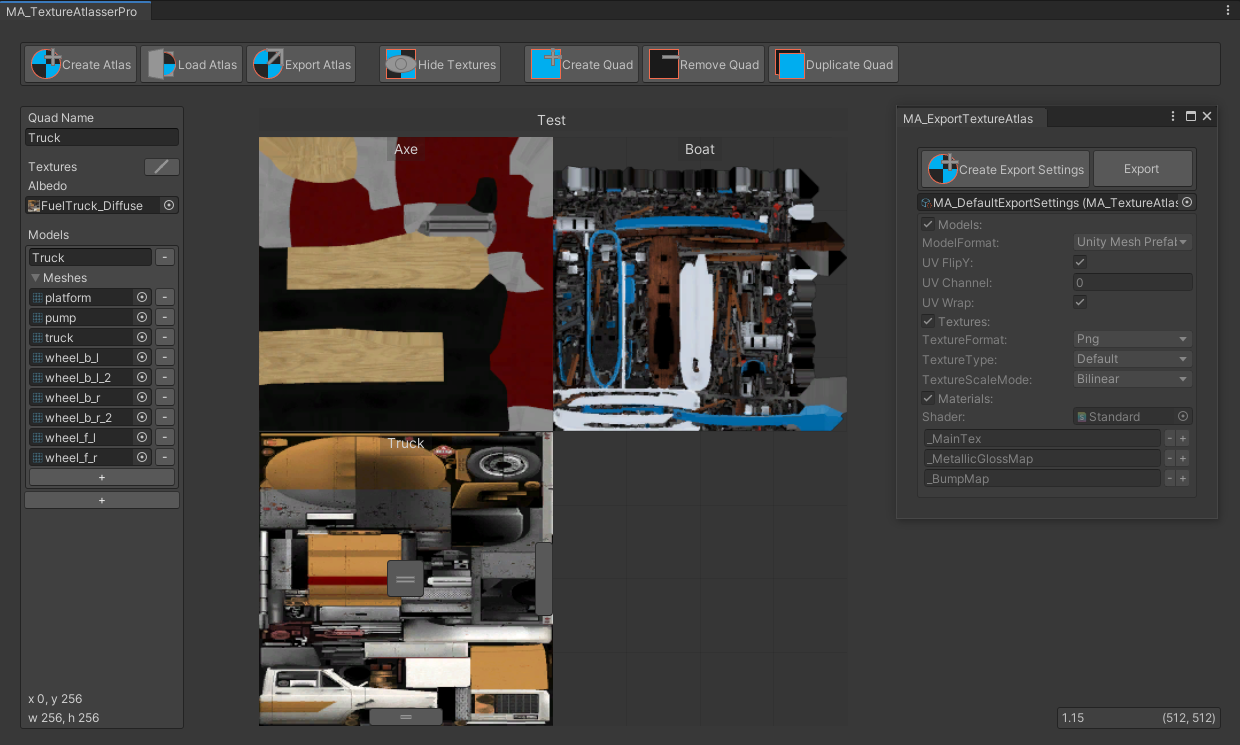
GitHub
Texture atlas creator for Unity. Contribute to maxartz15/MA_TextureAtlasser development by creating an account on GitHub.
gilded relic
pallid gale
https://github.com/maxartz15/MA_TextureAtlasser have had some success with using...
I’ll check it out, thank you!
pallid gale
hopefully it works okay for you
and I would note that material atlasing like tiling textures gets a little weird so probably better to start with your uniquely unwrapped props
 celest rune
Is there a way to optimize a small world with 12 light sources so people dont lag in VR?
pallid gale
turn that all into baked lighting
as real-time lighting is quite expensive
You can support me on my pateron
https://www.patreon.com/mcphersonsound
This is a longer tutorial than normal and there is a lot to cover so here are time stamps for your convivence.
00:00 what is baked lighting
00:35 setting up lights
1:23 preparing meshes to bake
2:30 generate lightmap UV
3:28 light probes
5:10 reflection probes
6:00 emissive ...
celest rune
already baked
pallid gale
question fully baked or set to mixed
celest rune
my light sources are spread this far. its baked with abit of bloom and post process volume
 celest rune
pallid gale
question fully baked or set to mixed
celest rune
pallid gale
question fully baked or set to mixed
umm im not sure
pallid gale
because if they're set to mixed you would still be incurring the 12 x draw call cost on all of the avatars
GitLab
A surface shader for Unity providing cel-shading. (Forward rendering only)
"The third light we add is a Point Light. This adds 1 pass to everything within its radius, and renders everything it touches again.
Our Point Light has no shadows. If we enable shadows, Unity will render a cubemap - a six sided texture - from the light's perspective with the shadows. This means things within the light's radius can be rendered up to 6 times."
okay checking these stats if you have all those Point lights to mixed casting Shadows that makes every Avatar 84 times more expensive
this Unity feature I posted the link of lets you see the rendering stats
 compact zodiac
celest rune
my light sources are spread this far. its baked with abit of bloom and post proc...
compact zodiac
celest rune
my light sources are spread this far. its baked with abit of bloom and post proc...
hey man how have you done your background? https://i.imgur.com/j5MHF6f.png


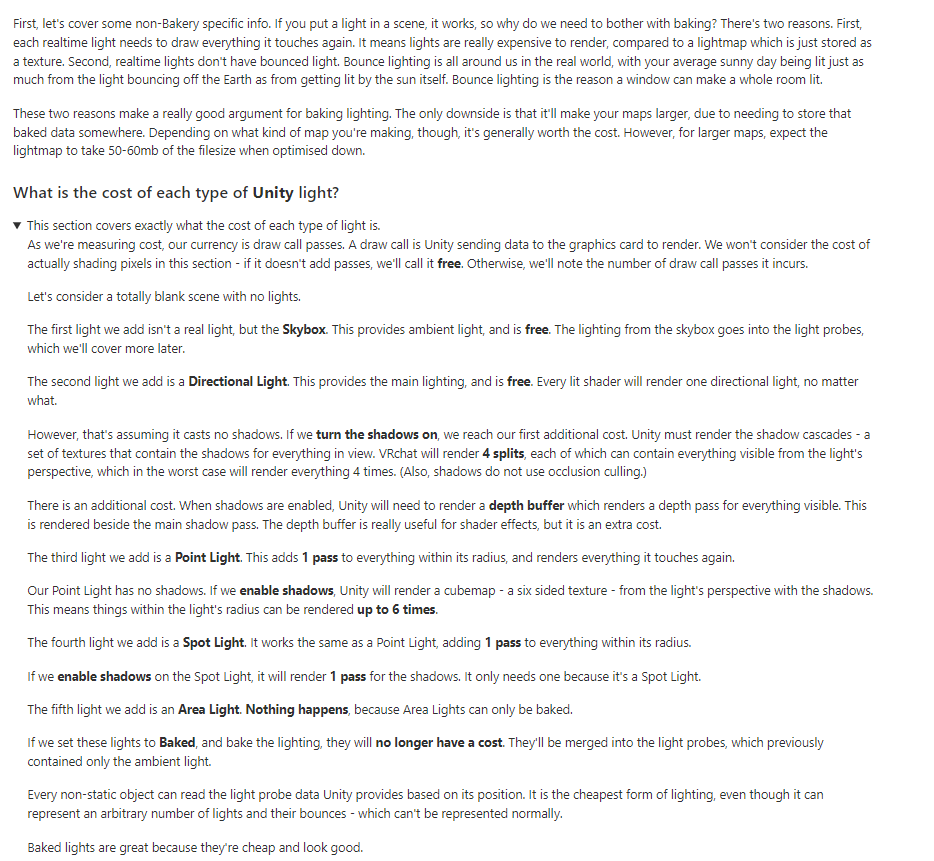


 pallid gale
it's just a very pretty Skybox
pallid gale
no clue as there's a lot of places it could have come from I suppose you could check the unity asset store for free Sky boxes
 lavish urchin
Hi guys i tried using the vrworldtoolkit crunch compressor thing on my world to reduce the download size but it seems like the download size is still the same. Anyone have any clue on what i'm doing wrong? I'm super new to this
pallid gale
question have you actually uploaded a test build as as the thing that tells you the file size of your map goes off the most recent upload
so if you've just hit the crunch all the textures button with no test upload it would be going off the old data?
at least if you're getting the file size off of the build report function
lavish urchin
Yup! I uploaded it as an update
pallid gale
just figured I'd check
celest rune
compact zodiac
I'm learning unity again lol
Unity Asset Store. not sure witch one but i can check if u want me to.
 fallow drum
lavish urchin
Yup! I uploaded it as an update
fallow drum
lavish urchin
Yup! I uploaded it as an update
Open the compressor and take a screenshot of it before you ran it so we can see the settings?
compact zodiac
celest rune
Unity Asset Store. not sure witch one but i can check if u want me to.
thanks man I just found it
celest rune
np
 strong loom
im currently working on a small world Currently i have 16 Meshes with 1 Material Each. The Current World Size is 75k tris / 38k faces and 37k verts. I wonder if someone can give me a rough estimate if that would break the Bank or not. I would try to optimise some items by merging the Materials and repainting them in Substance Painter. But what are some good estimates on Worldsizes.
 gentle gust
thats not a lot for a world