
#world-optimization
1 messages · Page 23 of 1
 hollow elk
 hasty merlin
Figured the lighting would have something to do with it
hollow elk
Main thing you would want to work on is drawcalls
hasty merlin
How many draw calls are considered acceptable usually?
hollow elk
Below 500 for "very good" performance
hasty merlin
Yikes haha
hollow elk
But you could get away with having about 3500 I would think and still be able to hit 90fps
Are you using static batching?
hasty merlin
Does that just mean that every mesh has the static box checked?
hollow elk
Yes
hasty merlin
Yup, all the world geometry is static
hollow elk
What shader are you using?
hasty merlin
Poiyomi Pro for the buildings and roads. Standard for certain things.
hollow elk
You shouldn't use poiyomi for worlds
Unless it specifically says that the shader is for use in worlds
Suppose you could still use it though depending
Most of the drawcalls are being caused by the realtime directional light with shadows
Disabling the shadows would presumably drop the drawcalls by half
hasty merlin
I needed poi because of the rgb mask options and some of the emissive options
Disabling shadows should probably be the first thing I try lol. Easier than swapping the shader for that many materials
Didn't know that the shadows actually affected the draw calls
I really appreciate you checking it out btw. Thanks a ton for the advice. I'll mess around with it tonight after work.
The project file being bloated from files that aren't being used wouldn't affect anything, right?
hollow elk
It shouldn't but its not impossible for things to be left in the build due to references that aren't directly visible in the inspector
If you don't have 1s VRWorldToolKit you should consider using it as it makes overall optimization a little more streamlined
hasty merlin
I used it in the past on other worlds, keep forgetting to add it to this one lol. I'll do that tonight too.
Would physics have a huge impact? There's the cars, and then there's also gates on hinge joints you can drive through.
hasty merlin
I think there's about 10ish gates scattered around? Each has two box colliders connected to a skeletal mesh
hollow elk
Yeah that wouldn't have much impact especially compared to the drawcalls
hasty merlin
Alrighty good to know 👍
Don't know if you saw them or not btw, but there's some cars in the garage connected to the subway station if you wanted to get around quicker.
hollow elk
Was able to get around fast enough using my avatar
 heady silo
I'm trying to create a custom mirror that isn't the VRC Mirror prefab, and I placed all the components from the VRC Mirror onto a flat triangle I made in Blender, I made it to fit a triangle wall in a room i'm making but the mirror bugs out. Anyone know how to fix it?
 pallid gale
hasty merlin
I needed poi because of the rgb mask options and some of the emissive options
pallid gale
hasty merlin
I needed poi because of the rgb mask options and some of the emissive options
maybe you could find a different Shader that has those what are you trying to do in particular with it
hasty merlin
Sorry, I didn't get a ping from that message. Seems Poi is working just fine. Just realized last night that I forgot to lock in the materials so they aren't all calling for a grab pass 🙃
With the new versions of Poiyomi's shaders you're supposed to lock it in before uploading, but I forgot to do that on 79 materials.
Shadows are now disabled and all 79 of those shaders are locked in and here's the result.


The last one was always the most problematic area, that usually dipped down to 12 fps, now tends to sit around 53-58
The other two usually were at about 17 fps
Still not great but it's a massive improvement nonetheless.
Other areas get around 75-90 fps now
Don't know how to bring up that tool @hollow elk was using to check the amount of draw calls tho 🤔
hollow elk
You can use the unity editor to profile yourself in the game view or with profiling tools
The tool was intel GPA
hasty merlin
Alrighty I'll look it up tonight after work. Thanks again for the advice, it's actually somewhat playable now lol
pallid gale
ideally you'd want to get it to where it's 90th fps on your desktop have you done any occlusion culling
hasty merlin
Yup occlusion culling is enabled. There was just one building I had to disable as an occluder because getting near it would cull the whole map
Not quite sure why
 nocturne drift
Hey, made my first world now, something really simple with only a couple of objects, a mirror, a couch and a movie player, why does it take up 30 mB? Am i doing something wrong? What are your tips for optimization?
 versed lichen
What are your couple objects and skybox ?
 cinder tusk
nocturne drift
Hey, made my first world now, something really simple with only a couple of obje...
cinder tusk
nocturne drift
Hey, made my first world now, something really simple with only a couple of obje...
Do you have the VRWorld Toolkit installed? That will give you a build report
nocturne drift
cinder tusk
Do you have the VRWorld Toolkit installed? That will give you a build report
idk, how do i check that?
nocturne drift
versed lichen
What are your couple objects and skybox ?
 cinder tusk
nocturne drift
idk, how do i check that?
cinder tusk
nocturne drift
idk, how do i check that?
https://github.com/oneVR/VRWorldToolkit/releases/tag/V1.11.2 Download this package and install it like you did the SDK

GitHub
After successfully importing the release unity package the toolkit menu will appear in the Unity top bar as VRWorld Toolkit - If it does not, check Troubleshooting for common problems and solutions...

 cinder tusk
None of this is useful, we can't guess how big stuff it just by looking at it
Some highly fancy stuff can be super optimised and some basic looking stuff can be terribly unoptimised
Use the toolkit and it will give you a report that will tell you the largest files
nocturne drift
installed
nocturne drift
cinder tusk
Use the toolkit and it will give you a report that will tell you the largest fil...

Which option?
 nocturne drift
cinder tusk
Okay, easy way to squash that
nocturne drift
cinder tusk
Okay, easy way to squash that
Thank you so much for introducing me to this wonderful tool
cinder tusk
Select it and bring it up in the inspector
nocturne drift
"Use crunch compression"?
cinder tusk
At the bottom of the UI you'll see various options. Enable Crunch Compression, set quality to about 80->100. Apply.
See what the file size is in the preview data below the panel
versed lichen
It's still a 30mb skybox
cinder tusk
May take a bit to process
nocturne drift
versed lichen
It's still a 30mb skybox
I used a skybox from the unity asset store
cinder tusk
@versed lichen For personal worlds where I don't care about size, I've got 100+ for very elaborate ones.
versed lichen
Yeah, that's the mistake most beginners make
cinder tusk
But then I also rendered that myself :P
So I wanted to enjoy seeing it when I logged on
I'm looking now at ways of reducing the impact though, mixing some rendered and some procedural together.
nocturne drift
But i know what´s wrong now! I can find a light texture and my world will be way more optimized
Thank you so much
cinder tusk
Depending on the eventual look you're after, there may be future ways to switch to a procedural (on the fly generated) skybox which takes up almost no space. Maybe once you're used to tools and have tried out building a decorative background area for example.
nocturne drift
That´s the plan, first the basics, then worry about serious optimization
Literally started today when i got off work
cinder tusk
That way the skybox background can be minimal detail, then you create a mid-ground that's low poly but a little more detailed, buildings, or forest or whatever you're after. But out-of-bounds to players. Then closer higher detail stuff within the edge of the play area.
Its a long journey! But fun. :)
nocturne drift
cinder tusk
That way the skybox background can be minimal detail, then you create a mid-grou...
True, how about scripts? if i code the things myself without using nodes can i make it more optimized using techniques the generated code wouldn´t use?
cinder tusk
Its more a matter of style. If you get UdonSharp for example installed, if you're familiar with code in general, (Like Java, C#, Javascript, PHP), it will be easier I think to work with UdonSharp.
But anything you can do in one you can do in the other.
My day job is a software developer so I found regular Udon to be a little.. hard to follow.
nocturne drift
cinder tusk
My day job is a software developer so I found regular Udon to be a little.. hard...
Why would that be the case?
cinder tusk
Code flows in Udon generally left to right, rather than top to bottom. I found it slower to quickly add debug lines or find stuff I was looking for. I find it much quicker to type with IntelliSense auto-complete in Visual Studio than using a mouse to code.
But I know for novice users, it can be easier to visualise the flow of code through a node system. I prefer nodes myself working with shaders.
(and ironically, because we've been stuck on old Unity, coding shaders means you can't use nodes)
nocturne drift
cinder tusk
But I know for novice users, it can be easier to visualise the flow of code thro...
I´m actually used to code a lot in C, java and C# so i totally understand how an organized code can be better than all the connected nodes in long term projects
nocturne drift
cinder tusk
(and ironically, because we've been stuck on old Unity, coding shaders means you...
That´s the thing that shocked me today, i had to install an archaic version of unity to use udon
cinder tusk
I've got for example, a complex script in one project that's almost 800 lines (which really needs splitting up but still). That would be a whole bowl of spaghetti in Udon
They promised we're moving to 2019 LTS this summer so... fingers crossed for August Update. ;)
nocturne drift
cinder tusk
They promised we're moving to 2019 LTS this summer so... fingers crossed for Aug...
They did?!?!?! Thank god
nocturne drift
cinder tusk
I've got for example, a complex script in one project that's almost 800 lines (w...
Seeing that the majority of people don´t know the basics of OOP languages i totally support the idea of nodes even if they can become hard to read
The devs choose the best path
cinder tusk
Hoping there is a beta soon so that people like the prefabs and third party tool people can do plenty of testing and get their stuff ready for launch.
I don't want in on a beta. But I want to know all the tools I use are working on day one 👀
nocturne drift
We can´t push them too hard, they are only 9 people, and i know making tools and making the assemblies for them can be quite boring and hard
cinder tusk
I read there is going to be a beta soon so hopefully all toolkits will be ready too. X3
nocturne drift
But yeah, if they want to release it flawless they need the help of the community to test every single feature
 merry elbow
Does a render texture introduce much overhead to a world?
hollow elk
merry elbow
Does a render texture introduce much overhead to a world?
Depending on the resolution it can have little or a lot
merry elbow
Say, 1000x1000 resolution?
hollow elk
Would be fine for any modern GPU
I would say imagine it like the resolution of a persons monitor as it's pretty similar in its performance cost
merry elbow
That's about how I figured it. I'm just looking to use one to push text through a CRT shader for an old-fashioned monitor effect on a screen (rather than just a flat "screen" surface with a canvas in front of it)
hollow elk
Keeping the resolution as low as you can get away with would be the ideal way to use the render texture
And having a toggle to turn off any cameras rendering into it for users who might be on low end hardware is always a good option to have
merry elbow
Of course.
cinder tusk
One is certainly fine, I've had up to three running before with 8 people using average avatars, plus one running a YouTube video. If you can create something to spawn a camera and playback surface, you could test and review how many your system can handle.
 karmic wraith
Is anyone else getting the 11 frame bug on their world? Because it seems to only be effecting the instance owner of the world.
because I got 11 frames on desktop mode on a modern computer with an rtx 3070 and a i7 10th gen intel cpu with more than enough vram and ram
Yup tested it out and it is the instance owner that gets the 11 frame bug, is there any way to get around this or is it just an api update we have to wait for?
 crimson turtle
cinder tusk
Code flows in Udon generally left to right, rather than top to bottom. I found i...
crimson turtle
cinder tusk
Code flows in Udon generally left to right, rather than top to bottom. I found i...
have you tried udonsharp?
because that is probably exactly what you're looking for
afaik like half of the people out there using udon at all use it heh thats how good it is
cinder tusk
Yes, i use that
 robust olive
karmic wraith
Is anyone else getting the 11 frame bug on their world? Because it seems to only...
robust olive
karmic wraith
Is anyone else getting the 11 frame bug on their world? Because it seems to only...
I had this issue the other day, no clue why
The difference is that someone else also had the issue in my case
Are you using any advanced prefabs?
any Udon stuff?
nocturne drift
Hey! Where do you guys find light skybox textures?
 unique kite
- asset store
- https://polyhaven.com/
- Custom made with normal assets and a reflection probe
karmic wraith
robust olive
Are you using any advanced prefabs?
Define advanced prefabs and I a using udon yes
robust olive
karmic wraith
Define advanced prefabs and I a using udon yes
It turns out, it's not the 11fps bug
check all your scripts, see if anything is being synced that shouldn't be
karmic wraith
It is 11-15 frames on desktop and vr and only if you are the instance owner
 karmic wraith
robust olive
check all your scripts, see if anything is being synced that shouldn't be
karmic wraith
robust olive
check all your scripts, see if anything is being synced that shouldn't be
Do you think it's the new manual or continuous sync they add to udon scripts?
because I set things that should be continously synced to manual
robust olive
karmic wraith
Do you think it's the new manual or continuous sync they add to udon scripts?
In my case, it was a variable that didn't need to be synced at all
karmic wraith
Well my world has a lot of variables, what sync method are you refering to?
Are we talking about in script variables or the sync method on the component?
robust olive
karmic wraith
Well my world has a lot of variables, what sync method are you refering to?
in the script
 robust olive
those
karmic wraith
Ya I never understood what those do since they didn't provide doucmentation about them. I will look through all my scripts to see what might be causing the host issue
Ah I might have found the bottleneck but I can't be sure till I test it. While we are on the subject what does linear and smooth do for synced?
karmic wraith
robust olive
those
Ok turns out that worked! Thank you so much for the help!
robust olive
karmic wraith
Ok turns out that worked! Thank you so much for the help!
what was the variable for? mine was for a teleport
karmic wraith
robust olive
what was the variable for? mine was for a teleport
It was for a depreciated system that we never released that was experimenting with networking systems before they put out more documentation on the matter.
So we disabled that old system and removed all the old synced variables that would only launch if someone used a mod to force it to launch
So in other words you needed a mod to even see the animation it caused. So we just scrapped it and disabled it.
 cursive sun
building a world for quest and i keep getting this warning:
world uses unsupported shader "Legacy Shaders: Diffuse"
but it doesn't from as far as i can see
i literally went through every damn material in my asset folder and found nothing that used it
i'm worried about uploading my world now
i have no idea where it could be
help plz
versed lichen
don't use legacy
unique kite
cursive sun
help plz
Look into Shader > VRChat > Mobile; should have what you need there for Quest. Legacy is shaders that are used on all the old unity asset store stuff. 9/10 it doesnt even work in pc mode. You wont get an error on pc builds, you will just get pink objects in game.
cursive sun
unique kite
Look into Shader > VRChat > Mobile; should have what you need there for Quest. L...
I know that but like
I don't
know whats using it
im asking of there's a way to navigate to it
unique kite
If you use the toolkit it will direct you to bad or incompatible shaders upon build in its debugger. I am not at my pc but the link can easily be found by googling vrchat toolkit
 lilac saddle
Hey, I have a question. Does the world load in everything that has been downloaded into the unity project or just the stuff that you put into the world? I tested my world and it has over 200 mb (well, maybe it's big, but i plan on putting in much more).
Should just have everything present in the scene
If you have a lot of disabled stuff still in the scene then yes those do get included
I see, thank you very much!
if its only in the assets tho and not in the scene its not included
so basically just clean up your scene
My scene is still quite empty though.
are the textures crunched?
that helps a lot
crunched?
my avatars 8192x8192 texture atlas fits in about 900kb
lilac saddle
lilac saddle
crunched?
compression
I kinda don't want to lower quality.
if you set it up right it doesnt
i am sorry, but if you dont know what crunching is, you probably have the textures set up unideally anyways
so maybe you even gain quality
I...just download stuff, put in the material and maybe edit it to look better
yeah those textures are really badly set up then
they look horrible compared to what you can do if you know how to set up textures in Unity
Let me grab a screenshot
I'll send two. My progress is limited. I only worked like 20 hours.
what I am curious about is the settings of the texture itself


thats not the texture setup
thats the material...
Uh...
Sorry, I'm a noob and kinda taught it myself...
click on the texture in the asset folder
and then the inspector

Here's the floor for example
yeah default settings
and look its compressed to hell and back already
what resolution is the texture natively?
Um...I'll open photoshop
One sec...
Is this right?

okay then set max size to 4096, leave compression at Normal, enable crunch, crunch to 95 to 100% and raise aniso level to 8
should look tons better and be a heck lot smaller
hollow elk
@lilac saddle https://github.com/oneVR/VRWorldToolkit/releases/tag/V1.11.2 Use this it has many tips that will help with world creation including optimization

GitHub
After successfully importing the release unity package the toolkit menu will appear in the Unity top bar as VRWorld Toolkit - If it does not, check Troubleshooting for common problems and solutions...
It has a build report that will tell you and direct you to the largest contributing assets to the world filesize
lilac saddle
Interesting, thanks!
lilac saddle
lilac saddle
should look tons better and be a heck lot smaller
Thanks, however, it looks the same.

well whats the file size say in the preview window tho?
like the one below the inspector
Nevermind, I'm dumb. I used a similar texture.
2.7 mb
Thanks! I learned something new today.
try around with the crunch factor, sometimes 99% is a super great improvement in filesize and you dont see a difference
and always set Max Size to the size of the texture
else you really just throw away the detail
Alright.

...darn
...it was not there before, however, i did not download any scripts...?
hollow elk
What does the unity console say
 hollow elk
Honestly just restart unity and see if you get any errors or if it fixes it
lilac saddle
This kinda crap also happens to me in every other programming software at school.
I'm cursed >->
nope...
hollow elk
Try re-import the SDK

 hollow elk
I would recommend removing scripts not related to the SDK
hollow elk
Yeah not really surprising honestly
lilac saddle
I have no idea how it works, but it must be a wonder script thingy
Thank you for your time!
lilac saddle
He must be a chad just like the creator of the cats blender plugin.
 true reef
hii
can anyone tell me how i do that ,
if someone turn a mirror in the world then turned another mirror...the first one will turned off
sdk 3
btw
unique kite
yo, where did you get your mirrors? The starter kit has built in toggles to kill all but the active mirror. Ied recommend that if you don't know where to start with scripting or nodes

 novel thicket
tips to optimize a pc only world for low end hardware?
i tested my world with a friend and he says he runs the world at extremely low frames, i want to see if i could change stuff to gain more frames
already tried to bake lighting, but can’t get it done right
any suggestions?
true reef
unique kite
yo, where did you get your mirrors? The starter kit has built in toggles to kill...
i got my mirror from sdk3 world from vrchat website
unique kite
novel thicket
tips to optimize a pc only world for low end hardware?
i tested my world with a ...
Avoid constant Updates if you are using udon. Reduce draw calls by simplifying your shaders; maybe use mobile shaders, reduce texture resolution, use occlusion culling, baked lighting, if possible combine grouped objects into a single mesh and have them use an atlas instead of separate textures.
unique kite
true reef
i got my mirror from sdk3 world from vrchat website
So basic, try the link I provided. Its mirror is setup the way you want. If you want to code it yourself you are going to use an array and for loop to close the other mirrors
for(var i = 0; i < mirrors.Length; i++){mirrors[i].SetActive(false);}
don't copy and paste that its probably got syntax error.
true reef
unique kite
So basic, try the link I provided. Its mirror is setup the way you want. If you ...
THANK YOU
 velvet linden
unique kite
https://gitlab.com/xlwnya/vrc_starterkit/-/releases
velvet linden
unique kite
https://gitlab.com/xlwnya/vrc_starterkit/-/releases
Yoink, thanks.
Also do you know if those pens work for quest?
unique kite
not sure, its just a particle emitter so for the quest upload change the shader to VRC > Mobile > Particle > Additive and your set.
velvet linden
Ok, thanks.
 deft yoke
Does unity/VRC have built in LoD support for individual objects? I was about to write a script for that...
 hidden hollow
Are there any benefits to having a single mesh with multiple materials vs a single mesh for each distinct material? Total unique meshes are < 20
versed lichen
More batches with separate meshes with their own material
 jolly heath
though if you merge every mesh occlusion wont do anything lol, so probably a sweet spot somewhere in the middle
 signal sinew
All depends on what your world is
 zealous sand
Does anyone know how to hook up to occulus app?
 nimble mortar
Would anyone be able to help me with further optimizing my world? I have tried many things, used world debugger and more and still feel like it isn't perfect for having large groups
hidden hollow
In theory what would be more peformant? 2x material atlases @ 4k or 1x @ 8k ?
pallid gale
2x material atlases @ 4k as you using considerably more vram on 1x @ 8k
hidden hollow
Had the same assumption, thanks!
pallid gale
and also if you're talkin about like 2 texture for the whole map or so you're doing pretty good
hidden hollow
LOL sadly a few more than 2 for the whole map
pallid gale
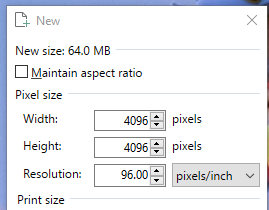

if it helps the vram difference between the two of them
and that would go even higher if pbr because you would require 2 to 4 textures
 bleak tendon
dunno if this is the right place but i have made a world in blender and with some assets from booth the world is pretty small but its still 48mb and i dont know why its so big i already downscaled lots of materials and the world also dosent have many verticies
This picture basically shows the entire world btw
 hollow elk

GitHub
After successfully importing the release unity package the toolkit menu will appear in the Unity top bar as VRWorld Toolkit - If it does not, check Troubleshooting for common problems and solutions...
Add this to your project and it has a nice UI for showing you what assets have the largest file sizes
hollow elk
It should have added a tab at the top of the unity window called VRWorldToolkit under that you want to open the world debugger > build report
bleak tendon
so i now know that the main world is taking up a lot but i still dont know why
 hollow elk
On that meshes import settings make sure you have blend shape normals set to import and not calculate
bleak tendon
I think i might have found it there are a shit ton of animations on the fbx but idk why or is this normal ?
 hollow elk
You can go to the models animation tab and disable import animations
bleak tendon
Will that also remove the animations from the active object ?
hollow elk
Only if you are directly using one of those animations stored in the model itself
bleak tendon
No i havent used any of those so i need to pull the fbx in again ?
bleak tendon
Thank you a lot already btw i dont know why there were so many on there but without you i wouldnt have found them
thanks ^^
hollow elk
Not sure how a model could even get that many animation clones
bleak tendon
Yeah i also dont know i have created the model in blender and thats all i did
Maybe accidentaly started to animate in blender or something idk
 vital hinge
I downloaded a ready-made keyboard for worlds in vrchat, but the texture is for some reason white, how to fix it?

 thick musk
Does anyone know how to toggle objects in a 3.0 world?
 light totem
hi
is this 2x side or 1x side shader exist and available to download in github?
any help pls

...
because i need this for my world optimization
you can see example for stare rail how much polygons (in cylinder shape) can cost

actually (when i calculate edges of cylinder shape object) in total it can cost 45 polys
so with that shader the amount of polys can drastically be reduced
in a way that it can only cost 2 polygons (if 2x quad object are created and this shader be apply'd on both sides)
unique kite
There are plenty of double sided shaders. But shaders don't reduce poly; they just determine which vertices and the faces are to be rendered. Toonlit shaders are common and have double sided options here is one that I have used in the past https://assetstore.unity.com/packages/vfx/shaders/free-double-sided-shaders-23087
here is one git https://gist.github.com/naojitaniguchi/62ccf37c801ea55517b7
light totem
ty
 ivory spear
Do VRchat mirrors reflect inactive objects in the world?
 narrow seal
light totem
actually (when i calculate edges of cylinder shape object) in total it can cost ...
narrow seal
light totem
actually (when i calculate edges of cylinder shape object) in total it can cost ...
Is there any reason those wires can’t be long cubes instead? Introducing a new shader, and therefore a new material, is a lot more expensive than a double-digit addition of polygons.
light totem
@narrow seal
no cause if you use cubes instead cylinder it will cost more poly's because of more faces
well it's only my idea i didn't know that shader or material exist or not
and those shader or material that i represent is much cheaper then creating more poly's
bcz more poly's means poorer world performance
narrow seal
light totem
<@!91655274259025920>
no cause if you use cubes instead cylinder it will cost mo...
VRChat is heavily CPU-boottlenecked, so additional drawcalls will start impacting performance long before more polygons would. Batching as many as 1000 more polygons (1000 is a lowball estimate, the real upper limit there is probably much higher) into an existing drawcall (because you used the same material for the wires as you did for the rail and posts) is almost always significantly cheaper than adding a new shader or material to get a specific detailed effect.
unique kite
^ Search Atlas Texture for how to achieve this efficiently.
can also look into Mesh Baker which is a Unity asset for combining meshes and automatically creating atlas'.
pallid gale
like heck it can be worth it to add more triangles to make it easier to tile texture inside a texture Atlas because drawcall are more expensive than a couple of extra Edge loops
light totem
@narrow seal
yeah that's probably true
and using same materials for other objects i better then using different one's
narrow seal
pallid gale
like heck it can be worth it to add more triangles to make it easier to tile te...
You’re talking about the Eventide atlasing technique, right?
pallid gale
yeah that would be an example of it
cinder tusk
ivory spear
Do VRchat mirrors reflect inactive objects in the world?
If the the mirror is told to reflect the layer they are on
 visual swift
I've run into an odd issue where in my world the instance owner will have terrible performance when others join in but only when there's someone else there. If the instance owner leaves, whoever takes over gets the terrible performance next. So far I've disabled all video players, audio, join audio trigger trying to figure out whats causing it but no luck
Any suggestions?
hollow elk
visual swift
Any suggestions?
Udon or SDK2?
visual swift
udon
hollow elk
You likely have variables set to sync that are un-syncable
visual swift
Ah okay. Is there a way to know if thats the case?
hollow elk
If you opened the output log debug menu when in game as the master you would be able to see if it was
visual swift
Ok can I do that from the Build and Test version or does it need to be within vrchat proper?
hollow elk
Build and test should work with two clients
visual swift
yeah thats how I've been testing it and it does cause the issue to happen
How do I enable the output log you're referring to?
hollow elk
Press right shift ~ 3
visual swift
ok
giving it a go now
looks like some of my toggle buttons are failing
Thanks for the help! I know what to look at now
visual swift
yeah
it had another msg with it
but it was always the same button just scrolling by over and over
another one appears periodically
hollow elk
Yeah you just need to disable sync for those udon behaviors
visual swift
ah understood
I also noticed I'm using an older version of the local object toggle, a graph I made myself early on. I might just swap it out for the local toggle from Jetdog's prefabs
 kindred sleet
So I know transparency isn't supposed to be supported on Quest, but I know people have found ways. I'm just trying to figure out how to do dark, single-color windows. Any suggestions?
pallid gale
you can use transparencies on Quest world they're just expensive compared to PC
kindred sleet
Ah, okay. I'm gonna try changing the shader to a sprite and see what happens
pallid gale
and question are they Windows where you see the interior contents
kindred sleet
Yeah
pallid gale
kindred sleet
Ah, okay. I'm gonna try changing the shader to a sprite and see what happens
that's probably not going to work as intended
kindred sleet

Yeah probably not.
But my Build and Test option is greyed out, I assume that's because I need to fix some shaders, yeah?
 pallid gale
that's because you cannot locally test Quest Maps
kindred sleet
Oh, cool
pallid gale
and you probably want to convert your shaders to the standard light
kindred sleet
Done, just not with the windows
Thanks
Does a skybox have to be converted to VRC skybox?
pallid gale
I don't think so cuz you're not getting an error message about that
 median sundial
okay okay okay. light maps have just come out of the oven, the textures are nice and crunchy. what else should i do to make this world less big?
 gentle gust
https://github.com/oneVR/VRWorldToolkit/releases/tag/V1.11.2
put this in your project if you havent already. it will tell you what takes how much space in your world

GitHub
After successfully importing the release unity package the toolkit menu will appear in the Unity top bar as VRWorld Toolkit - If it does not, check Troubleshooting for common problems and solutions...
@median sundial
median sundial
gentle gust
https://github.com/oneVR/VRWorldToolkit/releases/tag/V1.11.2
put this in your pr...
i have i used it to crunch but what can i do with it more?
gentle gust
i mean, it literally shows you which texture uses what amount of space
you can also lower lightmap resolution at the cost of quality
atlas'ing everything could help too
gentle gust
putting every texture in a single one. helps with performance and filesize
just hella annoying to do, especially with multiple maps
median sundial
and how do you do it?
gentle gust
with CATS Blender plugin and its material combiner inside blender
median sundial
on a scale from 1 to 10 how necessary is it and on a scale from 1 to 10 how much of a pain in the ass is it?
pallid gale
well I suppose you could always start with texturing the non tiling textures so that it's a bit less of a headache to start
versed lichen
How much lightmaps do you have ?
median sundial
versed lichen
How much lightmaps do you have ?
7 apparantly. why?
my map is 200mb rn kinda big
and again quick reminder im very new at this so sorry in advance
median sundial
versed lichen
7 4K lightmaps ?
i dont know if they are 4k but if they usualy are then yes
median sundial
versed lichen
What else is in your world ?
want me to show you a picture?
versed lichen
You can see at the bottom of the lighting window
median sundial
like i just added post processing and that still need fine tuning
versed lichen
Yeah a screenshot would help understand what the size should be
median sundial
versed lichen
You can see at the bottom of the lighting window
it says 8 directional lightmaps 10.48 mb
pallid gale
okay so that's not the file size consumer
 versed lichen
Did you publish it privately yet ? Would be good to see the build size result from the toolkit
median sundial
versed lichen
Did you publish it privately yet ? Would be good to see the build size result fr...
you mean build it and test it?
versed lichen
Sure, whichever works for you
median sundial
yes multiple times
versed lichen
Did you look at the toolkit build report ?
median sundial
what is the toolkit build report?
versed lichen
You imported the vrworld toolkit earlier, might wanna open it
median sundial
yes i used it to crunch everything and for post processing. what specificly am i opening
(rlly sorry)
versed lichen
vrworld toolkit window, top of your screen
median sundial
yes and then i get post processing and about etc
median sundial
i only see post processing, on build functions, custom editors, quick functions , world debuger, usefull links, and about
versed lichen
world debugger
versed lichen
yep
median sundial
 versed lichen
build report window is what we need 
You'll want to fix what the toolkit tells you is an issue later
median sundial
 median sundial
versed lichen
You'll want to fix what the toolkit tells you is an issue later
median sundial
versed lichen
You'll want to fix what the toolkit tells you is an issue later
will do!
versed lichen
looks like you have 8K normal maps
So your textures are the issue still
You want to downscale everything down to 2K, you can keep the albedo (main texture) to 4K if you need it
median sundial
and how can i do that? do i just go to every file and do it?
versed lichen
You should be able to click in the list directly, but the toolkit has a tool to do this too
median sundial
you mean the import function that can crush? that doesnt do normal maps right?
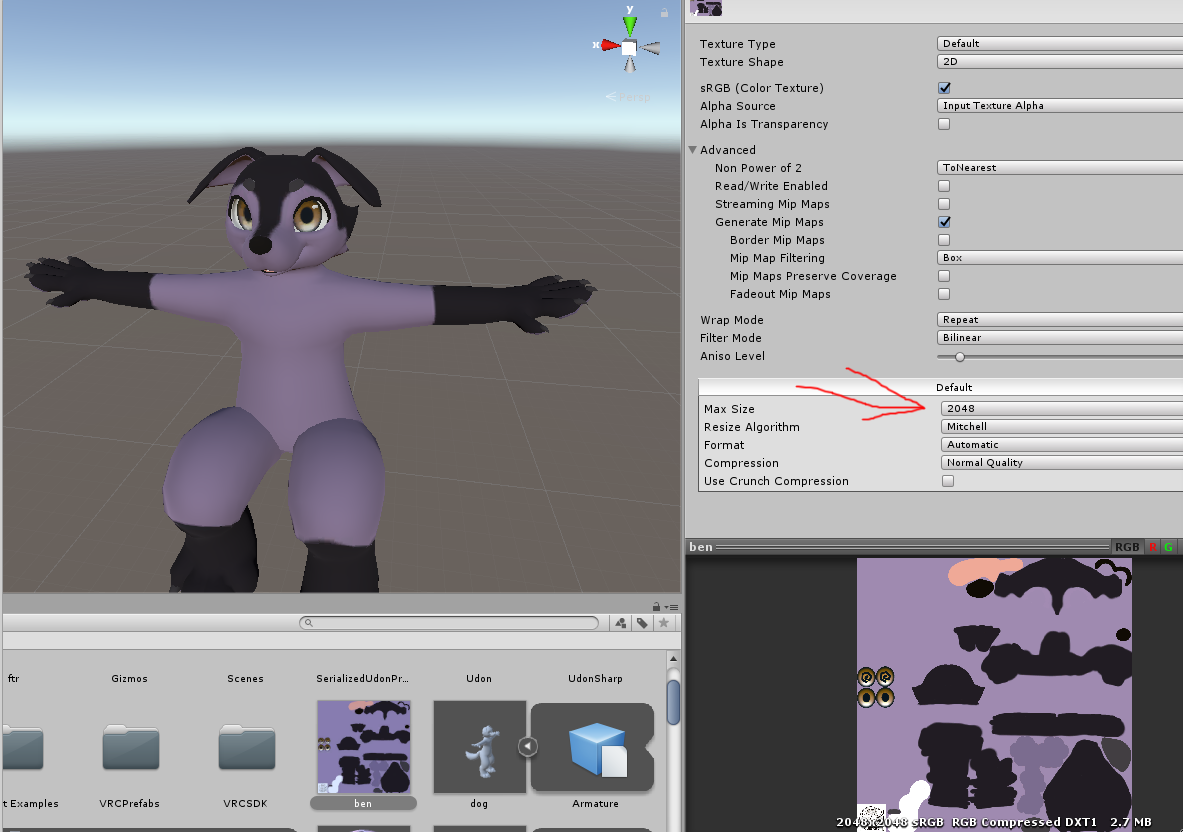 pallid gale
in this case were trying to make the texture physically smaller because it's too big for what you actually need
median sundial
alright so for all the big files i need to set them to that setting
versed lichen
You need to set everything to 2K, without ignoring normal maps
crunch compression to 50
 versed lichen
scene
median sundial
alright now its doing stuff
quick question in the mean while. i have a local movable mirror thats always on. and since always on mirrors is bad. what to do?
pallid gale
doing this should make the file size a lot smaller with like no noticeable quality loss because some of those textures is too big for how close you're going to be anyway
pallid gale
median sundial
quick question in the mean while. i have a local movable mirror thats always on....
make it to where you have to turn on the mirror
median sundial
pallid gale
doing this should make the file size a lot smaller with like no noticeable quali...
thanks so much!
versed lichen
The toolkit also said you had another camera in your world, which also causes perf issues
median sundial
pallid gale
make it to where you have to turn on the mirror
like a little button next to it?
pallid gale
median sundial
like a little button next to it?
yes
median sundial
versed lichen
The toolkit also said you had another camera in your world, which also causes pe...
i have 2 cameras one for interactive water and 1 for post processing
versed lichen
hopefully it's a small amount of water
median sundial
no its ALLL the water
versed lichen
yikes
median sundial
but like it runs well. on my pc at least
versed lichen
it's really not meant to be used for water
it's for small ponds and pools
everything runs well on people's pc, until it doesn't
median sundial
versed lichen
it's for small ponds and pools
i know that but i couldnt find any good looking water ANYWHERE
pallid gale
question could you just have not interactable water
median sundial
versed lichen
everything runs well on people's pc, until it doesn't
painfully true
pallid gale
because honestly most folks aren't going to be jumping in your Lakes
median sundial
pallid gale
question could you just have not interactable water
i could probably figure out how to disable the interactive part. but if you guys know some actually good looking water you find in vrchat world please do tell
median sundial
pallid gale
because honestly most folks aren't going to be jumping in your Lakes
yea you are probably right
pallid gale
how's your processing going
median sundial
bout 2/3
ahem 1/3
sorry
wrong button
and btw thanks so much guys you 2 are great!
pallid gale
glad to be of help
everyone's going to have a nicer time on your map not downloading a oversize guitar texture
you could fit like eight avatars in that download size of a guitar
median sundial
yea i rlly want people to have a reasonable good time on my first map
median sundial
pallid gale
you could fit like eight avatars in that download size of a guitar
its just one HELL of a guitar
solid 40 percent now
pallid gale
like honestly that guitar is more than the entirety of Animal Crossing city Folk
pallid gale
while it's loading probably pretty obvious but generally smaller objects should have smaller textures than bigger objects
median sundial
that sound logical
pallid gale
yeah it was just mentioning it because your guitar and ATM was severely breaking that
median sundial
yes i know... i just wasn't aware of their sizes
pallid gale
that's why that button that tells you the size is very handy
median sundial
yep! so thanks a lot for telling me how the hell that works
pallid gale
how's the progress bar doing
pallid gale
cool let's see what the file size is now
pallid gale
I have to go head out to take care of some stuff IRL but basically see if there's any objects that are like small but have big textures at your new maximum
to make smaller like the guitar
median sundial
great thanks!
pallid gale
apparently I have some 30 minutes before I need to head out so I have a little bit more time
median sundial
well aint that amazing!
could you tell me some good way to replace my ugly water?
pallid gale
go poke around the vrchat prefab database for its water shaders
median sundial
alrighty thanks!
pallid gale
median sundial
so for compression i just change the max size setting then hit apply?
pallid gale
yes
median sundial
512 good for small assets?
pallid gale
would depend on how small and you're like Texel density but probably a decent place to start if you're using 2,048 as tiling texture size
median sundial
nope its like avatar size or smaller
pallid gale
a other way to check would be to get the object as big on screen as you're going to see it that's not like sticking your nose in it and cranking the settings down until you don't see any noticeable difference
median sundial
128 it is
pallid gale
that might be a little too small for a guitar but probably fine for a coffee mug?
median sundial
256 then?
pallid gale
I can't know for sure without looking at your assets and your desired Texel density
median sundial
a pic?
pallid gale
perhaps just start with all of your avatar sized and smaller stuff being 1,024
as you don't want to make it look too blurry
median sundial
alright will do
pallid gale
sorry I can't give a more precise number
median sundial
no no thanks a lot for your help!
building again
after post processing everything became kinda laggy at around 40 fps so i rlly need to adjust that too
versed lichen
Basic post processing doesn't cause performance issues
median sundial
welp mine does. so that has to be fixed
versed lichen
If it's the one you got from toolkit, it's not the cause of your problems
If you still have the camera and the mirror, that would do it
versed lichen
Max you have in desktop is 90 
You can use the game window and enable the stats in Unity
pallid gale
so what's your new-build size
median sundial
117.3 so about 0.4 mb improvement
o wait forgot to refrech
its now 109 mb
so 8 mb improvement
pallid gale
can you take a screenshot of the thing that shows all of your assets to see what's up
versed lichen
From 197 that's good, still probably textures though
median sundial
 pallid gale
oh dear the guitar is still causing trouble as 15 megabytes is a bit too much
have you done crunch compression yet?
median sundial
yes i have
versed lichen
Some static batching too seems
 pallid gale
could you like click on one of those so I could see how big the texture currently is in like resolution
median sundial
 median sundial
what should it be?
median sundial
the rest are all normal quality except the skybox wich is hight quality
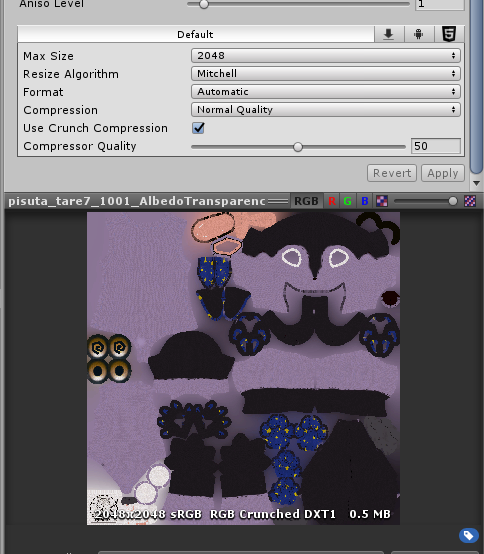 pallid gale
yes it'll probably be fine like that
you should probably see a decent reduction in your file size setting everything that's not a normal map to normal crunch compressed 50%
pallid gale
okay hopefully it is now because it wasn't earlier
median sundial
otherwise ill just redo the crunching
pallid gale
but yeah if it does the trick it should make it a lot smaller as 2048 is 0.5 mb at crunch compressed 50%
median sundial
 pallid gale
98 that's pretty good
versed lichen
Do your rock textures have compression ?
median sundial
versed lichen
Do your rock textures have compression ?
just checked yes they do
versed lichen
might want to reduce the scale
pallid gale
I have to go now but great job at shaving off 100 mb
median sundial
pallid gale
I have to go now but great job at shaving off 100 mb
thanks so much!
you're great!
pallid gale
okay I'm back from my errands how goes
lilac saddle
What is the recommended poly count for worlds?
signal sinew
lilac saddle
What is the recommended poly count for worlds?
While a little outdated (it still references submitting worlds to be made public) this is a good guide to follow. A little on the strict side, but is a great guideline.
https://docs.vrchat.com/docs/submitting-a-world-to-be-made-public
VRChat
Want to make your world public? You've come to the right place. There's a few things you should take into consideration before submitting your world to Community Labs. Make sure you read all of this! Failure to do so may result in your world being taken down, or never leaving Community Labs! If your...
lilac saddle
signal sinew
While a little outdated (it still references *submitting* worlds to be made publ...
Thank you ^o^
cinder tusk
I'm wanting to switch away from using a sky box image (night sky with twinkling stars, nebula, etc) to something more procedural to improve download size.
Is building something in amplifier a valid choice?
signal sinew
cinder tusk
I'm wanting to switch away from using a sky box image (night sky with twinkling ...
There's a few solutions for this now, I recommend TowelCloud since it's pretty nice and still performs well.
https://gitlab.com/towelfunnelvrc/towelcloud/-/wikis/TowelCloud
cinder tusk
signal sinew
There's a few solutions for this now, I recommend TowelCloud since it's pretty n...
Ah thanks! Is that just clouds or does it do stars too?
Oh. I see further along in the video it does
signal sinew
I believe just clouds, though you can use whatever you want texture wise and I could easily be wrong. RedSim's skybox is a bit more feature rich, but dramatically more taxing on your computer and paid on patreon.
Ah good
I only do day scenes lol
cinder tusk
signal sinew
I *believe* just clouds, though you can use whatever you want texture wise and I...
I'm doing a ring world so... even the day scenes probably want a few stars in... :D
May have to get creative and have several layers of skybox to get everything to layer correctly...
I'm currently using a pre-render I made but that's 100mb just for the texture
Which is a little obnoxious
pallid gale
did you do any crunch compression?
unique kite
cinder tusk
I'm doing a ring world so... even the day scenes probably want a few stars in......
If you do a legit ring world... Oh boy... I was crushed when Arks' Gen2 was fake ring world.
cinder tusk
Yeah. It seems to go 'that's nice' and doesn't change the size at all.
cinder tusk
unique kite
If you do a legit ring world... Oh boy... I was crushed when Arks' Gen2 was fake...
@unique kite they are regular maps, but set on a ringworld. I do have a few prototypes up with the static backdrop and a private test world where I loaded in the full geo.
I'm thinking then my various worlds will be placed at different locations across the ring. Or in orbit of it, above it, etc
pallid gale
that sounds very cool having multiple maps that feel like they share the same location
 cinder tusk
You have to do a bit of cheating to camera with size change in the object etc as it were to make it look like the object is much larger than it actually is.
So it gets physically smaller as it moves further away and so on
And is actually distorted, but you can't see that from your tiny view point around world origin
Which if you think about it, is how old school movies did it too. But in our case the physical limit is not reality, but floating point maths. XD
 kindred kite
cinder tusk
kindred kite
cinder tusk
We all start with cubes!
vital hinge
Unity hangs when I click Clear. How to fix it?

And the hang happens in any of my worlds.
 icy hedge
So this is gonna be a really broad question at first, but I've been playing with the Profiler in 2019, and while in editor profiling mode, i can consistently achieve 200+ FPS on the CPU (>5ms response time), but when in VRChat, my cpu is almost maxed out. I know VR adds an obvious overhead, but wouldn't that be on the GPU, not CPU?
I just wanna know where the discrepancy is in performance is i guess
versed lichen
It's both CPU and GPU, what kind of CPU do you have ?
200FPS in editor isn't very high
icy hedge
Ryzen 7 5800x
this more comes from having issues between trying to figure out if its actually my world that's running bad or my pc, because a few days ago before windows updated, i was able to hit 144fps in my world at 120% SS on a valve index
versed lichen
What does your world show in stats, in the game window ?
icy hedge
for the profiler?
versed lichen
no, in editor, game window > stats
 versed lichen
at 200 batches yeah i'd be surprised you would hit max CPU load
Are you using FPSVR or XSOverlay ?
For the specs utilization
icy hedge
bbbbboth
versed lichen
and they show the same thing ?
icy hedge
yeah, though i dont really keep as close an eye on xso
versed lichen
You tried disabling some things in your world to see if it makes any difference ? Does the same issue show in other worlds ?
icy hedge
yeah, i've got udon pour on a small handful of props, like 8 at most i think
disabling them improves it, but not enough to call it case closed
also, i noticed while using the profiler that having the SDK window open increases my cpu time compared to other unity windows, but that doesn't really matter, more just a thing i noticed
versed lichen
Yeah, that's fixed in the next SDK update
 ionic jay
One message removed from a suspended account.
gentle gust
you can use any 3d modelling software if you want. to Atlas the textures i just use Cats Blender plugin. its fast and simple
versed lichen
Texture/Mesh compression is done in unity
ionic jay
One message removed from a suspended account.
versed lichen

GitHub
Unity Editor extension for making VRChat worlds. Contribute to oneVR/VRWorldToolkit development by creating an account on GitHub.
 vale dock
this has probably already been posted hjere but this was a quick benchmark done by twitter@Metamensa to see how performance changed as vrchat upgraded to 2019.

Google Docs
Unity 2019.4.28f1
UNITY 2018.4.20f1 VS. 2019.4.28f1
These benchmarks were conducted over the course of a day and reviewed over the course of 2 weeks. I was in Desktop mode (borderless windowed) with an uncapped framerate.
My specs are a Ryzen 9 3900X and an ASUS STRIX Gaming RX 5700XT running Wi...
to the person who got accidentally pinged, that was an accident. nothing to see here 0u0
there is more information in this thread:

Hey #VRChat users! THE LONG-AWAITED UNITY 2019 UPDATE HAS RELEASED! And with it... The Big Boi Benchmarks™ (now with 50+ worlds!)
And the verdict is...
WE JUST GOT THANOS-SNAPPED!
50% OF CONTENT IS BETTER!
50% IS WORSE!
Let's talk about why! (a thread)
https://t.co/re5QYqhLo8
Likes
102

 Twitter
·
ionic jay
versed lichen
https://github.com/oneVR/VRWorldToolkit/releases
Twitter
·
ionic jay
versed lichen
https://github.com/oneVR/VRWorldToolkit/releases
One message removed from a suspended account.
ionic jay
One message removed from a suspended account.
versed lichen
Did you look for tutorials ? There's quite a bit of info out there
ionic jay
One message removed from a suspended account.
ionic jay
One message removed from a suspended account.
versed lichen
performance
unique kite
ionic jay
One message removed from a suspended account.
so, you don't need vrchat examples for everything. You are using Unity not a VRChat engine.
Occlusion works off scale, thats what the top slider is all about. Scale calculations break if you combine scaled items with original sized items.
example would be a probuilder wall (original) with a plane scaled to match.
You dont set all items to occluder, only the solid stuff that is of the same scale. Occludee is for transparents and or really tiny shit.
ionic jay
One message removed from a suspended account.
One message removed from a suspended account.
unique kite
did you reduce the texture resolution and crunch compress?
Literally no one with moderate experience and above uses any resolution higher than 1024, and most people stick around 512. Really generic textures 128. You can speed up the process with the toolkit.
ionic jay
One message removed from a suspended account.
One message removed from a suspended account.
pallid gale

GitHub
Unity Editor extension for making VRChat worlds. Contribute to oneVR/VRWorldToolkit development by creating an account on GitHub.
install this so you can easily batch process everything
unique kite
I mean, you cant just keep adding stuff to your world, and have it stay small. If you want a crap load of pictures, you need to reduce their resolution.
pallid gale
and you'd probably need to put all the pictures together into a texture Atlas
because you can't run well on the quest if using lots of draw calls
unique kite
thats a good idea, i don't even bother lol but I should.
ionic jay
One message removed from a suspended account.
One message removed from a suspended account.
pallid gale
basically a big picture that holds all of your little pictures https://www.gamasutra.com/features/20060126/figure1.jpg
 ionic jay
One message removed from a suspended account.
One message removed from a suspended account.
pallid gale
basically it's more efficient for the processor to only have to look at one picture instead of a bunch
give me a sec to have Unity load so I can show you what buttons to press so you can crunch compress all of your textures
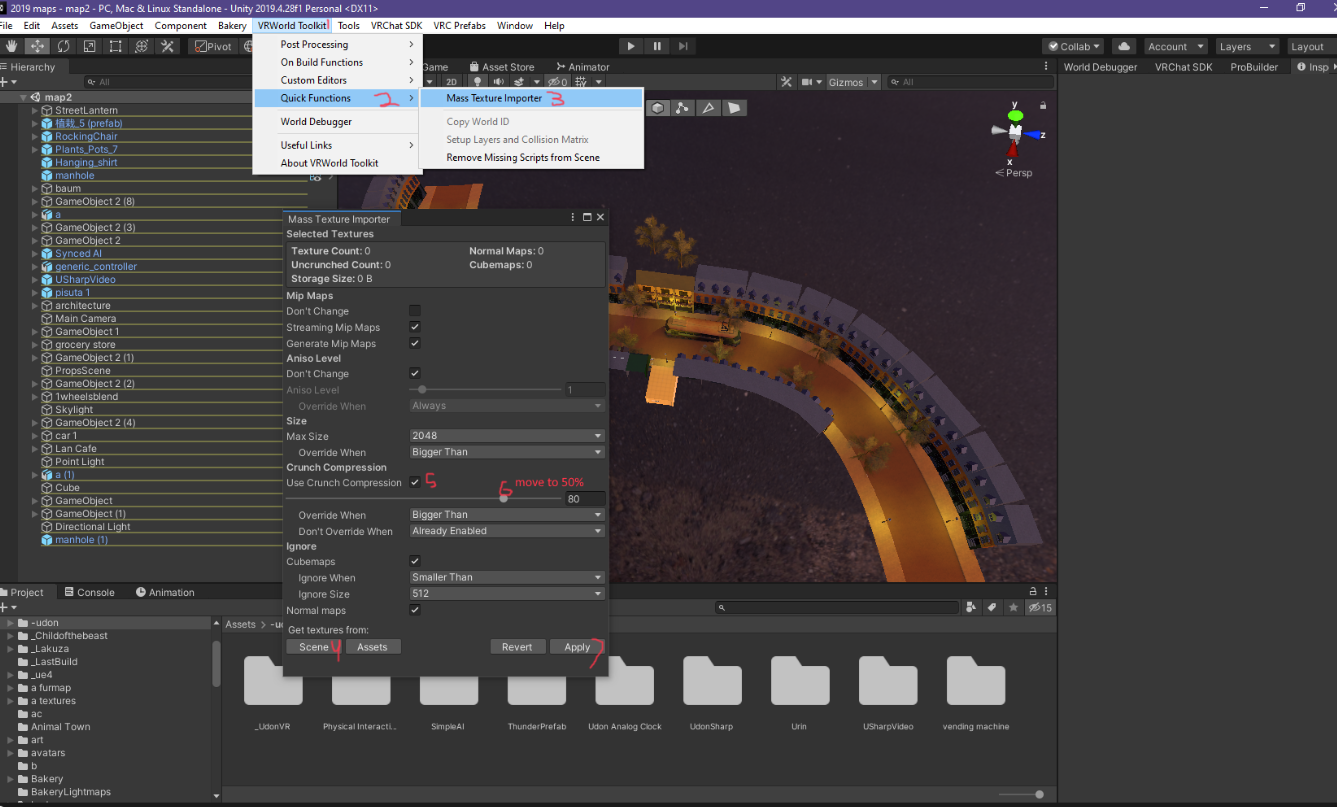 pallid gale
unique kite
Literally no one with moderate experience and above uses any resolution higher t...
pallid gale
unique kite
Literally no one with moderate experience and above uses any resolution higher t...
and for your PC build you can always just use detail maps with your tiling textures to make them look nicer
ionic jay
One message removed from a suspended account.
pallid gale
hopefully that does the trick
https://i.gyazo.com/a284f1e962fb02fedf4f54378ec5887a.png there's also a tool in it that when you attempt to test upload it tells you how big it is and where exactly all the file sizes going
 ionic jay
One message removed from a suspended account.
pallid gale
very handy so you can check for like textures that are like way too big
like no I do not need a 4K texture for a potted plant
ionic jay
unique kite
so, you don't need vrchat examples for everything. You are using Unity not a VRC...
One message removed from a suspended account.
One message removed from a suspended account.
One message removed from a suspended account.
pallid gale
you'd want to bake your occlusion later after you get your textures compressed
as honestly a single texture that's like two big could take up more space than your occlusion baking
 solemn tapir
Compression has drawbacks. It's best to physically reduce the size of all textures using Photoshop or similar. This reduces their total size in memory whereas compression will result in large textures in memory after decompress.
Should reduce actual texture res physically & use compression in unity together.
versed lichen
texture scale can be changed in unity FYI
unique kite
versed lichen
texture scale can be changed in unity FYI
and its not destructive. No need for duplicates/backups
 tulip berry
i have a 2 story house im building, would it be better to have sections of meshes combined (ex. the couch into the wall its on, rug to the floor) or have everything combined into one mesh or something else? i understand that less meshes = less drawcalls but is there a certain flow to how its done?
versed lichen
Combining objects that are often seen together is the best approach
So if you have two separate floors, combining the objects of each room on each floor would be best
tulip berry
ooook that makes sense thanks
pallid gale
unique kite
and its not destructive. No need for duplicates/backups
yep so you can just play around to see with how small you can get away with without committing
 hazy pier
Keep in mind that setting something as static will instruct Unity to statically batch it (combining the Meshes).
Combining the meshes manually usually leads to better performance though. You can check how Unity draws your scene via the frame debugger window.
 gritty cobalt
Hello ! I believe it's the best channel to ask this.
I noticed that having "Generate Mip Maps" turned on for a texture actually increase it size drastically
Anyone know the usage of the said Mip Maps ? I can't find anything specific on google about it.
 spice thicket
@gritty cobalt In general, mipmaps are pre-generated, lower-res versions of textures that are used when the object the texture is on is at a lower LOD (farther away)
It increases rendering speed/FPS, since you don’t have to load/process high res textures for something super far away, at the cost of increasing size
Difference in quality is minimal since you’re usually too far away to see the difference in texture
gritty cobalt
I see ; since i'm not using LOD at all I guess that's kinda pointless then ?
spice thicket
unity documentation
http://docs.unity3d.com/2020.1/Documentation/Manual/TextureStreaming.html
I don’t think it’s actually based on LODs, it just works similarly- so it’ll work regardless
VRC highly suggests it for avatars, and those don’t have any LOD
and the main benefit isn’t fps but rather memory, since ram can store smaller textures for faraway objects

 deft goblet
gritty cobalt
I see ; since i'm not using LOD at all I guess that's kinda pointless then ?
deft goblet
gritty cobalt
I see ; since i'm not using LOD at all I guess that's kinda pointless then ?
LOD models are different from LOD textures. LOD textures are automatic merely from having mipmaps enabled on the texture. No components or setup otherwise
gritty cobalt
Gotcha, thanks you two.
versed lichen
Texture atlas is just multiple textures tiled inside of a bigger texture size
pallid gale
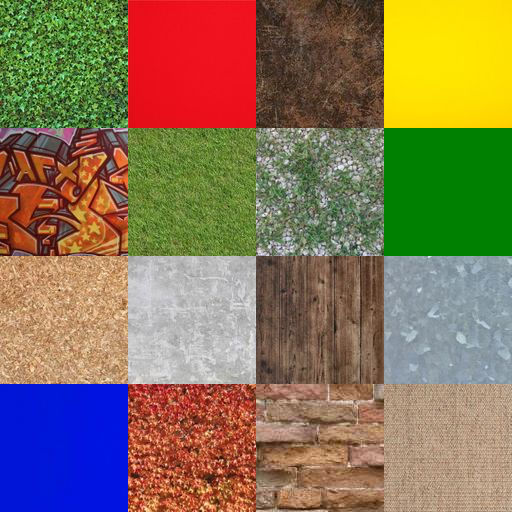
you could combine textures together in image editing software or see if there's any Unity or blender plugins that automated it
 eager wave
pallid gale
https://i.gyazo.com/a284f1e962fb02fedf4f54378ec5887a.png there's also a tool in ...
eager wave
pallid gale
https://i.gyazo.com/a284f1e962fb02fedf4f54378ec5887a.png there's also a tool in ...
Is that a San Francisco map
pallid gale
nope just a little made-up European town I'm working on
 placid harbor
I have a problem with a world of mine when i upload the quest, and i enter to test everything is miss textured and idk how yo fix it im using the Vrchat/mobile shaders
 boreal marsh
how to fix stuttering when player change avatar or joining my world?
versed lichen
placid harbor
I have a problem with a world of mine when i upload the quest, and i enter to te...
Which shaders
versed lichen
boreal marsh
how to fix stuttering when player change avatar or joining my world?
What's the performance of your world currently ?

 versed lichen
That's a bit low, but nothing that should hitch badly
Are you triggering things when people join ?
And does that happen regardless of the avatar performance ?
boreal marsh
versed lichen
And does that happen regardless of the avatar performance ?
Yes.
 autumn glade
Often if the avatar has audio on it, decompressing it will cause load lag for each person
boreal marsh
versed lichen
Are you triggering things when people join ?
Only joining notifications and player list udon
boreal marsh
autumn glade
Often if the avatar has audio on it, decompressing it will cause load lag for ea...
Hurm maybe🥺
 bold field
Is there a way to see which elements makes your world actually that big ?
 rose wolf
bold field
Is there a way to see which elements makes your world actually that big ?
rose wolf
bold field
Is there a way to see which elements makes your world actually that big ?
vrworldtoolkit or "Editor.log" if youre in a hurry
bold field
thx ^^
autumn glade
How do I decipher the report to get file size down, it's not adding to 52mb. is it counting uncompressed audio or textures? It's 52mb in game.

meshes are on low mesh compression, world audio on mono/compressed in memory/32% quality/optimize rate (14mb->5mb), lighting textures are down to 512 and crunch compressed, other textures are atlased and 70kb or less. I do have 4mb of reflection probes, maybe I can refine that
gentle gust
if a bigger filesize comes with better optimization, then i wouldnt mind the bigger filesize
autumn glade
I'm trying to target a quest upload with this when finished, some more geometry and udon will give it a few mb but something is inflating this. It was 10mb before I put in lightmaps and audio. This is my lightmap produced from bakery

got them down to 256k each, so it's strange it's adding so much
versed lichen
Audio can be compressed to 70% without any difference easily
autumn glade
I think I'm understanding the toolkit. the summary totals is counting the fbx in the assets, but not in the scene. if a fbx says it's 100kb, but I have 10 in the scene, it's going to be 1mb in the upload but the toolkit shows me it's 100kb value.
did high mesh compression on the largest fbx sizes, shaved 8mb, will need to rebake though, I think I'll just remove some scenery on quest to hit the 50mb
versed lichen
Don't do high compression, that destroys lightmap UVs
autumn glade
hmm is medium safe? yhea the lightmaps just obliterated on the high compression
versed lichen
Medium is safe yeah
lilac saddle
I am working on a world, and it has 154k tris at the moment and 51 seperate meshes
I want to optimize it as much as possible, is having lots of separate meshes good because I can make them when not looking at them?
Or is there a better way to go about optimizing a world
versed lichen
It depends if you're going to look at those objects at the same time or not
Merging objects that will be occluded together is good practice
lilac saddle
Hmm alright I will do that
jolly heath
Just don't merge entire rooms into a single mesh lol, let occlusion maps do thier job
 green kindle
If I have occlusion culling set up in my world, do players get culled too or do they always render? And if they always render, is there a way to make them not ?
unique kite
Players should be culled as they are dynamic objects on client side. Unless otherwise changed by vrc. Its a standard default unity setup
 cloud hound
So, I'm trying to make an island world and I'm setting up the water planes, however my terrain is quite large, so I have to put up a lot of water. And it's gotten to the point where the editor is frozen because I have so many objects. Does anyone have any suggestions on how to do large sections of water without killing my computer?
unique kite
one big ass quad. or just replace the planes with quads. 50% less poly
 errant flicker
I have a question relating to pc world creators
lilac saddle
ask
errant flicker
Why do they set it to pc only? I know some world creators and they say it takes only three clicks to change the building platform to make it quest and pc compatible
To me it just seems a bit selfish to set it to pc only
unique kite
3 clicks? lol.
errant flicker
Yes
unique kite
bullshit 😉 3 clicks to switch to android. 2+ hours of shader changes, and compatibility testing.
errant flicker
Bruh what shaders are you using
unique kite
Most pc worlds use shaders that have no quest alternative. Why deface your world for a quest version? Its not selfish, it's sloppy to release crap.
gritty cobalt
Litteral reason why I asked the vrc support to delete the quest version of my world.
Basically, it's a lot of work to get it under 50mb, the videoplayer on quest seem to struggle with caching issues ( the big files randomly stop midway etc for no reasons ) ; youtube isn't working, world look a lot worst. Bad quality overall so I just decided to not allow it.
Also inputfield aren't working on quest since a long ass time but yeah that's something else
vale dock
errant flicker
Why do they set it to pc only? I know some world creators and they say it takes ...
it heavily depends on that specific world project, or any specific world project
if youre designing a world from the very beginning to be on the android bui;d and just so happen to be developing for Windows first, then yes there are tools out there that make it easy to just switch the project and change the shaders that your project is using. if you're designing for the android build as a priority and the assets would be exactly the same on either platform, then you would literally only have to switch the build platform on unity and publish again
if however like most players you're designing for the PC build primarily and not for the quest build, then no amount of asset store or world creation tools will help you make a quest build in less than a day. creating an android build for a lot of worlds would be less of a conversion project and more like creating a new world parallel to the PC world
it is absolutely and frustratingly true that there is a high number of worlds that can and should have quest builds but simply do not. and yet on the other hand, you have to think that a single world project for PC is a big project that can be overwhelming, and at the same time, PC worlds are much more forgiving than Android worlds. old garbo laptops with mobile hardware running the desktop client would still be able to do things that quests with mobile hardware just cannot do. but arguably even more importantly, the process of creating a PC world has a lot less friction involved; you will very quickly run up to the point where serious optimization must be done, but because PCs are chonkers this can usually be split into stages, where so long as optimization has already been considered for your assets, you can worry about batching and baking as a different stage of the process. but when developing for Andorid, optimization is no longer something that is performed and considered in steps-stages but instead something that envelopes the entire project and demands your constant attention.
unless your worlds are hyper stylized like blueasis's works, you are going to have a hard time.
because you have to think about how you can make every asset work with a mobile shader instead of just having a shitload of texture maps and assuming it will work out, you have to actually set budgets for drawcalls and polygons whereas on PC (at least in my opinion) exercising some basic common sense is more than enough since most VRC worlds are not as big as the devouring or other massive game worlds that come close to, while, being games
unique kite
I don't understand the frustration. If worlds were paid content sure. No one expects a person walking down the street with a bag of Doritos to share with everyone they pass. It's actually quite insulting to even suggest a pc only world is selfish. Most worlds I develop are quest compatible. A few are not because they were built for a purpose that would not have the same effect in Quest.
vale dock
unique kite
I don't understand the frustration. If worlds were paid content sure. No one exp...
this basically
yes it sucks but these things are really fucking hard
 calm wave
how can i make a world portal smaller?
 charred plank
I need help with this big world and making it's pretty damn huge and then using Oculus collision and I don't know what kind of settings I should sit as I always make it so it's not 500 mb
versed lichen
Are you using the vrworld toolkit to get a build report of your world size ?
charred plank
Is at in the pins
It is that help me do will it tell me a like what I need to reduce what kind of pot Oculus collision I might need to use
versed lichen
occlusion culling doesn't help with file size
but the vrworld tooklit has the build report function that will show you what the size of things in your world are

 frosty prairie
hey guys, how do I optimize a world for quest users that uses this asset: https://assetstore.unity.com/packages/3d/vegetation/trees/realistic-tree-9-rainbow-tree-54622#description

Elevate your workflow with the Realistic Tree 9 [Rainbow Tree] asset from Pixel Games. Find this & other Trees options on the Unity Asset Store.
Whenever my friend with a quest looks at a SINGLE tree, her frames drop to basically nothing. We tested it in my world
This is what it would look like for a PC user.
 unique kite
frosty prairie
This is what it would look like for a PC user.
unique kite
frosty prairie
This is what it would look like for a PC user.
Transparencies and Cutoffs are nuclear to Quest. Good luck with realism. Best tree alternatives are ones with mesh leaves that don't require shader magic. Mesh leaves/grass is going to make your world have a mcuh higher poly count which will also creep up on the Quest user so you will have to occlusion cull with really tight settings and set the reference camera distance as low as possible.
pallid gale
most of the Quest Worlds I've seen with transparent trees have something closer to like a PS2 polygon count where it's big triangles not lots of little transparent triangles
also like not a whole lot of line-of-sight blocking with that map layout
unique kite
also cant use trees with a skinmesh renderer. If the physical leaves can move (not texture leaves) its a skinmesh and that will also nuke Quest
unique kite
pallid gale
also like not a whole lot of line-of-sight blocking with that map layout
uhuh, which is why they need to reduce the max distance. If the camera cant render it, it can be culled.
pallid gale
of course but that would look kind of bad compared to a map layout that makes it less noticeable
unique kite
yep. maybe throw in a few ultra low poly homes, break it up a bit
 frosty ocean
Can I use mesh collider for walls and furnitures? will that influence performance a lot?
 astral trout
it can have an adverse effect performance if those meshes are high poly especially
you'll want to avoid use of mesh collider's whenever possible
frosty ocean
which one should I use for a cylinder?
versed lichen
You can use a sphere
astral trout
capsule collider is probably the best
 rugged ruin
Occlusion Areas can make a Zone-A and Zone-B ?
If yes , the result can let player stay Zone-A would let CPU GPU not Rendering Zone-B ?
I am confuse to do this and don't know my world occlusion Areas is correct ?
 unique kite

In this tutorial, we learn how to use Occlusion Culling, a simple but effective optimisation method.
rugged ruin
I'm sorry even i do this in Unity, the FPS also not perfect
(I do Off mirror (Low) , bake all object , Resize the texture under 1024 ,2D skybox )
Hmmm, have any opinion i can do ?
😩
pallid gale
yes all of your lighting should be baked
rugged ruin
I want to keep my QV pen and chat keybord not occlusion but idk how to change that (I do not choose occlusion these 2 item but still be bake in Unity ?)

Anyone know how to change it ?

 dapper meadow
my world is like getting lagger as time goes on. is there a common thing that causes that? im sure i didnt add something to cause it but ofc if i didnt then this wouldnt be happening. SDK 3.0 Unity 2019
unique kite
adding more content increases size. Each model you add or duplicate, each texture added. You can reduce the texture size(resolution) in unity without using an editor and it is not destructive meaning if you set it to 512 and it looks like shit, you can revert it anytime.
select the texture, and your inspector will look like this(sort of) and then you can change the max size.

 stiff badger
can anyone help me optimizing my world? it keeps saying this
 versed lichen
Not an optimization question, your project has unity console errors
stiff badger
oh well do you know how to fix?
versed lichen
No idea, worth googling first
eager wave
unique kite
select the texture, and your inspector will look like this(sort of) and then you...
Ok wow, I never knew you could use the other tab, the default options are garbage now that I found this out... I can render an 8k texture at the same size as a 1024 with default compression... This is insane
Only reason I need a higher resolution is because it's a sprite sheet, now my fire won't look like hot garbage
unique kite
setting max size to 1024 will reduce the resolution to 1024. It wont show an 8k with less size.
pallid gale
that would be crunch compression you're looking for and you probably wouldn't want to use an 8K on anything as that is a large amount of vram
eager wave
unique kite
setting max size to 1024 will reduce the resolution to 1024. It wont show an 8k ...
It's a sprite sheet of a fire animation. Setting the resolution to 1024 makes each tiny sprite look like a blurred pixelated blob. The sprite sheet needs to be a large resolution so each sprite can look good.

 eager wave
pallid gale
that would be crunch compression you're looking for and you probably wouldn't wa...
eager wave
pallid gale
that would be crunch compression you're looking for and you probably wouldn't wa...
Unless you know another way around this?
pallid gale
see how it looks at 2K or 4K
eager wave
I did, I had it at 2048 before I figured out you can change the tab. It looked bad, which is why I started playing around with the other compressions
pallid gale
compression only deals with download size not how much vram it takes up
unique kite
If download size is a concern, then you have to toe the line between quality. Find what works. You can also try looking for alternative textures with a natural lower resolution and use those. When you reduce resolution or increase it beyond its natural size the algorithm has to interpret the pixel difference and fades between them causing blur. So if you have/find a texture that looks good in 512 then you have a suitable alternative.
In most cases 1024 looks alright for realistic, you can use a higher resolution normal map and ambient occlusion to blend imperfections as well as decals. Baked AO not post processing. Sometimes it has the reverse effect so you just need to play around.
lilac saddle
stiff badger
can anyone help me optimizing my world? it keeps saying this
Super late but that means you need to install the android build target for 2019.4.29f1, basically if you try to switch your project withOUT that it gives u that error
Did you install your Unity 2019.4.29f1 directly through unity hub, or off an official unity webpage
stiff badger
lilac saddle
Super late but that means you need to install the android build target for 2019....
Sorry I’m a little late to, no I fixed the issue awhile ago and optimized the world, but thank for trying to help
jolly heath
You know how default cubes have like two triangles per face, would merging those 2 together on each surface have literally any impact on performance or are those low numbers insignificant
unique kite
I guess it depends on how many cubes you are going to have. With a handful the time invested no matter how little won't compensate for the performance. But if you are doing a sudo voxel build, sure.
hollow elk
jolly heath
You know how default cubes have like two triangles per face, would merging those...
If you mean merging two tris into a quad it wouldn't change anything because unity will split that quad back into two tris for rendering anyway
jolly heath
hollow elk
If you mean merging two tris into a quad it wouldn't change anything because uni...
Ah nice good to know
 tawdry otter
anyone know what layer the PlayerLocal layer becomes when they sit into a chair? I'm trying to make trigger-based culling systems...it works but whenever I take a seat everything disappears.
been having this issue for a while with SDK2
dunno what it is, or hell what would work instead of PlayerLocal. if they have to scan for 2 it dont matter
@ me or whatever bc i'm dying to know
tawdry otter
Found it: if you put "PlayerTracking" on the trigger it doesn't turn off
maybe...the website should say this?
I literally didn't know it for a year and a half and it's only now that I'm finding out through Guesswork
double-checked that....
now it's not culling correctly.
I don't think that was the layer....like somehow playertracking is a universal layer....wtf?
might've been added by some asset, not too sure.
any other guesses would be great.
gonna keep looking for it but I can confirm after a second upload test, it's not PlayerTracking
yeaa so apparently that's not part of the SDK by default. It has to be one of these. http://vrchat.wikidot.com/worlds:layers
tawdry otter
Still haven't gotten it.
Does anyone know what layer the PlayerLocal becomes when they enter a Station?
Or, more specifically...
I'm trying to setup manual-culling by making SDK2 VRCTrigger-events for OnEnterTrigger and OnExitTrigger in the PlayerLocal layer.
It works fine...except when the player enters a VRCStation/chair.
The trigger acts as if the player has exited it, even if the seat's IN the trigger, and plays the events associated with OnExitTrigger.
All I need to know is what's going on, and how to fix this. There's no way somebody else hasn't encountered this issue before.
Is it a layer I'm not targeting? What layer does a seated-local player become? Do I need to do something with the VRCStation(s)? What's the solution to this???
rose wolf
how expensive/taxing is having overlapping colliders cause?
versed lichen
If they're static i'd say none ?
rose wolf
static negates that?
versed lichen
I wouldn't expect any collision checks to happen between two static objects
(ie no rigidbody on it), it's not a player of a physics object
tulip berry
kinda weird question that i tried googling first, i see all the time a max poly/triangle count and mat slots, etc for avatars, but would anyone know any good info about these kinds of limits for worlds?
unique kite
tulip berry
kinda weird question that i tried googling first, i see all the time a max poly/...
I believe the doc says 50MB and 50k or less poly. It says world total but really its just what is rendered that counts. So if you are smart with your mirrors, lighting and occlusion culling, you can easily keep your rendered poly below 50k on a quest world. https://docs.vrchat.com/docs/quest-content-optimization
tulip berry
thank you, i was wondering about pc content tho
for best experience, while still having the best quality, basically good values for balancing performance vs quality
unique kite
It's the same principles just less aggressive. Reducing draw calls via atlasing, combining meshes, baked lighting, occlusion culling, not using expensive shaders. You can use the Unity profiler to see whats being the most taxing in your world.
Make sure to use cyanemu and the toolkit so you can test and debug from within unity without launching vrchat. The stats display + the Profiler will give you more information during play mode than you will get just looking at FPS in game.
frosty ocean
will camera still cost resources if its render layer is deactivated?
frosty ocean
Ok it did==
 coral edge
Hello, Somebody told me I could use blender mixed with Unity to make a world, like, for using 1 texture and shape instead of using many
to create a wall or a floor, and I was wondering how to do it, like, after making the shape on blender, how to get it on unity and on the correct size
also I was wondering how to make folders to organize better the objects I create on unity
gentle gust
export -> fbx -> import the FBX into unity
gentle gust
coral edge
also I was wondering how to make folders to organize better the objects I create...
and you can create folders yourself however you like them. i for myself like to make one folder for all the models, one for all the textures, one for all the materials and one for all the prefabs. imported stuff i usually dont touch, unless they drop stuff into the root folder
coral edge
gentle gust
and you can create folders yourself however you like them. i for myself like to ...
I meant like the left side of the screen objects, u are talking about the ones on the lower left side?
gentle gust
coral edge
I meant like the left side of the screen objects, u are talking about the ones o...
i was talking about the asset explorer at the bottom
do you mean the hierachy?
gentle gust
ahhh gotcha
well, you can create empty game objects as container for more things
coral edge
holy
gentle gust
right click in the hierachy -> add new empty game object -> set it to 0 0 0 (good pracice, you dont have to) and then just drag n drop all the cubes into that one game object
coral edge
and about the assets I should delete
assets i'm not using
?
only leave the folders I am using?
gentle gust
in the hierachy or in the asset explorer?
gentle gust
just leave them
there is always the risk of deleting something that something else depends on
coral edge
Oh I see
gentle gust
you can delete if you are 100% certain about it being useless
coral edge
I see
thank you!
I will probably ask again once I am learning blender (right now just trying to make a world with a mirror and if possible add some seats)
coral edge
lilac saddle
then soon you can kitbash a world together
what is that hahahaha
lilac saddle
just means you put a bunch of assets together to make one product
so like getting a bunch of furniture models and putting it in your world and going through them all until you get something you like
coral edge
lilac saddle
so like getting a bunch of furniture models and putting it in your world and goi...
Oh I see, thanks!
 jovial sentinel
what are some good tips for optimizing for quest?
pallid gale
question optimizing a existing map or making a new one with the quest in mind
https://www.reddit.com/r/VRchat/comments/mlsm08/a_comprehensive_and_changing_guide_to_build/ found a decent Reddit post covering Quest tips

reddit
25 votes and 10 comments so far on Reddit
frosty ocean
If I use For loop to look for certain element in an array, How can I stop the for loop and right after I found it?
frosty ocean
Hi there, I want to use AudioSource[] to store my sound effect but that didn't play for me. Use Audiosource variable to play a single file seems fine. Both are set to public.

 astral trout
array indexes start at 0, not 1
frosty ocean
astral trout
array indexes start at 0, not 1
Thanks, that helped
 mild rune
if an object isn't being rendered, it isn't being rasterized, textured and shaded/lighted, right? But the collision data is still there so technically the computer is still accounting for the object. How performance intensive is it to account for these objects that aren't being rendered?
I know collision data for static objects is baked in
but what if the object has other data
versed lichen
What kind of other data ?
Disabling an object is cheaper, bit re-enabling it has its own cost
 unique tulip
Hello everyone, I'm having issues with atlasing/optimizing my maps textures...
Before I had all my textures atlased there were no seams between the tiles now that I used cats plugin or tried to make the atlas manually there are visible seams on my map. What do I do?
I used blender to build this project

What it is supposed to look like/what it looked like before atlasing
 pallid gale
scale down your uvs ever-so-slightly
unique tulip
I have scaled it down by up to 90% of the original size, the uvs are still messed up for some reason
pallid gale
would you mind showing a picture of your UV layout on top of your Atlas


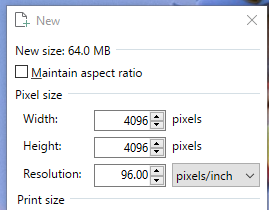
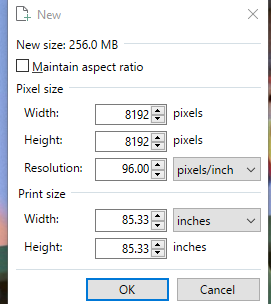
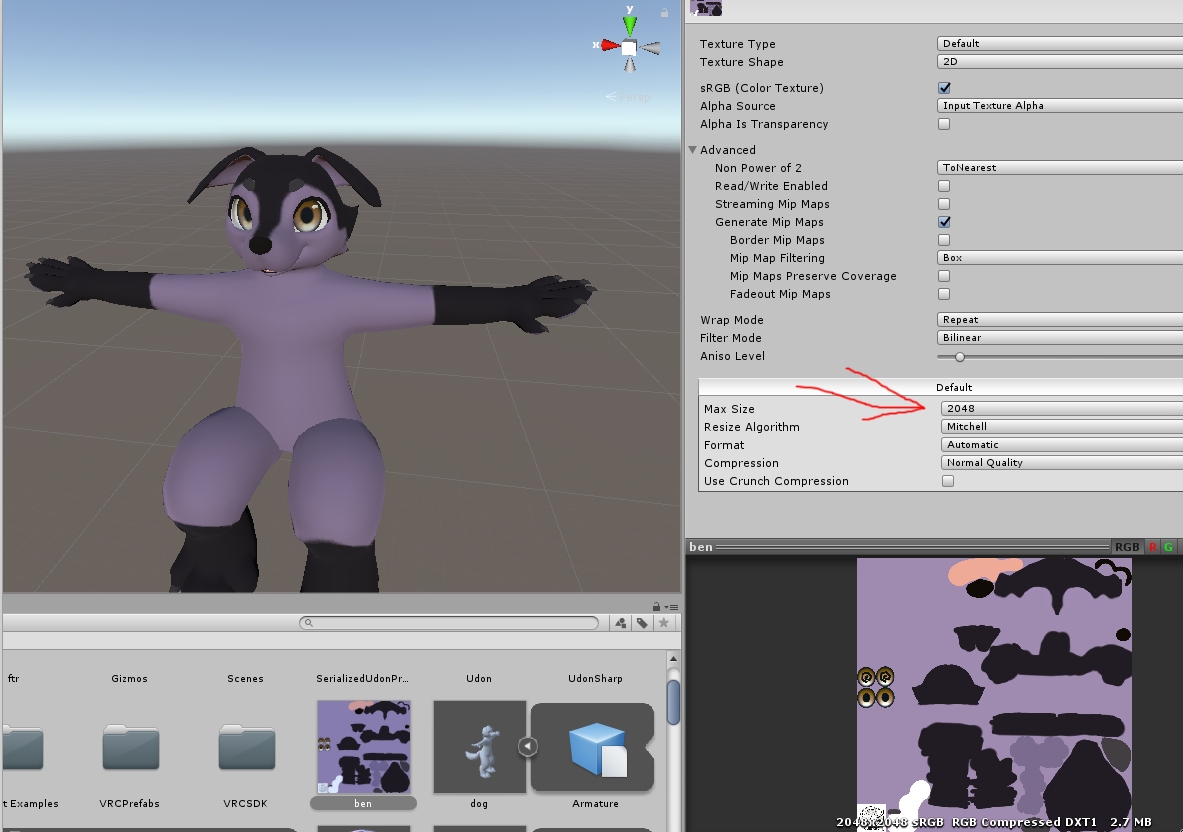

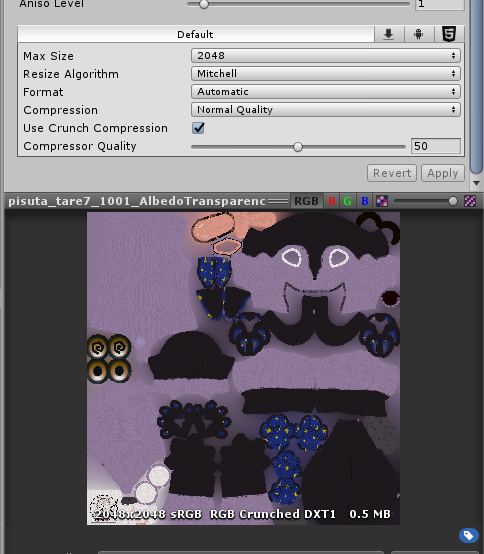


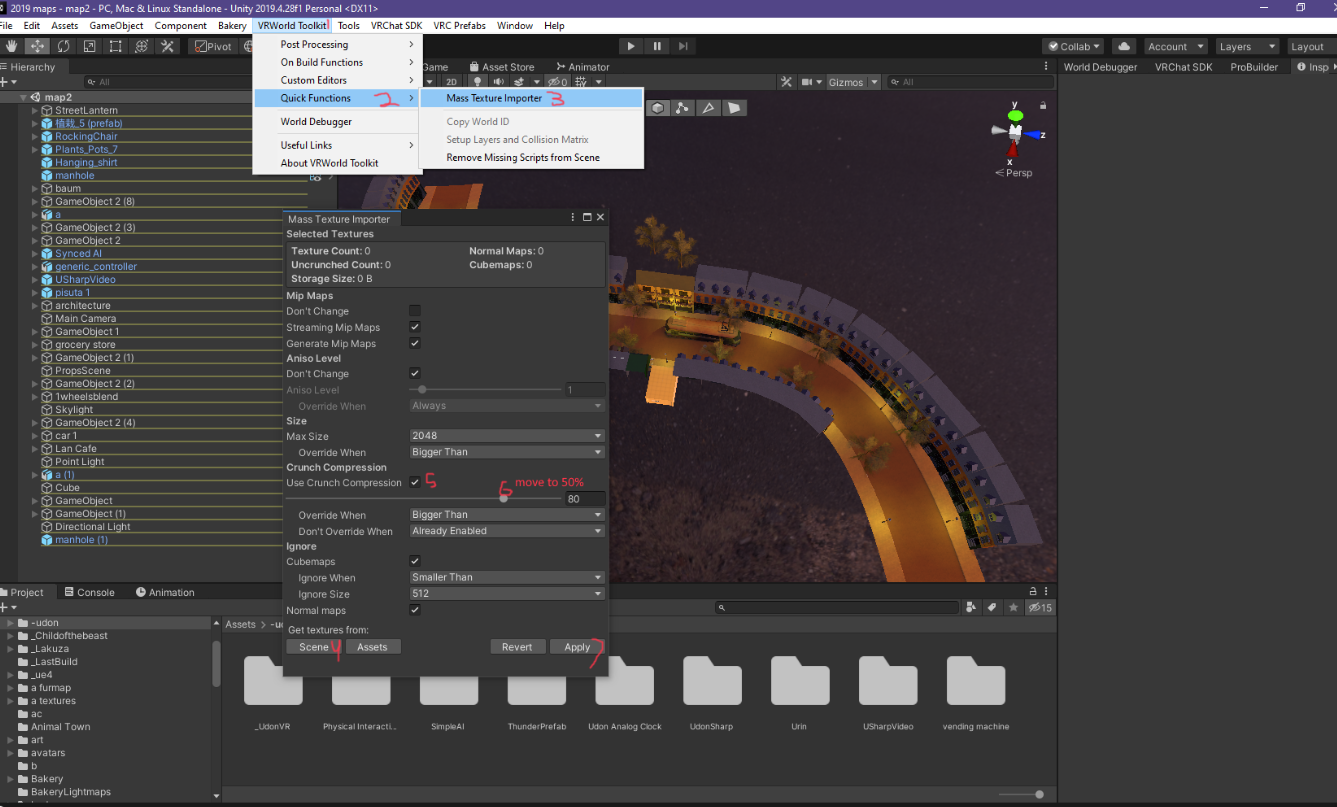
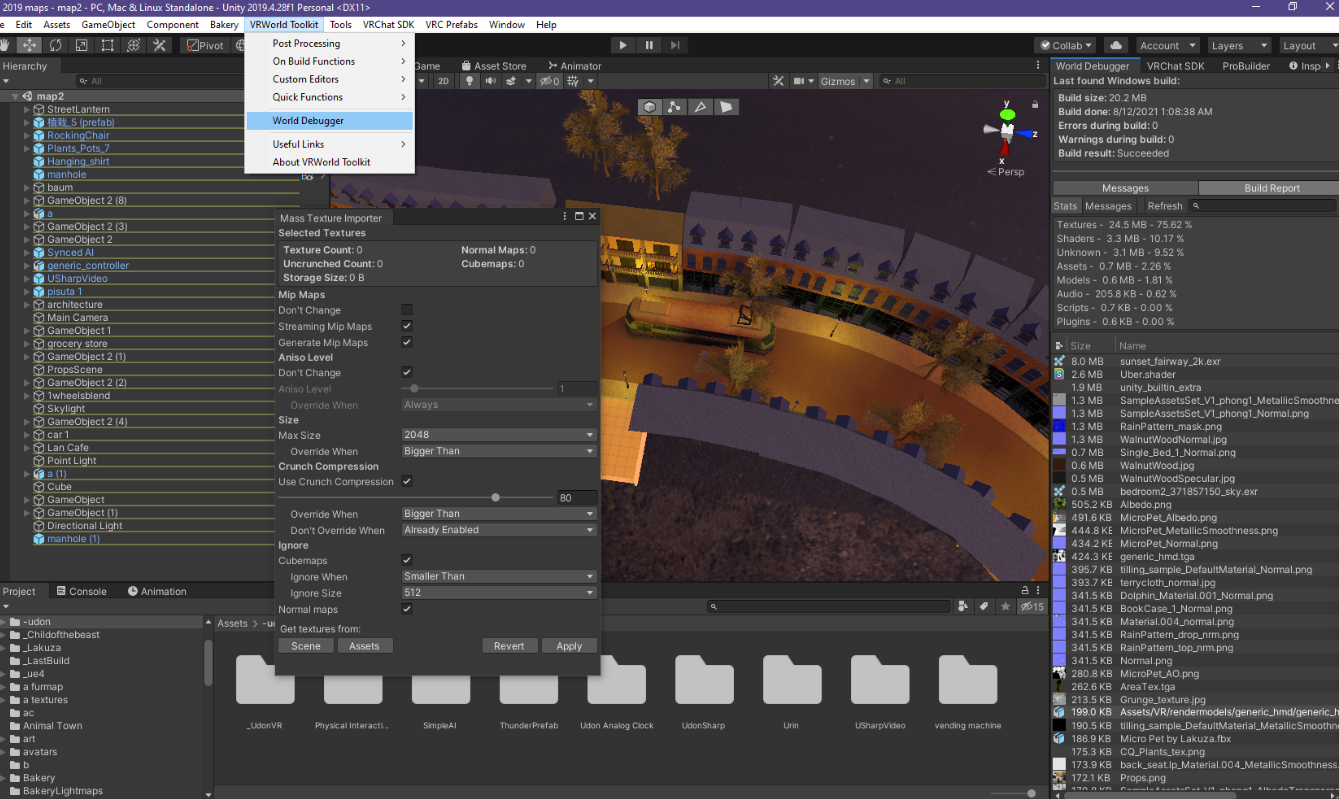
 pallid gale
basically need to scale down the uvs so they're not touching the edge as the texture get scale down with mipmapping it sampling the other tiles
 unique tulip
so the textures in the atlas cannot be touching eachother?
pallid gale
your uv need to be smaller than the edge not the texture as if you put like some blank pixels in between the textures it would sample that instead
unique tulip
so i need some similarly colored blank space
or to stretch out the edges somehow...
to ensure the uv is the same size as the texture but that there is some room for 'bleedover'
pallid gale
anything wrong with just like scaling down all of your uv like 5%
unique tulip
yeah the issue persists
and the textures stop being seamless
that's my biggest problem - the black lines between the tiles of the ground are really disruptive
my grass and the stone floor is made using a seamless texture
pallid gale
question are you trying for the quest or PC
unique tulip
both
pallid gale
okay so yeah you'll definitely have to play around with your uvs or modifying the texture to add some padding as you cannot use any custom shaders on Quest
Unity Forum
I found a few solutions. The dirty solution is not to use any atlas. In a world of graphic performances, it's better to use a certain degree of atlas...
 stiff bolt
Hello! I've been making worlds for a while now and only learned that this was bad practice
I was wondering what kind of issues this could cause as if they are significant enough i may convert my worlds
 unique kite
Those issues are usually with scale and rotation. proper scaling is essential in VR to prevent Mesh distortion. If you have ever picked up a card in VRC and watched it stretch thats what happens when your scale is fubar. There is almost no point in using blend files as Unity just converts those files to an fbx anyway only without your input. So it just makes more sense to export from blender exactly what you want and how you want it.
rose wolf
not to mention if you update blender or unity for some reason cant find blender. the blendfile will ceuce. and also sharing a project with blendfiles is just pure evil and considerably rude
 vivid dirge
i hate when someone sends me a .blend file and it has their disgusting custom blender layout
 cobalt leaf
Me, a default general enjoyer
mild rune
 pallid gale
probably not the best spot for that as at the opposite of what we would want to do
gentle gust
nah, having an 8k floor texture is fun in a super mario 64 world
 olive bronze
Why.. why everything shakes like mad in my map? it's just 1 Mb in size, its a tall tower
unique kite
like physically moving or flickering textures?
versed lichen
olive bronze
Why.. why everything shakes like mad in my map? it's just 1 Mb in size, its a ta...
Your world is too far from 0,0,0 in Unity
solemn tapir
You can see what this does to you to better understand it's effect in the world https://vrchat.com/home/world/wrld_b9f80349-74af-4840-8ce9-a1b783436590
But yes, need to be near 0,0,0. Having your far clip on the camera set really high can cause meshes to also shake on lower end rigs, or on the quest Far clip especially will cause major shaking so double check that you don't have some absurd far clip value set too.
You do have a pretty wide margin as well. You have like a 1K meter squared area where you'd be hard pressed to notice the effect. Going out over 1k will start breaking down, getting progressively worse. Around 10k meters it will become hard to use your menu but still doable. anything past that will get very hard to use your menu. Around 100-300k m your screen will break down to nothing but random pixels and you'll eventually crash as you keep going (not in the world linked, just speaking in general)
Don't know where your center point is? easy. Spawn a 3D Cube in the root of your hierarchy and then set it to 0,0,0 on it's position and that's the world center. Center everything in your world around this point.

See what happens to your avatar as you go further and further from the center of the universe․
pallid gale
solemn tapir
You can see what this does to you to better understand it's effect in the world ...
that was a very trippy map
solemn tapir
Yea, It's a nice demonstration of the concept of float point errors and a unique way to take advantage of them.
 toxic stag
I made the smallest world with mirror!
https://vrchat.com/i/toby-roarchalmers-37b72

A mirror in the void with 1KB file sizeǃ Contributors˸ Lyuma‚ Table‚ Lamp
lilac saddle
Thx everyone for developing environmentally frendly world with low power use
lilac saddle
Should I worry about Wind Zone(s) in unity being generally bad for performance or no
is the movement like baked?
unique kite
You can roll baked lights without shadows and be better off if you need wind. If you do have shadows with a bake you need to disable wind.
lilac saddle
ah ok thank you
 static pewter
Vrcworld is not giving me the players jump,run category to change it. Is there another way thru udon behavior?
versed lichen
it's on the vrcworld udon behavior'
static pewter
I found it. Was on the side arrow of vrcworld
ivory spear
So other than limiting the number of active particles on a particle effect, are there any other tricks for optimizing a world with a lot of particles?
And it seems my fog/mirror issue wasn't fully resolved, it only partially helped. When looking at mirrors my unity fog bleeds through textures regardless of the shader being used.
unique kite
ivory spear
So other than limiting the number of active particles on a particle effect, are ...
In 2018 Unity implemented GPU Instanced Particles into the particle system which is intended for mass particle display. Requires a rework of anything you have already setup. You assign a mesh, you tick the gpu instancing box in the particle system, and assign a shader that supports gpu instancing. The link will explain how to set it up. https://docs.unity3d.com/Manual/PartSysInstancing.html
ivory spear
unique kite
In 2018 Unity implemented GPU Instanced Particles into the particle system which...
thanks
solemn tapir
ivory spear
thanks
He's erroneously calling GPU instanced particles "GPU Particles" these are not one in the same like he has implied and are infact entirely different in practically all ways of how they function and why you may use one over the other.
"A mesh gets assigned" no, you have to give it a mesh yourself. This is because you can only instance meshes in unity, so to instance a particle, it needs a mesh and a shader that supports GPU instancing. Billboard or meshless particles can not be instanced. Instancing a unity particle system also still relies on both CPU and GPU as the CPU is managing the particle system and sending that data to the GPU and can cause wait periods whereas GPU particles run entirely on GPU and can render faster.
GPU particles however, like Kev has already been told, do not use the unity particle system at all, they use a camera/CRT or a grabpass with a light to base depth and then draw all the particles inside a shader, though cameras or a grabpass isn't implicitly required just typical, point is you're drawing your particles as points inside a shader. This is vastly more performant than unity particles as you can draw millions of particles and it all runs on GPU, freeing CPU overhead for more important logic while eliminating CPU to GPU wait time entirely.
If you need a large volume of particles, consider using GPU particles. There are a few solid prefabs out there made specifically for VRChat now a days. These can not be easily made yourself without knowledge of shader writing and cameras but the prefabs are easy to setup.
If you are using unity particles and are using meshes on your particles and these meshes are low poly, enable GPU instancing and use a GPU instanced shader.
I personally don't know of any assets that simply enable GPU instancing for a particle system, that's a trivial task and doesn't exist as an asset that I've ever seen. Though there are GPU particle prefabs, but as mentioned in this post, they are entirely different and not easy for someone to make themselves, though the prefabs are easy to setup and use. I'm not sure where that statement of his came from of there being assets to enable GPU instancing on unity particles pre 2018 when that wouldn't have even been supported but he may purely have been confused.
TL:DR GPU Particles are NOT GPU instanced particles and depending on your project, overhead, bottlenecks, particle count, how many particle systems, how complex the meshes are, if you have meshes or need them at all, etc, determines what you may desire using.
solemn tapir
dude.
Funny because I actually linked you that page and you still seem to have a fundamental misunderstanding of particle instancing and what GPU particles are.
The page linked is purely regarding Particle instancing. It has nothing to do with GPU particles at all
The examples of shader code are examples of implementing Particle instancing in your own shader, not examples of GPU particles.
Ah the old "I was proven wrong over and over but instead of admitting my mistake I pretend it's a funny joke" thing
Mind telling me what the assets you mentioned that were made pre 2018 that somehow enable Particle instancing in a version of unity that is unsupported?
I would love a link
No, you made statements implying that GPU particles and Particle instancing is the same thing
Mind sharing those links though?
still waiting
No there isn't
"In 2018 Unity implemented GPU Particles into the particle system" no they didn't
how can you claim you didn't imply they are the same thing. Literally say it right there
Instancing is NOT GPU particles, are you really this head strong, how they function, their execution, what they rely on, where they run in your system, are all entirely different
unique kite
this is pointless. good day dude
solemn tapir
Wow.
unique kite
if you want to debate we can do it in dm not in here. its inappropriate
solemn tapir
1: never provided proof of claimed assets that don't exist
2: clearly implies GPU particles and Instancing is the same thing
3: ignores all information about how these systems operate
4: runs away happy to provide bad information later
Providing accurate information to people is important and appropriate. Knowing when to accept fault or when to say "hey, I guess I didn't know that, or hey, I was wrong and mispoke" is important. I shared my information so others wouldn't be mislead with misleading information
"In 2018 Unity implemented GPU Particles" You call them GPU Particles here clearly
"There are also third party assets that do this most of which predate the 2018 update." You claim there are assets pre 2018 that can do this, there isn't. unless again, you're confusing GPU instancing for GPU Particles which you simply back peddled on to save face
"When you can't be bothered to read the official unity documentation. Darn, and I even provided the link. shucks." you mock me when the documention provided is only for instancing and has nothing to do with GPU particles
"No i didnt. There are older setups the reinvent the same thing." No there isn't. Pre 2018 you couldn't instance particles and GPU particles are entirely different so they aren't Reinventing anything the same, they are entirely different systems
I also didn't recommend anything. I clarified the difference between GPU instancing and GPU Particles
Do you know the difference between Particle instancing and GPU Particles?
you literally state GPU particles multiple times and make statements that elude the to fact that you were confusing the two and are now backpedaling. this is sad. Hopefully you've learned regardless because I don't really want to type all that out for a third or fourth time for you. I know I'm not the only one who's clarified this. You know, darn well, that your statements are clearly misleading and have thus ignored everything I've posed of you but I'm here to help people and here posting this to provide accurate information. hopefully you'll do the same moving forward. cheers
wow man
Dude, you stated this entire convo that
Literally unable to even own up to your own statements and actions
"When you can't be bothered to read the official unity documentation. Darn, and I even provided the link. shucks." Mocking someone providing accurate information because you lack knowledge on a topic instead of taking that information and correcting yourself
And still, doing the same. You've learned nothing. and will learn nothing. I'm wasting my time. I'll just save the timestamp on this convo so I can just link it next time you provide misleading information, or mock someone correcting you I guess.
unique kite
I added the two missing words to the original post. So sorry to have offended you.
solemn tapir
Amazing. Shame you had to cause this entire back and forth instead of just saying that and doing that from the beginning. Glad you removed the false statements about assets that don't exist as well. Cheers
can you seriously not stop? I've already made numerous posts about exactly why it was clear your post was misleading and not just a typo and your follow up posts only confirm that fact
This is pointless. I'm blocking you. Goodbye
 cold prairie
This is not the appropriate place for arguing any further messages on the matter you will have to go away for a day or few to calm down
unique kite
cold prairie
This is not the appropriate place for arguing any further messages on the matter...
absolutely right "] KevBal: if you want to debate we can do it in dm not in here. its inappropriate"
solemn tapir
No worries, I already blocked him. Just was trying to share accurate, not misleading information which Is reflected in my posts. Cheers everyone.
ivory spear
Does anyone know of any sort of.. automatic HD enhancing tools for old textures from PS2 era? Like maybe some readily available machine learning online generator?
versed lichen
ivory spear
Does anyone know of any sort of.. automatic HD enhancing tools for old textures ...
Waifu2X
ivory spear
versed lichen
Waifu2X
yep that worked
ivory spear
How much pressure would 80 animated dynamic bones put on a world?
solemn tapir
ivory spear
How much pressure would 80 animated dynamic bones put on a world?
So long as you avoid collision, and your world is fairly light on cpu usage, it wouldn't be worse than most e girl avatars lol. Dynamic bones runs on a single core of the CPU, so if your world has pretty high CPU usage already, it could be felt more than if not. Profiling your world using unitys profile tools can be helpful in determining if any specific change had a negative impact
 rich geode
is there a method of deleting all unused assets and materials from your project?
versed lichen
Some unity assets do that for you
rich geode
like lets just say ok yep im good for now i dont need to add anymore right now, just to clean up my project folder... is there a way to select all unused files and get rid of them
versed lichen
But it's really destructive if you're not paying attention
Better to do it manually tbh
delete folders after checking
rich geode
manually is fine... is there a way i can tell if an asset is withtin the scene or not?
i have a habit of importing alot of stuff at once and only using bits of the package
versed lichen
You can use an asset checker for that purpose, but id' keep the deletion process manual
rich geode
ahk right right, is that on the store? or package manager
versed lichen
store, plenty to chose from, depends on what you want to pay for tbh
 odd tiger
HELP : Unity stuck at "Preparing Bake..." for nearly 6 hours, how to fix it ?
 rustic canyon
I have a question about what number of objects is appropriate for the world FBX file. Usually when I make my 8-bit worlds, I try to have as few objects as possible by combining things, but I'm not sure if that is the wrong approach.
Currently this model is 663 objects and 25 040 tris. In my previous 8-bit worlds I just combined every piece of furniture to be a permanent part of its respective room, or alternatively, combined every world prop into one or two megaprops.
What kind of approach should I take here? This is not going to have any baked lighting or shadows.

In total this has 7 rooms acting as separately culled areas. The main world you see here, and 6 villa interiors.
View of the interiors
