#world-optimization
1 messages · Page 22 of 1
 chrome lion
If so you can often use your code as a regular MonoBehaviour and get a full insight into how it all runs in the profiler
 autumn glade
yes using sharp, going to have to load it like that to see, thanks
autumn glade
For strict optimization, for say a hue shift continually running on a world object, is it better to use a shader to run it (like poiyomi’s self-animating hueshift) or an animator controller driving the values over looping keyframes ? It seems the animator controller would be more on the cpu to run the animation updates? Although it would be subject to animation culling which I’m not strictly sure a shader process would be
 rose wolf
@autumn glade so theres a few ways you can change a "hue", such as cameras rendering from a hue pallete, a edit-ible shader, or just swapping the material like a paint shlosh. I think having a camera and color pallete would be the best way unless youre specifically using a texture with unique emmisions or something cray-cray
however, i see no real problems usingsa shader as long as that shader is only being used for its own purpose, and not multiple movie style techniques
animations do a lot less than youd think (but they do still do something)
 versed lichen
shader based seems cheaper
autumn glade
Thanks for the input, I moved from a poiyomi hue shift within shader to animation controller thinking the animator culling would help but it does seem it does a cpu spike. I’ll move back to in-shader on this suggestion and see, does it cull updates though? I may make two objects, one with animator and the other with shader and see how they may update outside view
I was animating rgb shift with vrc Mobile shader vs poiyomi (locked) for file size, poiyomi was still compiling at 300k x 3 objects for a simple hue shift. I may just work off the mobile shader to do an auto hue shift edit if this is more efficient
 fast portal
okay super technial question: what would be more efficient in a situation of 80 person lobby: a single mesh collider or a bunch of split mesh colliders? The collision matrix has all been modeled and optimized, its just a matter of what is technically better. do colliders/physics checks etc occlude when out of sight? is that negated when another player is present there? thanky
 astral trout
I'm not too sure on the efficiency of a single massive mesh collider vs splitting them up, I've read that unity will only calculate physics for collision if colliders are within a certain bounds of each other, so maybe splitting it up might be better depending on how complex the mesh is, but don't quote me on that and I cannot remember the source for that, or if I remembered that correctly at all.
However, AFAIK, locally for you, only your local player object will have a physical collider that collides with the world. After all, every player is responsible for updating everyone else on their position in the world, so its only necessary that each player calculates collision for themselves only. So I don't think you'd have to worry about remote players triggering collider calculations near mesh colliders. I've seen some worlds with horribly complex mesh colliders that cause your performance to tank when you get close, but it doesn't happen for you if someone else gets close which supports this.
I would expect colliders/physics to still happen when objects are occluded though, imagine you throw a ball over a wall, you would expect the ball to hit the floor and bounce appropriately, even after the wall occludes it.
versed lichen
It's better to have decimated version of your terrain and use that as the collider, you don't need an extremely accurate ground mesh collider
autumn glade
World with many wiggly players and need to reduce cpu burden somehow. I see dynamic bones have a 20m range which is useful, but I'm also told that occlusion doesn't factor into it, so a player fully occluded will still animate the bones. I likely need to completely rework my world if occlusion doesn’t affect dynamic bone animation.
autumn glade
yhea with 80 playeres there's not much I can do, even large rooms divided by closed occlusion portals it is still taxing. my smallest occluder is like 8 so as not to tax cpu further. just not many options other than seperate by range to rely on camera distance culling. Avatar rating is the largest contributor, I'm just trying to keep a functional space while not adding to the burden as much as I can. I do appreciate all the feedback so far, don't mean to hog the discussion. I'll make due with camera range.
autumn glade
Does vrchat recognize animating the main camera far culling distance synched/local?
 cold prairie
The values from the reference camera only get copied once on world load afaik
 lilac saddle
Do multiple (10+) cameras lag the world?
astral trout
for each camera you have, everything has to be rendered again for what the camera sees, so yes, they can be expensive, especially if you have 10
lilac saddle
dang, I recently put a camera switcher system in my world and i've been experiencing some screen tearing and I just wanted to make sure that is what was lagging
astral trout
are all 10+ active at the same time?
lilac saddle
yes, so there is a preview before we switch to that camera
astral trout
yeah... that will do it lol
lilac saddle
Could I make them locally toggleable so for people who do not want to see the cameras do not lag?
astral trout
yeah
 ionic jay
One message removed from a suspended account.
astral trout
grab one's vrworldtoolkit, open the world debugger, and look at the build report. it'll show you what assets are taking up space.
https://github.com/oneVR/VRWorldToolkit
 fervent anvil
I'm starting work on a low poly style island, I'm looking in to optimization before I get going and I'm curious if I create a large terrain in Blender, should I slice it up in to chunks in Blender, is there a way to do this in Unity, or should i not slice it up to begin with for occlusion culling purposes?
 graceful bough
I'm looking for answers as to why I keep hitting colliders OVER a set piece like a counter when I try to reach over or set an item down.
This happens in the Pug as well. If there is already an existing workaround I'd appreciate the knowledge drop.
astral trout
are you asking as a world creator for a solution or as a player encountering this in existing worlds?
it happens cause the table has colliders, and when moving to set an item down, your player collider moves forward a bit, and if the table collider is low enough, you end up walking on top of it. The only thing you can really do is either make players not collide with tables, or have 2 colliders on the table, and the one that interacts with players be a bit smaller so you have extra leeway.
 unreal river
Game object that are turned off, do they affect performance in anyway?
I have a set of cameras that i want to be able to toggle to a different location and i wonder if i should use udon to move them between A and B OR just duplicate them to B and make sure only one location is active at the same time?
rose wolf
id go with the duplication method and just make sure that cameras actually turn off
 junior cobalt
Any ideas for efficiently having the ability to select between ~5k items in some sort of menu? I've been using a scrollview of buttons for a smaller sized list but once I scale it up perf goes 📉 fasttt and the world starts taking forever to load.
 jolly scarab
I have ridiculous high drawcalls (12k) on my map and I dont know why. Im only using very simple objects, and not that many. Im going to try to regroup some into meshes, but still the drawcall count doesnt make sense to me ... any idea what can cause this ?
or maybe im not looking at the right value
 agile hawk
It's possible that you don't have static batching or alternatively GPU instancing enabled
jolly scarab
ill check into that
astral trout
real time light sources with shadows will also multiply the number of draw calls you have for each light
 short burrow
how do you optimise music? can I choose to stream world music over youtube or some other source instead of including it in the files? because like, just 5 songs unless heavily compressed comes to ~50mb
astral trout
you can use a video player to load the music tracks from a remote source
also this blog covers various audio import settings that may be of interest to you https://blog.theknightsofunity.com/wrong-import-settings-killing-unity-game-part-2/

Learn how correctly set up Audio Clip Import Settings to make your Unity game consume less memory and CPU.
 cedar tartan
can someone help me with using mesh baker? i've seen videos on youtube and i can't wrap my head around them, plus they are kinda outdated, would anyone be able to walk me through my scene and help me with what i need to do for my meshes?
short burrow
is it a good idea to use mesh colliders for the level geometry?
like just for the level itself, none of the props
 astral trout
its best if you can avoid it and use box colliders, but if your geometry is relatively simple and low poly you can get away with it
it helps to use a separate mesh for the collider that removes any unnecessary trimmings etc
 royal gazelle
so... occlusion culling just broke without me even touching the settings. I added a couple bean bags and now half the walls in the room turned invisible  (SDK3 world)
royal gazelle
nvm, found the problem... it's a known unity bug since forever, apparently... solution is here: https://answers.unity.com/questions/1735643/occlusion-culling-breaks-in-fully-enclosed-room.html
short burrow
does vrc include all the unused assets in my unity project or does it automatically get rid of them?
because the project is kind of bloated with assets i never used lmao
astral trout
nah, it only includes those you used in your scene
you can check unity editor logs to see exactly what gets bundled and uploaded
1's vrworldtoolkit can also show the build report for easy access
 cosmic blaze
I'm doing something like this in Blender, it also has a cave behind waterfall. How would you go about optimising it for Unity?
 versed lichen
Decimation
 ocean stag
cosmic blaze
I'm doing something like this in Blender, it also has a cave behind waterfall. H...
ocean stag
cosmic blaze
I'm doing something like this in Blender, it also has a cave behind waterfall. H...
As long as your mesh doesnt have too many polygons and huge textures the model itself should be fine. In unity you could create custom colliders by either setting up simple colliders like box colliders or you create a low poly version of your mesh, which is only meant for collision. Most performance issues in VRC are caused by people not optimizing their lighting, your keywords for this would be "baked lighting" and "light probes". There is more beyond that but these are the basics...
cosmic blaze
Oke, how much polys would you aim at?
ocean stag
cosmic blaze
Oke, how much polys would you aim at?
difficult to say .. how many do you have now?
cosmic blaze
It's non decimated sculpt thing, 600k, probably aiming on remeshing it, after remesh it's 112k
ocean stag
~100k sounds good, especially since some people have avatars with more polygons than that.
royal gazelle
can also delete the mesh in places the player will never be able to see
ocean stag
If you remesh your model and you are not satisfied with the detail, you may want to consider two options. First would be thinking about where you would need more detail in your world, depending on if people can get close to these areas (for example the bottom of the island does not need a lot of detail). Second would be the use of normal maps.
cosmic blaze
I don’t think there is a place where I could simply commit delete, but varying decimation sounds good, though simply pressing remesh is easier xP
Mountains would need more detail
About texturing this... I’ll see and try some kind of color masking to select textures
Something like unity terrain has?
 astral flame
I have a question, is it really useful to move the spawn point of players as far as possible away from where the world is to facilitate the loading of all avatars?
 fickle tapir
astral flame
I have a question, is it really useful to move the spawn point of players as far...
fickle tapir
astral flame
I have a question, is it really useful to move the spawn point of players as far...
I never tried it, but my avatars are close next to me. So i spawn, hit the avatar toggle and yeah its working good
 past summit
So I have this house. It's pretty low poly overall. 77k in total.
But packed full of clutter and little objects. Am wondering what people would recommend for optimising it.
 versed lichen
Join the objects per room
past summit
Unfortunately, the cavity between the floors is unrealistically narrow. Nearly paper thin and not even perfectly level. So I don't think I'll be able to add an occlusion pane there (if that's how it works).
Probably can for the walls.
So have all of the clutter for each room be it's own mesh/object?
versed lichen
yep
past summit
Sounds sensible. Ok.
 gleaming wave
Tip for those who have issues with unity locking up when you switch the build target to Quest:
- Close unity
- Duplicate your project if you haven't already
- Go into your project folder and delete all custom shaders (they won't really work anyway)
-Open the project in unity again
wouldn't combining the objects break culling though? since everything in the room your in will be visible, even having line of sight will load it all
also thickness of the floor doesn't really matter for culling, it's about visibility. you can even add invisible blocks to force culling
that said, a big performance win will be instancing objects instead of copying them
all those pillows are pretty similar
so you can reduce it to 1 and just instance the others
 eternal ibex
What's the best way to have background audio in a world?
Is it just to have short low quality looped audio, inbuilt so it doesn't take up much space?
As in to keep file size low.
astral trout
a single audio clip isnt going to have much impact, but this blog goes into detail about audio import settings and how they affect ram/cpu usage https://blog.theknightsofunity.com/wrong-import-settings-killing-unity-game-part-2/
Learn how correctly set up Audio Clip Import Settings to make your Unity game consume less memory and CPU.
eternal ibex
Thank you!
eternal ibex
Welp unity really limits you on the format of WAV files, but oh well.
fickle tapir
How can i make the video player url public to anyone in the world. Everyone should be able to put the URl in it.
astral trout
a person needs to "own" the video player before they can input a url, so you need to take ownership of the video player before setting the url
 lusty plinth
What is the hide and seek map called that is blowing up?
 gentle gust
lusty plinth
What is the hide and seek map called that is blowing up?
gentle gust
lusty plinth
What is the hide and seek map called that is blowing up?
Hide n Seek probably, but wrong channel bud
lusty plinth
Yeah I found it@gentle gust
 small rampart
so i am setting up lod for video players, pool table, mirror and so on. But apparently vr low and desktop low settings make the lod even shorter range. Is there a way to not make it do that on those settings? (i am using vrhigh but some friends use vrlow)
 deep pebble
does having alot of sprites add to the size of the world?
like alot, like a flower feild of flowers
 lime verge
 rose wolf
if they are all different sprites. it will unless you compress them down. but if you copy and paste the same sprite. it shouldnt add anything
 gritty cobalt
Hoi, I guess I should ask here.
Would it be better to share one material with a 2/4k texture in it or keep more material but with tiny textures ?
Also, is there any tools to combine / atlas different textures together ? That'd be cool if I can skip a bit of blender today :)
Please ping me if you're answering ! :)
rose wolf
there was a material combiner for unity but I don’t know where it went. but it is technicallt considered more optimized to share 1 texture for multiple mesh materials (if they all share the same material) but i could be wrong soon since 2019
 pallid gale
a bigger texture that contains all the little textures is better as that is less draw calls as Unity static mesh Batching will be able to combine more stuff and 2019 isn't going to really change that
rose wolf
coolio
 unique kite
general opinion needed: Is a 300mb world size to large for an optimized world with decent graphics sustaining 90fps?
versed lichen
world size means nothing for optimization
a 300mb world could be more optimized than a 20mb world
unique kite
oh for sure, im just trying to think about potatoes. Ive seen a lot of people complain about the load times of really nice worlds that were large
not so much potatoes but really sht isp packages
astral trout
Nothing wrong with a large world, as long as you can justify the large file size
A larger world would take longer to load, no real way around that as there's more things to unpack and load
unique kite
astral trout
A larger world would take longer to load, no real way around that as there's mor...
thats what i was thinking, just wanted to verify that it wasnt developer bias by seeing someone else say it
astral trout
but its always worth looking through the build report to see if anythings taking up unnecessary space, such as certain textures being 4k when they dont need to be 4k, those kinda things, etc.
unique kite
rgr that. yeah, ive gone with 1k textures and ive compressed everything now including the lightmaps; havent seen the new size yet.
 nimble osprey
what textures and stuff can i not use in Quest 2 worlds? Wanna know before i begin
unique kite
nimble osprey
what textures and stuff can i not use in Quest 2 worlds? Wanna know before i beg...
limited on file size and advanced shaders. Stick to smaller textures, and use crunch compression not because quest cant handle textures but because you want to reduce your world size as much as possible for Quest; and I personally use standard shaders with quest but I havent had any issues experimenting with randoms like water shaders on the prefab page.
 quasi heath
So Im having a problem with unity, just recently made almost everything in my room able to reflect off of reflection probes, tried to generate lighting, and it keeps crashing my project, exiting out of unity, but it not giving me an error, not that I can see so far
- My world is only 40 mb


 fallow zodiac
So I’ve noticed it takes a good while before I can load into and test my world, to make sure everything is working. Is they normal or is there some way I can compress textures or something and make it all load faster?
 dense briar
Hello! I have some lag problem but I can't figure out the source of it, and I know it's a generic question, but maybe someone have the answer to this 🤔 so, when someone join my world for some reason everyone lags for a bit, after that it goes at max fps without any problem, it happens only when someone is joining. I don't have any script that requires sync, so it's not a sync problem, I use some GetComponent in my scripts but all of them it's on start and it's always something local, I have a lot of particle system but it doesn't explain the lag when someone else is joining, because as I said, after that it's all working great. Someone have some idea on what it could be?
gentle gust
maybe its the already known lagspikes when avatars load in? does the lag change with different avatars?
dense briar
I don't think it's the normal lagspikes, in other worlds doesn't happen that heavily, but in mine from 80fps it goes to 40fps for like 2/3 seconds, and someone with a weak pc or a Quest can almost crash from it
versed lichen
You have the frame debugger in unity
dense briar
Oh, I forgot about that, and it helped, I'm still not sure if I completely solved but it seems better, it was a camera that I forgot to turn off, so it was still rendering even if I wasn't using it 😝
Thank you!
lilac saddle
Is there anyway to optimize music
astral trout
Learn how correctly set up Audio Clip Import Settings to make your Unity game consume less memory and CPU.
lilac saddle
Thank you
versed lichen
astral trout
https://blog.theknightsofunity.com/wrong-import-settings-killing-unity-game-part...
 true reef
do anyone know how or from where can i get UNO or POOL in my SDK2 world
versed lichen
Those are for SDK3
versed lichen
Not sure, there's not a lot of game prefabs for sdk2
 bitter mural
@lilac saddle in addition to what Temporal said, the quieter your music files, the smaller the filesize will be
make sure to reduce the volume of them externally in something like Audacity/REAPER/FL Studio instead of turning down the volume in unity, volume in unity should always be 1 unless you're animating it at runtime
 cinder tusk
quasi heath
So Im having a problem with unity, just recently made almost everything in my ro...
cinder tusk
quasi heath
So Im having a problem with unity, just recently made almost everything in my ro...
If you're still having trouble with this, switch the light baking engine to 'Enlighten', the default one is a bit janky if you try to bake anything even slightly complicated.
quasi heath
cinder tusk
If you're still having trouble with this, switch the light baking engine to 'Enl...
Situation got resolved on its own, but will keep on my mind. Thank you
cinder tusk
quasi heath
Situation got resolved on its own, but will keep on my mind. Thank you
I just switch to it by default when I start a project now
 radiant jetty
do non static objects worsen performance?
astral trout
setting objects as static (batching specifically) lets unity statically batch them with other objects that have the same material, so if you have objects that can take advantage of it and are not set as static, then yes you will have worse performance.
 radiant jetty
thank you! one other question is there any way to be able to have objects nt cast shadows while using bakery?
astral trout
yeah, on the object's mesh renderer just turn cast shadows off
radiant jetty
 astral trout
change the unity lightmapper to enlighten
astral trout
no, you still can use bakery
its just the setting disables the option on the mesh renderer for progressive
even if you're not using unity's lightmapper
radiant jetty
thank you so much :), first time using bakery and i mightve just forgotten about the initial lighting tab
astral trout
since its your first time with bakery, also be aware that bakery just uses the unity lights as references, and you don't actually need them.
If you leave the unity lights in the scene even after bakery has baked the lights, they will act as real time, so keep that in mind
typically just set your light objects as editor only so it doesnt get uploaded , as you dont need them after they're baked
 hybrid ridge
Is it worth it to disable reflection/light probes for Mesh renderer's that don't use either of them?
versed lichen
Sure
 kind shale
Hi all, I'm kinda new to VRChat, and I'm having a silly problem with my models when I upload my world. For some reason when I look at the models from certain angles, parts of the wireframe become visible through the texture. Hopefully I've posted this in the correct place and someone can offer solution.
versed lichen
Join your meshes in Blender if not already done !
Oh wait, the wireframe, what shaders are you using ? @kind shale
kind shale
just the standard shader
versed lichen
what does the issue look like ?
kind shale
 versed lichen
Did you do anything to the meshes or settings in your scene ?
kind shale
nope
i tried triangulating the model in blender and also tried just letting unity triangulate it and same thing both times
versed lichen
Are your meshes made in blender ?
kind shale
yes
versed lichen
Have you tried extruding those walls back and see if the issue persists ?
kind shale
no but there are already faces behind there as the object is solid
versed lichen
I've never seen this issue before so i'm kinda out of guesses
kind shale
yeah weird
 stable sphinx
@kind shale maybe a UV mapping issue? texture bleed? what are your texture import settings?
kind shale
stable sphinx
<@810919021134086204> maybe a UV mapping issue? texture bleed? what are your tex...

I've also tried it with the texture type set to default with the same results
stable sphinx
huh, didn't even know you could use a sprite as a regular texture
try default texture and disable mipmaps maybe?
kind shale
unfortunately it still shows up even with mipmaps disabled
 rain lagoon
@kind shale It's the way unity subdivides quads into tris, it's a gap in those tris that you're seeing, not the wireframe. When I had this issue I just ended up having to remake the model that was giving me the issue in a way that unity wouldn't mess it up, how you go about that is up to you
kind shale
rain lagoon
<@!810919021134086204> It's the way unity subdivides quads into tris, it's a gap...
I suspected it had something to do with the way Unity triangulates mesh; so I tried triangulating it myself in Blender before bringing it into Unity. That didn't solve the issue. I don't know how else I could possibly try modeling it so that it won't need to be triangulated.
rain lagoon
It'll still be triangulated in unity regardless, it's just an issue of working around the things that make unity spazz out
Try subdividing your wall mesh into 4 faces rather than just 1 big one
kind shale
Yeah I can try that; this particular model was actually never intended for VRChat anyway, it's for a game I'm making. Maybe you just have to model things in a special way for VRChat... idk
rain lagoon
Sorry hit enter too early lol
I've only run into that issue once and i ended up fixing it by accident while I was messing with the models in my scene in blender
VRchat is basically just unity: the game, so if it doesn't work in vrchat it likely will stay that way in any other project you're using it on, unless you're fixing it through custom scripts which in this case you don't need to
kind shale
The asset looks just fine in the game I'm developing, so idk. That's on a newer version of Unity though.
kind shale
But I've used the same modeling and texturing methods on 2018 Unity and never had that problem before either
rain lagoon
It's not an issue with the methods you're using, it's just an edge case of the model hitting some weird unknown set of criteria unity doesn't like
or this specific version of unity, anyway
kind shale
Yeah... I hate when things like that happen. I'll just have to play around with random things until it goes away.
Which is what I've been doing but I haven't found the right things yet lol
rain lagoon
yea, again I'd suggest just making that one wall face into 4 faces and unity will have to triangulate it differently, and hopefully when it's forced to do it differently it'll do it correctly
kind shale
I'll probably just make a new model of something else.
rain lagoon
That works too lol
kind shale
some test mesh
kind shale
Well I tested out using probuilder to create a room and upload it to VRChat, and I still have the same problem, being able to see the wireframe.
cosmic blaze
Hai, do camera like this affect performance in any way? I need this to apply post processing x)
 rose wolf
do they add lag: no
do you really need them: depends, usually no for most creators
 ebon needle
i am trying to optimize my world
i got most hings off default
from render textures
would making a button to toggle between multiple point lights and a single direction lamp work ?

i have portals / world map/ avatars off by default
rose wolf
why not bake?
 vital hinge
Hello. I noticed that there was a report on my world - "worldimage-inappropiate". Can you tell me what needs to be fixed? World Quiet forest. Creator -Tihonya
Oh, it seems to me. Do I need to change the picture of the world?
rose wolf
@vital hinge does the world image have fire/profnity/something offensive of any kind?
mainly fire. thats for some reason a big thing
vital hinge
I updated the picture an hour ago, there was no fire.
Refresh the picture again so that there is no fire?
rose wolf
it mightve been a spam report. theres been a few groups ive heard that have been targeting stuff. but i wouldnt really worry too much since most world images use common sence
what does it look like JIC ( #world-development )
 grim gorge
Hey quick question about particles, I recently made a particle system to replicate fire. However.. the particle system alone jumped the world 20ish MB, is there something I should take in consideration in order to not bloat the world like that with ONE particle system? Thank you.
astral trout
seems a bit unlikely that a particle system would add 20mb
is it using a texture sheet animation?
you can check the sizes of assets in the final world build in your unity editors log
or grab 1's vrworldtoolkit which can show you the build report among many other useful things https://github.com/oneVR/VRWorldToolkit

GitHub
Unity Editor extension for making VRChat worlds. Contribute to oneVR/VRWorldToolkit development by creating an account on GitHub.
if it is the particle system that is the cause I imagine its using a particularly high resolution texture sheet animation texture, and you could lower its size by lowering its resolution and or crunch compressing it
lilac saddle
Unity crashes when I open up the vrchat sdk builder to upload it! Anyone knows a fix?
cinder tusk
@lilac saddle Could 'reset' the project and reimport things. Might take some time depending on how many third party things you're using. Do you use a versioning system like GIT for your projects?
lilac saddle
Idk I just have a VRCSDK 2 and an asset pack i bought thats it
cinder tusk
@lilac saddle Try this:
- Close the project in Unity.
- In file explorer, go to the folder holding the project.
- BACKUP THE PROJECT by taking a copy to another folder.
- Delete the following folders from the project to clear out all the 'generated' stuff:
/Library/
/Temp/
/Obj/
/Build/
/Builds/
/Logs/
/MemoryCaptures/
/Assets/Udon/*
/Assets/VRChat Examples/*
/Assets/VRCSDK/*
/Assets/VRWorldToolkit/*
And any files in the root folder of the project with these file extensions:
*.apk
*.unitypackage
*.csproj
*.unityproj
*.sln
*.suo
*.tmp
*.user
*.userprefs
*.pidb
*.booproj
*.svd
*.pdb
*.mdb
*.opendb
*.VC.db
- Re-open the project in Unity. It will process for a while as it needs to re-generate stuff.
- Re-import the SDK as you would when installing it and your Asset Pack.
- Retry the build.
Can't promise it will work but if anything has got corrupted along the way, that will clear out any corrupted files.
 reef crow
@lilac saddle does your console show any errors?
 light totem
is there free way in unity to multi edit materials like... Forward Rendering Options section ?
because i want to adjust reflections and specular highlight in bulk
or is there at least sub-component filthering
or some sort of search mechanics that can give me results for specific sub-component that can give me an oportunity to multi edit those things
cold prairie
light totem
is there free way in unity to multi edit materials like... Forward Rendering Op...
You just search the hierarchy for "t:componentname"
light totem
what? is that it...
wow it looks so simple i like it
thank you so much 👍
hybrid ridge
I’ve been told scripts, even if they are just storing serializes data from the editor can be a large contributor of lag, is this true?
If so, what alternative should I pursue for game information encoding like character information and profiles
Perhaps something like Odin?
lilac saddle

I don't know much about Udon and Worlds, but how does someone optimise a world that has avatars in it as statues/previews?
This world is only 40mb despite having many statues, how is it done?
rose wolf
@lilac saddle you mean shrink file size?
lilac saddle
I guess yeah, I know how to do that, I just am curious if they did something else to make it even lower, I'm just surprised how they managed to get so many avatars as a statue into a world under 50mb
rose wolf
i suggest compression on the textures, lightmaps, and maybe the meshes if you want to shrink down as much as possible
rose wolf
um, i think both gives the best results. but i think thru unity is the simplest. but ive only had to manually do it once for a project but that project was getting super huge
lilac saddle
Thank you
versed lichen

GitHub
Unity Editor extension for making VRChat worlds. Contribute to oneVR/VRWorldToolkit development by creating an account on GitHub.
fallow zodiac
So I’m having trouble with texture mapping in unity on some objects. Anyone know why I put a texture on one of them. And the texture acts like it’s all blurry.
Like this cabinet I built. The texture acts like the model is its original size. Which was gigantic. But I scaled it down. But the texture still thinks the objects huge. Can anyone help?
 versed lichen
lower the tiling on the material ?
fallow zodiac
@versed lichen ive tried but i dont think im doing it right
versed lichen
how are you doing it ?
 charred plank

Where would I copy this example and where would I put it
Reading about how to optimize things
 charred plank
Did you put a texture inside of emotions
Also make sure you check mark the box so you can put a texture in
versed lichen
You have no texture
charred plank
So anyone know how I can copy that example so I can
I don't know exactly how to mess with the mesh rendering or any of those other rendering points
versed lichen
What are you trying to do ?
fallow zodiac
i selected the wrong texture sorry. one second

i mess with the tiling but this is all i can manage
 versed lichen
Any reason you're not scaling on Y ?
Also you're using your texture as a height map at max value ?
charred plank
versed lichen
You have no texture
Trying to figure out how to do optimization by occlusion culling
Yes
versed lichen

Polygonal Mind
How to improve the loading and performance of your VRChat world with Occlusion Culling using Unity 3D. Save resources with these tricks!
fallow zodiac
@versed lichen im showing you no matter what i do to the X and Why on anything nothing really changes
versed lichen
You shouldn't have to move the offset at all
But the tiling X and Y should make a difference
if it doesn't then you need to be sure of the scale of your objects compared to the standard unity cube or something
fallow zodiac
the objects when i bring them in from Tinkercad are massive
i set the offset back to 0 and 0 for both X and Y
versed lichen
Dunno, doesn't the program have specific presets to export to one of the most important game engine ?
Surely someone before you must have needed to do that and posted it online
fallow zodiac
i looked really really hard and ive found nothing

heres a different texture but this happens with all the objects i bring in from tinkercad
versed lichen
Is that object at the top of your hierarchy ?
versed lichen
How much did you have to scale your object to be that size ?
 versed lichen
In that case change the scale of the object to what you need in the object asset settings
This is all under the assumption that your meshes have UVs btw
fallow zodiac
they all do have Uvs yes
and how do i do that by the way get to the object assets settings
?
ok i found it but what should i set the scale too you think?
versed lichen
the exact same scale the objects in your scene is
because that's the one you chose
fallow zodiac
Well I figured out how to set the scale of the objects when there imported. Not that it helps with the blurry overstretches textures. But I did learn something
I think I just can’t texture the objects right cause I used Tinkercad to build them. which really sucks. Cause I love how simple it is. But I guess I’m gonna have to get good at using Blender.
@versed lichen anything else I could try?
versed lichen
Can't you just apply those textures in blender ?
fallow zodiac
No matter the Materials I use that are 1024x1024 on objects built in tinkercad imported into unity. They work on everything from the assets store I’ve had and tried. But no material works on the tinker objects.
Like to the models then import them into unity. I could try. Not sure if it’ll work.
agile hawk
I feel like you don't have textures that are made to fit the tinkercad models if that's the case. Have you checked how the UV map looks compared to the texture in blender?
 lusty forge
Hi, i have a very weird problem, im using 21 materials, 1 mesh, like 250 draw calls, and some udon that runs every 2 frames.
people with 2080 are getting 40 fps

i dont have any textures
everything is sreen or bloom created by a emission done by the screen
if any one can give me a hand
also a real time prob at 128
lusty forge
versed lichen
Why do you have a realtime probe ?
for real time reflection
is a stage
lusty forge
versed lichen
How many lights ?
like 8 but they are baked
versed lichen
Well, you have 6 cameras so
versed lichen
Did you ask in #udon-general as well ? If you have a controlled environment then it's probably Udon ?
but the realtime reflection probe is probably not helping
lusty forge
it can be the cameras the code is just
audio to variable every 2 frames
its good
and cpu % is good
versed lichen
might want to run intel's GPA frame analysis
versed lichen
yeah then that's probably worth checking in vrc directly
lots of missing overhead in editor
lusty forge
i add a button to remove the ref prob still same fps
lilac saddle
i dont know if this is the best channel to ask this in but I uploaded my world to quest and my friend thaat was on the quest said he could only see through one eye in the world does anyone know whats going on?
rose wolf
@lilac saddle did you use the sdk panel to switch platforms?
lilac saddle
yeah thats the problem eveyone is like switch the platform but i did that and all of my friends still say its there
lilac saddle
i think reflection probes are present could that be why?
rose wolf
its possible. but how did you switch? becuase switching with the sdk panel can also cause this issue
lilac saddle
oh was i supposed to switch before i put the sdk in?
rose wolf
well did you switch via build settings? or sdk panel?
does this issue occur when using the build settings?
lilac saddle
oh hang on it turns out it actually just wansnt switched to moblie in the project is switched itself back
i think thats why
yeah i think thats the problem sorry for wasting your time
rose wolf
it ok
 calm wave
is there any way to make the world photograph pixel perfect? It seems like it is stretching in different ways across Unity, VRChat and so on. Is there any guide on this ?
 marble cradle
calm wave
is there any way to make the world photograph pixel perfect? It seems like it is...
marble cradle
calm wave
is there any way to make the world photograph pixel perfect? It seems like it is...
Unfortunately nope, this is a problem on their end. The website, PC, and Quest all display the pics for avatars and worlds differently for some unknown reason
My suggestion would be to stretch and tweak it to fit for the in game PC client, as thats going to be the main case when people see it
 real wagon
ive noticed that some times in certain worlds, other people will dissapear when certain quest users get to close, any ideas why. They have personal Space off so i am stumped on why
versed lichen
Do you have a video of that ? World name ?
real wagon
um it happens in all worlds and its from their prospective so i am just looing it up for them
versed lichen
Non optimization stuff should go to #udon-general
lilac saddle
so there is this error that shows in my log that says "Request error (error):
UnityEditor.AsyncHTTPClient:Done(State, Int32) (at C:/buildslave/unity/build/Editor/Mono/AsyncHTTPClient.cs:201)"
is there a way to fix this? it shows up when i press Build and Publish World and i dont know what it is except i figured it had to do something with the world or the servers or smth so..
the world itself has no errors showing up for it or anything, and there isnt any assets in it that would affect it because i had uploaded the same world earlier with the same assests, all i did was move some things around in it..
id really like help with this please, since I really want to fix it ^^; sorry if its quite a bit to read
true reef
hii... why when i turn the mirror in my world i got a fbs drop ? what schould i do in settings ?
 shy badger
true reef
hii... why when i turn the mirror in my world i got a fbs drop ? what schould i ...
shy badger
true reef
hii... why when i turn the mirror in my world i got a fbs drop ? what schould i ...
You can change what is rendered in the mirror.
true reef
shy badger
You can change what is rendered in the mirror.
from mirror settings or objects settings ? am still not on pc that's why am asking
just to know where i have to start
astral trout
You can change the layer settings on the mirror itself so that it only reflects players for example, by selecting only the MirrorReflection and Player layers
But a mirror will always incur a performance cost, because you are rendering more things with it enabled
shy badger
You can do more than that
But it sounds like the mirror is especially terrible. Not the usual preformance loss
true reef
ohh thank you, that did helped me
lusty forge
What this thing can be?

i detestable everything that's creating or using a render texture and i'm still getting a 50% of that thing
 fallow slate
you should try checking your gpu performance graph as well
@lusty forge it could be that something rendering is taking up a lot of performance
like postprocessing or something
versed lichen
Post processing is pretty cheap
rose wolf
anyone know if having an excessive amount of projectors dither performance any?
 toxic stag
a projector is similar to a realtime light without shadow. it creates an extra drawcall for each material
rose wolf
omg for real? ok thank you for telling me this!!!
 rare path
I feel I'm using to many pbr's and worried itll affect low end pc's. Most of them having 4-6 textures. So I'm wondering what textures should be used without overdoing it?
pallid gale
question will you be also baking all of your lighting and do you have a friend with a low end PC that can test for you
versed lichen
rare path
I feel I'm using to many pbr's and worried itll affect low end pc's. Most of the...
only use 4k in small worlds or for atlases, crunch compress
consider using 2k high quality compression for important textures
like albedo and normal maps
the rest can be normal compression
rare path
Alright thank you
So it should be fine to use them all if I compress them. I think most of the ones I have are 2k anyway
 restive perch
I am completely new to making a VRChat world and using SDK 3 for making a VRChat world. I am familor with blender, and some stuff with unity. I have imported my LOD models from Blender into Unity, but I don't know how to setup Occludion Culling. I know it has something to do with the Static options and something about areas. I am looking for any videos recommendations I can following to learn more about this stuff. I haven't found any luck so far. What do need to do to setup occlusion static options for a VRChat world?
Please help, this is for a college project.
pallid gale
Polygonal Mind
How to improve the loading and performance of your VRChat world with Occlusion Culling using Unity 3D. Save resources with these tricks!

GitHub
A somewhat complete guide for creating your very own room for VRChat - rikeri/vrchat-room-tutorial
restive perch
Thank you rainwolf. I read some of that polygonal Mind blog post. That's how I learned about static and areas options, It defined it but I was not understanding still what I should "turn on" or where it was exact. This rikeri tutorial looks good. I haven't seen that yet. Thank you.
cinder tusk
Are there any good guides for reducing your world size? Between nice high quality textures, nature assets and environmental and interactive sound effects my world has ballooned to 200+ MB but I don't want to loose too much fidelity by starting to heavily cut texture sizes and so on.
I have a lovely wooden floor texture for example and if I lower it to anything below 4k it looks awful. :/
rose wolf
tried crunch compression? set audio files to mono?
agile hawk
@cinder tusk Could check out the pinned message about VRWorldToolkit.
cinder tusk
Crunch compression, whacked to 100.
rose wolf
normal quality?
cinder tusk
I normally set it to high quality...
astral trout
have you looked at the file size breakdown of your built world?
audio can also quickly add up
cinder tusk
I have set files to mono given they are all spacial anyway. Where is the built world?
Or that data to view?
astral trout
vrworldtoolkit has a window for it among many other things
agile hawk
That's why I recommended it.
astral trout
see pins
rose wolf
vrworldtoolkit build report
astral trout
from there you can see whats taking up space and adjust accordingly
cinder tusk
Ooh. Is that a newish feature? I've used it for a while for the 'preflight checks' features.
rose wolf
i mean. world size is a preflight check
cinder tusk
Maybe I'm being unobservant... Let me see.
rose wolf
baked data and reflection probes can also be super beefy as well
cinder tusk
Found it! Hmm.. That's.. odd, I seem to have both a Lightmap-0_comp_light.exr.exr and Lightmap-0_comp_dir.png.png I thought you generally only had one.
rose wolf
assuming you used bakery then?
cinder tusk
Enlighten
I don't want to spend too much monies till I actually finish a project and get it out there publically.
astral trout
one is the actual lighting and the other stores the directionality information of the light
cinder tusk
Ah, okay, so not a left over file or anything odd like that...
astral trout
if you used shadowmask you would have a 3rd texture iirc storing the shadowmask information
cinder tusk
Biggest file is my pre-rendered shiny skybox. I wonder if that's missing compression settings.
After that and lighting, its all my chonky textures at 21MB a piece. Let's see if I can't nudge down quality a little in exchange for some download time.
 jolly quail
Use crunch compression on those textures. Rarely do you actually need such high fidelity in any texture. Usually 2048 normal quality crunch 100% quality is good enough.
cinder tusk
Yeah, that helped a lot. I'm now down to 140MB. The only file which its seems to make no difference on is the Skybox but that's okay. There is though one file marked 'unity_builtin_extra' that's 10 MB and I'm unclear what that is.
 pastel kiln
So basically two problems. My world was at 350+ MB before I compressed the textures. But that only lowered it to about 250. Any other Ideas on how to lower it? And A big problem I have is the amount of lights I have shred the frames but I have no idea how to optimize my baked lights.
 feral drum
hey vrc friends, I'm going to be throwing a HUGE VRChat Party for Pride 2021🏳️🌈 . I was wondering if anyone knew of any worlds that could hold a massive number of people for both PC and Quest. We'll probably do a couple duplicate worlds as plan B but we'd prefer to keep everyone together!
pallid gale
that's not going to make too much difference the world as rendering all of the avatars are going to get in the way of holding a lot of people in an instance
bitter mural
..Planck 🥴
 stable coral
I have a question, are there any karaoke-styled worlds in vr-chat? once where if you play something and try to sing along with it, your vacals will be in sink with te music that everyone else hears?
heck i cant spell sometimes, let me try that again.
Are there any karaoke-styled worlds in vr-chat? Ones where if you play something and try to sing along with it, the other people in the world would hear your vocals in sink with the music playing?
 humble dirge
yes, there was even a "karaoke" sync type setting on the old sdk2 player scripts that allowed local players to fastfoward/rewind to try to manually sync up mic audio with the video
versed lichen
@deft goblet just visited your jam entry, awesome concept, performance was ultra low though, is every environment enabled all the time with the realtime light ?
 deft goblet
versed lichen
<@!80755724644261888> just visited your jam entry, awesome concept, performance ...
deft goblet
versed lichen
<@!80755724644261888> just visited your jam entry, awesome concept, performance ...
Probably. This is my first attempt at world creation so I probably made many rookie mistakes. What's the easiest way to fix it.
versed lichen
baking occlusion, disabling things that aren't needed until they are
deft goblet
Baking lighting now, sorry about that. First time for all this.
versed lichen
no worries, world was fun
deft goblet
versed lichen
no worries, world was fun
Disabled realtime and mixed global illumination entirely (didn't need them), locked in the poiyomi shaders (forgot to), and set sphere containers as occluders, added a reference camera with a short nearclip. Updated and hopefully some or most of that makes a dent. If not... I'll keep poking at it. Thanks for the feedback!
versed lichen
That sounds like it'll help a ton !
Make sure all the objects in your scene are marked as occludee if they're inside other spheres too
deft goblet
Getting a crash course now on google
deft goblet
versed lichen
Make sure all the objects in your scene are marked as occludee if they're inside...
It took all day but I finally figured baked lighting. smooth as silk now
rose wolf
you can mess with them in build settings or manually change them in your asset folders
 lone plank
Any reccomendations to compress these lightmaps to not take up over half of the map

/any good settings for bakery since im using somewhat default settings

 humble dirge
If you cranked texels up because some things looked bad, try instead tweaking the scale in lightmap setting of individual objects
versed lichen
Unless it's on everything, because in that case it'd have the same result
humble dirge
sure
humble dirge
Sometimes you may have small static objects like debris, or stuff like bakery light meshes that you want to contribute to GI but you don't want to take up space in the lightmap. You can set those to 0 in the lightmap scale setting.
 nova hemlock
So i add vrchair But i put physics. Why leg keep move round? Any idea how fix that?
deft goblet
If a camera exists targeting a render texture, but that render texture is not currently used anywhere (it's on a disabled object) is there still a performance hit? Or must the camera be hidden as well to avoid the performance hit?
rose wolf
deft goblet
If a camera exists targeting a render texture, but that render texture is not cu...
cam must be hidden as well. unless it is rendering barely anything
deft goblet
Good to know. got lots of udon to re-write. thanks
 placid swift
Hiyo, im new to world making
So when looking into a second room from the original spawn room, or looking back towards spawn from other areas everything lags a ton. Is there a way to make things not render if they're, say, behind a wall, so that they don't suck up performance (or maybe some other way to fix this issue?)
cold prairie
Occlusion culling
https://gitlab.com/s-ilent/SCSS/-/wikis/Other/Occlusion-Culling

GitLab
A surface shader for Unity providing cel-shading. (Forward rendering only)
placid swift
thank you, i'll look into it
 slim charm
Hello, I'm going to ask a dumb question here, but my friends and I are working on a more optimized sort of map, and i'm wondering, does SDK3 versus SDK2 have an impact in terms of performance, for equivalent functions (collider toggles, seat toggles)? Or is it basically the same? (i asked in #udon-general Prior and was redirected here)
versed lichen
Udon behaviors have a very tiny cost, but iirc you'd need to have thousands to be able to tell
slim charm
Alright, thats basically what i figured, but i wanted to verify if there was a real cost between the two. SDK3 is awesome sometimes with things it feels like 'awesome' and 'good performing' are mutually exclusive
versed lichen
it's down to knowledge and effort
 surreal gust
id go with sdk3 cause its getting updated and sdk2 is not really
light totem
hi all
as a world developer for me is wary crucial that my world will have good performance for me and others who visit my world so i try to find a way to have some type of performance monitor
but i'm not able to find it in unity nor in vrcsdk
so i try to find some free unity addon on github like this:
https://github.com/Tayx94/graphy
but as soon as i import it vrcsdk,unity or both won't accept it
and there is a bounch or error's in unity console log window
so is there like any free addon that is compatible for unity 2018 and it's udon and or non udon vrcsdk that will not make any conflict's
please help

GitHub
Graphy is the ultimate, easy to use, feature packed FPS counter, stats monitor and debugger for your Unity project. - Tayx94/graphy
 willow hinge
light totem
hi all
as a world developer for me is wary crucial that my world will have good...
willow hinge
light totem
hi all
as a world developer for me is wary crucial that my world will have good...
Use the unity profiler to test performance and for udon worlds i believe u can test how long it takes ur scripts to run with a script merlin made, I think its on their github
light totem
@willow hinge
ty i apriciate it 🤟😏
 loud lintel
Does vrchat allow for autoLODs?
pallid gale
no it does not have run time lods you have to provide those yourself when you're making the map
loud lintel
Does unity have any automatic LOD generation tools or anything like that?
pallid gale
not that I'm aware of that's built in
 hasty merlin
I don't think it can generate LODs, but you can set them up if you have the lower res models. You might have to look to the store for LOD generating
Speaking of which, does VRC support this? https://assetstore.unity.com/packages/tools/utilities/amplify-impostors-119877

Use the Amplify Impostors from Amplify Creations on your next project. Find this utility tool & more on the Unity Asset Store.
pallid gale
depends if it uses any scripts to run it or just shaders as far as it in runtime
and also if it does work that's probably only helpful for like something where you have lots and lots of trees as that potentially could take more texture memory than just doing a very low poly model
hasty merlin
Hmm, what about in the context of a fairly big city with a lot of buildings in view at once? It runs pretty heavy at the moment.

I skimmed over the description and it seems like you bake the impostors in-editor and I think it replaces lods? I may have to read that again when I get time.
versed lichen
How heavy does it run ?
hasty merlin
Well, when looking from the center out in any direction, about 35-45 fps. When looking from one end to the other, about 15-20 fps. Looking straight up or down will give me 90 fps. The day/night cycle I added amazingly doesn't seem to kill performance at all.
I thought all those moving dynamic shadows of the buildings would completely destroy the performance, but its almost the same if it's disabled.
versed lichen
hasty merlin
Well, when looking from the center out in any direction, about 35-45 fps. When ...
Do you have baked occlusion culling ?
hasty merlin
Yup
versed lichen
Realtime lighting has a pretty significant cost regardless
Are you sure your culling works ?
What does the stats look like in the game tab
hasty merlin
I'll have to check stats once I get home, but I think a bit of the problem is with the design of the map itself. It's very open and is made up of fairly large meshes, so unless you're right up against a wall it barely culls anything in front of you. Culling seems to mostly work though. It's just hard to find good settings for a map like this. There's one particular spot in the skatepark that if you stand there it culls the whole map.
So my culling might be a little screwy but for the most part behaves as you would expect.
versed lichen
If it's a lot of large meshes then the performance impact shouldn't be that high
hasty merlin
Would the number of different materials in-view have something to do with it, or would too many materials cause a consistently low framerate no matter where you look?
versed lichen
Each material is a batch, which has its own individual cost
hasty merlin
versed lichen
If it's a lot of large meshes then the performance impact shouldn't be that high
They are large meshes, but there's over a thousand of them. All pretty low poly, but they all have multiple materials, though the materials are shared between a lot of different buildings.
Sorry if that pinged you
versed lichen
If the materials are shared, then a lot of the buildings should be merged together to save a lot of drawcalls
There's no reason for all your meshes to be separated unless you could occlude things well
hasty merlin
Oh I hadn't thought of that
Merging the buildings with shared materials I mean.
Trying to think of how feasible that would be for me to do tbh. The map was mostly put together in 3ds Max 2010, but I made a ton of changes in Unity. Thanks for the idea though, I'll give it a shot and see what happens.
versed lichen
Unity store has assets that can do it for you like Mesh Baker
hasty merlin
I forgot I had that lol, I'll try it out.
 rapid hull
Hello, I have a question concerning performances: Does height maps use a lot of ressources? I'm asking because I'm making a small world but it performs not so well and the ASW (Oculus Rift thing for better looking framerate) kicks in most of the time, I have baked my lights and I was wondering if disabling those maps would make my world perform better by a lot or if it's barely noticable, thank you!
The texture concerned is the sand making most of the map
versed lichen
rapid hull
Hello, I have a question concerning performances: Does height maps use a lot of ...
barely noticeable
rapid hull
Oh ok I see, thank you for the reply! I will do some more optimisations on other meshes to help fix the framerate
hybrid ridge
So this is an odd question
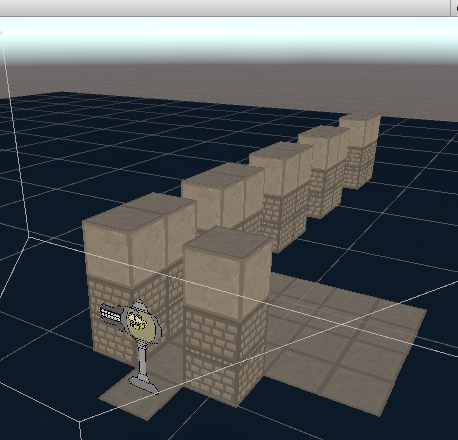
I'm in the initial development stages of a Sprite based Table top RPG, I wanted to use 2d Sprites to create 3D Isometric environments
I'm finding a lot of overdraw when it comes to sprites, they always render even when occluded, and bring a draw call for each one. I can properly batch and reuse materials so thankfully that part isn't as bad
Is there something I should do otherwise to optimize?
I tried Occlusion baking but sprites don't react to it
Should I try using a genuine mesh based system or continue with what I have?
versed lichen
cube primitives are very cheap and occlude, so that might more preferable ?
 raw meadow
 pallid gale
https://github.com/Sprytile/Sprytile this might be handy for the kind of style you're going for GlitchyDev

GitHub
A Blender add-on for building tile based low-poly scenes with paint/map editor like tools - Sprytile/Sprytile
one disadvantage of the cubes is your bloating your lights map considerably with all of those sides that are going to be covered by each other
though I suppose that's less of an issue if it's like Fulbright
lilac saddle
is there different size of worlds on udon or sdk2 ? i optimization to 130mb from 800 mb and i cant more but need into 50 mb able upload
versed lichen
If you're aiming for a Quest world and started at 800mb, you might have started too big
hybrid ridge
lilac saddle
is there different size of worlds on udon or sdk2 ? i optimization to 130mb from...
There isn't really a size difference between both models, your going to have to look at Asset Compression
An easy one is any sound used in your game needs to be forced to Mono, as Stereo doesn't work in VR
Next is to use (On Android Build) ASTC compression, 6x6 is the default and offers decent compression with not a lot of visual artifacting
For Mesh's go to the mesh asset and attempt to compress there, it does distort the model slightly so only go as high as tollerated
Use the VRCWorld Toolkit to see build size ratios as well
bitter mural
lilac saddle
is there different size of worlds on udon or sdk2 ? i optimization to 130mb from...
there's no difference inherently between the 2 SDKs as far as I remember (maybe a few bytes?), but obviously if you use SDK3 and throw Udon prefabs in there, those are all gonna be stored; and SDK2 worlds will have any trigger-based prefabs you throw in
your problem isn't what SDK you're using, you've just got too much content with too little compression to adjust around said content
check the top pin in this channel and download that, use the build report to see what assets are being stored and how large they are, and start scaling down from there
 deft yoke
hybrid ridge
An easy one is any sound used in your game needs to be forced to Mono, as Stereo...
deft yoke
hybrid ridge
An easy one is any sound used in your game needs to be forced to Mono, as Stereo...
OMG THAT MAKES SENSE- I had no idea
 mortal garnet
Can anyone explain to me what exactly baked occlusion is? I was told it should help optimize my world, but I thought objects were already automatically backface occluded
versed lichen
 versed lichen
mortal garnet
Can anyone explain to me what exactly baked occlusion is? I was told it should h...
versed lichen
mortal garnet
Can anyone explain to me what exactly baked occlusion is? I was told it should h...
That's what baked occlusion culling is
mortal garnet
Oh. So you mean by default, it's just always rendering all faces?
If so, what are some good baseline settings for the baked occlusion tool?
If it would help at all
versed lichen
You set the bounds of the occlusion area in your scene around your world, hit bake, done
mortal garnet
I don't suppose there's a good tutorial for this anywhere? I don't know what I'm doing with it lol
The baked occlusion tab seems to just have a threshold option and a "smallest hole” option
versed lichen
Don't change the settings
mortal garnet
Ok
versed lichen
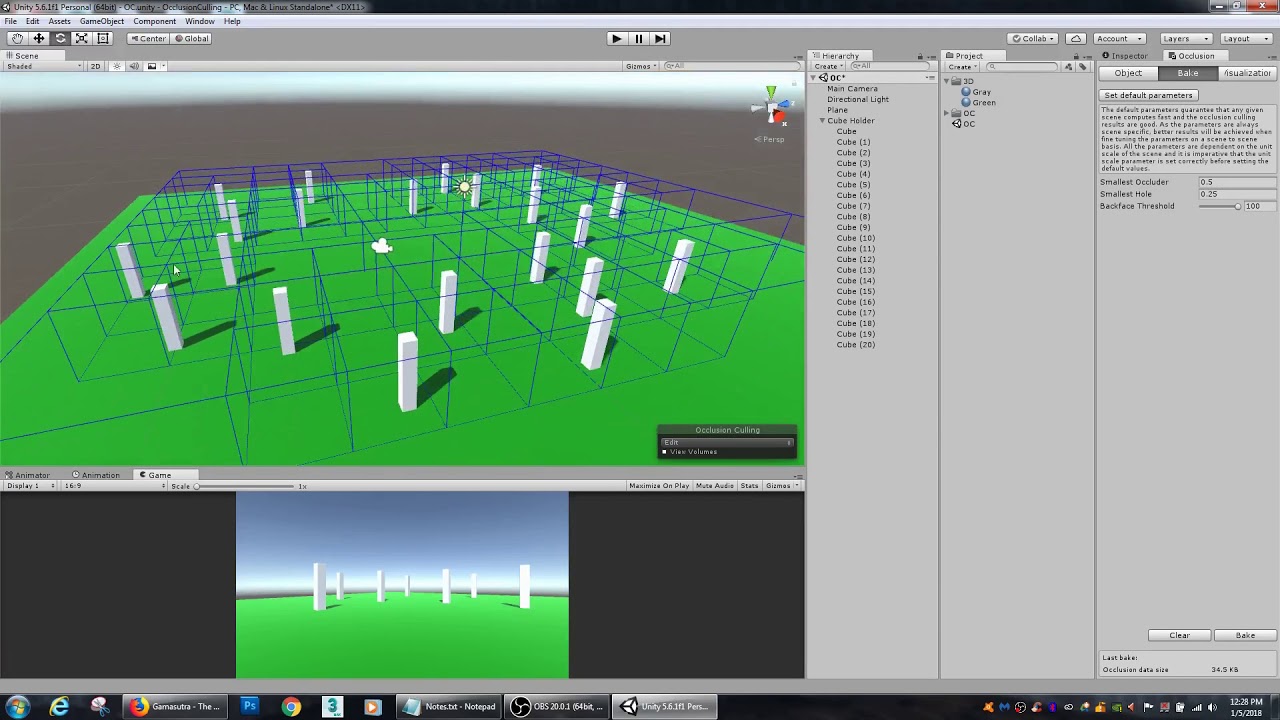
This tutorial covers basic Occlusion Culling in Unity for enhancing performance.
Purpose of Occlusion Culling:
- Improve performance
- Reduce draw calls
- Does not render static objects behind the camera
Web: jakenolt.com
twitter: @VertexGnome
mortal garnet
Perfect. I'll try it out
mortal garnet
So, I found out rather unfortunately, that you cannot have avatars too far away from the origin, or they become all squiggly. I know it has something to do with floating point calculations, but I'm not entirely sure why it only seems to affect the avatars and nothing else in the area.
Either way- What exactly IS the absolute limit you can be at before that begins to happen so I know how far to move back a portion of my world?
versed lichen
You should really try to stay within 10000 meters from origin
mortal garnet
Alrighty
See- I didnt know this and I put something 20k away from origin 😛
I think with occlusion and messing with the camera render distance, I should be able to work with that
And I assume this 10k limit is in any direction, yes?
All three Axis directions?
versed lichen
Yes, the further you go, the worse it gets
and 10k isn't the limit, it's anywhere further than 0, but gets progressively worse as you get further away
mortal garnet
I figured it's additive like that. But I guess I meant like....is there a generally accepted consensus for where you should not go beyond?
How far away can you go before the squiggles become unacceptable lol
I want to set up a boundary for myself that not go beyond
versed lichen
10k is a good boundary, realistically i can't see what you could be making that requires to go further than that, for a vrchat world
pallid gale
Yeah, you're not going to be able to fit like the entire of breath of the wild on a VRc map.
mortal garnet
So the way my world is set up is that it's a time travel institute
You go to the time machine and pick your year
There's 3 main floors to the institute, and then there's a destination I made way off in the distance
It's a long stretch of highway with buildings on either side, giving the illusion of being on a tall highway in the center of a busy city
The problem I run into is that with the cameras default far plane, you can look down the length of the highway and see right outside into the skybox, which I don't want, as it is a night time scene
And the skybox I am using is a space/cosmos skybox for when you're in the time travel institute
pallid gale
Then just make a geometry skybox. For each of the areas.
mortal garnet
I did
That's the problem I am describing
The distance is so long from one end to the other, it exceeds the far plane
pallid gale
Then make your sky boxs smaller.
mortal garnet
Let's say you're at one end of the highway and look behind you. You'd see the geometry skybox I made because you're close enough that it falls within your far plane.
But if you turn around and look to the long end, it exceeds it and you can see outside of the geometry skybox
pallid gale
Then you make your stuff too big.
mortal garnet
I can't make it smaller without compromising the build of the location either. Like if I pull the skybox in closer it will cut the length of the highway shorter than where it is supposed to end
I wish I could just scale everything down and work with a smaller world, but as far as I know, I cannot scale down the player size
pallid gale
Honestly, you might have to redesign your map. If you're running into clipping plane issues.
Next time I will suggest Gray box testing stuff like that
mortal garnet
Well, I managed to get around that by simply extending the far plane. The problem now is that if you look in the direction of the institute portion of the world, it is being rendered because it falls within your far plane, even though you cannot actually see it due to being behind the geometry skybox
An ideal solution imo would be to cull the whole institute while within the highway area
Since you can't see it anyway
pallid gale
mortal garnet
An ideal solution imo would be to cull the whole institute while within the high...
You could set that up with the teleporters to get to the various areas.
mortal garnet
It already teleports
pallid gale
Then you just need to add a little more code to turn stuff on and off.
mortal garnet
My problem is 3 fold:
-
I moved the highway too far away from origin. Now avatars get squiggly when they teleport to the highway.
-
I adjusted the far plane so that you can see to the end of the highway and the geometry skybox renders, so that you do not see out into the space skybox already used for the main area.
-
Now I need to move the highway closer to prevent the squiggliness, while making sure that the far plane doesn't accidentally render the main area if you look in it's direction.
If I can just make it so while you're within the highway area, the main area stops rendering, then I can put the highway area much closer to the origin and it doesn't matter if the far plane is 10 meters or 100000 meters because you're only rendering what's inside the skybox I made.
I'm hoping occlusion of some sort will provide the solution I need
pallid gale
You could add like some mountains in the background to block line of sight.
mortal garnet
It's not a line of sight issue
pallid gale
And add some scripting to turn places on and off.
mortal garnet
The skybox for the highway completely blocks out everything if you're inside. The problem is that my far plane is still rendering the main area if I put the highway too close to it
Too close to the origin, and it renders the main area due to the far plane. Too far from the origin solves the far plane issue, but makes avatars squiggly
pallid gale
You could also modify Where everything is height wise, so there's no way to see. The two places at the same time.
mortal garnet
Also, I could script it, but can I make it instanced?
It would be awkward for the whole main area to go invisible just because someone else went to the highway lol
Height would work fine until somebody looks up or down
pallid gale
mortal garnet
Also, I could script it, but can I make it instanced?
Basically it's the same thing as the mirrors on VR chat with buttons. Those are handled On a per player basis.
pallid gale
mortal garnet
Height would work fine until somebody looks up or down
Then put something in the way to block line of sight. That is closer than your skyboxs
mortal garnet
Ah I see, so if I slap my mirror toggle script into the teleport button, I can de-render the entire main area
and when you click the return button, I can de-render the highway?
pallid gale
yes
mortal garnet
Thats so simple idk why I didnt think of it
pallid gale
But make sure it's a local mirror script, not a global.
mortal garnet
that means I could put the highway area right next to the main area and you would never know
pallid gale
I would note that wouldn't do anything to avatars.
mortal garnet
Thats fine. The main issue is I dont want you looking out any of the windows of the main area and see a whole different play area floating in the void
I'm willing to accept avatars might be unavoidable
pallid gale
You could also bring the skybox closer to the windows of. main area
mortal garnet
the main area uses the built in unity skybox feature. I applied a different skybox to it however
the main area doesnt use a geometry skybox
pallid gale
Then just make it geometry.
Because using the unity skybox, it's unavoidable to see avatars. If you have line of sight with them.
pallid gale
yup
mortal garnet
ahhhhhh
oh- thats even better too because then I could animate it
you're meant to be "outside of time" so a weird moving skybox with some neat shaders on it would be awesome
pallid gale
The unity skybox is basically attached to your head, so it's always behind everything. So you need something to block line of sight.
mortal garnet
exactly
makes sense
Awesome! If this toggle thing works, I can put all my time travel destinations within pretty close proximity to the main area and you'd never even know
and with the geometry skybox, you wouldnt have line of sight
nice nice nice
I'll have to experiment and put this to work
Thank you!
pallid gale
Glad to be of help. I stick my nose in a lot of how like older video games did there maps
 gaunt prawn
Hello~ i made world that i do get good frames but frames drop alot when i open Menu or mirror , i made sure to use 1 lighting for avatar and all others are baked, is there way to find out what cause frames to drop etc, Thanks.
pallid gale

View this video in context on the Unity Learn site:
http://www.unity3d.com/learn/tutorials/modules/intermediate/graphics/frame-debugger
In this video we'll look at how to use Unity's Frame Debugger to analyze and trouble shoot graphical performance.
Help us caption & translate this video!
mortal garnet
What are the default Occlusion settings for Unity?
Or can someone tell me what the difference between Occluder Static and Occludee Static are?
I marked all of my static objects in my scene, but I think something got toggled somehow
my whole world except for like 4 or 5 objects work fine. When I get close to those objects or look a certain way, they randomly become invisible
versed lichen
Occluder = object that hides others
Occludee = object that is hidden by others
You generally want both on everything
mortal garnet
Right
Its all solid walls anyway
okay, then that alleviates that issue for me
I guess I just dont know why those random surfaces occlude themselves
like, for instance, a whole room occludes itself when I am inside of it. But it's just a duplicate of the same room above
versed lichen
Are you checking with the Unity camera ?
mortal garnet
its happening even when I am in the standard scene. Like I am not even moving the main camera around
my viewport camera is occluding too
versed lichen
then it's not an occlusion issue
try selecting something in the room and pressing F to focus on it
mortal garnet
Well, I cleared my occlusion and I'm re-baking, and right now the issue isnt happening
so I guess I'll check back in an hour or whatever when it finishes
This is one of the walls that would blink out of existence if I looked at it funny

And this entire floor would cull if I jumped and looked down at it

oh my god I think I figured out one of the problems
not sure WHY, but I had elevator tubes intended to take you from floor to floor. These tubes technically are exposed to the outside void because the elevator platform isnt flush with the walls. I notice when I am underneath one of these tubes, thats when the whole room seems to vanish
not sure what thats about...
gaunt prawn
pallid gale
https://www.youtube.com/watch?v=4N8GxCeolzM
ty!
pastel kiln
Quick question about reducing file size. What are levels? They are apparently taking up a large amount of my world size
versed lichen
static batching
deft goblet
mortal garnet
not sure what thats about...
You’ll need to re-bake occlusion any time you move stuff
mortal garnet
Right, but I havent moved anything
I have baked and re-baked, without moving anything, and for some reason it keeps occluding those objects. In fact, its worse now and occludes everything in that area
but ONLY that area
my temporary solution is to mark it as non-static so it is never occluded
deft goblet
Check it’s bounding box
And glass/transparent objects should not be marked as occluders, only occludees
 fresh maple

I do not believe levels is supposed to be taking up this much space, is there a way to reduce it?
 vague moth
is it 'expensive' to have aim constraints to make things look at players/objects in a world?
 willow spoke
nah, unity constraints are super cheap
hybrid ridge
Question: For creating an A* Algorithm, what storage medium would be most efficient for node information
I was debating Arrays, but I've been introduced to deactivated components (Text Components) that could store data, as well as a finite set of udonsharp scripts pretending to be node objects
gritty cobalt
yo, i was asking myself

That be quite a lot of builtin stuff, anyways to know exactly what it is ?
cold prairie
Big contributor is if you have realtime global illumination ticked on with baked lighting
And in most cases if you aren't sure what realtime global illumination is you can untick it
https://docs.unity3d.com/Manual/realtime-gi-using-enlighten.html
gritty cobalt
I see, it make sense then.
Thanks you for the answer ! Won't touch that since I need it. :)
 remote wharf
I am brand new to world building (no prior world building experience). I just made my first world ever. It came out to be 187MB, so I watched some tutorials, and even after switching to baked lighting, medium quality settings, mirror toggles, and textures set to 512 and forced compression, I still can't get my world smaller than 106MB. I am not sure what else to try. Would making it Quest compatible help with that? Or like, what can I do? (It's a 3.0 world)
pallid gale

GitHub
Unity Editor extension for making VRChat worlds. Contribute to oneVR/VRWorldToolkit development by creating an account on GitHub.
this tool will let you see where the file size is going
remote wharf
pallid gale
this tool will let you see where the file size is going
Ooooooh thank you! I will check that out 
pallid gale
also just a handy tool in general for world-building
also question does your map have any audio
remote wharf
pallid gale
also just a handy tool in general for world-building
Thank you so so much. I have lots of avi creator friends but no one whoales worlds, so I have been feeling lost haha
remote wharf
pallid gale
also question does your map have any audio
No it doesnt
pallid gale
do you know what the file size is on your object files
just figured I'd ask in case you had like 10 megabyte potted plants you got off of sketchfab
remote wharf
pallid gale
do you know what the file size is on your object files
No, I have no idea what size any of my object files are.
pallid gale
in that case I would suggest installing the unity plug-in and having it tell you what's up
remote wharf
pallid gale
in that case I would suggest installing the unity plug-in and having it tell you...
okay, I have imported it and am looking at the 'build report', its a great feature. The 'messages' tab is suggestings stuff I don't understand, but atleast I know WHAT is wrong now. This tool is awesome. Thanks a billion @pallid gale
versed lichen
no
pallid gale
remote wharf
okay, I have imported it and am looking at the 'build report', its a great featu...
so what was eating your file size
fresh maple
How do you get transparent materials for quest worlds?
remote wharf
pallid gale
so what was eating your file size
the textures were 70% of the size. While using the toolkit I must have accidently deleted the sdk or something cause my project broke. i ended up sending it to a game dev friend to fix, i dunno if it fixed or not, they are sending it back now. but this happened:


 pallid gale
oh dear
cold prairie
remote wharf
the textures were 70% of the size. While using the toolkit I must have accidentl...
That doesn't look like anything my toolkit would have done. 🤔 What steps did you take before this happened?
remote wharf
cold prairie
That doesn't look like anything my toolkit would have done. 🤔 What steps did yo...
yeah I don't think it was the toolkit, I was just cleaning up a bunch of stuff, so it was prob something I accidently did in the process. before this happened, all i did was take the suggestions of the toolkit. I deleted a few textures, and compressed everything in my assets folder (i prob should have just compressed the stuff in my scene). i also added the post processing & set it up, and click autofix on a few things
cold prairie
Was this SDK2 or SDK3?
remote wharf
cold prairie
Was this SDK2 or SDK3?
sdk 3
cold prairie
I might try just completely re importing the SDK as the first step and see if that gets any different results afterwards
remote wharf
hopefully my friend got it working, worst case scenario I start over. this was my first world so that was kind of expected.
cold prairie
Can you link me the download for that project so I can have a quick look?
remote wharf
cold prairie
I might try just completely re importing the SDK as the first step and see if th...
I tried following the documentation on the vrchat website on how to do that but it was unclear, all it said was:
"Close Unity
Back up project to another folder (do not back up the Library folder, these files are auto-generated by Unity)
Delete SDK and Plugins folder, as well as the the associated .META files
Create a new dummy Unity Project
Install the latest SDK on the dummy project
Copy the newly added SDK/Plugin and associated .META files from the dummy project into your original project"
it didnt say how to delete the sdk, plugins and .meta files. like what they would be called and such, so i probably ended up deleting too many things.
remote wharf
cold prairie
Can you link me the download for that project so I can have a quick look?
I further broke that version of the file already by trying to follow those instructions, so it wont be the same as it was when i took those photos. i sent the file to my game dev friend now and they were able to build and test the world so i think they fixed it, i am just waiting for them to send it back. I def don't think it was the tool that broke it, its more of a PICNIC issue rofl. Newb vs The World 
cold prairie
Yeah it most often is 😅
remote wharf
lol I guess I shouldnt be so hard on myself, mistakes are how we learn. and yooo btw did you say it was your tool? Like you developed it? cause if so, THANK YOU. I feel like this is a CRUCIAL world building tool. so grateful for it 
cold prairie
Yeah that would be my tool  thank you
remote wharf
cold prairie
Yeah that would be my tool <:poi_hehe:582941309132734507> thank you <:poi_bless:...
hell yeah! I will let you know how it goes. I am eager to get this issue fixed so I can finish my world. so many tutorials queued up lol
cold prairie
Good luck
rose wolf
fresh maple
How do you get transparent materials for quest worlds?
just like how you would pc
fresh maple
Will it not lag it out?
rose wolf
if you over lap them
ebon needle

are these good settings for a world ?
cause for some reason all hte lights kinda flicker
versed lichen
The lights flicker because they're realtime
They need to be baked
Environment lighting from color to gradient
ebon needle
they are set to being baked tho
versed lichen
Yeah but did you bake them

You can support me on my pateron
https://www.patreon.com/mcphersonsound
This is a longer tutorial than normal and there is a lot to cover so here are time stamps for your convivence.
00:00 what is baked lighting
00:35 setting up lights
1:23 preparing meshes to bake
2:30 generate lightmap UV
3:28 light probes
5:10 reflection probes
6:00 emissive ...
ebon needle

yes
yes i did
and after turning on the oven
and after it was baked
they flicker
versed lichen
Nah that's just them being set to baked
versed lichen
Then they shouldn't flicker
ebon needle
i just dont know why these decided to flicker
all the settings are the same so
i dunno
does it matter if i delete the old bake files before re-baking ?
versed lichen
Do they ficker in Unity ?
versed lichen
Did you bake them off ?
ebon needle
they are on
like

this island had a blue light on it
when i still had them on realtime lighting

and i have light probes
versed lichen
oh god
 versed lichen
You shouldn't have lightprobes where people can't go 
versed lichen
But this doesn't look very baked
versed lichen
Light changes in the sky ?
ebon needle

added a directional light
its a custom skybox
ill try to bake it
with the default on
versed lichen
Alright,
ebon needle
worst case i can make a transparent dome over the cave bowl
and make a night sky texture and have it slowly pan over it o3o
versed lichen
Definitely a good solution
ebon needle

baking in progress
doesnt take long for me XD
managed to get my hands on a 3080 before they went crazy in price range
versed lichen
You should probably increase the lightmap size for next time
10 texel is also pretty low, given you don't have much to bake you could afford to double that
 versed lichen
yeah, 4K
ebon needle
ah
i kinda got inspired by furality luma xD
so... im dealing with hte post con depression
by making a world inspired by it :P
versed lichen
Nice, the con seemed pretty nice, the music was also really good
ebon needle
yeah
i kinda wish they took all the DJsets
and made 1 long video out of it
so i can have it on loop for my world xD
versed lichen
Their songs are on spotify btw !
 versed lichen
Yeah, that's more like the Unity i know
cinder tusk
@ebon needle I look forward to seeing your map next year then? ;)
 robust olive
I want to use that interactive water shader on a large scale, and I'm wondering what would be better for performance
one large body of water or one per area?
For context, there are a bunch of pools that aren't all connected
 hybrid ridge
robust olive
For context, there are a bunch of pools that aren't all connected
hybrid ridge
robust olive
For context, there are a bunch of pools that aren't all connected
Yah sadly best way to test is trying it both ways
We don't know how exactly you implemented it, could have varried results
 pastel phoenix
Is anyone able to tell me if disabled objects have any impact on performance at all? Like would a world with 1000 disabled mirrors perform any differently to the same world where they didn't exist at all?
gentle gust
disabled objects dont get rendered, so they dont fall in the performance. however disabled objects are being loaded with the rest of the world, so they fall in the filesize
but if they are unneccessary and never used, you should delete them
pastel phoenix
That's what I figured. Just wanted to be sure. Thanks.
 arctic knot
Performance wise how many dynamic bones does it take to equal a cloth?
versed lichen
one is cpu and the other is gpu, so i don't think there's an equal
versed lichen
Cloth hits the GPU hard real fast
rose wolf
does lowering the near clip plane on the main cam actually lower the amount being rendered and is there a way to change the near clipping plane on the camera in game?
 ruby widget
I have a question to world flags, is there a way to see what was actually meant with "environment-performance"? We tested the world with 15+ people in VR and no one had any performance issues even with mirrors.
ruby widget
Never mind, it was random Quest issues
autumn glade
rose wolf
does lowering the near clip plane on the main cam actually lower the amount bein...
It will lower rendering, camera frustum culling, but we can’t adjust that real time unfortunately
rose wolf
k
autumn glade
Near clip, sorry, Yhea we can’t adjust runtime either
rose wolf
ko
 olive nova
Should my world be multiple one big meshes or is occ culling more useful for performance
versed lichen
Depends how complex is the mesh and how many materials it would be
 light cloak
so I got this very complex outdoor scene with a complex indoor apartment area. Lots and lots of point lights.. Is there a way to keep realtime light on but still have it optimized
If not i want help figuring out the best lighting settings and stuff without it ending up being too big of a map to load
versed lichen
nope, bake is the only option, no reason to keep realtime if it's static
gentle gust
sh mode in bakery can archieve a similar effect to rt light
versed lichen
You'd have to use merlin's tool, and it'd also make your lightmap size go pretty high
gentle gust
but its the closest and most optimized way to get the Real Time light effects
versed lichen
Sure, but none of the lights they're talking about should be realtime anyway
gentle gust
light cloak
so I got this very complex outdoor scene with a complex indoor apartment area. L...
this does sound like they want real time lights
and SH is the only way to get that real time effect with baked lights
versed lichen
Complex doesn't mean required
I'd still need to understand what they need realtime for
light cloak
well.. what's the fastest baking settings so it's not a massive loading time
gentle gust
light cloak
well.. what's the fastest baking settings so it's not a massive loading time
baking only takes time once, not when loading in the world. also Bakery is pretty much the fastest and most accurate
light cloak
oki I'll get bakery
last time I baked it all it was like 750mb in vrc
so I did it wrong
gentle gust
then you most likely had the lightmap resolution too high
light cloak

 cloud hound
I just looked up bakery to see what it was and what it costs, and oof...
cloud hound
I guess my question is am I only going to make my one world or am I going to make more...
light cloak
a bazillion worldz
lusty forge
Where is this file? Resources/unity_builtin_extra
i'm checking on forums but can't find it
gentle gust
why do you need it?
 latent terrace
lusty forge
Where is this file? Resources/unity_builtin_extra
latent terrace
lusty forge
Where is this file? Resources/unity_builtin_extra
unity_builtin_extra exists in pretty much anything that uses Unity, so I'd suggest using a program called Everything by voidtools and searching for the one you need.
cold prairie
I assume they mean from the build report and that contains mostly misc lighting data and other dependencies for the asset bundle
latent terrace
Probably, they weren't very specific about it unfortunately.
cold prairie
Resources/unity_builtin_extra is pretty specifically found in build reports
lusty forge
So i'm trying to drop the MB of my world and i'm at 4.71Mb, and Resources/unity_builtin_extra is 28%
cold prairie
Do you have Realtime Global Illumination on?
cold prairie
The setting in lighting panel yeah
unique kite
Guess you use a few UI elements right?
lusty forge
Nothing just Text Mesh
lusty forge
cold prairie
The setting in lighting panel yeah
Yep light is baked
unique kite
no button image? Resources/unity_builtin_extra contains all the hidden crap that you do not ever have access to like button textures. These are not optimized at all. In every instance UI textures need to be imported or created yourself.
cold prairie
lusty forge
Yep light is baked
If you have this ticked and you aren't actually using Realtime Global Illumination untick it and rebake your lighting, that will shave off most off the builtin extra
 lusty forge
cold prairie
If you have this ticked and you aren't actually using Realtime Global Illuminati...
lusty forge
cold prairie
If you have this ticked and you aren't actually using Realtime Global Illuminati...
That was on what das it do? sorry for asking
cold prairie
In most cases if you need to ask you won't need it, basically it's just precomputed realtime light but if you aren't using it it's just wasted space in your lighting data.
lusty forge
i see
i did not know that, i'm trying to learn how to compress a world
anything more that i can do?
cold prairie
Well that should get rid off a bunch of unnecessary extra data already other than that it really depends on the world and what you've already done 
lusty forge
Compress textures
Compress Meshes
The thing that you told me
And nothing more
any idea?
 cold prairie
Gets a bit hard to get the size down at that point
lusty forge
unique kite
no button image? Resources/unity_builtin_extra contains all the hidden crap that...
Also what you mean with this?
cold prairie
You can also get rid off some light probes to get the lighting data even more down but that would most likely be negligible for a world that small
deft goblet
I love real-time shadows but I can never get mixed light to work, unity always hangs on light transport
 remote eagle
Dumb question; what's the advantage of packing things in a prefab? Is there any downside to un-packing prefabs?
pallid gale
easier to propagate changes if it a prefab and also you can bundle up components so if you make like a chair with a vrchat component you only need to do that once
deft yoke
If I wanted 3-5 different meshes that closely resembled each other with slight variations (for the sake of not all looking the same when you see them all at once), is it a good optimization to just have one object with a few blend shapes that could be used to make the one look very different?
Has anybody used blend shapes for world optimization?
versed lichen
closely resembled each other
could be used to make the one look very different
Which one is it 
versed lichen
So you want slight variations or for them to look very different ? Continuous shapekeys aren't great for perf but that depends on the complexity of the mesh
deft yoke
Not very different, that was just bad phrasing
But yeah instead of having 3 slightly related models, having a few blendshapes so I can just have the same model all over the map but different blendshapes for each one (or for some, so like 3 prefabs with pre-set blendshape values) to reduce the size of the world
Is having a bunch of different versions of a base model with different shape key values bad performance?
 toxic plaza
it'll be more performance friendly to have them as separate meshes instead, if they are static environment pieces for example there's no need to have them be skinned mesh renderers (which are heavier than a regular mesh)
 fallow zenith
Is there a way to see how big my world is before publishing it?
cold prairie
If you just do a build and cancel out from the upload you can afterwards use this and check the build report section of the World Debugger
http://toolkit.onevr.dev/

GitHub
Unity Editor extension for making VRChat worlds. Contribute to oneVR/VRWorldToolkit development by creating an account on GitHub.
 balmy vortex
so i can build and test my world perfectly but when i go to publish unity closes??
i also have 0 console errors
deft goblet
remote eagle
Dumb question; what's the advantage of packing things in a prefab? Is there any ...
You have a prefab tree and you drag it all over the world now you decide you want to change the color of all of them you only have to edit it in prefab mode and you edit all of them at once. Each one can still override values like have its own rotation, by not editing it in prefab mode, they show up in bold meaning it’s a overridden value not coming from the template
 heavy nova
Hey, probably a stupid question. When building and publishing a world to VRC does it package the entire unity up or is it just anything that appears in the world? (my guess is just the world, but I'd like to double check) I kinda have a 300mb world file after upload and I'm wondering if it's because I'm lazy and just leaving in the high quality assets, or if it's because it packages everything I've imported to this project.
versed lichen
it's just the scene
heavy nova
I thought so, thanks. Guess that means I have to do some major optimization 🤣
pallid gale
http://toolkit.onevr.dev/
can give you a detailed breakdown of what's taking up the file size

GitHub
Unity Editor extension for making VRChat worlds. Contribute to oneVR/VRWorldToolkit development by creating an account on GitHub.
remote eagle
@deft goblet Ahhh, so it’s primarily a workflow optimization thing. That makes a lot of sense.
 ivory spear
What affects Mirrors the most? Fps wise. I got all but the low poly map, baked lights and one real-time light reflecting and man the fps sucks.
versed lichen
Realtime lights are bad
pallid gale
they basically multiply the cost of everything
lilac saddle
versed lichen
Realtime lights are bad
What if you could put the realtime lights on the gpu instead of the cpu?
pallid gale
that would not help with the whole doubles the amount of draw calls
lilac saddle
pallid gale
that would not help with the whole doubles the amount of draw calls
Well who's to blame for not doing their homework? You.
pallid gale
lilac saddle
Well who's to blame for not doing their homework? You.
how so the CPU would still need to process draw calls
lilac saddle
GPU are much better for these tasks than CPU are. If CPU were so good at computing light data i dont think we would use gpus so much
pallid gale
Medium
While not the only thing that has changed, all the talk about modern graphics APIs usually comes down to a term of “draw calls” — one of…
what I meant by the CPU handling draw calls you cannot completely offload everything to the GPU
lilac saddle
No but u can offload graphical tasks to a gpu rather than the cpu
Gpu: graphics
Cpu: calculations
Kinda
pallid gale
perhaps but vrc is not like it was a go change its renderings significantly anytime soon so go bake your lighting
lilac saddle
versed lichen
<:RuuuThunk:660008559886729226>
Do ubershaders actually help with worlds or not really?
Lets take Mochie's Ubershader for example
versed lichen
Not really no
lilac saddle
versed lichen
Not really no
In what cases can they be useful?
pallid gale
doing a quick Google that appears that's mostly a avatar Shader so it has lots of stuff that's of no use to a world
versed lichen
If you need specific visuals or a specific object maybe, but that's overdoing it a bit
lilac saddle
versed lichen
If you need specific visuals or a specific object maybe, but that's overdoing it...
So it would be better to use ubershaders more on avatars than worlds. Right?
pallid gale
like pretty much most of your surfaces should be the standard Shader or lighter equivalent to that unless it's an object that requires some sort of special effects like water
pallid gale
lilac saddle
So it would be better to use ubershaders more on avatars than worlds. Right?
depends on what you're trying to do with your avatar and there's not some sort of magic thing with ubershaders that just means they more special effects into one shaders instead of different special effects shaders
lilac saddle
Kk
pallid gale
Googling ubershaders is only pulling up the Dolphin Emulator
lilac saddle
Lol
pallid gale
but yeah some of the reason why you'd want everything to be like the unity standard Shader so you can combine stuff together to decrease the amount of materials so there is less draw calls
lilac saddle

GitHub
Contribute to MochiesCode/Mochies-Unity-Shaders development by creating an account on GitHub.
pallid gale
that does not have any documentation whatsoever on the page
and like the one video I couldn't find is more indicating it's just piling on lots of special effects in one Shader
which wouldn't be of help for the vast majority of your object
like I can't imagine a dinner table needing more than the standard Shader or something lighter
lilac saddle
Is there a way to get frustum culling set up and working on a vrchat world @versed lichen ?
pallid gale
frustum calling is on by default
lilac saddle
Yes but no
pallid gale
lilac saddle
https://www.mpc-rnd.com/unity-gpu-culling-experiments/
vrchat already has enough on their plate transferring to a new Unity version so no there's not going to be putting stuff like that in so you need to learn how it currently works


Occlusion Culling c: this is what happens in any world utilizing Occlusion Culling. Showcasing this with my world "Vixen" This is one of the greatest optimization tools map makers have available if implemented correctly. https://t.co/JdJnSOOaJh

 Twitter
·
pallid gale
Twitter
·
pallid gale
yes because vrchat already has frustum culling.
by default without you doing anything
VRChat already has Frustum Culling ingame by default, which prevents anything outside of the camera's FOV from loading, Occlusion Culling furthers this to a better degree by only loading chunks of areas that are directly visible, not loading anything that it currently not viewed
 Twitter
·
Twitter
·
 lilac saddle
Ah yes i know how to set up occlusion culling on a vrcworld
Tho i think one big thing that could help is changing the farplanr to 100
Instead of 1000
pallid gale
you can change that in your worlds
lilac saddle
Does it affect the player's camera (not photo camera) in game?
pallid gale


I am wondering what kind of map you would want to do that in where the occlusion culling wouldn't do the trick
pallid gale
you can do some layers settings so only the mirror room shows up in your mirror
and that's like your own fault if you put the mirror in a spot that renders the entire map visually
 marble moon
So, I'm having a nightmare of a time trying to work out a bizarre issue with a world I'm working on. It's a bit of a wall of text otherwise, so I'll keep it short. I have one specific location, about 2x2x1, that causes roughly a 40 frame drop when you're looking directly at it. You circle around it, looking at it, frames drop. Look down or up while standing in the middle, no issues. Move out and look away, no issues. It's only ever if you're looking at this one specific area from any angle. I removed every asset from the location, still persists. Can't seem to find any particle effect systems that might overlap. Removed the baked lighting for the area. Doesn't appear to be occlusion related, since some directions have almost nothing to render in the distance. Isn't like a central area that would otherwise have a heavy load. Doesn't seem to be related to that one specific coordinate in the world, either, as I shifted the entire map away from it and the issue still persists in the same area with the new coordinates.
But that one location, even with nothing there to look at (save the floor, walls, and ceiling - which don't seem to be the culprit considering the rest of the same assets are fine in every other location), drops frames from a stable 90 everywhere else, to fluctuating between 40~60 rapidly.
deft goblet
lilac saddle
Ah yes i know how to set up occlusion culling on a vrcworld
Unity already does camera culling. It’s possible you have a camera somewhere pointed at stuff? Even if it has no render target, active cameras will prevent culling.
 jolly heath
Do pens always destroy perfomance or is there a good way to do them
deft goblet
The newer Udon Pens are pretty optimized and even show for late joiners
jolly heath
are those in the prefabs or something you gotta make / import
deft goblet
I got mine from the Game jam event project, not sure if it’s in the SDK now?
pallid gale

GitHub
Contribute to z3y/vertex-color-pens development by creating an account on GitHub.
jolly heath
How do you test world performance optimization when the framerate is capped, is unity game views stats accurate or are there other ways
 hollow elk
jolly heath
How do you test world performance optimization when the framerate is capped, is ...
hollow elk
jolly heath
How do you test world performance optimization when the framerate is capped, is ...
You are able to increase VRChats framerate cap using --fps=9999 as a launch option
But unity does have built in profiling tools you can use that a quick google search would teach you how to use
gentle gust
if you get a solid 90 on a mid end PC in VR (and optional full body), then its good enough for 99% of people
also programs like fpsVR that show you your frametimes and usage can help you determine how optimized a world is
jolly heath
hollow elk
You are able to increase VRChats framerate cap using --fps=9999 as a launch opti...
Seems good lmao
 gaunt prawn
Hello, i made world with sofa fbx, problem is everytime i place sofa and step on it in game my FPS drop from 90+ to 30 fps in PC mode, i maded sure to compress the meshes, but still the same problem , it's static and baked , so idk what cause it to be that heavy + it only happen when i walk over it.
pallid gale
maybe check the wireframe mode to see how heavy the sofas is as far as triangle count
gaunt prawn
how to do that if i may asks?
hollow elk
gaunt prawn
Hello, i made world with sofa fbx, problem is everytime i place sofa and step on...
Remove the mesh collider and switch it out for box colliders
lusty forge
gaunt prawn
Hello, i made world with sofa fbx, problem is everytime i place sofa and step on...
i recommend you to create a button to toggle things, so like sofa toggle and check what is the problem
Also run the world on Unity and check the Window/Analysis/Profile and there you can see what is the world doing, check the draw calls Window/Analysis/Frame Debug
Any Udon code...?
calm wave
The UI i have made is not working well: it is like there is a large hitbox around it. I have searched for all possible reasons but couldn't find. Does anyone have any idea what could be wrong?
gaunt prawn
no codes, only bad perfomance , will try collider thingy, but thanks Superbstingray and BananaBread
gaunt prawn
hollow elk
Remove the mesh collider and switch it out for box colliders
did try it today, did works, thanks alot
 wintry shard
Hey guys
if i want to set my world on fire, What fire particle shader do i use to keep it optimized?
rose wolf
fire lite
hasty merlin
marble moon
So, I'm having a nightmare of a time trying to work out a bizarre issue with a w...
I'm having a similar issue. The map I'm using has issues with big wide open areas(which there are 2 of), and it isn't a particularly high poly map to begin with, and I'm even using the LOD_1 version of it for VRC's purposes. If you're facing either of these areas the framerate immediately drops to 17, or if you're facing both of them at the same time it can drop as low as 12 fps. This happens regardless of how far away you are, or if the area would be culled. Same thing happened on another map I was working on from the same game. Fairly low poly, just particular areas dropped frames like crazy.
hollow elk
@hasty merlin World ID?
hasty merlin
It's not public yet but lemme see if I can grab a join link from the site.
There's a lot of performance issues with it as-is but these ones in the open areas are just kinda odd to me.

San Paro˸ Financial District from All Points Bulletin
One of the open areas I'm talking about are right when you leave the subway station that you spawn in
hollow elk
Yeah Realtime directional light + shadows