#world-optimization
1 messages · Page 19 of 1
 hazy haven
 versed lichen
Not your fault, i'm not sure what causes it either, and since i don't have access to the project i can only make guesses
hazy haven
I'm going to check if Normal Maps causes this
hazy haven
Yeah I did that and seems like no results
I don't really have lag in my world, but as soon as more people join, the fps can go down to 50-60
Usually because they use very poor performance avatars
hazy haven
I just uploaded my world to Quest as well and it had around 500 Batches there
versed lichen
That's still a ton, but i don't think i could figure out what's wrong just through a screenshot 
 real falcon
do video players have an impact on performance at all?
real falcon
so in the world im hitting like 60 fps at about 200% res on my htc vive, would it be worth it to focus on performance more or is this decent enough in ur opinion?
versed lichen
200% is a lot, but it's always worth optimizing
Take a screenshot of your world with the stats menu showing in game view of Unity
real falcon
stats menu..?
versed lichen
top right corner next to gizmos
real falcon
versed lichen
where's the world ?
real falcon
i moved the camera cause you couldnt read the stats screen where it was lmao
i can put the world in the cam
i dont have culling or anything
versed lichen
well, if we can't see the world, we can't see the stats 
versed lichen
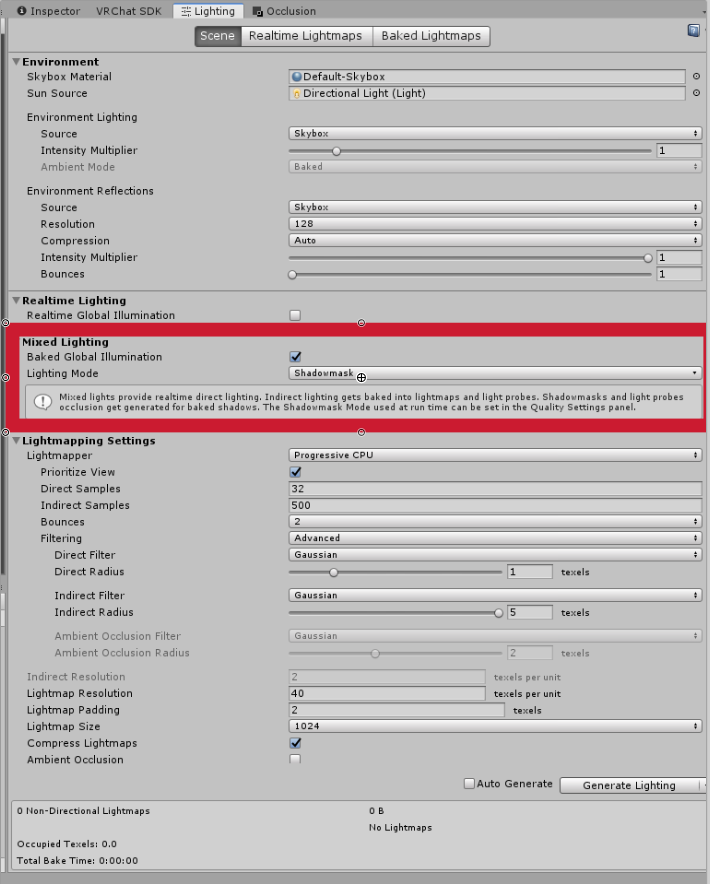
What are your lighting settings and lights in scene ?
also Edit>Project Settings>Quality and change "V Sync Count" to "Don't Sync".
 cold prairie
Also if you update to the latest version of my world tools bakery window will stop bugging out like that
https://github.com/oneVR/VRWorldToolkit/releases
cold prairie
The build report part had a small bug overwriting some other styles from editor windows
real falcon
@versed lichen sry for ping just didnt know if u saw
versed lichen
Did you turn off vsync ?
versed lichen
Looks good as it is !
I'm going to blame your carpet for the framerate
Cause i can't see anything else
real falcon
sweet! thanks!
 shrewd harbor
Couple more questions, read through some documentation and guides but didn't find anything to address this. I have 2 issues I need to resolve in my world, in different areas. In area 1 performance tanks as soon as a 2nd person joins, but doesn't degrade further as more people join. In area 2, the instance master performance tanks to single digit FPS, everyone else is 100% ok.
I know I've read some info on optimizing issues like this, but I can't find them now (of course). Any tips would be 10/10!
I should mention as well that everything runs smooth as butter while solo, and all of my udon scripts are run on interact/collision enter, nothing is running on update or any other ongoing method.
 patent compass
anyone have an in depth video on word creation and optimization? ive been looking but all the ones i can find are rather confusing
i guess i should be more specific, im looking for one on lighting occlusion and other optimizations things mostly
versed lichen
@shrewd harbor Should ask in #udon-general first
@patent compass There's plenty of tutorials out there for that, there's also some pinned in this channel
shrewd harbor
Will do, thanks, wasn't sure where it'd fall under
versed lichen
If the issue is so specific to people and worsens over time, I'd go with networking perf of the behaviors
 lilac saddle
Just out of curiosity. Is there/will there ever be support for Unreal Engine worlds?
 spring kite
VRChat runs on Unity engine, so I dont see that happening
lilac saddle
Ah darn, cause I’m better at UE than Unity. Oh well it all works out 🤷♂️
 near isle
general question, how many particles would be concidered bad for vrchat?
i'm using a particle system to make leaves fall from a single tree in a world but i'm not sure if 100 max particles is gonna tank systems or if i can go more or less
versed lichen
100 is nothing, make sure to use cutout rather than transparency though
near isle
so uh
i added a few more things to my world, not too much, just some more grass, that tree with the leaf particles and some jack o lanturnes, made sure textures are compressed and crunched, rebaked the lights, and the world went from 30mb to 134, so i went in and lowered some more resolution of the things, mainly the resolution of the ground texture, and the world is now 137mb?
i'm not sure how it went up so high and i'm even more confused how it increased after lowering more stuff
near isle
ooo this is cool
i believe its the blend shape normals thing, i did drag a model in to use it as a corpse but it's rigged
versed lichen
that'd make sense
versed lichen
yep
near isle
hell yeah got it down to 37mb
thanks!
as far as i can tell the world is pretty much done, just gotta make items grabbable properly
 ornate plank
hey, there is a size limit to create a world?
versed lichen
Aim for 500mb at most, but can go up to 1gb
ornate plank
great, thanks @versed lichen
 marble hornet
hello
near isle
how does fog affect a world? in unity editor i notice a large drop in frames, i'm wondering if it would be the same in game or if i should scrap the idea?
near isle
i'm asking because in some game engines i know that fog is used as a way to reduce lag so it doesnt render things at distance, though i'm sure i'd have to set something up for that
versed lichen
Unity's fog is pretty alright, what issue is it specifically ?
Is it a super large space ?
near isle
i had wanted to make fog appear from far near some mountains that are far
because right now they look silly and have zero depth to them
they look low poly and no detail because i set the distance on the terrain really low for lag help
but the tops of them look like they're missing some depth and i was thinking fog would help
versed lichen
silent's water shader is good
near isle
alright i'll check it out
near isle
this might seem like a dumb question but i'm asking to be sure, i have a few lanturns in my world that players will be able to grab and move around and they have realtime lighting on them to do so, will they still take a performance hit if they're outside of the range of the light? it's only a few feet wide
versed lichen
Would be better to turn them on afterward for sure
it's not high, but it's definitely a cost
near isle
i'm showing my little brother the world and he's like "nobody fuckin cares, bethesda released a whole game with broken lights"
i could put one of those on off thingies on it
is that hard?
near isle
lol
 rustic osprey
this may be a niche question but does anyone know how to extend the culling on world builder grass so it doesnt fade out so close? my world is pretty optimized so far and the grass is on its lowest detail i could muster and i cant find the option anywhere but i know it has to exist somewhere this is my world btw https://vrchat.com/home/world/wrld_cd0f3420-b5ef-40b0-941e-1f05f7934b7d its still SUPER early

The start of a possible new world‚ Maru's World․ changed lighting
versed lichen
I don't think terrain like that is optimized to begin with
you get 300 drawcalls immediately on joining the world and there's absolutely nothing to see
rustic osprey
well im still editing it, i just made it yesterday heh
versed lichen
Sure, but probably best to take care of the main issue before trying to add more onto it imo
rustic osprey
i found the issue i can increase the culling to 250. also idk what the draw call is, is that something i can mess with?
for me the world runs at a rock solid 90fps which is good so far in my book
versed lichen
in VR ? Make sure to test once the grass is in, usually starts getting heavy
rustic osprey
well the grass is in, and it was 90fps in vr with a friend with me WITH full body of course i have an R9-3900X too but vrchat is unoptimzed so it doesnt usually matter but for me, anything that doesnt chug down to 30fps when i enter is optimized
i changed the culling from 80 to 250 on all the tiles
versed lichen
Why full body specifically
rustic osprey
because i run a mixed setup of oculus and vive trackers and have to run 2 playrooms at once which is an overhead for me
versed lichen
ah i see, in that case you seem to have your own benchmarking going on
if it runs fine for you it's 
rustic osprey
i just wanted to make a rolling plains walking simulator sort of level thats just a chill place to roam around. im thinking of adding a cabin and things to do once i get the level how i want
shrewd harbor
What is a good target number of drawcalls?
(For PC VRC, but it would be nice to know targets for Quest as well)
versed lichen
totally depends on the world
shrewd harbor
I was worried that would be the answer, haha. It seems to run well, and I've done all the static batching/instancing I can, along with some trigger culling, and it's sitting around 360
versed lichen
make sure to get occlusion culling baked !
shrewd harbor
Will do!
 pallid gale
a bit hard to give hard numbers other than as few of them as possible given what you wanting to make
 modest bridge
hi im having a problem with occlusion culling where most objects in the scene disappear at the edge of the occlusion volumes. any quick fix for this?
near isle
i dont know if this belongs in user support or here but i'll put it here, but i'm getting what i think might be an issue? but when i build and test or publish my world, the compiling shader variants part takes FOREVER, at least like 10 minutes of compiling thousands and thousands of things and i'm not sure if that's supposed to happen or not, because i dont remember it taking that long on my old world
the only shaders i'm using in the map are all standard and then one object is using UTS to achieve an affect that i couldnt with standard
near isle
i figured it out, because it was a pickup it wasnt showing the mesh that the pickup was attached to
 indigo coral
hey there, question: I have a few places in my world where I have a thin, curved wall with a mesh collider around it. but whenever my character touches the wall, they become permanently stuck, and the only escape is to respawn. I looked online for similar, general unity problems, and they all pointed to turning the friction on the player to 0, but i don't think I can do that in VR Chat, no? Any ideas? thank you!
near isle
you may have to create multiple box colliders in it, they dont need to cover the entire wall pixel for pixel but at least like 70% of it, it'll give you a rougher movement if you slide along the wall but it will keep people from walking through it
 silver plume
ok so....you see im making a map with multiple lights in it, and I discovered that putting a shit thon of point light will lag your game, so i wanna try bake lighting,...but the problem is that even tough there is things that has emissions on them they don't produce light even after baking the lights....any help?
pallid gale

Unity
Symptoms
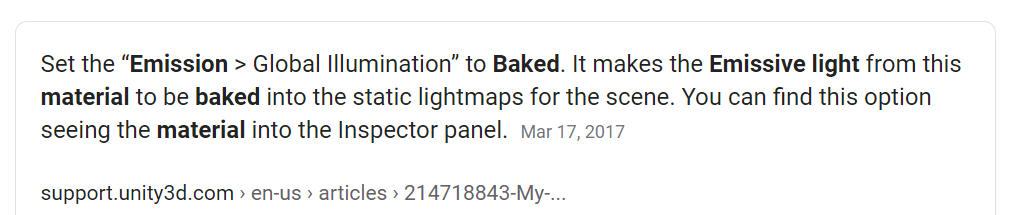
My Emissive material/shader does not appear in my Lightmap.
My Emissive material/shader sometimes appears and sometimes does not.
Cause
Unity needs the flag Emission GI set to Baked alwa...
silver plume
I already did put my emission thing to "baked" but still nothing changed
also my baked lighting get stuck at "5/11 Clustering" when getting baked
 versed lichen
5/11 may be too many meshes, or too large meshes
silver plume
I literally imported just one mesh from my minecraft world.... witch is the building
here it show what i want it to look like, this was made with point lights tough
versed lichen
How many vertices is it
cold prairie
Default import meshes from Minecraft 
versed lichen
Have fun autofixing !
 fickle valve
Hey I read that the Quest supports transparent shaders for worlds only, which shader do I use for transparency? I'm trying to make windows and not sure which one to use...
rustic osprey
cant remember the setting names off hand but the grass is set to its lowest quality at like a .605 or something and the detail was changed from 80 to 250.
the detail or whatever it was called is the fade distance
so the density is as low as it can go and the distance it fades is as far out as it can go
also i used world builder from the unity store
 maiden hawk
i am sure this is the wrong channel but. how do i fix this?
the words are on the other side of the wall
 charred zenith
how can i add a url imput to a world and connect it to a screen?
maiden hawk
this is why the rule that says"no postiong a question on more then one channel" is dumb , Every single channel as had activaty but this one,
cold prairie
I mean realistically in this time you could have googled "unity text visible through walls" and found the solution as first result
maiden hawk
would i have come here if i dint try googling first? but yeah, i could have done more digging and most likely found Something rather then this
cold prairie
Four first results for googling it should lead you to this thread that has the complete solution
http://wiki.unity3d.com/index.php?title=3DText
versed lichen
googling correctly is an important skill of game dev
maiden hawk
i tried that and you have to add that shadier to everything in your world or else everything will show that through it from what i saw tho i might have been doing something wrong
cold prairie
No that's not what the guide tells you to do
maiden hawk
I am a freking dumb ass
i sware i red that thing 100 ti8mes and had it sayPput the shader on the mesh you want it behind
lilac saddle
Is there a reason why the world naming thing didn't pop up when I clicked "Publish For Windows"?
versed lichen
game window
lilac saddle
When I click that, it just goes to the spawn and doesn't actually show the menu.
versed lichen
then check the unity console
lilac saddle
OTT, but i reckon all this googling is stifling the conversation. I actually think it's anti-social. I already have problems with social anxiety so just saying you should have googled this is kind of annoying to me at least. How about we just chuck out that search engine for good and start talking to each other again in a somewhat less annoyed tone?
I usually use an OnEntertrigger to turn off the UI text. You can also use an LOD component but it's less reliable.
cold prairie
Knowing how to search efficiently is pretty important skill in game development
shrewd harbor
Knowing how to Google is 99% of any technical/IT/Dev role
 round hamlet
What are some of the keys to making a world that doesn't crash? Just trying to do my research early lol
I noticed some worlds I go into just crash or crash me after a bit of time spent in it, but others are fine. One world I was at it seems like once I heard a certain noise it crashed
 calm wave
Hey guys, the quest verison of my world has a problem i can only describe as "misaligned eyes"
i haven't found much info on this other than what poitns in the direction of shaders being wrong, but nothing i could really base a fix on
does anyone know how to fix this?
cold prairie
Did you use the button inside the sdk to switch between android and pc?
calm wave
i dont have a headset myself
but so far every quest user that has joined my world has reported this problem
cold prairie
Same question still applies how did you change between building for android and pc
cold prairie
And did the tutorial tell you to use the button in the sdk?
calm wave
its been so long ago i honestly don't remember which tutorial it was
OH man i was not reading correctly
yes it did indeed
it was fully built for "android" version
cold prairie
The button inside the sdk is bugged and using it can cause rendering problems on android
You should only use the unitys own way of switching
calm wave
do you know of a tutorial that shows the best practice?
cold prairie

Swap back to pc in here and then back to android and everything should be fine afterwards
Given that there isn't something more causing the problem
But usually should be enough
calm wave
really that's all there is to make it 100% Quest ready?
or should i follow the other tutorial still, and then do this as finishing step?
cold prairie
I mean not really that's just to avoid the problem you are experiencing
calm wave
Okay. It's been a while since i gave up on the Quest version so there are now huge differences again between the PC and Quest versions
so i was planning on re-doing the entire thing from the PC/Win version
Do you have any A-to-Z tutorial you recommend for this?
looks like VRC's own documentation boasts some now https://docs.vrchat.com/docs/cross-platform-setup
VRChat
Setting up a cross-platform world or avatar is actually quite straightforward! In short, all you have to do is use a duplicate project to build an Android version of the asset, and upload it to the same content ID as the VRChat PC asset. The client will manage which version it...
lilac saddle
@round hamlet I'm having problems with my world crashing just after joining, seems to get worse the more youtube videos i add to playlist.
calm wave
I'm ready to publish my Quest map version, i've drasticly downsized it, but upon build&publish i keep getting a dialog that tells me "your world is too big, no can do" and tells me the same size as the PC version of the world
any tips?
cold prairie
Can you screenshot me the message real quick?
calm wave
will do when light is done baking, just edited something
@cold prairie
i've deleted so much from the scene and compressed all textures, there's no way it is still exactly the same size as the PC version world
cold prairie
Did it show that message before or after a build was done?
calm wave
it shows that and then stops attempting to build at all
cold prairie
I was gonna check the exact code on when it checks for that in the sdk code but seems it's inside a dll
calm wave
i'm assuming it's happening becouse i have previously built the PC version and it has some memory of the size of that which it's checking before building over it?
i mean, they are completely separate projects
cold prairie
You could try my world tools though for a proper view of the build
https://github.com/oneVR/VRWorldToolkit/releases
calm wave
but the quest is a copy/paste of the PC version and then edited thoroughly
cold prairie
From what I remember it get's saved in memory or something 🤔
calm wave
will give that a try, thanks
think i found a clue
i believe locally there is a "last build" of the world
will try deleting that and see if it works
cold prairie
There is one yeah
Weird that they would be using it if it was build on windows platform to stop it on android
I'll need to check trough the sdk code
calm wave
do you happen to know where that file is located?
i thought it was in %appdata% somwhere but can't find it now
cold prairie
The one unity makes is in the projects Library folder
calm wave
Found a bunch of stuff in Temp folder, removed it, restarted unity, and now it doesn't show that error in the builder atleast. Trying now to see if i get the error again
getting this now
cold prairie
Should see something in your console
cold prairie
Yeah
calm wave
but that can't be the thing generating the error can it ?
cold prairie
That should most likely be in a folder named "Editor" for it to not cause an error
From that it seems to be
calm wave
Ah, because Unity recognizes editor scripts if they're in that folder, or?
cold prairie
Yeah
calm wave
Are you somehow reading that in the log? I'm trying ti get better at identifying stuff
Ahhh i see thanks, learned some today i guess
cold prairie
MenuItem is gonna error out if it's gonna run on build
calm wave
And therefore it doesn't build
and then tries to upload last build
which is the big file
that makes sense lol
thanks a whole bunch 1
cold prairie
There's still possibly one thing I want to check which I'm looking trough the sdk code for
But yeah otherwise things should work for you now
 arctic cargo
Hi everyone, is there a limit for the size of a room? like in meters?
cold prairie
Unity mainly
Once you get too far from zero point things get a bit shaky with floating point errors
I have a world that's 1.5 km wide which pretty much stops just before things start to get bad
round hamlet
I've seen some nice weather systems on the unity asset store but haven't seen anybody with crazy sky/weather/water systems really in VRchat, usually seeing HD static surrounds or like dedicate weather like rain. Would a weather system work in VRchat?
cold prairie
Spending the time on making one yourself though works
lilac saddle
Would rainmaker be a custom script then? I've been wondering why the prefab isn't loading into my world when I build and test
lilac saddle
Ignore this ^ I just made my own and it works ^^
calm wave
I am now falling through the floor in my world, but i don't remember changing anything that could lead to this
anyone experience this before?
 rose wolf
@calm wave is your spawn point above something with mesh collision
rose wolf
what is your gravity set to?
calm wave
default
rose wolf
are the floors overlapping?
calm wave
they aren't
i've spent all day working on light related stuff, changed nothing about the floors or their collision
i've just rebuilt all probuilder objects and that resolved the issue seemingly, only did one test so far
rose wolf
in the "mesh collider" component, make sure the "mesh" part is selected to the right object/mesh
calm wave
there is an option for this in the Probuilder tools
thanks for thinking along literally
yeah i looked just earlier, something i did must have cleared the Mesh field from their entries
clicking the probuild button fixed that for all the objects
rose wolf
thats good, I dont use probuilder but I probably should
Has anyone had problems when they upload a new version of their world and the world in the game doesn't update to the new version? the errors im getting should not occur but they are anyway
calm wave
I found in the past that any error will throw a spanner into the build process and cut it off entirely
VRChat will then proceed to upload your last successfully built
and beware with using Probuilder, it seems like this late in the project it was a bad choice to make. I have spent many days on some single custom shapes and trying to get their UVs to behave as expected but to no avail
rose wolf
yea, thats what has been happening because when i uploaded a black flat world under the same BP, the world uploaded that and loaded in the game as well
calm wave
if you can learn to model basic shapes like walls with door holes in them and use those instead, that would be the better option
rose wolf
yea i spent like 5 days figuring out why my baked lights were being stupid
calm wave
probuilder honestly sucks i can say confidently after using it a year
rose wolf
ig its a good thing i havnt used probuilder
calm wave
would guess so too
rose wolf
im a autodesk kind of guy, so going into unity and blender sucked
calm wave
ah yeah, spending time learning to use blender seems like a great investment though for anything VRC related
rose wolf
but like, my errors when I try to build and pub says im missing stuff in the scriptassemblies and stuff like that. and then when i check to see if theyre in that folder, theyre there
calm wave
can you show a screenshot of the error?
rose wolf
Blender is weird because it has the same controls for autodesk max and inventor, but randomly does stuff that isnt expected
Unable to locate assembly C:\Users\user\Documents\Mansure3.1\Library\ScriptAssemblies\Assembly-CSharp.dll Exception: System.IO.FileNotFoundException: Could not find file "C:\Users\user\Documents\Mansure3.1\Library\ScriptAssemblies\Assembly-CSharp.dll"
File name: 'C:\Users\user\Documents\Mansure3.1\Library\ScriptAssemblies\Assembly-CSharp.dll'
thats one of many, i also have my name irl in the "user" area so i dont want to SS it
calm wave
haha yeah tell me about it i spent about as many hours swearing at blender as i have spent building my VRC world 😄
as in, not actually making anything, just swearing
rose wolf
lol
calm wave
but i'm sorry my brain isnt big enough to understand that error
rose wolf
dude it took me like 20 hours to figure out how to texture something and realize that blender makes its own uv map so stuff just gets stretch
well darn
the only way ive been able to fix it is by manually making a new project and manually recreating the scene. but the new scene doesnt look at good as the original
i have other erros
error CS0234: The type or namespace name 'Examples' does not exist in the namespace 'UdonSharp' (are you missing an assembly reference?)
its weird
calm wave
i think i recognize that, not sure
think it might be complaining that it can't find "Examples" (folder i presume) where its looking for it
whatever is throwing that error should probably be placed in another folder
rose wolf
ok, and ive checked thos folders as well if the scripts are in there and they are
im just going to reimport the packages that relate to the errors and hope it relaxes enough to update the world
rose wolf
yea, that aint too good
this is what im hoping i can get uploaded and have it work on vrchat
going to try and get the videoplayer in the back to be client toggled so there is less lag getting in
indigo coral
Hey y'all : ] Question! So, I'm learning about Occlusional Culling, and I'm reading everywhere that if an object doesn't move, you can mark it as Static and therefore add it to what will be excluded when not visible. So, I have an object that spins in place. It doesn't actually move AROUND the map. It's just animated to continuously rotate where it is. Can this be marked as static, or no, because it moves at all? thanks!
( @rose wolf that looks pretty 🙂 )
rose wolf
@indigo coral dont make it static, as it will bake a light texture over it and as the object spins. that texture will move with it unless you add a realtimelightmapping
however, when baking: the unticked static status of that object will cause it to go black which is why you would need set the *lightmap parameter" to a realtime one
but this can cause lag in game, especially when youre someone like me who doesnt have a gpu
@indigo coral thank you
i was trying for a m83- midnight city sort of vibe
versed lichen
That's a bit incorrect
Static is a checkbox for all types of static
next to that checkbox you can chose the types, you need occluder/occludee static @indigo coral
But animated objects won't really work
rose wolf
ive never had success using selected statics
versed lichen
If it's animated i assume it's an important object, occluding it doesn't make much sense
indigo coral
cool, thanks both of you! I'll do a little trial and error. I have a couple identical zones, so in one I'll make every single thing static, and see what happens, and learn from that
appreciate it!
calm wave
my world was previously tagged for poor performance (and rightfully so)
since then it's been extensively optimized, is there a way to get rid of this report tag?
lilac saddle
Reupload the world form scratch
cold prairie
@calm wave the tag doesn't really matter if you've fixed the issues and only you can see it
 agile island
I grabbed @winged sinew's water shader to add water to my world, but I've got some questions. First, which version is the one which does the grab pass, and which one is the lightweight? There are like four different shaders. "Clear Water" works well enough once I add a real time directional light that I set to only affect the Water layer so that it hopefully won't kill my performance. But "Clear Water 2 Normal" just looks cloudy white. I assume that's the light weight one. Is the grab pass what gives the reflection on the water's surface? Because I definitely want that. But I have another question regarding that... If I have two bodies of water side by side, and they use separate meshes because one is a little higher than the other... But they both use the same material... Will they do only a single grab pass, or will they do two? If they do two and that's going to hurt my frame rate too much, I can probably manage to make a single plane for the water surface for both ponds.
 limpid void
If you can't see water without light it needs grab pass
 winged sinew
Clear Water 2 Normal has settings that work differently to the original. It doesn't take a grab pass but it can reflect fine.
indigo coral
Is it possible to use Unity's automatic LOD feature in VRC?
pallid gale
are you referring to an auto LOD generator at runtime?
that wouldn't work because no customs scripting but you could definitely use editor scripts to generate lods while you're making the map
indigo coral
@pallid gale okay thank you!
calm wave
thanks @cold prairie not sure how that system worked
 civic walrus
Idk if this is the right chat for this but I cant figure out how to put a mirror into my world
agile island
How do I make an object appear when a player enters a box collider and disappear when they leave it?
versed lichen
OnEnterTrigger enable the object, and the opposite
agile island
Ah, I see, it's a set of scripts VRChat provides for SDK2 which handles it. I thought it was built into Unity. Okay, well that makes sense! https://docs.vrchat.com/docs/setgameobjectactive
 gentle sparrow
Not sure where I can ask this, but I want to test my world in Non VR mode so its not a hassle everytime I test something. Even using launch options for no vr and also checking the NonVR mode in the build test page results in my game loading with VR. its so frustrating.
rose wolf
@gentle sparrow do you have a vr set connected via cord/directwifi/bluetooth? if so, disconnect them, there is nothing telling the build to not default to br
cold prairie
You need to point the sdk directly to the vrchat.exe on your computer in the sdk settings page for the option to work @gentle sparrow
gentle sparrow
ah okay, ill give that a go thank you
@cold prairie Thank you kind sir, its working now
lilac saddle
What's the most efficient way to handle simple video/ animated graphics? Would it best to use a flipbook shader, or perhaps a feature in Poiyomi, or a video player?
 muted atlas
ive made a world like this tho whenever i try to test it, it crashes as soon as i load in?, i have no clue what ive done wrong
 ionic jetty
@muted atlas is it an udon world? if u wrote ur own udon scripts make sure there’s no infinite loops anywhere
does anybody know what the biggest contributers to master voice lag is? I’m working on a few worlds, and for some reason the master’s voice has about a 3 second delay and makes a stuttering noise
muted atlas
it is a udon world yes @ionic jetty , i use the same two scripts that i have in this world and i also have it with my other worlds as well without issue and that is just a basic button and movement script
versed lichen
@ionic jetty We don't really know, it seems to happen a lot more in worlds with networked things happening but that's about it
@muted atlas what else is in the world ? Did you check your console
muted atlas
when i do a test build of the world i get this error
and the only things that exist in the world is what you see in the picture and also fireflies particle effect and unity's own fog system
versed lichen
@merry beacon Did you get feedback on your spookality submission ? World performance is extremely low
at least the spawn
 merry beacon
Yeah, I think it has something to do with the tree models. I put the tree LODs super low and I disabled the colliders. Still runs at 15 fps though >.<
I will say, I tried my hardest when it comes to optimization.
versed lichen
How many realtime lights do you have active in that zone ?
merry beacon
I have the flying butterfly, the red crystal, the lamp posts, the main areas of the blue flowers (the individual prefabs have baked lighting), and I have the directional light with low quality hard shadows.
The only light that appears to be effecting performance is the directional light, but there's not much else I can really do with it. Baking isn't an option since it goes right through speedtrees.
So, my hypothesis is that it's the trees themself.
(disabling the directional light only really helps for a few extra frames, it's still pretty slow still though.)
I did kind of abandon light baking in the prologue and the main level bit, but again, the lag is coming from the trees.
Here are the trees I use. The tall one is the main tree, and the short/fatter one is the secondary, which takes up around a quarter to a third of the total trees.
versed lichen
How many trees do you have ?
Having a lot of LOD levels so close to each other might be why
Make sure the lights are set as mixed too
Your blue flower prefab is causing most of the performance
the lamp post and butter blue are basically all three making up 80% of the perf
and well, the terrain + trees is 4.5M poly, and with the two directional lights it's 25M
versed lichen
oh nvm the extremely low performance is everywhere
that made it very hard to enjoy 
merry beacon
I can assure you that it's just the trees, I did the tests.
versed lichen
Yes, but the trees are worsened a ton by all the realtime lights
mixed would help slightly, but keeping a single realtime light is necessary
We had on average 10-15 FPS i most areas
merry beacon
The only realtime lights are the butterfly and the crystal, since they're not static, all the rest are mixed.
versed lichen
Yeah but that's still multiple realtime lights
- the light on the thing that follows you
plus the flashlight
you're multiplying the trees by 5 times at least
merry beacon
Well, those lights need to be realtime.
versed lichen
Having LODs on those trees sadly don't help at all if you can't bake in the first place
merry beacon
It's annoying though because baked lighting doesn't effect speedtrees.
versed lichen
Worth looking into exporting your scene mesh into blender to enormous performance gains on top of the much better visuals
Right now it's very nauseating
merry beacon
I'm working on it, and I have tried.
I'm thinking of just making new trees in blender.
versed lichen
That would help if that allows you to bake
versed lichen
That won't do much without light baking 
merry beacon
Anyways. Seeing as you're part of the team, I can guess that my chances of winning are very low haha.
versed lichen
Lots of team members vote, and it's not a bad world at all, it's just hard to enjoy it due to the performance, but that can be fixed
much harder to fix a bad world !
If performance gets eventually solved, then i think a lot of people will enjoy it
narration is rare and that makes it nice
merry beacon
Yee
It will be better in the full version.
Performance wise.
It'll be fun to make too :)
versed lichen
Feel free to ping me with any question you may have, i'd be happy to help !
merry beacon
Just playtested again with the trees turned off and there is 0 lag. So I definetely need to change the trees if I want to make this work.
Also...
It looks weirdly better without trees lol
versed lichen
Well, the trees would be fine if the static lights were baked
They could be optimized themselves for sure, but they're not inherently bad
merry beacon
I need a non-speedtree tree
an fbx or an obj
I'll see what I can do when I have the time.
merry beacon
Speedtrees are tricky and I don't have the program to import them into.
versed lichen
Looks like it should
merry beacon
Yeah, but I don't have the program to import and export with.
It's a bit out of my budget.
I'm gonna have to use blender or maya. I heard manually modelling foliage is annoying though.
versed lichen
Ah i see, in that case finding a similar tree would do it
Plenty of free trees out there
or blender generation for foliage
merry beacon
I know.
I like making my own assets though, because that way, there's no surprises.
Also, it would be cool to try and model specific trees that would actually be in this setting.
Haven't figured out what part of england this is set in yet though.
I'll figure it out.
 robust olive
I've started work on a world I put on the backburner for a while, but need some help with mirrors.
Because of what the map is I'm going to need 32 mirrors, but I only need one of them visible at any time. I tried using occlusion culling on the mirrors but it didn't do anything, so what else could I try?
?
merry beacon
@versed lichen How's this for a replacement tree so far? (No leaves yet). It's 172 polys.
versed lichen
Yeah that's perfect
merry beacon
Should the leaves be like bilboard? (always facing the player). Or should they just be static planes?
 remote eagle
Billboard is nice.
versed lichen
Well, depends how they're built, billboard isn't great when you're moving around the object itself
merry beacon
ugh, this is annoying.
Why does unity always import things sideways?
@versed lichen Do you know how I could fix this? It's upright when you place it normally.
rose wolf
@merry beacon set its x rotation to -90 I think 🤔 and itll put it back to norm
merry beacon
Yeah, I figured it out. I had to flip it in blender in edit mode and then flip it in the opposite direction in object mode.
robust olive
@rose wolf I was thinking of that originally, but the map is laid out in such a way where the mirror would naturally be there
merry beacon
Alright, weird problem.
It goes like this when you look at a bunch of the trees at once.
rose wolf
what do you mean?
rose wolf
did you have fog in your lighting settings? and are you inside of an object when you were looking at them?
merry beacon
Nope
rose wolf
and everythings baked?
merry beacon
not everything
@versed lichen Might need a little help with this one. I haven't got a clue.
versed lichen
Yeah will help asap, just woke up from nap
rose wolf
might change the amount of light sources visible at once, but i dont think its the problem
rose wolf
im not sure either lol
oh the video finally loaded, it might actually be the amount of lights being visible at once. basically the game chooses about 4 rt light sources in your screens view area and when you move the camera it switches to them which makes it flicker, but im not sure what is causing it to look foggy tho
merry beacon
I figured out what the problem is.
The automatic bilboards are 64.43798 times bigger than the trees.
because I set the models to be that big because they were tiny on the terrain.
Don't know how to fix this.
I fixed it.
Had to mess with the dimensions in blender.
For some reason, the dimensions were 100 times off.
The lag has been completely eradicated.
Hell yeah.
Though, visually could be better, it does maintain the atmosphere.
merry beacon
World uploaded. Hopefully this is a lot better.
 agile hawk
About your blender -> unity issues. Unity assumes that every model is rotated 90 degrees on the X axis due to most 3d modelling software having Z be the Y axis which is solved by rotating 90 degrees around X.
And about the unit conversion issue. Blender and unity both use meters, so, usually it doesn't convert. However, issues arise if blender or unity is set up to either convert to CM or use CM. This makes them either 100 times too small or 100 times too big! Usually the latter as it's a problem that unity doesn't always get the information and assumes CM usage. This can be fixed with clicking "do not convert" under the model settings. It usually doesn't have any problems.
 gentle gust
so, about occlusion groups vs Drawcalls: should i risk some more Drawcalls for more occlusion groups? currently having around 315DC in my world
(just ping me if anyone can help, im about to go to sleep, so dont get mad for not responding ;-;)
cold prairie
Usually you come to this channel after you've made a world.
gentle gust
i optimize partway through to see what i have to give up on and how much room there is
cold prairie
@gentle gust the messages I was responding to are no longer there 😅
And 300 drawcalls already isn't that bad in most cases. Best you can do is version control and profiling to see if changes were worth it.
gentle gust
oh, sorry, thought you meant me 😅
ill see if it it proves performance
also, my goal is to get a constant 90fps in vr on my index
merry beacon
@versed lichen Since I fixed the environment performance issue in my world, will that report tag go away at some point?
versed lichen
I don't believe so
cold prairie
Doesn't really do anything
If it was an actual issue then it would matter but since you fixed the issue you can just disregard it
It's more of a flag for review than anything else from what I know
merry beacon
It took away my 4 heat symbols and people aren't seeing it as often :(
cold prairie
It really shouldn't 3 reports isn't much at all 🤔
merry beacon
How did you know it was 3?
cold prairie
It's in your picture
merry beacon
Is all worlds just always have 1 report as default?
cold prairie
Yeah
merry beacon
That's weird.
So, when you say disregard, is that something I can actually do with reports, or are you telling me to just ignore it?
cold prairie
People keep tagging my world for bad performance as well
merry beacon
Damn, the flex lol
cold prairie
But basically you should just ignore 😅
cold prairie
10 might be the max
merry beacon
Sounds about right.
 fathom rain
What's the best way to optimize a world that wasn't made from Probuilder? I'm using Tirgames assets and kinda can't merge stuff lol
 lone linden
i could manually cull the world but that wont make avatars cull x.x
indigo coral
can VR chat utilize Unity's auto LOD system?
pallid gale
no runtime scripts so probably not but you could use editor scripts to generate those lods
versed lichen
@indigo coral yes
indigo coral
woohoo! thank you
@versed lichen any special thing I need to do to convert it over? or does it work automatically?
agile island
@fathom rain I don't know what your world looks like, but my world is a large terrain, so something like occlusion culling doesn't make sense, since few things would
be occluded. Instead, the method I use to optimize it is to make sure each object has an LOD Group component on it, and if the model has different level of detail meshes, I assign them to various groups at like 100% 75% 50% and 25%, and I have cull set to 10% for most things, which works well on a rolling terrain with trees and fog which means stuff beyond that distance is probably not visible anyway. Of course in an indoors setting, you can do better than this using triggers to hide stuff not visible from whatever room the player is in. Unity also has some kinda built in occlusion culling, but I don't know how performant it is. I seem to recall the Budget Cuts devs complaining about it.
@indigo coral You don't need to do anything special, it just works. Though I did encounter someone the other day who said a particular model was dissapearing for them sooner than it was for me. I'm guessing their had the game performance set to VRLow and that VRChat adjusts the LOD bias in that case. But I don't know for sure yet as they haven't told me yet if they had that setting enabled.
robust olive
Can anyone help me with some lightmapping stuff?
I've got some benches on a world I'm doing that come out all blotchy when I render. They've been set to generate UVs, but they just don't look good.
rose wolf
@robust olive define “not good”
robust olive
It's most obvious on the horizontal slats on the bench
The ones in the shade are randomly lit
rose wolf
is it too brighten?
robust olive
it's inconsistent
The sun on this map is directly overhead, so they shouldn't be lit the way they are.
rose wolf
welcome to lightmapping lol, is the bench receiving shadows?
robust olive
yeah, it's in the shade
rose wolf
and is the textures set to lower smoothness?
and is the object producing the “shade” have strong shadows or weaken shadow?
they both seem to match the same amount of dark as underneath the bench as well
robust olive
here's a wider shot
rose wolf
I think 🤔 the smoothness of the textures might be making the benches brighter then they should
robust olive
you mean the material smoothness?
rose wolf
yes, thats usually where my problems occur when lightmaps get weird
robust olive
Hmm, I'm using a roughness map
rose wolf
is the roughness map for the bench?
rose wolf
ive never exactly used a rough map before, but if that inhibits your ability to change the smoothness variable, then im not sure of another fix except maybe telling the bounce level to 0
robust olive
I'll just try removing the roughness map for a second
I use Bakery so it doesn't take too long
rose wolf
ok sure
robust olive
Yeah, that did nothing
I tried a few other things, like lowering the lightmap resolution really far to try and blur it out a little
but it was still weird
rose wolf
hmm, then im not sure what is causing it to be bright
indigo coral
@agile island great, thank you!
 hidden summit
does somebody know how to sync vrc pickups in sdk3?
versed lichen
agile island
@robust olive It could be a combination of the lightmap resolution being too low, and the number of samples you're taking being too low. I'd enable checker in Bakery and see how dense the checkerboard looks (the built in Unity checker doesn't seem to apply to Bakery) and you may find its a lot lower res than you expect it to be because Bakery seems to calculate the resolution of stuff differently than how you might expect. Like if you tell it you want 8 texels per meter, you may get only 2 for some reason I have yet to figure out. The bakery guy gave me a complicated nonsensical explanation for how it calculates texel density but math aside, if the results are generally way off what you expect, then it's broken, IMO. But you've got the checker there to see what it's doing, and you can also enable lightmap index in the top left menu in the view to select an object and then see which lightmap its in and how big the polygons ended up being in that lightmap, which will help you debug.
There are also more recent builds of Bakery available than are in the store. The bakery manual has a link to the githb. You need both the scripts and compiled files from there to update it or you'll get errors.
lilac saddle
When i change some of my texture to a different max texture size, it isn't applying it. Resetting the texture seems to fix that, but not sure why it's doing it.
Is it because i'm choosing legacy option on import maybe?
versed lichen
legacy import ?
lilac saddle
Yes.
versed lichen
What does that look like in the settings ? Is that default ?
lilac saddle
This is what it looks like. If i reset the texture it works again.
versed lichen
Well, don't use 32x32 and use 50 for compression
otherwise that's a bit overkill
it's still a texture
lilac saddle
This is what it should look like, i get this only after resseting it...
versed lichen
don't use 32x32 for a texture
lilac saddle
I wouldn't use 32 for this particular object, am just wondering why i can't change the max texture size until after i reset it.
lilac saddle
kk
I wondered why my world size was so big, lol, it wasn't applying the settings for most textures.
pallid gale

GitHub
A script for viewing the build size for VRC worlds and avatars after building. - MunifiSense/VRChat-Build-Size-Viewer
cold prairie
We plugging build report stuff? 😛
https://github.com/oneVR/VRWorldToolkit/releases

GitHub
Unity Editor extension for making VRChat worlds. Contribute to oneVR/VRWorldToolkit development by creating an account on GitHub.
 reef juniper
hey where do you guys find all the textures for objects like floors and walls? @ me btw
rose wolf
@reef juniper usually on google lol, theres some websites that use good textures that also come with height/normal maps, but id go with google and just mess with the uv map on microsoft paint until the textures land right
pallid gale

Gist
List of websites for free PBR textures. GitHub Gist: instantly share code, notes, and snippets.
@reef juniper
reef juniper
tysm gamers
pallid gale
no problem glad to be of help
 tardy frost
you could try quixel bridge if you have an epic games account its free
pallid gale
yeah but those PBR assets are only free if it's an Unreal Engine
 still glen
Which is less performance intensive in worlds? Words shown on a textured quad or words shown by a UI text canvas?
 sudden cape
help so in my world i keep being sent back home when i try to load into my room
still glen
something went wrong with the build. check the console.
I'd love it if someone could answer my question.
 uncut iris
That is an interesting question. I guess it depends on the usecase and how easy you want to be able to alter/change the text, but the only way to know for sure is to try both ways and measure the performance difference if there is any. Though I'd imagine that it depends a lot on how much text you're going to have in the world.
 edgy bough
I'm dragging my first world from blender into unity. How should I add colliders so it runs well?
 sweet steeple
Not sure where to ask this but does anyone know how can you have an audio play within a certain area and not the whole world ? I have no idea how.
 tardy frost
change max distance
sweet steeple
by how much
tardy frost
to how big you want the area to be
tardy frost
1 unit = 1 meter try setting it to 10-20
sweet steeple
the min distance or max?
 limpid void
@edgy bough You should add 3d objects provided by Unity to your scene (cube, sphere, capsule etc.) and disable mesh renderer or you can add one of the colliders to already existing objects you have in your world if their shapes match close enough. For more complex geometry you either add several of those objects with colliders (like lets say an approximation of an arch doorway made out of several box colliders). If that isn't enough you can also make a copy of an object from your world, decimate it in blender, add mesh collider to it and remove its mesh renderer in Unity. Mesh colliders don't perform as well as basic colliders so only use them when you have to
sweet steeple
can anyone help me
rose wolf
set the max down a bit @sweet steeple and it should lower its distance unless the min is higher then max

 rose wolf
hmm, thats weird
rose wolf
no
sweet steeple
oh
cold prairie
Your spatial blend is set to be completely 2d on the audio source
sweet steeple
how do i fix that
cold prairie
Move it to 3d
rose wolf
wait yea, move it to 3d
sweet steeple
testing
its fixed finally
thank you guys
also the water in my hot tub turned pink
guessing a re upload would fix that
pink as in no shader
rose wolf
shader change by accident?
cold prairie
What shader is it using?
sweet steeple
in unity it looks fine
but in game it went pink all of a sudden
Silent clear water
rose wolf
if you on quest, quest will default it back to pink so quest can run the world correctly
cold prairie
That really depends
rose wolf
ive never used silent clear water, so it might be having some problems but idk
sweet steeple
doing a re upload
I'm on desktop at the moment and I dont own a quest I own a 2018 Vive
rose wolf
ok so it could just be vrchat ignoring the shader for some odd ball reason
sweet steeple
the pink is silents clear water and the normal water is a different shader i put it
so something went bad

in unity its fine
rose wolf
oh.... this isnt my forte but it looks like it was somewhat unable to load the shader correctly
sweet steeple
oofss
lilac saddle
uhh
so i have a 10 second looping video on my map but it doesn't play
do i really need a special video player component for files that exist on the map?
alternatively, would it be more efficient to use a flipbook shader?
rose wolf
it does not take local video files
lilac saddle
Does anyone know how to fix framerate issues on a world? I recently uploaded a world I've been working on for a while, only for it to tank people's framerates when they join it.
lilac saddle
So, I have this problem:
lilac saddle
I upload it onto VRC but it crashes every single time
versed lichen
Then something else in the world is causing the crash
lilac saddle
This is on the Quest version
lilac saddle
So what is the best way to handle a 10 second video loop if VRC doesn't support local (map embedded) files? I'm scared of using a stream player since then I'll have multiple stream players, and I'm aware of potential for hitching/ redownloading of the video every single loop
is Flipbook the way to go or does VRC actually support local/ embedded video files but there's a trick to get it working?
cold prairie
VRChat does support local files
With sdk2 it should be pretty straightforward to just use the built in unity video player
You can check the unity docs on how to use it
lilac saddle
i'm on SDK3
the video player works in the editor but not in-game
((i don't know why there's a #world-development but not a #worlds-sdk3, since this isn't udon specific))
 agile plinth
Still looking for an answer to this but I have a animated skybox with a texture. Nothing too fancy, but when I enable it and lookup in the sky in VR it stutters / lags.
It doesn't lag at all in desktop, everthing is baked and nonmovable objects are static.
cold prairie
@lilac saddle all sdk3 specific questions just go to #udon-general for now and with sdk3 the unity video player isn't whitelisted you have to use the scripts that come with sdk3 which should include local video support
 tacit kettle
@lilac saddle Have you tried using AVPro with the local file? If you just get the trial package for it and select the local file on the AVPro media player it should work although I don't know if that'll be synchronised. It will have a watermark in editor but not in-game.... I use this for playing custom streams
calm wave
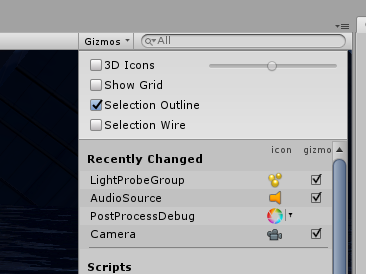
Not sure where to ask this. In my unity editor the objects im zooming in on are often obscured by lightprobes and like audio source icons
is there any way i can turn these off?
 astral trout
top right corner of scene tab https://nyanpa.su/i/Z9SS1T8d.png
 lilac saddle
(untick 3d icons)
 weak verge
anyone who knows how to use mkglow? I really need help, and if someone can watch my screenshare and tell me what I do wrong, I have tried for weeks with no success.... 😦 Just want it to be shiny thats all
 astral pendant
I can't find any topic that suits this so I drop it here.
How to fix cursor and trail do (image) thing to dropdown?
(Dropdown work normally)
Doesn't effect other UI.
astral pendant
anyone who knows how to use mkglow? I really need help, and if someone can watch my screenshare and tell me what I do wrong, I have tried for weeks with no success.... 😦 Just want it to be shiny thats all
@weak verge
IDK why you use that instead of Post processing one, and also I can't find the docs that is MK Glow work on VRChat or not also.
calm wave
probuilder has caused hellish problems with visible seams on objects for over a year
i've tried getting into modelling today and it's fine but UV maps are a near impossibility with the tools available (like not being able to zoom in enough in blender to mark seams)
is there a third option i have for creating basic architecture shapes like blocks with a doorway in them?
it can't be this difficult in 2020 to create an object such as this that displays normally without UV problems or light mapping inconsistencies, can it?
hazy haven
How do I occlude players only? I made my own occlusion however all the avatars are still being rendered
Do I just have to turn off Occluder and Occludee?
 stiff barn
(I hope this is the correct channel to be posting this in) When I try to publish my world, I get an error saying "Last Built VRChat Scene Could Not Be Found". Here's exactly what's in the console when I get this error.
versed lichen
remove the simple light probe placer asset
it's incompatible for 2018
you can use it, generate lightprobes and then remove it
calm wave
Okay so for future reference i believe this should be findable in this chat, so here are some keywords: uv map, tiling, density, walls, world, simple object
My situation: being a total noob who wants to make some super fast wall objects, and be able to use them without wasting time on UV mapping.
The problem i had was: when using the default unwrap features in Blender (recommended in tutorials), it always generates it to fit Blender's UV editor grid, which produced terrible results, and inconsistencies across objects of different sizes which would need a lot of handwork to correct. Using this website https://80.lv/articles/textel-density-tutorial/ i learned to understand the issue and the key elements to fixing this which are: density and texture size (explained in the article linked)
Then using the addon 'UV Magic' which comes with blender (enable in preferences > addons), first you need to get from unity what the size of the texture was (1024 in my case) and which setting for "density" visually matches the tiling you want to have when Unity's material tiling setting is x:1 y:1. In my case, i wanted the tiling on my model to match that of the Probuilder objects i have in my world, and the Density i used was 1024, not 10,24 which was suggested by the article
After figuring this stuff out, including how to quickly generate blocks for walls with doorways in them, i am thinking one could produce an asset to be fully usable in under 10 or maybe even 5 minutes
(no light baking yet)
 gilded grove
 frail copper
I’m having an issue where certain meshes i am putting into my worlds are invisible even though I have set the shaders to normal
lilac saddle
I want to make a new optimized world / quest compatible. I'm still in the thinking stage, I didn't even open Unity to do anything. I already know that I have a limit of 50K polygons. My question is: Is it okay if I push this 50K in a small space like 10x10yd? Will it cause any kind of problem?
versed lichen
No, the suggestion is a maximum of 50k polygons in frame at any time
sweet steeple
Hi all I have a sphere as a skybox but it always decides to cut off as in the picture, how can i fix this issue?
sweet steeple
 agile hawk
Farclipping. You need to make the skybox smaller. At least that's the only thing I can think of whilst hungry.
shrewd harbor
You can increase the clipping plane. I'm like 30% sure you just do that on the main camera gameobject in unity.
lilac saddle
Am I missing something for this mesh to animate when I press play?
I just want something to loop rotate 360
versed lichen
animation component won't work
lilac saddle
Can we use something else?
lilac saddle
It's to toggle a mirror
versed lichen
how is your animator setup
versed lichen
that's the animation, i'd like to see the animator
versed lichen
And that doesn't work when you press play ?
lilac saddle
When I press preview on the animation it works, but not the play button itself
I haven't tried a build & test yet
versed lichen
Try disabling write defaults
lilac saddle
Hmm, didnt seem to do anything
Does it being in a prefab cause problems?
Whenever I import FBXs it makes them prefabs I think
agile hawk
That would probably cause it to break. Due to prefab parenting. You'd have to rotate the prefab object rather than the mesh object.
versed lichen
@lilac saddle The animator should be on the main parent object in this case
lilac saddle
Would it be okay to just unpack it ?
versed lichen
yep
lilac saddle
Sorry - had to step away for a bit. I unpacked the prefab, but still no dice.
 viscid stratus
Hey, quick question. can i see the world size in unity that vrchat will show in the menu?
cold prairie
https://github.com/oneVR/VRWorldToolkit/releases
Import this and then check VRWorld Toolkit > World Debugger
viscid stratus
wow thank you!!! soo useful
calm wave
anyone know the best way to make candle flames with sprites for VRChat?
for some reason i can hardly find anything about this
versed lichen
Sprite shader ?
calm wave
that alone doesnt seem to be enough?
stiff barn
Not really sure where to put this so I hope this is good. I made a new folder to move all my Unity projects to so I could keep track of them. When I moved my main project from the documents folder to the new folder I got this message when trying to open it. Clicking continue just opens the folder with all the assets but nothing is placed. Is there a fix or am I going to have to start all over?
versed lichen
Have you tried moving it back ?
stiff barn
Did that, same result
versed lichen
Did you check the json file ?
If you remove the dependencies it'll probably work
make sure you save a duplicate though
stiff barn
ill look into that, but i wouldnt even know where to begin. Ive never seen a .json file
stiff barn
what can I use to open it? i cant open it atm
versed lichen
notepad
stiff barn
I get rid of everything in orange?
versed lichen
Only the ones listed in the error above afaik
stiff barn
afaik? (forgive my blatant ignorance atm)
stiff barn
well the error went away but the outcome is still the same
However there is also this error when opening the project
wow that image is small
versed lichen
We've now reached the extent of my knowledge on this issue, so i'd suggest googling the rest
stiff barn
im starting to believe i need to bite the bullet and just redo the project
versed lichen
Might take less time in the end yes
stiff barn
is there no way i could snatch the file that VRchat is using?
versed lichen
Not in any official way we support no
stiff barn
alrighty. Thanks for the help. Guess ill get started again tomorrow lol
lilac saddle
Are you opening the project from the assets folder in internet explorer?
@stiff barn
If you see the assets in the project tab but nothing in the hierarchy, open the unity save file which should be located in the Project tab/assets folder, it'll be named whatever you named it as.
stiff barn
ill try that
okay so opening the project from file its self instead of the unit little project window that opens when I open unity fixes the ENTIRE ISSUE
lilac saddle
👍
 low mica
I'm not sure where to post this, but when I click "Build & Test" for my new world I'm creating - VRchat doesn't pop up for me to test it. Any ideas?
cold prairie
Has it worked before for you?
low mica
This is the first time I've ever used it. Teaching myself how to build a new world. I'm using the 2018 unity I use to make my avatars and I'm also using the Udon SDK I just downloaded from VRChat. This is also a new project within the 2018 version of unity
cold prairie
Ahh yeah then you most likely haven't setup the connection properly
Three options you can do:
-
you can import this and check VRWorld Toolkit > World Debugger which includes an one click autofix for you if you are using steam
https://github.com/oneVR/VRWorldToolkit/releases -
you can go to your vrchat installation folder and run the install.exe there (just doing this will cause the force non-vr tickbox not to work)
-
you can go to the vrcsdk settings page and set the client path to point directly to your vrchat.exe
All of those three options should work to fix it
low mica
Thanks, I'll give it a shot!
low mica
The third option worked for me, thank you!
cold prairie
@low mica oh was there a specific problem with the first option if you tried it? I'll need to improve it for the next release if you have feedback.
low mica
I didn't try the first two, the third one looked the easiest so I tried it first lol
cold prairie
Okay 😄
 fresh kestrel
Hello, i'm not sure if it s the good place for my question.When I import my blender file, I can't get the scale (especially the ground scale) for my Unity textures, is there a way to do it to get the same result?
blender
 hollow elk
@fresh kestrel Change the tiling on the materials?
fresh kestrel
It's a solution yes, but it limits me to use only the albedo and the normal map.
agile hawk
Bake the node setup into a texture?
fresh kestrel
il will try this if i found how 😉
sweet steeple
I have a question, if one uses DDS textures does VRC support what DDS Images do?
`` DDS can be compressed and decompressed on the fly as it enters the video memory, which helps reduce strain on VRAM and I/O for the memory. It's also similar in image quality to PNG, although there are different options to make it more efficient than PNG
quick crash course on DDS compression types:
DXT1: Opaque textures, ONE BIT alpha; think brick wall texture
DXT3: Explicit alpha; textures that are intended to be mostly opaque but have a little alpha in them, think road texture (just a transition at the edge of the road). You only have a few alpha levels to work with
DXT5: interpolated alpha; lots of alpha to work with, ideal for a faint decal or a smoke cloud; something with looks of transparency
Choose the lowest level you can (file will be smaller) and you're good to go``
agile hawk
@sweet steeple Most texture files are already DXT. Specifically DXT1 or DXT5.
https://docs.unity3d.com/2018.4/Documentation/Manual/class-TextureImporterOverride.html
 heady silo
is there an optimization list? like... my world is so laggy but has no real time lighting and I don't even know where to start with getting better FPS
versed lichen

VRCat: Community-Run VRChat Forums
This is still a work in progress but I'm working on a tutorial for world optimization. I'm be looking for feedback on things to add or edit. I'll be...
heady silo
thank you!
near isle
i know its not a good thing to put a mesh collider on a moving object, but is it ok to put on a static object like a tree?
rose wolf
probably not a tree
cold prairie
Would depend on the tree
If it's high poly enough yeah but if it's not too bad then you can get away with it
Static objects are much better even if it's a mesh collider
near isle
well its not too crazy, only thing might be players hitting their head on the lower leaves
but that shouldnt be a huge issue
cold prairie
The leaves can be a problem in some cases if the players get "mesh collidered" and get stuck
But that does look relatively low poly
You could also stretch and place capsule colliders instead of using a mesh collider
near isle
yea suppose i could
cold prairie
But I don't think mesh collider would be the worst in this case
near isle
right thanks
 deep pebble
does anyone use "Bakery GPU Lightmapper" rather then using unity to bake your scene?
versed lichen
Most people who tried to use unity end up doing that
pallid gale
yes it's so much better I ended up purchasing it because it was on sale and wow it's so good
deep pebble
can u plz maybe help me
pallid gale
I'm not really knowledgeable on it as I just purchased it yesterday
deep pebble
well can u i see ur settings at least then
i just keep having a weird thing witht he shadows on the ground
i messaged u
deep pebble
@versed lichen do u know how to work with bakery gpu lightmapper?
versed lichen
yes
deep pebble
Can i plz message u when i get home from work im sure its a simple fix. In the settings but i have no clue what it is.
It jist makes me scene darker
versed lichen
I'll be here, feel free to ping me
deep pebble
@versed lichen ready?
i pretty much just want to know why it makes my scene like this?

when i use unity it bakes hwo i have it set.. like this is white sand.. idk why its showing up like this .. and how it looks like theres a light shining from inside the building out on to the sand.. i just need help with the settings
versed lichen
Did you you a normal plane for the ground ?
Showing your settings would be helpful
For bakery and the mesh component/material
deep pebble
the ground with the cactus is the terrain that came witht he model... the farther back ground is a actual plane

for the terrain that came with it

this is for the plane

then its just doing random wrong stuff around the scene to.. like those white parts on the shingles and how the light on the house right here is super bright
this is how it should be looking
rose wolf
that looks like youd need some PP to get it to look like that in the game
versed lichen
@deep pebble Make sure everything has generated lightmap UVs enabled
versed lichen
When did you last update bakery ?
If not in the past day then you should update it from the asset store
the creator pushed a big important update
deep pebble
i was given this to me i didnt buy it
versed lichen
ah, i'm not gonna help with pirated assets sorry
deep pebble
😑 k
 unique orchid
how do I check draw calls?
versed lichen
Stats menu in Game window
unique orchid
thank you
lilac saddle
I have a question, is possible to change the quality settings in game via scripting or using pannels, animators?
lilac saddle
many people who own toasters complain about low fps
lilac saddle
lilac saddle
many people who own toasters complain about low fps
I am working on a world enhancement/remaster/rematerialization and I just managed to get the framerate from (originally) 40~60 to 170~210 frames per second. Trick? Put anything that does not move to Static, use Hard shadows in your lights ||because Soft shadows are most expensive||, set the Lightmap resolution to 20 texels per unit, use Mixed on lights whenever possible so only dynamic objects (the ones that move/can move+) will have Realtime lighting and everything else that is Static will have Baked lighting.
Additionally, you can try using a Uber Shader whenever possible to reduce the amount of different shaders being used. I am using Mochie shader and the Uber shader allows me to use one shader and set the render mode to opaque/fade/transparent/cutout from ONE shader and not one for each mode.
If stuff is moving around, keep the original textures of moving objects to their native resolution and low those to either 512px or 256px maybe 128px if far away we can hardly see those (why seeing heavy details if far away and can barely see it (and therefore increasing GPU load for THAT thing?)). You can also maybe try (if you want) to combine textures and make these (the following is an example) 4 textures into one, reducing draw calls of these for textures to ONE drawcall (ideally)?
rose wolf
@lilac saddle if set the master lock to set them lower, you could. but making the settings any higher is just being rude to players, unless it is absolutely necesary
 rich stratus
hello world!
sweet steeple
Don't know where to ask this but, theres a floor i put a mesh collider on however the mesh does not seem to have a collider as I fall through it but it has a mesh collider on it in unity, How can i fix this?
rose wolf
@sweet steeple is the spawn point lower or very close to flooring?
sweet steeple
its downstairs from the spawn point
rose wolf
hmm, put cube under the area you fall in
versed lichen
lilac saddle
I am working on a world enhancement/remaster/rematerialization and I just manage...
Editor FPS is barely relevant, you have 2000+ batches in view, that'd be pretty bad in VR, hopefully you're occluding a lot of things at least
winged sinew
@lilac saddle
- Cost of soft shadows is irrelevant because you should only have one shadowcasting light.
- You should not use Realtime/Mixed point lights at all.
- The number of shaders you use does not matter. The number of materials matters. Materials can't be combined.
- Texture resolution does not matter for performance.
lilac saddle
versed lichen
Editor FPS is barely relevant, you have 2000+ batches in view, that'd be pretty ...
I try my best man.
 still creek
what is the max size of textures I can use in my worlds? Is there a limit? Do they get reduced if I make them too high?
I'm trying to texture atlas a scene because it has too many materials, trying to combine it into one giant texture.
Not sure if VRChat would just reduce the size after
rose wolf
only for quest worlds
still creek
Okay thank you
 fallow trench
say there is a world with vehicles, i.e a jet, and when such a vehicle moves it would move its flaps and wing components,
is it more optimized to have separate meshes for the different moving parts (and use mesh renderer), or is it more optimized to have a single mesh, animated using bones(with skinned mesh renderer)?
 toxic stag
Use separate meshes. If you set up correctly, you can get gpu instancing on each kind of moving parts
fallow trench
thanks
 urban mauve
Don't know if this is the right channel to ask, but how do put an image over the VRCCam when publishing a world or is that not possible?
fallow trench
same as avatars, after u click build and publish you can go back into the scene tab and create a plane, set its texture to your image and have the unlit shader, then move it in front of the camera
and then press upload
the picture will not be uploaded together with the world because the world has already been built when u get to the screen to key in the world's name and description
urban mauve
Thank you!
 tender quail
I'm having some weird optimization issues with a world I'm working on. For the first 10-20 seconds after loading into the world, the FPS hovers around 15, then jumps up to 90. Is there some way I can see what's causing that initial performance dip?
versed lichen
Do you have a lot of interactable objects ?
tender quail
I've got a fair number of pickups and object syncs, yeah
versed lichen
Then they might all be active when you spawn in
they should be kinematic until interacted with
tender quail
Ahhh, that makes a lot of sense. I'm a little bit green to this - is that just a matter of ticking the kinematic box under the pickup/rigidbody?
I'd prefer to have them physically simulated/have gravity and I think kinematic disables that, unless I'm thinking of something else
versed lichen
If you want to keep them as they are, you'd need to make a lot adjustments to how they're placed in the world to begin with, so that they have very little movement to do being disabling their physics
You should be using https://github.com/CyanLaser/CyanEmu

GitHub
CyanEmu is a VRChat client emulator in Unity. Includes a player controller with interact system. Works with SDK2 and SDK3. - CyanLaser/CyanEmu
Best tool for SDK2 world creation
tender quail
Oh man, not having to build my world and wait forever to test each iteration
This is a godsend
versed lichen
Truly is
tender quail
That's really informative though - is there a general rule of thumb with regards to physics-enabled objects? Like how many is too many, usually?
versed lichen
Well, physics would degrade the more you have active at once, generally best to keep below 30 moving at a time, but otherwise the amount in the world doesn't matter much as long as they're "sleeping"
If you have the debug GUI enabled in client, you can also enable world debugging option in your world on the website
that allows you to see the static of physic objects
Shift + ` + 7/8/9
tender quail
Perfect, that helps a ton, thanks!
fallow trench
for vrchat, general guideline how many batches is good optimization? or is it even a valid metric for seeing how optimized the world is at all?
pallid gale
the lower the better on the number of batches
so definitely bake your lighting as real-time lights balloon that up real quick
versed lichen
@fallow trench I think the very highest you should see would be 500
for smaller worlds it's good to aim for below 300
versed lichen
Yeah so possible to optimize a lot more
versed lichen
realtime for anything that isn't static afaic
fallow trench
almost the entire world is static
versed lichen
Then there's no reason to use mixed
Baking it all and using lightprobes is always ideal
fallow trench
players casting shadows?
versed lichen
it'll look much better too
fallow trench
im using lightprobes
versed lichen
In a hangout world ? sure, you can have those, but they're costly
don't use soft shadows and only cast on the player layer
fallow trench
im using hard shadows
versed lichen
do you have baked lighting ?
fallow trench
lighting is baked
versed lichen
What's causing so many batches ?
fallow trench
idk why my meshes arent batching
what are the common reasons why static batching doesnt work?
versed lichen
if they're on different lightmaps
You can find the cause of static batching breaking through the frame debugger
fallow trench
increasing the res of my lightmap to 1024 seemed to have everything into one lightmap
thanks!
fallow trench
whats a good way to implement a night/day toggle with static lighting?
im considering using post processing to darken the scene and swapping out the skybox for a night version
is there a better way of doing it?
versed lichen
Not with baked lighting sadly
You can only enable a giant sphere around the world too in SDK2
post processing gets you most of the way
fallow trench
okay, so a toggleable pp and swapping out the skybox (using a inverted normal sphere)
is there anything else to consider?
versed lichen
I think that's the main two easy solution, if you can do that but it still doesn't look quite right then there might be more advanced ones i don't know about
fallow trench
thanks that was helpful
 mellow estuary
I was converting a world to quest for the first time and got it to upload but the 3d is all borked. Like the eyes are too far apart Is there anything in the world descriptor or sdk that would cause something like that?
It worked fine on the PC.
This is on SDK2.
 peak escarp

mellow estuary
Did a lot of search replace on the shaders already so was very confused. Seems ok now.
fallow trench
if i have a tree (single mesh) and single shader, does it mean i can turn on gpu instancing in the shader setting and clone this tree a bunch of times in the scene at little to no CPU cost
 vital snow
I tried making a world for the Oculus Quest and every time i try to change it to android it crashes. Does anyone know how to fix this problem? Please ping me if you know how to fix it. Thank you.
frail copper
So, I have a few questions for getting my batches down (and lowering the file size of the world)
I was looking at people talking about compressing textures in unity, but i have no idea how to do that for the assets i have placed
versed lichen

GitHub
Download the unity package and double click it.
Texture importer system can be found at
BattlePhaze/Auto Texture Convert
Options, as listed, are
Mipmaps (read the texture importer documentation li...
frail copper
ooh great! thats exactly what i want, something to do it for me
thanks @versed lichen
What's the max size i should be using?
rich stratus
hello
 abstract sail
what's my best option when it comes to making moving grass? I want to add a few blades of grass to a world, but I dont know if making a mesh and animating it is my best choice
versed lichen
foliage shaders usually have a way to make them wave
rose wolf
wdym?
 civic owl
he's looking for those markers with the continuous line, there really high quality world markers or particle pens i think there called
 quiet geode
@lilac saddle https://booth.pm/ja/items/1555789

VRChatのワールド用のペンセットです。 消しゴム機能も付いています。 Quest向けマテリアルに差し替えた場合はTrailRendererのWidthの値を0より大きい値にしてください(0.005など) 完璧に同期が取れるというわけではなく、速めにペンを運ぶと同期が取れにくくなります。その場合はゆっくり書くなどしてください。 Presentation RoomなどのようなLate Joinerへの同期は取れません。 デスクトップモードの人が書いた文字はVRモードに比べるとあまり同期しません。 ※ExMenu用最小限アセット ExMenu(拡張メニュー) (
 tulip fulcrum
@quiet geode I wasn't the one who asked - but thank you! Who knew it was as easy as just go find these on booth? Not me. I will use these. Thanks.
 bitter yoke
Nice to meet you.
I want to create a world, but do you know how many polygons are limited to one screen?
winged sinew
There's no limit on PC. For optimisation purposes, the polygon count doesn't really matter. For VR-grade hardware, you can have millions of polygons at screen at once and still reach 90FPS,
The important thing is to reduce the number of batches (individual objects and unique materials rendered in individual passes).
I don't think a specific number's a good target, but if you try to avoid using more than you need, you'll be fine.
The counterpart to that is that, because VRC is a VR environment, you can normally get pretty close to objects. So extra details in the geometry are good.
If you need to think about it in terms of a number, then maybe think of it like... A typical avatar is 10,000 to 60,000 polygons, depending on the level of optimisation. I think it's reasonable for an individual scene to have a rendering cost equal to 10 people. Scale that up or down depending on how many players you expect to be visible at once in a typical scenario.
(For Quest content, divide those numbers by 10. The recommendation for Quest is 50,000 polygons total.)
lilac saddle
i dont know where to put this but in my world i have a problem where if i look in the stream camera its pure white
 midnight hornet
So I just finished my world (Finally) And whenever I enter it in Vrchat, after 5 seconds the game crashes.
frail copper
@winged sinew How do you reduce batches? I use prefabs, but I am not sure if they're instanced with the GPU or not
I am using occlusion, and I compressed the textures
lilac saddle
Would SECTR 2019 work with the VRC sdk? I want to know if it's possible to make a sphere within a room to block sound from going past the sphere when inside the room.
https://assetstore.unity.com/packages/tools/terrain/sectr-complete-2019-144433

Get the SECTR COMPLETE 2019 package from Procedural Worlds and speed up your game development process. Find this & other Terrain options on the Unity Asset Store.
It would prevent sound from passing through walls.
cold prairie
Any custom c# scripts will not work with VRChat
But if you spend the time you could make something with the same function using udon
lilac saddle
darn.
I just thought of a way to improve the Maps SDK, a sound sphere you can place in a room where you cut off the sound after a certain distance from anywhere within the sphere, it's like a sound roll-off distance override. It would prevent people from doing sounds with insane distances.
cold prairie
Well you could do that with udon