#world-optimization
1 messages · Page 1 of 1 (latest)
 toxic marlin
 vocal portal
am setting up a bot for discord and setting everything up has been a pain is there anyone at all that would look what am doing and help see if there anything am missing please its been hell
 runic fjord
bot for discord?❓
 deft yoke
vocal portal
am setting up a bot for discord and setting everything up has been a pain is the...
deft yoke
vocal portal
am setting up a bot for discord and setting everything up has been a pain is the...
this server is for VRChat, not discord bots. nobody here can be expected to know much about that 😂
toxic marlin
some of us do though - I've done it twice 🙂
but there's probably an actual discord server for that
 red compass
there is abasolutely no way that i may any time soon program anything such as a shader
toxic marlin
aww, but shaders are fun to write
 runic coral
Anyone know if the CPU cost to batching meshes is significant? Would it be worth it to try any combine a bunch of meshes like shown in the first image (individual plants). The batches aren't very high as you can see from the first image. I'm trying to figure out whether the juice it worth the squeeze.


 lilac saddle
ping
World optimization guide by @dreamy drum https://vrcat.club/threads/world-optimization-2.114/

VRCat: Community-Run VRChat Forums
This is still a work in progress but I'm working on a tutorial for world optimization. I'm be looking for feedback on things to add or edit. I'll be...
 south remnant
One thing i'm curious about (haven't really researched it that much but i know a bit about) is occlusion. I've played with occlusion portals but they seem to increase file size by a lot depending on the quality of the occlusion. So I went on to now using the occlusion shader that vrchat provides. I was wondering if this shader actually prevents unity from doing draw calls. Is this true?
 hollow quest
One message removed from a suspended account.
 stiff warren
Oh nice
Anyone got tips for the mirrors/camera?
I've tried to disable some layers in the culling mask of both but doesn't seem to affect performance a whole lot
 west siren
I just use normal occlusion. Using triggers to hide invisible parts of the map. Works really good.
 sturdy stratus
followed all these steps again aaaand after occlusion and such now my unity crashes when I hit upload. :/
once again lol
lilac saddle
By simply creating gameobjects with spacer's you can create order in your Hierachy which is easier on the eyes and brings order to the chaos. .. go with alphabetical as well for that extra order. https://imgur.com/Nsy59J9

 desert kelp
Omega that is a damn life saver, i will have to start doing that.
 sweet sinew
What information is actually looked at when the world is being reviewed? I know frame and water. But what else? (World and Console) (ofc tos violations is looked at too.)
 ebon mauve
Can you use fog to optimize your world at all? Like clipping past a certain point after a fog plane?
 neat frigate
you could reduce draw distance in your reference camera and use strong fog
 reef crow
@sweet sinew they check file size too as well as available avatars and private worlds and sub worlds connected via portals
sweet sinew
Gotcha, thanks!
reef crow
if there is a world with tos connected via whatever how many sub portals you cannot go pub.
you take responsibility for all connected non pub worlds.
sweet sinew
Got it. Not that I have or will have any tos issues with my world. Still good to know if one test another persons world
sweet sinew
Basically don't trust any worlds but official and your own ^^
sweet sinew
Of course, well thanks for the info 😃
reef crow
also its not just water
anything shader should sync for both eyes unless intentionally for like optical tricks.
stuff that has issues can be painful in vr.
also frames are tested in vr and with min specs
at least thats what you should expect
sweet sinew
Well I do test mine in VR, but its not a min specs system. So if you stay on 90 you just have to hope it does in min spec too
reef crow
should be ok, just assume they use close to min of whats in steamstore
 sharp arrow
I mean, you could just write your own water. All you need is to render a texture offline of what's under it, distort with perlin or something, use reflection probe/cubemap or even just a 2D tex for reflections, and maybe even scroll some UVs to give it the illusion of movement. Are people actually still using that awful water asset from Unity4? Even just a surface shader like that will look better. The jiggling vertices don't even look good half the time and it's never worth rendering the scene twice.
 young sluice
so i have a challenge for someone. I need a certain item that has several separate materials, and it's causing performance issues. I need to know how i would go about fixing this issue. tools i have at my disposal are blender and unity.
and we're talking about an absurd amount of materials. not just a casual "several"
sharp arrow
If you want good performance on Vrchat even in insanely complex scenes it comes down to no realtime lights, umbra and manual occlusion culling, taking advantage of batching, share materials, and safeguarding against users who think it's funny to bring in lights on their avatar by using noforwardadd. Although, admittedly I've not done the last one yet. Doing this let's you build massive beautiful cities in VR at 90 fps. If anyone would like to see an example pm me and I can drop a portal for you.
@young sluice atlas the object texture manually, multiple atlases if you have to. Are you sure it's the issue though? How many materials is it? I also say manual because the atlas textures I see floating around fornavatars that have been auto generated are terrible.
young sluice
oh yeah. it's definately the issue
ahem
102 seperate materials is definitely the issue
and how do i go about atlasing?
consider me having next to no experience w/ much of anything.
technically it's 2 objects combined, but realistically, there's still the same number of materials
sharp arrow
Yikes, that's a lot. Maybe relying on the tool to do it might be viable in that case. So Google auto atlas in blender. I don't use Blender, I use other tools. So I don't know.
young sluice
ok, thanks. hopefully it doesn't break the fron side. that's the main side i'm worried about, because only i should be ab;e to see the other side.
guess me naming the item "i hate my self mixer" really is appropriate in the case of its material count XD
 earnest wolf
Fog could work if you set everything that's not visible to disabled
 willow violet
new room 😮
lilac saddle
last test before i upload this
 wispy hollow
hey guys! so my world was rejected because of low fps. I used a collada which consists of hundreds of meshes in the heirarchy. To my knowledge I can open the .dae collada file into blender and joint the meshes with ctrl+j for it to become 1 whole mesh. Is that possible? last time I tried that it crashed my blender.
thanks anyways!
 misty pecan
I would not recommend joining all the maps meshes into one, because then you can't occlude them
If you're using mesh colliders on all of them, try to use box or capsule colliders instead and set them up manually
willow violet
see I dont understand this boxcollider thing cause If im setting up a staircase or something Ill be using like 5 gameobjects with box colliders. Is that better than one meshcollider?
wispy hollow
How can I make the framerate better for my map? it has alot of meshes.
willow violet
Id imagine if you join the meshes in blender, lower the material count, bake the lights, use little particle effects, use box colliders only and no mesh colliders that be the best you could do. If it crashes your blender I think you can find out how it crashed with a log, annd ask the guys in blender helping websites
 past imp
for stairs just use one cube and use it as a slope
mesh colliders won't take up performance if nothing is colliding with it
willow violet
but I have platforms and levels on the stairs
past imp
so just don't over use them
misty pecan
You should not join meshes just for the sake of joining meshes for worlds
misty pecan
That makes occlusion culling more or less impossible
Having more separate meshes means you can occlude more of them, thus saving more performance
willow violet
Ohhhhh
past imp
it depends though, if your world is large there's going to be less things to occlude if you're looking at everything anyway
willow violet
but say if you have a chair with 5 separate meshes, and you arent looking at it. wouldnt it be better to join the meshes of the chair
as one object
 heavy kite
In my case, joining objects together would suit my case.
willow violet
casue you arent looking at seperate parts of the chair
past imp
yeah if you're always going to be looking at the entire thing you should join them
misty pecan
If joining the meshes serves a purpose like that, sure
willow violet
I remember taking a model of a gazebo that had probably around 100+ meshes wit hmultiple materials on each mesh. god that was hell to deal with
heavy kite
Lol
Well, I wonder how many objects I have in my world.
I know it's over a 1000
Due to primitive modeling
past imp
it shouldn't be too big of a deal if they use the same materials
willow violet
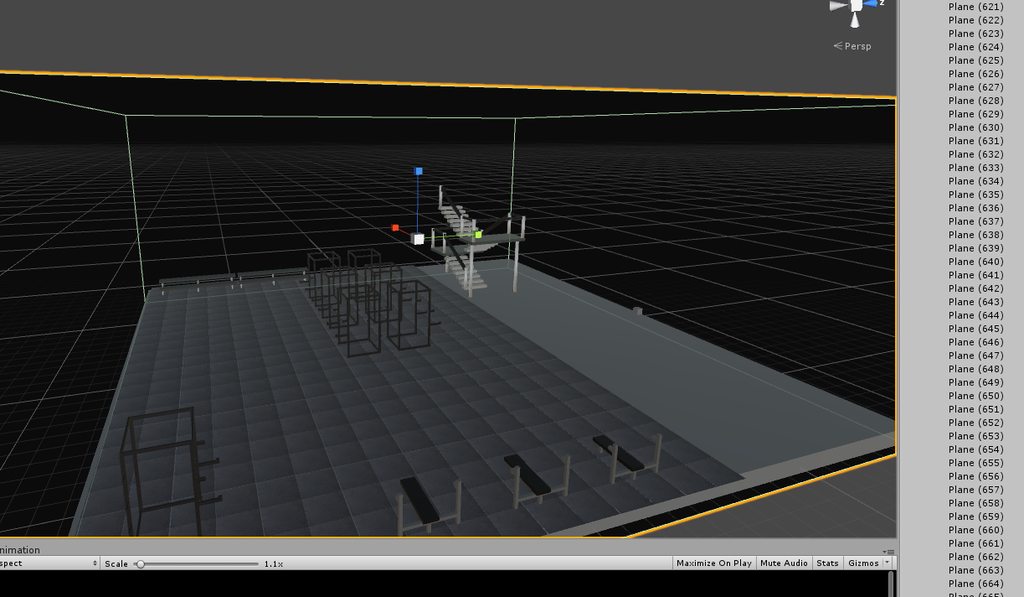
so technically I was optomizing my world when I had 600 planes for floor tiles in my world
the tiles dont have a collider in each one
heavy kite
I know. I created materials for color coding purposes.
wispy hollow
If I use box colliders do I need to adjust anything to make it work as a mesh collider?
heavy kite
Box should work if it's a cube
willow violet
https://imgur.com/a/m4FtD I unknowingly was actually optimizing my world xd
 wispy hollow
all my objects are different shapes
heavy kite
Ah, tiled flooring.
Use cube for cube objects, sphere for round objects, and mesh colliders for complex objects.
wispy hollow
how do I bake lights bro I'm too baked myself to find out
heavy kite
What I would do for tiles is merge them all and place an invisible plane on top of them with collision.
Glitched, go for video tutorials at this point :P
Dynamic lights, static, lightmapping, etc.
willow violet
there is a box collider underneath them
with that grey cube
I dont have much luck with planes and colliders for some odd reason
wispy hollow
sick. I'm going to work on baking the lights first, how can I?
I have spot lights and directional lights around the place
willow violet
there is a pinned message in this room
heavy kite
Video tutorials.
willow violet
I think thatll help you out
wispy hollow
is it under a certain category or of its own? ie: "How to bake lights"
heavy kite
Google what you just typed.
wispy hollow
sick bro
 marsh bolt
https://unity3d.com/learn/tutorials/topics/graphics/fine-tuning-lightmap-parameters
https://unity3d.com/learn/tutorials/topics/graphics/introduction-precomputed-realtime-gi
You should also reference these official U3d tutorials

Unity
Unity is the ultimate game development platform. Use Unity to build high-quality 3D and 2D games, deploy them across mobile, desktop, VR/AR, consoles or the Web, and connect with loyal and enthusiastic players and customers.
Unity
Unity is the ultimate game development platform. Use Unity to build high-quality 3D and 2D games, deploy them across mobile, desktop, VR/AR, consoles or the Web, and connect with loyal and enthusiastic players and customers.
willow violet
I dont know cause I never looked at the tutorial pinned in here, but Ive heard people talking about it
and baking lights
past imp
if you want to make a box collider work as a mesh collider you just need to painfully emulate the geometry with box colliders
willow violet
I did da
marsh bolt
It's a lot of info, but good lighting is paramount to a scene so I highly suggest putting in the extra effort to learning the systems
willow violet
its not that hard
heavy kite
Light probes
willow violet
just strange that if you rotate it, the shape changes
willow violet
if you rotate an empty game object with the mesh collider
that shape morphs
try it out and youll understand what I mean
marsh bolt
That happens when an objects parent has a non-zero scale transform
past imp
yeah
marsh bolt
Non-zeroed* I should say, in which case, a scale of one in all fields. Sorry for the mix of terms
marsh bolt
It's not a unity specific thing, it happens in other 3d software suites as well. If you don't reset transforms, things get wonky
heavy kite
Yup
willow violet
ill have to try that, thank you
past imp
speaking of colliders I almost cried when I finished setting up my colliders

~3-4 days of just placing colliders
marsh bolt
For complex scene meshes, you can make a simplified version of the mesh in your 3d suite and use that as the reference geometry for the mesh collider component. If you do it well, it should decompose the mesh into a number of collision hulls comparible to what you'd get laying them out manually.
past imp
yeah I did that for things like the ground and such
this was the first map I ported so I didn't realize how I could've just split the sections and simplified them
heavy kite
yup, was about to mention custom collider meshes
 fallow thorn
@past imp I wouldn't put colliders for every single detail... colliders are only there to stop people walking through that wall, one simple box collider for a wall would have been more then enough, if you get low performance for VR its highly likely you will have to undo a lot of that work 😦
 toxic plaza
Thats something i'll need to do as well as I just stuck mesh coliders on all environmental stuff.
lilac saddle
It's bug testing time for those with fast internet connections.. my map was uploaded last night i would like feedback from those who are willing to test it regarding anything you find that needs fixing though i doubt youll find much, also regarding mimi's karts as youll see there is no ownership right now there's a bug that mimi is very aware of we are looking into it. (in other words you can use them but you wont take ownership of them, so anyone can use your kart) https://vrchat.net/launch?worldId=wrld_7a84c25f-a5fa-4c17-90e4-d93cb5424cf6

Biggest update ive ever done. Baked/no shad no refl mass fixes more rides ride music on trigger, re-designed park layout & more.
past imp
eh I like being thorough, and it runs well in VR
I think it has like 60~ drawcalls total
 nova karma
@lilac saddle Hi! The developer meetup is being revived this Sunday as an official VRChat event. It starts at 6pm est or 3pm pst. It's a meetup where we all get together and test each others worlds. If you'd like to show your world be sure to join the official VRCEvents discord to find out what world we'll be meeting in! 😀
lilac saddle
@nova karma Yeah i'm game mate, thanks for the heads up 😛
 elder summit
@lilac saddle does that rollercoaster have a dead end
lilac saddle
I cant say yay or nay to that as its a suprise..
That coaster was built as a coaster. .but also for my love of Donkey kong county on the snes.. and if you recall the minecart level in that (the hardest level to ever exist) youll know why there's track missing.
😉
elder summit
wait when did I get in this room
lilac saddle
When you was notified ?
willow violet
wait is room give access to specific people in the discord?
lilac saddle
what mate?
lilac saddle
This room was made yesterday/day before i believe.. im not sure and i hope we dont get complete newbs in here.. i mean worlds gets enough of that.. this is for peeps who have worlds and need optimal settings or require help doing so
not just for general questions like the old mesh on vrcworld we get asked about in worlds.. lmao
fallow thorn
actually, the most "noobs", in your words, will be here, since they would be the ones coming for help every time their world gets denied. Not knowing about colliders n stuff. Joy 😂
people with experience tend to know how to optimise and won't be as active here as they might be in world (besides helping these new creators)
willow violet
compared to the ommon unity user I guess Im a newb :3 thisll be my safe haven
toxic plaza
@nova karma whats the discord link for that events discord?
lilac saddle
hmm.. we cant post those links in here i will pm you instead.
heavy kite
want to get into adding lightmapping to the amusement park?
lilac saddle
@lilac saddle Hey with your club rogue world, if you decrease amount of cameras in world FPS will be much smoother
lilac saddle
@heavy kite what was that earlier about lightmapping?
heavy kite
put some lightmapping on your world objects
lilac saddle
the entire scene is baked to a crisp to advoid lag due to heavy animations.. namely all the rides.
heavy kite
ah
lilac saddle
the lighting was good..
but i had no option to bake.. the more i add the more i need to optimise..
heavy kite
the map was good though
lilac saddle
its meh im happy with it but i dunno it doesnt get the attention i want
think i will call it quits and just make elsewhere in regards to theme parks
toxic plaza
@lilac saddle how do you get the rides to sync up for all players? i'm having difficulty getting big animations to keep in sync if a player joined late (gonna go to sleep now but will check back for your answer if you write one, just mention me so i can jump to it easily 😛
heavy kite
If you think that's bad, my world project isn't going to attract that many users.
but the very least, I'll make it huge.
lilac saddle
@toxic plaza animation_sync .. that simple and as for all synched between players.. triggers..
each time a trigger is activated it plays for all connected to the map from the start.
Well.. why do we make here then?
heavy kite
an excuse to make something nice.
lilac saddle
i mean.. i made a theme park to attract people but for the most part people arent into it apparently they are more caught up with random social meeting rooms.
heavy kite
the current trend is scary mazes
lilac saddle
trend..
heavy kite
yep
lilac saddle
yeah that will never be my thing.. took me 2/months to get all that crap on that one map sorted out
dont fancy spending all that time putting into something thats phased out
heavy kite
For my world map, it's to get experience making huge worlds.
along with utilizing software I researched
heavy kite
they'll get there
 cobalt bluff
Is this a new channel or something? i don't remember it being here before
Oh ok, i was just like "Wtf when did that get there!?" xD
 strange prism
I just noticed this new channel which works out since I have questions relating to optimizations. My first world was rejected due to low fps. I reworked colliders and added occlusion culling but how do I test it to know it is good enough to submit again? I'm getting 90 fps in VR in the corners where it dropped before.
I don't want to be, but I'm probably one of those "noobs" spoken about above.
 viral marsh
Draw Calls Down Frames Up!
lilac saddle
@lilac saddle I believe I only have one cam in my world as a reference for the post processing effects? Correct me if I'm wrong. Also having big issue where unity crashes if I try uploading the map a second time. Only work around is to delete everything but the assets folder and make a new project. Even then I can still only upload it once more, then I must repeat the work around.
@olive zenith said something about multiple cameras in the scene.
Not sure why it would be crashing unity when you try to reupload. I imagine you have up to date sdk?
Curious what post processing effects you have active.
@lilac saddle SDK is up to date. Bloom, color correction, and AA
Not sure what to do to fix that then. As for post processing, in my experience adding AA into my rooms sometimes dropped framerate quite hard depending on the room.
misty pecan
@lilac saddle AA post processing also makes it look like complete crap in VR :(
lilac saddle
@misty pecan Ive only seen it improve visual quality in VR, on my map atleast
misty pecan
Do you have super sampling turned on?
At 1 SS it doesn't atleast, at 1.4 it looks OK I heard
I never go above 1
 rancid magnet
@lilac saddle will you always / mostly notify people here about the optimazation they can add to the world or not?
 gentle mountain
<@&378256373701410817> Wouldn't it only be natural for us to be able to share pictures in these kinds of creativity channels?
 versed lichen
You can use image sharing website or software that crops your screen and automatically uploads it ?
lilac saddle
Imgur is what we mainly use.. piss easy too dunno why you feel the need to use attachments.
gentle mountain
@versed lichen Yeah, we could use image sharing services, but that's just an unnecessary tedious task imo.. I mean, why shouldn't picture sharing be an option? It's a lot more natural and seamless... just putting my opinion out there, hope you don't mind
versed lichen
@gentle mountain Because then people can't spam random shit all the time, it's one way to prevent abuse and spam if we can, it's just a tiny step we ask users to take
 median star
like lobby porn? 😖
 dim pilot
just use puush or gyazowhichhaslongafurls
 native badger
Hi, someone know how know map weight?
 gentle mountain
How much does mirriors impact performance? Is it noticable enough for me to be concerned about it?
 stiff pilot
1
gentle mountain
Huh?
lilac saddle
yes, mirror can tank your frames bad
almost half it if you reflect a lot of your world
stiff pilot
I have made a world that contained 5 mirror
lilac saddle
how vain
 barren gyro
sharing this because audio stutter/loop is still common:

There are many things that may go wrong with your game development. Your models may have too many triangles for your target platform to handle, your algorithms may be too expensive for your CPU, and a
lilac saddle
❤ I love you man
this should be mandatory, it this patch it's too widespread
people have these crap audio files on their avatards
barren gyro
since vrchat is entirely based on (mostly, I think?) the default compile and build settings for 5.6.3p1 anyone making worlds and avatars should adhere to the same optimization practices that would work if you were making your own game
lilac saddle
most users don't even know how to import an alpha channel 😐
barren gyro
I've got an avatar that looks and works buttery smooth, but has 4 different spatialized audio settings. Loads like gangbusters
instanced material mesh and shaders 😛
6 materials, 4 audio sources, loads faster then most default avatars lol
barren gyro
I do what I can. For the longest time I had the most popular video on vrchat avatar importing, back in 2015
that earned a little money recently so I try to give back
lilac saddle
the only way to get a smoother 'game' is to share knowledge how to do things the right way
barren gyro
well, the "right" way isn't right for every target system for sure, but unity themselves could have made the defaults favor performance for sure. Blender is also guilty of that
lilac saddle
because there's so many wrong tutorials and theories out there about lag and frames
especially for vrchat now, with the amateur youtube tuts booming
barren gyro
truth be told though if the client was multi-core cpu optimized the things we have now with some very minor exceptions would be no big deal
lilac saddle
yeah I read your earlier rant
the stuttering audio chunk misses really irritate the hell out of me in this patch
and the 180 degrees spatial mess up bug
barren gyro
when you compare vrchat's total meshes per room/character and physics objects + lighting to any game made in the last 2 years in unity there's a big divide between ones optimized for VR and ones that are not. For example the SteamVR renderer for unity -massively- improves performance and there's nothing required to add it
I think the spacial audio thing is because previously the oculus audio spatialization was added in addition to regular audio spatialization and it was causing lags and crashes
I heard something about that the other day
barren gyro
so if they removed it on sound sources if the regular unity spacial audio implementation was not configured correctly by the user it'll be all buggy
barren gyro
way before this patch went out I recognized that for ASMR stuff and other audio tricks I do I needed to pick one or the other audio renderer so I usually just dumped the ovr one
explains why I haven't had to adjust my avatars
barren gyro
yep. I have a bunch of nifty channel separated ASMR props on some of my avatars
I also have headphones that play music I like, but only when you have them on your head, lol
lilac saddle
crafty
barren gyro
I built one specifically for giving headpats that feels like someone is running their fingers through your hair. It's really weird and some people get physical tingles from it. I wasn't the first person to do something like that, that award goes to Mind Theatre (Magnanix) but I put my own spin on it
Anyway: WORLD OPTIMIZATION - audio is important!
lilac saddle
I've used law of first wave and phase difference stuff on sounds to make them ultra wide
but not binaural placement bypassing the game audio effects
kewl
psycho acoustics are fun
 worthy girder
what would be a good triangle rate for a world? I am planning my world and allocating triangles to individual buildings...so i do not end up with too many of them.
 warm arch
For best performance - is it bad to apply a double sided shader to some walls to fix the "one sided walls glitch", or to keep performance high do i just ignore that glitch?
(this is my first world map every i have no idea what any of that means but im writing that down ^) Thanks
ah!
thank you!
one more stupid question - the map i downloaded has alpha textures for some of the textures, what do i apply those under for the texture sphere?
(ive got a chainlink fence with a solid and an alpha map, cant find the place to apply its alpha map)
ill give your suggestion a shot
lilac saddle
@warm arch tick the 'alpha is transparency' box on the original image and hit apply
then pick the right mode
lilac saddle
yes
warm arch
k
lilac saddle
you will see the familiar photoshop checkerboard if it has an alpha channel in the preview
warm arch
hmmm, im afraid its not doing that
lilac saddle
it has separate alpha textures?
lilac saddle
go to photoshop and do this https://docs.unity3d.com/Manual/HOWTO-alphamaps.html
lilac saddle
it's very oldskool to have them separate so there's no way to use those in unity 5
but you can merge them into the texture as outlined in the link
warm arch
thank you!
lilac saddle
yw!
warm arch
yeah i think this map is from 2002
lilac saddle
ah that makes perfect sense
lilac saddle
after doing that, remember to tick the box I mentioned in the beginning or they won't work 😉
warm arch
ok
lilac saddle
and note that the link doesn't describe importing the alpha image into a layer but making one yourself
so the actual process is a little different
 south socket
so, good idea to make a switch for the videos in a room, since they cause a massive lag spike upon loading?
lilac saddle
Need help with occlusion culling in a way that doesn't suck? Look no further than @latent beacon's tutorial https://youtu.be/KF0_5eYry2M
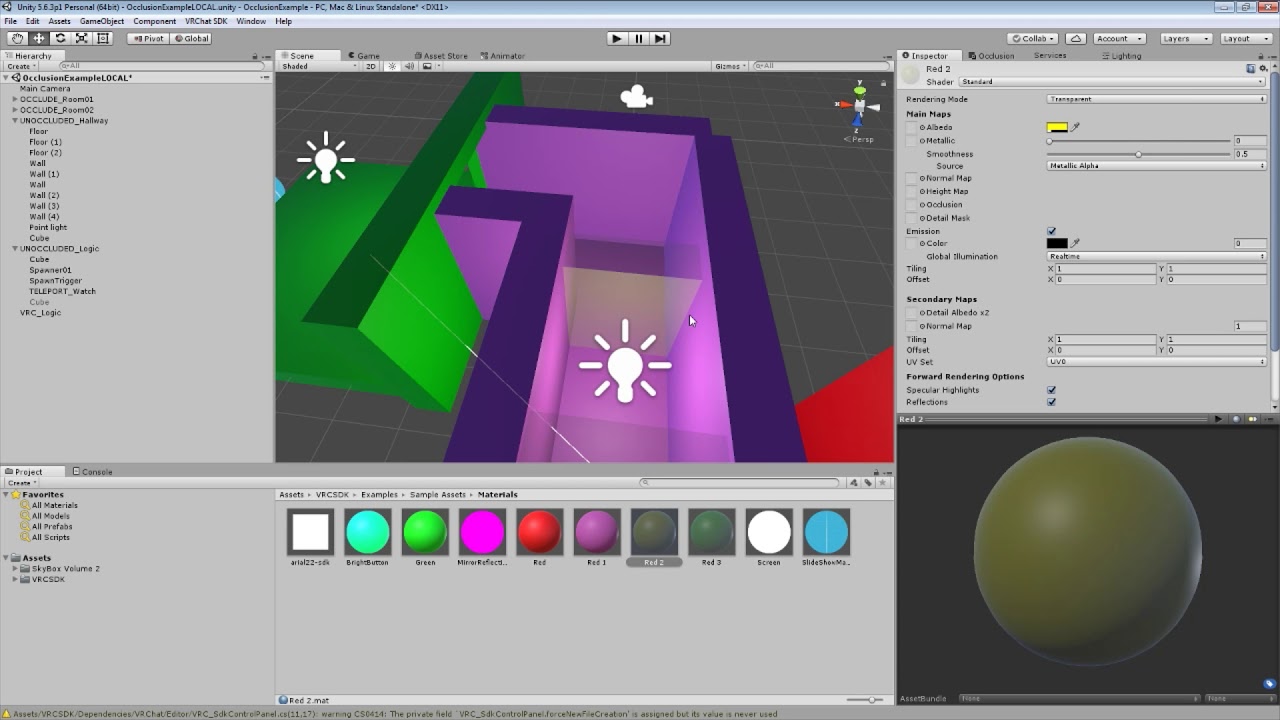
How to set up VRChat trigger-based occlusion in Unity, thus improving the performance of your world maps in VRChat.
 wraith ocean
A 200mb lightmap is not acceptable, right?
sharp arrow
That's rather large @wraith ocean , even for a complex scene. You can reduce that by either compressing it, which is defaulted to on, or by reducing this settings here: https://i.gyazo.com/a89dbdfdb45a566350eb79c29af04f49.png . If you want per-object control for reducing lightmap space/size contribution you can reduce the Lightmap scale of large, in worldspace, MeshRenders. This also affects bake time and lightmap size so reduce this on large objects, especially if they won't reflect naunced/minute shifts in lightning.

 uncut valley
Say you have a world that's just a massive mesh and is complicated enough to have >65k tris, beyond the limit Unity will allow for a single mesh. Is there a difference in optimization between splitting it into multiple meshes yourself and letting Unity split it?
past imp
if you split it yourself you have more control on what you want to cull
with occlusion culling
uncut valley
What's the math for meshes and materials turning into draw calls? Is it "One draw call per material per mesh"? As in, if I have three meshes, each with a unique material, is there any performance difference if I combine them?
sharp arrow
Oh, opps this was all assuming you were asking if you should even split it. I forgot you don't have that choice in Unity5.x! In Unity2017 you don't need to split high poly meshes on import at all. I'll delete all those worthless posts now, sorry.
 limber maple
Making a custom compilation ?
lilac saddle
I'm pretty new to creating worlds., sorry if this may be a frequently asked question but do you guys sometimes get the issue that the game starts to lag when there are a lot of colliders in that certain area you are`?
toxic plaza
is it mesh colliders?
if so, they cause frame rate drops
try to use standard colliders like box, spherical etc when possible
lilac saddle
Yeah mesh
Okay thanks! 😃
Basically for walls or cupboards and stuff i guess box colliders would be perfectly fine
toxic plaza
yeah, you can have multiple box colliders per object too
you dont have to be limited to just 1
lilac saddle
That is nice. I guess for something like a kitchen (containing multiple cupboards) i could also do only one box collider. I'm guessing that would be pretty efficient
toxic plaza
yeah 😃
lilac saddle
Nice! Thank you 😃
Maybe this is wrong here but when I'm right talking to you here maybe I can ask this: When I want to test my world and unity opens VRChat, it always starts it in VR mode (Also when my VR Headset is not plugged in) and this causes it to crash. Is there a way around this?
toxic plaza
@lilac saddle yeah theres a way. in world chat search for SariaFace's unity workaround to opening vrchat in desktop mode
lilac saddle
Thank you very much 😃
 stark apex
I'm trying to optimize basic collision on my building. So I made a low poly shell which fits around the floors and walls. Now, the only way I can get Unity to recognise it is to import it with auto-generate collision, then place it in the scene with no mesh renderer. Am I doing this wrong?
Should I just bite the bullet and use Unitys native primitive colliders instead?
lilac saddle
@stark apex yeah, you should import the mesh and drag it into the mesh collider slot of the high poly model so the mesh collider calculates a convex collider out of the low poly one and not the high poly one
my typing 🤢
stark apex
Thanks @lilac saddle . Every time I tried that slot I just fell through the floor, but I'll monkey with it some more then. So the mesh doesn't need to be in the scene itself, or have auto-collision enabled?
lilac saddle
not at all
it just makes the mesh collider component on the big mesh use a small mesh for calcs (=faster)
no need having the small mesh anywhere in the hierarchy
stark apex
Cheers! Appreciate the info, friend. I'll poke at the collision slot and see why it wasn't working first try.
lilac saddle
it might not drag&drop ... click the little circle to pick it from the list instead if that happens
unity will show a light colored generated collider that wraps around the model to show the collider shape if it's working
stark apex
Ah, no dice. All I'm getting is a weird line for a collider instead of a shell. Whether I import from Blender separately, or as a part of the building hierarchy.
stark apex
All I get from that is a weird plane, or box if I inflate it. I'll try capping off the planes in Blender to make it solid.
stark apex
I made a 6 faced box, then used extrude and ring cut to shape it out over the model.
Nah, still getting the same results. 😦
I guess I'll run with Unitys native primitives instead. I hate not getting a thing to work that ought to be working though. That really chaps my stick.
worthy girder
how many light sources make a scene inefficient? is there a maximum number of light sources one should not overstep?
past imp
if you bake your lighting you shouldn't have much to worry about in terms of efficiency
worthy girder
hm...light baking in unity is something i have to look into as well
 nova hemlock
hi @lilac saddle how use web panel with mouse
sweet sinew
@nova hemlock if you ask in #world-development they can answer it for you there.
earnest wolf
Optimization tip...
Map sectors: Split up areas and spread them out so they aren't all loaded at once. (You can create doors and teleport players to a house for example... the doki doki world does this great)
Minimal Mirrors: Don't use alot of mirrors as they cause alot of lag or make it so the mirrors only reflect when you are close to them.
worthy girder
is there a tutorial about how to split up areas?
and how many objects are suggested to be in one split up area? 30, 50, 100?
earnest wolf
Depends on whats in the area
worthy girder
ok...lets make it more precise.... after how many triangles should one split up an area?
earnest wolf
It honestly depends on what you have in the area
From shaders to animations to particles to textures to objects in general.
worthy girder
can you elaborate on that?
what is your experience...how can i plan a map and its areas before hand
earnest wolf
Well, If you have an idea on how its gonna look then just draw it out on paper
worthy girder
no thats not my question
but i guess there are no guidlines for that than
not yet
earnest wolf
It really depends on your map and how you design it
worthy girder
yes
sweet sinew
@worthy girder Look at pinned from VRPill, that is a good way to split up areas
worthy girder
the occlusion culling video?
sweet sinew
yea
worthy girder
im on it
yeah...watched it....and i was wondering... did not modern game engines do this automatically? not rendering stuff one does not see?
i have to redesign my map than
its an open space not a dungeon crawler
i have to make sure that one can not see stuff before hand.
this just throws all my work for the last 5 days into the bin
i have to think in zones now
thanks for the tip
sweet sinew
You can set it up for the whole world without doing that, but you will have to read up on the unity docs then
worthy girder
What do you mean?
sweet sinew
But the one from Laozi2017's tutorial does it in an easier and simpler way
@worthy girder correct docs ^
stark apex
How much performance does a native Unity box-collider actually take up? I just fleshed out my floors and walls with 55 separate boxes. It feels like the single complex mesh collider should perform better?
lilac saddle
box collider is one simple line of math, even 1000 box colliders are faster than a mesh collider afaik
I might be exaggerating a little 😄
stark apex
Ah, good man. If I had done all that for nothing I would have literally pulled my own face off.
sweet sinew
Hahah
lilac saddle
the 'primitive' colliders are all super fast simple tests, plane, box, sphere
if your mesh doesn't look like a box, add 16 boxes together that look like it and you're still a lot faster
stark apex
Nice one. Now to start blocking off all the furniture and objects. Colliders for days, Hurrah!
sweet sinew
Was someone here that spent two days on just colliders
stark apex
I saw that. The big hotel place. They ought to give out medals for things like that.
sharp arrow
But afaik Unity3d initially checks bounding boxes against colliders to compute collision so if you have simplified (hand made low-poly or decimated) versions as collision meshes of a chunked object that covers a large area you are usually fine. The issue is not knowing the constraints.
So most collision will be cheap against things like split up mansions or hotels. Spending 3 days doing something without profiling or looking into quicker or automated solutions is not the best route.
stark apex
Ah I think I'll be safe with ploughing on with the boxes. My project is only 2 floors and 7 rooms. I was having trouble importing the shell collision mesh anyway. I'll try again on my next project though. Options are good things to have.
sharp arrow
Well, small objects like shelves and such are a must for simple colliders. But it's not as black and white, and one size fits all, as people make it to be when it comes to large terrain or complex buildings.
 lapis basin
Does somebody knows a way of getting ScreenSpaceReflections into Vr?
 wind marsh
The world I'm working on have people lagging themselves when loading on but rises back afterr a few minutes. What causes this?
misty pecan
What sorts of stuff do you have in your world?
wind marsh
FX Water and replaced the pickups with box colliders
Put the pickups on toggle just in case but some lag on the first 5 sec. coming in
misty pecan
How many pickups exactly do you have?
wind marsh
Around 15
misty pecan
That shouldn't be too performance heavy, especially if they all use box colliders
Try making a version without the water?
wind marsh
Damnit, guess I put too much bitcoins
misty pecan
so then you actually got at least 45+ synced pickups, with majority of them using mesh colliders
The game lags in the start because it needs to sync all those objects
Is what I'm thinking
You definitely could just use box colliders for the coins
wind marsh
Not majority all of them are mesh colliders
misty pecan
Of the total pickup count the majority is mesh colliders, because you said you had pickups with box colliders too, no?
wind marsh
Yep, damn
misty pecan
Either way, ditch the mesh colliders
or severely reduce the number of coins
You can use several, smaller box colliders to manually build a more detailed hitbox for the coins if needed
wind marsh
Oof, it was 52 stacks with 10 coins each. So 520 coins with mesh colliders
toxic plaza
does turning off skinned mesh renderer on an animated character have any benefits when i get round to doing occlusion culling (was thinking of keeping the animation playing from the start regardless to make sure it stays in sync but atleast have the mesh turned off)?
 wide turtle
Any easy way to decrease object texture size? I have several objects with over 10Mb testures and those dosen't need so detailed textures.
toxic plaza
you can resave them in a different format to compress them
if they are targa for example, you can resave them as png or jpeg etc
but you will lose quality a little too
wide turtle
I didint even think about lossy compression, I only think decreasing resolution. But true, lossy compression works too
worthy girder
you could resize the UVs
allocate less texture real estate for some faces and more texture real estate for others.
 leaden stag
I think they should remove your name from showing when you're reporting someone, cause' if that person finds out that you want him to be kicked, he will harass you.
I mean, from suggesting to kick someone, cause' if you wanna kick someone, it shows who wants to kick who
 quaint mulch
If you kicking someone, he is being annoying or not wanted arround, if he starts harrasing you, you block him
No need to hide names
 scenic swallow
@wide turtle You can enable crunch compression on the texture's import settings which is a lossy compression algorithm built into Unity.
It doesn't affect the file on disk so you can revert it if it adds too many artifacts. It only affects the textures uploaded to VRChat.
One warning is that it takes a long time to compress things.
 steel mason
i did crunch and got from 64mb 8k texture to 12 i think
sharp arrow
Mhmmmm, enabling crunch compression is another option but keep in mind it is also lossy and you might want to avoid using it for anything like normal maps.
I think crunch brought a 5mb texture atlas I found that people were using for a Felix and it brought it down to 0.7mb or something. I can't remember, but it can be pretty useful.
wide turtle
@scenic swallow thats dosen't seems to do anything. I changed import settings and even limited resolution from same window, but it still seems to upload original textures

 untold fog

Make your game run smooth by using Level of Detail! ♥ Support Brackeys on Patreon: http://patreon.com/brackeys/ ·············································...
scenic swallow
@wide turtle Is this with future proofing enabled?
What does the editor log say your build's complete size is?
scenic swallow
Search for "complete size"
Future proofing uploads your project's original files in case they need to be rebuilt in the future.
So it won't be affected by the compression
The world that people actually download is in Unity's built asset format not a unitypackage.
 bright eagle
hey guys i need help, trying to figure out how to toggle meshes and sounds for optimization at the push of a button, ive been able to do it with particles but cant quite figure out sounds. is there a way of doing so?
 thick igloo
make it set the gameobject off
 next lily
make empty game object, add sound, toggle your game object
toxic plaza
does turning off mesh renderer help with optimization? or does the object itself have to be turned off too?
next lily
probably the mesh is enough, but you could do the whole thing if you wanted
toxic plaza
nice, was hoping i could do that for animated characters and have them stay in sync this way 😃
past imp
yeah turning off the mesh renderers should be enough
lilac saddle
Anyone know if the trigger based occlusion will spawn the objects if the player respawns inside it or will all of the objects still be gone?
 half mist
I have a question about the mirror prefab
when I drag it in, it just show pink
do I have to get in the world to see it working?
past imp
yeah, pink is the reflective side
misty pecan
When the world is uploaded and run in the client the mirror will work properly
half mist
so, the thing only work in the game client?
misty pecan
That's when the mirror script gets run, so yes
half mist
Got it
2nd question: is there a way to make a prop with trigger?
like a gun that can shoot?
misty pecan
https://vrchat.readme.io/docs/onpickupusedown
You can use this trigger (or "onpickupuseup") and have it trigger a suitable action
OnPickupUseDown is used in conjunction with a pickup, it is triggered when a player holding the pickup and releases the use key VRC_Pickup Auto Hold has to be set to Yes for this to work
Just add it to the pickup object
half mist
thanks
 hushed cargo
Could someone help me with Audio Source.
Would like to know how to set them up so u can actualy hear them now.
 thick jetty
any tutorials on adding web panels to worlds other than the wiki?
sharp arrow
What matters most is draw calls. You can create a scene with 5 materials and 1,000 drawcalls pretty easily. So, worry more about that. Use as few materials as you can and share when you can. Avoid pointless unique mats. Don't worry about it at first, 99% of the performance savings will likely come from improving batching and reducing batches.
Of which are mostly a result of use of pixel lights, especially with shadows. Avoid those and you'd have to work hard to make a poorly performing map.
worthy girder
i make walls and houses with as many shared materials as possible. but at one stage i will have to add decorational objects which will require their own materials
sharp arrow
That sounds more than fine, I have a map with probably hundreds of materials and it runs fine.
worthy girder
ok...thanks 😃
sharp arrow
All it really is is people making mistakes that bring their 70 drawcall maps to 2,000 drawcalls. That can't happen by adding afew materials and some decorations.
sharp arrow
There is in the game mode view a stats button at the top right.
Consider that the batches shown may differ when running the game in playmode due to dynamic batching.
Keep that number low and you will be fine.
It's also view dependent btw so keep that in mind. You'll need to move the camera to test.
 kindred quarry
I wonder if someone could clarify something in the SDK... if I make an empty object in UNity, say call it my VRChat world and then build and load the entire world into it and then add a single VRC_Object_Sync to it - would that ensure everything was synced inside the world? That is; all object pickups and animations?
 fair agate
That is actually a really good question. For example, if I have a prefab that I use a lot...is it better to put syncs on the prefab, or to put them all under a parent with one sync?
(Currently have sync on the prefabs)
 static night
from my experience, I can say that adding sync to a parent and child, and different combinations thereof, can provide wildly different behavior depending on the objects dynamic-ness
So someone was talking about drawcalls being most important, which I get, but what happens if there is two objects in unity with the same material, are they one draw-call or two, and if they are two, are they any more efficient that two objects with different materials? (I know in reality the difference is minimal but I mean theoretically for two objects)
 jaunty heron
As far as I understand, using the same material (not a copy) on the objects should make it just 1 draw call. Hence, if you make a texture atlas for a material that can include most of the objects in your scene, you can create a much more optimized world.
lilac saddle
yes, but you have to enable instancing
it will batch drawcalls for you
for the meshes (and materials I think) that are already uploaded to the GPU memory
 warped turtle
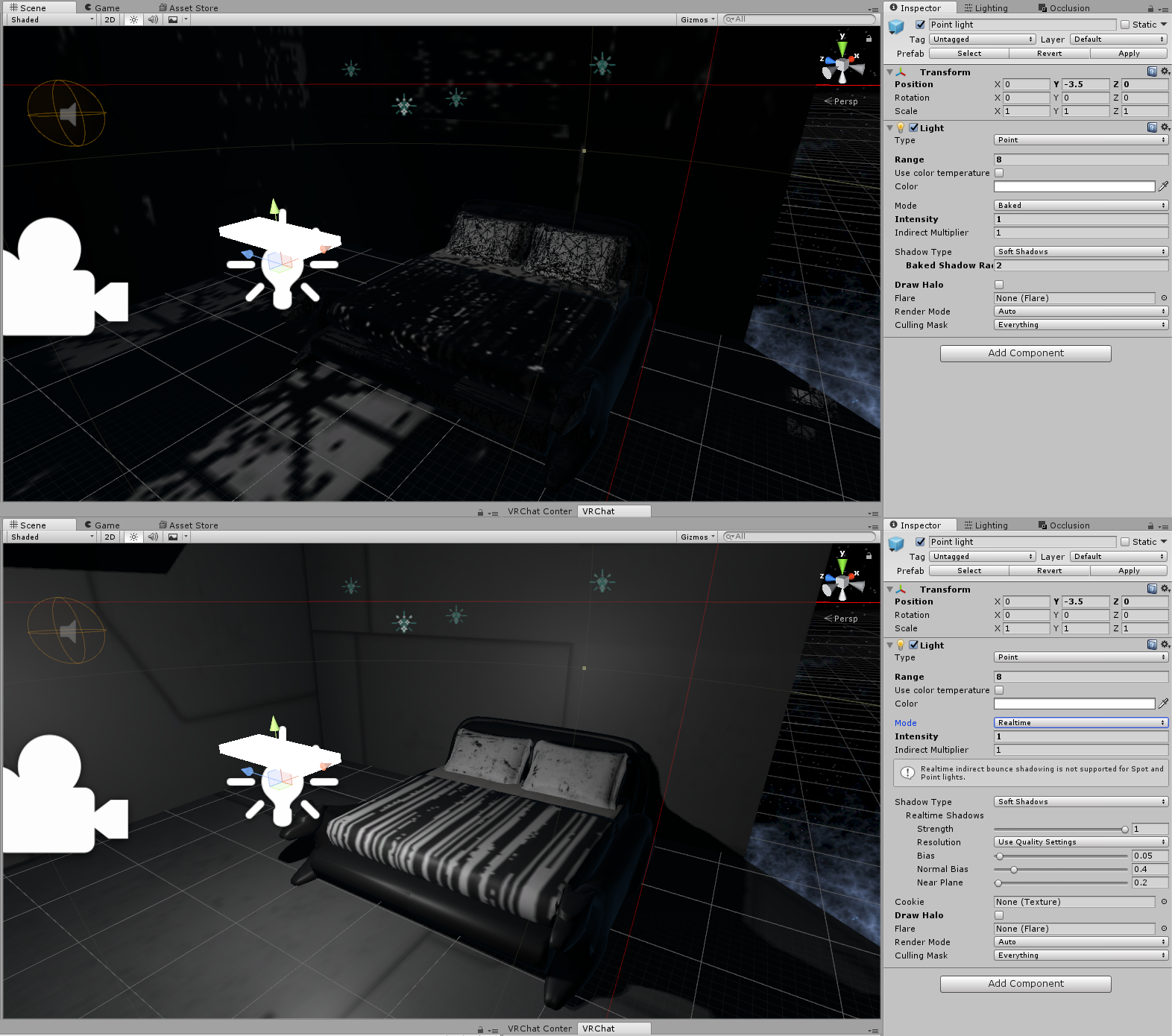
Has anyone encountered this problem while optimizing a world? For some reason baked lighting will not work.
 tacit grail
I have issues with baked lighting as well. Not sure myself been trying for ages to get baked lights to work
This is my issue. Baked lights don't appear on certain materials https://i.gyazo.com/1f34e2d58cf1a023510ba1c4a4d59147.jpg
 past imp
did you generate uv light maps when you imported the model?
@warped turtle @tacit grail
tacit grail
yep
warped turtle
for explanatory reason how do you do that?
past imp
click on the model in your project folder
and under the model tab check off generate uv light maps

also @tacit grail how many light sources do you have?
warped turtle
thanks imma test it now
past imp
some lights won't bake if you have too many (from my experience anyway)
you can try deleting the GI cache as well
tacit grail
yeah i will look into trying that
warped turtle
Yep it fixed it thank you very much @past imp 😃
past imp
no problem
 obsidian bobcat
Having a bit of problem with my world. I have a issue that pops up ONLY after baking AND in VR. I wish I could link a pic of any pics I take of the issue just show black, as if the problem doesnt exist
Essentially, foliage items in my world that are suppose to be hidden by darkness are still visible, although there not as if they are 100% lit. They also seem to have this weird texture thing on them, but the actual texture/material of the object isnt changed, it just shows this weird thing when they are not lit up. This is also happening to the walls of my building, they have this strange coloration to them.
I think it might be caused by the fires I have in my world. While the range of them isnt far, they do have a script on them to play fire... so maybe that causing it?
obsidian bobcat
Update: I fixed my issue, it was the custom script for the fire causing it!
Can't believe I stayed up all night just to have a the solution right in front of my face
fair agate
which to use: static batching, or instanced shader?
For repeated items, no fancy lighting, toon look
 west zinc
So I’ve been making my worlds by creating boxes in unity and stretching them. But as time has progressed it seems that having x amount of boxes is not a good idea. Is there a way to optimize those cubes.
I suppose I need to learn how to combine game objects and meshes directly in unity
static night
Is there a tutorial or simple image someone could show me to enable instancing on materials and/or objects so that two objects with the same material become one draw-call?
scenic swallow
@fair agate You can't use baked lighting on instanced meshes, and using light probes or reflection probes will cause the instance batches to be split whenever different probes are used. These limitations mean that there aren't very many cases where instancing is useful so you'll generally just want to use static batching.
You might be able to get away with it if you are only using ambient and mixed/real-time lighting by disabling light probes and reflection probes on your instanced meshes.
lilac saddle
 worthy girder
awsum screenshot
barren gyro
@lilac saddle I think it's possible by changing it to a high quality mirror. To save performance usually it's lowered. I reccomend using a button, and to go one step further, don't render mirror unless you're standing close to it, since we're in world optimization.
lilac saddle
Should I be using enlighten or progressive for lightmapping?
static night
What you could also possibly do is what Lhun just said, and just a hair width behind the mirror have a reflective surface (make sure to put a reflection probe in the room and bake reflections so no huge) just so far away you can see it's a mirror and when you get up close the real mirror comes into view in front of the surface
 agile steppe
hey yo, I've a new problem :<
I want to share Avatars I've created with friends.
I've created a world with a Pedestal and put the avatar-id of one of my avatars on it.
I can see the avatar on the pedestal ingame but when I interact with the Pedestal, nothing happens. My Avatar doesn't change to that one on the Pedestal, what'S wrong?


tried this, too. But didn't worked :<
 proven flicker
How active was this chat?
Are there anymore guides/tips than the pinned messages by VrGod?
static night
is the avatar set to private? I have no idea if that's a thing now.
toxic plaza
if you use occlusion triggers to turn gameobjects on and off, will that mess up object pickups and animations if i want them to be in sync?
Still trying to get my head round this but if i understand correctly, a pickup from zone 2 will always appear off until
a player triggers zone 2 activation, so if another player carries that object into zone 1 and the local player hasnt activated zone 2, they will never see the object right?
static night
I would beleive it's not reccomended to have pickups as zoned objects
toxic plaza
thanks, will keep them off occlusion triggers 😃
lilac saddle
Should I use enlighten or progressive for lightmapping?
lilac saddle
progressive is faster to bake and looks better in most cases
@lilac saddle
enlighten struggles with a lot of things and takes hours
lilac saddle
Thanks 😃
 strange atlas
hey would decompress on load or streaming be better for performance with music?
west zinc
traditionally, streaming is best for music
 coarse mortar
Anyone able to point me in the right direction of setting up a enable/disable mirror button for local
 neat vector
i cant upload my map , why?
sweet sinew
What error do you get?
 solemn lance
ok i posted this in the wrong channel but ok so i have a question, i want to make my mirror in my world fade to not render things like in the hub world how would i go about doing this?
like as you get close it all renders but far it disappears
west zinc
@coarse mortar set up the mirror switch normally, then in the component checkmark advanced mode
then you should be able to select local in the 2nd dropdown
 bright bison
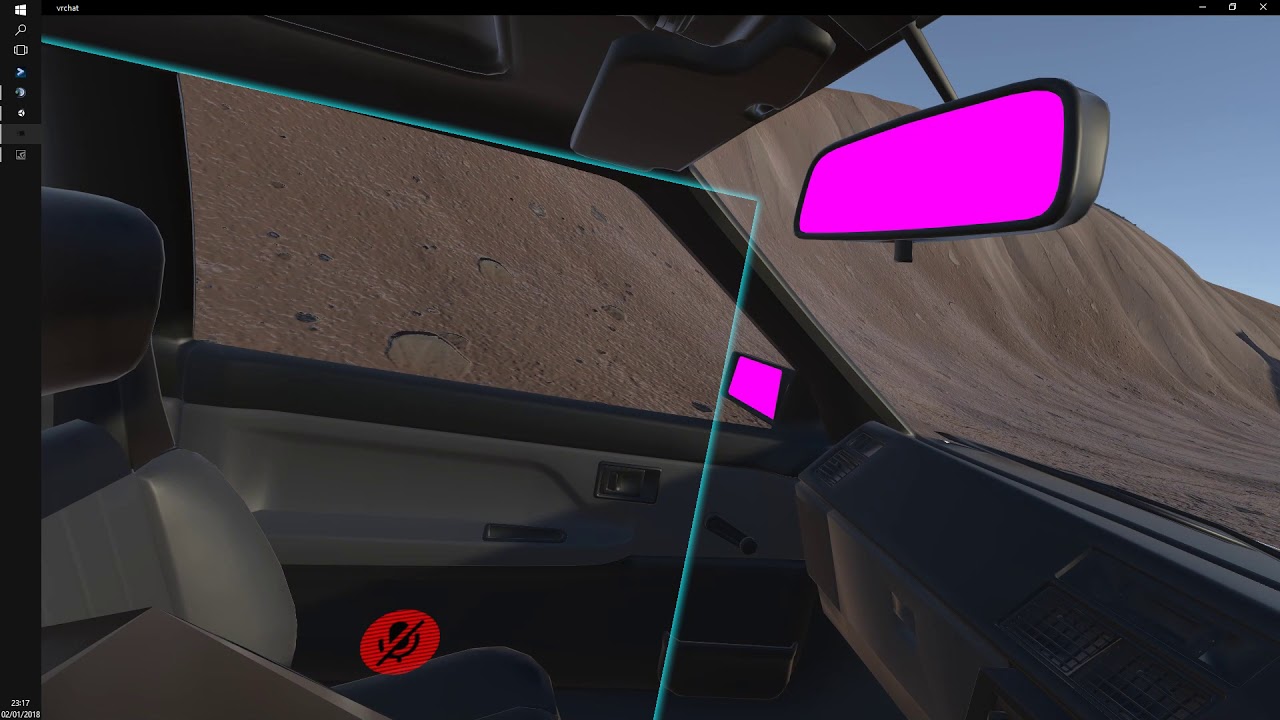
anyone knows a tutorial about making a venchile like this https://www.youtube.com/watch?v=3k6-bcCz2SI&t=9s riding in vrchat world?
 south remnant
just use the standard vehicle controller that comes with unity and add some triggers to it so players can enter / exit -- start / stop the vehicle @bright bison
if you're a beginner its not a simple task
bright bison
i got for somone a site could get some karts to ride in it am satisfied with it
from
south remnant
btw this is the wrong channel use #world-development
fair agate
Trying to wrap my head around pickups and trigger occlusion...if you exclude pickups from occlusion, but turn off their environment, if you are the only person in the world, the pickups for you will fall. If someone else is in the world, and you are the master, other people will see the pickups fall?
So to get around this, you have to leave in all the colliders pickups could possibly be on...
Brain asplode
I did a test where a pickup was the child of an occluded area. I carried it through the occlusion trigger. The pickup disappeared but my hand was still “holding”.
toxic plaza
yeah thats what ive been confused about but it was recommended to not use it on pickups. I've excluded all pickups and animated npc's from occlusion (for animated ones, i am looking to turn off the mesh renderer though). Also i'm transferring my colliders onto seperate, invisble objects which i can exclude from the occlusion so that should hopefully solve my issues with pickups falling (originally my world was made from giant meshes with mesh colliders on but i was advised to place mesh colliders on duplicated models of the world, seperated into smaller meshes so instead of the city as one mesh, its now individual buildings and have these individual ones turned off and used purely for mesh collider only)
scenic swallow
@frigid vale The more draw calls your world has the fewer people you will be able to have in your world before the frame rate starts to drop. If you have way too many draw calls then it can end up being sub-90FPS even when you're alone.
lilac saddle
I'm having a lot of problems with my lightmap.
https://gyazo.com/23b1434937790bbdcd73537ba275b41b
These crystals are emissive, and the light they emit clearly shows up on the lightmap
However, when I look at the render, it looks like this
https://gyazo.com/9e05888902dea34d0c8e8320cd74b218
Anyone have a clue?

 scenic swallow
@lilac saddle The shader your are using for the wall doesn't appear to support lightmaps.
What shader is it?
lilac saddle
Cubedparadox flat lit
scenic swallow
Ah, yeah... It doesn't support lightmaps.
lilac saddle
Well that certainly makes sense then lol
scenic swallow
I think we have an issue for that on the GitHub page already.
GitHub
The shader does not correctly handle lighting from lightmaps and/or shadowmaps for baked and mixed lights.
lilac saddle
I have another really strange issue too. Basically, when I bake the lights it stops my water mesh from rendering unless i get the camera really close to it.
scenic swallow
The shader was really only written for avatars.
Your water probably relies on real-time lights.
You can put the water on its own layer and add a duplicate light that only lights that layer.
lilac saddle
yeah I'll try that then
Would you happen to know of a shader with a similar effect to cubedparadox's?
toxic plaza
is combining meshes with different textures beneficial for draw calls? For example I merge the entire city into one giant mesh (separated from colliders obviously) that has like 10 texture atlases applied to it. Would this cause any problems or is this recommended?
i only learnt recently that unity offers multiple textures for a single mesh XD
 astral trout
i think it might be better to split maps into smaller chucks if theres a lot of obstacles you can use for occlusion
that way with baked occlusion culling it only needs to render meshes that a person can see
if the whole city is a single mesh it will render the whole thing all the time
toxic plaza
i used that as an extreme example only to combine it all into one mesh
but having multiple texture/shaders on a single mesh is better than having a seperate mesh for each shader right?
like say i have a plaza in a city where occlusion wouldnt help
would it better to have all that as a single mesh with multiple textures?
astral trout
oh definitely
toxic plaza
thats great, means i can improve the draw calls significantly XD
astral trout
but depending on how many meshes the difference is probably negligible if its just a few meshes
but if its like 50-100+ then yeah
though you can still have occlusion in an open area
like, you can have it set up such that things behind a camera isnt rendered
toxic plaza
doesnt that happen by default anyways?
astral trout
though theres probably a sweet spot where doing so is beneficial
toxic plaza
i have situations where an object disappears before it leaves my field of view
astral trout
yeah but its a seperate object/mesh ?
astral trout
i meant things like environment, the floor even
if you really wanted to you could do it like that
toxic plaza
i see
astral trout
but its probably not worth it unless you have some really detailed geometry lol
toxic plaza
its detailed but low poly at the same time
a city from lightning returns
but going back to that issue with things disappearing, my boss's mesh disappears if im looking away from it but the fist is infront of me
i also have a dragon that disappears if my back is almost facing in its direction
i see it disappear whilst its on the edge of my view
is there anyway to keep them rendered?
not sure if bounding box is something that is used to solve this or not
astral trout
can you replicate it in the unity editor?
did you actually bake the occlusion or is this just default?
toxic plaza
i think its just default
i'll have to check tonight if it happens in unity (at work right now)
the dragon is static since it was just a placeholder until i put the skinned mesh version in with animations. The boss with the fist is not static and the animation involves him punching the ground in infront of him, and since its a giant enemy the player has a lot of ground to cover from the fist to the body itself (so looking away from the boss to look at the fist landing behind you turns the mesh renderer off for that period)
limber maple
The player camera has a FOV of 60 from basic. You can upgrad it to 90 maybe it'll help to load all the thing even when you turn your head
Also maybe the 1000meters render isn't enough for you
You can also put 1200 or smth on your camera
 bright basalt
I tried setting the fov to 1300
Things look very uhhh... Interesting....
kindred quarry
When I first enter my world I hear every sound file at the same time for just an instant. Has anyone experienced this and perhaps know what causes it? Thanks
misty pecan
I believe that split second is just before audio spatializing kicks in, so every audio source is basically overlapping each other and playing next to you
kindred quarry
Thanks Zarn... that is what it sounds like, it can get pretty intense though, I am wondering how to block that initialization of spacial sounds?
misty pecan
In my experience if you have a lot of sound sources loading in at once it happens
For example you have one world-wide music track, and 30-40 smaller ambient sources (waterfalls, bird song..) then it's more prone to happen
I would set up a trigger to only activate those smaller ambient sources locally when you exit the spawn area
kindred quarry
I am guessing that putting a precise amount of silence in front of each sound file may be a solution, at least for music files. The natural sounds unfortunately need to loop seamlessly
misty pecan
That's one way to go about it, yeah
Or have a local trigger to only activate the natural sounds when you get close to them, and turn them off when you get away
kindred quarry
That is a thought... I see a message in Unity, that I should have an 'audio listener', would that make any difference?
I fgured in VRChat, we are the listeners
misty pecan
That's only if you're planning on making your own standalone game
For VRchat you shouldn't mess around with audio listeners, because like you said, our avatars already has those
That's how we can hear anything ingame
kindred quarry
yeah, ok, I guess I will continue experimenting, be nice if teh VRchat load seq maybe took this into account and turned off sound for the first second or two.
misty pecan
Do you know how to set up a local trigger? I think that would be the best solution
misty pecan
I was thinking specifying an area when you enter it, a specific audio source turns on only on your game client
Or even exiting it
misty pecan
Yup
kindred quarry
I am thinking that might not stop an overall system worldwide spacialization startup
teh silence would just be part of it
This noise collission seems to happen an instant before teh world becomes clear
misty pecan
Ideally I'm thinking only the worldwide audio source would start off as active (And not be touched by the triggers) and only the area specific sounds are turned on (They start off as deactive when you load in first) when you take a few steps off the spawn point
That would fix it I think
I can show you a quick way to set it up
kindred quarry
Ok I am listening
misty pecan
Gonna set up a screenshot how to set it up in unity
kindred quarry
ok, much appreciated. just going in to test a few other things that are 'experiments' 😉
misty pecan
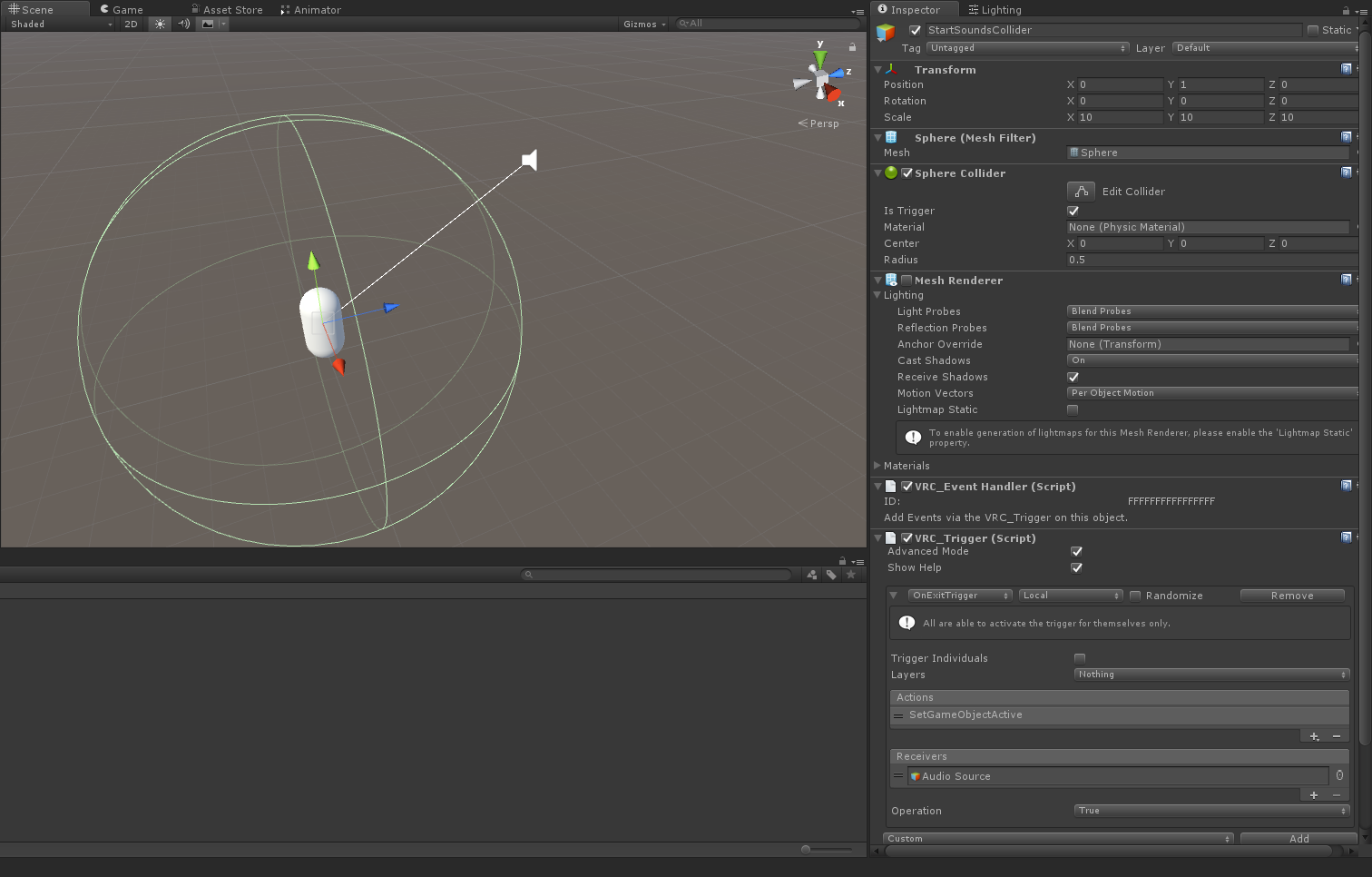
@kindred quarry https://i.imgur.com/pMS1vvp.png
Pretend the capsule in the screenshot is a player. So, I began with creating a sphere game object and set it dead center in spawn. Then I increased the size of it a bit so you have to walk a little bit to exit the collider, and I turned off the mesh renderer component.
It's very important you enable "Is Trigger" on the sphere collider component.
Then I added a trigger on the sphere object and you can see how I set it up. Obviously you're going to have multiple sound sources so keep pressing the "+" button on the receiver tab and drag each individual non-worldwide audio source there. Make sure operation is set to "true".
For this to work properly you need to disable the sound sources that are going to be turned on when exiting the sphere collider, in case you didn't know you do that by clicking on the tick box at the upper left in the inspector window, just left to where the name is.
 kindred quarry
hmmm ---
misty pecan
You can also use OnEnterTrigger instead of OnExitTrigger to make it so sounds only turn on when getting inside that collider
kindred quarry
Ok let me create a small test world myself and I will see if I can replicate that arrangement, it sounds like I will have to stop looping my songs which are in play as you approach them. I presume they are considered worldwide soulnds even if they are proximity based?
misty pecan
If you have a background track that is supposed to always be playing then you don't do anything special with that.
However if you want a new song to "replace" the background song temporarily when you're close to a jukebox or something then you can set a higher priority on the jukebox sound source
kindred quarry
these are individual soundfiles that loop and can only be heard as you approach, yet they are not triggered
misty pecan
I think it's fine in that case to turn all them on when you exit the collider. It's just you don't want them to be active just as the world first loads in
When you can actually move out of the sphere, then the world must have been initialized
So that audio hiccup won't happen
kindred quarry
right... Ok well thanks, those are good hints and leads to start looking at this issue, I will explore it more with that. Thanks so much!!!
misty pecan
Hope it works out
 stiff aspen
hey guys any of you are interested on creating a world with a group of people ?
 soft sphinx
hey guys, when loading into my world for the first time it would always have a good 10-15 seconds of a black screen before i see the world. Am i right to believe this is due to poor optimization?
misty pecan
My personal theory is there is a whole lot of materials that needs to be loaded in when that happens
So try cutting down a few or merge where possible
Dunno how accurate it is, but in my experience it seems to be that way
soft sphinx
ok i'll try that, thankyou
fair agate
@misty pecan I have sound files on pickups that activate when they collide (like cheap physsound), so they all fire off at load. But is it ok to turn off pickups locally for new entrants? Will that mess up sync? (There was discussion about not using occlusion on pickups) Or does that audio thing just happen just for the first user?
misty pecan
@fair agate To be totally honest, I got no clue. Never tried that before myself, so you'll have to try it out and see
fair agate
Do you know if OnNetworkReady is local?
misty pecan
You should be able to do a local trigger with it, no?
fair agate
I was thinking it could be used as the first spawn trigger
misty pecan
Like enabling objects locally when the network is ready
misty pecan
That's how the "loading" gate works in the great pug
fair agate
so the door ding is OnNetworkReady?
misty pecan
OnNetworkReady (Broadcast type local) disable the gate
fair agate
That's a nice feature actually
misty pecan
Not the ding, but you can't run inside the bar until all triggers are loaded
For example, if the bar door is supposed to be closed newcomers don't see that and they can run past it before the network sync up and it become locked for them
fair agate
I have noticed that doesn't also load all avatars
 dark trail
How would I go about having a trigger enable/disable a mesh renderer locally?
toxic plaza
trigger you want > action: setcomponentactive > meshrenderer of selected object
for this trigger, choose advanced
and change it to local
dark trail
Thank you Lakuza c:
lilac saddle
Could anyone think of a reason my world would crash on upload with my lights set to mixed?
 high stump
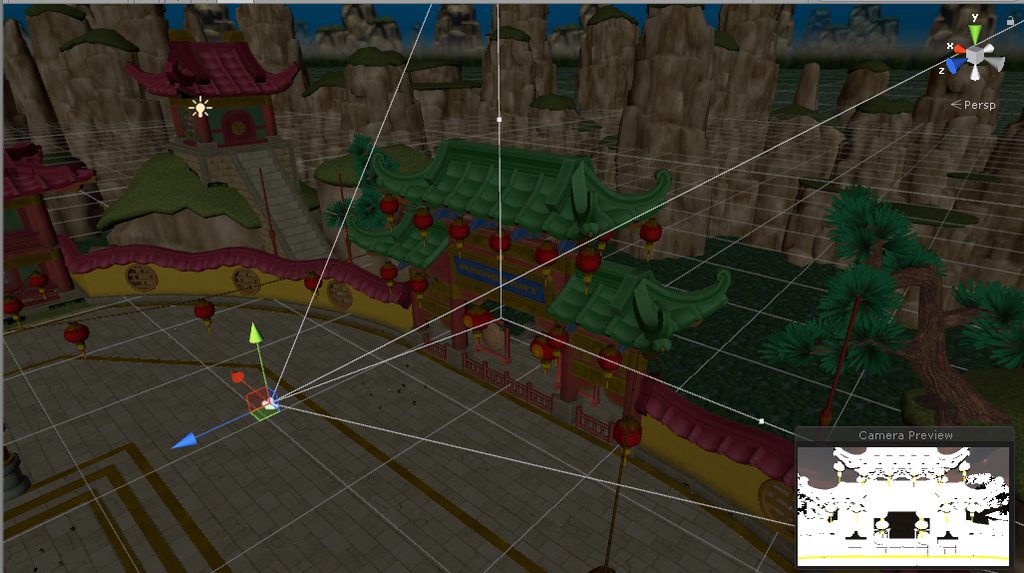
Textures are visible in Unity but in the Cam Preview and in VRChat the Textures are White
How do I fix this?
 lime pine
So, I brought one terrain piece on top of another in order to copy the positions of the roads before moving the terrain away. Now I just noticed this really ugly lighting glitch, is there anything I can do about it?
https://i.imgur.com/IFbNicR.jpg
all lights are real-time w/ no shadows
limber maple
Terrain on unity 😢
lime pine
Yeah its been problem after problem
 agile roost
Been trying to make my world public for the longest time now. Not sure how I could optimize it even more (lights are baked, there's only one mirror, and I had to remove a lot of intractable objects). It says it's unlisted; not sure what that means. C'mon Tupper, I see you playing world of warships. :T
lilac saddle
The only thing to do is get on warships and kick his ass and make him beg for mercy.. then tell him to make ur map public or else youll destroy him.
 sinful ivy
@agile roost Are you using LOD Groups for objects (At least the higher poly ones)?
high stump
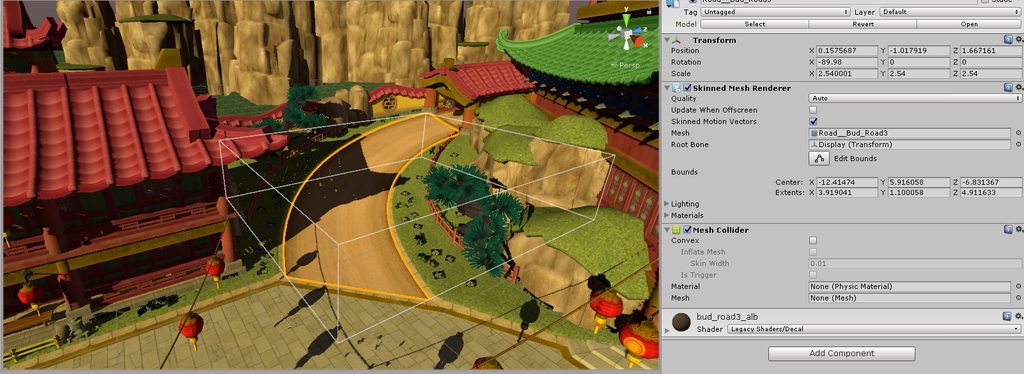
Even with Mesh Colliders, the highlighted areas dont have any collision in game, can some1 help me?
 slim tinsel
@high stump you probably solved this by now but you need to assign the mesh from the imported object
The Mesh field is enpty
Empty*
Even better click the mesh on your skinned mesh renderer the Road thing, and place that on your mesh collider as well
soft sphinx
Hello, im trying to look for the best audio import settings? I've heard using OGG format is a good start but what about the settings in unity?
i was more on about these settings here

but thanks, i'll give those a try too
Right now my world has a black screen for a long time (10 seconds) after it fully loads and occasionally crashes when you leave the world
and i've narrowed it down to the music
soft sphinx
I've removed ONSP, doesnt change anything which is cool. But it still take a long time to load in. Anyone got any suggestions for the import settings?
west zinc
audio import settings? For short sfx make them wave files for best performance. Longer sounds ogg. Music ogg streaming
basically anything that is short and reoccurring should be wav
 harsh geode
anyone know why my world is stuck on preparing to upload after the naming process?
lilac saddle
@fair agate this is interesting if you haven't seen it http://blog.theknightsofunity.com/wrong-import-settings-killing-unity-game-part-2/
There are many things that may go wrong with your game development. Your models may have too many triangles for your target platform to handle, your algorithms may be too expensive for your CPU, and a
should be pinned imo
because buffering audio is more of a lag factor than people realize
fair agate
I agree. Somewhere I read “make all audio ogg” and just always did that. Didn’t realize how all of it is handled.
fair agate

VRChat Wikia
This tutorial is very outdated. You can no longer attach event handlers or triggers to avatars. In order to trigger sounds on your avatar, use an Override Controller and an animation. See...
fair agate
When I first started tho THATS THE DOCS 😓
lilac saddle
this is why we can't have nice frames 😟
 lilac saddle
I heard they sell magic beans in the asset store
west zinc
fionna just change the audio quality in unity. Unity doesn’t use the premade compression for audio anyway. Find the audio file in the assets window and click it, import settings should appear in the inspector
toxic plaza
oh 😮 I've been using ogg due to the recomendations too
and my import settings were all default
so wav is better for unity than ogg?
curious to see how much my music was impacting the world now
lilac saddle
@versed lichen mind you if i pm you real quick got something you might be interested in
lilac saddle
Nevermind ive emailed moderation instead.. im sure one of you will get round to it eventually..
versed lichen
Just saw it, thanks a bunch
versed lichen
"idiots.jpg" made me really laugh
toxic plaza
XD
if only the spent all that time making cool avatars and worlds....
they could get their fame and fortune that way O.o
so idiots sums them up perfectly XD
west zinc
@toxic plaza keep your music ogg, but set it in unity to streaming
that way it pulls from the disk instead of putting it to ram
short sound effects to wav
toxic plaza
thanks 😃 will try that out for my next upload 😃
west zinc
👍 np
toxic plaza
@west zinc it seems that audio that i turn off with a trigger, will never come back on when re-triggered.
im using an enter trigger to change the music as you enter a dungeon. Both stopped working, so i did another test changing the dungeon music back to default settings and it worked again but the previous music that was left on streaming still had issues. 😦
west zinc
Hmm thanks for letting me know
west zinc
Everything I said about audio is grain of salt type stuff, if you having lots of music switches then streaming might not be the way to go, but if not do streaming
 real ether
Hey so I just updated the SDK in my world so I could reupload my world with minimal changes, and suddenly my whole world is lagging like crazy when it had none before. All I added was an extra song to my video player. I think it might be the SDK, what's the problem here?
ebon mauve
Remove the song and re-upload again to see if the new song caused it or not.
bright basalt
Hey, quick question
I have multiple rooms I'm my world and I want to optimize it by disabling all the rooms except the one where the player is, if I add a collider as a trigger to enable the current room would it be fast enough to enable it before the player falls to its death or it depends on the user's pc?
Any other idea on how t do it?
misty pecan
That would work just fine
Just make sure the triggers to turn on/off the rooms are local, unless you're planning on making a singleplayer world
bright basalt
👌 thanks
toxic plaza
testing is really the best way to find out
preferably with testers that have a vr headset
i think when it gets reviewed, its done with a single user with recommended vr specs
(im assuming you already know about the framerate display in the menu)
 acoustic mica
Anyone know why part of my map vibrates yet the other section is fine.
 glad cypress
@acoustic mica the part that "vibrates" might be too far from 0,0,0 position, the vibration might be caused by floating numbers imprecision, I've seen it happen on platform at around 2000,0,0
agile steppe
Is there a way to create a round Mirror?
we want to create a Mirror for the Platform Only (+ the Path) so everything is mirrored on the Platform.
Everything outside of the Platform is "Fake Mirrored" by creating a Upside-Down Version of the Area.

We don't want to put the Mirror over the whole Place because it would look like this since the lights won't be reflected by the mirror:
 scenic swallow
@agile steppe You can create your own mirror mesh but you will need to experiment with the orientation of the mesh in your modeling software.
The mirror script makes assumptions about the direction the mirror surface is facing.
To make it a mirror just at the mirror script to the custom mirror mesh's game object.
agile steppe
hey @scenic swallow
everything I tried to create a non-rectangular Mirror resulted in a buggy mirror which is not usable

would be awesome if you could help me out there >3<
scenic swallow
@agile steppe I had to do some trickery to get the axes aligned.
agile steppe
tried so many orientations already and everything resulted in almost the same shit x__x
I know I shouldn't ask for something like this, but would you help me out with that?
scenic swallow
What worked for me was to actually have the mirror plane rotated to -90 degrees about X
and the plane's local coordinates setup such that the mirror's surface was facing negative Z
 west crag
lol, I think I just completed a full circle. I converted my fractal shader into a vertex+fragment shader to see if it improved performance, and by the time I got lighting working it behaved about the same, and even still has the weird noise properties of the old one
west crag
the fascinating thing at the moment is that I can render this thing at the full resolution of my display at 100fps, but as soon as I bring it into VR, it crushes me from 90fps to 15fps
harsh geode
why does my scene in unity not correspond to the scene when I upload my world
the lighting in unity is much darker
 winged sinew
Did you use post processing? Make sure it's set on the Reference Camera too
lilac saddle
Can you change the Render Distance in a world? Or is there a setting that's specific to each user?
 winged sinew
Did you put the Main Camera on the VRC_Scene Descriptor as the Reference Camera?
harsh geode

same view in the actual world
umm
checking
i just set it as reference
thats good to know now but also


the first pic is in the scene
the 2nd is the desired render
i'm trying to see my scene as the render how its supposed to when uploaded
@winged sinew
winged sinew
You didn't answer my question?
 sour cave
why aren't any of my static point lights baking when i bake lighting?
sour cave
yes
i figured it out
culling masks don't work when dealing with light baking
so my lights inside these lantern models aren't casting any light
south socket
ah
sour cave
i just have to bake with the lanterns off and then reenable them after
south socket
hmm, what about mixed lighting?
sour cave
how come when i bake my lighting the environment lighting color is gone and all the shadows are ugly black
i have a nice blue environment lighting color that makes all the shadows blue in dynamic lighting mode but it doesn't apply to baked lighting
south socket
I've had that happen to me a couple times. Could be a shader issue
got a picture of the scene youre making? might help me understand a bit better
sour cave
i have my environment lighting set up quite bright, for blue shadows https://i.imgur.com/iCYxxZu.jpg
when i bake lighting it just goes full dark https://i.imgur.com/orbpMuQ.jpg





ignore the low res bake i just turned it down for testing
the point is ambient lighting isnt being baked
 agile geyser
how do I make the lights low res out of curiosity?
Because I need lower baking times
sour cave
lightmap resolution
i just turn it way down so i can bake in like 20 seconds to test if all my stuff is working
sour cave
sure, if you want to quickly bake lighting for testing purposes
it's gonna look ugly though
sour cave
if you want it to look good yes
agile geyser
what if it's primarily voxels
sour cave
still gonna take forever
agile geyser
ouch
sour cave
i'm about to give up on baked lighting, it's just not behaving how i want
ambient lighting doesn't work at all
i think i'm just going to cut down on the number of point lights and stick to dynamic lighting
south socket
hmm, have you tried setting the mesh so that Unity creates custom lighting for it?
and maybe calculate normals
agile geyser
I'm gonna give up on Baking, it just takes WAYYYYYYYYYY too long for the scenes
sour cave
cause i'm using sabrecsg so i can't really recalculate normals
its all done automatically
agile geyser
SabrecSG?
sour cave
level building tool for unity
i don't recommend it, it's really buggy
it's too late for me to redo everything but in the future i'm not using sabreCSG again
 solid zodiac
does anyone know how to move the location for teleports because mine keep making me glitch out of the walls
agile geyser
surely you just move the unity entity?
solid zodiac
i dont think thats how it works
acoustic mica
Is there a way to sync up animations for all?
 errant vapor
object_sync
acoustic mica
oh yeah. thanks. used that on my objects before hand. forgot
agile steppe
Hey Guys,
we've a problem with the Draw Distance of VRChat because our Skybox isn't visible anymore.
Is there a way to increase the Draw Distance ?

 hushed cargo
Question towards lighting. http://prntscr.com/ivxtd1

When i look abit left of it it actualy displays the light
and if not it looks like this


How do i fix this issue ? does it has to do something with draw distance ?
sinful ivy
@agile steppe You can use the reference camera, but you should just be using a skybox shader instead of that dome. If you want it to rotate then a custom shaders can be animated with time.
@hushed cargo The issue is that they're realtime lights (There's a limit on realtime lights rendering at a time, you can not change that as it's set by VR Chat), you need to bake them.
agile steppe
@sinful ivy the Skybox isn't just a texture or more textures at the same position


it has more layers with a different distance
https://i.snag.gy/dsLBPO.jpg
little zoomout

 sinful ivy
I know, I was just suggesting ti for the the outermost layer, the dome. Vr Chat probably has draw distance set to default (1000) So unless it's all insanely large I imagine only the dome is being culled
agile steppe
oh okay. We should try that out, thanks!
acoustic mica
What is the proper way to trigger an animation such as a door opening?
I have the trigger setup for stating the animation
but it does not work
 cedar sluice
is there even a way to increase the skybox render distance if you were to use things like this?
misty pecan
@cedar sluice Yes - In the VRCworld prefab there is a slot for "reference camera". Put a camera object in there and increase the far clipping distance on the camera object.
agile steppe
thank you @misty pecan o/ will try it!
fair agate
I have about 25 unique materials for quads that I use for 2D cutouts. Would it be worth trying to optimize all of those? I could atlas a bunch of planes together, or make them sprites or something?
Or is that not enough materials to make it worth the effort
lilac saddle
meh, stuff like 2d images compress really well, also on the gpu, you could spritesheet a couple together you use often I guess
misty pecan
I would suggest stress testing the world on the next dev meetup that Squid hosts to see if it's needed or not
lilac saddle
if they have the same material properties you can instance them so it will try to batch them into one drawcall
misty pecan
Or gather a bunch of people yourself
lilac saddle
@fair agate
fair agate
Yeah I guess I should just finish building and see if its a problem
lilac saddle
it's tidy but it starts paying off with a lot of dupes of the same thing on the screen and in mem
because the gpu will have 1 texture sheet in memory and one material, just different UVs and will speedrun drawing copies of it without swapping out the textures or material settings
fair agate
It's not tons of dupes, maybe a couple hundred quads at most if that right now. I have to redo all the textures to higher res though, they are large and look like I made them in MSPaint
lilac saddle
optimising 25 materials and about a 100 quads drawn will definately give you some extra frames, just a handful though
fair agate
Ok, will consider
lilac saddle
not the 100 quads per se, but the swapping of materials mostly
they need to 'upload and convert'
using a spritesheet makes it resident in mem for all the quads at once
modern cards do this without breaking a sweat so it's really a tiny improvement I would guess
sour cave
can i cull some of my small objects at a certain distance?
sour cave
looks like i can use lodgroups to cull my objects
west crag
now I can render my shader at 200fps in unity, but it still brings vrchat down to 20fps (admittedly an improvement from 15fps)
acoustic mica
how do I get my items to respawn if they fall off of the map?
sour cave
VRCWorld has a setting "Object Behavior at Respawn Height"
hushed cargo
Someone familiar with lighting and could give me a quick introduction/help towards a problem of mine
(baked lighting)
cedar sluice
fixed the skybox problem, thx @misty pecan http://puu.sh/zP8LK/c2b7d53127.png

 agile steppe
aye guys, is it possible to add a canvas for each player to the Camera (Optional by clicking on a button)?
I would like to add a simple GUI for "Roleplayers"
https://i.snag.gy/69dUqj.jpg
isn't it beautyful? 😄

 sweet sinew
I know you can do it on an avatar, but not sure about a world camera
agile steppe
I would love to create a GUI (optional) only for this world so everyone could have one.
If someone knows how to get it to work, please tell me o/
sweet sinew
You could create it as a local panel that the player can take with them around
agile steppe
would be a idea but... It wouldn't be a GUI which looks like the one in WoW 😂
agile steppe
Does Occlusion Culling work with VRChat?
sour cave
the built in occlusion culling works, yeah
agile steppe
that's great, thanks for the info
 toxic token
has anyone experienced distorted/warped textures within vrchat when using baked lighting? the textures look fine in the unity editor
toxic token
hmm, I guess it's not the lighting. it happens when I make the worlds mesh static
glad cypress
static, upon build, joins all static meshes into one
 toxic bough
That's is so cool,
 gray yacht
Does anyone know the process of updating a public world without it being made private again?
 bold nymph
Theres none. We have to resubmit everytime we push an update
Theres test build to
Or make another wrld id for beta
misty pecan
It more or less depends on the collider you're using for the pickups
Box colliders are the most friendly to use and then you can have more objects, then say you were using mesh colliders for them all
 willow sonnet
Do I need to add box colliders to everything to stop it from falling through the world or will it stay in place?
misty pecan
You need to have colliders on the world itself, yes
willow sonnet
So everything I add in needs to have colliders
misty pecan
Colliders is the "ground" that you stand on.
willow sonnet
Ok got it, thanks.
misty pecan
Or makes something solid
willow sonnet
What if I want to place something in the air like a poster or clock, will it stay up on the wall?
I guess my question is, what determines that gravity will affect a mesh?
Is it just the pickup attribute?
Nvm, it's the rigidbody one.
 nova oak
@agile steppe w-what, did you just bring in Dalaran? lmao
is this new or old dal?
hopefully your surfaces all have that lovely magical sheen that the real version does
 honest tinsel
I have loads of 'dynamic materials.' I'm new to Unity but understand them from UE4. None of them seem to need to be dynamic. How to I make them static? Dynamic is only for if I need to change something at runtime right?
https://i.gyazo.com/ca1c17bc8e12c5b436f16a51febbe449.png I don't see anything that screams 'I'm dynamic, here is how you shut me off!'
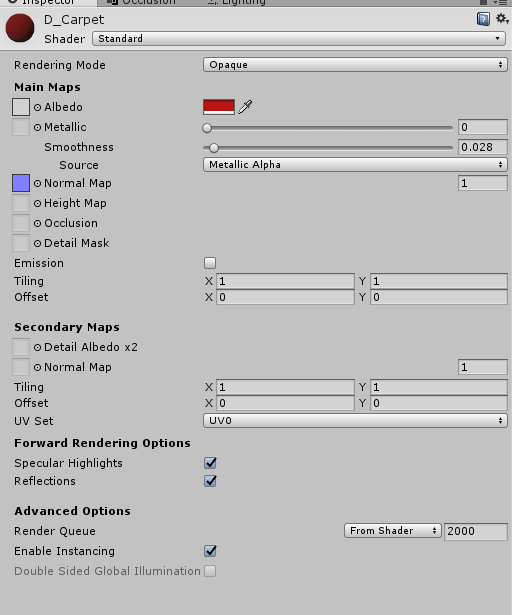 misty pecan
@honest tinsel I'm not too familiar with unity terminology myself, but the static tickbox should only be checked when an object/mesh is never going to be moved or animated
The materials on your screenshot you don't have to worry about setting as static or something like that
honest tinsel
Yeah, that bit makes sense to me, and I have almost every mesh set to static, but I'm seeing a HUGE list of 'dynamic materials' in my world descriptor, and I'm guessing that isn't good for performance.
Also a few warnings in the log about dynamic materials not eligible to be instanced.
misty pecan
However cutting down the list of the materials is always nice whenever possible
Might be because of the shader being used on those materials?
honest tinsel
Almost all are as the above, standard. Maybe the way I'm creating them?
misty pecan
🤷 However I wouldn't put too much through into it right now, unless you're at the end of the optimization cycle
honest tinsel
Good point. Just saw it while troubleshooting the teleports and thought I'd ask around.
(Teleports still broken, BTW. No idea what is going on there)
misty pecan
Unless you got an obscene amount of materials you probably don't have to worry about it