#3d-modeling
1 messages · Page 100 of 1
 austere bear
 maiden folio
wowww to make a model quest compatible its gotta be under 5k polys?
bruuuuhu
i spent weeks modeling my OC and its 16000 
my quest friends wont be able to see it...
maiden folio
austere bear
Could someone help my prepare my model to send into Unity?
eyh, you dont need much except have it rigged with bones you make yourself or with mixamo autorig and import the .FBX in unity. If you wanna make expressions and closing eyes its more complicated
austere bear
maiden folio
eyh, you dont need much except have it rigged with bones you make yourself or wi...
I was hoping to have a part of my model light up based on if im talking
would that be done in unity or in blender?
maiden folio
ah i dont know if you can control shaders with your voice
there must be a way but i dont know. google "control shader with voice VRchat"
might give you something
austere bear
i mean would it be under shaders?
currently my light bulb lit up is a material
is it possible to make the material flick on and off?
 warm mango
Yo, what's a good texture painter for models would you say? Because once I export the paint from zbrush it ends a little crispy and low quality, especially around the edges. And they don't allow me to bump it up to 4k lol
like ew, jpeg ass quality
maybe im doing something wrong lol, idk im still learning
 fringe rock
4k 
 meager ridge
Okay this is irking me. I have literally no weights here on ANY head bones, or ANY hair bones, and it still seems to get pulled. I'm at a loss, honestly
meager ridge
I simply separated the dress, deleted the vertex group for the neck bone and that fixed it
But yes, that wouldve worked too if I had thought about it
 plush gate
Hello,
Does anyone know why the hair of the avatar in blue looks so "floaty" compared to the orange one?
The bones seems super similar and everything is setup the same everywhere I looked; I'm so confused 👀
There are white lines popping out of the head of the blue one at the top I do not know what that means.
 tough plover
plush gate
Hello,
Does anyone know why the hair of the avatar in blue looks so "floaty" com...
tough plover
plush gate
Hello,
Does anyone know why the hair of the avatar in blue looks so "floaty" com...
the white lines show you where the dynamic bones are
plush gate
Yes, but see how they are popping out on the blue but not on the orange, I do not understand why 😮
The top of the line is thicker because it's outside of the head somehow
( Better picture )
tough plover
the lines are exactly where the bones are
you can either move the hair mesh up, or shrink the bones down
if the hair is a seperate mesh, then just move it up in object mode
to edit the bones, click on the armature and switch to edit mode
plush gate
So I shrinked the bones down; imported; deleted the script just in case and re-created it and now it looks like this 😮 I am so confused 😂
The white lines are going out even more
 main prawn
tough plover
plush gate
So I shrinked the bones down; imported; deleted the script just in case and re-c...
main prawn
tough plover
plush gate
So I shrinked the bones down; imported; deleted the script just in case and re-c...
click on the FBX in the assets window, go to the Rig tab, then to Configure. at the bottom right, click on "Pose", and click Reset followed by Enforce T pose. click apply and then click done
see if it fixes it
plush gate
It still goes back to super blown-up hair with lines popping out.
This made me realize that when I'm in the "configure screen" the hair is fine though.
And also if I drag-drop my .fbx into the scene as a new model the hair is also fine by the looks of it 😮
So it's a script that messed up my "main model" and now we need to find a way to reset it despite me deleting it? (dynamics)
tough plover
plush gate
So it's a script that messed up my "main model" and now we need to find a way to...
that can happen sometimes, drag the FBX in the scene and use Pumkins avatar tools to copy all components from the old one to the new one
 spiral sigil
can someone make an avatar like this for quest please?
im kinda poor rn, i only have 2 dollars and im only 13
It would make my day if someone made these avatars
 quaint jasper
People's time is valuable, no one will make that for free, i'd suggest you go around to avatar worlds and look there instead for now
 azure rain

Google Docs
Vroid Tutorials Basics Introduction to Vroid: https://www.youtube.com/watch?v=PTtPo5GdM3o Import & Export files with VRoid: https://www.youtube.com/watch?v=ufo45DwqslQ Changing clothes: https://www.youtube.com/watch?v=xVFXKg7pvKI Making Hair Textures: https://www.youtube.com/watch?v=8lxkcs5IZO...
here is a document with tutorials that could help out make that kind of thing to do it yourself
 neat viper
whoop sorry, chat didn't scroll for me
 halcyon citrus
You would have an easier time making it yourself than asking people to do it for free in all honesty. 3D modeling, just like 2D art takes time, energy, food, their own sanity, and more. There are a lot of ways to make it, but it's a matter of budget. Unfortunately the "Free" option is learning how to do it which not difficult if you're willing to learn.
And I know some people are thinking "Well if it's so easy, why don't they make [insert commission here] for me for free". Well again; Time, Sanity, Food, etc. The person you get a commission from is only human and can only do so much in as much limited time they may or may not have.
Not to mention, they may have their own problems and projects to work on to.
VRoid is a free software that helps you make models and your own textures.
MMD Community may have parts that you're looking for and thanks to Cat's Blender Plugin, you can combine parts rather easily depending on the parts that is.
Unity Asset Store, Booth, and Vket wildly varies on the free or expensive side, but you may find a cool model or two that may fit the price range.
From scratch however is pretty much borderline game development.
It can be simple or hard depending on how you go at it.
warm mango
yeah, a lot of people make their living on modeling so youd be taking time they could use making money lol. i believe theres a lot of free to use anime avatars that could fit them that you can edit (make the hair/ears red) but i tend to make from scratch so im not sure where.
halcyon citrus
Unity Asset store may be a good start, I know that one character Yandere Dev uses as "Senpai" is free
warm mango
maybe not best to follow in his example but def a start lmfaO
halcyon citrus
Well yeah, clearly
azure rain
myself I'd probably go the Vroid Studio route as you can even do the ears and tail in it without having to touch blender
warm mango
rq while im here, any idea why it thinks my model is tiny?
the viewdot is right on their nose and i resized them fine??
and in game the cams in their tummy so im not sure whats happening?
warm mango
azure rain
myself I'd probably go the Vroid Studio route as you can even do the ears and...
god id love to avoid modelling completely, i hate it hhnngg
azure rain
also recommend the Vroid because that doesn't involve breaking model makers terms of service like a lot of the MMD stuff
halcyon citrus
True that
Even the crediting part is rather difficult since you can't set a description of the model for people to read as far as I know.
quaint jasper
warm mango
rq while im here, any idea why it thinks my model is tiny?
Can you show the rest of the unity window ?
warm mango
sure lol
what ive noticed is it says its only 0.3 high when i adjust to over the nose, which def isnt normal?
but idk how to fix that lmfao
halcyon citrus
What sort of witchcraft is Unity pulling now? 
azure rain
halcyon citrus
Even the crediting part is rather difficult since you can't set a description of...
that's some of the reason the vrm format was created to include that kind of metadata
warm mango
some regular unity bullshit lmfAO
halcyon citrus
I see the problem.. You didn't make a trigram in alligator blood and cut open a loaf of bread using the sacrificial blade of Shoth Migüd.
But really, im stumped.
Im just sitting here like.. How the Hell?
warm mango
of course, i knew i forgot my blood sacrifice this morning
yeah exactly how im feeling?
like its sized the example and the same as an older working avi. but unity said nah
warm mango
id have to check lmfao one sec
good shout tho
yeah covers it
what is your beef today unity
warm mango
got it working, i just needed to re-import it? idk what was up with it lmfao
quaint jasper
@warm mango if you're going to scale something, do it in the asset model options, or poly your scale outside of unity before importing it
warm mango
aiight, gotcha
 weary slate
after i make a new shape with ctrl + a instead of the original cube, when i go into the sculpt tab, the sculpting options/tools won't be at the side and i can't sculpt
maiden folio
Anyone successfully used the atlas in cats?
i created the atlas material but in unity my character is gray, looks fine in blender.
 warped merlin
maiden folio
i created the atlas material but in unity my character is gray, looks fine in bl...
warped merlin
maiden folio
i created the atlas material but in unity my character is gray, looks fine in bl...
but did you created an unity material?
maiden folio
the material is in unity, not sure what to do then
it's assigned to the model too
warped merlin
so, you can extract it from prefab, change texture and apply on your avatar
 lusty sail
i cant make an Character idk how
warped merlin
lusty sail
i cant make an Character idk how

VRChat Ask Forum
Basic avatar creation workflow from scratch Overview I have seen someone asking about creating avatars from scratch so I wanted to make a little overview of it copy pasting the comment I provided so here it’s Stretch fingers like in the Animes Ok for starting you need find your workflow what could be, to speed up your progress so i will st...
spiral sigil
should be pinned tbh
 unique sigil
I hope that helps
 latent kite
so dire, i use wings3d
if memory serves me right you can import images into it and from there its easy to built your structer out from there
 ivory flume
using Wings3D?
neat viper
I'd personally recommend Maya if you know how to use it, though anything that can export to .FBX (preferably) or .OBJ will work
latent kite
adding holes for doors and windows is easy as add cube of corect sise rclick extract from
neat viper
Blender is def a good option too, and it's what I use
latent kite
wings is .obj
ivory flume
neat viper
I'd personally recommend Maya if you know how to use it, though anything that ca...
i have experience with Maya, and Unreal
latent kite
plus free and user frindly
neat viper
ivory flume
i have experience with Maya, and Unreal
unfortunately don't have experience with Maya, but I'd recommend making the model in that and unwrapping it there, then sending the resulting .FBX into Unity
latent kite
also you can select faceses and tell them to use a diffrent mat
ivory flume
the only thing i dont know how to do well, is UV unwrapping
neat viper
I could help with Blender UV unwrapping, but I don't have experience with Maya lol, would recommend tutorials in that case o:
nonetheless, would recommend Maya in your case, or alternatively Blender
ivory flume
could i take the product i would build in Maya, and unwrap it in Blender? or nah?
latent kite
<quietly continues to try to get more people to try wings3d for structer building...
neat viper
ivory flume
could i take the product i would build in Maya, and unwrap it in Blender? or nah...
should be able to! c:
neat viper
latent kite
<quietly continues to try to get more people to try wings3d for structer buildin...
sorry lol, not trying to undermine your suggestion or anything o:
latent kite
nah its fine
ivory flume
latent kite
<quietly continues to try to get more people to try wings3d for structer buildin...
i may try that if itd be the best route for it
latent kite
i really think it would be
neat viper
for the Maya method, you'd just make the model and either unwrap it in Maya, or export it as FBX and unwrap it in Blender
ivory flume
latent kite
think of micosofts 3d building app but better
google sketchup?
if not, i never knew microsoft HAD a 3d building app
latent kite
they did, not sure if they still suport it on windows 10
what they were going for was more for 3d printing though
ivory flume
downloading the latest version of Wings3D as we speak
latent kite
plus im that one guy who also builds .obj files with notepad
ivory flume
latent kite
plus im that one guy who also builds .obj files with notepad
im sorry...WOT
latent kite
yup
ivory flume
as a 2nd year animation student, ive never heard of that before
latent kite
all you really do is define cords in xyz space plus you can define matreals and do some crazy math calculations for curved faces
though they dont work the best for colision mapping when you have to do that...
ivory flume
jesus
latent kite
sadly there is little to no documentation on it :<
ivory flume
roight, so Wings3D is open, i just gotta pop away for a sec
latent kite
ok
also take a look https://en.m.wikipedia.org/wiki/Wavefront_.obj_file#:~:text=The OBJ file format is,of vertices%2C and texture vertices.
OBJ (or .OBJ) is a geometry definition file format first developed by Wavefront Technologies for its Advanced Visualizer animation package. The file format is open and has been adopted by other 3D graphics application vendors.
The OBJ file format is a simple data-format that represents 3D geometry alone — namely, the position of each vertex, the...
most of my worlds are built by hand in a friking text file
yes they are simple but its a art form
 molten patrol
anyone know how to make the model move with the rig?
latent kite
oof blender i have no clue
wait do you mean like paint the mest to the diffrent bones duover?
molten patrol
I'm in pose mode trying to test the rig, it's supposed to also make the model move
ivory flume
@latent kite im back. whats the first thing i wanna do?
molten patrol
I did exactly what the official tutorial says but it's not working
latent kite
brb have to pull up my notes, still looking for them dire
ivory flume
alright
latent kite
duover im sorry at that point i have no clue
molten patrol
ok thanks anyway
ivory flume
@latent kite ping me when your ready
latent kite
@ivory flume thus showes you how to do it. may be slightly diffrent in newer updates but still mostly the same options https://youtu.be/QDIH7xvdUnE
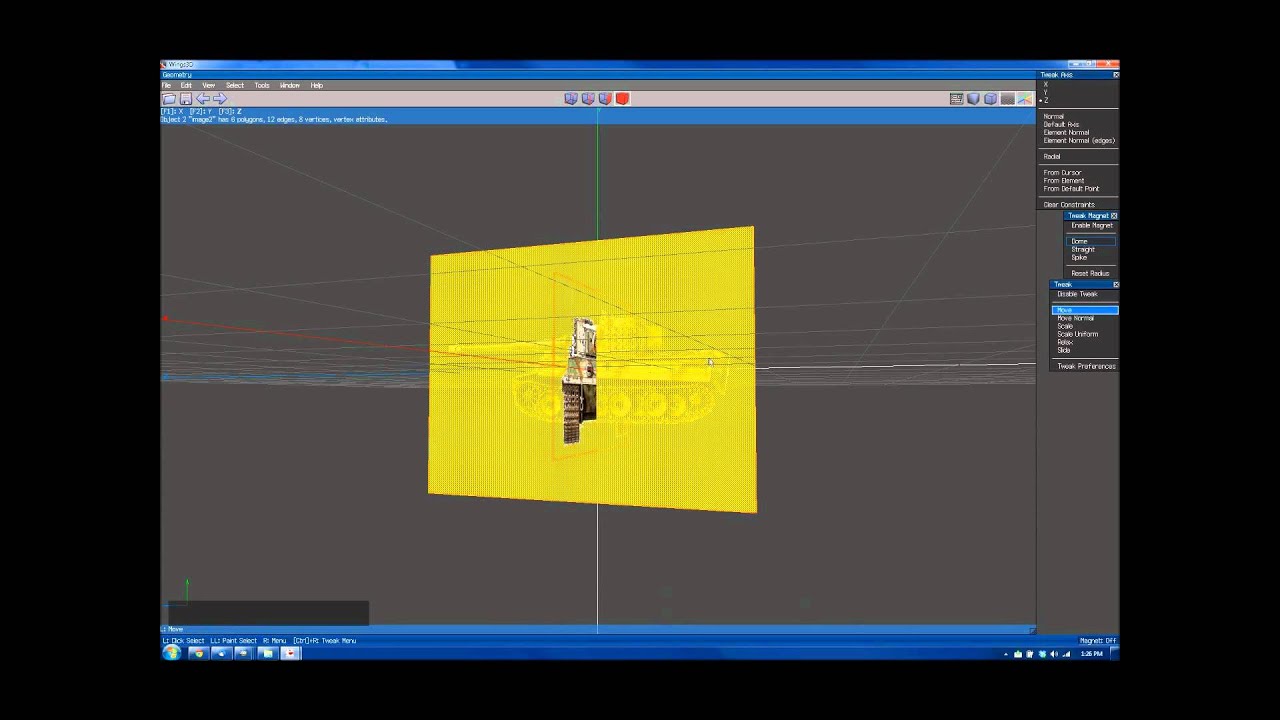
This video shows the process of creating background reference images in Wings 3D. References images making proportionally correct models a whole lot easier!
Provided by www.gamefromscratch.com
sadly my pc is apart rn so i cant make a updated video... been planing on making some basic tutorials for a while so this may be the kick i need :u
ivory flume
this is what happened when i tried rotating it in X
latent kite
oh it might be making a model from the image
ivory flume
i did Right Click > Image Plane
latent kite
see if you can go into face select to remove them?
looks like the red square on one side of cube in top options
away from pc atm sorry
ivory flume
i reimported with the Image Plane Options...now i just need to scale the image up
latent kite
oh, you should be able to just rclick and scroll at the same time on the image. if not when you right click it it will open a mini menu and you can click scale and drag the mouce to scale up and down then lclick again to set
ivory flume
right clicking and doing Scale Uniform did the trick. now i just need to go into the Top View, and start modelling
do you know how to do to so?
@latent kite
latent kite
ok so you can do this by holding down middle scroll
but if you want to change how this works its in settings and camrea movement behavore
it can act like other well known software
i normaly use default though
@ivory flume
ivory flume
that didnt get me into a direct top view
ivory flume
holding down mmb just moves the camera around, like a pan, if that makes sense
latent kite
try pressing R and xyz or arrows
ivory flume
like, your not focused on the object, its just moving to a different position on the grif
holding down R doesnt do anything, arrows move the image in different directions
but, R+Y did seem to get me into a direct top view
latent kite
ok, so looks like i need to update my notes
latent kite
ah ok i have been using an older version
ivory flume
ah, gotcha
latent kite
plus my notes have been made within the past 2 years
ivory flume
have you experimented with the 2020 version yet?
latent kite
not yet, lifes been a little crazy for me
just got out maybe 7 weeks ago for a simple battery charge cuz i had one to many drinks :/
latent kite
meh i just been looking for a new apartment since it happend
ivory flume
gotcha
ivory flume
alright. im gonna try doing it in Maya + Unreal, since i found my professors old tutorials on how to do something like this
 dry rose
Hey, does anyone know how to convert a UPK model file, to an FBX, or and OBJ, or DAE?
I have this model from xcom im trying to import into blender, and if anyone could show me how, and or do it for me, i would greatly appreciate it!
https://steamcommunity.com/sharedfiles/filedetails/?id=2071855146

(i can send files if you can help, also pls @ me if u help tysm)
 muted raven
ive actually never heard of a UPK file before
dry rose
its a unreal engine thing
 devout scroll
try umodel
 devout vault
maybe someone know a video that can help with modeling for very starter
tag me if you can send one here
devout vault
thank you @devout scroll
warped merlin
yea, thanks Pumkin!
 naive helm
Could I have a bit of help with my model? I have most of it done just connecting things and textures
devout scroll
what do you need
naive helm
no way
are you THE pumkin?
@devout scroll I have your avatar tools lol
mind if I dm you? I dont wanna post my model in here haha.. its a bit embarrassing
devout scroll
it's me
naive helm
ye-
Do you mind if I dm you tho?
if not its fine @devout scroll i know youre busy haha
 desert whale
it's easier if you post your question here
naive helm
its more of a screenshot type of question idk
desert whale
you'll have more chances of someone answering your questions if you post them here. People usually prefer not to DM or even call strangers
naive helm
aw ,_,
i just get really shy in group settings
im uhm, making a t-shirt
and its kinda- tricky
i dont know specifically what im doing wrong, but I know its something
I thought of an idea
So I could make thin cubes around his torso and join them
Then sculpt them
How do I combine them into a single mesh tho?
devout scroll
select them and press ctrl+J
naive helm
That wont just join them- ?
devout scroll
oh you mean how to connect them when they're already a mesh?
remesh top right in sculpting
devout scroll
but you should make a cube and add a subdivision surface modifier to it
shape it how you want, then apply it
you'll get a better base mesh for sculpting
naive helm
subdivision surface modifier?
desert whale
Another good thing about posting here is that other people can read it and maybe it will help them too
naive helm
🙂 yeah- im just shy
devout scroll
don't really have a tutorial to link on this
naive helm
yeah kinda just hyperspecific issues
Right- uhm.. so how would I combine this into a single mesh?
 ivory oracle
i- what is that
naive helm
read up
 runic nymph

 lunar root
So I uh.. had a bit of a quick question here..
I had my charachter modeled and man it wasnt cheap but.
I was curious to know how long it sometimes may take for the uh.. ability to post/publish charachters?
I just need him posted but I would like to keep him private.I don't personally know how to model and had everything taken care of by another individual.I have gotten the sdk2 loaded in and etc.
naive helm
i can do that if you need then you can copy the model off me and set cloning to private
lunar root
I did try that with a friend.
However I wish for the charachter to be kept private so it doesn't get stolen/taken
and the only way to do so
Is to lock on their behalf
doing so then results in the copiers character being unable to be accessed
runic nymph
You mean, getting the rank of a new user? That can be done by casually playing the game for a few days on a vrchat account. Doesn't take long.
lunar root
runic nymph
You mean, getting the rank of a new user? That can be done by casually playing t...
Ohhh gottcha!
alright I may try it.
hmm..
 graceful wedge
Hey guys, got an issue with some UV mapping, wasn't sure where to ask it. I have 4 meshes that need merging, I can successfully merge 3 of them without an issue, but as soon as I merge the last mesh, all the other meshes apart from that one turn into solid colours. It looks like they lose their UV mapping for some reason. If I check the UV maps of each mesh before merging, the mesh that's causing an issue seems to have a different UV map in Japanese (see below). I'm not that experienced with UV mapping so how can I make it so the problem mesh is using the same UV map as the others and won't cause an issue when merging? Hope that makes sense
Also if I select the other UV map instead, I just get a really messed up UV
runic nymph
Call the UV maps the same name on both meshes before joining.
graceful wedge
Hm where do I rename a UV map? I'm on blender 2.8
Ah nvm I got it, that solved the problem too, thanks 😄
runic nymph
o7
 white moth
I still can’t wrap my head around what “smooth verts” does math-wise and why it often does the exact opposite of what it sounds like it should do
muted raven
I think it finds the average slope between all the points of the vertices in the mesh and adjusts them all to "smooth" them
 arctic flame
lunar root
I was curious to know how long it sometimes may take for the uh.. ability to pos...
arctic flame
lunar root
I was curious to know how long it sometimes may take for the uh.. ability to pos...
in my personal experience i got 25 hours and 20 avatars in favorite and 5 worlds in favorite and arround 15 friends for reference
lunar root
Errr okay?
 fervent light
arctic flame
in my personal experience i got 25 hours and 20 avatars in favorite and 5 worlds...
fervent light
arctic flame
in my personal experience i got 25 hours and 20 avatars in favorite and 5 worlds...
Crazy how it took you 20 avatar uploads to get to the rank where you acquire the ability to upload avatars
arctic flame
fervent light
Crazy how it took you 20 avatar uploads to get to the rank where you acquire the...
no i mean to get new user
fervent light
Ah I saw 20 avatars and read that as uploads, wasn't aware people thought favoriting avatars/worlds had a significant weight on trust rank
Maybe it does, who knows?
 mental glen
idk I was bored so i decided to make assets for new avatars so i kinda just did this out of boredom
mental glen
thank you? xD
spiral sigil
I wish I was good enough to just pull up blender and make stuff like that
I would be an absolute cringe lord 😂
mental glen
i seriously don't know how to model crap so i've started with small things like that
spiral sigil
You should post that somewhere and you may get some downloads 😂
 twilit dawn
https://gyazo.com/eff7333d37d1931ad277ba8a6520d399 proud noises
 devout vault
spiral sigil
I wish I was good enough to just pull up blender and make stuff like that
devout vault
spiral sigil
I wish I was good enough to just pull up blender and make stuff like that
same bro
devout scroll
looks like nanachi alright
desert whale
I've heard that word thrown around but never knew what people meant
runic nymph
🤢
 austere atlas
Hey, So I wanted to start making my own VRC world but the game assets I made in blender when exported to unity weren't solid and in the build test I fell through it. How do I fix this? (first time using Unity)
desert whale
what exactly does "weren't solid" mean?
runic nymph
Needs mesh colliders.
In short: add a mesh collider component to your objects in the scene and assign the same mesh as collider.
In reality you would want to look into separate collision meshes, different to original, especially if they are highly detailed.
But you can learn at your own pace.
desert whale
aahh I got it lmao
yeah you're missing colliders, but avoid mesh colliders as much as possible because they are heavy on cpu
so try to use the simpler colliders as much as possible
austere atlas
Well I only made random simple shapes to test exporting before I modeled. I was planning to make the entire world in Blender then importing it to unity since thats where the VRC SDK lives.
Is there a better way of doing things?
desert whale
that is fine, you can add the necessary colliders in unity
runic nymph
-Try to separate different zones into different meshes.
-Make use of simpler colliders, for example if you just make a box room, use a box collider instead of mesh collider.
-When you use mesh colliders, if the object is highly detailed, look into creating a very simplified version of that object, with most surfaces flattened and decimated to use as a collision mesh.
austere atlas
Good to know, but when you say that the colliders are CPU heavy do you mean for me to add to the world or for when a user is playing on my world?
 frozen dust
for users in your world
mesh colliders can be heavy, especially if its a complex mesh, and can cause issues if they have some weird geometry
aside from the lazy way of just using the same mesh as the collider, you can either manually set up box colliders in your unity scene or
if you prefer, make a separate collision mesh in blender based on your original that's just vastly simplified, with unnecessary bits removed.
the collider for players in vrchat is a 2m high capsule, so it doesn't make sense for example, to have a table with collision for each of its legs + the table top, when a box for the whole thing would suffice.
austere atlas
Ohh so I can still make nice models, just for collisions pick out the simple shapes. eg: bookcase is rectangle, bar stool is cylinder, ect?
frozen dust
yeah
austere atlas
Okay, thanks so much! ^-^
 strong aurora
spiral sigil
can someone make an avatar like this for quest please?
strong aurora
spiral sigil
can someone make an avatar like this for quest please?
hey im kinda an amuetur but ive made decent models for free so i wouldent mind making you one
strong aurora
spiral sigil
also when im done with it so you can copy the avatar here is my steam 493348698 this is my friend code
strong aurora
just tell me when and ill get started
 deep dirge
devout scroll
looks like nanachi alright
deep dirge
devout scroll
looks like nanachi alright
I tried making it look more like actual Nanachi than other models I've seen in game, kinda did it but still didn't get it right lol.
 slim shale
twilit dawn
https://gyazo.com/eff7333d37d1931ad277ba8a6520d399 proud noises
slim shale
twilit dawn
https://gyazo.com/eff7333d37d1931ad277ba8a6520d399 proud noises
is that yours ?
i have a question for you then. How did you made the lipssync ?
 rough harbor
Look up cats visemes tutorial
slim shale
i Know how to do it. But i mean how to do non humanoid lips
slim shale
Yes
i just have trouble to find the right shape for my model
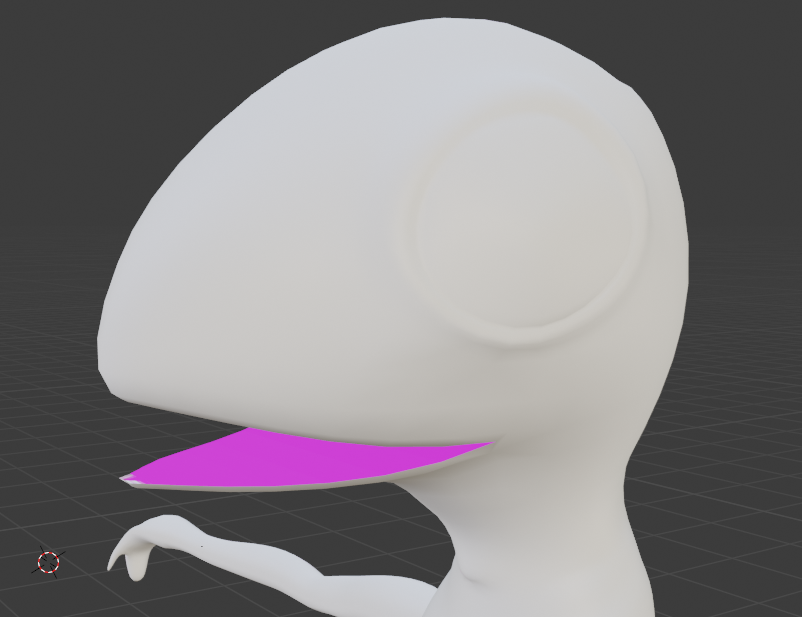
i managed to make the open and close shape key
but how can y make shapes like 0
rough harbor
Just play around until you get something that looks good
slim shale
thats not why i mean. I know how to lip sync
deep dirge
Ok
slim shale
but i dont Know how to do it for that spcific model
deep dirge
You move vertices to open a mouth
slim shale
yes
deep dirge
Then do it
deep dirge
Just make something that looks similar to the reference, it doesn't need to be 100 accurate to a human mouth
slim shale
yes, But for my model, my lips are basicly my jaws ... so i cannot deform them too much
 onyx juniper
slim shale
yes, But for my model, my lips are basicly my jaws ... so i cannot deform them t...
onyx juniper
slim shale
yes, But for my model, my lips are basicly my jaws ... so i cannot deform them t...
Try something like this
Talking as if all of his mouth was taped shut except for the tip
spiral sigil
slim shale
onyx juniper
Try something like this
How many shape keys and what key do you use for your model ?
onyx juniper
slim shale
oh ok so you have all of them
onyx juniper
A lot of those are duplicates. ih, kk, and e are identical, for example, and so are ch and ss
slim shale
ok i see
onyx juniper
oh, ou, and rr are the same
slim shale
is your model public ? do you mind if i get a copy to see what shapes you made ?
onyx juniper
It's not currently public, but I don't mind sharing since it's a game rip
runic nymph
You can make 3 shape keys and then run it through cats plugin. It will make all 15 out of those 3, and it won't look like exact duplicates.
slim shale
oh
slim shale
onyx juniper
It's not currently public, but I don't mind sharing since it's a game rip
oh really ? it would really help me if you can send it to me here or in pm
onyx juniper
Back then I was doing what Famu suggested, but I wouldn't be satisfied with all the shapes it spits out
slim shale
thank you for sharing its a good base for my model 🙏
runic nymph
It's a quick and easy to way to get all visemes, you're also free to change them after cats.
spiral sigil
 unique sigil
onyx juniper
Try something like this
unique sigil
onyx juniper
Try something like this
That reminds me of Charizard from Pokemon
onyx juniper
Molding? It's a game rip that I made visemes for
unique sigil
Oh i see
 edgy meadow
I am having trouble with Irises moving down while crouching. I used VRoid to make other models, they come out with the same issue. I've had friends say that the "weight paint' is giving me trouble. Any ideas?
Model file is VRM if that helps
neat viper
sounds like a weight-painting issue to me yeah, that'd be something fixed in Blender o:
are the irises actually moving down, or is the eye rotating down when you crouch?
edgy meadow
Irises "crouch" as I crouch. They move in front of the face.
neat viper
in that case yeah, sounds like a weight-paint issue
Make sure that the irises aren't erroneously painted to any weird bones o:
edgy meadow
While testing other models with the same issue in-game, it seems like they are parented with either the hair or the shoulders.
I can move side-to-side and the irises do the same.
neat viper
that's odd lol
would def recommend checking the weight-paint in Blender and making sure that the eyelid verts aren't painted to any of the hair bones
twilit dawn
slim shale
is that yours ?
yes! -w-
edgy meadow
@neat viper How do I check what the Irises are connected to?
neat viper
edgy meadow
<@!410315851871551488> How do I check what the Irises are connected to?
Select the mesh in Object mode, go to Weight Paint mode - there should be a list on the right of all the vertex groups on your mesh
Click those and see which ones make the irises go from blue to a different color, and check if it's the right bone (if there's an iris/eye bone or something)
if it's not the right bone, paint over it with a brush set to 0 weight
sorry iris, not eyelid lol
neat viper
I'm..not sure lol, I'm on 2.9 sorry
wherever you go to change modes from object to edit/etc, there
bottom-left, there's a dropdown with an orange cube on it that says "Object Mode"
click that with the mesh selected (not the skeleton) to go to weight paint mode
edgy meadow
Ok. You said to click through until the Irises change from blue.
neat viper
yup, click through the vertex groups on the right (in 2.9, they might be elsewhere in your version - look for a list of bone names, rather than clicking on the bones themselves)
edgy meadow
Let me get 2.9. I'm just confused AF.
neat viper
You can download it off of Steam directly, too c:
in 2.9, the dropdown to change modes will be at the top-left
edgy meadow
Does this version support Cats?
neat viper
yup!
you can download the latest version of CAT's plugin from their github, https://github.com/GiveMeAllYourCats/cats-blender-plugin/releases/tag/0.18.0
edgy meadow
How do I install the cats plugin?
neat viper
Download the "cats-blender-plugin-0-18-0.zip" from the link above, then in Blender go up to Edit > Preferences > Add-Ons and then click the Install button at the top-right
from there, find the CATS plugin folder, and install it
also after you find the cats folder and install it, search in the addons list for "cats" and make sure it's enabled
edgy meadow
i'm gonna guess I wasn't supposed to unzip.
neat viper
nope lol, install the zip directly o:
edgy meadow
Can we start a private call? I need a walk-through for this version. It's been installed.
neat viper
sorry, would personally not want to do that o:
nonetheless, the iris issue doesn't require CATS - do you have the model imported? o:
edgy meadow
No. I don't know how to find Cats with this version. It's been enabled.
neat viper
ah, there should be a small arrow near the hierarchy, click and drag that outwards - CATS should be listed at the bottom of that list
edgy meadow
Got it. Thee model is a .VRM it gave me problems with the other version without a VRM imort plugin.
neat viper
ah, kk
edgy meadow
Got one. Model is imported.
neat viper
nice! c:
In Object mode select the mesh (not the armature), then go to Weight paint mode, and scroll through the list of vertex groups while keeping an eye on the irises
Vertex groups are found here, assuming they're not automatically shown when you enter Weight Paint mode
subtle™ red square
Once you find a vertex group that's erroneously affecting the irises, go up to the Active Tool and Workspace settings, set the brush weight to 0, and paint over the irises
edgy meadow
What am I to look for while clicking through the Vertex Groups? The same color change?
I only see 4 things that do with the eyes. 2 for each eye. I don't notice a difference when I click them from the list.
neat viper
sorry for the delay - check to see if there's any vertex group that changes the iris color whatsoever that isn't supposed to be affecting the eye - hair, shoulders, etc
also, what are the names of those four? o:
edgy meadow
Eye_L, Eye_R, RightEye, LeftEye
neat viper
I'm assuing Eye_L and LeftEye (for example) affect the same vertices with the same paint level? o:
edgy meadow
This is way too confusing. I don't know how to check anything.
neat viper
Select Eye_L for example - i'm assuming it'll make the left eye/iris go from blue to red - then select LeftEye and see if the colors change
edgy meadow
Is the whole body supposed to be blue?
neat viper
Yes, that means it's not painted to that vertex group you have selected
edgy meadow
Nothing is blue.
neat viper
..screenshot? o:
edgy meadow
neat viper
Ah, you're in Object mode - select the mesh, then click the "Object Mode" dropdown at the top left, then go to Weight Paint mode
edgy meadow
This version is uncharted territory. Now to click through again.
LeftEye and RightEye change the irises.
So does the other two.
neat viper
Do any other vertex groups affect the eyes, or just those 4? o:
edgy meadow
Just those 4
neat viper
that's odd o:
are the LeftEye/RightEye etc vertex groups completely painted to the irises (solid red)?
edgy meadow
No. Would you like another image?
neat viper
sure o:
edgy meadow
Same for all options to their respective eye.
neat viper
oh actually that looks fine
edgy meadow
Do you think the older version was doing the fault?
neat viper
the irises presumably move in this model, rather than having actual eyeballs
I don't think the older version of blender caused it?
unless you were using a new version of CATS with the older blender, but even then I don't think that'd cause that issue specifically
edgy meadow
The "whites" of the eyes are part of the head.
neat viper
I'unno, you could try exporting it to Unity and seeing if it got fixed by upgrading somehow? o:
and ah kk
edgy meadow
Imported into Unity. Anything to test it there? Version 2018.4.20
neat viper
There should be a "Build and Test" button in the build control panel I think?
edgy meadow
I got an error I didn't get with previous models. The rigging got the error.
neat viper
what's the error specifically? o:
neat viper
oh that's weird
In Blender, does the jaw bone's vertex group affect the eye at all?
also, try configuring the mesh in Unity and seeing if it's using the jaw bone as the eye or something
neat viper
should be fit to upload then! o:
as an aside, would recommend applying an actual jawbone in that rigging tab if there is an actual jawbone, otherwise leaving it blank'd be fine
edgy meadow
Where is the Build and Test at?
neat viper
should be in the build control panel near Build and Publish o:
edgy meadow
In the SDK?
neat viper
In the VRChat SDK, yes
edgy meadow
that's all I see.
neat viper
in the Settings tab of that window, what SDK build are you on? o:
edgy meadow
2021.01.19.07.28
neat viper
that's vv odd then, are you on SDK2 or 3?
nonetheless though I guess you could just build and publish it as a private avatar for testing?
edgy meadow
SDK2
neat viper
odd, that might be an SDK3 thing only then?
nonetheless, build and publish as a private avatar'd be good then o:
edgy meadow
No idea what was doing it. No issues.
Now I can tell another friend to update his Blender.
neat viper
interesting!
So I guess it actually might have been an issue with the old blender version yeah o:
nonetheless tho, glad you got it working! c:
edgy meadow
Before I get sucked into VRChat, I thank you.
 lament pond
spiral sigil
lament pond
spiral sigil
Elf 👁️
 high smelt
why im not allowed to make avatars
deep dirge
You are
Anyone can make an avatar
But not everyone can upload it, and I'm assuming that's what you mean.
?upload
 split graniteBOT
You must obtain at least "New User" Trust Rank in our Trust and Safety system in order to upload content. You can get this by just spending a few hours in VRChat, hop some worlds, and make some friends. Give it some time and you'll be able to upload content in no time.
As an aside, you must have a VRChat account to upload content. That means you can't use a Steam account, Oculus account, or Viveport account to upload content like worlds or avatars.
Source: https://docs.vrchat.com/docs/frequently-asked-questions
deep dirge
This also isn't a channel to ask this in
 sick cliff
can some one help me with a dynamic bone question?
how do i make her tail more real moving
i need good settings
lament pond
sick cliff
https://gyazo.com/0d34a76e3657924551895dfc75455f3b
I'd decrease the stiffness and increase the drag
runic nymph
sick cliff
can some one help me with a dynamic bone question?
Make use of curves so the tail is less stiff at the end.
 silk plover
Hello! So, I wanna bring a model into VRchat, but I would need to tweak the model in Blender a bit first. Although, I'm unsure how to do that exactly, since I know almost nothing about Blender.. Could anyone help me? It's about removing / adding things to a model.
sick cliff
I just don't really understand what the curve does I know how to put a curve on it but I don't know how it's supposed to look or move
 thorny nova
hey how do i gather up the tail hairs
 teal sierra
I want to make an avatar. My friend gave me some avatar unity packages and I want to open the models in blender so I can frankenstein them and change some things on them. I exported the unitypackage assets to a FBX in Unity and then imported it in Blender with CATS and the result is a mess. Is there any way I can work with these unitypackages in blender or not?

 proper wyvern
edgy meadow
proper wyvern
edgy meadow
Go to configure, select head and then click the small circle next to the jaw line. Select none and youre good to go. I need to do this every time when I configure my avatar.
proper wyvern
lament pond
V what are you doing in here? 😉
lament pond
xD
proper wyvern
lament pond
xD
Showing off your creations I see. Well good job as always. Ill pop in VRC Traders at some point again and then you better show me how u do this stuff. :3
lament pond
You know I stream in there xD
proper wyvern
lament pond
You know I stream in there xD
I know you silly bean X3
spiral sigil
 lament pond
proper wyvern
lament pond
lament pond
proper wyvern
lament pond
Was this what you were working on last night when I joined the call? 🤔
lament pond
Nah that was something else
proper wyvern
lament pond
Nah that was something else
I see youre streaming in VRCT right now and im just like "I want to join" but I need to keep reminding myself that I have a Discord call record to uphold. Were at 118 hours and we are aiming to end this at 120 hours so the ache to be there is real. T_T
lament pond
Nearly there
proper wyvern
Nearly yea but I have a feeling youre ending the stream before im able to come say hi to u T_T
 weary olive
I've been struggling for about 2 days now, basically trying to figure out how to start building a house in Blender. I think I know most/all the dimensions of how I want my house to me, but it's that "doing it" part that Blender isn't making very easy for me.
I spawned a plane, set it to the dimensions I want for the floor, and that's basically as far as I've managed.
spiral sigil
naive helm
Can someone help me center my model? Every time i add the armature its off center no matter where I position it
I spent all day yesterday making it- so theres a couple hurdles yk
runic nymph
You mean, when you parent the mesh to the object it gets offset?
naive helm
I'm not sure-
,_, could I send someone the model i dont have the knowledge to explain it
runic nymph
You can't explain it even with screenshots?
naive helm
uhmm.. I can try- its just difficult
runic nymph
Worth a shot.
naive helm
Alright- though I cant do it for a little bit, need a break from blender frustrating yknow
runic nymph

naive helm
I'm sorry
proper wyvern
naive helm
Can someone help me center my model? Every time i add the armature its off cente...

Blender Stack Exchange
So, I'm working creating a lamp... yes, newbie here.
After modeling for a bit, I noticed that my point of origin was no longer the center of my object:
How to I reset an object origin point to the
naive helm
@proper wyvern are you a god, I literally didnt know how to phrase the google search
proper wyvern
If I remember right you need to first center the origin and then you reset the model to the point of that origin
naive helm
Like this helps legit so much
proper wyvern
Alright then big boy.
naive helm
oop=
runic nymph
🤷♂️
proper wyvern
Just in case im gonna ask you if you were being sarcastic or if it actually helped u because im kinda unsure now XD
naive helm
It did help a ton-
proper wyvern
Alright then
runic nymph

runic nymph
Now in true vrchat fashion, un-optimize it.
mental glen
runic nymph
Now in true vrchat fashion, un-optimize it.
d y n a m i c l e g s
 young vault
Dynamic dynamics
runic nymph
👁️ 👅 👁️
 thorny ivy
Tips for making semi-realistic heads? I don't want an anime-style avatar but not a hyper-realistic, 4k skin, real-time rendered sweat one either.
Stylized is the best descriptor I can think of.
I'd rather not create visemes though so I'd be more then happy to use a pre-existing base.
runic nymph
Style similar to codemiko
 fiery dune
Should I make the arms look ripped like in the anime or no
deep dirge
Idk what it looks like but yes
fiery dune
It's izuku
 wild peak
Is this the best place for looking at how to animate a 2D face?
This is my head so far, and since models have blinking animations and emotions, I would need to change the eyes, so I was wondering on how to do that
mental glen
The biggest flex I just got was I tried to upload a model i made after 4 days of using blender but Blender auto detects it as a naked body so it doesn't let me upload it
 clear geyser
Blender doesn't do that...
runic nymph
I think they meant to say discord did that, so they couldn't upload a screenshot.
mental glen
Oh yeah sorry
Discord did it
but yeah that is the biggest flex i had my entire life
runic nymph
Rekt by discord.
 indigo stirrup
Is there a way to programmatically delete unused shapekeys?
Say I merged models together, then only kept part of model B, but I still have all of it's shapekeys, most or all of which don't affect anything
Blender/CATS' has options to do this for bones and vertex groups already...
indigo stirrup
shapekeys that are basically the same as basis
devout scroll
Not sure, there might be something in the mesh menu
 vivid crater
pretty sure cats specifically keeps those now since the sil viseme is just nothing and regular export yeets em
 solar fossil
mental glen
The biggest flex I just got was I tried to upload a model i made after 4 days o...
solar fossil
mental glen
The biggest flex I just got was I tried to upload a model i made after 4 days o...
you know the model is so good and realistic if even discord thinks its the real thing 
devout scroll
indigo stirrup
shapekeys that are basically the same as basis
You can try this script https://gist.github.com/rurre/79d502ef749ab3d50a31066d3d67c63a
 stable delta
know anyone who do 3d vtuber commissions?
solar fossil
could try VRCTraders in #community-servers-old
stable delta
thanks :)
looking for someone to do textures or clothes for my current model, hoping to find someone soon, lotsa comms are closed
indigo stirrup
@devout scroll did you write that or just randomly find it?
devout scroll
I wrote it
solar fossil
stable delta
looking for someone to do textures or clothes for my current model, hoping to fi...
best bet is to post a commission request, that way whoever is free will take it\
devout scroll
so it might not work 
indigo stirrup
when I do run script, I get an error on the very last line
devout scroll
o, what's the error?
indigo stirrup
  File "D:\vrchat\random models\Airis_ver1.02\Model_data\BlenderCustom\airis shorts v5.blend\cleanup_shapekeys.py", line 50, in <module>
    bpy.ops.mesh.cleanup_shapekeys()
  File "C:\Program Files\Blender Foundation\Blender 2.91\2.91\scripts\modules\bpy\ops.py", line 132, in __call__
    ret = _op_call(self.idname_py(), None, kw)
RuntimeError: Operator bpy.ops.mesh.cleanup_shapekeys.poll() failed, context is incorrect```it works
also gotta be on Basis
everyone hail the great pumkin for their coding prowess because I can barely wrap my head around discord.py after 2 redbulls
indigo stirrup
wait, uhhh, theyre still there?
devout scroll
desert whale
seems like you got bamboozled
indigo stirrup
I'll just do the classic
find the last shapekey in the list thats actually doing anything, go one down, break my left click
devout scroll
it worked when i tested it
but i only tested on new shape keys
i will look into it tomorrow again
indigo stirrup
theyre still there when I go out of edit mode
before leaving edit mode, theyre gone
devout scroll
i think you can't remove shape keys in edit mode actually
indigo stirrup
yea, you cant
devout scroll
you should edit the script and remove the edit mode requirement in the poll function
indigo stirrup
sure, after my 70 other projects on the backburner
youre asking of me to learn an entire new lib to debug a thing you just wrote
indigo stirrup
there we go, that works
stable delta
solar fossil
best bet is to post a commission request, that way whoever is free will take it\
thank yoou! :)
indigo stirrup
devout scroll
just replace `== 'EDIT'` with `== 'OBJECT'` on line uh
❤️
devout scroll

 normal marsh


 prime zenith
I just deleted a couple vertices and this happened.. How do I fix this, does anybody have any ideas lol
deep dirge
Apply transforms for that object
prime zenith
How ?
deep dirge
Look it up
Ctrl a
You could also just search for it in the menu
With the name I gave you
Blender too
prime zenith
Well, I have it selected in Unity with ctrl a
prime zenith
I am not sure what am I supposed to select or not, but I tried this and nothing changed
deep dirge
The chain
prime zenith
But why everything changed when I just edited couple vertices on the base fbx ? It does not make sense
prime zenith
Ok I am totally lost, I am giving up on this for now
 tame wing
I'm having an issue with my shirt where some of the vertices are flipped for some reason. I know I could fix this if I turned off culling but I want it make it quest supported. Anyone know ow I could fix this?
quaint jasper
recalculate normals in blender, but that won't really be quest compatible still
runic nymph

tame wing
Sick that fixed it, thanks!
 worthy bluff
guys we need 3d modeler and sculpting who wanna join us? we are making a game dm
 raven elk
Hi, any of you with Xnalara/XPS/ Xnalara Posing Studio? Mention me to let me know please?
 whole marten
can anyone here be willing to give a quick breakdown on the process of doing the areas around the eyes? It's been giving me trouble for awhile now and I dont want to keep doing the hollow eye strat since it feels a bit lazy. I especially have trouble fitting the sphere around the eyesocket. Theres not many great tutorials out there for this specific area.
if not, a link to a good tutorial I may not have found yet would be helpful too, thank you~
 sage brook
bones are all fine but what is the best way I could fix the gap that was left when I switched shirts on my avatar
normally the clothes I would switch didn't have this much of a gap
quaint jasper
bridge edge loops
sage brook
oh cool ty!
sage brook
doing that caused skin to fall under my body now 😦
quaint jasper
you need to test your blendshapes when you add vertices
quaint jasper
select basis, select vertices that shouldn't move with your blendshapes and "Shape Propagate"
sage brook
propagate to shapes under vertex?
gotcha gotcha that is better
that helps so much ty 🙂
 median pike
Finished... Thing
https://cdn.discordapp.com/attachments/715662206284333159/806311924283342868/Miexy_Scene_2.png
https://cdn.discordapp.com/attachments/715662206284333159/806312194416574504/Miexy_Scene_3.png
https://cdn.discordapp.com/attachments/715662206284333159/806312582247219200/Miexy_Scene_1.png
https://cdn.discordapp.com/attachments/715662206284333159/806312670181457950/Showcase_Miexy0001-0250.webm


 sage brook
what would be the best way to fix bones being slightly above the mesh
ruins the fingers :/
I moved the mesh up to it which fixed the hand normally but closing the hand makes the fingers freaky
median pike
move the bones down?
sage brook
how can I? I select them and it selects them all
clicking the 003 one does not give me the option to move it
quaint jasper
median pike
https://cdn.discordapp.com/attachments/715662206284333159/806311924283342868/Mie...
That vest is really pretty !
neat viper
@sage brook Click "Armature" in Object mode, then go to Edit mode
there should be a dropdown at the top-left of the viewport to change modes c:
 gentle raven
?
neat viper
oh whoop sorry lol, tired
sage brook
ty
neat viper
yw! sorry for the ping Military lmao
gentle raven
it's alright
sage brook
but then how would I move it?
neat viper
Once you're in Edit mode, select the bones you want to move? o:
neat viper
select one of those bones in the viewport, and then an axis to move them should show up?
assuming you have the Move tool selected
sage brook
coolio ty
 hasty cipher
spiral sigil
https://i.gyazo.com/803abb84ca2fd5138bac0ddd00e5a6e6.mp4
https://i.gyazo.com/47e...
hasty cipher
spiral sigil
https://i.gyazo.com/803abb84ca2fd5138bac0ddd00e5a6e6.mp4
https://i.gyazo.com/47e...
Damn, is that one public?
Or do you know a world that has that type of models?
spiral sigil
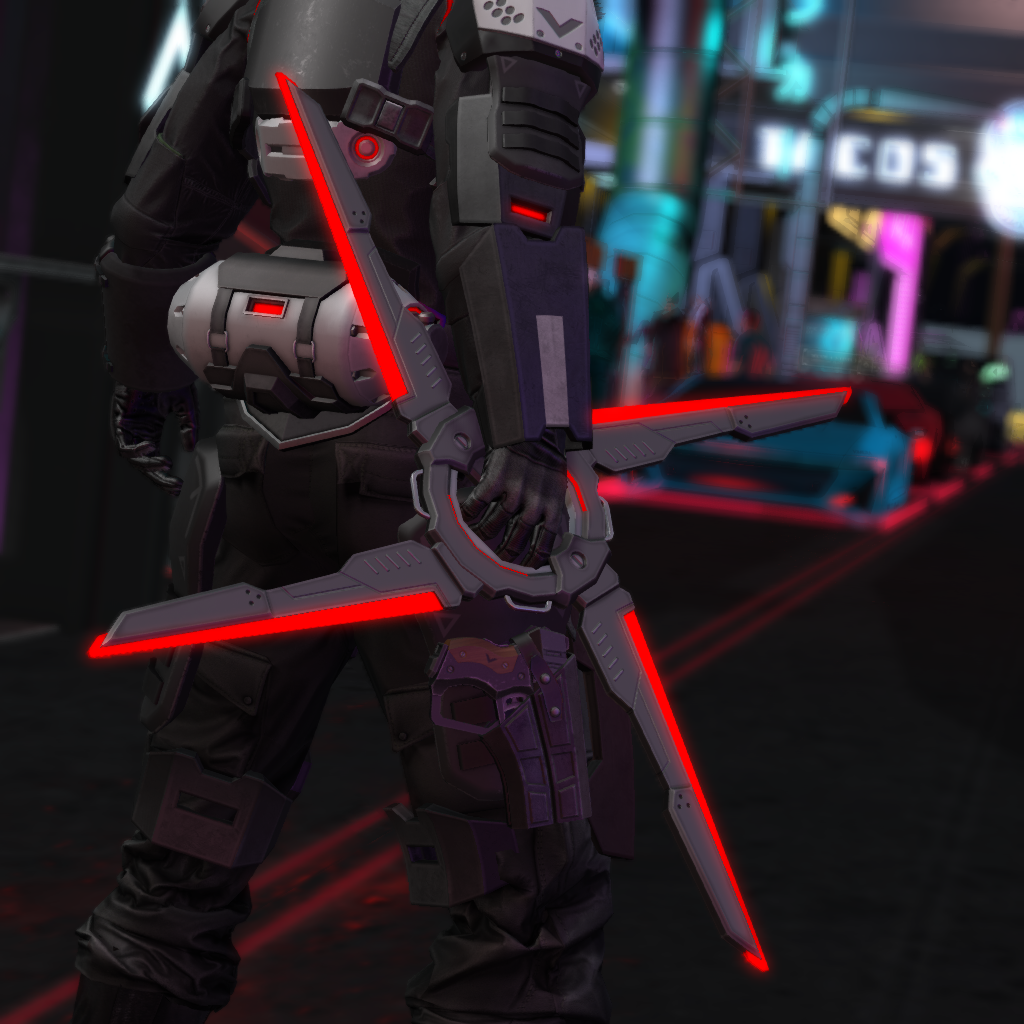
@hasty cipher I made that myself. I upload my models to a game called SecondLife and sell them as functional items to players.

 hardy turret
Hey anyone know a better way to do visemes with a seperate teeth/innermouth attached to the jaw instead of merging all together then editing?
quaint jasper
As in multiple meshes ?
hardy turret
Like in most other models you find online the teeth and tongue are seperate instead of attached to the main body mesh
quaint jasper
I've never seen that before
devout scroll
They are usually separate parts but the same object
 limber bronze
first time modeling something from scratch in about 7 years.
quaint jasper
Well that's extremely impressive
limber bronze
substance painter
now the real problem is that it's about 360k tris and i need to do retopology
quaint jasper
To flex
runic nymph
quaint jasper
i mean, if they have the skills to do that, i don't think it'll be a problem
limber bronze
flexture
the real answer is retopo was taking a long time and i just wanted to take a money shot because i'm impatient
weary olive
I've attempted Joining 2 objects together in Object Mode, yet they still act like they're separated, passing through each others' meshes in Edit Mode.
Zero vertices to select in-frame, all edges and faces.
It apparently refuses to acknowledge the walls making that square in the center as being "separate walls" from those on the outside. It's basically two straight lines crossing in an X shape that don't realize they're crossing at all.
 dull crane
Just like people.
devout scroll
add loop cuts to both objects then merge them by distance
weary olive
Ty
spiral sigil
 white moth
I’m trying to bake some AO maps, is there a way for it to take cutout textures into account for the AO? It’s treating some edges as solid in the AO bake
quaint jasper
You'd have to make a specific mesh just for the AO in that case
devout scroll
might depend on the shader
quaint jasper
My brain thinks exclusively in terms of shaderless options 
limber bronze
finished the lowpoly of my space marine, 15,000 triangles
runic nymph
Sick
limber bronze
wireframe
deep dirge
God damn only 15k?
spiral sigil
textures and materials too stronk, pls nerf
devout scroll
not even 40k 😔
desert whale
devout scroll
not even 40k 😔
Lel
 exotic wedge
Hey guys
I am sorry if this is not place for it. But i couldnt find proper channel or if this is even possible in here
But i am trying to seek for visual artists for game dev teams
So like may i ask that here and where?
deep dirge
You'd probably have a better time getting people from other sites
This is vrchat, you'll only get anime and furry stuff
runic nymph
What mark sharps really was meant for.
spiral sigil

solar fossil

devout scroll
should post this to #avatar-showcase
 barren meadow
devout scroll
should post this to <#730948197517885532>
barren meadow
devout scroll
should post this to <#730948197517885532>
Lmao shut up
 atomic hamlet
limber bronze
finished the lowpoly of my space marine, 15,000 triangles
atomic hamlet
limber bronze
finished the lowpoly of my space marine, 15,000 triangles
Geeze, i can barely tell a difference between that and the original base mesh. Good work!
spiral sigil
does anyone know an easy way to fix the UVs on this model
quaint jasper
what does the current uv map look like
spiral sigil
spiral sigil
quaint jasper
what does the current uv map look like
not good ;-;
quaint jasper
just scale them down
 quiet coral
how do i add a tattoo i was told something with making a duplicate, making it transparent and all that but i dont see the instructions im given so anyone know any new vids or tutorials to add a png as a tattoo to a character that you can send that isnt for the old blender?
quaint jasper
just add the png onto your texture in gimp
runic nymph
Duping the body to add a tattoo, the eboys truly know their ways around unoptimizing.
devout scroll
big mmd energy
 gray hornet
I have no idea where it fits, but there is a bucket with somewhat faked water physics using a dynamic bone and some parent constraints
 green jolt
does anyone know of any good methods of doing fur in PBR shading in a way that looks good?
i don't wanna go totally matte
deep dirge
quiet coral
how do i add a tattoo i was told something with making a duplicate, making it tr...
Do you not understand how to edit textures?
quiet coral
nope
 obsidian nova
@gray hornet Would you consider posting this as a prefab? This would be amazing for a tea house world I’m working on.
spiral sigil
nah
deep dirge
quiet coral
nope
Bro, open the textures in ANY program besides ms paint, and edit them
Can't tell what you are editing, don't want it to get warped? Edit them in blender.
Only time it's acceptable to try and duplicate part of the avatar and add a tattoo over a transparent area is when the textures are symmetrical, even then most unoptimized eboy avatars don't do that anyways. (Not a bad thing)
Even then, you still need to edit the textures
If you are gonna attempt to edit an avatar in the most basic of ways, look up a tutorial that will tell you those things, they exist in droves
quiet coral
hmm alrighty then
its gonna be hard cause im not that artistic but ill give it a shot thnx
devout scroll
nothing artistic about editing things
Photopea Online Photo Editor lets you edit photos, apply effects, filters, add text, crop or resize pictures. Do Online Photo Editing in your browser for free!
here, free online photoshop
thorny ivy
limber bronze
finished the lowpoly of my space marine, 15,000 triangles
15k tris with that level of detail? The Ultra Smurfs truly are The Emperor's Finest.
limber bronze
normal maps stronk
 void epoch
anyone know hwere to find a half life 2 dog model
spiral sigil
obsidian nova
A 3D model in a unity file? Starting to sound a lot like an avatar...🤭
 steady merlin
would anyone be willing to help me with trying to make a model from scratch?
 icy jungle
@steady merlin do u have any 3d modeling experience?
icy jungle
what software do u use?
steady merlin
blender since i cant use any other one since you have to buy them
icy jungle
u can get student licences if your a student, but yeh. If you can follow a few blender tutorials, start with the basics, like the donut 🙂
steady merlin
sadly im not and i have tryed the titorial for the donut i dont do very welll with videos
icy jungle
ok, if your still around in a few hours when i get back ill see what i can do to help 🙂
steady merlin
ok and its ok tyt and i do thank you very much for helping me and im also srry for annoying you
icy jungle
its all good! gotta start somewhere
spiral sigil
gray hornet
I have no idea where it fits, but there is a bucket with somewhat faked water ph...
I love this
green jolt
i'm making good process on this model, i'd just love to know if anyone is aware of any good pbr settings for stylized fur
i'm not too keen on making it fully matte
deep dirge
🤔
 zinc jolt
green jolt
zinc jolt
green jolt
ooh sick
green jolt
they look good
 rotund void
when i upload a model in vrchat, do i have to do it with a prefab or FBX?
i did with the prefab, an i uploaded it, but, i soon realised that it missed a big chunk of her body
like so..
green jolt
the prefab has to contain the whole model i think
rotund void
and, on the right, this is my FBX model
but, her ears aren't jiggly like with the prefab one , dynamic bone doesn't seem applied to her ( though, her body doesn't miss any part )
i would like my character to have dynamicbone and her full body
but i don't know how to do so
is it right to upload an fbx instead of prefab one in vrchat? if so.. how do i apply dynamicbone to my fbx one ?
i think it's the only thing missing but i don't know
 fast temple
does anybody have a tda model i can use all the ones i have used the bone structure hasnt been working
 uneven lion
rotund void
uneven lion
rotund void
Just taking a guess but they may be hiding those parts of her body using blendshapes. Select the body mesh and if you look on the side there should be a drop down list of them you can expand that will hide of un-hide parts of the mesh.
rotund void
uneven lion
Just taking a guess but they may be hiding those parts of her body using blendsh...
Thanks a lot ! your solution was fast and easy! im really happy ^^
 arctic valve
Can anyone tell me why when I import a particular model from Blender it's picking up an extra Material?
Single mesh, no accidental doubles, only one UVMap.
devout scroll
what happens if you delete the material in unity, does anything turn pink
arctic valve
Yes. It's assigned to a section of mesh, even if I assign that section in Blender to the actual material.
spiral sigil
do you have any modifiers on the mesh ?
arctic valve
No shape keys, only vertex groups are for armature manipulation
rotund void
my sock look like they've been oiled-
how to make them look normal? a bit like this.. :
 dusk turret
rotund void
my sock look like they've been oiled-
dusk turret
rotund void
my sock look like they've been oiled-
that's called rimlight, can turn off in shader/material
rotund void
thanks !
 still wadi
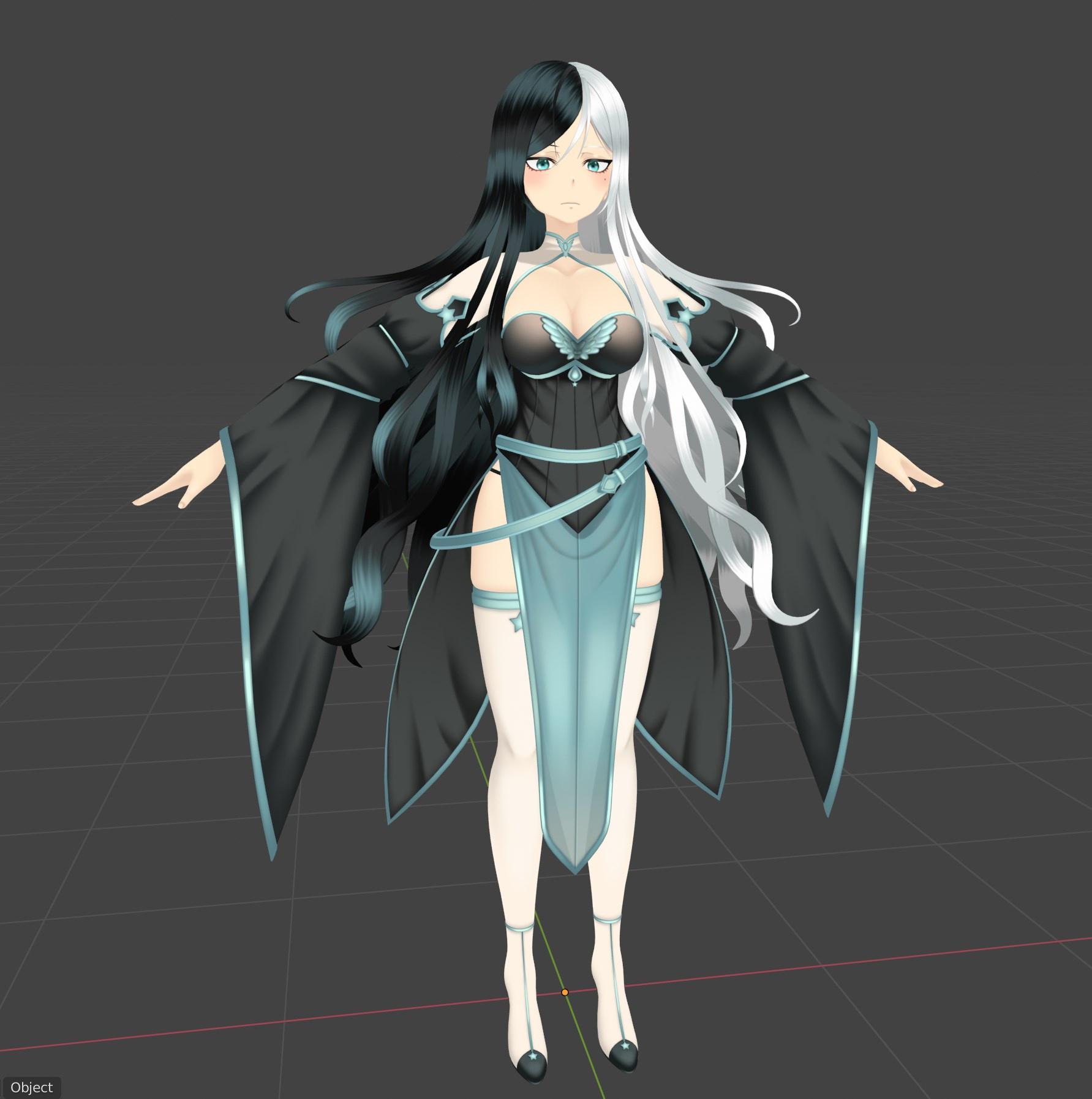 spiral sigil
damn that hair
devout vault
Yea looks good
fast temple
does anybody have good male tda sweat pants?
 fossil parrot
does anyone know how to get the models from ghost runner? and port them over to unity or just ripping in general?
desert whale
fossil parrot
does anyone know how to get the models from ghost runner? and port them over to ...
that is against terms of service and will get you banned
desert whale
the devs click a button, bam you're banned that's how
desert whale
that will get you banned, so don't do it
 runic salmon
desert whale
that will get you banned, so don't do it
runic salmon
desert whale
that will get you banned, so don't do it
uh, not that's not true lmao
ripping from VRCHAT will get you banned
runic salmon
ah okay, from what I understood, they were asking if they could rip from another game or something
 zealous cedar
pretty sure they were talking about ripping from another game
desert whale
I don't know what vrchat's stance is on that, but this might not be the discord to ask about that
runic salmon
fossil parrot
yes
In that case, just find the models online, I'm sure someone else has ripped them already.
fossil parrot
sadly no
runic salmon
I guess it depends on what game/system it's on that you want to rip from.
fossil parrot
ghostrunner
runic salmon
what system is the game on tho
 gloomy stump
Hello, new to using blender and vrchat in general
this is my current material list for a model Im working with, after using cats tool to merge alike textures this is what I have
is it possible to merge more?
quaint jasper
What did you already atlas ?
gloomy stump
Idk what that even means lol
runic nymph
quaint jasper
gloomy stump
Idk what that even means lol
Look at the material combiner which comes with the cats plugin, it'll allow to merge tinier textures into a larger single one
gloomy stump
ahh ok. Ill try that
do I need to select different materials to merge or just all in one?
quaint jasper
As many as can fit into a 4k texture
gloomy stump
should all fit
seems like the fangs and claws got missed but everything else went white
 languid fog
can someone give me some tips for doing "anime" hair style? i can do it but never fit what i want, look unnatural and don't combine with the character
 short edge
can someone help me fix this, the map should not be inside out if that makes any sense and I should not be able to see inside the tower or the building and I should not be able to see the underpart of the terrain how do I fix this in blender?
atomic hamlet
short edge
can someone help me fix this, the map should not be inside out if that makes any...
Flip the normals.
 flat cedar
still wadi
https://i.imgur.com/FyqTrlq.jpg
flat cedar
still wadi
https://i.imgur.com/FyqTrlq.jpg
That looks really neat! did you make that model?
short edge
atomic hamlet
Flip the normals.
how do I do that?
short edge
flat cedar
That looks really neat! did you make that model?
no my friend gave it to me and never finished it
so im working on it
short edge
atomic hamlet
Flip the normals.
sorry to ping you again but how do I do it?
atomic hamlet
Select everything in edit mode in Blender, and under Mesh > Normals, hit Flip.
Keyboard shortcut for selecting all verts/faces is A by default.
short edge
kk
short edge
atomic hamlet
Select everything in edit mode in Blender, and under Mesh > Normals, hit Flip.
okay thank you so much
runic nymph
Those.. curves. My god.
spiral sigil
that butt
 frail scarab
that's hawt
green jolt
Curves??
Bro where that's like as skinny as I've ever seen the human form without them looking sick
It looks good but that's like as far from curves you can go without a character looking emaciated
vivid crater
did you just look at the thumbnail or something
she can literally describe the stock market
green jolt
i looked at all of it
i guess they don't match my personal definition of curvy
🤷♂️
obsidian nova
It’s just not how anatomy works that’s all, you’d never have a butt that big without thunder thighs...
This girls got a thigh gap wider than the Grand Canyon.
 stark ore
A n i m e
 west river


 onyx crane
im a simple woman, i see stolas, i upvote
green jolt
you should exaggerate them some more like i do :^)
 mild nimbus
No
gloomy stump
trying to learn blender nad having an issue with the textures
ripped a model off deviant art to rig into vrchat and Im down to
this many materials
but merging them with the cats atlas tool results in
 cerulean shoal
do you fart
 cinder cradle
bruh he looks like he wants my soul
cerulean shoal
he does
cinder cradle
you never take me alive
cinder cradle
:/
 hybrid hinge
Anyone here want to help model arcade games for a Chuck E. Cheese World I'm working on with some friends?
So far we have this and 3 other rides as well as the Tubes
The more the merrier
 neon tree
anyone know were i can sell 3D models?
neat viper
neon tree
anyone know were i can sell 3D models?
VRCTraders or one of the similar #community-servers-old c:
 orchid ivy
https://thumbs.gfycat.com/AmbitiousGeneralCranefly-mobile.mp4 vtuber thing I made from scratch, still sculpting out parts for the outfit but wanted to make sure it works
 onyx juniper
@green jolt Don't get discouraged by the negative reactions. It's a good model and design, and it looks like it turned out exactly how you wanted.
green jolt
thank you. i'd like to improve my texturing but i think i replicated the design somewhat well
spiral sigil
Is there an easier way to modify pre-existing clothing models from assets onto character models? I have been using the sculpt tool in blender but doing all of that by hand is incredibly time consuming. It also makes things look kinda lumpy or stretched sometimes.
(for clothing models that aren’t designed for that specific body shape)
clear geyser
spiral sigil
Is there an easier way to modify pre-existing clothing models from assets onto c...
I prefer proportional editing (shortcut is O and area of effect is controlled with scroll wheel)
spiral sigil
Thanks, I will have to give that a try.
 barren leaf
quick question, I may have hit something in blender, and no matter what I open up, even if it's a new project, the mesh are invisible and only show an outline on selection
fringe rock
Did you update driver recently
deep dirge
What am I doing with my life
muted raven
Making art
fossil parrot
does anyone know how to make anything from scratch and if so can they show me how to do it really want to end up making some avatars from scratch so i was wondering if anyone could.
runic nymph
You're basically asking for someone to teach you something that takes years of learning. 
fossil parrot
yes
quaint jasper
Watch tutorials, like everyone here did
runic nymph

Enjoy the videos and music you love, upload original content, and share it all with friends, family, and the world on YouTube.
Good luck out there! o7
quaint jasper
If you have specific questions about specific steps, people can help, but we can't learn for you
barren leaf
fringe rock
Did you update driver recently
yeah seems that was it, so going to have to try to find a middle ground
 tough hatch
Which VR creation tool is for me?
Have you ever wondered which VR creation software would be the best match for you?
Do you like organic sculpting? Mechanical CAD-based modelling? Do you like the idea of animating in VR? What about good old fashioned sketching?
There are so many options it's hard to know where to start. I asked a few of m...
unique sigil
Ooo
devout vault
Can anyone give me a small work but im very new in blender, ofc i made a donut but still i want some challenges :P
but dont give me very hard thing TwT
runic nymph
Move on to the chair tutorial. 🪑
devout vault
okey
runic nymph
From Guru again.
devout vault
Yea i really like guru he is funny :P
 median harness
recreating an mmo character of mine from scratch to practice hardedge stuff
p happy with how it looks thus far
runic nymph
Sick.
median harness
super far outside my comfort zone and stylistic preference but hey, that's part of why i wanted to do it in the first place. just gotta do the wings now. it's been about 35 hours of work thus far and i swear it went by in the blink of an eye across the past couple days
 dusty heron
Looks really good! Nice work 👍
kinda makes me jealous of how good people are at 3D modelling, because all I can do is approximately move cuubes to build a basic shape
Like a “tree”
I am attempting to get better, but most of what I can make is still really basic
median harness
hey, that was me a year and a half ago. i look at other people's stuff all the time and freak out about how intimidated i am about their skill to this day
and i'm pretty gosh darn confident at this point, y'know?
dusty heron
Yea, kinda.
median harness
never goes away, and if ya just keep going, suddenly you blink and you somewhat know what you're doing
dusty heron
Blender in a nutshell:
One day it will work
median harness
yep xD
also, for what it is worth: this is a recreation of an MMO character of mine, a CAST from Phantasy Star Online 2. This design is not mine and i have perfect references by having the character in game to orbit around
so like, it isn't as crazy as it looks
dusty heron
I’ve made a shop and bed in bpender for a game I’m working on, and for my lack of skill, I’d say they’re pretty alright
runic nymph
Ain't nothing wrong with studying already existing models, it will help you understand more complex areas of modelling, like topology and how it should flow. Way I made a "breakthrough" in learning 3D is by just taking an existing model and re-modelling it. Sure it's pretty much copying, but I feel it's a really good start. 🤷
median harness
yeah, this one has been a wonderful learning experience. i've been focusing on asking myself "why is this designed like this" as a way to almost reverse engineer their creative process
there was a lot more thought and care put into every bit of the design than i thought
and i wasn't thinkin' it was a mindless look!
been a great experience on a more macro-level, as well as being like. the only more hardedge thing i've done, so good practice there too
totes gonna be recommending doing something like this to some of the people that ask me for advice and such if they're at that point
mild nimbus
@barren leaf Click on the model and go to Object Properties. Where it says Viewport Display you want to set the Display as from Wired to Textured
If it still does not work go to File > Preferences in the upper left corner. Blender Preference window will pop up
Lower left corner there is a symbol with 3 rectangles stacked over each other. You can reload factory settings after that.
Even though that will not be neccessary
 quaint jasper




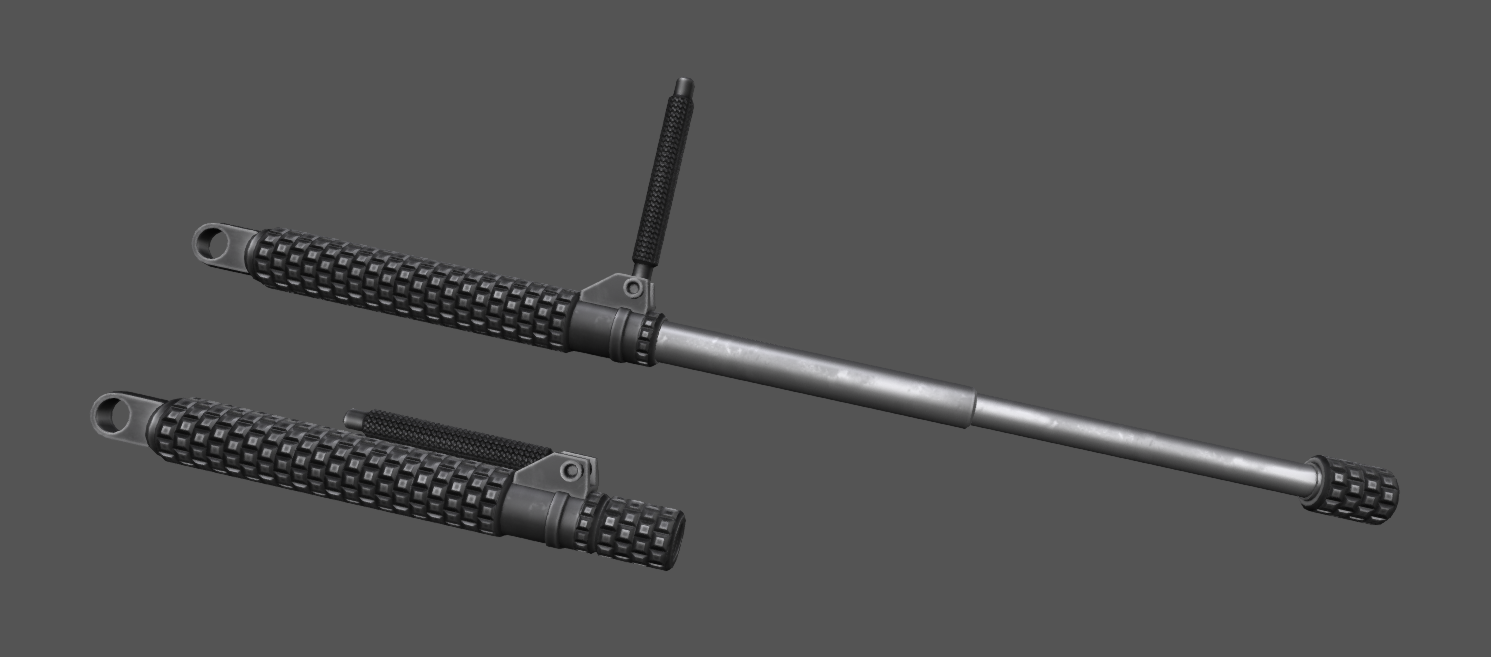

Saw @diansakhuart 's amazing character design piece on my timeline and I had to try and turn it into 3D ! #b3d

 Twitter
·
Twitter
·

Got a brain lapse yesterday and ended up making that model
Kinda wish i had spent time for the compositing and post processing, since the colors got washed out hard, but still happy with the result
spiral sigil
looks nice
 odd meadow
wish i could even model. 
runic nymph
Stop wishing, just do.
odd meadow
ive tried
and i made myself a glitched ball
also i cant even mergemy steam with vrchat because of stupid capthas
captchas
odd meadow
runic nymph
Stop wishing, just do.
thats why
muted raven
@odd meadow you just gotta start somewhere
everyone
EVERYONE started by making some bad stuff
just start basic , get good at basic, then start medium, get good at medium, start good, get good at good, start amazing, get good at amazing and then
run out of ideas
have all the skill but no ideas of what to make
except for train cannon
odd meadow
muted raven
<@!631299468733448212> you just gotta start somewhere
okay yea well im going to go complain about the captcha now
muted raven
quaint jasper
Yeah there's not much to it, just try stuff while looking at tutorials and ask people better than you how to do things, and over time you get better 