#3d-modeling
1 messages · Page 97 of 1
 ripe yacht
ripe yacht
ripe yacht
well seems like i am
it will paint everything but that probably a simple mistake im doing smth i forget huh?
do i need to create smth like a texture array or smth?
im a genius i fixed it
yet there seems to be a black leftover
ripe yacht
since thats fixed, any advice on making the skin fit with the mat of the chest?
 devout scroll
unwrap the new stuff and put it where the hole was in the uv
the existing texture already likely has stuff in there
 thorny ivy
Any tips for creating a ball of fire? Thought it'd be cool to do for a pair of eyes.
Or how to do multi-color gradiants?
 ashen forge
Testing some dynamic bones with fortnite dances for a model that's for my god forsaken friend
 foggy escarp
If i draw out my 2 avatars can some one modle them for me i have no mony to pay for it iam sry
 hardy agate
you are gonna have some tough friggin luck getting someone to do 2 custom models for entirely free. also you should really go to the VRC Traders discord server if you are really wanting to get someone to do that. good luck though xD
ripe yacht
devout scroll
the existing texture already likely has stuff in there
Nah bcz the texture was from the removed one but ill try some photoshop
devout scroll
I see, well you can probably do some stamp tool
ripe yacht
i only have one problem, my texture has like a black shadow and idk why
devout scroll
screenshots
ripe yacht
ill send them in dm probably cuz its starting to become nsfw
if thats fine ofc
but only if its bound to the base-
 warped merlin
oh my
 hard river
i am having trouble with unity and changing the colour of my avatar help would be nice because im a total newb
pls dm so i can voice chat
 spiral sigil
Can someone tell me why unity butchers my model this bad? I’m using Mochi’s Uber shader but compared to blender it looks really weird
 quaint bronze
What does the wireframe look like for that mesh? You may have a ton of ngons and unity is triangulating them automatically.
 quaint jasper
are your normals set to import or calculate ?
 glad steeple
^
quaint jasper
either that or none
 nova glade
Should I be using destructive or non destuctive modelling when building a map in blender?
 latent charm
spiral sigil
Can someone tell me why unity butchers my model this bad? I’m using Mochi’s Uber...
latent charm
spiral sigil
Can someone tell me why unity butchers my model this bad? I’m using Mochi’s Uber...
I've tried replicating your issue here and while not as bad, do seem to be encountering shading problems, even with unity standard shader. Maybe with the right normal map these problems could be smoothed out. 🤔
 fringe rock
maybe triangulate when export
glad steeple
custom normals would likely solve
fringe rock
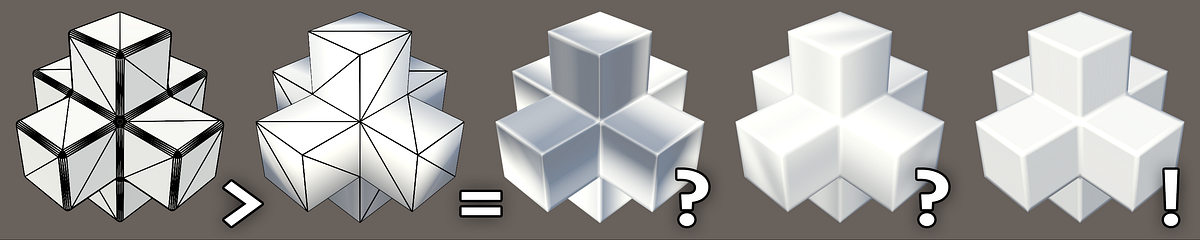
Medium
And how to tell what’s wrong with your content pipeline.
latent charm
fringe rock
maybe triangulate when export
If you're baking normals you must work with triangulated meshes because any unpredictable quad→tri will cause shading errors.
ripe yacht
Idk if it would help but did you try poiyomis shaders? Got a lot of settings to play around with rendering aswell @spiral sigil
spiral sigil
I’ll get triangulating the mesh tomorrow and see if that does anything. Thanks for the help and advice guys!
 rare crystal
If it were up to me, I would try retopologizing it to make all the quads go in one direction rather than letting them circulate around the holes. I would make it look like a grid.
glad steeple
I dont think that would solve it
Either way its going to triangulate and act weird around the hole
 junior flower
I've been learning blender the last few days. Day 3 and I made this (stones and floor are free assets that I arranged, I modeled the sword following a tutorial).
 silent depot
lil quest avatar in progress
 pastel quest
damn, i wanted a ready player one parzival avatar so bad
 narrow forum
FYI triangulating before or after export does nothing, in fact apart from the normal map issue it should look identical to blender
it's all triangles anyway :V
 thin bison
While you are correct that it'll be all triangles either way you should still triangulate as a part of export. If you import a quad mesh into unity the edges can be flipped causing shading issues
narrow forum
ah yeah, im just optimistic that unity should be able to handle itself :V
thin bison
Trust me, unity can be real stupid at times 
narrow forum
i can believe that, i've only been using it again recently for vrchat
 white moth
Oh unquestionably triangulate in blender before putting it in unity. Unity doesn’t do any sort of logic at all. It just splits up quads based on which vertex ID was listed first in the file. No angle calculation or anything
Even when it’s very obvious which way a quad should split unity’s just 50/50
narrow forum
huh wow, im using blender direct import so the fbx exporter just takes care of it for me
that sucks though
narrow forum
it should by default though
 spring crescent
nice
narrow forum
oop no it doesnt
white moth
Yeah unity is doing it lol
 full fulcrum
Hey, I don't know if this is the right channel to ask this, but I have a question.
 delicate sigil
https://media.discordapp.net/attachments/598560679862992906/782082556715466762/unknown.png?width=1202&height=676 does anyone know where i can get the cyborg/ robot arm?
 hardy agate
this channel is for custom modelling. not tracking down a random mmd part. check deviantart or something. if not there then its probably not going to be an easy find, if its even public.
 civic ore
bruh
 tidal ore
 rigid jackal
glad steeple
rigid jackal
glad steeple
 bold zephyr
Traceback (most recent call last):
File "D:\blender\2.90\scripts\addons\io_scene_fbxinit.py", line 636, in execute
return export_fbx_bin.save(self, context, keywords)
File "D:\blender\2.90\scripts\addons\io_scene_fbx\export_fbx_bin.py", line 3198, in save
ret = save_single(operator, context.scene, depsgraph, filepath, kwargs_mod)
File "D:\blender\2.90\scripts\addons\io_scene_fbx\export_fbx_bin.py", line 3094, in save_single
fbx_objects_elements(root, scene_data)
File "D:\blender\2.90\scripts\addons\io_scene_fbx\export_fbx_bin.py", line 2894, in fbx_objects_elements
fbx_data_mesh_elements(objects, me_obj, scene_data, done_meshes)
File "D:\blender\2.90\scripts\addons\io_scene_fbx\export_fbx_bin.py", line 1174, in fbx_data_mesh_elements
elem_data_single_int32_array(lay_uv, b"UVIndex", (uv2idx[uv_id] for uv_id in _uvtuples_gen(t_luv, t_lvidx)))
File "D:\blender\2.90\scripts\addons\io_scene_fbx\fbx_utils.py", line 504, in elem_data_single_int32_array
return _elem_data_single(elem, name, value, "add_int32_array")
File "D:\blender\2.90\scripts\addons\io_scene_fbx\fbx_utils.py", line 451, in _elem_data_single
getattr(sub_elem, func_name)(value)
File "D:\blender\2.90\scripts\addons\io_scene_fbx\encode_bin.py", line 161, in add_int32_array
data = array.array(data_types.ARRAY_INT32, data)
File "D:\blender\2.90\scripts\addons\io_scene_fbx\export_fbx_bin.py", line 1174, in <genexpr>
elem_data_single_int32_array(lay_uv, b"UVIndex", (uv2idx[uv_id] for uv_id in _uvtuples_gen(t_luv, t_lvidx)))
KeyError: ((nan, -1.2156770803613769e+33), 3152) what is this error? it won't let me export my model to fbx
 clever bramble
hi I need help
 solar fossil
dont we all? 😔
 royal hamlet
alright, so I made a model in blender and did all the shit that comes with that. But every time I try to convert my .FBX to a .VRM with univmr or anything of the sort, 99% of the time it kills my pc and the other 1% it gives me this after a good hour of bugging out. My knowledge of unity is extremely lacklustre, and I understand that it may be a ram issue, but help would be appreciated.
clever bramble
does anyone know what to do when you click to sculpt in blender and nothing happens?
royal hamlet
are you in edit mode?
 rustic smelt
can anyone make a character for me?
 atomic hamlet
clever bramble
does anyone know what to do when you click to sculpt in blender and nothing happ...
atomic hamlet
clever bramble
does anyone know what to do when you click to sculpt in blender and nothing happ...
If your trying to sculpt a shapekey, you need to make sure the shapekey is set to 100%. Also a good chance that you might have had an inactive one selected by accident without knowing it.
 next cloak
I am new to whole thing of making avatars and want to make my own from scratch (will start learning stuff from next week)
can someone give me a youtube playlist link or something that shows all the basics of avatar/probs making and if possible can it simple enough for people who never used the sofware
 clear geyser
next cloak
I am new to whole thing of making avatars and want to make my own from scratch (...
clear geyser
next cloak
I am new to whole thing of making avatars and want to make my own from scratch (...

Blender tutorial for beginners! The long awaited reboot of the popular donut tutorial, completely remade for Blender 2.8x. New videos will be uploaded every other day to this channel.
Get the shortcut pdf: https://mailchi.mp/ef5b15a32043/subscribe-to-the-newsletter
Follow me:
Twitter: https://...
next cloak
Thanks
silent depot
next cloak
I am new to whole thing of making avatars and want to make my own from scratch (...
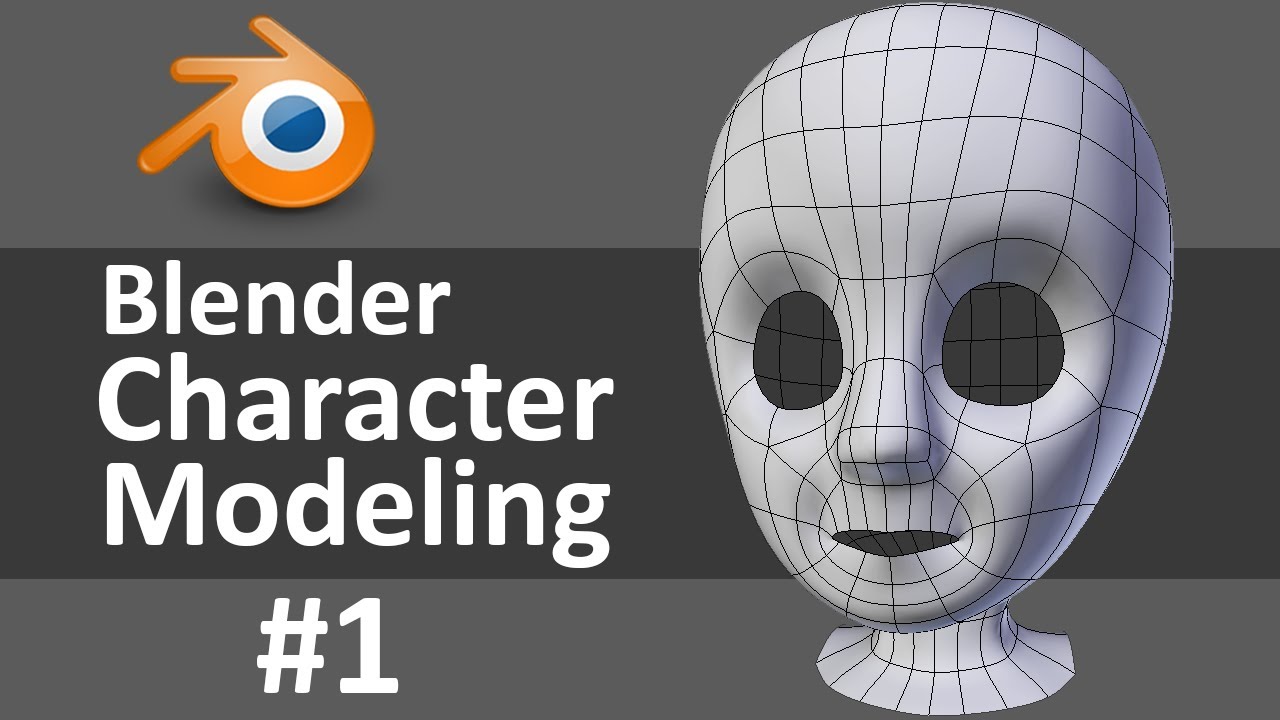
Create Your Own Game Character at http://www.darrinlile.com
If you're new to Blender, watch this Blender Quick Start Guide first: https://youtu.be/lZe3tGWSy6s
Starting a new character today! I go over bringing reference images into Blender, the mirror modifier, and establishing good edge flow for facial animation. If you'd like to follow alo...
latent charm
bold zephyr
Traceback (most recent call last):
File "D:\blender\2.90\scripts\addons\io_sce...
There is something wrong with a UV somewhere.
 heady musk
Hand built from the ground up, under 20k poly, fully optimized to 2 materials, VR and FBT friendly, hood and cape are all rigged to bones as well
 broken zealot
Would someone be willingly to convert a file on 3DS Max with a script for me? I don't have a license and I only need to convert it to FBX, I can do the rest of the editing on Blender
The script is "GMD MaxScript" from GFD Studio, unluckly it requires 3DS Max
 silent cargo
Hey im trying to make a cartoony style character and i like to know if there are good references for a similar style?
next cloak
silent depot
https://youtu.be/0QT1GNMevfc
Thank you it wouod be helpful
spiral sigil
white moth
Is there a way to move the camera while in repositioning selection mode (G)
spiral sigil
royal hamlet
alright, so I made a model in blender and did all the shit that comes with that....
how much RAM u have?
royal hamlet
spiral sigil
how much RAM u have?
16 gb 3600mhz ddr4
spiral sigil
yeah, it's a memory leak apparently
is your model really complicated? (lots of poly's/materials etc)
royal hamlet
I believe it has one over the recommended amount of materials but lemme check my polygons
35,831 verts, 53,761 tris
 trim magnet
Does anyone have some tips on how to make vroid characters actually look... good?
 ripe tangle
Another prop. I feel like I'm getting better at this. It took me way less time than the bed I made before.
 coral current
:p
 opal night
can anybody explain why half of the blender sculpting tools AREN'T useless? I'm new to it, but still.
 ashen stag
Probably just a niche that you don't need at the moment. Doesn't mean they are useless.
clear geyser
Use it on a high poly mesh and you'll see they aren't useless
devout scroll
too high poly to use ingame. subdivide it a few times and you can sculpt
opal night
@devout scroll can you please save me from the fucking absolute nightmare that is trying to get bones assigned to objects? I've watched 5 tutorials and every single one has failed
i've assigned weight to my objects
made their names the same as the bones
i've tried giving child/parent assignments to my bones and corresponding models
best i can do is get child bones to follow parent bones
that's it. nothing connects to the model
devout scroll
Your mesh also needs to have a modifier called armature, with the armature assigned in it
stuff doesn't just magically move when it's weighted
armature modifier tells the mesh to use it's weights to move with the bones
opal night
"called" armature as in, called that in general or called "armature" in blender?
and how do i activate the armature modifier, and which objects do i assign it to?
devout scroll
it gets automatically added when you parent your mesh to your armature and select armature deform when asked how to parent
but if you don't have one you have to added it yourself
you go to the modifiers tab with your mesh selected and add "Armature"
Then inside it you have a box where you select which armature (also sometimes called skeleton) to use
But since you likely only have one skeleton you can only select that
opal night
should i select my whole mesh? or only groups at a time?
devout scroll
your mesh should all be one object
opal night
i thought it was better to keep it grouped for more freedom of movement?
devout scroll
if it's not you can either join it or if you want to keep it separate you can just add the modifier to each
opal night
ah
devout scroll
all it does is tells bones to use weights on your mesh
opal night
so do i select ONLY the mesh when doing this? or can i/do i select the bones as well?
devout scroll
only mesh
opal night
can't show the whole thing but where do i go from here?
is the eyedropper the thing i use to choose the skeleton?
and, speaking of which, my bones are in two different skeletons, and yet doing the join function didn't bring them together
 zinc jolt
so basically, I found a springtrap model here that is 644k polygons and is super accurate to the game

I didn't model this, it's by another user
zinc jolt
are these guys for real tho?
 median pike
?
devout scroll
?
hardy agate
zinc jolt
so basically, I found a springtrap model here that is 644k polygons and is super...
that is absolutely made for renders and not for game use. me and the rest of the vrchat community would thank you greatly if you found a more optimized model of springtrap to upload xD
zinc jolt
There's probably one that's better for performance in sfm that'll come on Christmas day
zinc jolt
but I don't think unity is like valve
 tame sinew
Does anybody have any Mandalorian helmet models? Specifically Nite Owl
 gritty turtle
Anyone have tips for me so that I can try and start modeling?
narrow forum
don't be afraid to look up tutorials (on sculpting or box modeling, whatever method you choose). i also find looking up how other people set up their topology very useful as well, especially when you start doing detailed faces
if you're specifically modeling for vrchat, try to keep the triangle count low to begin with as it will make your life so much easier later. also keep in mind that not every piece of the body has to be needlessly detailed, like the arms, legs, and feet as most people will be looking at the face, chest, and hands most of the time
gritty turtle
Thanks for the tips and endorsement
 azure rain
Blender tutorial for beginners! The long awaited reboot of the popular donut tutorial, completely remade for Blender 2.8x. New videos will be uploaded every other day to this channel.
Get the shortcut pdf: https://mailchi.mp/ef5b15a32043/subscribe-to-the-newsletter
Follow me:
Twitter: https://...
 tight quartz
How do I makes holes in Blender now again? I've done it once and that was a looong time ago. It's something with Boolean
devout scroll
depends on what you need them for
devout scroll
booleans work but they cause more issues than they're worth if you don't know what you're doing as they create pretty ugly cuts sometimes
if you just want a door you can use the knife tool with K
then you can lock it to 45 degree angles with C
cut out the door outline then delete the face in the center
 sweet berry
If I want to make a floorplan using blender and import that into unity, is there anything I should be conscious of for performance in game?
or can I build to my hearts content lol
 acoustic lichen
Yo how do you swap the texture for a pre-made model in blender?
 deep dirge
Go to materials
Change the texture
You can easily look it up for your specific blender version
ripe tangle
what are those
 tepid wagon
Looks like panzerfaust
acoustic lichen
I need someone who can add some faces to my model for me since I have no clue what I'm doing
 vital drift
does anyone know how to convert a mdl file to a obj? im trying to get some cod cold war perk cola models
 visual vigil
Is there a 3d model of the Valve index HMD?
i found the controllers
spiral sigil
Made this monstrosity
 humble smelt
what are the emotes called in unity? shapekeys?
humble smelt
are those the ones that make emotes in vr chat?
spiral sigil
emotes is a completely different system
humble smelt
so what is it called in unity?
 cerulean shoal
spiral sigil
Made this monstrosity
cerulean shoal
spiral sigil
Made this monstrosity
yuh i don't know what this thing is but shout out to this thing
devout scroll
animations
 astral dew
is there anyone who could add something to my avatar
vital drift
like what? i could possible help, depending on what it is @astral dew
astral dew
basicly, i want a sword to match my skin. the skin is made by turbo and would i will ask him if i can edit it, but i rly like the skin and that is what i wnat
vital drift
ok, well im not able to model :/ i thought it was a question about adding sound or something 😂
astral dew
ok
 barren sage
is there a way in unity to make 3d colliders more visible while editing them? maybe shade the faces in? im having a really hard time telling the position of them with just the thin outline
white moth
barren sage
is there a way in unity to make 3d colliders more visible while editing them? ma...
Dynamic bone? If so that’s an external script. You can edit the script to make some solid spheres if you want, but it’s all code
Someone else made it, not unity, so no options for it
They decided wireframe spheres were most useful 👀
barren sage
nah just like, the regular box colliders. getting something to line up with the floor and such. like for this image its hard for me to tell the height of the collider compared to the floor. i can use ortho view for this one because its on the outer edge of the map but its gonna get kinda complicated for the inner bits
tepid wagon
Can you enable Mesh Renderer component in the Inspector @barren sage ?
 bronze star
is it possible to add clothing to avatar without blender only using unity?
barren sage
it is enabled because its a component on the map's mesh, should it not be done that way?
tepid wagon
When I was placing colliders in my world I enabled mesh renderers for them to see them and I mean on colliders themselves and not "map's mesh" like terrain or walls, not sure if its still possible. If they don't have mesh renderer you should be able to add it @barren sage
barren sage
ahhhhh I see
 barren sage
lll def get in the habit of making empty's and unrendered meshes for the collission, learning my lesson with jamming 50 box colliders onto the mesh object
bronze star
How do i make hair not go thru body?
 gusty tide
 vivid crater
Delete the hair
devout scroll
make the settings move it less
 fluid umbra
ive just edited a texture for a shirt on my model but the texture isnt being rendered in material preview mode for some reason any ideas?
devout scroll
any transparency? are the normals flipped?
white moth
bronze star
is it possible to add clothing to avatar without blender only using unity?
Yes but it will be unoptimized unless you use something like this to combine them https://booth.pm/en/items/2517643

Unity上でSkinnedのメッシュを簡単に編集できるエディタです。 主に以下のような機能があります。 ・ひとつながりになったメッシュの削除 ・複数メッシュの結合 ・複数ボーンの結合 ・Transformの正規化 ・fbx形式での出力 Unity2018.4.20f1で作成しました。 MIT Licenseで提供されます。(つまりライセンス文を入れておけば再配布ができます) ご要望や不具合報告があればメッセージまたはTwitterなどでご連絡ください。より使いやすいツールを目指しています。
Temporarily combines meshes into a single model just for the upload (then its back to separate afterwards)
 coarse light
is anyone able to help me add bones to a cape to make them dynamic bones
i just dont know blender at all
deep dirge
You pretty much just need to add a bone to the armature
so select it, go into edit mode
coarse light
I dont think it has armature
deep dirge
oh?
coarse light
Its just a cape mesh
deep dirge
You have the entire avatar right?
coarse light
Yeah
deep dirge
use that armature
deep dirge
Youll neeed to parent the cape to the armature
coarse light
For some reason its parented to the hips
deep dirge
then its already part of the armature
but weighted somewhere on the mesh
select the armature, then the cape and go into weight paint mode
deep dirge
May I saee a picture?
deep dirge
can you show the armature in blender
I also dont think the root bone is important to anything
coarse light
of the cape?
deep dirge
unity project should have an fbx file in it
deep dirge
hold on
coarse light
nope
deep dirge
strange
coarse light
i looked for that specifically
deep dirge
Never heard of something like that
deep dirge
well first id try to add a dynamic bone component
and then see if there are are bones for a cape in the armature, unless you already did so and thats why you are here
coarse light
i searched but there is none
and i tried the dynamic bone on the mesh but it needs bones
spiral sigil
Getting some behaviour with Blender that is confusing me. I'm working on joining some meshes, and I need to rename the UV Maps to be consistent with each other so the join doesn't break one of them.
The issue is that everytime I rename a UV Map the mesh becomes completely black like the UV mapping was lost or something. I checked in the UV editor and it does seem like the UV's are still there, but the mesh is just black.
I swear I was able to rename UV Maps earlier today with no issue and join meshes with them.
deep dirge
reload the textures that go black maybe?
spiral sigil
Tried, nothing.
deep dirge
damn
coarse light
@deep dirge
i think this is the fbx but it wont show as an fbx
this is what i dragged into the scene
deep dirge
Let me look at my unity project
try and look up stuff about extracting fbx files from a prefab
I dont know if you can though
coarse light
its so strange
narrow forum
that’s the cached prefab that vrchat generates
coarse light
so where do i find the fbx?
i cant find it anywhere
i checked every single folder too
narrow forum
do you still have the prefab in the scene?
if you do, then if you double click one of the meshes, or materials or any other asset you should be able to find it
or there might even be an option to trace back the prefab to the fbx file too, but I don’t have unity in front of me to check
narrow forum
That’s really strange hm
Maybe it just doesn’t exist anymore?
It looks like it’s looking inside of the vrchat archive or smth, I’ve never seen that before
coarse light
so odd
i need to find it within the prefab somehow
does anyone know how to get an fbx from a prefab
@deep dirge i did it!
found a way to convert them from the prefab
what should i do next?
deep dirge
@coarse light Bruh I was destroying my brother with Sephiroth lol. You have the .fbx file? if so, do pic related.
quaint jasper
Blender doesn't support that format
coarse light
ASCII FBX not supported
deep dirge
what the
quaint jasper
Try using the autodesk fbx converter
deep dirge
Oh yeah a smart person has arrived
quaint jasper
Me ? 
deep dirge
yea
coarse light
Can the auto desk converter convert a prefab into an fbx?
quaint jasper
no, it's for different types of the same fbx
quaint jasper
Binary
quaint jasper
it's the first google result
quaint jasper
windows 64 bit most likely
coarse light
It’ll be fine il add it to the hierarchy in unity @deep dirge
deep dirge
You should probably combine all the meshes into a single file anyways
coarse light
The textures are separated tho
deep dirge
easy fix though
coarse light
But what if u need different shaders on different parts of the body
deep dirge
Different materials assigned to specific tris on the mesh I believe
coarse light
That sounds difficult
deep dirge
not really
coarse light
I have no clue how to do it
deep dirge
Im guessing that it works like this, havent actually tried it in unity, but I did accidentally use two materials on a model once and in unity the avatar had two sepereate material slots
This is all to just make the avatar run better
coarse light
I think then its actually separated meshes tho
deep dirge
well, do you have the armature of the avatar in blender?
deep dirge
Pretty sure you need it to create bones for the avatars armature to act as bones for the cape...
coarse light
I mean items can have bones
And u can attach them by throwing them into ur hierarchy
deep dirge
Can they?
hm
well
if you can do that, create an armature in blender
shift a
youll have a bone, press tab on it to go into edit mode, and grab the thick end of it and drag it to the top of the cape, and the thin to the bottom
then you can subdivide it as many times as you want for dynamic bones
coarse light
How many times should i subdivide
deep dirge
the message is still there? is it not
coarse light
Nope
deep dirge
coarse light
Oh lmao
deep dirge
just depends
deep dirge
ok
do that and exit edit mode and enter object mode, then shift right click the bones, enter weight paint mode
oh also make sure you have enough tris to bend at the bone joints
you want the left
coarse light
How do i tell
deep dirge
go into edit mode on the cape to see the wirefram or turn on the overlay
deep dirge
yes
coarse light
it doesnt let me move the bone in edit mode tho
deep dirge
click a tip and press g
after you press g, press z to lock it to the z axis (up and down)
or press 3 on the numpad to enter orthographic side view
also the cape look high enough poly to not really worry about the joints thing I said
deep dirge
yes
deep dirge
press 3 and show me
coarse light
deep dirge
f3?
deep dirge
bottom of the screen has a window that says number of cuts
coarse light
coarse light
deep dirge
yes
coarse light
what do u think i should do
deep dirge
up to you
deep dirge
exit edit mode
coarse light
tab?
deep dirge
yes
coarse light
done
deep dirge
shift right click the mesh, then armature in order, and switch to pose mode, ctrl p, auto weights
then see how the bones bend by selecting one and pressing r
if they look terrible, do it manually
coarse light
I dont see autoweights
coarse light
deep dirge
That is so weird...
well, youll have to do it manually unless you want to find a fix online, probably is one
coarse light
how do i manually do it
deep dirge
select empty groups
coarse light
where is that
deep dirge
coarse light
coarse light
deep dirge
then exit pose mode, select the armature, then mesh in order, enter weight paint mode
coarse light
exit by hitting tab?
deep dirge
that goes into edit mode
deep dirge
you have left click select dont you
coarse light
i believe so
deep dirge
I do right click because I got used to it in 2.7... use the left click if thats what selects things
coarse light
so was i supposed to shift left click the mesh
deep dirge
dont think it makes a difference to click with the opposite side
coarse light
okay so what mode do i go into
deep dirge
select the armature, then mesh in order, then weight paint mode
then you need to change 2 settings
advanced tab, turn off front faces only,
coarse light
wheres the advanced tab located?
coarse light
deep dirge
yeah
coarse light
coarse light
noice
deep dirge
something that was literally a single fucking click in 2.7 without stupid names like that
coarse light
soooo
deep dirge
and for the top bone, dont paint anything above the hilt
coarse light
how should i paint it
deep dirge
weight 1 strength 1
radius depends
also every time you change a setting, press tab twice, it saves it so when you undo it doesnt undo the settings you changed
also save the blender file
I dont trust undoing in 2.8
coarse light
done
deep dirge
you could also watch a normal blender weight paint tutorial
those might be better than me
also turn on wireframe in overlay, it helps
set it to 1 too
you want to weight paint only from top to end of each bone
afterwards you can blur the weights
deep dirge
yes
coarse light
how do u select the bone
deep dirge
exit weight paint mode
shift select the armature first, then the mesh, and enter weight paint
another thing that wasnt like this in 2.7 yet was changed for absolutely no reason
coarse light
how do i select the specific bone
deep dirge
can you still not select individual bones?
coarse light
yeah i cant
deep dirge
bold zephyr

does anyone know why when i put on the x mirror modifier it doesnt align correctly?
please help
quaint jasper
Are the center piece's transforms applied ?
bold zephyr
yes
but I just noticed
that this whole project is on the Y axis

i don't know how would i fix these issues on the mirroring acting up, not sure if being on the wrong axis matters
tepid wagon
You need to either mirror on Y axis or rotate the model
bold zephyr
I did mirror on y, its still seperated. I guess i can do a rotation
tepid wagon
Can't you just connect the limbs to the rest of the body?
 twilit tapir
why the mesh disappear whenever i press ctrl + j
coarse light
Anyone able to help me weight paint a cape mesh
 wraith tangle
Anyone know how to fix this issue? I'm trying to remove an ear but when I extrude the faces and join them up I get these weird lines.
 tepid wagon
@wraith tangle Try to shade flat and then smooth again, recalculate normals on that area or if its a mess just delete this fragment and use grid fill
wraith tangle
Thank You I'll try that
devout scroll
use automatic weights
coarse light
I tried but it said https://media.discordapp.net/attachments/734208321271365652/789384106982637618/unknown.png

@devout scroll
devout scroll
hm
 silent cloud
you can see straight through the thing at times, is that bad? it shows fine in material preview and render preview mode but in solid mode its almost like it has backface culling but the "back" is inside out
though i didnt retoscopy it inside out, its kinda a problem cause if this is messed up the bandana and the body are now joined
(also yea sorry it isnt shown with textures so its harder to see)
incorrect textures but here
im starting to wonder if the parts being fused is gonna be a problem texturally hh
nvm i seperated it
 toxic tide
For some reason it won't let me paint to breast bones in blender
 onyx shale
bold zephyr
onyx shale
bold zephyr
does anyone know a good quad remesher for blender to buy?
devout scroll
I heard about instant meshes , but it's separate from blender, tho it's free
Have you looked at the free solutions yet that you want to buy one?
 fervent sluice
can some one help me please every time i click fix model to fix my textures the model goes invisible
also it wont let me apply any textures to the avatar
fervent sluice
im not the best at blender but im trying to get used to it so i can make my own models
 rigid garden
does anyone know how if i can turn a 3d builder model in to a model on unity??
 winter plinth
what? @rigid garden
rigid garden
on windows there is an app called 3d builder and i was wondering if i could turn a model from it into a model for unity
winter plinth
most likely, if you can export as a obj, fbx, or dae from it, itll work fr unity
winter plinth
check its file name
winter plinth
try opening them up in the windows 3d viewer and export them accordingly
winter plinth
as obj, fbx, or other file
rigid garden
there is only png, jpeg, bitmap, and tiff
winter plinth
hmm, maybe you cant, i suggest model in non windows programs
rigid garden
blender??
winter plinth
yes
winter plinth
never heard of that file
winter plinth
still no idea
 young vault
It's a file for 3d printing.
https://github.com/Ghostkeeper/Blender3mfFormat this addon allows blender to import them to then export them as FBX, or other formats. You'll have to rig it to work in VRC though. And you can export as OBJ in windows 3d builder.
GitHub
Blender add-on to import/export 3MF files. Contribute to Ghostkeeper/Blender3mfFormat development by creating an account on GitHub.
 indigo heron
Finished texture for her avatar. Some of them are hand-painted
Used Substance Painter
Some issues to draw hair, but I will do it later
ashen forge
May or may not make this a vrchat world, doing The Library from one of my favorite games Library of Ruina.
Not the exact concept art but here it is from another angle
https://twitter.com/ProjMoonStudio/status/1141607445170491393?s=20

Library of Ruina
책과 사서와 별과 도시.
부디 당신의 책을 찾으실 수 있기를...
- 2020년 발매 예정 -
Retweets
1502
Likes
1839

 Twitter
·
quaint jasper
Twitter
·
quaint jasper
cool project !
 split aspen
twilit tapir
why the mesh disappear whenever i press ctrl + j
split aspen
twilit tapir
why the mesh disappear whenever i press ctrl + j
HOW FURRY!
 carmine plover
Can someone make my avatar have a head please? The body is there and the face is there but it's just a floating face with no head. Is anyone willing to help out?
 mystic kiln
That's not what I meant by asking here... 👀
Try asking how to do it, not ask for someone to do it for you.
 wet ingot
mystic kiln
That's not what I meant by asking here... 👀
wet ingot
mystic kiln
That's not what I meant by asking here... 👀
Lmao, Artemus your so thoughtful to suggest work being shoved into others
mystic kiln
I thought it'd be obvious. 
wet ingot
Never expect the obvious from people
wet ingot
carmine plover
Can someone make my avatar have a head please? The body is there and the face is...
I can try and help you out but I haven't used blender in a while so I'm a bit rusty. I've done my fair share of modelling before though. I'm not gunna make the model for you either
fervent sluice
can some one help me please every time i click fix model to fix my textures the model goes invisible
I'm still trying to figure out the issue
Any help would be much apreciated 👍
 onyx mason
Did you try fiddling with these two options? try removing the alpha itself.
That or your normals might have been flipped or something, not sure but that's all that comes to mind.
Sometimes the materials might glitch out too, so if it's only 1 material on your avatar try removing the material and putting a new one in its place (using the same texture of course)
Also UV map names for the meshes may not match, this might not be the problem here but just in case
carmine plover
wet ingot
I can try and help you out but I haven't used blender in a while so I'm a bit ru...
Mmk. I might take you up on your offer in a few minutes.
fervent sluice
@onyx mason thanks I will try that tomorrow
humble smelt
which version of unity should i install? please gib link 
quaint jasper
they are all listed in the vrchat documentation
 nimble sigil
not sure if this is the right place but I have an issue with a model in blender, the mouth is visible in edit mode but not in object mode. Tried flipping normals and recalculating but nothing happens :c
quaint jasper
check the shapekeys ?
nimble sigil
Havent made any shapekeys
quaint jasper
did you enable face orientation visualization ?
or different types of shading modes
humble smelt
what are the emotes in vrchat called in unity?
nimble sigil
still nuthin
quaint jasper
what does it look like in edit mode ?
quaint jasper
humble smelt
what are the emotes in vrchat called in unity?
animations
nimble sigil
Here's it in edit mode
humble smelt
ty so much!
quaint jasper
that looks very odd
is it really a sjngle mesh without shapekeys ?
does it have correct uvs ?
nimble sigil
yep and yep, it happens when i connected the mesh to the armature. Forgot to mention that my b
nimble sigil
already did that too ;-; Honestly stumped
nimble sigil
here?
quaint jasper
yeah, just enough to get the issue
 fierce plover
Where would be a good place to start learning?
fierce plover
Saw that, just need to have the time to do it
nimble sigil
I hope I haven't just skipped something super basic :A;
fierce plover
I've experienced with other types of 3D modeling software
quaint jasper
nimble sigil
I hope I haven't just skipped something super basic :A;
Shows fine for me
fierce plover
Cool
quaint jasper
@nimble sigil Are you using 2.9.1 ?
nimble sigil
I'm not using the newest blender but I guess I should update if its causing problems
Think im using the one before the newest update
Thanks for the help tho dude c:
fierce plover
Thanks to me realizing I already bought a unity asset.
A hero forge, tabletop Sim compatible figure. I just need to edit the file and then rig it
Or I could use hero Forge to model and then buy another to rig
quaint jasper
nimble sigil
Think im using the one before the newest update
personally i'm using 2.83
nimble sigil
Hm i'm using 2.78, guess ill just update to 2.83 and see if it works
devout scroll
Keep in mind that the jump from 2.7 to 2.8 is pretty big
nimble sigil
just when i got used to 2.7 :c
devout scroll
@nimble sigil it's a very good change! power through it for a little bit and it will be great in the long run
I'm in bed
quaint jasper
?
fierce plover
Can you open unity I want to check something out
quaint jasper
You can't do that yourself ?
fierce plover
Nope, don't have access to a computer
I would like someone to download the simple model from hero forge that is a unity file
nimble sigil
you could just wait br0ther
fierce plover
I won't be at my computer for another three-ish days
And do not currently have unity installed, let alone know how to start rigging
quaint jasper
sounds like you have three days worth of documentation and tutorials to sit through then
fierce plover
Work takes up eight hours a day, will be a good tutorial I can do without needing the software in front of me
quaint jasper
you can also just learn the process without the software
carmine plover
Can someone please help me make a head? I have a body and a floating face but I have no idea how to navigate blender and can't figure out how to make a functioning head. I'll do the bone stuff later, I only need help with that small aspect of the model itself.
 weak ridge
I'm having an issue of attempting to add clothing and accessories to an avatar, as it's my first time trying. I got the shirt on fine, but when I attempt to add the bracelets to the armature, the shirt shifts off the body. I don't know what's causing this or how to stop it from happening.
quaint jasper
ctrl + A > apply all transforms
weak ridge
It did nothing still
quaint jasper
make sure there's no animation keyframes then
nimble sigil
welp, updated to 2.83 and still hecks up, guess i'll redo the model and see if anything changes
atomic hamlet
@fervent sluice Do you have an AMD GPU?
If so, there is a bug with AMD's drivers that breaks the Eevee renderer (which Cats switches to automatically when you fix a model). Downgrade your drivers.
fervent sluice
atomic hamlet
<@!403512559631728641> Do you have an AMD GPU?
yes i have a amd gpu i will try downgrading my drivers
twilit tapir
Is this type of hair compatible with vrchat?
devout scroll
you need to convert it to meshes
make a copy of all your hair and hide it in a collection in case you want to edit it later
then just select it, press F3 and type in convert to mesh
twilit tapir
oh ty
devout scroll
careful with the polycount tho
you can change the resolution of the curves
to reduce it
 sterile bluff
How do I understand why the save file weighs so much? I just merged meshes and after that the file weighs three times as much. Also this model in unity is imported more than 15 minutes help
it's not because of the images inside by the way
devout scroll
Go to file > purge
it will remove all the unused data from the file
there's often textures and other stuff making the file biiig
sterile bluff
did not help I made purge and even deleted a texture, but the file weighs 110 mb instead of 150, although before it was 57
sterile bluff
nope. I don't understand, shouldn't it weigh less
white moth
sterile bluff
How do I understand why the save file weighs so much? I just merged meshes and a...
Are you exporting as FBX? Avoid importing the entire blend project into unity.
Save the blend to modify later but only export to unity as fbx
 ivory charm
Does having a lot of vertex groups cause problems with performance? or is it just Meshes
narrow forum
just meshes, vertex groups have no performance impact
ivory charm
thanks.
white moth
ivory charm
Does having a lot of vertex groups cause problems with performance? or is it jus...
Meshes and bone counts... lots of vertex groups with no bones associated with them will just pump up your download size
Unity might not even import them if they don’t have a bone actually, not sure
I know people opt for assigning vert groups a unique vert color instead so shaders can read them
 teal token
yo any 1 know a place where i can actually get in contact with people that want to build worlds in teams instead of solo? discord of meetup worlds will do
winter plinth
wish there was
white moth
Many worlds tend to be joint efforts between friends. But they don’t usually go out recruiting for people
spiral sigil
Quick Blender question
If you have a shape key that's already combined between two sides, say Wink, which is the combination of WinkL and WinkR. But we don't have a WinkL and WinkR anymore.
Is there a way to easily generate those symmetrical type shape keys based off of the shape key that contains both of them?
I've poked around and it seems that there isn't much information out there for this specific case, since most people just make one side shape keys, then duplicate the shape key and mirror it for most of their shapes. And then create a mix from the two to make the combined one.
This case I kinda want to go backwards from it.
quaint jasper
You can a copy of it, then select half of the face, blend from shape > Basis
same for the other side
spiral sigil
AH, that's what I was missing. I had to uncheck "Add"
Alright, thank you! This is perfect
While I'm here, is there a bit of an easier way to reorganize shape keys instead of just clicking them up and down one step at a time?
quaint jasper
you can click on the button below and "move to top"
but afaik there isn't an option to click and drag
that would be too convenient
and blender doesn't do convenience
spiral sigil
Feelsbad.
You'd think a nice UI for that would be good.
 obsidian gulch
can anyone get in a call with me and help me with an avatar
 desert brook
I am trying to learn how avatars work too
I have gotten the SDK and unity with the correct version. I am just trying to learn how to use unity
devout scroll
Look up some tutorials
desert brook
I did
I also figured some things out myself
I modeled a minecraft like figure that was really basic and I got all of the rigging and such
I think
but like I cant test it because I dont have enough hours on the game
warped merlin
*continuously headpatting Pumkin with no reason*
helping is nice. Thank all of you guys for helping each other :в
spring crescent
does anyone know how to make all the parts to 1 materail
so I can get better stats
 lament pond

 opaque hearth
yeah why is it doing this?
normally it you can see the other side normally
why is it all see thru?
clear geyser
opaque hearth
Newest AMD drivers have been causing people issues like that including myself
opaque hearth
so its my drive ahh
 edgy fog
Does it only show half when you're in Object Mode aswell?
opaque hearth
yeah
edgy fog
Are you using Mirror modifier?
opaque hearth
yes
edgy fog
Might be a button there unticked that ends in just showing half
Well. There is a button there that does that.
Might be the issue.
spiral sigil

 ashen forge
Catt from Wonderlab
ashen forge
A bit better view
zinc jolt
okay so I found this out. this version of deadpool isn't really that great considering how he looks here
ew
 tight socket
bruh
 fiery hound
I want a meme of Randy from South Park saying "I'm sorry, I thought this was America," but instead of "America," it's "VRChat," and instead of him being arrested, it's 100,000 polygons and 40 fps
I have a noob question
Is it common practice at all for VRChat builders/modelers to use some VR-based 3D modeling app? Like, not Blender?
I know at least one exists, I forget what it's called. But you can so a somewhat rough job of sketching out a 3D model, and then you can export it and do whatever you need
hmm, seems like professional software
I don't know how to model 😛 what I'm asking about is modeling using six-degree-of-freedom controllers, in VR
The flow I'm considering is
- sketch something in such an app
- export it
- import into Blender and work with it some more
- export and import into Unity for use in VRC worlds
Is that something people do? Is it not really feasible, and if so, why?
 gaunt abyss
Man Autodesk is still way up there in price. It was nice when you could just outright buy it and not have to have a subscription.
fiery hound
I'll ask this way: does anybody use Gravity Sketch for making stuff for VRChat?
https://store.steampowered.com/app/551370/Gravity_Sketch/
Worth it? Not worth it? Recommend something else?
Hmm, looks like GS is going to be free starting January 25 🤔 https://www.gravitysketch.com/blog/
 nimble sigil
Why use maya when you can use blender for free 
carmine plover
Does stuff about bones in blender go in #avatar-rigging or does it go here?
devout scroll
doesn't really matter, but rigging is probably better
 dapper spear
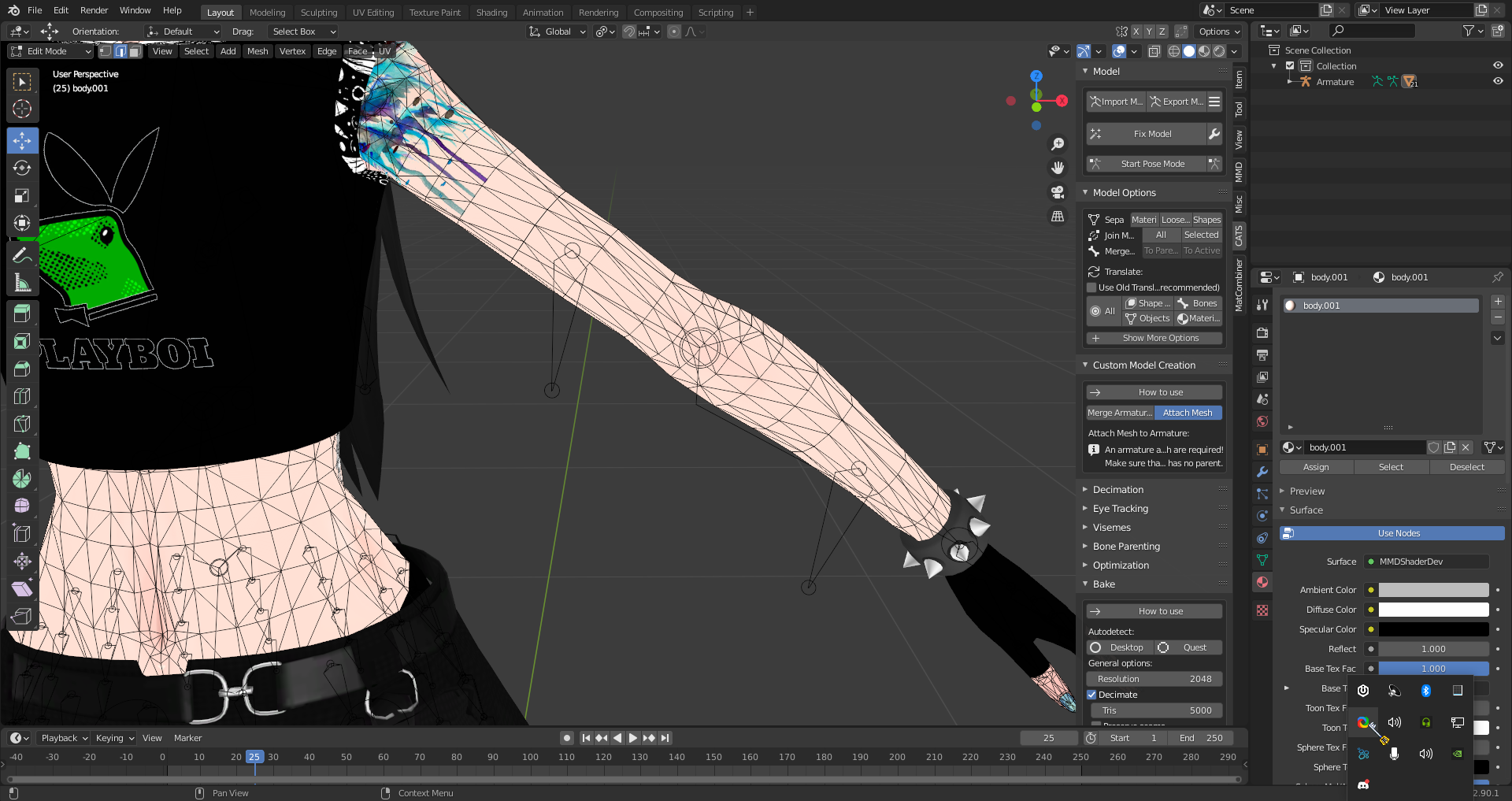
https://i.imgur.com/6YNbWul.png Idk why, but my vertices are missing 🤔
 clear geyser
dapper spear
https://i.imgur.com/6YNbWul.png Idk why, but my vertices are missing 🤔
clear geyser
dapper spear
https://i.imgur.com/6YNbWul.png Idk why, but my vertices are missing 🤔
You're in edge select. Change it there
clear geyser
lmao np
 subtle jackal
If you honestly think this you need to have a much harder look at how game engines and rendering work. Polygons still have a performance impact, and they definitely have a performance impact on animated models. Modern GPUs can draw millions of them, yes, but that's just the drawing. Each polygon has multiple additional operations that need to be performed, especially with characters. Each time you move, all those polygons have associated vertices that have to be calculated for deformations. You have to run depth and occlusion tests on each of them for culling or for alpha sorting, etc. Please do not spread incorrect information to people, and always keep your polys to a minimum.
Again, I highly suggest you have a sit-down sometime and look into what goes into drawing a polygon on screen. It will be very enlightening. I'm not saying you should agonize over each triangle but to suggest what is clearly a multi-million-poly avatar would be fine to upload and not impact performance is outright incorrect, especially if you multiply this cost by the number of avatars on screen. VRChat has limitations for a very good reason, it's not just to ruin your day.
 obsidian wagon
howdy folks, im desperately looking for the BD-1 model used in this avatar, its one of my favorites and I'm wanting to make one of my own, I tried getting a hold of the guy that made this avatar but didn't have any luck, if anyone has this model or knows where I can get it please dm me ^-^
carmine plover
Is there anyone fluent with blender who I can talk to for support about a bunch of stuff? Primarily bone stuff, navigation of the app, and dealing with new clothes. I've seen a few tutorials but they're not all too helpful
dapper spear
This is supposed to make it so i don't actually need to find the materials and drag them into unity right? I should just be able to extract the materials from the the fbx?
 bright barn
https://cdn.discordapp.com/attachments/702711858934579332/791479394870099968/unknown.png
how do i fix this someone please help me

it keeps turning my avatar into generic even though it's suppose to be humanoid
and it's driving me nuts
 unborn peak
can someone help me attach a tv to the head of this player model im trying to make
winter plinth
i dont think you can attach video players to avatars if thats what you mean
unborn peak
nah just a tv or monitor like this

here is another picture ignore the hat clipping through
unborn peak
winter plinth
i dont think you can attach video players to avatars if thats what you mean
https://cdn.discordapp.com/attachments/361742235525709825/791498546837848074/unknown.png here is the model i want to add the tv head to
 winter plinth
@unborn peak oh you can probs put that on the head in the hierarchy and itd fit fine
in unity i mean
unborn peak
thing is i suck with unity so i have no idea what any of that is thats why im trying to get some help lol
i wouldnt know how to attach it if i got a tv/ monitor from the asset store
winter plinth
oh lol, does this avatarwork for vrc at least?
winter plinth
oh no, you using a steam account then friend?
unborn peak
no i made an account
winter plinth
might be a stubborn rank you got, i can show you how to add stuff real quick via screenshare if ya like
unborn peak
so in the mean time i want to put a tv on this playermodel im trying to make it for my friend because hes getting a vr soon also if you can show me how to add the tv through screen share that would be great
winter plinth
sure lad
unborn peak
just call
spiral sigil
 lament pond
azure rain
lament pond
azure rain

/
VRoid Studio (beta)
is now on Steam❣️
\
You can now download VRoid Studio from Steam🎉🎊🎉
Feel free to use Steam's great perks, like automatic updates☺️
https://t.co/DiFaupi2x3
#VRoid
#Steam
 Twitter
·
Twitter
·
 floral gazelle
 viral meadow
New blender/3d software user here, do I make the body then add the clothing later on or straight up model the body merged with the clothing at one go
warped merlin
viral meadow
New blender/3d software user here, do I make the body then add the clothing late...
better way is create body -> save it as dummy -> create clothes -> delete body under clothes
and you still got body dummy for future projects
 still coyote
unborn peak
https://cdn.discordapp.com/attachments/361742235525709825/791498546837848074/unk...
still coyote
unborn peak
https://cdn.discordapp.com/attachments/361742235525709825/791498546837848074/unk...
You just have to find the right bone to attach it to and it'll work. Of course making sure you resize the tv to hide the head. 👍
clear geyser
Noice 
spring crescent
thanks
 nocturne tiger
Out of curiosity when you guys model a world do you start in blender and move to unity, or do you just start-finish in unity? Curious about other users workflow process since I'm pretty new
 lofty crag
Anyone know why my Blendshapes are coming in to unity incorrectly? I'll attach a picture of the mouth in Blender, and in Unity. I tried reimporting the model already and have apply modifiers disabled.
spring crescent
is it rigged?
lofty crag
The model itself is rigged, but there are no bones associated with the mouth
It's only on some shapes too
spring crescent
thats strage in unity it tweaks with the rigged model maybe its that
lofty crag
I applied all transforms again in blender, and made a fresh new import. Seems to be alright now
Thanks @spring crescent
spring crescent
yourwelcome
winter plinth
@turbid willow elab plz
winter plinth
for blender or unity?
 turbid willow
blender then unity
winter plinth
ah, sorry, cant help there
turbid willow
dam
 stark yarrow
ah i have been attempting to head-swap two models and having a hard time, as I am very new to blender... is anyone experienced with head-swapping?
i can get in a voice chat and screenshare if someone could help me xD
spring crescent
almost done with my model :/
nocturne tiger
spring crescent
almost done with my model :/
Dope 👍
lament pond
viral meadow
my model so far
split aspen
white moth
lofty crag
Anyone know why my Blendshapes are coming in to unity incorrectly? I'll attach a...
Looks like someone ran merge by distance / remove doubles at some point. Breaks shape keys,
zinc jolt
this is something I'm working on
here's another screenshot

since the model isn't coming until January 10th, I'm going to practice on making the endoskeleton
lofty crag
white moth
Looks like someone ran merge by distance / remove doubles at some point. Breaks ...
Everything was fine in Blender or I'd think so too! It was something to do with how Unity was calculating the normals. I played with those settings and it resolved
 cinder wraith
Is it better to model a jacket on a A pose or T pose?
 split aspen
Got to start from here! 😉
zinc jolt
yeah
zinc jolt
actually gyazo does on my pc
split aspen
Gyazo?
 split aspen
X3
 steep sinew
That’s So Cute
nocturne tiger
yo that's adorable
viral meadow
smol cutie
devout scroll
thanks!




 obsidian nova
Beautiful.
nocturne tiger
lament pond
https://gyazo.com/072f6c467af969b01c2f27fa153af192
Saw your pictures from earlier, turned out looking really good!
 tacit vault
in the vr chat sdk in the builder tab I get the message "AVRCSceneDescriptor or a VRCAvatarDescriptor is required to build VRChat SDK Content
Were do I get that?
 outer ginkgo
so while I'm waiting to get the "new user" role in VR chat
might as well show off what I'm wanting to port to VR chat
in this case it's Gibby from Hylics 2 that I made 2 days ago
 cyan parcel
is there a way to move portions of something without distorting it too much? I'm trying to move hair pieces so they don't clip into the body at rest
outer ginkgo
(although this is how I was wanting my textures to look like given how that's how I made the mats originally)
tepid wagon
@cyan parcel I think proportional editing is what you need, enable "Connected Only" to work on a single strand of hair
outer ginkgo
(in case they don't know where that's located)
cyan parcel
proportional editing wasn't working very well for me (it would just move the entire piece rather that the selection i wanted) so i'm just going with the ole rotate, move and it's working fine xD thank you though
quaint jasper
you can select "Only connected" on just Hide what you don't want to be moving
cyan parcel
that doesn't work when the entire material moves https://puu.sh/H19Xx/2c2fde5852.mp4
cyan parcel
mouse wheel just zooms in and out for me
quaint jasper
cyan parcel
idk how i did it but i finally got it to stop zooming, thank you
glad steeple
Ruuub wtf is that mesh
quaint jasper
subdiv
obsidian nova
I’ve never seen that. At first, I was like, sweet mother of tris...but then I realized that these are all technically Quads...I don’t know how to feel. Definitely not well versed enough in topology to make comments on this...
thin bison
That's what happens when you subdiv a triangulated mesh
outer ginkgo
never
NEVER subdiv a tri mesh
it's usually gonna screw up the UV's
median pike
that topology can actually be good for some usecases
outer ginkgo
can't imagine weight painting it like that though, dear god
winter plinth
for baking and mastricturing, that looks terrifying, for every other case for uvs, seems fine sinces its an avatar assumingly
glad steeple
median pike
that topology can actually be good for some usecases
I'd like to know the use cases.
I can't really see topo that bad ever being useful
 tranquil basin
anyone good with making blender models could use some assistance with somethin
more like alot of assistance, and yes ive watched tutorials but models are having issues
 stray tulip
Question... anyone knows how to fix these normals? I just reimported the model after doing some rig fixes in Maya and suddently the normals look like this...
nocturne tiger
Well this turned out cooler than I thought it would
 mild jewel
Hallo, I’m interested in getting a customer avatar. Is anyone open for coms with example of their work? ^^
 frozen mural
so how exactly do I make this not happen?
I dont want it to be black and purple, I have the textures in a folder in the same folder with the fbx
I looked at a youtube tutorial and as far as I can tell I did nothing different
devout scroll
@stray tulip average normals, or disable auto smooth, or try recalculating normals
F3 to search for either of these
outer ginkgo
oh yeah I forgot to mention the UVs are god awful due to the head mesh so that's not happenin anytime soon
 neat ocean
**Blender 2.9 weight paint question: **So in 2.8 I usually used "x mirror" in weight paint options to keep weights mirrored - now after some updates, whenever I toggle the "x" in options it also toggles x symmetry which either does nothing or screws over weight mirroring between left and right bones...
Am I just missing something or like how are people doing weights now?
outer ginkgo
or just use the mirror modifier and weight paint one side?
the X mirror isn't used for weights, the mirror modifier + naming your bones with ".L" and ".R" should have the same effect though
at least that's how I'd go about it to this day
https://cdn.discordapp.com/attachments/499962476272680971/792848803149512704/Crimson_Night_miniboss_1_render_1.png
just got done makin this
not sure if I can port it to VRChat due to it's shape, but so god help me I'm gonna try


 stark ore
@outer ginkgo you can make it a generic rigged avatar
though you will have to animate it all
outer ginkgo
Is there documentation on what animations are required for it to work?
because I can animate, but idk if there's a limit
 willow sphinx
I'd definitely use that
stark ore
vrc does not really give us the rundown on how generics work, i had to figure it out myself. you need .anim files and av3 trickery
only supplied us the proper info on av3 humanoid :/
willow sphinx
Damn
outer ginkgo
damnf
stark ore
one day i'll have to make a quick tutorial on how to get generics to work on AV3
outer ginkgo
if it's as easy as just making the animations in blender and setting up blend states in Unity (probably not lmao) I'd be down to learn somethin like that
but if it requires physically coding the constraints then MMMnope
stark ore
you don't need coding
i made a walking flowerpot as a generic model. you just need to make anim files for them, some locomotion graphs and then a weird setup if you want custom emotes
generics get set up differently than humanoids and the layers are treated differently for some reason
outer ginkgo
P unity weirdness
or maybe because VRChat doesn't expect people to make a 4 legged flesh thing work in game
obsidian nova
@outer ginkgo just check out tutorials online for spider or centaur avatars. There’s a way to do it.
outer ginkgo
ight
outer ginkgo
yeah that works for most geometric models, however it doesn't work when your head mesh is a indented cilinder with parts poking out, there's clear UV seams if you were to do that
for a cell shaded character that's supposed to have a clay look?
mmmnothanks
 glad canopy
helloo, where would i ask for someone who does avatar commissions?
hardy agate
vrc traders discord
glad canopy
is that a separate server?
spiral sigil
check #community-servers-old, and yes it's a separate server
glad canopy
ah alright tyy
white moth
Wait, does mirroring clothing UV's break the normalmaps?
latent charm
Yes. Normal maps are very strongly tied to the geometry and the UVs.
white moth
So if hypothetically I cut pants in half, and mirrored the remainder (so that the texture is now used symmetrically, and only half of the texture space is used) the normalmap on half of it is now busted and bouncing light wrong?
It looks fine but with normalmaps I just don't know, they're hard to tell
latent charm
Actually, no I think it might be okay.
maybe
The best way to check is to find an area that you know how it should be correctly shaded, grab a point light and move it around the area. If it's always lit as expected then it is probably okay.
If you're baking your own normal maps, the best thing to do with identical UV islands is to just move them one whole UV space to the right (or left, or any direction really) so they'll be ignored by the bake but will still get the texture because UV space repeats by default.
 worldly dawn
I'm tryuing to add clothing from an mmd i found to a custom model. When I try to get a clean edge on the sleeves, it still shows lines
Do I need to join the meshes and erase the mesh under the shorts and shirt or can I leaves them as is?
quaint jasper
Yes, join all meshes
quaint jasper
That's clean !
split aspen
X3
obsidian nova
white moth
So if hypothetically I cut pants in half, and mirrored the remainder (so that th...
What I do is delete one side of the mesh; duplicate the remaining side; scale the duplicate on the X axis (-1); select the reversed duplicate; click mesh > normals > flip normals; drag the two sides together so that the central seam is touching; click mesh > clean > merge by distance; fiddle with the “merge distance” parameter until the vertices in the centre merge. Voilà, you have a perfectly symmetrical mesh with the normals set up as they should be.
obsidian nova
Oh, my bad sorry. 🤦♂️ It’s late.