
#avatar-rigging
1 messages · Page 184 of 1
 wheat thistle
 elfin meadow
Bones should be like this for eyes I believe

Vertical
That's what I've seen in all of the things I've looked at
wheat thistle
Aaah ok.
elfin meadow
You should just be able to switch to edit mode and point it upwards
wheat thistle
The one that the vertex group USED to be parented to is that front one in the pupil, but when it would rotate that, the pupil would spin in place lol. So I tried shifting it back to the bone that seemed to work better
elfin meadow
If you think about it, the CATS plugin is rolling the bone around its axis, so if they're facing forward then it's just going to spin the eye along the bone direction
If you point the bone up, spinning the bone along its axis will rotate the eye
wheat thistle
Aaah yeah, good point. That makes sense.
elfin meadow
You'll want the bone in the center of the eye
Otherwise it'll come out of its socket haha
wheat thistle
Yeah that's how it is now I think, just facing the wrong way. The other was at the front of the eye and it was kind of cursed lol
elfin meadow
🤣 rigging can be incredibly cursed
wheat thistle
So I should just be able to transform this bone 90* on the....Y I think but I'll trial and error that
Right?
elfin meadow

Like this yeah
If you do it in edit mode you should just be able to point it right up
wheat thistle
Oooh, bone transforms don't have rotation, just the Head/Tail positions. Or can I just use the rotation hand tool?
elfin meadow
You can use the rotation tool still in Blender I believe. Alternatively you could just copy the tail X/Y onto the head (or vice versa, I always forget which end of the bone is which)
hitting R and then Y should let you rotate the bone around one axis
wheat thistle
Is there a way to snap the rotation?
elfin meadow
If you type R then Y then 90 it'll rotate by 90 deg
wheat thistle
ah cool
elfin meadow
(you can use X instead of R to rotate on X)
wheat thistle
I think it's X I want actually, now that I'm looking at it
elfin meadow
Oh wow that's impressive. I did that earlier by setting subdivision to like 20 😛 thankfully autosave had my back
wheat thistle
Yeah, I saved recently. I pressed a button and apparently it didn't like it
Let me try this again
Huh. I see.
The create eye tracking tool is creating new bones for the eyes o.o
And I think that's what's been giving me issues
Because they point forward
elfin meadow
Hmm, are you trying to use eye tracking with your avatar?
That's different to the normal eye support I think
I think it's fine if the eye tracking bones point forwards, but you still need bones pointing upwards?
 fervent hornet
In AV3 you can adjust the values yourself, but yes the bones should be pointing upwards with no roll if you want it to work correctly
wheat thistle
aaaah ok. how do i turn off roll
 wet tide
hi! i have a very similar problem as sirjames and i was wondering if someone can help walk me through this,,,,
my brain is smooth and 3d modelling is hard hfdhg
so uhm, i'm not sure if i should be doing this in blender or unity or not, but i created an avatar with vroid and imported it into unity with VRMimporter
now i hav some boots, glasses, fishnets, and earrings i wanna add
i imported the boots into unity by exporting it through blender (it was originally a pmx file)
and now i hav the same problem, i wanna edit one of the boots so that it fits the model since there's too much distance in between
should i just switch back to blender to do this? after all i do wanna add fishnets and it isn't made for my avatar's base so idk if unity has functionality to sculpt it onto my avatar's body

 crisp tendon
For the boots yeah, you can fix that in blender
 solid adder
wet tide
should i just switch back to blender to do this? after all i *do* wanna add fish...
solid adder
wet tide
should i just switch back to blender to do this? after all i *do* wanna add fish...
Mirror component modifier will be your best friend for things like this since VRoid models tend to be symmetrical.
Once you take it into Blender that is.
wet tide
yesh i decided to take it back into blender
im trying to figure out the shoes atm kjdgfdsd
solid adder
Well again, you can always delete the shoe that's not on the avatar and use a Mirror Modifier.
solid adder
Well Blender don't come with instructions really so it's something you learn on your own.
wet tide
uh,,,, how would i go about doing that actually ksjdjgdfj
solid adder
In your tabs with the small symbols there should be a picture of a wrench.
wet tide
modifier properties?
solid adder
Yep.
Add a new modifier and find Mirror.
Now do know that the modifiers will not be applied if there are shape keys. So you will have to separate the shoe from the avatar and delete all shape keys from the shoe in this instance.
wet tide
i think it worked*??? i saw the model shift a little but i need to delete the right shoe still i think
how would i go abt deleting the right shoe
ouh wait
i might be able to just fix this by moving the bones a little
or rotating them i shud say
shud i do that?
im not sure jfdksfkdh
solid adder
Up to you. I would separate the shoes from the model first, then delete the shoe that's not on the model in edit mode, delete all shape keys from the shoe, and then add the mirror modifier in that order.
Then you can just apply the modifier and both shoes should be fitted on the feet correctly.
It would also make weight painting a bit more easy since that would also be able to be mirrored if you have problems down the line with that.
wet tide
hmmmmm
that's true,,
oki
how would i seperate the boots into individual models?
so i can delete?
solid adder
Are they by chance their own material?
solid adder
Do they have their own texture?
solid adder
Put the avatar in edit mode, go to your materials, highlight the material that the boots are using, and press the select button that should appear when you highlight the material while in edit mode.
Then you can press ctrl P(?) To separate by selection.
wet tide
helo
sorry im bakc
how do i put the scene into edit mode?
ouh wait i found it!
how would i go abt highlighting the material
i selected a new texture* since the original one was broken, theyre all the same otherwise
the original one gave a pink overlay which looked funky
i don't know what i'm doingggggg
augh
i feel bad for asking since i cant give anything in return
ouh-
well i found where the shape keys are
there's only one that says basis
where do i find the material that the boots are using
i know the file path of the boot texture, it's under material properties in MMD texture
but other than that
i think i seperated them
it created another thing called BOOTS_mesh.001
when i click on it though the highlight still goes around both shoes though
yes it's not seperating them
i pressed on select, it highlighted the entire thing
went to mesh, pressed on seperate>selection
it creates another mesh but it doesnt seperate the boots
it just moves both of them onto the new mesh
 river merlin
uhm hey guys me again, when i pull my character in unity his shirt is gone and the colors are different (i did the thing with the materials already)
river merlin
stuff like the shirt (which should be purple) is just black and when i apply shaders its disappears completely

even the hair and body color are different and i dont know hwy :c
after applying the shader

i really dont know what happens with the colors and the shirt there
wet tide
i still havent figured out how to seperate them after all this time kdkfgkndfg
is anyone still able to help??
 gray meadow
Did U find a Boots fbx thats just two Boots meshes stuck together or smth
Damn i was abt to try and help but i realized I Have no idea how to seperate them without using Blender and i have no idea how blender works
wet tide
yesh i found a boots mmd file (pmx) thats just 2 meshes stuck together
ive been trying to seperate them in blender but honestly im kinda just considering on rotating the bones but then my model will probably clip through it alot because no weightpainting :(
gray meadow
Tbh id say Find Seperate boots
wet tide
awh :(
but these boots are snazzy as heck
there is an alternative to these but it's paid and it has like a billion triangles
and frankly i dont wanna spend 50 dollars
also just fyi i love ur pfp
have u got all of the eastereggs on the website?
i managed to find the 11th but im still looking for the 12th easteregg
river merlin
do you have blender?
wet tide
(offtopic i know im sorry)
river merlin
then do it like that
river merlin
yeah xD i just seperatet them so i could move them on my own
gray meadow
fellow Ena Liker
nyways if you somehow had the blend files for the boots u could put em into blender
and seperate the meshes
problem is finding Usuable information on how blender works is impossible if you dont ask People
and just go to youtube
river merlin
you have to click on the body (the shoes not the bones) and then go to edit mode. Press alt + z and select one shoe. press l then p and seperate them
gray meadow
40 minutes of the Thing im not looking for and 1 minute of the Thing i am looking for inbetween a bunch of Greeble dialogue
are u using the New veresion of blender?
wet tide
oh nononono thats what ive been doing
gray meadow
I forget the actual version name isnt it 2.0
wet tide
i imported the boots into blender
i just cant seperate them
ill try james' method though
OH
WAIT
no sorry i'm dumb i misread ur message
yes this wouldve been a whole lot easier if i had the blend file hhfdhgj
and yes im using the latest ver
gray meadow
i wish All people who dont include the blend files on their accesories a Very die
wet tide
hehfgjdgjfdnjsdf
gray meadow
and all the ppl who dont include substancepainter files for their avatars ESpecially if you intend for me to edit their textures
wet tide
tbf i think they are seperate models but blender just imports them wonkily since it's an MMD format
they didnt expect me to use it outside of MMD i guess
gray meadow
I know theres a lot of Shenanigans you have to do to get mmd stuff to work properly in vr
Once saw someone import a model straight from mmd and it. turned out relaly bad. the worst ive ever seen
I wish i had a video honestly
wet tide
HHHGJDFJ
well other than the mesh issues and some other settings i needed to tweak it imported fine
it had a pink halo surrounding it and i just had to uncheck one thing and it looked normal again
REALLY
PLS BOT
@river merlin U DID IT u actually figured it out for me thank u so much
gray meadow
im glad u could figure it out :)
Sucks when smths wrong n u cant find out whats wrong
wet tide

SNAZZY
BOOTS
now i just need to import all of the other fricking accessories hgjfdgjfdngd
i hope i dont run into as much issues as i did with these fricking b00ts
okay i dont even know where to begin to add fishnets
ouh wait there's another way of doing it
i just realized
this is gonna add like 100,000 polygons
maybe i shouldnt
gray meadow
Well quest users definitely cant see it
....thats an okay compromise
The rest of the model isnt like 80 gorillion polygons tho
Id say youre okay
Making a model thats rated excellent is Extremely hard
wet tide
true hjfdgjfdjgndf
but tbh i dont think my pc will even be able to handle that much
im gonna see if i can make a much more simple one that's just a texture extruded a little bit around the bodypart
2k polygons per bodypart :>
gray meadow
sometimes idk how avatars end up with poor ratings
the ena avatar i use shows up as Poor rating even tho shes just polygons
wet tide
omfg
gray meadow
my friends big boss avatar shows up as verypoor even tho big boss in mgs3 is from fucking 2003
wet tide
hmmmmmm
yknow wat
im gonna try it anyway
my model by itself is already above 10k polygons so quests users wouldve never been able to see it in the first place
time to explode my pc
 gusty compass
gray meadow
the ena avatar i use shows up as Poor rating even tho shes just polygons
gusty compass
gray meadow
the ena avatar i use shows up as Poor rating even tho shes just polygons
Sometimes it is materials and dynamics shits
I use a ferret model with 4k polys
But it is poor
Bc of 4/5 materials and dynamics
gray meadow
Thats piss poop its so Delicate
what if i just used the fucken default unity cube
Unity Cube ? Blender Cube
elfin meadow
gray meadow
sometimes idk how avatars end up with poor ratings
It should show you the reason in both the SDK upload window and in-game.
 fading verge
anyone how i can fix that my middle plate moves like crap if i crouch
gray meadow
elfin meadow
It should show you the reason in both the SDK upload window and in-game.
Yeah I Know That
elfin meadow
fading verge
anyone how i can fix that my middle plate moves like crap if i crouch
Sounds like you've got it weight painted to the wrong bone
 tulip root
can someone help me position my feet bones the right way? Like if you have hooves how should they be positioned?
elfin meadow
tulip root
can someone help me position my feet bones the right way? Like if you have hoove...
Still forward like normal feet I'd wager.
 stuck parrot
feel like this would be the best place for help with this, but it seems any avatar i upload to blender, fix model, and then export and put it unity has its bones broken or something. when i put them in unity and try to put dynamic bones on them, they don't work at all. i've tried this with four different models and they all do the same thing.
i dont understand though cause i can see the bones are there in blender just fine, and the rig setup in unity seems fine, but dynamic bones just do nothing when put on.
 kindred pollen
Do the dynamic bones work in Unity's play mode, but not VRChat? o:
stuck parrot
they don't work in play mode, nor do i see them on the avatar when applied, cause when you have the model selected you would see them but they just are not there
 ornate cairn
you need to select bones in root on dynamic bones component
stuck parrot
omg omg thank you i KNEW it was something stupid and small i had been missing
this is such a relief, i never had to do that one little part before so i was like wtff
kindred pollen
legs look fine to me? note that leg shuffle thing might again just be a side-effect of how VRChat's IK works
also, might be worth checking to see if the issue's only in desktop or VR
 wide knot
does anyone know what could cause fingers to twist and scale weirdly in game? looks fine in unity and blender


 tulip root
wide knot
does anyone know what could cause fingers to twist and scale weirdly in game? lo...
tulip root
wide knot
does anyone know what could cause fingers to twist and scale weirdly in game? lo...
fix bone roll
wide knot
i set bone roll to 0 on every single finger bone
or well, every single bone on my avatar
 tulip root
What is this?
 wide knot
a bone not involved with fingers
just for attaching colliders
fingers are all parented to wrist
not to that bone
tulip root
check if you have parts weightpainted to wrong fingers
wide knot
weight painting is correct
tulip root
u sure?
wide knot
posing bones in blender everything looks fine
tulip root
Bone roll, weightpaint or gestures. One of those is your problem.
wide knot
using default gesture layer

i feel like the game overrides finger positions from gestures when using index controllers
and just forces finger bones to predetermined positions
which dont line up with my rig, which causes warping
fingers basically follow the blue axis
stuck parrot
how do i connect one bone to another?
 limber junco
bill cipher
fading verge
limber junco
bill cipher
yes
elfin meadow
stuck parrot
how do i connect one bone to another?
There's a parent option in the relationship menu for a bone in Blender (it's in the right-hand menu). Make sure the parent is set and tick connected.
 gentle veldt
so my avatar's knees bend the opposite direction when i crouch... what do?
they bend backwards when i start to crouch. but when i crouch a little further, approaching the prone threshold, they go to normal. and this is a fully rigged model that i had purchased. is it maybe due to the custom prone animation? or is it due to these things?
 crisp tendon
What does the armature look like in blender from the side ?
gentle veldt
 crisp tendon
Try moving the knee bone slightly forward and then clearing rolls on all bones in edit mode
gentle veldt
just tried without a custom prone and thats not the issue
gentle veldt
crisp tendon
Try moving the knee bone slightly forward and then clearing rolls on all bones i...
um.... what?
clearing rolls?
crisp tendon
In blender you have a search bar that lets you find anything you can do
alt + R also works
fading verge
I have a question
@crisp tendon I'm trying to make a request on making a skin in a .vrm format. Know where I can get help on that?
crisp tendon
crisp tendon
no clue, but that's the wrong channel for that, you can commission people from other places
fading verge
I've asked several people so far from multiple discord servers and they have always turned me down.
 sage patio
fading verge
I've asked several people so far from multiple discord servers and they have alw...
sage patio
fading verge
I've asked several people so far from multiple discord servers and they have alw...
tried VRC Traders?
fading verge
No idea on what that is.
elfin meadow
#community-servers-old, scroll to the very top
fading verge
I'm trying to get an avatar for virtual Droid 2, but I don't think it runs by the same style when it comes to avatars. Thanks for pointing me to the server though.
 fickle cosmos
I cant find / remember right search terms, Where I could check bone order for the avatar.
Im starting the rigging and I If I remember wrong they needed to be in right order to work?
crisp tendon
It's pinned in this channel
fickle cosmos
Ofcourse! 😄 atleast i was in right channel! Thank you ❤️ !
Ah! Super! I remembered it right that I saw it somewhere here months ago! I will save this !
gentle veldt
okay i am not 100% sure but i think clearing the rolls just made everything so much worse
crisp tendon
how so
gentle veldt
now its fucking up my view point.
view point is either inside the chest or way above the head
even tho it is clearly supposed to be located right between the eyes
crisp tendon
Do you also have a custom idle ?
gentle veldt
nope
no custom locomotion, no custom idle. im not even using an FX layer on the test avatar
crisp tendon
And your viewpoint is moving ?
gentle veldt
well im trying the CATS plugin "fix model" and when i reimport the model, i have to redo the rigging cuz the leg bones are somehow defaulted to the bones in the dress. anyways i cant exactly remember what bone to put in for "foot". be it the ankle or the toe. tried both. but testing the avatar, the view point is screwed up
also, the knees are still broken too
crisp tendon
You didn't really have to use cats in this case
gentle veldt
im not even sure if "clear the rolls" even did anything to be perfectly honest
also, alt+r brings up my Radeon software manager
crisp tendon
Then use the blender search bar instead
crisp tendon
ankle
 gentle veldt
view point is still inside the chest
crisp tendon
Did you press play to see where the viewpoint is in editor ?
gentle veldt
unity still has it inside the head where it should be
crisp tendon
What does the upper part of the avatar look like in blender ?
gentle veldt
from the front or side?
crisp tendon
either
gentle veldt

maybe i should move the chest/spine/hips back a little so its close to a straight line?
crisp tendon
hip bone needs to be above the legs, not sure why the chest bone is so massive though
there's also a few non symmetrical bones going on
so i could see some fuckiness happening
overall it should be fine, and not sure why the viewpoint would change tbh
gentle veldt
FINALLY
although i think the knees might be a little too close together. theyre kinda crossing when i crouch
ya know what? ima deal with it. ive already spent way too much time, energy, and sanity on this and i do not wanna accidentally screw it up even more
stuck parrot
when I'm sculpting how do I turn off it snapping from one spot to another, i just wanna sculpt right where my mouse is
sage patio
@stuck parrot the magnet icon at the top I believe
sage patio
 wind night
i can't get my eye bones to agree with unity
wind night
i can't get my eye bones to agree with unity
that's fine, you can work with it using SDK3
wind night
i'd rather they just work normally
what it should look like:

what it actually looks like:
 wind night
go on and ask it then
crisp tendon
Is it a rigging question ?

 crisp tendon
Literally can't see anything in that screenshot
 shell agate
Ah okay will send another
wet tide
hi, i need a little help
i have earrings and boots that i wanna add to my avy in blender
both have armatures
idk how to attach them though
my main problem is i have two seperate meshes under my boots hierachy, and when i go to attach them to my avy's armature only one of the two boots show up since its only one hierachy
the earrings show up fine though since theyre two seperate armatures
shell agate
crisp tendon
Literally can't see anything in that screenshot
Like this

 crisp tendon
What does the armature look like in blender from side view /
shell agate
crisp tendon
What does the armature look like in blender from side view /
Gonna say I don't have blender
I used unity to edit it
crisp tendon
Can't edit bones in unity 
shell agate
Ah ok
shell agate
crisp tendon
Can't edit bones in unity <:tohrushrug:668316421377228800>
I am downloading blender rn but sadly never used it before
wet tide
i'm not gonna worry abt adding earrings
i just wanna c if my model works for now
can someone help me though with attaching the boots?
i don't know which bone to attach them to

pls bot
do i attach it to the hips???????
the highlighted armature is my base's armature and the black armature is the boots' one
shell agate
crisp tendon
What does the armature look like in blender from side view /
This is the big one in blender but sadly I don't have the smol one in blender
 crisp tendon
Make sure the legs are straight from the front and slightly bent from the side
looks correct from this side at least
 empty lake
(talking for jude here. i was helping but refered to here because my knowledge is limited, the avatar's armature is like in the screenshot, and works fine with the full-size avatar. It breaks though when the avatar is scaled down in unity to be 3 inches.)
i assume the ik just fails at that point
crisp tendon
3 feet right ?
crisp tendon
Yeah then it'll break
shell agate
Ah okay
empty lake
was afraid of that
crisp tendon
20cm is the smaller recommended height
shell agate
True
empty lake
sorry Jude 😕
shell agate
It's ok
As long as I don't look in a mirror I am fine
It actually mostly happens when I am sitting on the bed anyways and turn my body
And have vrchat on standing mode
empty lake
yea ik probably just spazzes out, bones getting too short and the like
shell agate
Yes
shell agate
crisp tendon
20cm is the smaller recommended height
Thank you
shell agate
empty lake
yea ik probably just spazzes out, bones getting too short and the like
Thank you
^w^
wet tide
does anyone know which bone i have to attach my boots' armature to?
this is the only thing stopping me from importing my avy into unity and seeing if it works in vrchat ;-;
gray meadow
If ur doing small avatars
The way u should rlly do it is make it normal sized in blender
N just make it Tiny in unity
Because making it tiny in blender causes problems like that
gray meadow
wet tide
does anyone know which bone i have to attach my boots' armature to?
Foot Bone
wet tide
theres a left and right foot bone though and i cant attach them seperately so idk what to do hshdjdjskdn
i posted a screenshot before,,,, it shows all the bones my base has
empty lake
gray meadow
Because making it tiny in blender causes problems like that
That's what we did tho.
 frozen jacinth
For FBT is cutting out the hip to grion and replacing for legs common? I found two seperate avatars with nice tracker placements and both ended the torso at the hip, which I dont think is a coincidence.
wind night
i'm sorry what
 soft star
guys.

problem that needs fix'n
this bone has the wrong default position.
how do i change its default position so it ain't bent?
the people over in help told me someone here could help.
soft star
pose mode.
sage patio
so then just clear the pose
soft star
thats the problem
soft star
that is with clear'd pose
i think fiex it.
apprently interting a keyframe fixed it.
no idea why.
god why are all editors like maya and blender so confusing.
sage patio
because 3D modeling is hard
blender gets easier once you start to get the basic concepts
soft star
see its not the basic i have problems with, its just the spaghetti code you get with an 3d software.
either way as far as i can tell my problems are over for now.
 dusty stone
I used CATS to fix my model - I get some height issues in-game tho.
I'm on a Rift S - no IK Fullbody.
Would altering the armatures and mesh by making the legs slightly longer fix the issue, or is there another way? My viewball is just behind my eyes and down on my model - no matter where I place it, I get floating issues.
If you need some images, I can send you some. My way to fix it usually is to hit 'Standing Play', get elevated by 5 centimetres (tip-toes), then hit seated and stop tip-toeing.
dusty stone
ping me if anyone has a resolution for this issue - whether it is rigging issue or not
 worthy pond
Anyone have a good Viseme chart for all the visemes? I'm making some rn and was wondering if anyone uses one in specific
 vital mason
A complete table of visemes detected by Oculus Lipsync, with reference images.
wind night
will bone constraints get imported into unity?
sage patio
wind night
will bone constraints get imported into unity?
not likely
wind night
damn
i found an avatar with four legs, and even in fullbody the back legs followed the front
how'd they do that then
sage patio
wind night
damn
i found an avatar with four legs, and even in fullbody the back legs follow...
Unity constraints and/or FinalIK
 livid pond
please help
can anyone do this for me? ill be grateful

i cant use blender, please dm me for more info
wind night
you can't use blender or you're just not familiar with how to use it?
livid pond
i cant, no one has teached me, i have attention problems, it gives me stress and i have trouble learning
im autodidactic
i had a lot of problems learning unity and i suck at it
i swear i tried but its so hard without any help
so i gave up
Dang no one will do that? I'll be so grateful..
wind night
i mean i could possibly do it, i'm not the most familiar with using a jaw as opposed to blendshapes though
livid pond
At least can you rig the mouth? I don't want my emperor to be constantly screaming in pain
wind night
yeah
dusty stone
dusty stone
I used CATS to fix my model - I get some height issues in-game tho.
I'm on a Ri...
bumping
 unreal shoal
Can anyone tell me how to fix this besides kung's two full body fix methods?

Because those make this happen

Move in edit mode and rotate in pose mode and apply as rest do not work
 sleek isle
fix what
unreal shoal
the hip bone being wrong and making my hips rotate funky with fullbody...
Like this, but not as extreme... and kung's fixes dont' work
https://gyazo.com/39f43ea6c83438a52e33bd1b34b309ba
 sleek isle
have you try to move the hip back to be more align with the leg ?
 proud wing
sorry for asking but what is avatar rigging?
sleek isle
what make move the character
sleek isle
skeleton
proud wing
by the way where do you add the shift fn animations (sorry for wrong channel but couldnt find)
sleek isle
depend. sdk2 or 3
sage patio
proud wing
by the way where do you add the shift fn animations (sorry for wrong channel but...
hitting shift + fn simply emulates the person doing a finger gesture
proud wing
ok
@sage patio is there a way to see who is the creator of the skin without having someone else wear it?
sleek isle
no
proud wing
ok
unreal shoal
sleek isle
have you try to move the hip back to be more align with the leg ?
I have. It breaks the model
sleek isle
it break in what way
unreal shoal
The hips end up an even worse angle
I move the hip bone, the pelvis of the avatar moves the opposite way
dusty stone
dusty stone
bumping
last bump - there's an issue tied onto that reply.
crisp tendon
What's your issue and can you post screenshots of it and your armature in blender ?


 sharp viper
hehe, I gathered as much 😉
if vrc does such a thing, I would love for it to be driven by any camera, with something like the way hitogata does it 🙂
sage patio
sharp viper
if vrc does such a thing, I would love for it to be driven by any camera, with s...
the Decagear headset suposedly coming soon has 6 cameras; 4 external for room and controller tracking, and 2 internal cameras; one for eye tracking and one for face tracking
sharp viper
though typically those systems work best with SoC trained models and global shutter
sage patio
sharp viper
if vrc does such a thing, I would love for it to be driven by any camera, with s...
the Decagear headset suposedly coming soon has 6 cameras; 4 external for room and controller tracking, and 2 internal cameras; one for eye tracking and one for face tracking

 kindred pollen
also important to note is that the Vive facial tracker would likely need cheek, lip, and tongue bones to work, which I'd hazard a guess and say a majority of avatars don't have lol
sage patio
no, it's using 38 blendshapes
kindred pollen
could def do blendshapes too, though those won't follow the person's facial muscles properly
lmao timing
sage patio
 sharp viper
yep, decagear uses blendshapes for ease
kindred pollen
ah, nevermind then o:
sharp viper
Well, that's actually interesting
so if it's blendshapes
and they're named the same,
it could read them, but like, so far unaware of how vrc would know that it's done so.
 gleaming mesa
obviously them saying blend shape means that they have some api where 38 values [0.0, 1.0] come out
each is supposed to map to some kind of face movement
the reason it's not bones is that you can make these blend shapes "conceptual"
as in "this value is the left side of the mouth going up"
kindred pollen
ah o:
also that sounds like it'd make my CPU scream lol
gleaming mesa
apart from the calculations that create those 38 values, not that much more than VRC already makes your cpu scream
 slate cedar
How many cores does vrc take advantage of?
kindred pollen
VRChat itself is multithreaded, though Dynamic Bones (a third-party plugin for jigglebones) isn't
I don't know how many cores it uses specifically, though - would probably maybe take advantage of an 8 core processor, but probably not a 32 core processor lol
elfin meadow
What's the right way to weightpaint a character which has a combined body/neck/head? e.g.

Ideally want it to act as a single object and not get warped when bending over, not sure if this means I need a non-humanoid rig then.
livid pond
i need help with avatars. i use mixamo and i need some of my models with a jaw bone..please
sage patio
elfin meadow
What's the right way to weightpaint a character which has a combined body/neck/h...
could just leave some bones not weight painted
elfin meadow
Yeah I've done that, but as the eyes are parented to the head, moving the head removes them from their sockets 🤣
sage patio
the big blob could probably be weighed to either the spine or chest
elfin meadow
sage patio
the big blob could probably be weighed to either the spine or chest
Yup I've weighted it to the spine
sage patio
you could try parenting the eye bones to the spine too
elfin meadow
Tried that, can't import as humanoid in Unity if eye bones aren't parented to head.
So I guess I'm either going non-humanoid or deciding which parts of the blob are spine/chest/head.
sage patio
then have a duplicate set kek
have a set reserved for the humanoid rig
not actually doing anything
then the real eye bones parented to the spine
elfin meadow
sage patio
then have a duplicate set kek
That's an option - I forgot VRChat lets you pick which bones are the eyes separately to the humanoid setup...
sage patio
mhm
elfin meadow
Sweet, thanks!
livid pond
livid pond
i need help with avatars. i use mixamo and i need some of my models with a jaw b...
i dont have blender
solid adder
elfin meadow
What's the right way to weightpaint a character which has a combined body/neck/h...
Weight paint to chest
elfin meadow
livid pond
i dont have blender
Get blender
 maiden bluff
livid pond
i dont have blender
maiden bluff
livid pond
i dont have blender
blenders free - get it
elfin meadow
solid adder
Weight paint to chest
Will give it a shot 👍
solid adder
If the legs arent necessarily connected you should be fine.
Also make sure not to use any shaders that create outlines or you may have trouble seeing
elfin meadow
Good to know, thanks!
solid adder
Reason for it is while playing your head gets scaled down locally for you to see meaning anything weight painted or child do the head will get scaled down on your end.
solid adder
livid pond
please no blender
You're sort of limited then.
livid pond
solid adder
You're sort of limited then.
in fact i are. i have learning problems
livid pond
well no one is gonna help me? i dont want to make models for them being lifelong scared
 hollow vapor
o
solid adder
Well you gotta realize people are here to help, but it takes time and you're asking for people to rig a model for you when a lot of us have our own projects and whatnot.
It sucks, but it's either figure out a way to learn it and overcome the fear or wait for someone to come along that can do more than teach.
 main token
if someone is able can they possibly take a look at my model? every time put it to unity it cant find some bones and a lot of areas are red and ive renamed the bones multiple time accordingly
ive been at the damn rig for days and im just getting really frustrated and it si my first model.
crisp tendon
Can you post screenshots of its armature in blender here ?

 main token
if its not too much trouble could someone tpose the model for me?
crisp tendon
your model is t-posed
you just need to move the bones slightly so that they match the screenshot above more
main token
and unity cant find some bones too
crisp tendon
Did you assign your bones in the humanoid configuration ?
main token
yes
i just need someone to take a look at my model in blender, and ill gladly send the fbx file of my model
livid pond
solid adder
It sucks, but it's either figure out a way to learn it and overcome the fear or ...
cant. sorry
i spent a lot of effort on this
 crisp tendon
Use Maya in that case
 hardy herald
any help with a possibly borked rig my right leg wants to be lower then my left

but it seems to look fine in blender

it might be something small or idk if its something goofy with 3.0
 hardy herald
not really tbh
 undone pulsar
For custom leg IK, can we use fabrik, or is it exclusively doable through final?
fervent hornet
undone pulsar
For custom leg IK, can we use fabrik, or is it exclusively doable through final?
You can't just slap final ik on it, the usual steps are to have 2 rigs, one for vrc to use and one for FBBIK to use. Weight your mesh to the FBBIK rig and use your vrc rig's extremities as targets for the FBBIK
undone pulsar
moreso me asking in order to evaluate a 90$ purchase for only a few avatars
solid adder
I think the guy who made Final Ik wasn't supporting the script anymore. 
fervent hornet
solid adder
I think the guy who made Final Ik wasn't supporting the script anymore. <:vrcThi...
Final IK was just updated to 2.0 a couple months ago?
fervent hornet
undone pulsar
moreso me asking in order to evaluate a 90$ purchase for only a few avatars
IMO you should not buy Final IK if all you want to do is adjust humanoid IK, its quite difficult atm due to workarounds
solid adder
It's what I heard from people that use Final Ik, but how true it may be just take with a grain of salt.
fervent hornet
Most of what you hear about Final IK in VRC is horseshit, its always surrounded by negative rumors for some reason
undone pulsar
looking more along the lines of spiderleg
thing's rigged up, but putting IK on this'll be a lil tough
 fervent hornet
I can DM you a link to a discord about that if you want
undone pulsar
aite
also, another question about more complex stuff, can you toggle constraints with gestures?
fervent hornet
Dont toggle the constraint entirely, set the weight to 0 to toggle it off
But yes in practice you can toggle them
undone pulsar
sweet
with this thing being a crab-ish character, i wanted an option to toggle legs to hands if you close your hand
 flint barn
hardy herald
but it seems to look fine in blender
flint barn
hardy herald
but it seems to look fine in blender
Is the hip bone centered and no rotations? I'm not the best at rigging but iirc that can cause a hip tilt.
hardy herald
i think it is
 flint barn
Other axis, kinda looks like it might be a bit off center
hardy herald
nope didn't work
 languid ermine
Looking for some help setting bones as stuff like wrists, hips, and all that can anyone help?
fading verge
Anyone mind helping me clean up an avatar? It's just like weight painting on the body and such. I'm not good at it, but it should be pretty simple.
 sage patio
fading verge
sage patio
fading verge
why do you have the right eye bone in Jaw lol
fading verge
it was just like that and i dont know how to change it ngl
 quaint beacon
When I import this model into unity the left arm becomes bent even though nothing wrong is happening in blender and even when I re import it brand new.

anyone know what to do?
fading verge
quaint beacon
anyone know what to do?
All I can think of is connecting bones in the arm
crisp tendon
Yeah looks like you're missing a twist bone weight paint merge
fading verge
Anyone know how to make a pose be the default position the model is in
The legs on my model is spread out kinda and I'm trying to fix it
crisp tendon
apply pose as rest pose with cats
fading verge
Tysm, I was applying rest pose with blender and not cats and it wasnt working but u fixed it
fading verge
can anyone teach me how to use blender ill pay you what you think is fair i just dont wanna bother anyone with asking how to rig stuff
 royal prism
fading verge
fading verge
can anyone teach me how to use blender ill pay you what you think is fair i just...
royal prism
fading verge
fading verge
can anyone teach me how to use blender ill pay you what you think is fair i just...
Dont you think it would be better watching a video explaining everything about blender
sleek isle
@hardy herald make the hip bone 🦴 half it's current size maybe
fading verge
@fading verge im trying but man i dont know what im doing
 paper frost
Hello everyone!
I am trying to make my avatar FBT and I get "The angle between pelvis and thigh bones should be close to 180 degrees (this avatar's angle is 173,9)." message in the SDK's Control Pannel.
So I moved my hips as shown in the picture below and the message didn't change at all.
I think I'm understanding something wrong if someone could help me please 😝
Also when I click "select" it highlights "Left ankle" and "Right ankle"; not sure if it's helpful to understand what's happening but there it is
 crisp tendon
the upper legs have a different angle as the hip, hence why the warning remained the same
 crisp tendon
Hip bone should be straight, so you'd have to adjust the leg instead
sleek isle
Sometime the armature is assign in the hip. Causing that warning
paper frost
crisp tendon
Hip bone should be straight, so you'd have to adjust the leg instead
Yay I moved the leg bones so the head falls right under the hips and SDK doesn't give me the error anymore; thank you so much! 😁🎉
 kind ore
@fading verge the best teacher is looking up tutorials and going trial by error, honestly
if theres something specific you want to start with, i could offer advice but thats it
livid pond
who can rig this for me? if anyone does i will give you access to edit the model files please i dont have blender and im not installing it. for reasons. please
 crisp tendon
I doubt anyone here would do this for free, that looks like a bit of work
gleaming mesa
vrchat sdk complains that lower arm is not the first child of upper arm.
that's true, in unity. but in blender, the hierarchy is correct!
how do i change the bones (names?) in blender to make them appear in the order I desire? alphabetically?
i answered my question with my question itself, alphabetically is actually the deal
crisp tendon
It doesn't matter tbh, they'll still behave fine
Hierarchical order isn't relevant for that as long as they have the same parent akaik
gleaming mesa
ah, i just listened to the sdk because why not
crisp tendon
It's a good warning because some rig sometimes have twist bones but weight painting is either gone or doubled, so it's good to check
gleaming mesa
it does have twist bones, yeah
crisp tendon
Worth moving the arms around in unity to be sure
gleaming mesa
i did a cursory glance at them in weight paint and pose mode in blender and they seem absolutely fine
no odd deformations
thanks for the hints
i'm sorry to do that but while i have the attention of someone at vrchat, i have an issue with avatar v3 locomotion layers:
if i have a locomotion layer override, the avatar starts trying to duck and prone even in full body tracking. if i do not have an override, it does not do it
one of my avatars who overrides the locomotion layer i have uploaded twice now: FBT and Desktop/VR
even if i just use a cloned locomotion layer from the SDK as is, without modification it has that issue
kind ore
it may be a broad question, but what does weight painting really do? the resources ive searched up aren’t that clear
gleaming mesa
kind ore
it may be a broad question, but what does weight painting really do? the resourc...
weight painting attaches vertices of a mesh to bones
gleaming mesa
it tells the renderer how much of a bone movement is relating to any given piece of the mesh
kind ore
thats so useful lmao
gleaming mesa
i hope that explanation made sense to you
gleaming mesa
it is damn addicting, i have to agree.
i've uh... went into a weird deep dive the last handful of days
kind ore
aha
gleaming mesa
i barely emerge from my room
kind ore
i slept at an ungodly hour doing blender models today lol
gleaming mesa
yep, that happens
 kind ore
did those bones decide to do the funny
 valid relic
having some issues with pose mode, just getting these stupid rings instead of actual posing
 valid relic
could i get someone in screenshare to have a look at what i'm doing? would be mighty helpful
gleaming mesa
a single vertex doesnt seem to want to listen to my weight painting at all... what gives?
anyone have an idea how to check this?
also they jump like this because i moved the bone far away so all that isnt mapped is easy to see heh
fading verge
I just make the circle bigger and keep clicking
crisp tendon
You can try to pay someone in this server to do it for you #community-servers-old message
 celest niche
Looks complex
 wild sundial
Hi guys. I'm working on fixing some rigging stuff on my avatar for full body tracking. Does my rig look good? If you find things I should do, please tell me.

I was thinking I should move the hip bone and the chest bone up a little bit. What do you guys think?
 wild sundial
I did notice I shift down slightly ingame. How do I fix that?
I did hear I should shorten the chest bone, but I'll hold off on that for now.
sleek isle
If after calibration you get side hip tilt doing this will fix that https://media.discordapp.net/attachments/730948173379535022/747651062751559830/VRChat_1920x1080_2020-08-24_19-48-44.179.png?width=960&height=540


For the shift down after calibration. It can be multiple thing.
-The spine is not align on the X=0
-The spine is to low near the leg.
-You have 4 bones 🦴 for the spine and you have assign the upper chest.
If you get this error. You have the armature ☠️ assign as the hip instead of the actual hip bone 🦴


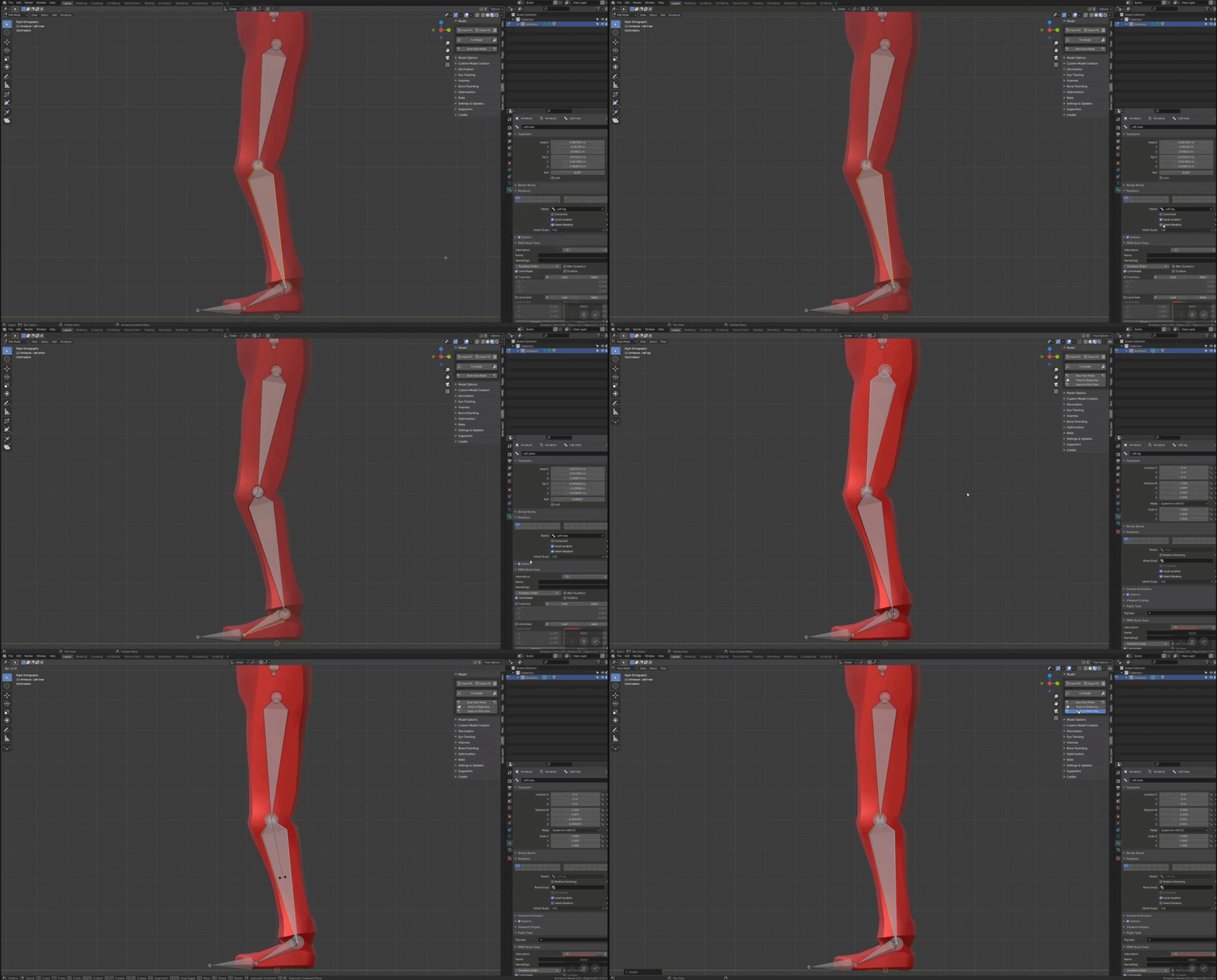
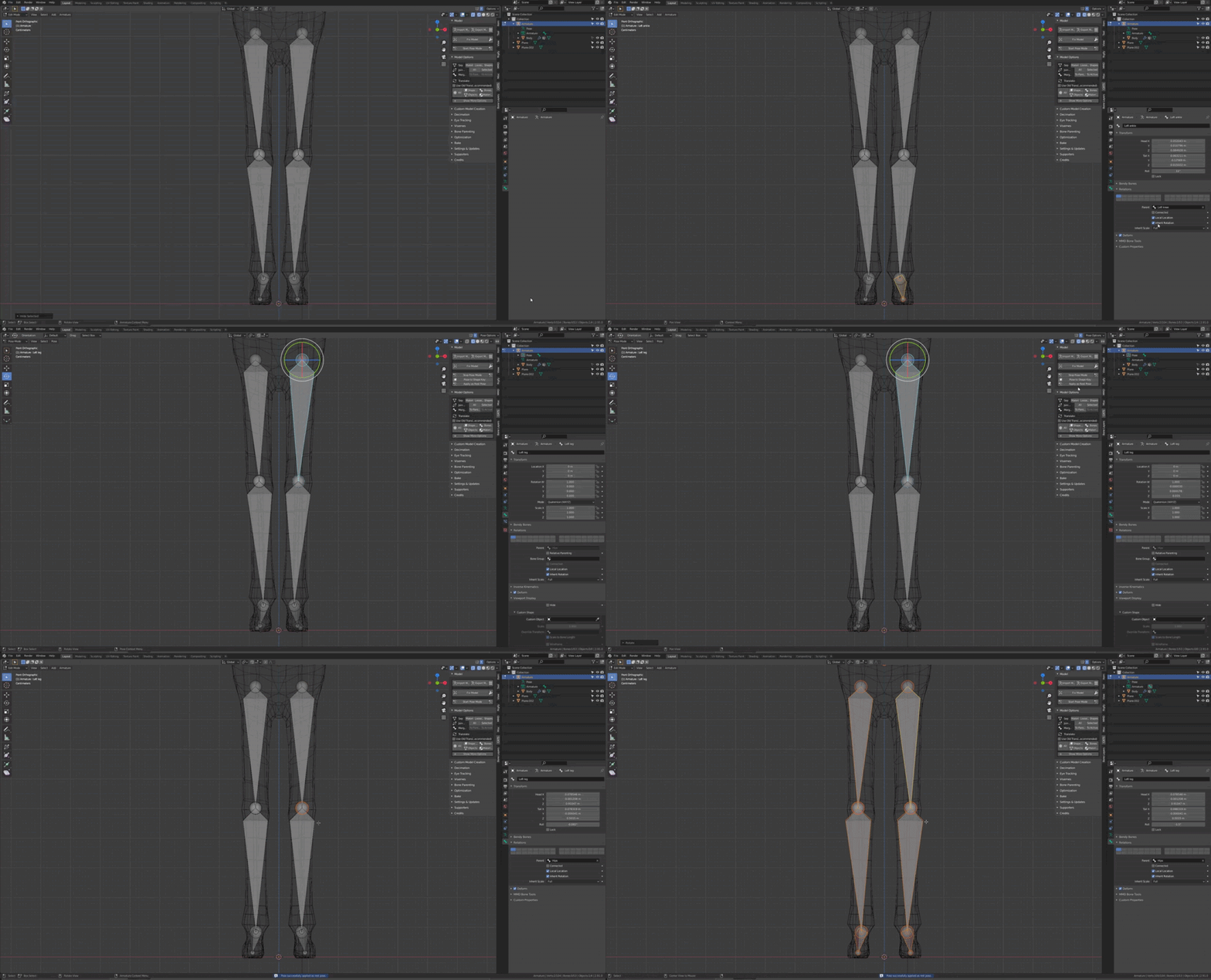
Or your leg are to much bend forward. Move the upper leg back and the knee forward. Apply as Rest Pose Then ctrl+R in edit mode with all the bone selected en orange to reset the roll to 0
 sleek isle
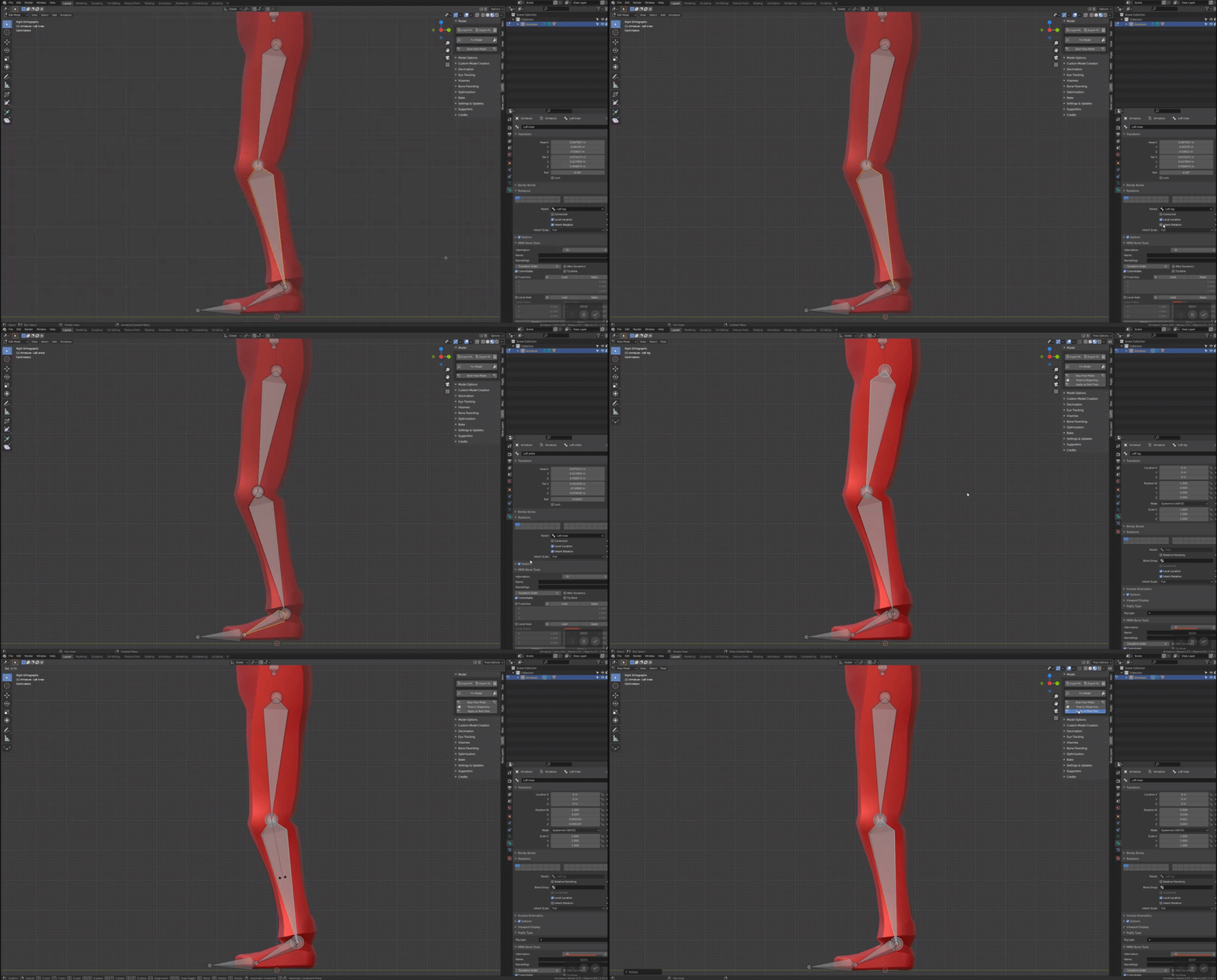
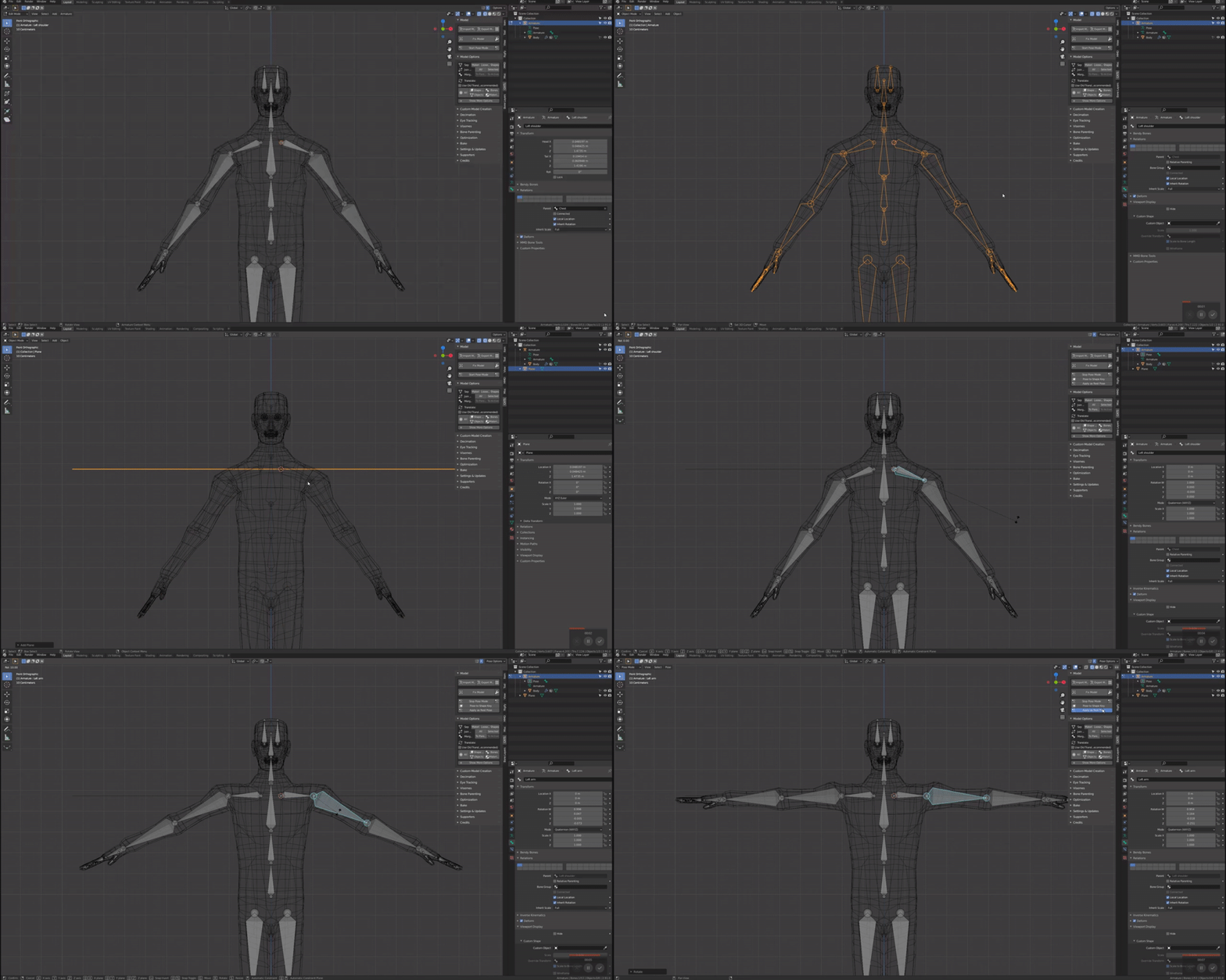
In FBT, your shoulder rotate really low. Here what you can do. https://cdn.discordapp.com/attachments/708457052577464430/821162803091603466/unknown.png

-Make you shoulder more up to be align with the entire arm. https://i.gyazo.com/1951771c2690a2bc0c276d9c6b10d9af.gif Apply as Rest Pose Then ctrl+R in edit mode with all the bone selected en orange to reset the roll to 0

-Make the shoulder bone 🦴 smaller.
-Use the different standing animation. Look how the shoulder are angle differently.

Your knee criss cross in 3PT when crouching

-Rotate your legs to be strait in pose mode. Apply as Rest Pose. Then move the knee joint in edit mode to be slightly on the outside. Then ctrl+R in edit mode with all the bone selected in orange to reset the roll to 0
 wanton lake
Any idea how to find why parts of the outfit are stuck to space?
 sleek isle
 wanton lake
Weight painting showing nothing.
Any ideas how to find the vertex it's attached to if it's not showing as painted to anything?
sleek isle
wanton lake
I'll try, but that's a lot going on all at once ;-;
sleek isle
wanton lake
Ah-ha. You are a god. Thank you. Much easier than doing it paint-by-number.
wild sundial
Someone has to pin all of this stuff
wild sundial
sage patio
if anything, make the hip bone smaller
sorry to ping you, but why is making the hip bone smaller beneficial?
sage patio
because of the way the IK works mainly
wild sundial
is it to better align the hip tracker with the hip bone?
oh
@sage patio I resized the hips. Is this good?
 sage patio
probably fine yea
wild sundial
should I scale the chest bone a little bit smaller or leave it the way it is?
sage patio
could maybe move the joint between spine and chest up a tiny bit
 sage patio
yea that's probably fine

 sage patio
fading verge
When i uploaded my avatar hes stuck in tpose, any idea why?
sage patio
fading verge
When i uploaded my avatar hes stuck in tpose, any idea why?
you forgot to set your rig type to Humanoid
fading verge
sage patio
you forgot to set your rig type to Humanoid
But it says humanoid before I press configure? Am I missing an extra step?
sage patio
fading verge
But it says humanoid before I press configure? Am I missing an extra step?
make sure that you configured the right model
and also
make sure that there is no controller in the Animator component of your avatar
fading verge
so i started fresh and went to start rigging but it gives me these errors in the console
 wanton lake
Weight paint tool not allowing me to paint, or remove anything. Have the mesh selected, but no changes.

Same for all vertex groups.
 wanton lake
Yeah... It won't allow me to paint... I dunno what to do..
 coarse delta
wanton lake
Yeah... It won't allow me to paint... I dunno what to do..
coarse delta
wanton lake
Yeah... It won't allow me to paint... I dunno what to do..
click A
seems like you have selection mode on
wanton lake
;-; omg, I somehow went to another object and it fixed itself, that's what it was? I was stuck there for an hour and a half :NotLikeThis:
coarse delta
here I'll show you ^^ so you dont do it again
wanton lake
What is selection mode, and how do I uninstall? 
coarse delta
 wanton lake
Mhm, mhm.
coarse delta
make sure these are not highlighted
wanton lake
BOTH of them, okay, okay.
I was using it to find what vertex was being pulled around earlier.
coarse delta
yep clicking again will unselect it ye
sage patio
cute nanachi :p
wanton lake
Nyaa~ Agreed
coarse delta
thankies ^^ I'm working on this to release
wanton lake
Now I learned about Selection Mode! Level Up!
coarse delta
wanton lake
Now I learned about Selection Mode! Level Up!
yay! once you get used to using it, it can reaaally help to weight difficult parts 

 coarse delta
fight off those pesky stray polys >:D
wanton lake
.< There's always SO many of them! An endless battle!
coarse delta
we've all been through it 😢

 nocturne patio

I don't know why but a part of the body isn't following even tho it's fully weigthpainted, any idea why anybody ?

 hot plaza
I cant really see from the 2nd image but it seems like its partially moving
So my guess is that another bone has some weight on there
crisp tendon
Yep, that's the cause
hot plaza
@nocturne patio
nocturne patio
hot plaza
<@!466673315864510474>
okay ! thx !
hot plaza

 rose wagon
do dummy bones still have to have weight to them to work in the humanoid rig?
or can i just have finger bones exist with no weight and unity will accept it
sleek isle
yes
rose wagon
WHICH
 still fossil
They don't need weight
 dull haven
I would love to start making models and rigging them but last time i tried i got hella confused vv quickly. any tips?
sage patio
dull haven
I would love to start making models and rigging them but last time i tried i got...
making actual model / sculpting it comes first, so maybe focus on that
don't forget tutorials exist
fading verge
Best tutorials are on YouTube
wild sundial
fading verge
When i uploaded my avatar hes stuck in tpose, any idea why?
idk if your question has been answered, but have you worked on animations with that avatar?
fading verge
wild sundial
idk if your question has been answered, but have you worked on animations with t...
No, why?
wild sundial
When you work with animations on your avatar, and not a duplicate, your avatar's animation stuff is essentially broken. And it will get stuck in a t pose. @fading verge
livid pond

I made this but if no one helps me I'll never be able to use it because mixamo fucks it


And yes I'm begging using my art
Please help me I want to use it soo bad... It took me a lot of effort..
sage patio
livid pond
alright, send me the model
 willow cobalt
So i think i found out the problem on my models rig
 wild sundial
willow cobalt
So i think i found out the problem on my models rig
wild sundial
willow cobalt
So i think i found out the problem on my models rig
this makes my brain hurt
willow cobalt
Apparently the guy i bought the model from only uses rigify
And doesnt even know how to rog properly
And i dont either
wild sundial
I'm still learning some rigging and blender stuff, but I can tell that rig is really strange
willow cobalt
Should i try to fix it myself or find someone to make a new rig?
wild sundial
you best contact Sacred in the server for help
willow cobalt
Cuz i really dont want this to end up being a waste of money
sage patio
wild sundial
you best contact Sacred in the server for help
do a double take on my name
sage patio
do I gotta space it out like "S a c r e d" like I did in game? xD
willow cobalt
You good at rigging i assume?
wild sundial
check out the rig photo posted a bit above, it's... interesting
sage patio
ye I saw a few days ago
if you wanna send me the .blend and call me I can take a look
willow cobalt
Alright
livid pond
sage patio
alright, send me the model
Thanks ;_;
In a moments when I come home
 viral kraken
I keep gettin this error whilst trynna mixamo my guy, i added invisible cubes to where the elbow and knees should be. i can understand if the error is because the knees are weird. If so how can i get around this cause i dont want any legs
 crisp tendon
put the knees below the hips below the model ?
 crisp tendon
or you know, below
viral kraken
wouldnt that mess with the height of the avatar?
 robust crescent
make fake legs, it will likely derp out if its not below the groin, then just remove em after in blender
viral kraken
so add the knee maker properly, and then edit the weights in blender?
oh shit im stupid, why didnt i just do that in the first place
my bad, ill try that rn. thanks!
 rotund perch
Hi I'm new to rigging and managed to import a model to blender, rename bones, import to unity and upload to vrchat
my problem though is the lower legs are tangled


so I found the muscle part and straighten it out but after I hit apply and checked back it was back to tangled mode
 long monolith
Hey y'all, anyone know if you can export bone constraints (like a "track to" etc) to Unity?
@rotund perch try deleting your toes and removing any animation controller from your descriptor. Looks like it's stuck in the animation pose.
If that doesn't work, maybe double check your weights and rig mapping
rotund perch
I did no "weights" as I'm new and only just imported and deleted addon bones and rename bones
I added the footend part because it was giving me the missing ankle bone error in blender when fixing model

Could it be the stuff on the Lower body being checked on the right side? (I don't use trackers)
I'll try deleting the toes bone/ I don't see any controller
rotund perch
K so update pretty sure is no or bad weight paint and going learn weight painting to fix it
fading verge
i keep having this error with any avatar i make, any idea?
 sage patio
fading verge
i keep having this error with any avatar i make, any idea?
sage patio
fading verge
i keep having this error with any avatar i make, any idea?
go to the configuration window for the rig of your model
find your model in the Project window, click on it, then go to the Inspector window, go under "Rig" and click Configure


 fading verge
Im gonna be honest. I dont know what that means.
Im really new to this. like, two days new.
crisp tendon

This tiny menu
just click where it says leftEye next to jaw
and hit delete on your keyboard
or set it to none
fading verge
Alright i did that but it still shows. Is this normal?
 fading verge
okay
sage patio
and like ruuub said, click on "Left eye" in the Jaw slot and hit the delete key on your keyboard
it should get rid of it
fading verge
Okay, ive done everything.
 sage patio
if not, click the small circle to the right of of the slot, and select "None"
alright, now click "Apply" then "Done"
fading verge
Awesome, think the only problem now is i didnt weight paint for some reason

 frank fog
I have a Katwalk C VR tredmill. Is there a simple way to disable walk animations for avatars so I can make movement look more clean with full body tracking?
If this is the right tag for this question, that is
sage patio
frank fog
I have a Katwalk C VR tredmill. Is there a simple way to disable walk animations...
yes, uncheck the "Force locomotion animations for 6 point tracking" in the avatar descriptor
frank fog
That simple eh lol. Thank ya!
 rugged schooner
Hmm does anyone know why my neck stretches in vrc?
sleek isle
Are you a giraffe 🦒
dusty stone
Got an interesting challenge for you lot, since I'm slightly stumped on it.
I'm making a thing here - it's an Abnormality from a game called "Lobotomy Corporation", going under the name WhiteNight.
It has no torso - it's basically a floating fetus with 5 pairs of wings - four for floating, one for floating or reaching out to people.
The problem is, I want the wings to have Dynamic Bones to give them that feathery 'lighter than air' look.
How should I rig this?

haven't quite completed it entirely - still needs that 'Crown of Thorns' halo and the neckpiece, but that's not important right now.
fervent hornet
If the only problem is rigging the wings, you should rig them like how bird wings work in real life. Then have a couple children covering the feather area for the dynamic bones to have an effect
 dusty stone
I see - those child bones might need to be angled slightly outwards rather than inwards.
But yeah, I get you.
The character itself doesn't have a lower torso - if I have no armatures for that, I assume VRChat will just sink him into the floor.
So I guess i should develop armatures for the bones and stuff, even if they no mesh for them.
Because those wings moves on the sides of him (since they are also his arms), I may not be able to do that 'winged' method?
I'm talking about the wings just under and behind his eyes btw.
One other thing - which one should I use for rigging?

For making an armature, that is.
Not sure if there's some benefit in making it an MMD-Model Armature, other than being able to use 'fix stuff' as well as its other features in CATS.
dusty stone
i know i'm asking and saying a lot, but I have them split up into collections, as it made it easier to actually work on this.
Should parent all the wings to the body now, or can I make an armature whilst maintaining this hierarchy structure?
 fervent hornet
dusty stone
i know i'm asking and saying a lot, but I have them split up into collections, a...
fervent hornet
dusty stone
i know i'm asking and saying a lot, but I have them split up into collections, a...
I've never used collections so I don't know specifics, however your end result should only be 1 mesh. If you want the model to follow where you're looking and what not it you'll need a humanoid armature. Probably just connect the little guy to your head bone of your humanoid.
fervent hornet
That would be a smart idea, so that you dont need to make one from scratch
dusty stone
👍
I have my own VRC Model that I can snag for that.
What about the wings, though - I mean, I usually use CATS to fix models.
The way I've been connecting meshes right now is using Boolean Union too.
fervent hornet
Don't use automatic CATS techniques for models like this, you should create bones for the wings, weight them, then join everything together
dusty stone
Gotcha
I can still use Automatic Weight Paints, right?
Since I can always refine them myself.
fervent hornet
Yeah thats a method you can go for 👍
fervent hornet
Yeah, I'm just saying that "fixing" a nonhumanoid like what you are working on will probably break something
dusty stone
Ah okay
removed all the hair bones.
I can add bones for his tail, right?

Cause I want that to have subtle movements.
 fervent hornet
You can add bones for anything really
dusty stone
Yeah, sorry if my questioning seems nervous - I just wanna make sure what I can do and that it works.
Well, if it all needs to be one mesh...
time to do a lot of Boolean Union.
sage patio
dusty stone
Well, if it all needs to be one mesh...
...or just do CTRL + J
unless boolean union also removes the intersecting geometry, in which case that might be better
never used it

 dusty stone
Would something like this work?

Also, learned of 'Symmetrise'
and thusly named the bones accordingly
ornate cairn
dk if you gonna need that many bones
remember that amount of bones need to be optimized too
 rose wagon
I'd say you need one more bone at the upper part of the wing but idk, I don't have much experience with deciding where bones go



 dusty stone
i swear i'm major neanderthal brain right now
I don't know if any of this stuff is good.
stuck parrot
so for some reason in game my knees go inward when i bend down 😓 does anybody know what could be causing it?
stuck parrot
nvm fixed it
tulip root
dusty stone
i swear i'm major neanderthal brain right now
No no no my dearest

Like this
Notice this
 dusty stone
bit late to the show.
tulip root
And then weightpaint each bone to make the wing move normally
 dusty stone
I assumed, after so much time, people just wanted me to attempt it as-is and not ask more questions.
So I'm doing the painful process of weight-painting.
tulip root
dusty stone
I assumed, after so much time, people just wanted me to attempt it as-is and not...
My apologies that I wasnt here in time. You need to weightpaint either way. Just do it the way I made it otherwise youre going to have problems.
dusty stone
fervent hornet
If the only problem is rigging the wings, you should rig them like how bird wing...
I used this technique. We're way past that stage now, unfortunately.
I've been spending the last hours weight-painting the hell out of this thing.
tulip root
dusty stone
I used this technique. We're way past that stage now, unfortunately.
Ah well I wish you luck ❤️
Im certain that the broodmother wont lead you to the wrong direction
dusty stone
?
tulip root
@fervent hornet = Broodmother. Dont worry about it X3
dusty stone
¯_(ツ)_/¯
fervent hornet
Yeah thats just how I did wings in the past, its a low bone solution, obviously the more bones you have the more detail you can get, if weight painting is difficult, make sure you are weight painting through meshes and are using gradients on the regular
dusty stone
It's more that the automatic weight-painting both helped and hindered.
Also some vertices just don't want to be weight-painted unless hit at just the right angle.
which is fucking pissing me off very quickly due to the frequency
fervent hornet
Yeah I eventually stopped using auto weighting because I felt like I spent the same amount of time fixing than I would have just doing it from scratch, really depends on how water tight the model is
Painting vertices should be easier if you have "Limit selection to visible" turned off
dusty stone
I didn't even know that was an option.
fervent hornet
What blender version are you using?
dusty stone
2.9
fervent hornet
I cant guide you specifically then, in blender 2.79 the symbol looks like this:
 dusty stone
well it doesn't matter
cuz i'm gonna have to start this again.
I forgot to turn Auto-Normalise on.
This seems to have not matted - weightpainting with empty weights apparently applies its own weight paints?
Or maybe I hit envelope by accident, but it seems to have a done a far better job.
@fervent hornet What is the option called?
If I can get a name, I can find it.
And I seriously need it because these vertices I've attacked at every angle
and it hasn't worked
finished performing microsurgery on that wing now
fervent hornet
dusty stone
<@!124956694768779264> What is the option called?

May be called xray or something? Probably need to look up a 2.79 v 2.9 guide or something but I know they changed weightpainting a lot
dusty stone
I'm too tired for this shit. I'm gonna go to bed - because of how they wings are, they're exceptionally difficult to weight paint and rig.
this is what i mean
 fervent hornet
Yeah it did look like a mess of polygons
fervent hornet
Its more common with wings because its tempting to do all the feathers but thats a lot of detail. More detail you have the harder it is to get it to deform nicely
dusty stone
I need to find a better way of deforming vertices that simply don't want to deform unless hit at the right angle.
That's my main gripe - I can deal with the chore of the work.
But it's just those vertices that don't want to deform.
The mathematical bastards.
You know what also would be nice?
Being able to just select the vertices / faces, and being able to apply a weight paint all at the same time, instead of this 'brushing' and cursor crap.
fervent hornet
You can do that via vertex groups
dusty stone
I can just select the vertices that are being sticklers and just weight that way.
i'll look into it another time
fading verge
ok, i'm actually stumped, how THE actual hell do i force the neck bone to be connected to the face and head bone so they move like all others avatars heads would? it's acting like it's not connected to what it SHOULD be connected to and i don't know how to fix that.
 sage patio
fading verge
ok, i'm actually stumped, how THE actual hell do i force the neck bone to be con...
sage patio
fading verge
ok, i'm actually stumped, how THE actual hell do i force the neck bone to be con...
that is called Weight painting my friend
 abstract shore
fading verge
ok, i'm actually stumped, how THE actual hell do i force the neck bone to be con...
abstract shore
fading verge
ok, i'm actually stumped, how THE actual hell do i force the neck bone to be con...
Is the bone parented correctly? Or are you trying to get it to actually line like is should between the chest and head bone?
fading verge
Running into the good old hip tilted to the side issue in FBT
i'm not sure what's up with this model, weight painting no matter how red the paint is not working at all so i'm going to assume now it came not parented correctly...
Can't tell how to fix this hip side tilt issue, all the fixes given don't seem to wanna work and I would rather not use "rig hacks"
sage patio
fading verge
i'm not sure what's up with this model, weight painting no matter how red the pa...
yea could def be a parenting issue, look at where the eye bones are
 fading verge
As per usual, it fixed itself
man, i have not until tonight have dealt with such a pain in the butt model, nothing seems to work even parented right and weight painted
bleh! i usually do not have this much trouble with any model, no matter where it's from >_<;
fading verge
just unity problems™️ , was having issues with hips not working just right, in the end I deleted the .fbx, waited for Unity to figure out it was deleted, and then put a new one, and all those fixes finally worked out 😂
Even though I usually do that anyway, but for some reason on the last try it worked
crisp tendon

[Update 8/6/2020] (Avatars 3.0 info / current state of "RIG HACK" fixes):
*With the new FBT head-locked binding method the "Shoulder Flop Fix" of lowering the viewball is no longer recommended (However if you need it you can still use this fix with VRChat's launch commandline option --legacy-fbt-calibrate)
*The zigzag neck problem is less pre...
Did you tilt your tracker the other way ?
I assume you cleared bone rolls every time ?
In blender, edit mode, select all your bones and do alt + R
crisp tendon
I'm not sure how those creators make those models and which technique they use to fix those in Unity, so any attempt from us would be blind faith
livid pond
who can rig my sculptris model for me? im not using blender, please
kindred pollen
As user-unfriendly as Blender might seem, I'd highly recommend taking the time to learn it - plugins like CATS Blender plugin can def help automate a lot of other stuff too c:
If you want to pay someone to rig it though, I'd recommend looking at #community-servers-old, VRCTraders, or https://ask.vrchat.com/c/commissions/40 for a commission
fading verge
does anyone know what causes an avatar to not lift it's arm up when grabbing objects in desktop mode? this bothered me sometimes back in 2018 even, and i never did figure out the issue... i used to just manually adjust my player height value in the settings, but this was removed for desktop users, so that doesn't work anymore.
 cyan adder
does anyone have the diagram showing how long your bones should be for arms and legs