#avatar-rigging
1 messages · Page 180 of 1
 runic lance
i tried rotating the bones before adding eye tracking
it didn't help
im not sure what else to do
@crisp tendon ?
 crisp tendon
pointing straight up and bone rolls cleared
runic lance
bone rolls cleared?
ah, i see
yeah they're facing straight up and i cleared the bone rolls
neither changed a thing, though im not sure how many degrees i should put when i clear them?
crisp tendon
it should automatically be 0
also what the fuck is going on with the rest of your armature
runic lance
that's kinda just how he is
his knees are backwards
that's the point
this rig is kinda fucked all over, but it works pretty well aside from the eyes
 astral warren
Your hip bone is upside down as well that should not be the case. It will break for fullbody users.
Select hip bone in edit mode and run the command “switch direction”
Or just rotate it
runic lance
im not entirely sure if this should work with full body tbh
again
his knees are backwards
i mean if there's a way i could just break the IK and make his knees work backwards im all ears
astral warren
Backwards knees work in fullbody just fine
It’s Feet tracking, not knee tracking
The upside down hip though means his torso will flip upside down in fullbody
 vapid cypress
any idea what would cause the legs to spread like this when kneeling?
astral warren
VRChat will look at which way the knees are slightly bent and use that as the direction they should continue to bend
So most likely your neutral stance has your knees bowed slightly outward
vapid cypress
oh, thats kinda silly. thanks!
astral warren
They don’t assume anything. The dude above has intentional backwards knees lol
runic lance
it's brilliant
i just used fix model to flip the hips back
no luck on the eyes though
oh wait
nvm
eyes work fine now
thanks!
now i just gotta slowly fix everything else wrong with this monstrosity
 turbid spear
rotate bones in pose mode then apply pose as rest pose in cats
so your legs are pointing straight down
and are bent forward a bit at the knees from the side view
 stable coral
I have a blender noob question, Ik how to do it in maya but not in blender x_x so Im making this model from scratch for a commish and hes this octopus guy and basically his shell is automatically skinweighted with one of his tails andddd its not a pretty sight. im wondering how to get rid of the red on different parts when skinweighting .-.
right now I move the leg up and since the shell is like completely attached to the tail it looks like this x_x
crisp tendon
Select the vertices in edit mode, select the vertex group in the list on the right, set to 100 and remove
stable coral
oooo ty!!
stable coral
thinking about using those automatic rig for the face and torso at least? im not sure how the auto vrchat rigging softwares work but he has like 8 tails/legs so im scared of how it will handle that lol
crisp tendon
vrchat doesn't have any auto rigging 
 hushed moth
you need shape keys to have the mouth of an avatar open and close, right?
 teal agate
I’m trying to remove an avatars toe bones in unity but I have no clue how. Should I be using unity to do this?
 mild stratus
hushed moth
you need shape keys to have the mouth of an avatar open and close, right?
mild stratus
hushed moth
you need shape keys to have the mouth of an avatar open and close, right?
Shapekeys aren't required for mouth movement, but are recommended as it looks for natural and has proper lip-sync. You can use a jaw bone, or something else that I forgot the name of.
 amber kestrel
teal agate
I’m trying to remove an avatars toe bones in unity but I have no clue how. Shoul...
amber kestrel
teal agate
I’m trying to remove an avatars toe bones in unity but I have no clue how. Shoul...
No. If you have the CATS plugin for blender, select those bones and use the Merge to Parent tool in it. Super easy
amber kestrel
mild stratus
Shapekeys aren't required for mouth movement, but are recommended as it looks fo...
You can also animate directly using the Viseme parameter
teal agate
Thanks dude! 🙂
 hearty thunder
If this has been answered already, I apologise, there's no efficient way to search anything though Discord.
Been having a issue/bug where any time I'm in full body (and only full body), the torso on my skeleton is skewed to the side, my viewpoint is locked off centre from where it should be, and my controllers (more so the right controller than the left, but both exhibit this) aren't attached to the skeleton's properly, causing held objects to not be held by the hands properly.
With 3 or 4 point tracking, everything works exactly as it should. No off centring problems what so ever. But, 6 point and everything breaks.
Done just about everything I could think to fix it, made sure skeletons were centred, removed objects that were off centre so only the main mesh and a secondary that's centred to the model remain, double and triple checked bone lengths to make sure everything was mirrored properly, but this still happens.
 half shadow
You probably also should share how your armature rig looks like in blender so that at least people have an easier time guessing what could be the issue, just in case
hearty thunder
There's a thought.
The skeleton / basically all of the model wasn't created in Blender, it's just being used as a intermediary to get into VRChat as the software I use doesn't support all required FBX features. As a side note I've been having issues with getting basically all rigs into VRChat one way or the other, mostly as the "hip rotated to the side" issue I chalked up as VRChat being broken rather than anything on my end, this is the only time problems have been unacceptable.
half shadow
how does it end up looking inside "rig configuration" inside Unity though is a question
hearty thunder
Perfectly fine, everything's straight as it should be, no problems whatsoever. It's literally only when using full body tracking there's any issues.
 kindred pollen
Height of the hip/chest bones could be important to see though o:
hearty thunder
(View of the humanoid avatar view in Unity)
Some bones were skipped because Unity/VRChat doesn't like doing digitigrade properly, but this has never been a issue with any other avatars I've done the exact same with.
(Edit: Now with added front/side)
half shadow
Honestly i have never seen someone use rigs like this myself - so i can't be much of a help here, hopefully someone else knows how those work and can help figure it out 
kindred pollen
Only thing I could maybe think of is making sure that all the bones through hip up to chest are completely vertical? i'unno o:
hearty thunder
That was among the first things I tried, along with straightening the neck up as well. Hence why the neck bones start to poke outside of the geometry.
kindred pollen
Are your IRL trackers close enough to the model's hips maybe?
completely spitballing lol, sorry
half shadow
yeah honestly if there is anything to point out is that those bones up to the head should never be too straight, they should be a little bent from what i know in case with humanoid models but i have no idea how to do one in this case
hearty thunder
In this screenshot of calibrating with 4 point tracking you can see the hip tracker ball poke through the side a little. Would have to double check with 6 point tracking to see if it's exactly the same, but I don't recall the hip bone being massively off.
And I could try moving the bones off a little and seeing if that helps. In the past all that's amounted to is the skeleton screwing with how the torso looks as it straightens the bones up itself when they were supposed to be bent forwards/back in a certain way.
kindred pollen
I guess yeah, you could try deliberately moving the hips to the left/right a bit, and seeing if that makes the problem better or worse?
might have to have a purposefully wonky hip lol
hearty thunder
If that's the 'solution' then that's VRChat being broken. I'll try curving the spine a little forward and seeing if that changes anything.
amber kestrel
hearty thunder
If that's the 'solution' then that's VRChat being broken. I'll try curving the s...
Shitty workarounds based on VRC being broken, a tale as old as time. What is the side angle view of specifically the leg bones? According to someone a couple days ago in here, that plays a role, although I haven't tried anything with that info yet
hearty thunder
It's the most obvious in #avatar-rigging message, but in short, if having bones slightly bent is a requirement, then there's absolutely no problems here.

Discord
Discord is the easiest way to communicate over voice, video, and text. Chat, hang out, and stay close with your friends and communities.
kindred pollen
I'unno, I don't know much about FBT unfortunately
You could try asking in #full-body-tracking, though be careful of rule 15
hearty thunder
Just tried it with a slight curve in the spine, no dice.
amber kestrel
hearty thunder
It's the most obvious in https://discord.com/channels/189511567539306508/3909243...
According to the dude that messaged here not long ago, disconnect the toe bone and make the foot bone horizontal
hearty thunder
The problem turned out to be the hip bone being at the same height as the leg bones. Still need to move it a little more away than I did as its still doing it a little. but otherwise I figured it out.
Thanks guys.
Also, while I'm not going to say at all this wasn't my fault, it completely was, it might have been helpful on the VRChat docs about full body rigging why exactly you shouldn't have the hips at the same height as the legs, and what happens when you don't do it right.
 winter matrix
Got a full-body question. I've managed to, surprisingly, get the SDK to take a rebuilt armature on my toy dinosaur avatar as acceptable for full-body tracking but it's not doing it consistently. One of my testees had it working fine, but others have had it collapse into a broken plushie mess. Anyone got any suggestions or pointers for making it more consistent?
(Tweaking the hip higher/lower, raising/lowering the legs, that kind of thing)
And for general reference this is what the little guy looks like with his fur on
kindred pollen
@winter matrix Try making the arm/wing bones more horizontal, and try moving the hip a little lower? o:
winter matrix
Worth a shot at least. The wings aren't really an issue, as the hierarchy for them is Chest -> Wing Base (center of the back) ->Wings, and the arms are just the normal hierarchy.
kindred pollen
ah, sorry - didn't initially see what the arm bones were lol
Also, the leg bones seem kinda far apart for FBT, though I'm not sure how much you can tweak that
winter matrix
Here's a better angle for you. And yeah, I wouldn't be surprised if the leg width is a factor. Like I said, even I'm surprised this worked for someone.
The leg width shouldn't require too much of an adjustment, I think at least, because this works perfectly.
kindred pollen
ah, kk!
If moving the leg bones any closer isn't an option, you could make a FBT-dedicated variant of the avatar, with the leg bones moved more in line with a traditional humanoid's
not a very tempting option lol but it's the only one I can think of rn
also, interesting o:
winter matrix
I know, I'm surprised as anyone I got that teddy bear to take a full-body-compatible armature.
Admittedly now slightly off-topic (or at least adjacent to it), If you want to see just how flexible FBT rigging can apparently be, my plush hedgehog avatar works too with this armature.
kindred pollen
interesting lmao
I don't really have any experience with FBT stuff lol, but the leg/hip distance stuff might be the issue
 glacial vale
So I'm having this issue with an avatar I just put together. When in tpose in calibration everything is fine, viewpoint is right and can line up great. But as soon as I calibrate, this happens. VV
I tried adjusting the length of the chest bone and hip bone but it didn't seem to help the problem at all.
Here's pictures it in blender
If anyone has any idea, I would greatly appreciate the help, Just @ me 😄
turbid spear
glacial vale
If anyone has any idea, I would greatly appreciate the help, Just @ me 😄
move the knee balls forward a little bit from side view
glacial vale
After a lot of messing around with the armature, Chest bone was too long, Issue now fixed. 😄
Had to make it pretty short for it to work
 ancient trellis
Anyone know why my eyes randomly move and are like.. "outside of my head"??
can see my eye floating to the left side of where it should be
 opal bay
Maybe is is a batter place to ask im dealing with this shit for 2 days already
for context this is what the bone structure looks like in blender
ancient trellis
opal bay
for context this is what the bone structure looks like in blender
go to the model import settings and manually assign them
astral warren
Unity will do it’s best to guess the humanoid bone bindings but it’s rarely perfectly correct. Sometimes it just leaves some blank when it can’t use fuzzy logic to figure it out
opal bay
True but the weird thing is that if i go into the rig section then everything is mapped and everything is green so it shouldn’t give that error message
astral warren
Being mapped and green doesn’t mean it’s correct. Unity is perfectly happy without a chest bone for example but vrchat won’t be
 surreal orbit
when animating emotes, do I have to name then like 'emote_1' 'emote_2' etc in blender in order for the unity plugin to recognize and 'assign' them, or is there some other process to that?
 viral stag
why do my legs keep bending inwards when I crouch, but when I'm in the menu's they straighten up like how they should look??? My bones are completely straight in Blender, aside from the slight knee bend
This happens to all the avatars I'm uploading so far
like, what do I need to change
crisp tendon
@viral stag Are you using male or female animations in the SDK ?
crisp tendon
yeah should still be there if sdk2
viral stag
am I blind...
 violet turtle
problem solved by reconfigureing the rig.
viral stag
I'm using 3.0
violet turtle
viral stag
why do my legs keep bending inwards when I crouch, but when I'm in the menu's th...
I had this issue too. I fixxed it by oh so slightly sticking my legs out, like the slight bend out, but do the slight bend to the side.
that way the rigs encouraged to bend that way
sdk3 is like that to start.
I noticed.
 hot plaza
Im assuming this is the right place to ask, what are some base values i should put on the dynamic bone of my hair? Just wanna have something i can start with
hot plaza
I just added Hair bones myself, which are parented to the head bone
Id just look for any parameter suggestion since most my trial and errors look off
<@&397642795457970181>
grabify bot
 keen kernel
I clicked the link am I virus?
hot plaza
Its an IP grabber
keen kernel
Why would he want people’s ip
mild stratus
keen kernel
Why would he want people’s ip
doxxing or ddos, or something else random.
keen kernel
RIP
 fading verge
ancient trellis
fading verge
ancient trellis
Adjust the range of the eye tracking with CATS in blender.
 vague spear
I posted here previously about not being able to touch the front of my avatar when in-game. When my real hands were touching my real chest, my avatar hands appeared to be 6" in front of my avatar body. That's where they would stop - I could not make the avatar hands touch the front of its body (face, chest, belly). As if the colliders in the hands were hitting an invisible force field. @turbid spear kindly steered me off the wrong path so I went to a process of trial & error.
I've fixed this. Originally I had set up my view point on the bridge of the nose, following tutorial instructions, with the little grey sphere half in the nose, half out. But by moving it backwards 6" (moving it into the head), the "invisible force field" has moved to the front surface of my avatar's body. Everything seems to work fine now and my vision seems unaffected.
I hope this helps someone else. Also if anyone knows why this happened, feel free to contribute! Nowhere have I seen a suggestion to put your viewpoint, for a humanoid avatar, well inside your head.
ancient trellis

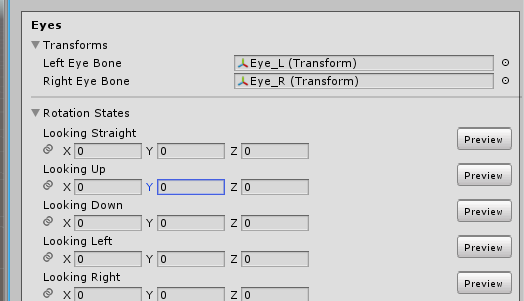
Eye tracking works fine in blender, works fine if I manually move them in unity but they dont move in game?
kindred pollen
The looking up, own, left and right fields aren't set - I'd presume you have to set those to be the maximum values of how far you want your eye bones to move
looking up would be fully up, down fully down, etc
ancient trellis
Why do these have to be set now?
they didnt have to be set in 2.0 it was automatic from cats..
kindred pollen
I don't know lol, but try setting those values and seeing if it helps o:
 still fossil
ancient trellis
Why do these have to be set now?
still fossil
ancient trellis
Why do these have to be set now?
To have more customization for different rigs
ancient trellis
Well I set everything but its kinda a pain to do this every time
is there a way to make it so when I import my model i dont have to set jaw to none every time?
 gray knoll
is this fixable in unity or i have to go back to blender?
 sage patio
gray knoll
is this fixable in unity or i have to go back to blender?
sage patio
gray knoll
is this fixable in unity or i have to go back to blender?
click on the FBX, go to Rig, make sure it's set to humanoid, then click configure. then, at the bottom, go to the Pose menu, click Reset pose, and then click Enforce T pose. click done, click apply, and it might be fixed
gray knoll
sage patio
click on the FBX, go to Rig, make sure it's set to humanoid, then click configur...
This is the enforced T pose 😂
sage patio
gray knoll
This is the enforced T pose 😂
then drag another copy of the FBX into the scene
if you have anything you want to copy over, use Pumpkin's avatar tools
gray knoll
I kind of suspect something about bad hierarchy in blender, i'm not super knowledgeable and just stumbling around
sage patio
one button to copy over the components
yea also make sure that all of the bones are mapped correctly in the rig config
in unity
gray knoll
everything looked good in unity until i filled in the sdk animator and hit play, then the monstrosity appeared
ill look up pumpkin's avatar tool ty
fading verge
anyone there?
crisp tendon
Nope
 sleek isle
Life is a pain, get use to it
 livid pond
can anyone convert models from sfm to vrchat avatars? . i will do art if anyone makes that for me . i cant rig avatars and let them upload_reAdy
 paper frost
Hello everyone, I have a bit of a problem I can't figure out why most of the hair bones of my avatar goes missing when I export to Unity.
Left side is Blender and as you can see once on right side the 3 fronts and sideburns are gone (antenna too).
What could cause this you think? (they still exist in the Hierarchy)
 languid ermine
Hey i'm looking for some help with some tracking in VRChat. In the VRC Animator Tracking Control, my left and right fingers are set under tracking, and so is my head and hands. Unfortunately, the fingers still fuse when trying to animate them in vr. Does anyone know how to fix this?
 celest perch
I think I selected the wrong root bone lol
 gloomy ether
made a dynamic bone component the root of the hair then added exclusions, but now i'm having a problem with the root bone moving when its not supposed to. how do i make sure the root portion of the bone doesn't move while simultaneously making the front hair move in the same component?
 sterile swallow
Hey! I need a hand attaching hair to a base avatar of mine, I commissioned someone to see if they could figure it out, but they got stumped and suggested I ask around to see if anyone could give me a hand OR if someone would take it on as a paid commission, thanks!
crisp tendon
What did they get stumped on ?
sterile swallow
They said, in their words.. “I’m sorry but for the hair I can’t rigs, blender does anything with, it distorts as not possible, and when I just wanted to fix them on the model directly even that, it doesn’t want at all, Apart from just laying the hair on the head I can do nothing else:/ Worry the hair the strands and behind passes in the model if you lower the head or even lift..”
this is the model in question, and the hair
I just wanted to attach the hair to the head, the braids and the back of the hair can just have physics and flow freely
crisp tendon
If it's not already rigged then yeah i can see how they wouldn't be able to do much, although it's possible it'd take a bit of time
sterile swallow
I have zero idea how to rig myself, I’m honestly poking around seeing if someone would be able to do it as a commission .w.
 spiral shard
do you need to buy something to make hair physics/ect? even though im a quest creator i wanna see if i can make my avatar look less plain on pc
i think i do need to buy the asset :(_ _ argg sucks
 lapis bloom
Yes Dynamic Bone it's like 20 dollars I think. It doesn't suck
spiral shard
i know it doesnt i bet its great it just sucks idk how money works cause im a itty bitty
 twilit urchin
If I feel the neck is too long , which should i move the Y value ? head or neck?
 wanton dove
is there a sort of "Default Rig" asset that I can start building an avatar around?
for blender, that is
wanton dove
nvm i forgot rigify exists
 undone pulsar
so i forget what causes a model to spontaneously stop using default tracking
model was working till the latest step where i changed some weights, and now the hands and head don't use the view tracking in desktop
(moving cursor, picking things up, etc)
undone pulsar
nvm, was a side effect from having the game open too long
ancient trellis
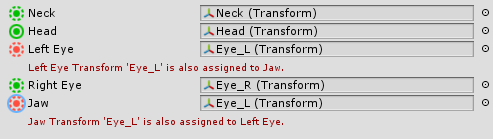

How do I make it so I dont have to manually change these every time i import my model
Welp, fixed the eye issue
turbid spear
you sure it's the same object
says entoma in the sdk and 3ntoma in the inspector
if only one avatar has avatar descriptor on it, it'll show up in the sdk alone so
 main belfry
how do i move bones around in unity without unpacking the prefab again? its been awhile
 jaunty lintel
hello, it's my first time using blender, and i'm trying to make my own avatar from scratch. so far i've made a model that looks like this. you guys got any tips for rigging ? i've tried using rigify but it literally made my character explose... (note : the head isn't attached to the body, it hovers above the neck, and the hands are holograms that i plan to make swappable with other holograms like a sword or a shield)
 supple iris
not sure if this is the specific channel of it but, im having a weird issue where some pre configured models with dynamic bones have their dynamic bones work while others dont after upload, even though both of them have the bones jiggle properly on the play in Unity. I have dynamic bones installed, is it possibly a thing where the compiler removes them to optimize them or something?
kindred pollen
rule 15, also maybe they're using an older version of dynamic bones?
DB got it's like, only update since 2014 in August 2020, so if the premade models were made before then, that might be it?
also, make sure you have the dynamic bone limiter turned off ingame
that should be in the top-right of the safety menu, I think?
supple iris
that's possible, i'll check that first since it might be working fine already. also google says something about the script being placed on the wrong part of the armature but that looks like it's set properly
supple iris
kindred pollen
also, make sure you have the dynamic bone limiter turned off ingame
that was it, thanks
kindred pollen
woot, yw! c:
 burnt rock
hi everyone, i'm new to 3d work so sorry if this is a really basic question. i have a model with ankles that look like this. it looks like they're way too high up so i moved the bones down but now it looks like i have a weight painting issue. does anyone know how i can mirror weight painting in blender across the X axis, but have it apply to two separate vertex groups (i.e. left ankle and right ankle)?
supple iris
https://blender.stackexchange.com/questions/9390/how-can-i-mirror-weight-painting talking out of my ass since this is out of my paygrade but it seems that it has something to do with naming conventions of the armature

Blender Stack Exchange
How can I mirror my weight painting to the opposed side of my character? I know that there is Mirror function, but it doesn't assign the weight to bones on the opposed side. Can I do it manually?
burnt rock
oh interesting, let me try renaming the vertex groups and bones with the .L and .R convention to see if that makes it work
crisp tendon
You'll have to readjust the weight paint
 mild stratus
ancient trellis
How hard would it be to shorted my freakishly long fingers
mild stratus
ancient trellis
How hard would it be to shorted my freakishly long fingers
Not that hard.
You’ll just have to shrink them in pose mode with scale, apply the armature modifier on the mesh, then apply the pose on the armature, then re-add the armature modifier.
If you have shapekeys, I’m not explaining it it takes way too long
ancient trellis
well i have shape keys..but not on the hands @mild stratus
i think the main issue was the armature was below the hands..making the fingers stretch a lot
mild stratus
oh, just saw the meshes were separated.
mild stratus
and the armatures being below the hands has to be fixed in edit mode
Sometimes this stuff breaks, you might have to do a auto-repaint on the hands
mild stratus
Did you move it in edit mode, or pose mode?
mild stratus
So, you’d have to re-weight the hands.
mild stratus
Did you go into weight paint mode, and then do automatic weights again? Or re-parent?
ancient trellis
I think its better now? hopefully
time to find out
thank god for pumpkins avatar tool
@mild stratus still..kinda hooky..?
or is it more normal? idfk
mild stratus
I’d say it’s more normal, but it’s definitly still kinda janky.
ancient trellis
How can I fix it
mild stratus
No clue.
still fossil
ancient trellis
How can I fix it
Your bones weren't lined up correctly still. Make sure the joints of the bones line up with the joints of the fingers
Bones should of been there
still fossil
👍
ancient trellis
think auto weight painting made a fucky wucky tho
influences the top of the hand too
still fossil
I don't like auto weights
ancient trellis
nutty
I suck at doing it auto tho
like its impossible to manually paint it with different colors to make it "smooth"
still fossil
That's what the blur tool is for
ancient trellis
👀
still fossil
still fossil
no prob
ancient trellis
whats the best way to move the mesh over to line up with the bones...?
WITHOUT deforming or making it mishaped
character is currently extremely bow legged..
amber kestrel
You could have shown that with literally any better picture
Generally can fix that by following best practices. Vertical upper leg, slightly bent back lower leg, zero bone roll across the armature
ancient trellis
already fixed it
 finite swallow
Ctrl-alt and paint to do a radial weight paint
Paints through the mesh and makes for smooth gradients
Combine it with alt-b to box out the areas you want to paint (make sure you're in solid or wireframe view)
Realize that you can use gradient weight painting with subtract brush as well
Suddenly weight painting is easy 
 native hemlock
oh god how should i go about rigging this monstrosity
turbid spear
same as any other avatar
crisp tendon
Please smooth shade it
sleek isle
No
 balmy prawn
anyone know of a visemes from scratch tutorial for a model that didn't have a mouth/jaw separation to start?
turbid spear
look for blendshape tutorials
any blender one should work
(since viseme is a vrchat term more or less)
 short solstice
can smb help me? what am i doing wrong? When configuring avatar my fingers look fine but when i'm trying to apply a animation to it, it bends in weird ways, checked muscles for them - everything is fine like opening/closing hand. ._.
astral warren
native hemlock
oh god how should i go about rigging this monstrosity
Gradient tool would work fine I think.
 spark wedge
not sure if this is exactly the right place, but how do I stop myself sinking when I sit down? i've tried adjusting my in-game height. when stood up, my finger is in front of my eye
 atomic harness
https://gyazo.com/04f84da3abb656d61aef855d03556639 i got this rig for a piston but in unity its no longer working? anyone knows how to get it working in unity?
 fathom edge
sleek isle
atomic harness
https://gyazo.com/04f84da3abb656d61aef855d03556639 i got this rig for a piston b...
fathom edge
sleek isle
atomic harness
https://gyazo.com/04f84da3abb656d61aef855d03556639 i got this rig for a piston b...
try the look at constraint
fading verge
im not sure what i did wrong can someone help me
crisp tendon
assign the correct bones
fading verge
is it possible to achieve the correct proportions by just adjusting bone size without adjusting the mesh
crisp tendon
yep
fading verge
okay cool, I can't change my mesh but it looks like I can make the bones smaller, move them around without making things look weird
thank you
fading verge
I changed some of it but its still doing the same
crisp tendon
Are they actually weight painted ?
 mint magnet
So my little dude's arms are a bit too short. Im trying to make them smaller in the Avatar Config. I was able to do this with the head (I made it smaller), and it updated. but not for the arms. Why is this? Any help is appreciated!
fading verge
@crisp tendon i was running into weight painting issues with just scaling the bones, so I looked for more information again, and I see you posted this last year #avatar-rigging message
so I was wrong, I can't adjust the bones without making it look weird 🙄
have to adjust mesh too
so if I don't want to adjust the mesh, I'm stuck with just play space moving and lying about my height
 soft crown
Hey I'm totally new here, but I've been knocking my head against a wall trying to self teach myself (with some youtube of course) on Blender and Unity.
The one issue I am really struggling with is the thumbs on this model. Looks great in Blender, then in Unity and in VRChat the thumbs are completely twisted. Thanks in advance, and I'm happy I joined the discord since you guys seem super nice already.
amber kestrel
soft crown
Hey I'm totally new here, but I've been knocking my head against a wall trying t...
My guess is the proximal bone isn't actually weighted properly. I would suggest posing the thumb in blender to see how it actually behaves. The proximal bone should influence all the thumb movement up to the knuckle, take a look at your thumb irl for a point of reference
soft crown
Promixal Bone?
mint magnet
Where did all of my stuff on the right go? Usually it has all of my stuff like "Jiggle Bone" And Dynamic stuff. But its all gone. (Hes in play mode rn to show that he has that stuff on him.) but I cant see any of the settings.
mint magnet
crisp tendon
scale the bones in pose mode
I was able to somehow scale his head in unity and it worked. Do you know why this worked and why its not working now? I didnt use blender to rig him
crisp tendon
no clue, i wouldn't use unity for any edits personally
mint magnet
crisp tendon
no clue, i wouldn't use unity for any edits personally
Yeah, I honestly have no clue how I edited his head and made it stay that way. Tried to edit in Maya and ill see how it goes.
crisp tendon
can you show what you're trying to do ?
that's usually blendshape related when this happen
unless every bone is weighted to the mesh
Personally i'd delete every vertex group and set weights manually through the vertex group menu, either using automated weighting and then assigning all vertices to a group
soft crown
soft crown
Hey I'm totally new here, but I've been knocking my head against a wall trying t...
I hate to ask again, but I have spent a few more hours trying to fix this and can't find a solution. The weight painting for each thumb bone looks pretty normal.
crisp tendon
Also an upside down hip bone will cause issues down the line
crisp tendon
soft crown
I hate to ask again, but I have spent a few more hours trying to fix this and ca...
clear bone rolls in edit mode
gl, brb in a bit
soft crown
In Blender all of the bones have 0 for bone rolls.
 lyric stratus
i was pretty sure i did these glasses correctly, but whenever i use this avatar they just kinda float around but head depending on which direction im walking, so im not sure what to do ahah
 sleek perch
I'm a bit new to this but I set up my body rig with everything like the clothe sbut i'm not to sure bout the neck and head? I'm gonna use it in VR but im on pc. I still wanna be able to move my head around and all that but im not sure if i need to attatch it to the rig a certain way?
fading verge
did you ever get an answer on this?
soft crown
Feel like the answer is so easy, but I cant seem to find it; How do you add a single missing bone to a vertex group to be able to weight paint it?
spiral shard
im confused, everything seems fine in unity but in vrchat my avatar flips around and only my arms are facing in the right direction, can anybody help with that?
spiral shard
nevermind heres what it looks like in unity and vrchat
spiral shard
i tried applying location and rotation in blender and still nothing
mild stratus
spiral shard
nevermind heres what it looks like in unity and vrchat
I had a rig that did that once, the only way I could fix it was to set the default pose of the rig to a t-pose. Dunno why it fixed it, probably some unity jank
spiral shard
mild stratus
I had a rig that did that once, the only way I could fix it was to set the defau...
interesting! i'll try that out tomorrow morning and see if it'll finally stop being crazy haha
mild stratus
If it still doesn’t work... ask ruuubik, pretty sure they’re good at this
spiral shard
do i just ping em if i get stuck or something? ive never pinged mods/hosts before
soft crown
spiral shard
nevermind heres what it looks like in unity and vrchat
This is what it looks like when you configure a humanoid to t pose?
I know that for my avatar the issue was weight painting and bone positioning in blender. I was having a similar issue with the thumb in particular
 spark oak
spiral shard
soft crown
This is what it looks like when you configure a humanoid to t pose?
spark oak
spiral shard
soft crown
This is what it looks like when you configure a humanoid to t pose?
yeah i think so- that shows when i look at the muscles and stuff
spiral shard
im still having issues despite putting it in more of a tpose position and straightening the spine a bit
it still thinks the model is backwards what 
gray knoll
When I import a rigged fbx accessory (cat ears) to unity, on an existing avatar, the armature is set to the feet by default (the 3d arrows things to move it), even though its only a head bone, and it does a long ass bone from the head to the feet and makes the dynamic bones freak out, D: any way to fix this in unity?
 meager ether
never seen this pink icon before, what is it?
turbid spear
modded client
graciously shows off it's presence by putting an icon into your screenshots
amber kestrel
RIP that poor bone man's account
meager ether
turbid spear
modded client
seems this guy has no shame at all
spiral shard
im so ready to give up 😔😔 all my best efforts to fit it just make it worse and i dont know what to do anymore
turbid spear
meager ether
seems this guy has no shame at all
they just don't know better
 obtuse wadi
what? i need help
i have all necessary bones
what does that means; these are normaly not neccesary
 fading warren
obtuse wadi
what does that means; these are normaly not neccesary
fading warren
obtuse wadi
what does that means; these are normaly not neccesary
looks like to me you don't have enough bones for a rig and/or you've not indicated which bones are the neck/shoulders/chest.
if you look at lost's rigging from their model above, you can see a 'v' shaped portion at the top (these are chest and shoulder bones) and the 'n' shape at the bottom is the hip bones
ideally when rigging you should be including the head too
fading warren
and labelling the bones so the program knows what each bit is
obtuse wadi
fading warren
and labelling the bones so the program knows what each bit is
i mean ive got this so far
all "neccesaries" are filled
fading warren
there's not green dots in chest or shoulders? it might be reading your chest as neck
obtuse wadi
i dont have bones for them
fading warren
https://www.youtube.com/watch?v=f2pTkW-1JkE&ab_channel=Blender here's the blender tutorial for rigging
even if you don't use them, you need those bones
obtuse wadi
so ur telling me i have to do this again...
fading warren
no I'm saying you need to add bones like it was an actual skeleton
obtuse wadi
shall i just delete the model from unity then?
fading warren
because that's what rigging is- a very simplified skeleton, that shows the PC where points of rotation/joints are
idk man, I'm just saying you need to rig again
obtuse wadi

fading warren
blender has auto-rigging optiions
fading warren
aqight so
you want points of rotation in the torso. currently your 'chest' extends too high, and is making it difficult for the system to see if it's chest or neck ect. you need to add on 2 more bones going in the same direction: 1 from bottom to top of neck, and then one from top of neck to roughly top of head
when you rig, you have to imagine the bones as inflexible rods. in order to make animations like walking and being able to move your head around without breakiing, the rods need to be small enough to allow the flexing. tbh you miight have problems later with regards to not having any rigging in the hands but idk I'm not an expert
obtuse wadi
fading warren
you want points of rotation in the torso. currently your 'chest' extends too hig...
can i just add like a loose bone in the shoulders?
fading warren
obtuse wadi
can i just add like a loose bone in the shoulders?
no :c are your shoulder bones lose in your skeleton? it looks like both the floating shoulder bone AND your arm bone are parented to the top of the neck. I'd say move the top of the neck bone down to where the shoulders are, unparent the arm bone, try and re-attach the floating shoulder to that neck bone, then parent the rest of the arm bones under the shoulder bone
obtuse wadi
how do i unparent?
fading warren
I don't use blender but if you click on the bone you want to unparent, so its selected, then maybe right click or check the rigging settings menu?
https://www.youtube.com/watch?v=-gIL6VZ-bkE&list=PLa1F2ddGya_-UvuAqHAksYnB0qL9yWDO6&index=28&ab_channel=Blender please do take a look at the quick tutorials if you're really stuck. also google how to unparent a bone in blender in google

Blender is Free and Open Source Software
Download: https://blender.org/download
Support core Blender development - https://fund.blender.org
Character Rig: https://cloud.blender.org/p/animation-fundamentals/5d69ab4dea6789db11ee65d1
This tutorial is part of the Blender Fundamentals series, produced by Dillon Gu.
Find more free tutorials on: ...
fading warren
hmmm, ok see if it works now
if you look at the playlist, there's a whole video on parenting
obtuse wadi
fading warren
hmmm, ok see if it works now
i did like u said and...
fading warren
whats this here?
fading warren
you don't need bone for the beak...? I don't think? idk about mouth movement tho. weird how the big one kept disappearing, because that's the best way to do a head bone.
you might need to try and summon someone else cuz idk how to fix that bud
obtuse wadi
i fixed it, but its basicly the start
obtuse wadi
fading warren
what tutorial did you follow?
Blender is Free and Open Source Software
The character Rig will be freely available next week on https://cloud.blender.org
Download: https://blender.org/download
Support core Blender development - https://fund.blender.org
--
This tutorial is part of the Blender Fundamentals series, produced by Dillon Gu.
Find more free tutorials on: https://b...
fading warren
huh, ok then
obtuse wadi
why does it have to be so complicated
fading warren
idk mann
fading warren
obtuse wadi
right?
corerect
obtuse wadi
fading warren
corerect
im close to giving up with this bull
fading warren
obtuse wadi
im close to giving up with this bull
you should ask someone else as they can help you more than me ^^
obtuse wadi
fading warren
you should ask someone else as they can help you more than me ^^
idk anyone here tho
 surreal badger
im trying to make an eft avatar but when i put it into unity both hands look like this, im pretty new to rigging so help would be amazing
 neat matrix
How would one add Dynamic bones from the unity asset store to an avatar that has them mapped.
Trying to import an avatar that needs the dynamic bones script imported separately
kindred pollen
You should just be able to import it into your asset browser, then upload? o:
very well might be wrong on that, but fairly certain
neat matrix
Would using SDK3 oppose to 2 make a difference?
kindred pollen
I wouldn't see why o:
neat matrix
Yeah it's still not working.
kindred pollen
I don't really have that much experience with DB unfortunately, so I can't really recommend much else lol
but yeah, as long as it's imported into the asset browser and the bones have DB's scripts attached, it should work
neat matrix
I'm assuming they aren't mapped then. I've done this same thing before with other avatars and it's worked.
lapis bloom
For dynamic bone:
- Buy DynamicBone (in Unity Asset Store).
- Import it into your unity project.
- Import the avatar and it should work now.
If you imported the avatar before the DynamicBone asset you might need to redo it in order
 marble perch
Can anyone assist with the whole problem of my avatar's legs crossing when crouching in VR Ever since the first few 3.0 updates I have had this problem. I read that it might have something to do with the bones not bieng straight but they look pretty straight to me.
This was fixed in 2.0 by changing the animation set to female/male but i dont think thats a thing in 3.0
 solid adder
You may have to straighten them out a bit more, they seem to come closer toward the ankles. Also if you're in Blender, try to reset bone rotations. If it still happens then perhaps slightly rotate the bones.
Also male animations in 2.0 are a bit on the janky side anyways.
fading verge
great illustration, thank you ❤️
sleek isle
you want your ankle behind the knee
fading verge
ohhhhhhhhh
sleek isle
wait
sleek isle
try to have your spine more strait
fading verge
but i have another right that has a not straight spine, doesn't give me this error
not totally straight
this works but my other one, doesn't
sleek isle
you can still use the reverse hip if you really dont know
fading verge
hmm
didn't use cats plugin, that was it
whatever would we do without cats, wow
fix model, deselected connect bones
@sleek isle thank you for your help ^_^
❤️
sleek isle
meager ether
fading verge
 tribal viper
excuse me but how you solve the bent knees probelm
try to do it my self
fixed toes but instead of the knees going front
they go <== ===>
huh discord search feature is handy for this chat , for the ones that came looking for my same question , apparently " Vrchat looks in which way the knees are sligthly bent and uses that as the direction they should continue to bent " @astral warren thanks for the info !
astral warren
o7
tribal viper
what
AH!
ok google is also quite handy on my slang vocab i gotta say that is a cool way to say salute
 orchid compass
So uh since im new to FBT i been working on this model and realized i been experiencing a hip tilt to the left when I bind into the model. I may need some guidance for a proper hip bone placement even though i followed the VRChat documentation I cant seem to pin point the issue.
Here is a front and side image.


I been searching the servers history regarding to hip tilt but it does not seem to do it for me lol. Anyone got advice for the proper hip placement?
orchid compass
nvm fixed it
undone pulsar
My unity import from blender's been acting strange where the mesh for the forearms raises and everything else is normal. The armature is in rest pos and mesh has no more than 3 weights per vertex
 tender summit
hey i got a character , full working avatar but his fingers dont work. anyone could help me out ? i can pay
stable coral
ik how to fix but damn LOL default skin weights be like
sage patio
tender summit
hey i got a character , full working avatar but his fingers dont work. anyone co...
did you add a custom gesture controller? if so, should probably make sure that the finger gestures are set up correctly on there
I recommend using the default controller that comes with the SDK, and then adding layers if you need extra functionality. making your own controller from scratch is also doable, but you need to make sure to also set up the finger gestures correctly
tender summit
sage patio
did you add a custom gesture controller? if so, should probably make sure that t...
not sure what any of that is , im not very knowledge on blender ect , the hands got no bones and ive tried to do it myself but i kept running into issues whenever i tried
sage patio
tender summit
not sure what any of that is , im not very knowledge on blender ect , the hands ...
ahh I see. makes sense why this is in the #avatar-rigging channel then.
tender summit
Yeah I kept having shader issues and stuff
mint magnet
is there anyway I can remove the 'foot fall' animation that happens when you stand around? Its like a default shuffle. My little digitigrade satyr doesnt take too kindly to that motion and his legs look silly haha
(reposting here because I got radio silence on the Animation tab)
 plain crypt
Does anyone know what causes this FBT issue? The hips are tilted very slightly to the side and it causes one of the feet to drop slightly below the floor
 spice root
https://youtu.be/2sfTEBAl8sA Recommending this video to anyone having FBT issues with their Avatar. In your case it looks like you should have a look at your hip alignment. Also if ur feet drop below the ground: Check if ur feet are slighty below your Origin Point of the Avatar. Best way to see that is by pressing 5 than 3 on your numpad. If that is the case, you can look into the video i sent and find how to fix that issue. Hope you can fix it mate :)

[Update 8/6/2020] (Avatars 3.0 info / current state of "RIG HACK" fixes):
*With the new FBT head-locked binding method the "Shoulder Flop Fix" of lowering the viewball is no longer recommended (However if you need it you can still use this fix with VRChat's launch commandline option --legacy-fbt-calibrate)
*The zigzag neck problem is less pre...
@plain crypt
 small harness
so im having this issue where the feet are roating out when doing the humaniod rig stuff, i have played with the roll but it dosetn seem to change it at all. anyone have an idea why this is happening?
this is how it is normally
please tag me if you have any ideas
mint magnet
Does anyone know how to change the “origin” where the foot placements adjusts to? I just need to move it back slightly. Or should I move my entire persons body forwards ?
small harness
i fixed the issue. but i have noather question if anyone can help
i have this issue where the thumb roates in a weird way, i have also tried to use the roll to fix this with no change
solid adder
Looks fine to me, you just need to make custom hand gestures which is simple if you have muscle animator.
tender summit
hey anyone can help me or do the hands on my avatar for me? i can pay and its a complete avatar only missing hand bones
astral warren
plain crypt
Does anyone know what causes this FBT issue? The hips are tilted very slightly t...
Make sure the hip and spine bones are pointing in the same exact direction. the bones should not have any angle between then where they join
plain crypt
spice root
https://youtu.be/2sfTEBAl8sA Recommending this video to anyone having FBT issues...
Thanks for the link! I'm hoping to avoid any sort of hack fix but I might have to resort to that...
plain crypt
astral warren
Make sure the hip and spine bones are pointing in the same exact direction. the ...
I will give that a shot! There is a very very slight angle so I'll see if that does it. Thanks for the tip!
mint magnet
Does anyone know why my guy on the left is going into the 'curl' pose when I preview his idle animation I made? His copy on the right is correct. How do I fix this?
undone pulsar
undone pulsar
My unity import from blender's been acting strange where the mesh for the forear...
just remembered i could screenshot to show the issue
vs the blender rig
undone pulsar
cant really recreate the error luckily, but it also doesnt go away if I just make a new armature
with the same structure at least
also, using 'sample bind pose' from the default in unity compresses the arms -from the shoulder on- towards the body
crisp tendon
make sure to clear bone rolls before exporting
and apply pose with cats if you haven't already
undone pulsar
to clear rolls do you just set them to 0 in edit mode?
did alt R+G+S before export to make sure it was in rest
setting rolls to 0 in edit mode actually seemed to make the deform worse
crisp tendon
Make sure you pose is applied then
crisp tendon
You sure all transforms are applied on everything ?
undone pulsar
yep
crisp tendon

undone pulsar
model was made a year ago from 0 experience over 4 days, so it may have some dark magic applied
scratch, 0 modifiers beyond armature and no plugins
sterile swallow
So I’m rigging some elites from reach, but I’m genuinely stumped.. how do I make the mandibles move when you talk? Is there some sort of bone I need to add into each one?
The skeleton looks the same for all the models, so, I’m stumped.
undone pulsar
crisp tendon
<:sweat:668314662059638784>
prayed to some dark god n refreshed my annual agreement
model's working again
managed to rearrange the thing to enough of a degree that CATS could understand what was going on, and then CATS proceeded to butcher it, but in a fixable manner
annit works now
solid adder
And to think, all it cost was your soul and a sacrifice to please the Blender Gods.
 river pike
Anyone know how to fix pee legs?
solid adder
If it's SDK2 change male animations to female otherwise reset bone rolls in Blender.
@river pike
Another thing as well is make sure when rigged as a humanoid the bones are in the right places and T-Posed properly.
If the above doesn't work. You can always slightly adjust the bone roll in Blender.
river pike
Setting it to female worked :O. and i dont know how to do bone rolls, but it works thank you ❤️
solid adder
👍
SDK2 Male animations in general are just bad.
Well VRChat's default Male animations at least. Doesn't seem like they ever came up with a solution for that, but then again anyone can change the animations to whatever they want really so likely just a bottom list priority
astral warren
river pike
Anyone know how to fix pee legs?
The game will look at your armature and look closely at which way the knees are slightly bent in t pose, it will use that as the direction they should continue to bend.
1.) make sure the knees bend slightly backwards and not at all to the side
2.) after moving any bones revert the bones roll back to 0, it sneaks in a lot
river pike
Yeah blender and unity seem to like to sneak things in a lot. I don't ever touch the bones at all but half my stuff ends up with pee leg lol
astral warren
Most Armature‘s are probably not set up for VRChat
They will need to be adjusted in blender
river pike
Doesn't cats fix model do that automatically?
astral warren
Not sure, I only use it for a more sane pose mode
I do other stuff the blender way
I avoid cat’s fix model thing
But I would suspect that it would not assume which way an avatars legs should bend
 terse iron
is there a way to make a rotation constraint stop rotating after a certain degrees on an axis? or just not to rotate within a certain range
 pearl cedar
Anyone know how to fix crouching being off like this? I am also having an issue where when I sit the avatar's feet are in the ground. I think its a rigging issue but idk how to fix it.
crisp tendon
crouching or proning ?
crisp tendon
what does the armature look like in blender
pearl cedar
crisp tendon
ah yeah
[Update 8/6/2020] (Avatars 3.0 info / current state of "RIG HACK" fixes):
*With the new FBT head-locked binding method the "Shoulder Flop Fix" of lowering the viewball is no longer recommended (However if you need it you can still use this fix with VRChat's launch commandline option --legacy-fbt-calibrate)
*The zigzag neck problem is less pre...
You can see what armature proportions are correct here
your upper legs are way too tiny
pearl cedar
ive tried messing with that, but same result when i change the propertions. Also ive been using the CATS plugin "fix model" button which might be the cause of the issue but idk why they would have the plugin "fix" the model only to break it like this...
crisp tendon
cats very rarely breaks anything that isn't already broken
i'd still suggest looking that the rigify armature in blender and try to use that instead as your base
pearl cedar
ill try to figure it out with your video... what ive done here is use a model from maximo as a base but it changes stuff when i press "fix model" but thanks anyway. I guess ill just keep testing stuff.
fading verge
is it possible getting this fbt ?
crisp tendon
This ?
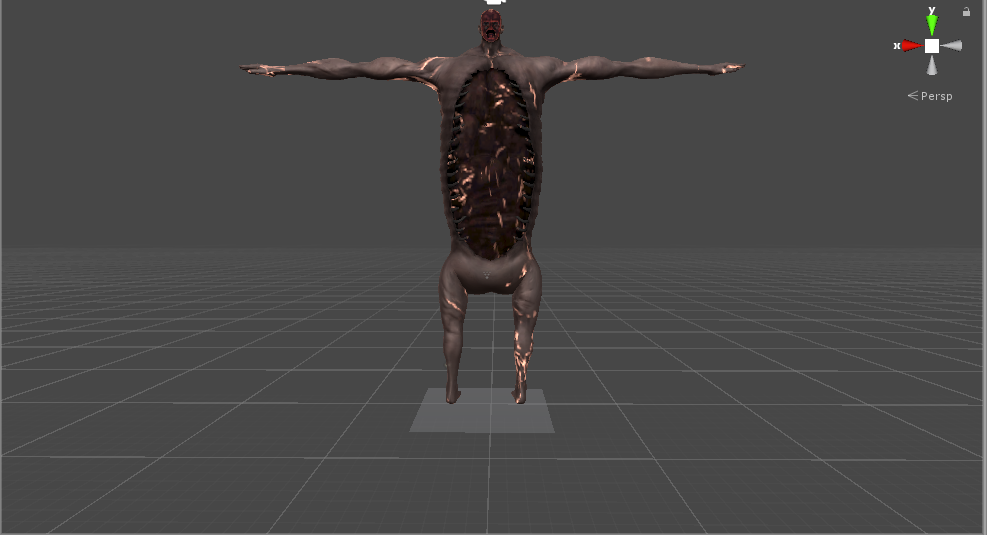
 alpine eagle
is that rod reiss?
 noble cape
is there an individual that can help me set up a gun animation that has moving parts please
ping me if you can
please
fading verge
alpine eagle
is that rod reiss?
yup
fading verge
pearl cedar
not well mind you... but i have.
so fbt on things like this dont woek good
pearl cedar
well, depends, you can make it work, im just not good at it. Just put it in the game and the video Ruubick just posed will show you how to get it proportioned to your body.
fading verge
can you send it too e @pearl cedar like the vid
pearl cedar
you could just scroll up a little...
pearl cedar
fading verge
well i dont help me really tho
not necessarily, just import the rig, then get the positions you need to alter the way the tutorial says to, and then you'll have a rig that should work with FBT. I guess the mesh will likely be a tad disorted to get the proper sizing but thats how you do it.
 keen depot
could someone help me with weight painting my shoes on my avatar please?
mint magnet
Does anyone have a good layout guide for digigrade/furry legs?
sterile swallow
https://i.imgur.com/0NTotiV.png Would it be possible to have several jaw bones, one for each mandible?
 sleek isle
No
amber kestrel
Not directly mapped on humanoid rigging, but you can absolutely animate them
 merry elm
Would anyone be able to look at my rigging and tell me what im doing wrong
kindred pollen
Upload an image here o:
merry elm
so for context here is my character
kindred pollen
Would you mind taking a screenshot of the armature? c:
merry elm
ive got the armature set inside the model
but when i go into pose mode it doesnt move with it
kindred pollen
ah, you likely haven't bound the mesh to the armature
I'd recommend using the "With Automatic Weights" button, rather than bone heat (which as far as I can tell was removed/renamed)
merry elm
will having my meshes combined together as one not affect anything negatively?
kindred pollen
That's actually probably preferred lol
merry elm
oh sweet
kindred pollen
I don't think you can have multiple seperate meshes combined under one armature in Blender, but I might be wrong on that
as long as they're one mesh though, t'is all fine
sage patio
you can
merry elm
thats good to hear
kindred pollen
ah, kk
merry elm
and also will my shaders/rendering engine carry over into Unity when i export it?
kindred pollen
no, shader models are vastly different between engines
The color/normal/roughness/etc maps will, but otherwise no
merry elm
well my glass head may be completely ruined when i export it
also Parent with Automatic weights crashed my blender lol
sage patio
you can still use shaders that support transparency
kindred pollen
^
and awh lol - but yeah, you can set up different but vv similar shaders in Unity directly
merry elm
can i screenshot my shader nodes and share them here?
kindred pollen
You can, but again shader models vary wildly lol
Rest assured that you can set up vv similar shaders in Unity, most likely
merry elm
will something like this carry over?
kindred pollen
don't have that much experience with Blender shaders, but from what I know, no
Color/normal/transparency/roughness/etc maps will carry over, but full-on shader-heavy materials very likely won't
merry elm
i just worry that setting up the stuff in unity is going to be a nightmare with it all being the 1 mesh
merry elm
when in blender and i join the meshes together it doesnt have seperate materials still
sage patio
it should
merry elm
oh wait i see it
sage patio
if you go to the materials tab, you should see them
merry elm
does anyone know a fix for blender crashing when im Parent with Automatic Weights
or a way to ease the load
sage patio
is this a from scratch model?
merry elm
yes
sage patio
nice, and you haven't done any weight painting right?
merry elm
2.91.2
sage patio
I also see that you simply created a new humanoid armature using blender, right
because there are a LOT of useless bones
do you have CATS blender plugin installed?
sage patio
then you should be able to use that to fix the armature
merry elm
I was wondering about the useless bones because i dont want my lightbulb to animate with lipsync
sage patio
I'd tell you to use the "Fix model" button, but I'm afraid it might mess up your model
so try making a copy of your project first, and then try it
merry elm
use fix model on my model or the armature?
sage patio
it will do it for the whole thing
merry elm
sorry for all the questions im just new to this
sage patio
no worries
try it without parenting the mesh
if it doesn't work, try parenting the mesh (select Keep offsets)
merry elm
it gives me this
sage patio
ah
yea do that first
in object mode, select mesh, ctrl click armature (both should now be selected, with the armature being a lighter orange) and then do CTRL + P
merry elm
when you say ctrl click do you mean shift click?
sage patio
ye sorry
merry elm
all g
merry elm
once i do that which option do i select
sage patio
oh wait
ctrl and shift do the opposite
ctrl sets the last selected object as the active object
while shift sets the first object as the active object
merry elm
ok so with the armature as the brighter one
which of these do i want?
this is when i hit control p
sage patio
keep transform
sage patio
ye give it a shot
sage patio
give it a sec
merry elm
after i gave it a bit, it told me this
which is odd cause i remember thones bones being there
and its also set the armature back to a t-pose and outside of my model
still fossil
I wouldn't recommend using CATS fix model on a scratch avatar. It's mostly used for downloaded MMD avatars that have lots of extra bones, duplicated materials, etc.
sage patio
^ in this case we're using it to remove the extra bones
merry elm
ideally all those face bones
merry elm
what do i do about that missing neck, head bone thingo
sage patio
can you take a screenshot of the armature as of now?
still fossil
CATS messes up more than helping on scratch avatars. Best to do things manually
merry elm
sage patio
I mean, there isn't much for it to break in this case, but I did also tell him to make a backup before trying to use CATS
merry elm
i just manually removed the extra face bones
merry elm
those ones?
merry elm
well theres it now
sage patio
do you want the entire bulb, including screw, to move as one solid object?
merry elm
yes
sage patio
so you only need one bone for that then
sage patio
hmm
it's possible that unity won't let you set it as a humanoid rig if it does not have a head bone
I suppose you could keep the neck and head bone, and then just pick one of them (probably head) to weight the head to
sage patio
yea
merry elm
spine*
sage patio
should probably name the bones correctly too
Hips, Spine, Chest, UpperChest, Neck, Head
kindred pollen
VRChat's IK won't work without a head bone, but yeah you can just not weight-paint them to anything if you want
They just need to be in the hierarchy
sage patio
figured as much
merry elm
so name that top one just "Head"
sage patio
ye
merry elm
and all those spine bones just spine?
sage patio
well from the top to bottom, they should be called:
Hips, Spine, Chest, UpperChest, Neck, Head
bottom to top*
sorry
to make weight painting easier, you can technically do away with Upperchest
it's optional
but it might make it move better when sitting down
kindred pollen
also note, you'd definitely want to move the bones to match the mesh in Edit mode before you start weight-painting
merry elm
yes they are in the same pose as the mesh
kindred pollen
in Edit mode, or Pose mode? o:
kindred pollen
ah, would definitely recommend doing that in Edit mode
kindred pollen
I think you can do that with CATS, too
merry elm
is there any way to make it automatch what i have in pose mode?
merry elm
ah there we go
legend
so now ive got the bones renamed
the pose is set as rest
what next
sage patio
np :p
as a tip also
for the head, aka bulb, you can do the weighing really easily
since all of the vertices in that will be 100% weighed to the head bone
merry elm
ah too ez
sage patio
you can select all vertices of the bulb, then switch to weight paint mode, then click this button
all of the vertices you selected in edit mode will now be selected
then, with the "Weight" slider set to 1, click this button
that will set the weight of all selected vertices to 1
merry elm
ok i think i need to go back and lower the sub-divisions on my bulb
sage patio
lol
merry elm
sage patio
if it doesn't look smooth, use the Shade smooth option
merry elm
that feels like way too many
sage patio
dear god
merry elm
whoopsie
kindred pollen
RTX Enabled
merry elm
the body model i got from online is also very extremtly high
merry elm
but it was like that from the jump
kindred pollen
CATS has a decimate functon, alongside Blender itself
sage patio
merry elm
what do i do to see that @sage patio
merry elm
ye
sage patio
\
merry elm
sage patio
19 million...
merry elm
super cas
sage patio
dear god
merry elm
probably explains how bad my performance has been
sage patio
yep....
still fossil
That's why you crash when you try join the armature to the mesh too
sage patio
recommended max poly count for VRC is 70k
^^^^^^^^^^^^^^
that is a LOT of vertices to calculate weights for
still fossil
Make sure your iteration is an even number
merry elm
im also gonna delete all the verticles under the pants and shit
sage patio
ye good call
anything that is not visible should be removed
don't forget you can use CTRL L to select all connected vertices, ALT + Left click to select a whole loop of vertices, and CTRL numpad "+" or numpad "-" to expand or shrink the selection
merry elm
so ive unsubdivided it and deleted the bits that arent visible
im just worried about the clunkiness of the hands
like that
sage patio
again, set the shading to smooth
merry elm
ah yes
sage patio
I think you can actually do it for the entire thing
merry elm
that looks way better
merry elm
i found it in just the right click menu
also this is longer term
but i had an idea that whenever i talk the bulb lights up, would that be done in unity or in blender?
kindred pollen
That would be something done in Unity, likely via SDK3
kindred pollen
Likely not, though having seperate dim and lit textures of the bulb would be more efficient than using a realtime light in Unity
still fossil
You can un-subdivide it again
merry elm
i unsubdivided it and smooth shaded it and it flipped out
still fossil
What does it look like in edit mode?
sage patio
you can still reduce that a lot
also try recalculating the normals
should be under the Mesh menu in edit mode
I think
Normals > Recalculate
still fossil
Retopologzing might be a better solution tbh. Decimation of any kind messes up the topology one way or another
merry elm
Retopologizing?
still fossil
You basically recreate the mesh and use the high poly version as your guide
merry elm
oh? do tell
still fossil
There are tools that automatically do it for you but I'm not familiar with them
https://www.youtube.com/watch?v=l-sALvdn3FI Here's a video about retopology. He shows you how to do it with blender's built in tools then shows some addons that can be used

Retopology can be a difficult task and Blender's tools aren't the most intuitive. In this three part series we'll look at Blender's default retopology tools and in the follow videos a couple of powerful addons to make this process easier.
Use the code "free" to download the Spyro model here:
https://gum.co/UWXBC
Part 2 - Speed Retopo Addon:
ht...
merry elm
sage patio
recommended max poly count for VRC is 70k
where you say 70k polys, which of these is the poly count?
im getting closer
still fossil
Tris
kindred pollen
@merry elm You'll need to weight-paint it to your model - if I'm remembering correctly the armature is parented to the mesh, but with empty weights
You could either use automatic weights (deparent and reparent, selecting the automatic weight option instead) or manually weight-paint it yourself o:
merry elm
kindred pollen
<@!228101437920378880> You'll need to weight-paint it to your model - if I'm rem...
So weight painting how do i assign the weight to each bone?
it keeps clicking the verts instead of the bones underneath them
sage patio
@merry elm click on the mesh then go to weight paint mode
merry elm
do i need to paint the inside of my model?
merry elm
How does one remove weight paint?
ive tried the subtract brush but it lays more red on
kindred pollen
Set the weight of the brush to 0
merry elm
its just applying more red
kindred pollen
With the brush set to Add/Draw and the weight slider at 0, it's adding more? o:
This setup should remove weight-painting
weight's really the only thing that shOuld matter, as far as I know
merry elm
kindred pollen
With the brush set to Add/Draw and the weight slider at 0, it's adding more? o:
Yea it was, I restarted blender to fix it
kindred pollen
interesting lol, and cool! c:
 coral sigil
does anyone know if it's possible to rig a character in a hunchback position like this for vrchat without mecanim getting angry about him being non humanoid? https://gyazo.com/4aacd474ae5796ac7bffbe7b22f097dd


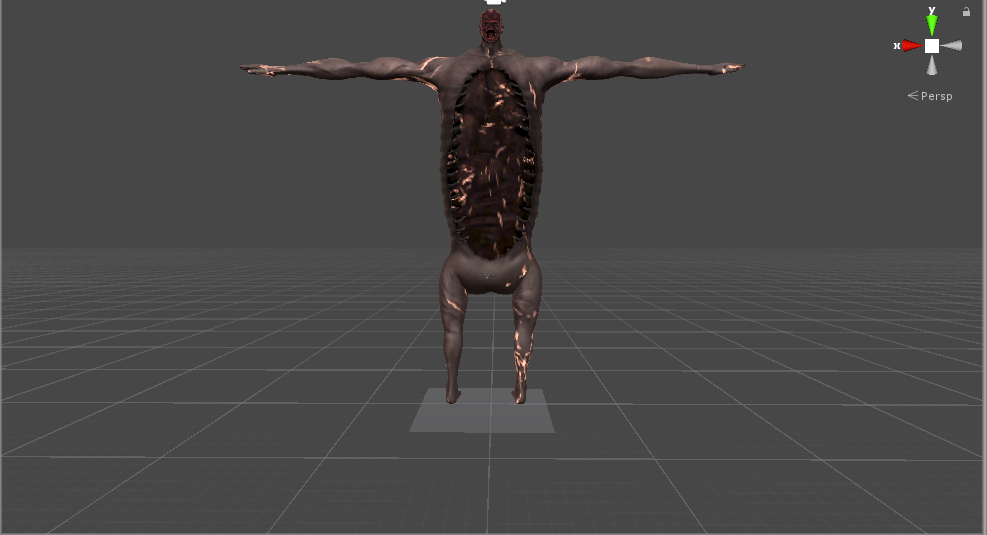

 soft locust
Hey there, anybody have any explanation of why this models armature is not grabbing the chest? I've used Cats to merge meshes together, so it may have happened during that stage, Is there a way to sort of put it back together? I'm new-ish to blender, but i've gotten myself pretty far with what i've got. explanation would be appreciated!
lil' pic for visual clarity
just for a little more info, the body and head used to be seperate meshes, but worked fine with the skeleton, and the legs are also properly working with the mesh
sage patio
soft locust
Hey there, anybody have any explanation of why this models armature is not grabb...
was it the armatures or the meshes that were seperate?
because to combine meshes, you can just do CTRL J
and it should not mess with any of the vertex weights
soft locust
I believe only the mesh, I've only done mesh combining with the cats plugin, I have found out though that it was broken even before the mesh merge, so it may have to do with it fixing the bone, and breaking the armature, since its a bit strange starting out
I will try that though and see if it fixes anything, currently just starting over without fixing the armature
sage patio
I recommend frequently using pose mode to test the rigging
to make sure nothing is broken
soft locust
huh.
yeah its liiiikely just the bones absolutely breaking
chest piece just entirely came off
sage patio
well more like, the chest part of the mesh is not following the chest bone
soft locust
prolly gonna have to go without doing any bone fixing using cats
sage patio
is the chest a seperate mesh?
soft locust
nope, never was oddly.
the only thing that was really odd about the model was how the orginal bones were laid out, and in the process of optimizing the mesh it must've deleted the bone assigned to the chest proper
sage patio
probably it
you can use CATS to merge bones
and their associated weights
"To parent" will merge one selected bone to the bone it's parented to
"To active" will merge all of the selected bones with the active selected bone
aka the one that is highlighted lighter
soft locust
ah, gotcha. I'll probably go through all the bones then and carefully merge them next time around with that before doing anything with cats auto fixing
sage patio
sounds like a plan
soft locust
ty for the explanation, appreciate it
sage patio
np
sage patio
fading verge
This thing keeps appearing
you need to have an in-game rank of at least New user, Visitors can't upload content
fading verge
Thank you
merry elm
ughhh holy shit i think i need to redo my entire rigging process
is there anyway to transfer armature/weightpainting to an identical other model?
sage patio
merry elm
ughhh holy shit i think i need to redo my entire rigging process
why do you think you need to redo it?
mint magnet
is there anyway I can create a blink animation by using bones? My avatar is very chibi and has little dots for eyes that are rigged so they can be compressed easily.
Also, when I go to make an animation the "blendshape.blink" doesnt exist, neither does any blendshape option.
turbid spear
you don't have any blendshapes
they'd be in a list in your skinned mesh renderer
and you'd just press record then slide the slider on thr skinned mesh renderer instead of manually adding it as a property in the animation window
mint magnet
I see I see, so I have to make the blendshapes first before that list shows up? because I dont have any just yet. Im in between animating with bones or vertices rn
 tired glacier
please i need help with this i have been stuck at this for nearly 2 hours now
kindred pollen
what's the problem? o:
kindred pollen
That sounds like a weight painting issue - in your case, you could probably just select all the verts on the head, then assign them to the head bone's vertex group
alternatively you could select the mesh, go into weight-painting mode and paint the head 100% from there c:
tired glacier
okay thank you!
kindred pollen
yw! c:
tired glacier
okay i'm back again, and that still didn't work
the head and the hair are 2 different parts, and it seems that the hair is the problem
(because the head itself is working just fine)
so how do i fix this issue?
turbid spear
does the head stretch weirdly
if so it's likely weighted to multiple bones
select one vertex on the head and check in the top right N (shorcut key) panel what it's weighted to
there's gonna be a weight table
tired glacier
thank you so much holy shit
turbid spear
turn on normalize on the brush settings to avoid multiply bones being able to affect a vertex by 100% (that's what causes weird displacing and deforming)
merry elm
sage patio
why do you think you need to redo it?
Hey sorry for late reply, but I wanna make a separate material for when the globe lights up but because my model is all joined together idk if I can retroactively change the individual materials
sage patio
@merry elm you can
in edit mode, select everything (A) and then go to Mesh > Seperate > By material
also, even if the mesh is joined, the materials are not
a mesh can have many materials
merry elm
Will that fuck up my rigging?
sage patio
no
merry elm
God damn sacred you are a treasure
I'll give it a go when I'm home from work
💕 thanku
sage patio
❤️
mint magnet
does anyone know why this does this? It happens when I try to apply a custom idle animation. Ive never had it not happen . I see fixes online but nothing on HOW to prevent it. (will cross post to #animation )
turbid spear
mint magnet
does anyone know why this does this? It happens when I try to apply a custom idl...
when previewing or recording an animation, that's the default humanoid pose
go to the animation tab and click preview, it should stop it maybe
merry elm
sage patio
❤️
Hey Sacred Im back on blender now and wanted to ask a question
if i wanted my lightbulb to light up when i talk would that be done in unity or blender?
if so should i even make a seperate material for the lit up bulb or just leave it
amber kestrel
merry elm
if so should i even make a seperate material for the lit up bulb or just leave i...
Could just animate raising the emission on the lightbulb's material (assuming it's separate) whenever Viseme is not equal to 0. Assuming you're using 3.0. Either way, this is not a rigging question, and should go to the appropriate channel
merry elm
apologies! c: thanks for the help
 glacial frigate
so uhhh
about the bones
what am i supposed to name them?
(this is my avatar)
also what happens if my avatar has multiple meshes
turbid spear
check the pins for names
if you have multiple meshes you can join them
or keep them if you really need them to be separate
glacial frigate
also i dont think this is normal lol
some of the polygons are missing
meager ether
nah, it's just inverted
glacial frigate
ah ok
meager ether
time to back to blender
glacial frigate
is the inverted thing normal
sage patio
@merry elm the glowing part is something you would do in unity, because the shaders can't be carried over from blender to unity
sage patio
the 2 ways to do it are A: have a seperate material for the glowing part and animate the emission intensity. alternatively, B: have it part of the main material, but then just make a mask texture for the emission, which will make whatever part is white glow, and whatever is black not glow
sage patio
merry elm
but by seperate emission material that would be in unity?
the material would be assigned in blender, which will add a material slot
then in unity, you can create materials for each slot, put them in each slot, and customize them