#avatar-rigging
1 messages · Page 178 of 1
 tulip root
 silk jewel
why does the camera get so stiff when i zoom in a bunch
tulip root
DONT do this to me XD
silk jewel
its when i shift + middle mouse button it to move it around
silk jewel
tulip root
DONT do this to me XD
lmao i know how it sounds but its not what you think
XD
tulip root
Well perhaps its just happy to see you working on dem fingers 😄
I cant with this right now XD
tulip root
Its normal though. Sometimes the camera decides to be a bit... wonky... :3
Just unzoom and move the camera angle. Thats should do the trick on dat stiffness of that camera. Gotta show it whos the boss.
tulip root
Stretch it where ever you want sweetie :3 Ma test starts in an hour :3 I have a break now. Im trying to stay awake and this is the only thing I came up with. Dont you flippin try to get rid of me now when youre clearly enjoying my company! XD
silk jewel
tulip root
Stretch it where ever you want sweetie :3 Ma test starts in an hour :3 I have a ...
OMG go study D:
tulip root
Nuuuuuuuu ill fall asleep! XD
silk jewel
tulip root
Stretch it where ever you want sweetie :3 Ma test starts in an hour :3 I have a ...
i am enjoying it but if its an exam or important test gotta be priority
tulip root
You have no idea how hard those books take me into the sleepy land if I lack the proper entertainment and motivation. Last night my friends drank a beer every 10 pages I read until they realised that there was quite a few pages. XD
silk jewel
tulip root
You have no idea how hard those books take me into the sleepy land if I lack the...
haha oh dear
tulip root
Dont you worry. So far I have not failed any tests and I read like 75% of the book :3
silk jewel
also finger stretch
tulip root
Stretch that boi!
silk jewel
i did do it more?!
tulip root
No no you choose the lenght of your fingers :3
I mean if it was upto me id love to see those stretch to the lenght of slendy bois fingies.
But then again dats not what youre after :3
silk jewel
XD omg really like slenderman
tulip root
Dem creepypastas ;P I actually saw splenderman walking around in vr chat a few days ago.
Omg XD I was not splenderman!
Typos...
silk jewel
hmmmm
silk jewel
tulip root
Dem creepypastas ;P I actually saw splenderman walking around in vr chat a few d...
make sure you dont pick up 8 notes then
tulip root
TBH
Id like to pick dem notes up. I have a few words to say about his first game and id love to say it to his face XD I feel like mister slendy boi would be runnin at that point. I never got them all because he was on my butt like a dog who has discovered a human leg.
silk jewel
i feel so bad streching these fingers
silk jewel
ye?
tulip root
Did you remember to mirror it to the other hand?? :3333
I have a bad feeling about this next text
silk jewel
i was gonna symmetrise it when i was done
silk jewel
FUCK
tulip root
Yeees? :3
silk jewel
okay we good
tulip root
Mood of trying to stay awake is BIG.
tulip root
Hope so too or someone has a lot to make up to me since ill fail my course if I fail this exam! XD
Good job! ^_^
silk jewel
tulip root
Hope so too or someone has a lot to make up to me since ill fail my course if I ...
oh dear D: it be gettin real
something about the palm where the thumb join the hand just looks odd you see what i mean?
tulip root
Well I mean... If you decide to bum out my mood in the middle of the night when I tell the person we can talk about the things bothering the person after my exam etc but the person isnt able to wait there because they have no respect for me or my school life then yep. I will be pissed!
silk jewel
tulip root
Well I mean... If you decide to bum out my mood in the middle of the night when ...
Confusion
tulip root
I dont see it no. I mean sure you can flatten the joining area a bit or make it skinnier but that would go off as a chubbier mans hand.
silk jewel
hmm
tulip root
silk jewel
Confusion
Naaah its nothing. X3 Just some stuff I need to deal with in the future.
Im not talking about you btw XD
Me choosing to stay awake to improve my night was my own thing and hey. Youre not that bad of a person in the end ;P
Id consider it worth it 🙂
silk jewel
tulip root
Me choosing to stay awake to improve my night was my own thing and hey. Youre no...
yeah staying awake overnight is a thing i struggle to avoid no a days, kinda have to push myself if i dont wana be going to bed at 3 am
and thank you im glad im not trash XD
tulip root
If youre trash then youre the best trash ive met 😛
silk jewel
tulip root
If youre trash then youre the best trash ive met 😛
daww such flattery
hmm should probally move to another channel D: #general-media ?
tulip root
Nothing wrong with a bit of confidence boostin (not sure how the wording goes but I tried). I mean sure unless you have more stuff you need help with XD.
tulip root
So much better. Look atchu doing your thing! ^_^
silk jewel
ay its actually really chill
silk jewel
so ive selected a perimeter but when i go to "select, select loops, select loop inner-region" it select all of the outside instead of the visor which is the bit i want selected in the first place :/
 open bloom
can some one help me? i am completely new to avatars and i need help understanding bones(wasnt sure if i post here or in support)
silk jewel
open bloom
can some one help me? i am completely new to avatars and i need help understandi...
yeah bones are for rigging an armature im not the best person to ask i only have a very basic grasp but whats your question?
tulip root
open bloom
can some one help me? i am completely new to avatars and i need help understandi...
What type of bone issue do you have exactly? Just making them or making them get stuck on the body or what?
Im simply howering here till im done with my stuff with my avatar XD I like keeping this channel open if I ever need help so why not help others in the meantime
open bloom
well, i have dynamic bones
and im on desktop but i want my avatar rigged for motion eventually
im not exactly sure what im doing
at all
i have bones from my legs to hips to spine and arms etc but im not sure where the root should be (i have a tail and head to do too)
tulip root
I personally dont know anything about dem dynamic bones. Sorry 3:
tulip root
Someone will help you dont you worry! ^_^
 meager ether
@open bloom so, again, do you have problems with rigging or with dynamic bones?
open bloom
I’m Not sure cause I’m new to it
New to all of it
Like just picked up the stuff new
silk jewel
does anyone know how to create 4 bar linkage with Inverse Kinematics at all? im trying to figure it out and i need some help
 fervent hornet
IK just needs a point A to B linkage, I'm unsure what you're stuck on
 pure dome
i'm having an issue where putting a dynamic bone on this bell makes it flip out and jitter like crazy ingame (seems fine in unity but not vrchat) https://i.imgur.com/C1layGe.gif
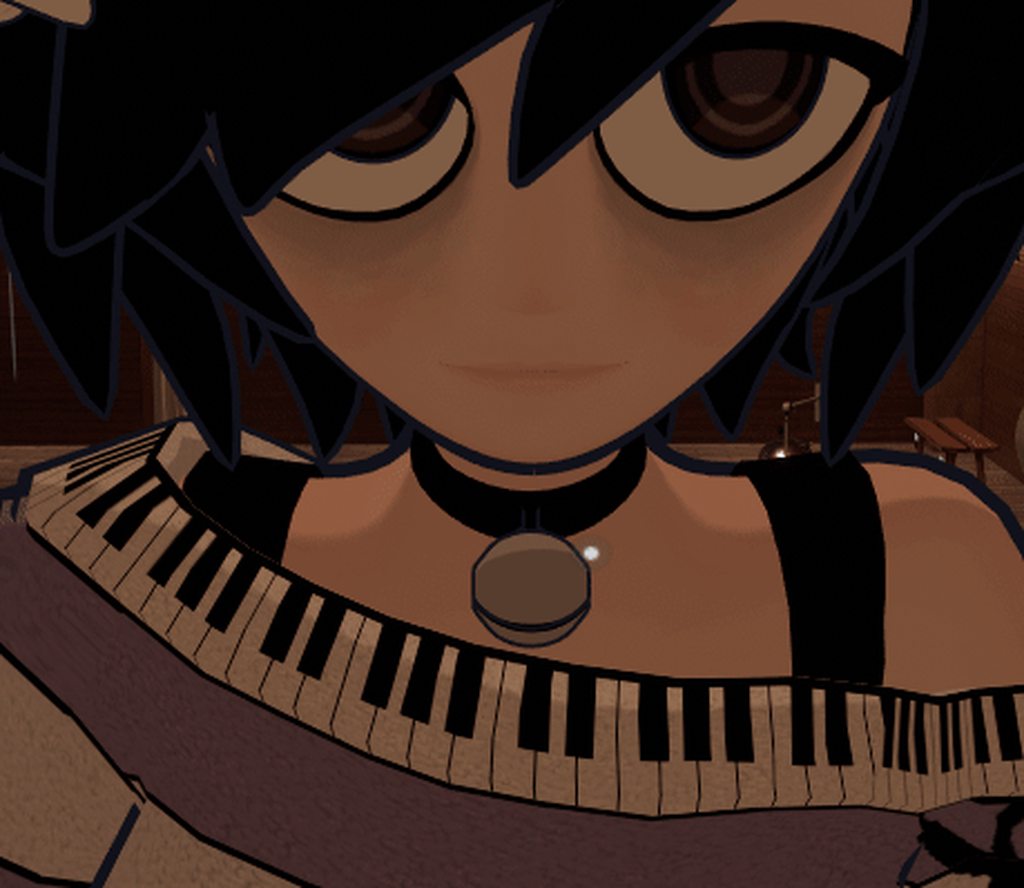
no gravity, no colliders, i even cranked up the damping and inert to try and stop it https://i.imgur.com/XzBX7Na.png

 astral warren
pure dome
i'm having an issue where putting a dynamic bone on this bell makes it flip out ...
astral warren
pure dome
i'm having an issue where putting a dynamic bone on this bell makes it flip out ...
Check if it still happens in the default VRchat home
Some worlds are built very far from origin and dynamic bone will start getting float rounding errors
pure dome
still happens there
all my other dynamic bones work as expected by the way
this is how the bones are set up in unity by the way, i have a BellRoot bone to put into dynamicbones that isnt weighted to anything and then a Bell bone that is fully weighted to the bell https://i.imgur.com/1ykuG8r.png

it calms down after my avatar stands still for a while but the slightest movement causes it to flip out for several seconds, even with damping and inert all the way up to 0.9
...come to think of it, all my dynamic bones kinda jitter a little bit at the slightest movement, but none of them are nearly as bad as the bell
astral warren
Change end length to 1.0 and see if it still happens
pure dome
astral warren
Change end length to 1.0 and see if it still happens
doesnt seem to have changed anything
astral warren
I’d check two more things
-Make sure fbx import scale is 1.0
-make sure root game object of avatar (the one with the descriptor) is scale 1 1 1
If this is not the size you want, edit it in blender
Just to avoid any weirdness with scale as dynamic bone script sees it
 crisp tendon
clear bone rolls !
pure dome
ive modeled starting from the correct scale from the beginning so i dont believe that's at fault, lemme check bone rolls
astral warren
why I find is that if you have a tiny/huge avatar that has been normalized via game object resize, dynamic bone script still behaves as if you are massive/tiny, and details it believes are too small can be culled
pure dome
.....actually, hang on, do dynamic bones just sort of tend to break if theyre too small?
because as a test i set the end length to 25 and it works much better ingame now
just checked the rolls in blender and the bell bones were at about 0.000082 degrees, dunno if that matters
astral warren
I haven’t looked into his code very carefully nor do I know if vrc modified any of it on their end, but I would assume it would cull out tiny movements
pure dome
crisp tendon
clear bone rolls !
what relationship do bone rolls have to dynamic bones, exactly? the bones on my model are rolled throughout, do you think that's what's causing the slight jitter?
crisp tendon
I'm not sure there would be a cause relation between the two, but it's generally good practice to clear bone rolls on everything before export to avoid issues with IK
pure dome
anyway setting the end length high enough that the bone isnt too small seems to have fixed it i guess
by the way, uh...am i doing something horribly wrong, or is it pretty much expected that your hair will clip through your neck when you press z ingame?
 coarse delta
unless you weight the end of your hair to your neck/back, you'd need to add a collider for the db
pure dome
i kind of doubt a collider would do anything since pressing z caused your character to instantly snap to the prone position rather than it being a gradual movement
coarse delta
you could also do a constraint on the bones
pure dome
i feel like it'd be a lot of work that would just end up making things look weird in other scenarios honestly
 jolly yarrow
i have a bell type object on my avatar with no bones that works correctly
astral warren
I’d weight some of the hair to neck and chest
jolly yarrow
its just 3 nested objects with jigglebones
astral warren
That’s the typical videogame thing
pure dome
hmmm i might try
jolly yarrow
you have a nice av btw :p
 jovial dune
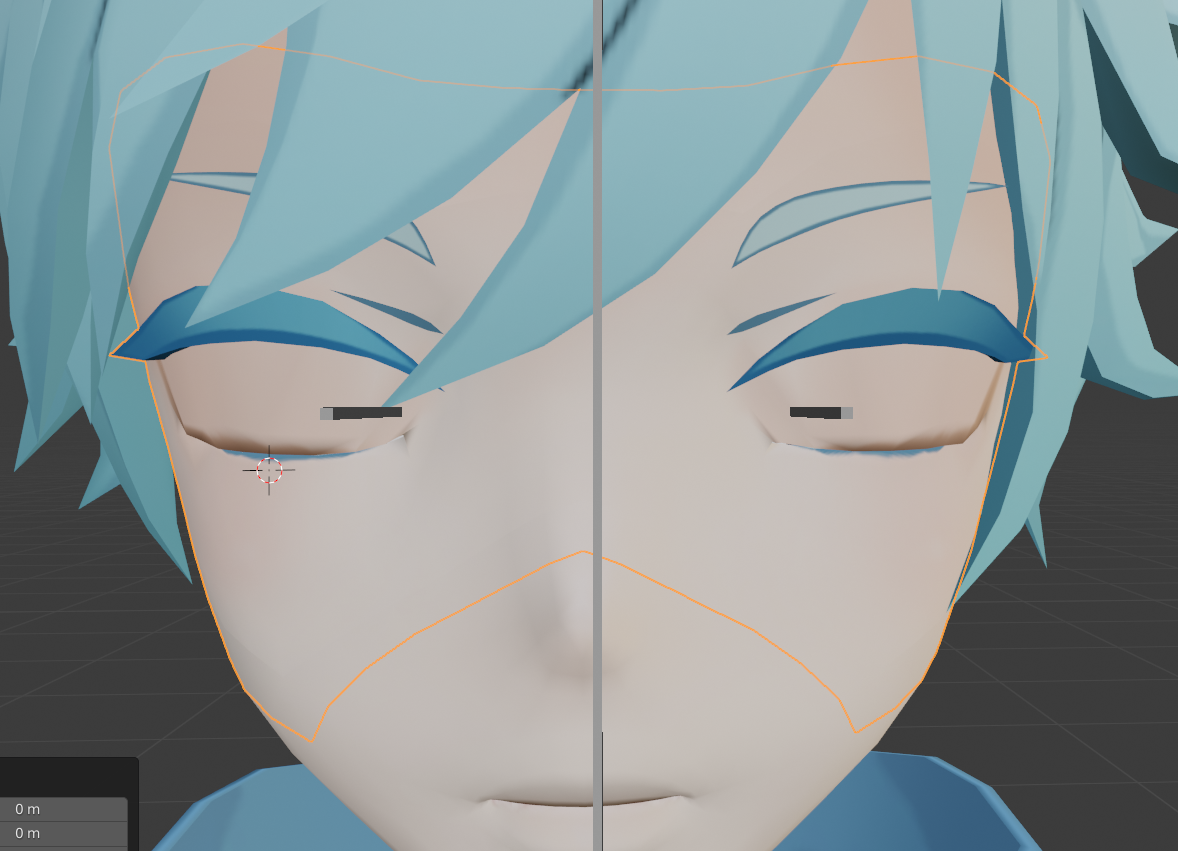
I spent four score and seven years trying to figure out how to line up these bushy eyelashes after disconnecting them from the eyelids...now the eyelid blink looks great but I can't possibly fathom how the lashes are supposed to flatten with the eyelids 😆
I regret disconnecting the eyelashes now
Good enough blink, but the lashes 😱 https://i.imgur.com/hlybEki.png
 crisp tendon
personally i scaled them -1 on the Z axis and moved them with the eyelid
jovial dune
Legit my first super crummy attempt at that in 5 seconds is kinda glorious lol https://i.imgur.com/giuCLpw.png

Where have you been all my life
I forget, I always ask, but are you the same Ruuuubick that was an Altspace mod way back when, like before MS claimed them and all?
crisp tendon
Kinda, there wasn't any real moderation when i worked there, just a team of virtual concierges that'd be in charge of events and to welcome people on the platform
jovial dune
Well yeah okay but to us normies you were a mod lol
I always think it's so cool how you managed to transfer into the same sort of position for the same sort of company and you still do it
crisp tendon
Been full time QA for two years now though 
crisp tendon
Yeah, definitely a lot more interesting 
jovial dune
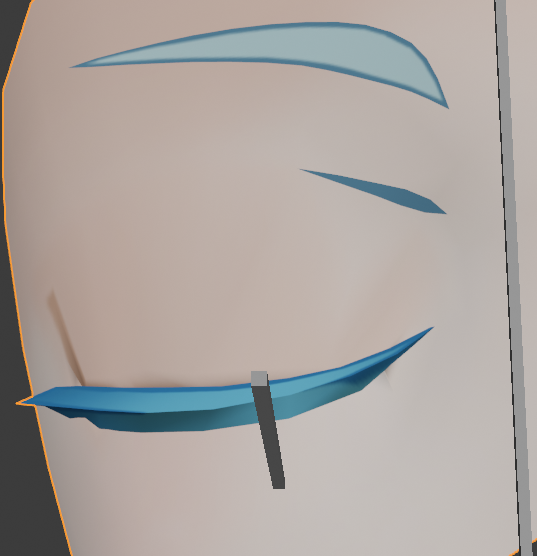
Also thanks much, this is fucking awesome
3 days stumped out with 1 smol sentence lmao
crisp tendon
No prob, if you see me online feel free to ping me if you think the answer might be simple
jovial dune
I'll remember that 👌
 slate hearth
um idk if this is the right chat, but im trying to make my own VR Chat model with a Dragon Ball Xenoverse model, I got the textures and model up, but the bones for the arms,legs, and feet are backwards, as well as the original feet being reversed.
crisp tendon
Check the bone names
slate hearth
just an FYI Im not using Dynamic Bones ofr unity as i cant pay for it atm, im using Unity's own thing
what do I do after cvhecking the bone names?
I found out wahts wrong with the feet now ^^'
Just not with the bones being reversed
 crisp tendon
@slate hearth Well hopefully the names should be correct
slate hearth
idk what names u want me to give you xd
It looks like it has everything it needs (besides the chest and upper chest)
jovial dune
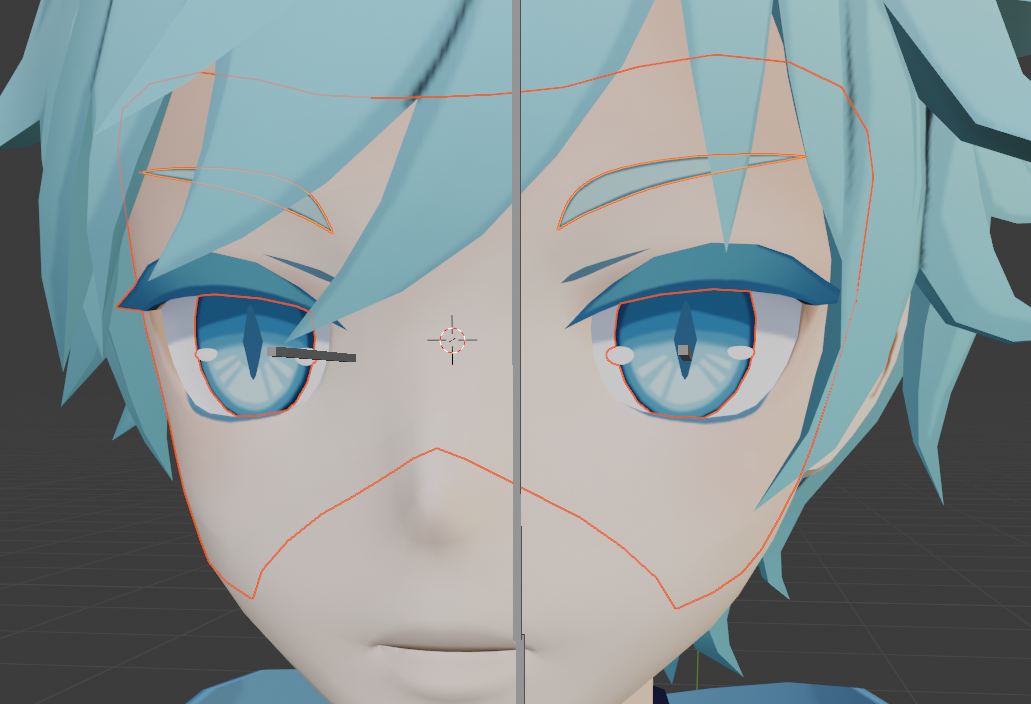
I can't recall, is it more optimized to try and keep everything on as few objects as possible? https://i.imgur.com/xv1eNLL.png
 crisp tendon
@slate hearth I'd suggest importing it in blender first, and running it through the cats fix
slate hearth
Ruuubick I think all the names are correct, and from what I see now is that the thumbs are in a weird powsition, and I was able to rotate the feet in the right way
um how do I do that?
crisp tendon
jovial dune
I can't recall, is it more optimized to try and keep everything on as few object...
Yep, one or two meshes are ideal
blender lets you import fbx
and cats is a blender plugin
slate hearth
okay
Ill get cats plugin right now then
Okay I got it on blender, what do I do next after adding Cats?
crisp tendon
"Fix"
slate hearth
so I go to cats plugin and press fix model?
crisp tendon
yep
slate hearth
Then what? (sorry this is my first time doing this)
crisp tendon
Select everything with A then Ctrl+ A > apply all transforms
then export into unity
crisp tendon
Can you take a screenshot of the menu ?
They keep changing names of stuff between blender versions
slate hearth
cant
it keeps disappearing when I try too
nvm
idk why it did both my monitors xD
crisp tendon
mmh, in that case do it for all three at the top @slate hearth
crisp tendon
yep
slate hearth
okay I did that
and now its texture less
did I need to add the textures to Blender? because it was oringally textureless
crisp tendon
in unity
slate hearth
theirs different textures i have, its not all 1 texture
When I uplaoded it to Unity it doesnt do seperate parts for the textures, its doing the whole thin
or do I do a create from model in the rig section?
crisp tendon
How many materials does it have ?
slate hearth
15
crisp tendon
yeah that's a bit much
 crisp tendon
You go through the normal uploading process in the sdk
slate hearth
but what can I do about the textures first? also it says its not a humanoid model?
crisp tendon

VERY IMPORTANT - PLEASE READ:
This tutorial may still be mostly useful, but there's a few major changes that you need to pay attention to. First off, VRChat now uses Unity 2017.4.15f1, not Unity 5.6. Additionally, there's some new tools for helping with atlasing that you should read about. Check out Cat's Blender Plugin docs to see more about th...
slate hearth
Am I supposed to cahnge it to humanoid again?
I did that and now its messed up again
My texture files arent even the way the video shows
If u didnt know already I said the model in Blender has no textures on it
slate hearth
Alright, but this video doesnt help with how my textures are
I have them like this, and normal pictures
slate hearth
Im guessing im the only one whos attempt it like this?
slate hearth
Soo anything u can do to help me with the model textures with knowing how they are?
crisp tendon
Sorry i have no idea how the model's textures work, but if applied in the mesh's material slots it should work
slate hearth
on blender or in unity?
crisp tendon
Unity
slate hearth
okay, wheres the mesh material slots at then?
crisp tendon
in the hierarchy
slate hearth
Where in the hierachy? I only see armature, camera, and light
crisp tendon
in the armature
slate hearth
theres only 1 material slot
I dont have a full texture map as I dont know how to make one
crisp tendon
In that case redo the steps with the first model into cats, but in the cats option disable merge materials, maybe it'll keep them
cats probably thinks they're the same
slate hearth
Oaky
so then next question
how do I turn the prefab into something Blender will register
crisp tendon
what's in the prefab
slate hearth
The textrues didnt go to the original .fbx
and if I undo the fbx to allow me to edit it doesnt say how to put it back
I think I found a unity plugin for it
Didn't work
actually nvm again I think it did maybe?
slate hearth
okay I did it!
 idle pebble
I worked with Xenoverse 2 models before
With cats when you fix it do not have the combine same materials and aswell you have to flip the rig
slate hearth
oh?
whatchu mean by dont combine the same mateirals
nvm I think i get it
Is it okay if I DM you for assistance? Since u have woirked with Xenoverse models
where do save atlas's get sent too? its not letting me pic where to send them
tulip root
Im trying to symmetrize my weightpainting from the left to right but it keeps saying that some of them failed. How to fix? I already symmetrizised the bones. Do I need to do the same to the body?
tulip root
My avatar has so many holes that IF I could go inside Blender id go in and just use needle and thread at this point... Dont even care if my character would look like a voodoo doll later since im apparently really good at making those... Might aswell add some pins in there too while im at it.... -.-
slate hearth
Okay, so I think I found a Fighter Z Model I can try to edit, anyone here have expierence with Fighter Z Models?
slate hearth
Any of u know how to help me with Atlas saving? It keeps giving me an error
slate hearth
hey Ruubick I got the textures on Blender now for my model, but I cant save it as an Atlas still
 robust crescent
re-assign the texture its having issue finding or try the 'fix missing files'
robust crescent
then point to wherever the textures are, if you atlas and get one white/missing thats the one material you need to re-assign texture to, the times i gotten it that fixed it
 fading verge
Hey im having issues with this. Ive tried remapping the bones,
Ive tried renaming them and even auto Fix using Cat plugin on blender. ;-;
Been trying all day
slate hearth
Mines been doing that too
fading verge
;-;
slate hearth
I got it fixed one way but I dont remember how
Is ur model having the bones be reversed too?
or not?
fading verge
i don't think soo
slate hearth
checked cause thats how I think I got them to disappear for me the first time
but if it is idk how to fix the bones
fading verge
hmm i will keep trying.. ;-;
 abstract merlin
Probably not the right place for this but, does anyone have experience with photogrammetry? I'd like to import a 3d model of myself, and rig it. I feel like rigging a photogrammetry generated model might be a little difficult though. I've little rigging/modeling experience.
 wind osprey
abstract merlin
Probably not the right place for this but, does anyone have experience with phot...
wind osprey
abstract merlin
Probably not the right place for this but, does anyone have experience with phot...
Photogrammetry is some pretty wild shit.
That said, rigging something from a photogrammetry source would not be much different from a normal model, as it'd need a good amount of pre-processing anyway.
General workflow for a character model from photogrammetry would be something like this:
~Photogrammetry witchcraft~
Clean up high poly, remove floaty bits, etc
Retopologize a game-ready low poly over it
Add rig
Weight lowpoly to rig
Test it
Fix weights (crying optional)
Bake textures from highpoly to game mesh
Test in Unity (possibly cry some more)
abstract merlin
Thanks for the answer :) So you think face rigging shouldn't be too difficult to achieve? I'm going for a bit of a perfectionist route.
astral warren
Depending on how realistic the model is, Face rigging is the hardest of rigging to get right. The more photorealistic the model is, the harder it is to rig without it looking uncanny
wind osprey
abstract merlin
Thanks for the answer :) So you think face rigging shouldn't be too difficult to...
Blender has a lovely addon called rigify which comes with a good quality face rig system. It's what I use when making visemes for avatars and what I'd suggest for your use case.
abstract merlin
Thanks again.
I'm not very artistic so modifying textures to stop my model from hitting "uncanny valley" should prove to be some hours of quitely crying.
astral warren
Yea that’s why anime models are so common - even if you don’t like anime, they safely side step the whole uncanny issue from using more realistic looking humans
wind osprey
At least on the viseme front, since they're basically jawflap.
astral warren
It’s hard to think what kind of more realistic looking player models would actually be better received
Everything shys away from actual realistic people - anime, robot, animal
wind osprey
Three biggest problems with realistic models are skin shading, eyes, and subtleties.
Hey, I look like a realistic person 😦
wind osprey
astral warren
I stand corrected
But that also makes me realize - realistic models sort of need to be personal. The more realistic a human looks, the more individualized they look too. You just can’t make a realistic face and mass sell it - everyone would have the same face
 rapid mauve
isn't 50,000 miku avatars the same thing ?
rapid mauve
just not famous enough
wind osprey
Kind of the same problem though. Although VR helps a lot to differentiate people with movement differences.
coarse delta
I’m honestly sick of the mmd same faces
astral warren
Heh... some friends play a game by making our avatars public and wear each other’s main avatars and see if someone with name tags off can tell who we really are while we all go mute
We all fail badly
crisp tendon
VERY IMPORTANT - PLEASE READ:
This tutorial may still be mostly useful, but there's a few major changes that you need to pay attention to. First off, VRChat now uses Unity 2017.4.15f1, not Unity 5.6. Additionally, there's some new tools for helping with atlasing that you should read about. Check out Cat's Blender Plugin docs to see more about th...
slate hearth
thx
but um
its still backwartds with the bones
Cats plugin did not work at all it seemed xd
 inner tree
is there like a new way to fix your viewpoint for fullbody that i dont know of? cuz for me my viewpoint ends up in the chest if i lean back while sitting or laying down
slate hearth
I fixed it, the arms and legs were reversed in the bones
but does anyone know how to fix this?
 icy jungle
 naive ridge
Question for anyone: I am having some difficulty rigging my model in Blender, as whenever I crouch in-game, my legs keep crossing like so:
The model bone rig from the front and the side looks like this:
was trying to get it to match up with this template I found on this server from a user who had a similar issue in the past:
meager ether
legs must be straight on x
naive ridge
Is there an easy way to check for that?
 dawn oak
From the front your legs seem to bend inwards slightly. They need to be completely straight
meager ether
yea, your head and tail of your bone needs to be same
crisp tendon
clear bone rolls ?
meager ether
and this one too
naive ridge
I am completely new to Blender, it's my first time ever using it. Is there a tool or a window for clearing bone rolls?
dawn oak
Select your armature -> Go into edit mode (can press tab) -> Select all of your bones (Can press A) -> Alt + R
naive ridge
Ah, perfect! I see that did make a difference, all of the bones are now aligned
Is the placement correct at least?
meager ether
to give a little realism, my knees are slightly twisted outward
but you can make positions on X same, it's ok too
 latent tide
No IK even though fingers are mapped? (supposed to be just 1 joint btw)
dawn oak
Pretty sure it needs 3 bones for each of those fingers
Well specifically it needs 3 for the Thumb, Index, and Middle finger
latent tide
edit - fixed
 glass panther
My avatars fingers are crooked in the Armature Inspector in Unity. As well as during animation. In Blender testing each finger bone the weight painting is fine, should i check for bone roll?
 turbid spear
could be it
glass panther
I'll test it
 tulip root
No matter how much I try to stitch this hoodie back together it always ends up with more holes... I wish I knew what my friend did to fix it last time. 😔 This feels hopeless... I dont want to give up on it since the original avatar holds so many wonderful memories in it thanks to the amount of time me and my friend spent on it but I cant just pretend like it will be fine. This is breaking my heart. I just dont want to lose the memories. This bittersweet feeling when youre crying in VR after checking the avatar 5th time in a row without making any progress.
Its even worse when youre testing it in Blender and its all fine. Then you publish it and all that pride of you doing your favourite avatar almost completely alone is then robbed from you because you realise how bad you are at it in the end thanks to VR Chat showing the issues you didnt see in Blender and it even worse when theres more than 3 issues. Like the amount of issues in this one hoodie is insane.
turbid spear
what's wrong with it again
glass panther
I managed to actually fix the wonky fingers in Unity! Turns out the wrists were both rotated. In the armature inspector i reset pose and then enforced t pose again, that fixed it. No need to go back into Blender, must've messed that up somewhere during the whole process.
fading verge
SO! I've been trying to look for the answer actually everywhere and I cannot find it and I literally need to be walked through things with visuals.
Shape keys suck. Importing a model that is stuck in A pose while having shape keys also sucks. Because you cannot apply a new rest position to shape keys. How do I fix this? I need the avatar to be in tpose to do what I need do :c
 wintry bane
@fading verge Create all of the shape keys that you think you will need before changing poses should help. Also, always make a base shape key and a base pose in the pose library. Assuming that you are working in Blender.
Also assuming that you are working on the face, with the base pose in your pose library, you can always return to it when/if you want/need to make a new shape key for an expression.
Now, I would like someone to explain to me how, if possible, to change the amount of influence Dynamic Bones have so that I can blend between dynamic movement and a pose. Situational context: I have a character with ears that are normally floppy, but become raised and less floppy when alarmed.
 sleek isle
You can't animate dynamic bone parameter. Only option os to disable it.
turbid spear
You can probably create a chain of dynamic bones somewhere and use a rotation constraint or something to copy it's movement, then animate the constraint weight for more or less influence
But no idea how well that would work
But constraints seem to be the go-to solution
wintry bane
I thought that might be the case; thanks for the confirmation
 dim wren
Hi all, I'm looking for some sort of blender noob-friendly tutorial for rigging from scratch - I've googled EVERYWHERE and I can't find anything I can follow, I've tried to rig in mixamo then bringing it into blender, but as soon as I go into edit mode the model faceplants and I don't know how to fix it.
It's been a few days of searching and I just want a comprehensive tutorial for an absolute blender beginner to start from, please help 😦
turbid spear
Try applying your transforms
With ctrl+a
But there's probably some import setting to change the UP axis to Z instead of Y
As some software uses Z for UP and some uses Y for UP
dim wren
Control + A shows an Apply Object Transform panel, everything's checked. Now when I go into edit mode it does this:
Can someone link me to a tutorial for rigging for vrchat that doesn't involve Mixamo? I think that's introducing some unknown stuff that I can't figure out and I'd rather cut out the middle thing and just rig from scratch?
turbid spear
I think you're missing some simple setting when exporting/importing
But I guess learning to rig from scratch would be more beneficial in the long run, but harder
There's a bunch you can check out

Welcome to the 2nd Blender 2.8 speed tutorial!
Today I'll show you how to create your character rig in less than 5 minutes! Hope you guys enjoy and learn a lot from the video! Don't be afraid to leave comments or questions about anything below!
If you enjoyed this video, please don't forget to like and subscribe for more content!
You can find m...
This channel has some pretty good stuff but it's short and might not be detailed enough if you don't know what you're doing

Rigging a low poly person in the easiest way possible. (IMO)
Part 1- making the person - https://youtu.be/4OUYOKGl7x0
Rigging and animating the easy way - https://youtu.be/EJdrtknE0zQ
Animation playlist - https://youtu.be/zp6kCe5Kmf4
Say thanks: http://paypal.me/grantabbitt
My website http://www.gabbitt.co.uk
Discord server https://discord.gg...
This channel has pretty good explanations
Don't really know other channels but I think you can't really go wrong with the top results on the topic on youtube
Altho you don't want to create rigs for animation that use drivers and helper objects
You want a regular armature and these bones
dim wren
Thanks! I've been googling for ages, and I don't how how to bridge the gap between a generic "rig with blender" tutorial and "rig for vrchat" tutorial - the latter seems to always start with a mixamo step, after which I run into a problem I can't solve because the tutorial doesn't run into it, and I google it and I get completely lost 😦
So like, following any rig tutorial will get the same result that will work for vrchat? How do I make sure a rig works for vrchat?
turbid spear
All you need for vrchat is just a regular unity humanoid rig
So you can look into humanoid rigs in unity
But it's pretty trivial honestly, you just want the bones linked above then unity will pick them up automatically if they're named right
dim wren
Ok thanks, I'll make a generic humanoid and give that a try
dim wren
Another more advanced question - I modelled a quadruped bot (tachikoma) and I want to rig that - I know quads are hard so I'm willing to give up the leg movements and just have the arms wave around, how would I go about doing that?
turbid spear
Leg bones not weighted to anything
But people have gotten spiders and the likes to work
It's complicated, but possible
dim wren
Yeah... Baby steps lol
So build leg bones but weight them to nothing, and it'll just work? That should work, thanks
turbid spear
Yeah, they'll move but since not weighted to anything they won't do anything
But in that case your actual legs will probably be weighted to the hips, which might look pretty janky
Gonna have to do some trial and error
dim wren
Cool thanks, I'll cross that when I get to it. Just gotta get a basic handle on all this first :/
turbid spear
Best of luck!
astral warren
dim wren
Thanks! I've been googling for ages, and I don't how how to bridge the gap betwe...
You really don’t need mixamo at all for vrchat... that’s if you don’t know how to rig in blender
turbid spear
mixamo is just easy, but there are other options for automatic rigging as well
astral warren
It also will only do the human bones .. so things like hair, dresses, wings, still need to be weight painted
turbid spear
It's a start
Tho I've never tried and it seems like the joints are very rough from what i've seen
Weights need a bit more smoothing around the joints
 proper hawk
i need help with this 😓
turbid spear
looks fine to me

 raw jackal
@proper hawk Looks like a weight painting issue on the shirt mesh piece (possibly on Right Arm bone)
proper hawk
i changed it to generic then back to humanoid then it fixed
naive ridge
Once a model is fully rigged with an armature/skeleton, are you no longer able to edit the mesh?
raw jackal
naive ridge
Once a model is fully rigged with an armature/skeleton, are you no longer able t...
You are able, everything is always editable. You may experience a glitch where your avatar appears to turn into "spaghetti" in unity after editing it in blender and resaving it, but it's an easy fix.
raw jackal
if you open him up in Blender or Unity and can see that he has bones -- yes
Yeah, you'd need to give him bones and then weight paint those bones. But if you wanted him to have eye tracking and lip sync and expressions, that's even more stuff you'd need to do
slate hearth
Is anyone able to help me out with this? Idk whats wrong and the bones are mapped correctly
wintry bane
@dim wren Learning basic rigging in Blender is good practice, but, the main thing to remember is that at the core of the problem that you asked about is an issue that plagues a surprising amount of people who work in 3D: object spaces.
The quick and dirty of it is that, in order to make transforms and modeling less computationally intensive, every object (mesh, armatures, lights, curves; everything) is contained in its own 3D space, separate from the world space. All object-level transforms are done on this object space, not the entity it contains. If two objects, such as one that contains a mesh and one that contains an armature, are put into a hierarchy and don't have "aligned" spaces, wonky stuff will happen, which is what you experienced.
 woven plank
So I’m not sure if this has to do with rigging but I can’t import my avatar. I always get some error and I have no clue as to how to fix it. This is what I get and any help would be amazing

 spare radish
@woven plank go into configuration mode in the same place where you set the animation type of your avatar.
From there you should see a green humanoid menu on the right.
Locate your chest and drag it into the chest slot, keep the upper chest empty
spare radish
Hey guys, I keep having this problem when I lay down in fullbody my viewpoint goes to my chest and my avatar's spine doesn't bend at all
how can I fix this?
 austere siren
@jovial dune delete root bone
jovial dune
What?
turbid spear
any colliders?
fading verge
hey everybody, im working on an avatar and when i am in game his arms always point to the sky.
 sage notch
ummmm i was told to come here because the avatar i downloaded has no bones could someone help me with this
 violet turtle
Im having a classic rig issue in FBT, problem is, I'm unsure what's causing it this time. as far as I can tell the rig is fine, and I need help identifying the issue.


IVe used this rig before, the only change ive made was implementing Kung's shoulder sag fix. so I'm suspicious thats the cause, but before I redo everything id like to identify if its something else
crisp tendon
Your spine is disconnected
sage notch
Can someone explain how to add textures to a model? Whenever I add it doesn’t show 😦
sage notch
Anyone?
crisp tendon
plenty tutorials on youtube, also wrong channel
 pallid sierra
hey, i dunno where to put this an feel free to chew me out if i'm puttin this where i ought not to, not used to big servers like this, but i got a .blend file of the Mindflayer from Baldur's Gate 3 + all the clothing/head/body/eye/teeth options for them + all their textures
i've been trying to whittle at it all day but i've given up and mildly do not care anymore, would anyone want all that? basically the only thing it needs at this point is rigging which is why i'm depositing it here
this isn't really a request i just don't want all the effort i made digging him up up to be put to waste because i don't know what i'm doing, might be better suited to a baldur's gate fan in here who knows their stuff more
have a good night everybody
 twin condor
I need to put the viewball in the middle of the head for it to look ok ingame is there any fix? .3.
fading verge
Please help, for some reason when I press play and go to scene my colliders are still on the avatar, but my dynamic bones disappear. However, the second I disable play the dynamic bones are still there.
 open anvil
i can seem to get my dynamic bones
 uneven dust
Why so some bones connect at different places or get removed in unity? also does it matter that the default pose is really weird
 mild stratus
uneven dust
Why so some bones connect at different places or get removed in unity? also does...
mild stratus
uneven dust
Why so some bones connect at different places or get removed in unity? also does...
Ok, so it's likely parenting issues, and you only need 1 toe bone per foot and you're missing shoulder bones and a clear head bone, so it's not gonna work in VRChat if set to humanoid.
uneven dust
oh ok
mild stratus
oh yeah, the hips are upsidedown
and your missing either a neck or chest bone.
The correct bone hierarchy is pinned
uneven dust
oh I can try fixing that, is there a reference I should go off of when fixing everything
mild stratus
uneven dust
oh I can try fixing that, is there a reference I should go off of when fixing ev...
first pinned message in this channel.
uneven dust
ok thanks
 robust trellis
When rigging a model in blender, make sure you get the rigify plugin, it makes it much easier to rig it since you can load a pre-created avatar rig that just needs to be set to your model
 wind matrix
crisp tendon
wind matrix
crisp tendon
both
 tardy talon
i was told to ask my question here seemed like a weird place considering this place is called rigging when my issue is texture related
i'm trying to use matterial combiner in blender and when i hit "enable material cobiner" button on cats i get this message pop up and i dont understand what any of it means at all
is there a easy fix for this???
fading verge
is this well rigged?
i fixed them earlier since it was off
fervent hornet
Its fine for generic, but wont work for humanoid
fading verge
ok then its good
i want to make the animations since humanoid is gonna look weird
turbid spear
tardy talon
i was told to ask my question here seemed like a weird place considering this ...
Did you install the addon cats needs for atlassing? And no, this isn't really the place to ask
 coral sigil
me tripping over my unfinished skin weights on my way to unity https://gyazo.com/b321af706cae74501d60f7c22e15a8e3
tardy talon
tardy talon
i was told to ask my question here seemed like a weird place considering this ...
solved my own problem
tardy talon
turbid spear
Did you install the addon cats needs for atlassing? And no, this isn't really th...
thought so , and yes i had it installed somehow it just wasnt active
turbid spear
might want to delete the conflicting ones and install again
astral warren
twin condor
I need to put the viewball in the middle of the head for it to look ok ingame is...
That’s normal.
 burnt goblet
Anybody know of any ways other than shortening the actual legs to get my actual feet where they should be on the models foot and not above it? Isn’t it something along the lines of how long your arms are and your height set in game
It won’t be a problem to actually shorten the legs however I want to be sure that would be the correct way to address the issue
astral warren
burnt goblet
Anybody know of any ways other than shortening the actual legs to get my actual ...
You are over thinking it. If your legs are too long, shorten the legs
burnt goblet
Ok sounds good, Additionally which bone is the bone that vrchat uses for you to bend over , is it the hips or spine
astral warren
Both
burnt goblet
I guess I’m thinking stomach area unless I add a upper chest bone
astral warren
Your hip, spine, and neck all bend a little bit each. Even chest curves, but much less than the others
burnt goblet
Because when I bend over i only bend at the hips and no stomach bending
Looks very uncomfortable lol
astral warren
It sounds like your hip and spine are very short compared to your chest and upper chest
burnt goblet
So just lengthen those bones
astral warren
Best to have all four (hip, spine, chest, upper chest) be about equal lengths, though that will mean re-weighting the model
burnt goblet
That’s not a problem
astral warren
But yes hips and spine will bend the most, as you go up the spine it gets stiffer
burnt goblet
Overall if I can get my legs and knees to be where they actually are irl then I’ll be happy. Currently bringing them up to my chest they are a lot below where they actually are in real life
Ok cool ☺️
Once I get all that finished this will be my second successive from scratch model, be expecting something cool in av3 show off !
 twilit aurora
https://prnt.sc/vyhgn0 need help with this issue
 burnt goblet
is it still recommended to not have toe bones? or has that changed after all these years
astral warren
There is no downside to having toe bones. If your view position is higher than expected the avatar will stand on its toes. If they are missing, you will just levitate. Up to you what you want
 lavish crag
whenever i add clothing to my character and combine meshes in blender it messes up the shape-keys and makes them explode. Is it possible to keep the meshes separate but still wight-painted to the body? because i don't want it to mess up shapekeys and i don't want
to redo shape-keys.
crisp tendon
Select body vertices in Basis, and Propagate from Shape, it will turn all other shapekeys to that for selected vertices
 wary nest
Do any of you guys, upon getting your avatar in Unity, have Unity change most of your bones scale from 1, 1, 1, to .99999 etc.?
 magic sonnet
cant say ive ever seen that
 scenic shell
While not specifically VRC related, I've seen that issue in Unity before, even over time as I build and test scenes for my games.
Imported models, new gameobjects, etc. Sometimes It will do that. I've tried searching for solutions in the past but couldn't find much of an answer.
Obviously 0.999999 is close enough to 1 that it is negligible but it's still pretty annoying when that happens.
Most of it is related to floating point precision error, as far as I can tell though. rotations and positions are subject to it as well.
wind osprey
wary nest
Do any of you guys, upon getting your avatar in Unity, have Unity change most of...
It's completely harmless, just floating point imprecision that unity feels the need to display to the user.
wary nest
Thanks guys! 🙂
 latent saffron
Anyone have some advice for making non-janky dynamic bones? I'm trying to get a cape working, and I can get it to look good in Unity, but when I load it into VRChat it behaves very differently, and it jerks around a lot when I'm moving.
lavish crag
how tha hell do i weight paint clothing to be realistic?
 willow jolt
I need help, I want to make a custom prone for my avatar. I imported the avatar from vroid. I do not have anything from the unity asset store and I can't find a guide. Can someone please explain, what I need from the asset store, and how I can make the custom prone?
fading verge
Sift click and drag if doesn’t work I can’t help becuse working
willow jolt
Can somebody who knows how to rig avatars in unity please help me? I want to change the prone animation of my avatars but I don't know how to do it or what assets I need.
crisp tendon
You need a prone animation
willow jolt
how do I get one?
 willow jolt
well what do you mean by "you need a prone animation"
 raw arrow
somebody tell me why whenever i try to import to blender it doesnt work
i have the addon enabled
crisp tendon
willow jolt
well what do you mean by "you need a prone animation"
Do you know what an animation is ? If so, to override the default one, you need to provide your own with the avatar
willow jolt
I just import the vrm and send it to vr chat
crisp tendon
raw arrow
somebody tell me why whenever i try to import to blender it doesnt work
Import what ? Any information ?
raw arrow
a vrm file
crisp tendon
If you're using the latest version of blender it's probably not compatible
willow jolt
all the guides I see on youtube say I need the Muscle Animation Editor
crisp tendon
Not for a prone animation
 olive forge
How to i keep the pose when i set it, because when i stop pose mode it resets
crisp tendon
raw arrow
i'm using 2.8.3
Can you share any information though ? Screenshot, errors, anything would help
crisp tendon
olive forge
How to i keep the pose when i set it, because when i stop pose mode it resets
Cats has a button called Apply pose as rest pose
olive forge
crisp tendon
Cats has a button called Apply pose as rest pose
i tried that and it gave me an error i didnt understand
raw arrow
The files just generally aren't there whenever I try to import
willow jolt
Im confused and have no clue what im doing
raw arrow
There are no errors
crisp tendon
olive forge
i tried that and it gave me an error i didnt understand
I'd suggest trying in 2.83, 2.9 isn't stable tbh
crisp tendon
willow jolt
Im confused and have no clue what im doing
First you need a prone animation, then you can do the rest
crisp tendon
raw arrow
There are no errors
Has there been updates to that tool recently ? Any chance it broke on their side ?
willow jolt
but how do I get a prone animation
I dont even know where to start
do I need something form the asset stor
im lost
and confused
ACK
willow jolt
doesnt that cost money?
if there is no way to do it for free then there is no way to do it for me
rhymes
.-.
crisp tendon
You can find free ones on the asset store or mixamo yes
willow jolt
ok
this should be easy enough
this is not easy enough
everything costs money
-.-
oh
maximo
they all like like people taking a shit on the ground
 mossy creek
So I have a bone for my avatar that is supposed to be for the feet, but vrc doesnt keep my avatar on level with the ground, how do I fix that?
crisp tendon
Move the bones to match the ground
willow jolt
@crisp tendon how do I get the mixamo thing into unity
crisp tendon
export as fbx, and then duplicate the animation of the model in your asset
you drag the asset in your unity window ?
astral warren
turbid spear
muscle editor can help
I was a pretty unhappy with it, I was expecting actual rotation widgets on the avatar
Can’t believe that does not exist yet
burnt goblet
Does the new sdk not contain a base tpose.fbx?
 languid ermine
It's not worth it. it needs to be 2.2 or higher. I figured out it doesn't work, so I just splurged and bought it
turbid spear
Click select, it should select your avatar's .fbx file in your project tab, then go to the rig tab and configure
After that check that the chest bone is assigned to the chest slot. You can leave the upper chest slot empty
turbid spear
Yes
olive forge
ok
olive forge
turbid spear
Yes
there is another problem
its very major
I dont know it its rigging or what
turbid spear
Just screenshot the whole screen
turbid spear
can you zoom in a bit more to your avatar
turbid spear
Your hair and eyes are attached to your hips
turbid spear
Gotta be head
turbid spear
Is this how your avatar came or did you export from blender
olive forge
exported from blender
turbid spear
I mean you can try dragging to head but i don't think it's that easy
Fix it in blender instead
turbid spear
It's fine, open blender and i'll guide you
olive forge
ok
question
would it be easier to do if all the armatures were ungrouped?
like the clothes from the body and all that
turbid spear
Not necessary
you can hide the bones you don't need at the moment
click a bone then uh shift+G i think and select children or something
then you can hide with H
or just select what you don't need and hide
in armature edit mode that is
olive forge
cuz the hair is ungrouped from the body
turbid spear
Post a screenshot
turbid spear
Yeah you want to join all armatures
can you expand them all so I can see what they have inside
make the outliner a bit taller and screenshot it
olive forge
turbid spear
can you expand them all so I can see what they have inside
here
turbid spear
Actually know what, just join them all together with cats
Under custom model creation
You can join 2 armatures together
Just do that until they're all joined
It will merge bones if they're duplicate
If you don't have duplicate bones (like jacket only has chest and jacket bones and so on)
You can just select them all and ctrl+j
but if you have duplicate bones just do it in cats instead
turbid spear
depends, is everything parented properly
olive forge
i dunno
turbid spear
expand armature and screenshot
olive forge
turbid spear
These need to be parented to head, 010, not sure what that is
Select them and in the bone panel find a box that says parent
there hips will be selected, you want it to say head
olive forge
in bone parenting?
turbid spear
Try that, when drag over it, it should say something when holding either alt, shift or ctrl
if it doesn't then you can't do it that way I guess
I never tried
Bone panel is here somewhere but lower
you can do it in there
olive forge
ok i opened it
turbid spear
there's a box that says parent, and probably has hips in it
turbid spear
Do you even have a head bone 🤔
olive forge
im pretty sure
olive forge
turbid spear
Select it and you should see it's name
olive forge
oh er
turbid spear
It was there in one of your earlier screenshots 
turbid spear
Well you can also parent with ctrl+p i think
select bone you want to parent, shift select head and ctrl+p
head has to be last every time
because it parents selected to last selected
olive forge
turbid spear
because it parents selected to last selected
by doing that it changes the bones location Pumkin
it puts the hair bones at the head bone
turbid spear
choose keep offset instead of connected
olive forge
yep i just figured that out
turbid spear
or if you're doing it through the menu, untick connected under it
 regal leaf
When i try joining the bones or armature for a pair of shorts and my character model either the character model or the shorts dissapear, how do i fix that?
 kindred trout
is this correctly weight painted?
also whenever i go to upload this avatar to vrchat it keeps telling me "this avatar is too short, minimum is 20cm shoulder height"
 pseudo salmon
Hey guys, a buddy of mine suggested I drop by here to try and get a hand with the two unity issues i've been having with a custom rex avatar I've been working on.
Everything appears to be working flawlessly, except the eyes are rolled backwards in game, and the facial expressions don't work at all.
I know there's some override I have to select somewhere, but i'll be darned if i can't find it :/
 trail arch
kindred trout
is this correctly weight painted?
trail arch
kindred trout
is this correctly weight painted?
could it be that the avatar is just too short? Have you checked the size in unity/blender?
crisp tendon
@kindred trout i can't tell if you're trolling or not lmao
 zenith idol
Can anybody help me rig my furry avatar model in blender
 pliant ermine
Tried to fix an avatar in blender and it looked fine, but as soon as i imported it back into unity... this happened. I think it might be because of some bone parents not being right, but idk if im doing it right
burnt goblet
Check to make sure all of your bones are parented correctly, make sure any bones affected by the IK have zero roll and that the entire mesh is weight painted to the armature. from there i would suggest enforcing T-pose for the rig setup when you configure the avatar in unity. tell me what that does for you
 bold locust
Does anyone have a clue on what affects how far the thumb moves from Thumbs up to curled for a fist when using Index controllers? I've started learning ASL and my avatar's thumb doesn't curl down far enough to not seem like I'm making a thumbs up when I close my fist. So it's causing some confusion and I'd like to adjust my thumb to bend down into a fist more noticeably.
I'm just not sure what I need to do in order for it to change for the Index' finger tracking.
In fact, the thumb hardly moves at all when going from thumbs up to fist-nested.
 rose mountain
@trail arch If you have experience in blender I would suggest you take some time to see if all your bones are properly weight painted.
trail arch
i went into blender and fixed it, thank you 🙂
fading verge
Hi im new here 😅 i was given a unity package but the avatar has a broken neck, if anyone is willing to by chance maybe fix it for me you could keep the model if u like it 😅 i didnt know where to put this
astral warren
kindred trout
is this correctly weight painted?
N
No
 winged furnace
 upper yoke
Is there a free version of the dynamic bones script? If I make a dummy script with same parameters will the uploader just swap in the one VRC uses?
mild stratus
upper yoke
Is there a free version of the dynamic bones script? If I make a dummy script wi...
No, there is not a free version of the dynamic bones script (of which is legal)
And creating a dummy script wouldn't work, as you need the variables set-up correctly, as well as probably some other stuff.
upper yoke
That's what a mean by a dummy script. Like a header file almost. At least see if that would work be pretty easy if I had a copy of it... Hmmm... Why did VRC choose to make that the only dynamic bone script allowed? Is it made by the developers?
mild stratus
No it's not made by the VRC devs.
And you can use constraints and joints.
on pc, but that's the same with dynamic bones
upper yoke
I'm on PC, screw Facebook.
mild stratus
I use Quest because I couldn't care less about a company knowing who I am because that's every single company pretty much
But, as I said, you can use joints (pretty janky though), or constraints (to simulate fake gravity) instead of dnamic bones in most cases.
upper yoke
Alright, I'll try that. That's how I set up jigglebones in Godot, I don't expect it to be too different. :p
upper yoke
I don't expect it to be too different
A bit more truth in that statement than I hoped...
mild stratus
Yeah, they are very janky.
 drowsy trench
hi, so i was wondering how i'd merge the eye bones to the rest of my armature, the eye bones come from sonic forces' game files whereas the entire rest of the armature im doing myself so i dont have to merge all the other bones like this. the head mesh is parented to the rest of the model and is still controlled by the bones but the eye bones aren't part of the armature and i dont know how to merge the two without weight painting it manually.
im a huge noob to this so sorry if this is just unnecessary hassle
(and if this isn't the right chat then oops)
 surreal anvil
@drowsy trench if I remember correctly you can use Ctrl+J to join armatures (and objects) together. Select the head stuff, select the body also, and Ctrl+j it. Not sure if it'll keep the weights though, it's been a while since I've done that trick myself
drowsy trench
surreal anvil
<@530778682608844811> if I remember correctly you can use Ctrl+J to join armatur...
i've tried that but the armature loses it's connection to the mesh, that wipes the weights
thanks for the help though 👍
surreal anvil
Ah okok!
burnt goblet
@crisp tendon Would you happen to know if the tpose.fbx that came with the previous sdk's is suppose to have any roll on the bones? i know i read on the wiki online they arent suppose to have roll however when i removed all roll from the bones it seems to have broken the rig in game, shoulders moved out from the chest, hip bone extremely rotated?
crisp tendon
what does the armature look like after you cleared the rolls ?
afaik the armature still needs to be tweaked since some bones should be connected
burnt goblet
it seems the arms are still rotated a bit although it says roll = 0
Let me get a image from in game when it affects the armature
Interesting, it seems to only be affecting the armature in full body and not in regular desktop mode
 chilly ginkgo
I need a little help fixing my avatar for full body. when full body tracking users use it, the chest sort of squishes down so they become a weird, nearly torso-less creature with long legs. I'm new to making avatars, any idea what causes this? the avatar doesn't do anything weird like this for non-full body tracking use.
 drifting crest
My bones keep doing this in Desktop and in vr I am leaning far back, any idea why??? I really need help
 urban crag
Just began learning, and finished up the blender piece, but it looks like this when I go to configure in unity. Can anyone see what I can fix?
Looks like this in blender, not sure what's causing the head to snap back
 olive raptor
 fresh swallow
is there a way to stop appendages from rotating in unnatural directions? (arms, legs, etc) for full body tracking
rapid mauve
Joe-Bill - that Happens with mixamo rigged models a lot - imho mixamo is total junk
 glacial vale
Does anyone know how to fix the shoulder drop issues?
I've tried adjusting the length of the arms to accomodate so the avatar arms match the real life arms but I still have the shoulder drop issue when the arms are fully extended downwards
sleek isle
have the shoulder and arm in a T pose
because fbt . shoulder drop by 25 degree and extended down
glacial vale
 sleek isle
soo if your shoulder are already drop and add 25 degree to that and here your issue
sleek isle
if your body get pull easy when extending your arm. ether your player high if off or your arm are too short
sometime the headbone of the shoulder are too near the spine soo greater rotation
glacial vale
Okay, I'll try fixing the arms and the head of the shoulder bone to see if that helps
Thank you
glacial vale
Still having the same issue
tulip root
How do I make the wing bones not disappear when I press fix model in Cats?
turbid spear
why are you pressing fix model
 vague spear
I'm new to Unity and working with a downloaded avatar and I can't touch myself.
I'll explain.
On the public version of the avatar, you can bring your hands close to your body, anywhere, including touching your boobs (words I'd never thought I'd write). But when I upload the private version of the avatar, my hands stop at about 6-12 inches away from most places, like I'm hitting an invisible wall. There are finger colliders and dynamic bones on the cat ears and boobs and they both jiggle around, and I can touch and wobble the ears, but not the boobs. Anyone know why?
I've looked at other public avatars, and (1)on some you can touch the body surface/mesh anywhere, but no closer, (2)on some your hands just go right through it, (3)on some you can't get more than 6-12" within the mesh. Surely that can't all be due to dynamic bones?
 odd flint
Is this the correct chat to ask someone to rig a character for me? C:
I've commissioned a Model and it's not rigged yet, but it seems rather complex for someone like me who barely has any experience with Blender and 3D things in general. So I'd rather have somebody do it for me who knows what they're actually doing!
vague spear
Grimnir you could try VRCTraders. The bot won't let me add a link but if you go to the "Community-servers" channel of this server and search for VRC Traders, you'll find them.
bold locust
Does anyone have an example hand rig that makes a convincing fist with the Index controllers?
 crystal vector
tulip root
How do I make the wing bones not disappear when I press fix model in Cats?
crystal vector
tulip root
How do I make the wing bones not disappear when I press fix model in Cats?
Try unchecking Remove Zero Weight Bones in the options next to the Fix Model button
turbid spear
dynamic bones force bones to stay in their position when you added the script
Import the fbx as a new one and use pumkin's avatar tools to copy dynamic bones to your new fbx
pinned in #avatars-2-general
vague spear
If anyone was following my trauma - I re-imported the avatar, made no changes to it except for shaders and...it works. So I went back to the trouble version, clicked on the fbx in Hierarchy, put it in play mode and I can see large red spheres just outside the ankles, knees, hips and either elbows or ribs. They look like colliders. I don't know how to touch them, delete them, and I went to every bone in the armature and can't find them. But I can see them. I'm going to move on, using the re-imported version, and just hope that I don't manage to repeat whatever it was that I did.
turbid spear
post a screenshot
vague spear
Thanks I appreciate that. Though I'm cautious about posting a screenshot of a model that was made by someone else (I paid for it of course, but this is new for me and I want to be careful with his work). So I'm posting a partial screenshot! You can see the red colliders (that's what I'm calling them anyway) at the ankles and in front of the knees, and the yellow collider starting at the tip of the right middle finger.
turbid spear
those are ik targets from the animator I think. ignore them
they're just there for debug information
not all sphere things are colliders or anything like that
vague spear
Ok thanks - just a coincidence then that they're in the areas where my hands can't approach. They are, possibly, just a little further out from the body than my "exclusion" zone. But that's reassuring that I can't edit them and apparently shouldn't be able to.
astral warren
tulip root
How do I make the wing bones not disappear when I press fix model in Cats?
Don’t use autofix... but if you just you can drop down the gear and uncheck stuff you don’t want it to do
 coral sand
I have a rigged .max model, how would I properly export that to get it in VRChat? I didn't see anything online that pertained to it
tulip root
Thank you Adeon and Hotox! I got it working. I named the bones and weight painted them manually. Now I need to do the same on the other wing and im good to go. ^_^ I didnt use tutorials yet I still managed to get this to work in a way that im able to bend it like a real wing. Sometimes im able to make myself proud of myself and id consider this to be one of those moments.
 cerulean cloak
I'm a 3d artist looking to implement one of my models into vrchat and i was wondering if there was a comprehensive list of what i should name bones in order for them to be recognized by unity's humanoid rigging thingy?
i've found lists of which bones you need but not so much a resource on what i should name my finger bones
fervent hornet
Something as simple as Right Index 1, Right Index 2, etc should work. Naming doesn't really matter though
cerulean cloak
doesn't it use the names of the bones to determine which finger bone is which?
crisp tendon
Automatically by Unity, but that can be manually reordered
 gloomy ether
Can someone help me figure out why my skirt is doing this in game? Its using cloth physics with 214 verticies and works fine in unity but once i upload it into vr chat it does this.
its supposed to look like this
 full stone
:0
sleek isle
Cloth physic kind of unpredictable in vrc
robust crescent
Cloth is all over the place, what you see might be fine but other see it freaking out or stuck
not very reliable 🤷♂️
gloomy ether
Ah darn. Thanks for getting back to me on it then. I might try weight painting the skirt to the legs but I can never get it to come out okay
 versed dune
Hey, I'm rigging a model of a character I ripped from a game. Can't find a way to easily use the mouth bones it comes with in VRChat, and I've results to using Jaw Flapping.
It's moving a bit too much for my liking, is there a way to reduce how much it moves when I talk?
turbid spear
you can probably add another bone and weight the jaw to it as well so it shares the weights
and as a result moves less
or you could create blendshapes with the help of those bones
versed dune
I may have to resort to choosing to make blendshapes, since when I put it through the cats plugin it merges all the bottom mouth bones with the jaw bone
And it still moves like that
drowsy trench
how'd i join the feet to the legs?
they're both weighted but idk how i can join them without screwing up weights etc.
turbid spear
weights just get combined
drowsy trench
idk how to combine them im rly new sorry
versed dune
Going back to my issue from earlier- I discovered that there was zero weight painting on the model. Should painting over the jaw area help with how much it moves?
turbid spear
if it didn't have weights it wouldn't move
versed dune
Well I mean they're low weighted. Dark blue
Sorry, blame it on my experience
This is what I mean
Or Did I somehow make a miracle happen and have a model with no weight move lol
turbid spear
no
it only shows weights for the selected bone (or vertex group)
select the armature, go into pose mode then shift select the mesh and go into weight paint mode
now you can ctrl+click bones to select them and see their weights and paint
make sure Edit > Lock object modes isn't ticked tho
versed dune
Yeah, I don't think it's gonna work lol. Not that type of model, and I don't think it was used in such a way originally.
Did it merged and unmerged (the face is originally separate form everything else), and it's all dark blue.
fading verge
testing out some advanced hard surface rigin stuff
I have a universal join rigged in blender
I want to copy the z rotation from the forearm to the to the bone that controls the first joint
and retrict its rotaation on the other 2 axes
and same for the second bone
i've tried with unity rotation contraints but it does this
when i want it to do this https://gyazo.com/b47e59093791b7fd8be97052b038fc97


 fading verge
https://i.gyazo.com/32d25931c3ebcbf446190e150c96467d.mp4 essentiaal trying to maake it do this
fervent hornet
@fading verge Rotation constraints axis limitation are based on their local rotation, you should see multiple axis changing even when rotating on a single axis. I usually get around this by duplicating the bones and setting the bones that are doing the transforms to these duplicates. Therefore, the rotation will be 0,0,0 in respect to the parent.
Let me know if that doesn't work, can't test right now to make sure
fading verge
ok so basically dup the forearm bone and stick on the location of the smaller bones that aactually control the arm ?
fervent hornet
Yeah so youll have "joint" be a child of "joint.001" and "joint.001" a child of "joint"s old parent
fading verge
sorry can't wraap my head around it let me sketch it up real quick
this is my parent setup rn
I finaly wrapped my head around it
But then how will join get the rotation from the ik of the forarm ?
I wish you could set roation constrains to be local and not global
fervent hornet
Your overall parent structure can stay the same, the individual pieces just need to be a child of a duplicate of themselves to zero out everything
fading verge
okay even if I have rotation contraint linking to the forerarm bone i just have to have duplicates that those bones are parented to ?
i can essential do that in unity to test it out
right ?
fervent hornet
You can probably test it in unity after unpacking the prefab but I've never tried
fervent hornet
I'm not sure, in the end you are just trying to get it so that when you rotate whatever the rotation constraint is rotating that only one axis changes, with an offset parent, multiple axis will change when you only manipulate one due to how its relational based
fading verge
basically
dunno if it's possible tbh
blender can just copy the rotation locally
and I was wondering if there was a way to do that in unity
because I want to be able use this type of riggin with eventually pistons and stuff for cybernetic limbs
but if it's not possible I'll just stick to the old ball joints in my designs
fervent hornet
Well I can guarantee you that its possible, just the rig structure will be worse
fading verge
i don't mind how complicated it is
thanks for the help tho
if you have any other ideas I'll take em
fervent hornet
Not at the moment, I would build a mockup for you but I've got a final tomorrow morning, maybe after that
fervent hornet
Sure
fading verge
I'll do some research on my side as well
 wintry thicket
Does anyone know of a way i could make a 4-legged avatar with Full body tracking?
 shell belfry
whats a solid rigging tutorial ?
 upbeat hollow
hey, anyone know how to rig a model from scratch?
 still fossil
Lots of people
upbeat hollow
nice, is there like a skeleton template that i could use or anything along those lines?
 fallow shell
Hello. I was wondering, would anyone be willing to look at my avatar and tell possibly tell me if they can figure out what is wrong with it? I'm having some issues...uvu
like look at the files I mean
crisp tendon
@upbeat hollow rigify skeleton in blender
 rancid moon
this thing is suppose to be armature right?
if I am a dirt poor peasant and don't have full body tracking
fallow shell
Oh for further info this is the issue I am having... haha.
crisp tendon
shape propagate the body in edit mode, in blender
careful not to select the face though
fallow shell
crisp tendon
shape propagate the body in edit mode, in blender
Thanks for the response! Unfortunately I'm not sure what that means. :c
fallow shell
Okay I followed some instructions on Google and I get an error that says 'Mesh does not have shape keys'
 umbral lichen
big fat question
i upload a model onto unity from blender
and one of the bones shift from the original position, and i don't know why?
like a bone will be one way, then in unity, it rotates to a completely different direction
crisp tendon
Clear bone rolls in blender @umbral lichen
 grave isle
Hello i'm new to creating avatars and stuck at the moment of creating bones. Where should the center of the armature be located, it must necessarily be at zero coordinates?
crisp tendon
The hip bone should be at the hips height
grave isle
The center of the armature is hips?
crisp tendon
yes
grave isle
Thank you very much
fallow shell
@crisp tendon any more insight into my issues? uvu
crisp tendon
fallow shell
<@97980768323633152> any more insight into my issues? uvu
do the bones move correctly in blender ?
 rigid eagle
I'm trying to make a character with a mesh from blender, but his eyes keep floating off the model. Like if I move his head back, his eyes will only go back slightly, and float off his body. Dose anyone know how I can keep them connected?
crisp tendon
Remove the weight paint from other bones on the eye mesh
rigid eagle
How Do I find the weight paint?
rigid eagle
Actually I don't think the eyes have a bone.
 night tapir
So.. I’m importing my roblox avatar into vrchat, (don’t make fun of me) but I don’t know how to rig it.. this is for when I get my Oculus, I need to know how I can import it and rig it to match movements and that, can you help me?
Also, do avatars show as displayable for PC and Quest users?
fallow shell
@crisp tendon do you mind if I DM you instead? Sorry, I'm a little sick and I keep dozing off uvu
crisp tendon
Got my DMs off, but feel free to ask questions here
fallow shell
Okay uhm let me first try to remember how to move the bones and model at the same time or whatever...it's been awhile since I messed with blender and I can't exactly remember the shitty unintuitive UI
fallow shell
HECK
OKAY I think I might have fixed it I think there's a spot that isn't weighted right....uh...how do I get to weight brush mode? fuck...
crisp tendon
plenty tutorials for that out there 
fallow shell
I got that part
but I can't seem to figure out how to select a bone. The tutorial says hold ctrl and click but that doesn't seem to do anything
I think there are just a few vertices that don't have weights somehow but now I can't seem to select bones haha
crisp tendon
in object mode, select the armature, then shift select the mesh then ctrl+tab
fallow shell
OH
I'm not sure what that did but now my bones are solid
Well now the bone is selected but I can't enter weight paint mode
OH got it
OKAY so say I have painted an area with too much weight uh
How do I fix that?
astral warren
You can set your brush to a lower amount of weight
Blue is none
Painting blue is effectively erasing weight
fallow shell
Ah...well it doesn't seem to do anything at all
fallow shell
Hahaha this doesn't make any sense
So I turned weight to 0
and I paint and it adds weight
I turn strength to 0, paint, it adds weight
I set it to subtract, paint, it still fucking adds weight
I'm going mental because Blender just doesn't do what it's supposed to do
And then sometimes it just doesn't do ANYTHING
Sometimes I paint on once side of the body, and even though X mirroring is turned off, it paints on the opposite side too
 hallow tiger
Hey... I’m just wondering if this is the right channel for asking for help with avatars?
I’m a Quest user and I’m trying to find out what the name of the “Thumb and Trigger but not grip” Emote thingy is called
fading verge
@crisp tendon Hey can you pm me when you can
crisp tendon
what for ?
fading verge
I have a model with all the textures in blender and need to move it to unity
but when i export it a fbx to unity the textures dont come with
crisp tendon
yeah they're not meant to
 spiral shard
err.. whats going on?
im not really entirely sure how to properly keep offset though so
i could use some help with that
crisp tendon
Recording the actual screen would help us a lot
Most of the useful information is not in your video @spiral shard
spiral shard
yea sadly i dont really know how to do that yet, but i think i kinda figured it out by taking a rig i made earlier from mixamorig but it isnt that great
i swapped models from an untextured one to the one i already had in blender so im just wondering how to make the bones.. uhh.... stick
though if i cant figure it out i can probably just figure out how to put the colored model into mixamorig
crisp tendon
Download any program for window capture like ShareX or gyazo
Mixamo should be giving you ok results for the most parts if the model is made correctly
spiral shard
okay everythings good but how do ya get the meshes to stick to the bones? 
crisp tendon
Are they parented ?
If you brought something over from mixamo then that should already be working as expected
spiral shard
i mentioned that i swapped out the model itself and put the bones themselves onto a textured model a little earlier so idk
spiral shard
ohh
hmm
eyes shouldn't be affected by mixamo if i wanna make em move around right?
mouth rigs as well since i modeled my character with his mouth open?
crisp tendon
Ok then you probably want to use the rigify premade skeleton in blender and use automatic weight paint with that
Lots of tutorials on it
spiral shard
i'll give it a shot! ^^
fallow shell
https://www.youtube.com/watch?v=-JSFcSxsaTs&list=PLdcL5aF8ZcJv68SSdwxip33M7snakl6Dx for anyone who needs it

✔I am working on advanced Rigify chapters. You can still pre-order them now at a discount (30% off) For details https://gumroad.com/l/rigify
✔I have setup a hub page for the course. There you'll find the most up-to-date info.
https://cgdive.com/rigify
✔Get the FREE besemeshes and scene files here
https://gumroad.com/l/rigify_free
Heya! This i...
umbral lichen
another epic funny question
so my model's weightpainting will look fine, nothing stays in place in pose mode
but when its in unity, one part of the mesh stays in place
and???? i dont know why its doing that
fallow shell
You could have missed a single vertex point which could potentially do that
astral warren
crisp tendon
Download any program for window capture like ShareX or gyazo
If on windows there is a built in one: Shift + Windowkey + S
fallow shell
(though sharex is way superior cause it uploads it for you to a hosting site so you don't need to worry about discord filesize limits)
gloomy ether
how do i go about fixing a problem like this on my avatar? I think it has to do with my avatar having bow knees when crouching
robust crescent
Back to blender, straighten the bones
gloomy ether
this is what the armature looks like in blender. Where did I go wrong?
turbid spear
Upper legs are going inward
it's subtle, but noticeable
you got red, you want blue
grab the top balls of both top leg bones and move them inward a bit and you'll be good
 viral seal
What was the option you tick again to make sure that when you're falling or jumping, your head doesn't move outside your actual head?
fading verge
Hi together o/ i have a pretty strange problem with my avatar. I'll try to describe it as good as i can.
Essentially i wanted to optimize this avatar to fit perfectly with my IRL Scale so the head is where the head is, arms and legs match etc. I followed the following tutorial on the matter from start to finish (https://www.youtube.com/watch?v=2sfTEBAl8sA), uploaded and saved different variants of the avatar with various fixes, reworks of problems that werent fixed etc. however i keep having the same issue where it looks like the avatar is sort of "hanging" to the front as if its arms and legs were bound to a wall. Pictures to follow including the images i used to resize the avatar

[Update 8/6/2020] (Avatars 3.0 info / current state of "RIG HACK" fixes):
*With the new FBT head-locked binding method the "Shoulder Flop Fix" of lowering the viewball is no longer recommended (However if you need it you can still use this fix with VRChat's launch commandline option --legacy-fbt-calibrate)
*The zigzag neck problem is less pre...
this is what it looks like before i bind into the avatar:
as can be seen here, the shoulders and the crotch area match with my trackers:
i use this as the basis before adjusting arms and legs yet the avatar is hanging to the front like a money... Rig pictures to follow:
hairbones have been hidden for simplicity's sake
not really sure anymore what to do 😫 i need some help