#avatar-rigging
1 messages · Page 176 of 1
 teal oasis
 manic marsh
try scaling it along normals maybe
manic marsh
👌
oh, another thing, why not just separate the mesh into a different model and disable it entirely?
oh nvm, that would be a skinned mesh than, that's a no no 
teal oasis
boy that would be not 1 but 16 skinned meshes
vrc would kill me
oh fuck...
alt+s partly... does the job
yeah i think i will have to find other way again
manic marsh
well, if that part is affected only by one bone you can scale it down normally
teal oasis
i found a better idea to avoid rigging collision and extension
shrinkwrap function
damm
it is much closer
but still too far considering how much work would there be
 crystal depot
So when i go down my right leg alsways bends first as if its longer then the left one but its not longer! doese someone know how to fix that?😩
 somber summit
 crisp tendon
@crystal depot Make sure bone rolls are cleared on legs, also side view would be more helpful
 amber kestrel
@fringe citrus I finally got around to grabbing a couple pics. Looks like the couple edits I did fixed the side tilt, but now I'm looking at a much more subtle issue. I can't find a middle ground between the chest puffing out enough to obstruct my view looking down and the body leaning forward like this.
My hip, hands, head, and feet irl are aligned in that picture
Also, thumb (using index)
This is the rig. I recognize the distal bone doesn't line up with the thumb
I imagine lining that up would fix the distal bone bend, but the hook still remains
oh i figured the first one out. my view is lined up with my mouth somehow
Any idea why it would do that? It calibrates in that position, there's no offset from calibration or drop/rise while walking, it just lines my viewpoint up in the wrong place
view ball is on the eyes, as it should be
 fringe citrus
@amber kestrel I just read this right before I'm gonna be busy with work for quite a few hours, so can't respond much. If you drop me a dm I can remember to get back to it. As a first suggestion though for the viewball, make a copy of your avatar and drag the proxy_tpose anim from av3 examples onto it and start up play mode and see how the viewball aligns with the avatar under the effect of proxy_tpose.
If it's off you can adjust the viewball to be in the position you'd want when your avatar is under proxy_tpose (even if that position looks off when your avatar is in its usual position and isn't under any animation in scene view)
amber kestrel
View ball is aligned correctly with the default tpose
fringe citrus
Ok then it'll take some more figuring out of things but rn I don't have any time to troubleshoot 😅 maybe someone else in this channel can give some ideas, but also I can help you after my work
 trail nova

looking for some help for this gap between his eyeball and his eye lid
trail nova
I need something to be applied to the bottom of the eyelid when the character leans back to bring the bottom of the eyelid closer to the eye.
 azure gate
Greetings! i decided to make a model that has asymmetrical hands
and now im trying to understand, is that actually possible to pull off?
not a final skeleton, but in process..
would this work? perhaps i should add some extra bones in shoulders?
crystal depot
@crisp tendon
crisp tendon
That seems ok, not sure what else could be the issue
 odd kernel
Wings for some reason won't stay up, I tried copy pasting the angle from the OG version but it just goes back down.
Anyone know if this is a rigging issue or?
crisp tendon
aren't they in play mode ?
 ruby socket
can you guys help me with my avatar
 jagged swan
this is a super noob question but how do i get back into this modehttps://media.discordapp.net/attachments/748107037845749830/766913814062432256/unknown.png

i can figure it out
sorry i got no clue im a nooob
 lime star
Anyone know any cool tricks to automate stuff like this? Some thing to the tune of: "Rename all symmetrical bones to bone{id}.L and .R", "Create bone groups for bones within x + y surface areas", ... etc etc
crisp tendon
That's what symmetrize and mirror do automatically afaik
@jagged swan Edit mode is tab
jagged swan
THKKKK
 verbal jackal
Ok so I’m working on this avatar, (there’s still a lot of work to do on the weight painting), but one thing I can’t figure out how to fix is why he leans like this and causes the coat to clip through his legs. Is it a rigging issue or would it be something to fix with the weight paint? Here’s the armature if there’s something wrong there
 astral warren
Anyone know any cool tricks to automate stuff like this? Some thing to the tune of: "Rename all symmetrical bones to bone{id}.L and .R", "Create bone groups for bones within x + y surface areas", ... etc etc
@lime star It's time to to learn Python and start writing blender macro scripts.
And then realize in the time it takes to learn it you could have done them all manually, so you never get around to actually learning said python.
but yeah if you know python, just pop open a code panel, type it out, and hit play. that's how you do.
 mystic igloo
Idk if this is the right place to ask; But Im in Unity and my top stays like this, even with the material+tex added qq What doo
crisp tendon
how does it look in blender ?
mystic igloo
I just went to use another top loll, there were some vertexes' that were invis n stuff. :T Gonna clean up the shirt fbx later.
 rich dew
What's the naming scheme of the bone hierarchy again?
crisp tendon
pinned in this channel
rich dew
So L_Thigh and R_Thigh are the first leg bones connecting to the hip?
crisp tendon
Not connected, only parented
That specific naming doesn't matter
only if you want to symmetrize the armature in blender
As long as the body mesh is called Body
rich dew
Alright. I was just wondering because I made a pair of fake leg bones and wasn't sure if I had to rename them or not.
crisp tendon
If they're named correctly then unity will try to automatically map them in the humanoid configuration
 vapid rune
Hey I'm having trouble with my avatars full body tracking. The hip tilts and spreads the legs out to the side. Does anyone have any knowledge how to fix this?
 turbid spear
your upper legs should be pointing straight down from the front
fringe citrus
@vapid rune your main issue is that your hip bone can't be at or below the height of where your thighs start. Move it up like this:
vapid rune
Ayyyy I was watching you full body vid tryna find a fix. Thnx mate worked a treat
 misty plaza
Unsure of if it's a rig issue or if it's VRC's IK, but there are a lot of times where my avatar's shoulders slouch downward to an unruley extent when in VR. is there a known reason to why this may occur?
crisp tendon

[Update 8/6/2020] (Avatars 3.0 info / current state of "RIG HACK" fixes):
*With the new FBT head-locked binding method the "Shoulder Flop Fix" of lowering the viewball is no longer recommended (However if you need it you can still use this fix with VRChat's launch commandlin...
there's a shoulder fix
misty plaza
i'll look into it, merci
 hasty musk
if i dont force t pose in the rig configuration its messed up in game, but when i force t pose it does this
 floral briar
guys if anyone know much about dynamic bones issues / avatar than please DM me ..
 formal hare
I'm getting an odd issue, unity is saying giving an error saying the proximal is not the child of its hand's transform, and then listing the opposite hand (as seen in the screenshot). This is happening for both hands and every finger, any ideas on why this is happening and how to fix it?
 violet citrus
Hit this button... you're likely on one of the other to the right next to it.
@fading verge
crisp tendon
just change the material settings
 faint anvil
Hey, is there a particular way the bones in the spine should be placed in order to sit correctly? My character hovers and their legs are stretched out when sitting
crisp tendon
side view would help
faint anvil
I changed a few things idk if they were good or bad things to change though lol
Here's a more high contrast view
crisp tendon
Make sure to clear rolls on all bones
faint anvil
Cleared them ill reupload and see if it fixed it
Idk if the rolls fixed it or it was the spine height but something fixed it lol
 crystal flare
It was most likely the hips height as fast as I've seen
crisp tendon
if rolls are wrong they do a lot more damage than anything
hip seems a bit high, but it helps in most cases
 wide urchin
how do i make it stay on the glove? should i mess with the weight paint?
crisp tendon
yes
crisp tendon
you need to fix your mesh first before doing weight painting
can't have floating geometry like that for limbs
that's asking for trouble
wide urchin
fuck okay
 left flume
Not sure where else to post this but I can't really come around this issue considering I'm not much of a Unity user. Could someone tell me if I have to mess with the rig's bones or possibly have this resolved in unity itself?
crisp tendon
Are they causing issues in vrchat ?
crisp tendon
Then why fix what's not broken 
left flume
I just uploaded and tested around with it and seems as though the expressions make both arms clip a little through the torso itself, not only that but when I crouch the legs kind of stay a little inward instead of staying forward as other avatars usually would.
crisp tendon
Then a few fixes in blender are in order
left flume
Alright then I'll get to it 👍
 olive shadow
My avatar's fingers seem to be trying to auto correct themselves to fit index controllers and it ends up moving them unnaturally instead.
As far as I know, the armature looks okay but do not know what is causing this.
astral warren
What are the correct rolls, anyway?
 limber glen
my bones are there but they're not showing up?
im so confused
and i need to test them out but i can't cause no matter what i do i can't get to see them
and thee bones are there cause i can "switch positions" and it does move the top part
but i need to check the pants
 finite arch
I use oculus quest > virtual desktop > vrchat. anes anyone know why my character has a strange habbit of either standing slightly crouched, or on his tippy toes, there is almost no betweene...how do i fix this and make him stand like a normal person?
 mossy flint
hey, could someone help me out? my model is weirdly resetting to an awkward standard position after animating https://i.gyazo.com/c582da1cdc9856c4a58319584ea10629.mp4
crisp tendon
That's your pose vs the idle pose 
 rose wagon
Yeah and it sucks that it snaps like that since the new update
All my avatars with custom idles do that now and it's horrible. I wish they'd revert it
mossy flint
is there any way to manually change my idle pose so it isn't distorting my model
rose wagon
No
Like even with an idle animation... As soon as you stop moving it will do that
I guess if you made your idle animation exactly the same as the rest pose... But that sounds tedious and awful
But just know it pretty much affects all avatars so it's not a you issue
mossy flint
yeah i did
mossy flint
alright, i'll just re-weight paint everything lol
i was gonna do that anyway but the snapping was concerning me
rose wagon
Yeah. Just re paint the neck and head
Sorry about the snapping thing. I wish vrchat would revert it
It used to be your legs would always stay in the idle animation. Now they dont
mossy flint
i guess if it happens for everyone it wouldn't be horribly distracting
mossy flint
i fixed everything but my shapekeys aren't working, i made them with cats and they all work in blender...
crisp tendon
Is the avatar mesh called Body ?
mossy flint
yup
crisp tendon
And they're assigned correctly in unity and work there as well ?
mossy flint
how do i actually check they work in unity?
unity's not my wheelhouse
nevermind, i figured out how
@crisp tendon they're all here, but they don't affect my mesh in unity.
they only work if i turn off legacy blendshape normals - and then i can't upload
crisp tendon
Did you do that on export in blender ?
mossy flint
i turned off legacy blendshape normals in unity. when i do that, my blendshapes work, but i can't upload. when i turn on legacy blendshape normals, my blendshapes do nothing.
crisp tendon
What export settings do you have in blender
mossy flint
fbx
turbid spear
Apply modifiers don't apply the armature
And modifiers can't be applied to a mesh with shape keys
Also scaling set to all local can cause you problems later as your armature scale will be 100 instead of 1 (needs to be fbx all)
Use cats' export button to export with the right settings
crisp tendon
I'd blame 2.9 tbh
turbid spear
only issue with 2.9 I've had so far was the mesh being uneditable, which was fixed by unhiding everything in edit mode
i dunno why it's supposedly so broken
mossy flint
i'll try it, thank you kings
 agile escarp
Hi guys, do you have any idea why laying animation is so weird? Never had this problem before.
 fading verge
what do you mean?
turbid spear
That's the 3.0 crawling animation
 neon gulch
can someone explain to me wtf has happened to my avi
neon gulch
 sweet rain
hey anyone here know the fix for the complete body crumple in FBT? I'm getting the "hips aren't 180" error but fromw hat I can see everything looks right
fading verge
sorry if this has been answered before, but I want to edit this material
but it's blacked out
or, greyed out in this situation, how do I fix?
turbid spear
select the fbx asset and click on extract materials
 fast scaffold
Hey guys, I'm looking for someone I can hire to rig my Avatar for me? I have the model ready and stuff I just want him to have eye-tracking etc and I'm not having any luck with it, DM me please if you're interested :)
 winter wasp
okay this is gonna be my first attempt at rigging this
any advice i should listen to before starting?
fast scaffold
@winter wasp When experimenting with mine I found that I needed a backup, So yeah have a backup.
winter wasp
okay
 tired palm
can someone help me point out what I exactly gotta fix here? ; w ;
modified Blender's Rigify Armature for the bones, got an error about Spine Hierarchy when trying to Build & Test, not sure what the issue is tho.
tired palm
oh shit, thank you! I'll go back and edit
rose wagon
can someone explain to me wtf has happened to my avi
@neon gulch did you edit it in blender again and then overwrite it?
it happens sometimes if you modify bones and stuff
neon gulch
It’s okay I fixed it
fading verge
I've been working on this Kon avatar in Blender, to make it more compatible with my body a little bit so I can move my arms out a bit more in full body.
I did that, but the only problem is that my left leg is now suddenly twisted and I'm not sure why or how to fix it since I see no problems from everything I've checked. owo The avatar is 3.0.
The weight paints are all good from what I've checked and the bone positioning looks okay to me, I'm not sure what else it could be
 frosty stirrup
Is there a way to convert the XPS bones to something like the bones used in .pmx files? I'm used to working with .pmx files.
Nvm fixed it
fading verge
i repositioned the bones and changed some weight paints and now its fixed
 hoary mulch
im having this error and i dont know why i have done the rig three times and still is there, i always use the same proces but this time is not working, is there a way to fix it from blender or in unity?
hoary mulch
it doesnt let me its empty
crisp tendon

have never seen this issue
can you screenshot the whole unity window with the console open ?
hoary mulch
yes just the fbx with the rig and its the same error
crisp tendon
"Try to reset the layout to factory settings, that did it for me. To do that click on the Layout roll out in the upper right corner in the main editor." @hoary mulch
found on a thread of the same issue
 raw wren
why does cats disconnect all the bones?
 floral glade
If the cause of hip tilt to side known already?
I made my avatar/rig from scratch and it tilts to side in fbt
crisp tendon
Nope
turbid spear
Just get the lts one
verbal jackal
Ok, I’ve tried spine stuff, weight stuff, and I still can’t figure out why I have this lean that clips my legs through my coat. Does anyone have any ideas for why this happens?
 wise summit
Anyone know how to convert a .obj file to .pmx? Can't use .obj in CATS unfortunately.
 modest sky
I think CATS supports fbx, and if so you can just export from blender as an fbx and then reimport and convert it from there with CATS
 fossil nacelle
I'm making an avatar for a friend, I have tons of experience modeling and rigging characters and have helped people with VRChat avatars before, but this will be the first time that I actually do all the legwork exporting it out and configuring it for VRChat myself (whereas in the past I would just rig a character and give them the FBX file). TWO QUESTIONS. Is this hand arrangement acceptable and does VRChat support individual toe bones? This is the way that I like to do hands for my personal models.
 fervent hornet
Do you not have a wrist bone? Fingers should work like real life where you have a bone starting at the knuckle, proximal, and distal points.
 balmy cape
I need help with this avatar when I use blender it selects the whole model instead one part of what I am trying to delete I want to delete the dress but I don't know how to separate the material.
manic marsh
@balmy cape you can press space to bring up the search menu and type in separate by material, click on that and is should separate your model into multiple meshes that you can then select individually to edit/delete
balmy cape
hmm ion see it
turbid spear
bone parenting tab probably
balmy cape
I think I did hopefully
can i keep it like this to edit and put clothes on the model or do I have to change anything
turbid spear
Get rid of the bones you don't need by selecting them in edit mode and merging to parent
balmy cape
This tab?
manic marsh
are you in edit mode?
 mossy creek
 still fossil
If you want a wiggly tail then yeah
winter wasp
okay yeah gonna make my tail wiggle all over the place
still fossil
Those extra leg bones are gonna give you problems in unity
winter wasp
ahh okay
crisp tendon
Is the model off the ground for a reason ?
still fossil
I just accidentally made it a bit too high that's all lol
 meager zealot
 warm oyster
i have experience doing this but this question has never come up before with my other avatars:
if i have an avatar with shorter upper arms and longer forearms and big hands (so that the overall length is still comparable to a normal arm, so i can avoid bending arms)
is it gonna mess anything up?
i realize it might make it a little incompatible with premade animations but that's not really an issue, like i'm not doing head-scratching emotes or whatever
fervent hornet
Shouldnt cause any problems IIRC as it will just bend in a different spot
warm oyster
ye
 gloomy wing
I'm completely lost, I've tried scaling the legs but nothing changes, It constantly moves my feet higher up https://volkor.me/cnHZ.mp4
There's gotta be something I'm missing here
all im going in the video is sliding my foot onto my toes
gloomy wing
welp that was a fun few hours of messing with arm length, got it working
balmy cape
Does anyone know how to add a shader to a model
 pine sapphire
@balmy cape Please post this in the shaders chat.
balmy cape
oh their is a shaders chat oops didn't know
fading verge
houw can i get the brush skin model ??
turbid spear
you have to buy it
winter wasp
okay so any tips about the armature with the eyes? since there not connected to the model?
crisp tendon
They should be
turbid spear
They should not
As in the bone doesn't have to be connected to the head bone
just parented
crisp tendon
i thought they meant the meshes
still fossil
Your knees should also have a slight bend
winter wasp
you mean like this?
also got him to t pose lol
there we got it
also dont mind the things on the side those are from my streams
all whats left i think is how to make the mouth move lol
crisp tendon
the very large hip bone that is too low, the non flat shoulder bones, the tiny upper leg bones, the rotated head bone
 gritty girder
I had one connected before with weight paints that overlapped but its still bein crappy, this was my attempt at a workaround haha
crisp tendon
that's how they're made
gritty girder
thats fair I'll play around some more and hopefully its just some weird settings or keyframes or smthn
 jolly elk
I'm adding 2 new bones to my avatar's hair. After I set them up, I'm able to pose them in blender as well as unity. They move perfectly.
But for some reason when I add the dynamic bone component to these 2 bones, it doesn't work. They won't move at all when I enter play mode like the other dynamic bones.
Any idea? This issue pops up occasionally but I forgot how to fix.
gritty girder
ohhh just in case it helps other people the weight paint for mine was just also on the legs haha im poopoo brain
 carmine halo

Trying to remember how to rig
anyone look over this and make sure its correct as well as telling me how to mirror it?
 sly canyon
Does someone know if/how you can force an Armature into T-Pose? (in blender)
 tough robin
any ideas guys ?
fervent hornet
Its not going to be happy, you could try manually positioning them after enforcing tpose but rotation constraints are still probably your best bet
fading verge
How do i make my own anime avatar
 quartz oriole
@fading verge I use something called VRoid studio
fading verge
Ok
 half grail
How can I restrict a joint to only rotate around one axis?
 sleek isle
rotation constraint component
half grail
trying that, any way to test it? play mode isn't showing any difference
sleek isle
it do not need play mode to show what it does
half grail
hmm, i'll mess with it some more
pine sapphire
@crisp tendon Wait, what happens if your shoulder bones aren’t flat? Does it mess up your arms? (Asking because I’m working on a specific use case).
 slate fable
If I'm making a lamia, how would I do the tail?
crisp tendon
dynamic bones, unless you plan on animating
slate fable
Oh well
I dont exactly know, I wanna have it slither, but I dont know what to do about like, slithering and physics at the same time
Is that possible?
crisp tendon
if it is i haven't seen it
slate fable
Dang iiittt
turbid spear
Dynamic bones still let you animate stuff
So it will still jiggle even when animating
crisp tendon
i'd love to see how that would look
turbid spear
I have it on my ears
Lots of ear flap animations have that in fact
Or rather lots of avatars have ear flap animations and dynamic bones on them at the same time
All the animation is just rotating the ear
Dynamic bones normally don't let you rotate the bones in unity as they override the position but if you have an animation for it, which you can record with them disabled, it overrides the dbones
crisp tendon
i see how this works since it's A to B, but for a slithering, i'm not sure what a dynamic bone would do
turbid spear
Entirely depends on the settings and animation I guess
 tight musk
is there a way to fix this??
turbid spear
you could try adding some twist bones
tight musk
i will try that, ty
 stiff plover
uhhhh waht?
Bones are all fine in blender
no idea whats going on here
unity bone settings are good too
crisp tendon
Make sure do do Alt + R on all bones in edit mode before export
stiff plover
Ah I think that fixed it. Thanks!
 wooden blaze
is there a way to do non-spherical eyes with VRChat eye tracking? I have stretched eyes vertically by about 30%
 arctic jacinth
@crisp tendon you think you can help me with this? I have an avatar with a near identical rig that doesnt twist
[Update 8/6/2020] (Avatars 3.0 info / current state of "RIG HACK" fixes):
*With the new FBT head-locked binding method the "Shoulder Flop Fix" of lowering the viewball is no longer recommended (However if you need it you can still use this fix with VRChat's launch commandlin...
i followed all of this
but the issue still persists
thats how my skeleton is set up
It starts twisting when i hyper-straighten my knees in full body
arctic jacinth
could it be related to the 3.0 issues? (prob not right?)
crisp tendon
You got a screenshot of the armature side view without the arms ?
legs are usually not the culprit
arctic jacinth
Well it magically fixed after i overbent the thighs and then swapped to a different avatar
calibrated
and swapped back in
so... 🤷♂️
lets see if it breaks after this rig update
fucking neckbone hack
she'
is broken again
and now she's fixed again
this is so scuffed LOL
im not even changing anything just reuploading and calibrating different avatars
and then swapping back in and recalibrating
crisp tendon
And you fixed the neckbone ?
You can otherwise try raising the hip bone even higher
astral warren
Lately I have been seeing an issue in VRchat were suddenly the hip stops rotating with you
crisp tendon
@astral warren in FBT ?
astral warren
Nope!
crisp tendon
astral warren
Just normal vr
crisp tendon
What type of rig do you have ?
astral warren
Humanoid with no rig hacks. And by turning I mean turning without locomotion. Head and hands flip with me as expected with my but spine gets all twisty be because the hips aren’t rotating. Kind of similar to when you have the big menu open. Except even if you start walking around they don’t flip over. Then randomly they start working as expected after maybe 2 seconds 
It feels very similar to having full body tracking and your hip tracker freezes in place
crisp tendon
Do you have a recording of that ?
 vague dew
Why are the mirrors of my weight paints coming out fucked up like this?
I have to adjust the weight paints of the clothes by hand because auto weight does a shitty job
half grail
the topology may not exactly match, try the mirror topology option
vague dew
Is that just the same as the regular mirror option or is that somewhere else/
cause this is mirrored
fading verge
Lumpy, are you talking about trouble with the "X Mirror" option when weight painting, or are you using the "Mirror" button under Weight Tools?
Either way, if your mesh isn't exactly mirrored (if it's asymmetrical in any way at all), you probably need to enable the "Topology Mirror" option under "X Mirror" when painting, or the "Topology Mirror" option when using the "Mirror" weight tool
if your clothes are super asymmetrical, hate to say it but you probably have to do both sides by hand. it'll take longer, but you'll get much better results
vague dew
Nah it's a perfectly symmetrical mesh
vague dew
The issues are being cause like so;
I have a mirrored mesh with mirrored Vertex Groups.
When I paint on one bone, the mirrored bone gets painted as well except for these stupid spots where for some reason it doesn't work.
I can't turn this off. or if I can, I don't know how to.
 coarse delta
@vague dew instead of using auto weights, add it with envelope weights and then do a weight transfer from the body to the clothes
to do a weight transfer, select the body and then shift or ctrl the clothes, then enter weight paint mode, go to the drop down menu for weights and select "transfer weights" . If you need good settings for this, dm me ^^
this type of auto weighting works super well, and only needs minor touch ups
 vivid verge
Could anyone help me learn how to add dynamic bones to items such as hoodie strings? I am guessing it has to do with creating bones in blender but I'm not too sure.
fading verge
That is exactly what is has to do with, yes
It'd be tough for anyone to explain exactly the nuances so you have to look up a blender tutorial on how to weight paint.
The basic idea will be add string bones to your armature in blender, then paint your strings to be assigned to those bones. Watch some tutorials, and it might help to find a free mmd hoodie available to download so you can look as see how they've done it
crystal flare
My knees bend in the wrong angle... how do I fix this?
First time that happens to one of my avatars..
crisp tendon
check the bone names
crystal flare
The bone names? They're all fine, I use the same rig always
I can't tell what's wrong with it :c
coarse delta
probably cause the angle is straight on the legs
you should look up a tutorial, theres tons for body fixes
crisp tendon
@crystal flare Are the bones actually the correct names in armature
not mapping
also could definitely be too straight legs as Mari pointed out
move the knee bones forward slightly
crystal flare
Again, the names are correct, I use the exact same rig for all my avatars and all the others are fine. I'm following a tutorial on the straight legs fix
....ok it doesn't work
crisp tendon
did you clear bone rolls ?
crystal flare
Ok nvm, got help ^^
crisp tendon
what was wrong ?
sleek isle
Depend of what idle you use. I find that the female (proxy_idle2) for example can avoid leg issue when crouching.
 cinder portal
Anyone know how to fix the CATS plugin not merging weights?
 fallen field
Hey, im making Bob from Animal Crossing as an avatar, and i was just wondering does your character need to have rigged fingers for it to work in vr chat?
turbid spear
yes and no
cinder portal
You just need to make the bones
turbid spear
you need finger bones but they don't have to actually be weighted to anything
fallen field
Ok thanks
pine sapphire
Does anyone know of a good tutorial I could follow regarding elbows (how to make it so that they don’t fold in on themselves)? I’ve heard that people use corrective shape keys; or additional bones; but I don’t really know what that means...
Photo for reference...(left bad; right good)
pine sapphire
Are there any tutorials that I could follow?
I’ve looked it up and it doesn’t seem like it’s super well-documented.
sleek isle
you need a combination of aim and rotation constraint
turbid spear
Try this https://vrcat.club/threads/tutorial-guide-twist-bones-what-are-they-and-how-do-you-use-them.3622/

VRCat: Community-Run VRChat Forums
Greetings all, been awhile since I've posted a guide, but now I have good reason to, as lots of people have been asking me about this in the past day...
vague dew
@coarse delta Now it's even worse
crystal flare
@crisp tendon Actually after these updates all my avatars have twisted legs, they didn´t do that at all before D: guess I'll just wait for it to be fixed U.U I thought mine was fixed but in VR it still doesn that
crisp tendon
Did you have custom idle animations ?
vague dew
So uhhhh... does anybody have any fixes for my weight painting issues?
crisp tendon
is your mesh mirrored
vague dew
yes
When I weight paint by hand though, the mirrored weight paints get all spotty for some reason
Makes it all ugly and jagged
sleek isle
blur
crystal flare
I had one, when I deleted it the model looks fine in desktop, but in VR the legs do twist
Like a lot of my avatars do this now, some don't, it's crappy
vague dew
I don't think blur is gonna fix this
crisp tendon
you shouldn't do manual weight paint for that stuff, doesn't automatic weight paint give you good enough results ?
vague dew
Cause whatever I do to one bone, also happens to the other bone but shittier
No, i've already stated that auto weight painting does a terrible job and causes it to turn inside out & Clip through the arms
So I basically have to edit the whole thing manually
It almost looks good then, the only thing keeping me from uploading it right now is these stupid sharp spots And the new 3.0 bugs
fading verge
Why are my model's bones doing this in Unity and how can I fix it? It's fine everywhere else. There are no twist bones etc. on the model, and everything is parented right in Unity's rig thingie.
crisp tendon
what about in blender ?
crisp tendon
try clearing bones rolls in edit mode
and apply pose as rest pose through cats
then export as new
fading verge
Let me try that
Hmm nope they're all at 0 degrees
Oh okay I loaded the wrong FBX, they have rolls on them. I think that'll fix it, thanks!
crystal flare
This is frustrating, this avatar was perfectly fine, then yesterday it became this
Is this because of the recent updates?
crisp tendon
How does the armature look from the side in blender ?
another pair of straight legs ?
crystal flare
Most of my models have straight legs, but none of them do this
This is the only one that does this extreme twist
crisp tendon
Would be good to check out this one specifically then
crystal flare
I did, but this wasn't happening before yesterday
Like I made this one a month ago
fading verge

vague dew
So uh... anybody got a solution for my issue?
coarse delta
@vague dew is it skin-tight? and what settings did you use when you did my method
vague dew
It's not skin-tight and I just used the default settings
It's quite loose compared to the body, since the front is open I need to have the torso modeled underneath
I actually gave Mixamo's rigging a try but it made the vest flap around when the arms moved, and that's not what i want
coarse delta

Find the games here: https://www.eagerpassion.com/
https://www.patreon.com/SayuriArtsy
https://twitter.com/SayuriArtsy
Music by https://soundcloud.com/naoya-sakamata
Avatar Sprites by OHKO https://twitter.com/unrivaled133
vague dew
Works great, but it still needs adjusting
And whenever I make adjustments, that's when the spots start coming up
Oh, whatever. I think i've found my own solution anyways
I'm just going to fix one side and then mirror it with the mirror tool
 ebon token
maybe this is a good place to ask, when I walk my legs start to walk up and in front of me, any reason to wy this would happen?
looks like I'm laying in mid air waving my feets around
 plush phoenix
Hey yall.
Do you have advice on rigging a hunched over character like this for VRC? Arms and legs are working fine, but Unity tries to straighten out the spine and head into an upright position. In game it twists in a unusuable fashion.
I have seen Avatars where you essentially view from behind the head, as if sitting on the Avatars back, while the head copies your movements. I dont know how to set that up, though
neon gulch
Could I get someone to weight paint some hair for me ?
crisp tendon
@plush phoenix look up Xiexe's tutorial on constraints
plush phoenix
@crisp tendon I can only find the one on Twist Bones, do you mean that one? Anyway, I know about Constaints from there now, so I should be able to work it out. Thank you!
crisp tendon
that's the one !
 unreal granite
so... no matter what i do my models mouth is just styaing open, this is new... something wrong with avatars?
it has visemes, has its jaw bone... everything is set up...
crisp tendon
if it has viseme it should not have jaw bone
 alpine frost
@ebon token Vrchat probably F'd up again, will need to wait until they fix it
 stuck dagger
Can I have some help rigging? I've never... I've never really done it before like at all haha
Like can someone send me like a good video to teach me how, or like
a guide to rigging a humanoid
 slim scroll
So, I'm rigging this LEGO Clone Trooper, but his shoulders don't stick to his torso. Not really sure how to fix that. Could it be a rotation thing?
unreal granite
can someone tell me how to get my model to work, i shrunk her down shes sitting in a ufo... i need a body that im gonna make invisible to be the vessle of me walking around but i also want my main model to still move her arms and upper half body..
wide urchin
does anyone know how to rig a avatar with 4 arms?
 mild stratus
@wide urchin Unity constraints
wide urchin
is their a video explaining how?
mild stratus
Probably, you could find one easily on youtube
wide urchin
can you try to find one for me please?
mild stratus
Ok, turns out I can't find one.
But, I don't really know what you want to do now that I think about it.
I'm assuming you want the arms on the same side of the body to be in sync with each other, is that correct? @wide urchin
wide urchin
yes
mild stratus
Alright then, find the Arm bones that are NOT used in the humanoid configuration, and click 'add component'
The type in "rotation constraint"
Then click the option saying "rotation constraint".
(just a quick warning, you'll have to do this on EVERY bone)
mild stratus
Not yet.
There should be something that looks similar to this:
Click the plus, then drag the armature that would be moved in game from the hierarchy to the empty slot
wide urchin
Okay got it
mild stratus
Then click "activate"
wide urchin
I will try all of that tomorrow cause I'm tired as fuck
mild stratus
Rotating the original should rotate the object with the constraint
mild stratus
no problem, if you need help, @ me, because I'll be at school tomorrow.
wide urchin
Alright I will if I need help
 valid locust
my avatar is rigged but when i try to publish it, it says i need to map it, how can i do that?
wide urchin
okay i did what you said @mild stratus but it didn't work
mild stratus
Does it work in Unity?
wide urchin
idk either
mild stratus
Did you make sure to constrain the armatures unused in the config?
mild stratus
Actually, if you did the wrong ones, I don’t think it would move...
Unless VRchat has some override for ik
Which it probably does
Make sure that you did do the correct armatures, you can see the bones used by vrchat in the humanoid config menu
I have school now, so I have to go, I’ll try to help when I’m free
wide urchin
i did do the correct armatures it was the arms so i put it on those
slate fable
So, the viewball on my avatar is too far forward, what should I do?
Nevermind I got it
verbal jackal
So I have this weird issue on my avatar where when I stand still he’s fine for a few seconds and then the area around his neck on the back sort of snaps up a little bit, making it look awkward. The same issue occurs when I start walking as well. What part of the body would cause it to snap up like this? I’ve tried adjusting the head, neck, spine, and shoulders but nothing seems to be working. Anyone else have this kind of issue?
 crude dust
Hey um idk if this is the right chat to ask yet I really need help on this...
Does anyone have experince with live2d I am getting a commission done so I wanted to pratice before I get the full thing and um.. I dont know how to import the model too start the rigging and no matter what heccing video I watch they never mention it! NEVA!!
Sorry I been trying to figure this out for hours that im going insane q-q''
 high skiff
Does anyone know of a good guide to learn to rig an avatar? i looked ut havent foumd one thats is using blender 1.8, theyre all either for dynamic bones or are 1.7
mild stratus
@wide urchin I managed to get the constraints working with a cube, I don't know what'd be different in your case.
 warm smelt
I was going to ask something about weight paints, but then I realized I had symmetry on while painting...
 sturdy belfry
https://i.imgur.com/EpE31RT.jpg my dynamic bones aren't working in Unity, did I do something wrong with adding the hair?
 fading verge
Are you testing it in play mode?
coarse delta
youre not in pose mode?
teal oasis
i am
i have no idea what is wrong
i guess i have to go back into a backup and redo it
excuse me what
i select diffrent bone and it says it has weight paint on it as well
yeah my arm has weigh paint too
what is going on.
 lost narwhal
are the ears in the armature?
crisp tendon
is the mesh actually parented to the armature ?
teal oasis
armature is the parent of the mesh...
 strange yew
so uh
how do you go about rigging a leg with more joints
like this
i just sorta moved them to look right but idk if this is how it works at all
teal oasis
i give up for now. i gotta get a break and thing what i did wrong
 grim temple
go to edit at the top and uncheck "lock object modes"
turbid spear
select the armature, go into pose mode then shift select the mesh and go into weight paint
and yes, lock has to be disabled
fading verge
guys
i need help with unity
when i imported avatar
it said
error found while importing rig in animation file
and leftfoot not found
fading verge
i don't want to add foots though
fading verge
what is the best way to rig an arm like this?
astral warren
Mechanical rigging is probably the easiest, there’s no weight painting, each part is just solid blue or red
Put the bones directly on the hinges
turbid spear
Yeah and you can assign weights directly though vertex groups
astral warren
If it’s in something like a pose that’s also fine. T pose is not actually necessary
fading verge
but unity says avatar is not in tpose
astral warren
That’s because it’s not in t pose
fading verge
and i also don't wanna add foot on my avatar
astral warren
It’s just telling you it’s not in T pose, it’s not saying it has to be
fading verge
so it's not nessecary?
astral warren
Nope
fading verge
necesarry*
my grammar :/
ok well i guess i
i'm gonna weight paint then
but wait
i don't wanna add foot on my avatar like i said
and the unity isn't letting me
turbid spear
show screenshots
turbid spear
your descriptions are kinda hard to follow without screenshots so
fading verge
how do i remove this
thing
block thing
it rotates freely
which i don't want it to do
turbid spear
is that a roblox avatar
turbid spear
and you're trying to remove the arm?
fading verge
no but trying to somehow import a roblox avatar to vrchat
if that's possible
i'm trying to remove that block thing
around it
turbid spear
people have done it before plenty of times
turbid spear
those look like the rig
fading verge
i'm trying to do it for 2 days
turbid spear
but you want bones
does your model have an armature, check top right in the outliner
turbid spear
unhide it, show a screenshot
turbid spear
alright
 lucid cove
Can anybody help me pleeeze
Is there an way to bend her arms to tpose
If I do enforce tpose it looks scary
crisp tendon
if it looks scary then your model is probably busted
looks like weight paint is broken
crisp tendon
ye
turbid spear
You have extra bones that were wrongly assigned in the humanoid rig
You need to merge them
turbid spear
in edit or pose mode, select small bone, shift select big bone, click merge to active in CATS

do that for lower arm and wrist as well, on both sides
lucid cove
where is merge to active in cats
turbid spear
 lucid cove
turbid spear
lucid cove
turbid spear
bone you shift select last is the active bone
so the big bone has to be selected last
turbid spear
that will transfer the weights from the small one to the big one and delete the small one
you can merge what looks like the breast bones to the chest bone
lucid cove
under her sleeves but they arent important right now
this is my first model ever
just do the merge to active for her hands, but like the fingers to the forearm?
turbid spear
Nah, keep the hands as animations break if you don't have finger bones
lucid cove
so leave that alone then
lucid cove
whats wrong with the legs
turbid spear
the bones need to be more straight from the front
| | rather than / \
but check if it causes issues first
lucid cove
can i do that in unity
turbid spear
if it does you will need to move the tips of the leg bones to make the legs more straight
no, but it's easy
because you just move the bones in edit mode
and don't touch the mesh itself
turbid spear
just select the top balls on the top leg bones, both left and right legs
lucid cove
turbid spear
then go front view with 1 on the numpad, and scale them away from each other on the X axis
lucid cove
like that
turbid spear
scale back in a tiny tiny tiny bit
lucid cove
like back in
turbid spear
back into the middle
turbid spear
try it, i dunno
lucid cove
k
turbid spear
if you see legs being funky you know what to change
turbid spear
it's your hand bones being up there
it's trying to align stuff probably
you need to move the bones to be more in line with the hand
but you'd need to move your hand mesh as well
lucid cove
thats in blender too right
lucid cove
k ill do that
that sucks lol too bad its not one software
this look like a good hand
ima try
looks alot better
turbid spear
nice
but some of your bones look like they're assigned wrong
hair bones shouldn't really be showing up as green i think
check that you have matching bones assigned (chest for chest, head for head etc) also set jaw to none
lucid cove
how owuld i do that
is that the parent bone stuff
i think i got it
i need to duplicate the custom override thing where do i find that
lucid cove
pretty sure im on the 3
thats for the audio
im going to bed now lol this is to much
turbid spear
if you're on sdk3 the process is a bit different
but override stuff is only needed it you have animations
I'd upload without all that for a start
warm oyster
before i continue sculpting, can anyone tell me if the red bone structure will cause problems or not?
i can't move the hip bone's head out, i know, or else when the leg twists it'll pop the ball joint out of its socket
but idk if the knee/foot being further out than the hip is an issue
(also i drew this in 3d so the perspective is off, hip bone head will be centered in the ball joint itself)
i keep trying over and over to google it, but i might be dumb, i can only find information on the beneficial slightly-forward-knee adjustment
turbid spear
I'm not sure what you mean by that image tbh
warm oyster
that's the robot's butt
can the knee be further left or right from the hip
instead of straight beneath it
it just matters a lot since if it affects IK or tracking i need to know, since the robot's all hard surfaces and i can't just squish the leg over after it's made
turbid spear
I think in that case it might still bend your upper legs inwards ingame
warm oyster
hmm, alright. yeah, good enough for me. thanks
turbid spear
but bones don't have to be exactly where the mesh is
astral warren
Or just disconnect the tail so they point straight down even if they don't join up with the knees.
that's also fine
gritty girder
hey guys, how can i make it so the hard material on the head isnt as gummy?
I've tried zero weight painting, but it makes things look awkward and stretch beneath the head, and bone constraints seem to effect the eyes so the player cant physically move their head
this is a model I was provided but it isnt in full tpose like the arms are down a bit
crisp tendon
Remove the weight paint from other bones on it
gritty girder
thanks, I'll try it now!
is there a way to like boolean weight paint so I can just discard the weight paints that coincide with them in another group?
fading verge
https://vrcat.club/threads/tutorial-guide-twist-bones-what-are-they-and-how-do-you-use-them.3622/ do using twist bones or bone constraints work in vrc? i found this thread but idk if it works or not
VRCat: Community-Run VRChat Forums
Greetings all, been awhile since I've posted a guide, but now I have good reason to, as lots of people have been asking me about this in the past day...
fading verge
would setting up unity constraints even be worth it for full body tracking movement?
warm oyster
@astral warren i hate to at you, but to expand on that, is it okay to just leave all the leg joints detached? like
the bunny bot's wide stance has hips, knees, and ankles all progressively more outward from the midline
(but note that the curving legs will still have bones that point straight down from the joints, the curves are just cosmetic)
i swear i've done this before, i just know this is gonna be a lot of work and i'm nervous about mistakes early on lol
i've done AV2 but i'll learn AV3, it sounds nice
(again i've tried googling it, i know how frustrating it is handholding people so i won't pester you again ;-;)
astral warren
there's no need for the tail of one bone to be the location of it's child bone's head
at least in terms of vrchat legs it's a cosmetic choice when working with the model's rig
warm oyster
excellent, thank you and i appreciate you
 floral bramble
i believe this goes here but let me know if im wrong
dose vrc support any form of corrective blend shapes? ive got a few things that could really use them
@ me if any one has any word on this
 alpine eagle
does anybody have any idea how to do visemes for dogs?
turbid spear
With avatars 3.0 you can edit the movement controller so you can do corrective blendshapes, but you have to manually set them up in every animation @floral bramble
I doubt unity supports it natively
floral bramble
so it work with animations, but what about general moving around in vr?
turbid spear
Doubt you can do it for IK but you could use constraints to limit deformations
fervent hornet
Only locomotion control you get is velocity and angle, not actual bone deformation information. Safest bet is to use constraints to create twist bones instead of using corrective blendshapes.
 uneven thistle
If you add or remove bones from your rig, do you have to re-do the entire setup process for the avatar in Unity?
astral warren
No. You may need to re-check the bone config screen and check any blendshape assignments that might have been re-ordered
uneven thistle
Oh hey Adeon :D
astral warren
Hot swapping the FBX in unity should be safe from messing anything else up, just make sure you import using regular blender fbx import the second time around, don’t import with cats plugin after its already been in unity 
Hi Gama!
Oh and if you use blenders FBX export uncheck “add leaf bones” as an option otherwise you’ll keep getting extra end bones every time it goes through blender export
 obtuse willow
So i have this model that i ported from sfm to blender. I imported it into blender and fixed it with cats blender plugin to combine the meshes and fix the bones. It then messed up the bone rotations and scaling and it breaks whenever i import it into unity.
this is what it looks like before
crisp tendon
?
manic marsh
good god that looks cursed
gritty girder
hi again, still working on this one, i have a bunch of tears but I cant find the areas not being weight painted anywhere so im not sure how to fix them
gritty girder
@lucid cove that rig should work if you unparent the legs, and reparent them but don't make them connected
Should be able to just move them where you actually want the legs to be and weight paint and you're all good!
fading verge
someone help me with the eyes please
or send me a tutorial video i couldn't find one
also mouth
gritty girder
what kind of eyes are you doing?
like eyeballs or plane irises?
for the mouth extrude back a section for the lips, another for the back of the lips, then one for the mouth cavity, and another for the end, then close it and shape differently using shapekeys
if you use cats it'll autocreate the different visemes for you based on 3 you sculpt
fading verge
Alright, so, trying to attached some piercings via the Set Vertex as Parent (Triangle). This works for the visemes without having to modify them but then this happen when moving the head.
That's how they're suppose to look.
The piercings are a separate mesh. While I could combine, that just flips the problem: now the visemes won't have them move.
fading verge
Is there really no simple way to add an object (same mesh or separate) to the Basis shapekey and have it apply to rest?
turbid spear
apply how
if your mouth opens it'll not move
maybe your piercing is just not weighted to the head
select it, then select the head vertex group and click assign in edit mode
 slow garnet
Could someone help me import my model into unity? I'm not sure what to do for the bones to make sure that its usable in vrchat
crisp tendon
VRChat
Unity will flag your humanoid rig configuration if it does not meet the Mecanim requirements for a humanoid. Please read and be familiar with the Unity Documentation on configuring avatars. There are special considerations if you are using Full-Body tracking, ie. y...
vague dew
I can't figure out why my weight paints aren't mirroring
The mesh is mirrored, the bones are mirrored and correctly named, I can't figure out what's going on
nevermind, fixed it]
 split void
How could I rig 2d face sprites to have changing expressions
when talking or something like that
turbid spear
You'd need avatar 3.0 to do it properly
turbid spear
Take a look at this conversation @split void #3d-modeling message
 violet turtle
Since my question got burried, I suppose I can ask here>
My avatar knees are going inward when I crouch. I've brought it into cats and fixed model, and I've adjusted my ik pose to have the knees slightly bent out yet theyre still moving inwards
any suggestions?
turbid spear
upper legs are pointing inward

you want blue
In front view they should be straight down, in side view they should be bent a little at the knee
violet turtle
yeah that they are not. hmm.
is there a way to know when its straight? the shape of the bone controlls don't really give you a straight line.
turbid spear
i think you can eyeball it
violet turtle
ight
turbid spear
from front orthographic view
violet turtle
yeah. whats the method to updating it to unity, since I've done a bunch of setup after ive imported from blender
turbid spear
it doesn't have to be perfect I think, but if you want to make it perfect you can scale the bone to 0 on the x axis
but that'll move it away from the knee bone so you'll have to move it
violet turtle
I just eyeballed it.
 manic solar
hi, everyone ❤️ i've been working on a new avatar, all's been going super smoothly, but when I rigged it, I decided to use an old rig I had for a 2.0 avatar, which had the upside down hip-fix. Everything worked fine, but thinking it's better if I put the hip back to normal, I removed the hip fix by rotating it back, but now whenever I try my avatar in vrchat, my hips turned backwards.
Tried a few things. I tried setting rig to none, then back to humanoid and reconfiguring
Tried resetting and enforcing t-pose in configuration
Tried applying all transforms in blender
Tried setting all bone roll to 0 in blender
Tried setting hip bone specifically to 180
Tried dragging in my avatar FBX into the unity scene again and setting everything up again
Tried exporting a brand new version of the FBX into unity and setting it up with that
Tried re-doing all animations that involved the tail
Checked bone parenting of hip and related bones
No luck! Still happening. Anyone got any ideas? :<
Just as a note, the hips aren't flipped in desktop. Only in full body vr
another note, incase it helps, everything looks fine in the configuration preview in unity
 teal badge
When I merge two meshes in Blender, the vertex groups from one lose all their weights. Does anyone know why? 👀
 urban heath
I can't get it to work properly.
slim scroll
I'm trying to get this guy's shoulders to stay attached to his torso. How do I do that?
This is him in Blender (don't mind the different textures, I added those after I took the first screenshot)
crisp tendon
@teal badge That happened to me recently, i just had to restart blender 
urban heath
Hi, guys. I'm having a issue with my avatars. I'm recent to rigging for VRChat. My avatars look stiff and the dynamic bones vibrate after walking or moving around. I haven't found a solutions for the vibrating and a way to make the animations smooth. Could anyone help me?
The avatar vibrates when idle and stops after some seconds.
@slim scroll You need to weight paint the shoulder to collar so it doesn't do that.
I have done this to Syndrome's Disney Infinity model that also had this part on the shoulder and I weight painted it to the collar.
urban heath
Capture of the problem with dynamic bones
https://gyazo.com/87b3bf948dbedfbdb217fe1ba6367900
 eager geyser
whenever I'm laying down to a side irl, my avatar's torso still faces up. Is there any way to fix this?
also when laying down and looking forward my neck looks super weird
this only happens on this avatar though
 gritty latch
why is my open hand looking weird like that? what are the rules for rigging hands for vrc in general?
half grail
Your bone's default position may be slightly bent open, and so VRChat opens your hands too much, try bending them slightly inward and setting as the default pose
half grail
it looks fine, are all the rotations at zero?
gritty latch
it's the same for every finger and wrist bone
half grail
Huh, weird
If you get desperate enough, you can just remake the hand poses that don't work
gritty latch
true but i really wanna learn how to rig properly 😦
half grail
That's the thing, the rigging looks normal. Check your fingertips, I have problems with them on certain avatars when the imported default pose has them either bent or unbent
gritty latch
i'll try bending them inwards slightly
unity also doesnt like my rig
when i press "enforce t-pose" is all goes green
half grail
Try to manually rotate into a t pose
gritty latch
i mean, the button sets into a t-pose successfully
turbid spear
you can try looking into twist bones
or smooth the weights at the joint
if you mean the wrist
gritty latch
no, i mean the fingers
gritty latch
in edit mode or pose mode?
turbid spear
I'd try edit mode since your mesh looks fine
gritty latch
and how exactly should they be rotated? they're probably all over the place with their rotations...
could this be the problem?
half grail
Possibly
turbid spear
not sure
sleek isle
do your own gesture pose lol
coarse delta
most mmd model's open-hand looks like that, edit the gesture to change it
 faint dome
If it's green in unity after forcing t-pose, what are you trying to accomplish?
gritty latch
I was trying to accomplish good looking hand gestures by fixing my hands instead of the gestures themselves, cause i didn't know the culprit
I checked with normal mmd and indeed it's the animations themselves pushing the fingers all over the place in ugly angles
Thank you for helping me, guys ^^
 wary wave
Hello, I have an antenna on my robot with two bones, the base and the upper part
I'd like to make it a dynamic bone, but I want to restrict the upper part to only jiggle up and down and not side to side
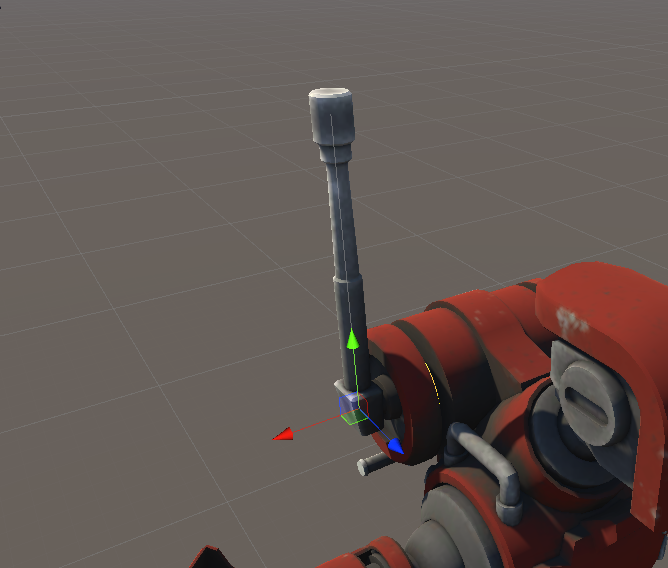
How would I do that?
Currently it does this. https://i.imgur.com/qr8zNMi.gif
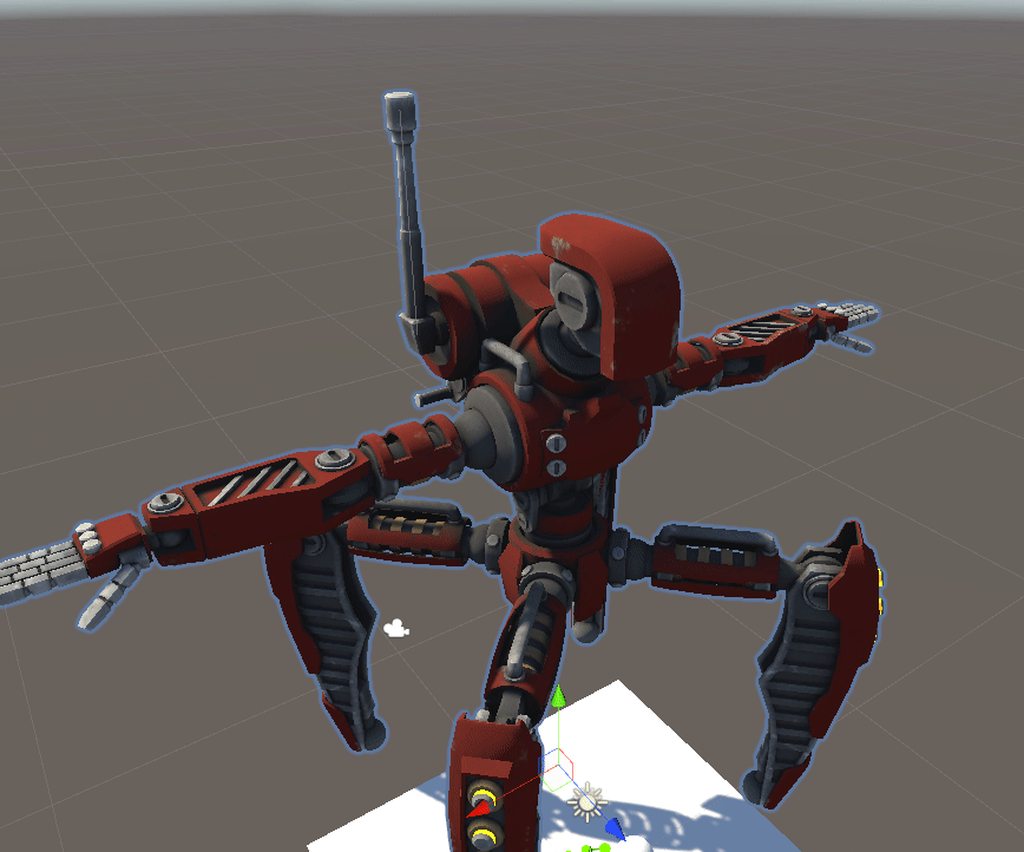


 fervent hornet
@wary wave Dynamic bones do not support bone transforms, only rotations. I would recommend having a dynamic bone for the first bone like you do, then and then another fake one extending off of it. (This second bone would act the same way you have in the gif but have no weight to it). Then I would constrain your real second bone to this fake dynamic only on the up down axis.
wary wave
Ah, thanks! That's ok. Is there a way to stop the child wiggling independently?
fervent hornet
Dynamic bones has an Exclusions section you can put bones into to stop the chain early
 light sentinel
Hi. Im wondering if anyone could help me with the following: Setting up lip sync/eye movement for my vrchat avatar, and fixing the crossed legs bug i have when i crouch. Ive tried for so long to figure it out but im really not good at this :<
astral warren
If it's green in unity after forcing t-pose, what are you trying to accomplish?
@faint dome A bind pose isnt the same as an idle pose
faint dome
ah okay 👍
 static solar
Hey guys My avatar crosses it's legs when I crouch I also Have a problem with the Spine it's says (spine transform Spine has bone length of zero) are they connected that's why I cross my legs in game ?
 robust crescent
sounds like an old avatar if it still has that, legs likely not straight if it goes crossed
spine zero hasnt been a thing for awhile, can still use them
static solar
@robust crescent yup It's old I was thinking the same lol so let me guess Blender ? straight the legs a little like I would set them up for full body ?
robust crescent
yeh if they arent straight from front view its gonna be wierd in fbt
static solar
@robust crescent Alright I will make sure to set them up right. Thanks for the help 🙂
 west drum
Hello, new here. Anyone have an idea why my hips are in the ground for my prone animation?
astral warren
IK overrides custom animations. If you want an animation to take priority over the IK, use VRC Animator Tracking Control and set some body parts to animation.
But you can only do that on avatar 3.0
fading verge
what do i do from here
astral warren
What are you trying to do? Hard to judge anything from a screenshot 
fading verge
just rig my avatar i just made
so i can walk n stuff
and it sync
because bones are aligned alr n stuff
west drum
ty @astral warren
 untold charm
i am having a hard time rigging and adding armitures to this 3d model
because they arent enough bones
but there weren't any to begin with
astral warren
You can add as many bones as you want
untold charm
how though, ive been trying