#avatar-rigging
1 messages · Page 171 of 1
 fading verge
fading verge
fading verge
I'm having a weird issue with toes now
mecanim view
looks ok
but then it's like this
blender view
@shell roost I adjusted the toes as you suggested, but now I've got this weird angle issue
when I remove the humanoid rig config from unity it looks fine
apply humanoid and it's this
fading verge
i did, i reset roll to 0 on everything
 crisp tendon
Apply pose too ?
fading verge
it has something to do with the angle of the toes
i moved them to an angle and i get
🙄
yields
it's still weird
crisp tendon
The legs should always be straight from the front tho
fading verge
i aligned them with the grid so they should be
crisp tendon
mmh nope
they need to be scaled on the axis
actually they might be fine ?
actually no
feet aren't aligned
fading verge
feet aren't aligned with each other or which bones?
crisp tendon
leg> ankle>foot
fading verge
Could i get some help rigging an avatar?
 bleak halo
Is there any easy way to weight paint this hand mesh so that it aligns with the bone structure? If I currently weight paint it, it's painted, but it doesn't snap to the bone's current position, it acts kind of like an offset. Any help is appreciated. Thanks!
crisp tendon
Place the bones correctly and use auto weight paibt
crisp tendon
Depends on how the armature is
bleak halo
@crisp tendon So you're saying to move the bones into position same as the hands and use the auto weight paint?
crisp tendon
correct
bleak halo
Ok, I'll give that a try, thank you!
crisp tendon
The spine should be above the height of the legs
crisp tendon
yeah
crisp tendon
oh my bad
you said spine but it's hips
raise the hips
that way the bottom of it is above the height of the legs
so raise the hip bone
and make it correct the spine
and you're good
 slow loom
I'll try it!
Okay, I'm gonna use the restroom and then upload her again and see if it works! Thank you so much for the help, I'll update you very very soon
slow loom
back
i'll show you
sorry, i have to scriblle on it so discord doesnt recognize the female form
i hope this isnt actually considered nsfw (she doesnt have any bits)
crisp tendon
shoulder being disconnected is a bit odd, but the rest seems fine
slow loom
Thank you so much for the advice
I have no idea what I'm doing, I've never made an avatar before
This is my first project making a character for vrc from scratch!
Gonna do the unity part and try her in full body again
crisp tendon
That looks like a wonderful first model !
Also make sure to reset bone rolls in edit mode
select all and alt + R
slow loom
done and done
woah!!
it detected the chest and toes this time in the green man!
Upper chest is skipped, correct?
oh wait, false alarm, it didnt detect the chest or toes
crisp tendon
upper chest will break eye tracking and visemes FYI
crisp tendon

 sleek isle
upperchest scuff avatar in 3.0 anyway
fading verge
@crisp tendon I figured out what happened
simple mistake
I was reimporting the model with new skeletal structure into existing unity transform definitions without changing or updating transform or positional information
so the old skeleton information was being applied to a completely different skeleton, screwing up everything
once i dropped the model back in and new transforms were created, it looks perfectly fine, just like in blender
 crisp tendon
uh oh yeah, if you touch bones you can't overwrite

 remote barn
anyone else notice the newest update causes your knees to bend inwards in full body?
remote barn
thank god
remote barn
so vrc just fucked something
fading verge
yep
 ivory radish
mine works fine
fading verge
yeah some people have no issues
but even though I don't have rig hacks, my avatar was messed up
remote barn
do u use male anim set?
ivory radish
 remote barn
wulfe
ivory radish
my avatar is messed up if i don't use hip flip
fading verge
well they applied the fix just yesterday to fix the issue that you and I are now having because of that fix
so yay
remote barn
every one of my avatars do it
fading verge
and so ive been experimenting with new rig adjustments, fun stuff
i'm definitely going to post if something works
remote barn
i think its another female rig problem
fading verge
lol is the solution to switch to male? 😂
 rapid mauve
if you rotate the arm at the upper arm bone is it ok ?
 meager zealot
same issue @rapid mauve
my vertex groups supposed to be set up like so?
might be the issue idk
meager zealot
painted into itself
the last gif i have my vertexes set up like:
upper arm encompasses the entire arm
lower arm encompasses lower arm and hand
hand encompasses hand
crisp tendon
yeah don't do that /
each arm should be weight painted to its own part
otherwise they share that part's control
meager zealot
how can i insert a bone between my spine and root?
I left a bone out because i wouldnt want the model to bend at the abdomen
crisp tendon
you take the top of the bone in edit mode, drag it down, press e, go up with Z axis and then reparent neck to it
meager zealot
@crisp tendon should the root encompass everything?
or do i keep it's weight painted to the hips
crisp tendon
hips is hips
fading verge
@remote barn so nothing I did today (6+ hours) fixed the problem we both have with the knees in FBT. The latest update has permanently changed my avatar's standing appearance with the knees pointed inwards and there's nothing I can do except radically change the model (I guess) to fix it. I tried your suggestion to use the male avatar animation set and that slightly improved things, but only AFTER I made a bunch of fixes. If I use the female animation set WITH all the fixes I made to my armature, the knees still knock worse I feel like
also, I have to adjust my hip tracker after calibration to a slight angle just so my skirt doesn't rip apart on the one side
did not happen before the update 2 days ago
wtf
when I'm walking, the knees are correct
 chrome path
@Generic so nothing I did today (6+ hours) fixed the problem we both have with the knees in FBT. The latest update has permanently changed my avatar's standing appearance with the knees pointed inwards and there's nothing I can do except radically change the model (I guess) to fix it. I tried your suggestion to use the male avatar animation set and that slightly improved things, but only AFTER I made a bunch of fixes. If I use the female animation set WITH all the fixes I made to my armature, the knees still knock worse I feel like
Generic ddjdjdbbdbdbdd
 balmy summit
Does someone know how to merge bones on 3DS Max?, i'm trying apply an animation on it but i need to attach an arm, head and hair on it first.
 near vapor
so uhh,,,, shoes are seethrough and her bangs are either attatched or not attatched to a bone and clipping in and out of the head
also arms arent right
clothes clip sometimes too so should i maybe delete some of the base underneath? might fix the shoes too im not sure
 remote kite
I’m not that educated in making avatars in VRChat because I don’t play a lot a lot but maybe you could delete the feet so it wouldn’t be visible?
crisp tendon
yep that's a viable solution
remote kite
Maybe you could scoot or rearrange the area around the pinky and ring finger.
I don’t really know because I’m not educated in making avatars.
remote kite
Mkay.
 tawny robin
Hello
I'm new to VRchat. I've a model completly rigged with correct mapping. But the Builder gives me this warning. No idea what I'm doing wrong.
ivory radish
@slow loom try making the fingers spread a lot less
it should look almost like theyre close to touching one another
and in somewhat of a more straight direction toward X axis
@tawny robin did u put ur avatar descriptor into the correct object
it belongs on the avatar not any parts inside of it
crisp tendon
@slow loom If you haven't seen it, you can configure that to some extent in the muscle editor of the humanoid configuration, at the top
tawny robin
@ivory radish I think i have but nothing changed
fading verge
How would i rig this?
 drifting gull
i asked yesterday but got no response- is there something off with this rig? its more or less the default test rig with extremely minor adjustments, but the feet never line up with mine and i tend to sit a few feet over the floor...
 iron pond
So hmmm.. What's the cause of some models, when putting them in SDKv3, to have a head that flops all around when moving (VR, when you're physically sitting but still playing in standing mode)
 ornate coral
@drifting gull Avatar scaling and where the real floor is depends on your arms' wingspan, while where the VR floor is depends on the avatar's legs.
Try messing with leg or arm proportions a little
 lethal lark
Hey guys, cats isn't picking up a bone I want to use under the Bone Parenting option and all the other ones are a no-go. How can I get it to find the one I want? Or alternatively, how do I manually do what the Bone Parenting option does? I wanna create a root bone for the hair to use with dynamic bones
 raw jackal
@lethal lark Edit Mode -> Click Head bone -> press E to drag out a bone and hold down CTRL to get the bone to come out straight. edit the rotation, placement, etc how you like-- boom, root bone (make sure to name it)
lethal lark
Ah I didn't know it was that simple lol thanks 🙂
raw jackal
youre welcome 😄
 azure vine
In Unity, is it possible to attach a bone to the view (View position) ?
 north wadi
I wanted to add other things to my avatar in blender but i cant figure out weight painting with new items imported im after the model
fading verge
can anyone definitively tell me how to make tiddies properly bounce when bobbing up and down (/ jumping)?
i've had theories on how the dyn bones work but they haven't held true
crisp tendon
Adjust the values ?
crisp tendon
Then you need multiple bones with different values
fading verge
i've done a lot of avatars and the breasts vary wildly between them
i actually think multiple bones has the opposite effect
where it seems to dampen the 'whole' movement
because the chain fucks with it
essentially i want the whole breast to fly up (or if i were to cup them, the breast to move up in the same way)
there was a pedestal avatar that i unfavorited recently that did it really well
and i had the same body
but was unable to figure it out
i tried a 3 bone per breast approach but like i said, that seemed to have the opposite effect
and the main bone barely 'bounced' at all
this avatar is actually working decently atm
i might be able to make it like i want it
i'm using Alt+B to be able to weight paint the area between the breasts easily
however, when i try to paint here, nothing happens
might someone know how to achieve what i'm trying to do here?
i can mask selection at least
crisp tendon
you need to be able to select the rest of the geometry
but you should probably be using gradients ?
fading verge
i used that briefly before 🤔
i should look into that again, thanks
would be nice to be able to paint the visible face tho
like it's really difficult to just paint this as 0
crisp tendon
i usually do cleanup manually in edit mode
meager zealot
exporting into unity using CATS
:x
guessing i need to bake textures or something
 lost narwhal
you need to create the materials
 karmic rapids
hi, would anyone happen to know why mixamo auto-rigger result would show up blank? I uploaded the fbx just fine, and it allowed me to place markers, but the avatar doesn't show up in the result, just a blank grey screen. it works with the .obj file but not .fbx for some reason. any help appreciated. thx!
meager zealot
@lost narwhal
lost narwhal
go to the import settings and go to the materials and choose legacy and apply it, it will create empty materials that you will have to fill it with texture
@meager zealot
and those are a little bit too many materials for an avatar like that
lost narwhal
click on your avatar and press select then go to materials and choose legacy, it will create a folder with materials included, then you need to manually import the textures from your model
@meager zealot
meager zealot
that's tedious
mm, ill figure it out
but now i just notice its missing the left eye in unity :
- a bit off the tail
 cedar hamlet
I cant find any mention of this issue online, but when I go to set the eye movement parameters, the eye position totally changes when previewing the model and disappears behind their head. Any ideas of how to fix this?
I have pictures if that helps as well
lost narwhal
@cedar hamlet use Right Eye and Left Eye not Eye_L or whatever, you have to use cats blender eyes
cedar hamlet
Those do not exist on my avatar, would that just mean the mmd import broke or it didnt have it to start with?
OH im dumb tytyty
lost narwhal
ok
meager zealot
@lost narwhal making a map like so
so i can combine the textures
how can i apply the maps to what i need?
i had that all set up for the textures in their separate states..
lost narwhal
you also need to combine the uv's correctl, cats has a plugin that does everything for you.
you should watch an in depth tutorials for optimized avatars for vrchat
lost narwhal
dont make everything into one, try go for 4 mats
combine what you think can be combined together
meager zealot
i have 9
attempting to go any lower causes transparency issues, loss of color, or other issues
lost narwhal
transparency can be fixed in unity and the color as well.
make a copy and port your 1 materials avatar too unity
what shader are you using in unity
lost narwhal
not sure what's causing that, materials in blender and unity aren't the same, you have to test what works, I don't really use standart. you could try poiyomi toon shader
crisp tendon
Those aren't textures
you might want to use the actual material combiner menu and not the one through cats
lost narwhal
aren't both doing the same thing?
crisp tendon
well there's specific options for that in the standalone
meager zealot
where can i find it?
crisp tendon
it should be above or below the cats menu icon on the right side
lost narwhal
oh yea the one in cats doesnt have properties
crisp tendon
Check your UVs
crisp tendon
Why is the texture this size ?
looks like it atlases the white on the side
that's pretty bad
lost narwhal
I can't even see the UV's for the broken eye
lost narwhal
press F3 and type normals and click on flip normals
wait wait
type flip
and have only the broken one selected
meager zealot
that worked
lost narwhal
what do you use to record
meager zealot
 lost narwhal
ty
meager zealot
same
attempting to make an atlas of the "wire" materials doesn't even prompt to save the image anywhere :p
lost narwhal
depends how the wire UV is build. since he said he is new to this
lost narwhal
"should" yes
meager zealot
i was told to get it down to 4
lost narwhal
that is completely something else
meager zealot
how can i grab the texture what i havent made atlas' of
lost narwhal
where your model is saved, the downloaded files
meager zealot
the wires, +endoskeleton dont use image files
meager zealot
yeah
i forgot what it was called..
i want to keep the effect applied onto the textures though
lost narwhal
dont look much into the shaders in blender
use poiyomi toon shader you can do that all there, the color and the metallic look
meager zealot
cool, got it done
i think that's everything, then
just to add a descriptor and dynamic bones and whatnot
 astral warren
Alright, in instance alone, legs are fine. Someone else joins instance, my left leg breaks. Confounding
Litterally stops walking, drags around everywhere.
Only that one avatar
 mental moat
I've ran into a problem I never have before, the legs jut forward as long as I am not moving, using expressions makes them work properly as well (the left side is wrong)
(avatar 3.0 if that matters)
 sweet topaz
https://gyazo.com/3a3e849746ac7548694379045301c7e6 Finished visemes.

 mystic lichen
anyone got any tips for weight painting shoulder/upper arms to avoid stuff like this ?
this is the shoulder
drifting gull
@sweet topaz thats so cute!
azure vine
@mystic lichen remove the mesh under the cloth or transfert weight from the body to the cloth
mystic lichen
the mesh is my body, weight is transfered
astral warren
I am so jealous of expert blend shapes makers. My face expressions look so robotic and crude
 fervent hornet
Making a face rig sounds horrible lol
crisp tendon
there's automated ways tbh, it doesn't need to be crazy
at least jaw, lips, eyelids, brows and cheeks
fervent hornet
Yeah true. I'm going off the rigs I've gotten from Dota2 and Warframe where its like 50 bones
crisp tendon
Dota has face bones in your exports ?
fervent hornet
Uh I thought it did, maybe I'm mixing memories
crisp tendon
they use blendshapes 
fervent hornet
Yeah you're right, probably just shock from doing the warframe one
crisp tendon
oof
yeah that's a lot but it doesn't need to be so complex
if you get the chance to look at the ones from the Sims models
it's pretty simple
fervent hornet
Alright I'll check those if I need cleaner refs thanks!
balmy summit
Anyone knows how to merge armatures on 3DS max?
 grand junco
hey question how do you rig in unity ?
or like
can i import a part i made for MMD and throw that in unity with the model i made it for ?
and merge bones or something
crisp tendon
you can't
astral warren
I need to learn envelopes. I get them on concept but blenders visualization is awful
Also I’m bad at knowing how weighting looks good. I know how it works, just not best practices
grand junco
So how does one rig ?
Is it possible in blender ?
Most of the things would be 100% rigging so..
crisp tendon
that's what blender is for
nothing is 100% rigging
softwares can do a few things these days
astral warren
I think he means like robots parts that are 100% weight on their bone?
If so that’s cake in blender
grand junco
i mean the latter
to rig something 100% to a single bone
and thanks
now i want cake
dont tell me its a lie
 edgy ginkgo
rigging is like painting in some ways, and getting to BobRoss levels takes decades >.<;;; some auto rigging tools like Mixamo work to some effect but they always could use some tweaks
(also, the cake was always a lie)
grand junco
also how close is bone creation in blender to MMD ?
i kinda just figured out a thing i wanna do on my protogen o3o
i tested a thing with a different c haracter of mine
and i could make a part of him be animated to the song i had playing from those poiballs
all tho i kinda wonder if i can do that but that it reacts to my voice and actually shows a spectrum bar thingy
cause if thats an option / some body has a tutorial on it i kinda wanna do that
 solid adder
Shape keys and visemes.
grand junco
but how to set them to be reactive to audio coming from me ?
i am a huge fan when it comes to audio reactive stuff
fading verge
I need some help with avatar bones? Like how to get the humannoid version.


 solid adder
If you want it like that, probably a shader. If you want like physical bars going up and down to music, shape keys.
solid adder
@fading verge what do you mean? Like the order?
Through blender, little box for adding shape keys. You add a new shape key, highlight it, put your mesh in edit mode, and move the vertices or more that you want.
Then boom, shape key will save that position.
fading verge
Trying to make an amiture for this.
And i can't find the humanoid bone group in it.
fading verge
I don't have cats
solid adder
So there's no bones on it whatsoever?
fading verge
Yeah
solid adder
Okay, so you'll have to make an armature
fading verge
How would i do it on this one?
grand junco
making the blend shapes is not the problem i mean more how to set those blendshapes to react to audio ?
solid adder
@fading verge I wouldn't necessarily know really. More however you want to go about it. If you need the order they need to be in and whatnot. I can help you out there.
@grand junco avatars use visemes for mouth movement shape keys. So the same would apply.
Like your Ah, Oh, and Ch shape keys on an MMD model
grand junco
and how to set the shape keys for sound coming in from the world / other people
so say if the world has music / people talking the bars would react to that ?
solid adder
Oh like that, im unsure. That's likely more shader stuff.
You can do crazy stuff with shaders
People made sort of a heart strings that connect with others even when they join the world so you'll likely need to look into shaders
grand junco
wow really
i once wanted to try to make a sign
that others could grab as well from my model
and it would stay in the world unless i leave teh world
i wanted to do a minor protest against TDA models o3o
about 70% of the ones i see in VRchat break the rules of the person who made the body/base
grand junco
ok now an actual rigging question
i am in weightpaint mode
but i cant seem to select the headbone
and rig the horns to the head
 paper prawn
Nive protogen
grand junco
thanks
i found a work around :D
the plugin i use to port models has a merge armature thingy
o3o
so rigging in PMX
so i can put it in blender to merge o3o
crisp tendon
yeah those are not bones
astral warren
I’m not sure audio reactive shaders are possible. If your audio is pre-made, yes. But live capture of voice chat or dynamic reaction to audio clips I don’t think is possible. I could be wrong, I think most people fake it with scripted animations based on pre-done audio
I know avatars can react to your own voice in avie 3.0 due to the viseme or volume parameters
So a shader could driven by that indirectly
 acoustic perch
how would i fix this? it does it both in rigging and in game, i tried to weight just in a middle on the arms but it still does this
im also having an issue with the materials, the dress is suppose to be semi transparent but im unsure what shader could do that
 mint sierra
looks like the Cats plugin removed the weights
acoustic perch
ah
 remote valve
I'm not all that proficient in Blender and I've been wondering why the avatar doesn't work in fullbody ( hip tilts and one leg is forced into the ground)
Any advice?
 tacit island
Is it possible to take a HeroForge model download and turn it into a VRchat avatar?
 hushed hamlet
Hey! I know y'all probably get a million of these questions but --
I'm taking a go at porting this model and I'm trying to prevent the robe from clipping with the body underneath. Is there a good way to do this in Unity? I'm trying Dynamic Bones, but I can't get them to not eventually clip.
https://i.imgur.com/kaIllMV.png
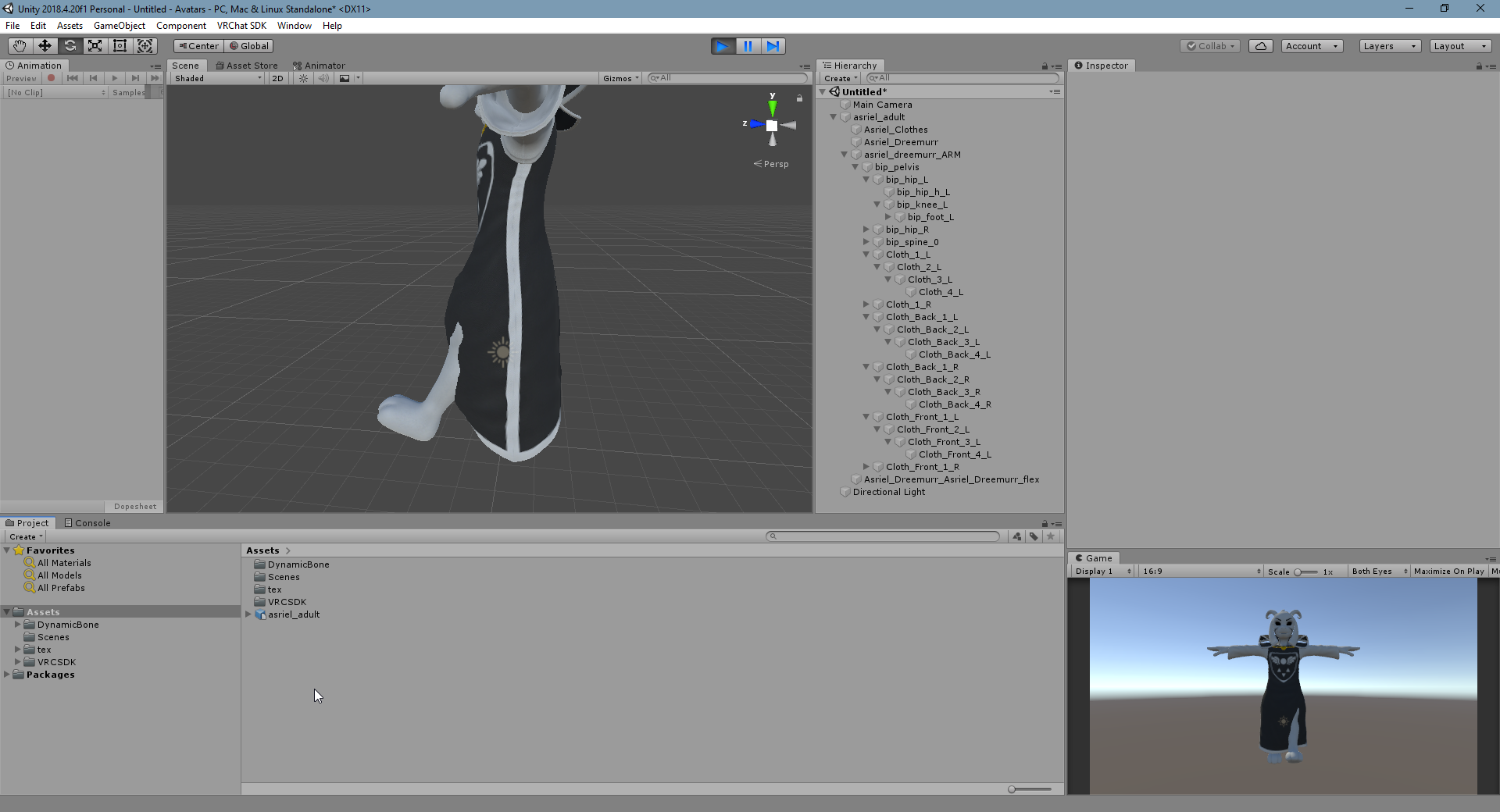
I frankly fear that I may just have to make a million constraints. :P
solid adder
Actually easier to make constraints for it I would say
If you want to avoid using dynamic bones that is
you just need like what... two or three rotation restraints around the radius, adjusting the weight accordingly
hushed hamlet
Yeah, it looks like for the degree of precision that I want dynamic bones aren't appropriate. I got pretty good results with parenting the cloth bones to the leg bones, but it still clipped a little. So something might've gone wack with the rig.
Loaded a fresh import into Blender. Lookin' at how I can make this work before importing to Unity, since pretty much everything else looks good
 half grail
Are there any tips for adding clothing but avoiding skin clipping through? Trying to make a toggleable shirt but if I overlay the shirt model it clips, and I don't want to have to change the base mesh if I don't have to.
hushed hamlet
I'm figuring that same thing out, but I'm resigning to modifying the model :v
half grail
I guess so, and I'll have to be careful weight painting the shirts so there's no clipping.
hushed hamlet
yeeeah. What I'm considering doing is having an animated alpha material that'll automatically hide the vertices underneath using the AV3 Expressions Menu
half grail
Maybe I just have an entire custom mesh dedicated to each outfit? Make sure weight paints similarly and keep the head across them all, and rig each outfit as it needs to be?
slow loom
Anyone else have an issue with the tail bones shoving the tail into the wrong spot?
hushed hamlet
OK! I got it looking pretty satisfactory by using the Mesh Data Transfer addon for Unity and transferring the weights from the body mesh to the robe mesh. From there i just smoothed out the weights in Weight Paint Mode.
...Oh jeez.
I didn't consider that it would completely replace the weights, not just add the ones that weren't there. 🤦
Everything seems to mostly work, there's just some cleanup to do. :/
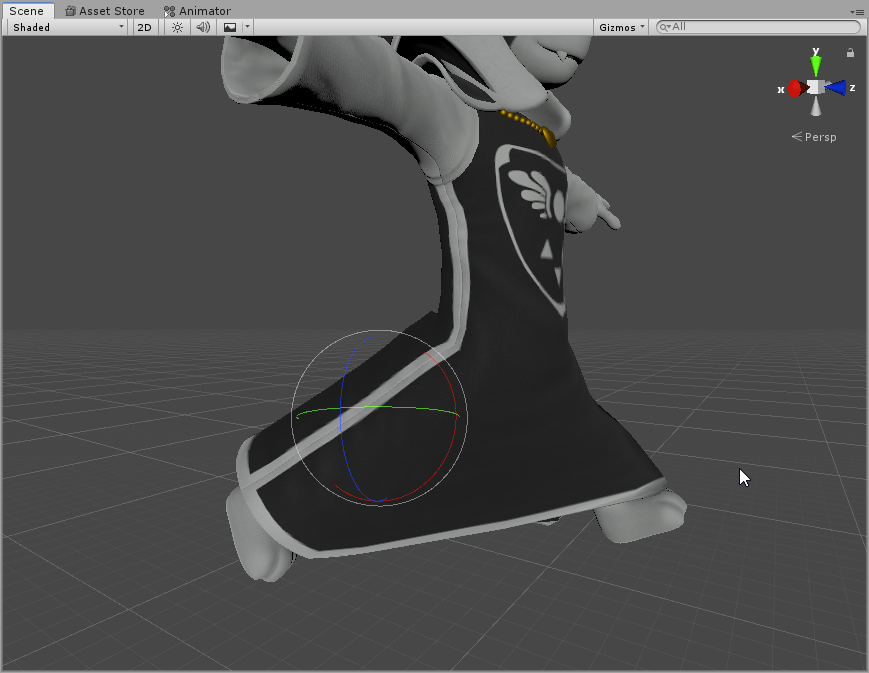
 mild stratus
Pog
hushed hamlet
Giving up on dynamic bones for the robe, lol. Not least because the cloth bones don't have any weights anymore. :V
Gonna put some on the ears tho v'w'v
This whole robe nonsense wasn't that meaningful because I plan to make some custom outfits anyways? But it was a good exercise, and I faced my fear of weight painting so that's always good
solid adder
Great job!
 surreal gorge
I want to make the coat of this avatar move using dynamic bone, but the cape pieces are attached to the spine, which also has the chest as a child bone
Can I just create a new empty object and drag the coat pieces under it?
solid adder
@surreal gorge put the dynamic bone component onto the spine, then under exclusions, add a 1, a new box should appear where you can place the chest.
It's easier than adding 7 dynamic bone components
If you want to reparent them however, that requires Blender.
surreal gorge
Holdup I just put the coats under a new empty object and I think it works
solid adder
👌
fading verge
Some reason the head keeps turning a full 180 backwards, not like this in blender, anyone know why?
solid adder
Reset bone rolls perhaps?
solid adder
In blender, select the armature and go into edit mode, the press Alt+R to reset bone rolls. If I remember correctly.
Did you enforce the T-Pose by chance?
lethal lark
Yo, I'm still fairly new to Blender 2.8, but in 2.79, you used to be able to go into pose mode, uncheck "Connected" and "Inherit Rotation" on a bone, then pose another bone without it doing anything to the others. It was super useful for like, shortening lower legs but not the thighs or upper arms but not lower arms etc.
How is this done in 2.8? Because it's not working for me atm
solid adder
@fading verge https://gyazo.com/3154a0b252cd374d0c0f27ce7c56c8c2

right here
Did you do that by chance?
fading verge
Ill give it a shot give me a moment
solid adder
If the head is normal when it's reset, it's the direction the bone may be in Blender
It's the same reason why you may see fingers jut in a 90 degree angle when the model is in enforce T-pose.
on some models that is
lethal lark
To my question above, I figured it out lol I was being blind, there's a drop down list next to "Inherit Scale", changed that to none and it's sorted
fading verge
Ok, so i just relooked, enforced t-pose literally spins the entire spine round
Can see via the feet..
solid adder
Must be the bone rolls then
fading verge
I did go back to blender and alt R, bone rolls are at 0 so I guess i'll try reimporting
Even tried the rolls, not a single change..
I guess I may have to redo the rigging?
solid adder
perhaps 🤔
 atomic hemlock
whenever I transfer from Blender to Unity the rig changes complete and some body parts will turn around
i dont know why
 teal oasis
my avatar is floating off the ground... any quick way to fix it?
i guess "move model in blender"
crisp tendon
And apply location in edit mode with Ctrl + A
raw jackal
@teal oasis You actually can do a little fiddling/offsetting by going into the Humanoid rig configuration and moving the hips down slightly there, but Ruuubick's way is better (it's just technically correct to have your origin point/model in the right place through Blender)
 astral shore
so I made the chest, spine, hips, leg and knee bones perpendicular to the ground but in full body tracking my avatar's hip would be bent backwards, why
slow loom
your bone might be rolled
crisp tendon
@slow loom Struggling with what ?
slow loom
Blinking
crisp tendon
You have the shapekeys in the correct order ?
crisp tendon
Double bone trick
slow loom
I was told by a friend that in order to have the eye tracking work that you need two bones for each eye?
Or is that no longer the case
crisp tendon
I don't think that was ever needed ? I think the cats eye tracking creation just duplicates the bones but with the correct naming scheme ?
crisp tendon
Yeah, i've only ever used a single bone for my eyes, with Eye_L and Eye_R i think
slow loom
Trying that now
Oh, I noticed an error that might lead to something
Do I need to combine my materials maybe?
 winter matrix
Would this be the right channel ask a question about using Constraints? There's not exactly a catch-all user question channel.
crisp tendon
@slow loom Yeah the blendshape might be broken in that case
slow loom
Does that mean I need to re-make the shapekeys in blender?
crisp tendon
Did you check it ?
slow loom
Legacy Blend Shape? It was already checked to begin with
crisp tendon
your shapekey, in unity, check it if it works
if you don't know how, it's in the mesh renderer component
there's a blendshape dropdown
slow loom
please pardon the dumpy animation
im just trying to get it to work first
then I'll make the blink pretty
crisp tendon
yeah it's probably better to make it work and pretty inside of blender first 
 deft zephyr
lol
crisp tendon
it'll work if it's done correctly, which it assume a single mesh to begin with
crisp tendon
your warning was for the Left blinking btw
slow loom
it was for all the blinking 💧
i just sent a tiny crop
sorry, my brain is square
slow loom
Recalculate outside, correct?
I did that and seem to be getting the same error
Perhaps I have something checked wrongly in export fbx?
crisp tendon
If you changed the default that's possible
slow loom
thank you so much for your patience
I'm going to attempt to recreate the unity project entirely
pray for me
crisp tendon
@slow loom You can also try Cats' fbx export
But it might likely be something on the model itself
slow loom
Would you be willing to take a look at the fbx? I can send it to you. If not, I completely understand!
crisp tendon
Sure
fading verge
Hello.
I have a VR model rigged but I'm getting an oculus in a few days and I was seeing if anyone with a headset could just test it. If it's broken can they also fix it? I'm more than happy to pay if you need it ☺️
It's already rigged for desktop but I'm not sure if the hands and that are for oculus
 storm forum
You still need someone to test it? @fading verge
fading verge
Yes I do ❤️
 maiden haven
Would blendshapes or shape keys to fix deforms work with VRChat?
crisp tendon
You want to have a continuously active shapekey ?
 wind osprey
I think they mean corrective shape keys that activate during certain poses to help deforming (elbows and thigh-pelvis regions often benefit massively from this)
If it's possible with AV3 to drive an animation based on bone rotations then this would be possible, otherwise I can't think of any method that would work.
crisp tendon
Constraints sounds like what should be used instead
wind osprey
Yeah, constraints & helper bones are the next best thing.
 alpine eagle
i've got a single bone on my character that won't simulate (dynamic bones) even when re-rigging (new weights and making new bones)
it's an antenna
 hard jewel
random question: do avatars lead off on their left or right foot first
when there's no fullbody
 grand sun
atomic hemlock
grand sun
atomic hemlock
whenever Im about to publish this avatar it won't allow me to and it says this, how do I fix this. Please @ me if you know how. Im pretty new to unity
 inner vault
How do I make flat texture eyes function?
atomic hemlock
idk
 autumn parrot
Anyone know why the legs are moving like that? The arms are moving fine.
I never did a rig before, first time doing it, so I'm kinda clueless lol
crisp tendon
are you rotating or moving them ?
autumn parrot
I was moving, thought the rotate mode was activated by default since the other bones were rotating, odd
this model seems very problematic with lots of stuff 😩 not sure if I'll be able to make it work 100% fine on VRChat
 zealous cypress
@atomic hemlock in the Configure button does ur Man show up red or green?
atomic hemlock
green
zealous cypress
if its like this and still giving u errors there is some bone parenting mistakes done on the model itself
lethal lark
Heyo, not sure if I should post this in a different channel, but I think it could be a rig issue? When I calibrate in FBT, it looks like my avatar is leaning forward slightly, not by much but I can sort of tell when going from the T pose to being calibrated. I can "fix" it by twisting my hip tracker backwards a little bit (it's on the left side of my hip), which in turn, twists my avatars hips back a little bit.
Unfortunately I'm at work so I can't get a screenshot of the rig, but it was on my mind so I figured I'd ask so I can try to fix it later on. The rig looks fine though, there's no bone roll and I'm certain the hip and spine bones are straight
Any ideas? Is this common?
 torn juniper
Hey gusy, currently I have some problems with the Eye Tracking in VRChat.
I'm using the CATS-Plugin in Blender to create the eye-tracking setup.
But in VRChat, the Eye tracking is fucked up (eye bones are rotated incorrectly)
maybe because the rotation of the eye-bones are not 0,0,0 in Unity?
If this is the cause, how do I change the base rotation of the bones to 0,0,0 without rotating the mesh?
crisp tendon
Your bones need to be straight up and in the center of your eye ball in blender
Then clear bone rolls, and that should be good
crisp tendon
If bone rolls are cleared then it should be fine, you can apply all transforms to the armature in object mode too
torn juniper
oof, still not working... Gonna check it when I'm at home and not working remotely
 lethal cedar
was procrastinating a lot, finally gonna start making bones for this thing... just a wild guess, I assume I'm gonna have to move the model ABOVE the "origin" point so the avatar isn't halfway into the floor?
 native whale
My avatar walks a bit funny, how do I fix walking animation?
lethal lark
Are there any good tutorials for creating cloth physics on a skirt? There's a few on YouTube but they're like a year old, I'm not sure what's still relevant or not 🤔
 pastel jacinth
anyone have any idea why my dynamic bones are acting weirdly for my avatar? they are very stiff for some reason, i notice this on a newer version of the same avatar, so it works fine on the older version. not anythng changed about the hair
atomic hemlock
Whenever I import a rigged avatar from blender to unity the Rig changes and the feet and head of my avatar are backwards, I'm new to unity and blender, please @ me if you know how to fix this
astral warren
Was it updated after its initial import?
hushed hamlet
How're you supposed to set the jaw open/close if it's hanging open again?
WAIT. wait. i think i got it
Fixed it! lol
 proper cove
I'm currently updating my main avatar but I forgot how to solve this problem.
This is what it looks like and I can't figure out what to switch what.
hushed hamlet
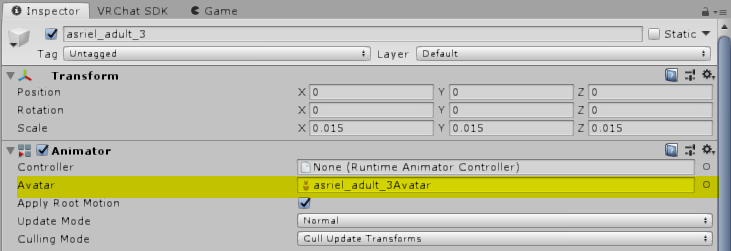
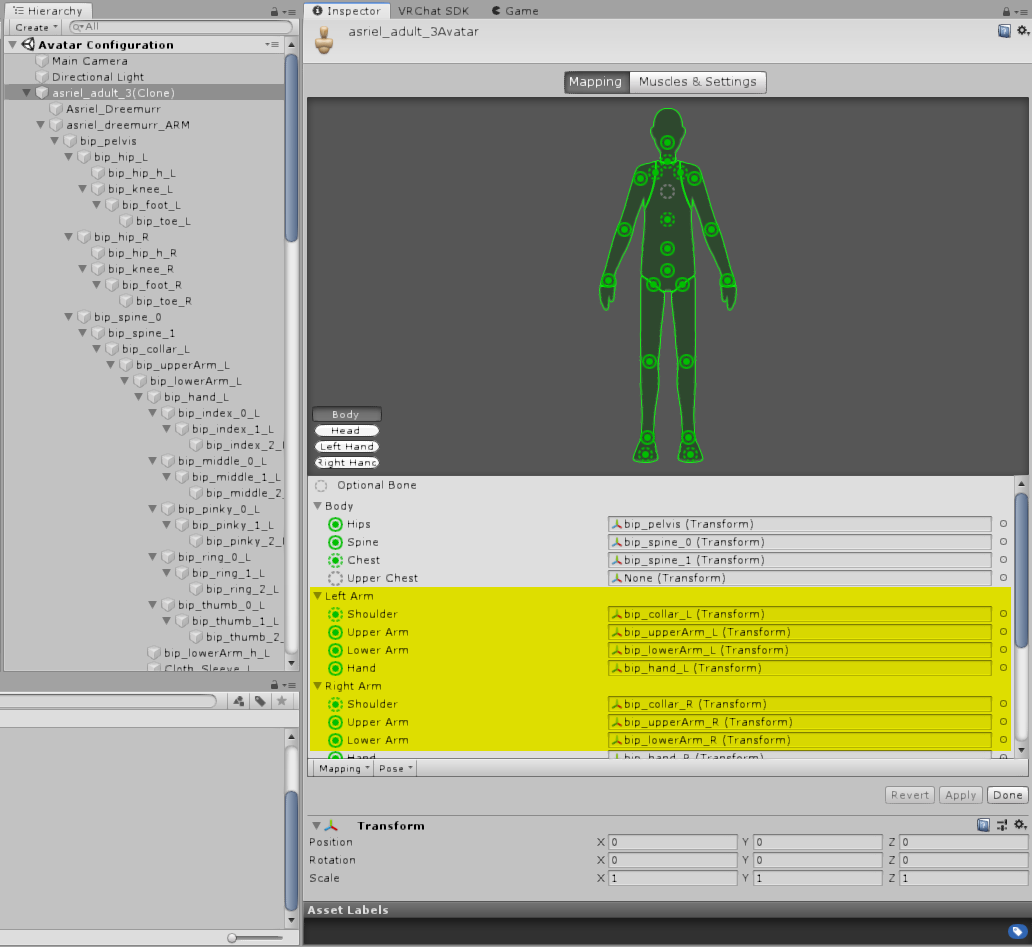
Look at your avatar setup. The SDK is pulling those names from Mecanim.
hushed hamlet
I mean the rig avatar, the one you set here.
https://i.imgur.com/WF4xCVu.png
The Configuration scene will tell you what bones it's talking about.
https://i.imgur.com/QoQU8R1.png
 fading verge
Could anyone here rig an avatar for me?
hushed hamlet
that's a lot of work you're asking for, depending on what you mean by "rig."
if you mean "make an armature for a model that doesn't have one," that's too much work to do for free.
if you mean "make this existing model and armature work in VRC," there's plenty of resources for it already
Most of what we do in this channel is help if you run into a snag ^^
near vapor
is there any way to rig a 4 legged model? i wanna try and put Bolt (the dog) in vr just for the heck of it but im not sure how the animations would work
hushed hamlet
You'd use a generic animation set. It's a lot of work but it is doable!
You'd have to map the bones manually, and then you'd set animations up in a blend tree (using the examples in the SDK as a reference)
You'd also have to make them if they don't already exist, but that's not as scary as it sounds.
near vapor
ill have to give it a try! sounds like a fun challenge to setup
theres one on DA pre-rigged for MMD but im not sure how easy itll be to turn him into a vr model
hushed hamlet
That's a great mindset to have, honestly?
You can get away with doing whatever memey nonsense you want if you tell yourself it's an exercise.
I'd know, it's how I learned anything the past month. :v
solid adder
@near vapor if you have VR, can do rotation constraints.
It's a bit of puppeteering work though, but works.
Helped a friend get this working actually.
near vapor
alrighty, whenever I start making this, do I start it out in blender or straight into the sdk? also kinda want to make a custom sitting animation for him too once I get him set up
solid adder
Blender since it will need to be coverted from pmd/pmx to fbx format.
fading verge
Anyone know how to fix this issue? The body moves forward and not the pants
 robust crescent
blender, select the skin vertice then pants , then alt+m merge last
go to posemode after and woggle the spine or something around to see if that work
 ornate pumice
I've been trying to work with a Blaziken model and get it put into the game to use. So far I've had some success, but since the model I'm using doesn't have actual thumbs, when I try to rig it, the "thumb" distorts
Would anyone be willing to help out?
fading verge
Oh I'm doing body toggle on and off..
drifting gull
just noticed the rig in unity is
slightly off???
the spine-lowertorso-torso bones appear to lean left, but not in blendere
fervent hornet
Pretty sure thats just a visual caveat
drifting gull
my rig does lean a bit, i dont mind it at all
but im just wondering if there is any reason or fix for it?
fervent hornet
It's not actually like that, you can check the bones position in the inspector to make sure
drifting gull
mmmmmm
autumn parrot
I made an armature with rigify on Blender, but the automatic weights were a complete mess so I decided to just use mixamo anyway, but when I delete the rigify armature my model shrinks minus one part of it, and even when I put the same scale on both the model and on this part the part still doesn't go back to the same place it should be.
Anyone know how I can solve this?
mental moat
@autumn parrot apply all transforms to both the mesh and rig, then apply pose to the model (you can use cats blender plugin for this part). But miximo gives messy results at best and you will likely have to weight paint anyways
https://media.discordapp.net/attachments/390924372782612480/744756871121993739/rig_problems.png my legs jut forward when I am standing still, is this a rigging issue?
 atomic hemlock
what does this mean
solid adder
Means the chest isn't mapped. You need to go back into the rig part and assign your chest.
atomic hemlock
atomic hemlock
oh ok
solid adder
👍
 sharp egret
Heyo, new to this channel. I've been working on my own avatar for a while now and haven't been able to debug a couple problems with the rig. Would super appreciate if anyone else has run into these problems and can point me in the right direction.
The first problem is the avatar will randomly start spinning in circles. I can't isolate what causes it, but it tends to happen when looking around or leaning. The avatar will spin a random number of degrees to the right, sometimes enough to make me dizzy and sick. I think it's a dynamic bone, since after I remove all of them the problem goes away, but I can't tell which one and for what reasons.
The second problem is the hips appear to be rotating along the z axis slightly, towards the right foot, causing the whole model to twist. It only happens in full body tracking and I can't see anything on the rig that would cause it to do that
sleek isle
@drifting gull when upperchest is mapped. Yes the spine get a curve on the side. Not sure why
@sharp egret drift the base of the hips to the left a little in edit mode
drifting gull
i dont have upperchest mapped im pretty sure? the sdk wiki thingy said not to pair it at all or i could be misremembering
ill check the avatar late
sharp egret
@sleek isle I'll give that a shot. Isn't that something of a hack fix though?
drifting gull
What is that rig? Its all over the place
 burnt valve
i got it from deviant
is there anyway you could help me fix it
its only the fingers that are broken ive already tested it
drifting gull
i think it'd need a big overhaul to the fingers
i'm not sure what the artist was thinking or if it is just an import error
burnt valve
is there a way i could move the finger bones back into the fingertips
solid adder
You can move the bones in edit mode while in blender
burnt valve
will that work ?
sleek isle
@sharp egret yes but if it as to be change in the future the only thing to do is to but it back to 0
you can always rotate manually your hip tracker irl to fix the issue as well
solid adder
Should if you take your time with it I would think, make sure you go to the options tab and do x-axis mirror
burnt valve
was that for me or someone else ?
sharp egret
I'm curious how people have approached rigging digitigrade legs here?
sharp egret
oh, think I figured out what was causing the model to randomly spin. it was a capsule collider
I thought those were supported?
autumn parrot
So Mixamo rigged only 4 of the 5 fingers of my model, I was thinking of separating the hands from the armature, cleaning the vertex groups, duplicate one of the fingers of the mixamo's skeleton and then parent them with automatic weights to the hands again, but I don't know if it's possible.
Is it? If so, how can I do this in blender? I tried here and it didn't work...
The fingers are like that, one bone moves two fingers and I want them all moving separately
crisp tendon
You'd have to place and weight paint them manually
autumn parrot
I see, I wish there was an easier solution but oh well
crisp tendon
Well, Mixamo is the easiest solution, but you get results like that sometimes
autumn parrot
the rig is good in general, the fingers are the only problem
they are too close to each other so mixamo can't detect them all, and since the model doesn't have a rig before, I can't change the position of the fingers before uploading the model on mixamo
 atomic grail
i need help rigging my model.
and i’m not familiar with blender, I have a basic skeleton, but there are some issues
crisp tendon
Which ?
atomic grail
when i go into pose mode to test the skeleton, the wrist bands break, and so does the shirt
mint sierra
going into pose mode goes back to t-pose/a-pose
crisp tendon
There's a lot of tutorials on weight painting, you have a very simple model so fixing should be simple
mental moat
https://media.discordapp.net/attachments/390924372782612480/744756871121993739/rig_problems.png I have an issue with my character when it is standing still, I think it is a rigging issue, but I have never encountered this issue before and I can's solve it on my own
crisp tendon
what does your armature look like in blender
mental moat
It works as long as my avatar is moving/walking or doing an expression but fails as soon as I stand still
 wary lava
I'm modelling and manually rigging a character with Rayman-type floating hands. Do I rig a bone for the palm or do I still need to rig two arm bones?
mild stratus
@wary lava you still need the arm bones, you don't have to weight paint them though
wary lava
okay, makes sense. So I take it the bulk of the hand moves at the end of the forearm then
mild stratus
Yeah.
wary lava
Thank you for your help.
mild stratus
no probs
fading verge
It works as long as my avatar is moving/walking or doing an expression but fails as soon as I stand still
@mental moat I have the same problem
Thats vrchat's fault I think because that happened to all my 20 avatars after an update
If anyone has a fix for that it would be really helpful
i dont mean to say the same thing in the same channel, but im trying to get toad from the pitcrew in mariokart tour to work on VRchat. everything with it is fine, except i cant necessarily rig it because it doesnt have the upper right leg bone. any help?
*right upper leg, i mean
fading verge
another question: are models just not supposed to have textures whilst on the scene?
pastel jacinth
does anyone know why dynamic bones arent working on my hair on my avatar? for some reason it acts like the dynaic bone is totally stiff. even with very low setttings it will still only move a little bit, and the movement is very stiff
its weird
i use the same dynamic bone settings on a previous version of the avatar and it works fine
zealous cypress
posting an image might make us able to help more
pastel jacinth
i was able to fix it
for some reason, the values had the be totally different
so weird honestly
zealous cypress
if the prev avatar is higher/smaller thats why, at least when i do it
pastel jacinth
that makes sense
the newer version was scaled down in blender first, instead of in unity
solid adder
i dont mean to say the same thing in the same channel, but im trying to get toad from the pitcrew in mariokart tour to work on VRchat. everything with it is fine, except i cant necessarily rig it because it doesnt have the upper right leg bone. any help?
@fading verge you're going to have to create a leg bone from what I'm reading. Which means you'll need Blender.
Also sometimes the Unity won't read things right like materials so you'll have to put the texture on the material itself
fading verge
How so?
also, is there some sort of application that i need to use on blender in order to get 3d models working? i click and drag it into the window and nothing happens
solid adder
Depending on the version of Blender you're using. People tend to use Cat's Blender Plugin. Helps tremendously
does anyone know why dynamic bones arent working on my hair on my avatar? for some reason it acts like the dynaic bone is totally stiff. even with very low setttings it will still only move a little bit, and the movement is very stiff
@pastel jacinth make sure in game that limit dynamic bones is turned off. Go to your safety settings, then advanced.
fading verge
I have that downloaded actually, but I just dont know how to add it
solid adder
Which version of Blender are you using? 2.79 or 2.8 on up?
solid adder
I unfortunately work with 2.79 so I don't necessarily know right off
fading verge
Ack
the versions must be really different then
solid adder
They are
2.8 was a big upgrade which changed a lot of things on how we used Blender
But adding a bone at the very least should be simple. Select the Hip bone and press 'E' which will create a new bone for you. Then you can rename it and move it to where you need it
Or you can duplicate the left upper leg by selecting it and pressing ctrl+D I believe?
Then just a matter of moving and renaming the duplicated bone.
Both Blender and Unity are strict when it comes to naming things so do keep that in mind.
fading verge
oof i thought that mixamo'd be able to do that
fading verge
looks like a toad wouldnt work lmao
anyhow, i use blender for texturing correct? it cant be done in unity?
solid adder
Does it already have a texture?
If so then you can just add it to the material, but make sure the material is extracted from the model in Unity or create a new Material for the texture.
fading verge
im importing a model from models resource into the game, but yes, it has textures in a seperate folder. it just doesnt work when i upload it to unity
solid adder
It's simply not reading it, so you'll have to add the textures to the materials
Sometimes it does, sometimes it don't
You just got unlucky was all
fading verge
yeah im actually just gonna try to make a material and then add the texture to it
would that work..?
sorry, ive made an avatar in the past and it read the textures, so im not used to something like this
solid adder
If you open the model in the assets box, you'll see the armature, body, and the materials. Select the materials, right click, and select extract
Or make new materials to place your textures on
fading verge
im going to import it again no worries
solid adder
Bring in the model and press the little arrow on it when you see it in the bottom box
Unless it'll be open already for you, you should see the armature, body, and the materials.
 wide knot
does anyone know how to fix the hip tilting to the side with full body tracking?
or one of the feet clipping through the floor, not sure which is the cause, probably hips
seems to be different from the issues in the FBT fixes video
Hips bone is straight, perfectly centered between legs on x/y, and not too low as far as i know 
 median haven


 fading verge
how do you place a texture on a material?
wide knot
seem to have fixed my problem, it was either by making the chest bone even smaller, or changing rig type of the fbx to none and back to humanoid.
probably the 2nd since the avatar definition rig preview thing wasnt updating correctly without changing rig type.
fading verge
FINALLY got the textures working. Though.. i need a different one for his face. how..?
wide knot
the body should have multiple material slots
you just create multiple materials with different textures
if it doesn't, you need to go into blender and learn how to do it from scratch
ideally using as few materials as possible by atlassing
fading verge
yes
i got it
sorry im just super happy now i can finally build the avatar as normal now
im uncertain though
does it just save automatically like this though?
fading verge
how to find the dot that represents your view position?
oh god nevermind it is nowhere near my avatar
 vernal halo
Hey everyone, learning how to work on avatars and seeing some oddities, not sure whether or not to tackle or if it's something that's fixed automatically in Unity.
I started with a pmx file, then mixamo'd it, CATS imported and [Fix Model] with CATS, however there are a few things that doesn't seem right... The finger tips bones are pointed vertically, and the spine bone is misaligned. there are also a few extra bones throughout the body. I noticed though after I export it to Unity, the bone seems to be set correctly there. Do I need to fix everything up in Blender or will it cause issues in Unity?
zealous cypress
you will have to yes
fading verge
does my avatar need a neck? because i was just finishing it up and my model doesnt have a neckbone
atomic grail
i really need help with weight painting
zealous cypress
lots of tutorials on youtube for that
atomic grail
how do i merge multiple meshes into one mesh?
zealous cypress
Ctrl click the meshes and click Selected in cats...
 tight musk
how do i even go about this
crisp tendon
You make the boot be on the ground, and the bone go down to the bottom of the boot instead
tight musk
ahh okay ty
fading verge
how do you lowwer the sensitivity of the zoom in and actually moving the avatar in unity?
dude if i press A once i lose track of my avatar
raw jackal
@fading verge Click on your avatar and press F. This will change the focus to your avatar and it will make it easier to zoom and rotate without losing track or focus of your model. 🙂
fading verge
thank you!
crisp tendon
@raw jackal @fading verge An even better way is to hold Alt and then hold right click, go up and down with the mouse
much more precise control
raw jackal
ooh did not know this one
 prisma root
hello! I'm having an issue with an avatar's hip being tilted ingame, anyone know what might be up? Worked fine until I uploaded the AV3 version, not sure what went wrong.
see how it's rotated clockwise?
crisp tendon
Make sure it's correctly centered
prisma root
like X/Y need to be 0/0?
crisp tendon
well, that the model's origin is at 0,0,0 yeah
prisma root
okay awesome, it was a little off on one axis, lemme see if that fixed it
prisma root
that hasn't worked unfortunately
 amber current
Can someone please do a sanity check for me real quick and lmk why I am geting this error
I have a chest
here are my bones in blender
any help would be awesome!
crisp tendon
You need to use the humanoid configuration menu
most tutorials go through this step
amber current
I will look into it, thanks!
fading verge
So like how do you add bones in blender, because the avatar i was trying to make was good it just needed a neck bone
rapid mauve
there are several ways to add a bone - shift + a select armature then single bone - your bone will appear at your 3d cursor - you can use the e key in edit mode and extrude a bone from the chest - or duplicate the chest bone with shift + d key
fading verge
Yooo thanks
I might do this now just for that one model
lethal cedar
if I made an AV3 avatar, the bone hierarchy in the pinned messages is all I need, right? Nothing else?
raw jackal
@lethal cedar I haven't done anything different (in Blender) to prep for AV3. 🙂
It does help to have a "looking up" and "looking down" shapekey though as that is a new optional slot in the SDK you can put a shapekey in.
 desert hill
does anyone know a workaround or fix for thumb finger problem when using index controllers? preferably in unity
i have the fbx file, but after loading it in blender all bones have... quite strange orientation. Seems model was created using some other software
ok i found fix for bone orientation in blender) but thumb question still stands, mb there is some video?
there is hand rig
crisp tendon
You're missing a bone at then end of every line, I guess you removed leaf bones
fading verge
the visual ball is SUPPERRR big. fix?
mint sierra
it looks like your avatar is too small
crisp tendon
^ the view position sphere never changes size
 lime shard
Hey, I have a model that has no fingers. I'm new to blender and have no clue how to add them, would anyone be able to help me?
mint sierra
https://youtu.be/O1vhlTGP1-o?t=185 @lime shard

Welcome to the 2nd Blender 2.8 speed tutorial!
Today I'll show you how to create your character rig in less than 5 minutes! Hope you guys enjoy and learn a lot from the video! Don't be afraid to leave comments or questions about anything below!
If you enjoyed this video, plea...
desert hill
@crisp tendon Reimported
crisp tendon
nice !
desert hill
well its all good, but this does not fix original problem...
crisp tendon
you'd need to move the thumb bone itself, or change its position in the muscle editor in unity
 maiden gust
Quick Full Body Question. Is there any reason why my viewpoint sinks into my neck/torso when I sit/lay down?
sleek isle
No
 silk egret
hello, guys. i am really newbie in terms of creating avatars but i found model and i want to change their rig of bones and add physics to cloth, could somebody help me how to do it
crisp tendon
Sure, have you looked at a tutorial already ?
crisp tendon
Blender is Free and Open Source Software
The character Rig will be freely available next week on https://cloud.blender.org
Download: https://blender.org/download
Support core Blender development - https://fund.blender.org
--
This tutorial is part of the Blender Fundamentals ...
crisp tendon
import the fbx from the unity folder
silk egret
in blender itself i cant find the unity project to import
copying rout from unity isn't helping
 turbid spear
right click the fbx in unity and show in explorer
it will open the file in windows, then import that into blender using file > import > fbx
silk egret
@crisp tendon may i ask you once more about how to rig additional bones to cloak to make it collide with legs? because its seems like i did thing with basic armature right
crisp tendon
it would need to use cloth or dynamic bones, weight painting for that is a bit advanced though
silk egret
ok then, i will lean this later
because seems like i had issues with parenting mesh and armature
i parent them with automatic weights and after this action in pose menu when i move bones mesh didnt follow
lime shard
Hey! My VRCSDK is giving me several error messages regarding bone mapping despite the fact that my model seems to be mapped perfectly fine. Would anyone be able to help me with this?
 plain sapphire
@lime shard you went in unity and used the rig menu to define bone names?
 charred ore
Is there a way to apply shapekeys to bone movement? Trying to make an over the shoulder sleeveless long cloak and it would need some tweaking
lime shard
@dino works now, thanks!
iron pond
How do you hide/unhide the armature in blender?
Unlike body there's no eyeball on the right to toggle
iron pond
Someone answered my question: The root parent of those is also named Armature, and clicking the eyeball on that one doesn't hide the body. (I didn't try it, because I assumed hiding the parent would hide the children)
 wanton dove
can the mirror modifier in blender be applied to an armature? Or is there another way to symmetrically edit an armature/weights
atomic hemlock
uh what does this mean and how do I fix it
my rig is fine
I think its fine at least... Im pretty new to this stuff
turbid spear
@charred ore shape keys move vertices only afaik
@atomic hemlock tick mesh read/write on the fbx in your assets
atomic hemlock
what does that mean
turbid spear
where you clicked configure to go into the rig, instead of the rig tab, click the model tab
tick allow read/write
atomic hemlock
ok
turbid spear
that will fix the weird polygon count
atomic hemlock
k
atomic hemlock
that didn't fix the issue
it still says "Spine hierarchy Incorrect. Make Sure that the parent of both shoulders and the Nick is the Chest (or UpperChest if Set)"
turbid spear
That's another issue
 noble linden
Heyaaa
I'm struggling to find many video examples of avatar builds where they're doing the weight painting from scratch.
Does anyone have any recommendations?
I'm sure I've seen Twitch streamers building from scratch before too but can't find anything yet.
And I know the Royal Skies videos lol. I'm just looking for videos of just people building. I just want to see some examples of the specifics... Especially for shoulders right now. 😛
crisp tendon
Shoulders should have barely any
noble linden
yeah i have a feeling it's minimal.
 crystal flare
Question I really wanna know of, how can I make eyetracking by using a 2d eye texture instead of the pupil being a separate mesh? I've seen several cartoonish avatars that use a round like eyeball while the pupil is a trexture that "scrolls" around it. It's not the eyeball rotating, it's like the texture moves around the UV map. How is this done using the bones?
crisp tendon
i don't think that's possible in SDK2, but in SDK3 avatars you can do that with animations
actually nvm, i don't even think that's possible at all
crystal flare
But then how did they do this?
Hold on, I'll take a picture, maybe I'm missing something
Zero's eyes is a pupil texture that moves around
crisp tendon
and that's not a mesh ?
crystal flare
Doesn't look like it, I'm looking at it as close as I can and I don't see a mesh moving
However, looking closer, I noticed the eyes don't actually follow me in the mirror how any other avatar usually does...
They just move like with a pre-made idle anim or something
crisp tendon
i mean, if it's a bone it could only have the pupil and a bit of white painted around it, and it'd move the white part as well without affecting the rest
could also be an anim yeah
crystal flare
Ohhh that may be it, like a "fake eye tracking" using animated texture somehow
So I guess that's not possible then lol
But what you said could work
crisp tendon
i think with clever weight painting it's possible
crystal flare
This is by the same person, it's weird
Yeah they aren't eyetracking, they don't follow you and it's most definitely just using an animation in the texture
crisp tendon
that is 100% weight painting
with the solution i mentioned above
you can tell by the deformation at the top of the pupil when the eye looks up, it moves the eye lash
crystal flare
But if you look closely, you'll see that the movement of the pupils doesn't match the deformation, if it was all weight painting, then the deformation would have the same movement as the pupils, and it doesn't do that...
It's like it has eyes, but at the same time it's not the same as her puppils
crystal flare
but it's not controlling the eyes...
 undone pulsar
so, kinda unlikely, but is there a way to customize where eye tracking goes/set up a custom system for it?
might be going a tad overboard for a third avatar
crystal flare
Like here, the pupils move but the deformation stays the same, this is what I'm confused about
crystal flare
The deformation, if you overlay these two it's the same eventhough the pupils are looking at different directions
crisp tendon
well it's symmetrical
crystal flare
So the weights aren't moving the texture somehow?
crisp tendon
nope, they're moving part of the eye mesh
undone pulsar
using constraints, what would i set them to follow? far as i understand everything is local-only, which makes it tough to lock onto environment/other av's
crisp tendon
follow the eye bones in the front
crystal flare
Then what is moving the textures? Could it be an animation then?
crystal flare
So there's 2 different pair of eye bones here?
crisp tendon
crystal flare
One for the weird eyeball weight, and one for the pupil animation...
crystal flare
No it isn't, these eyes don't move like your normal eye tracking eyes
They have a set looping animation just looking around randomly
crisp tendon
then they might be using the same bones 
idk why they'd do that, since it looks goofy as hell
crystal flare
Yeah, it's very weird
But I guess they did this because the whole eye is a single texture in these models. They would have to manually separate the pupil from the eye and stuff
🤷♀️ .
undone pulsar
Is there a way to import another object's transform into the source of a constraint?
i only know of scripts, but i already made a script before i found out ye cant use em in VRC XD
ornate pumice
Not sure if this is a rigging problem or not, but when I imported my model into Unity from Blender (where everything was working perfectly fine), a vertex or two got stuck to something in the mouth. I have no idea what caused the problem or how to fix this issue. Haven't seen it yet during this creation process.
(In Blender)
 lean kiln
Hi, does someone mind helping me out, I think aligned the bones correctly in blender