#avatar-rigging
1 messages · Page 164 of 1
 astral warren
Yeah I can’t say it’s wrong but it is unusual to see the spine and chest bones start so high up. It’s usually 1/4 hip, 1/4 spine, then 1/2 chest. Unless there’s an upperchest, then 1/4 for all four
Yours looks half hip, 1/4 spine, 1/4 chest
 ashen radish
I'll try to play around with that, shrink the hips more
astral warren
Just be careful moving bones around in edit mode. It formally means the avatar needs to be reweighted or it will deform wrong
ashen radish
This a better scale for them?
that did it! Shrunk hips and moved them down, shrunk spine and made chest a bit bigger and the model doesn't freak out anymore. You're the best, thank you for all the help!
 sweet badge
What blender do you guys use? I'm new to making avatars so I wanted to know my best options
 merry raft
@sweet badge use blender version 2.79
sweet badge
Thanks
 crisp tendon
@sweet badge You should be using Blender's latest version
No reason to go backwards
sweet badge
Blender 2.8?
 gentle prawn
yea
astral warren
Latest is 2.83 as of today. If you use steam, install steams version. It auto updates
Regular doesn’t
 warm iris
hey peeps, this model's mesh got weird deformations after i removed seemingly unnecessary bones on the elbows in blender. the upper and lower arms are connected and the armature hierarchy seems fine too, i cant figure out the problem. It looks fine in game view.
astral warren
Old versions, especially 2.79, will put you at a major disadvantage, because no tutorials will match up, you will get bugs that were fixed years ago, and worst of all, you will need to learn old blender which was much harder to use, the only reason anyone recommends it is because they already put in the time and don’t want to relearn the better one.
astral warren
It will take a few weeks to catch up but I find it far superior, especially the material system, but it’s ultimately your call. They remade it with many quality of life improvements and it behaves more like a strand add Windows program. Less blender weirdness
warm iris
i run into strange bone placements when importing mmd models and quick fixing them
i can still use the same addons right?
astral warren
Nah plugins are all gonna be the same
Same bugs with them too
Since it’s external code
warm iris
Just be careful moving bones around in edit mode. It formally means the avatar needs to be reweighted or it will deform wrong
@astral warren what exactly does this mean?
i removed small bones that seemed to be placed between joints with no reason
could it fuck up the entire model?
astral warren
The normal process for making rigged models is to make the Armature first and then weight it. if you move the Armature bones after it’s already been weighted, you have invalidated your weights as they were for a slightly different Armature
warm iris
how do i re-weight it?
astral warren
Small movements will result in small discrepancies.
warm iris
i removed i think, 14 small bones
astral warren
If you don’t notice problems, don’t worry about it, they are probably too small to notice an issue
warm iris
around finger joint size
astral warren
Removing bones is fine
warm iris
then i dont understand why the mesh deforms now
astral warren
You just don’t want to move them
warm iris
thing is, when i had those small bones
astral warren
How did you remove them did you just out right delete them because then you’ll have part of the model that has no bone associated with it
warm iris
the elbow was all grossly twisted
i had to do something
na the hierachy is fine
upper arm, then lower arm connects right to it
the bones where inbetween
astral warren
The correct way to remove a bone is to add all of the weights on that bone to its parent and then delete it. Cats plugin has a button to do that automatically with one press
warm iris
so whats the solution for me now? reimport the model into blender, this time make sure to add the weights to its parent.
or can i still fix the model ive edited?
 amber kestrel
Is there a rule of thumb for weight painting shoulders that have extra clothes on them? Like for example, I have a scarf and a hood resting on the shoulder, it's very hard to make movement look natural
crisp tendon
Weight paint projection 
amber kestrel
@crisp tendon can you explain?
astral warren
if the cloth touches or is near a surface that is weighted, it should have the same weight.
 modern gyro
Can someone help me fixing this problem? Idon't know why this happen, but it's only on the left leg
modern gyro
how can i fix it?
 blissful current
That or you managed to click on a polygon that was not part of the knee
 coral canopy
^
blissful current
control z
coral canopy
Make sure when you enter pose mode it does the same thing
move the leg in pose mode
modern gyro
it is in pose mode
 fervent hornet
Weight paint the leg back to it's bone, you removed it at some point by accident
coral canopy
ill dm a video if you dont know how to weight
 robust crescent
Leg might have wrong name and not using a vertex group, id check for weight paintings and see if it has any in the leg, if it has you can put that on the leg bone
 steel horizon
I think I know, just Im still a 2.78 user so not sure it works on 2.80
first, in pose mode, select the right(not broken) leg's bone and look at the vertex list, your Right Thigh bone's vertex name should be highlighted.
copy that vertex weight in the list, it should be added at the bottom of the list , something like "Right Thigh _copy"
now, you may have already deleted the left bone's vertex from this list.
if you know the right bone's name, all you need to do is just set the cursor to "Right Thigh_copy" press"Mirror" ( or topology mirror if it doesn't work) and, re-name the "Right" to Left
if the "Left thigh bone" has a "_001" at the end, that means, you already have the bone but the vertex weight is broken, in that case, delete the first "Left thigh bone" and rename the new "Left thigh bone_001" to "Left thigh bone".
in case you don't know the original name , or has deleted the bone and the model turns into pink weight, just paint somewhere on the model, and the name of the vetex weigh(set to that bone) will be added in the list. copy that name, delete that vertex weight map, and after you mirror-dupplicate-copied the proper leg/arm's weight to the other side, paste the name to that bone's vertex so that it will work correctly
 tame skiff
@modern gyro I'm late, but it looks like some other bone has weights painted onto the distorted thigh verts. If it were me, I'd check all the other bones in weight paint mode to see if there's any heat outside their areas
And now I have a question. My character's shoulders are sloped downward in-game in VR when I have my arms to my side. Wat iz problum? Hoew 2 fix?
astral warren
I’d just delete the bad leg and mirror the good one
 manic marsh
i say, 1 legged avatar
 turbid spear
Not too hard but takes a few more steps than if you were to port it from mmd
Sometimes the same models are available for mmd as well
 knotty fiber
Hi so i have a issue where the way my model shows to me is different from other people an example is on 1 of my models my shoulders look bad for me but perfect for any1 else ive been told to reset rotation on the bones but it didnt help. I would love any other idea
Id give me guess its rigging based
amber kestrel
How can my arm be so damn long and yet still be too short when I extend it forward
 tight musk
Maybe your height in settings?
amber kestrel
Does anything seem glaringly weird about the upper body armature? I've always thought it was a little weird that the shoulder bones are so small
fervent hornet
For a male character the shoulders are a bit small but that should not be causing the issue you stated, as when your arms are by your side they seem to be proportioned correctly
amber kestrel
They do feel really long when they're by my sides though
fervent hornet
Maybe a little, but the hand should be around the center of the thigh when standing up so its not that far off
amber kestrel
Also I have to set my height low to prevent my legs from bending for whatever reason
I've never quite figured out how to prevent or control that
astral warren
Once something is in blender it’s all the same steps. The hard part with source models is getting them in blender in the first place
Which I have no knowledge of. But I have worked on models imported into blender for me, they had nothing particularly crazy with them. Just usual optimization for vrc
 distant patrol
the chest bone is too long
the hip bone is also very short
i belive the arm length is mainly connected to the chest bone length
astral warren
It’s not the arms specifically. The entire avatar is super tall compared to the head
Super long legs and long torso mean you either need long arms to match, or your arms won’t reach as low as normal person
You can also just try enlarging the head, or maybe making the arms thicker so they won’t seem so long
But really I think it’s the long legs throwing everything else off
But it’s also just an art style, if you ignore how you feel it will look fine to everyone else
amber kestrel
That makes sense. Strange that those proportions would affect hand positioning though
Does this look a little better proportionally speaking?
 fringe root
I've been having this issue on almost every model, some more some less. My hands are in the same position on my body (resting on my shoulder/in front of my hips) but when I sit down, my hip somehow sinks way lower than it should
amber kestrel
What part of this is the problem? I can't tell if the hand position or the hip position is the problem, or if your hand position is intentional, or anything
fringe root
on my actual body, the hands are in the same position. When I sit down, it somehow shoves the hips down (my actual hips are where my left hand is)
on the picture it looks like I moved my hand up, but I didn't
my arms are the same length apart in both pictures, but when I sit down it somehow scales it differently
...basically, when I squat or sit, my hip drops way lower than it should
do I make sense? ^^'
amber kestrel
Oh so you put your hands there to showcase the issue, ok
 chilly edge
Does anybody have good tips or a really good tutorial on making eye tracking and lip syncing? I have a Xnalara file and imported it into Blender, but the only thing it doesn't have are those two things and I want to learn how
amber kestrel
Is there a particular reason why my avatar's knees bend when I set my height correctly and stand up straight? I've got the view ball right up between the eyes, but I have to set my height at least 4" shorter, which fucks up my arms
 rapid mauve
@chilly edge

This video goes over how to create visemes from scratch for models that don't have them. Using bones and edit mode.
https://www.twitch.tv/kareeda
https://www.patreon.com/Kareeda
https://twitter.com/TheKareeda
Join My Community Discord @ http://discord.vrealchat.com/
eyes depend on your model - if eye same mesh as face - tracking is near impossible - is best to make new eyes for the model
 green dragon
is there a way that I can copy and paste my right arm to get the same for the left?
 fading verge
In blender? What are you doing? Bone edit more? Edit mode? Pose mode?
Not enough context to go off of yet
green dragon
I'm thinking about separate the mesh of the whole arm to keep the right shape that I just built and flip it and removing the left one which have the default shape and basically weight paint it manually
fading verge
I'm still not exactly following.
green dragon
blender, I got the bones weightpainted already for each side
fading verge
Okay and? You want to pose one arm and paste it to the other side?
distant patrol
if its mesh and armature you can use mirror
if its repositioning bones you can use symetrize
but itll only work if bones are named with _L _R
green dragon
yeah I'm just gonna save, separate it by selection, save that arm as fbx, get on the previous save and remove the default arm and import the modified one and flip the imported one to connect it to the left spot
green dragon
nice it worked but in pose mode the mesh detach from the arm when moving the bones, nice !
distant patrol
its probably weighted to an additional bone still which causes the odd behaviour
green dragon
I fixed it, I had to merge one armature with an arm and the bones name _L to the original armature which I had remove bones and the default arm from it and attach it to the left shoulder bone
distant patrol
nice! it can be weird sometimes but i also do it on occasion.
 regal dagger
hey guys im just looking for a bit of help, i have been messing with an avatar i have imported and all the bones seem fine in blender and unity, but when i go ingame one of the legs just kinda https://i.gyazo.com/b4241c13b152cda865f50e1c97990745.gif, does anyone have any tips on how i can get around this?
 fading verge
yeah make sure that both leg bones are completely straight when you look at it from the front
and make sure that they are a bit bent when you look at it from the side, like this:
/
\
regal dagger
ohhh right, it is pretty much standing upright straight in unity, so i just need to bend the legs a little?
regal dagger
alright thanks
regal dagger
oh i see what the problem is now https://i.gyazo.com/f2ed442700903a9d5d103fd05245b341.gif

i hate this model
amber kestrel
Is there a common reason that some avatars might require different height settings to stand up without bent knees, even though the viewpoint is between the eyes?
fading verge
Hey guys, I'm just about to put some shoes onto my avatar, how would I rig them?
Also, I'm using blender
crisp tendon
you just weight paint them to your foot bones
fading verge
How would I do that? Sorry, I've not been using blender for very long
crisp tendon
Join your meshes, then select the left shoe in edit mode, select the corresponding vertex group in the list and assign it the maximum, do the same for the other side, then try it in armature pose mode
 magic sonnet
ah i see you are working with the transformers devastation models, yeah, those rigs suck
 jagged badger
anyone got any solutions for keeping a dynamic leg bone from clipping through a dress or tunic
i have used colliders but typically the bone kind of slides off to the side from the sphere shape
nvm i probably have an unoptomized setup
astral warren
I ask every so often but I don’t seem to ever get an answer what is the intended direction the tail of toe bones should point for correct toe IK in VRC?
jagged badger
usually if the bone is facing forward in the rig it should work
if it isn't when you're in the rig menu you can manually bend them back into place, i sometimes have to do this for fingers.
if that dosn't work then you might be able to recalculate roll angles in blender for the model or set angles to zero, this might help https://docs.blender.org/manual/en/dev/animation/armatures/bones/editing/bone_roll.html#:~:text=Recalculate Bone Roll&text=Align roll to global X%2C Y%2C Z axis.&text=Follow the rotation of the active bone.&text=Set the roll to align with the viewport.&text=Set the roll towards the 3D cursor.
 sleek isle
try to symmetrize the good hand in blender
 mystic lichen
is there any fix to stop VRChat from twisting the upper body? when you bend over backwards to much, or do a handstand
its **really **annoying
 umbral lichen
any tips for weightpainting fingers?
a model i have only has two finger bones in each finger, i wanna make a third finger bone but weightpainting weird and i'm not really sure how to get around it
amber kestrel
Nothing unlike regular weight painting honestly.
umbral lichen
You're talking to someone who.. only uses weightpainting to fix slight clipping issues
distant patrol
you can try use the data transfer modifier
fading verge
if nothing you try fixes it you could just delete the torso parts
so that it's just the shirt and not the body under it
distant patrol
basically whats described here

Blender Stack Exchange
I have a model with a jacket on it as separated object. I don't know how to attach/weight-paint jacket to make it deform without intersections with model and itself.
Some parts of jacket, the edge...
 unreal harness
i need to have it
the body underneath
@distant patrol 5- Add the ''Data transfer'' modifier (anywhere in the stack) then within the modifier:
what's that step
and do i need to delete on groups on the top first?
distant patrol
you seperate the top to be a seperate object
then in the modifier panel, the green wrench on the side, add the data transfer modifiuer
distant patrol
no
distant patrol
idk where the modifiers at 2.7 are tbh
distant patrol
that add modifier thing, yes
unreal harness
whut do i select here
distant patrol
follow the steps for the tutorial! XD
select source object, then tick vertex data
unreal harness
oh
seems to be the same idk if i did it wrong
is it cuz of that
so i tried different ways and the only result was that the top would stop moving with the armature, i had to rejoin it and everything's still the same
astral warren
@mystic lichen Do you have a picture of what you describe
fading verge
can someone tell me what this is and how to get rid of it? I think its apart of the bone system... xD, I'm trying to rebuild it after a catastrophe failure
 fierce grail
Looks like a line that shows parenting of bones.
fading verge
hmmmmm, but I removed all bones? could there be still some hidden factor I didn't account for?
i figured it out, it was not a bone parent connection
it was the "Set origin" orange dot thing
I just had to move it back

 rapid mauve
looks like your mesh is overlapping the weighted part
unreal harness
@rapid mauve any idea whut i shud do
i tried data transfer thingy but idk if i did it right because it did nothing
rapid mauve
in edit mode just pull the verts out a biit
unreal harness
leave some gap between body and top u mean?
rapid mauve
yes that will work
unreal harness
uhh i hate to pull quite a lot to make it not clip or clip a little
looks weird that way tho
isn't that something i could fix with the painting?
rapid mauve
most of the time ppl remove what's under other mesh
if you dont need the mesh data under the clothing - remove it
or flip the normals
you can also push the skin inward - so many ways rly
unreal harness
i'll probably do that but i can't figure out the chest-spine combo to make it help a little too
 rapid mauve
thats looking much better / toggle the skin mesh and you will see where you need tidy up
you can rotate and move the bone you are weighting / see how interacion works
 deft snow
Probably a simple fix? I noticed my avatar's legs bend at an odd angle when crouching. I checked bone rolls in blender and bone mapping in unity already, everything seems to be in order but still no cigar.
rapid mauve
your leg bones need be parallel from front and slight knee bend forwards / can you show rig picture (skeleton) in blender side and front
deft snow
Here's the leg Rig.
rapid mauve
that looks good ? - perhaps someone knows why - can you show both legs front
rapid mauve
perhaps for FBT - everything looks fine in your image - in blender / pose mode it's fine i guess ?
deft snow
I'll throw my headset on and see maybe the view is off.
 velvet copper
drag the bone into the slot
 clever eagle
I know but what bone
rapid mauve
@deft snow open VR advanced settings
this will allow you to setup FBT correctly

Timestamped Links (Right-click: Copy Link to share a stamp)
0:00 - Intro
1:00 - Visual Guide
2:53 - User Real Height
5:54 - Proportions
7:04 - OpenVR Advanced Settings
8:17 - Proportions cont'd (Blender Start)
10:20 - Shoulder Sag Fix
11:46 - Proportions cont'd (Scaling Limbs)...
deft snow
I actually followed Kung's tutorial. I wonder if the lower leg bone is too long.
@clever eagle Perhaps try Torso3/4?
rapid mauve
get the balls placed correctly then make your decision - i setup double click the top controller button to adjust them for my fbt setup
clever eagle
who are you talking to
deft snow
@rapid mauve Okay, I'll try a few things you gave me a few ideas. I really do appreciate your help. Thank you!
rapid mauve
the floor fix is rly important
 main belfry
Can I change the neck of an avatar head into a new material then connect the verts to the neck of a body to preserve the blendshapes?
 gleaming yacht
as a preemptive, is it worth the effort to get pistons working on an avatar?
fervent hornet
Yes, its quite easy with constraints
amber kestrel
You can rig the moving parts under one of the leg bones (looks like upper) and animate their translation
 west pasture
hola
amber kestrel
And by that I mean rig it to a bone that's under the upper leg, not to the leg itself
gleaming yacht
I see!
So then I constrain said animation to play when (in the case of the knee piston) the knee bends?
amber kestrel
I mean, that's up to you. The rigging just sets you up to animate it whenever you want
amber kestrel
Rig the pupils. That's pretty much it
astral warren
VRChat's eye tracking is intended for spherical eyes, or irises that can rotate around a pivot point. For flat eyes, or non-spherical ones in your case, you'll want to disable VRChat's eye tracking and use shader-based eye tracking system instead
Most shader based eye tracking works by animating the texture offset parameter based on viewing angle
crisp tendon
nope, that's for spheres
 jade lynx
has anyone experienced issues with an avatar sinking into the ground in full body?
it's just this one avatar
fading verge
you have missing bones probably, what warnings does the sdk show?
jade lynx
none
there's no missing bones, the mechanim is completely filled out and it works fine in normal vr
crisp tendon
@jade lynx what does the armature look like ?
jade lynx
bit hard to tell
the middle bones in the legs are twist bones
this is just that new ayanami booth model
the base one in the package works perfectly, but the legs are absurdly long so I just scaled them down a bit and re-exported
so something to do with scaling the legs completely broke it somehow
for reference
crisp tendon
None of your hips>head bones seem to be connected, are they at the same height ?
jade lynx
they aren't connected in the normal rig either
but that works fine
the whole model works totally fine in non-fullbody as well
crisp tendon
when you say sink into the ground you mean at hips level right ?
jade lynx
yeah, below ground
crisp tendon
What's the bone below the hip for ?
crisp tendon
i'd suggest doing a clear roll on everything and then applying transforms to armature and mesh in object mode
checking names too
jade lynx
what does clear roll do?
I've applied transforms and that had no effect, clearing rotation didn't seem to change anything either
took some screenshots
top is the model from the package, bottom is mine
crisp tendon
The hip may have had inherent - rotation, clearing all and applying may fix it
crisp tendon
both are good
jade lynx
WAIT
WUT
no it's not sinking into the ground... it thinks my hip is my right foot
but only this avatar
I'm so confused
it's something to do with the blender import/export process, because just dropping the basic model in and exporting it as-is also yields the same result
crisp tendon
Did you assign your trackers for feet and hip ?
crisp tendon
The two screenshots are in fbt ?
jade lynx
yes
crisp tendon
If so then it's up to you to see what the difference is between the two, because it should hopefully be a bit more obvious than blind guessing 
jade lynx
I mean yeah, I've put both rigs into blender and looked at them side by side
only difference is the scaled legs
 unreal jay
you guys know how to set up Eye Tracking so it uses the Bone's Location instead of it's rotation?
jade lynx
but it's the act of importing and exporting that breaks it
crisp tendon
The issue you have is just a result of exporting the model you got ? Did you do a cats fix ? Maybe check your export settings
jade lynx
nope, in testing I just did the blender import/export
never touched cats
all default settings
crisp tendon
Maybe you should give it a try then
jade lynx
i did
I tried basically everything I could think of before asking here
I mostly hoped someone recognized the issue and knew the fix right away
 celest rock
@jade lynx Quick question. Did you overwrite the FBX in the project? If so then you'll need to re-do the bone configuration in unity by setting to none then back to humanoid. It'll mess up a lot of stuff (even if it says it has no errors)
jade lynx
no, I went through multiple fresh imports
celest rock
And I assume you checked in bone config
clever eagle
wut
 shadow osprey
Got a question for everyone; I made my Avatar from scratch, but I am having issues with the shoulders, when my hands are just above my rib cage the shoulders looks good; but when I put my hands down at my sides, my shoulders kinda collapse, which I pictured.. there seems to be a pinch point at the upper chest.
Ive tried adjusting in game height, but that didnt work/help..
fading verge
I think Kung's fullbody avatar tutorial had a section about the sagging shoulders problem
shadow osprey
Is that one with the Peridot Model?
The thing is, the only time this happens is when Im in VR, it looks fine in Desktop Mode
fading verge
Yeah that makes sense.
shadow osprey
Ive followed the "Peridot" tutorial, but it didnt do anything 😦
unless I did it wrong
if worst comes to worst, I can delete the Armature and start over ><
@fading verge do you think it could be because the shoulder bone is attached to the Upper arm?
fading verge
Shoulder bone attached to upper arm?
shadow osprey
fading verge
That generally seems fine to me
shadow osprey
Is there a way to 'lock' the motion?
like, in the armature, to lock the shoulder bone?
fading verge
What?
I mean, you can freeze axis of rotation and transform in blender but I don't know if that transfers into unity. And I don't think it'd look that good
astral warren
You can permanently lock a bone by transferring it’s weights to it’s parent, and then moving it’s location to its child.
But it will seriously impact iK by having one less joint of freedom
shadow osprey
I decided to redo the entire armature;
Doing up IK in Blender shouldn't affect VRChat too much, right?
like, if I do my own IK?
astral warren
Unity will import the Ik bones, so best to delete them before export. Otherwise it’s harmless
 cloud whale
hello! wondering if this might be a good place to ask about rigging issues and avatars malfunctioning with full body
 heavy raft
hey guys, i'm trying to rig a non-humanoid character for vrchat, more specifically an avatar with no legs, how can i rig him without having to use a generic skeleton?
fading verge
You'll want to have a standard humanoid rig that works anyways and just have the legs be weighted to nothing to make him "float", you might have to add a tiny piece of geometry at the foot of the legs so it doesn't sink down into the floor. That way you can use IK and animations.
Otherwise you'd be stuck with using a generic rig and only have your idle animation work and t-pose everywhere.
heavy raft
https://i.imgur.com/Fb6kej4.png this is the model btw
how do i weight the legs to nothing?
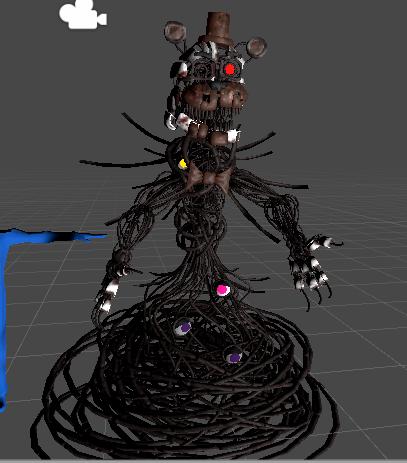
 high nova
@heavy raft copy a default rig and just create unweighted bones for the legs
heavy raft
ohh, alright lemme try
 sour isle
does anyone have a clue why sometimes spine doesn't get recognized in vrchat and in tilts slightly to the side
 tawny silo
the tilt to the side has been a really odd thing and i have not figured out the cause, i've tried many things to fix it, (bone roll spine length, Leg spacing, hip to leg gap, everything)
@sour isle
the only fix right now is to manually offset the hips the counter direction to what you want it to do
i am starting to think it has to do with hips being -89.89 and stuff
a fault with exporting with blender to unity
i doubt it is it but i was going to look into exporting with maya and seeing if i notice the same problem
blender works with the X axis being up and it might be linked to that perhaps but there is a lot of things i can only guess could be causing this problem
sour isle
problem is it's not just the tilt
it's that the spine also stops working completely
i tryed so many things as well nothing helps
i did fix it on previous model by importing my other skeleton from other model
but it was literally same
like no changes whatso ever
it's so frustrating
@tawny silo boop
tawny silo
hmm
i'm sure you looked over the weights
bone roll could be doing something
i wish i knew what is going wrong
you could try editing the idle animation
sour isle
like i said i already fixed it once but it was unintentional mostly
i just used other armature which was technically speaking same but
it worked ?
asdjlasjdals it's actually anoying
it has to do with vrchat not recognizing spine
tawny silo
yeah something goes wrong with the spine not being accounted for
any models uploaded before 2018.4.20 didn't have these issue
sour isle
@vocal quiver halp
crisp tendon
Please don't ping the team for avatar questions 
crisp tendon
Also Kung explains the fix in his video
sour isle
did u have this kind of issue
or do u know anything about it ?
yea but it still doesn't fix the issue with spine not being recognized
crisp tendon
Either the name is wrong, the order is wrong, there's no weight paint etc
Unity looks for the same things every time
tawny silo

crisp tendon
For a rigging issue that doesn't seem necessary lol
just post pics of your armature and stuff
sour isle
like i've been doing this for 2 years now and this is a recent thing
i just don't know a good way to explain that i do have experience in this
crisp tendon
Do you use the cats fix ?
sour isle
and this is totally new
crisp tendon
i'd suggest shortening the chest bone
 pine topaz
Side view
crisp tendon
it should start around at breast level
crisp tendon
Yeah, give it a try
pine topaz
Will update once I upload
sour isle
i'm getting to the bottom of this
just used a different armature that i used on other model
without touching it
seems like it's working
now gotta figure out what's the differences
this is how the main bones look on working armature
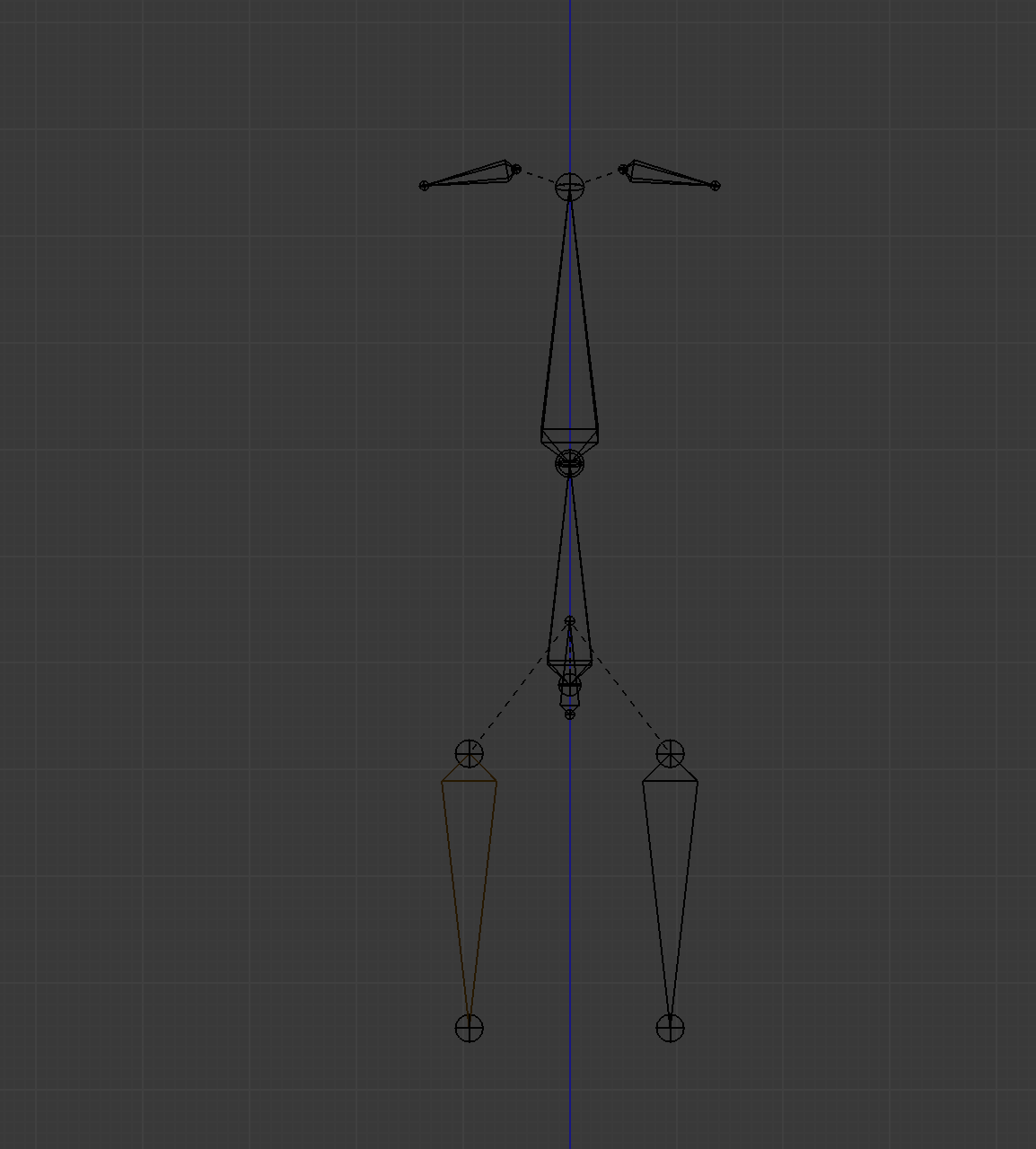
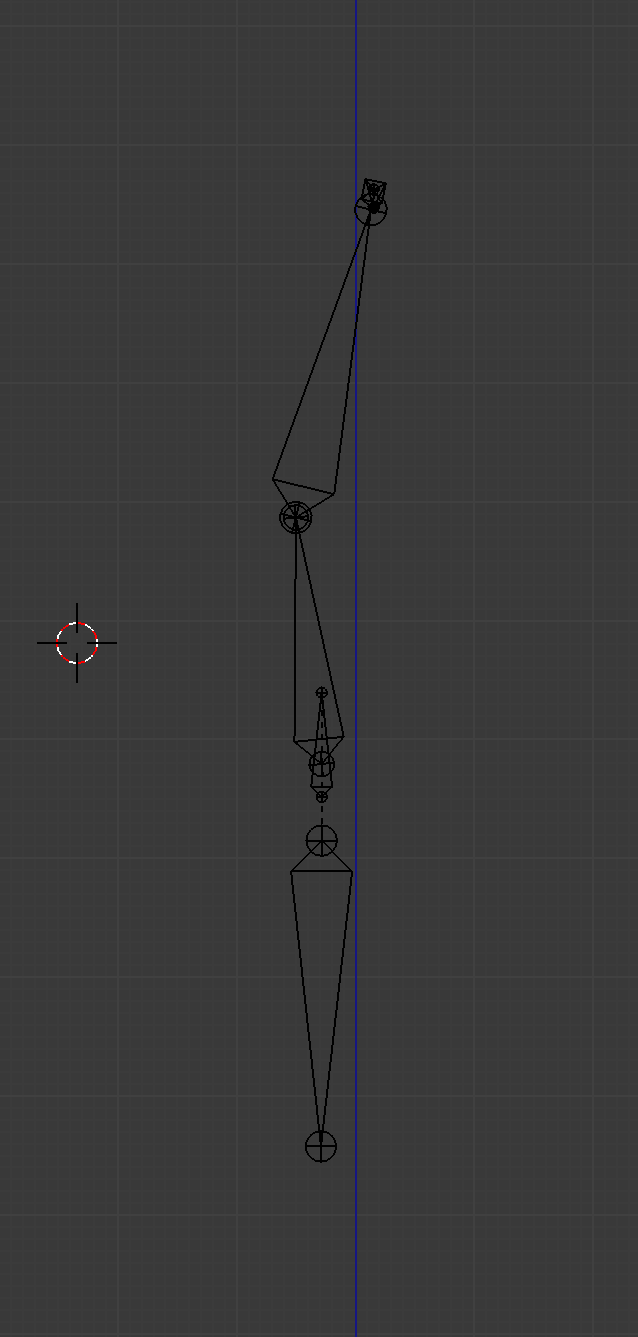
p.s. it's just main bones rest is not included
tawny silo
tf
ah
well
i can see that your spine is going way to low
think of the spine bone as a support
it's not fully meant to carry weight
it's used to help smooth the transition between the hips and chest
sour isle
on the model mesh itself it's in right place
it's just hips are a bit high
ooooooooooooh
bruuuuuh
i fixed it
holy shit
if fucking fixed it
pine topaz
worked, thanks
sour isle
while not affecting bends
so i guess it does have to do with length of chest and spine bone
at some point vrchat just stops recognizing spine bone cuz it's too small
or maybe chest bone is too big
crisp tendon
I don't think that's the issue in this case
sour isle
i'd do both for good measure
crisp tendon
The chest bone was so big that it made the spine bone negative length
sour isle
maybe ?
i could just guess
we both can but ultimatelly making chest smaller and spine bigger a bit
crisp tendon
The only errors are for spine rotation or spine length zero, not less than zero
sour isle
fixed it
tawny silo
nice glad you were able to fix it
crisp tendon
It's not so much a fix as it is making a normal armature lol
sour isle
okay dude look
sour isle
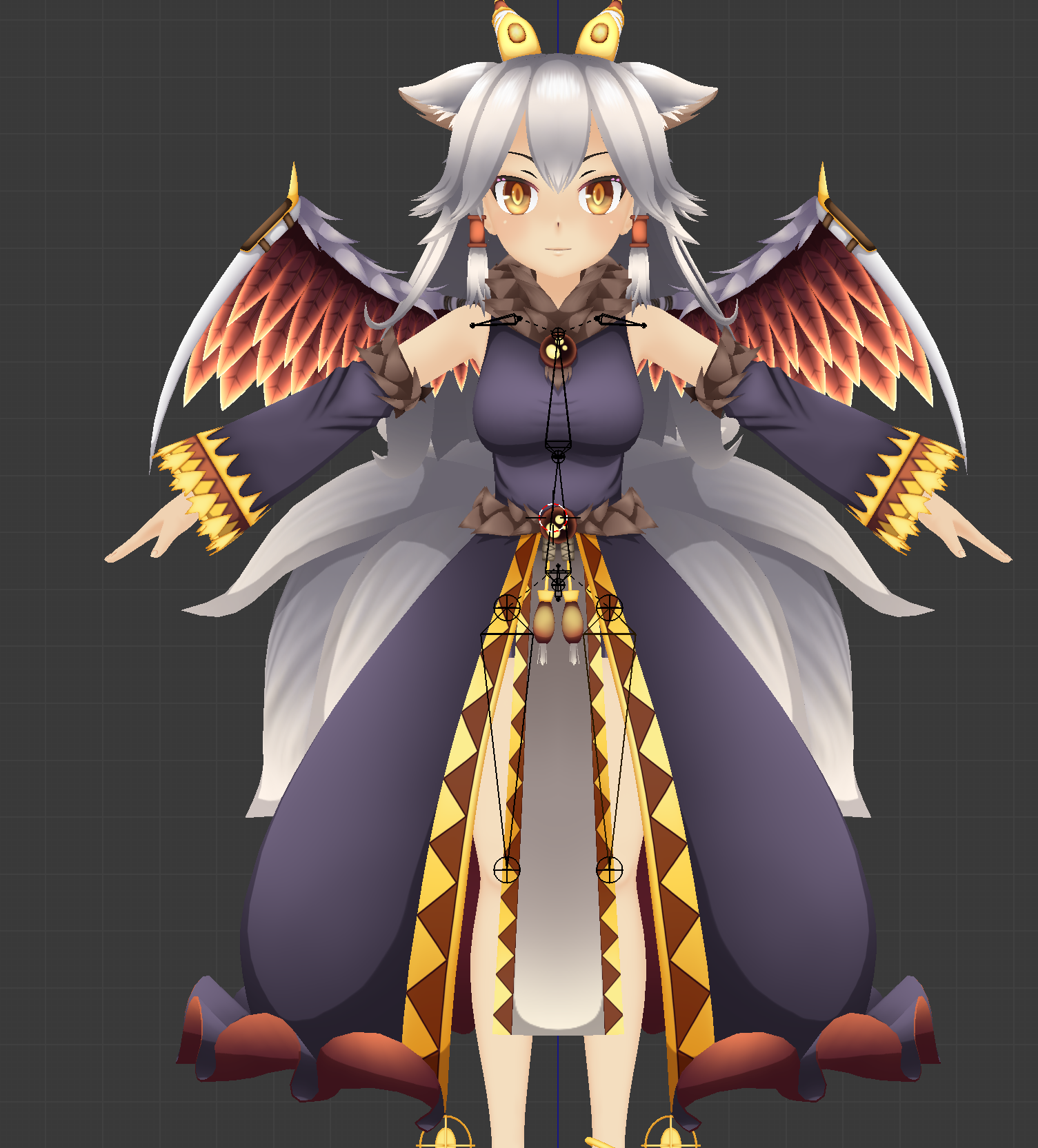 tawny silo
The spine should be connecting to the hip bone though? right?
tawny silo
the way you currently have it's like hips are the root bone
and only used for positioning
while spine and chest are your only real bones
sour isle
well yeah
tawny silo
it can lead to weird movment
tawny silo
with the hip area
i just never seen anyone do it this way
it's worth looking into is all
sour isle
either i'm an idiot or you
fervent hornet
Your hip should have a lot of weight, to make it so things dont pull the hips too much
tawny silo
with spine being a support bone between chest and hips
sour isle
look if u want
i can get u in call
and show u how it works
and u tell me what's wrong
tawny silo
i'm down. i'm intrigued with how you've done it
 languid zealot
hey there! can any blender folks help me figure out how to fix this weighting smear? there are no weighted bones outside of the arm so I'm stumped
fading verge
Looks like it could be redundant weights trying to make the arm stay in place
languid zealot
any tips on remedying that? i'm new to blender
fading verge
Go to weight paint mode and check the vertex groups and make sure there aren't redundant weights on the arm that shouldn't be there
languid zealot
I'm not seeing anything : /
i deleted all of the non-hand vertex groups and it's still happening
fading verge
Did you go through them all?
Why would you do that?
How do the arm and hand vertex groups look?
fading verge
Huh. Why did you delete all the other vertex groups?
languid zealot
just to see if it would fix it for some reason. i undid the deletion after i saw id didnt fix it
fading verge
Would you be comfortable with sending me the blend file for closer inspection? I wanna see if I can figure out what's up
languid zealot
i'm also new to this community so i'm unsure where to place my trust. I appreciate your volunteering though!
does the hand need more than one bone if there's so jointing necessary? i remember watching a tutorial that said to leave both the pinkie and index for mittens
crisp tendon
In edit mode you can select a vertex, click the Item menu on the right (above Cats) and you'll see which vertex groups it's part of
languid zealot
Cats?
crisp tendon
the main blender addon for avatar making
languid zealot
whelp that just might be my problem
its says the problem vertexes are only part of the hand and forearm vertex groups
well it's working now
I attatched the mesh to a blank armature via CATS then did a regular parent with auto weighting
it's odd considering that when I tried doing it without the cats step it had the same problem
fading verge
Just don't forget if you want to use the humanoid rig you'll need three fingers (they can be fake fingers) on each hand
languid zealot
for general rigging of for vrchat specifically?
fading verge
For VRChat if you want to use the humanoid rig and animations. Otherwise you'll be stuck with generic and msot likely t-pose everywhere with no hands
languid zealot
is there a way to mirror weights?
fading verge
There's a couple
languid zealot
yeah but that sounds like it would destroy UVs
my problem with that is that i'll get to the uv part and realize a modeling or rigging mistake and have to backpedal the pipeline
languid zealot
figured it out! thank goodness for the mirror modifier
languid zealot
hey, if i'm just using head and arm tracking, is rigging legs necessary?
crisp tendon
you need the bones
 keen tiger
Yeah I was about to say, If you don't have at least Thigh, Knee, Ankle for both legs vrc can't assign it's locomotion to your avatar and you'll be stuck in t-pose.
unreal jay
I'm a bit lost on how to fix this issue, can someone help me out?
fading verge
flip it
unreal jay
flip the pelvis bone?
fading verge
yeah
unreal jay
ok
 languid zealot
does eyetracking work by automatically tracking eyes to other players or is it based on a peripheral?
fading verge
automatically
languid zealot
thank you! is it the kind of thing that will break the character if you dont have it set?
languid zealot
I have picture eyes not physical ones so eyetracking isnt practical
unreal jay
Do I need atleast 2 bones in a chain for dynamic bones to work?
fading verge
Yes
 naive tree
no, you can use End length
fading verge
can anyone send me an example rig? for a humanoid
amber kestrel
@fading verge download any humanoid model and delete the mesh. Just grab a free one from deviantart
amber kestrel
doesn't matter, just look for an mmd
fading verge
@fading verge There's a example rig included in the sdk
im rigging in blender
Well yeah
You can import that one
Here
Assets\VRCSDK\Examples2\TutorialAvatar
i cant see the bones
amber kestrel
show us what you're looking at
fading verge
fervent hornet
Its probably because you're in the sculpting tab, but I'm not sure how those presets are set up
fading verge
is that?
 thorny matrix
hey guys and gals. I was trying to rig an ''avatar'' that i have made in blender to be just a floating headset with the controllers as hands, but had some problems with the rigging system in unity and i don't know how to propperly do it. So if there is someone that knows how to do something like this, please shoot me a message, i would love to see the avatar work in game.
fading verge
What's the problem?
crisp tendon
Weight paint each part to their respective bone and you're good
thorny matrix
if i try to rig this model in unity, the armature does not take the shape of the armature that i added in blender. and Ruuubick, thanks for the tip, i'll definitely try that
fading verge
The armature does not take the shape of the armature in blender?
Is the armature set as an armature, is the mesh parented to the armature and does the mesh have an armature modifier on it?
i dont even know how many bones are needed for the humanoid
 grand mirage
When making abnormal legs is there a particular angle that works best? Also should i keep the spine strait or keep it in line with the mesh?
fervent hornet
@grand mirage That rig looks fine IMO, you can see if it freaks out in game but I've used ones that are similar to that
Make sure you line up the heads of the legs to the hips though, may only matter for FBT
fading verge
i sent a pic
https://cdn.discordapp.com/attachments/390924372782612480/719950628797022228/unknown.png
 unreal jay
should I move the View Position more into the head if my VR arms dont reach as far as my REAL arms?
fading verge
Kung's fullbody avatar tutorial has a good visual of how the arm length and stuff effects world scaling and stuff
But otherwise you can just try changing your ingame height to change the worldscale to hopefully fit better
is there a fullbody avatar tutorial?
yeah that pic looks like a normal humanoid bone structure
fervent hornet
Yeah bone tails are fucked but the layout is correct
fading verge
i do not know what to do
amber kestrel
@fading verge you can google that kind of question
Plus, it was answered literally the message before you asked
crisp tendon
VRChat
Unity will flag your humanoid rig configuration if it does not meet the Mecanim requirements for a humanoid. Please read and be familiar with the Unity Documentation on configuring avatars. There are special considerations if you are using Full-Body tracking, ie. y...
fading verge
but the bone tails are messed up
amber kestrel
I also told you another way to get an example rig
fading verge
yes and i tried to scale it to my avatar but
astral warren
@grand mirage in usually ignore the geometry and just make a bone going from knee to toes (where feet would be on a human)
Totally ignore the giant ankle, and make the toes the humanoid ankle.
In your case it’s not so much a giant ankle (like on animals) as you actually have a knee, a second backwards knee, and then a ankle, but same idea
Just skip the second backwards knee and go from first knee to ankle
No need to follow the geometry
Bones can bridge outside the model
 placid scarab
fading verge
placid scarab
fading verge
im stuck
I dont know what to do now
i rigged the fbx model
i put it in unity and did everything
And now its transparent
it wont let me edit the main map
click on the fbx in the project panel -> right side in the inspector on materials -> extract materials
and then you can give it a directory they get extracted to and then you can edit them
uuh
i still dont get it
im new to unity
i just started today
im using this tutorial
robust crescent
yikes
sour isle
"create"
astral warren
“How to steal models from the internet and put them on VRChat where you can say you made them”
fading verge
Im using a gamecube model of star fox from smash melee
also i finished it
I can now be melee fox
celest rock
Adeon, that just sounds like art theft with extra steps.
 ripe stag
Hey fellas, so I'm essentially new at Blender, and I'm just wondering how one would go about rigging a cloak/poncho
I'm assuming you'd have to go about it the same way you'd rig a skirt, with dynamic bones and weight painting or whatever :V
I haven't done anything to the cloak yet, but I've been checking out this vid
https://www.youtube.com/watch?v=SimRLR_lRcA
Join my Discord for help or meeting like-minded people: https://discord[dot GG]/uSEvuVw or scan my QR Code: https://media.discordapp.net/attachments/626502922120724480/626522415794618399/qr-code-Shanie-Discord.png
This is a Bob Ross-style video where you work alongside me to m...
 sour brook
hey there I'm trying to add eye tracking on this model and was curious how to go about doing so with sphere eyes? most of the videos I can find seem to only talk in regards to the fake shadeless 2d eyes
crisp tendon
it's much easier with spheres, bottom of bone needs to be at center of the sphere
crisp tendon
nope, eye bone straight up
sour brook
huh weird but okay
crisp tendon
it's pretty standard
sour brook
I'm just used to normal rigging and such so everything I know about that tells me to have the end of the bone point where you want it and you use a tool to make sure the joints are oriented although for eyes you just constrain them to a controller to my understanding
any particular distance up I need to go? I assume not but figured I should still ask
amber kestrel
You could also throw a child bone toward the eye under the controlling eye bone if it makes you feel better
crisp tendon
it doesn't matter
sour brook
noted
sour brook
What do the lower lid left and right blend shapes/shapekeys do?
amber kestrel
They might be used in conjunction with blink left/right for general eye movement and blinking, but I'm not sure at all. I've never used them myself
sour brook
well I can't seem to find much in regards to the needed blend shapes for eye tracking and how they exactly look. I mean blind is pretty self explanatory but not sure on what lower lid ones do and neither did my friend who sent me what all I need blendshape wise
amber kestrel
They're not necessary at all
As for blinks, either blink both with one shape key and set that to the left blink, or blink each in their own shape key and set them respectively
sour brook
thanks this link is pretty helpful! confused why it's more detailed than what's found here but I greatly appreciate it! https://docs.vrchat.com/docs/creating-your-first-avatar
VRChat
Before getting started ensure you have a Unity project with the SDK set up. Step 1 - Find a model Arguably the most important part, you must find a 3D model to be used as your avatar. As this is your first avatar we recommend getting one from the Unity Asset Store as they usua...
 cosmic relic
Has anyone else had an issue where an avatars dynamic bones will just stop working out of nowhere? I uploaded a new version of an avatar and they stopped working for seemingly no reason. The bones work fine in unity, but not the game. I also reinstalled the SDK, twice, so I have no idea what could be causing it
amber kestrel
go into safety settings > advanced settings > dynamic bones or whatever the last option is called. there's a settings that disables dynamic bones on avatars if they exceed a value. disable that, or find the config file and edit the value. you can google how to do that
astral warren
I recommend having lower eyelid shape keys be blank. Unlike upper eyelid shape keys, lower ones are Boolean and not triggered smoothly. So I do exclusively upper eyelid blinks
Do actually have separate left and right blinks though, they are used separately when you look up and to the side
(Eyes Open up more when you look up)
Sounds bad but actually looks great
 gritty latch
https://gyazo.com/f9a8bb1d74f51fa14a126ee8d4b7ffe7
guys, is there any way to stop the dress from clipping with my body, other than sphere/cylinder colliders? it has unity cloth on it. will weight painting change anything?
fading verge
You could potentially try to make it thicker? Also maybe weight painting?
gritty latch
will it help on a mesh that has unity cloth on it?
fervent hornet
Cloth should always be flat, if this situation you should not have skin under the dress that you would not see
fading verge
They want cloth with physics, therefore they need to have skin under it else it can't really deform since there's nothing
fervent hornet
Otherwise I would honestly lower the cut there, the dress should not be active around the stomach as that area of the dress is usually tight
Not technically, you can have colliders there, but you dont need a skinned mesh
fading verge
Oh right!
fervent hornet
Removing the skin would allow the dress more freedom to bend inwards without the issue of the skin clipping in front
gritty latch
Alright, thank you!
cosmic relic
I hope you dont mind if I @amber kestrel you but thats already off, the avatar worked perfectly fine before and then the bones stopped working after a new upload
amber kestrel
I can't help you with that amount of information. Check on whatever you changed, trace your steps
sour brook
should the mouth be closed or open in t-pose?
I've been told closed but wanted to make sure before I go and make blend shapes and the such
magic sonnet
the default look should have a closed mouth
sour brook
cool cool
 tulip falcon
does anyone knows how to fix this?
its auto rig yes, but that bone appears from nowhere
besides it completely destroys the hand
sour brook
dunno if this is the issue but it seems you lack a wrist bone for those finger bones to connect to
and the wrist bone would connect to the elbow bone
tulip falcon
@sour brook I re-rigged evrything
relax but thanks :P
now I have another problem
it says the spine hierarchy is incorrect
 tight gust
can someone look in #user-support-old
sour brook
for some reason having a bone connect to the upper chest in there effects it. I dunno why myself but glad you got it working! @tulip falcon
 crisp tendon
Fix your weight paint in blender
tulip falcon
Thank you so much
holy
shit
@crisp tendon I cant even beggin to thank you properly
(tutorial) now I know what this is for
Im so angry but so happy right now
astral warren
Enforce T-Pose https://media.giphy.com/media/xTeV7GOWnvmMt8zY1a/giphy.gif

 tulip falcon
xD
I gotta fix that too
I recently uploaded
I gotta fix the hands and the chest
after correcting with weight paint I still dont know how to fix some parts
does anyone know a good tutorial about weight painting?
manic marsh
so optimizes you can see the individual tris, 10/10 my gpu would recommend again
tulip falcon
yes... thats... why.... I want a tutoria...
oh I can just use a subdivion surface modifier
manic marsh
Woow, hey there, no subdivision
Use shade smooth with autosmoothing
And I thought you had problems with weight painting 🤔
tulip falcon
You see if I shade smooth the whole model will look way worse than its now
if I use subdivision I can weight paint way more precise due to the increase of vertexes
manic marsh
well you can subdivide only the parts that bend, no need to do it on the whole avatar
celest rock
- If you want to do a subdivision modifier to do that. You're going to cause more trouble than it's worth.
- If you REALLY want to do that. Separate that part you want to subdivide or subdivide it manually.
- Just use edge loops for that instead. It gives better control, and less polygons.
astral warren
Shade the entire avatar smooth turn off auto smoothing and then Mark edges you want sharp as sharp
celest rock
If you just want to put more detail into the mesh, then the subdiv modifier would be worth it. But, I still recommend doing shade smooth and do what Adeon just said.
I put italics on worth since it's subjective.
tulip falcon
I mean Ive build my model with some contraints, I will do everything yall are saying
but my model currently is 1900 or so tris
subdividing will increase to about 12k
so its still playable on pretty much every system
but thanks anywas
tulip falcon
@celest rock @astral warren I surrendered
Just placed it on mixamo and let it do all the work
celest rock
It should work for the most part on mixamo. I'd go through and check neck, head, shoulders. It has the most troube with those places.
tulip falcon
The problem is that
as I said on other server
a knight versus a dragon the knight cant do shit but he still wants to do it
im not good at all with all of this stufff
astral warren
And I didn’t know blender or unity at all when I joined VRChat in May 2018. Can’t believe it’s been two years already. But anyone can learn this stuff, it’s not that hard. It doesn’t take years or anything, just maybe 3 or 4 days of working on stuff and finding the right tutorials. Once you get it, you get it.
(4 or 3 days for learning weighting specifically)
Not gloating, just saying, don’t be defeatist. 3D modeling is hard to teach, but you only need to learn the tool once.
I’d put it on the same level as solving a Rubik’s cube. everyone thinks it’s so complicated and you need to be so smart but really just spend two or three days on it and you’ve already mastered it.
celest rock
Learning weight painting vs using it good is a fine line though.
fading verge
until blender decides to update everything again x)
astral warren
That’s knowledge vs skill. Blender is more knowledge than skill. For the most part.
celest rock
That's true.
astral warren
You can learn something in a few days, then you know how to use the tool. The rest is skill, which develops over time. But just knowing how to use blender’s various tools gets you 80% of the way to mastery
Then it’s just practice
celest rock
True.
Though, there's also a point where you need to experiment to achieve your goal
But that usually comes after knowledge
crisp tendon
you can't remember everything either, it's pointless, there's tutorials for everything and multiple ways to do something correctly, same with shortcuts
 covert jay
Hi everyone, just have a small issue. so this model has some of these hanging arm sleeve things. I had a weighpainting issue apon upload, on inspection the left sleeve is fine, looks fine in game, the right sleeve, I hypothesize that when I hit "fix model"in blender instead of putting the weights on the proper bones on the sleeves it put those weights on hair bones. these hair bones also have some weights in the back of the head. not sure what would be the best fix aside from time consuming subtracting from all the hair bones and redoing each sleeve bone which I am not sure if I am up to doing. Any tips on how to solve my issue faster? I know there is a way to mirror weights but can I duplicate the weights on another bone? then deleting the hair weights from the sleeves would be easy
 fickle dawn
someone requested me to make a real working Eva, so I'm going to do just that
crisp tendon
@covert jay How many sleeve bones do you have ?
And what are the names of the bones, cats shouldn't have merged anything like that
covert jay
I am sure I can combine a few to optimize it but on the base model just dropping it into cats and hitting fix model there are 6 on each sleeve half on the working arm and 5 on each half on the one that isnt working. it is the top most bone that is missing on the not working side which I haven't dropped it back in and hit fix model to check but it leads me to believe fix model is what is causing my issue considering the bones are there and the same weights exist as on the working side but the weights are just assigned to the wrong bones @crisp tendon
really if I could just copy weights from one bone to another this is an easy fix, I just dunno how to do that
crisp tendon
If it's a downward sleeve you could use a single bone with a gradient, especially if it's just for dynamic bones
 vestal adder
Hey I'm super new to making Vrchat avatars and I've run into an issue with the legs of the model. The legs bend in awkwardly like this when crouching and they bend backwards when you walk backwards. The model was a Vroid model then brought into blender to work further on. Any suggestions on how to fix this?
crisp tendon
They're too straight, move the knee slightly forward
vestal adder
Like move it forward or rotate it forward?
amber kestrel
Move the joint forward
Essentially this happens because VRC has no way of knowing which way your legs bend when they're perfectly straight in T pose
A slight bend does the trick
Also make sure the roll on your leg bones is 0
vestal adder
Gotcha, thanks! I'll let you know if it does the trick!
 cedar basin
Can anyone be willing to do 10 avatar riggings for VRChat?
Each avatar has 4 pieces.
Up to 100$ im willing to pay
 keen sedge
crisp tendon
keen sedge
crisp tendon
Does the rotation look fine ?
amber kestrel
A couple of the first finger bones go a little deep into the palm, but otherwise looks decent. Just line up the joints with the hand joints and you're good
Weight painting is way more important
 sonic lava
My character's neck deforms correctly in Blender and Unity, but in VRChat it's pretty wonky and translates a lot from side to side. Is there something I'm doing wrong with the neck/head/chest bone placement or something else? Is there a better way to test than uploading it a million times after tweaks?
sonic lava
@crisp tendon here's the neck and head
crisp tendon
might want to try moving all the neck weight paint onto the head bone and reducing the size of the neck bone as shown in the Kung video pinned here
sonic lava
Ah, thanks, let me watch that and try. I was copying a way the Hobkins did it
sonic lava
Hmm, @crisp tendon if you're still around, I watched the video and changed the weight painting, but it didn't seem to help. I did notice something interesting, though. In both my old and new versions when I'd tilt my head side to side my entire character's body would move side to side. Could that indicate something?
crisp tendon
well your hip is inverted and your legs aren't straight from the front
Kung's video explains a few more of the requirements/fixes
sonic lava
For the hip, I copied the Hobkins again, like this... Damn, it's not letting me upload another image. But the Hobkins fbx seems quite well done, I'd be surprised if that would stop the avatar from being fully functional, as there are a bunch of those running around. I also uploaded the Hobkins as-is and it worked properly
I should fix the legs a bit, they are going inward, perhaps that'd affect walking
but I suppose any variable should be eliminated
crisp tendon
I have no idea what the hobkins is, I just go by all the requirements for final ik 
sonic lava
I'd send a pic if I could. It's quite well done!
At ~46m I did miss a recommendation to move my VRC avatar descriptor's view height down, to reduce shoulder flop. That could be what I'm experiencing. I'll try that, and the hip and leg fix
astral warren
Just a random aside but for that avatar specifically make sure you don’t move the ears down like that there are unity animations that depend on them being up in the neutral pose
celest rock
An interesting thing is, that's the default pose for them. It's turned up in the prefab. I'm not entirely sure why.
astral warren
FBX have a rest pose and posed pose.
Rest pose determines where it points at zero rotations (and appears in edit mode, and then pose is after the armature deformation.) I don’t know what the point is myself, but that avatar uses it. Applying pose with the ears down (which is stupid easy to do by accident when editing) breaks all his animations so watch out lol
celest rock
That's the default way it looks when you import it in blender and the default look when you use it in Unity without using a prefab
sleek isle
what if you dont put animation on the ears
sonic lava
Ah true about the ears
I cannot get this character's head/neck rotation to not translate! arrrrrrrrg. When I simply rotate the bone in Unity/Blender it looks normal. So that has to mean that there's a significant X/Y translation component when moving the head in VRChat, to make it look more natural, but for some reason it's pivoting the neck like crazy. I made the head bone much smaller too
cedar basin
Hey guys, I need someone to fully rig 10 avatars for me. Each avatar comes in 4 pieces and I need them boned, weight-painted, and whatever else you need to do. I'm willing to pay up to 150$
For this so if anyone can do it please let me know!

Here are those avatars
Each one is split up in a face, a body, legs, and hair
 strong walrus
Hello hello!
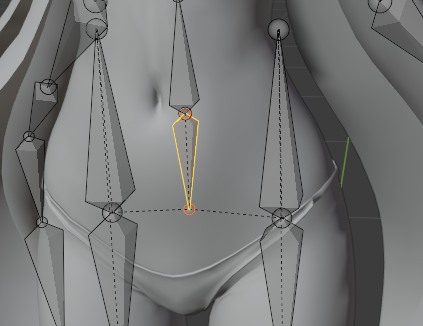
I've got an interesting question which I'm still testing out myself however-- I made a model for a friend of mine who noted that the model they were using, felt off. To clarify, apparently, they felt that they needed to move a bit more for example, to rotate their hip. One curious thing that another friend of their mentioned was that the size of the bone also dictates how much the hip would turn. That being said, is that actually true or is it because of the scale? The reason why I ask this as well is because the model is definitely a lot taller than the one they normally use which they happened to use as a reference which is shown in the picture below.
 crisp tendon
in FBT?
strong walrus
Yes. Full body.
sonic lava
I know that for neck movements, the height of the bone determines the degree to which a deformation is applied
strong walrus
Interesting. Because yeah, I never knew this was an actual thing so I’ve been looking into it as of late.
fading verge
In the way that I understand how rotations and transforms work, it's less about how big the bone is but there the origin of the bone (the head) is related to the weights that it is transforming.
Imagine a head with a bone in the middle of it (it's not usually in the middle it's a bit lower but for examples sake), obviously the head will move with the bone and appear to follow it exactly because it is pivoting around the center of the head. But if the bone is instead far outside the head, the pivot point becomes the origin of the bone and the head's movement is several magnitudes greater than it was before because its pivot is so far out of the actual pivot of the head and you'll get massive movements.
So what I say is, size doesn't matter as much as relation to the weighted area's pivot point.
But some people do say you technically want small hip bones and to adjust the size of the spine bone and all the sometimes which can help certain issues like rolling hips and such
crisp tendon
@strong walrus Check the pinned video from Kung
fading verge
So if you want to make a really fucked up model, just scale the armature without resizing the mesh and it'll make a monster
sonic lava
@fading verge that explanation makes a lot of sense, and makes me wonder if you're aware of the cause of a specific issue I'm seeing. When I deform my head in VR, it feels like it's pivoting in the improper spot, like rotating my head side to side makes the entire head slide side to side and the neck deforms very strangely, and often leans off to one side. However, I've moved the tail of the head bone lower, tried to make it exactly centered over the neck and other bones, and haven't seen any improvement really.
Iv'e also tried to follow examples from the pinned video and another successful rig. It just seems like something else is a factor. Iv'e tried moving the view point around as well, in the avatar descriptor. I'm at a loss at the moment as to wtf is going on
fading verge
From what I recall outside of blender the tail of bones don't really do much in unity, it's mostly about the head of the bone as the origin of the transforms and rotations. I might have some ideas about what the issue could be but nothing concrete to really say a gotcha! though without trying a bunch of things myself
keen tiger
True, the position of the bone's tail doesn't really matter unless your bones are connected.
sonic lava
Ah, I see. Though I moved the head as well, like I moved the whole bone down and changed its length
keen tiger
I see, you moved it down. Did you do that to fix the deformation issues avatars usually have for fullbody users or was there another reason?
fading verge
Like... To me that sounds like the head bone is moving down too low to where the neck is and because of IK and tracking it's like pivoting/rolling your head around is weird ways making for weird head movements and stuff.
sonic lava
Sorry for the delay, I appreciate the help. I'm going to try and take a video showing the issue
 true sonnet
hi, so I got these ears model and was wondering how they connect with the rest of the bones - are the bottom two meant to be head / neck, or do I child them to the head/neck bones?
amber kestrel
It looks like they're the head and neck to me
true sonnet
👌 thank you !
amber kestrel
you could just explain your issue
 turbid ocean
Yeah sweet thanks
i'm trying to figure out how to use blendshapes to change UVs for expressions and whatnot but i have no idea how to do it in maya, also don't seem to be finding any decent tutorial
amber kestrel
You're much better off transitioning to blender for modeling, there's very little support for maya
With that said, I googled that and found this

Using the Blend Shape Editor, you can set keys on all the target sliders at their current values, or key an individual target slider at its maximum influence value (1). Keying an individual target slider at 1 keys the influence of that target slider only, ignoring the possible...
turbid ocean
I mean i already use maya professionally so it's just way more convenient, tried that, no luck
amber kestrel
Define "no luck"
turbid ocean
did that, pulled the blendshape slider, nothing happens
amber kestrel
You might have more luck in #3d-modeling. Otherwise, find some Maya tutorials or something. None of this is specific to VRC as far as I can tell, so I can't promise you any luck here
turbid ocean
Alright, thanks anyway!
 glossy mesa
turbid ocean
glossy mesa
turbid ocean
if you have no experience in rigging that's gonna be a doozie
watch basic rigging videos in blender and import the example vrchat avatar
When i shove my model into vrchat, it squishes down the head for some weird ass reason, liek this:
looks like this in unity
turbid spear
post a screenshot of your armature in blender from the front and side
languid zealot
can someone help me with lipsyncing visemes? i have them set up but when i use them in-game they barely work. they only activate in unity after 0.92 on the blendshapes sliders so i'm guessing that has something to do with it
 proud prairie
Hello, I need someone to fix the shoulder sag on one of the avatar I use, blender is too difficult for me and tutorials doesn't help
proud prairie
proud prairie
I think I've fixed the avatar a little bit..
 olive river
You can try sculpting the shoulders
Just inflate them a little
(Make sure you save it as a copy, and have symmetry turned on)
Zevbutt, do you have screenshots? Or any errors? And what are you using for exporting?
proud prairie
(Make sure you save it as a copy, and have symmetry turned on)
@olive river I can't find the symmetry button
also I changed the fbx, switched in unity with the new fbx but the avatar doesn't change..
I used his method https://www.youtube.com/watch?v=vl8vD00rlqE

Is this short video tutorial I will be showing you how to swap you current fbx file with your updated one from blender (or wherever) to Unity!
Discord: Cascadian#0001
VRChat Avatar World: Cascadian Avatars
VRC Username: -Cascadian-
 sharp lily
would anyone have any recomendations for rigging this?
proud prairie
from what tupper said a long time ago on reddit "Yep, just drag/drop your exported FBX on top of the other one in Windows Explorer. Overwrite your old one.", it's the same thing as the video but it doesn't update the fbx
sharp lily
?
proud prairie
I was replying to my own comment
sleek isle
use a humanoid rig but put 2 more bone for the arm on the front. Use rotation constraint to copy the elbow bone rotation to those one.
 inner tree
is neck fix still a thing you need to do for fullbody?
crisp tendon
Which one ?
inner tree
so that the viewpoint doesnt mess up when sitting or laying down
turbid ocean
oK SO
I Disabled the mouth blendshape and it seems to work fine but
as you might have geussed, i still want the mouth blendshape to work
any idea what the problem might be?
crisp tendon
What issue are you having ?
turbid ocean
Char looks like this in vrchat
with blendshaped on
looks fine with blendshapes off
for mouth movement
crisp tendon
What does your blendshape list look like in blender ?
turbid ocean
I'm
using maya
there's literally a single blendshape
for the mouth
is there any naming specificity i should be aware of?
inner tree
So i remember before you'd move the necks weight to the head to fix the neck movement
turbid ocean
Honestly the specificity VrChat requires to use properly is ridiculous
crisp tendon
@inner tree Yeah that's still the correct way
inner tree
aaah
crisp tendon
@turbid ocean That's Oculus lipsync system
nothing odd about it, same system for all similar uses in other software
 polar bough
I need some slight help with moving a model to VRchat. I commissioned it and it wasn't meant for the game, but I'm trying to convert it, it's a tiny bit everywhere though
fading verge
What do you need help with specifically
 reef plume
can u guys help me i need a good anime avatar
polar bough
I think some of the connections aren't up to specification, let me grab a picture
Might have to find a visual help, one sec
polar bough
In my defence, I didn't do the rigging, I just fixed the names since a fair amount of them were named Upperthig.[number]
reef plume
if ther is a site or something to get the avatar send PRV and thnx have good day
manic marsh
your defence has been taken into account, and promptly dismissed
fervent hornet
No excuses for bad rigging 😔
manic marsh
well, no excuse for broken rigging, but there is for bad rigging
(dont do this to me Scionzenos)
😰
fervent hornet
Just don't tell me about the bad rigging and it'll all be fine
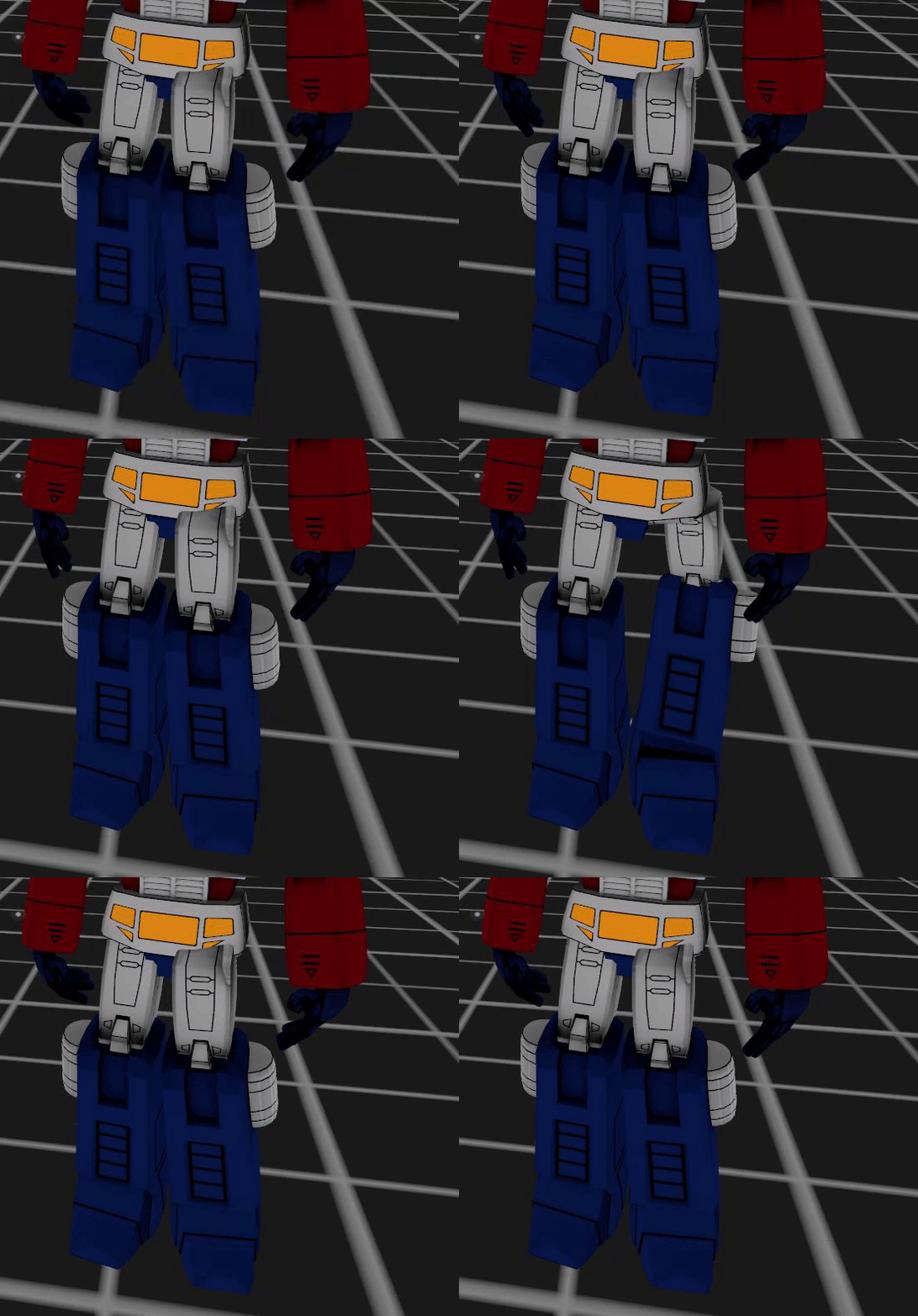
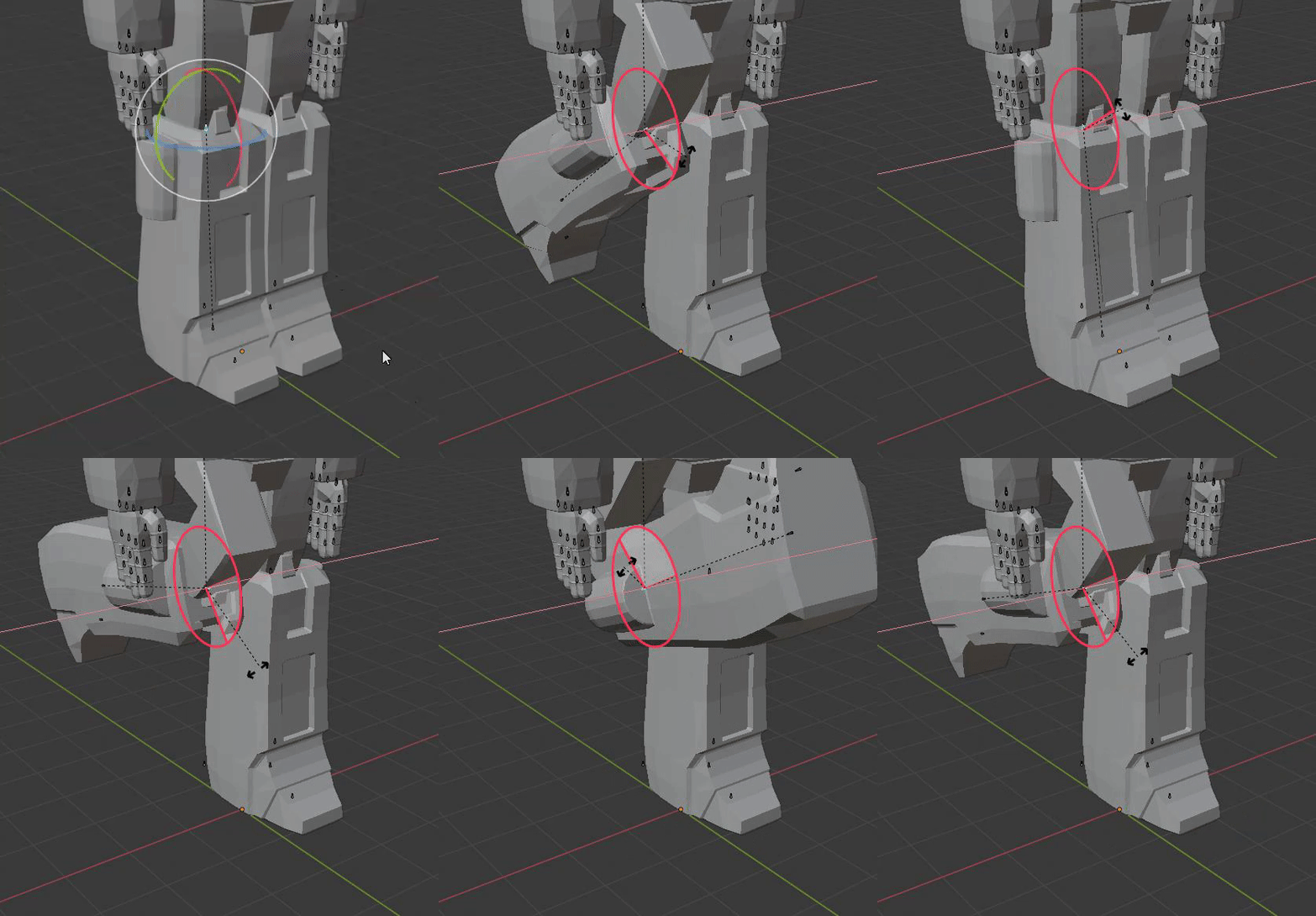
Now that we have constraints I want to see everyone with twist bones on every joint
I'm being spoiled by game rips with all the twists in them
 polar bough
I just have to work out how to unclip the child, then clip it to new parents
fervent hornet
Technically this last one was an extraction :))
Select the hand, shift select the parent, Ctrl+p in edit mode
polar bough
I've just realised the model has three sub sets and two of them haven't had their bone names changed
I've gotta work shit out
manic marsh
hmm, would a constrain based spine be worth the effort
aka instead of 2 bones have 4
polar bough
Maybe? I wouldn't know





 fading verge
lol
polar bough
First step is to go to the side models and label the bones correctly
Left and Right are swapped as well, this is a minor nightmare, but the model is good for £25
Fair bit of work to do
What are 'BezierCircle.[Number]'?
NVM, turns out I've been deleting hair
So now the modified copy is basically bald and useless, so I feel a touch silly
manic marsh
use cats to fix most of the stuff, might even rename some of the bones for you
polar bough
cats?
Sorry, been a bit since I last did anything with models
Oh, blender plug in
How do I apply it? Downloaded it, but yeah
Found video and did it
Found a problem
And it's bald again
Re-typing bone names, episode 6
I need to keep the BezierCircles or else he goes bald
polar bough
Alright, I got through renaming everything again, but I need to work out the bones and bald issue
Used F3 and 'convert to: mesh from curve', does that help?
turbid ocean
Anyone ever had a problem with blendshapes order?
fervent hornet
Only time blendshape order matters is the top 4, need to be:
blink left
blink right
lowerlid left
lowerlid right
turbid ocean
yeah
when i rearrange the list in maya it still imports wrong in unity
i had to reassign everything
and now an eye is missing
a fucking eye is missing all of a sudden
with each passing day we stray further from god's light
 pseudo mural
Trying to optimize an avatar and after running it through cats and all that I've gotten it green and lip sync works. Problem is that my mouth blinks, not my eyes. Anyone have any suggestions on what to look at to fix this?
turbid ocean
Check blendshape order in unity
crisp tendon
set avatar ?
turbid ocean
m'bad, didn't really explain myself there
when i open the avatar menu, go select that avatar for preview, it looks ok, like that
when i change to that avatar, and look at the mirror, an eye is missing
fading verge
things on the mirror sometimes does not display things correctly
have you asked around?
fading verge
it could be a culling problem which im not so familiar with
turbid ocean
Is there anyone yo'ud recommend talking to about his?
turbid ocean
everything's blendshapes
only got the essential blendshapes + v_aaa for jaw opening
yeah
i'm also missing an eye for other people
crisp tendon
Most likely due to blendshapes as well