#avatar-rigging
1 messages · Page 148 of 1
 empty iris
 crisp tendon
you'd need to adjust the weight painting in blender
 warm smelt
Is there like a magic trick to weight painting skirts?
empty iris
@crisp tendon What changes should I make though? If I weight more of the arm to the wrist bone that would make the wrist twisting look better but it would also make the rest of the wrist rotation axis look weird.
 lucid orbit
Every skirt is different! Use pose mode to check how things move frequently.
empty iris
Will I need a new rotation bone or something?
warm smelt
thats what am doing
I just figured out leg 2 is affected by leg, and youre supposed to use it for the skirt
Im trying to look at the weight paints on another model, but it doesnt wanna show them
It's literally full red weighted https://homebrew-on-the-wii-mini.is-pretty.cool/AeX8XD4.png

wtf am I of the doing wrong?
crisp tendon
@empty iris No it's just a blend between forearm and wrist
lucid orbit
Check the Hips.
empty iris
@crisp tendon What change time I need to make exactly though? I tried adding more of the forearm to the wrist bone to make the weight paint gradient more gradual, but that makes it look wonky when the hand bends.
 opal aurora
They're useless for rigging as they can't have bones, but you can rig an obj and export in a format that does support them
But they're not useless for vrchat as a whole, given they can be used for both avatars and worlds
crisp tendon
@empty iris Have you tried automatic weight paint first for both ?
 swift radish
@opal aurora Rigging an obj from scratch is a long process though, isn't it? Because of weight painting and all that?
opal aurora
That goes for any format really, the model data is identical regardless, obj just doesn't support bones, so it's useless to rig any model and export it as an obj
 echo drift
dumb question, does the origin point need to be in the center of the grid for the armature and not the mesh?
 tough robin
I dont think it matters afaik
opal aurora
Both should be centered on the grid iirc, it dictates where the model is placed in world-space, the origin being the "floor"
echo drift
making a test avatar just to test something and I notice clicking the fix button makes the hip bone small for some reason. I remember it did this to me with my other model I was working on
 fading verge
does anyone know why my avatars doing this?
echo drift
you got a hip tracker?
echo drift
try downloading the cats plugin
fading verge
i have it
echo drift
this is what happens after you click on fix model?
fading verge
no that screenshot is in game
my avatar messes up on its hip
and i have all the bones selected
on unity
everything is good
but when i get on my vrchat my hip doesnt align with my pants
echo drift
i think it's because the big bone that's connecting to the floor is the root bone, if you notice my gif animation of the stick figure guy I made, there's only the hip bone
echo drift
hmmmm. I assume there's no upperchest bone right?
echo drift
Did you do any weight painting?
fading verge
no i did not
echo drift
ok this is new to me... front of the legs?
crisp tendon
you move it forward
VRChat supports additional tracking points using the HTC Vive Trackers. These work with the Lighthouse ecosystem to permit these two additional modes of motion capture: - Four-Point (4PT): Tracking headset, two controllers, and ...
fading verge
dam that sounds hard
echo drift
like this?
 sleek isle
You can press the fullbody in the drop down menu. To that work
fading verge
is there anyone who can fix it for me because i have no clue how to fix it please
echo drift
you don't know how to manipulate the bones?
 modest sky
Last time I heard about it moving the Spine bone up a bit would help fix that leaning forward issue
 magic sonnet
Anyone know how to fix a models eyes being too far down or too far up in vrchat? When I Spawn in its fine, but after a few seconds he decides to roll his eyes into the back of his head and stay that way, I've already checked and it's not a shape key issue.
opal aurora
@magic sonnet how are your eye bones setup exactly?
magic sonnet
two bones, i have them upright
magic sonnet
theres the two starting ones, and the two created by cats
opal aurora
Both of which are upright correct?
magic sonnet
yeah
magic sonnet
while im here, what exactly does "bone rolls" even mean? people always say to clear them to fix some problems, but i dont even know what they do
others can see it i believe
opal aurora
Bone rolls are essentially the way the bones are "facing", if you have a bone upright and rolls set to 0, it's technically facing forward, if rolls don't match up properly in unity per example, you may get twisted meshes due to unity "standardizing" the rolls
It's a bit odd to explain, but you can rotate a bone in any angle, but you can also roll it around its current axis, many games use different bone rolls based on their animation setup, so model replacement mods require the bones to follow that exact roll value, if they diverge, the engine will force them to the proper value, twisting the bone, and the mesh with it
Does your eye issue happen on different worlds, or just one or two?
I'm sadly unsure of what the issue may be, but perhaps some inquiry could lead to something
magic sonnet
its happens on multiple worlds, im just going to try it on one of the two models, and see if this fixes it, hope it does.
welp, unfortunately that didnt fix it
opal aurora
When somebody's nearby, the model doesn't even attempt to look at them?
magic sonnet
it does, its just super hard to tell with the eye so far back
opal aurora
Does your model's eyes look normal in unity's rig config?
magic sonnet
let me double check
ingame, this is how it is when i first switch
and this is how it is a few seconds later (excuse the different worlds)
yeah it looks fine in unity
opal aurora
Would you happen to have any custom animation overrides?
Such as an idle
echo drift
here's a gif I recorded demonstrating bone roll in one way
magic sonnet
i have one that adds a disc into his hand, but all it is, is switching one weapon model off and another on, it doesnt change the base mesh in any way
opal aurora
Yeah that should be fine, i was more thinking about an idle that affected bones, as it could've been affecting the eye bones
Hmm...
magic sonnet
no, im not a fan of changing anything other than weapons.
echo drift
My guess is it could be the weight paints on the eyes in the vertex groups
opal aurora
Let's try a little test
magic sonnet
sure
opal aurora
Set your model's rig type in unity to generic, apply, set it back to humanoid, apply, check rig config and make sure everything is proper, hit done and reupload for testing
magic sonnet
ok, gonna hate having to reapply the hand config but oh well
opal aurora
The only thing given your description that comes to mind is the rig somehow mismatching between default and the one set in the config, even though it's a very farfetched possibility given that they seem normal in the config, but if that doesn't work, i'm rather stumped
magic sonnet
yeah, usually not the thing i test for, but seeing as there really isnt anything else to test, its worth a go, its weird though how two models both have the same issue, but not exactly the same, the other one rolls his eyes up, but this one rolls his down
opal aurora
You seem to have acquired what i usually call, cursed avatars, but two of them at that
magic sonnet
dammit, still not working
opal aurora
I'd normally be up to figuring out exactly what could be wrong by trying to work it out on my side, but sadly i cannot provide assistance in that regard at this time
magic sonnet
i see
opal aurora
Tech support caused by my insomnia essentially
So i mostly provide written support
At this time
magic sonnet
truthfully im just glad someone tried, i have had too many times where i try to get support only to get a response from crickets
opal aurora
We've mostly ruled out most things
Bones are supposedly well designed with no weight mismatch;
Rig configuration is proper;
Animations are not interfering with bone tracking, nor are shapekeys;
The issue isn't world-specific;
The issue isn't local and others can confirm such;
Issue is consistently reproducible, therefore not a one-off bug;
Issue repeats but differently on a different avatar, so it may be more complex than it seems
magic sonnet
seems to be right
all we can hope is that some expert comes around, or someone else who happened to have a similar problem.
opal aurora
Well, best of luck trying to figure it out, and if anything does come up, i'm sure others here would like to know of a solution if such need arises for them
echo drift
here's two of the prebuilt avatars showing the same symptoms as my avatar that I'm making
echo drift
Are they supposed to work with full body tracking?
 main parcel
I cant confirm that, never used the default avatars provided with fullbody, maybe try one of the avatar worlds toting fullbody ready avatars?
echo drift
hmmm... good idea. I'll try that.
of course my wireless headset's low on power so I'll wait on that to charge
 austere mirage
Not sure what the heck I managed to do to the model (I'm assuming I must have shifted something when I was moving the characters around). But I recently started getting an error with my characters spine saying that it has a length of 0. I can "fix" the configuration by deleting it, and then clicking the revert button, however if I immediately go back into the configuration it's an error again. It also "fixes" my spine when I just scroll up and down in the configuration list, but always reverts afterwards. I also get the statement "LowerLeg is not first child of UpperLeg or Foot is not first child of LowerLeg" in the SDK which I never got before. Assumed that might be because of the spine or did I accidentally mess up my Hierarchy?
 naive tree
you can ignore spine lenght issue, as for legs your issue that there's another bone in front of the main bone
for instance
Leg
random bone
Knee
you move the knee to be first child of the leg (drag and drop above random bone)
austere mirage
Uhhh am I supposed to have 2 right and left legs or am I trippin
This is still my first avatar so Im not familiar with it all
naive tree
your problem is knee helper and knee
austere mirage
Move knee above kneehelper
 astral knot
knee
 south sierra
pfft
austere mirage
Im still thinking something is messed up with the spine, although you said to ignore it.
 lofty topaz
lmfao
fading verge
You can safely ignore that error
austere mirage
Why does my character still look like that?
austere mirage
So how do I know how long to make it?
crisp tendon
almost the same as your chest
austere mirage
The scale of the spine is all 1
Im still new to this so I really don't know much about configuration
crisp tendon
in blender
austere mirage
Oh
crisp tendon
you can't do that in Unity sadly
austere mirage
It didn't do this before, the avatar would upload fine, then all of a sudden it started acting wonky
Do you have any links to videos I could watch about bone length in blendr? I have blendr, but I don't know how to use it very well.
crisp tendon
There's a video from Kung for good armature proportions
austere mirage
I'll check it out. Thanks!
sleek isle
You can use
MakeHuman
an put all your proportion
import the fbx in your avatr project and scale the vrchat model propotion to match it @austere mirage
if you want real human proportion for full body support.
you can always use the model from the program to have a creepy realistic persona too hehe .
 humble canopy
Okay, I was trying to find a place to ask this question. For this chat being about avatars should be a good place. I am trying to download unity and the SDK, So I can import avatars I've downloaded/comissioned. However when I try to open a project in the unity I've downloaded (Which is the 2017.4.28f1 version), I am greeted with a white screen that never loads. Any help?
Oh, hold on. I turn away for a second to type this and I got a crash report
 weak oar
What version of Unity was the package created in?
humble canopy
Will find out that info. I did have this one commissioned. Though it was free since he was unable to complete it. Only managed to do the model/bones.
The file is trying to load, may have just been a fluke.
weak oar
Does it contain a blender file, or just FBX, or...?
humble canopy
FBX
weak oar
What did they provide you with specifically? A unitypackage file or something else?
humble canopy
A google drive with the finished model, as well as all the components he used to put it together. clothes, other models. ect.
May be a good idea just to ask the guy when he's on later.
weak oar
Sounds like Unity may be struggling to open it. Do you know if it's got a massive amount of tris/polys? I know one of my 140k tris models takes a long time to open even on my high-end machine.
humble canopy
Could be the case, the assets were ripped from a model of Len (Vocaloid), Berry B Benson (Bee movie) & Some random wings and crown which I dunno where he got them.
weak oar
Hmm, none of those should be particularly stressful, unless they've gone crazy with subdivision. If you can get access to the FBX directly, I'd load it into Blender and see what it says.
humble canopy
Not sure, got no other models for reference.
tough robin
Does unity work fine for you? I mean do you have the sdk installed?
humble canopy
I have SDK installed, got the right version of Unity. but Unity just comes up blank and then crashed last time I tried.
Could try uninstall it and reinstall it all.
tough robin
Last time you tried importing the model?
humble canopy
Last time just trying to load a new project.
humble canopy
Weird, I only just downloaded it too.
humble canopy
Got it all working, managed to upload a 2D avatar.
 tranquil gale
Any ideas on why my model's hands and legs balloon up when crouching? The polygons seem to expand without any rhyme or reason
The only other thing I've found is that when using cats and making my model blink, it also completely inverts
Not sure if disabling eye moving and blinking in cats would fix it, any other ideas?
weak oar
Check each shape key in Blender and make sure they only do what they're supposed to do
tranquil gale
Can I get an explain like I'm 5 on that? I'm fairly new to blender and have been following tutorials the whole way along.
 fervent hornet
There's a blendshape menu in the mesh menu to the right in blender. You can edit blendshapes there from 0-100 to see what they do.
Something else you can do is select every vertex except the face, press space, and search for 'shape propagate' to remove all blendshape influence in the selected area.
tranquil gale
You're the best, I'll give that a go when I get home
 opal river
hmm, so if my characters body and clothes are different meshes within the same object, is there any way to improve automatic weighting?
fervent hornet
You'd have to join em and go from there. Keep in mind skin/body under clothes that will never be seen should be deleted
opal river
it is
and I joined it all together into one object, but it's still all over the place
fervent hornet
Auto weighting isn't very good if the mesh isn't water tight from personal experience. Might be easier to do it manually especially since your model isn't very complicated
opal river
hmm, okay, that would be easier if blender wouldn't just be "nope" when I'm painting over the same vertices from every which angle and it's not applying the weight
fervent hornet
There's a button that makes you draw through verts, looks like 2 squares
opal river
okay, I'll check it out tomorrow
 thin haven
Is there an easy way to swap out the .fbx model being used in a scene? I fixed a finger issue in Blender, now I need to swap the model in Unity.
crisp tendon
not if you edit bones no
weak oar
Overwrite the same FBX, go into the rig and do a pose reset. That works almost every time for me.
thin haven
Actually, I don't know if I exported it right. I can't set the shader or texture on the new model.
 sage umbra
I have a question in #avatar-optimization not sure if it should go here instead
opal river
okay, so I joined all meshes together (select all, select body last, ctrl j). then I selected that single mesh, shift select the armature, ctrl p with automatic weights, and this is the result I get: https://i.imgur.com/Pkc5YTR.png
and then when I try to manually paint stuff I get this issue: https://gfycat.com/SlimyGreatGreatdane

 fervent hornet
Wow weight painting looks more different then I expected in 2.8. Can't think of what causes that specific problem sorry
opal river
could it be that my clothes aren't directly derived from the body? I made them from scratch instead of extracting them from the body mesh
crisp tendon
yes, fi there's layers that don't touch, auto weight paint has problems
you'd need an addon that does project weight
opal river
is there such a thing?
crisp tendon

Gumroad
For Blender 2.8 use WeightPaintTools 2.X and draw_weights_2.8. Addon for blender containing tools for simplifying workflow in blender weight paint mode. Useful for riggers, animators and character artist but not only. easy menu for applying weights to vertices - with properly...
 wind osprey
@opal river If you have body geometry under the clothes try doing a weight transfer from the body to the clothes. You'll need to separate the clothes to a new object for the operation but you can rejoin them later.
opal river
okay, I kinda tried that but I'm not really sure how to do it right
wind osprey
Gimme a bit to crawl out of bed & grab food and find out how you do it in 2.8 and I'll let you know 👍
wind osprey
@opal river
Select source mesh (body in your case)
shift select target mesh
enter weight paint
weights menu > transfer weights
use these settings and see how it goes, try different Vertex Mapping modes if need be
wind osprey
👍
opal river
ok I'm feeling dumb again right now... how do I mirror/symmetrize the weight from one bone to the one on the other side...
wind osprey
should be a mirror weights tool in the weights menu again
opal river
but that mirrors the weights for the currently selected bone
looks like you have to do it manually via the vertex groups?
wind osprey
Ahh hmm, it's more like 'flip weights' that one.
wind osprey
Is it the body you want to mirror the weights of? If it's symmetrical you could delete half and use the mirror modifier as that will mirror weights and flip the names if need be.
opal river
it's the pants, and since they overlap in the middle I don't think I can just use the mirror modifier cause that will create a sharp edge
I used the smooth function on one side and of course it doesn't mirror it to the other...
yep, looks like that worked though it's a bit cumbersome. delete the vertex group you want to mirror to, select the group you want to mirror and copy it, select the copy, rename it to the proper name, and mirror the group
opal river
@wind osprey one last thing, https://gfycat.com/SatisfiedVibrantAmazondolphin can you think of any way to fix this? that plane inside the ear is meant to be the base to use for the fur shader later on
 wind osprey
Looks like it's got weights from elsewhere that's causing it to deform differently to the rest of the ear. Hell, you could try the transfer weights thing on that bit too.
opal river
okay, I'll see if has weights in other groups after lunch then
opal river
hmm, so it doesn't look like that mesh is in any other vertex groups, just in the one for the ear
opal river
hrm
feel like it has something to do with the offset
makes no difference if the meshes are joint either
tough robin
@opal river show me the wightpaint please

 tough robin
Remove all other vertex groups from the ears other than the ear bone
You should seperate the ear from the body to do this
Nd join them togetjer afterwards
tough robin
It cant be
opal river
wait
tough robin
If no other bone is affecting it and you have a full red weight on it than it has to work
opal river
now it works all of a sudden
tough robin
Bruh
opal river
well, thanks 😄
that's weird tho how that works
like, I checked literally every other vertex group and removed the ear vertices from them
tough robin
You should have just removed the vertex groups
opal river
well, now I know
sleek isle
Like select the ears and search remove
 arctic hollow
@tough robin why my avatars all have feets in floor <~> unity n blender they are zeroed Idk what's up and I love u and u smart so
 digital sierra
Usually dragging the hip,or whatever your origin bone is, up a bit in the unity rig config screen fixes it
opal aurora
Keep in mind the "floor" isn't exact in every world, what might be under the floor in one world might be floating above another
fading verge
My character's hip is - after a moment standing idle - bending upwards. Looks fine in TPose and while moving. I can't for the life of me remember that fix for that is, can someone remind me?
The viewpoint is slightly off too, although everything looks fine with the basic controller in unity.
fervent hornet
Look up the vrchat docs on full body tracking. Follow that hip structure
fading verge
Assuming I'm reading the docs right, everything should be fine. Hip bone is above the legs; moving it further down just causes the character to implode.
fervent hornet
nah your setup looks fine, Id make sure to clear bone rolls and make sure the legs are straight down. Besides that I dunno
crisp tendon
@dusty folio commissions are done in the VRCtraders discord server in #community-servers-old
 dusty folio
Thanks
 steady patio
got a question for full body tracking
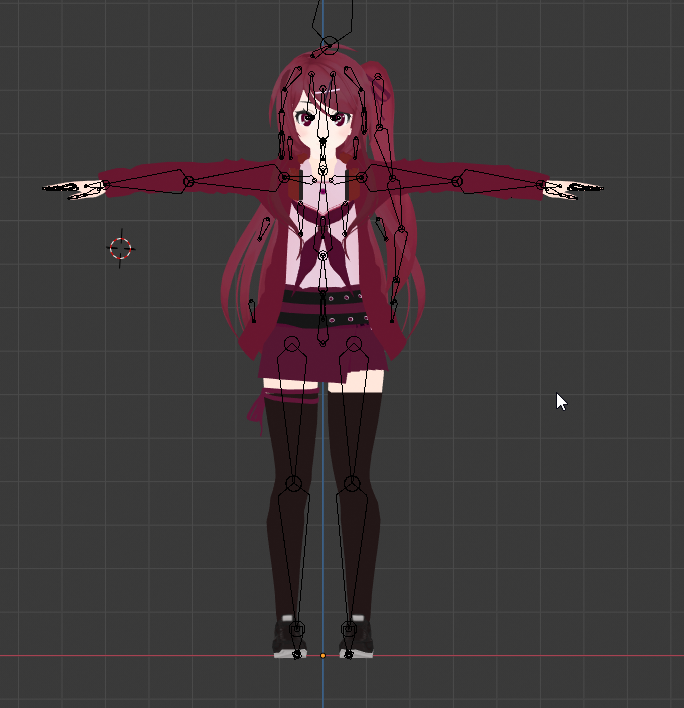
so i have this rig set up right now that should be fairly similar to my actual proportions
but it has some major issues
this is what my sleeve looks like on the unproportioned avatar right now
but on the new one, it looks like this
ive been shortening the length of the arms so that way they look proportionally correct while maintaining FBT proportions (for the top avatar i didnt even touch the arms, just the legs)
but it looks like that doesnt set well with the game's IK
and id like to figure out this issue so i dont have freakishly long arms that clip into the ground >~<
any tips?
theyre really terribly long in game as well and its irritating me
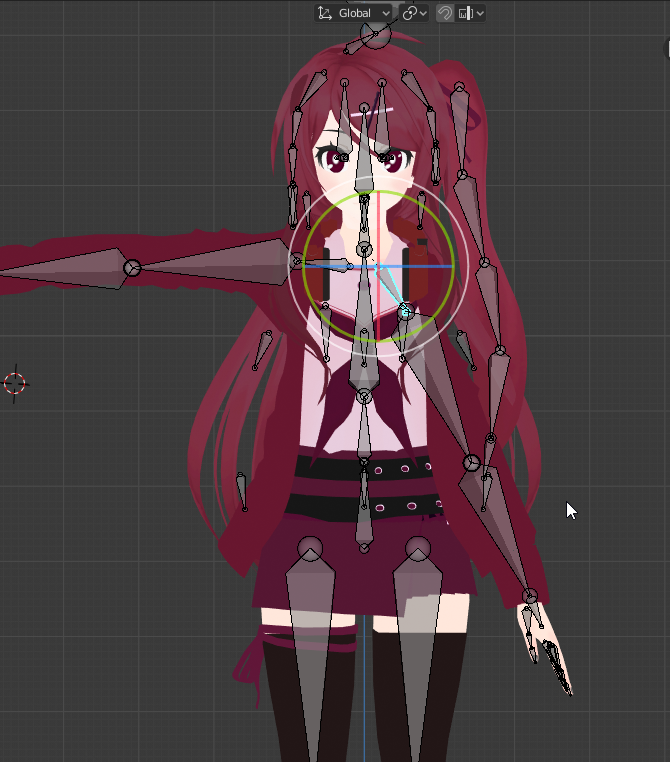
in blender the proportions look fine when i rotate a shoulder
but in game...
my hands are clearly reaching too much!
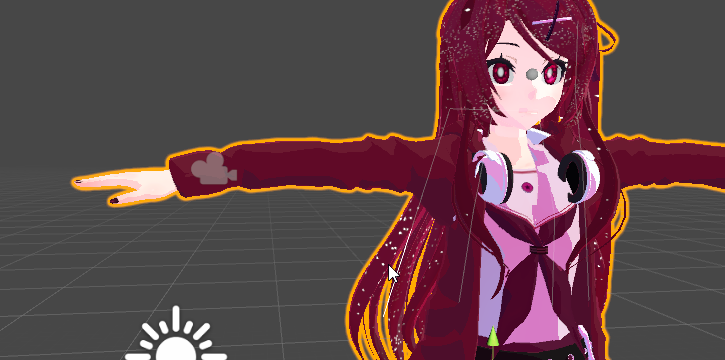
they also dont overstep in unity either
so im really not sure whats wrong
im gonna take a stab and say that it could be the hip
ive shrunk and raised it as demonstrated in the full body demo
adjusting the hip still didnt work
hmm...
okay
so ive got this blue man stalking me
im gonna try to get my rig in line with thiis blue man as much as possible
see what changes
currently have this
fading verge
Fullbody proportions is actually about the ratio between your wingspan and your legs. Just adjusting only one of them will make the other go in the opposite direction.
Find the proper balance with them
steady patio
thats the thing
ive changed the arm lengths a lot and theyve remained the same proportionally, nothing changed with the legs either
its like ive changed nothing at all
so in the context of legs, do the measurements begin with the head of the upper leg and end at the tail of the lower leg? or do they end at the head of the ankle?
thats what confuses me
because if i were to change the arm length right now and make them shorter, they would still end up in the same position proportionally
else one of my previous edits where i shrunk the arms dramatically would leave me unable to touch the ground again
but in all cases i could stick my entire hand wrist-deep beneath the floor
crisp tendon
Did you watch @fringe citrus 's video ? Not sure if everything is still applicable with the FBT Ik changes
steady patio
funny you ask cuz i did ^ ^` even measured out my own proportions and everything
like okay
this obviously isnt normal
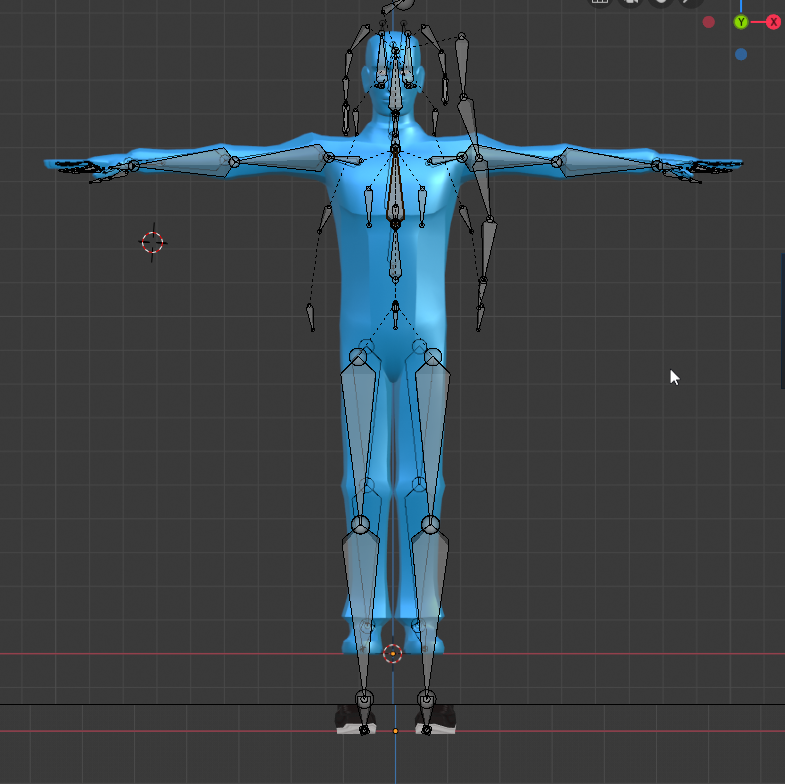
matching my rig up to the prefab avatar again and apparently my legs are too long...
crisp tendon
#animeproblems
steady patio
exact;y
im just confused as to why any changes i make to the rig appear to make no difference
this is the exact unedited rig thats uploaded above and it still looks terrible despite having the obviously long legs
im questioning the proportions of this avatar
thats "okay" as in it works as intended...but is it really okay?
(its worth mentioning that i do not have my full body yet so ive been testing as you would with 3 point tracking)
like not only does it obviously look wrong, but stretching out my arms in-game did not result in them stretching out all the way
they bent a lot
yet i bring out something like Y bot and it works just fine
what the hell am i doing wrong?
oh, also, small issue: i set up my view point properly but in-game my height is maybe 2 or 3 inches above my viewpoint
have to use playspace mover to move down to my view point which then auto-adjusts for me
 teal badge
Is there a way to get the proportions VRC sees in your trackers out?
steady patio
no idea
i feel like it would be more clear if i had FBT, but i dont want to wait until tomorrow to really unpack everything
maybe my rig configuration is fucked up??
???no?
legs look fine to me..
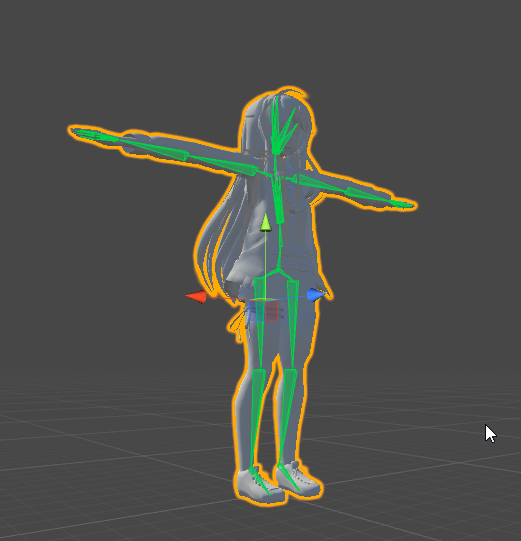
legs look fine right here...
its doing it again!
looks like vrchat is enforcing it to my wingspan
maybe i should just let it be??
idk how id go about adjusting this avatar to make it look proper, though
im gonna try manually adjusting the hand pos
see if that enforces it in game
if it works but the proportions are still off (cant touch the ground,) i guess ill go with the true proportions and adjust my avatar as best as possible to look normal with the,
m
steady patio
im so close to getting it right
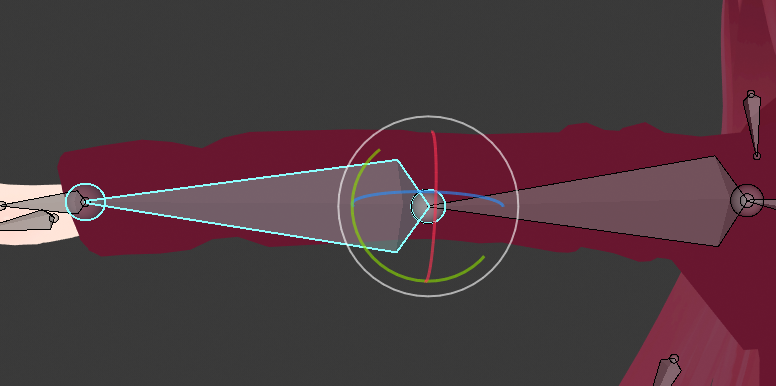
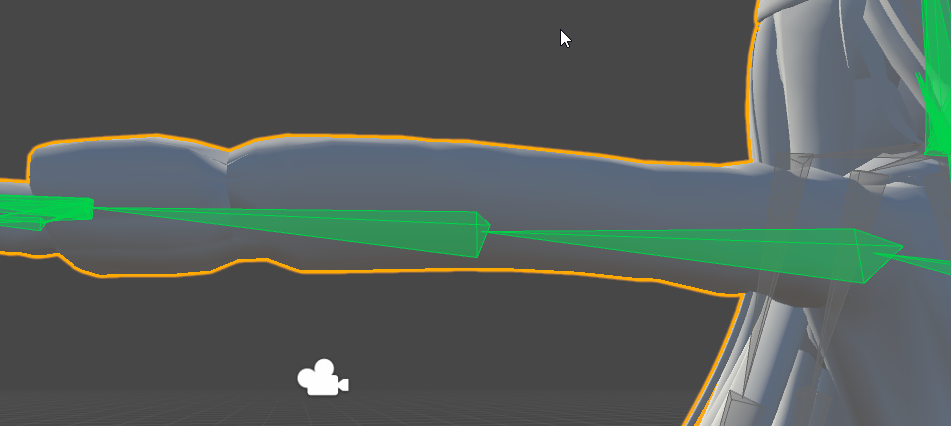
unity is putting my eblow joint at the wrong position
resulting in bad elbow bending in game
what now?
fading verge
Move the bone position in blender
steady patio
really?
backwards more?

ill try...
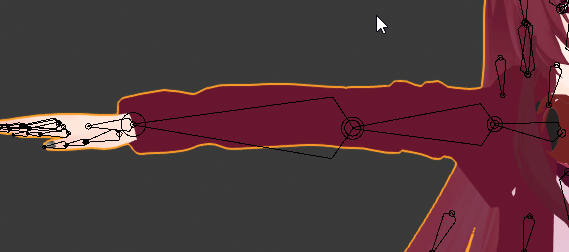
hopin that this works
dear god ive been doing this for so long
 fringe citrus
Every time you reimport, are you flushing the old rig config?
 misty agate
im going crazy trying to fix this. in vrchat my hips keep thrusting forward making my avatar look like a table in desktop mode. it start off fine, then goes bad. ive tried re rigging with different rigs, still does it
steady patio
yep
ive been closing the entire projevt, deleting the old fbx and replacing it
finally made changes now
fringe citrus
Then set humanoid rig type to none, apply, then back to humanoid, apply?
fringe citrus
if you don't... it won't accept the new bone lengths
it'll just stretch to old rig config
steady patio
OH SHIT! fuck me, thank you so much
fringe citrus
👍 😉 hope it works
steady patio
i didnt know that it would do that
fuck that explains so many things
not just on this project
alright, gamer time. if this doesnt work im probably gonna either cave my skull in or go to bed and try again tomorrow
fringe citrus
Might need to go and retest some of your other changes, I had a friend try to incrementally adjust more and more because they didn't see the changes take hold.
By the time they flushed the rig config the final result was a huge overshoot of the needed changes
steady patio
i have so many FBX files now...
fringe citrus
@misty agate hip bone is too short
Or too long depending on if you want the hip to have IK or not
in that range it'll have IK but will pivot with huge angle changes
misty agate
the avatar works perfectly in full body
fringe citrus
Yeah it'll work fine in 6-point tracking, but in 3point or desktop will mess up like that
If you make the hip bone about 3x longer it should fix it
I tihnk about 3x lemme look at screenshot again
misty agate
okay ill give that a shot
fringe citrus
Yeah 2x might be enough, 3x to be safe
or you can go all the way to zero and it'll not have hip IK if you want 1:1 hip control in FBT
but at the cost of less spine bending
misty agate
fringe citrus
I'd say go even a bit longer
like another bit longer the same amount over again what you just lengthened it
misty agate
fringe citrus
Just a biiit longer
misty agate
fringe citrus
Yeah I think that should fix it
misty agate
okay ill give it a shot. quick question: on bones, what does Envelope do?
because right now envelope o my hips are 0.864
dont know if i should set it to 0 or not
fringe citrus
It's used for weighting and the range of influence, but it shouldn't matter if you already have your weights assigned
misty agate
ah okay thanks
fringe citrus
It's an alternative to vertex groups, but I don't even know if vrchat supports it
could bake it in to vertex groups, but that's off topic, in any cause I don't think you have to worry about it
misty agate
okay lol, and i assume roll should be at 0 for everything?
fringe citrus
Yeah, I've heard it matters but I haven't been able to reproduce problems with crazy rolls set
You can reset them all at once with I think Alt+R when in edit mode on the armature with all selected
fringe citrus
good luck, though you won't see issues in FBT in any case, you'll have to be in desktop or 3point for it to have the wobbly hip problem
misty agate
yeah thats where ill test it
ive heard applying as rest pose in cats messes up the armature. do you know anything about that?
fringe citrus
Applying as rest pose will change the rolls to be nonzero I think, but otherwise I don't know what it would do to mess up the armature
misty agate
okay, a lot of people have been telling me that might be the problem with my model, because i have applied it as rest pose in the past
fringe citrus
I use the feature often and it doesn't give me any trouble
The "fix model" combined feature is more likely to cause little issues if it deletes unweighted but important bones or something
fringe citrus
Ah, probably didn't go long enough then
misty agate
dang, should i go x2 again? lol
fringe citrus
I was trying to guide you to the range where it would be as short as possible but not have that issue, but personally I'd have the root about half way between the thigh roots and the spine root
Or even lower
but make sure it's above the thighs
Here's a reference for how I do it when I'm following the "standard procedures" (which I don't actually follow on my main model)
(adding shoulders just for added reference in case* someone has shoulder problems too)
Btw you might notice that after you finish fixing all this that it works fine but FBT hip control feels a little rubbery, if that bothers you then you'll have to go the other direction to zero hip length but that's not "standard procedure"
misty agate
so youre saying smaller hip bone than the one i had at the start
fringe citrus
not just smaller, the root must coincide with the spine root. That'll give you direct control of the hip in FBT and it won't pivot like crazy in 3point and desktop
misty agate
okay so ill try making the bone bigger first, then if its still broken then ill go the other direction
fringe citrus
If you do that, make the tail of the hip bone slightly higher than the root of the spine so it still has the correct orientation (though the tail is only used for orientation and length there doesn't matter)
misty agate
so making it bigger: put it here?
fringe citrus
Yeah, some people are really against using hacky rigs, and unless you're up for possibly re-tweaking every update I'd just say go with the non-zero hip method
It looks good to me, though it did before too
hopefully that works 👍
misty agate
and the other way put it here?
misty agate
fringe citrus
still non-zero
you would have the hip not connected to the spine
then drag the tail of the hip bone up a little
then copy paste the values from the spine root and paste into hip root
but again, very non-standard
misty agate
i am so very confused lol
fringe citrus
the big one is spine, tiny one is hip
and on spine, it can't be connected to the hip
or you can't have the tail of hip different from root of spine
fringe citrus
That should do it, though again, it's non-standard and you'll end up with a stiffer spine chain in exchange for 1:1 hip control
fringe citrus
😁 no problem
misty agate
also, not as important but my head also starts doing this. any reason?
fringe citrus
Starts doing that as a result of these edits or was always doing that?
misty agate
always
when i switch into the avatar, everything works fine. then after a little moving around the hips thrust forward and the neck jolts out
fringe citrus
Sounds like the IK is trying to compensate for the spine chain being too long for whatever scale you're operating at so it's trying to crumple it in but I don't know why it would do that in desktop mode
That's just speculation
misty agate
hmmm okay
fringe citrus
Your armature isn't so different from the tpose-new.fbx in the sdk 🤷
usually people have the problem of a chest bone that's too long, but yours isn't so long
misty agate
okay the longer the hip gets, the better it gets
fringe citrus
Yeah if you can get it how you like it with a longer hip I'd recommend that instead of a zero hip
 oblique vale
Heya, is there anyone who'd be able to help me with some issues I'm having with an furry/anthro avatar?
weak oar
They rig/work the same way as anything else really
oblique vale
I'm having an issue specifically with the digigrade legs and the hair. :/
fading verge
Ask your questions, post your problems
 crisp apex
Any of y'all got a bit of time? Need to pick someone's brain on something.
steady patio
@crisp apex s u r e
 drowsy wharf
@oblique vale Don't ask to ask, just ask. People with the info you need could jump in and out at any time.
 lilac plume
New issue, how in the world would I fix something like this? His lower body is sticking out way bad. I thought adjusting my weights would fix this, but apparently not 😩
 bold locust
Are you in full body? @lilac plume
lilac plume
Nope
bold locust
It could still be your hips anyway, but thought I'd ask. Did you use Cats on this model?
lilac plume
I thought I had, but at this point I'm honestly not sure
bold locust
Silly!
Well, it basically sets everything in the way it's best to be in most cases. There are still some models that Cats doesn't like.
But I'd have to see the rig.
lilac plume
I've been told this rig is terrible. I've had to do a lot of work on it ;
bold locust
There are a lot of bad/complex rigs. lol
lilac plume
https://www.deviantart.com/shrimpsupreme/art/KH3-Isa-and-Saix-Download-Read-Description-806558118 This is where I got the model
 bold locust
I'll look.
lilac plume
Thank you ♥️
bold locust
Oh neat. So this would take more effort to even be able to use Cats for. You're right. It is a little messy.
lilac plume
Yeahh
The adjustments I've made make it useable in Cats, and I've fixed almost everything that's gone wrong with it--this is the last egregious thing
bold locust
Are your hips straight up and down?
lilac plume
Yes
the bone is all the way at the front of the model, don't know if that would affect it? I had tried to place it in the center but apparently that change didn't save in my various revisions ;
bold locust
It would probably have some adverse affect if it isn't in-line with the rest of the spine.
lilac plume
Gotcha, I'll try fixing that.
lilac plume
Success! Now I just need to figure out what that one vertex is attached too 😂
bold locust
lol Whoo~
crisp apex
Apologies for taking so long to get back.
The issue I'm having is like... the pinky, when it turns in or out, it moves a lot of the hand with it. Its as if the pinky bone is continuing down into the hand itself.
bold locust
It's a weight painting issue. You'll need to go into Blender and remove/reduce the weights of the vertices further down the hand in those vertex groups.
It's common for some of the Code Vein models you can find. Some don't have the issue because they kept those two bones that were parents of ring and pinky.
@crisp apex
Unless your problem is that you have those two bones assigned as the first bones of ring and pinky.
Then your ring and pinky should have 4 bones, instead of 3. So skip the first one and assign the last 3.
crisp apex
Aye, its a code vein model I'm using.
I'm sure all 5 of the digits have 3 bones each, as I've added colliders to each. The bone at the top seems to have no width though
crisp apex
So you'd recommend trying to remove the weight of the vertices?
bold locust
That's how I'd fix it. The ripper you got yours from probably merged that first bone into the second but didn't check it.
So you'll have to remove those weights from the vertex group of the first pinky and first ring.
You'd have to mess with their hands in rig config to make them look nice anyway. Code Vein hands are posed funny by default.
crisp apex
Yeah, that worked. The whole hand doesn't get malformed anymore. 😄
Just need to work this out now. https://i.gyazo.com/d0b2077622399ecef9a40e9480c3150d.gif

 glass panther
The bone is not weight painted I think, should be easy to fix.
crisp apex
Yeah... I had to google how to change the weight of the vertex group hue.
glass panther
You got this :D
crisp apex
Alright.. somehow I didn't break the model and it looks decent. Cheers man.
lilac plume
re my earlier post: https://cdn.discordapp.com/attachments/390924372782612480/645213095509098496/VRChat_1920x1080_2019-11-16_03-45-31.637.png
I have fixed EVERYTHING except this one stray line shooting off. I don't have any stray vertices and as far as I can tell it's not attached to anything in particular? The line shooting off doesn't appear in blender or in unity.

no matter how I move the limbs around
glass panther
I really couldn't think of anything else but those verts being painted to a very wrong place. Maybe someone else has some good advice for you. Otherwise I'd say keep checking for spots on the body etc. You might be missing it.
lilac plume
I mean, if that was the case, the line would show up when moving the model in unity and in blender :(
bold locust
@lilac plume Try checking if it's just not weighted to anything.
If it's not weighted to anything, it'll be stuck where it should be had you been in your resting pose.
Example: I have a vert on the hand that isn't weighted at all, that vert will stay where ever it is in Blender because nothing is affecting it.
An easy way to find that vert is to go into pose mode and, say, move your arm.
The vert that isn't weighted won't move.
Then you can add it to whatever vertex group it should be a part of.
lilac plume
Like I said, I've moved all the limbs around in blender and in unity and no vert is showing behavior like this, it ONLY shows up in game
I have no stray verts, and no unweighted ones
bold locust
Sorry about that, @lilac plume . My reading comprehension went out the window. I'm thinking about it. I wonder if it's a shapekey.
opal aurora
@lilac plume i remember having an issue like this ages ago, i was decimating a model and suddenly came across this, if i recall correctly it was somewhat related to shapekeys, but more-so a broken shapekey, that just pulled a few faces to the floor, try checking all of your shapekeys when you can
I'm not entirely sure of how i fixed it, but i think i ended up clearing out some odd edges that were causing such, and it wasn't normally visible in unity or blender much like your case
crisp apex
I had a similar issue earlier with the weight painting thing. I found that if some parts were painted incorrectly they just shot off into the distance.
I was only able to see it when I was using the muscle settings in unity.
bold locust
You can remove verts from the influence of shapekeys. Luckily, it doesn't look like a corrupted shapekey. It'd be much worse.
 fossil copper
who rigs with maya?
fading verge
Me
opal river
can someone please give me a list of requirements/things I need to look out for when setting up my rig? like do all the legs bone have to be in a straight line from the front, should the knees be bent forward, how should the hips, spine and chest bones be aligned, and such
crisp tendon
Unity will flag your humanoid rig configuration if it does not meet the Mecanim requirements for a humanoid. Please read and be familiar with this part of the Unity Manual when setting up your avatar: https://docs.unity3d.com/Manual/ConfiguringtheAvatar.html ...
opal river
okay, I think I got most of that covered, I meant more like the actual alignment of the bones
weak oar
@crisp tendon If you have access to edit that article, can I recommend having an actual armature tree added to it for clarity?
opal river
that'd be really helpful too, preferably with the names that unity/vrchat sdk expects
fossil copper
@fading verge I need help with rigging my character
opal river
https://i.imgur.com/c0UcUGq.png
https://i.imgur.com/0pqnTEf.png
trying to make myself a template rig... no idea if I'm doing this right

 fading verge
it looks fine not sure if i see bones im not the best person to ask this stuff
ive made a few avatars
im only making them move in myra
fossil copper
you mean maya
fading verge
ya
fossil copper
I use maya too
weak oar
Breasts definitely aren't a rig requirement, lol, also hip should be smaller than spine typically. Other than that it looks fine.
opal river
ok
naive tree
@opal river there is a tpose fbx armature example in SDK, from what I've found if you want a good sized hip then legs need to be in front (and above) of hips at least a bit
lilac plume
@opal aurora it was indeed the shapekeys! Thank you!!
opal aurora
Glad you got it fixed
 trim vine
Vrchat is dying
naive tree
it has more avg. players than a year ago, how is it dying?
fervent hornet
10k on rn smh
 opal aurora
@sly mirage could one of the bones not be properly weighted to the appropriate eye?
echo drift
is setting the bone length easy to manually do in blender? Like how the message for bone length zero to get FBT to work
because I only know to use the fix button for the cats plugin to get the bone length to say zero in unity
opal aurora
I don't think that error is necessary anymore, but it occurs when a bone overlaps another, unity doesn't know what to do and hands out that error
echo drift
oh thats right, I forgot it's not necessary now
Lastly, that avatar that I've been figuring out for a very very long time now. I can safely say it was a rigging issue. I made a stick figure avatar and tested it to be rigged, scaled down to two feet tall then hunched over.
The initial Gnarl avatar that I was trying to rig was back during earlier version of VRChat but I could assume it was all me and self teaching myself Blender and Unity. But here it proves that I can have a hunchback character without hunching over myself.
Proof in Unity
fading verge
Try an enforce t-pose?
echo drift
Lol, that's just it, enforcing the t-pose would counteract trying to get a hunchback character without having me hunch over myself
 sly mirage
@opal aurora when using cats for eye tracking for some reason the right eye bone it made was lower than it was supposed to be and not the same and the other eye. i have checked the weights to the eyes lik 8 times. anyways i made the positions the same but it doesnt want to work properly. for some reason my eyes are static and there is no blinking even though they are both set up correctly in unity
echo drift
I wish I could help you right now but I would like to get some sleep. I had a long day of getting a hunchback avatar to work and I feel accomplished but can't keep my eyes open.
sly mirage
Q_Q
fervent hornet
If you have no blinking at all then make sure your rig setup is correct and you have the 4 required blendshapes at the top of the list
fervent hornet
Rename the correctly placed eye bones to the required names (the names cats uses) and just use them. Dont rely on cats to place your eye bones if it cant do it
sly mirage
so wait @fervent hornet when you say that do you mean rename then and place them in the correct positions? arent the righteye lefteye supposed to be placed pointing the same direction as the head? i cant just rename Eye_L and Eye_R to LeftEye RightEye and call it good can i ?
fervent hornet
So vrchat looks for the eyes via bone names, so as long as you have the eye bones in the right place with the right names vrchat will use them
sly mirage
are you looking at the pictures
the Eye_L Eye_R are in there default positions. Do they need to be changed? thats all im asking.
@fervent hornet
they are not pointing up and don they are pointing slightly to the sides. does that matter?
fervent hornet
Yeah if they are tilted off thats going to cause issues
So I would make sure they are pointing straight up like the head bone and then name them correctly and it should work
sly mirage
@fervent hornet what do i do about the blinking?
fervent hornet
You need 4 blendshapes at the top of the shape keys list, if you make a blink blend shape for each eye cats can do the rest
sly mirage
is there a way for me to check if this is working in unity?
fervent hornet
You can check to see if the blendshapes work but the only way to actually test the eye tracking and blinking is in vrchat
crisp tendon
gorgeous
sly mirage
well idk whats wrong after reimporting the model after doing what you said @fervent hornet the blinking and the eye tracking is not working in vrchat. idk wtf the problem is i have everything set up the same way i would any other avatar and it just sits there and doesnt move. my mouth moves but eyes will not
dun dun dun.....
what could it possibly be weight painted to
fervent hornet
Make sure when you change bone stuff you redo the tpose in unity
For weight painting you can use auto normalize to clear weights from random stufff
sly mirage
never give up.
so it was weight painted to the eye lid bone
nope didnt fix it
im at al loss
im at a loss i dont know what wrong
opal river
@naive tree okay, found that fbx, thanks. but that armature is in direct contrast to what you said 😄
naive tree
Umm hips above legs and behind them a bit
opal river
yeah you said the opposite
 opal river
no problem, was just confused
is there a reason that hips and spine are not connected?
and spine and chest
and all the finger bones
naive tree
No clue
opal river
okay
opal river
also does it matter if my armature uses XYZ Euler and not Quarternion like the example armature?
opal river
https://i.imgur.com/stAdNhW.png
https://i.imgur.com/hWILk0H.png
https://i.imgur.com/u6JU91K.png
https://i.imgur.com/GcONwm3.png
https://i.imgur.com/pcd6RXP.png
does this look okay for a template?




 naive tree
move hips behind the legs, or you'll have an issue with hip being thrusted forward (think only fb issue)
to red spot
opal river
ok, the hips bone should still be straight?
naive tree
ye



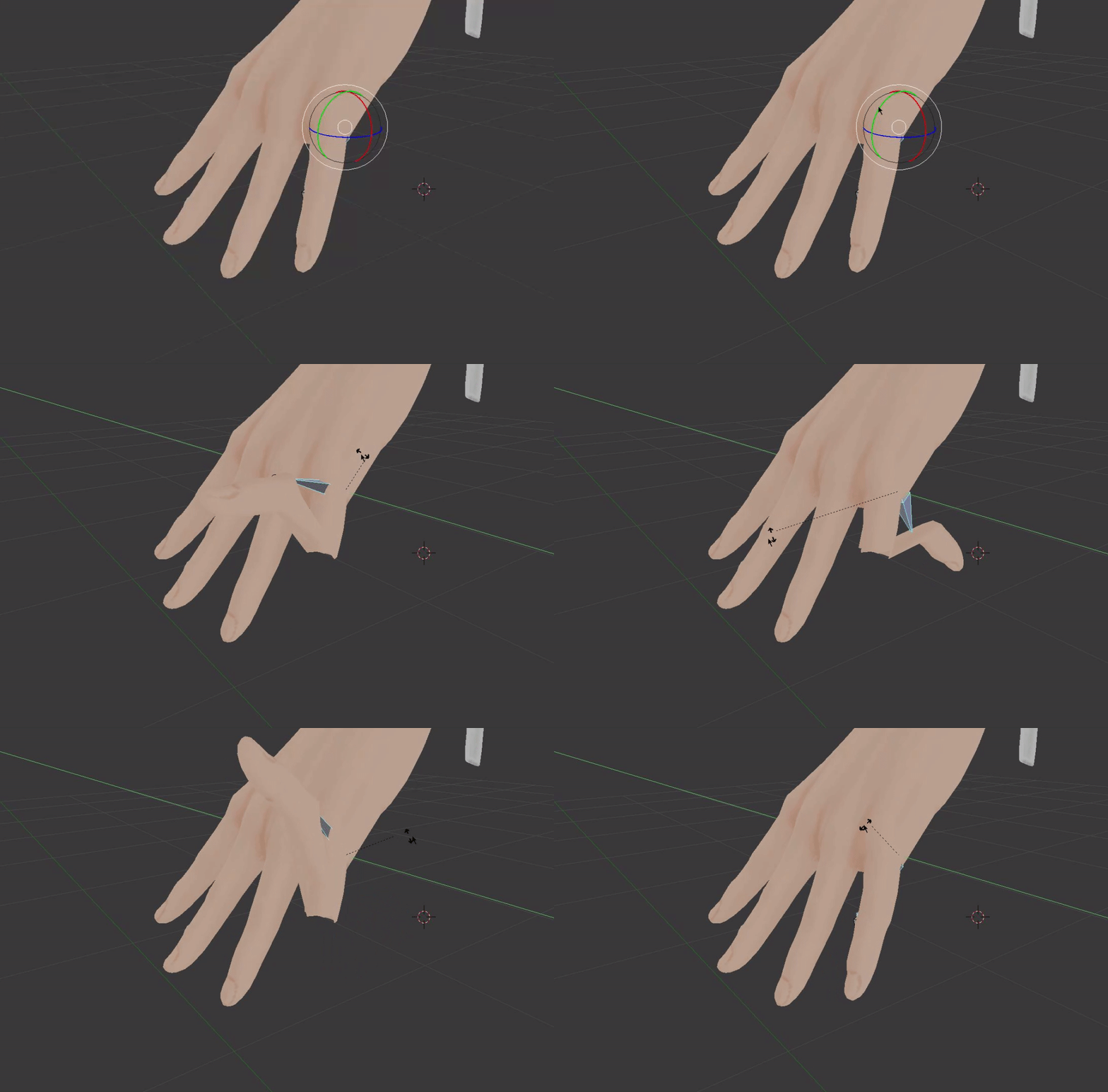


 naive tree
yep
naive tree
haven't tried with them not being connected, don't think it matters
opal river
okay, cause in either the tutorial avatar or the example armature they weren't connected
crisp tendon
Hip bone needs to be in front of the leg bone btw
naive tree
no it doesn't, in tpose example it's behind the legs, and also that's how I fixed my hip thrust issue
behind and above
crisp tendon
i've always found it works best a smidge in front of the leg bones
if it's 15cm in front the yeah you'll have hip thrust problems for sure
opal aurora
Guess it's subjective depending on the model
sleek isle
reverse hip bone fix everything. idk. depend on the model
opal river
reverse?
sleek isle
bold locust
That's cute.
I'd agree that there is a lot of subjectivity when it comes to a working rig in VRC. I've had some crazy rigs that work perfectly untouched but would be utterly trashed if I followed the expected parameters.
opal river
huh, okay... I thought there some set "rules" that needed to be followed
I mean, having the hip bone upside down would make sense because of the pivot point I guess
bold locust
If you're making a model from scratch and know how everything is going to work, then sure, follow a set template. But if you're grabbing models from all over that are made by different people with different methods, then a template wouldn't be the most helpful thing ever.
bold locust
Then, by all means. A template will help your workflow, I'm sure.
opal river
I feel like for me that's the best way to learn everything
so generally speaking, should the armature bones be the same size of the bone/area they're meant to "represent"?
like, the chest bone roughly the same height as the ribcage, hips same height as the pelvis/hips, upper leg roughly the size of the femur?
I'm trying to understand the logic behind everything, not just blindly following an example, that's why I'm asking so much
bold locust
Sometimes is depends on the affect you're trying to have. But usually there's a place where it just makes sense to have the bone's pivot point.
opal river
mkay. so I should more think in terms of pivot points?
bold locust
Probably. At first.
There are some interesting effects you can create by having bones in seemingly odd places.
opal river
for instance?
bold locust
But at first, think of it realistically.
Well, there are instances where deformation is intentional.
Off the top of my head, if you make a strand/tube that is connected at two points on the model, the best place for the bone(s) may not be on that strand/tube.
I know I've seen odd things like that.
Oooor if the intention is to create an effect with custom IK.
Sometimes those bones are in the middle of nowhere.
It usually make sense when considering the effect, but I'd stick to your usual pivot points.
 solid marten
How to I import my ampharos avatar as a humanoid rig
weak oar
You bring the FBX into Unity, set the Rig to humanoid then assign the respective bones.
drowsy wharf
@opal river bone sizes help YOU, but Unity does not see endpoints of bones, only the head and children/connections to others.
So the actual size of the bone doesn't matter as far as Unity is concerned. (unless bones are connected, in which case the head of the child bone won't be in the right spot, though that's not exactly due to bone sizes)
@opal river Also an example on an abnormal pivot point is the "shoulder" bone (which is more of a clavicle/shoulder blade btw)
Normally that rotation starts right next to the neck (put a hand on the clavicle and move your shoulder in a circle), but a good position for the shoulder is often about 1/3 of the distance away from the center for average humanoid models.
At the same time, you could alternatively run it from the normal position and have clavicle/shoulder blade bones for more detail (just not needed in most situations and would require some differing setup)
opal river
@drowsy wharf so should I keep my bones all connected when I export the model?
or no?
drowsy wharf
anything that is head to tail (connected) it's generally a good idea
opal river
so like hips > spine > chest > neck > head for instance?
drowsy wharf
I'm...pretty sure it wouldn't actually affect it if you did not however
yes, arms/legs are also usually connected, but not the shoulders to the chest, or the fingers to the wrist for example
drowsy wharf
it shouldn't have an effect, but it does help with visual setup in blender and testing movements is clearer (won't grab the wrong part for example)
opal river
yeah, I was wondering, cause apparently CATS does separate all bones when you "fix" the model
thanks for the explanation
weak oar
Yeah, why does CATS do that? I normally connect all the ones that should be connected so that they move sanely when rearranging things.
opal river
yeah that would've been my thought too
bold locust
There's a checkbox in cats for that. But, generally, it doesn't matter if it's connected for the use case of a VRC avatar. It just makes it easier if you're trying to handle IK in Blender. All that matters is where the head of the bone is. The tail only ever really matters for something like Fingertips.
Ah, I will amend that the Full Body fix is still necessary in most cases. So the rotation of the head for the Hip bone and the Leg bones does matter.
naive tree
full body fix (from cats) is not needed at all
I personally prefer still using neck fix, as the avatar looks way better with it when moving head
bold locust
That's untrue, @naive tree
The only thing VRC added is the neck fix. So adding it yourself is silly.
All of my full body models work exactly the same and trying to upload models without are still broken.
So the full body fix is still very much necessary.
naive tree
then it's your armatures fault
and no, the fullbody is NOT needed, if your armature is set up properly
as a reference you have tpose fbx in SDK
bold locust
Yes. Mine and every other person that's discovered the same thing. lol
naive tree
Instead of calling it "not working", might want to look into your armature instead of pressing 1 button.
bold locust
My armatures are all perfectly fine. In fact, they seem to function better than most peoples WITH the full body fix.
fervent hornet
Flipping the hip does, at best, nothing for my models in testing.
naive tree
Yes, they work with full body fix, but saying that it's REQUIRED is just false.
bold locust
I do it manually most of the time. Might want to do some research before trying to correct a person that's done plenty.
naive tree
And just shows that you clearly don't have proper armature set up for fb.
bold locust
Lol When every other person using the same models as I do has wrecked rigs and mine are perfect, I think I have room to say I'm correct.
¯_(ツ)_/¯
naive tree
send me a screenshot of your armature that's broken in fb
orto front and side views
and I'll tell what's your issue
here, no fb fix and works perfectly fine
was having issue before, as my armature wasn't set up properly
bold locust
I think you're missing the point. Mine have 0 issues from start. With zero extra effort. If I have to waste time magicing a model because vrc says fbt fix isn't necessary when simply adding it instantly fixes everything, then it must be necessary.
naive tree
What you're saying is by definition wrong. It's not needed, it's not hard to fix, and it puture proofs your model from any IK changes they make that might break models.
fervent hornet
Main problem is they are going to continue iterating, what may work now or fix something now might break it in the future
bold locust
If I can just flip bones or click a button and have models working perfectly fine but someone says "oh you should fiddle with your bone position for an hour per model", I think I'll just do it my way.
naive tree
It takes couple minutes.. even less.
bold locust
Yes, that's what I see when I look in this channel. lol
A couple minutes.
Opposed to a few seconds.
naive tree
These are help channels for mostly beginners or people having issues.
If you have decent experience, then it doesn't take long. Fixing once or twice gives you the idea of what to look after.
bold locust
Not necessarily. When every model is different.
naive tree
They're all humanoids for most part, and are basically the same.
bold locust
When you upload one and it's off a little and you have to make a minor change and start back over again.
naive tree
I've been making avatars for 2 years now. They are all the same.
bold locust
Basically the same. Wow. No.
I bet you think you can just copy paste dynamic bones and get the same effect no matter the model.
naive tree
You like to jump to conclusions that aren't part of anything
 cinder pond
how you do make only hand avatar?
naive tree
No? The armature requirements are the same for the all humanoid models, they FB requirements is the same.
fervent hornet
@cinder pond You need two arms, so make the one you dont want invisible
naive tree
Bend in knee. Bend in elbow. Hips above and behind legs. Not too long Chest. Not too long legs/arms.
bold locust
You're a wall. And I've seen incorrect answer often enough from you to just sit back at this point. I'll keep using the fix and having all of my models work instantly.
¯_(ツ)_/¯
naive tree
Well, you're being just plain wrong and can't admit that.
bold locust
Hypocrisy.
naive tree
Plus trying to drag in completely irrelevant arguments
cinder pond
@fervent hornet I need set up two arms bone. that is it?
bold locust
¯_(ツ)_/¯
naive tree
Except what I'ms aying is correct.
bold locust
It's not irrelevant.
naive tree
Yes, especially the dynamic bone comment
How is that even relevant?
Just can't admit that you're wrong, that's all
fervent hornet
@cinder pond Your rig needs to be a normal humanoid rig with everything attached (ie shoulder, arm, elbow, wrist, fingers) for both sides. Just make it so only one side has a skinned mesh to follow the bones, while the other side has the bones but no mesh around it to displace
bold locust
You just can't connect the dots. Here. Hair doesn't flow the same with the same settings on different models. Legs won't always bend the same. Backs won't always bend the same. Arms won't always bend the same. If they did, using Final IK to troubleshoot crazy cases of broken rigs wouldn't be necessary.
Differences in weight painting means a standard for an armature isn't really possible unless you go back and weight paint that model from scratch. IDK. Maybe all you touch is MMD so you think your standardized rig applies to every instance. It does not.
Hard to imagine every modeler since the beginning of time uses the exact same rig.
I wonder why they'd ever need to have a variation. 🤔
naive tree
I'm clearly talking about Vrchat, and the work pipeline for having a fullbody compatible, not broken avatar, when it comes to armature is making sure all the needed points are met, and you do it with all models. The problems that occur are not difficult to troubleshoot, as long as you understand how the IK works. All the requirements apply to every model, the fixes/adjustments will not always be the exact same.
bold locust
I'm sorry for getting grumpy. I mean it. But I just do not agree.
naive tree
Well, we can just end there then 🤷♀️
bold locust
I'll take what you said under advisement though. I'll look into it. Just using the full body fix has always worked and been an easy fix. Maybe there's an alternative. I went out of line defending my stance though.
¯_(ツ)_/¯
 stable bloom
anyone know how i can fix this? please.
naive tree
weightpaint your mesh
stable bloom
i can do it in unity, or do i use blender?
fervent hornet
Weight painting is a blender thing, you can import the fbx if you dont have a .blend
stable bloom
oks, thank you.
naive tree
or you can safely remove that mesh part, it's skin under shoes which is never seen
 twilit geyser
Is a flipped hip bone still the work around for full body avatars?
bold locust
It's in the air!
naive tree
you don't need any workarounds anymore, but if you're lazy then you can still do it
it's an optional thing for a reason now in cats
bold locust
I still do it, but I did say "most cases".
I am aware that some models don't need it.
naive tree
if you do Fix model, then I suggest dragging down the bottom of hip, or else it (general hip movement) will look bad in dekstop and regular vr
bottom of hip needs to be above legs and slightly behind (apparently works also if slightly in front) smh like this: https://cdn.discordapp.com/attachments/635833598527799297/645810013192847360/unknown.png

 twilit geyser
Ah, mine are above, but inline.
stable bloom
so, i got to this part, what do i do now? it seems to be fine? 🤔
naive tree
might not be an issue if it's inline, but if you do have an issue with them thrusting then gotta move it a bit
@stable bloom move the leg, it's mesh under the shoe
fading verge
Question, if I move the position of a mesh does it affect how the bones behave?
twilit geyser
Yeah, the hip bone angles backwards and does weird things, but straightens out when walking.
stable bloom
welp i guess i cant 🤦♂️
i dont find any guide at how to do it, but i managed to get to the mesh below, and weight it, still the problem persist, at half the lenght, or maybe i did it in the wrong place i dont know
😢
fading verge
Ugh, can someone help me out with something? Anyone know how to use CAT?
Heres the eyepatch I want to add to my avatar, but it has all these extra bones.
Do I just merge the armature? I did that and when I tried to rotate the neck bone or head bone, the eyepatch didn't move.
twilit geyser
I have my Hips->Spine->Chest all marked as connected. I see the example tpose-new in the SDK does not. It is necessary to match that? It seems odd to not have them connected.
opal river
as we talked about yesterday apparently it doesn't matter either way for vrchat
tough robin
@fading verge If it doesnt need the bones I usually just delete its entire armature and weight paint it on the body part I want it attached to
Also, dont ask the same question in multiple or inapropriate channels
 spare thorn
anyone have any resources or tutorials related to rigging models with hind legs that will be compatible with VRChat? 
bold locust
Like a taur? @spare thorn
spare thorn
yeah something like that
bold locust
There's not really any tutorials for it, because the setup may be relatively new. Or, at least it was new to me. I think it's been thought of before. But you would need a lot of setup and Final IK if you want anything worth your time, tbh.
It'd only really work for regular VR/Desktop also.
spare thorn
yeah that makes sense. I feel like I've seen it before but idak. Might be able to achieve something that looks like them but aren't idk
'ppreciate it
bold locust
@spare thorn Do a search for a user named Voxian in this channel and scroll through what they talk about a little bit.
spare thorn
aight
stable bloom
anyone can help me fix those feet on blender? i just cant find the way to do it, ive tried separating materials, hiding the shoes, weighting the feet, then join meshes again, multiple times, but the problem persist on unity, please.
stable bloom
welp, i fixed it the brute way, and i deleted the bugged part
 stark musk
How do I do symmetrical rigging in Blender 2.8?
I used to just be able to press "W" and symmetrize the bones I wanted.
weak oar
Enable mirror in the Tool options on the N menu
lofty topaz
What do I have to change on this armature to make it FBT compatible?
stark musk
ty @weak oar
Also just a question for you as well, but if I have a model with no fingers, should I give it finger bones** @weak oar
weak oar
Hmm?
stark musk
Sorry, accidently pressed send before I was done typing lol xD
weak oar
Yes, always model the whole armature, even if you're not going to use it because some parts have to be mapped even if they don't do anything (to get IK to work)
stark musk
How should I go about putting fingers on this?
weak oar
Just make sure they exist. Given that they won't actually do anything, it doesn't really matter exactly how you position them or anything.
stark musk
Like should I weight paint the fingers to the mesh? I know that'll look weird since there's no actual fingers.
weak oar
Nope, not unless you want them to actually move the mesh
stark musk
Ig I'll have to weight paint if I want him to hold a sword or something then..
weak oar
Yeah, you'd weight pain the hand to just one of the fingers probably
weak oar
No problem
 mossy talon
Is anyone able to rig a custom avatar for me so it can work in vrchat?
weak oar
What do you have so far?
mossy talon
Well the avatar is in its final stages of being modeled but thats it.
No rigging has been done to it
I need someone to do it for me possibly
weak oar
Does it have a skeleton/armature currently?
stark musk
No rigging has been done to it
Sounds like he has no skeleton at all to me.
weak oar
Ok, well creating an armature is easy, but properly weight painting it is second in difficulty only to making the model itself if you want it done properly. But what you can do if you want something quick and not too bad is let either Blender auto-weight it, or even simpler, run it through Maximo which does it for you.
Mixamo even - https://www.mixamo.com/
weak oar
Yes. Almost anything humanoid tends to "just work" or be super easy to make full body ready to be honest.
weak oar
Yeah, it'll auto-place a skeleton on it after you give it some cues.
weak oar
Mixamo does surprisingly well with human bodies
stark musk
Is Mixamo/Maximo good in terms of weight painting though?
Never used it, always rig myself, but I hear about it quite often.
weak oar
Yes, that's the main reason to use it.
But it's only good for humans and the less "sticky outy bits" the better.
stark musk
Interesting. Although, I'm sure the more complex a model is, the worse the weight painting will be.
like small bits and what not.
stark musk
Also does anyone know why this sometimes happens:
The arm is fully weight painted to the arm, yet the hand still separates from the arm when stretching it out?
weak oar
Curious, but you probably also want to join those prims as I doubt the hand shouldn't be connected to the wrist.
stark musk
prims?
and that's a prothetic arm so I'm just kinda guessing where the actual wrist would be
weak oar
Tris/prims/polys/etc. The points on the mesh when you go into edit mode.
stark musk
ahh
How would I join them when selected?
What shortcut?
Ah nevermind I see what you mean.
Actually that just made it worse @weak oar
Now it's completely contorted when moving in pose mode.
bold locust
Maybe you have some of those verts weighted to another bone. Gotta make sure you're careful with your overlapping weights.
If a vert is weight 100 in two vertex groups, it can cause deformities.
stark musk
I'll double check
stark musk
I can't find anything like that after looking for a while @bold locust
I removed all the weight painting from the mesh, for the specific areas that have that issue, then re-applied the weights for those areas and it's still doing it ~.~
fading verge
Ok so my shoes have these chains with bones, do I merge the armatures with merge bones checked or unchecked..?
 summer kayak
Anyone know how to fix arms not fully stretching in FBT?
naive tree
make them shorter
summer kayak
the bones itself?
weak oar
Well, when you do one you should also do the other, it would be weird if they didn't match.
weak oar
Connect bones that should be connected, you shouldn't really have gaps on some of those bones.
i.e. in real life your upper arm is connected to your lower arm 😉
summer kayak
kk, then just reset pose?
someone said that to me, but i always assumed u just reparent the bones lol
and update the weights
or does it just work lol
weak oar
The bones should already be parented to the right parent, reparenting them would do absolutely nothing.
Nothing to reweight as you've just scaled the mesh and bones, the old weights still apply
(ignore the audio) Any idea what causes tippy-taps? I'm not moving but the avatar is adorably doing little tippy-taps for some reason https://cdn.discordapp.com/attachments/628102741037809666/646130678936633394/2019-11-18_23-32-07.mp4
crisp tendon
What does your armature look like ?
weak oar
I just noticed, are the foot taps in time to the music? And the armature was a mess so I suspect that was it. I've just completely redone it.
bold locust
Wow. No, you don't really need to stumpify your model for FBT. But I guess that's your options. Stumpify your model or walk on stilts. I have my "User Real Height" ironically set 6 inches shorter than my actual height.
If you have OpenVR advanced settings or playspace mover (which you really should as a full body user), when ever you T-pose, put your controller at your eye's level then space drag up/down until your controller's 3d model is inline with where your model's viewpoint is meant to be.
If you get the setting for your "User Real Height" set up properly, you can T-pose into any FBT ready model and have perfect length arms. No need to go back into blender or unity or use only models set to your specific scale.
Again, just an option. I don't need to mess up my models proportions or only use models made specifically for me.
weak oar
"If you have OpenVR advanced settings or playspace mover (which you really should as a full body user), when ever you T-pose, put your controller at your eye's level then space drag up/down until your controller's 3d model is inline with where your model's viewpoint is meant to be" - Er, doing this puts your avatar under the ground, how much depends on how much you abused it.
bold locust
Not true.
weak oar
Well I mean, that's literally what happens when I try that as someone suggested it in the past.
bold locust
It lines up your tracker balls and your headset properly with the model.
The model won't go into the ground unless you do that after tposing.
weak oar
I did it during the T-Pose stage. As soon as I completed the calibration, it teleported my avatar slightly into the ground by a few inches (the same amount that I moved the playspace by).
bold locust
Sounds sketchy. I've been doing it for over a year now with no issue.
I think it's actually common to do what I just described.
Some people even change their "User Real Height" for every model just so that they don't have stilts.
lol But I don't mind stilts, so I just set it up so I always have perfect length arms and stick with that.
weak oar
But if what your saying works, why do you have your in-game height set wrong?
bold locust
Because it doesn't properly measure the distance between my headset and my controllers if I have it set accurately.
I assume.
Which is why models end up with bent arms and people feel the need to shrink them.
fringe citrus
@weak oar You might have a very long chest bone, that can cause your avatar to shift vertically during bind-in
weak oar
Well, people shrink their avatars arms to fit their real body, because not everyone has the same length arms.
@fringe citrus It doesn't move normally, only if I try and abuse the process by moving myself with playspace mover like Saigo was suggesting.
fringe citrus
Ah ok, though it should be possible to bind with an offset placespace too, but if it isn't necessary for your arm-length:height corrections then there's no reason for you to do it
bold locust
My arms always end up feeling nice. I can touch my elbows in-game by touching my elbows in real life. A full extension never gives me overreach. And my arms are always straight when at my sides.
weak oar
I made my main avatar fit my own proportions so it's correct with my real height set in-game.
fringe citrus
By default VRChat assumes a wingspan:height ratio that assumes pretty long arms, if you use correct use real height it might be hard to have your arms straighten completely when your IRL elbows lock... but if you have long arms compared to your height, or if you just aren't picky about the exact timing your vr elbows start to bend then correct user real height will be an easier solution
But usually for maximum accuracy on body-fit you'll need to go off from your IRL user real height abit, usually setting it less so that your VR arms can fully straighten
weak oar
I don't have long arms, but mine fits fine. Actually letting my arms drop actually pulls my avatars shoulders downwards which I need to fix. How do you stop that btw?
fringe citrus
If you're modeled in an A pose it'll tend to pull them down more
bold locust
Shoulders are just set up poorly in the IK, IMO. But I understand that they had to set things generally.
I usually shrink my shoulders to almost non existant to get rid of excessive droop.
fringe citrus
I've been able to get happy with my shoulders, but it required a ton of careful weight painting. Else the droop can cause strange looking cave-ins
bold locust
I think that's a typical goto fix though. Almost eliminating the shoulder bone completely. Some people even get rid of the shoulder.
weak oar
Ahhh, so big shoulder bones like this will make it worse?
bold locust
And just merge the weights to the chest and add a dummy bone.
fringe citrus
If you're anime proportioned though, shrinking the shoulders might help with arms forward vs arms up extension too
holy moly yeah
that's gonna crush your avatar like an aluminum can
bold locust
Yeah. You want the heads closer to the arms at least, I would think.
Shoulders aren't usually connected to chest.
fringe citrus
Can you show a screenshot from the back?
weak oar
Actually it's fine, the only time it causes issues is if I bring my arms REALLY far down, then it causes the shoulder to droop a bit, but that's the only side effect.
bold locust
Phew. Careful weight painting, I suppose. But yeah, usually the shoulders' heads are spread farther apart.
fringe citrus
looking at your mesh it looks like the shoulders should be rotating around a point about here maybe:
could go with a little longer shoulder bones, but not all the way into the chest
would require adjusting the weights though
weak oar
Adjusting the bone length will affect how the IK handles it, so I'll try it with just the bone shortened for now to see what happens. Weighting seems OK as it only affects the outer shoulder anyway. I have a feeling this bone was right and at some point I've accidentally connected them.
fringe citrus
Ah in that case the old weights might still be good
weak oar
As it wasn't connected now, but it's in the exact spot that it would be if it were connected.
fringe citrus
Adjusting your rest pose into a t-pose can further improve any drooping issues too
bold locust
Good to know about the Tpose. A lot of game models are set in Apose to keep them in between the extremes. But I guess in VR, Tpose may be closer to in between the extremes.
It would make sense.
fringe citrus
Yeah it makes sense, when I tested it I wasn't trying to do anything. Just compared an equivalent upload except one was modeled in A-pose and one in T-pose and the only difference I could notice was T-pose modeled one had less shoulder drooping
Just for testing to see if it was needed to set rest pose to T-pose, turns out it's not really needed unless you're bothered by the shoulders sagging
weak oar
Like this? I wasn't aware A-Pose caused issues.
fringe citrus
Yeah something like that can you select your avatar from the side with Alt-B to hide the wings, then post a screenshot from the back?
Just to look at where the shoulder blades and muscles look like they would rotate
drowsy wharf
@weak oar also of note, you want your legs to be straight vertically and side to side, with a slight bend at the knee
If you don't, the default bend point for the leg will be based on that pose, very likely bending outwards
weak oar
The seem to bend fine, but my main issue with them is that they move after calibration. They look fine when it forces the T-Pose, but as soon as I confirm calibration, they rotate inwards about 15'
drowsy wharf
can you post a shot of the legs/hip orthographic from front and side?
weak oar
It'll have to wait until tomorrow unfortunately, it's 4am here and I needed to be in bed long ago.
opal river
https://docs.google.com/document/d/1FpMGe59z7EFCSAhulgCOleTXqeD8A6N4KRxBOHmlYog/edit?usp=sharing when you scroll down to todays date, what else am I missing in terms of general rigging/armature knowledge?

Google Docs
2019-02-28 Physically based rendering (PBR) for adding fine and physically accurate details to models Bump and height map are synonymous, normal maps use RG(B) values to tell the shader what direction the normal a light ray hits is facing. Bump/height maps define via grayscal...
fervent hornet
In a perfect scenario your entire spine is straight (hips+spine+chest+neck+head) but this isn't required
You should link the docs on full body tracking for vrc, they have rigging info and pics on hip positions and having things bent as you stated
opal river
where is said doc?
fervent hornet
I'm on my phone give me a bit
opal river
VRChat supports additional tracking points using the HTC Vive Trackers. These work with the Lighthouse ecosystem to permit these two additional modes of motion capture: - Four-Point (4PT): Tracking headset, two controllers, and ...
fervent hornet
Yes
opal river
ok
fervent hornet
Tupper added nice screenshots at the end which can help visualize
naive tree
SDK has tpose fbx example of armature setup, if anything breaks you can try to compare and guess what's the issue
opal river
yeah, I've looked at that one
mossy talon
@weak oar So are you able to rig the avatar for me?
I just need someone to do it for me.
weak oar
That's what Mixamo does
crisp tendon
Yep, those parts you may have to do manually
Or pay someone to do it for you if you truly can't figure it out
 alpine flax
So trying out the new blender myself. Anyone had issues with rigging? Should I go back to 2.79b?
crisp tendon
No issue with rigging on my end
stark musk
Should I run into any problems with a model that's not in t-pose when rigging?
I've rigged models that had their hands at their sides, but never a model that was posing in a specific pose like this. Just wanted to know if I should still be able to (even though I already started lol).
stark musk
What if I manually weight painted it?
opal aurora
You can virtually t-pose any model, but you may need to fix some parts later on
opal aurora
By rigging it first of course, you t-pose the mesh via the bones and then fix inconsistencies
 frosty helm
I can pose it by selecting the arm mesh and turning it to a 90 degree angle
 drifting tulip
I don't think i've ran into any issues with a-posed models.
If i set them up for fbt in vrchat all i change is their feet and leg angles.
Haven't noticed much weirdness even outside of fbt either.
bold locust
Apparently there's less shoulder droop on T-posed models.