#avatar-rigging
1 messages · Page 139 of 1
 lament jay
lament jay
lament jay
Yea but i can't set anything on chest
there is only 1 spine..
Nvm..
found it
xD
it was called "Chest"
 calm needle
hence why i said chest 😛
lament jay
Thanks 😄
calm needle
did it only start when switchign to that avatar?
 neat grail
No it started when i downloaded vr chat cause i downloaded it today
 glass panther
Getting a traceback warning when applying the full body tracking fix. Anyone know why?
 naive tree
screenshot
 opal aurora
@neat grail disconnect your controller and try to move
opal aurora
Do you have an application that you used to setup your controller?
neat grail
No im using an xbox controller
opal aurora
So your controller is disconnected and you're still walking backwards?
neat grail
Yes
opal aurora
Try tapping on S on your keyboard to check if that stops it
If it doesn't, you most likely have a virtual controller
neat grail
It dosent work but when i click W i stop
opal aurora
Which means something is making you run backwards, as pressing W cancels S out
Search for Device Manager on your windows search
neat grail
And now?
opal aurora
Take a screenshot of it
neat grail
Umm im swedish and u wont understand a sh--
opal aurora
It's fine, i can give it a try anyway
neat grail
yea but i cant find it
opal aurora
You can't find devmgmt.msc?
neat grail
Yes i can but not the file
opal aurora
What file?
neat grail
The pic
opal aurora
Take a screenshot of your screen, open paint, ctrl+v, crop the image, ctrl+a, ctrl+c, go to this chat, ctrl+v
neat grail
Sh--
I have two screen and my brother is using the other one and its still active so its taking a pic of that screen
Wait maybe
Can you see anything?
opal aurora
Yeah, i can't see anything controller related personally though
opal aurora
Try restarting vrchat with the controller unplugged
neat grail
Still doing it
opal aurora
There was another way to check for connected devices that i can't recall, but i'm pretty sure a controller is the cause for this
If it was a keyboard issue you'd be spamming S's wherever you went
neat grail
What am i gonna do now?
 opal river
I know this probably gets asked a lot but, is there a download for the humanoid rig required for vrchat avatars? for use in blender for instance
 trim trail
Has anyone rigged Ganondorf?
glass panther
Is it possible to have certain bones have zero weight? For sample i want a a part of the shoulder not to move. Can i just leave it unweighted so it stays where it is?
 gritty nest
@opal river you can import the tutorial man avatar and delete the meshes
He has everything needed and nothing more
Although I'm not sure if he has toes
You probably don't want mapped toe bones anyway
glass panther
Can an avatar feet tapping be solved in unity or blender? If so what is best to do to make it less or even stop? Not sure what makes it happen.
 orchid aurora
Anyone ever run into an issue where the avatar jitters or spazzes around like crazy when it is idle? It doesnt seem to happen in all worlds though oddly enough.
opal aurora
@glass panther Normally tapping feet tend to be caused due toe bones, other than that, it may be caused due to the position and/or orientation of both the hip bone and the location of the eye position ball
opal river
@gritty nest sorry but where can I find that?
opal river
@gritty nest https://i.imgur.com/FCftw9t.png is it supposed to look like this? 🤔
 gritty nest
On import, turn on auto connect
opal river
ok so I just need to follow that naming and parenting scheme I assume
is that "Armature" root bone required?
 sleek isle
Nit in vrc
opal aurora
@opal river here's a verbose approach to it if you'd prefer, and on fbx imports on the bottom left, go to armature and tick automatic bone orientation (or whatever it's called) for the actual bone orientations
//CodeBlockType is fix
Armature Naming Scheme Layout
|>Parent
|-----Child
&
Parent
    Child
=
|>Hips
|    Spine
|        |>Chest
|        |    Neck
|        |        |>Head
|        |        |-----RightEye
|        |        |-----LeftEye
|        |
|        |-----Right shoulder
|        |        Right arm
|        |            Right elbow
|        |                Right wrist
|        |
|        |-----Left shoulder
|                Left arm
|                    Left elbow
|                        Left wrist
|
|-----Right leg
|        Right knee
|            Right ankle
|                Right toe
|
|-----Left leg
        Left knee
            Left ankle
                Left toe
The naming scheme for those is irrelevant as far as i can tell
opal river
oh, okay
yeah isn't that like done in unity then for the gestures
with animations
I've only briefly looked at it
oh, you meant the naming schemes, so I'd still need the bones themselves
opal aurora
Yep
opal river
right, gotcha
opal aurora
I personally tend to go with FingerName_RowNumber_Location
opal river
I assume "* arm" is the upper arm, "* elbow" lower arm, "* wrist" the hand itself?
opal river
okay
opal aurora
It's essentially taking into account the pivot points
Elbow
pivots at the elbow region
Albeit, the arm v shoulder doesn't seem to follow that in terms of concept
orchid aurora
Anyone ever run into an issue where the avatar jitters or spazzes around like crazy when it is idle? It doesnt seem to happen in all worlds though oddly enough. But it is very annoying, I have tried rotating the hips to different degrees etc, thinking that was the issue, to no avail.
 crystal vector
@rustic hearth try rotating the eye bones 180°
 rustic hearth
i already did it and the bones still moving wrong
thats the left-right movement
its only rotating not moving
 fading verge
having an issue with rigging a model to humanoid in unity, when I try to set the spine to where it belongs or anywhere else it says spine has bone length of zero
 untold tree
boop
naive tree
spine length zero doesn't cause issues, you can ignore it
sleek isle
Waaa
 hasty jolt
Hmmmmm, does anyone remember what was the issue with fingers and neck? I am trying to get a weird MMD model working, but it has no finger bones, a long neck, and the only things that seem to be working is walking, all arm stuff and head rotation/jaw and vismemes
 safe bluff
you need to add dummy finger bones
 sleek horizon
I have an issue with cats eye tracking, my eyes always go left, and its not a local thing either others have pointed it out, like it will rarely go to the right, even if there is no one to my left
lament jay
Can someone help me with the spine hiearchy? i don't get what's wrong.. the neck is neck1 and chest is back3
 keen tiger
Right shoulder and Left shoulder should be parented to Back3 instead of Neck1.
lament jay
and the right to neck?
oh
wait
nvm
but when i put them in back 3 it seems the avatar it's saying the upper shoulder is not mapped
or smth like that
this..
keen tiger
Sorry for late response, How are the bones mapped when you configure the rig?
keen tiger
yep, exactly ty
lament jay
So.. what's wrong? XD
keen tiger
Okay so in that picture your chest is Back3 which only has a single child; Neck1. This is the parent bone for both your shoulders and Neck2.
If you were to have Neck1 mapped to chest and Neck2 mapped to neck it shouldn't give you any errors.
I'm not familiar with modifying the rig parenting in unity to fix configuration errors, so I would recommend to go back into blender, parent both shoulders as well as your desired neck bone to Back3 and then reimport your model.
lament jay
But.. i've not made the rig.. and i don't even know how to do it xD
it's a imported model
keen tiger
If you want to do that I can help, it's very easy and will only take a couple minutes tbh.
lament jay
Uhm.. sure
keen tiger
Do you mind if we move to dm? I don't want to flood this chat is all.
fading verge
I need some help my with my Makoto Nanaya model when i use CATS blender plugin on the model and get into my FBT all i get is that the thighs are twisted and the knee's are cut open anyway to fix this?
 raw wren
What do I need to do to make my hunched over avatar stay hunched over? When I upload it vrchat straightens it back and so its always looking upwards.
gritty nest
Make the T-pose hunched over too in the humanoid rig configuration @raw wren
Where you assign which bone goes where
trim trail
can soomeone rigg twilight princess ganon
 fair pier
sleek isle
fair pier
sleek isle
you can try to check bone to parent in the import option
in the armature (force connect children
@fading verge
kamen rider dont have finger bone. but multiple set of hand. So you need to rig them yourself or use mixamo.
opal aurora
@fading verge basically when importing the fbx, at the bottom left you can go into armature and tick the 3rd checkbox, can't recall its name but i think it's something along the lines of orienting bones
 tidal nebula
can someone here rig a gun ?
 chilly oriole
wut
 rain frost
@tidal nebula weapons don't usually need to be rigs cuz they are 1 bone only
tidal nebula
well thats the thing it dont have a bone and probably need to get weight painted that we can animate it
rain frost
not to sure about animating on a weapon, but i suppose so
 slow gyro
This can help with adding items to your avatar https://www.youtube.com/watch?v=caGipKJDz_c

Not really the best for absolute beginners but should help people that want to add props in a optimized way. Post your questions in the comments. UwU
 bitter spade
so if you rig an avatar in mixamo, how do you get the rigged avatar back?
all i see is downloads for the animation files
opal aurora
The character comes in the download, the animations are an added bonus you can ignore if you wish
If i recall correctly
bitter spade
now my models extremely tiny
and theres no textures on it
opal aurora
What do you mean?
Did you configure it as a humanoid in unity?
And, your bones move the mesh in unity if you try moving them? (Duplicate the model in the scene to test this)
Then the mesh is either not skinned or not parented to the armature properly
Does it move in blender?
Can you screenshot your hierarchy in blender?
Did you already weight paint it though?
Drag the icon for decade_reference onto the armature, and parent it with armature deform, then test it again and make sure the weights are the same
 jaunty glacier
If i send someone a model and a rig is there any chance they can help me set it up for my other 3d world game thanks
Vr chat is covered
Im just having blender issues
 prime hearth
Hey I'm trying to add more bones to my hair but how do I actually connect them? The bones do nothing in pose mode and the method I'm trying to follow from a tutorial isn't working
Connect them to the hair I mean
opal aurora
Weight painting
prime hearth
Thank you, this seems to be what I was looking for
 frozen sinew
When I export the character from blender to unity not all of the dynamic bones stay .
sleek isle
A parent bone problem maybe
This should. This should not be a issue what are you doing
orchid aurora
I seem to be a problem with Full Body tracking an any help would be appreciated. The hips and body work fine for people without Full body, but when someone uses full body the hips are tilted to the side about 20 to 30 degrees to the side. My hips Y axis are pointing up:
The thigh is pointing down:
I am stumped as to why this is happening.
naive tree
@orchid aurora make a bend in knees fron side view

if bones are too straight then it happens
orchid aurora
@naive tree Oh ok so put more of a bend in it? I have seen hips tilt forward but never tilting stuck to one side so bad, I will try that and bend the knee bones a little. Thank you, I will let you know if it works for me! Also, just the knee, or the Leg also?
 high nova
Yeah always make sure the knee bones are bent forwards, if not you have a lot of animation issues
Should also check bone rotations to make sure it's fine
Otherwise should set spine length to 0 in blender, cats tool fullbody fix should do it
orchid aurora
I dont use blender, I do all my work in 3d studio max as I make my characters from scratch, I will have to do what you said and check all the rotations too.
I am guessing setting spine length to 0 would be the equivalent to scaling the bone as close to 0 as possible?
opal aurora
A bone length of 0 is a unity bug that seems to be caused when a bone overlaps another (i.e. spine in hips), in which unity can't tell the actual length of said bone
iirc
orchid aurora
ahhh thank you muchly!
 hard nimbus
does anybody know how to convert a pmx file into a fbx file?
 humble lake
@hard nimbus have you tried using cats tools?
hard nimbus
not yet
 arctic lichen
@orchid aurora The hips bones in my experience also need to be vertical inorder to work properly
This can be done by fixing the model in blender with the CATS plugin
orchid aurora
I don't use blender, I will give this a shot in 3ds max will run a test with someone with full body tonight, I appreciate it. I will let you know my findings
prime hearth
@orchid aurora There is a "Generic Full Body Tracking Fix" in the CATS plugin that might also fix your issue.
@orchid aurora Oh, just noticed that you don't have blender
orchid aurora
thanks Kiee, I appreciate it but yeah the Cats plugin kinda ripps my models apart and i cant animate in 3ds max with the rigg it makes back in max after blender. blahh Trying to do a manual fix
 silk cypress
anyone know why "humanoid avatar must have head, hands and feet bones mapped" is showing up in the build control panel?
i have all of them rigged
opal aurora
@orchid aurora i'd advise on sideloading blender next to 3dsm whilst fixing a CATS supported model (SMD,XPS,PMX/PMD) and checking what is kept or modified on a rig to then apply said information in 3dsm
It's relatively simple to translate between one another once you know what needs to be done, to make mods for L4D2 per example, i could only find a set of helpful tutorials regarding 3dsm, but since i only use blender, i translated the steps accordingly
The community mostly relies on using CATS due to its ease of use, but not every model is the same, and not that many people know specifics due to, well, a lack of need to know i suppose
orchid aurora
Right I totally understand, I will need to redo my rigg i think to match closely the rotations etc for the fix for using Full body when coming out of max, blender tends to change the bones up too much for me to use for animations etc that I am a pro in 3ds max for, So I am hoping tinker and figure it out.
bitter spade
i have a question
how do you put an object in the head bone but nothing else in the rest of the bones?
opal aurora
@orchid aurora ah i think i know what your issue probably is, whilst trying to import an fbx into blender, on the bottom left you have a menu of import options, go to the armature tab and tick the third checkbox, (something about orientations i keep forgetting the name of) that will leave the bones pointing in the correct directions on import, instead of blenders' usual import mess
high nova
@bitter spade Not sure what exactly you're referring to. You can add extra bones to your model in a similar position to the head and it won't be cut out. Or you can have objects not weight painted to the head but in the head position and still in view.
I did a bioshock bigdaddy model recently, you can weight an object in the chest with it really being in the head position. Of course you're going to run into issues if you bend over, etc. Though from another persons view it should look normal
orchid aurora
@opal aurora right, but is that using cats plug-in import or is that using blender import? Because the cats plug-in also removes bones that are not weighted
crystal vector
@orchid aurora Cats doesnt remove zero weight bones during import
orchid aurora
No but it does on fix rigg to allow it to work with full body correct?
opal aurora
There's a wrench icon next to the fix button, you can untick removing zero weight bones
silk cypress
i need help i dont understand what's happening
why does it say i dont have it mapped
gritty nest
Set the rig type to generic and back to humanoid
Also remove the avatar descriptor from the body
Put it on the avatar's root, not on the armature or anything
silk cypress
is that the avatar descriptor?
im new to unity :I
i did the first thing now it says this
gritty nest
No, the avatar descriptor component that you put on "Body"
Can you select your main avatar object in Unity and take a screenshot of the whole window?
silk cypress
click on him in the scene or the project bar?
gritty nest
The scene
gritty nest
That is not your main avatar object
Take the avatar descriptor component off of the body
Put it on the object above that (not armature either)
@silk cypress
silk cypress
the tv or?
gritty nest
The object called "big yeet (1)"
I recommend watching a basic tutorial if you haven't already
This is explained in great detail already
orchid aurora
If I bring the Bones from cats back into 3D Studio Max, the ik is all screwed up, and can not be repaired. Not sure how to alleviate this issue, I can't even use hiK to fix it.
opal aurora
You're using an IK system setup in 3dsm?
gritty nest
It also seems you broke the prefab instance at some point
You may want to drag in a new instance of the FBX from assets into the scene
Then add the avatar descriptor again (to the main model, not to the body or armature)
Then upload that
Usually this means some hand or foot bones are missing or renamed in the scene, which would break the IK.
silk cypress
ok
silk cypress
thanks so much its working now 😃
 modern elm
so I have a particle system as a child of the head bone in my armature, and it moves with the bone in Unity, but it floats around when im in VRC. and idea of why?
high nova
@modern elm Anything attached to the neck/head bone should be culled in the vrchat user view
I'm not sure about particle systems, it may looks strange on your user view but someone else may see it normally
modern elm
culled...might be a dumb question but how do I do that
high nova
Should ask someone if it works on their side
modern elm
its the same for them I tested
high nova
Hmm I'd say it might be an issue with your particle system
If you set it directly on your head it'd block your view
 hot hornet
can you have two meshes with blinking assigned to the same armature? i do a mesh swap on one of my gestures and the second mesh (Body.001) doesn't blink. i've tried renaming it to Body in Unity but i guess the actual mesh needs to be named body or something because it won't work 😮
naive tree
have 3 seperate meshes, Body = head and rest two are meshes that you toggle between
hot hornet
but what if i need the head for the swap?
https://i.imgur.com/wBcBJi8.gifv
body swap changes the whole color scheme and adds on a hood, new mask, and new hair
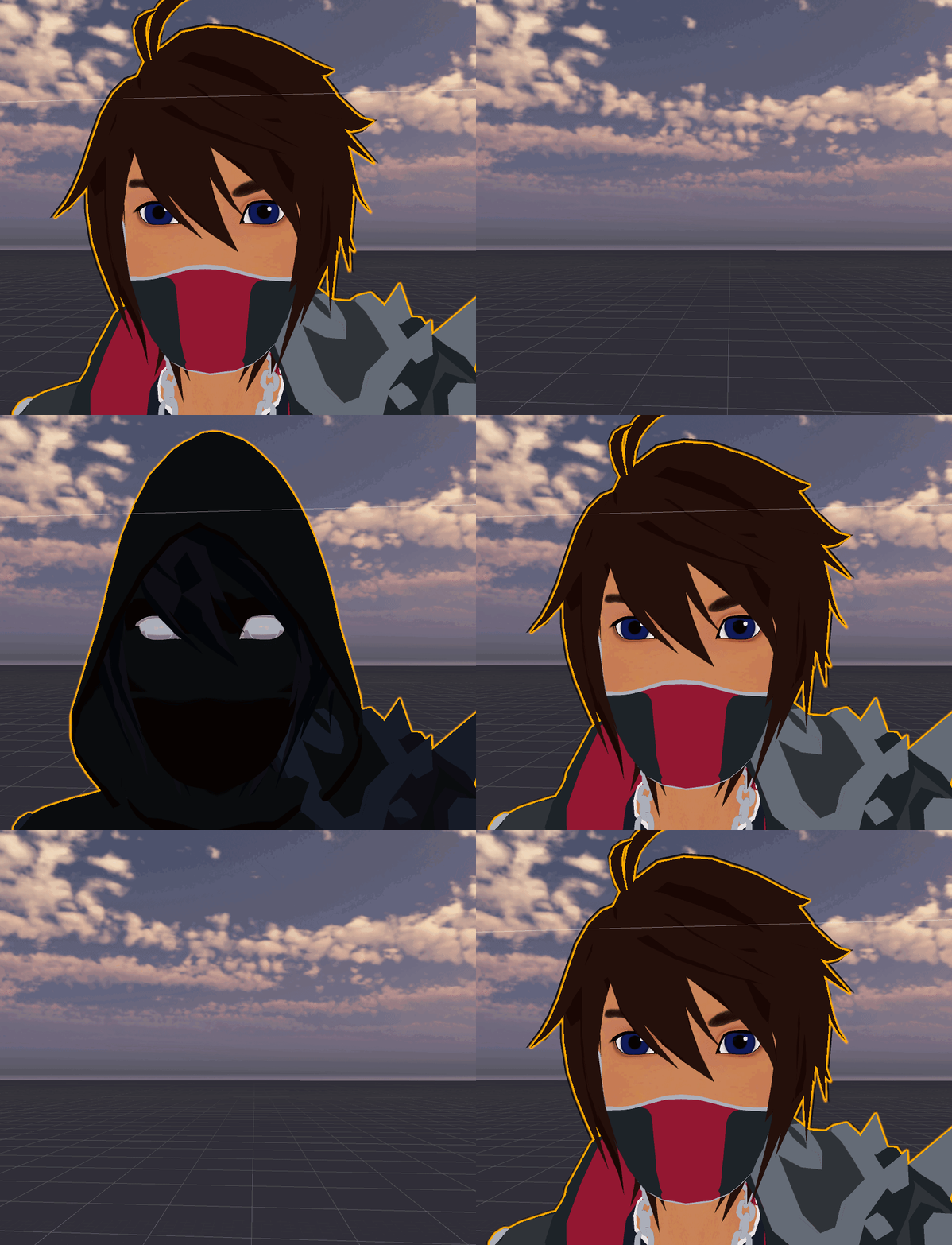
 rare wave
I had a friend with a similar thing, but he used a shader to mask out each one instead of swapping them, since the name of the mesh being body is the issue
However, if it's only blinking, you could animate them yourself on the dark version
Which by the looks of it, would be a lot less of a hassle than trying to get it to work normally. It doesn't seem to have pupils, so eye tracking probably isn't a concern, which would effect the lower lid raising thing when your eyes look up, and that's probably the only reason you would want the vrc eye blinks for it over your own in a situation like that
rare wave
Actually, I think you can just swap materials, too
If the two bodies have the same UV mapping, you should be able to just switch to either material in the animation. So essentially what Yuumi said, but the "body" mesh can just be the whole body @hot hornet
gritty nest
I always use custom blinking anyway
Eye tracking will work fine as long as your main mesh is called Body and has at least 4 shape keys. Even if the mesh is disabled.
Because both meshes will respond to the eye weight paints, and custom blinks are guaranteed to work either way
But it seems the eye tracking on the second model isn't an issue there
hot hornet
@gritty nest that's a pretty good work around actually, thanks ^^
@rare wave yeah the material swapping would be good and both meshes use the same UV, but i get an issue with material swapping where it won't show up in mirrors at all so unless i can fix that i don't think i'll be able to use a material swap 😦
rare wave
Aw okay. So by that you mean that it's the normal skin material in the mirror, with the dark clothing, I would assume? As far as I'm aware, that will only be an issue if it bothers you personally. To everyone else, it should show as the black, both on you, and the mirror
hot hornet
well in my case it's the entire avatar lol dark skin, clothes, hair, everything. but like you said, i'd look like a normal avatar on my end but everyone would see the dark avatar which isn't the biggest problem in the world tbh but it just bugs me ^^;
thank you both for the help 😃
gritty nest
Yeah, material swaps don't show up in mirrors for yourself
It looks fine to everyone else, even in the mirror
Mesh renderer toggles don't show up either for some reason, unless you toggle the whole mesh on/off
hot hornet
good to know, i'll stick to whole mesh disabling
 sturdy spear
Hey guys, I have 2 issues, and its take 2 days to start to talk on vrchat server.
I put a avatar with eyes rig on unity, i configure him perfectly, mucles test working, but on game, the eyes wont work.
the other issue its the blink animation, on unity working, but after i upload doesn't....
 young mantle
I'm wondering if anybody can help me with this model. The model was rigged using Mixamo, And I got it off of Deviantart. I cannot upload the model because the upper chest is rigged with humanoid when I change the model to humanoid. I also need help with the local camera. I changed the model from .PMX to .FBX using Blender.
I'm not smart
gritty nest
@young mantle merge your meshes and edit the rig config
So that the upperchest is unmapped and spine2 is in the chest slot
You will have to import it into Blender to merge the meshes
slow gyro
That 161 is... 😭
young mantle
@gritty nest Thanks!
 hybrid lion
I saw the 161 meshes before I saw the avatar...and immediately I'm like "yeah makes sense" when it was .pmx
Good ol' MMD and meshes for practically every vertex ;v;
gritty nest
You'd have to have some ancient importer to actually get it at that many meshes though
 stoic sluice
Dumb question, but does anyone know if there's an alternative to giving avatars dynamic bones to purchasing it on unity for 20 bucks?
lol
 violet harbor
@stoic sluice if you mean what you could do to have dynamic bones without purchasing it, you can't
that would be piracy and that's a no-no 🙅
 marsh portal
When i clicked Match Rig i got an Error... Idk if anyone could help but i appreciate it,,, sorry for my bad english
crystal vector
@marsh portal You should report this to the creator of that plugin
marsh portal
Alrighty
 ripe yarrow
heyy
crystal vector
Hiya
 plucky cypress
I used this tutorial https://youtu.be/UXGX3-a6OGc to import a vroid file and process it through cats and put it into Unity, but I'm getting "This Avatar is not imported as a humanoid rig and will not play VRChat's provided animation set".
Is there an easy way to fix this? Here's the children of the model in unity's inspector if that helps.
 crisp tendon
Yeah, through manually applying the humanoid bone configuration
plucky cypress
Do you have a link to a tutorial for that? I'm completely new to rigging
crisp tendon
Click on the model in your assets, you'll see options in the inspector
It's currently set to Generic
plucky cypress
Found it, thanks ^^
got an issue with jaw being assigned to RightEye, but googled and found out how I could fix that, but now I'm getting this issue
I remember that in their tutorial they mentioned not having to do some of that stuff anymore, so I'm guessing I can figure out how to fix it in their previous video
crisp tendon
You can check the first pinned video in this channel
It shows how to configure correctly
you're most likely missing the neck
plucky cypress
thank you ^^
Oh, turns out there was a chest GameObject that wasn't assigned automatically
getting these two warnings which I'm guessing it why some avatars have a twisted arm when crawling, but I'll leave that for some other time, thanks for all the help! ❤
fading verge
@stoic sluice 90% of people that use dynamic bones did not purchase it. Just ask around. Not here though
naive tree
@plucky cypress rearrange your bones, can be done in unity, for example
Arm
random bone
elbow
drag main bone so it's first child
Arm
Elbow
random bone
plucky cypress
Thanks, I'll keep that in mind for when I decide to work more on it
 steady patio
running into a weird issue
so im in the middle of some cancerous avatar making cuz i was like "minecraft skins look pretty and are low poly enough for quest"
and i just finished weight painting every single bone in my armature
i was able to move bones and watch my mesh deform while editing, but for some reason near the end they just stopped
in fact my armature's bones wont rotate at all
whenever i go to rotate them in pose mode
and im not sure what i've done wrong?
everything seems to be parented just fine
and i did run the auto-weight tool beforehand
nevermind figured it out!
there's a small button with three dots and a two-way arrow that determines whether object movements should take place from the center or not
or something...
thats apparently used in weight painting mode
just had to toggle it once
steady patio
okay now i have a separate set of issues
verticies not being attached to the armature!
im not sure what to do about this one since every vertex on this model is painted to some bone
the issues with frozen verticies only occur when i rotate my hips, spine, or chest though
a different set of verticies each time, some not moving and others moving when they shouldnt
even though the rest of the entire model is blue, and ive ran through it again with a few brushes to make sure
even on the hips! so im not sure what to do
steady patio
to what? im pretty sure those verticies are painted to something
unless i've got another double vertex issue
which might explain it
but some like the triangle jetting out of my arm in the second image rotate with the entire arm
steady patio
i literally went through and selected that vertex
no, ALL of the verticies down at the pelvis and upper legs
and manually set their weight to 0 in the vertex groups for both spine and chest
and even removed them outright from those groups
but that corner still moves with my spine and chest for some reason
steady patio
im slowly fixing the issues i think~
ive been going through and removing every single unneccessary vertex from all of the groups
and its slowly making every part of the model move better
fixed all of the issues!!
^ ^
i just had to remove those verticies from the groups
now its finally fucking ready for testing
in vrchat itself of course, since the rig already works just fine with the mesh deforming as i wanted
steady patio
all of the things i learned today for anyone who happens to come across this and has the same issues:
quick tip if youve never weight painted before, here are all of the tools and stuff i learned over the entire day to make everything easier:\
use the face and vertex select tools for precise edits. it will make your life 10x easier, especially on low poly avatars
hide parts of the mesh here and there if you need an easier view when weight painting. this will not them from being editied by the brush though, so be wary
go through every single vertex group you have and hit the [select] button to see what verticies are assigned to that group. even if they have a weight of 0, REMOVE THEM. this will fix a LOT of weird rigging issues and im still not sure why, such as gray areas not moving, red areas remaining still etc.
quest, here i come!
 hybrid copper
rgh, i don't even know what the bones in the hand are called, and thje tutorial i was following wants to add bones for easier control, but i guess i don't need that for vrchat avatars right ? i might have to find another tutorial to continue..
sleek isle
@steady patio you dont have finger bone create 3 per and
you need to map then manually
steady patio
ik ik
 worldly willow
anyone who can help me with this ... https://gyazo.com/89622bea5499957a206cd5bf31af98f3

how can i get this rig to work in vrchat correctly (removing hips and setting root_X as hips breaks all armature parenting
hips is the big bone
gritty nest
Assume Root_X will be the new hips
What exactly breaks about parenting when you do that?
That would seem to work just fine
worldly willow
O_O ... ok so redid it again but first by renaming root_X to hups and then naming everything else under it correctly and now it works when i hit fix in cats O_O
it would unparent the whole armature before
why these friggin twist bones
 rugged raven
Hello. I'm trying to weight paint hair and I have a selected vertex group and two bones (Hair Front and Hair Front.001) that I would like to set to that vertex group. I tried automatic weight paint and envelope weight paint, but on both, hair vertices other than those selected on the vertex group are being affected. This is what I have so far:
I'm attempting to get a smooth weight distribution between the two bones I have. Is there a recommended path to take to automatically weight paint those two bones to only affect this selected vertex group?
crisp tendon
Hide all the other parts you don't want, then manually apply a gradient weight paint on those two bones from top and bottom
rugged raven
Hmm... I hid all the other parts. They were still weight painted when I used the gradient paint tool. I've noticed that you can accidently weight paint hidden vertices when using the weight brush tool as well. Can this be disabled?
When unhidden:
sleek isle
you can mask them
crisp tendon
sorry that's what i meant by hide^
rugged raven
Thanks. This helped. I'm making progress.
Thankies, @crisp tendon and @sleek isle !
only like 10 more strands to go!
crisp tendon
good luck !
hybrid copper
mh, rip auto weight painting ahah, I have to paint it manually again right ?
steady patio
if you need to
but knees never move like that and they wont in-game anyway, so that part looks just fine lol
just making sure, for a model to support fullbody IK you only need your thumb, middle, and index fingers mapped right?
i dont have to worry about my ring and pinky?
crystal vector
@steady patio yes
 paper vine
https://i.imgur.com/4nAtQoR.gif how to remove other parts from moving
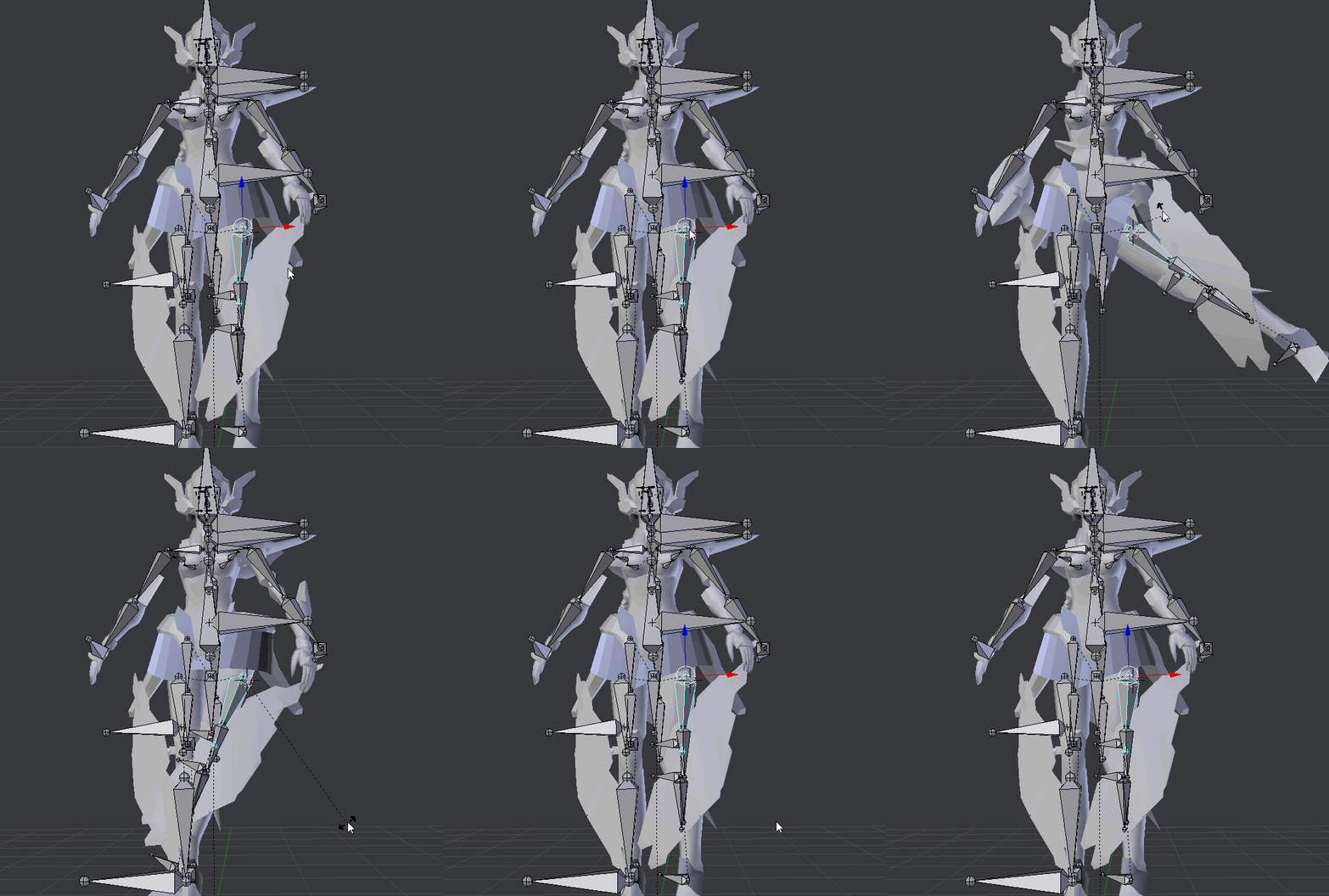 sleek isle
model is broke
 prime barn
gotta fix the weight painting
 spare mirage
Any idea how to apply the changes that happen when you use shrinkwrap in blender? It's a useful tool I just learned about, but I have no idea how to get it to stick.
naive tree
press apply in modifier?..
spare mirage
Did that, doesn't work for me?
@naive tree Does that work for you? Is my stuff broken, or...
naive tree
if it doesn't work then prob you have shapekeys on the mesh
spare mirage
So I have to delete the shapekeys and then it'll work?
 stray zenith
Anyone else having an issue where the dynamic bones dont work in game but they work in the unity file?
opal aurora
@stray zenith disable the dynamic bone limiter in vrchat's safety menu, in-game
 restive marlin
anyone know how to automatically duplicate/blend weight paints from an object like breasts onto something in close proximity like a blouse so that they don't clip and move as one?
naive tree
it depends if there's enough geometry, i personally reweight stuff with holding ctrl+alt+drag rclick, or other choice is getting rid of layers underneath
 raven canyon
Hi there I'm new here!
Was just creating my first avatar but it seems I need to "spend some more time" before I can upload.
What does it means and how much time is it actually?
Are there any ways to speed up the process?
Appreciate any answer 😃
keen tiger
@raven canyon Vrchat has a trust system where you need to be a ‘New User’ rank or higher before uploading content. The exact requirements for ranking up are hidden to avoid people exploiting the system but if you spend time in game talking to people and adding friends you will rank up naturally and will be allowed to upload soon.
raven canyon
@keen tiger Alright, appreciate 😃
fading verge
so guys im making a minecraft avatar and i want it to work with full body but it doesnt work because there are no finger bones
how do i bypass the fingers
naive tree
extrude 3 bones from wrist and assign them to thumb, index and middle fingers, on each hand (dont need to be weightpainted)
 forest igloo
for ease of use weight them so unity auto connects.
restive marlin
I have a model with an uncorrupted basis key and a seemingly corrupted blink key. The blinking shape key works just fine on the face but also makes other parts of the body like the boobs expand. I was wondering if there is a way to select just the modifications that the shape key does to the face and not the rest of the body and then create a new shapekey to override the old blink (thus making it so the body can't be expanded or modified by the blink shape key)
I found it in here

Create a Game Character Now at http://www.darrinlile.com In this video we create Shape Keys or the character's mouth. We also look at a second way to mirror ...
steady patio
so i finally got pictures of the weird twisty arm thing
i locked the rotation of the elbow and made sure that neither it nor the wrists had signficant influence at all on the rest of th earm
the locks were done in blender, btw
im not sure where to go from here...
gritty nest
Locks in blender don't affect ingame
steady patio
shoite
gritty nest
Are you in FBT?
gritty nest
You need to give the elbows a little more bend in Blender
They're so perfectly straight that the IK doesn't know what to do
steady patio
ah
alright
uh in pose mode or in edit mode? cuz in edit mode its not moving the rest of my model
imma just do em like this
should be fine uwu
it has the same issue as before with the twizzler arms, even after slightly bending the bones in blender
restive marlin
I'm using "smooth" on my breasts in order to make them more round but afterwards my blink shapekeys which do not modify the breasts previously start to slightly expand the breasts when activated which is causing problems. Anyone know why a blink shapekey would all of a sudden start to effect other bodyparts?
 hushed quiver
u can remove the shapekey from ur breast mesh to fix it ik sometimes it happens to me when merging stuff back together with cats
sleek isle
Dont paint the hand to the model . Put all that part to the elbow
On the few minecraft animation video the tip never move
@steady patio
 harsh ivy
aight, so I have a problem, when I try upload my avatar it says: The following component types are found on the avatar and will be removed by the client: Spriterenderer. Where can I find spriterenderer, idk even know I had it
steady patio
oof i guess i can do that
uhh if you look it up in the scene it should tell you where it is
 median pasture
I'm trying to add a bone to a piece of my avatar's hair that i want to put dynamic bones on. However, even though its correctly parented to my hair root and weighted the way i want it to move, its not moving with the rest of the head
eg. at rest
and tilting the neck
anyone know the potential issue?
gritty nest
It's not weight painted to that bone in that case
median pasture
but it is?
it seems to be moving fine as well on another axis
wait nvm scratch that
not to mention its still weight painted to the hair root too as a whole
and so is every other vertice of hair
it seems to be happening on every parent bone of itself up until the highest bone (being my hip)
maybe i added the bone wrong even though i parented it?
median pasture
scroll up theres not much
 scenic bloom
ooo oki
well
either another bone is influencing it
or somefing else is rong
can i have the file so i can take a look? :O
i cant tell from here
median pasture
i gotta go to work right now unfortunately
scenic bloom
oo its oki
median pasture
was tryna get the fix in before i left reee
scenic bloom
dm me when you're back and i'll try to answer as soon as i can :DDD i hope one of the lovely people here helps you :)
ooo
big sad
median pasture
wtf
u were right
it was parented to the thigh bones somehow
er not parented
weighted on the thigh bones
i never even touched the thighs when i was adding these bones reeee
ok thanks now im gone for real
xoxo
scenic bloom
np :3 @median pasture have a cake 🍰
 glacial hinge
do somebody know what exatlcy 1m are in unity for vrchat avatars?
glacial hinge
okay thx ^^
 dusky pendant
So, I remember when making an old custom model I had some issues with the bones I made said model in (DAZ for the record, I use some stuff as a basis) not properly... well, working. The result was my character becoming an eldritch abomination in game
if you look at some of my old messages you can see the images of what happened
 rustic canyon
does anyone know what it means when it says your avatars feet aren't specified? And if so would you mind helping.
 sacred nymph
I need a little help. Everytime I try to add a new bone (like right now I'm trying to add butt jiggles) the bone copied the weight paint of another bone (Like Spine for example). No matter what I try to do, the two bones are connected for no reason..


 opal aurora
@sacred nymph i think that's a visual glitch, if you select another bone and reselect the new bone, is it still weighted?
And if so, does moving it around deform the mesh?
 paper osprey
Adding new bones will not bind them to the skin. Therefore cannot make the model move. You would have to select the bones and the model and bind them. Then weight paint them
sacred nymph
That's what I do. @paper osprey As for @opal aurora In that example I showed, I was trying to create "CHEEK L" which was the left butt cheek. It was acting as if it was SPINE. If I weight painted the butt on CHEEK L, it did the same on SPINE - vise versa. I've literally followed tutorials step by step on how to add bones, but I always run into this same issue.
I'd really just like to add booty jiggles to my avatars for once. :/ They just always get stuck on another bone.
I just tried it a second time, and it doesn't respond to the weight painting at all. :/
 earnest brook
is it blender 2.79 or 2.8?
 astral ridge
for making full body proportions, can you scale just the bones instead of the bones and mesh?
crisp tendon
If you want your mesh to deform weirdly, sure
astral ridge
ooooof
is there anyway i can make the proportions without scaling the legs, since it looks a bit odd on the model im working on
crisp tendon
Upscale the rest of the body 😃
astral ridge
like scale from the spine up?
crisp tendon
Unless you plan on scaling individual parts, yep
But it'll probably look weird that way too, since you're supposed to scale the mesh
 wispy flare
can someone help me with some question with a model that i just cant go into t pose and mixamo wont even pick her up...... and not just ppl who only know anime stuff
obviously its not anime
crisp tendon
Can't you make your own skeleton ?
 fleet turtle
Can't get eye tracking to work, Mesh is named Body, Armature is Armature, Hierarchy as follows Hips>Spine>Chest>Neck>Head> Lefteye/Righteye
Unity config muscle editor can see and move them no issues
but in vrchat they are frozen in place, no blinking either
really odd since i've been working on models for a year now and i never had this sort of issue with a model unlike this
oh and CATs tool was used on this model
gritty nest
Post screenshots of the model hierarchy in Unity
fleet turtle
gritty nest
Has to be called LeftEye
Not Lefteye
@fleet turtle
Also if you're exporting with end bones/leaf bones, don't.
fleet turtle
i'll try it honestly, but none of those 2x things have ever effected eye tracking before on other models
gritty nest
Well the first issue is definitely the cause
End bones wouldn't cause any issues here but I still don't recommend them
It's all case sensitive
 trail torrent
Just wanted to ask, why is my avatar showing its mouth open in-game, while unity shows it closed - Is there a way to fix the issue? (Avatar created with Magicavoxel and Blender - yet only 1 of 3 avatars seem to work . . .)
(I can add more screenshots if requested)
trail torrent
Where, in Unity or blender?
worldly willow
in unity
trail torrent
There does not seem to be a jaw bone . . .
 sharp pewter
why is everything named spine?
worldly willow
there is also a bug with cats eyetracking that can cause the mouth to be linked to the eyetracking shapekeys
sharp pewter
right eye has a leaf bone in it
trail torrent
Idk, the rig I used was provided by another user . . .
And it has the basics, so it works - mostly
sharp pewter
i think part of the head is linked to a bone that bend when you move making mouth open
maybe
i cant see all bones in armature so i cant tell if you have real head bones or not
trail torrent
So, I then need to change the taget bone to neck (spine4) instead of head, (spine5)?
paper osprey
From waht ive noticed a jaw bone isnt even needed
At least on my model it didnt change anything
sharp pewter
kinda hard to seeing without seeing the model or asked 100 things
im brain dead 2day
but make sure the mouth is not being pulled on my the neck bone
wait with that model do you even need a neck...
xD
paper osprey
Same i was gonan finally finsih the model to my world today but then my family was like you need to come do this and help out with this
and now im just like fuck it im not gonna do anything
trail torrent
So the solution is to change the bone attachment to neck or just change the lip-sync option to something other than : Viseme?
sharp pewter
make sure no bone is has weight paint on the head other than the head bone
i think would do it for you
trail torrent
I checked already, there seems to not be an issue with weight paint -
idk what other things could be affecting it, since I made most of the model by-myself
 inland jackal
Is there any solid method to rigging up a character's eyes to take advantage of the eye tracking without using the Cats plugin?
sharp pewter
like you want to do it yourself or you want to make eye tracking on a model that does not have the stuff setup for it?
@inland jackal
sharp pewter
2 main ways are white background for whites of eyes or a roundish plane/ball what way did you use?
inland jackal
My eyes are spheres with a bone in the middle
sharp pewter
kk 1 sec i think i have this typed out some place might be on old pc tho
inland jackal
Thank you!
sharp pewter
ok for blinking shape keys you need in order
so it will work for vrc
So your first 5 keys are, in order
Basis
vrc.blink_left
vrc.blink_right
vrc.lowerlid_left
vrc.lowerlid_right
inland jackal
I've seen that. I still need to make the shapekeys for everything once I'm done optimizing
sharp pewter
then make sure main mesh when combined is called Body and Armature as name for Armature to be safe
assign what your eye bones are called in head tab when you config the avatar in unity
inland jackal
I hadn't tried the body naming stuff. I'll give that a shot!
inland jackal
I still can't get the eye tracking to work. Is there possibly an example avatar unity package that I could pick apart and look through?
naive tree

Google Docs
Name the armature “Armature”. Name the mesh containing both eyeballs “Body”. If possible, make the whole head or avatar a single mesh. Name the bone hierarchy like this. Bones not mentioned can be named whatever. IMPORTANT: You cannot have any bones interrupting the h...
inland jackal
I did manage to get it working! I was missing the blink blendshapes
Thank you for the help 😄
 open hull
anyone awake?
 real ore
yep
open hull
@real ore hey, how's it going?
I'm trying to put two bodies on one head and swap them with a gesture
problem is when i try to use it in vr the face isn't attached to the head
real ore
that's interesting....im fine and you?
open hull
I'm ok thanks, just had a chilled weekend
real ore
so did i...until I had to go to school...
open hull
we had a national holiday today
real ore
which is?
open hull
spring bank holiday 😃
real ore
your lucky smiles
 primal moth
heya folks, just joined here today. Are there any pre-built rigs which are known to work well in VR chat I can use to rig my existing mesh to?
 vague kettle
can anyone help me with my character is not working and idk how to fix it
lower am is not first child of upperarm or hand is not first child of lower arm
the angle between pelvis and thigh bones should be close to 180 degrees this avatar angle is 170.7
 vague root
how do you make a lazer move when you turn your head
like an eye lazer
fading verge
Anyone knows how to play sounds on collision for a whip prop
spare mirage
How do I get the weights from one bone set from one mesh to another? Duplicate them, or transfer them I guess would be what I'm looking for. I have them on the clothes, and want the same weights on the body to be more specific.
spare mirage
Nvm figured it out
 earnest ivy

 patent mesa
@vague root Rigid bodies
 silk plover
hope this is the correct place to post this, but does anybody know why my model's knees buckle like this when i crouch?
 simple badger
can anyone help me the view positon circle isnt apearing

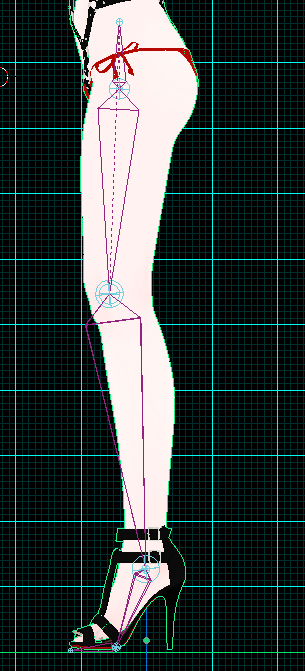
 misty gull
can anyone please help its my first time using blender and every time i try to make a atlas it breaks the face
inland jackal
Is there any way to refine the results that Muscle Animation Editor gives you? I'd like to refine the position of the fingers but the changes revert when I switch between keyframes
 mystic lichen
anyone know how to fix scuffed arms? no matter what i trie it seems they always get bend-y and i noticed scaling arms down, scales the whole world to you or something, hard to describe..
gritty nest
Yeah, the IPD is scaled based on your head and hand positions.
mystic lichen
oh i just noticed I scaled them wrong too
ah that would explain that thing, scaled them down different now, maybe that works
gritty nest
Yeah, if you scale for FBT you will want to turn off inherit scale on the hands
Then scale the upper arm over the arm length
After T-posing it first
mystic lichen
had selected both arms and scaled, which moved the bones, scaled them one by one now
yeah
gritty nest
Yep
Kung's tutorial is what I used
But obtaining the proportions is not possible without FBT
mystic lichen
i feel so stupid now , i hope it works, arms are the only thing im not hapy with on my avatar ._.
also
"Then scale the upper arm over the arm length" what does that mean?
gritty nest
Kung explains it in his tutorial
Basically you set the gizmo to Local then scale over the Y axis
mystic lichen
oh i read that wrong, i thought it said scale the upper arm over the lower arm length
yeah alright
mystic lichen
hm didnt really work, ah whatever, no idea what to try anymore
bitter spade
what does it mean when the spine says "bone length is zero"
safe bluff
Means you enabled the full body fix and you should probably ignore it
The error occurs because of overlapping bones afaik
Someone can correct me though
gritty nest
It happens because the fullbody fix puts the Hips in the same place as the Spine.
This is necessary because when calibrating into full body, the hips actually shift down based on their distance to the spine.
It doesn't always happen with the fullbody fix due to floating point precision, the spine bone may get put 0.000001 units higher than the hips for example.
safe bluff
Thank you for the detailed explanation 
 brisk terrace
Hello , if anyone is fluent in Blender I would need help with a recent problem.
Everything is weight painted solid but the back part of the hair does not spin at the same angle as all the rest , creating huge gaps.
Does anyone have a solution
crisp tendon
Remove the weight paint of the back part of the hair from other bones
brisk terrace
AH ok thanks ill try that
the neck also had the paint on it ...
Worked , thanks a bunch for the quick answer !
 grave coral
I'm having an issue where the skin from the neck on my avatar is loose and flies around when I move. I took the head from one model and put it on a different body. I'm sure it's something silly I'm missing but I just can't figure it out. Any one know a fix I'm just missing? I'm very new.
paper osprey
That would most likely be a weight painting issue
grave coral
I don't think so it's the skin at the base of the neck, it's supposed to join to the chest. But for some reason it won't join.
I've never touched any weight painting.
 limber tulip
anyone ever have an issue with the cats plugin Fix model making the avatar change size or shrink?
 clear acorn
im getting 90 degrees instead of 180 of pevis between thigh bones. I already did the fixed armature with full body fix but didnt work
gritty nest
Ignore it if it's not actually an issue ingame
clear acorn
but when i use my leg trackers my hips goes downwards
like im just crouching like crazy
gritty nest
Are the hips and spine in roughly the same location?
clear acorn
yep
oh wait nvm, i think if fixed it by setting the bone rolls to 0
guess that fixed it
bitter spade
im having a problem with the auto rigger in mixamo
the upper head just turns weirdly while the bottom half turns differently
this is the unrigged one
crisp tendon
Apply rotations, location and scale on everything
And make sure the head isn't touching your chest
sleek isle
You can create a rig in blender and apply auto weight paint
And if you place it well you mosly only need to fix the head/neck
sleek isle
You dont have fingers in the mesh so after you only have to add 3 bone per and map them in unity
But by experience those chibi proportion avatar donc work well in vr
open hull
Can anyone help me do something that CATS wont help with?
 balmy island
I merged two meshes together for bone pairing, vertex groups and weight painting. Been at it for ages so no simple undo fix. I come to work on Visemes and this happened. How would I correct this?
open hull
@balmy island I think you have to use the special incantation 'fck fck fck fck!'
hope you've got backups
bitter spade
how do i put a character back into tpose in unity?
i made an animation and now im getting an error about the avatar being too short
but the character is just halfway in the ground
it wasnt like that before i made animations
open hull
yeah that's a thing, you should be able to get the t-pose animation from the sdk's example folder, copy that into your project and apply it, then remove the tpose from your animation controller.
also, there might still be a thing called pumkin tools that you can find on github, it's been a while since i did anything with it, worth a google though
bitter spade
the AvatarControllerTPose?
 placid river
so im having an error that says a bone has length of zero and i dont know how to fix it
naive tree
ignore it, it doesnt stop u from uploading
placid river
does it do anything to the model because its in the hand on the ring finger
 quasi oasis
Since I constantly forget how to do it, isn't there a workaround to the claw finger issue?
 tame sedge
I would like to manually rig my character without using Mixamo. What's the best way to get a decent humanoid bone structure compatible with VRC?
Maybe still upload that to Mixamo and then refine the rig manually, right?
 surreal copper
@tame sedge you can take bones structure from any model/mmd etc, or create your own, i prefer rig in maya rather blender or else
tame sedge
Thanks. My concern was only for having correct bones orientation
surreal copper
from mixamo you also doesn't need to have upperchest, if you take bones from it, you can delete
tame sedge
Good, thank again!
balmy island
I think I recovered it 😄
 cursive drum

Hi
So this is an earlier version of the avatar I'm working with, right now Ive grafted a new finger on both hands for the thumb
tame sedge
Hi mr. magenta insect
cursive drum
When I got it into vrchat, the hand was all scrunched up into a weird twig mess
It's three prongs basically for a hand. Does something like this sound similar to any other issue someone's had?
I mean, the hand is comparable to like zims hand from invader zim
 light thorn
does anyone have this model? can you throw? https://cdn.discordapp.com/attachments/466251507331891200/577521324562579485/unknown.png
 fading verge
was asking in #avatars-2-general as I'm a complete beginner, but where do I find the option to turn off Mesh Colliders for an avatar?
 undone harness
You can remove it finding here the collider is coming from I guess?
 upbeat narwhal
Hey guys I apparently have 0 idea of what to do with rigging any help?
crisp tendon
What do you need help with specifically ? Which tutorial did you follow and have you tried Mixamo ?
upbeat narwhal
I never tried Mixamo and I used a guide that was linked to me at #user-support-old
I think the problem is the actually models bones but I have no idea how to fix them
 calm pond
when u try TO DO SPRINGBonnie FOR VRChat an u get lost
XOX
REE
its going to be the death of me
:p
ree
help me
 thorn minnow
Having a weird issue. Avatar works perfectly in full body tracking, but without it the hip follows the tilt of my head. I'm sure this issue is incredibly common but can't find a fix online. Anybody have any ideas?
I've tried raising the spine per a friend's suggestion, the hip and spine bones are disconnected as they should be.
 spark heart
how do i fix this ik issue
 late cairn
Hopefully one of the CATS developers sees this I made these black cubes for scaling my avatar for full body tracking but when I delete them for atlasing and exporting, I get an error when I attempt to atlas
crisp tendon
They have their own Discord server, if you have a question for them
opal aurora
Probably caused by an orphan texture or a material that isn't applied to anything, i guess there's also the possibility that there was a mesh without a material and that somehow butchered it, or yet another possibility, a compression method for a dds that it doesn't recognize (possibly DXT1,2 or 4)
late cairn
the cubes themselves did not have materials, I can atlas with the cubes still there though
opal aurora
Given the fact that the cubes don't have materials, you could atlas it with them, and then remove them afterwards, probably less than ideal but should work
Or actually... try to detatch the cubes from the armature, and then delete them
Perhaps there's something sketchy messing around with it, sadly i can't provide all that much assistance without additional details, neither do i have the model to test it out, do check if CATS is up-to-date aswell
late cairn
thats the weird thing, they're not on the armature
opal aurora
Alright, that is pretty weird...
Try the following then, delete the cubes, save a new .blend, close blender and open that .blend, check if it still doesn't work
If it still doesn't work, open a new blender window, select everything in the 3d view (A deselects and reselects everything) Ctrl+C (copy) and go to the new blender window Ctrl+V (paste), and now try to atlas
late cairn
the first one (saving and reopening) I have tried, I'll try the other when I get home from work
late cairn
@opal aurora I am happy to report the second option seems to have done the trick
 still loom
what rigging means? (im new with these words)
opal aurora
Glad to hear it, it was probably something corrupting on the first .blend, so getting everything setup on a fresh one should clear it out
Rigging is the act of assigning bones to a mesh
Mesh being a portion or the entirety of a "model"
Rigging can also be called Skinning
opal aurora
Adding bones onto the mesh, and making the mesh move with said bones
opal aurora
Modeling is the act of making a model
Sculpting is the act of making a model much like sculpting IRL, with a digital brush of alternating sizes and other tools
Rigging/Skinning is the act of adding and binding bones onto the model/mesh
Texturing is the act, of well, creating textures for models
 silk wren
I got a model that didn't come in a proper T-pose. The torso is twisted, the arms aren't straight, the feet aren't level on the ground, and other things I probably don't know about. Now, when I'm rigging it, everything from the torso down is messed up
his right shoulder got snagged as well. I don't have enough experience in Blender to fix it myself, but believe me I tried, so can anyone help me fix this?
don't mind the 20 meshes, I'm not sure how to combine them properly either
thorn minnow
@silk wren please let me look at the blender file before you upload it like that
thats way too many meshes and materials
 meager turtle
Can someone help me figure out how to add dynamic bones to my model? I've got the addon and I've got bones set up in the ears, but I don't know how to actually make them flop around. https://i.imgur.com/nF87NTD.png
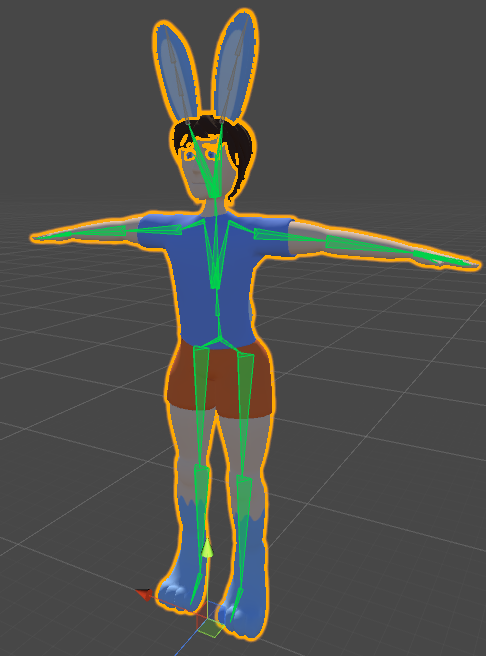


 tame island
Hierarchy> select ear bones>add component>type in dynamic bones> drag from hierarchy (ear bones to dynamic bone as root) n play around with settings
meager turtle
Ah, so I can just select all of the bones, or does it have to be done one bone at a time?
tame island
U can add the components anywhere
I cant provide better guide since I'm not at home.
meager turtle
It's fine, thank you
tame island
Np.
spare mirage
How do I copy weights from the left wrist to the right? I've tried the copy and mirror vertex group (topology) and it didn't work.
naive tree
enable xmirror and use blur at 0.00001 strength and weight @spare mirage
 modest iron


hello i not sure how this happend but i newish to making models
any help appreciated
it looks fine in unity, i cant work out why its doing this
gritty nest
@modest iron go to the humanoid rig config
Pose->Reset and Pose->Enforce T-pose
This probably happened because you first exported the model regularly through Blender, and then later you overwrote it with a model exported with Cats' "Export Model" button.
Or because you re-exported and overwrote a rather old model
modest iron
i will try this now
thanks
yus i did do what u just said xP
im not up to scratch with it all yet
gritty nest
Yeah no worries, just make sure you always use the Cats export model button
Unless you're further in and know what all the options do during export
modest iron
this right?
gritty nest
Yep
You first reset and then enforce t-pose again
As you may notice, when you first entered that screen the model was all fucked up
modest iron
okay
gritty nest
And large
modest iron
yes
so now it should be ok
i go test
errrr i went to upload and then this
i confused
gritty nest
Well it should not have an animator controller
You may not have applied the changes yet
Or you're looking at the wrong FBX
If it does have an animator controller it should at least stand normally and not scrunch up like that
modest iron
so this should work in game now?
this model worked before when i had all my animations attached, but i wanted another of the same model with no animations
but i have had lots of problems
im shook xD wtf
 robust summit
Smol boiii
robust summit
Omg he does lmao
gritty nest
You probably move quite slowly too in VR
silk wren
@thorn minnow if it helps, here's the zip I put into Mixamo, meshes and all
fading verge
Hey could anyone show me how to make my own custom avatar from scratch if that isn't to much to ask. I already know how to import models but I have no idea on how to make custom ones. Please dm me or @ me if you are able to. Thanks!
if that wouldn't be to much to ask then Id love to
though if that is to much id love to just learn anything
steady patio
if ur avatar is still humanoid, just map thumb, index, and middle fingers
that way you can still use vrchat's full body ik system and not have to worry about walking and gesture fuckery
then just paint it the way you think a 3-fingered hand should be painted
 heady sage
If I created a character model from scratch in blender, do I do the rigging in blender as well or is there a way for me to do that in unity
paper osprey
if its humanoid you can use mixamo
heady sage
mixamo is a unity plugin?
heady sage
damn, I'm stupid lol
 molten vale
Anyone know the best way to set the bones in blender for the eyes in an anime style character? (the iris being kind of a plane)
 misty plaza
when in VRC, my avatar's legs are always crossed like i've gotta pee really bad. do i just need to turn the bones a bit or what?
worldly willow
in blender choose armature > press A in the 3d view and then alt+R (this will reset bone roll and will fix the crossed legs)
@misty plaza
misty plaza
i'm not sure if thats it. the rig is at resting pose and everything.
even if im in object or pose mode
worldly willow
just make sure every bone has 0° bone roll
worldly willow
the legs should be straight in front view and bit bend in sideview (bone rolls should stay 0°)
 covert jay
any blender Gods have any idea how to fix this, It is my first time weight painting, I spent hours doing all 20 bones (2 for each toe) and I have no idea how to fix this
opal aurora
Probably vertices inside of the feet that aren't weighted
You could pose them in blender and check what isn't weighted, and then press Alt+R to reset pose rotation or Alt+G to reset pose location, Alt+S will reset scale
@covert jay
Keep in mind that for any resets, it only affects what is directly selected
fading verge
@covert jay in pose mode select bones and move them around, you should be able to get the same effect. Then run with weight paint brush over the spiky verts that stay behind. If you can't figure out to which bone they should belong, select them, and reset pose like in post above ↑ . You should see them in wireframe view. Then assign them to appropriate bone's vert group manually in the properties panel. It may be a lot of work, depending on how much verts are unweighted, or assigned to wrong bones.
 drifting canyon
Does anybody know why XPS avatars always have legs twisted 360 even if i aplied full body fix ?
covert jay
@fading verge I understand, and have been moving each bone and checking what moves, I was able to fix some minor mistakes where I may have weighted a bit on an adjacent toe, but I cannot rotate or move the bone in a way that recreates what I see in unity. I am not sure what I am looking for to fix, I should be adding MORE weight to the area? or taking away?
covert jay
I think I am starting to get it...
 queen mural
**realized you are adding bones
covert jay
I fixed it, the problem wasnt on what I weight painted, the problem was on the largest bone stretching across the entire foot, had to add weight to some verts on that bone
fading verge
@covert jay Yeah, there's no good way of debugging this in Blender. The weight paint tools are pretty weak. Sometimes when weight painting your brush accidentally grabs another part of the mesh, and then suddenly your toes move when you rotate your head... 😛 Debugging weight paints when you have single unassigned verts, or verts that got assigned to other bones accidentally can be a real PITA.
weight painting on disconnected bones kinda helps, because then you can move them individually rather than as a part of the whole bone hierarchy
covert jay
I got it fixed thank you
 odd swan
Looking to pay someone to help me with adding 1 viseme to my avatar
 tepid widget
no idea if this is even the right channel, just got here, but i need some help uploading a model i've just made
i've got the SDK loaded into unity
and there's no option to log in so i can upload it
only option is to clear cache
worldly willow
@tepid widget make sure you use the correct unity version and the latest sdk ( do NOT update unity if it asks)
tepid widget
ah right
i've got both
but it's not working
unless there's a specific version of unity i need
ah there is
i'm a fucking mong, sorry to bother you
worldly willow
2017.4.15f1
tepid widget
gotcha
thanks for the help mate
1am and i just want to upload a fuckin model haha
 tame skiff
Doesn't CATS have the option to merge bones and their weights?
opal aurora
It does
tame skiff
Oh yeah, I found it now
Is there another blender add-on or built in feature that does this better?
opal aurora
The plugin used in CATS is neitri's tools iirc, i personally prefer using it as i prefer the space search menu over a button, other than that, i guess the built in tools like https://docs.blender.org/manual/en/latest/modeling/modifiers/modify/weight_mix.html
@tame skiff
tame skiff
I saw looked at weight mixing, that's even more painful than pressing a button on cats
At least with cats I can visually select all the bones I want merged into their parents and click once
opal aurora
Eyup, CATS is essentially made to make avatar creation as easy as possible whilst still allowing for a moderate amount of customization
If there were easier methods to do something, i'm sure they'd love to hear about them and implement such
odd swan
I need help performing a head swap, if anyone knows how to do it I'll gladly pay you for your assistance!
paper osprey
Line heads up perfectly and then copy weights from old head to new head. will be diffrent if heads were rigged fully with eye tracking and mouth movement etc
opal aurora
@odd swan i can walk you through the process, is this to attach a head that previously had weights, or one without?
 strange cipher
Can anyone help me when it comes to transfer from MMD to Unity? I'm having a hard time getting the Models to animate and keep their colors
bitter spade
how do i get the body to do a specific pose but get the head to still move?
bitter spade
like how can i get like a sitting pose while still able to move my head in game?
undone harness
It should naturally do that for you in game?
bitter spade
it doesn't
either i get the pose working, but no head movement, or get the head working, but it goes back to default standing
 weary pivot
Please set your User Preferences' 'Translation Branches Directory' path to a valid directory"
what is this
naive tree
Any1 had issue where in VR (nonFBT) head movement would move your hips as well?
bitter spade
so how do i get a sitting pose as my standing animation AND have it as a humanoid rig??
because i think its because of my humanoid rig
late cairn
I'm having visemes get really weird when standing fully upright (with full body) it goes away if I crouch, has anyone seen this before?
 solid ocean
Okay, so whats a possible cause for my mesh not parenting with automatic weights with my armature system? Ive selected the mesh, then the armature, and set the parent with automatic weights. It doesnt seem to map the whole model to the bone system, so none of the bones move the mesh. Ive done it before fine, not sure why I cant this time. Im using Blender. Any suggestions?
solid ocean
Nevermind, I figured it out. My mesh was bad. I fixed it thanks
 raven lintel
so i just rigged my avatar everything looks fine but it stills t pose in game
i dont know whats wrong so i cant realy give details
gritty nest
Show screenshots of your setup in Unity
You probably put the avatar descriptor on "Body" by mistake
raven lintel
raven lintel
and?
raven lintel
Its okay now
 tender dew
wow im making avatar for sure!
patent mesa
So how do y’all rig your eyes for eye tracking?
gritty nest
100% weight on the irises or the eyeballs
Eye bone at the pivot point
If I want the eyes to rotate less and instead move up/down more, I move the eye bones further back
If that makes them move too far, I transfer some of the weight to the head
patent mesa
Thanks 😃
fading verge
I've been trying to get a rigged model to work in VRChat. Keep in mind, I have very little knowledge of Blender. I had to add hands, fingers, and some other things to get the model to work in Unity. Now I think I'm having a problem with weighting. I coated the hands in red as someone suggested, but that didn't help. Any ideas?
Here is the right hand in Blender.
opal aurora
Keep in mind that weighting something completely red without using auto normalize will allow any other weights attached to it to be red, which could cause stretching issues on the mesh
Essentially, you could have the arm completely red with the arm bone, and then also have something like, the leg bone having full weight on it aswell, which would stretch it whenever the arm and leg moved to accomodate it
Give this video a look-over, it should more or less explain how it works https://www.youtube.com/watch?v=Tl4qTgwQwYw

Quick intro and guide to skinning/weight painting. this video is meant for those with a basic understanding of Blender
fading verge
Ok, thanks! Would that also cause odd problems with walking side to side and crouching?
opal aurora
It shouldn't really affect actual locomotion, but it may twist and turn the mesh depending on how it's weighted
So movements in general will be the same but the model might get a bit funky
One thing to note is that unity likes bones with roll values of 0, you can set all your bones' rolls to 0 by going into edit mode and pressing alt+R, after doing any bone changes, you should also re-apply the humanoid rig, that is to set it to any other type, and apply, and then back to humanoid, and apply, one should do this since unity will attempt to use the old bone values, royally messing up the model
That should more or less get you in the right track
fading verge
Ok, thanks! I'll take a look at the video and try all of that. Also, should it matter that the bones I added look different than the original bones? This is more the case when I use the envelope display option.
opal aurora
That i'm unsure of
median pasture
Would anyone happen to know what these are?
I just ripped this from millennium twilight and into blender, going to start uvediting the textures soon as well
but this concerns me
naive tree
looks like face/edge/vertex normals, press N, enter edit mode and click http://prntscr.com/nr89nz @median pasture
 median pasture
ty
median pasture
Why would my bones, which are named to the corresponding vertex groups + weighted not be moving in pose mode?
 pseudo sedge
@median pasture you also must be sure that you have assigned but not applied armature modifier on your mesh in blender, not only same naming
patent mesa
Are my eyes supposed to be googley eyed when doing an animation in unity?
median pasture
that would explain it
i merged a bunch of the vertex groups into simpler parts with modifiers so it didn't mess up the weight painting by forcing all verts to strength 1
it kept more of the blur effect along the joints
median pasture
Just got the model into the game, however the model refuses to move its legs
everything is parented correctly and set up in the animation rig
weighted correctly etc
could it be because i had to give "fake" feet bones
ie these ones right here
the model shouldn't have feet as the legs only bend at the knee and hip
even stranger is it plays the walking animation when moving however the legs dont bend
when moving my head
just tested desktop mode, crouching/proning doesn't move them either
median pasture
alright well i fixed that
not having finger bones doesn't allow me to move my likes for some reason good to know
steady patio
mhm, to use vrchat's animation system you have to have thumb, index, and middle fingers mapped
unless youre ready to make your own custom idle, walking, and crouching animations
 stuck tundra
Is there an advantage to vertex/edge normals O.o? I thought most things used faces typically
@naive tree
Sorry to chime in, noticed the model with all 3 types and was curious
gritty nest
They make lighting look better if done properly
You're gonna need some form of vertex normals if you don't want it to look "sharp" like a N64 game
stuck tundra
Ah okay thanks c:
solid ocean
So my model animates fine in VRCHAT as far as I can tell. The only thing thats not working right now is no crouch animation, just stands still. Whats the usual cause of this? Im using humanoid rig
opal aurora
Plausible cause may be a lack of finger bones
@solid ocean
A lack of finger bones may also force any animation to keep the head at roughly the same location, facing forward
solid ocean
hmm okay ill bone up the fingers and see whats up
naive tree
you can extrude 3 bones from wrist and assign them to Thumb, Index and Middle proximals, don't need any weightpaint@solid ocean
fading verge
my model is stuck lying down in a T-Pose position but it says all the bones are green in the rig config if anyone could assist me that would be nice
stoic sluice
Anyone know if it's possible to rig an avatar with more than two arms in unity?
 west maple
my model is stuck lying down in a T-Pose position but it says all the bones are green in the rig config if anyone could assist me that would be nice
 dusk panther
From Earlier in #avatar-optimization
(I think the lamps came in from blender, every time I delete them they seem to always come back)
dusk panther
It may have happened, but I can't be sure.
iirc, I modified the fbx file in blender, (after taking it out of unity) then imported the FBX from blender back into unity
sleek isle
you can over right the fie fbx in unity and its going to update it in the scene
 hollow grove
Magic
dusk panther
Should I just start-over with the whole avatar process lol?
hollow grove
Probably
dusk panther
🤣
hollow grove
@dusk panther If it makes you feel any better, I worked on my custom avatar for 5 hours straight every day since I got my vr headset, and today I still cannot move the mouth

dusk panther
It made it into VR chat previously without an animator, but it didn't load the avatar at all
I was expecting a static t-pose model, and instead it was just a ghost
flying name-tag
I was hoping this would be at least salvage-able to the point where I could load in as a static model atleast, but oh well
hollow grove
I feel bad
dusk panther
Would running it through miximo, while it may have already had bones been problematic?
hollow grove
I can't answer that one.
opal aurora
Did you move any bones around in unity?
opal aurora
You shouldn't move or remove any bones in unity
dusk panther
No bones that are actually part of the humanoid