#avatar-rigging
1 messages · Page 132 of 1
 gloomy pollen
oof, ok I have a pair of wings with an Animator enabled and the animation for the flutter set to the Controller
in play mode is works fine but in game they dont flutter
wait, scratch that
they work fine, must have been a bug in vrc lol
 shy sphinx
Has anyone rigged an avatar in maya, and is there a way to keep it from breaking the skeleton when it's sent over to Unity (either as an FBX export or using the "send to Unity" menu option)?
I can make an avatar in Daz and move it to Unity...only problem is it's got WAY too many polygons. The upside is it actually works.
I think (I haven't tried it in VRC owing to all the polygons).
 sleek isle
https://twitter.com/twitter/statuses/1079924442652950528 should we take time to rig eyes like this 🤔


Finally got time to test something, still thinking about a working convex eye structure
special thanks to @loboguara_na https://t.co/cKNhBwK2Jd
Likes
391
 Twitter
shy sphinx
Twitter
shy sphinx
Okay...every time I try to export the avatar out of Maya, the skeleton seems to keep breaking away from the model.
sleek isle
import in blender after so see if everything is ok ?
shy sphinx
Well that's just it, I don't use blender...I just go Maya to Unity.
sleek isle
use blender as a bridge maybe
shy sphinx
Maybe.
Maybe my hierarchy is messed up? Here's how it looks in Maya:
Okay, I forgot I can't paste images directly in Discord.
But the mesh is in one group and the skeleton is in another.
In Maya, though, the skeleton still commands the mesh.
Seriously, I've never used blender before, and the controls do exactly what I don't want them to do.
 crisp tendon
Doesn't maya have a specific fbx export for Unity ?
shy sphinx
Yeah, let me try it again...
Okay, I got it ported over, animation set to humanoid. I built the skeleton so the body has hips, spine, and spine1. Spine1 is the immediate parent for left and right shoulder.
Is this correct so far?
crisp tendon
Check the pinned items, it shows all you need
shy sphinx
I checked 'em...I even found a few that show how it's supposed to work in Maya.
Should the items be a mesh renderer or skinned mesh renderer?
crisp tendon
Depends if you have blendshapes i believe, not 100% sure
shy sphinx
Well that might have been why I was always stuck in T-pose...Maya likes to export to Unity in regular mesh renderers, even though this should be a skinned mesh.
Also I think I have blendshapes for visemes, but I'm not sure if those carried over.
shy sphinx
I also really need to use Maya so I don't need to drop an extra $100 on a decimator. Right out of Daz, this thing has 120000 polys...
FBX.
 gritty nest
You can also decimate in Blender, but that's a moot point
Try exporting as DAE if that's available
I don't know much about how Maya works just yet
But "use Blender lmao" would probably not help much since you'd just get the same problem there
shy sphinx
I have "DAE_FBX."
Worse, because I don't know the control scheme to operate blender. Daz, maya, and Unity are all similar.
gritty nest
Apparently Maya's exporter looks a lot like the one in 3DS Max
Not sure what DAE_FBX would be
You should be able to select the extension
When you choose where the file should be saved
Try DAE export instead, or FBX, or FBX for Unity etc
Unity can import .blend and .max files directly, you could try that with Maya maybe
shy sphinx
I think I have 3DS max installed...
shy sphinx
I've been saving it in FBX.
gritty nest
Actually I do have a question
Are the bones actual bones, or are they "deforming dummies"?
shy sphinx
These things should be bones. I generated a fresh skeleton in Maya.
Then reskinned the model, repainted the weights.
gritty nest
You can also change to an older/newer FBX format in the export options
shy sphinx
Okay, well I've tried 2012 and 2013...let's see if 2014/2015 works.
gritty nest

Unity Forum
I just found myself in fairly difficult situation recently with a very complex rig which went berserk every time i tried to export it. When I hopped...
shy sphinx
Might want to pin that one.
I think I found the problem. I had clothes on my model. Daz can handle the inter-skeletal association, as can Maya. Soon as it gets to unity, it breaks. So I had to go into Maya, take the skinned model and combine any meshes that were supposed to move with the skeleton.
Went into Unity, checked the rig under "muscles and settings," and it moves now. Just need to reassign the textures and then for the ultimate test, upload it and hope like hell it at least moves. I can reweight the mesh later.
shy sphinx
Huh...now some of my textures are black.
shy sphinx
At least the rig works now! Got it working, finally!
 tall kestrel
Anyone know what's going on with my avatar? Shows up fine in blender then when imported to unity it does this
 sleek isle
Go in pose mode and apply as rest pose
 marsh portal
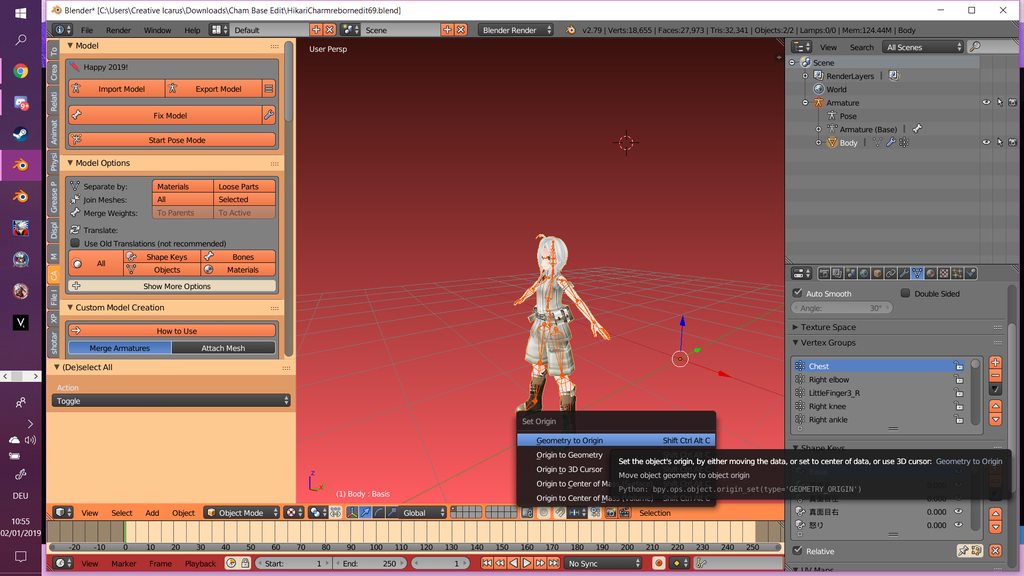
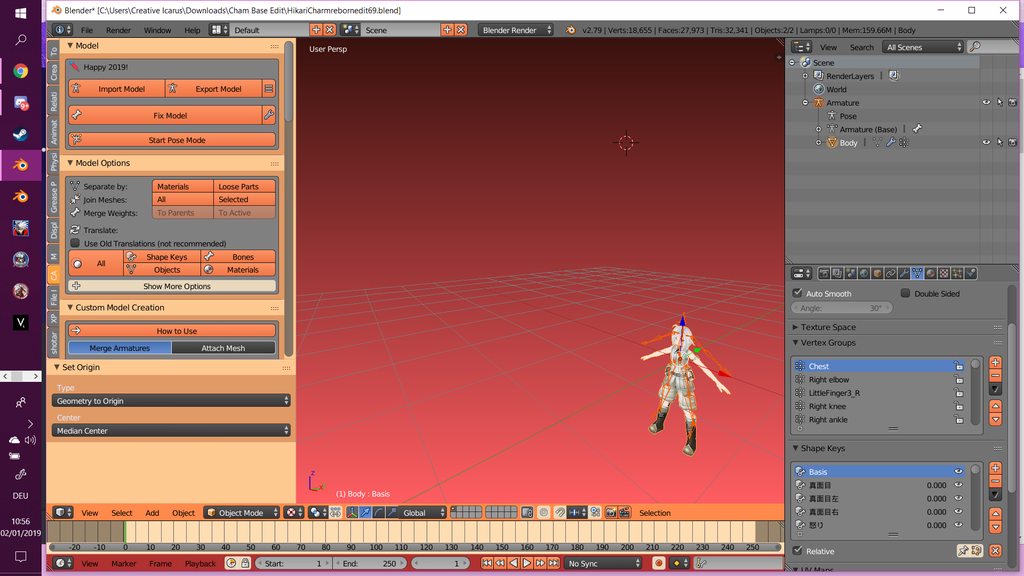
My orgin/piviot point is in the middle and when i try to Geometry to Orgin my Armature moves out.
 sleek isle
Change the selection thing beside the view mode
 opal aurora
Press N, change the location of the 3d cursor to 0 on XYZ, set that as the origin with the model selected and then the armature, make sure the armature and model are centered at 0,0,0 prior of course
 humble violet
I forgot In blender how do i Join a mesh to a bone again? Like if the mesh is not part of the armature and i want the mesh inside the armature
sleek isle
Select both an contrl empy group
 summer sequoia
does anyone know a way to get full motion tracking on a character with only one arm/an arm that has no hand
 wary crown
Make ghost bones, aka make the bones but dont weight paint them to anything. @summer sequoia
summer sequoia
I was figuring that
Its weird trying to make them on an arm cannon (trying to get my samus to work atm)
thanks for the info i'll start making those
it doesn't matter as long as they are parented correctly right?
sleek isle
Put 3 bones at the end of the elbow-wrist. One for the thumb one for the index one for the middle
You need to drag them manually in the first bone of each finger. Since unity dont assign bone with no vertex paint to them
 unique tartan
How could I fix a head rotation issue, my characters head keeps snapping upside down and frankly it's getting irritating. I've tried playing around with the head bone to no avail, the neck, the Spine, etc. Though I am not sure if the Armatures are set up correctly which would be my next step, unless it is fine otherwise I could use a little help with it.
 golden perch

any quick way to fix this? movement is from the hips and the hips have no weight painting
crisp tendon
Add weight painting ?
golden perch
I didn't want to do that unless I have to or was necessary because I thought the hips weren't supposed to have weight paint on them, but I'm not that good with blender so I didn't know
gritty nest
The hips need to be weighted to the hips bone of course
Just paint all the missing parts to the hips
golden perch
Will try that and see how it effects the rest of the posing
I might just have 0 IQ so ty
it won't let me put weights on the hips, it will only let me paint the last bone selected that isn't the hips
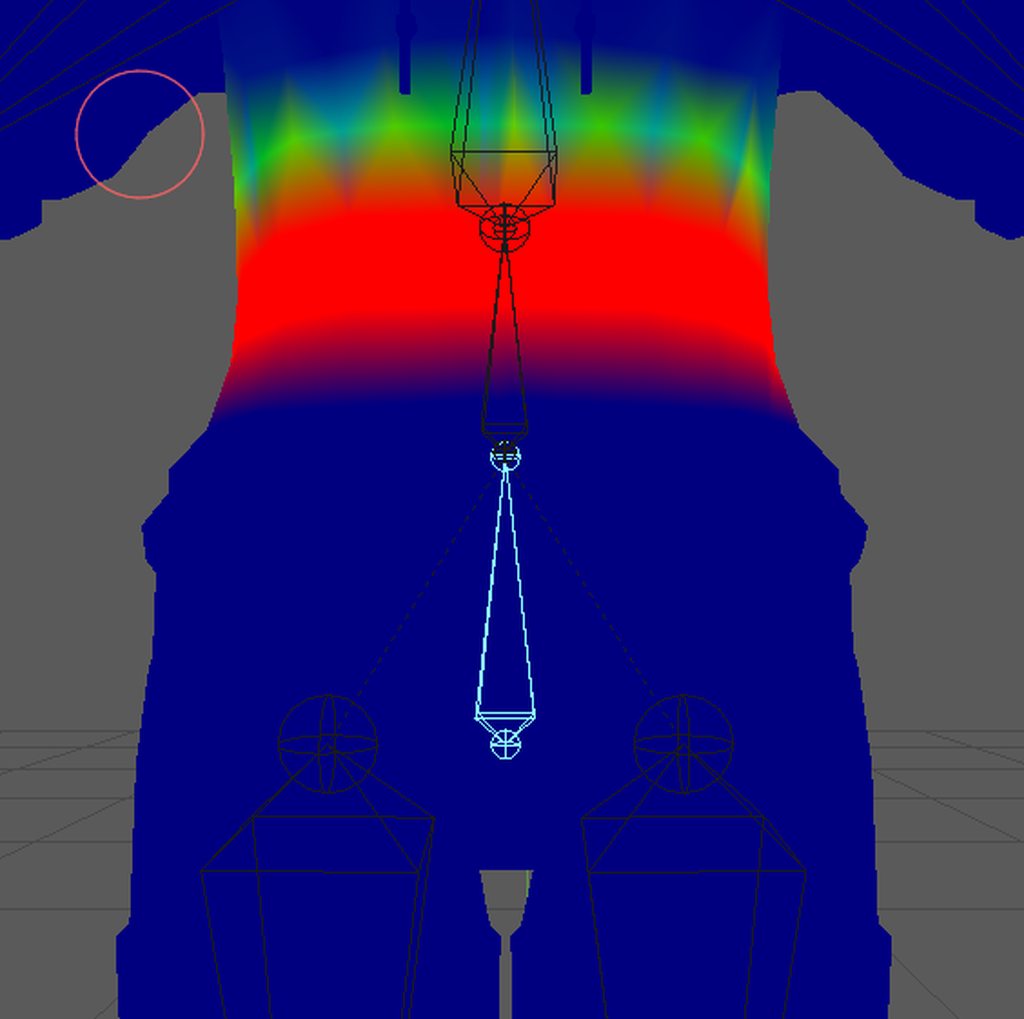
and yes I went to object mode and back to weight paint mode to update it but it still doesn't change, and its still painting on whatever previous bone was selected
golden perch
is anyone willing to let me call them and show them what is happening and maybe help?
gritty nest
Probably not, you'll have more luck describing your issue in here
There's like 15k people online right now
 indigo stratus
If a model is rigged prior to downloading from resource sites how would I go about optimising it for VR chat? I'm sort of new to to actually rigging models and my only experience is mixamo armatures

Wanted to put this boy in
He has bones for his tunic skirt and sword/scabbard I think also hair and his hat
crisp tendon
 pulsar phoenix
So i have a problem
my avatar's shows up fine in blender until it reaches unity
with the body above her waist twisted to the back
does it have to do with the armature?
 ivory radish
t-pose in blender and hit reset pose in unity
typically that fixes most orientation problems
pulsar phoenix
so the problem is my avatar's head and torso are facing backwards as opposed to my arms and legs facing the right direction
in unity
enforcing tpose on it sets it to that as default
ok
so i found out the left arm and right arm are opposite
@ivory radish any idea where i can continue from there?
ivory radish
yea
just use flip names tool in armature edit mode
after selecting all
then save the file
should update
unless ur still using fbx then just export over the original
 boreal cobalt
is there anyway i can prevent this iv tried hours on end to fix it but got nowhere https://imgur.com/a/Bd3IuLB help would be appreciated

 solid adder
Is the skirt weight painted? And the values of the dynamic bones?
Another thing could be the length and position of skirt bones.
How it behaves makes me think that the bones may be short and sideways.
ivory radish
u can also try cloth for it but yea its not even weight painted
most likely bc u merge it from another mesh but didnt even use the CATS merge tool so all the weights became invalid
solid adder
If that's the case, they are named differently and you'll learn that Blender can be very strict about having things named.
 sly mirage
SO HEY not sure what the problem is all i know is i edited my model and i used pose mode to enlongate the body a bit. and i found out eye tracking wasnt working. so i re did eye tracking. and recreated it. and then my bone pose edits reverted.. but now my problem is bacially i edited the body/mesh and made my character more sleder and made her look less like a migit with gigantism (other peoples words not mine) and i moved the armature up so it was back inside the body. and now when i go in game and stuff when my character blinks my hips blink too kind of. even though i edited the body so it was all inside the shirt like this

for some reason most of my hips pokes out of my shirt and they move when my character blinks
does anyone know what i did wrong and how i can fix this. i do have a back up of my fbx so if this is beyond repair just tell me what i should edit and how
okay tell me if im on the right track
so basically what im noticeing when looking at my shape keys is there all set to before i edited my models mesh and bones.
im going to try redoing all my visemes and see if that fixes the problem
no this didnt fix anything
what the shape keys look like

what basis looks like

does anyone know how tof ix
to fix
does editing the mesh and moveing the armature make it so you need to redo all the shape key from scratch? because non of this happend the other 4 times i edited this avatar
ivory radish
use shape propogate on the verts of the leg
and ya every time u add or delete verts to the original shapekey mesh u risk corruption of shape keys
sly mirage
shape propogate is that in cats?
ivory radish
no
sly mirage
ive never used that tool before
ivory radish
but honestly u should just restart from import bc like
the idea of shape propogate is u select everything but the face
and u hit the button and it resets those verts in every shape key
sly mirage
shit thats usefull
ivory radish
but the more changes u make 2 the entire avatar in edit mode
the more corrupt shape keys can become
so either:
redo shapekeys
transfer shapekeys from original
or just separate parts before u modify them
it can get 2 the point where every shape key just explodes the model
so be careful
sly mirage
where is this propogate option?
wary crown
Hit space bar and just type it in @sly mirage
 wary crown
Adjust it to fit humanoid standards

 candid radish
Has anyone had this problem where somehow a few blendshapes get mixed into the eye tracking? Like the mouth opening briefly when my avatar looks in a certain direction. is there a way to edit the eyetracking in unity?
As far as i can tell each blendshape is working properly and I see no stray verts painted where they shouldnt be.
 fading verge
@candid radish make sure lower eyelid slots in eye tracking are set to basis
otherwise you might have blendshapes happening when you look down
 buoyant spire
Hello
boreal cobalt
Hi
buoyant spire
Does anyone know why there is no rig option for my character
Its all greyed out
Nvm i got it lmao
wary crown
@odd plume that looks like its already a correct rig, export it as fbx and set it up in unity
candid radish
@fading verge I do Have Eye Blinking disabled in Blender. I create there animation separate from the eye tracking.
boreal cobalt
How does weight painting work on a skirt do I need to select all the skirt bones or just the root bone or whatever it’s called
 odd plume
Well in unity when I click configure the legs extend way out, and also I have no idea what to set as head and neck
I was thinking about making a dummy neck and setting the eye as head
fading verge
it has nothing to do with blinking, it's CATS sometimes auto filling the lower eyelid slots
wary crown
@candid radish unmap your jaw bone, check your lowerlid shapekeys in blender
fading verge
ah yup, jawbone too
wary crown
Also even if you do custom blinking, generate the eye tracking.
Just disable blinking in the Generation options
buoyant spire
Aight
wary crown
Both are flawed
buoyant spire
Unity says character is not in tpose
candid radish
Where would I edit them? in blender or unity. I don't have lower eyelid in blendshapes and JawBone is set to none in Unitys rig configure
candid radish
is there a way to pull up the eye tracking in unity and see what is assigned to what?
wary crown
@candid radish if you dont have vrc.lowerlid shapekeys generate eyetracking in blender like i said.
candid radish
@wary crown ok ill go and try to generate it blender.
wary crown
Make sure to uncheck generate blinking if you use a custom blinking animation
 idle vapor
i was trying to upload a character to vrchat when i got this notification.
Error: Spine hierarchy missing elements, make sure that Pelvis, Spine, Chest, Neck, and Shoulders are mapped.
I'm trying to figure out how to do it by watching videos but still don't understand. can anybody help me?
wary crown
@idle vapor do you have the bones mapped?
Click on your model > rig > configure
And make sure they are mapped on the right
Leave the upperchest blank
idle vapor
on blender or unity?
wary crown
Unity
idle vapor
like object mode or edit?
gritty nest
Upper chest should be blank
wary crown
Now check hips spine chest and neck
idle vapor
there is a neck
candid radish
Ok reuploaded with the CATS generated eyetracking. going in game to check it out
wary crown
Chest needs to be mapped
Your error tells you precisely whats wrong
@idle vapor
Also pls dont ping me
idle vapor
ok. so i have to map the chest.....hmmmm i'll have to research that...
candid radish
And its a bust, still doing the same thing. My mouth visemes are all over the place I might just have to toss eyetracking all together. @wary crown
wary crown
@candid radish its 5 am for me and i kinda cant look at it rn, your shape keys might be messed up.
candid radish
@wary crown Its ok, I just wish there was a way to see how the eyetracking assigns the eye bones in unity. I have a blendshape animation for the backpack to shrink out of sight and somehow thats being activated by the eye tracking. I try looking at my blendshapes again in blender.
 safe bluff
Usually that means you're missing important blendshapes for eye tracking to work, since it gets the first four shapekeys in the list.
 unkempt stag
So, quick question. Been working on this for a few hours now.
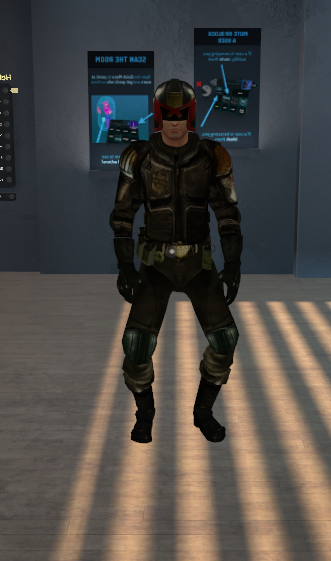
Why is it doing this
Don't know if it has anything to do with this, but I took Cat's tool for Blender and it took it from an angle of 83 to 172.
https://i.imgur.com/JzuOsXJ.png
 crisp tendon
The legs ?
unkempt stag
Yeah.
unkempt stag
Yeah, but I'm testing in desktop. I'll be taking it to VR once it's working in Desktop. Just reset it in unity avatar config?
crisp tendon
VR and desktop can look different, fyi
Because of sitting/standing, and because of height setting
candid radish
Good news everyone! I was able to fix the random mouth movements connected to the eye tracking. I had eye blinking disabled but thought of the empty shape keys it still created then it hit me unity must be looking for these to assign them but can't find them so its picking up the mouth keys instead. So I simply chose a vert to move slightly for each of the empty shape keys so they would transfer to unity and be used unnoticed like the "sil" key. It worked! Still have a few issues with the backpack moving with the eyes and minor adjustments to the back of the eye but that can be quickly fix. Also I manually remade the eye tracking instead of using the CATS because it would not generate right. @wary crown @fading verge @safe bluff
gritty nest
Yeah that's a known issue
The eye tracking just uses the first four shape keys on the Body mesh
And empty shape keys don't get exported (or imported, either one)
 slate hill
question, how do i approach rigging hair for my avatar for VRchat?
should i have it in the same mesh as the body? or a different object attached to the parent body?
would appreciate if anyone can help me with that (first time i'm rigging my avatar for VRchat, in maya)
buoyant spire
Good question
slate hill
also, if i make my knee from 2 joints, will it work with hte SDK?
fading verge
Is there anyone here that is able to do weight painting commissions for avatars? Ive been at this for hours now and Im still confused on how to get it to work
 kind umbra
Is the shape key mix intensity slider in blender designed to speed up the transitions of visemes such as oh to th?
just curious since the visemes I created for a model appear to be slow, so I'm not sure whether I have to increase the slider to make it faster or something.
ivory radish
no
i think its a multiplier for blended shapes
to exaggerate or have less mouth movement
the 'slowness' comes from poor visemes or just way of speech
the more defined each sound is the more it appears to be adept
i almost never just use the generated visemes
i use the mixer to speed up the process
but i still do tongue movements and move the lips and teeth a bit for more accuracy
sleek isle
Make the viseme a little bit exagerated because i dont think the viseme goes to 100 often
sleek isle
I like to aaaaaaa too
Its an issue with 2d viseme . The plane go to fast or not enought
ivory radish
2d visemes are much better if u just make ur own mouth
what i used 2 do is take the open mouth texture and split the verts appropriately enough so that it was easier 2 manipulate the shape
and then made visemes by changing its shape
its typically more accurate and less glitchy but again its going an extra mile
 tawny valley
I'm rigging a new character in Blender. I subdivided a bone into two bones. The second bone doesn't share any influence on the weight painting on the model. Is there a way to make it weight paint on the model after the armature has been already added to the model?
gritty nest
Yeah, you'll have to manually adjust the weight paint
 weary shadow
tawny valley
weary shadow
tawny valley
The toe still has no influence even after adding weight.
 ocean crane
Anyone know how to make a character turn their body less when I'm turning my head?
Like, I'm trying to turn my head just a wee bit but the model appears to want to give me 2 cm of looking before my character like moves his whole body
fading verge
@tawny valley Check if another bone has control of it already
 tawdry yew
im starting to lose my mind ive never had this issue before
in blender the entire rig is perfect but once i import it into unity it just bends down the wrists
anyone know how to fix this?
i cant seem to find out why its even doing this
 pseudo sedge
@tawdry yew in unity's Configure change wrist rotation / reset Roll of wrist bone in blender's N-keyright-menu (maybe)
fading verge
Feel that may be why too
ivory radish
yea and again just tpose it in blender
reset the pose in unity
and try messing with the muscle settings
to see how it would work with animations
tawdry yew
oh it was T-Posed
i tried putting it into diffrent poses to fix it
in the end i just moved all the bones in edit mode slightly and it somehow fixed it
 olive kestrel
how is the default arm rotation determined? mines a bit off
ivory radish
its based on the viewpoints scale/height
from the floor
and also the controllers 3D location
its not adjusted like in Mindshow
it uses original controller positions
olive kestrel
not that
ivory radish
if u mean like it keeps flipping directions
thats bc u messed up the roll of the bone
olive kestrel
i set all my rolls to 0 and mimic'd a working avatar's armature
ivory radish
thats odd
wat the issue then
also the CATS plugin should make it 'mimic working avatars armature' already
 delicate hedge
Hey, I have an avatar that has one leg whose knee occasionally glitches into a reversed position for a frame. It's only the one leg and it only occurs when crouching. I've checked positioning and weight paints and both are symmetrical as far as I can tell. Anyone know what's going on?
ivory radish
does it have 0 roll also
delicate hedge
yes
Upon checking, the hip, thigh, and knee bones have rolls of 0 but the ankle bone of the leg in question has a roll of 0.00004 in contrast to the 0 of the other ankle. I don't think that would be enough cause the problem though.
gritty nest
@delicate hedge bend the legs slightly in Blender and apply as rest pose
delicate hedge
Is there a specific way to apply it or does it automatically apply?
delicate hedge
Does that work for non mmd models?
gritty nest
Yes
"Fix Model" and the translation options are the only features in Cats that are MMD-specific. Even then, Fix Model also supports some other model types.
delicate hedge
Alright
 ripe crest
Im rigging my model and unity is saying im on the wrong version however i installed this three days ago-
is there like an update i need to install
it says i need to be on 2017.4.15f1 ? how do i do that
Disregard
ripe crest
Nope reregarding
I got 2017.4.15f1 and im guessing i cant reopen the model
so do i have to do it all again or?
I cant even log in on the VRChat SDK settings thing because the menu just keeps refreshing and lagging so i cant type it and when i do type my log in it just sends me to the sign up page
Would someone be able to help me?
 azure dust
 plain sundial
Ok so Acctual question. My VR chat SDK in unity only has one option. To clear cashe and preferences. what do i do?
also. I do not have "Face Mesh"
 naive tree
@plain sundial check your unity for errors, if you have imported any assets then get rid of scripts from those, if u still have issues then close unity, dete VRCSDK folder and SDK.meta file, then open Plugins folder and delete VRCSDK folder
 worldly willow
Make sure to use /\
plain sundial
Ok i got it
One more thing possibly.
Im new to unity as a program; how do i map Pelvis Spine,chest, neck and shoulders
I found it ^^"
 raven lintel
so im trying import a model thats already been rigged into vr chat but it says its not named as humanoid rig
fading verge
heya
i had a model and I took a look at the rigging. It says it's missing a chestbone and that the spine has a value of 0. When I went into the game, the feet and hands spasm around and every emote is broken with the pieces of body stretching out and twisting at grotesque angles.
 mighty swallow
I just finished putting my avatar together but my avatar hips keep pushing forward, any ideas?
 violet bobcat
can i see a screenshot of the bones?
mighty swallow
 violet bobcat
is it rotated correctly?
mighty swallow
it works really well with animations
its just when i stand in game with vr
its hip pops out
violet bobcat
fbt?
mighty swallow
nono just regular vr
mighty swallow
oh its ok
naive tree
@mighty swallow seems like they are bending inwards, straighten them up from front view and then make a bend foward slightly
mighty swallow
https://gyazo.com/142c1f414c50ac4116f55b49f67c3c24 here is another picture
 naive tree

 mighty swallow
ty i will try this @naive tree
fading verge
Hi... A few things barely anything are broken with my avatars rigging. I was wondering if someone who knows what they're doing could take a look??? Thanks :p
wary crown
Send screenshots
fading verge
My avatars rigging doesn't work properly, causing all emotes to make each part spasm around and whilst walking, the hands and feet randomly jitter up to 2 meters away constantly. Oh and turning messes with the legs.
raven lintel
so im trying import a model thats already been rigged into vr chat but it says its not named as humanoid rig
 hollow nova
Can you change it to humanoid rig yourself? or can you try opening the model in blender with CATS blender plugin and use "Fix Model"? I'm going to need more specifics if you want more help
raven lintel
i dont know how to change it to humanoid
 ashen yew
When you upload the model to unity and you click on the prefab in your assets folder, a tab shows up in the inspector window that says 'rig'. Theres a drop-down menu there that lets you switch from 'generic' to 'humanoid'.
raven lintel
it works but the avatar is broken such as having an upperchest and bad spine hiearchy ill do that on my own
thanks
fading verge
Is someone familiar with what causes avatars to potty dance/tap dance after moving and how to reduce it?
ivory radish
increase ur real height setting in vr, move head bone and viewpoint closer to center, remove toe bones, etc
it happens when looking down also
 sturdy finch
does anyone have a tutorial on how to rig hand and fingers?
fading verge
If I make my own avatar, do I need to attach "bones" on it in order for it to detect my movement?
 real echo
hey so, I'm making an avatar that doesn't exactly have normal sized/shaped eyes, and I'm trying to figure out how I should go about modelling/rigging them for eyetracking- I found a tutorial on youtube on how to make an eye rig in blender where you can control the eye's texture to follow the bones movement, without actually rotating the model itself- does anyone know if that'll work in VRChat? or will I need to actually make a modelled eyeball?
 slow gyro
Texture is fine
 cedar bloom
Guys for some reason my eyes are squeezing in VRC i just made a eye tracking in CATS as usual
ivory radish
it is a script for $20 that can be applied to bone chains
fading verge
I tried adding colliders to my avatar, but for some reason they didn't work.
naive tree
adding colliders? what kind of? and why?
fading verge
so the hair doesnt flow through the body
Dynamic bone colliders? Did you make sure to assign them as colliders in the Dynamic Bone script(s)?
naive tree
ppl should stop caring about that honestly
fading verge
^
why?
that my hair constantly goes through the entire body?
I do it for my hands, so people can interact with their dynamic bones, but I enver bother with them to stop them moving in certain ways
naive tree
mostly because of performance issues, people go overboard with colliders and bones
fading verge
I was just going to add 2 colliders...
One at the end of the hair and one in the middle
naive tree
if u dont want your hair to go through your head, that is easy to do - use high 3rd value
and the hair doesn't go through body anyway if you're stationary in VR, it will clip when moving
fading verge
Just make sure you've specified the colliders in your dynamic bone script, then they'll interact with each other. Theres a colliders section which you just drag and drop the object into
ok
I'm just gonna ignore that since doing that the pupils went white...
 hollow sable
i use mixamo to rig
when mixamo uploads my custom character i made on sculptris
it fucks the texture up
crisp tendon
Did you clean up the model you made in sculptris before rigging it ?
crisp tendon
No it's just normal steps to take after sculpting a high poly mesh
It also needs to be humanoid
hollow sable
ill show a screenshot
to show u what is going on
hold on you cant post images here
crisp tendon
Upload it to imgur
 fringe jetty
Does anyone here have experience with FinalIK? I'm trying to rig something (a hose connected from the back of a character to her gun) and while the Final IK stuff works in Play Mode, it doesn't work once uploaded to VRChat.
Strangely enough, it works totally fine on another Avatar, using the same method.
So I'm wondering if it's possible that something I set is causing the IK Solver to not initialize in VRChat? Cuz it works fine in Unity...
The parent of the hose bones is the chest.
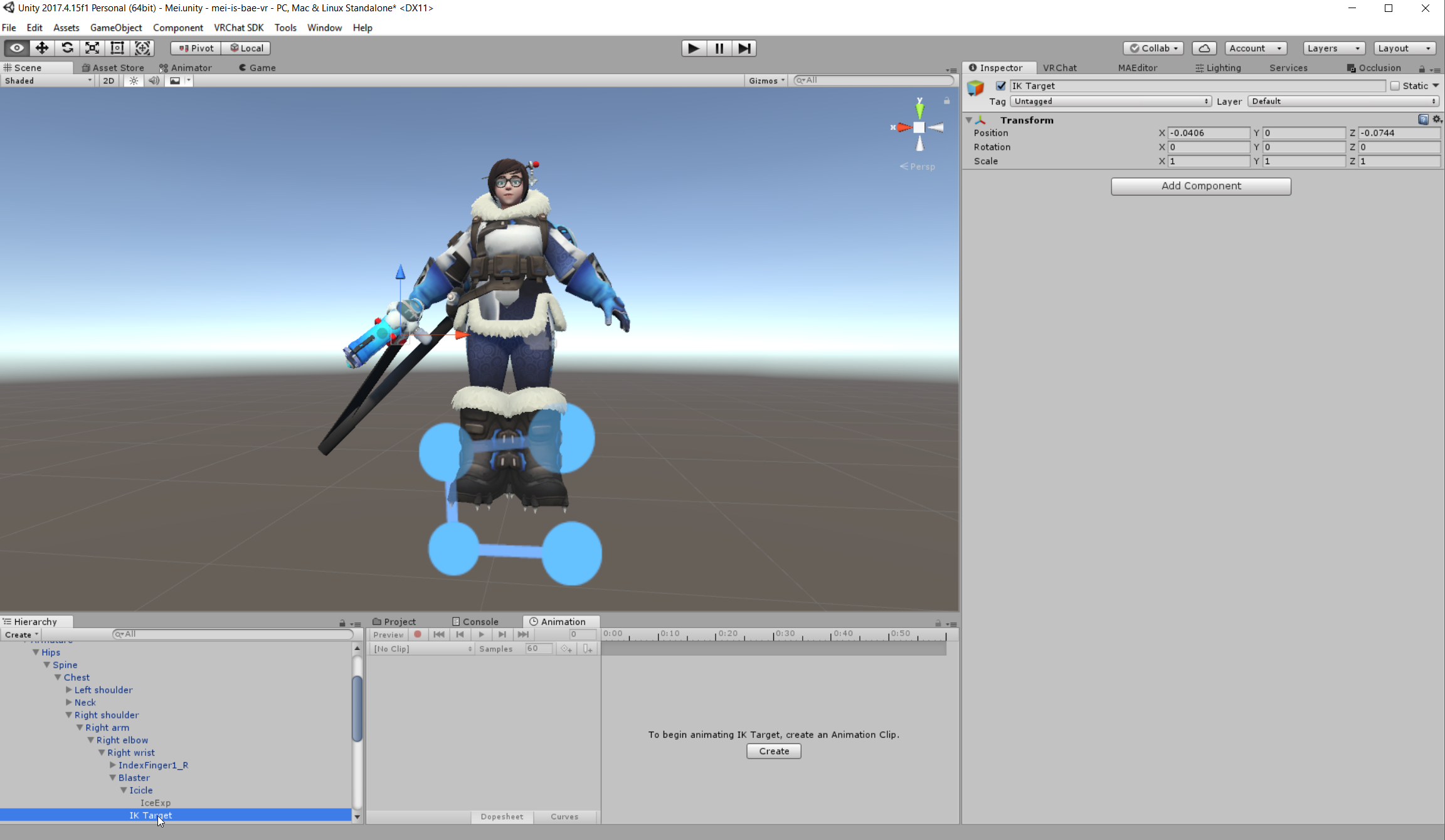
The target of the IK is an empty game object on the gun, which is attached to a hand bone.
https://i.imgur.com/MltM6EP.png
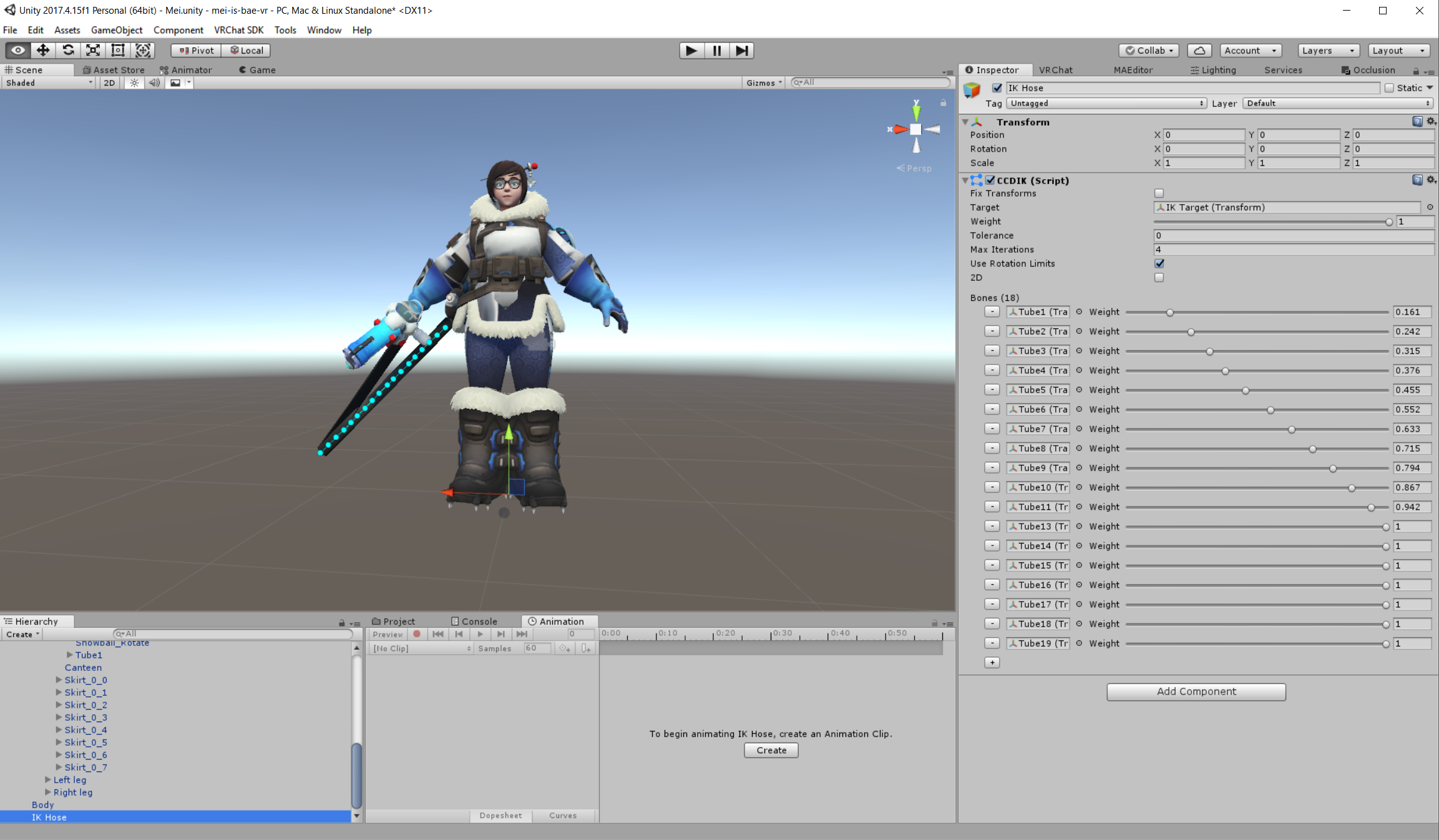
There's the IK
Here's the Target
https://i.imgur.com/SL3tnlo.png
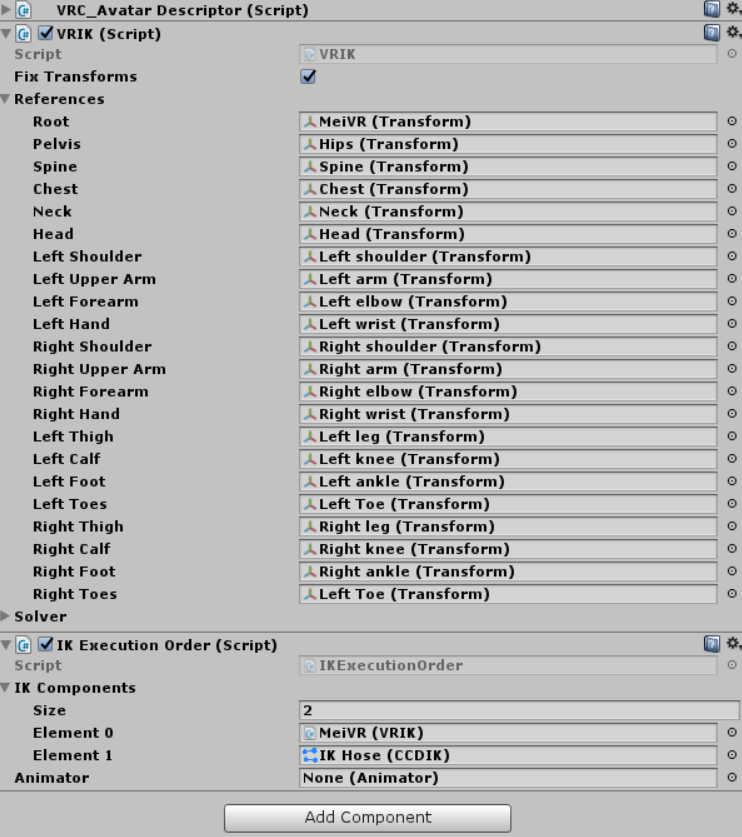
Settings on the Avatar Parent https://i.imgur.com/ARJmNwO.png
And when I hit play, you can see it works perfectly... but it doesn't work in VRChat T_T https://i.imgur.com/LcFhW2B.png
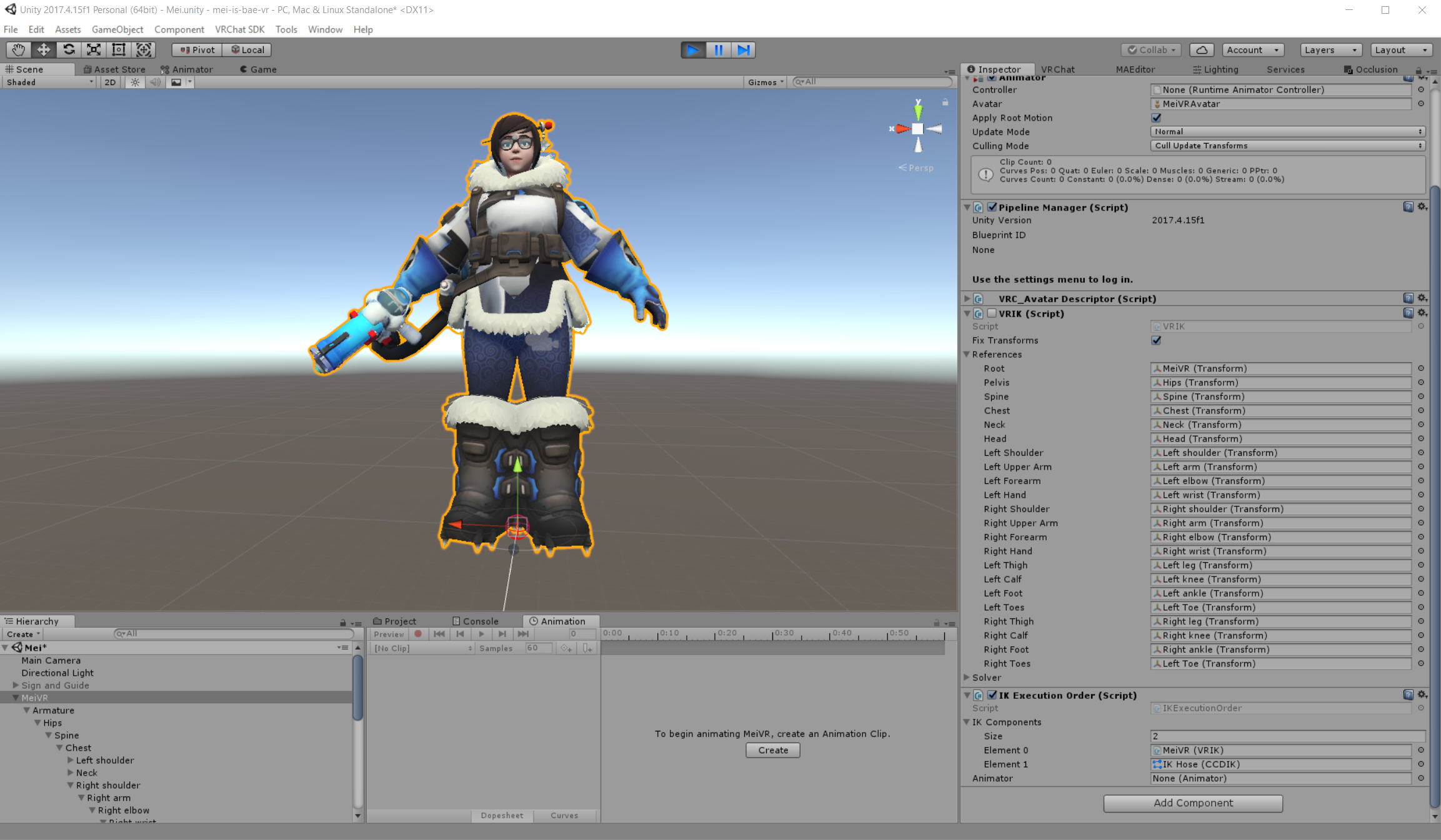
Lastly, I noticed if I start with the VRIK Script active, it works in Unity, but disables the script on play? Still functions fine. BUT... If I disable the script first, then hit play, I get the following error: https://i.imgur.com/I4jxL4H.png
 gritty nest

VRCat: Community-Run VRChat Forums
Final IK can be used to add additional IK to parts of avatars. An example of this is using the Aim IK component to add a turret that is aimed based on...
tl;dr you need to add your own VR IK component, IK execution order, and set your own IK to execute after the game's.
fringe jetty
Did I not do that properly here? https://i.imgur.com/mRQhCGT.png
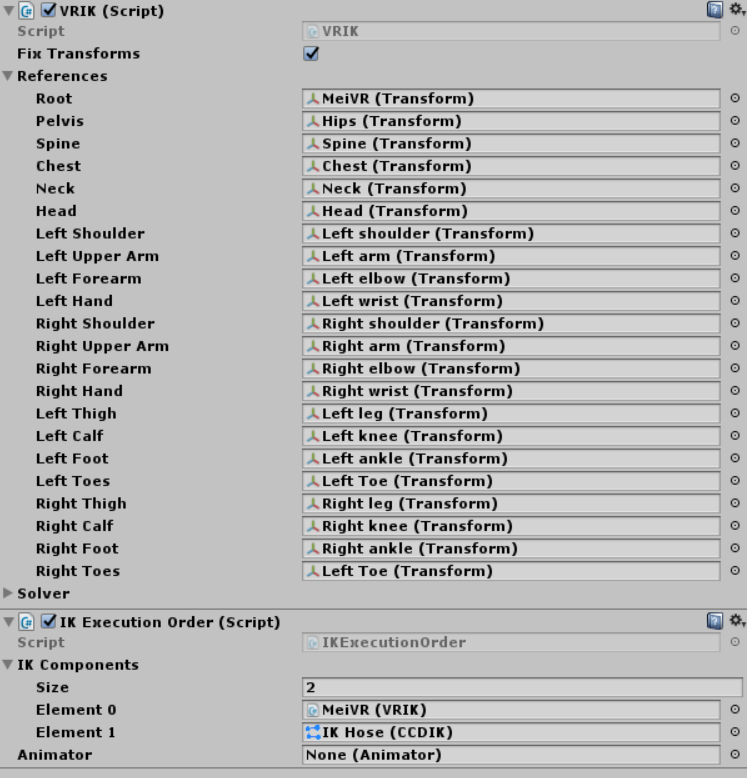 fringe jetty
I FIGURED IT OUT
ROOTMOTION HAS TO BE IN THE PLUGINS FOLDER RIP ME
ivory radish
wat y do u need final ik for that
gritty nest
The alternative is clever weight painting which doesn't always look good
 autumn pilot
uhhh so im not sure wadu hek but how come unity says this https://gyazo.com/260e552dbbfc2696230261a863b01a57

and blender says https://gyazo.com/1d7f54838ae6d4e0effef092339291fa

I checked the weight paint too and all was aight
I dont.
=_=
even
autumn pilot
https://gyazo.com/14534710f23aacc281a1f13197fa7fa7 well i fixed that ^ but she be leaning wa??

 sharp pewter
does not look like the hip bone is strait up and down
or maybe i'm seeing things
|
 graceful bramble
Maybe you already figured this out Polaris, as I saw you playing with something that looks similar to that avatar, but it looks to me like one of your hip bones is flipped upside down in Blender.
fading verge
is there a way to get the weights from one arm and put it onto the other side's arm but with the opposite faces?
I weight painted my right arm and I wanna have the same values on the left
 astral ridge
copy the vertex group and mirror them@fading verge
fading verge
how would I go about doing that?
I am pretty new to weight painting/rigging
ah, I think I got it
didn't really work at all though 😦
 tight skiff
why is there movement even though there is no weightpaint? https://cdn.discordapp.com/attachments/433313050045579265/533100818350604299/unknown.png
 naive tree
there's weight somewhere on other bones
there's not only the spine is being moved, but also all the other bones above it
tight skiff
on the skirts bone yes but it is lower than the spine
tight skiff
can i do it with selecting the whole armature or do i have to check everyone individually?
naive tree
individually or use addon to remove all unused vertex groups and check which bones still have the weight and remove those
fading verge
you have to check them individually I believe
it shouldn't take too long though, if you did any weight painting recently I would highly advise checking those
if this was a model you just got, I would advise finding another as its likely if you are having this many issues with the weight painting already the other parts may have hidden issues as well
tight skiff
ok i noticed that there was some weightpaint on right eye but i cant erase the weightpaint for some reason? https://cdn.discordapp.com/attachments/485095187186712577/533105179810332682/unknown.png
 fading verge
your settings look something like this? https://cdn.discordapp.com/attachments/523745933037404161/533105836579618826/unknown.png
 gloomy pollen
is there a real solution for dynamic bones/colliders for skirts?
to stop them from clipping through legs when you crouch?
the nodes just slide around the cylinders
naive tree
@gloomy pollen https://www.youtube.com/watch?v=8u1NBstIcy8&feature=youtu.be

[[ENABLE CC ON THIS VIDEO]] Quick rundown of how I set up a skirt for VRchat that looks good and wont make everyone's frames rate tank. Currently there is a ...
other than that no, u don't use dynamic bones to stop clipping cuz it doesn't work
if u want to stop clipping - cloth physics is what u want
naive tree
yes
gloomy pollen
oh I dont like this chick that much haha
naive tree
gotta put work in if u want something to look nice
gloomy pollen
yeah maybe for one of my avatars but
this is just a friend of a friend
she's getting a decent dynamic bone setup
so this is just weight painting the skirt to the legs and then adding a dynamic bone on top of that?
naive tree
no it's 1 bone on each side and parenthing the bone to leg
gloomy pollen
oh thats not so bad
then you weight paint each skirt half
to the new bones
how is it colliding with the leg?
oh its not, its an illusion
naive tree
it's moving with the leg
naive tree
and at the same time has a dynamic bone, so it jiggle a bit
gloomy pollen
wonder if it still work when squatting
naive tree
no, unity component https://www.youtube.com/watch?time_continue=13&v=DnX226UdCFw
extra notes: - this might not be the right choice for your model if the cloth is stylized in a physically unrealistic way - like dynamic bones, this is not a...
gloomy pollen
yeah thats what i meant
naive tree
be sure your mesh doesn't go too high in poly
gloomy pollen
ah this looks much nicer
naive tree
short skirt is fine with 200-400~ verts
gloomy pollen
let me check
bout 1k
ah this requires capsule colliders hmmm
no bueno for maps like Murder
naive tree
doesn't matter cuz they are set as triggers
sleek isle
Still depend.work well on short skirt but longer one is more... like not possible without clip most of the time
When you walk right to left
For example
fading verge
It's pretty cool to see the options
fading verge
Is the (short) distance between leg bones the cause for potty dancing avatars? Fidgety ones
 fallow void
I have a problem with my avatar that whenever I bend down in vr or crouch with C, my right leg bend backward for no reason. I can't figure what is causing such problem. Anyone can help me? I tried repainting the leg but it didn't do anything.
ivory radish
did you check rolls and bone rotations in the mapper
fallow void
Rolls and bones rotations? I moved the whole avatar in play mode or in Blender but I dont see the problem.
But idk if thats what you mean
ivory radish
no
every bone has a roll value and it might also have awkward rotations in the humanoid mapping window
the mapping window


and roll
fallow void
Let me go check.
Like, from my point of view. I "Think" it look fine? Like its following the other bones like its supposed to.
Its mapped proprely on Unity
On Blender, its proprely connected on the hips
 ivory radish
have u also tried this

also legs may potentially do that if ur extremely close to going into prone
fallow void
Its whenever I sit down OR I press C (Crouch) on my keyboard
So I dont think its a prone problem ?? Also Idk what I'd click on this
fallow void
I'll give that a try, hopefully it help! Thanks man, I really appreciate it
fallow void
It didn't work.
fading verge
Hi there
So I have a problem where my neck is very disfigured and doesnt move corectly with my neck
Im not sure what I did in blender to make it really broken
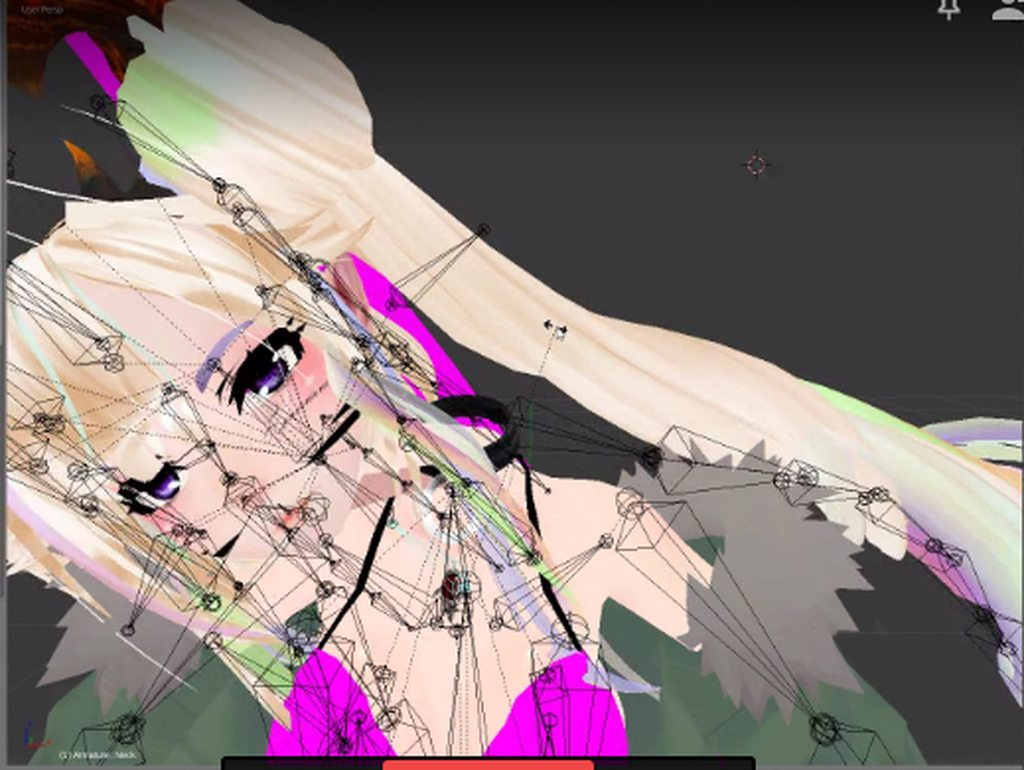
heres how it turns in blender...
(when i rotate it left to right)
 vocal wedge
How do I put my eyes back into my eye sockets and does this have anything to do with rigging?
https://gyazo.com/6de50bf79fef432c37334428b0b5666c
 naive tree
screenshot of your eye bones in blender
naive tree
idk how different is having sphere eyeballs to mmd flat
vocal wedge
I wasn't sure either, but I followed this tutorial, the results are pretty much the same as when I used Cats plugin.
https://www.youtube.com/watch?v=gCPcg9y4ZBM

Creating Eye tracking for your Avatar in VRChat Links: Download Unity MMD rigging: https://www.mediafire.com/file/7awm878q43c1m7q/MMD_EYETRACKING.ht Eyetrack...
vocal wedge
Hm, seems like I had to move the bones just a little.
It works again now, but left/right tracking doesn't look good.
https://gyazo.com/2bc82e833a72538d8dce1d165be321fd
 naive tree
@vocal wedge you could try having the bone right in the middle of geometry origin for eyes, and if that doesn't work then maybe move it very slightly behind, be sure bones point upwards
an idea
vocal wedge
Oh yeah, I should try that too, thanks.
naive tree
bones pointing up is important
so the idea is to seperate the eye, shift+S> cursor to selection, then select bone tail/head and shift+S > selection to cursor, so you'll be doing two repositions and move the bone tail(thin end) upwards on Z (g+Z)
if there's no movement or it's too low, then i think gotta move the bone backwards on Y
if the eyes still mess up in unity, try having your head tail straight up, cursor to head head(bone) and then tail to cursor and move on Z upwards

I can only guess, no clue how spheres work with eye tracking
but iknow they do work, one person i know has like 3 avatars with sphere eyes
i just forgot who was it so can't ask 😄
vocal wedge
Well, turns out I should have pointed them up, so it seems more or less decent in Blender, but the eyes are still appearing under my chin, so I guess it's another issue.
naive tree
i assume all transforms applied, then the last guess is just actually making your armature look decent and not a mess that you have 😓 at leas the upper one
as in fixing up bone tail positions and having all rolls at 0
vocal wedge
I'm gonna share a gif of it in BM.
fading verge
@vocal wedge Feels like your bone's orientation are different on each eye
Try selecting both eye bones within Edit mode & pressing Ctrl+N while your cursor is in the 3D window
Then Recalculate the global rotation for X, Y then Z on the positives
vocal wedge
Luckily, Yuumi fixed my eyes, but thanks.
fading verge
Ah, welcome
 cursive apex
@vocal wedge You need to have the bottom of the bone yuumi linked in the exact center of your eye balls and it should be oriented as such
 gritty sleet
i made a jaw bone for my avatar, to what do i parent it to? the neck or the head? or something else?
cursive apex
the head or face depending on how your model is laid out
are you not using visesemes?
gritty sleet
no, but the chin is going to the sides as i turn my head
i removed in the end anyway... :/
cursive apex
That's because you need to transfer weights from the face rather than have it double painted
gritty sleet
no, i removed it because no one was answering me, so i simply say "screw it" and removed it.
cursive apex
answers can be really slow here so you'll need a degree of patience.
fading verge
Sometimes others are working on their own models or enjoying the game too
Though it's fine to experiment' you'll learn that way too
I messed a lot of things' found answers and learned a lot by experimenting with my models
Just be sure to save every now and then with different versions just in case you need to go back to a moment before you did this or that
naive tree
don't be so pissy about not getting an answer, there can be many reasons for it - and first of all when working on avatars, you must be willing to research and learn yourself not wait for when some1 else is going to give a solution
 charred sorrel
so i got eye tracking to work but
the model's mouth opens really wide when you look down klsdjflkds
naive tree
remake eyetracking
you MUST have these 4 shapekeys first http://prntscr.com/m6hg14

or else it will use your visemes
naive tree
and be sure your jaw is unmapped
charred sorrel
worked!! thank you!
what about fingertips curling in? is there a fix for that?
not a super big deal but it's noticeable
naive tree
probably last fingerbones are too small? or have rolls
can be fixed in unity by rotating them yourself
charred sorrel
so my avatar's textures work in teh avatar preview and in unity but not on the actual model?
naive tree
screenshot @charred sorrel
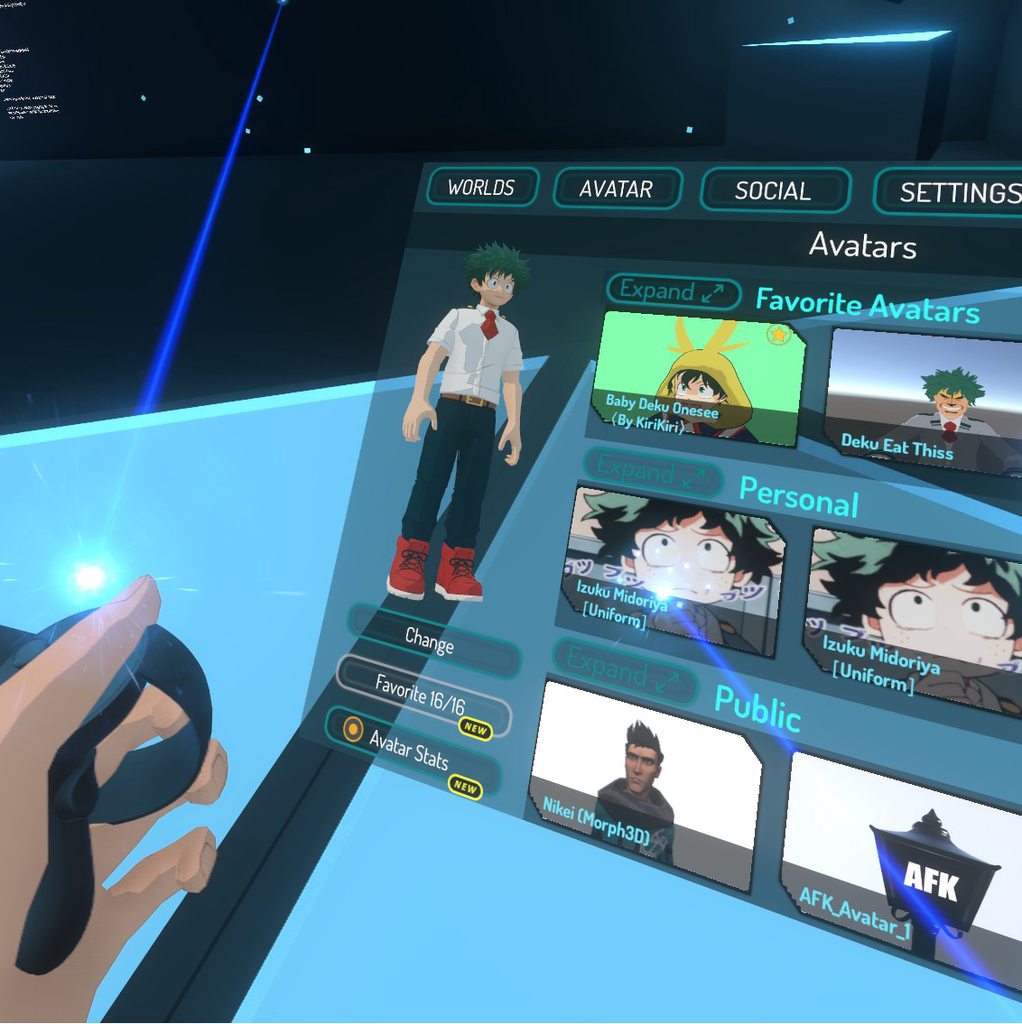

 naive tree
@sturdy osprey select all hair in edit mode then W>shapekey propagate at the bottom
 sturdy osprey
Ok, thanks! If I stumble across any others I’ll try to ask again
 grand vessel
Is there anybody who would rig one thing for me?
gritty nest
@charred sorrel go to the humanoid rig configuration
The model should also be T-posed there, the fingertips are probably bent wrongly there
Just manually bend it into place
 kind parcel
how do I proceed if my character has arms but no legs
do I go with humanoid type and ignore legs or with generic type ?
sleek isle
put bones for the legs too
fading verge
So I'm using mixamo for the bone rigging on my model but how do I set his eyes for tracking? https://puu.sh/Cw5W4.png
 naive tree

Google Docs
Name the armature “Armature”. Name the mesh containing both eyeballs “Body”. If possible, make the whole head or avatar a single mesh. Name the bone hierarchy like this. Bones not mentioned can be named whatever. IMPORTANT: You cannot have any bones interrupting the h...
fading verge
Ah thank you!
 open herald
Hey Im trying to upload my avatar and it crashes the Uploader when I press "Build & Publish" Im not sur ewhat to do I've done all the steps to update my VRCSDK at least three times and I dont know whats the issue
: C:/Users/-----/AppData/Local/Temp/DefaultCompany/Sexy Medic/customAvatar.unity3d does not exist
System.IO.File.Move (System.String sourceFileName, System.String destFileName) (at /Users/builduser/buildslave/mono/build/mcs/class/corlib/System.IO/File.cs:318)
VRC_SdkBuilder.ExportCurrentAvatarResource (UnityEngine.GameObject avatarResource)
VRC_SdkBuilder.ExportAndUploadAvatarBlueprint (UnityEngine.GameObject externalReference)
VRC_SdkControlPanel.OnGUIAvatar (VRCSDK2.VRC_AvatarDescriptor avatar) (at Assets/VRCSDK/Dependencies/VRChat/Editor/VRC_SdkControlPanel.cs:1010)
VRC_SdkControlPanel.ShowBuildControls () (at Assets/VRCSDK/Dependencies/VRChat/Editor/VRC_SdkControlPanel.cs:256)
VRC_SdkControlPanel.OnGUI () (at Assets/VRCSDK/Dependencies/VRChat/Editor/VRC_SdkControlPanel.cs:161)
System.Reflection.MonoMethod.Invoke (System.Object obj, BindingFlags invokeAttr, System.Reflection.Binder binder, System.Object[] parameters, System.Globalization.CultureInfo culture) (at /Users/builduser/buildslave/mono/build/mcs/class/corlib/System.Reflection/MonoMethod.cs:222)
Rethrow as TargetInvocationException: Exception has been thrown by the target of an invocation.
System.Reflection.MonoMethod.Invoke (System.Object obj, BindingFlags invokeAttr, System.Reflection.Binder binder, System.Object[] parameters, System.Globalization.CultureInfo culture) (at /Users/builduser/buildslave/mono/build/mcs/class/corlib/System.Reflection/MonoMethod.cs:232)
System.Reflection.MethodBase.Invoke (System.Object obj, System.Object[] parameters) (at /Users/builduser/buildslave/mono/build/mcs/class/corlib/System.Reflection/MethodBase.cs:115)
UnityEditor.HostView.Invoke (System.String methodName, System.Object obj) (at C:/buildslave/unity/build/Editor/Mono/HostView.cs:295)
UnityEditor.HostView.Invoke (System.String methodName) (at C:/buildslave/unity/build/Editor/Mono/HostView.cs:288)
UnityEditor.HostView.InvokeOnGUI (Rect onGUIPosition) (at C:/buildslave/unity/build/Editor/Mono/HostView.cs:255)
gritty nest
@open herald you have a compile error
Go to console and fix it
It's the errors that don't go away when you press clear
If there's no errors there and you can still enter play mode, you probably have a build error instead, usually a faulty script using an editor namespace
open herald
So how would you fix a build error
open herald
I deleted the sdk three times
pseudo sedge
@open herald use right unity version 2017.4.15f1 and not update it, reinstall sdk by deleting sdk frolder with sdk.meta file from Assets folder when unity is closed / create new project and try there
also use latest sdk
open herald
I do have the current unity
And I've deleted the sdk in the folder three times and did the rdgedit fix
pseudo sedge
you reinstall sdk by deleting sdk folder with sdk.meta file or just a folder? and you have closed unity while you do this? try to create a new project
or also try to disable all models on the scene except the one you try to upload / try to remove the model from the scene and add again
also be sure that your model is a not something with few millions polygons and hundred materials because that also may crash rarely
fading verge
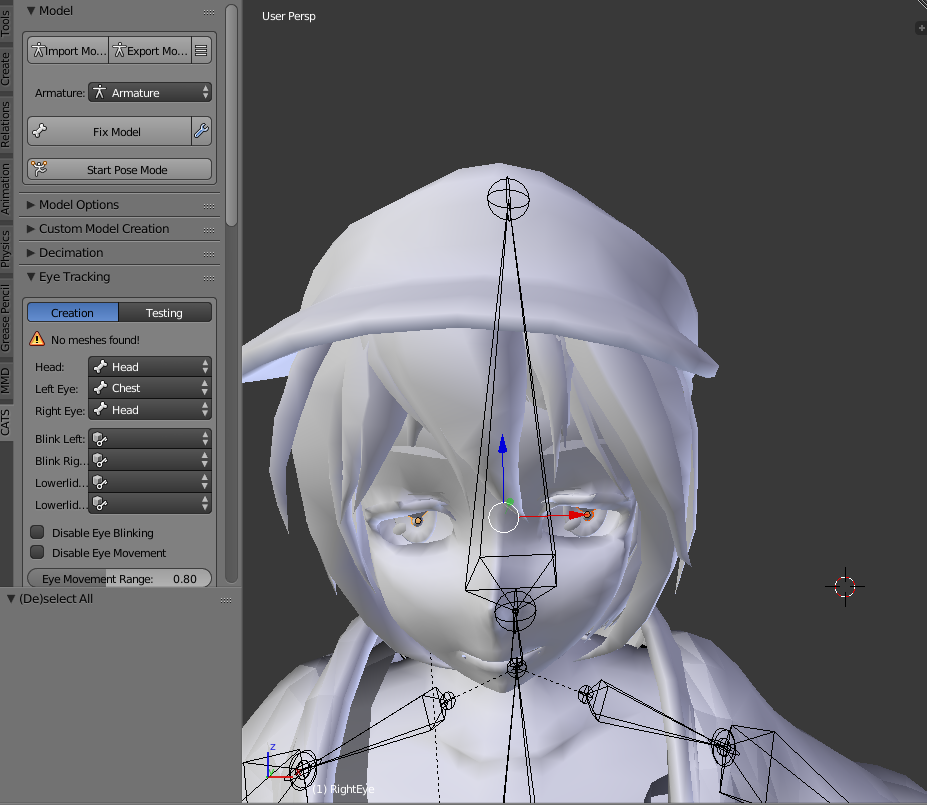
Hey can someone help me out with eye tracking? Im trying to use Cats and I made two new bones LeftEye and RightEye, but it's still not registering, do I need to refix the bones once I add new ones?
 drowsy wharf
no, you need to weight paint the mesh to the bones, and assign the left/right eye with that dropdown in CATS
although that looks like you didn't extrude the bones from the head (or otherwise parent them to it) and they're separated from the entire armature since they're rendering differently
drowsy wharf
I have never used mixamo, can't help there
 open herald
I have deleted all of the vrcsdk content including the rgedit stuff
In the files
It's not working with any of my files
ivory radish
u have to fix issues with weight painting urself
either paint it manually, fix weights from auto rigging programs, keep a crappily weighted rig, or use an unrigged character
it helps if u can symmetricize the character with mirror modifiers or symmetricize/snap to symmetry tool
cuz then u can paint one side of bones and it mirrors to the other side
fading verge
https://i.gyazo.com/c3cc92294ddb969428b7e2bf06c72743.png So I tried to fix the mmd bones with cats plugin, but it did this instead..
 pseudo sedge
import the model from cats menu and before that disable mmd_tools and restart the blender to use integrated into cats mmdtool, also before fixing don't rename any bones
 drifting tulip
Normally i never run into issues with my rigs but did a re-import after fixing some shapekeys and verts in the model I was working on.
I have 0 rotated bones, everything parented correctly and now with the newer version of one of my older models, the upper leg is rotated as if its not properly parented when it is and i'm not sure how to fix this. Blender everything is 100% correct yet my imports to unity seem to always be this way.
https://i.gyazo.com/af633798fb7d50707a86a7be270c550e.png

The model pre-2017 unity was also fine before making another import
pseudo sedge
try to click somewhere "reset to prefab" / or check rotation on Configure window and if that same strange rotate on that window this bone by yourself
open herald
Still dont know what scripts Im supoosed to get rid of
Litterly did the Upadte to 2017 unity step by step and its doing the exact same thing.
sturdy osprey
@naive tree so it turns out all of my shape keys do the same thing, like it appears in the same position as what i posted earlier. am i supposed to do the same thing but with every single shape key?
 sturdy osprey
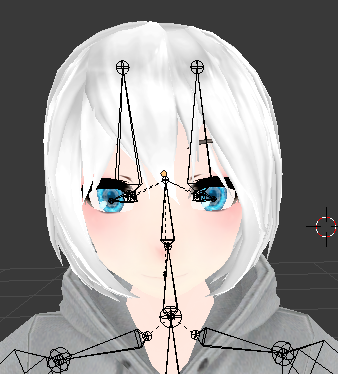
so for whatever reason, when i move my eyes to the closing position, the head kind of points out a little. but when i go into edit mode to replace it back to its original spot it gives me the 2nd picture below


im not sure how to fix this
 calm needle
did you check the other eye blendshape? do both eye blend shapes not do that but only when both are used?
sturdy osprey
yeah only when both are used
so what happens is if i were to close one of either eye, the head will slightly pop out
but when both eyes are closed it turns to the 1st picture
calm needle
wonder if the head is moving slightly in both visemes and when both are used together it pushes it beyond the hair line
blend shapes can add onto each other so what moves slightly with two blendshapes will move more when both are active. If you that part of the head is never visable via normal usage, you might be able to cut that part of the head off all together if you are careful about it
sturdy osprey
thats the only issue though, because when both eyes are closed. it goes back to as shown. however my issue is keeping it in that state so i could potentially cut that piece off
is there any way in edit mode that i can keep both shape keys (left and right eye) to stay closed?
because that might solve my problem instead
nvm i got it
drifting tulip
I still can't seem to figure out the issue with my leg going wonky in the unity import.
I've tried messing with rest pose, shapekeys, moving the bone or adding roll and it still turns out the same.
At this point i'm unsure if I should just delete the entire avatar out of unity and start it over since everything is 100% correct in blender.
This is annoying the crap out of me.
opal aurora
Set rig to none, Apply
Set rig to humanoid, Apply
Drag model back out into the scene
If the leg is fixed, copy any components from one over to the other as necessary
drifting tulip
gave that a try, still scuffed.
naive tree
@drifting tulip first of all reset all bone rolls (alt+R when bones selected) and apply all transforms to mesh and armature with ctrl+A > rotation/location/scale, then delete 1 side of leg bones, then enter edit mode, select the leg bones > W+Symmetrize, then delete the leg+knee mesh on the same leg, seperate the exact mesh on other leg and apply mirror modifier to it
oh with symmetrize bones you might have issues that it doesn't move some of the mesh, so you can delete the weight from the same leg and enable xmirror and blur it with 0.0001 values over
non symmetrize way is shift+S>cursor to center, then change pivot to 3d cursor > shift+D bones > ctrl+M>X, then rename all bones to needed
drifting tulip
Thank you Yuumi for the detailed instructions, I'll give that a try
drifting tulip
In the end i had to rotate and adjust my entire rig and mesh a certain way and then do symmetry on them.
I also have to keep the bone rolls otherwise the legs twist for some reason. Anyways, i got it looking like its working as i intended.
Thanks, @naive tree
 tame island
need help with combining rig..

so the wing came with the wings..
Ive rigt the other parts my self.. but for some reason when I try to combine both armature to gether the other one dissapers
fading verge
@tame island Did you take a look at the armature management?

Making sure all Skeleton Layers are turned on
Or pressing Alt+H with your cursor on the 3D view port
tame island
Ive deleted it .. already.. plus the bones placement makess me confuse..
fading verge
Ok
 sturdy palm
can someone rig my model for me?
i already made it from scratch i just cant understand how to rig it
ivory radish
use an auto rigging program, figure out how to weightpaint, or eventually someone will want $$$ or might do it free of charge
gritty nest
Blender has automatic weights
Mixamo can work too
If you can make a model from scratch you can probably also rig it with automatic weights
ivory radish
ye but will also require fixing the issues with it
kind parcel
how can I make a flying torso with hands still working ?
do I just make legs invisible or is there a way to have literally nothing ?
 humble lake
I would say in blender make the legs their own material and apply an invisbkr shader. You could also delete the leg mesh but unith might get a littor upset with there being no mesh for thr leg bones
 sleek isle
Revove double under the arm
fading verge
double?
sleek isle
The weigh should propage automaticly
fading verge
so try rotating the arm again?
sleek isle
Yes €
fading verge
Fixed it! Thanks!
 fading verge
How can I fix this.
fading verge
New problem.
When I import my avatar to Unity my unity starts lagging HARD. and my entire model is white, I tried to use external textures but it didn't recognize it.
 umbral flint
Anybody willing to give me some hands-on help with fixing a skeleton? I've never used Blender before, and everything I've read goes over my head.
 fading verge
Ok so
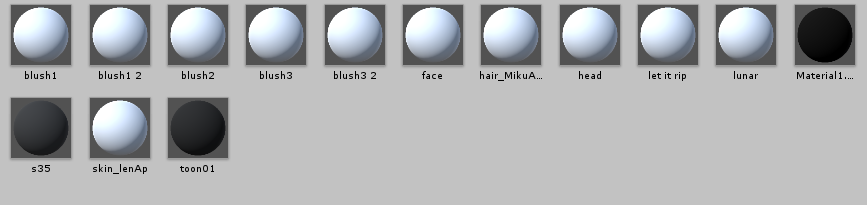
I have weight paint on my character's hair, do I remove it from every bone but the head?
sturdy osprey
https://cdn.discordapp.com/attachments/282642343822098442/534608603491991572/unknown.png ok so these squares are apart of a soundbar (or equalizer). ideally i want these to be apart of my visemes whenever i talk, instead of my actual mouth.
1st off: exactly how can i attach each viseme to a different piece of the soundbar
and 2nd: would i have to make each sound bar an individual mesh so it can perfectly fit around the face mask?
 opal aurora
Create a shapekey for each bar, call said shapekey the same as you would per viseme
sturdy osprey
and as for re arranging?
opal aurora
In what way do you intend to rearrange? :o
sturdy osprey
just so they fit all around the mask, properly
obviously theyre going to be at the bottom of the mask, but since the entire mesh is one mesh, should i just seperate each piece into an individual meshes?
opal aurora
You could individually place each one, which would probably be the best option
I'd advise on only creating the shapekeys after aligning them so they work properly
sturdy osprey
hmm ok
opal aurora
Separate each piece, align ehm, and then merge it all back together
Perhaps create the shapekey for each individual one before merging
sturdy osprey
right
opal aurora
So that the rest of the body isn't taken into account
sturdy osprey
ok, i might have to ask later on how to remerge them together, i only know how to separate one entire mesh into separates
opal aurora
Ctrl+J to merge selected meshes
Last mesh selected is the Base i.e. the mesh it's going to merge into, worth noting when it comes to mixing meshes and bone hierarchies
 covert beacon
using cats mesh merge too will also automatically merge all meshes into one mesh labeled body
that is if the mesh is attached to an armature recognized by the plugin
opal aurora
Always good to know shortcuts though, never know when you won't be working on an avatar
sturdy osprey
which it currently isnt, because i just imported the model into blender
and that is true
covert beacon
fun times
sturdy osprey
ok so, as always, there was an issue
opal aurora
What did you stumble upon?
sturdy osprey
lemme show a pic so its easier

so as im trying to individually select them
i can only select the left and right sides, but i cant select the top or bottom OR the front or back
its not allowing me for any of them
opal aurora
Select each one completely or just a side specifically?
sturdy osprey
a side specifically
for each bar
its doing the same thing as the one on the very left thats already highlighted
opal aurora
Hmm... it seems to have more cuts than necessary but i doubt that's the issue... what selection mode are you on?
sturdy osprey
edit
opal aurora
Oh no, i mean vertex, line, face
At the bottom you got some cube tooltips, each one is a selection method
opal aurora
Select 4 corners and hit F, does that clear out the extra loop?
sturdy osprey
it does
opal aurora
Supposedly for a shape like a cube you won't need those, so might aswell clean ehm
If it was going to be jagged or slanted then those could be used to an extent
sturdy osprey
i dont think theres anyway to curve the entire mesh other than separating each mesh, right
and just placing it
opal aurora
There is proportional editing, and it could provide a rounded shape, but the squares will probably deform
It's worth a try though i suppose
To the right of the cubes is a dot, click it and enable it
Select the centermost block and press G, scroll the wheel up/down to decrease/increase the radius, press wheel in to lock it to an axis, move the block down changing the radius as you see fit
Change the type of proportional editing in the same area, they vary quite a bit so test ehm out
sturdy osprey
yeah im definitely gonna have to test this out, this might be a little tedious to do
opal aurora
You could position every cube in edit mode without separating them though, don't forget that
sturdy osprey
well really its just separating each mesh and perfectly placing it on the face mask
opal aurora
Press L to select every face on a mesh, press G to move it
That way you can select each one individually
A both selects everything and deselects everything
sturdy osprey
but i still have to select the selected geometry and separate it, right?
opal aurora
Not really
sturdy osprey
oh?
sturdy osprey
so i dont have to separate each individual sound bar?
opal aurora
Select Mesh -> Move and Align Mesh -> Clear
L -> G -> A
Essentially
Rotations can be done with R
You can animate ehm all based on shapekeys whilst they're all in the same mesh, i would recommend doing them separately after all is ready but that's just my opinion
sturdy osprey
it would be safer
opal aurora
You can also separate by selection, so you can use L to highlight each cube (one at a time) and separate them with P -> Selection
Or was it Ctrl+P... i keep confusin those at times
sturdy osprey
so instead of rotating clockwise, is there a way for it to spin sideways?
because thats what R is doing for me
opal aurora
You can press X,Y or Z to lock it on that axis
Or hold middle mouse wheel to sorta choose
sturdy osprey
so realistically speaking, in my case
these are 3d, so i have to remove reach other mesh besides.. basically the front mesh for each bar
right?
opal aurora
Uh, why so?
sturdy osprey
because this is being attached to a face mask.
so the front mesh is really all thats needed
opal aurora
Are they going to protrude out of the mask?
sturdy osprey
yes
opal aurora
Then you'd need the side faces aswell
sturdy osprey
oh well actually
no they arent
theyre all going to be inside the mask when i talk
opal aurora
Inside... i'm not entirely following, how exactly would that work out? :o
opal aurora
It's sorta like an audio spectrum visualizer right?
opal aurora
Yep, trying to wrap me head around it to sorta explain what to do but this one's being a tad hard to understand, are they floating infront of the mask, sorta protruding from the side, the mask opens up to display it?
Brain be 404'in
sturdy osprey
so basically, whenever i talk, soundbars will go off. exactly like an audio visualizer
its not going to be 3d
because its going to be in front of the mask. its basically on the mask

this is like the best example i can give
Lol
opal aurora
So protruding very slighty infront of the mask
sturdy osprey
yes
opal aurora
You will probably want them already protruding a bit however, popping up from behind the mask may look quite weird especially with how unity tries to transition shapekeys
You'll still want the side faces aswell, unless you're completely fine with them looking like they're just sorta floating infront of the mask at certain angles, having it too close will cause zfighting which means that both the mask and bars will try to one-up eachother for who is and isn't visible at any one time
sturdy osprey
ohh k so thats why you were insisting the side faces
i dont thibnk the bottom face is necessary
opal aurora
I mean at first i thought it would protrude outwards like a cascade from the mask, so 5 faces would all be visible for the most part
sturdy osprey
so how many faces do you think should be ideally placed on this mask?
opal aurora
Taking that into account you can be far more discrete with what is and isn't there
For that setup, you could either have sidefaces (3 front) visible or have all 5 visible (top,left,front,right,bottom), the top/down faces can sorta appear as just seams whereas sideangles tend to be more notaceable from what i've seen
Backface can always be removed in every case as it's literally invisible at that point
The rest is all up to personal opinion
sturdy osprey
the only thing im not really sure about is, when visemes are placed, can i place multiple visemes onto one mesh if.. lets say 5 faces are on the mask?
or do all 15 need to be placed on separates
opal aurora
You can have as many visemes as you have shapekeys, unsure if reusing any breaks anything
sturdy osprey
ok and lastly

not sure what this extra piece is, but it follows whenever i bring this bar around
and if deleted, the mesh is also deleted
but it appears as a 001
opal aurora
You mean the dot?
sturdy osprey
yes
opal aurora
That's the origin
Supposedly?...
Yep that's the origin
The "root" of an object or group of objects
sturdy osprey
so when i start placing them around the mask and if these are in the air somewhere
is it still fine?
opal aurora
You can position everything as you see fit, set the location of your 3d cursor to 0,0,0 on the XYZ, press CTRL+SHIFT+ALT+C and set the origin to 3d cursor
Only after setting the origin to 0 would i advise on merging the meshes
(Press N to open the right hand side panel to manually set the location of the 3D cursor)
sturdy osprey
ill take it into consideration
at the moment i need to sleep because i need to wake up in 8 hours
if anything ill make sure to mention you sometime tomorrow and you can just get back to me whenever you're available, no rush
opal aurora
Aighty
sturdy osprey
dude i really appreciate it
opal aurora
No worries, i've been here for a while, i just kinda like helping people when i can
Have a good one
opal aurora
Yer very welcome
 viral seal
How can I tell if Jaw flap bone lipsync is working?
opal aurora
Somebody must tell you
By looking at you as you speak
Unless jaw flaps are now visible in mirrors, in which case the answer is obvious
viral seal
Alrighty
 red fulcrum
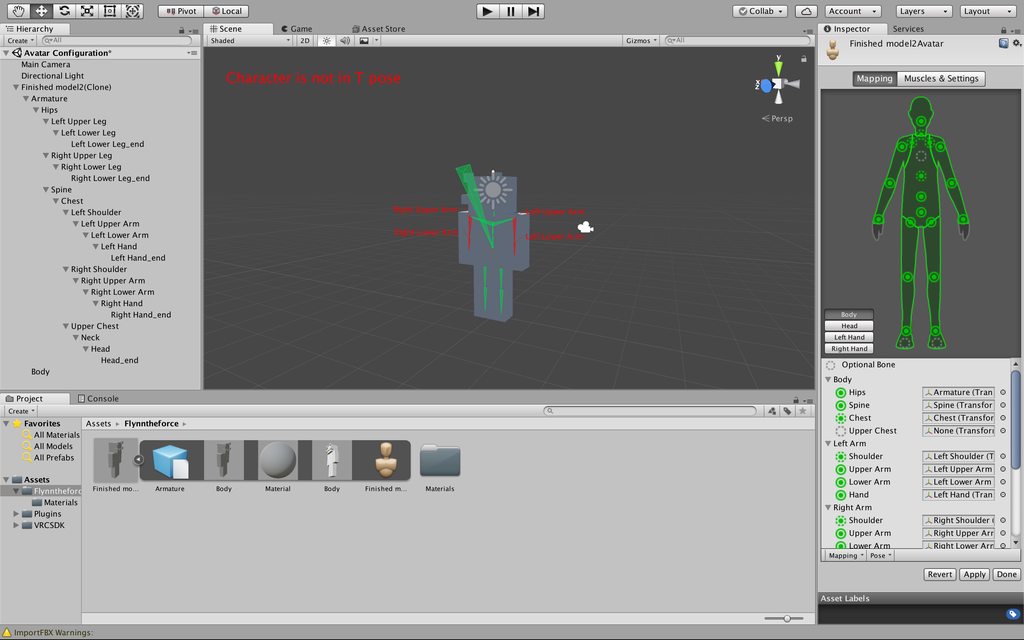
Hello, Ive recently tried making my first avatar and through much struggle made it to build and publish in unity only to be greeted with the "Spine hierarchy missing elements, make sure pelvis, spine, chest, neck and shoulders are mapped" error, I'm at a loss and am not sure what to do, I rigged my model manually as i was having trouble with rigging it in mixamo any help or advice would be a appreciated.
 gritty nest
It seems the arms are not weight painted to, well, the arms
I recommend looking up a rigging tutorial
Because these arms won't move ingame either
 long sleet
Are there resources somewhere where I can learn more about how VRC scales and positions avatars? I am trying to scale my avatar's proportions to achieve the following:
- Correct ground height
- Avatar height is the same as my height
- Perceived scale of the world is correct
- Arm length feels right
I already learned that arm length seems to have a big influence on how an avatar is fitted to your head and hands. Any other tips?
tl;dr: how to make legs shorter without breaking everything?
naive tree
@long sleet https://www.youtube.com/watch?v=IqUVFuSD5a4

A guide for scaling and tweaking VRChat avatars for fullbody tracking. Covers information on in-game, blender, and unity. It also has a fix for that bending ...
long sleet
@naive tree Thank you, looks like just what I need. 👌
 pearl bone
Can anyone help me with this thing that has been bugging the crap out of me.
Basically, whenever I import a model from Blender into Unity, the material are all inside the model so it prevents me from being able to edit the textures with my own shaders.
gritty nest
@pearl bone not really a rigging question. Just click the model in your assets, go to the Materials tab in the inspector, then click "Extract Materials".
This will extract the materials to a new folder and allow you to edit them
gritty nest
The embedding system is dumb, it's more clicks. Metallic maps don't really exist outside of Unity so I'm not convinced any standard shaded model could ever look good with the default material settings.
pearl bone
Yeah that fixed it, thanks!
gritty sleet
i have a small problem with weight painting, i'm making my 3rd avatar, but this time i added every finger to the model, but no matter how hard i try, i can't weight paint the fingers correctly,
is there a way to make it easier on me? at least a bit.
gritty sleet
no one?
crisp tendon
Use automated weight paint
gritty sleet
that's the thing, that was the first thing i tried, and i tried it 15 times, none of the finger bones changed at all, and stayed unweighted. :/
gritty sleet
. . . i both hate myself and my computer... -_-
my GTX 1050 TI just requested a driver update... and i took it... but the thing is, i was working on the weight of the model, and i was something like 2 hours into it... without a save...
but the stupid thing is, the update disabled half of my PC... so both blender and unity got shutdown... again... without a save...
gritty nest
You should save more often
I compulsively save every 5 seconds
Blender autosaves by default @gritty sleet
File ‣ Recover Last Session
File ‣ Recover Auto Save…
Saved in the temp folder
gritty sleet
tried recovering the "Last Session", and it didn't save anything, but now i tried recovering the "Auto Save", and this one saved everything, oh thank god...
sorry for the rant... :/
also, i still can't weight the fingers... :/


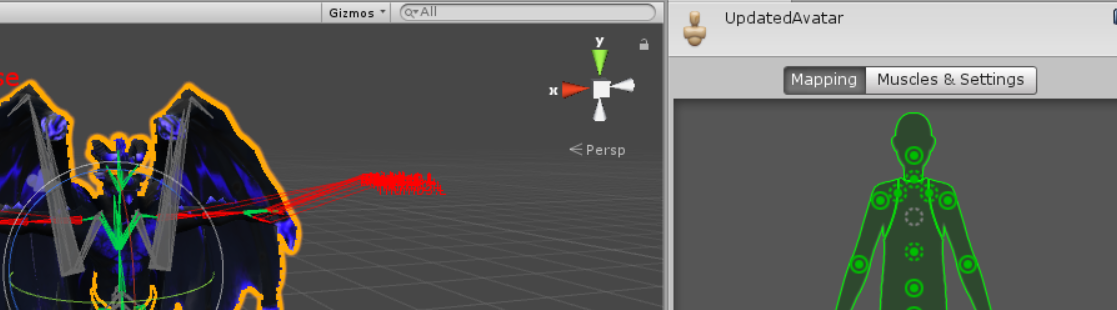

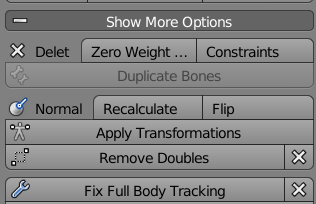


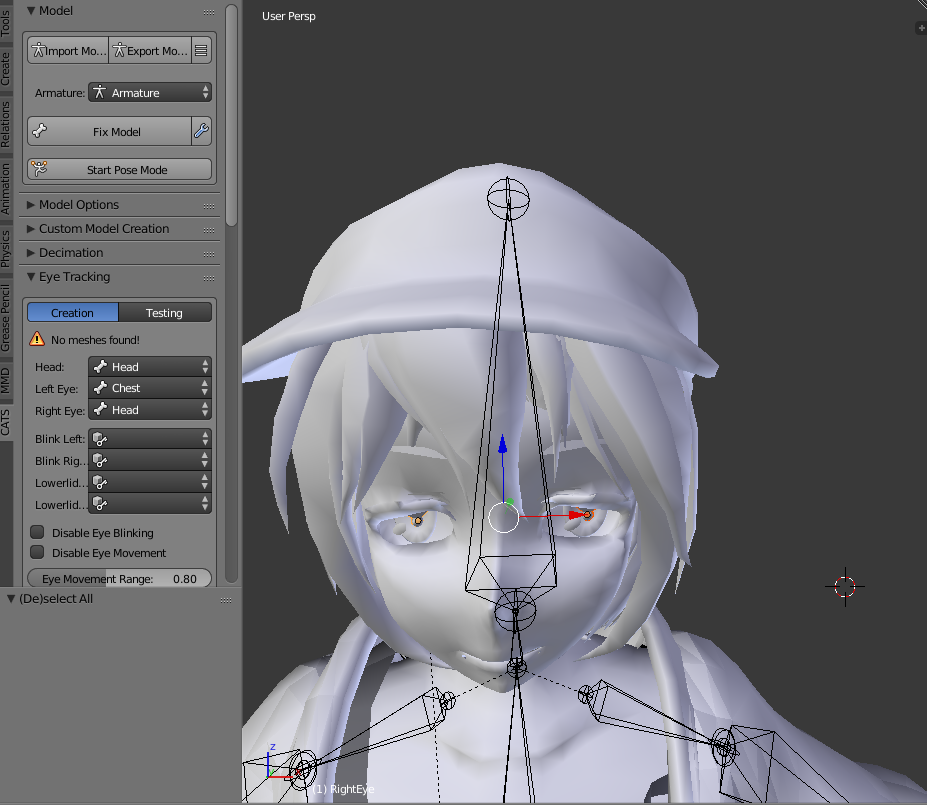
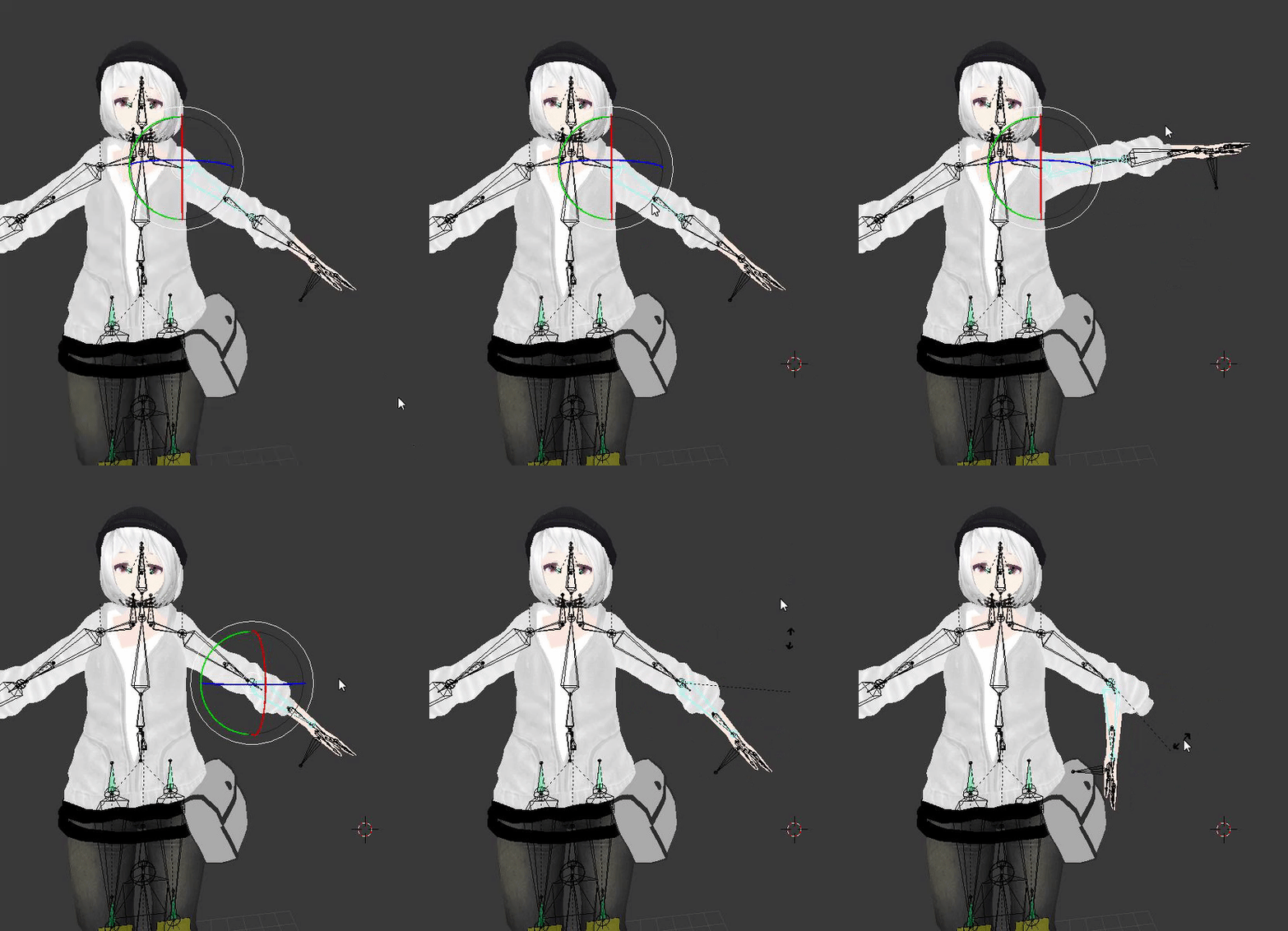
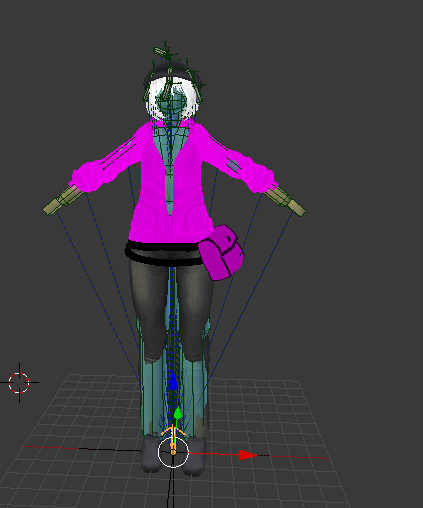




 opal aurora
Neat
sturdy osprey
i noticed theres a base to the mask
see im not understanding how there is a curve to it
for it to fit the mask
opal aurora
Ehh, how so?
sturdy osprey
idk how to properly place them
gritty sleet
i found the solution for my finger bone weight problem with help of a site i found... :/
wary crown
@sturdy osprey You model it in blender and align the bars with the mask
then you make 3 shape keys
and use cats to generate the rest
then you have visemes.
not really a rigging thing though.
sturdy osprey
so thats what im currently confused on
if theres 15 visemes, and i have 15 soundbars. how do i make it to where all soundbars work instead of just a selected 3?
wary crown
What? Just make the amount of soundbars you want but you make 3 shape keys apart from a basis shapekey, the basis is all the soundbars at the bottom, then you go into each shapekey and move the bars up and down as you want it
Then you use cats to generate the other visemes out of the 3 you made
 candid violet
so I have this model and it's not in the t-pose. im pretty sure that I have to pose it in either a T or an A so I can rig in blender right? or is it possible even in a different pose?
my bad for those who read it before i edited
pseudo sedge
@candid violet is your model rigged already or you want to pose it for easier rig by yourself?
candid violet
nope. like its a model thats posed for some reason but it is not rigged and it doesnt have bones
its like a whole mesh i think
pseudo sedge
@candid violet i think you can try to pose it with Mesh Deform modifier (actually i never pose a mesh before so there's some faster ways could be)
https://www.youtube.com/watch?v=e0yp8I0yOVM

Blender. Mesh Deform Modifier. Posing the character in a pose with Mesh Deform Modifier in Blender. The video has high-quality Russian subtitles (You can try...
candid violet
thank you ill check this out!
fading verge
Your best bet would to rig it and then pose it for t-pose mode.
opal aurora
@wary crown a bit late here, but they're making each soundbar attach to a viseme, the standard 3 shapekeys really wouldn't work in their specific case (since there won't be a midpoint between them all)
Excuse the ping, just wanted to get that straightened out
wary crown
I mean then i still dont understand the problem
just make 15 shapekeys for each viseme
¯_(ツ)_/¯
opal aurora
Pretty much
I guess they're having trouble literally placing them, since the mask is curved
Whereas the bars are cubical
wary crown
Just make the verts on the mask straight wherever you place a bar
then curve in between
¯_(ツ)_/¯
pseudo sedge
that might be fast done from a script with random, heh
drowsy wharf
@sturdy osprey you don't have to use CATS to generate visemes, it just makes it easier for general use.
For what you're doing you'd want to create a shape key, select it, then position the sound bars where you want for that specific sound.
Just make sure Basis and Sil keys have the bars all at the neutral/silent position.
ashen yew
Anyone have any ideas why my avatar eyes look fine in Unity but when in VRChat they're kind of like always in some weird position where only the whites of the eyes are visible and the pupil/iris section has kind of run off somewhere? When I test the eye movements in the Unity rig inspector, i can move them around pretty normally. I haven't been able to find any ideas through searching online.
It seems like VRChat is trying to animate the eye movements but pointing them in the wrong direction or something
 turbid spear
Is your head bone straight
Sometimes if the head bone isn't straight forward the eyes will drift down
Could also be issues with default bone rotation or eye range set in cats
gritty nest
@ashen yew make sure both the eyes and the head bones are pointing straight up
You can do this by moving the tips of the bones
ashen yew
You're saying the eye bones are supposed to be placed vertical? Like from the center of the eyes to the top of the eyeball rather than from the center to the pupil?
gritty nest
Yes
Cats eye tracking does this automatically
Basically it doesn't matter where the bone's tip is
Only the bone's rotation
ashen yew
CATS wasn't working well for me. Every time I tried to let it handle it, It kept placing eye bones in weird positions behind my character - around the neck, usually. I rigged eyes myself with the bones pointing toward the pupil and the Z axes pointing upwards
I'll give it another shot and try to reposition the bones better or give CATS another try. Thank you.
gritty nest
You can just rotate the bones you already have
Select the "tails" and move them above the eyes
Do the same for the head if it's not already pointing up
ashen yew
Yeah, thats what I'm going to do. I kind of had a feeling that was the problem but dismissed it because it seemed like it would be really odd to me to place eye bones like that. The head and everything else seems 100% fine. The only other issue I had with the model was with the jaw bone stretching out weird when looking up and down but since I was just using visemes on the model, I just deleted the jaw bone.
gritty nest
@ashen yew if that happens when you look up/down, it seems more likely to be the blinking shape keys.
If you use eye tracking, the first four shape keys on the Body mesh have to be blinking and lower eyelid movement-related.
If they are not, it will randomly use visemes like AA or OO when you look up/down
You don't want a jaw bone mapped in this game anyway so that's fine
ashen yew
that is so weird but thanks for clearing that up because I had no idea what was causing that
gritty nest
You can have "empty" shape keys for these as well, but blender might not export empty shape keys so you'd have to move one vertex slightly if you don't want the built-in blink
ashen yew
So VRChat automatically tries to handle blinking by looking for it in the first four shape keys of the model?
gritty nest
Yes
The first four shape keys of the "Body" mesh, more notably
And if you don't have a Body mesh or it doesn't have 4 shape keys, eye tracking won't activate at all
ashen yew
Ugh. VRChat has to be so frustrating with this stuff. I guess I wouldn't have been so irritated by all of it if there had just been some solid documentation detailing everything.
But everything you've said pretty much clears up the three hours of frustration I had when trying to upload the model, so its been a big help and hopefully when I get off work I can re-upload it with the blinking and eye movement stuff working 100%
drowsy wharf
General text/image based tutorial. Covers most of the things stated with the exception of not mentioning head/eye straight up, but is shown in images.
I agree though that the documentation is...lacking...
https://docs.google.com/document/d/1W5KFa_aszCMrJaFD8mb9a-GHYO4X4S9M63GjM4UwuEw/pub
ashen yew
Ah, alright. I've seen that doc before and the third to last line on it saved my last model having crooked fingers. I'll have to bookmark that one for issues I have in the future. Thanks
 oblique remnant
I am having trouble with a model in unity. The hair is bobbing too much and phases through the head. I've been stumped for 5 hours now, and would appreciate any help that would be useful. Please message me directly if you might be able to help.
The model is Pneuma from Xenoblade Chronicles 2
fading verge
@oblique remnant Don't know enough to troubleshoot it but would suggest checking in Blender's pose mode to make sure the hair properly moves with the Head bone
idle vapor
i seem to have some sort of spine hierarchy problem for an avatar im trying to upload. then noticed that the model doesn't seem to have anything in the chest section correctly or there at all??...anybody will to help me out with this?
gritty nest
Post screenshots