#avatar-rigging
1 messages · Page 48 of 1
 tawny temple
 craggy fulcrum
But it has legs though, righ?
craggy fulcrum
What if I wanted tank treads for legs?
craggy fulcrum
Just inside the model somewhere low like yours in order to be seen by unity?
tawny temple
yeah
 solid adder
Damn it.. is that why we have Cory in the House?
 pseudo cipher
Would rigged avatars show that they're rigged in blender?
solid adder
Should
tawny temple
yeah
solid adder
If it's something like from a game or mmd it should have the bone, body, and rigidbodies
tawny temple
^
solid adder
sidenote remove rigidbodies no matter what
 river charm
You can show em by pressing ctrl + h right? A wise man told me yesterday lmao/
tawny temple
it just unhides stuff that you hide with h
river charm
fair enough
tawny temple
it makes it easier to delete the rigid bodies too
 fading verge
If I'm having problems with rigging of a MMD model, do I post about it here or in #avatars-mmd ?
river charm
I've got a quick question, is there anyone that does requests or however you wanna call it? I've got a model I want fixed up so I can use it but I do not exactly have the patience to learn Blender and what not myself. I can pay if required.
tawny temple
you can post it here i think
since this is rigging
@river charm i can take a look at it
just send me it
river charm
I'd appreciate that, I'll send ya a PM
fading verge
so I've been the same problem with multiple models (from the same author) that I've uploaded, where after movement their skirt moves forward, kind of like it's following their hip. It clips through the legs and always points forward so it looks really bad.
I believe it's caused by these dress bones that circle the hip but I don't know how to fix this.
 dire mica
I usually create a duplicate of the hip and attach all the top level skirt bones to it
fading verge
Oh, thanks. I'll try that out.
dire mica
So my hips are the parents of for example left leg, right legt spine and a skirtroot
fading verge
Do you have a picture or something? I'm drawing a blank on where to start, as I haven't done anything of the like before.
dire mica
Moment
fading verge
Thanks in advance
 naive tree
@fading verge your problem is probvably hip bone pointing down
check tha tin blender, if it is so
then u select it, hit R, then X then type 180, hit enter
and it's pointing up now
fading verge
I'll try that right now, thanks
 viral lily
wut to do about this?
in blender they are just fine, is it something in Unity?
i just did a reimport from blender (all the way from the ground up) and it still gives me those croocked fingers
anyone at all who can help?
 timid fog
@tawny temple I've added all the important bones I think. There's two extra bones, because I don't know how to combine bones.
And if I did know how, I still don't trust myself to not screw up.
Can you set up the hierarchy and make sure all the bones are placed correctly?
If so I can DM you the file.
 compact badger
So, I found a model for a character I want to try and make my avatar. He's what the FBX file has right off the bat when I import it into blender to try and fgix the higherarchy. Now, is there a way to clean this up and it won't let me even rename or change the parent of the bone due to an error in red which I'll post in the next screen shot with a bettew view.
So, I found a model for a character I want to try and make my avatar. He's what the FBX file has right off the bat when I import it into blender to try and fgix the higherarchy. Now, is there a way to clean this up and it won't let me even rename or change the parent of the bone due to an error in red which I'll post in the next screen shot with a bettew view.
timid fog
@viral lily try extending the bones to the fingertips?
 fading horizon
Does anybody here know why a model wouldn't animate in vrchat? I rigged it properly I think and I set the avatar type to humanoid, but it doesn't animate in game
viral lily
@timid fog its more a question of how, than what
fading horizon
Does anybody here know why a model wouldn't animate in vrchat? I rigged it properly I think and I set the avatar type to humanoid, but it doesn't animate in game
compact badger
Okay, so I'm trying to fix the higherarch for this model. It came in a single pack with standing, walk, ruinning and some other post. It looks absolutly messy in blender and won't let me edit any of the parents in here. Any tips for trying to clean this up and enable editing so to speak?
viral lily
@timid fog its more a question of how, than what
compact badger
Okay, so I'm trying to fix the higherarch for this model. It came in a single pack with standing, walk, ruinning and some other post. It looks absolutly messy in blender and won't let me edit any of the parents in here. Any tips for trying to clean this up and enable editing so to speak?
So this model came in a pack of four, with just different poses / animations. I'm currently trying to edit the standing one to fix the higherarchy but I'm being denided permissions, is there anyway to fix that and clean up this whole model entierly?
fading horizon
Does anybody here know why a model wouldn't animate in vrchat? I rigged it properly I think and I set the avatar type to humanoid, but it doesn't animate in game
compact badger
So this model came in a pack of four, with just different poses / animations. I'm currently trying to edit the standing one to fix the higherarchy but I'm being denided permissions, is there anyway to fix that and clean up this whole model entierly?
fading horizon
Does anybody here know why a model wouldn't animate in game? i rigged it properly, I think, and set the avatar type to humanoid but it doesn't animate
Does anybody here know why a model wouldn't animate in vrchat? I rigged it properly I think and I set the avatar type to humanoid, but it doesn't animate in game
Does anybody here know why a model wouldn't animate in vrchat? I rigged it properly I think and I set the avatar type to humanoid, but it doesn't animate in game
viral lily
discord is acting weird lol, anyone else?
solid adder
Probably bones not set properly
Probably bones not set properly
@fading verge You use Cat's Blender Plugin?
@fading verge You use Cat's Blender Plugin?
tawny temple
@timid fog sure
fading verge
I do not
solid adder
@fading verge that will likely fix your problem
solid adder
It makes getting avatars from blender to unity a lot easier at times.
tawny temple
@fading horizon show me your bone assignment in unity
solid adder
It's a plugin that can fix the armature and translate bones, meshes, shape keys, and textures.
It's a plugin that can fix the armature and translate bones, meshes, shape keys, and textures.
It's a plugin that can fix the armature and translate bones, meshes, shape keys, and textures.
It's a plugin that can fix the armature and translate bones, meshes, shape keys, and textures.
 pseudo python
@fading horizon is your upper chest blank?
fading horizon
@tawny temple in the rigging menu or just in the heirarchy menu?
pseudo python
@fading horizon is your upper chest blank?
solid adder
It's a plugin that can fix the armature and translate bones, meshes, shape keys, and textures.
It's a plugin that can fix the armature and translate bones, meshes, shape keys, and textures.
fading horizon
@tawny temple in the rigging menu or just in the heirarchy menu?
solid adder
It's a plugin that can fix the armature and translate bones, meshes, shape keys, and textures.
It's a plugin that can fix the armature and translate bones, meshes, shape keys, and textures.
 mild skiff
supposedly my avatars animations that i see differ from what other people see
supposedly my avatars animations that i see differ from what other people see
fading horizon
@tawny temple
fading horizon
The hand goes to the white part because thats the way mixamo did it, but I'm currently re rigging it to have fingers. Dunno why it won't work
tawny temple
Also fingers isn't really required
fading horizon
Hm. well I'm stumped then. Maybe I'll try running it through mixamo again
fading verge
is there a way to import a fmx into blender without the bones going wonky
or change the file type to pmx or mmd
 crisp tendon
@fading horizon You're missing a connection between spine and chest
crisp tendon
map your bones
fading horizon
How do I connect spine and chest?
crisp tendon
You've been here 4 days, you should REALLY know how to do that by now, even more so because i remember explaining it to you before
 south oar
the names are different
crisp tendon
@fading horizon You'll have to bring that to blender, and use cat's plugin
south oar
cats translated different this time
crisp tendon
doesn't matter, bone mapping shouldn't have issues with that
fading horizon
Ok, I'll try that
fading horizon
Also, is spine2 the chest? I used mixamo to autorig it
crisp tendon
Nope sadly you have one too many spine bone
chest and spine are good
but the middle one needs to be removed so that the two good ones are connected
fading horizon
Which one is the middle one? Spine1 or spine2
crisp tendon
2
fading horizon
got it
if I try removing the second spine, the model gets all deformed. would it be ok to just child it to the main spine and not have it set to anything in its rig?
crisp tendon
use cat's plugin
 desert apex
hey! I got a slight question. My character has animalistic ears, do I simply have to make them dynamic bones and add a collider in order for people to interact with them?
 storm forum
im crying, blender is killing me, I can't figure out anything xD and Rigify is a *****
fading verge
any way to work in a 2 d mode in blender when working with a 3d model
crisp tendon
@desert apex people can't interact with other people's avatars
@fading verge use the numpad
desert apex
oh, I thought I saw it in some videos, alright thanks!
fading verge
@crisp tendon ty
craggy fulcrum
Would I need trackers to differentiate leg facing and head facing? As in have my head turned to a side while my legs and body keep moving forward?
 gentle thorn
How Do I fix this?
 long hill
@gentle thorn Go to your rig and select the "head" view. You will have the same bone in two different slots.
Most likely the bones assigned are neither eye nor jaw, but unity assigned them incorrectly.
fading verge
@solid adder It worked! Thank you!
gentle thorn
so does this mean unassign right eye to jaw?
 dry minnow
now that it's (hopefully) more active here: when i download my model from mixamo there's no bones/armatures. i'm importing it to blender because there's an issue with the legs (example: https://gyazo.com/725773d5eaba158bd13b9f2b4372e6e0 ) that i can fix manually, but i don't want to have to rig the entire model because i'm lazy to be frank. anyone know why that is?

@gentle thorn post entire unity plane please
or screengrab
solid adder
@fading verge :+1:
gentle thorn
Ight nevermind think I fixed it it's all green
dry minnow
should be good then yeah
long hill
@gentle thorn Just because its green doesn't mean its right. Make sure you assigned the right bones to the right slots.
 waxen ember
so what was the issue exactly @pale pond I don’t know if I can help but I’m sure someone here can if you tell what program you were facing the issue in >.<
storm forum
Can someone help me with blender and rigify step by step? The Tutorial Videos are going to fast for me and not to much into detail.
 pale pond
@waxen ember ahah its ok, ok when you going rig and it says configure (iv done humaniod) and it tells u to save or dont save, i clicked save but its making me go find a file or something and i dont know what to do
waxen ember
what do you mean it makes you find a file?
 trail gorge
someone can help me?
i am trying import a avatar but his hair keep freeze in place, in the middle of air, simple do not move, the rest of the body is ok, if a put like...20 bones in the head almost all hair curls are fixed but still some left
has any way to make all the texture/mesh of hair fuse/fix with the head like one single thing?
pale pond
@waxen ember well it wants me to save a sence but when i do it comes up with file searching in my documents and stuff and i dont know what to do
solid adder
@pale pond make a name and it will save
But something you don't need to worry too much on.
pale pond
ok how do i make a name? and also im not very good at bone rigging stuff but i have a problem with Spine hierarchy incorrect. Make sure that the parent of both Shoulders and the Neck is the Chest.
pale pond
well when i didnt do the save for configuring it was already blank
trail gorge
HIBs > spines
>chest
>neck
>Head
>left shoulder
>right shoulder
>left lef
>right LEF
i think is this, from i can remember from memory
lef=leg XD
fading verge
how would i create a hip bone and connect my leg bones to it in blender
pale pond
Upper chest is blank
fading verge
hello boys, I'm not sure where I should ask this so I'll try here.
I once have seen an avatar completely rigged with all sorts of amazing features (he could summon a dragon, bats, had a sword full of particles and could also make a ring of fire around him), oddly enough the one that I found being the most interesting one is that he could draw using his index finger, anyone knows how to do that?
as in he had a 3D pencil/brush in his index finger even though the pencil itself was completely hidden
solid adder
@fading verge likely particles that is a child to a finger
solid adder
@fading verge #animation should help more on that
fading verge
alright, cheers
fading horizon
@tawny temple I got it fixed (mostly) Thanks for the offer tho ^w^
tawny temple
ok
 junior marlin
yo can some one help me, i need to get my Jaw flap bone working
apparently it moves a little bit when i talk but can i change how much it moves?
 knotty kernel
How can I easily create a "hand bone" on which to attach the fingers of my model?
I imported it from MMD, and the fingers are attached directly to the elbow
junior marlin
well if you want to create a new bone that works, first you create the bone then you add weight paint to it
knotty kernel
Where should I do that?
junior marlin
but kinda weird that mmd model would miss hand bones
blender
or what ever software you use
junior marlin
there's tutorials on weightpainting
 wintry cairn
for dynamic bones, is there a way to exclude a bone without excluding it's children bones?
Asking because I put a DB script on my root hair, but the root has like 30 bones in it and I only want to use the tips of the hair (which are the last children bones)
junior marlin
looks fine to me
my mmd models have similiar looking bones
maybe its just the naming or something
junior marlin
well it has Shoulder, Upper arm, lower arm and hand
if you have 4 bones in dere and they are in right order it should be fine when it comes to mmd
atleast i havent ran into problems
knotty kernel
uhh
junior marlin
oh wait i dunno
knotty kernel
basically, I was setting up the hand manually, as Unity didn't import it
but I found that it attached Thumb_L as the hand bone
junior marlin
can you screen cap the whole armature from elbow forward u kno
knotty kernel
https://puu.sh/yTsRX.png Like this?
 junior marlin
cant really make out anything, i mean like from shoulder forward, sorry, i meant shoulder ugh
knotty kernel
hang on, let me move it so you can see it better
junior marlin
just dm me it so the chat wont get filled up
fading horizon
Quick question, in game my model always looks like its looking down even though it should be facing straight. How would I fix this?
 coral sigil
https://docs.google.com/document/d/10BuA_ybyXSSXqXuf6cDyPm52VIpqptgyvuRaphcYH0M/edit I made a non-humanoid avatar tutorial using the new AFK avatar as an example. 😃

Google Docs
Advanced Avatar Creation: Making Non Humanoids This tutorial was made using Unity Version 5.6.3p1 This tutorial assumes you already have the current SDK imported and knowledge of how to upload a basic avatar. You will also need an avatar you wish to upload as non-humanoid with it’s own set of a...
 cerulean tendon
I can't seem to get my mouth to work on my link model. It's just permanitly open
Is this a common issue? Anyone happen to know how to fix it?
fading verge
Question for anyone that can answer. I use bodytracking with vive trackers but lately every avatar I make their hips twist weirdly like 90 degrees forwards if I use body track, without body tracking they're perfectly fine. Anyone knows perhaps what causes this?
 karmic rune
Talking about the hips sort of poking out?
fading verge
Yeah, only on the newer avatars I upload though, my older ones still work just as fine and I haven't changed anything in the process of uploading them either.
karmic rune
Every avatar is slightly different, but I know it has to do with hip placement relative to the thigh bones. I had the same issues when I used CATS to fix the model.
Generally see people suggesting to make the hip bone sit above the thighs. As of late, I've just been manually modifying the model instead of using the autofix in CATS.
 round abyss
Is the spine dirty?
cerulean tendon
Ok so when I run the thing in unity my mouth is closed, but when I am in game my mouth is permanitly open
Wtf
fading verge
@karmic rune So you suggest moving the hip bones?
karmic rune
I did that originally on a couple of models and it worked ok. I had to play around with player height in game to get the legs to straighten up. If you're comfortable doing it, I would suggest trying at least once to just manually delete non weighted bones on the base model and seeing how it turns out. The last 3 MMD models I did like this turned out working great.
cerulean tendon
Um, it won't let me configure my rig anymore
karmic rune
I didn't even have to modify the hips or anything doing it this way.
fading verge
Now that you mention it, I did start getting these troubles after the latest CAT update
karmic rune
It worked great until I got full body tracking.
cerulean tendon
It was a bug, had to close and reopen unity to config the rig again
 rich locust
anyone know how to rotate the wrist so the fingers don't look spooky?
cerulean tendon
Anyone know how to get this mouth closed? (Sorry for the big screneshot)
 willow venture
I really want to rig this one model, but it already has a skeleton. How do I delete the existing skeleton so that I can make it humanoid?
rich locust
can you post screencap?
cerulean tendon
Noone knows how to help me here then?
cerulean tendon
Yeah people just ignor you a lot here. And if you get lucky people will notivce
 plucky terrace
huh
cerulean tendon
What type of model is it?
cerulean tendon
Can't help you then, sorry. I don't really know how to rig things either
I came here for help too lol
if it was a different file type I might have been able to help a little
willow venture
@cerulean tendon Chances are people aren't ignoring you, it's justt that nobody knows how to fix the problem
cerulean tendon
@willow venture it'd be nice if someone woulkd have responded with something though. Not saying anything at all is a bit awkward.
 static flint
Whenever I import a weapon and animate it, the weapon doesn't stay in the same position as the hand. Even though I Parented it to the wrist. Anyone know why?
 torpid osprey
@cerulean tendon Did you rig a jaw bone? I believe the discriptor also has something dealing with the jaw. I’m away from a computer I can help when I get home.
 spiral pewter
weeirish do you know to rig a jaw???
cerulean tendon
It was already rigged when I imported it apparently. I didn't know it was theere untill I imported it the first time
torpid osprey
In general yes, to work with vrchat I haven’t tried yet.
 restive relic
Anyone who is good at avatar rigging that could help me out?
torpid osprey
Try taking a bone off the jaw in the rig in unity and see if your mouth closes
spiral pewter
looks like knuckles
spiral pewter
@torpid osprey i know nothing about taking bones or that stuff, and on videos is so confused
my avatar have an mouth
restive relic
so, i'm guessing it's missing some bones. but i'm not sure how to add bones
i'm very new
spiral pewter
with teeths and tongue
static flint
Does nobody know?
plucky terrace
can anyone rig a model that i have, its a obj and its literally all squares and rectangeles, its a roblox character. idk how cuz im new
spiral pewter
but the mixamo doesn't rigged the mouth
thememeboi did you tried by blender or c4d?
plucky terrace
nope
it does once in a blue moon
but it looks so bad
all the parts and strechy
restive relic
i don't need mouth and that stuff atm. i just need the character to be able to move around in vrchat
plucky terrace
etc
 opal tapir
micornes, it looks like you're selecting a mesh rather than a bone. is there a jaw bone in the armature?
spiral pewter
try rig by yourself, making bones isn't hard, or even try to auto rig on mixamo without the simmetry
plucky terrace
i did
spiral pewter
@opal tapir idk nothing about bones and those stuffs, i rig this avatar yesterday and i know nothing about unity, i just know cinema 4d
plucky terrace
ive tried to rig it for like a week and a half
restive relic
this was autorig on mixamo
spiral pewter
mouth
storm forum
So I just went ingame to test my Avatar out and couldn't help but notice that it was in t-pose. I kind of figured that would happen after unity didn't want to add a humanoid rig on my avatar and instead imported it in as fbx and it stopped crying. What am I doing wrong? xD It says that I don't have enough bones even tough I doubt that https://gyazo.com/fb69407bd2707f1ffc612fd32b60b6c3
 spiral pewter
i selected
opal tapir
yeah, those are meshes. you see the little arrow beside mixamorig:Hips? try navigating down that tree until you get to the head, then see if there's a listed jaw bone
cerulean tendon
@torpid osprey How do I remove a bone? Do you want a better screene shot?
spiral pewter
:/
fading horizon
Is my characters entire body supposed to move every time I turn my head in game while using a headset?
fading horizon
I'm using a vive
opal tapir
@storm forum did you set the imported model as humanoid and make sure everything was rigged properly?
spiral pewter
azou
fading horizon
yeah. It only seems to be happening with the custom avatar I added. The default ones work fine
opal tapir
oh? if you don't have a jaw bone usually unity will pick something at random. what is it linked to?
 severe hedge
Is there a way I can veiw bones as nicely with a Collada model as with an MMD model? I see bones in the hierarchy, but not inside the model.
opal tapir
yeah, those are the slots that you'd link your eyes and jaw bone to - but i think the problem is your model lacks those bones entirely
fading horizon
Is anyone here decent or good at Blender and bone weighting? If so, could I send you my .blend file and you take a look and see if any weights need fixing?
spiral pewter
well my model have eyes and teeths, there is a way to lack to the bones?
opal tapir
where'd you get your model from, micornes? if it's MMD it should have visemes built-in

 pulsar mortar
Anyone here know how to fix Spine hierarchy missing elements when disabling upper chest?
spiral pewter
steve try to lack mannualy the chest to the shoulders and neck
and then it's fixed
i got this trouble yesterday
pulsar mortar
how do i lack bones?
plucky terrace
can anybody help me rig a mmd model it doesnt have proper bones
spiral pewter
pick they with left mouse button
and pick the chest bone
and move to the upper chest bone place
:))
 storm forum
Do I have to export as fbx from blender?
cerulean tendon
How do I get rid of them?
storm forum
Answer my quick question pls :C
storm forum
fuck yea xD
cerulean tendon
Can I just deleate the ones I dont need?
I guesing I dont need all the ones in head jaw, if that's whats keeping my mouth open by defualt
 lost vector
How peeps. How do you fix model tip toeing, adjusting the height in systems doesn't work. I think her hips are too high whats the best way to lower them
 spring shell
anyone use gravity on dynamic bones? trying to find a good value
what looks good in unity is bad in game
 neon shard
Have you tried entering play mode in Unity and dragging the avatar around?
It is easy to test that way and find a value you like
Oh I see.. It is different in game I guess?
spring shell
yah i tried a little and got it how i want but in game its all static
pulsar mortar
alright
fading verge
Hello m8s I have a problem
neon shard
Are you using the dynamic bones plugin? or unity joints
spring shell
plugin
pulsar mortar
I removed all the inactive bones and still have the issue
neon shard
Ah ok, hmm.. Hard to say. mine looks almost the same in game as in unity
pulsar mortar
@spiral pewter
fading verge
Can king Stingy aquire assistance?
neon shard
Anyone have any experience with droopy shoulders? When I put my arms down my shoulders droop WAY down to try to reach. How does VRChat decide on arm length scaling?
spiral pewter
pass the original
fading verge
What do i do if my avatar has no bones at all?
neon shard
You will need to rig it yourself
fading verge
Any quick way to inform me how i do that?
neon shard
Your easiest bet might be to pull in an MMD model with a really simple rig (not a ton of hair or skirts or whatever) and use its rig
You can move the bones to fit your model, and use the blender auto weights tool to get a pretty decent rig
fading verge
Thnxs
@neon shard Do i rig inside Unity or do i need to download Blender or some program like that?
fading verge
@neon shard Im having trouble putting my model in Blender. Any suggestions? Youtube videos arent helping me.
 sly viper
Hello! Can anyone tell me how do I add bones in Blender for a rig?
 flat sierra
i got all the texture thing fixed yay but the weird thing is his arms wont stay down
fading verge
How did you do that?
neon shard
In blender, you need to import it
 crystal vector
@fading verge What don't you know about importing into blender?
sly viper
You need help putting model in blender?
neon shard
file >import > whateverfiletype
 carmine creek
sly viper
carmine creek
sly viper
Files - Import - Find your model - Then press import.
fading verge
I found the file but its not there.
sly viper
When you click import, if gives you the option of what type of file you want to import. Make sure you pick the right one.
fading verge
oh i got it
sly viper
For example.. My model is .FBX so you want to import a .FBX file
fading verge
is it supposed to come without textures?
sly viper
Mine pops in gray.. But I add the textures in unity
fading verge
I already had it in unity before i knew what to do with it. So i'll guess they'll pop back there
pmx and mmd files don't show up as clickable options to import
neon shard
They probably wont pop back right away in unity, but you can re-apply them easily from your previous import
just dont worry about textures yet 😃
 grave saffron
is there a way to make a bone copy the rotation of another bone?
neon shard
Not without scripting support 😦
grave saffron
I'm trying to jerry-rig eye-tracking onto a 3rd eye of a model
sly viper
Yeah. Once you are in blender. Click on "Armature" then click little bone icon. https://imgur.com/a/ltyyj
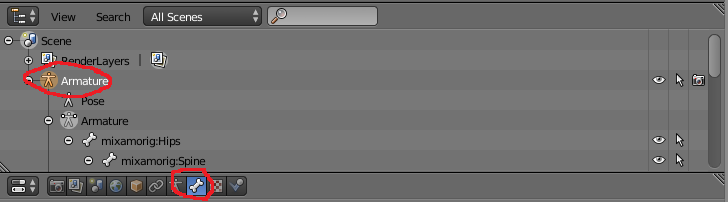
That's how I do it.
neon shard
Yea a really simple script would fix you up on that @grave saffron . I dont know any other way..
VRChat wont allow scripts
sly viper
But does anyone know how to add find bones? lol
grave saffron
I've only started all this about 4 or 5 days ago, so I dont really have any scripting knowledge yet
lost vector
How do I fix tip toeing on an mmd model? system height doesnt fix
neon shard
VRChat does not allow scripts, so no amount of scripting experience will let you go that route
fading verge
When i add another bone it goes slightly to the side. Anyway how i fix that?
nevermind found it out
Aight who got the most experience modelling?
Can i make digitigrade legs?
willow venture
anyone know how to remove pre-existing skeletons from models?
fading verge
@neon shard i seperated 2 bones but now i cant select those, do u know anything about that?
fading verge
nevermind i found a sollution, but the tutorial guy says they're "ik" something
control ik bones
neon shard
My avatar has digitigrade legs, I had to cheat it by just making the shin bone extend directly from knee to toe
fading verge
yeah i did the same in the end
neon shard
It works fine
Oh yea, control bones are for animating in blender
you dont need them to create a simple avatar for vrchat
They make custom animation work way easier though
fading verge
@neon shard This is what i have so far
neon shard
aw hell yea its legion
neon shard
oh yea my bad legion has a damaged chest right?
fading verge
indeed
neon shard
anyway nice
fading verge
so do i connect the legs? or just continue the tutorial
neon shard
So your tutorial is likely going to give you some trouble when it comes to specific VRChat needs
fading verge
any advice?
neon shard
you only get one neck bone for instance
neon shard
And you need a shoulder. VRChat uses the shoulder bone a lot
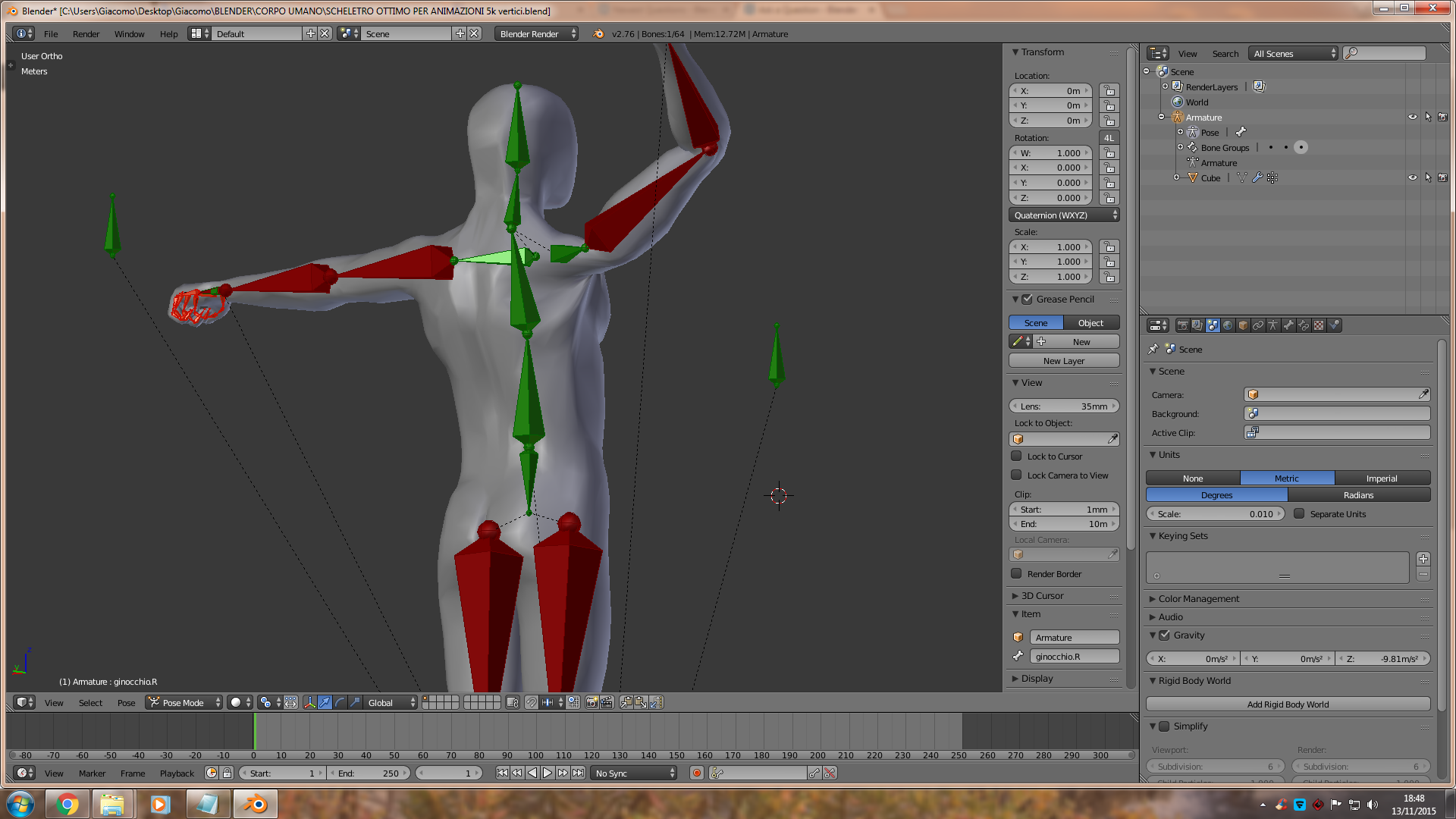
shoulder like this image
from chest to upperarm
fading verge
Do they all have to be connected?
neon shard
Yes, except for the shoulders and upperlegs
those can be offset
I mean.. I should say maybe not strictly.. im not sure. I always connect everything
fading verge
Wait those bones in the chest, are they the shoulder?
neon shard
Yes
They allow the shoulders to shrug and rotate so your arms dont deform badly when you reach for things
fading verge
i see
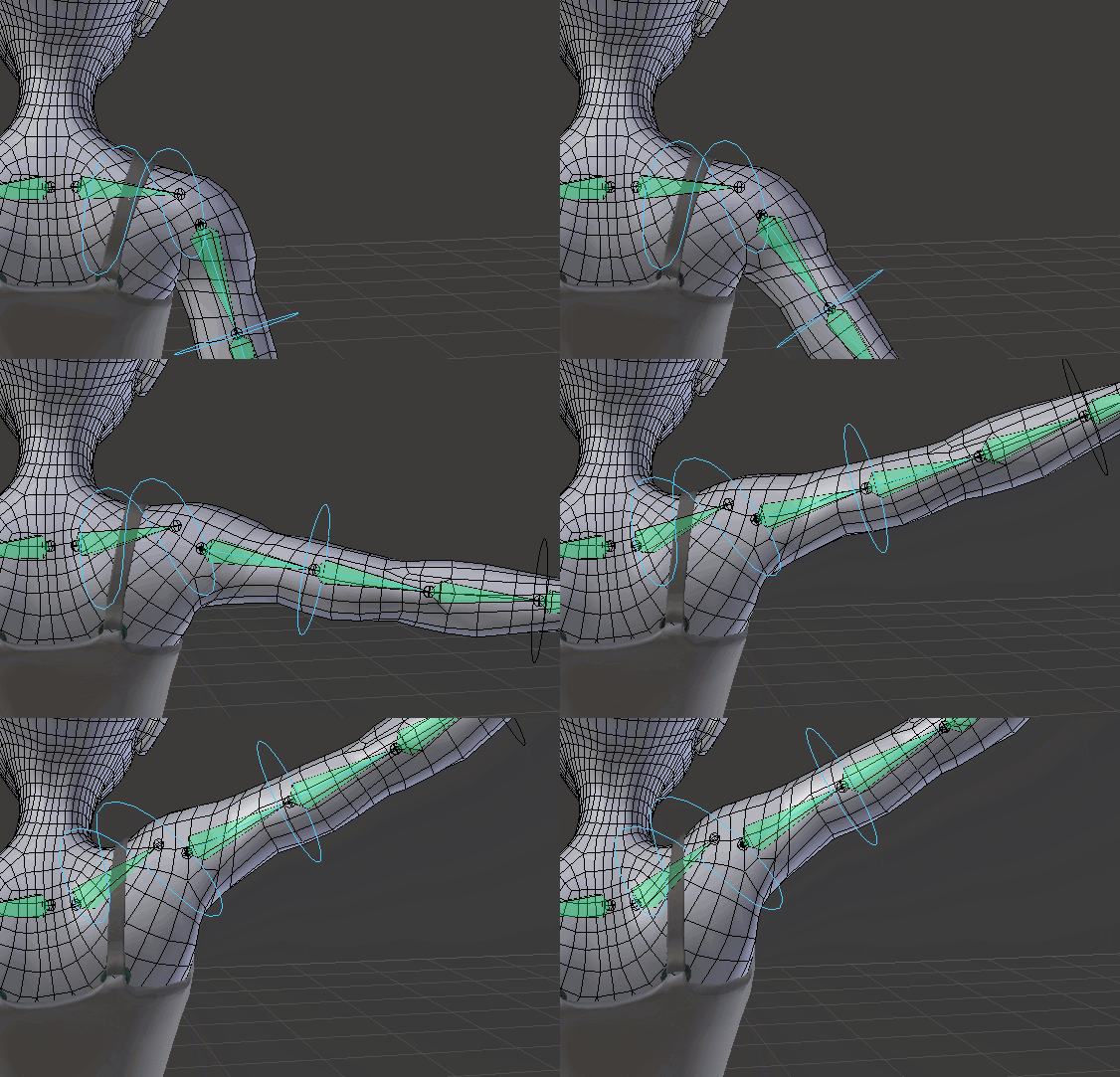 neon shard
That I havent quite gotten the hang of. Everyone seems to do that. I have no idea if it is better that way
grave saffron
any idea why all these bone constraints are greyed out?
neon shard
I think it has something to do with helping the back pinch a bit when you move your arms back
making a V towards the back
Hey @grave saffron Im not sure why they are greyed. Even if they weren't though, these modifiers do nothing in VRChat
Unless you plan to animate the eyes as a canned animation
They only work in blender and will not transfer with the model
fading verge
vilar do u know how i copy the bones to the other side?
grave saffron
ah damn
neon shard
Yea! lemme remember
hopefully I get this right
shift+s > select center
. (or maybe , ) to adjust based on selection
select limbs
fading verge
i'll C
fading verge
i seem to be taking a part of the spine when selecting the bone splitting away from the spine.
neon shard
but fliip names
fading verge
sounds logical
neon shard
flip names only works if you named your arms with blender naming conventions
bonename.L
becomes bonename.R instead of bonenameL.001
plucky terrace
can anybody rig a mmd model i have thats not properly rigged, it doesnt have enough bones
its easy to rig
fading verge
I dont seem to understand whatever you said @neon shard
 burnt frigate
I load character into game, and its stuck in t pose. What do?
fading verge
is it rigged?
neon shard
Sorry. I tend to blather
If you name your bones like this: BoneName.L
And you mirror it, then use the FlipNames tool
It will do all the renaming for you
burnt frigate
Yes its rigged
fading verge
Sorry for my retardation but could u tell me in a more precise way how to use the flip tool? XD
Have you set the muscle thingies in unity @burnt frigate ?
neon shard
bottom menu > Armature > Flip Names
you just click it with the incorrectly named bones highlighted
burnt frigate
Well okay before i check that, I move the parents of the shoulders from upper chest to chest, and then remoive upper chest, everytime i go back the parents revert back.
fading verge
yeah i named em stuff like "Upper arm.r, Lower arm.r, Hip.r, Spine offsplit.r"
neon shard
@burnt frigate are you reparenting them in blender?
burnt frigate
no the unity hierarchy
neon shard
Ok cool when you mirror them, they are gonna be named Hip.r.001
Flip names will fix the name
@burnt frigate You should fix your bone heirarchy in blender
It might be possible in unity but ive never done it
burnt frigate
well shit, I will go get blender
 viral stag
uhh
fading verge
@neon shard what i meant is how do i flip the bones xdxdxd
neon shard
So those bones you see are generated humanoid bones
They are created from the bones in your model in rig configuration
The lower legs will appear when you assign the feet
viral stag
oh
I assumed they'd just, detect them
oh jeez, do I have to add arm bones too?
the model has no arms
 torn isle
Anyone here know how to weight skirt bones to the leg so that the legs move along with the skirt and not clip through it?
fading verge
you need colliders
 deft tartan
Hey, im having trouble with this model as it says theres a problem with the chest and arm. I put the model in blender and noticed that the hair and skirt had a bone structure. should i delede them, if so how?
burnt frigate
so I went in to blender
"this property is for internal use only and cannot be edited"
is there an override by chance? EDIT: WAS NOT IN "EDIT MODE"
neon shard
@rich locust You have extra bones in your upper arms
 tame shard
keep gettin the message spine hierarchy missing elements make sure that pelvis spine chest neck and shoulders are mapped
fading verge
dose anyone know a fix for this i click upload
it goes into the upload mode
but the upload thing where u put the name and stuff
wont pop up
tame shard
but everthing is mapped
 steep swift
@fading verge Did you remove the pipeline manager script component?
crisp tendon
@tame shard everything is not mapped
tame shard
shits mapped yo
crisp tendon
Besides your neck yeah
We're now at 47-0 score for me vs people who tell me they've mapped everything but actually didn't
fading verge
@steep swift nope
 muted spade
Hey um, I'm not sure if I should be asking this here, but I've ran into a problem with a Custom model in VR Chat. inside of the face can be seen from my field of view. o.o
 patent jackal
Anyone really good with avatar creation and avatar related stuff that i can chat with about something real quick?
 manic warren
well depends whats ur problem
fading verge
@steep swift got any other ideas
manic warren
And @muted spade just move the view in front of the face
steep swift
@fading verge Nope. Only know If it's missing that component, it'll not go any further.
fading verge
@steep swift ok thx
manic warren
When you apply avatar descriptor you can choose where the white sphere which is the viewpoint goes
rich locust
Removed the extra bones, still says not humanoid
muted spade
oh, so the avatar descriptor is the viewpoint?
 ocean thistle
Hello, is there any way of changing the bone hierarchy in unity? I hit apply when rigging and then it goes back to the original hierarchy
ocean thistle
And what if i cant import my model into blender?
because i dont know why it doesnt let me
i press import and there is simply nothing in blender
rich locust
what is the format?
ocean thistle
fbx
manic warren
@muted spade https://gyazo.com/2b44021c5dada9aef7d9583af5c04499
 rich locust
@ocean thistle looks like you need an importer addon for .fbx files
manic warren
it looks like this https://gyazo.com/41b36d00e06bd6e3f84278c8c3eb72fe
 muted spade
Thanks. I'll mess with it right now to see if I can get it working. I'm using a Knucks model to learn how to make models. XP
manic warren
@muted spade you have to get this white dot between the eyes by changing the x y and z values
it only shows up when you select the model which u put the avatar descriptor on
muted spade
should it be close or further away?
manic warren
i like to put it right between the eyes

 marsh widget
buddah
manic warren
if you see his snout just change it to how you like it
@muted spade you can put the viewpoint wherever you like
ocean thistle
@rich locust Okay i could import it, how do i change the hierarchy now?
muted spade
so, I think I should send the point more out so I don't see the inside of snout
manic warren
just try it out you might not
muted spade
Cool, if I were to make a custom model, by splicing pieces, do I need something like blender to make?
manic warren
yea
muted spade
yeah, I have tomake the viewpoint his snout, however the skeletal structure seems way off.
fading verge
i'm having some trouble, everything looks fine in Blender. I made sure not to decimate the skin or face.
However my face in Unity looks completely fucked up.
 gusty valve
hey can someone help im getting this error https://gyazo.com/d3bfca0d9d218ddec415ce7b390011ba

how do i move bones in unity
without stretching the model?
 scarlet crow
What do i do if the upload freezes while future proofing?
I hit cancel but it's still stuck there

 lucid isle
yes
torn isle
Can you show me how to get there?
Been trying to find ways to stop clipping with skirt and leg.
lucid isle
its not hard click on model and select the tool from the bottom where it says object mode
 royal glacier
@fading verge prehaps its just the shader used, try Cubed's paradox
guys my model seems to have "negative time keys" how do I get rid of them?
sly viper
Anyone out there willing to rig a model for me?
fading verge
I sorta figured out the issue, the face and face aren't alligning right when I upload it to unity. Does anyone know how to fix that? I mean it's perfect in blender?
I had a weird issue like that before, except it was from unity > VRChat. A part of the model would be misaligned with everything else so it appeared sunken in. I had to move the mesh itself in blender to compensate for how much it moved in game. Not sure what the better option is but maybe you have to do something similar
Sounds slightly tedious though
long hill
Ugh, for some reason x axis mirroring isn't working for me anymore.
Does anyone know what I could have done? The box is checked.
patent jackal
Why is it when i assign a jaw flap bone all it does it open my avatars mouth a little bit and nothing else, doesn't move when i talk at all
how do i get that working
i put the right jaw bone and everything
 meager kiln
@fading verge is that mordred?
fading verge
yes @meager kiln
meager kiln
ayy
fading verge
trying to make it for a buddy
patent jackal
@fading verge so even if my mouth was moving would i be able to see? or would other people be the only ones
 merry finch
Pls help, how you can use the head bone to move the head with the mouse
patent jackal
gotcha gotcha
well if anyone has a solution for that please do tell me
because i'm stuck lol i have to keep rotating my jaw bone back up to close my avatars mouth
 ruby blaze
need help with "Spine hierarchy incorrect. Make sure that the parent of both shoulders and the neck is the chest"
scarlet crow
I have a miia model I want to use but I shortened her tail because that was a ton of the tri count, and i don't know how to connect the two ends of the tail back into one now
merry finch
ninja u doin the knuckls?
ruby blaze
no
fading verge
@scarlet crow it’s two meshes now or what do you mean
merry finch
i can't get my head move with the mouse ):<
scarlet crow
Like, it's technically one mesh in two pieces now as far as blender want's to consider
fading verge
Ah but there is a big gap in the middle from what you removed?
 proud wolf
the hands dont work and i cant crouch with it
scarlet crow
I'll show you
I was just going to connect the end section to the tail bones, but i don't know how to connect a mesh to child bones becaise that's what the rest of her tail is from her hips
merry finch
how can i get the avatar's head to move
rich locust
anyone have a properly rigged reugular humanoid model i could use as a reference?
for rigging
 tawny silo
Hey, i need help in knowing what i can do other then the Decimate tool in lowering the cout of Tris, i'm at 30k and need to go down 10k, any help?
rich locust
if there is any stuff in the model that is not visible you could delet that
scarlet crow
look for useless meshes, the tohru model i used for example had arms and feet that did not affect the model at all when deleted
yeah
 wise fable
yo guys, im completely new to this thing
so far ive managed to import a model into unity and then the official guides just break down
tawny silo
I need Joints and Rigidbodies right?
rich locust
I'm new as well, started yesterday lol, youtube videos seem to be a lot more help than the tutorials on the wiki
scarlet crow
I really need help with my tail issue
 nova wigeon
@rich locust
rich locust
ty'
tawny silo
@nova wigeon, I need Joints and Rigidboides right?
nova wigeon
and then 3 bones per finger
Thumb1_L -> Thumb2_L -> Thumb3_L
Index1_L -> Index2_L -> Index3_L
etc.
No, you don't need them
You just need bones
 timber python
guys can i fix bone parenting in unity
mild skiff
https://i.imgur.com/YreiiOK.png just to verify, in this case would the chest bone be the upermost one or the one just under that?
 mild skiff
so i'd ignore the one directly under the spine ?
the hip bone is the tiny one between the leg bones if you can see
unless i shouldn't use that as the hip bone
nova wigeon
mild skiff
oh really
nova wigeon
Delete the small one and make the one above that the hip bone
mild skiff
i've had it rigged incorrectly this whole time then
wise fable
is there a way to test premade animations if you made your model into a 3d body
nova wigeon
What software?
timber python
the screenshots
nova wigeon
Lightshot
nova wigeon
In blender
nova wigeon
It's pretty simple
ruby blaze
can someone point out the parenting error
timber python
let me show you my problem.
 timber python
are tyou okay with helping me in dm?
ruby blaze
shoulder/neck to chest
timber python
are you okay with helping me in dm?
timber python
kk
nova wigeon
Call me
 ruby geode
Is this an easy or hard fix? (The fingers.)
wise fable
whats wrong with them?
ruby geode
The thumb is bending backwards and every other finger is bending in.
wise fable
oh
 haughty pier
when rigging in unity, do you need an upper arm?
wise fable
did you mix up your left and right arm then
ruby geode
Let me check real quick.
wise fable
i mean hand
ruby geode
Nope, they all seem to be in the right places. Left fingers matched to the left hand and right to right.
merry finch
How can i fix 2nd error when my avatar doesn't have fingers https://puu.sh/yTGH1.png

 hidden ether
If your character doesnt have fingers you dont need hand IK
merry finch
how can i remove the hand IK thing
ruby blaze
how do i fix this https://gyazo.com/aa27f3463bdd3c2ef2eec05f34587a08

 haughty pier
Everything looks fine on the animation?
ruby blaze
dosent have a upperchest set
haughty pier

 unborn atlas
Will CATS Blender tool work with Mixamo's rigging?
 muted helm
You could try? You can download a mixamo character from the site [A lot of the default VR chat avatars are mixamo anyways]
merry finch
How can I get the avata's head move with the mouse? is it to do with the second error here or.. https://puu.sh/yTGH1.png
 dreamy sun
i have hard time with this any ideal for making this transparent ?
 native egret
How can I animate a humanoid without it instantly reverting every change I make in unity?
pseudo python
make the glass part use a seperate texture and make it transparent
@native egret Come again? What do you mean by animating
native egret
I just want to do a simple animation so Ican overide an emote
but whenever I, for example, rotate his leg, it instantly reverts
pseudo python
Go ask #animation
dreamy sun
@pseudo python um ?
pseudo python
?
pseudo python
okay are the glasses one whole mess or is it in multiple
pseudo python
3
dreamy sun
unity dont load spa file so i need find other way to make it work
pseudo python
do you have a art program that you can open it in?
dreamy sun
it work on blender ?
willow venture
So in this tutorial
https://docs.google.com/document/d/1zbJDBfUboXPSubaoyIqkYTTSEysFw_fPB9ydq7MBtzI/edit#
I got to the part that explains "If you are using the Vrchat Sample Avatar’s skeleton, The Armature bone should remain at 0,0,0. Delete the Sample Avatar mesh if you do not intend to use it." But I'm not sure how to delete the avatar's mesh.

Google Docs
Quickstart Guide: Bringing An Avatar Into Vrchat. This tutorial was made using Unity Version 5.6.3p1 Install Unity version 5.6.3p1: To upload an avatar to Vrchat, you will need Unity version 5.6.3p1. You can find this by googling “Unity version 5.6.3p1 download” or locating the correct version...
pseudo python
Just find a way to convert the file into a file type you can use
dreamy sun
...
pseudo python
@willow venture Right click this thing and delete hierarchy
merry finch
How can i move my character's head do I need a camera attached to the head bone or..
pseudo python
no
pseudo python
You're welcome
 tranquil merlin
Guys can anyone help me with a furry Avatar design... I have no clue on how to do it
pseudo python
Like building one from scratch?
tranquil merlin
Yup
pseudo python
go ask in #3d-modeling
merry finch
i only have these 2 errors https://puu.sh/yTGH1.png
and my avatar's head won't move with the mouse
 candid thicket
does anyone have any suggestions for dynamic bone settings for a cape? I know I can mess with them I just don't totally understand what each setting does. I want the cape to hang down, but it's a pretty wide cape so the default "pose" (idk if that's the right word for it) has the cape spread out, not having the ends towards the ground.
pseudo python
Haven't got into that yet, sorry
 low river
Guys, an avatar would have to always have its t-pose having the body facing straight up right?
low river
Hrrm
dreamy sun
still
candid thicket
@pseudo python thanks anyway
low river
Cause I had a model that has an arched head, since its a hyena, but when it went to T-pose it, itd get weird. Gimme a sec
pseudo python
So the glasses as a whole is one mesh?
 pseudo python
I mean texture
low river
https://i.imgur.com/a5R8qju.png the avatar itself is like this
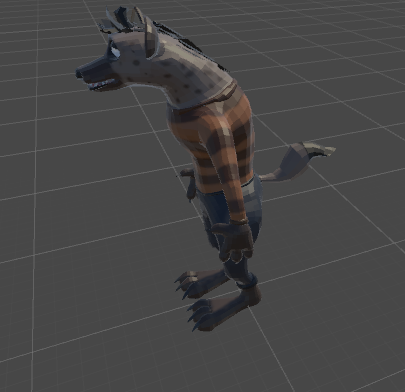 pseudo python
@rich locust it means those bones are unconnected
low river
https://i.imgur.com/r3c5Tjt.png but when it plays
 rich locust
how do you get unconnected bones
pseudo python
What I did with a bud once to fix odd angles is to fiddle with the rotation of the bones
@rich locust click the bone icon on the right side of the screen and look for the relations area like the image above
the bone will unconnect on the bottom
low river
Zandario think I should just re-rig the bones? Would I make their head most of their neck?
pseudo python
Yeah, I'd think that'll work
dreamy sun
@pseudo python yes only that one
pseudo python
okay, have you tried the cutout shader?
 tacit peak
So i got an armature i want to copy and paste into a mesh (same structure body, just a few tweaks), i can copy the armature but i don't see any paste options yet
 thorn spire
I cannot assign anything else as a chest piece, and I have no idea how you even assign a pelvis.
Can someone help?
dreamy sun
what do you mean by cut out ?
thorn spire
I hate how you can't assign something as a spine and a chest at the same time. It just makes everything more complicated. 😡
nova wigeon
Just name the bones as you place them
 steel field
my avatar eyelash is seperate from the eyelid is there a way to join them?
tacit peak
oh
nova wigeon
ctrl + J @steel field
 rose marten
any people really experienced with some MMD models here? I have an issue within unity, if i could get some help/advice on (tried to look up my issue haven't found anything yet to help)
steel field
will they keep the shape keys
nova wigeon
I believe so
pseudo python
@rose marten Yeah, I've been using MMDs alot
rose marten
pseudo python
do you have the CAT's blender plugin?
rose marten
yes
I've imported into blender fixed it with cat + optimized the model there, could I have messed it up before i exported it?
steel field
also i have a third eye, how would i make it work in tracking?
nova wigeon
@rose marten Go through each one of these and translate the bones/meshes
pseudo python
I'd translate the bones
dreamy sun
now iknow where that glass transparent gone to - -
low river
Im almost debating redoing this entire avatar ahha
thorn spire
Can anyone here tell me where I could possibly assign a chest without changing any of this?
nova wigeon
It's because there's no normal on the other side
dreamy sun
?
muted helm
surfaces are culled for speed purposes
nova wigeon
There's no texture on the inside
dreamy sun
it have
nova wigeon
so it renders nothing
muted helm
you only draw one side of a 3d surface for speed purposes
dreamy sun
but
thorn spire
I can't get any help here. 😦
dreamy sun
it mess with the glass
muted helm
there may be a toggle on a shader to make it double sided
pseudo python
@thorn spire Can you take a picture of the armature list?
dreamy sun
so it become transparent
thorn spire
@pseudo python What is that?
rose marten
@pseudo python just hitting the bones under the translation menu fixes that or do i need to tweak them more manually
pseudo python
@thorn spire the file like structure on the left
muted helm
same object, but its only doing one drawing operation
pseudo python
@rose marten it makes it easier to work with, cause we can actually read it
thorn spire
rose marten
lol im an idiot, thanks haha
thorn spire
I did not make this list, by the way.
I can't see anything to refer to as a chest.
pseudo python
Try using p12 as your hips and on
thorn spire
And I have zero clue on what to do regarding the pelvis. That option seems nonexistent on Unity in general.
long hill
@steel field You can't make a third eye work to my knowledge.
pseudo python
Hips = pelvis
thorn spire
What would I assign the hips as?
pseudo python
p12
steel field
;-; okay thanks
thorn spire
And this is what the skeleton looks like currently.
pseudo python
unless it's not the bone I'm thinking of
thorn spire
p12 is not appearing as a bone.
thorn spire
It doesn't look like it appears anywhere.
Would p12 be a chest or spine then?
I think p12 might be the ring in Klonoa's hand.
There's something called "p12_obj" that refers to the ring, I think.
pseudo python
p12 is useless
dreamy sun
first model loading on blender is like this
pseudo python
you'll have to make a new bone
dreamy sun
when after loading on unity it's like left side one
thorn spire
And I've been asking for a while on how you make a bone.
dreamy sun
so what i do is reload every single one toon & spa
thorn spire
I also don't know where to specifically place such a bone either.
 signal pagoda
Ive Been Running through this problem alot in some models where they tend to overlap eachother, Can anyone help me out on this one, there's nothing that i can find in the heiarchy that allows me to delete the mask. Y.
thorn spire
I clicked the "body" bone and pressed E.
pseudo python
In blender
thorn spire
Oh.
I don't have Blender.
The only problem I have is that it's one or two small things that I feel even an ameture could do. However, I am completely new to all of this.
pseudo python
okay for this stuff, Blender = Model editing, while Unity = Finalizations and shaders
you can't do bones in unity
dreamy sun
this unity so trouble some
thorn spire
I hope to God someone I know could just do this for me. I feel like Klonoa is almost complete, but is missing only a couple of parts to make him ready to publish.
nova wigeon
You're probably just missing the chest bone
fading verge
how to fix this?
pseudo python
@thorn spire This is a easy fix if you plug the model in blender
like one button press
nova wigeon
@fading verge Exactly what it reads
fading verge
how do i fix the bone length tho
nova wigeon
In a 3D modeling program
ruby blaze
so ive got 4 bones for the upper/lower arm which ones should i put to which
nova wigeon
import your model and resize it
fading verge
like unity???
 nova wigeon
not a 3D modeling program
fading verge
ok
nova wigeon
Blender, maya, C4D, etc.
pseudo python
@ruby blaze You want to plug the model in blender and fuse a couple of those bones
actually
just go into blender and delete that small middle bone and connect those two big ones
pseudo python
what kind of model are you using?
pseudo python
Mixamo doesn't do mouths
spiral pewter
star platinum
pseudo python
I mean file type
spiral pewter
i tried youtube tutorials
but i'm not american
i udnerstand nothing what you guys talk
😦
pseudo python
can you take a picture of the models' head with the armature visable?
dreamy sun
this unity dumb as hell
pseudo python
@dreamy sun go into configure, you might have some bones not assigned correctly
and make sure Upper Chest is blank
fading verge
if a model has 4 legs like a dog should i make it a humanoid?
 polar mural




 fading verge
hello