
#avatar-rigging
1 messages · Page 1 of 1 (latest)
 oblique latch
 gloomy bloom
How do I fix this?
Something with the Chest and weight painting?

 quaint cosmos
Yeah, too heavily weighted to the neck and head and/or not enough to the chest would be my guess.
gloomy bloom
quaint cosmos
Yeah, too heavily weighted to the neck and head and/or not enough to the chest w...
Would merging chest and chest 1 fix it?
(I need some fast since I have a lot more models like this)
quaint cosmos
I don't think you need an upper chest bone so you could try it and see.
 errant olive
ive made my skeley dude and hes all properly rigged but whenever i put him in unity he twists round and i dont know how to fix it, any help?

 crisp tendon
gloomy bloom
How do I fix this?
Something with the Chest and weight painting?
crisp tendon
gloomy bloom
How do I fix this?
Something with the Chest and weight painting?
Yup !
 quaint cosmos
 fading verge
wait is discord down?
 sleek isle
Mixamo good but since your limbs are touching like the legs. You will have to do some editing still.
quaint cosmos
There's generally a bit of weight paint touch up required for any automatic rigging but yeah, might be a little more wonky with so little space between the legs. You could go into edit mode and rotate them out a bit.
 weak siren
Quick question. Right now I'm trying to get a good rig on my model, and while the arms and legs appear to be working well, my neck is very stiff ingame, I've messed with all the settings and none of it looked right, Is this a sign that my models chest bone is too long?


 quaint tree
Anyone looking for an artist???
 brisk thunder
quaint tree
Anyone looking for an artist???
brisk thunder
quaint tree
Anyone looking for an artist???
Possibility
 rain ocean
thanks shape key
rain ocean
or not, anyone know how to fix chicken wing avatars?
comes out chicken winged for some reason?
 rain ocean
two of my bones in blender are screwing my whole model, the head and neck, wtf?

i dont know whats causing this? ive already apply rot-loca, and transforms? wtf man
okay, can confirm genuine blender bug, not sure what caused itm but after deleting the bones, and duping a new set, that corrected it, wow
 rain ocean
my ENTIRE rig is fucked because of this bug, thanks blender
 twilit aspen
How the hell do i rig this?!

I did it before but it was so scuffed i wanted to try again

 woeful palm
So, i have these 2 models when on their own, they work completely fine no errors no nothing. But i took the hood from one of them and put it on the other, and then it said the shoulders and neck had no parent when they did. I removed the unused bone that was the parent of these, and made the parent the upperchest. That fixed it, so I thought it was all good to go. But now, in unity, despite no bone errors coming up, the model isnt animating at all and is stuck in a tpose. I'm fairly new to blender so i have no idea what i did wrong but if someone could help that would be nice. (i didnt know what channel to send this in)
 quaint cosmos
fading verge
Help
quaint cosmos
fading verge
Help
You can click the model, then shift click the armature and ctrl + p to parent with automatic weights but you'll likely have to do some weight paint clean up. Alternatively, you can use an automatic rigging program like Mixamo. Unless the model already has all the right weights and vertex groups, then you just need to add an armature modifier to the model and select the armature you want to bind it to.
fading verge
THanks
fading verge
 fading verge
quaint cosmos
You can click the model, then shift click the armature and ctrl + p to parent wi...
fading verge
quaint cosmos
You can click the model, then shift click the armature and ctrl + p to parent wi...
Wich?
 quaint cosmos
fading verge
Wich?
quaint cosmos
fading verge
Wich?
You need to select the model and then the armature, I assume you did it in reverse order
 quaint cosmos
Is that before or after moving the armature? Automatic weights are really just a starting point, you'll need to refine them with weight painting. Or you can use Mixamo which will create its own rig with its own weights which will likely be a little better but still not perfect.
Looks kind of like Spider Squidward
 slow juniper
@fading verge go to object mode, select the armature, then select the body/whatever you want to weight paint, go to weight paint mode, select the head bone with ctrl + click, paint the parts you want to move with the head bone, press r to rotate something around and test it

 slow juniper
no don't make the whole body red
quaint cosmos
You probably have to paint over the vertex right at the peak. Another option is to paint while the model is posed so the parts that aren't weighted properly stick out more
slow juniper
just the head
fading verge
a
slow juniper
with the head bone
quaint cosmos
Oh, yeah, that'd be bad
slow juniper
like this
 quaint cosmos
Things should only be red when you have the vertex group you want to have full control over them selected.
fading verge
How do I make it blue again?...
slow juniper
ctrl z to undo it
quaint cosmos
Yes or paint over it with the weight set to 0 and the strength at 1
fading verge
A
quaint cosmos
Weight painting takes some time. You need to go through and adjust the weights for every vertex group which corresponds to each of the bones.
Some bones might work alright with the automatic paint but you'll definitely have to refine the finger weights. Even good automatic rigging programs screw up the fingers.
fading verge
 quaint cosmos
You can go into edit mode and press L while hovering over those pieces and assign them to the head vertex group
fading verge
uh
 quaint cosmos
You may need to use the blur tool to smooth out your weights a bit. One good option to see how your weights should look is to download a ReadyPlayerMe avatar and look at how it's weighted. https://readyplayer.me/vrchat

Make custom full-body VRChat avatars from a photo with Ready Player Me avatar maker. Easy upload to VRChat – no Unity or Blender needed.


 stone galleon
have you applied weight paints


 quaint cosmos
It seems like you're trying to weight paint without understanding how that works so it might be helpful to watch a video or two on it
 shrewd widget
Hey, I'm reading a lot about rigging and trying to finish rigging this model I have but I'm wondering two things.
Eye Tracking:
- Do the bone orders matter?
- If they do how can I change the bone order?
I've everything I could possibly do correct to get eye tracking working but it's just not working for some strange reason.
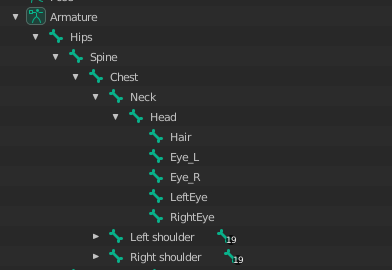
Current Bone Order for Ref:
https://i.imgur.com/CevA7LN.png
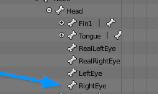
According to a lot of docs it complains about the bone order: https://i.imgur.com/v1uqVkI.png
 quaint cosmos
Did you rig the eyes with CATS? I've never had luck with that, I just removed the bones they generated and used my own and it seems to work better? I don't think bone order matters but I could be wrong, just that the bone relationships are right, so the lower arm should be the first child of the upper arm, that sort of thing.
shrewd widget
quaint cosmos
Did you rig the eyes with CATS? I've never had luck with that, I just removed th...
I actually did not rig it with CATS this time to try it, and it's still not working.
Going to try some other things; but feels like I might be at a loss with eye tracking.
quaint cosmos
It's one of the more vexing elements of avatar creation for sure. I finally managed to get mine working alright with a bunch of tweaking but then sometimes it will work fine with very little adjustment.
I just know I had better luck using my bones that were pointing out of the eyes than the ones perpendicular to those bones
shrewd widget
quaint cosmos
I just know I had better luck using my bones that were pointing out of the eyes ...
🤔
I'll give that a whirl
Did you just use 2 bones or 4?
quaint cosmos
Just 2, I used CATS to make the LeftEye and RightEye bones but that wasn't working so I removed those weights and deleted those bones and it works better, though not as reliably as I would like.
shrewd widget
quaint cosmos
Just 2, I used CATS to make the LeftEye and RightEye bones but that wasn't worki...
yea; so assuming you mean this:
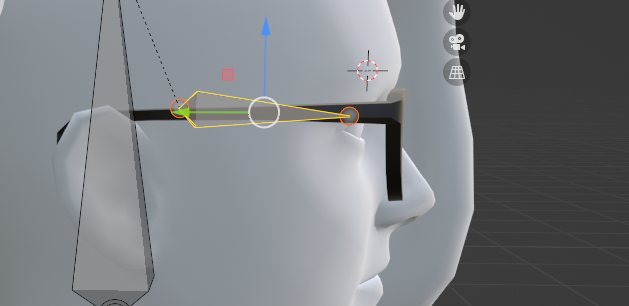 quaint cosmos
Yeah
I have mine sticking out of the head a fair bit, that's what worked for my eyes but it might be depend on how yours are done.
shrewd widget
quaint cosmos
I have mine sticking out of the head a fair bit, that's what worked for my eyes ...
Yea; just tried small stick out, trying larger sticking out now.
 pulsar fog
I can't play VRC anymore
Seeya
shrewd widget
quaint cosmos
I have mine sticking out of the head a fair bit, that's what worked for my eyes ...
actually working

Thanks my dude 👍
 wet ruin
hello so how can I tell you that I am in no way delighted and I am completely frustrated I will in no case install something that is not part of your games which first requires you to make changes to your pc hard drive thank you well and goodbye
 fathom field
the avatars people make has to many polys and glitched so it crashes people
fix that not the mods
the community has made that just about dating and sexual stuff
and you say its for kids too
i dropped out of school and spent money i didnt even have to play ur dumb ass game
in 2 weeks there is gonna be 7 new scrips that will make ur EAC look stupid
 spiral elbow
ive done this many time before but for some reason its not letting me join these sweat pants to the armature so i can then weight paint them via single bone selection over full auto wieght paint that breaks the animation dude to bones i dont want painted to the pants

any idea why its not working for me ?
nvm i got it 😛
spiral elbow
not sure what key i hit but the verticies are showing through now so its hard to select the right ones to merge properly
normally the verts shouldnt show throught the materials

 eager moat
Not for vrchat but why does this happen?

 wooden flax
eager moat
Not for vrchat but why does this happen?
wooden flax
eager moat
Not for vrchat but why does this happen?
This usually happens when the vertices are weight painted to multiple different bones, enable auto normalize and redo the weight painting, it should fix any weird issues.
 eager moat
wooden flax
This usually happens when the vertices are weight painted to multiple different ...
eager moat
wooden flax
This usually happens when the vertices are weight painted to multiple different ...
like weirdly enough it's only the left arm that's like that
 glad orchid
eager moat
Not for vrchat but why does this happen?
glad orchid
eager moat
Not for vrchat but why does this happen?
Was it manually weight painted or automated?

 eager moat
yeah I've been trying
glad orchid
And you're not having any luck with it?
eager moat
glad orchid
And you're not having any luck with it?

been trying but the brush just won't paint there
glad orchid
There's probably not enough creases in the arm if you're unable to paint there. You can also select the section of arm use the assign button to manually give the arm a certain weight value.
 glad orchid
eager moat
glad orchid
eager moat
But from the screenshot you've attached, that is waaay too much for the left arm.
eager moat
ok i think i got it fixed up
 zealous plume
Ok. So I'm trying to do something similar to my beautiful sketch I attached. The goal is to be able to move the cube while having the chains dynamically react. So how would I lock the end point? In Unity/physbones using a constraint for the end point will simply just stretch the bone out instead of getting the desired effect. Maybe this is mad easy and I'm just dumb/blind.

 modern crystal
Yo I need help
do any of y’all know a good tutorial of how to rig a avater?
I’m new in the making avater thing
 iron raft
Can u use scripts in vrchat?
woeful palm
So, i have these 2 models when on their own, they work completely fine no errors no nothing. But i took the hood from one of them and put it on the other, and then it said the shoulders and neck had no parent when they did. I removed the unused bone that was the parent of these, and made the parent the upperchest. That fixed it, so I thought it was all good to go. But now, in unity, despite no bone errors coming up, the model isnt animating at all and is stuck in a tpose. I'm fairly new to blender so i have no idea what i did wrong but if someone could help that would be nice. (i didnt know what channel to send this in)
woeful palm
Is there a tutorial for this or nah?
sleek isle
Armature in hip is common if you have other bone then leg as children
It will give you the angle hip warning in the sdk
Re assign it manually
glad orchid
modern crystal
How do I stretch on blender
Depends on what you're trying to stretch. You can either use bones to stretch whatever you're trying to stretch or you can just use edit mode.
modern crystal
Basically how to duplicate more bones
glad orchid
modern crystal
Basically how to duplicate more bones
Go into edit mode and use Shift + D to duplicate the bone.
modern crystal
How do you pair body parts to the bones?
crisp tendon
modern crystal
How do you pair body parts to the bones?
The process is called weight painting 
modern crystal
how do I turn these two into different entities
 crisp tendon
modern crystal
how do I turn these two into different entities
crisp tendon
modern crystal
how do I turn these two into different entities
In edit mode > P > Separate parts
modern crystal
By loose parts cuz it still doesn’t work for me and idk why?
modern crystal
wait nvm just had to apply for the mirror
 winter heart
how do I fix this sort of seam in the body mesh, so the polygons are attached?
 quaint cosmos
winter heart
how do I fix this sort of seam in the body mesh, so the polygons are attached?
quaint cosmos
winter heart
how do I fix this sort of seam in the body mesh, so the polygons are attached?
Select the vertices, press M, merge by distance.
winter heart
that didn't seem to do it
quaint cosmos
winter heart
that didn't seem to do it
You selected to merge the vertices by distance and they didn't merge?
winter heart
no, they merged by clicking "at center" though
quaint cosmos
Oh, it's possible your threshold was too high. Merge by distance will only merge vertices if they're within a certain distance. You can change the distance in the settings that pop up but merge at center is also fine.
winter heart
alright, tyy
 slender tulip
hey guys, I modelled/uved an avatar in maya, should I just make the jump to blender for rigging etc?
quaint cosmos
slender tulip
hey guys, I modelled/uved an avatar in maya, should I just make the jump to blen...
If you like. Maya can rig as well, just a matter of preference.
slender tulip
for context ive never done avatar/rigging stuff, i primarily do environments :')
quaint cosmos
You can also use Mixamo to automatically rig and then just clean up the weight painting.
slender tulip
oh interesting
 orchid halo
Quick question, I want to connect specific meshes to specific bones on an armature (ex. only ear bones affect ears), is there a way in Blender to use the Parent w/ Automatic Weights feature but only for a set amount of bones?
quaint cosmos
orchid halo
Quick question, I want to connect specific meshes to specific bones on an armatu...
I'm not sure about weighting to only certain bones but one thing you could do is separate the mesh into different objects, parent with automatic weights, and then delete all the vertex groups on the object you want to have no effect and join it back. The resulting model will still have all the vertex groups but the objects you separated will only be affected by the vertex groups that were left before they were joined. You can also assign faces to vertex groups in edit mode.
modern crystal
Ok so my Rigging Broke in Unity Hub even tho it was fine in blender
is there a way to solve this?
quaint cosmos
modern crystal
Ok so my Rigging Broke in Unity Hub even tho it was fine in blender
is there a w...
What sort of errors are you getting? You can click the FBX file in the project tab and configure the rig, maybe it's not assigning some bones properly.
modern crystal
Ok so my friend is helping me with this and asked if you could help us more in the dms?
quaint cosmos
I don't generally see any point in helping in DMs, that's what this channel is for and DMs just mean no one else can help if I don't know what's wrong.
modern crystal
quaint cosmos
I don't generally see any point in helping in DMs, that's what this channel is f...
well here’s the image I got
 quaint cosmos
Click the FBX file in the project tab and then in the inspector go to rig and change the type to humanoid instead of generic.

Your other errors are about combining your meshes and materials in Blender. You can join your meshes by selecting them in object mode and pressing ctrl + j and you can use this tool to combine the materials https://github.com/Grim-es/material-combiner-addon
GitHub
Blender addon for material combining, uv bounds fixing - GitHub - Grim-es/material-combiner-addon: Blender addon for material combining, uv bounds fixing
modern crystal
quaint cosmos
Your other errors are about combining your meshes and materials in Blender. You ...
Ok imma hop on and did that
This is what the rigging looked like
Is it bad orrr
 quaint cosmos
modern crystal
This is what the rigging looked like
Is it bad orrr
quaint cosmos
modern crystal
This is what the rigging looked like
Is it bad orrr
That's definitely not a humanoid rig so you'd have to create all of the animations yourself and set up all the animation controllers manually which would be a lot of work and something I haven't done before. You could try to rig it with something like Mixamo to get a humanoid skeleton but I'm not sure how well it would work given that kirby doesn't really have a neck, body, legs, etc. Maybe not the best choice for your first avatar project even though it seems like it would be fairly easy.
modern crystal
quaint cosmos
That's definitely not a humanoid rig so you'd have to create all of the animatio...
bruh 💀
I’m done for
quaint cosmos
Unity/VRChat prefers something similar to a human, unfortunately. Going too far outside of that makes things a lot more complicated.
I'm sure someone else has already made a Kirby, though, maybe just do a search for Nintendo and you can find an avatar world where someone has done the work for you.
modern crystal
quaint cosmos
I'm sure someone else has already made a Kirby, though, maybe just do a search f...
Yeah but I need to know how they rigged the lad
quaint cosmos
modern crystal
Yeah but I need to know how they rigged the lad
Probably by using a generic rig like you have here and then creating their own walk cycle, falling animation, etc, and then replacing the animations in the respective animation controllers. It's not impossible, it's just a fair amount of work and not something you want to be doing for your first avatar.
I'm just not sure why you want to re-invent the wheel. If the avatar already exists, just use that. It's not like publishing it yourself gives yo any more rights to the character. Do you want to add accessories or something?
modern crystal
Yes
orchid halo
Ok, I'm trying to work outside the box here. Can vertex groups be used from one armature for another of the same name?
quaint cosmos
modern crystal
Yes
I see. Well, my recommendation would be to start with a humanoid and work you way up.
quaint cosmos
orchid halo
Ok, I'm trying to work outside the box here. Can vertex groups be used from one...
Kind of? Vertex groups just tell the bone which vertices it should be affecting and to what degree. I think I would need more information.
You can transfer weights from one model to another so long as the body is in roughly the same place relative to the armature.
orchid halo
Ok, I figured out what I wanted.
- Click armature, go into edit mode, select bones you want included
- Go to object mode, click mesh, go to 'weight paint'
- Click Weights > Assign Automatic from Bones
quaint cosmos
Good to know, never done that before. Though I tend to like to use my automatic rigging program and then clean it up rather than using automatic weights.
modern crystal
Will this humannoid rigging work or nah

 crisp tendon
modern crystal
Will this humannoid rigging work or nah
crisp tendon
modern crystal
Will this humannoid rigging work or nah
Work ? Yes. Work well ? Absolutely not
modern crystal
well is there a way to increase its quality
quaint cosmos
modern crystal
Do you need Weight Painting for it to be a Humanoid Rig?
Not technically, but you do need weight painting for any rig to do anything to the model.
modern crystal
Help when I turned on weight painting
Got any way to fix this?
 crisp tendon
That's just fixed with better weight painting  Not every bone needs to have some
 still portal
Help! I have an avatar that I downloaded and put into blender and it is already rigged. How do I get it ready to be put into Unity through CATS? Do I need to make a whole new rig for it?

This is what I have going on in blender at the moment
I'm very new to this so bare with my limited knowledge!
 vapid sedge
That looks like a rigify animation rig, you're gonna have to remove a LOOT of bones from it to get it down to vrchat rig levels. I'd honestly recommend re-rigging it in this case
vapid sedge
basically yeah LMAO though if you finagle stuff right you mmiiight be able to re-use the vertex groups but honestly, that'd be a huge hassle especially if you're new to modelling
still portal
Yeah I might just start from scratch lol
Seems to be a better option!
Thank you for the help!!!
:D
vapid sedge
no problem!!
still portal
vapid sedge
no problem!!
Oh! The rig has all of these cameras with it, are they important?
vapid sedge
nope! unless you plan on rendering the model, anything other than the model and the rig itself are not needed (save for props and whatnot)
still portal
And it doesnt have to be rendered in order for it to go to unity and into vrchat right?
Sorry I'm asking alot of questions
vapid sedge
Nope! rendering is just for pretty pictures hehe (or animations)
ALSO YOU'RE TOTALLY FINE i love answering questions tbh,,,
still portal
Well if I get stuck again I know where to ask :D
modern crystal
crisp tendon
That's just fixed with better weight painting <:sweat:668314662059638784> Not ev...
so just do the arms and legs ?
crisp tendon
modern crystal
so just do the arms and legs ?
yep
modern crystal
Like this right ?

 crisp tendon
sorry, just hand and foot
modern crystal
Oh so these parts

 shadow finch
Im havin trouble tryna rig a paint 3d model cause when i apply the parent of the rig to my paint 3d model it gets all messed up
 cerulean lantern
Ok so, I'm trying to hide an arm on this model so that I can give her a robot arm, right?
Except when I hide a limb, nothing gets hidden, and when I shrink it down, it shrinks and distorts any parts I attached to it too.

Anyone got any advice?
cerulean lantern
Actually, any way to shrink limbs without shrinking hierarchy?
 tidal jolt
 quaint cosmos
cerulean lantern
Actually, any way to shrink limbs without shrinking hierarchy?
quaint cosmos
cerulean lantern
Actually, any way to shrink limbs without shrinking hierarchy?
Rip the vertices of the part of the arm you want to hide so they aren't connected to the rest of the mesh and shrink them using a shape key.
quaint cosmos
shadow finch
Im havin trouble tryna rig a paint 3d model cause when i apply the parent of the...
Messed up how? I've never used Paint 3D so it might have some weirdness like duplicated faces but that's just a guess.
 raven pulsar
How would I go about making a avatar with no legs? I’m worried about it not fitting in the humanoid skeleton for unity
quaint cosmos
raven pulsar
How would I go about making a avatar with no legs? I’m worried about it not fitt...
Use a humanoid rig and don't weight anything to the legs
raven pulsar
Ah
fading verge
If I'd like to add breasts physics on an avatar, does that mean I'll have to manually update the rigs of clothes as well?
quaint cosmos
I would think so. If the breasts are going to have physbones controlling their bounce, then you'd want the clothing to be similarly weighted so they don't clip through. Or you could delete the faces underneath the clothing but I assume you're wanting to have different clothing options.
slender tulip
Tried out mixamo today and the rig worked pretty nice, though I'm certain it doesn't account for mouth movement/eye tracking. Would I need to do blend shapes for those or something? 🥴
vapid sedge
slender tulip
Tried out mixamo today and the rig worked pretty nice, though I'm certain it doe...
blend shapes would definitely be necessary for the mouth shapes!! for eye movement you'd have to add eye bones to the rig
shadow finch
quaint cosmos
Messed up how? I've never used Paint 3D so it might have some weirdness like dup...
it gets all big suddenly
vapid sedge
paint 3D is very wonky in that it isn't rlly,,,, properly 3D,,,, the '3D' stuff is calculated based on it's distance to the canvas in the program, and converting it to other programs can comr with a lot of jank
i recommend retopologizing it somehow, like you'd do with a sculpt
shadow finch
vapid sedge
i recommend retopologizing it somehow, like you'd do with a sculpt
retopologizing? neverheard of that
vapid sedge
it's basically when u remake the model with, well, better topology lmao im not very good at explaining things sorry- its like uhhh optimizing the mesh for animation a lot of the time
i can link some videos on it if i can find some- i'm not too well versed in the methods since i don't do it that often
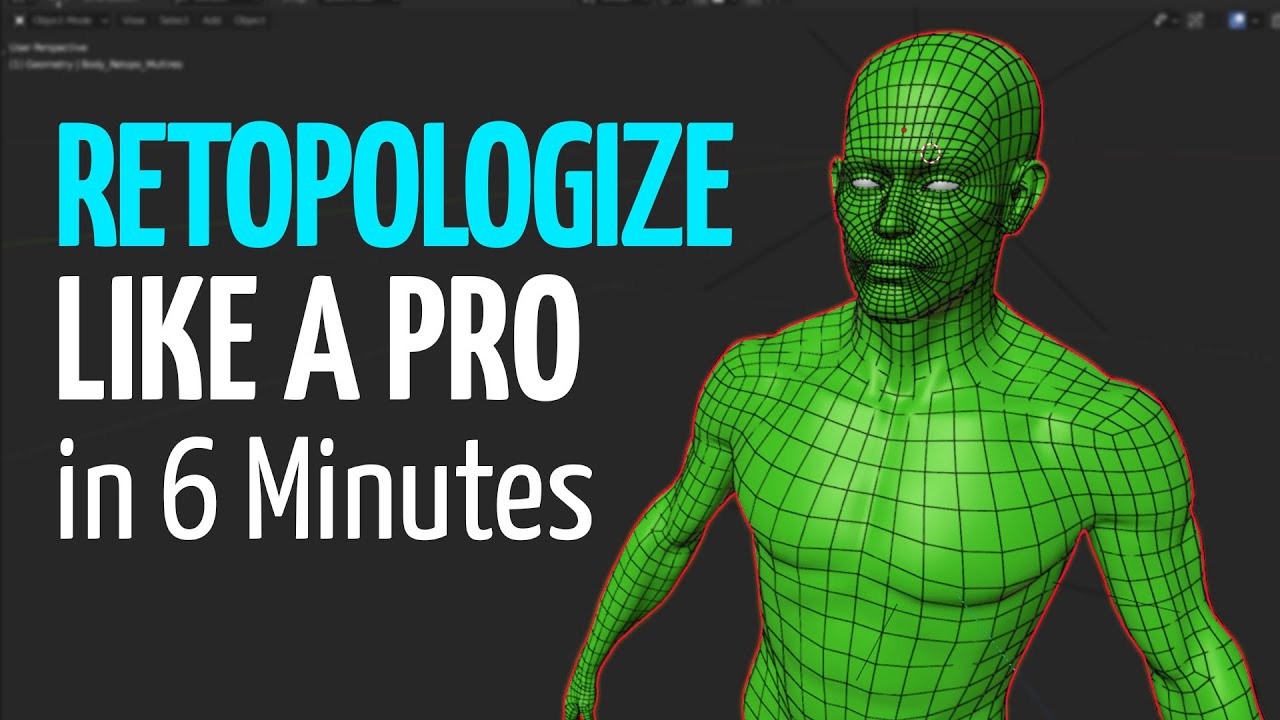
Retopologize anything in Blender. In 6 minutes you'll learn Blender modeling, retopology, edge flow and more tips and tricks to create perfect topology for your 3d models. Retopology doesn't need to be hard or confusing.
My Automatic Retopology Plugin:
https://exoside.com/quadremesher/
Softwrap 2 Plugin:
https://blendermarket.com/products/soft...
quaint cosmos
Learn to retopologize in 6 minutes, actually retopologize in 6 hours but yeah, the process isn't too complicated, it's just time consuming and you have to get creative with how you bridge high poly areas like the face and hands with lower poly areas in a way that works well. If it's just an issue of scale, every 3D program has their own scale and you often have to scale things up or down but that's pretty easy.
My process is sculpting in Blender with Dynotopo on so you don't have to worry about polygons and retopologizing over that but everyone has their own workflow that works best for them.
 alpine vortex
Hi all!, i want the hood staying on the chest and not following neck and head bones, how can i do it?
Dm me if needed.
 alpine vortex
Ok I'll try ty
shadow finch
vapid sedge
it's basically when u remake the model with, well, better topology lmao im not v...
oh but the paint3d model im rigging literally made with spheres, cylinders and whatnot
oh nvm i figured somethin out
i can just create a mesh and use boolian with the paint 3d one and itl work
quaint cosmos
shadow finch
oh but the paint3d model im rigging literally made with spheres, cylinders and w...
Generally, you want your topology to have faces that are as close to squares as possible and something like a stretched cylinder can have a lotvof thin slender faces
Booleans often don't create the cleanest topology but it depends on how they're done
alpine vortex
Ty is fixed now, i forgot to select the vertex group step, tytyty! 
 placid crown
unity is giving me the error that the parent of both shoulders and the neck have to be the chest and they are so i dont know what to do to fix this
 vague cosmos
weight painting?!
quaint cosmos
No, I don't think weight painting would affect that. Are the shoulders and neck the first parent of the chest? Is there an upper chest? Are they properly assigned in the configuration?
 livid gulch
Is it at all possible to have automatic eyelids that blink as different shapes relative to the expression?

 quaint cosmos
Cute! Don't think so, there's just one blink blendshape but maybe
livid gulch
The shape of the face is quite different from A → B here, so I'd have to have 2 sets of eyelids or one set with 2 sizes... Somehow.
livid gulch
quaint cosmos
Cute! Don't think so, there's just one blink blendshape but maybe
Thanks! Yeah, that's my thinking :/ quite unfortunate if its the case
vapid sedge
yeah, no way to have separate blink shapes unfortunately, though sometimes if it really bothers me i do a weird,,,, 'half' solution where the 'blink' shape doesnt fully close the eyes. it still gives the illusion of blinking if you aren't looking too hard
btw ur avatar is soo cute,,,
livid gulch
Ohhhh I just figured out how it could be possible!! If each set of eyelids exist as a dormant animation to be toggled in the radial menu, that would work perfectly!
This would also mean NOT using the default blink in the SDK.
livid gulch
vapid sedge
yeah, no way to have separate blink shapes unfortunately, though sometimes if it...
And also thank you!
sleek isle
livid gulch
Is it at all possible to have automatic eyelids that blink as different shapes r...
Make you own blinking system with a randomiser
If someone have your animation off. It play the regular blinking. If on your custom made system
 forest harbor
anybody know what could be causing this?
in Unity:

in VRC:

the neck is getting wacky for some reason
spiral elbow


so ive added these glves boots and neck fur everything is painted and looks to be working in pose mode of blender i export using cats and in unity also looks to work good but once i upload i get this odd effect you see in picture 1 ive tirend adding the items more then once to see if it was somthing i did wrong but i dont think so


i notice that my new export of the fbx doesnt have the Vulcan Avatar animator avatar
the fbx doesnt even have an animator script on it like the original fbx does
 distant hollow
Hey would anyone know how to change default hand resting pose?
Like mine looks like im holding a bottle for some reason 
sleek isle
forest harbor
Move the avatar descriptor around
forest harbor
sleek isle
Move the avatar descriptor around
do you mean the view position?
 stoic zenith
spiral elbow
i notice that my new export of the fbx doesnt have the Vulcan Avatar animator av...
stoic zenith
spiral elbow
i notice that my new export of the fbx doesnt have the Vulcan Avatar animator av...
Click the avi and choose select on the top right then humanoid and create from this model
spiral elbow
Sorry I forgot to say I figured it out last night but thanks for getting back to me still :)
Normally I didn't have to do that but for thus model it forced me to do so
 inner berry
im very new to creating avatars and im having some trouble rigging the legs to the hip, the vrc builder is giving out a warning saying that its recomended to have the legs 180 degrees from the hip. in blender i think i connected them correctly, but when i put it into unity the hip bone gets messed up. ive also been having a constant problem of the spine having a length of 0

 crisp tendon
your hip bone is flipped
inner berry
when i flipped the hip bone, the dotted line connecting the hip to the legs went to the top of the hip
crisp tendon
Yep, that's expected
inner berry
oh ok
crisp tendon
parented*
inner berry
just tried it in vrc and im still having problems with walking and default animations
fading verge
maybe raise the bottom of the hip bone?
if its "level" with the legs im pretty sure it can cause problems
inner berry
huh ok i'll try that
 crisp tendon
Seems correct yeah
 azure salmon
Cool but why are the finger bones going outside
is this noraml
i just used mixamo and fix model in cats plugin in blender
inner berry
ive also been getting this as a warning, could this have any impact on the animations?
 crisp tendon
azure salmon
Cool but why are the finger bones going outside
crisp tendon
azure salmon
Cool but why are the finger bones going outside
you can move back those bones in edit mode
azure salmon
edit mode?
crisp tendon
You press tab
There's a looot of video tutorials on rigging/armature, if you're trying to fix something
azure salmon
im sorry im new to this
crisp tendon
no worries, it'll just be much easier for you to see what/how to do it through tutorials
 jolly pike
In armature u look under the upperleg if there is a bone above lowerleg, or under lowerleg if feet is not directly the 1st under the foldout
U can drag the feet or lowerleg so its first on that layer and that error is gone
inner berry
oh i figured it out, the armature mapping was incorrect
fading verge
i made this model yesterday and i was wondering who i could pay to rig it because auto rigger wasnt really working and i want it to be perfect

i dont really have any money right now but when i do i was wondering who I could pay
oh and how much it would cost
crisp tendon
Rigging is much simpler than you think, especially if you've already done the model !
What didn't work with Mixamo ?
fading verge
the shirt and the arms clipped through each other and i cant rig the tail
 final idol
Hello! I've just made my own avatar for the first time with blender, and i imported it in unity for the first time, however, when i tried setting up the view, the grey view ball spawned really far from the model, and had this weird white line next to it, does anyone know if it's linked to the model's rigging or something ?
 fading verge
@crisp tendon did you see my response
crisp tendon
Yeah, I find it surprising you had those issues, but there are great and simple video tutorials on how to rig in blender, it's really simple with gradients and auto weight paint !
crisp tendon
final idol
Hello! I've just made my own avatar for the first time with blender, and i impor...
How does your armature look in blender ?
final idol
crisp tendon
How does your armature look in blender ?

pretty normal as far as things go
final idol
oh- really??
crisp tendon
Shift + S > Cursor to Origin
Select your armature, Shift + S > Selection to cursor
Then you do G + Z and make sure the feet bone at on the green line height
then select everything and do Ctrl + A > All transforms
final idol
wow, that was quick and easy !! thank you!!
 rough mortar
why does this model have so many bones lmao, looks like hes got a medieval torture device lmao
 crisp tendon
It's pinhead !
quaint cosmos
Really complex facial rig, I assume?
rough mortar
i cant possibly make blendshapes with all these bones 💀
fading verge
i imported my model and it looks like this

its sideways
this is the model in blender

it has weird lines coming off of it
i just imported it into maximo and tried to clean it up
crisp tendon
Select everything and Ctrl + A > Apply all transforms
crisp tendon

fading verge
i have a new problem
the model is facing the wrong way
its facing right while im facing foward
vapid sedge
OK SO im making this slugcat model and it has a!!! less than straight spine!!! ive done models with 'bad posture' like this before and they've turned out pretty decent, but never anything this curved. on a scale of 1-10 how wonky is it gonna look in vrchat,,, (1 being fine, and 10 being absolutely broken to shit)

 hazy flicker
Is there any way I can prevent the CATS plugin from resetting all my bone rolls to 0? When it does so, my model begins to look strange in unity after I export it so I have to set the roll back to its original value manually each time.
quaint cosmos
What, you don't control every mm of your eyelids separately?
fading verge
why is there rotation on my eye bones when i import it into unity
my eye bones are perfectly vertical
i do not udnerstand

fixed when i made the neck bone perfectly vertical aswell, i do not understand why that was affecting anything
crisp tendon
fading verge
why is there rotation on my eye bones when i import it into unity
Clear bone rolls in edit mode
fading verge
crisp tendon
Clear bone rolls in edit mode
already did multiple times
crisp tendon

fading verge
nothing changed anything without moving the neck bone
fading verge
crisp tendon
<a:sadcat:902329202336997396>
do you know any rnadom thing about the neck that would make this happen
im really confused because it's not consistent atall
most of my avatars work out just fine and i don't have any rnadom rotation like that
but like this in specific has this weird issue i don,t get it
crisp tendon
nope sorry
fading verge
i am very stupid the eye bones were parented to the neck
i have no idea how that took me that long to notice
spiral elbow
good morning im trying to get my avatar working for go loco and fbt but when i pose my legs in ways like this i get this od effect and was wondering if anyone had a tip on how to solve this i tried re weight painting but it only got worse

 spiral elbow
i do notice on some avatar i have there are twist bones on the thighs but this model does not have them might that be the problem and how would i go about adding them if that is the problem
hazy flicker
How do I "apply" my bone rolls, been seeing that term around and not sure how to do it?
crisp tendon
hazy flicker
How do I "apply" my bone rolls, been seeing that term around and not sure how to...
Function is called "Clear roll" in edit mode
vapid sedge
i am making this silly slug model but it has a weird issue with the legs where if i turn at a specific speed, it glitches out and does this! i've already tweaked any muscle settings that could allow for such a drastic twist but nothing seems to help
 tight cobalt
vapid sedge
i am making this silly slug model but it has a weird issue with the legs where i...
tight cobalt
vapid sedge
i am making this silly slug model but it has a weird issue with the legs where i...
Do you have twist bones setup?
 vestal summit
EDIT: help no longer needed, figured it out.
Excuse me, I was wondering if I could get some help. I'm working on a commission and after adding physbones to the hood, for some reason the armature root, hips, spine and chest centers have moved to the right and forward; I now realize they are where the (toggable) sword is for some reason, any ideas as to why this might have happened? If I try moving the bones by hand, everything distorts, tried undoing everything when I saw what happened but they stayed in the same place so I added the physbones back.
 vapid sedge
tight cobalt
Do you have twist bones setup?
vapid sedge
tight cobalt
Do you have twist bones setup?
i do not!! but usually this has never been a problem before
tight cobalt
vapid sedge
i do not!! but usually this has never been a problem before
It’s something to do with the locomotion that’s for sure. But what it could be, no clue.
vapid sedge
tight cobalt
It’s something to do with the locomotion that’s for sure. But what it could be, ...
to be fair the rig IS extremely wonky for a vrchat rig, could be one of the multiple t-pose errors that unity's givin me haha
 sonic pelican
how do i fix this?
 vapid sedge
sonic pelican
how do i fix this?
vapid sedge
sonic pelican
how do i fix this?
looks like a weight painting issue!! it looks like the clothes arent weighted to the arms (plus there seem to be some funky vertices on the hands) heres an easy way to get the clothes weight painted to the arms https://youtu.be/yr5KRYz5ybs as for the hands, you're probably gonna have to go in and manually tweak that hehe

In this tutorial I explain how to use the Transfer mesh data control in blender, this is especially useful for skin tight clothing and getting separate meshes to share vertex group data, making it super easy to weight paint new meshes to a pre-existing rig.
This one is a bit more advanced but if you understand the fundermentals of rigging, this...
sonic pelican
by manually tweak them you mean change them in blender?
vapid sedge
yeah!!
sonic pelican
is it maybe because i weightpainted them, or should that not be an issue?
vapid sedge
the fact they're weight painted isnt the issue, its more the WAY they're weight painted. it seems like some vertices on the hands and fingers might either be completely unpainted or painted by other bones as well
if you check the weight painting in blender on say, a leg bone or an arm bone, and the painting on it includes some bits on the hand, that'd be the typa thing to cause this hehe.
sonic pelican
vapid sedge
if you check the weight painting in blender on say, a leg bone or an arm bone, ...
i think i found the issue, the bones are not correct i think which is weird since it was fine last night before exporting it

i forgot to save the blender file of it so i exported it back in as fbx
 heavy tinsel
vapid sedge
looks like a weight painting issue!! it looks like the clothes arent weighted to...
heavy tinsel
vapid sedge
looks like a weight painting issue!! it looks like the clothes arent weighted to...
LOL that thumbnail made me laugh.
 pale pike
sonic pelican
i think i found the issue, the bones are not correct i think which is weird sinc...
pale pike
sonic pelican
i think i found the issue, the bones are not correct i think which is weird sinc...
Yha if you do that it will add (end bones) but you can delete them
 low dust
Anybody know how to fix fingers that break like this?
 glad orchid
low dust
Anybody know how to fix fingers that break like this?
glad orchid
low dust
Anybody know how to fix fingers that break like this?
Could be an issue with one of the fingers not being completely weight painted.
low dust
glad orchid
Could be an issue with one of the fingers not being completely weight painted.
I heard of that solution, but I wasn't able to figure out how to select only the fingers for weight painting
Tried at it for hours and came up with nothing :/
glad orchid
🤨 Can you not select them using the vertex group option?
low dust
I can
glad orchid
Have you tried inspecting the hand in weight painting mode?
low dust
How do I do that?
glad orchid
Change object mode to weight paint
 low dust

Well I'm here
I got this off of someone else, so I'm assuming they placed the weight there themself
but it's only on the left hand
glad orchid
I assume that the first finger isn't supposed to be distorted? 🤨
glad orchid
And it becomes distorted in pose mode?
low dust
its also normal there too
just object and weight painting
I think I fixed it actually
glad orchid
What was the issue?
low dust
no idea, I just used Cats tool to fix the model
but now it looks fine in weight painting

I've been told that making the weight for the fingers automatic might fix it
but I don't know how to do that lol
glad orchid
Select the model and the armature, hit ctrl+p and use the set parent to armature using automatic weights.
 glad orchid
Select the armature once again
 glad orchid
Yep.
low dust
is that it?
glad orchid
Yeah.
low dust
thank god lol
glad orchid
Just make sure that your model still looks fine in pose mode since automatic weights can be clunky at some times. 😔
 glad orchid
If you consider having a garbled hand normal then no. Otherwise it is a problem. 😂
low dust
do I just need to mess around with the weight then?
glad orchid
Yeah. You'll need to tweak them until you get them looking just the way you want them.
 glad orchid
If you're weight painting clothes or any other accessories, you're probably better off using the data transfer modifier and toggling vertex data because in most cases, it'll prevent clipping.
 low dust
alright thanks
im just gonna mess with it some more
also
one last question
any idea why the right hand is less weird than the left?
glad orchid
The weights are probably messed up. Here's how the joint for the hand should be weight painted for reference.
 glad orchid
You can if you want to. You also might want to delete the vertex group that was created if you wanna just start fresh on a particular section.
low dust

I've got it reduced to just three of the fingers
should I paint under the hand aswell?
glad orchid
If there aren't any weights assigned to it, then yes.
low dust
ok i've got it to the point where the weird hands are minimal

but i noticed that the skirt also breaks when the hands go too high
do I need to add weight to it aswell?
low dust
is there a way for me to ungroup them?
because the right hand bones also affect the left
glad orchid
You would have to remove the weights for that particular bone then.
low dust
is there a way to have different bones have different weights without them effecting eachother?
right has no weight but still affects left


but left doesnt affect right at all
glad orchid
You probably might just be better off manually weight painting the model if you're still having issues. 😩
low dust
the issue is that adding weight to both hands messes it up :/
but ill just try tinkering with it
glad orchid
Good luck.
low dust
🥲
 glad orchid
I'm proud of ya. 😄

 robust crescent
cats dont like blender 3.2
robust crescent
2.9x should be fine, otherwise dev version for 3.0...something
 stray wind
Yeah I think so
vapid sedge
stray wind
IVE HAD THIS PROBLEM BEFORE sometimes renaming the rig to 'Armature' and the mesh to 'Body' fixes it
stray wind
That works


 hollow scarab
Okay m currently just wondering A Pose or T Pose, i used the Operator as like a "weight reference, wich is a A Pose model, and my base somehow is not bale to get there fully
quaint cosmos
The rig configuration tool in Unity can turn your A Pose into a T Pose but I find I get the best results when I export in a T Pose
low dust
I’ve given the hair, skirt and sleeves all phys bones, but they don’t seem to translate into vrchat

Any ideas on why would be helpful
robust crescent
, you need 31f1

VRChat
This page lists the current Unity version you should use when creating content for VRChat, as well as links to the correct version for both Unity Hub and direct downloads. Current Unity Version The current Unity version in use by VRChat is Unity 2019.4.31f1. Ensure you are using this exact version! ...
current Unity version in use by VRChat is Unity 2019.4.31f1.
low dust
I should be able to import this version into the correct one right?
 low coral
I'm having this problem with my bones. it looks fine in the rig configuring, but looks like this in the scene. Anyone know what could cause this?

 glad orchid
low coral
I'm having this problem with my bones. it looks fine in the rig configuring, but...
glad orchid
low coral
I'm having this problem with my bones. it looks fine in the rig configuring, but...
You'll need to adjust the weights manually or by using the data transfer modifier.
azure salmon
whats going on with the finger

i used mixamo
i also want to add fingers
how do i do that
glad orchid
azure salmon
whats going on with the finger
Shift A in edit mode to add bones. Mixamo probably failed to detect the character's fingers on the model if you're missing bones in the hand.
azure salmon
Yeah
azure salmon
ok
 iron rover
how do I set just this point of the bone to the 3D cursor?
 quaint cosmos
iron rover
how do I set just this point of the bone to the 3D cursor?
quaint cosmos
iron rover
how do I set just this point of the bone to the 3D cursor?
Armature -> snap -> selection to cursor with that point selected?
iron rover
quaint cosmos
Armature -> snap -> selection to cursor with that point selected?
I can't seem to select that individual Point
 sage patio
iron rover
I can't seem to select that individual Point
sage patio
iron rover
I can't seem to select that individual Point
make sure you're in armature edit mode
 fervent cargo
yo how could you go about making the head move on a non-humanoid rig
asking for a friend
 glad orchid
fervent cargo
yo how could you go about making the head move on a non-humanoid rig
glad orchid
fervent cargo
yo how could you go about making the head move on a non-humanoid rig
Pretty much the same as a regular humanoid rig? 🤨
sage patio
fervent cargo
yo how could you go about making the head move on a non-humanoid rig
you need a humanoid rig underneath
you won't have any head or hand tracking without a humanoid rig
 wispy agate
hey just wondering what version of blender is best to use I think im using 2.92.0 atm but I was wondering if its safe to update to the latest version
quaint cosmos
wispy agate
hey just wondering what version of blender is best to use I think im using 2.92....
Generally all stable releases of Blender are objective improvements over previous releases. The only exception would be if you had plug-ins (like CATS) that don't work well with current versions but I don't think you can "upgrade" Blender, you just download a new version and it sits there next to your current version unless you delete your current version. I could be wrong on that but if you want to make sure, you could just install it to a different folder.
wispy agate
yeah I still use CATS unfortunately so that was my main concern what version is CATS compatible up to?
sage patio
wispy agate
yeah I still use CATS unfortunately so that was my main concern what version is ...
2.9.X with regular version, up to 3.2 with development version
wispy agate
oh cool, is there any major bugs with the development version atm?
sage patio
there's a couple but it's getting better slowly
a lot of things are updated in the dev version though
so I would recommend doing that
wispy agate
oki thankyou, how often does the development version get updated out of curiosity as I've noticed its been more than a year since the last full release
 rose wadi
Sheesh, i'm not sure what's causing this but my arms go 'spider mode' when i'm in a normal A pose in VR (here i'm taking a screenshot at the same time but it's pretty much like the left arm here)

probably need to touch up the weight painting on the hands i'm guessing
rain ocean
hey, my extracted game model keeps getting chicken winged when moving my arms, my whole body moves when i rotate my head, got floaty wrists, ive set the weight paint and manually set the vertex groups, what am i doing wrong?
quaint cosmos
Anyone know why my rig is collapsing on export to FBX? It also imported this way but resetting all of the bone transforms makes it look right.

 crisp tendon
Why are you resetting bone transforms ?
quaint cosmos
crisp tendon
Why are you resetting bone transforms ?
Because they're exploded on import and the only way to get them to look normal is to reset them. They don't seem to be imported with their transforms zeroed even though I'm bringing them in directly from the Unity package and clearing them fixes that but they get uncleared on export
crisp tendon
Are you not using automatic orientation on import ?
quaint cosmos
Ah, never mind, there was an armature animation on there for some reason and I guess it was just exporting the pose on the first frame of the animation. Deleting those seems to have fixed it. 😅
crisp tendon
spiral elbow
so im gonna try and ask this again but does anyone know why no matter how much weight painting i do i cants seem to fix this it only gets worse

 spiral elbow
full rig

 pine sapphire
That portion of your mesh might be patented to the wrong bone. Sometimes with automatic painting I get weird bugs like that; where the hair is parented to the shoulder or the right thumb is parented to the toe.
Check the weighting for each bone.
Try to reset bone rolls
Your butt bones could be fucking up the legs. Pay close attention to your weight painting in that area.
fading verge
spiral elbow
so im gonna try and ask this again but does anyone know why no matter how much w...
you can always use the sculpt tool to fix problems weightpainting cant.
spiral elbow
fading verge
you can always use the sculpt tool to fix problems weightpainting cant.
Tried that's nit the problem as it works perfectly outside of the twist of the thigh
fading verge
spiral elbow
Tried that's nit the problem as it works perfectly outside of the twist of the t...
you may honestly wanna try a new base cause its leg also is bending kinda weird.
spiral elbow
fading verge
you may honestly wanna try a new base cause its leg also is bending kinda weird.
Yeah I was thinking the same thing tbh
fading verge
spiral elbow
Yeah I was thinking the same thing tbh
its the stanky leg for me. but if you like the base just try your best if you've outtried your best, it may be time for a switcheroo.
spiral elbow
Would adding a twist bone to the leg make it better else I'll try more weight paint work before I fully give up on it
I know with most other models I work on have twist bones in amr and legs where this one only has twist bones in arms and not legs
fading verge
spiral elbow
I know with most other models I work on have twist bones in amr and legs where t...
idk I've never added a twist bone before my apologies hopefully someone answers you tho 😅 🥺
 slate root
I need someone to help rig a avatar model for me i have the model already finished but it needs to be rigged
i can send the unity files for the model
quaint cosmos
slate root
I need someone to help rig a avatar model for me i have the model already finish...
Have you tried Mixamo.com?
slate root
quaint cosmos
Have you tried Mixamo.com?
no?
even still i have no idea how to animate characters or set their bones for vrc
quaint cosmos
Well, I would try Mixamo and there are videos you can watch for the other stuff
 shy palm
Is there anyone in here i can ask to help with rigging an armature or to pay for someones help? its really simple i just dont know what im doing?
 peak lodge
I bought 3d rigged advatar and I finally had it ready to upload for PC first then quest but my last two things stoping was something to do with gestures then the second problem was something about a spine being set is there anyway someone can help me out
slate root
I need someone to help rig a avatar model for me i have the model already finished but it needs to be rigged
 dense sun
(not so sure if this is the right place, the Art+Avatars server hasnt responded to my request.)
Anybody able to sit with me for a moment and help me remodel an avatar from male to female + editing texture, UV mapping, etc.? im stuck home with COVID and i wanna make good use of my time by learning but i can never get stuff done on my own. my DMS are open to anyone willing to sit with me
the avatar is an oversimplified alien model, i just gotta change the body shape, (chest, antennae, colors, textures, UV)-give the antennas a loopdeloop
-change the antenna bulbs to hearts
-give the model a bust and a slimmer waist
-change textures/colors
-heart logo
-orange
-tooth gap
-change the star to a ball
Please tag me if youre able to help me within the next 10 days! Id greatly appreciate the help.


 brittle plank
anyone mess with rigging?? got armatures set up but body wont move with bones. not sure where i went wrong.
quaint cosmos
brittle plank
anyone mess with rigging?? got armatures set up but body wont move with bones. n...
You need to add weights to the model to tell it which parts are controlled by which bones. You can get started by selecting the mesh, then the rig, then pressing ctrl + p and parenting with automatic weights.
brittle plank
quaint cosmos
You need to add weights to the model to tell it which parts are controlled by wh...
i did that but wont move. iit works for a sec then i saved and exit now it wont work
 misty night
quaint cosmos
You need to add weights to the model to tell it which parts are controlled by wh...
misty night
quaint cosmos
You need to add weights to the model to tell it which parts are controlled by wh...
how do i add parenting?
quaint cosmos
misty night
how do i add parenting?
It's an option in the menu that comes up
misty night
the menu doesnt show up
quaint cosmos
brittle plank
i did that but wont move. iit works for a sec then i saved and exit now it wont ...
When you open it back up, does the model have vertex groups? They're in the tab thst looks like an inverted triangle
quaint cosmos
misty night
the menu doesnt show up
You've selected the model and then the armature and pressed ctrl + p and nothing happens?
misty night
nope
quaint cosmos
There should be an option at the top left for parenting, maybe your shortcuts got messed up
misty night
quaint cosmos
Yeah, try using the menu. I don't know exactly where it is but probably somewhere in the object menu in the top left
misty night
i love life
 quaint cosmos
Not sure what I'm looking at
misty night
the middle bone not existing
quaint cosmos
misty night
the middle bone not existing
You can subdivide bones in edit mode if that helps
misty night
idc anymore
 meager turtle
When in Weight Paint mode within Blender, I'm trying to use the Blur tool (with auto-normalize enabled) to smooth out the weights on a finger bone. But for some reason, it's trying to attach to to a leg bone that's far away from it.
The best I can figure out is that there are some vertices where they have a zero weight for the bone that they're being normalized to, when they shouldn't be normalized to that bone
Edit: Nvm, figured it out by just selecting the vertices in Edit Mode, selecting the vertex group that was acting up, hitting "Remove", and then weight painting that area again.
fading verge
anyone willing to help me rig a model?
 forest charm
When Walking My avatars head freaks out
 cursive surge
hi is there anyone who knows how to edit a rig of a modle you didnt make 😭
quaint cosmos
cursive surge
hi is there anyone who knows how to edit a rig of a modle you didnt make 😭
The same way you edit the rig of a model you did make. How do you want to edit it?
cursive surge
quaint cosmos
The same way you edit the rig of a model you did make. How do you want to edit i...
So pretty much what I think the issue is when I load it in to unity and I try to set the rig to huamiod it’s telling. Me certain bones are not pairented correctly to one another and im really confused on how to change the bones places in the hierarchy😵💫
quaint cosmos
cursive surge
So pretty much what I think the issue is when I load it in to unity and I try to...
If the bones aren't configured right, you can click on the FBX file in the project tab and go into the configuration and change that but if the armature itself is set up differently from what Unity expects from a humanoid, if the lower leg isn't parented to the upper leg, for instance, I'm pretty sure at that point you just need to put in a different rig.
 fresh phoenix
Hi, im made a model from scratch for my friend, already with outlines in blender, i put the rigging on and the outlines strech when ever i move the arm or whatever, is there a way to fix this? And also the rigging base is bad for the model too.
 polar patio
I'm in the middle of making my first VRChat model, and I'm not sure if I need to create the IK's in blender, or that when I port the model into VRChat, unity will take care of it.
I've searched around online but haven't gotten any desired answers
 still quiver
Is there a simple way to move objects from one armature to another? I feel like I'm doing things the most difficult way by rigging bone by bone.
quaint cosmos
still quiver
Is there a simple way to move objects from one armature to another? I feel like ...
If you're using Blender and you already have the weights/vertex groups you need, you can just change the rig in the modifier tab
still quiver
quaint cosmos
If you're using Blender and you already have the weights/vertex groups you need,...
What about in unity?
quaint cosmos
still quiver
What about in unity?
Not sure about Unity. You can copy and paste animations from one armature to another if the bones have the same names but I'm not sure about assigning a different armature to a model.
still quiver
quaint cosmos
Not sure about Unity. You can copy and paste animations from one armature to ano...
See there's the problem, I have two unity packages; one with the model (rikoru 3.0) and one with the clothes (traveller's gear) but no obvious way to combine them without meticulous reassignment of bones
As they say in the infomercials; There's got to be an easier way
 dense vale
I’ve run into an error that has cost me more than one avatar, when I go to create a rig from a model, I get import errors.
Usually you can rectify this by manually assigning bones to an avatar, but for some reason, the “configure avatar” button doesn’t show up… any fixes?
sage patio
polar patio
I'm in the middle of making my first VRChat model, and I'm not sure if I need to...
you don't set up any IK in blender
 dense vale
Wait have I been setting up skeletons the wrong way this whole time?
 dull yew
How do I fix the weird deformation on the shoulders? I've tried absolutely everything I can think of and it still doesn't look rightv

 crisp tendon
Aside from adjusting your weight paint, another twist bone might help
dull yew
twist bone?
How would one set up a twist bone for the shoulders? I know i've tried to set one up on the forearm before, but I don't even know how to set them up properly.
crisp tendon
Unsure tbh
dull yew
ah. Well, maybe this would be a better question, how could I go about constraining this twist bone in blender to test if it twists the forearm well? I've watched a tutorial on how to make them, but it only shows how to constrain them in unity.
 sleek isle
shoulder don't have enough influence
can can always go crazy with aim constraints

 quaint cosmos
That's just a pectoral muscle made of bones, might as well have a muscle system at that poiint.
sleek isle
That just something you won't do
 merry sand

 spice dock
Hi, I'm not sure if this is a rigging issue or what, but figured I'd ask since I can't figure it out. On one model I've uploaded, it seems like the arms don't follow my actual tracking well. It's easiest to see with the physbones overlay on. The top picture is a different avatar working as expected, the bottom one is mine where if I sit down, the model arms are much higher than my real arms.


On the one with issues, the arms also swing around a lot when changing directions walking, where most don't do that.
 sterile whale
How can i fix this? the shoulders seem to sag alot

 lost yarrow
Can you send a screenshot of your avatar in blender
Check this message and the reply to it #avatar-rigging message
 kindred rover
spice dock
Hi, I'm not sure if this is a rigging issue or what, but figured I'd ask since I...
kindred rover
spice dock
Hi, I'm not sure if this is a rigging issue or what, but figured I'd ask since I...
Did you have the hands set up custom, and have you move the avatar from the origin in unity
 drifting jacinth
hey, i've noticed something
on blender when i look to the rig i made there's two bones : pelvis.l and pelvis.r
do you think that might be a problem ?
quaint cosmos
drifting jacinth
on blender when i look to the rig i made there's two bones : pelvis.l and pelvis...
Seems like it might be. The pelvis is a pretty important bone and you can only assign one in the humanoid configuration.
drifting jacinth
ah, ok
i'll see my self
spice dock
kindred rover
Did you have the hands set up custom, and have you move the avatar from the orig...
I did add an extra index finger bone since it only had 2, but I'm pretty sure it had this issue before I did that. I didn't move from the origin on purpose in Blender or Unity. I scaled it a little bigger, but I tried reverting that and it didn't fix the issue.
To be a little more specific, the hands are not offset by a static amount, standing at rest they seem pretty ok, but the more I stretch or sit, the worse the difference becomes from where my controllers are and where the model hands go.
spice dock
I stared at a mirror, saw my chest wasn't rotating relative to the spine, read up a little bit more and figured out what the problem was. I had a physbone on the chest and head and that's a mistake. Made a copy of those bones for the physbone to live on and it's good now.
 hard delta
I was hoping I can get someone’s help in rigging this model I got from deviant art once I’m home
 sleek radish
sleek isle
sleek radish
sleek isle
Eyyyy! I have that sort of thing on my avatar, waddup homie.
I generally only use one pair of opposed aim constrt tho.
Unless I'm modelling individual muscle fibers.
Does anyone have a decent tutorial on how to position bones and rig a hand?
Getting really gross pinching and stretching in places and I hate it.
Even if I have to use a few extra corrective bones, I don't mind.
 steady patio
riggers who are better then me, wild unity constraint question

this is a skirt cage. i have an avatar with a skirt cage like this and it is currently pretty much exclusively weighted to the hip bone (as well as any other bones attached to this skirt cage, such as the actual skirt itself)
is it at all possible to, instead of having the cage weighted or rooted to the hip bone directly, instead averaged between the rotation of both upper leg bones?
i was thinking that the skirt cage et al. could be rooted to a separate root that hangs off of the hip bone but is constrained to the leg bones, but im not sure what kind of constraints id use in this case. ive only ever done twist bones in unity 0~0
according to unity docs, the parent constraint with two sources may be my best bet for what im trying to achieve
the goal is to make it so that way there is minimal clipping between the legs and the skirt cage. after all, a cage isnt exactly floppy in the way a skirt alone is; it has to move as one whole object, so of course it should try to always remain somewhere in the middle of both legs when in motion
sage patio
steady patio
the goal is to make it so that way there is minimal clipping between the legs an...
could have a bone parented to the hips with the skirt fully weighed to it, then put a rotation constraint on it with 3 sources; hips, left leg, right leg
and set the weight accordingly
could do for example 0.5, 0.25, 0.25 respectively, or maybe 0.33, 0.33, 0,33 or (or just leave all 3 at 1 so unity auto normalizes it to the same thing)
another way would be to put "Inside" colliders on each leg, and have a 2 bone chain for the skirt. the idea would be to make the colliders "pull" on the skirt physbone when your leg moves away
sleek radish
Sacred beat me to it lmao
steady patio
so thats how you do it 0 0
i may set an aggressive weight to the legs since they really do not have a whole lot of room inside there
thank you! ill try it out and see how it goes
 snow palm

 pearl thicket
so the avatar works perfectly fine in game and everything. However I was going to pose it in unity for a picture and all of the armature from the hips to the head are in this weird position (where the gizmo is) which is incredibly strange


I have no idea why this is
or how to fix it
the arms and legs and other such things are working as expected
and the armature on the model itself is perfectly normal
oh im a moron
theres a single menu option I had accidentally clicked

 steady acorn
hey guys, where can I find an alr labeled vrc rig?
sleek isle
What's that
 livid pond
Can someome please do the cats thing to transform the rig from mmdd to vrc,i know its pressing a button but i downloaded blender and i have no idea!im freaking out and i cant breathe from how mad i got when the models didnt appear even after being grabbed,attempted to import in all ways possible and no idea about how to export and what the project thing means and im just messing it it doesnt even show any button named fix like in the cats tutorial video
Im basically freaking out because its not easy and i have no remote idea. The camera wont even tilt and nothing qorks like unity its like if blender came from the deepest pit of hell i want to cry
Im sorry for whining again here
I tried
I tend to have outraging with complex stuff..
Thsi is why i always uninstall blender right after i instalm it
 true thorn
If you never did anything like this it can be scary at first, but you learn just like with everything else in life. Right now I would recommend taking a break to calm down and then retracing your steps and see if you missed anything
livid pond
Im literally about to punch my fu_inck...n pc
I knew it
Please someone
Im sorry for randomly appearing crying for help
I just no matter how many tutorials always forget the info and end freaking out
I already watched some
I nevee rememmber im phisically unable to pay attentuon
And i keep forgetting stuff
true thorn
You can try to do it step by step, pause at a step on the video, do the step on your screen
its too much to remember without any personal experience
livid pond
Its that what it makes me want to destroy everything
Becausw it does not work
I forget it i forget it i freak out it causes stress attention lacking and anger
I cant help it
I cannot pay attention its like when i was at school failing everything
true thorn
First things first, you need to be calm for these things. Try to relax
livid pond
I was relaxed before and i tried
Please someone
How am i supossed to relax if models wont appear no matter what and the buttom as welm and there are a lot of weird stuff i accidentally grab across the screen and weird words
Not even the camera and zoom work
How do i import cats in unity...?
I have developed fear of blender
Everytime something relayed to it makes me rage because of my constant failing
I started giving drawings for free so people qould do the blendering but it doesnr work skfkskd
I mean no one accepts
And im extremely mad
The other day someone tried to help me
And im extremely grateful even if it gone wrong
So please if anyone does the cats thing in 1 minute please dm me
fading verge
can anybody help me out with making this fellas lil skirt thingy
this is what ive got so far, it keeps clipping into the legs?


im very new to character modeling
 thin jay
I rigged this model I made but when he stands idle his feet go back like Michel Jackson
 fading verge
Every time I set up a spring joint Unity acts like I set it up correctly then I upload the avatar to VRChat and it ends up spwning like 4 feet away from my avatar and sometimes attached to my avatars head even though the rigid body is on the index finger or wrist.
anyhow the main issue is it spawns like 4 feet away from my avatar. Even though in unity in play mode it works fine.
 golden brook
can someone help me out I'm completely lost on how to rig properly and the last few attempts I've made only seemed to mess it up more >_<
livid pond
how can someone rig an eye so the pupils dont go flying around? someone seems to have an issue since they rigged the eyeballs and even the eyelashes go around flying and it looks like this
 sonic tangle
Upload button is grayed out... Also can't change name or anything else...
(And when it finished loading, it didnt go automatically to game tab, I had to click there.)
Anyone know how to fix it? I have restarted project already.
Only different thing I have is the bHaptic setup thing
 livid pond
the artist who made it is duke_vrc. i just tested whats wrong. can anyone figure out how to fix the eyes when attempting eye tracking?

 karmic plank
sonic tangle
Upload button is grayed out... Also can't change name or anything else...
(And w...
karmic plank
sonic tangle
Upload button is grayed out... Also can't change name or anything else...
(And w...
Is your scene paused ? (I cant tell in the picture) Check if it is paused, if it is, then check your console for any errors (red stop signs)
sonic tangle
karmic plank
Is your scene paused ? (I cant tell in the picture) Check if it is paused, if it...
it isnt, in fact if I press play, it will leave the uploading setup so I would have to build and publish again
 visual arch
quixk thing, whenever i pose my bones in pose mode on blender, X Y and Z location and rotation turns yellow. how do i stop it from doing that
nvm i fixed it
fading verge
livid pond
the artist who made it is duke_vrc. i just tested whats wrong. can anyone figure...
don't know if i really understand what you're saying, eye bones and their parent should be perfectly vertical
visual arch
Need some hlep wity a avatar.
I rigged my avatar,I put in unity and I configure it like I always do.
But for some reason, the animatior doesn't even show up and when I do add it, there is not even a controller for it!
I configured it many times but the controller thing in assets wont show up?
I really need it to work since moving textures is annoying
 marsh widget
how can I make bones connect like this in blender?
 jolly pike
marsh widget
how can I make bones connect like this in blender?
jolly pike
marsh widget
how can I make bones connect like this in blender?
Never seen that before, not sure if u can do that either, I have probable seen people try doing that with skirtts or dresses too to replace cloth physics, and I think they went with a constraint of some sort
 kindred ridge
@marsh widget What is this for mesh wise. Because bones can only have 1 connect. So people we use rotation constraints or parent constraint in unity or software. If its for some sought of skirt or belt and for quest, might have to weight paint it differently
marsh widget
thanks, gonna look into that
kindred ridge
if it for quest rotation and parent constraint will be removed as not supported
 versed rose


its not much, but I'm slowly learning how blendshapes work so I can use them for visemes
 brisk nova
Someone's account got hacked
 bleak sapphire
I have 2 bones that I want to swap the places of in blender, could someone help me with this?
 sage patio
bleak sapphire
I have 2 bones that I want to swap the places of in blender, could someone help ...
sage patio
bleak sapphire
I have 2 bones that I want to swap the places of in blender, could someone help ...
you don't need a root bone for vrchat, you can just remove it in blender
the Hip bone should be the root
bleak sapphire
It's just how the avatar is labeled
It's the Kyle robot
It's hip root and ribs
Root is the spine, ribs is the chest and well, hips are the hips
sage patio
so you need to change which bone is parented to which then
sage patio
in armature edit mode, either select two bones and do ctrl + P > Keep offset, or set the parent through the bone properties tab under Relations
fading verge
hi i have a model and i wanted to ask if someone could rig it and fix like 2 little weightpaint issues i tried and messed it once and messed it up so hoping someone has time to touch it up for me
 sage patio
 meager zealot
that happens when you don't export with "Apply scalings" set to the correct setting
you should always export with it set to FBX All
 vernal aspen
I rigged my model, I just want to know how to use my face bones to rig for visemes?
quaint cosmos
vernal aspen
I rigged my model, I just want to know how to use my face bones to rig for visem...
I could be wrong but I don't think you can use face bones directly in VRChat other than eye rigging but you can pose your face bones in Blender and then apply those as a shape key and use those. https://www.youtube.com/watch?v=UYW-p3bnD-I

Blender tip #2 Poses to shape keys
Quick little tip to show you how to turn any pose into a shape key, makes quick edits to models to rough out a face/modified body part easier for sculpting later.
Be sure to share if it helped (:
#blender #3D #vrchat #modeling #tips
Twitter @NitrozVR
bleak sapphire
Ive got a new issue, now whenever I crouch lower down my legs spread apart instead of bending forward, any fixes for it anyone knows of?
 patent wagon
Hello! im trying to get started into well rigging avatars! and im having difficulties finding what else needs to be downloaded besides the 2019 blender an sdk for avatars! if anyone can help i highly appreciate it! Mwah! ❤️
quaint cosmos
patent wagon
Hello! im trying to get started into well rigging avatars! and im having difficu...
That's all you need besides Unity to get it into VRChat and you can use the newest build of Blender if you like, though you might want to avoid the beta and alpha releases for stability and I don't believe there are a lot of differences in the recent releases as far as the fundamentals of rigging are concerned.
patent wagon
quaint cosmos
That's all you need besides Unity to get it into VRChat and you can use the newe...
thank you! if thats the case im struggling messing around with the bones in unity! i made a scuffed humanoid avatar in blender an threw in the bones! then once uploaded to unity i couldnt find the bones sadly!
quaint cosmos
patent wagon
thank you! if thats the case im struggling messing around with the bones in unit...
It's possible it's not matching up what goes where because of your naming conventions but you can manually assign bones if you click the FBX file in your project tab and then in the inspector go to rig and configuration. Here's an article on best practices for Unity humanoids and I recommend downloading a ReadyPlayerMe avatar to use as a guide for proper weights and bone names. https://docs.unity3d.com/Manual/UsingHumanoidChars.html https://readyplayer.me/vrchat

Make custom full-body VRChat avatars from a photo with Ready Player Me avatar maker. Easy upload to VRChat – no Unity or Blender needed.
patent wagon
quaint cosmos
It's possible it's not matching up what goes where because of your naming conven...
thank you so much ;w; ❤️
livid pond
so i found the issue with my avatars bones
it turns out they were exported using 3ds max from a game. does anyone here have 3ds max? it has a setting to change the triangle neck and pelvis to a humanoid rig, but i dont have the program
it was not missing blender bones actually
its just pressing a button but i dont have 3ds max bought please help lol
livid pond
no one helps?
how do i rename bones in unity it does not fix my issues
someone told me that it had to do with renaming and assigning
so i did in configure tab but for some reason it does not let me apply
if it does then it stays unrigged and the changes i did to the names to be assigned revert to normal. it says it missing bones but it has all the needed ones so far i know
upperchest is optional
i tried copy from other avatar but i dont know how that works..
how come it does not exist

then why is the avatar green with all the bones
i just wanted to rename them so it dang takes it..i just dont understand whats wrong with all the models i get from games
livid pond
Please at least someone check what is going on i dont want a full rig or anything neither a model i just want to make it vrc compatible the easy way, sorry for being so annoying and not installing blender i dont wanna interrupt but can someone please tell me why the models wont go humanoid no matter what?can someone dm me tl check my unity files?i know im so bighead for asking stuff for free but i can only offer art and for professionals it wouldnt be hard to just press some buttons. It took me like whole 2 days to merge an avatar head and i had a lot of trouble and i had like 10 versions of it buggy. Its really very hard for me without help. Im dissapointed sorry
At least i know how to apply clothes now but im exhausted as hell
What takes some 5 minutes its days for me
 quiet bane
livid pond
Please at least someone check what is going on i dont want a full rig or anythin...
quiet bane
livid pond
Please at least someone check what is going on i dont want a full rig or anythin...
Dm
 crisp phoenix
just added gogo loco and then realized i had 2 action controllers, not gonna lie i cried a little, im now moving all the emotes i set up before and re routing them through the Gogoloco action controller instead. hopefully this should be the last couple bits until i add custom props and stuff mbut that will be later on. wish me luck that i dont go crazy!
 crisp phoenix
finished the avatars emotes/ music gonna test in vrchat now
sleek isle
There was already emotes 1-64 states/transition pre-made. Swap the animation inside and make a toggle in the expression menu.
What did you do

 cobalt slate
I need some help with a model I paid for - especially showing trouble when in IK 2.0 and am wearing a 3-point tracking setup (Oculus 2 tied into PC). If I look up, my character seems to stand reasonably decently. If I look down however, the legs bend into a strange position with the knees buckled a bit inwards. Does anyone see anything off?


 sleek isle
Remove the toe maybe for a quick fix.
cobalt slate
It currently has no toes already - but I'll try activating his toes to see if that makes any difference at all.
No change. It's of note that he doesn't do this when in Legacy IK mode.
sleek isle
Play with the range or rotation in the humanoid/muscle tab perhaps
Where you assign bone in the fbx
 upper crown
i adapted this dress on blender to make it fit the character in unity it looks perfectly fine even when in play mode but in game the chest is all messed up idk why this could be happening any hint? there are no Physbones or Dynamicbones on the chest
 sleek isle
Maybe you exceed the 4 vertex limit
Maybe there a random bone skinned. Try to move it more in unity
cobalt slate
sleek isle
Play with the range or rotation in the humanoid/muscle tab perhaps
Without knowing what I'd be looking for, I'm honestly not sure what kind of playing would be required.
fading verge
I got the avatar set up!

 dire depot
could somone help me rig my model (for free) I have no clue how dm me plz
cobalt slate
cobalt slate
I need some help with a model I paid for - especially showing trouble when in IK...
Update: Setting my personal height in VRChat to something far below my actual height helps this somehow. When in seated mode.
In standing mode, I gotta set myself taller. If I set myself shorter in standing mode, it lifts my character into the air.
 robust osprey
Hey everyone my spine hierarchy is wrong it says to make sure the parent of both shoulders and the neck is the chest or upper chest any idea how I fix this?
cobalt slate
Not without seeing the actual rigging.
 sly mirage
in blender when weightpainting how do i select another bone right and left click dont work like in 2.79
i also cant find the pass through setting that lets me weight piant both sides of the mesh at the same time
robust osprey
ok this is my first time working on an avatar so please tell me what im doing wrong heres my rigging in unity i cant upload because the spine hierarchy is wrong it says to make sure the parent of both shoulders and the neck is the chest or upper chest any idea how I fix this?

im sure theres many problems but im just worrying about this one
cobalt slate
Aside from the spine components not being named, which can be an issue for some tools, there's a Spine 4 that gets in the way of the hierarchy
 astral willow
Im trying to do eye tracking but at times it looks like im possessed. They eyes rotate inside the head, is there a reason this is?
sage patio
astral willow
Im trying to do eye tracking but at times it looks like im possessed. They eyes...
did you set the Rotation states for all looking directions in the avatar descriptor?
robust osprey
cobalt slate
Aside from the spine components not being named, which can be an issue for some ...
So you think if I just get rid of spine four it’ll fix my problems?
cobalt slate
robust osprey
So you think if I just get rid of spine four it’ll fix my problems?
Can't say, but it's worth trying to merge it.
robust osprey
Thanks
 echo crane
I've connected each piece of this avatar to each bone individually (because I'm bad at rigging XD) but I was wondering if there is a way to make the body into one mesh whilst keeping the bones connected to the right parts?
 sage patio
echo crane
I've connected each piece of this avatar to each bone individually (because I'm ...
sage patio
echo crane
I've connected each piece of this avatar to each bone individually (because I'm ...
yes, that's what weight painting is
echo crane
I've tried, I don't really get it
sage patio
assign the vertices of each piece to vertex group with the same name as a bone
echo crane
I'm kinda dumb XD
I don't have any idea what that means
ohhh nevermind, I get it now
Thankyou
 normal quail
Bro- how did you get a Roblox character into blender, pls I gotta know lmao
drifting jacinth
hi, say i'm making a model but the "costume face" object is acting weird when i move it around with the armature


idk if it's the weight paint i did wrong
i just went to see the weight paint and is this normal that the rig is red ?
 quaint cosmos
Is that the selected bone? Looks normal. Yeah, seems like a weight paint issue, the eats should probably be weighted to the head even if you also want to weight them to the ear bones.
quaint cosmos
Ah, you locked the vertex group
quaint cosmos
I'd try weighting the ears to the head bone. Unity doesn't have ear bones as part of its humanoid system so I imagine you'd just be using those as physbones
sage patio
quaint cosmos
Is that the selected bone? Looks normal. Yeah, seems like a weight paint issue, ...
if the ear bones are supposed to move the ears, they should not be weighed to the head
the issue in the picture is that the ear bones are not parented to the head bone
drifting jacinth
the ears bones are parented to the head bone
even before i do the weightpaint
wait
wait, what ?
ok
for some reasons
some of the rigs are "automatically" parented to the pelvis bone
and now it's fixed
Thank you guys ^^
 deep brook
Does anyone have any insight on all the vocal shapes the are required for VRchat? Trying to make sure all my bones are rigged right to make said mouth shapes.
Or knows any YT videos of Vrchat avatar making in Autodesk Maya. I can only find Blender videos.
quaint cosmos
deep brook
Does anyone have any insight on all the vocal shapes the are required for VRchat...
You don't need bones for visemes and you can't use them directly even if you have them, though you can use them to create the shape and then apply that pose as a shape key, you can also just sculpt the shape keys directly. These are the visemes required: https://developer.oculus.com/documentation/unity/audio-ovrlipsync-viseme-reference/
A complete table of visemes detected by Oculus Lipsync, with reference images.
quaint cosmos
That's a pretty fundamental tool so if a professional modeling program like Maya didn't have them, that would be bad.
 uncut pier
So when I was doing a headswap and was merging with cats, i lose some of the shape keys
quaint cosmos
uncut pier
So when I was doing a headswap and was merging with cats, i lose some of the sha...
Lose them how? They don't show up at all or they don't work?
 bold field
I have been trying to make my avatar feel better in full body but when I sit, the legs shift forward and when I place my hand on my knees, it floats way above them. Im not sure what I have to fix for it
 torpid burrow
Trying to rig this jacket for a very long time now ive done weight paint transfers even tried manually doing it i modelled this a while ago does ANYONE know any techniques i can use ?

the issue im getting is that this bit locks up

oh and the shoulders are kind of screwy
seriously looking for someone to help me here, ive tried manual and weight paint transfers and mesh data transfers but it just
capoot
sage patio
after doing a weight transfer, there's almost always manual work that has to be done. I recommend using the Average tool to help groups of geometry not deform as much
and some smoothing
torpid burrow
smoothing didnt help
i dont get why that bit
is so locked
whats the average tool?
sage patio
one of the tools in weight painting mode
torpid burrow
which one i only ever paint
quaint cosmos
The third one that says average
torpid burrow
what does it do?
torpid burrow
ill just make custom animations this legs given me too much hell man
quaint cosmos
It averages things out so instead of points of high influence and low influence, it moves everything in the radius towards the middle so those differences are less dramatic.,
glad orchid
torpid burrow
Trying to rig this jacket for a very long time now ive done weight paint transfe...
Wouldn't you be better off just placing bones in the jacket and parenting those bones with the upper chest? 🤔
 keen orbit
Hello there, I have an issue with a droid model, where the legs are rotated to the right. https://cdn.discordapp.com/attachments/977444943834538025/1014311313641570404/unknown.png
Everything seems fine until I test the avatar in VRC. Anyone any idea what causes this sort of behavior?

Here is what it should look like instead.

 frank prairie
keen orbit
Hello there, I have an issue with a droid model, where the legs are rotated to t...
frank prairie
keen orbit
Hello there, I have an issue with a droid model, where the legs are rotated to t...
The weight painting is bad
keen orbit
frank prairie
The weight painting is bad
I doubt that, here is a screenshot in blender, but maybe you can tell me how you come to this conclusion.

(right leg selected as example)
frank prairie
Can I fix this for you
keen orbit
I would like to know how you come to your conclusion, because the weightpaint is fine and tested.
quaint cosmos
I don't think you can rig a model like that with the knees pointed backwards and have it just work with the default animation set. I've heard you can just rig it as if it had normal (plantigrade) knees but this is apparently how you do it properly if you want to go through the process. https://cdn.discordapp.com/attachments/390924372782612480/991844903044788355/Digitigrade_tutorial_2.png

But you could try just keeping the weights as they are but adjusting the knees to be set up like a human. It might not work perfectly but maybe it will be good enough and simpler than doing all of that.
keen orbit
quaint cosmos
I don't think you can rig a model like that with the knees pointed backwards and...
I've seen this before, thanks for the reminder! I will see if I can find some information to work with since I am working with mechanical parts and it could cause issues.
I see, I wanted to get it working without any kind of constraint, but I probably need to. I will give it a shoot, since I need to change some of the constraints to work with my setup.
Thank you very much! @quaint cosmos
bold field
im not sure why the armature does this everytime on export/import?

it loses symmetry and one of the bones will not be attached like it's supposed to be
 spare bronze
everythign in blender looks normal but the fingers in vrchat are like this. please help me im stressing

why the heck does it stretch out
 kind mortar
spare bronze
everythign in blender looks normal but the fingers in vrchat are like this. plea...
kind mortar
spare bronze
everythign in blender looks normal but the fingers in vrchat are like this. plea...
Looks like bone/weight paint issue.
spare bronze
but its not a weight paint issue
kind mortar
spare bronze
but its not a weight paint issue
Then the bones have been moved/altered
quaint cosmos
Not sure if this is your issue but Unity's humanoid configuration is pretty particular about the finger pose, they need to be straight out and parallel.
 sly vine
how do I rig this lol

 lethal path
sly vine
how do I rig this lol
lethal path
sly vine
how do I rig this lol
Commission me to do it haha
kind mortar
sly vine
how do I rig this lol
Make an skeleton without arms or fingers and only weight paint this mesh to the hips, Or you can do the bottom to the hips and the little uh, bird thing? To the head and it should be okay
sly vine
lethal path
Commission me to do it haha
If I could afford it I would have done that already lol
 runic swift
Does anyone know due which nuts reason Phys bones can't affect a simple bones chain but old Dynamic bone script works fine with it? Enpoint position is set, but it doesn't help at all. I spent a whole week already remastering simple asset in blender to dig out what's the reason of this magic and already got mad, because nothing found. Maybe there are some unpublished hidden restrictions for Phys bones are exist? I have feeling, that PB script has some great internal problem. Case is: I have 2 assets - simple chain with 5 sections (tie and belly piercing). I put them as an additional component in main armature of avatar to the chest/spine bone same as it was in other models with DB before. I set Endpoint value. All PB gizmos are shown as OK. In test mode Tie moves OK. BUT! Belly piercing doesn't affected as there is no any PB at all. When I disable PB and put there DB script - it works fine. I remastered this poor piercing model a lot of time to guess what's wrong. I made new bone chain, changed mesh, removed mesh, added another mesh, made even model from scratch, but always have the same result: it works with DB, but in PB nothing happens. What is the possible reason? I have no idea.
sleek isle
Too small?
 rose sphinx
if i want to make my avatar's snout grabbable and stretchable, does it need a bone created in that area in blender or can it be accomplished with physbones in just unity?
glad orchid
rose sphinx
if i want to make my avatar's snout grabbable and stretchable, does it need a bo...
You would still need to rig and weight paint a joint in the snout and then assign it to a physbons within Unity.
rose sphinx
thank you i appreciate the direction
 outer lodge
I am once again asking if someone can send me a rig that is compatible with VRChat
Like I'll still have to modify things a lot but a
 outer lodge
thank yoou
kindred rover
casually takes advantage of this
outer lodge
kindred rover
*casually takes advantage of this*
Literally why I asked
because while yes I still have to add ear and tail bones
very helpful
kindred rover
Yee, useful so I cant have to start from the image lol
quaint cosmos
You can also just download a ReadyPlayerMe avatar to look at how the model should be weighted.
I generally at least steal the teeth from RPM avatars when making my own avatars. No point in making your own unless you need fangs or something and you could probably achieve that with a shape key.
 dire blaze
 quaint cosmos
If you want to set them to 0, you can just select them in edit mode, select the vertex group and hit "remove" or you can set the weight to a certain amount and then hit "assign" but if you want more control than that, you generally are going to have to manually paint the weights in weight paint mode.

 ancient haven
Could anyone link a guide on manually merging armatures? CATS isn't doing a good enough job, doesn't merge leg bones on a certain piece
deep brook
Im reading in the documents for VRchat avatar info. and I cant find if there is a limit on how many bones we can have in total. I found the Dynamic bone limit and the Physic bone limit.
But just regular bone limit. Like extra bones for corrected deformation, where the body wound fold, like the elbows or knees. Just curious if there is an recommendation for like Quest optimize avatars. (Example: Quest avatars can only have 256 standard weight painted bones on the avatar) vs PC can have 512 bones) on top of whatever Physic bones you add.
Like I know there is a guide in regards to polygons, but not for bones?
can anyone help me find the page?
Nvm I found it. its 400 bones
bold field
deep brook
Nvm I found it. its 400 bones
I found an avatar with around 800 bones. Uploaded it for memes, it actually worked. I deleted right after because I didnt really want it, but it's possible to upload with bones more than 400, just like how it's possible to upload avatars with 70k+ polys
It just means if you go over 400 it will become very poor
deep brook
Ok, good to know. Thanks
bold field
deep brook
Im reading in the documents for VRchat avatar info. and I cant find if there is ...
For optimizing quest avatars I recommend reducing and compressing texture sizes. Also once you make a quest compatible version in your unity project, export ONLY the assets used for that version, make a new project and import it. If you have a big unity project with your PC avatar + other stuff in it, it will say you have reached over the 10MB file size limit to upload
as per bones, probably blender work is required :P just import and delete some useless bones (that you wont add physbones to)
 surreal hatch
hello! i'm reuploading an avatar into vrc, it's been uploaded once before but this time i'm having issues for some reason, getting the "arms/feet/head aren't specified errors". problem is, every bone is mapped


it's been uploaded once but this time around on a new file it just won't recognize that i have feet ):
does anyone have a fix?
sleek isle
Set it to none ten back to humanoid
surreal hatch

its on humanoid
ive swapped it back and forth a few times, but maybe I'll swap,save, then swap back
😩
ok flipped to none and back to humanoid, reassigned bones, still not mapping
not sure whats wrong honestly
sleek isle
Have one avatar enable in the scene
fading verge
When body sliders are not working on cloths, does that mean something is wrong with the rigging?
 frail skiff
sage patio
frail skiff
sage patio
that's pretty similar to the rig im using rn, though I have a few 'fixup' bones in it to adjust some kinks, will those fixup bones be a problem for VRC?
sage patio
frail skiff
that's pretty similar to the rig im using rn, though I have a few 'fixup' bones ...
you can have as many extra bones as you want
just remember that blender bone constraints don't carry over
 tacit rivet
anyone know how to rig this sketchfab model for quest?
quaint cosmos
I don't know how many will be willing to download a zip file, can you post a picture?


 inner cedar
Thought I'd check on here since I'm developing an avatar for a client that should work both on Quest and on PC, but I've ran into an issue where the thumbs up is left devastatingly flat. I've changed the proxy animations since those are the ones that are used by default, but it seems no matter how much I bend it, the animation never applies to the thumb.

I've currently got them at an absurd rotation to check if there's any effect, to which there seems to be none. The avatar has a humanoid rig. If anyone has experience with this or a similar issue and has the time to help me out in DMs, don't hesitate to shoot me a message.
This is the state of the thumbs in Unity for reference.
 sage patio
inner cedar
Thought I'd check on here since I'm developing an avatar for a client that shoul...
sage patio
inner cedar
Thought I'd check on here since I'm developing an avatar for a client that shoul...
you should try using the Muscles and settings tab in your rig config in unity to check the range of motion of the thumb
inner cedar
sage patio
you should try using the Muscles and settings tab in your rig config in unity to...
I've used and animated over the proxy thumbs up animation, since that's what I assume is used by default and I plugged the default Hands controller into the Gesture slot of the 'VRC Avatar Descriptor'. It doesn't seem to retain any of the muscle settings for the thumb upon uploading for testing, despite the muscle settings in the Unity project showing otherwise.
 tame burrow
Is there a way to restrict the movement of a bone?
E.G. If I wanted the wrists of an avatar to have their X & Z axises locked, with only Y rotation, is that possible?
ancient haven
When merging armature with CATS should I uncheck "Remove Zero Weight Bones"?
steady patio
ancient haven
When merging armature with CATS should I uncheck "Remove Zero Weight Bones"?
if youre literally just using it for vrchat, no, you want CATS to remove zero weight bones since thats less stress on unity and less alarm bells from vrc safety ranking
maybe dont do this for models that were already made for vrchat, however
as you might remove important root bones for physbones
they're easy to remake, though, if you do it on accident and cant go back
and as for eye bones, cats has a button that will do it for you
~
ive been messing around a lot with skirt physics and i think i found the ideal way to set up skirts with physbones
for most short skirts that begin at the hip, you want to roll the bones in blender so that when you apply rotation offsets to your angle limits in unity, all of your skirt bones can rotate outwards:

by doing this, not a single collider will be needed if you follow the next step of using parent constraints
ancient haven
steady patio
if youre literally just using it for vrchat, no, you want CATS to remove zero we...
Thanks :3
steady patio
depending on how your skirt is modeled im sure that for most people a parent constraint on the root bone set to follow both thigh bones equally will work just fine.
-this only works if you already have a root bone dedicated to your skirt, so no rooting at the hip and excluding legs+extra!
-you can also set it to follow the hip but imo this is uneccessary and tends to mess things up more after some personal testing
but if the skirt is a little fussier or you want more accuracy, you can instead add constraints to each individual skirt chain and adjust how much each leg influences that chain based on their distance

for instance, a chain that is at the front of my skirt and somewhat inbetween the left and right thighs should be slightly influenced more by the left thigh while slightly less influenced by the right thigh

whereas one all the way on the left side should be mostly influenced by the left thigh, completely in some cases.
done right, this results in a skirt that not only never clips but also imo looks way better than most bone-rigged skirts for animation that just use colliders
which is good because not only do colliders lag, they are also pretty bad at the one thing they're supposed to do unless they are flat (such as floor colliders for my tail)
fading verge
dont know if its considered rigging?? but how would i attach this keychain to the head so it moves with the goggles that is connected to the head.. ? been tryna figure it out for weeks ;-; no one is helping me
 ancient haven
fading verge
dont know if its considered rigging?? but how would i attach this keychain to th...
ancient haven
fading verge
dont know if its considered rigging?? but how would i attach this keychain to th...
With CATS just merge the armatures?
Is there any tools to help weight paint?
sage patio
fading verge
dont know if its considered rigging?? but how would i attach this keychain to th...
does the chain have its own bone chain?
fading verge
sage patio
does the chain have its own bone chain?
Yeah! it has its own bone, I’m sort of trying to connect the first bone at the top of the chain to the goggles or the head ? I’ve done it before I just don’t remember how and it’s driving me cray
sage patio
1: in object mode, select chain armature, shift click main armature, ctrl + J. (if the chain moves, do ctrl + A > All transforms and then try to join)
2: go to edit mode (hit tab), select the first bone of the chain, shift click the head bone, and parent it using ctrl + P > Keep offset
3: in object mode, click on the chain mesh, go to the Modifiers tab (blue wrench in bottom right) and find the Armature modifier. it will be blank since the original armature no longer exists. select your main armature since that's where the bones are now.
4: select the chain mesh, shift click the goggles mesh, ctrl + J to join them
(step 3 is optional since you're joining the mesh to one that most likely already has the armature modifier set correctly, but you should know how to do that step anyways)
fading verge
sage patio
1: in object mode, select chain armature, shift click main armature, ctrl + J. (...
when i try to merge the armatures the chain still moves like resets scale n location etc even after doing ctrl A 😭 i did the ctrl p > object keep transform too but didnt work
sage patio
select both the chain mesh and the chain armature when applying all transforms
sage patio
👍
deep brook
First time making an avatar, Im trying to make sure I dont get any headaches from the process. Here is my skeleton showcase.
Is there anything that I am missing from a bone point of view that I should add to the avatar before I start skinning and weigh painting?
I plan on adding some physic bones to the tail, hair, breast, and butt. I heard that is one in Unity.
Let me know what I can do now while im still at this stage. Please and thank you for your time and advice.
 sage patio
deep brook
First time making an avatar, Im trying to make sure I dont get any headaches fro...
sage patio
deep brook
First time making an avatar, Im trying to make sure I dont get any headaches fro...
1: don't want a Root bone, Hips should be the "root"
2: spine hierarchy goes Hips > Spine > Chest > UpperChest > Neck > Head
3: eye bones don't need ends
4: "clavicle" bones should be Shoulders
5: you don't want extra bones for the knees and elbows. for the legs, it should go upperleg > lowerleg > foot > toes (names can be for bone or joint, doesn't matter) and arms should go shoulders > upperarm > lowerarm > wrist > fingers
6: don't need finger end bones
7: can probably reduce bone count for tail a bit
deep brook
Thank you
sage patio
👍
deep brook
1 more question
sage patio
deep brook
Thank you
oh one more thing, eye and head bones should both be perfectly vertical
deep brook
I had those extra bones for the knees and elbows, for better deformation. when I bend. Would that break it? is there another approach I could take if its a "MUST DELETE". Or is it more like, its ok, but not necessary?
sage patio
you can still have an extra bone for better deformation, but the lower leg would have to be a direct child of the upper leg
deep brook
Is naming the joints a MUST as well? Or is my naming convention ok?
sage patio
it's just to be more in line with what Unity expects
it'll work, but it's more "standard"
deep brook
ok, Thanks, ill post an update when I will need more feedback, Thanks Sacred
sage patio
np
also, you can use unity constraints to drive the motion of corrective bones (like arm twist bones)
will not work for quest though
sleek isle
you could use those elbow/knee join with constraint probably
sage patio
yea, but you can't have them in between the upper and lower leg in the hierarchy
Unity requires the lowerleg to be parented to the upperleg to my knowledge
@deep brook after doing some testing, it does seem like Unity allows you to have bones in between the upper and lower leg

I was like 95% sure it wouldn't allow it, but seems I was wrong
not sure how it will behave with the IK though