#animation
1 messages · Page 108 of 1
 leaden marlin
 clear yew
Well I'm try to think how you might want the puff interaction to work. This is harder because you are animating lips
But it might be okay
leaden marlin
the animatiions are very nice rn its just a matter of running the start smoking animation when I want
I'm a mute so I dont need voice blends so I dont have to worry about that either
clear yew
So I don't misunderstand, do you already have a way to animate your smoking blend shapes correctly, and just need smoke to come out at the right time?
leaden marlin
no
the animations are perfect I just need to be able to toggle the animation on and off whenever I want
the whole animation
clear yew
Is it a fixed length animation or something?
leaden marlin
its looped
You know how some people use emotes to turn on and off certain animations or objects? I need to do that for my animation is what I'm trying to explain here
sorry I'm not good at explaining
clear yew
Yeah but you will have problems on your Body mesh if you set it up like that
leaden marlin
I'm just looking for the correct way to do it tbh
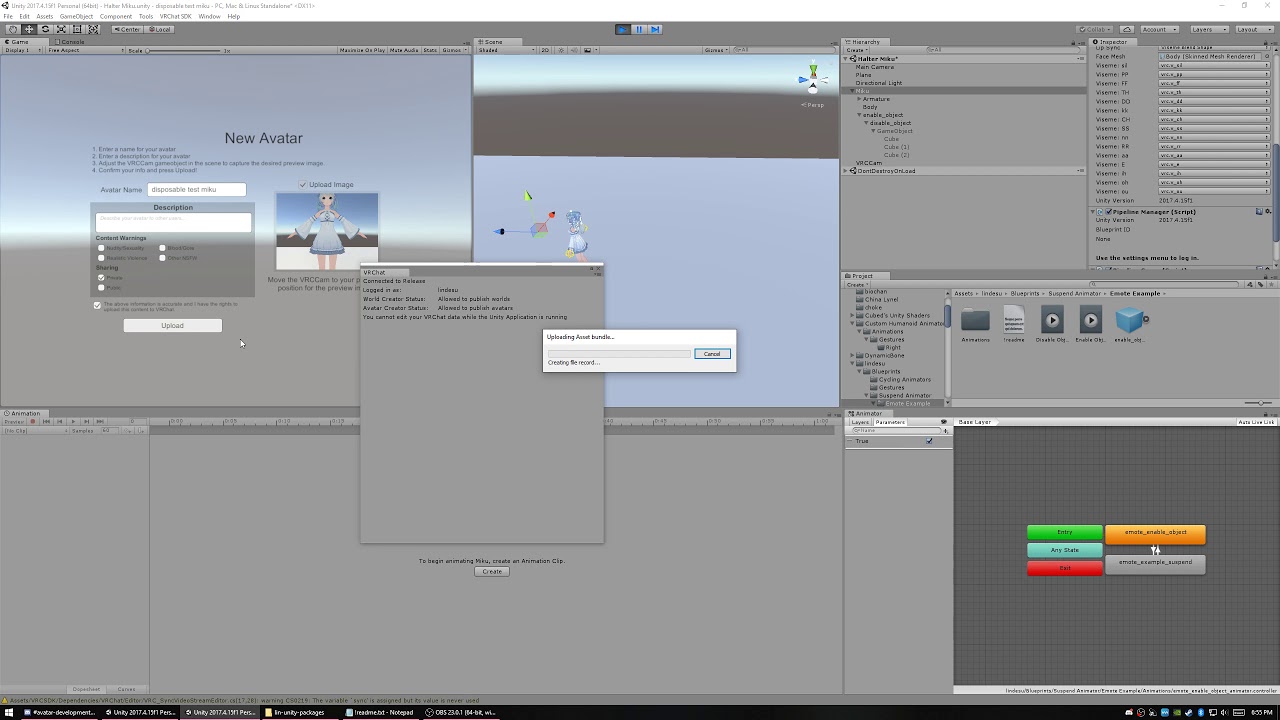 leaden marlin
yeah but sadly that still leaves me with the same problem
clear yew
Access to the body mesh is the problem I see
leaden marlin
yeah
maybe I can drop my joint in body?
but then it wouldnt track
with head
hmm
clear yew
Dropping a joint anywhere should be no problem
clear yew
The problem is animating the Body, you want your joint somewhere else. The toggle can activate the joint wherever it is, but you also need a way for the emote to affect the Body mesh animator. Unfortunately you only have that one animator in your budget for animating the Body mesh. So stacking animators to toggle Body mesh animations is tricky
As long as you aren't using a separated mesh
leaden marlin
its a solid mesh
getting the joint to stay in my mouth without it being on the head transform hierarchy sounds very tricky
clear yew
That part is fine, it can be on head transform
leaden marlin
yeah but will it still animate blendshapes
I would have to put the body in there too
just to even toggle the animation in vrchat
and ik that wont work
clear yew
No you need to have a separate animator than what handles the cigar joint
Because that's in the armature
And the Body is somewhere else
Separate animators you run at the same time
leaden marlin
yeah but then the mouth portion of the animation will play constantly if so
clear yew
The problem is handling multiple states with the one animator you are allowed use on the Body mesh
leaden marlin
all this could be fixed if vrchat allowed animator state bool toggling
clear yew
There is something you can do I think, since you are handling this with emotes
leaden marlin
I was thinking I could just attatch vrc events and a toggle cube I turn on via gesture and click it
Sets a bool variable in an animator controller on the selected Animator(s)
is that possible?
clear yew
Not on an avatar
clear yew
Hmm this is problematic because both of your Body mesh animations are looping, right?
I can think of a way to make it work if only one of them is looping
leaden marlin
the problem is I have to have everything all in one object
and still be able to animate blendshapes
since the animation was created on the root avatar
clear yew
And there are other ways to make this work if you duplicate body mesh and work around the issues that causes
You can edit the animation paths
leaden marlin
I'm not that advanced with vrchat work arounds since we have to do things their way since limits
So I have no clue what you mean but ty for all the help thus far
clear yew
So your blinking anim is looping and the smoking blendshapes are looping?
leaden marlin
I could show you in DM if ud like
clear yew
Are you a legendary desktop mute
clear yew
Some of this should be handled by gestures ideally. But yeah send me a DM
leaden marlin
Oculus Rift Touch
clear yew
Like probably the lips blend shapes should be gesture override animated
The eye closing too tbh. Just gonna have to sacrifice a gesture for the right smoking expression
leaden marlin
thats fine
clear yew
Basically your problems go away if you do the smoking expression with a gesture
leaden marlin
let me get comfy and Ill send you detailed screenshots in dm and we can go from there tyty again
 blazing bluff
Hey can someone tell me why my avatars mouth is opening and closing constantly with no audio and no animation overrides?
 marsh heron
Why does my avatars animation break after playing it once? Animation is set on Gesture
 royal escarp
@marsh heron you've it only running on 1 frame?
i can't be more then 1 frame or the gesture will break
marsh heron
@royal escarp thanks so much Pat!
royal escarp
np
marsh heron
So to play an animation longer than 1 frame on a gesture, what should I do?
leaden marlin
Is it possible to have animations swap materials of an object on an avatar in vrchat? I've achieved it in unity it works nice but won't work in game. I did it by animating the material reference swap.
unless it just dosnt update in the mirror?
Yep thats the case lol, I went out of bounds via play area to see myself third person and its working fine
 wanton oxide
I still need mouth flap help
 topaz quarry
@marsh heron you add an empty game object to the avatar, add an animator component to it, then put that animation clip you want to play in a controller for that animator, then set it to default inactive.
Then for the gesture itself you make a regular one frame animation where you activate that game object and it wont get stuck active.
Do note that the location of the object matters as far as hierarchy goes, animators can only animate objects that are on the same game object as the component or children of that object. May need some animation tricks to make certain stuff work properly.
 native peak
^^^^^^
blazing bluff
Can anyone tell me why my models mouth keeps randomly opening in game when I am just standing there? There are no animation overrides on the model currently, and it only happens in game and not in unity.
marsh heron
Could be eye tracking issue, it’s what happened to me
 faint nimbus
Does anyone have experience with lexiV4 models my face expresions are not working.
marsh heron
@topaz quarry is there a video on what you’re talking about?
 proper anvil

 plush meadow
Did they brick animations after a certain date?
My gun animations don't work according to my friend.
 next pilot
if it has anything to do with IK then yes
plush meadow
Shit...
So that means that animations that used to work (muzzle flash, noise, and props) don't work anymore?
 jaunty nest
How to offload Animations to an animator so i can have longer gestures?
 spring nova
Enable an object with an animator
 trim violet
I was wondering, if you upload a generic avatar, can you still throw VRIK on it for VR use and be able to use it like a humanoid rig? 🤔
I know VRChat uses some form of FINALIK natively right?
trim violet
What do you mean by Meme Animations? Like making an animation but it's memey?
 gilded sonnet
Hey I’m new to Vr and im wondering how to pull out weapons and do animations? I’m using a rift s
 cyan chasm
 lofty crypt
Does anyone know if rigid body multi limbs work? I have an older avatar that's completely busted and doesn't work at all
Would reuploading fix it?
Using FBT if that matters
trim violet
Pretty sure Rigidbodies are base unity and should still work yes. Recent update just broke FinalIK so it'll only show locally.
lofty crypt
I mean this rigid body break has been going on since before the new update
While all new rigid bodies on newer avatars I've made (world particles only) work fine
So it's just confusing
trim violet
Are you attaching the rigid body to a bone? Typically you want a separate object/target parented underneath main limb I thought
clear yew
Question so i saw some avatars that are like normal 3d but are in a 2d window can anyone explain how this works?
 covert girder
@clear yew are you about this https://youtu.be/SySnHIhiVgM
or about shaders with billboard effect that uses 2d images
 clear yew
YES thanks a ton
 mighty steppe
how do you stop an animation from gestures from looping?
should i just uncheck this? Apply root motion?
 muted prairie
Unckeck loop on the animation itself ?
mighty steppe
nothing happens..
ouh wait
on animation it self?
where is that?
loop time?
too bad custom animation breaks when u use it as a gesture 😦
muted prairie
How are you doing your gesture ?
mighty steppe
making a custom longer animation like Opening...
then using another custom long anim for Closing...
sadly it remain stuck with frist one and the second one has somehow a conflict...the older animation for face expresion was removed but it still plays on it for some reason.
i saw other avatars having custom animation and worked just fine for them.
for me it breaks all of them.
well it goes in slow mo...till it ends
muted prairie
which tutorial did you follow ?
mighty steppe
none.
muted prairie

mighty steppe
probably i should use custom longer animation for emote instead..
mighty steppe
but im not sure if i can let the animation remain at the end..
im not really sure what should i do.
il try it as an emote.
but i know that thing worked for someone else.
for gesture...the animation actualy works...but differently..
emote breaks the hole avatar...(animation needs to be rebuild on the avatar it self. probably.)
so any ideas how can i use custom animations ? on and off?
muted prairie
Since i don't know myself, that's why i suggested to look up a tutorial on it. People generally don't make tutorials on stuff that doesn't work
mighty steppe
i cant make that as an emote..
it changes the hole avatar..
if i use it as gesture...it does...but not how it should...the animation is messed up.
 silent vapor
anyone around who would be willing to help me out real quick? i've got a weird problem that i can't figure out with an animation
as far as i know, the animation is all set up correctly but in unity and vrchat, the animation gets stuck (the prop stays in the hand and sometimes won't show up or won't go away, same with the face expressions) and i've tried recreating the animation and the controller a couple times with no different results. i know that there aren't any extra key frames beyond the one necessary key frame
i can't find the right info on google orz
mighty steppe
dont use animations bigger than 2 frames....for face expresions.
it should have only frame 0 and 1
clear yew
guys, I need help with something in blender. I am learning to make a walking animation for my avatar and I cannot figure out how he makes the limbs move with eachother at 1:06 when I do that it moves alone but his bones are jointed or something https://www.youtube.com/watch?v=gFf5eGCjUUg
edit: my bones are parented

In this episode we create a simple walk animation for our character. See Brackeys' channel for the programming half of this series: https://www.youtube.com/u...
muted prairie

In this Blender rigging tutorial I show you how to create an IK rig for the leghs of a character. I also use a copy rotation constraint to adjust the rotatio...
Called limb IK
clear yew
thank you
 devout belfry
Hey is anyone here good with setting up emotes for a custom avatar?
I've been trying to get my emote animation to loop in game and it's driving me crazy.
 tough cargo
is there any way to do a world fixed object without final ik?
i dont own it cause im a cheap fck
clear yew
Yes, you can use physics or if you don't need an animated game object, sometimes world mesh particles
@tough cargo https://github.com/oofdesu/lin-unity-packages/blob/master/world_fixed_joint.unitypackage

GitHub
Contribute to oofdesu/lin-unity-packages development by creating an account on GitHub.
It's not as good as a final ik script but it works well for many effects
@mighty steppe what animation are you trying to do
You probably need to be using animators for what you want, and interacting with animators with gesture overrides has hazards
It can be done well but is not intuitive to design
Sometimes you need like 4 animators to do simple stuff like control the entry and exit of a full length animation
mighty steppe
@clear yew yea...but ive discovered that you cannot use longer animation that 2 frames for gesture..
anyways i gave up doing it.
its a waste of time.
clear yew
you can do a longer animation with an animator
gesture starts the animator
animator starts the longer animation
@mighty steppe
mighty steppe
i know...and i did that...but it doesnt work how it should for gesture...(supported only 2 frames remember? ) or it gets glitchy witch ive experienced that
to make the animation visiible how it should be ...i need to make it as an emote... but that doesnt really help..
also some one told me that is possible but its more difficult and requires a second avatar for that.
clear yew
it being 2 frames doesn't matter, doesn't affect the animation you start with the gesture
gesture animates an animator on with 1 value constant between both keyframes, animator will then animate whatever at whatever length
and you can have it keep playing and shut off correctly after you release the gesture
some effects require a second avatar but only sometimes
depends on the animation you are trying to do
mighty steppe
just animation..
clear yew
?
mighty steppe
i only wanted to do a longer animation to open and close wings while using gestures..
but its glitchy if i do it in usual way..
clear yew
Yeah you can do that seamlessly with gestures but it's a lot to explain
clear yew
Hi, I managed to fix the IK but now I have run into another issue. when I move the IK bone up, the leg does not move the way that I want it to, it bends at the side of the knee which i do not want. I want it to bend at the back.
clear yew
Nevermind! Figured it out.
 copper whale
Hey guys, how do I add an animation to two hand gestures? Kinda like how certain avatars have it so that you need to pull out a gun with one gesture and while that one gesture is active, you need to press another to make it fire.
 onyx agate
have one gesture show the gun and another fire the gun (if the gun is not visible the fire gun animation is not visible (sound still plays though)
but i think that can be muted too someway
 torn pawn
have the shot as child of a gun, where both of them are disabled, one gesture enables weapon, 2nd enables the shot
 grim summit
Hey if I have multiple FBX files that are identical in armature can I copy the animations from one prefab instance into the new fbx files?
 quaint jacinth
Looking to add another avatar to pop up as a permanant object when I activate on custom emotes with another emote to disable so I can walk around/away from it. Seen some public avatars do this in game but ??? how to set it up. Any help or links to guides anyone?
The idea is on my Nanachi avatar to activate a custom emote to make Mitty appear that I can walk up to and give head pats/hugs to then deactivate with a cancel emote.
grim summit
nvm I got that to work. the only problem I have is that the lip sync does not work 90% of the time and randomly opens the mouth. The eye tracking is working perfectly though
anyone seen this issue before and know a solution?
clear yew
I am having a really frustrating time posing my avatar. It looks fine now>
But when I try to move the left leg IK bone forward and the right leg IK bone back the whole upper body twists and the legs twist too. is there any way to fix this? I don't want the body to twist. I am using blender BTW
muted prairie
You probably have to create constraints and restrictions on bone rotations, there's a lot of tutorials on this
 wispy cape
https://i.imgur.com/EIwt0ic.png
can someone help me figure out why when i change from rock and roll (spawning the gun) to fist (Spawn the shooting part) the gun spawns but the particals wont emit
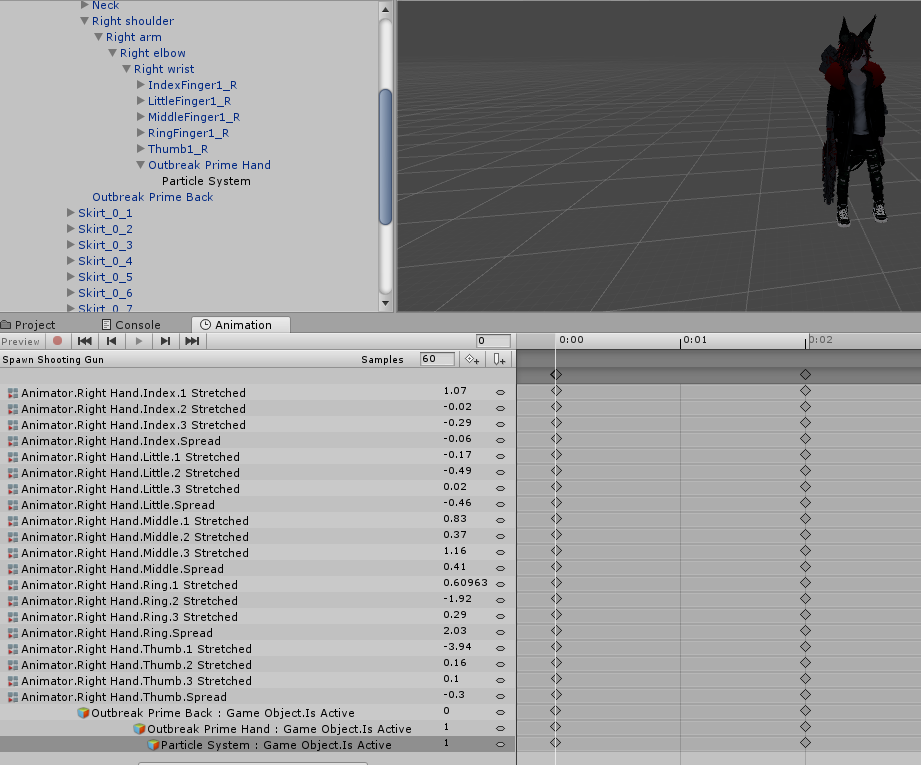 clear yew
This anim is 1 frame too long and I think you are handling the Particle System object incorrectly
This animation turns on the Particle System and the gun parent at the same time. What does the other anim do?
wispy cape
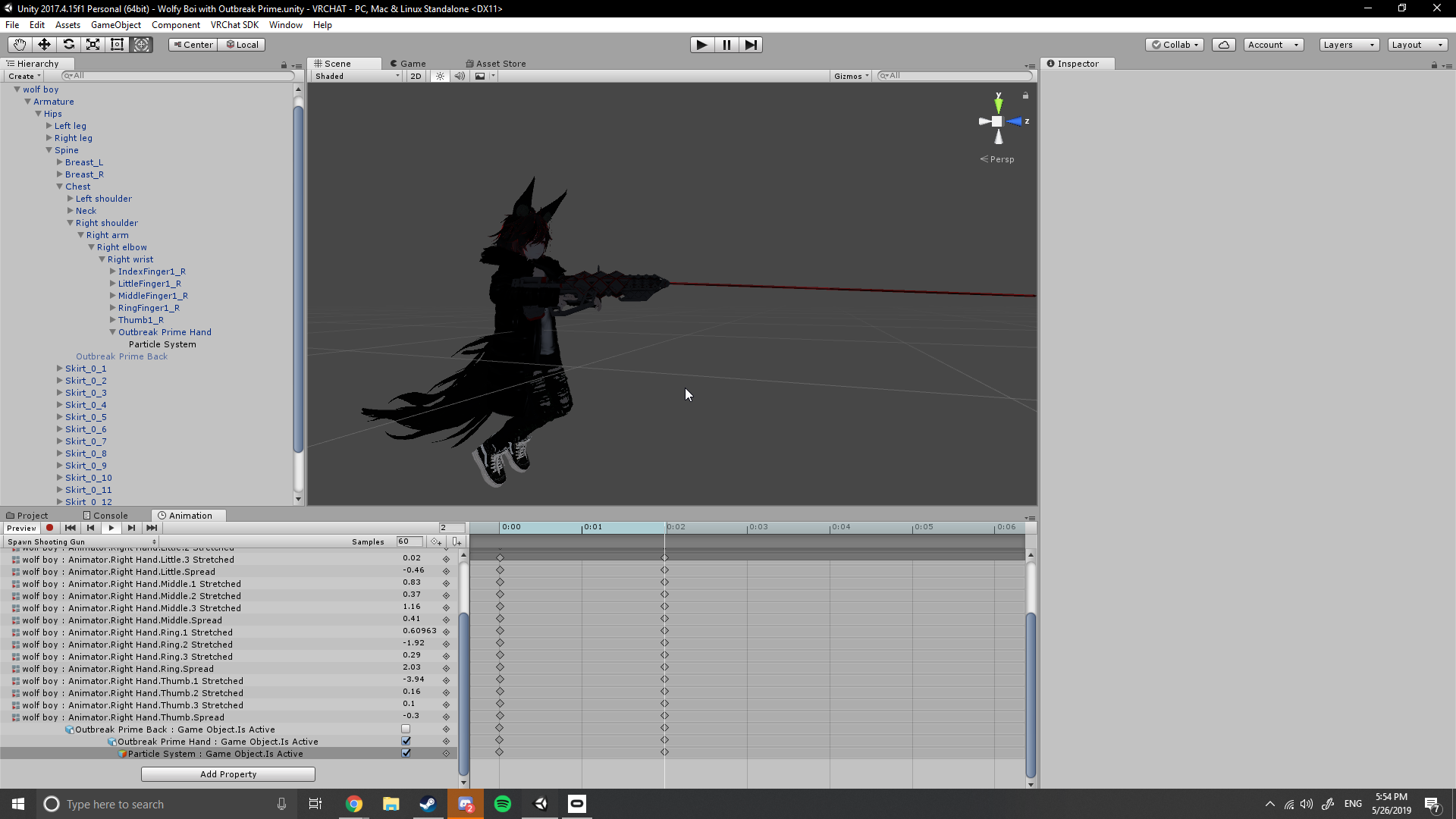
so
i got it to shoot here...
but it doesnt work in game
i have two animations
one that spawns the weapon by its self
and the other which should spawn the weapon and the particle emmiter
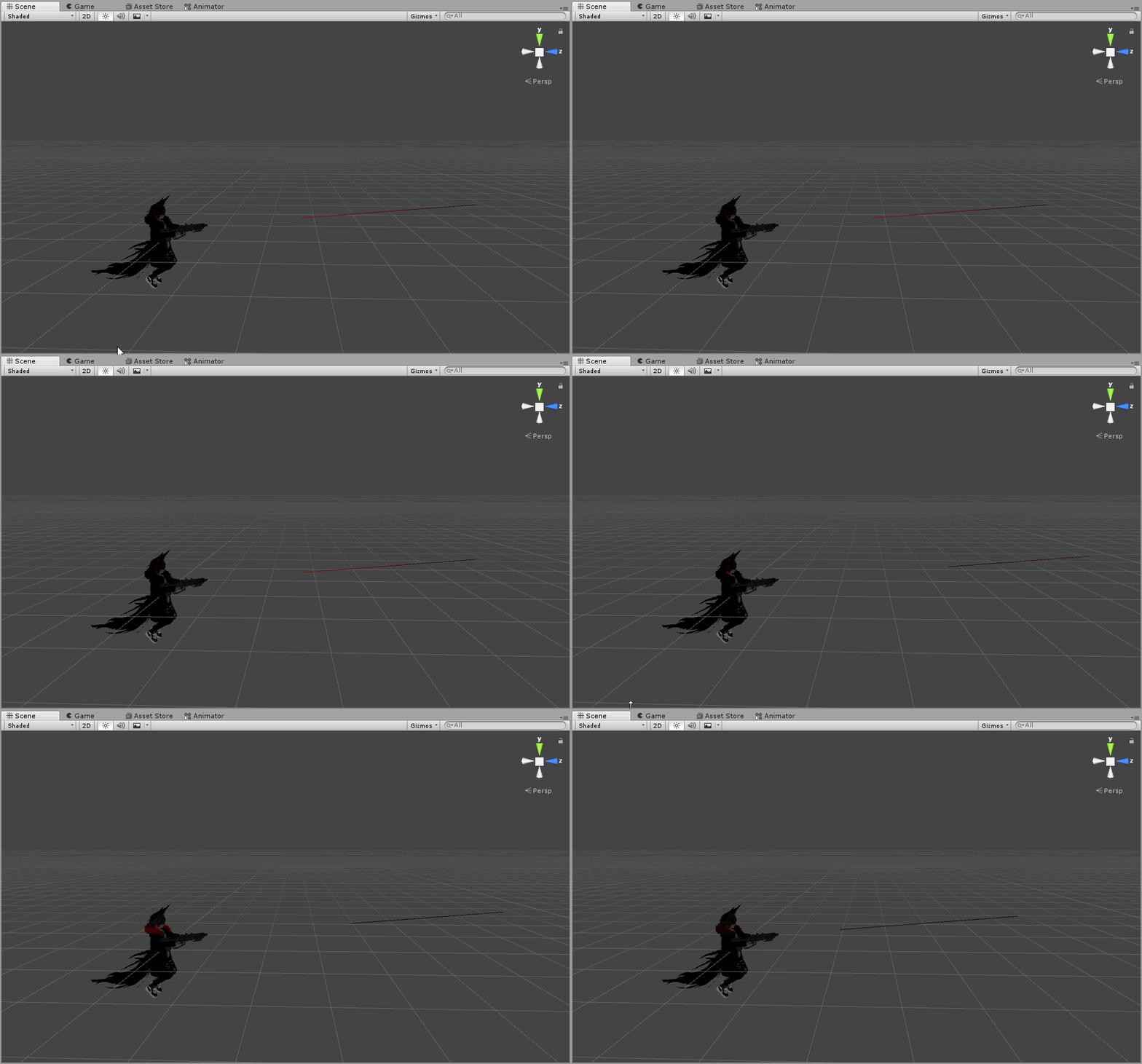 clear yew
im having issues with the sinking into the floor thing
i did make a 2nd model to create animations on
but its transferring over to the original
clear yew
@wispy cape your anim is still 1 frame too long and screenshot the other anim
wispy cape
i figured it out
or
st least someone helped me
i had it under the gun in the hierarchy
and it needed to be a world particals or some thing like that
but if you are good at unity it would be cool if you could explain how to add shooting sounds/making the gun glow when i shoot it
and how to make it shoot more often with the same burst if three...
I’ve been doing it in stages
yesterday i got the gun in the game
today i got it to shoot
clear yew
You just enable other objects with components that do the effect you want
Add empty game object
Add audio source component to it
Animate it on when you want it to play
wispy cape
what about...
clear yew
Same with light sources and other particle effects
wispy cape
well...
the gun glows more and more the longer it shoots
is that possible?
i have a video
ok then
clear yew
Yeah you could put an animator on the object you enable and have it animate the intensity of whatever effect
Animator component, give it an animator controller, put animation inside the animator controller
wispy cape
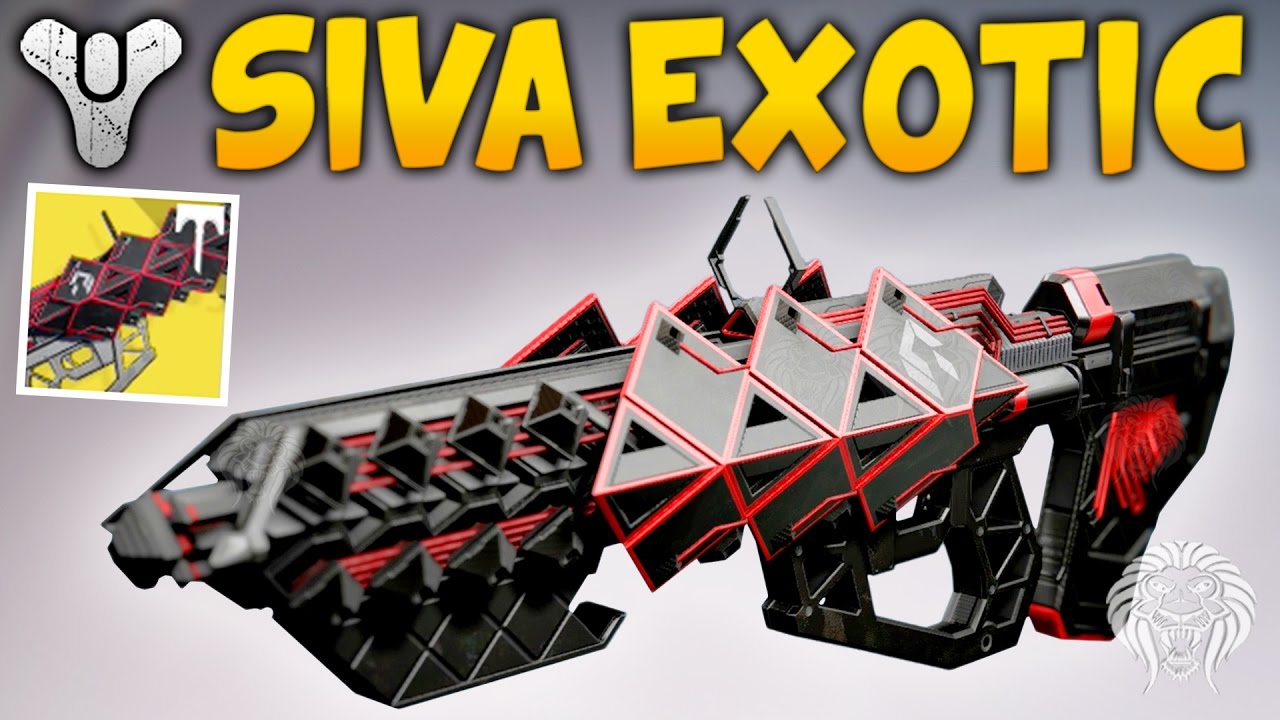
Destiny - Outbreak Prime Review & Gameplay - Exotic Raid Siva Pulse Rifle ► DESTINY - RISE OF IRON STRIKE GAMEPLAY --► http://full.sc/2cSAb0I ► DESTINY - RIS...
that’s a vid of the gun shooting
and how the particles “rev up”
wispy cape
idfk
clear yew
You can use more particle systems for that
Add a delay so they only turn on after a bit
clear yew
good luck. I recommend personal experimentation for sure
 wooden rampart
 lunar belfry
is there a way to transform z coordinates of the model itself in an anim
?
i would like to move my entire model back so that the view position is at my feet?
 wide steppe
hey guys
I had a longer break
and i forgot few things
how do i move these animations
from the fbx to folder?
torn pawn
expand the fbx and ctrl+D when animation selected @wide steppe
wide steppe
@torn pawn which one is strafe left?
torn pawn
no clue
wide steppe
huh
torn pawn
I've used only custom run, no strafes/turns, so I have no clue
wide steppe
i mean
I'm doing a generic avatar
so i need all 8 sides covered
to make it work
question
can i edit my animations from this ?
by using AvatarControllerTemplate
I got entire set of animations for almsot evry state of my avatar but the basic ovveride is too simplisting and missing parts
clear yew
StrafeRT is used for left too afaik
wide steppe
How is it going to mirror a generic type animation 😂
especialy when avatar is asymetric
@clear yew
clear yew
IDK, it doesn't look bad with default animations, given that there is proper left/right for other angles
clear yew
The l/r 45 and 135 degree strafing.
Yeah but what I'm saying is that your strafeRT can probably look fine regardless of the direction
wide steppe
Looking for simeone to discus about generic type avatars
 lament prism
generic as in, more than two legs or something else like that?
wide steppe
as in a ported character from a game
 fierce bane
@lunar belfry the camera ALWAYS goes straight down from its starting point when going to prone.
If you want the camera at your feet then have that be the center of the model, animate the body backwards from that point instead of straight down like you have it.
@wide steppe Generic rigged avatars ignore all override animations as they don't use the humanoid rig that looks at those overrides.
any humanoid model can be set as a humanoid rig (though sometimes you may have to adjust things)
Generic is for anything not-humanoid and you have to animate EVERYTHING yourself in a controller you assign to it. (that means idles, walk directions and speeds, etc)
Generic rigs cannot have gestures, emotes, headtracking, eyetracking, or any other form of IK
wide steppe
@fierce bane himeki
It's not what i meant by
My animations are not accepted by the animation override
what i meant was that
i could not put animation files into override
fierce bane
please just type it all out, no point in sending a partial message
wide steppe
it treated them like air
fierce bane
are you certain they are animation files and not something else?
wide steppe
yup
fierce bane
can you give screenshots of what you're trying to put in?
fierce bane
can't do calls right now, and I generally don't unless required
and you made a duplicate of the CustomOverrideEmpty controller to put them into?
a screenshot of what you're trying to drag them into would help too
fierce bane
that's the wrong controller
you want the one I mentioned above
CustomOverrideEmpty is the one you need, not AvatarControllerTemplate
wide steppe
well
gues what
it worked 2 hrs ago
after i saved and closed
then laoded it back up
it broke
and didn't accept animations anymore
it's not about controler
fierce bane
It's still the wrong controller either way
fierce bane
using a pen on a chalkboard might work sometimes, but it's still a bad idea
wide steppe
well it worked flawles
what i mean by that
i had all movment animations on
and an emotes set
empty override for generics is let's say too empty
fierce bane
generic rigs DO NOT have gestures or emotes enabled. You need to set up an entire animation set or it will not have anything you leave out
fierce bane
a model ported from a game doesn't have to be generic unless it is not a humanoid model (ie 2 arms, 2 legs, torso and head)
wide steppe
it have to be generic if u want to use the animation set from that game
fierce bane
like what?
fierce bane
that's what the overrides are for...
wide steppe
i don't want to ONLY port the model
yes i know
BUT the animations from game are only for generic models
all of those animations are based on root
if u want me to prove u wrong about emotes on generic
join me here
wispy cape
 wide steppe
 wide steppe
@wispy cape where are your particle's root?
wispy cape
root?
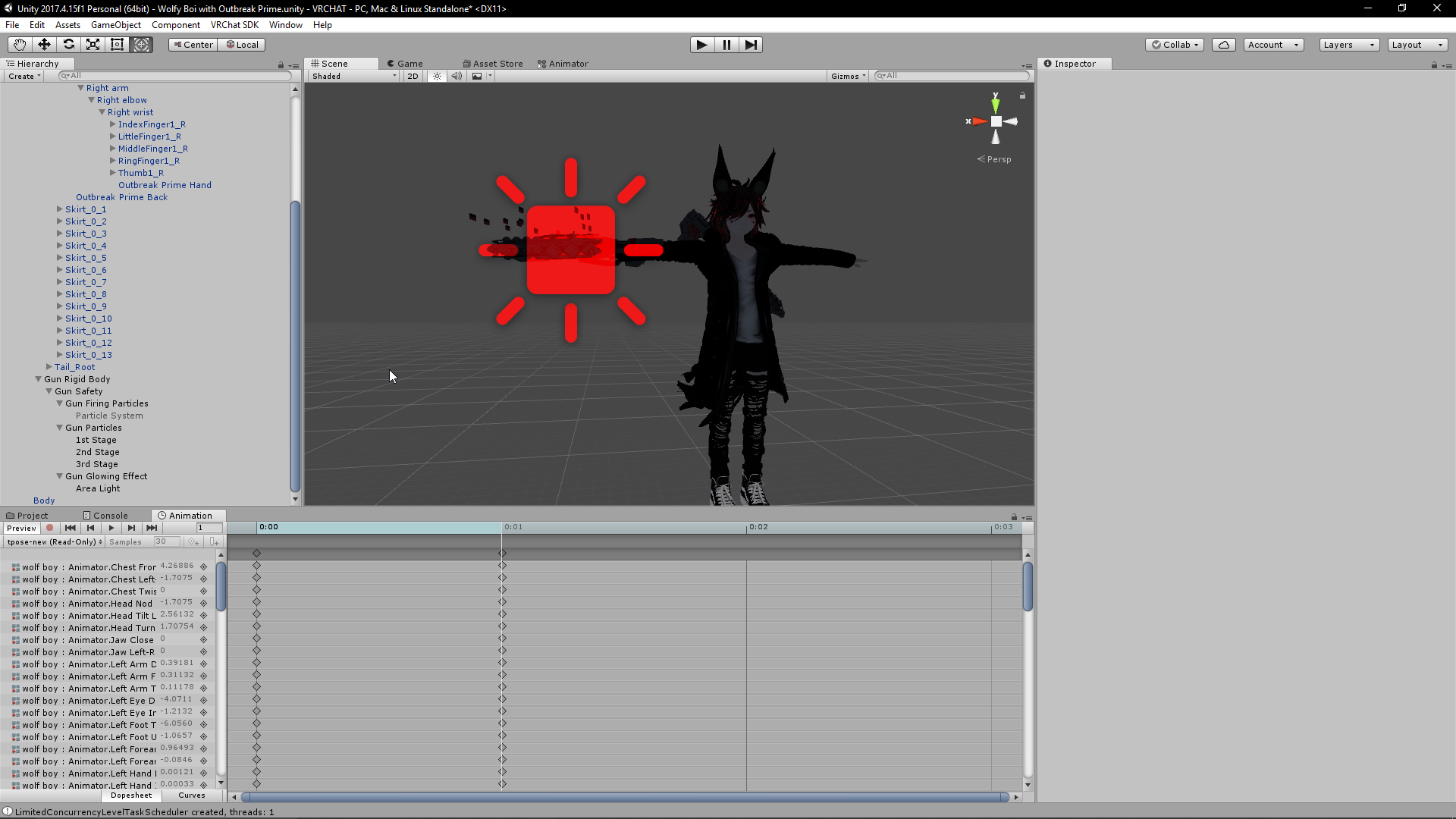
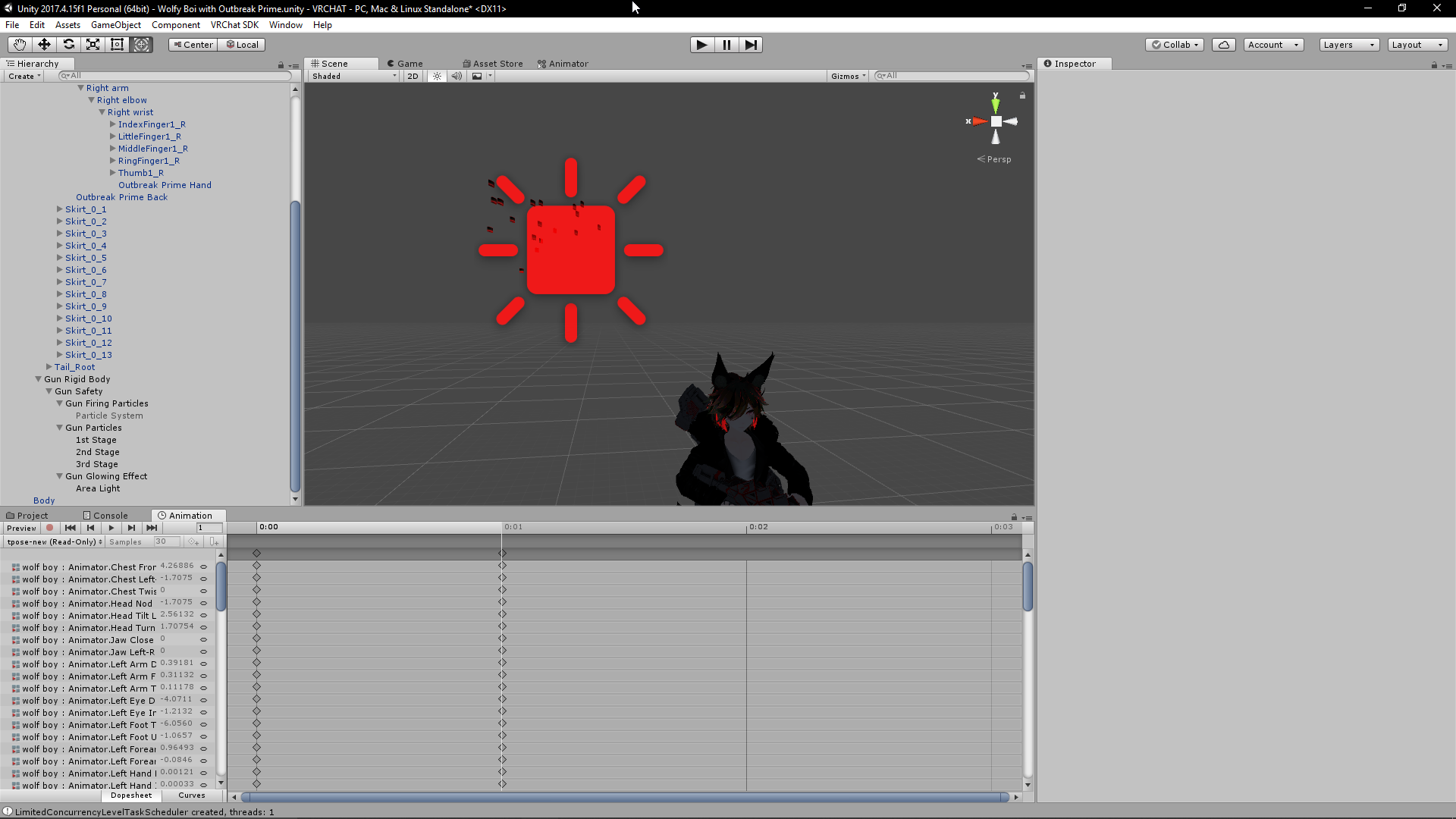
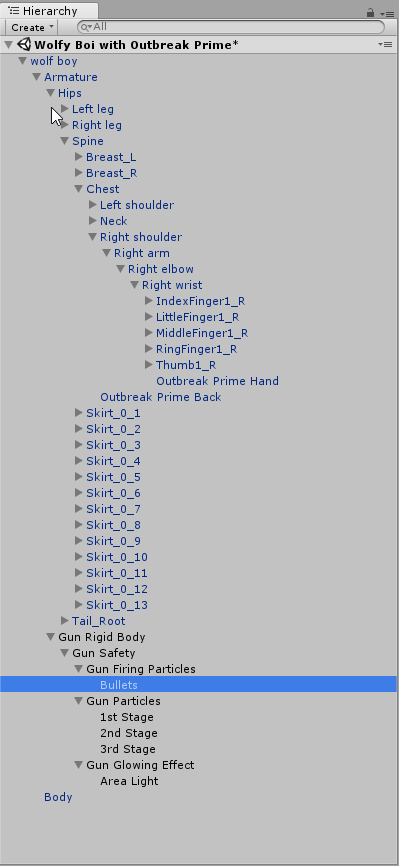
they particle systems are called 1st 2nd and 3rd stage
they are supposed to activate the longer the shooting animation goes on
wide steppe
root is where the particle is put on
fierce bane
is your gun rigid body outside the armature?
wispy cape
 wide steppe
where is ur particle component put on?
fierce bane
armature->gun rigid->gun safety->gun particles-> particle sets
Sythe, are your particles set as world simulation or local simulation?
does your "gun rigid body" have a fixed joint with an assigned rigid body from the armature? (probably the wrist)
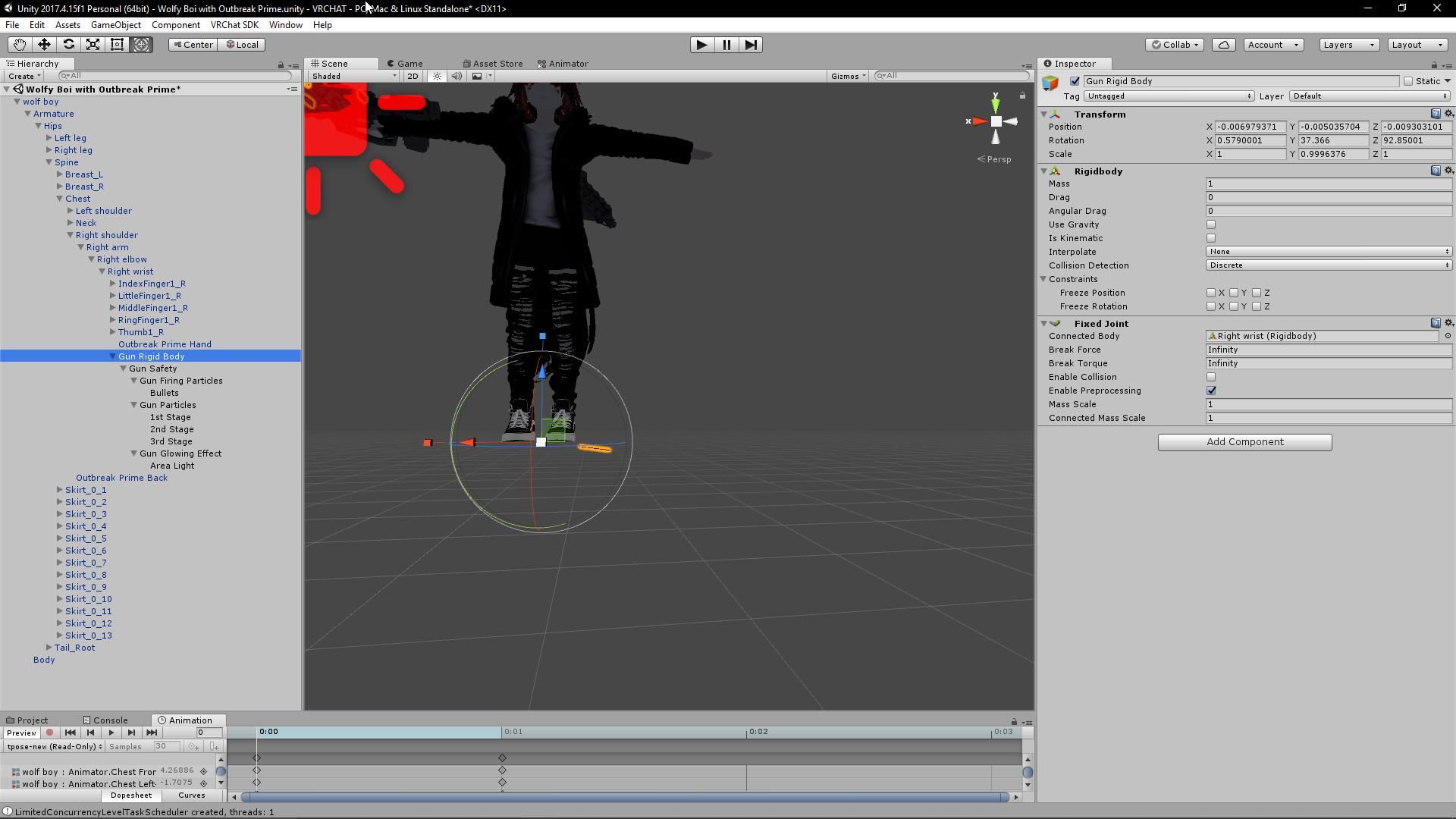 fierce bane
and the wrist rigid has all constraints checked, correct?
wait...that image is different from the last you sent...that has the gun rigid ON the wrist
wispy cape
yea i changed it
fierce bane
if you want world particles to work correctly with rigids the fixed joint for the gun should be outside the armature instead of on the wrist.
The rigid body on the wrist tells it where it should be attached to.
or you can have everything but the world particles under the wrist (so the gun and local particles)
And have the gun firing use the fixed joint (outside armature) and aligned to fire from the muzzle
https://i.imgur.com/MSh1Ol7.png
example world particle
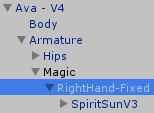
RightHand-Fixed being the fixed joint, Magic is just an empty object to keep things neat, not required
wide steppe
@fierce bane proof of emotes working on generic also that this override works for generics

Also i solved my issue
I was still used to change animmation settings into legacy loop
instead of the new type of loop
and animator rejected animations with legacy settings
fierce bane
Totally possible there was a change I'm unaware of that allows it to work.
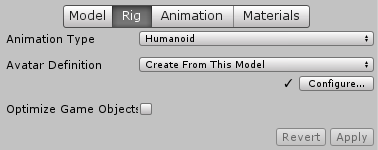
I still see a visually-humanoid avatar that you are stating is generic though without showing the rigging settings.
and yeah, legacy animations don't work at all in vrchat anymore
good to know it rejects them completely though
fierce bane
that's not rigging settings, that's hierarchy
These are rig settings
https://i.imgur.com/4cmb1KD.png
 wide steppe
fierce bane
wide steppe
fierce bane
what's the setup on your avatar's top level?
wide steppe
what u mean?
fierce bane
select the top level of the avatar in the hierarchy, the one with the avatar descriptor in it.
The animator settings are the part I'm curious about
wide steppe
i simply put animator override
into animator
that way it works
and is not ignored
😄
fierce bane
huh...that didn't used to work, maybe I missed something in an update
wispy cape
how would i go about making my gun rev up as i shoot it?... aka more particles coming out of it as it shoots
fierce bane
just more particles the longer you fire?
wispy cape
yes
wide steppe
also
animation is there to fix the position cos for some reason it rotates the avatar in vrchat
fierce bane
@wispy cape you could do an animation that enables more particle systems as it goes on.
Or if you only want it to fire for a set amount of time, you could use a curve emission value on a single particle system and have the duration set to however long you want it to fire for before resetting (if using loop), or a 0 ending curve so it stops till you release and hit the key again
wispy cape
so
if in the animation
say...
a minute in i enable the second partivle emmityer
when it loops back,
will it disable it?
fierce bane
if the animator is disabled, or the animation is set to loop, then when it hits the start again it'd return to the starting state
fierce bane
be aware that you cannot have a gesture animation longer than 2 frames (0:00 and 0:01 keyframes only)
wispy cape
fierce bane
a start delay would allow you to hit one key and have the 3 particle systems enable at different times, that's also an option, yes
if you want it all on that one gesture, then yes, use start delay
enable all 3 particle systems at the same time and have start delays set for however long you want them to wait before activating
wispy cape
okj
fierce bane
the other option is to use a single system with a ramping emission rate
wispy cape
i want the particles in diffrent places
fierce bane
then yes, multiple systems as you have it
just be aware that if you don't have a ramping emission rate on the 2nd/3rd systems they'll kick in at full emission values
So there will be a clear division of stages (which might be what you want anyway)
wide steppe
it have only strafe right
Btw i noticed that my older humanoid avatar with dynamic bones on the tail broke
fierce bane
likely in the safety settings, dynamic bones was extremely supressed by default a few updates back
if you disable the setting there it may work normally
wide steppe
oh there is performance settings
fierce bane
and yes you were correct, default settings has strafe right the mirror of strafe left
you'd have to adjust the controller to make it work
select animator, select locomotion layer, doubleclick the "StandingHeight" blend tree and go to the "StandingLocomotion" section
 dusty viper
hey anyone have a gmod default dance file?
wide steppe
Himeki
can i setup the animator controler manually without the overides?
lake to put all the animations on the layer?
fierce bane
that is normally how you set up generic avatars yes
wide steppe
hmm
fierce bane
I haven't messed with generics in quite some time due to lack of a need to
I don't know if it'll mess up how you're currently using it (with emotes/gestures)
wide steppe
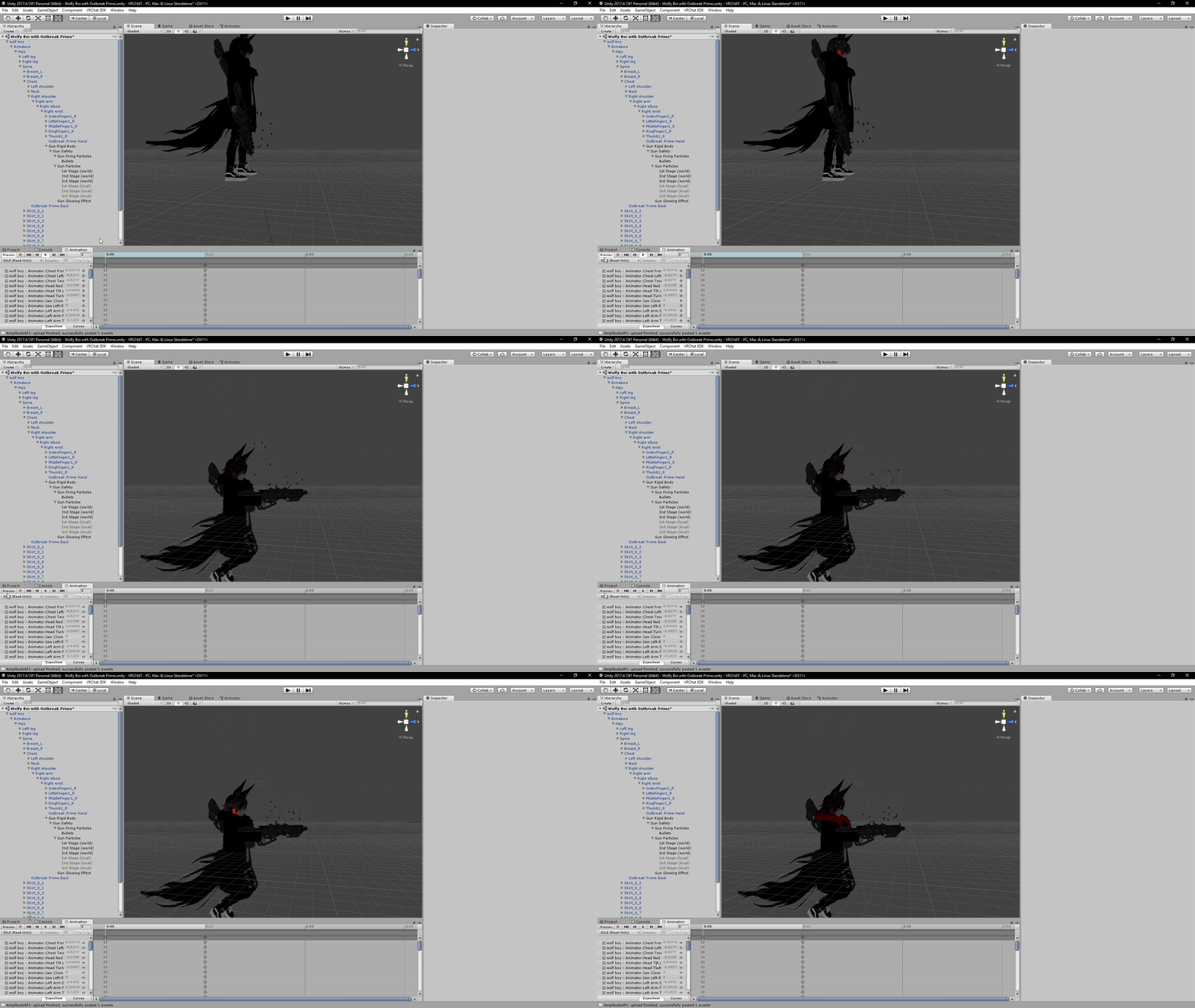
what i was thinking is
i have 1 base idle
and 3 variants
i want to make it so for the most part it would play base idle
and from time to time use a variant
 fierce bane
what exactly does it do in game?
wispy cape
the world particles are spawning in the ground and in the wrong direction... local particles work perfectly
fierce bane
that's what I was trying to explain with world particles and fixed joints
the world particles must be outside the armature and the fixed joint above them targeting the place it needs to be (the rigid body) in the armature (wrist or gun in this case)
wispy cape
so
fierce bane
everything that isn't a world particle can be inside the armature if you want without issues
wispy cape
keep the local ones
inside the right wrist
but move the world, to outside with the gun rigid body
fierce bane
with the way you currently have it set up, you have a gun rigid body with a fixed joint on it (last I saw)
The fixed joint doesn't need to be there at all as it is naturally attached to its parent, the wrist.
You can place a fixed joint outside the armature where you had the gun setup originally and attach it to a rigid body inside the wrist/gun
Then place the world particle under that.
there's no reason to move the gun outside the wrist unless you really want to (it'd be a bit behind your IK if you did though)
wispy cape
ok
fierce bane
you can always use an empty object between the fixed joint and the particles if you want an easy way to prevent it from activating without the gun (if you have something that enables the gun, and a trigger to fire the gun for example)
fierce bane
Should be set up correctly, yes
Though if the gun isn't in the wrist it may lag behind your hand a little, so be aware of that
wispy cape
it is in my wrist
fierce bane
oh I assumed the gun rigid was the actual gun since I didn't see mention elsewhere
fierce bane
then yeah, it should move smoothly with you and the particles might lag slightly behind (much less noticeable)
fierce bane
and you put a start delay on your stages correct?
fierce bane
should work then
make sure any animations you do are on a duplicate of the avatar and not the original
wispy cape
oof
fierce bane
that'll prevent the actual avatar from going into the ground 😛
wispy cape
i havent been doing that
fierce bane
check the pins at the top right, there's a guide to fix it
wispy cape
it isnt that big of a deal yet... i havent had it happen
wide steppe
how would u add an animation to play durring other animations now/??
Basicly the animation will be a single frame animation to rotate the avatar to correct direction
fierce bane
you do not need to keep duplicates after you make your animation (though you can for ease of editing)
you can always re-duplicate and drag an animation onto a duplicate to edit it if you want. (reduced file size for your local files)
@wide steppe if you're editing that generic avatar you can just make a new layer with it always active
wide steppe
oh
btw
is there a way to extend the overide file?
i mean to make it so it will work the way i planed it to?
so i could use it my future ports?
for example add a slot for strafe left
fierce bane
a slot for strafe left would just be replacing two of the strafe right with a different animation slot that I mentioned before
wide steppe
still new to playing arround with the animator
fierce bane
technically speaking you could change a lot of it, but you couldn't add more gestures or emotes for example
wide steppe
actually yes you can but is kinda complicated
i already made a system to increase the amount of gestures
there are 2 types
fierce bane
locomotion layer in that controller, double click StandingHeight
fierce bane
I'm talking about adding actual gestures/emotes, not toggling more to use with the same gestures
like adding slots in
fierce bane
like you have 8 emotes, you couldn't bring that up to 10 emotes in game
wispy cape
ok... so how can i make the red part of this gun glow when it shoots its burst of bullets...
wide steppe
sythe
fierce bane
while you can use workarounds to toggle between different sets, you can't actually add slots etc
wispy cape
wassup west?
wide steppe
either use light source or cut part of the model enlarge it by 0.1 %
fierce bane
@wispy cape glow is determined by emission mapping, you would have to scale up the emission timed with the shots
fierce bane
light is different from glow
wide steppe
hmmm
fierce bane
light produces actual light where as glow comes from an emission map that makes it "APPEAR" to have light (Like glowing eyes in the darkness for example as opposed to a lantern)
wispy cape
so i use a particle system again?
fierce bane
no that's something on the materials of the gun itself
fierce bane
you need a shader with an emission map slot
An emission map is pure black except for the sections you want to glow
And then you'd also need a slider or scale of some kind for the amount of emission, so that you can edit that value in an animation to have it ramp up when you want
fierce bane
example emission map
wispy cape
texture for the gun, my other friend is telling me i have to re map like all the polys or some shit
fierce bane
you copy the normal texture, then black out all the parts you don't want to glow
then you assign that new "emission map texture" to the emission map slot in a shader that has it
nothing for what you need has to be done in blender
it is however a bit more complicated >.>
wispy cape
not even the making of the texture thing?
fierce bane
textures are made in an image editing program like photoshop
not in a 3dmodeling program like blender
wispy cape
ok, so i legit just...edit the picture
fierce bane
edit a duplicate of the picture yes
fierce bane
you also need to have a shader with an emission map slot
no you do not need to re-map UVs in blender for an emission map
wispy cape
ok
fierce bane
if you want the glow to ramp up instead of just turn on, you'll need to make an animation and an animation controller as well as slot those into an Animator on the gun (I'd highly recommend making it ON the gun so you don't have to edit paths later)
what are you using for your avatar shader?
wide steppe
Probably a standard?
wispy cape
 wide steppe
Sythe select ur gun's material
wispy cape
 fierce bane
select a material for your avatar and check the shader at the top
wide steppe
And show us ur inspector
fierce bane
the gun should be using a similar shader so it doesn't look out of place
I mean...unless you're pulling it from another universe or something else where it should look out of place that is
fierce bane
poiyomi has an emission map built in, look at the bottom on the right in that first image
wide steppe
which is better poiomi or cubed paradox?
wispy cape
it wont let me edit the shader on the gun material
 balmy orbit
fierce bane
balmy orbit
fierce bane
he'd use the emission alpha value for it
or the emission color ramping from black to white to have it glow
wispy cape
re
fierce bane
all you need is the emission color, you'd set it to black by default, then scale it up to white to make the emission kick in
full black emission doesn't show up at all, full white goes to full power based on the emission map
wispy cape
so how do i actually tie the glowing to the shooting
fierce bane
@wispy cape there's no way to tie the map to the shooting directly.
You need an animation that increases the value as time goes on, timed with your shooting
wide steppe
but it does not
wispy cape
so i cant turn the glowing on and off with the guesture?
fierce bane
you could go from no glow to full glow with a gesture
but you wouldn't pulse the glow with each shot, or increase the glow as time went on that way
Not sure exactly what you want to do
fierce bane
just enable the glow when you're shooting?
wide steppe
so himeki any idea why the layer did not aply?
wispy cape
yes, and maybe ramp up in 3 stages like the particles
fierce bane
if you want it to ramp up you need a longer animation that gets activated by that gesture that starts it
so you'd enable an animator with an animation set to do exactly that at specific times
wispy cape
Destiny - Outbreak Prime Review & Gameplay - Exotic Raid Siva Pulse Rifle ► DESTINY - RISE OF IRON STRIKE GAMEPLAY --► http://full.sc/2cSAb0I ► DESTINY - RIS...
wide steppe
I kinda feel ignored :/
wispy cape
oof
fierce bane
@balmy orbit for info on adjusting emission based on the color you set. Transparency can make it easier, but a simple shift from black to white will allow the emission to kick in (or a slow ramp to fade up)
sorry @wide steppe , can you screenshot the controller setup?
wide steppe
rest is the normal controler
evrything works except this new layer does not aply itself
i moved the new layer up
it looks like
it colides with the main layer
fierce bane
the fix animation isn't set as legacy is it?
fierce bane
pull up your animation for me and check the path of the components in it
best guess is the path is off because it used to be a legacy animation
fierce bane
the path the animation uses to know what to adjust
wide steppe
uh..
fierce bane
if you click the component and hit F2 it'll go into edit mode for the path
example (different to what you're doing though)
are you rotating the avatar or the armature root or where exactly?
wide steppe
fierce bane
I would suggest trying to delete the world Root and see if it works properly
that may be all you need
wispy cape
fierce bane
gah...haven't touched this in a while...
I think it was either the weight or the blending...
wispy cape
okie guysss
fierce bane
@wispy cape er...did you white out all the red parts?
wispy cape
my frind did
fierce bane
that'll give you a washed out look to the glow and you'll need to specify the color in the shader instead of using what was already there
it'll work, it's just better in most cases to only black out the parts you don't want to glow
wispy cape
red = glow
fierce bane
instead of going from black to white for the animation you'll want to go from black to red (or whatever color you want it to glow with)
fierce bane
I don't see any red in that image, only black and white
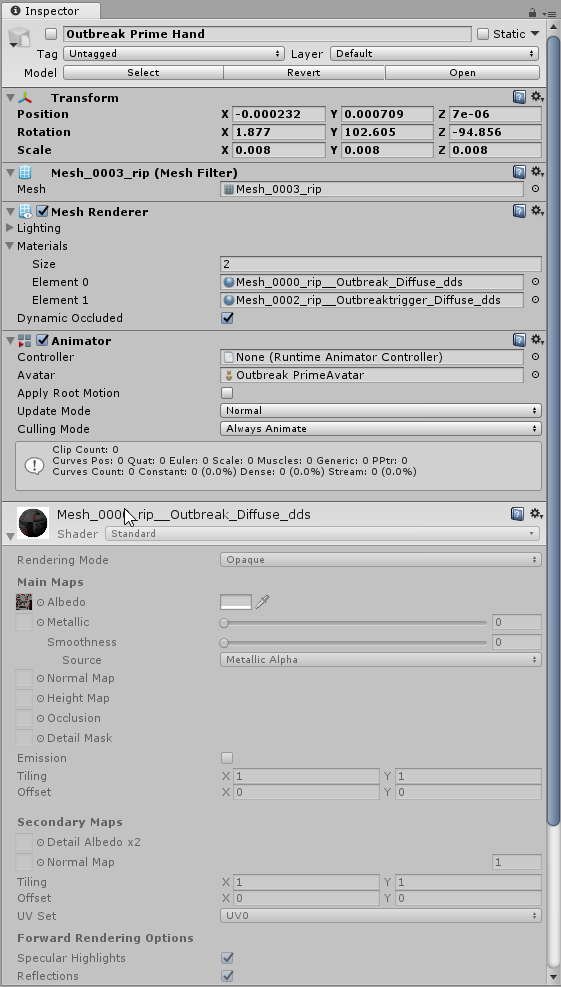 fierce bane
the glowy parts should be left the color they are, anything that should glow is turned black
fierce bane
it'll work with the glowy parts whited out, it'll just be a bit different setup and takes more work to get it to be the same color
select the model of your gun
click the "materials" tab
fierce bane
then select "use External Materials (Legacy)"
you can also just duplicate the existing materials and override them in that menu instead of setting it to external
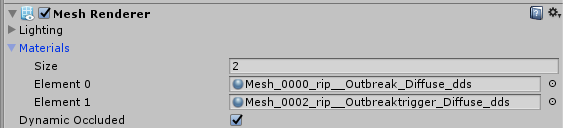 fierce bane
no, select the model file itself (in your assets), not the one in the scene
wispy cape
fierce bane
you can either extract the materials, edit them, and set them as the override
or you can go to "localion" and change it to "use external materials (legacy)"
fierce bane
use the same as your avatar is, poiyomi something
otherwise the gun may look out of place depending on world and lighting
fierce bane
and then apply the texture where it should be, and set the emission map in it's slot as well
fierce bane
might have removed too much of it
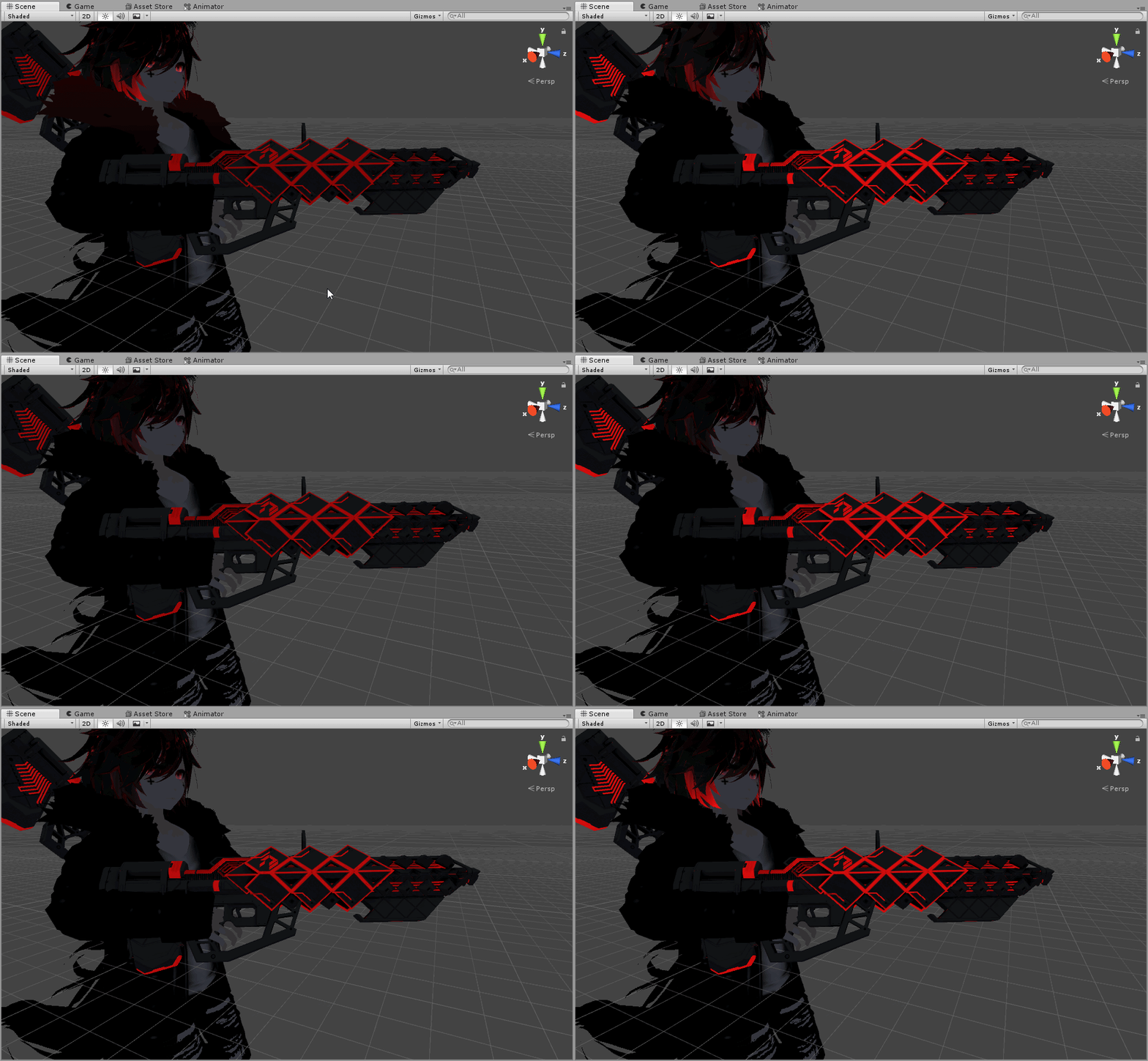 fierce bane
there you go, now the default state would be set to full black on the emission color
And then in your animation you'd change that state up to what you currently have it at either in stages or over time, depending on what you want to do
wispy cape
i think i just want to toggle it on or off, like ... have it compleltly off when not shooting, then having it pulse when im shooting
wide steppe
Haneki
I made it kinda arround
I injected the fix in evry single animation i use
It works but it's a pain to do in those hevy animations
each loads good 30s before i can edit it :/
fierce bane
@wispy cape Then you can either do a material swap, or change the emission color value with the gesture
a material swap would have one with emission and one without. Have the one without on by default, and swap to the emission one with the gesture
trim violet
Has anyone messed with Skinned Mesh Renderer tricks? Trying to figure how to set up a simple tiny low poly mesh that acts as the base and Main model is on the side as I know VRC does not like you disabling your mesh renderer
I know there are shader tricks which most people use, but trying to use this as a way to swap out animation avatars
 woeful burrow
So for facial expression animations, if I wanted one to be set for a finger point I would need to set each piece of the hand in there from the animator?
 dull wedge
My eyebrows have gotten stuck in this position, despite all the values being 0. I have no idea how I should fix this.
clear yew
try to relax 4head
 strange elk
Ok, so I got an idea for an animation, but I'm not sure what the best way to do it is.
I want to try and do the one handed pump action shotgun reload where you throw the gun in the air, catch it and pump it, then throw it again catching it ready to fire.
The thing I'm unsure of is if it should be a regular animation, or if I should use meshparticles in world space so it won't move in midair if I move my hand.
Or if there is some other way of doing it
clear yew
if its in world space then the catch will look weird, unless you actually catch it
which is possible tbh but it gets elaborate to make quickly
that sequence of moves seems like it would mostly depend on you acting out the correct movements
which means in my opinion you want the animation progress to depend on a successful interaction
which makes things even harder to build
otherwise you could do stuff like
throw it up in world space then T-pose, and the animation carries on like normal like you actually did the right thing
which looks weird
lunar belfry
@fierce bane i animated the body to the back but it still centers it in-game.. i view the animation and it says that the center of it is at my feet but once i go in-game it puts the camera at the same position
could it be that the camera offsets downwards based on the character's head?
 paper kraken
I asking for help cuz whenever i set my particles to world, the particles spazing out everywhere instead directly looking forward
how can I fix this?
clear yew
are the particle systems in the armature?
clear yew
world particles in the armature break
 paper kraken
alright thanks
clear yew
guys im trying to change my size on an animation and it does rescale and i added the vrc view point to the animation but the view point dont scale with the charicter on the animation am i doing it wrong
or is this impossible
 tacit axle
I think that's not possible. it is possible to make a sitting idle animation that moves the character (and its actual view point) to sit on the seat instead of in the seat, but there's not exactly a way to become akin to antman.
clear yew
well that sucks
oh well i suppose i either change the way i do it or i stay where i am and animate it from where i am
which means bending over
lol
lament prism
I added a surface sprite sheet so that I can make a GIF. I want to add sound to it, but I just ran into a problem where the GIF keeps replaying and doesn't reset everytime the gesture animation starts, leaving the audio out of sync with the GIF.
Is there any way to have the gif start at frame 1 every time you use the gesture animation, instead of it replaying all the time?
tacit axle
is the objects' mesh rendering being used to make it invisible? try disabling the entire object by default, then enabling it with the gesture instead of turning off the mesh rendering
lament prism
No I was already doing that actually.
tacit axle
🤷
lament prism
Bummer
fierce bane
@lunar belfry make sure you're not just moving the body around for the animation, and are using the animator settings (muscle settings) to do it.
It could also be the IK kicking in and centering the model around you based on the camera settings, I'm not sure exactly how that would work.
But the camera definitely doesn't center based on the head, or else desktop prone wouldn't shove the camera into the hips >.>
trim violet
Hey has anyone messed with using Skinned Mesh Renderer swaps? I know you can disable it as long there's another renderable object, but I want to know if it's possible to swap to one when the object is turned off when uploading to VRC, it seems unless VRC sees the renderer, it ain't gonna be going through. So wanted to see if anyone had some insight
 umbral hill
pls help i need help with this so i can contine to do the advatar animation for a weapon for the advatar
umbral hill
i have no idea but what happens is that when i press on the add property it show up a little tab and when i try to get to the place i need it close for no reason i have ask so many people how to fix it and no one has had this happen to them
lunar belfry
@fierce bane i tried both animator settings (using muscle animator) and pos transform in animation, none of them work
not sure how to proceed from here on
wispy cape
is it possible to add colliders or something to particles so they spawn another particle when they run into a wall or another person?
 lunar pasture
yes
trim violet
@umbral hill I would restart unity or make sure the controller the animation is in is set. Only reason why I would think the animation couldnt see any child objects.
 stark trail
sure >u>
izi way is to just add it in unity, make the gun a working prop, then keyframe a gesture for the particle system
remember to use rigid bodies if u plan on having world particles
the best way (the optimized way) is to add the gun in blender beforehand, merging the meshes together and turning it into a shapekey
tough cargo
Alrighty, thanks.
 sharp wave
So I need a lot of help because VRC doesn't allow the rotation C# script for the rotating armbands people use I can't do rotation because when I try to make an animation its scuffed and idk why
 gray jasper
Is there just a point where it stops?
fierce bane
@sharp wave you can either use an animation that simply does a full rotation of a mesh using keyframes
Or you can make a mesh particle and use rotation over lifetime to do the same thing
personally I find a particle easier as you only need to set the mesh render mode, the material, and the speed/lifetime
 simple spire
I just had a thought about animations and triggering then through gestures. I'd they are normally toggled using the f keys, couldn't you theoretically have more animation triggers using the F keys beyond F12
As in, use the keys F13-f24 for more triggers?
 slim sparrow
No, because the game isn't made for that
You can only go up to F8 anyway
They're emulations for the hand gestures used in VR
 brittle granite
@simple spire this guy desktops.
 blazing lark
 narrow kettle
Have you tried mixamo?
I only some experience with animation. Most of experience was just animating low poly models.
trim violet
@slim sparrow I mean couldn't VRC differentiate the blend shapes between each hand in the Avatar Controller? I figure they have to remaking or updating the system for Index, or cobble something together, but would be interesting if we had hand specific overrides giving us more options for gestures and whatnot. So like say 14
Not right now but in the future
clear yew
never got a straight answer from anyone about them not doing the left/right split thing
i only ever get a vague allusion to a future system that thinks about a different UX direction
and so common sense improvements to the current one are not a priority
slim sparrow
^
Maintaining backwards compatibility isn't the easiest thing in the world though
That's why I generally pushed for a new addition (custom controllers) instead
trim violet
Aye That would be the best stop gap but figured there were sdk reasons for not being able to swap controllers. Because I thought the controllers would be tied to the server code or the logic for movement in some form.
Wonder what they might do since tracking index hand data and whatnot. I figured it'd be limited and not complete but yeah
lunar pasture
Hey
I'm a bit rusty with gestures, can someone just check my thinking?
just working with the fist gesture, I want it to be a binary switch, so i should just be able to put the off state at 00 and the on state at 01, yeah?
clear yew
fist is analog on oculus, and it also acts like a toggle because it doesn't write defaults correctly, so it weird
but generally, your starting and ending keyframes should be the same value
because gesture overrides will loop that starting and ending keyframe
so 0:00 and 0:01 both on
and when you release the gesture it will return to default off
unless it's fist. merely releasing fist doesn't write defaults
to write defaults after using fist you must use another gesture
lunar pasture
ok, so what I'm trying to do is turn one mesh off and one mesh on at 00 and vice versa on 01, but it doesn't seem to trigger it
clear yew
is.active 0 on first mesh, for both keyframes 0:00 and 0:01
is.active 1 on second mesh, for both keyframes
should work
lunar pasture
ooh, so both frames of the animation should be the 'alternate state' that i wanna trigger with the gesture?
clear yew
yes. for each property you are animating, if it's a gesture override, the starting and ending keyframes must be at 0:00 and 0:01 and they should be a constant value
lunar pasture
awesome, don't know how I every accidentally got things to work in the past then lmao
clear yew
fist is special case, if you were using that
generally i dont recommend using fist for things
lunar pasture
yeah maybe you're right, it's funny for resizing boobs tho lol
clear yew
yeah that is true
fist doesn't need to have constant value for the keyframes
can follow curve between values with the analog input
lunar pasture
I love coming here, just as you think you're finishing you create yourself another set of problems lmao 😄
clear yew
So i have expressions where my eyes are closed, problem comes in when the avatar is blinking, making the eyes kinda melt into the cheeks.
clear yew
Does anybody have any advice for animation overrides requiring 2 gestures?
 undone glade
Simply make sure each one is active separately really.
Sort of think of it like a switch. Game object B is only active when Game object A is on.
wide steppe
Hello I would like to ask if anybody knows a way to convert generic [human like model] animation to humanoid animation?
Basicly what i want is to convert it between a generic and humanoid rig
https://gfycat.com/VibrantIllinformedHypacrosaurus
 muted prairie
Is the armature of the animated model humanoid ?
 broken yew


 clear yew
animate scale transform
 hollow perch
@wide steppe if you have the animation as an original fbx, changing the rig to humanoid should get you a nice humanoid animation.
If the animation is already in unity format and you do not have the original fbx , your best bet is to export it out of unity so that it can be reimported. This is a tool that can do this: https://github.com/newyellow/Unity-Runtime-Animation-Recorder
GitHub
Record animations in Unity runtime. Can save to .anim, maya, or FBX ASCII format. - newyellow/Unity-Runtime-Animation-Recorder
Once you have the fbx file, follow the rest of the answer that IgbarVonSquid helpfully posted right after your question in #development-advanced
(Just to be clear, this process involves generating a second throwaway fbx file which will have a copy of your model and an animation on it. After you have rigged it as humanoid, you can duplicate the animation in unity
 steel inlet
is there a way to get the hand to wrap around the sword without having to buy a $15 addon?
fierce bane
@steel inlet yes, Muscle Animation Editor just makes it EASIER on you, it's not required.
Use the Animator component settings like Animator.Right Hand.Index.1 Stretched properties in the animation.
Animator properties will adjust the fingers properly for a humanoid rig, sadly you can't just rotate the bones for humanoid rigs.
wide steppe
what would be recomended settigns for soundbits?
Basicly like an emote saying hi etc I want it to be on short distance so they would be kinda directedto ppl close to me rather than whole world
trim violet
Typically just think world Space
So like if you want it to in front of you, position it like so onthe main model
fierce bane
@wide steppe with Unity, 1 unit is 1 meter. So think of it that way and take into account the falloff distance
lunar belfry
can running animation be set with a cycle offset so the startup portion of the custom animation plays at the start and the rest of the animation loops?
lunar belfry
ok i just tried it didnt work thanks
clear yew
did they change something while i was gone
making animations on dupe models
but the sinking into floor effect
is happening when i put them into the override for the main model
clear yew
hellooo, it's me again
how might I be able to set up gesture based animations?
the models I'm using have a lot of facial shapekeys and I'd like to get a use out of them by setting up expressions for them to have
if anyone here knows of any tutorials or guides, that would be pretty sweet
(I'm talking about the animations you can set up whenever you press Shift+F1-F8)
I think I've found a good one, I'll come here if I have any questions
clear yew
if I make an animation file that changes only the face, do I have to worry about the hand or does that not change unless I directly change it?
I'd like to keep the default hand animations in, if I can
I just want to animate the face
actually, I could just check myself
clear yew
is there a way to make a looping three burst particle system for a gun?
clear yew
what does this mean?
spring nova
Yeah, just use bursts instead of emission over time. One burst at 0, another burst after a quarter second or so, etc. And then you want to time the duration of the particle system to be one burst plus the delay between bursts, so that it loops over and does the next one immediately after
fierce bane
@clear yew there's a component somewhere on the avatar that isn't used in VRChat (or is blacklisted) and so it's telling you it'll get removed, potentially breaking something (usually a script or something on a prefab youimported)
lunar pasture
I need an adult
 compact rain
has anyone figured out how to apply a flying aspect to avatars, i know the theory but am unable to apply it to my avatar
 quasi hinge
Box Collider under you and done
compact rain
i presume the box is bound to the world
or is it simply thown in by just putting it under your foot
 fringe junco
Nice way of saying that
clear yew
@fierce bane thanks
clear yew
@spring nova I don't really know what values would be good for "time" "count" "cycles" and "interval" for a looping three particle burst you got any good values i could use?
fierce bane
@clear yew if it's a 3 round burst rifle, you'd want 3 separate bursts with no cycles or interval and a count of 1
While a shotgun for example would want a higher count for the buckshot's spread instead.
Time: How long after the start of the emitter does it do this burst
Count: How many particles for this burst
Cycles: How many times does this specific burst repeat
Interval: Delay before the next cycle of this burst starts
so from phasedragon's suggestion before you'd have 3 separate bursts. One at 0, one at 0.25, and one at 0.5
all 3 would have a count and cycle of 1
Or you could have one burst set to 3 cycles and 1 count with an interval of 0.25
You may want less of a delay though for a 3 round burst...maybe 0.15 for a faster grouping
clear yew
Thanks alot to both of you, i will try it out 
 junior python
does anyone have a chart that lists out what each slot in the animation override controller does? im a bit confused about which slots do what.
i mean, if noone does, ited just be helpful to know where the sitting anim is,
muted prairie
They're all doing something, and the names should be there too
fierce bane
@junior python Sitting and standing are separate overrides
Idle pose is what you need for sitting in general, just make sure it's a separate override controller
and slot it in the descriptor
quaint jacinth
So I FINALLY have an edit of Lexidoll's Nanachi through blender ready to go, my question is there a way to copy the animations from LExi's VRCMod's version of the avatar to my mine (ears flopping down, blush gesture, etc) or do I have to make them all over from scratch?
 fresh bough
if i wanted to add particles raining down on me where could i put particle system on so when i rotate it doesn't rotate with the way i'm facing?
fierce bane
the emitter will always rotate with you unless it's anchored in the world.
If you don't want the falling particles themselves to rotate you can set them to world simulation instead of local and they'll keep position/rotation based on world instead of your avatar
then they'll move independent of you once created by the emitter
torn pawn
@fresh bough put it outside of armature
then it won't rotate with you
well, you have to have it set to world particles, and alignment not to local
fierce bane
simulation in the top section
fresh bough
sim space?
fierce bane
yes
fresh bough
where do i find alignment
fierce bane
render settings, by default it'll be "view"
fierce bane
depends on your particles, for most "view" is fine, as it is based on the camera looking at it. If however it has a proper "up" side to it or something like that, then you'd need to adjust it
fresh bough
well the way i have it as is the particles are raining down
fierce bane
you said that, yes. But it's what the particles look like that matters for that...like I said, for most "view" is fine. If you are using a mesh particle then view wouldn't be what you want, or some other similar cases
fresh bough
alright ty
trim violet
I was wondering, could you put a property into the Anim file that could act as a parameter or even simple c#? Technically the Animator runs whatever is in the Anim file right?
 atomic dove
Can anyone help me please, i'm new with animations and i'm trying to make animations which shrinks people when they sit on a chair. I'm just editing a prefab sit pose but it has no effect in game, avatars keep the same size. Thanks!
 paper crypt
How the hell do i make two step animations, im so fucking lost as to how to make this work.
fierce bane
@paper crypt Set up parenting. Anything that is disabled also disables any child of it.
So both would be disabled by default and enabled by the gesture animations
|- Second step (Right pad Left)```@atomic dove remember that the path is important, so if you take a default sit pose from an avatar and put it on a seat it won't work properly (you'd have to re-target the paths of the components by selecting them and hitting F2 in the animation pane, or editing the .anim file as text)
paper crypt
@fierce bane how would that make it so i need to do two gestures to do the animation?
fierce bane
if both are disabled and you enable only the first one, the second is still disabled and so doesn't activate
if you enable only the second one, it also won't activate (because the parent is disabled, making it still disabled even though you enabled it)
paper crypt
so i would still need to take up 2 gesture slots in the animation controller override?
@fierce bane
fierce bane
yes
fierce bane
you can have the enable gesture disable other animations and have a few that just enable others shrug
we can't have custom humanoid controllers still, so we can't set them up differently than VRChat is currently designed
so there's no "if doing two gestures, disable what they normally do and do this instead"
paper crypt
and hoping that devs make it so each hand can be assigned separately is a long shot
 cursive token
I added blinking animation to my avatar and it works, however one of the eyes randomly blinks on its own from time to time
paper crypt
make sure the values for the blend shapes match up all the way through the animation. (im assuming you're using left and right eyelid blend shapes.)
fierce bane
also make certain that the 4 blink shapes are the first in the list if using the default blink system. And if not, that they exist but are blank
cursive token
I'm just using one blend shape to do blinking
And I made sure the values match up too
There are no issues in Unity, only in VRC
fierce bane
you still NEED to have all 4 at the top whether they're in use or not
even if one "blink" and the two lower lids are blank, they all need to be there.
The top 4 are used for blink, so if you have one missing something else will activate
atomic dove
@fierce bane Thanks you for your answer, i still haven't been able to figure it out. The custom sitting animation is already working, it just won't change the scale even if i put it on the animation. I have been working in Unity for only 2 weeks i don't get all the concepts
maybe i'm using the wrong "property"? I tried with everything that said "Scale"
clear yew
@paper crypt what are you trying to do? It reads like you want to do a combo gesture with only one override
 fallen crypt
Hey guys, do extra bones still animates when you move your avatar? Well, like walking, in humanoid rig. Back then I couldn't do it with my centaur >A<
Ping me when you got the answer
slim sparrow
Nope you can't. @fallen crypt
You can only move humanoid rigged bones
"Extra" bones don't work
fallen crypt
Damn it... they still haven't add the feature yet? :/
slim sparrow
Nope, although we've been asking for it for almost a year now: https://vrchat.canny.io/feature-requests/p/custom-animator-controllers-on-humanoid-avatars
fallen crypt
Anyway, how can I get the generic avatar attached to humanoid rig to move?
I seen some people get to "summon a wolf" or a Persona, but yeah, they do not move when you walk your humanoid
Hmmmmm alright, ty @slim sparrow
slim sparrow
You basically can't
fallen crypt
Hey guys, I forgot which hand gestures are which part of the keyboard keybinds. E.g. Victory = Shift + F2?
 pliant plank
I know the debug menu has changed, unsure about the trigger binds https://docs.vrchat.com/docs/keyboard-and-mouse
* Use left shift to control your left hand, use right shift to control your right hand
@fallen crypt
fallen crypt
Ty
fallen crypt
Is there a tutorial to animate humanoid in 2017.4.15f1? Seems my old Muscle Editor asset isn't working on the new one now. Also, how I get my humanoid using the made humanoid anims found in Unity asset store?
DM me if you got the answer, I am heading to bed
slim sparrow
Update muscle animation editor from the asset store @fallen crypt
 hollow helm
Anyone know how animations work in Vr? My keyframes are not working with my animation
 snow sparrow
This should be a simple question to answer, but I'm not finding it in my Google searches: What is the method to change the names of Emotes as they appear in the VRC interface? Changing the animation is perfectly easy.
 lavish scaffold
I think all you have to do is change the name of the animation 🤔 But you cant change the default ones, like "wave"
snow sparrow
Oh! Look at that. You're right!
Thanks!
I've seen avatars that have Emotes that act as toggles. For example: an emote that allows users to toggle a finger pen. How is this set up? I have the emote set up to activate a small particle effect, but I'd like this particle to persist without the user having to worry about it.
While at the same allowing them to activate it and deactivate it at will.
Having a particle tied to a hand gesture is nice and all, but they have to be mindfully holding down that gesture in order for it to work. I'd like them to be able to active it through an emote and then be able to perform normal actions while the particle does its thing
I have an emote activating the particle, but it only lasts for as long as the duration of the emote and, what's more, it breaks the rest of my avatar for those few frames since the only thing happening during this animation is the enable/disable
Which shouldn't be a problem. I'll just copy the Idle animation's keyframes and add the enable on top of it.
But it's the toggling function that I'm struggling to figure out
snow sparrow
Ooooh. I'll check this out!
fierce bane
@fallen crypt technically I think you could used fixed joint/rigid body to move another limb the same way as your humanoid bones (rigid on front left leg and fixed on back right for example for the centaur mentioned)
However it may look weird in certain poses...also it's a lot of setup and physics objects add up to cause more lag, and can rarely desync
I think Final IK (paid asset) can also be used to override and make the legs follow your actual ones, though I've personally never used it, so can't help there.
fallen crypt
@fierce bane Tried it before but it doesn't work, but I already used another way around, shapekeys
fierce bane
that's a lot better on performance anyway
fallen crypt
Oodly those have dynamic bones off ingame cannot see my hindlegs move 🤔
They're shapekeys, dunno why
fierce bane
that's...weird...shapekeys shouldn't be affected by the dynamic bone disable
I'd check and make sure you don't have a dynamic bone including those legs, like maybe a tail dynamic on the hips that didn't exclude them
fierce bane
if it's on the hips instead of a separated tail root that only the tail is parented to it could be trying to affect the legs etc
or any other dynbone on the hip (or whatever the rear legs are parented to) that isn't excluding them
they should still work though (and technically correctly without dynbones enabled instead)
fierce bane
if they had animations off I could understand it...but not dynbones
fallen crypt
Anyone willing to share me the latest Muscle Editor asset?
fallen crypt
Nvm
snow sparrow
I'm having issues getting an audio source to play when attached to an animation, or even in general.
The intent is to have a music track play next to a dance animation, but I cannot even get the audio source to play, even if it's merely attached to the player
 pseudo moon
I'm doing an M32 grenade launcher for a model and I'm trying to get a sound to play/spawn on the location of the explosion sub emitter. how do? ive never really worked with sub emitters much before so im clueless
clear yew
How do I create a Collider that remains but when someone else touches it, it blows up?
Like a Mine but it's a Random Coin on the ground
and if someone notices it and notices it, it blows up or somthing ._.
Great Animation for my Killer Queen Knuckles
Or is there a way to create an object placed on the gorund but then another Gesture causes it to blow up?
 nimble ridge
You could try using collision to trigger the death of the particle which will spawn the explosion of the mine, this only works whit particles tho as it's basically all subemitters
@pseudo moon sorry no can do, placing sound sources at sub emitter locations wold require scripts and vrc does not like scripts
fierce bane
@clear yew you can however use a mesh particle to make it look like an object (mention to clarify)
pseudo moon
im already using mesh particles, do i just need to animate a delay on an explosion effect then?
sound fx*
nimble ridge
But you still won't be able to move the audio source to the particle location 🤔
fierce bane
I meant for nonskiller, not about the sound source
a sound effect cannot go to a particle location, sub emitter or otherwise
best option is to enlarge the radius or make it 2d...closest we can get
fierce bane
yeah my bad, wasn't very clear
nimble ridge
Actually, there might be a super complex super secret way to add sound
fierce bane
you can do stop-animation to get sound at a physical object you can move...but not for a projectile that I know of
nimble ridge
Could make the rigid body be the projectile ye, and add sount to that
And one step further could add a particle collider to detonate it
fierce bane
possibly, would only get one at a time per rigid, would also have to make and use a physics material on it, and would have to accelerate it at first somehow (since we can't use scripts to start it)...maybe another collider to "push" it rapidly? I'm not sure how else you'd accelerate it...
you'd also have to reset them after they explode
a placed explosion like C4 or a mine however could be done that way and have sound attached
nimble ridge
Planted mines yould be way easyer because no acceleration shenanagance, saw someone that cold drop as many as he wanted and they had sound attached to them, wold trigger when peps stepped on them, but no idea how they where made
fierce bane
"as many as they wanted" is questionable since you cannot create objects without scripts. A set number that they could plant would be just a bunch of them set up to drop the mine with a sound attached, and using the stop animation I mentioned to trigger the sound on particle collision.
And there's supposedly a way to access player/playerlocal layers, though I keep forgetting how when I go to do it....
but yeah...projectiles would be harder...
nimble ridge
Might have been a client actually 🤔