#animation
1 messages · Page 106 of 1
 wary parcel
you see the Samples one?
ye
i usually have something to fill the animation with as an blank
and then have the trigger inn it
on frame 2
could try that if it fixes your animation
 meager saffron
Yeah, I tried adding a frame just to "enable" the already-enabled box collider. Maybe I should stretch that out.
wary parcel
like just take the scale on the Object to 1 or something
just try the Event on frame 2 instead of 1
you can even slow the animation down to 45 samples so it does not have problems to fire even at lower frames
but it shouldnt be the case
meager saffron
yeah, still busted. -_- The other one still enables just fine.
I think I need an old priest and a young priest at this point.
meager saffron
same.
wary parcel
ok, thats good
meager saffron
My understanding is that the trigger had to be on the thing with the animator.
wary parcel
ye Events wont work unless its on the same Object
a bit bad in my taste i would say.
should be able to target objects with events 😦
meager saffron
I may just re-make this animator. I've been meaning to optimize it anyway.
wary parcel
should consider the transitions is the thing that can cause issues
on 1/0 components
meager saffron
yeah, that was my first thought. Since the first one works, I thought "Just need to compare against that one and make sure everything matches."
wary parcel
why not use no transition and just have condition based States
oh well, GL im a bit tired
meager saffron
Yeah, thanks for the help. I"m convinced it's just possessed at this point. -_-
wary parcel
Unity does that sometimes
meager saffron
I've done pretty much the same thing on other animators before and this is the first time it's been super busted like this.
Yeah, I've had it be really weird where it builds different from how it is in the editor before and I had to re-make a bunch of triggers and stuff to get it to update. I'll try that, I guess. It's a big pain to re-make though.
wary parcel
you can prefab it and just load it in a different project
Usually some cache problems that screws with the project and Meta files
meager saffron
So, to get it working for now, I just added an empty game object to the animator, then enabled it in the final animation with an OnEnable trigger to do what I was trying to do. Hacky, but it works for now.
i think this project may just be screwy since I also have another trigger that keeps randomly changing from Custom to OnInteract
 autumn yew
Chairs that change the size of avatars that sit on it... Anyone know how this is done?
I've seen ones that shrinks avatar and others that enlarge them.
 hollow perch
Make an animator controller with an animation in it. In the animation You set scale on the top level transform I believe. Then assign this animator controller to the station script
autumn yew
Ahh, interesting. I never done anything of the sorts, but I will give it a go. Thanks.
 thick frigate
how would I go chaining one animation (summon) to a stable animation (just holding the weapon)? I've got the summon down but I don't know how to link the two together. thanks!
or rather; how would I go making an animation loop once?
hollow perch
Where is this animation currently? Gesture, emote, or custom animator inside your avatar (in an object activated by gesture)
You can turn off looping by clicking your anim file in the project assets panel and unticking Loop in the inspector
thick frigate
gesture
hollow perch
you're going to have to make an animator responsible for choreographing the different parts of your animation. if your gesture activates an object, make an animator on that object with some animations in it. this animator controller can have as many states as you need, so I recommend checking an animator controller tutorial for this
the main thing is the gestures themselves can only have two identical keyframes at 0:00 and 0:01, so usually you just use these to activate some other object which has the animator on it @thick frigate
 native peak
how would one do an animation for a song? like a screen animation or a particle animation?
at least the gist of it
 clear yew
https://youtu.be/iFh634DcAQM and Find a shader that can do screen effects or learn particles

How to animate your shaders in unity and floating weapons or objects with ICON the VRCHAT ape.
@native peak
native peak
@clear yew ah thanks, you legend c:
clear yew
I can send you links for shaders for it later if you can't find any. @native peak
native peak
I’ll likely need that too haha
I’m new to animating, I can add sound to gestures easily but that’s about it apart from being able to shade models
clear yew
You just hit record button on the animation and change the shaders vaules. The video should teach you how tho
 strong arrow
Animations, if i want a ring of fire around me. How do i do that? Or like other avatars coming up around me
autumn yew
@hollow perch Hmm I got the chair working technically. Fairly easily at that. But it breaks whoever sits on it. Looks like it snaps their spine.
I scaled the chair down and the animator controller scales down the avatar on it. Not sure what is breaking it.
clear yew

updated the secondary trail effect on fingerpoint and fixed some bugs with mesh render not turning on, updated materials a bit on the model too and added an ...
i'll finish optimize them tomorrow and record v3 video after some test, i tweaked all color by speed and most noise settings to give it more spread after i recorded this
 warped cedar
Ok so anyone know if I want to animate wings, do I have to put the animation into the Idle Slot of the Animation Override? Or do I need to put it somewhere else for looping?
 slim sparrow
I recommend putting an Animator component at the first common ancestor of the wings (such as the chest or a wings root bone)
Then animate it from there
@warped cedar
You can also work it into your idle animation, but then you need to pose the rest of the body too so you won't be in the floor.
warped cedar
Hi @slim sparrow So I add component Animator to the Chest (My wings are coming off the chest bones) But where do I put the animation clip? Also for Avatar slot i just pick my main avatar or the wings (Wings are a separate mesh Rigged tot he same rigg)
warped cedar
If I make a Animation controller for the wings, if I attach it to the animator on the Main avatar (the one that already exists) That works, but if I try to make an animator and attach it to any other bone or the separate Wings mesh it does not work.
clear yew
the animation clip animates a bunch of properties on a target object. in the animation tab, in the left properties pane, you can see the path to the target by selecting and hitting F2 on a property. The path will look like this: "literal/path/through/objects/to/find/target/Gameobject"
your animation clip is probably set up so all the animation property paths are only valid if the animator is on a certain object
so when you move the animator around, you need to edit the path so the animation clip can animate the right objects
the path to an object is relative to where the animator is located in the hierarchy
an animator can only animate child objects
it sounds like your animation might have been made with all the paths starting from your avatar object
if it works on your avatar object and nowhere else
@warped cedar
 spark sphinx
How do I add particle/animations to hand gestures?
 fiery star
are there any volume rolloff settings that wont get adjusted by the vrsdk? the custom rolloff is really steep
clear yew
https://www.youtube.com/watch?v=ctRUEaAb6l0&t=61s im trying to make an effect of pulsing rings like how are done in this video, theres an example in the beginning of the video, but i cant figure out how. Does anybody have any recommendations on what i should do?

Viewer discretion advise there are rapid flashing lights in this video! I wanted to make another visual show to end the month of February as there was many t...
clear yew
Floor pulse looks like a texture sheet to me, so do the rings, and the cannon spiral things look like a mesh with a shader scrolling through it
 supple thicket
someone know why i can see the "game exporter"?????????, is to export a animation clip
 gentle zodiac
Weird game exported is gone for me to. but either way normal fbx still works. atleast always has for me when exporting with animations
 modest rover
im having problems making a partical effect follow my gun does anyone know how to fix this?
 shut dragon
Should I use a Standard Surface material for a particle emission animation?
And what amount of particle would be safe to use?
 restive shoal
Can someone translate what the "help I fucked up everything" instructions in the pinned comments?
Currently that file is pretty stuck in there
clear yew
Can anyone tell me where I could get a few basic solider animations? Running with a gun and stopping and shooting is what I need.
 fluid crescent
Yo I wanna make chair and when people sit on it they do a dance animation
how do i do that?
 naive niche
@fluid crescent
https://github.com/splinks/VRChat-Customizable-Fixed-Chair
GitHub
VRChat Chairs with proper height fixes for small and tall avatars thar also allows you to customize the sitting pose, emotes, and right/left hand gestures thought an override controller. - splinks/...
fluid crescent
aight imma try
 leaden rapids
When making an animation for normal hand emotes (point, thumbs up etc) that goes on for for example 1 second, or 3, it seems it takes the animation the same amount of time to slow down and end. How would I go about to make the animation end immediately when I release my thumb from the vive wand trackpad? - you know, so the animation doesn't continue over for a bit when I use another animations.
please ping me here if you know.
leaden rapids
This animation has a special tail and ears wag animation
slim sparrow
Instead of directly animating the tail, put an animator on the root of the tail bone
And use an animator behavior keyframe to toggle it on/off
leaden rapids
I'm also asking on behalf of a friend who wants to find out too, as he uses an animation to throw axes

this is his animation he uses.
I'm assuming he'd be able to put animators with throwing animations on the axes themselves, and have them active with a main animation (?)
slim sparrow
Yeah in particular for the axe that should be very easy
Just activate another axe with an animator directly on the axe
 knotty ridge
I have a question, so lets say I have a model here, like a bag of chips, how would I add in sounds to the model when during movement animation, like walking, etc
knotty ridge
any help would be greatly appreciated
slim sparrow
Well first of all your particular example sounds obnoxious, I usually hide those avatars on sight
Second, you can make a custom walk cycle that turns on an audio source that's off by default
 nocturne parrot
Hello, does anybody know how to make it so that a particle system starts playing with an animation? So that particles alredy spawned don't despawn after not using the animation.
slim sparrow
Have the particle system on by default but the emission module off
Turn the emission module on in an animation
nocturne parrot
Thanks, will test it out!
knotty ridge
@slim sparrow how would I go about doing that?
lol it was an example, my avatar has cat bell sound effects
slim sparrow
Get any walk animation (such as from Mixamo) and follow some animation tutorials to add the audio source enabled property
knotty ridge
 topaz otter
Is the reason VRChat doesn't give their animations in the SDK because of re-publishing concerns?
clear yew
@knotty ridge not quite. You need to use the override controller. Do you know how to do regular gesture overrides?
knotty ridge
modeling is all too new to me lol, please excuse that, and yeah
 brave vigil
hi im trying to animate my face with my hand gestures but the gestures seem to be part of the leg and not where they should be. the leg mesh is moving instead. Would it be by chance that its because its all one mesh?
restive shoal
So uh
How do I combine animations? Or make it so my custom animations also involve the hand gestures.
Because currently my custom animations just have their hands half open and it's kinda...
Eh
hollow perch
They are not included in the sdk as far as I know: You can use muscle animation editor to remake them yourself or just download a set of default hand gestures online. mixamo might have some.
restive shoal
I did download the animation files for the hand gestures, however I have no idea how to access it in the editor so I can copy the key frames.
I have all of these, but I have no idea how to access the key frames or anything
Huh... this exists
hollow perch
Open Animation from the window menu or add tab
restive shoal
K
hollow perch
Then you can select everything either ctrl a or box select the keyframes and then copy paste (ctrl c)
hollow perch
Unity is confusing. It's not you. A lot of things are like this 😉 that's why discord exists
restive shoal
Danke
hollow perch
Bitte
clear yew
@grand loomGuy - those animations are made for a Maixamo skeleton. And I have to idea how to re-parent them. Re-namign individual components does nothing
 grand loom
I was confused for a moment lol
 sleek root
Can you actually play 2 animations at the same time? I can only seem to find out how to transition them
 old crag
Okay so I don't know if this classifies as animation or shader, but would it be possible to make a "Za Warudo" effect, or a Death by Thanos Snap (Breaking apart) effect? If so, may I ask how?
clear yew
@sleek root you can but you should describe what you are trying to make
@old crag it's an animation that uses a shader for the effects in both cases
sleek root
Basically i have a monster with a "walking animation", and i want to add the movement to it, so it actually walks
clear yew
As part of a world, or avatar?
 wispy stratus
hey uhm im new to avatar creation. and was trying to do animations today. thing is in vrchat I personally can see and ehar them. but noone else can. what did i do wrong?
 torn nebula
Anyone know how to create decals that lay flat on collided surfaces as part of a particle system? eg, bullet hole style.
hollow perch
@torn nebula check out @opaque marlin's triplanar decal shader: https://github.com/netri/Neitri-Unity-Shaders - be sure to follow the directions for properly adding a realtime light to your avatar to make sure the effect works while minimizing lag.

GitHub
A compilation of shaders for Unity3D and VRChat. Contribute to netri/Neitri-Unity-Shaders development by creating an account on GitHub.
torn nebula
Thanks. This should work for what I'm doing.
 chilly kernel
 solar lagoon
anyone know how to stop my avatar in unity from moving down when i apply a Controller to the Animator?
I'm just trying to do a simple blinking animation.
 covert girder
@solar lagoon you can ignore this, but create that animation on a duplicated avatar that you can dele after
solar lagoon
That’s how I was creating the animation,
But once I delete the duplicated avatar and put the controller on my main avatar it moves down too
 uncut shadow
How Can i make someone sleep position on vrchair
 peak canopy
Hello, i have a problem with my avatar, so i picked an avatar with a custom animation on it, i want to add a dancing animation with music of mine but, when i try to do that, it screws up everything (the preinstalled animation doesn't work anymore and also the new one doesn't work aswell, it even screws up the keybinds for the animations) can somebody help me out ? thank you. (it's my first time modifying/adding animations on Unity so.... xD)
 unborn geode
how would i make an animation with 2 little versions of my model dancing with me
 torn pawn
enable the models that have that animation
 reef nexus
Is there anyway to make the DJ booth occlude the light cones while you're looking at it?
hollow perch
You want the screen and booth to never have light cones show up in front? You could use stencils to do this. Have the dj booth and screen set a specific stencil value and then the lights can use a NotEqual stencil test. You may have to edit the shader file to add the stencil line but they are fairly easy edits.
@reef nexus
reef nexus
Ahhh. I am using the unity standard shader on the trusses and cones (in fade mode). I am using XieXie's tv shader on the screens
So do I need to edit the standard shader and make it a custom shader? Then do the same for the light cones?
Also, I turned on extrapolation for a pick up I have, but its still a bit shakey. Anyway to allieviate this? It is an object synced gameobject
hollow perch
You can download a copy of the standard shader and edit it. There's a "standard (2-sided)" version that's easy to find floating around which you can modify or you can dig through the zip file of original unity shaders which you can download from the little menu on the download button from the official unity download page for your version (2017.4.15f1)
XSToon comes with a XSStenciler shader that you can use to make stencils, then edit the volumetric shader to check the right stencil
Add this to the light cones shader if they don't already have a stencil setting
Stencil { Ref 61 Comp NotEqual Pass Keep }
And for the stage etc you could either do the thing with cloning standard, and editing them and the tv shader, or you can duplicate the meshes or put duplicated faces on the same meshes and use something like XS Stenciler @reef nexus
 pale wren
Is there a cool plugins for unity to work with animation except muscule editor?
hollow perch
There's unity runtime animation recorder: https://github.com/newyellow/Unity-Runtime-Animation-Recorder @pale wren - and then if you want really cool there's Glycon which will actually do a motion capture / mocap of your movement in vr
GitHub
Record animations in Unity runtime. Can save to .anim, maya, or FBX ASCII format. - newyellow/Unity-Runtime-Animation-Recorder
https://www.liberty3d.com/glycon/ - a bit pricey but I've heard people realy like it: it's $49 for whatever's in the current build or $99 for current build and future updates
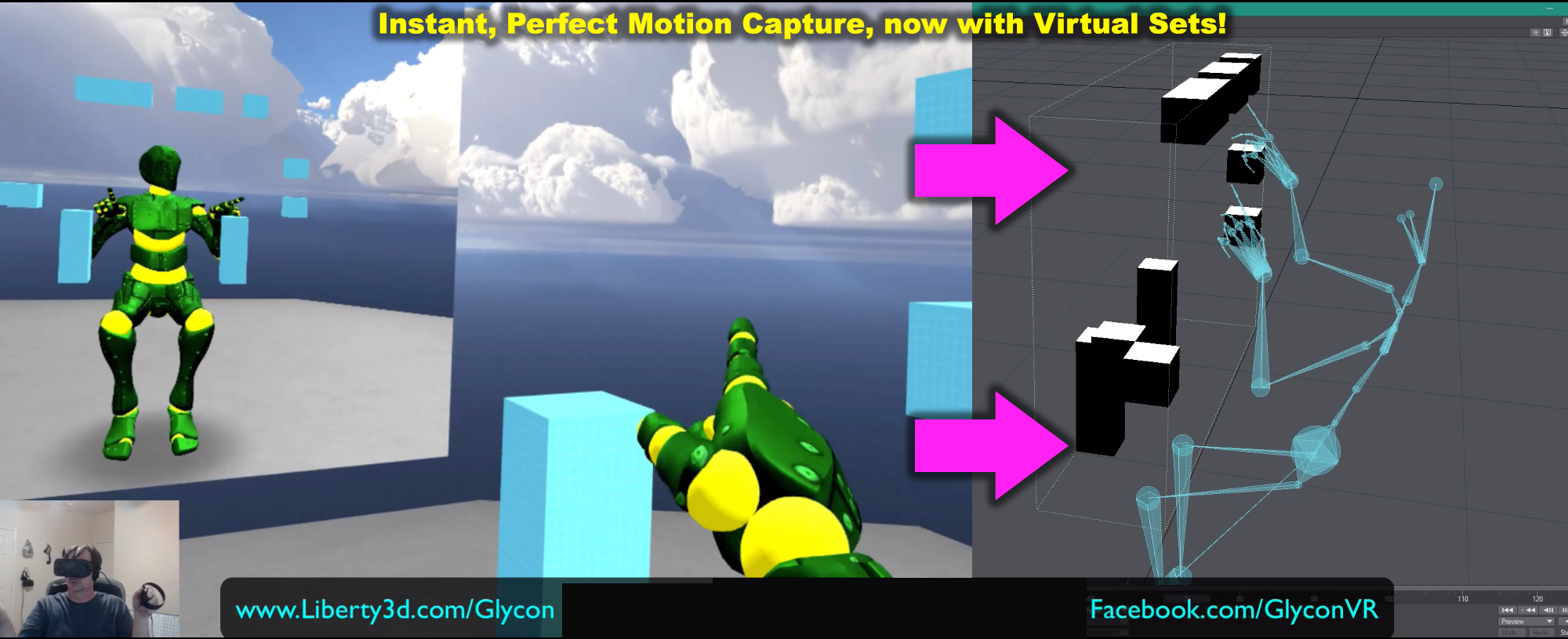
Glycon uses your VR rig as a powerful motion capture platform, for games and animations. It mixes your movements with a full body IK system, and exports FBX files from that. Imagine having your own high precision motion capture system that's as easy to use as a video...
pale wren
I don't have very but thank you
hollow perch
There's a free version actually
says it doesn't support extra trackers but might work for a basic setup
 plucky relic
can someone help me find the models for this
 sour bridge
Im new to avatars. Im trying to override my crouch animation, the idle crouch animation is always stuck at default but when I move its the correct animation that I overrided it with
thick frigate
so; I've spent a good few hours trying to figure out how to make an empty gameobject animate a longer animation, but to no avail.
if anyone would be willing to help I'd probably owe them my life tbh
wary parcel
And how long is the animation?
thick frigate
about 18 seconds
all it is is showing three different particle effects in different bursts
wary parcel
Scene animation or Avatar?
thick frigate
avatar? the particles I'm showing/hiding are inside the avatar
unless you mean I'm animating for an avatar as opposed to a world, then yes an avatar
clear yew
What isn't working about the animator you have? Some of the settings are a little bit odd but what actually breaks here?
thick frigate
When activating the gesture, only the gesture itself plays
clear yew
Have you confirmed the animator works in play mode?
clear yew
Is there a way to get a dance and object show/hide animation to play on avatar load then go back to the idle?
Tried this and it works in unity, but not in vrchat
slim sparrow
You can't modify your animator controller on humanoids
You should have an animator on your Body and one on another empty game object. The empty game object has some objects underneath and plays an animation
The Body's animator just has the mesh renderer disabled, and is enabled right before the empty game object's animation ends
 summer hull
my question was how would I go about replacing animations on humanoid rigs? I mean the generic run/idle/left/right animations
 muted prairie

Creating custom animations for hand gestures and emotes in VRChat
summer hull
thanks!
muted prairie
Make sure to duplicate the controller first
The one called CustomOverrideController
And then replace the anims on that one
 hardy compass
Hi! I'm Kind of new to VRChat and Unity And wanted to ask for advice or good resources so i can create my own animations for a character. For reference I'm thinking of doing the Reaper 'It's Raining Men' Animation. Seems Obnoxious, But wouldn't be spamming this.
clear yew
guys someone fly animation ?
 past flame
hello can someone here animate guns ?
clear yew
ive a question for the syncing.
are animations key frame synced?
and does this apply for sound too? like (i play a long sound file, someone joins and his client syncs with the server timestamp)
 spring nova
Not on an avatar @clear yew. The only thing that is synced is what gesture or emote you're doing. What results from doing those is not forcibly synced
clear yew
im talking about worlds
if i have an object with an animator on there, and that animator plays a sound. is this sound then synced for new joining people?
hollow perch
No, is this for music? How many sounds do you have?
clear yew
its for SFX
hollow perch
But the SFX are long? Or you just want new sounds to be synced
clear yew
because i can not change pitch based on speed, bc scripts are disabled. i need to prerender them
hollow perch
You probably can actually using UI Buttons
clear yew
my train starts accelerating, its starting a soundfile,
after 3 minutes someone else joins,
i do not want that his client is playing the soundfile at 00:00 instead it should play at 03:00
is this possible?
hollow perch
Empty game object. Add a Button component. Also add a simple animator with two frames doing nothing like scale set to 1.0, looping turned off. At 0:00 add an animation event and call Press ()
That's how you do auto clicking buttons
clear yew
so for an resolution of 1/10 i need 10 buttons per stage?(stage is 1 decimal)
value for sound animation script is between 0 and 7
hollow perch
You can also use a slider component for exact values
ok so here's a simple thing I made. https://cdn.discordapp.com/attachments/497710852103995402/546884116059127808/SyncAudio_v0.1.unitypackage
clear yew
its a cs script... they dont work on vrchat
hollow perch
It's maybe not exactly what you want but it takes an audio bank and makes sure it is synced to anyone on world join. Requires the masterlocal prefab from prefabs database
Editor script
clear yew
audio bank? i didnt saw that as a object in unity
hollow perch
It generates an animator to handle playing each audio clip.The entire purpose of that animator is to keep track of where you are in the sound file and sync it to new joiners
And auto skip to next song (it's for music) but you can edit the animator controller and delete the connections
clear yew
where to get the master local prefab?
hollow perch
Vrc audio bank. I just use it as an array of audio clips. You can delete it after running the script. It adds a button in the tiny gear menu of vrc audio bank to convert it to an animator
#world-development prefabs database
In pinned messages
It's a big google doc with tons of useful goodies for world authors
hollow perch
Ok so basically put all your sound effects you want synced into an vrc audio bank, set the audio source and then click the gear menu. Oh one other thing: it only supports playing one at a time. (It was designed for music).
Well I guess you can run the script multiple times and generate one for each audio source you have...should work
clear yew
i will just have 1 audio source globally
hollow perch
And then to play a sound, you run a custom trigger on the generated object
clear yew
oh hai
spring nova
Oof do not use vrc audio bank
spring nova
A regular audio source
clear yew
are they synced for new joiners?
spring nova
No, that's the purpose of the button
spring nova
But audio source isn't synced either, not like it would give you anything there
Audio bank I mean
spring nova
That's not what it's meant for.
hollow perch
Phasedragon its a simple hack
clear yew
because there is no scripting allowed either js or c# this is a workaround
hollow perch
Sorry I was explaining my script. It disables the audio bank component
It's just my script is weird and wants a disabled audio bank component
It uses it to generate an animator that syncs audio
spring nova
Yeah an animator is what I'd use too and then a button to call into an audio source but where is the audio bank involved
hollow perch
Just the input for the script
It's why I never submitted this thing to the prefabs database
clear yew
it doesnt seem to work
hollow perch
I need to get off my butt and finish it, add a ui and documentation
clear yew
i have 1 test button, that starts the train(the fakeworld rotation animation) and also does "Sound SendRPC(Play)"
hollow perch
Don't use that. You have to now execute custom trigger on the AudioClipSelector
clear yew
ahhhh
hollow perch
That's how it makes sure it gets synced
clear yew
sorry my bad
hollow perch
Np, it's super confusing and no readme
clear yew
i read the readme
spring nova
Are you splitting it up into multiple audio sources?
clear yew
hollow perch
No, I use an animator to drive a data storage that on world join runs another animator to a slider that sets AudioSource.time
hollow perch
None of those @clear yew it's in the basic menu just activateCustomTrigger
Oh derp it's not that one
It's one of the other objects has a vrc trigger
Look one level up
With a bunch of custom triggers I think
clear yew
ahhh
hollow perch
Don't activate that vrc trigger
That object just runs the sync once on world join
So it needs to stay turned off until master local syncs
clear yew
i got it
hollow perch
Oh crap I wonder if this even works with all the master trigger shenanigans going on
clear yew
then just ACtivateCustomTrigger to "AudioClipSelector (VRC_Trigger)"
hollow perch
And it should have a bunch of triggers one for each sound file
clear yew
it just shows me one
i just have 1 file rn
"REceivers do not have Custom Tirggers which share names."
hollow perch
Lemme check and screenshot what it should be
clear yew
000 is my first file
hollow perch
Crap it's an AnimationTrigger not a vrc trigger
clear yew
so the trigger for me is "000" or "anfahrt"
hollow perch
yeah the name of the sound file
AudioClipSelector, animation trigger, exact name of sound file
clear yew
lemme test
works ❤
is anyone here willing to test it with me?
hmm
@hollow perch it isnt synced
my friend got it played back at 0:00
hollow perch
Make sure the trigger you use to play it is unbuffered @clear yew
clear yew
ahhh thanks ❤
plucky relic
tbh i rage quit trying to animate a gif into vr chat
its this one if your wondering
clear yew
this all reminds me of hammer editor
with all that logic_ entities
bc, scripts currently dont work in vrchat
we have to do a workaround with triggers and stuff
hollow perch
Working with triggers in vrc is a lot like building stuff in minecraft. Vrc triggers and animators=redstone, UI Buttons=command blocks
clear yew
😂 fine now im gonna build my "redstone" computer and spam the event queue
plucky relic
@clear yew can you help me make tat animation
clear yew
tatß?
plucky relic
i mean help me animate the curb check emote i want to make
clear yew
animate in c4d?
plucky relic
i guess yea
clear yew
i only know how to animate with espresso
plucky relic
hm can you link me a vid on how to animate it
clear yew
idk, im currently modeling a door
plucky relic
i mean just in animatio all togeter because i allready have the model
clear yew
maybe we should move to #3d-modeling
 hot oxide
I'm not yet thinking about how to do it, but does anybody know if it is is possible to have chained gestures, for example so that hitting down on the trackpad would make you frown but hitting it a second time would make you frown harder.
hollow perch
you can do some tricks with combined gestures: for example, hitting down on one trackpad while hitting something else on the other trackpad
but making something look good is quite difficult since they can add together at times if they are different shapes, or the right hand will override the left hand if they are the same shape
so you would have to play with various combinations to achieve a good effect, like make all other gestures set frown to 0, and like rocknroll sets frown to 100. Then it will only frown if you hold rocknroll in the right hand. In the left hand, have another gesture that sets a different frown blendshape to 100, and have every gesture except your normal frown set that blendshape to 0 so it will get cancelled out unless your right hand is on frown
@hot oxide
 lone dirge
anyone have any good guides on how to get an emote to toggle a mesh on and off?
hollow perch
@lone dirge Check out the prefab https://github.com/Xiexe/VRCInventorySystem - you can generate something and modify the example files

GitHub
An Inventory system that is easy to set up for your avatars, using emotes. - Xiexe/VRCInventorySystem
clear yew
So I've started work on a particle animation but I'm still pretty new to them, is there a way to have a particle system emit a burst at specific key frames? Without just toggling the whole system(and making any currently rendered particles vanish) ? Trying to get it to emit a burst on a certain beat 👌
clear yew
You can have the duration of the particle system be very low.
0.1 duration
Looping on
emission set to burst
0 rate over time
Then animate the emission module on from default off
So every time the emission module is on, it will hit the loop and fire, then you can turn the emission module back off
It won't loop again, and your particles will stay alive
0.05 duration might also work
Lower than that I think is problem
clear yew
Perfect, thank you so much!
summer hull
how would I use an animator on a generic avatar inside of an empty?
clear yew
i am trying to edit a copy of the idle animation in unity and when i edit anything period, it freezes up all animation for idle
i am just trying to change lower leg twist in/out to solve a full body issue
lone dirge
@hollow perch thanks for the link, though it didn't work for me on first try
need to tinker with it probably
 grizzled oracle
ima furry
summer hull
awesome!
lone dirge
is there a way to add a constraint on a joint to a rigid body such that it wont move after a certain amount?
like if i want rotation in the second arm to stop after 90 degree's in the y direction when its following the main arm
hollow perch
you might want to look into configurable joints. I think they might have a way to limit motion
should mostly work like fixed joints
lone dirge
thats a lot more numbers that i dont understand lul
clear yew
Whats the best way to find the exact frame an audio beat is on to keyframe it?
i know a lot of people just go by ear
there is a way to let an animation play and record and you can insert keyframes in a fast way on each beat
and then use those keyframes as reference
i forget the exact way someone i know was doing it, but in general i think it's done by ear and patience
I've been using audacity to locate the "time" but audacity also has a view frames thing but it only has 25 frames and 75, no 60
maybe just notice the time and count frames given 60 per second
16.67ms per frame
yea, I'll try that, thanks!
plucky relic
can someone link me a way to animate a character
hollow perch
There's this mocap solution if you want to make your own 😉 https://www.liberty3d.com/glycon/ - they have a free version
Glycon uses your VR rig as a powerful motion capture platform, for games and animations. It mixes your movements with a full body IK system, and exports FBX files from that. Imagine having your own high precision motion capture system that's as easy to use as a video...
or if you have a more specific animation in mind...
lone dirge
https://media.discordapp.net/attachments/541888303776137236/568231309953204225/unknown.png
trying to make my armor turrets match my hand movements.

i can get this part to work fine but as far as realism goes, only moving one axis on rotation isn't good
so im trying to make it so that i can rotate another axis on another bone
like this https://media.discordapp.net/attachments/541888303776137236/568231497429942285/unknown.png

and then have the turret rotate around its single axis i put like the first pic
the parameters in rigidbodies dont seem to be able to keep the two bones connected thoughhttps://media.discordapp.net/attachments/541888303776137236/568231825940676618/unknown.png

and playing around with the freeze position constraints doesn't work either, as it only allows position movement along the turrets origin, not in conjunction with the bases
hollow perch
I'd suggest using a configurable joint and playing with the settings on the joint like free/locked instead of the rigid body itself.
lone dirge
could setting the connected body of the turret to the turret platform help instead of both being linked to the hand?
clear yew
@lone dirge if that turret can move on a ball, and has free movement, it would probably look good if you used a look at me object with dynamic bones or use aim ik in final ik
what do you mean by not being able to keep the bones connected?
 tough cargo
So im gonna cut to the simple of it, im trying to make an animation that would make my avatar invisible + my name. I already have the stretched out sphere over the model to attempt to cover the nameplate and has an invisible shader on it, however, im a slight bit the dumb and have no idea where i would place it on the hierarchy so it would follow me, but not be disabled when i make the animation hide the body
clear yew
if you hide the body (not the armature) it will still stay in place
so put it either in the armature attached to chest or hips, or have it outside the armature, but not in the body just under the main character thing
@tough cargo
clear yew
yea that should work, but this would be better
clear yew
otherwise it might move the sphere when you sit or move that part of the armature
and yea
tough cargo
Got it.
clear yew
for a rotate object transform animation, is there a way to make it spin in a direction until told to stop? (and have the rotation speed up during the animation?)
currently working with a particle system under an empty game object, so animating either would work
lone dirge
@clear yew since the rigidbodies ignores the armatures hierarchy, the bone that I want to rotate the turret hull doesn't move along with the bone I want to rotate (the turrets platform) that would give the turret a solid 360 degrees (though I'd like to add a constraint where it can't rotate a certain angle and then clip my head)
Also the Ik sounds good but it's not free
Aka F
clear yew
I'm currently designing a prop that'd extend one way with a given gesture and then do the same the opposite way with another albeit independantly. Would it be possible to do both animations at the same time? I imagine so but it seems like animations don't like playing at the same time.
clear yew
Depends on if they're conflicting animations, such as if they're trying to animate the same object property to a different value
It'd be a single prop with multiple moving components. Basically, it's a staff that can extend both ways.
But I'd like for either end to extend independently but also work at the same time.
They'd be affecting different parts, not the same one.
clear yew
Should work fine
 odd sphinx
do you guys also having problem in the particle system world?
I tried making a world particle animation that is attach to a object
and the object is attach in my avatars hand
whenever i activate it via gesture the world particle bugs out
the world particle fallows the object in the idle mode or prone mode
but whenever i rise the avatars hands via vr or holding a pickable object the particle is not fallowing the object
that i animated
i unity it works fine

 tame patio
Anyone have experience with syncing particle systems with music?
modest rover
does anyone no how i can make a plane act like a piece of paper in unity?
 lament prism
@modest rover do you mean adding a picture to the plane?
lament prism
you just import a picture and then drag it onto the shader, and then go and remove the mesh collider from the plane
as for moving them like that, I don't know, that sounds like you'd need to add bones in blender and that involves rigging.
modest rover
ok thanks ill try doing that
 fierce bane
@modest rover ~~if you want it to fly like a paper plane there are three ways I can think of:
- animate it
- turn it into a physics object with a low gravity setting
- use a mesh particle with gravity and force over lifetime~~
I misread what you were asking, ignore that >.>
You'd definitely need to either add bones to a more complex shape than just a quad for it to fold and bend properly, as well as weight paint and rig. Or use Unity Cloth (still needs a more complex shape than a quad).
lament prism
@fierce bane think you could help me out, I believe you were the same person who helped me with this same problem last time
I forgot how to make an animation play by default
think you could walk me thru that one again
fierce bane
like on load of an avatar or what?
lament prism
like
I made a simple animation where a lighter opens, but I want to animate that whenever I activate it via a gesture
lament prism
@ebon atlas you mean adding gestures or what?
 ebon atlas
I have I have this deku avatar and I want him to do the orange justice while there is a picture above him when he was young bopping his head back and forth
Ye
lament prism
https://www.youtube.com/watch?v=vrY3FgpzLRY @ebon atlas

Subscribe if you haven't and click Like if you enjoyed the video! Helps me out a lot! Hello VRChat, welcome to my very first Tutorial Video for VRChat! I am ...
ebon atlas
And put music in one of my gestures
lament prism
watch this, it's a good tut on basic gestures
ebon atlas
Yeah I saw that
But I’m still confused
I mean I don’t know how to put the picture above
lament prism
use a quad
ebon atlas
Quad?
lament prism
drag the pic onto the quad, get rid of the collider mesh
ebon atlas
I’m sorry I’m new
ebon atlas
Wait wait slow down I’m not at my house yet I was just wondering
fierce bane
Make a controller that has a blank animation and then the one you want, blank is default state, one you want is transitioned to.
Have the animator off by default, enable animator when you want it to play. Lighter would be below the animator.
This is an example image from something similar: https://i.imgur.com/w3sL2xz.png
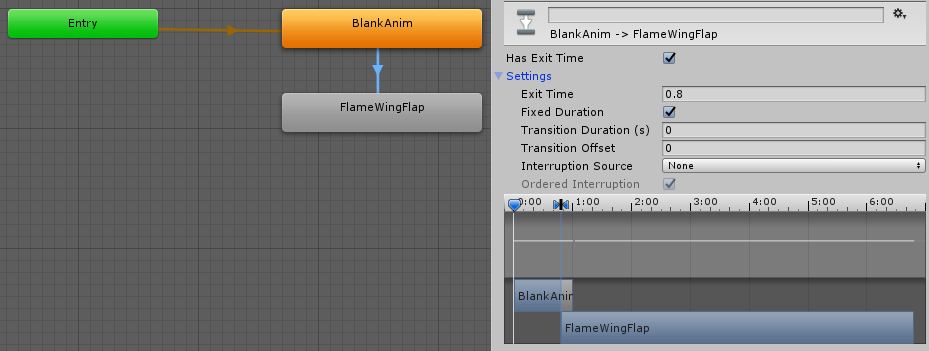
the inspector on the right is for the transition from blank to your actual animation
lament prism
how do I link them?
fierce bane
as shown in that inspector my blank anim is 1 second long
So the settings are based on what I needed for this specific animation (0.8 seconds before it switched over)
lament prism
lament prism
whew this is kinda confusing
fierce bane
oh and on the left side where it says Base Layer click the gear and make sure it's set to override (it should be by default)
er... "Blending" should be set to override, my bad
lament prism
Ohh ok
So wait
why do I need the "blank anim" then?
I want the animation to automatically play whenever I use it as a gesture
fierce bane
wait...do you want it to play as soon as you pull out the lighter or do you want to flip it up on a gesture?
ebon atlas
Himeki could I pm you?
lament prism
I want this animation to play as soon as I start the gesture:
fierce bane
but do you want that to happen while you're already holding the lighter or do you want that to happen as soon as you pull it out?
fierce bane
so as soon as you take out the lighter with a gesture it also plays that animation, correct?
fierce bane
exactly what I showed you then, yes
fierce bane
the blank anim is the state it returns to, allowing you to have that exit time set as a delay, you'd probably want it around 0.1 - 0.25
fierce bane
when you disable the animator it will go back to the default state, the blank is there just to prevent some...weirdness by unity
like jumping back part way through and acting strange
fierce bane
set transition duration to 0
clear yew
It shouldn't loop if you disable looping
fierce bane
and make sure to select your animation and have the loop options off
yes, and have the animator disabled by default, and enabled by a gesture, that'll turn everything on
lament prism
ahh yes alright this is all making sense now!
thank you so much again
actually
the animation that plays is realllly fast
can I slow that down?
fierce bane
@ebon atlas a quad is an extremely basic shape in Unity, it's 4 vertices (square by default)
So if you apply a material with an image as a texture to the quad, you have a square image.
I don't accept random PMs though...I get too many of those
lament prism
fierce bane
change the speed setting there
fierce bane
think of that as a multiplier on the speed value
lament prism
ah
fierce bane
so 1.0 is full speed, while .25 would be quarter speed
ebon atlas
@fierce bane could we pm?
fierce bane
I just said I don't accept random pms >.>
clear yew
Is your lighter invisible by default and your gesture makes it appear btw?
clear yew
So instead of animating the animator on for the lighter with behavior.enabled, you can have the animator on by default, and animate the object on
clear yew
This will give you a cleaner return to defaults
fierce bane
they're talking to blank
ebon atlas
The reason why I want to talk to himeki is because he looks like he’s more experienced
clear yew
Sometimes if you use behavior.enabled on an animator and stop using the gesture in the middle of the clip, returning to defaults is weird.
ebon atlas
So that’s why I’m asking for him to pm me
lament prism
@ebon atlas I know how to animate basic gestures.
You asked for help and I'm willing to help you.
clear yew
So in this case where you can just turn on the object with default on animator you avoid needing to consider the edge case where that happens
lament prism
@clear yew I don't follow?
lament prism
not with a quad
ebon atlas
Well I saw someone do a gesture
They were doing a orange justice and a gif
So
I think it’s possible
clear yew
@@lament prism if you have a default off animator and you turn it on via behavior.enabled 1, even if your states has write defaults selected, depending on various factors, if you spam the override you can mess up the return to defaults until the animator runs again. In the case where you have a default off object, you can have the animator on by default and just turn on the object instead of turning on the animator. This will reset the animator more consistently because the default being written by the gesture is is.active 0 and not behavior.enabled 0
fierce bane
playing a gif is usually just displaying multiple images with material swaps
clear yew
You can also do it with a shader pretty sure
fierce bane
oh that's true, a multi-panel image using a shader that flicks through sections...
lament prism
I'm still not following too well sorry
fierce bane
could do the same with an animated texture particle instead
lament prism
are you saying if I spam the gesture it will break?
clear yew
Yes, depending on the length of your states and how fast you are spamming
Behavior.enabled 0 shuts down the animator in an ungraceful way
fierce bane
to clarify Blank. Disabling the entire object with the animator is safer in most cases.
If you don't NEED to manually disable the behavior, don't
lament prism
how would I manually disable it anyways?
clear yew
Behavior.enabled 0
fierce bane
you need either an animation that already has the behavior in it, or to do it yourself
clear yew
Which is written if you use behavior.enabled 1 with a gesture
Because your gestures write defaults
fierce bane
they're still pretty new to animation @clear yew
clear yew
Basically don't use behavior.enabled
Animate on the object
Have the animator on by default
clear yew
Yes
clear yew
The animator which flips your lighter
fierce bane
https://i.imgur.com/2ekJuxm.png This is the "behavior" checkbox lindesu is talking about.
If this is disabled instead of the whole object you have to use "behavior.enabled 1" to enable it instead
 fierce bane
so you want the whole object disable for your setup, not that one
lament prism
Yes I understand now
fierce bane
in certain cases you DO need to use it...but not this case
clear yew
Yee
lament prism
so basically, just make sure you disable the animation via the object?
fierce bane
that was why I needed to clarify if you want to hold the lighter and activate the flip with a gesture, or just pull out the ligher AND flip it at the same time
lament prism
Yeah the latter is what I want
pull it out and flip at the same time
I assume that's what I've done
fierce bane
because pulling it out and flipping it can just disable the whole object, but the gesture flip would require behavior toggle
yes
lament prism
I'll ask more questions most likely once I get to that
rn I gotta find a sound for it, and I was even thinking of having fire particle effects playing as well.
hollow perch

Save that anim file to your project, click on it and copy the keyframe from the Animation window
Unity won't let you make a Behaviour.Enabled key without copy and paste
fierce bane
or without editing the file as text
hollow perch
Sure, using the Component id number of the Behaviour class. That's how this was originally generated
lament prism
@fierce bane if I want to add fire effects when the lighter pops up how would I go about doing that?
i found a free fire pack in the store, however I don't know how to animate it with the gesture, mainly since the lid on the lighter is closed.
@hollow perch how do I apply that animation with the gesture I just made?
fierce bane
@lament prism make or add a particle animation as a child of the lighter, disable by default, enable at the end of the animation you already have and it should wait till it's open to activate
or if a world sim particle, put a rigid body in and put the particle system outside the armature under a fixed joint, assign rigid body to fixed joint, reposition particle system to sit where it should
@lament prism you don't need that animation with what you're currently doing. Lyuma was just linking the behavior enabled we were talking about
lament prism
oh alright
also when using the prefab that came with it, it turns out to be this big, is there any way to downscale?
fierce bane
try scaling the top level
fierce bane
then it's not small enough, keep scaling it down
but as long as everything is scaling that's your way to adjust it
lament prism
I put it to 0.0001 and it's still way too big
fierce bane
is it not scaling everything when you set the scale?
fierce bane
if not then you'd have to adjust all the individual parts
they may be set to local scaling
they also may have specific speeds/velocity that needs to be adjusted, etc
lament prism
is there any way I can just make my own particle effects?
with the same type of features?
fierce bane
sure...just make particle effects
another thing to learn
Intro to particles:
https://www.youtube.com/watch?v=FEA1wTMJAR0

Udemy: http://bit.ly/BRACKEYSMEM Everything to know about the Particle System in Unity! ♥ Support Brackeys on Patreon: http://patreon.com/brackeys/ ● Learn m...
lament prism
ty
 young hearth
does anyone know why eye animation doesn't work? is this the correct way to apply eye animation in unity? one of my friend says mmd models should've already came with eye tracking and that i just need to make sure the rig has LeftEye and RightEye which it did. But when i upload it into the game, she doesn't do it.
slim sparrow
@young hearth Animation components don't work ingame
young hearth
oh i see
slim sparrow
Your mesh has to be called "Body" and it needs to have at least 4 shape keys for the built-in blinking to work
The thing next to your armature
young hearth
oh uh huh
slim sparrow
It is called Body, but it also needs 4 shape keys
And you also need LeftEye and RightEye mapped in the humanoid rig
young hearth
yeah i doubled check that and its in there
slim sparrow
Do your eyes move around?
Can you post screenshots of the humanoid rig configuration (the head part)?
Basically the thing I just posted
young hearth
no her eyes doesn't move around thats the problem for some reason
well not the previewing
but in-game it does move a little bit from side to side and up down
but no blinks
slim sparrow
Okay, well then the eye tracking is clearly working
Just the automatic blinking isn't
young hearth
mhm
slim sparrow
Make sure that when you generated eye tracking in Cats, you didn't tick "disable blinking"
Can you go to the Body mesh in Unity, expand "Blend Shapes" in the Inspector (right sidebar) and set vrc.blink_left to 100?
Does it actually make one or both eyes blink?
young hearth
yeah i made sure the disable blinking is uncheck
the body mesh in unity...hm...
@slim sparrow i don't have vrc.blink_left, could that be it?
slim sparrow
"Blend shapes" isn't expanded
slim sparrow
You also have quite a few materials, consider manually atlasing or material combining those for optimization reasons if you go above 10
young hearth
it is apparently at 0
slim sparrow
Okay, but what happens if you set it to 100? Does it blink?
young hearth
i'm not sure let me press the preview
slim sparrow
Could you post screenshots of the whole window with blend shapes expanded and the blink left shape key set to 100?
slim sparrow
Do you have any custom emotes or gestures on your model at all? Anything in "Custom standing anims"?
You should post a screenshot of the blend shapes list
young hearth
nope, i believe this is my first time and i haven't visit those yet
should i do anything with the lowerlid? too
slim sparrow
I don't get it but ok
In the screenshot the values are 100 but the eyes are open
Lowerlid is supposed to do nothing so don't worry
slim sparrow
If the value is 100, it should be blinking
young hearth
very strange
slim sparrow
Do you have an "Animator" component on the Body by any chance?
Probably not I guess
What kind of animation controller is in the animator that's on the main avatar? The "vrchatblackmiku" object
young hearth
none actually
slim sparrow
Alright
Well honestly I don't know, what you could also try is this blinking prefab I made. https://github.com/HugoZink/RokksPrefabs/blob/master/Blinking.unitypackage
GitHub
Contribute to HugoZink/RokksPrefabs development by creating an account on GitHub.
young hearth
oh thank you!
slim sparrow
Just add an Animator component to the Body, then assign the "BlinkController" controller in the controller slot
Then if you press play it should be blinking after a few seconds, and ingame too.
young hearth
i'll test this out
@slim sparrow avatar says none under blinkcontroller, is that okay?
i'm going to upload it now
slim sparrow
Yeah that's fine
young hearth
@slim sparrow omg it worked! you're the best!
slim sparrow
Alright, cool
young hearth
@slim sparrow i'm so proud of myself! Animations working and physics working correctly!~ and is my first avatar~ thanks to you she is now completed~
slim sparrow
Sweet! Looking good
 agile condor
i have a particle system attached to my avatars hands and I have it set that when I press the rock&roll button on my controllers it sets the particle systems to active and opens the hand but only the hands open when I press it ingame
 crude valley
Is the particle system set to simulate in world space by any chance @agile condor
torn pawn
crude valley
You can but if you want it to simulate in world space then the video Yuumi posted will help you set it up properly
agile condor
ok
clear yew
is there a way, to call VRC_Triggers from an Animation?
 versed tree
so aparantly the latest vec update changed the ways you have to add prop animations and all the tuturials iv used dont work anymore. any ideas? all it is is a simple cup prop. no particles
slim sparrow
@versed tree nothing changed
If you are having issues please describe your setup (preferably with screenshots)
clear yew
is there a issue
when calling "USeStation" from an Custom event
somehow the player sits down, isnt able to get up and the camera is glitched
slim sparrow
I think you can do that but I wouldn't recommend it. I believe you can use animation events to call VRC_Triggers
clear yew
clear yew
its still glitching
and also, StationExit doesnt get called, when the player hits "respawn"
versed tree
This is what im working w rn. i have the animation presets and stuff there, but i cant fugure out how to get the prop to appear when i do my fist animation
clear yew
It needs to be off by default and you animate it on with an animation clip in the fist slot of your override controller
@versed tree
clear yew
What did your animation look like?
versed tree
this without the hand making a fist, when i hide the cup on the main armature tho it never shows for the custom anim but when i do show it it bugs and doesnt let me upload
clear yew
Do you have a duplicate avatar? Looks like your main is stuck in motorcycle pose. What is on the mug object? It being on shouldn't stop an upload
versed tree
oops this aint a duplicate..the mug object is just a prop w a singular bone i think? should i remove the bone.
should i change rig animation type on the cup to none??
clear yew
You shouldn't need to remove the bone, bone is just an empty game object
versed tree
ok. hm i cant figure this out. do i need to enclude the cup in all my animations as unticked??
clear yew
No should be ticked on. Your animation looks fine
Can you enter play mode with the mug on?
versed tree
hang on my vrchat sdk is glitching oof
clear yew
And can you screenshot the build panel thing with your avatar highlighted so can see what might be preventing upload
Where does the upload fail btw
versed tree
crud hang on a mo, forgot to decimate my model lol XD
alright i bugged it out too much. retrying
😅
i did it tysm for the help! ❤
versed tree
the cup wont go away now no matter what unless i use my right hand. the cup is on my left,
 wintry dune
Maybe someone can help me here with this issue. So I'm trying to add an animation to my avatar, one that's moving on idle. I watched a tutorial by Rantis and managed to get as far as putting the animation on the body of the avatar. So the animation technically works but it also sinks my avatar into the floor on play mode and I am sure that's not suppose to happen. Anyone here can give me an idea of what I might have done wrong or missed?
clear yew
so who can help me get these animations working😅
 dreamy osprey
why does unity reset the position of the bone i just moved?
im making an animation with mouth bones and wen i move the upper lip it goes back at its original position as son as i click on something else
ok, found it, the mouth bone was mapped on the rig
clear yew
can you trigger VRC Events with Animations?
wintry dune
And I figured it out now. Somehow my original avatar just broke, tested that out by adding another copy of the model to the scene.
clear yew
@versed tree oh yeah uh, fist is not a good override to use
It will not return to defaults frequently
Your cup will stay out until you clear the gesture with another one
young hearth
For the cat ears in-game, how does it work? does it require a bone for it be used? Like for example some cat girl avatars you can use Shift + F4 and it will make her cat ears twitches. If i were to apply a Cat ears twitching animation, will it work on my model avatar even if she doesn't have a bone or physics?
 mortal abyss
can someone help me with a animation i am trying to add a second animation to one avatar pls
clear yew
Is it possible to mirror animation in unity?
I have laying idle pose on side, but id want it to be on other side
young hearth
i believe that you can, but never done it before.
clear yew
Mmm, i guess ill search about it later.
Now other question is, what about my avatar being offset for others (but is fine for me) while having custom prone idle pose?
young hearth
i have no idea.
clear yew
Well, about the mirror animation. It was super simple. Just click on the animation and check "Mirror" x')
About the offset thing- still cant find a fix for it
young hearth
@clear yew nice!~
 narrow sage
trying to have a particle animation play whenever i activate a gesture but i'm not sure how to get it to work. when i test it in game the particles only show up once, after that i need to swap to another gesture before the particles show up again. any tips? tutorial recommendations?
narrow sage
when i swap to any gesture except for idle (F1) and then activate the particle gesture the particle shows up. i use my F1 to reset my character and stop all the other gestures so it sucks that the particles stop showing up when i swap to it :p
clear yew
I think that the view point is moving only on Y axis.
But for me the model gets dragged to the side so i have head on viewpoint, but for others the model isnt getting dragged
If that makes any sense to anyone
Someone had similar issue?
(Back to the pose idle animation)
clear yew
Im too dumb please help ;x
Ping me if someone has a fix for it, though if ill figure it out ill post it myself
 deft mountain
Hey all! I just made a chair with a custom sitting animation, but it still lets players move their upper body. Any way to make it so that the sitter completely adheres to the animation? I've seen this done on the couches in dance worlds.
past flame
can someone animate guns if yes DM me please
 mental needle
both frames are the same, but yet in the middle of the animation it starts going into finger gun?


all frames the same but it keeps trying to make the hands go into different positions
it cant stay still
nothing i do will fix it
clear yew
@whole pawn ping
clear yew
@mental needle you probably need to make the tangents for the curve constant
@clear yew nope
what about "Animation Sync" VRC Script from the SDK?
Nop
is there a way to animate material offsets?
Offsets? So a material change, or?
yes
The values in the material
i want animated text
with C# SCripting you can do it
Yeah you can animate material changes
i currently only can change text
You can also use a texture sheet
which of them is for the offset?
The reference are the different materials
yes i already change them out
but i wish i had the ability to scroll them on the screen/matrix
What would be the best fur shader for avatars?
 icy hare
Hey guys, I recently made an animation with a particle effect using rigidbody and fixed joints, so that the particle effect would follow my hand around. I have a gameobject basically that has the particle effect inside it, however with the way I want the animation, I have to hide the gameobject and the particle effect before uploading, so it'll work properly in-game. But it doesn't work basically, I don't think it works right if you hide the gameobject or particle effect, the effect appears but it appears wherever it wants, it'll still move around when I move my hand though.
Is there a different method I can use where hiding the game object or particle effect doesn't break the animation?
 winter sundial
Where does one usually find animations? Such as dances
clear yew
hey caffeine i found some stuff for u
winter sundial
Thanks for the anims!
clear yew
np
clear yew
😂
@icy hare you need to keep the fixed joint on always and disable the child object with your particle effect on it
icy hare
I didn't really touch the fixed joint though. I disabled the gameobject parent of the particle effect as well as the particle effect itself. Rock and roll activates the game object, while hand open activates the particle effect, so it'll only work while rock and roll is active
Maybe I should explain the setup properly
clear yew
So the fixed joint never has a parent that is off?
icy hare
Wait no I think it does, because the gameobject is what's following my hand, and I have to disable that to get the animations I want to work properly
I did read something about fixed joints breaking if you hide the object, but wasn't too sure
clear yew
Joints won't stay connected when the object is off, which creates an offset every time it's turned back on
That's why your effects are tracking when enabled but show up in strange spots
icy hare
Yeah sounds like what's happening to me
Is there a way around it? Or another method I can try?
clear yew
Just introduce more child objects to the joint and use those for disabling
Just keep the joint itself, and parents of the joint, on
icy hare
Ah I think I get you
clear yew
You can enable and disable children of the joint as much as you want
icy hare
It's the first time I've used fixed joints and stuff
Alright I'll give that a go later :) thanks
clear yew
np good luck
icy hare

clear yew
mess.dll
 dull wedge
Anybody have any idea of why my laser sound effect plays in Unity but not VRChat?
https://youtu.be/gFXHaIV2q4g https://youtu.be/2Rrohe3wkUA

 clear yew
has anyone an idea, what "VRC Animation Sync" does?
VRC_SyncAnimation
does it sync only animation, or the Animator too?
torn pawn
@dull wedge my guess is too many sound sources, use audacity to create one track
or at least reduce the amount of them, if you have like 4+
dull wedge
actually, i found the issue. it was one of those bugs where i just had to completely replace the audio source.
spring nova
@clear yew yes it syncs animators, both the parameters and the state/time. It's not really that good though, usually it's better to manually sync stuff by broadcasting parameters, unless you're changing those parameters very frequently to the degree that it would be more costly to broadcast a lot of actions.
clear yew
is there a way to trigger Other Animators with an Animator?
i think you could make a gameobject with an VRC Trigger, and Enable it? ???
i try to write an editor script that makes all that
is there a guide for that broadcasting thing?
clear yew
@spring nova , the Sync Animation script works perfect
my friend had no problems with it
everything was in sync
spring nova
I'm not saying it doesn't work, I'm saying it doesn't work perfectly
and there are many cases where you need it perfect, not just good enough. Moving stuff around visually is fine, but logic stuff is not
clear yew
ahh
Logic Stuff? . i will need basicly an linear logic
like following:
- Lock Doors
- Slowly Depart from Station (move World around the Train)
- Change FGI(Fahrgastinformationssystem/ Station Display) correctly
~~~~ drive ~~~~~ - Arrive at next Station
- Unlock Doors
- Wait for 1minute
repeat for next station
my only queston rn is,
is it possible to call other Animators/Variables/triggers from one animation?
spring nova
animators can affect their own floats, which is great for allowing one layer to affect another layer. But they can't do bools, ints, or triggers. You'll have to use triggers or buttons for that
spring nova
sure can
you can ignore the UI part of them and just use their click events
which allows you to call any function on any script, or do gameobject/transform stuff like reparenting
 violet moss
What causes an animation to play far faster in vrchat than it does in the unity editor?
clear yew
are you sure you were previewing it in play mode in unity editor?
(the editor window only updates when it has to, in play mode the engine renders each frame)
spring nova
you need to have the button on the same gameobject as the animator
so usually instead of having an animator that activates a bunch of different buttons, you can instead have gameobjects dedicated to having their own button, and use an animator to basically be onenable
violet moss
apparently the armature has to be visible at all times just the mesh needs to be turned on via the animation
i was turning mesh and armature on via gesture and it makes the animation play crazy fast in mirror
 paper lantern
Anyone know how to make a loop counter in an animator? So when something has looped or done something a certain amount of times it adds to like an int parameter and then exits the loop once a condiiton has been met
spring nova
depends, are you talking about a world or an avatar?
clear yew
i now have it like this
clear yew
So how would one go about doing an on-spawn animation, and then choose randomly between 3 idle animations?
clear yew
nvm i figured out how to do it
torn pawn
if you mean gestures, then no
 feral tulip


 ruby ridge
Is it possible to have an inventory system/emote switch control a mesh without having to reparent the mesh and break the prefab?
Control mesh visibility that is
 trim violet
Hi there ^.^ trying to get more into animation locking and state machines with VRC and unity but I keep getting animator lockups(slow moving hands like breathing) or bobbing into the ground when trying to test it as an emote. Are there other parameters or frame timing I'm not understanding?
Test it as an emote or gesture*
Because it oddly work in scene in Unity but not in VRC
clear yew
slim sparrow
@ruby ridge with stencils, yes.
clear yew
how to trigger other Animator ControllerS?
i want 1 Main Animation Controller, which controls other Animation Cntrollers
muted prairie
For what use ? Are you trying to enable one ? Just use a custom trigger with Enable component
Or maybe you can enable layers ?
spring nova
or set parameters
clear yew
i need to set vars on other animator controller
do they have to be buffered or just local, if the main animator is synced?
spring nova
animation events can only do stuff to their own gameobject, so just make custom triggers on there and have those activate parameters in the other animators
spring nova
I would recommend local, because if it's already synced you don't want to sync it again.
clear yew
thx i will try it
ruby ridge
@slim sparrow ugh. But okay.
@slim sparrow problem with that is now I either have to stick a sphere around me, which will look terrible with shaders disabled, or match the shape of the underlying mesh, in which case I might as well reparent the mesh
 dim fern
is it possible to send or synchronize animator ints or floats on your avatars animator controller
spring nova
nope, just gestures
clear yew
Just throwing this here cause im actually really proud of it
 cyan chasm
 buoyant dove
how make move cube with pitch sound
 timid prawn
If its with viseme you need to subdivide it in blender and make shape key
If you want it to difforme
buoyant dove
who me
 vapid spindle
@clear yew nice
 dark pollen
can someone help me with an animation. Im trying to animate a material on a particle system but it wont play in vrchat
 lusty delta
I need help with a hover/ floating animation for my avatar
clear yew

 fleet river
whats the root bone
99.99% of my models dont upload do to the fact i dont know what the root bone is
 pliant plank
@fleet river the root bone should be the hips on a standard humanoid setup, unless the hips are parented to something else, which in that case, it's that something else that's the root bone
clear yew
@fleet river wtf
 midnight cobalt
ha
timid prawn
i dont like tihs
fleet river
Personal ptoject
Got this into vr chat last year
Personal av
Now i want to export my work from unity into blender fully rigged for another game for source and garrys mod left 4 dead 2 and tower unite been looking for an auto rigger sfor a few years now
I know more about unity then blender its just drag and drop
Trying to get ready for may the 4th its the last one ill have with my star wars characters
clear yew
@fleet river you gotta be careful with sharing so much personal information my friend. It's good to be open, but it's hard for people to understand. Someone able to help you here might be scared away by personal stuff. I recommend that you make your question short, with maybe some screenshots of what you are doing, and post it in the avatar, avatar-rigging, or 3d modeling channel. You might have to try a few times until someone that can help engages. Don't spam, though. I'd give you more direction but I am not a blender person. Sounds like you need someone to link you a good tutorial
 brittle granite
@fleet river look up rigging characters for games in blender. Most vrchat specific tutorials are misinformed
clear yew
@glass peak are you trying to toggle any object or specifically your main body mesh
 glass peak
My end goal is being able to hide my main character mesh, then unhide a copy which will then perform a dance
clear yew
I think you can perform emotes now directly on the avatar without major scuff
Is it a different mesh?
Or a duplicate of your avatar
I assume it's a duplicate since you want to hide the original
glass peak
Yeah, it's a duplicate
I was instructed to work with duplicates because I want it to play audio during the animation
glass peak
I was going for the Emote Override
clear yew
So, afaik the problem with doing a normal emote is that after a fixed time, ik will start messing with the animation. There is a way to fix this though I'm pretty sure, and you can do the dance + music directly on your avatar without a duplicate
One sec
glass peak
Ah that would be great because this character duplicate-ception is rather confusing
clear yew
@slim sparrow do you need final ik for this to work or can i throw this into a .anim file and it should work for this gent right?

 clear yew
@hollow perch 's idea for like a stub or something would be nice
@glass peak so you need this for it to work
The final Inverse Kinematics solution for Unity.
Update (1.8):
Version 1.8 brings many fixes and improvements to Final IK:
-
Added the first multithreaded AnimationJob versions of Final IK solvers: CCDIKJ and AimIKJ.:
-
Added LookAtController.
-
Added leg s...
1.6 to 1.7.1 is the right version
and this would be an example of an emote that shouldn't scuff out
so you could edit this to have your dance + enable an audio source
and it should work
if you can't get final ik, just DM me and we'll go over the toggle method
glass peak
Alright, thanks. I'll try to figure it out
glass peak
@clear yew I was able to add the audio to the emote, but I am assuming there is a limit on the length of the emote because it cuts short. How would I go about extending the emote duration?
clear yew
by default i made that emote 1 second long. so, there is a starting keyframe at 0:00 and an ending keyframe at 1:00
the ending keyframe on any property determines the total length of the animation
so for your property which enables your audio source game object, just have an ending keyframe at a time that is sufficiently long for your audio
keep in mind that whenever that ending keyframe is, that will make the entire emote last that long
glass peak
Ah, I understand. I am working with an pre-existing dance emote, would it be possible to activate and loop the dance using the gesture system? @clear yew
I tried running it through the gestures but as figured it doesn't show any animation just plays the music, so I guess that kind of leaves me where I was
glass peak
@clear yew Yes I know, I thought that making an emote would do the trick but it doesn't. So I am back to figuring out how to make the avatar duplicate, and toggling the animation that way. For some reason though I am not able to get the VRC_Trigger to work, which I am told to use to toggle the Mesh visibility
clear yew
No that's for worlds
What happens when you try the emote? Plays audio but doesn't dance?
The animation paths are probably wrong
glass peak
Ah, well that's explains. I was following this tutorial https://vrchat.fandom.com/wiki/Toggling_Mesh_Visibility when it told me to use vrc_trigger.

VRChat Wikia
This tutorial will show how to toggle visibility of any mesh on your avatar. You can now toggle the visibility of any mesh at the press of a button on your avatar!
clear yew
Wow that must be really old
glass peak
The emote itself with the audio works but because of the length of the dance the audio is cut short
glass peak
I would like to be able to stop the dance + audio at any time, preferably by toggle
Uhm, I tried that but that dance stops and the music continues
clear yew
Not really possible with an emote
Would have to be a gesture
Also you would need to just duplicate the keyframes of the dance
To make it dance longer
To do it with a gesture you need to use an animator on a duplicate avatar that loops your dancing animation
And enable the duplicate with gesture, hide body mesh with the gesture override
Just animate the skinned mesh renderer to be disabled
glass peak
Ah, I see. Is there an easy way of duplicating the keyframes? Copy-pasting doesn't seem to work. And I guess I'll give the other option a try
clear yew
copy pasting will work if you move the original keyframes over
when you paste its probably pasting the same keyframes in the same position
 plucky skiff
Heya, i have a small question, which is that i wanted to know how i can make my avatar temporarily invisible, including the nametag?
clear yew
you need to disable the skinned mesh renderer on your Body mesh and hide your nametag with an object that encapsulates it, and the object should have a shader on it which masks it
there are various shaders for hiding the name tag
plucky skiff
do you have any recommendation ?
clear yew
@daring frigate has two shaders which do the job, they might share with you. i'm not going to post anything here, i don't know how mods feel about hiding any ui for any reason
plucky skiff
ohh i see.
slim sparrow
Wakamu doesn't play the game anymore lol
clear yew
rip
plucky skiff
ohh thank you i will look into it!!
simply, doing a cylinder - like object which is rendered by that shader?
clear yew
a cylinder, yes
plucky skiff
ok good.