#animation
1 messages · Page 100 of 1
 shy jungle
but not the animation i made to replace "fist"
doesn't work
the fist animation is the one used with <Shift+F3> right?
unless its because my avatar has no dynamic bones for the hands
which... wouldn't make sense because the animation i made doesn't use the hands at all
 clear yew
I made a 2-frame long animation that sets objects as active/unactive - the player's animations are untouched. However, ingame, i still default to the ol' 'weird hunched and in the floor' pose.
Where'd i fuck up?
 brazen crescent
You didn't duplicate your mesh before setting the recording
Duplicate your avatar and do the animation recording on that, and then apply the animation to the controller and then put that on your main avatar. After that you're free to delete the duplicate
clear yew
Do I need both a controller and an ovrride controller?
That is, the "3 boxes and an arrow" icon, and a "3 boxes with a + icon"?
brazen crescent
Put the same controller in every box
So, in this case, the one with your animation override
clear yew
So in this case, as I'm overriding the desktop shift+f1 animation, i'd put it in:
VRC_avatar Descriptor -> Custom Standing Anims/Custom Sitting Anims
and
Animator -> Controller ?
brazen crescent
I think so, if I'm reading that right.
clear yew
Hmm. Still happening.
Here's what I got:
https://i.imgur.com/2IXsxma.png
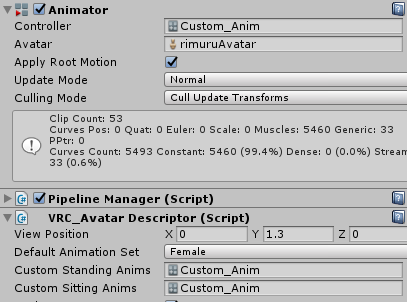
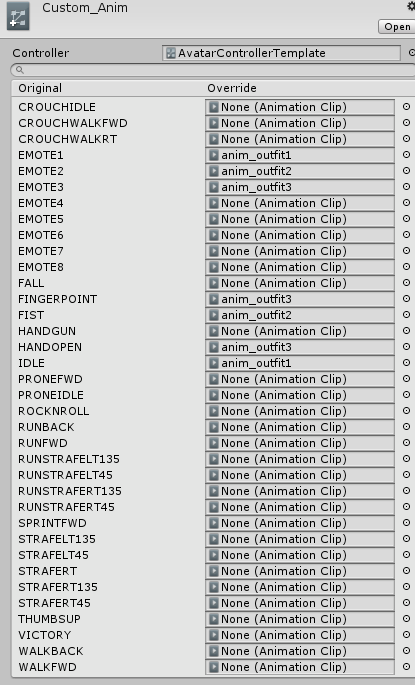
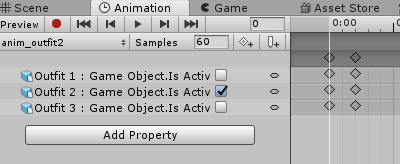
The animation was done on a duplicate avatar, with only the object's "on" and "off" state as a part of the animation. as seen here:
https://i.imgur.com/BPqZBjB.png
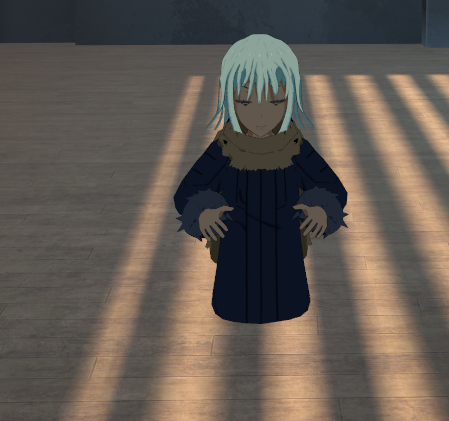
walking and the like is fine, but ingame there's the sinkage when standing still.
https://i.imgur.com/eyfND1g.png
 brazen crescent
Did you actually make the animations with a duplicated avatar?
If you don't, you'll get issues like that
clear yew
I did indeed.
clear yew
That should be a hand gesture though, right? on the vrdocs page for kb/m keybindings, Shift + F1 - Hand Gesture - Idle
brazen crescent
Idle is your idle pose state. If you override that it's going to remove your idle animation.
Remove that, upload your avatar and see if that fixes it.
If you're trying to do a custom idle animation or add to the existing one you have to edit or replace the actual animation, not just the 2-frame animation control.
shift+f1 is basically there to set your animation/gesture state back to default
You typically don't touch that unless you're specifically replacing the idle animation or adding something like a tail wag to the idle.
clear yew
Ahh, okay. I'm going to blame the docs page, which lists it as a 'hand gesture'
clear yew
We're about to find out! In the meantime, I'm sending an edit suggestion for that page.
That was the fix! : D
brazen crescent
Sweet, glad I could help 😃
clear yew
Appreciated 😃 And hopefuly the docs edit will be approved, and no one else will suffer.
clear yew
so how would i set up an animation that changes my avatars textures/shaders?
clear yew
i just want to have a gesture make a quick transition of textures/shaders
 hollow perch
Under Skinned Mesh Renderer there are Material Reference [0] or [1] etc that let you swap whole materials (no smooth transition)
 woven summit
u can do a smoth transistion
hollow perch
And Material._Color for example lets you change a property of an existing material but it will transition smoothly
woven summit
if u make a custom shader that supports the function
hollow perch
But harder to change shaders or textures smoothly that way
woven summit
maybe
hollow perch
Right you would need to customize the shader for example two texture samplers and a lerp
woven summit
yep
clear yew
where do i find the skinned mesh renderer?
woven summit
under body usally

mine is a bit different since I'm running additional animators but its close
in the animation click add property then body and there it should be
clear yew
i see, ill give it a shot thanks.
hollow perch
Doing record and changing something in the material should also work and may be easier
 spice urchin
need as separate mesh usually
otherwise changes setting for all other mats also on mesh
 full lion
Anybody know of a way to override the vrchat base animation similar to what the idle animations do but for a hand gesture? I'm wanting to move my arm using a hand gesture, but without actually replacing the idle pose (which I think is not possible) I'm not sure how I can or even if I can.
I only need to do it so desktop people can also see what's in the avatars hand cause they don't have VR
Kind of like how when you pick something up the avatar's arm moves forward
 edgy swift
Hey I have a problem that i want to enforce my humanoid avatar to t pose, just to not move while moving , but i don't know how. Can somebody help?
 surreal grove
You can play your seen, search for tpose an drag the animation file ontop of the parent in the hierarchy
edgy swift
i made t pose animation and connected it with litteraly everything in that Avatar animation file and it still doesnt work
surreal grove
is your avatar set as humanoid?
edgy swift
yup
surreal grove
You would normally make an animator component on the parent and place the animation through that for it control the avatars animation
edgy swift
Do you mean in SimpleAvatarController.controller (sorry I'm big noob in those things)
?
surreal grove
I am not sure what you're trying to do honestly. " just to not move while moving "
edgy swift
When I'm going forward, standing or doing anything I would want that my avatar is not animating anything
except lip sync but its already done
surreal grove
set the avatar from humanoid to generic or none
surreal grove
so long as you assign the mesh that has the shape keys in the avatar descriptor, it should work.
edgy swift
i've tried but it wasn't
surreal grove
Leave your avatar as humanoid put apply that tpose animation on the parent of the heirarchy
edgy swift
Sorry but i don;t know what you mean by top of chierarchy (ye I am noob)
surreal grove
 surreal grove
you place the tpose animation file on the parent of the avatar. It should apply an animator component
edgy swift
ok I will try
Do you know the easy way to make that happen
I litteraly don't know unity
Do i need to change it with any state?
I mean, connect the any state with t pose animation>
 brittle flicker
How could I go about setting up a trigger for my avatar that makes the second model active (along with its custom animations)?
The first model is humanoid and the second one is generic (since the imported animations run better on that rig) if that makes any difference.
 shy quarry
Hey quick question, is it possible to switch animation sets? For example, having the default animations then after doing a certain action it switches to, let's say, flying animations.
 slim sparrow
Nope, not possible right now unfortunately
Unless you're on a generic rig maybe, or if you don't need head and hand tracking (such as on desktop) @shy quarry
I was hoping that something like that would be possible by sitting on your own chair to go into a "flying" mode, but you can't do that :/
shy quarry
Well that’s quite unfortunate.
Thank you for informing me, otherwise I would’ve been looking for tutorials all over the internet for multiple hours.
slim sparrow
Best you can do is make two separate avatars to switch between
 wispy moon
Can jiggle physics work with hair..? Say I wanted it to be able to have loose movement after I stopped?
spice urchin
u can try cloth if u want it 2 be more realistic
it can liek wrap around ur body and more hair-like
hollow perch
@brittle flicker put the generic avatar inside your avatar and leave it unchecked (deactivated). Make the gesture or emote hide your Body (Skinned Mesh Renderer) and show/activate your generic version.
 stray sinew
I manually added blink to the model so that I have more control of it, it works. I want to stop the blinking while activating face gesture, but I can't seem to get the animator into the facial gestures to turn it off. Am I doing this process wrong?
hollow perch
@stray sinew There's a Unity bug ("feature") that doesn't let you put Animator enable into the gesture animations.
You can download this into your Assets and in the animation editor, press F2 and type Body to make it operate on the body's animator and copy and paste it into your gesture. https://gist.github.com/lyuma/0485f6191357eec03c7fd402768ffc75

 sudden bay
Anyone have an idea how would I be able to make a weapon two handed (example: controlling a spear or a gun on 2 different points attached to the hands)
Thinking about fixed joints or something similar, but can't get it work :/
hollow perch
Dynamic bone has an attractor option. I wonder if you can attach the staff to a child bone of the left hand and have that bone attracted to the right hand. I would guess Final IK has some more complicated components
The important thing is more the orientation and less the position. Actually if you got the orientation correct, you could weight paint gradient between the two hands and it will stretch from one hand to the other.
Finally, as a last resort, this can be done using a geometry shader.
shy jungle
I have a question about animation, is there a sort of requirement to be able to add "emotion" to an avatar? So lets say by default my avatar's F1 to F8 has nothing, how do i add any? Because after a while i realized by trying to overide lets say, the fist one or handgun, i realized it never would work because my avatar didn't have them in the first place, how do i add them in that case?
slim sparrow
@shy jungle your avatar has to be a humanoid rig with at least one thumb, index and middle finger bone on each hand.
spice urchin
as well as making the gesture a single frame long, looping, adding to override, and replacing standing/sitting anims in vrc_avatar_desc
shy jungle
Thanks! my avatar is humanoid, but doesn't have any hand bones
although the animation that i was gonna add would just make an object appear in my hands
wispy moon
Alright. Say I want to go into unity and change my players animations. Walk,idle,sprint. Ect. Will it be able to be seen in game? Or is that only if players have custom animations turned on in their shield menu..?
 violet maple
Yeah they will only see it if there animations is on or something of that
wispy moon
Hmm... anyone have any good videos of how I would go about changing animations..? I know how to use a blend tree and the animator... but do I need to do anything else?
stray sinew
@hollow perch Thanks, works perfect! 
 tacit frost
Would anyone know what components to put in an animation to totally reset a particle system? The particle works the correct way when it spawns the first time, but anything I've changed (turning off the particle-system and turning it on again/ turning off the game-object it's attached to) just seems to hide the particle, and not actually get rid of it (The particle has a long lifetime, but I wanna be able to reset it at will, without having to wait for it to despawn)
Having typed that out, it seems pretty jumbled, but I'd really appreciate it if anyone could help me out, I'd be happy to try to explain what I'm trying to do better
 halcyon shale
is there anyway to add audio on existing animation?
 noble shell
Maybe set it to activate a object with audio on it, havnt really tried it, and then just turn it off at the end of the animation
halcyon shale
well i mean i cant add property soo
i downloaded those animations and just wanted to add music to it but i cant
 serene lava
I have a thirty second animation, but it seems to end way before the 30 seconds, how do I fix this other than lengthening the animation to compensate
clear yew
Animations off gestures are limited to ten seconds afaik
spice urchin
wat
 violet moss
I have an animation that only works correct when placed in an animator in "additive mode", when played normally, it sends the limbs into crazy wrong rotations. Is there any way to fix the animation to not need an animator's additive mode, so i can play it as a emote?
 unique oracle
@violet moss Have you applied Root Motion to it? If I'm not mistaken set the animator to root motion and see if that works
 unique oracle
Root Motion is on the animator
violet moss
Ah, i'm trying to make the animation work without the animator, so it works as a hand emote / dance
because right now it only looks right playing via an animator
because they give special options
unique oracle
Oh I get ya
So the animation is parented to the other animator correct?
Not your main one
violet moss
Yeah it's made for a different skeleton, but it plays fine on my avatar, just only if it's in an animator. if i make it a dance emote, and play it in-game, i'll be deformed
if i put it in an animator and then have a hand gesture trigger it it's fine since i can can make it an additive animation layer
unique oracle
That's because it was made for a different skeleton and additive animation means it applies after the rest of your other animations in a layer, I'm sorry but I don't know how to fix this. It's trying to put your bones where the original skeletons bones were located. You could try applying the animation to your model in blender seeing how that looks and then saving it applying that animation to your current Override
tacit frost
Is there a property in the animation tab that'd achieve the same effect as pressing 'RESTART' in the particle effects tab? That's like exactly what I need
unique oracle
When you stop the animation it should just reset you to your models base stance
tacit frost
nah nah I mean actually for like a particle, I basically just want to reset my particle system
unique oracle
Just turn the game object its linked to off and on again, most particles systems are "play on wake"
tacit frost
I've tried that, It seems like it just turns it's visibility off, but if the particle's lifetime isn't over it's still there
I somehow just need to find a way to end a particle and reset the system, even if the particle's lifetime hasn't despawned it naturally
I think you can do it with code, but I wouldn't know how to do that :/
unique oracle
You could use a duplicate of the particle system that actives after the other one dies, what kind of effect are you trying to achieve
hollow perch
Turning the whole game object off should disable the particle system from rendering completely. Or do you have a subemitter outside the object you disabled
tacit frost
1 moment please, I'll be right back
Sorry
Basically, I made a world mesh-particle that acts like an object I can place down on my location, but it only seems to have the correct rotation the first time it spawns, fully restarting the particle system solves the problem when I want to change its position/orientation, but I can't seem to find an option in the animation ADD PROPERTY dropdown that'd do that
- alls I need is to be able to reset the particle system fully, but because the particle has a high lifetime, changing any options in the particle menu doesn't affect the one that's already been spawned, and deactivating the system just seems to make it invisible, and not actually reset it
unique oracle
Yeah, you need to change avatars to reset the position as rigid bodies will hold their orientation once activated
You can get close to the initial location by standing in the same location the object was dropped
tacit frost
I've actually made a version where it works, and follows my orientation when spawned, but it doesn't work when I try to attach it to a gesture
which is frustrating, because that seems like it'd be the easy part
unique oracle
Try putting it on an emote and see what results you get
tacit frost
I heard emotes are super complicated to attach to, know any good tutorials?
or at least more complicated than gestures
unique oracle
I don't know of any good tutorials sadly it's kind-of acquired knowledge
slim sparrow
@violet moss root motion only works for humanoid animations
Additive is something done in the animator controller, not the animation itself.
tacit frost
@unique oracle I'm a moron, turns out I had a simple box unchecked, and now turning off the particle system and turning it on again works perfectly
unique oracle
Oof, glad you figured it out though!
clear yew
@brittle flicker you can switch to a flying mode. You can set a persistent animated state, and in that state you can have your flying-enabling objects available to your overrides. You can't switch to a different avatar with different armature, but you can enable another avatar and give it a specific animation
DM me and I can send you information and stuff
brittle flicker
I DM'd you, @clear yew.
clear yew
Is there a frame limit to animation overrides? I’ve heard that they must be 2frames (ex ‘unhiding’ an object like a gun), but ive also seen pretty long ones firsthand
Yes, gesture overrides are only 0th and 1st frame. You can use them to enable animator controllers which have proper animation lengths
Are there limits to that length?
Nope
Oh, neato. Time to read up about animator controllers. Thanks.
violet moss
Hey all. I've messed up my animation and for my position parameter, I have my XYZ keyframes on Y, Z, and X. The values are right, just on the wrong axis. Is there any way way to shuffle them to the right axis?
hollow perch
You can edit the .anim file and use some clever find/replace to fix them. Like replace z with asdf, then replace y with z, then x with y, then asdf with x
Make sure your assets are saved as text. I think this is default
 tardy abyss
Would anyone know the solution to this odd bug, where setting figures is 'locked' when in Preview mode? As in, they won't move when I attempt to set them.
brittle flicker
How can I set a toggle to basically keep one of the models in my avatar active until I toggle it off?
Like "read-only mode", @tardy abyss?
tardy abyss
Similar to that, but I can add properties.
hollow perch
Have you tried vrc inventory system by Xiexe et al @brittle flicker
brittle flicker
No, I have not. Do I need to download it?
tardy abyss
I have full access to the animation. But when in Preview mode, I cannot set things like rotation. It keeps defaulting to its previous setting, no matter what I do.
Turning off Preview mode, I can. But when I turn it back on, the settings go back to their defaults.
brittle flicker
Oh, I think it's like Play Mode.
hollow perch
Are you moving bones? If the model is rigged as humanoid you have to use Animator. Root Q or left arm and so on type properties not bones directly
brittle flicker
^This.
tardy abyss
Yes, I'm moving bones. I have the correct bones here (I moved them before).
But for some reason, they keep defaulting back to their original settings.
I was able to do this before (with these very bones). This only happens a few times. And it's happening now.
It's like the bones are set to read only, but I have a duplicate and everything. From what I'm seeing, everything should be working.
But it refuses. 😦
Any ideas?
I see the bones moving, but as I said, they keep snapping back to their defaults.
hollow perch
Is it rigged as humanoid as generic
If it's humanoid you cannot animate bones that you made green in the rigging configuration
You must import the anim file with the rig together in one fbx so it converts to humanoid
Or you can make a duplicate and rig the duplicate as generic
I think you said you wanted to make a duplicate so you can do that option
tardy abyss
Hold on. The avatar is a humanoid. The thing I want to animate is a prop, basically. Generic.
tardy abyss
Yes, it has bones.
hollow perch
nothing is yellow when in preview or record mode?
tardy abyss
Correct.
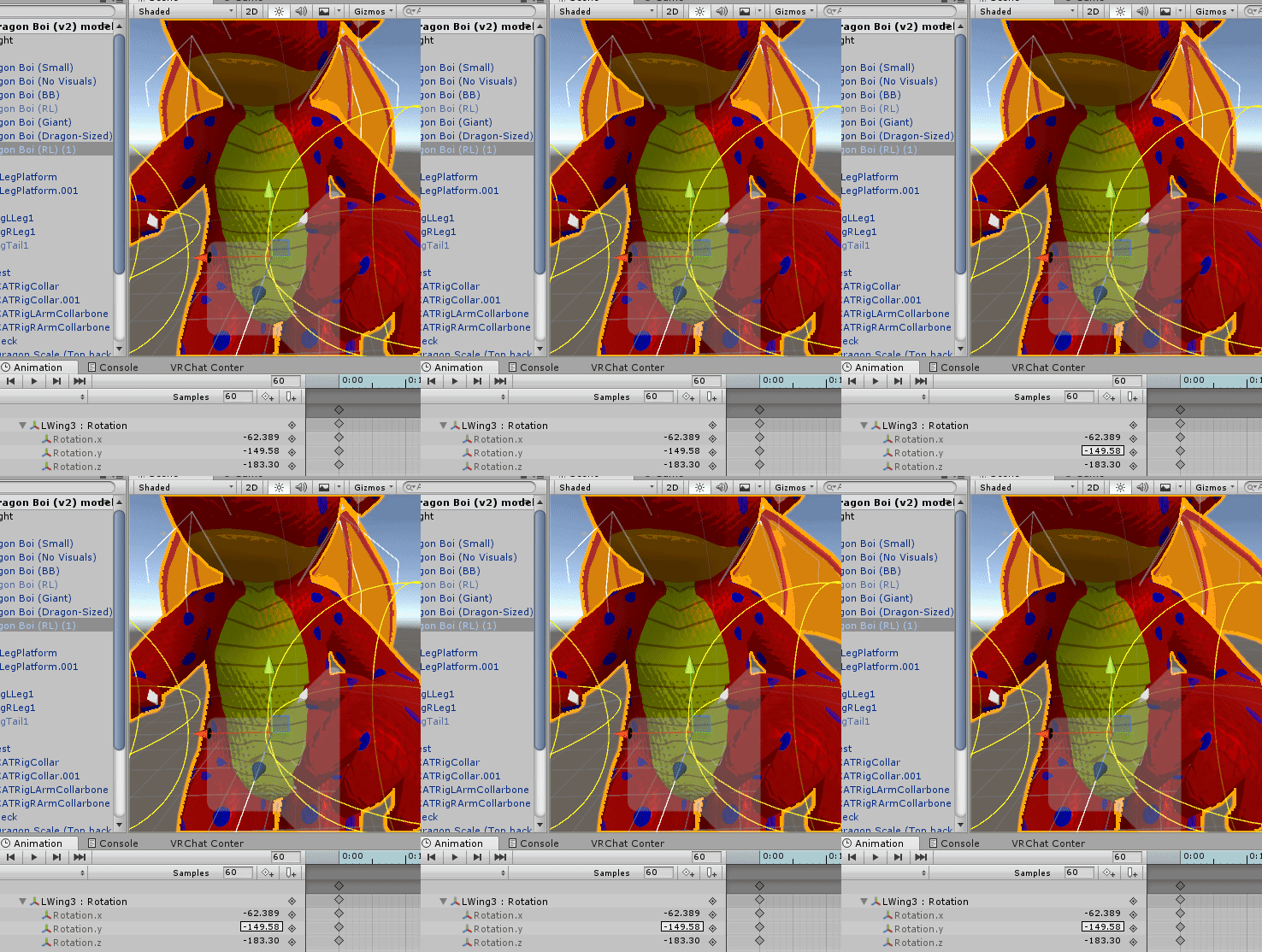
That's what's happening.
Trying to set the rotation of the wing. See how it's twitching?
It's fighting my attempt to set it.
brittle flicker
Yeah, I don't think that plugin is what I'm looking for, @hollow perch.
My endgoal is to basically use an action (like an emote) to activate another generic rig model that has its own override controller and for it to stay active until I repeat that same action.
tardy abyss
clears throat So, anyone that might know what's going on with my issue?
Got it working. Deleted the wings and readded them. I think they were still using the old animation (somehow), which might had been the reason why it was preventing me.
Unity and its quirks...
brittle flicker
Did you make the old animation?
tardy abyss
I did, yes.
violet moss
Fixed it by rotating the bone in blender in edit mode. XD
brittle flicker
Ah.
violet moss
New question: Are "additive" animation layers in Unity problematic in VRChat? can it cause desync?
brittle flicker
I just imported mine, but most of them are horrible when I try converting them from humanoid rigs.
violet moss
that is using Additive instead of Overwrite
They seem to be pretty buggy in the editor itself
 spring nova
Additive works just fine if you're using it all within one animator. It is not meant for adding two separate animators together, as I assume you're trying to do since this is an avatar channel
hollow perch
@brittle flicker that's pretty much exactly what the vrc inventory system editor script does. But I agree, it's nice to do things yourself.
What I do is i make a stack of up to 8 game objects, and put all my objects in there. I actually do this part in Blender because I want my own mesh to also be changed as well. Then, make an animator for each state that turns on one object and turns off all the others or whatever. The tricky part is each object has one less thing in its path so if you use copy and paste you have to do F2 on each one. I usually work outside in: it makes it easier to make the animations so it won't auto select the wrong one.
Then Download this into assets https://gist.github.com/lyuma/0485f6191357eec03c7fd402768ffc75 and copy a keyframe into each emote and press F2 and put like Armature/1 orArmature/1/2/3 or so on and turn on the appropriate animator ("Behaviour"). All other animators stay off.
To do it in blender you do add Object -> Empty Axes (blender equivalent of empty game object) and rename to 1 and shift click the outer Armature and press p to parent it inside armature. Then put object 2 inside 1 and so on. Then at the end press f2 and optionally put your Body inside the innermost object or Body.001 etc. do note putting Body anywhere else will lose auto eye blinking and eye tracking if you don't put a dummy Body at top level anyway. You're also free to do this whole process in unity and duplicate the original meshes and disable the originals as necessary. Using blender just makes it more streamlined I think and few people realize you can do most work before even importing to unity.
clear yew
Maybe less
Im very good at animation but this is also gonna be my first commission
So ill go cheaper
But if ur interested pls do dm me i cant be in this chat for much longer im going back to work
 vivid wing
ok
 muted prairie
@clear yew #shameless-self-promotion please
 sacred swift
is it possible, if i put balls with a sphere collider on them and set them on top of a plane thats slightly moving around to make the balls roll around?
 rich geyser
anyone know of a place i can get an👌 hand gesture that doesnt change facial expesions
stray sinew
@rich geyser https://www.youtube.com/watch?v=zLI5mxCBnlk
Has files for default hand gestures

Hello, as promised, this is the updated method for drawing in VRChat, courtesy of Snail, and his Snail Marker. Repository Link: https://github.com/theepicsna...
 orchid quest
How do i make an animation on all the time? like an idle animation
slim sparrow
Put it on your "idle" slot
Alternatively, add an Animator to whichever object you need to be animated.
 keen wadi
 orchid quest
it doesn't seem to work? i'm trying to have a shape key on all the time. i'd make an animation with the shape key on right?
slim sparrow
If you want a shape key always on, just set the shape key to 100 on the mesh.
No animations needed
slim sparrow
Select the mesh, expand "blend shapes"
Then set the desired blend shape to 100
You can find blend shapes in the Skinned Mesh Renderer component
orchid quest
Ahh, i see. thank you!
 eternal meadow
Im trying to make my avatar lay down when I do a hand gesture but I get a binding error warning. How can I solve this? https://puu.sh/CGr9l/4284414c76.png

Sorry, still very early days of learning to customize in Unity
 fossil seal
i want to view animations for an avatar i bought but im new to unity and the youtube videos ive found dont help
the animations are all made and the custom override is made but i cant figure out how to view them
keen wadi
in unity select the anim then in the bottom right corner a window should popup with a small window that allows you to view the anim
fossil seal
ok so i do that and the character gets in a crouch pose and nothing happens
keen wadi
is it a gesture?
eternal meadow
If its an animation you can click play in that window. If its just a gesture you should be able to see the pose
slim sparrow
@eternal meadow first of all, you can't move any humanoid bones on a hand gesture. If you're on desktop consider replacing your prone instead.
Second, you are trying to make an animation by rotating the bones directly. That won't work.
You have to use the animator properties, like Root T to control the height of your hips, Root Q for rotation, then properties like Lower Leg Stretch for leg rotations etc.
eternal meadow
Thanks for the reply. My plan was to have the gesture make me fall over in 1 frame with s sound effect (like you see these wheelchair avatars in recent clips falling off)
Context in the first clip https://youtu.be/Gk6tiE0OtTE
slim sparrow
Alternatively you can disable your own mesh and enable a duplicate of your avatar
Which then plays the falling animation by itself using its own animator
eternal meadow
Ok let me tinker a bit and see if I can figure it out. It's been tough learning how Unity works. Thanks
 tough lark
so i have animations i downloaded with a jevil avatar and they arn't working
 devout igloo
I've got an item that spawns in with a gesture and for some reason you can't see it locally
You can see it in the mirror and others see it on you, but you can't see it yourself
brittle flicker
Sorry, I just got back from work and I didn't notice I was pinged until a few hours later. LOL
@hollow perch For the animators that enable and disable, do I use the ones in the inventory editor? Also, you say to copy a keyframe into each emote, but do you mean the ones that enable and disable the object?
hollow perch
You don't have to use the vrc inventory system. If you use that, it will create animations for you like enable and disable.
If you do it yourself the yes you need to copy the animation keyframe from here: https://gist.github.com/lyuma/0485f6191357eec03c7fd402768ffc75
hollow perch
In the simplest case there are two unchecked animators inside each other. One animator only turns on your object. The other animator only turns off your object.
The keyframes you put in your emote temporarily play one of the two animators which has the effect of turning the object on or turning it off
Whenever a gesture or emote stops playing, it will undo what you did. So if your emote enables one Behaviour (animator) then at the end it will disable that animator. But unity doesn't realize the animator had a side effect (turned on or off another object somewhere) so it won't undo that side effect
You sounded like you wanted a different approach so I left you with two options. The vrc inventory system is just an automated script to generate all these animators and do what I described how to do manually
brittle flicker
Ah, okay.
brittle flicker
Now that I have my toggle set up, how can I get the animations to work on my inventory model?
violet moss
Is there a way to avoid short avatars sinking below chairs? Like a way to always put the hip bone at a specific spot
spice urchin
custom sit animation
but its never hip based
stations can only mark foot position not hip position for whatever reason
u might be able 2 move up root tho
slim sparrow
GitHub
VRChat Chairs with proper height fixes for small and tall avatars thar also allows you to customize the sitting pose, emotes, and right/left hand gestures thought an override controller. - splinks/...
Basically, I think the workaround involves editing the sit animation so the hips are at Y 0 and then adjusting the seat
With root transform Y being at 0, the hips are at the same place for everyone no matter how big or small
brittle flicker
Is it possible to have two models in one avatar use separate overrides?
 dreamy osprey
Does anyone know how to do that animation were your vision get pulled to an object with a zoom in? i think it is a shader but i don't know if is an animated shader, particle efect or what
slim sparrow
It's a shader. You should also avoid using it, it's a good way to get blocked by half the instance as it's very nauseating in VR.
dreamy osprey
it is just meant to private worls as i very rarely go to public worlds
and i do have vr and it not that bad, just a bit annoying, it get's nauseating were it is abused a lot
brittle flicker
Yeah, I saw someone repeatedly using some kind of Dragon Ball animation and it would constantly warp everyone's screens. Long story short: they're blocked.
dreamy osprey
im not planing to go spaming that stuff on public worlds
im usualy just with friends and as most we are 5 all toguether talking, so i just whant some funny avatars to use with friends
violet moss
Yeah it’s very hard to get me to block someone instead of just hiding their avatar or turning their voice off... I’m very lenient. But zoom shaders can make me write a person off for good and block em if it’s my first impression >_> that stuff makes me need to log out due to sick
slim sparrow
There's a specific avatar going around right now, I think the thumbnail says "I'm sorry" and it has rainbow outlines
I hide that avatar on sight
Had someone literally run around the instance in that avatar and I had to block them entirely
I always have my shield levels on none, but I've been seriously considering turning off shaders and audio on visitors solely because of how rampant it's becoming. Cloning in its current state is kind of a disaster IMO
 gleaming tusk
 dreamy osprey
rainbow outlinies? is that thing that bad to be blocked?
im quite impressed on how intolerant you are
brittle flicker
Anyone know how to basically "mirror" a model's animations? For example, if I run/sprint in-game, my primary model plays its custom running animation, but I also want my second model to play its custom running animation at the same time.
 torpid light
You can do that with a geometry shader but it's not very easy to do, and you'd have to do your own lighting unless you can squeeze the geometry shader into someone else's shader
brittle flicker
I forgot to mention that the models are different, one is humanoid and the other is generic, but I want the generic model's animations to play at the same time as the first models', depending on the actions available in the animator controller (I have animations for all of them).
torpid light
oh i'm not sure. Perhaps you'd have to combine them all in blender and animate them all walking as one single walk animation
brittle flicker
Isn't there a way to relay the actions/events that trigger animations in the controller to another animator controller?
hollow perch
@brittle flicker the most common way you see people doing this is through rigid bodies: basically they attach the rotations of bones in their avatars to bones in the puppet using fixed joints and rigid bodies with freeze position and fixed rotation only on your main avatar. (Also Uncheck gravity). This will probably give the best results.
Another way is to combine them in blender so they share armatures, and then use a shader to offset one of them so they will show side by side. However they will accumulate error if they are offset at all and you will get freaky stretchy limbs on the puppet (if it's just changing scale, you can scale them to be the same then scale it down in the offset shader)
 onyx agate
When making an idle animation (custom blinking) i only have to add the eyes open/close blendshape property in the animation,right?
slim sparrow
yeah
onyx agate
nope,did something wrong ...avatar gets forced in the animation sitting pose
stray sinew
Gotta use animator on the body mesh https://youtu.be/iHQNw6Tg5-U?t=226

Here is a quick tutorial on converting your legacy avatar animations to the animation state machine system. :)
Its timestamped
slim sparrow
@onyx agate if you override the idle animation you have to replace the whole idle animation, obviously.
It sounds like you may want to put an Animator component on your Body instead for the blinking.
onyx agate
https://gyazo.com/fbbf15454b6011fba9741d3de8b10be1 so ,like this
 slim sparrow
Well almost, you wanna unset the "avatar"
And don't use your override controller on the body
You make a new animation entirely
brittle flicker
Is there a way to preserve all of the keyframes that Unity discards from an animation file prior to being converted into a humanoid animation?
It only saves the keyframes that are mapped to the avatar's rig, but I also want to save the keyframes that aren't mapped to the rig.
slim sparrow
I thought on conversion, it also keeps everything else
I mean if all else fails
@brittle flicker you could CTRL+D duplicate the animation while it's still generic rigged, humanoid rig it
Then copy the humanoid keyframes to the generic-rigged one
brittle flicker
Yeah, that's what I'm doing now, but I was hoping for an easier way since there are well over 100 keyframes in each of my animations.
clear yew
https://cdn.discordapp.com/attachments/402349592244649996/541799966612652042/unknown.png why is it that if i drag an animation i have already made onto a new version of the same model in the hierarchy all the steps say they are missing? Do i have to remake the animation every time?

so annoying to work on something and then it doesnt work 😡
spice urchin
u sure its humanoid??
spice urchin
@hollow perch do u know about making toggle switches with particle stop or triggers
cuz my friend had idea of having a song list that they can play for the headphones on their character
clear yew
https://cdn.discordapp.com/attachments/402349592244649996/541831802872922124/unknown.png so i have an avatar that had about 70k polys then decimated it in blender to 50k and added a staff in unity for animations and the staff has 4k polys but it still says im over 70k? anyone know what the problem is?
ive redone it twice and didnt work both times so its really bugging me
brittle flicker
I think you'll have better luck asking in #avatar-optimization.
 frozen vine
Anyone know how to import FBX animation files into unity and get them to work with models?
Whenever I do so it affects the root and not the animator
brittle flicker
Just move them into the assets folder of the project, convert the rig of the model in the FBX file to humanoid, then CTRL+D the animation.
The FBX animation file must be converted to a humanoid rig.
clear yew
I'm having difficulty making a Gesture show a prop. I've overrided the target gesture with the animation in the animator, but even when the parameters are manually set in the animator, the prop won't show up.
clear yew
Uh, don't worry. I think I got it.
hollow perch
Props don't always show for you in the mirror, but everyone else should see them fine
clear yew
That wasn't the issue, I was struggling to get it working in Unity.
But after enough fiddling with Animators, I think I understand them a bit better now.
 torn pawn
props definitely work in mirror
you don't need to touch animators to do props.. @clear yew
all u need is controller override, and an animation that enable the prop and does finger positions
and u put that animation in the override controller and the controller in the avatar descriptor
clear yew
(But I like touching animators 😦 )
torn pawn
well, then u can do fancy stuff with cycle inventory or toggles
but for simple prop things u don't need them
 tropic holly
Trying to make a custom animation for this thing but the animation button is just non-existsent.
http://prntscr.com/mgdorq

Normally its in the bottom left next to console right?
torn pawn
top select Window and select layout you want, i think 4 windows is what you'd want generally as a start, then can add more if needed
 timid prawn
For the blinking animation I dont want to make it two time and dont look the same. Can I leave base on one of the eyes in cats and its its going to work anyway ?
 rancid valley
So i've a question regarding "going invisible" animations.
I've tried to disable the "Body" Gameobject.
I've tried to disable the "Meshrenderer".
But everytime i do so once i test it ingame i stay invisible (for only other people) after stopping the animation, for myself im visible again.
I've tried swapping materials to an invisible one and it makes everything invisible and reappear like i want it to except one material that stays visible... i dont know how i should make it work..
Do you guys have an idea?
hollow perch
The whole thing is super weird. I've never seen animations fail to revert to their original state at the end... does it do the thing where it updates at 50% speed and can they show you by clicking show avatar
Oh I wonder if your animator is culled. That's what triggers the half speed ik update maybe
When your animator is culled it maybe can't finish playing the animation and show you again
If you add anything into your game object that might fix it (for that matter, a world particle system somewhere should have infinite bounds maybe). I've always been super confused how animator culling works ... maybe this explains a bit why
rancid valley
Its weird, the furthest i was able to go is by changing materials to an invisible one in the animation but it seems to whenever i record the animation to not change one of the materials eventho i clearly change it
hollow perch
material changes don't show in mirrors. you do need to change all of the Material Reference[x] slots
rancid valley
well yeah thats what i did, eventho i change the materials there is always one that is not changeable. It looks like it changed but as soon as i click on preview or record button again its reset
clear yew
Anyone here know the Arnold Swarzenegger avatar using crutches? it has a animation of him falling to the floor with the sound of the hit (is a loud sound), i'll be glad if someone could tell me where to find that audio
brittle flicker
Not sure, but you might have better luck asking in #vrchat-general-2.
full lion
Hello, This question is about rigidbodies and particles, so I thought this would be the best channel to ask in.
Basically, I’m having a problem where I have some world particles ties to a rigid body to follow my wrist. However, in game it follows my wrist but with a kind of “slop” in it. Like, it wants to fall downward a half meter or so but stay there, even when I rotate. Does anyone have an idea what could be causing this? Maybe where my game object is placed? My rigid-bodies do not have gravity or anything tied to them.
clear yew
not to sure about this but is there like combo gestures or something? like where you do fist with your left and V with your right and it does a gesture? if so how do you set that up anyway?
clear yew
do high poly props affect your avatars loading time / lag others when its only in an animation?
full lion
Yes, it’s activated via a second game object under the fixed joint which may be the issue. I did that so I could only have it play when I have the object I want the particles on out.
Seeing that the second game object is just at 0,0,0, Unity may not like having to do multiple layers in the rigid body
I believe I have another way and just not use the game object by activating emission instead of just the particle itself so I don’t need to use a “bridge” game object
Also, to answer the question in your second message, I’m not sure. However, I made it so it is independent of that object, so It should not happen regardless
 covert girder
@clear yew loading yes(loading of avatar), lag no (while disabled)
clear yew
spent hours and hours making an avatar but the build control panel in VR SDK wont let me publish. says avatar is a humanoid but it must have head, feet and leg bones specified
already have apply root motion unchecked
try going into configure and check that all the bones are connected to each other. when i put an avatar into unity it does not have the chest bone for some reason so thats why i go into configure to check every time
the thing is i can upload the avatar by itself without any animations just by deseclecting root motion, but if i add an animation to it, then this issue is something you cant get past
the only bones its missing is upper chest, left, right eye, and jaw. The reason I didnt add those head bones was because its a Kingdom Hearts Organization member in a hoodie with no face
do i have, to have all of the bones for it to work?
hollow perch
Upper chest not wanted. Jaw is optional. Left and right eye might be required maybe? You can make two bones and don't attach any vertices to them if you want. Also make sure you have 3 fingers in each hand at least
clear yew
i have 15 bones in each hand
5 fingers in each hand
are we able to post screenshots on here?
the head, hand, and feet bones are mapped, the feet and upper arms are specified, could it be that i didnt add the eye bones?
i mean as i said before, this character doesnt have a face, and it doesnt come up with any errors as is
just when i go to build control panel
hollow perch
Try making empty eye bones in blender and export and rig them in the humanoid rig screen. Yes anything missing might give that same error
clear yew
ill give it a shot
if that doesnt work, well, ill just get a different MMD model, and start from scratch
sucks cuz i put like 7 hours into this model lol
hollow perch
Maybe post a screnshot of the rigging screen to imgur or something
clear yew
but yeah im gonna make some empty bones
hollow perch
If it's still bad
hollow perch
Only missing stuff should be Upper chest and jawbone, and also spine is allowed to have error about length 0 for full body
clear yew
i just find it weird how i can upload it as is, but when i add any animation to it, it has this error
hollow perch
You cannot upload a model with an animation set in the animator slot and you should not be messing with apply root motion
If you want an animation for emote you should copy an override controller from the sdk samples directory put your animation in an Emote slot and add the override into sitting and standing override in the avatar descriptor
clear yew
i already have this avatar uploaded, but i added a sound animation by putting on object with an audiofile in my right hand index, made a duplicate, unchecked the 2nd clone and objects visibility, made the animation, put it in the descriptor under a hand gesture, and then i try to publish to test it
and this error happens
hollow perch
The main avatar animator must say None (Runtime Animator Controller)
Delete the avatar descriptor and pipeline manager from your duplicate
clear yew
i put my animation in the custom override and put it in the descriptor
and its linked to a hand gesture
yes
i didnt put anything in the main animator
ive learned that the hard way before
thats why the eye bones not existing still should not be a problem
hollow perch
Did you play with the rigging configuration without duplicating the fbx?
Like the inside copy might be generic. If you changed the fbx to generic it will break the outside avatar too
Unless you first duplicated the fbx
clear yew
i didnt touch the rigging configuration until after I completed everything
there was one thing i noticed tho
optimize game objects was unchecked
when i checked it, the performance went from good to excellent
but some people say when they uncheck it, it fixes the error i listed
but it was already unchecked for mew
its a humanoid
they are all humanoids, both duplicates
hollow perch
If you mess with the rigging without recreating your avatar object maybe some references got corrupted
If you drag a new copy of your fbx avatar into the scene and put a plain avatar descriptor on that, does it let you uplod
You can try setting the rigging to none and back to humanoid as a test
But beware it might mess with stuff you already attached like dynbones
So might be better to make a duplicate fbx and use pumkin's tools or something to copy stuff over
For experimenting
clear yew
so when i made the avatar, i added the object to it before i duplicated
so the duplication had the object and audiofile already in it
so its not like one of the copies was missing anything
both were identical
i just changed the visibility on the 2nd duplication
and like i said, i didnt touch rigging until after i did all of this. Because when i tried to publish, it came up with those errors, and so I looked at forums, and they said to go to rig, and uncheck optimize game objects.
i already knew my model was a humanoid
i can put emotes on this avatar
and upload it
even default gestures
like i got it to work
but ever since i started working on object animations, this has happened
im newer to this, sorry.
im sure ill eventually figure it out, but its just been alot of trial and error
clear yew
@hollow perch should i have my object as generic? Its generic by default. I think my issue here is the object itself
hollow perch
You want humanoid for your main avatar. For your animation duplicate it should match whatever format your animation is. But that really shouldn't affect you. Maybe try and drag it out of your avatar and get it working again without the animation
clear yew
the avatar works fine, it just gets that error when i add this object i believe
im just gonna use a different object and see if that was the issue
 fallen flax
I have an idle animation that works fine in Unity but does not work in VRChat. It is not a Legacy animation. Is there any simple things I might be missing?
hollow perch
Is it humanoid? All the bones it sets must say Animator.something and all not indented much not be bones like Left Wrist
You are not allowed to set bones directly from idle anim. Must be humanoid animator properties
Also if you are in vr, your tracking points will override idle. If in full body, I believe the idle doesn't even run
 carmine pilot
Hey guys, im trying to make a plane appear in the middle of an animation. That means after my gesture animation have played for about 7 seconds, i want it to make a plane appear with a texture on. Problem is that the gesture gets stuck ingame, and i cant stop it from playing once activated, any workaround to this problem?
timid prawn
Can I make a delay with rigid body ?
torn pawn
you activate a game object that has the animation @carmine pilot
@timid prawn what do you mean by delay? as in "lag" behind?
timid prawn
yes
torn pawn
you can add weight and drag on the fixed joint rigid body
and it will do what you want
timid prawn
it dont work. I put the value on the object that follow or the leader ?
I have tentacules like arms I want the other pair to drag behing the movement when I rotate my arm. I could maybe use a dynamic bone on top of the rigid body
 final trench
l
torn pawn
you have fixed joint + rigid body on the external arm, so you increase drag and weight on the external rigid body
be sure kinematic is not checkmarked
clear yew
@hollow perch got it to work! Re-did everything and it works perfectly. Thanks for the help!
hollow perch
Sorry it took so long. A full day of head banging or more
That's how unity is sometimes
clear yew
it was like that for me when I learned FL studio and Sony Vegas. But in time, you will figure it out
I knew it wasn't going to be easy and it would take time to learn. But thats with almost anything in life. Nothing should come easy
although it would save us many headdesks if it was less complicated 
 broken island
Help! I am trying to learn how to make custom animations in unity. I have done a lot of animation in Sfm, so i am familiar with how stuff like this works. only thing is that every time i rotate a limb, it resets, even if the animation recording button is on. Also the animator will not stay checked and the background of it is red. Would love some help as I'm struggling to find support online :(((
i seem to be able to move weird bones like ears, clothing parts and such, but not the main skeleton (lower arm, right leg)
 zenith birch
I would suggest doing anything other than very simple animations outside of unity.
stray sinew
From past experience, dynamic bones will get in the way of animating and will reset the position. Would need to take the component off before using. Just my guess 🤷 @broken island
onyx agate
dynamic bones are basically real time animations (one of the reason it is performance hungry)
broken island
i found a very painful way to animate it but manually importing the bone i wanna use and manually adding a value to the rotation, but i gotta say, its not the most fun ive had xSSS
but i cant seem to be able to edit the root of the model, so its just stuck in one place in the animation
i am making like a slav squat as a test
tough lark
how would one add the animation and sounds that comes with characters downloaded from vrcmods.com?
hollow perch
@broken island for moving humanoid bones you must use stuff in Animator including Root T (to move the whole model) not the bones directly.
 final gazelle
is it possible to sum two f-curves together in blender on a single bone, or otherwise sum two animations together such that it behaves like both animations are being played simultaneously at 100% influence each?
trying to think of a way to delete a bone's parent while still having it move the same way in 3D space
hollow perch
You might be able to make your own controller, put one animation on then add a layer, set it to additive with full weight and put your second animation. Then maybe use runtime animation recorder to capture the output as an animation
Better would be an editor script to sum two sets of keyframes. Shouldn't be too hard to make but don't know if I've seen one
GitHub
Record animations in Unity runtime. Can save to .anim, maya, or FBX ASCII format. - newyellow/Unity-Runtime-Animation-Recorder
final gazelle
I'll look into those suggestions, thanks. Gist of it is that i want to do something similar to fixing/preserving an MMD animation that uses a root bone by adding all the root bone's movement to the hips, and then deleting the root bone -- that way, the animation can be made to work with fixed humanoid models
that's not quite my exact situation, but that's about the closest analogy/application i can think of
hollow perch
Root bone movement I think you want on Animator.Root T and Root Q if it's a humanoid anim
If it's generic you can move around the Armature to avoid needing to move hips
(You can't directly move Hips if it's humanoid)
final gazelle
ah, before i forget -- is it possible to blend animations at negative weighting? like the complete opposite of additive with full weight
hollow perch
Can't say I've seen that before. Would be a fun thing to do. Maybe there's a way to change to negative weight in code, or maybe not
final gazelle
fair enough there -- i suppose i could always try flipping all the positive/negative signs on all the values in the animation and see what happens, if it looks feasible enough
many thanks for your thoughts 😛
hollow perch
Editor scripts are really powerful and easy to write. If you know any programming it's an option worth considering
clear yew
can someone help me with a custom animation
ive got it to work when i test it in unity but it wont load in game
tardy abyss
Trying to get a firebreath particle system to work with a fixed head joint. No matter what I do, it's not playing. Yet it plays in Unity.
The model is a humanoid.
Pretty sure I got the animation set up right. I got the particle system to enable as soon as the correct key is hit.
spice urchin
wym correct key
and idk wat fixed head joint means
bc u put rigid body in head and in particle
and joint particle to head
clear yew
thanks for the help
spice urchin
thanks for giving info
there is no 'correct key' as the only way to play animations is by gesture or emote or animator etc
tardy abyss
The head joint (from what I've seen), serves as the particle's 'anchor'.
And what I mean 'correct key' is the key assigned to the gesture.
spice urchin
also u need to put the overrides in Standing and Sitting animations for the avatar
u also need 2 make sure the animation is 1 frame long only
tardy abyss
The animation is one frame long.
https://i.imgur.com/YN6o1Hf.png
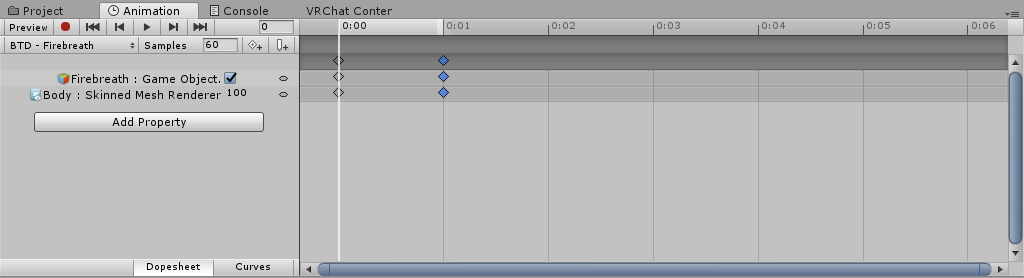
That's what it looks like.
I had this work before, but I can't seem to recreate it.
spice urchin
u also probably want to instead toggle the emission property
bc it will appear and disappear normally rather than just hide and show
tardy abyss
I have tried toggle emission, it doesn't work.
slim sparrow
@tardy abyss can you move the timeline one frame to the right and show it again?
Also, particles currently don't seem to appear locally in some circumstances.
tardy abyss
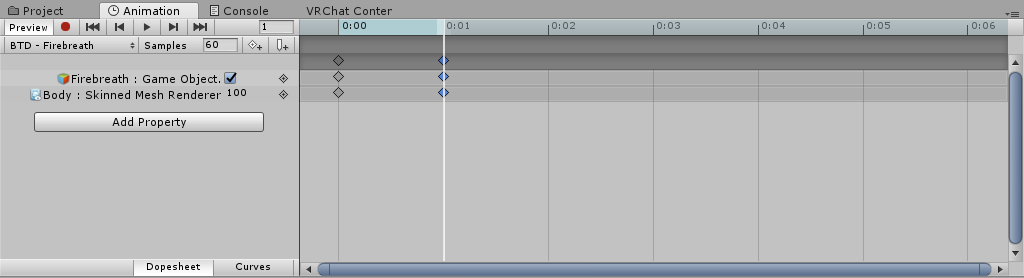 slim sparrow
Especially without a shape module
tardy abyss
I have Loop Time enabled of the animation.
spice urchin
is it in the override and is the override in the avatar
tardy abyss
Yes.
spice urchin
which gesture
tardy abyss
The firebreath gesture. The one I'm trying to work on.
spice urchin
thats like Shift+F2 or something
spice urchin
o ok
did u try activating all of them and playing the animation urself in unity on a duplicate to see if it worked
tardy abyss
It does work, yes. At least, it works how I remembered it working before.
slim sparrow
Victory is shift f5
Have you asked someone else if they can see it?
Particles often fail to appear for me locally
clear yew
https://cdn.discordapp.com/attachments/402349592244649996/542504121383780362/unknown.png so i downloaded an effect and im not sure what to do with the pieces. can anyone maybe explain what the pieces are and how to use them? Its supposed to be a particle effect i think but im not experienced enough to know what to do with this.

 craggy sage
Is there a way to make an animation to lock the legs in place, like driving a car but be able to move your hips and hands?
 rustic mesa
 south lodge
ok so i made an animation to spin the key wind thing on the back of my model

but how do i make it so that it is ALWAYS spinning?
applying the animation to the entire model did not work, as it wasnt even spinning in game, but it was spinning in unity
slim sparrow
You have to add an Animator component to the "Key" object @south lodge
Then animate it so it spins
south lodge
alright i will try that
do i need to change the avatar settings in the animator?
or any other settings?
onyx agate
ok ... so my imported model exists out of a Body ,Face and Hair mesh and a secondary empty object for dynamic (spring)bone control .. now where do i have to put the animator for blinking to work and not end up in the default sitting pose
all meshes are baked
spice urchin
@south lodge can put it in the armature or parent bones also if u want to animate multiple things that move on different layers without that many animators in the avatar
clear yew
https://cdn.discordapp.com/attachments/402349592244649996/542537607700152321/unknown.png https://cdn.discordapp.com/attachments/402349592244649996/542504121383780362/unknown.png does anyone know how to get this effect with these assets? im trying to figure it out for an animation but cant quite get it
 clear yew
Im not sure why i get the bug where if i try uploading an avatar a second time(the same one, but with something small changed) it says my head, hands and feet arent mapped, when they obviously are
doesnt matter what avatar i use, the second upload gets this bug
onyx agate
@clear yew delete vrcsdk including the .meta file and re-import it (make sure you use the latest and from the official sources)
brittle flicker
^Don't do this before you make a backup of your project files (excluding the SDK). I didn't do this before and my project became corrupted.
 noble mountain
I can't animate my humanoid avatar cuz it just reset the pose always ? any help
and yeah i do enable record mode
 quiet swallow
 vale yoke
@noble mountain If it's humanoid you must animate it by editing the Animator values, if you for example try to rotate bones instead that are used in the humanoid rig it won't work
noble mountain
@vale yoke where is that ?
vale yoke
In the Animation window when you click Add Property, it's right there
https://i.imgur.com/m0Mt3kV.png
 noble mountain
nvm got it
clear yew
https://cdn.discordapp.com/attachments/402349592244649996/542656878124072960/unknown.png so i have a skull and there are seperate eye objects inside the skull and i want to have an animation where they slowly come out of the skull over about 30 seconds, i assumed you do add property > transform > position but that just adds a transform position for the whole animation avatar not the eyes, does anyone have any tips?

in short im wondering how to transform an object in an animation because when i go to transform it just adds the property to the avatar
vale yoke
It'd be easier to just hit Record mode in the animation window (top left red circle button) and then find the eye bones in your avatar hierarchy and move them, that should add just the eye bones to the animation list
clear yew
i figured it out i think
clear yew
not sure what i did or if my unity is just lagging but when i press the play button to test my animation its not going second by second, its skipping like going 0 > 9 > 18 > 27 then loops
 raw frost
i got a question, I wanna do a MHW Model where i can set up a barrlebomb and make it explod (ofc as Optimized as i can) is there a way to trigger this by having the Mesh of my Sword touch it instead of a seprate animation?
spice urchin
it skips more the more crap is selected
clear yew
does anybody else have a problem with gesture animations? like I have an animation on handopen but when i do another animation like rocknroll it does the handopen animation like its stuck or something. im on oculus if that matters
slim sparrow
@clear yew every gesture animation has to be exactly one frame long
One frame at 0:00 and one at 0:01
clear yew
then how are longer animations done?
slim sparrow
Animator components
The gesture activates an object, and that object then plays an animation on its own
By putting an animator component on the object
spice urchin
there is no "more than X frames gesture"
but there is somehing called
enabling another animator or object with animator on it and so on
dancing animations for example is just copy paste of character with a dance animator
surreal grove
I am the true Garret in VRC though, just sayin' 👀
spice urchin
i am de tru wunder wulfe
surreal grove
everybody knows this 😛
spice urchin
yus 🐶
clear yew
garretts with one t are inferior xD
surreal grove
HOW DARE YOU
spice urchin
gare rhet
garr rett
clear yew
so if i want to pull out an object then it disappears mid animation do i put the animator on that one object or make a separate object and put all the objects and animators on that new object
surreal grove
You put an animator on the object you want to animate. If you turn it off mid animation, it resets and once you turn it on again, it plays from the beginning
clear yew
i want the object to disappear during the middle of the animation but i want the animation to keep going so if i turn it off mid animation it would then reset which is what is confusing me about it, making me think i would need it on a different object so that when i turn it off it does not reset the animation
spice urchin
u do not need to put on the object itself
u would need 2 animators then prob
one to reset and one to play
that toggle off and on with gesture
wat i do 4 example for my outfit cycler
is all the outfit grouped together
so i have animator that cycle them on and off
clear yew
hmm a little confusing, but i guess ill just have to tinker around and do some trial and error to really understand
seems like having a random object with all the prop/animator attached to it and just not have the random object show at all seems simpler to me but not sure. ill fiddle around
clear yew
https://cdn.discordapp.com/attachments/402349592244649996/542713034859348014/unknown.png stupid question but is this 45 seconds or 0.45 seconds?
 spice urchin
depends on the FPS
clear yew
i feel so stupid now
clear yew
https://cdn.discordapp.com/attachments/402349592244649996/542725287742537738/unknown.png https://cdn.discordapp.com/attachments/402349592244649996/542725384844869662/unknown.png so i have a prop and an audio source as a part of the prop i want to disappear mid animation, the full length animation is on that prop then on the animator avatar i have the prop out at 0:00 and 0:01. is this done right? i tried it out in vr and all it did was pull out the prop and did not play the audio or animation so idk what i did wrong

 clear yew
an animator is on the prop that has the props armature activated then deactivated half way through, then the prop is activated in the animator on the animation avatar
spice urchin
what
what u do is u put that animation in gesture override
put the override incharacter
and put animator for the prop
and enable disable prop
if that not work might be local animator problem
so ask if others can see
will not show in mirrors and stuff
clear yew
Does anyone know the avatar that shoots himself with a gun and slowly falls down to the ground while the song only time plays its an emote i need the animation for that death if anyone has it
I think its called mlg emote
The avatar
?
spice urchin
u know u could have just
cloned public avatar
or checked the author if they had a world
also wat this gotta do with #animation
clear yew
I dont want the avatar i want the animation
raw frost
Odd i tried to make me being able to stick my sword into the ground and let it stay there, but it seems it moves for everyone else, im using the Rigidbodies methode, is there a better way to fix it
slim sparrow
Add an Animator to the fixed joint object
Tick "apply root motion"
And give it any animator controller
craggy sage
Is there a way to make an animation to lock the legs in place, like driving a car but be able to move your hips and hands?
spice urchin
u can use dummy bones for one
clear yew
anyone know how to make particles show in the mirror but still stay attached to the models body
spice urchin
nope
covert girder
@clear yew are particles by default visible in mirror? if yes, try to keep it all the time enabled and with animator disable after the second of avatar spawn, and enable it back with gestures 🤔 if they aren't visible on mirrors then /shrug
 wheat scroll
Is there a way to lock the global rotation of a prop so it's always facing up regardless of which direction it's parent object may be facing?
spice urchin
yea
attach it with a joint instead
and use the lock rotation property for the rigidbody
 frosty estuary
Anybody know how to have animations loop forever?
Specifically how to replace legacy animations..
covert girder
animation has loop property, you can enable animation via Animator component, but you can't use existed one on avatar and you need to add new one for armature or body mesh (inside of the model), animations must be Not marked as legacy also
wheat scroll
Check your animation properties, are they still referencing the right components?
frosty estuary
wym referencing the right components?
wheat scroll
For example I had an old legacy animation that would use a skin mesh render thing on a child object. When I had to move the animation to the child mesh I had to rename the properties because they were looking for the skin mesh renderer of a child named "body" from it's new position in it's hierarchy
Sorry I'm not doing a very good job of explaining
hollow perch
Check if they are Yellow if you edit the newcamimation
frosty estuary
Kinda confused
wheat scroll
Oh yeah they might be yellow because they can't find the property
So when you had legacy animation s you put them on the top level of your model right? Above the armature and mesh
-Model. <- legacy animations are usually placed here
|- Armature
|- Mesh
frosty estuary
Wait, i don't get why its not even playing my animation now
On my duplicate, i have an animator with my controller set
on the actual model, but its not playing the animation
frosty estuary
How do i set the property
wheat scroll
Does your actual model have the controller on it?
frosty estuary
yes
wheat scroll
And it's playing on your duplicate?
frosty estuary
yes
wheat scroll
Have you checked if you forgot to delete the legacy animation from the dup?
frosty estuary
nope its gone
wheat scroll
I'm lost, do you mind sharing a picture of where you put the controllers on the dup and actual?
 cold matrix
how would one go about making an animation play on the hand that activates the animation? like the default gestures for pointing, thumbs up etc. is it even possible for custom animations?
spice urchin
is there a way to have it so that 2 gestures are required to enable an animator
covert girder
@spice urchin you can enable empty object with animator from another gesture, so until empty is not enabled, enabled animator will not work
spice urchin
not gonna work
need it for cycling
if i disable the object it would make all items vanish
spice urchin
?
 worthy nimbus
You do not understand?
why do other animation overrides play when I just use another hand gesture but the same appears for a couple of seconds
spice urchin
if u mean y it replays a gesture u previously played when activating a new one
thats an issue with how the transitions work
it will briefly activate previous gesture when transitioning to a new one
spice urchin
instead of having 2 gestures enable an animator
i can mayb have 2 animators that disable one
only problem is idk how im gonna make them stop disabling it
cuz state frozen
clear yew
im still super confused on how to have a long animation on an object and then activate the animation with my model i tried to put the animation onto the object then activate the object with the gesture but it just pulls out the object and does not play the animation. I can't find any good tutorials on it either 😢
slim sparrow
Did you use an Animator component on the object?
The "animation" component doesn't work
Try a basic unity animation tutorial first, see if you can get an object to animate in play mode
Then put it on your avatar
spice urchin
ok so is there actually then
any viable way 2 have a animator that only enables from 2 gestures
hollow perch
You want the object disabled unless two gestures are active, then it gets enabled even if the gestures go away?
Or you want the object to be enabled, do two gestures at once, and then something changes but not necessarily disabling/enabling the object
spice urchin
no like
u have an animator
that only enabled when 2 gestures are simultaneously active
torn pawn
you activate game object that has animator and with 2nd you enable the animator
or you can try to think of multi-animator setup shenanigans
hollow perch
Oh I have an idea: animators have priority in some order, either outer then inner or the other way. Something you can try is two nested animators for each hand, one enabled by default and one inside that's disabled. The enabled by default ones fight to turn off the main animator, and the disabled by default ones fight to turn on the main animator. Then it's a matter of putting them in the right order so the ones keeping the main animator disabled have priority (also you need to test ingame: update order might depend on what order the components are loaded)
And each hand gesture turns off one of the enabled by default and turn on one of the disabled by default
spice urchin
meh ima just use 1 animator and 4 emotes then
less trouble and less animators
thx anyway tho
torn pawn
i mean depends onwhat you want to do, could be a different approach
spice urchin
cycler
torn pawn
what kind of
basic cycle is very easy, have it cycle from all off to other objects
then with other gesture you pull out the object after state is locked
spice urchin
no yea obv
but wanted it 2 be activated by 2 simultaneous gestures
where u would cycle only if both active
so i couldnt accidentally activate
spice urchin
yea but its an outfit cycler
gona walk around with an invisible body
already mentioned that
torn pawn
you can nest your meshes
spice urchin
so
torn pawn
i mean can do it with gestures,just needs more thought put into it, but emotes are effective - free sup gesture slots and can't trigger by accident
clear yew
so i have the animation on the object and the object is activated on the animation avatar, but when i do the gesture in vr it only pulls out the object and does not do the animation. Does anyone know how to get the animation to activate?
torn pawn
if you have Animation component then it wont work, you need Animator component
clear yew
animator component on the object or the avatar?
https://cdn.discordapp.com/attachments/402349592244649996/542915084788432907/unknown.png this is on the object
 torn pawn
on the object
clear yew
ok it is
clear yew
then what?
torn pawn
then it's done, but u gotta change the path in animation file for keyframe so it targets the right objects
clear yew
how do i do that? im not sure where to find that
torn pawn
1st pinned video that talks about animations to animators
clear yew
i tried what was in the video, it did not help. i am completely stumped 
clear yew
https://cdn.discordapp.com/attachments/402349592244649996/543011420409692174/unknown.png https://cdn.discordapp.com/attachments/402349592244649996/543011718738214925/unknown.png so i have a 45 second animation on this bottle object in the hierarchy of my avatar, then i have an animation on my animate avatar to activate the object with the animation, but when i test it out in vr it only pulls out the object and i can hear the audio from the animation for a split second. Does anybody have any idea what im doing wrong cause ive spent a lot of time trying to figure out whats wrong and still cant figure it out

 clear yew
so i tried extending the length of the animation on the avatar to pull out the object to the same length of the longer animation and it did the whole animation. But the problem is that after i do the animation i cant do any other animation unless i switch avatars or reload the map
torn pawn
judging by the animation file you are disabling the ship, if the audio is child of the ship object, it probably gets disabled?
clear yew
no thats not a problem, the ship is disabled at the beginning because it becomes active part way through and the audio is constant all the way
 pliant plank
Gesture animations must start at 0 and end on the next possible point (0.01 i think?) otherwise you need to wait for the animation to finish whilst trying to change gestures, both frame 1 and 2 need to be identical on instances of enabling objects so that it's not constantly turning it on/off
@clear yew
clear yew
yeah i figured that, i just wanted to see it working so i tried changing it. when i have the animation to activate the object set to end at 0:01 however it does not play the animation so im not sure what to do to fix it
pliant plank
Both frame 1 and 2 have the same Enabled state right?
clear yew
i feel stupid and i hate myself. i guess somehow a state got placed at the 1:00 mark by mistake. i fixed it and it seems to be working normally now, hopefully no problems with it cause i could only test it once since its late
frosty estuary
Does anybody have their eye blinking or tracking working for them? I talked to a guy last night that told me the update screwed with the work he did for his eye tracking. Now it’s gone, anybody find a workaround?
frosty estuary
Does this go for facial expressions as well?
 frail bay
Can anyone help me find walking animations that work in VR chat? I've searched Google but I've only found two, both of which I've been told by people I've commissioned that it does not work in VR chat.
spice urchin
mixamo should have them all
frail bay
I'll look there then. Thank you so much
 hexed fern
i have a quick question, i have these models that have their own animations, they were made in unity but they have the animation linked to a indepented model, am i able to some how get it off that model and use it on a verison of the same character that has no animations linked to it?
 lavish scaffold
If they are both humanoids I dont see why that would not work @hexed fern
clear yew
for some reason when i activate one of my animations it gets stuck sometimes and when i do other gestures it still activates that one animation. does anyone know what the problem is?
hollow perch
You are doing hand gestures? ALL of your hand gestures must have two identical keyframes at 0:00 and 0:01 and no other times. Make sure to delete the default ones at 1:00x
If anything is different than 0:00 and 0:01 it will cause weird issues like what you describe
Double check if you think you have it right.
Also of note, if you do anything like turn on or off an object in any emote or gesture, your whole animator will take control lf that thing at all times and constantly force it back to its default position.
clear yew
i missed the one at 1:00 i keep forgetting it adds one there man i feel stupid
 vast cove
Can someone walk me through adding audio to emotes?
I tried myself but instead it just made it that the audio plays when the avatar loads instead of when emoting
hollow perch
Should work if you just have the game objects with audio on them disabled (unchecked). Then turn them on while recording the animation and it should set Is Active
vast cove
Ok Ill try later
brittle flicker
Ugh, I somehow undocked the preview window when looking at animations and now I can't find it. Any way to bring it back?
 spiral scroll
umm i have some generic animation but some how it dosent work in the game. is it true generic system is limited ?
hollow perch
Generic animations must be used on generic models (in other words, you can't put it in an emote slot of your humanoid avatar). For example duplicate your fbx and rig as generic, stick a copy inside your avatar, hide it and apply the generic animation to that. Then unhide it in your emote animation for example
spiral scroll
is that how they do for generic emote ?
brittle flicker
If you use a generic animation on a humanoid avatar rig, any keyframes which utilize bones that are mapped on the humanoid rig will not work. The only workaround is if you have an FBX with the animation(s) you want, set that model to humanoid, and CTRL+D to duplicate the animations you want to be used for your humanoid model.
brittle flicker
Yeah, but I hear you can create your own supposedly.
spiral scroll
own overide ?
hollow perch
Yes so you often see humanoid avatars used. Then hide their own mesh renderer and use a generic child game object with custom animators on it
brittle flicker
Oh, wait, you meant override, but yes, you can still make custom overrides and animator controllers.
hollow perch
And use the humanoid bit just for handling gesture and emote toggles
If you really don't want any IK or anything generic is fine
spiral scroll
you don't have as many animation as with a humanoid. You are limited to "Jump" "Idle" "Walk"
thats it
brittle flicker
I just copy and paste the keyframes that Unity ignores upon conversion from generic to humanoid (particularly, the cloth animations).
hollow perch
And emotes. But no hand gestures maybr
spiral scroll
wish they could add more for generic side
hollow perch
Custom animator controllers, ability to set parameters would be so cool
hollow perch
There is, but avatars give no options to set parameters
They could if they wanted to... they already have a vrc animation sync component for world authors. Letting us use that on avatars would fix so many synchronization issues with current inventory systems
spiral scroll
basically what i want is that there generic custom overide that you could add more than "Jump" "Idle" "Walk"
hollow perch
Like you could literally build menus, any number of gestures, all properly synced. Right now you get cool menu systems built with particles and/or toggling animators but if you even look away from them they can get desyned
Starfire can't you override emote1-8?
Or they don't allow emotes
If not, one common practice is take some humanoid avatar, disable the mesh and stick a generic model inside it
Actually I think you can access the parameters used for hand gestures and emotes in generic animator controllers. Copy the sample controller from the sdk and see what parameter names it uses
Because stations let you do that I think (stations let you replace the whole animator controller on an avatar I think)
spiral scroll
i mean add more keybutton for desktop users so we can play with
hollow perch
Would be nice. Giving us key events, animation sync and ability for custom animator controllers would do that. I really hope/wish they will revisit that after they do their ongoing work with IK.
spiral scroll
I hope so
hollow perch
my understanding from hackspanner's comments a few months back is they first want to finish modernizing the IK system, and allowing customization at this point would make that harder. I really wish for more customizability of avatars. A little bit would go such a long way
Until then you should can use humanoid avatars, disable the humanoid bits, add a generic avatar and use gestures and emotes to activate disabled animator toggles
Those can be pretty powerful
brittle flicker
Seriously, I don't know how I even made the inspector preview disappear. Does anyone know how to bring it back?
hollow perch
Window menu should have every possible window
Or you mean that little split thing at the bottom of inspector with the 3d model preview for example?
brittle flicker
The second one.
 frosty jacinth
Hey guys, Havent been around in vrchat in a while since before the unity switch, did they kill the skinned mesh renderer in mirrors? like if i used Skinned mesh renderer instead of "is active" i'd see my animation in mirrors
that seems to no longer work 😦
brittle flicker
Never mind, I just had to open another inspector tab.
 white herald
Anyone know of a tool to convert animation keyframes over to other properties in unity? An equivalent to blender's driver functionality. For example, start with an animation of an empty with keyframes for location on x axis. convert those numbers so the same keyframes now affect given renderer's material's transparency value. there are paid plugins or could make a script just wondering if there's something coommunity made floating around
hollow perch
You can add a keyframe of the thing you want to convert, then edit the .anim file in a text editor (make sure your assets are set to save as text format) and do some clever find replaces from one key to another. You can look up an editor script called unity animation heirarchy editor
vale yoke
Anyone know what causes this? I made a Blinking animation for my avatar, set it to an Animator on the Body (where the blink shapekey is), it works in Unity when I press play, it even works in VRChat's avatar selection preview screen for some reason but when I am actually using the avatar it doesn't seem to work. And doesn't appear to be clientside issue as I've tested looking at it from a different computer
hollow perch
You cannot animate the vrc.blink_ shapekeys
Also if any emote or hand gesture affects those shapekeys, those will override your animation even if not active
For this reason you must use a duplicate blink shapekey
If you don't have a duplicate (like wink2 or ウィンク2) then you might need to go back to blender and add one
Also of note, to avoid double blinking you will want to use a Behaviour Enabled disable in your gestures that have their own blonking to disable the normal blink animation during that time. Search this discord gor behaviour enabled for how to do that
vale yoke
Yes, I made a seperate blink shapekey, not using the vrc ones
So.. I guess the problem is other animations affecting it, I'll try that, thanks
Yeah, removing the animation override controller to quickly test shows that was it, thank you 👍
violet moss
How do I make my Run Foward / Run 45 Left / Run 45 Right animations so that they are not snappy but ease into their turns a little? They just suddenly pop directions.
violet moss
And why is there no STRAFLT?
slim sparrow
Strafeleft is probably a mirrored strafe right @violet moss
You can't really fix "popping" on humanoids
hollow perch
Does mecanim know how to mirror animations like that?
slim sparrow
Yes
There's a mirror option in animator controller states and on the animation itself too
Pretty easy
hollow perch
Oh nice. How come hand gestures don't use that
slim sparrow
Because this way, you can have different poses per hand
Also useful for asymmetrical avatars for example
hollow perch
Oh right like that Krogenit avatar that shows middle finger on fist in one hand
spice urchin
it mirrors them by mapping
humanoid mapping flips and rotations get mirrored
and bc hand gestures were made 2 use minimal animation probably
so they just play the same animation but mask it
slim sparrow
Yeah, it's the same animation but avatar masking is applied so it only uses that one hand
 wild hamlet
anyone who knows how to spawn something without the putting it on the character so it doesn't follow where ever you see?
clear yew
Is it possible to attach something to the hip and disable its movement along certain Axes?
slim sparrow
Limiting movement is hard but rotation is possible
 obsidian grove
AYyye guyss! So I'm new to the community, and just got a random question. When it comes to modelling, what is "viseme"?
lip-sync?
torn pawn
yes
obsidian grove
👍 Thanks!~ 💚
 violet sundial
How does one make a animation where a sword comes out of a sheath and into my avatars hand? And is there a way to make it so for some people it doesnt stay in my sheath and my hand at the same time.
I was having that problem with the so
Sword on my cloud avatars back.
hollow perch
If you're doing it by setting Is Active to false, I believe it will be visible if is active is anything greater than 0. For the transition of the hand gesture, the animation fades in so there is a period of time while one sword goes 1->0.5->0 and the other is 0->0.5->1
 languid gull
Sorry if this is asked a lot but I tried looking around. What property do I animate to move the entire avatar?
Like for higher sitting position or emote with the character moving around
spice urchin
root
 stark trail
question
i have this cute shipgirl avatar

i was wondering if there was any easy way to make it so that way some of her guns rotate in conjunction with, lets say her shoulders
languid gull
Thanks
languid gull
Root_T is weird. I enter 1 and it turns into 6.[long number]
violet moss
Anyone know offhand which default emote # is Die, and Dance?
is there a cheat sheet somewhere
stray sinew
From left to right I believe is 1-8
spice urchin
its left right top down look for an image of it
clear yew
i was watching a tutorial about particles and they said you need a rigid body on the armature to add a particles or something, what im curious about is if i have an object attached to the wrist with a particle system on it do i need a rigid body then?
clear yew
ok cool
spice urchin
rigidbody not work in some worlds also
so always use ik_follower for world particles from now on
cuz fixddd
clear yew
what is ik_follower?
spice urchin
a script from vrchat
clear yew
also if simulation space is set to local does that mean others cannot see the particles?
spice urchin
no
local and world mean how particles are transformed
local space means they are 'attached' to their parent
world mean they are attached to the world itself
meaning its not gonna follow the parent after emission
an example is a gun firing
u want the muzzle flash to be local so that if u move the gun around it follows the gun
and u want the bullet/smoke to be world space
bc they should move on their own and not be constrained to follow the guns movement
clear yew
ok. when you say always use ik_follower for world particles then i dont have to worry about it if the simulation space is set to local?
spice urchin
no u do
like i said before it changes how particles move
the ik_follower should not be used for local particles
they do not have problems with the IK
world particles, however, need 2 use the ik_follower otherwise they get placed in the wrong locations
clear yew
ok
spice urchin
but again literally
local sim could be a lightsaber
bc u want the particles to stay attached to the saber
and world sim could be a smoke machine
cuz u want the smoke to move freely
and not be attached to the machine
clear yew
i see
 gritty scaffold
For an animation, say, a blinking one, that uses different textures as frames instead of relying on movement frames, would I use Blender or Unity?
clear yew
https://cdn.discordapp.com/attachments/402349592244649996/544060465873944576/unknown.png im trying to get a particle system to emit in a cone shape but i just want it to do it equally around the circle once, does anyone have any ideas? i got it to do a spiral but have not figured out how to emit it equally all around the circle yet
 clear yew
https://cdn.discordapp.com/attachments/402349592244649996/544088542008049664/unknown.png when i try to change the material/texture of my avatar in an animation it ends up looking messed up like this. is this because the whole avatar is a textured atlas?
 slim sparrow
@stark trail fixed joints or Aim At IK
noble mountain
Can i make my custom emote animation speed slower ?
clear yew

https://cdn.discordapp.com/attachments/532020954331742208/544168922954334228/mozs_robot_dance.zip Particles are another prefab, you can get them here https:/...
 gritty elbow
ud have to space out the keyframes more @noble mountain
noble mountain
yeah but why can't i slow down the animator itself ?
slim sparrow
We don't have access to our animator
noble mountain
ah i see
welp i will do that then
my animation has like 800 frames
yet it still plays so fast
clear yew
add animator to a copy of your model, slow that animator down, with a gesture toggle your main model mesh off and turn on the other model with animator on
or just open your animation and change sample rate
either way
 icy crow
how do you disable blinking whilst a gesture is active? I've tried just setting the vrc.blink_left and vrc.blink_right shape keys to 0 but that isn't working
covert girder
@icy crow easiest way is do your own blinking animation with Animator component on the Body mesh and disable this Animator with gesture animations
icy crow
oh ok. And how do you disable the animator?
slim sparrow
@icy crow I made a blinking prefab a while back, I can't upload it here so I'll DM it to you.
The prefab includes an animator you put on the body as well as a sample animation to temporarily disable the blinking
covert girder
@icy crow timecode is 12:00 https://youtu.be/sbL9k0VA4OY?t=723
you need also turn it from binary to text Edit > Project Settings > Editor > Asset Serialization Mode > Force Text
but doesn't sure how it will work 🤔

I explain how to create a potential infinite amount of gestures using an animator state machine. ========IMPORTANT======== Thank you Bertrand Steenhaut for t...
 copper ginkgo




I'm trying to setup a VRC station with dance animations and I don't know where to go with this (Video) The head is still able to be controlled.
slim sparrow
You need to have Final IK, and you need to disable the following components in the dance animation:
- VR IK
- Limb IK
- Full Body Biped IK
- IK Execution Order
copper ginkgo
oof whoa
slim sparrow
Check out these prefabs by Splinks that should do exactly what you want https://github.com/splinks/Vrchat-Dance-Pad
GitHub
An InStation pad that relys on Final IK to disable Fullbody tracking for dance animations - splinks/Vrchat-Dance-Pad
copper ginkgo
Thank you so much for the speedy response
clear yew
https://cdn.discordapp.com/attachments/402349592244649996/544088542008049664/unknown.png does anybody know why when i go to change my avatars material it ends up with the new texture a jumbled mess like this? Is it because it is an atlased texture?
noble mountain
@clear yew sorry for the ping again, but i changed the sample rate and it's great now thanks for the help
clear yew
no worries
noble mountain
 reef jungle
can someone help with the avatar that im working on. i cant get it to lay down or crouch. my camera moves but the body does not
hollow perch
@noble mountain looks fun 😃 Explosion!!!
@reef jungle Is your model rigged as Humanoid? Generic models might not be allowed to crouch or lay down. Are you testing in Desktop, VR or VR full body?
reef jungle
desktop
reef jungle
yes the rig is humanoid
but the definition shows creat from this model. do i need to fix that?
slim sparrow
You probably have no finger bones mapped
You need at least one thumb, index and middle finger bone
reef jungle
it has all those fingers
slim sparrow
On each hand? You sure? No warnings about "full body IK will be disabled" in the SDK upload window?
reef jungle
nothing like that
slim sparrow
You didn't tick "optimize game objects" on the rig right?
reef jungle
no
okay so it did just say thumb index and middle fingers arent mapped. which is new. which i also didnt change anything so lemme map those real quick
so whoever mapped the fingers to begin with had them ALL kinds of wonky
well that fixed that but now my arms are behind my back and dont know how to fix that
noble mountain
@hollow perch heh thanks
hollow perch
@reef jungle that's fairly common for avatars on desktop. Your best bet is to override the idle animation (might also need to override walk and possibly run too 😦 ). You might have luck by switching the default animation between Male and Female
hollow perch
I'm not sure the sample animations are in the VRCSDK
but many of them come from Mixamo so I'd check that out
 hazy merlin
K thx
clear yew
https://www.youtube.com/watch?v=zLI5mxCBnlk so i was following along with this tutorial to get the drawing effect but i got this error and i am not sure what i did wrong https://cdn.discordapp.com/attachments/402349592244649996/544377956546510858/unknown.png

Hello, as promised, this is the updated method for drawing in VRChat, courtesy of Snail, and his Snail Marker. Repository Link: https://github.com/theepicsna...
 torn pawn
it probably doesn't have any path, if you have it on your finger, then it needs to point through entire armature to the thing
click on this and press F2 http://prntscr.com/mjdut9

if there'sno armature path then u need to redo stuff
hollow perch
You can also hit record and find the snail marker trail renderer component in the heirarchy and edit the time to 0
Might be easier than typing out the full path by hand
torn pawn
yep
clear yew
also does anybody have any suggestions to my problem in my previous post? im stumped.
hollow perch
@clear yew did you read my post / try what I said right above: "You can also hit record and find the snail marker trail renderer component in the heirarchy and edit the time to 0"
clear yew
no the other post i made before that one
hollow perch
"does anybody know why when i go to change my avatars material it ends up with the new texture a jumbled mess like this? Is it because it is an atlased texture?" - are both materials made with the same texture? If the textures are different they need to be made for the same uv map
Ine trick I've doneIf the model was designed for two different textures and you atlased with one texture, go back to a version before you atlased, swap out the texture for the other one and redo the atlas
It should use the same uv map if all settings and texture sizes are identical
clear yew
i did try that but it ended in the same result
https://cdn.discordapp.com/attachments/402349592244649996/544392824519524352/unknown.png another problem im having is that i have this particle system but in VR the particles show at some angles and then dont show at other angles. not exactly sure what the problem would be here


 gleaming pawn
Hey guys I'm new to making avatars so far I've uploaded my fav avatar and added emotes with music my question is how can I loop an emotes because some of them are dances but they last 2 seconds for some reason is there a way to loop it some how so the avatar will keep dancing for a few more seconds? thank u
noble mountain
You can try 2 things from what i know
slowing down the sample rate is one but that will just slow the animation speed itself, other is to copy keyframes from beginning to end and paste them right when your animation ends so that loops it 1 more time
and keep on pasting till however much you want
gleaming pawn
Oh I'm sorry for asking where do I find key frames