#animation
1 messages · Page 98 of 1
 floral imp
 spice urchin
k
floral imp
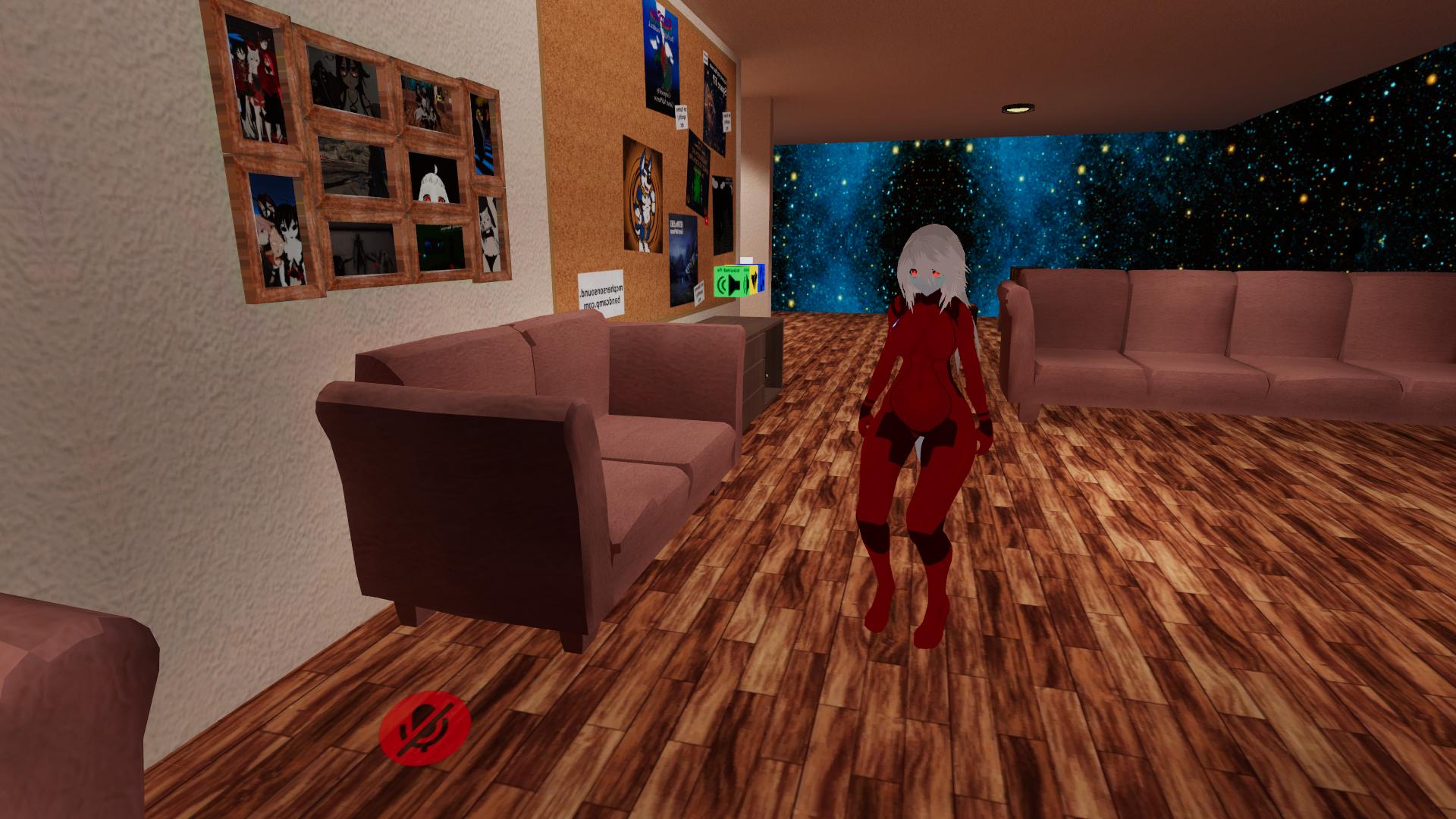
this is what is looks like in the animation preview https://imgur.com/OAMeCvg
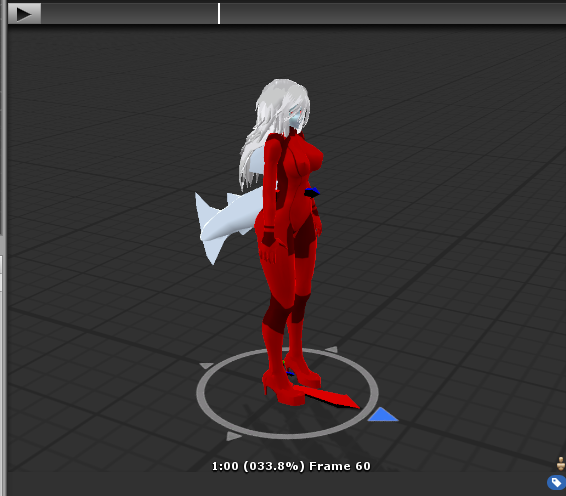
and what it looks like in game https://imgur.com/VvE29dJ
 tough sparrow
I stumbled upon the idle animation override issue
I have yet to find a solution to prevent the legs from bending incorrectly
 slim sparrow
Custom idles are difficult to get working
tough sparrow
I just leave them alone
 surreal iron
custom everything are difficult to get working because of the default animator / humanoid rig
 clear yew
I'm also struggling with an Idle animation
Is fine on the preview and within Blender but once uploaded the body bends up towards the back as if it was a birb mating dance
It is indeed a tricky bee
 tropic root
Hey, I need to know how to make animation after letting go from a gesture.
tropic root
e.g. Gattling gun's ending animation
 quiet needle
You might be able to do a transitional animation in Unity
 sinful osprey
Anyone having problems that animations arent working
I just do the normal stuff how it normally works but nothing happens
 dense tangle
So I'm trying to actually remove specific animations from a model I've found. How do I go about doing that? Finding the right animation etc
 lavish scaffold
@dense tangle You are talking about animations that you activate with Gestures and/or Emotes, right?
dense tangle
Yeah, with gestures.
Specifically the one I want to remove from the model is when I place my thumb down on the controller.
spice urchin
remove it from the overrides
dense tangle
Where do I find that?
Sorry, still new to unity. Learning.
wait no I found the override page.
spice urchin
its in an animation override object
dense tangle
Knew I read about that somewhere.
spice urchin
can be found in the files or the avatar descriptor
dense tangle
So how do I know which override to get rid of?
spice urchin
just open it and delete the one for the gesture
u dont delete the override
u delete the animation in the slot in an override
dense tangle
right
spice urchin
so whatever gesture it is
i.e. ROCKNROLL
that animation overrides the default gesture for rnr
dense tangle
Is there a way to preview the animations so I can be sure which one I'm getting rid of?
spice urchin
yea
its also in the files already and u can see it when u click on it
u can also of course just know the gesture its bound to by finding out in the game
dense tangle
Okay, I think I figured it out. Thanks for the help.
 thin flint
Does anyone know how to fix a missing error with editing animations in unity?
spice urchin
the animation is manipulating properties that arent there
thin flint
Is their anyway to move the Animation to a different location on the avatar? Example: It's located in the avatar but not under body or armature
spice urchin
wym
only the character group has the humanoid avatar to move the limbs
otherwise u would move them using generic animations but that would move the limb transforms
thin flint
In game the animation follows my head/viewpoint and i want the animation to move on it's own without following what my charatar does, how would I go about doing that?
spice urchin
o then just edit the animation itself
since apply root motion is not active
when u look at the animation window
that white circle with the red arrow
thats the root
if u had apply root motion it would move the whole character like shown in animation window
but since its always disabled
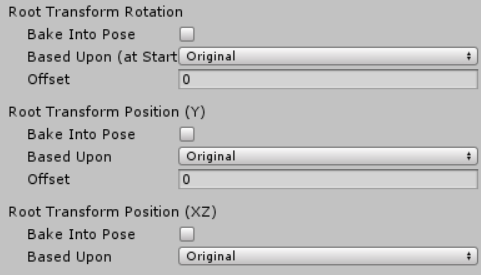
u have 2 instead use the root bake settings
thin flint
Mind if we do a call and I can just show you what's going on?
spice urchin
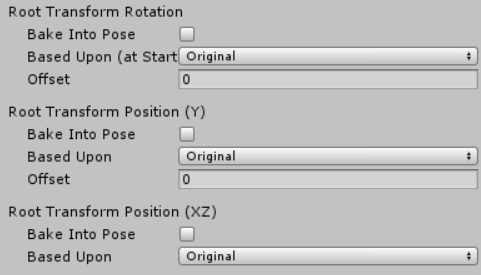
if u dont use bake into pose its going to attempt to move the entire character
if u do its only gonna move the hips and keep the root where the character originally was
or to whatever setting u use
so in the animation u will see that
the circle with the arrow stays in place
as opposed to moving and rotating
thin flint
I am so lost, thx for trying tho.
 reef nexus
GitHub
Contribute to s-m-k/Unity-Animation-Hierarchy-Editor development by creating an account on GitHub.
thin flint
Think I am wording my question wrong, What I am trying to figure out is that my animation has it's own set path to follow and when I movie my character The animation follows so say when I move my head sideways the animation moves as well, How do I make it so it doesn't Move?
Any and all help is greatly appreciated
reef nexus
I was answering the question about missing objects in animations. Wherever your animator is located in the hierarchy will be the root
thin flint
ahh okay, sorry new to Animations that go beyond hand gesture.
reef nexus
so lets say you make an animation controller on the game object itself and your default take is an idle tail wag. So you go in to the dope sheet and animate the tail wag. But you want it to be a constant idle loop. So you're like "oh crap! I need to move it to the tail root so that I can use it as an idle animation." You move it to the to the tail root and suddenly all your animated values are missing. Thats because tail_root is now the base and you need to remap the paths.
thin flint
An how you remap it?
reef nexus
so instead of being basicanimegirlavatar/armature/hips/tail_root/tail1 its now /tail1
its much like file paths on a pc
 hollow perch
Ah hit f2 on each row in the animation. Or if there are too many, you can open the .anim file in notepad++ and find/replace all the paths like replace "Armature/Hips/Tail_Root/" with ""
reef nexus
so you can click on it twice on the dope sheet and it will let you edit the path or you can add that cs file i linked up there to your editor and you get a slightly less crappy editor
hollow perch
Keep a backup if you do the notepad route
reef nexus
you can only do that lyuma if you switch to text mode.
reef nexus
To do this go to edit -> project settings --> editor. Then change asset serialization to force text. It will take awhile and all your files will get larger. However, you can open .anim files in your editor of choice (i highly recommend notepad++) and edit them directly
the line to change for each item looks like this:
path: Armature/Hips/Spine/Chest/Neck/Head/Ears1_R
 open spoke
If the model is generic then you can set the animations to whatever, but you wont be able to control it unless it's Humanoid?
So having a separate non-VR version of an av makes sense
 ancient mesa
I want to make it so my avatar does something when I press an area on the trackpad. Would I create a shape key in blender to do this or am I wrong?
clear yew
You are indeed wrong, adding animations to different hand signs (areas on the trackpad) is something performed in unity, You can obviously make animations in blender THEN put them in unity to be applied to a hand gesture, but the workflow for animations is primarily performed in unity
ancient mesa
Ok so how would I do that?
clear yew
With your model prepared and ready to go, what I do is duplicate it so I have a separate version of the model to do animations with, afterwards you can basically follow this tutorial to learn how to do animations on your avatar.
SUBSCRIBE, LIKE AND ALL THAT GOOD STUFF!! :D DISCORD ► https://discord.gg/vNyJgCX PATREON ► https://www.patreon.com/kunoleo
ancient mesa
Its not an item im pulling out, its a change in the mesh shape.
 obsidian vigil
@ancient mesa doesnt matter, you can animate that "shape key" as well
its the same thing
 left bobcat
Hey, my particle effects are broken. They disappear when people come close to them and appear when you are far from them.
Also world particle effects for some reason started rotating with the object they are attached to.
Anyone had those problems?
slim sparrow
@left bobcat in both cases I know why this happens
For the first problem, this is a particle system bounds issue. Is the particle system entirely inside your armature, or is it attached to a bone in your hand using a fixed joint? Is it a local particle or a world particle?
The second problem is that you need to set the render alignment to something else in the renderer tab
Such as Facing or Velocity
Keep in mind, world-space mesh particles cannot have "good" individual rotations.
The best you can do is align them to their velocity or keep them at a fixed rotation
 hoary plover
Does someone have a good tutorial or something like that for adding weapons with animations ?
For me the problem is i can add the weapon and stuff but i cant get the animation to work or the effects that are with it. ( like loading animation for a pistol or some flames and stuff on swords)
i cant rly find anything.
spice urchin
world particles have to be attached with a physics constraint/joint
and u can use animators to play an animation or cycle thru items
i used animators to make a weapon cycler that shows as a panel with the guns on it
clear yew
Is there a way to have an object spawned via animation stay in the location it spawns in the world, or will it always track your avatar? On my screen the object stays in place, but my friends are telling me the object tracks my movement.
clear yew
If not mistaken there is a way
Have seen a friend whose model spawned copies and they all remained in place
 pliant plank
An object inside an empty game object with a rigidbody that's not connected to anything with all the axis' locked iirc
hollow perch
since unity 2017 that has the issue that others will see such objects move locked to your body while you are in walking or running animation, even though you don't. they will become quickly desynced
pliant plank
Ehh, mine works perfectly fine :o
obsidian vigil
same tbh
😂
havent had any desync problems yet
but my login is broken as hell :/
pliant plank
You do need to go pick ehm up again from the location you left it or it'll be off-center for you but not other users
But other than that it's far more reliably positioned to external users
 fading junco
i don't know if this is the right place to ask this... the thing is, i'm "trying" to make my own avatar, and i'm at the very end, but now i need the mouth to run, so i'm trying to add lip sync in blender... but the "add shape key" button is inactive, what to do?
(if i even can do anything) :/
pliant plank
Are you in edit mode?
fading junco
yes.
pliant plank
Go to object mode
fading junco
thanks, i'll try.
pliant plank
Edit mode is to edit the currently selected shapekey so the add functionality is disabled on such
fading junco
thanks it works, and i didn't know that because it's my first time going through the thing.
pliant plank
Make sure to have the basis selected when exporting
So it doesn't export with a shapekey as the basis
clear yew
So connecting the object to a rigidbody and locking all of its positions makes the object track my model on my screen now too.
Did I miss something?
pliant plank
Wait wait... maybe it was a fixed joint... can you screenshot it?
clear yew
I've tried fixed joint. That's where I was in the beginning.
But fixed joint relies on a rigidbody.
Wait.
Do I connect the fixed joint to a rigid body that isn't part of the model?
clear yew
Forgive my ignorance, but I'm not sure what iirc means.
clear yew
Hm...
One second.
Okay. So I have a cube that's just on its own in the scene. It's connected to nothing. Just exists in the world. It's set as a rigidbody that has all of its axis locked.
Then I have an object that's connected to the model with a fixed joint connected to the rigidbody that's on its own.
pliant plank
It must be part of the hierarchy for the model but i don't think it should be anywhere in the armature
If that makes sense
clear yew
That's what I was doing before.
But it just makes the object track the direction my hips were facing.
When I lock its positions and rotations that is.
pliant plank
Can you screenshot the cube in the inspector?
If i see a screenie i think i can make sense of it
 candid shoal
I am also interested in the outcome of this
because currently I'm using world particles to get around this problem
1 world particle from an emitter, rendered as mesh
then it stays in world space
even though it was generated from an avatar
pliant plank
I did make it work for myself so it's definitively possible i just need a refresh
candid shoal
the issue, as you may well predict, is that it's taking about 20-30 minutes to upload the avatar
if you can show it to me in game I'd really appreciate it
my username is .truth. although not sure how you can add people in game just by username
I'LL SHOW YOU MINE IF YOU SHOW ME YOURS
clear yew
I've sent you screenshots of what I currently have.
Though I've been fiddling with it so much that it's not what I started with anymore.
pliant plank
I'm in bed atm, that's why i'm not giving out completely concrete answers, i'd check my projects for it directly
candid shoal
ok
I just can't believe its possible with rigid bodies
I tried all sorts of combinations
hollow perch
@candid shoal social tab -> search -> type in username
Also taking 30 minutes to upload = you haven't turned off future proofing yet
you must turn off future proofing in vrchat sdk -> settings. the vrchat developers have never made any public comment how to access the data so make your own backups instead
candid shoal
future proofing only takes a small amount of time
hollow perch
not if it takes 30 minutes
candid shoal
unless its future proofing as part of the asset uploading
candid shoal
oh
obsidian vigil
my project is 36 gb 😂
hollow perch
ok well it filters for stuff in the scene
but if you accidentally drag in a single material or fbx you had in a world it now pulls in all those dependencies etc
candid shoal
so the small part at the start
where it says "future proofing"
thats not all of the future proofing?
or...
oh it must just be designating files
during that time
then its uploading mass files
hollow perch
except .cginc files required by shaders - because who needs shaders to be properly backed up
candid shoal
later on
hollow perch
yes
candid shoal
trying it now
hollow perch
I lived with it for a month until I realized it was uploading my private original files I never meant to upload, then I was a bit...pissed to say the least until I got over it
candid shoal
...
now it's freezing
during "bundling and compressing assets"
er
bundling and compressing data
I'm gonna reinstall unity
hollow perch
why? the whole unity?
you didn't wait very long either. if it's stuck try closing unity (use task manger if necessary) and just try again
hollow perch
you never need to reinstall unless you actually deleted files out of program files
candid shoal
someone suggested that its an issue of two versions of unity
being installed on my computer
hollow perch
future proofing turned off will fix that
candid shoal
I think maybe that is bleeding over into other stuff
hollow perch
no it's ok to have two versions installed. just make sure you open 2017.4.15f1
candid shoal
I installed 4.15f1, then I updated
then it said I was using the wrong version
so I reinstalled 4.15f1
hollow perch
ah. then uninstall the updated one and put 4.15f1 back. you need them in different paths
hollow perch
the fact you got as far as future proofing etc means you are probably on the right version
but if you have future proofing turned on, worlds basically can't be uploaded
hollow perch
so make sure to turn future proofing off
hollow perch
if it takes 30 minutes to upload a ~1 MB avatar just think how long a world will take
hollow perch
^
pliant plank
Alright so we reached a consensus
candid shoal
what I did was I added in polygon meshes to world particles
the meshes are buildings
that are... like 9k polygons
hollow perch
ok...that's tiny unless you havve a bazillion high res textures
pliant plank
 candid shoal
okay
pliant plank
That's how you get it static
candid shoal
EXSGT can you show it in game
pliant plank
Lemme find a gyazo..
candid shoal
I'd just like to state again
vr is super cool
10,000 years of human civilization
this is a good achievement
pliant plank
This station spawns infront of me facing to my front, this is after i've spawned and moved to the side https://gyazo.com/6f419fe9d0fe07427777852057330bfb
 spice urchin
its already been up for a few years its just gaining more popularity
obsidian vigil
vr gonna be lit if you can dive into it tho 👀
candid shoal
its frozen at bundling and compressing data again
pliant plank
Unity 2017.4.15f1?
candid shoal
yup
pliant plank
Latest SDK?
candid shoal
yup
pliant plank
Check the console tab for errors
candid shoal
the plot thickens - I turned future proofing back on, it still freezes
no wait
it works
maybe
its just taking a while
I'll try again and just wait longer
so back to the rigidbody/joint thing
for anchoring something in worldspace thats generated from your avatar
...
oh
looks like
unity wasn't frozen
it was just taking a really long time to bundle the assets
also now it's only taking like 2-3 minutes to upload
holy crap thanks
pliant plank
The settings i put up there do just that
clear yew
So update from my end.
candid shoal
what does the heirarchy look like
clear yew
Fullbody tracking breaks rigidbodies.
obsidian vigil
ouef
clear yew
Turn them off if you have them and it'll magically start working on the server side.
pliant plank
Hierarchy
---->Armature
---->Body Mesh
---->Empty Game Object
|
---->Your Item
pliant plank
Empty Game Object has the settings above
pliant plank
Whatever you want static
pliant plank
Yep, nothing
candid shoal
but there is on the container
pliant plank
Mhm
obsidian vigil
for fixing sth in place? .o.
candid shoal
I'll try it but I dunno, I feel like I've tried that before
to fix something in worldspace, yeah
if its on your avatar
pliant plank
Make sure the settings are the same
obsidian vigil
i always do a fixed joint on the world anchor and put my item under another gameobject which i can toggle afterwards
pliant plank
Server-side will always spawn where you intend it to, but local is dependent on when you disabled it, moving in unison when disabled
So you need to be where you spawned it to "pick it up" properly
obsidian vigil
the best example for that is disabling and reenabling a ragdoll in world space 😄
the ragdoll on the local screen stays attached to your armature
but stays in the world
obsidian vigil
?
candid shoal
weird
obsidian vigil
does the go have an animator?
pliant plank
Wait, what?
candid shoal
no, I didn't know it needed one
obsidian vigil
it wont let u add it
clear yew
Is the game object parented to the model or does it just exist independently in the world space?
obsidian vigil
until you copy, remove the animator, add and restore
pliant plank
Ah, you just use a gesture for that
pliant plank
It's parented to the model
pliant plank
So it twitches a bit when you move
candid shoal
so I can turn on the anchored thing
pliant plank
But stays in place
candid shoal
with a gesture
obsidian vigil
how can you change the animation someone does on a seat? 👀
"chair"
you know what i mean
pliant plank
A chair prefab with overrides setup for it iirc
Can't recall exactly what it was called
obsidian vigil
cuz i thought about making a darth vader with a chair for the person being strangled by the force 😄
pliant plank
The gyazo i posted above is a chair with custom emotes and an idle standing override
obsidian vigil
oo
pliant plank
The neat thing about it is that people can stop the animations at anytime by leaving the chair
obsidian vigil
ye, i saw someone do that using a "pole"
pliant plank
It's like a custom emote testing area
candid shoal
an update on the fixed joint/rigid body thing for anchoring in worldspace
it stutters massively
I'd record it but I have no idea how to use the camera in vrchat
to stream
pliant plank
Yes it does, that is normal when you move
And unsure if it's only localsided but i have a feeling it is
Otherwise people'd yell at me for moving so much whilst they used my seat
fading junco
sigh... lip syncing is giving me a lot of trouble... -_-
and it's the only thing i have left... (other then testing it)
(also, sorry if this isn't the right place to say this)
pliant plank
It is animations, technically speaking
fading junco
i know that it's not the worst thing to get right, but i give up on syncing the lips... -_-
 torn pawn
it's just 1 button press in cats..
slim sparrow
Only if you already have the shape keys or if the face is rigged
Doing it manually is hard, proportional editing saves the day for me there
candid shoal
I have an avatar where one eye moves wildly whenever I talk
I'm pretty sure I messed up the shape keys somehow
slim sparrow
Yeah, just select that eye, separate it into a new mesh with P, then delete all shape keys that should not be affecting that eye
Which might just be all of them
candid shoal
yeah thats gonna remove all of the vrc.pp etc
hey, just discovered something super weird
been exporting and importing between .fbx files
then one time it gave a weird error, something about the animation import failing, so I checked the rig and it said transform hair 2_2 failed because Jaw was not defined or something
then I noticed there was no jawbone or toes
so I added a jawbone, then it said "Jaw not defined in Human Description" or something like that
so I removed it within unity
and now there's no error
freaking weird
it feels like I did nothing, it created an error, then I did nothing again, and the error went away
 copper whale
Heyyyyy
So I dunno if this is the right channel to put this in, but I need particle animation help.
I'm trying to make a fire that has a light I could use to light up dark areas, I've seen people use this with other avatars and I'd personally like to learn.
fading junco
the problem with the lip sync, is that the face is way too high poly for me to add keys to it,
or i move the mouth, and he looks like one of the monsters that he might kill... -_-
(also, the total poly count isn't too high for the game, and i still can lower it if necessary)
 misty tiger
have you tried using proportional editing to make the shape keys?
spice urchin
^
fading junco
proportional editing?
spice urchin
its a tool that lets you
pull on the mesh by moving multiple vertices
look it up on google 'blender proportional editing'
should give u enough information
misty tiger
 spice urchin
fading junco
spice urchin
fading junco
i'll look into that, but to tell you the truth, i'm kind of sick of blender for now... :/
spice urchin
wat xd
fading junco
i've been opening it 12 times in a short time... and i've been fixing, then failing, then fixing, then failing... over and over and over... i need a time out by now... -_-
copper whale
Well, Idk if I should repost my problem or. . .
fading junco
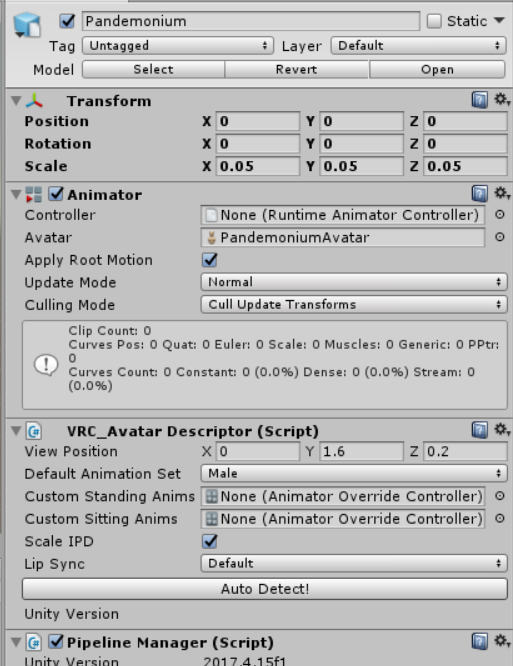
unity tells me "this avatar does not contain an animator" what does that mean?
spice urchin
it doesnt have an animator
the animator component

turn off apply root motion tho
it gets turned off ingame
fading junco
again... i'm really new to this, what even is an animator?
spice urchin
it has the avatar for your character in it
and vrchat places their character controller into it
so that they can animate your characters movements and gestures
if u dont have one they cant animate ur character
so it doesnt let u upload
usually there should be one there
if u set up ur character to have some sort of rig type
fading junco
it looks just like in that imege
 fading junco
so how do i add one, if i don't have one?...
spice urchin
if u have one
u need to put the avatar descriptor
where the animator is
cant be anywhere else
 plain cedar
if you dont have one, click on the model, then on the right side toolbar near the bottom, 'Add Component' search for animator
spice urchin
but u should probably not do that anyways
the model when u drag it into the scene should already come with the animator
unless u know where the avatar also is (in case u copied avatar)
plain cedar
thats the thing though, if you HAVE one, it will tell you when you try to add another* one
candid shoal
how do you create a humanoid animation
I tried to create a gesture override animation for a hand
but it said it was a generic animation
and it needs a humanoid animation
couldn't find anything online on it
 onyx agate
You would need to make a custom animator controller (it will override the standard vrc animations)
candid shoal
yeah I did that
custom override
but when I actually made the specific animation file
and added the properties of the fingers
it apparently created a "generic animation" file rather than a "humanoid animation" file
you know the file that you drag into the appropriate slot
torn pawn
are you trying to do something specific? or just the regular override?
candid shoal
just regular override
I got advice from someone on vrchat
they said to create a blank animation then drag it to the body
kind of late to try tonight but I'll try tomorrow
clear yew
How do you add a mmd dance to a model without the hip twisting on itself in unity?
onyx agate
a second hip bone rotated is what i see most commonly on converted models with mmd dances
clear yew
@onyx agate So should I combine the two hips together in blender before exporting it to unity?
onyx agate
No idea ... Just noticed that most have a sort of ghost hip used with the mmd animations
clear yew
Okay thanks I didn't know about the 2nd hip
clear yew
@candid shoal Click on your model within the projects section & on the upper right area under "Rig" have you changed yours into a "Humanoid" rig?
https://puu.sh/CuZ8s/7167a108a6.png

If it's not set as a humanoid rig that may be why the animation isn't classified as a humanoid animation perhaps
clear yew
I do humanoid it and the hip twisting only happens when the model turns around
And try with translated bones and without
clear yew
Is there a limit on how many Shapekeys can be playing within a Gesture?
onyx agate
nope... but using many can make it look weird as they blend in on each other
clear yew
The Gestures I made were acting weird but thankfully I managed to figure it out
Now I'm just struggling with Shapekeys not importing to Unity correctly
candid shoal
@clear yew its a humanoid rig
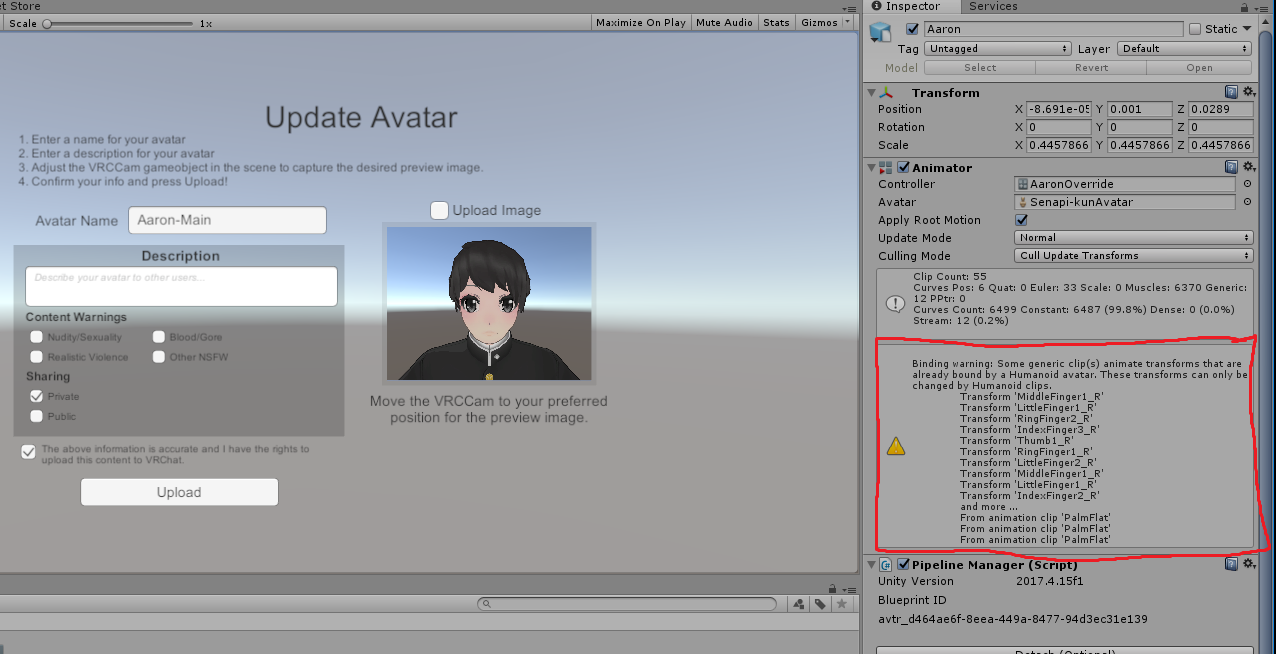 slim sparrow
@candid shoal you are using animations that try to move bones directly, which will not work.
In this case, it appears you made a hand gesture override by simply rotating the finger bones.
candid shoal
oh
slim sparrow
You need to use the Animator properties instead
Add property->Animator->Middle Finger 1 stretch
Etc.
Muscle animation editor is a Unity store asset that will make it a lot faster
candid shoal
oh okay
its called muscle animation editor?
is there a way to do it w/o using a paid program
fading junco
for some odd reason, the spine of my avatar is set to zero in length, and i have no idea what to do... :/
candid shoal
I was looking in the wrong place
what do I click on to modify the actual value
its in the properties but I'm assuming scale/position/rotation wont affect it
slim sparrow
You need to modify it in the animation window
Move the red line to the correct keyframe (the first one in this case at 0:00) and just alter the value
candid shoal
I'm using "animator.Right Hand In-Out" but its not showing any movement
when I change the number
left hand index stretched doesn't do anything either
slim sparrow
You need to be in record and/or preview mode to see the changes
You need to drag the animation file onto a duplicate of your model, select the duplicate, go to animation, record, then change the values
It should be changing something if the finger bones are mapped
candid shoal
oh my god
yeah okay that works
preview mode
oh god this is going to be so tedious
but
at least its progress
fading junco
if i'm not wrong, i have almost the same problem, but it's with the spine...
i can't even sit without getting the avatar as a pancake, but this i don't know why. :/
no one?
candid shoal
particles.
Trying to animate particle mesh material over time
so that it starts as 0% alpha and grows to 100% alpha over the lifetime of the particle
but using particle mesh rather than billboard
is this possible?
slim sparrow
Yes, unity 2017 has a particle surface shader
Which can accept particle colors and alpha etc.
candid shoal
how do I access that
ew
I'm seeing
a lot of code online
oh god
nm I think I found it
 fading junco
how to use mixamo?
or no matter what i do it sets only 2 fingers in the heads... :/
spice urchin
i prefer to use blenders auto rigging tool
but that means u still need a rig just not need to weight paint
spice urchin
its pretty simple
essentially u first need for the rig to be humanoid and have finger bones
if u don't have any or don't have enough u won't have gestures
then the gestures will be activated with the binds on desktop, vive, or oculus etc
if u want to replace gestures or animations
u use the animation override from the SDK
make a copy of it and place the replacement animation in the slot
and make sure it goes in the avatar descriptor
also gesture animations can only be 1 frame long
candid shoal
I meant at the coding level
why can they only be 1 frame long
when it triggers it, what is it actually doing
because there's a transition
spice urchin
its all in the animation controller template .-.
candid shoal
so how is the animation occurring
spice urchin
its all in the animation controller template .-. [2]
spice urchin
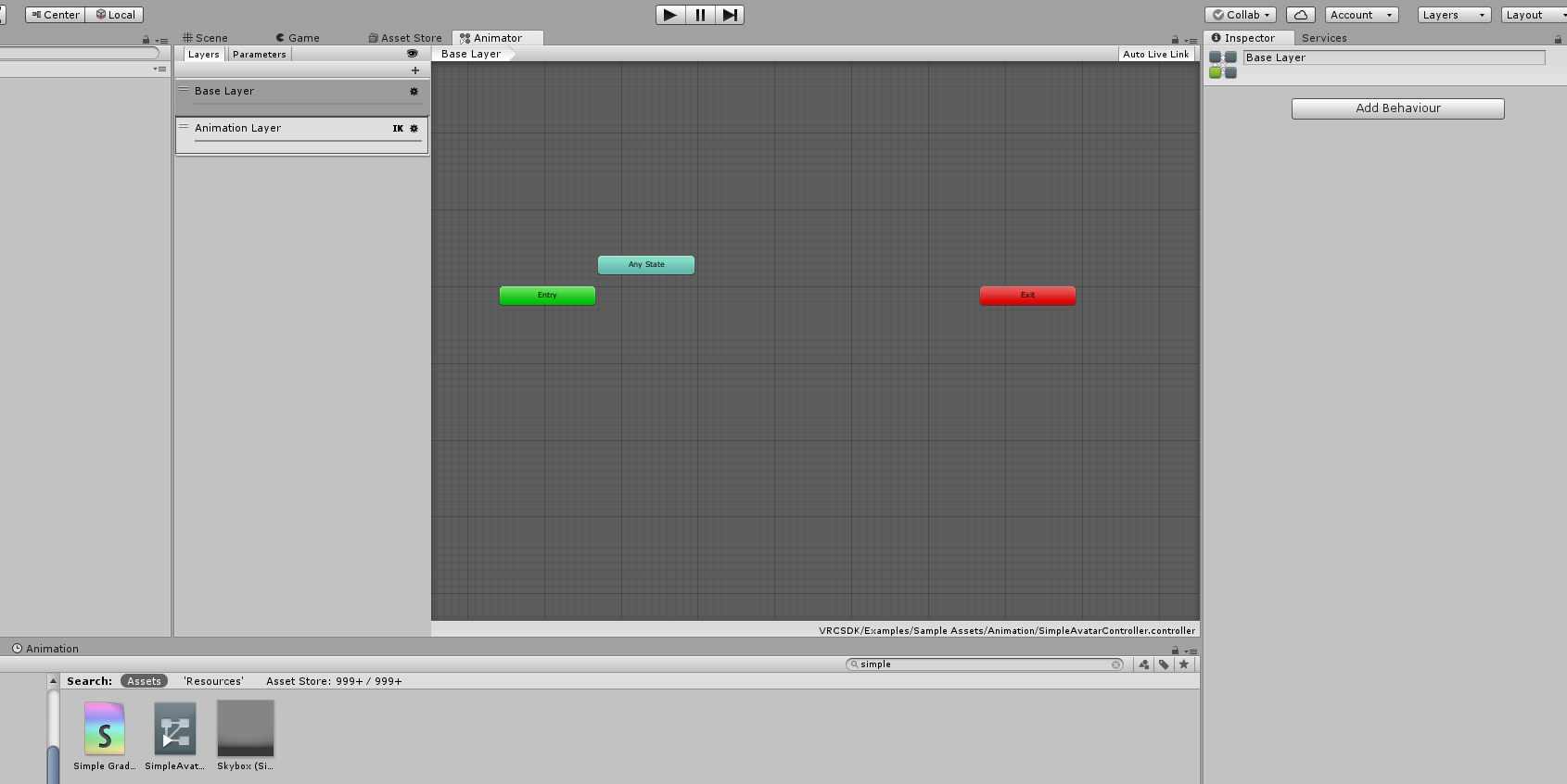
in the sdk there is an animation controller with "simple" in its name and it has the layers for gestures
candid shoal
are you referring to a document somewhere
spice urchin
no
candid shoal
oh
so when a gesture is triggered
how is it applying the gesture to the rig
does it create some kind of temporary animation file and then append the frames
spice urchin
omg
i literally told u
in the sdk there is an animation controller with "simple" in its name and it has the layers for gestures
candid shoal
right but
spice urchin
if u look at the layers it should be pretty obvious how it works
the only "scripting" going on is the changing of the parameters in the controller
 left bobcat
@slim sparrow
The second problem is that you need to set the render alignment to something else in the renderer tab
Such as Facing or Velocity
Keep in mind, world-space mesh particles cannot have "good" individual rotations.
The best you can do is align them to their velocity or keep them at a fixed rotation```
It's local. It is inside armature, and is not attached through a joint. It's mesh type.Thank you for the second one. I'll try setting it to view and velocity.
spice urchin
no its the other controller @candid shoal
with hand gesture layers and a locomotion layer
clear yew
@spice urchin I managed to get 10sec animated gestures working, is it generally prefered for it to only be one frame?
spice urchin
no
they can only be 1 frame long
any other length will mess up gesture transitions and wont work properly
if u want a ''10 sec animated gesture'' then use an animator or something
clear yew
Believe that may have been what I did then
 naive niche
any one have a few min to help me with a sunrise sunset animation please DM me need some help doing this correctly
spice urchin
cant u ask here or #development-advanced
clear yew
do it the dirty cheap way
animate a rotation on the direcitonal light
add animator component
also animate color and intensity
 vale yoke
I've seen an avatar with a phone prop where one gesture holds the phone and fingerpoint on the other hand will scroll through a list of songs on the phone, and when you let go of fingerpoint it starts playing the selected song. Anyone know how this is achieved? I've been playing around with the idea for a while now and can't figure it out
hollow perch
The premise of that is an animator state machine on a game object with the phone (can't be on your top level avatar object but anywhere else is fine). Then a gesture that just lock it by disabling the Animator
vale yoke
How do you disable the animator with a gesture though? You try with the record method but it just switches to that animator's animation when you click it, and there's no way to disable an objects animation in the list that I've found
spice urchin
there is u have to manually edit the animation in a text editor
all keyframes must use the m_Enabled type and have a classid of 8
and u must also change ur project settings to compile things to readable text instead of binary
theres utube vids on it
vale yoke
Oh? What would I search for to get a good video to learn this? Thanks for the info btw
spice urchin
idk theres a couple
vale yoke
An example video would be nice. Google's getting me nowhere
spice urchin

I explain how to create a potential infinite amount of gestures using an animator state machine. ========IMPORTANT======== Thank you Bertrand Steenhaut for t...
heres one
vale yoke
Sick, thanks
clear yew

I tried changing the Y position within this window for a sitting idle but I still end up inside the seats

Do I need to animate/keyframe the Y position for the hip bone instead?
spice urchin
thats bc
the sit animation actually bases off of foot position always
no matter what u set it to
so theres no real way 2 fix it unless u move foot bones down
i kinda wanted 2 request a toggle to make stations base off of hip location
thats also y u cant fit correctly on seats that arent ur size
clear yew
Does explain things
Will experiment with the bones & Shapekeys to see if I can have it work
Actually I was silly and added Standing override for both, will need to retest the earlier settings just in case
Managed it!
It was just me being silly and forgetting to put in the correct Sitting animation override controller in the right spot

This is my attempt setting it with the settings I showed earlier

And this was my attempt keyframing Root.T (I'm assuming hip bone?) Y position up some
Oh this also makes sense, just realize I don't have my gestures anymore while sitting since it is a different override meaning I could create even more gestures if I wish
Tested it on Pub & feels like its working on the first floor's dinner tables & stools as well as the top floor's sofa
Currently my sitting animation is very forwards so it didn't quite work for the Second floor tables since they're much closer to the chair's ledge but in general this seems to have been a success > w O)/
Now just to figure out how to get those eyes shapekeys working!
clear yew
@spice urchin In case you meet someone else running into my Shapekeys problem I found the solution (for my case)
I went to blender & selected the Armature & pressed Ctrl+A while my mouse is on the 3D view to Apply the Transformation for position, rotation and scale then repeated that on my Mesh
The model and armature were scaled up 9 times so the programs were having difficulties calculating the movement of vertices that small
"Applying" the scale made sure that the program calculated them based on their current bigger size and so now it works
Thank you once more for all the help!
onyx agate
Hi guys, what would be a easy way to swap two models through an animation and have the other model be controlled (like a transformation in a game) (if you know a method please message me)
torn pawn
have two meshes under the same armature and toggle those meshes with animator
onyx agate
Does that work with different sized models (so different sized armature)?
torn pawn
no
onyx agate
hmmm might try the puppeteer method *keep both armatures and have all bones parented to the same one of the other (then shrink one model inside the other, on the transform animation swap the small one for the big one)
clear yew
@vale yoke https://youtu.be/GHjWF4yflRU
Editing by Cheese Link to the package with assets from the video (Includes scripts) https://drive.google.com/file/d/1oi1Ryc2O5FAKQg1_92G6CbEaUBmKnzhU/view?us...
spice urchin
the problem with those kinda systems tho is like
they are out of sync with new players
stuff like the minecraft build shader kinda fixes it by like using the corner u click on the type of block u drop
clear yew
all animator states are out of sync with new players
i just prefer this method and workflow over the infinite gesture vid
spice urchin
o yea
floral imp
I created a walking animation override for a model that is humanoid, but doesn't have traditional legs. For some reason the leg animation doesn't show
slim sparrow
Yep.
@floral imp there is no way to fix that
Walking animations cannot move any transforms such as additional leg bones.
They can only use humanoid properties and enable/disable objects
floral imp
thanks, I kind of realized that as I was typing this, but I thought someone would have a definitive answer. I'm going to try ridged bodies instead
slim sparrow
Yeah, rigidbodies and joints could work for stuff like four legged creatures
 wind swift
Hey I created an animation for a hovering turret in blender, but for some reason It won't animate when put into the game, I applied the animator in unity but it still doesn't work I'm setting le rig to legacy, has anything changed?
wind swift
nevermind fixed by setting to generic
clear yew
How can I convert a mmd motion over for unity? i've tried watching a couple videos but they didnt seem to help me ;-;
onyx agate
Import it using mmd tools in blender and then you have to bake the animation in the model before exporting to unity
 stone tusk
Hey everyone, So i have seen MMD worlds with Camera motion and i was wondering is that imported through Blender or the MMD4anim plugin? If through Blender is there anything special i have to do to do this other than click on Camera and load in the VMD for it?
 versed moon
how do i sync my animation in my world so everyone sees it at the same time? even late joiners
 normal cipher
i want idle pose for first pic
but it doesn't work. maybe, there has any limit or can't use leg and body
how can i ignore that?
 unique inlet
Who can help me put a blinking anim on my avatar? 👀
I have the blinking anim done and everything, just how to I attatch it without it changing my standing pose.
 covert girder
until you not add keys for bones position/rotation it must not touch your pose, i think you need to add a second Animator and from entry put a blinking animation
unique inlet
It's setting a blendshape from 0-100 and then 100-0 a total of 3 keys per blink and then I have it doing that every once and awhile.
covert girder
you need just to have a key for opened eye, then closed and opened, and change the animation type to Loop and add to the Animator of the model 🤔
slim sparrow
@unique inlet put an Animator on your body
@unique inlet put an Animator on your body
Not on your main avatar, just on the Body mesh. You can't have your own controllers on the main one
Then animate the blend shape however you wish
slim sparrow
Unset the avatar property on the animator
Then show a screenshot of your animation dopesheet
With all the keyframes and the property names
With the body selected of course
unique inlet
it was yellow and missing, so I copied the keyes and made a new property to reference again
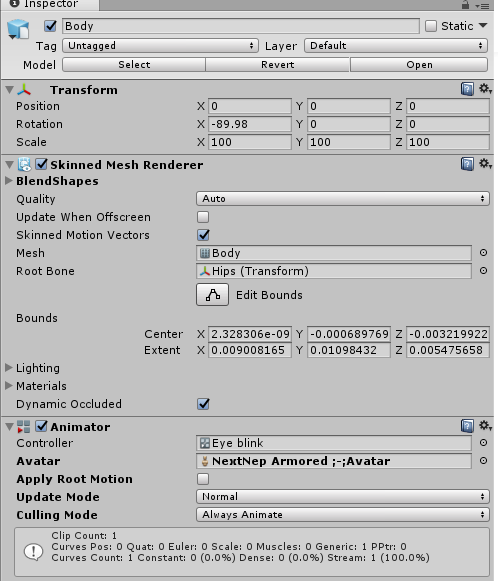
but now the avatar is set to none
okay now it seems to be working
going to upload and test
 undone glade
anyone have an alternative way of doing the fixed point thing? Doesn't work this time around for some reason.
 uneven acorn
whenever i use the animator in unity the eyes get stuck and dont reset, is there a way to fix this
spice urchin
copy the avatar before animating
uneven acorn
thats what i did but they just get stuck
 runic wyvern
I accidently dragged an animation onto my main avatar and its stuck in the crouching position in Unity... I have an auto save asset as well, so I cant reload the scene again and im not sure what to do..
 spice urchin
put a copy of the import in the scene and copy over anything u put in it
and next time make duplicates of ur avatar b4 animating
runic wyvern
Okie Dokie, Ill go ahead and try that
 ivory lagoon
i'm dumb and forgetting...how do you make a shapekey work on an animation again?
reef nexus
add the component. its under body ->> blendshapes --> name of shape then 0 to 100
 frank elk
tiny Q, i need to do blinking via bones -- where should i slap the animator on the avatar if i wanted to do that? i'm assuming i can't put the animation on the root animator
spice urchin
u don't need to use bones
u can use Pose To Shape Key in CATS
but if u rlly want to for whatever reason
just put an animator on the armature or something
frank elk
i'm using 3ds max so CATS ain't an option rn
spice urchin
and put every idle in its own animation layer
frank elk
oki
spice urchin
yea thats y i always
use blender or export for blender
cuz all the tools there 2 make stuff easier
frank elk
yeye
spice urchin
but vrchat blinking a bit more realistic so i like that better
frank elk
i threw the animator on the Head bone and animated it, will that work in-game? it doesn't seem to work in Play mode
spice urchin
well probably bc ur animation isnt done right
and i would highly recommend it on the armature instead
bc it reduces the amount of animators if u need more animations
frank elk
fair
spice urchin
cuz say u have tail wags and ear twitches and breathing and blinking and etc etc
u can put them all in 1 animator in different animation layers
if u put em in diff bones u gonna need more animators and also harder to edit
frank elk
throwing it on the root bone seems to have worked, thanks!
wind swift
anyone know how I can stop a mesh from moving with my armature during an emote?
need my character to dance on a stage without the stage following my dance movements
I think I figured it out, I added a rigidbody to it, i'll see if it works
 covert linden
Putting it on an empty fixed joint will drop it into the world without much movement, tho it usually breaks after the first, you can fix this by constantly resetting its location to 0,0,0 when done with the animation, tho I'm not sure. Another method is to simply use a second avatar and make your main one invis during the animation
 gaunt sundial
for some reason my muscle editor is not working anymore in the newest unity, are there more people that have this problem?
 livid socket
Is there a way to create a light mapped to lip sync? Like something that flashes when speaking?
slim sparrow
@gaunt sundial delete it and reimport the latest version from the asset store
Older versions don't work anymore in 2017
gaunt sundial
ow oke thx
spice urchin
no @livid socket all visemes are blend shapes and all blend shapes can do is offset mesh vertices unless u have some sort of glow shader or something that u resize
 sharp lance
how do i make an animation where the gun on my back disappear? i have a seperate animation where the gun just appears in my hand but i want it to look realistic obviously. do i just uncheck the box in the animation tab for the gun?
 sinful cove
In the override animation, just uncheck the weapon that's on your back
sharp lance
can i do it in the same animation? like gun disappear from back and gun appear in hand with same gesture?
sinful cove
Yep
You can do a lot with a single gesture override
Make objects appear/ disappear, audio sources, particle systems, blend shapes, etc
spice urchin
gestures are reset to their default state
after they are finished
so like if toggling something it stay toggled while active
ivory lagoon
okay so i figured out how to add to add the shapekey but in game it’s like, a twitching expression that keeps going from expression to neutral over and over
both keyframes on the animation are at 100, i’m not sure why it’s doing that
floral imp
I'm having a issue with particles. For some reason my particles have a delay of 1 second. Its set to have a delay of 0 https://imgur.com/fSL0wnP

I figured it out
 chilly kernel
i needa help
trying to import animation from blender
but it only imports first 2 keyframes
and at rate of 24
clear yew
@chilly kernel Still having problems?
chilly kernel
its all good now
but gotta learn how to weightpaint bc
idk how it works with my model or how do i even weight paint it so
clear yew
I have added mixamo animations to the 'Crouch idle' part of the animation override. The animations work as emotes (1 to 8) but I can't get them to work for 'crouch idle' does anyone know a potential reason for this?
clear yew
damn
fading junco
where can i ask about weight painting?
torn pawn
#avatar-rigging and google
 tulip raptor
anyone who knows how a slideshow works with pictures? it's an animation I think
a friend made a device for that but I dont know how to switch out the pictures without having to change every setting for every picture orz
torn pawn
spritesheet shader or particle with texture sheet
 limber socket
I'm totally lost with this whole animation thingy.
I basically just want a gesture override to throw out 3 shurikens Talon style and then have them spin around and come back to me
candid shoal
just to make sure - it looks like it's impossible to have particle trails rendered as mesh particles
correct?
torn pawn
what do you want to do? can have a subemitter over distance as a "trail"
candid shoal
yeah thats basically what I want to do
subemitters only trigger on death/birth/collision though
torn pawn
emission over distance can work as a trail, play with that
candid shoal
that requires the entire particle emitter be moved right
I can't move the emitter
the particle is being used as a damage trigger
 sacred swift
the animation i got has run,walk,fly all that in one take.. like one animation.. is there to just get the fly part?
 spring nova
@candid shoal I'm still not sure exactly what you're looking for, but emission over distance works for sure itted particles too, so you could give a particle a trail of other particles
candid shoal
looking for this
B000ooooooo........... X
B = hitbox particle, original one
00000ooooooooo............ = falloff trail
X = emitter
oh wait you did pretty much just that with the fireballs
in your video
sacred swift
i have a animation of a unicorn that some one can have if u help me figure whats wrong with it haha
a Pegasus to haha
i spent $20 on it!! and i cant use it
spring nova
@candid shoal yeah that's exactly what I mean. Subemit particles on birth and give those particles emission over distance
candid shoal
if I turn off the particle emitter
will it prevent the subemitters from working
the way I set it up right now is that I launch a world particle
and play a sound
I have it set to emit on death but that wont work
spring nova
If you turn off the particles emission, no if you turn off the gameobject of the particle then yes
candid shoal
it turns off right after emitting 1 particle
spring nova
Wait is this for a world?
candid shoal
yeah
I have it turning off the entire particle emitter I think
no wait
I have a "SetParticlePlaying" trigger
I tried to make it so when it collides with the environment, it 'explodes' aka has a subemitter
its not working
which likely points to subemit on birth to not work as well
spring nova
So if you do on death or oncollision with a particle that dies on collision, then it will only be able to submit for a single frame. Which means it can't do subemissionover time or over distance, and you need to do burst emission. Are you using burst emission?
Onbirth won't be affected by this though, so it should work no matter what you do
candid shoal
doing both
wait
so on death only plays the subemitter for a single frame of it's emission?
spring nova
Yes, so it needs to be burst
candid shoal
hmmm
if I have an explosion which is made up of multiple expanding spheres
how would I implement that
emission was supposed to be 7 for .5 sec
spring nova
Size over lifetime
candid shoal
so it was multiple concentric spheres
yeah but I can't do it on death
the energy ball hits the ground then explodes
spring nova
Oh so after it collides, you want it to keep doing stuff for a little bit,m
candid shoal
yeah
spring nova
Instead of just a burst and done
Just have it subemit a single invisible particle with burst, and then that particle subemits your actual explosion onbirth
candid shoal
so its not chained
er
so when it emits the second one
wait
wont that single invisible particle die after 1 frame
and then stop the next anim after 1 frame as well
I'm trying it anyway
oh... its just not colliding I think
its really weird
it works in unity but not in vrchat
spring nova
No, the invisible particle can live as long as you want
candid shoal
its playing and exploding as intended in unity
candid shoal
got both subemitter methods to work
 echo siren
does anyone know how to convert .vmd to .anim so it works on any model?
covert girder
to make it work for any Humanoid model you need to change animation type in unity to Humanoid, for generic models it will work only with models that has same named bones
echo siren
thank you ❤
 lone wraith
i am making a rag doll for people to play with in my world, do i need it to be Humanoid, Generic, Legacy, or None?
tough sparrow
Humanoid and use ragdoll wizard to set up your ragdoll model
The model will just drop dead to the floor
The controlling part, ask someone else
slim sparrow
@lone wraith probably generic or none
Actually what Levian said is a lot more promising
You'll probably have to fiddle around with pickups on the limbs
Or just loose objects on a joint that pull the limb towards itself
chilly kernel
i cant get my world particles game object to follow my hand
any tips?
yes i have fixed joint on the game object and rigid body on my wrist
slim sparrow
Object with fixed joint on it has to be always on @chilly kernel
chilly kernel
it is
slim sparrow
And it has to be outside of your armature entirely
chilly kernel
but when i start making the animation and the character goes to the random pose the object doesnt follow
even in unity
hollow perch
You are making the animation on a duplicate right? You should be testing In play mode on your original avatar . Use the override controller in the animator slot of your avatar animator to test with that. Make sure to add a mask to left hand and right hand layers and set weights to 100% in the animator controller layers panel if this is your first time: the sdk has a bug. After adding mask you can fire hand gestures through the parameters window and test the same way it works ingame. It should stop jumping around. I need to make a simple tutorial showing this because I find it useful for testing
 chilly pilot
I'm trying to create an animation that creates a particle in my hand, flies off into the distance until it hits a player (or the world), upon which a small explosion will happen. I've gotten my system to hit the world and explode successfully (somehow), but testing with a random avatar I have laying around, it's not colliding with it. How do I get my particles to impact avatars?
 wise junco
@chilly pilot some people have particle limiters prevents them from colliding with particles
You need an avatar with a collider for it to work
spice urchin
also they will collide based on who is drawing them
so if u set it to ignore PlayerLocal it will collide with ur own character and go through their own on their screens
but 2 u it will probably just look normal
 hollow coyote
So I learned how to do gesture overrides awhile back and have models using my old techniques which still work, but today when trying to add a Vape emote to a model I made it active in the animation tab and nothing happened. I'm wondering if it's the model I'm trying to use or if there's been a change in how this was done? I called back to this tutorial ( https://www.youtube.com/watch?v=eT5_nyb0T1g ) which I used to initially learn how to do this, and can send screenshots of my stuff if necessary
Showing you how to change default emotes to weapons & stuff. SUBSCRIBE, LIKE AND ALL THAT GOOD STUFF!! :D MY FIRST TUTORIAL ► https://youtu.be/0vdiCJRAExw DI...
covert girder
Animation component is not white listed anymore, you need to use Animator component, and anim must not be Legacy to use
Animation component is not white listed anymore, you need to use Animator component, and anim must not be Legacy to use
also you can't edit default animator where your avatar descriptor or add another, but you can add animator to any object inside
hollow coyote
Oh
Could you link me to a tutorial on how it's done now?
And will I need to change it on my old models? They seem to still work fine
covert girder
actually the thing i wrote is for Animation component replacement (for all the time animations), and just using anims for gesture might still work 🤔 and you don't need to edit old avatars
hollow coyote
I'm basically just trying to add a prop to the avatar's hand with a sound effect
It's been awhile so I may just be forgetting something but it's not working properly at the moment
covert girder
do you add 2 keys in a row with enabling the prop, and then assign this animation to gesture box inside of override template? also be sure you put the override component into avatar descriptor slot
hollow coyote
I didn't get that far, I selected the prop in the animation tab and set it to active, but it didn't appear on the model, it was all unchanged
In the video I linked his model changed pose and had the prop in hand, and I remember that happening before but it didn't happen this time
covert girder
can you do a screenshot
also you don't in play mode? and you don't disable mesh renderer on that prop? and you enable prop as object and not properties of prop
play mode is a |> triangle at the top
hollow coyote
I'm not sure what play mode is, and I've never done that before on other models
I'm an amateur when it comes to unity lol
Can I DM you?
Can't send screenshots here
clear yew
You can only link images here

 covert girder
@hollow coyote you don't need to be in play mode, also i spot blink in Animation, for now you need to add Animation to Body mesh and create controller and assign blink animation, but also need to change from Legacy to normal back (actually that easy)
and back to current question, what happen when you enable by yourself this Vape? does it appear properly?
hollow coyote
It works fine when I enable it in unity
it's just not appearing when I set it as active in animation
covert girder
you active it with isActive? also try to isActive it two times in a row, and move animation timeline "line" to the minute or else, from 0 somewhere
covert girder
@hollow coyote and about your Blink anim, you put Animator component to the Body mesh, create a controller, in Animator window right click to create "box", then right click on green "box">make transition, and attach to created "box", then left mouse on created "box" to select and on the right side you need to attach Blink animation in animation slot, but that must be marked not Legacy (is box named Node?) ) also you need to check Loop on Blink animation properties
hollow coyote
I downloaded the base model from VRCMods, it works properly so I'm not gonna touch it
 cosmic idol
https://www.youtube.com/watch?v=goB0obtRAeg how can i make trails like this ?

Toying around with Unity. For training I tried to find a trail for weapons, in this case lightsabers. The trail renderer of Unity wasn't sufficient enough. I...
pliant plank
@cosmic idol there's a source in the description, have you checked it out?
clear yew
Is there a way to animate something to an emote and keep it on that emote forever? like if I wanted to make something invisible at one moment and not invisible at another but it only activate when I click on that button or turn it off?
 west vortex
i need some help with swapping animations in and out, i have a dancing animation that i want tied to a gesture, and the sword animation works fine but the dance wont change from my idle model, but the sound plays. if someone experienced wouldnt mind helping me out i would be greatful i spent 11 hours trying to figure it out today.
send me a friend request on discord and i'll get back to you tomarrow its 1:40am
pliant plank
@clear yew unsure about "forever" and if this concerns emotes, you can make an animation as long as you want it to be, and the emote will play it, after a minute of that emote playing your IK will reset but the emote will keep playing untill the end, anything moving the humanoid after the IK resets will look weird, which can be fixed by simply re-selecting an emote, any emote can be used for such and the emote you were playing will continue, your IK will reset every minute, so for a long animation that moves your humanoid you need to reselect an emote to "fix" it
The IK resetting also means you can move around whilst the emote plays, but no other emote will play untill that one is finished
spice urchin
u can also just set up a toggle or animator trick
bc animators hang on last frame and last state
and when turned on again they restart
an example toggle is an animator that starts with a clear state
and ends with a looping on state
then based on how long u trigger it for u can toggle somethig on and off
 fleet crane
is there something special I have to be aware of if I want to destroy a particle on my avatar with a trigger + collider set to isTrigger ? it always works in the Unity editor, but ingame it's very random if it works or has quite a big delay until the particle gets killed. I want to kill it so I can spawn a Sub-Particle on kill, so I only need one emote for a lot of different particle effects
slim sparrow
I think you have to have the particles on a fixed joint or something
Just like you'd have to do for worldspace particles
 mystic spindle
Hey guys, i need help, i'm trying to make a young link avatar for vr chat, but i'm having troubles at making the hat (or the clothing in general) having cloth physics, can you please help me guys?
https://gyazo.com/640486aaf702e26c636e221271275b06 i tried using the cloth physics component but it messes up everything, this is how it looks without any component, i'm dying inside can anyone help me?

 wary parcel
He looks to be having a dope evening!
mystic spindle

 timid prawn
what expression people put on gesture in general ?
west vortex
looking for some help with an animation, I still can't get it working and i've tried everything.
 wild bluff
okay so i have this massive issue where my world particles just fire out of my avatars ass, can you guys find a mistake? looks all fine to me tbh


 slim sparrow
@wild bluff the object with the fixed joint on it has to be outside of your armature. It has to be next to your Body and Armature.
In addition, you have to move and rotate it towards your hand or it will be offset
 hollow silo
How do I make a animation clip loop?
 lament hearth
currently working on my new Map for VRChat.
Got it to work to export FFXIV Animations :D
https://youtu.be/gN7rCY60-vo





 ruby ledge
Alright so, question, how do I set up a mesh swap to be active for as long as I hold the gesture button on a gesture override?
ruby ledge
As far as deleting/adding keys
and making sure the inactive mesh is set to active
while hiding the other, I guess would be a better way of wording it
 deft mountain
I hope somebody can explain this: When I'm in the animator and I try to move a model from point A to B by starting on one keyframe, and dragging the position with the mouse to where I want it for the ending keyframe, the animation will always reset to its original values whenever I click off my duplicate. The values will stay if I type them in manually, but this ridiculously more time consuming. I'm certain there's a way to make these animations using the mouse instead of typing, as I've done it before. I have no clue if I'm doing something different, so I hope I'm just missing something obvious. Plz help!
ruby ledge
last question, I seem to be having a problem with hand gesture overrides acting kind of erractic and activating when the gesture isnt being used
Say I use a hand open gesture, hold it, then release
If I use the controller to turn, it will randomly activate sometimes.
I'm using vive controllers if thats any assistance
hollow perch
That may mean you have gestures with the wrong length. All gestures must have identical keyframes 0:00 and 0:01. They are not allowed to be longer
ruby ledge
I just wish vrchat would allow binding of movement to one controller and hand gestures on another, even if it means you cant do hand gestures on one hand
That makes sense
 patent crane

One of My Keyframe animation that never got into Vrchat :D pls leave a like and a sub when u wanna see more Question drop in the comments or talk to me and o...
made some new shader and anims :P
hollow coyote
When modifying an existing prop gesture does it matter if I move the prop in the duplicate without touching the main model?
It's very tedious constantly deleting and reduplicating the model just to move the prop but thats what most tutorials have made me assume I need to do
spice urchin
u can just delete the animator it creates
hollow coyote
Could you explain what you mean? I apologize for being a noob lol

I imagine you mean that when I move it it'll appear in here, but if I delete it won't it undo the change I made to it?
spice urchin
no like
in the folder
it creates an animator
u can also add multiple animation layers
can change which animation to edit
 cloud arrow
Slightly complicated question here but I'll try to explain. I have experimented moving a models head to another body, however I did that joining part in unity. This meant deleting the heads body and unused bones in blender, but also meant that there was no eye tracking lip sync etc because cats wouldn't allow it.
So i guess my question is, if I'm moving a head to another body does it have to be in blender in order to have lip sync etc? Or can i set all that up first then delete the unused body parts + join the new parts in unity?
clear yew
@cloud arrow I'd consider it to be easier to do in Blender though if it's an MMD character then using their editor first may be even easier unless you're more familiar with Blender
slim sparrow
@clear yew you can't link to that site here
I think desktop is/was stuck on open hand, not sure if that's still the case
spice urchin
firstly idk y ur asking us 2 fix some crappy vrc mod item, also that sites not allowed
also nobody wants more memeatars so get it working urself or stop being a troll
unless of course u only using it sparingly but doesnt seem like it
gaunt sundial
so i made a blinking animation like i have done alot of times in unity but now for some reason its not working when i upload this sertain model is it bc the new Unity or something ells, and just to check i used this tutorial https://youtu.be/p0txtOuZtx0 where i learned it from to see if did it right and i did. HELP!?

Importing model - 0:37 Toe Removal - 1:37 Applying Shader - 2:29 Blinking Animation - 3:09 Animation Override (Facial) - 7:24 Avatar Descriptor & Viseme - 18...
undone glade
@gaunt sundial because they removed legacy animations, you need to create an animator on the Body and change the path of the animation to Skin Mesh Renderer I believe.
 cloud shard
Hey just a ranbow qwestion.... doese anyone have the Okey hand animation Left & Right for unity?
undone glade
Or you should be able to just highlight Body, animate, and continue where you left off(?)
slim sparrow
@gaunt sundial you need to put an Animator component on the body
Do not use the Animation component and do not mark anything as legacy
That no longer works
undone glade
Nope, legacy animations are gone. We don't need them and I forgot the reason it's been awhile ago
You'll pretty much be animating the parts directly.
gaunt sundial
so put the Animator on the body, And do not put it on Legacy. god it thx guys 💙
slim sparrow
@gaunt sundial you can untick legacy though
undone glade
I think they fixed it where it will show up in mirrors at least so you can see if it works.
slim sparrow
But then you have to put the animator on the body, and press F2 to change the property's path from Body to just nothing
gaunt sundial
oke so it still not working for me
I got rid of the legacy in the animation and i put the animator on the body but its not doing anything
@slim sparrow what did you mean with change the property's path from Body to just nothing ?
 silver egret
@gaunt sundial i think he means that in the animation window where you see the property name it should go from "Body: Skinned Mesh renderer" to plain "Skinned mesh rendered"
ruby ledge
So how exactly does scale work in animations if I want the avatar to grow larger to a certain point during it. Do key frames need to be set at certain points to dictate how fast it grows up to a certain point then remains that size during the animation?
silver egret
Jut set value a to value b and it will do the trick
ruby ledge
I say animation, I should rather say gesture override
silver egret
if you want to make a more detailed scaling with pauses then you put something in between
ruby ledge
and this is more a general question with avatars but it concerns animations as well. I've been encountering an issue in VRmode where gesture override (A)will activate even when another override (B) is called
Or the gesture won't technically clear so even if you release gesture (A) and do it again, it won't activate until you do another gesture to reset it.
silver egret
i think that's a issue of vrchat from what i have seen
ruby ledge
I'm probably completely wrong about this, but I think it has to do with the vrc_avatar_descriptor custom standing animation controller being the same as the animator controller being part of the problem
Or even if thats how it should be.
This is what I'm talking about


Simple and lightning fast image sharing. Upload clipboard images with Copy & Paste and image files with Drag & Drop
Not sure if theres something in there that needs to be changed
slim sparrow
@ruby ledge Stuff on fist doesnt cancel correctly
slim sparrow
Animator controller is ignored
spice urchin
its not supposed to be an animation controller lol
its supposed to be an animation override
theres a sample in the SDK
thin flint
how can I make an animation work independently and not follow the avatar? so for example I can walk away from the point of origin and watch the animation as well and watch it follow it's set path, or at least have it move along a Z axes based on where it is spawned.
Or could someone at least link me something related to this?
covert girder
you can spawn model with animation via fixed joints to keep it in a same position and be able to move around, and disable mesh renderer on your main model mesh to hide yourself
thin flint
how do I find/use this fixed joint?
spice urchin
what
u can make the character move
but u cant make the character move the actual root
just change the setting in the animation
i.e. the character will walk but ur 'avatar' will stay in the same place
and yea for that watching thing if u want to like
thin flint
By avatar you mean the animation correct?
spice urchin
plant down a version of ur character
that pretty simple as they said just put a rigidbody on it and activate it
and when its not active reset its position
covert girder
@spice urchin when i add Camera component to my model, my view overrides to this camera? 🤔 or that a shader on one model from one world that moves around my camera to the dancing model, what did you think
spice urchin
?
covert girder
just a random question that came to my mind when i remembered what i saw yesterday )
limber socket
If I wanted a gesture override to throw something and have it come back like a boomerang, would I just parent the object to my hand and animate it being thrown?
 clever frigate
Howdy guys, can someone point me to information on how to put an If/Then statement in the animation file? For example if I want the Fingergun emote to draw a gun, I know how to do that. But I know you can set it so that if I do Fingergun AND fingerpoint then it will trigger the gun shooting. Fingerpoint alone would just do soemthing else like the normal finger point. So i assume there is a way to enter in an if/then statement somehow?
spice urchin
there are no statements and scripts
u can however do something very simple
called enabling the parent of the gun
and then enabling the fire effect
thats also in that group
clever frigate
Ok so basically with the fingerpoint I would enable to "firing" sound/animation but since fingerpoint alone doesn't activate the parent group that is why it won't show. Then when fingergun is active the group is active, and so it triggers. Ok that makes sense. Thanks!
ruby ledge
@spice urchin You say its not supposed to be an animation controller, do you mean to change one of the things?
spice urchin
it has to be an animation override
where the animations u wanna change go in the slot
ruby ledge
Yeah, I know that part
I just didnt know if both of the things need to be a gesture override controller
spice urchin
no
ruby ledge
So I can leave one of them blank/none
In that case, which one needs to be the custom gesture override controller
ruby ledge
so the custom gesture override controller should only be on the controller in the animator window?
hollow coyote
So I'm trying to make this smoke particle effect for a gesture smaller, but I can't find an option that makes it smaller