#animation
1 messages · Page 89 of 1
 maiden wigeon
Snail markers?
maiden wigeon
If that's true, that really sucks even more.
 molten oak
if thats the case then that can eat shit lol
 pliant plank
That's a whole new can of worms
 next pilot
i still dont think legacy ani will get removed if there's enough backlash
 paper glade
There's no stopping Legacy from being removed
A major flaw with them has made VRChat make the move to remove them.
@next pilot Scroll up to NepsyNeptune's messages in #vrchat-general-2 for more info.
 clear yew
fuckimg hell
pliant plank
So one should assume they've already tried to block it right?
Kinda like everything else that's been hardlocked
pliant plank
No kiddin'
paper glade
Svel, how many will you have to redo?
maiden wigeon
Yeah I got a lot to do now, too. Just thinking about it makes me wanna cry, lol.
paper glade
Any before Sept. 1st are good
molten oak
still a lot then lol
 pliant dust
Well, if there's a security issue with them, I guess it can't be helped.
maiden wigeon
There will always be security issues. What I still don't get is why Sept. 1st is so important.
paper glade
Any avatars with Legacy animations before September 1st will be unaffected.
maiden wigeon
Yeah, why?
paper glade
Idk
pliant plank
Untill we're but a single poly model there will always be something honestly .-.
maiden wigeon
What if someone has an avatar made before then with an exploited Legacy animation? Or is this just a problem with the new beta?
 languid lark
only effect avatar past sept 1st
maiden wigeon
Cuz if it's the beta... Idk, I'm no game developer, but maybe that should be fixed, rather than wiping away peoples' hard work and punishing them for something most of them didn't even do
paper glade
Technically isn't punishing, just the work being lost, unless that's punishment in itself
maiden wigeon
I consider it a punishment
languid lark
yea people exploit wrong way mostly like vrchat remove it
clear yew
@paper glade one
pliant plank
I'm wondering what would happen if said exploit somehow functioned in animators... would animations just flat out die?
languid lark
@pliant plank yea it can
 languid lark
i know many way animation can exploit lol
clear yew
to lock an object to world position
which is not possible anymore
i'll think of a solution but right now i can't se any that is easy to use for everyone
languid lark
perfer turn off animation button
instead remove it
remove stuff dont fix problem someone use other thing exploit
maiden wigeon
There will always be exploits, there will always be security issues. People will find ways to crash and break the game for other people, especially when you have the freedom to create your own avatars. If the way VRC wants to fix it is by just removing it, then there might come a day where, yeah, we'll just be picking from the default avatars and nothing else.
pliant plank
Yep... creators are punished for others' exploits...
clear yew
what is more dumb
maiden wigeon
They got this great idea in the BETA where you can simply, turn off animations for people. People you don't know and don't trust. Should just stick with that.
clear yew
is that if you uploaded a legacy animation with the supposed exploit
you can still use it
because you uploaded before september 1st
so they didnt fix anything with that
they just fucked up 99% of creators
clear yew
it's probably going to be removed server side
languid lark
want fix remove compelete
pliant plank
Yeah they've been going at it with server-side blocks
 torpid wadi
the entirety of my prop animations are legacy, all 127+ of them
all of them will be removed because after sep 1 i reuploaded all of them because i updated my base avatar
this feels
like a real bummer
paper glade
Many of my audio sources have much larger range than what's actually displayed in-game
So it's just a nerf on my audio
During load
Not upon upload
pliant plank
I feel so much pain and greef for you ray
paper glade
So I assume this kind of thing can be done easily
pliant plank
Jesus f'in christ
paper glade
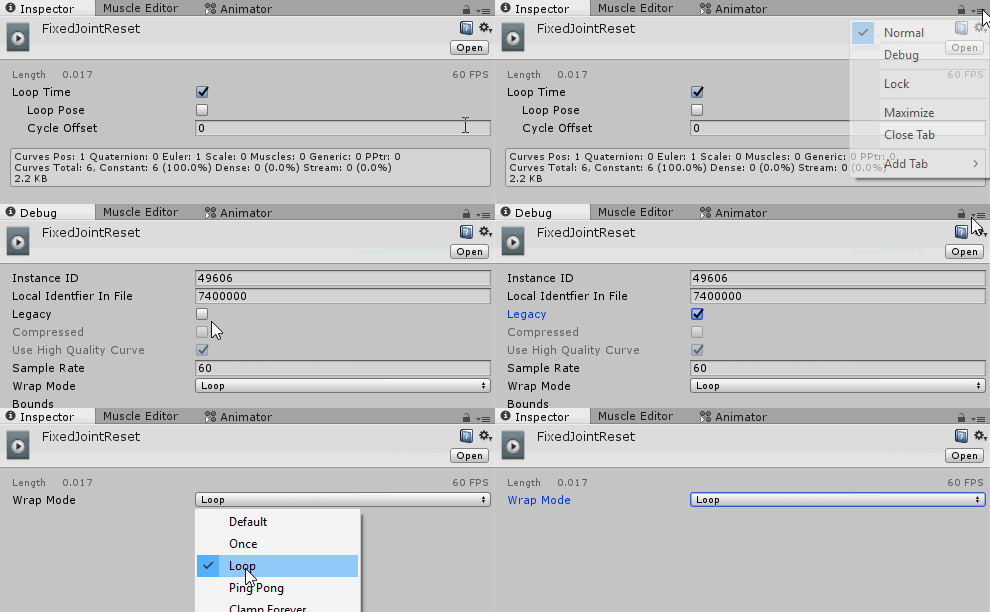
Just disable anything marked with Legacy
molten oak
safety features are practically there to stop this anyway
maiden wigeon
I'm so sorry, Ray.
molten oak
as clinical depression said earlier, and yeah big oof
maiden wigeon
It feels kinda like Indian-giving, for lack of a better term? Lol? Sorry if that offends anyone?? But like, yeah. Here, have all this creative freedom. Nevermind.
And I get some things will have to be changed and removed and tweaked and all that, for varying issues, but this just seems so pointless to me.
pliant plank
There has to be a way to block the legacy exploits without just deprecating it altogether
They've blocked alot of components already and certain variables server-side, it's not farfetched at all
maiden wigeon
There most likely is, and if there isn't, we technically have one: the new safety features. Because like it or not, generic animations can be used to crash and ruin games too. I've seen it plenty of times before. That's why I was so glad to see it implemented.
Like this is probably the best safety system we're gonna get.
But then... we still get slapped in the face.
pliant plank
Hey look at this shinny new car i got you
Let me just burn your house down because it has ants in it
maiden wigeon
VRChat is so good to me because it gives people the freedom to create and be whatever they want. And sometimes, people wanna be cancerous. I may not like it, I may not agree with it, but I've come to just accept it, because that's just how people unfortunately are. So, we take steps to protect ourselves from it. Hell, even before the Safety features in this BETA, most people were hanging out in Invite/Friends only worlds anyway, just to avoid this stuff.
pliant plank
^
molten oak
^
paper glade
Thing is
People don't want to only be in those locked up worlds
Some want to explore
Meet new people
Yaknow?
maiden wigeon
So I dunno, I'd rather have the freedom to make whatever I want under fair restrictions and take the risk of running into someone's cancerous avatar, than be constantly stripped of ways to create.
And that's fine, i get it. But again - Safety features.
molten oak
safety features let us do that, yeah.
maiden wigeon
We have em, and they're great
Turn em on, go explore
You're gonna get offended no matter what, anyway. I went into a public world and someone I didn't even know ran up to me and gave me shit, for no reason. I mean, I'd repeat what he said, but. I dunno if I should lol.
So, I blocked him. Problem solved.
That's why we have this stuff.
pliant plank
Ah the block button, that thing that apparently barely anybody uses unless they were in a OH GOD MY EYES/EARS situation or atleast from what i recall i kept hearin' people complain about somebody but never blocking them, for whatever reason
clear yew
use the block button, folks.
It's OP.
paper glade
Instantly delete person from your life
molten oak
can we implement block irl?
pliant plank
^
languid lark
i wish i had block button in real life lol
maiden wigeon
I dunno. People just seem to think they're entitled to absolute perfection. To some extent, I agree. More should be done to people who go out of their way to offend/crash/ruin others' experience in this game, but not at the cost of punishing everyone.
You're not gonna have a perfect experience in any game. That's just how it is, and that's how it is in life. There will always be people who are gonna go outta their way to piss you off. lol
And yes, block button irl when
languid lark
block button not hard to use
paper glade
Implement Rec Room-type blocking to the real world. Just put your hand in someone's face and they're gone.
maiden wigeon
That would be amazing
molten oak
if you put your hand in someones face hard enough that works pretty well irl
paper glade
LOL
maiden wigeon
delete nose bone
pliant plank
A mute button would also come in handy, for when you don't want them AWOL but also not audible
molten oak
aim for the neck instead of the face and that still works pretty well irl
pliant plank
Pfft
maiden wigeon
Can't wait for the future when we can mute and block people irl, guys, it's gonna be so epic 😎
molten oak
this is truely ebig
maiden wigeon
I already do that basically, I mean
If I could go to the grocery store without dealing with people, that'd be pretty nice
paper glade
Blocks world
Starts to suffocate
Unblocks oxygen
molten oak
oxygen removed because of potential fire damage
maiden wigeon
crap.
molten oak
for future reference, tl;dr, legacy might go and thats poopy
clear yew
No more waggy tails on your best bois rip
clear yew
moving tails, ears, wings and custom blinking will still work
use an animator component for that
paper glade
Exactly.
clear yew
i always used animators for those
i made a canny post about 2 systems that will just stop working without legacy animations
pliant plank
Huh so snail markers are really going bye bye too it seems...
clear yew
nope
snail markers doesnt use legacy animation
but an animator
it's his inventory system that is dead
pliant plank
Ah
clear yew
i tested a moment ago
pliant plank
Misread your text then
clear yew
imagine 90% of mutes without their bellowed markers
pliant plank
It'd be raining hell by now if that ended up being the case xD
clear yew
i wonder if they would still remove it like that if it relied on legacy animations
so many people use that markers
it's not exclusive to mute only
 brittle vigil
Hihi
brittle vigil
so im basically duplicating evberything

well when I try to drag the model into the play area it dosent recognize it as a model
which isent a good sign
clear yew
@paper glade what failed ?
paper glade
We were talking about it in #open-beta-discussion before I decided it was best to move the discussion here
clear yew
what do you mean it doesnt recognize it as a model ?
 clear yew
LoneEevee, there is 2 toggle inventory system AFAIK
brittle vigil
Flare is the model with the dance animation in it on a generic rig
clear yew
you have the toggle prop package
and the snail system
toggle prop is using animators but i could be completely wrong on that
snail system work with legacy animation
paper glade
So wait a generic rig
paper glade
Well yea ofc
My brain's dying right now, 5:03 AM oof
But I'll try to push through
sO
Anyway
With the animation, you've already duplicated it from the model right?
brittle vigil
yes
paper glade
You've tested it in-game and it didn't work properly?
brittle vigil
uploading now
clear yew
Don't Animators fail if the animation isn't marked as Legacy?
clear yew
Huh.
paper glade
You're thinking of the Animation component
clear yew
Ah
paper glade
Also I have no idea what to tell ya Rantis, unless
Did you apply the animation to the object as well to play upon awake?
Silly question but ya never know
brittle vigil
yee
hmmm
hold on
I should replace the animaTOR with an animaTION component right?
brittle vigil
idk
pliant plank
Animations can use standard and legacy afaik
paper glade
Yea
But we're talking about the Animation component
At the moment at least
I know it didn't work for avatars when I tried it
For standard animation atleast
pliant plank
Legacy was for it to only affect a certain.location.instead of the whole model
pliant plank
Model
paper glade
I consider the game object the beginning of the hierarchy, before the Armature and Mesh
brittle vigil
I have models nested in models since they are so long and would break otherwise
if I added something new to the heirarchy it might break the anims
pliant plank
Basically standard would need a complete animation for the entire model.or it'd stick with the default or "crouching" positions whilst animating it once, Legacy didn't require the entire model to be animated and allowed users to.loop animations indefinitely
paper glade
We're talking about a generic rigged thing though
 cedar root
So I guess since legacy anims aren't gonna be a thing anymore what's the easiest way to achieve the same effect where I play the same animation smoothly wagging my tail no matter what including during emotes, while sitting, crouching, walking, running, etc
preferably if there's some method that doesn't require just splitting the tail as its own object and putting an animation on it or editing the Tail Wag until literally the end of every single emoji and movement based
Plz pm or a ping me if you know a way
pliant plank
Eyup
clear yew
you can do that with animators but it's really annoying to setup
pliant plank
I had a disable for blinking on certain facial emotes
cedar root
I mean I'm guessing that's the only option at this point that doesn't involve de optimizing my model so...
paper glade
I work with using the Animator for constant playing animations all the time at this point
Not even 5 minutes after I heard the news of Legacy no longer being a thing, I converted one of my constant animations over to something that uses an animator.
cedar root
How do?
languid lark
he know but dont want make tutiroalsl ol
cedar root
So far just using an animation component with a legacy animation is what I usually do
pliant plank
I've only used animators for MMD motion avatars personally
languid lark
lost in void
paper glade
Yea I'm considering reposting it at this point but ehh
 wide mango
I am interested in this as well.
pliant plank
"Alright I've been given the go by Xiexie to explain. To set up an animator for your model, you'll need to first look at your project files for Unity. Right click and hover over "Create" and then click on "Animator Controller." Go to the object you want to animate and then click "Add Component." What you want to do is type "Animator" (NOT ANIMATION) and then add that component to your object. If it's blinking using shape keys you want, add it to your body. If it's something else, attach it to what you feel is necessary to animate, but be sure if it's an object, assign it to an empty game object first, then attach the animator to that game object. After doing so, create your animation from there starting from that object. Hopefully this helps clear ANY confusion brought on by all this."
clear yew
that0s literally how i've been doing it since the beginning
i thought that was a known fact ?
clear yew
if you want to have something loop on your constantly
cedar root
So like I can just put it on the first bone of what i wanna animate?
clear yew
like tails or ears
paper glade
Everyone just used Legacy for mundane things.
clear yew
i think i know
brittle vigil
 clear yew
somebody made a custom tutorial back in the day when nobody knew anything
and he used legacy animation
paper glade
Because it's easier to flip a switch that says Legacy than it is to create an animator I guess
Even though it's E Z
clear yew
@cedar root i told you in the quantum discord but what you can do is add a root bone
and use an animator component on it
to animate what's under it
like a tail
wide mango
I was taught using the legacy animations. zero experience with unity outside of VRC.
cedar root
Oh I didn't see that
clear yew
same for ears
pliant plank
I used it since it was fairly straightforward and effective, after i learnt that i could disable and enable it even better haha
clear yew
or wings
and for custom blinking animation, just put the animator component on the "Body" mesh
brittle vigil
same vrc is my only unity experinece
paper glade
Otherwise animate eyelid bones
cedar root
Guess I'll try and get this dumb system setup once I get home
clear yew
well you can, just forget about any system using legacy animations
pliant plank
I'll just not use any looping animations in general honestly if it's really dead for good
cedar root
Going to test out if I can just put on the first bone of my Tail it if I actually have to make an empty root bone before the first for it
pliant plank
This old dog's all outta tricks ta learn from stupid crap
clear yew
animator is used for looping now
but i had a lot of animation using legacy
with "clamp forever"
which will basically lock the animation to the last frame
brittle vigil
YAAS
clear yew
pretty neat if you make a spawn animation for a weapon
brittle vigil
animatiors worked
next pilot
k got my tail wag to work again totally forgot about the animator stuff
next pilot
but now the model is in default animation pose when i apply said animator to model
clear yew
where did you put the animator ?
next pilot
body mesh and tested on model name
ok nvm body mesh isnt working with it
just having it on the model name works but is in default pose animation
paper glade
Are you trying to animate bone movement through the body?
next pilot
no
was just testing it
oh well ill figure something out about it now i got my tailwag back somewhat
probly going to have to redo the animation keyframes and what not to use on animator
brittle vigil
not true
you can delete the heirarchy path on the animation itself
to retain your4 keyframed
uploading a video tut as we speak
might have to might not
 slim sparrow
Tail wag was always better to do with an animator anyway
You can edit your animation paths with F2
Honestly I've become numbed to the removal of features since they do it so often now
I've lost interest in avatar making because they just don't care
If you're not a 3D Modeler, world creator or streamer, you are not part of the target audience of this game
And even if you are a 3D Modeler, you might still find your avatars gutted over some random removal
brittle vigil
I made a thing

Here is a quick tutorial on converting your legacy avatar animations to the animation state machine system. :)
slim sparrow
Has anyone messed around with setting animator parameters inside animations?
If a child object of your avatar has a float parameter on it, you can actually change this parameter.
But for some reason, I cannot add this parameter as a property to the animation. It just gives me a warning "Animator is not playing an AnimatorController"
I can add the property in play mode, but no matter what, I cannot change the property away from 0
Any ideas?
clear yew
Hello! I'm looking to learn how to do idle animations for ears, wings, tails or other accessories. How would I go about making ears wiggle on their own, on a set timer? or make tails swing, or wings flap? c: thank you friends! please message me, I appreciate it very much!
 torn pawn
for ears put animator on head, create animation that does it, set animation to loop and adjust curves if needed
clear yew
Thank you friend!
torn pawn
or add animation keys into your idle animation
paper glade
Ay thanks for that tutorial Rantis
I wouldn't be competent enough to make a video about it
All I can do is talk through text.
 muted prairie
slim sparrow
muted prairie
slim sparrow
I have already distributed some prefabs for blinking and world objects
That don't require legacy animations
Blinking is toggle-able too
clear yew
@slim sparrow I've also been researching ways to affect animator parameters through the tools we have
Seems like there isn't much hope for us though.
 vale hill
So how do I toggle 3min mmd dance on/off on my avatar clone without legacy animation?
Vrchat devs said there's a workaround way but its not clear for me
slim sparrow
Just put it on an animator
slim sparrow
That's like the one thing you don't need legacy for
Just un-mark it as legacy and put it on an animator
vale hill
Okay I am watching it right now. Thanks. I hope I can use set state machines so that I can use emote to toggle dances
Originally I have 3 layers of gameobject with top 2 having legacy animations that toggle on/off 3rd gameobject. I use nonlegacy animation on emote to toggle legacy animations in top 2 layers
paper glade
I mean I toggle dances through hand gestures lol
vale hill
As a vr user, I have to hold that hnd position which could be annoying
paper glade
I mean
I do too
And I don't have a problem with it
Something where you have to learn how to deal with it 😎
vale hill
More like I have hand gestures dedicated to shapekeys
I add alot of functionality to avatars and I was hoping that the pinned video teaches me how to make animator components that interact with each other and understand user inputs
For instance, I was hoping that one animator component can send a command to another controller to use certain arrow to gk to different states
This allows my 3 layer legacy setup to fully transfer into nonlegacy
Also the video's blink example doesnt seem to touch about how to temporarily disable blink on certain hand gestures
 chilly vapor
couldnt you use a state machine trigger on an emote itself to trigger a dance?
clear yew
yes you can
vale hill
How do I dok that?
clear yew
nope
vale hill
Ugh so I have to play around with their triggers and variables
 celest crypt
By making the shader support fading and animating the fade parameter with animation
cedar root
will adding the animator state machine to my hips, (but only using it to influence my tail) cause any issues since hips is normally the root bone?
 pseudo iris
and im having some problems with world particles, i have no idea whats wrong
i have it set up as a world particle but its not acting like one
nvm!
i hade simulation space at loacl
local*
my bad
clear yew
@cedar root no, you are safe
cedar root
ok thank u ^_^
 fallow pier
Does anyone know how to do gun animations?
When I make gun animations I try to get 2 animations, one for the just the gun and another for firing
But it always ends up having 2 animations of either the gun not firing or firing
 fierce bane
toggle the gun on with the "gun" animation, toggle the emission on for the firing particles (set to world sim too). Then it'll fire until you release the "firing" and keep them flying in the world until you release the "gun" animation itself
or fire just one shot if using burst instead of over time emission
or multiple shots for a burst fire, etc
fallow pier
Will try, thank you!
clear yew
One day.
Some day.
I will find a way to change these animation parameters.
And when I do.
I will rise up.
fierce bane
if only we had custom controllers for humanoids....
vale hill
Do different animation controllers within same avatar can use same set of variables for conditions of transitions?
 brazen badger
Hey guys, does anyone have a list of hand gesture values?
fallow pier
@fierce bane What do you mean toggle, kinda new to this :/
fierce bane
"is enabled" property turned on in animation. Disabled by default (checkbox off in inspector)
"toggle" means to switch between an "on" and "off" state
or well..technically switch between one state and another
pseudo iris
how do i make a toggable animation in the emotes
i wanna make one where i can take on and off a helmet
clear yew
Is the helmet a part of the model mesh or is it something added in Unity?
@pseudo iris
clear yew
Aite
 hoary coral
So for an animator on an avatar. Say I make a state machine and it has a few states that it will 'sit' in. Is the current state of that state machine synced to all players in a world?
Further, would it be synced to newly joining players? Or will different players see it in different states?
slim sparrow
No, animators are not synced in any way.
If they cannot physically see you altering your state through a gesture or emote, it won't even register.
Such as if they're not looking at you.
hoary coral
ah, so if I were to have 2 states, Tail wag slow and Tail wag fast, and I used an emote to switch between the two in the animator, if someone wasn't looking at me when I switched, it wouldn't update for them?
Even if I set the culling mode to 'Always Animate' ?
fallow pier
@fierce bane the non firing animation played the animations firing but then cut out half way through it
I tested it in desktop but I usually play in vr so idk if the results are different in vr
hoary coral
And there is no workaround to prevent that player object culling? hmm. Can't just make a skinned mesh renderer with huge extents or anything as that is prevented...
slim sparrow
Probably not no
fierce bane
@fallow pier single shot per "fire" or multiple?
fallow pier
Single shot
fierce bane
set it to burst emission instead of over time, set the burst to start at 0.01
and make sure emission is unchecked by default
fallow pier
What do I put for everything else?
@fierce bane What would I put for rate over time, min, max, cycles?
Would I change them to 0 or what?
fierce bane
emission rate over time 0
min/max 1, cycles 1
You should look up a basic particles tutorial if you're having trouble with those settings
fierce bane
...disable audio object by default, enable with fire animation, make sure it isn't set to loop
fierce bane
that's fine, but you should definitely be checking some basic tutorials
fallow pier
That is such a simple solution I feel retarded LOL
 subtle heron
Is it possible to disable Cat's blinking animation while using animation overrides?
or do I need to manually make a blinking loop and then disable it when I use an override?
 ashen sedge
If you're talking about VRchat's simulated eyetracking blinking animation, no, you can't temporarily disable it
You'll have to do it manually
clear yew
Add a -100 value to the property of the blink animation in the animation you want to not have blinking.
Unity animations are additive, so you want to make it so it adds to a point where it doesn't do anything
hey guys
anyone here
???
 spring nova
ashen sedge
spring nova
ashen sedge
That works, panda? That's great!
spring nova
you can change it from additive to override, doesn't that work?
Actually override is the default option. You just need to turn the weight down so it can be overridden
idk, talking out of my ass here. Needs testing
clear yew
I believe so, that used to be the method I used ages back.
Never really got around to fully testing it back then after I made those initial models with it.
 undone glade
Anyone know what that invisible cylinder thing that one of the Kanna avatar's have? Is there a way to set that up or a prefab by chance?
Invisible on the outside, some space thing on the inside.
torn pawn
stencil
 upper bone
just a quick question does the trail renderer show in mirrors? cuz i cant see mine or in the selfie cam
 covert girder
trail renderer shows in mirrors https://media.discordapp.net/attachments/333247900542959616/495969222199869450/unknown.png
 upper bone
can i see your settings ?
covert girder
 upper bone
aye thanks a lot
covert girder
Am i able to run generic keys on humanoid animation not only from idle and gestures but also with run/walk/crouch vrchat locomotion? 
or any other ways to trigger generic animation/-keys with run/walk/crouch states?
 west nacelle
hey is there a way to create an animation for my avatar that looks kindive like this (0:48)

One Punch Man Opening - "The Hero!! Set Fire to the Furious Fist" ©ONE, Yusuke Murata/SHUEISHA, Hero Association HQ THE HERO!! ~怒れる拳に火をつけろ~ The Hero!! ~Ikare...
 waxen slate
@covert girder Yes and no. The animator used to control your avatar has a mask on the movement animations that makes them only affect the bones defined in the humanoid configuration as the leg and feet bones. If you try to affect the position of any other bone, it will get filtered out. However, any type of keyframe other than the humanoid keyframes and location/rotation/scale won't get filtered. So you can totally add keyframes that toggle objects, set blendshapes, etc to the movement animations.
Also, to add to the discussion about porting stuff over from legacy animations, there's a much better inventory system that uses normal animators. Snails inventory and others used legacy animations, so they're dead. Heres a tutorial on how to do the same thing using just animators and the hidden "behavior" keyframe: https://vrcat.club/threads/avatar-toggleable-objects.2414/#post-7525

VRCat: Community-Run VRChat Forums
Rip Legacy Animations.
Unfortunately in all newer versions of VRChat, legacy animations have been removed due to security concerns.
The good thing is...
clear yew
rip.
My work for the past couple weeks lmfao
I got scooped
waxen slate
Also, here's a very brief description of the system I gave on another discord server:
I'd make a tutorial, but I suck at explaining things. Its very simple though. You cannot turn off animators directly in an animation. They completely lack the relevant keyframe for some reason. You can, however, use the behavior keyframe which toggles the first component (the one underneath the transform in the inspector) on any object to toggle an animator. When toggled off, whatever animation the animator was playing will be frozen at that point. When turned back on, the animator will start playing from the beginning of the state machine again. The only problem is the behavior keyframe is normally hidden, and must be generated by script. However, once you have an animation containing it, you can copy-paste the keyframe into any other animation and press F2 to rename the path to the gameobject the keyframe effects.
You can stack animators to create an inventory system. For each item X in the inventory, give it two empty gameobject parents with animators, call them itemX_on and itemX_off. The hierarcy should look like this:
    itemX_on
        itemX_off
            itemX
Make the itemX_on's animator turn on the item, and _off's turn it off. Uncheck both animators so they are off by default. Then create an emote which turns on the behavior of itemX_on and turns on the behavior of the _off object for every other item in order to choose that item from inventory. That emote will briefly turn on the animator which turns itemX on and all the animators which turn off the other items. When the emote ends, all the animators are switched back off (as that is their default state) but the items they affected will be frozen in their last state and itemX will remain on and all the other item will remain off. You can also set up a simple cycler that has an animation that turns on each item in the inventory in sequence, and then turn on the animator through a gesture. When you stop the gesture, the current item enabled will remain out.
clear yew
Ahh, that method. Yeah, having to do funky things to add enable/disable animator component properties and then using them as similar to legacy animations.
waxen slate
Here's the code to generate an animation that contains the behavior keyframe since I can't simply attach an animation containing one in this channel. You must put this in a folder called "editor" otherwise VRCSDK will break and be unable to package files.
using UnityEngine;
using UnityEditor;
using System.Collections;
#if UNITY_EDITOR
 public class TestAnim : Editor
 {
     [UnityEditor.MenuItem("Behavior/create behavior anim")]
     public static void CreateAnim ()
     {
         AnimationClip clip = new AnimationClip();
         #pragma warning disable 0618
         AnimationUtility.SetEditorCurve(clip, "GameObject", typeof(Behaviour), "m_Enabled", AnimationCurve.Linear(0.0f, 1.0f, 1.0f, 1.0f));
         #pragma warning restore 0618
         AssetDatabase.CreateAsset(clip, "Assets/behavior.anim");
     }
 }
#endif
 torpid light
Can you not just wrap that in #if UNITY_EDITOR to fix vrchat sdk throwing a fit?
waxen slate
Probably. I made that a long time ago. I still haven't gotten very far with scripting in unity, so anything I make is probably horribly broken in some way.
Yeah that works.
Changed it.
clear yew
That's pretty useful.
slim sparrow
I think if you set it in a folder called "Editor" it won't be included in the build and the SDK won't error
waxen slate
the #if fixed it. You should probably throw it in an editor folder anyways though.
No wait, its because I threw the script into the editor folder it worked.
Thanks, I updated the post.
slim sparrow
Since I'm stuck in desktop for a while I decided to make a custom idle pose, but every time I return to idle I get really shaky arms and legs.
Anyone have any ideas?
It's just a regular idle pose, two frames, both identical.
Crossed arms, but the legs resemble the default idle pose.
waxen slate
Well, the desktop animation controller is really screwed up right now. Idle animations in desktop play at 0.166667 speed. I'm not sure if it has something to do with this.
slim sparrow
Oh yeah, I heard about that. That's a shame
west nacelle

pseudo iris
is there any good tail idle animation?
fierce bane
Can particle sub emission not use mesh render?
The effect works fine when not sub emitted (but wouldn't be fired to ground level), but when sub emitted it simply doesn't show up
clear yew
whenever i use my custom walking animation i stand in place until i stop moving. Do i have to put the animation on loop?
pretty sure
paper glade
I mean it would make sense to loop an animation that's always supposed to be playing lol
 violet sundial
can someone help me make a wing flutter animation for my moth avatar i have no idea what im doing
clear yew
does the moth have wing bones
paper glade
Is the animation set to Legacy?
violet sundial
no idea
they very well might be flat textures
its okay though im fine i kinda got it to work its okay
clear yew
Im so triggered
My world particle isnt working on my main but work on a normal model because my wrist on my main model is messed up
😠
Zzzzz
Very anger
fierce bane
what exactly do you mean "isn't working" ?
 wide heron
https://gyazo.com/6c7c55ec4cddcf66f0f54e7a414088fe with the colliding options in collision for particle systems how do you add more options?
I know there was a way to add more options but i forgot how to do it.
https://gyazo.com/ec5071ec6c6aeafbf162119aa889dcda

 torn pawn
@wide heron it was something to do with adding vrc_world, if I'm notmistaken
clear yew
yes it is
drop the vrc_world prefab
and you can create all the layers
i believe you can create them when you try to upload
torpid wadi
porting over blinking animations from legacy to new, how do i make it so that certain animations disable blinking?
since you can't exactly turn off animators
 ocean knot
^ would also like to know dis
clear yew
you need to modify the animation file
to change the class ID
so you can disable or enable an animator

I explain how to create a potential infinite amount of gestures using an animator state machine. ========IMPORTANT======== Thank you Bertrand Steenhaut for t...
in this video he is explaining how to modify it so you get the "behavior" property that allows you to enable/disable an animator
torpid wadi
is there a more efficient way to check if any of the props you have has an animation component
 shell vale
Im.. having an issue... Im trying to port my Tail wag to the animator controller and its failing to work. On my mesh, and on my tail bone. Do I need to turn a setting on? Add a Specific state in the animator controller?
My Blinking animation is working.
slim sparrow
@shell vale your Animator component is on the first tail bone right?
Go to the animation tab and verify that the properties aren't yellow
If they are, fix the paths with F2
You need to animate from the perspective of the tail
cedar root
well if you put it on the first bone you won't be able to animate that bone so if you use the first bone then instead just put the animator on the hips
at least that's what work for me and then of course, like rokk mentioned you'll have to change the path relative to the new location
for example it used to go for me Armature/hips/tail1
But now that I have the animator on my hips the path in the animation is simply tail1
slim sparrow
An animator can animate its own object's rotation though
I always put it on the tail
cedar root
Really? I didn't give me the option to
slim sparrow
Yeah, it's immediately under add property->transform
Tail1 isn't an object because you're already on that object
cedar root
Hmm I didn't have that option
slim sparrow
Otherwise custom blinking wouldn't be able to work either
cedar root
Oh well it works the way I do it so whatever
shell vale
It is on my First bone yea, Its also Orange and not yellow.
And I animated the next bone after the first bone xD So we'Re fine.
So the animator is on tail00 and the first animated bone is Tail01
cedar root
I'll just blame my problem on unity being Scuffed as always
But i made it work so no big deal
shell vale
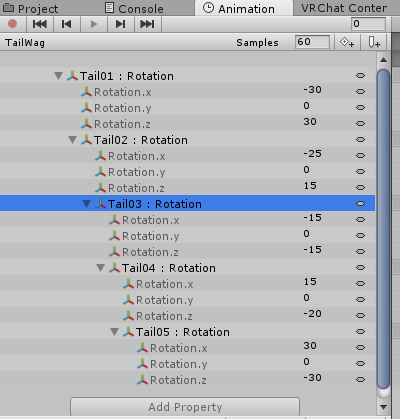
But yea, properties aren't yellow.

and the animation works in the preview.
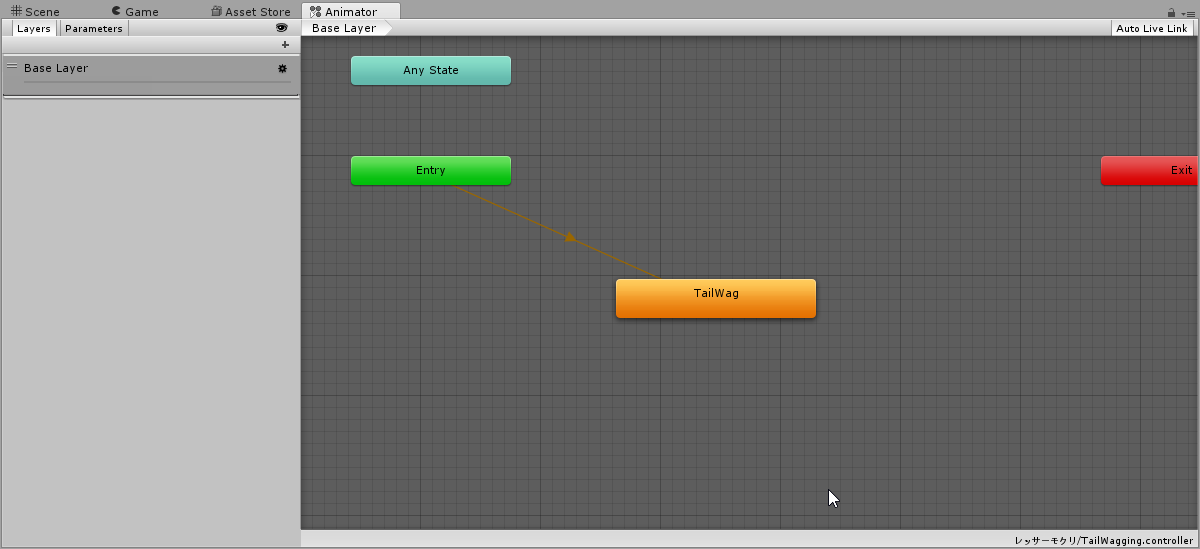
And thats the animator.
Plain and simple.
Is it the fact that its got "Tail01" in fron?
Cause it had "Body" in my blinking and I had to remove that...
Thought it might've been different cause it was a tail bone so it needed the specific bone to work.
slim sparrow
The problem is
You are animating from your avatar's "root"
Put the animator on the tail bone, then with the tail bone selected, go to Animation and make/fix the animation there.
@shell vale
slim sparrow
You can press F2 to change the "path" of the animation
shell vale
I would need to put that in the current animator thats on the base of the model in order to work.
slim sparrow
So you strip out all the Armature/Hips stuff
shell vale
and only leave out Tail?
slim sparrow
You strip it down so the path makes sense starting from the tail, yes.
slim sparrow
Isn't it already yellow?
shell vale
Nope.
slim sparrow
I mean when you put the animator on the tail
Forget about having the animator on your main model at all
Animate the tail and ONLY the tail
shell vale
Its.. what I did yea.
shell vale
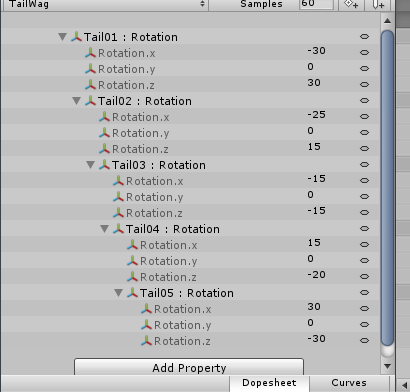 slim sparrow
Then why does it show your entire model in the preview?
That's what got me confused
The small preview window at least
slim sparrow
So, select Tail01 : Rotation and press F2. Can you screenshot the path currently in there?
shell vale
Armature/Hips/Tail00/Tail01
slim sparrow
Yeah, see
shell vale
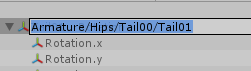 slim sparrow
The animation is made from the perspective of the main model
You need to move it down to the tail instead
If the animator is on the tail it will work
shell vale
Right, so I need to redo it?
shell vale
But stripping it down to Tail00/Tail01 makes it yellow and unusable.
slim sparrow
I really recommend looking up some Unity animation basics
It's not yellow and unusable if the animator is on the tail
The animator component
So clearly you're still selecting your main model which is not the right way to go about it
shell vale
Riiiight.
Well it was before with legacy animations. Thought it wasn't any different.
But now I know in the future, I need to select the specific root of the animation for it to work.
in this case my Tail00
But yea,nah, the things being yellow broke the animation.
I'll just remake it from scratch..
clear yew
Didn't know F2 is a thing
That'll save me so much time
Are you guys aware of how amazingly useful (but so out of the way if you aren't aware) the lock function in Unity is?
slim sparrow
Yes
But I hate how the lock icon keeps disappearing all the time
And then I have to reset my entire layout for it to come back
I don't get it
clear yew
Same haha, I don't understand why it does that either
Thankfully I keep it pretty simple so it's fast to put things back
slim sparrow
Just checked, it's gone again
I always keep mine at Default-ish layout so whatever, but it still sucks
clear yew
The time to reset is much better than the alternative
 hot orbit
Will the new system require me to redo eye tracking and such?
shell vale
Uuh okay, so I finally started to create my animation from scratch,
Created it while Tail00Was selected..
slim sparrow
@hot orbit no, just blinking
shell vale
but all the things Im adding as property, still have the Armature/Hips/ Hierarchy e .e;
The heck am I doing wrong?
slim sparrow
@shell vale did you put an Animator component on Tail00 before making the animation?
shell vale
I have to make the animation in a puppet.
Do I need to put the animator in the puppet too?
slim sparrow
Puppet? You mean a duplicate?
shell vale
Yea.
slim sparrow
Ah
 ruby thistle
Hey is it possible to get particals to show up for like a second or two and then just stop after an animation plays? Like say if i summoned a weapon?
slim sparrow
Put the animator on the original model's Tail00
shell vale
The main model has the animator in tail00 tho.
slim sparrow
Both the original and duplicate must have the same animators set up
shell vale
Alright,
did that, its okay if the animator is empty right?
No controller no nothing?
Really?
And I add the properties just like before? Armature, Hips, Tail00?
Oh wait.
No, Uuuuuh it is different.
Welp, I guess its gonna work now.
Thanks Rokk, 7.
Im so sad, I had to delete one of my best tail wag cause I had to remake it or something.
So I lost the values x Ax;
I can't replicate it.
clear yew
Pretty sure you didn't have to delete it. Oh well.
shell vale
I knooow.
Well no, I had to to try and make a new one to a duplicate for some reason..
didn't let me cause there already was an animation created form said Dupe.
but yea..
I got.. the basic motion..
but I had a Wave to it.
and I can't replicate that wave x .x;


What I have.
Uh....
Im noticing what I have wrong too...
slim sparrow
You sure the wave wasn't just because of dynamic bone?
The top looks like it's in play mode and the bottom is not
fierce bane
yes, if you animate the top portion of the tail and let the rest flow freely with dynamic bone it will work together
shell vale
Oki :o
shell vale
If I go back to blender and add new mesh to it.
Can I still put the animation onto that model?
Or has to be duped, and have the animation made with both of 'em having the animator?
 jaunty ridge
New Inventory system created by Weong, Nepsy, Error.mdl, and myself.
This does not use legacy animations, and will work pretty much the same as any old inventory system you may have encountered.
The editor script will do most of the work for you - you will still have to assign the animations it generates to your override controller though, and youll have to place your objects in the inventory yourself.
There may be future updates to allow for more automation - this is just the first iteration of the auto setup.

GitHub
An Inventory system that is easy to set up for your avatars, using emotes. - Xiexe/VRCInventorySystem
clear yew
thank you
shell vale
An inventory System :O?
 grand mango
There was an older inventory system that relied on legacy animations, Xiexe converted it over to non-legacy.
shell vale
Right :O Though I still don't know what an inventory system do.. Or if its exactly like what it sounds like.
chilly vapor
basicily you can do one or two gestures to cycles objects and a main gesture to use that selected object
if you wanted to go extreme, you could do 50 weapons on a single point emote
fierce bane
Has anyone figured out a way to anchor things in the world with a set rotation without legacy yet?
torn pawn
what do you mean? resetting the pos/rotation? all you do is remove lgeacy checkmark and move it to animator, and disable animator instead of animation on activating the object
fierce bane
Yes just pos/rotation, and allow it to lock in the world again (fixed joint rigid body with a legacy to reset previously)
So just run it as normal via animator instead of animation then?
ruby thistle
Hey i have a question
I know how to set particles to an object. but how can i get them to show up for a second when a weapon spawns, and then have it stop after a few seconds? is it simple key framing? or is there something more?
muted prairie
If the particle system is on the gameobject, as long as it's disabled the particle system should be too
ruby thistle
I think i follow?
So your saying that even if i spawn it and have the weapon out, particals will still show up?
muted prairie
Yep, you turning on the gesture to make the weapon show up enables the gameobject, and on that gameobject the particle system will also be enabled
ruby thistle
ok. but is it possible to have the particle system show up only for a few seoconds and then stop?
muted prairie
Sure, you just set the particle to emit once and then to die off
If you don't loop it it'll just appear once
ruby thistle
ok. thats good. i'll see what i can do here. give me a second
ruby thistle
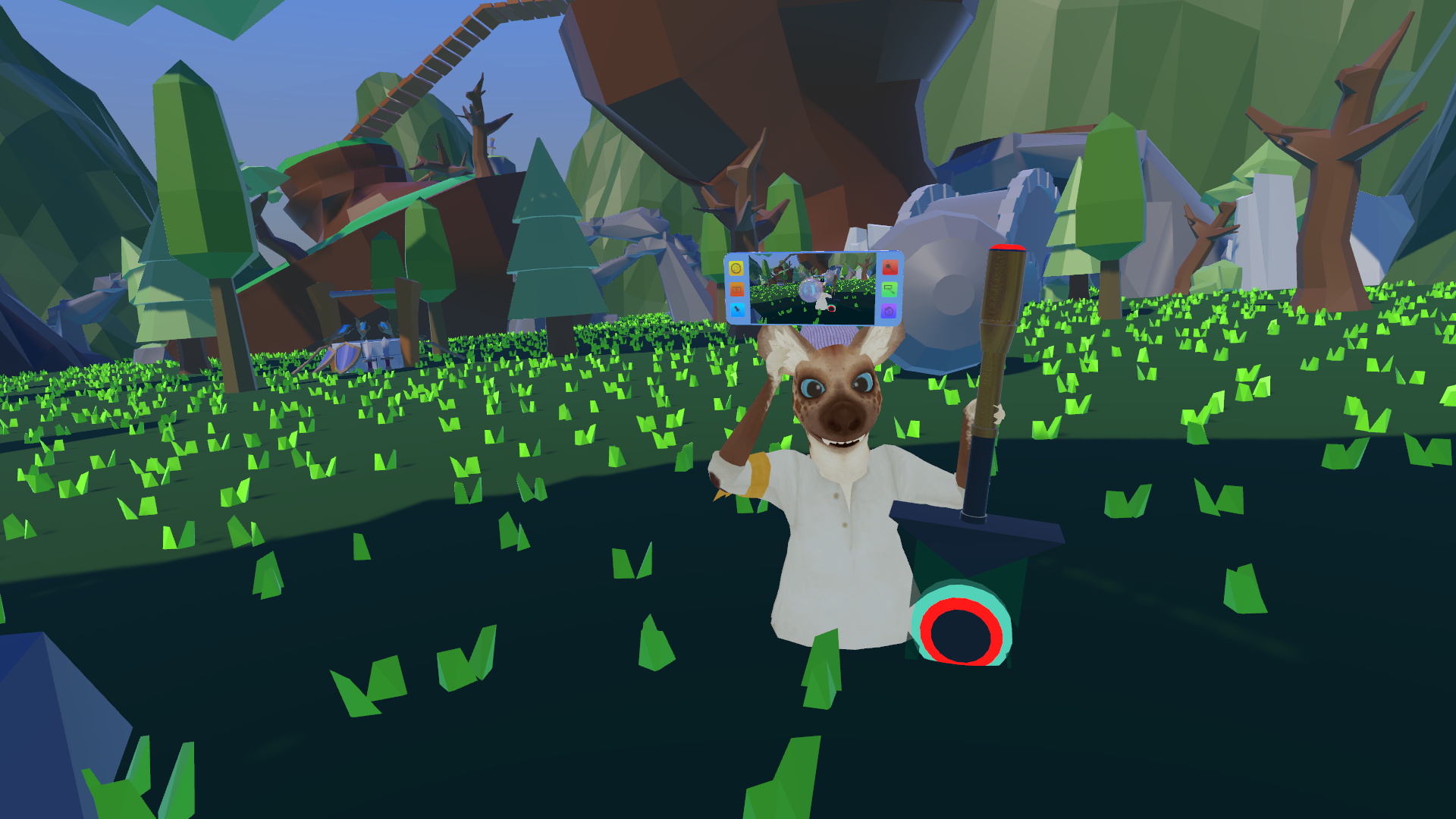
welp i fixed the spawn issue, particles still need to be set. but now im sunk in the ground when my avi spawns
 ruby thistle
fixed it. there was a borked custom idle animation in it
 lyric brook
question, why can't people see my particle effects?
 tawny wyvern
Hmm. So we're adding animators to different parts we want to animate now instead? Does anyone have a screenshot of a working animator graph doing such a thing I could crib off? I'm not too savvy with that part..
clear yew
check pins
tawny wyvern
Yatta.
Many thanks ❤
Many F2's ensue.. And done! That could have been so much more painful. Tempos a little off, but that should be easy to fix.
tawny wyvern
Still no joy on the blendshape components despite the fix, but perhaps that's a consequence of something else not explored in the tutorial video.
 wheat kraken
Could anyone give me a hand with a gun cycling animation?
undone glade
I know of one way, but requires multiple hand gestures. Unless you want more on the emotes thing.
 vague dove
does anyone have a tutorial or explination on how to do looping animations with animators now that legacy is gone? I've seen some people talk about it but not how to actually do it
slim sparrow
Animations already loop by default if you turn it on in the animation itself
Blinking is something I have published prefabs for, good luck finding them I suppose since I can't properly upload anything here
 rain reef
I dont really want to search for prefabs to do something simple as a blinking animation i can toggle on and off
Ugn
Why do they always have to break shit
slim sparrow
Welcome to VRC
chilly vapor
the game is technicly early access. Things will always be constantly changing
 oak coral
I don't know why you banned emote's animation controller from switching on and off. It's meaningless, it's not safe
Your application client is as garbage as open source software, why fix restrictions on "unity" instead of thinking about your own mistakes
slim sparrow
@oak coral the first part is not true
You can still enable/disable animators
You just can't use legacy animations to do it
oak coral
A junior high school student can modify the client in a single afternoon to do a lot of cheating and sabotage others' experience.
Yes, I know, so it makes no sense.
Since finger movements can still switch animations, why do we need to deprive others of more actions?
This is called "safety".
slim sparrow
Because legacy animations were able to modify any object in the scene, not just your own avatar's.
I disagree with the way they chose to "fix" it and how they handled the gap in features, but something had to be done
oak coral
In fact, as long as a slight modification to the client can still be done, it doesn't make sense.
If he wants to be secure, he should encrypt his own application client, not do something on avatar that takes a lot of time
And previous chairs.
Is it not allowed to interact voluntarily?
oak coral
If you don't give me the right to write scripts and trigger chains, don't try to force players to use anmator, it's for full game developers.
rain reef
@oak coral you can literally use your old animation clip, turn it back from legacy and put it on an animation controller.
I would rather have a fix like this than people altering scenes with legacy animations
rain reef
Like what
oak coral
And the level switch can not be realized.
Because the script is banned, it is impossible to write the trigger chain.
rain reef
It was possible to delete game objects with legacy animations
oak coral
I often use hierarchies and use parent animation to control children.
rain reef
You can do the same with an animation controller setting your animation as the default state
oak coral
It's not good.
rain reef
Then triggering the animator on your avatar instead of triggering an animation
oak coral
Because it is not a permanent switchable script.
rain reef
What are you on about
It works the same way
It literally does the exact same thing
If you set it up correctly that is
oak coral
Anmator is designed to match script, and vrchat prohibits custom script, which is not as good as before.
They are not the same.
clear yew
So?
clear yew
You can do the same with them lmao
rain reef
What are you on about
You dont need scripts to do the same thing a legacy animation did
????
clear yew
Why does it matter if its animators or animations
oak coral
Otherwise, why does unity retain the previous animation?
oak coral
It's only a principle, but it prohibits the management of parent and child sets.
rain reef
It doesnt
rain reef
It literally works the same way
oak coral
Maybe you should know.
rain reef
Actually not worth it
 hollow perch
doesn't work the same way. legacy let you use ../ to have nicer heirarchies for example. With non-legacy you need to have things as children of other things. You can probably find a way to do what you want to do using non legacy animators.
so far most of the things people had with legacy have been figured out using non-legacy
Not sure I've seen an updated tutorial on locking an object to world position, but I think even that should be doable with non-legacy using the Behaviour toggle.
oak coral
Unless you give me more emote.
oak coral
Many people and I are using the combined parent control sub level switch to complete a lot of animation.
Animator does not allow such operations.
clear yew
@hollow perch rokk made a working prefab
hollow perch
now that we have object toggles and tail wags and blinking and all the usual things figured out with non-legacy animators I don't see why the devs would bother to fix legacy
oak coral
Do you mean you don't care about the players' voices?
hollow perch
oh cool. know where that was posted?
the thing that was annoying is I wish the devs provided more help migrating people away from legacy animations instead of leaving so much for the community. But the community pulled through and we have a lot of cool prefabs and tutorials out of the whole thing
rain reef
No i mean legacy is a deprived standard and as lyuma said, the main things legacy was used for work with normal animators so there is no real reason to bring legacy back. Its a security risk, stop being so selfish just because ur too lazy to figure out other ways
Rokk already made things work
oak coral
Then you explain why unity reserved legacy



 oak coral
If you really care about this risk, you should abandon 5.63P1.
hollow perch
well now you are talking weeks of user time to fix up models, not hours
rain reef
well
Thats a situation they will have to deal with if they want to do extra complicated stuff eh?
hollow perch
unity wasn't designed to be a secure content platform for untrusted user content. It's pretty incredible vrchat has gone as far as it has with unity assets.
oak coral
I think a lot of people will not repair, they will simply abandon the game, the game has been reducing the number of people.
Because of the removal of chairs.
Some of my friends have gone.
hollow perch
there will be a time where it makes sense to update unity, so when the time comes we will deal with it
ron did promise they would bring back chairs. I just want to be able to pick up someone with their consent, without needing chairs :-p
right now you need playspace mover to fake it
oak coral
I don't think developers should teach players how to play games.
hollow perch
(I decided to remove my own OT post to keep discussion on topic)
hollow perch
anyway let's try to make things work with animators. if there are specific things we can't figure it out, the community has been pretty clever thus far so let's see what is possible
oak coral
I think there's a problem with being able to accommodate him or make a substitute for himself as soon as possible and give people a choice, rather than taking it away and damaging the creativity and desire of all people.
Recent updates have been taking away some functions.
For example, only friends can see cameras and other things, this time directly killing a basic UNITY animation plug-in
You have to understand that maybe a small alteration of the developer took only five minutes.
But it will cost thousands of avatar producers a week or so.
My God, this is tens of thousands of weeks.
And some things can't be replaced.
tawny wyvern
Hmm. With and knowing the new method of putting animators directly on Body to manipulate the blendshapes cited in that one pinned tutorial, has anyone gotten this to work? I've been able to get the bone movement parts of my idle animations, but I cannot seem to get the blendshapes operating.
jaunty ridge
I've updated the inventory system - however this release is a beta and may have issues.
Though, the other release probably also had issues.
Anyways, here's the github link.
https://github.com/Xiexe/VRCInventorySystem/releases/tag/v2
The new release will give you a global enable and global disable, along with single enable and disable animations.
It also allows you to add multiple objects to the inventory at one time, and automates pretty much everything except assigning the animations to your override controller.
Instructions are in the "Instructions.txt" file.
It takes ~30 seconds to read that and set it up.
GitHub
An Inventory system that is easy to set up for your avatars, using emotes. - Xiexe/VRCInventorySystem
 undone bronze
is it possible to use smd animations
languid lark
yea should not effect that
just bake animation from blender
into fbx
with smd plugin
torpid wadi
How does "global enable" and "global disable" work compared to the previous version
 hollow helm
yo has anyone in here had this happen to them before and knows how to fix it(?): after I added a new dance in the overrider I haven't been able to trigger any animations, but they should still be there since the custom emotes are still working
languid lark
@hollow helm was it a legacy animations
languid lark
did you have go to debug menu change somthing that legacy animations
languid lark
i think they full disable legacy animations
hollow helm
yeah then they shouldn't be
pliant plank
Yep legacy was thrown in the trash, but i doubt many used them for emotes
hollow helm
yeah the only thing I lost from that was the blinking animation
pliant plank
Also, perhaps try removing the override from the avatar and reinsert it, unity works in mystical ways and that might just fix it
pliant plank
Hmm... this started happening after you added a dance to your overrides right?
hollow helm
yeah
I even removed it again but it's still not working
yo I just noticed that there's a new sdk
hollow helm
lmao
pliant plank
I'm still using a relatively old one though, maybe your override just got corrupted somehow
But updating and re-trying is probably your best bet right now
hollow helm
yeah I'll try that
hollow helm
that didn't work either
ruby thistle
question: If i add a song to a dance animation, will the animation loop untill the audio file is done? or will it just stop when the animation completes?
 small igloo
Is there any way to get the default female idle animation?
pliant plank
@ruby thistle supposedly the animation stops at its end frame and the song ends there, on the other side, if the song is cut short, it stops but the animation continues
ruby thistle
well shit, i cant really count frames to an audio track
pliant plank
Setting it to play-on-wake on an animation component might help you identify how long the animation needs to be precisely in play mode (unity of course)
 wet glen
so added an mp3 on a game object and placed it in my chest hiracy, audio source refuses to work i even had friends try it with there models as well and it wont work, they have other models with the same stuff and it works. it this because of the new vrsdk or it is vrchat itself?
pliant plank
Legacy or Animator?
wet glen
me?
 reef chasm
xiexe you deserve big thumbs up 👍 your inventory system save me like 20 hour or something. I came here because just wanted to say thank you.
pliant plank
Mhm
wet glen
explain?
pliant plank
Is the animation set as a legacy animation?
wet glen
im not sure
pliant plank
Oh wait, you didn't mention it being triggered, my bad
wet glen
lol
i was so confused
yea i have it set on loop so it just a constand audio
constant
pliant plank
Hmm... can you screencap the settings?
pliant plank
Perhaps if that capsule was in an empty game object, and the audio source was also on the empty game object aswell, perhaps it'd work
Never saw anybody put an audio source in a capsule before personally
fierce bane
@ruby thistle you don't have to count frames...by default it runs 60 frames per second, so every 1:00 is one second, figure out how long the song is and how long the animation is and make adjustments to one or the other
ruby thistle
ok. well i mostly just found somthing basic to wrok with like an orange justice. is it possible to add audio to imported animations?
pliant plank
Go to the imported animation, select everything in it (i think ctrl+a works?), copy with ctrl+c, make a new animation, ctrl+v to paste all the frames and you're free to add whatever you'd like to it @ruby thistle
ruby thistle
awsome.
oh boy, unity froze when i tried to copy the animation's keyframes
checks task manager oh! its just eating up a lot of processing power lol
pliant plank
If it's pretty large you can copy the frames in chunks
But that'll take quite a bit longer and needs to be done rigorously with timestamps in mind
ruby thistle
ok. so i made a new animation clip. buuuuuuuuut the add property button is still greyed out
pliant plank
That's not normal... did you make it for the duplicate of the model?
If you flat out create an animation file without a base for it, i'm pretty sure it can't have any added attributes, but i may be wrong
ruby thistle
clip without a base. im guessing thats causeing the problem
pliant plank
Eyup, dupe your main model in the hierarchy, select the dupe, go to the animation tab, it'll ask you to make a new controller (i think?) and then to make an animation clip
clear yew
Will Legacy be completely gone now?
slim sparrow
It is, yes. I think it's only in worlds now
languid lark
yep
slim sparrow
Depending on your use case for legacy animations, there are various solutions available.
slim sparrow
Worlds don't need them
But there's nothing particularly wrong with allowing them in worlds
"I want my tail to wag" or "I want eye blinking" is the easiest to fix, just put an Animator component on the first tail bone or the Body mesh, respectively. If you want to disable your blinking or use worldspace objects, that will be harder.
languid lark
eye blink is on mesh of the model instead root for eye blinking
covert girder
@slim sparrow crouch, walking, running animations can enable objects, or only idle with emotes?
slim sparrow
Yes, walking animations can enable/disable objects
Not recommended to do on crouch, but it's a possibility on prone.
@covert girder
However, walking animations can't move any transforms inside the armature for whatever reason
Avatar masks
covert girder
@slim sparrow so i be able to enable empty objects that trigger while enabled animations by animator on generic model inside of main humanoid? or any other better ways might be?
i wanna try to has generic model with all kinds of animations and emotes, with invisible humanoid behind/else
covert girder
@slim sparrow about transforms, error.mdl said that it has mask only for humanoid parts
actually what i saw, its Locomotion thing on it,
and for idle, emotes standard animation blocks
slim sparrow
Yeah, you can't move any bones inside the armature in walking animations @covert girder
But you can enable/disable objects apparently, and manipulate shape keys on your mesh
jaunty ridge
@torpid wadi the new version generates the inventory slot around the object, doesn't matter where on your avatar it is, and it adds them all to a global enable or disable animation that will effect all slots on your avatar.
This way you can have like, say a sword in your right hand, a shield in your left, maybe a helmet on your head.
Then you can enable all of them at once with the enable all animation, and disable them all at once, or enable them manually 1 by 1 and disable 1 by 1.
The first version was limited to one system without some messing around. It's much better now.
torpid wadi
ahh okay that clears up things
clear yew
Even fixes dont work anymore, thanks for removing Legacy animations, Im done, the one thing that I really liked about animations gone
slim sparrow
@clear yew what exactly isn't working?
I bemoan the removal as much as anyone else, but better solutions exist for most use cases.
tawny wyvern
@slim sparrow Not sure about Miku's specifically, but I've yet to find a way to get shape key animators for idle animations to work on a model that uses visemes. The fix in the pinned tutorial involves a model that doesn't seem like it would have vrc avatar visemes, so the next step for me is to test my model with those turned off to see if it m agically starts working then and is a layering issue of some kind.
slim sparrow
Uh, what does that mean exactly?
I have no idea what a "shape key animator for idle animations" is
Or why it would matter that the model has visemes
tawny wyvern
Aha, not to worry then. It simply refers to animations manipulating shapekeys for things such as blinking and other animations. Which seems to be problematic with the 'fix', possibly because of reasons and gobbeldygook. Spooky action at a distance.
slim sparrow
That's a fixed problem
I made a prefab for blinking that allows you to pause the blinking and properly revert the shape key to 0 while it's paused
tawny wyvern
Aha, not really what I'm looking for, but I'm glad that problem has found a fix in you. ❤
slim sparrow
Well I could probably help you if you named a specific example
Because this is vague
tawny wyvern
Certainly.
My models have included in their idle animations various tweaks to the shape keys, blendshapes that share space with the ones used for lip sync animations, so that the face is much more animated and lively than it otherwise would be. These would previously blend with the lip syncing and not cause problems. More often this is used to override the eye tracking blinking by choice. Now, it seems, this no longer works in game - fix or not. And I'm betting it's because viseme lip syncing is enabled and overriding any other blendshape manipulations.
Buuuut I'll be sure to compile a version of my model with that lipsyncing mode off to perhaps verify if that is even the root of the problem.
slim sparrow
Ah
Well, that might be a different issue
Idle animations do support shape keys
But idle animations get more broken with every update
Shape keys* sorry
Idle animations support shape keys fine and have always done so on a theoretical level. The problem is that the idle animation can be messed up for any variety of reasons. For example, right now it plays far too slowly
Since desktop crouch was added it's been like this
They added crouch but broke idle animations and didn't bother acknowledging any issues
tawny wyvern
The sins of the vrchat developers are legion, but I'm mostly focused on rolling with the punches and seeing what can be done about workarounds. n.n
slim sparrow
Well, if your bone movements and your blend shapes don't have to be synchronized
You could just put an Animator on the body instead
And animate the shape keys there
tawny wyvern
precisely what I've done, and what is not working
slim sparrow
Does it work when you press play in Unity?
tawny wyvern
yes indeedy
slim sparrow
Ohhh
Do you have any gestures or emotes that mess with the shape keys in any way?
Such as forcing them to 0 or to a specific value
In the gesture/emote/idle animation itself
tawny wyvern
nooop, I've cleared out anything else that could be interfering, excepting trying it without lipsync. I get home shortly, so I'll report back then ❤
slim sparrow
Alright
Because your main Animator will otherwise acquire "locks" on the Body mesh's shape keys and leave it unable to animate by itself
pliant plank
Actually now that i think about, do animator triggered animations override currently used visemes and/or vice-versa?
i.e. having a facial animation being added on-top of the currently visemes, i tended to do that before, mostly with the cat face shapekey
slim sparrow
You can't touch the lipsync shape keys inside animations without breaking them @pliant plank
tawny wyvern
it's an interesting question, I don't know where or if the visemes use the animation stack at all or where I could blend over it from.
slim sparrow
You can still access all other shape keys just fine
Even if they look identical
They blend fine
pliant plank
Nah not that rokk
Before i used let's say as an example the ":3" face
That would adjust the visemes to keep that shape whilst talking
slim sparrow
That still works, it just blends between them in Unity so both are active
pliant plank
Neat
slim sparrow
You can preview what this looks like by manually manipulating the shape keys in Blender or Unity
I use that particular face a lot lmao
pliant plank
Same haha
Well i'll probably avoid any animator specific animations myself, but i'll probably keep using gesture triggered ones, much less of a pain in the arse
clear yew
so uh, is there a better way of triggering sounds with hand gestures, the way i usually do it no longer works properly with the sounds on the animations
 winter sundial
Can you download the modified VRChat chairs anywhere? So that it's possible to lay down?
clear yew
Im talking about Tail and Winganimations, going back to make Shapekeys for those in Blender would be simply ridiculous
Sound component on object, disable/enable, play on awake should still be able to work fine.
Make sure you properly remap the animation paths, might have to go up a level if you also animated the parent bone of the piece
clear yew
Ive never seen it done any other way then with Legacy so I wouldnt know
slim sparrow
Just put an animator component on the tail's root bone @clear yew
That's how you were supposed to do it anyway
clear yew
Already tried that, doesnt work
slim sparrow
It does
If you're converting an existing animation, you have to press F2 to change the animation paths so it no longer refers to Armature/Hips/Tail01 but just Tail01
clear yew
there is a video that explain how to get from legacy to animators in the pinned messages btw
slim sparrow
All of my tail and ear animations used animators so thankfully I don't have to redo too much. Going back and fixing the blinking was a pain though.
clear yew
Ive looked at the vid 2 times
slim sparrow
The jump to animators is fairly easy if you have a basic grasp of how animations in Unity work. I recommend some regular tutorials
clear yew
I know how animations work, think the issue is somewhere else
yep got it, it actually was a pathing issue, did something wrong
 main smelt
Anyone here good at animating semi-humanoid models? I have a leg-less model that I'd like to port to VRChat but needs animations that don't use VR head and handsets.
shell vale
Has the animations to make weapons or things appear in your hand with hand gestures change at all? Or is it the exact same as blinking and tail wagging, gotta make the animation, put it in a controller, and put it in a hand gesture?
clear yew
It's the same yeah.
shell vale
So make the animation and put it in an animator?
The put animator in hand gesture?
then*
clear yew
that depend
if you just want to activate a sword
thena simple animation is enough
just remember that a hand gesture can't be longer than frame 0.00 and 0.01
shell vale
So just animation, Aye aye.
I was asking cause they changed how that works.
Wanted to know if that translated to hand gestures too.
clear yew
they just removed legacy animations
that's all
it's just a bit more annoying to setup sometimes for very specific things but it's still possible
shell vale
Aye aye o/<
And nah its just got a few limitation but its easy nonetheless.
Gotta animate the specific things with an animator in it first hand for it to work properly.
Then duplicate it with the animator if its a bone.
undone bronze
hey what if my model is smd and animation is smd
or is the smd model just used for the animations
clear yew
Bake the animation into the fbx.
Copy it out of the prefab.
undone bronze
but how