#animation
1 messages · Page 77 of 1
 pliant plank
Hmm, i wonder if it works like audio sources... having to always compromise on a default can be annoying at times...
 slim sparrow
Audio sources are partially enforced on the client, and partially they aren't
For example, distance and volume limits are not enforced on the client to keep compatibility with older avatars uploaded with older SDK's
pliant plank
As in wanting a bit more or less leverage on distance but being enforced with defaults, know what i mean?
slim sparrow
But if you were to disable spatial blending (creating a map-wide earrape without an actual source), the volume would be forced to 0
Yeah, the default rolloff is very punishing and also weird
You can utterly earrape people from close by, but you can't play some soft music that's still audible on 10 meters. The limits have been set with limiting earrape to reasonable levels in mind, so earrape is the only thing that will actually get reasonable levels.
That sentence was horrible but you get what I mean.
pliant plank
Mhm, that's why i was wondering about distance disable now
If the values are simply turned on just to be there and are indeed interchangeable or if they're enforced to a set "norm"
Don't get me wrong, 5-10 meters is plenty, but now i'm wondering for even closer ranges, or even vmd animations recorded on cameras with models really far away from the viewing area
Since they'd be seen through a camera and not be physically there, technically what you would see would be a zoomed up version to their model without walls between you and them, so the distance disable would instantly trigger and there'd be no motion, dynamic motion that is
 dusky dock
Hello! Does anyone know where to download animations for avatars except Mixhamo?
 clear yew
👓
pliant plank
The unity store, maybe some other sites with premade animations or even, setting up animations from other programs such as vmd's
dusky dock
why when I put vmd animation in the unit my avatar moves, and in the game dances in one place?
 tall zodiac
Anyone had the problem where switching between particle systems in Unity, even if they are standard without anything changed, it lags Unity
 icy crow
are there many particles there?
 stray helm
Soo.. I made an animation to pull out a sword on my avatar, and it works, but when i stop the hand gesture, the sword stays in my hand, anyone know why?
like, it will go back into the holder but it basically makes a duplicate and stays in my hand as well
icy crow
is it on the fist gesture?
icy crow
Yeah that one works slightly differently than the others
You have to switch to another gesture and then go back to default gesture
are you on desktop?
stray helm
I am yeah, sadly don't have a vr set yet
icy crow
yeah ok, so for desktop users you have to switch to a different gesture before going back to default if you used fist
Not sure how it works in vr
stray helm
Well at least I know how to not have a magical sword lol, thank you
Also, while im in need of help, my avatar's eyes kinda disappear for no reason, even though in unity and blender the eyes are there
Like, the color and pupil part, the white of the eye is still there
 south mango
Hi guys
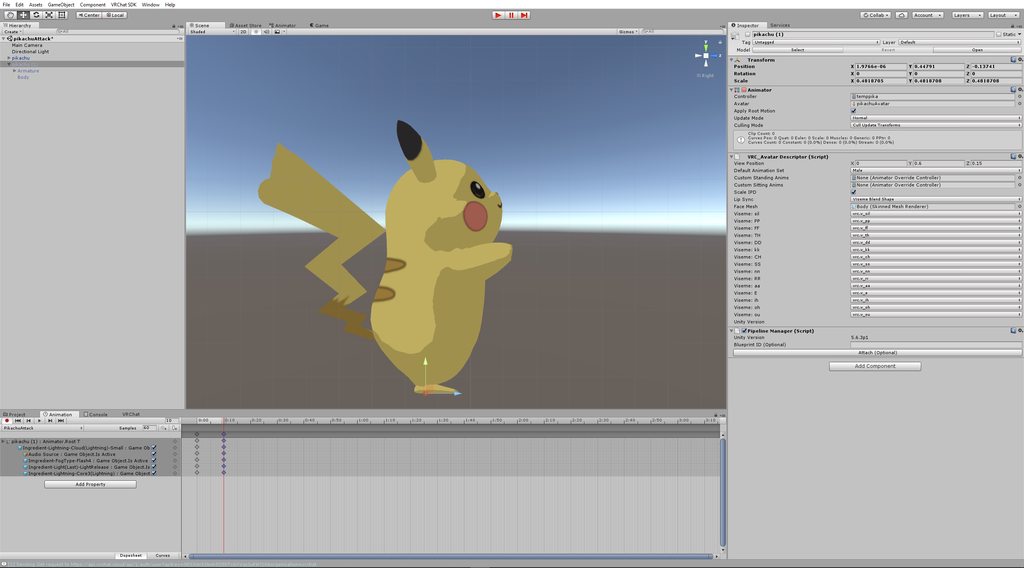
I'm trying to add a particle animation to my avatar, but it ends too quickly
it's supposed to run for 13 seconds but cuts off after 2 seconds
 wicked crane
Ok I have a little question about animation as I am just starting out. Whenever I duplicate my avatar to begin animating and I create a new clip, the avatar goes in to an odd pose. How would I prevent this from happening so I could attempt to create animations that include walking or running?
 vital musk
@dusky dock if by that you mean that your avatar moves about in world space in the Unity editor, but stands in one spot during animations in VRchat, your avatar needs to be full IK enabled (fully working legs, hands and all fingers) to move around in-game
Otherwise you stay in place and your head stays facing forward in-game during emotes
wicked crane
heyyy... does anyone know how to return my avatar back to t-pose in unity?
icy crow
did you mess up the original when trying to animate it?
I think you'll just have to re-drag the avatar back into the scene
and copy across any components you had on it
 paper haven
Does anyone know a solution to prevent auotrmatic blinkining during eye closed emotes? I've done this method before but it doesn't seem to want to work when I use two seperate blinking shapekeys instead of one. Maybe I just need to combine them into one.
 cursive moon
You could set the blink shape keys (be it the manual blink your model has or the automatic blink made from CATS [vrc.blink.left or something like that]) to 0 in the animation
paper haven
@cursive moon Ah, I tried to make my own passive blink as setting things to 0 didn't seem to want to work, is it possible to have the model's Animator and a seperate Animation component for a passive blink animation? as when I tried that or tried putting it on the body as an animator they wouldn't work.
I remove the model's blinking with CATs.
slim sparrow
Yeah, that's how people generally do it
paper haven
Apparently it's a method to fix this, seperating it so your model has a passive animation you can disable
slim sparrow
You put a separate Animation component on the model so you can enable/disable the blink. However, you must have CATS blinking disabled
So the shape keys are empty
paper haven
Mhm, i did that
slim sparrow
And the blink animation has to be marked as legacy
paper haven
and it has both an Animator and Animation component
but the blinkingisn't playing in play mode
dunno if it will
mhm, it is
slim sparrow
And if you un-mark it as legacy and put it in the animator, it does play?
In play mode
You can drag it on a duplicate of your model and it'll automatically assign the animator correctly
Just make sure you leave the animator controller empty when you drag it on there (you do not ever need to fill it in when you actually upload)
paper haven
Hmm, the animation doesn't seem to play, either with or without legacy, on a copy of the model
Also, you don't need to have the Animtor with the overrider for animations?
I thought you needed the Controller, Custom Standing and Sitting poses with the controller
Ah, I think I've found the problem. the blink animation was set up to work on the body, not the main avatar object
whoops
slim sparrow
You don't need an animator controller set in the animator
If you want to override animations, you need to fill in the custom standing/sitting anims field in the descriptor
And yeah, that would explain it lol
paper haven
Ah, so I can put a passive animation on the Animator?
and the animation overrides would still work?
slim sparrow
Well, you can technically put whatever you want in there. It gets completely overwritten ingame.
It only plays in the preview window
paper haven
Ah.. so people do passive blinking via an ANimation component
i always did them via animators on bones, but I assume that won't work for the blinking
slim sparrow
When your avatar loads, the animator controller is replaced with the game's own. The animation set is then overridden with the custom animations you set in the "Custom standing anims" slot
Actually, that will work if you put it on Idle
But you won't be able to disable it of course
paper haven
mhm..
slim sparrow
And of course, you then need a proper idle animation
paper haven
this is the first time in a while the eyes havehad this problem
slim sparrow
Or pose at least
 silk ember
How do you get objects spawned from hand gestures to stay in one place, it keeps following my head so when I look around it moves, but I want to stick it in one place.
icy crow
fixed joint
silk ember
Either one position or not rotating, either works.
silk ember
Ah okay, thanks.
icy crow
is there a way of completely stopping the jittering of them?
slim sparrow
Or use world mesh particles if you only need a visual object
icy crow
even with infinite drag its still a bit jittery
slim sparrow
@icy crow not completely, but you can set drag to Infinity
Yeah, there's no way to do that
icy crow
hmm
paper haven
Does setting the blink visemes to 0 in a hand gesture prevent the passive blinking?
if it's using CATs
slim sparrow
No
Only if you use a custom blink
Because you can then disable the animation component (and probably set the blink shape keys to 0 so the blink actually stops and doesn't just pause)
I had an issue on another avatar where gesturing at the wrong time made my face do a wacky
paper haven
mhm.. so I should remove the passive blinking, and use my passive animation and disable it and set the blink visemes to 0 when I do the hand gesture?
to completely remove buginess
slim sparrow
Yeah
paper haven
Mkay
and the passive blinking would just be on an Animation component, underneath the model's Animator component
 twilit forge
(first of all im a noob at Blender) Soo i tried to make myself a 4 legged model. So far so good i have rigging done. After that i made an animation in Blender (like 5 different Poses in 120 Frames) . Problem is... How do i save it and how do i apply that animation as Walking animation?
slim sparrow
There's a bit of an issue with that
From what I've heard, you cannot actually animate any bones in your walk animation that are outside of the humanoid rig definition. You could try, though
Is your model intended to be used as Humanoid? @twilit forge
twilit forge
I guess so yeah. Especially since i would have to animate everything else if i wont do that
 tepid flower
hi i have mmd and im done all steps but i have a proplem an Animation eyes didn't move
silk ember
Alright I know I need a fixed joint to place objects in the world disconnected from avatar, but how do I attach it to the avatar, but make it not rotate depending on where I look.
So when I move it moves with me, but it won't rotate around me when I look around.
 wary parcel
You dont :p
silk ember
It's impossible?
silk ember
Yeah but then it won't move with me.
I did the fixed joint and it places in the world, but when I do the gesture again it places in the first place and not where I want it to.
I want it to be in front of me every time I do it.
wary parcel
You will need to do some witchcraft to get that working
silk ember
I guess the best way is to attach it to the hand and keep the hand still :/
wary parcel
Best way i think i know (not tried it) is to reset the transforms with an emote or something
silk ember
I'll try that, if it does not work I guess I'll have to live with it or attach to hand.
wary parcel
You could just use 1 mesh and material to use an particle system to spawn it
Just keep the particle system active at all times and change the emission for it to spawn
silk ember
I could, but it's 19 different objects and I have no idea how to do that.
 winged gazelle
Would anyone might know why in Unity I can't do anything with my VR Chat SKD? I was making an animation and when i finished my only option under the VR Chat SDK tab was "Clear Cache and PlayerPrefs"
wicked crane
I would try to reimport the SDK
I have a question too. I made this animation that puts a sword in my avatars hand. It works in the sense of spawning the sword, but my avatar gets thrown into the air everytime I use it. Anyone know any potential causes for it?
 spring nova
that would be because of colliders
If you have any, you'll need to set them to istrigger so that they don't physically collide with your ingame bounding box collider
wicked crane
I havent used any colliders in unity besides a couple for dynamic bones but I dont use dynamic bones with this avatar. I think it was because my animation had a property for the position of my avatar. I may have accidentally introduced it when recording. Im going to try it again
spring nova
dynamic bone colliders are different, and wouldn't cause the same problem. I'm not sure an animation would either, but that is something you should fix anyway
wicked crane
Thanks for the help. It was the position thing. The animation now works in game however when i stop making the gesture, my avatars hands are stuck and I cant cancel it part way through. I set the wrap mode to once. Should I change it?
spring nova
Where are you changing that? I've never messed with it, so just default
wicked crane
alright
 lucid heart
is it possible to make loops with dynamic bones? You would need to constrain the tip of the bone chain somehow, but no idea how this could work, if it's even possible.
spring nova
Well you can use inverse colliders to lock dynamic bones to a position, only problem is when you do that it affects the entire chain. You might be able to mess with the radius of the colliders on the bones and the distribution curve
Hm that's unfortunate... Using distribution you can get the collider to only affect the bone at the very end, but then you run into other weird problems since it doesn't properly affect the rest of the chain to make a "loop" through the whole chain, just the last bone is always pointing in the direction of the collider
Since it doesn't work through dynamic bones, you'll have to make it with unity cloth, in which case you won't be able to do a solid object like a chain, but it would work much better if you're looking for a loop of cloth anyway
clear yew
Im doing a huge project though
clear yew
I’m trying to make some super of super sayian model
I don’t know how to get the aura effects or sounds though
I want the avatar model (base forum) to transform into the super sayian model with these new effects
 hexed fern
so i have an animation that gives me this when i check the import messages

and when i test teh animation it looks fine until they step down

then one of the toes goes way to far up
http://prntscr.com/jywp4q and the other one dips down really far

yet the clip its reffering to isint even there
wicked crane
This is a pretty general question but I cant find how to make animations like walking or running because my model always goes in to that odd pose when I start to make an animation. Am I missing something?
south mango
Does anyone here use the Particle Ingredients Pack for unity?
If so, could you help me with something

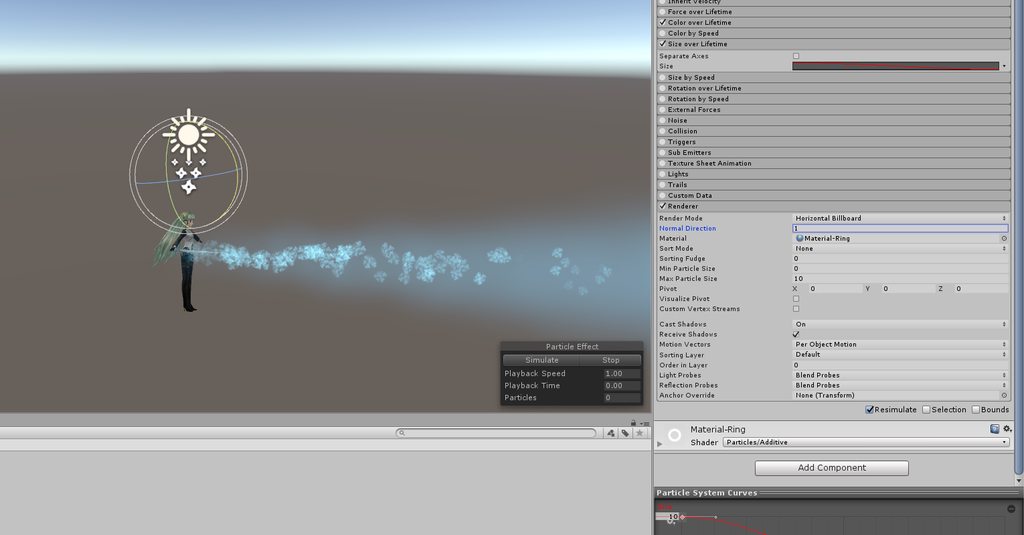
How do I change the ring animation so it goes inward instead of outward?
spring nova
In the size over lifetime tab, change the curve from upwards to downwards
south mango
Awesome, thank you!
Sorry for asking again, but do you know how to change the axis of the ring? from horizontal to vertical?
i tried rotating it, but it doesn't do anything
spring nova
That's because it's a billboard, which means it'll always be facing the camera. You'll need to change it to a horizontal billboard first so it's fixed rotation, then you can manually rotate it
You can do that in the renderer tab
and while you're there, change the max size to 10 so it's always the same size regardless of camera distance
south mango
I just checked, but it was already set to horizontal billboard.
spring nova
Does it rotate to always face the camera?
south mango
It stays the same, no matter which position I view it from
here are the settings for it currently
 spring nova
Is it being subemitted by something?
south mango
I don't think so
spring nova
Ah, found it. Change it back to regular billboard and then change billboard alignment to local
south mango
You're a legend. Thanks again 😀
 tepid grove
Quick Q, how do you add the animation tab to unity? I can only add animator which isn't the same thing :/
oh im just blind nvm xD
south mango
When you make an animation for a spawned object, do you have to make another duplicate on top of the second duplicate character?
I want to be able to spawn(equip) a sword and have it do nothing until I trigger another animation on the spawned sword with a different gesture
is it possible?
spring nova
For one, if you want to animate something inside your character the best way to do that is drag it outside, click create animation, then drag it back inside. If you do it while it's inside it'll try to animate the whole character and that's what causes the crouching stuck in the ground thing
And two, if you want to use a gesture and then have something stay that way afterwards, you'll need toggle props. Search toggle props in the #development-advanced channel, and read through the readme for instructions
south mango
Okay thanks, I'll try that. Although i'm still a little confused on the first part. Do you mean dragging the object(sword) out of the character and then make an animation on it?
spring nova
yeah so that it's not inside the hierarchy of your model
south mango
okay
Do I need 2 duplicate swords (one plain sword and other with particle animations) within the duplicate character?
spring nova
I don't think so, but it depends what you're going for
If you just want a sword and then that sword has particle effects, you only need one
The duplicate is not any kind of special thing that replaces your real avatar either btw, it doesn't even get uploaded. You simply use it to create a file that is then played out on your avatar. So in order for that to work, the two need to be identical hierarchy wise so that the file accurately points to the right thing on both models
 sweet zealot
i cant figure out why my blend shape is not showing up for one model in unity yet it shows up for blender?
losing my mind - cant get any blendshape to show up in unity for one model
and i cant figure out why
the other models blendshapes work
spring nova
Just checking, when you export an updated version from blender, are you pointing to the assets folder unity is now using? Or are you pointing to where you originally saved the file before bringing it into unity
sweet zealot
its in the assets folder
if i make an adjustment tot he model then update it, it does show up in unity
i just cant get it to see the blendshape i made to the model
spring nova
Are you activating the blendshape by setting it to 100 in the mesh renderer?
Or does it just not show up in that list at all
spring nova
Have you tried bringing in a new model from the assets list
sweet zealot
i tried making a new blendshape and it too wont show up int he unity animation list thing
k i imported an entirely new model and still it doesnt see the blendshapes
oh
it had a mirror on it
......iknewthat...
 cerulean frost
hi, i've made a looping tailwag and ears animation on my avatar and everything was working fine, until i added facial expressions. now the tailwag won't play anymore. any solutions?
icy crow
is it in an animation component or in your override controller?
cerulean frost
the tailwag itself was an animation component
icy crow
And its a legacy animation?
cerulean frost
yep
it used to work until i added facial expressions with the override
it also shows the tailwag in the avatar selection, but not, when i switch to that avatar
cerulean frost
so no one got a solution? :C
 regal hollow
Are you just looking in a mirror
or have you asked if other people can see your animation?
cerulean frost
others can't see it either
icy crow
Strange that it shows it properly in the avatar selection screen though
So are the facial expressions gesture overrides? Or are they idle animations or something in the override?
paper haven
Well, I got the passive blink animation working on an Animation component in play mode but it doesn't seem to work in-game
paper haven
It's set to Legacy and with Loop play mode
icy crow
Do you have other shape keys that might be interfering with it?
south mango
How does he link the meteor particle with the air breaking effect @ 6:57? https://youtu.be/_cmgugA9Bok

Mind blown. DISCLAIMER: If you're wondering why the sound is coming from your left or right at weird intervals it's because there's a constant sound glitch i...
paper haven
Uh, the model still has the old eye shape keys but they're blank
slim sparrow
I have a single floating orb particle. It has zero speed, and simulation space is local. I give the particle system idle movement using animations. I need the particle to leave a trail, but I also need the trail to be local to my avatar. I want the movement from the animation to leave a trail, but I don't want it to spam trails when I move throughout the world.
Is this even possible?
 lyric yacht
Is there a way to go about making an animation play once, but have it disappear instantly? Instead of it taking time for the gesture to end when you swap the hand gestures? Because I know if the first keyframe and the last keyframe are the same the animation will disappear instantly, but the point of this is to have it loop like a basic sword animation
 paper glade
If anyone knows how to port an SMD animation to FBX, can someone tell me? I've been wondering so I can use a running animation for my trainer.
 neat bone
Hey. I'd like to stream audio with animation override, but it does not work.
What kind of procedure should I do? Please tell me :)
 cursive needle
what is the problem
neat bone
I do not understand the procedure.
cursive needle
ok so do you have an audio sorce
neat bone
yes
cursive needle
do yo have the animator open
neat bone
it is open.
cursive needle
now click add property go into armture and go to where you put the music click the drop down and click is active's +
also make sure the music is hidden
neat bone
I probably did it
cursive needle
if you did all right all you need to do is add it to a gesture
neat bone
Plase tell me how to add a gesture?
cursive needle
you have the sdk right
neat bone
VRChat SDK?
cursive needle
yeah
neat bone
yes.i have sdk.
cursive needle
ok theres a thing for gestures with in the sdk file
neat bone
CustomOverrideEmpty?
neat bone
ok.
I added it to avatar.
paper glade
I need to learn how to properly use the Animator window myself. I only use the Animation tab.
cursive needle
now its done
cerulean frost
@icy crow Yes, the facial expressions are gesture overrides, the tailwag is an animation component
neat bone
I do not know how to make animation with audio files.
cursive needle
didnt i just tell you
paper glade
@cursive needle You mind if I take it from here?
paper glade
Okay. @neat bone You created an Audio Source object attached to the avatar, correct? If not, do so. Once you've done that, set a property in your animation that sets that audio source to be active. What you want to do then is set the Audio Source to be inactive on the Avatar in the scene. When you play your animation override, the audio SHOULD play since the object of the Audio Source is now active.
Tell me of you have any trouble understanding that.
And if it works, let me know as well. Basically either way just ping me
Just realized external emotes such as Twitch Sub emotes don't work here. Oof
paper glade
Is everything alright? I saw the ...is typing...
neat bone
I made an animator, but it does not work.
paper glade
You... did create a duplicate model, right?
neat bone
yes.
paper glade
Controller for the animation? Or animator controller? Did you start the animation yet?
I'm having trouble understanding the exact position you're at.
 main grail
My particles only move one way even though its set to world
paper glade
Rigid bodies, Nars
neat bone
I probably made .anim from the sound and put it in FIST.
paper glade
Well if you want the sound to play when the weapon is summoned, just apply that property to the same animation. The property where you summon the weapon, that is. Or actually, what ARE you doing exactly? Just curious.
Also I wouldn't advise applying the animation to fist.
Or at least, I wouldn't.
neat bone
I want to play only the sound at an arbitrary timing.
paper glade
...oh. I don't know how well that's work since VRChat loops hand animations
paper glade
Oh right that IS a thing you can do
paper haven
Does anyone know why my blinking passive animtion is working in-Unity on an Animation Component but it isn't working in-game?
slim sparrow
Which shape keys are you using for the blink? @paper haven
paper haven
One I made, a new blink shape key
slim sparrow
It must not be part of the first four shape keys, and it must also not be part of any visemes or whatever
Ah
paper haven
which was a combination of two eye close keyframes
It's used for some hand gestures
but nah, no visemes and I don't think it's first four
nah, the first four visemes are
are visemes*
neat bone
Sorry. Time is approaching. Thank you very much for the people who cooperated.
paper glade
No problem
I look forward to seeing you in-game @neat bone
Also what's your username if you don't mind me asking?
neat bone
I use it with various names, so I can not answer ... sorry
main grail
@paper glade have any idea still?
paper glade
Well, your VRChat name, User
paper haven
Could it be cause the blinking animation is used for hand gestures?
neat bone
Name is WR555 I can not talk because I do not have a microphone so please understand.
paper glade
@main grail Sorry to say this, but I've never actually worked with World Particles, all I know is they use rigid bodies
Oh don't worry, I know a few people who don't talk as well... And one who can't. Like literally.
slim sparrow
@paper haven if you're using the same shape key inside your gestures, it might not work
Try removing those properties from the gesture animations altogether
neat bone
@paper glade Thank you very much. bye
paper glade
No problem
 vagrant roost
Anybody know how i can make the egg stay in play, so i can walk around it like a chicken? https://puu.sh/ALLTw/e448c964b3.mp4, its already a world particle in gameobject
slim sparrow
It looks like you need to increase the lifetime of the particle perhaps
If it's already a world mesh particle, it should stay in place
Use burst emission (emit 1 burst of 1 at 0:01)
So you only ever spawn 1 on every activation
Are you the creator of that Harpy world?
icy crow
do particle subemitters have to be on burst emission to actually work?
spring nova
only if the parent is dying on collision
Because the child is only active for the single frame between the parent hitting the surface, subemitting, and dying
 spice urchin
how do people make rapid fire / single fire guns on gesture
spice urchin
do u just not use 1 frame long gesture
regal hollow
they probably trigger particles and audio files
 dusty plume
Yes, You can simply enable a particle effect (or the emission node from a particle) And enable a sound.
Particles and Sounds "animate" when enabled. So a single frame is perfectly fine when it loops like in VRChat
spice urchin
yes but people have gestures that have like rapid fire guns
regal hollow
you can fire multiple particles
dusty plume
You can loop the sound effect, or use a much more complicated system if you need
spring nova
The single frame simply turns on the particle system, it doesn't tell it to fire one shot or anything. So once it's on, that particle system has it's own firerate and properties
dusty plume
Anyone here know about forcing a Scripts value to be a Keyframe? Need it for Final-IK
 knotty wedge
How does one add a sound to a hand gesture?
 zinc chasm
Ok so I made an animation, the particles in it were made from scratch. They look great in unity but when it's in VRchat, some of the particle systems dont show.
On the animation, one of the particles have a delay, when they're supposed to show but don't, I get a small lag. It's like they're there but invis. I checked and everything seems fine.
south mango
Hi guys, I'm having some trouble making my particle animation work in-game. I made an empty game object containing the particle effects and also assigned the animation to a gesture, but it doesn't show in-game. Here's a quick video showing my settings:

What am I doing wrong?
south mango
Yeah it's super annoying, hopefully someone more knowledgeable can chime in
okay thanks, will do the same.
 olive solar
Anyone get a proneidle animation working? I have seen it on an avatar in a orld before but for me on any model I have tried, they go under the floor when i lay down unless I add raising their position to the animation. However raising them in the animation for some reason makes all dynamic bones spaz out unless they are doing the animation.
 jade sparrow
Hey this is probably a very simple issue. I am trying to delay when a prefab is activated. It is a moving prefab and I am just unsure of how to delay it to start when I want it to. (Yes I have tried to use the delay area in the particle systems)
(hopefully when I wake up someone is able to help me, seems too late for people to be online at the moment)
 rancid valley
How can i remove the particle scaling ? i want them to stay the same size, not increase in size if i walk away from them
icy crow
You can play with the max/min particle size in the renderer section
south mango
Does anyone know what particle effects this guy was using @ 4:26? specifically the blue one https://youtu.be/_cmgugA9Bok?t=4m26s
Mind blown. DISCLAIMER: If you're wondering why the sound is coming from your left or right at weird intervals it's because there's a constant sound glitch i...
 obsidian vigil
@south mango nothing special...
but which one do you exactly refer to
the blue balls?
flying towards him?
south mango
The blue one
obsidian vigil
which one tho
i mean, if you wanna know about the textures, no idea, they might be done by himself
if you mean how he has particles flying towards him
they are emitted on volume /shell
and have a negative speed value
south mango
Okay, I thought maybe there was a particle pack for it. Gotcha, thanks.
icy crow
a shader
 lean patrol
These are shaders yes. It's the chromatic aberration shader and a screenshake
 opal lodge
Please don't add that so that other people get this effect ..
icy crow
have a look into grabpass if you want these kinds of effects @clear yew
I don't think people want to share things like that anyway
rancid valley
So i still have a little problem with my particle animation, im quite new.
So i created a particle system that shoots out billboards "Stream-like" and i want it to be on my hand and following my movement.
Everytime i put it on my hand tho it starts shooting out stuff where my hip bones are so it isnt even on my hands even if i positioned everything correctly...
I created that particlesystem in a new scene at locations 0,0,0 and made it a prefab, but then again putting it on an avatar in a different scene messes up the location
obsidian vigil
well, adjust the position of the system
icy crow
Are they world particles?
icy crow
Are you using IKFollower or fixed joint/rigidbody?
rancid valley
im freaking getting upset i cant seem to make it shoot out the position i want to, its just steadily shooting at my crotch from where the floor is
I'm not in this current version, i had one but i probably did the wrong setup
I simply slapped on the third time a new particle to my hand , positioned it, rotated it and changed everything in the system to how i want it to be
but its not even positioned correctly in vrchat, only in the mirror it looks like its working
icy crow
For world particles to follow correctly you need either fixed joint+rigidbody or IKFollower
rancid valley
So Rigid body on the particle with no constraints? and fixed on hand with all constraint?
icy crow
I can't remember which one is which, there are a couple YT tuts for that
Make sure the fixed joint object is always active
obsidian vigil
that explains a lot...
;- ;
i always do Empty Object -> Empty Object -> P-System and put the joint on the 2nd object which i then proceed to turn off
rancid valley
So empty object into the hand, create empty object of emptyobject add particlesystem and disable 2 empty object to enable it in the animation?
So one tutorial tells me to have one empty then the particle and disableing the particle not the empty while having it on the avatar but not in the hand hierarchy and using rigid bodies on the hand and fixed joint on the empty one with the particle in it
so many ways, so confusing ._.
icy crow
The particle should be on an empty game object parallel with the hierarchy, not on your hand
Watch Jawzhar's vid
rancid valley
no idea
obsidian vigil
both with a f j
icy crow
why do you need 2?
icy crow
You just need empty object -> particle
obsidian vigil
and then disable the particle?
obsidian vigil
ok
icy crow
or depending on how you want your particle to behave, have the emission disabled and then enable that in the anim
obsidian vigil
cuz thats how i have it for my ganondorf but the particles spawn in random places relative to the wrist and then move with my hands
they dont stick to my wrist
rancid valley
Alright i redid exactly what jawzhar said, lets see if it works
its actually working thanks both of you
icy crow
ayy 👍🏻
obsidian vigil
👌🏻
jade sparrow
Hey this is probably a very simple issue. I am trying to delay when a prefab is activated. It is a moving prefab and I am just unsure of how to delay it to start when I want it to. (Yes I have tried to use the delay area in the particle systems)
 violet kraken
@jade sparrow did you slap the delay on all the particle systems of the prefab ?
jade sparrow
@violet kraken yah that's not the issue I'm having, I figured out what the main issue was. The movement was being controlled by a script and I am currently trying to figure out how to add a "delay" to it. Not sure what the coding is, no coding history here haha.
icy crow
If its for an avatar you can't have scripts anyway
 floral tinsel
Question
Can anyone lead me through putting animations on a GoldSRC model which I'll use as an avatar?
cursive needle
hm
floral tinsel
Please?
cursive needle
what
icy crow
for emotes or gestures?
icy crow
Oh so ones that are always running
icy crow
ok well you can do that with either a legacy animation in an animation component, or an idle/walking animation, etc in your override controller
do you know anything about making the animations?
floral tinsel
I'd be using the Sven coop V5 playermodel animations
They'd be integrated in the model
icy crow
So you already have the animation .anim files?
floral tinsel
Again, they'd probably be integrated in the .fbx
icy crow
oh ok. I think with those you can drag them straight into an animation component or your override controller
floral tinsel
Alright
icy crow
if you are putting them in an animation component, they need to be legacy animations
you'll need to open the debug menu to set them to legacy
jade sparrow
Anyone with Particle System knowledge able to help me figure out how to make a moving particle in an arc?
cursive needle
i think i know but im not at my main pc rn so i cant help
jade sparrow
That's fine
Thanks anyways
Ill be pulling my hairs out until then, unfortunately all of the tutorials I'm finding online are using scripts which we cannot use
clear yew
I think you could play around with the velocity over lifetime module of the particle emitter; I've made particles move in circles before with that
You'd want to use sine waves for the curves I think
zinc chasm
Anyone know how to fix an issue to where a particle system works in unity, but when it's in game it doesn't show?
I made teh animation right, so it's not that. Even other systems show up on the animation. I just can't figure out why some particles systems wont show.
icy crow
can we see your animation/particle system settings
zinc chasm
Umm, well Ill screen what I guess is important... one sec.
Heh, I cant post screens. Another way I can show you?
zinc chasm
Ill do an imgure thing. One sec
Let me know if that works for ya @icy crow
Thats one of the animations, and it's settings.
icy crow
and what does the animation do, just enable the particle system(s)?
zinc chasm
Yep.
icy crow
for a gesture or emote?
zinc chasm
Gesture.
icy crow
and the anim is only 1 frame long?
zinc chasm
Like when you create the animation? Ya.
icy crow
hmm
zinc chasm
Not sure if this helps, but when you go into play mode, on Game it wont show either, but it shows on Scene in playmode
 modern mortar
this is abit of a long shot, but has anyone been able to get vertex animation from maya to work in unity? I have found Mega-fiers on the asset store but im not exactly willing to pay $150 just so i can have part of my models mesh shoot out.
 copper whale
I'm stuck on a BIIIG problemo, trying to get particles to follow my sword kinda like the nightsticks you can find in most of the clubs, can anyone help?
The only problem is that I have a sword animation done already, but I'd like another animation with the same sword to be made.
I just wanna have it in a different gesture.
spice urchin
how do people make those gestures where it does multiple things, i.e. firing 3D physical projectiles, playing an animation, effect with timings
wary parcel
@copper whale research trail particles those "follow" the sword
Its not an easy way of creating it, better to do some personal research and then come back later when you get a bit of the basics and tried maybe some prefabs out there.
 noble turret
@copper whale if u already know how to make the particle system u want on it and just wanna have 2 different on your sword. Create a empty game object on your sword. and place the particle system beneath that. so u can trigger the empty game object in the other animation.
copper whale
@noble turret I wish I knew what an empty game object were, I only know about pairing it to the wrist, that's all. QWQ
noble turret
@copper whale right click on your sword then create -> empty game object
copper whale
@noble turret Arigato, my comrade!
noble turret
make sure u hide the game object so it will only trigger with the animation
 night crescent
If i want a gesture that just toggles music, how do i accomplish this? When i have 2 frames of the object being enabled that the music plays from, music doesn't play. do i just need to add some other kind of frame or waht?
yeah it seems that adding some other animation that's two frames (0 and 1 frame) long helps. Pro tip i guess haha
copper whale
I have another big question.
I got a good looking particle, but its' trail looks very odd.
I'll see if I can screen cap the trail.
Got it, mind if I DM you the picture, @noble turret ?
noble turret
sure u can @copper whale
wary parcel
Is Kinematic, and reduce the Mass to as low as you can
south mango
Mind blown. DISCLAIMER: If you're wondering why the sound is coming from your left or right at weird intervals it's because there's a constant sound glitch i...
How does he create the light effect @ 4:36? is it a particle system?
south mango
Do you have to make 3 separate point lights to create the different colours?
or is it possible with one point light?
obsidian vigil
you should be able to change the color in the animation as well @south mango
south mango
Okay, thanks. Is he also using a halo?
south mango
How do you get the fade in effect for the lights?
regal hollow
I imagine it's an animation that slowly ups the intensity
obsidian vigil
empty object -> point light, animate the light like you want it. Inside of the main animation -> activate empty object. Done
icy crow
Set the drag to Infinity @clear yew
obsidian vigil
Is there any way to synchronize audio to a particle yet? Besides animating everything by hand?
obsidian vigil
Oof
icy crow
Are you trying to place it down and have it stay there? @clear yew
are you enabling the object with a gesture?
Try only enabling it with a gesture
I've never tried it when its always enabled
hmm
Is that what you want?
You can do it with toggle props in an emote
Not sure about gestures
 covert girder
you can keep object stay in place with Mesh particle* modifier
icy crow
I think they mean world mesh particles
but you are very limited with what you can do with that
the mesh can only have 1 material, etc
slim sparrow
Yeah, what's the issue?
That's world objects with fixed joints right?
You mean it jitters?
Set drag to infinity
obsidian vigil
@slim sparrow if i had a cube which is fixed to a point in world space and i also place an ik follower on there, which is linked to my wrist, would it always face my wrist with the same side or would it move alongside my wrist?
and locked the position axis
only rotation
slim sparrow
No idea tbh
obsidian vigil
alright 😛
slim sparrow
No, just that
covert girder
yes, but NaN is not @obsidian vigil :d
vital musk
Apologies if this is the wrong place
I've got a working avatar in VRchat, with no custom animations, and have no experience creating animations myself (downloaded them from Mixamo before)
I've found the animation tab in Unity but it won't let me change things for humanoid rigs (my character), how do I go about making an animation for it?
covert girder
is that shows any errors?
vital musk
Keyframing for humanoid rig is not supported!
The only thing I can get working is using the Animator instead of positioning the bones themselves, but pretty much all these options changes another property
slim sparrow
@vital musk you need to use the animator properties rather than directly moving the bones
If you want to create an animation by hand in Unity (good luck...), you need to duplicate your avatar in the scene, select duplicate, go to animation, and create new animation
Then use the animator values such as Leg Stretch to animate
You can also make an animation beforehand in Blender or import them from Mixamo
Unity can convert animations on imported models to humanoid rig animations
vital musk
Hmm I'll have to have a look at blender then, thanks @slim sparrow
obsidian vigil
@slim sparrow any method to set the avatars' y position though?
slim sparrow
In what?
covert girder
blender? 🤔
slim sparrow
You mean in an animation?
obsidian vigil
yeah
slim sparrow
That's Root Transform
vital musk
I'm trying to get Parappa's animation so a lot of the ones from Mixamo don't work well for what is essentially a 2D character
slim sparrow
Root T.Y property
rancid valley
Does someone know why the particle that should have a mesh is invisible while using it but billboards or cubes work?
rancid valley
Oh so i'd have to atlas it in blender
slim sparrow
Yep
But you can maybe automatically atlas it
Mesh particles don't always have to be super detailed
And in some cases, you can literally just combine the materials manually if they share textures
modern mortar
Okay so i am using a generic rig model. I have made custom walk animations however, the idle animation does not loop. I have Loop Time and Loop Pose checked on.
 random dragon
hey.. I'm making an animation specifically for a contest. Is there a way to have the audio play at a safe level but evenly across a large area with no falloff?
icy crow
there's limits to the range of audio and I think with falloff as well
random dragon
those limits are likely server side?
random dragon
gotcha.. I don't want to ear-rape anyone but its a large stage and a fairly wide animation.. I'd like everyone to be able to hear it clearly
icy crow
you can override those limits in an animation though
random dragon
have the animation control the limits?
icy crow
np
 pale crescent
Is it possible to use gesture overrides on a generic avatar?
covert girder
i think you can @pale crescent
pale crescent
i tried, but they aren't activating in-game
covert girder
a, i think you can't, coz gestures is a humanoid think for hands :noway_emote:
pale crescent
oof
i would switch my rig to humanoid, but then i'd have to redo all of the animations
 toxic hinge
Does anyone know if itd be possible to have dynamic dice animation
an animation to drop it and it colides and lands on a random side
 frosty spade
is there any way for me to keep an object in place even when my avatar moves
like if I were to place a c4 charge or shoot a rocket, how would i keep it still instead of moving in relation to my player
spring nova
For a rocket, just a particle set to world space. You'll need some other tweaks to make it come from the right place though, look up vrchat world particles. For a c4 charge, you could also do a world particle very easily but then it wouldn't have sound. If you wanted sound, it's a little more involved and you'd want something called a world object
frosty spade
so for the rocket i have the smoke stream set to world but how would i do that with the actual rocket itself
since whenever i move my rocket launcher the rocket itself moves with it
and theres nothing i could find online about having the parent of an object move independently without affecting the child
spring nova
Same thing, set it to world
 spring nova
Nice, thanks
frosty spade
not the particles im having a problem with but the object itself
spring nova
Wait the rocket is an object, not a particle?
spring nova
Oh you'll want to make it a particle then
spring nova
You can have meshes on particles
In the renderer tab
You'll need a special shader to align it to the right direction though
frosty spade
but how would it have depth and etc
frosty spade
so how would i convert it
spring nova
Just change billboard to mesh I'm the renderer tab
frosty spade
but there is no renderer tab since its an object
 tropic root
what kind of shader is it? I've been looking for it for quite some time now
spring nova
Yeah you'll have to make a new particle
 spring nova
I'm on mobile so I can't send the one I have, but I know some people who do
 frosty spade
got the texture on but how am i supposed to make it go in a constantly line every time
tried making to cone radius so small but it starts sparing the particle outside of it
spring nova
Uncheck the shape tab
frosty spade
and it goes backwards too
spring nova
Yeah that's where the shader will come in
frosty spade
which shader
setting the particle's simulation space to world makes it go sideways too
spring nova
@torn pawn would you mind sending him the particle alignment shader?
I'm out on nobile
Wait no I can get it from your PM's when you sent it to me
Nvm got it

 slim kestrel
Would anyone be willing to help me with a super saiyan animation? :))
 real owl
can anyone help me on making custom walking animation?
 glacial briar
anyon have a link or any help to getting music to play while doing a dance emote??
clear yew
@glacial briar you can insert the active audio source aand volume when you edit the dance emote.
@real owl what kind of help do you need specificaally for the walking animation?
@slim kestrel With particle effects? Animation for the yellow aura?
 glass idol
Is the Rigidbody- World Particle Thing not working anymore? Because for me it seems like it, it follow the hand in vr, kinda, but in all sorts of random directions
can i get sme help?
http://puu.sh/ANhOU/d2c2c7967d.png http://puu.sh/ANhQd/de5e3aba40.jpg


or like, not as it follows it in Unity
is fixed joint broken ? Edit: Nvm probably my own fault, trying out different settings
real owl
@clear yew i want to make a flying animation and was wondering if i should make a looped one where my avatar just goes up and down, or do i have to do more work than that?
clear yew
the floating up and down animation should just be the basic aanimation. So, yes you should just loop a basic float @real owl
now if you wanna make it more detailed then add more frames to the floating animation and maake more movement and particle effects
but thats later down the line. just focus on making the float animation.
real owl
thank you, imma do that when i have more knoledge of this 😄
 subtle heron
How can I make facial expressions for models without without fingers?
I mapped animation overrides to each hand gesture, but they aren't working in game.
 median ridge
Make dummy finger bones in blender so that you can have them in unity
You can’t use gestures unless you have fingers
subtle heron
Alright
slim sparrow
@frosty spade if you apply that shader, you also need to set custom vertex streams
icy crow
What are you trying to do?
So you want your materials constantly changing in the animation?
obsidian vigil
iirc Matsix made a gif tutorial
@clear yew
true 😄
thats why i gave up on gifs
but i think ill try your method
isnt it like super performance killing though
because it has that many materials?
slim sparrow
If you want to change texture, try some other shader that supports it
icy crow
so you want like a spritesheet gif?
Ah ok
Does that not work then in your animation?
I don't know, its not a common animation that you're trying to do
How many different jpgs are you planning on using?
...
and they are similar images to create a gif effect?
Because I think you'd be better off with a gif shader
Not right now no
You can add me if you want to show later
 fallow spire
can anyone tell me how to make independently animations, like a object spawn and it will not follow my movement
slim sparrow
Fixed joint connected to nothing
fallow spire
@slim sparrow dont work, can you explain a bit in more detail?
icy crow
literally just put a fixed joint onto the object
fallow spire
works now, made a mistake befor, thx
icy crow
You'll find that the position will become increasingly messed up when you enable/disable the object
Also set the drag of the rigidbody to Infinity
that'll reduce the jittering of the object when you move around
fallow spire
you mean 0?
fallow spire
yea but how?
icy crow
Type Infinity into the box
fallow spire
ok, but i also tested it befor.. my object is very big, so it make not so much difference
icy crow
If you want to enable/disable it frequently with a gesture, I suggest you make an animation that resets the object back to its starting position when you aren't using it
fallow spire
reload of the avatar would be also reset it or?
fallow spire
hm but i dont know how to make the reset animation
icy crow
if want it, I can show you later, I'm at work rn
glacial briar
@clear yew right click the emote and add or? I tried the way that involves adding an audio clip, and duplicateding the model etc but when I drag the animation over to the animations tab, it doesnt do anything. Wont show any points etc
icy crow
Avoid posting links to that site in this server
 mint prism
Hello, when i try to change a value in one material it changes in another one as well

when i for example turn the value for texture lerp to 0 in NanoH it also changes in NanoExp to 0
Can someone please explain how to work around that stuff?
mint prism
duplicate?
icy crow
did you duplicate the material to create a copy of it?
or did you manually select the shader on the second material
mint prism
i didnt duplicate the material NanoH to make NanoExp
slim sparrow
Try editing the material directly, not inside the mesh
icy crow
Because I find that if you do that, the properties will keep copying over
slim sparrow
Just manually go to the assigned material
mint prism
when i go there the value is at zero
slim sparrow
Are you sure you're looking at the right material then?
icy crow
Wait, the values are red, doesn't that mean you are recording an animation?
slim sparrow
Ah, good catch lol
mint prism
yep
slim sparrow
I don't know if that works
icy crow
are you trying to transition between the 2 textures in an animation then?
mint prism
jep
slim sparrow
They seem to be two separate materials at least
mint prism
basically i want to change the hair colour over a longer time then the eye color
slim sparrow
They are separate, right?
mint prism
separate materials
slim sparrow
Like, they refer to a completely different material within the Materials folder
Alright
mint prism
the only thing they have in common is the shader
slim sparrow
Well, stupid solution maybe, but
You could try duplicating the shader and editing its name in Notepad
So that they're two separate but identical shaders
Then assign the second material the duplicate of the shader instead
I have never tried to change material properties within animations, only whole materials.
mint prism
oof broke the shader
 lunar cargo
anyone know of a nice well featured avatar on *** (male / female) that is vanilla regarding gestures (custom emotes are ok)? it can have dynamic bones, I actually bought a license for it to be 'correct' ^^
clear yew
psst kiddo, not allowed to talk about that website around these part.
slim sparrow
That website is pretty bad anyway, you won't find much like what you described on there
You should follow Tupper's megatutorial on porting an MMD model to VRChat.
And then follow a tutorial on how to add gesture overrides
lunar cargo
it isnt? ow sorry 😒
 celest trout
Does anyone know how to make material changes in legacy animations? I want to do it in an idle animation and be able to pause it with a hand gesture.
Or the other way around. Does anyone know if you can make a regular animation into an idle animation to be placed in the Animation component so it can be turned off easily?
icy crow
if its going into an animation component, I think it has to be legacy
and that can be turned off by just disabling that animation component with a gesture or something
slim sparrow
I think material changes should work in legacy animation components
celest trout
I just noticed on the documentation. Is there a way to turn off an animation state of the modern Animation Controller component?
slim sparrow
Just gotta mark the animation as legacy after you finish making it
@celest trout nope
Not without script access
Worlds can do animator stuff, avatars cannot
The best avatars can do, is pulse gates
celest trout
@slim sparrow https://answers.unity.com/questions/622005/legacy-animation-system-cannot-animate-colors.html
This has been a known issue with legacy animations but I don't know how to perform the workaround

Unity is the ultimate game development platform. Use Unity to build high-quality 3D and 2D games, deploy them across mobile, desktop, VR/AR, consoles or the Web, and connect with loyal and enthusiastic players and customers.
 haughty needle
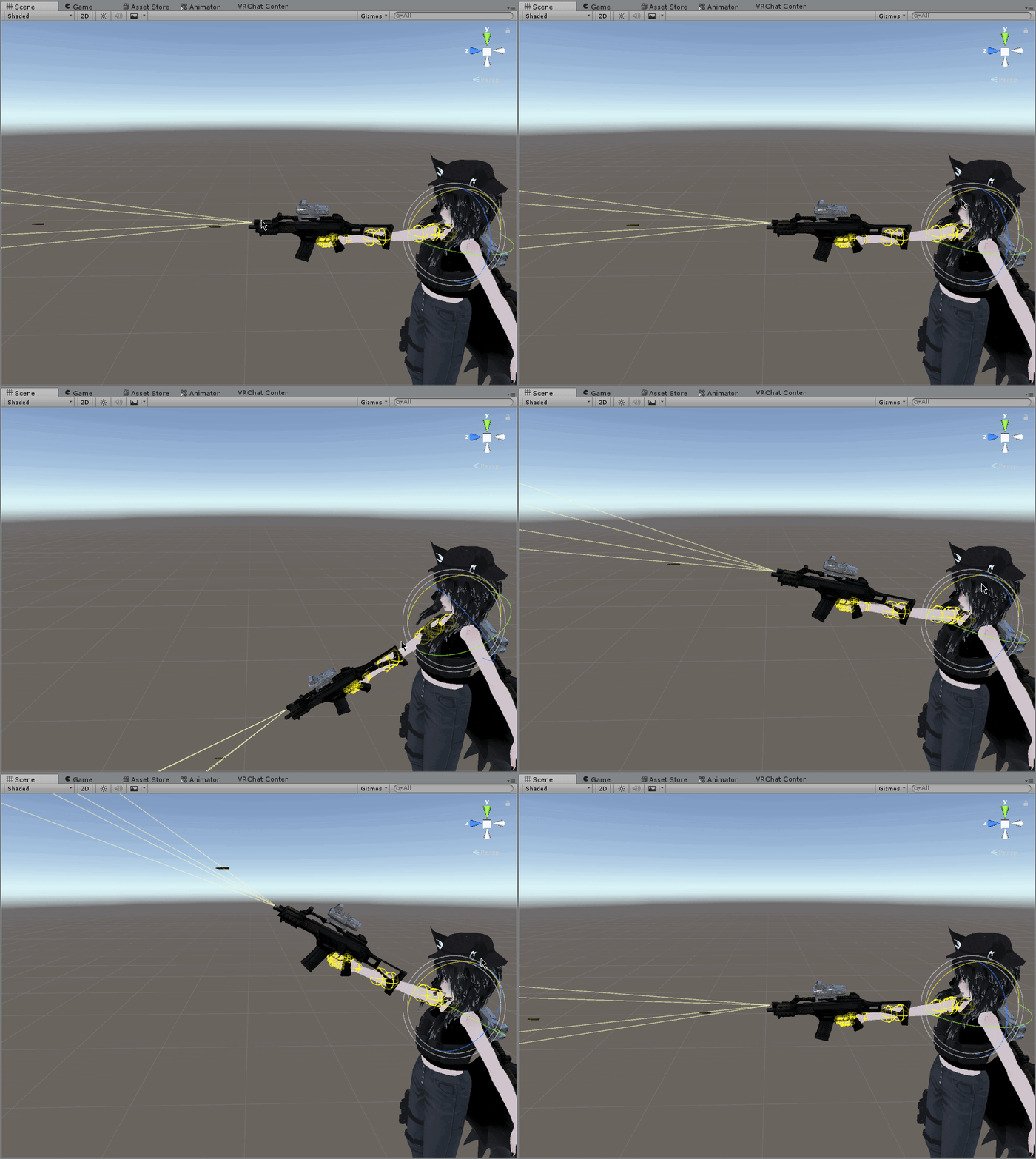
Someone a Idea how i fix that the bullets follow in the direction where i aim?
 celest trout
@slim sparrow try testing material changes in an legacy animation. It doesn't change since the material keyframes don't work the same in Unity 4.x You can set the material once but you can't animate another change back.
clear yew
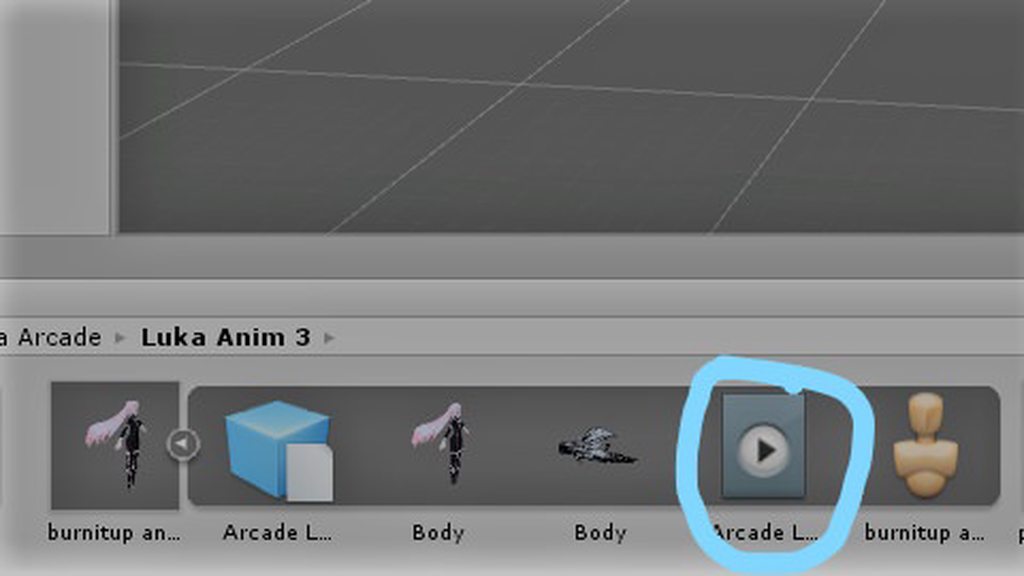
how to take out that animation from that thing https://imgur.com/a/Gp0uG1x
 slim sparrow
Press CTRL+D @clear yew
If it doesn't work, you have to rename the animation first
@celest trout oh, is that why that happens? That explains a lot.
clear yew
i can't rename animation
median ridge
Is there a way to change a model animator controller through an animation of say, a parent of the model?
clear yew
thanks @slim sparrow
glacial briar
Maybe some one may have a lead.. Anyone know if theres any site or something that has the overwatch dance emotes that can be downloaded or something? I really want Moira's anniversary dance for my avatar but i reeeeeelly dont feel like making it piece by piece on mmd...
celest trout
@slim sparrow I found a easy workaround to disable some componants in my idle animation. I just set the componant to 0 in my override and it overrides the idle animation just fine
 quaint marsh
@haughty needle are those bullet's mesh particles?
haughty needle
yes
 torn pawn
i sent him shader
quaint marsh
yeah so that is just a problem with unity particles and there is no way to fix this without scripting.....
because world mesh particles starting rotation will always be the world rotation you gave them in the particles system
quaint marsh
they don't care about the emitters rotation
torn pawn
https://cdn.discordapp.com/attachments/442312051138887680/442312245792342037/Particle_mesh_align_with_velocity.shader http://prntscr.com/j1vnfe

works for mesh particles
slim sparrow
It's still not true rotation, but it at least aligns them to their velocity
You probably have to point the mesh down in Blender
quaint marsh
sounds like a plausible work around but it will only work for moving particles not stationary ones right? because it uses the velocity and not the emmiters rotation to determen the particle rotation.
torn pawn
you can have 0.00001 velocity, should fix it
slim sparrow
It works for stationary if you either make the particle super slow, or make the simulation speed of the system really slow.
quaint marsh
if the particle stops after a certain amount of time will the particle's rotation reset?
slim sparrow
It has to stay moving so it won't work
It'll disappear outright
Just make it not stop
Are you using limit velocity over lifetime?
quaint marsh
well I would if that works
but I geuss I'll have them move at 0.00000001 or something
slim sparrow
Yeah
spring nova
If you want it to collide and stick into something, just subemit on death a particle with no collision that inherits velocity really low
slim sparrow
That doesn't work
spring nova
Why not
slim sparrow
Subemitter triggers after collision
If the particle has bounce, the subemitter will be facing the "bounced" way. If the particle has damping, the particle will first slide off the surface and then emit, giving it the wrong rotation
spring nova
So set bounce to 0 and damping to 1
slim sparrow
See above
Lol
You can make it work with a super convoluted system of two subemitters and some bounce.
That's the only way
I broke my head over this for a few hours and decided that it was impossible, due to a variety of factors. A friend of mine found a solution involving the bounce I talked about earlier. You'll need to give the particle bounce, it needs to die right after bouncing, and spawn a subemitter with -1 speed so it goes the other way and bounces again. After this bounce, it then emits the final particle with -0.00001 speed
And this final particle has no collision at all
spring nova
That's a really clever workaround
slim sparrow
Yeah, he's a clever guy
Shame that we need these kinds of workarounds, but at least it works
spring nova
Instead of using inherit velocity, you could use force over lifetime plus limit velocity just at the very start of it's life. It'll align it to the rotation of your hand, not the projectile, but depending on usage that should be more than enough.
if it's like a really slow projectile that you want to wave around, it would get misaligned, but fast moving projectiles or even ones that follow your hand with velocity over lifetime will be accurate
 placid copper
do any of you know how to add animation overrides to avatars in worlds?
spring nova
Like on a pedestal?
placid copper
i want to use mixamo animation that looks like you're hanging from something
SendRPC
something like that
spring nova
Wait are you wanting to create a new avatar and put it in a world or modify one that's already in someone else's world
placid copper
no
i'm trying to create a world where if you click on the seat, it forces them into a certain pose
like that dancing world
spring nova
Ohh ok
placid copper
or void club when it had those custom animation overrides while they say on the bed
spring nova
I think this channel is mostly for avatars, I can't help you out myself but someone else might be able to. If nobody does, you could probably try again in #world-development
placid copper
no prob
 lunar pasture
Can anyone help me with dynamic bones?
clear yew
wut u need
lunar pasture
I wanna distribute the floofiness in the hair, make it stay still at the top and more dynamic towards the bottom
at the moment it's moving off her head too much
just trying to figure out how to set the distribution curves up
clear yew
more inert if it's moving too much off the head
lunar pasture
So if I set the inert distrib to be initially high then taper off on the graph that would fix it?
lunar pasture
yeah
lunar pasture
yeah, the hair has a separate parent, a few children under it
clear yew
the distrib needs to be low at first then
and going gradually up
so the end bones move less
lunar pasture
I want the top hardly moving then the bottom more swishy
lunar pasture
OK, I think I cracked it, thanks for helping me to talk it out 😃
 lunar pasture
lol not saying talking to a potato would have been just as productive, but thanks for being there 😄
spice urchin
what do the strafe stuff map to in animation override
theres strafelt45 and stuff and idk which direction this stuff is
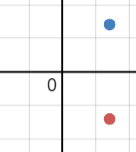
is this the direction strafert45 (blue) and strafert135 (red) go in? https://i.gyazo.com/d77a82a1851425df9d16a0ac5d4a084d.png
 icy crow
Yes
 frosty jacinth
Hey Guys Sorry to bother, But i'm trying to Use a custom idle animation and it seems to just stay in place and breaks the avatar. is there something special i need to do with idle animations? btw my animation is fine in unity.
clear yew
how to fix animation https://gyazo.com/65362542ecb8b0312f12a87e515b7bd9

 split lark
switch avatars. if thats you being stuck in the animation
clear yew
the animation is not working correctly
split lark
eh, im not to good with fixing animations so i can't be much more help
icy crow
Is your viewpoint in the right place?
clear yew
yee
the animation work coreecly but abaut 1m it just starting doing this
in unyti the animation woks coreecly but in VRChat not working coreecly and i can walk when the animation is on
clear yew
is doing the same thing
dusty plume
You are using the Override slots right? @clear yew
clear yew
yes
dusty plume
You animating any extra bones on the model apart from models humanoid bones?
clear yew
no
dusty plume
What do the animations look like in unity?
clear yew
the animation in unity works perfect
dusty plume
No, what do they look like, can you gif it or gyazo it?
 dusty plume
the animation 😃 use the gif feature of gyazo
 covert girder
try to check 3 boxes about Freeze x,y, etc in animation settings in unity
 clear yew
nope same problem
pliant plank
After 1 minute emotes snap back into "normal" mode, essentially you can walk after the 1 minute mark and all of your IK related bones start functioning, so your head tracks and your legs/arms move
clear yew
exactly
pliant plank
The model will keep trying to play the animation but will break horribly, it will only return to normal after the animation time expires
There's no "fix" for it as it's intended to finish on the 1 minute mark at most, you could perhaps have a model with a blend tree animation setup and have that trigger with a gesture, replacing and hiding your model in the process, or having a single full lenght 1 motion dedicated avatar that only plays the dance, also with a blend tree setup
clear yew
aaamm ok
 muted prairie
There's so huge fuckery with idle animations overrides, happened to a couple of my models too for no specific reason, head position is the same as the animation but the armature is crushed in a ball
 fallow rose
Can anyone explain to me how applying multiple animations to your avatar works? (I know how to use the gesture override) I've made a weapon grab animation and got it working without a problem, but as soon as I went to make another animation it just wouldn't let me. Like it continues to bring up the previous animation I made despite the fact I've opened a fresh animation. (I duplicated the character 3 times, 1 st as the base avatar, 2nd for the first animation and 3rd for the last animation). Any help would be appreciated .
spice urchin
how do u add jumping anims and such
i know how to use the blend tree but idk how to add the jump and fall etc anims
or emotes (ones that dont loop)
for generic avatars
 tepid mango
why can't i move the first bone on my model in an animation
the first bones i mean stuff like tail 1 ear 1
https://gyazo.com/bde1c672e2abbacefdbb4750791ef86f
 icy crow
Try disabling the dynamic bone while you're animating the tail
so disable it, do the animation, then re-enable t again
I find that they do that when im trying to animate
clear yew
@ me if you know the solution
 echo wraith
Anyone know why my particle effects show up in the mirror and not in the game world? It's like the exact opposite of what used to happen. lol
spring nova
Are they world particles, and are they not on a fixed joint or ikfollower?
spice urchin
im trying to rewire the gestures to do different things in vrchat
bc with generic avatars they are parameters
so u can make ur own stuff prob
frosty spade
for animating fingers is there a quick way to add the bones to the animation or do you have to do them one by one
spring nova
You can copy over the keyframes from the default gestures or there's a paid asset called muscle editor that allows you to move fingers by dragging then with your mouse
 drowsy cape
So I have a question about the whole rigid bodies/world particles stuff. I watched the tutorials that were posted all around here and none of them really seemed to work. The situation: I have a sword on which I put two world particle effects. I did all the stuff correctly with the empty object and put the effect in there and place it in my armature as well as setting the fixed joints with the right settings. Yet the particle effect doesn't even follow my sword or my hand but it just floats in front of my avatar. Am I doing something wrong? Does it even work with the world particles on an object or does it just work on the hand itself?
spice urchin
is it parented to the sword/sword grip bone
drowsy cape
What exactly?
spice urchin
the effects
they have to be parented to the sword or handle bone so that they will move with them
also why u using fixed joints
they jsut hold things there
and the sword would also need a rigidbody but then it would fall to the floor unless u use static settings
u can just parent the particle u dont need fixed joints
 drowsy cape
Ahh, I see. How else should I parent them to the sword then? Just leave the particles in the sword armature?
Sorry if I'm asking too obvious questions but after watching so many videos of it I'm just confused and frustrated at this point
And where do I put the rigidbody instead then?
 mild basalt
Anyone know where theres some DJ animation I can import to a model, holding headphones and jamming style?
I looked in the usual areas with no luck.
fallow spire
how does the animations work with the shader or something where every player see this like a post processing effect?
icy crow
Like the screen shakes, etc?
fallow spire
for example, or a stupid picture in front of the screen and everywhere where you going
icy crow
calculate screen position, project image to that position
obsidian vigil
Quick question, i have my animation set up, set to legacy, set to loop, on an animation component of the object its supposed to play on. It doesnt play. Why?https://gyazo.com/00e89fb9198a8b7a65830952297ba5d6

 icy crow
did you create the animation on the Spin lights?
echo wraith
@spring nova Not on a fixed joint, but I'll do that. Thanks for the help. 👌
 mortal dune
How would I go about flipping my avatar upside down? (R6 avatar, I want to simulate rappelling)
icy crow
yeah
icy crow
not on the armature just your root
obsidian vigil
@icy crow i have the object spin lights selected, i click create new animation
if thats what you mean
icy crow
put an animator on spin lights, then create the animation
then you don't actually need the animation on the object, just the animator with the controller
obsidian vigil
that worked, thx @icy crow
 cerulean lintel
Hey, not sure if this is the correct place to put this, but I would like to modify my avartar to spawn an object above my hand. Im not sure how to go about this, as the most i've done is create an avartar. The object would be small, about hand sized, and maybe make it slow rotate. I might add audio to accompany it later.
frosty spade
@cerulean lintel https://www.youtube.com/watch?v=GkVJSd3Js8o

works the same with any other object
cerulean lintel
@frosty spade Thanks, i'll mess around with it later
 nova ferry
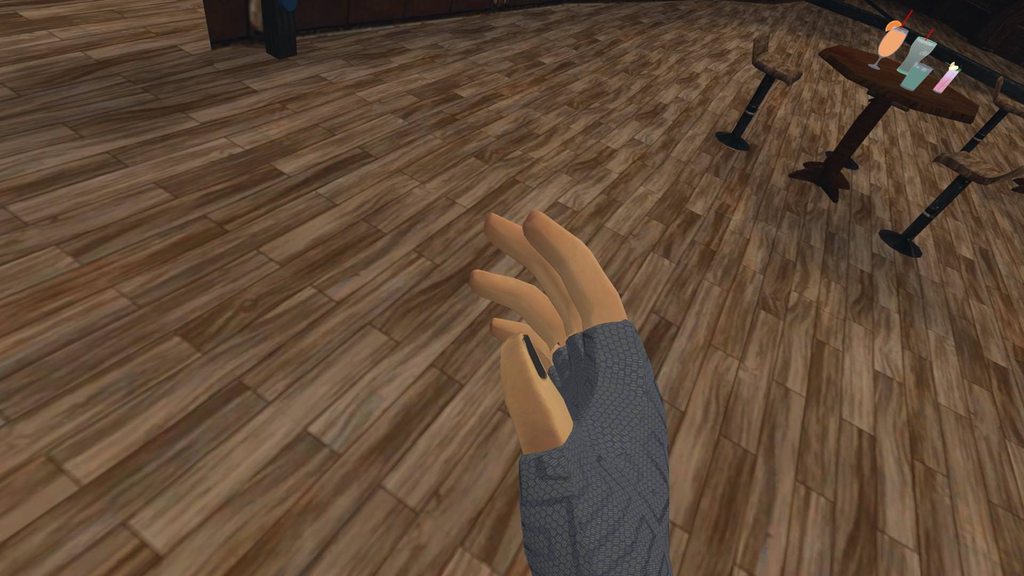
https://imgur.com/a/xb40WEe anyone knows how this animation is called in override?
 clear yew
idle ?
nova ferry
isn't idle one with straight fingers?
clear yew
straight fingers ? you mean handopen ?
nova ferry
probably
clear yew
you use vive or rift ?
nova ferry
rift
clear yew
hand open is when you lift up thumbs, index finger and middle finger
if you just hold the controller without doing anything it's just going into the "idle" pose
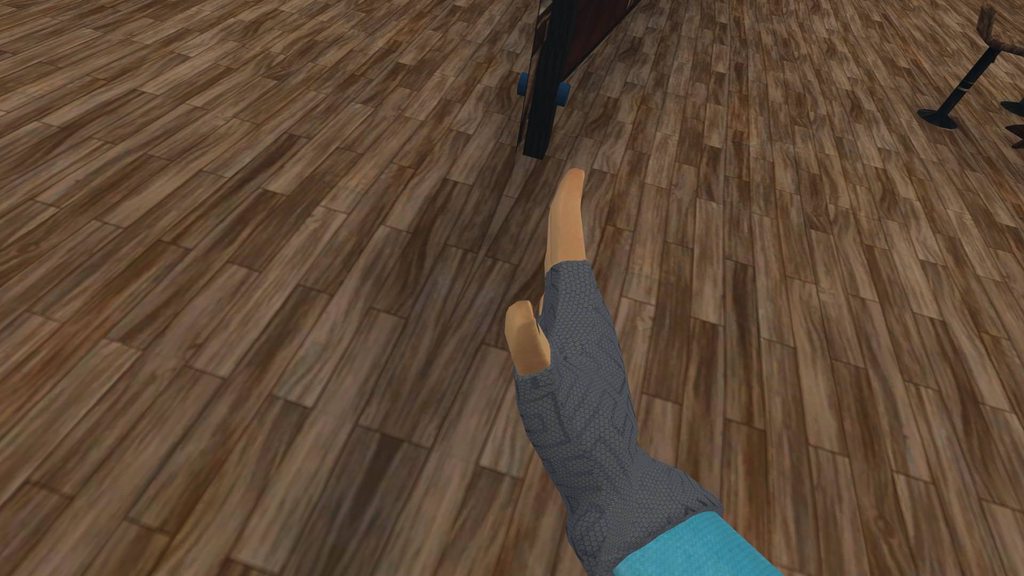 clear yew
yeah that's handsopen
 quasi perch
Believe I may have posted this in the wrong section, so I'm going to post it here since it's animation-related.
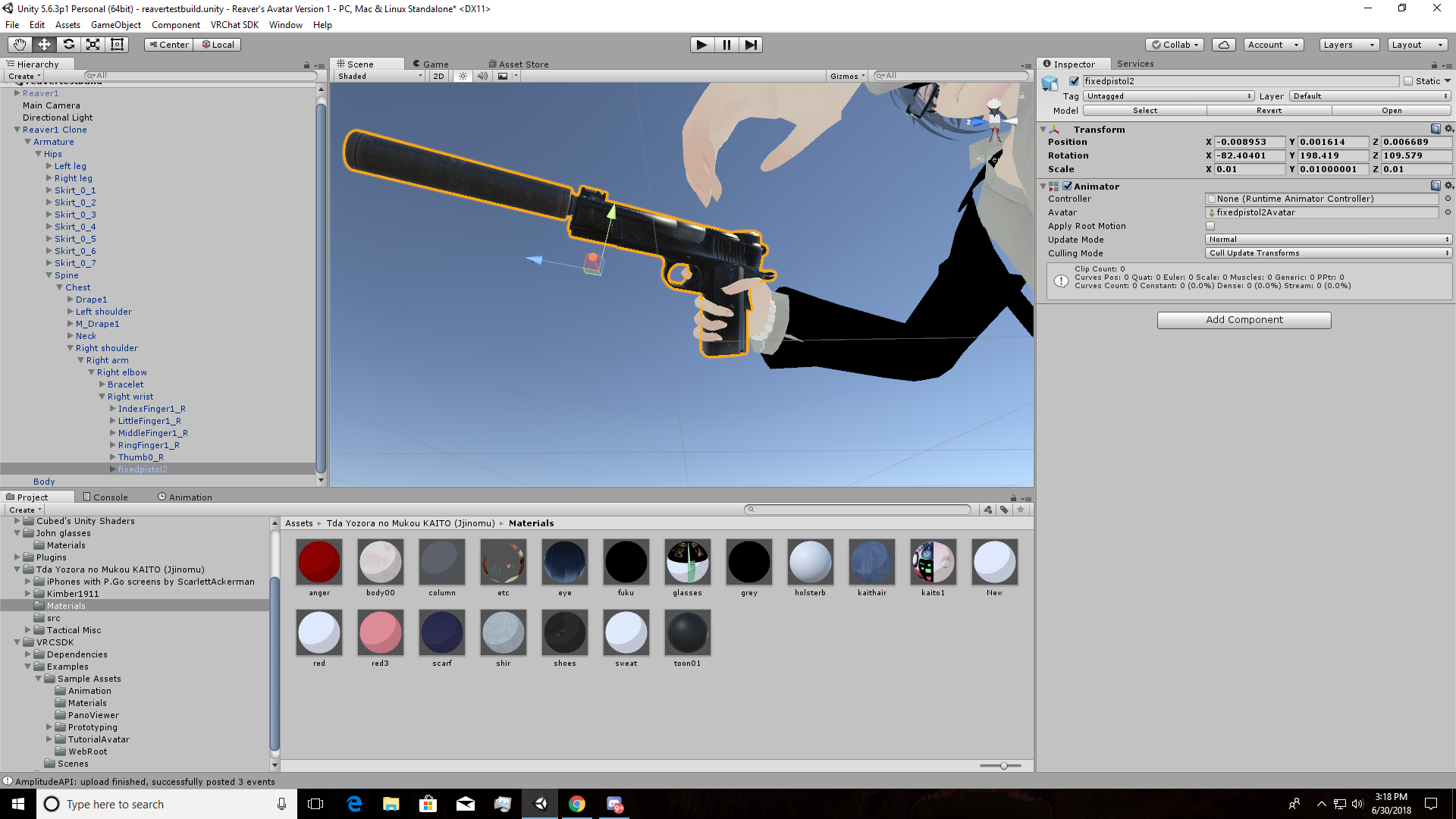
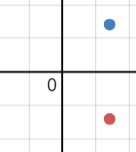
So, I've created an animation with my avatar in Unity where he has a pistol in his right hand. I've positioned it correctly in Unity, and I have a picture presenting that I have it positioned correctly, however, when I pull the pistol out in-game, the pistol is out of his hand, but near it, can I get an explanation for this and a solution on how to fix it? Thanks!
Here's a screenshot showing that I've positioned the pistol and done the animation correctly.
https://i.imgur.com/tL21pPc.png




 blazing bluff
Can anyone help me figure out how to put an offset on a texture through in anim override?
 waxen echo
thx bby
lunar pasture
Hey, can anyone tell me which EMOTE number is Dance?
spice urchin
its in order from left to right
top to bottom
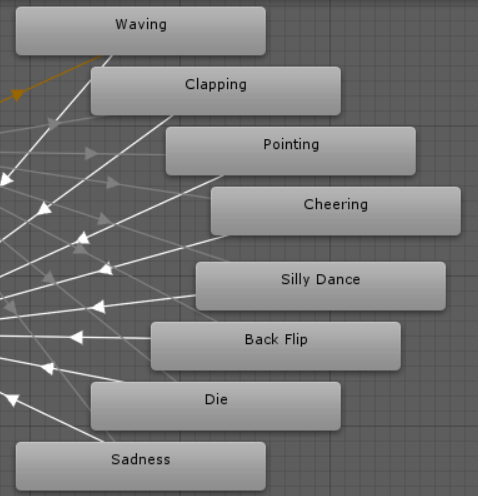

heres in order from top to bottom
lunar pasture
the answer is 5, the number 5 would have been a lot easier to type
icy crow
so would asking Google but hey
spice urchin
^^^^ and this is for future reference; besides, being less ignorant would also make it easier to help
echo wraith
@spring nova Sorry to keep @ing you, but thanks man, attaching my animation to a fixed joint fixed my issue.
spring nova
np, good to hear
real owl
can anyone help me, my avatar just goes flying off the map whenever i open the menu. the camera is left behind but i i find it unsettling to see my avatar fly off when i try to change world or go to a friend
spring nova
I'm not sure why menus would trigger it, but that sounds like colliders that haven't been set to istrigger
real owl
it only triggers when i go to social/avatar/world and i dont think it has to do with colliders since it starts happening when i added custom animations, i dont why its doing that, also im having another problem with some wierd obstruction with my camera
frosty spade
some reason my toggle props isnt working across my avatars when it used to work before with one of them


pretty sure i've done everything right but ingame it doesnt even replace the default emote
instead of saying "megumin toggle staff" it still says wave, dance etc
 cyan chasm
I completely forgot there was an animation channel
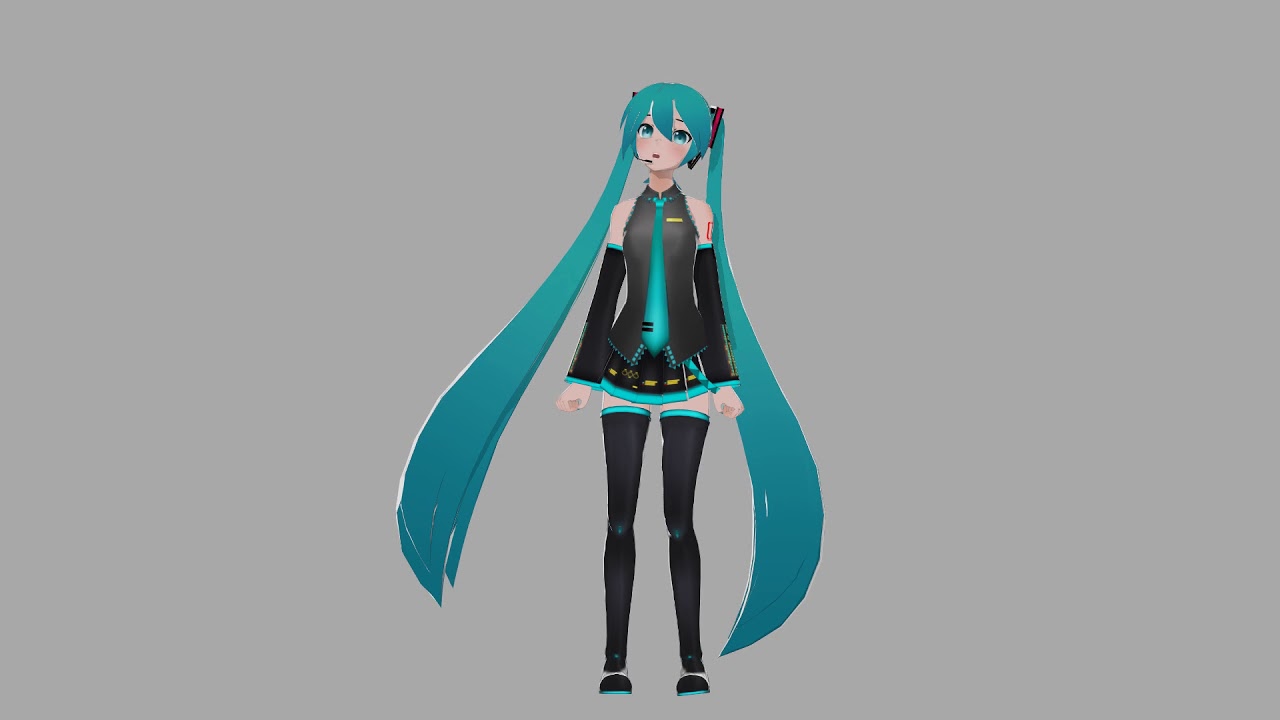
Another test of my in development mocap setup. I was going through songs trying to pick one to dance to when I remembered, I made facials for Love Song Excus...
I've been working on a mocap setup so I can record animation