#animation
1 messages · Page 76 of 1
 lime cove
lime cove
lime cove
I don't like pinging ;d;
 slim sparrow
There's a prop toggle tutorial on Youtube
lime cove
it's more of a yes or no quesition
basically, anything inside the toggle animation will stop after .10, but what about activating a dummy object with it's own sound animation
I mean, dummy object w anim > anim = sound_holder isactive
ok lemme rephrase that junk, is there any way to bypass the .10 limit by activating other objects with their own animations?
slim sparrow
I'm not sure what you mean
The toggled object can contain any number of objects of its own
Including an audio source
lime cove
yeah, but the audio source is longer than the duration of the animation
and I kind of want it to start at the beginning, not at 0.10
slim sparrow
Duration of which animation? You mean the animation that toggles the prop?
Just put the audio on the object you're toggling
 dusty plume
Audio sources aren't reliant on frames. You can trigger a 2 minute sound with a 0.10 second anim if you really wanted.
As long as the sound object is still on, it will play the audio
slim sparrow
Yep
dusty plume
Yo Rokk, talking about sound, that animation in a game object hasnt worked. 😖
dusty plume
When it tries to play, it will glitch out and attempt to finish the not playing animation.
which it does, and then other gestures resume working
slim sparrow
Tbh I have never tried putting audio on them, sorry
You're on your own for that one
dusty plume
I've tried this method with a normal animation too (no sounds), didn't work that time either 😖
Have you tried it with bone animation, or only blendshape or object animations?
 short maple
So I managed to create 2 animations with 2 frames. The first frame being no light and the second having light (and vice versa). If I delete my duplicate model will my light still be part of the animation? That's my main concern of making this light gesture lol
dusty plume
No, but also, you dont need to delete the dup when you upload
And with the guesture
you want both frames to be ON not one off and one on
short maple
so two frames in one animation with the light ON and the other animation the same but off?
short maple
ye
well in my on animation I currently have it where the light is off in the first frame but in the second it's turned on. Would I need to change the first frame and make that on instead of off, too?
lemme grab a screeny to make it easier lol
dusty plume
You will need just one animation where both frames are the light ON
short maple
ah
dusty plume
when you upload, make sure the light is off. So that the animation is actually changing something
short maple
yeah
Would I need to add the light to my main model too or just leave it on the duplicate?
dusty plume
When you stop using the Gesture, IE switch to another gesture on Keyboard n Mouse, the Animation will stop and the values it changed will return to normal
You need the light in the exact same spot on the Avatar you are uploading
dusty plume
the animation will fail to find the Property if the path isn't exactly the same
short maple
yeah
Alrighty it looks to be set up (hopefully) so I'll start uploading it and give it a spin lol. For now I've copied the point light onto the main model but hidden it so that it activates with the gesture. The animation is also linked to Victory in my custom overrides so hopefully it plays when I use the Shift+F5 Gesture key
dusty plume
👍
short maple
Yis it works! 😄 (a few weird shadow issues probably because my light is inside the character but other than that it looks good) https://imgur.com/jih2Vvu
Might need to adjust the brightness too as it could be too bright 🤔
dusty plume
The light will not react to you and will not cast shadows 😃
short maple
ah
what would be the best place to put the light? Over the head or under?
¯_(ツ)_/¯
over might do actually
@dusty plume turning off hard shadows worked
I don't see any more shadow bugs after some confirmation from a guy in a world lol
lime cove
grats ' u '
 sage bane
Hey guys im making an animation where my avatar is in a car, i created a game object and did all the things that were needed but im having problems with the viewposition
Its not appearing
 waxen hound
is it possable to make pose in blender and just import them into unity instead of making them in unity?
or as a shape key?
slim sparrow
CATS has a "pose to shape key" button
But yes, you can make a pose in Blender and save it as animation
It'll get imported along with the model if you do Bake Animation
sage bane
Hey so, i have created 2 other versions of my avatar for an animation. 1. Avatar with a sign above his head 2. My avatar in a car with a particle system. What do I have to animate now and how do I animate it so my first avatar appears for six seconds ( the one with the sign ) and then the car one appears?
I dont know what to do
 mossy pilot
Having a weird bug with some of the custom animations I made for an avatar. When I try to use them in game, the first animation (regardless which one it is) plays perfectly, but when I switch to a different gesture (for example, the default "handopen" animation), it bugs out and locks me into and repeats the previous animation. If anyone has any ideas on a fix, tag me please. Any help is appreciated
slim sparrow
Make sure all of your gestures are exactly two frames long
One at 0:00 and one at 0:01
 clear yew
make sure there is nothing at the 1 minute mark either
slim sparrow
Gestures "bleed" into each other for a split second, this is because the animator controller in this game is dumb
mossy pilot
They can't be longer?
mossy pilot
Okay, I'll trim things up. Thanks for the help!
sage bane
guys can someone help me? posted a question earlier...
 hard eagle
language svelsien.
 trim copper
how do you add music to a dance?
 sleek anvil
Anyone know how to make a permanent effect with a emote? Example. Lets say i have a Item that spawns with the Avatar. After i have run the emote the item is gone and do not reset even if the animation is over.
clear yew
particle or 3d object?
@sleek anvil you mean a prop? Search for "toggle props" in #development-advanced
otherwise look into world particle, you can spawn something that stays put until it's lifetime is over
sleek anvil
I was thinking about a 3d object, i will look into toggle props, thanks for response
clear yew
can somebody tell what shader use on wings and were can i get those wings https://gyazo.com/936384b71e78f03132ff42d56987804e
 orchid trench
I have a long animation on a toggled game object dupe of my mesh. I want to animate the fingers while the model is playing. Since the armature is outside the game object how would i animate them? Would i need to have them under another object and toggle 2 animations at once or is there a better way I'm not thinking of.
I have a feeling I'm overcomplicating things but i can't figure it out
I've tried rigid bodies but they don't work right when toggled on/off
dusty plume
https://gyazo.com/4a218adf657bd9404fc7c9b3e2882f92 So what would cause this issue where the Sub Emitters aren't following the direction? (Sparks) they are set to world, inherit rotation and they are burst emitting Fixed issue by Improvising with the limitations 😃

 upbeat basin
If someone could help answer some questions with animations I will love you long time!
 muted prairie
I have an animation for seating that i'm also using for movement animations, when i move, my character stays in the animation but sinks into the ground. Thoughts ?
 azure prairie
I have been messing with particle systems, and was wondering how you attach it to a hand, I made a small fireball to have in my hand, but when using the hand gesture, it stays in place where the hand would be if i was not moving it (on my side). I also found out that it works perfectly fine in mirrors for whatever reason. thanks
muted prairie
drag the particle system under the hand bone in your armature if you haven't already, also might need to be local
 spring nova
@azure prairie if you want to use world space you have to do a little extra work to make it track your hand position https://youtu.be/VmEED0E_e4w
 azure prairie
ah ok yea world space was the problem, thanks @spring nova and @muted prairie
clear yew
anyone know how to make only 1 object appear and 1 hide? do i need any specific scripts?
 high summit
are there any tutorials on particle colliders/collision in general? I've seen a ton of people shoot a beam or orb, anything of the sort, and then when it touches a wall or something it explodes but I can't find any videos on how to do it
 odd sphinx
is there anyway to add colliders on a particles? for example I want to shoot a particle a VRC_pickup with colliders on it
And I want it to fall down or move
 woeful epoch
how to make animations/dances longer? loop func does not seem to work for me
 icy crow
Only way to make it longer is to edit the animation
if you just want it to repeat, copy the keyframes
clear yew
When starting out with gesture animations, we're always told to keep it at one frame long. If i want to make an animation with like a weapon that has a short effect when you first activate i, say 3 seconds long, Am i safe to lengthen the gesture animation? Also, to make it hold the last frame, would i just need to make the animation long so it doesn't loop too soon?
Thanks
 torn pawn
u can have 1 second animation, but recovery is 5x the length of your gesture
it's best to keep max at 10 frams or so
which is below 1 second to go to default
u can have a decent bone animation for gun with 6-7 frames, which takes 1/2 second to recover, but u can't spam single-shot then
clear yew
Ok, thanks.
If you want to have long animations on gestures then add an animator component to whatever you want animated, create your animation on that, and then with the gesture you just activate that object over the one frame
That way you can have animations of like 10mins long without having recovery timer
You should never really have a gesture that's over 2 keyframes
torn pawn
^ that is not true
going up to 6-7 frames is fine
recovery is 6x5 = 30 frames
whichis 0.5 second you'll be locked out of the same gesture
which is not bad
clear yew
There's no point if you can easily not be locked out
torn pawn
why have 2 guns when u can have 1
and u dont need to spam on some guns
so it's completely fine then
clear yew
You don't need 2 guns just disable the animator component
torn pawn
and not always for guns
clear yew
Re enable with gesture
woeful epoch
hey another question: What are ideal Audio Source Settings? mine always seem very silent meanwhile others are blasting dico like any idea?
torn pawn
remove onsp, amplify in audacity, use 0.9 if u want loud
 celest pewter
is there a way to make a sprite sheet always start from the beginning when activated cause it always plays in the background
torn pawn
use negative
nvm
you need to use either particle or custom spritesheet shader
particle will always start from beginning
orchid trench
I imported a .vmd on my avatar and the animatlooks fine in unity but in VRchat it seems like theres certain parts that are missing frames. My avatar will jsut freeze in position but it will still rotate properly. Is that just a limitation of vrchat?
slim sparrow
@orchid trench tick "Bake Root Transform" on all of the root transform and root rotation options
Based on original
orchid trench
Thanks @slim sparrow I'll give it a try.
 dusky junco
I'm trying to create a custom animation for this model, but for whatever reason Unity seems to want to keep the ears locked in place. I can't figure out what I'm doing wrong here.
https://puu.sh/AFZ6q/f69299fa3f.mp4
Edit: It's a gesture override, basically the easrs go down with the fist gesture. If that helps.
orchid trench
It didn't seem to work. Now he just stays frozen at the first frame that it did it before.
If I cancel and restart the animation the avatar is still in the frozen pose from the beginning now
icy crow
do they have dynamic bones on them? @dusky junco
 frank vigil
Hallo does anyone here know how to get the muslce animation editor
for unity
icy crow
asset store?
dusky junco
I just tried it without the bones, but there's still no movement. Only one works while the other doe snot.
icy crow
I find that having dynamic bones on bones that you're trying to animate sometimes causes them to get stuck like that
only when trying to animate them though
dusky junco
Should I try just dragging the FBX back in and doing the animations on the blank puppet?
Same issue. One works, but the other is completely locked in place.
icy crow
are they exactly the same?
dusky junco
Should be. https://puu.sh/AFZYh/d24246ec5e.mp4
icy crow
hmm, could there be a dynamic bone somewhere else in your armature set up for that ear?
dusky junco
Whole thing is clear. I dragged in the FBX to make another object
icy crow
strange. Have you tried restarting Unity?
dusky junco
Ja. Still nothing.
muted prairie
Does Unity always destroy animations if it we don't agree with it as to what the body in that animation should be ?
muted prairie
Or is there a way to tell Unity to not try retargeting my anims ?
slim sparrow
I think you can lower the max error or fiddle with the compression
muted prairie
which step of the generic -> humanoid does that take place in ?
slim sparrow
The animation import settings I believe
If you can change those before you set the rig to Humanoid, I'd do it then
Otherwise it's no big deal if you do it afterwards since Unity does not destroy the original animation
muted prairie
No clue what that is since i've always imported my anims with my models, switched the model to humanoid and so did the animation
slim sparrow
What is the issue exactly? The muscle settings don't allow your animation to rotate body parts far enough?
muted prairie
I have a quadruped animation with a perfect humanoid armature in the front
REALLY want to use it
muted prairie
@slim sparrow Ok that's almost perfect with a much lower error rate, what do you suggest i do to make it better ? Not sure what compression will do
slim sparrow
I wouldn't know. The retargeting usually works fine for me.
Compression reduces keyframes by allowing the retargeted animation to deviate from the original one a bit
muted prairie
Gotcha, thanks !
muted prairie
Wait, so my anim works in Unity, in humanoid, but doesn'tmove the backlegs in app
 mint prism
hello^^
I try to change the colour of only one material in an animation. Can someone please tell me how i can do it?
When i change the colour the other materials colour changes too
spring nova
You probably have multiple meshes using the same material. Change that material, change everything. So you need to duplicate that material and apply just that duplicate to the one thing you want to change
@mint prism
 spark coral
So with the oculus, when you rest your fingers on the buttons it plays a resting hand animation. What does that correspond to in the standing animation overrides?
My thumb is a little screwy, and I want to make my own pose to fix it, but I don't know which slot that animation is supposed to go.
spring nova
That would be idle
spark coral
Awesome thanks
spring nova
You might run into problems replacing the entire idle animation, as it controls other stuff like the pose of your legs
mint prism
thank you i try
spark coral
Is there a default file I could download so I can just change the hands?
spring nova
You'd probably be better off fixing the thumb itself than the pose controlling it. You can do so in the rigging tab
You can dig into the vrcsdk and find it in there somewhere
spark coral
Oh oki
 meager crescent
does anyone know why my generic avatar's animations aren't working in-game? they are set to loop like they should, and they ARE set in the avatar descriptor. The only possible issue is that's I'm using multiple fbx files with each animation and using the 'from other avatar' rig setting
 charred oar
Can anyone help, is there a way to reset the gif on the flipbook shader when u reset the animation and how do u set it up so when the animation plays, it starts at the first frame? Cheers if anyone can help
torn pawn
@charred oar u edit the shader to do it, or u use particle system (always starts from first frame)
charred oar
what would i edit in the flipbook shader to reset the gif after resetting the animation and do I use a texture sheet animation to use it for a particle system? cheers for the help
 mint haven
my custom emotes are looping when I only want them to play only once. and it's not set to loop.
slim sparrow
Is your rig generic? @mint haven
mint haven
@slim sparrow yes
slim sparrow
Then that's the issue
You can't have emotes on generic rigs
Try making a fake humanoid rig and attach the generic rig under it instead
clear yew
when i activate the avatars they just stand there
but if i press play in the animation window they move
slim sparrow
You need to give them an animator controller of some kind
clear yew
but there is no play animation button ingame
i did
they play when i press play inthe animator
slim sparrow
So if you press play in Unity and manually enable the extra objects, they play their animations?
clear yew
but if i just toggle them they just stand there
they stand there if i activate them
instead of playing
but if i press play in the animator window
they dance
where is the module that has a play button
slim sparrow
???
clear yew
how do i add that
slim sparrow
You can't trigger animator states yourself ingame
clear yew
omfg
slim sparrow
I don't get what you mean
clear yew
where you disable your mesh render
and have avatar spawns
and they dance
they just stand there
instead of doing their dance animation
they just stand there
even tho
they have the cdontroller
everything is perfectly set up
i just need
the activate on wake
slim sparrow
You're ignoring my questions
slim sparrow
Well
Then your animator controller isn't set up correctly.
You need to have a transition from Entry straight into the dance animation
With no exit times and no other transitions
So no transition to "exit" either
clear yew
 slim sparrow
Hmm, try unticking write defaults
Do you have a screenshot of the whole animator window?
The state machine
clear yew
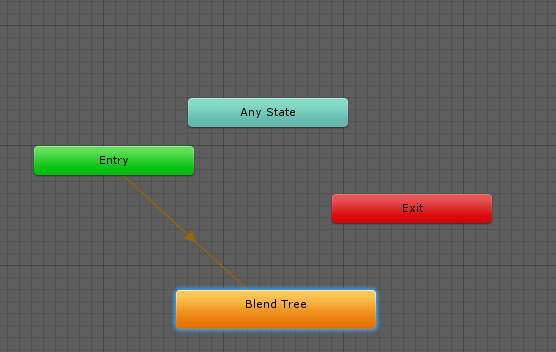 slim sparrow
Well
I don't know why it's called Blend Tree but that should not matter
The animator is enabled, yes?
On the object
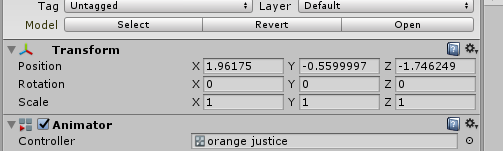 slim sparrow
That all looks good
And when you open the Animation window and hit play, the animations play correctly?
clear yew
yeah
clear yew
when i open the window
slim sparrow
Alright
Go back into your animator, and delete the "Blend tree" state
Right-click and create a new empty state
Assign the Orange Justice animation into this new state
Then make a transition from entry into this state
And try again
clear yew
doesnt work
slim sparrow
Then I'm stumped.
It's weird, it looks like everything is set up fine
Unless you're looking in the wrong animator controller but I doubt it
slim sparrow
When you click on the controller property in the scene, it highlights the one you need
Yeah
slim sparrow
It should be default
That's the issue
Play on awake is governed entirely by whether or not the Animator component is active
dusty plume
https://gyazo.com/a8d73f8648d88a5231045d6fbad1813b Is there a way to toggle an animation like this with just one gesture? (specifically let go anim)
 clear yew
the extension ?
dusty plume
Yep
clear yew
do the same thing you are doing in the gif but in animation mode
dusty plume
?
clear yew
?
dusty plume
What do you mean by animation mode?
clear yew
you never animated before ?
dusty plume
I have, I don't know what you mean by animation mode? How will that make the guesture toggle states in app?
 clear yew
you want it to be toggle? so no need to hold the gesture anymore ?
dusty plume
Yep
dusty plume
I have it, tried using that onoff state thing, but it didnt exactly work
I dont really know how to use it though 😖
The main thing with it is the fact that theres a sound with it
clear yew
you can create an empty game object and parent the staff and sound to it and animate that game object instead.
At the last frame you can have the staff fully extended and the sound stopped.
Set the animation file to clamped forever so it freeze at that last frame
then you just put it on the toggle prop objects prefabs*
dusty plume
Wait.... I have an idea that might do better in general. How would I play an animation for blinking without it being in the idle animation slot 😄
dusty plume
I have bones that control the eyelids but the animation in app isn't playing
 keen gazelle
The eyelid bones aren't controlled by the humanoid rig so you can animate them normally I think.
dusty plume
Is it done by making an animation component on the avatars prefab?
keen gazelle
Yes
But with one extra thing in that you need to set whatever animation you create for the component to point to has to be set to legacy
keen gazelle
That's on my wrapper prefab
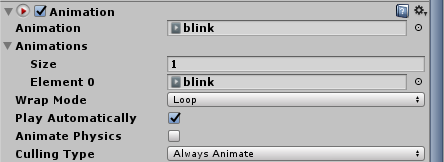
The legacy flag for your actual .anim file is only accessible if you switch the inspector to debug mode
Which you can turn on by right clicking the inspector tab and switching from normal to debug

You want that Legacy box ticked
dusty plume
I got it 😉
 steady reef
@dusty plume I love you avatar, it looks like the Police from Mirror's Edge^^
dusty plume
Thats exactly it 😄
@keen gazelle Sooo uuuhhhh, making that a legacy animation actually broke everything to do with animations on my avatar
keen gazelle
define "broke everything"
dusty plume
The animation like walking n such stopped
Even though there are only keyframes for the bones
dusty plume
This has happened to another model of mine, but it was a robot so I thought the animations were just corrupted
The EYE, yes, but the face bones are parentted to the Face bone, which is a child of the Head
keen gazelle
I wonder if having a legacy animation on a child bone is jacking the whole armature
I mean on the plus side removing the animator component should unbreak the model at least
dusty plume
Yeah. Im doing that now, I'm trying an Idle animation approach, but that wont work in every situation
keen gazelle
How comfortale are you with Blender?
dusty plume
Ye
keen gazelle
The easiest way to do a blink is to have it not interact with the armature at all. Keep it simple
Make your own blink Blendshapes and use them in an animation component.
slim sparrow
You sure you didn't accidentally set the rig type back to generic if it's T-posing?
dusty plume
Blend shapes huh
Yeah that may not entirely work, but I'll try it out atleast
Just not now
Its not T-posing
Just the animations are being overruled
keen gazelle
Making eyes close shouldn't take more than 10 minutes with some quick mesh jiggery
 keen gazelle
A good rule of thumb I've learned @dusty plume If you can do it without touching the main armature, don't touch the main armature.
dusty plume
turns out that wasnt the case Maybe it was because the weapon was still a prefab? Or there was an animator on the armature bone that I forgot about 🤔
 languid gull
So if I want a gun that appears and then fires, I just make two animations of the gun's idle and firing states and override two gestures?
slim sparrow
Yeah
I mean, that depends on two things
If you want the gun to animate itself while firing, you need two gestures
One for the gun, and one for the firing gun
If you just want to add particles and sounds when you want to fire, you only need one gun but you still need two gestures, one other gesture to activate the gun
For the first approach, you essentially duplicate the gun and give it an animator
languid gull
I seen a tutorial that puts the flash and sound in a empty game object
But that was for a gun that's always on
slim sparrow
You can still do that
You put that object as child of the gun
You just need to use both hands to fire the gun then
One hand to spawn the gun and the other to fire it
I always put my firing gestures on Fist
languid gull
I was thinking rock'n'roll for idle and phone for firing, since it's just pulling the trigger
 wide heron
theres a phone gesture?
languid gull
Actually been trying to do a flag for this Nia avatar and have the anthem play https://media.discordapp.net/attachments/427507649135771670/456853385384034321/unknown.png?width=665&height=683
 slim sparrow
Ah, that's cool
languid gull
I think? maybe it's obsolete with current controllers
slim sparrow
I don't think there's a "phone" gesture
Maybe you mean fingergun/handgun
I usually spawn my gun(s) with rock 'n roll, and fire with fist
Maybe a little gun twirl on fingerpoint because it looks cool
wide heron
ah lol k
languid gull
Knuckle controllers need to get here sooner
Shame there's no way to cancel emotes, else I'd put the anthem on there
I was going to attempt lipsync and other welsh things popping up
(Nia's dub voice has an proud accent, so riding that meme)
mint prism
Heyo,
I try to change the colour of an material in a animation but for some reason it changes the colour of the whole mesh.
How can I change only one materials colour?
What i have in mind is that the colour changes over time in the animation
mint prism
or is there a shader that can fade from one texture to another over time?
 torpid light
You can make one yourself pretty easily. It's called a lerp
Shader forge is free now so you could give it a try
mint prism
sounds nice but i heard if you dont do the shader right it could cause issues
 frosty mesa
anybody know how to make player's camera shake or some other effects
 regal hollow
It's usually a sphere with a distortion shader
 covert hawk
why my tail animation works in unity but not in vrchat?
icy crow
where have you put the animation?
icy crow
do you want the animation to be playing all the time?
covert hawk
is a tail animation it just wobbles from left to right
icy crow
put an animation component in and include your animation in there
you'll have to change the animation to legacy though
covert hawk
and how do i change it to legacy ? also i made the animation in unity by doing some bone manipulation
icy crow
https://i.imgur.com/QgpJjN8.png click those 3 lines in the top right

then click debug and check the legacy box
covert hawk
k il see
covert hawk
yep that did the trick,it works now,ty
icy crow
np
 lucid heart
I noticed that you can put regular colliders on your avatar. If two players have colliders on their avatars, maybe in the hands and dynamic bones, could they interact with eachother or wouldn't that work?
icy crow
doesn't work at the moment, you can only collide with yourself
 valid estuary
collissions should realy be fixed even particle systems dont collide correctly
icy crow
what do you mean?
icy crow
well they do but locally
icy crow
thats why particle crashers don't crash themselves
valid estuary
they dont even localy they only collide with your own avatar
 pure summit
is there some way to either:
- enable movement during emote
or 2. increase the time of a gesture bigger than .1 (any longer causes bugs for my other gestures)
icy crow
enable a game object that plays the anim
clear yew
@pure summit for the 2nd, you can animate an empty game object and enable it instead iwth a hand gesture
pure summit
well i added a game object to the game and tied the existing animation to it, but it could not detect the parent objects or the objects beside it. the animation I have affects the Body mesh.
icy crow
does it have an animator on it?
pure summit
indeed.

it declares the objects as missing because it is unable to find any objects beside it in the hierarchy
 icy crow
its not attached to your avatar is it?
pure summit
if it isnt attached to the avatar, will it even export?
pure summit
GameObject?
it is attached
ah wait
my bad
im so dumb
ahh well it's attached now, same error though.
 icy crow
did you create the animation on that object?
pure summit
no, just copied it over to it. but the problem is the "Body" "Sphere" or "PlasmaExplosionEffect" isnt even under the "Add Property" dropdown.
icy crow
because you are animating the object, so you'll only be able to animate it's own or it's children objects
I've not tried this before so I don't know how you would do it
pure summit
ah..
i may have figured something out. hold on.
is there some sort of guide that tells me which part of my vive controller is which emote
a image would be nice LOL
clear yew
 pure summit
you're beautiful
clear yew
I know i am cutie 😉
slim sparrow
IMO a tail wag animation is better done with an Animator on the tail bone
Although you can't disable it that way
Easier to make, edit, and get working
And allows custom blink
Speaking of custom blink, can't you just put a legacy anim on the Body mesh?
Would save yet another slot that could be used for anything else
 obsidian vigil
im just trying to make the knob turn but it weirdly spins, why does that happen / how could i attempt to fix it? https://gyazo.com/e55ce8c58904530d79bb37aad6751925
 clear yew
probably some bone placement problem ?
obsidian vigil
there are no bones
its just the mesh
i cut it out and separated it from the main part
clear yew
probably need a bone then
 opal lodge
i have a simple animation for a tail wiggle, it shows playing in unity & in my avatar selection ingame but once i have my avatar equipped it doesn't play the animation
Does anyone know what i'm doing wrong
lucid heart
@icy crow that's not true. you can collide with other things than yourself. I could bump around the snacks in the bowling alley
icy crow
yeah I meant with other players
spring nova
@opal lodge are you checking in a mirror? Because it probably wouldn't work. But if you can find a way to look at it directly or ask someone else, it should show up
opal lodge
I tried mirror, cameras that can show animations like weapons and also a friend looking at my butt
spring nova
are you activating with a gesture or is it always active?
spring nova
try a non-legacy animation controller
opal lodge
That one didn't even play in unity
spring nova
and put it on the tail itself, not the main model
opal lodge
Like the tail bone you mean?
spring nova
yeah
opal lodge
I was just about to go to sleep. I'll try it tomorrow after work. Thanks for the tip!
 sick spindle
Anyone know of any VRChat animation override videos? I uploaded my avatar to Mixamo, downloaded some animations of it, and have them all in a folder, but idk where to go from there
Nvm, found one!
 floral lion
Im having an issue where after I activate an animation via gesture, after playing it doing any other gesture (Mainly Open hand) causes it to play as well
anyone else have this issue?
its like it gets perminately bound to every gesture
clear yew
are you using more than frame 0.00 and 0.01 ?
 slim steeple
Is it possible to use an animator to play a run forward animation along with your main avatar run forward rather than directly animating the parts in the main armature when it's two different armatures on a main armature?
slim sparrow
@slim steeple heh, I tried doing something like that
Unfortunately it can't be done
You need to merge your walking animations with the child model's
Unfortunately
It's partially because we don't have our own animator controllers
Otherwise you could add a new layer for the child model, read out your movement speed, and apply some animations to the child model
Worst comes to worst, you would have to use a retargeting tool in order to retarget a walking animation to the child model. Not the end of the world.
 runic sorrel
I have a little problem. Hoping someone could help me. I have modeled a custom component for my avatar along with an animation and gave it the fingure point gesture. How ever it seems when you cancel that gesture but play it again the animation continues from where it was first stopped. Is it possible to completetly reset the animation everytime you do that gesture?
slim sparrow
@runic sorrel nope. You need to switch to another gesture before activating it again
Actually
What slot is the gesture on? Is it Fist?
runic sorrel
Point
slim sparrow
Then you'll have to get into the habit of pressing fist before going back to neutral
runic sorrel
hmm ok. Also does the animation need to be looped if it is a gesture?
torn pawn
@obsidian vigil u need origin point to be int he middle of it, or maybe global axis might do the trick when recording
 split vine
So, when making the animation for VR Avatars when it is holding an item, how do I make the holstered item on their body dissapear when it is picked up? I have only gotten it to work once.
 brittle shoal
@split vine It's just hiding the holstered object, and unhiding the object in your hand in the animation.
split vine
okay, thanks. I thought that that was what I was doing, but maybe not. So in my animated avatar, the holstered object is hidden (Unchecked) and the held object is no hidden (checked)
brittle shoal
Yes. Then you have to attach the animation to a gesture in the AnimationOverride (It's called something like that), then the Override to the VRC Avatar Descriptor.
 fierce sail
hello i need some help with some animations. when i try to use it ingame it starts twitching out. can someone help me?
fierce sail
ok thx
clear yew
When making a long animation activated by a hand gesture, is it better to make the animation on its own file, then just have the hand gestures activate that animation file rather than trying to do the long animation in the hand gesture override file? So the hand gesture is still only one frame?
icy crow
yeah
clear yew
Ok, cool. I was trying to do it all in the gesture file and it wasn't working well
 west panther
https://gyazo.com/6c7d149eb1ffaa3ebe9fc0e70210ecec if I'm trying to get an object to stay still, is this the right settings so it doesn't end up jittery when I move? because its not working
 dusty plume
Is there a way to reset an animator when you turn it off, rather than suspend it? (Or should I just use an animation component?)
@west panther Make sure there isn't gravity on both rigid bodies. Aswell as you can make Drag and Angular drag 0 😃
Unless you would like drag to be an effect of course
west panther
Yeah, I want the stuff to stay while I move freely, but even with those settings it wont listen
dusty plume
What do you mean stay?
west panther
like for example I make a wooden log appear where I was so i can run away
dusty plume
Easiest way I've seen is people having world space particles that render a mesh
It will only be able to have one Shader on it. But you want to have a particle which practically lasts forever, and doesnt move
west panther
The thing is I've managed to get this working for the most part and people have apparently managed to get it to remain stationary without jittering so i wanna figure it out not give up and learn to make a particle version
dusty plume
I wouldnt know how to make it without a particle, if thats what you are wanting, But I'd say you want to rigidbody and fixed joint it to your armature or the like
 thick olive
okay i have a question lol ive been struggling with this for a while with no answers and it seems so simple, so i have a particle effect that i want to trigger with a hand gesture, i already made the animation to trigger it but i want it to be attached to something that wont move like my hips because when its attached to my hand it moves all over the place? how do i attach something so it wont move but will still be triggered with a hand gesture?
dusty plume
So the thing with gestures is that they only discern left from right by what ever is defined in the Humanoid Rig as the fingers/hands. Anything else will animate no mater what hand it is, no matter where it is.
So if you want to trigger a particle to your hips, its the exact same way as you linked it to your hand
thick olive
i see so i just want to animate my hips but set it to trigger with a gesture
dusty plume
Yep
thick olive
is hips a good soild base or where is the best place so it doesnt move?
dusty plume
Make sure to make an empty object that is a child of the hips
Well if you want it to be world space, you'll need a different approach
thick olive
so i have particles that will come up through the floor and then drop back down
dusty plume
Sounds like it would be best to be set as world space, but not parented to anything on the armature
thick olive
and how would one go about that lol
dusty plume
Just make an empty game object on the avatars prefab. Inside the first dropdown where you see Armature and your Mesh (if you use cats, it'll be called Body)
thick olive
ahhh ill give that a try thanks for the help! and ill still be able to trigger it by the gesture!
thick olive
well thank you very much!
thick olive
i cant seem to add a game object directly into the prefab
icy crow
@west panther try setting drag to Infinity
clear yew
that's pretty sad :(
torn pawn
nobody can read minds
icy crow
probably
slim sparrow
Well, the animator clearly appears to be disabled
Have you tried...enabling it?
You have the animator component ticked off on your main avatar object
Emotes don't work on generic rigs very well
 ashen sedge
https://i.imgur.com/73DNABG.png
"...and will not play VRchat's animation set" includes emotes.
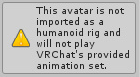 slim sparrow
Yeah, the provided set
But that would imply it still plays your own
And it usually does, but it loops infinitely
Not sure if generic rigs get passed the same parameters as humanoid ones, otherwise you can probably make your own animator
ashen sedge
You are overriding animation sets that are stated will not play
slim sparrow
Oh, right
 fallow spire
how can i combine different parts in a animation? i try to make a gun with fire, sound and that the weapon self will be animated, but everytime when i click the part of the gun it shows me a new animation window so i cannot combine my activated stuff with the gun animation
slim sparrow
I need an object to appear when I sit down, and go away when I stand up. What would be the easiest way to do that?
I tried enabling it in my sitting idle and disabling it in my standing idle
But for some reason, that makes the object re-appear every time I start or stop walking???
Only happens if I have already sat down at least once
It might be that one bug where animations get stuck if you stand up or sit down, but I have no idea how I would go about preventing it from happening
spring nova
Is it on by default?
 hexed copper
Has anyone experienced trouble with sound sources playing over eachother when switching custom animation overrides?
I have 5 animations with 5 different sound sources, each animation only having one sound source active, but when I switch from one to the next, it will play the last animation's sound source over the current animation's


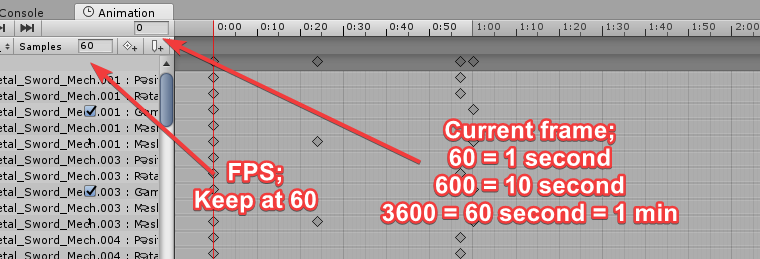
 hexed copper
frame 0.01 doesn't exist, do you mean just the time slot or the amount of frames?
ive moved the frames to 0,01, testing now
hexed copper
I moved my 1.0 frames to 0,01 and it works great
 steep hornet
Do I have to rig a new bone for my garfield if I want his tail to wag
hexed copper
is there a tail bone already?
hexed copper
i just figured out how yesterday
steep hornet
oh
hexed copper
move your blender cursor to where you want the bone to be
then press shift+a
then press e to add another bone to that chain
when a bone is selected, press s to resize
fallow spire
does 2d sound on avatar animation dont work? everytime when i upload my avatar with 2d it changes back to 3d
 rocky copper
hi guys, i have a problem with animations im trying to put onto a gun
specifically the tribarrel chaingun from doom 2016
So it comes in the unfolded state, and i want to be able to 1. do the unfold animation. 2. have the firing animation
unfortunately when i try to put the animation onto the chaingun
it just goes "oh this transform thingy doesnt exist"
do i have to just put an animation controller on it or what?
icy crow
does it have an animator?
rocky copper
;/
hexed copper
So i tried to delete some extra bones that came with the model, and I think I broke it


how would I go about fixing it?
 tulip fossil
Hey guys, how do I get animations to properly loop for walking/running/etc?
I just look at the settings for the default walking animations (Which dont even have loop time enabled) and use that as a reference but it doesn't work.
Also I would just redownload the model and use CATS to adjust the bones, since deleting bones messes with how the mesh is applied.
hexed copper
can I not easily configure a bone to a specific vertex group?
tulip fossil
Not easily.
hexed copper
I'm seeing vertex groups that are named the same as the bones, that should make it some what easy right?
I don't think I need to re-select any geometry manually
I should be asking this in rigging
 keen hornet
I've got a pretty dumb question (sorry!): what do each of the animations in the custom animation override controller do? Man of them are vague, like emote 1-8 where you can't tell what they do just by the animation name. I can't find any documentation on it and I couldn't find anything on google.
 copper quest
the emotes u use in game
keen hornet
Yep, I just don't know how to preview them or tell what is what. Fortunately I stumbled across the info that Emote 5 is dance, so I can use that to decipher the other eight. But I'm still not sure what some of the strafe ones do. I guess I shouldn't be overriding the strafe ones anyway...
copper quest
i myself never really got into it but when u override say emote 5 with an animation and that name is like hatoff for animation it might just say hatoff in game
 lofty iron
hello, im having some issues with animations, are avatars supposed to do the animations while standing still in game?
tulip fossil
I'm still lost after talking with somebody for a bit in DMs about replacing walking animations.
He told me to duplicate the model and apply a new animation controller to the duplicate model that contained the new animation
He then told me to apply transitions to the "Entry" box in the animator tab although idk what to transition to.
I can't find a tutorial for this online so.
spring nova
The reason you duplicate it is to use that as a dummy that you can mess with without breaking anything. The reason you have it as entry (which is the default anyway) is so you can preview it. But once you use that duplicate to create the animation, then you drop it into the main model in the right place
tulip fossil
The problem I've found is that
I can't upload it.
Like when I put the duplicate into the main model
It exceeds the poly limit
spring nova
You don't upload the duplicate, don't put it in the main model
tulip fossil
Oh.
spring nova
Just the animation files
tulip fossil
..
I'm not sure where to put this new controller.
The one I used on the duplicate.
spring nova
You don't use that controller, it's just like a mindless container for your animation files
The controller you use you can find in the SDK, under examples and animations
tulip fossil
Well here's the problem.
When I put the animation into the custom override controller as a new running animation for example.
It doesn't play an animation. It just plays like, the beginning keyframe.
The entire time I'm running.
It looks like I'm levitating, kinda good tbh.
But yeah I can only assume it's because the animation isn't looping properly?
Like idk.
The animation functions on the dummy's controller.
Like, the dummy does the animation in game mode.
But ingame, when I try running after replacing the running animation in the override controller,
I just get like the beginning frame of the animation.
And it doesn't play.
spring nova
Yeah idk about that part, I haven't done running animations just gestures
Buy if you can find the default animations, just copy all their settingd
tulip fossil
I did.
rocky copper
aghhhhh
i still cant get the damn chaingun to work,
dont know how to get the animations to work on it while it's parented to the avatar
Can anyone explain to me why animations work PERFECTLY fine when an object isnt parented to something else
but the moment it IS parented it just goes 'what the fuck is this you're trying to do'
and refuses to work
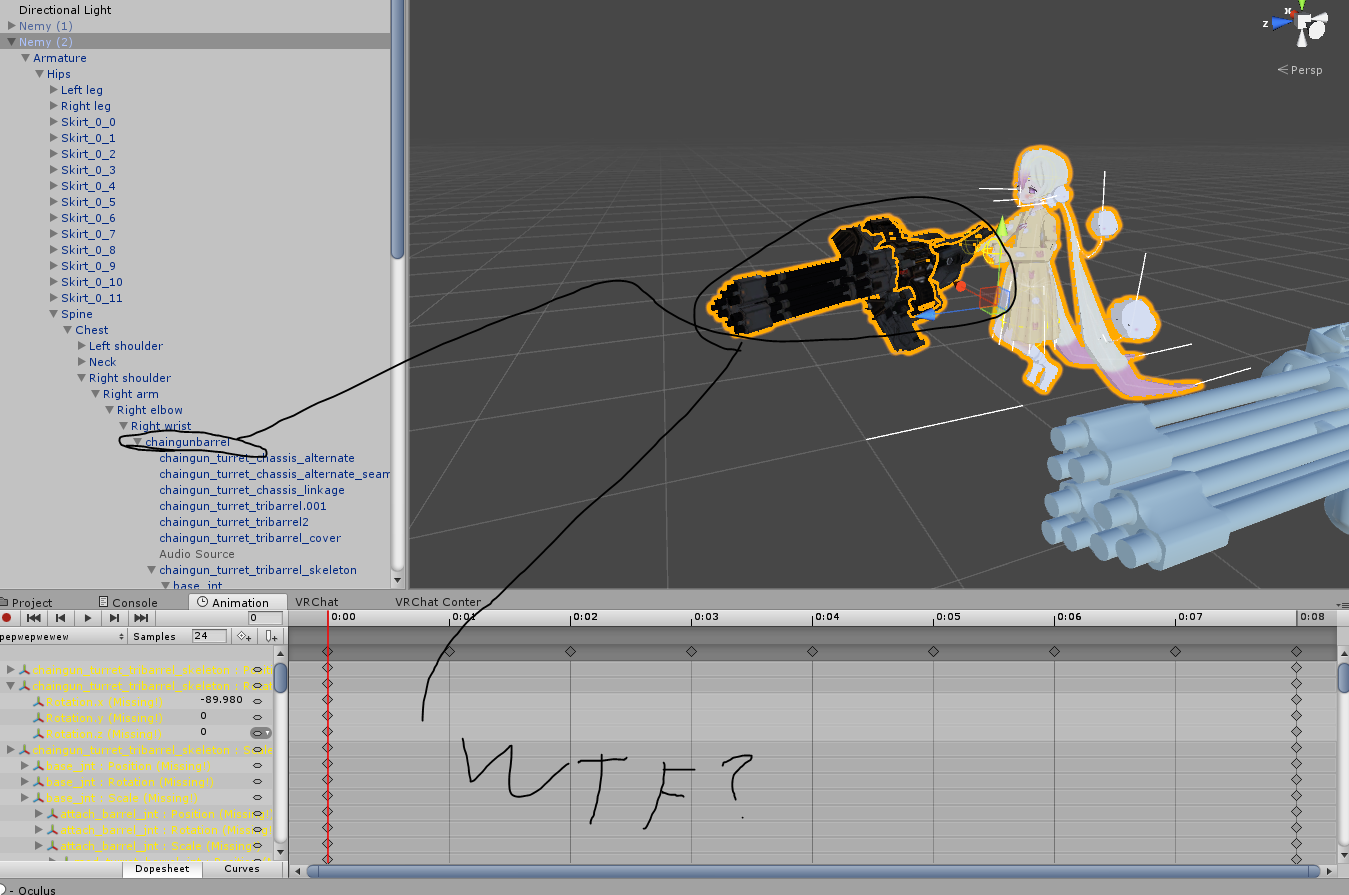
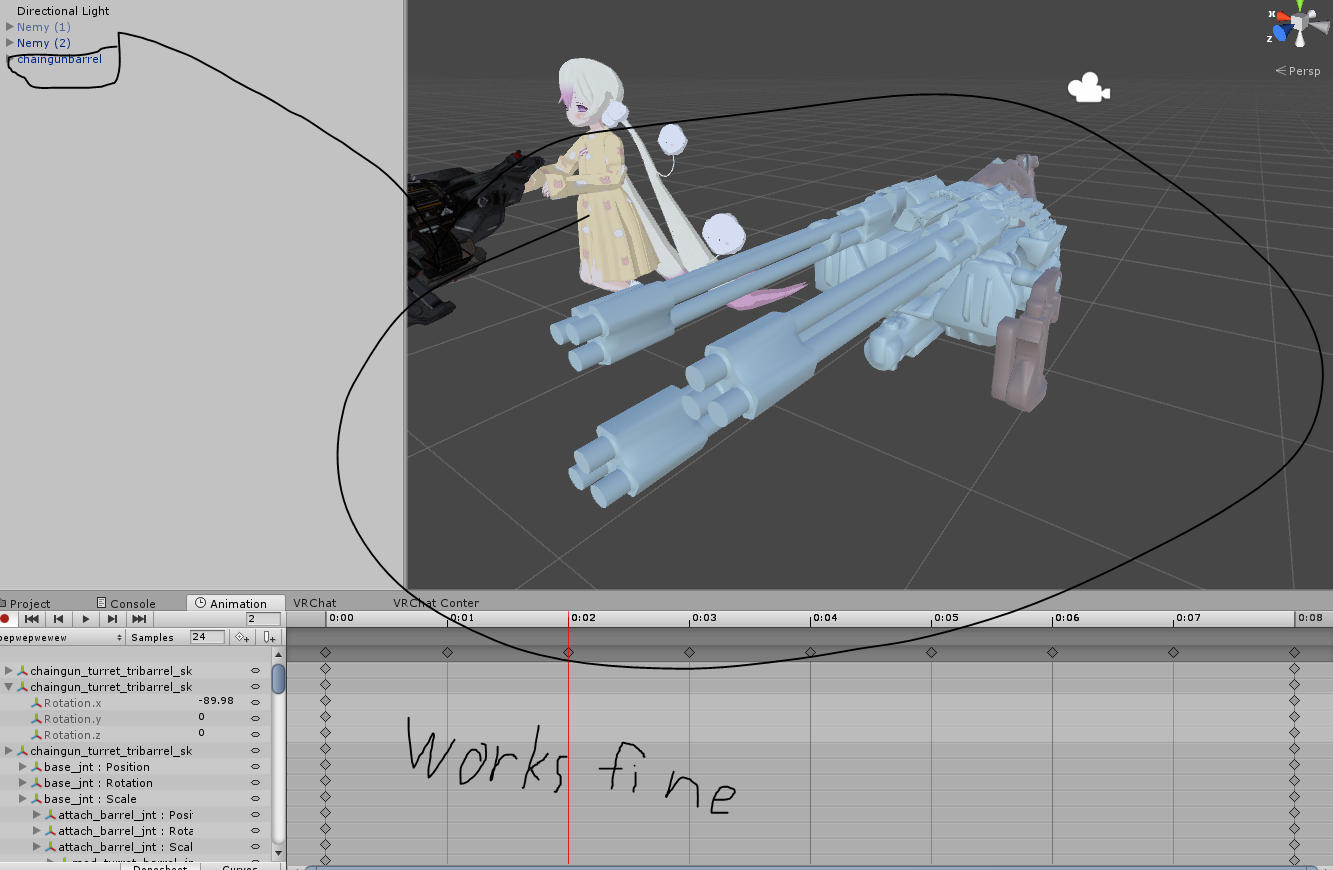
???!?!?!
mind that im dragging the chaingun animation onto the character instead of the gun, but why would that NOT work?? I mean the transform names aren't changing are they?
okay im just actually stupid
never mind.
 neat gate
How would you make players screen shake? some guy with a custom avatar made all the players screen shake and i would like to know how to do that
 royal summit
Most likely using a shader
torn pawn
"how to make cancer?" yeah no thank you
torn pawn
any1 with an idea why particles appear only in mirror?
 wary parcel
You dont have it correctly attached as world object
This only shows up in mirrors, but not in 3d world
torn pawn
fuck im an idiot, forgot the joint
eventho im not sure if it's needed
cuz im using a trigger to spawn them
but ill check it later
 molten elm
How do I uhh.. Get a simple 1 second sound to play for my gesture? I have it set up like it wants me to in the tutorials, am I missing something?
Ahh, nevermind it was too quiet
torn pawn
@wary parcel could you by any chance give any hints what could have I done wrong?currently the setup is 1 "is trigger" collider in hand, then particle in other hand, when particle is inside it dies and subemits world particles, which show up in mirror, but nowhere else
works in unity and in mirrors
tried fixed joint on subemitter
wary parcel
Did you assign the trigger collider with a layer?
Also you need a joint for the world particle system to work correct
Rigid bodies and so on
 pastel ravine
need some help here
for some reason blender is not exporting my model with all its animations
do you guys know to fix this issue?
molten elm
Is it only possible to use one sound for a gesture per an avatar?
hexed copper
have you tried applying more than one sound source in your animation?
If the mesh isn't hiding when I deactivate a bone (via Inspector) in the armature of my character in Unity, what is it that I'm doing wrong?
Same goes for my animation
pastel ravine
my models root wont move when using custom animations
is there a way to fix that?
hexed copper
Do I need animator components for both the main avatar and the poser/puppet avatar?
spring nova
@hexed copper the bones are the bones, the mesh is the mesh. Hiding one doesn't affect the other. If you want to hide only one part of a mesh you'll have to separate it first
hexed copper
say I have a prop, and its attached to the hand, disabling it in the hierarchy should make the object hidden in the scene view right?
spring nova
depends, are you disabling the mesh or the bone
hexed copper
I believe its the bone
spring nova
you want to disable the mesh, not the bone
hexed copper
Not entirely sure how I can do that
spring nova
It would probably be easier to add the prop in unity
hexed copper
I was following this dude's tutorial, and you can see him toggle the parts of the armature on/off

Creating custom animations for hand gestures and emotes in VRChat
When I had the prop as a seperate .obj object, it worked the way I am trying now
but I've since recreated the project with the prop in the character model
spring nova
yeah they should be separate files
hexed copper
Thanks, I'll see if I can fix it without redoing the project again haha
hexed copper
I probably shouldnt have assumed that the guy had his prop setup the way I thought
or that everything seen under the Armature in the hierarchy was a bone
 dusky spire
Just a quick question for anybody that might know. Is there a way I can force a blend key to stay active?
slim sparrow
Yes, just set it to 100 in the mesh Blend shapes
dusky spire
Thank you, I don't think I have touched the mesh in unity so I didn't know that an option existed there.
Yep I see it, thanks for the help.
 terse forum
I am trying to get my character to move his arm around but when I do a piece of his pinky does not keep up with the animation resulting in a over stretched animation anyone know how to fix this issue?
spring nova
Gotta be weight painting https://www.youtube.com/watch?v=lWKw0v25KUY

Tutorial on weight painting and how to fix weight painting issues. Usually when a material moves with the wrong bone. Links: Model: https://mooniiiiichan-lov...
 hexed current
Ive got a quick dumb question.
I know how to have an emote with music
but how do I go about having a second emote as well?
Do I need 2 animation duplicates
 rocky crater
so combining emotes?
rocky crater
can't you just put one animation with emote 1 and another animation in emote 2?
 south mango
Does anyone know any tutorials that show how to use Fixed Join for placeable objects?
icy crow
You can't
 winter sundial
Maybe by modding the SDK, which they don't want. Log falloff is annoying to work with though, they should allow linear at least
 clear yew
Hm
To make swords and guns materialize do i have to turn them into mesh particles, use an animation controller and just use opacity over time? Or a proper shader
@clear yew change to linear and use 29 min 30 max
And adjust reverb
I think i use .1 or something
winter sundial
Sounds like some 3D effect is messing with it. I'm not sure if it's the doppler effect or something else
 rapid cypress
 steel perch
I want to override the sitting animation but I don't know what one it is?
ashen sedge
Idle, though you need to put the controller in the sitting slot.
steel perch
I only have Idle, but I have an custom animation stand I made for her
I see nothing named sit
or sitting
I see crouchidle and proneidle.
i'm
so freaking dumb
When you've worked on making crap for months and you still come out dumb as hell. (me)
ashen sedge
In your avatar descriptor, there are two slots. Standing and sitting.
If you've already got a controller in standing, make a copy and use that for sitting.
rapid cypress
 midnight garden
do any one know if i have to have 3 different ocarinas with the different audio or can i have 1 ocarina and just change the audio
clear yew
you can put 3 song under the ocarina and make them play only when the ocarina is out
you can put like the song 1 to "fingergun", song 2 to "thumbsup"
midnight garden
oh ok thank you
hexed current
I'm having a similar issue as @clear yew my emote volume is quiet and nothing I do can make it louder, and it's also resetting some of the settings. Adjusting volume slider didn't work either :(
Any ideas as to how to make my emote louder?
keen hornet
@steel perch Over in your avatar descriptor you should see two different slots, "Custom Standing Anims" and "Custom Sitting Anims". You need a second override controller for your sitting animation(s), and you'll put it in the "Custom Sitting Anims" slot.
I'm very new to animation so I could be wrong about all of that, but I think that will be what you need. I have an image below circling the "Custom Sitting Anims" slot (sorry for the terrible quality, I'm currently at work and had to screenshot a youtube video).
https://i.imgur.com/Cy2J8wx.png
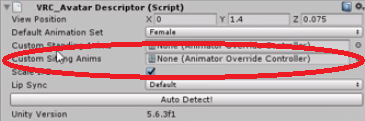
So you'll put your custom sitting animation in the "Idle" slot on your sitting animation overrides. Hopefully that makes sense.
icy crow
You'll have to make the sound file louder with Audacity or something @hexed current
hexed current
Did they update something with the volume in the sdk>
-cranks volume to 5.3 DB in vegas-
Now were talking
Its jellyfish jam to the orange justice emote
slim sparrow
@rapid cypress that is cool as hell
rapid cypress
💙 ☄
icy crow
No theres always been volume limits @hexed current
steep hornet
How would I go about making my character's scarf act like an actual scarf?
keen hornet
Dynamic Bones will probably be your friend, which is more of a rigging thing than an animation thing.
steep hornet
@keen hornet Damn. I don't have dynamic bones OR the money
keen hornet
I know that feeling. It took me a long time to justify buying it since I don't make avatars very often. Every once in a while they run a sale on it but it's very rare and the last sale was only like $3-$5 off.
spring nova
You can check out cloth physics too. It's built into unity so it's free
clear yew
@spring nova i tried cloth and it broke my fbx file
spring nova
Cloth is usually much better for things that need to collide with parts of your body, like a skirt or sleeves
use a .blend file
clear yew
Right now im using dynamic bones for my coat because i dont know how to get cloth to work
And dynamic bones clips
spring nova
yeah, dynamic bone colliders are a bit soft and stuff can still clip into them. Cloth is more solid
Cloth also keeps in mind the entire mesh and stays solid throughout the entire piece of cloth, whereas dynamic bones are just a series of chains
 fickle coral
when i try to add audio to my avatar it says the following component types are found on the avatar and will be removed by the client ONSPaudiosoure anyone know why this is happening?
spring nova
remove the onsp component from your audio object
clear yew
because you are using a component that's not allowed
fickle coral
its under the 3d sound settings right?
spring nova
it's in the object that has the audio
fickle coral
so the head?
spring nova
If that's where you put it
fickle coral
i wne to the head but thers nothing here just the add component button
spring nova
well where did you put the audio
fickle coral
i put it under the head parent
spring nova
so go there
fickle coral
im on the head its has head end under it and audio source
spring nova
yes, audio source
on that will be the audio component with your file and settings and everything and if you scroll down there will also be onsp audio thing, remove that
fickle coral
i unchecked them but it still says the onsp is still there
spring nova
don't uncheck it, delete it
delete the component off the object, not the object itself
fickle coral
ayyy it worked! thank you!
clear yew
@spring nova i just click the vertices where i want it to start from the top
?
For cloth
spring nova
the video goes over it, just got linked in #avatar-rigging
clear yew
O
 rancid valley
Does someone know why the values i put in my Head Rotation in an Animation just reset and dont save?
clear yew
Can anyone help me in making a Dragonball Aura?
I have textures similar to FighterZ that I want to put on an avatar but the texture's are weird.
 mental fjord
does anyone know how to make an animation where I can hold out an entity that has a working mouth rigged to it/
?*
rancid valley
Have the entity be a model that has visemes, add them to the descriptor instead of your actual model
Would be the easiest way
mental fjord
well yeah
but the issue is I have a mouth already rigged on my main one
so how do I make an animation where I lets say, grab it, and hold it out
how do I keep the visemes working on it
since I cant have more then one both rigged at once or so I believe
one rigged*
rancid valley
Pardon me, i dont know. i only used the thing i mentioned
mental fjord
lol well thanks for trying
steel perch
You would need to remove the visemse
On the second model
or first
I can't remember
but I know you'll still need to remove them I'v never seen anyone else do this.
I'v seen others have things talk for them but they always removed the visemes on their model.
mental fjord
everything goes based off of the first model so if I have visemes then make an animation even if in the animation I change the visemes I dont think it will work
steel perch
It's eather you have something talk for you the whole time
or remove the visemse.
then have it only on the other mouth
 slim kestrel
Does anyone know how to like, basically slap a picture on someones face? I'm pretty new to unity and have barely set animations up but I was curious if anyone here knew how to do it
 river dune
rancid valley
river dune
rancid valley
@slim kestrel That is a bannable thing to do, dont do that.
rancid valley
All fine, its bannable the same way as Nude models, if its a friends/invite world its all fine if people are fine with it.
If you'd ever do such animation then make sure its not a Public world or you can precisely aim for one person that asked to see it
slim kestrel
yeah i have a friend who can spefically show one person and thats what i wanted to do so i could show my friends. Thanks for the info @rancid valley :))
rancid valley
you're welcome 😃
fallow spire
do you guys have the same problem that the animations need some seconds to start? and sometimes the animation befor will show some seconds?
spring nova
Yep, it's a vrchat thing. Mostly because overrides are still based on replacing finger gestures instead of being their own rhing
 gray fossil
Anyone know any good tutorials for the particle system?
spring nova
This one helped me a lot https://youtu.be/FEA1wTMJAR0

Udemy: http://bit.ly/BRACKEYSMEM Everything to know about the Particle System in Unity! ♥ Support Brackeys on Patreon: http://patreon.com/brackeys/ ● Learn m...
gray fossil
Thanks been having a hard time
terse forum
I need help. my avatar has one hand that works properly and the other hand that has a few verticals not working completely.
clear yew
Hey guys, so about this non-humanoid avatar I got the animation won't export to Unity. Any suggestions?
terse forum
if your putting it to vrchat it has to be humanoid
terse forum
well then I guess the internet lied to me.
clear yew
well its just a floating head
but the export paart of the aavatar is not transporting the animation for some reason and i didnt change it to humanoid
rocky crater
what is the animation file type?
rocky crater
alright, did you download the animation or did you make it yourself?
rocky crater
nice, not many people actually make animation.
clear yew
i think its just blender taking time to process the animation time
although its a simple float animation
but it might take some time is all i think
i dont know really
rocky crater
it does, as long as you get a .anim file, it should work in unity
clear yew
ok cool
 warm token
where are the default animations(like wave) in unity? i want to make some changes to them
molten elm
Any tutorials on Emote's with sounds?
 topaz ermine
You enable an audiosource component that's about all
molten elm
ahh
topaz ermine
If you want to make it continue playing when you stop holding the gesture with the audio what you'll need to do is this:
Default: object enabled play on awake disabled
Frame 1: object disabled play on awake enabled
Frame 2 object enabled play on awake enabled
But for emotes it's pretty straightforward
Just enable it at the point you need it
molten elm
Ahh, that's helpful, thank you
 lost needle
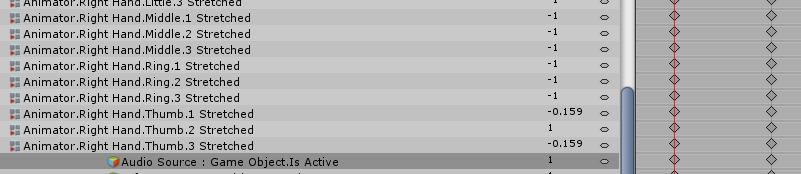
I enable an audio source in an animation. Animation length is 1 frame, just a simple gesture.
I expected audio to play when the animation is active.
But in the game, i only hear 1 frame of audio, when i switch away from the animation.
Anybody knows how to solve this?
clear yew
show the animation file, my dude
lost needle
 icy crow
probably a stupid question but is the audio enabled in both keyframes?
lost needle
yep
clear yew

 ocean knot
is it possible to have custom idle animations work for a VR user? for example their lower body or everything except head/arms or something
ocean knot
cheers 😃
was concerned that if they're in VR then the legs would be overridden by that - never seen any VR user with custom idle on their legs etc
 chrome elbow
is there a way to do it so everytime i do a hand gesture it spawn 1 particle and particle will stay there
if i do hand gesture again it will spawn another particle and repeat
icy crow
have the particle system active all the time and then just enable emission whenever you want to spawn a particle
set the lifetime, etc to however long you want the particles to stay


 icy crow
yeah
set the emission over time to 1 or something
however many you want to spawn at once
chrome elbow
kk
 red summit
I tried adding a rigidbody onto one of my props and freezing its y-position. I think it worked in the unity editor, but it didn't work in-game. Is this kind of thing supposed to normally work and I'm doing something wrong, or is it not allowed?
oh never mind it wasn't working in the unity editor in the first place.
neat gate
If i need help with a animation im boutta do can one of you guys help me
icy crow
depends on what you need
neat gate
basically just particles
clear yew
"just particles"
you can do a fucking million things with particles
also kinda sad that we need to use unity 5 with all the fucking limitations and bug for particles
neat gate
Should i keep ONSP on or off
spring nova
Delete the entire onsp component
fallow spire
is it possible to make an object independently from my movements in a animation?
muted prairie
Any idea why my idle animation gets crushed into a ball, but same animation is fine for movement ?
 forest slate
so i am trying to change my avatar's size dynamically using an animation, after trying for a while, i guess having the animation change the viewpoint does not work?
https://cdn.discordapp.com/attachments/410305882866450450/459915424793100288/unknown.png

 ashen sedge
Only case moving the viewport (Along with entire avatar) with an animation that worked for me is animating the Root.T and Q properties.
forest slate
ah
ashen sedge
Doubt you can scale an avatar with that though, not sure
forest slate
well, apparently, the scaling works in unity, but ingame, it only scales the armature creating this horrific monstrosity
https://cdn.discordapp.com/attachments/421499874589147137/459916255063965696/unknown.png

 red summit
I am setting up a particle system that has subemissions to trigger a different particle system on collision. It looks fine in the unity editor, but in game, the particles explode immediately in my hands instead of flying out and exploding on contact - occassionally, some particles somehow do make it through without immediately explosion, but they are emitted in the wrong direction, and at the wrong speed. Any ideas as to what could be causing any of these issues?
 somber veldt
Can somone explain me why my Character sinks into the ground when performing a continous idle anim?
 last wolf
anyone knows why when I use custom animations for walking back and running back both of them plays at the same time while walking back and I could see myself half walking and running but when I run back everything plays normally
icy crow
I don't think running back actually does anything. to me it just looks like a faster version of walking back
slim sparrow
@somber veldt make sure your idle animation has a Root T property so it actually raises the model up far enough
@last wolf the game blends between walk and run depending on your movement speed
icy crow
ah that explains why then
slim sparrow
You need tailored walk and run animations to make sure that they blend correctly
There's an AvatarControllerTemplate animator controller inside the sample assets. The animations contained within are all dummy idle poses, but the controller itself is legit. You can see how it works in there.
Like, if you replaced the animations and somehow got the controller onto an avatar, it would work exactly as the default ingame one.
icy crow
I have an animated moon that floats and spins next to my avatar's head. It is attached to the neck. I put a dynamic bone on the neck so the moon moves smoother when I move around. The problem is that when I go into play mode or in game, the moon isn't in the position that I want it to be in, which seems to be caused by the dynamic bone, is there any way to stop it doing this?
 pliant plank
Try to avoid adding dynamic bones onto any of the main body bones, especially the hip bone, making a copy of the neck bone, parenting it to the neck and then parenting the moon to the copy seems like the best solution
Make sure the copy doesn't overlap the actual neck bone, or all sorts of hell can break loose
pliant plank
If that doesn't fix it then i'm unsure of what the problem may be
Neck <- Head
Neck <- Neck Copy <- Moon
icy crow
I've done something similar on a different model and I don't think I had the same problem
pliant plank
I mean, it might not be the issue, but there's no other way to know than trying unfortunately
icy crow
alright I'll try
No it still does the same thing
if I want the moon in the right place, i have to move its original position to account for the move
pliant plank
Did you animate it before or after parenting it to the neck?
icy crow
before
pliant plank
That's the issue then...
icy crow
should the animation matter though, because the object is being animated not the whole avatar
the animation itself works fine wherever the moon is attached
its just that it gets moved because of the dynamic bone
pliant plank
Then it's solely caused by the dynamic bones huh...
clear yew
how much does dynamic bone cost, hmmmmmmm
icy crow
im pretty sure, it doesn't move when I take them off
pliant plank
That is an odd one, at the start i thought it was simply the root location changing due to parenting, but i've never heard of them causing such an issue
Depends on if it's in discount or not parzival
clear yew
dynamic bone has some kind of lag, if i were the avatar developer i don't apply it, performance drop
slim sparrow
Dynamic bones can lag if used excessively. In his case though, I'm pretty sure he's only affecting like 2 objects at most.
Which is negligible.
slim sparrow
Distance disable is on by default I think
Make sure you leave the reference object empty
pliant plank
It's disabled by default iirc
slim sparrow
If empty, the reference object is the camera. If you don't leave it empty, it will only disable if X distance away from the specified object
VRC overrides the setting so it's always on
If you put your avatar in the reference object field, it might never disable unless VRC also takes care of that
pliant plank
Oh neat, guess it's a new sdk thing
pliant plank
Never noticed it :o
slim sparrow
Yeah, you can barely notice it. I only recently noticed it on a friend's avatar. His avatar has a chain attached to the neck which sticks straight out when dynamic bones aren't active
And he never messed with any distant disable stuff
I've also had other people in here tell me that dynamic bones disable themselves, so that's good
clear yew
Hey Rokk, is it worth it for me playing vrc? what can i do?
slim sparrow
What??
pliant plank
But like... client runtime or sdk runtime?
slim sparrow
Client runtime
pliant plank
Alright that makes more sense
slim sparrow
On avatar load, your client locally configures the dynamic bones a bit. Some values are taken from the avatar maker (most of them actually), and a few of them are applied locally
pliant plank
That's a really good implementation imo
slim sparrow
I'll give the devs that, they did think it through
Yeah
The way they set up the SDK and avatar loading thing means it's very hard to exploit
For example, it is physically impossible to put your own scripts on your avatars. The component must exist in the game itself and must be whitelisted. The values are taken from the script, but the script itself is loaded locally
So even if someone maliciously edited a whitelisted script like dynamic bone, their edits wouldn't do anything.
pliant plank
What's the max distance set by default by the client?
Any ideas on that?
slim sparrow
Technically, you could even make a blank version of dynamic bone that just has the parameters (the script itself would be a dummy script), and it would still work ingame
I dunno actually
pliant plank
For distance disable that is