#animation
1 messages · Page 75 of 1
 dense pond
 icy crow
what do you mean by blinking? I'm sure theres a shader out there that you're looking for
 slim sparrow
I don't think you can do it like that
You need to make a shape key that moves a bit of the model with a "closed eyes" texture slightly forward so it becomes visible
You can also swap out materials in an animation
dense pond
So I have a face texture that looks like this (below) and I'm able to rotate it. on the model. What I'm looking to do is just temporarily flash the closed eye portion of the texture for a second, say every 5 seconds, that allows it to look like it's blinking. I had a buddy that did it once and I can't get in touch with him
oh I can't attach images 🤔
hold on

this is the face texture
and I just want to make the closed eye part flash
slim sparrow
I have a Guzma model which does that
dense pond
Yeah this is one of the Skull Grunt MMD models
slim sparrow
You sure the model doesn't already have a blink/wink shape key?
dense pond
I don't think so? I'm very new to messing with the animations so I'm a little lost and tutorials are not helping
slim sparrow
Open the model in Blender and see if it has blinking shape keys.
Or in Unity, click on the Body mesh and expand "blend shapes", set the blink/wink ones to 100

 clear yew
Wink and Wink 2 are for seperate eyes probably
So just set them both to 100 and you'll have a blink
er- wait..'
Maybe Wink and Wink right
slim sparrow
You need to check what does what in the shape keys
If you use CATs you can create eye tracking automatically
Wink 2 is usually the actual blink, wink is for a "happy" expression
But CATS expects wink, although there's a blink shape key there
dense pond
Lemme try it
So creating eye tracking, using Wink 2 actually just makes the character's chest move when I test it
 weary oak
it's always wink and wink 2 right
clear yew
I need some help with my Particle System
when I use my emote it shows up but the particles are very very small and they're going the incorrect way
I'm trying to make them come out of my hand but they like go out to the right
dense pond
That's what I used
weary oak
you need to rotate the particle system you alway ssimulate it in unity to see where they come out from
dense pond
Okay so I have everything set properly in the plugin and it just moves other parts of my body
not my eyes
but my face is just a flat mesh, and one whole mesh, which is why I was trying to animate the texture
 jade kraken
if i wanted to make an animation over-ride / controller
to make my guy walk a different way then the usual VRC humanoid
what would i use, the same overrides used for emotes?
icy crow
the same override controller, ye
jade kraken
k
jade kraken
what i wonder though: with that toggle on/off prefab, is it possible to toggle another model / armature entirely? like if i had some kind of mech i drop in from the sky via animation
weary oak
it is possible a slogn as you add the model to your main model
slim sparrow
Yeah you could do that
You cannot actually switch out armature though
You'd have to joint the other armature to your real one
Closest I've gotten to a model swap is Toko Fukawa from Danganronpa. I found a Genocide Jack model with identical armature, so you can literally just switch meshes or materials
But your armature is the one thing you cannot swap out
weary oak
what you can do is filling the extra model into your modle you click to open the hierachy of your main model and drop the extra models on the list so it is as high ranked as the Body mesh
and then you just simply activate them through hand getsure /emote
clear yew
I'm having trouble with lip syncing and avatar animations on my avatar
 rocky elm
https://gyazo.com/cf6ac26b51ae3134fb98e683faa4ff04
Help me, I've played VRChat for 10+ hours
 clear yew
You sadly need longer than that man
rocky elm
How much this is stupid
clear yew
3 days + I think
clear yew
They'll send you a message when you're allowed to do upload on VRChat
@everyone
Is there someone who can help with my animations?
just started out on my first model convert....I know how to use gestures to trigger an animation. The only thing I havent figured out is if you can link or chain more than one animation tied to one gesture
cant get a clear answer on this anywhere i look
all tutorials are for the same old basic overrides
hoping someone sees this and knows the answer
 valid estuary
so i have a breakdancing animation and some just break of them
because you cant move sideways in an emote whyever?
like iam supposed to spin but it just gets stuck
doesnt do it in unity there it works perfectly fine
anyone got an idea for fix?
 vagrant heron
clear yew
vagrant heron
clear yew
So I added a custom override to my avatar
and I detached the blueprint ID and reuploaded as a seperate avatar
but now it's red and I can't select it.
 mortal patrol
so if i want to animate something getting bigger, how do i make it so that change is there until i stop the hand animation? just leave that after empty or?
valid estuary
so i have a breakdance which works perfectly fine in unity but breaks ingame
the animation also puts my character higher than it should ingame
which doesnt happen in unity
 placid wigeon
Emote has a limit on how many sec the animation is
 woeful seal
how to use different different models for anims in vrchat https://imgur.com/a/9LMjU6c
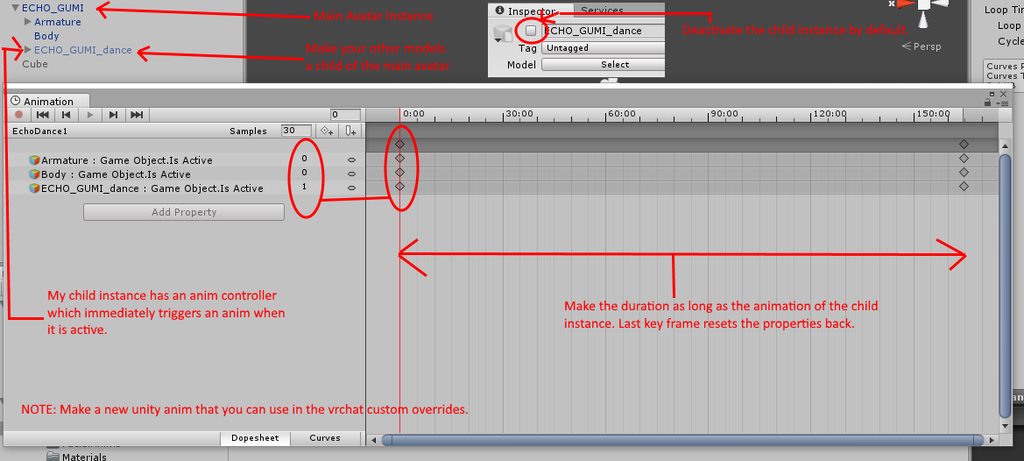
maybe deactivating the armature/skeleton is unnecessary, i haven't tried it without that yet
placid wigeon
when i do an Emote with an Audio source they just automatically stop once the animation is finished
well if its an audio source in Gesture you will have to change to a different Gesture to stop the first one
valid estuary
what is the emoute limit?
woeful seal
you mean how many or duration?
valid estuary
duration
woeful seal
i don't think there is a limit
valid estuary
Hmm
Then the question is why does my animation break ingame in unity it works perfectly fine
Its breakdancing for 1 minute
But some parts of it stop spinning and it actually starts too high
I cant realy troubleshoot it since it works perfectly in unity
 fallen flax
45s limit till it breaks @valid estuary
valid estuary
is it exactly 45 seconds?
fallen flax
It should be, yeah, but even if your animation is longer the first 45 seconds should not glitch out.
valid estuary
its still being broken ingame and unity it being fine
it also stops before 45 seconds
weary oak
solved my issue on the invisible animation i won't hide body mesh anymore but apply new materials to every single material all of them being infused with the firewing shader and set the transperecy all the way to the left so everything get's transparent
weary oak
ok the single issue is the eyes won't get invisible
they stay visible no matter how many times i try to apply the shader on them
 torn pawn
weary oak
torn pawn
weary oak
hm someone told me yesterday the opposite but i guess i can try it
weary oak
didn't work it's the same issue i have with when hideing the body mesh
with the way how i do it it makes everything invisible and back to visible only the eyes remain visible
icy crow
what was the issue when you disabled your body?
weary oak
i will be invisible for others when i start the animation but once activated i stay invisible even if i cancel the gesture
icy crow
hmm
weary oak
so what i did was trying to work around with firewing shader to apply transparent materials on all materials while i use the animation
it worked good but the eyes remain visible
icy crow
yeah some materials don't like going invisible when you change them like that
I had the same issue when some semi transparent materials, so I ended up just disabling the body
worked fine, not sure why yours doesn't
 vapid elbow
bois, I've added 2 animations on my character, first one with marker and second with particles, they both work well but after I'm using with particles my marker can't be toggled anymore, how do I fix that?
weary oak
i'll send a screenshot of the materials


@icy crow
self illumin is only on the eyes and i also switched back to flat lit toon to see if that is causing the issue but eyes remain visible even on flat lit toon
valid estuary
anyone here who knows shit about animations
cause i literally cant fix my breakdancing
woeful seal
Hey, I have humanoid model with extra arms, I'd like the other arms to mirror what the main 2 arms are doing so i got a suggestion of using fixed joints to do it. To test it out I put all rigid body components on the main left arm's bones (all way down to fingers) and then added fixed joint components on all the bones of the second left arm. It seems to work for the most part but sometimes the fingers go wild like this https://imgur.com/a/Lx8Virt
 slim sparrow
Lmao
What are the settings on the rigid bodies of the main arms, and the ones on the extras?
Perhaps post a screenshot of both
woeful seal
rigid bodies for the main arm (I've selected all the bones, they all have the same property values): https://imgur.com/a/nEBZW0Q

fixed joints for the second arm (again selecting all the bones): https://imgur.com/a/eILtYkQ
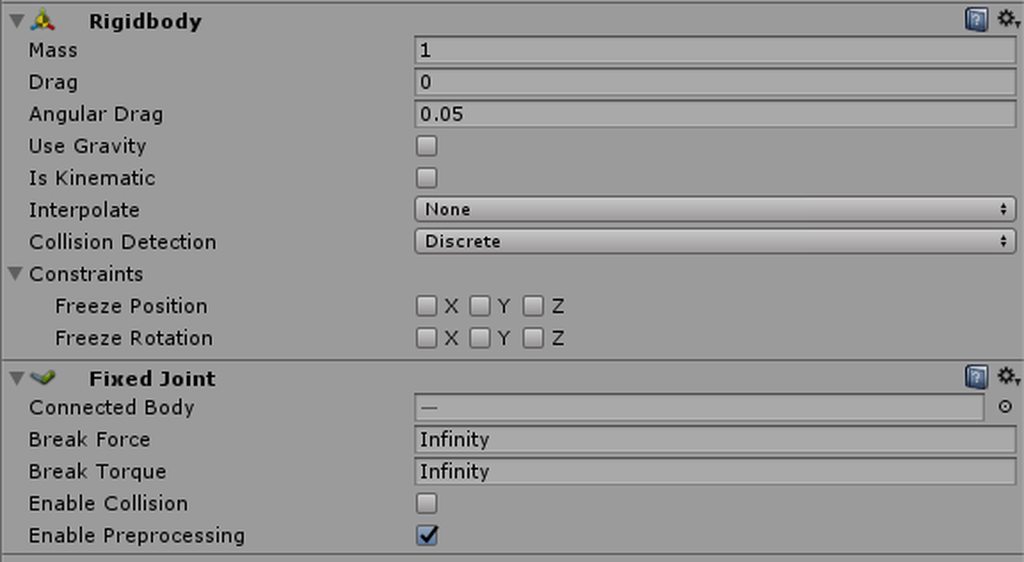 slim sparrow
On the main arm: You need to set angular drag to 0, and freeze all the positions and rotations
On the second arm: set angular drag to 0. Don't freeze anything.
woeful seal
thanks i'll try it now 😃
still getting kruger fingers 😛
there is slight difference in each bone hierarchy, the other arm has extra intermediate bone nodes that didn't get merged/removed when I applied cat pluggin fix up
slim sparrow
I think if you just don't joint those bones, all is fine
Don't joint the extra bones to anything, just leave them as they are. Don't give them fixed joints or rigid bodies
Or make sure the bone hierarchy is the same
woeful seal
yeah did try that at first but parts of the arm mesh wasn't moving
i'm thinking of merging those bones in blender but i don't think this is the reason for the fingers getting extruded
actually it's not that parts of the mesh doesn't move but getting stretched
in any case i've tried removing them and the fingers still do the same thing
 lucid heart
you need to freeze the position of the fixed joint or else it won't rotate around the right axis. in the "connected body" tab you have to put the rigidbody from which the movement should be copied
I tested a little bit with animations on my avatar and now the eyetracking and blinking is broken, it doesn't work anymore at all, even if I remove the custom animations.
woeful seal
@lucid heart so fix all pos/rots on source rigids and just positions on fixed joints?
i mean freeze sry
lucid heart
yeah, that way the bones just copy the rotation
woeful seal
but only on the fingers?
lucid heart
or else they would move depending where the axis of the original bone is
I put it everywhere
woeful seal
kk thanks for the tips
lucid heart
ok, renaming the eye bones worked (were named EyeL and EyeR instead of LeftEye and RightEye)
but somehow the avatar gets crosseyed randomly now. Is that normal because there's nobody else in the room?
https://media.discordapp.net/attachments/427865797881364481/452845333051998209/20180603164333_1.jpg?width=917&height=474

 weary thunder
Anyone willing to share the Orange Justice animation file?
 bold loom
Hey anyone have any ideas on how I'd lift my shirt up for tummy rubs with an animation, would I just set it to record the manually move the bones up?
 ashen gulch
anyone got any tips on making visemes look good? all im good at is making it look like a puppet mouth
 ashen sedge
@lucid heart Eyes might sometimes look crosseyed in mirrors, however assuming you set them up properly everyone else will see them just fine
lucid heart
@bold loom you could do it with a shape key
@ashen gulch look in a mirror and move your mouth like you wanted to make the particular sound (ah, e, n etc) and try to shape the lips accordingly
ashen gulch
could do
bold loom
@lucid heart would the method I suggested work as well, shape keys are one thing I haven't quite figured out yet
bold loom
Okay then, I'll give it the good old fashioned college try, because I want to be cute af
 stray sinew
Does someone have a proper value or setup for having flittering confetti as particles?
woeful seal
@slim sparrow @lucid heart those fixed joints worked so well, much better than i expected thanks!
 swift shoal
I was wondering if anyone could help me with muscle animator? This is probably a simple fix but I can't seem to figure it out. I want to use muscle animator but it won't allow me to click on anything and says "you should back up your clip files before using this tool!". I'm not sure how to back up my clip files or what it really means so it won't allow me to do anything

 queen pewter
uhh
you gotta hit the record button first before doing muscle animation or else slider will stay grey
:3
swift shoal
Thanks!
weary thunder
so i am having a bit of trouble correctly assigning an animation to a ShiftF8 key, any help/advice?
 high goblet
Getting this error in the SDK Build Control.. I've used SnailMarker before... Not sure why this is popping  up.
up.
"The Following component types are found on the Avatar and will be removed by the client: SnailmarkerAnimationCreator"
 dense granite
Anyone knows why, when I add gestures and upload the avatar.
The animations are super slow
Tag me when you know the answer plz
clear yew
@dense granite I know the answer
queen pewter
I am looking for person who has good knowledge of riged body.. please help :[
clear yew
just ask your question and if somebody know he will answer
queen pewter
I have a a arm-like gear attatched to my arm with rigidbody both arm / elbow. It works perfectly in vr however whenever I do some crazy dance emotes, the gear part gets dislocated for somreason. It's still working but initial rotation is off
slim sparrow
@high goblet you need to actually click the creation script
That will make a new prefab and you can delete the old one
 dusty plume
Anyone know how to randomize an animaiton that can be played (or an audio file)
slim sparrow
@dusty plume there's a method that's random enough for it to work, since it's influenced by whenever you activate it
dusty plume
That sounds rad, whats the method?
slim sparrow
But it requires you to suspend an animator which is pretty difficult
Check the toggle props package, it has an animation file included which can disable Animator components. When you disable an animator component, the animation state it's currently in will stay there
So you need an object with, for example, three sub-objects. Every sub object has another object below it, with an audio source or whatever you want to play
The object should cycle between the sub objects. On a gesture, you stop the cycle and activate all child audio sources at once. Since only one object will have been enabled by the animator, you only hear that specific one. If they cycle every second or every few seconds, that's random enough to work
dusty plume
That sounds perfect 😍
Going to be running a radio, and gun effects on an avatar
Whats the toggle props package though? @slim sparrow
slim sparrow
¯_(ツ)_/¯
Someone posted a video about it, and the package can also be found in #development-advanced
slim sparrow
The gist of it is that you can use emotes to toggle objects on/off
But it doesn't sync very well to late joiners unless you change the way it's set up
clear yew
basically it's trash if you dont put a reset emote on it
slim sparrow
Friend of mine has a Fallout radio that he can toggle on, it's cool
@clear yew or if you set it up in such a way that you have one for off, one for on
dusty plume
Reset emote?
clear yew
Reset emote.
dusty plume
How would that work? just an emote that animates a value to 0?
clear yew
basically yeah
icy crow
I tried that method you said with the animation that resets the fixed joint object to 0,0,0 when its not being used, but it doesn't work for me @clear yew
icy crow
:<
clear yew
y'all trash what can i say
icy crow
tru but
clear yew
half the people i gave that shitty prefab
it's fine
works perfectly
half of them it's bugged out
icy crow
what prefab?
clear yew
the prefab i did for the fixed object in world
slim sparrow
Yeah, I think one of your explanations back then wasn't entirely correct
A friend of mine did it the way you explained at the time and it just got reset to world 0
He did it slightly differently and it worked
icy crow
how does one fix
clear yew
@slim sparrow u w0t m8 ?
which part is false ?
i did it recently again for a new avatar and it worked
slim sparrow
Well I dunno, I did it as you said and it's just at world pos 0
I even showed you screenshots of the setup way back then
clear yew
what did he do differently ?
clear yew
:(
slim sparrow
Yeah, I'm absolutely sure I did this correctly. Just for reference again:
Parent object: this is under my avatar, next to Body and Armature. It has a legacy animation on it.
Child object: under the parent. This has a fixed joint connected to nothing. Position and rotation are both reset to 0,0,0 by the parent's legacy animation.
This object is enabled by default, as is the parent
And then under the child object, there's a cube.
And yet it still doesn't work
On a gesture, I enable the cube and disable the legacy animation
 regal hollow
I'm the friend that did it differently
for me when I toggle the cube on and off everything just stays at world position 0,0,0
I have to toggle the fixed joint on and off for it to work correctly
 chrome elbow
what are keybinds for hand gestures
slim sparrow
Hold left or right shift, then press F1-F8
 covert hawk
does anyone know a good raibow shader that has the transparent or the cut out option?i need a texture with writing to work as a rainbow/colorswap
slim sparrow
I got an animation file but it's 12 times too slow.
Any way to speed up the animation file itself?
If I put it in an animator controller and set the controller to play it at 12 speed, it looks good.
If I change the sample rate to 360 instead of 30, it becomes very shaky.
Dragging the keyframes to match the correct end time also makes it shaky
clear yew
So what I'm wanting to do is animate a loop with these drones ( Moby and remy). How do i do that?
Also , Is this the right spot for a weapon/item/etc to go in? I mean they aren't going to be on her hands tho.
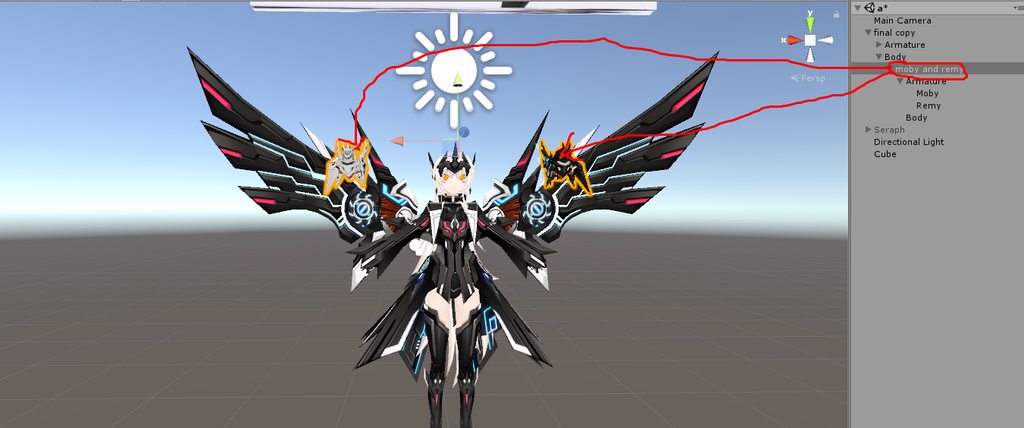
if it's related to naimations then yeah
it's here
what do you want them to do ?
I want the drones to like float up and down forever loop
parent them to an empty game object
and animate it to make them move
oh thank you
feel free to ask for the next step
after you are done with the animation
Yea im a beginner at Unity lol
@clear yew it's should roughly look like this, right ?
https://i.imgur.com/RWTEx1s.gifv
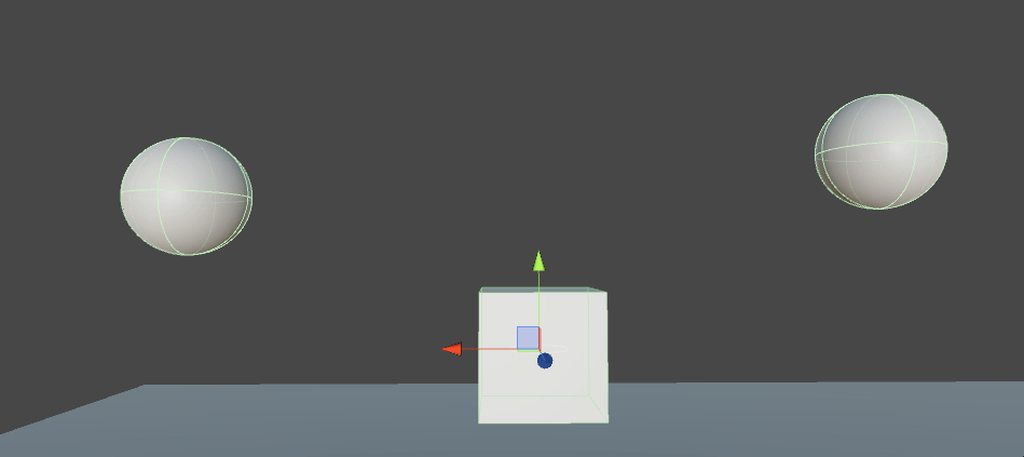
yea
easy enough, you just move the y axis
for the parenting , i dont parent anything right? for the drones?
and ty
you just parent the drone to an empty game object
so you can animate that game object and make it loop permanently on your model
Alrighty
i sound stupid but , whats a empty game object (sorry jakshdkas)
exactly what it is
empty object
not a single component
or anything
top left
gameObject - > create empty
Thank you very much!
Game object doesnt have to be parented to anything right?
not until you finish the animation
then you parent it to your model
spine bone i would guess
is this fine http://prntscr.com/jtdqww
yes
oh good
you should probably renamde the body and armature to something else
can get fucky with mirrors if your have 2 meshes named body
ty
i add the animation component on the moby and remy or the game one?
game one
ok ty
want some more screenshot ?
yes pls !!
alright
this is my hierarchy
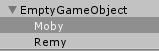
this is the animation with the default position
https://i.imgur.com/4tK2st4.png

this is after 5 seconds
https://i.imgur.com/rP85kHo.png

at the 10 seconds mark you put the default value so it goes back into original position
tysm!
https://i.imgur.com/wQ2isdo.gif some reason its kinda flickering a bit but i dont know if thats a problem or not

you talking about your model ?
yea when i select it
yeah don't worry about it
oh phew
also remove that light that you have in the hierarchy
it's useless
ty!
did you parent the game object to your model ?
http://prntscr.com/jtdx5o is this ok
yep
since there are supposed to be in the same spot
alright
i think you can also parent it directly under your model
same sport as armature and body
but it should work perfectly fine like that
also don't forget to rename the body and armature of your 2 robots
thank you!
 sweet zealot
particle question - how do i make a particle stick to a surface without bouncing once it collides with something? I cant get it to not bounce
clear yew
You should be able to set its bounce value to 0 in the collision section
 cedar root
If anyone can help, I've been looking for the mmd dance for "Deep Blue Song" but so far the original website doesn't have the file any more, and I haven't had luck so far trying to find it reuploaded somewhere else, so if anyone has the file or knows where I can find it please let me know, it would be highly appreciated
sweet zealot
the bounce is set to 0 but it still slides for some reason
slim sparrow
@sweet zealot if you want particles to stick, set Bounce to 0
And damping to 1
The thing that makes it stop completely when it hits a surface
Otherwise it'll keep its velocity and slide off
Are you using that "align particle with velocity" shader by any chance?
sweet zealot
strangly enough i already have it set to that and the particle slides right off the test cube
no special shader, its standard cutout
sweet zealot
it IS using stretch billbord, if that would cause the issue?
slim sparrow
I don't think that's the issue
sweet zealot
do you mind if i send you a quick screenshot of it?
cause imgr is being a butt right now
slim sparrow
Sure, but I won't be able to respond for some time
Gotta take a test for our Unity class lol
Ez
sweet zealot
no worries, im so braindead right now i have no juice left for tech support tonight
dusty plume
Has anyone here done good gun sound effects before, trying to figure out how to randomly trigger 3 sets of different sounds every 0.12 seconds
 rapid steeple
I can't find animation override in my sdk. I watched Tupper's video, went in the search bar and typed in override. No results
slim sparrow
Did you import the SDK correctly?
And did you import it yourself?
No premade projects or anything
rapid steeple
Nothing premade and I'm sure i did
rapid steeple
Yeah I didn't see that
If i were to remove sdk and all, import it all again, would I be able to keep all my stuff like projects and such?
 glossy rose
i just ported an animation but its too slow how do i make it faster? lenght 100
 vital musk
Not sure whether this should go in here or #avatars-2-general, but here we go
I got an avatar rigged and using custom emotes, which worked fine, but at the time it didn't have proper finger bones so I added them manually
That works, but some emotes I added (from Mixamo using the same model) just make my avatar disappear when I use them in-game
They're added to the custom standing animation overrides in Unity, and preview fine there too
No fancy sounds or particles, just some dances
icy crow
@slim sparrow I still can't get this reset animation to work properly, I don't know what i'm doing wrong
I have:
- fixed point with reset animation
-- fixed joint
--- objects
the fixed joint is disabled by default and then I enable that in the animation as well as disabling the reset animation
regal hollow
What about it isnt working properly?
icy crow
the object doesn't get reset to its original position when not in use
slim sparrow
Fixed point has legacy animation that's enabled by default right?
icy crow
yeah
slim sparrow
Animation component, animation is set to legacy, wrap mode set to loop
icy crow
yup
icy crow
when I'm making the reset animation, do I click on the fixed point and then click create animation?
slim sparrow
Yes
This will temporarily add an Animator component to the fixed point
You need to delete that afterwards
That's needed to make the animation file
icy crow
it doesn't make an animator component
and when I go to add property in the animation, it shows all the same things as my parent avatar would show
should it do that?
slim sparrow
Err, no it should not
Ohh, I get it.
Try manually adding an animator to the fixed point object, then creating an animation on it.
Then use that in the animation component
 warm token
im new to animations how would you start a "spider rain" animation? can i somehowe make particles look like spiders?
slim sparrow
Yeah
@warm token billboards will be the most efficient for this. Find a 2d texture/image of a spider.
Then make a circle-shaped particle system above your head that emits spiders, and enable gravity and collision on them
icy crow
now the objects don't spawn at all 🤔
warm token
how can i make a billboard?
warm token
i think i got it now i just need to get the particles transparent
icy crow
hmm, so the reset works now but the object ends up getting lower and lower into the ground everytime 🤔 @slim sparrow
use one of the particle shaders @warm token
with a spider png
ok wait nevermind again, my object has an animation where it hovers up and down, so when if I disable it when it's at it's lowest point, that's where it spawns next time
slim sparrow
Yep
icy crow
is there a way around that?
slim sparrow
You can prevent that by putting the animation one layer lower
So the fixed joint object is unmoving
And the object below that is moved instead
icy crow
so instead of resetting the position of the fixed joint, I reset the object instead?
slim sparrow
No
You apply the up/down motion to the child object instead
Just make sure it all stays within that little hierarchy
icy crow
what's the child object?
my hierarchy:
- fixed point
-- fixed joint
--- world object parent (empty)
---- clone of my avatar (with the floating animation)
slim sparrow
If the floating animation is just on the clone then it should be fine
icy crow
yeah it is
well, it's on an animation override that I use for my actual avatar
I just put that into the clone's animator slot
slim sparrow
It should be fine, but maybe you should give it a proper animation controller instead
Like one that just plays the animation and nothing else
 native glen
I have this vegeta model and I would like to add mouth movement/animation I've looked up videos but I'm still very confused, and I'm also a noob at dis kind of stuff
plus when I try to add a shape key there is none there
 visual marlin
cant quite figure out how to make my magic circle start at base of feet and expand
vital musk
@native glen I'm a noob but if you're using Blender, the shape key menu only appears in Object mode I think
if you're in edit mode or inside an object I don't think it shows up
 dull plaza
Can someone pls, fill me in on the secrets of a few animations? Like toggling objects with emotes, and the “i don’t feel so good” meme animations that people keep doing
 muted prairie
How do i get my model out of the ground after adding an animation to it ? I think it has to do with checkboxes in the anim panel, but which ones 🤔
dull plaza
What kind of animation are you applying to it?
muted prairie
Horse-ish anim onto a horse-ish armature
dull plaza
Hmm..I’m not quite sure its possible. From what I know about animations (albeit very little) the model should be above ground in the animation itself? Unless you applied the animation to the original model and not a duplicate to make it, then im not quite sure how to help
Every video ive seen on the subject makes “applying an animation” seem like a very one-way process when it comes to the model
muted prairie
Original animation was above ground though, i'm basically applying it again to the fixed armature in the same model
Ok, the solution is to set the Root Transform Position (Y) and give it a negative offset
dull plaza
Aah sorry I wasn’t able to be of much help xD still kinda new to this stuff
 mint prism
following problem. I try to change a material in an animation but every time i restart the recording it resets the material to the original.
It worked fine before and for some reason it doesn't makes it anymore. This makes no sense for me
- it works for every other material but not for this one
native glen
@vital musk I tried dat and it won’t show for some reason I guess it’s cuz they’re not animations for dat
 waxen hound
do custome walk animation work? I falling in the floor. Do i set it up the same as i do for normal gesture animation and attachment animation item?
 chilly topaz
has anybody been able to disable head tracking during certain animations like flying for models with full body ik enabled? i've only been able to make it work without full body ik
muted prairie
Any idea why idle has my animation playing in the ground, but the same animation for walk/run/strafe is above ground ? is there something specific to do for idle ?
ashen sedge
Not sure why that is happening but if you add the "Root.T" property to your idle animation clip then you'll be able to adjust the height manually atleast. I do that with my smaller avatars for their sitting animations to make them be seated at proper height.
muted prairie
You mean the root transform position Y ?
If not, i have no idea how to add a property to an animation
Oh you mean the clip itself
ashen sedge
Yeah, inside the animation view itself
Might take a couple of attempts eyeballing to get the height perfect
muted prairie
So that would be using the hips transform and "position" ?
ashen sedge
Well, does your view port go down aswell when idle? Or do you just see your avatar sink below the ground?
muted prairie
Just see the model sink
ashen sedge
Ok, then you probably want to use the hip bone position instead.
Root.T would move your viewport aswell, moving your armature does not
muted prairie
And do i just add the transform for position for all keyframes ?
ashen sedge
Yup, that should be the case
muted prairie
If i guess correctly i should also disable the root transform Y too ?
And i probably can ignore that as well https://gyazo.com/abd2fc26c92f34d31220311a05f1d9a7
 ashen sedge
Think so yeah.
mint prism
https://cdn.discordapp.com/attachments/415307627824676899/455920583939457026/2018-06-12_04-24-46.gif

i have this problem with unity
everytime i hit the red bottom it resets element 4
if someone has an solution for this i would be really glad
muted prairie
I definitely missed a step Zarni, now all my anims play in the ground, not even on hips level
 spring nova
@mint prism that's because when you hit the red button it's displaying what the elements values are in the animation, which is different from what their default non-animated state. You can just change them when in recording mode to be what you want, or if you don't want to change them away from default state at all you can just remove the keyframes that are doing that
mint prism
oh no i know that
i mean 1) i hit record change the element 2) hit record again to stop recording and see that everything is default again 3) hit record again and only element 4 is staying in default
the other elements change but not only element stays as default
spring nova
Try restarting unity
mint prism
thats what i also did ToT
 wary parcel
you must have forgotten to add it as a 2 node animation with the same between both, just remember if it is pulled out over a specific time you need to check the curve that will change it back to default.
mint prism
2 node animation?
wary parcel
nodes, the animation nodes.
you doing loop right?
you sure its not wrong on the first?
cant see anything on that gif
 wary parcel
you sure you got the same Material on first and second node?
 lyric edge
Im still having trouble with talking animations. I need help please
lyric edge
I want to have my eyes light up and off when i talk
I have two separate eye meshes already. One with lights off. One with lights on.
clear yew
only way i can see this
is having 2 pairs of eyes
with 2 differents materials
one that is normal and one that glow
lyric edge
Ok
clear yew
and you just need to move the one that glows forward and the normal one backward when you talk
you can use CATS for this and customize the 3 shapekeys used to create the visemes
 lyric edge
Ok
mint prism
i made it a 2 noded now for testing reason but still it always goes back to default
clear yew
what is that picture supposed to show ? that you changed the element 4 ?
mint prism
basically i try to switch the material of the elements... it works for every except 4 that always goes back to the default material
clear yew
the fuck
mint prism
it doesnt change in the timeline but when i uplad the avatar it is the default material
when i add a new keyframe it shows the default one
mint prism
name problem?
wary parcel
Oh wait
mark both nodes then rightclick in the animation window
select Auto Clamped
try now.
Curve problem :p that would make sense if it is stuck at 0 and not at 1 then it would be the default material
mint prism
ah
wary parcel
you can check the curve editor also
 wary parcel
you have to select the object you want to see
you are now watching the game object active stuff
mint prism
 wary parcel
hmm seems mesh render does not show up there
worked on a big animation ingame, but never had any difficulty with that
mint prism
is there a swich to turn it on?
wary parcel
no
you just drag the material to the slot when you have the record on
that should be it
you are changing texture in the slot?
not Materials?
wary parcel
it works on most channels anyway why have it
ugh

you are not using an Material?
Shaders is whatever.
You just have to move the Material to the slot.
if you want to edit one you have to have more
if its not just editing some values on one of the materials
mint prism
yep im moving the material inside the element slot
wary parcel
no editing?
mint prism
no
wary parcel
works with other shaders?
Materials
this seems like you have missed an step somewhere
mint prism
okay thats even more fucked up D=
the material i put in element 4 switched to element 2 and element 4 reverted back
wary parcel
you got some material fuckup there, back to Blender with the model
check there
check naming of the materials that it is different
or not
whatever is your prefference
mint prism
the names are different
wary parcel
but they may be linked in a way Unity does not understad
your on your own for now. im out! 😄
mint prism
okay thank you for your time^^
slim sparrow
@mint prism you cannot change every material within an animation
Unity won't let you for some reason
You need to keep at least one material as it is
mint prism
oh really so it choses the material by itself?
because in the animation i made i had one material on default
slim sparrow
I dunno
clear yew
and is the material chosen randomly ?
slim sparrow
I was never able to swap all materials, one always stayed behind and the inspector would glitch out and not allow me to add the last property manually
 violet kraken
slim sparrow
violet kraken
slim sparrow
That model had another issue though
When I disabled my mesh or mesh renderer, it wouldn't re-enable for other people
mint prism
okey even when i change only 4/7 it stays default
is there a way to change the element order?
 languid gull
Bit of a noob question but how does animation priority work (If that's the right word for it)
I find that head tracking and sometimes hand tracking is still active during emotes
slim sparrow
@languid gull that's caused by not having finger bones
You need at least one thumb, index and middle finger bone on each hand, even if they're fake bones.
That's the "full-body IK will be disabled" warning from the SDK
languid gull
Ah
I noticed it with a character that had no fingers but I did get a similar error message with others because of the pelvis angle
slim sparrow
Pelvis angle is another issue
languid gull
Should I worry about it? Don't want to leave an avatar with an error in it
languid gull
Just worried that it'll goof up if somebody's using bodytracking.
slim sparrow
If it looks fine while crouching it generally looks fine while in FBT
 cinder cipher
clear yew
cinder cipher
clear yew
2/10, doesnt spin fast enough
 summer elk
how do i extract an animation file from an FBX
slim sparrow
Ctrl+d the animation @summer elk
summer elk
oh
 upper bone
how to make gun twirl animation
slim sparrow
Gun's origin point must be around the trigger if you want it to spin around the index finger
Then you can just rotate the gun in an animation
upper bone
oh oki ty!
muted prairie
Still can't get my model to hover during the idle animation on idling, but all the other anims hover.
slim sparrow
Do you want up/down motion?
muted prairie
Tried every checkbox, Zarni's fix, moved my model up before export
Nope, just be at the same height during the anim
slim sparrow
Hmm
muted prairie
it works for all of the motion ones, but the idle is half in the ground
slim sparrow
Moving your model up alone isn't gonna do it, you need to change up your hierarchy a little bit. Let me start up an older project real quick
waxen hound
is there a way to just export animation from blender and drag it onto tha model in unity? trying to look for a tutorial. I use a tf2 animation and now trying an overwatch animatoin but the animation stays stuck to the model. if that make sens.
slim sparrow
@muted prairie https://imgur.com/a/q6ZplR4
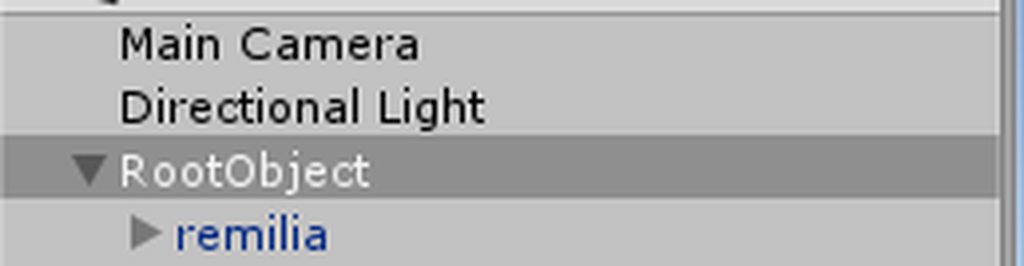
It's an album, not just one image
If you raise your model up and leave the Root game object where it is, it should work
muted prairie
Ah, very cool, i'll try that thanks
Well i'm not sure anymore, because my model already was above the white line already https://i.gyazo.com/af97c864239aa9566576c86783e59618.png
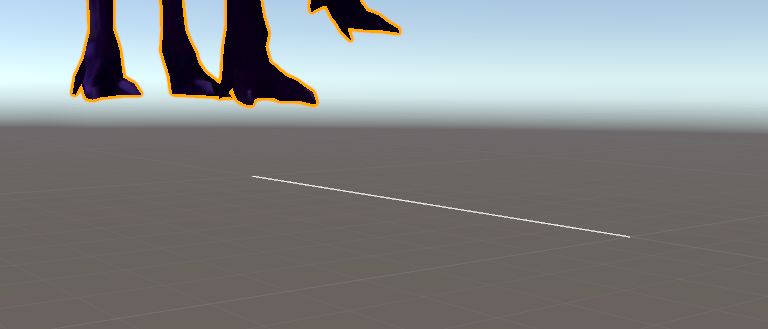 slim sparrow
If your model is actually in the ground during idle, it's possible that your idle animation has no Root Transform Y, or the Root Transform Y is too low
It's the Root T.Y property in the animator
I always set mine to 1
muted prairie
But why would it be at a different Y position in idle and walk ?
slim sparrow
Are they the same animation?
 plain geode
i have a problem. i added a weapon to my avatar in unity, and the animation is fine but ingame my right hand where i hold my weapon just do nothing. it supposed to grab the weapon but the hand is open. My left hands works fine, i even started a new project and fixed the model again with CATs, but its the same problem again .. left hand is a fist and right hand does nothing. i dont know what i did wrong
muted prairie
Exact same animation, that's why it's extremely confusing
slim sparrow
Final IK plants your feet onto the ground in idle
Oh, that's weird
Then it should work fine
muted prairie
Yeah but my feet were extended so that my model was hovering
unity is driving me insane
slim sparrow
That shouldn't matter either way. I've had models raised 2 meters off the ground
That's weird
muted prairie
I tried your method and it didn't work
slim sparrow
Hmm, there's one more thing I can think of, gotta start Unity up again
I have "Apply Root Motion" ticked on the animator component of both the Root Object and the actual model
Is that the case with yours as well?
muted prairie
Wait, there's one thing that i thought about, since desktop has seated mode by default, does adding my override to custom sitting anims make a difference ?
slim sparrow
Custom sitting anims are only used in chairs and other VRC_Station components
So that should not matter
muted prairie
Am i supposed to keep the component on the model itself ?
slim sparrow
I think so yes
At least, I have an animator component on the model itself and it works for me
But I also have one on the root object
slim sparrow
VRC avatar descriptor needs to be on the root object though
Not on the child model
Otherwise the method won't work and it'll just be a regular avatar model ingame
upper bone
btw do i do the gun rotating on the gun itself or on the avatar while the gun is active
slim sparrow
On the gun itself is better
Then you can activate a version of the gun that rotates itself
upper bone
so basically i'll have a version of the gun that doesnt rotate just for holding and then the version that rotates?
slim sparrow
Yes
upper bone
aye
muted prairie
Ok, actually the empty game object method worked, i just needed to add an extra meter to the model itself
But the idle anim on idling doesn't play for the lower half of the body
it looks like it's trying to touch the ground with its feet
Well, good enough regardless, thanks for the tuto Rokk
 crystal iron
One question that should be already known to many players, except I still don't know that :v
When animating an idle but the legs are splited but the legs ingame are reloacated itself back to the center location... how do I fix that?
Should be something like this
slim sparrow
Final IK automatically plants the feet into their "normal" positions ingame
I don't think you can stop that from happening
Other than not looking down if you're in desktop
crystal iron
I see... so that IK really didn't has a way to avoid it
upper bone
@slim sparrow i animated the gun but like do i put the animation on the gun in the animation component or how does it work?
crystal iron
Thanks for the answer 😄
slim sparrow
@upper bone you have one gun with no animator component, this one is for holding
You have another gun with an Animator component on it. This animator has an animation controller that's set to automatically play the spinning animation
crystal iron
(I somehow can't upload a picture here .-.)
slim sparrow
This animation controller should have been created automatically when you made the spinning animation
Otherwise you can remake it by dragging the animation file onto the gun
@crystal iron yeah, you can't
Gotta use imgur instead
crystal iron
ohh
slim sparrow
I forgot why but they had a good reason, especially in such a large Discord
Has to do with automatic expand settings
crystal iron
Yeah, kinda understand that. Discord has to upload the image in some server anyway
wait, I found this, is this think work? If it works, I would also be able to fix my Battleship Water Demon Turrets (which I gave up long ago) too

VRCat: Community-Run VRChat Forums
Final IK can be used to add additional IK to parts of avatars. An example of this is using the Aim IK component to add a turret that is aimed based on...
slim sparrow
If you have Final IK then yes
This is more of a guide to making Final IK components work on your avatar
But it's a bloody expensive asset
And I don't think overriding the game's IK works at all
You can only add onto it
crystal iron
Oof... $90
slim sparrow
It's not worth it, especially because there's no guarantee this will even fix it
crystal iron
Yeah... I'll stick with what I currently be able to then
 undone glade
Was snail marker updated or something or do people use something different by chance?
Set it up and for some reason it's not working.
Tried going by the video in case I missed something and results are the same. Which is strange because I just got done walking another person through it and it works fine for them.
upper bone
it should be working, i did it just yesterday
lyric edge
When ever i add a custom animation, my avatar goes into a weird crouch position
slim sparrow
In which slot did you put the animation? @lyric edge
If it's anything other than a gesture, you need to define the whole body's movement and Root T, not just the one part you want to adjust
This goes for emotes, walking, and idle animations
lyric edge
It is a gesture animation where i make a weapon appear
lyric edge
In the vr chat game
slim sparrow
Just make sure you create the animation on a duplicate of your model, not your model itself
lyric edge
I did. There must be something im doing wrong as when i do the gesture, the avatar gets stuck in the crouch position
dusty plume
Make sure that there are keyframes for all the muscles in an emote
For a gesture. Make sure there are no keyframes for muscles
slim sparrow
I don't think gestures can affect muscles, so I don't know why that is happening
You should only have finger movement properties
lyric edge
Would what the weapon be parented to be the problem?
dusty plume
^^^ yes if you have finger animations dont delete those mucles
Nooooo, wouldnt cause the model to default to muscles being 0
When you say crouch, does it look like this?
lyric edge
Yes!
slim sparrow
Yeah, that's the default pose when you add all muscle values but only define some of them
dusty plume
Yep, delete muscle keyframes that are not relevant to the animation
dusty plume
Yes I guess proper terminology was needed 👌
lyric edge
Ok
dusty plume
Yo Rokk, you said there was a way to randomise a sound right?
slim sparrow
Sort of
lyric edge
I appreciate the help @slim sparrow @dusty plume
dusty plume
well, "randomise"
slim sparrow
It's difficult but yes. Not recommended for if you need to quickly cycle between sounds
But it would be fine for, say, playing a random song
dusty plume
Playing a random radio call out
slim sparrow
Yeah, that would work
dusty plume
you said something about needing an animator right?
 zinc finch
Hello everyone, I want to make a animation that if triggered does a animation (fade out), stays like that (invisible) until I release the trigger and then does the animation backwards (fade in) - I have a shader with a scale I can keyframe from 1 (visible) to 0 (invisible), the problem is, how do you make the animation?
 slender rivet
can anyone help in something, i am trying to put an animation on a model other than my main model
so i got the animation from mixamo and made the model humanoid and added the animation component, and slapped the animation in there, but it doesnt work
any suggestions?
icy crow
did you duplicate the animation from the model you downloaded?
ashen gulch
Hey. Um im just finishing up the finishing touches on my frank west avatar and i was working on the animations when i had a thought. i want to have one where he pulls out the camera. but if i do it the only way i know how. im not sure how i can make the camera hes wearing dissapear
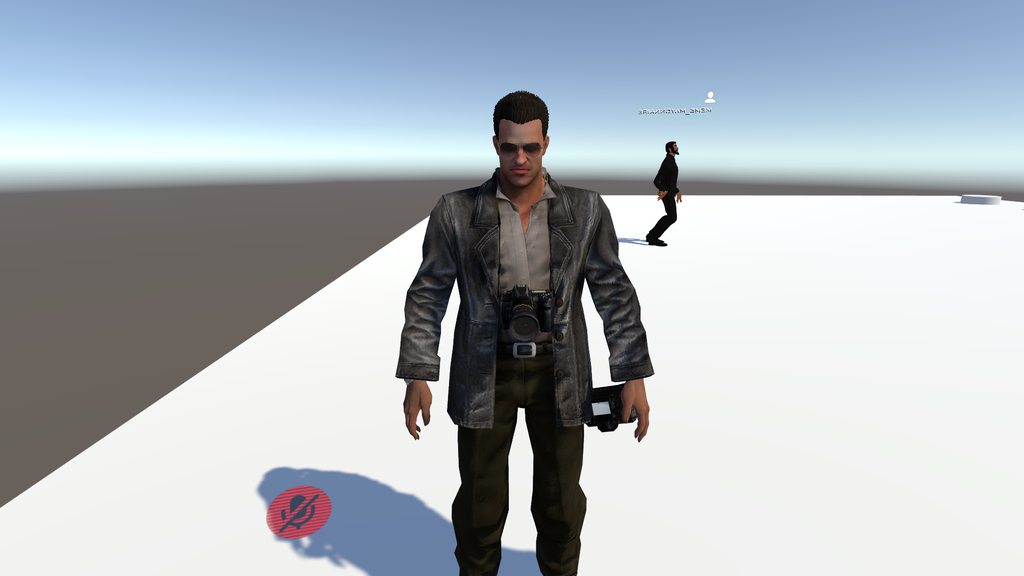
the only way i think i could do this would be to have two seperate meshes but as far as i know i cant have two seperate meshes
wary parcel
just attach a material to the camera mesh, and make it invisible with a transparent material
ashen gulch
how do i apply a material inside of an animation?
i just want the camera to dissapear when i pull out the camera in my hand
wary parcel
Drag and drop into the material slot of the character
yes you will have to do it that way.
clear yew
Anyone mess around with fixed joints a ton I'm trying to make a model behind me copy what i do
vapid elbow
what's maximum animation duration in vrchat? because I got 3 and half minutes long animation and it's getting cutted in game but in unity it plays right to the end
clear yew
if its an emote itll get cut but hand ani dont
though sometime when someone joins it restarts the ani
vapid elbow
it's emote and nah I've been alone in private room
clear yew
idk the emote time and its just like if someone loads in while u doing it
clear yew
Alriight, When i go play my animation back in unity it works, but as soon as i upload it to vrchat the only thing that works is the music. Why is that?
im working on an animation and i went to go test it on vrchat, particles doesnt show up when that time came. The only time it does show up if i enable the particle in the hierarchy and i dont want that.
wary parcel
you should have the animation in its own Hierarchy and add its own Animator to it. use joints to fasten it to your body and use an gesture emote to activate the gameobject with the animator/animation
 warm panther
anyone got any recomendations for full body tracking on the rift? heard a kinect might work.
spring nova
I remember a post somewhere about nolo, which is a tracking setup meant for mobile devices. It's probably still pretty new and undocumented, but it would definitely be better than the kinect

NOLO VR: https://www.nolovr.com/ download Drtver4VR at: http://www.driver4vr.com discord: https://discord.gg/Bks9YyX Facebook: https://www.facebook.com/Drive...
oh, it uses driver4vr, which is the exact same thing you'd use for kinect. That's good news, means you'll be getting continuous support and likely more and more adoption over time.
slim sparrow
@clear yew don't trust mirrors
 pure hemlock
Should I make my own particle effect for a rune circle under my character or just buy one off the unity store?
Idk what other people do and I was looking for suggestions
cause I want like a magic circle around my avatar while she holds a blue flame in her hand
pure hemlock
Mmm...
I don't know how to do particle effects though
cause I kinda want like a gentle blue flame aura around the edges of the summoning circle?
I already have this

Idk how to make it glow and have the flame aura around it, plus little embers floating around
because I plan to put it on my hand emote when holding a flame DX
 timid prawn
how can I decide the side of the hand that going to trigger a certain gesture ?
 left flicker
How easy is it to have wings moving lightly and animated to basically sprout from my back?
timid prawn
look at tail animation tutorial, maybe it could help you @left flicker
 nocturne wraith
 jade bobcat
@timid prawn as far as I know picking hands is not supported. Each hand does the same gestures which means they trigger the same animation. which also means that can break animations if you do the same gesture on both hands.
@nocturne wraith in its simplest form you need a texture that is applied to a cutout shader on a mesh that is rotating.
slim sparrow
I've seen a lot of people with those
Is that like a prefab or something? I see them a lot
spring nova
It should be possible to have a different prop in each hand using this: https://youtu.be/guUpGjEMqa8

Put the collider on a finger and when it curls in it activates the prop
@timid prawn
it's mostly for worlds 😦
 signal elm
Hey guys? It seems that I have deattached my weapons from my model somehow in unity. How do I reattach them?
icy crow
Drag them back onto whatever bone they were on?
jade bobcat
@spring nova oh they finally added triggers to avatars?
signal elm
I mean in the preview the weapons are in hand, but when using the body rigger the weapons stay in the exact same place
 zenith kelp
Hey I need some halp
How do you make it look like your avatar is holding their own head in their hand?
spring nova
you have a gesture that disables your head and enables a duplicate in your hand
jade bobcat
@spring nova oh ive never seen the Triggers component used before. thanks for the info.
zenith kelp
Do I have to make one or can I find one somewhere?
spring nova
Well you can separate off the head you're already using
And yeah, I figured the triggers thing out just the other night, it's still pretty new
zenith kelp
Is there a website where people can upload gestures?
spring nova
nope, you'll have to learn how to do that stuff yourself
zenith kelp
ughhhhhh
spring nova
This video is what I leanred on, it's very straight forward https://youtu.be/pC6sW4kJwa8

This shows you how to put weapons and audio into the game vrchat. More stuff here: Where I got the gun model: https://abyssleo.deviantart.com/gallery/5925409...
zenith kelp
I've been trying for 2 hours
Lemme explain what I tried
so first I made a pmx of the body without the head, and one with just the head
spring nova
Start with the basics, just add a prop to your hand with a gesture. Then once you get that, figure out how to do the head
zenith kelp
ok I'm gonna try something
woeful seal
hey, with dynamic bones, can you have more than one collider component on a bone?
spring nova
Sure can, just put a gameobject under that bone then the collider in that gameobject
clear yew
yes
spring nova
Allows you to position it much easier too
clear yew
but excessive colliders can cause a lot of lag so be careful with it
woeful seal
sphere tests should be pretty cheap, it would be nice to have other volumes though
when i test it out in untiy bones don't always respond to the colliders
would 10 spheres be excessive?
clear yew
yes
woeful seal
I'm putting colliders on hip & legs for dynamic bones on a skirt
clear yew
that wont prevent clipping if it's what you are trying to do
woeful seal
tis what i'm trying to do
woeful seal
what should i do?
spring nova
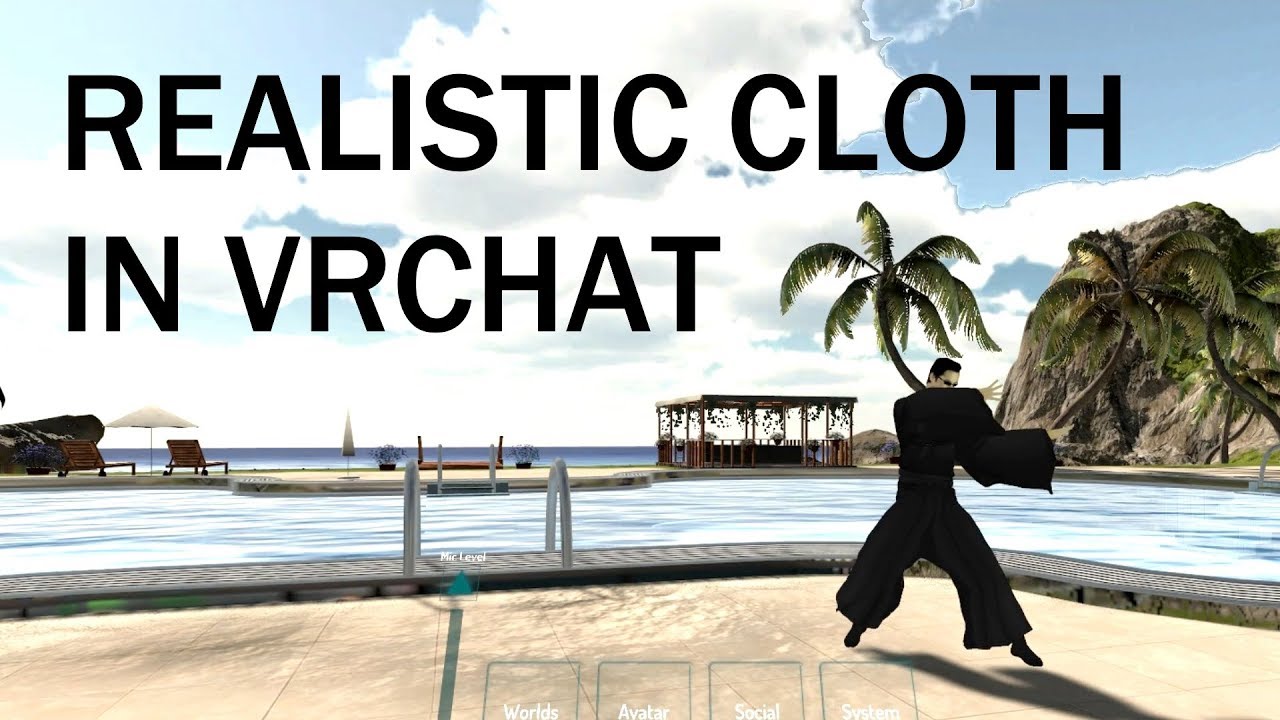
Dynamic bones aren't the best for skirts because the colliders are a bit "soft". You'd be much better off with cloth, because the colliders are much stronger, among other benefits https://www.youtube.com/watch?v=DnX226UdCFw
extra notes: - this might not be the right choice for your model if the cloth is stylized in a physically unrealistic way - like dynamic bones, this is not a...
woeful seal
yassss, that's way better
and capsules omg yes
annoyingly I have a single texture atlas
well it's just a bit more work i guess
slim sparrow
I usually separate the cloth meshes before atlasing
This almost always leaves the cloth part with only one material, saving space on the atlas
But having the same atlas material on two meshes isn't a huge deal
 normal skiff
My cloth just crashes Unity :x
slim sparrow
Yeah, Cloth crashes sometimes (a lot)
Especially if the cloth component is disabled or removed
normal skiff
Last time I had to manually delete it from the project in a text editor :/
It’s like once it starts happening it never stops
clear yew
same, i had to remove the fbx model from the project so the cloth component couldnt exist on it anymore
then i added it again on the same model and it worked fine
fuck unity i guess
woeful seal
I forgot to say earlier, thanks guys
lucid heart
Is there a good recipe how to map the gesture overrides in a intuitive way for rift? What expressions would fit best for which gesture?
clear yew
that's only by preference
a lot of people use rocknroll
since you only need to hold the button to trigger it
so you can't really trigger your animation by accident
Victory is a gesture that get triggered a lot by accident, so dont use it too much for big stuff
slim sparrow
@lucid heart that's preference as said earlier. Expressions are good because you have a lot of freedom with them
Rock 'n roll is triggered while scrolling through your menu unless you lift your thumb though
Avoid putting anything on fist
Since that makes your expression stuck if you sit down, and it'll trigger if you pick something up too
lucid heart
yeah, I was told that before
still six slots left
i have put just a smile expression on victory
clear yew
finger gun is pretty hard to trigger by accident
and it's not used like that, a lot of people replace it with something else
lucid heart
ok, good point
slim sparrow
I always put happy gestures on Victory as well
lucid heart
and a flip off on rock n roll
slim sparrow
Same
clear yew
i often use ifnger gun for that
slim sparrow
I put Ok hands on rock n roll as well
lucid heart
yeah, maybe I change it in the next version
slim sparrow
Some people prefer thumbs up but it's very unintuitive
slim sparrow
Is this an issue you're having or are you wondering how someone else did it?
 woeful epoch
hey im looking for some Shuffle dance or any other Rave dance emotes aka animations can someone give me some good ones?
slim sparrow
Yep
clear yew
Has anyone in here used Project DIVA models converted to MMD in VRChat?
To be specific I want to know how are you handling this emotion meshes.
Since it doesn't comes with a shape key to shrink it inside the head, what is your approach? Just leave it as it's own mesh and material so you animate the alpha in Unity or what's up?
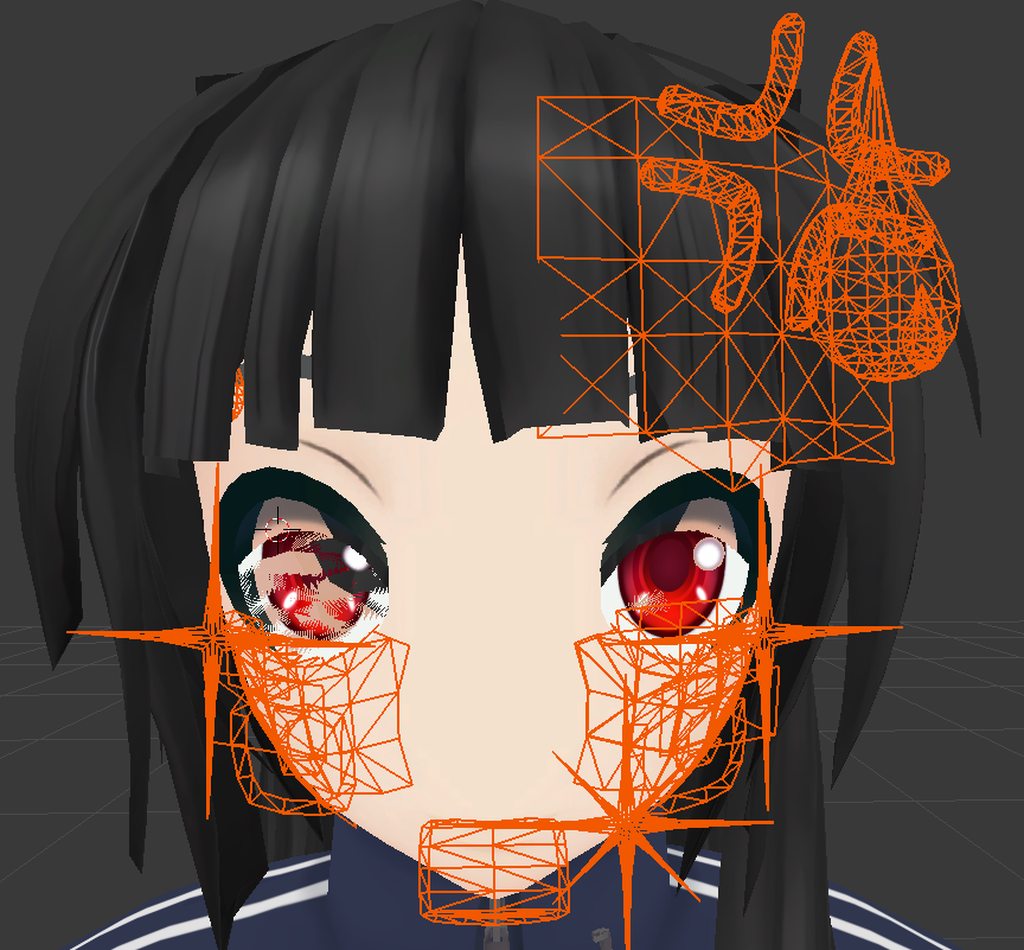



Yeah, that sounds like the best solution, I want to minimize materials and meshes.
 green delta
That would be the best approach yeah, but if you really don't want to you can possibly do some material trickery to achieve the same effect
lucid heart
is there a way to change the default hand gesture when idling without fucking up the rest of the body? I tried to change just the fingers, but then I sink halfway into the ground when in idle
clear yew
How do you get particles on items to appear? For some reason when I attach the system to an item, the particles disappear
slim sparrow
@lucid heart yep, you need to replace the whole idle animation
There's a sample one in the SDK
lucid heart
I tried that before, but the pose of my avatar was really weird when using that
like sticking the pelvis in front and bending the legs inwards
 fossil verge
does anyone know how to strip the model from this fbx file? I just want the animation so i can use it on other models.
the .anim is RIGHT there, i just cant seem to Ctrl+D like other people are saying.
fossil verge
and then Ctrl+D?
slim sparrow
If you expand the FBX and do CTRL+D, an error might pop up in the bottom toolbar
Probably invalid name or whatever
Anyway, change the name to something really simple, hit apply, then duplicate again
slim sparrow
No
In your assets
Expand the FBX so you see every individual mesh, material and animation
It's the arrow popout
Then you ctrl+D the animation on there
fossil verge
oH
I see it
you're a god
thank you so much
i never even thought about that
@slim sparrow the animation doesnt work though, i wonder if you have to rig it as humanoid beforehand
slim sparrow
You should yes
Unity will convert the contained animation into a humanoid animation
warm panther
anyone got any resources to get finger tracking working on a occulus touch controler for a model?
 fiery star
how do i make shape keys from blender as animations in unity?
 languid robin
quick question, is there a way to restart non looping animations without enabling disabling the gameobject
spring nova
Yes, you'll need pulsegate keys for that which you can create with the toggle props package. Search toggle in #development-advanced
warm panther
does anyone here actually use a kinnect for tracking? if so, is it the 360 one or kinect 2.o?
clear yew
Looking for someone to help me 1 on 1 with just a basic animation setup like just how to make a simple on and off animation
 plush zenith
Is the old way of doing rigidbody world particales still possible? Or do we have to use the ik follower?
 mental lance
I don't really know
clear yew
i'm still using rigid body and fixed joint
plush zenith
Gotcha, cool.
mental lance
I like how I'm just over here with nothing but a old computer and I can't do anything to get vrchat lol
covert hawk
Does anyone know how can i make an animation where a sound plays when i only move?
clear yew
i guess you need to modifiy the walking and running animation
so it activate a game object with a sound on it
covert hawk
so,i need to use a override walking animation that has sound in it
sounds simple enough,just need some walking animations then
what was that site that had animations and stuff?it was something with M
clear yew
mixamo
covert hawk
that one,thx
covert hawk
welp need to download fuse cc so i can actually map the character since mixamo automatic one flips out on characters that have tails and cat ears
slim sparrow
You don't need to do that though
You can probably delete the tail and cat ear bones and then reupload
Or use the standard mixamo model
You just need the animation, you'll be converting it to Humanoid anyway
Reusable on any model
covert hawk
k,guess il try it like that then
covert hawk
Well,that worked Uploading the original body of the character did the trick.
dusty plume
Does anyone know how to make longer animation link to a guesture? like atleast 2 second looping animation
slim sparrow
Activate an object that plays the animation
The object will then play the animation on its own
dusty plume
Does the Animation Game Object need a direct path to the animated properties? (does it function like the Animator in terms of itself become the root?)
clear yew
you put whatever you need to animate
under the game object
aniamte the game object and put the animation file in it
animation file set to legacy too i believe
disable that game object
and you just need to activate it with a simple hand gesture and it will play the animation
dusty plume
And no matter where the game object is it will always use the prefab as the root right?
slim sparrow
The "root" of an animation is defined by where you made the animation on
And if you use an Animation component, it has to be on the same object
So if you're animating from the perspective of a game object, the animation has to eventually go onto the same game object
dusty plume
Okay cool, Is there a way to test it in editor?
slim sparrow
Hit play mode
dense granite
Anyone knows why, when I add gestures and upload the avatar.
The animations are super slow.
But there is only 1 dot in the animation control.
Any one knows? Tagg me if you answer plz
jade bobcat
@dense granite make it a 2 frame animation and you should be good. 100% on frame 1 and 100% on frame 2.
slim sparrow
@dense granite keyframe on 0:00 and one on 0:01
Make sure you don't have a keyframe on 1:00
dense granite
It used to be that it cause issues, having a seccond on the time line xD
I gonna try, ty
slim sparrow
No, it causes issues to have a frame at 1:00
You always needed a start and end frame
On a related note, this would be less of an issue if gesture transition times had a fixed duration and not 4%...
Seems like the guys in charge of the animator controller have no idea what they're doing
clear yew
4% ? wut u mean ?
slim sparrow
That's what the animator controller says
At least, the example one in the SDK
Gesture transition time is based on the length of the gestures
If they made the transition time fixed instead, you could have gestures of any length at all
slim sparrow
Right now, transition time scales with animation length
clear yew
better fucking complicate every single thing
slim sparrow
Lmao
jade bobcat
@slim sparrow I said keyframe not time, do I have to clarify that much these days?
I probably should have said frame instead of keyframe.
slim sparrow
What?
I have no idea what you're talking about or why you're pinging me
I scrolled back a day and I don't see any of your other messages in this channel
clear yew
he probably meant to ping dragonriders but he fucked it up
@jade bobcat you fucked up BOI
jade bobcat
@slim sparrow, @clear yew no I replied 4minutes before Rokk's post 8minutes ago. I was just commenting on that. dont worry about it.
slim sparrow
I think Discord acted up because you haven't posted in this channel in a day
Or maybe Discord is showing me the wrong stuff
jade bobcat
oh interesting I can see my post. I cant upload images here so I cant show you.
its fine though you gave a solution so all is good.
dusty plume
@slim sparrow @clear yew So I've tried that method of turning the game object on with an animation inside, in-game it seems to be glitching out and attempts to finish the animation, even though the animation isnt playing properly
This is what the game object looks like
This is the guesture animation triggering it
And this is the Animation its attempting to play
 short maple
This is somewhat an animation question, but how do you set a light to one of the finger emotes so you can turn it on and off? This is mainly so that if my friends are walking through a dark area I can use my avatar as a way of light, lol.
The light would also be a looping animation I guess until you turn it off, so I'm not sure how you would do that.
dusty plume
For a toggle, it will be a bit complicated, however making it just turn on from touching a gesture would be easy 😃
and when you release the gesture, it will turn off
dusty plume
For that method, its as easy as making a 2 frame animation of just enabling a light object.
short maple
ive seen some people use those to animate their stuff rather than the normal emotes like dancing and pointing.
ah
short maple
XD
dusty plume
The Shift+F keys are gestures lol.
short maple
yup those ones
 lime cove
and when you do get to it please make sure to make a copy of your avatar where you'll be editing the anims, otherwise it'll break!
short maple
I have a few animations set to a custom override, just wasn't sure if implenting a light in an animation would do anything weird lol
lime cove
seen it happen so many times, breaks my heart
short maple
yea I watched Tupper's tutorial on that and I'd hate to do that lol 😬
don't wanna break models lol
lime cove
nah, you can do pretty much anything on a gesture, except it being permanent