#animation
1 messages · Page 71 of 1
 slim sparrow
If you have more legs, you also need to animate those manually. I heard custom walks are difficult in VRC for some reason.
 twilit turret
Hey, I was working on mmd avatars facial expression's when you trigger it with a certain command. I noticed that the hand goes into this C form, so I wanted to change the fingers postion while doing this. However everytime that I want to change fingers rotation I get this error message and it resets https://gyazo.com/ee780b535501f89d9906e00ea85845fd What am i doing wrong?

 white herald
If you click the error it should say what script is breaking, might help figure out what plugin
 gentle vortex
hi, im trying to make facail expressions iv followed a video tutorial which has u duplicate ur avatar make the animations on there and then duplicate the custom over ride and drag and drop the animations into the gestures. for some reason when iv vrchat none of them work at all iv dragged the custom over ride into the descriptor but no idea why it isnt working :/ been trying to figure it out for a couple off hours but i have no idea lol xD
twilit turret
I checked the error message scrolled down and it says that "Keyframing for humanoid rig is nor supported!" so probably need to change the rig from humanoid to legacy in order for it to stay in place, tho I am pretty sure I am wrong xd
white herald
oh, @twilit turret you can only animate using muscles instead of rotating bones themselves, for humanoid. don't change to legacy
lookup the muscle editor i think
slim sparrow
Ah, that makes sense actually. Was thinking the same thing
Muscle Animation Editor is good, but you don't need it necessarily. You need to pose the fingers by using the animator properties (finger stretch, etc)
white herald
@gentle vortex probably just missed a step somewhere, with what you've described should be working
yeah dunno i animate in blender
slim sparrow
Animating in Blender also works, the imported animations will automatically be converted to humanoid rig configuration
But for poses, I greatly prefer to use Muscle Animation Editor. It's better not to make animations from scratch with it, but poses are fine.
gentle vortex
hmm okay ill redo it all step by step 😄
white herald
auto-ik in blender makes posing fingers effortless if the rig is set up correctly
gentle vortex
also they worked when i accidently placed them into idle lol xD
 remote blaze
@slim sparrow yep! and I did just that
I moved the leg properties in the animator for my 2 assigned legs
and then I moved the other bones with transforms
and the animation works in the unity preview on my humanoid model, so it should be fine - but in VRC it breaks sadly
slim sparrow
Well, that's weird
So only your humanoid legs move?
Who knows, maybe VRC does actually ignore all non-humanoid bones inside walking animations. That would suck actually
Could you show me the override controller setup?
Like, a screenshot of your avatar descriptor, and a screenshot of the override controller config
 sand wigeon
My animation is able to have audio few times then the audio just doesn't works anymore in the animation ; (
gentle vortex
out off curiosity would you delete the duplicates you have made? i put the animations into emotes to see what happens and it sort off looks like its trying to use the duplicate model but since its hidden nothing is showing
 torn pawn
@slim sparrow i have to do it for the anim state freeze, everything has to be child of "Armature"
i mean i can always try with the ik follower
slim sparrow
IK follower apparently works fine for some people
If it has to be a child of the armature, you could cheat the system and just put it in the armature root (not in the hips)
torn pawn
y my animator is on "Armature", it's sucha mess after I added jukebox, now i can cycle through songs in the spawned jukebox
and need to think ofbetter way of enabling clothing
slim sparrow
Stencils
torn pawn
i mean, for now it's ok what I've done, i play song on openhands and enable clothing on openhands, and i can do it only when the jukebox parent is active
maybe should leave it that way 🤷
twilit turret
@white herald Oh, my bad, thanks for help!
 clear yew
Im new to animations and I finally got my gun to work but i dont understand how to make it disappear from my back to my hand is there a video or forum i can learn how to do it.
 white herald
just do the same as you did to make the one gun appear, but in reverse, disable the gun on your back in the animation
remote blaze
https://i.imgur.com/RmUQqhI.png @slim sparrow here you go
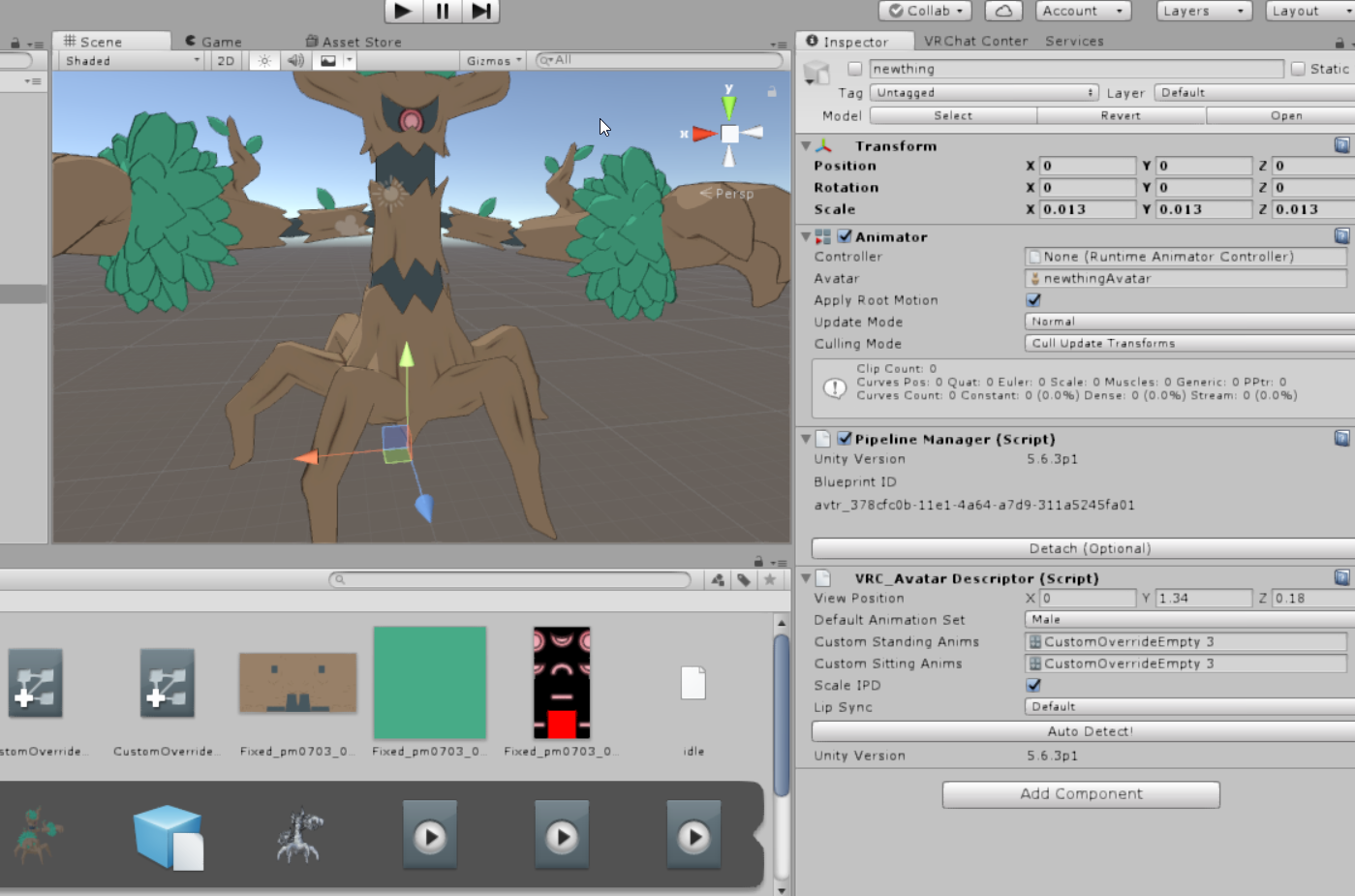
the front two legs are the actual humanoid-assigned legs
and they animate like I want them to- in a spider-like fashion
however the other 4 legs aren't assigned to anything, but are still animated
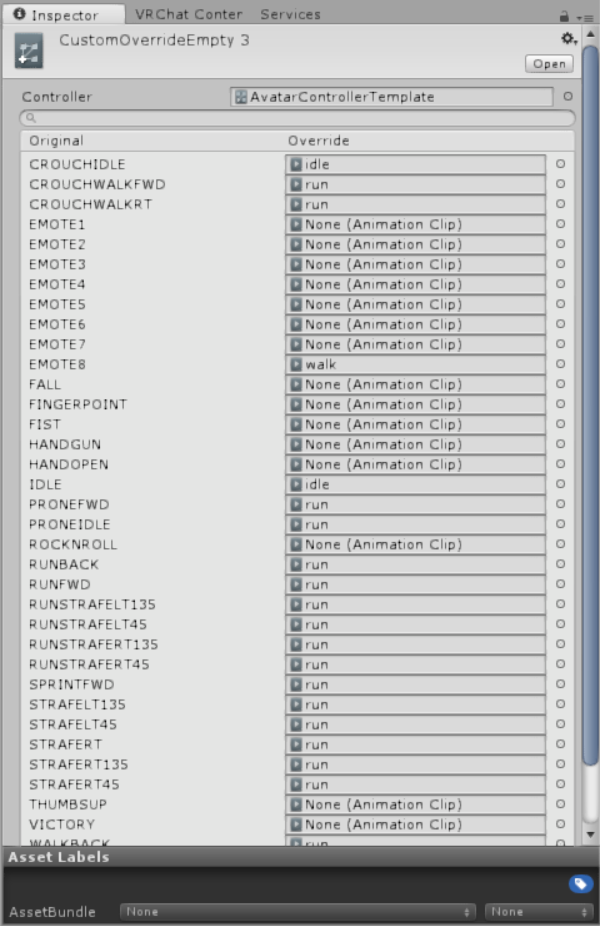
the animations displays correctly in unity, but VRchat kills it
If you're online, I can quickly invite you and you can take a look
slim sparrow
Not online rn
torn pawn
looking to make a very small and mild rain effect, what would be the best way to not drop too many frames for people while particles having world collision
slim sparrow
Low quality collision and billboard particles
torn pawn
mhm I'll try, shouldn't be too bad, might split it into 3 systems and one has the subemitter 🤷
 red lodge
hey how do I add a video to an animation? saw yesterday someone with an animation that showed a hole simpsons episode xD
 royal summit
Probably made the whole thing into a sprite sheet and then used particle systems or that flipbook shader
 pliant plank
Either they somehow animated the whole episode with sound and everything, or they bypassed something on the SDK (illeagle)
 gaunt sundial
how do you add a audio file to a custom animation?
when i try to add it it plays the sound when i chanh avatar
not when i am playing the animation
royal summit
Make sure the audio source is not active then make it active in the animation
gaunt sundial
@royal summit i did that but its not working
royal summit
Hmmm. Is it set to play on awake?
 rough eagle
So I'm trying to make a Reynn avatar from world of final fantasy. With a Tama onto her head just like in the Game... But I ran into problems. The Tama model I have has a bazillion facial expressions one on top the next and came with its own .dae... Any advice?
My guess was to somehow make each piece invisible and then shown when its needed for the animation?
 placid vault
Anyone know how to get an object in an animation to have physics? I saw someone shooting a gun yesterday that had ejected shells with physics on them, bouncing off of objects and falling on the floor.
All of my gun animations just have the ejected shell animated itself down below my feet and then disable its mesh renderer.
 vocal zinc
someone was talking about particles that react to sound do anyone know something ?
 fervent bone
Question! I made a happy eyes shapekey emote for my avatar, but when I play it in world the eyes sometimes change slightly and cause the lowerlid to clip into the upper lid. This is despite me having created two lowerlid animations for the left and right that only move a vertice inside the head very slightly and assigning that to the lowerlid animations in CATS. Any ideas why this still happens? D:
slim sparrow
@placid vault particle system
It's almost certainly just mesh particles on the gun, you don't want to use actual objects for this
placid vault
Didn't think of that. Thanks
slim sparrow
Particles can have collision and gravity etc
sand wigeon
how do make a particle animation stay in one poisition and u can move around
 surreal garden
how do i get it so with a particle system when the particle dies or collieds with something it spawns the sub emitter, i can only get it to work with spawn on birth
 normal skiff
I didn't have to do anything special for that one, it just worked
 woeful rapids
Has anyone tried and successfully had a single object be controlled by 2 Fixed Joints with different Rigid Body settings for each Fixed Joint, or a way to toggle constraints?
 olive yacht
I haven't seen anything on it anywhere, is it possible to have more than 8 emotes on a character?
woeful rapids
@olive yacht Technically there is a way using multiple gestures at the same time if you have your hands and face with a separate mesh from the rest of the body. Although doing any of the gestures on their own would just cause your head or hands to go invisible
olive yacht
Hm. So it requires that workaround then? No way to actually just add an emote to an override?
woeful rapids
I seriously don't think there is any other way
I can only pray they add separate left and right gestures in the future.
olive yacht
Blargh, desktop use is so limited
Requires so many workarounds to do anything interesting
woeful rapids
Using VR and I feel limited too lol
I'm trying to make a remote controlled car on my avatar
especially if they bring back working chairs
 languid lark
well this person did very well on animation for tranformation https://www.youtube.com/watch?v=6kRIG00Pm8Y
響モデル (Hibiki base model):エボシさん ワールド (Current world):butadieneさん
 signal dove
Do you need a different avatar controller for generics?
 cunning torrent
Ray has a bunch of different models, but they all use that loli avatar as a base.
 dense vale
Does anyone know how this person did the freeze effect 30 seconds into the video?https://www.youtube.com/watch?v=6BKkfePXAPU

Subscribe to this channel to get your VR Chat BEST MOMENTS daily. We will upload videos everyday, even every hour to provide the best videos for you. So, cli...
woeful rapids
@dense vale some sort of shader he placed in that location as you can even see some guy at 43 seconds walks into it getting himself covered
clear yew
How do world particles work nowadays? I know there used to be a way to make it work with rigid bodies and fixed joints to a game object but they changed it right? Trying to get particles to trail a sword but they don't move with my sword at all
 obsidian vigil
well @clear yew i dont know about the new way, but id do it by making an empty object under your armature, putting the particles in there, then putting a rigidbody onto your wrist, setting the particles to world and animating on the empty object
clear yew
Aye, tried that. Didn't seem to work though /:
The particles spawn from my body and they move when i move, when they should be moving with my sword, on Unity it works perfectly, just not in vrchat
obsidian vigil
damn vrchat
clear yew
https://gyazo.com/fb8c51743b2a549938704a14a4217d3d tis how it should look, but the feathers come out my ass
 woeful rapids
I literally just made a remote control car right now on my Avatar. I can confirm that Fixed Joints work 100% but seem to not be in the right location if the joint itself is toggled and off. but the child of the fixed joint works fine. Through my car I also discovered there seems to be a ranged limit on Dynamic Bones working
obsidian vigil
umm 1st
holy fucking shit
amazing
luv it
2nd thing, it looks fine...
i dont get why it wouldnt work
oh wait
@clear yew Electro might be right there
do you toggle your fixed joint?
at some point
woeful rapids
Fixed Joint should be on 24/7
clear yew
Yeah, the game object is always active
woeful rapids
put the object under the fixed joint and toggle that
clear yew
I just have the particle effects to toggle on
obsidian vigil
well, keep the particles always active
instead animate the emission
keep it at 0 as default
then animate it switching to a value in your anim
woeful rapids
what's exactly the problem? is it not following the sword or something?
obsidian vigil
could you try keeping it always on and look if that makes a difference ingame
if yes, you could use my workaround
woeful rapids
hope u didn't give it gravity or some sort of weight on the fixed joint
clear yew
I did not
woeful rapids
and have all the sword rotation and position locked
clear yew
Yeah it works locally but on world it doesnt @obsidian vigil
obsidian vigil
thats not what i meant 😛
im talking about disabling / enabling the particle system itself
keeping it always on
woeful rapids
if it's at his feet then that's not the issue
clear yew
oh yeah, tried that
clear yew
Nothing, it doesnt even recognize that its on my wrist

 obsidian vigil
try doing an empty object inside an empty object
i dont remember why i did it but iirc it fixed mine
well, why the freeze thingies
never used them
woeful rapids
if u have gravity or whatever on the other object and it moved then it will move the wrist. that's why they are locked
well Mitch it looks set up right to me so.... no idea
obsidian vigil
well... i have that
but the only thing that happens is that my wrist starts falling in play mode
no issues ingame
but yeah, the setup looks right to me
clear yew
Mmm I'll continue to bash my head against a wall while trying to figure it out. Cheers guys
anyone know how to get a generic animation to not loop?
obsidian vigil
you could ask @devout cave he helped me with mine
woeful rapids
only thing I am wondering for myself is why the hell does the Dynamic Bone on my car stop working when the car is like 10 meters away from me 😦
clear yew
does anyone know??
woeful rapids
I blame VRChat for my problem because the car works fine in Unity 😦
clear yew
Aye VRChat doesnt really like rigid bodies and shit. When I made a custom 2B I wanted my A2 model to follow her as a companion so I spent ages rigging up fixed joints and rigid bodies only for it to not work in VRChat, it'd follow the movements perfectly but when I went idle, A2 would just spaz out of control
obsidian vigil
Follow as in fly after you or move with your avatar
obsidian vigil
well, would you really need fixed js for that
i probably wouldve added it to the chest or sth like that and then just animate it
obsidian vigil
i always use wav cuz ive never had trouble with that ^^
and audacity doesnt need any extra stuff to convert to it
 jade rain
well i took a glock noise into audacity to lower it a little
obsidian vigil
yeah
jade rain
it is a fully auto g18 sound
so ye i am reducing it a smidge
are we allowed to post sfx here for purposes of animation
 woeful rapids
i always just used ogg
jade rain
🤔
obsidian vigil
use dem 32
obsidian vigil
yas
"32-bit floating reduces digitizing errors to almost zero is is really good for massive production and special effects and sound management.
However, it's usefulness declines outside of Audacity. Not everybody supports 32-bit in the Outside World." quoted from the audacity forum
@jade rain
so 16 bit may be the way to go, but it can have errors
jade rain
hmmm 🤔
jade rain
aye
obsidian vigil
^^
 abstract pebble
Aye anyone know how I could make an effect like from infinity war the one at the end I’ve been trying to figure it out
slim sparrow
A shader, just don't know which one.
You have two meshes. Your real body and the other one you use for the effect
This second mesh has the effect applied to it and is disabled by default
In a gesture, you disable your own mesh/skinned mesh renderer, and enable the other one
signal dove
@remote blaze I don't have a solution for you, but I've run into the same problem before. VrChat seems to completely ignore bone animations outside one assigned to mechanim. Except in emotes and gestures.
I have a Charizard that's supposed to low fly when it runs, but the flapping wings just stay still
remote blaze
I knew it
slim sparrow
But I have a custom walk animation where my wings flap
There's one more thing you can do, but it'll probably be slightly horrifying
Isolate the part of your animation where the back legs move
remote blaze
Hit me with it, pappy
slim sparrow
Turn that into a legacy animation and put it on your avatar, on an Animation component.
Have that component disabled by default. Enable it in your walking animation
remote blaze
Oh damn, that's genius
slim sparrow
¯_(ツ)_/¯
remote blaze
I live for Jank
signal dove
I'm going to see if this issue has a feature request attached to it
slim sparrow
Now I get why that one guy said "oh yeah, I use shape keys to animate my back legs lol"
remote blaze
I'll give it a try tomorrow after work and let you know how it goes
slim sparrow
You could also joint the legs together
slim sparrow
Yeah, I know
It's probably not as good of a solution, but it's better than no movement at least
remote blaze
so it's not that easy to make some bones replicate others
I'll try the first solution and Worst case scenario I'll try the latter
slim sparrow
It might be this one

Might
You'll probably want a gradient that goes from top to bottom
abstract pebble
I’ll check it out when I get home cheers b
gaunt sundial
is there a way to up the volume in a animation ?
clear yew
Message edited on 13/02/2020 (non-US date format) to be clearer and give more information to users.
If at any point you forgot to duplicate your avatar when creating an animation, you will find your model in the dreaded "bike pose". Fear not, young creator, the solution is actually fairly simple.
The main way to fix it, is to simply use the T-pose animation file that you can find in the vrchat SDK.
You can either follow the steps in this (probably outdated) album https://imgur.com/a/bUpUHpI - open the link to see all steps.
Or simply follow this video from RetroGeo which is basically the same steps as the album : https://www.youtube.com/watch?v=Rs1gL7WG6eI
(check his other videos too, you'll learn a lot of cool new stuff for creating animations)
The other way is to use @flat cipher tool : https://github.com/rurre/PumkinsAvatarTools
The instructions about the tools can be found in the wiki, link is the description of his git.
I also strongly suggest to have that tool in general, which can help you automate a lot of the steps for creating avatars or making things a lot more easy to do.
One example, if you use the same base model but only change the clothing, there is a tool to simply copy the same dynamic bone settings from a model to another, making it less of an hassle.
Enjoy
 muted prairie
clear yew
muted prairie
clear yew
anyone know how to make an aniimation not loop?
 ashen sedge
Select the animation clip and untick loop time
clear yew
thanks
surreal garden
Hay has anyone ever see someone who had a clock over there head that said how long you have been in a map? I really wanna use that on my main, also what shader scrolls and accepts alpha channel?
clear yew
no
clear yew
So I have a question, how do I turn a VMD or SFK file into a useable animation file
Wait
Maybe a pin just answered me
Haha just kidding, it just broke my brain
sand wigeon
How do you have a animation that stays in a position while u can move around and the animation will not change its position?
 frosty pendant
You mean a animated object?
If so you have to use rigid bodies and a fixed joint
pliant plank
@clear yew ye put the animation into the model in blender, export the model with the animation (this will take quite a while), import the .fbx, rig the model as humanoid, export the animation in unity with ctrl+D(or shift+d i keep forgetting which is which)
 bold loom
I keep trying to rotate ears in an animation override, but they keep ressetting to te defualt positions, any ideas on why?
clear yew
@pliant plank I found a video that explains it a bit but my brain is too smooth to follow it
clear yew
You can do it
obsidian vigil
well, i just saw a video of someone playing around with particles and i want to do something similar. From looking at it i think its a combination of initially spawning world particles once, then using the particle attractor script to bring them back together. Any instruction on how to use the particle attractor? https://youtu.be/jL88WV3ifiI?t=113

dydjec went 0/8 as garen 🎬Edited by senzeeh ‣ https://twitter.com/senzeehpai Produced by spooks ‣ https://twitter.com/SpooksOP Outro Music: https://soundclou...
 molten elm
So uhh, any reason why my gesture animations are glitching out for two of my custom ones, including slots I haven't even filled yet. It's acting as if I haven't put two frames for the gestures but I double checked all of them, I've just never had it do that with gestures that I haven't touched yet.
molten elm
You know the customoverride?
If you don't fill in some of the gesture slots it still makes you pose your fingers, and it's acting like I only have 1 frame for those gestures, that's the best I can explain it if people know about doing custom gestures
obsidian vigil
has never done that for me
slim sparrow
You mean it lasts 1 second?
I think that can happen if one of your other gestures is too long
You should be leaving all the slots empty anyway
Only fill the ones you're going to override
If you don't fill them in, it just uses the default animation for that slot. That's the point of the override controller.
I really hope people aren't actually filling in every slot with the sample animations provided, lol.
slim sparrow
Anyway, if one of your other gestures is too long, it might interfere with other gestures too
VRC has this weird thing where if you do a gesture, the next time you do another gesture, you'll briefly see the previous one.
If this previous one is too long, then you'll have weird transition times
obsidian vigil
that explains a lot...
slim sparrow
I think they're using some very hacky workaround in order to give Vive users the latest used gesture on the trigger or something
Since it works smoothly if you do a gesture, go back to neutral, then do the same gesture again
slim sparrow
On a related note, if you put an object enable on Fist, it won't turn off until you do another gesture.
@obsidian vigil you're on Vive? There's a movement option toggle
In the options
obsidian vigil
when i walk and press the trigger im stuck with a random gesture and it never goes back to the fist
until i leave the room
and rejoin
@slim sparrow thb, i like the new movement system but that feature is just annoying
because you cant revert it
its just stuck on gestures and wont go back to being a fist
molten elm
what I'm saying is
the gesture slots that are empty are still glitching out
doesn't make sense
obsidian vigil
maybe delete the override and copy the one you get with the sdk
molten elm
not only the empty ones but even two out of 4 of the custom gestures I made are doing the same thing pffthaha
slim sparrow
@obsidian vigil I'm pretty sure you can still go back to fist though
Just not sure how
molten elm
I'll just try doing that yeah
obsidian vigil
if you find out please tell me 😛
frosty pendant
@obsidian vigil you can revert it to fist by putting your thumb in the center of your touchpad and then pull the trigger. The center is fist for me at least
molten elm
I'll admit defeat right now
slim sparrow
Tbh the hand controllers for Oculus are a lot better for this game than Vive
molten elm
Embarrassed at myself
slim sparrow
Only thing is that you can accidentally activate gestures. I always get a really confused look on my face when I'm AFK
molten elm
there were still ticks at the one minute mark so I missed those completely
then again, I was really tired last night hhhhh
molten elm
when you're so sure that you're doing it right that you miss the basics
slim sparrow
Lol
You can usually check that by looking at the timeline
The line between 0:00 and 0:01 should be white, the rest after that is gray to mark that those frames don't exist
Also if you don't use "add property" and instead hit record mode, it'll only add 1 frame by default
molten elm
Yeah I know that, I think my eyes are just horrible when I don't sleep well
obsidian vigil
Record mode can be extremely annoying tho
slim sparrow
If I have complex shape key setups for the face, I usually just hit record mode, select the body mesh, and manually set blend shapes. So much easier
@obsidian vigil hit the lock button
molten elm
and I haven't slept very good for weeks pffthaha
slim sparrow
It'll prevent the animation window from jumping to another object
Happens a lot with accessories that have their own armature
obsidian vigil
ive had countless times where i had record mode on, didnt notice it, messed with stuff and poof, all gone because it was put into the animation instead of being applied permanently
slim sparrow
Ohh, like that
That's usually an easy fix, like transforms
Just copy the component, stop record mode, then paste component values
slim sparrow
I do that if I have to adjust dynamic bones in play mode, too
Since otherwise they would just revert
 tacit frost
I keep having the issue where my particle system activates in the animation window, but even after overriding the set gestures with it nothing happens in-game, I don't really know what I'm doing, does anyone know something I might have missed?
 little sparrow
Anyone know if we have to have the new SDK to use the new world particle system or does it now work with the older SDK's aswell? The new SDK wont let me upload avatars. Says it can't find them
clear yew
what settings for gameobject to drop it in world space?
clear yew
no, just the gameobject. i know how to make particles with fixed joints
but i need gameobject to stay in world and not be attached to my avatar
i have planned bigger animation involving configurable joints but first i need to know how to drop objects in world
little sparrow
Yeah, I haven't done anything that just drop besides claymores
little sparrow

This is my old setup with the old SDK to make my claymores stay in place
But not sure how it works with the new SDK
Should be along the same idea for w.e you want to do
tacit frost
could either of you help me for a sec, I want to do something similar to what you're talking about rn
little sparrow
whatcha need?
tacit frost
I've been trying to have a particle (which is just a textured mesh) pop-up on my world position when i use a gesture, but in-game nothing happens
little sparrow
You want it to pop up and stay?
or follow you around as you move?
I haven't messed with billboard particles much like that.
tacit frost
I want it to stay until I use it again, in which case It would spawn again on my new current position, and stay there
I've kind of got it, but even though the animation works in the window, nothing happens in-game, I can't even get it to activate
little sparrow
How are you activating it in your animation?
tacit frost
lemme screenshot real quick
little sparrow
kk
clear yew
okay. turns out u need to attach fixed joint but dont connect anything to it and object will stay in place (because the anchor is at 0,0,0 of the object if nothing is selected)
tacit frost
well I'm having a little issue sharing the screenshot, but basically I have emission turned off naturally, and the animation just turns it on
I really know nothing about animation though
little sparrow
sec
ill show you what i did


That last part of the animation changes emission rate to 1
so it spawns it and stays
Till I "Detonate"
So you just need it to only have 1 at a time no matter what you do, probably with particle counts
I can spawn 10 claymores at once in this all in different spots and they don't move
or set it to kill on another animation de-spawning the current one
tacit frost
lemme check your settings and see what I maybe screwed up
https://cdn.discordapp.com/attachments/446773724377776152/446774010693550091/UNITY_SCRN1.png @little sparrow


does that look right?
little sparrow
make sure both frames of your animation are identical
so copy over the first line of the animation and paste it over
and yea that looks right
not sure if it'll work how you want it to with this though. That's the only way i've done it
tacit frost
wait when you mean the first and second lines, do ya mean just make the whole thing have emssion rate set to 1 or what
@little sparrow
little sparrow
00:00 and 00:01 should be identical
tacit frost
oh alright
I'm gonna export and see if it works THIS TIME
that'd be pretty great, thanks for your help
 sweet saffron
is there any information on how to get bullet collision to work? 🤔
 violet kraken
@sweet saffron on the shot activate collision on the particle system set the first thing to world and zero bounce
Or if you want bounce leave it active lul
slim sparrow
That would be Decals
Basically, you can't do that in the traditional way. Your best bet is a subemitter.
Spawn a billboard that faces one way
sweet saffron
any examples of what it may look like, first real time playing with particle system 🤔
slim sparrow
No examples, sorry. Just look up some tutorials on subemitters. You'll want to spawn the decal on either collision or death of the particle
sweet saffron
cheers
tacit frost
hey @little sparrow are you still around, it'd be easier to ask you about this real quick
if not, is there anyone who can help me with an issue, it's probably an easy fix
little sparrow
Sup?
little sparrow
Yeah, i'm trying not to kill myself with this stupid gun
tacit frost
my thing mostly works perfectly except for 2 issues, the bigger one is the one I need help with, currently,the particle will spawn on my position and stay in that world position ONLY for however long i set the particle's lifetime, but I want it to stay there forever until I do the gesture again
when I try the gesture again when the lifetime is still going, nothing happens
little sparrow
You'll need a separate animation with a trigger to kill the particle
and then you'll have to spawn it again
I can't remember how to do the trigger off hand
Basically you want it to set the lifetime of the particle to 0
tacit frost
would I just use another gesture animation, but with this one just set the lifetime to 0?
or is that not what you mean
little sparrow
Try that, not sure how i did it before
There's a special trick that i'd have to go look at to remember how to do it if that doesn't work
tacit frost
alright, the smaller thing is that I just want the particle to face the way I am when I spawn it, rn it always looks the same way wherever I am, if you know anything about that that'd be cool, but it's way ;less important rn
wait, i fogot how to make a new animation, isn't there a button somewhere?
nvm I remembered
 signal iris
can anyone help me? Im trying to make an animation and keep a bbq grill in one place while I can move away from it and walk away using a game object. I cant seem to get it to work/show up in the animation tab without being attached to the model
royal summit
I got a BBQ I can walk away from lol. Have the game object attached to the avatar but have a rigid body in the object with no gravity and have drag set to a really high number. Also add a fixed joint but don’t connect it.
Their is better ways out there to do this tho. Like being able to reset the objects cords but I’m to lazy to do it
signal iris
lol its all good man I appreciate the help
so attach the rigid body to the game object or to the actual grill object?
royal summit
Have the rigid body and fixed joint components in the game object but don’t actually link the fixed joint to anything
signal iris
gotcha
royal summit
Have the game object hidden and activated in the animation. If u have the game object always active and the prop hidden then the prop will just appear at the centre of the world
signal iris
ah okay cool thank you
clear yew
Can you send a particle system from one bone to another somehow via rigidbodies? Think passing a world particle from one hand to another so it leaves a trail between them rather than just making one disappear and the other appear.
royal summit
Not sure but it may possible with turning on a rigid bodily with constraints in a animation
tacit frost
sorry for the delay @little sparrow my game kept crashing, any chance you could look at that thing you had for me? If that's too much to ask I can try asking someone else
clear yew
I was considering if I could animate a change in which rigidbody the joint was referencing, if the particle would actually move when I activated the rigidbody switch via gesture, and if it'd have to vanish and reappear or if it'd leave a trail as it switched rigidbodies.
I'm at work, so I can't check. I was just brainstorming.
royal summit
I would imagine that the particle would just flick over quickly so u would probably need to adjust the trail render to spawn new trails over a really short distance
clear yew
hey guys
any1 here
what settings and type of texture do i use in the distortion shader to get the shockwave effect
?
tacit frost
if @little sparrow isn't really around rn, do any of yall know how I can make my world particle deactivate on a gesture/ respawn on a gesture (I have it set to spawn on my current world position, and I want to be able to make it dissappear and spawn again on my new position if I reactivate the gesture)
maybe I didn't explain it well, but hopefully you get the basic idea of what I mean
royal summit
I’m not sure cuz I’ve never tried it myself but maybe have the spawn animation make the particle have 1000 lifetime and then have the despawn change it to 0.1
royal summit
Or maybe have the despawn turn off the emission
little sparrow
@tacit frost My bad, not on the right PC atm, watching some shows with a friend. Shoot me a Discord Freinds Request, message me and i'll leave it there so I remember to check it.
as for it facing towards people, theres a way to do it like the nameplates in VRC, i'll have to ask my friend about it, but he does it a lot
Turning off emission wont work to despawn, it's the whole reason you turn it on to keep out a particle. Say I had bullet shells, and turn on emission to eject them while firing, they'll stay on the ground even though i stop using my animation to fire, even though stopping the animation turns off the emission again
There's a way to do it with triggers, you set the trigger to kill the particle on a separate animation
clear yew
World particles typically deactivate when you let off/toggle off the gesture and respawn on the emitter when the gesture is used again.
If you use gameobjects on joints it's a little more difficult.
As the rigidbody follows you relative to your position when you deactivated the gesture.
If it's always active, just deactivate it via gesture. It works the same.
Unless you're using a combo gesture. Then I can't help you. I haven't figured out how to deactivate something via only combo gesture.
@tacit frost
@proper zenith Did you make it a legacy animation?
👍
 silver charm
I'm pretty new to particle systems, working with my first one; is there any way to 'disconnect' the particles from their system? so like, i have a gun shooting a stream of sprites from a texture sheet, but when i move the gun the stream moves as well even if it's already out of the gun. is there a way to make it so once it generates, it stays on its trajectory even if i move the gun?
tacit frost
@clear yew I'm not using joints or rigid bodies or anything, but the thing won't ever toggle off, it just stays there
I'm also tried deactivating it with a second gesture, but I guess I did it wrong/that won't work because nothing happened
 dull wedge
Could someone explain to me how I set up custom animations on a sitting override?
dull wedge
@silver charm Parent all of your world particles to an empty game object, then add a component to the game object called VRC_IK Follower. And of course, make sure your particles are set to simulate in world space.
clear yew
@dull wedge @silver charm Unless they updated the IK Follower component, keep in mind that it only works properly when your IK is solved. As in when you're standing still.
Rigidbodies and joints are still the best method for world particles.
Since you're doing projectile particles, you'll need to have "Is Kinematic" checked on the referenced rigidbody.
@dull wedge Try just making a separate overrider with different animations then dropping that in the sitting slot in the VRC Avatar Descriptor.
@tacit frost I'd have to see the specifics to see what the problem/solution may be.
 rocky copper
is there a way to switch textuers for a material in an animation?
rocky copper
is there a tutorial you can guide me to or is it easy enough to explain?
clear yew
You'd have to switch the entire material.
rocky copper
hm
clear yew
And just have the new material set how you like.
rocky copper
wait so do i use material reference?
clear yew
The only way to animate a material change is to drag and drop the new material from your projects folder into the slot you want to change in the skinned mesh render WHILE the record button is on in the animation tab.
clear yew
At least, that's the only way I know.
tacit frost
@clear yew https://cdn.discordapp.com/attachments/446773724377776152/446890452059422720/UNITY_SCRN_3.png Here is what I've got to make my particle show up, (the particle being the SCP) you can also see the particle's settings off to the side, however, when I use the same method to turn the emission rate to 0 for the deactivation (I've also tried other methods other than emission rate) nothing happens in game, the model stays there
 clear yew
Is SCP the Mesh? It's a mesh particle?
tacit frost
I mainly just want the SCP to appear on my position when I use a gesture, then reappear at my newlocation if I use it again
yes
it's a particl, I canopen that tb if you need
clear yew
The problem with mesh particles is that they're rotation locked and it's a pain to figure out how to have them face the proper direction.
But I have a sword that I do that with.
Well, the sword is still rotation locked.
I'd need to use a state machine I think..
tacit frost
yeah I've noticed the rotation lock in game, but I'd like to just get the main function working first before I delve into anything else, UNLESS there's an easier way of doing this
tacit frost
👌
https://cdn.discordapp.com/attachments/446773724377776152/446892985527959552/Screenshot_84.png There's the render tab, I've not actually touched the shape tab at all
 clear yew
I had to set the shape tab to mesh renderer and set the mesh in the shape tab to none.
I think.
BUT
It may be easier to make your mesh a gameobject on an empty joint.
The issue with that is that 1: it shakes a little as you move around. This will look worse for you than others, but others may still notice it.
And 2: You'll have to go back and pick it up before you deactivate it.
But, it won't be rotation locked.
tacit frost
well, given what I'm actually trying to use it for, I'm not sure how well that'd work :/
clear yew
Well, you have to pick it up for the sake of reliability.
tacit frost
I want to be able to place him in a room, freak some people out, and when they turn away, move him to my new location to make it seem like he moved, my actual player model is invisible, Iintitially just had him as my own PM but I couldn't really tell when people were looking at me, which presented some issues
clear yew
Say you drop it as a gameobject and walk 20 feet away, when you deactivate it, it'll still be 20 feet away and it'll follow you from that position until you reactivate it. And when you do reactivate it, it'll be 20 feet away still.
You can just drop it as a world particle, like you were trying to do.
I think you should try what I mentioned.
Just keep in mind that it'll be rotation locked.
tacit frost
so is there not a way to just make the particle reset? I've already got him spawned in and he stays, what I need is to make him just come to my new position when I use a gesture or something simple
clear yew
The alternative, which would work perfectly, is a toggle system using state machines. Buuut that's pretty advanced .
He should reset when you let go of the gesture.
tacit frost
the way he is rn, when I use the gesture once he just stays active until the particle dies, which is set at like 1000 seconds
I don't even hold it down, I just have to use it for a second
clear yew
I can actually see the screenies on my desktop now. xD
You should be using a Parent gameobject with a joint and rigidbody on it and probably a rigidbody on your hips.
Typically a world particle is set up that way.
I'm not sure how important it is that it be above your armature, but you should try that to be safe.
tacit frost
yeesh that sounds compleicated, I'm just a unitypleb
clear yew
Hold on. I'm at my PC now.
tacit frost
ay I mean whatever ghetto way I've been using works pretty well except for him becoming a semi-permanent floor-fixture
if the particle would just stop for like half a second and start again then it'd be all good
clear yew
It's not a difficult thing to do.
I know my sword works fine as a meshed world particle. But I have to hold the gesture.
Maybe you accidentally created a state machine. I don't really know. I've had friends do the same.
Usually when you activate something with a gesture it's only active so long as the gesture is held.
Unless you have it on fist and you go to idle hands without fully opening your hand, then it sticks.
tacit frost
in my case, the particle lifetime kind of dictates how long it actually stays around, but I can't deactivate it or create a new one while it's still active
I set mine high, so It wouldn't just disappear after I set it up in a room, but unfortunately it won't go away until it's lived its life or I change avatars
so either way I choose it's kind of uselss in its current state
thanks btw for sticking around this long @clear yew , if I were helping me I would've just up and left a while ago
clear yew
Just tryyy using the rigidbody method.
Just humor me.
I'm thinking it may be handy to know, even if you can't use it for this.

Had to re-upload because of audio being too quiet should be fine now. I forgot to mention it in the video, but Murmur also answered questions I had and helpe...
clear yew
Now, he puts his at the top of the hierarchy inside his armature.
I place mine above the armature.
Either may be fine.
But if one doesn't work, try the other.
tacit frost
alright, I'll probably use a duplicate project so I don't mess anything I've got up
clear yew
Good idea.
Also, duplicate your animation files in the project tab and make changes to it on the duplicates.
Trust me, I've ruined working models by forgetting to do that.
 limpid tartan
so i dont have vr and i want to replace one of my animations to summon a weapon
whats a good thing to override that isnt tied to movement?
 cursive moon
Any gesture
limpid tartan
how would i trigger that?
cursive moon
You can activate gestures via some keyboard combination that I don't know
 limpid tartan
thanks!
tacit frost
@clear yew just as an update, I can't attach the fixed joint to any bones in the armature, and that's like the last step : / kind of an issue rn
clear yew
Did you add a rigidbody to the bone you wanted to connect it to?
tacit frost
I think I'll just have to mess with this more tomorrow, It's pretty late here and I've been working at this thing for hours, thanks for all the help though @clear yew
@clear yew actually I think I'll spend a few more minutes on this, I've got that issue resolved now
clear yew
Good luck! xD
I'm trying to figure out how to have particles emit towards the same point no matter where or what rotation the emitter is at.
tacit frost
pretty crazy what it takes to do something that looks super simple in-game
obsidian vigil
well... if i spawn a world particle and have it at 0 speed, can i put an empty object und it and attach more stuff to its relative position?
clear yew
no
obsidian vigil
hm
i saw someone spawn 8 models in which stayed where he initially did it
how would i do that instead?
@clear yew
remote blaze
Maybe the animation is meant to turn on the other systems after a while
Idk if particles even count as gameobjects
obsidian vigil
hmm
wait
if i fix joint an empty game object and spawn it in via animation will it stay there?
torn pawn
@obsidian vigil were the models animated? and were they different from eachother?
obsidian vigil
theyre exactly the same, i want to have an animation on them that is always playing so if theyre active the play it simultaneously
clear yew
create 8 empty game object
parent the models to them
slap a fixed joint on the game objcts
done
torn pawn
you can spawn 8 exact same with world mesh particle, but u cannot animate them
torn pawn
i mean u can spawn all 8 under 1 empty game object
so u have to hold just 1 gesture
i dont think there is any other way except for anim state freeze
obsidian vigil
well, i want them to be like world particles
an in stay where i initially spawned them
torn pawn
yes, but then u need to spawn multiple with 1 gesture, as you can hold only 2
you can't drop them like world particle
as in emission toggle world particle
if u spawn 1 with gesture and u let go of that gesture, it will disappear
torn pawn
only way to do is (spawning 1 by 1, and not having to hold gesture) with state freeze, which nobody shares out of good will
obsidian vigil
but thats ok
i mean, you mean freezing on the last frame of an animation?
that i know how to do
torn pawn
no
torn pawn
ecksdee
clear yew
Toggleprops got around fast for me to be seeing it on VRC discord.
it's been around here for months now
but you won't find a lot of people that know how to use it
or at least share how it's working
I'm in the group that brought it.
Theeey make custom versions of it though.
 blissful grove
Does anyone know how to make the gravity gun in unity with like the real won in garrys mod
I have seen people with it in vrchat
It’s like every object in the sever gets picked up by the gravity animation
royal summit
I’ve only ever seen hackers pick up all the objects in the air. But I may be wrong
slim sparrow
@blissful grove that's definitely a hacked client, I've seen it before.
 topaz ermine
Yeah there's no way to interact with world props like that
 gloomy tendon
Hi guys, it's my first time adding a weapon to a model, and I'm struggling with one part. I have three models: a sword, a sheat and the sword sheated. While I successfully made the working animation for the sword to appear, I don't know how to actually make the sheated sword disappear while I use it
topaz ermine
in the same animation you disable the sheathed one
gloomy tendon
you mean adding "game object is active" and not turning it on?
slim sparrow
This will require for the sheathed sword to either be its own separate object, or it needs a shape key to be disabled
If the sheathed sword is a separate object, you can just deactivate it yes
Just add the "Is Active" property in your animation and uncheck it
jade rain
im trying to make a gun appear in my hand
i understand its a KF at 0 and KF at 1
for the gun to appear do i tick the box for both keyframes?
and same principles for the hand movements?
slim sparrow
Yeah, both frames have to be identical
They're two frames so they have a proper start point and end point
jade rain

is this correct
i havent put values in yet
is that just everything i need to put a gun in hand?
clear yew
yep
slim sparrow
I would recommend copying that animation file and reusing it whenever you need
It's a pain to redo hand gestures without Muscle Animation Editor
jade rain
For the hand values for KF 0 and KF 1 do u make it the same value
just like how the guns game object is active thing is ticked for both KFs?
clear yew
yes
jade rain
Roger dodger
clear yew
frame 0.00 and frame 0.01 needs to be the same
jade rain
ty
 clear yew
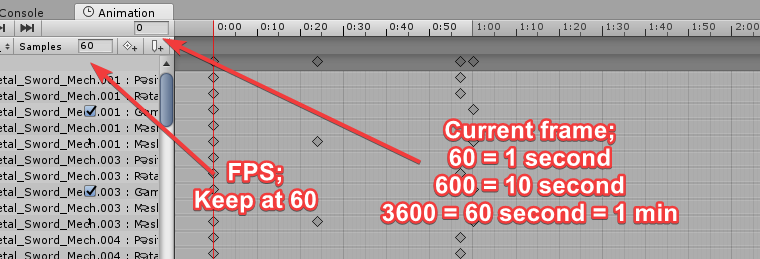
yeah, just click the keyframe at the top to select all (or press ctrl + a) move that red line to 0.01 and just past
also just to be sure, check at the 1 minute frame if you dont have any keyframes
they get added sometimes
jade rain
1 minutes is obv 1:00 isnt it or is that 1 second
 chrome elbow
im making a hacker avater will special emotes {there is no hacks or anything just funny hacking animations} do you guys have any ideas for some emotes
slim sparrow
A phone that randomly spews out binary code particles
chrome elbow
kk
chrome elbow
lol but i think poeple will keep blocking me if i did that
jade rain
how good are u with emote animations
i was gonna say try something like Sombra's Ultimate from overwatch
idk if thats possible
or what about you pull out a super techy tablet and you hand does some speed finger typing and then a sound effect plays that indicates being hacked
idk
 covert hawk
is there a way to turn of specific dynamic bones in an animation ?
pliant plank
@covert hawk I'm pretty sure you can disable dynamic bones in animations
Try to find the component for it on the animation area
covert hawk
Found a way,i needed to put the dynamic script in the root bone rather than putting the bone in the script,for some reason if u have it the way i had it originally it wouldn't treat it as an object with a script.
pliant plank
I always set my scripts onto the bones it affects, i've seen quite a few people just shoving it onto the root of the model and just shoving the bones as the roots from there
 final sphinx
anyone having issues with vmd animations beng cut off early in vrc when sued as emotes?
used*
final sphinx
ive deleted quite a few frames but the animation is still getting cut off early
and not going any longer despite the deleted frames
 late phoenix
i know the basic cut off is like 300 frames
but ive had dances that are longer
but even if you get it to do almost the whole dance, at some point your head goes back to your idol pose
but the rest of your body doesnt
 pulsar narwhal
Does anyone know how to make it so your avatar still moves during an emote (VR)? Have an animation where a sword falls from the sky and I want to be able to move to act like I'm drawing it out of the ground.
Here is an example of what I mean where the animation plays while he still moves around:
https://www.youtube.com/watch?v=KNmOW1RkU2M
 covert hawk
i can't get some light object work in my animation
does someone know how to set them up ?
slim sparrow
@pliant plank I set my dynamic bones on the object itself, affecting a child bone. Easier to see all the dynamic bones that way
Don't want to dig through armature
@pulsar narwhal you do that by putting the animation on a gesture instead
But you can't directly put it in a gesture of course, since that would be too long
Instead, you enable a duplicate of your avatar that's under your hierarchy, then you disable your own skinned mesh renderer (or the whole mesh)
pliant plank
I mean, to each their own there, personally i keep track of my dynamic bones quite well, i guess it's a byproduct of having around 44 avatars in a single project
slim sparrow
I keep all of my avatars in separate projects
Multiple reasons, one of which is not being able to break all of my avatars at once
Downside is that I use a little more disk space.
¯_(ツ)_/¯
 slim steeple
How would I go about having emotes (non gesture ones, just emotes) use root transforms? since my avatar is stationery while the emote plays but the emote requires it to move
slim sparrow
@slim steeple check the "Bake root transform" stuff on the emote
That always worked for me
 zealous prism
Does anyone know how to clear animation triggers in animation state machines
 tight arrow
Anyone here got a reliable guide on how to add a sound to a finger emote? Just a sound, nothing more.
 chilly vapor
keep sound disabled on character character, enable sound with the gesture animation, sound should play automaticly
tight arrow
No no I mean how do i do it from square one, the basic steps because I've never done it before.
chilly vapor
add an audio source to the avatar, remove the 0nSP compnent, set the audio clip to what you want the sound to be, alter settings as needed to your preference, diable the audio source via the checkbox near the name in the inspector, setup animation that enables it, put it as a gesture override. That is the very basic rundown
tight arrow
All right, thanks mate.
 foggy cobalt
Hey is it possible to spawn a single particle when I trigger an animation? Then when I trigger it a second time a second particle should spawn and so on
clear yew
yes
turn off the emission component and leave the particle system on at all time
and with the animation you just enable the emission
and it will spawn a particle
foggy cobalt
can I preview that in Unity? I tried that before but the simulation continues in the background and when I enable the emission manually again it shows so many particles which would have spawned in the time it was disabled
clear yew
dunno, i don't test emission particle in unity since i know how they work
foggy cobalt
haha
so, the emission component is disabled by default and the rate over time is set to 1
then in the animation I enable the emission
when the animation is done it will get disabled again
like that?
clear yew
yes
foggy cobalt
Ok will try that
slim sparrow
Also consider using Burst emission
foggy cobalt
😮 Does each possible particle (max particle limit) count as 1 polygon for the VRChat SDK?
slim sparrow
But I don't know if bursts trigger when emission is enabled, maybe only when the particle system is
@foggy cobalt particles do not count AFAIK
foggy cobalt
when I enable the particle system it adds 100 polys to the limit
pliant plank
Only the meshes composing the avatar (that are enabled) are accounted for
foggy cobalt
it's the same amount I have in my max particles setting
why does it do that for me then, any ideas?
pliant plank
I mean, i'm unsure about particle systems so try turning the component on and off to test
foggy cobalt
did that and also played around with that max particle setting and it affects the poly count for me
pliant plank
If pollies are added then it accounts for them
foggy cobalt
render mode is set to billboard
slim sparrow
Maybe if the particle system is disabled by default it doesn't count
pliant plank
Anything that's disabled is unaccounted for
clear yew
if he disable the particle system he wont be able to do what he want
foggy cobalt
yeah
clear yew
or he'll need to play around with toggling prop
slim sparrow
Nah
He puts the particle system in a Game Object, with an animator on the game object that enables the particle system on runtime
clear yew
that work good ?
slim sparrow
I used that once, and it worked
pliant plank
The sdk refreshes on any changes, wouldn't it detect it right after the trigger?
slim sparrow
It was for a different purpose than poly limit but whatever
@pliant plank no, it would be disabled in Unity and on upload. It would enable itself once the avatar actually loads ingame
pliant plank
Right since it only triggers on runtime...
And since the sdk's publish window does not autorun unity's playmode... yea
foggy cobalt
hm, need to try that later
first I need to get that particle spawing correct 😃
@clear yew It works! Thank you very much!
foggy cobalt
now I have to get the other things correct 😄
clear yew
which is ?
foggy cobalt
basically three things
make the particles visible from both sides
let them have a fixed size (their size is changing when I get further away)
and optimize how I spawn them by tweaking the animation and emission
slim sparrow
If it's a mesh particle, you need a shader that disables backface culling
The easiest way to do that is to use Flat Lit Toon and set a zero-width white-tinted outline
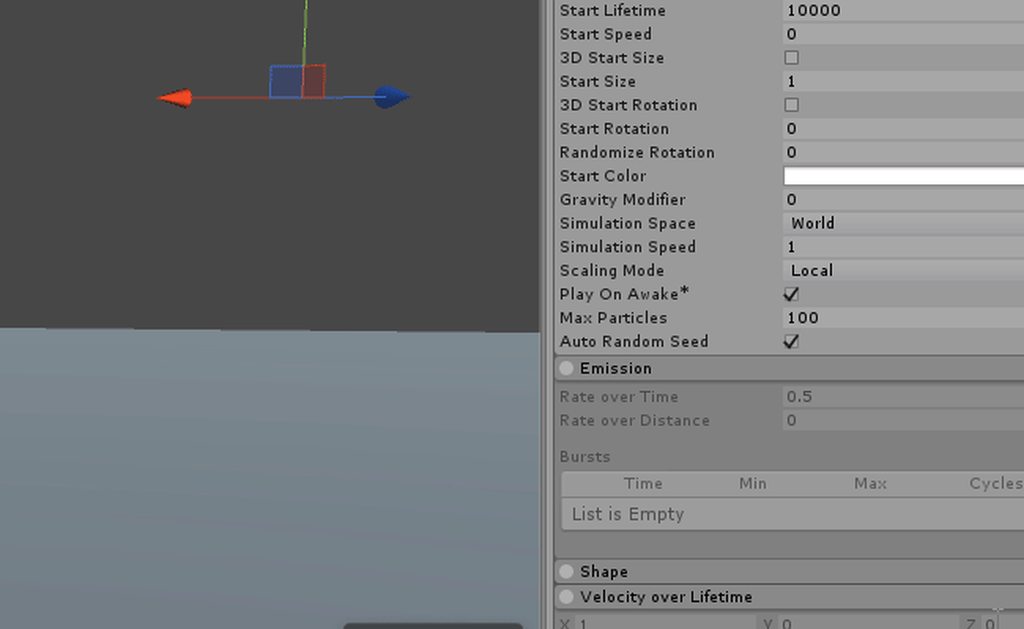 foggy cobalt
the render mode is currently set to Billboard
clear yew
and then with another hand gesture you can modofy the other settings
like for me i can make them move in a certain direction
slim sparrow
But don't billboard particles already render from all sides?
foggy cobalt
billboard alignment is set to world
therefore I can see them from the back and then it's invisible
just wondering. when I spawn a particle and someone joins after that onto that map can they see that particle?
slim sparrow
No
If you really want a particle that long-lived, you probably need to refresh it every X seconds
foggy cobalt
oh
it should basically be something like a temporary decoration of a map
that defeats the whole purpose of this haha
slim sparrow
I mean, you can still do it, late joiners just won't see it
foggy cobalt
yeah
slim sparrow
I need to make a particle that resembles a solar beam (from Pokemon), just without the charge-up. Does anyone know an easy way to accomplish this? I have Ultimate VFX in case anyone knows of a prefab in there
 olive lynx
Hi everyone! I was wondering if this idea is possible. I am currently making lightsabers and want to make it so when I clash the sabers together they collide and spark. My first idea was to just make a new gesture, one for when I have the sabers out and one for when they collide, but I was wondering if there was a way to keep it as one gesture.
slim sparrow
Subemitters would work, but you cannot make them have any sound
You'll probably have to sync it manually on another gesture
slim sparrow
Hmm, surely there's a nice beam-ish prefab somewhere, right?
Even if it doesn't quite fit my specifications yet
olive lynx
I've done a charge up and beam for a Kamea wave a while back using particle effects.
slim sparrow
I've got a decent thing going with a bunch of Ultimate VFX prefabs, but right now it doesn't look quite beam-like. Every particle is just a sphere that shoots out. Is there a way to make it look more continuous?
olive lynx
Give me a minute and I will look at mine and see what settings I have.
slim sparrow
Alright, cool
 glad pasture
don't you hate it when you watch a tutorial like, 50 times and have no idea what they're talking about? (edit because editing didn't wanna work
olive lynx
^ aint that the truth
glad pasture
it's not like it's a hard thing to learn, I just want to learn to make rigid bodies and I've seen this one tutorial about what they are and how to make one at least 50 times and I have no fuggin' clue what they did
 icy crow
how long can a gesture animation be?
glad pasture
...I think it can be as long as it can, but generally I see custom gestures that aren't .1 seconds go for about a minute. But then again, that's a LOT of time
icy crow
so if I want a particle to appear stationary in world space, will I be able to set the lifetime of it as high as I want?
glad pasture
that part I don't have much knowledge in
mostly because I'm still learning particles altogether. Still have no idea what I'm doing in terms of particles and trails
 solid prism
does anyone know how to turn the axis from x to z on this? https://cdn.discordapp.com/attachments/436064478426300418/447478144497352706/Screenshot.png
 slim steeple
Anyone can help me solve a somewhat complex issue? I have a katana, the katana has 2 bones under it's armature it's scabbard and the blade that rests in it, how would I go about animating it so When the blade is held the scabbard doesn't switch transform positions?
For clarification I have a duplicate of the one that sits on the hip parented to the hand
so there's the original one that sits on the hip and a clone of it with the blade in the avatar's hand and the scabbard still on the hip, when I attempt to animate it, the scabbard of the clone switches transform position relative to where the blade is (held by the hand)
I attempted setting up a rigid body to the hip bone and then a fixed joint on the scabbard whose connected body is the rigid body on the hip but it didn't seem to help
clear yew
Can you not move anything else than your fingers in an animation via the add property animator thingy
icy crow
is there any way to stop objects from jittering when you spawn them with a fixed joint?
slim sparrow
@clear yew nope, just your finger bones. Everything else works though, just not your humanoid rig
@icy crow give them infinite drag
Literally
icy crow
so just "Infinity" ?
slim sparrow
Yes
icy crow
also, when I spawn an object with the fixed joint, it appears where I want it, but if I then use the gesture again in a different location, the object spawns in the same location as the first time
slim sparrow
It sounds stupid but it works
@icy crow I think you need a legacy animation which resets the position back to 0 while you're not holding the gesture
icy crow
ok, I'm on desktop if that makes a difference
slim sparrow
No difference
 rough drum
Curious, is there a way to toggle an animation?
I want to make it so that I can disable/enable a mesh via a toggle for my avatar.
Example, toggle my helmet on or off for an extended period of time without needing to hold a hand gesture.
slim sparrow
@rough drum search "toggle props" in #development-advanced
It's doable but it won't be synchronized to late joiners
You'll use emotes to toggle stuff
rough drum
@slim sparrow Thanks a million
slim sparrow
Any tips on optimizing particle systems that cast light?
Other than the obvious "don't use shadows"
vocal zinc
hey guys how can i "delay" an animation that makes an object visible
like i want a trigger to enable my sword but only after 10 secs
trigger on>10sec> swordvisible
slim sparrow
@vocal zinc in your gesture, enable a game object. Put your sword under this object
And then put an animator on the game object, and have the game object handle the animation instead.
slim sparrow
Well, that's easy
While you're holding the gesture that enables the game object, the game object is playing its own animation.
This animation could consist of 10 seconds doing nothing, then enabling the sword at the end. Just turn off looping.
vocal zinc
so i create a game object that have an animator then i put my sword into the game object
and i create an animation that i put into the gameobject that enable the sword
 fickle rune
how do you make avatars with objects that stay in place?
 mystic relic
Why can't my visemes work with my custom animation overrides? Everytime I add a custom animation override, it disables my visemes for mouth movements. The only way to get my mouth to move is to go back to the standard-preset SDK custom override, but then I can't play any new custom override animations. Is there any way to use both visemes and add a new custom animation override?
 frail crag
So my Model keeps breaking its legs in Animation, but the rigging looks fine and I even repainted the weight.
Does anyone know what causes this?

 mystic relic
It could be that your armature isn't parented in a bone hyarchy in blender, that's only a guess tho. It shouldn't be the case if it's set up correctly in blender.
frail crag
Ah
mystic relic
Another guess is somehow the animation is repositioning your transform and rotation for those bones. I wonder if you're setting up your animations up in unity and using a separate model for your animations. Another guess.
mystic relic
Great that you found the problem.
 hexed fern
ok so i tried to join a models armature with a armature for one of his animations from the game he's from but when i try to view the animations after joining both armatures nothing happens and he doesnt seem to move at all

 white current
does anyone have a video i can use to learn how to make a cloud particle effect?
all the ones online are not the cloud i'm looking for or they have you pay money for an particle bundle
 torpid wadi
is there any way to make a non-looping burst of particles stay on?
i get that for looping particles setting emission to off instead of deactivating the object works, but the same method doesn't work for non-looping particles
 undone glade
Is there an example? Seems like just making sure it loops.
torpid wadi
basically what i'm trying to do is to make a gesture that activates a single burst of particles which doesn't disappear once i change gestures
well an example would be a single gunshot
if it's a stream of bullets (looping particles) setting emission to on will work, because the particle system is always active
undone glade
I usually just make it fast so I don't need to hold it down really.
torpid wadi
that's the current of the state of the particle right now
though i'm trying to find if there's any solutions for longer particles
 red moat
What can i do if particles dont have the correct position from my view? For example i've put particle effects on my hand or on a object which is linked to my wrist and from my 1st person view a part of it is shown on the correct position, and some other parts come like from the stomach. For others or when i look in a mirror/use a camera everything looks like it should. Only from my eyes it doesnt look correct
clear yew
https://youtu.be/6kRIG00Pm8Y?t=36 any idea what he did to make the TV spawn like that? Cheers : )
響モデル (Hibiki base model):エボシさん ワールド (Current world):butadieneさん
chrome elbow
how do i make it so when i do animation it enable object but when i move around the object stay still
icy crow
put a fixed joint on the object
chrome elbow
ok
icy crow
if the object is jittery when you move around, you can set the drag of the rigidbody to "Infinity" apparently
alternatively you could use a world particle with zero speed with the renderer mesh set to whatever object you want
chrome elbow
ok
also how do i make particle roman numrals https://youtu.be/6kRIG00Pm8Y?t=245
響モデル (Hibiki base model):エボシさん ワールド (Current world):butadieneさん
like that clip
icy crow
You need to find images of the roman numeral shapes that you want, then make a material for them. Then set the particle renderer material to that
make sure the images have a transparent background
glad pasture
don't you hate it when you try to find a shader but can't find it anywhere except in the game? no?-okey ;-;
 lofty crypt
 slim sparrow
@glad pasture depends on the shader lol
glad pasture
@slim sparrow it's a shader that acts as a particle. I've seen someone use it and there's almost a million particles, but it didn't lag me out. It was like controlled spectral dust
slim sparrow
Ahh, yeah, one of those
I've seen those around but I think they just make it themselves
glad pasture
then I have got to learn how to script shaders because that is something that is genuinely the most intriguing thing I've seen in the game
icy crow
look up gpu particle compute shaders, you'll probably find something similar
glad pasture
https://www.youtube.com/watch?v=40Mfvof4OS8
it looked VERY similar to that
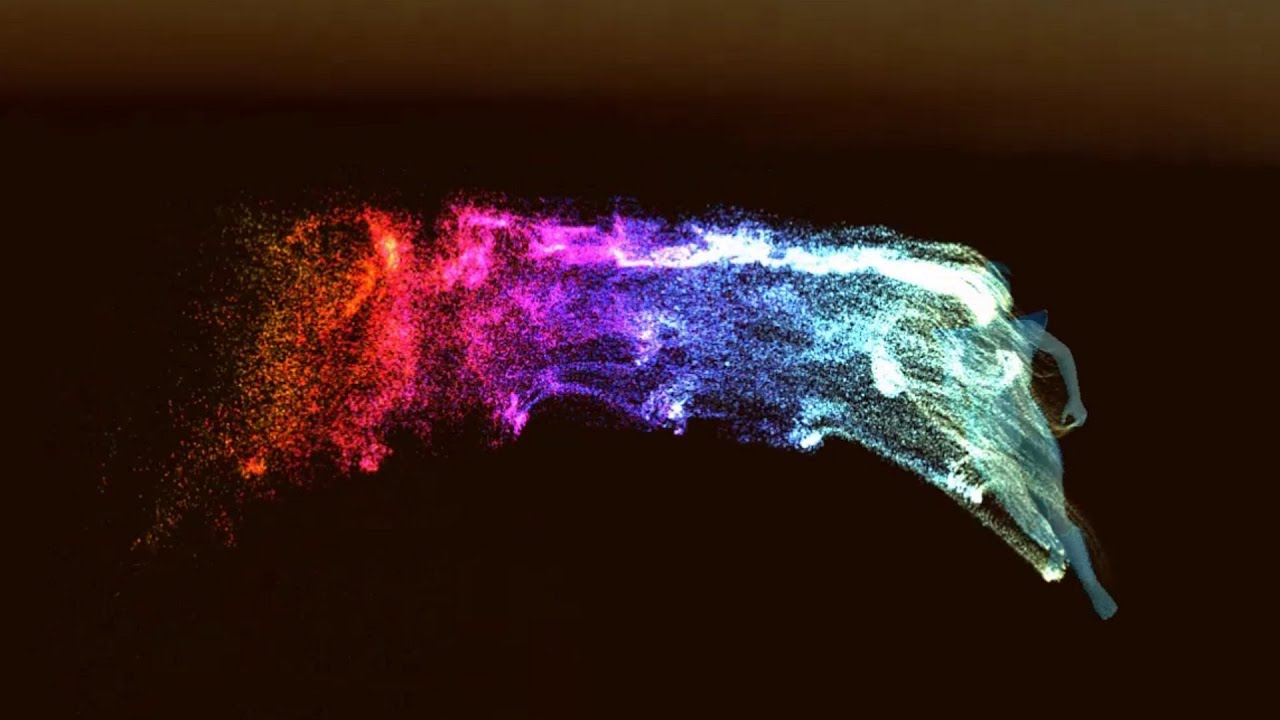
In this video I'm showing my implementation of a GPU particle system and comparing it to Unity's Shuriken particle system. The GPU particle system is impleme...
Thanks @icy crow
icy crow
sorry @slim sparrow , how did you say I can reset the position of my objects when I'm using a fixed joint?
because at the moment, the objects appears to spawn in a random position near me whenever I use it
slim sparrow
I dunno, I never tried it
I think you need a legacy animation that resets the position back to 0, so it follows you while deactivated.
Then you disable that animation and enable the world object again in a gesture
icy crow
hmm ok i'll try that thanks
 radiant crown
https://cdn.discordapp.com/attachments/407059869116661787/447758101937127424/20180520064600_1.jpg
Anyone know of a solution to this animation bug? I've noticed it happened with an animation I created myself as well where it continues to over extend/rotate in one direction
 clear yew
@icy crow Objects dropped on an empty joint are dropped on activation and, when deactivated, they follow you from a position relative to the position you deactivated them from. EI: If you activate it and step 20 feet backwards, then you deactivate it, it'll follow you from 20 feet in front of you.
The only way I've used it is by "picking it up" before deactivating it.
Also, if you have it set to drop when your avatar loads, it'll drop either where you are when you change avatars or, if you loaded into the world with the object set to drop automatically, at the world's origin point.
Origin point being 0,0,0. Which may not be where you spawn in.
icy crow
so if I want to "pick it up", I walk over to the position I placed it and deactivate the gesture?
clear yew
Ideally.
Which is kind of a pain.
But it works if you remember to do it every time and you don't drop it by accident.
What Rokk said may be true though. I've never tried animating it back to 0 manually.
icy crow
hmm ok, well that sounds easier than having an animation or something
also, if I have the object placed down and someone joins the game, will the object be in the same position for them too?
or will it be placed wherever my avatar currently is
clear yew
The latter.
icy crow
ah ok
clear yew
If state machines weren't so big of a pain to figure out, it'd be better to use those.. 😂
I never even use emotes now that I have VR, so using emotes for state machines would be great.
icy crow
what's a state machine? 👀
slim sparrow
It's one of those things where you can toggle animation states with emotes or gestures
They're a pain to sync so I don't really bother doing anything complex with them. I just cycle through a bunch of objects.
 royal plinth
hey guys
anyone online?
im having a really weird issue where where my animation works perfectly in Blender
but when i export as FBX and put it inside unity
my animation is missing
any ideas why?
 vagrant heron
Hey is there a resource of mmd dances converted to fbx?
I want to add that popular "wave" song dance to a model's emotes
clear yew
Tupper video on New MMD tool for blender https://tinyurl.com/y8yeonsd MMD Tool update version https://tinyurl.com/ybku6xft EvolvedAnt Gesture Overrides for T...
 hexed current
hey guys quick question
So like.. Im trying to particles for first time
and this guy set his particles to world colliders
yet he has absolutely nothing in his scene
and his are bouncing against the ground
howd he do that

Using the Unity 5.5 beta and only the default particle texture along with the new TRAILS, LIGHTS, and NOISE modules. Takes minutes to setup and no programmin...
2:43
he sets it to world it and starts to bounce
but he has no geometry...
vagrant heron
Can someone remind me the settings for this so that the character's not all floaty when dancing?
 clear yew
@hexed current bounce. Collision
hexed current
Im aware
I had it on both.
But his bounce onto the floor
yet mine act as if there is no floor.
clear yew
Lol
hexed current
S:
clear yew
Lol
clear yew
Theres no default ground
hexed current
which im assuming had a plane in it
clear yew
U have to add it
hexed current
Then I eventually did add one
and made it invisible
and it worked up to a certain point
until it started going through that when I added sub emitters.
Even upon adding colliders to sub emitters.
clear yew
Your sub emitters need colliders
hexed current
Yeah, they still passed through the plane
clear yew
Did you set the collision to world obje ts
clear yew
It works for me when i do it
hexed current
I gave up on it for now and was gonna download the prefab he was using
clear yew
Ive used multiple particle systems and sub emitter systems and havent had issues with collision
hexed current
I got frustrated... i followed exaclty as he did
step for step
:/
Then when i added sub emitters to bounce as his did
instead of bouncing
they fell through the plane
Ill try again tomorrow
Im fixing up the avatar anyways
So better to fix that first
cuz apparently the blinking I set up in blender aint working lol
do you know how to disable eye tracking in unity?
Cuz it does something strange with the eyebrows on this model
clear yew
Check your weights and vertex groups
hexed current
Im not that invested for something as simple as eye tracking
Lol
Ive already spent 3 days on this model
and I spent all day working on colliders
-_-
clear yew
Remove the eye visemes in blender
In shape keys
Then put it back into unity
The vrc eye shapekeys
hexed current
Yeah but then I gotta redo.. EVERYTHING.
clear yew
No
Just remove those blendshapes
And put the fbx back in
It will update in unirt
Unity
As long as you dont change bones around
hexed current
dleete the old fbx and put in the new?
clear yew
It has to be the exact same file name
hexed current
Ok ill look into that. honestly the eyebrow is such a minor thing
clear yew
And it will update the fbx in unity
hexed current
its hardly noticeable
Lol
like.. it shifts up like... a quarter of a centimeter
and thats pretty much it
clear yew
It just fucks up if you change bones around
Yea
Just remove the blendshapes and put it back into unity
Do it in explorer
Not the unity window
clear yew
How do I make an animation work with a humanoid rig?
 lilac cave
You provide a more detailed question
radiant crown
Friendly reminder that the 10second limit is a myth
radiant crown
https://cdn.discordapp.com/attachments/407059869116661787/447758101937127424/20180520064600_1.jpg
I'm not the only one whos had this problem with animations am I? This one's from the toybox npc so someone must've figured out how to fix it (Starts in normal position and eventually drifts on one directon as if its doing a plus one on the transfarms every time or something, but it should not be)
 echo dagger


