#animation
1 messages · Page 65 of 1
 agile monolith
 slim sparrow
@sick musk yes
 sick musk
Example would be your eyes are blue, you blink and they turn red
agile monolith
you mean legacy is ticked in debug?
slim sparrow
Just hit record and change the material in the mesh properties
@agile monolith it should be unticked, and yes, that is what he means
agile monolith
serious? so just to make sure, for the animation, i shoul have it unchecked
 molten elm
Why does it not look good in-game?
slim sparrow
Yes, you should not have Legacy checked.
It should only ever be checked if you have a really good reason to do so.
sick musk
sorry where would i find that again
slim sparrow
And the only reason to have Legacy animations, is to use them in an Animation component (as opposed to Animator) @agile monolith
In normal games, you wouldn't even need to touch the Legacy checkbox. It's necessary in this game so you can have an "always-active" animation that you can toggle at will.
@sick musk open the mesh and go to the Skinned Mesh Renderer properties
A good example of a Legacy animation is blinking. The game can already do blinking for you, but if you want to disable blinking in a gesture, you'll have to manually animate the blinking yourself and then mark it as Legacy.
agile monolith
weird tho, its worked for me for so long and only now its causing a problem
slim sparrow
Personally, I used legacy animations to give myself wing flap, but I could have just put an animator in the root bone of the wings lol
agile monolith
thank, ill mess around and see if that solves it
slim sparrow
Maybe the game/SDK updated and changed something in the default animator component
agile monolith
maybe, hopefully its just that
sick musk
Thanks
 clear yew
Anyone know how to trigger animation to my W button keyboard? i want to use run animation when i press W button on my spider is it hard to do? or if someone know the steps i really want to follow it : ( i have the animations and my spider model and i can't connect them, i just can use animations but when i use the animations on my spider the in loop and my spider running forever in vrchat i want to use idle the default animation the spider is moving like breathing and when i press W button the spider start running is it hard to learn somewhere? i can't found tutorials about this im trying this 12 hour and can't figure out .
and how can i connect my model with the animator panel?
 torn pawn

Google Docs
Advanced Avatar Creation: Making Non Humanoids This tutorial was made using Unity Version 5.6.3p1 This tutorial assumes you already have the current SDK imported and knowledge of how to upload a basic avatar. You will also need an avatar you wi...
clear yew
i know its no humanoid but its just W button
animation + w button its hard to do ?
i saw a guy who imported a spider into vrchat he did it so its possible but i cant found that guy: (
if i can i will learn the scripts too i saw its not long scripting just a few type
aaah dude : ((((
oh i see something yuumi
Non Humanoids currently support the following animations:
Idle
Airborne
Walk forward
Walk backward
Walk Left
Walk Right
this
nevermind then
oh yuumi i try to follow the steps thanks:)
hey yuumi but i have the animations why i need to make one : s
well i trying and testing more
clear yew
its good thanks
 agile ruin
Anyone knows how to make it so a gesture override shows a shape key for an indefinite time?
slim sparrow
This has been asked a lot, but I don't think this is possible
Animation effects go away when the animation ends
slim sparrow
What do you want to accomplish? There might still be a way
agile ruin
I made shapekeys for both the skirt and blindfold for the 2b chiya model i did
so i could use them in an animation to hide them etc
but if theres no way to do something like that, i'll just upload 2 versions
slim sparrow
I've heard about people who can enable/disable objects in emotes, but I'm extremely skeptical of that and never seen it done.
As for the blindfold, there is a way, but it's kind of a weird way.
The blindfold has to be its own mesh, and it has to be only one material.
agile ruin
but then it would reappear after ending the gesture
slim sparrow
You can attach a mesh particle system (0 speed, local simulation space) to your head. Make it emit a blindfold. Max 1 particle. Particle system is always active, but the emission module is disabled by default.
When you press a gesture, the emission module activates and puts the blindfold on your head.
When you press another gesture, the particle system disables itself temporarily and the blindfold is removed
Super hacky but it should work perfectly once put into place.
I've seen people do worse things with particles
agile ruin
never worked with mesh particle systems tho
slim sparrow
They're easy
The particle system auto-simulates in the editor, so you can just position it on your head correctly
I have two questions about particles.
The first one, how do I stop my particles from colliding with myself? They're spawned from my hand and the collision with myself is messing them up sometimes.
Like when I aim them the wrong way or something
And the second one, how do I modify particle speed after they're spawned?
Changing the start speed doesn't seem to do anything. I know it's possible because I've seen people do it.
Oh, I guess you can't change the speed of already spawned particles, but you can change the simulation speed. That's a little difficult to work around, but can be done.
So, how do I fix my particle collisions? Ideally, they should only collide with the world.
slim sparrow
Add an audio source and enable it
slim sparrow
Add an audio source and enable it
You just enable it in the animation. There are plenty of YT tutorials
 zealous prism
I don't have unity in front of me but I think you Select your avatar, hit add component and add an audio source, turn off the audio source by unchecking it. open the animation panel, find the animation you're changing in the drop-down, hit the record button and turn on your audio source by hitting the checkbox next to it.
 wooden grove
wym animation panel
zealous prism
I think it might be under Windows > animation or something in the menu. Or maybe it's under tools
wooden grove
i have neither of those
Fuck it, I'm done with unity for now. Really likes to add errors that don't exist.
zealous prism
Ummmmm that's what the official documentation says https://docs.unity3d.com/Manual/animeditor-UsingAnimationEditor.html

Lol I'd hop into voicechat to help you out but I'm literally at the airport about to board right now. Unity isn't that bad I promise!
wooden grove
is there a way to lengthen the animation
 surreal iron
guys a question
https://gyazo.com/59b1376d61d86352fe96587fe41faefa could this fuck up my custom animations as humanoid?

@wooden grove in blender you can lenghten it by selecting all your keyframes and pressing S, then you make it as long as you want
wooden grove
ok ty
surreal iron
unity sucks for animations tbh
wooden grove
I need my music to play through longer
 lofty crypt


 clear yew
@slim sparrow you can enable objects permanently with an emote by breaking the animation
slim sparrow
Do tell
wooden grove
why is it when i use my emote
and go to a different world
It dont play the music anymore
When I use it
clear yew
It would be far too lengthy to explain here but it’s called a toggle. You essentially break yourself free of the emote whilst it’s in progress
slim sparrow
@wooden grove that happens sometimes, it still works, but some maps like avatar testing break it
clear yew
Takes a lot of components in unity
slim sparrow
Oh, that's weird. How would that work? Do you have a guide/tut somewhere?
wooden grove
So if I just go to some maps it will keep it working, and others will break it
thats weird
clear yew
And another who can toggle through 8 weapons on one gesture and keep them out
slim sparrow
That's cool. But can you explain it? Even just the basics
clear yew
I don’t know the basics of how it works inside unity, just what the process is doing
slim sparrow
Ah
clear yew
It’s not something they want spread either
Since it drastically increases what you can do
You know how people are
slim sparrow
I'm guessing it's a legacy animation that turns its own animation component off
I've seen objects get stuck like that before
Oh nvm, that wouldn't work like that
clear yew
It’s something similar I believe
slim sparrow
Yeah, I think I'm on the right track with this one. I'll investigate it some more
Can't promise that I won't spread it lol, I don't hoard information
clear yew
But I believe that’s for the basic 1 toggle
No clue how they’re toggling 8+ objects via one animation
And picking which they want
Probably some timing thing
slim sparrow
It's almost certainly timing
If you make the animation switch weapon every 0.5 seconds, you could just add a gesture trigger to make the animation stuck again
Still, I rarely emote. This frees up like 4 slots lol
Now I can finally make my game-accurate Athena Cykes
clear yew
I believe it’s one gesture breaking and another going through options
 eager vault
Usually I combo gestures, like I have a bunch of empties nested so they only work when I use 2 gestures at the same time. Doing that I have many things to do
slim sparrow
That's also a good idea. Kinda running out of gestures on this one lol
But that's not always a possibility, sometimes you just have a bunch of gestures that are all shape keys or alteration of some game object
eager vault
Yea, I usually leave point and rock n roll expressionless so I can mix and match without my face looking too goofy
 soft geode
surreal iron
soft geode
surreal iron
https://gyazo.com/a494d26271eb17784bf3bf721bc048a4 can someone tell me how to make that window to create a new animation come back?

it suddenly vanished on me
in blender
 dusk nexus
Is there anyone that can provide an explanation of how to toggle weapons/objects on emotes, can't really make the toggleobject package that someone linked worked
I'd greatly appreciate
 quasi gale
@slim sparrow @eager vault Search for "Toggle Props" in the #development-advanced channel. The package is largely outdated and it's annoying as hell to setup, but it generally does what you're looking for.
Toggled props also are not synchronized across the network, so late joiners will not see any changes until you reset the toggle.
 lofty crypt
Thanjs
slim sparrow
@quasi gale cool, thanks!
Ah, I can see this was made in the days when desktop didn't have gestures
 outer anvil
slim sparrow
outer anvil
slim sparrow
What's the best way to trigger animations on child objects from a gesture?
Spawn an object with the animation preprogrammed, or something else?
I have an animation with rather complex states
Basically, I have a weapon that I can spawn, but I also want it to fire and then pump after firing
Should I spawn another instance of the weapon which then fires, or can I use a better way to animate the firing?
surreal iron
does someone have experience with desktop gestures?
slim sparrow
@surreal iron just ask your question, don't ask to ask
A lot of people in here have experience with desktop gestures, but they can't be arsed pulling some random guy's teeth on what his problem is.
surreal iron
well... already asked yesterday but to no avail
so i wanted to have a private talk
👀
BUT i think i might have found out what was the issue
im uploading the model and im going to test it out
 stark burrow
Hey guys is there a list online of which shift f key corresponds with the default override animations?
slim sparrow
No list, but
F1 = Neutral
F2 = Fist
F3 = Handopen
F4 = Fingerpoint
F5 = Victory
F6 = Rock n Roll
F7 = Handgun
F8 = Thumbs up
It's in the changelog I think
stark burrow
fast reply, this was exactly I was looking for thanks a lot!
slim sparrow
I'm using a prefab particle system as sub emitter, but I can't do that since it's a prefab
How do I make this still work? Can't I copy a non-prefab version?
I already did GameObject->Break prefab instance, but that didn't work.
slim sparrow
Alright, so I got that to work by deleting the prefab
But now the next problem
My sub emitter triggers immediately, not on collision or death. How to fix?
clear yew
check the parent of the subemitter
in the subemitter part you can choose how you want it to spawn
it's probably set to "birth"
slim sparrow
No, it's set to death
I made 100% sure of that
Like, the plain sub emitters work, but one that I used from a prefab does not
They're not even set to Play On Awake either
I parented the prefab to a newly generated one. The newly generated one works, but its children still trigger immediately.
Oh, it works if I manually add each part as a sub-emitter
But then I can only have two
clear yew
subemitters?
 frank yarrow
so can anyone help me here, basically im trying to make an animation with sprites walking along a 3d space but i dont know how exactly to do it
slim sparrow
I actually got my particles to work, apparently the limit for subemitters is no longer 2
@frank yarrow that is very tricky. I've seen people do it, though.
It depends. Do you want the sprite to always face whoever is looking at it? Or is it fine for it to be a 2D object in a 3D world?
If so, you can just make a quad and put your textures on there. Swap out the textures in a custom walking animation.
frank yarrow
its meant to be a 2d object in a 3d world
slim sparrow
If you want it to always face the camera, you need to use particle systems with billboard renderers
Just make a quad and put a texture on it. Animate it as you see fit.
frank yarrow
do i need to do that in blender or can i do that in unity
im actually new to animation so i dont really know anything
slim sparrow
In unity
I suggest you look up how to create custom animations in Unity. This should be fairly easy, but also very time-consuming
frank yarrow
well i have looked for tutorials but nothing about how to make sprites move in the world
even though this project is part of an avatar
 violet kraken
somebody know why when i move my particle system itself it works but when i move the whole model it doesnt ? its a trail particle on my eyes
frank yarrow
so i think i figured out how to animate the sprite to move. i need to now need to copy and paste the frames so it gives me enough time to move the sprite where i want it to go
molten elm
Can nobody tell me why my blinking animation loses its quality after importing over to VRchat? It looks normal in Unity but turns into a simple 1 frame blink in-game?
sick musk
Try making it longer?
molten elm
I mean, it was normal before, then I started making hand gesture overrides, imported, and now it's like this
I don't geddit
sick musk
Do you have a gif of it?
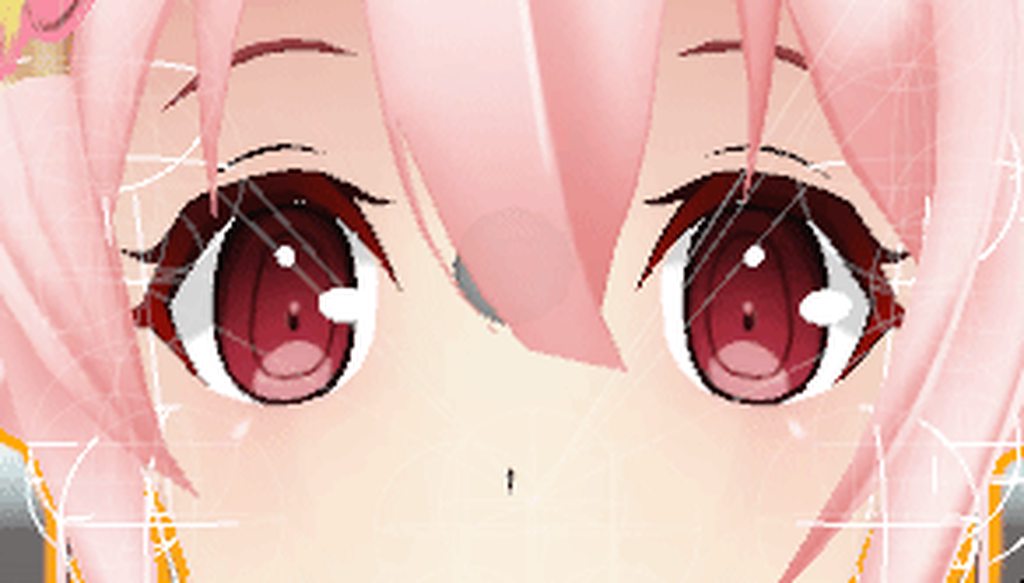
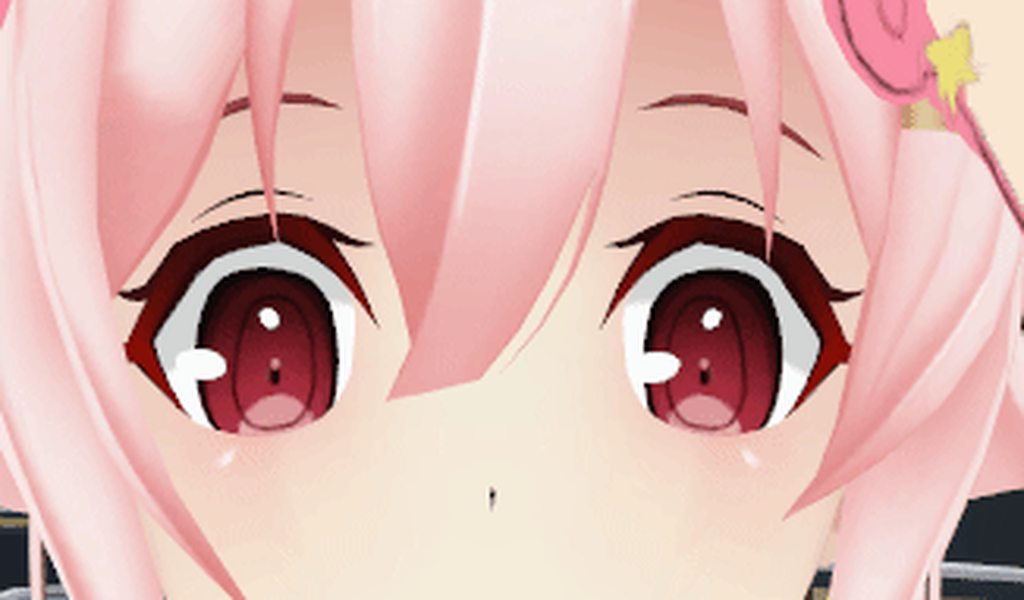 clear yew
did you create eye tracking with cats ?
molten elm
Yeah? But like I said, it was working until I started giving the model hand gesture emotes
I didn't let cats touch blinking
sick musk
The only time I would need blinking with cats is in an animation that is longer than 30s
clear yew
i wonder if it's just for you and looks fine for others
sick musk
I mean the gif looks fine
From what I can tell
(But it’s probably just my eyes playing tricks)
frank yarrow
does anyone know how to add more keyframes to an animation for sprites?
like making it a longer loop
molten elm
They might not look much different for some people I guess
torn pawn
@frank yarrow sheet being animated by shader or particle system?
torn pawn
i thinku gotta make a custom animation and then have it under an object with animator that is enabled when firing, haven't done it myself tho
frank yarrow
i mean i could just copy and paste the sprites so its a longer clip but im not too sure
im onlygood at turning into objects. not animating said objects
slim sparrow
You probably want to swap out the gun for an identical copy which immediately plays a firing animation once, sliding back the slide in the process
@pseudo iris
So you'd have two guns: an idle one, and one which immediately plays a firing animation when activated.
clear yew
particle gurus: I want a system to stop emitting in an animation, but the particles that already spawned should die out naturally, it seems to kill off everything when I disable the emitter
clear yew
make the particle system always active
but disable "emission"
and use an hand gesture or other animation to activate the emission
@clear yew so system always active, only emitter disabled and keyframe emitter on/off?
 pliant plank
That's an interesting workaround...
clear yew
yep
I guess I didn't think that'd work because if you do that by hand in unity it just culls all the particles
the particle is always active
sweet, thanks man!
so wahtever you spanwed
pliant plank
So the emission die off, but it won't disable the particles themselves
clear yew
will not disappear as soon as you stop emitting
pliant plank
That's pretty neato
clear yew
that's how i did the smoke for my pipe
even if put away the pipe
the smoke that spawned will still float in the air
pliant plank
The system is always there, just not doing anything
clear yew
yeah, I've seen examples, just doesn't work like that in the unity editor, thanks for saving me a lot of time testing
exactly
it's active but not emitting
pliant plank
That could make for some pretty crazy effects actually
clear yew
you can basically spawn things permanently
put a lifetime of 1 000 000 and just spawn them
they will be there until you switch avatars
you can also spawn bombs at your hand position
and use another hand gesture to make to fall all at once
or put a box collider in your hand and make them explode when you touch them
you can do so much with those particles
stark burrow
Hey guys, I don't know what I did, but my camera in game is a at the floor height looking up, I dont know how to change it in unity
clear yew
@clear yew ayyy, works as advertised, it's in the wrong position but that's probably my bad
stark burrow
I found it
 quaint spruce
What animation on the Avatar Controller Template is the peace sign
clear yew
victory
quaint spruce
Thanks
 tiny meadow
does vrchat have 60fps model animation?
 balmy orbit
so you know how mmd models come with animations and stuff
and like mmd models have the vocals and eye animation shape keys already done
its just values that you implement properly into an animation
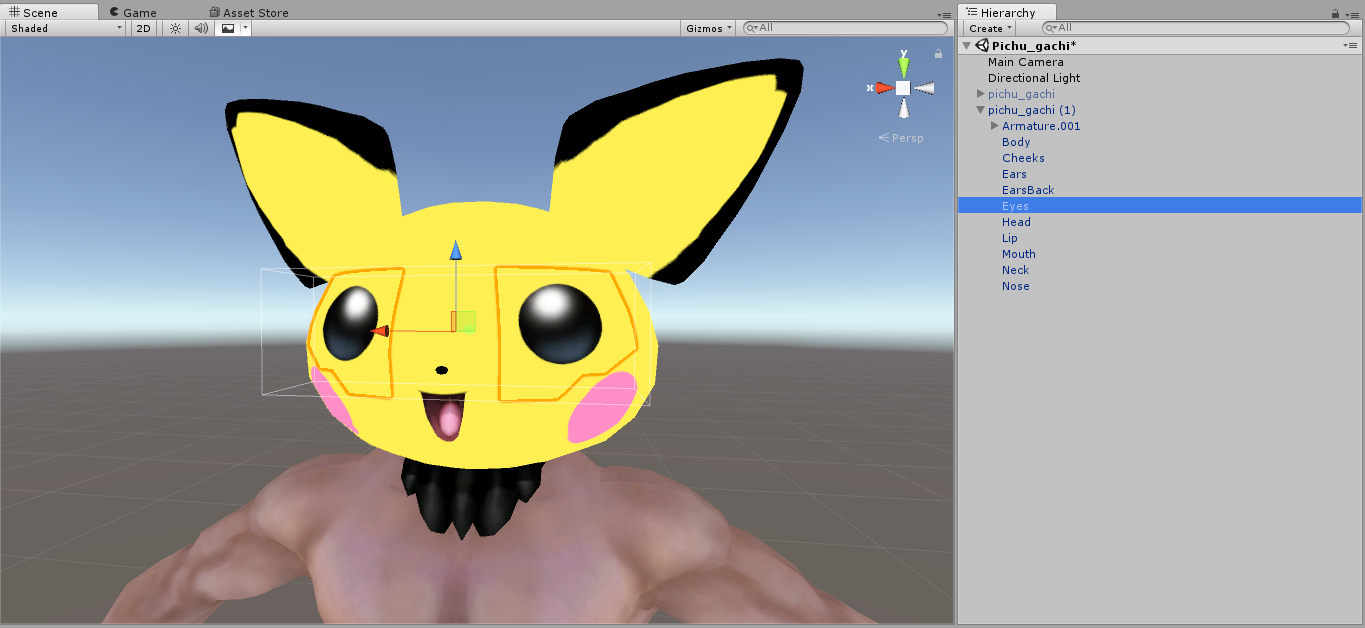
so uh
pichu here has a mesh and a texture
...what
do i do lol
because most tutorials just tell you oh just make an animation put the weird named thing on and change the value
but yknow i kinda cant here
where do i start? I was thinking duplicating the eye mesh a few times, putting on the textures on each mesh, and then on an animation make the default eyes invisible and the desired eyes visible
balmy orbit
if anyone knows anything, please tag me!
 primal gull
hey question
is there a way to make things like flamethrowers and such apepar to actully act like flamethrowers
like, when i ifre it, it just stays follows my playermodel and fire in a straight line when i move my hand
when in reality, it should sort of sway and move properly, its hard to explain
nevermind
tiny meadow
Will/do animations get sequencing? So that we can have multiple idle animations without having to create lengthy animations by hand.
 vast birch
how do i fix this https://youtu.be/WRFww7JR-Ew
 clear yew
Ok so i do animations i basically copy the animator from an older avatar to the current one.....Howver....this avatar doesnt have any animator at all....other than the face....all the hand bones n finger is empty....any fix?
nvm
i figured it out
had it generic
i baked an animation into my fbx model from blender. how do i set it as the idol animation?
 sudden belfry
How do you set longer gesture anims to cancel when released instead of playing all the way out?
sudden belfry
ty
stark burrow
is it possible to set the arm bones in a fixed position for the override animations? like I can give thumbs up but my arms stay aside my body
lofty crypt

 lofty crypt
I work 12 hour shifts 5 day a week dude
eager vault
Ooo, almost halfway synced, looking forward to the finished project
torn pawn
there could be a problem with avatar update that is every 5(?) minutes?
that makes it disappear for you or reset for others
this is why my full episode of evangelion on a tv is compeltely useless rofl
takes 10 minutes to upload an avatar for nothing 🤷
clear yew
yep exactly
there is a hard 5 minutes limit
your animation will reset no matter what
lofty crypt
Never heard of that before
What's the avatar update
Only time I've had my gestures stall is because of people joining/ switching skins
If it's a huge enough issue I'll just chop it all together and put the full animation on a world
agile ruin
Do you need scripts for particle system collision with player avatars?
 heavy stirrup
Been out of the loop for a while. Anyone figure out how to rotate armatures during a humanoid walking animation?
slim sparrow
@agile ruin I don't think so
Someone earlier on told me that you can build/publish a VRC world, and that will set the collision layers to the correct ones in your project settings
Then you can put your avatar descriptor back and remove the world
agile ruin
And that makes particle system collision to players work?
slim sparrow
If you select the correct layers, then yeah
Instead of the layers being the default ones, you'll get more workable layers
heavy stirrup
So out of curiosity, i tried entirely deleting the Locomotion Layer of the animator controller, in trying to figure out my issues.
After uploading, my avatar moves normally, despite having zero links to the default animations
Why is this? Shouldn't i be moving without actually walking like a generic without animations?
 ashen sedge
Humanoids' controllers are not editable.
Or, well, the game throws away yours and applies its own
heavy stirrup
Gah. I really need to get an armature to rotate during a walking animation
While keeping tracking.
ashen sedge
Generic avatars' controllers are editable however
heavy stirrup
I need to keep tracking
ashen sedge
Animation overrides?
heavy stirrup
The issue is that the default humanoid controller doesn't permit armature rotations
during locomotion animations
ashen sedge
Ah, then I'm all out of suggestions
heavy stirrup
Any way to link a generic to accept tracking in some way?
ashen sedge
Final IK is whitelisted (And is used by humanoid controller) so you could use that I suppose
Can't confirm it'll work though as I haven't done it myself
heavy stirrup
I would consider buying it if i knew it would work. over 70$ is a serious investment for something that might be pointless though
 pseudo iris
how would i add a fire effect to a sword?
like i have a "orb" in the sword that i want to have a fire effect to
heavy stirrup
Hm... now I'm trying to apply a supplementary animator on a child object
Can't get it to register at all though
heavy stirrup
Hm... i wonder if i can make a motion enable an animation that plays automatically..
pliant plank
An animation that enables an animation?
heavy stirrup
well, an animation that enables an animation component
I'm trying to come up with roundabout methods to allow me to rotate armatures >,>
molten elm
Can anyone tell me why the mask I pull off isn't visible in-game?
I've never done these gesture overrides so I might need a bit of assistance if anyone can help ^^
heavy stirrup
Is there anything besides an Animator that works during an animation of a locomotion animation?
molten elm
Yeah my brother just showed me, frick these mirrors :(
 manic torrent
question : how to create animation on my own with blender and import it too our avatar at unity
 hollow umbra
is there any way to add sounds to existing animations?
 bronze peak
So i am looking for some Motion .. i just need the names anyone have any ideas's? https://s1.gifyu.com/images/2018-04-17_16-39-55.gif
and this one two https://s1.gifyu.com/images/2018-04-17_16-44-46.gif
 winter sundial
My animation is not working correctly. I apply it like usual, but it doesn't activate the object that it should.
Can it be because the object has many child objects?
slim sparrow
Does it work in play mode?
When you drag the animation onto a duplicate of your avatar and hit play
heavy stirrup
Anyone know what to set targerts as for Final-IK?
lofty crypt


 heady cove
hey anyone know how to make an idle animation to make wings move?
slim sparrow
Put an Animator on the wings root bone
That's what I would do
Alternatively, you can animate it from your avatar's root instead and mark it as legacy anim
But that's more difficult
 night crescent
How do people do spotlights? I can never get them to work
 naive pelican
guys is there a way to add all of the hands part in the animation instead of adding them 1 by 1 ?
torn pawn
muscle animator asset
naive pelican
@torn pawn link ?
torn pawn
paid asset

As you know in Unity we can't modify animator properties as easily as transform properties which we can modify in the Inspector. So I’ve written this tool which can control animator properties in a simpler way.
Features:
- Modify humanoid ...
naive pelican
@torn pawn found it for free 😄
balmy orbit
does anyone know if the default hand gestures are in the sdk? ive been making some animations for them but the default hand gestures go away when i test them in vrchat
vast birch
wish i had found it for free
 crystal kraken
Does anyone know how to make the spinning name above a avatar with the single particle, I used to know but forgotten how to now ><
 obsidian vigil
Like the Loli army thing? @crystal kraken
crystal kraken
Yep!
obsidian vigil
the loli army one is not a particle actually 😄
but you should be able to do 1 particle
have it one local
rotation over lifetime
that should be it
clear yew
excuse me guys,odd question,
Does anyone know how to make a trail render like the glowsticks in void club?
 vivid pond
Random question
Is there any good videos tutorials on how to set up the animator in unity because I need to replace the default idle and moving animation for a model
Plus I can't really check myself yet because I am stuck on mobile data for the day and there isn't enough left to play even a small 15 minute video
obsidian vigil
@vivid pond havent messed with idles yet but i think an idle anim is on your model and set to legacy not inside an animator
vivid pond
That's annoying
So is that going to be easier or harder to change then if that is the case
obsidian vigil
hmm
dont immediately try it on your main model
make a duplicate and mess with that
then add an animation component to the duplicate
drag your animation on
head into debug mode and enable legacy
vivid pond
Ok thanks
I will try that next time I'm on my main pc
Also I already knew not to do anything animation wise on the main model
obsidian vigil
just sayin 😄
cuz i actually misclicked yesterday and had to redo approximately 3 hours of work
vivid pond
Oh rip
That is why backing the file up in a new scene for every minor change is important then backing up the project for a major change.
And it's fine because saying to make a duplicate avatar is just good advice to in general and I could of worded the sentence above a lot better.
slim sparrow
I've seen people pull off their own head with gestures. What's the best way to do that? I can shrink down the head in a gesture and spawn a new mesh on my hand, but I think the smoothing might look weird
Should I leave the head as a separate mesh instead?
obsidian vigil
@slim sparrow probably do both, shrink head, have a separate on the actual head and one on you hand
The 1 gesture shrinks normal and makes 2nd one visible
slim sparrow
Yeah, I just don't want the head to smoothly shrink down as I grab it
I know I'll have to have a separate head mesh in my hand
slim sparrow
But I can just shrink down my head bone
Separating my own head into a new mesh and then shrinking that down isn't gonna help against the smoothing
obsidian vigil
Nah not what i meant
You shrink the actual one
Keep a normal sized one on there
And it disappears on a 2nd gesture
Id split it into 2
Basically
 lilac cave
also if youre worried about tweening between frames
select all of the frames rightclick and choose flat
or the last option under both curves
dont remember the exact name but its good to know
slim sparrow
Yeah, but that only works within the animation
The smoothing between two different gestures is happening inside VRChat's animation controller
It looks great for hand gestures and facial expressions, not so much for popping objects in/out of existence
Unless it's a separate object you enable
 floral imp
I’m having a problem and I’m sure that there is a simple fix. I made custom blinking animations for an avatar, but when I assign them to “idle” the model sinks into the floor. What generally is the fix for that.
lilac cave
dont assign it to idle
add the component animation to your character
change your blink animation to legacy (option found in debug)
floral imp
Will it work if I have custom over rides?
lilac cave
and then assign the legacy animation in the component
ya
itll work better since it means you can turn blinking off
allowing other eye keyshapes to be used as gesture overrides
slim sparrow
Oh, making the FPS higher is a good idea
lilac cave
debug is found by changing (properties?) to debug by selecting it from the drop down menu from the three bars (next to the lock)
all of this is done in unity
i still think changing the twening should work but
¯_(ツ)_/¯
 languid pier
Hi everyone, can someone give me tips on how to add clothes with emotes in vr chat ? Or how to do a (die) emotes, examples, but instead of waiting the whole motion to end i can keep moving but the animation goes on
 chilly vapor
hand gesture overrides
the override animation will tell different parts of the body to be visible or not. So when someone pulls a sword off thier back, they technicly have two swords and are just changing the visibility of each one. Same for clothing. As for doing a full body animation with gesture override, those are usually a copy of the model itself that plays the animation on being set to active and disabling your main model
torn pawn
you can put an animator onto an object and have it play the animation on wakeup, then enable the object on gesture - can have w/e frame length + u dont get stuck in emote
chilly vapor
😛 i need to start filling up a text document with well written descriptions instead of always doing the tl:dr versions of it i always do
 ivory hollow
With gesture overrides (specifically, working with your sword example) - do "hidden" props that are switched between have any impact on performance when hidden?
Regardless of if it's a negligible amount.
I'm sure it would never be an issue, I'm just curious as to how that works.
chilly vapor
they are considered completely disabled, they arent rendered at all
ivory hollow
Oh sweet
 boreal trellis
can someone guide me how to add humanoid armature to my tank so i can actually use gestures on it https://gyazo.com/d15b47fed6185381f0bd593e6ef60fe6
 slim sparrow
Oh dang, it turns out you cannot change bone scale in animations
Is there any other way to hide my head without making the head a separate mesh?
I think it's because the humanoid rig has full control over the head, so I'd have to use animator properties. Naturally, humanoid rigs don't exactly have an option to shrink the head.
I made a shape key in Blender to hide the head instead
Stupid but it works
chilly vapor
im suprirsed taht boen scale isnt suported
but yeah, shapekey would have been what i sugested
clear yew
to have a triple head model but 2 can shrink down into main head just make a shape key in blender, i have something similar, i selected head vertices, duplicate them, scaled them down in a shape key and i just use that as hand gesture over ride, the 3 heads appear from the main one, they also all talk and blink at once is hilarious
 inland gull
Hey everyone, does anyone know if it is possible to make a blinking animation on a 2D model by using different face materials? Like, 1 face eyes open, 1 half open, 1 half closed and 1 fully closed, and then create an loop animation to show allways? I tried and the animation worked on Unity but not on VRchat.
 final gazelle
VRChat uses visemes/blendshapes to achieve blinking, so i don't think you'd be able to achieve it normally using VRChat's own in-built system
you could try to embed the texture/material changes into your own custom idle animations though
but it'd pretty much always play on a pre-defined loop, rather than being sporadically random
 thick crypt
I gotta ask, the unity updates that are available right now, which one do I use? I tried to download 5.6.3p1 but it gave 5.6.3f1 instead, and...the first time I tried to use it, it's the 2017 unity which...oddly is more up to date.
 cursive moon
Couldn't you just make an animation where the material changes at each specific frame you want it to and then add that animation (as a legacy loop) to an Animation on the avatar?
Also Hydro it's gotta be 5.6.3p1 , link here https://unity3d.com/unity/qa/patch-releases/5.6.3p1

Unity
Unity is the ultimate game development platform. Use Unity to build high-quality 3D and 2D games, deploy them across mobile, desktop, VR/AR, consoles or the Web, and connect with loyal and enthusiastic players and customers.
final gazelle
^quite possibly, i've never worked with legacy loops -- though i'm guessing the gist of your approach is to have the eye materials changing on their own separate animation loop to the rest of the avatar?
cursive moon
Yep. That's what I do for all my avatars (albeit with blendshapes rather than material swaps) since I prefer a consistent blink to random ones
final gazelle
i never actually thought to do that, thanks for the idea 😛
now i can actually get blinking pokemon
thick crypt
Nothing extra, just the documentation, standard assets, and unity 5.6.3p1 right?
thick crypt
Right.
inland gull
@cursive moon Do you mean dragging the animation to PRONEIDLE?
I tried adding the legacy loop on the Animation tab but it only works on Unity, not on VRchat
agile ruin
@slim sparrow about the player collision thing. I was talking about avatars particle systems, were you as well?
 upbeat sage
does anyone know if there is a way to keep the animation tab either open in unity. like for example i am animating a hand and the fingers. i have to keep going back through the whole list every time for every section of the fingers. It's kind of slow. But i was just wondering if there is a way to add multiple things at a time or a way to keep the window always open in that specific tab
surreal iron
does anyone know if IK on the legs may cause a custom animation to look like poop in humanoid rig but 10/10 as legacy?
upbeat sage
also say i have to fix my model in blender. then i want to transfer it back to unity. can i just somehow paste the animations back without having to redo them
cursive moon
@upbeat sage You can export a new .fbx from Blender, and navigate to your Assets folder of your Unity project, and throw it where your original .fbx you imported to Unity is. Unity will reimport the file and will update whatever you changed (sometimes this messes with the bone rigging and you might have to fix it, but it's just doing something you've done already)
sick musk
Ok I seem to be missing a vital component for the animator
 junior epoch
Heyo! Trying to do a animation on my world where pressing a button moves a wall (cube). Any idea how to achieve this? I've played around alittle with the animation components in triggers but unsure what to do
junior epoch
I should rephrase my question: How would I go about triggering an animation from a trigger in my world?
(In terms of what components to use for the animation part)
clear yew
Anyone know where to edit the time gestures on your hand transition from one to another? It's somewhere in the SDK. The time difference from resting hand to one of the five hand motions is longer than it is from one of the five to each other.
Resting hand -> Point (0.8 seconds) then Point -> Victory (0.4 seconds)
upbeat sage
@spice furnace I was wondering if you could explain the animation thing. I have the looping problem. My friend told me something similar about doing like a short animation and then having the full animation be triggered by it. But i don't seem to be doing it right.
lilac cave
itd be nice if legacy animations supported material swaps
slim sparrow
@upbeat sage use Muscle Animation Editor
Unfortunately, you'll have to either use that asset or add all the fingers one by one
Muscle Animation Editor is probably not as great for creating complex and long animations as dedicated tools, but it's great for poses and fixing up existing animations
@clear yew I don't think you can edit that
It's something that's done in the animation controller, which you cannot replace
It's been asked as a feature before, the devs said they didn't want to add it because then people would have to make their own animations from scratch and would be unable to use the default ones
obsidian vigil
Just a quick question: If i have a particle system that is being emitted from my wrist, its a world particle under an empty object in my armature (fixed joint on empty obj and rigidbody on wrist) will i be able to spawn a new empty object on collision (as in i put a sub emitter which has an audiosource and stuff parented) will all of it be loaded where the sub emitter is?
clear yew
as far as i know, you can't put any sound on particle systems
slim sparrow
Not even with sub-emitters?
slim sparrow
Damn
clear yew
sounds on particles doesnt work
i wanted so much to use a missile laucnher with an explosion at the impact
but it just doesnt work
slim sparrow
I've made explosion impacts like that, not terribly accurate since I still have to make it a world particle
obsidian vigil
hmm
alright
but i know that theres a script you can use for collision sounds
@clear yew PhysSound
"PhysSound is a system for playing audio based on physics interactions between objects, greatly increasing the realism (and satisfaction) of Unity's physics."
is what it says on the wiki
not sure if thats up to date
and if its world only
slim sparrow
It would have to he whitelisted
obsidian vigil
according to that it is
slim sparrow
Even worlds can't just use any script
obsidian vigil
You can use certain external assets that use scripts in VRChat, these include: Dynamic Bone "Dynamic Bone applies physics to character's bones or joints. With simple setup, your character...
its in this list
slim sparrow
I've seen the avatar component whitelist, I'm pretty sure that this one is not a part of that
Probably good for worlds then
obsidian vigil
dammit
clear yew
also it's a paid bullshit
obsidian vigil
what im trying to do is an orbital beam synchronized to this song https://www.youtube.com/watch?v=h3cE9iXIx9c

● Buy now: http://ukf.me/BassCannon ● Listen to Coffi's 2016 remix of Bass Cannon: https://ukf.me/BCCoffiRMXUKF ● Follow UKF Dubstep on Spotify: http://ukf.m...
and i want to shoot a particle that basically determines where it goes
clear yew
the orbital beam source will stay in place right ?
obsidian vigil
i mean, i wanted to put it on the particle so it appears where it collides
clear yew
if you find out how, please tell me
obsidian vigil
will do
clear yew
i only used empty game object with a fixed joint and put them roughly where the sound is supposed to be
that's the closest i managed to get
obsidian vigil
thats a good idea tho
could you maybe fix a joint to a particle?
to the subsystem
clear yew
i don't think you can
like, every sound parented to a game object wont work
at least from what i tested
obsidian vigil
wait what
like if its parented under a particle system?
cuz when i set my stuff up yesterday i had the sound source parented to my main beam and it played just fine
clear yew
yeah
but you need to play the sound
from the impact
particle won't work
but if you manage to spawn a game object with a fixed joint
exactly where the point of impact is
then it will work
obsidian vigil
well... if the particle dies, do objects attached to it reset to the origin point
or do they stay at the end
clear yew
you mean put a game object under a sub emitter that spawn at impact ?
obsidian vigil
i mean, if that works yeah
but i thought about what happens when the particle dies and it has stuff attached, does the stuff remain at the origin or end point
obsidian vigil
alright, ill mess with that when i get my hands on the project later today ^^
if i find sth out ill report back
clear yew
try to spawn a 3d cube with the sub emitter at the point of impact
if you manage to do that then you can put sounds at the impact
slim sparrow
Spawning a cube at point of impact
Like, the sub emitter is a particle system that is spawned at the point of trigger. See if you can get child objects to spawn there
The answer is probably no. Even if the child object is a particle system in itself
Like, a sub-emitter cannot be a particle system that contains particle systems of its own that automatically activate, otherwise they will all activate at the original particle system's position
clear yew
what i wanted to try was to shoot a simple bullet, and at the point of impact it will create 2 things
first is a simple sub emitter particle and second is a 3D cube, parented to that sub emitter
obsidian vigil
well, the only thing i need to know is if i can make an empty object move with my particle
then ill slap everything in there and manually animate the stuff
clear yew
no, it will be stuck at origin point normally, if it spawn while being parented to it
slim sparrow
Yeah, you would have to detect collision on that somehow
It would work if you could do that, then you could enable a particle system and a sound source on collision. But it doesn't work like that
obsidian vigil
i need playmaker
now ; -;
theres so much cool stuff you can do
i mean at least the beta is on now
so were making progress towards it
eager vault
I wanna talk to NPCs, I don't know why since there are actually people around, but NPCs are alluring
 undone glade
@obsidian vigil did you want particles that drag or something like a flamethrower?
obsidian vigil
i can doodle it real quick
1 sec
@undone glade https://imgur.com/a/KkwsJr8
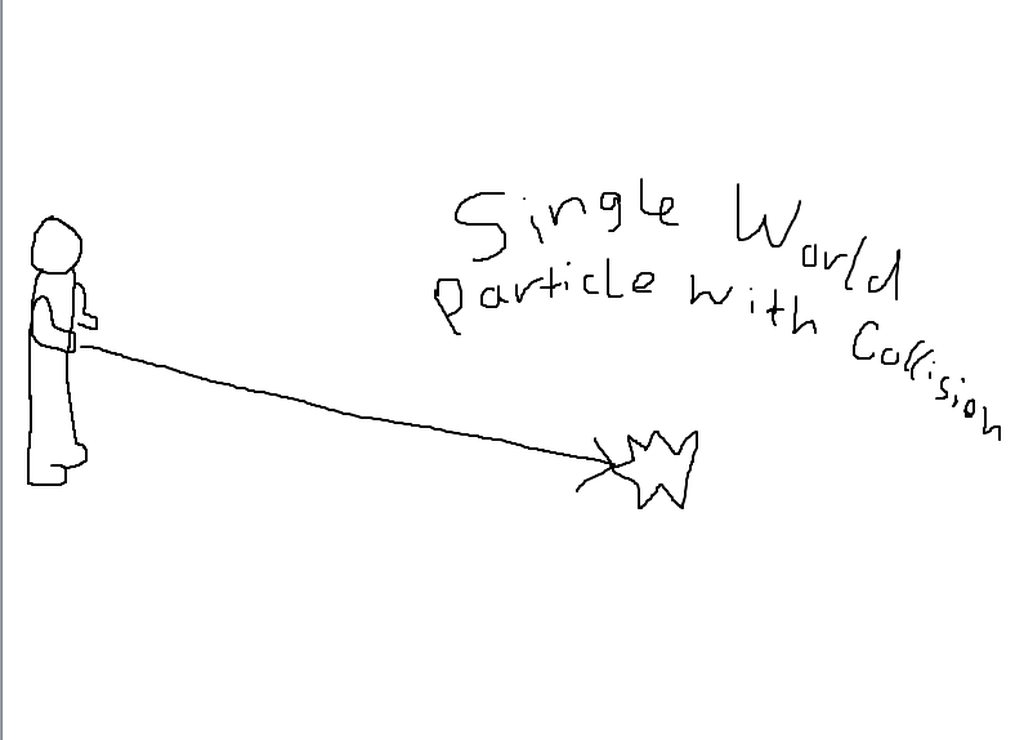
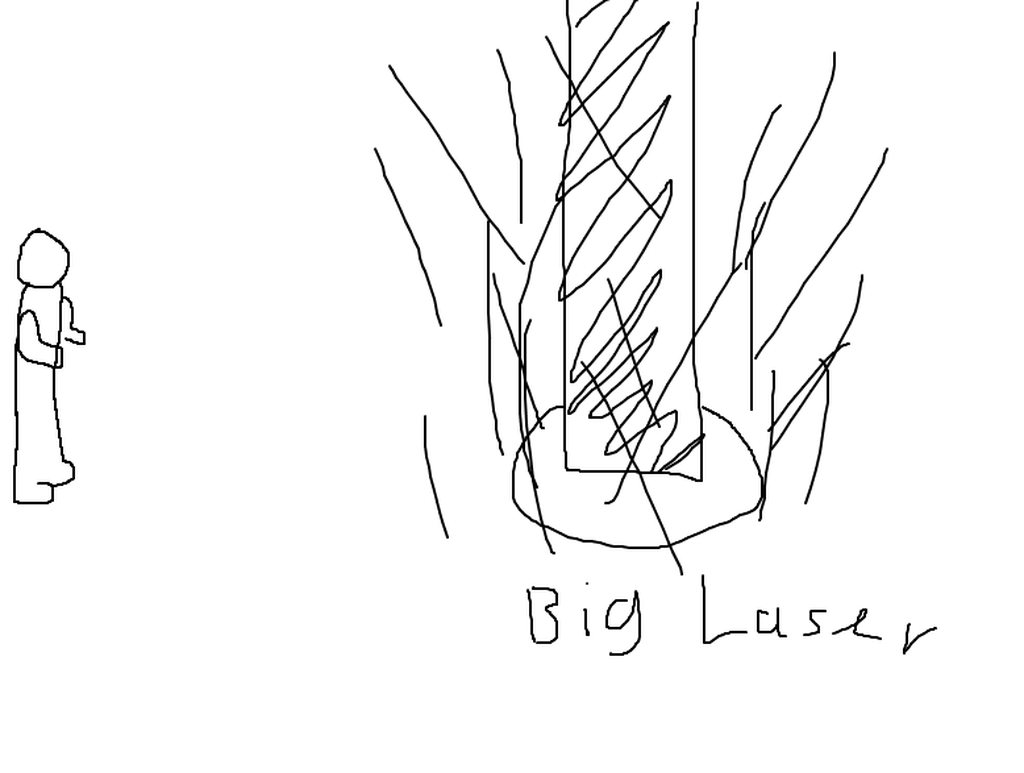
and where it dies the laser appears and the sound plays
basically
or rather where it collides
undone glade
Hmm.. I know if this is fired at the hand you will need to set a rigid body onto your wrist and a game object with the fixed joint component on the root of your avatar that will hold any particle effects, making sure that the fixed joint is attached to the bone with the rigidbody.
obsidian vigil
yup, i did that
undone glade
Gravity and constraints off?
obsidian vigil
yeah, thing is i wanted to put a sound source on the particle i shoot
obsidian vigil
unfortunately
i think im just gonna have the soundsource on the empty object and hope it works
undone glade
Maybe
Otherwise it may be annoying to people around you, but I'd say to have the audio source cover the range of the particle effect maybe if all else fails.
obsidian vigil
i mean
its not some kind of memey earrape song
or really loud noises
its this song
● Buy now: http://ukf.me/BassCannon ● Listen to Coffi's 2016 remix of Bass Cannon: https://ukf.me/BCCoffiRMXUKF ● Follow UKF Dubstep on Spotify: http://ukf.m...
which shouldnt be too annoying unless you completely hate dubstep
undone glade
Then that may be your best bet
Because I doubt you'll be trying to hit people from across the map
obsidian vigil
that would be kinda cool tho xD
may redo it with soundsource to do that if it ever is possible 😛
clear yew
Is it possible to place objects in the world that others can collide with, which are non-local?
slim sparrow
Yes, but you'll have to make them particles
Oh, and the collision is one-way. Particles can't push players around or anything
Other than that, there is no way @clear yew
thick crypt
Hey, for an animation, do you need to make a clone of the model, or are you ok to just use the animation on the current model?
 blissful frigate
Create the animation on a clone
slim sparrow
You should absolutely create all your animations on a clone. This also goes for animating child objects on your avatar
Otherwise the pose might mess itself up permanently as soon as you hit edit/play
Plus, this gives you the ability to mess up without breaking anything
clear yew
delete it and drop a new version of it
slim sparrow
Wait
You might actually want to rename the old one, then drop a new one in. Then you can copy the old VRC_Avatar Descriptor component
Since setting all the blend shapes for lipsync again is a heinous task
thick crypt
That and I put dymanic bones in there as well...
slim sparrow
What happens when you remove the Animator component on the old avatar?
thick crypt
...?
slim sparrow
You can re-add it if you wish
In your scene, there's your avatar that's stuck halfway in the floor. Click on that, then delete the animator component
In the right toolbar
Or maybe unset the animation controller
thick crypt
Deleted the animator component, nothing happened.
Lemme try unsetting the animation controller
Nothing...
slim sparrow
Then you'll have to drop in a new one
Don't delete the old one just yet, you can copy over the VRC Avatar Descriptor component, and all the dynamic bones too.
But rename it so you don't get name conflicts
thick crypt
Rename the second one I drop in?
slim sparrow
Rename the first one, then drop a new one in
You'll delete the old one anyway once you copied it all over
slim sparrow
You probably don't want to do that. Duplicating an avatar is literally 3 seconds of work. You should always duplicate the one you're actively using at that moment.
Just CTRL+D it every time you want to make a new animation
thick crypt
True.
slim sparrow
Also, disable the original avatar while you're animating the duplicate. That will prevent you from accidentally messing up the original, and you'll be able to see the duplicate more clearly.
torn pawn
you dont need to duplicate for every new animation
need to duplicate only when u add new stuff onto main
slim sparrow
I guess so. I just duplicate again since it's easy and I'm forgetful
Only irritating thing is having to remove the Dupe animation controllers all the time
But that's only once per animation
torn pawn
yea, having like 5 anims on one can get annoying
switching from one to other, then having the wrong one selected
i can see that
boreal trellis
are there problems with gestures when i create blinking in unity as animation?
will it glitch gesture and still blink?
slim sparrow
If you use the automatic blinking (such as the one provided by CATS eye tracking creation), it will look a little glitchy
But most people won't notice
If you want to fix that, you'll have to create eye tracking again in CATS, but disable blinking. @boreal trellis
Then you have to make your own blinking animation, mark it as legacy, then add it to an Animation component. Not too difficult. Then in your gestures, you can disable this component to pause the blinking.

Importing model - 0:37 Toe Removal - 1:37 Applying Shader - 2:29 Blinking Animation - 3:09 Animation Override (Facial) - 7:24 Avatar Descriptor & Viseme - 18...
boreal trellis
oof, i know how to do stuff in unity, just always skipped blinking and used cats
slim sparrow
Yeah, it's not too difficult
boreal trellis
so it wont blink when i use gesture?
slim sparrow
If you disable the animation component within the gesture, it will stop the animation and thus the blinking too
clear yew
you sure about that ?
slim sparrow
Yeah, how else would it work?
clear yew
last time i tried that some months ago it didnt work
slim sparrow
That's how most people do it, I wouldn't know what other methods you even could use.
Forcing the blink shape keys to 0 doesn't work since that just breaks blinking altogether
clear yew
put the blinking to 0 when you use a hand gesture
slim sparrow
You can't do that
At least, not without breaking blink completely last time I tried it
Same goes with the lipsync shape keys. If you force those to 0 inside a gesture, it just makes them not work at all anymore.
languid pier
ok guys, in this video https://youtu.be/6-vXe-T-vRY?t=5m44s , you see woops goes into animation but take one sec and appear with the capes

Woops Merch NOW AVAILABLE ▶ https://www.designbyhumans.com/shop/WoopsSquad/ 🎬Edited by Shake ‣ https://twitter.com/ShakeDrizzle Produced by: https://twitter....
any ideas how to ?
i can get the things to appear in the emotes, but it doesnt stay
slim sparrow
It's one of those weird package things
There are ways to toggle stuff on emote, it's a rather old package
Hang on
Search for "toggle props" in #development-advanced
languid pier
aight !
 lunar pasture
just think about your gestures as switches, not the whole animation, you essentially have to animate the active status of a game object that does the funky stuff
 languid lantern
Silly question, but is it possible to set up an animation that essentially makes your avatar invisible or remove the model temporarily? I'm eyeballing this SCP 173 model I just came across and would like to try to set it up to disappear then reappear behind people.
slim sparrow
Yes
In the gesture's animation, disable your Skinned Mesh Renderer component.
Be careful, sometimes I have had issues where it wouldn't re-enable for other people, only myself. If that happens, you need to use a stencil to hide your model
languid lantern
Ah, alright, thank you very much
 woven surge
Someone knows how can I change a material from my avatar to another on an animation?
slim sparrow
Hit record mode and change the material in the scene explorer
In the skinned mesh renderer component
woven surge
Okay, thank you very much!
 high summit
Any guides on how to attach a bow string to your avatars hand in unity? I've seen it done before but I've got no idea where to start
slim sparrow
I'd say the best way is to have the bow string with bones so you can pull it out in pose mode in Blender
Then put a Fixed Joint between the hand and the string. Activate this joint on a gesture and you'll be able to actually pull the string
high summit
Gotcha. I'll try that, thank you
slim sparrow
Another option is shape keys. Probably more reliable
Just make a shape key where the string is drawn back. It won't automatically follow your hand that way though. But if you put it on fist, I think you can regulate how far back the string goes
On Oculus at least, not sure if Fist is analog on Vive too
 solar relic
@slim sparrow question about fixed joint. How can I have an object stay at one place? Mesh particle... Im confused.
night crescent
I can't figure out why my custom hand emotes don't work at all. I attached a single frame of enabling a parented audio source, offset by 1 frame
Can certain avatars not activate those emotes if they don't have fingers?
torn pawn
disable the object
night crescent
Yeah, just uncheck the object while you're "recording"
 past eagle
I created an animation for my gun to move the slide in and out. How would I go about making an animation play that animation. Toggling the animation doesn't make it play
I don't want the animation to play all the time, only when I fire.
Currently I can pull the gun out with the Rock emote, and use the Thumbsup emote to fire the gun, but toggling the animation in the Thumbsup emote doesn't cause the slide animation to play on the gun
clear yew
Can someone help me with visems...its wanting to apply it to my whiskers....
 shrewd moon
Toggling is like a secret cult, most are not willing to tell their secrets
languid pier
yea lol,
clear yew
i think there is a text file in the prop file package that explain how it's working
languid pier
yea i saw, i just dont understand it. Like how its working and everything. I dont want to just do it, it want to understand the processus behind it lol
clear yew
isnt it a basic version of logic gates ?
languid pier
gonna need to inform myself, but still cant make it works ;_:
obsidian vigil
Well, yesterday i discovered something... ill probably need someone i can test this with but, my emote was longer than 30 seconds so the music just kept playing even after vrchat cut it off
which may mean that we can keep stuff after an emote is over
clear yew
your model can't be longer than 30 sec
if you use a game object and parent another model to it then you can get over the 30 seconds limit normally
obsidian vigil
yeah but the interesting thing is that the music kept playing after my emote was done
if i can somehow get as an example clothing to appea and stay in a similar way that would be neat
clear yew
i think that's just using the toggle prop thing
clear yew
yes
clear yew
that's how woops got his camera and cape staying for exemple
clear yew
there is a dropbox file in on of the channel with the package i think
obsidian vigil
@clear yew not sure which one it is
clear yew
👌
Y u so smart @clear yew 😂
i don't know
i've been here for months and it's always the same bullshit mistakes and questions 👌
Ohh xD
Good job :)
thanks m8
Thanks for helping others you shall go far in life :)
i'll try
thanks, appreciate that
obsidian vigil
@clear yew do i need to feel offended? xD
clear yew
not at all but there are some questions that are frequently asked and then you have the "wave" questions
for exemple, when the cameras bullshit happened, everyone for almost 2 weeks asked how to get working cameras and now nobody cares anymore
now it's those toggle bullshit that is slowly starting, probably because of woops
obsidian vigil
maybe
i mean, i was curious because it happened to me yesterday
i dont even know who woops is o.o
clear yew
a big streamer
that is basically a demi god in vrchat now since he got some mod tools

one of his VOD where he is testing the new camera feature
15m30 if the time stamp isnt working
obsidian vigil
im excited
clear yew
you can only see the little lense thing so you know where to look
and when you take a picture it will save it to a folder
clear yew
https://www.twitch.tv/videos/252317186?t=11m
this is poke VOD, he show you the camera stuff in more depth

nah it's another video i think
obsidian vigil
that cam is pretty sick tho
 white bridge
Is there a way to reset the animation state back to the default position in the midst animation another?
 steady sorrel
Morning, afternoon and evening. Could someone DM me where to look for basic screen overlays that I can use to cover around 5% of a persons screen during an effect? (Not intrusive and doesn't have flashing lights ect)
lilac cave
pretty sure thats a shader
if you find it pm me
and if you find one that is only user side thatd be good too
obsidian vigil
same here pm if you find ples
 royal summit
Isn’t their a night vision shader in the unity store which works in a similar way?
clear yew
oh i have a shader like that but keeping it for myself 👌
you can try to make your own, it's pretty easy, look for grabpass stuff 👀
obsidian vigil
wait
Just GrabPass { } grabs the current screen contents into a texture. The texture can be accessed in further passes by _GrabTexture name. Note: this form of grab pass will do the time-consuming screen grabbing operation for each object that uses it.
is that literally it..
and then you put a texture on top of the grabbed thing
clear yew
maybe ¯_(ツ)_/¯
there is some other options to use of course
but grabpass is basically the way to go
obsidian vigil
its just that it isnt easy to get into it when nobody wants to tell you wtf youre supposed to do inside the shader
clear yew
because there is a lot of different w<ys to do it
i barely know stuff about shaders
i mostly messed with shader forge
i didnt write my code from scratch
clear yew
yes
royal summit
Anyone know any good free alternatives to shader forge?
obsidian vigil
okay good
clear yew
also if you need some tutorials
http://www.shaderslab.com/shaders.html
clear yew
@royal summit can i DM you something ?
royal summit
Yeah sure
torn pawn
u cant make it global with how it currently works
slim sparrow
Make what global?
torn pawn
cameras
slim sparrow
What do you mean global?
obsidian vigil
Cameras visible for everyone
slim sparrow
I have actually seen friends of mine do such a thing. Just broadcast a camera globally in people's corners.
obsidian vigil
i think is what hes going for
obsidian vigil
a lot
torn pawn
it not only lags people, but it can crash every1
obsidian vigil
but i must say that id love to have a camera that actually takes pictures and puts them on an object
torn pawn
cuz ppl dont even care to lower the range or fov it renders
obsidian vigil
cuz ive seen a few people do that
clear yew
@obsidian vigil extremely easy to do
and kinda allowed since you only show the last frame freeze
so the camera isnt actually working
so no lag at all
obsidian vigil
? o.o
my cams are just not visible at all
thats the problem
for anyone other than myself
clear yew
yeah, because you need a work around for it
which is actually pretty fucking dumb to bypass
obsidian vigil
dumb as in way too easy
clear yew
way too easy
obsidian vigil
or dumb as in stupid to do
torn pawn
yes
clear yew
took me 2 minutes to figure it out
obsidian vigil
similar to the poly mod?
clear yew
you don't modify anything
torn pawn
cuz vrc 🤷
clear yew
just using the way that unity works
and for that frame thing you need 2 cameras
one local and one global but hidden by default
same position, same view
you use the local camera to see what you need, and when you take the picture you just show the global camera but with the actual camera disabled and it will be locked at the last frame
manic torrent
https://cdn.discordapp.com/attachments/420183681798242304/436889235681705984/20180420110046_1.jpg need help, character invisible on avatar list, the camera somehow fucked up.

 wide warren
This is probably gonna sound stupid but does anyone know the height of the stage in the Pug by chance? Making emote specifically for that room and I got my sense of scale really messed up because the character is short and I cant tell if I made him too small or if I made a bar stool too big. The reason I'd like to know how tall the stage is is because he throws the stool at some point and I dont want it to just be floating at stage level or fall below the floor when it lands
 heady sundial
@manic torrent delete all the cameras on your avatar, reupload the avatar, and restart VRChat
heavy stirrup
What's the best way to time a walk cycle for actual speed of movement?
Just eyeballing it?
final gazelle
you could try to measure the stride of each step and then match it to your movement speed, except that sounds a lot easier said than done in unity -- i've only tried that sort of precision over in MMD
 remote blaze
@wide warren you could try to measure it with a friend using a literal ruler avatar
Then use that ruler for the stool
languid pier
When i put a props in my spine, all my models is not visible in mirrors
And if someone actually have the kindness to help me with toggling props with emotes. Already have the packages from hardlights
clear yew
change the name of "body" of the props
languid pier
Ah ty, what a dumb thing it was.
Oh, so the models was only reading body from the swords
clear yew
yes, multiple meshes called "body" will mess up in the mirrors
only the main model should have it named "body"
manic torrent
@heady sundial not working
wide warren
@remote blaze. Thats not a bad idea actually, I could just extend a tape measure till it hits my floor then clamp it. Thanks! God this gonna look weird when I go into the Pug and start measuring the stage.
remote blaze
no I meant more like
have a friend use an avatar which is literally a ruler
then use the avatar to judge the size when making the animation in unity
wide warren
Oh lol a ruler avatar
heady sundial
@manic torrent you'll have to share your hierarchy
bronze peak
So i am lost.. i have done this b4 but cant get it to work. B4 i had a hat with those little fans on it.. in blender i added a bone that had all the weight of that fan. then in unity i made an animation where the fan would spin 180 degrees and loop giving the illusion it was spinning. i Now have a Mini Gun That i want to do the same thing but is not working i cant remember what i did or am doing wrong.
I figured it out.. lol i had the transformation at the beginning of the animation instead of the end OOF
 twilit night
http://prntscr.com/j7zmrc Does anyone know how to fix this or had this problem before?
 pliant plank
@twilit night The missing head?
Oh wait, that took longer to process than it should've ._.
Do you have multiple separate meshes?
pliant plank
Like, actual main model separate meshes
twilit night
My main is all together 1 mesh
pliant plank
What're the names for the main mesh and the sword mesh?
twilit night
Both are called body?
pliant plank
Rename the sword mesh to something other than body
Meshes with the Body name tend to cause... weird issues
Multiple ones that is
twilit night
Okay, I'll try it been looking around for a solution.. My last resort was to get on this discord and ask :I
@pliant plank It worked, thank you ^^
pliant plank
Glad to hear it
violet kraken
how can i project a camera on a plane and make visible for everyone ?
clear yew
unfortunately global cameras are not allowed so we can't speak of that
violet kraken
oof
bronze peak
Can you add a delay to an audio source?
winter sundial
Why can't I seem to activate objects with animations?
Gameobject Cube is active (animation) doesn't work in game, on any avatars
 blissful grove
Does anyone know how to get animation from garrys mod
undone glade
is there a way I can spawn a stationary box into a world with an animation?
example, placing an object in the world without it following the avatar through animations
undone glade
do I need to put that inside an empty before that?
clear yew
not necessary bur probably better
undone glade
alrighty
clear yew
since you want to make an animation
undone glade
thank you
clear yew
that will reset the position of the fixed joint
undone glade
so just angular drag and gravity? I don't need to do anything with constraints?
undone glade
what do you mean?
clear yew
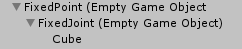
this is what i have
fixed point is an empty game object, parented to my spine and it's always 1 meter in front of my model
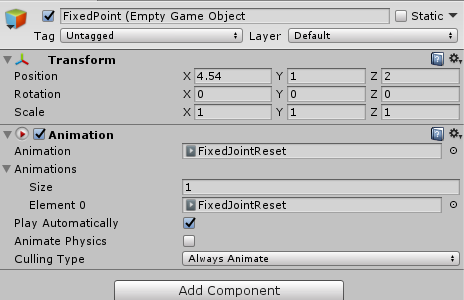
this is what it looks like in the inspector :
https://imgur.com/plmnwFB
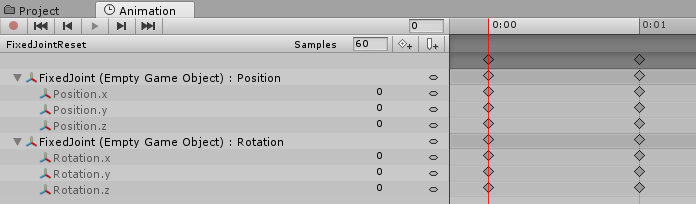
this is the animation file
https://imgur.com/T11RGTD


 undone glade
I have this as an animation override
clear yew
and basically
that animation is always active when the fixed joint is disabled
that fixed joint is constantly reseting to origin point of the FixedPoint Game object
undone glade
If it stays in place while I do the Rock & Roll gesture, that's all I need really
clear yew
so it's always in front of me
and when i spawn the cube, i simply activate the fixed joint and disable the animation component
this worked for me too, if you move your hand really fast, it spazzes out but that's the only thing, this is beautiful for world particles
seems there is a lag between the fixed joint and the rigid bodies being transformed but it's cool
undone glade
This is just an improved blackout box for people prone to seizures
The plan is to have it spawn where ever I am located and I can move out so I can or another can place down a portal.
clear yew
you will still need that reset animation tho
undone glade
alrighty, let me make sure I have this right then.
last thing I need is to upload just to find it doesn't work and then more time needs to be put in
so I have a game object with the fixed joint, and in that I have my cube.
so do I need two game objects with fixed joint or just one?
from what i'm seeing from your picture.
clear yew
rigid body for both ends, fixed joint that connects them
no need for rigid bodies
so one rigid body in armature, and one outside of armature with an empty gameobject around it
in my case
create 2 empty game object
ah k
first one should be where you want your cube to always spawn
interesting
second game object (parented to the first) should be the fixed joint
then parent whatever you want to the fixed joint
put an looped animation that reset the fixed joint rotation and position to 0,0,0
and when you use a hand gesture to spawn the fixed joint and all object parented to it, disable the animation component of the first game object
undone glade
so I need to animate the 2nd game object?
clear yew
animate the first so it reset the 2nd
 normal remnant
can someone link me vrc toggle pro , was told i could find it her, but i didn't see it 🤔
undone glade
so 1st empty is animated and has an animation component to keep the 2nd empty in the 0 axis, correct?
 true scroll
this is propably what you are looking for @normal remnant http://Shared.DJ-FPaul.de/7a2ekaq1nl.unitypackage
clear yew
check the screenshot, you'll understand better
undone glade
I'm trying to, but they're both labeled the same so it's confusing me
true scroll
i should make a upload function for stuff that doesnt random name it at some point i think 😄
undone glade
that's what was getting me
undone glade
right, right
I can animated the second while it's parented to the first? wouldn't that break it?
or should I seperate them first, animate, and then join them together.
clear yew
just make a duplicate of all that stuff
undone glade
right, I'm running on fumes so bare with me
long day
Alrighty, I think I got it down. I just need to make it into an animation override.
clear yew
fixed joint is disabled by default
so everything parented it will be disabled too
you use a hand gesture to activate the fixed joint
and disable the animation component of the fixed point
undone glade
So i'm making point or joint inactive?
I would assume make joint inactive and keep point active
clear yew
point is always active
constantly reseting the position of fixed joint
fixed joint is disabled by default
activate the fixed joint with a hand gesture
and just disable the animation component of the fixed point in that same animation
so it stop reseting the position
 hexed fern
anyone here
i tried to clear a animation off a smd model but she won't go back to the t-pose
unless i click armature in the hiearchy
but if i click off that she goes back to the animation pose http://prntscr.com/j82jco

this is in blender btw
hexed fern
@jovial rain Thank you!
 lilac dew
anyone know how to do custom emotes where multiple models appear and dance alongside the main model?
 ivory lagoon
how would i go about adding a small sound clip to an avatar when i change into it?
that doesn't loop
do i just put it on the avatar? do i need an animation?
 silent gazelle
@ivory lagoon you can add it straight to the avatar, make sure play on awake is on and loop is off. i don't think you need an animation if you only want it to play when you change into it.
ivory lagoon
oh sweet!! thank you!