#animation
1 messages · Page 55 of 1
 wary parcel
Or prop*
But my stoppoint is the animator. This is whats stopping me from doing stuff, i cannot activate something higher on the hierarchy with the animator animations, witch stops me from keeping it active, but if i can find a way to only activate the animator component i can.
That means that when i press an emote in the emote tab i.e. sword will always be active until i press an cancel emote or something that stops everything.
 rough gust
How would I go about making an object detach from my model and fall down on the ground using an animation?
Trying to make a beyblade fall down and spin on the floor without it being attached to my wrist
 covert linden
@reef mason What Korbo said, so yeah, select them both, disable hip and show the wrist one
 obsidian vigil
just animate the beyblade and your characters movements in an animation
and drag that onto an emote slot in the override
rough gust
alright, I wanted to do it with an override, but an emote will have to do
 meager saffron
You could probably do it with two mesh-rendered particle systems. One just has a single particle that is the bey-blade in your hand (or just have the mesh be there). Then another override hides that, spawns a particle in the same place that spins and has gravity applied to it.
Might even be able to get it to scoot around on the ground with a noise modifier.
rough gust
I'll try that. Thank you 😄
meager saffron
That should have it drop from your hand to the ground, stick there and spin and scoot around.
You're gonna have to do some janky stuff to get it to not follow your character's movements though.
meager saffron
never done that exactly before so I'm not 💯 on the process. This is a good playlist for learnin' particle systems though: https://www.youtube.com/watch?v=ctmqr_8esT0&list=PLpPd_BKEUoYh40LeJXTgA6E53gCMPq3MX

Unity 5 - Game Effects VFX - Glowing Orb In this Unity tutorial we are going to see how to create effects for games by using the particle system Shuriken. Th...
lookin' for another vid r/q. sec.

Had to re-upload because of audio being too quiet should be fine now. I forgot to mention it in the video, but Murmur also answered questions I had and helpe...
workaround for the world-space particle bug that happens if you add particle systems on your armature.
obsidian vigil
Thx
 shut sky
anyone have a good video on messing with the animator to get custom idle animations to work?
i'm trying to do this idle animation but the leg IK keeps screwing it up and stepping around all over the place
 slate mortar
Is there a way I can slightly modify the default animations? I'd like to have a character's arms raised a little so they won't clip through their body, so it'd just be a matter of adding a constant to one of the shoulder values.
 golden remnant
When putting on face expressions to hand gestures, will I always have to do the finger animation manual or is there a way to put a face expression onto the default hand animations?
shut sky
I think you have to do the finger positioning manually still because otherwise the override will be passing the regular relaxed pose for the hand into it
 paper bolt
I'm having a little bit of trouble with having a gesture make an open hand with particles. Everything is set up, but it just isn't creating the particles, any reason why?
shut sky
'everything is set up' is pretty vague, did you make sure to mark the particle system as inactive, and put the animation keyframe to set it as active?
paper bolt
I marked the particle inactive and its active in the animation data
would I have to put it in my other gesture animation?
I have one where it has a gun but I don't believe the particle system is in there
shut sky
oh, are you using mirrors in game to test it?
try the camera in the avatar testing room
instead of the mirror
my particles don't show up in mirrors
paper bolt
I did look in the camera
shut sky
oh ok
paper bolt
I still didn't see it
 fluid crescent
anyone knows how to wink when doing hand gesture?
golden remnant
@fluid crescent https://www.youtube.com/watch?v=yfVmfGOOkOw

A VRChat tutorial on how to override hand gestures and emotes with your own custom animations. It can be used not just for VR users, but for desktop users to...
fluid crescent
@golden remnant ty
 outer plinth
If I'm making my own animation (emote replacement), should I be hand-animating my dynamic bones to look right, or will those continue to be driven by Dynamic Bones during the animation?
 cold bison
Ok so I bound the facial expressions to the hand gestures but now when I do two different hand gestures with my hands it just adds them on top of each other resulting in horrible faces
Any way of adding the facial expressions to only one hand or disable the other facial expressions when one is displayed ?
🤔
 outer plinth
@cold bison I was just talking to someone in-game about this yesterday. She was showing me how you can use that problem to your advantage to combine expressions into new ones. It's just a matter of learning to select the right expressions.
cold bison
Alright, thanks guys :)
 boreal trellis
Hi, can someone explain me what .pose file is? My 'avatar idle' is in this format and i want to use it, message me here or pm
 peak relic
Anyone here familiar with VMDs?
 hexed fern
I was wondering if anyone here has used maya before and knows how to turn on plugins
 keen scroll
does anyone know how to extend an emote for more then 10 sec
 old cave
I have an avatar with generic rig and I have custom emotes for him, but his emotes loops for like 1 min and while they are running I get stuck
Anyone know if there is a fix for that? The animation is not in loop on Unity's configurations
 night steeple
I made an animation that is a few seconds or more. When i use it in game and stop the animation and switch to a different gesture, it continues the original animation until it finishes. Does anyone know a fix?
 supple pier
same problem for me @night steeple
 shell quest
@night steeple If your animation is on a gesture you need to make sure the override animation is only two frames long or it will break things
night steeple
nvm i just put delays on the particle systems
hexed fern
So i have this model weight painted everywhere except his ears but his face seems to break in animations http://prntscr.com/ior717

his feet do too but i was already aware of that
 novel flower
Do scripts no work in VrChat? Tried to use a Prefab SFX pack and all the parts with scripts dont show up in game...
 final gazelle
custom scripts aren't allowed in VRChat, yeah -- if the SDK doesn't throw up a warning about scripts getting removed from the upload, then they just won't run in-game
 onyx bison
Do you guys know how i can make two or more models move in one animation using muscle editor? my issue is, i have an animation where i want the secondary model move its limbs alongside the primary model but i do not know how i can apply muscle editor to it
 dense rover
Are there limits on how long animations can be? Is there also a way to overide animations from the default emotes completely?
and move your hips
 ruby elk
Anybody who knows where to get basic dancing animations from? The ones form mixamo don't work for me
 nimble ridge
Anyone know how to add camera shake on avatar?
 clear yew
probably a shader
nimble ridge
Most likely, but I can't find any documentation on that ;~;
ruby elk
you mean like distortion?
nimble ridge
Umm yea that would probably work too
ruby elk
@nimble ridge
 crystal kraken
Oh nice, I was looking for this kind of thing, ty
crystal kraken
What you need?
ruby elk
Vaxe - Today at 9:45 AM
Anybody who knows where to get basic dancing animations from? The ones form mixamo don't work for me
crystal kraken
Hmmm, I don't think there are any unless you make them yourself from mmd motions
obsidian vigil
oooh
nice shader
@ruby elk join the LoliArmy Discord they share anims and stuff
if you want i can send an invite link
ruby elk
Show me a screenshot
 compact obsidian
"kreyframing for humanoid rigging not supported"
ruby elk
Maybe you're rotating it while the animation is active
nimble ridge
Sorry for not responding, I was in class and the professor showed up from nowhere
Thank you very much for your help
 patent quail
Anyone know of a workaround to get animation overrides working when having an empty game object as the root of your avatar? I'm using this to have my avatar levitate off the ground but it seems that the animator component on the root object is preventing animation overrides from working for some reason
compact obsidian
Does anyone have a fire particle which i could use
*image
i want a good nice long flame for my flamethrower
 eager vault
Oh my
compact obsidian
oh who am i asking, google is answer to all
patent quail
setting the animations to legacy made it work heh
compact obsidian
u got a quick tutorial how to add sound

►Patreon https://www.patreon.com/SoundEffects Download Link https://audiograb.com/YPI93B3ugn Sound Effects free for your projects a wide variety of sound eff...
this will be fucking good
Is there a way to make particles stick to the world?
compact obsidian
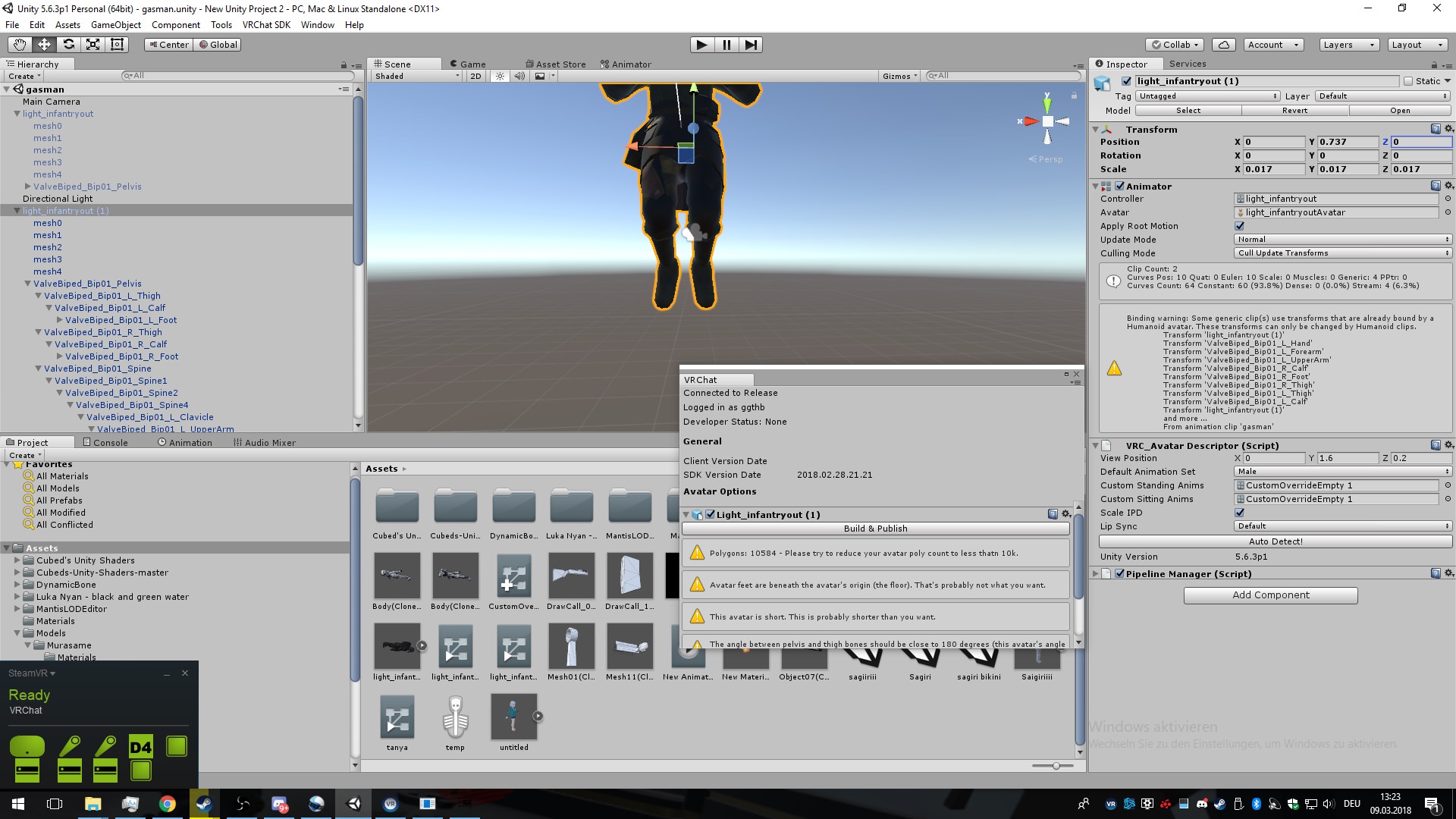 obsidian vigil
why are you trying to upload the one stuck in the animation pose
from what i can see hes kinda crouching
compact obsidian
tried with bouth but still
obsidian vigil
are both of them in this pose?
obsidian vigil
should the weapon be permanently visible?
obsidian vigil
is the weapon attached to the model?
compact obsidian
yes
obsidian vigil
okay
compact obsidian
(to the animation model)
obsidian vigil
and the t-pose one?
compact obsidian
has nothing
obsidian vigil
theres the problem
the t-pose one is the one you upload
and the weapon needs to be on that one as well
or nothing will happen
compact obsidian
So in theory
obsidian vigil
and you cant upload a deformed model which was animated on
compact obsidian
i hide the animation model, duplicate the weapon and hide it for my main character
obsidian vigil
pretty much
yeah
but for the next time
position it on the main charater
then duplicate
makes it a lot easier
cuz it may be positioned wrong
when you drag it over
boreal trellis
what??
obsidian vigil
put it so it would fit when they go into the animation pose
@compact obsidian
or put it somewhere duplicate go to animation pose and look what you have to change
 torn pawn
@obsidian vigil positioning on main character doesn't do much, you always (at least 99% of the time) have to copy transformation component from a duplicate onto the main
to perfectly fit objects to palm/fingers
obsidian vigil
lol never done that
and mine look good
but yeah, that sounds like another option
just wish that avatars would stay in animation posing even when you are out if the animator so i could see how the object looks
torn pawn
like, you have to always reposition the object on the duplicate to fit the sword/gun/ whatever else being perfect
obsidian vigil
not really
torn pawn
and then you HAVE to copy the transformation component onto main object, as otherwise it will be out of place
obsidian vigil
ive always done that on the main one
also the second one
no
you dont have to
if you dont work with you object moving in the animation
you dont have to do that
 pliant plank
What transformation component? :o
torn pawn
object position/rotation
I've maybe had one time when I didn't have to adjust the object in hand to be perfect fit under the finger/palm postions
pliant plank
Isn't that normally setup on the original?
Unless animating it of course
torn pawn
it's much easier to set it up onto the duplicate, as you are animating the fingers there
obsidian vigil
but why
you can still place it
and animate the fingers afterwards
it makes literally 0 difference
torn pawn
yes, then u need to reposition the object to fit the fingers
obsidian vigil
no you dont
torn pawn
yes you do
torn pawn
yes, but it doesn't fit the fingers
pliant plank
I mean, if you want to reposition the fingers to wrap around the weapon, you can fix up the transform and then copy the component, for more of a fine tune, i assume that's what you mean?
torn pawn
do you position your fingers on main model first to fit it?
obsidian vigil
no
i put the weapon while in t-pose
then i duplicate the model
adjust the fingers etc
delete the duplicate
make override etc
and upload
fits perfectly
because i dont move the object anymore
torn pawn
I just can't see it working every time without needing to reposition/rotate the object in any way to fit the palm and fingers perfectly, I've done hundreds of overrides with objects
obsidian vigil
i have as well and mine do
compact obsidian
i got a seperate animation for the flames
the sound plays, but not the particles
obsidian vigil
lets settle on the conclusion that apparently both work
because if either one didnt we wouldnt have our models
torn pawn
i might just pay bit too much attention to detail, I'm not satisfied with couple degree off or it's clipping too much
clear yew
hey this might be simple, dunno. but can i add a marker/pencil/pen to my characters kit?
compact obsidian
nobody said anything
compact obsidian
i cant see the flames,. but sound plays
compact obsidian
and yes the particles are marked as is active
pliant plank
And it plays normally on unity?
pliant plank
Brain died
torn pawn
put particles under an empty object and have the object disabled, enable the object through an override @compact obsidian
compact obsidian
Does play on awake need to be checked?
torn pawn
yes
compact obsidian
ah
pliant plank
Means that it plays the second it spawns
Which is exactly what you'd want in this case
compact obsidian
Is there a object which u can use for measurements?
pliant plank
Cubes
They have a scaling of 1 meter
You can stretch them and the scale is accurate in meters
obsidian vigil
did you copy the particle systems onto the other avatar?
compact obsidian
solved the flame problem
needed to activate it on my main model
another problem: its based on the direction which i LOOK
and it comes out of my knee
 solar relic
question about the new triggers thingies shift+f1. so im a desktop player. 1sec animation right. I can simulate a stabbing by having 2 anims right.a guard then stab anim.
it wont overlaped between each other right.
 torpid wadi
is there a way for a model to use the same armature with a different mesh? for a transformation kinda thing
just swapping meshes breaks the model for some reason
 visual summit
How to know which emote to replace???
Like which emote is the die emote? Emote5? Emote7???
visual summit
thanks
compact obsidian
problem
my fire particle is stuck to my knee
but it should be on my flamethrower model
(the animated one) not the main model
torpid wadi
is it a world particle
visual summit
What's prone forward?
obsidian vigil
@compact obsidian put it to local
visual summit
guise
compact obsidian
i want flames to stick to the WORLD
visual summit
what's prone forward
compact obsidian
like when i shoot at something it creates particles on the floor
which die after time
obsidian vigil
No idea how you do that but if you want particles attached to your flanethrower these need to be local
Lyeco no idea
Translate it with google or sth
obsidian vigil
I just got off work :D
 shrewd moon
Create a main world particle, create rigid bodies for the world particle, tick collisions on main particle, create sub particles for main particle, tick sub emitters on main particle, add sub particles to the sub emitters, make sub emitters play on death, tick collisions on sub particles, set time loss to 1 on main particle inside the collision s section, and then fine tune the particles to your liking
That was off my head
If I was looking at my screen I wouldn’t be so vague
 rugged elm
Eeh sad sdk doesn't accept video player component
 scarlet ibex
Can some one send me a link of dab animation ?
 gray onyx
my avatars custom animations wont work from my vive, but will work on other peoples accounts perfectly fine, what am i doing wrong help D :
hexed fern
Ok so this model is weightpainted everywhere except the ears and his face looks fine in this animation

but when i try to view certian animations
the left side of the face becomes oddly distorted http://prntscr.com/ip18z9

his feet do too but i already knew that was an issue
is it because of the way the animations are posed or is it something with his weights? heres a clearer image
 hexed fern
Guys, Does anyone know what the names of the sitting and jumping animations are on the custom overrride?
slate mortar
Is there a way I can edit the name of the targeted bones in an VMD motion in blender?
scarlet ibex
can someone send me big emotes like meteors fireballs ? or how can i download them ?
hexed fern
it probably isint possible
 spice echo
i see
because my avatar's a book
is there anyway i can use gestures for animations
or its impossible
i imported it as generic
hexed fern
im pretty sure its impossible
clear yew
hey can anyone here do animations?
clear yew
well depends how good you are? tbh I just want a simple animation mostly there is an advanced one I want but i dont know anyone who is able to do it
the simple one is just doing the middle finger at someone
 agile ruin
you gotta be more clear lol
is it a particle system animation?
is it a gesture animation?
is it both?
is it custom walk animation?
clear yew
Gesture animation because its doing the finger to someone?
agile ruin
gesture animations are the gestures you do with your controllers in vr
clear yew
oh
clear yew
thats basically what i want but to do the middle finger at them
agile ruin
that's extremely easy to do
clear yew
but do I have to have the vr controllers to do them?
thats why I said it was easy?
Just an emote to flip someone off is all I want
agile ruin
without VR?
agile ruin
never tried animations without VR but i suppose it's the same as with VR except you gotta animate the arm so it extends forward
clear yew
btw why does my unity keep fucking up?
like just a second ago kanna was normal but now she looks weird af and idfk what happened?
agile ruin
define weird
spice echo
i think
he did the animation
on the main avatar
now it's stuck in the
weird pose
hexed fern
is it wierd like one minute its fine when playing an animation
hexed fern
clear yew
i mean animations
im talking about kanna going from regular kanna from dragons maid to this weird looking shit
hexed fern
then the next animation you try it fucks https://image.prntscr.com/image/M5qTL_lDSFWjAtnoUXdk9Q.png
hexed fern
hell idk why mine does that, his face is properly weighted and everything
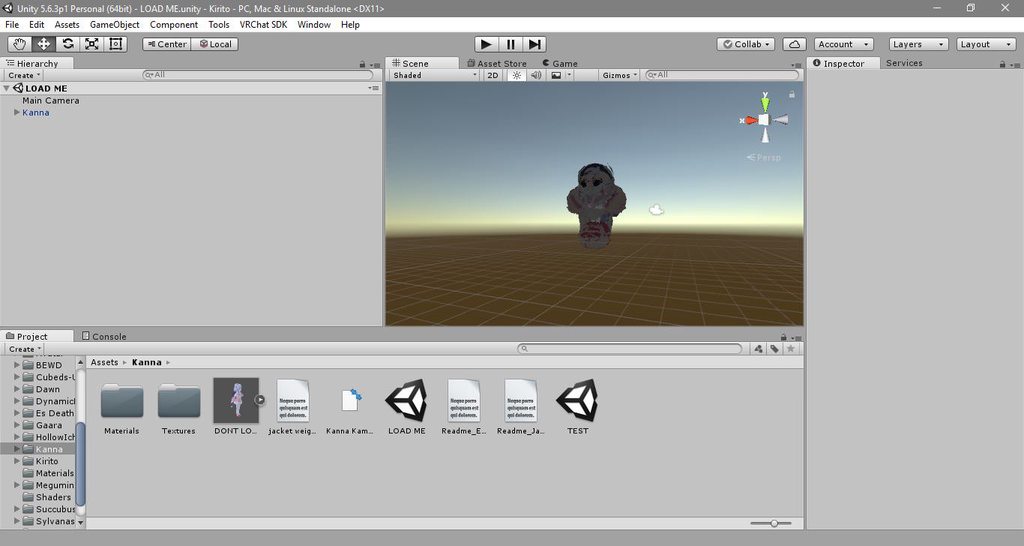 hexed fern
wait is the animation premade?
clear yew
im not talking animations
hexed fern
oh
clear yew
im talking about just avatars
hexed fern
what did you do then?
did you just put her into the thing and she showed up like that
clear yew
idfk I had regular looking kanna from dragons maid then uploaded then I came here and well now shes like this
yeah
clear yew
this has been fucking annoying and its been happening for awhile now
clear yew
no it was fine wait.... idk
yeah i came here for animation help
just to be able to flip someone off
hexed fern
so i finished my first real animation which is to make this baby's ear twitch

but it goes too fast
and its near the 30 second mark
clear yew
isnt that character from ratchet and clank?
clear yew
oh okay
 tidal gull
If I want a gesture to trigger a full-body animation, I hide my normal avatar's mesh, make another mesh appear, and that mesh has an animation, right?
hexed fern
but it isint
clear yew
he does
clear yew
I think i know the problem now but it would be hella annoying if I am right
hexed fern
i didn't notice the similarities between the 2 until like a month ago
and then i looked at them side by side and im just lok "omfg how did i never notice that!?"
clear yew
if I am right about this im gonna be annoyed af
hexed fern
but i can't figure out how to make the animation slower without having to sacrifice pieces of the frames
or redo it entirely
clear yew
that I am gonna have to close unity open the unitypackage then go to the thing and then
hmmm well idfk how to do any animations so
tidal gull
If I try and move arms/legs with gesture overrides, it doesn't work well, right
hexed fern
hell i still have to animate the right ear
tidal gull
So I need to do it via a different process 🤔
clear yew
idk how to do any animations all i want to do on all my avatars is to flip people off
hexed fern
........
this is my first custom animation
so i don't know much
basically what mines gonna do is his ears are gonna do a twitch sorta thing and he will kinda dart his eyes left and right
clear yew
yeah idfk whats going on with my avatars atm
whatever avatars i click it has that fucked up thing
hexed fern
lol i figured out how to mirror it
but it doesn't do exactly what hopes

OH YOU GOTTA BE KIDDING ME

HIS EAR FUCKNIG DETATCHES ON THE RIGHT SIDE
clear yew
hmmm are the sizes the same on all 3 scales?
hexed fern
yeah
the one that doesn't detatch looks like this http://prntscr.com/ip3n4o


the right.....wtf
hexed fern

changed the scale and it still happens
ugh this is irritating
i swear to heaven allmighty if its somehting i have to do in blender im just done
im gonna try this shit on a different model
final gazelle
@tidal gull what you described about triggering a full-body animation by switching the active meshes should work -- i'm not sure if there's another way of doing it, but it was mentioned in another thread that you can also change the animator itself with a gesture
final gazelle
the exact wording from the #feature-requests channel was:
"Multi-frame gesture animations didn't show up in my search, but it is also possible to use a gesture animation to enable a separate animator that plays the multi-frame animation."
i can't say i know what you're meant to do with that though
tidal gull
Well you overwrite the default VRC animator
And play your own which has an animation pre-configured to start when active
But how on earth you use a gesture to change an animator IDK
final gazelle
i think it can be added in as one of the properties/nodes you can keyframe in the animation clip -- what i'm not so sure about is whether it'd automatically change back to the original animator when you release the gesture
tidal gull
I'm not seeing it
It'd default back: defaulting back is what always happens when you undo a gesture
torn pawn
it should change back to original, I tried using mesh renderer colour change, it did revert back to original colour
tidal gull
It's an override after all not a replacement
torn pawn
so i would guess it should go back to whatever default there is
tidal gull
But what am I looking for to change the animator?
torn pawn
<no cluie
also how familiar is any1 here having two avatars under one, if I have two bodies using the same armature, they both should move with the bones right? disabling 1st mesh renderer and enabling 2nd, cuz having an avatar with different armature makes 2nd avatar t-posed
final gazelle
hmm, my avatars are showing different options when i try to add properties to the animation clip -- one of them is outright showing me options for the animator, pipline and avatar descriptor, while another one isn't
@torn pawn if the two bodies are two different meshes bound to the one armature in blender, that should work, yeah
torn pawn
could also try rigid bodies and joints
final gazelle
if you want your second avatar on a different armature, you might need it having different bone names or using a generic rig -- i'm not sure exactly what the problem is, but i'm guessing that VRChat can only make one of them animate via the IK system at once
@tidal gull from what i can guess at so far, the animator's probably meant to be changed in the animation clip via:
Add Property > VRC Avatar Descriptor (Script) > Custom Standing Anims
tidal gull
That'll just take a gesture override tho
final gazelle
i'm not seeing an option to change the slot for the Animator/Controller slot directly
hmm, point
tidal gull
Yeah that would make no sense
What I'm doing is the following: disabling the mesh visibility as long as the animation is active
Then, making another game object, containing a mesh, visible
That GO has an animator on that has a default animation which is the anim I want to play
torn pawn
@final gazelle i want it for this, my main model spawn an oven, I go into it and swap into turkey http://prntscr.com/ioh0q6
 final gazelle
yeah, might as well stick with the approach that's making more intuitive sense right now -- i've got a couple of questions about how the animator one's meant to work
torn pawn
don't ask why i made it 
i was on 24+ noslee session, that's when i get some crazy ideas
i can swap models no problem, but now when i have some time ill figure out wich of the methods allows me to move with the 2nd model
final gazelle
i believe this is probably the most appropriate response right now:
http://s2.quickmeme.com/img/81/8165743fcab938d60dfdc94a30f897a34babe42257da8efb37d5c3da279303bd.jpg
 hexed fern
xD
torn pawn
so my 2 ideas for now is - have them under the same armature, then gotta go back to blender, or try joints + rigid bodies
final gazelle
@torn pawn if you can force the models to switch their isActive states with a gesture and stay that way, that should pretty much do what you want -- just plonk both the models onto the one armature in blender before exporting as an FBX
the joints and rigid bodies thing, i'm having some trouble picturing because i'm less familiar with unity than i am blender
torn pawn
yes, i can disable first model skinned mesh renderer, which makes it invisible, then i can activate 2nd model
 fallen crypt
I am trying to make a hybrid avatar
torn pawn
cuz i know a person who has a huge hat with hands, and he moves those hands with rigid bodies + joints
@fallen crypt what kind of "hybrid"
fallen crypt
But wondering if I have to joint the armature
Well, trying to surprise you guys later but
final gazelle
if the end model is going to be one single mesh, i think you'd have to, yeah
torn pawn
you want to transplant other parts from different avatar?
final gazelle
don't think one mesh can be influenced by two armatures at once
 fallen crypt
:o
final gazelle
if you don't want any tearing, yeah, i think that's going to require an armature joining
fallen crypt
So I can still animate generically?
torn pawn
lets say if u transplant Head bone + all hair bones
when you join armatures, you need to parent the head to neck after joining
so here maybe http://prntscr.com/ip4bno bone to hips? idk

also seems u have duplicate bones for legs, will need to mix weight, or iof you just rig it as generic, then it doesn;t matter
tidal gull
This is what I am working on https://i.gyazo.com/24156991a1902955af7569ee34f337cd.mp4
TATSUMAKI SEMPUUKYAKU
fallen crypt
Lagged so hard
Every time trying to type in channels
Yes I made duplicates because I though that way I can animate generically
Since you aren't allowed to animate humanoid in gestures more than 2 frames
torn pawn
it defaults to "play on awake"
torn pawn
same for audio source
tidal gull
But that was because it wasn't respecting rotation
Trying to fix now...
My "animation" is posing the model then spinning it
😄
final gazelle
you could start with the model's unanimated pose rotated in such a way that it cancels out the rotation of the animation
or fiddle around with the animation's root node as well, if it's only keyframed a few times
tidal gull
Well the animator node is being a little screwy with rotating itself
Rigidbody to the rescue 😉
final gazelle
if you've got more than one animation you want to play with that guy, i'm actually more inclined to suggest rotating the model's initial position rather than trying to fix up the animation clip
because i've got a sneaking suspicion that all the animation clips would start rotated the wrong way
hexed fern
Yo i got the klonoa animations into unity finally
in the form of a giant fbx
now i just need to split it into the ones i want
but i also noticed something else
 clear yew
I need someone to add a emote of flipping people off
hexed fern
he has premade mouth animations
but there somesort of .shp0 file or something

the original model has no shape keys
so i think these are meant to be the mouth animations
fluid crescent
60 seconds is max length of emote?
tidal gull
I think it's 30
First attempt at my gesture override hack: the replacement mesh disappears after a second and the original mesh stays visible
I think I might be pushing this system a bit far
outer plinth
@tidal gull I'm not sure exactly what you are doing, but I do know that adding props to gestures has a similar problem. For me any way. When I 'draw' my sword, the hilt is supposed to disappear right as the sword model in the hand appears. There is always a moment when both sword's exist.
tidal gull
There's lots of issues
I have a fireball mapped to handopen
After throwing a fireball, other gestures at random will become the fireball
It's weird
outer plinth
I've had that issue too, but with the sword. It's impossible for me to avoid 'drawing' the sword multiple times after first drawing it
(on Vive)
So even though it is set up on the 'rock and roll' gesture, other gestures trigger it
tidal gull
For making my entire body invisible, am I disabling "Body" or something else
outer plinth
That should probably do it, but I've never tried that
tidal gull
Now I just need to figure out how to keep the gesture going
fluid crescent
My emote ends early,how to fix that?
torn pawn
@tidal gull disable your mesh renderer or "body"
tidal gull
Yup got that working
Also figured out my issue with anim weirdness, involved looping 😃
hexed fern
hmmmm do emotes have to be a certian length or can they be any length?
torn pawn
what do you mean? @vapid ruin there is no "left and right" controller
 vapid ruin
Okay. is there a jump in the custom overide then?
torn pawn
you can utilize both controllers if you use couple buttons to toggle child objects under parents though which can result in having 15-16 overrides instead of 7
final gazelle
there appears to be no jump, no
final gazelle
the base animator itself doesn't seem to expose anything relating to vertical movement -- just whether your avatar is touching the ground or not, which is how it determines whether to play the "Fall" animation
there's a canny thread requesting a jump animation to be added in though
 paper haven
Does anyone know why my emote is cutting off 5 seconds early? It has all the keyframes set up but seems to cut off just before the end
I tried extending it by 5 seconds and adding in a keyframe, but it didn't help
 wanton onyx
If I add an audio source to an emote do I need to uncheck it to make it not play constantly?
torn pawn
you put it under an empty object, have the object disabled and audio enabled by default
if by emote you mean override, but if you mean emote by an emote
then uncheck "loop"
paper haven
It's an emote, not a hand gesture
You mean "Loop Time" when I select it?
It's unchecked
torn pawn
not you pyro
paper haven
ah, mb
wanton onyx
Override
torn pawn
put the audio source under an empty object, and with override enable that object
 worn nimbus
Quick question, I'm doing an animation that pushes my character back. I was using the Root T to get her above ground for the animation so I figured I'd use this to push her back later. In unity it shows her flying back in in VRChat it doesn't happen. I'm assuming I'm using the wrong thing?
If it helps it's an override on an emote, not a hand gesture.
 grand bloom
I think I need to set it as a loop but not sure where
 wind torrent
@grand bloom ok you said its a sec long?
grand bloom
yup
grand bloom
Arms/head
wind torrent
umm,
grand bloom
just strumming a ukulele
wind torrent
what happens in the animation?
just the strumming?
usually a 1 frame animation stays active until you change gesture

 snow basin
grand bloom
snow basin
grand bloom
no avatar
wind torrent
honestly i think that kind of animation would be best in a emote not a gesture
because any animation thats longer than 1 frame can glitch if its a gesture
grand bloom
the goal is to have the avatar do this animation as long as I want
wind torrent
you could set the animation as the idle and alk/run animations in the override
walk*
so whenever your standing still or moving the character will do that
grand bloom
hmm I'll try that
wind torrent
but you wont be able to stop it until you change to another avatar
grand bloom
but if i can still move around without it locking up
grand bloom
how do i make sure it loops?
wind torrent
the animation has a option thats like a box you can check and it says "loop"
grand bloom
loop pose
wind torrent
when you play the animation and it keeps playing then it should be looped
worth a try
grand bloom
trying it now
wind torrent
good luck
 neat gate
anyone willing to help me animate something?
grand bloom
didnt work but I'll mess with it later
 lofty crypt
anyone have a tutorial on how to make an avatar fly
theres a Scooby/Shaggy model that can fly with a gesture
fallen crypt
That is secret sadly
lofty crypt
I know what you use for it
fallen crypt
Only ver few people know
slate mortar
Is there a better way to make animations from scratch than manipulating curves in Unity?
 full breach
Hello there! Is there videos or documentation online on more advanced animation overides online? most on youtube are like blendshape facial expresions or simple wepons
 topaz ermine
Why does my 2 keyframe animation get me stuck for about 20 seconds? I'm trying to put some voice lines on the emote slots.
All they do is disable the audio source and turn on play on awake frame 1, then enable it again frame 2
This works great for gestures but idk why emotes mess it up
scarlet ibex
can someone send me big emotes like meteors fireballs ? or where can i download them ?
 safe nebula
Is it possible to have an animation during like 10 seconds and set it to a hand gesture?
clear yew
In my limited experience, that tends to break all the hand gestures.
clear yew
As far as I know, but I just started on avatar editing today.
safe nebula
Hm i see
clear yew
Speaking of which, I'm trying to make a gesture override scale my characters head, but whenever I try to edit the keyframe it reverts back to 1 or 0.99999~
I've tried using both the head and neck bones, neither seem to work.
https://imgur.com/a/PZNoG
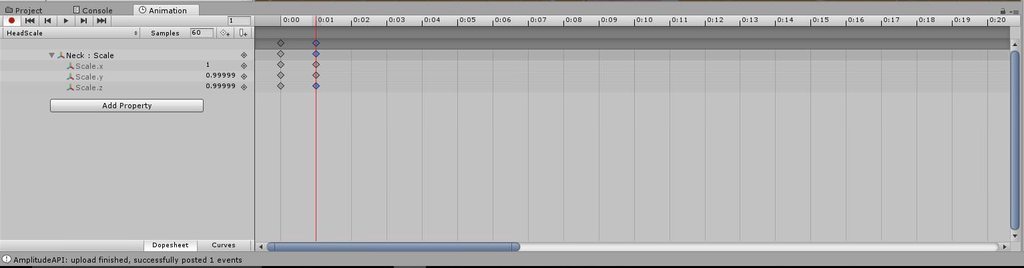
I can edit the X Y and Z scales, but as soon as I hit enter they go back to their original values.
clear yew
Hmm 🤔
safe nebula
I never had this problem sorry
clear yew
That's alright, I'll keep asking around.
@safe nebula you can have more than 10 seconds but it's a little weird to do
safe nebula
weird to do?
clear yew
yeah
safe nebula
hard or weird
clear yew
basically you have to create an "empty game object"
animate the empty game object and parent it to your avatar
then you just need to activate it and it will play the animation
safe nebula
i dont understand how the empty game object is going to activat ekey frames
clear yew
by animating it ?
safe nebula
animating the game object?
clear yew
yes
safe nebula
hem i dont see how
clear yew
the same way you animate a model
clear yew
depend on what you want exactly to do
clear yew
yeah you can use a game object for that
safe nebula
yeah ok i'll try
shouldnt be so hard, you just have to animate the empty object and not the model
clear yew
yep
parent all the particle and sound directly to the game object instead of your model
the advantage of the game object is that you can use more that the 0.00 and 0.01 keyframes
safe nebula
yeah that's what i'm looking for
can i animate bones with that?
like a dance or smtg
clear yew
the game object is a separate entity so you wont have access to all the bones and stuff like that
but if you want a dance it's better to use emotes
safe nebula
yeah but i needed more time for a long anim
and with emotes it just stops the anim
before the end
but thats another problem
so in the empty cube thingy
will i have access to like a weapon i parented?
clear yew
you parent it to the wrist when you finish to animate it
safe nebula
hm
i feel like its going to tell me that the object isnt here anymore so it cant be animated
you know when i move it from the empty game object to my hand
clear yew
you move the whole empty game object
safe nebula
damn this is harder than i thought
if i do this all my anims effects and stuff will follow my hand
clear yew
what exactly are you trying to accomplish ?
torn pawn
please don;t overdo it, don't be that guy who drops 20-30+ frames for every1
safe nebula
no ofc not
it wont even be annoying to see
i just want 2 or 3 small rocks to fly
its not the end of the world
clear yew
Just saw this in the inspector window:
https://imgur.com/a/8VKDN
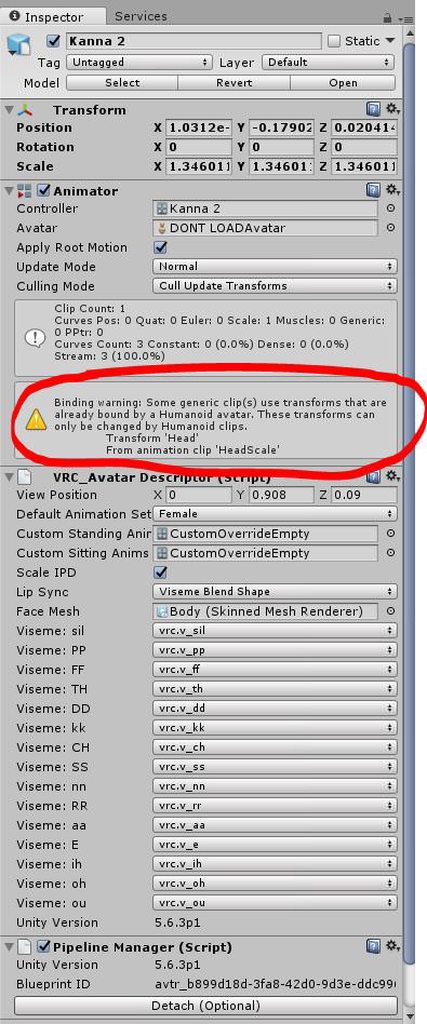
Could that be why the animation isn't working at all?
yes
Is there a way around that, or should I look for a different solution?
no idea, had this issue only once and it was an easy fix for me
it's a little different for you tho
Hm, I just need a way to hide the bone. I figured scaling it to 0 would be the easiest way.
torn pawn
why do u want to hide a bone @clear yew
clear yew
To make that part of the character disappear in-game, when I do the gesture.
torn pawn
it won't disappear, as it's one mesh, if youw ant to make a part disappear, it has to be a different mesh
then u disable its skinned mesh renderer or that mesh
 rancid furnace
or use a shapekey - better for performance then
torn pawn
or that, yes
clear yew
Okay, I'll look into shape keys then. Thanks for the help ❤
clear yew
does anyone know how to fix the glitching/breaking eyes when using facial gestures on desktop?? they keep getting stuck in partial transition, and i'm not the only one!!
scarlet ibex
can someone send me a giant meteor animation or like that ?
clear yew
how can u fix particles flying in th wrong direction?
fluid crescent
I want to have animation where i kick the other model i have all aniamtions but have no idea how to do that
 mint urchin
Good morning, I am creating an animation which I have all set up. It is creating a spider's walking animation. It looks great in unity, I can see it move the model and everything. However, when I put it into every single one of the walk/run animation overrides and then apply the override controller to the character, it doesn't seem to affect the model at all in VRChat.
I read a few things online that says walking animations will only apply to the main leg bones and no other non-rigging-essential bones. Is this true?
How can I get the spider leg walking, would I have to create a finger gesture animation and just apply it whenever i move, or is there another way?
Thanks!
final gazelle
if you don't need head tracking, you could set your model's rigging type to "generic" and it'll play the walking animations as expected from the overrides -- you'll have to manually make all the idle and emote animations as well though (which probably would've needed to be done anyway if you wanted them, since i can't see any of the humanoid animations matching up for a spider-shaped avatar)
mint urchin
Thanks Spearmonkey; It has the upper torso of a human (including a head) and a lower half of a spider. I would want to have head tracking for this model. Is there another way to go about this?
final gazelle
that, i'm not so sure of...i've been encountering the same problem myself with trying to get functioning walk/run cycles onto fake/half-humanoid models
anything not mapped to the humanoid rig just doesn't want to move
mint urchin
That's what I'm finding too. The animation kicks off, but will not move the non-rigged legs at all.
agile ruin
Anyone knows how to make a particle system animation collide with Avatars? I know how to make it collide with world meshes and so on, but that doesn't work for avatars
clear yew
does anyone know how to fix gesture glitching issues for desktop users? sometimes other people see > < eyes even though i haven't touched gestures and just loaded into world.

if it means anything my XD face is fist
switching between F1 and F2 seems to be basically instant, where all the other F's are slower to transition ....

well that solved that particular prob i guess
 quasi hinge
I get the activated gesture thing too
clear yew
if i'm lucky, that'll fix eyes glitching upon load in for some people too.
it might be glitching fist part way upon load sometimes
my guess is that there's a bug doing a partial fist upon load in sometimes
 bold cloud
my body can't stop having seizure when i active one of my emote, and thes rest doesn't work =_=;
clear yew
So I need a gesture to replace my characters mesh with another that I have. How do I make the gesture override disable the skinned mesh renderer on the original mesh?
https://imgur.com/a/fzLKN
Starting from here
 bold cloud
A VRChat tutorial on how to override hand gestures and emotes with your own custom animations. It can be used not just for VR users, but for desktop users to...
clear yew
Does anyone know how to make it so I can move my vision with an object? So for example, I have a model that takes its head off, could I make it so my vision follows the head in my hands? If so how would one do that
@clear yew what are you wanting to achieve?
@clear yew i don't think that's possible... as when people take their heads off, it's just a prop, not the actual head... so it has no eye tracking or anything
Dang, hm.. alright I was just curious. I managed to get mouth movements on it but that is about it,
Actually maybe if I had an avatar with the head constantly out, and the avatar descriptor on the head in my hands, that might work since it roots to whatever you place it on
mmmh
i don't think you can control a funky rig like that with vr
thinking of making a dullahan or something? XD
You hit the nail on the head
I was gonna see if I could replace the head with a fire particle effect, but I gotta get rid of the head first.
yes that's absolutely doable
i've seen Selner replace his head with a 👌🏼 emoji
I went into blender and made a blend shape where the head is scaled all the way down and reimported the .fbx
i dunno exactly how
Now I'm trying to set it up as a shape key.
I should be able to figure it out from here, if not I'll be back XD
ah ya that'd make sense, just do a head shrink shapekey, then spawn a particle
Mmhm.
funny how both of you had similar things you were after LOL
gray onyx
my avatars custom animations wont work from my vive, but will work on other peoples accounts perfectly fine, what am i doing wrong help D :
clear yew
It worked! You guys are awesome, thanks so much for the help.
clear yew
Could anyone think of a reason why an animation would trigger on a gesture you didn't set it to?
hexed fern
so i have this premade animation from unity but the character i wanna use it on has his left hand a bit to high, how can i get it to be like the right?

i even tried turning off ik's
it did nothing
ive bene trying to get it to match a pose he has in one of the games for some time now
clear yew
is anyone able to help with a shockwave distortion shader?
 regal hollow
@clear yew You might be better asking in #development-advanced
 willow arrow
can i only use animations if my avatar is rigged for example if i wanted it to disappear
regal hollow
A gesture?
willow arrow
yes
regal hollow
Then you need it to be a humanoid rig
willow arrow
ok thanks
onyx bison
I asked it once but i lost the text, but do you guys know why the particle effects not appear in the animation? i did duplicate my model for the animation, disabled the particle effect, put it on play on awaken, and added it and timed it in the animation
but it doesnt appear when i play the animation
regal hollow
Does the rest of the animation play fine?
onyx bison
yes
i did get the other particle effect to work, but this one refuses to, i tried to completely remake the particle effect it still does not want to appear
it appears fine in unity and in the animation but not in game
regal hollow
What kind of particle effect is it?
onyx bison
i cannot send screenshots, but what do u mean by kind?
if i were to describe it, its basically like a flaming ball that is connected to my characters wrist
regal hollow
Is it part of a gesture?
onyx bison
no, its only part of the animation
regal hollow
Like an emote?
regal hollow
Is it a world particle
onyx bison
a world particle? i am rather new, what do you mean by world particle
regal hollow
the particle system has a simulation space
if it is world particles wont move with the emitter once emitted
if it is local they will move with the emitter
 celest pewter
did u do the work around or literally just made it a world
regal hollow
@onyx bison https://www.youtube.com/watch?v=yZxfQkxvxRI
Had to re-upload because of audio being too quiet should be fine now. I forgot to mention it in the video, but Murmur also answered questions I had and help...
Watch that video you have to do something special to use world particles
celest pewter
local follows u world is alone
regal hollow
ill give an example
onyx bison
ye example is better
regal hollow
If you had a flamethrower
if you shot the fire and then moved the flamethrower the fire wouldnt move with the flamethrower
it would keep moving on the path it was set when it spawned
regardless of if the emitter moves
That is what world particles do
onyx bison
oo
regal hollow
If the fire particles were set to local they would move with the emitter
 lunar pasture
can anyone help me with a problem I'm having with an imported mmd motion?
boreal trellis
I am doing weapon animations and like 3 time now my gun disappeared on a base model
any ideas?
onyx bison
hm
regal hollow
@boreal trellis Can you explain in more detail pls
onyx bison
so per say, i have a fireball that is just supposed to spawn at the set time, move in the set direction, and dissapear
i wouldnt want to use world then?
celest pewter
world
boreal trellis
in unity, in hand hierarchy whole gun disappeared, it happened third time now, while switching models
regal hollow
@onyx bison I would use world, otherwise the fire would move with your hand after it is launched
regal hollow
@boreal trellis What do you mean by switching models
regal hollow
@onyx bison To get world particles to work properly in vrchat you have to do something special https://www.youtube.com/watch?v=yZxfQkxvxRI
Had to re-upload because of audio being too quiet should be fine now. I forgot to mention it in the video, but Murmur also answered questions I had and help...
boreal trellis
it just disappeared 😒
regal hollow
So if you click off the model the gun disappears from the hierarchy?
Thats very unusual
Have you tried restarting unity?
lunar pasture
does anyone know why my imported dance routine screws up towards the end?
it's as if it just gets bored and sets the focus back to my headset and controllers but the feet and spine continue to do their own thing
regal hollow
@lunar pasture Is it an emote?
lunar pasture
yeah
regal hollow
@lunar pasture emotes have a time limit of between 1 - 1.5 mins i think
then it gives you control back
SO you cant go any longer than that
lunar pasture
hmm, that seems to make sense actually
regal hollow
yep
onyx bison
but does this trick work on animations too?
boreal trellis
Slider, will this method from video work for aiming with vr?
onyx bison
or is it just for vrchat users to activate something in ur hand
boreal trellis
like, i have some issues with world particles too
regal hollow
@onyx bison Its the way to get world particles to follow a bone
boreal trellis
but i actually want to aim with my rpg, and shot the right direction
regal hollow
@boreal trellis as a gesture?
boreal trellis
yes
regal hollow
Then yes
That method is the only way to get world particles moving with bones in vrchat
So if you have them you need to do that
lunar pasture
you can get them to follow a bone regardless of the gesture but you soon get sick of seeing them
regal hollow
@lunar pasture I know what you mean, i tend to keep all my particles to gestures for the most part
boreal trellis
what if i attached the particle object to the end of my gun?
and the gun is in my wrist
regal hollow
@boreal trellis the gun is set to move with the wrist bone so you would still need to do it
lunar pasture
I have random rainbow lasers emmiting when i move
regal hollow
Make sure to put the rigid body on a bone
celest pewter
that tutorial is pretty bad tbh
regal hollow
and not an object like the gun
celest pewter
EDIT: GITHUB UPDATED TO FIX SMOKE RING AlIGNMENT My Github for Unity Packages: https://github.com/MorgusVR/VRChat-Smoke Credit to EvolvedAnt for instructions...
regal hollow
I think thats the one I watched
Here's another, not sure how good it is tho https://www.youtube.com/watch?v=72MXbf_ARu4

Hey Sensquad! Today I show you all how easy it is to add particles to your favorite avatar in Unity. Completely VRChat-ready! Like what you see? Subscribe & ...
lunar pasture
does anyone know where's a good place to find a Jesus MMD?
celest pewter
i dont think theres any jesus mmd models
boreal trellis
Slider
what about collisions?
i made grenade launcher, my grenade is mesh render
this method will also make it work? lol
regal hollow
collisions should be fine
as long as you have that set up with your particle system
lunar pasture
I think you have to set a plain at your feel to get the particles to bounce on the floor, not sure how true world collision works
regal hollow
@boreal trellis Do you have the collision set correctly on the particle system?
Could it be colliding with something else in your scene?
hexed fern
so i edited a animation with a bounce
is there anyway i can just make the entire animation be the new parts
so don't need to edit frame by frame
regal hollow
@hexed fern Can you copy and paste the keyframes?
hexed fern
how do i do that?
 regal hollow
Select them at the top of the animation window, then just ctrl-c and ctrl-v to copy and paste
@hexed fern
hexed fern
theres a crap ton of key frames
 undone lark
Is there a way to add properties to an already made animation?? sorry if this is trivial
celest pewter
yes
hexed fern
i just want to copy like the arm stuff but i literally can't find it in the mess of it all
boreal trellis
@regal hollow so as you can see on the screen it might collide with the gun, should i move the particle system in front of the gun or under the supressor will be okay?
regal hollow
@boreal trellis Does the gun have colliders?
If it does you can get rid of them, as long as there is mesh renderers
you should be good
boreal trellis
how do i check if it has colliders?
regal hollow
@boreal trellis Just select the gun and look in the inspector
hexed fern
and it doesn't even do the thing i want it to
boreal trellis
it has no colliders, but still when i use this setup from screen it behave really weird
its 2 a.m my brain isnt working anymore xd, can i type something in pm and ask for help later?
regal hollow
sure
 ember olive
anyone know how i can add another mesh into an armature http://prntscr.com/ipirmn so like when i drag the bullet into the armature, it doesnt let me animate it for some reason http://prntscr.com/ipis3d

 regal hollow
@ember olive That bullet isnt in the armature
hexed fern
and it freaking wrecks everything else in the process
 regal hollow
If it is under the model then it should show up if you are animating on that model
ember olive
i already had a animation setup
i just wanted to add another mesh
but whenever i click onto the bullet
the animation disappears
regal hollow
Why do you need to click the bullet?
ember olive
so i can move it
if my trigger is selected it gives me the option to move without changing values

but when the bullet is slected i dont get that option plus the timeline is gone
 regal hollow
I've had the same thing happen,I've just edited values in the timeline when it has occured
so im not sure what causes it
 high summit
Does anyone know what causes an animation to continue replaying when you switch to other gestures? If I'm on the default gesture it stops but say the animation is on Rock and Roll, I use it, then switch to Point which shouldn't activate it, does. I have to switch off the model and switch back to reset it.
 reef mason
Can anybody help me out on this problem that I'm currently having with my avatars that I port into VRChat. For some odd reason, I have two avatars that have these problems where I placed both items on to them. One for the pose and one for the animation so it can look like they took it out of their backs, pockets or holsters. I disabled the the revolver out of his hand during the pose and I disabled the one in his holster during the animation process. When I take out the revolver out of the holster, It shows the gun inside the avatar's hand, But towards other people, It still shows in my hand, But there is a second revolver in my holster still, Which I don't know why it shows when I clearly disabled it during the animation process.
clear yew
can anyone enlighten me on the specifics of audio sources?
like every time i see anything or around, i see different results
sometimes sounds only work really close
sometimes people manage to get some range on them .... i've been getting the impression that vrcsdk nerfs range on upload or something
https://my.mixtape.moe/fhwcvo.mp4 here's what I made today
regal hollow
@clear yew You are right that the vrchat sfk basically nerfs audio sources. Since 1-2 patchs ago its been like that. Its pretty annoying. What you can do is place multiple audio sources around your model and trigger them all which should make it louder
Just bear in mind that could be really annoying for other people, so use it wisely
@clear yew I really like that explosion effect, nice work!
clear yew
Thanks!
Got a lot of custom animations in the makings right now, hoping to wow lots of people and make tutorials on it
yeah but how are they nerfed?
regal hollow
Sounds cool, I look forward to seeing them
clear yew
what are they nerfed to?
The ONSP was removed and also audio volume is quiet since nerf
not from what i've heard
i hear loud as fk sounds all the time
they're just really short range
regal hollow
@clear yew They basically make the audio quieter and mess with the fall off of the audio, I'm assuming to balance the loudness.
clear yew
You've heard from people with edited files then :p
well then that's basically everyone
regal hollow
@clear yew You can stack audio sources on top of each other to make the sounds louder
clear yew
^
It works,I've tested
how many would you guess brings it back to 100?
4 ish
Just duplicate it 4x
ye, then i'll try 3
Also I've found for the rolloff, 29 for min 30 for max to be the most beneficial for audio loudness and distance
That's my standard for my animations
Anyway time to sleep, gnight guys n girls
tyvm
Npnp ^^
that's the input i was looking for〜
clear yew
easier if i start with what is known works, and work from there
night
Feel free to add me if you got more questions, I'll try to answer when I can
 short oxide
gestures are funky on desktop
like ill play a gesture, switch to hand open, and try to play the gesture again but there will be a pause time between the gesture playing again
 flat citrus
When I spawn an object with hand gesture and then stop, it takes a few seconds for it to disappear. Why is that ?
mint urchin
@flat citrus I believe this is fixed by placing the exact same properties with the exact same values at both 0:00 and 0:01. This has generally fixed it for me.
flat citrus
Thanks. You mean properties in the right panel (transform, etc) ?
They are identical, I'll see if I still get the problem on that avatar.
mint urchin
No, in the animation itself. In the animation window, place the same keys you have at 0:00 at 0:01
Copy the entire frame over
 proud kite
As @mint urchin said, you need to have a 2 frame long animation for it to work properly, Tupper explained perfectly how to make an override and folowing these steps I have no problem with then on desktop mode: https://youtu.be/7P0ljQ6hU0A?t=1h30m16s

VRChat Community Discord: https://discord.gg/VRChat Download VRChat! http://store.steampowered.com/app/438100/VRChat/ mmd_tools GitHub: https://github.com/po...
lofty crypt
@clear yew howd you make it so when the ball stops, it creates another particle effect?
thats what im looking to do with a tank shell
shell -> explosion
 outer lake
you know what id be amazed of?
if someone could make a animation of this to vr chat https://www.youtube.com/watch?v=eZtU6eXFBQE

 steep citrus
Anyone getting uploads that are slow ah seem to freeze an not finish?
reef mason
Hello?
 gusty veldt
Hey guys im trying to add a custom gesture and would like to replace the "peace" gesture with my custom one. Can somebody tell me wich one that is?
 cursive moon
It's called Victory in the override
gusty veldt
thanks
 lilac orbit
Does anyone know why one of the materials does not want to ever change? As many times as you animate it and change it to something else it changes back when you play the animation again.
boreal trellis
https://gyazo.com/9ff6fdb855494ab31b54fa6f0e20baad hands are not moving while grabbing objects, any idea what is wrong?





 lunar pasture
Hi, can anyone explain the Q and T values in animations? ta