#animation
1 messages · Page 54 of 1
 patent needle
I'll leave this to another time, I'm too new at animating for this. Thanks anyways @hallow acorn
 hexed fern
I have this animations from a unity model and they are aparrently .anim files
and they don't seem to work at all
when i try to test them
they can't be rigged
i literally can't do anything with them
when i try to test them

the model just stays in place
and does nothing
all my other animations are in fbx format
 old cave
VRChat's sdk doesn't want to upload my model because of the error of some missing elements on the mapping of his bones. I think this is happening because he doesn't have a neck. Can I upload him even without a neck?
hexed fern
If you want it to look like an abomination then maybe
if not then i suggest you get dat' ass back in blender and give him a neck
old cave
I'm using his default skelleton
hexed fern
what exactly are you trying to upload?
it would help a bit more to know exactly what it is

 torpid wadi
for particle collision, do i need to untick anything in the collides with dropdown menu?
aside from playerlocal
hexed fern
@old cave There is a way to auto rig him
but with yours not having a neck idk if it'll work properly
old cave
how?
hexed fern
a site called mixamo
you just gotta make sure your model is an fbx file and has no armature
and it'll go from there once you upload it
old cave
Ah I see, I thought it was something on Unity. I did this it with his Persona 5 model but it screws him because of the fact that he doesn't have a neck.
I don't even want to have neck's movements on the game. I thought that maybe there was a way to upload the model without the neck mapped.
Well, I'll try to put his original animations on the model and I will see if I can upload him as generic.
He does have some dummy bones but none of them worked on the neck
hexed fern
oh i see
 tiny meadow
Does animations for avatars happen the same way you'd make an animated scene in a modelling program?
 lusty jewel
When you spent 4 hours animating but uploads are down 😩
 nocturne pollen
lusty jewel
nocturne pollen
lusty jewel
https://puu.sh/zATzq/53304a0606.png Za Warudo

 lone bramble
Love that model, Alpha lol. Best Sakuya
 midnight garden
i am trying to make a model that has a long dance with a song is thare a way to do it?
 wise junco
Yes
It quite easy
Go on mixamo
Download a dance animation and set it to humanoid
Then go inside of the dance animation model and click on the one with animation clip and copy and paste the stuff in the animation tab into your humanoid avatar
 viscid moat
Just take a FBX dance format, set the rig of the file to "Humanoid". Now you can use it for your avatar, just add a Audio Source to your Avatar (don't set the volume, it will be automatly setup by the game) put your song into the audio source, and it should work
 clear yew
can anyone tell me how to do a distortion shockwave particle effect?
viscid moat
Hmm, don't use a distortion shader then
I used it for my last Avatar, it was so fcking badass, but for VR users its just trash, they cant even see the game
And search on youtube for particle effects tutorials
clear yew
@viscid moat i did, i haven't found a whole lot... ideally i want something better than just a 2d sprite (i've seen pretty cool nuke shockwaves, similar to the ones in gmod if you're familiar with them) . . . i'm not a vr user, and i only want it for a single blast shockwave, not anything perpetual.
viscid moat
But i mean
For other players
it will be cancer
and they will block you
But add me in private i will give you that later if you want to test
clear yew
Ive asked this before but never got an answer: when animating in unity, how do I make it so the, let's say elbow, doesn't reset back to its default position?
In the animation tab, as long as you're recording and your slider is active, it will show
once you're out of animation, it will always be in default position
If you want the animation to stay in Scene, add avatar controller with the animation
but dont do that on the avatar you're uploading, do it on a dup
 limpid tulip
Anyone know how to add music to emotes?
 mild cave
I think you can attach an audio source to your model and drag a sound clip into the inspector for it, turn it off by default but turn it on in your animation.
limpid tulip
I tried that before but it said the animation was view only
clear yew
if you're using an animation from imported model or whatever
ctrl+a and copy all the keyframes into a new animation
limpid tulip
Thanks
clear yew
@clear yew thank you
 twilit linden
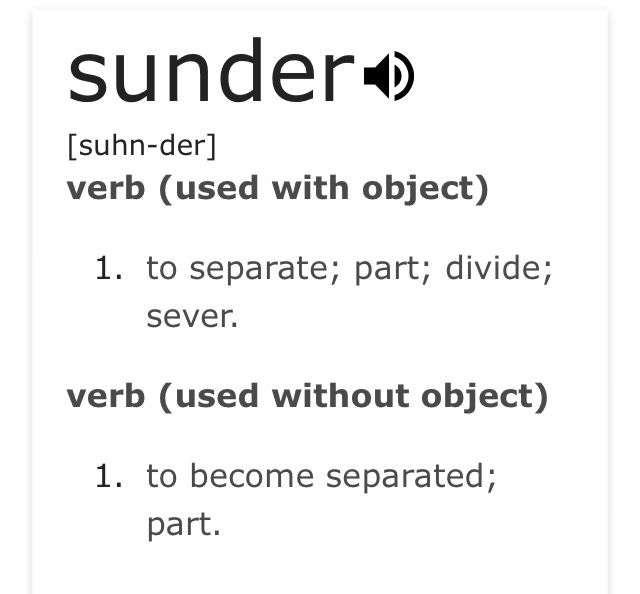
whats a sunderer
limpid tulip
 cursive moon
One who seperates
torpid wadi
does customized animation controllers just not work anymore?
or never was
i tried modifying my controllers so that the left hand uses different animation overrides than the right hand but it seems to just not work
 fallen scarab
Hey guys, what's the general method for getting animations into unity from blender? Are there like seperate animation files you can export from blender or is the only option to save them all within the fbx file itself like I've seen tutorials do?
I ask because I'm trying to add a custom walk cycle to my character but now that the fbx has the animation built in, my avatar isn't in t-pose anymore in unity.
Should I just add a 1 frame animation of the character in t-pose or something for unity to use by default?
 glacial badge
Im trying to make a 3D model spawn while activating a gesture, But i want it to stand still in The world. I know Its With rigidbody But i could use some instructions ;3
 radiant crown
Any way to make blender rotate properly relative to bone instead of the grid?
radiant crown
That's different from the regular pose mode?
 tidal gull
All I know is that it allows you to rotate bones
If you want to rotate locally you need to set the gimbal's frame of reference
That's a Blender thing, you probably want "local" rather than "world"
midnight garden
any one know a good video to show mmd dance animation import
 amber mantle
how exactly do i make scrolling texture?
clear yew
you can write your own shaders or use https://github.com/synlogic/Syns-Unity-Shaders

GitHub
Syns-Unity-Shaders - A set of shaders mainly created using ShaderForge for use in Unity.
@amber mantle
clear yew
it has the scrolling overlay thing you see everywhere
just copy to assets and play around with the textures and variables
 hardy bone
Hey, so im trying to replace the dance emote with another. The animation I want is on mixamo, and a tutorial im watching says to upload my character that I want the emote on then download it with said animation. But mixamo wont take the model. If I delete all bones then try to upload it works. But then if I try to set avatar definition it gets this error. what do I do to get the animation to be a custom emote if this is happening.(likely reason for the maximo not working is because ive added some extra bones for hair and breast) https://imgur.com/a/Ml2uS

its trying to say "Hips not found"
but they are there
clear yew
do you have another fbx of an avatar with humanoid rig? upload that instead
the mixamo animations will work on ANY humanoid rigged avatar when you import them into unity after
mixamo sometimes chokes on specific models I guess
hardy bone
Yeah i tried downloading one of mixamos default characters, thats when i got the error above.
clear yew
don't use mixamos rigs, use an fbx that worked when importing into unity with the vrchat humanoid rig specs
it has the right bone names and proper hierarchy all set up
like the unity chan from the cubed's toonshader files or maybe even the default vrc sdk one, they should work
hardy bone
yeah, ill try the tutorial avatar
Starting to look like a naming thing https://imgur.com/BTqE5DA but then again...
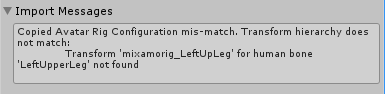
if it is naming then how the hell did they get mixed up? my original rig when i ran it through mixamo it gave all bones "mixamorig" on the names of every bone. Though when i ran the tutorial avatar it didnt get "mixanorig" on any bone.
clear yew
that fbx still has the mixamo bone names
hardy bone
Im not sure what to do. Would it make sense to try to knock of "mixamo" from the original models bones?
hardy bone
i tried getting all bones to be the same names
that first hip error is still hepening
clear yew
I'm sorry I was afk for a bit, the screenshot looks like a mixamo animation fbx that was downloaded with a mixamo rig as reference
did you upload the default vrc avatar and download some animations yet?
you shouldn't have to rename anything and it will import mixamo fbx animations (without skin) into unity fine, theoretically
hardy bone
yeah i tried the vrc avatar, thats where that other error from above came from. (i should have specified what it came from earlier, my bad)
@clear yew
clear yew
the error from above can't come from the vrc avatar since I'm sure it doesn't have bones named 'mixamorig_LeftUpLeg' I think
hardy bone
like said before 'mixamorig_LeftUpLeg' is a bone from my original avatar that im trying to put animations onto
actually the bones for the vrc avatar came out as 'mixamorig:LeftUpLeg'
ya'know
that is odd
vrc avatar went in 'LeftUpLeg' and came out 'mixamorig:LeftUpLeg'
but like you said, it shouldn't cause any issues
radiant crown
My anim is doing something weird, at the beginning and end limbs spring up between keyframes randomly
Between all the inbetween keyframes though its fine, and they're all cloned from the ending frames
 orchid nymph
Im having an issue with how I want to animate my avatar...any way to have full-body animations with effects and sounds?
I can animate full-body poses in Blender, but those files are read-only by Unity...but animating with Unity's animator appears to be buggy and unusable for full-body animations...
tidal gull
Emotes rather than gesture overrides afaik
orchid nymph
Yah I'm trying to replace emotes with custom animations, but also triggering effects/sounds.
I need to either make Blender animations editable by Unity, or learn how to use Unity to animate full-body poses.
 small tapir
@orchid nymph https://imgur.com/a/InvjC
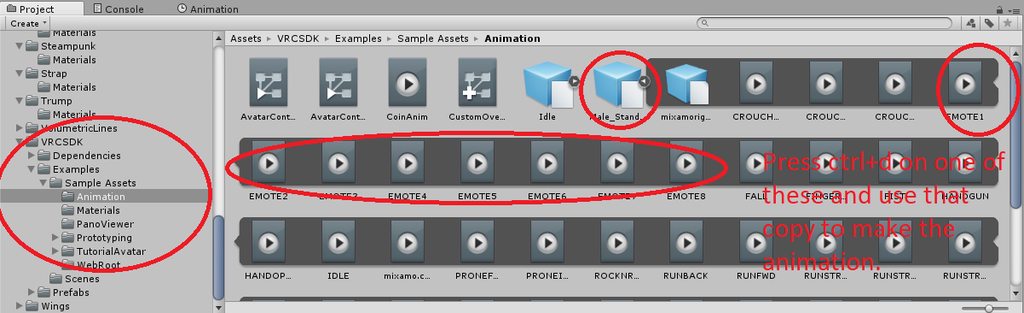
Try this
Not sure if it works tho, but i know when i use the animation for the hands of this my avatar don't move to animation pose
radiant crown
I wish you could animate the full body via gestures, unfortunately seems I'd need a second model if I want to gesture trigger a full body animation
 thorn mango
I think that's probably the best way, or you'll have to have a new animation controller to animate arms
I'm giving up...
radiant crown
Unfortunately the second model wont animate visemes
thorn mango
...
thorn mango
Emote makes it look weird
radiant crown
Yeah
thorn mango
It's like hey hug me! Then stopped after one second
radiant crown
Well, vegetablized hugging model it is anyway, I need to be able to chase and hug
 novel flower
Dunno if anyone knows how I'd go about this, but I'm trying to have a weapon decent from. A vortex that I spawn. The problem is when I spawn the weapon it is entirely visible and clips through the back of the vortex. How would I make it so only the parts that are coming out of the vortex are visible while it descends ?
radiant crown
Bright side you basically become a weeping angel
novel flower
Like it's emerging from the portal. So then the second animation I can grab it.
radiant crown
A shader cube that makes it render invisible while inside
novel flower
I could see making an invisible cube with a shader that makes stuff invisible inside of it. But not sure how I would encompass just the weapon and not the vortex it's coming out of
Also is there an. Available shader that makes things invisible like that somewhere
radiant crown
Have the vortex outside the cube, If you want the vortex to be multiple-sided I've got no idea
A lot of the mutes have invisibility shaders
novel flower
I'll have to give it a try. Thanks for the info. Was stumped how to make something look like it was coming out of a portal without having the entire thing show up at once xD
radiant crown
I love that I make an animation that's basically repeating two keyframes and yet my hand gets progressively further and further inside my leg throughout the anim
Effectively unfixable, save for manually moving the flexing parts each and every keyframe
Even better that it only even does it in the realtime sim, not in the animation window or anything
orchid nymph
@small tapir Hmm, It's no longer marked as "(Read-Only)", but I can't seem to add a property
 crimson jewel
Heya, newbie here; only a month in and messing with animations and such. Think I’ve gotten the hang of it a bit, but I can’t seem to find this answer with my google-fu. Has anyone figured out how to stop the “slow hand closing” issue after playing a long hand Gesture animation? Or did I skip over something step-wise?
 outer plinth
Do hand gestures loop? I need to have an 'intro' event and then hold after that. Is this possible?
 grim coyote

okay so. a owner of a pokemon avatar gave me this avatar
but
the animation is not working
i need help on the overdrive.
anybody?

Creating custom animations for hand gestures and emotes in VRChat
this video didnt really help me
 rain reef
Hey, is there a way to keep the default hand animations while adding facial animations? Like are the default animations stored somewhere to be edited?
 cursive moon
Did you attach the override to the avatar descriptor?
grim coyote
yes.
i think some things was not in place so i'm retrying

here is the animations for the pokemon
maybe i should put it on humaniod
or
generic
i know animation suppose to be for generic
cursive moon
Pretty sure it has to be generic
 pearl pilot
So does the "fix model" button from CATS prevent me from using mmd dances?
 rugged rain
Yes. You need the original bones for the animation. The fix model button fixes the bones too.
grim coyote
i still need help
pearl pilot
@rugged rain ok tnx
rugged rain
You're welcome.

 runic frost
Hey so I am trying to make an animation where the avatar is laying on the ground sort of asleep. I have the whole animation setup along with positioning using blendshapes to animate the mouth and a slight movement of the chest bone to simulate breathing. The issue is that when I apply the animation as a loop on the model I got it to lay down and do everything properly except the chest isnt wanting to move the way I want it to, making the avatar feel too static. Any help??
clear yew
how do i get an object that comes with my animation to not move along with my character?
runic frost
If youre talking about it staying in place in the world, youll have to set up a world particle system that has that object as the mesh
I meant particle system instead of animation, sorry my mind is on this rn
runic frost
@grim coyote have you tried playing through the animation in unity before putting it through vrc? you also should make sure that the bones its asking for arent considered missing
grim coyote
no.
he gaved me in blender so i exported it as fbx
and it does have the animations
i think i'm doing somthing wrong
but i yes i see the animations in unity and playing it to check

maybe camera and lamp are the part of the problem?
clear yew
how do i set up the mesh where the object doesnt move along?
lusty jewel
So I'm trying to make a gesture activate particles and end the particle animation with another gesture, it works fine the first time but when I try it again it glitches, doesn't show up, show up on other gesture, show up again, etc. Any way to fix this?
clear yew
did you use more than frame 0.00 and 0.01 ?
lusty jewel
Yeah
clear yew
can't do that my boy, it will fuck up all your hand gestures
cursive moon
You could make the animation 2 frames long and make it enable an object that has an animation component, and that object has the animation you want
And on the other gesture make it disable the object
I guess I've never tried that so I don't have proof that that works but maybe
clear yew
yep that's the way
lusty jewel
Yeah I'll try messing around with animation component
clear yew
create an "empty game object" parented to nothing
put all your particle, model etc that you want to use for your animation
animate the "empty game object"
put a "animation" component to it, and drag'n'drop your animation in it
disable the empty game object and parent it to your avatar
hands or head or leg, your choice at this point
and you just activate it with a hand gesture
lusty jewel
What I'll do is make gesture 1 activate animation part 1, and gesture 2 activate animation part 2, because what I'm trying to do is spawn a small inverted dome in part 1, and in part 2 a bunch of knives appear and hit whoever is in the dome, basically a time stop knife effect lol
clear yew
you can use 2 game object for that
and parent the second one to the first so you can only activate it when you are using your first hand gesture
 shut sky
Should I add a root bone to my armature at the feet if I want to make a floating idle animation? would that fix the model being half in the ground when I try to do it without one?
or do the hips need to be the root always
 glass anchor
anyone have issues with particles not working in-game? Goes fine in unity, then only the sound plays in vrc.
other particle gestures work fine too, but not this one...
 late fjord
Anyone tried overriding the crouching animation? When you crouch, does it just smoothly blend from idle -> crouch animation? If the animation changes the position of your head, does your view change?
 covert gale
Feels like I unlocked pandoras box changing the prone animation. My hair has a mind of its own now whenever I get back up from laying down.
 little sparrow
Does anyone know how to make a bullet particle effect with world collision and sub emitters when it collides with the world / players?
grim coyote
i still dont know why the animation is not working in the game
little sparrow
@grim coyote , What animation are you trying to do?
grim coyote
on a pokemon.
@modest tulip if generic not working with override you're saying i need to do it on humaniod?
grim coyote
People telling me for animations like that need to be generic
http://prntscr.com/inbz27
if i use humaniod this happen
little sparrow
Are you trying to walk on all 4 limbs or something?

 placid copper
can you edit mixamo animation
little sparrow
Ahh, I can't help much there, I only do humanoid models sorry.
placid copper
like the head facing the right way
grim coyote
i asked someone from a pokemon avatar world.
he gaved me it with the animations he told me to the override by myself.
but i dont really understand--
little sparrow
oh, under your VRCDescriptor, you need to change the override
and drag and drop the correct files into the override
 little sparrow
click on the override itself in your assets

You need to drag the animations in there
grim coyote
i know how
little sparrow
for the correct movements
 little sparrow
Walk back and forward don't have ones labeled specifically for them?
grim coyote
i dont even know
little sparrow
if not, you might want to talk to whoever gave you the file and ask where they go
 little sparrow
Because if they arnt labeled correctly to replace each one, there's no way of knowing
is there only one walk / run file, there's no runback or walkback?
if not, that looks correct to me
little sparrow
not sure, test it with them like that, if not, remove to backwards movement ones and leave it set to none, if that way doesn't work
remove the backwards*
grim coyote
a-alright

actually there was a camera and a lamp
in unity i removed it becasue i thought it's part of the problem
little sparrow
They don't do much, it's part of the blender file when you exported as FBX
grim coyote
ik
little sparrow
I always delete the cube, camera and lamp when I open a blender file
 little sparrow
Yeah, I would have named the files for the proper locations if I was handing out override for it, but if you can't get it you'll just have to ask him and wait for him to wake up.
 little sparrow
Not to sure, i've never done a model with 4 legs before
YouTube it and see what you can find on it.
grim coyote
i dont think it matter
I ALREADY DID
it's bad
i dont get it
i already did anything they said to me
little sparrow
Yeah, I only do custom hand gestures and putting objects into my hands, never attempted anything with leg movements or 4 legs
little sparrow
you can, it just takes a lot of work xD
 little sparrow
I just started learning all this Blender / Unity stuff 2 weeks ago and I already know more then 3 of my friends who have been doing it longer. Just have to learn with trial and error
grim coyote
Does the other stuff need to be like that or should i put them on none
little sparrow
Not sure, haven't done 4 legs. I've been taught every model should be humanoid not generic. Because if we do a human model on generic it gets stuck in a T post (Hence why I think your model isn't moving)
I'd put all your overrides back and set it back to Humanoid because your Overrides should put you on all 4
grim coyote
hm
little sparrow
since your manipulating the 'Idle' position it should be on all 4's even if you set it to humanoid
clear yew
So, I have an idea of creating an avatar or world that will generate a random result out of a list of predetermined conditions.
How would this be implemented?
I've heard there were ways of randomizing but I haven't seen it yet.
little sparrow
Might be a question for #development-advanced. @clear yew
clear yew
Hmm. True.
grim coyote

not working as humaniod
i think the avatars are Not
uploading
at all
becasue vrchat's problem
little sparrow
Are you uploading while your game is offline?
Always close your game when you upload
grim coyote
yes i always close
 lilac cave
actually vrchat will refresh avatars while open
grim coyote
no vrchat is laggy
lilac cave
might be your computer
limpid tulip
Don't you need to put animation clips on all the overrides for it to work?
 steep citrus
anyone else having issues with audio only being heard close to you despite tweaking settings?
limpid tulip
This is #animation you might want to ask #avatars-2-general instead
@grim coyote Vrchat does not refresh avatars when updated only when you upload an avatar. I've messed with animation overrides before and a tutorial told me that you have to fill all override animations to work. There should be no "none" as animations. And the animator controller should have custom override empty in it.
placid copper
can you trigger mixamo animations through hand gestures ?
limpid tulip
I've never messed with hand gestures but pretty sure you can
lilac cave
pretty sure you can
or you can do something like that
i dont know much about mixa animations though
placid copper
every time I try to edit a mixamo animation like the neck turning, it will go back to its original pose
is there a work around

 lofty crypt
Hmmm
My emotes still suffer from the same issue
They will play for 1 second then back to normal
Even though the emote is set to 30 seconds
Any help
This is the second time
grim coyote
Thanka for letting me know
 chilly topaz
is there a way to animate bones on a model that isn't a part of the humanoid ik? i'm trying to have my avatar hold a camera during an emote (the camera is a bone in the model) but only the camera isn't moving at all
 fallen crypt
@grim coyote I just saw new public avatars that uses Generic, like Alduin and Deathwing
Haven't test them out yet
Reading the description and reviews, I say wow
 ripe osprey
Yeah man wow I'm looking for that kinda solution
fallen crypt
We can refer from that avatar and rework on our avatars
shut sky
how do you get a custom idle animation to work without the legs overriding everything and stepping everywhere looking awful
I even overrided all the walk animations with the same idle animation I made, with the legs not moving, and the legs still move and step everywhere during it
clear yew
Shouldnt the idle animation be in idle anim instead of walking anim? @shut sky
any reason why despite having a working shapekey in blender called "vrc.v_aa" my avatar's mouth isn't reacting to voice?
clear yew
Not sure. I guess there's another step in between having proper shapekeys and choosing that shapekey in the avatar descriptor dropdown thing
to be fair I never looked it up but yeah that'd do it probably
 true scroll
nah if you have the shapekeys you should just be able to set the mouth thingy to vismee blendshapes
and select them there
and you should be good to go
(dont forgett to enable your mic ingame 😉 )
 honest lake
is it possible to map textures to mouth movement?
as in having it so that the textures change based on talking patterns
I'd like that
clear yew
I've been wondering this too. It would be very fitting for many avatars ripped from other games
true scroll
not sure if you would need aditional meshes for each
that you show/move in or out
in which case you propably will have issues with tris when its not a super simple characters as ther are quite a few neede ^^
small tapir
@orchid nymph Sorry went to bed early last night did you get it to default standing?
clear yew
hmmmm so should i make my miniguns
drop from a lower hatch on a rail
or have a foward hatch and they just slide out
small tapir
I'm trying to help DarkSpacer1 anyone know how to make the avatar in animation not to move too that weird pose? I think he wants to make a dance with music too it
@clear yew Not sure what you are meaning 😃
clear yew
makign a gun for my floating robot

its either deployment by lower hatch
or front hatch
where it slides out
rather than drop out
 modest tulip
@grim coyote No my model is generic and works fine with custom animations. make your own controller like i said.

@modest tulip if generic not working with override you're saying i need to do it on humaniod?
in #animation
·
 obsidian vigil
If anyone has some magical sounding / angelic sound file that fits epic magic circles and also sounds of spears hitting the ground, pm me i need them for an animation 😄
 pseudo iris
anyone willing to help? my shooting animation keeps breaking
grim coyote
@limpid tulip so i need to put anything that is not the animations that the model have. and put it to none

how about this?
@modest tulip also what do you mean y our own controller?
obsidian vigil
Was the idle thing always there?
grim coyote
.....................what
obsidian vigil
I tried to do an idle animation once and couldnt find the idle override lmao
grim coyote
rip
modest tulip
if you do not use a humanoid rig vrchat will ignore any custom animation override controllers you attach to it
ergo you need to make your own animation controller and attach it to the animation component
 modest tulip
go into vrcsdk samples then find the animation controller template and make a copy of it then shove your animations in there
grim coyote
http://prntscr.com/inlzrx like this?
 modest tulip
no
grim coyote
where is it?
 radiant crown
THe Avatar Controller can hold multiple animations? huh
 mystic umbra
how long can legacy animations be
modest tulip
legacy animation is a flag for an animation
and no idea
Yeah that should work
Make sure to edit the idle layer as well
that overrides IDLE in the blend tree i believe
modest tulip
i saw somebody say it can only be 2 frames or it messes up somehow
maybe that was something specific though so take that with a grain of salt
mystic umbra
What
modest tulip
oh
obsidian vigil
but if you count frame 0 you technically have 2 :3
modest tulip
have kind of a specific question, is there an animation controller parameter for yaw/pitch change?
limpid tulip
@grim coyote all of the animations have to be filled. Also use custom override empty not avatar controller template
modest tulip
not in an actual animation but for use in an animation controller transition
and i guess armature or the avatar
just something like movementX and movementZ
runic frost
I am having an issue making a sub emitter show at the death of a particle
I have it so that then the particle collides, the lifetime is decreased by a factor of 1, ending that particle. I also have a sub emitter particle sset to activate on death of the particle but nothing shows.
grim coyote
No no.
thanks to the owner of the avatar we did it
it's working but now vrchat not working..
modest tulip
glad you got it working
Took me begging for help on reddit and then discovering that template file to get it working after having thought i wasted time on animations.
fallen scarab
I am making an avatar of a man on a segway. Originally I just used all the default animations, but obviously when I walked around my avatar would do the walking animation on top of the segway and the wheels wouldn't turn.
So I decided to override the walking animations with an animation of him standing still with his hands on the handlebars whilst the wheels spin.
I added a new bone to the model for the wheels so I could rotate them and set all the bone weights correctly, the bone is parented to the hips (from what I understand everything on your avatar has to be connected to the hips in some way, let me know if that's wrong). I reimport the new version of the model which contains the animation I made in blender, made sure the animation played within unity and did all the override stuff. This is where the problems come in...
Now when I use the avatar in VRChat, my character stands on the ground whilst the segway sinks below the ground but only whilst standing still. If I move, the segway will pop up and he'll stand on it correctly but for some reason the wheels just will not spin, even though unity showed the animation playing perfectly.
It seems like something is preventing the wheel bones specifically from animating within VRChat, despite the fact that the rest of the animation (standing still with his hands on the handlebars) plays correctly.
amber mantle
https://prnt.sc/innlk2
http://prntscr.com/innmqh
so i have these audio files, i created for each an audio source in the hierarchy, deactivated them all and activated them each in an animation of 2 frames. ive tested all the animations on unity and they seem to work fine (btw the animations are for gesture animations), but when i try to activate them in vrchat, the sounds do not play at all, is there something wrong or is it bcz of all the new bugs since the update?

 clear yew
maybe it's playing but the sound is extremely low ?
amber mantle
but shouldnt it sound the same as when i test them?
fallen scarab
vrchat does some fuckery with sound object volumes
obsidian vigil
@modest tulipjust press record, select the avatar and move them
Thatll add the values in
amber mantle
so how can i fix it?
obsidian vigil
Marduken
Try to keep the game object active
There should be a ckeckbox on the script
The to toggle that instead
Try
amber mantle

if i keep the game object active it would play as soon as i choose the avatar, and it wouldnt be triggered by animation correct?
 heavy plank
I believe so yes
Hello guys, does anyone know if there is a way to move the view point position with an animation? I have an animation to move myself up and I would like my view to follow
 regal hollow
@heavy plank I dont think you can do that
@heavy plank I dont think you can do that
old cave
So I want to put an avatar as generic rig on VRChat with custom animations. I was able to to export the .nif files to .fbx with the keyframes, each one with one animation (the .nif plugin on blender doesn't let me put multiple keyframes on a single model). All the models are identical, the only difference are the animations tied to each of them.
I'm trying to put all the animations on one single model on unity, but only the animation tied to the model works (with the exception of one model withouth any animations tied to it, one animation works on him but the others don't). Anyone know how to fix it?
modest tulip
@obsidian vigil You misunderstand i'm not talking about making an animation.
Stuff like these parameters http://ss13.moe/uploads/Unity_2018-03-06_10-45-07.png

 rancid furnace
@fallen scarab easier way might be to keep the regualr animation set and just unweight paint the mesh of the legs from the leg bones
so the leg bones still move around but the mesh for your legs won't
 potent obsidian
Is there a way to have shape keys or animations react to audio levels? What I mean is, as sound elements (or volume, whichever is feasible/more feasible) rise, the sound bars scale accordingly on my model. And shrink respectively.
fallen scarab
@rancid furnace That would work but I'd rather learn how to do it properly so I can understand why it's not working the way I want. Plus having it be part of an animation override means I can still crouch on the segway when I'm not moving.
I mean, I have to override the walking animations anyways to make the wheels turn, which is what's giving me the most trouble at the moment
rancid furnace
Sorry, no idea how to do that then
fallen scarab
@potent obsidian Looks like somebody is making a DJ Sona avatar ;)
As far as that goes though, couldn't you just set those shapekeys as the mouth shapekeys in unity? As in the ones that are already built in for lipsyncing purposes.
@rancid furnace I might have figured something out, just waiting for VRChat servers to be fixed so I can test it.
potent obsidian
Maaaaaybe...but would that react to audio put in as part of an animation for a gesture? I was under the impression that lip syncing visemes only works with mic output.
And yes, how did you guess? 😛
fallen scarab
Your discord picture xD
Oh and I must have misread what you were trying to do. I thought you were trying to have it sync to music playing down your mic.
 signal dove
@chilly topaz "is there a way to animate bones on a model that isn't a part of the humanoid ik? i'm trying to have my avatar hold a camera during an emote (the camera is a bone in the model) but only the camera isn't moving at all"
Is this an animation imported with the model?
chilly topaz
i actually found out how to fix this recently, i just had to adjust the avatar masking.
the animation was made separately and used the model without the mesh. all i needed to do was check the bones that were previously unchecked in the avatar masking to make the animation display all of the bones' movements
i used blender to make the animation
fallen scarab
@chilly topaz Could you try to explain what you mean a little better because I think I'm having the same problem.
chilly topaz
gimme a moment
fallen scarab
I have a character on a segway and I've made an animation of him holding the handlebars and the wheels turning. I've used that animation to override all the default walking animations. Ingame he holds on to the handlebars like he should but the wheels don't turn like they would in unity.
chilly topaz
so after you set the animation as Humanoid + copy from other avatar, click on the fbx in the assets and you should see this
huh it's not pasting hold on

click the animations tab and scroll down until you see "Mask", and click "Transform"
all checked bones in there are the ones being affected in the animation

in my case, i had a camera strap attached to my model
i checked the corresponding bones and it started working
fallen scarab
I didn't even know that was a thing. Damn, I'll check it now. Thanks!
ripe osprey
Oh wow I'm hype!!! I've needed this.
 eternal jetty
If you have a weapon that you have animations for made in blender, how would you trigger them upon gesturing?
 tall zodiac
Hey peeps! Anyone know a way to make my particle system which spawns a bouncy ball to be te same on all sides instead of local
Since for them it looks like im kicking nothing while their version of my ball is somewhere else
ripe osprey
Is it just spawning one single ball at a time and is the ball actually bouncing?
You can probably just animate it.
@tall zodiac
tall zodiac
Its meant to be a ball everyone can like kick around
i spawn it in, people can see it and it corresponds to all screens instead of being local
 unkempt moat
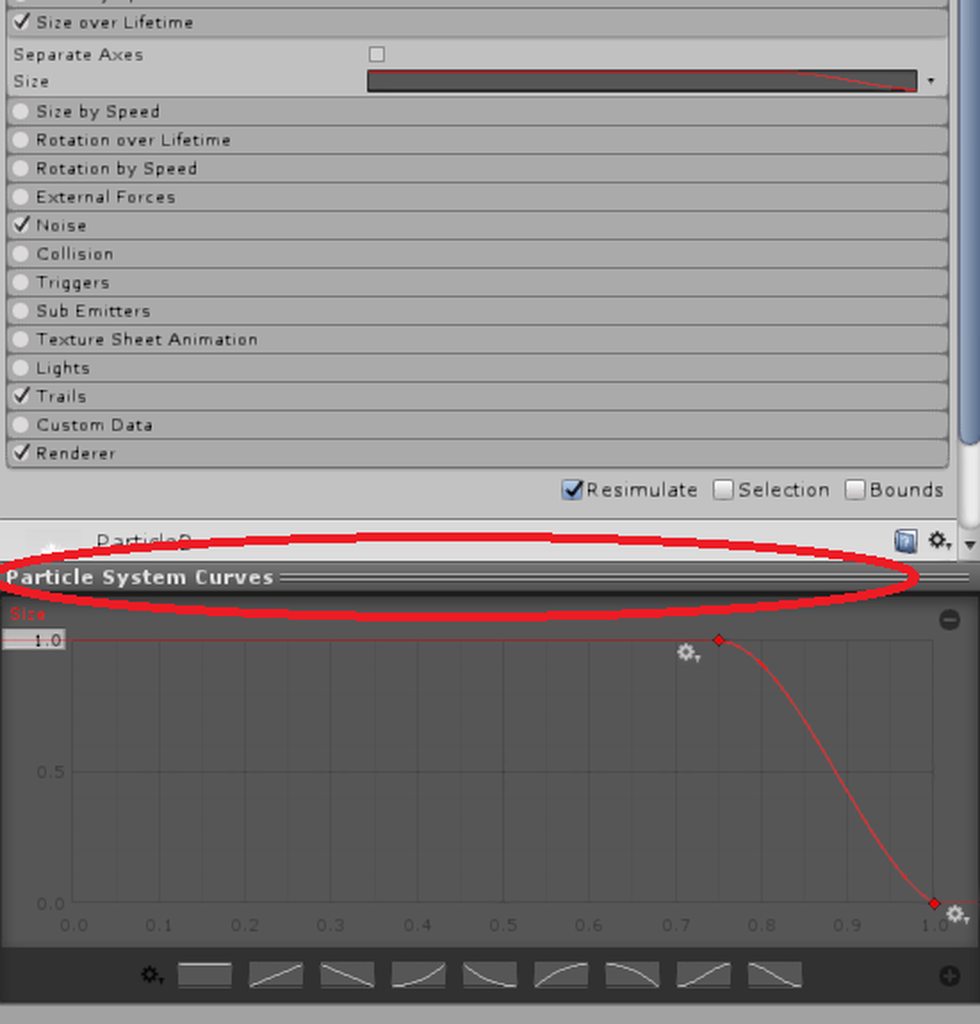
https://i.imgur.com/1X3cexC.png
How can i edit this curve man :x
 tall zodiac
click on it
ripe osprey
@tall zodiac Oh wow that'd be impressive. I thought you could only get something like that with world objects.
tall zodiac
ye it be really fun to
Since menus are colliders, you could have people lift up a ball or something
ripe osprey
Damn.
 eager vault
@unkempt moat curves pop up at the bottom of the inspector, did you click the bar to minimize it before ?
 ripe osprey
Man is there any good place for information on non humanoid characters?
It really sucks
 violet kraken
someone know how to make a sphere and anyone thats inside it only sees everything in black and white
little sparrow
@violet kraken Be careful with that, a lot of people don't like it and you'll end up blocked
violet kraken
@little sparrow i wanna make a really small one to show friends
so that they need to stand right beside me
i just need the shader or whatever it is that puts the filter on the normal view
 marble flicker
im trying to do something like that as well i just dont know what its called
crimson jewel
Out of curiosity, is there a way to spawn a particle effect (say a fireball), that upon colliding with anything changes/triggers and explosion? I've been playing around with the collider and triggering on Unity but it doesnt seem to want to work.
clear yew
yes
covert gale
Is there a way to make yourself not half way in the floor during an animation without using Root T movement? Moving Root T as part of my override gives me very bizarre issues with dynamic bones flying all over.
crimson jewel
Thanks! I shall continue my experimentation. 😃
clear yew
@crimson jewel i can help you a little if you want
crimson jewel
Sure. I'll admit, still partial noob. gotten the hang of particle effects for weapons spawning and such, but projectiles are a whole new thing. So far, I've gotten the animation attached to the fireball to slowly spawn in one particle effect at a time (it's made of about 4 different effects). Then i use transform to make it fly after a few seconds of build up into the distance. Under the main particle (fireball), I added the collision tab to be for world, and to send collision messages. Under triggers i have it set to callback the disabled Explosion effect and that's where im stuck at now.
Couldnt find any tutorials on projectiles with collision so it's been self experimentation. 😛
clear yew
you just need that fireball to explode on collision with World ?
crimson jewel
Yeah, just attempting to make it where when it hits something in the world, it explodes essentially
clear yew
that's... pretty easy to do actually
clear yew
you need a new particles system
it will be your explosion basically
so for the appearance you can choose how you want that
if the sub emitter is set to burst mode it should work
lets call that particle system explosion for now
In your explosion you have something called "emission", dont use rate over time, use rate over distance or even better "Bursts"
parent that explosion to your particle system that actually collide with the world and trigger the explosion
in that particle system you have something called "sub emitters", you just need to drag'n'drop your explosion in it and set the activation to "death" or "collision" instead of "birth"
crimson jewel
Oh. thats way less work than i expected. Thanks so much!
clear yew
👌
be careful tho
if you fuck up a setting or put multiple sub emitter in other sub emitter you can easily crash your unity
crimson jewel
Roger! 😄
shut sky
hey, is it normal for cycle offset for a looping animation to not display the offset in unity?
it just loops through the whole animation
hexed fern
I was wondering, can i load .anim files into unity or blender?
clear yew
unity
hexed fern
thank god
i got some of klonoa's animations and i was hoping i would be able to use them as his emotes 😄
eternal jetty
So I have an animation for a weapon that I want to use. Basically it unfolds when I take it out. Could someone steer me in the right direction as to what I should do to make it work with gestures?
 serene lava
What are the default animations for the emotes so I know which one to replace?
eternal jetty
Rock and roll is usually a good choice. Never use that one much.
hexed fern
like the animations them selff
serene lava
And which one goes to which
hexed fern
i know the last 2 are die and i think backflip
serene lava
Also I just figured out how to make satchel charges that you throw and then detonate them all
hexed fern
i don't remember the first 6 since my main avatar has custom animations
serene lava
Or I hope I did
hexed fern
nice
im trying to import model rips with their custom animation files
but the damn model i wants textues are fucked in belender
well one is
hexed fern
Hello
Anyone still here
i was told .anim files work in unity but when i imported the ones i have http://prntscr.com/invjld

they don't work and just show up like that
eternal jetty
Whenever people do custom hand gestures they make the first and second frame a single frame apart and are the exact same, is this necessary?
I have an animation I want to use but also don't want it looping.
@hexed fern What program made those files?
hexed fern
I don't know
they were ripped from a wii game
im gonna be sad if i can't use them
because he has some cute animations
eternal jetty
It could be that although they have the same file type, they aren't encoded or have the same underlying syntax.
hexed fern
is there a way to fix that?
eternal jetty
Not sure, one sec.
I would say you could open notepad to see if they have any similar look to them, but the anim file from Unity is just a bunch of [] [] [] [] [] []
 high lake
this might be a little out there but a friend is inquiring about the possibility of converting a vpd file (animation files from mmd) to something that can be used in unity. I don't know of any way to do that, but maybe someone else does? vpd files seem to just contain transform positions for every bone in the model.
hexed fern
@eternal jetty http://prntscr.com/invxq8

there was a shit ton more to the text file
but it was to much for me to try and screen shoot all of it
eternal jetty
It looks like this was made in maya, it may be possible for you to put it back into maya and apply the animation.
eternal jetty
LOL
hexed fern
it lagged my computer last time really bad
eternal jetty
It has a long startup time it seems.
hexed fern
klonoa himself
has a shit ton of animations
plus some of these could be from cutscenes possibly
i honestly just want the animations for when he is left idle in the game for some time
cause theres some pretty fucking cute ones
 hexed heath
I have tried to follow, and believe I did, the 2D viseme tutorial in the tutorials channel but everything works for me except the eye blinking. Is there anybody who'd know a thing or two about that?
eternal jetty
Hey guys, found something cool: https://github.com/s-m-k/Unity-Animation-Hierarchy-Editor
Saved my bacon, last thing I would want to do is manually recreate probably over 100 keyframes.
GitHub
Contribute to Unity-Animation-Hierarchy-Editor development by creating an account on GitHub.
 balmy orbit
so i want to make face expressions for my model, but im not sure how to go about it..
he has one single mesh for the eyes, and im not sure you can change textures with an animation
i considered making a duplicate of his eye mesh, apply the texture i wanted, make it invisible, and make an animation that makes the new face expression visible, and the original mesh invisible
basically making a switch of sorts
would that work?
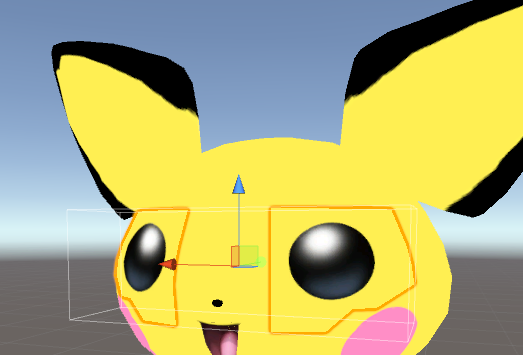
the eye mesh*
i know this is possible, since ive seen other pokemon models work
with blinking and expressions
just dont know how i would do it
anyone have any ideas?
eternal jetty
I spent a day trying to figure out how to apply pre made animations from Blender to a weapon attached to your character. Just finished writing up how to do it incase anyone wants to do something similar: https://vrcat.club/threads/using-an-animation-on-weapon.1278/
Edit: it is currently waiting for mod approval.

VRCat: Community-Run VRChat Forums
What I'm trying to do is use an animation whenever I draw my weapon. It basically unfolds from a collapsed state, so I can't have it looping. How would...
 pliant plank
Didn't read the article just yet but...
Wouldn't having a set animation component on the weapon that was set as non-loop for said animation and then having the weapon enabled on gesture work?
It should inherently re-start the animation after the gesture enables the gameobject from my tests atleast
If this is what was performed, then ignore my statements altogether
If nothing else, a blendtree animation, normally used for fully animated VMD's in vrchat could also suffice, as the animation also restarts on using the gesture and stops playing at the end (unless you make it loop)
 paper zephyr
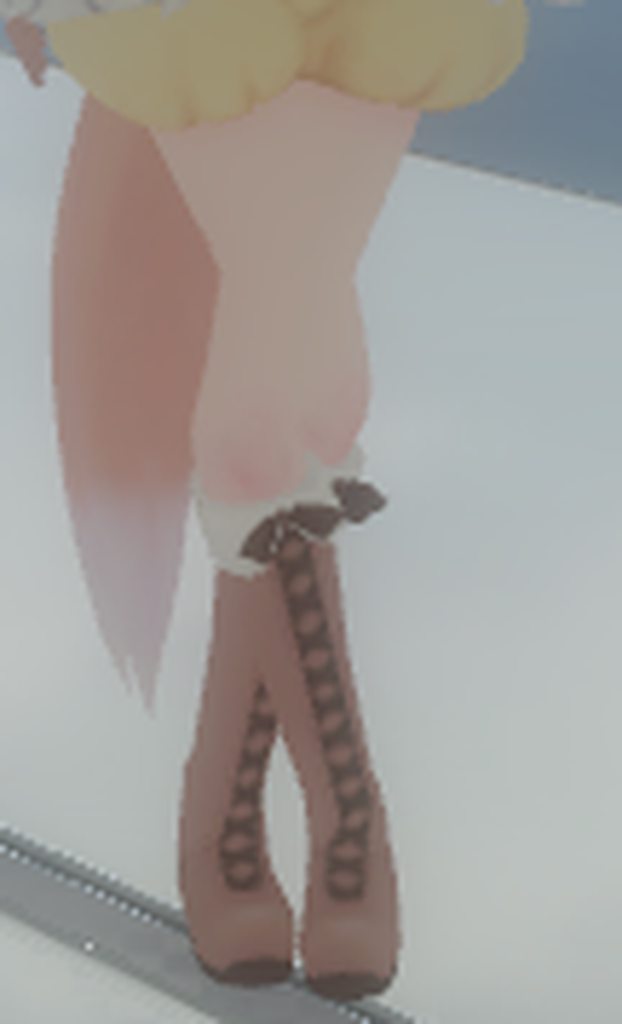
I just pulled an idle animation from mixamo, the feet looks alright in unity preview, but it doesn't in game. I messed around settings of the animation, but it didn't help. What should i do? https://imgur.com/a/mNr5s
 marsh quail
So I'm finally interested in adding animations to the avatars. Anyone know of any good videos or mind telling me how to get the shapekey animations that the mmd came with into unity for VR chat?
obsidian vigil
@marsh quail its pretty easy actually
if you put the model into unity
clone it
click on the copy
the open animator
select the mesh
there should be something called (Belnd Shape sth sth)
thats where theyre located
fallen crypt
Always use a duplicated model to animate because the animator have destructive edit
obsidian vigil
Yeah, that ruined some of my avatars a couple times
fallen crypt
My first attempt, oddly, when I was animating the duplicate, somehow my main model get destroyed too
marsh quail
Thanks! So I ended up getting the Muscle Animation Editor from the asset store. Should I use that or something else
obsidian vigil
The muscle animation editor is great, it really saves some time
but i dont think it can add blend shapes
youll have to add them manually
marsh quail
Alright I deactivated the main avatar, created the duplicate, and created an animations folder. Is the next step clicking the clone and what do you mean by animator @obsidian vigil ? Do you mean adding an animation component?
obsidian vigil
wait
i dont know the exact tab
at the top
theres a button
called window
click that
then hit
animation
a window will pop up
in there
hit the button on the left with add property on it
then select your avatars mesh
open it
there should be a blend shape thingy
@marsh quail
marsh quail
It's greyed out until I hit the create button on the center of window.
Do I need to first add an override and then add an animation folder in my animation folder then drag it to the clone? From what Tupper's video says? @obsidian vigil

VRChat Community Discord: https://discord.gg/VRChat Download VRChat! http://store.steampowered.com/app/438100/VRChat/ mmd_tools GitHub: https://github.com/po...
At 1:29:55?
obsidian vigil
oh yeah create a new animation
then do what i said up there
add no folders
just create a new .anim with what its supposed to be called
and proceed like i said
marsh quail
got it
The mesh is usually called the body right? For a sec I thought it was something else.
obsidian vigil
think so
marsh quail
Alright, so if I want to animate multiple ones I have to create multiple properties or animations? Or do I just click on the Skinned Mesh Renderer as the property?
obsidian vigil
If you want to animate multiple blend shapes at the same time add them like you did
if you want separate facial expression as an example
make an animation for each one
marsh quail
I think I got it for the most part. I'm just choosing whish shape keys to use. But once I have the ones I need. Do I just save them and delete the clone, then add the animation to the main?
obsidian vigil
you set everything up
then select all the keys from the first frame
from frame 0
then paste them into frame 1
delete every other key
and youre good to go
delete duplicate
copy animation override thingy
put stuff it
profit
marsh quail
Another thing do I set any of it to 100?
 cerulean grove
hi, i asked in #avatar-rigging , i'll also post it here, maybe someone around could answer : when using VR HMD is a custom animator controller overwritten to default? (look like it is) if yes is there a way to enforce the custom one for idle/walk for example?
grim coyote
so now i know how to upload custom animations avatars.
but....i wanna try make my own 🤔
i know how to. but animate is hard
obsidian vigil
@grim coyote Look at an asset called Muscle editor i think
it makes animation way easier
obsidian vigil
yes
grim coyote
n o
obsidian vigil
why not
grim coyote
becasue i said so1!1
obsidian vigil
great no help then
clear yew
guys i want to ask about the custom walking or running... i added it to the Avatar but it won't work properly...
Hey guys, dumb question,
I have a model that takes its head off and such, I am wondering is there a way to make it so both the head on my shoulders AND the one in my hands have mouth visemes?
or does it have to be one or the other. I thought maybe adding an SDK to the animated head might work, as well as the one on my shoulders but idk how it works when it comes to that sort of thing
sorry, a vrc avatar descriptor, not sdk. tired
grim coyote
rip
grim coyote
idk--
clear yew
hm.. Alright, I already have a version of the model with visemes and such. I will see what unity does if I add another avatar descriptor.
tis worth a test!
 last wolf
does anyone have both flying and floating animation
 crystal pike
anyone know how to open ur animation and edit it?
i made one, i just dk how to open it again
crystal pike
oh nvm found it
https://cdn.discordapp.com/attachments/416310433381744643/420957893085495306/unknown.png is there any way to add these all quickly or at once? or do i have to select each finger of the hand in here if i want to do a hand animation
 clear yew
Get the muscle asset from the unity store, or add every one, one at a time once and make a duplicate of that clip in the future to save some time
 shy island
hi, i got a dance animation (from mmd via blender to unity (60sec long)) and it works just fine.
now i would like to add the music to the animation, so that when i play the animation the music will also play
any idea how to make it?
clear yew
Create a sound object
Attach your sound file
shy island
yes i can do that, but i don't know how to attach the sound object to the animation
clear yew
Set the object to be disabled as first, play on awake.
Add the Is Active property to the animation, set that to enabled.
crystal pike
@clear yew thanks also whats the difference between the muscle asset and normal animator?
clear yew
Muscle asset allows you to modify properties together and add them all at the same time using sliders.
Saves 20 minutes of fiddling.
clear yew
If you want to add every single property for every single model you do manually
guys guys, i cannot find the LETGO emote in the override, does it hve another name?
Let go?
yes
let go, on desktop it should be shift + F3
i made 6 custom animation and i wanted to set them up on hand gestures...
i may end up using fist instead of let go
(shift + F2)
crystal pike
oh like flat hands
crystal pike
...
clear yew
i do not know what let go is to be honest
crystal pike
what does let go look like?
clear yew
i have no clue
crystal pike
i think i know what ur talking abt
clear yew
need to go in game and check on a model with no over rides
crystal pike
on vr it might be the button under the trigger
but u can let go by releasing a trigger too
clear yew
what the heck is this let go thing
i am more ocnfused now
confused*
i will use fist instead
-_-)''
crystal pike
ok..
well im not sure what ur talking abt
pictures would help
by let go do u mean let go of holding an object? when u do that on vr ur fingers spread out and go flat
clear yew
i repeat, i do not know, i just read on the announcement that if i press shift and f3 i do a hand gesture called 'LetGo' but i cannot find it in the over ride
i will use fist instead

i do not know what LetGo is, i hope that map helps you understand
on rift it says to ''do the fingers away from buttons'' whatever that means
That's for handopen
so... is let go hand open?
Pretty sure letgo is just whatever fist is in reverse
i do not want to over ride that, isn't it the default hand pose?
what flat is then? oh my god this is confusing
i bet trying to play rock/paper/scissor in VRchat need a 50 page manual
obsidian vigil
Not really
clear yew
A bit of an exaggeration.
Just use other ones.
i ended up using fist instead of let go
i will test it ingame now
crystal pike
im trying to add a gun animation to my model, but whenever i try to make the gun active, it will exit the hierarchy and will say missing. other times it will make my model go into the crouching position thats normal when ur making something active, except his hands and legs stay in the t pose position that ur model is normally in
wait
i think i know
what happened
i forgot to delete that thing at 1:00
nah that wasnt it ill just start over
clear yew
Hope you’re messing with the animations on a clone of your model
fallen scarab
@clear yew LetGo is the same gesture as the grip buttons on the vive.
The default gesture is the hands in a relaxed state, whereas LetGo opens the hands really wide.
In the override menu I believe it comes under "Hands Open" or something like that.
crystal pike
wait, if i was to add a gun animation, does it still count for the polys? i added a phone to a 19k poly model and it was fine, and the phone im pretty sure was over 1k polys
 spice echo
yw
 tardy abyss
Is it possible to change a model's skin while doing a custom emote (and only during that emote)?
 digital anvil
@tardy abyss what do you mean by skin
tardy abyss
Sorry, I have trouble speaking like a 3D modeler. "texture"? Uhh.. "shader"?
Whatever it's called. The thing you put on a model that shows what it looks like.
Can it be changed while triggering a custom emote?
A simple "yes" or "no" is all I need.
crystal pike
maybe
not sure
@spice echo my gun doesnt show up when i do the emote, are u sure im supposed to hide it?
hexed fern
I have a question, i have these animations files that were supposedly made in maya
is there a way i can convert them to work in unity WITHOUT having to install maya?
radiant crown
Anyone know a way to get mmd animations (vmd) into unity successfully without it messing up?
Or is it not possible to get them to work with non-generic?
 slate mortar
Is there a way I can have certain visemes turned on by default, ie have a character smile?
cursive moon
If you select the Body mesh of the avatar, you can find a tab called Blendshapes in the inspector. Set them to your heart's content.
slate mortar
is that in unity?
 hoary ginkgo
Anyone know if they can put particle animation in avatar 2d?
slate mortar
ah found it, thanks
 covert hawk
https://imgur.com/qcLSnBZ how do i do this wings animation?
 slate mortar
what environment and tools do you use to make animations from scratch
Blender or Unity?
 true nymph
covert hawk
true nymph
covert hawk
the fire wings,i found it on unity
slate mortar
If I have a viseme for the mouth enabled by default, will it disable itself on its own once lip sync triggers different visemes?
And if not, how do I make sure it does?
clear yew
enabled in unity ? like putting the value at 100 so it's always active by default?
slate mortar
yeah
clear yew
no it wont reset
but the mouth can be weird
the viseme made in blender for talking are based on the "basic" shapekey
so if you use a blendshape to make the mouth be a little open or smilling, it may look a little weird
slate mortar
yeah I'd like to have some expression other than a blank stare but combining visemes gets ugly fast
 tough venture
help?
please?
i come at the wrong timing lol
anY1?
if someone wants to help me please @ me or dm me
cursive moon
Just post your question
 vital plover
https://imgur.com/a/XAgbh when i set an object i added to an animation on my model the fingers go super janky like this does anyone know how to fix?

it only happens after i set the object as active in the animation
 regal cedar
anyone know how i can make a animation / face gesture with audio?
cause when i tried i got this when i tried to upload https://gyazo.com/06f6b880f95d69cec9592cde8ad6fc2b
 clear yew
you animated your original model instead of a duplicate didnt you ?
regal cedar
i duped it
animation is the dupe with the animation
as i tried to follow a vdeo
cause the animation has audio and model doesnt is that the issue ?
vital plover
anyone know whats up with my ava?
 shrewd moon
Main model must have audio as well
regal cedar
ty Lucy
will it play the audio even tho its on model ?
without animation not active
??
ripe osprey
What's the deal with not being able to animate parts of a model that are non-humanoid?
 final gazelle
@ripe osprey search for "avatar masking" in this channel -- a user mentioned something involving that setting in the animation which may address that (i've yet to try it myself)
specifically, the post by NarayanK which begins with "I actually found out how to fix this recently, I just had to adjust the avatar masking"
 steady mantle
@ripe osprey do ye set the rigging to humanoid?
or ye import animation? I think it only happends if ye import animation than making the animation in unity
shrewd moon
@regal cedar make the audio inactive on the main model and make the audio active in the animation
ripe osprey
oh jesus I'm sorry for the late responses
@final gazelle Yeah I was there. It's for imported animations :/
@steady mantle Yeah I have an invisible human rig then I animate within unity!
final gazelle
i gave the avatar masking thing a shot a little while ago, and i'm still getting the same problems, yeah -- probably need to do a bit more digging around to figure out what's stopping the non-humanoid parts from animating
 paper bolt
quick question, I want a character to have a moving fire in their hand as a gesture. As of now I only know how to do static gestures (like a gun or something), how would I do that?
 oak steeple
anyone know why my blush isnt showing in vrchat? i see it on unity just not in game
steady mantle
I animated using MMD then import the model with the motion in blender for unity.
the none humanoid parts loses their animation once I rig it to humanoid
@ripe osprey btw are ye trying to animate a running/walk animation?
ripe osprey
😦 naw I already found a sweet guide for that but what I need is gestures
steady mantle
ah
torpid wadi
i'm still having trouble getting scaling to work in animation
it seems what whatever i do it would snap back to size 1
ripe osprey
There needs to be better documentation tbh
pearl pilot
anyone know how to keep the blendshape during an mmd animation?
 iron tusk
Yo guys, is there something new, I need to know about adding sounds to emotes? Doesnt seem to work for me anymore. They dont play at all
fallen crypt
@iron tusk In-game after sometime it stopped?
That gotta be cache issue, it happened to me as well, reboot game fixes
mystic umbra
anyone else having issues with gesture animation not disabling with your modelks
final gazelle
i think that's the intended behaviour for now, from what i've gathered so far
mystic umbra
nvm I just realized the fist gesture was on something
Im talking kayboard
keyboard*
final gazelle
yeah, keyboard controls -- they don't seem to have provisions for us to raise our arms or the like
so you'd just form a fist or a finger gun with your hand without actually raising your arm up as the animation may specify
mystic umbra
oh no Ive done insane animations already
without hand movement needed
cause I just make those animations
final gazelle
you're getting your whole model's body to move around and ignore the usual IK locks?
final gazelle
inverse kinematics -- think of it the way unity's automatically doing parts of the animation with your model's arms and legs, as well as part of the body when you look up and down from the keyboard
although now that i re-read what you wrote, seems more like you were talking about "models" rather than "model IKs", as i read it
mystic umbra
well se my model is a noinhumanoid with rigging of a humanoid
so any locks wouldnt affect ym character
Im just poulling things out
final gazelle
"gesture animation not disabling"...yeah, i've been getting the gestures just remaining active until i replace it with another gesture when i tried it
mystic umbra
that what I do
and I realized just seecs afterwards I placed a gesture on the fist
so it wasnt disabling on f1 or f2
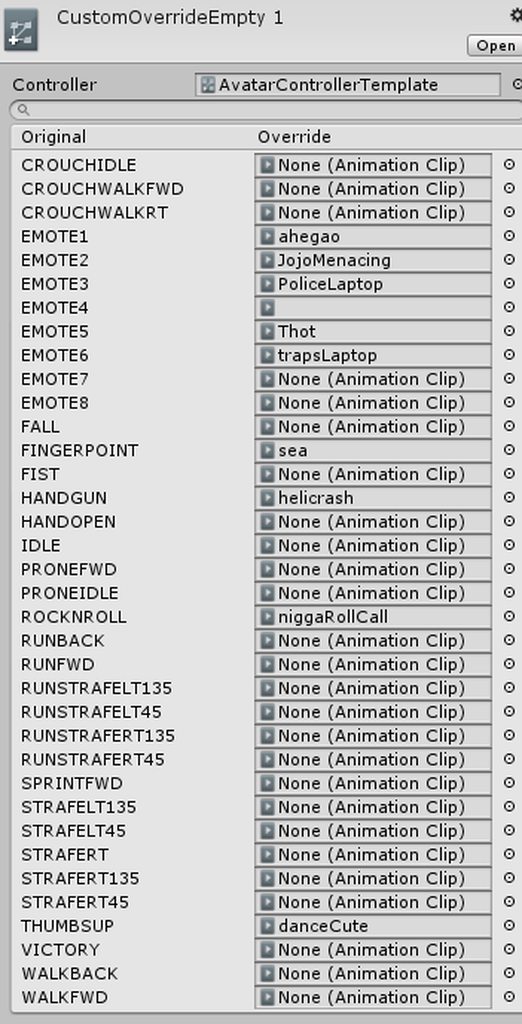


 final gazelle
i dimly remember discussion about using triggers in gestures before, as a means of toggling things on and off -- haven't really looked into it, but that may behave differently to using an isActive property in the animation
 wind torrent
what i do is toggle a gesture with no animation and then F1
for example i have a object that spawns when i make a fist on F2, then i toggle F3 then back to F1 to make it disappear
final gazelle
what was F1 again? the default hand pose?
wind torrent
yes
final gazelle
good to know, thanks 😛
wind torrent
anytime 😃
mystic umbra
@wind torrent what that works with multiple animations?
wind torrent
you mean like multiple gestures have animations?
mystic umbra
yea
wind torrent
@mystic umbra do you have any gesture that isnt assigned a animation?
mystic umbra
wind torrent
F1-F8
mystic umbra
this is my set up
wind torrent
Fist isnt assigned F2
wind torrent
uhh sure
mystic umbra
give me like 3 mins
mystic umbra
anyone know why the animations I set dont change with different shift +f#
mystic umbra
A lot
fallen crypt
@mystic umbra Gestures currently coded to use Frame 0 to 1 so far, it cannot use beyond that
Hopefully the future updates they recode that so we can move while animating owo
lofty crypt
anyone know the emote time limit
i have a 2 min animation i have to put on a gesture because it wont work on emotes
wind torrent
@lofty crypt i dont think theres a limit ive seen people have at least 3-4 min animations
lofty crypt
well like
my animation will play for one second exactly
then go back to me controlling the avatar like nothing happened
while on gestures, it works fine
fallen crypt
But... how did people use more than 2 frames in a gesture?! O_o
marsh quail
Do I have to make multiple duplicates if I want multiple animations?
lofty crypt
yes
fallen crypt
Yeah, or just make animations one model by model
lofty crypt
@fallen crypt technically i use over 300 in mine
lofty crypt
the gesture itself is only 2 but its turning on a model that has an animation on it
that is a generic model
cannot be humanoid
fallen crypt
Ahhhhhhhhhhhhhhhhhhhhhhhhhh
lofty crypt
it can be a human avatar but cannot be rigged as humanoid in unity
fallen crypt
So Generic can have lengthy ones eh
fallen crypt
Oh yes, that's good!
lofty crypt
ive done it 3 times so far
fallen crypt
This encourage me to make more monster avatars
lofty crypt
1 has a metal gear fall out of the sky, cause chaos - 2:30
1 has senator armstrong fall out of the sky, start beating the shit out of people - 0:36
1 has police, chris hanson and a cop car appear behind a kanna - 1:00
fallen crypt
I can see my MH monster avatars gonna come too uwu
 woeful oxide
i see lots of model bypass 10-second-limit animation, anyone know how to length the time ?
pliant plank
What 10 second limit?
 opal lodge
on emotes
woeful oxide
yeah on emote
opal lodge
what i know you can do is just hide your main model, unhide a model that has the animation on it and that will play automaticly
pliant plank
Yeah, they can be longer than 10 seconds
pliant plank
Only thing an emote animation does after 10 seconds is unlock your camera
Other than that, it plays out normally
woeful oxide
so i can hide my main model and use the animation one and it keeps on going more than 10 seconds
pliant plank
Don't get why one needs to trigger an external animation though...
 reef mason
Just a question, If anybody can help me on this. If your making an animation for the gun. Say that you wanted the gun to be visible on the side but once pulled out, It shows that you pulled out of your back or waist area. Do I need two animations for it to work? Or do I just place the gun in the holster and once doing the animation in the hand, It will show? Because I'm very confused.
And if non didn't get it. Placing the prop gun on the hip and not in the hand during the animation.
 covert linden
Basically during that animation you disable the gun in the holster, its just one
You'll have to get the position right for where your hand should be
reef mason
Right, Because right now. I'm going to be importing a avatar in a few and I don't wanna fuck this up when importing. Because for the regular model, I have the gun in the holster and not in the hand, But in animation, I have the gun placed in the hand already but not in the holster.
I've placed the gun on the hip so it will show that the gun is in the holster. Do I leave it? or should I place it in the right wrist area?
covert linden
Nah just leave it there
You should have a gun on your hip, and a 'hidden' one in your hand. Basically what you do is hide the one in your holster and make it show in your hand
You can just use the same animation for that.
reef mason
Oh! Okay, Damn. I already hand the gun in the hand during animation, But didn't have the gun in his holster. Thank you
Wait, I can use the same prop gun and duplicate it so I can place the other gun in his wrist or hand?
covert linden
Yeah ofc
Or if you'd rather have a handgun holstered but wanna pull out a bazooka you can do that too
reef mason
Lol
 buoyant dove
hi
reef mason
@covert linden In animation, Do I have to select both object/prop guns. One for the hip and the other to show in hand?
 topaz ermine
You want to disable the one in the holster during the animation, and enable the one in your hand
 meager saffron
anyone know of a way for changing your idle stance while a gesture override is active? for example: change to a fighting stance while holding a sword, etc.?
Tried adding the VRC Descriptor to the animation in hopes I could edit properties but apparently the animator only works with floats and bools. :/
or some other workaround? I've heard of people doing it.
 wary parcel
Mhm, heard about people activating new gestures with the emotes tab but have no clue how to keep something active without a trigger system...
Its kinda annoying to not know how, since i really like to find answers to hard questions. So this is eating up alot of my time animating.
If i could find a way to activate an animator with an animation i would be in progress but have no clue how that is possible. Anyone know the answer to that?
Maybe not the best place to ask but it is based on animations 😉
violet kraken
@wary parcel you trigger the hand gestures with shift + f2 - f8
and for endless animations you just make keyframes on 0 and 1 frame and delete the one on 1 second
wary parcel
Nono, trigger it not holding something inn, im a VR user
meager saffron
You trying to keep a gesture activated in VR? I think you should just activate it on the controller, then hold down trigger on that same controller to lock it in.
Is that not working?
wary parcel
... im on a different mission than the basics :p
What i need to know is how i activate/toggle an component: Animator innside an animation as i see it, it is not possible, i am just wondering if there is a workaround to do this.
This component is lower in the hierarchy so it should be possible but i cannot find the correct way. 😦
meager saffron
So like, activate a prop, but also have an animation on that prop?
wary parcel
Mhm, but not activating the prop for activating the animator.
meager saffron
Oh, so activate prop with one gesture, but then another gesture activates the animation?