#animation
1 messages · Page 29 of 1
 obsidian vigil
 ocean dagger
the cats way of disabling it doesnt actually work for some reason
its fine I'll look at unassigning those bones when I can
 novel flower
Can anyone help me with two things?
For some reason the Blush and Shadowing over eyes is not appearing in my gesture. It looks fine in Unity but not appearing in game. I set the material to Fade as Opaque just made it solid block textures
Also an object I attached to myself is not spawning when I do the gesture. The face triggers fine but the object is not appearing any idea why?
https://prnt.sc/i154js
 ocean dagger
@obsidian vigil Sorry, where can I find the place to unassign the eye bones
obsidian vigil
Go to the Data browser where your files are
click on the fbx
on the right hit configure...
then go to head
there they are
ocean dagger
oh in unity
 rugged yew
I managed to animate blinking for my idle animation, now I'm trying to add breathing. I managed to scale my necktie to simulate it, but I can't do the same for her chest
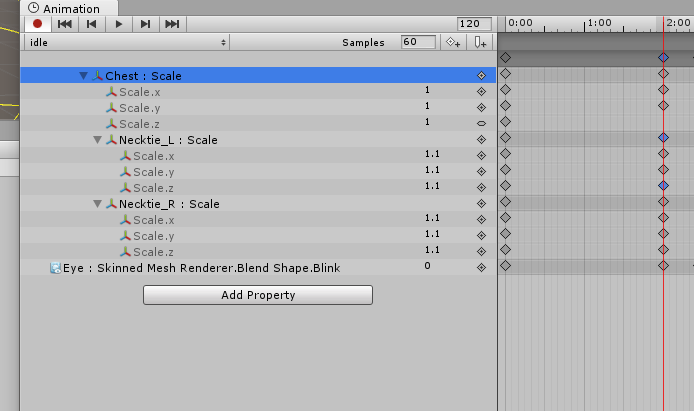
doesn't allow me to change chest scale
 warm furnace
@rugged yew I've always think, that the idle animation already had a chest breath animation o_o
rugged yew
yeah but I'm overriding it
rugged yew
what do you mean
novel flower
Anyone know why the object I have attached to me isn't spawning? I turned it to active in the animation but doesnt show up
warm furnace
You're Z position is in the first frame not in the second one
 iron crescent
So can anyone tell me why certain models don't show up in Blender's dope sheet?
rugged yew
can anyone tell me why I can't scale my model chest to simulate breathing
 cyan sparrow
Because you can't do non-muscle transforms on humanoid rigs.
Also scaling a separate chest mesh would probably not look like breathing.
rugged yew
What do you mean ? I was able to scale the necktie bone
cyan sparrow
Is the necktie part of the humanoid rig?
rugged yew
yes it's on her breast
cyan sparrow
A breast bone is not on the humanoid rig, it is separate to it
rugged yew
my model doesn't have breast bone
 frank wigeon
😃 help
rugged yew
that's why I wanted to scale her chest bone to simulate breathing
cyan sparrow
First of all? How many meshes does this character have? You might end up killing people's computers. Second of all, the necktie is not a prt of the humanoid rig. The humanoid rig is the hip bone, chest bone, neck, head, etc.
The chest is parented to the chest bone which is part of the humanoid rig and can only take muscle transformations
The necktie is probably not a part of the rig, just something you have on your character, like a sword or a gun or whatever.
Those you can scale as you want.
The actual rig cannot take non-muscle transforms.
If it is humanoid
If it is generic you can do what you want but then you'll have to manually animate every animation (or deal with not having any animations you don't make).
rugged yew
and what's a muscle ? sorry I imported my model yesterday and just managed to make a blinking animation today
cyan sparrow
When you are making an animation with a humanoid rig and want to animate that rig you need to use animator properties in the animation
So instead of adding Armature -> Hips -> Chest -> Rotation you would add Animator -> Chest.Forward-Back
Or Animator -> Chest.Left-Right or whatever they're called
There is no way to scale with those, though.
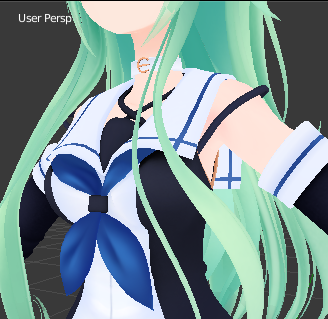 cyan sparrow
I thought you got the necktie as you wanted it?
rugged yew
I did the necktie as a test
cyan sparrow
If you want a breathing animation using chest.forward-back might even work. But even if you put an animation on your body it is not clear how VR Chat will blend them with your idle and walk animations.
Just a slight tilt forward and back might give a breathing illusion.
But scaling a mesh will distort it in weird ways and possibly open holes in the model or cause other visible tears. It would look very strange. If you scaled the chest literally every aspect of the chest would get bigger, so the shoulders would be too big for the arms, etc.
frank wigeon
Help 😂 Dont get green the bar https://imgur.com/a/GbWyj
 rugged yew
so I need jiggle physics to have realistic physics
 trim nimbus
you need to push harder
rugged yew
breathing move the chest so
If my model get breast bone I can scale them to simulate breathing
cyan sparrow
If you somehow did get breathing working, it wouldn't bounce around, just move/scale or however you solved the problem of animating it.
I don't know if reweight painting would work because those bones are children of the humanoid rig.
I've never tried it but I'm pretty sure it would also not be animateable using non-muscle transforms
Essentially anything that interferes with the muscle transforms will break animations. But I suppose you could try it?
Weight painting is a nightmare though.
rugged yew
If add breast bone to my model I'll be able to scale them to simulate breathing ?
cyan sparrow
I don't know, but I don't think so. You could try if you want. But breast bones would need to be daughters of the chest bone and therefore probably have the same issue.
rugged yew
I watched a video that duplicated the chest bone to make a root
cyan sparrow
Basically everything that is a part of my actual character needs to be animated using muscle transforms. Only separate objects can be animated otherwise.
So if I put a sword in my hand, I can animate or scale the sword as I like.
But I can't scale move or rotate the hand bone without using muscle transforms
Even if the hand is a separate mesh
If you want to scale chest size dynamically
Your best hope is blend shapes
If you have a blend shape for breast size for instance, you could make an animation that changes the value of the blend shape slightly
To simulate breathing, that would work
rugged yew
what about the video where the guy duplicate the chest bone and create breast bones attached to it ?
cyan sparrow
I donno what they are doing in that video, but like I said, it would still be a child of the humanoid rig. You would also have to do weight painting to fix it, and even if you did all that and somehow got scaling working, scaling would not do what you think it would. If you want you can try it in blender, select a few faces on the chest and then try to scale them, you will see everything will distort is weird ways. The computer doesn't know what you mean by "bigger breasts" it just moves the faces them outwards from a particular origin.
This is why blendshapes would be the best solution
Since they give you a predefined shape for big and small
And you can very easily blend between them without using any forbidden transforms.
If your character is from an MMD model it probably has a breast blend shape already.
rugged yew
how do I check that ?
cyan sparrow
Click on your character mesh in Unity and click the drop down saying "Blend shapes" but if you decimated the body you won't have them anymore.
If you find one called Chest or breast or something suspiciously similar try type in a value of 100 and you should see them change shape (usually get smaller in MMD models at 100%).
You could animate that between, say, 0 and 10% or 90 and 100% to simulate breathing I guess.
Depends really, could still look strange depending on exactly how the maker of the model decided to set up the blend shape
cyan sparrow
Click on your mesh in the Unity hierarchy
It'll usually be called Body
Then >BlendShapes, click the arrow
But if you decimated the body to get it under 20k, don't worry about it because the blend shapes won't be there. To decimate you have to delete the blend shapes.
rugged yew
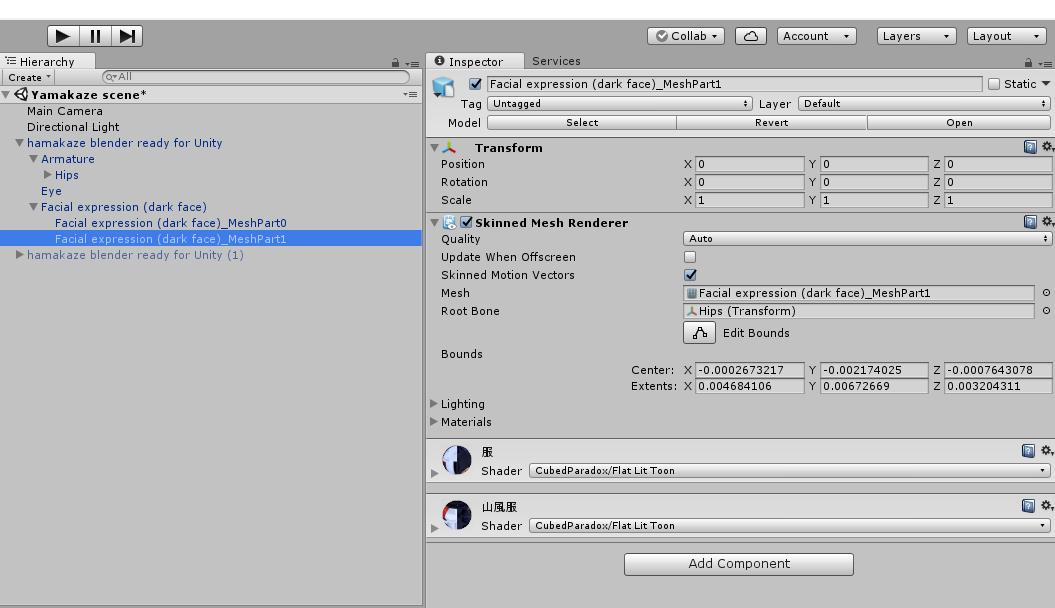 cyan sparrow
I don't know what is going on there tbh
rugged yew
I have 2 meshes
cyan sparrow
What is Facial Expression (dark face)?
rugged yew
it's just the name of my model mesh
cyan sparrow
Blendshapes should be on that item then.
rugged yew
they are separated in 2, one for the head and the other for the body
cyan sparrow
Oh
Well whichever one is the body I guess, if it doesn't have blendshapes on that mesh then you have no blend shapes on that mesh.
But as an aside you really should use a single mesh.
cyan sparrow
If they're not on the mesh you don't have any
rugged yew
that's weird because I didn't decimate my model and there's tons of shape keys on my model in Blender
there's even one called shrink and expansion for breasts
cyan sparrow
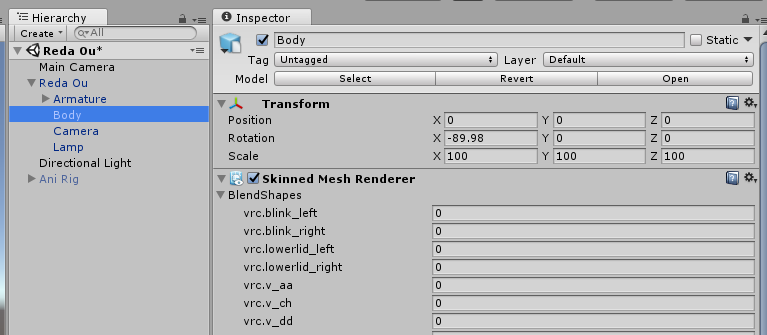
It should be on your mesh somewhere but since you have this weird multiple mesh thing going on literally anything could be the problem.
rugged yew
I found shape keys in Blender, now I just have to find them in Unity to animate them ?
cyan sparrow
Yes, they should be on whatever mesh the shapekey is actually affecting, assuming it is imported into Unity fine.
I highly suggest combining the meshes
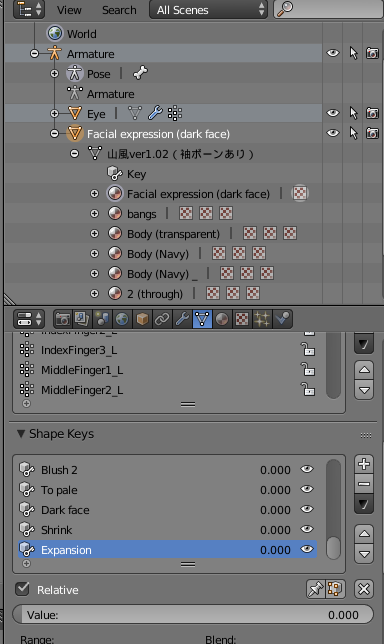 cyan sparrow
So when you click on that mesh in Unity you get nothing? If so the only thing I can say is check that you exported it right and if you did, try using a single mesh.
rugged yew
I already showed you the meshes in Unity, look like they vanished
cyan sparrow
In the image you showed me you had something with a name that did not match the mesh name in blender selected.
If it isn't on the one with the exact same name, then like I said, check export or try single mesh
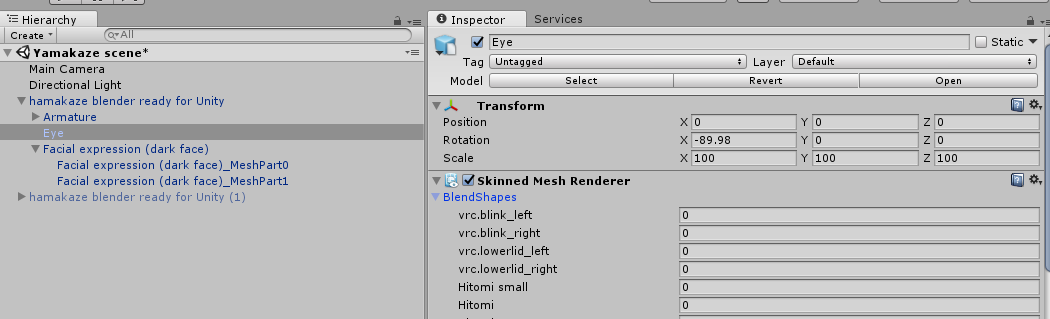 cyan sparrow
Have you looked on the one with the exact same name as the mesh you showed me in Blender?
You linked a picture with MeshPart1 before, not on "Facial experession (dark face)" as written
rugged yew
that's because that part was cut in half by Unity
I have part0 and part1
and both don't have any shape keys from blender
cyan sparrow
What type of game object is the parent?
rugged yew
wym
cyan sparrow
The parent of your two half meshes, what is it?
Did you make an empty game object to put them in?
rugged yew
no Unity did that when I exported from blender
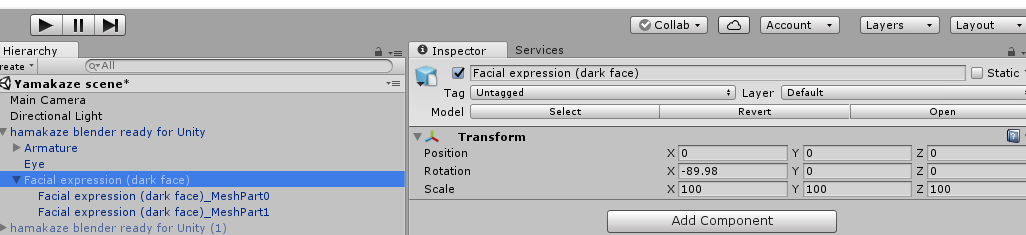
I already cut my meshes in half before exporting to avoid that but Unity still did it
cyan sparrow
Well whatever 'unity did' to split the meshes looks like it broke your blend shapes but I highly doubt that was something Unity actually did. If you exported it as submeshes instead of joining them into a single mesh then maybe that could happen.
What
If you split the meshes yourself of course they're going to be split in Unity.
cyan sparrow
Guess what will solve all of these problems? Using a single mesh.
rugged yew
I can't there's too many
cyan sparrow
I don't even know what that means.
rugged yew
I need to cut my meshes so Unity don't it and fuck up the shape keys ?
cyan sparrow
No, shape keys apply to specific vertex groups of a mesh, if you split the mesh you break the shape keys.
rugged yew
I separated meshes in blender and made 2 groups, one for the head and the other for the body. The head retained its shape keys
cyan sparrow
If you split the head from the body, you should be okay for any shape key that only affects one or the other, but if you split it in other ways, all kinds of shape keys could be broken.
Use a single mesh, I have no idea what you mean by 'too many' too many what? I bet you it isn't 'too many' and if you're talking about polygons you need to decimate.
rugged yew
I don't need to decimate my model uploaded fine with 80k tris
cyan sparrow
You need to be under 20k tris
rugged yew
I don't, my model uploaded fine I tested it myself it isn't lagging the game out
cyan sparrow
Be careful with what you're saying here. You literally cannot even upload a model with more than 19999 tris unless you're doing something that is a violation of ToS.
The VRC SDK stops you from uploading it.
rugged yew
someone said it wasn't the case anymore

what I need to is separate the meshes again and make sure any shape keys stay in the same group without unity fucking up everything
cyan sparrow
See that line about modifying the SDK....?
It is true that tries don't matter (but number of meshes and materials does cause huge issues, by the way).
cyan sparrow
Not really, 3 groups 10k polys >>>> 20k polys 1 group, but 80k which is already in violation?
I literally have no idea what you're talking about 'limit' or 'too many'
rugged yew
asI said Unity cut my meshes in half because it was too big
rugged yew
I don't know that what unity did, split my meshe in half because it was too much
 tidal zodiac
Hello Ruski
cyan sparrow
The only reason I can think of Unity splitting it is because you're trying to import something with too many polys
Hence decimation.
rugged yew
yeah it split at 65536 tris
rugged yew
and lose my shape keys ? I'm actually trying to keep them
cyan sparrow
You can decimate things other than the vertex groups you want to keep the shape keys of
But if you can't get under 20k you're shit out of luck.
rugged yew
That point is moot anyway, I just need to split meshes manually so Unity don't do it
 covert linden
Hey guys, I'm trying to add an animation where my avatar disappears, and something else appears in their stead. Does anyone now how to do that?
cyan sparrow
The point isn't moot because you need to get under 20k.
rugged yew
Thanks for your help I'll get working
cyan sparrow
Your model will have 80k tris and at least 3 materials (but I'm guessing a lot more), you're going to be a significant contribution to everyone's lag. Use a single mesh and a single material, which means getting under 65k, but more importantly you must get under 20k to upload.
obsidian vigil
Now im Confused, can you upload 50k or not
cyan sparrow
Let me put it this way: Rule 18. No discussion on how to hack / cheat in VRChat
obsidian vigil
okay
 torn pawn
bypassing limit is still against tos and you can get banned, just stop discussing it or ask how to do it, don't make the experience worse for every1 just because you can't be arsed to get to 20k limit
cyan sparrow
Here is a post from @muted prairie, modified to not @ someone: Ruuubick: @ tony pepperonis Modifying the SDK is against the TOS, but the polygon limit is definitely a topic being thought about internally
torn pawn
they can increase the limit, but till then we have to live with 20
iron crescent
So, I put an animation override in my IDLE slot, and the only thing I want the animation to do is have my arm stay in place. However, upon following the normal steps my model's arm hasn't seemed to moved to the new default position I want it to be in.
https://gyazo.com/dbe0f545610cc762f955d2edcde52386
What I want it to look like


What he does instead
cyan sparrow
Both of those are in Unity?
iron crescent
Yep.
cyan sparrow
The position shown in unity is just whatever it is
Check if it works in game, which is where the override matters.
 iron crescent
yeah but he's meant to be big
cyan sparrow
Yeah
iron crescent
which i'll ignore for the purposes of testing this
cyan sparrow
At the moment those are the size limits.
It might be posisble to test it in unity if you go into play mode with an overriden animation controller but even if that works or doesn't work it is difficult to tell if it'll work in VR Chat or not due to the differences in the controller etc. So best just to upload and try it.
 plush rapids
Hello! Do some body have "Take on me" dance cycled animation for unity? I see some different custum characters with this animation, but i cant fund it in google.
cyan sparrow
Try looking on the Unity asset store for Take on me or for dances in general. Otherwise try find an MMD file for it. Those are your best chances.
There might be dance files that are just named stuff like dance 1 or dance 2 or something.
cyan sparrow
It'll blend weird too
iron crescent
I need to parent the anchor to his hand so it doesn't move around with his hips
I might just reanimate it but that takes ages
cyan sparrow
Strangely the runtime animation controller automatically blends run and walk when you walk
So if you want to fix walking you'll need to fix your walk and run
cyan sparrow
You'll have to upload to imgur
iron crescent
that's super annoying
i was gonna make a joke about him not even having a mouth but the moment's passed anyway
thanks for the help 
 dense radish
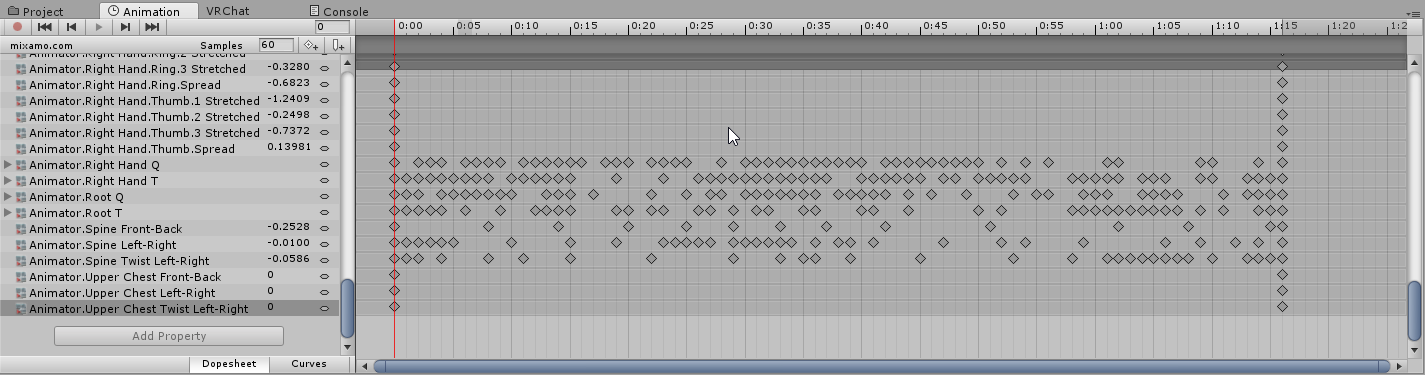
What do I need to do to be able to edit mixamo animation? https://i.imgur.com/8my371c.png
 cyan sparrow
In what sense?
dense radish
I want to add object to appear with this animation
cyan sparrow
Add a the "is active" property off the object
And check the box at the appropriate point in the animation
dense radish
yeah but I cant add any properties to the animation
cyan sparrow
Is it on an rig you'd made for animation? or have you duplicated it out of the fbx?
Could be either of those
Usually i t says "read only" on it if you can't change it
dense radish
i duplicated it from the .fbx
cyan sparrow
Have you loaded it into an animation controller for the rig you're animating it on?
dense radish
no
cyan sparrow
Add an animation controller to your animation controller, double click on it, and drag the animation in
Then click on your animation rig and switch to the animation tab and you should be able to select the animation in there.
Then edit it as you want
dense radish
where do i get animation controller?
cyan sparrow
You can just make one.
Right click create animation controller
Slot it into the animator
But make sure this is on a duplicate of your avatar rig
dense radish
bit confused, where do i create the controller
nvm i figured it out, now i can edit it
 unborn geode
How can i add mmd dances to my model.
cyan sparrow
There should be some useful guides online
cyan sparrow
They should but if they don't perhaps that means it is impossible.
unborn geode
Well i see other people doing it
 brisk robin
This is probably a very common answered question, buuut.
I've been wanting to seperate my hand animations by modifying the AvatarControllerTemplate, but I don't know if that will be also imported when adding in the overrider to my avatar. I assume it does because the overrider asks for a controller? But I don't want to waste my time making L_FIST animations and such..
Does it actually use my custom controller?
brisk robin
So then what's the CustomControllerTemplate being used for the override? o -o
If I'm modifying the template, wouldn't that be applied ingame, too?
cyan sparrow
You can test this by using a custom animation controller whose only state is some animation, upload it to VR chat and you'll note that you're not locked into that animation
When you use the overrider it can only override the animation names that exist in the controller
So it has a template so it can give you the option to override EMOTE 1 and so on
You could use a different controller for the override and you'll see that it only gives you options to override clips that actually exist in the controller.
brisk robin
Hold on, I don't think you're understanding my question 😂 No problem, uhhhh, basically. The VRCSDK has 2 things, the controller and override.
I want to modify the controller, and make a new template for the override.
So instead of there being FIST, there's L_FIST and R_FIST in the overrider. I just wanted to know if the overrider I used, because it has this at the top. https://gyazo.com/5d15f26532f9b7aa15e32c1e702cbb1a
Does that mean that the controller is also uploaded to VRChat?

The template should be the same as what they use in-game, so in theory then, I can modify the template to allow seperate states for both hands.
cyan sparrow
The controller has no effect in VR Chat for humanoid avatars
So you cannot separate them in the overrider.
brisk robin
So then I can just switch the rig to generic..?
cyan sparrow
And if you did, it would break those gestures if they are not named correctly for the VRC chat runtime controller.
It might work in generic, not sure. You won't be able to script any new animation variables so I'm not sure how it would distinguish left from right, you would have to use the template controllers they give you, I think. Not 100% sure. But then you'd also have to animate every other animation
Which would be quite the endeavor.
brisk robin
I'm perfectly fine with animating each one, my avatar does have some animations with the model, so. I can still use them (they arent Humanoid animations)
I just wanted to know if the override uploads the controller with it, doesnt seem like it..?
 storm cape
hey... how do people do 4 legged avatars?
cyan sparrow
You'll need to put the controller in the controller slot on the animator
But if your avatar uses a humanoid rig it won't matter what you put in there
storm cape
is this hard?
cyan sparrow
Hack it into a humanoid rig
storm cape
its in a humanoid rig lol
cyan sparrow
Then put dynamic bones on some of the legs
 hard ravine
Im trying to edit an animation really simply in the unity animation window editing bone rotation
 vagrant swift
i dunno if you guys know this or if there is one, but is there a nico nico nii animation in mixamo? LOL
cyan sparrow
Depends on how they're set up
hard ravine
When I rotate a bone, it rotates fine on the keyframe
when I play the animation back or move the playhead
it resets
what am I doing wrong
storm cape
so your saying theres a way to do it with dynamic in which hell be on all 4's and not be static
hard ravine
I just need to rotate some bones
obsidian vigil
and it just springs back
hard ravine
yea
cyan sparrow
I've heard that some people use 2 dynamic bones on some legs while having the other legs work as actual humanoid legs
hard ravine
Ill rotate it
obsidian vigil
huh
hard ravine
move play head
cyan sparrow
They'd probably still have to do custom animations? I donno
hard ravine
and it just resets back to normal
storm cape
are custom animations difficult?
cyan sparrow
Depends on what you want to do
cyan sparrow
To make it look good on a 4 legged model, I think it probably would be a bit hard.
storm cape
hm
cyan sparrow
But if you want very stilted animations it wouldn't be too hard I guess.
obsidian vigil
how do you do 4 legged models?
hard ravine
could borrow an mlp rig
storm cape
wait could you really borrow an mlp rig?
storm cape
well we need animations though, isnt rigs refering to bones?
hard ravine
Well
goto the vrchat mlp threads
and just rip the rig and animations
then do whatever
obsidian vigil
Yeah, someone probably already made one
hard ravine
they have
obsidian vigil
i wanna stick one onto my orisa model
 storm cape
do you have a link? or should i just look on like deviantart
 storm cape
alright
hard ravine
maybe you can gopnik rig it together
hard ravine
Did you see the video?
obsidian vigil

BUY FULL ALBUM: https://djblyatman.bandcamp.com/album/hardkvas Spotify: https://open.spotify.com/artist/6yFfHsTW76VoXts5QDvQgv Patreon: https://www.patreon.c...
From Boris?
hard ravine
hard ravine
Any idea where I could go/
obsidian vigil
not really
storm cape
how do i transfer the animations from the pony to my model?
storm cape
ok
how do i select the animation? sorry havent done this
ooohhhh ok
so i put avatarcontroller-pony into my avatar/
?*
hard ravine
idk how the files are
but Im guessing each fbs has animations
fbx*
so open the fbx up in the asset viewer
and ctrl the animations you want
ctrl+d
to make them independent
then you have your animations
 celest jackal
is there any way to animate mmd models? i thought you had to do it in blender but then i read somewhere that you have to do it in unity but i cant figure out how to animate things in unity
i tried doing it in blender and couldnt seem to get it to work
storm cape
i see the animations on the left
celest jackal
im trying to make a 2d blinking animation just to start out, where itd just be animating with shape keys
obsidian vigil
well @celest jackal to animate in unity you duplicate your model and then select transformations for every keyframe just like everywhere else. I have a tutorial of how to add a weapon to a hand. it should be applicable to any other animation though
Showing you how to change default emotes to weapons & stuff. SUBSCRIBE, LIKE AND ALL THAT GOOD STUFF!! :D MY FIRST TUTORIAL ► https://youtu.be/0vdiCJRAExw DI...
obsidian vigil
No problem 😄
 drifting swift
Anybody here know how to add collision to particles and let the particles stay after colliding with something like a wall?
 drifting coral
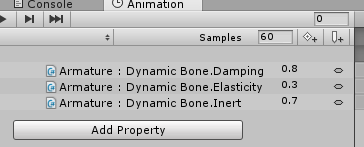
anyone ever tried using dynamic bones in animation ?
https://i.imgur.com/V2HUH3C.png
 drifting coral
uh legacy ?
hard ravine
for an issue I had prior
drifting coral
uh okay
 pine otter
Hey ive set up my MOdel to have a gun and all that jazz but how exactly do i go about adding the sound effects to be able to "fire" the weapon
obsidian vigil
@drifting coral Do you know the blue bouncy boss from cuphead?
drifting coral
i didnt play cuphead so.... i dont really know
obsidian vigil
Anyway he like stretches backward and lunges at the player
Do you think that would be doable with dynamicbs?
drifting coral
dunno actually, might be better without dynamics ?
like normal animation
obsidian vigil
Okay i think ill try both :D
hard ravine
ok
now this really puzzles me
the animation in unity works fine
in legacy mode for the rig
but in game
it puts me in the ground
novel flower
Anyone know how to fix sounds? I added a gun shot sound effect but it always sounds like its very low volume even after i maxed out the control in Unity
https://prnt.sc/i19eyf
 hard ravine
Im not sure what to do
The legacy rig animation is editable
but it doesnt work ingame (works in unity)
and the humanoid rig animation isnt editable
but it works ingame
I have no clue what to do
Im out of options
 ebon vault
https://youtu.be/xqeCfbCW5kU testing :GWupuCirCup:

This is a test of porting the CGSS motions into VRChat and same for the models also I still need to fix the root and sorry for this lag OBS was fighting me. ...
 rustic jewel
does the 20k poly-limit affect props used for animations?
as in, will it decline the upload if my avatar is 19k and the prop is 3k
warm furnace
fps/20
@rustic jewel nope
You avatar can be at 19K and your animation avatar at 50K
 obsidian basin
hey guys i have a problem i added a gun to my avatar but when i take the gun out my avatar starts glitcing out and jumpinge in the air to all sides
 lime valley
@ebon vault nice. Those are MMD animations, right? How'd you get them into unity?
ebon vault
@lime valley no it's a rip from the CGSS games that I converted to a usable file in unity
ebon vault
I don't really know but I imported the full animation which has over 4000 frames
Also thanks :GWcfcForbiddenlove:
lime valley
alright, TY. I just might be able to do some crazy stuff with dances after all...
novel flower
How to you pull a Mixamo Dance and add it to your Emote section? The file wants to download as a fbx
 empty wave
Why is that a problem
novel flower
Well when I drop it in assests how do I get it to Emote ovverride controller? Cant drag it in there
rustic jewel
whenever i do the hand gesture i've overidden, the hands change but the animation prop won't appear. any help?
i think i do
but i am not completely sure, nor do i know how to check if i do
 clear yew
Could anyone guide me through emote overrides?
@sullen hill sorry i was too late lol. you don’t have to redo unity stuff most of the time
bring in a new fbx with the fixes from blender
the drag the new mesh from the fbx to the mesh renderer on the body of your avatar
you won’t have to change your unity stuff
@ anyone that has a working gun override system, what do you put your equip and fire animations on in the override slots??
 plush meadow
You can have a 19k avatar and a 19k gun. You just have to hide the gun on your main model since the gun will be displayed by your animation, not your main model. @rustic jewel
You do that at the end though.
Although the less tris the better.
 spare bramble
you have literally just made me feel like a idiot generic haha i for some mad reason thought i had to have the tris below 20k including the weapon -.-
i am a idiot at times i swear
 foggy vector
So i export a model to unity that I know has facial animation, but there isnt a blend shapes drop down box when i select the mesh.
Am I missing something or?
 spark shard
@obsidian basin for your issue of bouncing around everywhere check your animation and make sure your position is not changed in one of the shape keys
If your position is changed delete the property and it will be fixed
lime valley
@foggy vector you need to select the exact bit with the blendshapes
 amber pollen
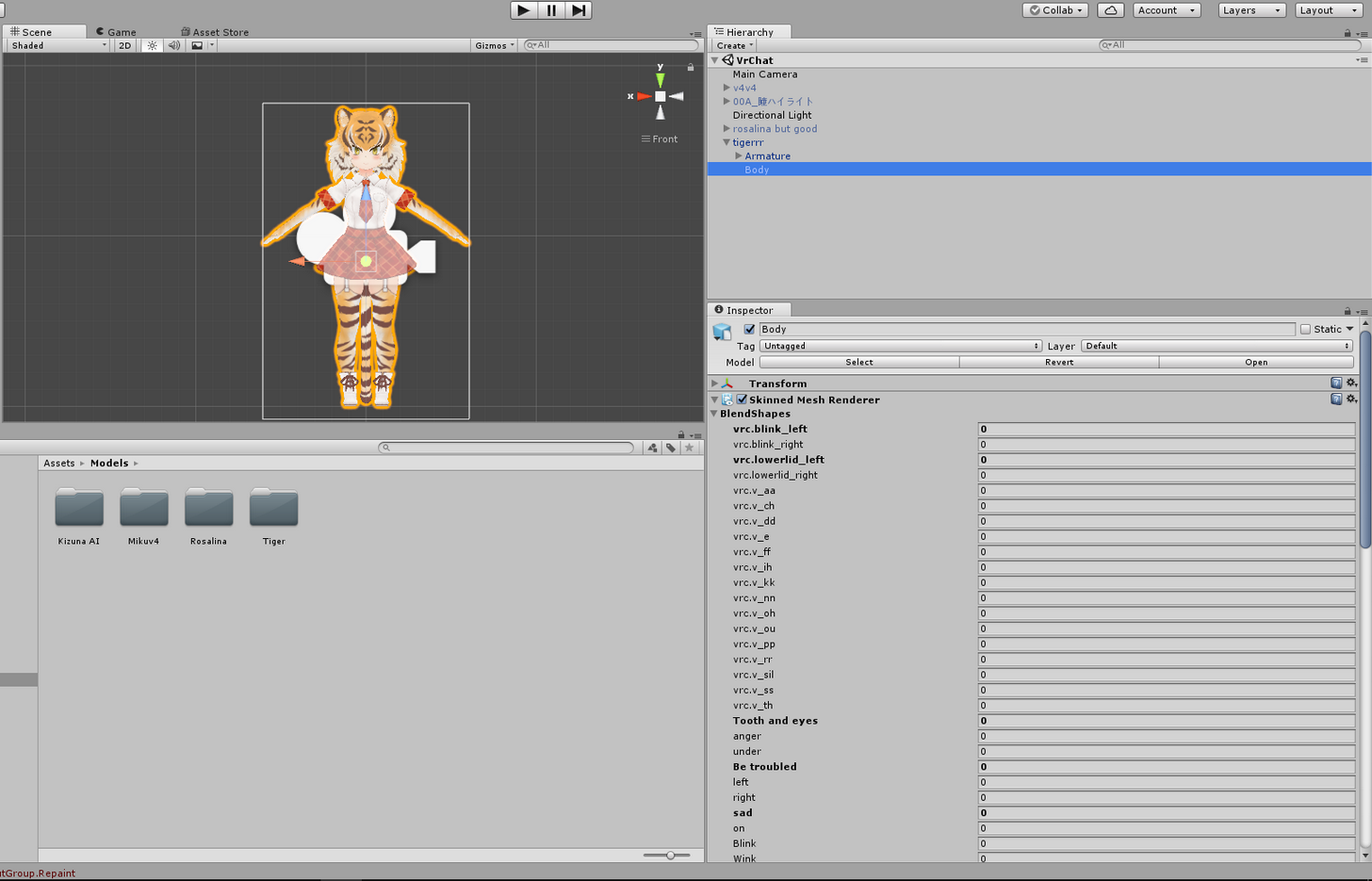
no one here knows how to make a characters float above ground?
 bitter nebula
guys, hi, wanted to make an animation, where my character pulls a sword out, anyone has a tutorial/can explain me how do to it? Thanks!
amber pollen
there's a few tutorials for those on youtube
 loud wing
When animating in unity, my character's hair and eyes disappear when zooming in, any idea why?
 ornate swallow
Hello is anybody here free to help?
 runic frost
Heyyoooo, I currently have a gun that 'detaches' from my character in hand and also fires but between idol and firing the gun flickers in its original spot. Any way to patch the transition between animations?
clear yew
Someone know a good vrchat tutorial video, whenever you are doing an emote ingame, that your head isn't going to be stiff on one location? (like backflip for in example)
clear yew
(not using vr) So the head is not able to move during the animation? it looks weird if someone has to look at it
 dapper breach
I have an issue with my custom animation overwrite (Emote) that just keeps on looping forever. The model is Generic, with custom walking/sprint animations (all works fine and dandy).(Loop time is disabled for the emote animation) Any suggestions what could be wrong?
lime valley
@clear yew I'm 99% sure that's the case. Desktop support for this program isn't very fleshed out right now.
clear yew
I see. Thank you for the response 👍
lime valley
👌
foggy vector
So when I export this model from blender to unity, I have to uncheck apply modifiers when exporting to get the blendshapes. So it ussually has too many faces to upload.
Is there any way to keep the decimation?
ornate swallow
I have an animation that jumps pretty high, but when I export it to the game it barely jumps at all.
Could someone help me with this?
 abstract current
any way you could make a preset/template for animations
so you dont have to select the fingers everytime?
spare bramble
ok so i added a scythe to a character of mine i got told if i hid the weapon on my main model at the end it would allow you to upload high poly weapons without issue the only thing is now when i get in game i cant see it any help?
i did everything else the same as when i added a gun to another model
loud wing
@abstract current Maybe create one anim with all default values, save it and then duplicate it everytime you want to create a new one
 oblique beacon
Anyone have an idea why when I duplicate a model for animation and add a property, my weapons are appearing behind me like they're not attached to my hands?
I didn't have this happen last time I did a weapon animation. Idk if I just manually re-position them in the animation if it will register properly. I can't tell, but I'm wondering if the guns are appearing behind me in VRchat like how it looks in the animation on unity.
 signal raptor
Quick question. I have my animation model set to the finger pistol gesture which works fine, however, if i pick up an item with either hand it causes the gun to show on my normal model like with the fingers not gripping it. anybody know what is causing that and how to correct it?
 toxic solar
So I assigned a animation to a hand gesture, however, it seems to take forever if I want to 'end' the animation. The fingers move very slowly, and the animation won't end until the figners are finished moving, if that makes any sence. Is there a simple solution?
oblique beacon
I haven't tried any of that yet myself, but I'm going to guess there is a play speed property somewhere you can adjust
Any idea why this happens when I duplicate and add animation? https://imgur.com/a/TGub5
 toxic solar
@oblique beacon "Hide" the origonal model, use a dummy when animating
That will pretty much always happen when animating in unity, it'll assume an 'animation' pose
oblique beacon
well i mean the guns
the guns aren't repositioning properly
I've done weapon animations before
toxic solar
Make sure they are children to the correct parent on your model.
 lavish palm
Anyone here know how I could make an avatar fly upwards for a jetpack?
oblique beacon
they're parented to each hand
toxic solar
So, put them under 'wrist' where they belong
oblique beacon
i basically did what I've done previously, but they're in the right position. If I have to painstakingly reposition them in the animation to make them appear in the right place, I will, but I don't know if that will fix whatever this is.
I can't tell if they're appearing behind me in VRchat when I trigger the animation. the sound file works so I know it registered
toxic solar
Are they posed, outside the animation, in holsters or in the hand?
oblique beacon
the original in that picture is the model I duplicated
so they're in each hand like that
when i add a property to the animation and it goes into the default pose, they're appearing behind me like that
toxic solar
By chance, are the gun model's bound's outstretched?
As if the gun has some invisible larness or odd pivot point?
oblique beacon
I'm not sure, honestly.
toxic solar
Double click on the gun model. You'll see a box around the gun, showing it's "bounds". If they are way out there, the modle might be "larger" than it looks.
oblique beacon
The bounds are correct
 quick goblet
To fix the animations dropping into the ground, is it okay to just try and get the Root.T.{x,y,z} positions to be somewhat close to the idle animation's (from the SDK example) values? It seems wonky how the Root.T is never the value you type in; keeps getting altered closer to zero.
oblique beacon
Animations in Unity? or on VRchat?
quick goblet
Seems to happen in Unity
oblique beacon
thats normal
quick goblet
still trying to figure out if I need to alter just the Root.T, or if I should be also altering the model's vertical position
quick goblet
going to be doing some animations where the model ducks downwards, so I'll have to make her crouch
which means the Root.T isn't constant
or if it's possible to just adjust her vertical in addition to the Root.T fix in frame 1 to do a crouch
oblique beacon
That I wouldn't know then
signal raptor
is it normal for the duplicate model to no longer appear after you've like saved it and uploaded?
quick goblet
I was hoping I could just do the Root.T fix in the first keyframe, and then just do everything else without modifying it afterwards
unsure about the duplicate model since I usually disable the duplicate game object to avoid it appearing in the VRChat build menu
signal raptor
yeah so i disabled the duplicate model before uploading but i need to fix a few things but its not there anymore
oblique beacon
Idk. Unity and the SDK can be finicky sometimes. I've had issues where I went to go back and fix something and had to redo the rig parenting even though I saved and applied and saved scene
oblique beacon
For a little bit, all my models were getting deleted when I uploaded a new one. I uninstalled and reinstalled the SDK and it seemed to fix that.
quick goblet
I'm scared of that happening when I spend so much time articulating a rosewhip in Unity
oblique beacon
like out of the uploaded content
quick goblet
yet I don't know how to bake multiple animations into one FBX model
toxic solar
@oblique beacon If you use the rotate tool on a gun, does it rotate correctly, or does it make a wide orbit? Best I can think of is to double check the parintage, as making them parents of certain bones on the armeture usually is enough to fully align it's position with them, so weird pivot points or parintage is all I can think of as to why the guns would turn that way.
signal raptor
ill give that a try
oblique beacon
@toxic solar It rotates and everything just fine. It's just literally appearing in a weird place like that. They're parented to the proper hands, their Position and everything is the same coordinates as the original model
When I did an ax last time, all I had to do was parent it and position it on the original and then duplicate it
rugged yew
my model make the stupid muscle position with my idle animation ingame
oblique beacon
and it would appear in my hands when I went to animate it
signal raptor
btw just saw the coolest model, was a small anime character solid white except the eyes and covered in blood, was pretty cool looking
toxic solar
@oblique beacon Oh I see, so animating it, they'd show in the hand normally? So the issue is if they show up like that in-game while idle?
oblique beacon
Well I can't tell exactly whats happening in game. Like the sound file will trigger to shoot them
but I cant see behind me to see if the guns are appearing behind me like the unity animation
toxic solar
Is that the idle animation by chance?
One thing you could do is to have the guns "Hide" in default, and any animation that involves them, add a property to make them active again
oblique beacon
well yeah. that is all set
they're hidden on my model
set to active for the animation
they're just either not appearing or they're appearing behind me in VRchat
like how it looks in that picture
I can't see behind me though so I'd have to ask someone if guns are appearing behind me in VRchat
for all I know, the animation works and the particle and sound clip is working ,but they're just not in my hands
loud wing
I did a custom animation and overrided Emote 8 with it, but in VRChat it still has the Sadness animation, as if I did absolutely nothing. What are the most common issues?
 uneven acorn
If an item is used in an animation, does that item's tris count towards your model's tris?
 sullen vine
best dancing amimations on mixamo?
toxic solar
@uneven acorn No, so long as it's counted as "Hidden" on the base menu. Animations do not count to the poly count.
base avatar*
uneven acorn
@toxic solar Okie thanks ^^ I would be so sad if it did
oblique beacon
meh I guess I'll just try to re-position them within the animation and see if that works
which so tedius
rugged yew
https://i.imgur.com/xgSkRyS.png
It's an idle animation override, my character should be blinking and simulate breathing with expansion and chest front-back. Ingame my model do the muscle position
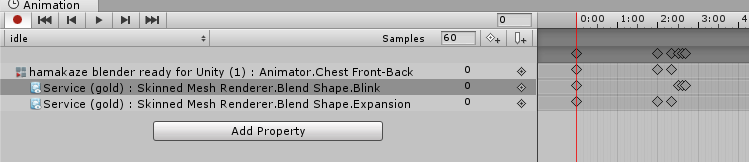 toxic solar
@rugged yew For both of those, instead of over-riding the idle animation, you can just add a looping blink and breath to your model.
Add Component-> Animation-> Whatever animation you want
rugged yew
it won't screw my main model if I do that ?
toxic solar
That sort of depends, but generally I'd say no. Unless the animation affects every bone or something, it should be fine. It's how I get my avatars to blink, though I haven't done one of breathing.
Does your model happen to be an MMD?
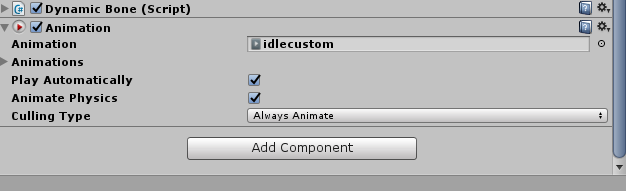 toxic solar
Well, that makes it much easier. Assuming you did the whole blender thing through CATS tool, you jsut have to make a blinking animation with the built in meshes
Yup, but make sure the animation is on loop
quick goblet
hmm, I wonder... has anyone tested if the animation applied through "New Component -> Animation" can be longer than 15s, so I could have a 1 minute animation where something happens in the last 10 seconds, yet I can disable the Animation component when I do gestures so it doesn't conflict?
Wanted to have an idle animation which doesn't get screwed up by the 15s "limit"
rugged yew
there's a 15s limit ?
oblique beacon
Hmm weird. I actually also just noticed that the pistols are basically completely reversed in the animation dumby.
quick goblet
on Emotes and Gestures, it's been weird after 15s of frames
where it'll just stop rendering and lock me in place for the remaining time
rugged yew
I removed my custom override, I'll upload the model and check if its working
quick goblet
I want to make my companion pet pester my model every minute or two, but didn't know if that would mess up my idle animation override for a humanoid
toxic solar
@quick goblet I have a floating navi/butterly that does it's own thing over my avi's shoulder, it doesn't affect a thing, except my model's "Center" position. However, I jsut use an Animation component rather than replacing the idle. I'd consider doing that, unless you're alright with re-animating a whole new idle for your character.
quick goblet
I was going to try and pull a Banjo-Kazooie kind of interaction
toxic solar
I shoudl clarify: the butteryfly is affected by my avi's center, not my center affected by it.
quick goblet
where she pecks my head and my model looks around a bit, but I would have to disable the animation anytime I did a gesture/emote
toxic solar
Ah, alright I see.
Then it seems liek you would indeed need to make a whole new idle lol
quick goblet
It's all good, I was expecting it may be necessary 😉
But I'm glad you told me about the Animation component, going to be a bit more free if I want to do something like a small murder of crows
I bet it looks amazing to have the butterfly
adds life to the character
 formal tangle
Hey every anyimation I see in the VRCSDK folder in unity if I play it it is the male idle animation, none of the females none of the emotes etc. Anyone experiencing this issue/have a fix? I want to slightly modify some of these for my specific avatars
oblique beacon
Hmm I just realized something else about this animation issue thing
My armature seems to be reversed for some reason, or at least thats what it looks like when I select something. Like when I select Hand.l, its highlighting the one on the right side
quick goblet
weird
oblique beacon
also the guns are swapping when i do the animation
i dont know what is happening lol
oblique beacon
yeah idk
looks like i have to back track even further although i dont know why
ive used this model already and did a weapons animation without issues
but even so, i still dont understand why if the guns are attached to the proper armatures why they're reversing right and left and then appearing behind me in the animation
proper hand bones. only 1 armature
quick goblet
Yeah 😦
oblique beacon
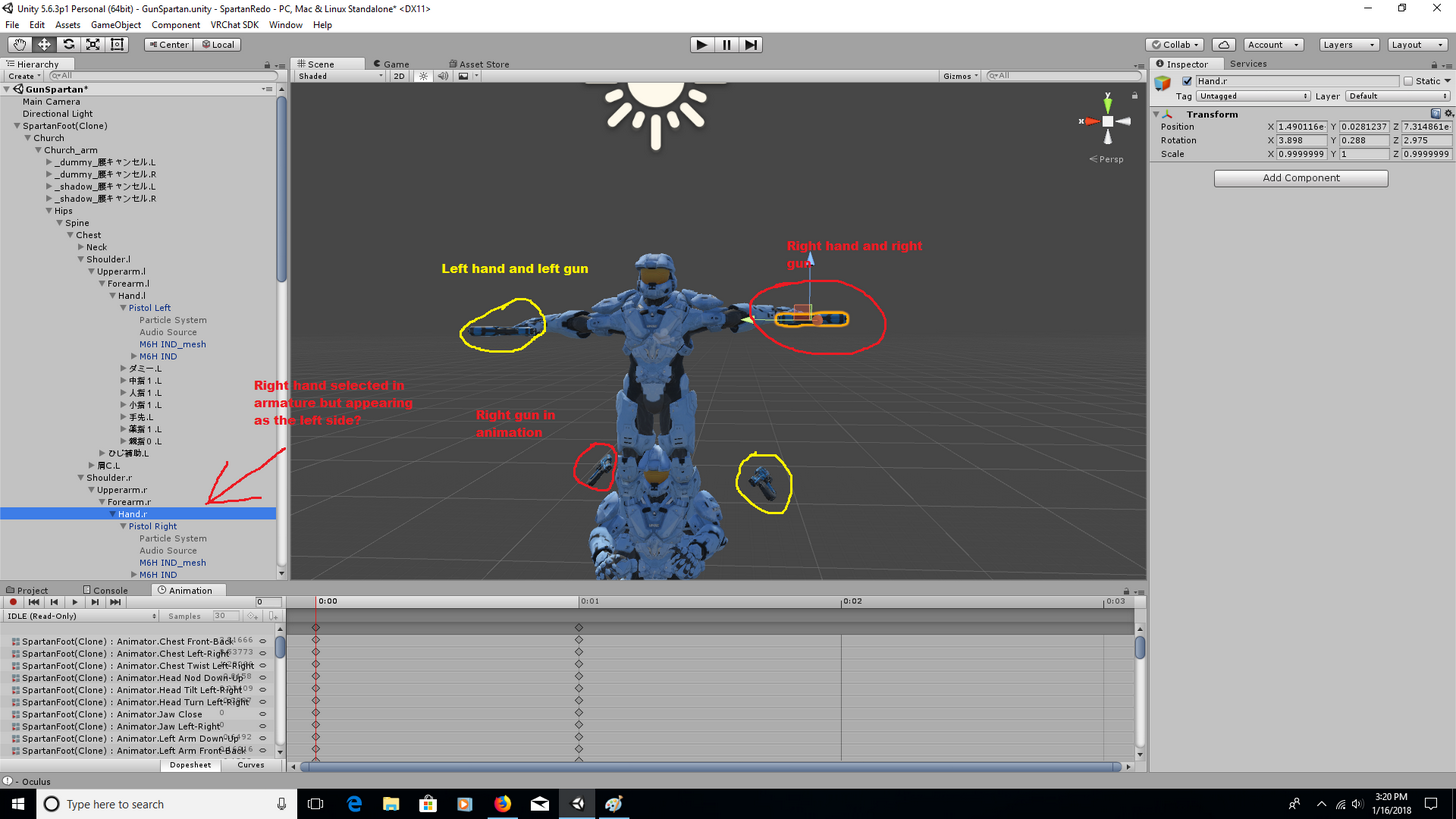
I just wanted my spartan to shoot dope pistols =[
everything looks right in the unity rig
 grizzled furnace
How do i add a custom dance or something simelar?
rugged yew
my loop animation for blinking doesn't work
oblique beacon
@quick goblet Stab in the dark here, but if I move the guns into my hands in the animation/dumby duplicate, would you know if they'll appear in my hands when triggering the animation in VRchat?
rugged yew
The AnimationClip 'idlecustom' used by the Animation component 'hamakaze blender ready for Unity' must be marked as Legacy.
oblique beacon
like if I just have to painstakingly reposition them, I will lol
quick goblet
From my understanding, wherever they're rooted into the armature (the child of X), they'll appear as an offset to whatever you've set the position of them to
so if they were the "child of Hips" or "child of Spine" and you positioned them to your hands as they appear in Unity, when you got into the game and moved, they would stay floating, even as you moved your hands
but if you set them to "child of Hand.R" and "child of Hand.L", they would follow the current X,Y,Z of them
oblique beacon
I wonder if I reverse the positions of the guns if it will work since some other weird reverse stuff is happening
quick goblet
sadly I'm unsure 😦
oblique beacon
same
i have no idea what is happening
since my left is my right and my right is my left
for whatever reason
quick goblet
I had to do some bone refitting in Blender when I screwed up Eye.L and Eye.R on my companion, which was easier than mapping the animations in reverse in Unity
but each situation is different ; _ ;.
oblique beacon
ill have to open it in blender again and see if for some reason the names are just rigged wrong
quick goblet
hopefully it's just a naming issue
oblique beacon
yeah
loud wing
Ahem, after doing custom emote in VRC, my dynamic bones start to glitch around (only for me tho). Any idea?
And each time I repeat emote, it becomes even worse
quick goblet
Hmmm, unsure unless you've set the Elasticity very high and Damping&Stiffness both to zero
but for it only to occur locally, that's interesting
loud wing
It only occurs when I'm standing on a spot or jumping on a spot
oblique beacon
Wow
so all I did was take Pistol Right and swap it in the parenting
and vice versa
and it fixed it lol
quick goblet
The quickfix
oblique beacon
i guess it just registered them wrong for whatever reason
thank the heavens
This stuff is so finicky. You spend hours trying to figure out what went wrong and then it turns out to be some weird, dumb little thing
I still don't understand what happened, bu who cares if it works right after this
quick goblet
I've been adding up my hours doing stuff in Blender, GIMP, and Unity. Already hit over 45 hours since the start of January :/
oblique beacon
Hahaha it's literally been like a week, week and a half for m
and I bet im around 20+ at least
75% of my time in Blender and unity, 25% of my time actually in VRchat
quick goblet
yup!
that said, learned enough in the last two weeks to be at a beginner-novice level in Blender modeling/rigging/texturing and Unity level/animation
 olive tinsel
when trying to add an emote to my avatar I get this message, any ideas on a fix? http://prntscr.com/i1dyl2
 quick goblet
You may have made the animation on a model before swapping it to Humanoid
oblique beacon
Now comes the real question ... after all this trouble shooting, do I just take the time to re-position all the fingers now on both hands XD
quick goblet
hahahah oh no 😦
oblique beacon
shouldn't take too long I guess now that they're in the right places
quick goblet
but yeah, if you made the Animation on a model which was "Generic", did everything, and then swapped the model type to "Humanoid", it may not have made the clip correctly
olive tinsel
is there a place to get premade animations for emotes?
 shrewd moon
mixamo
rugged yew
I think breathing animations are overidded by vrchat
olive tinsel
@shrewd moon I tried mixamo and that is what is giving me an error
it needs to be made from a humanoid avatar supposedly
shrewd moon
to download the animations?
the animation is not model specific
just get any random model and add it into mixamo
then download the animations you want
 ruby minnow
hey all, kinda new here, so not sure if this should rather go into the #development-advanced or something, but can you get full (or partial) body mocap to function with VRChat?
I've got a perception neuron kit lying around that hasn't seen much use
wondering if i could get it to work?
I've read people have been doing that with altspace, but couldn't find any details
loud wing
@ruby minnow Well, there is always that error in Build Control Panel that says "Your avatar may not work well with full-body IK and Tracking", so there might be a possibility.
ruby minnow
oh yeah, that';s right
loud wing
Or maybe they're just refering to something they want to add in future, it's just a guess from me.
ruby minnow
that's what got me thinking about it first
grizzled furnace
Does anyone know how to create something with a static postition using an animation override? Like i dont want it to follow my character, its suppoased to stay where it appears
rugged yew
anyone got a tutorial about mmd dance ?
 tranquil lark
Is https://www.youtube.com/watch?v=ZB2aXKkwXuA out of date? I did everything according to it setup like this: https://i.imgur.com/HlVTaG0.png and it wont work

EDIT: If you are using an MMD model please read below! In this video I will show you how to make your 2D eyes/mouth type avatar have a blinking animation and...
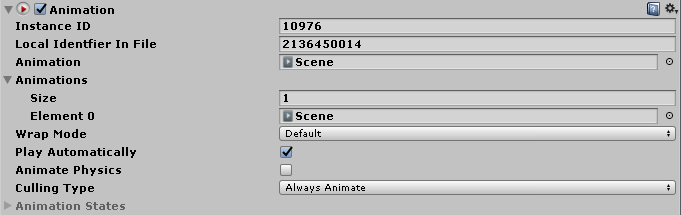
and to make sure i am not absolutely fucking retarded, is there anything else you have to do besides adding an animation component on an avatar to make animations work?
 candid token
So, reguarding animation, It's not ticked to loop at all for my model for vrchat, but when i emote, The model just repeats the action Any ideas oon why this is happening?
oblique beacon
Can I add a root bone for dynamic bone straight into unity without having to make a copy and parent it in blender?
I want to add hair with dynamic bones onto a model that doesnt have any
like just copy the head in the hierarchy in unity and add it under the original head and then attach the hair to the copy?
 vivid turtle
If any animator is interested in joining a creative community to put their visibility higher or that is a streamer as well please contact me!
 royal falcon
So I have a model where it's default pose its mouth is hanging open and there is a shape key to close it. How do I set it so it dafaults to close?
clear yew
Is there a way to record animations using VR?
 glass anchor
how can I create a new animator to select as a property?
when I try to just add keyframes by selecting the bone as a property, the keyframes don't save information and just reset
candid token
That's a bug
Happens to all of my models
I'm having a weird issue with my emotes that they randomly LOOP when it isn't ticked
yes
 unkempt spruce
im trying to do custom animation but my model dont move and some times its too fast
spare bramble
ok so i made a animation where a mk5 assault rifle appears on my halo model then i made a duplicae of my main model of it and made a animation where i planned for sound to play added a audio source and placed it under the rifle in armature but it isnt playing in game for some reason
any chance someone can shed some light on the issue or even talk me through it?
the gun and stuff appears so thats good just the sound that isnt playing
 steep vector
quick question when doing facial emotes my avatar is still blinking and the eyes get all wonky does somebody know a workaround ?
 floral island
Hey so if you do an animation override for standing idle, does it keep your arms in a certain position or are they aleways gonna be hanging if you have VR?
candid token
I'm not sure, But i grabbed something and it seemed fine. But i think it won't?
floral island
it won't keep your arms hanging or will?
spare bramble
how do i set a audio source to play upon a animation
i want it to play when i finger point
oblique beacon
right click the object in the armature and go to add audio source
candid token
@floral island I'm not 100% sure about what it'll do but when i grabbed a item without VR the anim didn't play on that arm
Okay so
I figured somethign out, It's looping BUT after a while it stops But have no clue why
It's like it's on some timer
glass anchor
is it just a regular emote
candid token
yes
candid token
Ah, but i have short animations that work simply on my otehr characters
like that is one simple anim that plays that is like 1 sec long and stops
But on my panzer it's like nah
candid token
well shucks. Hmmmmm, Properly gonna have to repeatedly burn people and not sop for 10 seconds
All the thing i can thing of is that the timer on the Emote is set defaultly to 10 And doesn't Go off of the animation's frames?
That is all i can think of
glass anchor
not sure
 candid token
already done
 limber epoch
hey guys i just found something out: if you're trying to add particle effects to your animation but can't see them, you might have to reset the transform

 stray gulch
yep yep i had the same problem but my animation is 3 min
stray gulch
anyone know why the matierals dont always come through correctly in blender?
limber epoch
what do you mean?
 void sonnet
can anyone link me a video or tell me how to disable blinking during animations?
glass anchor
man, for some reason one of the particles in my animation just doesn't appear
and I have no idea why
 plush jungle
hey i have two particle system they both have the same colour but they look super different
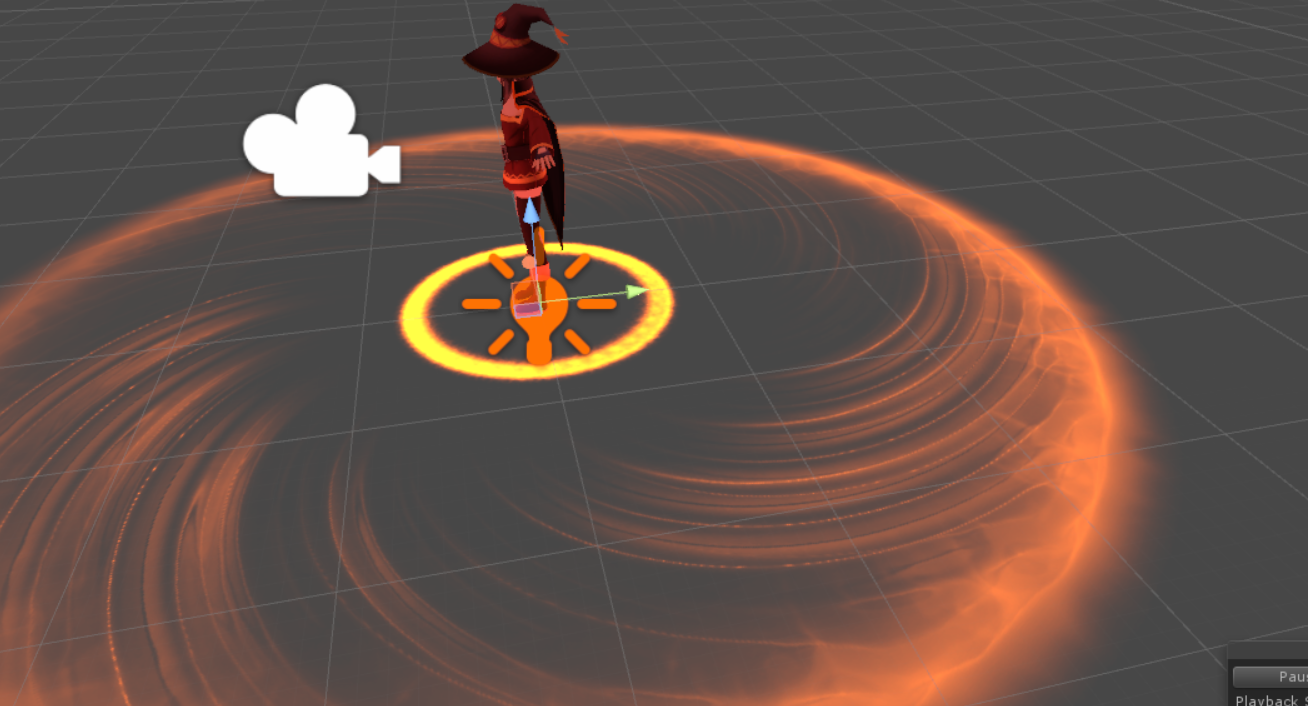
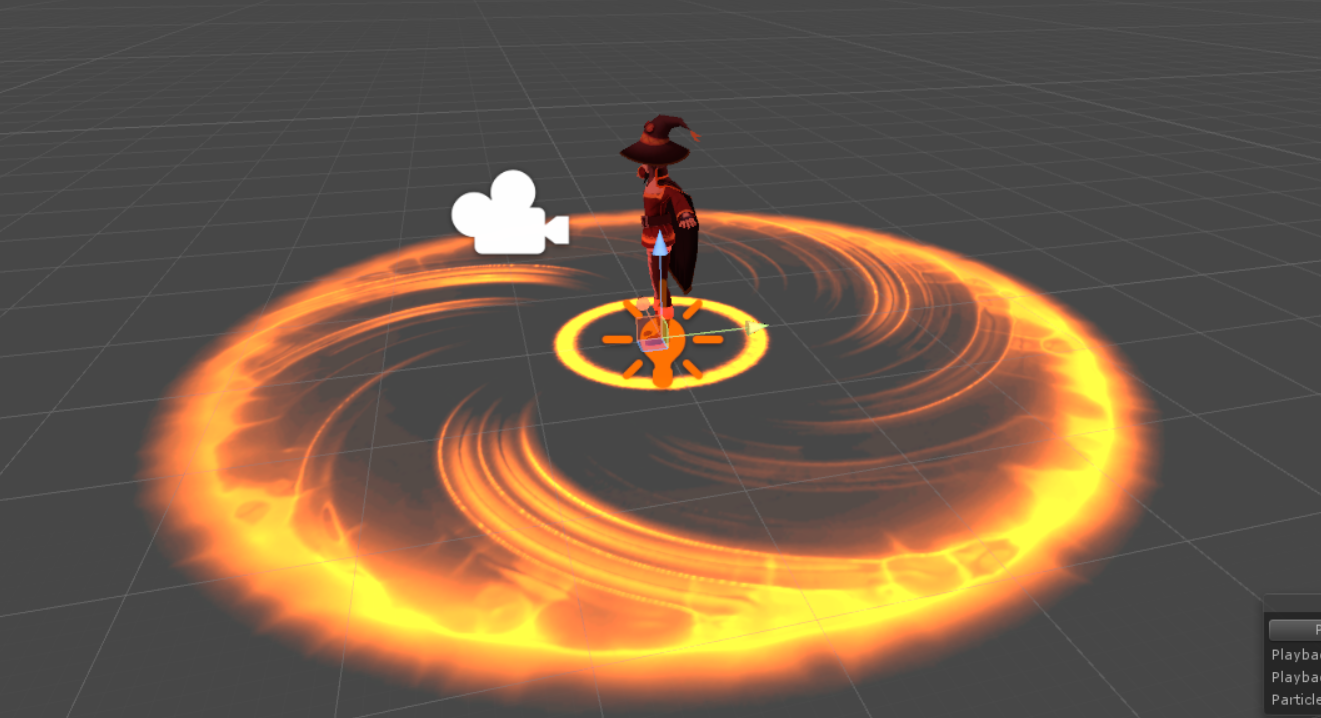
any idea? maybe because its stacked ?
 turbid sluice
So i'm trying to create a sitting animation that i can trigger that also makes a chair appear. However when I copy the keyframes she stops sitting. http://prntscr.com/i1gl9s

 glass anchor
@plush jungle halve the saturation of the second particle
plush jungle
@glass anchor i want to have the outer ring appear as the inner one =)
spare bramble
@plush jungle i have been trying to figure out how to get the particle effect like that on the ground in the ring how did you do it?
glass anchor
maybe make a third particle that turns on/off as the two cross, make it identical but with full saturation
then halve the sat on the other
bit janky but eh
plush jungle
hm sry i dont know what you mean mochi, i could just stack the same particle effect but thats prob pretty bad :/
glass anchor
I'm probably misunderstanding the effect you're going for. But maybe having 2 different tones isn't a bad thing?
I think it looks cool

 paper haven
Anyone know how I can make particle effects that can leave their bounding due to velocity of the parent?
glass anchor
just the one on the floor? @plush jungle
paper haven
Like, I have white effects spawning around a swor, I'd like them to hang in midair when the sword moves
paper haven
Tried Velocity of Lifetime, Noise, External Forces
glass anchor
well the one in the center there is definitely a lot brighter than the outer ring lol
glass anchor
yeah idk man, up to you. I'm not really sure on a solution
 ruby minnow
hey guys, I have all the bones for eye movement on a model and I've tested that it works in blender
where do i tell the unity sdk which bones to use for eyes, etc
it doesn't seem to have automatically imported that
@plush jungle is that a Megumin with FX? pls tell me if you upload it somewhere!
paper haven
Draig, Did you use cats?
paper haven
If your eye bones are setup in configure then they should work
ruby minnow
directly, no modification in unity required?
plush jungle
@ruby minnow yeah I wanna build the explosion spell
plush jungle
already did all the sound and so on
paper haven
I dunno if they work in unity
turbid sluice
So is there no way to animate the body?
paper haven
but mine do in VRChat
plush jungle
ok
i found my mistake
I had 100 particles for the inner ring and 3 for the other one xD
ruby minnow
x)
paper haven
Does anyone know a way to make varticles hang in midair after they spawn?
 vagrant heron
Can you change your avatar to a different model via animation?
Temporarily of course
 red jacinth
so im new to pretty much all of vr chat avatar stuff, and im wondering if Muscle Animation Editor is required or optional.
plush jungle
never did something with the muscle animation editor
turbid sluice
I beleive it can all be done manually but the editor makes it easier
from what i'm seeing here
red jacinth
ah, cool stuff.
plush jungle
@vagrant heron i know you can have a avatar in your hand it had the can have the same dynamic bones and colliders as you but donno if u can switch avatars u might be able to do it but then both have to be under 10k
vagrant heron
I have an idea of how to go about it but id need to test it tonight
Let you guys know how it goes
turbid sluice
I'm trying to create an animation where i change my characters pose when i use a hand gesture. But everything I create the pose and copy the key frame it all snaps back to before i moved it 😦
plush jungle
@turbid sluice can u msg me and tell me how u did it when u find out I want to do a fall animation with a hand gesture
oblique beacon
Anyone have a recommendation for which hand gesture to use when firing a gun? I feel like mine triggers way too easily
oblique beacon
I have the guns set to handgun and the fire animation set to thumbs up but i feel like i keep just firing b accident a lot
turbid sluice
looking like i might have to buy Muscle animator to do what i want bah
plush jungle
@turbid sluice cant u trigger a animation with the handgesture and the animation does the pose ?
plush jungle
hm
turbid sluice
i put her in the chair
where i want her. Then when I copy the pose to the next keyframe to get a loop. This happens.
plush jungle
did u delete the other keyframe first
turbid sluice
yes you can see at the bottom
plush jungle
after you did the first keyframe i always have to delete the second one then create a new one and then coppy it
turbid sluice
the only existing key frame is the first one.
turbid sluice
it's like i can't move armatures
plush jungle
but i only move objects and my hands so far
turbid sluice
okay.... i'll try to figure that out
it makes the check box for the animator red do i just check it and use it?
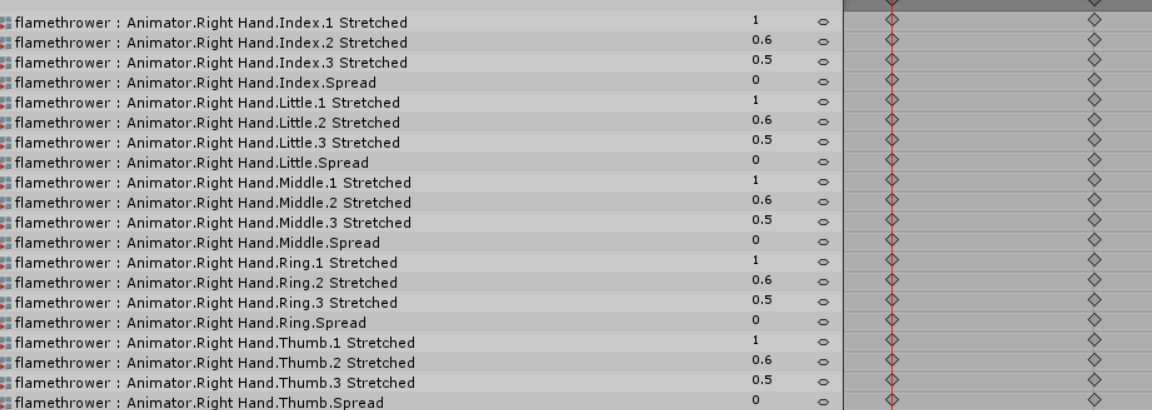 turbid sluice
ah snap i think i see what i was missing when trying this earilier thanks man
plush jungle
np =)
turbid sluice
wish i knew how to actually select the parts though... lol
trying to move the Root Q
ruby minnow
when making an animation in unity, is there a way to add multiple bones at the same time
plush jungle
its such a pain to select all the animator
paper haven
Is there a way to make a particle forget about it's emitter and float in midair?
plush jungle
it takes like 5 minutes only to put the hands in
turbid sluice
ruby minnow
I have to scroll down a super long list to select ~20 bones for each hand 😂
turbid sluice
that'll make animations easier it seems
ruby minnow
yesssssssss
given how well most of unity's interface is designed
that seems like it was made by an intern or something x)
turbid sluice
i've made 40$ off avatars so far so i guess i could buy this and still be up 5$ cause Dynamic bones lol
novel flower
What do you need to do to get a mixamo dance animation to work? I downloaded the fbx dropped it in hierarchy and then into control override to emote 1. But when I play it in game NY character freezes and so KS into the ground.
ruby minnow
and they just looked at it, thought "eeeeh, good enoguh" and released it
paper haven
You sell avatars? how? Just asking people if they want them
plush jungle
@turbid sluice
glass anchor
I've had someone offer me 150 bucks for mine haha
 peak relic
Does anyone know Does anyone know how to make a texture or material on Unity move to sound or music on a Mesh by chance?
stray gulch
anyone else taking forever to upload avater from unity?
novel flower
I'm sure someone must have used mixamo animations before >_<
peak relic
I've used mixamo animations. Why whats up?
novel flower
How do you get it to work on your character? I put it in hierarchy and into control override under emote 1. But then I just sink into floor frozen when trying to play
Not sure how to make it work
glass anchor
yeah I had the same problem
you have to create the animation on the avatar
then add the properties of the thing you wanna animate into it
cant directly animate particles n stuff
peak relic
@novel flower Follow this video. It helped me with the same problem. https://www.youtube.com/watch?v=BEIaakl9vJE

This tutorial takes you through the first steps of getting a rigged and animated character from Mixamo, putting it into the Unity Mechanim system and then wr...
glass anchor
gotta think of it like animating a limb
novel flower
Thnx
glass anchor
np
stray gulch
oh vrsdk had an update
peak relic
Now for my problem. xD Does anyone know Does anyone know how to make a texture or material on Unity move to sound or music on an object by chance? eg. Having an Audio Spectrum on a shirt or helmet.
stray gulch
@peak relic you could just have an audio source comring from your (part)
peak relic
The audio source isn't the problem. I wanna have a spectrum with the audio source. xD
 hearty sapphire
Looking for Caramelldansen .anim file. Can someone assist?
void sonnet
Anyone have any idea on how to disable eye blinking while using a trigger animation?
novel flower
Magic. Do I just drag the complete controller and drop it into my override when I'm done?
 sand apex
@void sonnet make it so the animation is disabled and the eyes are always closed or open
If you didn't make your eye blinking manually and made it through CAT you might be out of luck
novel flower
yea
void sonnet
yeah i made it through CAT .. rip ..
 grizzled cobalt
Anyone know a basic animation tutorial for idle animations by any chance
sand apex
No but I'm sure all you have to do is make sure you have the idle animations looped

If that doesn't work out for you try changing the Body Orientation to Original because some idle animations might not look right to you if you kept it on Body Orientation
turbid sluice
I take it that Full body movement animations take priority over Animations triggered by gesture? Basically i made an animation of my char sitting down and wanted to trigger it via gesture. Everything works such as the chair spawning but my character doesn't. But if i replace an emote my character does the animation.
grizzled cobalt
@sand apex I mean like; For someone who hasn't done animations at all yet
glass anchor
@turbid sluice yeah sounds like you cancel it by moving, which isn't possible with emotes
turbid sluice
without emotes you mean? But ya seems so 😦
i mean there is one more way to do what I want but....
i'd have to hide a copy of my model within the model and have it appear for just the animation lol
and hide my main body
novel flower
Hmm Even when i create the controller when i click play my character goes into the sit pose...
That video shows once she does that her model can preview the animation. Mine just locks up in a sit pose <_<
shrewd moon
Make sure the mixamo animation is rigged to humanoid
novel flower
Nope. It is humanoid and she still drops to sit pose
oh wait had to reload it into animator xD
sand apex
@grizzled cobalt not that I know of, it's kind of a hassle to make your own idle animation since you have to go through the extra effort of animating it where your character isn't half way in the ground
novel flower
Do you generally loop your animation or would that get me stuck in the pose?
sand apex
You can
plush meadow
I'm non vr and want a custom animation dance.
It kinda sucks having a gun and not being able to pull it out.
novel flower
Btw Idle i think only works on PC i think VR hands and stuff override any idle animation
sand apex
@plush meadow https://www.youtube.com/watch?v=OsfdJVOVI70

One thing that I forgot to include is that I had uploaded my avatar .FBX to Mixamo before recording, so make sure you do that first! Another thing to note is...
plush meadow
Is it difficult at all?
novel flower
Does looping a dance animation for emote work or would it keep me permanately stuck in dance mode?
plush meadow
Well, how about if I already made animations on one model in unity.
sand apex
I'm not sure but you shouldn't loop a dance animation for an emote
plush meadow
Can I use that same model with animations to generate a custom emote?
sand apex
yes?
plush meadow
I mean like the fbx that's already in unity.
sand apex
The model you made the animations on won't work on other models
plush meadow
Well of course.
sand apex
Yeah I don't see why not then
plush meadow
wait
sand apex
If you follow the tutorial you'll have an idea of what emotes look like since you get a chance to look at the animations in the dance anim files
plush meadow
it makes sense to use a clean model for upload to mixamo?
Then drag the animation into the already animated character since they are the same?
sand apex
It doesn't matter it just has to be rigged and the same one you're using in unity/after the blender export
 main badger
this might sound like a dumb question, but
is there any good way to find animation files online?
or any reliable way?
novel flower
So got everything working with dance animation but how do i go about adding it to the override controller. its not a playback icon like the other animations you create in Unity. How do i add controller to override? xD
@main badger https://www.mixamo.com/#/?page=1&query=snake
main badger
other than mixamo
i don't like using mixamo, it's a big hassle and 99% of my models don't upload there properly
novel flower
Im stuck on last step. I created the controller for the animation just dont know how i go about geting it on the override controller. Wont drag and drop
sand apex
Did you duplicate the animationoverrideempty thing from the vrcsdk animations folder?
novel flower
Yea
sand apex
that's where you need to put the play button like file in then you have to put the animationoverride into that slot
novel flower
I have that all setup with other animations
Just dont know how to get a controller into the overide since usally you drop files with the actual animation into the override not the controller itself
I just have the controller not the play like button
novel flower
Do I have to create an animation then add the controller to it or something
Well I created a controller. Opened it up and dropped in the animation prefab from mixamo. I made the transition arrows then hit play and the model does the animation. But it didnt create an animation file so I just have the controller.
So not sure where to go from there in order to be able to drag and drop it into the override
sand apex
Did you already rig the animation prefab to be humanoid and made sure it copied the avatar that you're currently using?
novel flower

At this part
Yep basically on last step
Just trying to figure out how to get the dance to now become animation file so i can move it to override controller
sand apex
there should already be an anim file for it called mixamo
https://www.youtube.com/watch?v=OsfdJVOVI70 recheck 0:40
One thing that I forgot to include is that I had uploaded my avatar .FBX to Mixamo before recording, so make sure you do that first! Another thing to note is...
You didn't have to create a controller or anything
novel flower
Yea but i made it so it combines two dance together. Goes from one to the other. I dont know how to add that
sand apex
You're supposed to copy the properties of the 2nd dance and add it to the end or beginning of the other
novel flower
See how in image posted it transitions to the two. Video above showed i could do that but not how to drag it into the override lol
plush meadow
Can someone tell me what each emote does?

 rapid hazel
Yo, how do I get an object to disappear on the character once it is in the animation?
 meager bridge
😦 getting a headache trying to replicate f/go animations for my gilgamesh Avatar. Don’t even know if its possible :(.
meager bridge
Isn’t it just a bunch a red particles?
celest jackal
so im working on an avatar that has 2d mouth movements that rely on shapekeys, i have it set up and whatnot so it does work but its really not very responsive at all, the mouth only seems to move when im literally yelling into my mic. is there any way i could set the shapekeys to trigger easier or something?
novel flower
When making a gun fire animation. Should the base model have the gun attached that has the sound and particle files attached but hidden? I'm having issue where the animation for the Gun spawning and the Gun firing are both triggering the Firing arnimation even though both separate animations are on different gestures
 hollow olive
Is there a way to have a custom idle animation from mixamo for an mmd based avatar ?
sand apex
yes
Do the same steps you would with dance but check loop time and loop pose and don't touch Root XZ
 unique ferry
Sorry if i'm interrupting anyone
Is anyone experienced with working with smd files? specifically smd animation?
hollow olive
@sand apex so basically this tutorial but with the idle instead? https://www.youtube.com/watch?v=kWFvuRmTeFg&t=38s
Hi my name is Shana from vrchat and i started not long ago Learning how to import mmd dances to vrchat was one of the fun stuff to do for me so today im maki...
 orchid vale
hey im trying to use Visemes to do lip sync my mmd model in blender has it but when i go into untiy it says none ive tired to to rexport it and that doesnt work
sand apex
I don't know about that tutorial I use this one instead for dance https://www.youtube.com/watch?v=OsfdJVOVI70
One thing that I forgot to include is that I had uploaded my avatar .FBX to Mixamo before recording, so make sure you do that first! Another thing to note is...
hollow olive
@sand apex it says human bone hips not found
sand apex
Did you check if your hips were set for your avatar?
 sharp pebble
I recently learned you can preview the default idle animation by putting the VRCSDK SimpleAvatarController into the Animator component. Is there a way to test the other default animations? I specifically want to test what a closed fist will look like, I need to make some adjustments to the bones or animation since it doesn't look good enough presently.
orchid vale
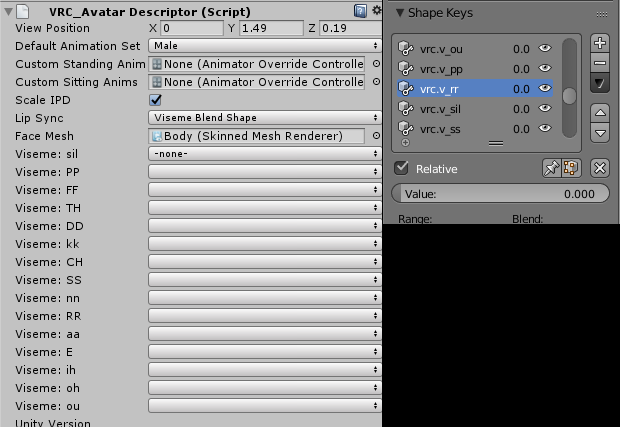 hollow olive
they are. they are even labled as "hips"
sand apex
Oh well I'm not sure, I never had an issue where it couldn't find hips
hollow olive
dang haha
unique ferry
Hey, weird question.
Does anyone know if there's a tutorial for animating non-humanoid characters?
I have an Oshawott I want to animate-- or at least, I just don't want it in a T-pose. Most animation override tutorials are only for humanoids, however.
I'm just really confused on where I should start



 lime valley
is there a way to add a property to a existing .fbx mixamo animation? 🤔
well, it's a .anim now obviously but
hard ravine
Not sure if this is an issue with unity, mixamo, or anything else. When I get an animation from mixamo and make it a legacy rig I am able to edit the animation, however in-game it puts me on the ground even though in unity it works fine. But if I set the rig to humanoid, I am unable to edit the animation, but it works in-game. However, the animation isn't correct and bones arent in the right positions compared to when the rig for the animation is in legacy.
uneven acorn
That sounds like a full on cycle of shittery my dood
spare bramble
ok this is pissing me off i have been trying to get a gun sound to work with a animation tried tutorials as well but i still cant get it can someone help me and talk me through what i have done wrong if i screen share?
 sick kelp
anyone know how to do that static effect on materials?
I did it by accident earlier and cant figure out how to redo it
plush meadow
I can show you my settings. @spare bramble
The tutorials weren't working for me as well.
spare bramble
yes please
plush meadow
on main model
make sure you have your audio source and particle system
on
as in checked
spare bramble
particle system?
 viscid hearth
Any way to fix this? I've changed the root motion for my avatar but she still appears in the floor. http://puu.sh/z3iTY/3b17368597.jpg She also is in the floor in Unity.

