#animation
1 messages · Page 18 of 1
 unique night
but thats a massive timesaver 😮
i'll pester you later about it if i'm stuck 😛
as for your gesture idea, this is what i think:
first 2 frames being identical: hand pose, gun position change. activate particle systems (all of them)
then in the particle systems change the duration and start delay accordingly
so they play after another
or you can use the emission control
to fire them at specific seconds
with the base emission rate at 0
thats how i did my gon animation
 glacial pike
Yeah thatt would work for the particles, but I got a part of my avatar that changes position/rotation, that can't be done unless it's like instant xD
unique night
you have to roleplay that 😛
like for my gon animation i have to make the arm positions in person every time
and time my punch with the particles
and sound effects
unless by position and rotation you're doing crazy athletic stuff XD
glacial pike
well movement would work yes, hand and lag and head
I got some arm kinda things aside my character that move to point forward xD
 serene lava
How do you do animations for a non humanoid
unique night
@serene lava thats going into more advanced stuff but here: https://docs.google.com/document/d/10BuA_ybyXSSXqXuf6cDyPm52VIpqptgyvuRaphcYH0M/edit

Google Docs
Advanced Avatar Creation: Making Non Humanoids This tutorial was made using Unity Version 5.6.3p1 This tutorial assumes you already have the current SDK imported and knowledge of how to upload a basic avatar. You will also need an avatar you wish to upload as non-humanoid with it’s own set of a...
 fierce copper
okay so i made a duplicate
it has a hidden particle effect
made the animation clip
added the particle in it and pressed isactive
now its in the ground
unique night
the character or the particle?
unique night
the particle is tied to the wrist
fierce copper
at the first frame already right?
unique night
add property: animator > anything in here that helps
first frame yeah
and if you want to animate movement you can add more frames
so to move the character out of ground, get the animator:root T property into the timeline
and its the Y value you want to edit
to bring it up
there is the method that Areathy mentioned too
which i havent tried yet
fierce copper
yah that method didnt work for me
the moment i create an animation clip on the 'normal' character
it goes into the ground aswell
tried it with another duplicate
unique night
thats what i thought too which is why i think i'm misreading the method, like is there something that should be active before going to the animation timeline?
i cant see frames on my original model
without creating an animation
fierce copper
@unique night using the root T m,ethod, do the tips of the shoe have to touch the y axis?
unique night
that looks ok
fierce copper
unique night
you might have to adjust the legs
fierce copper
its still flying though
unique night
oh yeah, its a little high
fierce copper
yah the viewing point was a bit weird
unique night
just adjust the numbers until the ball of the feet are on the grid
fierce copper
the ball?
unique night
but you might need to adjust the legs too
 clear yew
if i have a set of animations for a different model set to that model's rig is there an easy way to get that specific animation into the game?
lets say i have a "roll foward" and i want to replace walk forward with it, is there an easy way to do this?
fierce copper
not the toes?
unique night
whichever works 😃
clear yew
since they're both humanoids
unique night
the knees look like they are bent slightly too
unique night
yeah that looks right, but be sure to check it after you straight the legs
fierce copper
oooh
unique night
you might find the legs going into the ground
but you're on the right track now 😃
@clear yew yeah you can share animations between characters
just need to import the .anim file
if it was animated via unity
glacial pike
ok so this is how I did it, I created a dublicate, added a particle system that I set (don't tie it to the correct bone yet), copy paste the keynotes from your default working avatar (just go into the animation tab, copy everything), paste the information into the animation of your dublicate, (the dublicate will break in unity but duo to the pasted information it will fix itself aswell), tie your particle to the bone, just animate what you want to change, (don't forget to add the particle stuff to the animation by adding it's property, finish the animation, copy the particle system and/or anything you did add, paste it to your default character, hide your dublicate, add the animation file to your character override and there we go 😃
clear yew
the anim is part of a fbx file
unique night
@clear yew dont have experience with that but I know its possible
glacial pike
let me see if I can get a schreenshot :3
glacial pike
 clear yew
@unique night how do you go about using .anim files from different models with a new one?
fierce copper
yah i know what u meant
but how do u get it like that
because the moment i try to get that data
glacial pike
In that screenshot I have selected my default avatar, and am on the animation timeline, I copied all that and pasted it in the dublicate :3
fierce copper
yah i know how u do it once u can see the data
butr how do u get that data
because its not working
the moment i make an animation clip its empty on the main thing
but if i do anything
it goes into the gorund
unique night
@clear yew you want to use the animation override asset
it has idle,walk forward etc
that can be replaced with other animation files
clear yew
yeah i got that part.. but putting the other anim on it doesnt seem to do anything but ill try i guess
unique night
as long as the rig is the same or similar it should work fine
@clear yew just to make sure, the animation override is plugging into the vrc descriptor component under custom standing anim or custom sitting anim?
clear yew
im doing it on standing
glacial pike
Well I made sure to have my default avatar working with the animation override and everything, after that I made the dublicate and removed the Animator controller again so that I could make an animation :3
clear yew
cause im overriding a walking anim
unique night
have you tested the anim file on a duplicate clone?
duplicate it and drag and drop the animation onto it in the heirarchy and then open the animation timeline
and play the animation
clear yew
i tried it on the animation timeline and it didnt do shit
but it works on the original character
unique night
the rig is the same?
clear yew
the bone names are different
unique night
thats probably why
clear yew
thats what i was saying bone names are different.. why isnt there a way to just straight up recognize that its a humanoid
unique night
the timeline uses animator properties that are tied to the bone names
clear yew
and move the humanoids "x" part
clear yew
so ill have to rename every bone in this anim if i want it to work with vrchat?
unique night
i assume so, but i havent imported any fbx animations
i normally just animate in unity, and reimport that anim file between different projects
to use on other characters
hopefully someone who has experience with imported animations from non unity sources can help you with that
@glacial pike i dont know how it works that way for you, jealous that it does XD mines the exact same as Cinque Izumi I never have any frames visible on the original even with the animation override and everything else added
unless we have to press play?
to get the idle animation displayed?
glacial pike
I'm not sure why it works, I don't press anything special :/
unique night
unity is playing favourites.....not fair
😛
i'll try to see if i can get it working when i get back
it would save so much time and fustration
as i hate the animator.root T property
its so glitchy when trying to adjust in the timeline
unique night
I personally place them into the pose that i am at naturally
so i place them down by my waist
so that when the emote starts theres only a small amount of snapping to that pose
unique night
😃
although you're particle will need some adjusting too
as the wrists will be pointing down
you could do something like have that arm move up a little so hes holding his arm out
clear yew
@unique night fastest way to add multiple properties to animation section?
i got a lot to add
unique night
Areathy's method is you can get it to work
for now i've been adding them in seperately T_T
fierce copper
is there a way to make it so that he stretches his arm out forward after which he then fires the ball?
unique night
yes
first frame have the start pose
and lets say you want it to take half a second to raise his arm
place the new pose with a new keyframe at half a second in
unique night
then for the particle system, create 2 frames
first one is off
2nd is on
have the 1st one a frame before the arm animation completes
and the 2nd frame on the same point as the arms 2nd keyframes
hopefully that made sense XD
clear yew
@unique night so, i finished.
Is there something extra? (not fingers) position on top and root in the end, i just drag model by xyz arrows to lift above 0
and what to do now?
unique night
particle system needs can have 2 frames, first one is setting the active object to off, 2nd sets it on
 finite rock
https://media.giphy.com/media/l0DAHkItoWIijvhEk/giphy.gif (Sorry for asking again, but does anyone know how to fix this bug? (Any animation I try to do that happens)
 unique night
and just move it in the timeline so they occur at the point the arm finishes moving
fierce copper
idk
i
cant
this is
frustrating
even tho it doesnt have the data to go back in the ground
anywhere
it does
unique night
its probably the end keyframes
fierce copper
it doesnt animate itself to do what i entered the numbers and all that for
no no no
it slowly goes back into the ground
unique night
yeah
fierce copper
and bends its arms and knees
unique night
anytime you add a property
it adds default keyframes at the end of the animation
or 1 second by default
just delete those
hit the F key in the timeline
so it shows all keyframes
without any properties selected
fierce copper
yah i did
unique night
it shouldnt sink in that case
fierce copper
well
it mkagically
reset all my work
from the past 10 minutes
since the default post
is back in the gorund
unique night
did you have the play button pressed?
fierce copper
no
unique night
@clear yew if thats the duration you want that should be fine, just change the shape key for the expression you want if its not in there already
@fierce copper not sure why it reset for you
clear yew
i mean, 1st frame its pose, but blank from 1st to the end must be empty? and what in the last frame?
unique night
for last frame, you can duplicate the 1st ones
you can add stuff in between if you want to have your character move though
i just assumed you wanted just the face expression to change
unique night
@fierce copper make sure when animating that the play button at the top isnt blue, anything you do when its like that will not be saved
unique night
also make sure the red record button is active in the animation timeline
oh ok
no idea why it'd erase that
fierce copper
idk either
im almost back at where i was
in the default pose, are the wrisst turned with the paml forwards or towards their body?
unique night
by default, you mean T pose? or the natural pose you'll have when standing?
fierce copper
natural pose
unique night
you can always stand up and see how you're hands are when standing
@finite rock can you screenshot your timeline of that emote?
or what should she be doing?
(will be offline for a bit, leaving work now, but will try to get back to you as soon as i can if you do reply)
clear yew
@unique night like this)
finite rock
@unique night Should i send pvt?
unique night
@clear yew that seems good, the position property at the start doesnt seem like it'll do much though, not sure if thats neccessary
but if works thats fine
just hit the play button to test it out
and see what it looks like
once its playing, switch the window tab from game to scene
so you can view it in the same work space
and then dont forget to stop the play after as any edits during the play preview will not be saved
clear yew
oh its jumps a little, maybe its higher than ground
unique night
@finite rock if you want, but you might get an answer from someone else if you post it here
@clear yew, yeah you got the hang of it it seems, just keep tweaking and previewing 😃
anyways im offline for a bit, good luck 😄
clear yew
@unique night thx you!)
 mystic umbra
im fuckiogn dying here
mystic umbra
no you dont understand
Fucking mixamo Broke my avatar's upper spinme
So now every dance move I do for custom emotes
I look like im grinding on someo9ne
clear yew
nice
 zinc pasture
I don't see a downside
 oak fable
how do i add avatar animations?
should i add a component and import another layer from mixamo?
 undone glade
@oak fable Well first what kind of animation?
oak fable
i just found some, but let's say dance moves
 ebon gate
How do I actually add mixamo animations to models?
undone glade
I wouldn't know anything about the dancing side, but you're in the right place at least
oak fable
@ebon gate i think u just need to select one and then download
undone glade
Now if you need help getting a Finnish Anti Tank Rifle for your avatar. I got you covered 👌
oak fable
and just apply to ur project
ebon gate
its not working in game though
I have it here
in the emote 3 slot
should this work?
or am I doing somthing wrong?
 sullen hill
@ebon gate The custom override should be placed in your VRC descriptor
 trim nimbus
needs more dynamic 🅱ones
ebon gate
@sullen hill Where in there exactly?
undone glade
Avatar Descriptor above dynamic bone
ebon gate
I mean where in the Avatar Descriptor
 pastel ravine
yep
undone glade
Open it up and there should be a box saying something like standing animation or something
ebon gate
This is a dance animation though
undone glade
You have two; one for standing animations and one for sitting animations.
pastel ravine
ye
ebon gate
or do I still put it there?
pastel ravine
standing is for emotes
sullen hill
Place it in Custom Standing Anims
pastel ravine
and stuff
clear yew
hanging is for noose emotes
ebon gate
Also is 3 dynamic bones to many?
sullen hill
nope
trim nimbus
depends on how many bones in total are affected
sullen hill
Unless you mean you have 3 dynamic bone scripts that have several bones in each
pastel ravine
i think iv done worse
its really counting on the pc
as i think its done on cpu cycles
or on the cpu
not gpu
trim nimbus
personally I wouldn't go over 20 affected bones in total
pastel ravine
so if someone is hitting 100% already
there framerate will be affected
well it will effect everyones fps
somewhat
idk by how much
clear yew
@unique night that's great, i'll return to Unity just to fix pose (i want to make it more organic, now its almost like T pose), ingame its look nice anyway)
btw, is there any way to trigger this emotes by hotkeys? not from menu?
ebon gate
The emote limit is 10 seconds right?
clear yew
19999 polys + 40 dynamic bone scripts lets go
pastel ravine
just do it in blender or your 3d program of choise
pastel ravine
it will convert to unitys humanoid rig
finite rock
Hey guys, I'm trying to make a simple animation (just a sound coming out when I activate the animation)
But no matter what I do, it always happens (https://media.giphy.com/media/l0DAHkItoWIijvhEk/giphy.gif)
clear yew
cause its 2 frame long?
finite rock
So i should do more frames?
clear yew
try at least
finite rock
Can I just use ctrl c / ctrl v on the first frame and repeat until the end?
clear yew
try makin the 1st and the last, left blank frames between
stop recording button and use play in animation to see if you model moving or smht idk
finite rock
nop, he gets stuck in the crouching position
finite rock
Maybe it's because I do not have any VR equipment?
clear yew
i've just created my first 30 min ago, i dont have vr to, oh and u overriding emotes 1-8? or another?
ebon gate
Is it possible to have sound clips play as an animation happens?
finite rock
Emote 1-8
fierce copper
@unique night so i did everything but it still clips me into the ground without playing any animation
finite rock
Did you have to leave your character in the idle position?
clear yew
in 1st frame?
finite rock
yeah
clear yew
you have to make pose what you want
now probably model kinda sit
so add smth from animator and change numbers
fierce copper
nevermind got it to work @unique night
clear yew
@finite rock this is mine for example, just simple standing pose, for training
this is about pose, idk about sounds, sry
finite rock
I think the pose that is bugging the avatar
Because from what I understand, to activate the sound along with the animation you just need to put the audio source in the animation
clear yew
perhaps fill the blank with sound
finite rock
ok i'll try both ( your standing pose + sound)
clear yew
but try your numbers
finite rock
ok
clear yew
gl
 vivid hare
Hi I'm trying to add an animation for a gun to my model right now, the gun came with the mmd file when I load the model up into unity it wont hide when I disable it
vivid hare
The gun model that is
glacial pike
@ebon gate yes it is
 sonic tiger
Does using an emote disable IK? or can you use the emote animation slot to trigger an FX animation and retain control?
 surreal crater
Hmm, the avatar I made a gun animation for doesnt load/appear for other people. Anyone know why?
 spiral sphinx
http://prntscr.com/hxo1y3 anyone know why id be getting told this? using a particle from ultimate vfx pack

 chilly girder
Does anyone know how to change the material of an object in an animation?
 granite sapphire
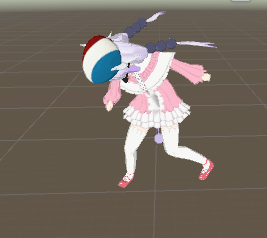
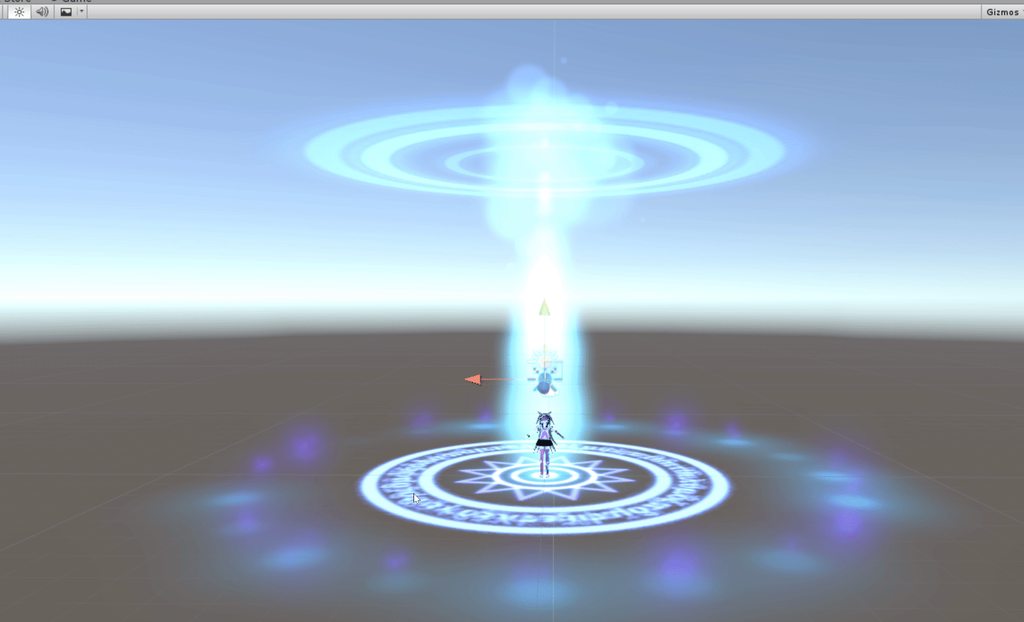
My kanna is stuck dabbing please send help
She may die soon
I did mess up with the animation window i think
And now she's stuck
 unique night
just got back 😄 oh nice :D
@finite rock any luck with it?
granite sapphire
Pls no
finite rock
trying to test my last attempt
granite sapphire
No curse on kanna
granite sapphire
Seriously tho anyway to stop the dabbing and just put back my char in T-pose ?
sullen hill
Is there any way to get eye tracking without using Blender?
finite rock
@granite sapphire maybe if u go into your import setting - configure - force t pose?
granite sapphire
The thing is that i already forced T-pose on the rigging
I just have some dabbing in the #scene
Oh, well, i can do a new scene maybe 🤔
unique night
@finite rock just as a recap incase no one said this to you already:
emote 1-8 animations need to have their pose set on first frame no matter what. This will stop it from falling into ground and bending arms and legs forward.
as for your sound object, you only need 1 frame to make it active so throw that in at the start with it set to active.
whenever you add a new property into the timeline, unity will create 2 default keyframes (in default pose). 1 at the start and 1 at the end of your animation (if you have no specified end yet, it'll default to 1 second). You want to delete that last frame and copy and past the first frame there once you have completed your start pose. To speed things up, delete the 2nd default key frame thats placed at the end and copy and paste just property to the end, just so the game knows how long your animation is.
granite sapphire
Nvm doesn't change a thing
spiral sphinx
http://prntscr.com/hxo1y3 anyone know why id be getting told this? using a particle from ultimate vfx pack
ebon gate
Ctrl Z isn't working
fierce copper
theres an option somewhere
in one of the tabs at the top
saw someone use it in a guide
not sure which tab tho
ebon gate
Whats the option called?
fierce copper
should be animation vontroller
unique night
@spiral sphinx if its a downloaded particle system, it might have components not supported by vrchat. click on the particle system and delete the destoryonparticles dead, animated light. Doing that however, might change how your particle works
fierce copper
ah nevermind @ebon gate
spiral sphinx
@unique night ive seen people use them on vrchat though
finite rock
fierce copper
it was animator/animator parameter
finite rock
I'll going to remove the sound frames that I put in the middle then
unique night
was about to suggest that 😄
your animation looks like it will last 5 frames
so you might want to extend it
how long should it be?
@spiral sphinx seen what? particle systems?
spiral sphinx
@unique night http://prntscr.com/hxog3h
 unique night
or those addons to the particle?
unique night
I would recommend stripping as much as you can get away with
so you dont overload the room with lag with too many particles
finite rock
@unique night Well I'm just trying to turn on the sound along with the animation
The sound has 5 seconds, so the animation needs to have 5 seconds right?
unique night
@finite rock yes, but your animation timeline is not 5 seconds if im reading it right
it should 5:00
unique night
just checking mine to confirm
finite rock
I though 1:00 = 1min
unique night
na, its in seconds 😛
granite sapphire
No one know how i can just stop all the animations and get every models back to humanoid t-pose ?
;-;
unique night
@spiral sphinx have you tested how many particles are created from that entire system? select the top one and ctrl click each one and then hit simulate
finite rock
@unique night sorry but i think 1:00 = 1min
because now my animation have 5min
lol
unique night
it shouldnt be , 1:00 = 1second for me
click on the 0.05 timeline
and tell me what it says in the left side panel just below "animation"
finite rock
5
spiral sphinx
@unique night i figured it out!!
unique night
@spiral sphinx nice one, what was wrong with it?
spiral sphinx
had to go through and delete each of the things named in certain particles, it still works 100%
unique night
nice 😄
@finite rock the animation timeline works in frames, there are 60 frames per second
so 1:00 = 1 second
finite rock
Ok, i'll try
unique night
thats why your emote was also so quick and glitchy
finite rock
ty
ebon gate
How do I fix this? im not sure how it even happened
unique night
anything yellow is a warning, anything red means it wont upload
click configure
and see if the bones are all correct
ebon gate
All green
ebon gate
Everything but jaw is set up
unique night
(uploads arent working right now by the way 😛 check announcements for info)
if everything is green in all sections of the configure section
im not sure why it wont recognise it
ebon gate
Is there anyway to download preivous avatars?
I have a working version without animations in game atm
unique night
uploaded ones? i dont think you can
finite rock
If I want to do an animation where an image appears in front of my character, do I need to convert this image to fbx or can I put it straight into unity?
unique night
no idea if you can do it straight through unity, i've just fbx'd it
finite rock
But do you need to create bones in it?
unique night
no
you can drag and drop it to your character
into the armature and it will follow your character
it will be parented to any bone you drag it onto
so if you want it to follow your hand, place it in the wrist or hand bone
via the heirarchy panel
 gloomy kayak
how do you find animations or do you make them yourself. For example the goku power up
 tepid lantern
How do i add sound to an animation?
ebon gate
Mixamo.com has some animations
tepid lantern
Also is there a way to get out of an animation in game
ebon gate
not sure if its waht you want though
finite rock
@tepid lantern https://www.youtube.com/watch?v=m4OCpPjzJ-0

Tutorial explains: - How to create the soundfile - How to create the animation - How to trigger the animation Morgus tutorial: https://www.youtube.com/watch?...
 old merlin
@granite sapphire Ctrl + A in scene hierarchy , deselect object that isn't your avatar's bone, in the inspector window right click the transform component then click "Revert to prefab"
granite sapphire
@old merlin should i open everything ? 👀
tepid lantern
@finite rock can it not play on emotes?
finite rock
It can but u will need to make a custom animation
old merlin
@granite sapphire ctrl + a, should also select the child object. but you could use Ctrl + Shift + right arrow, to expand the hierarchy
tepid lantern
it has custom emotes
 keen elk
Alright so. If I make a custom animation in Blender will it work the same way as importing VMDs?
It'll take some time of course but I don't care about that, I'd like to have something unique
finite rock
@tepid lantern I can not help you 100%, since I'm trying to make my first animation with sound as well.
tepid lantern
Ahhh thanks anyway
granite sapphire
@old merlin ctrl A is doing weird stuff but i think i understand what i have to do
Thanks ;-;
finite rock
@tepid lantern You can create animations with sound, and then replace the default emote inside vrchat
sonic tiger
I had to step away, can anyone confirm if VRChat stops calculating IK when an emote is triggered?
clear yew
does anyone have the value's for thumbs up?
sonic tiger
I would like to tie an effect to an emote without killing my IK
 hazy palm
So I am trying to put a sword into an animation,
but when I go into VRChat, it turns out my hand is twitching
anyone know the fix?
 unkempt moat
🤔 Someone give me a fun thing to animate
What does my avatar need
unique night
@finite rock thats really odd XD is their an active object property in the timeline for the avatar?
unkempt moat
@hazy palm You sure the two frames are the same with handmovements?
clear yew
@hazy palm Did you copy the first set of keyframes and copy them two 0:01 and delete the 2nd keyframes
finite rock
@unique night idk maybe the sound?


 tepid lantern
Is there any way to loop an animation for like 6 mins or something?
unique night
@finite rock could you show me a screenshot with the timeline again with your heirarchy panel visible too?
finite rock
ok
unkempt moat
@tepid lantern You can make an animation loop forever but for just 6 minutes? No idea
unique night
animation loop via animation component
and i think you can turn off that component
in the animation timeline
but you cant do it for 6 minutes
unique night
make it a gesture
unkempt moat
As an emote?
Well so far i know it only works with gestures
unique night
so it could be on by default
tepid lantern
ah fuck i dont have vr lol
unkempt moat
Ow well then it wont work so far i know xD
tepid lantern
eh too much effort for a shitty joke lol
unique night
XD
 rich scarab
Hey guys - What reasons would cause an animation to lock out other hand gestures for like 4 ~ 5 seconds?
unique night
its actually less effort than having to animate it 😛
 tropic hazel
I have a question about custom idle animations, specifically CrouchIdle.
I wish to make my character sit on a broom when I sit down/crouch in VR but I was wondering at what point of crouching does it count as a crouch, also if I move my head around is it going to cancel the animation over and over unless I'm perfectly still?
unique night
just duplicate the avatar, turn animation component on , upload
tepid lantern
ive already got emotes n stuff
unique night
😛
@finite rock I would place the audio source in armature so its guarenteed to follow your avatar, I dont animate with the Position property
not sure if that could be causing the issue
what about the properties further below in the timeline?
and are the frames identical at start and end?
like what happens when you drag through the timeline?
tropic hazel
If no one has any idea I'll probably just mess around and see if it looks okay or not. hahaha
finite rock
let me check
unique night
@tropic hazel I'd like to know how that works too
im assuming its first frame counts as crouch
and the game just switches either instantly or animates into it by itself
but the first frame of the crouch animation would be the moment that crouch is active
you can actually go deeper into the animation system and an intro animation
Google Docs
Advanced Avatar Creation: Making Non Humanoids This tutorial was made using Unity Version 5.6.3p1 This tutorial assumes you already have the current SDK imported and knowledge of how to upload a basic avatar. You will also need an avatar you wish to upload as non-humanoid with it’s own set of a...
that tutorial goes into detail about that
finite rock
by the way my avatar was sinking on the ground before, so I got the root T of the idle animation (default) and put it in my animation.
tropic hazel
Oh boy hahah I'm probably getting myself into something way over my head
finite rock
maybe this is causing problem
chilly girder
Anyone know how I could remove a game object at the 10 second mark of the keyframe? I want to have the item in my right hand disappear but keep the item in the left hand.
unique night
same active object property
and turn it off by unchecking it
just make sure you have a frame just before it that is on
so at frame 9:59: active object = on
at frame 10:00: active object = off
but you cant keep an item
from an emote
you can only keep an item through gestures
chilly girder
okay that's what I was thinking, I tried unchecking the game object on the 3rd keyframe but it stays throughout all of them.
ebon gate
is 10 seconds the hard cap?
unique night
yeah
ebon gate
How many frames would that be?
unique night
600 (but then i remember someone saying 300 frames/10 seconds is the cap, which i found odd back then)
tepid lantern
Anyone know why i cant add properties to my animation?
unique night
and dragging it to a clone model doesnt allow you to edit?
unique night
thought i blacked out then XD
the image just disappeared
and i was like, was i imagiining it XD
unique night
ooh no wonder
your character is below the ground
the ground it that grid you see
in that screenshot its above the character
make sure the balls of her feet rest on that grid
adjust the Y value in animator.root T
its a bit trial and error adjust that value, so keep putting in random numbers that get you closer to the ground
atleast for me anyways, if i put 1 in, it goes to 0.2242342 or something
so i usually put in 5 and work down from there if the character is floating above
finite rock
ok, But "the ball" of sound does not go up along with the avatar
unique night
you can position that yourself on the original model
no need to animate that
just position it to the correct position before uploading the avatar
finite rock
ok
unique night
just make sure the record button isnt active
 exotic ember
would this be the place to ask about eye tracking issues
clear yew
@unique night just tested the sound thing in the hub and apparently someone could hear it
but i needed to fix the animation on the thumbs so im reuploading it, would that mean the sound wont work anymore because of what we were talking about before or would it be fine to update?
unique night
no the sound should be fine
clear yew
yeah i pressed the thumbs up and it was like "WOOMY" and someone said "SPLATOON? WHERE ARE YOU?"
so i know its working
XD
unique night
@exotic ember eye tracking is automatic aslong as you have the correct eye bones and the eye mesh is merged with the face and called body
oh i can watch that sound effect now
exotic ember
My problem is that the eyes look downwards and the visemes start moving without any sound being processed
unique night
wont get any weird looks at office XD
clear yew
xD
LAZORCHEF IS BRO SOURCE HERE : http://lazorchef.tumblr.com/post/142209111822/this-is-the-cause-of-the-previous-animation-its VOICE ACTORS BLUE INKLING - GaoG...
basically me right now
unique night
XD
clear yew
Is that kizuna ai?
unique night
@exotic ember oh, not sure why it would do that. are your eye bones in the correct positon when created?
finite rock
yes
exotic ember
@unique night im more annoyed by the visemes freaking out when my mic isnt even enabled
unique night
@finite rock yeah looks like that should be good
@exotic ember you could try recreating the avatar in a new project to see if it works?
it could be a server issue
that messed it up
during upload
ooor it could be server issues that causing havoc on the visemes
finite rock
now i should stop recording and move the sound effect?
unique night
yeah 😃
clear yew
kizuna ai is adorable btw
unique night
but make sure you do it on the original model
exotic ember
@unique night i've reuploaded it several times now, would doing a new project create that much difference?
unique night
not sure if it would
just an idea
but it could be something wrong with the model itself then
is it self made or an mmd or something?
exotic ember
ripped game model that I rigged and skinned
i'd take a quick gif but I dont have the tool for that
unique night
i use maya (in case you do too), but if its blender Im not sure what the process is with that
 devout loom
anyone here good with particles?
exotic ember
blender
unique night
but in maya, theres a specific order that everything should be done in
exotic ember
I have the correct bone hierarchy with names if thats what you mean
finite rock
@unique night Should I leave the audio source enable?
unique night
I mean the order of elements on the model, so in maya I have to make sure that shape keys are positioned below the rig (in inputs). NOt sure if blender does anything similar so I might just end up confusing you unneccesarily
@finite rock no, leave it off by default
the animation will turn it on
finite rock
ok
exotic ember
ah blender doesnt have that I believe
unique night
yeah, im not much help with blender, never used it. Hopefully someone can help you out with that
hazy palm
Is there a fix to where I can actually see it?
fierce copper
@unique night so my animation is working but it plays for like a second or so
fierce copper
the rune animation thing
exotic ember
think I found the issue
fierce copper
it plays for like 2 seconds
unique night
@fierce copper how long should the animation be?
fierce copper
yah thats what i did
unique night
oh
finite rock
Is that right?
unique night
@finite rock she looks off center
fierce copper
or where do i have to end?
finite rock
yeah
fierce copper
this is with samples set to 60
unique night
make sure X and Z are 0
my samples are 60 too
animation timeline works in frames
1:00 = second
fierce copper
ah
unique night
60 frames in a second
unique night
@finite rock x and z values in Root T i mean
finite rock
Ok
unique night
you want here standing at the origin point on the grid where the 2 lines cross eachother
the 2 main lines
finite rock
Is it normal when I change the value in Root T, it does not stay in the value I place?
unique night
@finite rock yeah thats normal, its annoying for me too 😛
finite rock
lol
unique night
go for an extreme number and work your way back
@fierce copper yeah that looks right
 static goblet
I have a cloth physics cape on my avatar, but it is only visible to me, not other players. also, when it spazzes out when looked at after not looking at it and moving. Anyone know how to get cloths to work in vrchat?
unique night
@finite rock with the root T values, its like I put 1 into the value and it changes to 0.2242242 or something random
@static goblet is it using dynamic bones?
the dynamic bone plugin specifically
static goblet
No, it uses unity's cloth physics. I was told by two separate users on here that it was supported
actually 4, but two separate times 😛
unique night
oh wasnt aware it was supported, its a first for me
dynamic bones definitely work though
static goblet
Well it shows for me, but not for other players, so it's at least supported to some degree. I don't have dynamic bones.
finite rock
@unique night For me when i put 18,2638 = -0,0001 but when i put 18,2639=-8,634 wtf
hazy palm
So I got my sword to be in game where I can see it, but now it is stuck on my hand ._.
How can I put it on an gesture.
unique night
gestures are 2 frame animations
finite rock
Well if i put 5 = -9
hazy palm
I have the animation made alreadyt.
unique night
both frames have to be identical
place it into gesture file
animation override i mean
hazy palm
I did
hazy palm
I indeed do
 heady sundial
Created an animator (which doesn't play unless I push play in the animation window) so the seal doesn't rotate. Any ideas?
hazy palm
unique night
then it should work, is the sword off by default on your model?
fierce copper
anyone having issues uploading?
hazy palm
I did earlier
heady sundial
See #announcements @fierce copper
heady sundial
Degraded usually means "stuff is up and down"
unique night
@finite rock was your avatar original 0,0,0 in position?
you can check on the inspector
hazy palm
Its connected but I dont know why it doesnt appear when I gesture.
finite rock
@unique night inspector?
hazy palm
the tab
unique night
@hazy palm that looks like its on without the animation
hazy palm
on the left
unique night
judging by the heirarchy panel
hazy palm
do I hide it
unique night
yeah
unique night
its turned on with the first frame of the animation
unique night
it says model, is that the name of the sword?
hazy palm
yes
unique night
what about master sword in the heirarchy?
finite rock
@unique night is it right?
unique night
@finite rock it should be 0,0,0 whenever you're uploading an avatar
hazy palm
wait
unique night
on position
unique night
it should say "name of object" : object is active for that property
heady sundial
Anyone know why this happens?
hazy palm
it does
heady sundial
Legacy is literally killing me
unique night
click animation file, go to inspecter
turn it to debug mode
and turn legacy on
then return to normal inspecter
and turn wrap mode to loop
@hazy palm I might be getting confused then because the heirarchy panel and your animation timeline are showing different names
heady sundial
Thanks @unique night, but now it throws this...
heady sundial
A quad with an image as a texture
hazy palm
Should I put the red line on the first or second heirachy
unique night
@hazy palm what do you mean by red line? I;m referring to this screenshot:
https://cdn.discordapp.com/attachments/390924344475254792/400010186137272320/09b37b566769a203f582b27b60bd7063.png


where it says master sword
that should be the object being turned on (and off by default)
unique night
I''m confused why it doesnt say "master sword : Game Object.is active" in your timeline
hazy palm
model is the master sword
its named model by default
Well great
I named it Master sword
unique night
@heady sundial hmm, im not sure why it wont work. whats the timeline like?
hazy palm
and it turned white
heady sundial
One moment. I got frustrated and bombed it. The whole using clones is silly
hazy palm
to prevent me from screwing I reset
exotic ember
For eye tracking in the mirror, does it normally look down?
unique night
i get cross eyed sometimes
hazy palm
pretty sure because your looking at yourself
finite rock
@unique night After I finished my animation, my avatar stayed like this
unique night
@finite rock did you animate on the cloned model or the original?
finite rock
cloned
unique night
oh
hazy palm
oh
 jaunty gust
oh
unique night
XD
hazy palm
top right
unclick that checkmark
then go to your original model
and click the top right
But now I got a problem
unique night
oh, just noticed you have "untitled" in your animation controller
unique night
no sildek
hazy palm
how to make my swor colorful again
finite rock
hmm
unique night
@hazy palm could you screenshot whats inside the mastersword object on the heirarchy panel? it has a little arrow implying theres objects inside it
exotic ember
so do most people make the animations themselves in blender or unity
unique night
no i mean click the arrow next to the name master sword
@finite rock are there any keyframes or animation frames on the original model?
finite rock
ohhhhhhh
hazy palm
unique night
damn 😦
fierce copper
@unique night do u happen to know where some of those peopl eget those like
galaxy effects
as in they turn their entire surroundsings into a dar galaxy
unique night
@hazy palm
fierce copper
with planets and stuff
unique night
i meant that little arrow
hazy palm
unique night
@fierce copper not sure on that, thats more advanced stuff
hazy palm
@fierce copper Its a shader
wait
nvm
I thought you were talking about body textures
Pretty sure thats all made in Blender.
unique night
@hazy palm thats what confuses me with your animation timeline, i dont understand why it says model : active object. is there not an active object property for "master Sword"?
fierce copper
@unique night ah okay thats a sham,e, ty tho
hazy palm
let me show the model
fierce copper
ill see if i can find some stuff
 tired hazel
does anyone know what gesture is when we pres the trigger on touch
 plush meadow
Rename with f2?
finite rock
I'll probably go crazy if after all this, this animation does not work
unique night
@hazy palm but its called master sword in the heirarchy panel?
hazy palm
I named it that
unique night
if i rename something in that panel, it updates in the properties
hazy palm
in the heirachy panel
heady sundial
So let me make sure I have this right:
- Create a copy of your avatar
- Create the animation on the copy
- Create an animator on the original
- Link the animation to the animator
--Complete--
right?
unique night
just tested it
i changed body to test
and it changed to test. active object
in animation timeline
hazy palm
hm
unique night
im wondering if thats why you can disable and enable the sword
exotic ember
gesture override is just for weapons and had gestures right, the more cool shit is emote override?
hazy palm
yes
unique night
@heady sundial turn it to legacy and wrap mode to loop
plush meadow
What does that do? @unique night
heady sundial
@unique night Okay...
unique night
@exotic ember this is all gesture animation:
https://www.youtube.com/watch?v=bu84R7tXA4Q

This one is showing my Adult Gon Avatar from hunter x hunter. Closing my fist will start the Janken animation complete with sound effect (proximity based so ...
plush meadow
Does it apply to prop animations though?
exotic ember
@unique night yeah but I wanna do a fucking dio road roller and time stop
that involves moving the whole character so I doubt gesture would work
exotic ember
really at all?
unique night
so you can have another model with its own animation components
exotic ember
and then just phase out the current non animated model?
unique night
body animations on gestures are limited to 2 frames that have to be identical
fierce copper
@unique night i found a skybox asset, could this be used on an emote to cover the air around me and other people?
or doesnt it work that way
tired hazel
@unique night is the handopen gesture override a idle stance or button related?
unique night
@tired hazel i think its just open hand in general, no finger sclosed or anything
 scenic crag
Bit of a weird question but what does "Fall" correlate to in VRC on the CustomOverride Controller?
finite rock
@scenic crag When is your character falling?
heady sundial
@hazy palm you did the Lazoi tutorial right?
hazy palm
I have
scenic crag
@finite rock Ohh that makes sense, thanks!
finite rock
well i don't know to be honest
unique night
@hazy palm i genuinely believe its to do with the name of the object. dont change the name when you put it on your character and see if that works. your keyframes seemed correct apart from the name
scenic crag
Sounds about right
hazy palm
so do you want me to rename it model?
heady sundial
Well the active state just needs to be toggled on in the animator which saves an animation in the root folder, then you just associate the animation with one of the emotes in the animator, then stuff the emote animator in the custom animation slot
Renaming stuff after the animation is complete will just ruin the animator, right?
hazy palm
Just did
unique night
and make sure that the sword is turned off by default
heady sundial
Yes, the checkbox in the inspector
 gentle arch
Can you not bind the face changes to an emote on PC?
unique night
the top tick box next to the name in inspecter
hazy palm
wow.
heady sundial
@gentle arch animations are VR only pretty much
hazy palm
I litterly
gloomy kayak
So i got my model down to 19345 tris, would this be low enough to add some animations?
hazy palm
just noticed
it can be turned off by default
I have been making it disapear from the actual model
unique night
oooh XD
gentle arch
I thought so. I got it to do it once but I'm not really sure how I did it lol
hazy palm
from "model" instead of "default"
 lilac plover
Hi i have a question is there a way to trigger effects without a vrhead set?
hazy palm
Dont believe so
unique night
yeah i was fixated on the master sword name but default would work too 😃