#world-development
39 messages · Page 136 of 1
 random spruce
without scaling anything in the world
by making the VRChat user bigger
or something
i can't scale the objects in my world without messing it all up
 grizzled harbor
heya, I need to talk to one of the vrchat team members
 graceful igloo
Is it possible to display a video in worlds easily?
graceful igloo
I’m not a seasoned pro or anything I just need to know if it’s possible
Like idk what that means
grizzled harbor
yes its very possible
graceful igloo
Also is it possible to display live video, say a twitch livestream or something?
grizzled harbor
there is a video player in the vrchat prefabs given to you in uniy
unity
type in the url and thats it
grizzled harbor
np man
 ocean crag
So weird I came to ask about video players…
 somber wraith
i want to make some rooms now that are not connected to my main world and you need to teleport into them. however, i have never done something like this before. im not concerned about the udon part, but about how and where i should place the rooms so that they dont affect the performance of the people in the main world. ive been told that as long as they are really far away, they wont load in. is that true?
ocean crag
grizzled harbor
udon video (avpro)
So for questies I want a video to just play on a tv and after adding that material I dragged the video onto the object and when I test its still just a white screen?
ocean crag
somber wraith
i want to make some rooms now that are not connected to my main world and you ne...
If you have occlusion on then if you dont see the other area it wont be loaded in and doesnt have to be super far away
 errant bloom
Hi! I have a problem with unity as soon as I open a new project, there is a black screen on the right (Only when I open a new project) Anyone know why?

 white moon
somber wraith
i want to make some rooms now that are not connected to my main world and you ne...
white moon
somber wraith
i want to make some rooms now that are not connected to my main world and you ne...
Normally around 200 units away is sufficient, if you then set the far clipping plane on your refrence camera to 100
white moon
errant bloom
Hi! I have a problem with unity as soon as I open a new project, there is a blac...
Reset the layout, there's a button up to where you can just select default again. Shoullld fix it.
errant bloom
@white moon thanks ! Is good !
 bold ibex
Hey so I have a question about acquiring something for a map
ocean crag
So Everything in my map was nice and dark and after I baked my lights it came out looking like someone was shining headlights through my window? Any idea why everything is now lit up?

To
 white moon
ocean crag
white moon
ocean crag
Turn the lights down and rebake it? Or was the before pic also baked
ocean crag
Before was not baked, but theres not even a white light in the room idk where or why it looks like someone turned on a giant spotlight in there
Its almost like a sun got turned on?

 wintry granite
Hey guys, I'm new to making worlds for VRC, intermediate at making 3d models. In the past I have gotten away with making models with that low poly flat shaded look, but now I am advancing to textured models. Are there any good platforms for free trim sheets that you guys know of? Where should I even begin looking
ocean crag
You can get free shaders and textures from the built in unity store

 green lagoon
wintry granite
Hey guys, I'm new to making worlds for VRC, intermediate at making 3d models. In...
green lagoon
wintry granite
Hey guys, I'm new to making worlds for VRC, intermediate at making 3d models. In...
https://trimsheet.com/all_assets.html this website has some free trim sheets
white moon
ocean crag
Its almost like a sun got turned on?
Do you have a directional light in the scene? You could have a sun turned on.
ocean crag
white moon
Do you have a directional light in the scene? You could have a sun turned on.
Nope
Only lights are from my directional lights and those are the ones u can see in the pic, no other lights in the scene
 ember mirage
anyone have some bathroom assets
and if i made a world in unity, how could i compile it together to be a prefab, like ui components and furniture and all that stuff
 fallen condor
Is there some standard preparation for committing a VRC world to git? A VRC-specific .gitignore or .gitattributes?
 surreal surge
how would i disable the ability to pick up an object with a ui element? So that an object is no longer pickupable and now its colliders interact with the player?
bold ibex
If i add UdonSharp to my project is there a risk something will break down
im talking about a pretty large project
ember mirage
I dont think so but dont take my word on it
surreal surge
bold ibex
im talking about a pretty large project
back it up first
bold ibex
surreal surge
back it up first
alright
 south orbit
ember mirage
and if i made a world in unity, how could i compile it together to be a prefab, ...
south orbit
ember mirage
and if i made a world in unity, how could i compile it together to be a prefab, ...
u can merge objects with probuilder addon in unity tho it isnt always recommended as it can mess up the mapping and the texture and so on.
south orbit
surreal surge
how would i disable the ability to pick up an object with a ui element? So that ...
disable ''pickupable''
 surreal surge
south orbit
disable ''pickupable''
surreal surge
south orbit
disable ''pickupable''
How do i do that with ui?
south orbit
surreal surge
How do i do that with ui?
how would u be able to 'pickup' UI anyways, UI isnt an object
surreal surge
@south orbit No i mean using a ui toggle to turn off the pickupability of an object
south orbit
surreal surge
<@262830185777201152> No i mean using a ui toggle to turn off the pickupability ...
make a toggle / button that interacts with the pickup script
surreal surge
south orbit
make a toggle / button that interacts with the pickup script
Yeah I know but, none of the options seem to do that
south orbit
surreal surge
Yeah I know but, none of the options seem to do that
because u would have to script it into preferrebly udon behavior script
with that said, here u go, use Lura Switches and customize to ur likings .

looks like this .
surreal surge
What does that do?
south orbit
toggles objects, tho i think u should be able to tweak it to toggle scripts .
otherwise perhaps look up youtube for '' toggle scripts in unity ''
surreal surge
How would i drag it in and how is that different from setActive?
surreal surge
south orbit
how would u be able to 'pickup' UI anyways, UI isnt an object
You can achieve this by putting the ui under an empty with a collider and pickup script
south orbit
surreal surge
How would i drag it in and how is that different from setActive?
is not that different, its just premade so u dont have to do alot of the work, aswell as it comes with button prefabs
surreal surge
Doesn’t seem like What im looking for but thanks anyway
south orbit
surreal surge
You can achieve this by putting the ui under an empty with a collider and pickup...
tho i cant see why exactly u would like to pickup or interact with an UI like that, other than being able to adjust it example. but ye
 tropic sable
Hello! Are there any resources for free VRChat world environments?
 odd stratus
heyy I'm having a problem with plastic SCM too now, I cannot sync my unity with my partners so we cannot update the work, do you have the solution to this?
tropic sable
template buildings models and stuff
 graceful radish
What happened to the SDK? First all udon scripts broke and after reinstalling the SDK nothing actually shows up.
graceful radish
tropic sable
Hello! Are there any resources for free VRChat world environments?
You can find some from booth
 pearl moon
odd stratus
heyy I'm having a problem with plastic SCM too now, I cannot sync my unity with ...
pearl moon
odd stratus
heyy I'm having a problem with plastic SCM too now, I cannot sync my unity with ...
We still haven't gotten it to work
somber wraith
just opened my world project like 30 minutes ago. didnt change a thing, went to build and test and now i cant jump anymore. it worked before, why is that
 desert python
tropic sable
Hello! Are there any resources for free VRChat world environments?
desert python
tropic sable
Hello! Are there any resources for free VRChat world environments?
booth, or gumroad
 vague pivot
Does anyone know why I'm unable to interract with objects after swapping my project from PC to quest?
I can manually trigger the interact through the script however it doesn't show up when testing with cyanemu
 grave zealot
Trying to create an animated world based around a video that loads on a plane; but due to relying on youtube to load the video; there's always very short delays with my animation/keyframing. Does anyone know a proper way of loading it without relying on a live video player? Saw a different take of this world I'm working on that had it loaded instantly so I have absolutely no idea how they pulled it off.
 kindred badger
i'm having an issue with the scripts for all the active objects, do the latest sdks work with the latest version of unity?
if so, it might just be a user error
sorry if this is the wrong place to ask this
 short gulch
kindred badger
i'm having an issue with the scripts for all the active objects, do the latest s...
short gulch
kindred badger
i'm having an issue with the scripts for all the active objects, do the latest s...
No you have to use a specific version of Unity. I'm pretty sure it's 2019.4.31f1
desert python
grave zealot
Trying to create an animated world based around a video that loads on a plane; b...
couldve been google drive but imo, you can sync the time stamps the video has with the animation time stamps to keep them both together
desert python
no
 amber rivet
hey guys how do i respawn an object automatically that falls into the void?
short gulch
It should do that on its own. You can change the height that it happens at too
amber rivet
the respawn thing is on and the height is set at the same height as player respawn but its not coming back?
nope it definitely just keeps falling forever
 gleaming otter
Is there anyone who does world Commissions?
 near escarp

VRChat Ask
Post about commissions for worlds in this category. Requests are not permitted, we only permit posts from those providing services.
 cobalt prawn
grave zealot
Trying to create an animated world based around a video that loads on a plane; b...
cobalt prawn
grave zealot
Trying to create an animated world based around a video that loads on a plane; b...
I think all you need for that is a quad/plane with a VideoPlayer component. Then you can drag a video from your assets folder into the video clip slot and it will use that video as the plane's texture.
cobalt prawn
Oh hmm
 versed plover
gleaming otter
Is there anyone who does world Commissions?
versed plover
gleaming otter
Is there anyone who does world Commissions?
There’s also a whole discord dedicated do commissions under #community-servers-old , vrctraders
gleaming otter
Vrctraders is around #community-servers-old ?
amber rivet
im still having issues with object respawning, neither respawn or destroy on objects at respawn height is working
versed plover
gleaming otter
Vrctraders is around <#407970838294560769> ?
There’s a server called vrctraders in the community servers tab, it’s all about commissions for avatars/worlds
amber rivet
i set up a collider just below the respawn height and dropped a test object down there and the cube just lands on the collider, it doesnt respawn or disappear???
 wind girder
Hey I have a question, I have a mirror toggle which works perfectly fine unity and has no issues but as soon as I test it in VRC it doesn't work. Any suggestions why?
cobalt prawn
amber rivet
im still having issues with object respawning, neither respawn or destroy on obj...
What is the respawn height set to? Do you mean that if you just throw something or walk off the edge of the world without the test collider you set up, it just falls forever?
amber rivet
the respawn height is -7, and objects fall forever but i respawn just fine
i set a collider at -8, i would respawn before hitting it but the test cube i dropped would just land on it and stay there
 kind leaf
amber rivet
i set a collider at -8, i would respawn before hitting it but the test cube i dr...
kind leaf
amber rivet
i set a collider at -8, i would respawn before hitting it but the test cube i dr...
Use on triggerEnter instead of OnCollision and change the collider to be a trigger. Having a collider work the way you want it to while being a collider and not a trigger would mean that you would need to also write "grounded" checks and need to check if you are grounded with said collider
 jade geyser
So I am making a item be able to be picked up
jade geyser
jade geyser
So I am making a item be able to be picked up
How do I make it so Other people can see me pick up the said item
amber rivet
oh i wasnt using the collider to measure whether it needed to respawn
i just had it set to respawn at the respawn height
kind leaf
ah - as u were 😛
kind leaf
jade geyser
How do I make it so Other people can see me pick up the said item
attach the VRC_OBJ Sync component. Just click add component and type sync ull see it
jade geyser
Got it
amber rivet
ive managed to fix the respawn thing btw! by doing... literally nothing. 👍
 tight tulip
Hi I have a button that plays a animation but it’s local even the it’s says it’s global
somber wraith
does anybody know why i still hear the sound playing, even tho im far outside the playing distance?
 cobalt prawn
somber wraith
does anybody know why i still hear the sound playing, even tho im far outside th...
cobalt prawn
somber wraith
does anybody know why i still hear the sound playing, even tho im far outside th...
Because the spatial blend is set to 0
somber wraith
yeah, but i dont want a 3d effect
cobalt prawn
But distance is a 3D property
somber wraith
i want it to play in the area, without having a direction
cobalt prawn
Hmm in that case I believe you still want spatial blend to 1, but set spread to 180
And then doppler level is the change in pitch as distance changes, you probably want that at 0
 harsh wagon
I'm having an issue with the SDK that's preventing me from testing or uploading a world. For some reason, I get a FileNotfoundException telling me the .vrcw file doesn't exist
any ideas?
harsh wagon
somber wraith
yeah, but i dont want a 3d effect
You can set the curve so that it's 2D and then turns 3D right at the end
 knotty zinc
hey uh, anybody else have an issue where you build your world, and then your mouse never shows up in the screen to fill in your details?
we hit escape, tried hitting all the modifier keys, checked the unity and sdk versions and they are all up to date
and across two computers. All I can think now is to reinstall the VRCsdk
cobalt prawn
knotty zinc
hey uh, anybody else have an issue where you build your world, and then your mou...
Does it happen if you build the example scene in the SDK? My first guess is that you imported something with a script that has mouse locking code in it, and that script is attached to an object somewhere in your scene
knotty zinc
INTRIGUING, we had suspected some scripts on one of the many many asset packs
 celest rune
Anyone know if 1m is about right for a player's size? Trying to block things out with UModeller.
 round oracle
in my mirrors the avatars are extremely dark, im guessing from the skybox (the blue is a sphere the skybox is actually dark because there is a day night toggle) the weird thing is that my avatar is lit normally outside the mirror, the mirror has reflect layers on everything so it should do it but its not working, any ideas?


 grim plinth
Hey all! I'm having some issues importing a scene from blender to unity, looks like the UVs are a bit screwey. Also some plains are not visible.
If anyone has any info on this, please @ or DM me! Thank you!
 round oracle
grim plinth
Hey all! I'm having some issues importing a scene from blender to unity, looks l...
round oracle
grim plinth
Hey all! I'm having some issues importing a scene from blender to unity, looks l...
the faces arent the right direction, either turn off culling in the material or do this, blue is right way red is wrong way


if you wanna flip a face click it alt+n and flip


alright now someone p l e a s e help me idk what to do
grim plinth
round oracle
in my mirrors the avatars are extremely dark, im guessing from the skybox (the b...
I'm not super experienced but does your avi have basic emissions?
grim plinth
round oracle
the faces arent the right direction, either turn off culling in the material or ...
Thank you!!!!!
And what about the UVs?
round oracle
grim plinth
I'm not super experienced but does your avi have basic emissions?
its not my avatar
grim plinth
round oracle
its not my avatar
Ah welp
grim plinth
Does the problem persist on other avis? Cus my avi has that problem on a few worlds with bad lighting and I'm told it's just bc I don't have basic emissions on.
grim plinth
round oracle
sorry homie
np, you already won half the battle for me 😂
round oracle
grim plinth
Does the problem persist on other avis? Cus my avi has that problem on a few wor...
it happens with most avatars, these avatars work well in other worlds, so i wanna make em work here
grim plinth
round oracle
it happens with most avatars, these avatars work well in other worlds, so i wann...
Yeah I'm not sure how to fix that, like I said, I'm not super experience :p
But thanks again for your help :)
 rain shadow
round oracle
it happens with most avatars, these avatars work well in other worlds, so i wann...
rain shadow
round oracle
it happens with most avatars, these avatars work well in other worlds, so i wann...
The mirror has a disable pixel lights option that you would want to disable for the lighting to work
Though you should look into light baking and light probes as they are more optimized and what most worlds use
round oracle
rain shadow
Though you should look into light baking and light probes as they are more optim...
I have im just too dumb and cant wrap my head around it
but ill try the disable pixel lights thing
 gaunt egret
celest rune
Anyone know if 1m is about right for a player's size? Trying to block things ou...
gaunt egret
celest rune
Anyone know if 1m is about right for a player's size? Trying to block things ou...
use the capsule, its the player collider so its good to use for scaling
 brisk tendon
hey does anyone know of a free water/ocean prefab that works on pc and quest?
tried this one and in game water stands still

 novel goblet
so I was working on my first test world and got it to where I can upload it on android but as soon as I hit the upload button nothing happens...
anyone know what i did wrong?
 vale lake
hello
I need some help..
my friend try to upload world
and test it
and its not working
 jade gull
vale lake
and its not working
jade gull
vale lake
and its not working
Do they have rank user or higher? If you are not ranked at least user, VRChat won't let you make worlds.
 jade gull
Weird - it either doesn't make the file, or it gets lost somewhere.
Cannot say much more - I am stuck at new user, so my rank is allowing only making avatars.
 dusk sapphire
you have compiler errors in your project
look at the rest of the error log, it'll usually tell you what are the offending scripts
somber wraith
i dont get it. i want the audio to have a falloff like 3d audio, but sound like 2d audio, how would i do that

 trim nacelle
Set the spatial blend slider to 2D and on the vrc spatial audio source uncheck "enable spatialization"
somber wraith
trim nacelle
Set the spatial blend slider to 2D and on the vrc spatial audio source uncheck "...
but then it wont fall off
if i do 2d, it will play globally
somber wraith
i want it to fall off while not having a direction to it. if that makes sense
trim nacelle
Aah ok
somber wraith
3d audio always has the direction of the source but i want it to stay the same no matter the player rotation
trim nacelle
Stay the same you mean it doesn't change the pan with the head rotation?
somber wraith
yep exactly
trim nacelle
Then you'll still have to disable spatialization and with udon set the volume depending on the distance betweeen the player and source.
Spatialization just sets the audio on 3d space so it will always pan with spatialization enabled
bold ibex
Hi! I need a bit of help
I was editing my avatar world yesterday and when I tried to upload it to quest, the upload failed. Unity then crashed and all of my progress was deleted when I opened the project again :(
Is there anything I can do to restore the world?
dusk sapphire
somber wraith
i dont get it. i want the audio to have a falloff like 3d audio, but sound like ...
fyi you don't need to use udon
https://nyanpa.su/i/uxpZ29nk.jpg
you just need to set a spatial blend curve such that it goes from 2d to 3d at the point of where it volume drops off
 dusk sapphire
bold ibex
Hi! I need a bit of help
I was editing my avatar world yesterday and when I tri...
dusk sapphire
bold ibex
Hi! I need a bit of help
I was editing my avatar world yesterday and when I tri...
sounds like you just need to open the scene again, when unity crashes during upload the scene sometimes get uploaded. if you don't know what that is you probably used the default sample scene under the scenes folder.
 harsh canopy
https://feedback.vrchat.com/feature-requests/p/periodic-meet-up-with-world-creators-and-devs Not sure if this is the right place, but I need your vote to make this happen

 deep hamlet
I have a weird issue where as I rotate this playing card, the shape of it gets distorted, has anyone else had this problem?
https://puu.sh/IZWkW/d3800b2b8c.mp4
I don't have that problem in a fresh project, only this one. Anyone know anything that could cause this?
vague pivot
Looks like it's a child object of a parent that has a non-uniform scale
make sure it's parent's scale has the same x y and z or else that will happen
deep hamlet
Oh shit, I'll give that a shot
I think that just solved my issue, damn, you just out a stop to a lot of frustration lol, tysm
bold ibex
anyone know why this is suddenly happening when i get near my world? it wasnt like this before

kinda makes it hard to edit xD
vague pivot
That's the clipping plane, you can adjust it with the camera icon next to gizmos
 bold ibex
thank you 😄
vague pivot
np!
cobalt prawn
somber wraith
3d audio always has the direction of the source but i want it to stay the same n...
Did you try what I said? Set spatial blend to 3D and spread to 180
Or spatial blend curve too ^ but yea you don't need code for this
somber wraith
cobalt prawn
Did you try what I said? Set spatial blend to 3D and spread to 180
i used a different method. i simply made a trigger area that is as big as the area i want the sound to play and basically have the sound enabled if the player is in the trigger area and disabled once he leaves
 daring holly
maybe this is in a faq, but whats the requirements needed to get access to upload worlds? is it like play time / dev time a mixture?
somber wraith
daring holly
maybe this is in a faq, but whats the requirements needed to get access to uploa...
you just need to be user. for avatars new user is enough, but for worlds, you need to be user and that can be achived through being active in the game / having many friends, being in populated worlds etc etc
 daring sigil
Hi:)
Please help me!
I posted 1 world in VRC (marshmallow castle) and now I want to post the second one (mem box).
But in the builder I see only the opportunity to publish an update of the first world https://prnt.sc/9A-v7lf2vY3h
What should I do to still publish a new world, not update the old one?
 near escarp
Did you use the same vrcworld prefab ?
daring sigil
Probably yes
Should I import a "clean" vrcworld prefab? Or are there any settings in vrcworld that I can change?
 azure anchor
I am trying to make this variable public and it won't let me
 near escarp
daring sigil
Probably yes
Should I import a "clean" vrcworld prefab? Or are there any setting...
near escarp
daring sigil
Probably yes
Should I import a "clean" vrcworld prefab? Or are there any setting...
Yeah use a new one
knotty zinc
@cobalt prawn We figured it out, there were a ton of scripts throwing errors, but it in fact was a camera in a player object that came with an example scene that we then modified
thanks for the tip!
somber wraith
since i failed repeatedly at making my own video player, i simply got a prefab. it has a quest option but the material slot is empty which i think is strange. what material would i use for the quest version for maximal compatibility

 sacred warren
Should the Unity stock Animator work in VRC? If not, what are you supposed to use instead?
 somber wraith
sacred warren
Should the Unity stock Animator work in VRC? If not, what are you supposed to us...
somber wraith
sacred warren
Should the Unity stock Animator work in VRC? If not, what are you supposed to us...
not too sure, but i think vrc only accepts animatior controller components
sacred warren
So weird that they'd nuke those on worlds.
somber wraith
i cant seem to figure it out. would i still use a RealtimeEmissiveGamma material even when on quest?
 stone marsh
sacred warren
Should the Unity stock Animator work in VRC? If not, what are you supposed to us...
stone marsh
sacred warren
Should the Unity stock Animator work in VRC? If not, what are you supposed to us...
No, this is deprecated and stated as such in Unity's documentation. You need to use an Animator Controller. It was answered above. But since they said they think I wanted to clarify for certain, this isn't used for avatars or world's.
sacred warren
Yeah, I found the new one now, configuration isn't that much different. It was just being weird as I needed to change the animation type on the mesh itself.
Is there an obvious cause and fix for people appearing really dark in mirrors?
versed plover
sacred warren
Is there an obvious cause and fix for people appearing really dark in mirrors?
Probably your light probes aren’t working correctly?
sacred warren
Would that not result in you being dark regardless? This is only in the mirror.
versed plover
Sometimes I’ve had it as you same problem and I just forgot to bake my light probes, wether that was a abnormal problem or not idk but that’s what my problem/fix was
sacred warren
Ill get them rebaked. I wonder why only in mirrors.
versed plover
I could totally be way off but 🤷🏼♂️
rain shadow
Uncheck the disable pixel lights option on the mirror component
sacred warren
rain shadow
Uncheck the disable pixel lights option on the mirror component
I tried that first, no change.
Users are lit by the skybox ambient and a single realtime directional.
cobalt prawn
somber wraith
since i failed repeatedly at making my own video player, i simply got a prefab. ...
Have you tested it yet? I would assume it's meant to be blank and the associated scripts will generate a material for it at runtime
somber wraith
cobalt prawn
Have you tested it yet? I would assume it's meant to be blank and the associated...
that might be it, sadly i cant test it really because i dont have a quest. maybe ill test it in a dummy project
sacred warren
Bah, if i try and bake the probes, it is going to break the current weird lighting the world is using.
yep, its destroyed all the premade lightmaps, shit.
i know what it is, the light only applies to player, not playerlocal, so you only see yourself as dark
somber wraith
cobalt prawn
Have you tested it yet? I would assume it's meant to be blank and the associated...
how would i be able to check?
sacred warren
Hmmm, the Animator works when I go into Play mode, but doesn't work when uploaded. Obvious causes?
cobalt prawn
somber wraith
how would i be able to check?
You can't without a quest really, or someone with one to test for you
brisk tendon
anyone know a good way to add rain to a world/also rain drops on windows like in midnight rooftop? as well as an ocean/body of water?
somber wraith
brisk tendon
anyone know a good way to add rain to a world/also rain drops on windows like in...
ocean/water body is simple, there are a ton of vrchat watershaders available. rain running down a window would also be relatively easy to do with sequences. however, i have no idea how to do rain itself. your best shot would be a particle system with a rain drop texture. however this will take a bit of figuring out and it also might be a concern if you want it quest compatible
brisk tendon
somber wraith
ocean/water body is simple, there are a ton of vrchat watershaders available. ra...
where can i find a water shader? i got a prefab off unity store but the water doesnt move in game sadly
somber wraith
brisk tendon
where can i find a water shader? i got a prefab off unity store but the water do...
brisk tendon
somber wraith
https://docs.google.com/spreadsheets/d/e/2PACX-1vTP-eIkYLZh7pDhpO-untxy1zbuoiqdz...
thank you so much
versed plover
brisk tendon
where can i find a water shader? i got a prefab off unity store but the water do...
https://booth.pm/ja/items/2336731 this is a shader with water droplets on glass

A glass shader for Unity/VRchat that (ab)uses some Unity features to get nice, clean looking glass without a heavy performance impact. Unlike many other glass shaders, it does not use a Grab Pass, saving a lot of performance.
brisk tendon
versed plover
https://booth.pm/ja/items/2336731 this is a shader with water droplets on glass
thank you for that aswell!
 cobalt wing
Is there a good tutorial on how to remove sdk 2 and install sdk 3 ? Need help with an old world
daring sigil
near escarp
Yeah use a new one
It works, thank you so much, you made me happy:)
 broken tundra
bug

 upper obsidian
cobalt wing
Is there a good tutorial on how to remove sdk 2 and install sdk 3 ? Need help wi...
upper obsidian
cobalt wing
Is there a good tutorial on how to remove sdk 2 and install sdk 3 ? Need help wi...
The documentation describes in detail how to upgrade from 2 to 3
 silk zealot
Hey, im trying to show the control panel for my SDK but nothing pops up and instead gives me this error. I have no idea what it means nor how to fix it, and im honestly kinda stressed since I just wanted to update my world thats on community labs and really dont want to wait another week just to upload the world once again. Im hoping I can still update my world without having to remove the SDK or start a new project

 south orbit
silk zealot
Hey, im trying to show the control panel for my SDK but nothing pops up and inst...
south orbit
silk zealot
Hey, im trying to show the control panel for my SDK but nothing pops up and inst...
are u using the newest SDK ?
also this is SDK 2.0 its quite outdated u might wanna consider converting it to a 3.0
silk zealot
Im using SDK2 because a prefab im using isnt up to date for SDK3
its a combat/weapon system that takes advantage of the triggers.
south orbit
 silk zealot
Im maintaining an old project that uses SDK2
south orbit
'' please migrate to SDK3 as soon as possible ''
silk zealot
I use SDK3 for other stuff
south orbit
'' do not use SDK2 and SDK3 in the same project ''
south orbit
yeah well it is most likely that it is the SDK2 that is outdated / partially broken
silk zealot
Again, already uploaded the world so it worked, but just wanted to update it and now the control panel wont show up.
south orbit
which again means that the SDK is broken
u could try re-import the SDK but i doubt it would fix it, perhaps it would
silk zealot
and if I reupload the SDK, its going to make a whole new world and I wont be able to update the old one
south orbit
i mean u could export it and make a new project
silk zealot
well yeah I know that but the problem is that I was trying to update a world not upload a new one.
Id have to wait a month or so for it to become public
and a week just to put it on community labs
south orbit
if u export it to a new project it doesnt mean u neccesarily make a new one, all u need to use is the same blueprint ID to overwrite it
silk zealot
I cant access the blueprint ID without logging in first
and without a control panel, cant log in
 south orbit
u could login in another project to access it
silk zealot
but it wouldn't be the same blueprint id
 silk zealot
ohhh
south orbit
thats basicly it
silk zealot
didn't know that
south orbit
👍
silk zealot
how would I go about applying the same id
 ruby jay
do you have any errors in the console?
silk zealot
silk zealot
Hey, im trying to show the control panel for my SDK but nothing pops up and inst...
eyup
south orbit
well once u found ur world, u copy the ID and then u have the blueprinnt ID, then u just need to make ur project work one way or another, as said i assume its the SDK 2.0 that is just broken by default due to being outdated hence why i would personally convert to 3.0 even u state u have some that only works for 2.0 u might can find a solution / something similar and get it to work with 3.0
silk zealot
I'm not familiar at all with combat systems in sdk 3
south orbit
silk zealot
I'm not familiar at all with combat systems in sdk 3
are u making an RPG ?
silk zealot
basically
south orbit

this should be compatable for 3.0
now where did i find this, good question xD
but neitherways, it shows that there is systems out there for 3.0
silk zealot
again no idea how I'd go around replace all the models, sounds, particle systems, remove whatever ui it comes with and all of that.
I know it exists for sdk3 but I just don't know how it'd work in it
south orbit
yeah that gonna be a bit of a hazzle
 plush bough
how can i fix audio and make it only hearable from a certain distance?
south orbit
plush bough
how can i fix audio and make it only hearable from a certain distance?

on ur audio source '' max distance ''
plush bough
appreciated ❤️
broken tundra
any1 knows tye fix of this bug, its basically me not being able to click on the ui, so i cant upload the world.
 trim nacelle
Try changing the resolution, it worked for me
It might be because you have some collider occluding the ui, look on scene and you'll find a giant ui, maybe there's some object between it
broken tundra
No, look well the error in the console
broken tundra
trim nacelle
Try changing the resolution, it worked for me
It might be because you have some ...
It talks about the input method used by the vrc sdk is obsolète
trim nacelle
Ah i see, have you set the input handling to both on the player settings?
trim nacelle
And you restarte unity after this?
broken tundra
Yop, even many times cuz gpu lightmapper chrased
trim nacelle
Well sh
broken tundra
Ikr, and like, cuz of that I cant upload it, and noone knows why
trim nacelle
Can't be the unity version cuz it's correct, and ig your sdk is also up to date
broken tundra
Yop
trim nacelle
And did you try switching the input handle thing to the other one?
broken tundra
Yop, alredy did but might as well try changing it a couple more time tonight
trim nacelle
Is it the only project where that happens?
silk zealot
At a certain trust level will I have to stop going trough community labs? or at every trust level it has to
trim nacelle
At every level
silk zealot
that's annoying.
broken tundra
Its the first world im doing
trim nacelle
So it's the only project you have
Try creating a new one, importing the sdk, dropping the vrcworld prefab anywhere and try uploading
 kindred sparrow
nether lights, or mirrors are interacting with playerlocal, anyone know how i can fix this?
 dawn fossil
idk why when i upload my world it wont show it on my category, i got the pop up it uploaded successfully but thing shows when i press "manage world in browser" someone knows?
vague pivot
Does the console throw any errors along the line of "blueprint id already exists"?
bold ibex
Hey! Does anyone know how to use the playlist function for KineL's Video Player? It keeps showing up as unavailable even when I add the videos.
daring holly
have a odd question about development, can a world be procedural, or does it all have to be prebuilt?
vague pivot
As far as I know instantiation is disabled so you'd have to pool everything
However apart from that and the performance cost I can't see why not
ruby jay
you can vrc instantiate just fine, it just does not sync
so you would have to ensure everyone is doing the same actions
kind leaf
silk zealot
basically
my rpg system is simple and a basic barebones kit to get you started, the ui is setup for PC but positioning it for vr is simple if you have vr. Just adjust the positioning until it fits. Its currency is tracked locally which means extra steps need taken for group events. But if 5 people harvest a resource, or kill a boss, each person will get exactly what they are due. Not sure if a readme was included but I will gladly load up the last update and explain whatever needs explaining. Sry for the delya, doing the System Slavery gig now (9-5) lol
silk zealot
How long does it take a world to come out of community labs?
 left rain
depends on how many people visit and if it gets flagged
kind leaf
...and how long they stay? The exact requirements are kept unknow for a reason.
^although since vrc aint monetized there is literally no reason to keep their algorithm secrete, but if it makes them feel special...
green lagoon
kind leaf
^although since vrc aint monetized there is literally no reason to keep their al...
they are plans for monetization in vrchat
kind leaf
plans.... sry but fk those plans., they were announced at the begining of the year and we have had what? 5 IK bone updates
shit
green lagoon
it takes time to build out those systems and there's also been Avatar Dynamics and open Sound control
kind leaf
worlds got no love for months, its disheartening
green lagoon
several of the stuff planned for the worlds would be dependent on the new ui
kind leaf
ui isnt but a spent tissue in value (time) to produce. The User experience of the UI for sure, but outside of that the code is straight forward. They are just going down a list and Avatars are more important right now, and for a while. Which I dont deny, avatar perform,ance is shit
silk zealot
left rain
depends on how many people visit and if it gets flagged
atm 82 visits in a day.
dont know where to advertise my world
for more visits
kind leaf
left rain
it can be pretty hard to get attention. releasing updates right around primetime helps
kind leaf
and twitter whist tagging vrchat
green lagoon
that would require a bit of work getting the world persistent stuff working
kind leaf
Ive got anger for the lack of world updates, but rest assured, I do believe VRC is the leader in VR platforms (counting full creativity and performance).
 sullen turret
Does anyone know any shaders that have a glitter effect similar to Poiyomi? I'm trying to make the snow in my world look sparkly
left rain
what are you hoping to do with it that poiyomi doesn't do already
ocean crag
Ive been on off asking this sub and reddit for a good month with no answers on this… I have QT pens in my worlds and they do not draw… how for the love of god to people get these things to actually leave trails and draw
 sullen turret
I've already figured something out though. I have two layers of snow, one with standard shader and one with poiyomi shader
I set poiyomi shader to be transparent
left rain
poiyomi isn't just a toon shader, it has lit modes that follow normal PBR specs
it will be much more expensive to use two separate materials and transparency
left rain
ocean crag
Ive been on off asking this sub and reddit for a good month with no answers on ...
the pens just work out of the box, if you're not getting compile errors then my guess is you've put the pens or a child object of them on a non-default layer or something
ocean crag
Its literally not that simple
I just drag them from the asset menu and plop them down with doing nothing else and in none of my worlds do they work, its like the ink has dries in all my markers
I’m desperate so if you know and are holding back from new world developers, ill maybe make a deal or something Ill be your vr wingman if you want, just please share the knowledge around
left rain
i mean why tf would i be holding back anything, for most people (myself included) the shit just works as long as you got U# installed
what asset are you dragging into the scene? is it the prefab with all the markers included?
ocean crag
Yes
left rain
and you have U# installed, right? do you get any compile errors when building the scene?
ocean crag
No
The pens are there and I’m in the running world with no errors and in all 3 of my maps its the same thing just empty markers
left rain
what SDK are you using?
ocean crag
Uh 3 I think, whatever is the most up to date one
left rain
are you testing in VR or on flat screen?
 left rain
and the pens and their child objects are all on the default layer, right?
(also, shift + win + S to take a screengrab, then just paste into this window)
ocean crag
Its whatever layer they go in naturally or just come in, I dont do anything to them
left rain
okay. and this is gonna sound really dumb, but you are definitely squeezing the trigger while you draw? not just the grip?
ocean crag
Yes…
left rain
have you tried a different pen asset? like this one? https://github.com/z3y/vertex-color-pens

GitHub
Contribute to z3y/vertex-color-pens development by creating an account on GitHub.
ocean crag
Other people on pc and quest in my worlds have the same problem of them not drawing
Ive tried vertex but cant get it to work in quest
sacred warren
Is something needed for an animator to actually "work"? It's linked up, entry leads into the animation, but it simply doesn't run in VRC (though oddly it does run in the editor in play mode).
left rain
it definitely works on both, i use it in my world
ocean crag
Nope just tried using vertex again and just get the same script error as last time
left rain
what error?
gaunt egret
do you have udonsharp
i just plopped them into my world and both prefabs are working
 left rain
you need to be on exactly unity 2019.4.31f1
gaunt egret
the version you should be using is 2019.4.31f1
ocean crag
yes
left rain
okay. and you've installed the udonsharp package?
 cobalt prawn
sacred warren
Is something needed for an animator to actually "work"? It's linked up, entry le...
cobalt prawn
sacred warren
Is something needed for an animator to actually "work"? It's linked up, entry le...
In the import settings of the animation, under the Rig tab, is Animation Type maybe set to legacy? I think VRC requires it be either generic or humanoid
sacred warren
cobalt prawn
In the import settings of the animation, under the Rig tab, is Animation Type ma...
It's set to Generic.
gaunt egret
ocean crag
Where do I see that?
vrc sdk, its the last tab
 cobalt prawn
sacred warren
It's set to Generic.
cobalt prawn
sacred warren
It's set to Generic.
Can you post some screens, like the Animator component in the inspector, and the animator controller graph?
ocean crag
gaunt egret
vrc sdk, its the last tab
Mine doesnt look like that?
left rain
what's yours look like
gaunt egret
^
 left rain
that's a slightly outdated sdk. it's probably not the reason you're having this problem, but you could try upgrading
gaunt egret
worth a shot
mine is oldish but they still work fine lol
maybe udon updated on github
left rain
yeah i've never had problems with any pens
ocean crag
have either of you put pens in a world in the last month?
gaunt egret
within the last hour yes
left rain
i updated my world about 3 weeks ago, it's got z3y's vertex color pens
cobalt prawn
Yea I tried helping you like a week ago and it worked fine for me 🤷♂️
 swift cloud
How do I set a world as my home world?
sacred warren
cobalt prawn
Can you post some screens, like the Animator component in the inspector, and the...
Component
 ocean crag
is it something maybe with lighting? do I have to have non baked lights?
gaunt egret
no
left rain
pens are self-illuminated
sacred warren
@cobalt prawn The graph is literally just the default setup of "Entry > (animation name)" with no changes.
gaunt egret
you want all of your lights to be baked anyways
ocean crag
i mean i figured, but I'm just absolutely clueless as to why me and my friends pens dont work
gaunt egret
try it in a new project maybe
left rain
9 times out of ten it's just from not reading the instructions. start a new project, import the latest SDK3.0, then import the latest udonsharp package, then import your pens
in that order
make sure you have the latest package for each of these things
do not import any other assets except the world definition, keep a clean slate
ocean crag
where do I go go for new sdk again?...
left rain
gaunt egret
i would say put down a plane mesh, put vrcworld prefab on it, then the pens
and test n build
left rain
yeah not falling through the world eternally is a good plan
ocean crag
where at on vrchat.com?
 sacred warren
ocean crag
where at on vrchat.com?
sacred warren
ocean crag
where at on vrchat.com?

VRChat lets you create, publish, and explore virtual worlds with other people from around the world.
cobalt prawn
sacred warren
<@426917040536682507> The graph is literally just the default setup of "Entry > ...
Yeah this is tricky, I dunno 😦
ocean crag
Alright I clicked on the sdk worlds button seemed like it downloaded something but I’m still on the same sdk? Is that the newest version?
gaunt egret
it doesn't automatically update
you need to manually drag and drop the sdk into a new project
left rain
whatever you get from the website is the latest. now you need to import that package to your unity project
you can use Import Custom Package to handle it
 ocean crag
Hmm it downloaded the same version…
left rain
yeah there's literally no way dude
VRCSDK3-WORLD-2022.04.20.16.26_Public.unitypackage
that's not the same SDK you were running
 left rain
wtf is going on with your browser
i think you might have bigger problems
clicking on too many dick pills ads
ocean crag
I’m just going to restart this damn thing
brisk tendon
anyone know a good music player that can pre-load many songs from YT and have a tracklist/shuffle/now playing?
i guess doesnt have to be just links, just preferred for world size
sacred warren
ocean crag
Clear your cache, looks like you've still got a bunch of the old CSS loaded.
ocean crag
Ok finally on newest sdk…
sacred warren
cobalt prawn
Yeah this is tricky, I dunno 😦
Ah, looks like the animator IS running and the bones are moving, but not the mesh for some reason.
cobalt prawn
sacred warren
Ah, looks like the animator IS running and the bones are moving, but not the mes...
Interesting, and the mesh does move when it runs in play mode in the editor?
left rain
is the mesh component a Mesh Renderer or a Skinned Mesh Renderer?
cobalt prawn
It is skinned according to this screenshot. I wonder if it's a hierarchical thing, since the root bone is not a child of the object with the animator (I feel like I've only ever seen animators on root objects which control their own children)?? But then Idk why it would work in editor
 cobalt prawn
sacred warren
Ah, looks like the animator IS running and the bones are moving, but not the mes...
cobalt prawn
sacred warren
Ah, looks like the animator IS running and the bones are moving, but not the mes...
Maybe move the animator component to the root object instead? No idea if it'll work but something to try
sacred warren
I actually had it set up that way before and it still didn't work. I wonder if I had two issues and resolving one means that I need to play about with the original fixes for something else. I'll play about some more.
brisk tendon
anyone know a good udon music player that can pre-load many songs from YT and have a tracklist/shuffle/now playing?
ocean crag
should this be the pens I'm downloading, can you guys tell if this is maybe something old and thats why they dont work?

VRChatのワールド用のトレイルペンセットです。 消しゴム機能も付いています。 ■Udon版QvPen v3.1でLate Joinerにも同期するようになりました。 https://twitter.com/aivrc/status/1434783039121354753 (リプにも情報を載せているのでご確認ください) ・多く線があっても書かれた順にだんだん同期していきます(ペンの本数が多いと同期速度が遅くなります)。 ・同期できる線の本数に制限は特にありません(メモリの許す限り。重くなっている方が居たら線を消してみてください)
brisk tendon
ocean crag
should this be the pens I'm downloading, can you guys tell if this is maybe some...
do you have udon sharp in project?
ocean crag
Yes
Alright all new world on all new updated unity and pens file and same thing
I also cant click the buttons around the pens, they dont highlight or anything, is that a sign for something not right in the prefab?
cobalt prawn
No errors in the console?
ocean crag
None
cobalt prawn
Something is super fishy then. I would try to list every step you took in order from creating that new Unity project to where you are now, and maybe then we can tell what in that list is not right
ocean crag
I think vr chat is down right now, I cant get in to test anymore
cobalt prawn
ocean crag
I think vr chat is down right now, I cant get in to test anymore
What version of udonsharp are you importing?
silk zealot
thank you from the future.
ocean crag
cobalt prawn
What version of udonsharp are you importing?
file says 0.20.3
stone marsh
Ugh. Please don't cross post... I'll let other people deal with it. Just gotta pick a thread and stick with it so you don't waste people's times making the same suggestions or starting the same troubleshooting process. >.>
ocean crag
I dont see what the problem is if other people in different servers are seeing it there that wouldnt see it here
cobalt prawn
The problem is what they described, that you can waste people's time because they might not see the other thread you've started and will suggest things or offer ways of helping that have already been offered.
stone marsh
You posted in multiple threads, so much of what I was asking and going to ask was already asked in a different thread. Wasting time... That's why
Also, make a normal interact button and put it next to the pens and see if you can interact with that. You might be doing something dumb like putting the pens in a collider volume.
Also, post screenshot of your pens and the script on the pens so we can make sure the script didn't loose it's associations
 cobalt prawn
Ya that's not right. Nice thinkin MERC
left rain
there's no script attached at all
cobalt prawn
But also, why aren't you working in the new project you said you had started?
Check on that one
left rain
soooo something got screwed when you imported these packages. how did you import them, and in what order?
ocean crag
imported sharp then pens?
ocean crag
just click on them in their file location then it opens in unity and I clip import
left rain
okay.
you need to import custom package
then select the file, and you'll be shown a list of everything that will be imported or updated
assets > import package > custom package
then point to the .unitypackage file
you need to import u# before any assets that require it. the order matters
I'd recommend removing all the pens shit from your project, then reimport u# using the above method, then same for the pens
gaunt egret
did you even try it using a new project lol
 left rain
I'm gonna have a stroke brb
ocean crag
oh didnt see the last part of that message'
how do I import u# before any assets that require it
is that udon sharp?
im assuming thats the udon script on the pens, let me get a nother screen shot
what do I do from here
 stone marsh
Click import. Assuming you did that for UdonSharp already
ocean crag
thats what I did last time and toadstorm said he was going to have a stroke...
stone marsh
You also did use the UnityPackage version of UdonSharp correct? Not like, download the whole thing as a zip or something dumb
ocean crag
thats what my file looks like

not zipped or anything
these are also at the bottom should they be at the top/how do you re-arrange them
 stone marsh
Did you not already click import? I said that's what you need to do...
stone marsh
ocean crag
None
You said there were no errors in your console. How did you know this if you didn't know what the console was.....
cobalt prawn
Bruh
ocean crag
 stone marsh
Hit play. Can you enter play mode?
ocean crag
sorry im not familiar with all the terminology
stone marsh
I'm doing a door dash so leaving it with u gus now
gaunt egret
no idea why its not working because i made a new project earlier and they work completely fine
newest sdk 3 > udon sharp > qv pens
stone marsh
Prob just need to check if the scripts are associated now but none the less. Off to drop off this subway lol
ocean crag
I went back because I want it to work in this world
gaunt egret
lol
cobalt prawn
Lol
Try getting it working FIRST then put it in your world
And don't ignore things people are telling you to do when they are trying to help you
ocean crag
 gaunt egret
"qv pen clone" tf
gaunt egret
you definitely need to get the pens working on a blank/new world before you try getting them to work on the world you're wanting to use them in
we're trying to help you lol
ocean crag
fine, itll take a minute though because my old laptop is very slow
cobalt prawn
ocean crag
Alright all new world on all new updated unity and pens file and same thing
So were you lying when you said this?
stone marsh
Something needs to be reimported
Did you delete the prefab from the scene before you deleted the folder for qv pens and reimport it?
cobalt prawn
Deleted from within your Scene hierarchy, not just from your project folders, to be extra clear.
ocean crag
i mean I deleted the asset folder under project and everything from heirarchy
stone marsh
Can you just double click the prefab in your scene folder, it will open the prefab, look directly in there to see if it has scripts attached
ocean crag
well im waiting for it to download into that fresh scene now, I deleted the files on that one too when it didnt work
stone marsh
If it doesn't, then do as suggested and make just make a new project and import everything as required
Import sdk
Import udonsharp
Import pens.
In that order.
ocean crag
thats the order I started in this new one so let me get everything re-installed
 cobalt prawn
Yup
ocean crag
Now can we figure out why it doesnt work like this in the other world…
 winged wave
Does anyone have a keyboard asset for vrc one of my friends is mute and I want her to be able to communicate better but I’m having a hard time finding one
ocean crag
winged wave
Does anyone have a keyboard asset for vrc one of my friends is mute and I want h...
Did you try prefabs vrchat google doc
winged wave
no i havent
cobalt prawn
ocean crag
Now can we figure out why it doesnt work like this in the other world…
My guess is that you were not removing the pen stuff completely before re-importing it. You should delete the whole QvPen folder from your project, and delete any QvPen stuff from your scene. Then re-import the QvPen package. Check for any errors immediately after importing. Then, before putting the prefab in your scene, I would double click the prefab and make sure the scripts look correct. Then if all is well, drag into your scene
winged wave
i went through it they dont have anything but thank you tho i can use that in the future for other stuff
ocean crag
cobalt prawn
My guess is that you were not removing the pen stuff completely before re-import...
Tried that just got the same result as the first time, is there anyway to check for any residual folders? I dont see anything under project assets or anything in the scene
cobalt prawn
ocean crag
Tried that just got the same result as the first time, is there anyway to check ...
So if you double click the prefab to open it by itself, and check for the scripts there, it looks the same?
ocean crag
cobalt prawn
So if you double click the prefab to open it by itself, and check for the script...

 cerulean echo
Would it be not better to add the script manual it gona be slow and he would need to look on the other project what he need to add but better then not fixing it ? Is only an idea
cobalt prawn
cerulean echo
Would it be not better to add the script manual it gona be slow and he would ne...
Well the asset is a drag and drop prefab, so something somewhere has gone very wrong, better to find the source of the problem imo
cobalt prawn
ocean crag
Can you screenshot your udonsharp folder, with the version file selected so the inspector shows what version you have. For peace of mind that you do indeed have udonsharp installed
cerulean echo
Was only an idea lol
ocean crag
I mean it worked in the other world how would be a different udon sharp in this one…

 cobalt prawn
ocean crag
I mean it worked in the other world how would be a different udon sharp in this ...
cobalt prawn
ocean crag
I mean it worked in the other world how would be a different udon sharp in this ...
Who knows, I'm just trying to get you to poke around and make sure everything is in it's proper place
ocean crag
i followed the same process in that one too delete both files re upload proper way and boom worked
cobalt prawn
You mean re-importing udonsharp worked and all is good now?
 cobalt prawn
ocean crag
cobalt prawn
ocean crag
Ok new question: I see you have the Standard Assets folder in your project. If you're not using anything in there, delete that folder. It contains scripts which are known to cause issues
If you're using something in there which is important for your world make a backup just in case
ocean crag
ugh is it in there again..
cobalt prawn
There is some stuff that is usable in there but just delete all of it so we can see if that's the issue
ocean crag
didnt work let me try uploading udog again with it deleted
stone marsh
Standard assets would throw an error.
Can you enter play mode at all?
ocean crag
yes the world has been up in labs for a few days
stone marsh
That's not what I was asking, you did a lot today. Are you able to press the play button
cobalt prawn
Welp I'm nearly out of ideas. Maybe try this, it'll take some time but might do something helpful lol
 cerulean echo
If he would delete the qvpen and copy the folder of the qvpen of the new project and add it to the old would that help ? that is new idea
cobalt prawn
I would be surprised if that worked, and it shouldn't be necessary to do that, but it is something to try
cobalt prawn
At this point I would be frustrated enough to just reimport all assets in the new project one by one, testing and checking for errors, and then copy your scene and other files over. If at some point it stops working then you can narrow down what broke it, and if it doesn't stop working then cool you have a working project with pens now. I def understand if you don't wanna do all that just for some pens, but dunno what else to suggest
ocean crag
yah I guess it's jsut a thing you cant add pens after building the world, from now on the first thing Ill import is pens...
cerulean echo
the idea with adding manual the script maybe now good idea ?
cobalt prawn
I mean it's not "just a thing" it's something wrong with your project that is preventing them from working correctly, but sure
ocean crag
I mean I have 3 other projects that this exact thing happens in, I really doubt its just a fluke...
cobalt prawn
And there are probably hundreds/thousands of worlds/projects that it did not happen in
cobalt prawn
cerulean echo
the idea with adding manual the script maybe now good idea ?
I mean if Jorge wants to try. I wouldn't even be able to explain how to do that tho 🤷♂️
stone marsh
ocean crag
I mean I have 3 other projects that this exact thing happens in, I really doubt ...
Making the same user errors. Learning has growing pains for some.
dusk sapphire
ocean crag
I mean I have 3 other projects that this exact thing happens in, I really doubt ...
deleted qvpens from your scene, delete from project, reimport, then place them back into your scene
stone marsh
Adding the scripts manually would also take a bit of time, there is a lot to input into them, and without knowing how it's supposed to be setup.
stone marsh
dusk sapphire
deleted qvpens from your scene, delete from project, reimport, then place them b...
Already done up top supposedly
Like an hour ago lol
dusk sapphire
did they actually remove it from the scene or just reimported qvpens? big difference
ocean crag
ive done that like a good 8-9 times
stone marsh
dusk sapphire
did they actually remove it from the scene or just reimported qvpens? big differ...
I was very clear about this and they insisted that was the case
cerulean echo
He could look on the new project
ocean crag
deleted everything even searched the flash drive for any trace of the file befoe re-importing
dusk sapphire
the script references missing is usually a result of importing udonsharp after qvpens, with qvpens already in the scene
stone marsh
Indeed
That's what I assumed. Figuring they only deleted the folder and left the prefab in the hierarchy
But doesn't seem to be the case. Of course, who knows. He also said his console was error free then later said he didn't know what the console was.
dusk sapphire
I gotta ask, what's Vrchat_SDK_kit 
stone marsh
This is all most likely purely down to not importing listed dependencies properly
ocean crag
when someone asks if there's errors I know where to look for errors, if someone says check your console I think theyre talking about my pc...
cobalt prawn
You literally have to click the word console to see the console. No offense but not understanding that shows that you are still very much a Unity noob
dusk sapphire
 stone marsh
dusk sapphire
I gotta ask, what's Vrchat_SDK_kit <:kannainspect:445867124930379776>
stone marsh
dusk sapphire
I gotta ask, what's Vrchat_SDK_kit <:kannainspect:445867124930379776>
Where did you spy that?
dusk sapphire
in his assets list lol
stone marsh
Oh I see it lol wah
ocean crag
i mean clearly Im a noob Ive been doing this whole thing for like 3 weeks maybe
stone marsh
Honestly, at this point, just copy and paste everything over to the working project lmfao
dusk sapphire
and well, show us the console
cobalt prawn
stone marsh
Honestly, at this point, just copy and paste everything over to the working proj...
Yea that's what I'm sayin
cerulean echo
Empty yea but i hope he not close the list i mean that it show samthi k
stone marsh
Wat
dusk sapphire
can you just drag a new instance of qvpens into your scene and see if they have the references
stone marsh
Or even just opening the prefab by double clicking it. Think I said that a while ago tho
dusk sapphire
oh vrchat_sdk_kit comes from the homekit
did that have issues being imported into an sdk3 project?
stone marsh
Doing something like this may work too
Delete qv pens from your scene hierarchy
Make new scene in same project
Save current scene
Open new scene
Delete sdk folder
Delete udon sharp folder
Delete qv pens folder
Still in the new scene, save unity
Quit unity
Open unity
Import sdk
Import udonsharp
Import qvpens
Open original scene file.
Then drag and drop the prefab into your scene again, fresh, without unpacking it.
Or just prefab everything and move it to the working project and be done with this lmfao
dusk sapphire
silk zealot
thank you from the future.
why are you using sdk2 in 2022 
stone marsh
dusk sapphire
did that have issues being imported into an sdk3 project?
I've honestly never used it. Dunno. He did at some point have standard assets tho.
ocean crag
if I did that wouldnt it be considered a new map then and have to be uploaded to labs..
ocean crag
already deleted that
stone marsh
It seems to be an empty folder
dusk sapphire
oh
stone marsh
It would throw hard errors and prevent build
dusk sapphire
was this before or after importing udon sharp lol
ocean crag
both
stone marsh
ocean crag
if I did that wouldnt it be considered a new map then and have to be uploaded to...
No. Your world is determined by the ID you assign the pipeline manager
stone marsh
ocean crag
both
O.o it's either one or the other lmao.
There would typically be scripts in the scene folder as well for standard assets. But they would also throw errorss
dusk sapphire
if it was after importing udon sharp, and after doing the whole qv pen reimport thing
you might have to do it again
ocean crag
it was there when I first imported udon and I deleted both when it didnt work then uploaded udon again with it gone
dusk sapphire
qvpen's is particularly susceptible to this issue of having its script references missing when its importing before udon sharp exists in the project, and can happen if imported while the project has compile errors with udonsharp imported
i think its because its a nested prefab? idk
stone marsh
Probably. That's why I suggested the option above and a full wipe and readd
Do consider following this exactly
The order of steps I listed is important
If instead you just move things to the working project, you'd just copy and paste the word ID into the pipeline manager. But that shouldn't be necessary. Your issue is fixable, technically speaking.
ocean crag
figured it out
 ocean crag
after doing all that other stuff Vertex pens actually worked in the world now
cobalt prawn
Good stuff. Nice job breaking it all down @stone marsh , ya did it 🙌
stone marsh
ocean crag
well I didnt have to do the whole new scene thing lol just tried vertex pens again
stone marsh
Lmao. So you're not using qv pens at all
ocean crag
no 😂
gaunt egret
lolwat
ocean crag
but the vertex pens didnt work the first time around so something we did in this whole process fixed that
stone marsh
Well, I'd honestly be surprised if what I wrote didn't fix qv. But. Oh well. Lmfao. I'm done caring.
ocean crag
I mean maybe, but this solution was a lot quicker
I dont have the energy at 3am to try to reimport a whole scene lol
stone marsh
You'd only reimport the sdk, U# and qv. But all's good. Cheers dude.
ocean crag
thank you all for the help I feel a little more sane knowing it wasnt just something simple I was missing
 north siren
My computer crashed while building and publishing my world to vrchat and now my scene is completely empty
Ive had my computer crash in the past during unity but it never completely wiped my scene
am I completely screwed? I have a backup but its from nearly 6 months ago...
the folder size is still 5.8gb but thats probably just all my imported assets right?
dusk sapphire
you just need to re open the scene again
if you don't know where or what scene you used you probably used the sample scene in the scene folder
north siren
dusk sapphire
if you don't know where or what scene you used you probably used the sample scen...
im pretty sure i just used the sample scene and thats the one completely empty in the hierarchy
all the other scenes in my project were examples from things i imported
dusk sapphire
when unity crashes sometimes the scene gets unloaded. I'd try just looking in each of your scene files in your project to be sure. Unlikely it got deleted.

 broken jackal
Working on the Monroe house from twd Alexandria
 swift cloud
I don't think there is a world search feature on here. So came here for now. Does anyone know if there is a Montgomery Gator Green Room from Security Breach world? I know Freddy and Roxanne have one. But idk if Monty has one yet in VRchat.
 south orbit
 sudden minnow
What do I need to do?
sudden minnow
What do I need to do?
add vrc scene descriptor to ur world, if u already have that then detach the blueprint id and try again .
bold ibex
my camera is oddly titled now does anyone know how to fix the rotation back to default?
south orbit
bold ibex
my camera is oddly titled now does anyone know how to fix the rotation back to d...
try click this
 bold ibex

i think that fixed it
Does anyone know why it doesn't let me open the Udon graph?

did you click directly on the graph?

I did but it opens something else, no editor or anything
I'm reimporting it right now to double check

when you click on it, it doesn't show this?
I'll double check once it's done importing I'll see if it loads up
kk
Yeah no nothin'

I'm unsure where the error is, it might be from, I feel like it'd U# but I don't know
south orbit
bold ibex
Yeah no nothin'
did u try right click to re import whatever udon thingie ? did u put in udonsharp before ur udon objects ? they might be missing refferences ?
bold ibex
south orbit
did u try right click to re import whatever udon thingie ? did u put in udonshar...
I reimported the project, and what do you mean by U# before Udon?
And there is an error but I'm confused about it, I can show you the log
south orbit
bold ibex
I reimported the project, and what do you mean by U# before Udon?
so some udon objects can break / miss references if u imported them before u imported udonsharp
 south orbit
Udonsharp ?
south orbit
i believe u just need udonsharp in order to make udon stuffs work
 bold ibex
Still confused I'm sorry if I'm confusing you too
south orbit
it has to be imported before the udon stuffs.
otherwise they can miss references / break
bold ibex
Should I remove Sharp then reimport it?
south orbit
i am not sure what udon and sharp is, i am aware of udonsharp, is it not what u imported tho ?
like what i shown above ^
bold ibex
U# + Sharp is just what I've been calling UdonSharp for short
south orbit
is it the same as above or nah
doesnt have to be same version ofc, but its same name
bold ibex
Yeah
south orbit
yeh okay then its odd
bold ibex
It the first time I've seen it mess up this bad and it's weird
south orbit
so ur main issue is that u cant access udon graph ?
bold ibex
Yeah, that's it
I'm able to do everything that's preset like pick-up
That's it though, just anti-Udon graph
 south orbit
bold ibex
Yeah it's weird
south orbit
bold ibex
Yeah it's weird
what happens if u re-add the udon behavior ?
does it show like this ?
 bold ibex
Yeah just like that
south orbit
if so u can choose this and hit new program
 bold ibex
Then I create a graph and so-on
south orbit
then it should show like this
 bold ibex
Then it just 🪦
So I found the issue
I needed to re-import the pkg itself again
Thank you for all the help 🙇
south orbit
alright glad to hear 👍
 icy tartan
Is there any solution to get the Event OnPointerEnter working without needing to press tab?
stone marsh
You should never use DoF post processing......
It's absolutely cursed. It's aids in VR. Your depth is calculated from the dead center of your screen so if any tiny thing gets in the way the blur will move, and anything with zwrite off or transparent shaders, won't even be affected by it and will look super jank
Post Processing should only be used for Color correction, and bloom. Nothing else.
Any avatar not writing to depth will not be affected by it regardless of position in world. It's absolutely cursed. Do what you want. But in a game like vrchat it absolutely shouldn't be used
You can blur distance using a grabpass and fog via a screenspace shader on a sphere attached to the player with a bone follower. But again, any avatar not writing to depth will not be affected by it and it will look really bad for a lot of avatars.
 craggy lichen
Can anyone help fix my sdk issue. It keeps asking me to reload it on the vrchat sdk tab. I tried replaceing it but not sure if I am doing that right. I was trying to update my world to the recent unity build 2019.4.31fl. I also have this a console error that im not sure is related.
 stone marsh
craggy lichen
Can anyone help fix my sdk issue. It keeps asking me to reload it on the vrchat ...
stone marsh
craggy lichen
Can anyone help fix my sdk issue. It keeps asking me to reload it on the vrchat ...
Post a screenshot of the entire console.
Also, you do have UdonSharp installed, right?
craggy lichen
stone marsh
Post a screenshot of the entire console.
Also, you do have UdonSharp installed...
I think I have udon sharp imported correctly. Does it come with the SDK? and here are the errors. idk what im reading ever when it comes to the console. So I tried just googling them but still lost.

oh and when i hit reload on the sdk, it shows this error

 jovial apex

A humble tavern in the middle of a swamp‚ and a gathering place for most frogsǃ [THIS MAP IS A WORK IN PROGRESS AND DOES NOT REPRESENT THE FINAL]
sacred warren
Before I start trying to figure out how; would it be possible using Udon to have a button that when pressed, inserted a preset string of text into the start of a text field?
sacred warren
craggy lichen
I think I have udon sharp imported correctly. Does it come with the SDK? and her...
No, it's completely unrelated to the official SDK, you need to download and install it manually from the GitHub repo.
bold ibex
I'm trying to make a lobby like Murder 4 where after someone presses the start button the entire room goes into the game. I already have a teleport button that teleports the person pressing it and I have the cube in the room that has the trigger collider on

How do I combine the cube and button so everyone gets teleported
stone marsh
craggy lichen
I think I have udon sharp imported correctly. Does it come with the SDK? and her...
Looks like you don't have UdonSharp.
craggy lichen
stone marsh
Looks like you don't have UdonSharp.
Can you tell me how to look it up or send me a link please. I been trying to look myself.
Okay I think I downloaded it but im not sure how import Udon sharp correctly.
vague pivot
You should just double click the unitypackage and it'll bring up the menu in the editor
stone marsh
craggy lichen
Can you tell me how to look it up or send me a link please. I been trying to loo...
You need to download the unity package from GitHub and import that unity package. Do not download a zip or folder or anything like that. This is also important as to why you need to read the instructions because you'd know to install it and a link would have been given to it.
Don't just download random things and shove them into unity without reading the instructions and dependencies
bold ibex
Is there a way to change clipping plane in a vrc world?
stone marsh
bold ibex
Is there a way to change clipping plane in a vrc world?
On your main camera, far clip.
craggy lichen
Where should I look for the unity package?
 bold ibex
Ah tyty 🙇
stone marsh
craggy lichen
Where should I look for the unity package?
GitHub
A compiler for compiling C# to Udon assembly. Contribute to vrchat-community/UdonSharp development by creating an account on GitHub.
stone marsh
bold ibex
Ah tyty 🙇
Also, you need to ensure your main camera is referenced in the world descriptor under reference camera. If it's not, it won't use your settings you set on the main camera.
 jolly saddle
I'm assuming this is the place to get help with pens?
gaunt egret
oh no merc another pens
try it in another project first
sdk 3 > udonsharp > qv pens
import in that order
 crisp frost
i am working on building a world and i want to add a video player into it. in some of the music/movies and chill worlds they have a virtual keyboard to type on so you can search for videos, songs, movies, etc. i am having trouble find out how to add this in. i have the video player in and working and can paste links in just fine. wondering if anyone knows how to get this added so friends can search for any youtube video they want. searched google relentlessly but cant quite find what im looking for.
jolly saddle
gaunt egret
oh no merc another pens
Yeah
jolly saddle
gaunt egret
try in new project
Thanks so much😭
gaunt egret
its no guarantee
jolly saddle
gaunt egret
its no guarantee
No it works now
 wraith mural
Has the SDK window been changed? I cant find the SDK control panel in the drop down from the tab
 karmic rivet
Trying to find out how to do world building for VRC- mostly making a VRC avatar world. I wanna set up a mirror and the VRC prefab mirror is not working
wraith mural
and now the SDK tab has vanished wonderful
north siren
dusk sapphire
when unity crashes sometimes the scene gets unloaded. I'd try just looking in ea...
I looked at them all, I have a quest version of the world thats slightly outdated but certainly more up to date than the backup. In the quest version (which was a copy of the PC version) I use a scene titled sample scene and the same scene in the PC project is completely empty (not even the starting camera and light source). I should be able to make a copy of the quest version, switch the build to windows and change all the materials etc and recreate the pc version right?
cobalt prawn
wraith mural
and now the SDK tab has vanished wonderful
99% of the time this is because you have errors in your project that you need to resolve
 cursive tartan
north siren
I looked at them all, I have a quest version of the world thats slightly outdate...
cursive tartan
north siren
I looked at them all, I have a quest version of the world thats slightly outdate...
I'll try.
wraith mural
cobalt prawn
99% of the time this is because you have errors in your project that you need to...
welp, I cleared everything that wasn't an asset, fresh slate, new project, new SDK file fresh from Website...
52 errors
What
cobalt prawn
wraith mural
What
Using the correct version of Unity 2019.4.31f1? Not using URP/HDRP or anything like that?
wraith mural
Yup correct unity version
no extra addons or anything
Never had a problem with the old SDK
cobalt prawn
Can you post a screenshot of the top of your console?
wraith mural
First world I'm trying to upload with the new SDK and such
wraith mural
cobalt prawn
Can you post a screenshot of the top of your console?
just a min, trying something
cobalt prawn
karmic rivet
Trying to find out how to do world building for VRC- mostly making a VRC avatar ...
In what way is it not working? I believe the prefab is off by default and comes with a toggle button, are you testing your world in VRchat and pressing the button to make it active?
karmic rivet
cobalt prawn
In what way is it not working? I believe the prefab is off by default and comes ...
I can’t test in VRchat like most since I’m using Unity in a MacBook h. If I want to I have to boot up my quest and everything
cobalt prawn
Ah. So is the problem just that you can't see it in the editor? Cuz in that case you can just find the child object in the prefab which is the actual mirror, select it and set it to active
wraith mural
@cobalt prawn
Sorted, i think there was a download fail on my end, looked at the errors and had a bunch of files missing, so redownloaded SDK and tried again, it's all working xD
Dunno why pc said, oh yeah download was fine, when it clearly hadnt downloaded fine
cobalt prawn
Sweet
karmic rivet
cobalt prawn
Ah. So is the problem just that you can't see it in the editor? Cuz in that case...
Hm I’ll have to look and see, do I set to active by just making it say able to be messed with in Unity? Sorry I don’t know terms well
cobalt prawn
karmic rivet
Hm I’ll have to look and see, do I set to active by just making it say able to b...
So you find it in the scene hierarchy, which is the list of objects usually on the left side of the screen. There's a little arrow next to objects which have child objects, you click the arrow and it reveals those child objects. In the mirror prefab there should be an object that is inactive, which you can tell because the text will be faded slightly. Click that object, then on the right you should see its components in the inspector panel. On the very top left of the inspector panel, next to the object's name, is a checkbox which sets it to active or inactive
karmic rivet
Mkay, I’ll check later and see if it helps
wraith mural
@cobalt prawn my build and test isn't working now? and the publish window isn't opening, any thoughts? there's no errors showing up either
 ruby coyote
I uploaded a world of mine to VR chat but its only quest compatible, is there a way I can change it to also be compatible with PC aswell?
wraith mural
ah is ok, there was an error, just unity derping, all good
karmic rivet
ruby coyote
I uploaded a world of mine to VR chat but its only quest compatible, is there a ...
Try by Making sure Unity is loaded as a PC build and then upload it again on the same ‘profile’
ruby coyote
@karmic rivet Thanks I'll try it out! do I change it at the unity hub?
karmic rivet
Do it while the unity project is open, if I remember right you should be able to go to file and change it under build settings
Make sure it’s set to windows
ruby coyote
There's options for 'PC,Mac&Linus Standalone' and 'Universal Windows Platform'
 stable tulip
1st option
ruby coyote
To set it to the windows one I have to download more stuff at the hub is this correct?
stable tulip
Only pc and android build
craggy lichen
stone marsh
https://github.com/vrchat-community/UdonSharp
any one know how to sort any of these errors? I cannot upload my world, it just ignores me hitting the upload button.
 ruby coyote
Ah I'll try that thanks :))
stable tulip
craggy lichen
any one know how to sort any of these errors? I cannot upload my world, it just ...
You may have error script inside your world or in project. Check if UdonSharp is compatible with your VRCSDK
stone marsh
craggy lichen
any one know how to sort any of these errors? I cannot upload my world, it just ...
You're only showing the last few errors. Hit clear and show the first ones that stay
ruby coyote
karmic rivet
Try by Making sure Unity is loaded as a PC build and then upload it again on the...
If I want to make an update on the world in the future, would I have to upload 2 separate worlds then? One for each platform?
karmic rivet
ruby coyote
If I want to make an update on the world in the future, would I have to upload 2...
Yep, pretty standard for Avatar and world building
ruby coyote
Thanks so much :))
craggy lichen
okay thank you, i think these are the most recent.
 karmic rivet
ruby coyote
Thanks so much :))
karmic rivet
ruby coyote
Thanks so much :))
No problem! I’m just used to avatars so I hope that helps- took me a week to figure it out Lmao
stable tulip
I only do that when I add or remove some objects. I recommend to keep your hierarchy similar to the other
Otherwise pickup items will become desynced between pc and quest platform
So if you really want to remove something in quest version, just set them inactive and you can also delete components inside. Make sure you have a backup of your world
karmic rivet
cobalt prawn
So you find it in the scene hierarchy, which is the list of objects usually on t...
I guess it was just being weird, loaded it up brand new and it works


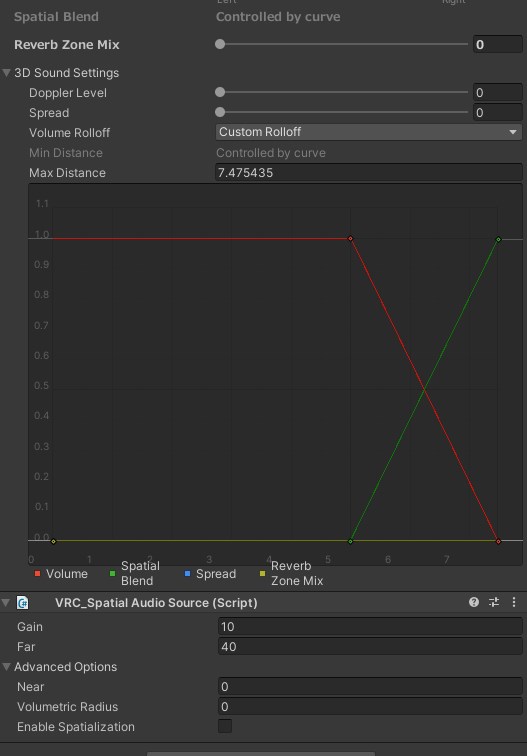
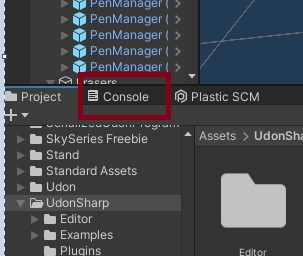 karmic rivet
Sometimes it can take a hot minute to load, check you’re signed in
karmic rivet
Maybe? Sorry I can’t think well about trying to troubleshoot stuff
stable tulip
If it doesn't open, restart Unity
karmic rivet
Make sure to save
Okay with the mirror- how do I add a toggle for in game?
And for local settings I guess
stable tulip
I recommend to check a video on youtube
round oracle
anyone have the transparent mirror?
ruby coyote
stable tulip
If it doesn't open, restart Unity
It still doesn’t work.. would you guys have anymore ideas?
Ah I got it to work 🙂 one last question if I upload these separately, will quest users and windows users still be able to meet in the same world?
craggy lichen
ruby coyote
Ah I got it to work 🙂 one last question if I upload these separately, will ques...
I'm pretty sure they need the same upload I.D. for that to work.
karmic rivet
ruby coyote
Ah I got it to work 🙂 one last question if I upload these separately, will ques...
Have to have same ID, should be in a VRC descriptor on the main / current scene
ruby coyote
Sorry Im a bit confused, could you give me a bit more direct instructions?
versed plover
ruby coyote
Sorry Im a bit confused, could you give me a bit more direct instructions?
when you click on the VRC world prefab, under inspector tab there will be a string of random numbers and letters, copy and paste that from the pc world to the quest one
itll be called build id i think
ruby coyote
Ahh Thanks sooo much :DD
Do you know where 'VRC world prefab' is located? Does it come up after I press upload?
stable tulip
ruby coyote
Do you know where 'VRC world prefab' is located? Does it come up after I press u...
in "VRChat Examples" Folder
 radiant karma
@solid dock 🥰😍😘
 hazy plume
Does anyone know how to get rid of this pop-up or what it means?

If I click Reload, it does nothing, if I click Ignore, it publishes the world but I then can’t enter it once on VRChat
 main hawk
A question: am wondering anyone tried to make the VRChat world as a copy of a real life world and try to match 1:1 between VR and IRL?
main hawk
main hawk
A question: am wondering anyone tried to make the VRChat world as a copy of a re...
I found it difficult to align my position and adjust the world size as close to the real life as possible. If anyone have done this what kind of alignment techniques did you try?
hazy plume
I did actually. I think it’s still public too.
It’s called Vilagarcia de Arousa based on a real city by the same name but it never got finished
hazy plume
hazy plume
Does anyone know how to get rid of this pop-up or what it means?
Anyway I’m gonna go sleep but if anyone can possibly help me out, I’ll deeply appreciate it. Thanks in advance!
 drowsy umbra
 drowsy umbra
nvm fixed it
 vocal jetty
howdy, so im wanting to make terrain in unity an i cant find the terrain tools. theyre not under the unity registry in package manager and theyre not in preview either. it says its built in already but i have no idea how to use it
vague pivot
Ik you can find the terrain object under 3D Object -> terrain
vocal jetty
ahh awesome thanx
vague pivot
np
 analog plover
Does anyone know why VRChat keeps changing my world name to something else regardless of how many times i tried to edit it?
build and publish
analog plover
I uploaded the world for the first time yesterday and it switched the name. Tried editing the name on the website also didn't work
 woeful warren
Does Someone Know a Scrollable Textbox (For Update info) asset/Prefab that is already setup so i only have to add Text to it.
dusk sapphire
this is incorrect, last build means its loads the last thing unity successfully built, and if you have updated your scene since, you would not be uploading the latest version of your content. build and publish is what you use for updates.
dusk sapphire
well yes, if you test first, then that is the intended purpose of last build
if you build and test, and you find no issues and want to upload immediately, last build uploads the build that was made when you last hit build and test
hence the term "last build"
if you made any changes since that last build, they will not be applied unless you actually build again
 south rose
I am trying to setup an video player on an curved object. Any recommendations?
Texture Render seems to be very dark and material overide seems not to work on imported objects??, on cubes it works fine.
I am trying to give an video and kinda 3d effect.
silk zealot
What values do yall recommend having for jump and the speeds?

I want people to have like a normal jump
and I want people to be a lil bit faster than normal
south orbit
silk zealot
What values do yall recommend having for jump and the speeds?
default values then run speed 5 perhaps
silk zealot
for run right?
south orbit
yes and perhaps strafe 3
silk zealot
how do people on quest enable running btw?
silk zealot
another question, does the VRC_Event Handler (Script) matter at all?
it got added when I adding the player mods component
karmic rivet
Okay question- when using an avatar pedestal is the avatar picture supposed to show in Unity when game scene is active? Or am I just supposed to test in VRC?
bold ibex
hi! does anyone know where i can get the city / skyscraper skybox for unity?
craggy lichen
Hey, does anyone have an idea why my buttons turn on the mirror in the test build but not the actual world upload?
south orbit
craggy lichen
Hey, does anyone have an idea why my buttons turn on the mirror in the test buil...
no idea but u could consider using lura switches, they are premade and working
craggy lichen
south orbit
no idea but u could consider using lura switches, they are premade and working
oooh I would like to see those. Where can I find them?
south orbit
craggy lichen
oooh I would like to see those. Where can I find them?
they on booth i believe for free, google lura switches, u should be able to find them
craggy lichen
south orbit
they on booth i believe for free, google lura switches, u should be able to find...
okayy, its just weird how I updated to the recent unity version and i somehow messed up the mirrors.
south orbit
craggy lichen
okayy, its just weird how I updated to the recent unity version and i somehow me...
might be that the SDK updated some udon graph stuffs that caused that issue
i used to make my mirror toggles from scratch too but lura switches is just so much better tbh
cerulean echo
Btw i seeng alote ppl say scratch what is this scratch?
south orbit
scratch is a word
basicly from scratch means u make something from the start, like manually entirely
craggy lichen
south orbit
might be that the SDK updated some udon graph stuffs that caused that issue
ah I see
cerulean echo
o make sence now
craggy lichen
Just trying to fix this as soon as possible
cerulean echo
I was thinking its a programm lol
south orbit
craggy lichen
Just trying to fix this as soon as possible
as said lura switches, they include premade mirrors with toggle switch even
craggy lichen
south orbit
as said lura switches, they include premade mirrors with toggle switch even
yes, thank you so much <3
south orbit
np
bold ibex
when I try to compile my map I have this message: b but I can't fix it
 stone marsh
bold ibex
when I try to compile my map I have this message: b but I can't fix it
stone marsh
bold ibex
when I try to compile my map I have this message: b but I can't fix it
Post a screenshot of your entire console....
bold ibex
 south orbit
bold ibex
when I try to compile my map I have this message: b but I can't fix it
south orbit
bold ibex
when I try to compile my map I have this message: b but I can't fix it
i had this issue yday converting my world to a quest world and same error happened, it was removed after i removed any udonsharp objects from the world like video players for example aswell as udonsharp from the asset folder
bold ibex
stone marsh
The entire thing please.
 I don't find it , Its my second time on unity
stone marsh
bold ibex
<:vrcStoic:585749770102898699> I don't find it , Its my second time on unity
You cropped out part of it. I just need the entire thing
It's most likely related to a bad import of either udonsharp or qvpens in the wrong order. But I need to see the entire console
bold ibex
south orbit
i had this issue yday converting my world to a quest world and same error happen...
:o oh
south orbit
always import udonsharp before any udon objects, if u have Qvpens example, try right click to reimport, its pretty much what merc says ye
stone marsh
It could also be something entirely unrelated though, since I can't see the entire console. But yes.
bold ibex
stone marsh
It could also be something entirely unrelated though, since I can't see the enti...


 bold ibex
south orbit
always import udonsharp before any udon objects, if u have Qvpens example, try ...
bold ibex
south orbit
always import udonsharp before any udon objects, if u have Qvpens example, try ...
Well, that was the problem; b
cobalt prawn
Those damned pens man 🤦🥲
stone marsh
Nobody reads instructions lol.
cobalt prawn
Well the people who read instructions don't come come here for help 😝
Not as much or with these issues at least
stone marsh
You'll most likely need to delete QVPens entirely from your scene and asset folder. Then try reimporting it. If that doesn't work, we'll have to do a full reimport of the sdk, udonsharp and the pens, insuring the correct order and ensuring all are the fully updated and correct versions.
bold ibex
Thx for the help
 bronze umbra
what does this mean
 south orbit
bronze umbra
what does this mean
south orbit
bronze umbra
what does this mean
try save ur project - re open and do it again
 vestal oriole
I've got a couple of pickup objects in my world. They're just balls that don't do anything. I just updated my world, but I didn't touch these objects. Yet for some reason when I pick them up now they start elongating and freaking out. Idk what's happening or why.
stone marsh
vestal oriole
I've got a couple of pickup objects in my world. They're just balls that don't d...
You have non uniform scale on the pickup or the parent of the pickup.
The parents of a pickup need to have uniform scale in unity.
vague pivot
Does anyone know why my Physics.raycast is returning true despite hit sometimes not having a collider?

Also it seems to be colliding with layers other than the playerFollowLayer despite it being the only one
If it's shooting a raycast at the cyanEmu player, it still returns true despite the player not having a collider on it and hit.collider is null.
It's as if it's hitting something other than a collider which I didn't think was possible.
rain shadow
vague pivot
If it's shooting a raycast at the cyanEmu player, it still returns true despite ...
It would be emulating the in game behavior of not being able to return a reference to any player objects
vague pivot
But the raycast shouldn't have anything to do with the player objects bc it's only looking for the playerFollowLayer which isn't on the player
 pearl plume
Anyone know how I can make a moving background like this?
I Don’t want the train to actually move but the background to move around it
Just like a picture of the outside world moving
And would I do this in unity or blender?
 copper compass
Hihi, I was curious as to what my options are for removing the quest version of a few worlds
As to the reason, A. video player issues B. shader and pipeline reasons
I know I can just re-upload on new IDs but it would take upwards of a month to get everything back in the "public" sphere cuz of the one labs a week thing
If that's the only way then so be it, patience I shall have but I'd rather do it in ways that won't mess with metrics and the lot
bold ibex
i want this to enter a URL into the videoplayer as soon as the world is loaded

rather than having a seperate sound source for music
cobalt prawn
bold ibex
i want this to enter a URL into the videoplayer as soon as the world is loaded
Select the UdonSyncPlayer, put the url here and check auto play
 bold ibex
When using iwaSync's Video player can you have more than one audio source? And how is it done-everytime I've tried it will only attach to one audio source at a time.
cobalt prawn
bold ibex
When using iwaSync's Video player can you have more than one audio source? And h...
I don't know about that video player in particular, but none of the ones I've seen would support multiple audio sources. I'm sure it's possible, but I believe you would need to extend the scripts so that the video player holds references for each audio source, and applies the same code to each one, which probably won't be easy or straightforward if you have limited programming experience
And I'm curious if that's really the solution you want/need anyway- what exactly do you want to do?
bold ibex
cobalt prawn
I don't know about that video player in particular, but none of the ones I've se...
Ah- for short I'm making multiple rooms but I want the audio to be played from the little radios I've set up. I've re-read some of the things and there's limited information, I'm unfortunately not fully familiar with Udon's scripting
cobalt prawn
bold ibex
Ah- for short I'm making multiple rooms but I want the audio to be played from t...
Sorry, appears I was wrong actually- I took another look and I think the player I use myself (Wolfe player) does support multiple sources 😅
Can you screenshot what the inspector looks like on the player where it references the audio source?
Wolfe player has this section on one of its components, so if I change the circled number here I can drag in more audio sources
 bold ibex
cobalt prawn
Sorry, appears I was wrong actually- I took another look and I think the player ...
bold ibex
cobalt prawn
Sorry, appears I was wrong actually- I took another look and I think the player ...
Unfortunately it doesn't have it 
cobalt prawn
Bummer. If you really want to use that video player specifically, it wouldn't hurt to find the creator's contact info and kindly suggest/request they add that as a feature 🙂
bold ibex
I would but I'm a non-native JP speaker so it'd be difficult