#world-development
39 messages · Page 126 of 1
 white moon
 surreal surge
white moon
if they want extra proof an admin will just visit the world and see they can get...
surreal surge
white moon
if they want extra proof an admin will just visit the world and see they can get...
ah ok
i just don't want the report to be ignored
white moon
As an admin they can probably spoof their name to be yours too to confirm its doing it
surreal surge
yea true
white moon
just a guess on that though, idk what tools they have
surreal surge
havent had something hard to get this really malicious guy banned for until now so im relieved that he finally messed up
 nocturne jungle
how could i make a clock that would sync to someones timezone?
white moon
i dont know if they ban for it though, i believe they take the world down until they remove the offending code
white moon
nocturne jungle
how could i make a clock that would sync to someones timezone?
you can literally just get the users local time in udon code. No need to sync. just display the time from their computer
surreal surge
isnt third party tools and clients and stuff a 6 month or more ban?
nocturne jungle
white moon
you can literally just get the users local time in udon code. No need to sync. j...
how could i go about doing that lol
 fleet isle
how do i make it not
community labs
 surreal surge
you exceeded the limit this week
surreal surge
just upload it and it will be private
only accessible by you
or people you invite
fleet isle
ye but is there a way to make it public without community labs
surreal surge
no. the point of community labs is to make sure that all the worlds that are public of are decent quality and don't violate the rules
 kind leaf
This is outlined in the working tos as not permitted.
 solemn hatch
late to the converstation here , but you can also break your terrian up into multiple heightmaps and take advantage of culling , also as objects on the ground obsource it , its amazing what you can get away with
surreal surge
kind leaf
This is outlined in the working tos as not permitted.
yea i had a discussion about it already. im reporting the person now
 worthy horizon
i'm guessing the ARM processor in the quest has a bigger problem with large floating point arithmetic than x86_64
worthy horizon
solemn hatch
late to the converstation here , but you can also break your terrian up into mul...
heh yeah its real amazing what you can get away with, i just converted a world to quest that was originally 418mb and is so massive it takes 3.5 hours to walk through
the unity terrain engine has a function called "pixel error" that will help with performance by lowering the mesh resolution by a factor of the distance from the camera
 green lagoon
solemn hatch
late to the converstation here , but you can also break your terrian up into mul...
green lagoon
solemn hatch
late to the converstation here , but you can also break your terrian up into mul...
yeah that definitely help to not have to render all of it at once
green lagoon
worthy horizon
heh yeah its real amazing what you can get away with, i just converted a world t...
so how'd you get the file size down to 100 or less
worthy horizon
a whole hell of a lot of tricks
green lagoon
I take it additional tricks besides for texture compression
worthy horizon
texture compression alone only got me half the way there
green lagoon
so what was the other half
kind leaf
can also use runtime detail population from a pool to limit the number of actual meshes 🙂 should cut any large world build down by a huge fkin factor. Pull from the pool only what can be seen. Not a smooth overhead though through udon I imagine.
worthy horizon
lots of mesh cleaning and lots of audio crunching and lots of asset management
still trying to figure out why the shit no quest users can select other users or pickup vrc_pickup objects but interaction objects work
green lagoon
worthy horizon
lots of mesh cleaning and lots of audio crunching and lots of asset management
nice
found any clever opportunities for texture reuse?
worthy horizon
material/texture reuse was already heavily implemented since map rev 1.0
green lagoon
nice
worthy horizon
cleaning the meshes was more involved because a large number of them are from the initial version of this map which is several years old and literally the first map i uploaded.
green lagoon
yeah definitely plenty of time for improvement in your modeling skills
worthy horizon
i was a 3d asset designer long before the days of VRC, i started using 3DS max back in the early 2000s
green lagoon
very cool have you been enjoying doing vrchat map development
worthy horizon
maybe when unity isnt being a bastard, still wondering about the design considerations that went into Udon aka ASSEMBLER
green lagoon
not a programmer myself so no clue on why they went with what they did with Udon
worthy horizon
when i first saw raw udon code i immediately recognized it as pretty much assembler code xD
as an old school developer i dont do all this node graph point and click felgercarb, give me a plain text ide for programming any day
udon sharp saves the day
green lagoon
worthy horizon
udon sharp saves the day
so much so they literally acquired the developer who made that
worthy horizon
i wrote an entire full fledged 3D combat RTS from nothing in visual studio
green lagoon
very nice
out of curiosity what kind of environment art tricks did you do to increase reuse
worthy horizon
pretty easy since undertale was an 8-bit 2d game so i can take a lot of freedom with choosing what materials go on what as long as the colors match the original game somewhat
https://www.youtube.com/watch?v=dvkGeGguFHA this was pretty much my crash course trial by fire into game development

footage of the latest iteration of the developer build
green lagoon
worthy horizon
pretty easy since undertale was an 8-bit 2d game so i can take a lot of freedom ...
so I take it your map was like the undertale underground but like all of it
worthy horizon
except in HD and 1:1 realistic scale
green lagoon
do you have a link for the map so I could go look
white moon
nocturne jungle
how could i go about doing that lol
TimeZoneInfo.ConvertTimeFromUtc(DateTime.UtcNow, TimeZoneInfo.Local);
Will give you the current system time
DateTime.Now.ToString("HH:mm")
might even work actually

Syntax of C# DateTime Format. This blog describes how to format DateTime in C# with code sample.
worthy horizon
 green lagoon
seems the most recent version doing a world searches is 2.0 I hope 3.0 is going well
worthy horizon
sorting quest related problems is the bane of my existence
green lagoon
not surprised as it is a mobile chipset
but it'll probably be very impressive for the quest users when you're done as Project Ebott sounds like a very big place
worthy horizon
look for [project ebott undyne's pad] which is one of the spinoff chill worlds
green lagoon
found it and it looks to be more recent so that would be closer to how the project is currently going
worthy horizon
i was using it as a staging area to develop the house interior
green lagoon
cool
and I suppose everybody else will also appreciate the file size reduction from 400 megabytes
worthy horizon
i be there in limbo while i prepare yet another update for quest
the pc build is still about 316
i still have npcs and combat mechanics to worry about
green lagoon
wow you're definitely trying to go the extra mile
green lagoon
cool
 somber harness
Soooo guys
i was searching prefabs on the unity assets store
i downloaded some to my project and then
VRChatSDK Tab and ProBuilder and Proguilds disappeared

i tryed reinstalling VRCSDK but didn't worked
i don't want to lose my progress so... any help?
(btw its my first world)
worthy horizon
one of the assets you downloaded has scripts in it that have some kind of error halting the execution of the script parser
 near escarp
 bold ibex
Having a little difficulty adding my music in, I tried it both as MP3 and OGG files but it still won't work

When it's imported it only shows this icon
bold ibex
worthy horizon
Can't wait to play it!
 modern ridge
I'm a sucker for statistics so I made a graph of when I uploaded my avatar world with a portal to one of my other worlds in it. The "Chapel" world had previously remained stagnant at 700~ visits until the portal was placed in the avatar world I had made. Something to maybe take into consideration for world-makers and such.

 somber spoke
My unity is stuck here. What should I do?

 upper obsidian
somber spoke
My unity is stuck here. What should I do?
upper obsidian
somber spoke
My unity is stuck here. What should I do?
Look at the console, and if there are connection errors, fix the Internet.
 leaden hazel
Does anyone know if that third person avatar view pedestal disc you can find on the table in the piano lounge world is available as a prefab for purchase or open source?
The one that lets you see a mini third person view of yourself
somber spoke
upper obsidian
Look at the console, and if there are connection errors, fix the Internet.
It went to Creating File Version Record from Preparing file for Upload.... (Generating Signature). However, the bar is not moving. It's stuck there for 20-30 mins. I can use navigation and change layout and stuff but it won't let me click the console. It's a 1.2 GB World.
@upper obsidian This is the only thing I can see

@upper obsidian There you go
 worthy horizon
yellow is warning not error, and 1.2gb is absurd if thats the assetbundle size..
leaden hazel
ah, found the prefab, its this item: https://suzufactory.booth.pm/items/3438836

VRChat のワールドに設置すると、自分自身(見ている人)のアバターがフィギュアのように縮小されて表示されます。 自分が動くと同じように動きます。 ※ サムネイルは表示例で、アバターは付属しません。 ※ カメラや鏡には写りません。
somber spoke
worthy horizon
yellow is warning not error, and 1.2gb is absurd if thats the assetbundle size..
I did test it. It worked. So, Should I wait?
worthy horizon
blatant runaway unoptimization
bold ibex
 cerulean echo
Get the size down 1.2 gb ar alot
cerulean echo
Get the size down 1.2 gb ar alot
Vrtool kit compress textures mass textures Importeur. From scene minimum 1204 or 516
worthy horizon
bold ibex
Can't wait to play it!
lucky citizens of the underground who run into me ingame get to do the beta testing run
bold ibex
Crunch compresion 50 minimum.
got dammit
SDK controll panel wont open again ugh
Should i just reimport all assets by this point?..
It's getting annoying just to post this damm world
worthy horizon
that usually means a script has thrown an error.
worthy horizon
sometimes its things in the plugin cache
upper obsidian
bold ibex
I want to run found it. But no script specified
In Windows from the explorer, search for .cs and .dll files.
Delete everything that is not related to vrchat.
bold ibex
upper obsidian
In Windows from the explorer, search for .cs and .dll files.
Delete everything t...
Wouldnt that just destroy any 3rd party script such as compatible shaders. Textures ray tracing. Movements and so forth?
Or would that only delete possible incompatible files
Ill keep that in mind as a possible fix
upper obsidian
bold ibex
Wouldnt that just destroy any 3rd party script such as compatible shaders. Textu...
Third party ones cannot be loaded and often cause an error. Only udon scripts work.
 silent plinth
Anyone have experience developing exterior environments for worlds that are optimised?
i gave it one good shot while using unity's terrain system and trees but the end result caused more issues than i'd have liked
 merry pelican
I downloaded the Red_Sim water package, now I used one of the water prefabs but when I play the world, there is nothing under the water how can I make it for the avatar to go under water ?
bold ibex
can someone help me with enabling jump in my world? i'm test building it and it doesn't allow for jump at all and i'm unsure how to enable it (SDK3/Unity 2019.4.31f1)
upper obsidian
bold ibex
can someone help me with enabling jump in my world? i'm test building it and it ...
 bold ibex
upper obsidian
bold ibex
upper obsidian
tysm!!
bold ibex
Hmm there'ssss alot of dll files but alot of them are listed plastic 64x
Are these nessecary? @upper obsidian
Vrchat sdk refuses to open
 upper obsidian
bold ibex
Hmm there'ssss alot of dll files but alot of them are listed plastic 64x
upper obsidian
bold ibex
Hmm there'ssss alot of dll files but alot of them are listed plastic 64x
If you think you need it, don't touch it.
I don't know, I don't use it.
somber harness
worthy horizon
one of the assets you downloaded has scripts in it that have some kind of error ...
thank you! i reinstalled the scene and installed the prefabs one by one and now works
 tulip flame
is there something I can do to enable people to fly around in my world?
 magic orbit
What’s up smart people! Can anyone help me figure out how to put a packaged animation on a game object? Do I have to use a controller or what? I’m so lost lol
 stiff token
Does anyone know how to adjust the hit force in the vrcbce prefab (billiards table)?
 untold bluff
Does anyone know of a way to play ambient sounds randomly in a world? I tried using an Audio Source with a randomize script and although it worked fine in Unity no sounds play in VRchat
 digital bay
tulip flame
is there something I can do to enable people to fly around in my world?
digital bay
tulip flame
is there something I can do to enable people to fly around in my world?
As a guess, you could get which way their hand is facing (GetTrackingData) and also the input axis event and use the "SetVelocity" based on that. might want to disable their movement when doing that but its an option.
 faint geyser
hey dose anyone know any good night city skybox
tulip flame
digital bay
As a guess, you could get which way their hand is facing (GetTrackingData) and a...
More wondering, currently, if there's any 'standard' or 'typical' way that users can fly around that's supported by vrchat's SDK. Just so that it's possible more intuitive to users if other worlds use the same method (like some kind of checkbox to enable such a thing).
Wanting to know this before I have to go and program in something custom that I gotta teach the user how to use (and for it to be buggy and awkward lol)
digital bay
tulip flame
More wondering, currently, if there's any 'standard' or 'typical' way that users...
A lot of worlds use the jetpack prefab, i know that. Outside of that im not really sure. Hopefully someone else can chime in with suggestions
 left rain
untold bluff
Does anyone know of a way to play ambient sounds randomly in a world? I tried us...
left rain
untold bluff
Does anyone know of a way to play ambient sounds randomly in a world? I tried us...
You need to use an Udon graph, you can't use C#. You could always port the script to U# if you know your way around.
If you use a graph, your network would look a bit like this:

every time the event fires, a random AudioClip is pulled from a public AudioClip[] variable, then played via an AudioSource public variable. you'd just have to populate all those slots in the inspector.
faint geyser
hey dose anyone know any good night city skybox
 nocturne isle
What video formats does the PC version of VR Chat support? From what I've experienced, mp4 files have stopped working for some reason, but only on PC. Was the functionality removed or something?
 dusky peak
left rain
You need to use an Udon graph, you can't use C#. You could always port the scrip...
dusky peak
left rain
You need to use an Udon graph, you can't use C#. You could always port the scrip...
wait can you really not use C# scripts?? I thought Udon ran off C#
left rain
C# scripts aren't allowed. you have to use udon. it's kind of a subset of C#, if that makes sense.
dusky peak
left rain
C# scripts aren't allowed. you have to use udon. it's kind of a subset of C#, if...
hmmm interesting, I didn't know that. I've been trying to learn C# in order to be able to make cooler worlds for vrchat
left rain
U# mostly looks like C#, but you won't get the entire feature set of C#. it's meant to prevent malicious code
so if you know C# reasonably well, you'll probably be fine with U# once you get used to a few little quirks
green lagoon

GitHub
An experimental compiler for compiling C# to Udon assembly - GitHub - vrchat-community/UdonSharp: An experimental compiler for compiling C# to Udon assembly
dusky peak
green lagoon
https://github.com/vrchat-community/UdonSharp
that looks pretty useful mate thanks!
dusky peak
left rain
U# mostly looks like C#, but you won't get the entire feature set of C#. it's me...
would make sense
untold bluff
left rain
You need to use an Udon graph, you can't use C#. You could always port the scrip...
Thank you so much! Do you know of any helpful places I could learn more about using Udon graphs? I'm a complete beginner and have just been focusing on C# not knowing it didn't work, thank you.
white moon
dusky peak
wait can you really not use C# scripts?? I thought Udon ran off C#
U# Is C# parsed into udon.
with a few libraries thrown in for the Udon functions.
left rain
untold bluff
Thank you so much! Do you know of any helpful places I could learn more about us...
There's some decent starting tutorials on Youtube. https://www.youtube.com/watch?v=L7BZK8MKuLs

The first tutorial in my VRChat Udon series where we talk about setting up the VRChat World SDK.
Next Episode https://youtu.be/6ZaBCVMOMWE
Follow me on twitter (https://twitter.com/notmackintosh)
References:
Canada Themed Clothing and Other Retextures by: https://twitter.com/vicvic_VRC
VRChat Mishe model: https://booth.pm/ja/items/1256087
VM...
Look around for "udon toggles" and "udon sliders" and you'll find the basic stuff pretty quick. It only really gets weird when you have to deal with syncing between multiple users.
untold bluff
left rain
There's some decent starting tutorials on Youtube. https://www.youtube.com/watch...
Thank you, really appreciate it!
nocturne jungle
white moon
https://www.c-sharpcorner.com/blogs/date-and-time-format-in-c-sharp-programming1
Once i get home ill look into it thank you
magic orbit
magic orbit
What’s up smart people! Can anyone help me figure out how to put a packaged anim...
Beep
 tidal turtle
for some reason when I click upload on my world, the upload button doesnt work and I cant upload my world? this is the only red I have in my console that may be causes it . Anyhelp?
 left rain
99.9% of the time this error is caused by importing some third-party package or asset and not importing the correct dependencies first
tidal turtle
wait no I didnt
somber spoke
cerulean echo
I woundering what world would need so many :/
It looks amazing when I test and run it. On VR, it looks even better. However, it's not uploading to VR Chat server when I build and upload. I will figure a way out.
cerulean echo
i hoppe you find a way.but try to look in to yor map maybe you can get samthink down instal VRWorld Toolkit and look what take alot of mb maybe you can reduce texture or set the music to mono to get the mb down maybe it need not to be so big maybe it can stil look nice.
tidal turtle
I got it to work with tookit but for some reason now it looks like im uploading a new world when Im trying to update my old world,
 regal mural
left rain
regal mural
left rain
add the VRC World prefab from the SDK to your scene. in the VRCSceneDescriptor component there is a Spawns parameter that you can add transforms to
 dense walrus
Hey, I'm trying to add a mirror toggle to my world but when I try to change the toggle function to toggle the prefab for it is not there could somebody help, Please and thank you
 native nymph
any1 know why i click upload then nothing happened?

 stone marsh
You have errors in your console
stone marsh
native nymph
any1 know why i click upload then nothing happened?
You shouldn't be seeing the screen you're seeing. It's bugged
native nymph
another problem came up.... what should i do...
 native nymph
i've even deleting and installing the sdk the problem still there...
i want to gave up, alr spent 4 hours trying to fix the problem but getting more problems instead....
but i spent 3 full days masking my worlds 
leaden hazel
native nymph
i've even deleting and installing the sdk the problem still there...
Try clearing all the 'generated' directories.
After backing up your project, close Unity, delete the Library, obj, and temp folders in your project folder, then reopen it and let Unity reimport everything.
This can sometimes fix a corrupted generated file
Can anyone tell me how one is able to apply reverb etc to the voice channel? I've been to a few worlds that can apply echo effects etc to other player's voices based on the environment.
 eternal pawn
neither of the video player prefabs that come with the SDK3 seem to work. they both just play the audio and no video when I build and test. I've never added a video player to a world before, is there more to do than just put the prefab in the scene?
I tried a URL to an mp4, and vimeo, same result.
bold ibex
Do you guys know any ways to setup a shaking effect?
I have a shader but I don’t understand how to animate it
leaden hazel
bold ibex
I have a shader but I don’t understand how to animate it
A post processing one?
bold ibex
I believe so? I don’t know, it’s a joint project with my friend
I gave him this

GitHub
A Shader Editor for Unity. Contribute to FreyaHolmer/ShaderForge development by creating an account on GitHub.
Anything really works. I’m just trying to replicate this
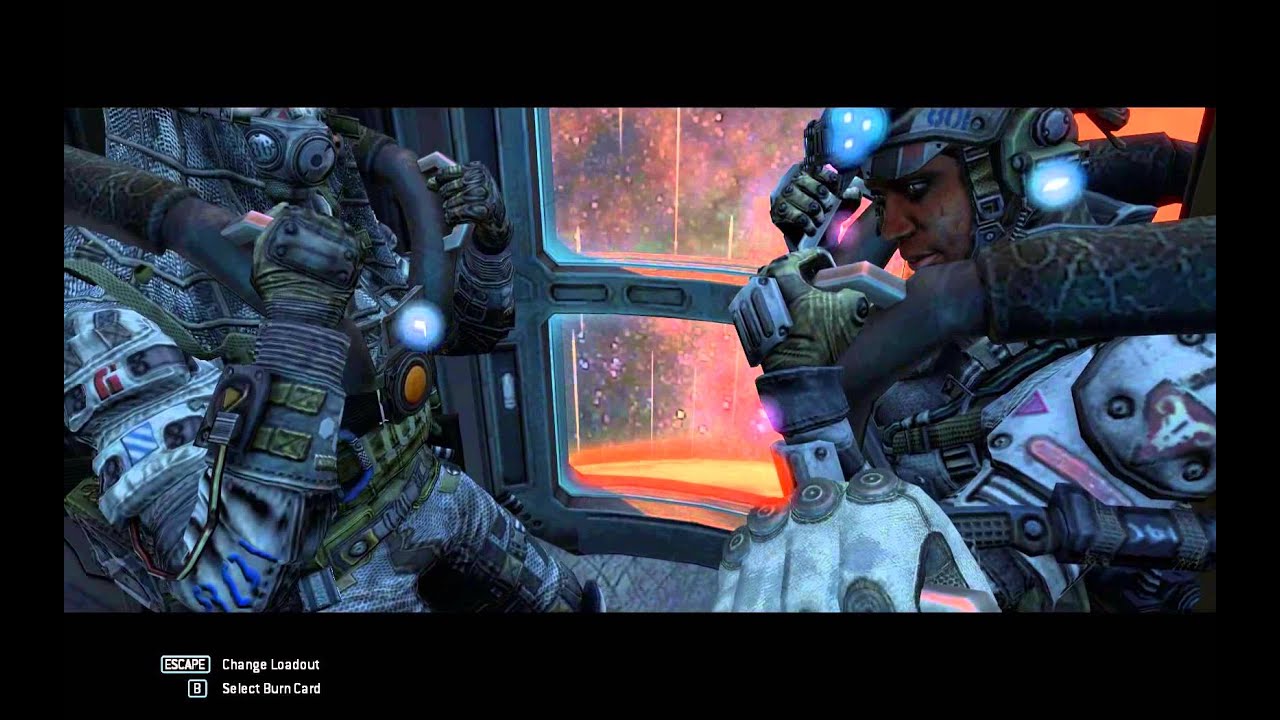
Titanfall: Battle of Demeter mission intro. IMC Point of view.
leaden hazel
Post processing shaders once applied can be controlled with animations that interact with the post processing volume object
bold ibex
leaden hazel
Post processing shaders once applied can be controlled with animations that inte...
ty
bold ibex
ok so im going across so many bugs i cant handle it can someone please go through dms amd help me bug fix this through video call and stream
i cant seem to find the reason my "Blue print ID isint valid in some way and im simply trying to get a working version of pc before i copy the world to a usb and upload windows
upper obsidian
bold ibex
i cant seem to find the reason my "Blue print ID isint valid in some way and im ...
If he writes blueprint errors, then most likely he is already busy with someone. Through the site, look whose it is, and what is uploaded there.
upper obsidian
Try uploading to a new id. if it works out - write to those support, perhaps the previous id was blocked.
bold ibex


this is the error and the console
Trees have nothing to do with the error. ive tested them before and they work completely fine
bold ibex
any one have a reliable fix for this?
bold ibex
leaden hazel
Post processing shaders once applied can be controlled with animations that inte...
Mod you think you can explain this to me as if I was a newborn? I’m very new to this stuff haha
leaden hazel
bold ibex
Mod you think you can explain this to me as if I was a newborn? I’m very new to ...
I'm afraid I'm a little busy at the moment so I can't easily. :/
bold ibex
leaden hazel
I'm afraid I'm a little busy at the moment so I can't easily. :/
I see. I’m just on a time crunch to push the map out
leaden hazel
bold ibex
I see. I’m just on a time crunch to push the map out
Alas I'm stuck in real-job™️ for a while now
upper obsidian
bold ibex
this is the error and the console
If you read the error, it says that some component is missing in the prefab.
Click on the line with the error, there will be more detailed data.
bold ibex
leaden hazel
Alas I'm stuck in real-job™️ for a while now
Do you know anyone I could contact for this?
@upper obsidian


heres more vital errors
do you think theres an error that im trying to post it for a platform without making a copy?
if so that would be a great fix that i could acomplish
how often does the sdk update?
leaden hazel
bold ibex
Do you know anyone I could contact for this?
I don't I'm afraid. o.x
 latent vector
has anyone else used this projector? i cant figure out how to scale it properly and what parts should be scaled it driving me crazy lol


 random sphinx
latent vector
has anyone else used this projector? i cant figure out how to scale it properly ...
random sphinx
latent vector
has anyone else used this projector? i cant figure out how to scale it properly ...
i've never used it but i'm curious where did you get it?
latent vector
random sphinx
i've never used it but i'm curious where did you get it?

VRChatワールド用 プロジェクター ・映像を環境やアバターに投影できます (シェーダーとの相性によって映らない場合もあります) ・物体やアバターで影ができます ・映像が変化すると光の筋も変化します ・Shaft.matとProjection.matにテクスチャを設定するか、 カメラを使ってScreenレンダーターゲットにレンダリングしてください。 カメラを使う場合はHDR, MSAAを無効にしてください。 ■ 使い方 unitypackageを取り込み、ProjectorフォルダのProjector.prefabをワールドに配置してください。 画像などのテクスチャを投影する場合は
random sphinx
latent vector
booth! https://booth.pm/en/items/1782044
cool thanks. i'm too cheap to buy anything though lol
 heavy basin
i have a real basic world put together with most everything done. i was wondering if i could share screen with someone to help with a couple bugs please?
nocturne jungle
Anyone have a premade asset for a clock that reads someones timezone live
nocturne jungle
Also could someone help me with this mirror stuff, my toggles work and everything but when i turn one on the other doesnt toggle off, this is for both HQ and lq
they just overlap
 hollow ivy
I made an edge loop and now I cannot walk through the place where I made it. So half of the space I cannot walk through
This area when I load into VrChat . (Picture is sending
 left rain
the collision mesh is probably still considering that area to be filled in
don't use mesh colliders if you can avoid them... just set up box colliders instead
left rain
adjust the bounds so that area isn't blocked. then add more box colliders as needed
hollow ivy
left rain
adjust the bounds so that area isn't blocked. then add more box colliders as nee...
I’m so confused
left rain
dunno what to tell you then
colliders can be meshes, or they can be simple primitives. what you have is a box collider that's covering that empty space in your mesh, which is why you can't move through it
you can adjust the bounds of any collider by clicking on the icon on the component
hollow ivy
So shouldn’t I just delete the box collider?
left rain
you can delete the collider entirely if you don't want to collide with any part of that wall, sure
hollow ivy
Collide as in interact with??
left rain
???
hollow ivy
There’s a single edge loop in the middle of the floor . It has a box collider. So that is the issue?
I cannot walk through it because of the box collider. Is what I am asking
left rain
yes. that's what box colliders do, generally
colliders either block rigid bodies from entering them (that includes you) or they act as triggers, if the "Is Trigger" checkbox is on
nocturne jungle
How could i export just the png of this texture?
 hollow ivy
Okay I understand, thanks
left rain
nocturne jungle
How could i export just the png of this texture?
That PNG should be in your project already if your material is linked to it. Just click on the texture swatch in your material properties in the inspector and it should take you there
nocturne jungle
Yeah just found it thank you
also could someone help me with this mirror stuff, my toggles work and everything but when i turn one on the other doesnt toggle off, this is for both HQ and lq
they just overlap
left rain
is your toggle specifically turning the other mirror off before turning the desired mirror on?
nocturne jungle
Thats my issue, its not
once i turn one on and try to toggle the next they both stay on and overlap
left rain
look at the example mirror toggle that comes with VRC, there's a whole example udon scene
nocturne jungle
nocturne jungle
Ermm
I guess send it my way lol
Ive done the same exact thing im doing now but i messed something up somewhere but i dont know where at lol
 gaunt egret
sent it over dm, i think the bot would whine about the link xd
 celest haven
You can use udon for some p simple toggles
I followed a YouTube tutorial and got it working in like 10 minutes
Still having trouble getting my video player to work though 😔
surreal surge
Someone that i'm working with just told me "I'll need someone without a mac to upload the world on my account... because macs are incapeable of uploading something to more than PC or Quest. but not both". How true is this statement? This feels suspicious to me
nocturne jungle
anyone have a rainy window texture?
native nymph
Any1 knows how to optimize world? When i upload it im lagging quite a bit
nocturne jungle
 chrome sapphire
when i click upload nothing happens
chrome sapphire
when i click upload nothing happens
Check your errors tab
chrome sapphire
there are no errors
i click build and upload, it takes me to game view and it does nothing from there
upper obsidian
chrome sapphire
when i click upload nothing happens
Turn off future proof content in sdk settings
 chrome sapphire
upper obsidian
Turn off future proof content in sdk settings
chrome sapphire
upper obsidian
Turn off future proof content in sdk settings
there is nothing wrong, so whats happening?
im testing it right now, it works fine. but why cant i upload it?
i have access to
upper obsidian
Check the console

 chrome sapphire
upper obsidian
Check the console
chrome sapphire
upper obsidian
Check the console
wtf is happening ;-;
upper obsidian
chrome sapphire
wtf is happening ;-;
I don't know, detach click in the descriptor and try again.
 frosty matrix
Yoooo
Yo
So ya'll seen Tsubokura's Home-?
Any idea how in the heck he got the vive to show a different enviroment inside the headset?
 weary fulcrum
I really want to add a text chat system to my world but UdonChat was making my avatar slide all over the place but I can't seem to find any other prefabs :') Does anyone know how to fix that or knows of any other text chat prefabs?
Please ping me with a response :>
latent vector
weary fulcrum
I really want to add a text chat system to my world but UdonChat was making my a...
https://github.com/CampbellCrowley/VRC-UdonSharp-Keyboard this one Or this one https://booth.pm/en/items/2405422

GitHub
A keyboard for VRChat Udon written in U#. Contribute to CampbellCrowley/VRC-UdonSharp-Keyboard development by creating an account on GitHub.

Udonで実装したキーボードです。 ローマ字入力、Unicodeの直接入力などができます。 パスワード、チャット、コマンド機能のデモを含んでいます。 テストワールド https://vrchat.com/home/world/wrld_286a6a0a-1784-43c4-aed7-a78a5da67652 最新バージョン : 2021-03-30 ■必須Asset ●VRCSDK3 - World https://www.vrchat.com/home/download ●Udon Sharp
weary fulcrum
I see, thank you :)
 lilac plaza
anyone have any idea on how to deal with these, i've been trying to figure out this whole day

i'm getting annoyed and desperate
 dusk sapphire
SimpleLightProbePlacer doesn't work for unity 2019
can be fixed by adding a few lines in the script though if you want to keep using it https://github.com/AlexanderVorobyov/simple-light-probe-placer/issues/1
dusk sapphire
unless you have other script's with compilation issues, yes
simplelightprobeplacer will break unity 2018/2019 projects
lilac plaza
i.. i actually don't know how or where to properly add those few lines of script
nocturne jungle
Could anyone help with making a world audio toggle?
nocturne jungle
Do i need to import udon or sum

tryna use qv pens
well i hate unity because the whole file just corrupted for no reason, done with world making for a good while.
nocturne jungle
screw it, anyone have some small rooms prefabs
bold ibex
I'm trying to hunt down 2 things for a world I'm making and hopefully you guys can help. I'm trying to find a count up time, like the one in the waiting room and a nice glass texture, all the ones I find switch to default white when I switch it's shaders. The shader I'm using is vrc mobile defuse
Thanks to anyone who helps!
bold ibex
Also, forgot to mention but does anyone know the best light settings for a night themed world
 sharp lava
Best in what way?
bold ibex
Best looking
Like what the light level should be, color of light ect
Saying this makes me realize it mostly depends so nvm about that lmao
And someone gave me good glass
kind leaf
nocturne jungle
screw it, anyone have some small rooms prefabs
well hell bud, if you installed a prefab without reading the requirements highlighted on the website you can't get upset when Unity doesnt work the way you expect it to. This is the one time in life we actually need to read the damn instructions lol. That being said, using a small room prefab isnt going to help you until you start following directions. gl
kind leaf
bold ibex
Best looking
there are a few clocks at https://vrcprefabs.com/ and on booth. Booth is just a pain to navigate. You are looking for a shader clock. Scripting a clock is simple (any c# clock can easily be converted to udon) but has a higher overhead so we use shader clocks for displays.
bold ibex
kind leaf
there are a few clocks at https://vrcprefabs.com/ and on booth. Booth is just a ...
You saved me so much time trying to make my own, you're the best
nocturne jungle
kind leaf
well hell bud, if you installed a prefab without reading the requirements highli...
No, there was no requirements or nothing for it. It was setup for VRC. Ive uploaded two separate versions of the world now, it corrupted while i was working on it for no reason
left rain
qv pens require that you install udon sharp first. projects rarely get corrupted for no reason; most often errors are caused by importing packages without reading the instructions first, or importing packages that are badly configured or incompatible with your version of unity or the sdk.
nocturne jungle
left rain
qv pens require that you install udon sharp first. projects rarely get corrupted...
QV Pens couldve done it since i did get an error while importing
And i hadnt installed udon sharp yet either so
But anyways. Anyone able to send me a nice small world prefab i can mess with? Dont want to work on the same prefab for the third time
gaunt egret
when using booth, its helpful to just put the link directly through google translate to get an english version. it does say import udonsharp but lower on the page

"spookyghostboo" has some small free rooms on her booth page
id give the link but im not sure if the bot would snipe it
nocturne jungle
gaunt egret
id give the link but im not sure if the bot would snipe it
I dont think it would
nocturne jungle
Anyone have a rainy window texture?


 willow canyon
I can feel my pc shivering in fear
 tidal bear
willow canyon
I can feel my pc shivering in fear
tidal bear
willow canyon
I can feel my pc shivering in fear
why? lol
its not even 1% done
though i do need ideas
willow canyon
Gtx 1060 6GB, any special light types scares it
tidal bear
1660 ti here
willow canyon
Phew, I'm saved
tidal bear
not complicated at all
 willow canyon
Let's hope unity works with your model
willow canyon
tidal bear
eh, ill bake it
Famous last words.
tidal bear
😵
tidal bear
willow canyon
**Famous last words.**
we'll see
willow canyon
I mean, it takes my unity about 13 minutes to bake
I meant 30 minutes
I meant 5 Hours
tidal bear
bro
willow canyon
I meant 13 hours
tidal bear
you selected your cpu to bake
willow canyon
Nah, that was on the gpu bake ;-;
tidal bear
lol sucks for you mine takes like 2 minutes
willow canyon
I may need to, fix my Unity
 misty wave
Anyone used this in VRC? https://assetstore.unity.com/packages/vfx/cozy-weather-207492#content

Get the COZY: Weather package from Distant Lands and speed up your game development process. Find this & other VFX options on the Unity Asset Store.
stone marsh
misty wave
Anyone used this in VRC? https://assetstore.unity.com/packages/vfx/cozy-weather-...
Most likely relies on C# scripts.

 nocturne jungle
I cant pickup my pillows? They have a mesh collider and the vrcpickup script but they wont work at all?
 tidal bear
nocturne jungle
I cant pickup my pillows? They have a mesh collider and the vrcpickup script but...
tidal bear
nocturne jungle
I cant pickup my pillows? They have a mesh collider and the vrcpickup script but...
you see the extact grip?
youre gonna put the pillow there i think
from the hierarchy
nocturne jungle
Never done that before but ill try
tidal bear
try it
nocturne jungle
Loading test right now
tidal bear
you using cyan emu?
nocturne jungle
ahh
tidal bear

GitHub
Please make sure you have the latest VRChat SDK when using CyanEmu!
Features
2107d08 - Sitting in stations now lowers the player camera (Thanks @evolvedant).
4038932 - Added settings option to hid...
import it and just play the scene
make sure you have somwhere to spawn
nocturne jungle
Thatd be fine to import while in the middle of me working on the world right?
tidal bear
yeah, it doesnt affect nothing
worthy horizon
the preview for project ebott 3.0: undertale hd is now live
tidal bear
@nocturne jungle import it and press play, see what happens
gaunt egret
check if your pillows are static too
nocturne jungle
Oh this is awesome lol
Not static
Ive done pickups all the time and never had an issue i dont know whats going on with em now
tidal bear
hm
tidal bear
look up a tutorial
gaunt egret
In this tutorial I show you how to add pickups to your VR Chat world. There have been a networking update to Udon which changes the Udon Behavior script and now you add the Object Synch Script.
This is the fourth video in my start to finish VR Chat Udon world building tutorial series. I will be adding more videos as we go along and build a worl...
nocturne jungle
found my issue
gaunt egret
what was it? lol
nocturne jungle
So putting it on "pillow tan" didnt work, had to put it on "rugs_and_pillows_ect"

 green lagoon
cool
tidal bear
@nocturne jungle whats the world gonna be?
nocturne jungle
Just a chill world
nocturne jungle
Mirror dwelling, movie theater with a regular video player
tidal bear
does vrchat support screen space reflections?
nocturne jungle

Uh
Idk lol, im a unity and vrc inner workings noob
Still gotta lookup a youtube video for making teleports, adding a video player, and some other things idk how to do lol
tidal bear
nocturne jungle
Still gotta lookup a youtube video for making teleports, adding a video player, ...
fun
i have made some udon sharp codes
if you want them
nocturne jungle
Also, a world audio toggle to disable the rain in the backround
tidal bear
for teleporting and mirror toggles
nocturne jungle
I could use the teleporting one
tidal bear
hold on
all you need is a collider on the thing you want to teleport the user
and an empty for the user to be teleported at
nocturne jungle
Alright
misty wave
stone marsh
Most likely relies on C# scripts.
It seems there are required C# scripts... I may have to try to do something like that in Udon haha
misty wave
tidal bear
this looks so good
tidal bear
thank you
misty wave
Btw @nocturne jungle I've been developing a tool to add teleporters, pickups and such automatically, as well as a prefab called "Tanuki Rain Machine" that has dynamic randomised toggleable lightning and rain and thunder
nocturne jungle
tidal bear
forgot to mention but yes this does lol
nocturne jungle
misty wave
Btw <@!563181010485772295> I've been developing a tool to add teleporters, picku...
Ouuuu
Sounds dopee
tidal bear
@nocturne jungle gotta download an old world of mine
fully regret making it, it was for someone
nocturne jungle
Lmaooo
misty wave
https://twitter.com/Tanuki_Art/status/1481033833034174464 this is the demo eheh


Working on a new map, featuring my Rain Machine! #vrchat https://t.co/nUj63QsrNK
 Twitter
·
Twitter
·
early in dev still tho
nocturne jungle
omg thats sooooo awesome
 nocturne jungle
oh noooooooooo
i mean, you could maybe make a glass floor and flip what you have there, obviously it wont look that bad but as a backup plan
tidal bear
let me try
misty wave
nocturne jungle
omg thats sooooo awesome
sankyuuu
tidal bear
nope
nocturne jungle
tidal bear
nope
Flipping and glass dont look good?
Not saying it should
Just curious
misty wave
tidal bear
sad
ive seen some level of reflections like that like in the movie rooms, but it probably requires custom shaders
nocturne jungle
aww
 misty wave
and if you have trouble even then you can test my plugin for me lol
tidal bear
thats gonna be the target
the blue axis is the orientation in which the player will be facing
tidal bear
put the empty on the place you want the player to be teleported
and put that empty for the player teleport target
on the udon funtion
nocturne jungle
got itttt
tidal bear
nice
 nocturne jungle
should i have it flat like this or should i make it bigger?

I just want to to fit to the door frame flush
nocturne jungle
Right
tidal bear
move it a bit forward
tidal bear
tidal bear
make sure its aligned as such
you see my door?
you can do half of what mine looks like
nocturne jungle
lemme mess around with it ill lyk
tidal bear
alright
nocturne jungle
The teleporter is right here and i dont really want to have it stick too far out in the room so people are just going to deal with it lol

Tried to use the same mirror script twice and the second one broke
 nocturne jungle
to make a copy of my world i literally just copy and paste the world folder right
stone marsh
nocturne jungle
to make a copy of my world i literally just copy and paste the world folder righ...
Yeah, you can copy and paste the entire project folder for a 1:1 backup
nocturne jungle
stone marsh
Yeah, you can copy and paste the entire project folder for a 1:1 backup
Ty
misty wave
Anyone know of a good shader for distance merging like this?

Like a lava lamp
I found a neat technique for ray marching but i'm not sure if it works with particles
I guess they're considered metaballs?
gaunt egret
theres one in the vrchat prefab spreadsheet under shaders
gaunt egret
misty wave
Like a lava lamp
well, a lava lamp one but it has some settings you can mess with i mean
misty wave
gaunt egret
well, a lava lamp one but it has some settings you can mess with i mean
oooh that's nearly exactly what I wanted, tysm!!!
stone marsh
misty wave
oooh that's nearly exactly what I wanted, tysm!!!
It's called a signed distance function or SDF.
nocturne jungle
Please someone tell me where i can get this asset
stone marsh
Booth
nocturne jungle
Booth?
misty wave
stone marsh
It's called a signed distance function or SDF.
Ye! was having trouble figuring out a way to do it with particles
misty wave
gaunt egret
well, a lava lamp one but it has some settings you can mess with i mean
Thank you again for the info! I got something working I'm happy with, still lots to improve though

Lava lamps using ray marching signed distance in Unity for VRChat! Still WIP, based on the awesome code by @luftprut1 #vrchat #madewithunity https://t.co/ohpIyqVdJf
Twitter
·
gaunt egret
misty wave
Thank you again for the info! I got something working I'm happy with, still lots...
yeah happy to help! sorry for just sending the link without any warning lol
 wary coyote
whenever i add the vrc examples chair to an object, it works in testing in unity, but as soon as i build and test it's like the chair doesn't exist in-game
i don't know what's going on
 granite urchin
Hi , i have question, why after uploading my world it’s not showing in my vrc profile?
 lucid sparrow
I'm looking for help creating world "sits" that are not the default pose. I have seen "lay down" sits for beds, and I want to make that for my own world. Is there such a prefab somewhere? or can someone help me create these "sits" with different animations/poses? I have some various pose/animations I can use, I just can't get them to work right. I tried an animation controller with the chair prefab but the avatars end up in some strange location not where expected.
wary coyote
weird. solved it. they were like 1x1x1 pixels
stone marsh
 hollow helm
Ok i need some help
hollow helm
Ok i need some help
Elaborate. You pushed an update to an already uploaded world?
hollow helm
well i uploaded a world last night and went back into the same unity file this morning to add more, when i pushed the publish button it published fine
but when i loaded vrchat it did not update
 silk prawn
Made my first attempt at a tree how is it :)
Ignore the texture on the floor 😭
 green lagoon
you might want to take a screenshot using the Eevee renderer as it's a bit hard to see the leaves with all the White dots
tidal bear
 tidal bear
nocturne jungle
Please someone tell me where i can get this asset
tidal bear
nocturne jungle
Please someone tell me where i can get this asset
WOAH
hmu if you find it
green lagoon
nocturne jungle
Please someone tell me where i can get this asset
https://github.com/pimaker/ltcgi what is providing the real-time lighting for the video player

GitHub
Optimized plug-and-play realtime area lighting using the linearly transformed cosine algorithm for Unity/VRChat. - GitHub - PiMaker/ltcgi: Optimized plug-and-play realtime area lighting using the l...


Wanna use LTCGI ?! My first #VRChat tutorial for worlds is out... and chaotic.
Learn how to do all this in record time, and download a free world made by me!
Visit the world here: https://t.co/2N0oVcZzKo
LTCGI: https://t.co/2T9p8rTuNs
Full video: https://t.co/QfH5T4WCZC https://t.co/JqwQV0InZ4
Twitter
·
 remote mortar
im have a problem with coliders for the floor in a world im making can anyone help
 vapid lotus
remote mortar
im have a problem with coliders for the floor in a world im making can anyone h...
vapid lotus
remote mortar
im have a problem with coliders for the floor in a world im making can anyone h...
call me
nocturne jungle
Anyone have a nice rain asset? Like just for outdoor rain
Also a nice skybox that looks stormy
kind leaf
vapid lotus
dose anyone got a video player set up for quest and pc
Use the search bar for information on how to play videos on quest. As for video players, every AVPro video player works for quest. ProTV has an excellent buffer setup tho and works well for quest with minimal to no stutter.
nocturne jungle
misty wave
https://twitter.com/Tanuki_Art/status/1481033833034174464 this is the demo eheh
you by chance ever releasing or selling the rain machine lol
bold ibex
oi i got a big brain idea
i want to import a freaking roblox map into vrchat
cuz i made a pretty sick map
it should be theoretically possible right??????
kind leaf
the geometry yes, the scripting not a chance
vapid lotus
kind leaf
Use the search bar for information on how to play videos on quest. As for video ...

VRCArena
Ready-made video player solution for VRChat w/ Udon. Requires SDK 3.0 [Udon] (last tested w/ v2021.11.24.16.19) and UdonSharp [U#] (last tested w/ v0.20.3). Recommend for Unity 2019. 2018 works but might have some issues during import (MAKE SURE YOU HAVE ...
 wind girder
My second world so far not finished yet but felt proud if it

 vapid lotus
call me lol i want to have a better look at it lol looks good
 crystal aspen
Hey there.
Can someone explain, how this mmd world stuffs work? Mor specific i wanna add some animations to my privat world, where you like, sit on some specific item/trigger or something like this, it takes over and the avatar plays the animation?
 sharp bloom
im trying to learn how to make UIS for vr
so I made this UI
where the box collider is essentially this shape

but the collission seems to be different where its much larger than what it should be

(easier to see the box in VR due to the different raycast pointer)
because of it, the UI ingame ends up having a box collider like this instead, and going inside of the box collider doesnt let you use the UI at all until your collission is out of it

any clues on how to fix this
im not sure if its trying to save a old version of the box collider i had up there or not
or if theres a proper setup for making the ui collider and raycast

 tired tree
hey anyone know how to speed up world uploads
white moon
tired tree
hey anyone know how to speed up world uploads
In your VRC SDK control panel, make sure you have the futureproofing option unchecked
tired tree
Oh
white moon
that was making mine really slow a while ago
white moon
I only vaguly remember someone explaining it to me long ago, but it wasnt anything important XD
tired tree
Does it matter I’ve already uploaded the PC version with future proofing do I also need to upload the android with it now/quest
white moon
No it shoudlt matter, it just adds extra steps to the upload that makes it take longer
white moon
sharp bloom
Have you trued just removing the collider?
I dont have one on my UIs and they work fine
fleet isle
im trying to find this script but its not showing up on my sdk version what do i use instead
 stone marsh
fleet isle
im trying to find this script but its not showing up on my sdk version what do i...
stone marsh
fleet isle
im trying to find this script but its not showing up on my sdk version what do i...
That's from adk2 which is deprecated you should be looking at tutorials for UDON.
You use the udon node graph.
Alternatively you can also use CyanTrigger which allows you to setup udon logic in a similar visual style to sdk2.
There are examples of many things with the sdk however, and there are lots of free prefabs online for most anything. Jetsogs udon prefabs is a great collection.
You'd also want UdonSharp if you use that however
sharp bloom
white moon
Have you trued just removing the collider?
i tried that before and then it just stopped working altogether without it
 modest patio
(Hopefully) quick question,
Does anyone know how the 'camera jack' functions work in worlds, where you put your camera in a sphere and it replace what is captured with another source.
Answering my own question, found a working camera jack shader in the Camera system in https://github.com/orels1/UdonToolkit
stone marsh
sharp bloom
i tried that before and then it just stopped working altogether without it
I mean, you can just adjust the size of the collider.
modest patio
sharp bloom
or if theres a proper setup for making the ui collider and raycast
The method I've seen and used was to put a VRC Ui Shape component on the canvas object
sharp bloom
trying stuff right now
somehow the other uis work but now im having issues with main ui
im wondering if its too far into the wall so checking that out
i think that was the issue
it was randomly rescaling for some reason but by fixing the rectangular transform to make sure scale is at 0.01/0.001 / not 1 that fixes the weird box scaler
then had to pull it out a bit since it seems it was rendering and visible, but wasnt interactable cause it was too close to the wall
 scarlet moon
AudioLink lights only flash if your character is near audio source, any way to change this to flash regardless of distance from audio source?
 astral swift
Hey all!
I installed unity imported sdk to a new project and i have no vrchat panel to login and this error 😄
i tried to import it 3 times with no luck do am I missing something ?
 dusk sapphire
wrong unity version, you have to use 2019.4.31f1
astral swift
Yeah thanks, i see it now weird, I thought it installed 2019 ! thanks @dusk sapphire
 sudden cloak
My Vrchat World Is In Community Labs And I Need You Guys To Help Me Out,DM If You Are Interested,I Can Do Textures

It needs an update
 muted patrol
So this is a pretty dumb and basic question but I seem to have forgotten where to adjust how many players the world is allowed to have. Where do I set this?
 muted patrol
oh right, I knew I was an idiot.
I havent published it yet so thats why I didnt find it.
thank you
 still viper
no worries
on a different note
anybody know why my mesh collider doesn't work on quest, but works fine on pc?
I just fall through the map on quest
no idea why
astral swift
Hey can someone recommend unity assests that work on udon ? like world builder i had probuilder but now its deprecated 
upper obsidian
Where did you get this from? Probilder both worked and works.
astral swift
I was not sure if it still works 
 violet flicker
I made a world but when i test, it's just me falling, i can't see my world anywhere at all.... ive tried different things and can't figure it out how to do it.... what am I doing wrong?
violet flicker
yay figured it out, i was stupid and didn't update my downloads lol
stone marsh
astral swift
I was not sure if it still works <:vrcThinking:585749770547757086>
Pro builder absolutely still works and has nothing to do with udon.
 uneven bane
hello everyone, i m doing my first map and i would like to hear other people opinion, i m doing a small room map and i would like to add something like a picture on the wall of something i like, should i look for an item in the store and add an image in it or that would look weird?
nocturne jungle
does anyone have a collider toggle that i could just add what ojbects i want to toggle into it easily?
Or even a UI with a lot of toggles
 ruby jay
can you show your lights?
you likely use real time lights
 tribal linden
I uploaded a world but it doesn't show ingame?

Its been a while I really do think something is busted xD
Yea, it says its all good
Oddly enough, it shows up on recent but not on "mine"
 tribal linden
Not from Wow but same style
 mild python
The problem is when we try to join in through, say, VRChat's website, it goes to the loading screen but then kicks us into our home world right away, don't even get to see the thumbnail for the world we're trying to join
It doesn't show up in the ingame's search engine, but does in the website's
nocturne jungle
does anyone have a collider toggle that i could just add what ojbects i want to toggle into it easily?
Or even a UI with a lot of toggles
tribal linden
nocturne jungle
does anyone have a collider toggle that i could just add what ojbects i want to ...

- Check out https://tryuniverse.com/ and use the code VOWGAN to get $50 off when you enroll. *
Enabling and disabling large numbers of objects all at once is pretty easy, and here I do so using Colliders for a set of couches. All assets are available on my Patreon if you'd like to have access to anything I made during or before the video.
00:0...
kind leaf
for those of you asking for plug n play prefabs to make your life easier, try looking on VRCPrefabs.com its a collection managed by the community, and just about everything you need for world or avatar development can be found there.
A database full of all your requests is easier to scan than asking and waiting for a reply 🙂
 broken cloud
I need a dev to build a world for me
near escarp
broken cloud
I need a dev to build a world for me

VRChat Ask
Post about commissions for worlds in this category. Requests are not permitted, we only permit posts from those providing services.
broken cloud
Thanks
scarlet moon
Can you paste the videoscreen from Merlin UdonSharp Player onto other objects?
I am working on a audio visual dome using AudioLink
Going well so far
 indigo badger
Hey there hows it going, so im new to the community, i recently got my quest 2. i have been wanting to do more in VR chat and as a level designer i was really intrigued by being able to create a world in Unity and put it into VR Chat, i mostly work with Unreal engine, and have some past experience in Unity but i have not kept up with it, on top of that my coding skills are a bit sub par lol. i watched some videos on it and they make it look so easy but i keep running into this problem before i can even get started designing. can anyone please help

 delicate hornet
This is a occlusion culling question. Hmm even though I added a massive rectangular mesh for the occlusion area and set my parameters to pretty small like small occluded 0.25, smallest hole 0.20 and threshold at 100, the terrain keeps flickering around in the background. The terrain is like a hill but parts of the hill can be seen rapidly flickering on and off while one is in VR. Any one got some tips with what to do with terrain culling?
indigo badger
indigo badger
Hey there hows it going, so im new to the community, i recently got my quest 2. ...
looks like i fixed the other errors but i still have this, i checked my Edit > Preferences > Player but i dont see anything about this error.

 brisk compass
Hey @indigo badger, I'm just starting out too so I may not be a huge help but I noticed you're running a version of unity higher than what is listed as supported. Try to replicate your steps on the correct version and see if that's the problem?
VRChat
This page lists the current Unity version you should use when creating content for VRChat, as well as links to the correct version for both Unity Hub and direct downloads. Current Unity Version The current Unity version in use by VRChat is Unity 2019.4.31f1. Ensure you are using this exact version! ...
nocturne jungle
is there anyone that can go into a vc with me and help me make an emmisive material. I cant figure it out at all
indigo badger
brisk compass
Hey <@209786019439050752>, I'm just starting out too so I may not be a huge help...
Awesome thank you, i was wondering what version i was suppose to be using, figured that could be one of my problems, thank you ill try it out
brisk compass
You're welcome! If you're just starting out in Unity and have multiple installs (i.e. Current Unity and Current VRC supported) make sure that you select the version at the top of the menu when creating the project :) Good luck! Please let me know if that fixed it because I'm curious haha
nocturne jungle
I want to have a UI and have stuff look like a neon glow but i cant figure it out and ive tried tutorials and what people have told me to try and it just doesnt work. If someone can help me in a VC just dm me or call

 crystal aspen
When i start "Play mode" in unity i cant move in my world for testing.. whats missing.. also i dont spawn where my spawn is ingame.. XD
nocturne jungle
crystal aspen
When i start "Play mode" in unity i cant move in my world for testing.. whats mi...
Wdym move, like free cam or in the game tab @crystal aspen
In scene or in game
brisk compass
@crystal aspen To test your map, use the VRC SDK panel to build a local copy of the map, this will open VRC in a new window and let you load in as you would in game. For the spawn, there's a spot to define your spawnpoint in the world component
crystal aspen
In the Game tab after i press the playbutton
nocturne jungle
Use this for in unity game testing

GitHub
CyanEmu is a VRChat client emulator in Unity. Includes a player controller with interact system. Works with SDK2 and SDK3. - GitHub - CyanLaser/CyanEmu: CyanEmu is a VRChat client emulator in Unity...
Itll let you play and interact with your world in unity after you play the scene
crystal aspen
@brisk compass "build & Test" dosnt open vrchat, dont know why
brisk compass
Have you launched the game for the first time and played for a moment?
It should generate the file links after running once
crystal aspen
this is what i was looking for thx Bex ^^
brisk compass
As Bex mentioned, the VRCWorld prefab in examples will give you everything you need to jump in. There's a spot in it's attributes that you can add additional spawnpoints too but you'll spawn on the VRCWorld by default without any defined
crystal aspen
I have this in my hirachie. and i was blind.. didn see the VRCworld prefab.. hope now it will works. and yes sly i had vrc open a few times even with my new project but unity still dosnt want to open vrc wenn i make build and test.. but no problem.. with the cyanemu from bex im fine XD
nocturne jungle
lolll
Awesome lol
I want to have a UI and have stuff look like a neon glow but i cant figure it out and ive tried tutorials and what people have told me to try and it just doesnt work. If someone can help me in a VC just dm me or call
Emmision like this
 gaunt egret
do you have post processing set up
white moon
modest patio
(Hopefully) quick question,
Does anyone know how the 'camera jack' functions wor...
I dont suppose you found any that wasnt in a full toolkit? I'd like that functionality but dont need all the extra stuff 🤔
modest patio
white moon
I dont suppose you found any that wasnt in a full toolkit? I'd like that functio...
Shader file itself is here https://github.com/orels1/UdonToolkit/blob/master/Systems/Camera System/Assets/Overlay Shader.shader so you can just grab that
white moon
and how does it work, make the camera think its somewhere else? or is it rendering a camera thats elsewhere
gaunt egret
nocturne jungle
Emmision like this
i can help in call in roughly 30 minutes if you haven't got it, but i use https://www.youtube.com/watch?v=gUsIOKSOXBU to set mine up
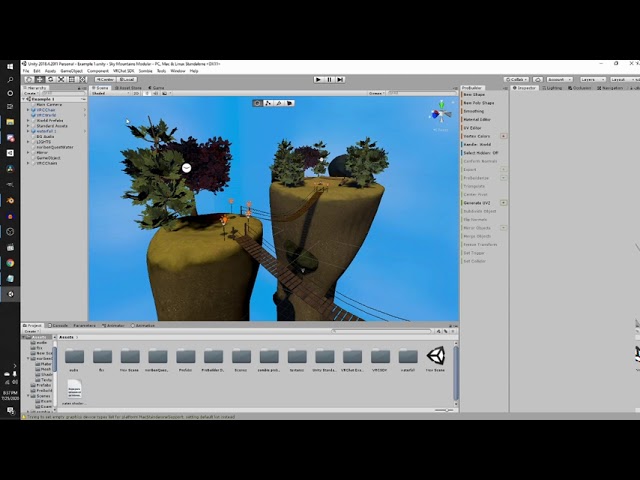
Silents intro to post processing:
https://gitlab.com/s-ilent/SCSS/-/wikis/Other/Post-Processing
Support me on Patreon: https://www.patreon.com/spookyghostboo
Join my discord: https://discord.gg/AF2m2uh
nocturne jungle
gaunt egret
i can help in call in roughly 30 minutes if you haven't got it, but i use https:...
ill give it a try soon if not ill dm you and let you know
modest patio
white moon
and how does it work, make the camera think its somewhere else? or is it renderi...
You make a camera in your scene, feed that camera into a rendertexture and place the rendertexture in the shader.
While the camera is inside the shader sphere it gets overrendered with the rendertexture
white moon
Mmmk. Thanks!
nocturne jungle
gaunt egret
i can help in call in roughly 30 minutes if you haven't got it, but i use https:...
this worked lmaoo

 gaunt egret
nocturne jungle
but these dont
gaunt egret
nocturne jungle
but these dont
check if they're using different materials maybe?
nocturne jungle
Ok, now
fixed the lights working everywhere else
but now one set of lights is blinding lmao

these are the good ones lol
 gaunt egret
weird. im not sure besides checking the materials are the same and messing with the bloom settings in post processing to make it softer
if that doesn't work and you're able to move the lights by themselves, id just copy+ paste the working ones to replace the weird ones
 azure anchor
I’m starting my very first world project. And the question is, would it be better to build it in Blender first and then import it into Unity or just put stuff together in unity?
gaunt egret
better to build in blender
lots of more control, plus you can uv map your textures correctly
 pulsar crow
Blender first to build out your mesh. You can prototype something in Unity if you REALLY wanted to get into it asap
azure anchor
pulsar crow
Blender first to build out your mesh. You can prototype something in Unity if yo...
Okay. That's what I was doing because I have no clue what I want yet. Lol.
azure anchor
gaunt egret
lots of more control, plus you can uv map your textures correctly
I am not for sure how to do that. 😅
pulsar crow
It took me quite a bit of time to be comfortable with Blender and also just looking up keybinds or ways to do what I want to do
gaunt egret
azure anchor
I am not for sure how to do that. 😅
its alright, you'll get there. there's a lot of good tutorials these days
azure anchor
gaunt egret
its alright, you'll get there. there's a lot of good tutorials these days
I sorta made an avatar but a world seems like a new beast
gaunt egret
azure anchor
I sorta made an avatar but a world seems like a new beast
https://www.youtube.com/watch?v=oWvarxgP8HM& got me through my first world

Download Package here:
https://drive.google.com/file/d/1L9GfRTsKZgz8yo7ON_oGq7fNCrlpU6cH/view?usp=sharing\
Starting in Blender 0:58
Texturing 34:33
Exporting from Blender 1:02:45
Importing into Unity 1:03:06
Unity Materials and Textures 1:07:38
Importing Assets 1:13:13
Colliders 1:24:04
Pickups 1:26:37
Lighting 1:28:59
UI Triggers 1:49:05
Post ...
near escarp
She just published a new one yesterday too
gaunt egret
she has other good video tutorials for world making like post processing (bloom, ambient occlusion etc)
oh i didn't even see that one
near escarp

Support me on Patreon: https://www.patreon.com/spookyghostboo
Join my discord: https://discord.gg/AF2m2uh
Links:
https://twitter.com/spookyghostboo1
https://spookyghostboo.booth.pm/
https://sketchfab.com/vrspace01
https://vr.space/
World Assets: https://drive.google.com/file/d/1L7BuJjQnEO9CEK1E3R7XHRUaL271rVVL/view?usp=sharing
Entire Project:...
gaunt egret
probably the most helpful channel ive come across xd
near escarp

gaunt egret
🤌
near escarp
I'll pin it for others
nocturne jungle
Any idea on why the light is flickering on and off based where i am?
gaunt egret
bake your lights
well change the light to baked too
all of them, otherwise you're gonna get 2fps
azure anchor
near escarp
<a:catYes:933157550172553246>
Is that video for me too?
gaunt egret
nocturne jungle
How do i bake them?
im trying to figure out why you don't have a lighting tab, uh
ill dm you cause its not world dev
nocturne jungle
yeah
near escarp
azure anchor
Is that video for me too?
Absolutely, spooky goes over the whole process, including blender modelling for beginners
azure anchor
near escarp
Absolutely, spooky goes over the whole process, including blender modelling for ...
Awesome
white moon
nocturne jungle
that measnt the emission strength on that material is really high
The higher the emission strength the more it'll glow from bloom
 rare flame
Quick question so I'm uploading a world and I also wanna upload it to quest but I have to optimize it
Do I just publish it then publish the quest versions and finally upload it to Community labs
Or do I upload pc to community and then quest
I only have one shot to upload it to Community so I feel like I should make sure
I've uploaded worlds before but I forget, its been a while-
Thank you!
Probably upload them both then hit community right? I feel like im overthinking it🤣
indigo badger
@brisk compass Thanks bro looks like its working with no issues
brisk compass
Glad to hear it!
nocturne jungle
neon lights are a nuisance to make in unity

 nocturne jungle
got audio toggle working lets gooo
 rain harness
Hello all! Figured I'll post my work in progress:

Went from an apartment to a house layout, lol. Might tweak things bit by bit.
bold ibex
my vrchat world keeps crashing in vrchat and i dont know why
azure anchor
I am trying to test build and my vrchat wont load now. Any one know why?
bold ibex
azure anchor
I am trying to test build and my vrchat wont load now. Any one know why?
does it crash when you open it in vrchat
azure anchor
bold ibex
does it crash when you open it in vrchat
Nope
It's just loading
and loading
bold ibex
like is it your custom world or a random world
azure anchor
Custom
bold ibex
huh
bold ibex
yeah i got something similar with mine @ me when you get the awnser sorry i couldnt help
azure anchor
It’s okay. I wander if vrchat is messing with stuff again
azure anchor
bold ibex
yeah i got something similar with mine @ me when you get the awnser sorry i coul...
Mine crashed after being on the "Loading" loop
azure anchor
bold ibex
yeah i got something similar with mine @ me when you get the awnser sorry i coul...
I published my world and it worked. I bet I broke the Build and Test feature
 fair musk
Ok so I am creating a world for the first time, it is completely done but when I go to test it my avatar immediately falls through the floor and because a loop of them falling does anyone know how to fix this
azure anchor
fair musk
Ok so I am creating a world for the first time, it is completely done but when I...
Click on the floor, and add a component called Box Collider
Then make sure the box collider is the same Height and width of the floor and then you should be good.
fair musk
azure anchor
Click on the floor, and add a component called Box Collider
Ok thank you!
azure anchor
fair musk
Ok thank you!
You're welcome! Let me know if you got it to work.
fair musk
azure anchor
You're welcome! Let me know if you got it to work.
So it kept me in the world but now when I spawn every time I touch the ground I respawn, I'll send a video
azure anchor
fair musk
So it kept me in the world but now when I spawn every time I touch the ground I ...
That's weird
fair musk
If anyone would want to join a call with me and see if any of my settings are messed up that would be greatly appreciated
 fossil flint
fair musk
If anyone would want to join a call with me and see if any of my settings are me...
fossil flint
fair musk
If anyone would want to join a call with me and see if any of my settings are me...
It looks like you need to move the respawn point down. It would be in the world descriptor
upper obsidian
fair musk
If anyone would want to join a call with me and see if any of my settings are me...
Or set up colliders
Also check that the whole world and the spawn point is around 0.0.0 coordinates.
 high dock
I'm a beginner in making vrchat world, I saw a tutorial on youtube to test the world, when I click build and test. vrchat does not open but what appears is a pop up microsoft store. how to solve this?
 upper obsidian
high dock
I'm a beginner in making vrchat world, I saw a tutorial on youtube to test the w...
upper obsidian
high dock
I'm a beginner in making vrchat world, I saw a tutorial on youtube to test the w...
Open sdk settings and specify the path to VRChat.exe
high dock
upper obsidian
Open sdk settings and specify the path to VRChat.exe
thanks bro, it works
 rain harness
surreal surge
is that ambientcg.com?
rain harness
surreal surge
is that ambientcg.com?
Yup!
Hopefully I'll be able to upload a world by the time I finish making this...
 bold ibex
Is it possible to add footstep sounds?
upper obsidian
bold ibex
Is it possible to add footstep sounds?
You can, tracking legs, and a trigger collider.
tribal linden
Anyone know how I can make a sword damage a player? I saw a tutorial but it must be outdated because it was for SDK2
VRC_CombatSystem is Deprecated
tribal linden
 somber axle
Looks awesome
somber axle
@fleet bay made the scene. im just putting the stuff together and doing the udon scripts
kind leaf
tribal linden
Anyone know how I can make a sword damage a player? I saw a tutorial but it must...
see Toly's combat system on vrcprefabs.com, while it is written for guns, you'll get the idea and can modify the weapons to suit your needs.
tribal linden
kind leaf
see Toly's combat system on vrcprefabs.com, while it is written for guns, yo...
I'll look into it right away
crystal aspen
I did place the "UdonSyncPlayer" into my world and put a videourl for autostart into it.. but when i upload my world for testing, i cant ender an url into the adress thingi.. cant interact with it..

 icy swift
does anyone have any experience in blender

I made this in unity and exported it
but is there a way to combine all of the polygons so it doesnt look weird with lighting
example:
 kind leaf
crystal aspen
I did place the "UdonSyncPlayer" into my world and put a videourl for autostart ...
kind leaf
crystal aspen
I did place the "UdonSyncPlayer" into my world and put a videourl for autostart ...
Select the inputfield and ensure the udon behavior is present.
crystal aspen
It dosnt have an udon behavior anywhere in the input fields
kind leaf
There is only one input field, the one displayed in the above screenshot is a caret. If it is broken it should have a missing component message where the udon behavior was. Without the input field udon behavior the input field will not work. This behavior is in the provided prefabs
crystal aspen
atm it looks like this
 kind leaf
expand the VRC Url input component
crystal aspen
this?

When i test it with "CyanEmu" in unity it works, but not in VRC after uploading it
kind leaf
If thats the case make sure the VRC Ui Shape is attached to the canvas

Also make sure that the Pos Z position for the InputField GameObject + all children are at 0. They are at 0 by default
 kind leaf
The only remaining check is to make sure the canvas isnt accidentally inside another colliders.
crystal aspen
well... i will look later more into it.. thx kev.. hope i can fix this... XD now im going into vrc rp.. ^^
Later i will try putting the prefab new into the scene maybe this will help.. if not well.. dont know XD
 thick granite
 nocturne jungle
How could i make it so my world lighting doesnt show on the "screens" so it looks like regular computer screens

 chilly hawk
Could be wrong, but I think that's what 'unlit' shaders are for
nocturne jungle
chilly hawk
Could be wrong, but I think that's what 'unlit' shaders are for
how could i go about messing with those
oh found it
lol thank you
chilly hawk
When using terrains, should I use lots of small terrains rather than a single big one?
nocturne jungle
Could someone link me to a Chair/Object collider toggle?
kind leaf
chilly hawk
When using terrains, should I use lots of small terrains rather than a single bi...
There is a lot more to terrain then that but yeah. The smaller your chunks the more occlusion culling can be utilized.
nocturne jungle
Why doesnt my post processing show much effect in game?


to be honest, doesnt look like i can see it at all
kind leaf
Make sure your reference camera is set
nocturne jungle
uhh how do i do that lol @kind leaf
chilly hawk
kind leaf
There is a lot more to terrain then that but yeah. The smaller your chunks the ...
Great, thanks. Just gotta deal with the horrible terrain editor now.
Unless I'm missing something, making slopes is horrible
Wish I had a plane with nodes I could raise/lower instead for lower poly terrain
kind leaf
The resolution of the terrain is in your hands. But yeah, node based would be nice
There are node based terrain generators for unity, you just need to construct the terrain in a project free from vrc, then use a terrain to mesh tool to convert it to something useable for you
kind leaf
nocturne jungle
uhh how do i do that lol <@!101043607124860928>
https://docs.vrchat.com/docs/vrc_scenedescriptor
Just apply the camera where it asks for it in the scene descriptor (VRCWorld)
nocturne jungle
kind leaf
https://docs.vrchat.com/docs/vrc_scenedescriptor
Just apply the camera where it ...
Like this?
 nocturne jungle
Now it aint workin at all ;-;
gaunt egret
you put the camera where the "vrcworld" is if im understanding kevbal right
not the vrcworld
 gaunt egret
oh i see
oh it looks like you already have it wtf
linking a doc where it only explains what things are is not helpful at all lmao. i would refollow the post processing set up video
you can change parameters in the post processing to make it stronger or lighter
 raven lagoon
i need some help because idk what im doing wrong, this error wont go away

 daring sigil
Hi, im just working on a world and its my first time making one that is quest compatible. Is there any way to use textures with transparency? and also metalic materials?
gaunt egret
daring sigil
Hi, im just working on a world and its my first time making one that is quest co...
transparency is not supported on quest at all, metallic is supported in standard lite
daring sigil
Ah ok thanks!
nocturne jungle
raven lagoon
i need some help because idk what im doing wrong, this error wont go away
I cant help but i love your energy 😂
 raven lagoon
nocturne jungle
I cant help but i love your energy 😂
raven lagoon
nocturne jungle
I cant help but i love your energy 😂
thanky ^.^ haha
left rain
gaunt egret
transparency is not supported on quest at all, metallic is supported in standard...
this is not entirely true. you can use transparent materials in quest worlds; just not quest avatars
transparency is pretty tough on the quest though, so it should be used sparingly
bold ibex
Does poiyomi shaders work with worlds?
green lagoon
just don't go crazy with the transparent materials as they're more expensive on mobile Hardware compared to PC
left rain
yes. you can use any shader you want on quest, though you will get warnings and you should be careful about overdoing it with fancy materials
green lagoon
so you're probably not going to have a good time if you're trying to Port a realistic Forest to Quest
bold ibex
left rain
yes. you can use any shader you want on quest, though you will get warnings and ...
Even with worlds?
gaunt egret
ive never seen a quest world with transparency lol
green lagoon
bold ibex
Even with worlds?
YES
left rain
mine uses it. just carefully.
bold ibex
Ok my world works fine in unity but crashes in vrchat
bold ibex
left rain
https://vrchat.com/home/world/wrld_2e37b570-7f57-46d5-9ef5-e33d1326c70b
What this
left rain
that's my world.
bold ibex
Ah ok
left rain
there's transparency on a few places. but it's otherwise pretty well optimized
it's definitely doable, just be careful where you use it, and use lite shaders where possible
the less materials the better
bold ibex
Do you know what could be causing vrchat on my world
green lagoon
we wouldn't be able to diagnose with literally no info on the world except crashing
bold ibex
green lagoon
we wouldn't be able to diagnose with literally no info on the world except crash...
I ripped the map from a game
Got rid of all the broken scripts and replaced the shaders to poiyomi
green lagoon
I'd suggest swapping all the shaders to standard light shaders
also what special effects are you even using to warrant poiyomi
bold ibex
Nothing special just someone told me to use them
green lagoon
well that's kind of silly of them
bold ibex
I'll try standard light
I'm at work right now so I'll get back to you tonight
Can I dm you when I get home
green lagoon
sure
left rain
poiyimi shaders are neat but not nearly as efficient as standard lite, only use them when you need them
green lagoon
and most of those special effects wouldn't be applicable on worlds
@left rain just gone wandering around The Conservatory very good job on it
left rain
green lagoon
<@!240260948374454272> just gone wandering around The Conservatory very good job...
much appreciated!
green lagoon
and definitely good idea having all of the plants be pure geometry to make it run on the quest
left rain
yeah, i had to carefully choose plant species to avoid using transparency.
the only actual transparent shaders involved are the window glass and the hidden whisky bottles
 cobalt smelt
Unity (2019.4.3.31f1) seems to sometimes mangle the transparent areas (alpha) of textures. It happens with both the standard shader, and with a basic, unlit, vertex shader I made, but not with Particles/Standard Surface, so I'm guessing its something specific to vertex shaders, but I'm not sure. Anyone know what causes it and/or how to fix or work around it?
 kind leaf
nocturne jungle
👍
kind leaf
nocturne jungle
👍
If by linking the camera breaks post processing completely then you have more than one camera in the scene. Its an ultra simple setup and outside of the inital setup all that is required to make it render in vrchat is to link it to the reference camera spot in the SD. PP does not work in Quest btw.
kind leaf
gaunt egret
linking a doc where it only explains what things are is not helpful at all lmao....
A doc that explains what things are is exactly what someone that has no idea needs. Knowing what and where is more important than just blindly following a tutorial and learning nothing. 😉
gaunt egret
learn nothing from tutorials lol
kind leaf
just as hilarious as learning from reading huh 😉
The irony is complaining about reading while asking for assistance in discord which requires reading lol
nocturne jungle
kind leaf
If by linking the camera breaks post processing completely then you have more th...
Does this count the camera being on the one post processing component?
kind leaf
So normally your scene has one camera, and you attach the post processing to it. If you made another than use that as your reference
Just make sure you only have an audio listener on the reference camera while you are at it. Only want one per scene
A camera comes with one activated by default so two cameras means you have two audio listeners as well
Basic setup, with minimal toggle support


 kind leaf
nocturne jungle
Does this count the camera being on the one post processing component?
kind leaf
nocturne jungle
Does this count the camera being on the one post processing component?
if you need further assistance getting it to work, feel free to dm, i can screenshare after 9pm est
nocturne jungle
kind leaf
if you need further assistance getting it to work, feel free to dm, i can screen...
10-4
@kind leaf Youre a magical human being thank you SO much
nocturne jungle
How can i make it so peoples avatars dont glare up like the sun?
 left rain
nocturne jungle
How can i make it so peoples avatars dont glare up like the sun?
left rain
nocturne jungle
How can i make it so peoples avatars dont glare up like the sun?
increase the bloom threshold
wind girder
Any suggestions on what I should put on this shelf?

 nocturne jungle
wind girder
Any suggestions on what I should put on this shelf?
nocturne jungle
wind girder
Any suggestions on what I should put on this shelf?
what kind of world you going for
uh, is this normal VRC?
 bold ibex
nocturne jungle
uh, is this normal VRC?
bold ibex
nocturne jungle
uh, is this normal VRC?
creepy
 azure tendon
i need help
bold ibex
same
nocturne jungle
bold ibex
creepy
i never seen that pop up when ive used spotify
azure tendon
I get an error that says this "NullReferenceException: Object reference not set to an instance of an object
VRCSDK2.RuntimeWorldCreation.Start () (at Assets/VRCSDK/Dependencies/VRChat/Scripts/RuntimeWorldCreation.cs:82)"
misty wave
wind girder
Any suggestions on what I should put on this shelf?
pictures of me
wind girder
misty wave
pictures of me
lol maybe
azure anchor
On blender, can you put more than one material on an object?
fair musk
can anyone get on a call with me and help me fix this?
azure anchor
Does anyone have a white wood material?
gaunt egret
mmm lets see if the bot will snipe this link
gaunt egret
azure anchor
Does anyone have a white wood material?

Free materials never looked this good! Get 1000+ PBR materials and textures for free under the Public Domain license.
gaunt egret
i would recommend gimp
azure anchor
Okay
gaunt egret
i use a drawing program called krita to do my edits because i draw too, but i know the bare minimum of gimp to help change a wood color lol
 limber panther
I'm using a super basic video player for some general music for my world, but I can't seem to get it to loop. I figured I just had to hit 'Loop' on the video player, but is there something I'm missing?

 indigo frigate
Would it be possible to make a VR Chat world from a 3DS/Citra assets?
I want to make a world from a 3DS game that means a lot to me, is this possible?
gaunt egret
i don't see why not but thats asset ripping and usually people here won't help with that
indigo frigate
Oh ok, I understand
gaunt egret
limber panther
I'm using a super basic video player for some general music for my world, but I ...
none of these settings look weird, i had the same exact problem before throwing in the towel and just using https://github.com/MerlinVR/USharpVideo

GitHub
A basic video player made for VRChat using Udon and UdonSharp - GitHub - MerlinVR/USharpVideo: A basic video player made for VRChat using Udon and UdonSharp
im not an expert by any means, so i could be wrong about your settings but this worked right out of the box after following the directions
 umbral dune
alright I might have brain damage - I build a quest version of my world, but when I test it out with a quest user, I can't see them
oh my god only as I send that I realise
the quest is on the open beta
gaunt egret
im not good and not bad, but ask your question instead of asking to ask :p https://dontasktoask.com/
 limber panther
gaunt egret
none of these settings look weird, i had the same exact problem before throwing ...
limber panther
gaunt egret
none of these settings look weird, i had the same exact problem before throwing ...
seems like changing to the other video player component fixed it. weird, but whatever
 gaunt egret
limber panther
seems like changing to the other video player component fixed it. weird, but wha...
gaunt egret
limber panther
seems like changing to the other video player component fixed it. weird, but wha...
oh thats good. if it works it works lol
azure anchor
gaunt egret
im not good and not bad, but ask your question instead of asking to ask :p https...
I removed it anyways..
gaunt egret
you're allowed to ask questions xd
 shrewd palm

Found the perfect centerpiece for the gallery:
https://t.co/YZ5fz0npkj
#Blender3d #VRChat #worlddevelopment #unity3d #blender #CHEETAH #render #blenderrender https://t.co/8S2Cj18Q3A
 Twitter
·
kind leaf
azure anchor
Can I make a useable window for quest users?
Twitter
·
kind leaf
azure anchor
Can I make a useable window for quest users?
I assume you mean a transparent surface. You can use the standard shader for World Development on Quest. You can also use something lighter like Filament. Transparencies are heavy, they are not forbidden.
azure anchor
kind leaf
I assume you mean a transparent surface. You can use the standard shader for Wor...
Okay cool. I also have another question. It has to do with the pool table. Has anyone else got an error from unity when trying to do the test build?
I had to delete the package entirely
kind leaf
This table https://github.com/VRCBilliards/vrcbce ? If so, no. Not when ensuring the required dependencies are met.

GitHub
VRCBilliards: Community Edition. Contribute to VRCBilliards/vrcbce development by creating an account on GitHub.
azure anchor
kind leaf
This table https://github.com/VRCBilliards/vrcbce ? If so, no. Not when ensuring...
Yep. This one. It gave me an error and told me some of the scripts were wrong
kind leaf
depends on the exact error messages but basically it just means there is a conflict or a lack of requirements being met. Re-read the git and follow the directions, double check and you should be fine. If there is a preexisting issue you should have those errors before the import. Also make sure you are importing the latest build and not the git master.
azure anchor
It really didn’t tell me much at all. :/
kind leaf
Requirements:
A project with the latest VRChat SDK3 Release installed in it
The project also has the latest UdonSharp
The project also has TextMeshPro installed in it.
Its that simple.
kind leaf
So you have UdonSharp?
Its not the same as Udon
azure anchor
I can put it back into my scene and show you
azure anchor
kind leaf
So you have UdonSharp?
Its not the same as Udon
Idk?
kind leaf
GitHub
An experimental compiler for compiling C# to Udon assembly - GitHub - vrchat-community/UdonSharp: An experimental compiler for compiling C# to Udon assembly
azure anchor

Got it again
And this is with the UdonSharp, latest version of the VRCB, and SDK3
🤷♂️
kind leaf
The highlighted error isnt a script compile error. There should be other errors shown.
azure anchor
That's all I kept getting ;-;
kind leaf
do you have clear errors on build selected?
azure anchor
Nothing in my hierarchy had errors. Only when I added the asset to my project, it freaks out
I haven't even touched it yet.
nocturne jungle
Could anyone link me to a good tutorial on how to do a collider toggle?
kind leaf
- Check out https://tryuniverse.com/ and use the code VOWGAN to get $50 off when you enroll. *
Enabling and disabling large numbers of objects all at once is pretty easy, and here I do so using Colliders for a set of couches. All assets are available on my Patreon if you'd like to have access to anything I made during or before the video.
00:0...
tribal linden
Anyone know if there is a feasible way to make a glider? XD
kind leaf
tribal linden
Anyone know if there is a feasible way to make a glider? XD
I'm sure you inspired someone... All vehicles are the same at the core. A vrc_station which is influenced by an udon script based on conditions being met. You could theoretically take any flight prefab, disable the mesh renderer and throw a glider object in as a child and have a wonky glider.
tribal linden
kind leaf
I'm sure you inspired someone... All vehicles are the same at the core. A vrc_st...
Yo! I'm pretty sure I was looking up a plugin made by you Yesterday xD
azure anchor
I tried making it to where the an object can turn on and off a mirror and it's not working.
 tribal linden
azure anchor
I tried making it to where the an object can turn on and off a mirror and it's n...
tribal linden
azure anchor
I tried making it to where the an object can turn on and off a mirror and it's n...
I saw a good tutorial on it recently that even helped with the HQ and LQ
want me to send you the link?
tribal linden
kind leaf
I'm sure you inspired someone... All vehicles are the same at the core. A vrc_st...
I would think that having an object that you can hold onto and falls slowly could be pulled off farely easy with an Udon behaviour, but I'm still really green
azure anchor
tribal linden
want me to send you the link?
Yes please!
cerulean echo
@azure anchor i think you not addet the mirron on the script maybe you not done it public so you can add the gameobject or you not addet it the script looks ok
azure anchor
cerulean echo
<@339622948430413835> i think you not addet the mirron on the script maybe you ...
I am sorry but do what now?
cerulean echo
Do you addet the mirror on the script ? On the gameobject where the script is ?
azure anchor
cerulean echo
Do you addet the mirror on the script ? On the gameobject where the script is ?
Yes
It did not work what so ever
cerulean echo
The script looks ok weard but you can click on the button? Maybe screenshot the gameobject where the script is
azure anchor
cerulean echo
The script looks ok weard but you can click on the button? Maybe screenshot the...
I will later. I'll let you know what happened
cerulean echo
@azure anchor ok but i looket my script and its 100% like yors so should work maybe you forgot to press compile?. no idea but a screenshot would be good to see but try to press the compile maybe that helps but normaly should work
azure anchor
cerulean echo
<@!339622948430413835> ok but i looket my script and its 100% like yors so shoul...
Maybe it was the compile
Where do I do that on?
 shut lichen
i wonder work for OSC?
cerulean echo
where the notes ar up in the i think right corner

no idea if its that like say would be good to got also a screen to see whats going on
tribal linden
azure anchor
I tried making it to where the an object can turn on and off a mirror and it's n...

Vowgan's Video - https://youtu.be/E0D9Z8-HVBI
Alternative guide by Akalink - https://ask.vrchat.com/t/world-ui-setup-guide-udon-worlds/7279
VRChat Discord - https://discord.com/invite/vrchat
Written Guide - https://steamcommunity.com/sharedfiles/filedetails/?id=2507157026
iconoclass.booth.pm
https://ko-fi.com/Iconoclass
https://twitter.com/Ic...
This tutorial was very usefull for me
half way trough with it I had my mirrors done xP
azure anchor
cerulean echo
no idea if its that like say would be good to got also a screen to see whats goi...
Oh okay. I’ll try that out then
 quasi fern
that entire series of videos is very helpful. i recommend watching all of them.
tribal linden
quasi fern
that entire series of videos is very helpful. i recommend watching all of them.
Yea, they seem really helpfull
somber axle
azure anchor
I tried making it to where the an object can turn on and off a mirror and it's n...

In this tutorial I will show you how to add a high-quality and low-quality mirror with toggles to your VRChat world with the new VRChat SDK3 and the Udon programming system!
Timestamps:
- Intro 00:00
- Set up scene and mirrors 01:16
- Add mirror toggles 02:24
- Programming with Udon 03:20
- Interaction text 05:27
- Test in VRChat 05:52
🌸 3D Mo...
this will maybe help u a bit
also i have a question
how can i make a toggle for pickups? like a local toggle. just for the player
 frail whale
how long about does it take to make a world start to finish?
like weeks or days or hours?
i have an idea for a world but am def gonna need help
left rain
it entirely depends on the complexity and quality of what you're trying to build, and how well you know what you're doing
definitely think weeks or months more than days or hours unless you're already very skilled or you're building a very minimalist space
frail whale
ok great thanks
tribal linden
frail whale
i have an idea for a world but am def gonna need help
Yea you could pop a simple world in an hour or spend months making a Complex one... What do you have in mind?
 wintry iron
any one have a prefab worlds on vrchat besites
bold ibex
Hello I'm having trouble on searching worlds (I'm mean looking for worlds) and I'm new on VRChat 😅
wintry iron
what mean?
 peak sluice
Hi, I need some advice, is there any way to make a border for models that have been exported via .fbx so that collider doesn't have to make a manual
 wintry iron
any one have a prefab worlds on vrchat wesites
left rain
peak sluice
Hi, I need some advice, is there any way to make a border for models that have b...
you can just make a separate mesh collider FBX and use that... but in general they are much less efficient than using simple box colliders.