#world-development
39 messages · Page 118 of 1
 forest star
 ruby jay
in unity, when you import a model, the model will have default materials, you need to create materials and assign them to the submeshes
forest star
Ok, I’ll try it this way and see how it performs first and if it’s bad then I’ll try that, if I can figure it out lol
 stone marsh
Or you could just... Extract the materials that are already there
forest star
It seems to work so far, no lag or anything
Don’t judge the mess lol, it’s not always like that 😅 it just happened to be the day I scanned
 unique radish
Nice scan lol that's pretty good
forest star
unique radish
Nice scan lol that's pretty good
Thank you 😊 there’s some things that didn’t quite come out but that’s ok, wasn’t meant to be perfect. I made it so I can invite my friends to a nice place to just hangout
My mom didn’t want to be in the scan lol but my dad didn’t care since you can see him sitting in his chair 😂
 bold ibex
Can someone ban this guy for harassing me? He's clearly got not life and is super triggered. He seems like he's bout to go shoot up a school because his mommy didn't love him.
stone marsh
bold ibex
Can someone ban this guy for harassing me? He's clearly got not life and is supe...
Your post is toxic and off topic. Reports have a place to be made. This isn't it. Call outs are also against the sever rules.
bold ibex
stone marsh
Your post is toxic and off topic. Reports have a place to be made. This isn't it...
Sorry. I'm just venting because I'm tired of all these people who keep breeding and creating these creatures who just think they can take their anger out on people because someone hurt them. But I will refrain. I understand it's childish and not ok. Nothing is ever done to them however for their behavior. They will be this way and not change.
 surreal nebula
trying to setup ukeyboard, but when I unpack prefab to delete things I don't want. it breaks the output to canvas
I don't know where you select the output again
 unkempt mauve
Is it possible to export projects from Adobe Illustrator and use it in my VR Chat world
 green lagoon
unkempt mauve
https://canary.discord.com/channels/189511567539306508/337672341041446912/933465...
green lagoon
unkempt mauve
https://canary.discord.com/channels/189511567539306508/337672341041446912/933465...
just export the graphic as a PNG
unkempt mauve
green lagoon
just export the graphic as a PNG
What about if it's an animation?
green lagoon
video file or Sprite sheet with all of the frames
unkempt mauve
green lagoon
video file or Sprite sheet with all of the frames
Sprite sheet with all of the frames
unique radish
I made a lot of changes to one of my scenes and I think I messed something up. After clicking build & publish I can't interact with any of the text boxes or buttons on the upload screen. It works if I build&publish a different scene in the same project though .
 proven vigil
i added a spawn to my world, but whenever i try to build and test, it always comes up with "You must have one spawn in VRC_Scene Descriptor" i have the vrc world thing, i have the game object as spawn, it always comes up with the message. please help.
bold ibex
proven vigil
i added a spawn to my world, but whenever i try to build and test, it always com...
@proven vigil is the VRC World prefab in the world?
proven vigil
yes
proven vigil
yes i did that
bold ibex
Then click the vrc world prefab
Click the little arrow where it says spawn to expand it
proven vigil
look i've done it all, look
 bold ibex
Drag and drop the the empty game object to where it says vrc world transform
Uhh thats looks different
proven vigil
should i reset it
bold ibex
Yeah try that
proven vigil
nope, still the same
 stone marsh
Your spawn is set to zero. Change it to 1 and add the spawn point to it. Or just use the prefab that is included with the sdk called "VRCWorld"
bold ibex
Thats really weird how its not showing the transform option
stone marsh
That's how the descriptor looks
It's not showing where he can place the spawn because it's set to zero
bold ibex
That makes sense
 stone marsh
If you just use the VRCWorld prefab included with the sdk, it has itself set as the spawn so you just drag that into your scene and place it where u want and it works
proven vigil
okie dokey
bold ibex
Also merc idk if you can answer this or not but lets say i make a building, is it possible to turn it into a prefab so i can bring it into other projects?
 left rain
if you want to share a prefab between projects, export it as a .unitypackage
stone marsh
You can prefab anything in your scene by dragging it into your asset folder. If you move it to another project, you'd need to ensure all the needed files that the prefab depends on, are loaded first.
 round sandal
hey is there any way to make objects that someone else is handling not lag?
proven vigil
oh btw, should i connect the vrc world to the world i'm making like this:
 stone marsh
Often times, choosing to export something as a package, will export your entire project as a dependency if not careful.
bold ibex
Interesting, that'll be helpful for larger scale project
Ill play it safe and make a new project when i plan on making a prefab
round sandal
i wanna make like
cool swords you can like hit together and stuff
but its impossible to block a strike when you see it coming 2 entire seconds after it connected
unkempt mauve
@green lagoon
Sprite sheet with all of the frames
green lagoon
unkempt mauve
<@!216145046347448320>
> Sprite sheet with all of the frames
basically you'll just have to convert it to some format Unity actually knows what to do with
unkempt mauve
green lagoon
basically you'll just have to convert it to some format Unity actually knows wha...
What would I convert it to?
green lagoon
a video file would probably be the simplest
what kind of Animation is it and what do you want to do in the world
stone marsh
Flipbook works too
Poiyomi and a few shaders support flipbooks. Export as a .gif and let poi convert it to a flipbook or use that ezgif site
unkempt mauve
green lagoon
what kind of Animation is it and what do you want to do in the world
Like I'm trying to make a laser light show with animations
green lagoon
where would those animations be displaying in the show
unkempt mauve
Can you specify what you mean by where
stone marsh
Prob be better off animating something in blender then lol
Or use this https://github.com/AcChosen/VR-Stage-Lighting
GitHub
A collection of HLSL shaders, UdonSharp scripts, 3D models, prefabs, and assets designed to emulate the real control, quality, and complexity of professional stage lighting into VRChat in as many w...
Which already has laser lighting that is audio reactive
green lagoon
like that's a big difference if you're trying to use the animation to make the lasers or if it's just on some screens in the map
green lagoon
stone marsh
Which already has laser lighting that is audio reactive
yeah that would work a heck of a lot better
unkempt mauve
To be specific, I'm trying to remake this.
https://www.youtube.com/watch?v=fQGEVe1qjcI&t=199s

LITE Enchanted Village Jordan's furniture Avon, MA
Patreon link: https://www.patreon.com/Stormchaserjs
This inspires me to remake it in vrc.
stone marsh
Ah, yea, could use a flat quad with a flipbook for the animations then the stage lighting lasers for the actual lasers
You'd have to use the flipbook as a mask for the alpha so it gets cutout with a cutout or transparent shader.
green lagoon
unkempt mauve
To be specific, I'm trying to remake this.
https://www.youtube.com/watch?v=fQGEV...
that is very helpful having the reference material for what you're trying to go for
unkempt mauve
green lagoon
that is very helpful having the reference material for what you're trying to go ...
My idea was retracing the animations frame by frame. I don't know if that might be to much work...
stone marsh
Lol, probably
green lagoon
I honestly wonder if you could just make a video player that chroma keys out the the black to make it transparent and use the original video?
unkempt mauve
green lagoon
I honestly wonder if you could just make a video player that chroma keys out the...
That could be a possibly too. Not sure how
green lagoon
not sure as well
or I suppose you could make the flip books from the original video
stone marsh
green lagoon
I honestly wonder if you could just make a video player that chroma keys out the...
Yea. Would work, video isn't straight on tho so it might look jank af
You'd just use the video render texture as your alpha
But it would look bad using that video tbh
unkempt mauve
I don't know if there's somewhere on the web I can use where I can see how many frames in total there are in a video.
left rain
multiply time in seconds by FPS
stone marsh
What I see in the video, you'd have a shit ton of frames, and it would prob be fairly large file size. But you can actually see a frame count of a video on YouTube using the info viewer or by downloading the video and just opening it in editing software, or I think vlc can show that stat as well
Yea, if you know the fps you can do that too.
left rain
you could always frameskip to reduce FPS if you need to save frames, at the expense of choppier motion.
stone marsh
Yea, you'd have to interpolate to make a flipbook like that usable tbh. Cutting frames out might not be good since it's set to music so it needs to match, but you can cut every other frame out and interpolate black blanking frames that can't be seen realistically to save a bit of data.
Lots of ways you can reduce the size.
left rain
for longer animations an mp4 would be more efficient, though i don't know the specifics of what VRchat supports there
unkempt mauve
left rain
multiply time in seconds by FPS
Sure, but I meant like a software or something
left rain
right click a video file to get the total runtime and multiply that by the framerate, i mean that's pretty straightforward. if you can load the file into resolve or after effects you can switch the timecode to frames to see
unkempt mauve
stone marsh
What I see in the video, you'd have a shit ton of frames, and it would prob be f...
VLC shows frame count?
stone marsh
I think if you right click on the YouTube video it will show frame rate or total frames in the stats for nerds or whatever they call it option
left rain
for any real length of time though you're going to quickly exceed a reasonable texture map size for a flipbook unless you either drop a ton of frames by skipping 50% or 75% of frames and then dividing the FPS accordingly, or scale down your tile size to something super small
stone marsh
128x128 video lol
Course, if you did it all in illustrator you can make it a mp4 and just host it on Dropbox so no impact to size.
left rain
honestly, laser shows like that are done with some fancy math by rapidly spinning lasers and mirrors around. it's a lot of trig. depending on the patterns you're trying to create it might be easier to get some cool laser patterns entirely in a shader. you could probably find some stuff to translate on shadertoy and either code it in HLSL or use amplify or the shader graph to do the math
if you're savvy enough to figure out a few cool patterns you could get WAY more complex looks for a teeny tiny file size and better performance
stone marsh
Well yea, doing this all in shader would be the ideal way of doing it for sure lol. But I doubt they can manage that, let alone converting a shadertoy shader xP
left rain
i'm just throwing out options because accomplishing an animation like the one posted in a flipbook is probably going to end up a blurry mess
left rain
 stone marsh
Wellz learning how to raymarch can be fun anyways
 nocturne jungle
Why does this happen?!
stone marsh
If I was home I'd just convert that shadertoy shader real fast since it's single pass
left rain
@nocturne jungle check your colliders, make them simple boxes instead of meshes if they exist as mesh colliders currently
stone marsh
Or set your mesh collider to be convex
green lagoon
left rain
shaders are magic
like folks have gotten a fully functional Linux computer using vrchat shaders https://blog.pimaker.at/texts/rvc1/

Linux in a Pixel Shader - A RISC-V Emulator for VRChat
left rain
yeah compute shaders are a whole other thing, i need to find the free time to study that shit
stone marsh
That's not done in a compute Shader. Part of the joy of how it was managed.
left rain
wtf that's a fragment shader?
stone marsh
Yes
left rain
crazy shit.
there's a similar technique for animating rigid bodies, soft bodies or fluids called VAT... each pixel of a texture map is a 4x4 transform matrix defining an object's position and orientation in space. means you can import baked destruction sequences for cheap.
but this is off-topic, sorry.
stone marsh
unkempt mauve
@green lagoon Do you think it’s possible to create an animated shader exactly how the animations are animated?
green lagoon
probably but I know nothing about writing shaders
unkempt mauve
Me neither 😅
 fluid wren
How does one make a mirror toggle with sdk3?
green lagoon

In this tutorial I will show you how to add a high-quality and low-quality mirror with toggles to your VRChat world with the new VRChat SDK3 and the Udon programming system!
Timestamps:
- Intro 00:00
- Set up scene and mirrors 01:16
- Add mirror toggles 02:24
- Programming with Udon 03:20
- Interaction text 05:27
- Test in VRChat 05:52
🌸 3D Mo...
 acoustic heart
Does someone have a tutorial for a udon script that makes it that people can put items on other players like hats? :3
green lagoon

GitHub
Contribute to bdunderscore/attach-to-me development by creating an account on GitHub.
acoustic heart
green lagoon
https://github.com/bdunderscore/attach-to-me
perfect thank you <3
green lagoon
https://vrcprefabs.com/ a handy website for finding prefabs people have made
 whole edge
^^^ vouch
acoustic heart
:o i see thx
surreal nebula
surreal nebula
trying to setup ukeyboard, but when I unpack prefab to delete things I don't wan...
try again
nocturne jungle
left rain
<@!563181010485772295> check your colliders, make them simple boxes instead of m...
Ah ok thank you will do
 clear frost
Does anyone know how ton increase the render distance
bold ibex
Is it just me or is unity always slow and really laggy?
bold ibex
i cant get the vrchat tab to appear in the top bar
can someone help?
like the tab is there sorry but theres no control panel

its just this
 primal root
Where do I get it
bold ibex
vrcprefabs
primal root
Gotcha
I had the same issue, started the world from scratch
Happend when I upgraded unity
primal root
Hm, Idk if there is a offical way but I had to start the world from scratch. From my previous experiences the project may be permantly broken unless you have a backed up safve
Is there a place to redownload usharp?
It is not working in my project
Nvm I am dumb
 analog wyvern
is blender good for uv mapping/textures? or should i use a different program?
nocturne jungle
Best video tutorial for USharp?
left rain
analog wyvern
is blender good for uv mapping/textures? or should i use a different program?
you can't really texture much inside blender, but yes you can lay out UVs. for texturing you'd typically use something like substance painter
 lyric acorn
If I had a 0.001 shadow depth light for a shader for a world, say a nice water shader, and cull only to the layer of the water object, is it adding draw calls for everything as a second light even if layer culled? The editor game stats shows a duplication of draw calls even if it hits only one object on that light's layer
 topaz cobalt
I opened the unity asset store close it after downloading an asset but then i cant open it again  im new to unity
topaz cobalt
not there
stone marsh
lyric acorn
If I had a 0.001 shadow depth light for a shader for a world, say a nice water s...
You can use post processing dof to activate the depth buffer. This is the method I use for adrift and singularity. Xiexe has a small blurb for how to set the settings to do this without actually using the effect as dof should never be actually used. I think it's on their fake godrays page but I can't recall, I'm not home otherwise I'd shoot u a screenshot of my setup but none the less, I can later or just dm it to u. To elaborate on the point light tho, the entire point of the shadow caster is to activate the depth buffer. The light doesn't need to actually cast onto the layer the shader is on, it should ideally be set to a unused layer, as the buffer will be activated regardless.
 topaz cobalt
 tall hound
just figure out that the tab randomly dissapear it so i opened the other way, it was weird tbh
btw can assets have any type of virus?
tall hound
topaz cobalt
How can i put an scenario, like stars or a city?
 cobalt wing
how to I make a video player play multiple urls depending on which toggle button is pushed
cobalt wing
nocturne jungle
Best video tutorial for USharp?
Vowgan often shows the udon graph version then the Udon sharp version https://www.youtube.com/watch?v=CQdjyHFxwK4

Check out Universe for VR development courses in VR! Use code "VOWGAN" to get $25 off any course when you enroll.
https://tryuniverse.com/
While there's no actual programming in this tutorial, there's still plenty to cover with the new Video Players being released! More tutorials will come soon with specifics on playlists, in-world URL changing...
@nocturne jungle https://www.youtube.com/watch?v=6fqFmqBDSNU
JOIN MY DISCORD! https://discord.gg/nS3x5Pr
Time to get some control over your video players! This one took a bit more time for me to figure out the simplest way to convey everything and condense it down, plus the time of moving back to college. The recording for this started at 45 minutes, so this is by far my most edited video.
All in all, th...
 solemn hatch
analog wyvern
is blender good for uv mapping/textures? or should i use a different program?
solemn hatch
analog wyvern
is blender good for uv mapping/textures? or should i use a different program?
blender works pretty good for uv mapping , theres a few different plugins that can help to like zen uv or uvpackmaster if you need more advanced toolset too.
solemn hatch
topaz cobalt
How can i put an scenario, like stars or a city?
are you talking about using a panaromic image of like stars or a cityscape , if so you can use the sky box for this
topaz cobalt
solemn hatch
are you talking about using a panaromic image of like stars or a cityscape , if ...
is it on the asset store?
solemn hatch
panormatic hdr images you can find on the net or go shoot them with a camera yourself
you then create a new material in unity , assign it a sky box shader and drag your image on to it , set your cam to pick up that skybox material , this will change that dome in unity from a gradient to that image , there shoudld be videos of it on youtube to follow , if you search for skybox unity
topaz cobalt
oh okok thanks!
left rain
solemn hatch
if you want a mulity tiered city , you can cut buildings out and layer them on cards , or mulitple domes to create depth , but start with the skybox
 zealous venture
Does anyone know how to create the fluffy/soft looking carpet you see in some worlds that looks like it uses a height/bump map on the texture? I've been messing with displacement and height maps in blender for a bit now, but I can't seem to find settings that make it look similar to those carpets without also using an absurdly high subdivision count. Wanting to avoid having a lot of polygons if I can, but I also cannot find any good guide online that do something like this, most just point toward the particle system in blender, which is a no go since it often gets into the hundreds of thousands of polys.
Does anyone know how to accomplish decent looking fluffy carpet with extreme height maps on a small scale, or something of the sort?
tall hound
Does anyone have a clue why when I interact with a button it falls through the world?
Either they fall or disappear.
 glossy burrow
zealous venture
Does anyone know how to create the fluffy/soft looking carpet you see in some wo...
glossy burrow
zealous venture
Does anyone know how to create the fluffy/soft looking carpet you see in some wo...
poiyomi has a fur shader that you can try
zealous venture
glossy burrow
poiyomi has a fur shader that you can try
Hadn't considered that, I can check it out. Does it perform well in terms of not being taxing on someone's computer?
glossy burrow
yea
zealous venture
Sweet, I'll check it out!
glossy burrow
epic
alos does anyone know why the hell i can see stuff behind the mirror when its on
 lyric acorn
stone marsh
You can use post processing dof to activate the depth buffer. This is the method...
lyric acorn
stone marsh
You can use post processing dof to activate the depth buffer. This is the method...
Good stuff, I am definately interested if you can find the resource on that
zealous venture
glossy burrow
alos does anyone know why the hell i can see stuff behind the mirror when its on
It looks like an issue involving your render que. Almost like the mirror is on a transparent layer or acting as a stencil that causes your skybox to appear over objects.
glossy burrow
zealous venture
It looks like an issue involving your render que. Almost like the mirror is on a...
you can see like the faint outline of the window behind it
 solemn hatch
On a side note if the fur shader is super heavy or taxing on your worlds you can always lod it so as you move away from it it can slowly blend to a flat shaded texture at distances
zealous venture
glossy burrow
you can see like the faint outline of the window behind it
Are you using the normal vrc mirror?
or is it one with a custom shader?
glossy burrow
vrc mirror
zealous venture
Hm let me check my world really quick because I have glass right behind one of my mirrors and this doesn't happen
I'll try the standard unity shader with transparent and see if the same thing happens
 glossy burrow
ye
zealous venture
also you probably dont want the mirror to reflect everything
zealous venture
Ah
zealous venture
Heh I wish I had a better idea but I am still very new to world stuff. From my limited experimentation with stencils and transparency on avatars, it looks similar to a stencil effect with transparency, but I am not 100% sure enough to give ya a solution, sorry.
It could maybe be a post processing effect now that i think about it
potentially
zealous venture
that sounds right
glossy burrow
is there a way for to stop it without turning it off
zealous venture
That is an excellent question 😆
my mirror does it too when i toss AO into my world
Honestly I have not messed with PP enough to know what to suggest for this at all. I would probably end up dealing with this by just cranking AO up in my baking and getting to the point that I like.
Would technically perform better that way too
Unless you're wanting to give people a slider for AO in the world.
glossy burrow
frigg
zealous venture
I know I'll be messing with PP effects more once I finish modeling things in blender for my world and I might experiment with AO settings, so if I find anything I'll let ya know.
stone marsh
lyric acorn
Good stuff, I am definately interested if you can find the resource on that
Here ya go. Gotta set it just like this and there should be no dof effects actually visible. Like I said, I use this in my worlds and haven't ran into any issues, just a method of activating the depth buffer. Do note tho, if you already have post processing in your world, and you have a toggle to turn it off, it will also break your depth effects since the buffer will turn off, may be best to target individual post processing effects rather than turn the entire ppstack off. Good luck :3
 topaz cobalt
Just finished my very first world it is also my first time using unity, i followed a tutorial but it feels good because i think im ready to make my own  any advice so it can be more easy to me?
bold ibex
when compressing textures does the overide for android only count as the build for android and not the windows one?
surreal nebula
surreal nebula
trying to setup ukeyboard, but when I unpack prefab to delete things I don't wan...
hmm
 mild spade
What do you mean by "breaks the output to canvas"?
surreal nebula
it doesnt go onto the chat area for others to read
 bitter idol
question, does the missing script component take up extra world space if i have a bunch of them and dont remove them all?
 nocturne jungle
topaz cobalt
nocturne jungle
topaz cobalt
Search up "Trees" in the assest store and you gotta make your own forest.
nocturne jungle
topaz cobalt
https://assetstore.unity.com/packages/2d/textures-materials/free-forest-pack-68957 Also use this for the outskirts as a filler

Elevate your workflow with the Free Forest Pack asset from Palladadesign. Find this & more Textures & Materials on the Unity Asset Store.
bitter idol
does anyone PLEASE have a missing mono behavior remover script that is unity 2019 compatible. my old script doesnt work in 2019
nocturne jungle
@topaz cobalt ^^ Dont know if you got the pings
 small pond
How should i make colliders for the roof of this house
 zealous venture
small pond
How should i make colliders for the roof of this house
zealous venture
small pond
How should i make colliders for the roof of this house
Mesh collider if it's a separate mesh from the rest of the house.
small pond
sadly it is not
 cerulean echo
@small pond i dont realy seeng the roof well but if it sible you can try 2 box colider or think about it if you realy need to colide ther is the player gona colide with the roof can the player walk on it or hit hes head ther if he jump
small pond
theres no real way to get up there so i just left it uncollided
cerulean echo
👍
nocturne jungle
Trying to make this a pickup, also a mug. They dont work and i dont know why.
 bold ibex
any idea how to make a cut out mirror?
 lucid night
anyone have the link to the udon assets vault?
bold ibex
@hasty tusk
lucid night
???
 split crystal
in half life alyx, when you put your head inside an object the screen turns to a solid color, while in unity/vrc you can look behind the meshes, is there a way to implement something similar, or has that been done before?
split crystal
collision check sounds like a good idea, i dont want to add planes behind everything
that would be on the camera then probably?
 idle jolt
I’m trying to transfer Bakery from one project to another, but for some reason bakery on the top won’t show up.
Am I doing something wrong?
split crystal
you mean as a plugin, or the baked results?
 split crystal
oh right sorry, was still in the blender headspace
did you just copy paste it with the lightmaps from another world, or did you import it properly?
idle jolt
Copy and paste
I tried to export it as a separate package but that didn’t work
 fossil hull
idle jolt
The plug in
fossil hull
idle jolt
The plug in
You'd usually just reimport the bakery package, not manually transfer files.
I'm guessing you missed some scripts that are required but not necessarily in the bakery folder itself.
split crystal
yeah that sounds like itll lead to issues
idle jolt
Well I have an even worse issue
I lost all my files for the bakery asset
fossil hull
idle jolt
Well I have an even worse issue
I lost all my files for the bakery asset
Well, theoretically you should use the asset store 🤔
But anyway, as I said, you need to find ALL the files that bakery needs.
idle jolt
Okay I am really screwed
The asset store is making me pay for it again
fossil hull
Example of files you might be missing:
 idle jolt
I have an idea
Maybe if I email the guy who published the asset and show proof that I own the bakery asset he could just give me a new updated one?
idle jolt
fossil hull
Example of files you might be missing:
Yeah, I’m missing the editor and x64 files
No wait I’m dumb
I was exporting the wrong bakery file
I have the editor and x64 files
tall hound
Does anyone one know of a rain shader or something?

I see this in alot of worlds and would love to add it to mine.
 narrow stump
Does anyone have problems with Opening the "Build" Tab in the VRChat SDK window when trying to upload a world?
When I navigate through the Scene, Assets or GameObjects in the Scene, Unity is reacting fast without any laggs or slowdown.
But when opening the Builder-Tab in the VRChat SDK Window, Unity slows down almost to a hold (loads 3min + until the Tab opened). Unable to to anything in Unity while the tab is opened.
Trying to switch to another tab or closing the window, it again slows down almost to a hold.
Hitting the Upload Button doesn't do much.
The Console doesn't show any errors.
Unity Version: 2019.4.31f1 || SDK Version: VRCSDK3-WORLD-2021.11.24.16.19_Public
green lagoon
tall hound
Does anyone one know of a rain shader or something?

GitLab
A shader for Unity that (ab)uses some Unity features to produce glass-like glass.
lucid night
anyone able to assist in setting up basic world things?
mild spade
nocturne jungle
Trying to make this a pickup, also a mug. They dont work and i dont know why.
Check the boundaries of the box colliders and make sure the gameobject is not set to static
 rustic pier
Where would one go to post a commission for someone to build them a world?
 remote bobcat
rustic pier
Where would one go to post a commission for someone to build them a world?
remote bobcat
rustic pier
Where would one go to post a commission for someone to build them a world?
#community-servers-old vrc traders
 earnest hazel
Any quest Video players
lucid night
rustic pier
Where would one go to post a commission for someone to build them a world?
fivr?
 desert python
earnest hazel
Any quest Video players
desert python
earnest hazel
Any quest Video players
many
earnest hazel
desert python
many
Can i get some names? I'm playing with audio link and i need a player :3
desert python
earnest hazel
Can i get some names? I'm playing with audio link and i need a player :3
ummmm, so dont mix that with quest but id recommend using the protv
lucid night
anyone know how to make mirror toggles in sdk3?
desert python
lucid night
~~anyone know how to make mirror toggles in sdk3?~~
theres a toggle script/button prefab in the vrchat examples folder
lucid night
just the script?
earnest hazel
desert python
ummmm, so dont mix that with quest but id recommend using the protv
Thanks smith, I wasn't sure if it work but i'll try :3
desert python
lucid night
just the script?
ye, you can put mirror in the udon behave and itll be togglible
topaz cobalt
nocturne jungle
<@!429121524306411550> ^^ Dont know if you got the pings
Yeah im sorry i was sleeping and just woke up! thank you a lot
desert python
earnest hazel
Thanks smith, I wasn't sure if it work but i'll try :3
if you need help, im usually aval. but i highly recommend putting all audiolink assets at the bottom of your hierarchy and remove them from the quest build. AL was used as quest blocking system due to the crt glitch
lucid night
desert python
ye, you can put mirror in the udon behave and itll be togglible
can you hop in a call
or is that too much to ask?
desert python
lucid night
can you hop in a call
no
desert python
lucid night
or is that too much to ask?
are you unable to find it?
topaz cobalt
lucid night
i cant
are you trying to make a mirror? i just know how to make them for pc version
lucid night
i found the mirror prefab just not the toggle script
desert python
topaz cobalt
are you trying to make a mirror? i just know how to make them for pc version
wait, thats very specific, what lol
topaz cobalt
desert python
wait, thats very specific, what lol
wdym
topaz cobalt
lucid night
i found the mirror prefab just not the toggle script
i know the script
desert python
lucid night
i found the mirror prefab just not the toggle script
use the search bar in the project tab and search for “button” i believe
topaz cobalt
 lucid night
desert python
use the search bar in the project tab and search for “button” i believe
lucid night
desert python
use the search bar in the project tab and search for “button” i believe
i found what i was looking for
also realized the unity package i planned to use had a prefab for the mirror
desert python
lucid night
also realized the unity package i planned to use had a prefab for the mirror
oh lol
 ruby jay
consider to bake the lighting!
lucid night
nvm i fixed it
 left raven
any one know why my mirrors now have a missing texture?
lucid night
i had the same issue i just replaced them and it was fine
left raven
lucid night
i had the same issue i just replaced them and it was fine
yea that's not working i added post processing and it said fuck the mirror
left raven
perhaps
left raven
lucid night
maybe light probe things
do explain im still new to unity
left raven
ah okay
left raven
lucid night
turn off post proccessing on those
no i do not
left raven
imma try to reimport the sdk maby that might work
lucid night
it wont
 lucid night
(i know from experience that is usually a bad idea to reimport an sdk/unity package you already have imported
left raven
ah okay
nocturne jungle
@topaz cobalt https://www.youtube.com/watch?v=zUALbgztU5Y
This is the best video in my opinion to learn how to make mirrors
In this tutorial I will show you how to add a high-quality and low-quality mirror with toggles to your VRChat world with the new VRChat SDK3 and the Udon programming system!
Timestamps:
- Intro 00:00
- Set up scene and mirrors 01:16
- Add mirror toggles 02:24
- Programming with Udon 03:20
- Interaction text 05:27
- Test in VRChat 05:52
🌸 3D Mo...
lucid night
nocturne jungle
If youre doing a HQ and a LQ mirror
that was for me and i dont care much for low qual mirrors
left raven
lol
lucid night
he was showing me how go set up the toggles for it before i found the predab udon graph
nocturne jungle
Ahh ok
Are you going to make your world low qual?
Im dumb
I mean quest compatiable
topaz cobalt
nocturne jungle
<@!429121524306411550> https://www.youtube.com/watch?v=zUALbgztU5Y
This is th...
Thanks
nocturne jungle
I didnt read that it was for Sl33py lol sorry
topaz cobalt
 topaz cobalt
nocturne jungle
I didnt read that it was for Sl33py lol sorry
topaz cobalt
nocturne jungle
I didnt read that it was for Sl33py lol sorry
Np thanks for giving advice!
lucid night
https://media.discordapp.net/attachments/933392890615463996/933797045377044480/unknown.png
this is my current status on the world im done for the day im tired
 topaz cobalt
nocturne jungle
I need to add a video player to mine, but im dreading it lmao
topaz cobalt
nocturne jungle
I need to add a video player to mine, but im dreading it lmao
Is it easy?
nocturne jungle
Oh fr?
lucid night
yea
i dont know the wxact file but its in there
udonvideoplayer or something like that
nocturne jungle
UdonSyncPLayer?
lucid night
there is 2 of the video players
left raven
why tho

 simple yarrow
Quick question.. I have 3 video players in my world. However, if you change the video on one, all of them change.. How do I stop this?.. x.x
desert python
simple yarrow
Quick question.. I have 3 video players in my world. However, if you change the ...
udonsharp videoplayer?
topaz cobalt
simple yarrow
Quick question.. I have 3 video players in my world. However, if you change the ...
Change them to local
simple yarrow
its an udonsharp player yes, and if I change them to local will all players still see what 1 player puts on the video?
And how do I change them to local
layer > Playerlocal?
nocturne jungle
lucid night
there is 2 of the video players
Theres no way to pause/play or skip and or change a video though for these ones?
and can i raise the volume up at all?
mild spade
left raven
why tho
Enable the VRC Mirror Reflection script, then search for "MirrorReflection" and drag the material into Element 0 on the Mesh Renderer. I am not sure why your prefab looks like that.
 left raven
it wont let me
simple yarrow
topaz cobalt
Change them to local
How do I make them local, and will everyone still see what someone plays on each if they are?
mild spade
left raven
it wont let me
It wont let you do what? Enable the script, or plug the material into element 0?
left raven
mild spade
It wont let you do what? Enable the script, or plug the material into element 0?
wont let me add to element 0
mild spade
Maybe you are dragging the wrong one (or you are missing the material) Try clicking the little dot on element 0 and search for "MirrorReflection" instead
 nocturne jungle
ima need to do that u sharp video player, this one thats in the sdk barely works for me
left raven
mild spade
Maybe you are dragging the wrong one (or you are missing the material) Try click...
ive tried both ways and nether work
mild spade
Are you able to select them? And if you click it, does it show as "None (material)"?
nocturne jungle
yeah this video player doesnt work for me lmao
 left raven
mild spade
Are you able to select them? And if you click it, does it show as "None (materia...
left raven
mild spade
Are you able to select them? And if you click it, does it show as "None (materia...
yea i can click the None (material)
mild spade
I mean if you click the MirrorReflection material and select it, does it still show as "none material" ? (after you search)
 left raven
mild spade
I mean if you click the MirrorReflection material and select it, does it still ...
left raven
mild spade
I mean if you click the MirrorReflection material and select it, does it still ...

still just says none
mild spade
left raven
still just says none
That is very strange. Try dragging the material itself into the Inspector. (first part of video) Or drag it directly into the mirror object (last part of video)
left raven
mild spade
That is very strange. Try dragging the material itself into the Inspector. (firs...
no this is really rubbing me the wrong way
isk what i did to fuck it this bad but holy
mild spade
You dont have to use the prefab. You can just create a quad, and add the VRC Mirror reflection script to it. Same thing
left raven
mild spade
You dont have to use the prefab. You can just create a quad, and add the VRC Mir...
i just needed to reinstall the sdk i was missing somethings
left raven
mild spade
You dont have to use the prefab. You can just create a quad, and add the VRC Mir...
now the hq mirror is not showing the world
 thick musk
Does anyone have a link for this carpet? Or how to make it?
 simple yarrow
Does anyone know how to make these video players local and not syncing video but allowing players to still see what video someone plays on each?...
mild spade
left raven
now the hq mirror is not showing the world
Does it shows just a white texture?
- Check your "reflect layers" Make sure it doesnt say "nothing"
- Enter Play Mode and exit.
 left raven
mild spade
Does it shows just a white texture?
1. Check your "reflect layers" Make sure it...
left raven
mild spade
Does it shows just a white texture?
1. Check your "reflect layers" Make sure it...
its set to everything
 topaz cobalt
Can anyone please teach me how to make water particles?  like rain and showers? i tried to do rain basic particles but if i move my camera the water drops will basically rotate and make it look ugly
 , and if it is possible for someone to teach me the water drop collitioning in a solid material effect i will really appreciate it.
ruby jay
topaz cobalt
Can anyone please teach me how to make water particles? <:emoji_2:85188204677444...
for the moving with camera part, you will need to turn off "allow roll" in the rendering tab
what do you mean by the second part? you want water to collide? you need the collision tab, reading a bit about that on the unity docs should explain all your options
topaz cobalt
ruby jay
for the moving with camera part, you will need to turn off "allow roll" in the r...
do you mind if i DM you?
 lucid saffron
your way ahead of me friend, working on building a doorway atm
ah, i used 2 different walls on the same "box collider", lol
tall hound
For some reason when I make a interactable and click on it, it disappears when testing. Any clue?
idle jolt
Is there a way to change the shape of an audio source? The spheres just don't work for my world
topaz cobalt
how can i change the spawn direction? i want it like to spawn facing at certain direction
surreal nebula
When I unpack ukeyboard prefab to delete thinks I dont want, the chat canvas no longer works. It doesn't go on the board for others to read.
primal root
Is there a way to make it so my sprites do not make UI disappear when the UI is infront of the sprites?
zealous venture
I'm using the Wolfe videoplayer in my world and have a toggle to turn them on/off (just an object toggle), but when i toggle them off and then back on the screen turns white instead of showing the video again. Anyone know how I can fix this?
bold ibex
topaz cobalt
how can i change the spawn direction? i want it like to spawn facing at certain ...
Select the spawn point (it'll be your VRCworld) and then use the rotate tool at the top to move it so the blue arrow is facing the direct you want to spawn.
bold ibex
zealous venture
I'm using the Wolfe videoplayer in my world and have a toggle to turn them on/of...
Honestly my wolfe tv players were messing up and video would cut in and out. Might be what's happening. You could try the usharpvideo_v1.0.0 instead they seem to be working better for me.
Anyone know an easy way to make windows? I know someone said to use pro-builder but I don't see windows as an option for new shape. Also, I can't figure out the mirror toggle, if someone knows a super easy way.
left rain
if you want to do any modeling you're much better off just doing it in a dedicated 3D program like blender
topaz cobalt
bold ibex
Select the spawn point (it'll be your VRCworld) and then use the rotate tool at ...
alr ty
zealous venture
bold ibex
Honestly my wolfe tv players were messing up and video would cut in and out. Mig...
Okay cool, I'll check out that video player and see! thanks!
 fast hill
Hello I have a problem once my world uploads when I connect to it it teleports me to the basic home anyone has a solution?
bitter idol
fast hill
Hello I have a problem once my world uploads when I connect to it it teleports m...
Means there was an error in your world. Try the VRworldtoolkit
It will tell you what the problem is
 grizzled crater
I know this is probably rather simple, but I'm kind of new to world making:
I'm trying to have 3 different Audio Sources on a map, each one should only be heard on a specific area of the map but having the same volume across that area
The 3 areas are quite separated between each other but I can only manage to either have the songs have the same volume across the map but the 3 can be heard at the same time or having the 3 songs only played on the area but it's way quiet when you are on the edges of that area
mild spade
grizzled crater
I know this is probably rather simple, but I'm kind of new to world making:
I'm ...
You could have some sort of trigger mechanism that turns on 1 audio source when you are on that area while turning the other audio sources off depending on the area you are on.
grizzled crater
I thought of that, but I was wondering if doing it this other way was possible
 frosty silo
guys do someone has a video player quest compatible or just or not compatible but who still work ?
bold ibex
I made an alright VRC world and then I hit Trusted but a few days later I deleted the world so I can make a better one
I'm not that good with making worlds tho
 idle jolt
Is there a way to change the shape of an audio source? The sphere is not the best shape for my world.
I saw a product called volumetric audio, but I don’t want to spend 20 bucks for it…
 west niche
Man, this is doing my head in, I've rebuild it like 4 times
no matter what I do, if I drag in 2-3 avatar pedastals, remove their bases & build & test, they work fine. if I then duplicate those working ones, they all break
even had a friend send me a working prefab from their world, it works, until i duplicate it a hanful of times
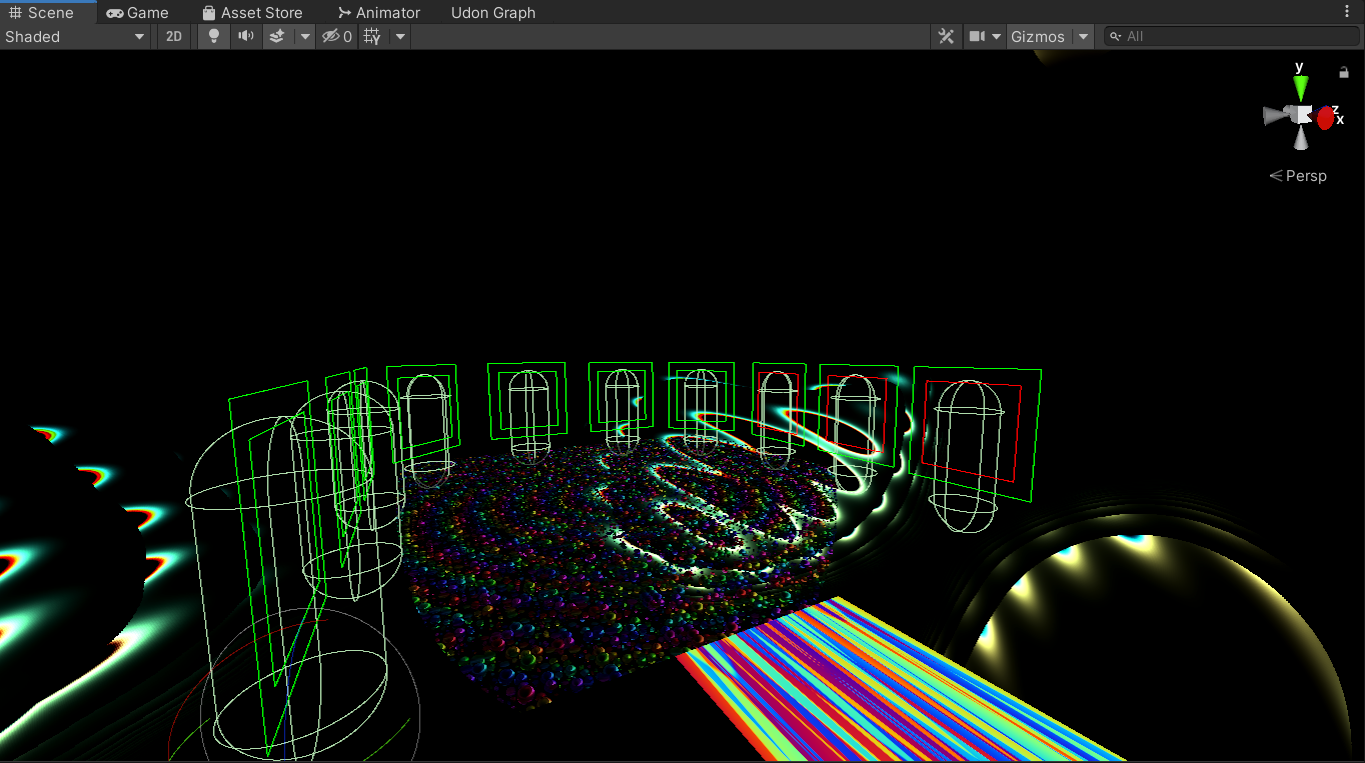
as far as I can tell, this is all correct

they're visible in game, you can click on them with the "use" option, but they don't change avatars
I have no idea why and it's doing my head in. it's only once they're moved or duplicated.
any ideas on what could cause them to break? as far as I can tell I'm just removing the base mesh, moving them, and changing their ID's
west niche
Any insight would be amazing, I've spent 4 hours on this so far and no matter what I do, they all break once I duplicate or modify them at all
 agile scaffold
does anyone know how to make like a car or like a surfboard or those kind of physics on a gameobject in unity with like udon or scripts to then upload in your world ??
or like does anyone know any tutorials Because I cant find any
like all im trying to do is literally just take a cube and make it so when you press on it you hop on it and then like you grab a cube to turn and while holding the cube holding the trigger makes you go forward
ive worked with using rigidbodys for like making cars in games but im not sure how to do this for vrchat
 clear sentinel
 unkempt turtle
agile scaffold
does anyone know how to make like a car or like a surfboard or those kind of phy...
unkempt turtle
agile scaffold
does anyone know how to make like a car or like a surfboard or those kind of phy...
there are prefabs for that on the vrcprefabs database
 bitter turtle
So I tried uploading my updated version of my world with the Unity TV prefab, I tested it in VR locally and it worked. When I went to upload it it uploaded but when I went to the page where my world should be when you click the "Manage World" button the world does NOT exist. Any idea what might have happened?
I checked the wiki for reasons why a world might not upload and none of them applied so far as I can tell, I didn't break any terms of agreement and I'm still authorized. Is there a limit to how many worlds you can have? Could it have been the lighting that was just too much for VRchat?
 silk coral
Can I get some help? Any time I hit upload world on my world, the game tab that's supposed to be showing the upload menu is broken and none of the buttons work, plus it doesn't load my world thumbnail
and the lighting is broken for some reason
when I hit play mode it doesn't break the lighting but when I hit upload it does
silk coral
create new material
insert texture into material
drag and drop material onto your object
make sure you use the VRchat materials for good optimization
if it's just a single texture and no normals or emissions or metallness use Vrchat/Diffuse
bold ibex
Okay
silk coral
you can use any material shaders you want if you're building for PC of course
but if you're planning on making a quest world you need quest materials
left rain
i have a question about a UI canvas... i have one positioned in world space, and it's on the Default layer along with all its children, but it's still drawing on top of other objects so you can see it through walls. is there something else i have to set up to get it to be occluded like normal objects?
silk coral
left rain
i have a question about a UI canvas... i have one positioned in world space, and...
is this in-game or in-unity?
because in unity you will see it always drawing over walls
left rain
i'm just looking at it in the editor.
silk coral
yeah in the editor it always looks like that lol
it does that for my world too
but you don't see it like that when it's uploaded
left rain
weird. okay, well, good to know
mild spade
Is a weird bug, if you enter PLAY mode and exit, it fixes it
silk coral
silk coral
Can I get some help? Any time I hit upload world on my world, the game tab that'...
i still really need help with this though
like
i'm not able to upload any updates to my world at all because of this
even though i've made loads of progress
build testing doesn't work either
i've tried reimporting my SDK
and closing and re-opening unity
left rain
mild spade
Is a weird bug, if you enter PLAY mode and exit, it fixes it
ah weird! yep, confirmed that fixed it
silk coral
it keeps happening
mild spade
Any red errors on the console tab?
silk coral
mild spade
Any red errors on the console tab?
oh i actually didn't check hold on
lol
you'd think i would have
god i hope it doesn't have something to do with the blueprint ID
if it does i have to go through labs all over again
.<
my world already got marked as public
silk coral
mild spade
Any red errors on the console tab?
okay i'm opening the project, i'll let you know if i get any errors
mild spade
ok. You can ignore the red error ending in ".... does not exists" because that error appears when you have other errors, so check the others if you see them
silk coral

is it an udon error..?
maybe i should remove the video player for now
it never worked anyway afaik
i don't know how that could be causing issues though??
it never did before
it just sorta started doing this
mild spade
silk coral
is it an udon error..?
Is that the only error you get? It should be fine to upload (if the script is trying to get a player it will crash on editor, but will work on VRC) You can try disabling "Error Pause" on the console and it should allow you to upload if that is the only red error you get (udon behaviour crashing)
silk coral
no no you don't understand
see that menu?
none of the buttons work
i can't click anything
i've done everything possible
it also loads in the menu as if i'm uploading a world for the first time
like i literally can't type anything in
the upload button does not work
clicking the box does not work
mild spade
Did you disable "Error pause"? That option pauses the scene when it encounters a red error, making all interaction not possible, because the scene is paused.
silk coral
i can't interact with it
silk coral
mild spade
Did you disable "Error pause"? That option pauses the scene when it encounters a...
what
where's that
👀
 silk coral
mild spade
I cant tell if your scene is paused since you didnt include that on the screensh...
silk coral
mild spade
I cant tell if your scene is paused since you didnt include that on the screensh...
it's not
but
now that i'm finished making updates i've disabled error pause
i'm about to see if what you just had me do fixed the entire problem
god i hope it did
.<
silk coral
mild spade
I cant tell if your scene is paused since you didnt include that on the screensh...
THANK YOU
That fixed it!!!
mild spade
yay, im glad it works now!
 cobalt jacinth
So I’m creating a large world with Sdk3, and I made a teleporter with an udon graph to transport the player to another location. It works fine when I put the teleport point close to me, but if I put it far away, it just respawns me instead of teleporting. Is there a way to increase the range, or perhaps a better method to transport to the other area?
Nvm fixed it
For some reason when I moved everything up it worked
 versed glade
Can anyone point me in the right direction to a tutorial for the best current way to make a video player/streamer with sdk3 and udon that will work on quest with videosync? I was able to make videoplayers before with sdk2 that would stream from a public google drive link to a render texture in my world, although it was glitchy (other people couldnt see the video in vrchat, only me). I see plenty of videos in worlds when I play on my quest so I know its possible. Suggestions?
mild spade
cobalt jacinth
So I’m creating a large world with Sdk3, and I made a teleporter with an udon gr...
I would check your Scene Descriptor. There is a setting called "Respawn Height." When a player goes below this value on the Y axis (up and down) they will respawn. So the place you are teleporting to is probably below the value you have on your "respawn height" setting. If the room is at -200 and you try to teleport there, it will be below the -100y so the game will respawn you. You could fix this by changing "respawn height" to -250y if that makes sense.

 gloomy salmon
do i need the sdk & ndk tools and openJDK or not
 green lagoon
sdk & ndk tools
silk coral
my world lighting breaks every time i enter play mode
it also uploaded said broken lighting into the quest version of the world >:U
grizzled crater
Little newbie question, how to make the opening doors I made not local to every player but instead if someone opens it it opens for everyone in the world?
grizzled crater
The thing called UdonSyncPlayer?
 open drift
Hey! I cant join the home I just published! I am aware that my world at my trust level should not be public but its weird its not showing up at all! I hit build & publish for windows on the unity vrchat sdk window and went through the steps and uploaded. It gave me the confirmation and said I can find under the mine tab. I go in game and I dont see a mine tab, Also when I try to join through the world site thing it will say downloading 0B and then redirect me to my home. Any help would be awesome!
silk coral
open drift
Hey! I cant join the home I just published! I am aware that my world at my trust...
how many times have you tried to reupload
if you haven't yet, do so
and make sure you have a blueprint ID
also check if you marked the world as private
open drift
silk coral
and make sure you have a blueprint ID
What is this? Sorry Im really new to this haha
silk coral
grizzled crater
The thing called UdonSyncPlayer?
I forget
silk coral
open drift
What is this? Sorry Im really new to this haha
it's in the inspector somewhere, whatever you attached your World component to
silk coral
grizzled crater
The thing called UdonSyncPlayer?
that might be it tho, do some experimentation and watch tutorials
open drift
Ah I see. It has a blueprint ID. Ive also tried uploaded a few times, maybe 3
open drift
silk coral
also check if you marked the world as private
Where would I see this? I dont think I did
Even if it was private wouldnt I be able to join though?
The mine tab is empty

Yet this pops up when I upload

 shrewd coral
I could use some help with the VRC Pickup script. I'm trying to do a dnd table, and I would like to make it so that you can only pick up items when your hand is right on top of them. IE when the proximity from your hand to the item is close to zero. I tried playing with the proximity setting in the script, but it doesn't seem to do what I thought. Even when I set the proximity very very low, you can still pick up items with your hand up to half a meter away or so. Does anyone know how to fix that?

 topaz veldt
Is there any way for me to get a .json file inside a usharp script?
stone marsh
open drift
Yet this pops up when I upload
What version of unity are you using
open drift
stone marsh
What version of unity are you using
That was the issue. Was on 34 not 31f
stone marsh
Figured
open drift
Must have misread the docs page 😅
proven vigil
it's not uploading
my world is just not uploading
i found the problem, but i can't fix it
it dosen't have a sample scene
how do i make one
oop, i fixed it nvm
left rain
how is the ray distance to a UI element configured? i have to get really, really close to my UI panel in the map to be able to actually see the pointer.
 fast python
Does anyone know of a shader that supports scrolling emmission?
Something that allows me to recreate this kind of effect
grizzled crater
Been looking around and haven't been able to find an up to date tutorial on how to sync up animations/events with all players on my world, does anyone has one that knows it works with the latest SDK?
bold ibex
How to make your world not laggy? ... Add baked light probes?
green lagoon
well yeah light probes would help so you don't need any real-time lighting on avatars
bold ibex
green lagoon
well yeah light probes would help so you don't need any real-time lighting on a...
Mmkay. You think that'll solve the issue?
green lagoon
I don't know if that'll be it because there's lots of different factors that contribute to lag
bold ibex
True
Also, I've been trying to find a jacuzzi shader with bubbles, sounds, steam... Know where I can look? I've looked all over the normal websites and cannot find
green lagoon
that would be a combination of sound emitters and particle effects not necessarily A Shader

Unity Learn
Unity features a robust Particle System where you can simulate moving liquids, smoke, clouds, flames, magic spells, and a whole slew of other effects. In this tutorial, you'll get a high level overview of the Particle System and its features, so that you can start getting ideas for your own projects.
bold ibex
Tyvm
 bold ibex
Did u draw that? Ur awesome
bold ibex
green lagoon
yes I drew it
Yes!
 ionic ledge
Hey folks, are avatar statues still a thing in sdk3? I always see avatars in like the box thing in worlds now but I have a project and I’d like to use the old statues that you can touch and change avatars in if possible
fast python
Made the Tetrimidion from Tetris Effect into a world!

The world is optimized for PC and Quest and currently is in labs. Stop by if you'd like to help get it out of labs! I plan on adding more feature like a mirror and props soon.
 austere star
Hey guys why does my shadow look like strips, is this normal?
 bitter turtle
Been testing out my first world and for some reason It's not uploading properly this time and I wanted to know if anyone had any idea why. See the error message on the bottom. Could it be that the assets are in the wrong folder or something to do with the hierarchy system? Everything was running fine on local.

I just noticed this. I'm not familiar with C#/ scripting fully yet so I really don't understand this data

 young leaf
@desert python hey you (or anyone else reading this) know where the "last build" & other VRCSDK data is cached? Reimporting my world didn't fix the "VRCSDK uploads wrong/incomplete file" bug and i don't want to rebuild my project a fourth time.
Like, this is getting tiring. All the errors I'm experiencing VRC only documents for moving from 2018 -> 2019… but i don't use 2018, and these have all been 2019 projects from the start.
And VRC just… not uploading a build, with no errors, is frustrating.
 broken terrace
Is it possible to have some short videos embedded in your world and then play them in the world on loop? been trying to do something like this but haven't had any luck
So local videos rather than from youtube or stream
 austere bridge
hello, how update map?
broken terrace
@austere bridge what do you mean?
broken terrace
fix the issue upload the map again and it will override it
broken terrace
ok
broken terrace
I think you need to add an empty udon behavior so it synchronizes

 broken terrace
Not sure then
austere bridge
I can pick up something, but nobody see this
 stray tinsel
what is the criteria to be able to upload my vrchat world? ive played about 15 hours, been to all kinds of worlds, met people and made friends idk what else to try
broken terrace
@stray tinsel I think you need to be user level to upload worlds
stray tinsel
ya i just cant figure out what the criteria is to become new user
tons of mixed info out there and ive surpassed the time limits ive read, friend amounts, worlds visited
broken terrace
are you using a steam account?
stray tinsel
im loggin in thorugh steam but using a VRchat account
broken terrace
Does your name have numbers and letters at the end?
stray tinsel
my IGN name is same as this name i dont think os ill check
no looking at my name in game it does not have any numbers or letters
broken terrace
Just found this : Keep in mind that Steam, Oculus and Viveport Accounts will never gain the ability to upload content. Create a VRChat account at our website! Ensure you are logged into your VRChat account by clicking Logout in your System menu and logging back in.
@stray tinsel
stray tinsel
ya i am logged into my VRchat account
i made it on their site
logged out of my steam one while in game and logged into that
 jovial bone
quick question, i want to hang up some images in my world screenshots, so i want to make sorta a memory wall, how would i go about adding a screenshot to the wall so its actually visible ingame? i googled for half an hour and only found blender stuff, is it not possible in Unity?
tall hound
Just drag the screenshot jpg or png into the world and it'll create a texture of it
Then drag that on the painting object cube etc @jovial bone
young leaf
stray tinsel
ya i just cant figure out what the criteria is to become new user
They purposefully obscure it to prevent people from gaming the system. Make sure your Steam & VRC accounts are linked, and just keep playing and making friends.
cerulean echo
If you got alo screenshots i would make one texture with all fotos on 1 material and use probuilder to fit it on the object so you can use alot screen and have the batching
stray tinsel
im not using my steam acct
im only loggin in with steam. the acct ive been logged into is a VRchat one does that mess it up?
open drift
Hey! Do I Have to use udon programming for my world or can I use c#? I really dislike block based coding have little experience with it. I was wondering if I could have these events and such in c# since Im much more experience in c#
jovial bone
tall hound
Then drag that on the painting object cube etc <@247433781395324929>
cheers
shrewd coral
open drift
Hey! Do I *Have* to use udon programming for my world or can I use c#? I really ...
Udon sharp is what you're looking for. Let me find a link for you.
You can just code in Udon# which is essentially just C#
green lagoon

GitHub
An experimental compiler for compiling C# to Udon assembly - GitHub - vrchat-community/UdonSharp: An experimental compiler for compiling C# to Udon assembly
shrewd coral
Oh yep that's it
shrewd coral
bitter turtle
Been testing out my first world and for some reason It's not uploading properly ...
I'm guessing that you need to remove the blueprint ID from the Scene descriptor. If this is a world you got from someone else, they may have left the blueprint ID attached to the project which won't work with your login credentials. So find the scene descriptor and the pipeline manager connected with it and click on the Detach button.
When you upload it, it will generate a new blueprint ID tied to your account and world so you can manage it in the future.
shrewd coral
austere bridge
but other people dont see this
Add the "VRC Object Sync" script to the object.
 shrewd coral
grizzled crater
Been looking around and haven't been able to find an up to date tutorial on how ...
shrewd coral
grizzled crater
Been looking around and haven't been able to find an up to date tutorial on how ...
VRChat
The three main concepts used for networking in Udon are Variables, Events and Ownership. Variables are containers for values - like a number, a set of colors or a 3D position.Events are things that happen at a moment in time.Ownership is the system that decides which user can update a variable, whic...
This is the best info I can find when it comes to creating network sync events.
austere bridge
@shrewd coralThanks
I create a button, what make a sound, but nobody hear, only me
shrewd coral
You'll want to make a network event that calls the function that makes the sound.
See above the documentation for VRChat Networking I posted.
bold ibex
Can someone tell me how you add this interactive water thing to your world?
 desert python
young leaf
<@!657567702608642078> hey you (or anyone else reading this) know where the "las...
desert python
young leaf
<@!657567702608642078> hey you (or anyone else reading this) know where the "las...
ig what you could do is go into settings in the vrc control panel and try "future proof" and the "show extra" stuff thing. but if that doesnt work, ig you can try the first beta sdk for the 2019 migration, ir that worked on macs, anything after that basically did what your situation is now. no one has found an issue for this except using an m1 mac lol
young leaf
stray tinsel
im only loggin in with steam. the acct ive been logged into is a VRchat one does...
As long as the account you continue to play on is the same account you intend to upload with that's fine.
young leaf
desert python
ig what you could do is go into settings in the vrc control panel and try "futur...
I wonder why M1 works. 🤔
left rain
Still a bit unsure how to solve my UI issue... I have a world space canvas set up with the VRC UI Shape element, and it technically works, but the ray distance is incredibly short... I have to be right up against the canvas to see the pointer. Any ideas how to solve this?
left rain
just upload again the same way you already did
as long as the world id is the same it'll overwrite
bold ibex
left rain
as long as the world id is the same it'll overwrite
I tired it but I sands me here
 mild spade
left rain
Still a bit unsure how to solve my UI issue... I have a world space canvas set u...
mild spade
left rain
Still a bit unsure how to solve my UI issue... I have a world space canvas set u...
Colliders block the raycast pointer, so you probably have a collider in front of the UI canvas. I would double check all colliders around the canvas area
left rain
mild spade
Colliders block the raycast pointer, so you probably have a collider in front of...
makes sense, I'll check around.
left rain
bold ibex
I tired it but I sands me here
check the content manager in the vrc control panel. find your world and get the id. if it doesn't match the id in your unity scene's vrc world component, you need to replace the id in the unity component with the correct one
 tropic cedar
Is there a way to increase dynamic bone simulation distance in a world?
unkempt mauve
Anyone know if turtle graphics is supported in vrc?
fossil hull
unkempt mauve
Anyone know if turtle graphics is supported in vrc?
lol, do you mean like the library in python? Afaik, unity doesn't have anything like that.
desert python
tropic cedar
Is there a way to increase dynamic bone simulation distance in a world?
like the update of dyn bones of people or in world props?
fossil hull
unkempt mauve
Anyone know if turtle graphics is supported in vrc?
Can you tell what you want to use it for?
unkempt mauve
fossil hull
lol, do you mean like the library in python? Afaik, unity doesn't have anything ...
I guess 🤷🏻♂️
tropic cedar
desert python
like the update of dyn bones of people or in world props?
when someone walks up to a dynamic bone, it looks normal, then updates.
desert python
ooooo
ok so thats an in game perf thing, i think people edit that on their end. but basically dynbones will shut off after a certain distence
 quartz patio
Hey does anyone know why unity lets me hit build and publish but then doesn't actually upload afterwards just doesn't do anything after compiling udon?
unkempt mauve
fossil hull
Can you tell what you want to use it for?
To create laser light like animations if possible
fossil hull
unkempt mauve
To create laser light like animations if possible
Do you have an example? If it's just a couple simple, straight lasers, then you can do it with some gameobjects and the animator.
Or does it have to be programmatically created lasers?
unkempt mauve
fossil hull
Or does it have to be programmatically created lasers?
Possibly that
I figured I could try creating the animations in 2D
@fossil hull
#world-development message
I wasn’t sure what would be the best way to create the animations. Either by programming it or manually making it
Whatever way is more optimized
fossil hull
I see now. The other people made some good points in the comments. It all depends on how far you want to go. Shader is probable most efficient, but difficult.
Video/gif would take some space.
You could also create those images yourself and create something like a fade in map (no idea what to call it)
Then you animate the transition with a shader from those two images. It's like a middle way
The turtle graphics plan, using vectors, is also possible. Not sure if that can be directly done in a shader. You can create a texture at runtime using Udon, no idea if that would work or is even possible. Could create mesh at runtime too.
Just throwing ideas out though.
I feel like using premade images is more smart, but I'm bad with shaders so no idea what the best way to make a fade in like in your video is.
unkempt mauve
Thanks for the ideas! I’ll look into it. Although I don’t have experience in coding myself.
I did start it in adobe illustrator. I feel like that might take up more space.
fossil hull
Yeah, if you don't know coding, it might rough, because you essentially need to make a framework to display vector graphics. Unity just doesn't support that kind if rendering.
There is a line renderer component that might actually work.
You can define some points and it will render a line following them, you could try to see if you can make it work how you want it to. (I find it a bit clunky)
unkempt mauve
fossil hull
There is a line renderer component that might actually work.
Where would I get that from?
fossil hull
unkempt mauve
Where would I get that from?
Add component and then type line renderer
unkempt mauve
fossil hull
Add component and then type line renderer
In udon or in an ide?
fossil hull
unkempt mauve
In udon or in an ide?
In unity on a game object. It's a component
unkempt mauve
Oh! Ok
fossil hull
unkempt mauve
Oh! Ok
I just remembered there is also a trail renderer component. So if you want a zero coding solution, you could animate a gameobject with the trail renderer and it will "draw" the path it travelled.
unkempt mauve
fossil hull
I just remembered there is also a trail renderer component. So if you want a zer...
Oh cool! I’ve not used that before.
fossil hull
unkempt mauve
Oh cool! I’ve not used that before.

In this easy unity tutorial we will take a look at how to make cool trail effects :) !
We'll start off with the awesome trail renderer component, and we'll then see how with the use of sprites and a bit of C# we can come up with loads of cool trail effects (to simulate snake like movement for example)
------------------------------------------...
I feel like I need to use it more myself
unkempt mauve
fossil hull
I feel like I need to use it more myself
I don’t see why not
bold ibex
Hey so im working on a work and whn you go in your cant jump, how do i fix that, im sory for asking a dumb quesion
 atomic python
Need help with Unity, Im creating a world and usually ill be able to go the to VRChat SDK and in the build tab build and load into it. But i just got done adding some bloom effects into some objects and wanted to see them in game but when i go to "Builder" i just the message
"A VRCSceneDescriptor is required to build a World"
This didnt use to pop up and idk what to do to fix it
atomic python
bold ibex
<@287766275285975074> use the world prefab
I was able to figure it out but now im trying to figure out why my bloom isnt work
This is what it looks like in Unity
https://gyazo.com/82a1bc9779123adb72554fa04149eeb8
and this is what it looks like when i build it
https://gyazo.com/270c7759db543a6c7800a909631fae13


Its probally really simple but i am very new to Unity lol
bold ibex
hey, can someone help me I am trying to over right my upload with the thing I was currently working on in unity? what i mean is i am trying to update my world but i am not sure what to do.
can somone point me in the rigth direction
 feral bobcat
Hi everyone!
Are there any plans for VRChat to be compatible with Unity URP?
Or maybe it is already...
green lagoon
feral bobcat
Hi everyone!
Are there any plans for VRChat to be compatible with Unity URP?
Or...
no current plans for that as that would basically break every single piece of content in the game
 turbid gyro
hey can anyone help me and tell me why theres no options in the build menu in the control panel? im trying to upload a world an i just encountered this.
 bold ibex
Anyone know how to erase the mic from the screenshot but not the background behind it? Got some pics of friends I want to display in the house but they all have that red mic logo in em I want gone.
bold ibex
turbid gyro
hey can anyone help me and tell me why theres no options in the build menu in th...
Have you tried restarting unity?
turbid gyro
i tried that but its still blank
bold ibex
turbid gyro
i tried that but its still blank
Is it the correct sdk? Should be sdk3
turbid gyro
it is sdk 3 and its the right version of unity
bold ibex
Did u drag vrcworld into your scene? U also need an empty game object.
turbid gyro
did both those things
bold ibex
Hmmm 🤔 u could see what the settings say if there's anything in there.
 silent plinth
anyone experienced a camera in a world cutting the head off of your own avatar but everyone elses looking fine?
turbid gyro
its saying everything is fine. weird thing is i can access the Builder on another project that has an avatar on it. but its just that one Project world that doesnt allow me to build and test it
silent plinth
turbid gyro
its saying everything is fine. weird thing is i can access the Builder on anothe...
re-install the SDK if nothing comes to, should refresh the script and give it back
turbid gyro
thats what im thinking im gonna have to do here
silent plinth
yeah either just drop the sdk back in and let it refresh anything "missing" or try deleting the current one and just re-import it
shouldnt suffer any scripting issues with toggles and stuff
turbid gyro
im thinking the second one just complete re import it cause i tried the first option and it hasnt worked
silent plinth
be more aggressive with it 😄
silent plinth
Ive made a floating camera for my scene that spins around a room but unfortunately it cuts my avatars head off in the scene but no one elses, is there something im missing here
 silent plinth
bold ibex
I can't type in this and not sure why
silent plinth
bold ibex
I can't type in this and not sure why
try pressing the play button at the top to stop the upload
then re-try
if it doesnt work, i would suggest restarting unity and then re-installing your sdk
austere bridge
when I delete objects, my map dont lose MB why?
left rain
austere bridge
when I delete objects, my map dont lose MB why?
get the VRWorld Toolkit plugin, then build locally. it will give you a list of what's taking up space in your world after the build.
silent plinth
left rain
get the VRWorld Toolkit plugin, then build locally. it will give you a list of w...
i like this, i never look into the great functions of the toolkit
left rain
it's saved me like 30 MB or more on some builds because i was a dumbass and left an HDR in there i didn't need anymore
shrewd coral
silent plinth
anyone experienced a camera in a world cutting the head off of your own avatar b...
You'll want to look into the layers the camera is rendering. http://vrchat.wikidot.com/worlds:layers
Add the layers from the wiki to your project settings then cull layers you don't want.
Local player renders a version of your avatar without your head. Probably the layer used to display your avatar locally without getting your head in the way.
austere bridge
@left rainI DELETE 70mb, but in game loss only 2mb
left rain
did you delete 70mb of things that were actually in the level, in use?
silent plinth
austere bridge
<@!240260948374454272>I DELETE 70mb, but in game loss only 2mb
try compressing textures and check the skybox too, might be large file size
left rain
the toolkit will tell you what's in the build and what isn't, those are the only files that matter to the upload size
austere bridge
hm, I will try
unkempt mauve
What's the average size for a video player in vrc?
 kind portal
hi, how do i update my World after i uploaded it?:)
bold ibex
bold ibex
need help
You have to wait a few minutes for it to load
bold ibex
kind portal
hi, how do i update my World after i uploaded it?:)
Just do updates in your world in unity like normal. You'll have to upload it Everytime.
kind portal
bold ibex
Just do updates in your world in unity like normal. You'll have to upload it Eve...
ok,Thank You
bold ibex
Reupload*
 keen lance
so my vr chat world SDK won't show the splash screen. or the builder, and it's a BRAND NEW project.
in the console it keeps giving me "compiler errors"
austere bridge
left rain
did you delete 70mb of things that were actually *in* the level, in use?
yea
atomic python
I need help with Uploading my world, I build and published the world as a android so its Quest comp. and it was doing things for like 15 minutes or so and when it finied in the Hierarchy it created the VRCSDK where you put the world name and everything but in the Console it says the error below
https://gyazo.com/14c0981f78b3557abbf0cc35a95d3df2

i cant do anything with the VRCSDK menu it made and idk how to fix since i dont see anyone talking about it. my Unity build is 2019.4.31f1
 upper obsidian
atomic python
I need help with Uploading my world, I build and published the world as a androi...
upper obsidian
atomic python
I need help with Uploading my world, I build and published the world as a androi...
 atomic python
Thats not what i was referring to
Im talking about the ERROR that says "Object refernce not set"
upper obsidian
This is what the editor tells you to do in order to upload successfully.
analog wyvern
before i start experimenting with audio, anyone got a good speaker/audio player? like server-wide one and with environmental audio? Also I don't really like the cheap(ish) environmental audio most players use nowadays (you hear it form one side and the other is tone deaf) anyone got fix?
bold ibex
ummm i think i accidently just fucked my world up 😦 halp
 keen lance
So i try to upload my world, it gets stuck on building and compressing
then it gives me this error
what do i do?

There are no compiler errors
but it still chooses to give me this
anyone know whats up?
 glacial coyote
if you have a public world and people are in it when you delete it from vrc's servers will they get disconnected from your world?
upper obsidian
keen lance
but it still chooses to give me this
File permissions - running the unity from under the admin helps, or a build error - there is a lot of useful information in the console.
keen lance
ok thanks
 pearl scarab
would anyone here know where to find the prefab for the giant squishy bean bag chairs I've been seeing in vrc recently?
or maybe they are water beds? idk
bold ibex
s there a backup of my world saved somewhere ? because my world is gone
 lavish mirage
Yo can someone help, me and some friends want to make a news station in vrchat and need someone to build a world for us. So we were wondering if anyone could help us make it.
 steel kiln
Does anyone know of any common fire / campfire assets for vrc?
idle jolt
I finally got around to visiting the world, and the audio sources and borked
The blizzard and imperial base music can be heard all throughout the video despite the distance and falloff value, and the third audio source won’t even play
bold ibex
can someone help please?
atomic python
bold ibex
s there a backup of my world saved somewhere ? because my world is gone
Unless you made one i dont think so
young leaf
upper obsidian
This is what the editor tells you to do in order to upload successfully.
Unless they changed the quality settings themselves by default the VRCSDK configures mobile quality to have 2x antialiasing.
Only 🛑 prevent build and upload not ⚠️ (under normal conditions).
young leaf
keen lance
So i try to upload my world, it gets stuck on building and compressing
then it ...
Try reimport all by right clicking the root Asset folder in Unity, then turn on "Clear on Build" in the console.
If it fails again, look for all 🛑 errors. Usually the earliest one is the culprit.
young leaf
atomic python
I need help with Uploading my world, I build and published the world as a androi...
Are there any other 🛑 messages if you scroll up in the console?
atomic python
No that is the only error
Im not experienced with Unity so it hard to explain, but i can screenshare if it makes it easier
young leaf
Nah I'm also having unexplainable errors with the SDK. But I'm on Mac so that's apparently to be expected?
atomic python
I just want to upload my world :(, the test build that local was working perfectly fine
but the publishing just doesnt want to work
young leaf
young leaf
Try reimport all by right clicking the root Asset folder in Unity, then turn on ...
Try this as well. Something may have broke in the SDK that reimport fixes.
atomic python
Well i think the issue is when i try to publish and it puts the VRCSDK in the objects. in the "Runtimeworldcreation" the NSFW section is set to NONE which idk how to set that to something since i have to launch the publish for that to pop up
young leaf
Definitely try reimporting all your assets first. I've come to learn that's a first step in fixing SDK issues.
atomic python
like the materials and stuff?
young leaf
Also make sure only VRC Mobile is checked in quality settings under the Android logo.
atomic python
young leaf
Also make sure only VRC Mobile is checked in quality settings under the Android ...
wait the what?
young leaf
atomic python
like the materials and stuff?
If you right click Assets in the project view tab there will be a "reimport all" in the menu.
 boreal heath
How unstable is the mac sdk? I have a windows server that I can RDP into but it's hilariously underspecced so I don't really want to go through that hassle
atomic python
ok its reimporting atm
young leaf
atomic python
wait the what?
Project Settings -> Quality.
young leaf
boreal heath
How unstable is the mac sdk? I have a windows server that I can RDP into but it'...
Apparently very, expect on M1 Macs for unexplainable reasons?
young leaf
I've had to recreate my project 3x already.
atomic python
will reimporting make me have to retexture everything?
young leaf
atomic python
will reimporting make me have to retexture everything?
No your scenes won't be edited.
boreal heath
now I just need m1 native maya
young leaf
atomic python
will reimporting make me have to retexture everything?
The worst is that you may just need to restart Unity after. That's all.
young leaf
boreal heath
guess I'm lucky then lol
Probably. I get a lot of errors that VRC seem to think are only related to migrating from 2018 but I've been getting them on fresh 2019 projects.
I'm using an Intel MacBook with eGPU.
boreal heath
they're supposedly going to make an m-series iMac pro
m1 max in a desktop formfactor 😩
young leaf
Well I'm about to go try and figure out why my SDK broke… again.
atomic python
young leaf
The worst is that you may just need to restart Unity after. That's all.
nope didnt fix anything
young leaf
atomic python
nope didnt fix anything
Curious, but what happens when you try to build for Windows.
I did have an issue once where the SDK only gave me an error when building for Windows.
Android it'd act like it worked.
atomic python
im switching target back to windows to see so itll take a minute
Nope still object reference not set to an instance of an object error
young leaf
atomic python
Nope still object reference not set to an instance of an object error
And there are no other red stop errors?
young leaf
Lmao you sound like you're in the same boat as I am, except with Windows.
Easy fix? Create a new project, move everything to it. Note you'll need to reimport any asset packages and SDKs from scratch, not via copy-paste.
Hard fix? Im trying to figure that out myself. I'm not getting the error you are, but it's behaving pretty similarly.
 dusk sapphire
atomic python
Nope still object reference not set to an instance of an object error
dusk sapphire
atomic python
Nope still object reference not set to an instance of an object error
can you show a screenshot of your scene descriptor
atomic python
yeah 1 sec
young leaf
True. Yours might be missing something.
 dusk sapphire
if you haven't I'd recommend grabbing https://github.com/oneVR/VRWorldToolkit that checks for common issues with vrc world projects
atomic python
how do i go about getting it after downloading
dusk sapphire
off the top of my head, common issues for that particular error are empty spawns, multiple scene descriptors in scene, incorrectly importing the vrcworldsdk prefab into scene
the instructions are in the github page
dusk sapphire
you should be downloading the unity package from here https://github.com/oneVR/VRWorldToolkit/releases
atomic python
so why did i need this?
dusk sapphire
to check for common issues with vrc world projects
atomic python
ok. how i do that
dusk sapphire
After, if everything went well, you will see the VRWorld Toolkit dropdown appear at the top bar if not check
atomic python
i see it
dusk sapphire
World Debugger
Goes through the scene and checks for common issues, and makes suggestions on what to improve. Includes over 90 different tips, warnings, errors, and general messages!
It also allows viewing the stats of the latest builds SDK has done for an easily accessible overview of what the build consists of. It also saves the latest Windows and Android builds separately for easy comparison between the two.
atomic python
I LOVE YOU
IT WORKS
Xd it was a camera
it depth was set to 1 instead of a 0
im so mad
Ok @dusk sapphire thank you
One more question, It worked and it uploaded but ONLY for quest not crossplatform
how do i make it cross for both PCandQuest
dusk sapphire
switch back to pc and upload again
atomic python
that wont overide the quest one?
dusk sapphire
no
atomic python
ok
dusk sapphire
VRChat
Setting up a cross-platform world or avatar is actually quite straightforward! In short, all you have to do is use a duplicate project to build an Android version of the asset, and upload it to the same content ID as the VRChat PC asset. The client will manage which version it needs to download. If ...
ignore the duplicating project part as that's not necessary
though you'll want something like https://github.com/JordoVR/EasyQuestSwitch to have specific settings for quest/pc

GitHub
EasyQuestSwitch is a Unity editor tool developed for VRChat world creators, it can automate changes to components within a scene as soon as the build platform is changed from PC to Android (for Ocu...
young leaf
dusk sapphire
though you'll want something like https://github.com/JordoVR/EasyQuestSwitch to ...
This would really only be relevant if you have PC specific parts of the world yea? (Shaders, PC only objects, etc.)
I don't think that'd be necessary if everything in the world is quest compatible, correct?
dusk sapphire
sure
 chilly flower
Hello! So, im just about done with my first world. Im pretty proud of it, but it's got so many little bugs scattered around. I'd honestly appreciate if I can call someone and ask how to solve these. Most of them are probably simple fixes but theres just alot, id much rather call someone and ask
dusk sapphire
you're better off just posting your issues here and whoever knows something will answer
and grab https://github.com/oneVR/VRWorldToolkit to check for common issues and suggestions, i wouldn't be surprised if it addresses some of your problems
young leaf
desert python
ig what you could do is go into settings in the vrc control panel and try "futur...
You'd never guess it, but the SDK glitched out and set the default quality for Android to VRC High, which was what was causing it to fail to upload, seemingly. Setting VRC Mobile back as the default appears to have fixed it.
I noticed it when looking around for some setting, anything, that might be off. That and was curious why the SDK keeps adding anti-aliasing on mobile.
dusk sapphire
the sdk sets your project settings to match those used by vrchat
the quest client run with 2x MSAA which is required for shaders that utilize alpha to coverage
young leaf
Ye I figured but Unity complains none the less about it.
dusk sapphire
osx isn't exactly a supported platform so issues are to be expected 
young leaf
Eh. It's kinda ridiculous to say that though cause Im not building for macOS. Unity Editor is cross platform. And the VRCSDK is a unity plugin, not a separate desktop utility.
Like, I get it, not enough on the VRC team use mac to test the SDK.
But it's kinda ridiculous that the VRCSDK can just wildly misbehave and the response is "sucks to use a Mac"
(Also it's macOS. OS X = OS 10. I'm on OS 12.)
Also the fact it seems to run fine on M1 (ARM) Macs, reportedly, whilst giving errors specific to upgrading from 2018 on Intel Macs compounds confusion.
young leaf
Can someone explain the layer collision matrix in an actually usable way. Because Unity's explanation makes no sense (as by their explanation, higher layers cannot interact with lower layers, which makes no sense to me).
I'm basically wanting a collider that only interacts with players, as not to break a prefab in the scene that uses physics. So users don't walk through it.


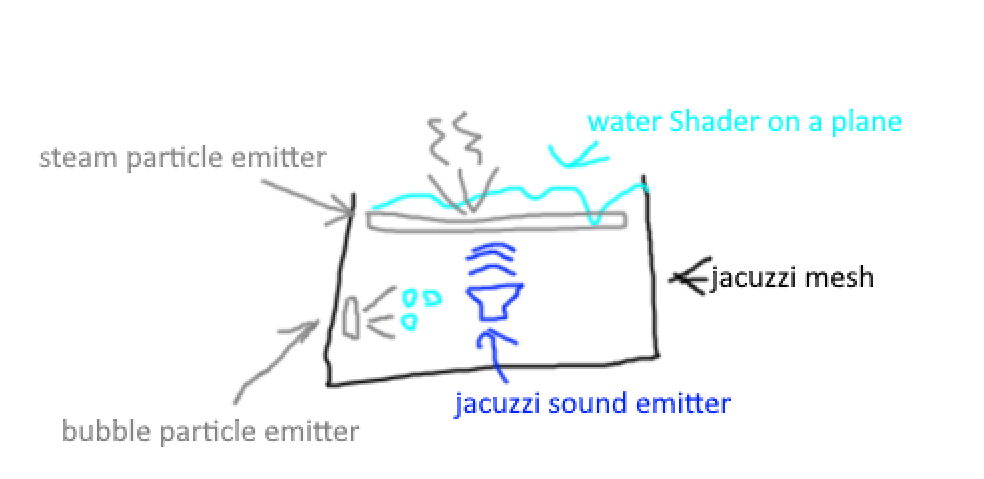 dusk sapphire
you can't use hdrp with vrchat, only built in render pipeline is supported
also the reason why everything is pink is because shaders built for the built in render pipeline are incompatible with hdrp/urp, and vice versa
bold ibex
I know I fucked up. Tryna revert it back. I think I'm getting it! I hope..
 full kraken
absolute noob with unity and i'm having trouble finding out how to rotate a sphere on my map can anyone help LOL
bold ibex
full kraken
absolute noob with unity and i'm having trouble finding out how to rotate a sphe...
Yes, use the rotate tool on the top left. It's the third one. Right under the assets tab at the top
full kraken
probably shoulda said I was wanting it to rotate on an axis kinda like a globe
sdhfdswf
bold ibex
full kraken
probably shoulda said I was wanting it to rotate on an axis kinda like a globe
 bold ibex
Anyone know how u can put models into worlds not as avatars but kinda like the prefab?
I’ve seen people do it I’m just not sure how
Using it to show my avis
bold ibex
left rain
get the VRWorld Toolkit plugin, then build locally. it will give you a list of w...
Hey, I'm trying to reduce mb size as well. Where is this option to build locally on the vrcworldtoolkit?
bold ibex
bold ibex
Anyone know how u can put models into worlds not as avatars but kinda like the p...
What do you mean? Like what kind of models?
Nevermind @left rain I found the list! Woo
Wdym just any in general ig
bold ibex
bold ibex
Wdym just any in general ig
Are you talking about the human looking models for size reference?
Yea
In ur assets do u have a folder called effect textures and prefabs?
Yea?
Okay go into that
Click prefabs
Ok give me a minute it’s just taking a while to load
Then drag the blue guy into ur scene
I see a purple prefab
We’ll pinkish purple
Of a guy?
That works too lol
Of the one I’m tryna put in yes
I guess it doesn't matter his color
Screen shot?
Ok
 hard pumice
MIRRORS!!, we alll love em but how we make em? i would like to know how to make a transparent mirror where you dont see the skybox. there doesnt seem to be anything on it..
dusk sapphire

GitHub
A simple mirror prefab for mirrors that show players only without any background in VRChat - GitHub - acertainbluecat/VRCPlayersOnlyMirror: A simple mirror prefab for mirrors that show players only...
hard pumice
presses link
theres 50 beautiful girls that want to meet you, click here now for more
dusk sapphire
what
bold ibex
 bold ibex
hard pumice
*presses link*
theres 50 beautiful girls that want to meet you, click here now ...
bold ibex
hard pumice
*presses link*
theres 50 beautiful girls that want to meet you, click here now ...
Open the link on a different browser, copy and paste it to a diff browser
ik i need to add the correct shaders
bold ibex
bold ibex
ik i need to add the correct shaders
I feel like ur in the wrong folder
thats whats in textures

Go to assets > click on "effect textures and prefabs" > click prefabs folder
 near escarp
You're inside a prefab, top left corner of the hierarchy to exit it
bold ibex
bold ibex
i dont see all 3
You can import one in. Let me find you one
hard pumice
bold ibex
Open the link on a different browser, copy and paste it to a diff browser
oh now i was just joking about the idea of clicking links from people on the internet lol
bold ibex
 bold ibex
bold ibex
bold ibex

Elevate your workflow with the Unity-Chan! Model asset from unity-chan!. Find this & other Characters options on the Unity Asset Store.
Ok now what
Do I just press download?

https://vrcmods.com
They updated the game to Unity 2018.4.20 . You can download it here https://unity3d.com/unity/whats-new/2018.4.20
VRChat SDK: https://vrchat.com/home/download
That video shows y what to do
Yes click download
Ok
Start that video at 0:43 sec
Does anyone know why on the vrworld toolkit, when I delete what it's showing me is taking up the most space, it doesn't show it making the MB go down or it being taken off the build report list?
dusk sapphire
did you rebuild?
bold ibex
dusk sapphire
did you rebuild?
What do you mean rebuild?
dusk sapphire
build and upload/test from vrcsdk menu
bold ibex
Ohhhh. No I haven't. Would that do it? There's a refresh button on that build report list so I assumed it would update
I can try that
dusk sapphire
its a build report
bold ibex
Wellll I'm not smart in unity lol 😂
dusk sapphire
it shows the sizes of assets in the final asset bundle build that will be uploaded to vrchat
bold ibex
bold ibex
Ok
Did u get ur model in there?
hard pumice
dusk sapphire
what
is there any video explaining? ive been looking at just the mirror but i always have the skybox nomatter what so clearly i have no idea lol
dusk sapphire
the prefab should just work out of the box
hard pumice
dusk sapphire
the prefab should just work out of the box
ignore me lol my dunce ass was dragging it into something i toggled off lol
bold ibex
help w resolving these errors pls? they keep saying udon sharp regarding qv pens, skeeball, and the usharptvs. i have deleted all of them including udon sharp and reinstalled them all im still getting the errors.
 dusk sapphire
if you imported those prefabs before importing udonsharp, its best to delete them all and reimport them fresh
importing a udonsharp prefab without udon sharp in the project sometimes causes it to lose references to scripts etc
bold ibex
dusk sapphire
if you imported those prefabs before importing udonsharp, its best to delete the...
its not that, i just tried. uninstalled and reinstalled everything 2-3 times and yes, with udonsharp installed first
dusk sapphire
latest version of vrcsdk and udonsharp?
also scroll up the console to show the first few errors
bold ibex
yes and yes


On udonsharp website it said something about upgrading to 2019 but it worked before without having to do that
dusk sapphire
do you have any unity store assets imported?
 sullen pendant
@bold ibex Why do you even climb into the unity if there are no brains? Then you also take people's time idiot