#world-development
39 messages · Page 116 of 1
 bold ibex
iv looked on sketchfab as well, majority need some sort of credit and im not really sure how all that stuff works
 misty wave
Booth.pm is good~
Anyone know why I can't update particle frequency with a UI slider?
Events on 'Slider' were removed because one of them targeted a prohibited type
bold ibex
misty wave
Booth.pm is good~
how do you credit model creators in your world?
do you just make a wall of credits ?
misty wave
Generally that's what I would do, ye!
Anyone know how I can make an object follow the player??? I want particles just above where the players are
 whole edge
Sketchfab is fire
Just make sure to keep watch for the poly and tri counts, if they’re hella high just throw the model into blender and decimate it a little bit
bold ibex
....
 whole edge
If you’re using a ton of models, try to keep the counts lower. If you’re using a couple, you can typically make ‘em a little higher.
bold ibex
alright
and now this is a long shot but
Right now im learning the basics to make worlds, starting off small you know, but my long term goals are making larger, pvp maps with guns for my group. does anyone here have any information on how guns and all that stuff works?
misty wave
bold ibex
Right now im learning the basics to make worlds, starting off small you know, bu...
I've not messed with weapons honestly, but https://vrcprefabs.com/ has a weapons system that probably is great~!
bold ibex
Open your downloads folder with the assets you download, then in unity, right click on assets and select "open in windows" it will open your assets folder then drag and drop the assets you downloaded into your assets folder and they will upload.
bold ibex
misty wave
I've not messed with weapons honestly, but https://vrcprefabs.com/ has a weapons...
thanks ill look into this~
 idle jolt
Is there a tutorial for the prefab jetdog8003 made where it lets you drive a vehicle? I’m on mobile and I have yet to download it
 woeful junco
@green lagoon Hi. I was wondering if you know if the Patreon system is integrated into VrChat please? I keep seeing signs that offer extra things if you join their Patreon. Like extra game items and such. Or how that is done? Thanks so much
misty wave
idle jolt
Is there a tutorial for the prefab jetdog8003 made where it lets you drive a veh...
His prefabs are pretty straight forward in my experience, so I would imagine it's drag and drop
misty wave
woeful junco
<@!216145046347448320> Hi. I was wondering if you know if the Patreon system is ...
Just done manually, usually
woeful junco
misty wave
Just done manually, usually
Thanks
 green lagoon
woeful junco
<@!216145046347448320> Hi. I was wondering if you know if the Patreon system is ...
green lagoon
woeful junco
<@!216145046347448320> Hi. I was wondering if you know if the Patreon system is ...
there is currently no in-app system for patreon so that's just people sign up for the patreon and the rewards are handled out of game or in the case of patreon only parts of world the world maker can add people's names manually to a list that permit entrance
idle jolt
misty wave
His prefabs are pretty straight forward in my experience, so I would imagine it'...
Alright, I didn’t know if it needed any outside prefab like how not bad cars did. I hope they update to 3.0 as I’m more familiar with that prefab
woeful junco
green lagoon
there is currently no in-app system for patreon so that's just people sign up fo...
Thanks 🙂
misty wave
idle jolt
Alright, I didn’t know if it needed any outside prefab like how not bad cars did...
I can't 100% confirm for that prefab in particular, but usually his stuff is drag and drop
 tired vale
bold ibex
Open your downloads folder with the assets you download, then in unity, right cl...
tired vale
bold ibex
Open your downloads folder with the assets you download, then in unity, right cl...
I think you might have misunderstood. My problem is that my World will not upload with certain assets in it, simply stating that the asset bundle failed to upload. I don't have issues getting assets into Unity. Thanks anyway!
bold ibex
tired vale
I think you might have misunderstood. My problem is that my World will not uploa...
Ohhh. My bad. What assets? You'll have to remove them and find replacements.
tired vale
Yeah, so far thats sort of what i have done, but it confuses me as the tutorials that i follow dont have a problem using them.
Which is why i thought it might be a setup issue or something on my part
 idle jolt
misty wave
idle jolt
misty wave
Maybe it’s on by default?
I’m not experienced with UI so take this with a grain of salt
bold ibex
tired vale
Yeah, so far thats sort of what i have done, but it confuses me as the tutorials...
What assets are they?
misty wave
I think it's my fault, I borked the positioning lol
Anyone else experiencing difficulty with build and test on VR mode since the new UI update?
tired vale
So far it's some skyboxes and a certain sofa which have been giving me trouble. Funny thing with the skyboxes is that some from the package i downloaded will work while others dont.
The skybox was from this set:
https://assetstore.unity.com/packages/2d/textures-materials/sky/allsky-free-10-sky-skybox-set-146014
And the sofa from this:
https://assetstore.unity.com/packages/3d/props/furniture/hq-modern-sofas-pack-52202

Elevate your workflow with the AllSky Free - 10 Sky / Skybox Set asset from rpgwhitelock. Browse more 2D Textures & Materials on the Unity Asset Store.
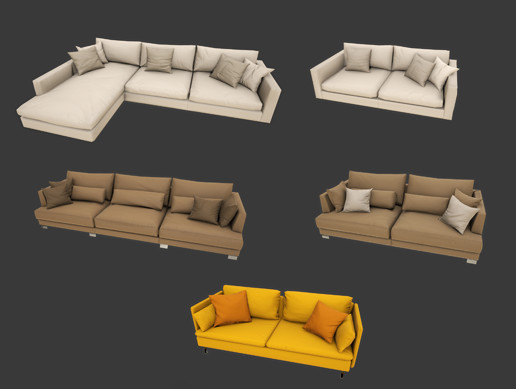
Elevate your workflow with the HQ Modern Sofas Pack asset from Next Level 3D. Find this & other Furniture options on the Unity Asset Store.
misty wave
hmmmm allsky skyboxes are ch o n k y
Hope it's okay to share this:
In development, on my new world
I've created a system that uses particles to create world-scale lightning with random SFX over a random interval


Working on a new map, featuring my Rain Machine! #vrchat https://t.co/nUj63QsrNK
 Twitter
·
Twitter
·
It has sound~
idle jolt
So I downloaded jetdog's prefabs and imported them. The bad news though is that most of the scripts are missing. Do I need Udon sharp or something?
 tawny grove
Maybe a dumb question, When I try to switch package version , it loads needed one for a moment and then reupload newest one back. How to fix it? All deleted packages reinstall themselves back right away.
 limber panther
idle jolt
So I downloaded jetdog's prefabs and imported them. The bad news though is that ...
limber panther
idle jolt
So I downloaded jetdog's prefabs and imported them. The bad news though is that ...
Highly likely. Most udon assets do
any you often want to install udon# first, before loading in the asset
bold ibex
How do i download the Wander AI script?
I follow the link but i dont see the link to download within the link it takes me to
got it
bold ibex
can someone help me with mirror problems? the world i have is relatively dark so i added a bit more lighting for avatars but in the mirror avatars still appear like pitch black
anyone know a fix for this?
whole edge
Mess with the things that the mirror actually reflects - where the mirror says “Everything”, uncheck each item on the list until they appear normal.
Might fix it, might not
whole edge
No prob. Pretty sure all you need to reflect anyways is Environment, Player and Default. Something like that. Definitely Player and Default
misty wave
So I have a world that is incredibly large but mostly empty. It's nearly real scale data, a little beach in front of a huge lake and a mountain in the background. Bakery takes absurdly long to lightmap it. Is there anything I can do to speed up the bake? I get decent performance with real-time but obviously I should avoid it if possible
 amber dagger
So uh, I need help. I am not a Unity pro. But I have this world I got for VRChat and it requires me to use the 2020 version of editor, but I cannot figure it out, I only just got the pink shit to disappear, but now I don't know how to upload it or anything...
I need a pro's help.
misty wave
amber dagger
So uh, I need help. I am not a Unity pro. But I have this world I got for VRChat...
VRChat is currently not using the 2020 editor, you'll need to use the current supported version. Where'd you get the world from? Surprising they'd set it to 2020
amber dagger
The VR models site...
So what do I do?
Is there no way to make this world compatible with the 2019 version?
So I can upload it?
misty wave
https://docs.vrchat.com/docs/current-unity-version
Depending on what your goal is, you can probably import the assets from the 2020 Unity project into a new 2019.4.31f1 project

VRChat
This page lists the current Unity version you should use when creating content for VRChat, as well as links to the correct version for both Unity Hub and direct downloads. Current Unity Version The current Unity version in use by VRChat is Unity 2019.4.31f1. Ensure you are using this exact version! ...
Is it a fully set-up world, or just the models/textures/layout and such?
amber dagger
Fully set up
I think
It's like completely put together. There's no spawn point or anything like that.
misty wave
So like the VRChat SDK isn't imported, nothing VRChat specific? Just the map itself? It would be easy to get it into 2019 if that's the case
amber dagger
So....what do I do? I'm sorry, I am at a complete loss
idle jolt
Does a mesh collider create polys? Should I use box colliders instead for smaller objects?
misty wave
amber dagger
So....what do I do? I'm sorry, I am at a complete loss
What I would recommend, is create a new empty game object, put everything in the hierarchy under it, and export it as an FBX. That way, you can create a new project in 2019 Unity, and import the FBX, and work on it there~
https://docs.unity3d.com/Packages/com.unity.formats.fbx@2.0/manual/exporting.html#:~:text=Use Export To FBX (menu,the%20parent's%20hierarchy%20is%20exported.
misty wave
idle jolt
Does a mesh collider create polys? Should I use box colliders instead for smalle...
Mesh colliders require significantly more processing power, so when possible using box colliders is more performant
idle jolt
Gotcha
amber dagger
I think I'm dense....
Do I create the new empty game object in the 2020 of the current scene project and then export it and then go to 2019? Am I understanding that right?
The game object auto goes inside the scene folder, how do I put the folder into the game object?
I don't think I'm doing this right.
 unkempt valve
I added VRCPickup to an object, but its not pickup-able??
 gray sleet
if anyone knows baking can you help me rq in world lighting?
bold ibex
what do u guys use for doorways? i noticed the doorway prefabs and the wall prefabs don't line up properly
misty wave
amber dagger
I think I'm dense....
in the Hierarchy in 2020, create a new empty game object


Then copy everything else and put it into the Game Object
Drag that down into Assets

Also struggling to make this work, but there's some tutorials

This how to export .FBX files from prefab on Unity.
Link of the FBX Exporter : https://www.mediafire.com/file/0qzedbc16b63x3f/UnityFBXExporter1_2_0.rar/file
misty wave
unkempt valve
I added VRCPickup to an object, but its not pickup-able??
Did you add the collider to it? And it's a rigidbody?
 frigid estuary
I know SDK2 wont be supported anymore, but are there some synchronization issues in SDK2 right now? It seems since today the "AlwaysBufferOne" in my world isnt working properly for many people anymore.
 humble siren
Hello Everyone! New to VRCHAT and Pretty new to VR.
How long do you have to spend in VRChat before you can create worlds and upload them? It just tells me spend more time in VRChat before it lets me. Thanks for any info.
amber dagger
Can I just hire somebody to do this for me....QwQ
bold ibex
So ... Question. I have troubles with textures. How do I apply them properly when an object comes with multiple textures? Where do I apply them? How do I do it?
 mild spade
bold ibex
So ... Question. I have troubles with textures. How do I apply them properly whe...
mild spade
bold ibex
So ... Question. I have troubles with textures. How do I apply them properly whe...
You apply textures to Materials. Depending on what type of textures you have, you will have to find a shader that supports those textures. For example, your model might come with "normal maps" textures, you will need to find a shader that supports normal maps. Textures goes on materials. Materials use shaders to display those textures on the world.
bold ibex
mild spade
You apply textures to Materials. Depending on what type of textures you have, yo...
how would i apply these textures that belong on this couch to the couch?

also sorry, i understood what you mean but at the same time have no idea because i have no idea how to begin to do that
mild spade
bold ibex
also sorry, i understood what you mean but at the same time have no idea because...
It looks like those textures are already applied to the couch. If you are not sure, you can click the "Mesh Renderer" on those objects and look for "Materials." The "size" represents how many materials the object uses and which one. At the bottom you can see that my material (which is only 1) is called "SimpleAssets_matte" which uses the Standard shader. That shader supports many "maps" or textures, this is where you place your textures. Albedo is the main map (texture) Metallic is a different texture for metallic effects, Normal is another texture for a different effect and so on... Can you click the couch mesh renderer and send a picture of what it looks like?

 unreal leaf
how do vehicles usually work in vrchat worlds? like how do you make them move only when someone is sitting in them
bold ibex
mild spade
It looks like those textures are already applied to the couch. If you are not su...
I'm having troubles getting a picture but the couch doesn't look like that. It has other colors on it
bold ibex
mild spade
It looks like those textures are already applied to the couch. If you are not su...
If u look at the screenshot I sent, there is no mesh renderer on that object.
mild spade
That is because it is the parent object. You have to find it. Maybe one of the "cube00x" has the mesh
bold ibex
mild spade
That is because it is the parent object. You have to find it. Maybe one of the "...
Ohhh ok
mild spade
That is just a way to organize the hierarchy. Putting all sofas into an empty object called "sofa" with nothing in it. But the real objects are a child of it.
mild spade
unreal leaf
how do vehicles usually work in vrchat worlds? like how do you make them move on...
in SDK2 the component that controls the car starts disabled and it is enabled locally to the person who sits on the car. When they sit, they trigger an event that enables the car controller, and when they exit the chair, they disable the car controller component.
bold ibex
@mild spade

Why's it greyed out like I can't put the albedo and normal and etc in it
@whole edge sorry for the ping. the mirror actually didnt get fixed. the avatar i was using just made me thought it did lmao
mild spade
bold ibex
Why's it greyed out like I can't put the albedo and normal and etc in it
Looks like those materials are attached to the model. You can either extract them or simply create a new material. Right click, create--> Material. You should be able to edit this one. Then just drag the New material into the model Mesh Renderer (under Element 0), or simply drag and drop from the folder into the couch. From there just plug in your textures (maps) into the albedo

 chilly flower
hello

that tiny theatre is the same as that big theatre
how do i upscale it to the exact same size as the big one?
bold ibex
chilly flower
hello
right click on it in the hierarchy, click duplicate
bold ibex
mild spade
Looks like those materials are attached to the model. You can either extract the...
so what do i do from here
chilly flower
ok the tiny theatre has certain differences. its a different model modified by me
I dont want an exact duplicate
@bold ibex
i want to make the small one as big as the big one
 bold ibex
chilly flower
yeahhhhh ugh
bold ibex
chilly flower
yeahhhhh ugh
ummm i think i just thought of another way. check the dimensions of the big one in the inspector and just copy those dimensions to the second one
like the position, rotation, etc
chilly flower
i tried that. i think the scale numbers are relative. that picture i posted is them both at 1
bold ibex
my avatar looks fine but in the mirror its all dark like this. anyone know a fix?

oh Squall, am i doing this right? how do i know which spots the other textures go? i know normal is always usually that blueish purple color. what about the wood and concrete?
 mild spade
You Will have to plug in one of the "clothe000" into the albedo until it looks the way you wanted it to look. The Wood and Concrete looks like they belong on another mesh. Right now the "cube.001" is highlighting the bottom of the couch only. I believe you will have to click the objects on the middle (little tables) and apply the wood texture to those. You will have to create a new material for that, but you can use the same material on all your couch meshes.
bold ibex
gah, why do they make this shit so confuysing for haha
i feel like im not gonna be able to figure it out
mild spade
Yes... the creator of the couch made too many objects and materials when it can easily be combined into just one mesh and one material
bold ibex
i love you for trying. ill keep at it. should we get married?
mild spade
Looks like the wood belongs to the yellow and the concrete belongs to the gray table.
 unreal leaf
how does one check for input in udon?
mild spade
unreal leaf
how does one check for input in udon?
https://docs.vrchat.com/docs/input-events for example, when they press the "jump" button on their controller, regardless of what controller they are using (or in vr/non vr)
VRChat
You can read the input of a Player's controller in a unified way across all platforms by using Udon Input Events. These events will work correctly even when the player has remapped their controls. There are currently two types of events - Button and Axis, which include boolean and float values. Each...
unreal leaf
right, but im confused about how these work
like, if i want to check for an input in c# i'd go if(Input.GetKeyDown(KeyCode.Space) {do this code}
i guess you'd do an override? hmm
bold ibex
same story with this bed... i dont freakin understandddddd thoeeee. i wish i could magically understand how to do it

so okay, i click on one of the children of the object. then i.... make a new texture then put the texture into the 0 spot then assign one of the textures to the corresponding slots and somehow im supposed to guess what slot they go in... correct? @mild spade
im just not getting this
mild spade
bold ibex
same story with this bed... i dont freakin understandddddd thoeeee. i wish i cou...
You could try extracting the materials, maybe just maybe they will retain their textures where they belong instead of having to guess their spot. You can do this by clicking the material "bed 09" It will take you to where the bed mesh is.
 bold ibex
hmm
mild spade
Oh sorry, forgot to send this. Once you find where the object is (will have a little arrow) you click it, then on "materials" select "external material (legacy) then apply
 mild spade
unreal leaf
like, if i want to check for an input in c# i'd go if(Input.GetKeyDown(KeyCode.S...
mild spade
unreal leaf
like, if i want to check for an input in c# i'd go if(Input.GetKeyDown(KeyCode.S...
Hmm Im sorry, I only know the visual scripting nodes Udon uses. Try asking in #udon-general But if you are trying to get a key down, like space, keep in mind that VR players will not be able to press that key easily. That is why the VRChat input is the easiest way to get player input since it is universal (jump, grab, drop etc)
bold ibex
hmm ok i tried that to 2 different couches and the bed and it did nothing
like i just dont understand y the objects cnt just come w the textures and materials already on them this is dumbbb
bold ibex
Can anyone help explain to me or show me a good tutorial video on how to apply textures to objects?
bold ibex
chilly flower
Wat do they mean by that exactly
It can mean two things:
Lossless optimization, which is the reduction of the demands placed on your CPU and GPU without a noticeable decline in the functionality or appearance of a world. An example would be the act of marking certain gameObjects as static so they can be rendered in batches.
Lossy optimization, which accomplishes the above task to a greater degree at the cost of some quality loss. An example would be using crunch compression to massively reduce texture file size in exchange for acceptable quality loss.
 amber sail
Hey all I just joined the discord. I just got done creating my first world using the homekit template. My upload was went good. I can see my world under "mine" but I does not let me go there on my oculus quest 2. It there a way to convert it? and what did I do wrong when creating it?
 upper obsidian
Press the button switch to android in the SDK option, and upload again.
And also read the documentation on the site, everything is described in detail there. Including about the quest, what of the components can be used and what not.
bold ibex
how do i make the SFX feel only in the part inside the circle and not all over the world?

 toxic wraith
"attach to me" package works when "I build and Test" when I try to publish the world I get this Error ... PLZ HELP!

 wild vapor
Welp, I've filled up my avatar slots, so I guess it's time to make my avatar world..
 south orbit
bold ibex
how do i make the SFX feel only in the part inside the circle and not all over t...
south orbit
bold ibex
how do i make the SFX feel only in the part inside the circle and not all over t...
'' max distance ''
south orbit
toxic wraith
"attach to me" package works when "I build and Test" when I try to publish the w...
find the object that has this script try disable and see if it will work, u could also even it sounds odd try save ur project, re open it and see if it will do the trick
 wary veldt
heyo, i need some help making a map. ive never made one and help would be very, very nice.
toxic wraith
south orbit
find the object that has this script try disable and see if it will work, u coul...
if I disable the script It works but I want the script to work lol, did the restart dint work
south orbit
wary veldt
heyo, i need some help making a map. ive never made one and help would be very, ...
thats way too general for this channel, if u wish to learn how to make a map i suggest u watch guides on youtube, if u have anythin specific u need help with this is the place to ask
south orbit
toxic wraith
if I disable the script It works but I want the script to work lol, did the rest...
yeh well the purpose / point of that is to find the cause of the issue in the first place
toxic wraith
south orbit
yeh well the purpose / point of that is to find the cause of the issue in the fi...
found the object that is causing the error
south orbit
so now u know it is the script there is only 1 place to work from, which is the script u gotta figure out what breaks it to me it looks like
toxic wraith
but idk how to fix it
south orbit
keywords that it is tryin to locate but they might have a name that makes it not able to locate but again
when it comes to such scripts it can be so difficult to actually say the error / issue, it is very dependant on the script, like what it is for, who made it, where did u get it and so on
south orbit
toxic wraith
but idk how to fix it
u might have more luck under #udon-general as the error u're dealing with is part of UdonSharp
south orbit
chilly flower
If i want to optimize my world, are there people i can go to and be like
there is probably people that optimizes worlds for commissions out there i wouldnt be surprised, finding them tho is another question, but generally dedicated semi professional map makers perhaps is a place to start, in that sense u can find them from ingame to however, i aint to say but ye it surely is a thing out there .
if u want to do it urself and have questions on it there is also the #world-optimization for that
toxic wraith
south orbit
u might have more luck under <#657394772603830360> as the error u're dealing wit...
cheers
 topaz pebble
im having issues uploading my world but there are no error logs can someone help
i will pay
 ruby jay
topaz pebble
im having issues uploading my world but there are no error logs can someone help
ruby jay
topaz pebble
im having issues uploading my world but there are no error logs can someone help
what exactly is the problem? what are you trying? when did this start happening?
topaz pebble
i've tried for 2 days, literally just attempting to upload world and it's giving no errors but not uploading
makes no sense
ruby jay
can you show your console? and maybe your scene?
 ruby jay
topaz pebble
ruby jay
topaz pebble
please click the red symbol too or else you filter the messages
upper obsidian
So what's the problem with the upload? At what stage is the error?
topaz pebble

after it goes through the whole upload process it just crashes
and goes back to scene
ruby jay
i would also tick warning (yellow)
and then disable clear on play and clear on build
just clear manually
then attempt an upload and show us what the logs says after the failure
this way we can have a one clean take on what happens and evaluate from there
ruby jay
oh, just send the console log
topaz pebble
i thought i just did
ruby jay
you sent a video file
topaz pebble


the video shows exactly what's happening i thought thats what you wanted
sorry
@ruby jay
ruby jay
does the game tab show nothing?
topaz pebble
i will show
ruby jay
also you sent two screenshots of a different time
 ruby jay
can you try pressing play and see if any error appears?
topaz pebble
game tab gets stuck here
its already in play
but stuck
and I tried leaving it here for hours before to see if it was just loading but nope no change
@ruby jay
whole edge
^^Edit: he deleted his messages responding to me lmao
Not everybody is available 24/7. Most places it’s either early morning or lunch time. There’s also Google and YouTube when people on the server don’t have answers for you.
I have a helpful tip for you - if you’re gonna get angry when people don’t respond asap, take your error code and paste it into Google 😐 good luck brotha
upper obsidian
@topaz pebble It seems to me that you yourself see that the problem is with the audio player better, check its settings. Or ask a question to the author of the player.
topaz pebble
Even after removing the audio player it still doesn’t work
Which leads my to believe that’s not the issue
But thanks for your non-help
Anyone with actual useful help here?
upper obsidian
You haven't even described the problem yet.
Can't upload it up it's not a problem.
whole edge
topaz pebble
Anyone with actual useful help here?
Dude. If you can’t figure out the issue, don’t be angry when others can’t either, especially when they don’t have the scene literally right in front of their face. Chill out and take the negativity somewhere else.
topaz pebble
@whole edge again if your not going to help stf
stfu
respectfully.
idk why your still talking
whole edge
Again, take that negativity somewhere else or you aren’t gonna get any help lmao
topaz pebble
just say you dont know the issue and cant help
whole edge
“Respectfully”
whole edge
topaz pebble
But thanks for your non-help
You 😶
topaz pebble
negative because i want help and theres an idiot texting me ruining the quality of the chat
whole edge
Point proven - gonna go to work now, good luck and learn how to use Google brotha.
 random sphinx
is there a way to adjust a player's move speed in-world?
upper obsidian
This does not work?
 random sphinx
yes but i mean in-game adjustment, not in unity
 stone marsh
random sphinx
yes but i mean in-game adjustment, not in unity
stone marsh
random sphinx
yes but i mean in-game adjustment, not in unity
You'd target that script with another script or UI listener and change it by sending a new value and updating it. This can be done using just basic UI sliders, buttons, area triggers or anything really. Open the graph and have a look at the variables and the event that triggers them.
random sphinx
is it possible to reference the VRCWorld variables in udonsharp?
 mighty heron
So I've had a world with some ai enemies in it that are synced through object sync.
In the past this worked perfectly, with very little latency in behaviour.
But very recently they react MUCH slower to remote players, sometimes taking literal seconds before their logic updates
I've not update the world since it worked fine, and my friends play it regularly. So I don't really know if this was something I did or if the syncing is fucked somehow
anyone else had this issue before?
random sphinx
i haven't had that exact issue, but i have noticed that object sync leaves much to be desired
mighty heron
has this been brought up to the devs before?
ngl this kinda makes my world, and anything like it I'm guessing, completely impossible to do proper
random sphinx
i have no clue, i'm still fairly new to VRC world building; but yeah it seems like a significant issue to me
ruby jay
it is known to the devs, object sync is just bad atm
 desert python
some weeks, object sync gets super slow, sometimes to the point where it tricks you into thinking you forgot to add object sync
and some weeks, its almost perfect
random sphinx
i also just learned that objectsync won't sync objects between quest and PC users if your quest and PC builds come from separate Unity projects
which makes organization much more difficult for me
mighty heron
that's... ridiculous
ruby jay
random sphinx
i also just learned that objectsync won't sync objects between quest and PC user...
no, if your hierarchy is not 1:1 the same, sync will break
desert python
no, the hierarchies just need to be the same
random sphinx
i'm fairly sure they were the same. i even copied the meta files over
desert python
however, this mightve changed recently but hierarchy is what should be the same
ruby jay
your hierarchy is just likely different, there are many worlds using object sync just with a two project setup
random sphinx
i guess it's possible, but i literally just copy and pasted the project and didn't change anything other than the materials
maybe i'll try it again sometime and see what happens
ruby jay
unity cache got really fast in 2019 anyway, makes two projects not so necessary
upper obsidian
In a unity, all objects have their own id, which usually coincides when copying a project, and in this case, synchronization works. In other cases, no.
 chilly hawk
How many pickup items with gravity can the Quest handle?

My Skee-ball tables have 10 spheres each, so I have 30 there alone.
 desert python
chilly hawk
How many pickup items with gravity can the Quest handle?
desert python
chilly hawk
How many pickup items with gravity can the Quest handle?
depends on their collider, mass, drag and othere rigid body stuff
bold ibex
Hello / Good evening
I have a request
I would like to convert my .USDZ to .unitypackage
Thank you in advance
desert python
chilly hawk
My Skee-ball tables have 10 spheres each, so I have 30 there alone.
should be fine
chilly hawk
What about the bar? Most are box colliders. All have default mass and drag.
desert python
box colliders should be good
id say youre fine, i would still make a toggle for them, but at that point, its based on drawcall and mesh optimization stuff at that point
chilly hawk
Great, thanks!
bold ibex
man this is confusing.. im trying to optimize my world, i started using crunch compression and the world size got bigger- what
tried to modify it, and it barely changed
what am i doing wrong
bold ibex
made everything static.. no change in size..
 left rain
check the build debugger in VRWorldToolkit

GitHub
Unity Editor extension for making VRChat worlds. Contribute to oneVR/VRWorldToolkit development by creating an account on GitHub.
each time you run a full build you can get a breakdown of what's taking up space. you might have some unexpected unused textures or meshes included in the build
also keep in mind that crunch reduces the download size but does not reduce the in-memory size of your textures, as they are decompressed on load
 left rain
hmmm.
try checking the plugin inspector for VRCCore-Editor.dll and make sure that the platform is set to editor only
 left rain
the UV thing isn't a dealbreaker, depends on your baked lighting situation
bold ibex
i swapped all my lights to baked, set all objects to static, set everything to crunch compression and my world went up by 2mbs
left rain
for the plugin inspector you need to find that DLL file in your project
baked lighting will increase file size!
the lightmaps have to be stored as actual textures
bold ibex
how do i do that
left rain
do what? find the file?
left rain
that happens automatically when you bake lighting. that's literally what baking lighting is-- you store the lightmaps as textures to be used by your materials
the baking process handles all of this for you. but the tradeoff for baking lighting is that you get better performance (because you don't have to use realtime lights for everything or worry about raytracing bounced light at runtime which is crazy expensive) but you have to spend a few MB to store those maps
 bold ibex
left rain
the baking process handles all of this for you. but the tradeoff for baking ligh...
bold ibex
left rain
the baking process handles all of this for you. but the tradeoff for baking ligh...
ah alright
also

found it
left rain
yeah, check the inspector for that file and make sure it's set to Editor Only
green lagoon
one could apply texture compression on some of the textures that aren't the light Maps to get those MB back to budget for the light Maps
 left rain
you want it to be editor only
bold ibex
so uncheck any and check editor?
left rain
what do you mean "resets itself"
bold ibex
it just goes back to the original settings
left rain
when did this error start happening? did you recently install some other custom package?
 hollow swift
anyone know a solution to fix this problem i have with my unity, i can't find my control panel to build the world and i have these errors
 bold ibex
left rain
when did this error start happening? did you recently install some other custom ...
bold ibex
left rain
when did this error start happening? did you recently install some other custom ...
well this is my first time trying to build
so i dont know for sure
topaz pebble
is there a way to bulk crunch compress textures? i have 3,000 textures im trying to compress in order to optomize my world
left rain
bold ibex
well this is my first time trying to build
okay. other things to check are that you're using the correct version of Unity, and if so, try completely removing and then re-installing the SDK3 package
you should be in 2019.4.31f1
bold ibex
im on the correct version
whats the safest way for me to remove the sdk because i dont want it to break my world
left rain
make a backup
bold ibex
ok. im pretty much out of time rn so im going to try this later
left rain
the other thing to try is removing any third-party packages you've included. a lot of them can cause problems if they're not properly maintained
bold ibex
Alright
topaz pebble
is there a way to bulk crunch compress textures? i have 3,000 textures im trying to compress in order to optomize my world
hollow swift
hollow swift
anyone know a solution to fix this problem i have with my unity, i can't find my...
anyone got a solution to this
frigid estuary
I know SDK2 wont be supported anymore, but are there some synchronization issues (AlwaysBufferOne) in SDK2 right now?
left rain
topaz pebble
is there a way to bulk crunch compress textures? i have 3,000 textures im trying...
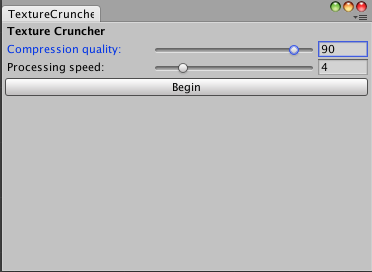
this is an old thread and it's DIY but there is a script in the middle of the thread that will do it https://forum.unity.com/threads/editor-utility-crunch-all-textures.504988/
Unity Forum
Before releasing a downloadable project, I like to Crunch all textures to dramatically reduce filesize (~30%) but not visual fidelity. (It also...
 magic pebble
Any fix to this?
 left rain
create a gameobject and put a VRCSceneDescriptor component on it
hollow swift
i can't even get the build world control tab
what the fuck have i done
why is it broken
gray sleet
How do i downgrade unity hub? It said ti update to the latest version but now that version is super buggy and doesnt work
left rain
hollow swift
why is it broken

Unity Forum
...the pool should always return an object/decal, and never null.I believe this is a limited solution. Do not wish to strictly rely on its hardness. If...
this post specifically: https://forum.unity.com/threads/easy-decal-decals-everywhere.276629/page-17#post-5490678
Unity Forum
...the pool should always return an object/decal, and never null.I believe this is a limited solution. Do not wish to strictly rely on its hardness. If...
gray sleet
unity hub 3.0 is broken. how do i downgrade
upper obsidian
Uninstall 3.0 and install the version that works for you
gray sleet
not sure where to download older versions. luckily i had an old inlstaller saved
what is this error? ever since i did the 3.0 thingy this has been happening

part of the thing is black / blank and im allways getting an error
upper obsidian

Файлообменник
Вы можете быстро делиться фотографиями, отправлять видео или передавать файлы большого размера (до 100 Гбайт). Загружайте файлы без регистрации, скорость загрузки и скачивания файлов не ограничена.
 urban epoch
gray sleet
what is this error? ever since i did the 3.0 thingy this has been happening
urban epoch
gray sleet
what is this error? ever since i did the 3.0 thingy this has been happening
Seems to be an issue with your present layout. Go to the top right of your screen and click the Layout dropdown, then just select Default and see if that resolves it.
gray sleet
urban epoch
Seems to be an issue with your present layout. Go to the top right of your scree...
oh. ill try that if reinstalling unity hub completely
urban epoch
Sometimes different windows will get bugged out and confused, so you'll just have to reset the layout. Nothing in Unity itself is affected by what Hub version you have installed, so there's no connection there.
gray sleet
is there an official link to older versions of unity hub?
upper obsidian
I threw it off for you already
gray sleet
upper obsidian
I threw it off for you already
whatever that link you send doesnt download anything
gray sleet
upper obsidian
I threw it off for you already
plus several things are telling me it contains viruses.
Please send an official link
urban epoch
There is no official distribution of legacy Hub versions. What sorts of problems is it having for you?
gray sleet
as i sent above. as soon as i downloaded the update. my unity started to break. the black part of the screen and errors
upper obsidian

Google Drive is a free way to keep your files backed up and easy to reach from any phone, tablet, or computer. Start with 15GB of Google storage – free.
urban epoch
Again, there wouldn't be any connection there.
Unity Hub is basically a fancy application opener.
 past wave
does anyone know why i get this message every time i try to import the world sdk3 into a fresh project? it doesnt stop anything but i doubt its good that i see the message in the first place.
 upper obsidian
sdk changes some project settings, so it is necessary
past wave
interesting, alright
is that a recent change? cause i dont remember seeing this awhile ago.
upper obsidian
in 2017 the unity was already
past wave
oh i see
wild vapor
what do I need to make an avatar world of avatars in my favourites list?
 slow mica
been trying out to found out how, but how to make a portal to specific numbered map?For reference i'm trying to get a permant spawn portal of a specific map number
chilly flower
is there a way to apply a material to just one face of something, instead of the whole thing
 fallen ingot
wild vapor
what do I need to make an avatar world of avatars in my favourites list?
fallen ingot
wild vapor
what do I need to make an avatar world of avatars in my favourites list?
You need the 'Blueprint Id' (of each avatar), which you enter into the VRC Avatar Pedestal component. How do you acquire Blueprint Id? You ask the creators for the ID's, you create your own avis, or you can find some online shared by creators.
 wild vapor
fallen ingot
You need the 'Blueprint Id' (of each avatar), which you enter into the VRC Avata...
wild vapor
fallen ingot
You need the 'Blueprint Id' (of each avatar), which you enter into the VRC Avata...
I see..!
fallen ingot
chilly flower
is there a way to apply a material to just one face of something, instead of the...
Yes, use ProBuilder and you get this nifty little toolbar (after you make your shape/geometry). You want the face button.

 languid ibex
is there a way of creating an interative button that toggles an object active and inactive for everyone, including late joiners? I'm fairly new to udon and have been struggling for a few (several) hours and haven't been able to decipher the logistics behind making a door vanish for everyone in the world
bold ibex
It says my world is too big to upload. How do I fix it?
upper obsidian
languid ibex
is there a way of creating an interative button that toggles an object active an...
You can use a variable, you can request a state from the master. There are many videos on YouTube.
languid ibex
I figured it out after searching through about four videos, the fancier button prefab I was using was not triggering the udon script to go, so I ended up just putting a box in and calling it a day. Thanks!
chilly flower
whats the hotkey to orbit a selected object?
i thought it was ctrl
but it aint doin it
stone marsh
chilly flower
whats the hotkey to orbit a selected object?
F to focus, or double click in your hierarchy.
bold ibex
does any one know of any other pens that work in worlds besides qv pens i dont wanna use qv pens
languid ibex
does anyone know what the name of that squishy bed/ slime object that squishes when you interact with it is called?
 opaque vale
languid ibex
does anyone know what the name of that squishy bed/ slime object that squishes w...
opaque vale
languid ibex
does anyone know what the name of that squishy bed/ slime object that squishes w...
if u find out let me know, is it pc only?
languid ibex
turns out it is a shader, just found it.
 shadow sapphire
Is there a way to disable the avatar preview from loading on a pedestal? I'm working on a menu board that has the pedestals set as images, but whenever the images are loaded (they're hidden inside a submenu and don't render until shown), the avatar previews briefly flash. I've tried setting the placement to a hidden plane but this renders the pedestals inoperable; setting them anywhere except the images with the pedestal component doesn't work at all. I'm currently using a script that disables the previews, but they still briefly appear whenever the game objects are rendered. I'm looking to disable them completely, if at all possible
upper obsidian
They can be turned off as objects, and pictures will be loaded only after turning on.
shadow sapphire
That's how it's set right now, but the actual avatar preview still shows up when the image is turned on and rendered into the scene
chilly flower
Hey so I have a disco ball in a room, but all the light spots from it shine through walls into other rooms
Is there a way to fix this?
Either to get it to stop at walls, or to adjust the distance it shines?
Id rather it stop at walls but ill take what i can get lol
fallen ingot
shadow sapphire
Is there a way to disable the avatar preview from loading on a pedestal? I'm wor...
You might get more help if u posted to avatar channels?
fallen ingot
shadow sapphire
That's how it's set right now, but the actual avatar preview still shows up when...
Can you send link to where u got the disco ball? - need more info
random sphinx
can anyone recommend a good cloud shader?
chilly flower
so

This projector projects a beam that moves around
i drew arrows to it
I noticed that it doesnt have a light gizmo for some reason
but theres still some settings it looks like for the properties of the light on the right
it shines through walls
is there a setting i can change there to get it not to do that?
I was playing around with different shaders
perhaps one i missed?
 inner python
chilly flower
it shines through walls
inner python
chilly flower
it shines through walls
Are you walls solid ? If they aren't, try messing with the shadow resolution or make the light range shorter, I hope it helps. https://gamedev.stackexchange.com/a/46192

Game Development Stack Exchange
I'm currently having a problem with lights in Unity. They shine through walls for some reason.
Point, directional, etc. If a light is next to a wall on one side, you can see it on the floor on the
chilly flower
@inner pythonThe walls are solid :/
Also on another note as well, ik you can rotate a selection, but can you flip it? Like mirror it?
inner python
chilly flower
<@!268413871558098945>The walls are solid :/
Try anyways,it might help
inner python
chilly flower
Also on another note as well, ik you can rotate a selection, but can you flip it...
Just -1 the scale, in the axis where you want to flip it I guess
×-1 I guess is more correct if your initial scale isn't 1
slow mica
how does one make a portal to go to a specific instance of a map? i have the world ID and all, but i'm trying to make a permanent portal that goes to one specific instance. (not sure if this is the right thread but it was the closest i could find to my question)
bold ibex
How can I turn my mirror to default off?
mild spade
bold ibex
How can I turn my mirror to default off?
You just keep it off before you upload (disable the mirror object)
 tough gazelle
Is it possible to set the instance owner to a set user (world author) when someone joins&leaves? (so it updates frequently)
ruby jay
tough gazelle
Is it possible to set the instance owner to a set user (world author) when someo...
what are you trying to achieve?
chilly flower

I dont even know what that is
or how to make it, stop trying to access it?
wat to i do about this
bold ibex
mild spade
You just keep it off before you upload (disable the mirror object)
Thanks
Hmmm, so I downloaded vrworldtoolkit and did all of the things it told me to do to reduce world size, so there are no more errors/recommendations coming up. But when I go to upload my world it says it is still too big to upload. What do I do now? 😭
ruby jay
have you crunched your textures? there is a mass texture importer
chilly flower
inner python
Are you walls solid ? If they aren't, try messing with the shadow resolution or ...
What i don’t understand tho, is

See what i drew arrows to
Thats the light source
But there’s no gizmo
As you can see, gizmos is enabled cause the device next to it has one
But without a gizmos
I dont see soft and hard shader settings
Tho there is something there that says shader: standard
I tried monkeying with it, but if thats the solution idk wat to do
Theres also no intensity and range options as far as i can tell
To catch up anyone who’s new, this light is shining through walls
misty wave
is there an efficient way to make an object track the local player? I want a particle emitter to follow the local player (rain on them)
 cerulean echo
@chilly flower what light you selectet the object what you tryng to do you wand to use the emision to light ? Why i see no lights you got selectet only the object
chilly flower
if i delete the object the light goes away. im lead to belive the light is made be the object
dispite no gizmo
cerulean echo
Also is it not better to ask about light in the lighting chanel.
chilly flower
wat
"it is not better to ask in the lighting channel" ....i have a feeling you mean to be telling me that it is better :3
i didnt realize that existed lol
but thats nice
cerulean echo
I woundering where the lights comming from maybe from the emision
@chilly flower where the light comming from ? From the emision?
cerulean echo
Yes but where the lighting coming from that projector got none light on it i see only the emision but i dont know if the real time emision wen you add more emision it light up but i know on the baked if you make higher the emision it light up
chilly flower
the green disc
i hate to do this but its 4am and im gonna crash lol. ill @ u tmrw
thankyou tho
for helping me out
cerulean echo
Np maybe wen you on again we can check that pm me then i try maybe i can help you at least i try lol
bold ibex
ruby jay
have you crunched your textures? there is a mass texture importer
How do I crunch them? I did it once but not all of them. How do i access the texture crunching thing
ruby jay
bold ibex
How do I crunch them? I did it once but not all of them. How do i access the tex...
clicking on the texture will bring this window up in the inspector, you can use the mass texture importer on the world debugger to accelerate this chore
bold ibex
ruby jay
clicking on the texture will bring this window up in the inspector, you can use ...
Word! Thanks a ton
bold ibex
ruby jay
clicking on the texture will bring this window up in the inspector, you can use ...
When I click get textures from assets it always stops a quarter of the way thru. Does it just take a long time to go?
ruby jay
bold ibex
When I click get textures from assets it always stops a quarter of the way thru....
it does take a bit, from scene should work too
bold ibex
ruby jay
it does take a bit, from scene should work too
I did from scene earlier and it went quickly just this assets one takes foreverr
ruby jay
you likely have a ton of unused assets
 deft pollen
Is there a tool to check world details (e.g. file sizes of textures, meshes etc) ? Or do we still have to check the log file on upload?
nvm just found out about VRWorldToolkit
bold ibex
only guess is to ask in here, but how do you make textures/materials not have a solid color to it?
Anyone able to help me add mirror toggles, been struggling. The button just disappears when I interact with it ;;
mild spade
bold ibex
Anyone able to help me add mirror toggles, been struggling. The button just disa...
Show the script on the gameobject. Likely that you are not refencing the mirror object on the script, and instead it is referencing itself (Button)
bold ibex
mild spade
Show the script on the gameobject. Likely that you are not refencing the mirror ...
You are indeed right 💀
Thank you
 cursive turtle
Yo I'm new to world creation, I'm wondering if there is a way I can make a microphone object which collects audio around it and amplifies it into speaker objects around the map
still haven't been able to figure it out
I'm using sdk3
cursive turtle
Maybe there is some way to negate the proximity chat (2d audio) somehow
just for 1 user
stone marsh
cursive turtle
Yo I'm new to world creation, I'm wondering if there is a way I can make a micro...
amber sail
does anyone stream VRC?
shit wrong room
my bad
can you convert a pc homekit into a quest 2?
hollow swift
Guys i want to add a screen into my world that can play livestreams any idea
idea
s
stone marsh
hollow swift
Guys i want to add a screen into my world that can play livestreams any idea
 fleet coral
Hi, everyone! I've seen this kind of "shooting range" in many worlds already. Does anyone know if there is a preset for that ? I would like to have one in my world. Thanks in advance !!!! ❤️
 bold ibex
fleet coral
Hi, everyone! I've seen this kind of "shooting range" in many worlds already. Do...
bold ibex
fleet coral
Hi, everyone! I've seen this kind of "shooting range" in many worlds already. Do...
same^^^
also does anyone know to safely back up my project?
languid ibex
does anyone know how to script, or has a guide to how to script an object reset location button for multiple objects?
upper obsidian
bold ibex
same^^^
With the unity turned off, any backup method is safe.
bold ibex
upper obsidian
With the unity turned off, any backup method is safe.
How do you turn it off
upper obsidian
File - exit
bold ibex
Ahh thats what you mean alright
But how exactly can i back it up?
Just copy the folder?
bold ibex
Im thinking of copying the folder, putting the original on my HDD and keeping the copied one on my SSD to mess with it
Will that work?
upper obsidian
Yes, the whole copy is fully functional. It doesn't matter where it is on the disk.
You can open it in Unity. Everything will be the same.
bold ibex
Alright thanks
 round sandal
im tryna make a campfire and the issue is that its crackling sound is audible throughout the enire world, i dont want that, i want it to only be audible in an about 2 meter radius and then be completely quiet outside of that, how do?
 upper obsidian
round sandal
im tryna make a campfire and the issue is that its crackling sound is audible th...
round sandal
upper obsidian
https://docs.vrchat.com/docs/vrc_spatialaudiosource
upper obsidian
round sandal
im tryna make a campfire and the issue is that its crackling sound is audible th...
round sandal
upper obsidian
https://docs.vrchat.com/docs/vrc_spatialaudiosource
this just mutes the audio alltogether it seems like
even though i set gain to like 10 thousand
stone marsh
round sandal
even though i set gain to like 10 thousand
You have to set the Near and Far ranges appropriately
round sandal
i set far to 2 and didnt change near
now i got it working to a point where it plays the sound but still incredibly quietly
tried setting far to 5
no change
stone marsh
Increase near to 1.
round sandal
cant see how thatd help my case but sure lemme try
stone marsh
It's quiet because you're spatializing it from a single tiny point in space. Increasing the near will increase the range that the audio is heard at full volume before falloff happens.
left rain
near/far set the audio falloff radius. you can see the gizmos in the viewport illustrating this
if it's too quiet even when you're within the near radius, increase gain
stone marsh
The documentation linked already explains this all too
round sandal
stone marsh
It's quiet because you're spatializing it from a single tiny point in space. Inc...
yeah but i think the "full volume" is whats incredibly low
left rain
then increase gain
stone marsh
round sandal
yeah but i think the "full volume" is whats incredibly low
a far value of 5 is also pretty small. It will fall off to that point so it would be pretty hard to hear anything at all fairly close to the avatar. You most likely want a much further far value. You won't hear the audio out to your far value, it will falloff to being very quiet far before it hits that value.
Also, Gain maxes out at 10db. so you can't just "Increase gain"
round sandal
its a bit weird but eh ill just fuck around and hopefully get smth good idk
stone marsh
These are my personal values I use for avatars. They may not work for you, because it's dependent on the base volume of the .mp3.
 left rain
gain maxes at 10db for avatars, but does that apply to world audio sources?
bold ibex
i tried to test my world but its giving me an error saying something about a scene
can someone help?
left rain
it's much easier to diagnose errors if you post the error log
 left rain
is that the name of your scene?
bold ibex
If you’re talking about room rain then yes lmao
At least I think
Wait no
That’s the project name
Is the scene in the hierarchy the one you’re talking about?
left rain

check the build settings menu and make sure you don't have any scenes in there that no longer exist
 left rain
file > build settings
 round sandal
sorry to interrupt but if someone would answer rq thatd be awesome, so some world have these lil plushies n stuff that basically act as if they were rigged and they have like jiggle physics or whatever, so how does that happen? dynamic bones?
left rain
yes
@bold ibex do you have any custom assets or scripts in your world? chances are it's something else upstream that's breaking the build
bold ibex
Umm I tried importing a chess board thing. Could that be it?
left rain
if it was a unity package with included scripts, it's possible that there's a dependency there you aren't accounting for
bold ibex
could be
ill try removing it and testing
ok that let me get into the world but its bugging out now lmao
might be the spawn box
 proven cedar
im having a issue where some mesh colliders and pick up objects dont work and the pick up objects fall through the floor and the mesh colliders wont stick
 scenic kraken
Why's there an "avatars-performance" moderation tag on my world when there's no avatars in the world? Are they just fake reports or something?
 bold ibex
can someone help me? i have a wall on my world where you just go flying right through it. i put up another wall to stop it but you just go between the two walls and get trapped. im also not able to jump. how do i fix that?
left rain
if you want to collide against something, you just need to make sure that you have an object with a box collider in it.
bold ibex
yeah i have that
left rain
you can use mesh colliders, but they're much more expensive. it's better to just place simple box objects, then turn off the mesh renderer components
bold ibex
so just an invisible box collider is what youre saying? just turn off the mesh renderer?
left rain
yep
don't bother trying to use mesh colliders for things unless you have absolutely no other choice
simple shapes are much easier on the physics engine
bold ibex
yeah i tried that and it sorta helped. theres like tiny spots in the wall where you still clip through like 10% of the time. i can just edit the collider i guess
also how do i fix not being able to jump?
left rain
i don't know what that's about. it's a built-in behavior.
maybe one of your existing objects has a really messed-up collider?
bold ibex
huh im not sure. i was able to fix the wall but yeah jumping is a no go
opaque vale
hey! making a new world, would it be better to make the room in blender or unity?
languid ibex
what would cause a ui button to work just fine in the cyanemu play mode test, but when you click build and test, it does not work? I have a couple ui switches that work just fine, but when adding others using the same setup but different objects, they just don't?
mild spade
languid ibex
what would cause a ui button to work just fine in the cyanemu play mode test, bu...
Likely a collider blocking the raycast (laser) from the player. Cyanemmu ignores colliders when interacting with UI, but in vrchat the colliders block interaction. You should also check the Layer the UI is on (if you dont even see the reticle when pointing at the UI)
left rain
opaque vale
hey! making a new world, would it be better to make the room in blender or unity...
build in blender, then import to unity
languid ibex
a collider blocking the raycast.. hmm.. I'll look into that, thank you
cursive turtle
for some reason after importing betteraudio I no longer have the VRChat sdk menu

In the drop down it shows 2 things:
utilities
udon graph
cursive turtle
There were some errors when importing the better audio
Not sure exactly what my next step is
mild spade
cursive turtle
There were some errors when importing the better audio
What are the errors? You can post a picture of the console tab
cursive turtle
There was like 177 errors im posting this post-break
Pretty sure it was a problem with the import
mild spade
You did import UdonSharp right?
cursive turtle
Fucckkk
I forgot sharp
I have to remove all of my files surrounding the better audio then import shape etc… if I’m correct?
 tardy flicker
Good afternoon ladies and gentlemen I am underthemeow and iv been trying to make this world be every time I lunch it it gives me this

 plucky summit
This is going to be super general, but does anyone have a recommended Beginners tutorial outside the official docs? For what it's worth I'm a bit familiar with editors like Unity and UE.
 somber spoke
best ways to find realistic pc worlds that are 150-1000 mbs?
unreal leaf
is there a way to allow a player to rotate in a chair?
im trying to make a vehicle which i want to copy the rotation of the player
so the player can move is the same way they move themself
opaque vale
plucky summit
This is going to be super general, but does anyone have a recommended Beginners ...
let me know if you find any
plucky summit
opaque vale
let me know if you find any
I've been following along with Spookyghostboo's "Start to finish Chill Room" (https://www.youtube.com/watch?v=HO-P2OqO1ac_) and I am finding it immensely helpful. But two caveats are: A) They go very, very, very fast so you'd best have at least some familiarity with Unity's UI (And some things have changed spots so Googling is required) and B) It's not SDK3, but honestly it's more about constructing and barely touches SDK2 stuff even
opaque vale
is that the 2+ hour one
plucky summit
Yes.
plucky summit
Haha, you joke but honestly I struggle with that stuff too. I have some coping mechanisms in place for long videos, but you can always pause it every 15-20 and take a break!
opaque vale
i tend to watch on double speed but 2 hours is so overwhelming
 mild urchin
Hey I wanna make a stage a speaker so when people are on it people in a certain radius can hear them
 atomic patio
@opaque vale
https://adorable-home.com/apartments/exquisite-modern-dark-interiors-54184
The house I made is a recreation of the house in these pics-
It's my first time making a vrc map, and I wanted to learn a bit of everything, without having to do any architectural thinking of my own. Grabbing this and slapping down a bunch of stuff in the same shots was really fun!
it took a month of learning^^
 atomic patio
tyty!
The photos don't show everything ofc, I learned how to do shaders n skyboxes with code n all this other crazy nonsense, tried learning animations for doors opening, etc
opaque vale
mines just gonna be basic, not gonna do any animations or anything probably
atomic patio
I ended up scrapping animations for the time being, I don't want ONE project to hold me up forever
I will absolutely come back to them in the future, though!
And it looks great for 1 day's worth, got everything blocked out :3c
opaque vale
tbh i think rn the most time consuming is bringing in all the assets and making sure they're the right scale
atomic patio
My biggest failure in my map is the file size
One of the rooms, in its' entirety, is one model, unoptimized because I had started with it, not paying attention
mf is 40% of my filesize alone when loading the map
tardy flicker
I not really sure what I’m doing lol
 covert hornet
A interesting things iv noticed, I have a water shader that only operates under deferred not forward rendering and sometimes it works then sometimes it doesn't without reuploading the world
If i remember correctly vrchat only works with forward rendering?
 minor summit
Heyho :3 I Need help again.. i Think VRChat had changed something on the Bone system already. I Got a few objects like collars on my world that are attach able to avatars... two days ago every thing worked fine - since yesterday the avatars can pushed away with these objects and if you attach them they just fly random though the world. Also the billiard table got now an collider that wasn´t there before. anyone know how to fix these issues?
 unkempt turtle
tardy flicker
I not really sure what I’m doing lol
unkempt turtle
tardy flicker
I not really sure what I’m doing lol
ok, lets start from the beginning: what unity version and SDK did you use?
tardy flicker
im useing unity 2019.4.31f1 and the sdk is the new one on the site, vrcsdk3-world-2021
it's kinda weird that i can go into the world on test but when i public it, i go into the world and vrchat gives me a big sign that says something went Wong @unkempt turtle
unkempt turtle
tardy flicker
it's kinda weird that i can go into the world on test but when i public it, i go...
what did you add to the world?
tardy flicker
I made most of the world out of blocks and cubes and free stuff I got off the store like(sky blocks, floor color, wall color) I also put pics of my friends
 tardy flicker
thats crazy idk i could do that LOL

im not going to lie iv been working on this for along time lol i suck at it
unkempt turtle
how much space do you have on your C drive?
tardy flicker
700gb of free space
 deep hamlet
Hey, has anyone used this deck of cards before?
https://vowgan.booth.pm/items/3403129
I've put it down in my work but I can't seem to pick up any cards or hit the reset buttons

Here is a deck of cards that you can use in your world! Place it down and you're ready to go. You can even add a "Reset" button that lets you reset the entire deck back to normal. UdonSharp: https://github.com/MerlinVR/UdonSharp/releases Demo World:
hollow swift
to get the new user tag do i have to be active in vrchat or can i afk
desert python
hollow swift
to get the new user tag do i have to be active in vrchat or can i afk
active
hollow swift
does vrc+ allow you to upload
desert python
hollow swift
does vrc+ allow you to upload
i think so, but dont quote
bold ibex

reimported the SDK, tried another thing and i still keep getting this error everytime i try to build
cant find any info online about this
just dead end unanswered versions of this
this is what it looks like before i build

then this is what it looks like after i try to build and it fails


 silent rain
Hello guys, I come seeking your knowledge.
I'm trying to port my map to quest, does anyone have a good guide or resourced on doing so?
Also is my quest version a different unity project (copied and pasted) which I then modify leaving the PC version seperate?
bold ibex
when i upload my world, im able to send it to both pc and quest by switching the build target
im not really sure if that's what you're asking about but i figured i'd say it anyways
silent rain
Thanks, but does your world have the same graphics on both platforms is the PC version and quest version made separate when you change build target?
upper obsidian
silent rain
Hello guys, I come seeking your knowledge.
I'm trying to port my map to quest, ...
Everything is detailed in the documentation.
bold ibex
when you switch the build it target, it does some changes to match the platform automatically i believe
i have no issues switching back and forth between windows and android support
silent rain
I'll have to take a look, I figure I'm gonna have to do it manually because the PC version is like 300mb and full of high poly models haha.
Thank you!
upper obsidian
VRChat
Creating content for VRChat Quest is a challenge-- you have to create attractive, compelling content all the while keeping the content optimized for a mobile device. These are the same challenges that game developers must deal with while building for mobile. Here, we'll give you some general guideli...
bold ibex
not sure if i actually helped but you're welcome anyways
bold ibex
bold ibex
reimported the SDK, tried another thing and i still keep getting this error ever...
but right now this stuff is just really destroying my confidence in doing this
things just keep breaking and there is little to no information on fixes
makes me want to just give up
upper obsidian
bold ibex
things just keep breaking and there is little to no information on fixes
What exactly is broken there?
Often, errors in the build can be ignored.
silent rain
upper obsidian
https://docs.vrchat.com/docs/quest-content-optimization
Cheers having a read through now can't believe I missed it
bold ibex
upper obsidian
What exactly is broken there?
Often, errors in the build can be ignored.
i cant build
i literally cant build
every little thing i try to do to fix it just gives me the same error
im trying to build so i can find out what needs to be optimized
but it just wont work
i reimported sdk, didnt work, i deleted sdk and brought it back, didnt work, i try to select editor only, didnt work and it just resets itself. i search the issue online and get 3 relevant results all of which are just asking the same question im asking and not getting a solution
im stuck
my world is unoptimized and it has a very large download size and all i want to do is fix that but i cant get past the first step of doing a build and seeing the report to get started
its very frustrating
upper obsidian
VRWorldToolkit Helps to some extent.
bold ibex
this size for my small world on pc
 bold ibex
upper obsidian
VRWorldToolkit Helps to some extent.
bold ibex
upper obsidian
VRWorldToolkit Helps to some extent.
i tried it, and it seems to have no solution at all for my problem
upper obsidian
It is difficult, of course, to give some advice without seeing a unity in front of you.
silent rain
Just read through the guide was very useful, one question it didn't cover if anyone knows though.
How do I test the content on my quest? I obviously can't just build a local version like I can for PC, so do I just have to update it publicly unfinished to run on my quest to test it?
upper obsidian
Absolutely the same, but without the novr option, and with the quest connected.
silent rain
I see thank you
 wispy cloud
bold ibex
nothing is working
wispy cloud
bold ibex
nothing is working
If your console has errors you won't be able to build or it won't build correctly. How exactly is it just "not working", is it saying it's uploading but nothing's changing in game, is it failing in the middle of the upload, refusing to let you upload at all, etc...?
bold ibex


after 8 seconds of the build process it fails
and gives me this
@wispy cloud
some error involving the VRCCore editor
wispy cloud
Just to check, are you using the newest SDK and the correct version of unity (2019.4.31f1)?


 wispy cloud
Alright, Are those your only 3 errors or are there more
bold ibex
those are the only 3
upper obsidian
bold ibex
If you believe what it says, it says that VRCCore-Editor.dll is already in the project.

 upper obsidian
Open the project in Explorer, search for VRCCore-Editor.dll
If there are two such files, of course, nothing will work.
bold ibex
how can i do that
 wispy cloud
You can right click on it and "Open in explorer"
it'll take you to the folder that contains it
 wispy cloud
yes
and it seems that there is only one in there so that's not it
Unfortunatly I'm not entirely sure how to fix this problem myself and searching the discord doesn't seem to give an answer to the problem either. The only thing I can suggest for the hell of it at this point in my knowledge is to reimport the sdk manually. I would close the project, navigate to the asset files, completely remove the VRCSDK and Udon folders and meta files, make sure there's no trace of it left, open the project and then import the SDK again.
This is probably a bad idea since you've uploaded the world before but it's a good chance of fixing it. Make sure to back up the project if you're going to try it but otherwise I see no other solution.


 wispy cloud
Just the Udon VRChat Examples VRCSDK and VRWorldToolkit since it relies on the sdk anyways. Then make sure you're only deleting the meta files with the same names as those
Definitely don't want to get rid of your scenes or materials
bold ibex
How can I make pens global so other players can see each other's drawings
bold ibex
wispy cloud
Just the `Udon` `VRChat Examples` `VRCSDK` and `VRWorldToolkit` since it relies ...
Ok
upper obsidian
bold ibex
I made a copy of the file and I get the same error. One of the assets might already have a SDK, which the author of the asset moved to another place for convenience. You need to manually search for all the duplicates

 upper obsidian
But, nevertheless, this file alone did not prevent me from uploading the project. Make sure this option is not enabled.
 bold ibex
under plugins

this is what im trying to do right here btw for extra clarifcatrion


 grizzled crater
I've been wanting to add a panel with buttons so each player changes their own movement speed, only tutorial I've found, I think is outdated? Because when looking for things in the udon graph I can't seem to find the same ones as the tutorial, any ideas or anyone with a tutorial at hand on how to do that?
 craggy hull
How to add music into world sdk2
stone marsh
craggy hull
How to add music into world sdk2
Aside from the obligatory "sdk2 shouldn't be used anymore"
You just add a audio source component to your world and insert a .mp3 into it. You can also use a video player such as hangout player or AVPro to play music from Dropbox, GDrive, YouTube or VRCDN, but the stuff for sdk2 is no longer actively being developed and the players are getting dated.
 craggy hull
Well thanks for not being another average sdk3 fan, tend to like sdk2
stone marsh
I mean you really shouldn't be using it, and audio is bugged for quest users so they might not be able to control world volume anymore for sdk2.
craggy hull
Why not?
stone marsh
Because it's deprecated so issues will come up that will not be fixed anymore
stone marsh
craggy hull
So far it's been fine for me
https://github.com/CyanLaser/CyanTrigger
This script let's you setup triggers like it was in sdk2 but in udon

GitHub
CyanTrigger is a new compiler for Udon with focus on in-scene editing. The interface resembles the old SDK2 VRC Trigger interface, but has more functionality. CyanTrigger has full access to all of ...
craggy hull
Interesting
stone marsh
No worries. You can do as you please. It's just.... Kinda shooting yourself in the foot. But good luck :3
bold ibex
@upper obsidian i made a brand new project, brought in the sdk and toolkit and did a test to see if i could do build

exact same issue
with nothing else in the project
there HAS to be some kind of settings issue here

its a little reassuring to know that this isnt just happening to my main world so its unlikely i broke something
silent rain
thanks for you guys help earlier @bold ibex @upper obsidian . Got my map on quest and didn't even take long to do!
Admittedly it's not very pretty now but hey atleast it's there haha
bold ibex
Fair enough now lets hope my problem can be solved
 tropic cedar
I need some help. I'm trying to have an interactive button teleport me somewhere using a udon script. The interaction works with vr (as it was a prefab from online), but I can't seem to get a udon behavior to work with teleporting the player after pressing. Can someone help?
 wispy cloud
bold ibex
this is what im trying to do right here btw for extra clarifcatrion
wispy cloud
bold ibex
this is what im trying to do right here btw for extra clarifcatrion
Why exactly are you trying to build it like that? If you need to test how stuff will function in-game, you'll either need to use CyanEmu or from the SDK panel use the Build & Test option. If you need to see if stuff is working like music playing correctly then you can simply hit the big play button at the top of the viewport window
bold ibex
wispy cloud
Why exactly are you trying to build it like that? If you need to test how stuff ...
Thats not what im Trying to do so let me explain,
I was watching a video on how to optimize your world and it said you needed to run a build to get a build report which would show you information about mb size of your materials and assets and such
Then going off that information you can find that materials and assets and modify them
wispy cloud
The VRWorldToolkit that you imported does that, but it pulls information when you use the Build and Test option in the SDK panel, not from Unity itself
bold ibex
Alright that makese sense. I stopped using build and test because it had always sent me to a weird corrupted version of my world where all the walls and floors were pink
wispy cloud
That means that you have a shader issue somewhere for some reason on upload
There's a lot that can be wrong there depending if it's the quest version or not too
bold ibex
Alright and may i ask when it comes to shaders
Iv been using legacy shader diffuse which is apparently an old depreciated method, is there a proper way to use shaders?
wispy cloud
That depends, is this the quest version of the world or the PC version?
bold ibex
Well, both i guess because i switch between build targets when i want to upload
wispy cloud
For PC if you don't need any special effects shaders just use Standard. If you're using Quest it's ideal to use anything in the VRChat/Mobile section but I'm not familiar with them off the top of my head.
bold ibex
 bold ibex
okay is that the proper one though?
wispy cloud
Not really. Standard is the new version of that and probably looks better too.
wispy cloud
wispy cloud
For PC if you don't need any special effects shaders just use Standard. If you'r...
But when you build for quest, ideally you'll switch it to one of the VRChat/Mobile shaders since Standard has a lot in it that's just extra stuff not needed.
bold ibex

my world is meant for both quest and pc
should i be doing different projects for each version?
 wispy cloud
Standard (Standard) there is the right one.
And I get that, no you don't need a new project but when you make your world for quest you have to switch your build target or whatever and when you do that you're able to change things that'll only change stuff for the quest version. The quest version has to be more optimized than the PC version. So when you switch it to build for quest (android), using the Standard Lite (VRChat/Mobile/Standard Lite) will help out performance somewhat.
bold ibex
wispy cloud
The VRWorldToolkit that you imported does that, but it pulls information when yo...
also how do i get the information from toolkit after running build and test?
wispy cloud
It might there's no telling with that but shouldn't be using legacy shaders anyways ideally
There should be a window you can pop up that I believe says build report on it and it'll contain all the stuff that was bundled into your world
from the VRWorld Toolkit button at the top somewhere
bold ibex
alright lemme check
wispy cloud
The reason I say it might is because there's so many things that it could be but it's for sure a shader issue somewhere
bold ibex
well godo news
good*

all nearly fixed
just gotta check that area
the weird part is
thats an asset there
not a textured floor
nvm
i think ifound the issue
testing

LOL
2 of me

@wispy cloud
 wispy cloud
World Debugger and then the tab with the info on it is there
tropic cedar
Looking to use a box OnPlayerTriggerEnter trigger to play a sound, then after a set amount of time, teleport the player to the next area. Anyone know a good way to do that?
I'm thinking using Animators to set the delay, but I can't think of how to automate the next teleport
wispy cloud
No need, graph or U#?
tropic cedar
graph, U# teleport from an interactive button is taken care of (thank god)
this is my setup for a triggering door at the beginning of the level.


 wispy cloud
Start crunch compressing, clicking on texture will take you to it in the assets window
bold ibex
what should the crunch quality be?
wispy cloud
Default 50 is fine. If not you can push it up
wispy cloud
tropic cedar
graph, U# teleport from an interactive button is taken care of (thank god)
This should work for your purpose, just make sure to set the delay in seconds on the delay node and it should work like you expect
 tropic cedar
wow, thank you so much!
i was thinking of doing a delay with animator, and basically moving the trigger with an animator to activate the exit parameters.
tropic cedar
wispy cloud
This should work for your purpose, just make sure to set the delay in seconds on...
So in the code, it activates when the player enters the trigger, but how does it activate the teleport to new area when the delay ends?
wispy cloud
By calling that custom event at the bottom
The custom event isn't triggered until the delay in seconds is up. So in this case if you set the delay to be 5 seconds, the player enters the trigger, the sound plays immediately, and then 5 seconds later that custom event is called which teleports the player
tropic cedar
cool! that's exactly what im looking for thank you!
bold ibex
@wispy cloud thanks so much man its been soooo many hours just tryign to figure this out and now its all coming together and working finalllllly
iv done a few textures already and its dropped a ton of mb!
wispy cloud
Glad to hear. Crunch compression is pretty much essential with a lot of textures if they're all separate and over 1024x1024. Huge savings in file size with that alone
bold ibex
can someone give me a link to a good chess board prefab?
green lagoon
GitHub
Udon chess prefab for VRChat. Contribute to emymin/EmyChess development by creating an account on GitHub.
bold ibex
green lagoon
https://github.com/emymin/EmyChess
thanks
 wary token
Hey so is there a way to get video files working in a world using the video player component still? My builds are not playing the video, but in editor it works.

This used to be as simple as putting it in, now its broken?
bold ibex
does anyone have a better chair prefab they know of?
bold ibex
Or just any that’s better than the default?
 cyan pike
having chairs disabled by default then toggled on later chair script doesnt turn on with them
wary token
Its only playing the first frame of the video in game after using a different file?
bold ibex
cyan pike
having chairs disabled by default then toggled on later chair script doesnt turn...
What
cyan pike
i have chairs disabled on load i have button to toggle chairs back on but the vrc_station script doesnt work when i do that
cyan pike
its the prefab sdk gives u
bold ibex
like the chairs?
cyan pike
yea
cyan pike
eh not going to worry about it than
 versed glade
sorry 2 interrupt but has anyone experienced an issue with invisible portal markers? i used to be able to see the collider when using the move tool but now i cant. the game object is active
shouldnt be an sdk issue bcus i just updated sdk and unity and started a fresh project
wispy cloud
cyan pike
i have chairs disabled on load i have button to toggle chairs back on but the vr...
Don't disable the chair script or the object the script is attached to, just disable the collider.
cyan pike
i have the chairs under a parent gameobject which i toggle on/off
bold ibex
can someone tell me how to make a toggle for music?

i have this but it just makes the button disappear
left rain
bold ibex
if the audiosource component exists on the button itself, separate it. you want to pass a reference to a separate object if you're going to use SetActive, since that will disable the whole object and not just a component of it.
mild spade
bold ibex
the audio source is just near the button
Make sure the "AudioSource" public variable on the script is not referencing itself
tropic cedar
wispy cloud
This should work for your purpose, just make sure to set the delay in seconds on...
how did you get Set playerToTeleport, also, what is the playerToTeleport mean?
bold ibex
mild spade
Make sure the "AudioSource" public variable on the script is not referencing its...
sorry im not sure what that means
?
wispy cloud
In the top left of that image I show the parameters, make sure to copy those as well. You need to store the player you want to teleport if you want it to be delayed. The player you want to teleport is the one that enters the trigger. You wouldn't need to store it if you were teleporting them instantly, but because you're delaying the teleport, you need to tell the code which player to teleport. So you store the player that enters the trigger, so that you can teleport them later.
mild spade
bold ibex
sorry im not sure what that means
Check the script itself on the button. (Udon behaviour) there will be a place called "AudioSource" you need to plug the audio source there, so the script has a reference to the audio source gameobject. Make sure it is there and not empty, will say something like (none , self) if it is empty
tropic cedar
wispy cloud
In the top left of that image I show the parameters, make sure to copy those as ...
ok, how do you get a set node for that specific one?
nvm
wispy cloud
Click and drag it from the Variables list into the graph, and before you release hold control
tropic cedar
Ok, and is the audio source object deactivated and will activate upon the play node, or is it the audio source that is activated on the play node?
 surreal nebula
upload keeps failing, possibly from slow internet. Anyway to get it to upload without failing
bold ibex
I accidentally got rid of the inspector lmao. How do I get it back?
also i got the music toggle to work
thanks a lot! @mild spade
mild spade
bold ibex
I accidentally got rid of the inspector lmao. How do I get it back?
Im glad! Also you can click the vertical dots on the corners of tabs, then click add tab-- inspector. Then you can drag the tab anywhere you want.
bold ibex
ahh there we go
thanks!
now i have a problem with the video player im using lmao
it wont let me click anything
i think im using the usharp video player
tropic cedar
@wispy cloud ok, it doesn't seem to work. I've put in the variables for the udon behavior, but it doesn't teleport.
wispy cloud
What does your graph look like and what does it look like with the object selected in the inspector window
tropic cedar
Wait, i think i missed a line between the trigger enter and setting the playertoteleport
mild spade
bold ibex
ahh there we go
Do you see the little arrow when pointing to the UI buttons? If not make sure the buttons are not inside a wall or collider (sorry about that sticker thing im not sure what happened lol)
bold ibex
no theyre not there
lmao its all good
let me see if its in a wall
ok it was just in a wall lmao
its fixed now
tropic cedar
Is there a way to have a sound play depending on if someone sees an object? i'm trying to make a gag where a voice hides an object, and acts all cocky, then the player turns around and sees the oobject, and the voice says "dammit..."
wispy cloud
using MeshRenderer.IsVisible I believe.
misty wave
Question for anyone that may know
I have an asset I'd like to sell that relies on a material using Poiyomi shader and CyanTrigger
If someone were to buy it, they would simply import Poiyomi and Cyan first, then import mine, and it would all work right?
tropic cedar
does anyone know how to fix this? i'm looking to make a trigger throughout the hall, but not the tiny room. If i make two triggers, one for the bottom one, and one for the left, the action that's assigned to the trigger happens twice...
 mild spade
tropic cedar
does anyone know how to fix this? i'm looking to make a trigger throughout the h...
mild spade
tropic cedar
does anyone know how to fix this? i'm looking to make a trigger throughout the h...
By triggers, do you mean trigger colliders? Like when a player enters a trigger collider?
tropic cedar
wispy cloud
using MeshRenderer.IsVisible I believe.
hm, can you help a bit? i have this setup:

 dreamy walrus
Hi all! I'm working on a program that produces generative auto-reactive visuals. I'm interested in being able to create a world where these visuals are displayed. The program is written in Rust and renders using OpenGL (or similar, depending on the platform). What are my options for displaying its output in a VRChat world?
upper obsidian
None.
There are shaders. There is udon sharp, there is direct 11.
Other platforms are not connected.
dreamy walrus
Gotcha, too bad. Thanks for the info!
chilly flower
hey super simple question
my view in unity is tilted
how do i untilt it lol

ello
upper obsidian
chilly flower
my view in unity is tilted
Shall we tilt the whole world or just view in the editor?
 chilly flower
upper obsidian
chilly flower
upper obsidian
@upper obsidian cause ya as you can see there lol
the view is tilted
view in the editor
or anybody? lol
if you know how to untilt the view
 wet pewter
hey! making my first world here and trying to figure out how to make ladders where when you walk up to them people just walk up it? idk what to do
 tidal ridge
That should just happen…
Model your ladder. Make sure it has a mesh collider component on it if it’s an imported model, or a series of box-colliders on it if you made it directly in unity.
As long as it has a slight angle to it, people will be able to climb up just walking into it.
wet pewter
ahhh! I just made it straight up
 toxic laurel
anyone know any good Chalk Board (Or pens that only write when touching an object) prefabs out there?
 latent vector
anyone know where i can get those flower pens?
 cobalt barn
how do i get started making a world?
upper obsidian
cobalt barn
how do i get started making a world?
VRChat
This page lists the current Unity version you should use when creating content for VRChat, as well as links to the correct version for both Unity Hub and direct downloads. Current Unity Version The current Unity version in use by VRChat is Unity 2019.4.31f1. Ensure you are using this exact version! ...
VRChat
Before getting started, ensure you have a Unity project with the SDK set up. If you want a great intro to creating your first world with pre-created assets, a tutorial video, and detailed steps, check out the VRChat Home Kit! Step 1 - Setting up a scene The first thing you need is a scene. This can ...
cobalt barn
upper obsidian
https://docs.vrchat.com/docs/current-unity-version
k thx
covert hornet
Mmm, other then getting a quest, is there any way to launch vrc in quest mode (whilst using a pc) to look at a quest version of a world?
green lagoon
nope
chilly hawk
Quest compatibility.
Other than getting the size under 50MB, using baked lighting and using Quest shaders (also minimal use of transparent ones), what is essential?
cerulean echo
You mean under 100
chilly hawk
I've been told I need atlas textures with the following info:
you need to unwrap the entire thing, UV Map it properly, redo all the texturing in blender, then bake it all
chilly hawk
cerulean echo
You mean under 100
VRChat docs say 50MB:
You should be aiming for a maximum of 30-40 MB. You cannot upload or access worlds that exceed 50MB in size after build-time compression for VRChat Quest.
cerulean echo
I remeber last year thay changet maybe it not telling it ther why thay not update it
chilly hawk
No idea. I'm sure someone here can clarify.
magic pebble
when I press build and test it send me back to my homeworld,\
upper obsidian
check the console, there is a lot of useful information
tardy flicker
when i lunch in publish it says something went wong
magic pebble
upper obsidian
check the console, there is a lot of useful information
it says this
 tardy flicker
 upper obsidian
Before switching to android, you need to install an add-on
upper obsidian
UnitySetup-Android-Support-for-Editor-2019.4.31f1
magic pebble
this?
 upper obsidian
no
 tawdry gorge
Ay short question which unity version do I need for the sdk I am so confused ._.
upper obsidian
magic pebble
this?
In the unity build settings, select android, click download there.
magic pebble
where?
upper obsidian
 magic pebble
ah-
upper obsidian
tawdry gorge
Ay short question which unity version do I need for the sdk I am so confused ._.
VRChat
This page lists the current Unity version you should use when creating content for VRChat, as well as links to the correct version for both Unity Hub and direct downloads. Current Unity Version The current Unity version in use by VRChat is Unity 2019.4.31f1. Ensure you are using this exact version! ...
magic pebble
now it wants windows apparently
upper obsidian
By clicking the button there, you need to download, install the addon and restart the unity.
magic pebble
ah
upper obsidian
Then in SDK it will be possible to switch
 gentle island
do you need dyanmic bones if you want something to move in the world??
magic pebble
Now what?
 upper obsidian
Everywhere you need to install mobile shaders that go to SDK, well, or read the documentation, what else is possible.
magic pebble
for the shaders?
upper obsidian
Android needs mobile shaders on all materials
Some are already included in the SDK kit.
cobalt barn
how do i make my world quest compatible?
magic pebble
where do i install the mobiel shaders?
upper obsidian
already installed
magic pebble
where do i get them set?
upper obsidian
On all materials
upper obsidian
cobalt barn
how do i make my world quest compatible?
VRChat
Want to get started making some content for VRChat on the Oculus Quest? You've come to the right place! This page will consist of navigation to various other pages concerning content creation for Quest, cross-platform setup, and other related guides. Our documentation on creating content for the Ocu...
cobalt barn
upper obsidian
https://docs.vrchat.com/docs/creating-content-for-the-oculus-quest
wait so how do i add the mobile shaders?
upper obsidian
 cobalt barn
thanks
upper obsidian
Look for the rest on the Internet, but maybe not everything will work.
round sandal
hey so polybrush (prefab scattering tool specifically) is refusing to work properly?
like i can scatter prefabs on literally any mesh EXCEPT the ground where yknow, the grass would actually be
magic pebble
so all the errors are gone with the mobile shaders but I can't test it
round sandal
screenshot of the terrain

the error it gives me is Look rotation viewing vector is zero UnityEngine.GUIUtility:ProcessEvent (int,intptr)
yes, i did try looking it up, but all the answers were "if your script is having this error, then..." but its not my script having it, its a built in unity package
if i put the word "polybrush" in quotations when searching it either gave me irrelevant results or japanese ones (which i dont speak)
and heres proof that i can scatter it on a different mesh and having it produce no errors whatsoever
 magic pebble
just not letting me
 round sandal
magic pebble
just not letting me
round sandal
magic pebble
just not letting me
you can only test if the build target is windows since testing takes place on your windows computer im fairly sure
upper obsidian
@round sandal Polybrush basically works well only with primitives, no need to expect miracles from it.
round sandal
upper obsidian
<@!421329832421621780> Polybrush basically works well only with primitives, no n...
not expecting miracles, just expecting to do its job
i was told it can scatter prefabs on a terrain, and thats exactly what im asking it to do
magic pebble
just takes me to my home world
magic pebble
Its set to windows yea
round sandal
screenshot?
magic pebble
when I press build and test just loads me into my home world
nothing i can really screen shot
upper obsidian
magic pebble
when I press build and test just loads me into my home world
This is how it should be in a local test
round sandal
yeah i mean thats a bruh moment and a half
round sandal
upper obsidian
This is how it should be in a local test
is it? never done that to me
magic pebble
wait so just takes you to your home world, how do you load into your world?
round sandal
magic pebble
wait so just takes you to your home world, how do you load into your world?
you can probs find it in worlds menu
magic pebble
ight