
#world-development
39 messages · Page 114 of 1
 bitter silo
 river creek
Hi could someone please help - I am getting these errors and don't know why 😦 https://gyazo.com/21c64f5e0855e2dccd905df7280ff9ac

Failed to update public variable syncController on behaviour ControlsUI (VRC.Udon.UdonBehaviour), exception System.NullReferenceException: Object reference not set to an instance of an object
at UdonSharpEditor.UdonSharpEditorManager.UpdatePublicVariables (System.Collections.Generic.List`1[T] udonBehaviours) [0x0019a] in D:\Unity\Untiy Projects\Club 206\Assets\UdonSharp\Editor\UdonSharpEditorManager.cs:1095
never mind I reinstalled UdonSharp
 bold ibex
Im getting these errors anyone know how to fix? [UdonSharp] Assets\QvPen\UdonScript\QvPen_EraserManager.cs(33,39): System.Exception: 'QvPen_Eraser' does not contain a definition for '_Init' [UdonSharp] Assets\QvPen\UdonScript\QvPen_Pen.cs(175,29): System.Exception: 'QvPen_SequentialSync' does not contain a definition for 'pen'
 karmic grove
Does anyone know how make a sort of ai that will follow a player and collide with walls?
I know there's some sort of trigger on sdk2 to do it but I'm not sure how to work it
 civic cloak
Any tips recommendations for making a 'skyline' or silhouette in the distance? Trying to put something visually interesting in the distance outside this windows

 mild spade
I am not sure if you figured this out, but you have to set Scroll Sensitivity to 0

 manic sonnet
Got it, thanks!
 chilly pawn
Is there a good string lights asset out there? Looking for some nice quality stuffs for a world I'm trying to make :3
Prolly should ask in lighting heh
 severe pier
Has anyone else here used Live home 3D to model their worlds? I found this program and have been modeling in it, not sure how it's gonna go but everything seems to be low-poly enough and very intuitive so far...

 green lagoon
I haven't tried making it into a vrchat world but yeah you should probably be fine
severe pier
If this turns out to transfer well into unity, I might have to recommend giving this program a try for any newcomers trying their hand at world-building. I've never used a modeling program that was so intuitive and has such a large library of assets.
 open thicket
anyone else ever run into the build mode not showing anything after installing udon sharp?
tried reimporting and clearing SDK multiple times and making sure everythings updated
nothing shows up in the console logs either

completely blankl
bold ibex
So, i lost my world file when i reset my pc, is there any way i can get it back and continue working on the world i made cause i wanna make some improvments to it
 wispy cloud
Unfortunately no. No way to get it back from VRChat that isn't against terms of service.

 stone marsh
You have errors in your console.
Go to your console
Hit clear to clear errors
Top right corner, only show red errors, hide yellow and info errors
Hit the play mode button to attempt to enter play mode
When it fails, screenshot every red error in your console. All of them.
 sour scaffold

Vizion Is Gay, And A Bottom.
Uploaded On 04/01/2022 At 02:08 AM
Vizion Wasted 1009.00 Bytes To Share This png With You.
Hope It Was Worth It.
u h
thats alot of errors
stone marsh
Clear your errors first
sour scaffold
hitting clear does nothing
ok
reimporting UdonSharp fixed it for now
but now i get these errors

Vizion Is Gay, And A Bottom.
Uploaded On 04/01/2022 At 02:11 AM
Vizion Wasted 64.42 KB To Share This png With You.
Hope It Was Worth It.
 upper obsidian
sour scaffold
hitting clear does nothing
upper obsidian
sour scaffold
hitting clear does nothing
Delete these scripts or look for duplicates.
sour scaffold
For some reason using CyanEmu I can jump in my editor
but in game it won't let me jump
 sour scaffold
yes
everything is setup correctly
it works fine in the editor
but all of a sudden VRC is like no jumping allowed
 primal root
How would I go about messing with the camera using different effects? Like simulating fading(to black or white), brightness of the screen, blurry screen effects, etc. (asking here and in world dev since idk if this is udon related)
 ivory pecan
Hi, I need help. I want to click 'Build&Test' but when I do that, it just opens the Windows Store with the message 'no results for vrchat' :/
mild spade
ivory pecan
Hi, I need help. I want to click 'Build&Test' but when I do that, it just opens ...
Follow step #3 on this page. You are probably missing the direct path to the vrchat exe file from unity. https://docs.vrchat.com/docs/using-build-test#setting-up-your-settings
 unique radish
Sweet Im happy you could find the issue
 winter trail
hello, ive got an error and it says that multiple scenes loaded this is not supported by vrchat and can cause the world to upload to fail. Anyone know how to fix?
unique radish
winter trail
hello, ive got an error and it says that multiple scenes loaded this is not supp...
Do you see more than one thick grey boxes in your hierarchy? Like in this photo I have two?
 winter trail
unique radish
Do you see more than one thick grey boxes in your hierarchy? Like in this photo ...
winter trail
unique radish
Do you see more than one thick grey boxes in your hierarchy? Like in this photo ...
no i dont think so...?
oh wait nvm, yea i did had one and it was the sample scene and now the error is gone, thanks xD
 hazy pebble

My particle trail restarts before the particle disapears
is there a way to make it continuous until it dies with the particle?
This is my particle settings


 unique radish
winter trail
oh wait nvm, yea i did had one and it was the sample scene and now the error is ...
unique radish
winter trail
oh wait nvm, yea i did had one and it was the sample scene and now the error is ...
💛
 robust pawn
Mite be a silly q but do I have to upload a quest world 1st before I up load a pc one ?
Like if I want to world to work with both
I know you got to do it with the models.
 ruby jay
you have to upload it for windows and android, order is irrelevant
robust pawn
ruby jay
you have to upload it for windows and android, order is irrelevant
Thank you so much
 leaden hazel
open thicket
leaden hazel
open thicket
My 'Builder' section' is also blank D:
bold ibex
fun.
 bold ibex
leaden hazel
My 'Builder' section' is also blank D:
bold ibex
leaden hazel
My 'Builder' section' is also blank D:
oh hi same
bold ibex
me: tries to get into vrchat development
vrchat: no 🙂
leaden hazel
Trying a reimport.
I've got the project working on another machine but I transferred it to a faster one to lightbake and upload and... I can't upload :|
 spiral panther
sdk moment
bold ibex
bold ibex
lol i hate this already
Check the unity error console
and make sure your in unity 2019.4.31
bold ibex
bold ibex
Check the unity error console
after clear and play


you in PC build rn?
whats in your project
is it a clean slate
spiral panther
bold ibex
and make sure your in unity 2019.4.31
im still on 4.29 
bold ibex
yeah
completely clean
you imported VRCSDK 3 or 2
3
obvs
which one
you can only do one
in a given project
sdk 3
there are 2 diff sdk3
Avatars and Worlds
worlds
only import Sdk3 worlds
if you did both then restart project
only did worlds
what operating system are you on
windows 10
Instance an empty gameobject and add the VRC_Scene descriptor to it as a component
tell me if the build menu isnt blank anymore after that
I think the VRCSDK was just being dumb and not telling you that you need to have a Scene descriptor
which admittedly is confusing when it tells you basically nothing
bold ibex
oh you had the same issue w/o any unity errors?
open thicket
Yes
leaden hazel
Clearing the project library and obj folders and letting it report worked.
bold ibex
try going into play mode and see if the console makes errors
open thicket
Nothing but I think the library was bugged since migration even with step follow through
Gonna end up prefabbing the hierarchy later probably
bold ibex
oh you migrated 2018 to 2019 ah
open thicket
Older project yeah
bold ibex
this is so funny i added it and my unity just died
sly, You could try duping the project and in each duplicate delete some different chunk of stuff and see if it works again
bold ibex
bold ibex
this is so funny i added it and my unity just died
your the first person to ever have so much problems with worlds lol congrats for being so unlucky
open thicket
Exactly what the prefabbing would do, to cull all the extra bloat from migration
bold ibex
bold ibex
your the first person to ever have so much problems with worlds lol congrats for...

i am ready for death
i thought you were a dev bro
read what it says kek
if it says it should have only one
it must mean there are currently more than one
i know
im not stupid
heheh
i'm using the udonexamplescene
i created it and that popped up, however when i delete it it just goes back to being blank
leaden hazel
Try clearing you Library and obj folders yoes, you may have a corrupted import
Because Unity~
bold ibex
it worked
bold ibex
how would i be able to get the player bounce off an object like a trampoline? i figured to try the "add force" trigger to a cube however i can't seem to get it affecting the player.
 void needle
Making my first world step by step, can I have a humanoid for scaling my map???

 left rain
make a default capsule, that's about the size of a VRchat player collider
leaden hazel
I've got a UI canvas in the game but the laser pointer seems to stop about twenty cm away from the surface on it. Has anyone else seen this effect?
 hexed elm
every time i boot up my test build in unity i get this error

have to build and test, login like 3-4 times even then the likelihood of the test build working is like 8%
bold ibex
Im getting these errors anyone know how to fix? [UdonSharp] Assets\QvPen\UdonScript\QvPen_EraserManager.cs(33,39): System.Exception: 'QvPen_Eraser' does not contain a definition for '_Init' [UdonSharp] Assets\QvPen\UdonScript\QvPen_Pen.cs(175,29): System.Exception: 'QvPen_SequentialSync' does not contain a definition for 'pen'
 rustic cove
Any method for displaying an image which gets fetched from a URL? I want to optimize my world as much as possible and reduce potential memory usage.
So the image only gets fetched if the image is revealed, with a trigger. Is there any possible way to fetch an image (not video) from the internet?
civic cloak
having a weird issue trying to make an object able to be picked up - applied VRC Pickup and Sync scripts, but when I pick it up, it leaves the model but picks up the square collider instead?
 crude flower
i made a map and i can't upload it because i don't have new user
left rain
I'm having a weird audio source issue. When I test audio sources in-engine via CyanEmu, everything is nicely tuned and works as expected. However, I'm not hearing anything at all when testing via VRChat. These are all spatialized audio sources using the VRC Spatial Audio Source.
mild spade
left rain
I'm having a weird audio source issue. When I test audio sources in-engine via C...
What are the settings on the audio source and the VRC spatialized script? Is it set to 3D audio and not 2D?
left rain

@mild spade only non-standard thing here that i'm aware of is the use of a volumetric source; the sound is rain hitting a pretty large ceiling so it can't be a point source
mild spade
If it is a spatialized audio, you need to set the Spatial blend to 3D and not 2D (unless you want it 2D audio, you will need to uncheck the "enable spatialization" on the VRC spatial audio script and leave it 2D)
left rain
mild spade
If it is a spatialized audio, you need to set the Spatial blend to 3D and not 2D...
ah, i'm dumb. that was it. i didn't even realize that had been set as 2D. thanks!
mild spade
I think 2D is the default starting value when you create an audio source, so many tend to not look into it. Like how Write Defaults are enabled on animations by default and can cause problems on avatars.
 misty wave
Somebody shoulda warned me how miserable it would make my life to import a model from CAD into Unity
lol
bold ibex
misty wave
Somebody shoulda warned me how miserable it would make my life to import a model...
what did u export model as
try doing fbx if u can
misty wave
bold ibex
what did u export model as
It was exported to FBX but it was from a CAD software converted via all kind of weird formats and it's so deep into the dev process that it's too late to start over
Unfortunately a lot of the mesh is triangles which means I can't subdivide it but it's creating lighting issues
So I'm having to recreate lots of the parts from scratch, rip
bold ibex
misty wave
So I'm having to recreate lots of the parts from scratch, rip
you can convert triangles to quads assuming the topo isnt poop
idk if thats a feature in CAD software but its a thing in Blender
misty wave
bold ibex
you can convert triangles to quads assuming the topo isnt poop
it was awful yeah very janky lol
bold ibex
frick
misty wave

It's awful lol
There's tons of vertices that are VERY close
for some reason the scale of it is insane
so this wall is like 100 metres in Blender
very frustrating lol\
misty wave
Yeah it does look like that bc it renders completely flat, but instead it's a wall with a width of like 0.00001% of its height
bold ibex
why is it triangulating like it is
misty wave
bold ibex
why is it triangulating like it is
I guess that's how the angles were defined in cad and the conversion made it whack
I'm surprised there's not a way to convert CAD faces to quads
if there is I want to know lol
 misty wave
That would be step one, step two is figuring out the actual geometry of the cubic prism
bold ibex
yes cubic prism
misty wave

This is what happens when it's stretchedu p

and the reason for that is because

this point
(for example not actually but)
is connected to one that's essentially on a different Z
for... some reason
I've recreated it but it basically required entirely remeshing
I literally spent like six hours last night trying to clean it up and it's one of the least complex objects I've ever tried to model lol
misty wave
It originally was a DAE that I guess what auto-generated from the CAD website I got this from
so
the other meshes auto corrupted for some reason
in any other formats
this was the only one I could get to actually work
...I realise how bizarre all of this sounds lol
bold ibex
hm
misty wave
For context I'm recreating Waffle House lol

 misty wave
Tennessee owo but I have family in Florida~
 balmy laurel
so im trying to learn to create worlds but im unsure how to test the world i have created inside of vrchat what would i do?
 misty wave
balmy laurel
so im trying to learn to create worlds but im unsure how to test the world i hav...
misty wave
balmy laurel
so im trying to learn to create worlds but im unsure how to test the world i hav...
Assuming you have the items set up properly in the scene, the "VRChat SDK" menu, accessible from the VRChat SDK option on the toolbar at the top, has build and test modes available! owo
Anyone have experience using substance painter with VRChat?
left rain
misty wave
Anyone have experience using substance painter with VRChat?
I'm using designer and painter pretty extensively
regarding CAD, there's basically no way to get a good clean polygon mesh without retopologizing, and much of that has to be done manually. the best you can do with CAD converters like MoI3D is get less triangles by defining minimum angles to tessellate
from there you just have to use that as an armature to remodel on
balmy laurel
when going to test a world it doesn’t open vr chat how would I fix this…?

new for me but I’d like to learn and practice
misty wave
left rain
I'm using designer and painter pretty extensively
What's the workflow like to bring them into Unity? I am interested but don't want to dump a ton of time
misty wave
left rain
from there you just have to use that as an armature to remodel on
And yeah I discovered that the hard way unfortunately... if I had done that from the beginning it would have been far easier, they provided some form of mesh that must have been generated by the cad program the artist used but I didn't check it in detail until far too late, so I just had to remodel the whole wall. Not a huge deal I spose
misty wave
balmy laurel
when going to test a world it doesn’t open vr chat how would I fix this…?
Huh I've never seen that, that's odd... is your VRChat.exe located in a weird location?
left rain
misty wave
What's the workflow like to bring them into Unity? I am interested but don't wan...
you don't bring them in directly... you export textures compatible with the standard shader, or whatever shader you're using
balmy laurel
misty wave
Huh I've never seen that, that's odd... is your VRChat.exe located in a weird lo...
no but it’s downloaded through steam
misty wave
left rain
you don't bring them in directly... you export textures compatible with the stan...
Ah you just bake the textures and normals and bring them in? That sounds convenient
misty wave
balmy laurel
no but it’s downloaded through steam
Ah looks like you need to set up the link
 balmy laurel
👍thx
misty wave
You're welcome! Hope it works~
left rain
misty wave
Ah you just bake the textures and normals and bring them in? That sounds conveni...
pretty much. you paint your textures on in layers, and you can use substance procedurals as part of those layers, then export to any supported shader format (such as PBR Metallic or Diffuse/Specular or whatever)
I'm annoyed that Adobe bought it but it's still the backbone of my whole texturing pipeline
 lavish furnace
anyone know how to Script a 2 way teleporter for a door that takes you to another room?
 trail fiber
whats the best blender version to use while creating maps?
misty wave
left rain
pretty much. you paint your textures on in layers, and you can use substance pro...
Definitely gonna try to learn it more properly. I've watched some clips on stylised materials, specifically Ghibli stuff, and it looks really fun to work with! I have it free as a student eheh
misty wave
lavish furnace
anyone know how to Script a 2 way teleporter for a door that takes you to anothe...
Are you wanting to use Udon Nodes or U#? It's pretty straightforward, there's some good tutorials for that kind of thing. JetDog Assets may even have it premade
misty wave
trail fiber
whats the best blender version to use while creating maps?
I would recommend 3.0 or even 3.1 Alpha. Latest stable version with the best features is the way to go I'd say
bold ibex
unless your dependent on plug-ins that arent supported and break on the newest versions of Blender but youd immedately know in that case
 cosmic mural
Hellooooo! I’m working on my very first world right now, just using HomeKit and other free unity assets for now. I have about a bajillion questions but I’ll start with the important ones lol.
1.) When I set up an avatar pedestal, will the picture of the avatar go ahead and pop up if it’s been done correctly, or will it only show in game? I only ask because I’m not sure I’ve done it right. 😅
2.) I have everything in place and uploaded, but when I load into my world in-game I just go through the floor and keep falling over and over. I ran out of time to work on it, but I’m pretty sure the floor has colliders, so I’m not sure what to do ;-;
Any suggestions and tips welcome :D
upper obsidian
- Upload and check.
- Check what the collider is and what layer it is on.
 minor summit
Anyone else had the problem that the file "scne-standaloneWindows64-SampleScene.vrcw" does not exist anymore? o.o
 glad cargo
hiii can anyone recommend me a videoplayer that would work with dropbox link? I made a world before and the videoplayer their is outdated and doesn't play dropbox video links anymore
 desert python
glad cargo
hiii can anyone recommend me a videoplayer that would work with dropbox link? I ...
desert python
glad cargo
hiii can anyone recommend me a videoplayer that would work with dropbox link? I ...
any videoplayer should play dropbox still. but id recommened the protv tho
glad cargo
desert python
any videoplayer should play dropbox still. but id recommened the protv tho
thank youuuu
 analog wyvern
any tips on how to properly scale worlds? I always make mine too big or slightly too small
green lagoon
if it helps a cube in unity is 1 meter tall
cosmic mural
Can anyone who has used the homekit or just done worlds in general lend me a hand for a few little problems I'm having? ;v;
 frozen rain
Anyone know why I'd be falling back on my CPU when I have a 3080?

When lightmapping
6 light probe groups, not a giant map
about 20 or so light sources, all baked
sour scaffold
how do I make it so VRC_Pickup is synced to all users in the world
cosmic mural
I've got everything working except my mirror now
frozen rain
sour scaffold
how do I make it so VRC_Pickup is synced to all users in the world
Add a VRC_ObjectSync
on each of the pickupable objects
lavish furnace
anybody know how to add music to a world?
I just wanna add a looping song with a on off toggle
bold ibex
Someone pls help, the builder tab is empty and I cant test and upload ;-;

 upper edge
i fall through the ground infinitely when i load into my world
 near escarp
bold ibex
Someone pls help, the builder tab is empty and I cant test and upload ;-;
near escarp
bold ibex
Someone pls help, the builder tab is empty and I cant test and upload ;-;
close and reopen unity
 cerulean echo
@cosmic mural if you need a help or got a question if i can help tell me
 sudden salmon
quick question, do i need the version of unity that VRchat suggests? or can i use a differnt one from 2019
 finite violet
you have to use the right version or else your project wont upload correctly
sudden salmon
alright thanks
finite violet
heres a link
https://docs.vrchat.com/docs/current-unity-version
VRChat
This page lists the current Unity version you should use when creating content for VRChat, as well as links to the correct version for both Unity Hub and direct downloads. Current Unity Version The current Unity version in use by VRChat is Unity 2019.4.31f1. Ensure you are using this exact version! ...
and np
robust pawn
So I got this and now It's will not let me test or do any thing anyone know how to fix?
 robust pawn
finite violet
Try reimporting the sdk
robust pawn
finite violet
Try reimporting the sdk
Just found the issue it was the last pack I used. I got rid of it and it works ty for your time.
 gilded aurora
has anyone encountered this error:
Timeout while updating assemblies:Assets/Udon/Editor/External/VRC.Udon.Graph.dll (Output: C:\Users\micha\AppData\Local\Temp\tmp6f767d29.tmp)
things I have tried:
fresh install of unity
current and previous version of SDK on fresh projects
moved temp file directory to 8tb drive to avoid the possibility of space issues
disabled virus software just in case
no matter what I do it always fails on sdk import
 pulsar crow
Are there good settings for world audio because most of my audio sources are super quiet
finite violet
does anyone know how to fix this?

 primal rover
Hello!
I'm currently working with SDK3/Udon to work with music toggles in my world.
I'm having a hard time trying to get it to work.
My goal is to press a button and a song will play and when I click it again it will stop.
Does anyone know how to fix this?
Thank you! <3
mild spade
primal rover
Hello!
I'm currently working with SDK3/Udon to work with music toggles in my wo...
Just one music toggle? Or multiple songs? ALso is it a UI button or a simple interact button (highlights and you click)
primal rover
mild spade
Just one music toggle? Or multiple songs? ALso is it a UI button or a simple int...
It's multiple separate songs. It's a simple interaction button.
mild spade
primal rover
It's multiple separate songs. It's a simple interaction button.
Sorry about replying late. This will let you do that using just one Audio Source. Put this script on all your buttons. Then drag your music files into each button under "SongFile" If you need more help on Udon, there is a channel for it #udon-general

 naive pumice
Did they stop allowing people to publish worlds larger than 100mb to windows standalone? Edit: Solved - solution was to switch to android build and then switch back to Windows Standalone build.
ruby jay
no, that's the quest limit
naive pumice
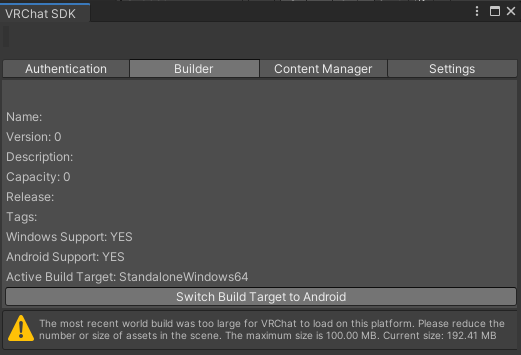 ruby jay
just an sdk bug
naive pumice
should I reload the sdk?
ruby jay
try to do
bold ibex
Hello Everyone, I had a small urgent question. I saved my world in unity and then moments after it crashed. I also restarted it, but I can't restore the last build. It reset me atleast 5 hours back and was wondering if I could get it back?
naive pumice
In the Unity Editor, open the Services window, and select Collaborate. In the Collaborate window, select Open the history panel to display the Collab History window. Here you can see your Project's change history. Click Go Back To… on the change you would like to revert to
@bold ibex
bold ibex
naive pumice
In the Unity Editor, open the Services window, and select Collaborate. In the Co...
Yikes... Yeah I don't think I signed into it previously... I'm like a month old into unity so I'm fairly new, awe man; I will definitely keep that in mind though for the future.
 umbral crypt
Hello, I'm new to creating worlds. I want to build and test but when I click build and test it opens up vrchat just not into a test world. Does anyone know if there is a setting I have to change or what's wrong?
 covert hornet
is there a limit on how many ui canvas can be in a scene? Duplicated a canvas and it just doesn't want to work.
upper obsidian
There is no limit. Check all the components on it.
bold ibex
umbral crypt
Hello, I'm new to creating worlds. I want to build and test but when I click bui...
Can you explain?
Like what you mean by a test world
umbral crypt
bold ibex
Can you explain?
I want to make a test for the world I'm creating and in unity theres a build and test button. When I click it it opens vrchat but doesnt load me into the world I want to test out.
bold ibex
Did you add a spawn?
umbral crypt
I might not have. Let me try that. I dont know how all this works
umbral crypt
Yes please
bold ibex
In the hierarchy, Crete a new game object or something like that lmao. Rename it spawn or something along the lines of that just to make it easy to tell. Click on where you have your vrc scene descriptor and click the drop down arrow for spawn. Drag the object into the spot for spawn and you should be good. Adjust the object in the world for location
Not sure if it’s clear enough
umbral crypt
Seems pretty clear lol, I'll try that.
bold ibex
Alright
umbral crypt
Does it need to be a specific size?
bold ibex
Just the default should work
upper obsidian
Specify the correct path to vrchat and check the console for errors
 umbral crypt
I will have to start over since I did something wrong and now it says no scene descriptor
umbral crypt
upper obsidian
Specify the correct path to vrchat and check the console for errors
I did that and it opens VRCHat
VRChat*
bold ibex
Oh ok. Yeah if it says you don’t have one, just click a floor or something and add component
umbral crypt
Thanks, this is so confusing lol
bold ibex
Yeah no problem
umbral crypt
I'll try the test now see if it works
bold ibex
👍🏻
Does anyone know how to make chairs work? I got everything good it’s just the actual box that you click. I can’t get that to be the right size. It’s too big
umbral crypt
It just sends me errors now saying something bout compiler errors
bold ibex
Oh yeah, just go into the console and clear anything there. On the control panel, just click auto fix for everything. Probably not what you’re supposed to do but that’s what I do lmao
umbral crypt
What do you mean console?
bold ibex
Uhh I smart explain it because I’m not on my pc right now. Right below the hierarchy I think
I’m not sure I can’t really remember what it looks like lmao
umbral crypt
Found it lol
bold ibex
👍🏻
does anyone know where to find that unity package that when you grab a pickup object and pull your trigger the object sticks even when you walk around it stays on to you?
 runic mural
Hey, does anyone know where I can find skyboxes of cities (tokyo, hong kong, singapore)? I found some on stock photography websites but I don't want to make a subscription just for one photo.
 mystic leaf
When zooming out the texture get weird, how do I fix this, this is also ingame aswell....

 mystic leaf
runic mural
Hey, does anyone know where I can find skyboxes of cities (tokyo, hong kong, sin...
mystic leaf
runic mural
Hey, does anyone know where I can find skyboxes of cities (tokyo, hong kong, sin...
you mean like a skyline with buildings etc?
the unity store has alot of great skyboxes, some free some premium I recommend checking that out!
mystic leaf
mystic leaf
When zooming out the texture get weird, how do I fix this, this is also ingame a...
fixed it
nvm I didnt
its probably with the LOD that my textures get blurry
runic mural
mystic leaf
the unity store has alot of great skyboxes, some free some premium I recommend c...
Thank you. I did check the asset store but they're not really what I'm looking for. I saw a few worlds using a night panorama from Hong Kong or tokyo, taken from a drone I think as the pov is quite high up.
mystic leaf
runic mural
Thank you. I did check the asset store but they're not really what I'm looking f...
cant you make your own? I cant seem to find any good ones :/

Medium
Skyboxes are important in Unity. Skyboxes make your game and scene more look alive.
its not round but depends on your needs if it may work
runic mural
mystic leaf
cant you make your own? I cant seem to find any good ones :/
I'll have to try, I guess 😛 thanks
naive pumice
Does anyone know if wwise unity integration is supported by the VRChat SDK
ruby jay
naive pumice
Does anyone know if wwise unity integration is supported by the VRChat SDK
these questions can be solved by looking here: https://docs.vrchat.com/docs/whitelisted-world-components
the answer is no
misty wave
The ability to get geometry from Google Maps into Blender is going to make world creation even more fun tbh

not perfect but would be great for a VRC environment ngl
 mystic leaf
what is the best way to make these models high res? I added subdivision in blender but then it takes ages to load
 mystic leaf
misty wave
mystic leaf
misty wave
dang that looks cool
misty wave
mystic leaf
what is the best way to make these models high res? I added subdivision in blend...
If you're adding a bunch of geometry it's gonna potentially be slower, what's your end goal with it? :0
mystic leaf
that why I ask
I think they look lame as low res
but high res is way slower
these are just cups on a bar as decoration
green lagoon
it would help if you had smooth shading on them
bold ibex
Hi, I'm interested in making a project that supports both quest and PC, in terms of pipeline, is it easier to just make a project that supports android/quest specs and then just duplicate it to build it for windows?
Instead of making a windows build first and then porting it to quest down the line
misty wave
mystic leaf
dang that looks cool
Thank you!! I like it tooo
misty wave
green lagoon
it would help if you had smooth shading on them
Yeah I agree smooth shading is how you'd get the effect you're looking for, those are decent resolution as it is for a prop I'd say
misty wave
bold ibex
Instead of making a windows build first and then porting it to quest down the li...
If your world only needs things that are quest compatible in my uninformed opinion that sounds like it'd save time yeah
bold ibex
cool, yeah i'm just kinda lazy so I'll just go full mobile and then down the line I can always add different stuff for PC
too bad about post-processing though
bold ibex
also what the heck this SDK is actually really good so far compared to a lot of other games.
misty wave
bold ibex
too bad about post-processing though
Yeah fair, generally I only use PP for bloom and such so it's not a huge deal to me but I've seen it used really well
misty wave
bold ibex
also what the heck this SDK is actually really good so far compared to a lot of ...
Very in depth~!! I want more clear documentation at some point though lol
bold ibex
What things have less documentation? I'm not super deep yet, about to tap into Udon to figure out what its like
analog wyvern
would making a sort of dvd player/casette player with preset songs work? like you put in songs by vr hand and it would start playing? I also wanna know how i can make sound more enviormental/like a speaker from afar or close? i wanna try to experiment with these a bit but idk if its even possible..?
green lagoon
https://github.com/Vard-and-Temmie/Udon-Record-player here's somebody implementing that exact thing but using a record player as a aesthetic

GitHub
An interactive vinyl record player for vrchat. Contribute to Vard-and-Temmie/Udon-Record-player development by creating an account on GitHub.
analog wyvern
oh cool, i might try it out, maybe i can edit it a bit too
bold ibex
can anyone help me with chairs?
 versed cargo
bold ibex
can anyone help me with chairs?
versed cargo
bold ibex
can anyone help me with chairs?
I might be able to whats up
bold ibex
So I put down the chairs and I can’t get the hitbox to be smaller without messing up where the player sits
The hitbox is really big
bold ibex
That’s what is automatically there
versed cargo
Yea so if you scale the box collider then the radius will be reduced
bold ibex
when i do that the actual seat just gets misplaced
versed cargo
Hmm that should be happening could you ss it?
misty wave
bold ibex
lmao
I highly recommend using a prefab for Better Chairs
The default Udon chairs are gonna look janky
bold ibex
well i can just hide them 🤷♂️
 grand rock
not sure if this is supposed to go here but i ran into a weird issue
whenever i make a canvas and want to put a button or slider onto it it becomes huge and off proportion
it would be ok because i can always scale them down and match them but whenever i do the writing on the buttons just will not show up
i tried changing font, size, scale and nearly eveyrhting i was aware of how to do but to no avail the text just doesnt show
any help?


sorry for the bad explanation and images
misty wave
bold ibex
well i can just hide them 🤷♂️
No like, the default chairs will lock you to their position regardless of avatar. Some more advanced chair prefabs will auto scale the chair to your avatar so even if you have a short or a large avatar it looks natural. The default ones don't
misty wave
grand rock
sorry for the bad explanation and images
My recommendation would be modifying the canvas example in JetDog's prefabs
grand rock
I will have a look at it right now, thanks
misty wave
grand rock
I will have a look at it right now, thanks
Ye!~ I used those in my map as well, I just dropped the prefab in and it even has code examples to help you figure out how to make the buttons do things. In my memory it requires U# but if you don't already have that it's also a big rec
 random sphinx
would anyone be able to tell me why the objectsync component doesn't sync objects between PC and Quest users?
bold ibex
does anyone know how to make a button to toggle 4 chairs on and off?
versed cargo
bold ibex
does anyone know how to make a button to toggle 4 chairs on and off?
https://youtu.be/ibDu0dCeUE8 follow this but change it to the chair
With the recent Udon updates, some of the basics have changed, so here's my most basic tutorial redone with the new editor, and not recorded at 2am! If I get enough requests, I'll redo my "Contextual Buttons" video as well, which will give me an excuse to just rename them "Event Buttons" which actually makes sense.
00:00 - Intro
00:20 - Udon Gr...
bold ibex
thanks
versed cargo
Np
bold ibex
so i did it but it only works for one chair, i cant make multiple interact events
mystic leaf
Is it better performance wise to make one large building or multiple smaller rooms and use teleporters between rooms??
bold ibex
@versed cargo ? sorry for ping
versed cargo
bold ibex
so i did it but it only works for one chair, i cant make multiple interact event...
You can put all the chairs in 1 empty game object and toggle that on and off
versed cargo
bold ibex
<@!723721693520068670> ? sorry for ping
Np
bold ibex
oh ok ill try that
versed cargo
mystic leaf
Is it better performance wise to make one large building or multiple smaller roo...
Smaller and when not in room the room toggles off
Less mesh to render
bold ibex
it worked! thanks a lot!
versed cargo
Yea np
mystic leaf
versed cargo
Smaller and when not in room the room toggles off
ahhh yes that makes sense, thanks!
versed cargo
Np
grand rock
misty wave
Ye!~ I used those in my map as well, I just dropped the prefab in and it even ha...
Thank you very much! I solved the issue!!
bold ibex
i clicked upload on the world but its not doing anything. any idea why?
versed cargo
bold ibex
i clicked upload on the world but its not doing anything. any idea why?
Can you ss you console
bold ibex
 bold ibex
versed cargo
Can you ss you console
bold ibex
versed cargo
Can you ss you console
^
versed cargo
Sdk2?
versed cargo
Has it been sdk 2 before
versed cargo
One sec
bold ibex
ok
versed cargo
GitHub
Unity Editor extension for making VRChat worlds. Contribute to oneVR/VRWorldToolkit development by creating an account on GitHub.
Try importing that and see what the debugger says
Or here just follow what they said here #user-support-old message
versed cargo
Yes
versed cargo
bold ibex
before i imported the tool kit it didnt have an option for community labs
It will ask you when your getting ready to name your world if you want it community labbed
bold ibex
yeah
 sterile phoenix
Anyone know how to make a reset button for pickup objects?
 lime pasture
Would anyone know how to make a vrc mirror transparent but still be able to see yourself in it
Is there a way to change the opacity
lime pasture
sterile phoenix
Anyone know how to make a reset button for pickup objects?
Are you using Udon?
sterile phoenix
lime pasture
Are you using Udon?
Yes
lime pasture
sterile phoenix
Yes
You would have to set it up in the udon graph. Similar to this graph for making toggles.
 bold ibex
Does anyone have the link to download for that thing that you can test your world without having to load into VRchat Everytime on unity?
stone marsh
bold ibex
Does anyone have the link to download for that thing that you can test your worl...

GitHub
CyanTrigger is a new compiler for Udon with focus on in-scene editing. The interface resembles the old SDK2 VRC Trigger interface, but has more functionality. CyanTrigger has full access to all of ...
Oops. I linked the wrong one. It's cyanemu
GitHub
CyanEmu is a VRChat client emulator in Unity. Includes a player controller with interact system. Works with SDK2 and SDK3. - GitHub - CyanLaser/CyanEmu: CyanEmu is a VRChat client emulator in Unity...
bold ibex
Thank you @stone marsh
misty wave
grand rock
Thank you very much! I solved the issue!!
Glad it helped!!

This is so fun
Getting assets from Google Earth
grand rock
that looks heccin cool!!!!
misty wave
Thank you!!! I need to get the lighting better tho lol
bold ibex
misty wave
This is so fun
U can get assets from Google Earth? That's cool
@stone marsh

When it says open ur VRchat world scene does that mean u have to open VRchat and go to ur world?
And also where is the play button in unity
misty wave
bold ibex
When it says open ur VRchat world scene does that mean u have to open VRchat and...
To test in actual VRchat, you should do build and test in the SDK window of unity~
misty wave
bold ibex
U can get assets from Google Earth? That's cool
It's sort of a workaround but it works aha
bold ibex
i mean like using he cyanemu, how do u tst ur world with cyanemu
bold ibex
Is it normal for your inspector to disappear once you have cyanemu?
versed cargo
bold ibex
Is it normal for your inspector to disappear once you have cyanemu?
Just get it back 😂 thats kinda weird
bold ibex
versed cargo
Just get it back 😂 thats kinda weird
Howwww do I lol
versed cargo
bold ibex
Howwww do I lol
There should be 3 dots next to your project tab on the left there you should be able to add another
bold ibex
versed cargo
There should be 3 dots next to your project tab on the left there you should be ...
yasss thank yo u so much!
versed cargo
Np
bold ibex
does anyone know how to add words on buttons like "toggle mirror"?
is it the interact text?
because that doesnt work
versed cargo
bold ibex
does anyone know how to add words on buttons like "toggle mirror"?
You can use text meshpro just right click and i think its under 3d objects and you should see it there you can put it over the button and there ya go
And you can use it as a button if you add a box collider if it doesn’t already come with one
bold ibex
it just comes as a text thing? do i put that above the button?
because i want it to say what it does when you hover over the button
also my camera is really fast and hard to control
how do i fix that
versed cargo
bold ibex
how do i fix that
Click F in the scene
versed cargo
bold ibex
it just comes as a text thing? do i put that above the button?
Yea if you want you can edit the text in the inspector
versed cargo
Can you Screenshot
bold ibex
wait also i think i pressed something because now i cant see all the cameras and lights around
like the sprites
 versed cargo
bold ibex
wait also i think i pressed something because now i cant see all the cameras and...
versed cargo
bold ibex
wait also i think i pressed something because now i cant see all the cameras and...
Turn on gizmos at the top right
bold ibex
ahh ok thanks
versed cargo
bold ibex
Thats the toggle text when you hover over it in game it will display that text
bold ibex
yeah
i tried and i couldnt see it for some reason
ill try uploading it and checking again
versed cargo
While in game it didn’t display it?
bold ibex
not from what i could recall
versed cargo
I would check if it doesnt you can just add the textmeshpro
bold ibex
i already added the mesh anyway
versed cargo
Oh okay
versed cargo
Lmao all good
versed cargo
Yes?
 chilly flower
I imported a prefab of a mid-evil house with an interior, but it has no collision
i tried enabling mesh collider but it doesnt work
versed cargo
chilly flower
I imported a prefab of a mid-evil house with an interior, but it has no collisio...
Is it all one mesh?
severe pier
Fun fact: Home Designer program assets are NOT the move

That's a bowl of fruit made of 14,000 triangles
chilly flower
its multiple objects
versed cargo
severe pier
Fun fact: Home Designer program assets are NOT the move
Those bananas are beautiful
chilly flower
 versed cargo
chilly flower
its multiple objects
versed cargo
chilly flower
its multiple objects
Okay so i would recommend adding a mesh collider to all you want to collide with.
chilly flower
individually?
chilly flower
what does convex do?
versed cargo
Good question i was always told to turn it on because it will fit it correctly
Ill look it up rq one moment
“having an outline or surface curved like the exterior of a circle or sphere.”
So yes fits it correctly
chilly flower
ok also super easy questions, cause im new to unity. whats the hotkey for zooming in and out lol
also I see
versed cargo
Just scroll wheel
chilly flower
im using a touchpad (not by choice) atm... is there another way lol
im on a laptop
im away from home
also everytime i try to exit out of vrc after testing its gotta stop responding and go through this whole "trying to respond" thing before closing
is there.... a quick way to just close it
bold ibex
How do you test your world using cyan emu?
misty wave
Mesh colliders are very heavy, so if it can be accomplished with cubic/capsule/sphere colliders that's better
versed cargo
chilly flower
im using a touchpad (not by choice) atm... is there another way lol
By pinching should work
misty wave
You just click play in unity to test with cyan @bold ibex
versed cargo
chilly flower
also everytime i try to exit out of vrc after testing its gotta stop responding ...
Task manager shuts it down fast
chilly flower
when placing an object by another, is there a snapping feature i can enable somwhere?
so that its right up against eachother
versed cargo
chilly flower
when placing an object by another, is there a snapping feature i can enable somw...
Hold shift
chilly flower
thankyou lol
bold ibex
misty wave
You just click play in unity to test with cyan <@456226577798135808>
But there is no play in unity button. Where is it located?
versed cargo
bold ibex
But there is no play in unity button. Where is it located?
At the top you will see them in the middle
misty wave
versed cargo
At the top you will see them in the middle
Yeah, op middle~
bold ibex
where?


 bold ibex
Ohh I see it now!
versed cargo
Skip
versed cargo
They might try looking it up
chilly flower
So i have an object selected in my Hierarchy and i for the life of me cant find it in the actual space lol
i pressed f
and zoomed in
help
lmao
versed cargo
Is it toggled on 😂
chilly flower
you mean like does the eye have a slash through it?
cause no it doesnt lol
is it possible for me to slide it around with hotkeys or something
versed cargo
Do you have the object selected
chilly flower
where in the heck is it
i do
i tried to recreate it
and just start over
but when i hit "create empty"
.....i still dont see where the heck it is lol
chilly flower
This screenshot is right after pressing F
versed cargo
Im lost on what you wanna find 😂
chilly flower

I also tried zooming in after pressing f
i dont see squat
i looked under the floor too -.-
before you ask
versed cargo
The internet is really bad gotta give me a sec 😂
versed cargo
Shhh stop yelling thats loud lmao
chilly flower
It doesnt show if ur on the hand tool
gosh dang it lol
ok ok i have another question
Is there some kind of "snap to 3D grid" feature
That'd make placing stuff with precision wayy easier
versed cargo
Only one i know is holding shift on rotating object
 chilly hawk
I think Unity has a snap-to-grid feature, but I haven't used it. Always got the calculator out instead.
 severe pier
Is 113,000 tris ok for a quest world?
chilly flower
oh yeah. edit>grid and snap settings
simple enough
my gosh lol i would not have the energy to use a calculator
well i probably would if i had to but im so thankful this is here
so i was lazy and just enabled mesh colliders on this huge palace
or is that what im supposed to do
i dont wanna place individual collision boxes on like everything ;-;
chilly hawk
Not sure if this is the channel for finding helpers, but I need someone who uses Bakery to touch-up and re-bake my world.
Someone here baked it before (and did a good job), but they're being unresponsive now.
It's not a big map. Just needs a touch up after swapping a slope for stairs and putting static assets on the walls.

I'd do it myself, but Bakery is incompatible with AMD graphics cards.
chilly flower
is there a way to see what im working with with perfect lighting, despite what light sources are in there
just for editing
versed cargo
Click the light toggle at the top somewhere around the play and pause buttons should be a light bulb
chilly flower
oh yep thats it, thankyou!
versed cargo
Np
chilly hawk
Also got these fans that won't turn. Lighting guy converted them to UDON for me:
 versed cargo
chilly hawk
Also got these fans that won't turn. Lighting guy converted them to UDON for me:
versed cargo
chilly hawk
Also got these fans that won't turn. Lighting guy converted them to UDON for me:
Cant you just keyframe a animation of them spinning?
chilly hawk
That's probably how I did them originally. Was a massive pain though and I got constant console warnings for it.
Didn't like me using 'legacy', but wouldn't work without it or whatever.
versed cargo
Hmmm that’s confusing
chilly hawk
It also stopped working for no reason at some point, but when I made a scene duplicate (for testing) it worked in the copy with no changes.
Can't say I like Unity. Fortunately I'm only using it for this map (and previously to make some texture adjustments on an avatar).
versed cargo
I see
chilly hawk
Looks like it uses a C# script, which should be fine as I have UdonSharp:```using UdonSharp;
using UnityEngine;
using VRC.SDKBase;
using VRC.Udon;
public class FanRotate : UdonSharpBehaviour
{
void Update()
{
transform.Rotate(Vector3.forward, 720f * Time.deltaTime);
}
}```No idea why it won't work for me though.
Let's try this guy here:

Okay, no luck there.
Really frustrating. It worked for the other guy and the entire project was zipped up copied over to me, so it should work identically. But it doesn't.
I haven't touched these when updating the world. All I have done is add static and pickup objects.
versed cargo
chilly hawk
Really frustrating. It worked for the other guy and the entire project was zippe...
Id try asking him again to see whats wrong
chilly hawk
Someone here baked it before (and did a good job), but they're being unresponsive now.
First thing I did. Even got through to them today and they said they'd do it. I've messaged them a few times a couple of hours apart and I'm not getting anything. I get the feeling they don't want to do it.
I've been waiting around a week now and I'm getting impatient.
Maybe I'm being unreasonable, but communication needs to work both ways.
Sorry for the mini rant.
versed cargo
Oh no problem i can definitely understand where your coming from i would recommend posting this in the #udon-general for better assistance
chilly hawk
Thanks, also good idea. I'll also try #world-lighting - maybe someone is up for lighting my stuff
versed cargo
Good luck 👍🏽
chilly flower
hello

So i have this window
I want to delete everything except the frame. well basically I want to put that frame on a blank wall
Am i going about this the right way
if so.... idk how to delete everything but the frame
versed cargo
If you have the fbx of that you can put it in blender and separate the mesh to delete the parts you want
chilly hawk
@versed cargo my fans were static 🤦🏻♂️
chilly flower
hey so
in sketchup
i can like draw a rectangle in the middle of the surfact of a plain and paste a texture in it
how do i do that in unity
 urban epoch
chilly flower
how do i do that in unity
urban epoch
chilly flower
how do i do that in unity
Unfortunately, Unity is not a modelling program. You can bring over models from sketchup, blender, maya, you name it, but Unity itself does not lend itself well to modelling inside of it. Tools like Probuilder (free) and Umodeller (paid) can accomplish this, but Unity is designed as a game engine rather than a modelling program.
urban epoch
Some do, but that's usually for more basic environments and beginner worlds. The majority of the maps you know were done in Blender, though a few of them may have been done with probuilder.
chilly flower
also, can i stretch an object like a cube, and make the texture repeat rather than stretch?
urban epoch
Again I recommend something like blender to accomplish this, though some shaders act in world space and will display correctly no matter the scaling. If you really want to do your environment building inside of Unity, probuilder can do that repeating texture effect quite easily and is more similar to building in Hammer for Gmod or the likes.
chilly flower
I imported a pack of assets and it came with an example world as well as prefabs and objects all ready to go and make something with..... Could import that in blender?
im downloading probuilder
green lagoon
https://www.youtube.com/watch?v=ofzw6hKhI3k&t=3s a pretty decent introduction video I found to pro Builder
VRChat Discord - https://discord.com/invite/vrchat
Written Guide - https://steamcommunity.com/sharedfiles/filedetails/?id=2507157026
iconoclass.booth.pm
https://ko-fi.com/Iconoclass
https://twitter.com/IconoclassVR
Music: FynestLyk - Noir Et Blanc Vie
0:00 Intro to Probuilder
4:45 Starting to build room
6:00 Edge Loops and Extrusions
11:39 C...
urban epoch
You always could, but that may take a significant amount of time to import them and get the textures right. Everyone's workflow is different, but I personally prefer modelling the framework of the environment in blender, then placing all of my props I have inside of Unity.

 green lagoon
very nice looking map
urban epoch
Thanks, it's actually an office environment for work but it was the fastest one I could open both Unity and Blender for.
green lagoon
it does the trick for illustrating
but yeah eventually one would want to learn blender even if they do they're greyboxing in probuilder as there's some stuff that's a heck of a lot faster to do in blender
chilly flower
@urban epoch wait is probuilder an addon to unity or a whole other unity. is it compatable with vr chat stuff
urban epoch
It's a downloadable package from the Unity Package Manager. It just creates geometry, so no scripts will cause issues with VRChat.
chilly flower
where can i find the unity package manager?
urban epoch
Window -> Package Manager
green lagoon
cool
minor summit
hey and good morgning 🙂 I Got a question.. I have seen recently on a few maps that objects can be grabbed and put on bones of an avatar. Does someone know if there is an premade asset or tutorial for this kind of function?
urban epoch
minor summit
hey and good morgning 🙂 I Got a question.. I have seen recently on a few maps t...

Attach-To-Me now available at: URL
【出演(敬称略)】
・Kumanomi
・gabttarius
・bd_
【BGM】
https://dova-s.jp/bgm/play13979.html
https://dova-s.jp/bgm/play14663.html
【Demonstration models】
※動画に使用したモデルは同封されません。
※Demonstration models used in the video are not included.
https://booth.pm/ja/items/2002463
https://booth.pm/ja/items/2839302

GitHub
Contribute to bdunderscore/attach-to-me development by creating an account on GitHub.
minor summit
urban epoch
https://www.youtube.com/watch?v=bk6ayPyOjwQ
https://github.com/bdunderscore/atta...
ohh thank you! 😄
chilly flower
in unity
how do you copy something
and then go somewhere else
and paste it
there
 urban epoch
You can duplicate something with Control D, then move it to the scene cameras position with Control Shift F
chilly flower
i found this code online someone made for unity, to add a feature where whatever you have selected will drop on top of the floor underneith it
im not sure what to do with this code though
how do i apply this?
Unity Forum
Just a simple editor script, if someone will search for it. I was placing many tree sprites around terrain, I needed something to drop all selected...
 split crystal
Hey all, i'm trying to figure out how vrc clubs have the door closed until the event starts and the host, or a select number of permissioned players, can open it/access certain areas unavailable to regular visitors, can someone point me in the right direction on how to implement that?
 old crow
I'm making a destroyed house that I used to live in using floor plans by Walters. What is the recommended polycount to keep this within?

I've heard its 1.4m is the maximum before you should like, seriously rethink.
ruby jay
usually you want to separate your building into areas to utilise occlusion culling
 earnest juniper
Is there a way to exclude certain objects from the world when it gets built? I'm basically trying to build an avatar and a world together (the character lives in the world) and I'd like to use the world and lighting and everything as a backdrop for the avatars photo. It makes sense to me to build both of these assets together in the same unity scene. Am I on the right track, or is there a better way to do this?
I suppose this answers my question directly, but my bigger question remains... what's a good way to have the character and the world together in Unity, so that I can see and work with them together?
 old crow
ruby jay
usually you want to separate your building into areas to utilise occlusion culli...
old crow
ruby jay
usually you want to separate your building into areas to utilise occlusion culli...
Example?
I'd rather not do teleports.
ruby jay
earnest juniper
Is there a way to exclude certain objects from the world when it gets built? I'm...
mark whatever you don't want uploaded as EditorOnly in the object's tags
earnest juniper
ruby jay
mark whatever you don't want uploaded as `EditorOnly` in the object's tags
Oh perfect, thank you! 💜
 kind portal
Hi, I wonder how i can make a AI for VR CHat, Like for a Horror Game a Monster thet runs around and kill Users if they are to near.
earnest juniper
Aw, the SDK still doesn't like that, same error 😦
ruby jay
old crow
Example?
occlusion culling intends to avoid rendering objects you cannot see, for this meshes must be separated (eg submeshes), then you bake occlusion culling
it will take a bit of trying with your scene, i assume
read more here: https://docs.unity3d.com/Manual/OcclusionCulling.html
ruby jay
earnest juniper
Aw, the SDK still doesn't like that, same error 😦
you may not use both sdks in the same project
old crow
I'll have to look into it.
What I'm making is an old home I lived in, for my home world.
Its going to be as accurate as possible excluding super polycounts
 ruby jay
kind portal
Hi, I wonder how i can make a AI for VR CHat, Like for a Horror Game a Monster t...
ruby jay
kind portal
Hi, I wonder how i can make a AI for VR CHat, Like for a Horror Game a Monster t...
well, on the one side, you will have to learn udon and then also understand unity
look into nav mesh https://docs.unity3d.com/Manual/nav-BuildingNavMesh.html
kind portal
ruby jay
well, on the one side, you will have to learn udon and then also understand unit...
Thanks 
old crow
I'm beyond excited for making this
So, to review
I should, once finished with everything
Create a seperate blend file
and separate each room into their own mesh
And setup occlusion planes
that'll hide the furniture in the room if passing a certain wall?
Could I make the walls "occlusion planes" just simplified?
This is the polycount of the shell so far.
 ruby jay
that's not really a lot but furniture will surely contribute too
old crow
Here is the thing, lul
I'm uh, obsessive over getting those numbers lower
probably too much
bold ibex
old crow
What I'm making is an old home I lived in, for my home world.
doxxed
old crow
Well its a model home, meaning, there are over 14k houses like this.
That also means that someone will be able to use this as their VRChat home too and have it work properly. Since it is 1:1 do the inch, that also means they could technically walk around their own house.
bold ibex
rich people would def buy a vr true scale of their mansion
old crow
Mansion?
bold ibex
performance wont be an issue for rich people
old crow
Its a two floor house that my relatives built after buying the plans from now defunct Jim Walter's Homes
bold ibex
what kind of maps r u going to bake
old crow
After I get shit modelled I'll decide how I'll set up the lighting in Unity.
For now though its trial and error.
bold ibex
yes
old crow
The exterior is a tricky one though
I'm probably going to pull heightmaps and treemaps from databases of the original location and use Billboards as trees for "front facing" and then a flat tree background for behind the front billboards. You know, simple LOD.
Thats later's problems though.
old crow
Eh, not entirely.
The outside will definitely either be an update or just visual.
I'll only be making the outside for what is visible.
bold ibex
from inside ye
 rancid osprey
So i have been working on my world without issue.. then last night I open unity.. and the VRC SDK Control panel is no where to be found and objects in the game are kicking out errors. have you guys seen this before?
one day all is fine.. next day.. the vrc control panel is gone and errors are creeping out
old crow
Do these seem optimized to you?


Or do you think I should push it further and get that poly count down
 naive pumice
old crow
Or do you think I should push it further and get that poly count down
naive pumice
old crow
Or do you think I should push it further and get that poly count down
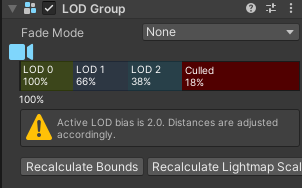
create a LOD Group so the polygons decrease as the player walks further away from the object
btw polygons don't cause a huge hit on performance, it is usually draw calls that hurt performance the most
naive pumice
 naive pumice
LOD 0 is the main object LOD 1 is slightly more optimized, and LOD 2 is even more so, then culled means the object doesn't exist
old crow
Thank you so much for showing me LOD in Unity.
It'll help so much.
I'm not used to "modern rendering" in a gameplay sense.
naive pumice
VRChat only supports the legacy or built in render pipeline, it doesn't support HDRP or URP rendering
ruby jay
i would not bother with LODs in most cases
instead you can bake polygons from a high res to a low res model
either way, i would not bother if your mesh is not even hitting 10k
naive pumice
especially true with larger objects like couches, LOD groups are more useful for when you need to render many objects at once for instance grasses and trees
 somber axle
 old crow
How would I set the scale accurate to VRChat's avatar in blender
old crow
You should've seen the original.
LMAO
Thats after I retopo'd it.
How tall is an avatar in cubes in unity?
@open thicket
 left rain
an avatar's default collider is the size of a unity capsule mesh
green lagoon
old crow
How tall is an avatar in cubes in unity?
a cube is 1 meter
 fierce haven
I could use a little help if anyone would know a fix to this. I keep running into this when clicking upload on my world " NullReferenceException: Object reference not set to an instance of an objectVRCSDK2.RuntimeWorldCreation.Start () (at Assets/VRCSDK/Dependencies/VRChat/Scripts/RuntimeWorldCreation.cs:82) " From what I have found, it seems as if the script for the Content NSFW toggle is missing but I am not 100% sure that is it. I've tried redownloading the SDK and it still seems to be missing so I am a bit unsure on what to do.
upper obsidian
@fierce haven There is little information about the error.
It's high time to remove sdk2 and install sdk3
fierce haven
See thats the thing, this is with the sdk3. It was a fresh sdk3 install with nothing more added yet outside of some cubes.
I believe I just found a fix for it, although its very strange and I'm not sure how to really replicate it. I made a fresh install with nothing but the same sdk and copied it all over and it somehow fixed it. Not sure why my other fresh install after the error first happened didn't work
 south orbit
- so i seen quite few in regards to spherical walking / walking sideways on walls etc etc similarities like that tho i cannot find any tutorials, scripts or anything towards it that works properly / towards vrchat but i really would love to figure out how to either make it from scratch or use a open free source, i saw maps in vrc before having this feature where u can walk into a path and suddenly u stand sideways on the walls or etc etc which can create some trippy illusions / effects in form of people standing sideways or upside down.
- anyways i hope anyone here might know any about it or where i can get started with this myself ? i would personally love to build a map with this being the main feature tho not being able to find any or knowing how to build such makes it difficult to create the map :p .
- the issue with alot of tutorials i found is that they use scripts bound to a player which seems to be kinda impossible doing so in a vrc world, atleast i can add scripts to the vrcworld spawn but i highly doubt they apply towards the invidual player / remains on the player rather than just on the spawn itself .
chilly flower

I cannot for the life of me figure out why these are two different shades lol
Im new at this
pls help
near escarp
Any light in the world ?
 warm coral
Hello, how do I properly make my world quest compatible? Do I just convert my project to android, change shaders to mobile/optimize it and upload it on the same world?
near escarp
That's pretty much it !
Make sure the hierarchy is identical however, or that will cause issues
warm coral
Ok, thanks
pulsar crow
The audio in my world is super quiet and I can't figure out why. All of the audio is set to a volume of 1
In editor, it's perfectly fine
near escarp
You're probably hitting the compressor, which means your audio is actually too loud and is being reduced a lot
Try 0.5
near escarp
Just reducing it by half for now to see if the audio is still very quiet, then try 0.25, etc
It might differ per audio source with the audio file inherent db volume
pulsar crow
Will do 👍
grand rock
not sure if this question belongs here or in udon but i done all of my udon correctly but the buttons/slider/url are un-interactabe, i cannot click or use them
near escarp
You set your colliders to IsTrigger ?
grand rock
near escarp
You set your colliders to IsTrigger ?
i checked and no they arent on IsTrigger, are the supposed to be?
sorry, im new to all this
I thought it might be something to do with this but i doubt it?
 near escarp
They do 
Are you watching any tutorial ?
Vowgan/Momothemonster have some great ones for beginners


 near escarp
I hope i'm not wrong though 
grand rock
near escarp
They do <:thumbsup:700823916322619422>
does it matter if it is a box or mesh collider?
grand rock
near escarp
I hope i'm not wrong though <:teehee:700833850347225118>
only one way to find out!
near escarp
The collider type shouldn't matter
 delicate grove
the output of this camera is on a render texture, but i still see the UI and microphone icons. any ideas why?
 grand rock
no, sorry. I am sadly only a beginner :((
grand rock
near escarp
The collider type shouldn't matter
per chance, do i need to add an VRC ui shape (script) to all of the buttons?
the moment I added that to the canvas it made the buttons interactable
near escarp
Since you're making a canvas based thing i'm not sure actually, which makes me realize that it wouldn't need to be set to IsTrigger in the first place either
#udon-general is where the smart people are 
near escarp
No worries, I just wish I had answers for you 
grand rock
you helped immensely already and im heccin grateful for that!
chilly flower
In unity
If you have two different projects with the same assets from the same directories
could you copy something to your clipboard in one project and paste in another?
versed cargo
Yea that should work if it was a prefab
chilly flower
So, I went to gizmos and pressed the lil light bulb, but i still dont see the light source icons
bold ibex
make sure the 3d icon slider isnt too low or high
if its enabled, it will be a little brighter shade of grey than when its off, in dark mode on U 2019.4.31
idk how it looks on light mode
i mean if the Gizmos button is enabled
chilly flower
So im looking at this prefab

I really want to just use those stairs at the top there
without the rest of this whole thing
how do I isolate it
I have probuilder if that helps
near escarp
Is it a single mesh ?
sour scaffold
Anyone here have experience with AudioLink?

I get this error on the Udon Behavior component
chilly flower
@near escarpIt seems to be yeah. When I click it the whole thing highlights
near escarp
Then you'd have to export it to blender and edit the mesh yourself
chilly flower
how do I export it?
sour scaffold
you can take the FBX in the assets folder
and import that into blender
edit the mesh of the object and remove everything you don't need, then export from blender and pull it back into Unity
 gentle vale
Hey yall! New to world building, I was wondering, is there a way to like raise the "killing floor" in a world I dont know what it's called really, but like the plane that which like if someone hits they are then set to respawn X_X
chilly flower
sour scaffold
you can take the FBX in the assets folder
well it keep the textures on it?
chilly flower
Oh my gosh
Ok so it said wall_1 is broken, or something. Then it said, would you like to fix it? I didnt really get what it meant but i hit yes

It made all my walls pink!!
How do I undo that...
I tried going to here

It's not really working...
versed cargo
Control z
chilly flower
nope doesnt work
versed cargo
Oh yea no clue then lol btw it looks really good 👍🏽
sour scaffold
what gave you an error?
the VRCSDK?
send me an image of your inspector so I can see the material values
chilly flower
 sour scaffold
it looks like you put a normal map in your Albedo slot
versed cargo
chilly flower
You have a normal map texture in you albedo which is where your regular texture would go like the color. You can see it at the top of the material its blue
Normal maps are for better texturing adding a sense of realistic or whatever and usually look like that
 chilly flower
when i make it any other color when i click away and come back its red again
well its actually not
ill explain

you gotta show me where i have a texture in there cause to me it just looks like i have a color in there
but the color is hovering over the pure white area
however whats odd is even if i move the color slider on the rainbow ring to a different color, and try to make the wall green or something, it still just becomes red
@versed cargo
oh i just noticed where it says normal map
what type of map should it be?
versed cargo
Yes the normal map is right but the albedo click that and delete it out
chilly flower
oh aight
versed cargo
Ya
chilly flower
ok done, but now it looks like a solid color rather than the cement it used to.... im assuming the texture is squished super small? idk how to inlarge it tho
versed cargo
Can you Screenshot
chilly flower
basically

I want it to look exactly the way it comes, naturally
sending
slow internet
bold ibex
does anyone know how to put textures on items that come with textures? i dont get it.
 versed cargo
There may be other wall textures. Just look for the one that doesnt look blue lol
chilly flower
that bmp i sent tho was the raw texture lol. its already they way i want it to be
its grey and nice and was perfect before it bugged
versed cargo
bold ibex
does anyone know how to put textures on items that come with textures? i dont ge...
Right click in the small empty area near your textures select create and then material. There you should be able to put the texture in the material and assign it to the object
chilly flower
wow this image is taking a long time
versed cargo
chilly flower
that bmp i sent tho was the raw texture lol. its already they way i want it to b...
You could try removing the color from it and making it a non normal map that way its not going to change colors but idk how to do that for a bmp
bold ibex
versed cargo
Right click in the small empty area near your textures select create and then ma...
okay will try this rn will let you know
versed cargo
Okay
bold ibex
i have to do every texture one by one assign it to a material?
chilly flower
grrrr originally all i did was import this texture from a pack on the assets store, and apply it. I hadnt modified anything and liked it.... is there really no way to just restore it to all default settings
versed cargo
Yes basically
versed cargo
chilly flower
grrrr originally all i did was import this texture from a pack on the assets sto...
What is broken??
bold ibex
okay. also how do i assign it? i know i drag it somewhere into the material thing
versed cargo
bold ibex
okay. also how do i assign it? i know i drag it somewhere into the material thin...
Yea put the texture in the albedo and id name them so you dont get confused
chilly flower
Well after you had me switch from albedo it wasnt pink anymore, which was nice. but the texture now has a much more pure color rather than looking.. like cement. I assume the texture is squished. But honestly im kinda ignorent
versed cargo
chilly flower
Well after you had me switch from albedo it wasnt pink anymore, which was nice. ...
Its because you dont have a albedo texture in thats why you gotta tind the other wall texture
chilly flower
i wanted to send two pics to compare the raw texture to how its appearing cause tbh its kinda hard to describe exactly what its doing
bold ibex
versed cargo
Yea put the texture in the albedo and id name them so you dont get confused
will do. also, when its one whole object from sketch fab, i drag a material onto it and it goes onto the whole object instead of one single spot. i unpacked the prefab but theres no children to select each piece individually
chilly flower
why i gotta wat
"tind"?
oh find
so ur saying just abondon this texture? The raw image file still looks perfect, and also i dont really have another one this came in a pack with everything else and its just perfect
versed cargo
bold ibex
will do. also, when its one whole object from sketch fab, i drag a material onto...
That usually means its all one mesh so it inly needs one material for all
chilly flower
it was working ;-;
versed cargo
chilly flower
so ur saying just abondon this texture? The raw image file still looks perfect, ...
Idk keep the normal map but the albedo is the reason it doesnt look correct.
bold ibex
versed cargo
That usually means its all one mesh so it inly needs one material for all
thats odd. do u see the screenshot how it has each material for different pieces?
 versed cargo
One sec my internet is slow lol
bold ibex
okay.
chilly flower

also a bunch of these are blue now
not that they actually look blue in the 3d space
versed cargo
bold ibex
thats odd. do u see the screenshot how it has each material for different pieces...
Im lost whats messed up
versed cargo
chilly flower
Did you happen to put a regular texture in and it asked fix now because it wasnt a normal map
chilly flower
i dont think thats what it said
but i couldnt really comprehend what it said
im sorry
bold ibex
versed cargo
Im lost whats messed up
theres multiple materials for this kitchen cabinet. theres a material for the stove, material for microwave, material for cabinets. when i put a material onto the kitchen set it makes the whole object one material. it doesnt have all the materials into one where i can just drag it on and they go in their spots. does this make sense to you?
versed cargo
All good thats a possibility that it fixed itself into the normal map. You can try and import the textures again through your files to see if you can find the regular texture
versed cargo
bold ibex
theres multiple materials for this kitchen cabinet. theres a material for the st...
Try clicking on the kitchen set and see if it has multiple materials in it
bold ibex
versed cargo
Try clicking on the kitchen set and see if it has multiple materials in it
it doesnt. its just one big piece
chilly flower
what if i re-imported the pack
versed cargo
bold ibex
it doesnt. its just one big piece
Then it’s possible that the person who made it forgot to separate the mesh so you could try doing that in blender
versed cargo
chilly flower
what if i re-imported the pack
That could work aswell
versed cargo
Lmaoo
chilly flower
hm yknow
after re-importing and everything was fixed
it looks like the texture is back in the albedo spot
but i mean its working
im kinda confused about what albedo is for
versed cargo
chilly flower
im kinda confused about what albedo is for
Have you ever made a avatar?
chilly flower
i have not
Hey Maxery, may i ask you something else :3 I just booted it up in vrc, and its laggy. Tho i booted it up identically earlier, like with the 3d space exactly the same, and it was fine
Why might it be lagging?
versed cargo
Did you add anything after the last time you booted it up
chilly flower
nupe
just the texture stuff we did
thatd be weird if it lagged for that tho
oh welp
not lagging now
versed cargo
Oh nvm then lol
gentle vale
Hoping someone can help me please, I have a problem where if I have people fall into the water here, they have to respawn to get back up, does anyone know how to add a respawn floor so if they go into the water they auto respawn? https://www.screencast.com/t/M3xfDeRbNXhA
 chilly flower
When doing a local test on your unity world, can you invite others to join you? on vrc?
versed cargo
chilly flower
When doing a local test on your unity world, can you invite others to join you?...
Its the world is friend plus maybe
versed cargo
gentle vale
Hoping someone can help me please, I have a problem where if I have people fall ...
Ill try looking into it and see if i can find a way
It may take a bit tho
gentle vale
versed cargo
Ill try looking into it and see if i can find a way
Its all good, I know there is a ton of worlds that have a like "if you fall to far, you just respawn" kinda thing, so I figured there has to be way to do it, and I mean if you leave the water on the side of the world I have you eventually will respawn, Just need a way to bring it up lol
or I guess being everything down? lol
 brisk spear
Looking to commission a world creator can someone dm if they are open for commissions
bold ibex
What are the most up to date video players?
versed cargo
On booth theres one that works pretty well but not for quest sadly
random sphinx
anybody use kurotori udon karts before?
chilly flower
chilly flower
When doing a local test on your unity world, can you invite others to join you?...
Does anybody know?
versed cargo
versed cargo
Its the world is friend plus maybe
I answered lol
If the world is uploaded to your vrc account you can inv friends
They just cant join you without the inv
chilly flower
But does it have to be published?
random sphinx
no
chilly flower
:O
yayyyy
Okie another question :3 I been making this world i have no idea if theres a memory limit for pc users
random sphinx
there's not, but that doesn't mean you should make the world super big
aim for around 100mb if you can
at least that's my philosophy
chilly flower
im making a palace with an amusement park backyard :3
in a japanese garden
...so it might be kind big
random sphinx
ok
chilly flower
i dont have much of a sense of scale
like intuitively
how do i check how much memory itll take for vr?
random sphinx
when you upload your world it show the size
this will help too
https://github.com/oneVR/VRWorldToolkit/releases

GitHub
Unity Editor extension for making VRChat worlds. Contribute to oneVR/VRWorldToolkit development by creating an account on GitHub.
random sphinx
it's a debugger
 magic orbit
Heyo! Anyone have any idea why the builder section of the SDK doesnt work for me in the collab but it works perfectly fine for my friend?


I have no errors in the console either.
On top of that, the same unity version and sdk works perfectly fine off collab in my own private projects.
Thanks for any help! :D