#world-development
39 messages · Page 112 of 1
 bold ibex
bold ibex
if anyone could direct me to a tutorial that would be a huge help, i have alread...
bold ibex
bold ibex
bold ibex
if anyone could direct me to a tutorial that would be a huge help, i have alread...
https://youtu.be/uLi52YrrDmY this should work maybe

Download Unity - https://docs.vrchat.com/docs/current-unity-version
Download VRCSDK - https://vrchat.com/home/download
https://github.com/CyanLaser/CyanEmu/releases/latest
https://github.com/oneVR/VRWorldToolkit/releases/latest
https://github.com/Varneon/WorldCreatorAssistant
https://ask.vrchat.com/t/world-creator-assistant-automate-vrchat-wor...
Thank you!
making an upload to Quest as opposed to PC is just a matter of being in the Android build project when you upload, rather than the Windows build project
you can switch between the 2 in the VRCSDK Builder Control Panel
or the traditional Unity way in File>Project settings I think
Ah, so its fairly similar to making avatars in that way
really not that different reguaridng upload process
its more simple tbh
mmm
i reccomend using an empty gameobject for spawn idk if the turorial does that
spawn and the object u put the scene descriptor on
alr, thx
hey
what version of unity is Vr Chat running on currently
bold ibex
bold ibex
what version of unity is Vr Chat running on currently
VRChat
This page lists the current Unity version you should use when creating content for VRChat, as well as links to the correct version for both Unity Hub and direct downloads. Current Unity Version The current Unity version in use by VRChat is Unity 2019.4.31f1. Ensure you are using this exact version! ...
 cobalt smelt
I need to create particles for a particle system that loop through an animation (31 different frames of animation on a sprite sheet) before disappearing. I had originally tried to do it using a custom shader, but since shaders don't have access to the time a specific object has existed, that won't work. How would I go about achieving this?
 queen fox
Does anybody have any Idea why unity would merge two projects together, I just opened up my SDK 2 world with a ton of errors after a while I realize there was two asset folders with my SDK 3 world. But after deleting the SDK 3 world assets it worked perfectly fine. I do have backups of these worlds, Its just a strange occurrence I can't explain
 jolly pond
Is there an updated list of layers somewhere? http://vrchat.wikidot.com/worlds:layers
 stone marsh
jolly pond
Is there an updated list of layers somewhere? http://vrchat.wikidot.com/worlds:l...
stone marsh
jolly pond
Is there an updated list of layers somewhere? http://vrchat.wikidot.com/worlds:l...
Nothing has changed except Reserved 2 is now used internally for the new UI but you shouldn't be using any of the reserved layers anyways so everything else is the same.
 pulsar cedar
hello, how to add a thumbnail to the world in Unity?
stone marsh
pulsar cedar
hello, how to add a thumbnail to the world in Unity?
During the upload process, you'll see a screen where you can add your world name and info. On that screen, you can see the screenshot. If you want to replace it, choose the checkbox to take a new pic, then go to your scene tab, and move the VRCCam where you want it.
jolly pond
stone marsh
Nothing has changed except Reserved 2 is now used internally for the new UI but ...
ah, that's the only change I noticed, makes sense. It's mostly about which layers to ignore
stone marsh
Put your photo on a 2D Quad and take a pic of it during upload
Anything you do to your scene while in play mode won't save, including during upload. So you can just hit upload, get to the upload screen, click scene, add a Quad, create a material, place your image on it, put the material on the quad, then move the VRCCam so it's pointed directly at the quad, then go back to the game tab and you'll see it showing
Once the world is uploaded, the quad you added won't exist in game.
 craggy umbra
Hi, does anyone have any prefabs for drinking games? Or like a card game prefab
 sturdy lynx
craggy umbra
Hi, does anyone have any prefabs for drinking games? Or like a card game prefab
sturdy lynx
craggy umbra
Hi, does anyone have any prefabs for drinking games? Or like a card game prefab
What card games are you looking for? @urban epoch has made a prefab for free here;
https://vowgan.booth.pm/items/3403129

Here is a deck of cards that you can use in your world! Place it down and you're ready to go. You can even add a "Reset" button that lets you reset the entire deck back to normal. UdonSharp: https://github.com/MerlinVR/UdonSharp/releases Demo World:
Ah shiet sorry for the ping
craggy umbra
Thank you! That's perfect
 earnest ferry
can someone help me with this? i have no clue what to do

 primal axle
Does anyone know where to find the VRChat client file? Cause I’m trying to test my game and I can’t find the file to let unity open VRChat
bold ibex
Why is it that if I make my own gameobjects with cyantrigger object sync works fine between quest/pc players, however when importing prefabs like QVPen or UKeyboard (world chat) it only syncs amongst players on the same platform, quest users cannot see pc users holding a pen/drawing with it & they can't see the world chat being updated unless they're on the same platform. Both of my pc/quest projects are identical
So is there any normal people here who have a life outside of virtual reality who’s down to socialize and get to know each other? Looking for friends for VRchat 18+
 misty wave
So my world is about ~25% larger than I want it to be in terms of Physical scale. Like the chairs, the counter, etc... say the counter is like 200mm but I want it closer to 175mm. I have UI elements, video screens, text, etc. Is there a way I can uniformly scale basically everything down without causing issues? Or am I screwed lol
 green lagoon
make a empty game object at the top of the hierarchy and stuff literally everything into it and then rescale that object that contains everything
bold ibex
^ ig you could put every object into an empty and then rescale the empty to globally rescale it all (edit I was a split second too late on answering)
misty wave
ok cool so that should make it possible without too much going wrong? triggers and stuff gonna be ok too??
bold ibex
yes they'll 100% work but make sure to select everything on the hierachy including disabled objects that are present in the scene
misty wave
Slick thank you so much!!!

Get the Quibli: Anime Shaders and Tools package from Dustyroom and speed up your game development process. Find this & other VFX options on the Unity Asset Store.
Am I about to drop $30 on this
I really want a simple way to do anime style trees
and it's half off
green lagoon
misty wave
Slick thank you so much!!!
that is not compatible to render pipeline vrchat uses
 green lagoon
yes
misty wave
Anyone have recs for an alternative? Or a path to go about it myself
green lagoon
what aspect of the Shader where you wanting to replicate
misty wave
Mostly the sort of cell shading colour effect on the trees
I'm recreating the festival scene from Your Name and I want to have nice looking trees


Right now the trees are 2d plates but it'll look wonky in VRC
green lagoon

INSANE ANIME TREE (Genshin Impact Style) IN BLENDER- Tutorial
This tutorial is designed for those who are amateurs and know some of the basics of how to use Blender. This technique also scales if you want to have many trees in your scene. In the future, we will eventually improve the quality of the videos. Feel free to send us an email with...
misty wave
Oooo thank you for the link, I've seen some Ghibi ones but I really like the look of the Genshin ones also
green lagoon

Buy me a coffee if this video could give you a little bit help, your support will give me more power to make more good videos! Thanks!
https://paypal.me/lobeyjon
Also welcome to join my Patrons with some other benefits:
https://www.patreon.com/gamedevlobeyjon
Another video about improving smoothness of the leaf branch shadow: https://www.youtu...
misty wave
I guess my question is how to ensure it looks right in the transfer from Blender to Unity? I'm still not ever very sure what's compatible with Unity
green lagoon
I just posted a one that's for Unity so that would probably cover info on how to do stuff like that
misty wave
Is there any way to check VRC compatibility though??? Like so often I'll get 3/4 of the way through these tutorials and then they'll be like "next use the shader graph in Unity" and all is lost lol
green lagoon
okay I just checked and they don't do any super complicated shaders in it for that tree
so no shader graph
like making sure you have nice like painterly Leaf textures is probably one of the more important parts than the Shader
misty wave
hmmmm okay I'll just have to spend a while messing with it, thank you for the input! The Genshin style one looks super simple so I'll probably try that first
green lagoon
cool hope your trees go okay
misty wave
thank you haha it's not urgent at all I still have so much to do
like
I've probably spent a hundred hours in Blender on the world so far
green lagoon

This package includes 50 (flat plus shaded) foliage sprites for use as billboards in 3D worlds, or for building foliage models.
misty wave
oooooo that'd be nice especially for grass and leaves
that's awesome!!!
thank you sm ❤️
green lagoon
glad to be of help and probably for some of the far distance trees you could get away with them being 2D cutouts
but yeah like the ones on the stairs you would probably want to be 3d
misty wave
yeah I've yet to decide the exact scale of the whole thing yet but I'm thinking the ones where people will be able to walk are gonna have to be 3d but distant ones can probably be billboarded
Do you know of any free alternatives to Trace by Stickermule for masking? PS isn't as good
green lagoon
no clue
misty wave
Also
Any recs for sizing?
I guess most avatars are way smaller than I thought

Bc the counter is only like 130cm
apparently 130cm is way too high for a counter lol
green lagoon
I'd suggest just looking up like IRL sizes for counters
green lagoon
& like the folks running around in really short avatars want to stay so short so that might be kind of awkward resize everything to be their height
but like UI elements to like turn on mirrors and settings probably a good idea to keep the short avatars in mind for that
misty wave
yeah the counter was just like 30% higher than it should be which made it awko
green lagoon
definitely could see how that would be awkward
https://www.dimensions.com/classifications/furniture a website I found that has the IRL dimensions of a lot of furniture

Furniture, a term covering the many types of moveable objects that support human activities, are the everyday elements that allow us to make space suitable for living and working. Designed directly to respond to the body, furniture transforms the function, efficiency, and feel of our environments.
misty wave
Sankyuuu!!!
Any idea why an item with a pickup that has a chair as a sub item would just randomly accelerate when picked up and then appear exactly where it was before??
green lagoon
misty wave
Any idea why an item with a pickup that has a chair as a sub item would just ran...
no clue on that personally
 nova beacon
@tardy ridge We talked in Twitch a while ago sent you an FR! Also have an idea for a world I wanna share with you!
bold ibex
Does anyone know how to put the color/textures onto 3d objects you download from sketchfab? All of them are like just plain white objects.
misty wave
bold ibex
Does anyone know how to put the color/textures onto 3d objects you download from...
You'll have to add the textures to the materials once you import it - though I'd recommend the Unity GLTF importer
bold ibex
misty wave
You'll have to add the textures to the materials once you import it - though I'd...
Thanks can u tell me how? Anytime I try to drag the textures into unity it won't let me
Also what is the GLTF importer?
 ebon linden
Having a weird issue, new to me at least, where my avatar will randomly turn around exactly 180 degrees when standing on a platform that has tilted even if it only tilted a couple of degrees. Happens in desktop and VR. I've tried different colliders and objects for the platform it doesn't seem to matter. Curious if anyone else has encountered this.
misty wave
Any experience with liquid shaders for like drinks and stuff? I want to make a drink look like it's actually full
green lagoon
GitHub
UDON Liquid Pouring system for VRChat by Dastmann. Contribute to Dastmann/UDON-Liquid-Pouring-for-VRChat development by creating an account on GitHub.
misty wave
That one looks ideal, I was using a different one before but I think that's gonna work better ty
misty wave
hmmm I'm still having trouble getting it set up, anyone else used it before?
misty wave
ooo i think I got it
 sacred ether
Hey guys! New VRChat world builder here. When I press Build and test in unity I go into my world on VRChat but when I take about 3 feet forward my avatar begins to walk up something like a staircase, there is nothing there and the only colliders are the floor and walls. Please help


I found the problem, A circle I am using is making a huge collision

I fixed the problem
 hoary schooner
Tryna make 3D cube object with a different image on either side, how would I go about doing that?
misty wave
hoary schooner
Tryna make 3D cube object with a different image on either side, how would I go ...
You can map each face to a different material or UV unwrap in Blender
Anyone know how I can set the material used by a particle emitter to the material on parent?
hoary schooner
misty wave
You can map each face to a different material or UV unwrap in Blender
How do I map each face to a different material?
misty wave
In Blender you would select each face of the cube in edit mode and use "apply material" under the materials tab
It's less efficient to do that than UV map though
 severe topaz
the depth of field post processing in my world seems to bug out in VR mode, anyone know what would cause that?
shows like blurred lines over the eyes
 tardy ridge
nova beacon
<@!165647465918234625> We talked in Twitch a while ago sent you an FR! Also have...
tardy ridge
nova beacon
<@!165647465918234625> We talked in Twitch a while ago sent you an FR! Also have...
ummm, sure, you mean friend request on discord right? I have 100+ friend requests on VRChat and just complete lost track.. If you mean VRChat you can send me you VRChat username so I can add you instead. 
misty wave
How can I get a Poiyomi shader to let baked lighting through the transparent parts??
misty wave
Ah I think I got it
 magic cove
misty wave
magic cove
misty wave
any idea what could lead to this? both are transparent poiyomi materials. Do I need to put them on a different layer or something?

 nova beacon
tardy ridge
ummm, sure, you mean friend request on discord right? I have 100+ friend request...
nova beacon
tardy ridge
ummm, sure, you mean friend request on discord right? I have 100+ friend request...
I meant on Discord! Also sorry I missed you.
earnest ferry
I cant enter my own vrchat world i just uploaded did i do something wrong so yeah could someone please help me ive been struggeling with it for 2 motnhs now trynna fix it
 supple glen
I'm having a major issue with uploading my VRChat world. I uploaded my world successfully and everything went fine, but when I open VRChat and try to launch the world, it sends me right back to my home world. It works fine in Build & Test though?
supple glen
earnest ferry
I cant enter my own vrchat world i just uploaded did i do something wrong so yea...
The same exact issue is happening with me right now
supple glen
earnest ferry
I cant enter my own vrchat world i just uploaded did i do something wrong so yea...
Fixed it, just delete the collider on the mesh for your spawn point.
 quasi tusk
misty wave
any idea what could lead to this? both are transparent poiyomi materials. Do I n...
quasi tusk
misty wave
any idea what could lead to this? both are transparent poiyomi materials. Do I n...
I havent experienced this yet, have you checked to make sure you have the updated version of Poimoi shaders?
If you need their discord server, let me know


Only other thing I can think of is in shader settings, there's a spot for misc. In "ZTest" make sure it is set to "Not equal" so the shader doesn't overlap. this whole world is using poimoi shaders
 sour scaffold
Anyone know where I can find really good buttons?
quasi tusk
for some reason I added stars sparkling into the sun hologram I made, and its visible to unity, but when I log in with VR Its almost like its not even there
bold ibex
quasi tusk
for some reason I added stars sparkling into the sun hologram I made, and its vi...
how did you make that star that pdope
someone help pls
 green lagoon
checking the error message you have multiple vrchat scene descriptors so remove one of them from your map
 bold ibex
yeah i know that but when i click it nothing happens
quasi tusk
bold ibex
how did you make that star that pdope
Im using a snow normal map while setting the original texture to 4% transparency, with panning speed enabled for the main texture
 green lagoon
do you have any error messages in your console
quasi tusk
I havent updated my Poimoi shader to the newest that has the sparkle effect, so I'm doing it a more complicated way lol
bold ibex
quasi tusk
Im using a snow normal map while setting the original texture to 4% transparency...
damn ill have to try something like that and experiment with some maps in blender thanks
quasi tusk
I havent updated my Poimoi shader to the newest that has the sparkle effect, so I'm doing it a more complicated way lol
 proven basalt
anyone having VRCSDK login issues?
quasi tusk
although the sparkle effect is more pixelated, so this is better
not that Im aware of
quasi tusk
bold ibex
damn ill have to try something like that and experiment with some maps in blende...
This is all done in unity
bold ibex
yea but I can make funi vononol/cloud/grain/wood etc maps in blender and change them and see results instantly in blender instead of sending a map to unity every time I want to see it yknow
i can probably recreate the shader logic
the rotating part will be fun to figure out
nothing and still dont work

send help🙏
green lagoon
I can't really see anything wrong going on in the screenshot and where you able to upload a PC build?
bold ibex
no ima just give up😔
green lagoon
okay just wondering to know if the problems are related to the quest build or something else and you can always try another day
pulsar cedar
hello, how to add join text to all players if anybody joined the world?
bold ibex
So what files types do you typically use for unity? Running into the issue of everything I'm trying to use not working. I've found that .obj and .fbx files tend to work.. but also even these ones don't work sometimes I think it may be because the files no longer exist because they are too old or obsolete or maybe I am doing something wrong because literally everything I choose doesn't work lol.
fbx generally
what problems have you had with fbx(s)? wym no longer exist
ive never had that problem
if you are getting that its probably due to another error tbh make sure you read the entire unity console
 simple arrow
According to the VRC Docs, I'm not allowed to use video players for quest worlds yet there are plenty of them that exist that uses video players for quest users. Is this a SDK3 thing?
if anyone has an answer, can you ping me when you respond? Thanks
bold ibex
I mean objects like imported objects. Everyone I chose doesn't work. Someone help please?
It says something like cannot read file or file is missing
bold ibex
bold ibex
what problems have you had with fbx(s)? wym no longer exist
The console error says importFBX warnings: can't import normals because mesh "default" doesn't have any.
Another one says mesh "default" has no normals. Recalculating normals.
this is the error message i receive when i try to import any objects:

 tropic cedar
Anyone know what direction the avatar pedistal will show? does it follow the blue arrow?
 left rain
bold ibex
this is the error message i receive when i try to import any objects:
left rain
bold ibex
this is the error message i receive when i try to import any objects:
extract the files to disk first, then add to your unity project
left rain
bold ibex
this is the error message i receive when i try to import any objects:
extract the files to disk first, then add to your unity project
bold ibex
left rain
extract the files to disk first, then add to your unity project
To a disk??
bold ibex
left rain
extract the files to disk first, then add to your unity project
There has to be another way...? Others aren't having this issue
left rain
unity can't find the file because WinRAR is extracting them to a temporary location when you drag and drop directly from the interface
just extract the files to the appropriate asset directory using windows explorer instead of using unity's project window
bold ibex
i understood what you said but not the second part. how do i extract the files to asset directory? you mean go to unity asset store and import them into my assets somehow? @left rain
left rain
bold ibex
i understood what you said but not the second part. how do i extract the files t...
go to your project on disk in windows explorer, drag the files into the Assets directory there
like you would for any file in windows
bold ibex
left rain
go to your project on disk in windows explorer, drag the files into the Assets d...
oh ur saying find my assets folder in my unity directory and import them there?
left rain
yes. unity will load them up automatically
bold ibex
if that doesnt work then import the obj to some app like Blender, and then you can export it and it should force it to have normal info automatically
okay, so it is essentially because i am using winzip? should i use a diff one and then i wouldnt have the issue?
left rain
most zip programs extract files to temporary locations on disk first, then copy the temporary extracted files to the destination directory. unity just isn't expecting that kind of input
bold ibex
i see i see. well i am looking for my unity directory to find my assets im not sure where it is but im looking...
i tried open file location and its not there so its hiding
wait im dumb
i found it ha
@left rain it appears to be working now. man thanks a bunch.
Do you guys know why every object is white?

 simple arrow
👋
 acoustic vapor
i imported a few meshes into unity, but I notice some things i forgot. Can I edit the mesh in unity itself? like making a hole for a window?
Or do i need to edit in sketchup and reimport?
Or do i need to edit in sketchup and reimport?
acoustic vapor
bold ibex
Do you guys know why every object is white?
your materials are white/empty change those to add textures
acoustic vapor
drag a texture to the small cube infront of the albedo

or pick a color
do that with the material your stuff is, or a new material and drag it onto the object
tropic cedar
Help! My world doesn't have mesh colliders. I have already uploaded it and it's starting to get reported....how do i temporarily disable it?
Help! My world doesn't have mesh colliders. I have already uploaded it and it's starting to get reported....how do i temporarily disable it?
bold ibex
tropic cedar
Help! My world doesn't have mesh colliders. I have already uploaded it and it's ...
just put mesh colliders on it and reupload it and itll update
tropic cedar
ok, it already has 4 reports tho, i just fixed both and im updating but i think i freaked out way too much
earnest ferry
supple glen
Fixed it, just delete the collider on the mesh for your spawn point.
how if you can help me (I never made a world really)
bold ibex
acoustic vapor
or pick a color
Where do I get the textures from?
bold ibex
earnest ferry
how if you can help me (I never made a world really)
Honestly. This unity program is so hard to use. If I were you I'd just import other people's stuff and make it your own way. This shit be ridiculous
@earnest ferry https://youtu.be/dpolR6NjNhw

In this tutorial I will show you how to get started with making your own VRChat world with the new VRChat SDK3 and the Udon programming system!
High-Quality and Low-Quality Mirror Tutorial: https://youtu.be/zUALbgztU5Y
Timestamps:
- Intro 00:00
- Download Unity and the VRChat SDK 00:38
- Make a Unity project 01:23
- Add a floor 01:56
- Add the...
earnest ferry
bold ibex
Honestly. This unity program is so hard to use. If I were you I'd just import ot...
i had a world from a friend and put own stuff in it but yeah
earnest ferry
bold ibex
<@560530206100815873> https://youtu.be/dpolR6NjNhw
its a 2.0 world for me
bold ibex
Does anyone know how to download one of the common VR chat rooms in worlds you see. Like prefab rooms or worlds you can use? And where are the cats everyone has in their worlds where do I find those
 green jolt
👋 Does anybody know of a good looking firework shader? I'm looking for one to use at a New Years event xXx
earnest ferry
green jolt
👋 Does anybody know of a good looking firework shader? I'm looking for one to u...
i maybe have one not sure check messages
earnest ferry
does someone have like a beanbag to place in the world with like the movement if u go inside of it it moves with the dymanic bones?
 static epoch
how do i make it so my props dont fall through the floor
 storm badger
Is there a simple way in Udon to get a count of all GameObjects with a specific name or tag?
I can't seem to find any equivalent to GameObject.FindGameObjectsWithTag with spacebar search in the graph editor...
earnest ferry
bold ibex
<@560530206100815873> https://youtu.be/dpolR6NjNhw
tried it but still doesnt work
static epoch
actually, how do i even make pick up able props
storm badger
static epoch
actually, how do i even make pick up able props
Add the VRC Pickup component to the object you want to be a pickupable prop.
VRChat
Used to allow objects to be picked up and held Requires: RigidbodyCollider RPC's are available via the SendRPC action
For global pickups, be sure to add an empty Udon script and set the Sync Method property to Continuous.
static epoch
storm badger
For global pickups, be sure to add an empty Udon script and set the `Sync Method...
do i need to add a program source?
storm badger
no
static epoch
okay thanks a lot!
storm badger
For making sure your pickups don't fall through the floor, make sure they also have a collider component (for pickups, a box collider is usually fine)
static epoch
Okay, thanks
storm badger
Glad I could help!
 devout musk
Hi
Just a little question. I have an issue i did NEVER run into before.
I wanted to upload my world and the SDK said that i can´t upload the world since its bigger than 100MB.
What???
On Quest its 50MB and on PC is no hardcap at all.
What is this message supposed to be? O.o
The World is for PC and i uploaded like 20 Maps before, each bigger than 100 MB, so i don´t get it...
bold ibex
@storm badger do u know how I resolve my texture thing? When I import objects into my world they're always white how do I get the textures on em?
devout musk
bold ibex
<@596344289760509953> do u know how I resolve my texture thing? When I import ob...
Do you have separate Textures or are they embedded in the Materials?
devout musk
bold ibex
<@596344289760509953> do u know how I resolve my texture thing? When I import ob...
Its not a fix every time but there are 2 options i know of.
- Click the object you imported in the project Tab and go to the inspector to the material Tab. There you have option 1. "Extract Textures". After you did that the textures appear.
- Click the object you imported in the project Tab and go to the inspector to the material Tab. There you have also option 2. "Extract Materials". The materials will appear in the Folder of the object or a folder you have chosen. Then you can change the Textures on the material of the object. But for that you need separate Textures, like in a extra Folder.
bold ibex
devout musk
Its not a fix every time but there are 2 options i know of.
- Click the object y...
I will try this thank you
 median junco
anyone got examples or info on how to achieve something like the MMD dance worlds do? I want to sit on a chair and have it 100% control the players animations until he respawns but im struggling with it a bit, only some bones are animating while hands/head or whatever stays weird
the 3.0 sdk for worlds doesnt have animation tracking control like the avatars do so im a little lost
devout musk
bold ibex
I will try this thank you
your welcome. i hope it helps 🙂
 faint geyser
how can i make a gun in SDK2
bold ibex
Anyone know where to get the proper mirrors? Apparently the ones in the VRchat/sdk are out dated. Also, how do you make it so the VRchat chairs aren't poking thru furniture/showing?
devout musk
bold ibex
Anyone know where to get the proper mirrors? Apparently the ones in the VRchat/s...
I use the mirrors in the SDK they work fine. Each chair has 5 or so child object. 2 of them have the name "ChairBase" and "ChairBack" or something like that. Klick them and uncheck the mark at the "Mesh Renderer" in the Inspector.
bold ibex
devout musk
I use the mirrors in the SDK they work fine. Each chair has 5 or so child object...
Okay thank you. And 2 separate people have told me somethings off with my mirrors they say their frames drop and they start to lag when looking at the mirror but when they look away they are fine o_O
@devout musk mine say vrc chair udon, seat, and exit...
misty wave
quasi tusk
I havent experienced this yet, have you checked to make sure you have the update...
Hmmm this has happened to me a couple of times so I'm wondering if I'm doing something very wrong with settings, for transparent glass like materials is there a particular preset you think is ideal? I would be interested in joining the server - my shader version is quite recent though, probably not the newest but only a month or two old
misty wave
quasi tusk
Only other thing I can think of is in shader settings, there's a spot for misc. ...
I'll give that a shot, maybe that's it - thank you!
 waxen hazel
What if a button that can enable all avatars at once was added
 lapis willow
Hey all. I can't seem to get post processing volume working in my project. I've set the volume box, added effects, set it to post processing layer, added the post processing component to VRCWorld camera and put that on the post processing layer, but it still is not working. Ideas?
 wraith pier
Okay very dumb noob unity question: what would be the best way to place 2D images into your world?
lapis willow
i have limited knowledge, but I'd guess plane and put picture onto it like a texture. Can use UV Editor to match the picture to plane size
green lagoon
I would suggest using a quad cuz that literally only two triangles but the plane uses more and then you could resize the quad to fit the aspect ratio of the picture
lapis willow
Scene vs Game. Game tab seems to show all the edits I've made, but when i play through cyan or build and test, the post processing isn't there.


 near escarp
lapis willow
Scene vs Game. Game tab seems to show all the edits I've made, but when i play ...
near escarp
lapis willow
Scene vs Game. Game tab seems to show all the edits I've made, but when i play ...

GitLab
A surface shader for Unity providing cel-shading. (Forward rendering only)
lapis willow
oh... post processing stack v2.. that was my problem i guess. Didn't have that.
 frigid void
good day ladys and gentleman, im going to run a playtest for a Dead by daylight kidisch game in 2 hours to see if the balancement works fine and to see if we stumbol over a few more bugs i might have overlooked. if someone is interested dm me ya vrc name and i will look from there. (expectations should be keept low)
 polar jetty
Is there a way to login to the sdk with my oculus account instead of my vrchat account?
 molten void
polar jetty
Is there a way to login to the sdk with my oculus account instead of my vrchat a...
molten void
polar jetty
Is there a way to login to the sdk with my oculus account instead of my vrchat a...
You need a vrchat account to have the required trusted status to upload avatars or worlds
Anyone know the process of adding doors to teleport to rooms, however keep the rooms from being noclipable? I tried to move the room out a good distance away, however my game crashes big time on play test
polar jetty
so is there not a way to transfer data between accounts? if not thats fine i just dont want to have to put a bunch of hours in again before i can do anything if I've already been playing for a while
molten void
polar jetty
so is there not a way to transfer data between accounts? if not thats fine i jus...
There is a way to merge your vrchat and occulus accounts... i believe
green lagoon
molten void
Anyone know the process of adding doors to teleport to rooms, however keep the r...
have the rendering for the rooms be locally turned off until you hit the teleport button
green lagoon
polar jetty
so is there not a way to transfer data between accounts? if not thats fine i jus...
polar jetty
thank you!
molten void
green lagoon
have the rendering for the rooms be locally turned off until you hit the telepor...
Oh lord, yet another thing i've gotta learn. Ty ty
green lagoon

In this tutorial I will show you how to add a high-quality and low-quality mirror with toggles to your VRChat world with the new VRChat SDK3 and the Udon programming system!
Timestamps:
- Intro 00:00
- Set up scene and mirrors 01:16
- Add mirror toggles 02:24
- Programming with Udon 03:20
- Interaction text 05:27
- Test in VRChat 05:52
🌸 3D Mo...
a tutorial on how to toggle objects in udon
molten void
I've got the object toggling down, i've just never heard of rending toggling before now
green lagoon
disabling the object would also work
like make sure all the contents of the room are parented to a single object then you can disable that object and then the whole room go poof
molten void
😮 I love How simple that sounds, however wouldn't that mess with baked lighting?
green lagoon
you would have the room on while you bake the lighting
molten void
duh Lmfao.. thank you, didn't register that
green lagoon
it ok
 worldly hull
is it possible to have friends join your world without having to wait a week to upload it on community labs?
green lagoon
yeah you're able to invite folks to the map
polar jetty
I've uploaded my first world to vrchat for the quest, but I can't seem to find it. I don't see a "mine" section in the worlds menu
bold ibex
is there a way to undo baked lighting when i did it it kind of broke my world
polar jetty
Update: the world is showing on pc but as a quest only world but still unable to see it in the quest itself
 lunar sedge
unity freezes when i hit builder tab in vrchat sdk menu
bold ibex
I have a problem with my world where my file seem to not let me test it but i logged in and out and i got a new pc but i transferred my data from my old pc to my new pc, and now my sdk is not allowed to build or test
 warm bear
triggers don't work in vrchat, but works in cyanemu, anyone know of a fix?
 mild spade
warm bear
triggers don't work in vrchat, but works in cyanemu, anyone know of a fix?
mild spade
warm bear
triggers don't work in vrchat, but works in cyanemu, anyone know of a fix?
is it UI? Or how does the trigger gets activated? Could be a layer issue. I know that colliders dony block Ui interactions on cyanemu but on vrc they do.
warm bear
yeah its ui
does trigger not work with ui?
thats odd even if you set it to "Is trigger" ? well let me test
mild spade
I mean like if you put a collider in front of a UI, it will not block interacting with it (cyanemu). But on VRchat the collider does blocks the interaction, so maybe there is a collider blocking the raycast to the UI, but on cyanemu that gets bypassed.
warm bear
yeah i see what you mean, but thats odd i don't see any invisible collider infront of the ui either other than the box itself for the trigger
mild spade
hmm Is the scale of the Ui uniform? like X 2, Y2, Z0.001?
I have seen issues where if the scale is not the same on all axis, on the game the collider gets to be on a strange shape blocking the UI interaction
 rough hinge
Does anyone know why my post processing effects are greyed out? I have everything set up correctly (on the water layer) but I can't seem to edit anything in the effects.

Just tried the environment layer, same result
warm bear
@mild spade oh thats weird, ui trigger collider does work, but you have to open the menu

do you know a way around this?
mild spade
Hmm What layer is that interaction collider? I know that if you put a UI (like with canvas) on UIMenu layer, you can only interact with it when you open the menu
rough hinge
rough hinge
Does anyone know why my post processing effects are greyed out? I have everythin...
Ok it seemed to have fixed itself somehow
 nocturne jungle
My SDK menu has disappeared mid world creation in unity
warm bear
mild spade
Hmm What layer is that interaction collider? I know that if you put a UI (like w...
oh yeah, i put it in the canvas, am i not supposed to do that?
 misty wave
Anyone have a rapid flowing water shader or asset? I want to recreate this preferably in Unity but I'm considering just doing it in Blender


 mild spade
warm bear
oh yeah, i put it in the canvas, am i not supposed to do that?
mild spade
warm bear
oh yeah, i put it in the canvas, am i not supposed to do that?
It should be fine. I did a quick test and seems like if you put a Interact collider on UIMenu layer (12) you can only interact with it when you have the menu open. So check the layer your interaction collider is on and change it to something else, like default.
nocturne jungle
nocturne jungle
Someone please help, my SDK menu has also disappeared
warm bear
i shall take a look
@mild spade it worked! Thank you so much squall!~
Just putting this here in this channel in case someone else experienced it in the future.
Ui triggers does work normally, but it all depends on the Layer selected, set it to Default and everything works normally.
mild spade
Glad it works!!
mild spade
nocturne jungle
Standard asserts will give you a lot of errors with the current Unity version vrchat uses. You can remove them from your project
nocturne jungle
mild spade
Standard asserts will give you a lot of errors with the current Unity version vr...
Thank you! Im a noob when it comes to Unity lol
Youtube tutorials have carried me to where i am now lol
mild spade
Oh, maybe it was an old tutorial, since standard assets was supported with the old Unity vrchat used a while back.
nocturne jungle
mild spade
Oh, maybe it was an old tutorial, since standard assets was supported with the o...
Well what was weird that that the error came practically out of no where, i was just resizing an object
 stiff solar
I have question. How do you add and set up vehicles in a VRC world, specifically vehicles the player can ride on and use.
 nocturne jungle
quasi tusk
looking for tools to help make terrain
nocturne jungle
quasi tusk
looking for tools to help make terrain
There is %100 free ones, used em before
devout musk
bold ibex
<@220600142666006528> mine say vrc chair udon, seat, and exit...
Ah you use sdk 3. In this case its "VRC Chair Udon" and the same component 🙂
misty wave
Any recs for alternate tree shaders for Unity/VRC?
Specifically to get like a toon shade effect
bold ibex
devout musk
Ah you use sdk 3. In this case its "VRC Chair Udon" and the same component 🙂
Ty I'll try
bold ibex
i try do this none stop and it does not work. https://gyazo.com/84beb25b45911cc18b0bc5e691600e1e
this is the blender I am useing blender-2.93.5
 pulsar cedar
hello, where i can find "eatable chips" food for unity?
 manic ermine
pulsar cedar
hello, where i can find "eatable chips" food for unity?
manic ermine
pulsar cedar
hello, where i can find "eatable chips" food for unity?
Here a bunch of prefabs
I believe the chips one is there as well
 jovial sorrel
Anyone know why build and publish not working and no error?
 lunar barn
jovial sorrel
Anyone know why build and publish not working and no error?
lunar barn
jovial sorrel
Anyone know why build and publish not working and no error?
mine wasnt working so i updated the sdk and it started working again
is the way to add jumping different now?
jovial sorrel
Yeh. My sdk on a project got removed from the bar on the top so i dragged everything in a new project with a new sdk update and it wont publish the world
 magic grotto
Hello I have a problem I can't download the unity version needed for making the worlds
molten void
magic grotto
Hello I have a problem I can't download the unity version needed for making the ...
Are you using unity hub? What do you mean you can't download it?
magic grotto
molten void
Are you using unity hub? What do you mean you can't download it?
im using the hub but when ever I try to make a new project for the world I just get a error code and sent strait back to the hub
molten void
magic grotto
im using the hub but when ever I try to make a new project for the world I just ...
What is the error code?
magic grotto
not a error code sorry more like a message
green jolt
misty wave
Anyone have a rapid flowing water shader or asset? I want to recreate this prefe...
Personally I would use this to recreate that xXx
https://assetstore.unity.com/packages/tools/terrain/r-a-m-2019-river-auto-material-2019-145937

Get the R.A.M 2019 - River Auto Material 2019 package from NatureManufacture and speed up your game development process. Find this & other Terrain options on the Unity Asset Store.
molten void
magic grotto
not a error code sorry more like a message
What's yhe message say?
magic grotto
molten void
What's yhe message say?
Im very sorry but I was able to figure out how to fix it
molten void
magic grotto
Im very sorry but I was able to figure out how to fix it
Awesome, take care. 🙂
magic grotto
molten void
Awesome, take care. 🙂
thank you, you to man
pulsar cedar
manic ermine
https://docs.google.com/spreadsheets/d/e/2PACX-1vTP-eIkYLZh7pDhpO-untxy1zbuoiqdz...
There is only fruits, but no chips
 cunning nest
is there a way to revert a world to a previous published version?
 lyric acorn
pulsar cedar
There is only fruits, but no chips
lyric acorn
pulsar cedar
There is only fruits, but no chips
I can link it tonight, dm if someone doesn’t have the link handy before then
Actually found it https://booth.pm/ja/items/2657402

※English Description below [2021/08/17] v2.1 Unity2019対応。VRChatのログに大量のログを出力してしまうことがある不具合を修正。 VRChatワールドに配置できるポテトチップスです。 ギミックにより食べることができます。音が鳴ったりエフェクトが出ます。 SDK3 + UdonSharp専用ですが、Udon知識ゼロでも簡単に導入できます。 更にUdon Chips対応でポテチに課金しちゃおう。 サンプルワールド:
You can edit the mesh to be what you want, I put frosted cookies in mine
sour scaffold
Anyone know where I can find the Button models used in worlds like MeRoom and Movie and Chill?
green lagoon

VRChat向けにデザインしたスイッチの3Dモデルと、簡易的な機能を内蔵したPrefab集です。SDK2/SDK3、両方に対応しています。 1マテリアルでまとまっているので軽量です。 ・Mirrorスイッチ ・AvatarDirectionalLightスイッチ(5段階) ・PostEffectスイッチ(5段階) ・照明スイッチ ・ビデオプレーヤー用スイッチ ・ベッド用スイッチ ・椅子用スイッチ ・汎用オブジェクトスイッチ ・ボイスチェックスイッチ ---------------------- Lura'sSwitchがSDK3に対応しました!
sour scaffold
yes thank you (supposed to be all caps btw)
green lagoon
mostly knew it was that buttons because those are the most common buttons
 winter trail
hello so i want to publish my world to private and idk really how to do that or do i need to publish it online and then i can make it private?
pulsar cedar
lyric acorn
Actually found it https://booth.pm/ja/items/2657402
It costs 100 YP`?
green lagoon
yes
pulsar cedar
lyric acorn
Actually found it https://booth.pm/ja/items/2657402
Thanks you for your help
pulsar cedar
green lagoon
yes
ah okay
 jovial juniper
anyone know to make moving clouds for a world?
 fossil hull
jovial juniper
anyone know to make moving clouds for a world?
fossil hull
jovial juniper
anyone know to make moving clouds for a world?
There are different ways to do that. From what I know, you can have a skybox that's slowly moving with a shader, or you could animate it. You could also have literal meshes that slowly move with animations. Might be able to use the particle system for this as well.
I'd love to hear other people's advice though.
I'm going to hijack with a similar question. It's about snow.
More specifically, snow from a long distance. I have a particle system that follows the player already. How would I make it look like it's snowing from very far away? I feel like using a particle system wouldn't be very performant.

Or any other ideas to make it feel more immersive. I want to sell the whole big area look without exploding everyone's computer.
green lagoon
question is that full geometry trees in the background
fossil hull
green lagoon
question is that full geometry trees in the background
I used the Impostor asset for those.
green lagoon
cool as no need to render several million triangles of trees that are only a handful of pixels tall

 green lagoon
not quite sure as I've only would have had experience with the vrchat mirror prefab
 mental fern
hey does vrc have a way to get the end of the ui raycast or like the mouse position or somethin? im trying to make moveable ui elements on mousedrag
mental fern
sour scaffold
you need to add the vrc mirror reflection script too!
 frosty silo
Yo guys a made a vrc world and I forgot to put the vrc sdk, so I installed it in my scene and then this happened
 mental fern
i dont think vrc works with urp, gotta use standard im afraid
its ok tho you can easily remove in window > package manager and then go to urp and click remove
and then just change materials to relevant non urp shaders
mental fern
fraid so
frosty silo
nooooooooooo
mental fern
what kind of shaders were you using?
frosty silo
just the Urp
mental fern
for the materials i mean, anything fancy?
mental fern
thats ok you can probably take the images and things and make something akin toooooo https://www.youtube.com/watch?v=v1TcVK46ToQ this tutorial!

Sound was a little quiet in the last version so here's the reuploaded one that's a little louder.
So I've decided to finally release my personal water shader for public use. It is a little complicated, so I'm posting it with a video tutorial on how to use the shader.
Google Drive to the file:
https://drive.google.com/file/d/1o3jkka0paA7UapUCei...
frosty silo
mental fern
thats ok you can probably take the images and things and make something akin too...
I mean I don't want an interactive water but a kind of sea
mental fern
https://www.polygonalmind.com/blog-posts/creating-water-rivers-in-vrchat this one looks good

Polygonal Mind
Learn how to create animated flow effects with seamless textures using Maya LT, Unity 3D, VRChat SDK and Photoshop.
@frosty silo ^
looks like you essentially animate the texture tiling
tropic cedar
Can i get some help? I have a mesh that if clicked, should teleport me to a given spot, but no Interact reticle shows up when approacing it. Can someone help?
 lyric acorn
Make sure the object has a trigger collider on it
fossil hull
mental fern
hey does vrc have a way to get the end of the ui raycast or like the mouse posit...
You could make your own raycast to get the mouse position.
 rain zodiac
Hi so I’ve made a world using unity and uploaded it but it’s pc only, how do I make it quest compatible?
green lagoon
VRChat
Setting up a cross-platform world or avatar is actually quite straightforward! In short, all you have to do is use a duplicate project to build an Android version of the asset, and upload it to the same content ID as the VRChat PC asset. The client will manage which version it needs to download. If ...
static epoch
static epoch
How do i make global props?
i attached an "Udon Behavior" script to my props and set the sync to continuous, but i tried to show my friends, and they said they couldn't see it
stone marsh
static epoch
i don't see anything in the documentation about it
You need to give your pickup a VRC Object Sync. You can click on the add component button in the inspector and just search sync and it will show up. What you're talking about is for syncing networking events for synced scripts, not position syncing.
warm bear
add component Obj Sync
static epoch
thanks for helping me
just a quick question, how do i make something that teleports someone somewhere when they grab it
warm bear
are you using sdk2 or sdk3? assuming sdk3 cuz you mentioned udon
static epoch
yes i am using SDK3
warm bear
download cyan triggers in order to do that, i mean you can do it straight off from unity udon graph, but thats too high tech for you right now
static epoch
okay, thanks
warm bear
its free on booth https://booth.pm/ja/items/3194594

CyanTrigger is a new way to write logic for SDK3 worlds in VRChat, with an interface that resembles VRChat’s SDK2 VRC_Trigger. CyanTrigger has full access to all of Udon and can work with UdonGraph and UdonSharp. Requirements: - Unity 2019.4.31f1 https://docs.vrchat.com/docs/current-unity-version -
static epoch
warm bear
its free on booth https://booth.pm/ja/items/3194594
so i put it into the project, but i still don't know how to
warm bear
static epoch
so i put it into the project, but i still don't know how to
if you are new to world making then you won't understand much.
Click on an Object that you want it to have the triggers to teleport you.
Click add component and add Box Collider and check mark "Is Trigger". Type in the search box to find Box Collider.
Click add Component again and then add Cyan Triggers. Type in the search box to find cyan triggers.
Scroll in the Cyan Trigger and click on Add Event then add Interact.
Within the Interact category click on SDK2 > Go into Players > VRCPlayerApi.TeleportTo
Place a spawn point in the scene by creating a Create Empty in the hierarchy list
Then throw that spawn point into the cyan trigger > interact box

the rest you will have to fiddle with to understand, such as onpickup or onentertrigger, those things you can look at tutorials on youtube
sour scaffold
CyanTrigger is heccin amazing
warm bear
i agree and i will recommend it to everyone including new users
the only issue is you have to have abit of sdk2 knowledge to use it effectively
sour scaffold
static epoch
so i put it into the project, but i still don't know how to
They have really good support in their Discord which you can find a link to I think in the README of the asset
warm bear
yeah what vizion says as well
static epoch
warm bear
if you are new to world making then you won't understand much.
Click on an Objec...
ooooh, okay thanks
static epoch
how do i make 2D audio that only plays in a certain spot
sorry if im asking a lot of questions today
left rain
specialization is what makes an audio source fall off over distance
static epoch
okay
i tried to do something with that but it didnt work the way i wanted so i didnt use it
pulsar cedar
can anyone help me with baked lightning?
I'm desperate because really, in felt every tutorial is that I have to press the "Lightning Settings" on "generate lighting" but then my point lights no longer works, everything is dark afterwards
left rain
ah sorry i misspoke, the distance falloff is more a product of the falloff curve. you can customize this if you want the sound to play within a specific area but not decrease in volume with distance
left rain
pulsar cedar
can anyone help me with baked lightning?
I'm desperate because really, in felt ...
did you place light probes in the scene? you also need the objects you want to bake to be flagged as Static
pulsar cedar
left rain
did you place light probes in the scene? you also need the objects you want to b...
How to set it as Static?
left rain
pulsar cedar
How to set it as Static?
the very top right of the properties panel for any object will have a checkbox labeled "Static"
pulsar cedar
left rain
the very top right of the properties panel for any object will have a checkbox l...
If i remove the Lights and create a new one, do i need to set a light probes again?
 versed plover
does anyone know why the "show control pannel" in unity option wouldnt be there anymore, i only have utilities and UdonGraph as options in unity under the VrChat SDK menu
pulsar cedar
left rain
you would need to bake again though
it doesnt work, all is dark

 pulsar cedar
left rain
it should take a little time
pulsar cedar
left rain
it should take a little time
it takes only some seconds

on the bottom right generate lightning right?
left rain
yes.
pulsar cedar
left rain
yes.
yes it takes only some seconds
left rain
are your light sources placed inside geometry? try hiding the geometry before baking and see if the result is different.
pulsar cedar
left rain
are your light sources placed inside geometry? try hiding the geometry before ba...
what do you mean with geometry?
static epoch
so wait, do you know how i make it so the volume of the music is consistent while still keeping the the audio within a specific area? @left rain
left rain
pulsar cedar
what do you mean with geometry?
i mean, is there any object that's surrounding your light source, like a fixture? if it's static it could be blocking the light from illuminating anything around it
left rain
static epoch
so wait, do you know how i make it so the volume of the music is consistent whil...
use a custom falloff curve, just make it maximum the whole way through
pulsar cedar
left rain
i mean, is there any object that's surrounding your light source, like a fixture...

Its over a lamp but there is nothing else
But its only dark after generate lighting, if i create a new one then there is light
left rain
make the lamp not static, or hide it. then bake
static epoch
left rain
use a custom falloff curve, just make it maximum the whole way through
how (sorry if im being annoying)
 pulsar cedar
left rain
make the lamp not static, or hide it. then bake
pulsar cedar
left rain
make the lamp not static, or hide it. then bake
doesnt work, i created new and hided the lamp and after bake its dark
 left rain
static epoch
how (sorry if im being annoying)
left rain
static epoch
how (sorry if im being annoying)
change the Volume Rolloff option to "custom", then adjust the red curve so it's a straight line
static epoch
left rain
change the Volume Rolloff option to "custom", then adjust the red curve so it's ...
at the top right? sorry if this sounds stupid
 static epoch
should look like this right?
 left rain
yes
you may have to tell the VRC Spatial Audio Source to use the AudioSource volume, there's a flag for that. not sure if it's necessary here or not
static epoch
okay thanks a lot
pulsar cedar
left rain
make the lamp not static, or hide it. then bake
do you have an idea wher e the problem can be?
left rain
sorry, i'm not sure. it's hard to tell... if your light is set as baked, and you have light probes, and your geometry is static, i'm not sure why you wouldn't get any lighting after baking
pulsar cedar
left rain
sorry, i'm not sure. it's hard to tell... if your light is set as baked, and you...
Daaamn i think i have the solution, the ground was not static daaaamn im stupid, thannks for your help XD
I have an another question, how to set the world little more darker?
left rain
dim your lights? or dim your skybox's light contribution. or use post-processing if you're not on quest.
pulsar cedar
left rain
dim your lights? or dim your skybox's light contribution. or use post-processing...
oh okay, thanks and sorry if I annoy you am quite a beginner, I have the bug when you look a bit to the side that objects disappear, how do I fix that?
left rain
i'm sorry, i'm not really sure what that could be but my guess is maybe occlusion culling? if you've enabled that, try disabling it. your settings might be too aggressive
 grim jungle
im trying to make a world in vrhcat and when i build and test the world in unity my avatar is small as hell and the world is huge... how tf do i make mysaelf spawn bigger ?
left rain
make the world smaller. your avatar has a fixed size
grim jungle
its alreafy small af
left rain
have you tried a standard avatar? is your custom avatar particularly small?
grim jungle
nah its normal
left rain
check the scale transform of the world in your hierarchy, is it set to anything other than 1?
pulsar cedar
@left rain do you know how i can fix the color temperature after bake? before i have set it to warm color but after it changed to bright/white color
left rain
just bake again
pulsar cedar
left rain
just bake again
Doesnt work
jovial sorrel
Anyone knows how to fix this error
 nocturne jungle
When i added a VRC Pickup script to my pillows they all disappeared?
nocturne jungle
nocturne jungle
When i added a VRC Pickup script to my pillows they all disappeared?
When i tested the world they did, they still appear in unity
stone marsh
nocturne jungle
When i tested the world they did, they still appear in unity
Is gravity enabled on the rigidbody? If so, they Are falling through the map. You need to ensure the collider on the pickup is NOT set to "IsTrigger".
nocturne jungle
stone marsh
Is gravity enabled on the rigidbody? If so, they Are falling through the map. Yo...
Ok, now they arent falling through the map. But now i cant pick them up
stone marsh
In order to be picked up
1: it needs a collider, collider just can't be set to IsTrigger
2: needs vrc player pickup
3: needs rigidbody
4: should ideally be on the pickup layer
Did you add a vrc pickup component to it?
 stone marsh
You need a collider like I mentioned
nocturne jungle
Adding it lemme see if it works
ok so that worked, now how do i make it so it doesnt float into space lol
stone marsh
nocturne jungle
ok so that worked, now how do i make it so it doesnt float into space lol

You can have gravity on it if you want, you just didn't have a collider to stop it falling through the floor before
nocturne jungle
right
stone marsh
You can also turn gravity off, but turn on Is Kinematic, which would let it be set in a fixed point and not float
nocturne jungle
Thats what i need to know
stone marsh
I mean, it will float, but not like it's in zero G if you do that
It will just stay exactly where left
nocturne jungle
stone marsh
It will just stay exactly where left
Awesome it works just as i wanted it, tysm
lunar sedge
could it be that having a 200mb fbx is whats lagging unity when I hit builder tab in vrchat sdk menu?
bold ibex
lunar sedge
could it be that having a 200mb fbx is whats lagging unity when I hit builder ta...
if its lagging unity DONT put it in vrchat
sounds like it has way too many polygons and blendshapes
green lagoon
and also that's way too many megabytes
lunar sedge
its mostly for private use
I'ma break it into chunks / look into mesh baker tho
bold ibex
lunar sedge
its mostly for private use
I'ma break it into chunks / look into mesh baker tho
Retopo that shi lol
most likely has a lot of uneccessary geometry
save yourself some frames to
 raw siren
Having a issue with this button only working when i use cyan emu but not in vrchat which it works fine in other world projects
 mild spade
raw siren
Having a issue with this button only working when i use cyan emu but not in vrch...
mild spade
raw siren
Having a issue with this button only working when i use cyan emu but not in vrch...
Does the canvas has a UI_Shape? If you do, you probably have the UI inside the wall's colliders. Cyanemu ignores colliders blocking the UI, but VRChat does not ignores them. Try moving the UI a little outside the wall. If that doesnt work still, check to make sure the XY and Z scale of the canvas is equals (X0.1 Y0.1 Z0.1, and not X0.1 Y0.1 Z0.00001)
raw siren
okay thanks
first solution didnt work lol

got the button to work now gotta see why the cuttout mirror is blinding white
mild spade
What was the problem? if you dont mind sharing (for future reference) was it the difference in scales of the Z axis?
 peak prism
Are there any world developers that world to help work on an underground night club with me. I have started a world but I would like some help with it?
molten void
How does one hide a room, like the private lockable rooms in some worlds. I want to add the same feature
Ive looked around a bit, and found a primitive solution involving just disabling the room as a whole game oject and adding a lock that disables the door.. but doesn't seem like how it's supposed to be done
 woeful tide
How does one make grass/plants/flowers paints in unity where they don't moved around and stay solid
 opal sigil
So hello i have a little probleme with my vrc world
So all the quest after like 10min on the map cant pickup no more object all the object have their collider or their sync , pickup script
But like the only solution its them to re join the world
rain zodiac
hey, im trying to build my first world and i would like to add some pictures on the wall, im wanting to add a photo of me and my gf on the wall in unity but idk how
bold ibex
rain zodiac
hey, im trying to build my first world and i would like to add some pictures on ...
-get picture into your unity project -spawn in a plane - drag the image from the unity project files tab onto the plane object in Scene tab - adjust scale to make the image look proportionally right
rain zodiac
bold ibex
-get picture into your unity project -spawn in a plane - drag the image from th...
how would i get a picture into my project?

drag it into here?
bold ibex
rain zodiac
how would i get a picture into my project?
you dont drag it into the hierarchy
 bold ibex
rain zodiac
bold ibex
rain zodiac
here
bold ibex
but you will create your Plane in the Hierarchy
rain zodiac
gocha thanks
rain zodiac
apreciate it
bold ibex
np
rain zodiac
also the other thing i wanted to ask is lighting
bold ibex
if you want to maintain perfect proportions on the image you can put the width of pixels for the X value of scale of the plane, and height of pixels for the z value of plane scale
rain zodiac
i want it to be kina dark and cozy like in this photo:
bold ibex
idk about lighting i am plain and use directional lights
 bold ibex
you could try a bunch of low strength point lights around the space
rain zodiac
 bold ibex
say you can have a mellow lamp 3d object, and place a point light inside every one if those
rain zodiac
like if you see here the whole world lighting is really bright
bold ibex
you dont need the 3d object im just sayig for example
bold ibex
rain zodiac
like if you see here the whole world lighting is really bright
delete the directional light
or set the intensity to 0
idk what happens if you do the second actually try it
and then if you want it even darker make your skybox PITCH black
you wont see your skybox ingame anyway telling from your screenshot
rain zodiac
bold ibex
and then if you want it even darker make your skybox PITCH black
how do i do that
bold ibex
i think its in Window> Rendering Settings
from the top white bar
skybox is like the first thing in the menu u get from that
make a material and make its shader VRCHAT/mobile/skybox and drag in a pitch black texture into it
then you can use that material for the skybox afaik
 bold ibex
rain zodiac
bold ibex
rain zodiac
yup
rain zodiac
awesome thanks
also where can i get some good free wall textures?
for a cozy world
green lagoon

Gist
List of websites for free PBR textures. GitHub Gist: instantly share code, notes, and snippets.
bold ibex
https://3dtextures.me/ or maybe texturecan

3D TEXTURES
Free seamless PBR textures with diffuse, normal, height, AO and roughness maps.
 bold ibex
ill let ye figure that out
molten void
😂
 proud tendon
lol
 bold ibex
yea and?
 south orbit
rain zodiac
south orbit
rain zodiac
basicly create a material then put in the texture maps
south orbit

Free materials never looked this good! Get 1000+ PBR materials and textures for free under the Public Domain license.
here's what i prefer getting my stuff from, they also categorized
rain zodiac
dont i need asset files? cuz the ones on the google drive are just images
molten void

molten void
Texture files or images, applied to a material
Make an asset, which you apply to models
south orbit
textures are 2D images in which if u drag them onto a object u can create a material 3D out of them and then change the material to ur likings
 south orbit
rain zodiac
also how do i shrink it because the textures are really big
south orbit
rain zodiac
also how do i shrink it because the textures are really big
mess with the tiltings / offsets
bold ibex
are you using the AO map on BC?
 bold ibex
BC=BaseColor=Albedo
south orbit
tilling and offset can change it like that tho, once u drag it, u wanna use the material and not the actual texture
bold ibex
all those slots take their own dedicated type of map
south orbit
here's an example where i changed tilling and offset to fit the picture into the frame.
 bold ibex
u seem to got a Albedo map, Ambient Occlusion, anf some other ones i cant tell from ur screenshot but it says it in the name of the files in google drive
molten void
Wait
Oh you already described it

Wood texture selection - https://ambientcg.com/list?category=&date=&createdUsing=&basedOn=&q=+wood+flooring+&method=&type=&sort=Latest
6:53 You don’t have to use a calculator, you can just type the equation into the text box and it will do the math for you.
Good texture sites:
https://cc0textures.com/
https://texturehaven.com/
https://freepbr....
south orbit
but ye as @bold ibex says prob better way cus it actually like layers it properly and gives u the idea of how things work, where as my solution is a temp quick fix to some things
bold ibex
you can still tile stuff
you should still tile stuff a bit anyway since you only got a 1k texture
not to the point where its like obvious its a tiled texture though then its not appealing to look at
rain zodiac
hey i really apreciate the help guys
means a lot
as this is my first time and have no idea what im doing most of the time lol
molten void
We've all been there.
rain zodiac
but is there anywhere i can get things like beds and tables?
molten void
Asset store has free collections
rain zodiac
there is only one ugly bed i found there for free, is there any more websites or is that pretty much it
that you have to pay for them
bold ibex
lol is it the one bed i see in worlds always
bold ibex
it breaks the immersion when i see that bed
molten void
It's so gross
@bold ibex How good are you at unity? I've got a question i wanna bounce off you
green lagoon
sketchfab also has free to download objects but with the caveat of the objects may not be design for real-time game rendering
bold ibex
molten void
<@456226577798135808> How good are you at unity? I've got a question i wanna bou...
idk you can just ask
is it about your private locked room thing
bold ibex
if its that then id just suggest having a world that is soley for that
thats the only way to get true privacy
a world with a softcap limit of 1 person, and then u can hit hardcap by inviting whoeber the speciaal@person is
and then boom no one else can join
when u upload the world youd set the people limit to 1, afaik the hardcap is double the softcap u set on upload
molten void
Hmmmm
green lagoon
molten void
https://www.youtube.com/watch?v=M7IXxt4d8R4
just watch that video it was pretty good and I even learned something new from it
molten void
That whole series is surprisingly good
rain zodiac
does anyone know where i can get some free fairy lights/christmas lights like this


 green lagoon
green lagoon
green lagoon
it has a free version at the bottom
rain zodiac
got it thanks

not sure how to make them light up or have textures tho
nvm got it
anyone got any good reccomendations or places for free rugs/carpets for a cozy world? maybe something fluffy
bold ibex
there are shaders that are designed to replicate carpet
rain zodiac
oo?
bold ibex
idk of any names though
rain zodiac
oh ok
bold ibex
google is a nice friend
south orbit
rain zodiac
oh ok
easy mode carpet / rugs

get a prefab for it, find a 'rug texture' online, use it on the prefab
tho ye if u want that real fluffy effect its usually shaders, but i personally dislike them i mean they look nice but the issue is that vrc and such shaders usually are causing alot of vram to be run atleast to my experience.
 scarlet moon
Anyone able to point me to some good tutorials on how to get lights to match perfectly with your music?
rain zodiac
i lost it all
green lagoon
for next time definitely good to frequently save your project
bold ibex
Yah if you are going to make a big change then press ctrl+shift+s before doing so
rain zodiac
hey so i just publishd my world and i wanted it to be for both pc and quest but its only quest and i cant join it
how do i update it to be for both

this is what it says rn
left rain
generally you want to save a copy of your unity project, then use that button to convert the build target. you'll likely have to patch up some shaders or optimize a bit after the conversion, depends on how complex your original world is
rain zodiac
last time on my first world i did it was pc only and i just clicked the android option as shown in this picture
 desert python
theyre on windows build target but uploaded android instead?
 desert python
try reuploaded while on pc build
rain zodiac
desert python
try reuploaded while on pc build
wdym
desert python
build and publish again
rain zodiac
ok so on unity the bed looks like this

but on vrc it looks like this

i dont know why or what to do
rain zodiac
desert python
build and publish again
 desert python
close and reopen unity, look for if its on the android build when it reopens
 dim saddle
I'm trying to install Android Build Support on my Unity but it's saying that the 2019.4.31f1 version can't install any modules. Am I doing something wrong?
south orbit
rain zodiac
this is most likely because of unsupported shaders, try using different shaders, if its a quest world u must use only the mobile vrc shaders
south orbit
rain zodiac
not sure what exactly u are trying, by the looks of it, it appears to only be uploaded for quest version, tho if u testing on pc u need to upload it on a pc version usually is what u do to begin with before converting it into a quest world, make sure u are using the same blueprint ID for the world for both pc and the android version
rain zodiac
south orbit
this is most likely because of unsupported shaders, try using different shaders,...
i just used a bed from the unity store
south orbit
rain zodiac
i just used a bed from the unity store
which probably has some shaders that u dont actually have or else the issue being that u are on quest not using quest supported shaders, i cant tell exactly but u can change the shaders to what u needed is what im saying, is not rly an issue of where u got the bed from or that it is a bed, it is the shaders
rain zodiac
south orbit
which probably has some shaders that u dont actually have or else the issue bein...
so i can turn them down so they work?
south orbit
rain zodiac
so i can turn them down so they work?
change the shader to another one
first of all
tell me are u on quest or pc
south orbit
okay so click on the bed till u can see the materials on the right then screenshot the name of the shaders
so the pink / purple issue is happening on quest or pc ?
rain zodiac
south orbit
so the pink / purple issue is happening on quest or pc ?
i clicked build and test and i saw it there
rain zodiac
south orbit
okay so click on the bed till u can see the materials on the right then screensh...

ok i fixed the bed thing
but dont know what to do about the quest and pc thing
left rain
VRChat
Setting up a cross-platform world or avatar is actually quite straightforward! In short, all you have to do is use a duplicate project to build an Android version of the asset, and upload it to the same content ID as the VRChat PC asset. The client will manage which version it needs to download. If ...
misty wave
fossil hull
Or any other ideas to make it feel more immersive. I want to sell the whole big ...
I would use a combination of fog and some billboard particle effects
fossil hull
misty wave
I would use a combination of fog and some billboard particle effects
Oh yeah, I've actually been trying that. I just find it difficult to make something that looks good. You can always kinda tell

The billboard is very visible. Not sure if I really need the fog yet.
I think you pretty much have to use udon for that.
Maybe you could try this? https://github.com/Pokeyi/VRC-Player-Tracking
GitHub
Local player body-part tracking for VRChat. Contribute to Pokeyi/VRC-Player-Tracking development by creating an account on GitHub.
 civic cloak
hey are there any tools to world build IN VR?
green lagoon
you cannot build worlds inside vrchat world-building has to be done in unity so any VR modeling tools you use would eventually have to export to Unity
civic cloak
is that relatively straight forward if I were to do that?
green lagoon
I don't know as I haven't particularly looked into VR modeling tools
civic cloak
👍
green lagoon
what particular aspect of the modeling are you wanting to improve by doing it in VR
civic cloak
I'm new to modeling in general, I just haven't got that 'connection' yet doing it with a mouse, figured I could give it a shot in VR and see if it makes more sense for me
green lagoon
I would note you would still probably need to do work in blender for optimization purposes
bold ibex
I have given up on making a world unless someone knows why this is occuring or how to fix it: it has happened about 5 or more times now where u have a project and something happens like an error for example. I fix the error and my whole project is gone and there's a new scene like starting from scratch. So I have had to start all over numerous times. Why is this happening?
In Unity
civic cloak
is it suboptimal to model out a world in Unity?
green lagoon
Unity isn't modeling software so it gives you a lot less control compared to like doing stuff in blender but the probuilder tool can do some basic stuff which would be fine to make like a not a terribly complicated map
Download Unity - https://docs.vrchat.com/docs/current-unity-version
Download VRCSDK - https://vrchat.com/home/download
https://github.com/CyanLaser/CyanEmu/releases/latest
https://github.com/oneVR/VRWorldToolkit/releases/latest
https://github.com/Varneon/WorldCreatorAssistant
https://ask.vrchat.com/t/world-creator-assistant-automate-vrchat-wor...
a video tutorial series that would cover the basics of building a world
fossil hull
The code is pretty simple, you could add to it yourself. You could even delete most of it that's not about the origin position.
civic cloak
green lagoon
https://www.youtube.com/watch?v=uLi52YrrDmY
ty
green lagoon
probably would recommend for a first map you make to start with a relatively small-scale like a bedroom or a an apartment as it's pretty easy to get overwhelmed if you start with a Big map
fossil hull
Oh, but I'm not sure if you are even allowed to target a specific person in this way. Just so you are aware.
civic cloak
green lagoon
probably would recommend for a first map you make to start with a relatively sma...
thats my plan
green lagoon
civic cloak
thats my plan
cool
bold ibex
Did anyone have this problem before? I can build it as a local test but I cant publish it. It says that I'm not logged in..... but I am. If any kind soul wants to help me then please DM me.

 lavish shale
I want a karaoke world with songs I wanna sing
or yk
the ability to make a karaoke world that could play anything long as you have a link
or is there a way to play music through vr chat in some way without just blasting irl?
which of those 3 sounds most viable
green lagoon
you can just put a karaoke version of a song in any video player
scarlet moon
green lagoon
cool
Do VFX assets from the asset store always work if it matches VRchats unity version
sorry for the tag but I know youll prolly answer rainwolf
green lagoon
honestly the render pipeline that it uses is more important than the unity version as assets that use the built-in renderer are the only ones that are going to work in vrchat Shader wise
scarlet moon
green lagoon
honestly the render pipeline that it uses is more important than the unity versi...
Right
👍
 white bison

What would be the best way to UV map all my base boards?
join them all into 1 mesh by connecting vertices then lightmap pack..? or
lavish shale
green lagoon
you can just put a karaoke version of a song in any video player
oh so go to a world meant for playing videos?
nice ok!
 torn wolf
Hello I’m currently following a tutorial on how to make Vrchat worlds with unity and when I imported the sdk file it gives me an error and doesn’t show up. If anyone is able to help and or get in a call to help that would be fantastic. Thank you
There’s an error on one of the imported files and yea it doesn’t show up at all
I’m unity hub it says 3.0.0 beta
lavish shale
I'm on quest 2 and I can't click on the enter url thing??
 topaz pebble
Hey can someone show me how to adjust the chairs in my world?
 whole eagle
anyone want to help me with an idea i have? It is a world based on the dice game 'How many polar bears are around the ice hole?'. anyone who is good with udon and wants to code while i work on the world send me a message lol
i can explain and show you how to play it, it shouldn't be too hard
 unkempt mauve
How would I emulate or simulate a laser light show?
 proven vigil
How do i add jumping?
bold ibex
Im having alot of errors trying to add qv pens to my world any one know how to fix? - Assets\QvPen\UdonScript\QvPen_SequentialSync.cs(62,22): error CS0246: The type or namespace name 'FieldChangeCallbackAttribute' could not be found (are you missing a using directive or an assembly reference?) - Assets\QvPen\UdonScript\QvPen_SequentialSync.cs(62,22): error CS0246: The type or namespace name 'FieldChangeCallback' could not be found (are you missing a using directive or an assembly reference?)
- Assets\QvPen\UdonScript\QvPen_SequentialSync.cs(62,10): error CS0246: The type or namespace name 'UdonSyncedAttribute' could not be found (are you missing a using directive or an assembly reference?)
stone marsh
bold ibex
Im having alot of errors trying to add qv pens to my world any one know how to f...
Did you check the dependencies and ensure you have UdonSharp?
 candid pumice
I also have a question about QvPens, mainly their syncing between Quest and PC. When I originally uploaded my world they were synced, Quest users could see what PC users wrote and vice-versa. After an update, they're now desynced and separate between platforms. Would fixing this just mean reuploading the world, or do I need to delete and reinstall the pens, or something else?
bold ibex
stone marsh
Did you check the dependencies and ensure you have UdonSharp?
is udon sharp a package i have to download somewhere?
bold ibex
stone marsh
Did you check the dependencies and ensure you have UdonSharp?
and im not sure what dependacies mean i just imported the qv pens and drag and dropped the prefab in the folder
 vast spire
Hello, When i publish with VRchat SDK my world i see it in windows via occulus dashboard.
How i can jump into directly when i published ?... (i m using occulus rift S )
 leaden hazel
I visited the Shader Fes World and noticed they have a neat trick where photos taken using the game camera are watermarked.
Does anyone know how this trick is done?
https://media.discordapp.net/attachments/910692293772718135/923182086427389962/VRChat_1920x1080_2021-12-21_00-39-38.544.png
 bold ibex
leaden hazel
I visited the Shader Fes World and noticed they have a neat trick where photos t...
bold ibex
leaden hazel
I visited the Shader Fes World and noticed they have a neat trick where photos t...
not a clue BUT it has to do with a unity Canvas
not sure if canvases in your world just automatically 'attach' to any active cameras screen but this is experiementing hour eh
dim saddle
any know how to amplify voice for DJs in a world? Like press a button and you're amplified.
leaden hazel
bold ibex
not sure if canvases in your world just automatically 'attach' to any active cam...
I know how to do it for stream camera magic, but doing it to the standard camera is a bit different!
leaden hazel
bold ibex
when i try to publish or test i get a error sound
Check the console tab for any messages?
bold ibex
leaden hazel
I know how to do it for stream camera magic, but doing it to the standard camera...
you can email vrchat and maybe they could forwar you to someone who could tell you
email is at the bottom of #faq
leaden hazel
Hmm. I never thought of actually doing an email. If I can't work it out I guess I can ask. XD
One clue is that however it works, if you turn on depth of field it does sometimes cause the watermark to turn blurred as well.
Actually. Hmm. I do own the VR Lens add on. I could see if I can work out how it does its camera override as a clue!
bold ibex
a mystery ?
fossil hull
I have a pickup with a box collider which violently throws the player to the side when they walk off the edge.
This sounds like a very basic problem, but I'm honestly not sure how to fix that.
I'll try to put the rigidbody to continues and test it later, maybe that's it.
 west niche
Aye shut up omega bot i'll use caps if I want to
WHY tf does unity suddenly snap everything to a grid
I've turned grid snapping on & off, re-opened my project (which is what caused it in the first place) and yet STILL
Everything snaps to a grid eks dee
Please, return my smooth movement to me
unkempt mauve
How would I emulate or simulate a laser light show?
bold ibex
Hi everyone, I had a small question. So I previously created a world and it would let me create a build to test it. On my second world, it won't let me build and test it. Is there something I have to delete in order for the button to work again?
bold ibex
im trying to get a toggle for a mirror and a UDON video player
since i dont have ana actual video player

it should all be setup correctly
but its not working :(
mild spade
bold ibex
it should all be setup correctly
Interact events require a collider on the object. If you add a Box collider it will work.
bold ibex
@mild spade do you know how id make a door open and close also how do i change the skybox
 idle jolt
I got a question about audio and .wav files.
I want to extract a 3-6 minute audio clip from a video that’s an hour long. I want the clip to loop perfectly. How would I go about doing this?
mild spade
bold ibex
<@!297116482599518208> do you know how id make a door open and close also how do...
Door opening with a button? With an animation of a door opening? Or just disappearing after you click a button? https://www.youtube.com/watch?v=95jRByYHE4Y Momo explains how to do an animated door when you walk close to it. He also teaches you a bit about animations, animators and animator controllers if you are not familiar with them. Im not sure how you can change the skybox with Udon, but you can ask on #udon-general

These features are currently available only on our Open Beta version - check our Discord for more information.
Learn how to make doors that automatically open and close to let players through. This tutorial will use the Udon Graph to work with Player Triggers, Haptics (aka controller vibration) and controlling Animators with Udon.
Music i...
versed plover
does anyone know a way to give blender models colisions in blender that would work in unity, or is a box/mesh colider in unity going to be the only thing that works
bold ibex
how would i do god rays?
bold ibex
i want a door that plays an animation to a open state when you press a button
and can be closed again
versed plover
https://www.youtube.com/watch?v=YuWbH5c9CBI&t=200s heres a tutorial abut what i think youd want @bold ibex
(Sorry, accidentally recorded this one in 1080p, whoops)
Two of my oldest videos, Contextual Buttons and and Door Animations, have both grown rather outdated, so I've combined the two into a brand new video to go over them!
Full Tutorial Playlist:
https://youtube.com/playlist?list=PLwEtUGCdQX7HMkFCVxiNvO4DS2CmHWbe6
00:00 - Intro
00:42 - Animat...
 chilly hawk
Is taking a screenshot, editing stuff in and then slapping it on an out-of-sight plane the best way to do this?

Or can I make a camera overlay (probably with a plane) that's invisible to players?
 urban epoch
chilly hawk
Or can I make a camera overlay (probably with a plane) that's invisible to playe...
urban epoch
chilly hawk
Or can I make a camera overlay (probably with a plane) that's invisible to playe...
Anything done in play mode while uploading the world doesn't make it into the upload, since the build is done previously. Feel free to place whatever words or the likes wherever you'd like without worrying about it affecting the uploaded world.
chilly hawk
That's convenient! Thanks :)
bold ibex
Anyone have a quick Time to show me how i can Synk my 8ball table? Becuase i got me a good Preset with Udon skipts and stuff but the Problem is It doesnt synk with other players. Like I can Chose Player 1 and Can only Play with myself.
mild spade
You can have an Int parameter on the animator and each idle state can have their own transition condition ( ex. idle 1 Int equals 1, idle 2 int equals 2 etc..) and with Udon call a random int using Random.Range (int int) after a set time depending on your idle animations. This video can give you an idea of how it can be done. https://www.youtube.com/watch?v=MmrCUuwy-SE I could help you with it if you need help.

We've all been there, we have a set of animations ready to go, be it idle, attack, death, whatever... But we want to pick one at random to play to make our game feel more dynamic! But how do you do it?? Well watch and you'll find out!
Join me and learn your way through the Unity Game Engine, the C# language and the Visual Studio editor. Remembe...
How I would do it is have a state that all it does is send an event to the Udon script using animation events, and simply transition to that state every time an animation finished playing (transition to it, no condition have exit time of 1) Then on that udon event that gets called I can set a new random int to play and so on. Maybe there is a different and better way
bold ibex
Im having alot of errors trying to add qv pens to my world any one know how to fix? - Assets\QvPen\UdonScript\QvPen_SequentialSync.cs(62,22): error CS0246: The type or namespace name 'FieldChangeCallbackAttribute' could not be found (are you missing a using directive or an assembly reference?) - Assets\QvPen\UdonScript\QvPen_SequentialSync.cs(62,22): error CS0246: The type or namespace name 'FieldChangeCallback' could not be found (are you missing a using directive or an assembly reference?)
- Assets\QvPen\UdonScript\QvPen_SequentialSync.cs(62,10): error CS0246: The type or namespace name 'UdonSyncedAttribute' could not be found (are you missing a using directive or an assembly reference?) the last guy said somthing about udon sharp witch i dont know whow to use that or if i have it and the dependencys witch i dont know what those are either someone help please
molten void
bold ibex
Im having alot of errors trying to add qv pens to my world any one know how to f...
Do you have all of the dependencies for the package?
bold ibex
molten void
Do you have all of the dependencies for the package?
yeah just downloaded it from the booth the qv pens thing and imported everything
molten void
bold ibex
yeah just downloaded it from the booth the qv pens thing and imported everything
Downloaded this one, yes?
 molten void
bold ibex
Im having alot of errors trying to add qv pens to my world any one know how to f...
molten void
bold ibex
Im having alot of errors trying to add qv pens to my world any one know how to f...
Oh, i just read the last bit of your message

GitHub
Make sure you are using the latest VRCSDK
If you are upgrading from Unity 2018, follow the upgrade instructions https://docs.vrchat.com/v2021.3.2/docs/migrating-from-2018-lts-to-2019-lts pay specia...
Remove qvpens from assets, import UdonSharp, then reimport your qvpens
 swift trench
is it normal for shaders to mess with the editor?
cus the crt shader im useing leeks into my editor a bit
bold ibex
molten void
Downloaded this one, yes?
yeah that one
molten void
molten void
You need -- https://github.com/MerlinVR/UdonSharp/releases/tag/v0.20.3
@bold ibex
bold ibex
molten void
<@456226577798135808>
yeah downloading it now ^^
cunning nest
I have a mesh that disappeared when looking at the wrong angle how do I fixed it?


 pure cloud
Now that my world is udon, i have checked the vrcprefabs collection of udon prefabs and i can't find any fireworks prefabs that is similar to the world sdk 2.0 that i used before
does anyone has any gratuitous resources on perhaps something similar to fireworks?
bold ibex
i think redsim has shader fireworks or sometjing on their pateron
i remember downloading something about fireworks
 eager path
I believe I have the right channel for this but I do have a quick question (I posted before but originally thought I had the wrong channel). I am currently trying to make a world through an fbx file. I made the world through blender. Once I got the world uploaded to vrchat, I have tested it and noticed that I can easily fall through the world that I have made. I currently have floors to prevent that from happening. I understand that it can be bad when you can see the floor. Would I need to use collisions or is there another method that I could attempt to do with this?


 brisk spear
is it possible to add a lowpass filter to player camera ?
bold ibex
so trying to make qv pens work and i got these errors it lets me build& text but when picking up the pens and clicking pens dont draw https://gyazo.com/455fb07c184e7369cf4a73f3d5768403
 pulsar cedar
hello, how to make transparent mirror where only player would be shown?
bold ibex

im trying to animate a door im not good with udon and the tutorials really arent helpful rn why cant i edit this even tho i have it set to public?
green lagoon
pulsar cedar
hello, how to make transparent mirror where only player would be shown?

GitHub
A simple mirror prefab for mirrors that show players only without any background in VRChat - GitHub - acertainbluecat/VRCPlayersOnlyMirror: A simple mirror prefab for mirrors that show players only...
bold ibex
also its not letting mecreate nodes i want to when i search them up sometimes
how can i get around that
 plush walrus
i need help with world stuff if anyone can help me
stone marsh
plush walrus
i need help with world stuff if anyone can help me
Just ask.
plush walrus
what i need help with is that i cant go in the world im making but i can uplond it
near escarp
GitHub
Unity Editor extension for making VRChat worlds. Contribute to oneVR/VRWorldToolkit development by creating an account on GitHub.
 cerulean echo
@bold ibex what you trynt to do? make a script to use a animation for open and close a door?.or you wand to make an animation for close and open door?.
bold ibex
honestly
im trying to use an animation to both open and close a door with a button press
 crimson rain
Heyhey! Anyone know where I can find a water shader or something as such?
desert python
crimson rain
Heyhey! Anyone know where I can find a water shader or something as such?

VRCのワールド制作で「透過も屈折も鏡面反射も要らないから、とにかく負荷が軽量な水面シェーダーがほしい!」という人(自分)向けのシェーダーセットアップ解説画像です。 Quest対応ワールドの遠景に最適。 Twitterでそこそこ伸びたので、画像のおまけにサンプルPrefabを追加してBOOTHで配布することにしました。
crimson rain
Thank you!
 lone oxide
is somethin goin on with the vrchat servers rn its not updating my world o3o
it says it updated too as well
and it updates the picture as well and such o3o
scarlet moon
Is it safe to uninstall Bakery mid project? Wanted to go back to the stock lighting and it doesnt seem to be baking new lights.
 austere star
Hey guys im new to world building and this is a dumb question
After importing a furniture prefab package, if the only prefab i need is a coach for example, do i need to delete all other prefabs from the package to reduce the world size?
or does it not matter?
austere star
Got it, thank you :))
bold ibex
what should I do if I imported UdonSharp before Qvpens and it still doesn't work? The pens don't write but can be picked up
bold ibex
Is it supposed to have no program source?

it should have something in there
did you import UdonSharp before or after the Pens
before
still doesn't work
do the pens have a readme file
yes
i followed it
see if it tells you what specific version of udon sharp to use
instead of you just using the newest version you could try the version they list
or vice versa of u did it backwards
ok
i'll try that
make sure to delete udon sharp before changing versions i think
yeah
idk not sure
wait
readme says download the latest UdonSharp
maybe contact the people who made the asset
ive had issues with the Program Sources not automatically connecting to the udon component things so i just used other assets till they worked
idk what stops it
 gaunt minnow
Does anyone know how to to add multiple UdonSharp Video Player screens/UIs to the same system? Basically i want the video player system to display on multiple monitors, and have multiple input UI's too. I realize it can only play one video at the time, that's as it should be.
tried to visualize it a little

@radiant geyser you have this in your Just-B Club world, right?
could you explain how you did it?
molten void
What are some must haves for "Chill" worlds?
gaunt minnow
@molten void have you looked at vrc prefabs website?
they have a nice catalog with prefabs that are ready to go
molten void
What tags are available for worlds? Are they just there to distinguish between game and avatar worlds?
stone marsh
molten void
What tags are available for worlds? Are they just there to distinguish between g...
The only two that really mean anything is tagging a world either as game or avatar as those two tags will place the world in appropriate world rows. Past that, just choose tags that you feel people would search for to find your type of world.
molten void
stone marsh
The only two that really mean anything is tagging a world either as game or avat...
Awesome, thanks much ❤️ ❤️
bold ibex
When importing a package which requires UdonSharp, the Udon behaviour script on all prefabs included in the package doesn't have a program source listed. please help
 ember vault
hey owo owo need help with world creator
I have promblem say: "A VRCSceneDescriptor is required to build a world "
green lagoon
you need to put a vrchat world prefab in your map as that contains a VRCSceneDescriptor
ember vault
green lagoon
you need to put a vrchat world prefab in your map as that contains a VRCSceneDe...
OH LOL thank
chilly hawk
It's tidy-up time and here's what I'm stuck with.
 green lagoon
yeah you don't have any light probe so your avatars are not going to be properly lit
chilly hawk
What's a light probe?
green lagoon

You can support me on my pateron
https://www.patreon.com/mcphersonsound
This is a longer tutorial than normal and there is a lot to cover so here are time stamps for your convivence.
00:00 what is baked lighting
00:35 setting up lights
1:23 preparing meshes to bake
2:30 generate lightmap UV
3:28 light probes
5:10 reflection probes
6:00 emissive ...
 vapid badge
Im using this for snow on the ground- anyone know how to go about making it gradually replenish? and not have to press a reset button?
https://booth.pm/ja/items/1677650

- 内容 - 雪ジョンシェーダです。 次のようなパッケージ構成を持っています ahzkwid_simple_snow_shader.unitypackage 商業的利用が可能で、もちろんブースでモデルに追加して販売も可能です。 このファイルを使用することで起こる問題と損失に対して責任を負いません。 他人を気持ち悪くできるコンテンツ(宗教的、政治的、詐称、詐欺)や不当に差別もしくは誹謗などの利用を禁止します。 著作権者の名誉と信用を毀損する目的の使用を禁止します。 - お問い合わせ - twitter:@ahzkwid https://twitter.com/ahzkwid
desert python
vapid badge
Im using this for snow on the ground- anyone know how to go about making it grad...
iirc, the water bed shader is that snow shader but with a ”replenish” feature so it looks like a water bed rather than snow
you can probably do a lerp in that snow shader tho , its been like, 2 weeks since ive used it
stone marsh
vapid badge
Im using this for snow on the ground- anyone know how to go about making it grad...
Shadertrixx includes a snow setup that is much better than that prefab and replenishes as it snows. https://github.com/cnlohr/shadertrixx

GitHub
CNLohr's repo for his Unity assets and other shader notes. - GitHub - cnlohr/shadertrixx: CNLohr's repo for his Unity assets and other shader notes.
green lagoon
nice
desert python
ooo
vapid badge
stone marsh
Shadertrixx includes a snow setup that is much better than that prefab and reple...
ill take a look, thanks
vapid badge
stone marsh
Shadertrixx includes a snow setup that is much better than that prefab and reple...
I have no idea how i'm supposed to use this
earnest ferry
does someone have a good unity packages for a basic dance world that i can edit? so yeah thank you
chilly hawk
I messed up. Baked the reflection probe and can't undo it.

Not even sure if that's the right way to bake all my lights
chilly hawk
Does anyone know what I did wrong? My textures are ruined and I can't undo it.
Found out how to un-bake it. Not sure how to correctly bake though.
 near escarp
That is the correct way 
bold ibex
im trying to add ambient sound and make it quite but on the first loop it always plays full blast why?
chilly hawk
near escarp
That is the correct way <:thumbsup:700823916322619422>
Why my baking result so horrible? 
earnest ferry
how to make it so i can get into my own Vrchat world without getting send to home world?
near escarp
chilly hawk
Why my baking result so horrible? <:vrcTupAUGH:793283827584991232>
You can support me on my pateron
https://www.patreon.com/mcphersonsound
This is a longer tutorial than normal and there is a lot to cover so here are time stamps for your convivence.
00:00 what is baked lighting
00:35 setting up lights
1:23 preparing meshes to bake
2:30 generate lightmap UV
3:28 light probes
5:10 reflection probes
6:00 emissive ...
near escarp
earnest ferry
how to make it so i can get into my own Vrchat world without getting send to hom...
Add this to your project https://github.com/oneVR/VRWorldToolkit/releases
GitHub
Unity Editor extension for making VRChat worlds. Contribute to oneVR/VRWorldToolkit development by creating an account on GitHub.
earnest ferry
so that was the whole problem everytime
earnest ferry
near escarp
Add this to your project https://github.com/oneVR/VRWorldToolkit/releases
if i added that what i need to do than more or just that
near escarp
It'll tell you what needs to be fixed
earnest ferry
oki thank you :3
chilly hawk
near escarp
https://www.youtube.com/watch?v=dKgUJccjWRU
I followed that tutorial and got the messed-up bake
near escarp
messed up how
chilly hawk
Most textures are grey, parts of the walls are solid white, etc
near escarp
that doesn't sound like a lightbaking issue 
chilly hawk
Baking the reflection probe is what did it
near escarp
Show your unity window ?
chilly hawk
chilly hawk
I messed up. Baked the reflection probe and can't undo it.
settings should be the same as in this screenshot
reflection probe's area covers the entire structure
near escarp
Do your walls not have textures ?
cerulean echo
you tryet to check the box proyection maybe that look better?
chilly hawk
 chilly hawk
cerulean echo
you tryet to check the box proyection maybe that look better?
chilly hawk
cerulean echo
you tryet to check the box proyection maybe that look better?
Haven't tried that yet. First time baking.
green lagoon
have you generated any light map uvs for your objects
chilly hawk
green lagoon
have you generated any light map uvs for your objects
Main structure is a single model/object. 'Generate lightmap UVs' is checked.
green lagoon
thanks for the info
chilly hawk
Sketchup model, if that makes any difference.
I also added lots of light probes before. Not sure if I added too many.
 green lagoon
that is a fine amount of light probes
question does it have those problems if you change it to a different baking type like GPU instead of CPU
 green lagoon
yes that one just figured it would be something quick and easy to check
chilly hawk
Much quicker than CPU! Still messed up though.

Ticking 'box projection' doesn't help
green lagoon
I might suggest saving your scene making a new one that's just like a plane and a cube on it to test
to figure out whether it's the model or something else that's broken
ember vault
owowoowowowo I now want to to teleport but the problem is when I click on the teleport I stuck in the telepoter
How to fix it?
work by this

My old video for teleporting players in Udon is crap and outdated, so here we are with a brand new demo on teleporting players in VRChat.
I've had some technical problems with my avatar program, but I've swapped to VSeeFace for now and am using my new avatar.
Hope everyone enjoys!
----------------------------------------------------------------...
chilly hawk
 chilly hawk
green lagoon
I might suggest saving your scene making a new one that's just like a plane and ...
chilly hawk
green lagoon
I might suggest saving your scene making a new one that's just like a plane and ...
Seems fine
 green lagoon
good to know so it's something weird with your model?
chilly hawk
Other models inside the big one get messed up too
green lagoon
question did you set it to where those objects in your most recent screenshot actually baked as those are pretty sharp-looking Shadows
chilly hawk
Not quite sure what you mean
green lagoon
are the object set to static and the lights set to baked
chilly hawk
My spot lights (I don't have other kinds) are all inside spheres, around 0.001 below the ceiling so they don't glitch out.
 chilly hawk
green lagoon
are the object set to static and the lights set to baked
chilly hawk
green lagoon
are the object set to static and the lights set to baked
I'll check
Result is the same
 green lagoon
cool
chilly hawk
Ah, the date changed. Merry Christmas 
ember vault
ember vault
https://www.youtube.com/watch?v=BheVIHD3Vrg
finally work
chilly hawk
Gonna sleep, maybe I'll have another go at baked lighting in a couple of days.

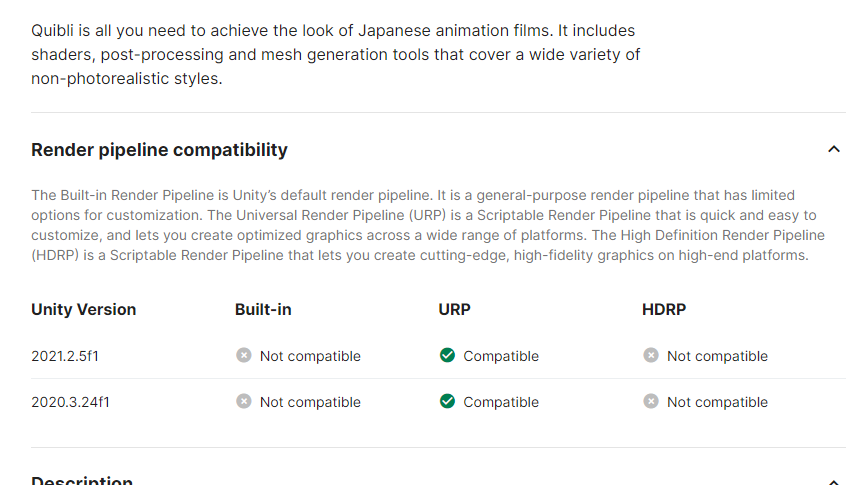
 green lagoon
do you have Generate lightmap UVs checked @sullen fiber
 storm matrix
How to fix this? Uploading was working last night.

 royal vessel
all my worlds particles are white and opaque, did vrchat break tranparency on particles recently?
this was fog not long ago

and the dust mites are white squares now i havnt updated the world in over a month and its been fine
 near escarp
Which shader are you relying on ?
royal vessel
ill have to check but i think the dust mites were from the FAE package i had, its been working fine for the longest time, all they are is just transparent particles, super simple and never did this before so whatever the last update did broke it
hmm now its saying hidden internal error shader thats strange, maybe something actually broke for me and i didnt notice. weird. wonder why something in a project i used multiple times just ups and stops using the correct shader
coulda sworn it was fine after i updated it last time
 royal vessel
guess it was my bad possibly, at any rate i managed to reimport the package from unity store and its back so i guess ill upload it and that should have fixed it
seems to be working again, guess its a cautionary tale to double check stuff

 sour coral
is there a way to play a video which I put in the project? Not with url
 chilly grove
I don't think so, if it's a small video you could convert it into an image sequence and play each frame yourself
 sullen fiber
Is there a way to have mulitple world audios in different areas of your map?
The range doesnt seem to do anything
storm matrix
sullen fiber
Is there a way to have mulitple world audios in different areas of your map?
I was dealing with that earlier. All you have to do is select the audio source and slide Spacial Blend from 2D to 3D.
 sullen fiber
storm matrix
I was dealing with that earlier. All you have to do is select the audio source a...
sullen fiber
storm matrix
I was dealing with that earlier. All you have to do is select the audio source a...
Thank you
storm matrix

civic cloak
hey guys! quick question
I've installed an asset kit, would would be the quickest way to pull a texture from Unity and edit it in PS?
its a book, I want to change the cover graphics in PS
green lagoon
you should be able to right click at the bottom that shows like the asset folders and it would have a button for open folder in Windows Explorer