#world-development
39 messages · Page 109 of 1
 dusk sapphire
create a new animator controller in your assets and drag it into the controller slot
then open the animator controller and drag your animation clip into the default layer
are you able to go into play mode?
 chilly hawk
dusk sapphire
then open the animator controller and drag your animation clip into the default ...
chilly hawk
dusk sapphire
then open the animator controller and drag your animation clip into the default ...
Thanks; am I doing it right?
 chilly hawk
Great, will do
dusk sapphire
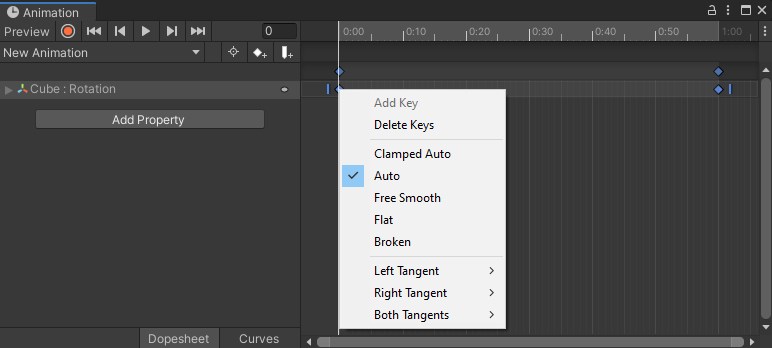
if you haven't, i mentioned earlier than you should ctrl+a all your animation keyframes and set it to auto
this is because the default animation curves are not linear which is not what you want for an animation that's basically a looping spinning object.
other wise when it loops the rotation speed isn't consistent
chilly hawk
Yeah, it slows and stops at the end of the loop
dusk sapphire
 gaunt minnow
dusk sapphire
are you able to go into play mode?
gaunt minnow
dusk sapphire
are you able to go into play mode?
i had moved the cyanemu folder from assets to a subfolder
moved it back and the error's gone
dusk sapphire
ah, didn't notice that
yeah that might have done it
some things are sensitive to path changes
gaunt minnow
guess ill have to live with an unorganized mess of a project folder lol
@dusk sapphire can i DM you a screenshot? it has local paths in it so would rather not post publicly
im getting errors when i go out of play mode
dusk sapphire
uh, sure? though if you can go into play mode and it works fine I imagine its not big of a deal
gaunt minnow
im not sure whats going on since i havent had any of these things happen in the previous unity version
apreciate if you could take a quick look wether there is anything you feel should be adressed
 kind leaf
When you restructure, if you clear the library (google), any structure issue is typically solved. The problem comes later when you update stuff. Replacement assets go where you moved the old ones, but anything new gets separated and breaks. Also, local paths reveal nothing useful to anyone except the embarrassing names we might give our pc's. c:/users/elitepoo means nothing to anyone even if it was a real pc name 🙂
 stable latch
has anyone faced this issue before while attempting to upload their world? if so how do i fix this?

 ruby jay
check console log for errors, fix them
 bold ibex
Hey have a strange Problem in my World. Have a switch in the World which is Turning on and off a game object (parent one who has more child objects inside).
This is local.
Now it happens or happens Not that a Player geht's stucked in movement. He only can turn but Not move. Also after respawn. Only rejoin World fix it.
This happens by around 60% chance.
It is also Not clean what conditions lead to this.
Last Thing changed Was adding occlusion to the World.
Anyone have a Clue?
kind leaf
So the player gets stuck in the switch and has to respawn?
bold ibex
Not in the switch...He freezes in movement. If He respawn He is still freezed in movement. Only turn avaliable
kind leaf
try moving your spawn point up a bit (the y value )
bold ibex
Above 0 i guess yeah? Online where some Infos about under 0
kind leaf
Yeah, if it is too close to the floor collider you could be having an issue with that. You mentioned the switch to toggle off/on objects, unless that is turning off the floor or part of then that is probably it
if your spawn is 0, maybe try .5 or 1 and see how that works out
 cunning nest
so in a mirror the player avatar particles is getting rendered behind the world, how to fix this>?
 bold ibex
Is there a unity tool that makes it easy to swap out materials between android/pc builds?
I could duplicate my prefabs and do it that way, but that seems a bit silly
bold ibex
bold ibex
Is there a unity tool that makes it easy to swap out materials between android/p...
There is multiple auto switchers
You have like BuildHelper and Quest switcher
The Easy Quest Switcher that I have only enables/disables prefabs, which is great but I was wondering if there is something that just switches out materials on existing prefabs 😛
bold ibex
bold ibex
The Easy Quest Switcher that I have only enables/disables prefabs, which is grea...
GitHub
EasyQuestSwitch is a Unity editor tool developed for VRChat world creators, it can automate changes to components within a scene as soon as the build platform is changed from PC to Android (for Ocu...
You have material towards the bottom

ooooh
thanks

does anyone know how to move a chair sitting position put the vrcstation componant and a udon stationgraph in my object anyone know how to move the location of the sitting? - Also how do you update your world thats allready published do you just public again like you did in the first place or somthing elts?

 vivid brook
 woeful hemlock
Does anyone know what happened to vrcat.club and all the tutorials on there? e.g. https://vrcat.club/threads/world-optimization-2.114/
vrcat.club now points to ask.vrchat.com but I didn't find any of the old tutorials on that site.
 light carbon
woeful hemlock
Does anyone know what happened to vrcat.club and all the tutorials on there? e.g...
light carbon
woeful hemlock
Does anyone know what happened to vrcat.club and all the tutorials on there? e.g...
It was an unofficial forum, all of the threads there were made by people / users, not by VRChat. That site for a while asked people to move their stuff over to the official forums, of course if people don't do this their tutorials will not be on the official site.
woeful hemlock
light carbon
It was an unofficial forum, all of the threads there were made by people / users...
That's very sad. There was good information on there for new people. Thanks for the info!
 random sphinx
how can I make a climbable ladder? like one that you just walk into to climb?
kind leaf
random sphinx
how can I make a climbable ladder? like one that you just walk into to climb?
grapple and pull system with a short range, or use an invisible stairs*, or teleport on click.
 crystal palm
is subsurface scattering supported in unity/vrchat shaders or can I achieve this same eevee look in another way? i know you have to bake the lighting but can that include a kind of translucent look like this too?
 kind leaf
Yes, and no. SS is in the HDRP so no you cant use it, but the lighting in the shared image is what anyone using Bakery would expect.
can also look at shader tricks like this but no clue as to if it works or not https://assetstore.unity.com/packages/vfx/shaders/subsurface-scattering-shader-3254 in vrc

Add depth to your next project with Subsurface Scattering Shader from Davit Naskidashvili. Find this & more VFX Shaders on the Unity Asset Store.
woeful hemlock
Is there any difference in how VR Chat handles transparency in VR mode? I use SeansWater shader which was recommended in a few places. In desktop mode it looks fine. But in VR the transparent part at the edge of the water heavily mirrors the world above it which looks very odd.

 gleaming plover
if you want to add something simple like a table
is it better to make it in blender or create it in unity
(ik you could look for a table asset, i mean specifically for this case if one is better to do than the other)
kind leaf
any of the above. whatever works for you
gleaming plover
okay so its pretty much the same then
i wasnt sure if one was just smarter to do or something
kind leaf
if you got the skills obviously blender is smart, but an asset might be free and prebuilt is instant so no time lost. So its just that, whatever you want 🙂
gleaming plover
blender is smart but lets say super basic
a 3D cube made in blender vs just a basic 3D cube in unity
i take it theres not much of a difference at all between them
kind leaf
between cubes no lol. what you can do yes. blender has all your modeling tools in one place. unity needs you do find other assets like poly brush
 green lagoon
yeah not much of a difference if you're just talking about resizing cubes to make a table but if you wanted to be more complicating to the cube when they would probably be a better choice
random sphinx
@gleaming plover you might be interested in Unity's probuilder tools, lets you make more complex shapes right inside of Unity without having to get into Blender
gleaming plover
thanks for the insight guys
gleaming plover
random sphinx
<@!192091669687042048> you might be interested in Unity's probuilder tools, lets...
also ill take a look thanks!
random sphinx
does anyone actually use occlusion culling in their world? the culling is never good; always culls things that shouldn't be.
green lagoon
random sphinx
does anyone actually use occlusion culling in their world? the culling is never ...
yes it's quite important for good performance and you can tweak the settings to make it behave better
random sphinx
green lagoon
yes it's quite important for good performance and you can tweak the settings to ...
i can't get the settings to do right. guess i'll be wasting several hours trying to mess with them...
i don't even use occlusion culling in my games because it never works right
 gray sleet
Is it possible to update a world from sdk2 to sdk3 since now sdk2 is no longer maintained
green lagoon

It’s time to convert your old SDK2 projects to Udon using the new SDK2 Migrator! Available now to $10 and up Patreon subscribers.
CyanTrigger V0.3.3 is also now available to everyone for free.
Check out my Patreon post for more details
https://t.co/87MJRdgmpa
#CyanTrigger #VRChat
Retweets
129
Likes
263

 Twitter
·
Twitter
·
 gray sleet
green lagoon
https://twitter.com/CyanLaser/status/1445551797695770627?s=20
gray sleet
green lagoon
https://twitter.com/CyanLaser/status/1445551797695770627?s=20
i got it. the free one. do you know how to use it> if so id like some help going through it
 short forum
gleaming plover
is it better to make it in blender or create it in unity
short forum
gleaming plover
is it better to make it in blender or create it in unity
You can get it done with probuilder in unity, but it can add more faces than you need. Blender is the most optimized version while unity is the quickest route. Regardless, do not use the basic shapes in unity, as there is no UV mapping available by default and textures do not apply well. Both probuilder and blender (with UV mapping) works best.
gleaming plover
chilly hawk
aww do you udon to get them to move?
short forum
gray sleet
i got it. the free one. do you know how to use it> if so id like some help goin...
From what i understand, it was impossible to carry over sdk2 to sdk3 without completely rebuilding a new project and making all the triggers by hand. Curious on how Cyan's converter works...
chilly hawk
gleaming plover
aww do you udon to get them to move?
I had to set the fan blades as children of an empty object, then animate the empty object.

 green lagoon
gray sleet
i got it. the free one. do you know how to use it> if so id like some help goin...
green lagoon
gray sleet
i got it. the free one. do you know how to use it> if so id like some help goin...
the converter is currently only in the paid version so you might have to convert over your world manually
green lagoon
short forum
From what i understand, it was impossible to carry over sdk2 to sdk3 without com...
I don't know the technical details but I do know the tool works as a map converted over completely to sdk3 using it
chilly hawk
Got legacy unchecked.
 gray sleet
green lagoon
the converter is currently only in the paid version so you might have to conver...
gray sleet
green lagoon
the converter is currently only in the paid version so you might have to conver...
on the page it says there is a free version. hmm but darn
short forum
green lagoon
I don't know the technical details but I do know the tool works as a map convert...
Cyan is like the Udon god
green lagoon
yes a free version of CyanTrigger but the converter is currently paywalled as the developer has to eat
gray sleet
well darn. ;-;
 lucid hawk
Need help with an issue I'm having. A couple of months back I ported a map from another game into VRChat with the help of a friend. Everything was working fine until they released the Unity 2019 update and now you fall straight through the ground on one half of the world. I'm using a mesh collider but for some reason only one side works but on the other it's broken.
green lagoon
gray sleet
well darn. ;-;
the converter will eventually go into the free version and your SDK Two Worlds aren't going to break immediately
gray sleet
hopefully it will be free before vrchat breaks sdk2 worlds.
dusk sapphire
chilly hawk
I got these moving yesterday and they have decided they don't want to today >:(
did you mark them as static? static objects can't move or animate
chilly hawk
dusk sapphire
did you mark them as static? static objects can't move or animate
I haven't touched them at all since I got them working. Is there a static checkbox?
dusk sapphire
top right corner of your inspector
 chilly hawk
I'll move the camera over and check
 craggy umbra
Does anyone have a prefab for audio reactive lights? Like the ones in club vrc worlds
chilly hawk
dusk sapphire
does it not play in play mode?
Not moving in play mode
dusk sapphire
what does it look like when you open your animation window?
you didn't change the name of the game object did you
chilly hawk
Haven't renamed anything. I duplicated them yesterday without issue.
(that's why there's 3, not 1)
I have spotted an error about 'legacy animations', but I get another error if 'legacy' is checked. It's currently unchecked, like you told me to last time.
dusk sapphire
whats the error?
chilly hawk
Hmm... doesn't want to pop up. I'll see if I can make it happen again.
...they are now spinning again in-game
I do not know why
Hopefully they stay spinning from now on
I have another unrelated issue, which is this:

For a video player. Auto Fix can't resolve it for whatever reason.
chilly hawk
dusk sapphire
whats the error?
Got it to show up by pressing publish.

I'll see if the fans are broken or not when it's uploaded.
 idle sage
Is there a good way to make something slide? As far as I know Physics Materials aren't supported. :o
 keen lance
So I accidently published my vrchat world, and I Un-published it, and I want to republish it again,
but I can't because I apparently exceeded the publish limit,
How do I refresh the limit?
Or do I have to wait 7 days to publish again even after I unpublished the world?
Any help is appreciated.
Oh and One more thing: If I publish a world and then immediately unpublish it, does that mean have to wait or Is there a way where I can refresh it if i accidently publish?
gleaming plover
keen lance
So I accidently published my vrchat world, and I Un-published it, and I want to ...
youll have to wait 7 days
keen lance
darn
kind leaf
idle sage
Is there a good way to make something slide? As far as I know Physics Materials ...
physics materials are supported, they just dont work on players because logic
random sphinx
speaking of the 1 upload per week limit, does this count for Quest builds too? meaning, would I be able to upload the PC and Quest versions of my world in the same week?
kind leaf
updates dont count. If you upload pc the quest version has the sam id so it is an update not a new upload
random sphinx
ah ok, good
idle sage
kind leaf
physics materials are supported, they just dont work on players because logic
Alright, thanks!
gleaming plover
im using the video player from the vrchat examples folder

can i make it less painfully bright
kind leaf
in the material, drop a black texture where is asks for it 🙂 you can drop any texture really
gleaming plover
on the screen child object?
kind leaf
select the screen, the material will be video somthing realtime emissive select it
 kind leaf
yes
keen lance
what would be a good video player for a world? (Asking for a good one in general
gleaming plover
im using the example ones
kind leaf
Protv2 if you want lots of features 🙂
kind leaf
VRCPrefabs.com/browse or this link which is the same place https://docs.google.com/spreadsheets/d/e/2PACX-1vTP-eIkYLZh7pDhpO-untxy1zbuoiqdzVP2z5-vg_9ijBW7k8ZC9VP6cVL-ct5yKrySPBPJ6V2ymlWS/pubhtml#
bookmark it, and enjoy the prefab toybox 🙂
^ everything in the Udon Prefabs works. sdk2 prefabs are 50/50(due to age) the other tabs all have very helpful stuff.
kind leaf
gleaming plover
im using the example ones
convo got distracted, did you find out where to insert your screen image?
gleaming plover
yea i dropped a material on the tv and it covers the screen i need to find out how to remove it
kind leaf
ctrl z undoes changes. If you accidently replaced the screen material then just select the video material again and drag and drop it on the screen for a quick switch back
chilly hawk
My pickup-ables instantly disappear. What am I doing wrong?

I don't recommend clicking that link
 meager anvil
Why did I deadass just open that for no reason
It's just rule 34 lol
But yeah, don't click on it.
short forum
chilly hawk
My pickup-ables instantly disappear. What am I doing wrong?
It might be falling through the floor. Check to make sure both the floor and the object have colliders on it
chilly hawk
Ah, didn't think of object colliders
bold ibex
hi
having annoying issues with unity
UnityEditor.AssemblyHelper.AddReferencedAssembliesRecurse (System.String assemblyPath, System.Collections.Generic.List`1[T] alreadyFoundAssemblies, System.String[] allAssemblyPaths, System.String[] foldersToSearch, ``` manic sonnet
how could I make the outside of a room invisible to players? Im making it so you can teleport to a room but it would be visible from the outside, I would put it far away from spawn but then everything glitches
 uncut siren
Where can I report a hacker?
kind leaf
manic sonnet
how could I make the outside of a room invisible to players? Im making it so you...
dont put it that far away from spawn 😛 default far distance is 1000, thats far too high for a room. 100 would be fine. Anything beyond 100 is/would be invisible.
green lagoon
uncut siren
Where can I report a hacker?
moderation reports
uncut siren
Thx
green lagoon
you need to do that with the moderation reports section not here
uncut siren
Sorry
green lagoon
the vrchat Discord moderation staff can't help out with in-game moderation
kind leaf
bold ibex
``` ArgumentException: The Assembly UnityEditor is referenced by VRCCore-Editor ...
You can try reimporting the DLLs (VRCSDK>Plugins>Select all R-Click > Reimport) but a fullscreen screenshot with the console errors shown would be helpful.
manic sonnet
kind leaf
dont put it that far away from spawn 😛 default far distance is 1000, thats far ...
it is very visible from there, unless i am misunderstanding, i placed it at 0,100,0
kind leaf
you have to set the reference camera far distance as well. It is by default at 1000. If you don't have a reference camera you need to have one.
To clarify, the world will upload without one with poor render distance configurations and zero post processing support.
manic sonnet
kind leaf
To clarify, the world will upload without one with poor render distance configu...
ive messed with post processing before so i think i know what you are referring to just dont quite remember how to approach it
kind leaf
select the camera, you will see a near and a far option
in the inspector
set near to .01 and reduce far to the lowest you can live with
then select your scene descriptor (VRCWorld) and in the inspector make sure "reference camera" is that camera
After that all you have to do is move the other room 1 tick beyond the far distance set in the camera. You are measuring from the closest wall not the center.
manic sonnet
thank you, is there any way to create exceptions? say if i had an object in the background of the scene
bold ibex
@kind leaf ArgumentException: The Assembly UnityEditor is referenced by VRCCore-Editor ('Assets/VRCSDK/Plugins/VRCCore-Editor.dll'). But the dll is not allowed to be included or could not be found. UnityEditor.AssemblyHelper.AddReferencedAssembliesRecurse (System.String assemblyPath, System.Collections.Generic.List`1[T] alreadyFoundAssemblies, System.String[] allAssemblyPaths, System.String[] foldersToSearch, System.Collections.Generic.Dictionary`2[TKey,TValue] cache, UnityEditor.BuildTarget target) (at <a259d3c004024353a2c217da97495055>:0) UnityEditor.AssemblyHelper.AddReferencedAssembliesRecurse (System.String assemblyPath, System.Collections.Generic.List`1[T] alreadyFoundAssemblies, System.String[] allAssemblyPaths, System.String[] foldersToSearch, System.Collections.Generic.Dictionary`2[TKey,TValue] cache, UnityEditor.BuildTarget target) (at <a259d3c004024353a2c217da97495055>:0) UnityEditor.AssemblyHelper.FindAssembliesReferencedBy (System.String[] paths, System.String[] foldersToSearch, UnityEditor.BuildTarget target) (at <a259d3c004024353a2c217da97495055>:0) UnityEngine.GUIUtility:ProcessEvent(Int32, IntPtr)
 kind leaf
Unity version? Sdk version? Are you on a windows machine? Does it say PC, Mac & Linux Standalone up top?
bold ibex

@kind leaf
Error occurs when clicking Build & Test
SDK version 3
Unity 2019.4.31f1
kind leaf
"alreadyFoundAssemblies," ensure you only have one VRCSDK folder.
You also installed oculus modules
remove that stuff
the only module you should add that is not default is android
nothing needs installed for support on our ends except for the android module. Your development input is scene based only.
bold ibex
still no one has a clue for my problem?
chilly hawk
bold ibex
still no one has a clue for my problem?
Looks like your question got buried, so just ask again. 🤷🏻♂️
bold ibex


to update your existing world do you just publish again on windows and android like you did in the start?
chilly hawk
bold ibex
to update your existing world do you just publish again on windows and android l...
If it's the same as avatar publishing, then yes.
bold ibex
@chilly hawk is the discribtrion clear? 🙂
chilly hawk
Ah, sorry. I don't know much about Unity. I've just been asking a lot of basic questions here recently.
bold ibex
@kind leaf

I think most of my problems were because I downloaded the oculus integration plugin and did the steps associated with that
This is my first time in Unity
This is incredibly frustrating but I apprecaite your help....
I deleted VRCSDK3A
because it seemed like a duplicate
honestly... it might be best to just redo this all....
kind leaf
You only have one VRCSDK left?
bold ibex
yes
kind leaf
Backup first(zip): ok, so assuming you got rid of all the oculus stuff, what you can do is save and close. Then navigate to the projects directory and delete the library folder. Then relaunch the project. It will take a bit to load because it is going to rebuild the library. That should resolve the issues of having multiple sdks
When you open the project again you will be prompted with a blank scene, just load your normal scene
bold ibex
kind leaf
Backup first(zip): ok, so assuming you got rid of all the oculus stuff, what you...
I also deleted some VR chat stuff that seemed like duplicates.... is there a way I can verify the VRChat package having all the stuff it needs?
kind leaf
drag n drop the sdk you downloaded back into the project, should start an import
bold ibex
should I fully delete the SDk first?
kind leaf
although not entirely sure how it will handle given the library is currently confused.
naw
chilly hawk
Other than vrcprefabs.com and booth.pm, where can I find prefabs? I need more SDK3 games/activities.
kind leaf
there are some randoms on git that arnt listed on those sources. But those are the main two. could try just googling VRC Udon Game Name but thats not efficient.
bold ibex
buy from artstation etc.
chilly hawk
Hmm... I have a broken Chess set to replace and have tried finding Othello and Darts. I guess there's checkers too. A working arcade cabinet would be nice, but I doubt I'll find one. 
 kind leaf
Yeah might need the rebuild then. follow the docs and dont deviate from the setup https://docs.vrchat.com/docs/setting-up-the-sdk once you have a clean project you can begin importing your old scene assets
VRChat
Requirements We're going to need a couple things before we can get started. Current Version of Unity. We strongly recommend using Unity Hub, available on that page.VRChat SDK - See the Choosing your SDK page to see how to choose the correct SDK for your use. Step 0 - Installing Unity Check the Curre...
kind leaf
chilly hawk
Hmm... I have a broken Chess set to replace and have tried finding Othello and D...
The cabinet probably wont be found working although why is beyond me. You can easily code a platformer using ui elements and animations. Controls can be done by having the player sit on a station to play while in the station normal movement controls control the arcade game. Also there are shaders at vrcprefabs that can be used with this setup. Keep meaning to do this...
chilly hawk
My broken chess set is EmyChess, which should be drag and drop (plus UdonSharp). https://github.com/emymin/EmyChess
Unless there's been an update after Aug 31, it should work... but it doesn't. 😮💨
Deleting and importing it again. Maybe I added it before UdonSharp or something. I dunno.
kind leaf
seems to be working just fine for me. Its not a single player game so while testing you have to join as white and black

 kind leaf
ill rescale and test
.1 had the same results. Pieces spawned in cyanEmu
doing a test build now. Make sure you dont have errors
chilly hawk
I just dragged and dropped this, then resized. I have UdonSharp, but not CyanEmu.
 chilly hawk
I'll test it and check the error log. Pretty sure there's Chess errors.

Just this error. Got it on some soda cans from a vending machine too.
green lagoon
those are yellow so they're not deal-breakers
chilly hawk
Only other error is for an unrelated animation.

Oh, and this. But also unrelated.

Perhaps it's an issue with UdonSharp, not the Chess set.
kind leaf
Rainwolf and I know what you are saying but just so you know, yellow is a warning. white is debug, red is an error.
Those warnings I do not have but they are not the cause. I would check to make sure everything is referenced
chilly hawk
No idea what that means 😅
I have this for UdonSharp. Imported, but otherwise untouched. V0.20.3 (latest)
 kind leaf
check every part of the prefab, make sure all this is assigned and nothing is "none"

if you check the chess set part, there is a reset and generate pools button. you can try that. Make sure to unpack the prefab completely first.
chilly hawk
Got hit with errors for checking the Chess stuff
 kind leaf
press clear, any errors remaining are problematic
chilly hawk
Got some just by clicking board
 kind leaf
is your unity in play mode?
 kind leaf
yeah im in Board right now with no issues. Somethings not right with the project. I have no idea what though. If you create a new project with a proper setup, add a floor with a collider and VRCWorld for your spawn/scene descriptor, you can drag n drop the prefab in with no issues and test further and maybe debug your setup better. You can have multiple projects open at once.
and udonsharp, dont forget that lol
chilly hawk
I could try deleting and re-adding that first
Unless there's a risk of it breaking other prefabs
kind leaf
if you are worried close the scene by opening up a blank or new one. Things dont break until they are read. Also, backup always backup if you are not sure.
chilly hawk
I redownloaded it from GitHub and it's still broken, so I suspect UdonSharp. I'll backup and try reimporting it.
kind leaf
bold ibex
Still no clue?
if you are talking about me, no I am out of ideas. As long as your colliders are fine and the spawnpoint/scene descriptor (vrcwolrd) isnt in the parent that gets toggled, all should be good. So after that, I am spent on ideas. sry
bold ibex
Hmm ok half 4 am. Gonna go sleep a bit than :)
Thx maybe someone Else has a idea too Check it again tomorrow
Just ping me pls
chilly hawk
Okay, backed-up and re-downloaded Udon Sharp. If replacing it doesn't fix it, something weird is going on.
🤔

Should I tick those or not?

Looks like it won't let me, so no choice
I think the errors are referring to this being empty

Yeah, removing that stops the errors
@kind leafwhat have you got there?
 magic wing
First time trying to create a world and I decided to import complex geometry. Now I'm stuck just floating in air.
 chilly hawk
magic wing
First time trying to create a world and I decided to import complex geometry. N...
chilly hawk
magic wing
First time trying to create a world and I decided to import complex geometry. N...
Make sure you checked the 'generate colliders' box

...unless it's something else and then I have no idea
magic wing
Only recently got comfortable with avatars, complete noob to worlds. Where would I find the import settings for my mesh?
ah found it
 magic wing
Hey all my materials carried over from blender too
Sorta- can't edit them and nothing other than the diffuse maps carried over so that's still on the list lol
chilly hawk
I use Sketchup for my basic structure because Blender scares me
magic wing
Anyway getting it working is priority
<- Complete understanding of blender, complete noob to unity
 magic wing
chilly hawk
You need to extract stuff to edit it
magic wing
chilly hawk
You need to extract stuff to edit it
mm
I also know 3dsmax, which I feel like has better hard surface modeling tools but its inefficient compared to blender
You always have 2-3 extra steps when you want to do anything
Still falling >_>

Added colliders
chilly hawk
Sketchup is the best I can do
magic wing
Is it because I'm inside a giant mesh? lol
chilly hawk
Uhhh... add a mesh collider to it? That's the only other thing I've done before
magic wing
Trying to spawn in the tunnel
 chilly hawk
Also make sure your spawn point is above the ground to you don't spawn below the floor a little bit
magic wing
so I think its probably screaming with its colliders
chilly hawk
Are you sure you're spawning ABOVE the floor and not IN the floor?
magic wing
 chilly hawk
Try making it higher, just in case
 chilly hawk
Ah, but you're not falling through the floor?
magic wing
No I'm literally stuck in midair
Have been entire time, even before mesh collider and generating colliders
chilly hawk
Try putting the spawn point above the roof and see if you land on it
Ah
Your spawn point is way below zero
chilly hawk
If you fall too far, you respawn. I'm guessing you're constantly respawning. Could be wrong as I'm new to this as well.
Try moving everything up so you're above zero
magic wing
No I said it in all caps
I need to scale everything down again but this is working!
 chilly hawk
:)
Got my stupid chess board working in an empty scene too
So it works if I delete everything else? Looks like I have 2 things that can't share a scene...

Let's try removing the pool table and the video player...
...yeah
It's one of them breaking it
Bet it is the pool table, because I like it more
What? My scene duplicate works with everything in it, but the original doesn't? What?
I hate Unity
I'm glad it's working now, but I just don't get why
The only difference should be the scene name
chilly hawk
That leaves the issue of objects falling through the floor

The ground it falls through is solid - players can't pass through it
Maybe the ground needs a rigidbody too or something?
If someone can ping me a solution, I'd appreciate it
 stone marsh
chilly hawk
Maybe the ground needs a rigidbody too or something?
stone marsh
chilly hawk
Maybe the ground needs a rigidbody too or something?
Your mesh collider has no mesh assigned.
chilly hawk
Ah
stone marsh

 bold ibex
@kind leaf Thanks so much!
Got it working

Welcome to the Walker Museum of Sleep․ While here‚ you will learn about the fascinating‚ and often unknown story‚ about the psychology and neuroscience of sleep․
kind leaf
 primal flower
I'm guessing this is a gun prefab you found? If so try contacting the developer (they would probably be in this server). If you wrote this script yourself then the error tells you what is wrong and where.
primal flower
kind leaf
I'm guessing this is a gun prefab you found? If so try contacting the developer ...
ok,thank you for your help
 royal vessel
i did something to my world and now i cant move left and right
i know i reset the camera and deleted a dynamic prefab which wasnt being used
and now avatars can only move forward and backwards
stone marsh
royal vessel
i did something to my world and now i cant move left and right
You disabled strafing. On the script used for player movement (if using UDON, it is the script attached to the VRCWorld prefab) or whatever udon script you're using for player movement. Strafing is set to zero
Movement speed is forward/back and strafe is side to side. I think strafe defaults to 2
royal vessel
that wasnt it
 stone marsh
Ensure u aren't using two movement scripts on accident.
Also check your script. You may have broken the strafe part
royal vessel
for some reason it REALLY wants this tree here

if i remove it i lose strafe.... for... some reason
stone marsh
You have something setup erroneously in your scene.
See this document https://docs.vrchat.com/docs/vrc_scenedescriptor
Specifically the dynamic prefabs section
Check to ensure you don't have something spawning a tree and check the tree prefab for movement scripts
stone marsh
Then just delete it
If strafe only works with it for some reason, then you have something very erroneous with how your scripts are setup or something. I can't think of any reason why a tree would break strafe unless the prefab has a movement script on it. Or whatever is spawning it, is breaking things
royal vessel
weird strafe was showing 0 now and i changed it
royal vessel
also side note it takes longer than normal for avatars to load in my world despite being optimized and around 8 megs
stone marsh
 I personally don't know how a world would affect avatar loading times and will just leave that up to someone else for input.
My guess would be it's just happenstance or confirmation bias.
royal vessel
i should note i mean your own avatar to load in. the pedestles load in fine
i fixed the strafe tho now my world is 6.77mb
shaved 2mb from a dynamic prefab i wasnt using
kind leaf
royal vessel
i should note i mean your own avatar to load in. the pedestles load in fine
Can you share the link so I can see if the load issue is localized.
kind leaf
I was in the black screen for about 10 seconds, after seeing the amount of pedestals that's understandable. My avatar loaded instantly (it's quest optimized). I wouldn't worry about avatar load times as it is probably localized and dependent on optimization and inherently isp power(UL/DS speeds and ping). But thats a guess, and it worked great for me 🙂
royal vessel
yeah i tried to make it as quest compayible as possible. maybe its just the amount of pedestles slowing it down for a bit on pc
stone marsh
Ah, you have pedestals. Didn't know that. I thought u meant people's avatars load slow
Set your pedestals to be on area triggers so they load when someone walks up to it vs loading them all on spawn.
royal vessel
yeah your own avi is diamonds for like 20 secs for a bit on loadin
i thought about it. i may try doing that but ill need to do some stuff to guide players to the fact its doing that
dusk sapphire
its probably just saturating your connection as all those pedestals will be trying to load the avatar thumbnails at the same time
stone marsh
Exactly temporal. Grouping them and loading them in via area triggers is the way.
kind leaf
royal vessel
yeah your own avi is diamonds for like 20 secs for a bit on loadin
you don't need to have a trigger for each, if you group them in rows with one trigger you wont need to tell the visitors much if anything at all about your magic.
royal vessel
maybe ill make 3 groups or so with a sign that goes away on trigger
ive done that like in my hyrule field with a mirror arrow that goes away
i have the easy triggers from sdk3 toolkit
easy to set up
stone marsh
People will find them regardless of what you do. But like I said, grouping and using triggers is the way. Area trigger can be fairly large too, so no signs may even be needed. Just walking around will load them in. Just gotta set it up logically to leverage the area triggers
kind leaf
yep, after the changes are made if you need further testing just ping us
royal vessel
also side note that world has over 50k visits so im proud of that
 unreal kiln
heyhey. small question: vrchat doesnt open when i build and test a world, i tried reinstalling the game, the console is emtpy and a normal build and publish would work without problems
 odd wharf
Wondering if anyone has made a would based off the album cover for glass beach's first album?

I don't like making stuff if someone already made it
kind leaf
odd wharf
I don't like making stuff if someone already made it
Best bet would be to just look... How many people could have been inspired by the picture posted and got a head start on production while you awaited a reply ruining your chances to make an original 😉 I thought like that too, I then decided that I wouldn't let saturation spoil the enjoyment of making what I want, how I want.
keen lance
so I wanted to add a join notification system into my world but I don't know how, or where to find a good one
any help?
kind leaf
vrcprefabs.com there is like 2-3 in the udon tab 🙂
keen lance
Yeah I see a join sound
but not a join banner
I wanted to add a banner to my world that appears whenever someone joins or leaves, kinda like the dark arcade
kind leaf
Yeah I dont think there is a prefab for that. But the setup is the same, instead of playing a sound you just want to toggle an onscreen overlay on and then off after a few seconds.
keen lance
thanks
random sphinx
is there anyway to create a sound barrier? so that sound won't pass through?
stone marsh
random sphinx
is there anyway to create a sound barrier? so that sound won't pass through?
Assuming you're using UDON. https://github.com/Guribo/BetterAudio
GitHub
'Better' audio for UDON (VRChat) based worlds. Inc. speed of sound, sonic booms, doppler, occlusion, reverb, ... - GitHub - Guribo/BetterAudio: 'Better' audio for UD...
random sphinx
thanks
bold ibex
how can i fix this? how can i get it back to normal?
 near escarp
bold ibex
how can i fix this? how can i get it back to normal?
near escarp
bold ibex
how can i fix this? how can i get it back to normal?
disable grid snapping, the icon below where it says Animator
bold ibex
near escarp
disable grid snapping, the icon below where it says Animator
i found out, thanks!
chilly hawk
Why does this fall through the floor if convex (under mesh collider) is unchecked?
(same issue with the stand object below it - the convex mesh is also the wrong shape)
 odd wharf
kind leaf
Best bet would be to just look... How many people could have been inspired by th...
odd wharf
kind leaf
Best bet would be to just look... How many people could have been inspired by th...
Eh. I just don't like doing something if someone already did it and much better.
odd wharf
chilly hawk
Why does this fall through the floor if `convex` (under `mesh collider`) is unch...
For items you can pickup I recommend using a box collider.
Though maybe it falls through because the polycount is too high for it to make a collider
I had an issue like that once.
Using a mesh collider (even a convex one which is more optimized) is kinda bad for items you can pickup as from my experience it makes the item very laggy on everyone's screen except the person picking it up.
chilly hawk
Ah, okay. I'll make a box collider for the stand and hopefully the rock collider is okay as convex.
 scarlet moon
Does anybody know if Gaia Pro and Gena Pro can be used for making VRchat worlds in Unity?
green lagoon
yeah those would probably work correctly but I'm not sure if that's a good use of cash compared to like buying Bakery
scarlet moon
green lagoon
yeah those would probably work correctly but I'm not sure if that's a good use o...
I already bought Bakery, was wondering if anyone gets major benefits from Gaia Pro
green lagoon
most folks aren't trying to make large outdoor Maps
scarlet moon
green lagoon
most folks aren't trying to make large outdoor Maps
My idea was to create small plots of land quickly.
 acoustic wedge
Didnt really know where to ask this but, does anyone know any good warhammer fantasy rp worlds
 inland cave
scarlet moon
I already bought Bakery, was wondering if anyone gets major benefits from Gaia P...
inland cave
scarlet moon
I already bought Bakery, was wondering if anyone gets major benefits from Gaia P...
My initial thoughts are that given the limitations in the Terrain system, im not sure if this is worth it
I think GeNA works, at least the placement aspect of it. Remember that if it needs any runtime scripts to function that it will not work - VRChat will omit them as it prepares the world.
green lagoon
also not quite sure one would be building big enough levels to in vrchat to require that much procedural help
kind leaf
its only use is quality splatmapping and holes in our case. Also, no scripts need to be attached to the world. The included lighting cycles and weather would surly not work. But the finished terrain would be usuable
green lagoon
and I'm not quite sure if quality splatmapping/holes is worth the asking price at the moment
scarlet moon
kind leaf
its only use is quality splatmapping and holes in our case. Also, no scripts nee...
Do you see them being helpful? I'm only a couple months in, so they make it look easy to just set up a small plot of land with some trees.
kind leaf
No, if you are just getting the hang of it try something free
scarlet moon
Then I was planning to build custom architecture ontop using blender
kind leaf
or learn to build terrain by yourself
scarlet moon
kind leaf
No, if you are just getting the hang of it try something free
I dont mind the asking price for both atm, they are on sale.
green lagoon
a small plot of land wouldn't take care of long to decorate manually
there's definitely probably more useful tools on the unity Marketplace if you have a hole burning in your pocket
scarlet moon
green lagoon
there's definitely probably more useful tools on the unity Marketplace if you h...
lets hear em
green lagoon
I would have to go Google what would be good ones as you already got Bakery
gleaming plover
my world is like 80 MB even tho its one room
is it because of the assets i used are just big dl wise?
kind leaf
scarlet moon
I dont mind the asking price for both atm, they are on sale.
imho, keep it simple. simple doesnt need to be boring. But simple is easy to learn from. Terrain management is a beast of its own in VRC and for mobile platforms. So having small problems is better that having large ones.
green lagoon
gleaming plover
is it because of the assets i used are just big dl wise?
probably
https://github.com/oneVR/VRWorldToolkit this can tell you what's taking up file size
GitHub
Unity Editor extension for making VRChat worlds. Contribute to oneVR/VRWorldToolkit development by creating an account on GitHub.
scarlet moon
kind leaf
imho, keep it simple. simple doesnt need to be boring. But simple is easy to lea...
you mind directing me to a good beginner method for sculpting terrain?
green lagoon
honestly I probably start with the the architecture first rather than worry about terrain
kind leaf
scarlet moon
you mind directing me to a good beginner method for sculpting terrain?
I used the built in terrain tool. My first unity project was a mars rts. Architecture was done in Blender. I later upgraded the terrain using nasa heightmaps of mars. Plenty of videos on using real world terrain.
scarlet moon
kind leaf
I used the built in terrain tool. My first unity project was a mars rts. Archite...
Okay thanks, the big SALE numbers on the asset store have me not wanting to miss out
green lagoon
and also a lot of maps you potentially would be making Gaia Pro and Gena Pro would literally do nothing helpful for them
whereas like every map Bakery would be helpful for
kind leaf
scarlet moon
Okay thanks, the big SALE numbers on the asset store have me not wanting to miss...
Happy spending. Do note, that sale happens at least 8 times a year.
scarlet moon
kind leaf
Happy spending. Do note, that sale happens at least 8 times a year.
Good to know, might sit for a while then
gleaming plover
green lagoon
https://github.com/oneVR/VRWorldToolkit this can tell you what's taking up file...
ty
scarlet moon
Thanks again
green lagoon
it also has a button to apply crunch compression to all of your textures if that's what's taking up space
scarlet moon
Is Mesh Baker super useful?

Get the Mesh Baker package from Ian Deane and speed up your game development process. Find this & other Modeling options on the Unity Asset Store.
green lagoon
haven't used it personally but it does score more points for being helpful in all of your projects hopefully somebody on here has used it to give more helpful feedback
scarlet moon
thanks!
green lagoon
as it is quite handy to be able to combine objects together and combine their materials
as that means you use less draw calls
scarlet moon
green lagoon
as it is quite handy to be able to combine objects together and combine their ma...
says Gaia Pro only works in Unity 2020.3 and onwards
guess I got my answer
green lagoon
then yeah it wouldn't be of any use for vrchat
as that would probably be like 2 years before vrchat is on Unity 2020
inland cave
scarlet moon
Okay thanks, the big SALE numbers on the asset store have me not wanting to miss...
The only three I think are truly good for VRChat world developers are Amplify Shader Editor, Magic Light Probes and Bakery as that's shit Unity should have in it's engine and is just missing, and its things you'll use in every project. Everything else gets situational.
Also while Unity does lots of store sales it's often for much more useless content (asset packs, weird niche scripts), the really good packages only go on sale a few times a year.
green lagoon
looking over the page for a Magic Light Probes that does actually look handy
inland cave
Yup, it greatly improves lighting for dynamic objects and avoids the need for tedious manual placement
green lagoon
and looks like it's a bit smarter than just filled the volume full of light probes
or just use a navigation mesh as the light probe generator
inland cave
Exactly, it places probes in smart places, including the boundaries between light and shadow in lightmaps AFAIK
green lagoon
and question can the maps be uploaded straight after using it as I know like some of those freebie ones you have to remove the light probe Placer scripts or something goes funny
inland cave
So i havent used it enough to actually say, from the tests I did with it a while back I dont think you have to though
scarlet moon
inland cave
The only three I think are truly good for VRChat world developers are Amplify Sh...
any more obscure options that you still could find useful?
bold ibex
green lagoon
looking over the page for a Magic Light Probes that does actually look handy
MLP is super handy
I've used it on both of my public maps
inland cave
scarlet moon
any more obscure options that you still could find useful?
There's a few, keep in mind that I do 95% of my level design in Blender and use a plugin to export it to Unity which isnt what everyone does:
-
MegaScatter, I use this in replacement of the Terrain scatter or Polybrush tools as it lets me place things like Grass in a distributed and even manner and with whatever objects I want - something Unity is unable to do by default. It is pricey and it only gets rare bug updates though so only buy it if you do outdoor landscapes and know why you need it.
-
Amplify Impostors - Creates basic "billboard" LODs of assets in the scene that still interact with light and get shaded in the scene. This requires specific deployment particularly if you use this with Quest, but it's great for performance and optimization.
If you dont own Amplify Shader Editor, they do a bundle that lets you buy both that and Impostors at a discount and im guessing its on sale
green lagoon

Get the Amplify Bundle package from Amplify Creations and speed up your game development process. Find this & other Visual Scripting options on the Unity Asset Store.
buying the two separately would be 70
inland cave
Mmm, Amplify Impostors I dont recommend if you're just starting out though. If you're short on money just get ASE first.
scarlet moon
Thanks this was helpful
green lagoon
so from what it sounds like start with the light probes and the Amplify Shader Editor
if you must spend money right now
inland cave
Yeah, id recommend that too. Bakery seems good but I havent actually bought it yet as it adds a lot of complexity to the lighting system 🙊
scarlet moon
Yup guna grab the light probes and the amplify pack. Mega Scatter isnt on sale but looks so useful
kind leaf
inland cave
Yeah, id recommend that too. Bakery seems good but I havent actually bought it ...
I found Bakery easier than Unity lighting, but maybe the Bakery bake times manipulated me into just dealing with the new complexity 😛
green lagoon
Yap as you save a lot of time overall using Bakery
inland cave
kind leaf
I found Bakery easier than Unity lighting, but maybe the Bakery bake times manip...
I tried poking at it with a friend and certain things like reflection probes wouldnt work and it was loading broken lightmaps when opening a project.
If Unity 2018 was still a thing id probably say it's mandatory but 2019 cleaned up at least some of it's lightbaking mess.
Also i have a GTX 1060 so I see little performance improvements <:D
green lagoon
there is a button for baking reflection probes with Bakery
inland cave
I dont remember that working at the time. I might just buy it now and see if I can get it working later though 🤔
green lagoon

and The Time Savings get a lot more noticeable with projects with lots of different lights in it
or really big Maps
kind leaf
^ the button was questionable in 1.7 but the current version its fine. I just click bake on my reflection probes though.
inland cave
sigh, I look forward to the day when good SDFGI can be implemented and I can throw lightmappers in the garbage
kind leaf
Unity has a habit of adopting top assets, so they will improve eventually
inland cave
I mean
Ive seen their update logs for future Unity versions and they look like a barren wasteland
I could be wrong, I havent used Unity for long, I just find myself disappointed by it X)
 hexed elm
anyone here good with CyanTriggers? I'm struggling to network an event
kind leaf
hexed elm
anyone here good with CyanTriggers? I'm struggling to network an event
I'm sure many people here use CT, but if you join Cyans discord you will get those results faster.
kind leaf
inland cave
I could be wrong, I havent used Unity for long, I just find myself disappointed ...
Probably the only public engine I havent tested is Unreal. I had it but it crashed multiple time just trying to load a mod so I never thought to pursue it further. That being said, Unity is the best engine that I have seriously invested time in. There are a lot of clever sus engines. Unity didn't milk me for platform access and C# was easy to learn 🙂 I love Unity.
inland cave
kind leaf
Probably the only public engine I havent tested is Unreal. I had it but it crash...
Hahaha, ive used Unreal more before this and while it's not as flexible they do offer you a lot more tools and features from the get go. I've also used Godot a bunch and get the feeling that if Unity doesn't improve it's long-term updates that it will eventually eat it's lunch.
kind leaf
I refuse to acknowledge Godot because a lot of GameMaker Studio fans use it as well lol. GMS is one of those sus engines. Charging for seasons and building for different platform? F-that lol.
inland cave
I dont know enough about GMS but it's never been for me. Godot Engine is open-source and one of the good open-source projects that care about usability rather than telling their users to just "submit a patch or fork it", and it has a similar appeal of modularity and flexibility that Unity mainly has to differentiate itself from Unreal.
chilly hawk
Game Maker got expensive after the release of Studio 1.4. Before GMS2 was made, the company got bought. Because of that, GMS2 has a lot of changes from previous engines.
inland cave
chilly hawk
Game Maker got expensive after the release of Studio 1.4. Before GMS2 was made, ...
"the company got bought" say no more!
chilly hawk
I got GMS2 ages ago when it went on sale. Has some good new features, but I hate some of them. Really overpriced though.
Now then, on to my latest issue because I suck at Unity.
Box collider is not ideal and I can't use the mesh collider. What can I do?
 inland cave
Whats stopping you from using a Mesh Collider?
green lagoon
because it would be really expensive to use the full Fidelity mesh as a mesh Collider as a mesh collider checks per triangle
inland cave
green lagoon
because it would be really expensive to use the full Fidelity mesh as a mesh Col...
Besides that, I was going to suggest to use a simplified model <w<
green lagoon
yeah that would work
inland cave
I wasnt sure if the Quest version of VRChat had any more horrifying surprises in store 😂
chilly hawk
It falls through the floor unless I check the convex box. Convex is awful.
 inland cave
Yeah, you should probably create a simplified version of the mesh in Blender to use as a collider
chilly hawk
Yeah... I hate blender. And I think it hates me back.
inland cave
Everyone hates Blender to start with...... and some even afterwards, but it does get better in time. 3D creation software sadly requires complexity
chilly hawk
My main map is made with Sketchup. So glad Unity supports it.
inland cave
hahaaaaaa, thats an interesting choice
green lagoon
GitHub
Mesh simplification for Unity. Contribute to Whinarn/UnityMeshSimplifier development by creating an account on GitHub.
inland cave
Microsoft Maquette is also a good choice for beginners, as you can design in VR and export to Unity
kind leaf
Bad bot, go away
chilly hawk
That bot needs some work :/
inland cave
It hates it when you use multiple of the same letter together, it's done this to me before u _ u
chilly hawk
I'll see if I can understand the plugin
inland cave
Thanks for the plugin link, this will certainly be of use
 winter lynx
Is there anyone that could possibly help me create a world?
chilly hawk
winter lynx
Is there anyone that could possibly help me create a world?

In this tutorial I will show you how to get started with making your own VRChat world with the new VRChat SDK3 and the Udon programming system!
High-Quality and Low-Quality Mirror Tutorial: https://youtu.be/zUALbgztU5Y
Timestamps:
- Intro 00:00
- Download Unity and the VRChat SDK 00:38
- Make a Unity project 01:23
- Add a floor 01:56
- Add the...
Short and easy to follow.

 hexed elm
for your mountain couldn't you just make an ultra decimated version then use that as your mesh collider?
@chilly hawk
green lagoon
I guess that would depend on if you want the player to climb on the mountains
chilly hawk
It's a rock :P
hexed elm
rock*
if you can get it imported into blender or whatver you can use their decimation modifier to make a simplified, yet similar mesh
chilly hawk
If it's really easy, I don't mind opening the accursed Blender
hexed elm
yeah its quite easy
i can show you
import the relevant format to blender

once your thing is in blender go to the Modifiers wrench

hit decimate

lower the ratio to the point you deem acceptable
 green lagoon
that could probably be even lower as it's just a collision mesh
 chilly hawk
Seems to be an fbx model
hexed elm
yeah once you got it, you know how to set it as the mesh collider right?
you gotta like, expand it while its in your uh assets folder
and there's a mesh filter in there
chilly hawk
Can't even get Blender to open it right now
bold ibex
Ill show ye how to do it in new blender
near escarp
Don't use 2.79 please
bold ibex
^
green lagoon
any new tutorials for blender stuff is going to be 2.8 +
bold ibex
2.8 is hard if you were super used to the old ways
hexed elm
yeah using the new one is better in the long run, yea
but if u want something quick and dirty and if ur pc is taking a dump with 2.8
this is a fast way
bold ibex
Oi get used to the new one before it becomes much more different than it already is
issa gunna hurt
near escarp
No, 2.8 isn't even hard, it takes a day to get adjusted
bold ibex

hexed elm
but yeah if u need help setting the mesh in the mesh filter let me know
its pretty easy
chilly hawk
Blender won't open. Command Prompt pops up for a second and then nothing.
 chilly hawk
Perhaps incompatible with 2.93? Or maybe needs to be run as admin
hexed elm
i mean ur on windows right
chilly hawk
Win10 LTSC
hexed elm
yeah all i can suggest is uninstalling -blender, cleaning registry with ccleaner, and checking your appdata local for any stray blender folders
then restarting and re-installing
it should work
chilly hawk
I'll try running Unity as admin first. Could be a security thing.
Or not

Unless it just doesn't like this particular model

Screw it. If I can get the package from earlier to install then it won't matter.
But there's no installer package thing for it
hexed elm
shoot man wish i could help
green lagoon
GitHub
Mesh simplification for Unity. Contribute to Whinarn/UnityMeshSimplifier development by creating an account on GitHub.
the link on how you're supposed to installer
chilly hawk
green lagoon
https://github.com/Whinarn/UnityMeshSimplifier/wiki/Installing-through-package-m...
Tried that, but I get an error
 inland cave
It's weird that it wants git, huh
chilly hawk
Looks like it doesn't come pre-installed in Win10 LTSC
I'll see if it works after going through the lengthy installer
So I installed some stuff I didn't want and it still doesn't work
green lagoon
might suggest going back to see if you can get blender to work?
maybe try downloading it off of steam https://store.steampowered.com/app/365670/Blender/

Blender is a free and open source 3D creation suite. It supports the entirety of the 3D pipeline—modeling, rigging, animation, simulation, rendering, compositing and motion tracking, and video editing. Advanced users employ Blender’s API for Python scripting to customize the application and write specialized tools; often these are included in Bl...
Recommendations
142
chilly hawk
Blender works, but I can't open it with Unity
green lagoon
you don't need to have both of them open at the same time
chilly hawk
All I have for it is a unitypackage file. I can open it with 7zip, but it's just full of asset files - no fbx ones.
green lagoon
that's because you need to open the unity package first in unity and then locate the fbx
but from the looks of it that should have already happened if you have The Rock
 green lagoon
that's because you need to use the import fbx button in blender
you can only double-click open blender files with blender any other model format needs to go with the the importers inside blender
chilly hawk
Got it
 green lagoon
and then whack it with the decimate modifier
chilly hawk
...where's that?
 green lagoon
chilly hawk
...where's that?
green lagoon
chilly hawk
...where's that?
the blue wrench icon when you have the object selected
chilly hawk
What's a good face count for VRC?
 chilly hawk
I can get it down to 36

 green lagoon
that's probably not the end of the world Collision wise
kind leaf
it will look like shit, you dont decimate for a collider for the looks. In the Mesh collider you are asked for a mesh, just assign it the decimated monster
green lagoon
and also make sure to export as a new fbx The Rock
chilly hawk
Right, so I just export that ugly rock as a differently-named .fbx
chilly hawk
Uhh... how do I use set it as the mesh? Just adding it to my assets isn't enough
green lagoon
basically you put the ugly rock where your regular rock is put a mesh collider on the ugly Rock and then disable rendering of the ugly Rock
 late skiff
im completely new to building worlds, so i followed the instructions on the vrchat website and got a project set up
i imported the world sdk and this showed up
 green lagoon
what version of unity are you using
late skiff
green lagoon
what version of unity are you using
2019.4.31f1
green lagoon
okay then you should just be able to click go ahead
late skiff
ok tyty
chilly hawk
What do I do, step-by-step?

Am I supposed to replace it in the directory, not in Unity?
green lagoon
you click the little arrow to expose the mesh of The the Collision Rock
and then you drag that into the slot that says mesh on the mesh Collider
chilly hawk
I can't drop it here, if that's what you're saying
 green lagoon
chilly hawk
I can't drop it here, if that's what you're saying
green lagoon
chilly hawk
I can't drop it here, if that's what you're saying
you need to click the little arrow to expose the mesh
 green lagoon
so you drag the whites that says Cube 1
green lagoon
it should
most video game Collision meshes are simplified like that or just stacking a bunch of Cubes together
chilly hawk
...it's still falling through the floor
green lagoon
does the floor have collision and why does it have a rigid body
 green lagoon
does the pedestal also have a rigidbody modifier
chilly hawk
Yeah, both are set up the same way
green lagoon
question how big is the rock as you might be able to just use a box collider on it
as I doubt folks are going to be up in arms if it looks a little silly if it's upside down
 green lagoon
okay but still not the end of the world if it looks a little silly if you flip it upside down
chilly hawk
The original mesh collider worked with convex ticked, but it makes a strange shape that's hard to select
 chilly hawk
<convex>
 green lagoon
you can use 2 box colliders
chilly hawk
Yeah, I'll try that
green lagoon
and still would be cheaper than your mesh Collider
chilly hawk
I guess VRC doesn't like high-poly meshes and ignores them
green lagoon
honestly I have no clue as I haven't really used anything but geometric primitive colliders for pick up objects
sorry for not suggesting the two cubes earlier I was under the impression you were dealing with a bigger Rock that was static geometry
chilly hawk
Not that big. This is it next to bar stools.

 idle jolt
https://youtu.be/LMpMd7hl7mE
How do I recreate this? I'm bad at particles

Just messing around with a simple warpdrive-like effect.
Get Ultimate VFX: https://assetstore.unity.com/packages/vfx/particles/ultimate-vfx-26701?_aid=1100l3rZp.
Twitter: https://twitter.com/TheMirzaBeig/.
green lagoon
chilly hawk
Not that big. This is it next to bar stools.
then honestly just the one box collider will probably be fine
green lagoon
most people aren't going to be scrutinizing pick up objects that much as far as their Collision
green lagoon
chilly hawk
I've wasted too much time on this rock
yes sorry for sending you on a wild-goose chase with the mesh Collider but at least now you know how to make low poly mesh colliders for other stuff
green lagoon
like those bar stools could probably just be a box Collider
chilly hawk
Gotta make them usable, actually 🤔
green lagoon
or if for some reason it's really important for you to stick a object in between under the bar stool https://i.gyazo.com/d153f83d6340de2dd4fafc418a23ef01.png

but I would say for most of the time just a box collider woodwork
green lagoon
if you are to make it to where you can sit on the bar stool you would need some sort of Collider

 green lagoon
you can remove that
chilly hawk
Got it to work thanks to the example
Just gotta work out how I face the right direction
Unless I'm expected to rotate the object, I can't see a way to change the direction
...that worked
 charred canopy
I downloaded pro builder and progrid from Unity How do I open it?
kind leaf
Tools?
idle jolt
How do I make a particle stop right before it hits an object? I don’t want it to go through it
kind leaf
Enable collision on the particle and set it to 3d space. Might have to tweak the settings a bit but thats the basically it.
idle jolt
Alright I got that
But now I don’t know how to create a tunnel…
Basically I want to recreate the hyperspace jump from Star Wars. I think I can do the beginning and end, but I have no idea how to do the tunnel in the middle. Help??
kind leaf
I did it by setting up my particles in a cylinder in front of the view and added a cylinder collider to the front view. This broke up the stars and created a warp tube.
idle jolt
I want it to be a specific style
Do you know what the hyper jump effect looks like? It’s like blue swirling smoke with a bright light at the end of the tunnel
dusk sapphire
chilly hawk
I guess VRC doesn't like high-poly meshes and ignores them
Unity doesn't allow 2 mesh colliders to collide with each other unless one of them is convex. calculations for collisions between objects get more expensive the more edges they have. Its also why its highly recommended to avoid using mesh colliders where possible.
chilly hawk
Ah, that's why
Need some feedback. What games and features are popular? Not sure if anyone plays Beer Pong, for example.
I currently have a pool table, video player, card decks, chess set and pencil set. There's also a bar area, which will have pickup items.
Edit: forgot the working vending machine.

(darts has been suggested, but I couldn't find a free prefab before)
green lagoon
do you have a mirror
 scenic plaza
How do we keep sound contained only within one room, like a very hard limit to keep sound from passing through an object?
chilly hawk
green lagoon
do you have a mirror
I was thinking of putting one in each of the 3 areas
bold ibex
so i uploaded a 2nd world and it wont let me go there i havent published it i have to wait a week but i cant go there it just throws meback ito my home world do i have to publish it to go to my own world? in vr chat it just says unlisted
green lagoon
chilly hawk
I was thinking of putting one in each of the 3 areas
the bottom wall in the middle would work pretty well for a mirror I would suggest also having the mirrors be toggleable and also having a low-quality and high-quality version
chilly hawk
green lagoon
the bottom wall in the middle would work pretty well for a mirror I would sugge...
Good idea, I'll set that up.
random sphinx
is it possible to have water with real-time reflections? probably too demanding on the GPU, right?
green lagoon
yes that's quite expensive doing real-time reflections and most of the time a reflection probe is good enough
random sphinx
ok, kinda figured. maybe one day...
green lagoon
most people are not going to notice the lack of avatars in your water reflections
random sphinx
yeah, but I do lol
green lagoon
yes but people would much prefer a good frame rate
random sphinx
lol
dusk sapphire
there are other water shaders that use a grab pass to emulate screen space reflection
green lagoon
yeah that would be very bad
dusk sapphire
not the most performant but better than a mirror
random sphinx
i think i'll just have to settle for the reflection probe for now
green lagoon
yes that would be best for everyone framerate
 woeful thicket
well temporal I removed envirospawn and now my builder works...
dusk sapphire
lol
woeful thicket
if you want I can DM you the unity store link for that so it can be added to the list of "problem" assets or whatever
dusk sapphire
nah its fine
woeful thicket
rgr doger
dusk sapphire
I really hate how unity sometimes doesn't show errors in the console for problematic assets for some reason
woeful thicket
thanks for the help Temporal ^w^
I do actually now have a newish question... how do you stop backface culling with toon shaders and such?
dusk sapphire
Depending on the shader they might have an option for it
woeful thicket
any recomendations for a shader?
dusk sapphire
generally, people use standard or pbr equivalents for world building
woeful thicket
ok
chilly hawk
Hey everyone, can you think of something I can add to make this room less empty?
I can rotate the pool table 90 degrees to make space.
 dusk sapphire
potted plants
chilly hawk
I'll be adding proper textures later, as well as posters and photos on the walls :)
Hmm... actually, if I rotate the pool table, then I can add a few things to the left wall

I think I got something good
What about this area? I was originally thinking of putting a piano in the bottom left area, but I'd prefer something interactive.
The tables (which will be circular) both have a card deck on them. I could make the areas enclosed to make the room less empty.
 green lagoon
people have made interactive pianos on vrchat
 nocturne isle
I'm trying to get into world development, but I can't seem to figure out how to edit the VRC_SceneDescriptor. Anyone know what I'm supposed to do?
green lagoon
what are you trying to edit about it?
nocturne isle
I need to add the spawn point
green lagoon
VRChat
SDK3 An example of how to use VRC_SceneDescriptor to define a VRChat World. Found in VRChat examples > Prefabs > World. SDK2 An example of how to use VRC_SceneDescriptor, found in Assets > VRCSDK > Prefabs > World for SDK2 projects and Assets > VRChat examples > Prefabs > Wor...
dusk sapphire
^ i'd just use the vrcworld prefab that has everything set up for you, and it uses itself as the spawn point so place it where you want spawn to be
nocturne isle
green lagoon
https://docs.vrchat.com/docs/vrcworld
Those are the instructions I've seen, but they don't actually say how to access the scene descriptor in the first place.
green lagoon
you don't need to access the scene descriptor to add the spawn point
nocturne isle
How do I do it then? It doesn't say.
chilly hawk
Actually, is it a good idea to place the spawn point a little above the ground, not exactly on it?
dusk sapphire
the scene descriptor is on the vrcworld object, and its already all set up for you already
just place vrcworld where you want your spawn point to be and you're done
nocturne isle
Oh, sweet! That was dumb of me. Thanks!
dusk sapphire
chilly hawk
Actually, is it a good idea to place the spawn point a little above the ground, ...
I usually do this just in case I fumble it and have it inside the ground collider, doesn't hurt but I doubt it makes any real difference
just keep in mind the player collider is 2m (I think it was made smaller in a recent patch?) so you'll want sufficient floor to ceiling height
chilly hawk
Thankfully my ceilings are safely above that
green lagoon
but are your doors higher than 2 m
green lagoon
cool
chilly hawk
2.2m is 7.2ft, so I should be good :)

Oh yeah, how many pickup items is too many?
Assuming all are synced
dusk sapphire
btw if you haven't go grab https://github.com/CyanLaser/CyanEmu that lets you test your world in editor, really useful
 buoyant owl
Hello everyone. I'm making this world where (it's simple I know) I need to move players from one room to another when the master presses a button. So mass teleport. The way I do it is to sync a var with a certain value and as soon as each client gets that value, they call a local method and teleport. So, the master teleports fine but everyone else gets stuck in the same room, pushed to a corner but their cameras gets teleported! I have no idea whats going on! Has anyone ever seen such thing?
chilly hawk
dusk sapphire
btw if you haven't go grab <https://github.com/CyanLaser/CyanEmu> that lets you ...
Thanks, I've been meaning to do that
@dusk sapphire double thanks, as it's saving me loads of time
 green lagoon
basically grab everything from like the vrchat prefabs must have section https://docs.google.com/spreadsheets/d/e/2PACX-1vTP-eIkYLZh7pDhpO-untxy1zbuoiqdzVP2z5-vg_9ijBW7k8ZC9VP6cVL-ct5yKrySPBPJ6V2ymlWS/pubhtml
that's related to Worlds
dusk sapphire
buoyant owl
Hello everyone. I'm making this world where (it's simple I know) I need to move ...
are they teleporting to the same transform as the master? the whole avatar being pushed into a corner while your camera looks like its having an out of body experience tends to happen when you get teleported into a collider and the collision pushes the avatar out but your view point is still in the wall
 sudden lily
I've seen some worlds that have big circular portals instead of the oval kind, how do you designate a portal marker to render that way?
chilly hawk
Already got these two. What do I need the others for? 🤔
 dusk sapphire
vrworldtoolkit spots a lot of common issues with worlds and has quick auto fixes for them
buoyant owl
dusk sapphire
are they teleporting to the same transform as the master? the whole avatar being...
There are 10 random spawn points but they are getting teleported out of the room, which has solid walls. So you're saying they get stuck in the wall colliders?
green lagoon
easy Quest switch makes it more easy to handle Quest builds
chilly hawk
dusk sapphire
vrworldtoolkit spots a lot of common issues with worlds and has quick auto fixes...
Adding that ASAP
green lagoon
World creator assistant is basically just a extension that makes it easier to download all the rest of them and keep them up-to-date
so not quite as necessary but still quite handy when you're starting a project
chilly hawk
green lagoon
easy Quest switch makes it more easy to handle Quest builds
Don't think I'll need that one
 green lagoon
fair if you're not planning any Quest build myself I have to consider Quest builds as I have a lot of friends with Quest
chilly hawk
If I make another map I might add quest support, but this map has too many things in it.
I have 4 interactive games so far, plus a video player
And I want to add another game and a piano
dusk sapphire
buoyant owl
There are 10 random spawn points but they are getting teleported out of the room...
maybe? I don't use teleports much. you might get better luck in #udon-general
just based on my observations on what causes what you experienced
buoyant owl
dusk sapphire
maybe? I don't use teleports much. you might get better luck in <#65739477260383...
Thanks ^-^ your answer was more helpful than everything I got in #udon-general
nocturne isle
When building the world, how do I know how big the player will be in the scene? I don't want my world to be too huge or too small
green lagoon
avatars have a 2 m tall Collider
so just spawn a cube and make it scale on the height 2
stone marsh
can also just spawn a capsule as it's 2m tall
green lagoon
oh that would definitely be easier
green lagoon
and you could also probably import some actual avatars to get like a Vibe reference as far as like how tall your tables should be
nocturne isle
Are the scale measurements automatically in meters?
stone marsh
That's actually what I do jokes aside, I have a Nanachi that is set to typical height that I bring into the scene to verify my sizing on things. Capsule is just nice to confirm a player will fit under something (tho the collision height was slightly lowered recently so a player can actually walk under a 2m tall collider now iirc)
Unity scaling is odd. Asuming you're scaling for the project is unchanged and is set to 1, then 1 unity unit is 1meter (not really, it's kinda odd how units actually work, but this is generally accepted)
In the case of what we do, and most of the assets we use, as long as you don't change the scaling for your project. it should be 1unit to 1meter
 wicked umbra
I have returned at a better time to continue this idea
green lagoon
stone marsh
That's actually what I do jokes aside, I have a Nanachi that is set to typical h...
like typical shorty Nanachi height or typical like average human height
stone marsh
Nanachi height.
nocturne isle
Ima just use a capsule
green lagoon
stone marsh
Nanachi height.
might be a good idea to also have like a average height anime girl in your testing
stone marsh
capsule can confirm scaling easily, but a model like a nanachi (for me) is useful because so often people are smol and if you need to place something at head height or hand height it can be nice reference
Normal human is just two nanachi's stacked xP
I just dupe it and slide it up lol
green lagoon
that works
so for reference how tall is like nanachi so Njjeppson can have a second capsule that shorty height
stone marsh
course a nanachi is also the size of a unity cube so whatever works
Nanachi's are typically 1m tall or about 3'
green lagoon
that also works having a cube and a capsule
stone marsh
pretty much
The model is only nice when placing things head or specific body height or for attaching things to a model, etc.
a capsule on it's side is also 1m
green lagoon
like if you dealing with tables it's good to know where the height would be if someone sitting down
stone marsh
exactly
chilly hawk
stone marsh
I personally use a 2m tall hypercube
tesseract 🧐
green lagoon
especially if you're not used to meters to just eyeball it
stone marsh
chilly hawk
***tesseract*** 🧐
The ultimate measurement device
 chilly hawk
Gotta get that 5-cube next
 nocturne isle
How do I add in seats and mirrors and stuff?
green lagoon

In this tutorial I will show you how to add a high-quality and low-quality mirror with toggles to your VRChat world with the new VRChat SDK3 and the Udon programming system!
Timestamps:
- Intro 00:00
- Set up scene and mirrors 01:16
- Add mirror toggles 02:24
- Programming with Udon 03:20
- Interaction text 05:27
- Test in VRChat 05:52
🌸 3D Mo...
 small relic
when i press build and test. This shows to me, I don't know if it's a computer settings problem or it's from Unity

 random owl
Either set the path in the SDK Settings tab or run the Install.exe inside the VRChat installation folder
nocturne isle
Anyone know where I could find fire that wouldn't make VR Chat yell at me? Wanna make a fireplace, but can't seem to find anything with compatible shaders.
stone marsh
nocturne isle
Anyone know where I could find fire that *wouldn't* make VR Chat yell at me? Wan...
Rollthered makes a nice free fire shader u can snag on his discord. https://www.vrcarena.com/assets/q29kXH4zylxl4ywMMQ7K
 nocturne isle
Ooh, nice
Now just to figure out how to actually apply it to a fireplace instead of a person.
stone marsh
nocturne isle
Now just to figure out how to actually apply it to a fireplace instead of a pers...
I assumed your fireplace was a 3D model. You'd want to apply it to the wood in the fireplace as a second material. You can increase the material count on a mesh in the mesh renderer settings. If the fireplace is all one material, you may have to toss it into blender to create a new material group for the wood.
You could also just place the shader on a quad, capsule, or sphere and place those inside the fireplace where fire would emit or be, hiding it inside of the wood or behind it, whatever looks natural.
nocturne isle
Alright, cool. I had pretty much no idea how shaders worked, so that explanation is super helpful!
Sounds like it should work great
stone marsh
No idea if it's the look you'll want but it's a good fire shader. There may be some others on booth but I'm not home to search. Good luck
 toxic wraith
do we need to upload our world via lab for it have a working portal? my portal is showing up but it does not teleport 😦
stone marsh
toxic wraith
do we need to upload our world via lab for it have a working portal? my portal i...
No, you can drop portals to private worlds and have portals in world to private worlds. Are you able to use any portal? Ensure you have no mods installed.
 tardy ridge
 Not quite understand why people come to my world and crash everyone... It's not even popular, I mean... there's just so many better options with popularity. I was just about to make a new friend and he just came and crashed the entire instance... so sad.
 stone marsh
Not really the right thread
toxic wraith
stone marsh
No, you can drop portals to private worlds and have portals in world to private ...
yes i am able to upload world with portal that shows up visually but it does not work, like i walk into it and i collide with it :p mods u mean 3rd party scripts?
stone marsh
Yes. Modifications to the game. If you installed anything, can you use any portal at all?
tardy ridge
stone marsh
Not really the right thread
I'm just curious if there's any good way to prevent crasher crashing the world? It's not just performance crash, I think he's sending the "Interact()" event to all udon behaviours.
toxic wraith
stone marsh
Yes. Modifications to the game. If you installed anything, can you use any porta...
no i cant use someone eases portal s well and no i dont have 3rd party scripts
else's *
stone marsh
A common mod prevents you from using portals which is why I asked.
You need to kinda look at the center tho. If you're not looking right at it, it won't work
stone marsh
tardy ridge
<:vrcTupCry:826890325313454100> I'm just curious if there's any good way to prev...
There's ways to kinda protect things, like using underscores before anything that's called over the Network. _interact() there's scripts that you can use for some mild protection like Reimajo's admin tool on booth, and if you record anyone acting toxic or malicious submit a report. There really isn't too much that can be realistically done, you can certainly take easy steps to not make it easy for them, but there's a limit to what can be done.
tardy ridge
Ahhh not particularly looking for a protection tool, it's too late to kick/ban someone at that point when the world is already broken. And by the underscore, I'm using override for the Interact() event though, will it still work if I add an underscore in the front? (nvm, it's not gonna work. )

I did report him, but doubt it's gonna do much, he can create as many accounts and login through as many different IP by vpn. I've been extremely friendly and nice to everyone I met, not sure why he's targeting my world... hmm
bold ibex
anyone know how to edit lights after a light bake cause i cant see what the change is for my lights anymore anyway to disable light maps so i can see what there doing?
idle jolt
Trying to do a hyperspace tunnel effect. Think I nailed it?
I'm trying to get the outer walls to become invisible so I can look inside from afar but I don't know how
 toxic wraith
stone marsh
You need to kinda look at the center tho. If you're not looking right at it, it ...
toxic wraith
stone marsh
You need to kinda look at the center tho. If you're not looking right at it, it ...
i will check my orientation again, thanks for you help ❤️
 chrome juniper
how do i fix this?

i have like more than 20 items with overlapping UVs and i'm not sure why?
 coral magnet
Have you checked the option 'Generate Lightmap UVs'?
Even then, I often see this message too, despite there being to actual overlap
The ideal solution would be to unwrap the lightmaps yourself, but that's a lot of effort.
chrome juniper
coral magnet
Have you checked the option 'Generate Lightmap UVs'?
yup
chrome juniper
coral magnet
The ideal solution would be to unwrap the lightmaps yourself, but that's a lot o...
and how do i do that?
coral magnet
chrome juniper
and how do i do that?
Haha if you don't know how to unwrap a mesh's UVs, then it's probably already too much!
The warning is proooobably fiiiiine 🤷♀️
kind leaf
If the overlap isnt extreme it usually just results in longer bake times. Sometimes you end up with artifacts. Only way to find out is to bake and see what it looks like.
chrome juniper
but every furniture in my scene has that problem
i might as well learn how to unwrap them
but idk how to do that
ruby jay
overlapping lightmap uvs generate incorrect lighting, so yea, you really want to avoid that
chrome juniper
can someone teach me how to unwrap the lightmaps or like show me a video or something? i have no idea how to do that.
kind leaf
chrome juniper
can someone teach me how to unwrap the lightmaps or like show me a video or some...
https://www.youtube.com/watch?v=XeBUfMKKZDo there are plenty of videos on youtube.
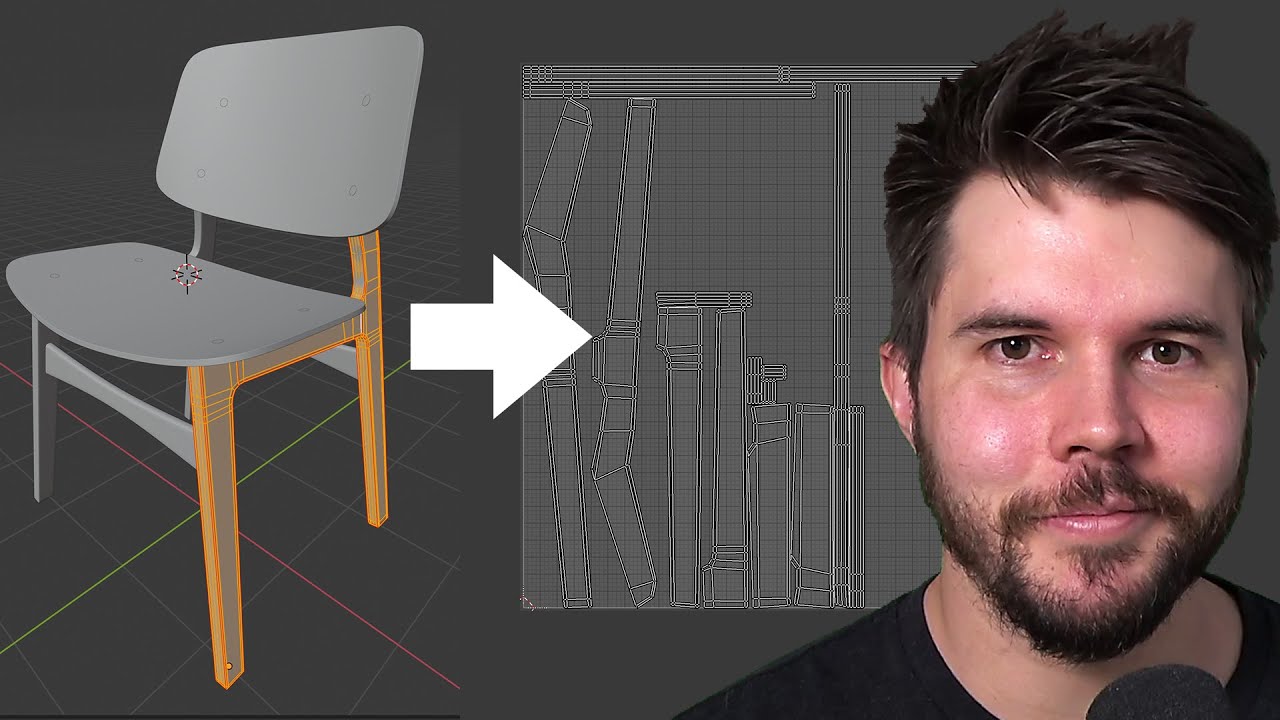
Blender chair tutorial continues! In this part we discuss what UV unwrapping is, why it's needed and how to unwrap several types of objects.
Join the free newsletter to get a Blender Keyboard Shortcut PDF: https://mailchi.mp/ef5b15a32043/subscribe-to-the-newsletter
Follow me:
Twitter: https://t...
 unkempt turtle
chrome juniper
can someone teach me how to unwrap the lightmaps or like show me a video or some...
unkempt turtle
chrome juniper
can someone teach me how to unwrap the lightmaps or like show me a video or some...
click on the model in the asset explorer in unity -> import settings -> generate lightmap UV
 quasi tusk
Im still a bit sad the fact that the stars I tried to make on my custom sun projection doesnt work when it runs in VRChat, and instead shows a plain heat waves traveling towards the edge of the projector. I also have next to no experience with unity, only stuff I played around with lol
been working on this sun for the past few months, mostly tweaking the shaders on it. I dont know how to do animations so using transparent cutout to try and make extra flares
Im also just doing this for fun
Im also sad I cant implement youtube videos to my world for simple chill music
kind leaf
any video player at vrcprefabs.com will play youtube links if you have the allow untrusted urls enabled. Unless you use quest, then you have to do a little work.
playlist links do not work on any player
quasi tusk
Im still a bit unfamiliar with the new stuff being used, so may take a bit, thank you for letting me know though, Ill get to it
 desert python
kind leaf
playlist links do not work on any player
desert python
kind leaf
playlist links do not work on any player
they do, theyre just extremely extremely slow and requires the videoplayer to compensate for a 30+ second prepare time
(assuming you ment yt playlists)
quasi tusk
Crashes everytime I load the project with a video url with the old one
kind leaf
desert python
(assuming you ment yt playlists)
Interesting, I got video errors on pro and wolfe, but I havent tried since unity 2018. Didnt see a change.
desert python
protv should since feburary, but its just sooooooo slow at figuring itself out, that the videoplayer fires the “error” events before its loaded, if you give it a bit more time or make the buffer time bigger,
icr what actually makes ytplaylists soooo slow
kind leaf
ic, ill have to look into it. thanks for letting me know
desert python
but they do work tho
chrome juniper
help...
 desert python
chrome juniper
help...
desert python
chrome juniper
help...
take screenshot of console tab
kind leaf
You made sure to import UdonSharp right?
desert python
☝🏻 do kevbals thing first actually
kind leaf

GitHub
Make sure you are using the latest VRCSDK
If you are upgrading from Unity 2018, follow the upgrade instructions https://docs.vrchat.com/v2021.3.2/docs/migrating-from-2018-lts-to-2019-lts pay specia...
chrome juniper
kind leaf
You made sure to import UdonSharp right?
me?
kind leaf
ye
chrome juniper
ouh on it
kind leaf
Got to be careful when downloading from sources that arnt in your native language. Make sure to use a browser with translate so you can see the requirements 🙂 Quite a few people miss the UdonSharp part.
chrome juniper
gotcha
 unreal skiff
how does one open this in unity

its a gumroad world but cant get ahold of creater for tutorial ;-;
unreal skiff
thank ya kindly sir
 cloud niche
I'm trying to migrate my sdk2 world to sdk3 since they're asking to migrate it to sdk 3 but i can not find any documentation on how to migrate from sdk2 to sdk3 with worlds. only the avatars and updating a world that already is sdk3. it says "don't use sdk2 and sdk3 simultaneously" but they don't mention how to avoid that either.
How do I migrate my SDK2 world to SDK3?
 craggy vigil
i've started to make a pub but i can't find any good wood textures does anyone have reccomendations
 bold ibex
If I wanted to create a world that ignores all vrchat rules, where you can use naked avatars, insult yourself and be toxic (but you have to be 18+). Users inside who read the rules that you are free, can they break the rules of VRChat or are the rules I establish within my world of no importance to VRChat and you could be banned? <@&397642795457970181>
Obviously whoever enters that world is aware of the danger, with an incoming warning to accept the rules of the world, before entering it.
 orchid stone
You as a user cannot create an area that ignores the rules established by the platform itself.
The world doesn't matter, the privacy of the instance does not matter. If you break the rules, you can be banned for it.
bold ibex
ok thx
 frank hound
Hey, anyone happen to know how to fix this? I'm making a world and used a spline to make ships sail around automatically on their own. It works great in unity, but when I build the world to test it,.. they just sit there..
kind leaf
frank hound
Hey, anyone happen to know how to fix this? I'm making a world and used a spline...
You cannot use c# scripts in VRC. You have to rewrite the spline in Udon or any other Udon compiler such as UdonSharp, CyanTriggers...
frank hound
ah ic, thankyou for the answer!
kind leaf
... You know you can scale your textures in the material right? The higher the initial resolution the better the scale.
Not that the scaler is destructive anyway, I have never seen bluring
 opal grotto
Im having this problem with a new world i just made and i cant figure it out for the life of me. It does build and test just fine and also uploaded to my account but when i go to load in to it, it loads and then immediately sends me back to my home world. Im using the newest version of the sdk and unity and have no custom shaders. I really cant figure this out ;-;
bold ibex
uhm anyone know of any waterfall shaders / materials
keen lance
Is there anyway to add a questing system to my world?
you know, like missions
or challenges
kind leaf
Yep, Using Udon see #udon-general for specifics but quests dont need to be networked so a simple local only script in your scene containing all the variables will do just fine. Real easy setup. Only gets complex when you make your npc's and their quests complex.
keen lance
ok
kind leaf
bold ibex
uhm anyone know of any waterfall shaders / materials
Not that I am aware of (for VRC anyway), but a traditional waterfall is an animated texture with particle effects added. So you could use any moving water shader on vrcprefabs.com on a plane sloping down and add a mist particle effect to the bottom and thin mist along the length. Using a shader for the animation is probably more efficient but you can also animate in Udon/U# if you need a rapid flow. Plenty of VRC compatible C# tutorials on animated water/waterfalls.
 spice dove
guys how come when i go to the builder in the SDK there are literally no options

and yes iv re imported the sdk
kind leaf
Errors in your console? The red ones
Grey also scares me, everyone uses dark mode. Make sure you are using unity 2019 as well (31).
bold ibex
anyone know of a post prossessing bloom quest shader? and where to get it
green lagoon
you cannot use post-processing on the quest
kind leaf
trail point lights along your source you want bloomed and bake

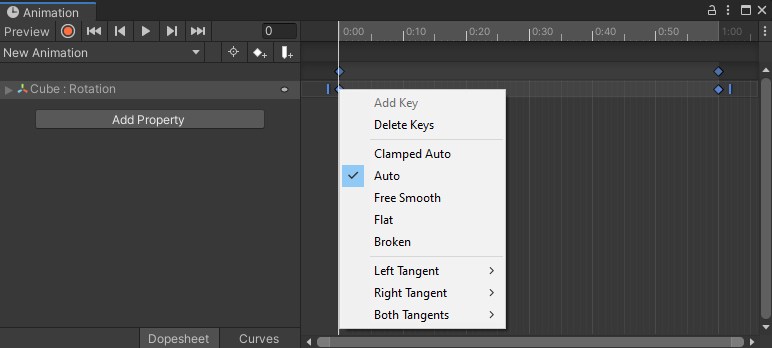
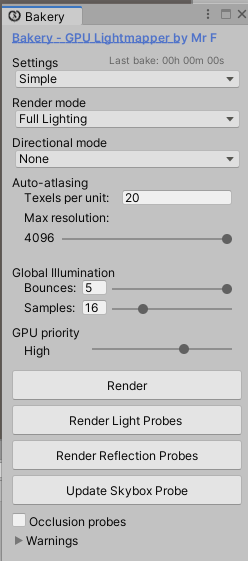
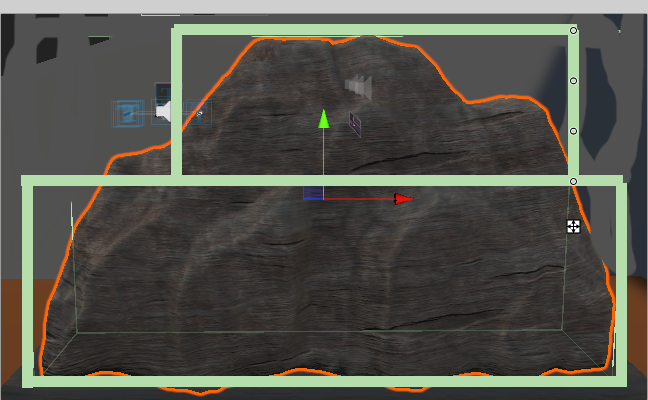
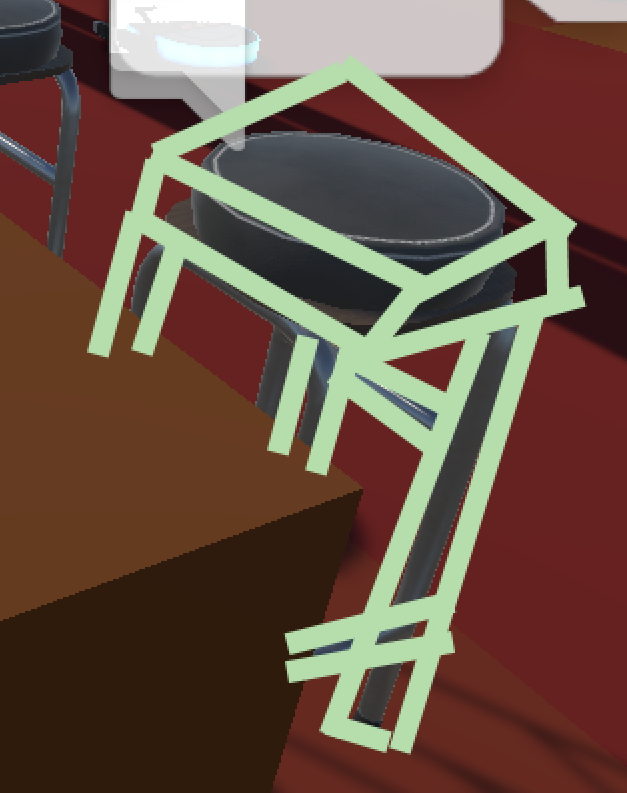 kind leaf
Did you try again
 vast spoke
yup
2019.4.31f1
yes
my world,
no,m
i just opened it today and it
just did that
kind leaf
My fix for project corruption is simple:
- Close Unity
- Make a backup(zip)
- In the original, delete the library folder.
- start unity back up. It will reimport everything. Your screen will be blank. You need to load your normal scene.
- If something goes wrong, look at that, you made a backup. Use the backup going forward for further diagnosis and treatment.
In rare situations I have had to create a new project and just imported the asset folder from the bad one
kind leaf
when you delete the library it doesnt ruin your work, everything you imported is still there. Assuming you delete it with unity closed. fyi
bold ibex
green lagoon
you cannot use post-processing on the quest
is there anyway to make it look like bloom for quest?
random sphinx
any suggestions for ways to add moving clouds to a world?
 abstract fern
Looking to commission a world for a VRChat Group, DM for inquiries!
 green ledge
hello, i want to create a map for vrchat, anyone knows a good tutorial?
random sphinx
Anyone have a tutorial for how to create a clickable link to a website in-world?
 nova beacon
Anyone willing to collab on creating a Murder gamemode world?
Been having fun in VRC Murder and wanted to experiment more with Unity. Felt like one could build up on the classic game mode and make it over all more interesting.
kind leaf
green ledge
hello, i want to create a map for vrchat, anyone knows a good tutorial?
In this tutorial I will show you how to get started with making your own VRChat world with the new VRChat SDK3 and the Udon programming system!
High-Quality and Low-Quality Mirror Tutorial: https://youtu.be/zUALbgztU5Y
Timestamps:
- Intro 00:00
- Download Unity and the VRChat SDK 00:38
- Make a Unity project 01:23
- Add a floor 01:56
- Add the...
kind leaf
random sphinx
Anyone have a tutorial for how to create a clickable link to a website in-world?
Can't be done
green lagoon
vrchat doesn't permitted for security reasons
random sphinx
oh ok.
green lagoon
like you could make a button that takes you straight to a website full of viruses
kind leaf
QR codes are an option tho
bold ibex
getting this error i uploaded my world befor was fine now this random error Assets\Standard Assets\Effects\ImageEffects\Scripts\ColorCorrectionCurves.cs(8,42): error CS0246: The type or namespace name 'PostEffectsBase' could not be found (are you missing a using directive or an assembly reference?)
dusk sapphire
delete it, you can't use standard assets in sdk3 projects anyway, and there are a few scripts in standard assets that cause issues in unity 2019
bold ibex
dusk sapphire
delete it, you can't use standard assets in sdk3 projects anyway, and there are ...
delete what?
dusk sapphire
Assets\Standard Assets\Effects\ImageEffects\Scripts\ColorCorrectionCurves.cs
bold ibex
dusk sapphire
Assets\Standard Assets\Effects\ImageEffects\Scripts\ColorCorrectionCurves.cs
thank you that worked
bold ibex
dusk sapphire
Assets\Standard Assets\Effects\ImageEffects\Scripts\ColorCorrectionCurves.cs
hey i uploaded my world yesterday and i cannot even make a private world and i cant publish for a week when i go in vr chat it just says unlisted do i just have to wait to just publish it?
dusk sapphire
what trust rank are you?
bold ibex
dusk sapphire
what trust rank are you?
known
dusk sapphire
whats your world?
bold ibex
dusk sapphire
whats your world?
its unlisted it wont show up if you search it
bold ibex
dusk sapphire
whats your world?
but i did make a world 3 days ago
dusk sapphire
world id?
bold ibex
the room name is daddy's home
dusk sapphire
your world is just still in labs