#world-development
39 messages · Page 107 of 1
 neat ravine
too bad i can't duplicate it with like... just the bars being metallic
 south orbit
white + transparency
neat ravine
yea
south orbit
so i made this object with ProBuilder from scratch which allows me ot do this

here i choose a part of the object in yellow marking if u can see it
now if i drag a material on that yellow marking
only that part will be textured / materialized
 neat ravine
ooohhh
south orbit
like this example, i just dragged a random black texture on it, but u get the idea right
neat ravine
yeah
south orbit
and its 1 object only so that is pretty.. amazing i think personally
neat ravine
i think i'll have to save the advanced stuff for later since i just started lol
south orbit
tbh im only 2 months in, i have no education or nobody who taught me anything special like that, sure i had recommendations and responses on questions but thats about it (:
so with that said, i wouldnt say probuilder is advanced infact
neat ravine
oh wow
south orbit
u should experiement with it already if u arent tbh, u missing out if u ask me, but its entirely ur choice ofcourse
neat ravine
i'll save it for later, but i'll check it out some time
south orbit
i use both ProBuilder + ProGrids, they are free extensions of unity itself
neat ravine
ooo
neat ravine
ive only been doing this for like. 3? 4 days i think
 neat ravine
oh i havent tried blender yet
south orbit

and drag it out like this just like in blender
but in unity
i can even insert loops to 'cut' it or make more markings to extrude / pull / form

u can choose sides like this

and drag them out like this

however u wanna form it
this is again another reason i love probuilder so much and cannot recommend it enough, like its so good
u could literally build a house from 1 cube only with probuilder in theory
 kind leaf
sry only read part of that. You should try to recreate the frame in ProBuilder or Blender however, you can duplicate your frame, open the ProBuilder tool, and select Probuilderize. Then just select the glass faces in the face select mode and press detach. now you have two object 🙂
south orbit
kind leaf
sry only read part of that. You should try to recreate the frame in ProBuilder o...
u cannot do that with objects that isnt made in probuilder to begin with tho, he would have to seperate it in blender
kind leaf
sure you can
south orbit
since he aint using probuilder, nor that object was made in probuilder
how so ? i tried myself its literally impossible to use probuilder on objects that was not made to begin with from it
half the menu gets greyed out
kind leaf
Depends on the complexity and the shortcuts that were taken in the other modeling software, but i probuilderize just about everything to fix poor UV
south orbit
like the pics above i just shown with a square, its impossible to do with any object that came from prefabs or free assets etc
like

here's a very simple rug, it was free u know and
as u can see half the menu is greyed out, i cant extrude it, i cant insert loop edges, i cant choose sides to materialize
i basicly cant do any probuilder stuff o n it
south orbit
omgh i see now ye
kind leaf
🙂
neat ravine
f
south orbit
that just makes probuilder so much even more better than it already is
kind leaf
Some object will break, most work perfectly. a window should be fine
south orbit
i mean its okay, is rather that i just skipped alot of opportunities on doing probuilder stuff on things i though i couldnt lol
neat ravine
also uhhh how do i make it so ppl can't walk through shit lol
south orbit
yeah i could imagine it depends on complexity ofcourse, its pretty standard with probuilder anyways like
if u make a cube and twist it even it becomes nearly too complex and overlays so ye
south orbit
neat ravine
i can just import an object from unity?
u can import objects from the unity store yes, or else other places, u just drag it in and import it
south orbit
neat ravine
also uhhh how do i make it so ppl can't walk through shit lol
u put a mesh collider on it, prefferebly ppl says use box colliders, but i would only use that for squared objects, i mostly prefer mesh colliders
south orbit
yeh but make sure it doesnt have any either and make sure its like
completly unpacked, and like is the right part of it
sometimes if u apply a mesh collider to a group rather than the invidual object within the group, it can mess up
example lets say u got a bed, it has a frame object, a madress, a pillow, a blanket
so i would just put one on the frame, one on the madress
and not the whole group, if i put one on the whole group it sometimes mess up like that
neat ravine
it already has meshes which is weird, wouldn't that make it so i can't walk through?
south orbit
depends o n what meshes it has, it should have meshes :p meshes are mainly what u are seeing
neat ravine
oh
south orbit
the rendering mesh example is the visible part of the object, the reason u see it kinda, if u toggle that off ur object would be invisible
 south orbit
while box and mesh collider are rather physical colliders, like collision to the rendered mesh / object
yeh on this u just add component then mesh collider
tho it seems like a group of objects within 1
so u might wanna open the group and choose the parts u wanna give a mesh collider so u wont end up messing it up :p
neat ravine
hmmm
south orbit
not sure why its a thing but ye, i just experienced personally, if i give a whole group the mesh collider rather than seperate objects within the group, sometimes it makes the mesh colliders weird, too big, or not correct etc
one day i did with a bed and oddly i was just endless stuck with my feet in the bed like i couldnt move or anything
while when i then gave them invidual mesh colliders on invidual objects in the group it was working just fine
neat ravine
idk how to open it up
 neat ravine
oh, unpack?
south orbit
u dont need to unpack rly
kind leaf
south orbit
not sure why its a thing but ye, i just experienced personally, if i give a whol...
A mesh collider gets the data from the mesh filter to create the collider. It wont search through the children to find one. You can put a box collider on anything, but like the mesh collider it too will look for a mesh filter to get its initial bounding size if one is not present it defaults to 1x1x1. 🙂 Thats why
neat ravine
 south orbit
kind leaf
A mesh collider gets the data from the mesh filter to create the collider. It wo...
south orbit
kind leaf
A mesh collider gets the data from the mesh filter to create the collider. It wo...
ah yeah i though it be something like that, but ye i learned it the hard way xD atleast early, so im glad im atleast aware of that, and i guess this is also another reason ppl suggest box colliders if u can get away with it in comparison to mesh colliders
neat ravine
it looks like this. there's an arrow to the right but then it's just one object there
is a box collider a component i can add?
south orbit
neat ravine
it looks like this. there's an arrow to the right but then it's just one object ...
yeh so the object is just 1 piece, not several pieces, should be okay ? to put a mesh collider on it, tho just test it out, like try and jump on it make sure the mesh colliding is how it should be
box / mesh colliders are components u can add ye, but box colliders literally makes a square collider around ur object, u can adjust it from there tho again is why i prefer mesh colliders, since it usually collides around the edges of an object rather than a big square
neat ravine
okay. im not seeing a mesh collider option to add though but i'll try fiddling around
south orbit

is in the right side
like this
if not u press add component, type in mesh, and it should show
 neat ravine
what does unpacking an object do? am i able to separate it into its component parts?
south orbit
neat ravine
what does unpacking an object do? am i able to separate it into its component pa...
i think u would have to go through blender for that, normally of what i know what unpackaging does is that it allows u to edit the object within the scene rather than within the prefab
neat ravine
ahh im not sure what the difference is;;
south orbit
i know how the difference looks, but i dont know what the exact difference is other than u be able to see the scene and edit that specific object instead of the whole prefab instead of not seeing the scene aswell as editting the whole prefab itself
so i guess those are the differences, probably some more out there that i dont know
- so like if its packed (blue) and i edit it, it edit's the version i have under my assets which i dont want ofcourse
neat ravine
ohhh
south orbit

also it shows like this
if i want to edit / delete part of it etcc etc
rather than in the scene itself, while if its unpackaged, i can do exactly this but still see my scene at the same time, Aswell as it does not edit the version under my asset but only that specific one i put out in the hierechy
 mighty oak
i have a simple world with the old Unity and 2.0 SDK, can i still update it or do i have to change into the new unity and sdk?
 mystic finch
Hi maybe someone knows if there is a media player that can also play external links? I would like to have videos from my network drive in my world (Synology can play) Perhaps also a playlist selection because inserting a link in VR is PAIN xD I'm so grateful for any information 😊 PS: I'm completely new to Unity and creating worlds. Udon Sharp doesnt work for me only Youtube Video
kind leaf
The merlin player will play just fine for you when use use proper links. Youtube, or whitelisted cloud storage. Dropbox links work
you cannot link to your own network
https://docs.vrchat.com/docs/www-whitelist the list is outdated. Who knows what is missing, but I can verify dropbox works just fine, been using it for a while. Its cheaper and free has more space than google.
VRChat
The following services are on the video player whitelist. If a service is not on this list, it will not play unless "Allow Untrusted URLs" is checked in Settings. Whitelisted Services The services listed below are inherently trusted and are permitted with our default URL whitelist. The resource bein...
mystic finch
@kind leaf the problem is i have more than 500GB of movies and Videos xD can i make a playlist view for the Videos with the merlin player ?
kind leaf
If they are all stored on a whitelisted site than yes, you can use a text document to hold all the links and their names and write a playlist to display and populate buttons with the information from the text.
mystic finch
I tried to play shared links from google drive and that doesnt work 😟
kind leaf
mp4?
kind leaf
naw I don't. I use prefab'ed video players. No need to write one. If you need help creating a playlist see #udon-general or try the discord for the video player you want to use. Merlin is the most basic. There is also ProTV (feature rich) and Wolfe. Merlin and ProTv have thier own discords.
mystic finch
@kind leaf okay thank you i will look there for some infos 😊
kind leaf
pft naw, unity is more fun 😛
neat ravine
wtf my shit didn't save
pretend that's in caps bc im freaking out
how am i spamming good lord
kind leaf
you can't close unity without getting a save popup if the content isnt saved
neat ravine
i pressed save multiple times
like, every time i did something major
and it's not showing up in the unity hub
says my last save was 7 hours ago
kind leaf
did you try opening the project again?
neat ravine
ok now it says 6 minutes ago. hhhh
im gonna try
im gonna cry if all my work is gone
omg it's there. thank goodness
kind leaf
the only time unity doesnt save is if windows defender sees it as a threat for saving somewhere windows doesnt want it to like directly to your c: drive
neat ravine
ahh
 opal sigil
Hey helow everyone
i was thinking how to set an objet like he dont use gravity until you pick this object is no more kinetic
hope your understand what im saying
 unkempt mauve
@near escarp is there a debug console like the pool table but for your own world, or no?
 reef yacht
neat ravine
and it's not showing up in the unity hub
reef yacht
neat ravine
and it's not showing up in the unity hub
unity hub gives me a rash
you are not the only person
stay strong 🦾
 near escarp
unkempt mauve
<@97980768323633152> is there a debug console like the pool table but for your o...
near escarp
unkempt mauve
<@97980768323633152> is there a debug console like the pool table but for your o...
That's the link i sent before
unkempt mauve
near escarp
That's the link i sent before
It’s not something that can be used like a global prefab?
near escarp
No, you'd have to build that one yourself otherwise
unkempt mauve
ok
 toxic wraith
I have a prefab (exported form Houdini) that needs Houdini engine for unity to animate. Will the prefab work in VRChat ? 🤔
 green lagoon
nope as Houdini engine is not one of the whitelisted components
toxic wraith
😢
toxic wraith
green lagoon
nope as Houdini engine is not one of the whitelisted components
thank u
 misty wave
Thank you! It turned out to be a different parameter name bc of the shaded but that function did the trick.
 bold ibex
These trees currently do not move with the wind zone I have setup. Is there anything I can do about this to make them work, or do they have to be setup for this prior? I read the Unity Docs and I don't get what classifies as a tree in a Terrain and how the trees even shift with the wind in the first place

Would I have to have the trees rigged or something?
kind leaf
bold ibex
These trees currently do not move with the wind zone I have setup. Is there any...
only terrain painted trees respond to wind unless using special shaders. Try the shaders tab here https://docs.google.com/spreadsheets/d/e/2PACX-1vTP-eIkYLZh7pDhpO-untxy1zbuoiqdzVP2z5-vg_9ijBW7k8ZC9VP6cVL-ct5yKrySPBPJ6V2ymlWS/pubhtml#
kind leaf
you can always try the asset store, that is just the first place I check with the understanding that they probably work in vrc...
bold ibex
yee but it works in vrc thankfully, and well
I have a weird issue with the houses where, if I walk into it ingame, I am stuck into the floor like glue. The only way to move is to run-jump bunnyhop constantly. The colliders seem fine in Unity so im not sure why its acting like this in VRC.

the houses are a part of a medevial asset pack I bought from the Unity Asset Store
I put the houses in AFTER I did the thing where I setup the collision matrix for the VRChat world if that has to do with anything
kind leaf
Verify that the the colliders are on the parent and NOT on the LODs. The vrc collision setup wont do anything but add the appropriate layers needed for vrchat and give you some additional layers to playwith instead of having to make your own.

 kind leaf
Darn, that's all I got. I've had the issue before but it was a terrain issue and a problem with my character controller which doesnt apply to this situation.
kind leaf
Try disabling the mesh collider and add a box collider just for the floor, see if the issue persists.
 lone frost
Guys I am having an error, Can anyone help me.
"Error building Player because scripts have compile errors in the editor"
what might that be?
kind leaf
check the console for errors 🙂
 cloud meteor
So ive managed to get teleportation to work
and the code works etc, but when they tp back, they have to re-enter the code, is there a way to trigger the door to allow them to tp back to the other room if they have the code?
 kind leaf
on Granted you are triggering the teleport script right? So on the inside room just create a new collider with a new script with Interact() and have it execute the teleport script.
cloud meteor
im a bit of a newbie when it comes to this stuff really. XD
 acoustic ferry
How can I make a avatar world? I haven't been able to find anything about this
kind leaf
make a world, then drag n drop the avatar pedestal prefab into it. It is included with the sdk. Assign the avatar blueprint id where it asks for it on the prefab in the inspector.
 tardy cloud
i keep getting these errors when i try and upload my world, can anyone help?

 red urchin
cloud meteor
So ive managed to get teleportation to work
and the code works etc, but when the...
red urchin
cloud meteor
So ive managed to get teleportation to work
and the code works etc, but when the...
instead of having them teleport on the code, make the code spawn in a button that tp's them
that way nomatter where they are that button is still there and can be used later
that should do what you want i think?
 slate haven
Its there a way that i can sync audio clips?
Want to build a nigth club with a playlist but cant see any video on how to build one
 forest cedar
Hi everyone i would like to create a vr chat map... but im a otal novice is there someone kinda experienced who would like to teach me the basics or have good links for a good tutorial ?
bold ibex
tardy cloud
i keep getting these errors when i try and upload my world, can anyone help?
ensure u are on Unity ver. 2019.4.31 EXACTLY, and you imported the most recent VRCSDK from the VRChat website
reimport the newest VRCSDK for sure even if you think it was the newest already
tardy cloud
Alright I will be sure to try that thanks
bold ibex
when ur project is open check the version at the top bar, not by what unity hub tells you
 mild spade
slate haven
Want to build a nigth club with a playlist but cant see any video on how to buil...
mild spade
slate haven
Want to build a nigth club with a playlist but cant see any video on how to buil...
The easiest way is to turn ON a gameobject with an audio source that has "play on awake" enabled while turning OFF the other songs.
 outer quest
Anyone know where to get this asset? I see it everywhere

 dusk sapphire

VRChat向けにデザインしたスイッチの3Dモデルと、簡易的な機能を内蔵したPrefab集です。SDK2/SDK3、両方に対応しています。 1マテリアルでまとまっているので軽量です。 ・Mirrorスイッチ ・AvatarDirectionalLightスイッチ(5段階) ・PostEffectスイッチ(5段階) ・照明スイッチ ・ビデオプレーヤー用スイッチ ・ベッド用スイッチ ・椅子用スイッチ ・汎用オブジェクトスイッチ ・ボイスチェックスイッチ ---------------------- Lura'sSwitchがSDK3に対応しました!
outer quest
Thanks
 cedar ivy
W.I.P Map, if you know, you know :3 Photo is unedited.

 idle sage
Is it possible apply filters like the low pass filter to video audio sources? I've heard worlds which make the video audio source sound low quality like it's coming from a radio, or so I believe. In my experience, the video player audio sources didn't work with a low pass filter though as it's a dynamic audio source.
Maybe I'm just misremembering though, who knows. 🙂
 stone marsh
idle sage
Is it possible apply filters like the low pass filter to video audio sources? I'...
stone marsh
idle sage
Is it possible apply filters like the low pass filter to video audio sources? I'...
You can do pretty much whatever you want to normal video player audio, some players come with setups built in like VideoTXL. You can do this with the player audio using UDON as well.
But yes, high pass, low pass, reverb, chorus, etc are all whitelisted world components.

GitHub
'Better' audio for UDON (VRChat) based worlds. Inc. speed of sound, sonic booms, doppler, occlusion, reverb, ... - GitHub - Guribo/BetterAudio: 'Better' audio for UD...
idle sage
stone marsh
You can do pretty much whatever you want to normal video player audio, some play...
Thanks! Maybe I just had some bad luck getting it to work in the past, the audio did things it wasn't supposed to do with a filter active. 😄
But the filters would work fine on an AudioSource using a clip.
Currently using the UdonSharp Video Player from Merlin, maybe that does something specific and is causing my issue.
 quaint viper
Was there ever a solution for this? I've run into the same issue, and I haven't been able to find any solutions >.>
 lapis shell
Hey just a general question about worlds and promotion, is there someone on the VRC dev/moderator team I can contact about possibly getting a world I'm working on featured? I'm making a Hannukah world and would like to have it featured when the holiday's ongoing. It's currently in CommunityLabs but most of the core functionality is in. I'm bugfixing and optimizing the code to be more performant primarily these days, and I'd love to have it featured when the holiday rolls around.
lapis shell
cloud meteor
im a bit of a newbie when it comes to this stuff really. XD
I've never played with the doorcode asset but you can just make a boolean hasEnteredDoorCode flipped to true and leave it there when a user does it properly. You can send me a private message and I can help you do that if that's something you need help with.
kind leaf
lapis shell
Hey just a general question about worlds and promotion, is there someone on the ...
Features are based on popularity and/or events. By the end of November I'm certain there will be a Winter Jam that you can submit your world to if it meets the requirements. Other than that, you need that AT&T money to get featured without rep.
lapis shell
kind leaf
Features are based on popularity and/or events. By the end of November I'm certa...
Yeah I'd happily submit it to a Winter Jam, was just worried that'd be too late as hannukah ends early December, but I'm Ok with that.
 shell trail
random question, if I set a public world to private will I need to go through labs if I want to publish it again?
kind leaf
yes
shell trail
ugh
I guess I have to leave my world up with broken lighting then until my rebake is done
kind leaf
yep, thats why we have build and test. Unless you are building only for Quest. Quest just has to hope for the best before a publish, the rest of us have tools.
shell trail
I did, I fixed one issue I had with a button, so I didn't made a new test for that
and I must have done something that broke my lights
unkempt mauve
How do I add a place holder like for an object to snap into a spot?
and how do I set a respawn time for an object?
bold ibex
How the hell can i get a ban system for my world cause im tired of a toxic cunt in my community
lapis shell
unkempt mauve
How do I add a place holder like for an object to snap into a spot?
Personally I put an object with OnTriggerEnter, make it store a reference to the object that entered the trigger, then OnDrop I make the object's transform.position and its transform.rotation equal to the snap position. How well do you know programming and Unity?
unkempt mauve
Thanks!
unkempt mauve
lapis shell
Personally I put an object with OnTriggerEnter, make it store a reference to the...
0% programing and 50% Unity
 vagrant tinsel
I have been wondering for a while what doos it takes for a world to get out of its lab state cause my world after almost half a year still has not gotten out of the labs state
 lone narwhal
I had a look through the Labs explanation thing
It just seems to mostly be based on popularity
if people enjoy your world and such
vagrant tinsel
Well my world is just a chill type of world with a space theme to it it has a couple of my public avatars and statue's of my private avatars with the models creator's name above it
So its strange to me that other worlds that are somewhat similar to mine get accepted at a faster rate
 little kiln
I've been having this issue that seems to come and go...or is possibly even getting worse somehow? and that is certain objects in my worlds have been drifting. Kinematic, floating objects which should be stationary, will slooooooowly drift in one direction. some objects do this immediately upon loading the map, and other objects don't do it until they have been touched. it's really strange, and despite a bunch of looking back and forth to make sure the objects that do and don't do it all have the same parameters, i haven't been able to figure it out
near escarp
Are these objects under an animated parent ? Is the world maybe very far from 0,0,0 ?
little kiln
oooooohhhh. interesting.
so, the objects themselves are very close to the origin, but you helped me realize that they are parented under an invisible collective that for some reason has the origin waaaaay far away
thank you!
bold ibex
Does anyone know how to make a chair that you can pick up while the person is sitting in the chair?
stone marsh
bold ibex
Does anyone know how to make a chair that you can pick up while the person is si...
Create a synced pickup. Example would be
Spawn 3D cube
Add vrc pickup
Add vrc object sync
Then snag the chair prefab that comes with the sdk and simply parent the chair directly to the cube
You now have a chair you can pickup that's synced.
Obvi you can simply parent the chair to whatever you want.
 pale pebble
Is there any way to implement a high-score system for my world?
bold ibex
stone marsh
Create a synced pickup. Example would be
Spawn 3D cube
Add vrc pickup
Add vrc o...
i did this but every time i pick up the chair the collider falls off then i cant sit in it again
 atomic patio
so you know these assets?
.fbx files with this expandable/collapsable tree of children pieces to it? I am using the asset, but only some pieces of it. any way to get rid of the rest of the pieces?

model is taking up 40% of my projects' total size, with only maybe 30% of it being used.
kind leaf
- Remove the un-needed parts in Blender
or - Install probuilder, drag the model into your scene and unpack it, delete what you don't need. Select what you want to keep, and then in the probuilder toolbar with the items selected click probuilderize. Click center origin, UV map for safe measures, and then click the expanded export and save as asset. No more original fbx needed.
atomic patio
Thank you
 latent ridge
I'm trying to add a mop to my world, I have the end of the mop rigged with an armature, how can I make the "moppy" part flap around as if it had dynamic bones but without using actual dynamic bones?
 fleet ridge
Ok does anyone know to fix world shaking?
Like I made 3 teleport world in my world but
Every time I go to a room the avatar starts rapid shaking like when I was in vr my whole body shake and the other people that I brought with me said their screens were shaking too
The world is called club infinity is you wanna see what I’m talking about
 frosty goblet
This is me attempting to remind myself to come back here tomorrow asking about occlusion
It's been my target for the past 3 days and I'm like making headway but also still really confused
I get a lot of outside objects and outer terrain flickering in and out of visibility when I enter a building and look out the windows up against the back wall
atomic patio
probuilder having a hard time with my rug ;;
been like this for going on 5m
 mild spade
fleet ridge
Ok does anyone know to fix world shaking?
Like I made 3 teleport world in my wor...
mild spade
fleet ridge
Ok does anyone know to fix world shaking?
Like I made 3 teleport world in my wor...
The farthest away from Unity´s origin point (0,0,0) the less precise the "float points" become. So on that world, you are probably being teleported to a very far away point from the origin point, causing those shakings. You can learn more if you search "Floating point error" on google. Is not just a Unity problem.
fleet ridge
mild spade
The farthest away from Unity´s origin point (0,0,0) the less precise the "float ...
Alright thank you so much!!!!
south orbit

so just woke up to proceed one of my worlds / projects, this is happening, why ?
cant load in to test it
and now i tried to remove my pipeline id in case that was messing anything up, and its just infinite re-loading itself
im so confused
:/
- oh wait im a fool .... i ofc toggled off the vrcworld causing this confusion / havok Lol ! ...
my bad
bold ibex
so idk what happend my vrchat sdk tab at the top isent showing the control panel option any more it just says Utilitys > Recompile all program sourses. And Clear cashe and player prefabs. And Udon graph. anyone know how to get the control panel back idk what happend it was there befor and i deleted the sdk and re imported it and closed everything and reopend but same problem
i have this error Error: Could not load signature of VRC.SDK3.Components.MultipleDisplayUtilities:GetRelativeMousePositionForDrag due to: Could not load file or assembly 'UnityEngine.UI, Version=1.0.0.0, Culture=neutral, PublicKeyToken=null' or one of its dependencies. assembly:UnityEngine.UI, Version=1.0.0.0, Culture=neutral, PublicKeyToken=null type:<unknown type> member:(null) signature:<none>
and this error Assets\Standard Assets\Utility\SimpleActivatorMenu.cs(11,16): error CS0619: 'GUIText' is obsolete: 'GUIText has been removed. Use UI.Text instead.'
dusk sapphire
delete Assets\Standard Assets\Utility\SimpleActivatorMenu.cs
its not compatible for unity 2019
also, you can't use standard assets in sdk3 either way
bold ibex
ok thankyou
bold ibex
I'm attempting to make my first world this morning and I have encountered this error, wondering if anyone knows how to fix it? Thank you!!
 near escarp
Can you show any of the other errors pls
bold ibex
I've closed out of unity to update it, I'll post again to update if it fixes it
bold ibex
Yeah after updating unity it completely fixed it haha
bold ibex
Coming back to try to finish building one of my worlds I started like 6 months ago, I saw that there's a guide on migrating to unity 2019 but the link on the blog and docs is 404 not found. Anyone got new link?
 chilly grove
VRChat
Migrating your project from Unity 2018 to 2019 LTS isn't as difficult as you might think! Here's a guide providing each step in detail.
bold ibex
Thanks, the blog article I was reading linked to a broken one 2 or 3 times
bold ibex
damn, I haven't used unity in 5 months. I was just learning it back then, now I can't remember how to do anything. I created new scene to migrate the project but I don't even remember how to get rid of the blank scene and go back to my other one hahaha. Gonna be a long road back into this.
bold ibex
Dang, that page says Install Unity 2019.4.x LTS. So I installed the only 2019.4.x in the list but it was the wrong version it was 32 instead of 31 haha
bold ibex
bold ibex
Dang, that page says Install Unity 2019.4.x LTS. So I installed the only 2019.4....
unity hub likes to put out the newest before vrchat gets to it
confuses people alot
yea, at least the sdk tells you it's the wrong version, then you go look online that you can get all the in between versions on the site
I got it migrated, tho when I build and test now my character just spins to the left all the time haha. Not sure I have time to look into this now.
I Guess it does that when you have ps4 controller connected, good to know.
bold ibex
yup
thats another issue thats been a thing for awhile
got a few versions of my project, and I forget which one was the most up to date one. I migrated one but I think it's one of the older ones. Haha.
I'm like, hey these bottles are supposed to fly out into space but they aren't. Sometimes I get stuck in there listening to the music and throwing bottles into space, then 3 hours later remember I was supposed to be doing something.
 knotty basalt
A noob question from a noob user. How do I add the ability to toggle music on and off as well as toggling mirrors?
lapis shell
latent ridge
I'm trying to add a mop to my world, I have the end of the mop rigged with an ar...
I'd say make a flop animation, make a script that checks the velocity of the mop's rigidbody and if it's higher than a threshold, play the flop animation?
If you want it to look like it's flopping in the correct animation, make one animation in one direction, another in the other direction, and you'd have to blend the animations with unity's animation blending system.... Actually a kinda complex thing you're trying to build.
Unless there's an easier way I'm just not thinking of.
lapis shell
knotty basalt
A noob question from a noob user. How do I add the ability to toggle music on an...
There's a mirror toggle prefab in the udonexamples scene.
knotty basalt
lapis shell
There's a mirror toggle prefab in the udonexamples scene.
I'll look in there when the project is up. What about music toggles?
lapis shell
I don't know if they have a music toggle prefab, it's simple enough to code, just a button with OnClick -> Play AudioClip, I can't code it up right now (I'm at work) but I imagine you can find that somewhere.
knotty basalt
lapis shell
I don't know if they have a music toggle prefab, it's simple enough to code, jus...
I can do it if it's not too complicated to code in (no prior coding experience whatsoever) Thank you for helping.
 silent plinth
anyone have any experience with red-sim water shader?
for whatever reason the shader can only be seen if you are almost inside it

this close
 latent vector
has anyone used the Smart mirror by Mamemoya Systems (Turnip) with Lura's Switches ?
I tried to translate the instructions and i'm confused
 final rapids
So I'm looking to add fireworks to my world, i downloaded the Hodges firework guns but when i place the prefabs, they dont seem to work. I get errors that there are scripts missing. How would I fix this?
 short gulch
silent plinth
anyone have any experience with red-sim water shader?
short gulch
silent plinth
anyone have any experience with red-sim water shader?
Have you baked reflection probes? That usually fixes issues with water shaders.
 mystic leaf
So I have this pool setup to trigger animations on a button press, for some reason all objects in the pool just dissapear instantly when testing. Why is this??
lapis shell
mystic leaf
So I have this pool setup to trigger animations on a button press, for some reas...
Are you testing using CyanEmu or are you testing by making a build?
mystic leaf
lapis shell
Are you testing using CyanEmu or are you testing by making a build?
making a build
lapis shell
I would install CyanEmu, test the game out, and check if the gameobjects are still around in the world when you click the button. I'm wondering if they're doing exactly what they're supposed to, play their animation, but that makes them change their position to somewhere outside of their view.
Alternatively if you can just, output the state of one of the objects in a build, you can do that too. I'm just starting with the VRC SDK so debugging from a build window is something I don't have any experience with.
mystic leaf
lapis shell
I would install CyanEmu, test the game out, and check if the gameobjects are sti...
I did this, what I found is that for some odd reason all items in the pool get disabled
why does my pool get toggled and doesnt my button do anything
lapis shell
mystic leaf
I did this, what I found is that for some odd reason all items in the pool get d...
They get disabled on bootup or onclick?
mystic leaf
lapis shell
They get disabled on bootup or onclick?
on bootup
kind leaf
mystic leaf
why does my pool get toggled and doesnt my button do anything
For objects to work correctly all items need to be enabled at runtime. They are then disabled. So when you pull from a pool you are finding the first disabled child and activating it and then sending it to do it's thang. The enabled to disabled happens quickly
mystic leaf
only in the bool tho
but why do they get disabled on startup
I have another item using the bool, almost the same setup
and that one works fine
kind leaf
"For objects to work correctly" with sync and udon behaviors
mystic leaf
huh
kind leaf
A pool is a storage. You do not use a pool to have its contents active at the same time all the time anyway.
.... you switched between using pool and bool so I'm not even sure If I am explaining what you need now 😛
mystic leaf
i always said pool?
This is the setup I have on a toggle and that works

But this one simply doesnt

It disables the objects in the pool and when I enable them it still doesnt play the animation
mystic leaf
mystic leaf
This is the setup I have on a toggle and that works
wile this one doesnt even hide the items
okay I sorta fixed it, now they dont dissapear but my button doesnt do anything.....
 ruby jay
if you want to enable pool objects, use the spawn/tryspawn methods/nodes on the pool
mystic leaf
I fixed it but thanks 🙂
bold ibex
I just realised something genius
the brute force shaders will let people be able to make fluffy carpet flooring finally
someone pls do this
kind leaf
did you get it to look good on quest?
bold ibex
Oh i forgot about the quest endavor but i should probabllyyy get back to that
I do want to figure that out
 vagrant shale
Hey, does anyone have any recommendations for creating voice amplification zones that work on Quest? I feel like I've tried everything and nothing works properly but I might as well try again.
kind leaf
vagrant shale
Hey, does anyone have any recommendations for creating voice amplification zones...

GitHub
'Better' audio for UDON (VRChat) based worlds. Inc. speed of sound, sonic booms, doppler, occlusion, reverb, ... - GitHub - Guribo/BetterAudio: 'Better' audio for UD...
vagrant shale
Yeah, that's one of the ones I tried that didn't seem to function at all but there have been a couple SDKs released since then so maybe it's working now.
The one I have works alright for when you're in the zone but it seems to make anyone that exits the zone way too quiet but only for certain people.
kind leaf
Ive been using it for a while on windows and android with no issues.
well, since the last release anyway, was hit or miss before for me
bold ibex
im trying to set up a mirror toggle and it just keeps making the button im setting the toggle to dissapere instead of the mirror this is my udon graph https://gyazo.com/8251f2c6748d71521a011ed924fae0d2 i watched a mirror totorial and its not working what do i do?
 mild spade
bold ibex
im trying to set up a mirror toggle and it just keeps making the button im setti...
mild spade
bold ibex
im trying to set up a mirror toggle and it just keeps making the button im setti...
Your "instance" is empty, meaning it will reference itself in this situation. You can fix it by connecting it like this (blue line) Needs a reference to the "VRCMirrorWall" object. There is a channel for SDK3 (udon) question if you have more questions #udon-general

 glad ferry
I'm working on a world with something like a concert stage that has models there performing by default, and I had the idea of having a toggle be used to allow for the camera to do a closer look at the model singing and dancing, and then switch to a camera that is further away. Is there a way to get the models to perform while I'm recording the camera toggle at the same time?
bold ibex
Working on a bar witg tables a bar counter with drinks. A storage room for the drinks and a secret door on the storage room leading to the cartel room where there will be an armory, an office, another bar, poker tables, and a huge enterable vault
bold ibex
Im noticing when i make a chair and get up out of the chair my avatar is frozen and i cant move how do i get up out of a chair and not be frozen the enter and exit is the same object cause its a pick upable chair. also everytime i pick up by clicking and holding the chair i dont wanna sit in it just pick it up but it makes me sit how do i stop that to
 patent merlin
Hello fellow vrchatters! A quick question, is it possible to have a portal (in a public world) that shoots users to a private world that guarantees that users will end up in the same instance? Eg: a public alleyway world, which has a portal that leads users to a private club world.
bold ibex
Fuuuuuuu... I'm new to this. I need help please.
 mild spade
bold ibex
Fuuuuuuu... I'm new to this. I need help please.
mild spade
bold ibex
Fuuuuuuu... I'm new to this. I need help please.
Are you using the latest SDK from the website? If you are, you are using the wrong Unity version for it.
stone marsh
Lol yea we're on 2019.4.31 you're using a pretty old version of unity.
VRChat
This page lists the current Unity version you should use when creating content for VRChat, as well as links to the correct version for both Unity Hub and direct downloads. Current Unity Version The current Unity version in use by VRChat is Unity 2019.4.31f1. Ensure you are using this exact version! ...
bold ibex
ahh... saw a youtube video and it was recent so either they messed up or were trolling
thank you~
 solar pike
Hi! I'm a new world creator and I'm working on one right now and I just had a question. When I take screenshots with the integrated vrc camera in VR, it shows weird ghastly shapes of every props, like castings, you can see it on the right of the picture.. Any idea where that could come from and how I could fix that? Thanks!

 graceful totem
Alrighty now it’s time to learn about making worlds lmao
What’s the most recommended tutorial to start with
ruby jay
solar pike
Hi! I'm a new world creator and I'm working on one right now and I just had a qu...
do you have any post processing enabled?
solar pike
ruby jay
do you have any post processing enabled?
Yeah some bloom and ambiant occlusion
ruby jay
solar pike
Yeah some bloom and ambiant occlusion
don't use ambient occlusion as post processing effect
it has many issues, especially in vr
bake the AO instead via light baking
solar pike
ruby jay
don't use ambient occlusion as post processing effect
it has many issues, especi...
Oh okay didn't know about that! How do I bake that to get the same effect then?
 hidden osprey
 ruby jay
you can also bake it onto the meshes but that's a bit less easy and requires other tools than unity
see AO map on the standard shader
using light baking, as okabintaro linked, is easy
hidden osprey
If you haven't done light baking can highly recommend it. Makes look everything 10 times better. Some people don't recommend AO baking though since it's faking the proper lighting but I think it's an artistic choice. There is a tutorial on light baking pinned in #world-lighting aswell.
solar pike
hidden osprey
If you haven't done light baking can highly recommend it. Makes look everything ...
I tried doing light baking, followed some tutorials and all (including the one you're talking about), the thing is it changes completely the result everytime (it's like it removes all the shadows, contrasts and things once it's baked, it doesn't look at all as what it looked like in my preview before). Also I followed your link and enabled the AO thing in the lightning settings, what's the next step, clicking on "Generate Lighting"?
'Cause that messes up my lighting in my scene too, it's like a directional light appears out of nowhere (or maybe that's what happen, I have some directional lights in my scene but that are hidden, does it enable them to bake?)
hidden osprey
It can be really tricky to get a feeling how light baking works. You need proper UVs, set everything to lightmap static, make sure the lights are mixed or baked, add light probes and the like.
If the light is only hidden and not disabled I think it can still affect your bake.
Also the skybox can affect the light bake too if that is enabled
solar pike
I see, seems pretty complicated yeah, I guess I'll just stick with weird screenshots for now and try different things before updating the world aha. And yeah the light is disabled and not only hidden. Thanks anyway for the help and I'll look further into that!
south orbit
upcoming surf map for vrc (: still in development, 3 levels done so far, planning to do atleast 5 levels before releasing maybe 10 levels ( its the end goal atleast ) any ideas, suggestions, stuffs u would see in the map etc etc, feel more than free to hit me up ^^, im a independant developer on hobby basis making this out of creativity and freetime :p .
 bold ibex
are there any good premade cartoony waterfall materials for unity and where can i shop for premade materials
kind leaf
unity asset store
 kind leaf
Depends on the goal this covers it https://docs.unity3d.com/Manual/PositioningGameObjects.html
south orbit
https://vrchat.com/home/world/wrld_18161f50-0b0f-402a-8965-392a4845fbc1
just released in community labs (: v1 alpha, enjoy .

Surf Space v1 Alpha By ˸ Xaint - Credits to ˸ IgbarVonSquid for Udon Surf Scripts․
 analog wyvern
If i were to use boolean modifiers to make holes for doors and stuff, will the hidden blocks show up when i port it to unity?
also is it better to do furniture in blender or use the unity assets/do it on there?
bold ibex
analog wyvern
If i were to use boolean modifiers to make holes for doors and stuff, will the h...
Hidden blocks?
Don't understand what would be the 'hidden blocks'
vagrant shale
Are there any tutorials for Guribo's better audio that don't require writing your own code? It includes prefabs like a microphone but it seems like those aren't designed to work on their own and all the tutorials on the github page seem needlessly complex.
@analog wyvern Pretty sure Unity doesn't know what to do with Blender modifiers but if you apply the boolean modifier so it's just a normal mesh, that should be fine. If you've got a little money to spend, it's not a bad idea to purchase assets and alter them to your needs but building them yourself is also a good option, just depends on your needs, time, and budget. Personally, I think modeling every element of the world yourself when there are resources out there to speed up that process is a waste of time but if you have a very unique aesthetic, it might be necessary.
kind leaf
vagrant shale
Are there any tutorials for Guribo's better audio that don't require writing you...
Better audio is plug n play if you have the dependencies. You shouldn't have to touch any code.
vagrant shale
I have UdonSharp and Udon of course. All I'm trying to do is make an area where voices are amplified but the only tutorial I've found is this one where it says that an override prefab is included but doesn't say what that's called or where to find it. There's also a bunch of areas for mandatory references which I assume are important but never covered. https://github.com/Guribo/BetterAudio/wiki/Tutorial-%231-How-to-create-a-voice-override-zone
GitHub
'Better' audio for UDON (VRChat) based worlds. Inc. speed of sound, sonic booms, doppler, occlusion, reverb, ... - Tutorial #1 How to create a voice override zone · Guribo/BetterAudio Wiki
kind leaf
As shown in the demo scene : You need BetterPlayerAudio prefab in the scene as it is the "brain". Then drop the mic in the scene. Assign the BetterPlayerAudio prefab where it asks for it on the mic which is an override. Done 🙂
vagrant shale
If only you were the one writing the tutorials. Thanks, I'll try this. I tried the mic before but I guess I just assumed it included everything so that explains why it never worked.
kind leaf
🙂 the trigger zone is an awesome addition. Before you had to turn the mic into a trigger zone with a bit of coding, now you can just add it just like the mic so no need to pickup or interact with anything in game.
vagrant shale
@kind leaf Where it says "Better Player Audio" under Mandatory references? It doesn't seem to be possible to drag a script or prefab there. Also, I wasn't sure whether I needed to add BetterPlayerAudio or BetterPlayerAudioController to the hierarchy so I added both.
 kind leaf
Try looking at the demo scene, I don't have unity up right now to show you. I can show you how to set it up later tonight though if you dont figure it out.
vagrant shale
Appreciate it, I didn't even know there was a demo scene so that helps, maybe it'll be set up correctly there and I can just copy and paste.
bold ibex
Welp so KevBal yknow how you were saying all C# scripts that are not whitelisted get scrubbed at VRChat runtime... uhh this funny thing happens when the BF_Terrain.cs gets scrubbed. I need that script for making custom painted grass onto the terrain so i'm fcked

I guess i'll have to make a canny and hope the VRC Engineers will want to whitelist the script
bold ibex
This is the works of shader and material; It works with VRChat just fine on any mesh like a quad
I will have to email BruteForce about it, they might know how to work around this
bold ibex
I failed to specify that I am using a Terrain specifically because it gives me the ability to draw and carve out custom grass via painting texture layers. For some reason this doesn't want to work when the script is removed. I feel it is pretty essential to the map to have pathways; and not just 100% tall grass, but some variability too
kind leaf
So if you can use a shader independently, you can use the scripts for assets to build your terrain. If the terrain then breaks without the scripts, use Terrain to Mesh or a similar asset. 🙂 There is no shortage of terrain possibilities when you just convert the finished model to a mesh. At that point the only thing you need to worry about is if the shader is compatible.
bold ibex
kind leaf
So if you can use a shader independently, you can use the scripts for assets to ...
Terrain to mesh exists?!? Okay I have to try this and pray this shader frikkin accepts it
Im guessing I can just google "terrain to mesh github" and find something yeh?
or is there a specific one in mind you got
kind leaf
I use this because it copies splatmaps, details, trees, everything. And I can reduce the resolution while keeping a higher resolution mesh collider. https://assetstore.unity.com/packages/tools/terrain/terrain-to-mesh-2021-195349 I then ProBuilderize the mesh to remove unseen faces for further optimization. No Issues yet, but I havent tried it with BruteForce Grass Shaders

Get the Terrain To Mesh 2021 package from Davit Naskidashvili and speed up your game development process. Find this & other Terrain options on the Unity Asset Store.
bold ibex
The BruteForce website mentioned splatmaps
so I can see it working
also the quest project is postponed until this one is all gud on PC
kind leaf
50% off thanks to Black Friday sales 🙂
 median egret
is there a way to get a random world id?
or could I access a google doc with udon sharp to make a list of world id's?
kind leaf
Any id can be gotten from the world information or from the website by looking up the name. VRC already provides a method for keeping track of ID's via favorites.
final rapids
I'm trying to add a toggle to my world's mirror, but when i go into udon graph and drag the mirror in, I get an error "Object reference not set to an instance of an object" And when i build&test, when i interact with the toggle, it disappears rather than turning on my mirror. any help would be appreciated
 mild spade
final rapids
I'm trying to add a toggle to my world's mirror, but when i go into udon graph a...
mild spade
final rapids
I'm trying to add a toggle to my world's mirror, but when i go into udon graph a...
Check the inspector on your script. When you drag an object into the graph it creates a public reference to that gameobject. But you have to make sure it still references that object on the inspector, not just the graph. Also #udon-general
bold ibex
So most of my mirror toggles work but some arnt showing up when i go in the test build and i dont understand what im doing wrong https://gyazo.com/d2513794dabb598da0ee968acaf16a04 they all have the same components but this one dosent work

 left raven
any one willing to help me with a udon script ?
mild spade
bold ibex
So most of my mirror toggles work but some arnt showing up when i go in the test...
Make sure the button collider is not inside another collider (like the wall) You can test this by moving the button out of the wall like in the middle of the room. If you are able to click it, then it was inside the wall collider all this time.
bold ibex
mild spade
Make sure the button collider is not inside another collider (like the wall) You...
your very good at getting things right thank you ^^ was getting annoyed for 2 days with that one
one more question do you know how to make it so when a chair is clicked and held it wont force you to sit in it till you just click it once?
 neat badger
Has anyone noticed synced objects are laggy lately? When people pick up items now, in some cases, the object's motion is extremely jerky, and when they throw the item there's significant delay and the motion is extremely smoothed out. I only noticed this previously with objects like beer pong balls, which bounce. But now it seems to happen even to objects the other player is holding in their hands.
bold ibex
for some reason when I click Build and Publish now
it says something like I don't own the vrc or sign in with the correct acc
even tho
this is my only acc and I have updated the world around 22 times

 sturdy lynx
bold ibex
this is my only acc and I have updated the world around 22 times
sturdy lynx
bold ibex
this is my only acc and I have updated the world around 22 times
I think I've seen similar issues here before and you need to contact VRChat support, I may be wrong tho
bold ibex
ah :*( I see I finally set up all the udon in my world
how would I contacted VRC support?
sturdy lynx
bold ibex
how would I contacted VRC support?
 south orbit
bold ibex
south orbit
bold ibex
which avatar are u trying to upload ? is it a purchased one or u own ?
this could be happening in case u uploaded an avatar with a scene descripter that wasnt urs, it can happen during purchase if they example uploaded / tested the avatar and then saved it with the ID, have u tried also removing the Blueprint ID to then upload so that it creates a new ID ?
south orbit
bold ibex
AHHAAA f u Terrain to Mesh asset!!
reading on the terrain to mesh, i find it hard to understand they charge nearly 18 euros for that ?
when i look at the pictures provided of what it is capable of, it seems that u can do this all manually without it
south orbit
i mean i dont rly need coding for that
u can just create a terrain and export it manually
sowell as if u got grass, trees and what not u can export that too doesnt require terrain to mesh
also a terrain comes with a mesh doesnt it, which means u can just remove the other components and u got the mesh only version left
bold ibex
wait so I can convert a terrain to mesh by removing the terrain component?
south orbit
i am not 100% sure i havent tried myself but i cant see why not ?
i use same method in my surf map i released yday and like
like example
i have invisible walls right, which is basicly cubes 100x100 to not cheat in the surf map
south orbit
here i removed whatever components so that u cant see these walls at all, like they was never there but they still are
south orbit
so if i can do this with walls, i should be able to do so with a terrain right,
i did try ProTv but it was really buggy
i personally use Wolfe
south orbit
Yeah Wolfe is free and it works with sdk3 yes
bold ibex
ok im going ot try that then
south orbit
and its easy easy like
just drag and drop, it all works, u change the youtube link to whatevver video u want to startup if no video just remove link completly
it even comes with a remote that works perfectly
and lastly when u upload it will say to auto fix something with it
just auto fix it and u be fine
bold ibex
Im having these entries empty for me on ProTV and I have no clue what should be in there so

hopefully your Wolfie TV doesnt do the same
else ill have to ask you which ones go where
south orbit
so udon behavior is a script that allows basicly other scripts to work with the object kinda thing
bold ibex
I do have Udon# 0.20.2 installed btw
south orbit
so what u would want there is a tv script but ye
thats another reason i dont like proTv like what is that even lol
wolfe aint like that, sure u need udon sharp installed ofc
but its just drag and drop and already set to go
all scripts are set and everything
highly recommend it
 bold ibex
ok
bold ibex
thank u
south orbit
np enjoy (:
bold ibex
everything seems connected already so thats a good sign; just have to test it
south orbit
bold ibex
everything seems connected already so thats a good sign; just have to test it
yeh, as said it ask to auto fix something cant rmber what it was but it was something that needs to be toggled on normally
and it was normally but i think wolfe updated it and forgot to toggle it
neitherways the auto fix should fix it with no issues, atleast it did to me in the last 2 worlds i used it in
bold ibex
The VRChat Control Panel will prompt me with something to Autofix?
bold ibex
once im done crunch compressing all these texturessss
south orbit
also the remote is straight away like
just drag and drop, it works like a charm
it even has gravity and so on (rigidbody)
south orbit
@bold ibex to control the tv from distance
kind leaf
south orbit
and it was normally but i think wolfe updated it and forgot to toggle it
No that was an sdk update. The avpro component is supplied by them and not touchable.
south orbit
kind leaf
No that was an sdk update. The avpro component is supplied by them and not touch...
ah yeh right, thanks lel, i rmber we discussed it just couldnt rmber what exactly it was but ye, kev with the wisdom xD
bold ibex
I fixed the issue with my house colliders failing to work, the problem is I had to remove the LOD component and delete everything but the lod I wanted to keep (LOD0) In my case. Then I needed to add a mesh collider directly to the LOD0
which ideally I wouldn't have to remove LODs but I guess this how it be for now
kind leaf
I don't use LODs... each layer is a whole new set of lightmaps.
bold ibex
ah I don't know what those are, isn't that for baked lighting I thought?
kind leaf
yeah 🙂
bold ibex
Do colliders do weird things when multiple are stacked inside each other
I am going to have to guess thats why the houses were having trouble
kind leaf
they can if there is movement or something is expected on collision. Other than that, its just unnecessary calculations being made.
LODs are controlled by your camera, so on the LOD slider, if the near view switches the gameobject to one without a collider you would have issues. This can be bypassed by putting the collider on the LOD parent object with the controller and assigning the mesh to that collider. Then you can remove all colliders from the LOD children.
 swift trench
are avpro video players smart and able to tell aspect ratio or do i need to hold its hand at displaying on a 4:3 screen
or should i use a unity render texture with a 4:3 screen
 pseudo nexus
how do you make it so that an object's box collider doesn't effect a player, but when you place an object on it it won't fall trough?
swift trench
pseudo nexus
how do you make it so that an object's box collider doesn't effect a player, but...
colision matrix in project settings
pseudo nexus
i don't know what that is, i just started on creating worlds
swift trench
pseudo nexus
i don't know what that is, i just started on creating worlds
edit -> project settings -> physics
if you put your object on a custom layer just toggle player under it
pseudo nexus
how do i put it on a custom physichs layer?

 pseudo nexus
oh
i set it to pickup layer because that already exists
lets see
ooo it works
Thanks!
swift trench
pseudo nexus
i set it to pickup layer because that already exists
if that doesnt colide with the player that works too
now im trying to work out how to play an mp4 in a video player so it works on quest
pseudo nexus
hm
kind leaf
swift trench
are avpro video players smart and able to tell aspect ratio or do i need to hold...
no it will not give you a calculated aspect ratio. Use a render texture, or scale the screen to the ratio you want, or setup a custom UV for the ratio you want. If you just drop a material for rendering it will occupy the whole surface.
swift trench
so in concusion it will use the render texture aspect ratio
chears
got mp4 working (this is in editor)
 south orbit
swift trench
got mp4 working (this is in editor)
south orbit
swift trench
got mp4 working (this is in editor)
are u playing super mario in vr
now thats
❤️
swift trench
not playing sadly
swift trench
if i could get a snes emu into VRC i would
south orbit
i mean it is probably possible right, just alot of work i could imagine
swift trench
not realy
would have to desigh one for unity 1st then convert it all to udon
south orbit
couldnt u tho make something in udon that interacts with the emu instead
and save alot of work
swift trench
south orbit
couldnt u tho make something in udon that interacts with the emu instead
cant use c# in vrchat
have to use u#
and reminder Udon doesnt suport file loading so youll also be comiting piracy
south orbit
ah yeah well im just speculating ofcourse i would never go against something that would be considered a crime or similar to it
what i was thinking tho that it is probably easier to just re-create an actual vr experience of the whatever emu game than to try and 'import' it
swift trench
there are games that use render textures in vrchat
its quite easy to make a unity game useing udon
south orbit
tbh i am not sure how exactly render texture is supposed to work, im fairly new / self taught, tho i did make a surf map for vrchat recently it was mainly based on someone else's scripts in which i got permission to use / publish on my map
but of what i think, it would be something that renders a texture in a certain XYZ ?
and in that way u can create layers / textures of example a 2D game to be able to render the texture in the XYZ or in the trigger of a combination in udon etc etc ?
swift trench
nah
render textures are basicaly takeing a render output to a texture
south orbit
tho im not too sure these are just guesses
swift trench
like a camera can output to a render texture
south orbit
im a very simplistic invidual on those points and yet to learn i guess :p
for me textures is mostly png's in which i make materials ofc usually
render output to a texture, which means that
u can create layers with it right
so that it renders outputs from one texture to another
swift trench
think of it this way then
a render texture is taking a camera output and puts it into a temparay png for you to shove into a material elseware
you can also take the output of a video to that temporary png
south orbit
yeah so it takes wahtever u see basicly (camera)
to a temporary png or video or what u want in the png
i dont get the last part tho tbh
shove into a material elsewhere
swift trench
it cant be your vision tho
i has to be a separate camera
but yeh
south orbit
but if its a second camera then how do u see it
through like a screen or w/e ?
like a object etc
swift trench
south orbit
but if its a second camera then how do u see it
thats why its in that PNG
so you can shove it on a TV in your scene or some spectator tablet
swift trench
south orbit
a video player is based on render texture ?
basically yeh
you can also use material overrides but they basically do the same thing
south orbit
i see yeah, thats good to know i appreciate for explaining to me (:
bold ibex
If you ever wanted security cams in your world, thats how
i think
I can't figure out how to make the Flare I have setup fade when it gets blocked behind walls, instead of just being full bright when its right on the edge of being blocked, and completely gone when its just barely blocked


I made the glass on TransparentFX layer so the flare works through that
 clear frost
is there a reason why i am unable to update my maps anymore?
2.0 and 3.0. Its not letting me upload
it always shows it as a new map
bold ibex
wym it shows it as a new map
clear frost
on the builder it says its an unpublished map
and im using the blueprint for a map i have had for some time
bold ibex
clear frost
on the builder it says its an unpublished map
can you show me a picture of unity saying this
clear frost
 bold ibex
And its not even updating it in VRChat?
clear frost
mhm
bold ibex
Can you screenshot ur unity version you are using
clear frost
 bold ibex
This makes no sense
is there anything in the unity error console when you open it that might hint at anything
what have you changed in that unity project since the last time you uploaded it successfully

 bold ibex
Well thats a problem if that 64 was there on default
clear frost
its 3.0
clear frost
yea
bold ibex
I would get out of upload phase, delete the script its referencing, make sure you have the most recent VRCSDK and then import that
and then try uploading again
like import the VRCSDK again
clear frost
i clicked on it and the ref was the vrchat popups
clear frost

 frigid estuary
Is making reverb zones for player voices easy in SDK3?
bold ibex
south orbit
which avatar are u trying to upload ? is it a purchased one or u own ?
it's my own world
bold ibex
south orbit
this could be happening in case u uploaded an avatar with a scene descripter th...
and yes
south orbit
bold ibex
and yes
i see yeah then that is very odd indeed, have u checked u running the correct unity version along with the correct sdk and so on
bold ibex
yeah i have the correct sdk etc cause I uploaded an old ver of the world
then closed my project
came back an hour later
did my udon and then the when to upload and that happened
south orbit
have u tried toggling that udon stuff u made afterwards to see if that somehow interfere / causes the issue
bold ibex
yeah it was only a simple network video player
so I removed it
tried to upload again
and then same thing
south orbit
yeah im clueless then sry, i hope u figure a way for it to work tho
bold ibex
it's ok i am thankful tho I just recreated the world
copied and pasted what I could
issue is now i'm having some issues with the video player
south orbit
sucks having to do so cus of an error like that but ye, if it works then so be it i guess :p
we talked quite bit bout video players earlier, have u tried the
Wolfe Video Player, it seem to be very good and straight ahead kinda thing
bold ibex
can you send me the link for it?
clear frost
okay so it will not upload at all
bold ibex
one more issue
when I upload my world
it's just a black screen
it was fine a few seconds ago
legit all I changed was to add a new pic
analog wyvern
whats a good triangle budget for quest? 50k seems kinda hard to fit, mine is at 100k rn
 desert python
analog wyvern
whats a good triangle budget for quest? 50k seems kinda hard to fit, mine is at ...
desert python
analog wyvern
whats a good triangle budget for quest? 50k seems kinda hard to fit, mine is at ...
2 mil give or take, just be careful how materials and draw calls are handled and how close meshes are to each other (floating point accuracy prevention)
analog wyvern
oh 2 mil for quest?, also wdym by how close?
desert python
youve heard of zfighting before right?
analog wyvern
Im kinda of newbie so no sorry
desert python
oh, its when 2 textures start phasing in between each other on 2 seperated meshes
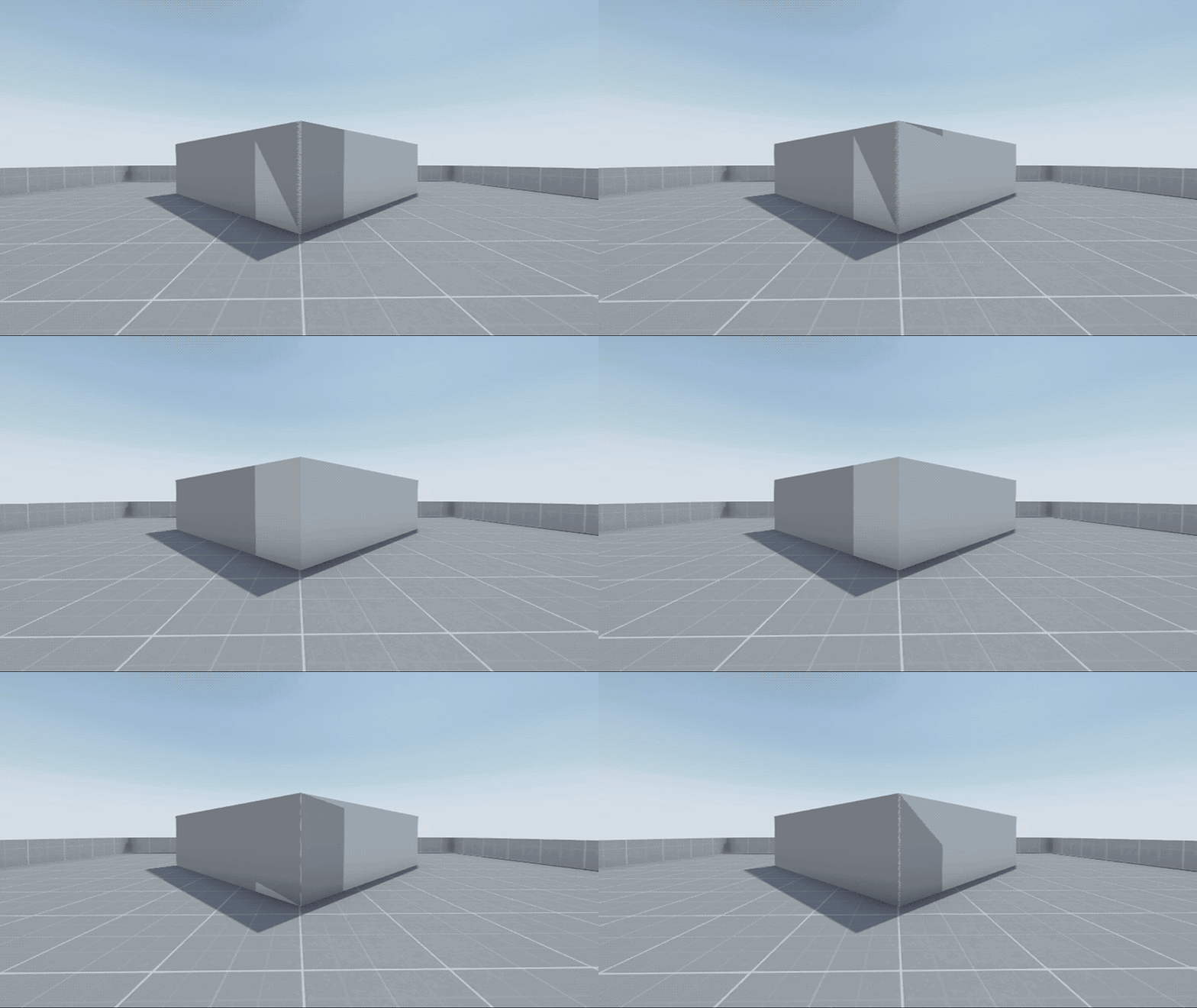 analog wyvern
alright ill work on that, 2 mil seems pretty generous for quest so i guess I can add bit more detail to my world
 kind leaf
That popup is accompanied by errors in the console. Check those for details.
 timid skiff
 timid skiff
kind leaf
That popup is accompanied by errors in the console. Check those for details.
timid skiff
kind leaf
That popup is accompanied by errors in the console. Check those for details.
So what do i need to do to fix it?
 crimson trench
Where get world prefab
 bold copper
Hey everyone, Im having an issue with world creation where, whenever I try to publish or do a test build, Unity will remove the VRCSceneDescriptor Script and then I cant load into the world at all. Any idea what I can do to fix this?
I am on the recommended Unity build, 2019.4.31f1, and I have the permissions to upload because the control panel is saying I do
kind leaf
crimson trench
Where get world prefab
like a whole world? Asset Store. Open Unity click the tab and search for environments.
 twilit minnow
hiya i just tried updating my world from unity 2018 to 2019 im using newest sdk from vrchat website for worlds and followed the migration page on what to do (didnt skip ahead or anything) and my world has red errors and the vrcsdk menu wont even give options to show control panel
ive tried about 5 times now and spent so much time cause time it takes to migrate up and each time is the same outcome
i have screenshots of the 3 errors it shows after doing everything the migration site says to do

 near escarp
were you using any other tools ?
twilit minnow
what do you mean? like prefabs for other things, or?
i bought the world about 6 months ago and have it uploaded working using unity 2018 at the time it has chess board beer pong and video player in it the rest is just furniture and mirrors
bold copper
bold copper
Hey everyone, Im having an issue with world creation where, whenever I try to pu...
If anyone experiences the same issue, its because of the Homekit that is available on the website. Any or all of the files in there will just not let you do anything when attempting exporting/testing/publishing
analog wyvern
whats the world size ( in meters) limit? I kinda wanna make a background cityscape view but im not sure if it would work on quest
 ebon linden
analog wyvern
whats the world size ( in meters) limit? I kinda wanna make a background citysc...
ebon linden
analog wyvern
whats the world size ( in meters) limit? I kinda wanna make a background citysc...
https://docs.vrchat.com/docs/quest-content-limitations I don't believe there is one as long as everything else checks out.
VRChat
This page will describe various limits in place for the Oculus Quest version of VRChat. These limitations are in place in the interest of performance, user safety, and discouraging malicious behavior. Find more information about limited components on our Quest Content Optimization page. Although the...
kind leaf
bold copper
If anyone experiences the same issue, its because of the Homekit that is availab...
what sdk were you using?
kind leaf
analog wyvern
whats the world size ( in meters) limit? I kinda wanna make a background citysc...
You don't build a background cityscape and leave it 🙂 You convert it into a skybox with a 4k resolution and adjust. An entire cityscape just for a background is 100% wasted resources.
bold copper
kind leaf
what sdk were you using?
SDK 3
kind leaf
Homekit is sdk2 only, that would break something. Its posted in big bold letters where its downloaded 🙂
bold copper
Oh I did not see
bold ibex
Flare stuff I still haven't figured out #world-development message
Appriaiate any help
uploading a vr chat world says max mb is 50 but there are quest worlds that are over 100 mb how do i up the max like they do?
 random owl
Use the latest SDK
kind leaf

VRChat lets you create, publish, and explore virtual worlds with other people from around the world.
bold ibex
Recently I was trying to update my vrchat world and it gave me the "(file name ) .vrcw does not exist " .. does anyone here know how to fix this? Or if there are any guides or things here already on what could be causing it etc. I don't know if certain things could cause it to happen or if it's just a unity bug ... thank you ^^
unkempt mauve
How do I use the same animation from one object but for a different object?
kind leaf
Spin Animation:
Create the animation for a sphere spinning. Make sure its Animated. Now you have a default animation that can be used to spin anything. Put any object inside the sphere and disable the mesh renderer for the sphere.
unkempt mauve
Thanks, but I'm talking about a cube slowly rising from foot level to waste level.
kind leaf
same concept
you just need a root transformation animated and you can put any object you want inside the animated moving object.
unkempt mauve
ok
 rain radish
any help please ?
 rain radish
any help please ?
rain radish
rain radish
any help please ?
please guys i need help
crimson trench
How make avatar pedestal
analog wyvern
any good places to find alot of detailed materials? (blender) im having trouble getting the ones I want
kind leaf
rain radish
please guys i need help
The report says you have a script with compile errors but your list isnt showing the script with the issue. The scene failing to load is probably because of the script issue.
kind leaf
crimson trench
How make avatar pedestal
Search Avatar Pedestal in your assets folder, its a prefab. Put it in your scene and give it an avatar id
bold ibex
ive uploaded my world and clicked publish to community labs and my world is not on my profile or anything do i just wait or somthing?
kind leaf
analog wyvern
any good places to find alot of detailed materials? (blender) im having trouble...
https://gist.github.com/mauricesvay/1330cc530f6ab2ef33eb6a5ea56ef5bd
Blender doesnt matter because Unity wont give you the blender shader anyway 😉 so any PBR that fits will do.

Gist
List of websites for free PBR textures. GitHub Gist: instantly share code, notes, and snippets.
analog wyvern
so will i lose the diffuse/settings and stuff when i go into unity?
kind leaf
yes
analog wyvern
ill only have the base texture?
kind leaf
you will have all the textures just not the settings, you will have to play with them in unity
analog wyvern
hm alright, well that saves a bit of time then, thanks
unkempt mauve
Where do I get the wiggle shader from?
bold ibex
anyone know how to make a night mode button to dim the world to make it dark?
If anyone knows how to make an avatar world or has a yt video with a tut can you please Dm me
timid skiff
why does my upload keeo failing
 ruby jay
you will have to show all errors and please take a screenshot
ruby jay
bold ibex
anyone know how to make a night mode button to dim the world to make it dark?
a simple approach that may suffice is using post processing
bold ibex
ruby jay
a simple approach that may suffice is using post processing
what do i do in the udon to make that happen?
ruby jay
bold ibex
what do i do in the udon to make that happen?
learn about post processing
then use udon to turn on/off the volumes or blend their weight by starting an animator animating the weight
udon itself cannot manipulate the volume properties
 rapid basin

so i get this error in my console
and i dont know why
The error count just keeps getting higher on it
please dm me or ping me when you can help
ruby jay
rapid basin
please dm me or ping me when you can help
try restarting unity;
are you using ambient occlusion as post processing effect? i really would not recommend that, it causes artefacts on the vr camera and looks strange in vr
rapid basin
ruby jay
try restarting unity;
are you using ambient occlusion as post processing effect?...
Im not ,thats the thing i deleted my entire post processing out of my scene and this error still comes up
So im really confused abt this
neat ravine
hey is it considered bad to upload a world that's not finished yet? like, one that's still a WIP?
 shadow fox
neat ravine
hey is it considered bad to upload a world that's not finished yet? like, one th...
shadow fox
neat ravine
hey is it considered bad to upload a world that's not finished yet? like, one th...
I don’t think so. I’ve seen plenty of WIP worlds
neat ravine
ok cool
adding text is still hell for me tho lol
might just have to put a jpeg in there or something like "this is a wip"
shadow fox
Try a transparent image with text? It might allow for the text to show up
south orbit
just use .png with transparent background and text, then drag it onto a cube, edit the material make it a cut-out and boom u got the text only
use probuilder to delete other sides of the cube so that u got text in 1 direction only
works like this, tho here i kept 2 sides but ye could remove back side if i wanted
 bold ibex
Altnernatively you can go into blender and make a Text, type what you want, convert to Mesh and then import to Unity
For Questies since they don't have cutout or transparency
kind leaf
bold ibex
Altnernatively you can go into blender and make a Text, type what you want, conv...
So Quest actually does support the Standard shader, just use with caution. Use a mobile shader for the bulk and only Standard cutout/transparency when needed. Quest won't stop supporting Standard as they grow so that warning can be ignored, and support for it will continue to increase over time.
Blender text to mesh can be really high in poly.
kind leaf
😛
swift trench
so.... is there any way at all to get a video player to work on quest
becase ik untrusted URL is a thing but i dont want to force that
and only unity video players support mp4 but the screen was just black
ah found one that claims quest compat with mp4
kind leaf
Unity player doesnt work in vrc. There is also no way of getting around the untrusted url. There is also no way of bypassing the need for direct link playing for Quest yet. So youtube links do not work. The only way to play a video currently for quest is to download the videos and store them on a whitelisted cloud and share the links so those links can be used for direct link access.
swift trench
so basicaly im fed cus i cant use MP4 on quest
kind leaf
mp4 works just fine on quest
https://architechvr.gumroad.com/l/protv
https://vrchat.nishawolfe.com/prefabs/videoplayer
Make sure to install dependencies
Gumroad
Ready-made video player solution for VRChat w/ Udon.Requires SDK3.0[Udon] (last tested w/ v2021.09.30.16.18) and UdonSharp[U#] (last tested w/ v0.20.3). Recommend Unity 2019, 2018 works but might have some issues during import (MAKE SURE YOU HAVE THE LATEST U# VERSION).View the README.md file in the package for more information.UPDATE v2.1:- Man...

A free Synced Video Player prefab for VRChat. Updated for Unity 2019
kind leaf
you dont put an mp4 in it, you put a url to an mp4 in it
the video has to be stored in a whitelisted cloud such as dropbox
swift trench
screams internaly i thaught you said i could use mp4, thats streaming it from a server
i just want to use an mp4 in a scene so i dont have to host it
kind leaf
could you imagine the file size bloat if your world came with mp4's? even a 300mb low res video would be enough to never join.
swift trench
kind leaf
could you imagine the file size bloat if your world came with mp4's? even a 300m...
i got it to compile under 100MB
granted that was at 240p
but thats all it needs
and vrchat even say unity players are supported
oh and OFC you have to use their proxy that doesnt support video files
bold ibex
Cant you just upload the video to dropbox for free
do you have a bad wifi connection or something?
is that why its so urgently needed directly in the world
swift trench
its just me not wanting to force quest users to have to have unknown sources
but ehh if vrchat gunna block in project videos guess i have to
bold ibex
yeah so if you use dropbox they dont have to check unknown sources
swift trench
bold ibex
yeah so if you use dropbox they dont have to check unknown sources
huh thats not listed on their site lul
bold ibex
kind leaf
the video has to be stored in a whitelisted cloud such as dropbox
im@going off of this
maybe its whitelisted now? idk
swift trench
VRChat
The following services are on the video player whitelist. If a service is not on this list, it will not play unless "Allow Untrusted URLs" is checked in Settings. Whitelisted Services The services listed below are inherently trusted and are permitted with our default URL whitelist. The resource bein...
bold ibex
the docs can be uh outdated at times
but who knows
oh so use google drive
15GB free
swift trench
is that quest supported tho lul
kind leaf
yeah, dropbox was never added but it is supported with more space than google and no noticeable bandwidth limitation
bold ibex
swift trench
is that quest supported tho lul
I dont see how it wouldnt be
swift trench
if vimeo needs to be the payed version why would they let you use free hosts lul
south orbit
for cloud and clicks basicly
kind leaf
those arnt sponsors, just whitelisted sites, so vrc doesnt care who you use as long as they approve.
south orbit
its how most of those services earn money
swift trench
ehh ig ill just use drop and if it just works on quest thats chill, if not i will just do the way everyone else does
kind leaf
In what way do you think everyone else displays videos for Quest?
swift trench
kind leaf
In what way do you think everyone else displays videos for Quest?
put signs up on quest saying enable unknown sources
kind leaf
Ah yes, that will be needed no matter what. Even if you want to play some random youtube video on PC.
swift trench
youtube is whitelisted on pc
pc has quite a few whitelisted sources
but quest needs workarounds
south orbit
it is still needed by default tho to have it enabled the '' enable untrusted urls '' even youtube is whitelisted in order for it to work
kind leaf
I think only verified channels are whitelisted. Same with Twitch. Streaming works on PC unless they are not verified.
south orbit
yeah it seems to be likely the case, i been watching quite few twitch and youtube stuff in vrc with both on / off that setting and i just kept it on by default in the end
swift trench
fun then
vrchat make it a pain to put videos on
south orbit
i mean its one setting, but i bet u that 80-90% that knows vrchat even casually is aware of that setting / usually always have it enabled
kind leaf
Safety and disclosures prevents unneeded heat to vrc.
unverified means they have nothing to lose
south orbit
like think about it like this, how many worlds did u encounter with video players, and people watching video players
personally i think 1/2 worlds i go to nearly has a video player or ppl using it
swift trench
but your not gunna get security concerns from any old YT link
but any old link at all could be bad or funny with consiqenses
south orbit
but i mean isnt that up to the invidual, u can only prevent so much
like if u put a video player in ur world and u know u gonna use it as it is supposed to but other choose to use it in a wrong way u cant be responsability for their actions even u made the world
and i dont think it can have consequences towards u i mean unless u in the world and they put some messed up stuff on but that u could prevent from ingame anyways
can even master lock video players
kind leaf
even then, to see the video untrusted had to be checked so you agreed. Like a disclosure before surgery. The dr might not intend to kill you but if they do, you signed it 😛
swift trench
true, but why stop it working the right way like YT links
IK people could play something odd but come on 1 video player streaming YT really gunna hurt quest or pc experience
swift trench
kind leaf
even then, to see the video untrusted had to be checked so you agreed. Like a di...
basicaly this rant is me saying i dont like the fact its basicaly forced for video players to work
kind leaf
I understand, but we just deal with it. If we didnt you wouldn't see these nice things in worlds 🙂
south orbit
i think 1 decent model / avatar from another player 'hurt' my pc experience or vr experience more than any video player ever did
in other words i never encountered the video players being harmful in any ways wheter it was fps or ping or anything similar
i mean if we talking about random stuff that weirdos can put on sure, but i can prevent that myself, also when i though of this i was thinking that
i saw other ppl using a solution on this specificly subject by having a local mp3 list on their videos to be played by default and then u would have to connect to the url
kind leaf
the harm is in storing DMCA content on their servers if it were possible to upload an mp4 and play it. Unless you made the video or have a license for public distribution then you dont have a legal right to share it publicly. This is why theater worlds get shut down. VRC doesnt care until it gets reported and those videos are not stored on VRC's servers. They are only links and not inputted by vrc. p2p shutdowns happen storage side which are rarely owned by the uploader. VRC would be the storage in this senario.
swift trench
ah so mp4 makes sence now
time to just use a wav and gif
would be nice to have YTDL on quest tho tbh
kind leaf
afaik Quest does have a ytdl its just not the same version vrc uses. Or so I have been told. I'm no expert on that, I just go with the flow.
if Quest uses air link they hae no issues, if they hard wire to their pc they also hve no issues
swift trench
fairs, unknown sources for quest = requirement
also just found a site that apparently you can just pass in a youtube url and it givves a link to use on quest
kind leaf
test it 😛
swift trench
i will
if it does work i know how to generate urls for it now
swift trench
yup it works https://t-ne.x0.to/
litrlaly just shove a YT url into it and it works
unknown sources ofc
so neet workaround for YT on quest vrc
 median briar
I don't suppose there's a prefab or example for setting up the 'little big' camera trick being used here? https://youtu.be/N7Tdl2n9Fsg?t=598
I've been struggling to get the left/right eye layers to do anything in vrc
stone marsh
swift trench
so neet workaround for YT on quest vrc
Download the youtube videos and host them on DropBox or GDrive. Both are whitelisted for video players and work on Quest. only YT doesn't work.
swift trench
stone marsh
Download the youtube videos and host them on DropBox or GDrive. Both are whiteli...
but you cant automate that
that site you can automate, and it uses the original video link as its souce rather than storeing a clone
stone marsh
Eh, you asked for a workaround but weren't very specific xP
stone marsh
interesting
swift trench
the question now is:
how do i change the url in a unity player becase i cant be bothered to learn the av pro one
NVM can just snoop at the excample
i dont get the scrypt
all i get is theres no point where its a string
 untold summit
I'm new to making maps for VRChat and Unity in general, so I'm not sure of the limitations, but
Do I need to use cubes for buttons regarding Udon programming? Can I use a nice looking set of mesh buttons or is there a drawback?
stone marsh
untold summit
I'm new to making maps for VRChat and Unity in general, so I'm not sure of the l...
You can use just about any mesh you want, so long as it has a collider. If it's a button on a wall, should set it to "isTrigger" as well so that players don't actually collide with it. There's prefabs of some nice looking buttons that are paid on Booth that allow for physical interactions as well but aren't free. There are some free examples, but they aren't all that performant or have some drawbacks but least you can see how things are done.
 vast spoke
is there a way to add music but it isnt 3d?
kind leaf
swift trench
yup it works https://t-ne.x0.to/
Interesting, got that bookmarked. Still prefer the dropbox method but this has its purpose for sure. Glad you found this link.
kind leaf
vast spoke
is there a way to add music but it isnt 3d?
there is literally a slider on the audio source for 2d->3d. Disable spatialize.
vast spoke
alr
kind leaf
If your audio source says controlled by curve for the 2d/3d settings just press the 3 dots in the top right of the component and click reset. Then the slider will appear. Just dont forget to uncheck spatialize
crimson trench
Sooooo every time I try to join my world it tries to load like 3 times before sending me back to my home
kind leaf
GitHub
Unity Editor extension for making VRChat worlds. Contribute to oneVR/VRWorldToolkit development by creating an account on GitHub.
Install that and check the world debugger
 fathom ice
working on a world

 warm rose
hello, I am in the need of help..... I have gotten the new SDK 3 World and got it all set up and ready to go but I can not test play it or build it..... what do I do ? it an new world just made it today

if anyone can help plz PM me
stone marsh
warm rose
hello, I am in the need of help..... I have gotten the new SDK 3 World and got i...
You most likely have errors in your console. You need to clear those errors, attempt to enter play mode, and then inspect the errors again. Screenshot ALL of the red stop sign errors and share here if having issue still
warm rose
stone marsh
You most likely have errors in your console. You need to clear those errors, att...
okay this is the error?
 stone marsh
Red stop sign erorrs
You need to hit clear, then attempt to enter play mode. Then screenshot ALL of the red stop sign errors. All of them.
The yellow triangles n info blurbs aren't anything needed
I see you have like 20-30+ errors that aren't shown in your screenshot. You most likely have a script error or something. Reading the red errors can point you in the direction of the issue. But we can't help unless we can see them all
untold summit
Tfw you accidentally wire up your mirror buttons to delete themselves rather than the mirror 
stone marsh
Mirror button disables mirror button. Clicking the mirror disables the floor.
Respawning turns the mirror on, but you can't reach it anymore
untold summit
I'll just relabel it to the "reject player freedom of choice" button
stone marsh
It's the world.
You can make pretty much anything into a button that can be clicked to load an avatar
The only ones that aren't made by the world authors are the typical vrc avatar pedestal with the 2D image hovering over it
 deep hamlet
Can I use Unity to bake lighting with overlapping UV's?
 honest scarab
Does 2.0 world sdk still working?
If yes do i have to upgrade my projects to 2019 to can update?
I dunno if it still valid or not
stone marsh
honest scarab
I dunno if it still valid or not
We are currently on 2019.4.31f1 yes you should update your unity if you're still on 2018. Yes sdk2 still works, but it shouldn't be used for new projects and is in the process of being phased out and deprecated. It's best to update to SDK3 if possible but sdk2 will continue to work for a while longer but ya really shouldn't be using it anymore.
honest scarab
I don't need the world much just was planning to do quick update so was wanted to know if 2.0 valid still ty for answering
 fallow steppe
Hihi, getting ready to build my first world after purchasing the Hazelwood Loft full pack from Unity. With base world creation, I understand building each unique aspect from scratch (floor, walls, windows, etc) but with regard to the loft full pack, my question is do I need to build the wall/floors, etc from scratch to mimic that of the Hazlewood loft of are these included and then imported into the project? And if so, do I start with a plane/cube etc or how do I know the metrics to create the entire environment from the full pack? TY for any guidance ❤️
kind leaf
fallow steppe
Hihi, getting ready to build my first world after purchasing the Hazelwood Loft ...
you can import it directly, use it as is, make sure the shaders are not legacy: find the material folders and check the materials, if they are legacy change them to standard or whatever works for you. then just setup your light probes, bake your lighting and then bake your reflection probes. Drop the vrcworld prefab where you want to spawn and uplaod.
Any errors you get will be due to attached scripts or standard assets, just remove it all
fallow steppe
kind leaf
you can import it directly, use it as is, make sure the shaders are not legacy: ...
TYSM for the quick reply! 😌
kind leaf
you can avoid the errors while importing by un checking anything ending in .cs while importing from the asset store, and always uncheck any folder named standard assets.
fallow steppe
Awesome, thank you again 🙂
bold ibex
Any C# scripts will be scrubbed (removed) from your world in the Scene, so if there is anything in your world relying on C# it needs to be put in Udon Graph Nodes or U# if applicable
I recently bought this pack, but I can't figure out how I can make it work on meshes other than plane

can someone help me?
fallow steppe
bold ibex
Any C# scripts will be scrubbed (removed) from your world in the Scene, so if th...
Thank you as well 🙂
bold ibex

Use the Basic Sand & Snow tool for your next project. Find this and more particle & effect tools on the Unity Asset Store.
kind leaf
same thing but free on the vrcprefabs page https://drive.google.com/file/d/1BjaCR1DzrqCUInWCt-YblWiJTeeIeBJf/view although it's never worked for me lol. Even though I went to the damn winter world and saw it working... a git readme would be nice 😛
Google Docs
bold ibex
kind leaf
same thing but free on the vrcprefabs page https://drive.google.com/file/d/1BjaC...
I already bought it and it works, but I have to figure out how to make it work on a mesh made by myself, and not on a square plane
kind leaf
what does it look like when you drop it on your custom mesh?
* Since it's a basic implementation, it only work with (initially) flat meshes. Curved meshes or Unity's terrain aren't compatible.
 bold ibex
kind leaf
```* Since it's a basic implementation, it only work with (initially) flat meshe...
bold ibex
kind leaf
```* Since it's a basic implementation, it only work with (initially) flat meshe...
so with custom meshes it doesn't work?
kind leaf
if they arnt flat it wont work, it's using a camera to set the heightmap of the snow and adjusting. Curves would add more complexity to those calculations which they did not account for in this release.
you tested this in game? Because those are c# scripts
bold ibex
everything is very strange, I would like to do something nice for Christmas where it snows. I probably just need to understand the system.
bold ibex
kind leaf
you tested this in game? Because those are c# scripts
works well in game
kind leaf
huh, it shouldn't, might have to try it out lol.
bold ibex
does it work if you delete the scripts yourself
do you think it should not work because it is not in udon? actually i only tested it on unity
kind leaf
only udon should work in game
bold ibex
vrchat runtime kills c# scripts afaik
at some point and time c# go byebye before it gets to your world
or should
can i convert the script to udon?
kind leaf
if it doesnt use anything restricted
if it says using using System.Collections; at the top and it is white not grey in VS your sol. Stuff like enums are not permitted
bold ibex
how nice that everything always has to be so complicated to work
kind leaf
the restrictions are for our safety as players. Would be nice if I could drive to work at any speed I wanted 😛
 kind leaf
give the link I shared a shot. I never tested the prefab as is so just drop their prefab in your world or load their demo scene and upload that. If it works great.
bold ibex
I go to sleep, all this too stressful. I just wanted some snow and I have to waste time on this nonsense to improve a world xD
bold ibex
kind leaf
give the link I shared a shot. I never tested the prefab as is so just drop thei...
I will let you know
it's night at my place so for now I'll go, see you bye!
neat badger
Does anyone know why players would hear faraway sounds in my world really loud for a moment when they spawn in, before they return to normal again?


That's one sound which is affected.
Also, in my Big City world, sounds are suddenly DEAFENINGLY loud when players approach them. They were fine before recent updates and I've made no changes recently.
Here is an example of one of the audio sources which is now deafening up close in Big City:


It's almost as if instead of the sound being clamped to 1.0 inside Near radius on the VRC Spatial Audio Source, it's acting like a point source, with near merely being the distance at which it reaches 1.0 in volume, and it increases as you get even closer than that.
In addition, the limiter that affects avatar audio doesn't seem to come into play at all here. It's literally blasting out my speakers it's so loud.
 eager silo
can someone help me in setting up a mirror? \
it doesn't seem to show up when I drag the prefab into the scene
and I dont see it when I build test
bold ibex
are there any prefab like you know how some world you can dim the world with sliders or change the room color is there any thing like that to download anyone knows of?
lapis shell
bold ibex
are there any prefab like you know how some world you can dim the world with sli...
I don't know of any prefabs that offer that but it's just reducing the intensity of a light hooked up to a slider? It's easy to make, I can code that up.
bold ibex
lapis shell
I don't know of any prefabs that offer that but it's just reducing the intensity...
fammm drop that Udon Graph code dump
or U# idc
 worldly hull
Does anyone know why the upload button cannot be clicked?
nothing happens when i click it 😒
lapis shell
bold ibex
fammm drop that Udon Graph code dump
Tomorrow before work I'll write the U# code.
bold ibex
worldly hull
nothing happens when i click it 😒
You don't have any red errors in the Unity Console?
while in vrchat upload phase
bold ibex
lapis shell
Tomorrow before work I'll write the U# code.
okay 
worldly hull
bold ibex
You don't have any red errors in the Unity Console?

NullReferenceException: Object reference not set to an instance of an object
VRCSDK2.RuntimeWorldCreation.Start () (at Assets/VRCSDK/Dependencies/VRChat/Scripts/RuntimeWorldCreation.cs:82)
also, the button doenst have anything attached to it in the scene
 bold ibex
I think youd just delete the script the thing is referencing, reimport the VRCSDK, and then pray it works
worldly hull
i should really back up my world before this 😆
 meager anvil
added a pickup colliders n such to this pillow but the actual pillow doesnt move, just the box. any ideas?
 mild spade
meager anvil
added a pickup colliders n such to this pillow but the actual pillow doesnt move...
mild spade
meager anvil
added a pickup colliders n such to this pillow but the actual pillow doesnt move...
Is the pillow set to Static?
meager anvil
Oh! Where would that be under?
mild spade
Select the pillow, top right corner of the gameobject on the inspector. There is a checkmark for Static. Anything marked with static cannot be moved at runtime (while playing)
meager anvil
OH it was!! Thank you so much!!
meager anvil
Anyone know how to make the box for the avatar figurine be flush like the pillow? (Ik the avatar is hard to see but it's that box grab thing lol)


 zealous venture
Does anyone know if this (https://assetstore.unity.com/packages/tools/particles-effects/weather-maker-volumetric-clouds-and-unity-weather-system-60955) asset can be used in VRC worlds?
Don't want to buy it and then find out none of it can be used in VRC.

Use the Weather Maker - Volumetric Clouds and Unity Weather System tool for your next project. Find this and more particle & effect tools on the Unity Asset Store.
unkempt mauve
lapis shell
Personally I put an object with OnTriggerEnter, make it store a reference to the...
How do I reference the object in Udon?
bold ibex
zealous venture
Does anyone know if this (https://assetstore.unity.com/packages/tools/particles-...
The main problem is if it is reliant on C# scripts since VRChat doesn't allow you to use any C# scripts in worlds besides a few very specific whitelisted ones
I visited their site, and I found their email
you can find it too and email them about this specifically
ask something along the lines of "Can I use "x" asset without any C# scripts, just shaders?" and "If I can use this without C# scripts, how limited will it be?"
Id probably also mention you are trying to publish a scene to VRChat, in which it does not allow any but very few C# scripts
Your good ol outline, question, context
also now that I think about it does DX11 even support volumetrics?
unkempt mauve
lapis shell
Personally I put an object with OnTriggerEnter, make it store a reference to the...
How do I create the Udon script separate from the VRC_World?
vast spoke
once i click test and build, on sdk3 i load vrchat up, and it just makes me spawn in midair without moving
unkempt mauve
lapis shell
Personally I put an object with OnTriggerEnter, make it store a reference to the...
What node component do I use to set the transform?
crimson trench
My mirror is white
And how do I do a funny thing where when I join it has a funny world owner thingy above my head
kind leaf
crimson trench
My mirror is white
There are various reasons for having a white mirror and they depend on if its in game or in unity and if its HD or Low. Best tool in discord is to use the search at the top right and type "white mirror". - Never had that issue so maybe searching will help you.
As for something above the owners head, you need a script that tells the object in update to position its transform to the head bone if is owner/master + an offset.
kind leaf
unkempt mauve
What node component do I use to set the transform?
Transform... Its the default component attached to all objects with the exception of canvas elements which use RectTransform.
 timber fable
ON spawning i can only look in one direction and cannot move.
what could be the possible cause.
kind leaf
You are stuck in a collider. Just drag your spawn point up and try again.
warm rose
stone marsh
Red stop sign erorrs
Thank you for your help sorry i am late on replying to you I'll send a screen shot of the red errors later on today, I'll do a reply to one of your messages that is a reply one of mine
warm rose
stone marsh
I see you have like 20-30+ errors that aren't shown in your screenshot. You most...
this red errors I did the clear and ran the play and then closed it out and restarted it


 honest scarab
i tried re uploading my 2.0 world and making it unity 2019 but for some reason even tho getting no errors in sdk i cant see the world anymore in building page
unkempt mauve
kind leaf
Transform... Its the default component attached to all objects with the exceptio...
With that being said, I can manually set the transform values within the node itself?
lapis shell
@bold ibex @bold ibex
using UdonSharp;
using UnityEngine;
using UnityEngine.UI;
using VRC.SDKBase;
using VRC.Udon;

public class LightSlider : UdonSharpBehaviour
{
    [SerializeField] private Slider slider;
    [SerializeField] private Light light;

    [SerializeField] private float minBrightnessIntensity;
    [SerializeField] private float maxBrightnessIntensity;

    private float sliderValue = 0f;

    private void Update()
    {
        if(sliderValue != slider.value)
        {
            sliderValue = slider.value;
            SliderValueChanged();
        }
    }

    private void SliderValueChanged()
    {
        light.intensity = Remap(slider.value, 0f, 1f, minBrightnessIntensity, maxBrightnessIntensity);
    }

    private float Remap(float from, float fromMin, float fromMax, float toMin, float toMax)
    {
        var fromAbs = from - fromMin;
        var fromMaxAbs = fromMax - fromMin;

        var normal = fromAbs / fromMaxAbs;

        var toMaxAbs = toMax - toMin;
        var toAbs = toMaxAbs * normal;

        var to = toAbs + toMin;

        return to;
    }
}
Here's your Udon# code to make a slider that changed the brightness of a light. Pass the light, the slider to it, and set your min and max brightness to whatever value you want!
 lapis shell
unkempt mauve
What node component do I use to set the transform?
lapis shell
unkempt mauve
What node component do I use to set the transform?
Unfortunately I've never worked with Udon graphs, only Udon#.
But in C# / Unity code it's:
transform.position = targetTransform.position;
transform.rotation = targetTransform.rotation;
Just setting the object's position and rotation to where you want it to be. Send me a DM if you need more help.
lapis shell
I understand the appeal of the graphs, a lot of people are intimidated by code and a node-based system is much less intimidating.
I'm personal friends with the creator of the Bolt Unity asset (he lives just a few kilometers from me!) and he was telling me about how he feels strongly that good tools lead to better products, and much of his development time on his personal game now is spent building tools for the rest of his team.
bold ibex
Yeah, it is good to have multiple options for the best accessability
especially when you have a game like VRChat where people who have no experience in the field can create too
 frank shadow
I guess its a thing that people falsely report worlds? :|
bold ibex
kind leaf
give the link I shared a shot. I never tested the prefab as is so just drop thei...
Obviously it doesn't work on vrc

 lyric acorn
Is there any issues with 80 trail Renderers in the world? I recall a prior mention that the line doesn’t really disappear from memory
 bronze stump
Hi all!
Are there any Canadian VRChat users who have published a a game or world before? I work for Ethos Market Research (look us up!) and we are currently recruiting for a study on VR creators. Let me know if there is anyone who is interested or if you know someone who would qualify 🙂 Thanks!
lapis shell
bronze stump
Hi all!
Are there any Canadian VRChat users who have published a a game or worl...
Uhhh I guess I qualify.
fathom ice
Urm... what is the max poly count for a world?
 full wharf
shouldn't this be updated to 100mb?
 fathom ice
Aah that's helpful
vast spoke
is there a prefab for music buttons?
analog wyvern
i imported my build from blender and most of the textures are missing? im using sdk3 any fix?
lapis shell
analog wyvern
i imported my build from blender and most of the textures are missing? im using ...
You imported just the obj/fbx maybe? Texture files are imported as separate files into unity and then plugged into a material to be applied to models.
kind leaf
Background Music? Add an empty game object to the scene, click add component and add an audio source. make sure the audio source is 2d which is a slider and attach your loop song and click loop.. No page is needed because it is the same for unity and covered by millions(youtube/google). No scripting.
analog wyvern
what are some good udon tutorials? i mainly wanna add media and "immersive" speakers to my world? Do speakers/audio work on quest?
lapis shell
Not hard, make an array of audioclips that will play with an int counter, if the current audio song is done playing, increment the counter, and select the next song in the array to play. If the counter >= the audioclips length, reset it back to 0. I can work on it after work.
crimson trench
I have no idea how to fix this but whoever joins my world only sees a white mirror
lapis shell
I would just put in the Update method
[SerializeField] private AudioClip[] songs;
[SerializeField] private AudioSource audioSource;

private int playlistCounter = 0;

void Update(){
  if(!audioSource.isPlaying){
    IncrementPlaylistCounter();
    audiosource.clip = songs[playlistCounter];
    audioSource.Play();
    }
  }

private void IncrementPlaylistCounter(){
  playlistCounter++;
  if(playlistCounter >= songs.Length){
    playlistCounter = 0;
  }
}
}```Note I just wrote this code in Discord, haven't tested it in-engine, but if you're a programmer you can fix if there are any bugs. 😛
frigid estuary
[SDK3] What do I have to put on a video player (no interactive video player, just default video player game object) to make it work in SDK3 in comparison to SDK2?


