#world-development
39 messages · Page 86 of 1
 eager garnet
 harsh wagon
eager garnet
how do i do this?
harsh wagon
eager garnet
how do i do this?
set the volume curve to be maxed out until 0.99, and then have the volume all the way down at 0
and then do the opposite with spacial, so that the spacial turns all the way up at 1 and is off until 0.99
that way, the music will sound normal and then completely turn off at 99% of the distance
eager garnet
like this right?
 eager garnet
yeah this is the way i did it, doesnt seem to work unless im missing something
im using the camera to test
harsh wagon
I don't see any spatial curve
 eager garnet
ok thanks, i didnt know about the different curves
3 years and i only learn this now
harsh wagon
the spatial curve changes whether or not you can hear where it's coming from
spatial all the way down means it'll sound the same everywhere, spacial all the way up means you can hear it coming from the source
By doing the curves like that, the sound is 2D until the very end
 near escarp
camera clip plane, and then add your reference camera in the vrcworld prefab in your scene
 red urchin
so in my latest update for my world my friends are all saying that when they are the room master that their frames all tank
and that it carries over to the next room master if they leave
i cant notice it on my end though, perhaps because i have a beefy pc?
any clue what might be going on here?
 scenic citrus
near escarp
camera clip plane, and then add your reference camera in the vrcworld prefab in ...
scenic citrus
near escarp
camera clip plane, and then add your reference camera in the vrcworld prefab in ...
can i get like a uh... small little tutorial... realy quick...? pretty pls...?
w8
think i got it
i love u
red urchin
red urchin
so in my latest update for my world my friends are all saying that when they are...
ive checked the canny and searched this discord and cant find anything similar
i hope i didnt heck something up
 rain shadow
red urchin
ive checked the canny and searched this discord and cant find anything similar
rain shadow
red urchin
ive checked the canny and searched this discord and cant find anything similar
Do you have many synced objects or a video player?
red urchin
the few items there are are synced, there is also merlins video player (just updated to newest), and the vrc community billiards (also just updated to newest, and some pens (qvpen, newest update), it wasnt an issue before i just recently updated the video and pool table
so im worried its something with those
the pool table is off by default if that matters
rain shadow
It sounds likely that it is either QVPen or Community Billiards then
You would want to ask udon related questions in #udon-general though
 surreal nebula
I'm trying to animate an object and it doesn't seem to work. it has a animator with the animation as the start animation
surreal nebula
Also trying to turn a object collider on and off, not sure if animation or udon would work better or how to with udon
 untold pewter
how do I make mirror toggles and teleport buttons in sdk3, there is no VRC_Trigger anymore
 torn tinsel
does anyone know why my skd is saying spend more time with us when i try to build & Publish my avatar
 leaden hazel
torn tinsel
does anyone know why my skd is saying spend more time with us when i try to buil...
leaden hazel
torn tinsel
does anyone know why my skd is saying spend more time with us when i try to buil...
This is world dev, you want avatar channels. But probably your trust rank is not high enough yet.
torn tinsel
okay sorry
 vale plume
For some reason the upload button doesn't do anything, anyone know why?
 vale plume
those are the errors it gives but I can run the game just fine when I test build it

I can test build it fine and play it locally
 glacial pond
untold pewter
how do I make mirror toggles and teleport buttons in sdk3, there is no VRC_Trigg...
glacial pond
untold pewter
how do I make mirror toggles and teleport buttons in sdk3, there is no VRC_Trigg...
Everything is Udon Behavoir components now. There are a bunch of example scripts for things like interact toggles
No need to make your own for the basic stuff
 errant beacon
^ I'd recommend Vowgan's Udon tutorials too!
Toggle buttons: https://www.youtube.com/watch?v=ibDu0dCeUE8
Mirror quality buttons and for loops: https://www.youtube.com/watch?v=E0D9Z8-HVBI
 graceful totem
Who here can make a world thats green screen and add both hq and sq mirrors you usually see in vrchat worlds?
leaden hazel
graceful totem
Who here can make a world thats green screen and add both hq and sq mirrors you ...
I mean, something like that you could probably make yourself or I can point you at some worlds that have that already
errant beacon
Worlds like that probably exist already, there's a search bar at the top-right of the world menu o:
also yus, that'd be a vv easy world to make
 craggy scroll
this maybe a error on my part. but every time i try upload quest world i get this. world info is right and same for avatar them self. this happen after unity crash.
 errant beacon
That's a known bug afaik, you'll have to be manually signed out by a developer for that to be fixed
leaden hazel
@graceful totem https://vrchat.com/home/world/wrld_99ccffd5-25da-49b3-8a05-747a59f52ac0 Has a green screen on the second floor for example
graceful totem
True, but I have yet no knowledge for making worlds lmao my slow ass actually struggled on my avatars
If unity game engine was as user friendly and managable like roblox it would be much easier
craggy scroll
good thing i now found away to make my tiger avatar quest friendly without making look ugly and Thank @errant beacon that fix it
leaden hazel
It does require throwing your head against the wall a few times before it sticks yeah. But try that world, it has a camera studio thing with light controls, background toggle and so on
graceful totem
Thanks lmao
errant beacon
Nobody started out good at Unity lol, you're fine! A simple greenscreen world would be p simple to make though, a box made of 6 quads with a green material and an unlit shader would take a couple minutes to make
If you want to get into more detailed world development I'd def recommend watching tutorials! Vowgan has some pretty good tutorials for SDK3/Udon
leaden hazel
To be fair, even that you have to watch out for things like trying to make the light look not naff, reflections not looking correct or just collisions. There's a lot to onboard to not be fighting with the basics.
errant beacon
def yeah, though setting up collisions, lighting probes and a reflection probe (you'd probably want a cubemap reflection from somewhere else rather than one made from the greenscreen though lol) wouldn't take terribly long
Make 6 quads and assemble them into a box, make a new material and make the color pure green and set the shader to unlit, apply that ot the quads, then add a box collider component to each of the quads. Add a new light probe group gameobject in the middle of the box, and then add another gameobject and give it a reflection probe component
Import a panoramic HDR image for the cubemap and set it to be a cubemap in the texture import settings, apply it to the reflection probe's cubemap input, and then finally drag a VRCWorld prefab from the VRChat SDK folder, then build and publish the world
preferably add a light and bake it too lol
 mossy vortex
so a creator's world is not working so i thought i'd ask here. When someone tried to load into the world its just a black screen for a bit after the load and then we crash. we connect to other world's just fine. is the world just unoptimized or what-
errant beacon
Assuming it's just that one world, the world might have some issues in it that prevent it from compiling properly? o:
otherwise, try clearing your cache
If you're the creator of the world, import https://github.com/oneVR/VRWorldToolkit/releases into your project and check its world debugger for issues
surreal nebula
What rigidbody settings would I use for a gravityless item to not spin. And another for a item with gravity to not be jumpy when colliding with the ground
harsh wagon
surreal nebula
What rigidbody settings would I use for a gravityless item to not spin. And anot...
when you say spin, do you mean it's spinning on its own or spinning from momentum?
I'm pretty sure drag is the option you're thinking of
surreal nebula
Yeah trying to make the no gravity item be motionless after you let it go. And also trying to fix movable chairs from jittering with the world colliders just from landing on it
harsh wagon
surreal nebula
Yeah trying to make the no gravity item be motionless after you let it go. And a...
yeah, pretty sure you want to turn drag all the way up
Does anyone know how tall an object can be before you can't step over it?
 oak apex
Does anyone know anything about VR stage lighting?
I have this problem where the lights flash like crazy when your up close but when you back up they look normal
 desert python
oak apex
Does anyone know anything about VR stage lighting?
desert python
oak apex
Does anyone know anything about VR stage lighting?
depends on the shader
 oak apex
whats the discord?
desert python
it should be in the produc
 scenic hare
bit late, but nope lol since the entire object will still get culled if you look away from it
and what i was saying that its not that bad to render like 500k tris at once
 kind leaf
scenic hare
bit late, but nope lol since the entire object will still get culled if you look...
kind leaf
scenic hare
bit late, but nope lol since the entire object will still get culled if you look...
It doesn't matter what isnt being rendered. What matters is what is being rendered. I'll agree to disagree. All, 100% of the documentation tells you low poly counts. I'll take the documentation over opinion any day. But I am happy that your Quest outperforms the docs idea of what it can handle.
desert python
ye. the name of the game is: "lower numbers win"
scenic hare
lol the docs are bull, they are recommendations to make sure people who don't know what they are doing don't upload ridiculous stuff
my quest doesn't outperform the docs idea of what it can handle, i just optimise shit it a way that makes my 500k model easier to render than a 50k model with standard shader and realtime gi
the performance hud you can enable on quest is damn useful for things like these
and according to that, i am running into cpu bottlenecks (probably because i haven't optimized my udon shit that well yet), not gpu (sitting at a comfy 70% usage with framerates hovering between 65 and 72fps)
harsh wagon
Are custom sitting animations still possible? If so, can I apply them to certain areas specifically?
For context, I'm making a world that has lounge chairs in it
actually tilting the chairs back feels uncomfortable in VR, so I want to make it so that the chair is upright but the legs conform to the chair
that way you can sit upright in the chair and lean back if you want
leaden hazel
Alas, animations can't be provided by a world to avatars.
harsh wagon
There used to be a prefab for SDK 2.0
You could apply an override to this station prefab
harsh wagon
Another issue I'm having is that I need an object to be interactable through another
There's a plane of water on this world and a ladder you can interact with, but you can only interact with the part of the ladder you're nearest to
so if you're above water you can't touch the ladder underwater and vice versa
is there a way to make an object invisible to interaction and stuff?
 idle jolt
Does anyone have a prefab for making guns? I’m looking for the type where you can hold it with two hands to effect the aiming.
 bold ibex
I imported the newest ver of the sdk (for worlds) but the tab doesnt pop up? So its not letting me upload. Tried reimporting it but nothing happens ;-;
 unkempt turtle
any console errors?
 cold hound
oak apex
what shader?
cold hound
oak apex
what shader?
i know how to use that shader
vale plume
Hi so I'm trying to publish my unity world to VRchat but the upload button doesn't do anything, when I click it it doesn't do anything - I can run it fine locally and it builds normally. I will show a screenshot and some errors Im getting in the console (I can run the world fine within unity too)

Im reading up and seeing that some other people have the same issue I believe
vale plume
nvm it's definitely an error with some scripts because I can upload on another scene without that script
 vivid belfry
Hello, I'm using the latest World SDK that comes with Post Processing 3.03 and applied bloom effect but when I test it in VRChat the bloom's not there for some reason. Is it a bug or do I need to go back a few version of Post Processing?
I can see the bloom effect in the viewport but not on the camera's view.
cold hound
vale plume
Hi so I'm trying to publish my unity world to VRchat but the upload button doesn...
Have you tried check WorldToolkit?
GitHub
Unity Editor extension for making VRChat worlds. Contribute to oneVR/VRWorldToolkit development by creating an account on GitHub.
vale plume
I already fixed it :)
cold hound
oh nice
vale plume
thanks though
rain shadow
vivid belfry
Hello, I'm using the latest World SDK that comes with Post Processing 3.03 and a...
Do you know if everything else is setup correctly such as the main reference camera being assigned to the world descriptor?
vivid belfry
cold hound
Have you tried check WorldToolkit?
Seems interesting, will check it out later thanks!
vivid belfry
rain shadow
Do you know if everything else is setup correctly such as the main reference cam...
Oh man now I feel silly, i knew i was missing a step haha. Appreciate it that fix the issue ✨
rain shadow
vivid belfry
Oh man now I feel silly, i knew i was missing a step haha. Appreciate it that fi...
If you get 1s VRWorldToolkit it will actually give you notifications about things like that, so highly recommended to get it.
vivid belfry
Noted, will apply this for future world project(s), appreciate the help.
Thanks @cold hound and @rain shadow
cold hound
vivid belfry
Seems interesting, will check it out later thanks!
it tell you common problems, Why your map is very big...
good thing!
 unborn depot
hey i wanted to know how to upload world / avatar on quest cuz i already publish my avatar and world by clicking on build and publish for windows but most of my friends cannot see it cuz they are on quest so how to make it on quest?
cold hound
There is something that you can try, easy quest switch
never did, i don't know how to use it
But how i do it, i just copy the files from the PC world and paste it as a new Unity project
Then switch to Quest and done
GitHub
EasyQuestSwitch is a Unity editor tool developed for VRChat world creators, it can automate changes to components within a scene as soon as the build platform is changed from PC to Android (for Ocu...
bold ibex
unkempt turtle
any console errors?
nope, no errors or anything ;-;
thats why its so weird
dont get whyy its not woorkingg LOL
I have these 3 now ;-; @unkempt turtle


 lost breach
Is there a way with SDK2 pickups, to make them never move to the center of your hand? I want to pick it up and have it maintain its position.
 lost breach
Those errors are usually only when you enter play mode in unity and dont actually represent any problems
if you want to test triggers in play mode you can use CyanEmu to see if everything is functional. Or just upload and test
harsh wagon
Is there some way to make an object interactable through another object?
I have an interactive ladder to get out of a pool, but the surface of the water blocks it
lost breach
I think you can set the water to ignore raycast
bold ibex
i uploaded it but there is no triggers on them now
harsh wagon
I tried the ignore raycast layer and it didn't seem to do much
lost breach
hmm do the buttons have any sort of collider on them? thats needed for triggers
hmm weird... You could remove the collider on the water surface?
harsh wagon
the ladders have trigger colliders on them, and they work
lost breach
or disable it when they get in the water
harsh wagon
the issue is that if you're under the water you can't use the ladder above the water
and vice versa
The water's surface has no colliders by the way
lost breach
oh dang... ok nevermind
harsh wagon
it's nothing but a mesh renderer with a material
bold ibex
what kind of collider for a button
harsh wagon
If the button is a simple shape like a cube or a sphere, use a box or sphere collider
harsh wagon
bold ibex
what kind of collider for a button
make sure to set it as a trigger if you don't want to physically collide with the button
bold ibex
 harsh wagon
what does the button look like?
 harsh wagon
yeah, a box collider is fine
harsh wagon
a plane?
bold ibex
nah
harsh wagon
ah
lost breach
2d wont work
harsh wagon
lost breach
2d wont work
Do you know much about using Udon? Might as well try fixing another issue while I'm at it
lost breach
A little, but I'm not great at it
harsh wagon
I've got 5 buttons on another world I'm working on
by pressing one, it sets the clip of an audio source and plays music
I did it that way to avoid needing multiple audio sources and clashing sounds
The issue I'm having is that it doesn't play to everyone
I'm probably just missing some syncing option somewhere but I don't know where
lost breach
yeah syncing is something I've not attempted in Udon
harsh wagon
Alright, update on the water ladder thing
I forgot about this, but there's a trigger collider on the water's surface that the Udon swimming system uses
I think that trigger collider is what's blocking the interaction
which would suck because I need that
nope, not the collider
cold hound
Check the VRCWorld blueprint
near escarp
Crashes ?
errant beacon
Check the console for errors? also make sure that your system resources aren't being used up by a bunch of background processes o:
harsh wagon
lost breach
oh dang... ok nevermind
So as it turns out, it's just an issue with the interaction range
The interaction distance just happened to perfectly line up with the water's surface
errant beacon
that's a normal SDK2 error afaik, click the Collapse button and see if there's anything else?
not sure on that o:
on the "account does not have access" error image you posted above though, being signed out manually by a developer might fix that iirc?
idle jolt
I’m trying to make a gun for my world, and I don’t want players to be able to pick up another gun so they don’t break the syncing. How can I accomplish this?
Also, I’ve seen worlds with two handed guns. Is there a prefab out there for this?
errant beacon
idle jolt
Also, I’ve seen worlds with two handed guns. Is there a prefab out there for thi...
not sure, but VRCPrefabs might be a good place to look o: https://vrcprefabs.com/
idle jolt
Ah, okay
Anything for disabling the ability to pick up a second gun?
near escarp
wdym by crashes
errant beacon
idle jolt
Ah, okay
Anything for disabling the ability to pick up a second gun?
not super sure on that either, though that'd probably be something done in Udon
i.e locally disable the pickup component on other gun objects when a person picks up a gun, and then enable them again after they drop it?
idle jolt
I don’t use Udon, as it gives me too much of a headache
I only prefer SDK2
near escarp
Ok so not a crash, but errors, i'll need your vrc username to fix it, since you're stuck in the middle of a login state
ok, restart unity and you should be good
 spark thunder
can someone help me with a audio button i guess it would be. idk which channel to put this in, was wondering if someone knows how to make it to where you click on something and it starts playing a song globally. like each square has a specific song on it
harsh wagon
spark thunder
can someone help me with a audio button i guess it would be. idk which channel t...
I had this exact issue a minute ago!
Are you using udon?
spark thunder
no udon
spark thunder
well poop
lost breach
@spark thunder so using SDK2? its not too hard. one sec I'll show you how to set it up
spark thunder
😃
lost breach
are these audio sources in the level or audio from videos?
lost breach
ok cool
short clips?

@humble basalt I just added an audio source component to a cube, then added vrc_trigger, added on_interact. Set the action to AudioTrigger, then add a reciever, drag in the cube (or any audio source), and pick the sound you want.
alternatively, you can create multiple audio sources in your world, each with one of the clips on it. have the gameobjects disabled by default, and do a GameObjectActive toggle on a trigger to turn the audio sources on.
spark thunder
sweet thanks
harsh wagon
I worked out how to make sounds play for everyone, so that part works now
The issue is that late joiners don't hear what's playing
I don't need it to be perfectly timed, that would be asking too much, but I just want late joiners to hear the same song that's already on
I don't think it would be possible to play the song at the exact point it was at for other people
lost breach
short of playing the audio from a video player with videosync... I dont think you're gonna get that
 ancient zealot
Hey, has vrchat gone to unity 2019 yet?
desert python
its still technically safe
however theres a network optimized version out. and they still spell color "colour" in their code
idle jolt
I’m trying to make a gun for my world but I’m having difficulties. I have the particle system with the collision and trigger for OnColission adddamage but I don’t know how to control the particle and how to make it emit sound. Any help?
errant beacon
ancient zealot
Hey, has vrchat gone to unity 2019 yet?
Not yet no, the current open beta is more of a clean-up update before then: #open-beta-announcements
near escarp
That would go against the TOS, so no.
harsh wagon
near escarp
That would go against the TOS, so no.
Would you happen to know much about udon graphs? I've been trying to do some late joiner stuff and you tend to be pretty good at all this stuff
near escarp
0
desert python
what about udonsharp?
harsh wagon
desert python
what about udonsharp?
udonsharp is basically c# wrapped in udon
desert python
well ik how to do it with udonsharp. infact i made a toggle prefab where i made latejoin sync a bool. but im not 100% on how you would go about it in graph
i think vowgan went over it
harsh wagon
I'll explain the setup, see if it's any easier to understand
desert python
try #udon-networking ?
harsh wagon
Oh, that's a thing? huh
desert python
might attract some network brains
harsh wagon
but just in case, the world has a single audio source that plays music for everyone using a network event
there are 5 buttons, when you press them it sets the audio clip to whatever the button has attached and plays it
desert python
oh are you trying to sync the audioclip.time? (not sure if this is the right C# thing)
harsh wagon
I want it so that if someone joins after someone else has picked a song, that song is playing when they join
I don't care if it's perfectly synced up, as long as it plays
 wispy cypress
Couple questions for those with more experience. I put QV pens for Udon in my world and when I pick one up, everything becomes shakey
desert python
like the pen or the world?
 quiet plinth
How do I make a pickupable object that doesn't immediately just fall to the ground on play? I want it to be in the place that it's in when I submit the world until it's moved.
rain shadow
quiet plinth
How do I make a pickupable object that doesn't immediately just fall to the grou...
So you want it to not have gravity until it has been picked up?
quiet plinth
rain shadow
So you want it to not have gravity until it has been picked up?
Yup! I was told in the Udon Questions chat to toggle on "Is Kinematic" so I'll try that now.
rain shadow
If you want to stop the object falling at all that works.
lost breach
is there any way to download an old version of the SDK?
I'm upgrading a Unity 2017 project and need whatever was the latest for that
rain shadow
lost breach
is there any way to download an old version of the SDK?
If you go through announcements or open-beta-announcements and look for specific version posts you could probably find SDK links for those versions
rain shadow
@lost breach Were you running into issues when trying to use the latest SDK to migrate a project from 2017?
lost breach
No, I just dont want to migrate yet without first checking the current project has no errors with the old SDK imported
more of a sanity check.. probably not needed but this project has been through so much I just want to check that my triggers settings and stuff are all as they should be
rain shadow
Updating from old SDK2 versions is typically pretty safe with the only thing you may need to change being the .net version in the unity player settings
lost breach
would I be able to import the current SDK2 then into Unity 2017?
rain shadow
Does your current project have an SDK installed?
rain shadow
And the current SDK versions are meant for unity 2018 no you wouldn't want to do that as its not intended
lost breach
like when you upgrade the SDK by deleting the VRCSDK folder, open the project then import the new ones. I'm in that state before reimporting the new one
I guess as long as references will be maintained during Unity upgrade then its better for me to not import and SDK until after upgrading
rain shadow
Always worth making a backup just in case though, would recommend making a backup of any import scene files you have
lost breach
already working on a backup of a backup now so I'll give it a shot. Thanks for the help!
 verbal patrol
hi, does anybody know why when i build and test, it loads my world, then it goes black and tells me im disconnected
rain shadow
verbal patrol
hi, does anybody know why when i build and test, it loads my world, then it goes...
Can you make a new empty scene and try build and test to see if you get the same issue?
verbal patrol
rain shadow
Can you make a new empty scene and try build and test to see if you get the same...
within the project?
rain shadow
Yeah
verbal patrol
okay one sec
rain shadow
If it does work it means something within your scene is the issue and you would want to disable or remove parts of the world until you found what was causing it
lost breach
Successfully updated it seems! Thanks for the pointers
rain shadow
Yeah pretty much, though you could also check the output logs but probably wouldn't narrow it down
verbal patrol
it was the last chair i brought in, how would an fbx create such errors within unity?
also thank you
rain shadow
verbal patrol
it was the last chair i brought in, how would an fbx create such errors within u...
Are you sure its the chair? perhaps updating the scene was possibly what fixed it?
verbal patrol
yeah as soon as i removed the chair, it loaded in with no problems
rain shadow
Put the chair back and try again?
verbal patrol
very weird, yeah it works, could it be the vrcstation script i had on it?
rain shadow
Likely a one off error in building the scene and the scene didn't rebuild until updating something within it.
verbal patrol
ahhh okay, thank you
 cunning nest
is there an easy way to have the same scene swap between two world upload so I can easily do testing?
graceful totem
leaden hazel
<@!614123801835208719> https://vrchat.com/home/world/wrld_99ccffd5-25da-49b3-8a0...
it doesn't
leaden hazel
graceful totem
it doesn't
Here? The button on the wall.
 graceful totem
ill check again, i have just visit the house
 hot dirge
Sorry to interrupt but do we use the most up to date version of unity to make worlds and avatars now right? No longer the 2018.4.20f1 version right?
rain shadow
hot dirge
Sorry to interrupt but do we use the most up to date version of unity to make wo...
Still 2018.4.20f1
hot dirge
ok ty
 rain shadow
 pearl swallow
can someone help me with this ?
pearl swallow
can someone help me with this ?
Make sure you have a world descriptor in your scene you can add one by searching for VRCWorld in your assets and dragging it into your scene
Either that or make sure you don't have multiple
pearl swallow
wow thanks that worked !
i searched all over google for that and couldnt find anything lmao
but u helped so thx :)
near escarp
I'd suggest reaching out to the vrchat support directly, they might have an idea of the cause
 mellow talon
https://assetstore.unity.com/packages/tools/terrain/r-a-m-2019-river-auto-material-2019-145937#description anyone knows if this tool will break the sdk or the shader wont work in vrc? Its good for vr and making rivers and roads as far as i know. Would be nice if it works. But i had similar stuff before and that broke the sdk...

Get the R.A.M 2019 - River Auto Material 2019 package from NatureManufacture and speed up your game development process. Find this & other Terrain options on the Unity Asset Store.
near escarp
This one works well iirc
 gaunt minnow
i have made some UIs of which the raycasting is botched
its like there are huge hitboxes around the UI but i dont know what is causing this
any tips?
 fathom moth
Heya, I am looking for a way to have the underwater area of my map to have fog, to reduce the distance someone can see.
Can anyone help me with that?
idle jolt
How do I optimize audio clips so they don’t take up a lot of space in my world? Do I have them compressed in memory, or some other form? Same goes for the other settings
leaden hazel
idle jolt
How do I optimize audio clips so they don’t take up a lot of space in my world? ...
Is it download size or in memory size you're more worried about? As those things sort of trade off each other.
 open thicket
fathom moth
Heya, I am looking for a way to have the underwater area of my map to have fog, ...
open thicket
fathom moth
Heya, I am looking for a way to have the underwater area of my map to have fog, ...
Look into RED_SIM Patreon. All in one water surface/fog/surface prefab.
fathom moth
okie
gaunt minnow
The UI i have made is not working well: it is like there is a large hitbox around it. I have searched for all possible reasons but couldn't find. Does anyone have any idea what could be wrong?
idle jolt
leaden hazel
Is it download size or in memory size you're more worried about? As those things...
I don’t know what the difference is, but I want it to not take up the total size of the world. Aka, below 50MB.
leaden hazel
idle jolt
I don’t know what the difference is, but I want it to not take up the total size...
Then you're caring about download size, if something is compressed to download, it will then take memory and processing to uncompress it
errant beacon
Size in memory would be the space the file takes in RAM/VRAM, so if you had a texture that's normally a megabyte in size that you then crunch compress down to a couple kilobytes, the texture will still take a megabyte of space in memory, but not in storage
def a better way to explain that but I tried lol
idle jolt
So compression is the way to go. What about the format and the sample rate setting?
leaden hazel
Honestly the best thing to do would be to do something like spinning up a tiny test world with just a floor and some cubes that play a sound when you touch them, then for each cube, assign it copies of one of your sounds from your main world with the quality settings adjusted.
See how far you can push it before it sounds like trash and then you know how far you can go.
errant beacon
Vorbis is pretty small and adjustable, but ADPCM might be better for small commonly-used sounds (i.e impacts, gunshots, etc) - check the documentation o:
https://docs.unity3d.com/Manual/class-AudioClip.html
leaden hazel
I'm trying to do the 'tiny test world' thing more often as its sometimes a good way to try stuff in practice and see what works.
 late ruin
peaceful

 spring ingot
Animal
 copper kestrel
 tardy island
I’m having a problem I wos running tests for my World world notest my avatar wos stuck on the floor some times falling And my character won’t move in the
unkempt turtle
tardy island
I’m having a problem I wos running tests for my World world notest my avatar wos...
sounds like a problem with your colliders
tardy island
The unty ones don’t work
unkempt turtle
what? the unity colliders do work
maybe you have isTrigger enabled?
or convex? (if its a mesh collider)
idle jolt
Is it unbuffered or buffered one I want to use for having triggers be activated by a master in the world I’m making and having it so late joiners will see the triggered object without triggering it themselves?
 mild spade
idle jolt
Is it unbuffered or buffered one I want to use for having triggers be activated ...
mild spade
idle jolt
Is it unbuffered or buffered one I want to use for having triggers be activated ...
That will be bufferedOne. Late joiners will get the last trigger (if i press a button 7 times, they will see as if I pressed 1 time, instead of 7) https://docs.vrchat.com/docs/trigger-broadcast-types
VRChat
When a adding a Trigger, you have the option to set who can trigger the trigger and whether the triggered action is buffered for new players who join the world or not. The main differences being: All normal types are buffered (apart from local)Unbuffered doesn't buffer the trigger for people who jo...
idle jolt
Ah, okay
Thanks for letting me know!
untold pewter
what even is the Occlusion culling cache and why does it have a quarter of a million files lol
 honest scarab
for some reason the gif hub udon video player keep giving me compiling errors for scripts any clue how to fix
Assets\USharpVideo\Scripts\USharpVideoPlayer.cs(146,10): error CS0246: The type or namespace name 'UdonSynced' could not be found (are you missing a using directive or an assembly reference?)
desert python
sounds like youre using an old sdk or udonsharp
honest scarab
the sdk should be the lastest one cuz downloaded yesterday
not sure about the udon sharp tho it should be the purple video player prefab that present in most worlds
unless it got broken
desert python
it might be, its supposed to be the one you use to make youre own
honest scarab
ah it seem i needed to get udon sharp to can use it but it fixed ty
 shell pumice
Somehow I've already went past the 200 MB limit, Is there a way to figure out a good size for VRChat worlds?

 green lagoon
how the heck are you at 200 megabytes with a heightmap terrain and some textures
& that's the wrong Unity version for vrchat at the moment
shell pumice
Oh, right
unkempt turtle
baked lights?
shell pumice
They're the standard unity lighting.
Just one single direction light.
It's probably the textures for the Terrain.
green lagoon
are they like 4K textures or something
shell pumice
Unity Terrain Toolkit Sample Textures.
untold pewter
yeah whats the inspector saying for them
green lagoon
they don't need to be that big for vrchat especially since they're tiling textures
and you got a bunch of weird black stuff all over the screenshot
shell pumice
I do?
green lagoon
Unity 2018.4.20f1 is the version of unity you need for vrchat at the moment
shell pumice
Wait what black stuff is all over the screenshot?

 shell pumice
That's just the textures in the distance.
green lagoon
then honestly you might want some different textures as that kind of looks bad
but first you'd probably want to download the proper Unity version for vrchat as you cannot upload with that version you're running
untold pewter
the entire 2017 terrain toolkit is only 24mb
shell pumice
Ik, I'm changing over now.
untold pewter

GitHub
Unity Editor extension for making VRChat worlds. Contribute to oneVR/VRWorldToolkit development by creating an account on GitHub.
shell pumice
I was messing around with probuilder and openVR
untold pewter
this can tell you whats taking up the most space
green lagoon
yep because something is absolutely going wrong if it's 200 mb a heightmap Terrain and four materials
untold pewter
untold pewter
this can tell you whats taking up the most space
Just throw the entire folder into your projects, open up the world debugger from the menu it adds and click build report for the list of asset sizes
 hexed crest
Hey, is there a playlist ui available for the Udon VideoPlayer ?
JT Playlist is broken with version 1.0.0
shell pumice
Wait, did the Unity Terrain not exsist in 2018.4.20f1?
late ruin
what is the best way to create intractable objects/ movement
desert python
hexed crest
JT Playlist is broken with version 1.0.0
sorry
desert python
hexed crest
Hey, is there a playlist ui available for the Udon VideoPlayer ?
udon videoplayer does. it should come with the package. however i recommend the pro TV for its modular ablities
kind leaf
shell pumice
Wait, did the Unity Terrain not exsist in 2018.4.20f1?
Unity terrain is in our current available version but its absolute garbage as is the renderer. One day we might have access to big boy toys.
desert python
idk when fixing jt is. that was a dying project anyway
 worn heart
Okay so Im super new to world making and I wanted to put down this wood plank floor texture/material that i found on the asset store, how do I made the material/texture smaller or make it wrap differently around the cube?
 desert python
worn heart
Okay so Im super new to world making and I wanted to put down this wood plank fl...
desert python
worn heart
Okay so Im super new to world making and I wanted to put down this wood plank fl...
go into the material settings and therell be a thing called "tiling". mess with the x and y values and it sould duplicate the texutes
kind leaf
worn heart
Okay so Im super new to world making and I wanted to put down this wood plank fl...
That is a nice stylized texture though. Nice find
hexed crest
desert python
udon videoplayer does. it should come with the package. however i recommend the ...
Okay thanks ❤️
Udon videoplayer has a playlist but no ui for it sadly :/
worn heart
 worn heart
kind leaf
That is a nice stylized texture though. Nice find
worn heart
kind leaf
That is a nice stylized texture though. Nice find
Thank You!
worn heart
desert python
go into the material settings and therell be a thing called "tiling". mess with ...
Sooo I tried changing the Tiling X and Y values and it doesnt do anything, even after reapplication
hexed crest
desert python
udon videoplayer does. it should come with the package. however i recommend the ...
any link btw ? :3
worn heart
I GOT IT! Thank you for the help @desert python
shell pumice
I guess I can ask here for now, but what is an ideal world that people are looking for to enjoy their time in VRChat currently?
worn heart
shell pumice
I guess I can ask here for now, but what is an ideal world that people are looki...
Personally I like chill apartments or rooms where I can hang out with my gf, watch movies, listen to music, and play pool, or cuddle
shell pumice
Speaking of pool, what is the asset that everyone uses for it?
 steel thistle
whenever I try to publish an update for my world, the UI doesnt show up and i get a bunch of errors like this. anyone know what to do?
 worn heart
shell pumice
Speaking of pool, what is the asset that everyone uses for it?
worn heart
shell pumice
Speaking of pool, what is the asset that everyone uses for it?
Tbh I have no idea, good question, im curious myself
kind leaf
shell pumice
Speaking of pool, what is the asset that everyone uses for it?
https://github.com/FairlySadPanda/vrcbce this is a an active fork of the Harry_T 8ball table. Hands down the best pool table available.

GitHub
VRCBilliards: Community Edition. Contribute to FairlySadPanda/vrcbce development by creating an account on GitHub.
worn heart
kind leaf
https://github.com/FairlySadPanda/vrcbce this is a an active fork of the Harry_T...
There's a different pool table that Im thinking about though
kind leaf
swimming? 😛
kind leaf
vrcbce has 4 variation of pool in the same game
desert python
worn heart
I GOT IT! Thank you for the help <@!657567702608642078>
ok cool lol
 desert python
hexed crest
any link btw ? :3
desert python
hexed crest
any link btw ? :3
i do. its on discord for free rn. ill send
worn heart
wait..
kind leaf
thats the harry t original i think
shell pumice
kind leaf
https://github.com/FairlySadPanda/vrcbce this is a an active fork of the Harry_T...
Thank you for this
worn heart
If I were to have a book fbx model from Blender and i wanted to put a specific book on it, how would I go about texturing it?
kind leaf
uv map the book texture in blender
take the original book art and match it up to the uv map of the book in blender* to be more clear
if the book already has a texture, you can edit that texture in gimp or photoshop and just import the new texture ontop and scale to size
worn heart
Awesome! thank you again Haha
is there a way I can cut out a window in a wall without making a bunch of walls and aligning them etc?
Im in Unity making the world and not in blender since I suck ass at blender
kind leaf
If you use proBuilder with experimental features enabled you should have boolean option but I havent seen it. You can however just extrude the center inwards and then delete the intersecting faces. Ied recommend watching a couple youtube videos on probuilder for that. Its easier than someone telling you how
probuilder is free btw in your asset manager
kind leaf
if cutting a hole proves too difficult you could also (using probuilder) make the 3-4 planes and merge them into one.
Window i think. baking right now so i cant send a screenshot
worn heart
👍
installing probuilder now
Now.. time to figure out how to find and use probuilder xD
kind leaf
tools? and then youtube 😛
worn heart
Found it, thanks, time to figure it out
worn heart
kind leaf
tools? and then youtube 😛
Okay so uh
Whenever I click Test Build
It does like a windows sound in the background, and it just loads me regularly into VRchat
The mirror in the world turns white, and I get the udon popup as if I just started unity
It doesnt actually load my world
Nvm figured it out
kind leaf
🙂
worn heart
Was having some scripting errors from a past asset
I accidentally fucked up all my progress earlier on by loading another scene and one of the assets script was lingering

What I got so far

 random owl
It sounds like you didn't do a build yet so there's no build report to read yet
Which shouldn't throw errors though so I will need to look into that
@shell pumice can you click one of them and show the full trace of the error
shell pumice

I was trying to see if oneVR's VRWorldToolkit to see if it works, but all I was presented was this.
random owl
Yeah that's me, I need to look into what happened there when I get on my computer and fix it for the next release
Thanks for the report
If you go to the SDK and do build and publish again it should start working working properly after the new build is done
shell pumice
Alright, I will do that. But before I can do that I should probably go to the support page for VRChat because my trust level went down despite having 17.3 hours put into it without doing anything to get my trust levels lowered.
My guess is on that one update that just lowered everyone's trust level, but I could be wrong.
random owl
The support will not help you and usually cannot help you with your trust rank. I haven't heard or seen anyone else getting their trust rank lowered by a recent update.
shell pumice
Alright, thanks for a heads up. I'll try to figure out what cause my trust level to go down. I only find it strange is because I haven't been on VRChat for a year now, and even then I wasn't active enough to do anything to lower my trust level.
random owl
Yeah sorry couldn't really do much more than just make guesses on what happened
Maybe you unfriended a bunch of people causing you to lose just enough trust rank to drop or maybe you just remember it wrong since it was a year ago
shell pumice
Maybe I'm remembering wrong. It's a shame I can't go to my profile on the website to see a list of things that caused my trust level to go down.
 dusk sapphire
if you were inactive for a year its likely a few people unfriended you and that can cause trust rank to drop
shell pumice
That would make since, but I don't remember friending anyone in VRChat.
But I do appreciate the help and the guesses at least.
 pliant dragon
Hey, I don't know why, but the build control panel hasn't been showing up. I've restarted 3 times with nothing working. Anyone got a fix?
Like I finished 3 times and couldn't upload 😂
random owl
Check your console for errors
pliant dragon
 random owl
If you right click the VRCSDK folder in your Assets and press reimport does anything different happen after?
pliant dragon

This is after doing that
I think im missing a VRC scene descriptor (first world so idk what that is)
random owl
You can just search for it in your Assets to find the prefab
pliant dragon
I think I figured it out. I kept watching outdated help guides lmao
Thanks for the help though man 🙂
random owl
Nice
Also read your message wrong thought you wrote VRCWorld and not the descriptor component name itself so my instruction was a bit lacking 😅
 turbid ocean
Does anyone know how to get wind to work for trees in VRChat? My wind is tied to a script, so I'm wondering if anyone knows a workaround? Also, could someone point me to an animation/animator tutorial for VRChat? I made an empty game object and made my other object a child, but all it did was animate the empty game object and the other object just stayed still. I can't add an animator to it, because it already contains one. Most of my worlds depend on animation. Animation in VRChat just baffles me.
 summer light
i have a weird thing when i am trying to build and test the world with video player it doesnt play the sound at all but the video goes on
what am i doing wrong?
rain shadow
summer light
i have a weird thing when i am trying to build and test the world with video pla...
Are you using a user video prefab or one in the SDK/Unity?
summer light
rain shadow
Are you using a user video prefab or one in the SDK/Unity?
ArchiTechTV prefab
rain shadow
That's an Udon video player so you would want to ask in #udon-general but you could first make sure the audio source is assigned properly and that you don't have any errors in the unity console
 tame reef
Anyone know of a good way to make stuff appear in the mirror that is otherwise not visible? I'm making a horror themed world so hoping to provide a little scare when using the mirror.
untold pewter
Put it on the Mirror Reflection Rendering layer?
 elfin latch
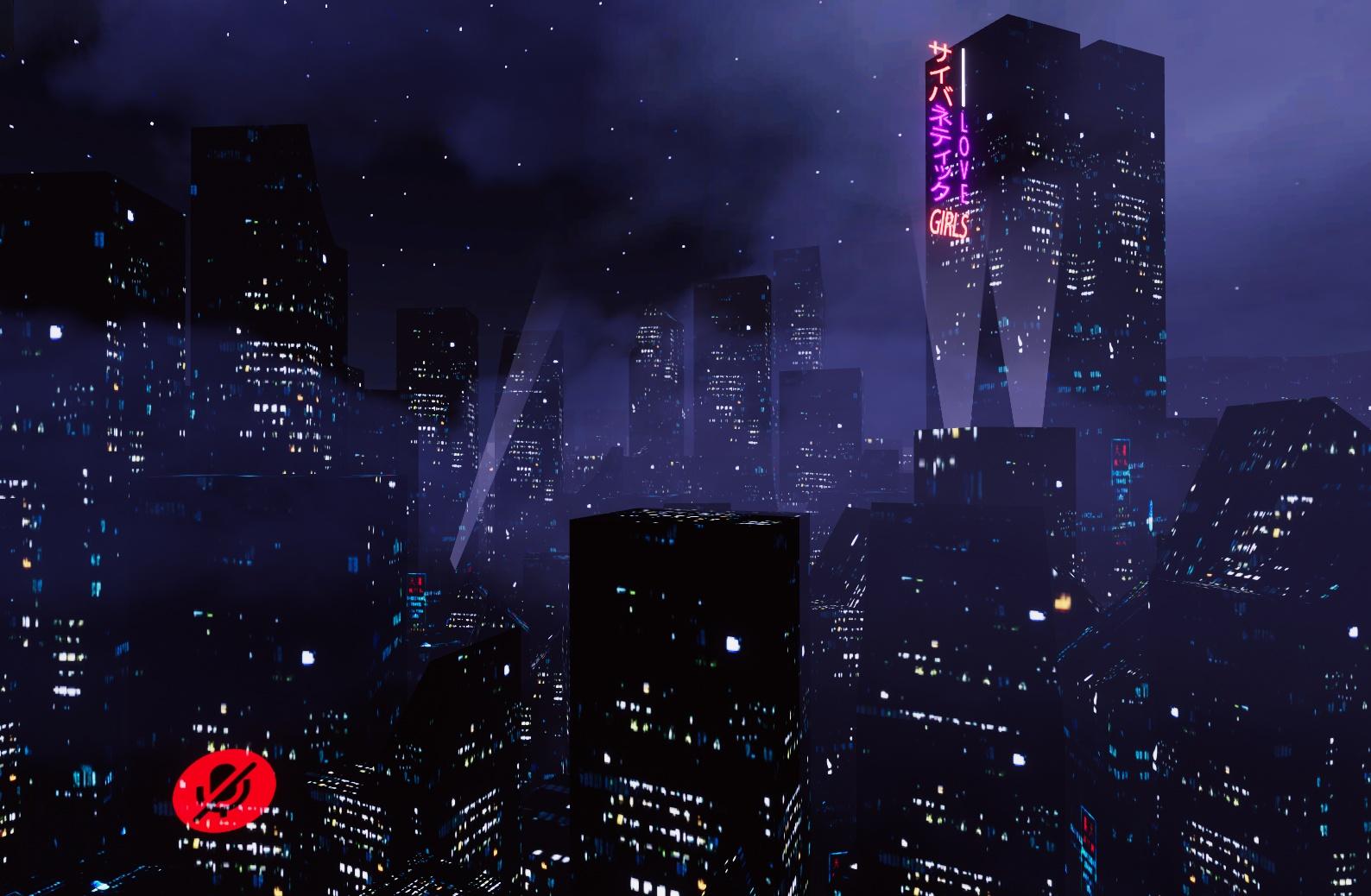
probably a dumb question, but where would I be able to find "filler" buildings like this for outside of an apartment i'm making? https://i.imgur.com/RBSzVDX.jpeg
 random owl
That just looks like the creator took a picture of a night time city with skyscrapers then modelled some simple shapes on top of them and projection mapped the textures from the picture to the cubes
It's not super hard to achieve that effect
 wicked forge
Ui clippin through objects, anyone know a fix for this. I tried changing the sorting layer, didnt work
 random owl
Just enter and exit play mode and it displays correctly, that's just a scene view bug
elfin latch
random owl
That just looks like the creator took a picture of a night time city with skyscr...
aaaa okay thank you!
hexed crest

I don't understand why every time i try and created a new project UdonSharp breaks my VRChat SDK
desert python
are they both the latest versions?
 rain shadow
 urban moth
You likely have your Main Camera or even another camera in your scene that has its depth set higher than 0
So on your camera component settings make sure they all have a depth value of 0
urban moth
well now its showing me the ui but nothing happens when i click upload
rain shadow
Can you screenshot the upload menu
urban moth
 rain shadow
Exit play mode and try build again?
If that doesn't work knowing what errors you have in console will help
urban moth
i uploaded it but when i try to go into the world it just boots me back to my home

dunno how to fix this
pliant dragon
I have the same issue, can someone help lol
rain shadow
urban moth
i uploaded it but when i try to go into the world it just boots me back to my ho...
Make sure the VRCWorld object is placed where you want the player to spawn at
urban moth
ok
rain shadow
and that the objects have collider components on them
urban moth
actually question. does every object have to be in the VRCworld hierarchy?
rain shadow
No you should avoid doing that actually
urban moth
ok that may be the problem
rain shadow
pliant dragon
I have the same issue, can someone help lol
If you are also unable to load into your world can you give more details?
pliant dragon
i created it in the wrong version of unity im pretty sure. then i updated it after loading it in the correct version
bold ibex
the sdk window dont popup for me, its just said cache and something
rain shadow
bold ibex
the sdk window dont popup for me, its just said cache and something
You will need to look in the unity console tab to see what errors are there
bold ibex
i need the Unity 2018.4.21 right?
rain shadow
2018.4.20f1
rain shadow
VRChat
This page lists the current Unity version you should use when creating content for VRChat, as well as links to the correct version for both Unity Hub and direct downloads. Current Unity Version The current Unity version in use by VRChat is Unity 2018.4.20f1. Ensure you are using this precise versio...
There are links here
urban moth
Ok so it's still saying that the pedestals are not being initialised in time and it wants me to add a audio listener
more specifically the trigger
errant beacon
triggers not being initialized in time is a normal SDK2 error, iirc
errant beacon
It shouldn't matter afaik
urban moth
ok
bold ibex
rain shadow
https://docs.vrchat.com/docs/current-unity-version
i did but in hub its not 2018.4.20f1
okay i got it. thanks
how do i publish my world for quest users?
rain shadow
VRChat
Setting up Unity to create Quest content is actually pretty straightforward. This image covers it pretty well: If you're starting a brand new project, this won't take long at all. However, if you're converting a Windows platform project to an Android platform project, you will have to convert your a...
bold ibex
are changes in unity automaticly saved? i mean i dont need to publish the world again
urban moth
quick question: how do i make audio play no matter where you are?
rain shadow
bold ibex
are changes in unity automaticly saved? i mean i dont need to publish the world ...
If you make changes to your scene you will need to save it manually
bold ibex
so publish it again?
rain shadow
You will need to publish again to update the version uploaded to VRChat
rain shadow
urban moth
quick question: how do i make audio play no matter where you are?
On an Audio Source component there is a spacial blend option for 2D > 3D
If you move the slider all the way to 2D it should become audible from everywhere
urban moth
nvm figured it out
harsh wagon
bit of a weird question, but how tough is VRChat on copyright stuff? I've ported an old custom TF2 map but it's loaded with stuff from other IPs
the map itself is based on mario kart, there's a jukebox system that's full of nintendo music, there are billboards and stuff all over the place with all kinds of stuff on them
nothing NSFW or against ToS, just a whole lot of stuff from other IPs
errant beacon
It being copyrighted content from another IP is itself against TOS, specifically TOS sections 12a, 12b, 12d, 12m, and 12o, and likely some other sections as well
Nintendo are infamously protective of their copyright, and they'd def be in their legal right to DMCA you if they caught wind of your world
If the map contains Valve content, that's also an issue, would prob recommend reading through the Steam Subscriber Agreement to see what their stance on that is
also if it's the map I'm thinking of, there's billboards with anime clips and such spread throughout the map, which raises even more companies that can send in a claim against your world
glacial pond
harsh wagon
bit of a weird question, but how tough is VRChat on copyright stuff? I've ported...
If you tell VRChat that you have the rights to upload the content, they will assume you do, unless and until they receive a DMCA claim saying otherwise. At that point they are required to take action to abide by DMCA laws, as VRChat will be blameless.
harsh wagon
errant beacon
also if it's the map I'm thinking of, there's billboards with anime clips and su...
Yeah, that's the one
 glacial pond
I am fairly sure that map is not made by Valve
errant beacon
It's not made by Valve, but it's a TF2 map and so might have Valve content in it (i.e textures and models)
errant beacon
but yeah I definitely wouldn't recommend porting that, that's a legal/DMCA minefield
glacial pond
errant beacon
It's not made by Valve, but it's a TF2 map and so might have Valve content in it...
I would recommend checking with Valves licenses they are usually pretty open and can be used in other steam games. There is a very good chance that content can be freely used in VRChat. I am not entirely sure.
harsh wagon
I'll keep it private for now then, I don't think it's worth the hassle
errant beacon
glacial pond
I would recommend checking with Valves licenses they are usually pretty open and...
The Valve content yeah, but the Nintendo content definitely not
glacial pond
It’s been in Gmod for years and I have don’t remember hearing any problems with it
harsh wagon
Valve's very good about using their assets as long as you don't use them for-profit
it's the nintendo stuff I'm thinking about
glacial pond
If you think it’s fair use, check the checkbox. There’s not much else that can be said. Nintendo will be on you if they 1.) notice 2.) care 3.) disagree
harsh wagon
I mean, it's definitely not a market substitute for any nintendo stuff
errant beacon
even if it's potentially fair use, uploading copyrighted content that you don't have permission to use is against TOS iirc o:
harsh wagon
yeah, that's the thing
I constantly worry that my avatar's going to cause issues at some point
glacial pond
errant beacon
even if it's potentially fair use, uploading copyrighted content that you don't ...
Fair use content is allowed in VRChat
It supersedes needing permission
errant beacon
really don't know if that map constitutes fair use though
glacial pond
If you’re not sure then don’t upload it
idle jolt
Does anyone know how to get two grips on an object you can pick up? I want to be able to make a gun that you can hold in two hands. I’ve seen multiple worlds with it like that one Warhammer world.
harsh wagon
idle jolt
Does anyone know how to get two grips on an object you can pick up? I want to be...
I'm no expert, but if I had to guess there's probably a udon script applied to the gun
there are 2 grips, and the script makes it so that the gun matches the angle between them
I can imagine there's probably a check to see if both grips are being used too, in case someone decides to only hold one of them
and there's probably a thing where if someone lets go of a grip, it reverts to its original position relative to the gun
idle jolt
I found a much more simple tutorial, but for some reason the gun is rotating in reverse
https://youtu.be/Iq-bzeLGrB8
This is the tutorial I found

This is a bad explanation on how to do 2 handed guns, Helloha if you are watching please make a video explaining ._.
And yes the Thumbnail is inspired by M.O.O.N go check out their channel here!
https://www.youtube.com/channel/UC6pqxF0s6FSu6oVm-70lzqQ
 tired bobcat
Hello.
In the world of my seniors, MP4 plays in iwasyncvideoplayer, but not in the iwasyncvideoplayer I set up in my own world.
The youtube is playing.
Is there something I need to set up?
desert python
if its sdk2, i think you need the modified varient of that player that supports mp4s for some reason
if its sdk3, i would just not use the videoplayer
mild spade
idle jolt
Does anyone know how to get two grips on an object you can pick up? I want to be...
Are you talking about holding a gun where with one hand you hold the gun while with the other you aim?
 narrow lantern
didnt really know where else to ask this but: is there a way to transfer the ownership of a world from one user to another?
desert python
no
like you vcan give them the world project folder and just have them upload it. but the ID wont be replaced under their name
kind leaf
Ied image a solution for that is in the market update. Might not be implemented but the potential is there.
idle jolt
mild spade
Are you talking about holding a gun where with one hand you hold the gun while w...
Yes. I’m not at my house right now. I’ll try to message you when I am back.
idle jolt
mild spade
Are you talking about holding a gun where with one hand you hold the gun while w...
Okay I’m finally back home. Do you have a solution? I know I need a Aim Constraint, but again whenever I try to get it to work the gun just flips in the opposite direction.
mild spade
How i did it in my test is I have a second pickup that is not parented to the main gun. I then add an aim constrain to the main gun and put the second pickup as its source

@idle jolt How it looks in Unity
idle jolt
Alright, let me try that and then I’ll see what happens
Might take a bit as my arms are super weak. Had to carry a bunch of stuff, and my left arm got a meningitis shot while the other got a TB Test
 obtuse prism
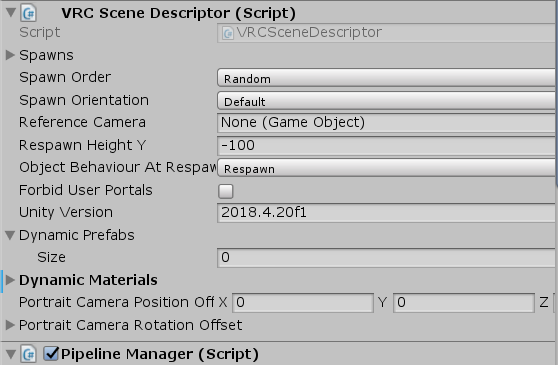
Hi, am big unity and vrc noob, I'm trying to change the voice falloff in my world but I don't see any such options in the scene descriptor like the docs say there should be. https://i.imgur.com/9jAyDgD.png https://docs.vrchat.com/docs/vrc_scenedescriptor
 heavy talon
i have no idea whats going on i suddenly cant upload any more ive tried searching for a fix restarting unity and when i go to upload it says"Last built vrchat scene could not be found please test/compile full scene (slow)" i tried testing and all it does is throw me into my home world.
random owl
So build and test works but build and publish doesn't?
heavy talon
build and test strts vr chat but i just get thrown into my home world
so it doesnt even launch the world i want to test
random owl
That's possibly multiple things wrong then, start by importing this into your project and check VRWorld Toolkit > World Debugger from the top bar and see what it says.
https://github.com/oneVR/VRWorldToolkit
random owl
obtuse prism
Hi, am big unity and vrc noob, I'm trying to change the voice falloff in my worl...
That documentation page is outdated, are you using SDK2 or SDK3?
random owl
In SDK3 you need to use Udon to set the voice values, you can ask about Udon things in #udon-general
hexed crest
desert python
are they both the latest versions?
saw message late ahah, well it was cause last version of udonsharp is reserved to open beta SDK world so i should read more ig ahah
heavy talon
random owl
That's possibly multiple things wrong then, start by importing this into your pr...
allsky seems to be the issue if not ill get back to you
 fast python
Got super sick of my world's music and so did a bunch of others so...
4 new tracks!

Made sure to compress them enough to still sound good but not bloat the world size
As is I believe the world is around 7mb
 vivid brook
Hey guys
I want to animate trees falling over
In my world
Can I do this by just throwing an animator on the trees or on the world?
And then doing the animations like you would do on an avi
rain shadow
vivid brook
Can I do this by just throwing an animator on the trees or on the world?
Yes and it will be the same as how you would do avatar animations with the only difference being how you tell those animations to play
tame reef
untold pewter
Put it on the Mirror Reflection Rendering layer?
Thanks! That was an way easier solution than I expected. XD
vivid belfry
I come again with a burning question.
Is there a limit on bones for world?
We have a limit for avatar's bones but not for the world usage.
rain shadow
vivid belfry
Is there a limit on bones for world?
You wont be limited but you would still want to take performance into consideration
vivid belfry
Ah alright, I’ll do my own benchmark on it, appreciate for the reply.
untold pewter
Better not be making a field of dynamic bone grass
idle jolt
mild spade
<@!239525493030780928> How it looks in Unity
I tried this but Nothing is working…
Let me DM you what I have
rain shadow
idle jolt
I tried this but Nothing is working…
Let me DM you what I have
Constraint components aren't whitelisted for SDK2 so unless you are using SDK3 you will need to use another method
idle jolt
Damn…
rain shadow
If you search for unity standard assets on the asset store it has scripts that are whitelisted for VRChat that would work as a substitute for constraints
idle jolt
Yeah, I just don’t know which script would work…
rain shadow
It has a script called LookatTarget that should work as a substitute for an aim constraint
idle jolt
Nope. Doesn’t work. Needs an object to lock onto
rain shadow
So does an aim constraint? not sure what you mean.
idle jolt
I think I somehow got it working? When I move the grip up the barrel moves up now.
I think all I did was move the grip all the way to the other end
glacial pond
I'm trying to make a Udon chair with a custom pose and I'm confused about this part of the documentation. It says I can add a VRC Animator Tracking Control to my stations' controller. But that's a component that's only available in the SDK3 Avatars package, not the Udon one?
 harsh wagon
glacial pond
I'm trying to make a Udon chair with a custom pose and I'm confused about this p...
harsh wagon
glacial pond
I'm trying to make a Udon chair with a custom pose and I'm confused about this p...
Oh hey, you were just talking to me about this on reddit
glacial pond
harsh wagon
Oh hey, you were just talking to me about this on reddit
Yup. You made me curious how state behaviors work and I dig a little deeper
I can confirm it works as long as you don’t need any state behaviors, though
rain shadow
glacial pond
I'm trying to make a Udon chair with a custom pose and I'm confused about this p...
You can import VRCSDK3A.dll and VRCAnimatorTrackingControlEditor.cs from AVSDK3 Over SDK3Udon to get access to VRC Animator Tracking Control
harsh wagon
I just need legs to be posed for the chair while the upper body moves normally
The part I'm not too sure about it how to set the animation up
Do you think I could just import an avatar and the chair into blender?
glacial pond
rain shadow
You can import VRCSDK3A.dll and VRCAnimatorTrackingControlEditor.cs from AVSDK3 ...
Man that really needs to be in the documentation.
@harsh wagon there you go lol
rain shadow
Can't confirm if it still works but it did a few months ago
glacial pond
I find it weird that the documentation talks about using state behaviors at all if it wouldn’t work
rain shadow
And afaik the person who originally found that was lox9973
That you only needed those two things imported with udon to make it work
glacial pond
Well I assume you were just import both SDKs would be the normal way right
rain shadow
Oh if the current Av3.0 and Udon SDK versions can be imported together without issue I suppose so?
glacial pond
rain shadow
Oh if the current Av3.0 and Udon SDK versions can be imported together without i...
I have no idea.

I do know that modifying the SDK is not allowed though
glacial pond
I’m starting to wonder if it was a conscious choice to not include them by default
Like if it’s not supported behavior right now
But it’s in the documentation so IDK
rain shadow
It does make it seem like an oversight since it's documented
harsh wagon
glacial pond
But it’s in the documentation so IDK
I'm still not quite sure how to set up this animation controller
I've made the animation now, just not sure how it all goes together
vivid brook
rain shadow
Yes and it will be the same as how you would do avatar animations with the only ...
Thank you! What is the difference?
rain shadow
vivid brook
Thank you! What is the difference?
If you are using SDK2 you need to tell the animator what to do with a VRC_Trigger component
By default if you make an animation it will just play without you needing to do anything though.
vivid brook
SDK2 for now
lol basically my SDK3 version is coming and i want to destroy my world for a month
tree's fall, flames on everything
harsh wagon
Alright, so I've made some progress on this chair thing
I've got this weird issue where the interaction highlight shows up even when you're sat in the chair
am I missing something?
rain shadow
harsh wagon
I've got this weird issue where the interaction highlight shows up even when you...
Uncheck this
 idle jolt
Well. It almost worked. For some reason there isn’t a second grip I can hold onto. Everything else with the gun is fine though
It might be I didn’t have trigger checked? I’ll look real quick
No, trigger was checked…
rain shadow
idle jolt
No, trigger was checked…
If you are using the lookat script still make sure auto target player is disabled
idle jolt
Nope, I’m using the aim constraint script
rain shadow
SDK2?
idle jolt
Yup
idle jolt
Well it seems to be working in unity
rain shadow
Yes in unity it will
idle jolt
Then how do I use the look at script?
rain shadow
Should be very similar to the Aim Constraint
Put it on the object and assign a target
rain shadow
How were you using the aim constraint?
idle jolt
I was using the aim constraint so I can hold onto the grip and use that to control where the gun aims
harsh wagon
@glacial pond Got it working
 rain shadow
And on the aim constraint you told it to target the grip right?
idle jolt
Yeah
rain shadow
You would do the same with the LookatTarget then
idle jolt
Okay. Would I change the update type or anything else?
rain shadow
You would likely want these settings
 idle jolt
If I have the X and Y be 0, would that matter?
rain shadow
Yes
idle jolt
Oh. So have it be 360?
rain shadow
That allows you to limit how much it can move
So in your case you could actually set it to a lower value to limit what angle you can hold the gun at
idle jolt
I feel like leaving them at 360 would be the best
Okay, let’s see if this works…
Nope. Worked better with the aim constraints
rain shadow
In what way is it not working or working differently?
idle jolt
It’s pointing at the floor, it’s jittery, and I still can’t select the second grip
rain shadow
Can you screenshot the component?
idle jolt
Hold on

https://gyazo.com/9bdd999404182ee312c249436a463184
Here are the components for the grip
 rain shadow
It should be functioning the same as the aim constraint
idle jolt
No idea
rain shadow
Is the pickup script using a grip or gun position for holding?
idle jolt
For the grip or the gun?
I’m assuming for the grip. It’s using the grip position. Auto hold is yes
rain shadow
Is the LookatTarget on the same gameobject with the pickup script?
rain shadow
I think you would actually want to put the LookatTarget on the object you are using as the gun/grip transform target
rain shadow
Yeah you should try at least
rain shadow
If you are still in the early stages of making your world logic it probably would be a good idea to
idle jolt
The logic was already made. I got the gun from a prefab
rain shadow
Ah right
SDK3 will likely be better as doing more advanced things in SDK2 takes a lot more investment
harsh wagon
Bit of a weird issue with those chairs I made
sometimes, for reasons I don't know, using a chair will teleport other players to that chair
and they can't move or look around
rain shadow
That's an issue with local testing and using the same account
harsh wagon
Oh good, I thought I'd messed up the udon
rain shadow
Yeah if you load into the world with two separate accounts that wont occur
 remote hare
idk were to put this but does anyone know were i could find the pool table for my world
rain shadow
remote hare
idk were to put this but does anyone know were i could find the pool table for m...
Are you using SDK2 or SDK3?
remote hare
sdk3
rain shadow

GitHub
1.2.0! Given the changes in this release with regards to prefab structure and new features, this release has been upgraded from 1.1.8 to a full 1.2.0 release.
Performance improvments provided by V...
remote hare
thank you
harsh wagon
@rain shadow I've got a weird issue with these chair overrides
For some reason, some avatars can't use the chairs
rain shadow
harsh wagon
For some reason, some avatars can't use the chairs
Can't enter them or another issue?
harsh wagon
rain shadow
Can't enter them or another issue?
there's a split second where it does the pre-sitting animation
and then they just stand up again
rain shadow
Are you able to tell if the difference is from avatars being 2.0 or 3.0?
harsh wagon
Uh, I guess I could check for the old emotes menu
harsh wagon
rain shadow
Are you able to tell if the difference is from avatars being 2.0 or 3.0?
Yeah, it's only on 2.0 avatars
rain shadow
Likely would need to do something with this

I have not gone this far with stations yet though
So can't really offer guidance with it
idle jolt
Oh no…
I can’t switch from sdk2 to 3…
The scripts are really messed up…
rain shadow
Switching is not supported you would want to make a new project for SDK3
idle jolt
Fuck me…
Oh god everything is messed up…
I tried switching back to SDK2…
Please don’t tell me I screwed myself…
rain shadow
Should be fixable but you will need to go to Edit>Project Settings>Player>Other Settings and find the scripting define symbols and remove any reference to udon there
rain shadow
You could try change the look at target script from fixed update to late update which could potentially make it work
But based on what you said was happening I'm not sure
idle jolt
Well my question is that if I move the grip should the gun move with it?
rain shadow
Yeah
idle jolt
Well that should get me somewhere. Whenever I move the grip the gun doesn’t follow it
In unity
Maybe I have a component on the grip that I don’t need?
What do you have on yours?
 bitter idol
harsh wagon
bit of a weird question, but how tough is VRChat on copyright stuff? I've ported...
bitter idol
harsh wagon
bit of a weird question, but how tough is VRChat on copyright stuff? I've ported...
literally nobody cares unless you try to recreate a copyrighted game (like the person who got in trouble for making the vrchat beat saber clone)
glacial pond
Even so, it's not VRChat being tough, it's the copyright holder filing a DMCA. VRChat doesn't monitor content for copyright. They just respond to DMCA claims.
And as long as we continue to be allowed to have nice things, that's how it can stay. Don't abuse it!
fast python
My world got over 10k visits! Should I add something to celebrate or just keep it lowkey?
 near escarp
You can definitely celebrate with updated content yeah
 dull sleet
where can i find a world template ready for upload
near escarp

3D assets for VRChat world building.VRChat Pub Bar World The Corner Pocket Udon(¥ 1,500), LA Style Mansion and Home Props made for VRChat(¥ 1,500), Comfy Small Avatar World with Bean Bag Chairs(¥ 1,000), Cliffside Modern Home VRChat Udon World(¥ 1,000), SGB Free Furniture Pack(¥ 0), Cozy Cave VRChat
mossy vortex
hate to ask but is there any free 3.0 world prefabs just to be used as a sleep/ memory/ hangout world-
doesnt have to be crazy big but anything helps
unless yall think this can work, i just need sources for free vrc furniture then-: https://spookyghostboo.booth.pm/items/2682062

Circular Room and Props designed for VRChat. Includes shelves for avatars and 18 prefab props. Package comes with original blender files, exported fbx files, raw 2k textures, and unity package including the world. Props included are: a bookshelf with props, two tables, two ceiling lights, a wall
green lagoon

Free furniture pack by spookyghostboo. Furniture includes living room space, dining room space, and bedroom space. A variety of assets include, a bed, plants, lights, sofas, tables, tv stand, dressers, desk, night stands, and more. Originally modeled in blender. Package includes exported fbx files

The Interior and Furniture pack is a collection of assets from several past builds and worlds from Spookyghostboo. Assets includes a variety of couches, plants, bean bag chairs, beds, lamps, tables, bathroom props, and restaurant props. Models are good for building houses and restaurants and were
surreal nebula
anytime I wanted a collider to not collide with player, I'd set it as trigger. I'm guessing this is wrong and wondering how it's suppose to be done
random owl
You should put it on a layer that doesn't collide with the player then there's no collision checks happening
surreal nebula
so 17: walkthrough? I also seen some collider grid-like component people use and curious about it
random owl
Will show you what any given layer collides with
And allows you to set up your own layers with specific collisions
elfin latch
https://i.imgur.com/fy9bOjr.jpeg Why is my circular terrain painting brush making a square?
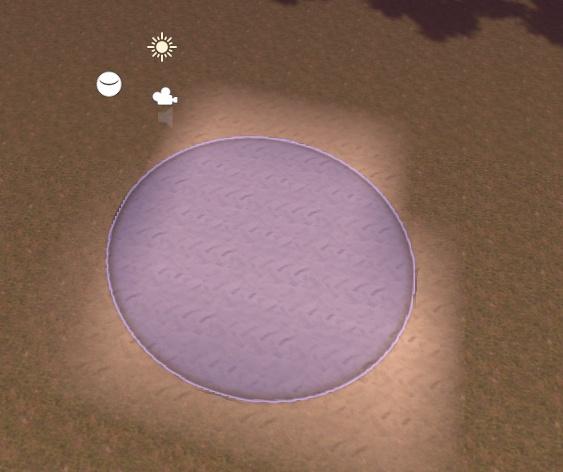 near escarp
Terrain resolution ?
cold hound
I'm trying to debug a bug that is only happening on VRC, and the VRChat terminal is not working i'm just changing avatar, and the --enable-debug-gui --enable-sdk-log-levels --enable-udon-debug-logging are all on
i don't understand why i'm getting that bug
Any ideas?
near escarp
An explanation of what your bug is would help us
cold hound
So i'm doing a
EventFromUdon.SendCustomNetworkEvent(VRC.Udon.Common.Interfaces.NetworkEventTarget.All, "OnInteract");
EventFromUdon is a different Udon Script and the OnInteract exist on that code
The thing is this was working yesterday
And i just did some test with the udon sharp terminal
and

That's what i'm getting
near escarp
ah if it's udon then better ask in #udon-general
 minor veldt
any clue how to make pickups just float? ive tried to remove gravity and velocity is set to 0 but it spins
minor veldt
Ooh ty!
bold ibex
Does anyone have any idea what version of unity we will be upgrading to once we do the move to 2019? Id love to start planning for it!
I heard there is a way to join a beta version so I could start messing with it but couldnt find anything unless that info was incorrect and we just have to wait till release. Just trying to be proactive
rain shadow
They don't give a specific version until the actual release as it's highly likely to change if they are waiting on bug fixes from Unity
And there is no open beta available yet
bold ibex
Ah gotcha, thanks for letting me know ^^
elfin latch
near escarp
Terrain resolution ?
what's the optimal terrain res?
harsh wagon
@rain shadow Remember the other day I was messing with animators?
Apparently I broke something, because now even the default sitting animator doesn't work correctly
elfin latch
also, the paint texture is reverting somehow. I paint the terrain with the sand texture, save and upload but whenever i close unity it reverts / won't upload with the sand texture on the terrain. anybody know how to fix?
near escarp
I don't use terrain myself so I'm not sure, there's probably a documentation for that on Unity's side
 gleaming terrace
I had to reset my windows, its uninstalled stuff like visual studio, and now when I open a project its says missing a bunch of stuff when I reinstalled it
 sour coral
Is there any way that I can use animator layer control in animator controller with udon sdk?
I can import avatar3.0 sdk but then build & test(local) breaks, publish works fine
elfin latch
near escarp
I don't use terrain myself so I'm not sure, there's probably a documentation for...
I'm finding myself pretty frustrated with how unoptimized terrain seems to be for VRC... what would you personally suggest in place of it for an outdoor build where I'd need grass / plants, a plane with mesh trees and bushes added or am I better off just avoiding outdoor worlds all together? I'm trying to figure out how people make it work but i'm stumped
near escarp
I can only think of a single large world using terrain for that and it's https://youtu.be/_07pjXbyFCY

Primal Valley is a Norse-themed RPG-like VRChat world where you can fight with the wild beasts and creatures‚ interact with NPCs‚ complete the quests or just chill surrounded by the beautiful nature․ Coming soon! Stay tuned at:
https://twitter.com/XeverianVR
https://discordapp.com/invite/TmYZuBB
Support the world creation:
https://www.patreon.c...
But generally there's too many hurdles
What are you trying to make an outdoor for ?
Usually people try to make forest or mountains for no good reason, scaling back and making it more interesting is the better choice imo
elfin latch
really wanting to make an outdoor based world like this with a small house, but the terrain aspect seems to be too taxing on fps and i'm not sure how these worlds achieve good fps tbh
 harsh wagon
How would I go about adding buoyancy to a world? I'm making a pool map, so I want to add inflatables and stuff that float like they should.

 short gulch
I don't think VRC supports FMOD, right?
unkempt turtle
correct unity version?
dull sleet
2018.4.20f1
unkempt turtle
and you really dont have fmod imported?
dull sleet
i dont even know what that is XD
unkempt turtle
which folders do you have in your asset window?
dull sleet
what do i need to click im already in assets
unkempt turtle
i meant that asset window at the bottom
 dull sleet
i set my player spawn to 1 and now it works idk how it got set to 0 but im ok now thx for the help
well shit

 marble temple
what would be the recommended method of making maps with custom modeled geometry?
for example would having a small building with a separate lower poly collision mesh work fine
 frosty lava
@stray sand oh no ! what have you done jetdog ! you killed the only game I didn't get tired ! + you add quest X.X this is the end of a good game.. I'm feel sad now
 stray sand
frosty lava
<@!177222201567608832> oh no ! what have you done jetdog ! you killed the only g...
stray sand
frosty lava
<@!177222201567608832> oh no ! what have you done jetdog ! you killed the only g...
what do you think killed the game?
frosty lava
"Freeze Tag"
no hiding system, really complex thing (too much configuration than before + too difficult for someone who don't understand english)
stray sand
frosty lava
no hiding system, really complex thing (too much configuration than before + too...
the next map i plan on making more enclosed. options is something ive always wanted to give people. i can agree on trying to make it more user friendly.
frosty lava
is it possible for you to create old world with the old freeze tag ?
stray sand
frosty lava
is it possible for you to create old world with the old freeze tag ?
i dont have plans on reuploading the old version but i have thought about for the third map doing a classic map remaking the old layout from the previous version.
bold ibex
How do I download/import probuilder-?
 spring temple
Can someone explain to me the wizardry on how people are getting video players to work on quest?
frosty lava
😭 Everyday there is someone on a public freeze tag instance (everyday for a PC only game)
and now this is the end of all of this...
now we will end up with tons of infamous 9yo children and a complex world (than a single start button)
it's going to be hard to find another game that will not be bored
kind leaf
elfin latch
really wanting to make an outdoor based world like this with a small house, but ...
You use terrain like normal, maybe set the terrain resolution as low as you can tolerate, bake with Bakery NOT UNITY, Unity 2018 struggles with terrain. This was apparently fixed in 2020 but we only get 2019 because we are special :P. Anyway, Bakery. Invest. And you make it less taxing with setting up Occlusion culling (I use default settings with a 50% tolerance on back face). The second struggle is detail, stick with flat image grass,trees,rocks using billboard to increase performance. Solid objects will only add undesired high poly. And absolutely use no realtime lights. You are working with a terrain which have 100k-80m poly depending on how much you manipulate it. each realtime light, reflection, shadow, multiplies those poly. If realtime lighting is a must, set up a toggle at the start for it. Can back shadows, and then disable all shadows before uploading to boost performance while having "shadows" as well. Either way, terrain is more work, not always worth it, but do-able.
Can also setup the player area without terrain, disable it; build the terrain as beautiful and taxing as you want, add your skybox, mark all as static, place a reflection probe in the middle at 4k resolution and bake yourself a bad ass skybox that makes it look like you have some serious terrain in the world.
 vague remnant
So I guess this is where to ask about world development and such? If not, my apologies, I don't really see a place to ask about things like that
kind leaf
vague remnant
Yep, this is my destination then, I also don't see where to get ideas on stuff to import into my Unity for such, would love some recommendations on free assets, I'm pretty new to this, so I'd definitely love the help
kind leaf
vague remnant
Aye aye
kind leaf
the link is here somewhere or in udonsharp i dunno; its great.
vague remnant
Both? Both. Both is good
kind leaf
yep, you'll find sdk2 &3 prefabs, tutorials, shaders, tools, everything you need from that doc.
vague remnant
Much appreciated, I'm using SDK3, so it seems some of the stuff I -would- need would be SDK2, but since it's depreciated... yeah XP
kind leaf
For most of the stuff you have come to expect in an sdk2 world, you will find the sdk3 prefabs as well.
vague remnant
Ah, good to know, but what irks me is objects don't get proper collisions while Rigidbody'd, do people just live with that?
kind leaf
I don't deal with a lot of stuff that requires great physics. Sometimes you have to script your own; you can also adjust the physics settings in unity.
green lagoon
most of the time just slap a box collider on it is sufficient
vague remnant
Tried, and the guides are about as clear as a brick
vague remnant
Well, I was just hoping to get objects to be able to interrupt the player's trajectory as one would expect, kinda like how a block in Minecraft forces you to jump XP
green lagoon
yeah that's not going to happen
vague remnant
Didn't think so, I guess unless Rigidbody isn't used?
green lagoon
mostly that has like nausea implications being able to stop a avatar with a portable rigid body
vague remnant
Or move the block as you move, like pushing
kind leaf
well, maybe. VRC has a physical update coming that could change that. Until then you can use an object pool to spawn an invisible collider at your feet upon entering the world. and use the colliders state to.... still can't access the players controllers so your choices are hacky at best.
green lagoon
and even the Avatar hand Dynamic stuff isn't probably going to have anything resembling like resistance so it feels like you're pushing a big heavy block instead of Styrofoam
vague remnant
Guess living with ghost objects is acceptable, just wanted something like this because of the UdonExampleWorld scene, where the block flies at you and makes impact and is stopped by you, fair enough
Was gonna have fun knocking chairs over XD
Show Unity what I think of its Ikea shopping XP
late ruin
any good skyboxes?
kind leaf
if you want to hit stuff you have an invisible object follow you. thats how you collide with a chair tho hit it and move it. Can use bones as well but bones are not universal a hand is unless someone is in a weird avatar
green lagoon
late ruin
any good skyboxes?
 late ruin
green lagoon
https://hdrihaven.com/
late ruin
green lagoon
https://hdrihaven.com/

vague remnant
I meant to ask, but if I get prompted to replace stuff, should I? Or no?
kind leaf
can you clarify the scenario?
green lagoon
late ruin
<:vrcWOAH:585749770463608861>
https://docs.unity3d.com/Manual/shader-skybox-panoramic.html the type of Skybox Shader you used to go with those textures
 vague remnant
Like, the Udon# I got from GitHub, when I dragged the folders to my project folder, I got a prompt asking if I wanted to replace stuff
kind leaf
maybe. Just use the Unityproject file and drag it into your open project, not the project directory.
vague remnant
I don't see "UnityProject"
kind leaf
like, you are looking at your project open in unity. at the bottom you see project and console. click project. then download usharp.unitypackage and just drag n drop into project.
vague remnant
Oh
kind leaf
its not actually named usharp.unitypackage but you get the idea. its a .unitypackage though
vague remnant
Aye, I think Unity's handling that for me, I think
late ruin
green lagoon
https://docs.unity3d.com/Manual/shader-skybox-panoramic.html the type of Skybox...
do i have to use a shader or something im confused
green lagoon
yes one of the provided shaders
late ruin
green lagoon
https://docs.unity3d.com/Manual/shader-skybox-panoramic.html the type of Skybox...
 green lagoon
you need to make a material first
kind leaf
Don't forget to backup your projects before importing stuff. Everyone forgets or ignores it until the worst happens. Unity projects get backed up by 1) working off the cloud. 2) zip.
green lagoon
but I doubt in HDR is going to kill your project
vague remnant
Alright, probs gonna terminate this project as it stands, not save, and reload
kind leaf
unity saves on import. Terminating usually just corrupts what isnt broken.
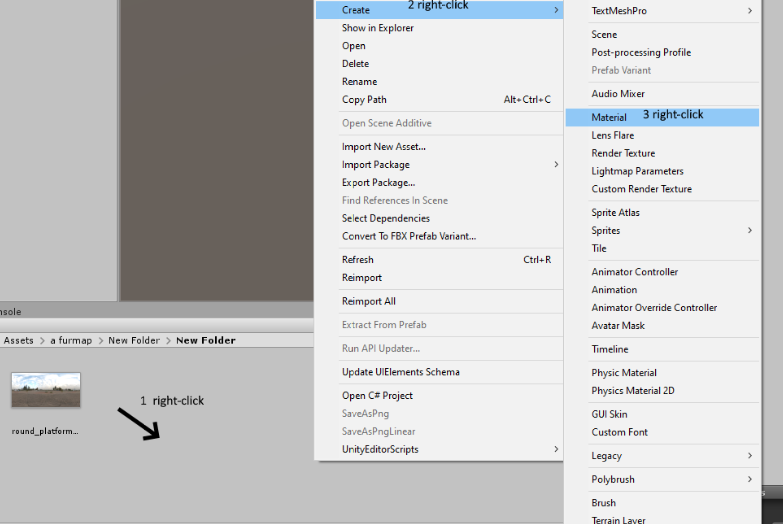
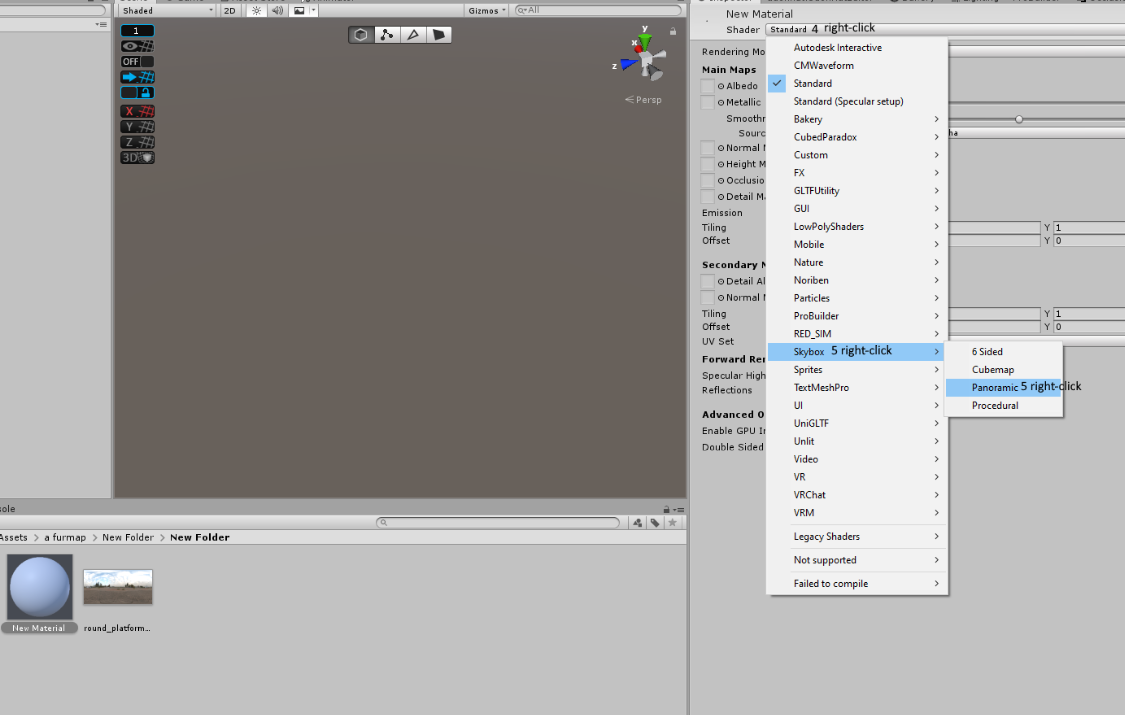


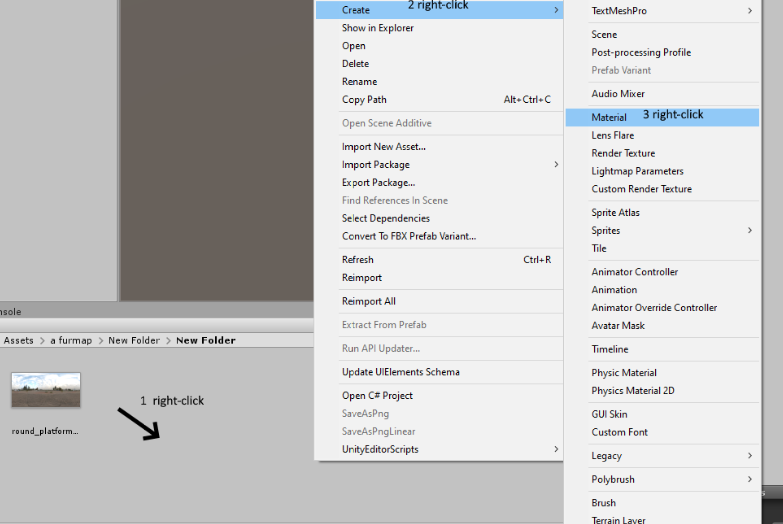
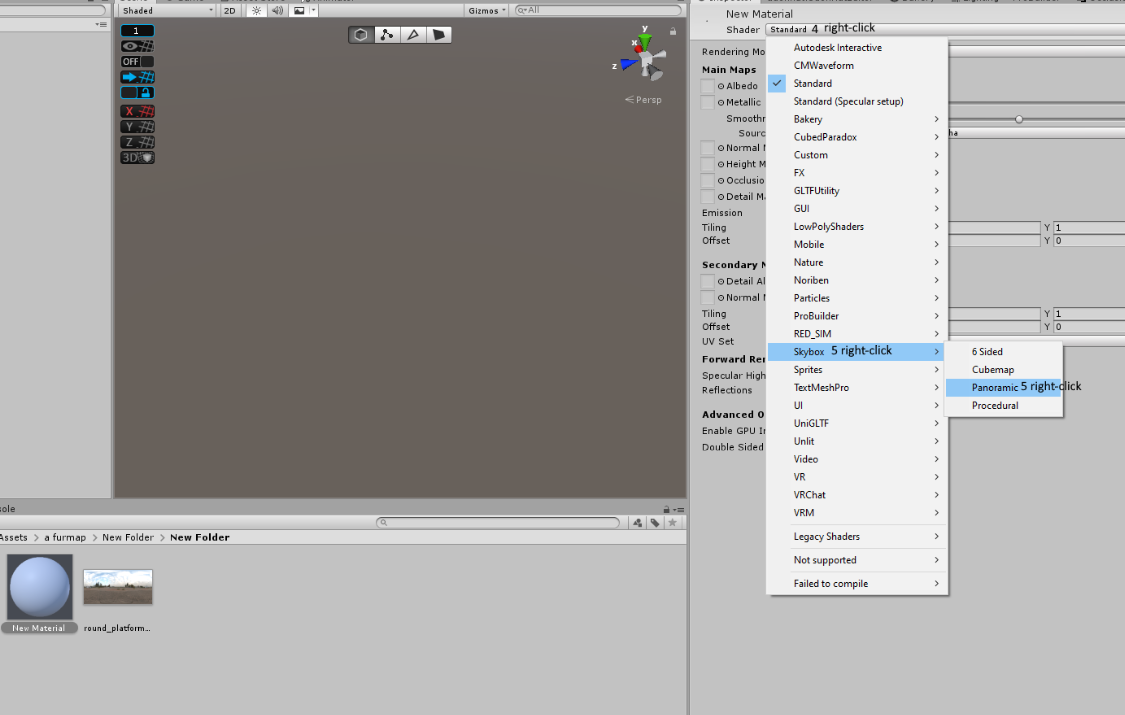 vague remnant
Well, kinda messed up, U# was a DO NOT REPLACE type deal, no biggie, didn't really make progress in the last week or two I was at this for
kind leaf
Yeah when you import the .unitypackage its never required a replace for me. But thats something you do at the start of a project usually. I import sdk and the u# before anything.
late ruin
green lagoon
https://i.gyazo.com/019023545ce5d56d8ccc7978c8c353e2.png
thank you!
vague remnant
Probably because I didn't import the package like an idiot XP
green lagoon
late ruin
thank you!
glad to be of help figured you're probably new to this stuff
 silent furnace
Getting an error message in the SDK.... is there some new size limit for worlds?
 vague remnant
But yes, thanks for the help
vague remnant
silent furnace
Getting an error message in the SDK.... is there some new size limit for worlds?
Seems that way, but I've seen worlds upwards of 100mb
kind leaf
50mb posted in the message 🙂 for quest only
silent furnace
ok I'll ignore it. This world isn't quest.
vague remnant
Ah
late ruin
green lagoon
glad to be of help figured you're probably new to this stuff
yeah ive made a few avatars and this is my second world
silent furnace
Largest world I've been in is 2 gb
vague remnant
Oof
kind leaf
Problem is, that message is a halt on error upload kill switch lol. if you are getting that message it is probably terminating your upload. Not an error you should be receiving in windows builds.
silent furnace
strange. it's the first time I've seen that on the windows side
green lagoon
silent furnace
Largest world I've been in is 2 gb
what was it I'm curious to command such a big space considering that's one-third of Skyrim
kind leaf
😛
silent furnace
I think it was a very realistic jungle world
silent furnace
it was a bit insane, I haven't gone back to it due to how long it takes to laod
Right now I'm struggling to figure out how I can add 'buttons' to trigger a specific url on the video player. Having a seperate video player for every URL does not seem like the right way to go about it.
green lagoon
my mistake like half the size of Skyrim as the 360 version was only 4 gigabytes
kind leaf
What video player?
vague remnant
Ooh, I like big worlds
kind leaf
Actually, shouldnt matter:
to set the link from a button you setup a script that gets the script from the video player seturl function and gets the loadurl function. then you just have your button trigger an event that sets the url.
this is my button playlist script. the isOwner part probably isnt necessary
using VRC.SDKBase;
using VRC.Udon.Common.Interfaces;
using VRC.Udon;

public class KaraokeNorixMod : UdonSharpBehaviour
{
    public VideoController videoController;
    public VideoPlayerPanel videoPlayerPanel;
    //public VRCUrlInputField KaraokeURLField;
    public VRCUrl karaokeLink;
    public string songName;
    public Text txt;
    private VRCPlayerApi player;

    private void Start()
    {
        txt.text = songName;
        player = Networking.LocalPlayer;
    }

    public void Karaoke()
    {
        if (Networking.IsOwner(gameObject))
        {
            //videoPlayerPanel.URLField.SetUrl(KaraokeURLField.GetUrl());
            videoPlayerPanel.URLField.SetUrl(karaokeLink);
            SendCustomNetworkEvent(NetworkEventTarget.All, "SetUrl");
        }
        else Networking.SetOwner(player, gameObject);
    }

    public void SetUrl()
    {
        videoPlayerPanel.LoadUrl();
    }
}
works for NorisWolfe
You just attach the script to the button, link the controller and panel and the text, and input the link + song name on the script in the inspector where requested. the button handles the text on runtime.
silent furnace
I could give that a shot thanks
kind leaf
sure, if you have any issues msg me direct ill send screenshots. I have it up in like 4-5 worlds so I know its functional.
silent furnace
its getting a compile error, User type KaraokeNorixMod could not be found
honest scarab
why does my world mirror shows particle systems behind the building or the room i built in the sky box?
kind leaf
because the particles are using the same layers that are permitted in the mirror. You can change them to a layer not permitted. To see what your mirror is looking for inspect it in the editor. Then just put your particles on a layer not highlighted on the mirror.
honest scarab
not only particles but like even vrc avatar blue crystal appears behind
kind leaf
it's all layers; if the mirror is permitted to see it the mirror will over any distance.
honest scarab
ah kinda confused so how do i fix it like is it problem with mirror settings or world?
kind leaf
mirror setting. any layer in blue is visible. If you dont want something seen in the mirror change its layer or uncheck it from this list

"reflective layers"
honest scarab
ye i unchecked everything exept few still cant get it to render over buildings
trying turning on everything or only few but nothng
both particles and buildings are in default layer tho
honest scarab
ah i c
fast python
Got a weird problem with my world
For some reason when I spawn in I can't move my hands and no animations on my avatar play for like 30 seconds
Needless to say this is very annoying
vague remnant
It happens, even in actual VRC, all you can do is wait or retry....
I've been having this issue too, even in public worlds
fast python
It only started doing this after I updated it yesterday
Should I just try to upload it again but with the latest SDK?
vague remnant
Huh.... and that kinda depends, which SDV variant are you using? 2 or 3?
fast python
3
vague remnant
Probably? Kinda hard to say, I'm just beginning myself, really
So I'm of little to no use, one of the pros might know better than me
fast python
@near escarp got a sec?
rain shadow
Some good things to know is if it is consistently happening or only sometimes and when you first had this happen
fast python
Happens whenever I load into my world for about 30 seconds
I have it set to my home world
rain shadow
So occurs every time you load in?
fast python
Seems so yes
rain shadow
When did it start occurring?
fast python
Yesterday
rain shadow
World ID?
vague remnant
I've noticed it for the last few times I played VRC, which was about a week including time I wasn't on... sometimes
rain shadow
@fast python Also is it only in VR or desktop too?
fast python
So far I've only seen it happen in Oculus Quest
vague remnant
I experience it on Desktop has a budget Amazon gaming rig that doesn’t support VR, nor does he have a VR Kit, wants Vive
fast python
I know some other Quest worlds like Just B Club have this issue
vague remnant
Aye
fast python
I just updated the world's SDK and am re-uploading it
spring temple
So VR pianos exists 😮
vague remnant
Saw, unusable for desktop XD
spring temple
ooof