#world-development
39 messages · Page 83 of 1
 quaint creek
 fast python
I uploaded my first world to labs and within 30 seconds had 6 visitors
VRC algorithm go brr
fast python
So got a question
I want a completely black skybox, but want to keep the lighting of the default skybox
How do I do this
 worn elk
Is there currently a way to implement a third person camera on Udon worlds? A friend of mine had one, but they are not on Udon yet. The only tutorials I can find seem to be for a third person camera on avatars
 near escarp
fast python
How do I do this
near escarp
fast python
How do I do this
Flipped normals sphere with a black texture
fast python
near escarp
Flipped normals sphere with a black texture
I did that but in the optimized mirror it still shows the default skybox
 random owl
Move the sphere to a layer that the optimised mirror can see
random owl
https://docs.unity3d.com/2018.4/Documentation/Manual/Layers.html
For VRChat you can't change the layers VRChat has setup for you but anything after 21 you can name and use for your own things if the default layers don't serve the purpose you want
And the mirror component itself has the selector to set which layers are visible

 eternal summit
how do i set mirrors off when spawing into world
random owl
You just turn off the gameobject in editor
eternal summit
like in vr trigger script
random owl
You just turn the gameobject off
 eternal summit
thank you
fast python
Also I have another question
How can you set up a mirror toggle button?
I have the mirror and buttons in my scene
fast python
I don't get this stuff

I set it up like this but the button does nothing in game
Like I can't even interact with it
random owl
#udon-general for getting help with Udon, and I don't see you having a collider on that gameobject.
fast python
That would probably explain that
quaint creek
Hey all dose anyone know how to stop my texture from stretching when i put it on my walls and floors
please @ me
fast python
Made some spiffy buttons for mirrors and music. Getting the hang of this stuff now!
 random owl
I love how you differentiate the LQ and HQ mirror looks very personal compared to most people's first world with just unity cubes for buttons
 green lagoon
I know that's so cute and it visually demonstrates what it does
fast python
Thanks haha. Now just gotta figure out how to make them have a click sound when activated
green lagoon
that I don't know off the top of my head but it's doable
fast python
Yeah a friend of mine has that in his world and he collabed the world with me, so may just have to take a peek 👀
 bold ibex
Good choice, but it seems that this is not suitable for my map,my map uses Lura'sSwitch to control the mirror
fast python
If you look in the Udon help channel, you can see my pain in setting these up 😅
 fast python
Ohh yeah I've seen a lot of worlds that use those
Mine are fully custom (model, texture, udon) so I have a little more freedom I guess
Also how long does labs last?
In it's first 6 hours it has had over 200 visits and 4 favorites
bold ibex
I think we might need more visits or collections. My map has 155 visits and 9 collections so far, as you know, sometimes people will only see the latest map of the laboratory
bold ibex
I'm going to you're map it's good
near escarp
Very simple to do audio on click
bold ibex
Yes, you only need to put your content here to use

But it seems that most maps use these
fast python
near escarp
Very simple to do audio on click
How do you do it?

 tardy ridge
fast python
Made some spiffy buttons for mirrors and music. Getting the hang of this stuff n...
tardy ridge
fast python
Made some spiffy buttons for mirrors and music. Getting the hang of this stuff n...
They looks lovely awwww 0w0
tardy ridge
bold ibex
Aww that's beautiful
Btw I've seen many worlds have this button set, may I ask where to get this button set? I mean the middle one that adjust the lightness.
😅
tardy ridge
fast python
How do you do it?
Hi there, i love your button design, If you don't mind we can friend each other discord and I can show you how to do audio on click, Or any other fancy stuff you may interestes. UwU,
❤️
fast python
Sure, but I'm about to get to bed though
bold ibex
tardy ridge
Aww that's beautiful
You can going to booth and search VRC_Starterkit
fast python
It's close to 5 AM for me
tardy ridge
Omg that's in starter kit?
bold ibex
Yes
tardy ridge
fast python
It's close to 5 AM for me
Ouch, go to bed already, sleeping too late is bad for puro's health xD.
fast python
I am aware -w-
bold ibex
tardy ridge
😂
 tardy ridge
@fast python I've sent you friend request, take a good rest and talk to you later. UwU
near escarp
fast python
How do you do it?
SDK2 or SDK3 ?
bold ibex
But Ruuubick, do you know how to solve this problem? My VRCCam doesn’t match the light effect of my map.,i don’t seem to find anything wrong
 near escarp
It's not the reference camera for the post processing
 near escarp
yeah
 lost roost
how does one fix this
near escarp
probably want to delete the post processing folder
 tawdry dew
I put a hot tub in my world but dont know how to add water in it, can anyone point me in the right direction?
near escarp
you'd need to make a piece of flat mesh inside the hot tub, and apply a water shader on it
you can easily make a plane and scale it so that it fits
bold ibex
near escarp
It's not the reference camera for the post processing
Where should I put it?
near escarp
Your VRCCam also needs the post processing stack, same as your reference camera
tawdry dew
near escarp
you'd need to make a piece of flat mesh inside the hot tub, and apply a water sh...
Okay, I will try this, thank you!
bold ibex
near escarp
Your VRCCam also needs the post processing stack, same as your reference camera
I solved this problem myself, but thank you for your help
tawdry dew
I got an error message when I went build & publish, then unity closed, and when I re-opened it, there was no longer a control panel. Yikes. I wonder what happened. Anyone know?


 gaunt minnow
How do i keep pickups from being taken outside of a certain room?
 cursive seal
I dont know how simple this is, but I have a question. Is it possible to have a trigger in world toggle the emission setting on a material? If not, is there a way to have a trigger replace one material for another on all objects with that material (replacing the one with the emission with the one without)?
 leaden hazel
cursive seal
I dont know how simple this is, but I have a question. Is it possible to have a ...
leaden hazel
cursive seal
I dont know how simple this is, but I have a question. Is it possible to have a ...
You could use an animator and animation which you then set off using a simple parameter toggle from Udon.
I'm doing this in a world I'm building right now as part of an animated lighting sequence triggered when the player presses a control.
cursive seal
Well, My world is still SDK2
leaden hazel
Oh well, I don't know, I've never touched SDK2
Sorry about that. I don't know what is and isn't possible with triggers.
I was thinking trigger as in the more generic sense of something being triggered via some method :X
 idle jolt
I have an audio source in my world for music, but whenever I turn around the music gets quieter. I have the spacial blend set to 3D. Should I set it to 2D instead?
idle jolt
gaunt minnow
How do i keep pickups from being taken outside of a certain room?
Maybe try setting up invisible walls that players can pass through but objects cannot? That, or have the wall have a trigger where if it detects an object it’ll respawn said object.
leaden hazel
idle jolt
I have an audio source in my world for music, but whenever I turn around the mus...
Yes, music and such should be 2D unless its diegetic (appearing to come from an audio source in world such as a music player, instrument, speakers, etc) or its very encompassing (like background music in a shopping centre which you can't go outside from so its pumped in equally everywhere from many speakers)
idle jolt
Alright, that’s for the tip
fast python
near escarp
SDK2 or SDK3 ?
SDK3
 brisk spear
hey guys anyone know why i am unable to build and test when i build for windows or android it works fine but when i try to just test it doesn't work any one know why?
fast python
near escarp
Nevermind then, a bit complicated
I can think of a way, but it would require timing which I don't know how to do with Udon
near escarp
(Sorry, accidentally recorded this one in 1080p, whoops)
Two of my oldest videos, Contextual Buttons and and Door Animations, have both grown rather outdated, so I've combined the two into a brand new video to go over them!
Full Tutorial Playlist:
https://youtube.com/playlist?list=PLwEtUGCdQX7HMkFCVxiNvO4DS2CmHWbe6
00:00 - Intro
00:42 - Animat...
 unkempt mauve
The VR World Toolkit isn't working in my project.
near escarp
Are you using the latest SDK ?
unkempt mauve
yes
near escarp
What are the errors in your console ?
unkempt mauve
alot of different ones
near escarp
Screenshot ?
unkempt mauve
near escarp
Screenshot ?
 worn elk
Is there currently a way to implement a third person camera on Udon worlds? A friend of mine had one, but they are not on Udon yet. The only tutorials I can find seem to be for a third person camera on avatars
near escarp
@unkempt mauve
 idle jolt
Do animated objects not have a mesh collider, or did I just put it on incorrectly?
near escarp
What are you trying to do ?
idle jolt
I want to be able to climb on top of a moving truck. Should I just put a teleporter connected to the truck and the end point on top of the truck?
near escarp
Ah, moving colliders can't really move the player that way, so not sure how you'd do it
idle jolt
Ah...
Maybe I could get rid of the animation then. They’re not traditional trucks. They’re from Star Wars and hover. Think it’d look okay if they were stationary?
near escarp
You could make an animation for them to hover up and down/side to side slightly, and have a separate collider that doesn't move
 amber heart
So random question that I feel is a easy fix. I don't know what this error is
 unkempt mauve
@random owl When I use the VRWorld Toolkit v1.11.2, it doesn't give me the option to use the World Debugger.
was it taken out?
near escarp
amber heart
So random question that I feel is a easy fix. I don't know what this error is
GitHub
Unity Editor extension for making VRChat worlds. Contribute to oneVR/VRWorldToolkit development by creating an account on GitHub.
near escarp
unkempt mauve
was it taken out?
You have no more console errors ?
idle jolt
near escarp
https://github.com/oneVR/VRWorldToolkit/wiki/Fixing-Build-Problems
Does it let you test triggers in unity and other stuff?
near escarp
That's cyanemu
GitHub
CyanEmu is a VRChat client emulator in Unity. Includes a player controller with interact system. Works with SDK2 and SDK3. - CyanLaser/CyanEmu
idle jolt
That’s what it’s called
Okay thank you
unkempt mauve
near escarp
You have no more console errors ?
nope
idle jolt
I meant to download it but I forgot
near escarp
unkempt mauve
nope
Can you show the whole unity screen with the toolkit opened ?
unkempt mauve
@near escarp
 amber heart
near escarp
https://github.com/oneVR/VRWorldToolkit/wiki/Fixing-Build-Problems
amber heart
near escarp
https://github.com/oneVR/VRWorldToolkit/wiki/Fixing-Build-Problems
Does this apply to sdk3?
I am not using Udon but just the sdk
near escarp
Udon is the sdk
amber heart
well I mean like none of the technical stuff like triggers and stuff like that
amber heart
Okay well then I guess i am using Udon. Does the Link you sent apply to Udon stuff because i read a little and only saw sdk2
near escarp
Depends what's in your project, if it's just Udon then it should work by default
amber heart
I didn't add anything besides the things I wanted in the world and then like shader stuff
unkempt mauve
unkempt mauve
<@!97980768323633152>
@near escarp This is all that it shows for me
near escarp
amber heart
I didn't add anything besides the things I wanted in the world and then like sha...
Check your console for errors then
near escarp
unkempt mauve
<@!97980768323633152> This is all that it shows for me
Might wanna try reimporting it then ?
then close unity and restart
unkempt mauve
ok
amber heart
near escarp
Check your console for errors then
When I go to upload it there are no errors. it gave me the same error I sent before.
then after I click okay it gives me errors that if I click clear, they just go away
idle jolt
So I downloaded CyanEmu, and now I can’t enter play mode? I deleted it and I don’t have the same issue...
Did I import it wrong?..
near escarp
amber heart
then after I click okay it gives me errors that if I click clear, they just go a...
What are those errors ?
near escarp
idle jolt
So I downloaded CyanEmu, and now I can’t enter play mode? I deleted it and I don...
Are you using the latest SDK ?
amber heart
near escarp
What are those errors ?
I figured out it has something to do with one of the shaders I have I am currently trying to see if I can upload it with it if not then i will need something different for water
unkempt mauve
near escarp
Might wanna try reimporting it then ?
I reimported it and it still didn't come up
 near escarp
amber heart
I figured out it has something to do with one of the shaders I have I am current...
near escarp
amber heart
I figured out it has something to do with one of the shaders I have I am current...
Shaders can definitely cause issues
amber heart
Yeah does anyone have nice Shaders I can use for water cause the one I am using is defenatly the problem
unkempt mauve
near escarp
Anything in your console ?
Just this, but I don't think it has anything to do with it.
 near escarp
amber heart
Yeah does anyone have nice Shaders I can use for water cause the one I am using ...
near escarp
amber heart
Yeah does anyone have nice Shaders I can use for water cause the one I am using ...
Silent water shader 2.0, on her booth
near escarp
unkempt mauve
Just this, but I don't think it has anything to do with it.
Any error is enough to cause menus to not appear properly
Especially if it's spammed like that
unkempt mauve
How should I go about fixing it? Is there a way?
near escarp
I've never seen this error before, so some googling would be required
unkempt mauve
Ok
idle jolt
near escarp
Are you using the latest SDK ?
2021.3.22.18.27 right?
near escarp
VRCSDK2-2021.06.03.14.57_Public.
unkempt mauve
How do I fix a skybox thats upsidedown?
near escarp
idle jolt
Got it and it still has the same issue
What's your unity version ?
near escarp
unkempt mauve
How do I fix a skybox thats upsidedown?
upside down ?
idle jolt
2018.4.20f1
bold ibex
flip your world upside down to match 😄
idle jolt
Go to Australia, lol
near escarp
idle jolt
2018.4.20f1
What are the console errors you're seeing ?
idle jolt
Give me a sec
So a big one is about namespace called PostProcessing not existing in the namespace called UnityEngine.Rendering
near escarp
idle jolt
So a big one is about namespace called PostProcessing not existing in the namesp...
Did you import post processing in your project ?
idle jolt
Nope. Never messed with it.
near escarp
That's the only error ?
idle jolt
Yup
near escarp
From a blank project with the SDK and CyanEmu ?
idle jolt
No, this is for my latest world I’m making
unkempt mauve
@near escarp
 near escarp
Yeah i've never seen that, i guess flip the image of the skybox
unkempt mauve
🤷♂️
idle jolt
I did try to import a unity asset from unity to make a scrolling shader, and ever since I’ve had to wait forever for unity to compile shader variants so maybe it had to do with that
near escarp
Yeah, i'd try removing things you don't need
idle jolt
I did remove it, but ever since it’s done that
near escarp
You removed the whole folder ?
idle jolt
I ended up downloading a custom shader from a website that is actually supported on quest to get the scrolling
If you’re talking about Cyan yes
near escarp
You wouldn't have to remove cyanemu
You should remove random shaders that you got from random websites
any shader can do scrolling on quest worlds
idle jolt
Oh the other thing. I downloaded it from within the unity program.
It was an official asset
near escarp
Did it support unity 2018 ?
If not you most likely corrupted your project until it's removed entirely
idle jolt
It didn’t seem to, so I just got rid of it.
The compiling shaders thing has gotten noticeably quicker every time I make a new build, so I think I’ll be good
near escarp
You should close unity, open the project file, delete the library folder and reopen unity
unkempt mauve
Where do I find the Unity logs with the errors on my C: drive?

 unkempt mauve
I'm getting alot of errors from CyanEmu
fast python
I dunno what that even is
unkempt mauve
fast python
I dunno what that even is
It's a VRC unity package
unkempt mauve
I've never used that either
unkempt mauve
fast python
I dunno what that even is
fast python
unkempt mauve
I've never used that either
It's basically an avatar emulator that allows you to test toggles and animations in Unity
unkempt mauve
cool
fast python
Also I love how that emulator you're trying to figure out is a Sonic Colors reference lol
 near escarp
You sure you got the latest SDK ?
unkempt mauve
near escarp
You sure you got the latest SDK ?
the latest is 2021.06.03.14.57, right?
near escarp
Yep, as well as latest CyanEmu i assume ?
Did you delete the library folder after closing Unity ?
 burnt pilot
anyone know what this error means and how to fix it? Assets\Editor\x64\Bakery\scripts\ftPreview.cs(763,35): error CS1061: 'ftLightmapsStorage' does not contain a definition for 'debugTex' and no accessible extension method 'debugTex' accepting a first argument of type 'ftLightmapsStorage' could be found (are you missing a using directive or an assembly reference?)
unkempt mauve
near escarp
Did you delete the library folder after closing Unity ?
I only deleted the package through the asset folder.
near escarp
which package ?
fast python
Hey Ruuubick got a question for ya when you're done helping him
near escarp
burnt pilot
anyone know what this error means and how to fix it? ``` Assets\Editor\x64\Baker...
near escarp
fast python
Hey Ruuubick got a question for ya when you're done helping him
I'm never done helping so go ahead
fast python
So one of my assets simply doesn't show up on Quest, but the collider is there
Specifically the tree I JUST posted about
near escarp
It appears on PC ?
fast python
Yes
near escarp
You tried with standard shader ?
unkempt mauve
near escarp
which package ?
The CyanEmu package
near escarp
unkempt mauve
The CyanEmu package
Import the package again then
fast python
Can Quest not use the Retro Sprite shader?
near escarp
fast python
It's a sprite
i know, but then you'll know if it's a shader issue or not
Not everything will work on Quest, different type of build
fast python
Seems to be one according to Unity
unkempt mauve
near escarp
Did you delete the library folder after closing Unity ?
delete the Library folder and every in it to?
fast python
When checking the shader when build target is android, it just shows an empty shader
 near escarp
unkempt mauve
delete the Library folder and every in it to?
near escarp
unkempt mauve
delete the Library folder and every in it to?
just delete the library folder
unkempt mauve
ok
near escarp
fast python
Yeah i wouldn't be surprised if that wasn't android compatible
fast python
I have an idea as to why it's not compatible
near escarp
afaik error doesn't make any quest content
 unkempt mauve
and reimport the CyanEmu package to?
near escarp
after yeah
unkempt mauve
ok
fast python
Do you know of any other shaders that can face the viewer that ARE quest compatible?
I can think of one janky way off the top of my head
near escarp
Could just be a particle
fast python
That was the janky way I was thinking of
But the only problem with that
This shader only faces you left to right
If you view it from above it's flat
I think a particle would follow up and down too
near escarp
You can limit particle to horizontal billboarding iirc
fast python
Looks like we have a winner then
I gotta head out for a little but I'll try that when I get back
WAIT WAIT
I just remembered
particle + mirrors is never a good mixture in my experience
Will it look desynced in the mirror?
near escarp
I'm not aware of those issues sorry 
fast python
Ah
Basically, if you parent a particle with a simulated space set to world, it will desync in mirrors
Or at least on avatars
green lagoon
then maybe just make your architectural design so you don't have any of those in the mirror room
fast python
I think it could work considering the issue with the particles on avatar has to do with the ik rendering
 proven oracle
Hey Ruubick, Can I ask you a question? I haven't worked much with Occlusion and such. I was wondering does Occlusion areas/portals work with mirrors? I've set it up which seems correct, but how ever everything is still getting picked up by the mirror.
near escarp
What do you mean by "work with" ?
unkempt mauve
@near escarp I deleted the Library folder and everything in the scene is gone and more errors
 unkempt mauve
near escarp
Do you have an avatar in your scene or something ?
unkempt mauve
near escarp
Do you have an avatar in your scene or something ?
No, it was a world
near escarp
Welp, your skinned mesh objects are having a stroke then
random owl
If you delete the library folder it closes the scene you were in last you need to reopen it
random owl
Looking back you had a bunch of compile errors did you fix those?
unkempt mauve
I don't know how to fix errors 🤷♂️
maybe some were fixed by doing certain things with the project.
random owl
Would need to see what errors you have now after pressing clear once
unkempt mauve
These are the last errors I had after deleting the Library folder.
#world-development message
Is there a file of logs I could send you?
random owl
None of those those look like compile errors, did you press clear in the console?
unkempt mauve
I think...
unkempt mauve
The current errors I have now aren't clearing. there errors about CyanEmu
bold ibex
Can you roll back a project in this version of unity? I imported an asset from the store, the developer said it should still work. It wanted to download a dependency to work. Now the whole project is bricked with errors and none of the vrc sdk will work. Boo.
random owl
unkempt mauve
The current errors I have now aren't clearing. there errors about CyanEmu
Well then remove cyanemu and see what errors remain after
unkempt mauve
ok
random owl
bold ibex
Can you roll back a project in this version of unity? I imported an asset from t...
What are the errors
You can't really permanently brick a unity project
bold ibex
I'll have to gather them, there are several hundred of varying types. I didn't save the project after importing that asset and closed it out but I guess it auto saved or something.
random owl
Press clear once and show some examples
Doesn't really need to be all of them to get started
fast python
My world has been out for a little under 24 hours and already has 66 favorites :))
bold ibex
I'd send you the errors but now the world is only a preview cube and nothing else. It all turned pink then vanished.
near escarp

unkempt mauve
random owl
Well then remove cyanemu and see what errors remain after
No errors after removing cyanemu
random owl
And is the SDK and VRWorld Toolkit working normally now?
unkempt mauve
No, same options as before with the VRWorldToolKit
bold ibex
I should've just uploaded it, all I wanted was some bottles hahah
random owl
unkempt mauve
No, same options as before with the VRWorldToolKit
The buttons in your screenshot would look like you don't have the vrcsdk scripting define in the project or don't have the vrcsdk in the project at all
unkempt mauve
I haven't imported it yet
random owl

Well yeah then things that depend on the VRCSDK to function will not work and will either error out or not appear
bold ibex
Well I removed some rider package that removed like 400 errors. Now there are only 6 left. Although I'm not even sure if it's worth it since my entire project disappeared except the camera and directional light.
This is all that's left after importing that incompatible asset.
 random owl
SDK3 uses Udon and not triggers #udon-info
unkempt mauve
near escarp
Could have been avoided an hour ago lol
Yes 😆
random owl
bold ibex
Well I removed some rider package that removed like 400 errors. Now there are on...
That sounds like the scene you were working on got closed and you need to just reopen it
random owl
bold ibex
This is all that's left after importing that incompatible asset.
You can close Unity and delete the Library/PackageCache folder in the project folder and then reopen
unkempt mauve
There should be some kind of Unity Error Log Scanner so you know what's causing the error.
bold ibex
I tried, still just the camera and light.
Well I got rid of all the errors, vrc sdk works after importing it. Just everything I created is gone forever. Blah, only another 150 hours to re create it hahaha 😦
 short gulch
It's probably saved in a different scene file
bold ibex
I Can't find it. It all turned pink then disappeared and wasn't there after reopening unity
near escarp
yeah, a scene file
bold ibex
all the assets and everything are gone, but I'm not sure where this scene file would have went
near escarp
your assets are gone ? What did you delete ?
random owl
Just filter by scene from here at the top of the assets toolbar
 bold ibex
I imported an asset from the unity store. It wanted to download some 'dependencies' then threw 500 errors. Closed out unity. Reopened, nothing worked. The whole world turned pink. Unity crashed. And all was gone when reopened it.
random owl
If you never made your own scene it's gonna be in Assets/Scenes/SampleScene.unity
bold ibex
The assets folder is empty. 😦
random owl
Quite confused how your assets folder ended up completely empty
bold ibex
Me too.
fast python
Why are particles horrible
I just want this tree to follow my view without detaching from the ground 😔
short gulch
Set it to horizontal billboard
fast python
I did
It breaks
And gets super tiny when you get close to it
Also it floats away when you look at it from the corner
Far

Close
 random owl
You need to change the max particle size in the renderer component of the particle system
random owl
If you don't want it to ever get smaller getting close you would need to set it to 2 or more possibly
But I also wouldn't use a particle system most likely for that effect and instead a quad with the texture applied on it and possibly a shader that rotates with the view point
random owl
Why wasn't it quest compatible? You wouldn't really want to use any overly complicated shader for something like that.
fast python
Also my particle isn't showing up in the mirror now 🥲
fast python
random owl
Why wasn't it quest compatible? You wouldn't really want to use any overly compl...
I dunno, it just turned invisible when tested
random owl
Default particles don't really show up in mirrors because they always face the players camera while being single sided
So if you look into a mirror it's facing away from the mirror
You would need to use a particle shader that is double sided
fast python
Uhhh
I'm using unlit transparent rn I think?
What shaders are double sided?
Oh wait got one
Now we got another issue though
It isn't actually mirrored in the mirror
unkempt mauve
random owl
You have a lot of requirements right now that get complicated pretty fast and would need a bunch of custom implementations
 short gulch
Lookin good 👍
fast python
Hopefully this doesn't cause any issue lol
 random owl
Do you have a scene descriptor or a avatar descriptor in the scene?
Might have gotten the logic for that part a bit wrong 
But if you have a descriptor it should work fine
unkempt mauve
random owl
Do you have a scene descriptor or a avatar descriptor in the scene?
That's probably why 😆
fast python
My grand plan worked muahahahaha
I uploaded a world, got a lot of visitors, now I got Trusted User 😎
unkempt mauve
@random owl I added VRCWorld prefab to the scene and fixed layers, and still nothing. 🤷🏻♂️
random owl
Can you show a screenshot?
unkempt mauve
random owl
Can you show a screenshot?
 random owl
No idea how that is happening but I guess I'll just send you a version with a possible fix
 frosty goblet
Does anybody know what could be wrong with a building model that would cause lighting artifacts like these? https://i.imgur.com/eZcuKPW.png
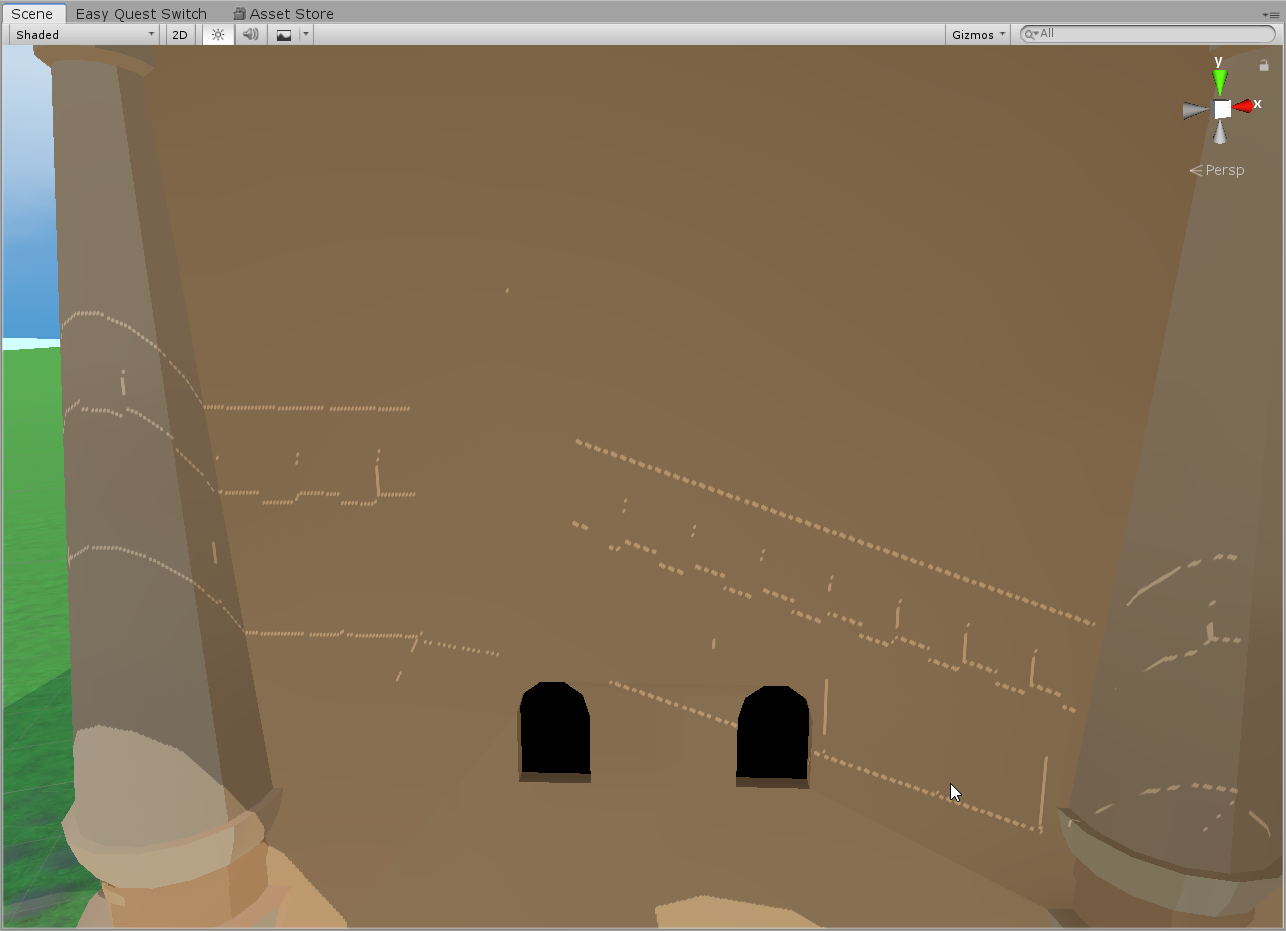
You see them from pretty far away too https://i.imgur.com/VpR9sEm.png
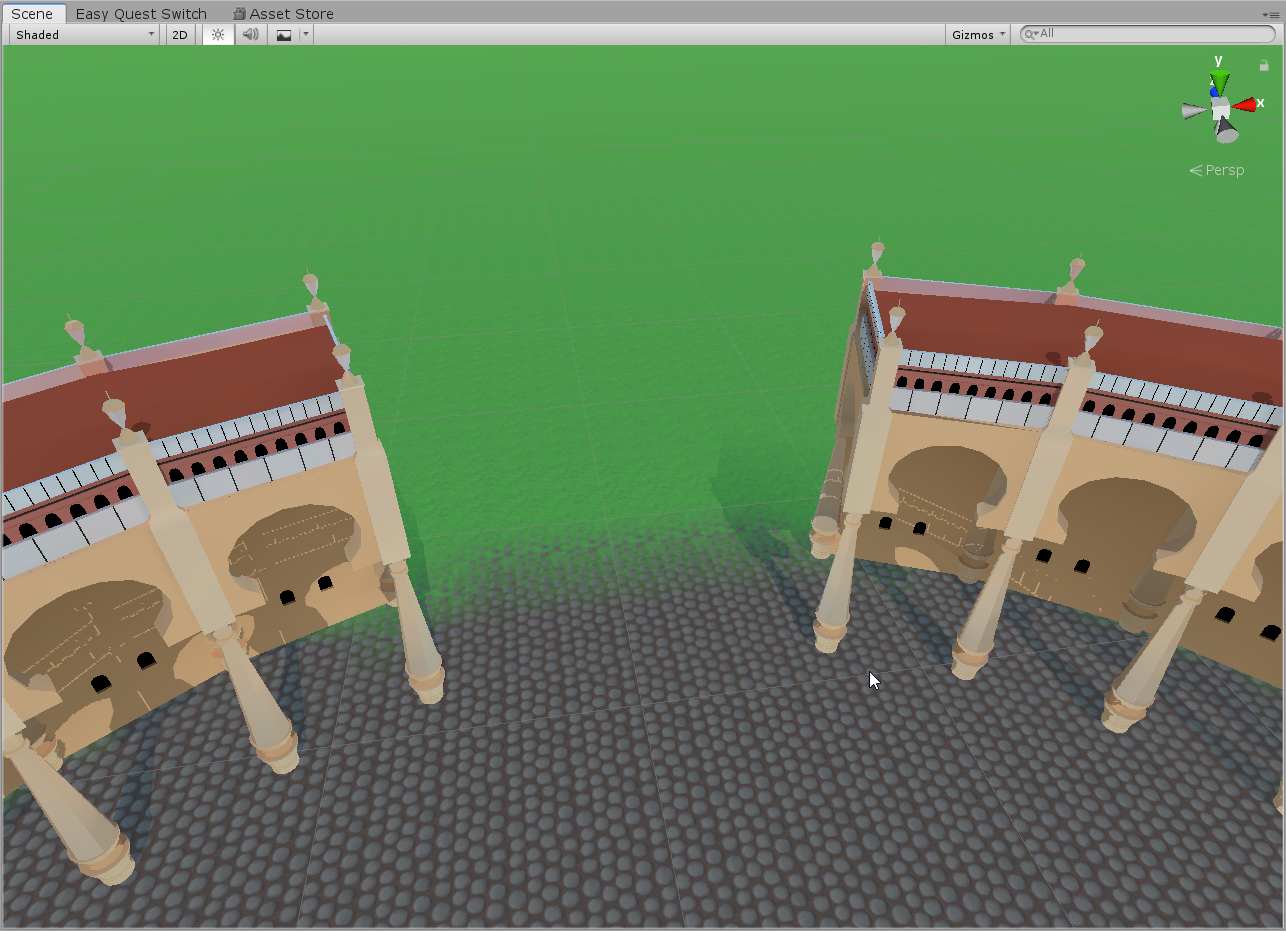 near escarp
what are your light settings ?
 zenith flame
Is it possible to create an object that allows objects to pass through but not players? I want to create a barrier that stuff can be thrown past, but not crossed by players
zenith flame
Thanks!
fast python
Heya could I get an opinion on something?
The room that my world is based off of is very cluttered and I plan on replicating all the clutter

That begs the question, where should the mirror buttons go?
I had them on the left wall, but now the dead bush obscures them
 near escarp
Fix the console errors you have and it'll be back
 raw glacier
need help on post processing
Im making a world that has bloom. I set up the layers and stuff needed to make pp work properly in vrchat. When setting up bloom, Unity is normal and sees bloom. However, when doing a test build, Bloom gets disabled. All my other effects like chromatic aberration is not affected
bug only affects bloom
any idea why this might be happening?
fast python
I need some particle help
When the particle faces me in the game, it also faces me in the mirror

Now I know I could add a back sprite, but then walking up to the mirror would show the back sprite too since it's still facing the same direction
Is there any way to make it face the player object instead of facing the player's view?
near escarp
raw glacier
Im making a world that has bloom. I set up the layers and stuff needed to make p...
Did you set your reference camera in the world descriptor ?
fast python
Ruuubick do you have any idea how I could solve my problem?
raw glacier
near escarp
Did you set your reference camera in the world descriptor ?
I hope this isnt the reason lol
let me set it
...it worked
near escarp

tawdry dew
hey, how can i detach the blueprint from my world? I know how to do it for avis but don't see the option on the world i am building?
near escarp
the vrcworld prefab is the first thing you should add to your scene
Don't manually add the components for the world descriptor & cie
tawdry dew
ohhhhh that thing
i thought that just determined the spawn point so i had it deeply nested. i put it back on the top, thank you! 🙂
tawdry dew
I keep getting this message when i try to build and publish

Which makes no sense, cause i am literally logged in and copying the exact id from my build list
 fast python
When the particle faces me in the game, it also faces me in the mirror
fast python
fast python
When the particle faces me in the game, it also faces me in the mirror
I just realized this doesn't matter the final version of this map won't have a mirror in that room lmfao
This is what happens when it you are sleep deprived
bold ibex
fast python
I just realized this doesn't matter the final version of this map won't have a m...
Agree with
Is there a specific map name?Rinner
 restive drift
is there a never have i ever with questions that non udon?
 cunning nest
any idea why it's not uploading?

 raw vessel
hallo
i'm trying to make sun rotation animation
but unity only record's up and down animation
why unity don't record what i did i'm confused a bit
what shod i need to do
here:
 unkempt turtle
raw vessel
hallo
i'm trying to make sun rotation animation
but unity only record's up and d...
unkempt turtle
raw vessel
hallo
i'm trying to make sun rotation animation
but unity only record's up and d...
make a few more keys inbetween (like every 45°)
then just have the sun be at a different location on each key
raw vessel
@unkempt turtle
but when i do that i will not be able to make perfect rotation
it will be like sketchy movement if you know what i mean
unkempt turtle
ah i see
if you wanna make a perfect rotation, create a empty game object at the center of the circle the light has to go around. then put the light into the game object and give it an offset in one direction (radius of the circle). then animate the gameobject and let it rotate only by 360°
short gulch
Set the first key frame at 0 and the last one at 359°. When it loops the 1° jump is unnoticeable.
I'm doing this in one of my worlds with a day/night cycle
unkempt turtle
basically having something like that and rotate it around the game object itself. due to the hierachy the light will rotate too around the gameobject
 short gulch
Oh, I just watched the clip you posted. What I did was I animated the directional light to rotate, which also affects the skybox
unkempt turtle
he uses a Point light though in the video
short gulch
Yeah I just noticed that when I saw the clip
He says that he's trying to make a sun rotation animation, so the way I'm describing is a lot more efficient
unkempt turtle
a direct light would be a lot more efficient for sure, but i presented a solution for his case with a point light
short gulch
I know I'm not trying to argue against your solution or anything lol, I'm just saying what worked for me when I made a day/night cycle.
unkempt turtle
i will probably make a day/night cycle like japan shrine has
it just replaces the model of the day one with the model of the night one (fully baked of course) with a fancy transition
short gulch
Here's how my method turned out. (Sped up for the sake of demonstration)
 desert python
lookin good
short gulch
Thanks :p
There are a few other parameters that need animated when you do it this way, like the intensity needs to be lowered at night and I also animated the colors to reflect the color of the sky at each time of day
raw vessel
@unkempt turtle@short gulch
tank you i will try those solutions 👍
short gulch
If you're curious about the sky shader, it's RED_SIM's Beautiful Sky Shader.
I believe it's available through his patreon, but I can't remember for sure if that's the only way to get it.
 karmic iris
quick question how many verts/faces/tris should i try to keep my world at?
tawdry dew
Message got lost in the feed. Still need help with this. Anyone know why it says this?

I am logged in and copy and pasted the id from my build list, so this error makes no send. Can someone plz help 💝
 raw vessel
@tawdry dew
try to look at the unity console
maybe it will tell you what's wrong and what you need to eliminate
i mean to delete unsupported scripts
 white mauve
you're rotating gameobject around the point light, thus the point light staying on the same position globally
you might want to click on this so it rotates around the gameobject's pivot point
 tawdry dew
raw vessel
<@!567082382335672378>
try to look at the unity console
maybe it will tell you w...
tawdry dew
raw vessel
<@!567082382335672378>
try to look at the unity console
maybe it will tell you w...
 tawdry dew
tawdry dew
tawdry dew
Its doesnt give any errors. I wish i knew
raw vessel
hmm...
it's strange though
i never have such problem like this
maybe someone else can help you with it
good luck
near escarp
tawdry dew
Did you do either of the things that the text says ?
tawdry dew
near escarp
Did you do either of the things that the text says ?
Like the text on the game window? Yes. I detached the blueprint, copied the ID from by build console, and pasted it in and attached it. So i dunno why its is saying its i dont have access to the blueprint when i am literally copying the blueprint ID from my builds
near escarp
ID from the build console ?
tawdry dew
near escarp
ID from the build console ?
The content manager that lists all my published content
 near escarp
Did you log in and out ?
tawdry dew
near escarp
Did you log in and out ?
Many times :( I dunno whats wrong
near escarp
Do you need to reupload on the same ID ?
tawdry dew
near escarp
Do you need to reupload on the same ID ?
I guess not, but if i upload in a new ID , wont that make it a new world instead of updating the current world i have published?
near escarp
wait, are you trying to update a world or avatar ?
Are you sure you don't have two scene descriptors ?
tawdry dew
near escarp
wait, are you trying to update a world or avatar ?
A world. I dont think i have two. How do i check?
near escarp
Do you have the world toolkit addon ?
tawdry dew
near escarp
Do you have the world toolkit addon ?
I do, yep
near escarp
Does it tell you anything ?
near escarp

GitHub
Unity Editor extension for making VRChat worlds. Contribute to oneVR/VRWorldToolkit development by creating an account on GitHub.
tawdry dew
near escarp
Does it tell you anything ?
Like on the debug screen? Edit: omg excuse the photo quality
 near escarp
I guess you're fine
Yeah that's a bit odd, assuming you're on the latest SDK version as well i'm not sure
You restarted unity too ?
tawdry dew
near escarp
I guess you're fine
I just tried dettaching the blue print and it still gives the same error message, which makes no sense, cause how could the blueprint be wrong if i am dettaching it. I wonder.. maybe it is logging me out after i click build and publish
near escarp
I'd try logging out, closing unity and then log back in
tawdry dew
near escarp
I'd try logging out, closing unity and then log back in
I have tried that over 30 times now :( I dunno what else to try. I think its an issue in this project, cause I can still upload avis just fine
tawdry dew
near escarp
You've tried that in that order ?
I have, yep
tawdry dew
near escarp
Are you uploading avatars from the same project ?
No, my avatars i keep in their own projects
near escarp
what's the world ID and your user ID ?
tawdry dew
near escarp
what's the world ID and your user ID ?
isn't that like a password? should i post that here? lol.
near escarp
your user ID is public, it's the one in the URL of your profile page
starts with usr_
tawdry dew
near escarp
Do you need to reupload on the same ID ?
I tried to build and publish again after detaching the blueprint and its giving me this error. i dunno what it means
 near escarp
Yeah unsure either
tawdry dew
near escarp
Yeah unsure either
frig, I wonder if I need to just scrap my world and start over :/
near escarp
Nah, just try to remove the SDK entirely and add it back
VRChat
If you need to update your SDK, it is important that you follow these steps to ensure the update proceeds properly and you don't have any old/conflicting files. Version Control If you know how to use it, you may find it beneficial to use version control software like Git to manage your project. You ...
tawdry dew
near escarp
Nah, just try to remove the SDK entirely and add it back
should i delete just the udon folder, or also he folder called "serializedudon programs"?
white mauve
i have a quick question regarding the audio: does vrchat manage output variable on all audio sources?
near escarp
tawdry dew
should i delete just the udon folder, or also he folder called "serializedudon p...
Sorry for SDK3 it's this https://docs.vrchat.com/docs/updating-the-sdk#sdk3---world
VRChat
If you need to update your SDK, it is important that you follow these steps to ensure the update proceeds properly and you don't have any old/conflicting files. Version Control If you know how to use it, you may find it beneficial to use version control software like Git to manage your project. You ...
 fathom moth
hey, i have seen a couple of worlds that make other people bigger/smaller. is there a asset for this or any idea how to make it?
tawdry dew
fathom moth
hey, i have seen a couple of worlds that make other people bigger/smaller. is th...
Yooo this exists!? Cool!

 fiery creek
anyone know how to fix this the world was working perfectly fine before

 near escarp
bold ibex
<@!97980768323633152> used that thing you sent to try and fix anything but now i...
near escarp
bold ibex
<@!97980768323633152> used that thing you sent to try and fix anything but now i...
Detatch the blueprint ID
near escarp
fiery creek
Click cancel and open the console ?
bold ibex
so now i should be able to upload no problem?
fiery creek
near escarp
Click cancel and open the console ?
 near escarp
Dunno, we'll see 
fiery creek
near escarp
Dunno, we'll see <:tohrushrug:668316421377228800>
thye world was completly fine before idk what happened
 near escarp
fiery creek
near escarp
fiery creek
Click clear and check the console again
fiery creek
near escarp
Click clear and check the console again
theres nothing
fiery creek
near escarp
Click clear and check the console again
 near escarp
Sweet, restart unity and try again
fiery creek
near escarp
Sweet, restart unity and try again
so task manager?
fiery creek
near escarp
Sweet, restart unity and try again
can i save scene as well?
cuz i added some stuff
near escarp
If you changed your scene yeah, but you should close programs with the red cross in the top right corner
fiery creek
okok i just didnt know if it needed a better close then just exit
white mauve
white mauve
i have a quick question regarding the audio: does vrchat manage output variable ...
bumping
 near escarp
Don't know what you mean by output variable
Alright, i'll check with API then, it might be an actual issue
white mauve
the one that is found here in inspector
 fiery creek
near escarp
If you changed your scene yeah, but you should close programs with the red cross...
fiery creek
near escarp
If you changed your scene yeah, but you should close programs with the red cross...
its saying the 1st shelf was not initialized in time same as the other avatar pedistals but i havnt touched them at all

im also in upload mode right now
near escarp
not initialized in time isn't an actual issue
There might be API issues preventing people from uploading atm, checking with the rest of the team
fiery creek
near escarp
There might be API issues preventing people from uploading atm, checking with th...
okay thank you ruubrick
near escarp
white mauve
the one that is found here in inspector
Oh i think we make it go through our mixer, why ?
fiery creek
near escarp
Oh i think we make it go through our mixer, why ?
okay ruubrick i was able to upload my world with the file signature issue solved
tawdry dew
bold ibex
Same happened to me after i used the vrworld toolkit. @random owl do you have an insight?
tawdry dew
bold ibex
nothing i do to fix it works
Same. I have tried everything. I just tagged the person who made the toolkit, maybe they will have some insight
bold ibex
retry how
near escarp
Retry uploading
near escarp
A minute ago ?
bold ibex
yes
near escarp
Either of you tried removing the toolkit ?
bold ibex
not sure how to remove the toolkit from a running instance
tried that with vrc sdk3 and it broke the entire scene
white mauve
near escarp
Oh i think we make it go through our mixer, why ?
i'm trying to make a visualizer using GetSpectrumData while having 100% 3D blend of the audio, the problem is that the further i go away from the audio source, the "quieter" it gives the results (i guess it is how unity behaves)
i thought to make a dummy audio source that outputs to nothing and has 2D blending so i get "100% volume" results but i guess vrchat automatically assigns the output variable to whatever it assigns, now i have no idea what workaround could work here (if any)
tawdry dew
near escarp
Can you both retry ?
Just did. Still no
near escarp
toolkit should just be the folder
bold ibex
alright, ill delete it and try
tawdry dew
near escarp
Either of you tried removing the toolkit ?
Just deleted the toolkit now, trying to upload again
near escarp
white mauve
i'm trying to make a visualizer using `GetSpectrumData` while having 100% 3D ble...
So you're trying to get 3D Blend but also behavior of 2D with no falloff ?
tawdry dew
tawdry dew
Just deleted the toolkit now, trying to upload again
Nope. Didnt work
white mauve
near escarp
So you're trying to get 3D Blend but also behavior of 2D with no falloff ?
yes
near escarp
You both can log in the website right ?
near escarp
white mauve
yes
The folks over at #udon-general might have a way to help you find a solution then, seems tricky
tawdry dew
near escarp
You both can log in the website right ?
Yep
 crimson scarab
Knowing I've probably missed something dumb, here goes;
Decided to try my hand at making a world, found the documentation and downloaded Unity Hub, 2018.4.20f1 and the world-relevant SDK3. Created a new project and imported the SDK as instructed.
Creating Your First World has you setting up a scene and placing the VRCWorld prefab in the scene, this is supposed to be in Assets > VRCSDK > Prefabs > World. Why then, do I not see any folder named Prefabs in the VRCSDK folder? 😢
tawdry dew
near escarp
The folks over at <#657394772603830360> might have a way to help you find a solu...
Okee, thank you so much for all your time and help!
tawdry dew
bold ibex
im on sdk 2
I'm on sdk 3
 desert python
crimson scarab
Knowing I've probably missed something dumb, here goes;
Decided to try my hand ...
desert python
crimson scarab
Knowing I've probably missed something dumb, here goes;
Decided to try my hand ...
in the assets tab. theres a search bar. try looking up “vrcworld”
tawdry dew
Is there a way for us to just start a fresh project with a fresh sdk and just import in our fbx and materials?
crimson scarab
desert python
in the assets tab. theres a search bar. try looking up “vrcworld”
Located. Saved in Assets/VRChat examples/Prefabs/.., that would've taken ages. Thank you
bold ibex
tawdry dew
Is there a way for us to just start a fresh project with a fresh sdk and just im...
thats easy for you to say
 near escarp
crimson scarab
Located. Saved in `Assets/VRChat examples/Prefabs/..`, that would've taken ages....
near escarp
crimson scarab
Located. Saved in `Assets/VRChat examples/Prefabs/..`, that would've taken ages....
I'll update the documentation to reflect this, sorry !
bold ibex
this is gonna be a pain to redo
near escarp
Don't redo anything yet please, we're trying to figure this issue
bold ibex
alr
it was def the toolkit
i know it told me i apparently had 2 pipelines or something
so i did quick fix
and now its an error with the pipeline not working period
tawdry dew
bold ibex
https://gyazo.com/f06ea2038270b061e26c1cd0dba4693b
Ooooooh pretty!
bold ibex
thanks, but if i do end up having to redo it, thats gonna suck ass
near escarp
Did you both try to delete the VRCWorld object and make anew one ?
tawdry dew
near escarp
Did you both try to delete the VRCWorld object and make anew one ?
Yeah i tried that. Didnt work
bold ibex
after it finishes building
crimson scarab
near escarp
I'll update the documentation to reflect this, sorry !
Nothing to be sorry over, all is well that ends well ❤️
bold ibex
alr trying it out now
trying to build it now
no luck
same issue
that tool really fucks up unity projects lol
near escarp
I don't think it's related to the toolkit
bold ibex
well it brought me to the upload screen post tool kit
tawdry dew
near escarp
I don't think it's related to the toolkit
Yeah i dont think its the tool. The tool seems amazing.
bold ibex
now it doesnt even bring me to the screen
near escarp
Any error in your console ?
bold ibex
and the only change was adding the tool kit and clicking auto fix
no errors
well other than this

even though im logged in
it worked fine and brought me to the upload screen before the tool
then after the tool i dont even get that
tawdry dew
Thats a strange error. A 3.0 avatar error on a 2.0 world
near escarp
You have both SDKs in the same project ?
near escarp
The error says you're not logged in though, so that would explain the blueprint error
tawdry dew
Yeah i think we are some how getting logged out mid upload
 near escarp
Looking into it still, thanks for your patience
Since it happened for both of your out of nowhere, it's kinda strange
I'd expect more noise if it was a lot of people affected though
bold ibex
my bet is the tool messed it up
tawdry dew
near escarp
Looking into it still, thanks for your patience
Thank you so much, really really appreciate your help ❤️
bold ibex
because post tool its broken
near escarp
When did you get the version of the tool you're using ?
bold ibex
but pre tool its fine
when you linked it
i thought you were saying this might fix your issue by sending the link to it
tawdry dew
near escarp
When did you get the version of the tool you're using ?
2 days ago in the #world-optimization channel
near escarp
I'll try adding the latest version to one of my own project
bold ibex
idk why but ive got a feeling its the tool that messed it up
tawdry dew
near escarp
I'll try adding the latest version to one of my own project
Eep careful haha. Let us know how it goes
near escarp
Yeah doesn't seem to be the toolkit
tawdry dew
near escarp
Yeah doesn't seem to be the toolkit
Nothing broke after you clicked autofix?
near escarp
Nope
tawdry dew
near escarp
Nope
Hmm. What a mystery. I wonder what happened with us
near escarp
Can you try logging out of the website as well as the SDK ?
Can i get your vrchat usernames ?
I'll see if you can log you out manually and that might fix it
bold ibex
near escarp
Can i get your vrchat usernames ?
noc turnal
tawdry dew
near escarp
Can i get your vrchat usernames ?
FemBoi.Fox
near escarp
Alright, logged out both of you, mind restarting Unity ?
near escarp
Did you have to log in ?
near escarp
Sweet, try building then yeah
near escarp
So it worked ?
near escarp

bold ibex
<3
that was hell but im glad i didnt have to restart
that took me like 9 hours to put it all together
near escarp
tawdry dew
FemBoi.Fox
Should be solved for you as well

 solid atlas
tawdry dew
near escarp
Should be solved for you as well
solid atlas
tawdry dew
near escarp
Should be solved for you as well
yooooooo hell yeah!! its fixed!!! HYYYYPE
near escarp

tawdry dew
only thing is, I can no longer jump in my world rofl, it must have been disabled by the autofix, how do I turn jump back on?
near escarp
It was SDK3 right ?
tawdry dew
near escarp
It was SDK3 right ?
yuppers
near escarp
You didn't create a udon behavior with playermod jump ?
It's part of the examples
Unless it resets the vrcworld
tawdry dew
near escarp
You didn't create a udon behavior with playermod jump ?
nope, i could just always jump in the world, it must have been autoenabled. ooh yeah maybe it got deleted when i deleted and readded the vrc world. how do i readd it? I need the jumpy jumps
tawdry dew
near escarp
It should be by default with the vrcworld prefab
rofl weird, yeah i thought so too
 near escarp
Yeah looks like it's not the prefab anymore
You should copy the world ID, delete that and add the prefab back into your scene
tawdry dew
near escarp
You should copy the world ID, delete that and add the prefab back into your scen...
Did that, still can't jump. lol what in the heck
random owl
Unity might have lost the reference completely then
You could always just add it back in
If you click that small circle next to the program source and search for VRCWorldSettings
tawdry dew
random owl
If you click that small circle next to the program source and search for VRCWorl...
nothing comes up when i type that, the only thing that comes up close to that is "vrc world udon graph program asset"
fast python
The best particle
random owl
tawdry dew
nothing comes up when i type that, the only thing that comes up close to that is...

Nothing shows up like this?
tawdry dew
random owl
Nothing shows up like this?
nope
random owl
Any errors in your console?
tawdry dew
random owl
Any errors in your console?
 random owl

 tawdry dew
random owl
<:poi_think:582941309342449694>
tawdry dew
random owl
<:poi_think:582941309342449694>
im not sure what that means
random owl
Can you check this folder in your project?
 tawdry dew
random owl
Can you check this folder in your project?
tawdry dew
random owl
Can you check this folder in your project?
I don't have that
 random owl
Well that would explain things then
You could just try importing the latest SDK again into the project
tawdry dew
random owl
You could just try importing the latest SDK again into the project
hahah oof, for the fifth time. okay, so am I correct in that I just delete the udon folder (and meta) and sdk folder (and meta), or do i also have to delete the 'serializedudon programs' folder?
random owl
You should be fine just importing on top this time, you can check in the import dialogue to see if that folder is getting imported at all
tawdry dew
random owl
You should be fine just importing on top this time, you can check in the import ...
so i can import on top of the udon and sdk folders? or i need to delete those first?
random owl
SDK3 can be updated without deleting anything
tawdry dew
random owl
SDK3 can be updated without deleting anything
ahhh shiii, really? i have been deleting it all this time to update. wonder why the vrchat documentation says to delete everything firs
random owl
VRChat
If you need to update your SDK, it is important that you follow these steps to ensure the update proceeds properly and you don't have any old/conflicting files. Version Control If you know how to use it, you may find it beneficial to use version control software like Git to manage your project. You ...
 tawdry dew
weird. was the documentation just updated? I just read it 2 hours ago and it didnt say that.
random owl
Last updated 5 months ago
tawdry dew
random owl
Last updated 5 months ago
I was following the link Rubbick sent me: https://docs.vrchat.com/docs/updating-the-sdk#sdk3---world
VRChat
If you need to update your SDK, it is important that you follow these steps to ensure the update proceeds properly and you don't have any old/conflicting files. Version Control If you know how to use it, you may find it beneficial to use version control software like Git to manage your project. You ...
random owl
That also says you can import over the old as long as you are on a recentish SDK
 tawdry dew
random owl
That also says you can import over the old as long as you are on a recentish SDK
tawdry dew
random owl
That also says you can import over the old as long as you are on a recentish SDK
ohhh my bad, i didnt see that. okee. imported, testing now
tawdry dew
random owl
You could just try importing the latest SDK again into the project
it worked, I can jump again, thank you sososososo much for all your help 😄
random owl
No problem
tawdry dew
random owl
No problem
side note, your tool literally cut my world size from 106MB to 46MB, so thanks for that too! 😄
random owl
Nice 
 green lagoon
tawdry dew
side note, your tool literally cut my world size from 106MB to 46MB, so thanks f...
green lagoon
tawdry dew
side note, your tool literally cut my world size from 106MB to 46MB, so thanks f...
where was all that file-size hiding
tawdry dew
green lagoon
where was all that file-size hiding
75% of file size was textures lolol. half of which was in that damn viking archway I used at my spawn point rofl
green lagoon
the joys of grabbing stuff off of asset stores
like no I do not need a 30 mb dining table with 4k PBR textures
tawdry dew
green lagoon
like no I do not need a 30 mb dining table with 4k PBR textures
hahahahaa legit, it was friggen extra. a 75mb archway, no thanks, i'm good rofl. i kept the archway, just optimized the hell out of it
green lagoon
hope that goes well and yeah that's why that tool is Handy to spot silly stuff like that
tawdry dew
green lagoon
hope that goes well and yeah that's why that tool is Handy to spot silly stuff l...
hell yeah, now i can move on with my world checklist, hoping everything else i can figure out with just youtube tutorials 😛
 median briar

 near escarp
wtf
random owl
Unity package with all the original assets and different compression vs assetbundle with only the processed assets and compression on top
fast python
Hey @near escarp got a unity layer question
near escarp
ye
fast python

So I have books with inverted normals for an outline effect
However, you can see some weird clipping issues
Is there a way to render that material below the material that the books are made of?
near escarp
With an outline shader maybe
But that's kind of the problem with outlines in general, they overlap and cross, and it's a lot of manual work
fast python
That's what I was asking though
near escarp
Behavior might be different with a shader than an actual mesh outline though
near escarp
I don't think either would make a difference
Worth upping the render queue on one of the book though
Which means they'll all be separate objects
idle jolt
What’s the trigger command to where only the master of the world can activate a button?
fast python
Does anyone know of an outline shader that works on Quest?
 median egret
how do people usualy put videos on lights? like matching the video to the color of point lights or making the video play on lights
fast python
Hey @near escarp still strugging with this whole outline thing and got a question
How do you get these options to show up in Unity?
near escarp
That's for HDRP
fast python
near escarp
That's for HDRP
Wazzat and how do I enable it
near escarp
It's a render pipeline and you can't because it's not what vrchat uses
fast python
Ah damn
Man I am really wracking my brain trying to figure out how to do outlines on Quest
median egret
would anyone be able to show me a good way to do hot tub water? can't find a good shader/material and the only suggestion I have is silent's shader
bold ibex
How the fuck do I fix this?
 near escarp
median egret
would anyone be able to show me a good way to do hot tub water? can't find a goo...
near escarp
median egret
would anyone be able to show me a good way to do hot tub water? can't find a goo...
Why is silent's not good ?
median egret
near escarp
Why is silent's not good ?
idk I have been trying to do waves with height and it doesn't offer that :/
near escarp
waves in a hot tub ?
 heady otter
does anyone know how to set up reflection probes on sdk2
near escarp
Create a reflection probe, edit the bounds, bake it
Box projection enabled if you're setting the probe for an enclosed space
heady otter
near escarp
Create a reflection probe, edit the bounds, bake it
by editing the bounds do you mean rescaling it?
near escarp
Nope, there's an edit bounds button in the component
heady otter
nevermind I figured it out thanks for the help
frosty goblet
What's the maximum recommended size of a world before you start to encounter killer float errors?
Size as in... like how many square meters (or km) across
 frozen tundra
hey quick question. a vrchat world can only be inside of a single Unity scene, right? players can't join different scenes like how you would load a new scene in a video game when the player enters a new section of the game?
median egret
near escarp
waves in a hot tub ?
yeah like bubbly kind of waves? like water height pretty much
frosty goblet
frozen tundra
hey quick question. a vrchat world can only be inside of a single Unity scene, r...
That is correct, it all has to be a single scene
frozen tundra
alright, thanks
near escarp
median egret
yeah like bubbly kind of waves? like water height pretty much
You're more likely to get better looking results with a sprite shader, as in sprite animation, maybe on a slightly non uniform mesh
median egret
ah ok
bold ibex
I updated my pool table.
When I do a test build locally it works.
However when I try to upload the world I get this.
I'm so confused. Anyone know what I can do?

 subtle relic
how do i check the instance type in udon / udon#
near escarp
 steep condor
I have a basic question. Im working on creating a world and Builder is showing I need VRCSceneDescriptor. I have one attached to an empty object and I have a spawn transform attached. Can someone help me out with what Im doing wrong. Appreciate any advice
unkempt turtle
there is a prefab for the scene descriptor included in the sdk
 hollow fjord
bold ibex
I updated my pool table.
When I do a test build locally it works.
However when I...
hollow fjord
bold ibex
I updated my pool table.
When I do a test build locally it works.
However when I...
that's relatively normal, if an udon script tries to call the VRC API during an upload it'll fail and the execution will be halted. This is because the value will be NULL during upload. Whereas it'll be filled in when when testing locally.
Also, I'm thinking of starting my own world jam/collab project. Since I have a fun idea I want to work on with others and compete with against others.
The theme is going to be "oasis" since it's getting warmer due to summer break being upon us, and I want to work on a world with that theme
but I also want to see what others come up with
and work with people on creating a nice oasis in the middle of a desert
 hard arch
// deleted - I think I may have found the problem myself. I forgot one script that toggles the problematic audio source that may be at fault here.
bold ibex
Anyone know a way I can make a object interact with another when hit in sdk2?
steep condor
unkempt turtle
there is a prefab for the scene descriptor included in the sdk
I tried adding the VRCWorld prefab from sdk2 buy I get the same message
heady otter
just made a PC world but I wanna port it for quest does anybody know how to do it (I want it for both versions
when I click switch target build to android it asks me if I want to and says itll take a while but then doesn't do anything
 barren canopy
i have a world idea where its a dnd based world with actual battle mechanics, and a character saving system, and npcs
near escarp
bold ibex
Anyone know a way I can make a object interact with another when hit in sdk2?
OnEnterTrigger and change the layers on the object/trigger appropriately
 pallid dove
Is anyone have dj assets so I can find or use
fast python
Does anyone know how to set up a system where you walk into something abd it changes your avatar?
I know it's possible as I've seen some worlds do it
unkempt turtle
fast python
Does anyone know how to set up a system where you walk into something abd it cha...
try using a pedestal and make it OnAvatarHit instead of Interact
fast python
Hey @near escarp I know you're most likely mod to respond so got kind of a TOS question
near escarp
I'm part of the QA team sorry
fast python
Gotcha
Someone said doing collission avatar changers was frowned upon and could get my world taken down
But like if it's visible where the avatar changers are and they're disabled by default, is that really a bad thing?
Do you know who I should ping to ask?
 fast python
I mean if it's off be default, is it really something to be that upset over...?
green lagoon
very startling to have your avatar changed without any are you sure checkboxes
fast python
Oh well yeah the avatar changers will be off by default, with a button near the entrance to enable them
And I am making sure the avatars in question are highly optimized for both platforms
 finite jolt
i need some help, how do i stop grass from fading out in my mirror reflection? everytime i move my head from left to right and vice versa fades out the grass in the mirror reflection?

this only happens in vr.
not on desktop
 proper light
hello, im trying to do karaoke room. I want to put many songs with own buttons (30-60 songs). Video player and sounds are ready. I just need to figure out how to make buttons with url and make them play in video player. Thanks for help.
fast python
near escarp
People will just hate your world <:lulw:538055164679159858>
So here's the plan. The avatar swappers are not only toggled with a button, but there's a warning next to it. Do you think that's good enough?
Avatar quality on Quest and PC is excellent rating
near escarp
If it's with a button yeah of course that's fine
fast python
Well I mean
It's a button that toggles avatar swappers on the floor
Once you pass over the trigger on the floor (which will be visible) your avatar is changed and a auditory and visual queue will play to alert you
near escarp
Might be better to tell people in advance, but if it's an avatar world, then it'll be very confusing for everyone
fast python
I just thought that collision avatar changers were more accepted. I was in a scary world one time where it changed my avatar without me realizing and then put a mirror in my face
fast python
near escarp
Might be better to tell people in advance, but if it's an avatar world, then it'...
It's a hangout world. There will be a warning next to the button that says "Attention! This toggle will spawn triggers that will change your avatar. Do not toggle this unless you are okay with an abrupt avatar change."
 near escarp
The bridge changing what you look like ?
fast python
Bridge?
near escarp
nvm thought you said bridge
I guess the areas that change your avatar
Do people joining your world expect that ?
fast python
Nah so basically in the game there are puddles that transform you
I figured it would be a cool feature to implement that part of the game into my world
near escarp
AH, in that case yeah that would make sense
fast python
And of course you can disable it if you just want to chill and talk with friends in that environment
near escarp
Giving people the ability to turn that on would be enough then yeah
fast python
I've asked all of the people in the world if they'd be interested in me adding that feature and all who were familiar with the game it's based off of all gave a resounding yes.
That's why I was shocked to hear it was looked down upon
near escarp
Because for every other world there isn't this expectation
fast python
Right right
near escarp
and it's never tied to any existing mechanic or story
it's just "Now you're an eboy/furry"
fast python
Yeah I'd definitely be annoyed if I joined a world and with no context my avatar changed
In my case, it will be a static sprite on Quest and on PC, an animated sprite using the retro shader
near escarp
You're using silent's pixel shader right ?
near escarp
For your entire world ?
fast python
Oh no no
Since it's a Quest compatible world, just standard
I am using the method of putting inverted meshes on all the props to give the illusion of an outline
However, all the meshes are going to be merged and one FBX to increase performance
And if that's not enough, a toggle to disable all world props
So far though, I've optimized everything enough that with the high quality mirror on and a very poor avatar, I average 60-65 fps on Quest
But to achieve a sprite avatar on Quest, where transparency is very limited, I actually made a model of the sprite lol
 near escarp
That's a nice way to get around it
fast python
I COULD animate it by doing more models and a particle system like I did for an NPC in the world
But then it would lose the excellent quality since particle systems automatically make avatars poor on Quest
Truth be told
I like developing for Quest more than PC
Since there are more limitations, it forces me to think outside of the box and try new things I otherwise wouldn't have thought of
fiery creek
does anyone know how to fix object reference not set to an instance of an object
 limber panther
Hi, I have a world out in the labs, but now it's showing that it's locked and isn't showing up in the 'labs' tab.
When I click on the map, it shows that's it's still out. how long does this normally take to fix?

 fast python
Yeah I'm in the same boat as you but reversed
In game my world is public and not labs
But in browser it is in labs

 azure kite
Is there any role to get notified on when the new world jam is happening?
frosty goblet
@fast python there are a lot of forced features that people look down upon, but it is ultimately up to you. I'm doing SAO, and I've had a nametag blocker for a while now, nobody's complained about it yet.
fast python
frosty goblet
<@!457965696190513152> there are a lot of *forced features* that people look dow...
Well, even though it is a forced avatar changer, it is entirely optional and is disabled by default
cunning nest
So I am doing buttons stolen from the mirror prefab in the SDK any idea what is spawning these huge collider and how do I reduce it?
 desert python
 velvet pebble
udon
velvet pebble
udon
udonsharp?
fiery creek
i trying to make my vrc mirrors local, and add a low quality version, can someone please help me with that?
velvet pebble
desert python
udonsharp?
Graphs but if you know through sharp thats chill
desert python
fiery creek
i trying to make my vrc mirrors local, and add a low quality version, can someo...
https://cdn.discordapp.com/attachments/796058001219125303/852305617942741042/UItoggle_example.prefab hopefully this might help you. should work on both sdks
fiery creek
desert python
https://cdn.discordapp.com/attachments/796058001219125303/852305617942741042/UIt...
do i just drag this onto the mirror?
fiery creek
desert python
https://cdn.discordapp.com/attachments/796058001219125303/852305617942741042/UIt...
it also has 2 missing scipts
desert python
might be the mirror scripts. but the buttons to toggle between 2 objects/mirrors should work
desert python
velvet pebble
Graphs but if you know through sharp thats chill
i have a reset object script you can use if you like
fiery creek
desert python
might be the mirror scripts. but the buttons to toggle between 2 objects/mirrors...
so i drag the mirror into one and my main mirror toggle on off button in the other?
cunning nest
so I'm using wolfevideoplayer, should it be working on the quest?
 spice crescent
how do you make vrc worlds
hollow fjord
Not necessarily, the biggest concern is file size, the world itself can be as big as you want to, but it does look decently sized to me 🙂
green lagoon
okay technically after like a certain size you get floating-point errors but I doubt you're there yet and if need be you could rearrange the chunks to be closer
 silent night
Blender render of a new world I'm making, critiques are desired and wanted~ Once everything is imported into Unity I'll have a better picture for in game~ All handmade in Blender.
 hollow fjord
silent night
Blender render of a new world I'm making, critiques are desired and wanted~ Once...
hollow fjord
silent night
Blender render of a new world I'm making, critiques are desired and wanted~ Once...
Except for the lighting (which will change when it's in unity anyway) my biggest points would be lowering the sign, and adding a lip around the top to break up the ceiling and the wall, since right now they look a bit weird. Also, reduce the intensity of the normal map or use a higher res one
 high summit
hollow fjord
Except for the lighting (which will change when it's in unity anyway) my biggest...
high summit
hollow fjord
Except for the lighting (which will change when it's in unity anyway) my biggest...
yeah gotta agree
silent night
Yep~ Got a few tweaks to make, and of course it's in Blender so I basically did it the lazy way and just threw the defaults into it minus the tiling map with a generated tiler.
high summit
i love the purple-blue lighting strips and the glow they give off 🥰
silent night
I'm a big fan of my neon, tch, everyone who commissions me knows me as the person who throws way too many lighting strips into their rooms.
hollow fjord
if you need materials: https://quixel.com/megascans/home?category=surface&category=fabric

Quixel Megascans
Discover a world of unbounded creativity. Explore a massive asset library, and Quixel’s powerful tools, plus free in-depth tutorials and resources.
high summit
hehe, neon is cool
hollow fjord
that's where I usually get mine
silent night
 hollow fjord

silent night
I use,

Free materials never looked this good! Get 1000+ PBR materials and textures for free under the Public Domain license.
high summit
so how do you make worlds because ive been meaning to try, is there like a world building kit with things like buttons and seats you can find and use or..?
silent night
I could DM you, Crypto.
hollow fjord
Well, for starters you read the wiki
high summit
silent night
I could DM you, Crypto.
that would be awesome
silent night
hollow fjord
Well, for starters you read the wiki
I'm a nerd I don't look at wikis, AHAHAHHAHAHAHA
high summit
hollow fjord
Well, for starters you read the wiki
i'll check up on it in like 4 hours when
high summit
i can access my pc
silent night
Though take it with a grain of salt, I learned both Blender and Unity in about 5 days, and most people say I'm a lunatic and that there's no way I did
high summit
i cant do much blender but i got some experience in it
very little
i can softbody meshes and thats about it, lol
hollow fjord
well
you don't need blender to make a nice world
VRChat
Requirements We're going to need a couple things before we can get started. Current Version of Unity. We strongly recommend using Unity Hub, available on that page.VRChat SDK - See the Choosing your SDK page to see how to choose the correct SDK for your use. Step 0 - Installing Unity Check the Cur...
hollow fjord
that's the guide for setting up the sdk itself by the way and get started
hollow fjord
I mean, https://vrchat.com/home/world/wrld_c8f112b0-d945-4ebf-9047-c718f84133c6 (my world by the way) was entirely made with free assets either from the unity store or booth
hollow fjord
My biggest focus for that project was making a nice game world with pens for mute players, but also to prove people you can make a good, well optimized world without blender or spending money
silent night
There's some real good stuff out there that was made in Unity,
I just can't stand how hard it is to interlock pieces together and make windows and such.
hollow fjord
Anyway, the TL.DR for world creation is this:
- You need unity 2018 and the VRC sdk, weather you go with Udon or SDK2 is up to you. but if you want to do some neat mechanics, go with udon.
- Make a rough sketch of what you want your world to look like, make a top down view of the rooms and where things will be
- In unity, place basic block shapes down as to where everything will roughly be, this'll help visualize the scale of things
- Once you're happy with the layout, start adding your world's mechanics/gimmicks. E.g pens, mirrors, chairs, etc.
- Once you're happy with the placement of those, start looking for props and stuff to slowly replace the blocks with the actual props and stuff
silent night
Here's the lighting changes. Not sure what you meant by the lip though.
 hollow fjord
silent night
Here's the lighting changes. Not sure what you meant by the lip though.
hollow fjord
silent night
Here's the lighting changes. Not sure what you meant by the lip though.

something like that
hollow fjord
Eh, I'd just make it a separate piece
silent night
Though I don't know if this ceiling will even let me do that or even knife it.
Ye, that's kind of what I thought too.
hollow fjord
It'll help make the room less boxy
@silent night you can also do the bottom part like this to add more depth:

 pure hornet
I want to play a long video with VRCAVProVideoPlayer, but the video and audio are out of sync.
Do you know why?
Please let me know!
brisk spear
Does anyone know why when a quest user try’s to join my world they can’t actually get in
 desert python
cunning nest
so I'm using wolfevideoplayer, should it be working on the quest?
desert python
cunning nest
so I'm using wolfevideoplayer, should it be working on the quest?
no, that videoplayer asfaik was not designed and was probs made in a way to force creators to remove it from quest
cunning nest
that sucks, any one that would work?
desert python
protv and qvid does
was acc testing out the recently updated USVP. it does not quest sadly still
desert python
qvid is my private TV and i never really packaged it for public (mainly because my organization skills suck) but pro TV has a beta line up thats been the flag ship for even quest live streams
however its a discord only beta prefab
if you need link, jut add me
hollow fjord
brisk spear
Does anyone know why when a quest user try’s to join my world they can’t actuall...
if your world isn't well optimized (shaders, lighting, etc) it might kick quest users out for safety reasons
desert python
brisk spear
Does anyone know why when a quest user try’s to join my world they can’t actuall...
does the world have audiolink by chance?
 dull estuary
I keep having this issue.
Whenever I go to add mesh colliders to my world, they are always sideways and too small. I looked up fixes and got more confused. Any easy solutions?
brisk spear
desert python
does the world have audiolink by chance?
yes it does
but not for quest i don't think
desert python
brisk spear
yes it does
double check, it has quest ban shaders
brisk spear
desert python
double check, it has quest ban shaders
i believe i'm using VRChat>Mobile>Standard Lit shader
desert python
audiolink does not
brisk spear
audiolink not quest world compatible i believe
bold ibex
Is there a way to have a world allow more than just 40 people?
Setting the limit higher just defaults to 40 XD
 errant beacon
Worlds can have up to 2x their player capacity with invites/portals, i.e a world with a 4 player cap can have up to 8 players in it with invites, and a world with a 40 player cap can get up to 80
bold ibex
0o0!
errant beacon
don't know how your FPS would fare with 80 people in it though lol
bold ibex
Fair
fast python
Got a blender snapping question
I'm trying to center a model and set up a subdivided plane to help, but I can't get it to line up properly
 near escarp
Shift + S to snap stuff to the same 3D cursor position
 harsh wagon

