#world-development
39 messages · Page 82 of 1
 white gulch
 random owl
Otherwise import this and check VRWorld Toolkit > World Debugger and see if it spots anything
http://toolkit.onevr.dev/

GitHub
Unity Editor extension for making VRChat worlds. Contribute to oneVR/VRWorldToolkit development by creating an account on GitHub.
 olive shuttle
Sheeeeesh any one, I need some advice or something 😄 . trying to make Toggable Mirror Quality . by following a vid on yt, but some stuff have changed, and now i have no idea on how to do it xD
 quick lintel
Does Dynamic Starry Sky from asset store work with VrChat ?
 tough vessel
olive shuttle
Sheeeeesh any one, I need some advice or something 😄 . trying to make Toggable ...
tough vessel
olive shuttle
Sheeeeesh any one, I need some advice or something 😄 . trying to make Toggable ...
For that I simply put two planes that will act as mirrors, one that reflect everything and one that reflect only the player layer and a few other things. One is disabled while the other is on and vice-versa. 3rd button turn both off.
It's a good 1st project to learn Udon
olive shuttle
@tough vessel thanks mate 😄 . ill look into. and yeah im trying to learn it 😄
 bold ibex
I forget, if you have two objects that have different materials but use the same texture, is the texture uploaded twice?
Or did VRChat/Unity understand that it's the same texture?
It understands it's the same tex right?
tough vessel
It depends, nothing forbids you to import the same image a few time when you think of it.
If you imported different models and each have their own folder with textures, you may have duplicates.
If both materials reference the same texture image however, you're only using one tex, I guess?
bold ibex
is it normal when you decimate an object that it increases world file size?
bold ibex
hi im having a problem where when i upload my world (which is private) and i go into the game and join the world it will download the assets (40.50 MB) and load the map and then after the loading it will turn black and instently bring me back to my home. so i cant even go into my own world. and i have reuploaded it and idk what the issue could be
tough vessel
Does it even work when you "build and test" in Unity?
bold ibex
tough vessel
Does it even work when you "build and test" in Unity?
i published it into quest and now im chagning to pc so its taking a while but ill try the build and test because yesterday when i published it and made it public it was only pc compatible but it worked when i went in but because of issues i had to reupload it and i had to make it private which is what i wanted.
random owl
Import this and check VRWorld Toolkit > World Debugger and see if there is any red errors
http://toolkit.onevr.dev/
GitHub
Unity Editor extension for making VRChat worlds. Contribute to oneVR/VRWorldToolkit development by creating an account on GitHub.
bold ibex
random owl
Import this and check VRWorld Toolkit > World Debugger and see if there is any r...
thanks it still does the thing
random owl
Can you show a screenshot of the world debugger?
 random owl
If you check here can you make sure there's no special characters other than just plain letters in those top two fields?
 bold ibex
this is what i got
 random owl
Hmm yeah can't see much reason why it would be throwing you back home then that's almost all that might be going wrong with the world checked now.
Would be helpful to see the output log of loading into the world which is not so easy with Quest, you might want to try it on PC and see if the same happens.
bold ibex
im on pc
im gonna change it to pc instead of android and see if there are any issues
i cant build and test
bold ibex
random owl
Hmm yeah can't see much reason why it would be throwing you back home then that'...
so i tried build and test and i can go into my world so maybe it works now im gonna try
Anyone know how to make a clickable button that changes the players height in the air? At a defined level so they can play pool without changing avatar?
 unkempt turtle
you can raise the floor below them
quick lintel
Hey anyone that used Lux Water shader and could help ? I want to remove water from inside the boat and I have no Idea how to achieve that.

 silent adder
In SDK2, Is it possible to make an UI Slider to affect the values of a set material for an object? Say, changing the Tiling from 1 to 2 through a slider
bold ibex
Maybe that's how it's done. I'll have to see if I can find how to do that
 near escarp
quick lintel
Hey anyone that used Lux Water shader and could help ? I want to remove water fr...
near escarp
quick lintel
Hey anyone that used Lux Water shader and could help ? I want to remove water fr...
I don't think you can do that
silent adder
quick lintel
Hey anyone that used Lux Water shader and could help ? I want to remove water fr...
You could try using a shader to remove anything transparent there 🤔
Any shader with some rendering options might do the trick
bold ibex
yeah that worked, made a cube into a new floor, made it clear and did a button the same way as you hide/unhide mirror. Just need to do that for medium / short height. I guess, until I find a better way that can just elevate someone with the press of the button or something
 wary surge
does anyone know how to make an object that you can picked up in game snap to a set position untill removed?
 mild spade
bold ibex
yeah that worked, made a cube into a new floor, made it clear and did a button t...
mild spade
bold ibex
yeah that worked, made a cube into a new floor, made it clear and did a button t...
How about a ui slider that moves the transform up and down, where 0 is its lowest point and 1 is the highest point. That way people can pick their desired height without having to make multiple buttons for each height. just an idea
bold ibex
I'd have to figure out how to do that, I've only been using this for like 2 days
I still haven't figured out how to shrink the 50 million unit sized ui that you create hahaha
 jovial juniper
is putting a reflection probe in every room of a house a good idea?
or would that create too much lag?
oh, i should mention im using baked lightening with GPU Bakery also with the reflection probes
unkempt turtle
baked reflection probes dont take too much performance
 desert python
bakes is barely anything, if its realtime, then it will feel performanty
mild spade
bold ibex
I still haven't figured out how to shrink the 50 million unit sized ui that you ...
You mean that when you create a canvas is giant? Set the canvas like this (yellow highlight) for first time set up, then use the Rect Tool (shortcut "T") to resize it to your liking.
 bold ibex
yea I had to change it to world space to edit the values, its weird though. It spawns in at about 1,000,000,000 times the size of my world so it takes a lot of time to resize and get it to position
jovial juniper
okay, thanks, i like the reflections but i didnt want to make it laggy, cheers
 hidden pawn
Thanks! Helped a lot><!
 lunar barn
So i need some help as of yesterday my world wouldnt show any of the new stuff i added when i updated it and when i do a build test it just goes to the previous version
lunar barn
how would i do that?
near escarp
by opening the unity console
near escarp
It's the tab next to assets
lunar barn
in project settings? or is it a different one?
near escarp
In your main window
 indigo fossil
GitHub
Unity Editor extension for making VRChat worlds. Contribute to oneVR/VRWorldToolkit development by creating an account on GitHub.
When I Googled it before and after asking all I get are Unity forum questions about loading assetbundles through scripts.
The upload process works fine until I click upload in the game tab. Any info changes (tags, player count, preview image) update but the content of the world does not. VRCSDK says the upload is successful but VRWorldToolkit says that the last build failed.
I don't get any errors about my scene in the console nor in VRWorldToolkit
I restarted my computer and that is still the only error.
Again I have successfully uploaded the world before and I don't think I have imported anything significant since that would've caused the scene to break
 pure cloud
Im not sure if this is the right channel but, I just want to clarify something.
When an avatar world that came out from community lab, is it because of vrchat staff checks it manually or is it because automated by the popularity of people visiting it
bold ibex
I tried for quite a while to go through tutorials and videos on how to make that slider lift the floor up and down but I can't get it to work. So for now I'll have to do the multiple floors until I can figure that out.
near escarp
pure cloud
Im not sure if this is the right channel but, I just want to clarify something.
...
Community labs is automated
 vale oasis
Not sure if it's the right place to ask, but is there any tutorial or guide on doing like a beach scene?
near escarp
I don't think so no, people throw things together until it looks good
There's asset packs or you can make things yourself
bold ibex
I guess a tutorial would be looking at a real beach scene and go from there
near escarp
Check out deep blue to see what is done there
bold ibex
I started this world a few days ago and the more I do it the more days it ends up going to take me. Aaahhaha
near escarp
Welcome to world building 
bold ibex
The closer I get to done, the more often I have to go into game to check tiny things, and then you just think of more things and then you have ideas but you don't have the programming skills
vale oasis
so im new to this whole thing of making worlds
and idk much about using unity to do so
is there somewhere i can start?
bold ibex
I didn't even want to bother asking you about NPCs!
near escarp
vale oasis
is there somewhere i can start?
Probably want to look at basic vrchat world tutorials
vale oasis
yt?
bold ibex
I got a good video for you but it's like 2.5 hours long. It's what I used.
white gulch
Question, I just uploaded my world. seamless. I saved closed unity. opened unity again it roled my progress back an entire day....anddd the sdk is broke. anyone had this happen before?
random owl
Well for the SDK being broken you would want to check what remains in your console after pressing clear on it once
 worn elk
I have a question regarding nested objects:
I made an animation for an set of objects where they move around the map. However, the area where it moves around needs to be moved somewhere else in my unity project. Rather than re-do the animations for each object, is it possible to just nest those objects together in an empty game object and move that?
My worry is that the Z-axis coordinates are currently based on the global coordinates. Would putting them inside a "container" object "scale down" the Z-axis coordinates so that they are relative to the parent object? Or would I have to have animated them relative to the parent object in the first place?
worn elk
Basically, I animated something based on global transforms. Is there any way to convert those to local transforms based on the parent object?
not with scripting, just so that the keyframes match up
they are just playing an animation loop
 mild spade
bold ibex
i cant even get the example to work
mild spade
bold ibex
i cant even get the example to work
The example uses the "StationGraph" script, try adding one (Also, SDK3 is Udon #udon-general )

 errant junco
do i need to wait until a world is published?
near escarp
Couple minutes at best
 winter trail
Hello, I got a question. So, I want to make a world on vrchat that have animals in it that can attack you when they see you and kill you u or hear you when you talk in the mic and if you stand still they won’t kill you and then they just run away. Is there a way to make it like that with Unity in VRChat?
 green lagoon
 pallid dove
Hello I am looking for anyone that can help me out figure out why this is happening I download pool table udon prefab, and soon as I imported I get nothing but errors, I'm guessing it's because I updated SDK if anyone can help me out of fixing that issue that'd be great
near escarp
Probably worth asking in #udon-general
 subtle horizon
@near escarp I'm having troubles preparing to develop a forrest in low light for VRchat. Im not sure if I should buy a tree or two off speed-tree, and take that route, or utilize Unitys tree creator module.
any tutorial or recommendations I find online dont seem to take into account performance for VR, and I figure instead of digging to find out and making a mistake, id rather ask to see what the best route would be for production for vrchat.
its kind of hard to describe what I'm aiming to do, but im still in the preparation phase, and the use of the world will be in the vrcclub scene. im really stressing over optimization, but im also really keen on feel, and realism.
ive basically been told "buy a tree or two off speed tree, and just import that since it will handle all the LODs'" but I already have a collection of unitys tree creator trees, however my project cant utilize unitys terrain because I need a hole punched in the terrain and its not supported in 2018
TLDR: whats the best direction to take when developing a natural enviroment for vrchat?
near escarp
You can always do what you want on your terrain, and then export the terrain as a mesh once you're done and make holes in that ?
subtle horizon
I have a mesh for terrain ive made in blender, so the only reason I bring this up as an issue is that unitys terrain system lets me paint trees and grass
 quiet juniper
Hey all, could i get some quick help??? I'm new to map making and all, but for some reason with a world i uploaded, I can't load into it. It always kicks me abck to my home world. I've tried uploading it as a new map a couple times, but it keeps throwing me out. Is this just vrchat, or is there something wrong with my world?????
green lagoon
I would suggest trying to upload a copy of the sdk demonstration map Twix that way you can check for something else being funny before debugging your map
green lagoon
subtle horizon
I have a mesh for terrain ive made in blender, so the only reason I bring this u...
https://unity.com/features/polybrush this might could help out for doing that

Unity
Learn about the many features of Polybrush, which lets you blend textures and colors, sculpt meshes, and scatter objects in the Unity Editor. It’s now part of Unity, with ProBuilder and ProGrids.
green lagoon
hope that works out for you
subtle horizon
my largest concern is how to go about foliage
quiet juniper
could make large amounts of grass in blender for the terrain you made in blender, since i dont think you wanna go copy paste grass lmao
Tree prefabs are easier to deal with
green lagoon
not that it would help on how to put together trees but I would suggest making sure you place your trees as prefab so you can easily swap out the trees to find what works out best for you
subtle horizon
gonna have to worry about LODs aswell
green lagoon
then yeah something like speedtree is probably easier to not have to worry about building those manually
subtle horizon
wallet go brr
green lagoon
or any free-to-download trees from the unity asset store that has lods would probably also work
subtle horizon
I have some trees I like, but they use unitys tree creator modual
and the LODs are only made using the terrain
quiet juniper
So I uploaded a test world and i managed to load into it, but i still cant load into my other map :///
green lagoon

Elevate your workflow with the Free SpeedTrees Package asset from SpeedTree®. Find this & other SpeedTree options on the Unity Asset Store.
quiet juniper
subtle horizon
it sounds like you dont have a spawn set
yep that was it, thank you!
subtle horizon
green lagoon
https://unity.com/features/polybrush this might could help out for doing that
Polybrush compatible shaders are not included in unity 2018.
only unity 2019 +
bold ibex
Sorry if its been asked, but is there a easy way to compare the player size to the world? I didnt realize until I started building that the player may be way too small.
green lagoon
bring an avatar into your Unity scene

Elevate your workflow with the Space Robot Kyle asset from Unity Technologies. Find this & other Robots options on the Unity Asset Store.
 gloomy salmon
not sure where to ask this but, this thry module doesn't work for me for some reason

i've clicked it and downloaded it a bunch of times and it always fails
pog
that was quick
 cold hound
Any one know why my world can run if i Build and Test but not on VRC?
i mean that das not make any sense
near escarp
GitHub
Unity Editor extension for making VRChat worlds. Contribute to oneVR/VRWorldToolkit development by creating an account on GitHub.
cold hound
it looks like a button create that thing
That's nice
i mean how can that happened but it was a button, with the same U# that a different button
 proven beacon
is there an issue with the SDK3.0? twice trying to install it on a fresh project and it just freezes after install
 hollow fjord
@proven beacon that freeze might be unity re-importing the assets
it's pretty common for unity to be a huge derp when importing asset packages, can take anywhere from 5 minutes to 30 minutes to complete
even if it seems that it's not doing anything
proven beacon
@hollow fjord yeah I've had that before and worse cases have only been like 5 minutes, however certain this has been longer than 30 minutes, I'll set a timer now 🙂
hollow fjord
can try a slightly older version of the sdk if you want, still got it on my computer
proven beacon
can do if at the worse case 🙂
hollow fjord
there you go, happy world creating 😄
proven beacon
needed to be 3.0
hollow fjord
proven beacon
was like hold up haha
hollow fjord
 lets just pretend that didn't happen
proven beacon
agreed
time to wipe again
noo idea why it's still not working, going to leave it for a good while again
 nocturne mirage

 proven beacon
@hollow fjord I just imported the SDK and Udon folders from another project this time
white gulch
does anyone have a sugestion, or a Screenshot example for how far apart to make each area when setting up a large map?
 glacial pond
white gulch
does anyone have a sugestion, or a Screenshot example for how far apart to make ...
glacial pond
white gulch
does anyone have a sugestion, or a Screenshot example for how far apart to make ...
Moving things far apart won’t change anything. Just make sure to check stationary objects as static and then enable object occlusion so things will not render when not in view. This is not enabled by default.
Actually it’s preferable to not move things far apart, in addition to not helping occlusion, you just introduce float rounding errors at large distances from origin
white gulch
@glacial pond I set all static items to static, moved things closer. It just presist to render things outside the wall of structures or renders almost nothing. its a serious headache lol
glacial pond
After marking statics you need to hit bake on the object occlusion panel. You can then go to visualize, select a camera, and see what vanishes as you move it around
@white gulch
white gulch
Ive baked, i messed with the settings quite heres what im getting

camera is facing that bigger area still rendering it through numerous walls
@glacial pond
glacial pond
Try making an “Occlusion Area” cube around both of them. I believe they take higher priority over objects marked static

You’ll need to bake again after adding them
Then within a occlusion area, it will still check for static’s
Also be sure none of the objects in your scene have enormous bounding boxes that are extending into the other’s area
white gulch
ill look into doing those things thank you
 brisk wharf
Something I do because I'm lazy:
- Make a huge static cube wall between those two rooms. It's important that it has a collider and non-transparent mesh I believe, but I could be wrong.
- Make the wall tall, wide, and deep
- Make the static wall have an "EditorOnly" tag so it's not in your final build
- Mark two occlusion area boxes around the two rooms like adeon mentioned
- Clear and re-bake occlusion data.
I find that without this, if you're looking at thin walls of your room in an angle, sometimes objects still pass into the overdraw that shouldn't. It's not ideal, but it's worked very well for me.
bold ibex
can someone explain how im getting a shadow with recieve shadows disabled
 hollow fjord
can't you just add a baked point light? 🤔
bold ibex
it does nothing
hollow fjord
did you re-bake the lighting?...
bold ibex
i dont use baked lighting
only for light sources
as i said before, this model did not do this before on previous version
only after i changed it today it did this
bold ibex
i dont bake the lighting because of how massive this world is
it would take at least a day
hollow fjord
"Receive Shadows" will flag it to be excluded from receiving shadows DURING a bake
turning it off after a bake, doesn't do anything
bold ibex
again my lighting is not baked
hollow fjord
so all your lighting is realtime?
bold ibex
yes
with post
can you see why i dont want to bake the lighting?

i have occlusion culling baked and it works fine
but lighting baking would take at least a whole day
its not worth it
hollow fjord
well, putting the performance reasons aside, the only thing I could think about is either the reflection probes needing updating, which just means clicking on them and updating them
bold ibex
how do i do that is what i was asking
hollow fjord
just click on the probe that affects that area, the inspector has an "update" button
The other reason would be UV's but that's unlikely
hollow fjord
are you even using reflection probes?...
bold ibex
i honestly do not know
glacial pond
bold ibex
but lighting baking would take at least a whole day
Long bake times are usually indicative of something being set wrong, rather than scene complexity.
glacial pond
Avoid scaling things huge in unity. That’s the biggest cause of blowing up bake times
Huge objects should still be 1:1:1 scale in unity to avoid bake weirdness
Slight adjustments are fine, but if you have like 50:50:50 scale objects, it should probably be sized in blender instead
bold ibex
https://media.discordapp.net/attachments/854807269531582474/854951097282068490/unknown.png?width=705&height=505 it used to look like this

as i said after i made edits today it decided to randomly change its lighting
i didnt change any light sources or anything
this is what it should be
as you can see the lighting is even
i dont know what the fuck blender did to it
-w-
glacial pond
That’s a blender screenshot?
bold ibex
no thats in unity
showing i didnt need to bake anything
it was fine before
im just trying to make it look like this again

eriously even reimported old one just now as test
no settings change
so what the hell happened to the model
 bold ibex
so i redid uvs and fixed that

this came back again
this one single mesh vanishes when i hit play
fixed
reimported mesh
bold ibex
What is the criteria for flagging a world as having malicious avatars? Is it based on reports or automated?
Is it a matter of performance of the avatars? or are there other considerations?
random owl
It's just based on user reports, if you don't have anything like that in your world then you won't have anything to worry about usually and can ignore the tags.
 idle jolt
Does anyone know where to get desert canyon assets for free? I’m looking for something like this, but it has a price and I don’t have money.

Package Overview:
There are 10 shapes in this package
1/Poly count:
About 10000 polys per shape
2/Texture:
4096 x 4096 (Color, Normal, Roughness, Ambient Occlusion)
3/Format:
Fbx, Obj, 3ds, Dae
4/Product Features:
High-quality textures, including basic channels, are suitable for all projects (movies or games) and any software or render engines.
...
 icy swift
so kind of like the room karaoke central, is there a way to play music for both quest and pc except without the video player?
cause I want to make a world without having to have all the mp3 files
aka more mb
icy swift
videoplayer doesnt work on quest
desert python
icy swift
videoplayer doesnt work on quest
bruh, you just said they did
also, they do
icy swift
karaoke central is really the only place i've seen it work
desert python
icy swift
karaoke central is really the only place i've seen it work
really?
icy swift
yes
desert python
like you never went anywhere else?
like yet another theater. quest home theater. pillow fort movies?
icy swift
basically thats the only place ive seen with a working one
and i haven't been to those
i think
desert python
idk, but i still think videoplayer easiest option
icy swift
well the ones that come in the sampleasset prefabs dont work with it
cause theres no way to input the link
or a keyboard
desert python
well its also quest, vrchat devs dont give much equality
but videoplayers work easily
icy swift
hmm
do you think if i went into the karaoke central discord and asked how they did it, they'd give me a few tips on how to
desert python
do they have a discord?
icy swift
i think so
desert python
i mean, if they aint using a VP. then they are compressing stuff down to the bone
icy swift
i looked around and found this

QuestにてVideoPalyerを利用した表示機構のプレハブです。 QuestではVRC_Panoramaが高確率で表示できない等ありますが、VideoPalyerではほぼ確実に表示することができます。 (※1) これを利用して、カレンダーなどの画像を動画に変換しそれを読み込むことでPCと同様に表示ができます。(※2) 当プレハブは簡単に配置するためのものです ※1 :VRC_Panoramaのように多用すると、指定したURLの内容が確実に出ないときがあります。 ワールドに入り直すことで改善することがありますが、大量にVideoPlayerを置くのは向いていません。
and this
desert python
ew gross, put the last 1 away
icy swift
okay
desert python
that videoplayer took me like 2 months just to get like 2 minutes of video on quest
icy swift
oh
desert python
and its just super jank to work with
but to actually answer some stuff: you can use videoplayers on quest, i highly suggest the beta pro TV as it is pretty easy to set up, and supports streaming of quest
and on how to store mp3 files. vocaroo.com
and just use the download links
desert python
np
icy swift
but where do you find the beta pro tv
random owl
desert python
that videoplayer took me like 2 months just to get like 2 minutes of video on qu...
That's not even meant to be a video player it's just to display images
desert python
booth. i think its still under "architect TV", but it uses the older versions
desert python
random owl
That's not even meant to be a video player it's just to display images
i meant the usharp VP. adoh deleted it
usharp VP was the videoplayer i was refering to that was super jank
desert python
desert python
booth. i think its still under "architect TV", but it uses the older versions
there should be a discord link to check out the latest TV model
icy swift
currently scrolling through trying to find it

--- Version 2.0 is almost ready. Read the update post here: https://gumroad.com/architechvr/p/architechtv-2-0-coming-soon --- Ready-made TV Prefab for VRChat w/ Udon. Requires SDK3.0[Udon] (last tested w/ v2020.4.4p1) and UdonSharp[U#] (last tested w/ v0.18.8). View the README.md file in the package
this it?
desert python
yep. it should have a discord link to its latest videoplayer
 cunning pumice
so my world when you go to it the avatar gets stuck in a spawn loop
icy swift
desert python
yep. it should have a discord link to its latest videoplayer
okay so i found a way to bypass the way you cant input urls on quest
sidequest has this option called
 desert python
icy swift
sidequest has this option called
desert python
icy swift
sidequest has this option called
oh ye, ifg that ye
icy swift
but it gives me a player error
desert python
you cant use youtube
icy swift
oh
desert python
you can use anything raw
desert python
vocaroo.com is where i upload music usually
you can download audio from yuotube from the VLC player, or really any downloader online
icy swift
yeah i have a website for the mp3 files
it also downloads mp4s, so if i want to play videos, should i download them and put it on vocaroo?
desert python
vocaroo will automatically pack them into mp3 files
you should try dropbox or google drive for actual videos
theres many other methods. but dropbox seems to be the easiest
icy swift
hmm
okay
also if i have any other questions about it later on, do i have permission to ping you?
desert python
anyway, im off, you can add me. sure
icy swift
okay, thank you
desert python
cyall tomorow
icy swift
👋
 near escarp
GitHub
Unity Editor extension for making VRChat worlds. Contribute to oneVR/VRWorldToolkit development by creating an account on GitHub.
green lagoon
that was fast
 burnt pilot
yeah its this error
Assets\JetDogs-Prefabs\unity files\scripts\AvatarViewPoint.cs(8,21): error CS0234: The type or namespace name 'VRC_AvatarDescriptor' does not exist in the namespace 'VRCSDK2' (are you missing an assembly reference?)
the only one popping up
green lagoon
question is the project SDK 2 or 3
burnt pilot
3
near escarp
wasn't before 
green lagoon
might be some sort of sdk 2 somewhere in your project?
burnt pilot
im not sure..
random owl
Those prefabs are very much for SDK2 so they error out if you import them to SDK3 project
green lagoon
glad to be of help and you need to make sure any Interactive prefabs is sdk3
gloomy salmon
save me pls
 gloomy salmon
i think my project is bugged somehow, vrc sdk3 shows up in my package manager but i can't access the control panel and the vrchat tab is gone completely when i tried to re-import
 olive glade
is there anyone here who'd be able to help me with the vrc community 8 ball prefab? no matter what i do, the desktop cam is always completely grey even though i have layer 23 set up perfectly
 median egret
what shader would be good to have hot tub like water? like water with height to it
can't seem to do it with silent
no sorry, not sure what is wrong
near escarp
Yes
 frail bluff
alright thank you!
 iron verge
Anyone got info how can i publish my world?
idle jolt
How do I make a world that has a train and other objects, but make the environment move past it to make it feel like the train is moving?
I’m thinking of having a desert environment with different rocks and cliffs, so that makes it a bit more difficult...
 idle jolt
 solid atlas
Delete the VRCSDK folder and other stuff and then import the SDK again
 idle jolt
Yup
solid atlas
removed them
re imported the SDK
same thing
just udon graph
ill delete them and close unity
then import
after opening unity again
nocturne mirage
178$ for a video player what the f
 solid atlas
oof
glacial pond
nocturne mirage
178$ for a video player what the f
It’s a unity asset. It is expected to be purchased and used in a game that will be sold by you for profit and the license provided and listing price reflects that.
In that context, the price is fair
icy swift
usually what I do to fix that,
make sure to check any important errors that could stop it from working
because usually stuff like that could stop it from working
and if there aren't any, just press play, usually that gets it working for me
solid atlas
i did had a compile error
after i yeeted the udon audio link in

this is the error window
should i just throw audiolink out of there
see if it works after
ah
its audio link
where does one download udon sharp ?XD
icy swift
here ill get a link to it

GitHub
This version requires the latest VRCSDK
If you are updating from <v0.19.2, you need to delete the Assets/UdonSharp/Plugins folder before installing this
44b47e8: Add support for new DisableInte...
download this
not having it is probably the reason why its not working
icy swift
desert python
theres many other methods. but dropbox seems to be the easiest
also problem for my side of the quest videoplayer
i downloaded an mp4 and put it into my dropbox, got the link to it
i loaded it into the pc version of my world, worked just fine
the quest still didnt like it though
solid atlas
sankyu
i dont bother with quest >.>
to much of a hassle
that and i am a lazy SOB
desert python
icy swift
also problem for my side of the quest videoplayer

Zapier
Read or Download How do you Generate a Direct Download Link to Share a Dropbox File? from our How to Do Anything in Apps e-book for FREE and start learning today!
icy swift
alright, ill say if it works or not
okay
so it works
but then the second problem comes up
the video is laggier than a network connection thats 512kb/s
and my network shouldnt a problem, its 200mb/s
usually vrchat updates their list every 5 minutes
maybe wait, or check in the vrchat sdk if it shows up
in the content manager
errant junco
it doesn't, i uploaded it yesterday
icy swift
 errant junco
it's weird because it doesn't let me upload again until next week
desert python
icy swift
the video is laggier than a network connection thats 512kb/s
may need to clear cache. its probs full and having trouble making room
icy swift
alright
icy swift
errant junco
it's weird because it doesn't let me upload again until next week
try updating to the latest sdk of whatever it is, and try again?
was it sdk 2.0 or 3.0
okay so i apparently had 2gb of cache
so im just reinstalling it since its taking a bit too long
did that, cache was cleared
still had the same issue
probably also has to do with the fact the mp4 looks better than when i run it with a youtube link
errant junco
it was 2.0 but i can't upload again since you only can upload a world once per week
i think i need to wait until next week to try it
icy swift
im pretty sure you cant upload worlds with 2.0 anymore
 solid atlas
kinda inspired by furality luma xD
icy swift
lmaoo
desert python
icy swift
im pretty sure you cant upload worlds with 2.0 anymore
2.0 works, just no longer recommended
icy swift
oh
desert python
solid atlas
kinda inspired by furality luma xD
cyan willow trees?
solid atlas
not a willow xD
it grows a shit ton differently
all tho the plants on the slightly dressed up pillar are based on read plants
but hte blue one is missing petioles >.>
im using my plant knowlage to make this world o3o
to make it slightly familiar but still different
btw after yeeting audiolink into a world file do i have to do anything to make it work with the video player ?
icy swift
ayy
desert python
solid atlas
btw after yeeting audiolink into a world file do i have to do anything to make i...
gotta "link" the audiolink from the audiolink controller
icy swift
more video player things
desert python
did you import latest? or RC?
desert python
solid atlas
cause udon is similar to chinese to me xD
thats a fair comparison lol
desert python
solid atlas
audiolink version 0.2.3
ehhhhh close enough
assuming you have the latest udonsharp. then in the audiolink folder. and there should be a controller
drag that into the scene
 desert python
and youre using the basic unity videoplayer?
solid atlas
yes

this would be just me xD
but i think it would be handy for dumb fucks like me
to have a prefab with audiolink / video setup xD
 fiery creek
is there a way to make music play after one song has finished
desert python
solid atlas
to have a prefab with audiolink / video setup xD
coming soon.... eventually..... acc i can’t remember if texelsaur is going to put the videoplayer in the official or not
desert python
fiery creek
is there a way to make music play after one song has finished
yes. but its going to require scripting that im not 100% on
desert python
solid atlas
but i think it would be handy for dumb fucks like me
so in the audiolink controller. there should be a thing called “audio link” and in its udon behave. should be an audio source slot. but that videoplayers audio source into that slot
 desert python
try adding back in the “audiolink” script. thats weird
 desert python
omg. i dont think you have udonsharp my dude lol
 desert python
hmmm. there should be udonsharp scripts showing up
solid atlas
reimport the udonsharp ?
desert python
what version usharp you using?
solid atlas
 desert python
0.19.12 is thr latest iirc
solid atlas
the one linked
desert python
what version sdk? (ago)
 desert python
ummmmm
 desert python
👍
solid atlas
whineless
whinehouse
btw
the blue leaves

are based on this plant o3o
rhaphidaphora tetrasperma o3o
desert python
oh i was talkin about the tree
 desert python
ye, cyan willow
solid atlas
ok the new SDK is in
ill also remove/reimport the audio link and udon script
with udonsharp first
but @desert python that spot is where the audio goes from the video player ?
desert python
solid atlas
but <@657567702608642078> that spot is where the audio goes from the video playe...
like this
 solid atlas
so i take @desert python the audio source from the video and yeet it in there
desert python
ye
solid atlas
ok its not reacting much
on the red sometimes pops

this is the audio from the video player

and this the audio link
 kind tide
Yo, what’s the suggested poly limit on a VRchat world?
I’m trying to find out for a project I’m working on
solid atlas
i dont think it matters much if you can do model culling
so that when stuff aint seen
its not loaded
but dont take it from me
 errant beacon
there isn't really a poly limit on worlds afaik, but just generally keep it reasonable
i.e don't use 1-million polygon rocks or something lmao
kind tide
Okie doke, thanks. My main worry is I have been working on terrain for scenery and the poly count for the terrain tile was 250,000 polys in total
solid atlas
my main world was 1.5 polies
for halloween
i got a slightly to high poly pumpkin
that even after decimating it
was to much xD
kind tide
I know I’ve gotten away with some pretty chonky statues before but had to use some special method to optimize them

This dude is 150,000 polys. Mind you this is the normal mapped one so it’s much more optimized than the raw statue would be
Even then your frames can chug if you look at it
solid atlas
why not....
have it only load when your close to it
that other wise its a heavily decimated version of it
errant beacon
i,e LOD
kind tide
I think LOD works in VRchat
solid atlas
i know it does
kind tide
I have it set as a collection of meshes that an on a special layer that keeps with from being rerendered in cameras/ mirrors and stuff
Though icarus here operates well in the world he is in. I’m more putting him here as an example because the terrain I’ve made is going to be much more of a monster to deal with.
Why can’t I post a picture of this?
errant beacon
Discord might be auto-flagging it as NSFW?
nonetheless as long as you've got culling set up and aren't rendering all 250k polys at the same time, it could be fine? o:
kind tide
Would it help to separate it into separate mesh sections? Or would that be worse? I’m not to knowledgeable on the culling options in unity. All I know is that I think they go by mesh
kind tide
errant beacon
Discord might be auto-flagging it as NSFW?
Guess it must fear the polygons
errant beacon
lmao
and I'm fairly certain it does it per-mesh, though I don't know what the overhead of rendering extra mesh renderers would be
could absolutely be super wrong on that though
kind tide
Yeah I’m probably gonna need a second opinion.
olive shuttle
question if anyone can help me here. Im having issus respawning objects taken off the world.
nocturne mirage
i have audio link reactive light but it does'nt light up with the music

i did something wrong?
desert python
nocturne mirage
i have audio link reactive light but it does'nt light up with the music
is that tv 1.2?
nocturne mirage
desert python
is that tv 1.2?
yes
desert python
the audiolink adaptor is for 2.0beta6
nocturne mirage
audiolink is working but the reactvelight not
 nocturne mirage
desert python
the audiolink adaptor is for 2.0beta6
nocturne mirage
desert python
the audiolink adaptor is for 2.0beta6
where i can find it?
desert python
in the server
burnt pilot
I have an issue where when I put a mesh collider on the world it shows this tiny wireframe of it and when I actually upload to VRC and spawn in for test I fall under the ground any idea why? How can i solve this?

 nocturne mirage
desert python
in the server
nocturne mirage
desert python
in the server
i can't find it
desert python
on booth
solid atlas
question the audio link stuff doesnt really work
did i fuck something up ?
it only sporatically bumps the red section on the link controller

and all the rest of the things stay black
desert python
you may need to edit the top sliders some
 desert python
4 band threshold points is what you want to mess with
solid atlas

e voila ? XD
can i throw a wave into the audio source of the video player to test how it looks ?

i think
i got it
o3o
the world itself o3o
nocturne mirage
desert python
on booth
i found it but still doesnt work
bold ibex
random owl
It's just based on user reports, if you don't have anything like that in your wo...
I have 6 reports. In over 10000 views. It's a bit strange that so few reports would result in a malicious avatars tag. I was worried, still feel a bit bothered about it. I'm doing my best to keep my world nice and friendly. Thanks for the reassurance tho.
desert python
solid atlas
https://gyazo.com/449d44b1653cdde042b8f8d3dc3dc8fe
nice
desert python
nocturne mirage
i found it but still doesnt work
use the left audio source for the audiolink audio source
burnt pilot
burnt pilot
I have an issue where when I put a mesh collider on the world it shows this tiny...
Can anyone help with my issue, I am lost because I never encountered this problem. I would like to learn what the issue is and prevent it
random owl
burnt pilot
Can anyone help with my issue, I am lost because I never encountered this proble...
Is the mesh collider actually using the same exact mesh as the mesh renderers and are they on the same gameobject?
burnt pilot
I never messed with the mesh renderer
only mesh collider
both scripts are on the mesh itself not on a gameobject
let me make a gif

Let me know if I have to do something to mesh renderer @random owl
this issue is new to me
random owl
You have a mesh renderer without a mesh filter that's just nothing
Put the mesh collider where the meshes actually are
burnt pilot
and how do i do that, all the meshes i put into one, most of them
random owl
Well looking at this the meshes all look like to be under that parent object
 burnt pilot
those are ones I made seperate because I won't be puting colliders on them / moving them around in the future probably
 random owl
What I said still applies there is no mesh on that gameobject you are trying to put the mesh collider on so the scale is wrong you need to put it where the mesh actually is, I can't really properly tell you where you have your meshes from just those videos
 unique reef
Hey fellas
I’m new to making any sort of content for vrchat and I’d love to make a world
If anyone can teach me the basics sometime I’d really appreciate it
I’d much rather that than being redirected to a tutorial because I enjoy being able to ask questions
 surreal nebula
how can I make an object collide with everything but the player
random owl
https://docs.unity3d.com/2018.4/Documentation/Manual/LayerBasedCollision.html
The Pickup layer should already do what you want
surreal nebula
Whats a good texture size to use on pc. would 4k for everything be too much or some 2k and 1k?
green lagoon
I guess I would also depend on what kind of textures they are as well like tiling versus unique unwrapped or for single object or texture atlases
idle jolt
How do I make a convincing train world? A friend told me to make animations for rocks and cliffs, but it can’t be that simple right?
green lagoon
probably better if you can manage to tile it with the 2K as a 4K PBR material takes up considerably more vram compared to a 2k as
surreal nebula
alright
green lagoon
idle jolt
How do I make a convincing train world? A friend told me to make animations for ...
yeah you make the background move not the train
you don't want to eat all the vram before you even get to the avatars
idle jolt
green lagoon
yeah you make the background move not the train
Here’s the thing though. The train is gonna be open so you can actually get off of it. What then?
green lagoon
I'm not quite sure as the vast majority of train map you cannot leave the train
I suppose putting vrchat chairs on the train and move the train
idle jolt
I do know there’s one train map that works on quest that does this. It’s a red 8bit train, but I can’t remember the name of the world...
green lagoon
the disadvantage of moving the train is you can't really access your menu or walk around the train comfortably
idle jolt
No you don’t understand whatsoever.
The train isn’t moving. The environment is. To give the illusion that the train is moving.
green lagoon
well you can't get off the train if you move the environment
because the environment would be moving away from you standing on the ground
 stone obsidian
Really stuck when it comes to removing these errors. Is anyone able to help?? I can screenshare while we troubleshoot. Will pay $5 to anyone who successfully figures it out : )
 green lagoon
is your project SDK 3 or 2
stone obsidian
SDK2
When I delete the file containing the source of the errors it causes more errors so I’m unsure what to do. No coding experience but I’d really like to rid of these so I can upload my world
If I can remove the source of it without causing more errors I don’t mind making sacrifices lol, it’s just those errors
 cinder sage
So when I watch those prefabs tlx videos, I see these really cool worlds developed by teams of people
Where do I go if I want to contribute to something like that?
Where do all the cool kid world devs hang out?
 remote hare
does anyone know were i can find the pool table script
 karmic grove
stone obsidian
If I can remove the source of it without causing more errors I don’t mind making...
karmic grove
stone obsidian
If I can remove the source of it without causing more errors I don’t mind making...
What version of the SDK are you using and second did you put any other packages into the project for example VRC home kit
stone obsidian
i think it broke after i put "standard assets" in but idk which files r associated
karmic grove
idle jolt
Here’s the thing though. The train is gonna be open so you can actually get off ...
You can make a button using the VRC trigger component that stops the animation of the outside world moving.
karmic grove
stone obsidian
i think it broke after i put "standard assets" in but idk which files r associat...
Ok so the best move here is probably to make a new project and export the scene into a package and put it into your new project after putting in the SDK
karmic grove
stone obsidian
i think it broke after i put "standard assets" in but idk which files r associat...
Some packages are either outdated or just aren’t compatible with VRC worlds so it’s best not to use anything other than the SDK itself.
I had to fine that out the hard way and the amount of confusion behind it was depressing
stone obsidian
I see, but wouldnt bringing the scene over just also bring the content from that asset?
karmic grove
Not if you delete it or anything it’s in out of the scene
stone obsidian
Some1 got it for me
 runic epoch


i'm not sure what exactly is messing with my water textures here
the first image is within my own scene, the second is the demo the shader came with
 versed zinc
is anyone else having issues updating their world atm? it saying it uploaded from unity and every time i go to check it out in vrc the world is not updated. any help or suggestion will be greatly appreciated 🙂
unique reef
If anyone is free to teach me the basics I’d really appreciate it
you can’t ignore me forever 👁
near escarp
There's lots of videos for that
near escarp
versed zinc
is anyone else having issues updating their world atm? it saying it uploaded fro...
GitHub
Unity Editor extension for making VRChat worlds. Contribute to oneVR/VRWorldToolkit development by creating an account on GitHub.
bold ibex
@unique reef I'll send you a video I used. It goes from start to finish and has some optimizations and etc too. I never used unity before and it was the most helpful.
Ah, you don't accept messages. Too bad.
 gaunt minnow
VR World Toolkit gives a warning about the Ambient Occlusion post processing feature

it has a super high rendering cost in VR
how seriously should i take this?
@dusk sapphire you happen to know?
unique reef
@bold ibex I do now
My original question was if anyone could walk me through it themselves since I vastly prefer being able to talk to someone about it instead of following a tutorial
 copper dove
@Ryän#6969 Chief, send me that video
I got all of the stuff installed, I just don't know how to use any of it LOL
 hardy remnant
bottom right is what players see, the main view is what i see in unity...
can anyone help me figure out how to fix this?
what im trying to do is have post processing, for having bloom within my world ><
please and thank you ><
 errant beacon
gaunt minnow
VR World Toolkit gives a warning about the Ambient Occlusion post processing fea...
errant beacon
gaunt minnow
VR World Toolkit gives a warning about the Ambient Occlusion post processing fea...
bit late and obv not Temporal lol, but Ambient Occlusion will look terrible in VR and it'll be vv expensive to render, yeah
bold ibex
Anyone use the Ukeyboard prefab? I'm trying to stop it from using navigation keys when you're typing, but navigation is set to none everywhere I can think of, haha.
 short gulch
runic epoch
i'm not sure what exactly is messing with my water textures here
short gulch
runic epoch
i'm not sure what exactly is messing with my water textures here
It might be related to the depth buffer, you may need to render your lighting once for it to show up.
I used to have issues with water too in one of my worlds and rendering the lighting usually fixed it.
olive shuttle
anyone able to help me here? been fighting with it for a few days
 olive shuttle
??
 pliant flicker
hey i don't know if this a lighting issue or a texture issue but i thought id ask for some assistance! whenever i move my camera both in game and in unity the texture floor has all these weird flashing lines
i havent baked lights yet if thats relevant
any help would be appreciated :')
 bold ibex
it's light seeping through, for some reason it does that. I don't know why. I watched a video where the guy mentioned how to fix that, but I forget where in the video it was. He made a small room with no cracks and light still went through as if they were there. I think they deleted the directional light and put in a new one. Let me see if I can find it in the video, tho its 2.5 hrs video
pliant flicker
I took the roof object off too and its still doing it
 near escarp
pliant flicker
I took the roof object off too and its still doing it
near escarp
pliant flicker
I took the roof object off too and its still doing it
Are the lights baked ?
pliant flicker
near escarp
Are the lights baked ?
Nope, should I? I was scared it would keep that effect
near escarp
That effect is there because you have too many realtime lights
pliant flicker
like this?

is this what you're asking for

Like all of the faces on the bottom section or
sorry im a complete beginner ahaha
All of these faces have the problem so I selected these

^ Are these what are suppsoed to get deleted?
I think this what you were saying? Idk how to get rid of the top line @bold ibex

 idle jolt
Is there a way to make a texture on terrain move?
 dull estuary
I am having an issue with my SDK2 world.
Whenever I go to update, it brings me to the upload new world screen.
The correct blueprint ID is attached, I even took off the ID and restarted Unity to try and fix it and it still wouldn't work.
Any easy fixes for this?
dull estuary
dull estuary
I am having an issue with my SDK2 world.
Whenever I go to update, it brings me t...
I also can't click anything on the upload new world screen, and it will not load to the world I am trying to update
bold ibex
How do i Scale my world? Im making it in blender, so can i just change how big it is in Unity or does it have to be a set size?
dull estuary
bold ibex
How do i Scale my world? Im making it in blender, so can i just change how big i...
I do it in Unity, on the right side of your screen when you drop in the world there will be a scaling option 😉
bold ibex
okay
random owl
dull estuary
I also can't click anything on the upload new world screen, and it will not load...
Import this and check VRWorld Toolkit > World Debugger and see if there is any red errors
http://toolkit.onevr.dev/
GitHub
Unity Editor extension for making VRChat worlds. Contribute to oneVR/VRWorldToolkit development by creating an account on GitHub.
near escarp
there isn't any, but try to aim for 100-300k polygon in vision at anytime max
white gulch
when looking into dropping megabytes from your world what are the big things to look at? im currently at 118mb (going off vrchat) textures have been crunched for the most part
near escarp
use world toolkit to look at what takes space in your world
white gulch
thank you
 errant badge
anyone know how to build and test worlds?, i click on it and just get sent to my home world
random owl
errant badge
anyone know how to build and test worlds?, i click on it and just get sent to my...
Import this and check VRWorld Toolkit > World Debugger and see if there is any red errors
http://toolkit.onevr.dev/
GitHub
Unity Editor extension for making VRChat worlds. Contribute to oneVR/VRWorldToolkit development by creating an account on GitHub.
errant badge
thanks dude, trying it now
 quaint creek
hey ,when i try to "build and test" my world i know it ment to run vr chat ,however it just pup up the Microsoft shop and dosnt run vr chat dose anyone know what to do ?
random owl
Run the install.exe inside the VRChat installation folder
quaint creek
i have vr chat installed, just when i click build and test, it wont load up the game, it just loads up the microsoft store
random owl
Yeah so you need to run the install.exe inside the VRChat installation folder so it sets up the connection for you so that doesn't happen anymore
errant badge
also do you know how to turn off auto generate lighting, i cant seem to find it
random owl
The SDK itself should offer to turn that off for you already, otherwise it's in the Lighting window
runic epoch
what are some good settings for a spatial audio source?
every time i use one it makes the audio too quiet

 lunar nimbus
How do you disable static batching to reduce file size, I have no static objects anymore and the size is still high.
green lagoon
then you might want to look elsewhere for your file size problems this tool can list what's taking up file size
lunar nimbus
Thank you, but that link goes to this channel here
green lagoon

GitHub
Unity Editor extension for making VRChat worlds. Contribute to oneVR/VRWorldToolkit development by creating an account on GitHub.
okay got the proper link sorry
lunar nimbus
How do you make transparent textures on quest?
 coral lion
SDK2 lags out the whole unity project to the point where it freezes and have to force exit it. am I the only one?
versed zinc
im having issues now where unity just crashes instead of loading the last menu to upload to vrc. could it be the file size? if so what is the best way to reduce it (using sdk3)
 frozen tundra
okay so I want to try and make my own small vrchat world just for fun to try out different things. I'm already a programmer who's able to write code and I've already tried to make minor projects in unity before (not vrchat related). so having to use Udon looks very similar to visual scripting which I'm honestly not a big fan of. so my question is should I use SDK2 or SDK3? is it really worth it using SDK3? I also fear SDK3 will have fewer tutorials compared to SDK2
bold ibex
I never build a world before, I use sdk3, and there are a couple good start to finish videos by spookyghostboo on youtube that I use. Doesn't skip anything. I don't know programming but I don't think you need only use the udon graph. I think you can do whatever in c#. But I dunno.
frozen tundra
yea I looked around a bit and it seems like you're also able to create C# scripts and compile them to Udon meaning your C# file is just converted to Udon. I guess I can live with that
frozen tundra
why do I have to login everytime I want to Build and Test my world?
is there a way to get around this? like maybe make it save my login or something
frozen tundra
nvm. figured it out
bold ibex
any1 have a good tutorial for card game in udon?
idle jolt
I’ve been trying to build a world for android, and I’ve been waiting for over 12 hours. I literally had it run through out the night. It says it’s compiling shader variants even though I’m not using any? How do I fix this?
 frosty goblet
Today we found out that we can use bilinnear filtering to our advantage and blend colors from super low-size color atlases to get nice effects like this (darker at the bottom) https://i.imgur.com/mnAjkRT.png
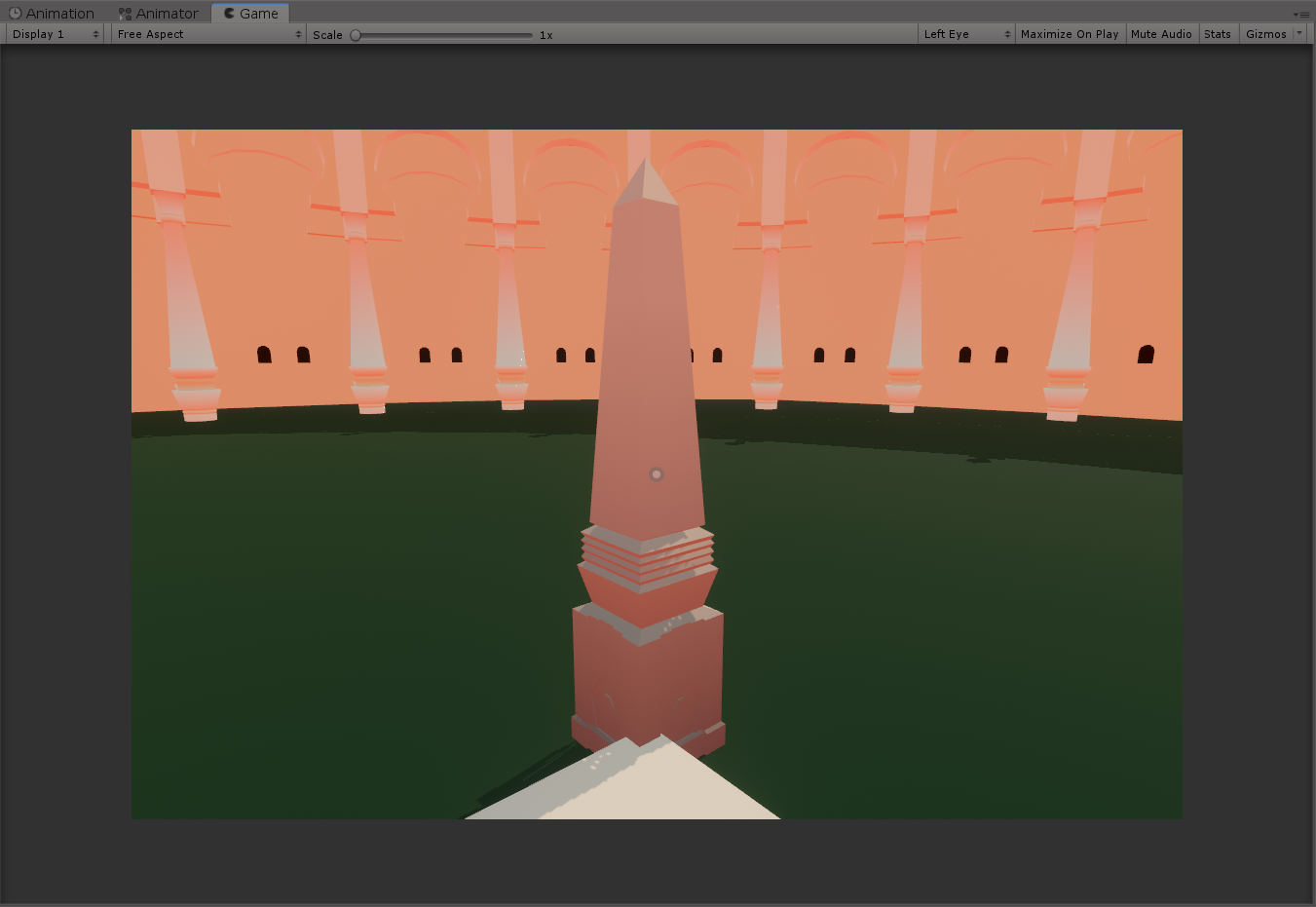

Also yes for some reason lighting in my world is incredibly reddish and I'm still not sure why
errant beacon
frosty goblet
Today we found out that we can use bilinnear filtering to our advantage and blen...
cool! o:
lunar nimbus
Likely your color lighting in the lighting tab or something
frosty goblet
Yeah turned out I needed to re-generate lighting
 exotic cipher
Hey there, are there any information if/when a migration to the next lts version of unity is going to happen? 2018.4 has reached the end of its lifecycle afaik and 2020 has many advantages/features over 2018. I am just curious
 kindred kestrel
i just went to update my world and i am getting this and i am login to the same account i have it uploaded to and i dont know what is going on it was ok last night
 frosty goblet
exotic cipher
Hey there, are there any information if/when a migration to the next lts version...
frosty goblet
exotic cipher
Hey there, are there any information if/when a migration to the next lts version...
I believe the migration will be to 2019, not 2020. No news I've heard about when, though.
exotic cipher
thank you 🙂
 fathom moth
Heya, I wanna have a specific space on my map in a underwater like colour.
how can i do that?
frosty goblet
@fathom moth for Quest or PC or both?
For PC, you can use a post processing volume, but sadly Quest doesnt support PP
A friend of mine used a trigger and wrote a simple script that turns on unity fog that's set to be super blue, so Quest users get a blue underwater vision effect. Maybe that's your best bet
fathom moth
okie i try !
 fickle delta
Ok, so I keep getting this error every time I add a water shader. I've tried aquas and clear water. What am I doing wrong?

I'm on VRCSDK3
 leaden hazel
Can anyone point me at a tutorial or package for how you do Mirror Appear/Disappear shader effects?
fickle delta
fickle delta
Ok, so I keep getting this error every time I add a water shader. I've tried aqu...
Nevermind, I think it was actually a different asset that wasn't compatible with the supported version of Unity
On the note of Clear Water, though... How do I actually add it? I was able to make the top layer of water work by just adding the shader to a cube and turning off the collider. But there's no water texture underneath. Is there supposed to be?
glacial pond
Can you jump in CyanEmu? It doesn't seem to be space bar.
leaden hazel
glacial pond
Can you jump in CyanEmu? It doesn't seem to be space bar.
Yes, check Cyan's settings panel
near escarp
Gotta be enabled
glacial pond
Thanks
 fast python
Trying to make a world using blender and the snap function won't work
Does anyone have any idea why and how I can fix it?
near escarp
Screenshot your screen ?
 near escarp
What's the mix mode for ?
You tried vertex ?
2.93 is the latest version, so it wouldn't surprise me if it was a bit quirky
fast python
I just updated it because it wasn't working on an older version lol
 near escarp
Try with just vertex ?
fast python
No dice
near escarp
Are you hovering the vertices of the object you're snapping to ?
fast python
No, this is my first time using the tool and I'm not even sure I'm doing it correctly
near escarp
near escarp
You have to place your cursor above another vertex while moving your wall
fast python
Still nothin :/
near escarp
Not sure what to suggest, one of the reason i'm always anxious about moving to the latest version of blender is because of things like this
snapping is maybe different on 2.93 
fast python
I was just using 2.82 I think it was?
And it didn't work there so I updated
And now it still isn't working
near escarp
Can you send me two of the walls into an fbx ?
fast python
Sure, but wouldn't it be more effective to check the blend file itself?
near escarp
If you want to send it here sure
fast python
👍
near escarp
Sometimes it's worth resetting blender's default, i just compared what i had with your scene and that was the only difference
Good luck with the rest of your project !
fast python
Thanks! This is my first world so I'm definitely excited to keep this ball rolling
fast python
Sooo much better
 green lagoon
cool
bold ibex
Looks like a nice diner. Or something.
 restive drift
if anyone has really nice wall textures assets that can link or send me i would really appreciate it >w<
leaden hazel
I'm on 2.93 and wasn't aware mix snapping was even a thing o_o
Also still trying to find out how you use the custom shader option on the vrc mirror component
bold ibex
I'm trying to upload a new world made from scratch.
However it's telling me to sign in to the correct account or detach the blueprint.
Immediately after it signs me out.
I've tried detaching the blueprint ID in the SceneDescriptor object.
Still keeps happening.
Any suggestions?
leaden hazel
That's certainly an odd one, especially if the thing is left blank, unless it's somehow generating the same blueprint ID as an existing item belonging to someone else that shouldn't be possible.
bold ibex
Yea, I'm stuck and confused 😦
leaden hazel
And there isn't like, another item somewhere in the scene with a SceneDescriptor on it?
bold ibex
Nope, shouldn't be, it's a pretty small and empty world.
1 plane for the floor.
4 planes for low walls.
1 mirror.
1 vroomba.
1 beer pong table.
1 pool table.
Post processing and a spawn object.
I even tried removing the VRCWorld prefab and readding it to no success
idle jolt
I followed a tutorial on how to make a script for scrolling textures. It works in unity, but in-game it breaks. Any ideas on how to fix it?
random owl
idle jolt
I followed a tutorial on how to make a script for scrolling textures. It works i...
You can't use non whitelisted external scripts in VRChat you would either need to convert the scrolling to work shader based, animation based or with Udon.
bold ibex
@bold ibex did you use the vrcworld prefab or did you create your own objects for scenedescriptor and spawn?
bold ibex
bold ibex
<@456226577798135808> did you use the vrcworld prefab or did you create your own...
I used the prefab. I'll try making my own. Good idea.
Thank you.
oh, I didn't meant to make your own. I always had problems when making my own. I always use the prefab. I just thought you may have had the vrcworld and your own spawn/descriptor since you mentioned a spawn object. I didn't even notice the line that mentioned you were using the vrcworld haha
bold ibex
bold ibex
oh, I didn't meant to make your own. I always had problems when making my own. ...
Ohhh ok.
Yea I used the prefab.
I made a world yesterday which I deleted in a different project.
That worked.
However today I decided to redo everything and start fresh but now I have this issue 😦
You can manually specify an object to use as a spawn which is all I did
I just point the vrcworld where I want to spawn. I never tried having 2 spawns.
I'm gonna quickly build this same world and see what happens
So I found where the SDK is storing temporary files in appdata.
I'm going to try clearing it I think.
Yep that was the issue.
I named the project the same name as the other one.
So I guess it messed up the SDK as it had old files in the temp folder.
Now it appears to work.
This is where I found the files that needed deleted.
AppData\Local\Temp\DefaultCompany{world_name}
@bold ibex Thank you so much for trying to help me ❤️
ah sweet, was going to say. I just finished building the same world and no problem 😄
Yea 🙂 I guess it's not every day you remake a world and name it the same thing
:kek:
Aw no nitro emoji.
Anyways thank you so much, going to work on it now 🙂
What's with the planes though? Do they make good walls? I just use probuilder to build everything. One cube, extrude down, boom floor and 4 walls.
Just habit I suppose.
I've made my own little projects in Unity and used them before.
Ah, I've only been doing this for a few days. So I was curious. I did use some planes for posters though, because trying to texture a photo onto something else never works hahah
I don't know if there's an advantage to it, but they only render on 1 side too
Yea, they just seem easier to work with than playing around with a cube when you just need a flat surface that you only need to see from 1 side/angle
I see the plane is also in probuilder too. So you can still merge them onto everything else. Most of my walls are seen from more than one side, I guess that's why.
That makes sense 🙂
I just made a simple platform (like a box) that you can't leave for now 🙂
My favorite thing so far about it, is that I can merge all my static objects for the framework into one object. I just have to remember not to do it too early cause then you can't move/duplicate anything after. I can still manipulate faces, so that saved me a little bit. But next time I'm not merging until the end. ahahah.
Haha that's a good tip 🙂
I built my first world without probuilder and I don't know how.
If it works, and you like the outcome, that's all that matters 🙂
I'm probably going to delete it once I upload this one. Though, the more I work on this one the longer it seems to take. Because I keep wanting to add tiny things that take up more small testing than building the entire thing did.
I'm on a break now for days to try and learn c# and udon, blaaaah.
C# is fun, I'm pretty experienced in it already.
I still need to learn Udon though
I wish you the best of luck!
idle jolt
random owl
You can't use non whitelisted external scripts in VRChat you would either need t...
How would I do it via a shader?
random owl
Either you find a shader that already has it as a feature or write your own scrolling shader.
Don't have much to link right now as I'm about to sleep but any of the popular VRC toon shaders has scrolling as a feature for example
olive shuttle
Is there a Quest supported video player out there?
 soft zephyr
olive shuttle
Is there a Quest supported video player out there?
soft zephyr
olive shuttle
Is there a Quest supported video player out there?
Yes there are some movies worlds that exist so it’s possible.
olive shuttle
soft zephyr
Yes there are some movies worlds that exist so it’s possible.
sheeesh gonna find it somehow xD
 tawdry owl
where can i find this in my unity?
VRC_PlayerAudioOverride
i can´t Find it anywhere in the SDK3
I want to have an amplifier for my world
 karmic iris
can i build the whole house in blender and then just code in unity?
cuz when i tried i just fell through the gruond
short gulch
You need to add colliders in Unity
You could go the easier route of adding a mesh collider, or you could go the more performant route of adding a bunch of box colliders to the floors and walls
frosty goblet
Is there a recommended toon/cel shader to use for environment in worlds as opposed to on avatars?
I've been using one I found online for a while but it's just not really cutting it anymore, and it's had a weird PC-only graphical bug where objects can be seen through objects slightly, for instance the trees sitting behind this wall:
 near escarp
Which ones have you tried ?
bold ibex
Hey how much play time to i need to upload worlds i have only just got back in to vr chat and decided to make a world plz @ me if you respond to me so i know somone is talking to me
 coarse swan
So I just realised we can open vrchat links with a specified Instance Id in the browser. This might solve some of my issues for moving between worlds.
Query:
Is there anyway for users to open links in browser from VRChat?
near escarp
XSOverlay
near escarp
You can use any overlay, just suggesting XSOverlay because it's objectively the best
coarse swan
Also: Is there a way I can get the current instance ID from within the world?
near escarp
nope
coarse swan
near escarp
You can use any overlay, just suggesting XSOverlay because it's objectively the ...
This is for other users, I want to make world travel between my worlds I have made more deterministic, so a fixed instance ID, which you can do with browser links
near escarp
Well actually you get the ID on the thumbnail, if that's the one you meant
oh, that ID
coarse swan
Via Udon logic
errant beacon
bold ibex
Hey how much play time to i need to upload worlds i have only just got back in t...
There's no minimum amount of play time needed - ranks are based on many things, like friends added, worlds visited, avatars/worlds uploaded (if the account has permission) active hours and etc all help, along with not getting kicked/banned/muted/reported, etc
You need to be New User rank to upload public/private avatars and private worlds, and you need User rank to upload public worlds
near escarp
You already know the ID of all your worlds, what's preventing you to make a system using those with portals ?
coarse swan
near escarp
You already know the ID of all your worlds, what's preventing you to make a syst...
Thats not the instance Id, thats the world Id
bold ibex
errant beacon
There's no minimum amount of play time needed - ranks are based on many things, ...
Ok thx
coarse swan
I want to have two worlds A and B linked to each other, and a user who travels back and forth to still end up in the same world they came from
which is unreliable using vanilla portals, you are likely to end up in a different instance
coarse swan
Bleh. If instance Id was exposed thatd solve half my issues
Cause that also amusingly also provides you a way to "send" data to a world from another, you can encode some bytes (16? 32?) of data in the instance Id itself if you specify it
idle jolt
Does anyone have any good Star Wars props? Something small that’d fit on top of a crate, like a data pad.
short gulch
frosty goblet
Is there a recommended toon/cel shader to use for environment in worlds as oppos...
I've had luck with newer versions of Poiyomi's Toon Shader. The world I'm working on has a more realistic feel but it has so many options that you can get pretty much any style out of it.


They say it's meant for avatars but it works just as well in worlds
idle jolt
Does the newer shaders work for quest?
short gulch
Nope only standard works on quest
idle jolt
Really? Fuck
I really wanted to make a scrolling texture that quest can see...
I imported a shader, but by the sounds of it it won’t work
errant beacon
short gulch
Nope only standard works on quest
afaik custom shaders are allowed on Quest worlds, just not Quest avatars? o:
idle jolt
Afaik?
short gulch
Oh really?
idle jolt
So the custom shader would work then??
idle jolt
Hold on let me see if I can find the name on my tablet
errant beacon
idle jolt
Afaik?
as far as I know lol
idle jolt
Okay the shader is called Cdrsans UVScroll Shader
desert python
sounds simple enough
 fervent garden
is there a special chat for showing off worlds or would this be the place?
desert python
idk, id still use it but not sure what the outcome may be on game
frosty goblet
short gulch
I've had luck with newer versions of Poiyomi's Toon Shader. The world I'm worki...
Yeah that's what I'm afraid of. I'm going to have a big world and I'm afraid that an "avatars" shader may be too heavy for extended use in a large world y'know?
bold ibex
@fervent garden #shameless-self-promotion might work for that
frosty goblet
But Idk a thing about shader performance so I might just be terribly confused
fervent garden
bold ibex
<@!190327128519213056> <#380564294506643457> might work for that
👍 thanks
short gulch
Well, after switching my world to Poi's shader it still performs just as bad, but the important part is that it didn't get any worse. Mine is pretty huge too.
errant beacon
def look into occlusion culling if you haven't yet? o:
short gulch
I have, I think a problem is with the size of the buildings, and some having interiors that are a hall that leads straight through, they don't always occlude the ones behind them. Ruubick suggested combining meshes that use the same materials, but I haven't gotten around to trying that yet.
Would fog hurt performance at all?
errant beacon
def depends on the type of fog but I don't think normal Unity fog'd notably hurt performance?
could vv well be wrong on that though
short gulch
Mkay, also on the topic of fog, is there any way to add it in vrc other than the default Unity fog? I'd like to be able to animate it along with my day/night cycle. (Somehow doesn't completely destroy performance, roughly the same frame rate as if it was disabled)
bold ibex
One asset bundle I had had some fog particle system prefab within it. I used that, other than that tho I dunno
short gulch
Do you happen to remember the name of that asset bundle?
bold ibex
I could find out, but it was also like 30 $
green lagoon
short gulch
I have, I think a problem is with the size of the buildings, and some having int...
maybe you could have it where it has the interior's turned off until you actually go into them
short gulch
I'd really appreciate that if you don't mind ryanxpei, cost isn't really an issue.
short gulch
green lagoon
maybe you could have it where it has the interior's turned off until you actuall...
Well, funny thing about that lol. The way this map was made is that the interiors are not a separate piece (they're extremely simple anyway and there may just be like 2 or 3 props inside of each one like a door or something.) But the buildings themselves are segmented and the segments contain pieces of the interior.
errant beacon
Silent has a bunch of useful shaders/effects for VRChat, and his XSVolumetrics might be what you're looking for? o:
https://gitlab.com/s-ilent/XSVolumetrics
also here's the rest of his shaders and such: https://gitlab.com/users/s-ilent/projects
bold ibex
looks like it was a mist prefab particle effect, not a fog. But it looked like fog.
It's called c.v.p - japanese garden
I really like it for the trees you can use to fire up some terrain, tho my worlds never use terrain hahahah
short gulch
Awesome, thanks guys. I'll check both of those out :)
Using the default Unity fog looks alright, but it looks weird with it not changing with the time of day. This was recorded in the editor so it's a little laggier than ingame.
glacial pond
short gulch
Using the default Unity fog looks alright, but it looks weird with it not changi...
😄
 short gulch
Oh wow I didn't know you could do that with sdk 3. Still gotta convert this world over to sdk 3
fast python
I need some texture help if anyone can help troubleshoot
In Unity it looks awful

But in blender it looks fine
 glacial pond
short gulch
Oh wow I didn't know you could do that with sdk 3. Still gotta convert this wor...
glacial pond
short gulch
Oh wow I didn't know you could do that with sdk 3. Still gotta convert this wor...
most things Mono behavoirs can do, Udon behavoirs can do. A few things are sealed off for safety reasons
short gulch
Gotcha, thanks!
Hmm, Can it change the density of the fog too? I want it to get a little more dense in the morning
glacial pond
yes, the whole rendersettings class is exposed in udon
all the methods and set/gets are there
short gulch
Sweet thanks, I barely know anything about udon so far lol
glacial pond
what I do is look up documentation for unity's mono behavoir scripting to see what all Udon can do, since pretty much all the classes are just forwarded to udon. with few exceptions
the names of the classes and methods are all the same
it can be a bit daunting if you've never coded before (or in my case, never worked with nodes before) but you can scratch simple things together pretty easily
 short gulch
Very good to know. Only reason I haven't converted this world to sdk 3 yet is because my cars will break and I'm kinda intimidated by Udon due to never having coded before. Was kinda waiting for Varneon to release his car prefab first.
glacial pond
Going purely with using the node graph, I find it less confusing than setting up triggers. But i know alot of people who say triggers just make more sense to them. it's really two different ways of thinking
short gulch
I was gonna rely heavily on CyanTriggers lol
idle jolt
Does anyone have any Star Wars misc. props? Like data pads, and other stuff that’d look cool on top of a crate
https://sketchfab.com/3d-models/star-wars-datapad-f77a789b3dc74278b479bd0f8ca7866a
Small stuff like this is what I’d like. Unfortunately I can’t download this...

Star Wars Datapad. - Star Wars Datapad - 3D model by LarsH. (@LarsH.) [f77a789]
short gulch
I've come to understand them fairly well, and its what I'm used to from back when I made Source maps years ago.
errant beacon
short gulch
I've come to understand them fairly well, and its what I'm used to from back whe...
laughs in nodraw


 red urchin
Does anyone here have experience with messing with QVPen in worlds?
I'm trying to change the color of the markers and ink but I can't figure out how to change the color of the ink
I can change the color of the physical markers with their materials though
bold ibex
Never tried, they had enough colors for me by default
red urchin
Yeah I had wanted to make the colors more pastel and less saturated was all
bold ibex
there's a way for sure, I just haven't looked into it. But I'm sure someone has.
red urchin
yeah i've seen a few worlds that use qvpen that have custom colors before
quaint creek
Hey all dose anyone know how to stop my texture from stretching when i put it on my walls and floors